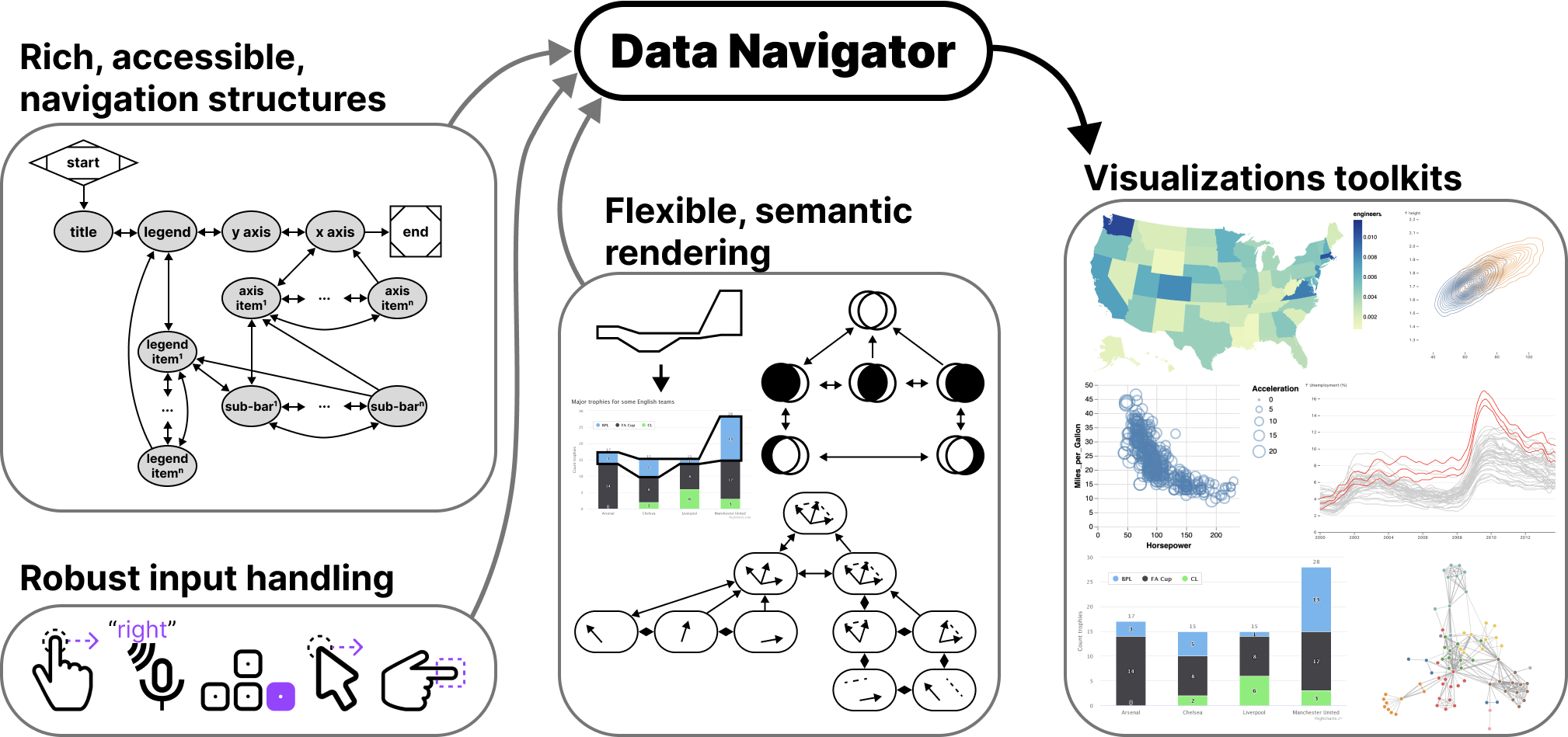
├── .gitignore ├── assets ├── path.png ├── inputs.png ├── journey.png ├── static.png └── data_navigator.png ├── src ├── index.ts ├── utilities.ts ├── input.ts ├── consts.ts ├── data-navigator.ts └── rendering.ts ├── tsconfig.json ├── .prettierrc ├── .prettierignore ├── examples ├── basic_list │ ├── basic_list.css │ ├── bokeh.js │ ├── basic_list.html │ └── basic_list.js ├── bokeh.js ├── style.css ├── force-graph.js ├── vega-lite-app.js └── docs.js ├── webpack.config.js ├── CONTRIBUTING.md ├── LICENSE ├── plan.md ├── package.json ├── vega-lite.html ├── README.md ├── vis-demo.html ├── testing.html ├── app └── v-bundle.js └── index.html /.gitignore: -------------------------------------------------------------------------------- 1 | node_modules 2 | yarn-debug.log* 3 | yarn-error.log* 4 | .DS-Store 5 | dist -------------------------------------------------------------------------------- /assets/path.png: -------------------------------------------------------------------------------- https://raw.githubusercontent.com/cmudig/data-navigator/HEAD/assets/path.png -------------------------------------------------------------------------------- /assets/inputs.png: -------------------------------------------------------------------------------- https://raw.githubusercontent.com/cmudig/data-navigator/HEAD/assets/inputs.png -------------------------------------------------------------------------------- /assets/journey.png: -------------------------------------------------------------------------------- https://raw.githubusercontent.com/cmudig/data-navigator/HEAD/assets/journey.png -------------------------------------------------------------------------------- /assets/static.png: -------------------------------------------------------------------------------- https://raw.githubusercontent.com/cmudig/data-navigator/HEAD/assets/static.png -------------------------------------------------------------------------------- /assets/data_navigator.png: -------------------------------------------------------------------------------- https://raw.githubusercontent.com/cmudig/data-navigator/HEAD/assets/data_navigator.png -------------------------------------------------------------------------------- /src/index.ts: -------------------------------------------------------------------------------- 1 | import { default as structure } from './structure'; 2 | import { default as input } from './input'; 3 | import { default as rendering } from './rendering'; 4 | 5 | export default { structure, input, rendering }; 6 | -------------------------------------------------------------------------------- /tsconfig.json: -------------------------------------------------------------------------------- 1 | { 2 | "compilerOptions": { 3 | "outDir": "./dist", 4 | "allowJs": true, 5 | "target": "es5", 6 | "declaration": true 7 | }, 8 | "include": ["./src/**/*", "./examples/**/*"] 9 | } 10 | -------------------------------------------------------------------------------- /.prettierrc: -------------------------------------------------------------------------------- 1 | { 2 | "printWidth": 120, 3 | "singleQuote": true, 4 | "useTabs": false, 5 | "tabWidth": 4, 6 | "trailingComma": "none", 7 | "bracketSpacing": true, 8 | "insertPragma": false, 9 | "semi": true, 10 | "requirePragma": false, 11 | "proseWrap": "preserve", 12 | "arrowParens": "avoid" 13 | } -------------------------------------------------------------------------------- /.prettierignore: -------------------------------------------------------------------------------- 1 | *.lock 2 | **/node_modules/ 3 | **/*.lock 4 | **/*.log 5 | **/*.d.ts 6 | **/*.config.js 7 | **/*.editorconfig 8 | **/*.gitignore 9 | **/LICENSE 10 | **/LICENSE HEADER 11 | .prettierignore 12 | *.log 13 | **/*.png 14 | **/*.jpg 15 | **/*.ico 16 | **/*.svg 17 | **/*.prod 18 | **/*.staging 19 | **/build/ 20 | **/dist/ 21 | **/app/ 22 | **/*.snap 23 | **/*.env -------------------------------------------------------------------------------- /examples/basic_list/basic_list.css: -------------------------------------------------------------------------------- 1 | main { 2 | padding-top: 20px; 3 | } 4 | 5 | .dn-root { 6 | position: relative; 7 | } 8 | 9 | .dn-wrapper { 10 | position: absolute; 11 | top: 0px; 12 | left: 0px; 13 | } 14 | 15 | .dn-node { 16 | position: absolute; 17 | padding: 0px; 18 | margin: 0px; 19 | overflow: visible; 20 | border: 1px solid white; 21 | outline: #00000000 solid 1px; 22 | } 23 | 24 | .dn-node:focus { 25 | border: 1px solid white; 26 | outline: #313131 solid 1px; 27 | } 28 | 29 | .dn-node-text { 30 | width: 100%; 31 | pointer-events: none; 32 | } 33 | 34 | .dn-entry-button { 35 | position: relative; 36 | top: -20px; 37 | z-index: 999; 38 | } 39 | -------------------------------------------------------------------------------- /src/utilities.ts: -------------------------------------------------------------------------------- 1 | import { DatumObject, DescriptionOptions } from './data-navigator'; 2 | 3 | export const describeNode = (d: DatumObject, descriptionOptions?: DescriptionOptions) => { 4 | const keys = Object.keys(d); 5 | let description = ''; 6 | keys.forEach(key => { 7 | description += `${descriptionOptions && descriptionOptions.omitKeyNames ? '' : key + ': '}${d[key]}. `; 8 | }); 9 | description += (descriptionOptions && descriptionOptions.semanticLabel) || 'Data point.'; 10 | return description; 11 | }; 12 | 13 | export const createValidId = (s: string): string => { 14 | // We start the string with an underscore, then replace all invalid characters with underscores 15 | return '_' + s.replace(/[^a-zA-Z0-9_-]+/g, '_'); 16 | }; 17 | -------------------------------------------------------------------------------- /webpack.config.js: -------------------------------------------------------------------------------- 1 | const path = require('path'); 2 | 3 | module.exports = { 4 | entry: { 5 | 'v-bundle': './examples/vega-lite-app.js', 6 | 'static-bundle': './examples/static-app.js', 7 | 'testing-bundle': './examples/testing-environment.js', 8 | 'docs': './examples/docs.js', 9 | 'vis': './examples/vis-demo.js' 10 | }, 11 | output: { 12 | filename: '[name].js', 13 | path: path.resolve(__dirname, 'app'), 14 | }, 15 | resolve: { 16 | extensions: ["", ".webpack.js", ".web.js", ".ts", ".tsx", ".js"], 17 | }, 18 | module: { 19 | rules: [ 20 | { test: /\.tsx?$/, loader: "ts-loader" }, 21 | { test: /\.js$/, loader: "source-map-loader" }, 22 | ], 23 | }, 24 | optimization: { 25 | minimize: true 26 | }, 27 | }; -------------------------------------------------------------------------------- /CONTRIBUTING.md: -------------------------------------------------------------------------------- 1 | # Contributing 2 | 3 | ## Dependencies 4 | 5 | Check the [package.json](./package.json) for dev dependencies. Currently data-navigator does not use external dependencies. It is a vanilla library. 6 | 7 | ## Getting started 8 | 9 | - Fork or clone and branch 10 | - Install stuff: `yarn` 11 | - Look at our types: [data-navigator.d.ts](./data-navigator.d.ts) 12 | - Look at our scripts and things: [package.json](./package.json) 13 | - Look at our current plan: [plan.md](./plan.md) 14 | 15 | ## After making changes 16 | 17 | - Get stuff looking good: `yarn prettier-all` 18 | - Build it: `yarn build` 19 | - Serve: `yarn server` 20 | - Test with different assistive technologies 21 | - Once it looks good, open a PR 22 | 23 | ## Releasing 24 | 25 | (only from main branch, only core dev team can do this) 26 | 27 | - Bump version: `npm version` and specify `major|minor|patch` 28 | - Get it out there: `npm publish` 29 | - Update repo: `git push` 30 | - Update repo tags: `git push --tags` 31 | - Create github release 32 | -------------------------------------------------------------------------------- /LICENSE: -------------------------------------------------------------------------------- 1 | MIT License 2 | 3 | Copyright (c) 2023 Carnegie Mellon University 4 | 5 | Permission is hereby granted, free of charge, to any person obtaining a copy 6 | of this software and associated documentation files (the "Software"), to deal 7 | in the Software without restriction, including without limitation the rights 8 | to use, copy, modify, merge, publish, distribute, sublicense, and/or sell 9 | copies of the Software, and to permit persons to whom the Software is 10 | furnished to do so, subject to the following conditions: 11 | 12 | The above copyright notice and this permission notice shall be included in all 13 | copies or substantial portions of the Software. 14 | 15 | THE SOFTWARE IS PROVIDED "AS IS", WITHOUT WARRANTY OF ANY KIND, EXPRESS OR 16 | IMPLIED, INCLUDING BUT NOT LIMITED TO THE WARRANTIES OF MERCHANTABILITY, 17 | FITNESS FOR A PARTICULAR PURPOSE AND NONINFRINGEMENT. IN NO EVENT SHALL THE 18 | AUTHORS OR COPYRIGHT HOLDERS BE LIABLE FOR ANY CLAIM, DAMAGES OR OTHER 19 | LIABILITY, WHETHER IN AN ACTION OF CONTRACT, TORT OR OTHERWISE, ARISING FROM, 20 | OUT OF OR IN CONNECTION WITH THE SOFTWARE OR THE USE OR OTHER DEALINGS IN THE 21 | SOFTWARE. 22 | -------------------------------------------------------------------------------- /plan.md: -------------------------------------------------------------------------------- 1 | # Plan 2 | 3 | ## First priorities: 4 | 5 | - build out the `structure` module, which should generate node-edge data structure from input JSON 6 | - create toGraphViz method 7 | - create fromGraphViz method: look at perfopticon? (see how they did it) 8 | - create node builder, edgebuilder, and navbuilder (and wrap all 3 into 1) 9 | - add example with set diagram 10 | 11 | ## Follow-up work (big picture stuff): 12 | 13 | - Build UI tool for creating DN strcture visually 14 | - Models to help with UI tool? 15 | - Keyboard instructions 16 | - Build examples: 17 | - Visualizations: 18 | - Maps/spatial 19 | - Graphs/diagrams 20 | - Sankey/alluvial/flow 21 | - Math functions 22 | - Super cool custom work 23 | - Non-visualizations: 24 | - Simple game UI in canvas or webGL 25 | - Simple Doc UI in canvas or webGL 26 | - ?? 27 | - Patterns: 28 | - Serial (bar) 29 | - Simple Nested (scatter aka vega-lite example we currently have) 30 | - Grouped (bar/line) 31 | - Binned (histogram/continuous scale line/scatter) 32 | - Multi-tree (existing example with highcharts) 33 | - ?? 34 | - Input modalities 35 | - Screen reader/keyboard 36 | - Voice 37 | - Hand gesture 38 | - touch (and mobile screen reader) 39 | - Click + focus handling (with on-demand rendering?) 40 | - Run user studies on previous examples 41 | - Put user study results on the webpage itself perhaps? 42 | -------------------------------------------------------------------------------- /package.json: -------------------------------------------------------------------------------- 1 | { 2 | "name": "data-navigator", 3 | "author": "Frank Elavsky", 4 | "version": "2.2.0", 5 | "main": "./dist/index.jsm", 6 | "module": "./dist/index", 7 | "types": "./dist/src/index.d.ts", 8 | "files": [ 9 | "dist/**/*" 10 | ], 11 | "exports": { 12 | ".": { 13 | "import": { 14 | "types": "./dist/src/index.d.ts", 15 | "default": "./dist/index.js" 16 | }, 17 | "require": { 18 | "types": "./dist/src/index.d.ts", 19 | "default": "./dist/index.mjs" 20 | } 21 | } 22 | }, 23 | "keywords": [ 24 | "visualization", 25 | "accessibility", 26 | "touch", 27 | "keyboard" 28 | ], 29 | "description": "Data-navigator is a JavaScript library that allows for serial navigation of data structures using a variety of input modalities and assistive technologies.", 30 | "scripts": { 31 | "clean": "rm -rf ./dist && rm -rf ./app", 32 | "build": "yarn build:app && yarn build:index && yarn build:modules", 33 | "build:app": "webpack", 34 | "build:index": "tsup src/index.ts --format cjs,esm", 35 | "build:modules": "tsup src/structure.ts src/input.ts src/rendering.ts src/utilities.ts src/consts.ts --format cjs,esm --minify", 36 | "server": "python -m http.server", 37 | "prettier-all-check": "prettier --config ./.prettierrc --ignore ./.prettierignore --debug-check \"**/*.{js,jsx,ts,tsx,html,jsx,json,css,scss,md}\"", 38 | "prettier-all": "prettier --config ./.prettierrc --ignore ./.prettierignore --write \"**/*.{js,jsx,ts,tsx,html,jsx,json,css,scss,md}\"" 39 | }, 40 | "devDependencies": { 41 | "@swc/core": "^1.3.75", 42 | "prettier": "^2.6.2", 43 | "source-map-loader": "^4.0.1", 44 | "ts-loader": "^9.4.4", 45 | "tsup": "^7.2.0", 46 | "typescript": "^5.1.6", 47 | "webpack": "^5.76.0", 48 | "webpack-cli": "^4.9.2" 49 | } 50 | } 51 | -------------------------------------------------------------------------------- /examples/basic_list/bokeh.js: -------------------------------------------------------------------------------- 1 | export const plot = (id, focusData) => { 2 | const stores = ['a', 'b']; 3 | const plt = Bokeh.Plotting; 4 | 5 | const p = plt.figure({ 6 | x_range: stores, 7 | y_range: [0, 5.5], 8 | height: 300, 9 | width: 300, 10 | title: 'Fruit cost by store', 11 | output_backend: 'svg', 12 | toolbar_location: null, 13 | tools: '' 14 | }); 15 | 16 | p.vbar({ 17 | x: stores, 18 | top: [3, 2.75], 19 | bottom: [0, 0], 20 | width: 0.8, 21 | color: ['#FCB5B6', '#FCB5B6'], 22 | line_color: ['#8F0002', '#8F0002'] 23 | }); 24 | 25 | p.vbar({ 26 | x: stores, 27 | top: [3.75, 4], 28 | bottom: [3, 2.75], 29 | width: 0.8, 30 | color: ['#F9E782', '#F9E782'], 31 | line_color: ['#766500', '#766500'] 32 | }); 33 | 34 | if (focusData) { 35 | p.vbar({ 36 | x: stores, 37 | top: focusData.top, 38 | bottom: focusData.bottom, 39 | width: 0.8, 40 | line_width: 3, 41 | color: ['none', 'none'], 42 | line_color: focusData.line_color 43 | }); 44 | } 45 | 46 | const r1 = p.square([-10000], [-10000], { color: '#FCB5B6', line_color: '#8F0002' }); 47 | const r2 = p.square([-10000], [-10000], { color: '#F9E782', line_color: '#766500' }); 48 | 49 | const legend_items = [ 50 | new Bokeh.LegendItem({ label: 'apple', renderers: [r1] }), 51 | new Bokeh.LegendItem({ label: 'banana', renderers: [r2] }) 52 | ]; 53 | const legend = new Bokeh.Legend({ items: legend_items, location: 'top_left', orientation: 'horizontal' }); 54 | p.add_layout(legend); 55 | 56 | plt.show(p, `#${id}`); 57 | const plotToHide = document.getElementById(id); 58 | if (plotToHide) { 59 | plotToHide.inert = true; //we need to do this in order to disable the bad accessibility bokeh currently has 60 | } 61 | const wrapper = document.getElementById(`${id}-wrapper`); 62 | wrapper.setAttribute('aria-label', 'Fruit cost by store. Bokeh stacked bar chart.'); 63 | }; 64 | -------------------------------------------------------------------------------- /examples/bokeh.js: -------------------------------------------------------------------------------- 1 | export const plot = (id, focusData) => { 2 | const stores = ['a', 'b']; 3 | const plt = Bokeh.Plotting; 4 | 5 | const p = plt.figure({ 6 | x_range: stores, 7 | y_range: [0, 5.5], 8 | height: 300, 9 | width: 300, 10 | title: 'Fruit cost by store', 11 | output_backend: 'svg', 12 | toolbar_location: null, 13 | tools: '' 14 | }); 15 | 16 | p.vbar({ 17 | x: stores, 18 | top: [3, 2.75], 19 | bottom: [0, 0], 20 | width: 0.8, 21 | color: ['#FCB5B6', '#FCB5B6'], 22 | line_color: ['#8F0002', '#8F0002'] 23 | }); 24 | 25 | p.vbar({ 26 | x: stores, 27 | top: [3.75, 4], 28 | bottom: [3, 2.75], 29 | width: 0.8, 30 | color: ['#F9E782', '#F9E782'], 31 | line_color: ['#766500', '#766500'] 32 | }); 33 | 34 | if (focusData) { 35 | p.vbar({ 36 | x: stores, 37 | top: focusData.top, 38 | bottom: focusData.bottom, 39 | width: 0.8, 40 | line_width: 3, 41 | color: ['none', 'none'], 42 | line_color: focusData.line_color 43 | }); 44 | } 45 | 46 | const r1 = p.square([-10000], [-10000], { color: '#FCB5B6', line_color: '#8F0002' }); 47 | const r2 = p.square([-10000], [-10000], { color: '#F9E782', line_color: '#766500' }); 48 | 49 | const legend_items = [ 50 | new Bokeh.LegendItem({ label: 'apple', renderers: [r1] }), 51 | new Bokeh.LegendItem({ label: 'banana', renderers: [r2] }) 52 | ]; 53 | const legend = new Bokeh.Legend({ items: legend_items, location: 'top_left', orientation: 'horizontal' }); 54 | p.add_layout(legend); 55 | 56 | plt.show(p, `#${id}`); 57 | const plotToHide = document.getElementById(id); 58 | if (plotToHide) { 59 | plotToHide.inert = true; //we need to do this in order to disable the bad accessibility bokeh currently has 60 | } 61 | const wrapper = document.getElementById(`${id}-wrapper`); 62 | wrapper.setAttribute( 63 | 'aria-label', 64 | 'Fruit cost by store. Bokeh stacked bar chart. Store a: Apple 3, Banana 0.75. Store b: Apple 2.75, Banana 1.25.' 65 | ); 66 | }; 67 | -------------------------------------------------------------------------------- /examples/basic_list/basic_list.html: -------------------------------------------------------------------------------- 1 | 2 | 3 | 4 | 5 | Data Navigator Basic List 6 | 7 | 8 | 9 |
10 |
11 |
12 | 19 |
20 |
21 | 22 | 27 | 32 | 37 | 42 | 47 | 52 | 53 | 54 | 55 | 56 | -------------------------------------------------------------------------------- /vega-lite.html: -------------------------------------------------------------------------------- 1 | 2 | 3 | 4 | 5 | Data Navigator Examples 6 | 7 | 13 | 29 | 30 | 35 | 36 | 37 | 38 | 39 | 40 |
41 | 42 |
43 |
44 |

Data Navigator Vega-Lite Examples

45 |

Hi! Welcome to our testing area :)

46 |
47 |
48 |
49 | 50 | 51 | 52 | 53 | 54 | -------------------------------------------------------------------------------- /src/input.ts: -------------------------------------------------------------------------------- 1 | import { defaultKeyBindings, GenericFullNavigationRules } from './consts'; 2 | import type { InputOptions } from './data-navigator'; 3 | 4 | export default (options: InputOptions) => { 5 | let inputHandler = {} as any; 6 | let keyBindings = defaultKeyBindings; 7 | let directions = GenericFullNavigationRules; 8 | 9 | inputHandler.moveTo = id => { 10 | const target = options.structure.nodes[id]; 11 | if (target) { 12 | return target; 13 | } 14 | return; 15 | }; 16 | inputHandler.move = (currentFocus, direction) => { 17 | if (currentFocus) { 18 | const d = options.structure.nodes[currentFocus]; 19 | if (d.edges) { 20 | let target = null; 21 | let i = 0; 22 | const navRule = directions[direction]; 23 | if (!navRule) { 24 | return; 25 | } 26 | const findTarget = (rule, edge) => { 27 | if (!(rule === direction)) { 28 | return null; 29 | } 30 | let resolvedNodes = { 31 | target: typeof edge.target === 'string' ? edge.target : edge.target(d, currentFocus), 32 | source: typeof edge.source === 'string' ? edge.source : edge.source(d, currentFocus) 33 | }; 34 | return !(resolvedNodes[navRule.direction] === currentFocus) 35 | ? resolvedNodes[navRule.direction] 36 | : null; 37 | }; 38 | for (i = 0; i < d.edges.length; i++) { 39 | const edge = options.structure.edges[d.edges[i]]; 40 | // if (Array.isArray(types)) { 41 | edge.navigationRules.forEach(rule => { 42 | if (!target) { 43 | target = findTarget(rule, edge); 44 | } 45 | }); 46 | // } else { 47 | // target = verifyEdge(types, edge); 48 | // } 49 | if (target) { 50 | break; 51 | } 52 | } 53 | if (target) { 54 | return inputHandler.moveTo(target); 55 | } 56 | return undefined; 57 | } 58 | } 59 | }; 60 | inputHandler.enter = () => { 61 | if (options.entryPoint) { 62 | return inputHandler.moveTo(options.entryPoint); 63 | } else { 64 | console.error('No entry point was specified in InputOptions, returning undefined'); 65 | return; 66 | } 67 | }; 68 | inputHandler.exit = () => { 69 | if (options.exitPoint) { 70 | return options.exitPoint; 71 | } else { 72 | console.error('No exit point was specified in InputOptions, returning undefined'); 73 | return; 74 | } 75 | }; 76 | inputHandler.keydownValidator = e => { 77 | const direction = keyBindings[e.code]; 78 | if (direction) { 79 | return direction; 80 | } 81 | }; 82 | inputHandler.focus = renderId => { 83 | const node = document.getElementById(renderId); 84 | if (node) { 85 | node.focus(); 86 | } 87 | }; 88 | inputHandler.setNavigationKeyBindings = navKeyBindings => { 89 | if (!navKeyBindings) { 90 | keyBindings = defaultKeyBindings; 91 | directions = GenericFullNavigationRules; 92 | } else { 93 | keyBindings = {}; 94 | directions = navKeyBindings; 95 | Object.keys(navKeyBindings).forEach(direction => { 96 | const navOption = navKeyBindings[direction]; 97 | keyBindings[navOption.key] = direction; 98 | }); 99 | } 100 | }; 101 | 102 | inputHandler.setNavigationKeyBindings(options.navigationRules); 103 | return inputHandler; 104 | }; 105 | -------------------------------------------------------------------------------- /src/consts.ts: -------------------------------------------------------------------------------- 1 | import type { DatumObject, NavigationRules, RenderObject } from './data-navigator'; 2 | 3 | export const SemanticKeys = { 4 | Escape: true, 5 | Enter: true, 6 | Backspace: true, 7 | ArrowLeft: true, 8 | ArrowRight: true, 9 | ArrowUp: true, 10 | ArrowDown: true 11 | }; 12 | 13 | export const defaultKeyBindings = { 14 | ArrowLeft: 'left', 15 | ArrowRight: 'right', 16 | ArrowUp: 'up', 17 | ArrowDown: 'down', 18 | Period: 'forward', 19 | Comma: 'backward', 20 | Escape: 'parent', 21 | Enter: 'child' 22 | } as DatumObject; 23 | 24 | export const TypicallyUnreservedKeys = ['KeyW', 'KeyJ', 'LeftBracket', 'RightBracket', 'Slash', 'Backslash']; 25 | 26 | export const TypicallyUnreservedSoloKeys = ['KeyW', 'KeyJ']; 27 | 28 | export const TypicallyUnreservedKeyPairs = [ 29 | ['LeftBracket', 'RightBracket'], 30 | ['Slash', 'Backslash'] 31 | ]; 32 | 33 | export const GenericFullNavigationRules = { 34 | left: { 35 | key: 'ArrowLeft', 36 | direction: 'source' 37 | }, 38 | right: { 39 | key: 'ArrowRight', 40 | direction: 'target' 41 | }, 42 | up: { 43 | key: 'ArrowUp', 44 | direction: 'source' 45 | }, 46 | down: { 47 | key: 'ArrowDown', 48 | direction: 'target' 49 | }, 50 | child: { 51 | key: 'Enter', 52 | direction: 'target' 53 | }, 54 | parent: { 55 | key: 'Backspace', 56 | direction: 'source' 57 | }, 58 | backward: { 59 | key: 'Comma', 60 | direction: 'source' 61 | }, 62 | forward: { 63 | key: 'Period', 64 | direction: 'target' 65 | }, 66 | previous: { 67 | key: 'Semicolon', 68 | direction: 'source' 69 | }, 70 | next: { 71 | key: 'Quote', 72 | direction: 'target' 73 | }, 74 | exit: { 75 | key: 'Escape', 76 | direction: 'target' 77 | }, 78 | help: { 79 | key: 'KeyY', 80 | direction: 'target' 81 | }, 82 | undo: { 83 | key: 'KeyZ', 84 | direction: 'target' 85 | } 86 | } as NavigationRules; 87 | 88 | export const GenericFullNavigationDimensions = [ 89 | ['left', 'right'], 90 | ['up', 'down'], 91 | ['backward', 'forward'], 92 | ['previous', 'next'] 93 | ]; 94 | export const GenericFullNavigationPairs = { 95 | left: ['left', 'right'], 96 | right: ['left', 'right'], 97 | up: ['up', 'down'], 98 | down: ['up', 'down'], 99 | backward: ['backward', 'forward'], 100 | forward: ['backward', 'forward'], 101 | previous: ['previous', 'next'], 102 | next: ['previous', 'next'], 103 | parent: ['parent', 'child'], 104 | child: ['parent', 'child'], 105 | exit: ['exit', 'undo'], 106 | undo: ['undo', 'undo'] 107 | }; 108 | 109 | export const GenericLimitedNavigationRules = { 110 | right: { 111 | key: 'ArrowRight', 112 | direction: 'target' 113 | }, 114 | left: { 115 | key: 'ArrowLeft', 116 | direction: 'source' 117 | }, 118 | down: { 119 | key: 'ArrowDown', 120 | direction: 'target' 121 | }, 122 | up: { 123 | key: 'ArrowUp', 124 | direction: 'source' 125 | }, 126 | child: { 127 | key: 'Enter', 128 | direction: 'target' 129 | }, 130 | parent: { 131 | key: 'Backspace', 132 | direction: 'source' 133 | }, 134 | exit: { 135 | key: 'Escape', 136 | direction: 'target' 137 | }, 138 | undo: { 139 | key: 'Period', 140 | direction: 'target' 141 | }, 142 | legend: { 143 | key: 'KeyL', 144 | direction: 'target' 145 | } 146 | } as NavigationRules; 147 | 148 | export const NodeElementDefaults = { 149 | cssClass: '', 150 | spatialProperties: { 151 | x: 0, 152 | y: 0, 153 | width: 0, 154 | height: 0, 155 | path: '' 156 | }, 157 | semantics: { 158 | label: '', 159 | elementType: 'div', 160 | role: 'image', 161 | attributes: undefined 162 | }, 163 | parentSemantics: { 164 | label: '', 165 | elementType: 'figure', 166 | role: 'figure', 167 | attributes: undefined 168 | }, 169 | existingElement: { 170 | useForSpatialProperties: false, 171 | spatialProperties: undefined 172 | } 173 | } as RenderObject; 174 | -------------------------------------------------------------------------------- /examples/style.css: -------------------------------------------------------------------------------- 1 | body { 2 | /* font-size: 1.25em; */ 3 | margin: 0 auto; 4 | max-width: 40em; 5 | padding: 50px; 6 | } 7 | 8 | img { 9 | width: 100%; 10 | } 11 | 12 | .dn-root { 13 | position: relative; 14 | } 15 | 16 | .dn-wrapper { 17 | position: absolute; 18 | top: 0px; 19 | left: 0px; 20 | } 21 | 22 | .dn-node { 23 | position: absolute; 24 | padding: 0px; 25 | margin: 0px; 26 | overflow: visible; 27 | border: 2px solid white; 28 | outline: #000000 solid 1px; 29 | } 30 | 31 | .dn-node:focus { 32 | border: 2px solid white; 33 | outline: #000000 solid 3px; 34 | } 35 | 36 | .dn-manual-focus-node { 37 | border: 1px solid white; 38 | outline: #00000000 solid 1px; 39 | } 40 | 41 | .dn-manual-focus-node:focus { 42 | border: 1px solid white; 43 | outline: #313131 solid 1px; 44 | } 45 | 46 | .dn-node-svg { 47 | position: absolute; 48 | pointer-events: none; 49 | } 50 | 51 | .dn-node-path { 52 | fill: none; 53 | stroke: #000000; 54 | stroke-width: 4px; 55 | transform: translateY(2px); 56 | } 57 | 58 | .dn-exit-position { 59 | display: none; 60 | position: absolute; 61 | bottom: -18px; 62 | } 63 | 64 | .dn-exit-position:focus { 65 | display: block; 66 | } 67 | 68 | .dn-entry-button { 69 | position: relative; 70 | top: -21px; 71 | z-index: 999; 72 | } 73 | 74 | .wrapper { 75 | position: relative; 76 | } 77 | 78 | .canvasbox { 79 | border-radius: 3px; 80 | margin-right: 10px; 81 | width: 450px; 82 | height: 338px; 83 | border-bottom: 3px solid #0063ff; 84 | box-shadow: 0 2px 3px 0 rgba(0, 0, 0, 0.2), 0 4px 10px 0 #00000030; 85 | } 86 | 87 | .videobox { 88 | display: none; 89 | } 90 | 91 | .hidden { 92 | display: none; 93 | } 94 | 95 | .column { 96 | float: left; 97 | padding-right: 15px; 98 | } 99 | 100 | .left { 101 | width: 400px; 102 | } 103 | 104 | .right { 105 | max-width: 50%; 106 | } 107 | 108 | .row:after { 109 | content: ''; 110 | display: table; 111 | clear: both; 112 | } 113 | 114 | .alert { 115 | color: darkred; 116 | } 117 | 118 | .tooltip { 119 | position: absolute; 120 | padding: 10px; 121 | background-color: white; 122 | border: 1px solid black; 123 | width: 200px; 124 | top: 0; 125 | left: 0; 126 | } 127 | 128 | #docs .tooltip { 129 | border: 1px solid rgba(0, 0, 0, 0.6); 130 | border-left: 1px solid white; 131 | } 132 | 133 | #fist { 134 | position: absolute; 135 | top: 0; 136 | left: 0; 137 | font-size: 2em; 138 | display: none; 139 | } 140 | 141 | #copy-announcer { 142 | font-size: 0.8em; 143 | font-weight: 100; 144 | color: #444; 145 | } 146 | 147 | p { 148 | margin-top: 0; 149 | } 150 | 151 | .video-wrapper { 152 | position: relative; 153 | } 154 | 155 | th { 156 | text-align: left; 157 | } 158 | 159 | h1 { 160 | font-size: 2em; 161 | } 162 | 163 | h2 { 164 | font-size: 1.8em; 165 | } 166 | 167 | h3 { 168 | margin-bottom: 0.2em; 169 | font-size: 1.6em; 170 | } 171 | 172 | h4 { 173 | margin-bottom: 0.2em; 174 | font-size: 1.4em; 175 | } 176 | 177 | h5 { 178 | margin-bottom: 0.2em; 179 | font-size: 1.2em; 180 | } 181 | 182 | .cell { 183 | padding: 2px 10px 2px 0px; 184 | font-weight: normal; 185 | } 186 | 187 | .t-column { 188 | padding-right: 10px; 189 | } 190 | 191 | summary { 192 | padding-bottom: 10px; 193 | font-style: italic; 194 | } 195 | 196 | .limited { 197 | max-width: 365px; 198 | } 199 | 200 | kbd { 201 | border: 1px solid black; 202 | border-radius: 3px; 203 | padding: 0px 0.35em; 204 | } 205 | 206 | #testing-environment .dn-node { 207 | border-radius: 7px; 208 | border: 0px solid white; 209 | outline: #000000 solid 0px; 210 | } 211 | 212 | #testing-environment .dn-node:focus { 213 | outline: #000000 solid 0px; 214 | } 215 | 216 | #testing-environment .dn-node-path { 217 | stroke-width: 2px; 218 | transform: translateY(1px); 219 | } 220 | 221 | #testing-environment .dn-exit-position { 222 | bottom: 0px; 223 | } 224 | 225 | #testing-environment .dn-entry-button { 226 | top: 0px; 227 | } 228 | 229 | #dn-wrapper-data-navigator-schema-added { 230 | width: inherit !important; 231 | } 232 | 233 | #testing-environment code { 234 | background: #333; 235 | padding: 0.1em 0.35em; 236 | color: white; 237 | } 238 | 239 | #testing-environment code.block { 240 | display: block; 241 | overflow: auto; 242 | white-space: pre; 243 | } 244 | 245 | #docs code { 246 | background-color: rgb(43, 43, 43); 247 | color: rgb(248, 248, 242); 248 | padding: 0.1em 0.35em; 249 | border-radius: 3px; 250 | font-size: 0.85em; 251 | } 252 | 253 | #docs .hljs-string { 254 | color: #abe338; 255 | } 256 | 257 | #docs .function_ { 258 | color: #00e0e0; 259 | } 260 | 261 | #docs pre code { 262 | font-size: 0.75em; 263 | border-radius: 20px; 264 | padding: 1.5em; 265 | } 266 | 267 | #docs svg { 268 | border: 1px solid rgba(0, 0, 0, 0.6); 269 | } 270 | 271 | .side-by-side { 272 | display: inline-block; 273 | margin-right: 2em; 274 | } 275 | -------------------------------------------------------------------------------- /README.md: -------------------------------------------------------------------------------- 1 | # Data Navigator 2 | 3 | ![Data Navigator provides visualization toolkits with rich, accessible navigation structures, robust input handling, and flexible, semantic rendering.](https://raw.githubusercontent.com/cmudig/data-navigator/main/assets/data_navigator.png) 4 | 5 | Data Navigator is a JavaScript library that allows for navigation of data structures. Data Navigator makes png, svg, canvas, and even webgl graphics accessible to a wide array of assistive technologies and input modalities. 6 | 7 | Check out [our online, interactive demo](http://dig.cmu.edu/data-navigator/) for a video introduction and to try out Data Navigator hands-on. 8 | 9 | Check out [our docs](http://dig.cmu.edu/data-navigator/docs.html) to learn more about getting started. 10 | 11 | ## Data Navigator's approach 12 | 13 | Data Navigator has abstracted navigation into commands, which enables it to easily receive input from screen readers and keyboards to more interesting modalities like touch and mouse swiping, spoken commands, hand gestures, and even fabricated or totally novel interfaces, like bananas. 14 | 15 | ![Image in two parts. First part: Inputs: A. Hand swiping. B: Speaking "left." C. A hand gesture on camera. D. Bananas. Second part: Output: (focus moves left) A focus indicator has moved on a bar chart from one stacked bar to another on its left.](https://raw.githubusercontent.com/cmudig/data-navigator/main/assets/inputs.png) 16 | 17 | Data Navigator is expressive for builders and enables entire toolkits or ecosystems to become more accessible. The system provides low-level control over narratives, interaction paths, and journeys a user might want to take through an image or graphic. 18 | 19 | Developers can build schemas that scale to work with any chart in a charting library or a single, bespoke implemetation for use in story-telling contexts like journalism, reports, presentations, and interactive infographics. 20 | 21 | ![Image in two parts. First part: A schema for navigation that works with any stacked bar chart. Great for libraries! A complex schema is shown over a stacked bar chart with up, down, left, and right directions. Second part: A bespoke, guided journey through a visual. Great for storytelling! A simple navigation path is shown going through the image.](https://raw.githubusercontent.com/cmudig/data-navigator/main/assets/journey.png) 22 | 23 | Not only are paths through an image customizeable but so are the visual indications that are rendered alongside those journeys. These visual indications use semantically rich, native HTML elements for maximized accessibility. 24 | 25 | ![Code used to render a path that looks like an outline and then place that outline over visual elements on a data visualization.](https://raw.githubusercontent.com/cmudig/data-navigator/main/assets/path.png) 26 | 27 | Visit [our landing page](http://dig.cmu.edu/data-navigator/) to try our demo, which shows a png image made into navigable experience. A variety of input modalities are enabled, including touch and mouse swiping, keyboard, screen reader, text input, voice control, and hand gesture recognition. 28 | 29 | We also have [a vega-lite demo online](https://dig.cmu.edu/data-navigator/vega-lite.html), which (under the hood) shows how someone could write one schema that serves any chart in an ecosystem. 30 | 31 | ## System design 32 | 33 | Data Navigator is organized into 3 separately composable modules: the first is a graph-based _structure_ of nodes and edges, the second handles _input_ and navigation logic, and the third _renders_ the structure. These may be leveraged together or independently. Read our paper to learn more! 34 | 35 | ### Types 36 | 37 | Our types are consolidated into a single [types export file](./src/data-navigator.ts), designed (mostly) as a grammar. Each major module is broken down into subparts, each with their own types, all the way to the primitive-most types used. 38 | 39 | ## Getting started 40 | 41 | We have a thorough introduction to building a navigable visualization on [our docs site](http://dig.cmu.edu/data-navigator/docs.html). But for basic installation, see below: 42 | 43 | You can install or use both esm and cjs modules in a variety of ways, in addition to importing all of data-navigator or just one part. 44 | 45 | ``` 46 | # to install into a project 47 | npm install data-navigator 48 | ``` 49 | 50 | ```js 51 | // to use it in a .js or .ts file 52 | import { default as dataNavigator } from 'data-navigator'; 53 | 54 | // whole ecosystem 55 | console.log('dataNavigator', dataNavigator); 56 | 57 | // one module in the ecosystem 58 | console.log('dataNavigator.rendering', dataNavigator.rendering); 59 | ``` 60 | 61 | ```html 62 | 63 | 68 | ``` 69 | 70 | ## Credit 71 | 72 | Data-Navigator was developed at CMU's [Data Interaction Group](https://dig.cmu.edu/) (CMU DIG), primarily by [Frank Elavsky](https://frank.computer). 73 | 74 | ## Citing Data Navigator 75 | 76 | ```bib 77 | @article{2023-data-navigator, 78 | year = {2023}, 79 | author = {Frank Elavsky and Lucas Nadolskis and Dominik Moritz}, 80 | title = {{Data Navigator:} An Accessibility-Centered Data Navigation Toolkit}, 81 | journal = {{IEEE} {VIS}} 82 | } 83 | ``` 84 | -------------------------------------------------------------------------------- /examples/basic_list/basic_list.js: -------------------------------------------------------------------------------- 1 | import dataNavigator from 'https://cdn.jsdelivr.net/npm/data-navigator@2.2.0/dist/index.mjs'; 2 | import { describeNode } from 'https://cdn.jsdelivr.net/npm/data-navigator@2.2.0/dist/utilities.mjs'; 3 | import { plot } from './bokeh.js'; 4 | 5 | const width = 300; 6 | const height = 300; 7 | const id = 'chart'; 8 | let current = null; 9 | let previous = null; 10 | 11 | const interactiveData = { 12 | data: [ 13 | [ 14 | [3, 2.75], 15 | [0, 0] 16 | ], 17 | [ 18 | [3.75, 4], 19 | [3, 2.75] 20 | ] 21 | ], 22 | indices: { 23 | fruit: { 24 | apple: 0, 25 | banana: 1 26 | }, 27 | store: { 28 | a: 0, 29 | b: 1 30 | } 31 | } 32 | }; 33 | 34 | // begin structure scaffolding 35 | 36 | const structure = { 37 | nodes: { 38 | _0: { 39 | id: '_0', 40 | data: { 41 | fruit: 'apple', 42 | store: 'a', 43 | cost: 3 44 | }, 45 | edges: ['_0-_1', 'any-exit'] 46 | }, 47 | _1: { 48 | id: '_1', 49 | data: { 50 | fruit: 'banana', 51 | store: 'a', 52 | cost: 0.75 53 | }, 54 | edges: ['_0-_1', '_1-_2', 'any-exit'] 55 | }, 56 | _2: { 57 | id: '_2', 58 | data: { 59 | fruit: 'apple', 60 | store: 'b', 61 | cost: 2.75 62 | }, 63 | edges: ['_1-_2', '_2-_3', 'any-exit'] 64 | }, 65 | _3: { 66 | id: '_3', 67 | data: { 68 | fruit: 'banana', 69 | store: 'b', 70 | cost: 1.25 71 | }, 72 | edges: ['_2-_3', 'any-exit'] 73 | } 74 | }, 75 | edges: { 76 | '_0-_1': { 77 | source: '_0', 78 | target: '_1', 79 | navigationRules: ['left', 'right'] 80 | }, 81 | '_1-_2': { 82 | source: '_1', 83 | target: '_2', 84 | navigationRules: ['left', 'right'] 85 | }, 86 | '_2-_3': { 87 | source: '_2', 88 | target: '_3', 89 | navigationRules: ['left', 'right'] 90 | }, 91 | 'any-exit': { 92 | source: (_d, c) => c, 93 | target: () => { 94 | exit(); 95 | return ''; 96 | }, 97 | navigationRules: ['exit'] 98 | } 99 | }, 100 | navigationRules: { 101 | left: { key: 'ArrowLeft', direction: 'source' }, // moves backward when pressing ArrowLeft on the keyboard 102 | right: { key: 'ArrowRight', direction: 'target' }, // moves forward when pressing ArrowRight on the keyboard 103 | exit: { key: 'Escape', direction: 'target' } // exits the structure when pressing Escape on the keyboard 104 | } 105 | }; 106 | 107 | // begin rendering scaffolding 108 | 109 | const addRenderingProperties = nodes => { 110 | // we want to loop over all of our nodes: 111 | Object.keys(nodes).forEach(k => { 112 | let node = nodes[k]; 113 | 114 | if (!node.renderId) { 115 | node.renderId = node.id; 116 | } 117 | 118 | node.semantics = { 119 | label: describeNode(node.data, {}) 120 | }; 121 | 122 | // all of our elements will start at 0,0 and be full width/height 123 | node.spatialProperties = { 124 | x: -2, 125 | y: -2, 126 | width: width, 127 | height: height 128 | }; 129 | }); 130 | }; 131 | addRenderingProperties(structure.nodes); 132 | 133 | const rendering = dataNavigator.rendering({ 134 | elementData: structure.nodes, 135 | defaults: { 136 | cssClass: 'dn-test-class' 137 | }, 138 | suffixId: id, 139 | root: { 140 | id: id + '-wrapper', 141 | cssClass: '', 142 | width: '100%' 143 | }, 144 | entryButton: { 145 | include: true, 146 | callbacks: { 147 | click: () => { 148 | enter(); 149 | } 150 | } 151 | }, 152 | exitElement: { 153 | include: true 154 | } 155 | }); 156 | 157 | // initialize 158 | plot('chart'); 159 | rendering.initialize(); 160 | 161 | // begin input scaffolding 162 | const exit = () => { 163 | rendering.exitElement.style.display = 'block'; 164 | input.focus(exitPoint); 165 | previous = current; 166 | current = null; 167 | rendering.remove(previous); 168 | }; 169 | 170 | const enter = () => { 171 | const nextNode = input.enter(); 172 | if (nextNode) { 173 | initiateLifecycle(nextNode); 174 | } 175 | }; 176 | 177 | const move = direction => { 178 | const nextNode = input.move(current, direction); 179 | 180 | if (nextNode) { 181 | initiateLifecycle(nextNode); 182 | } 183 | }; 184 | 185 | const initiateLifecycle = nextNode => { 186 | // we make a node to turn into an element 187 | const renderedNode = rendering.render({ 188 | renderId: nextNode.renderId, 189 | datum: nextNode 190 | }); 191 | 192 | // we add event listeners 193 | renderedNode.addEventListener('keydown', e => { 194 | // input has a keydown validator 195 | const direction = input.keydownValidator(e); 196 | if (direction) { 197 | e.preventDefault(); 198 | move(direction); // we need to add this function still 199 | } 200 | }); 201 | 202 | renderedNode.addEventListener('blur', _e => {}); 203 | 204 | renderedNode.addEventListener('focus', _e => { 205 | const i = interactiveData.indices.fruit[nextNode.data.fruit]; 206 | const d = interactiveData.data[i]; 207 | const target = interactiveData.indices.store[nextNode.data.store]; 208 | const line_color = target ? ['none', '#000000'] : ['#000000', 'none']; 209 | document.getElementById('chart').innerHTML = ''; 210 | plot('chart', { 211 | top: d[0], 212 | bottom: d[1], 213 | line_color 214 | }); 215 | }); 216 | 217 | // focus the new element, using the renderId for it 218 | input.focus(nextNode.renderId); 219 | 220 | // set state variables 221 | previous = current; 222 | current = nextNode.id; 223 | 224 | // delete the old element 225 | rendering.remove(previous); 226 | }; 227 | 228 | const entryPoint = 229 | structure.nodes[Object.keys(structure.nodes)[0]].id || structure.nodes[Object.keys(structure.nodes)[0]].nodeId; 230 | const exitPoint = rendering.exitElement.id; 231 | 232 | const input = dataNavigator.input({ 233 | structure, 234 | navigationRules: structure.navigationRules, 235 | entryPoint, 236 | exitPoint 237 | }); 238 | -------------------------------------------------------------------------------- /examples/force-graph.js: -------------------------------------------------------------------------------- 1 | // Copyright 2021-2024 Observable, Inc. 2 | // Released under the ISC license. 3 | // https://observablehq.com/@d3/force-directed-graph 4 | /* 5 | @frankelavsky's NOTE: This works beautifully out of the box for my purposes, but I did make a few changes 6 | Record of changes: 7 | - Added a limit to the simulation so that nodes don't fly out of view if without links 8 | - Hide root svg and circle elements from screen readers 9 | */ 10 | export function ForceGraph( 11 | { 12 | nodes, // an iterable of node objects (typically [{id}, …]) 13 | links // an iterable of link objects (typically [{source, target}, …]) 14 | }, 15 | { 16 | nodeId = d => d.id, // given d in nodes, returns a unique identifier (string) 17 | nodeGroup, // given d in nodes, returns an (ordinal) value for color 18 | nodeGroups, // an array of ordinal values representing the node groups 19 | nodeTitle, // given d in nodes, a title string 20 | nodeFill = 'currentColor', // node stroke fill (if not using a group color encoding) 21 | nodeStroke = '#fff', // node stroke color 22 | nodeStrokeWidth = 1.5, // node stroke width, in pixels 23 | nodeStrokeOpacity = 1, // node stroke opacity 24 | nodeRadius = 5, // node radius, in pixels 25 | nodeStrength, 26 | linkSource = ({ source }) => source, // given d in links, returns a node identifier string 27 | linkTarget = ({ target }) => target, // given d in links, returns a node identifier string 28 | linkStroke = '#999', // link stroke color 29 | linkStrokeOpacity = 0.6, // link stroke opacity 30 | linkStrokeWidth = 1.5, // given d in links, returns a stroke width in pixels 31 | linkStrokeLinecap = 'round', // link stroke linecap 32 | linkStrength, 33 | colors = d3.schemeTableau10, // an array of color strings, for the node groups 34 | width = 640, // outer width, in pixels 35 | height = 400, // outer height, in pixels 36 | invalidation, // when this promise resolves, stop the simulation 37 | description, 38 | hide 39 | } = {} 40 | ) { 41 | // Compute values. 42 | const N = d3.map(nodes, nodeId).map(intern); 43 | const R = typeof nodeRadius !== 'function' ? null : d3.map(nodes, nodeRadius); 44 | const LS = d3.map(links, linkSource).map(intern); 45 | const LT = d3.map(links, linkTarget).map(intern); 46 | if (nodeTitle === undefined) nodeTitle = (_, i) => N[i]; 47 | const T = nodeTitle == null ? null : d3.map(nodes, nodeTitle); 48 | const G = nodeGroup == null ? null : d3.map(nodes, nodeGroup).map(intern); 49 | const W = typeof linkStrokeWidth !== 'function' ? null : d3.map(links, linkStrokeWidth); 50 | const L = typeof linkStroke !== 'function' ? null : d3.map(links, linkStroke); 51 | 52 | // Replace the input nodes and links with mutable objects for the simulation. 53 | nodes = d3.map(nodes, (_, i) => ({ id: N[i] })); 54 | links = d3.map(links, (_, i) => ({ source: LS[i], target: LT[i] })); 55 | 56 | description = 57 | (typeof description === 'function' ? description(nodes, links) : description) || 58 | `Node-link graph. Contains ${nodes.length} node${nodes.length !== 1 ? 's' : ''} and ${links.length} link${ 59 | links.length !== 1 ? 's' : '' 60 | }.`; 61 | 62 | // Compute default domains. 63 | if (G && nodeGroups === undefined) nodeGroups = d3.sort(G); 64 | 65 | // Construct the scales. 66 | const color = nodeGroup == null ? null : d3.scaleOrdinal(nodeGroups, colors); 67 | 68 | // Construct the forces. 69 | const forceNode = d3.forceManyBody(); 70 | const forceLink = d3.forceLink(links).id(({ index: i }) => N[i]); 71 | if (nodeStrength !== undefined) forceNode.strength(nodeStrength); 72 | if (linkStrength !== undefined) forceLink.strength(linkStrength); 73 | 74 | const simulation = d3 75 | .forceSimulation(nodes) 76 | .force('link', forceLink) 77 | .force('charge', forceNode) 78 | .force('center', d3.forceCenter()) 79 | .on('tick', ticked); 80 | 81 | const svg = d3 82 | .create('svg') 83 | .attr('width', width) 84 | .attr('height', height) 85 | .attr('viewBox', [-width / 2, -height / 2, width, height]) 86 | .attr('role', hide ? 'presentation' : 'img') 87 | .attr('aria-label', hide ? null : description) 88 | .attr('style', 'max-width: 100%; height: auto; height: intrinsic;'); 89 | 90 | const link = svg 91 | .append('g') 92 | .attr('stroke', typeof linkStroke !== 'function' ? linkStroke : null) 93 | .attr('stroke-opacity', linkStrokeOpacity) 94 | .attr('stroke-width', typeof linkStrokeWidth !== 'function' ? linkStrokeWidth : null) 95 | .attr('stroke-linecap', linkStrokeLinecap) 96 | .selectAll('line') 97 | .data(links) 98 | .join('line'); 99 | 100 | const node = svg 101 | .append('g') 102 | .attr('fill', nodeFill) 103 | .attr('stroke', nodeStroke) 104 | .attr('stroke-opacity', nodeStrokeOpacity) 105 | .attr('stroke-width', nodeStrokeWidth) 106 | .selectAll('circle') 107 | .data(nodes) 108 | .join('circle') 109 | .attr('r', nodeRadius) 110 | .attr('role', 'presentation') 111 | .call(drag(simulation)); 112 | 113 | if (W) link.attr('stroke-width', ({ index: i }) => W[i]); 114 | if (L) link.attr('stroke', ({ index: i }) => L[i]); 115 | if (G) node.attr('fill', ({ index: i }) => color(G[i])); 116 | if (R) node.attr('r', ({ index: i }) => R[i]); 117 | if (T) node.append('title').text(({ index: i }) => T[i]); 118 | if (invalidation != null) invalidation.then(() => simulation.stop()); 119 | 120 | function intern(value) { 121 | return value !== null && typeof value === 'object' ? value.valueOf() : value; 122 | } 123 | 124 | function ticked() { 125 | link.attr('x1', d => d.source.x) 126 | .attr('y1', d => d.source.y) 127 | .attr('x2', d => d.target.x) 128 | .attr('y2', d => d.target.y); 129 | 130 | node.attr('cx', d => { 131 | // if nodes lack links, they will fly off screen 132 | // this keeps nodes within the svg 133 | let limit = width / 2 - nodeRadius; 134 | if (d.x > limit || d.x < -limit) { 135 | return limit; 136 | } 137 | return d.x; 138 | }).attr('cy', d => { 139 | // if nodes lack links, they will fly off screen 140 | // this keeps nodes within the svg 141 | let limit = height / 2 - nodeRadius; 142 | if (d.y > limit || d.y < -limit) { 143 | return limit; 144 | } 145 | return d.y; 146 | }); 147 | } 148 | 149 | function drag(simulation) { 150 | function dragstarted(event) { 151 | if (!event.active) simulation.alphaTarget(0.3).restart(); 152 | event.subject.fx = event.subject.x; 153 | event.subject.fy = event.subject.y; 154 | } 155 | 156 | function dragged(event) { 157 | event.subject.fx = event.x; 158 | event.subject.fy = event.y; 159 | } 160 | 161 | function dragended(event) { 162 | if (!event.active) simulation.alphaTarget(0); 163 | event.subject.fx = null; 164 | event.subject.fy = null; 165 | } 166 | 167 | return d3.drag().on('start', dragstarted).on('drag', dragged).on('end', dragended); 168 | } 169 | 170 | return Object.assign(svg.node(), { scales: { color } }); 171 | } 172 | -------------------------------------------------------------------------------- /examples/vega-lite-app.js: -------------------------------------------------------------------------------- 1 | import { default as dataNavigator } from '../src/index.ts'; 2 | import { describeNode } from '../src/utilities.ts'; 3 | 4 | let view; 5 | let spec; 6 | let dn; 7 | let entered; 8 | let current; 9 | let previous; 10 | const getCurrent = () => current; 11 | const getPrevious = () => previous; 12 | const groupInclusionCriteria = (item, _i, _spec) => { 13 | return item.marktype && !(item.marktype === 'text'); // item.marktype !== 'group' && item.marktype !== 'text' 14 | }; 15 | const itemInclusionCriteria = (_item, _i, group, _spec) => { 16 | return !(group.role === 'axis' || group.role === 'legend'); // true 17 | }; 18 | const datumInclusionCriteria = (_key, _value, _d, _level, _spec) => { 19 | return true; 20 | }; 21 | const nodeDescriber = (d, item, level) => { 22 | if (Object.keys(d).length) { 23 | return describeNode(d, {}); 24 | } else { 25 | d.role = item.role; 26 | if (item.role === 'axis') { 27 | const ticks = item.items[0].items[0].items; 28 | const type = 29 | item.items[0].datum.scale === 'yscale' ? 'Y ' : item.items[0].datum.scale === 'xscale' ? 'X ' : ''; 30 | return `${type}Axis. Values range from ${ticks[0].datum.label} to ${ticks[ticks.length - 1].datum.label}.`; 31 | } else if (item.role === 'mark') { 32 | return `${item.items.length} navigable data elements. Group. Enter using Enter Key.`; 33 | } else if (item.role === 'legend') { 34 | const labels = item.items[0].items[0].items[0].items[0].items; 35 | return `Legend: ${spec.legends[0].title}. Showing values from ${ 36 | labels[0].items[1].items[0].datum.label 37 | } to ${labels[labels.length - 1].items[1].items[0].datum.label}.`; 38 | } else { 39 | return `${level}.`; 40 | } 41 | } 42 | }; 43 | 44 | const initiateLifecycle = nextNode => { 45 | const node = dn.rendering.render({ 46 | renderId: nextNode.renderId, 47 | datum: nextNode 48 | }); 49 | node.addEventListener('keydown', e => { 50 | // myFunction(e) // could run whatever here, of course 51 | const direction = dn.input.keydownValidator(e); 52 | if (direction) { 53 | e.preventDefault(); 54 | move(direction); 55 | } 56 | }); 57 | node.addEventListener('blur', () => { 58 | entered = false; 59 | }); 60 | // showTooltip(nextNode) 61 | dn.input.focus(nextNode.renderId); // actually focuses the element 62 | entered = true; 63 | previous = current; 64 | current = nextNode.id; 65 | if (previous) { 66 | dn.rendering.remove(dn.structure.nodes[previous].renderId); 67 | } 68 | }; 69 | 70 | const enter = () => { 71 | const nextNode = dn.input.enter(); 72 | if (nextNode) { 73 | entered = true; 74 | initiateLifecycle(nextNode); 75 | } 76 | }; 77 | 78 | const move = direction => { 79 | const nextNode = dn.input.move(current, direction); // .moveTo does the same thing but only uses NodeId 80 | if (nextNode) { 81 | initiateLifecycle(nextNode); 82 | } 83 | }; 84 | 85 | const exit = () => { 86 | entered = false; 87 | dn.rendering.exitElement.style.display = 'block'; 88 | dn.input.focus(dn.rendering.exitElement.id); // actually focuses the element 89 | previous = current; 90 | current = null; 91 | dn.rendering.remove(previous); 92 | }; 93 | 94 | fetch('https://vega.github.io/vega/examples/scatter-plot.vg.json') 95 | // fetch('https://vega.github.io/vega/examples/bar-chart.vg.json') 96 | .then(res => { 97 | return res.json(); 98 | }) 99 | .then(specification => { 100 | spec = specification; 101 | return render(specification); 102 | }) 103 | .then(v => { 104 | const structure = dataNavigator.structure({ 105 | dataType: 'vega-lite', 106 | vegaLiteView: v, 107 | vegaLiteSpec: spec, 108 | groupInclusionCriteria, 109 | itemInclusionCriteria, 110 | datumInclusionCriteria, 111 | keyRenamingHash: {}, 112 | nodeDescriber, 113 | getCurrent, 114 | getPrevious, 115 | exitFunction: exit 116 | }); 117 | 118 | const rendering = dataNavigator.rendering({ 119 | elementData: structure.elementData, 120 | suffixId: 'data-navigator-schema', 121 | root: { 122 | id: 'view', 123 | cssClass: '', 124 | width: '100%', 125 | height: 0 126 | }, 127 | entryButton: { 128 | include: true, 129 | callbacks: { 130 | click: () => { 131 | enter(); 132 | } 133 | } 134 | }, 135 | exitElement: { 136 | include: true 137 | } 138 | }); 139 | 140 | // create data navigator 141 | rendering.initialize(); 142 | const input = dataNavigator.input({ 143 | structure: { 144 | nodes: structure.nodes, 145 | edges: structure.edges 146 | }, 147 | navigationRules: structure.navigationRules, 148 | entryPoint: Object.keys(structure.nodes)[0], 149 | exitPoint: rendering.exitElement.id 150 | }); 151 | 152 | dn = { 153 | structure, 154 | input, 155 | rendering 156 | }; 157 | // window.dn = dn 158 | return dn; 159 | }) 160 | .catch(err => console.error(err)); 161 | 162 | const render = spec => { 163 | view = new vega.View(vega.parse(spec), { 164 | renderer: 'canvas', // renderer (canvas or svg) 165 | container: '#view', // parent DOM container 166 | hover: true // enable hover processing 167 | }); 168 | return view.runAsync(); 169 | }; 170 | 171 | const touchHandler = new Hammer(document.body, {}); 172 | touchHandler.get('pinch').set({ enable: false }); 173 | touchHandler.get('rotate').set({ enable: false }); 174 | touchHandler.get('pan').set({ enable: false }); 175 | touchHandler.get('swipe').set({ direction: Hammer.DIRECTION_ALL, velocity: 0.2 }); 176 | 177 | touchHandler.on('press', ev => { 178 | // dn.enter() 179 | }); 180 | touchHandler.on('pressup', ev => { 181 | dn.enter(); 182 | }); 183 | touchHandler.on('swipe', ev => { 184 | const larger = Math.abs(ev.deltaX) > Math.abs(ev.deltaY) ? 'X' : 'Y'; 185 | // const smaller = ev.deltaX <= ev.deltaY ? ev.deltaX : ev.deltaY 186 | const ratio = 187 | (Math.abs(ev['delta' + larger]) + 0.000000001) / 188 | (Math.abs(ev['delta' + (larger === 'X' ? 'Y' : 'X')]) + 0.000000001); 189 | const left = ev.deltaX < 0; 190 | const right = ev.deltaX > 0; 191 | const up = ev.deltaY < 0; 192 | const down = ev.deltaY > 0; 193 | const direction = 194 | ratio > 0.99 && ratio <= 2 195 | ? right && up 196 | ? 'forward' 197 | : right && down 198 | ? 'child' 199 | : left && down 200 | ? 'backward' 201 | : left && up 202 | ? 'parent' 203 | : null 204 | : right && larger === 'X' 205 | ? 'right' 206 | : down && larger === 'Y' 207 | ? 'down' 208 | : left && larger === 'X' 209 | ? 'left' 210 | : up && larger === 'Y' 211 | ? 'up' 212 | : null; 213 | if (dn.getCurrentFocus() && direction) { 214 | dn.move(direction); 215 | } 216 | }); 217 | -------------------------------------------------------------------------------- /src/data-navigator.ts: -------------------------------------------------------------------------------- 1 | export type StructureOptions = { 2 | data: GenericDataset; 3 | idKey: DynamicNodeIdKey; 4 | renderIdKey?: DynamicRenderIdKey; 5 | dimensions?: DimensionOptions; 6 | genericEdges?: EdgeOptions; 7 | useDirectedEdges?: boolean; 8 | dataType?: DataType; 9 | addIds?: boolean; 10 | keysForIdGeneration?: KeyList; 11 | navigationRules?: NavigationRules; 12 | }; 13 | 14 | export type InputOptions = { 15 | structure: Structure; 16 | navigationRules: NavigationRules; 17 | entryPoint?: NodeId; 18 | exitPoint?: RenderId; 19 | }; 20 | 21 | export type RenderingOptions = { 22 | elementData: ElementData | Nodes; 23 | suffixId: string; 24 | root: RootObject; 25 | defaults?: RenderObject; 26 | entryButton?: EntryObject; 27 | exitElement?: ExitObject; 28 | }; 29 | 30 | export type DimensionOptions = { 31 | values: DimensionList; 32 | parentOptions?: { 33 | level1Options?: { 34 | order: AddOrReferenceNodeList; 35 | behavior?: Level1Behavior; 36 | navigationRules?: DimensionNavigationRules; 37 | }; 38 | addLevel0?: NodeObject; 39 | }; 40 | adjustDimensions?: AdjustingFunction; 41 | }; 42 | 43 | export type Structure = { 44 | nodes: Nodes; 45 | edges: Edges; 46 | dimensions?: Dimensions; 47 | navigationRules?: NavigationRules; 48 | elementData?: ElementData; 49 | }; 50 | 51 | export type Nodes = Record; 52 | export type Edges = Record; 53 | export type Dimensions = Record; 54 | export type NavigationRules = Record; 55 | export type ElementData = Record; 56 | export type DimensionDivisions = Record; 57 | 58 | export type AddOrReferenceNodeList = Array; 59 | export type EdgeList = Array; 60 | export type GenericDataset = Array; 61 | export type NavigationList = Array; 62 | export type DimensionNavigationPair = [NavId, NavId]; 63 | export type NumericalExtentsPair = [number, number]; 64 | export type DimensionList = Array; 65 | export type EdgeOptions = Array; 66 | export type KeyList = Array; 67 | 68 | export type Semantics = ((RenderObject?, DatumObject?) => SemanticsObject) | SemanticsObject; 69 | export type SpatialProperties = ((RenderObject?, DatumObject?) => SpatialObject) | SpatialObject; 70 | export type Attributes = ((RenderObject?, DatumObject?) => AttributesObject) | AttributesObject; 71 | 72 | export type NodeObject = { 73 | id: NodeId; 74 | edges: EdgeList; 75 | renderId?: RenderId; 76 | renderingStrategy?: RenderingStrategy; 77 | derivedNode?: DerivedNode; 78 | dimensionLevel?: DimensionLevel; 79 | [key: string | number]: any; // NodeObjects can be lazily used as generic objects (like ElementObjects) too 80 | }; 81 | 82 | export type EdgeObject = { 83 | source: (() => NodeId) | NodeId; 84 | target: (() => NodeId) | NodeId; 85 | navigationRules: NavigationList; 86 | edgeId?: EdgeId; 87 | }; 88 | 89 | export type EdgeDatum = { 90 | edgeId: EdgeId; 91 | edge: EdgeObject; 92 | conditional?: ConditionalFunction; 93 | }; 94 | 95 | // output 96 | export type DimensionObject = { 97 | nodeId: NodeId; 98 | dimensionKey: DimensionKey; 99 | divisions: DimensionDivisions; 100 | operations: { 101 | compressSparseDivisions: boolean; // if no division more than 1 child, create 1 division with all children, runs after filtering and sorting 102 | sortFunction?: SortingFunction; // by default sorts numerical in ascending, does not sort categorical 103 | }; 104 | behavior?: DimensionBehavior; 105 | navigationRules?: DimensionNavigationRules; 106 | type?: DimensionType; 107 | numericalExtents?: NumericalExtentsPair; 108 | subdivisions?: NumericallySubdivide; 109 | divisionOptions?: DivisionOptions; 110 | }; 111 | 112 | // input 113 | export type DimensionDatum = { 114 | dimensionKey: DimensionKey; 115 | behavior?: DimensionBehavior; 116 | navigationRules?: DimensionNavigationRules; 117 | type?: DimensionType; 118 | operations?: DimensionOperations; 119 | nodeId?: DynamicDimensionId; 120 | renderId?: DynamicDimensionRenderId; 121 | renderingStrategy?: RenderingStrategy; 122 | divisionOptions?: DivisionOptions; 123 | }; 124 | 125 | export type DimensionNavigationRules = { 126 | sibling_sibling: DimensionNavigationPair; 127 | parent_child: DimensionNavigationPair; 128 | }; 129 | 130 | export type DivisionOptions = { 131 | sortFunction?: SortingFunction; // by default does not sort 132 | divisionNodeIds?: (dimensionKey: DimensionKey, keyValue: any, i: number) => string; 133 | divisionRenderIds?: (dimensionKey: DimensionKey, keyValue: any, i: number) => string; 134 | renderingStrategy?: RenderingStrategy; 135 | }; 136 | 137 | export type DimensionOperations = { 138 | filterFunction?: FilteringFunction; 139 | sortFunction?: SortingFunction; // by default sorts numerical in ascending, does not sort categorical 140 | createNumericalSubdivisions?: NumericallySubdivide; // (if not set, defaults to 1) 141 | compressSparseDivisions?: boolean; // if no division more than 1 child, create 1 division with all children, runs after filtering and sorting 142 | }; 143 | 144 | export type DivisionObject = { 145 | id: NodeId; 146 | values: Nodes; 147 | sortFunction?: SortingFunction; // by default does not sort 148 | }; 149 | 150 | export type NavObject = { 151 | direction: Direction; 152 | key?: string; 153 | }; 154 | 155 | export type RenderObject = { 156 | cssClass?: DynamicString; 157 | spatialProperties?: SpatialProperties; 158 | semantics?: Semantics; 159 | parentSemantics?: Semantics; 160 | existingElement?: ExistingElement; 161 | showText?: boolean; 162 | }; 163 | 164 | export type RootObject = { 165 | id: string; 166 | cssClass?: string; 167 | description?: string; 168 | width?: string | number; 169 | height?: string | number; 170 | }; 171 | 172 | export type EntryObject = { 173 | include: boolean; 174 | callbacks?: EntryCallbacks; 175 | }; 176 | 177 | export type ExitObject = { 178 | include: boolean; 179 | callbacks?: ExitCallbacks; 180 | }; 181 | 182 | export type SemanticsObject = { 183 | label?: DynamicString; 184 | elementType?: DynamicString; 185 | role?: DynamicString; 186 | attributes?: Attributes; 187 | }; 188 | 189 | export type SpatialObject = { 190 | x?: DynamicNumber; 191 | y?: DynamicNumber; 192 | width?: DynamicNumber; 193 | height?: DynamicNumber; 194 | path?: DynamicString; 195 | }; 196 | 197 | export type DimensionBehavior = { 198 | extents: ExtentType; 199 | customBridgePrevious?: NodeId; 200 | customBridgePost?: NodeId; 201 | childmostNavigation?: ChildmostNavigationStrategy; 202 | childmostMatching?: ChildmostMatchingStrategy; 203 | }; 204 | 205 | export type Level1Behavior = { 206 | extents: Level0ExtentType; 207 | customBridgePrevious?: NodeId; 208 | customBridgePost?: NodeId; 209 | }; 210 | 211 | export type DescriptionOptions = { 212 | omitKeyNames?: boolean; 213 | semanticLabel?: string; 214 | }; 215 | 216 | export type ExistingElement = { 217 | useForSpatialProperties: boolean; 218 | spatialProperties?: SpatialProperties; 219 | }; 220 | 221 | export type EntryCallbacks = { 222 | focus?: Function; 223 | click?: Function; 224 | }; 225 | 226 | export type ExitCallbacks = { 227 | focus?: Function; 228 | blur?: Function; 229 | }; 230 | 231 | export type DatumObject = { 232 | [key: string | number]: any; 233 | }; 234 | 235 | export type AttributesObject = { 236 | [key: string]: string; 237 | }; 238 | 239 | export type DynamicNumber = ((r?: RenderObject, d?: DatumObject) => number) | number; 240 | 241 | export type DynamicString = ((r?: RenderObject, d?: DatumObject) => string) | string; 242 | 243 | export type DynamicNodeId = ((d?: DatumObject, dim?: DimensionDatum) => NodeId) | NodeId; 244 | 245 | export type DynamicRenderId = ((d?: DatumObject) => RenderId) | RenderId; 246 | 247 | export type DynamicNodeIdKey = ((d?: DatumObject) => string) | string; 248 | 249 | export type DynamicRenderIdKey = ((d?: DatumObject) => string) | string; 250 | 251 | export type DynamicDimensionId = ((d?: DimensionDatum, a?: GenericDataset) => NodeId) | NodeId; 252 | 253 | export type DynamicDimensionRenderId = ((d?: DimensionDatum, a?: GenericDataset) => RenderId) | RenderId; 254 | 255 | export type NumericallySubdivide = ((d?: DimensionKey, n?: Nodes) => number) | number; 256 | 257 | export type ChildmostMatchingStrategy = ( 258 | index?: number, 259 | currentDivisionChild?: DatumObject, 260 | currentDivision?: DivisionObject, 261 | nextDivision?: DivisionObject 262 | ) => DatumObject | undefined; 263 | 264 | export type AdjustingFunction = (d: Dimensions) => Dimensions; 265 | 266 | export type SortingFunction = (a: DatumObject, b: DatumObject, c?: any) => number; 267 | 268 | export type FilteringFunction = (a: DatumObject, b?: any) => boolean; 269 | 270 | export type ConditionalFunction = (n: NodeObject, d: EdgeDatum) => boolean; 271 | 272 | export type NodeId = string; 273 | 274 | export type EdgeId = string; 275 | 276 | export type RenderId = string; 277 | 278 | export type NavId = string; 279 | 280 | export type DimensionId = string; 281 | 282 | export type DimensionKey = string; 283 | 284 | export type NodeToAddOrReference = NodeObject | NodeId; 285 | 286 | export type Direction = 'target' | 'source'; 287 | 288 | export type RenderingStrategy = 'outlineEach' | 'convexHull' | 'singleSquare' | 'custom'; // this has yet to be implemented! 289 | 290 | export type DimensionType = 'numerical' | 'categorical'; 291 | 292 | export type ExtentType = 'circular' | 'terminal' | 'bridgedCousins' | 'bridgedCustom'; 293 | 294 | export type ChildmostNavigationStrategy = 'within' | 'across'; 295 | 296 | export type Level0ExtentType = 'circular' | 'terminal' | 'bridgedCustom'; 297 | 298 | export type DataType = 'vega-lite' | 'vl' | 'Vega-Lite' | 'generic' | 'default'; 299 | 300 | export type DimensionLevel = 0 | 1 | 2 | 3; 301 | 302 | export type DerivedNode = string; 303 | -------------------------------------------------------------------------------- /vis-demo.html: -------------------------------------------------------------------------------- 1 | 2 | 3 | 4 | 5 | Data Navigator IEEE VIS Lemonstration 6 | 7 | 8 | 9 | 10 | 11 | 15 | 16 | 17 | 21 | 25 | 26 | 27 | 28 | 29 | 30 | 31 | 32 | 42 | 43 | 129 | 130 | 131 |
132 |

Data Navigator IEEE VIS "Lemonstration" 🍋

133 |
134 |
135 |
136 |
137 |
138 |

139 | Data Navigator is a project that allows all kinds of assistive technologies and input modalities 140 | to navigate data structures, even novel, fabricated fruit-based interfaces! 141 |

142 |

Instructions

143 |

Touch the foil and tap the fruits to move around!

144 | 145 | 146 | 147 | 148 | 149 | 150 | 151 | 152 | 153 | 154 | 155 | 156 | 157 | 158 | 159 | 160 | 161 | 162 | 163 | 164 | 165 | 166 | 167 | 168 | 169 | 170 | 171 | 172 | 173 | 174 | 175 | 176 | 177 | 178 | 179 | 180 | 181 |
FruitExpected output
L lemonMove left
R lemonMove right
U lemonMove up
D lemonMove down
LimeDrill down (to children)
MandarinDrill up (towards x-axis)
AppleDrill up (towards legend)
182 |
183 |
184 |
185 |
186 |
187 | Major trophies for some English teams. Stacked bar chart. 192 |
193 | 194 |
195 |
196 |
197 |
198 |

Check out our paper talk on Data Navigator this Thursday in 105

199 |

(And read our paper to learn more!)

200 |

201 | @article{2023-elavsky-data-navigator,
202 |     title = {{Data Navigator}: An Accessibility-Centered Data Navigation Toolkit},
203 |     publisher = {{IEEE}},
204 |     author = {Frank Elavsky and Lucas Nadolskis and Dominik Moritz},
205 |     journal = {{IEEE} Transactions on Visualization and Computer Graphics},
206 |     year = {2023},
207 |     url = {http://dig.cmu.edu/data-navigator/}
208 | }
209 |             
210 |
211 |
212 | 213 | 214 | 215 | 240 | 241 | 242 | -------------------------------------------------------------------------------- /testing.html: -------------------------------------------------------------------------------- 1 | 2 | 3 | 4 | 5 | Data Navigator demo 6 | 7 | 8 | 9 | 10 | 11 | 15 | 16 | 17 | 21 | 25 | 26 | 27 | 28 | 29 | 30 | 31 | 32 | 42 | 43 | 76 | 77 | 78 |
79 |
80 |

Instructions

81 |

82 | Technically this is just a test environment for different structures as I am creating the 83 | dimensions API for Data Navigator. But that being said, if someone comes across this 84 | page, here are the keyboard instructions: 85 |

86 |
87 | 88 | 89 | 90 | 91 | 92 | 93 | 94 | 95 | 96 | 97 | 98 | 99 | 100 | 101 | 102 | 103 | 104 | 105 | 106 | 107 | 108 | 109 | 110 | 111 | 112 | 113 | 114 | 115 | 116 | 117 | 118 | 119 | 120 | 121 | 122 | 123 | 124 | 125 | 126 | 127 | 128 | 129 | 130 | 131 | 132 |
CommandExpected input
Enter the visualizationActivate the "Enter navigation area" button.
Exit the visualizationESC key.
Left: Backward along category or dimension (left arrow key).
Right: Forward along category or dimension (right arrow key).
Up: Backward along sorted metric (up arrow key).
Down: Forward along sorted metric (down arrow key).
Drill down to childENTER key.
Drill up to parent-category nodeW key.
Drill up to parent-numeric nodeJ key.
133 |
134 |

135 | The dimensions API does a few things to the navigation experience by default, notably both are about 136 | the creation of "divisions" of that dimension: if a metric/numeric value is used, then it simply 137 | becomes a sorted list of all values in the dataset in ascending order. The api can be used to 138 | numericallySubdivide metrics. For categorical dimensions, they will be nested by 139 | default. However, if a category contains all unique values (see last 2 examples), then the dimension 140 | can be compressed using compressSparseDivisions. 141 |

142 |

Description of visualizations

143 | All of these visualizations are visual representations of the structure created from different datasets 144 | that have been sent into Data Navigator's dimensions API. I'm playing with the declarative 145 | props for the API with these different visualizations as well as testing to see if the structure looks 146 | as expected (and the API performs as expected). 147 |
148 |
149 |

Simple test (colors = dimension level)

150 |
151 |
152 |
153 | 154 |
155 |
156 |
157 |

Testing added data and generic edges -> rules generation

158 |
159 |
160 |
161 | 162 |
163 |
164 |
165 |

Testing larger data (a stacked bar chart)

166 |
167 |
168 |
169 | 170 |
171 |
172 |
173 |

Testing maintaining stacked bar chart child nav direction

174 |

175 | In the previous example, navigation seems counter-intuitive at the childmost level: left-right 176 | navigates between months at the division level, but drilling into a month (since these are children 177 | of the date's division) also maintain left-right. But at the childmost level, left-right moves 178 | across groups instead. This fixes the lack of intuitive navigation for something like a stacked bar 179 | chart: left-right always moves across dates. 180 |

181 |
182 |
183 |
184 | 185 |
186 |
187 |
188 |

Testing sparse categorical data (one child per parent)

189 |
190 |
191 |
192 | 193 |
194 |
195 |
196 |

Testing compressing sparse example into a list

197 |
198 |
199 |
200 | 201 |
202 |
203 |
204 |

Testing a manually-built list without a parent node

205 |
206 |
207 |
208 | 209 |
210 |
211 |
212 | 213 | 214 | 215 | 216 | -------------------------------------------------------------------------------- /src/rendering.ts: -------------------------------------------------------------------------------- 1 | import { NodeElementDefaults } from './consts'; 2 | import type { RenderingOptions, NodeObject } from './data-navigator'; 3 | 4 | export default (options: RenderingOptions) => { 5 | const setActiveDescendant = e => { 6 | renderer.wrapper.setAttribute('aria-activedescendant', e.srcElement.id); 7 | }; 8 | const removeActiveDescendant = () => { 9 | renderer.wrapper.setAttribute('aria-activedescendant', ''); 10 | }; 11 | let renderer = {} as any; 12 | let initialized = false; 13 | let defaults = { 14 | cssClass: NodeElementDefaults.cssClass, 15 | spatialProperties: { ...NodeElementDefaults.spatialProperties }, 16 | semantics: { ...NodeElementDefaults.semantics }, 17 | parentSemantics: { ...NodeElementDefaults.parentSemantics }, 18 | existingElement: { ...NodeElementDefaults.existingElement } 19 | }; 20 | if (options.defaults) { 21 | defaults.cssClass = options.defaults.cssClass || defaults.cssClass; 22 | defaults.spatialProperties = options.defaults.spatialProperties 23 | ? { ...defaults.spatialProperties, ...options.defaults.spatialProperties } 24 | : defaults.spatialProperties; 25 | defaults.semantics = options.defaults.semantics 26 | ? { ...defaults.semantics, ...options.defaults.semantics } 27 | : defaults.semantics; 28 | defaults.parentSemantics = options.defaults.parentSemantics 29 | ? { ...defaults.parentSemantics, ...options.defaults.parentSemantics } 30 | : defaults.parentSemantics; 31 | defaults.existingElement = options.defaults.existingElement 32 | ? { ...defaults.existingElement, ...options.defaults.existingElement } 33 | : defaults.existingElement; 34 | } 35 | renderer.initialize = () => { 36 | if (initialized) { 37 | console.error( 38 | `The renderer wrapper has already been initialized successfully, RenderingOptions.suffixId is: ${options.suffixId}. No further action was taken.` 39 | ); 40 | return; 41 | } 42 | if (options.root && document.getElementById(options.root.id)) { 43 | renderer.root = document.getElementById(options.root.id); 44 | } else { 45 | console.error( 46 | 'No root element found, cannot build: RenderingOptions.root.id must reference an existing DOM element in order to render children.' 47 | ); 48 | return; 49 | } 50 | renderer.root.style.position = 'relative'; 51 | renderer.root.classList.add('dn-root'); 52 | if (!options.suffixId) { 53 | console.error('No suffix id found: options.suffixId must be specified.'); 54 | return; 55 | } 56 | // build renderer.wrapper 57 | renderer.wrapper = document.createElement('div'); 58 | renderer.wrapper.id = 'dn-wrapper-' + options.suffixId; 59 | renderer.wrapper.setAttribute('role', 'application'); 60 | renderer.wrapper.setAttribute('aria-label', options.root.description || 'Data navigation structure'); 61 | renderer.wrapper.setAttribute('aria-activedescendant', ''); 62 | renderer.wrapper.classList.add('dn-wrapper'); 63 | renderer.wrapper.style.width = options.root && options.root.width ? options.root.width : '100%'; 64 | if (options.root && options.root.height) { 65 | renderer.wrapper.style.height = options.root.height; 66 | } 67 | 68 | // TO-DO: build interaction instructions/menu 69 | 70 | // build entry button 71 | if (options.entryButton && options.entryButton.include) { 72 | renderer.entryButton = document.createElement('button'); 73 | renderer.entryButton.id = 'dn-entry-button-' + options.suffixId; 74 | renderer.entryButton.classList.add('dn-entry-button'); 75 | renderer.entryButton.innerText = `Enter navigation area`; 76 | if (options.entryButton.callbacks && options.entryButton.callbacks.click) { 77 | renderer.entryButton.addEventListener('click', options.entryButton.callbacks.click); 78 | } 79 | if (options.entryButton.callbacks && options.entryButton.callbacks.focus) { 80 | renderer.entryButton.addEventListener('focus', options.entryButton.callbacks.focus); 81 | } 82 | renderer.wrapper.appendChild(renderer.entryButton); 83 | } 84 | 85 | renderer.root.appendChild(renderer.wrapper); 86 | 87 | if (options.exitElement?.include) { 88 | renderer.exitElement = document.createElement('div'); 89 | renderer.exitElement.id = 'dn-exit-' + options.suffixId; 90 | renderer.exitElement.classList.add('dn-exit-position'); 91 | renderer.exitElement.innerText = `End of data structure.`; 92 | renderer.exitElement.setAttribute('aria-label', `End of data structure.`); 93 | renderer.exitElement.setAttribute('role', 'note'); 94 | renderer.exitElement.setAttribute('tabindex', '-1'); 95 | renderer.exitElement.style.display = 'none'; 96 | renderer.exitElement.addEventListener('focus', e => { 97 | renderer.exitElement.style.display = 'block'; 98 | renderer.clearStructure(); 99 | if (options.exitElement?.callbacks?.focus) { 100 | options.exitElement.callbacks.focus(e); 101 | } 102 | }); 103 | renderer.exitElement.addEventListener('blur', e => { 104 | renderer.exitElement.style.display = 'none'; 105 | if (options.exitElement?.callbacks?.blur) { 106 | options.exitElement.callbacks.blur(e); 107 | } 108 | }); 109 | 110 | renderer.root.appendChild(renderer.exitElement); 111 | } 112 | initialized = true; 113 | return renderer.root; 114 | }; 115 | renderer.render = (nodeData: NodeObject) => { 116 | const id = nodeData.renderId + ''; 117 | let d = options.elementData[id]; 118 | if (!d) { 119 | console.warn(`Render data not found with renderId: ${id}. Failed to render.`); 120 | return; 121 | } 122 | 123 | if (!initialized) { 124 | console.error('render() was called before initialize(), renderer must be initialized first.'); 125 | return; 126 | } 127 | let useExisting = false; 128 | let existingSpatialProperties = {}; 129 | const resolveProp = (prop, subprop?, checkExisting?) => { 130 | const p1 = d[prop] || defaults[prop]; 131 | const s1 = !(checkExisting && useExisting) ? p1[subprop] : existingSpatialProperties[subprop]; 132 | const s2 = defaults[prop][subprop]; 133 | return typeof p1 === 'function' 134 | ? p1(d, nodeData.datum) 135 | : typeof s1 === 'function' 136 | ? s1(d, nodeData.datum) 137 | : s1 || s2 || (!subprop ? p1 : undefined); 138 | }; 139 | useExisting = resolveProp('existingElement', 'useForSpatialProperties'); 140 | existingSpatialProperties = resolveProp('existingElement', 'spatialProperties'); 141 | const width = parseFloat(resolveProp('spatialProperties', 'width', true) || 0); 142 | const height = parseFloat(resolveProp('spatialProperties', 'height', true) || 0); 143 | const x = parseFloat(resolveProp('spatialProperties', 'x', true) || 0); 144 | const y = parseFloat(resolveProp('spatialProperties', 'y', true) || 0); 145 | const node = document.createElement(resolveProp('parentSemantics', 'elementType')); 146 | const wrapperAttrs = resolveProp('parentSemantics', 'attributes'); 147 | if (typeof wrapperAttrs === 'object') { 148 | Object.keys(wrapperAttrs).forEach(wrapperAttr => { 149 | node.setAttribute(wrapperAttr, wrapperAttrs[wrapperAttr]); 150 | }); 151 | } 152 | node.setAttribute('role', resolveProp('parentSemantics', 'role')); 153 | node.id = id; 154 | node.classList.add('dn-node'); 155 | node.classList.add(resolveProp('cssClass')); 156 | node.style.width = width + 'px'; 157 | node.style.height = height + 'px'; 158 | node.style.left = x + 'px'; 159 | node.style.top = y + 'px'; 160 | node.setAttribute('tabindex', '0'); 161 | node.addEventListener('focus', setActiveDescendant); 162 | node.addEventListener('blur', removeActiveDescendant); 163 | 164 | const nodeText = document.createElement(resolveProp('semantics', 'elementType')); 165 | const attributes = resolveProp('semantics', 'attributes'); 166 | if (typeof attributes === 'object') { 167 | Object.keys(attributes).forEach(attribute => { 168 | node.setAttribute(attribute, attributes[attribute]); 169 | }); 170 | } 171 | nodeText.setAttribute('role', resolveProp('semantics', 'role')); 172 | nodeText.classList.add('dn-node-text'); 173 | if (d.showText) { 174 | nodeText.innerText = d.semantics.label; 175 | } 176 | const label = resolveProp('semantics', 'label'); 177 | if (!label) { 178 | console.error( 179 | 'Accessibility error: a label must be supplied to every rendered element using semantics.label.' 180 | ); 181 | } 182 | nodeText.setAttribute('aria-label', label); 183 | 184 | node.appendChild(nodeText); 185 | const hasPath = resolveProp('spatialProperties', 'path'); 186 | if (hasPath) { 187 | const totalWidth = width + x + 10; 188 | const totalHeight = height + y + 10; 189 | const svg = document.createElementNS('http://www.w3.org/2000/svg', 'svg'); 190 | svg.setAttribute('width', totalWidth + ''); 191 | svg.setAttribute('height', totalHeight + ''); 192 | svg.setAttribute('viewBox', `0 0 ${totalWidth} ${totalHeight}`); 193 | svg.style.left = -x + 'px'; 194 | svg.style.top = -y + 'px'; 195 | svg.classList.add('dn-node-svg'); 196 | svg.setAttribute('role', 'presentation'); 197 | svg.setAttribute('focusable', 'false'); 198 | 199 | const path = document.createElementNS('http://www.w3.org/2000/svg', 'path'); 200 | path.setAttribute('d', hasPath); 201 | path.classList.add('dn-node-path'); 202 | svg.appendChild(path); 203 | node.appendChild(svg); 204 | } 205 | renderer.wrapper.appendChild(node); 206 | return node; 207 | }; 208 | renderer.remove = renderId => { 209 | const node = document.getElementById(renderId); 210 | if (renderer.wrapper.getAttribute('aria-activedescendant') === renderId) { 211 | renderer.wrapper.setAttribute('aria-activedescendant', ''); 212 | } 213 | if (node) { 214 | node.removeEventListener('focus', setActiveDescendant); 215 | node.removeEventListener('blur', removeActiveDescendant); 216 | node.remove(); 217 | } 218 | }; 219 | renderer.clearStructure = () => { 220 | [...renderer.wrapper.children].forEach(child => { 221 | if (!(renderer.entryButton && renderer.entryButton === child)) { 222 | renderer.remove(child.id); 223 | } 224 | }); 225 | }; 226 | return renderer; 227 | }; 228 | -------------------------------------------------------------------------------- /examples/docs.js: -------------------------------------------------------------------------------- 1 | import { default as dataNavigator } from '../src/index.ts'; 2 | import { ForceGraph } from './force-graph.js'; 3 | import { describeNode } from '../src/utilities.ts'; 4 | import { plot } from './bokeh.js'; 5 | 6 | let exit = {}; 7 | 8 | const interactiveData = { 9 | data: [ 10 | [ 11 | [3, 2.75], 12 | [0, 0] 13 | ], 14 | [ 15 | [3.75, 4], 16 | [3, 2.75] 17 | ] 18 | ], 19 | indices: { 20 | fruit: { 21 | apple: 0, 22 | banana: 1 23 | }, 24 | store: { 25 | a: 0, 26 | b: 1 27 | } 28 | } 29 | }; 30 | 31 | const convertToArray = (o, include, exclude) => { 32 | let x = []; 33 | if (include) { 34 | include.forEach(i => { 35 | let n = { id: i }; 36 | x.push(n); 37 | }); 38 | } 39 | Object.keys(o).forEach(k => { 40 | if (exclude) { 41 | let excluding = false; 42 | exclude.forEach(e => { 43 | if (k === e) { 44 | excluding = true; 45 | } 46 | }); 47 | if (excluding) { 48 | return; 49 | } 50 | } 51 | x.push(o[k]); 52 | }); 53 | return x; 54 | }; 55 | 56 | const addRenderingProperties = (nodes, root, size, showWrapper, useFull) => { 57 | if (showWrapper) { 58 | Object.keys(nodes).forEach(k => { 59 | let node = nodes[k]; 60 | // our rendering engine looks for a "renderId", we will just use our id 61 | // however, if you have an element that is already rendered (like SVG), 62 | // then you can use that id, and then use "node.existingElement" api 63 | if (!node.renderId) { 64 | node.renderId = node.id; 65 | } 66 | // our main job to make this navigation experience accessible, so 67 | // we need to have semantics, which means we need a descriptive label 68 | 69 | node.semantics = { 70 | label: describeNode(node.data, {}) 71 | }; 72 | 73 | node.spatialProperties = { 74 | x: -2, 75 | y: -2, 76 | width: size, 77 | height: size 78 | }; 79 | }); 80 | } else if (useFull) { 81 | Object.keys(nodes).forEach(k => { 82 | let node = nodes[k]; 83 | if (!node.renderId) { 84 | node.renderId = node.id; 85 | } 86 | let label = ''; 87 | node.existingElement = { 88 | useForSpatialProperties: true, 89 | spatialProperties: () => { 90 | let box = document 91 | .getElementById(root) 92 | .querySelector('#svg' + node.renderId) 93 | .getBBox(); 94 | return { 95 | x: box.x + size / 2 - 0.91, 96 | y: box.y + size / 2 - 0.91, 97 | width: box.width, 98 | height: box.height 99 | }; 100 | } 101 | }; 102 | if (!node.derivedNode) { 103 | label = describeNode(node.data, {}); 104 | } else { 105 | if (node.data.dimensionKey) { 106 | // dimension 107 | let count = 0; 108 | let divisions = Object.keys(node.data.divisions); 109 | if (divisions.length) { 110 | divisions.forEach(div => { 111 | count += Object.keys(node.data.divisions[div].values).length; 112 | }); 113 | } 114 | label = `${node.derivedNode}.`; 115 | label += 116 | divisions.length && count 117 | ? ` Contains ${divisions.length} division${ 118 | divisions.length > 1 ? 's' : '' 119 | } which contain ${count} datapoint${count > 1 ? 's' : ''} total.` 120 | : ' Contains no child data points.'; 121 | label += ` ${node.data.type} dimension.`; 122 | } else { 123 | // division 124 | label = `${node.derivedNode}: ${node.data[node.derivedNode]}. Contains ${ 125 | Object.keys(node.data.values).length 126 | } child data point${Object.keys(node.data.values).length > 1 ? 's' : ''}. Division of ${ 127 | node.derivedNode 128 | } dimension.`; 129 | } 130 | } 131 | node.semantics = { 132 | label 133 | }; 134 | }); 135 | } else { 136 | Object.keys(nodes).forEach(k => { 137 | let node = nodes[k]; 138 | // our rendering engine looks for a "renderId", we will just use our id 139 | // however, if you have an element that is already rendered (like SVG), 140 | // then you can use that id, and then use "node.existingElement" api 141 | if (!node.renderId) { 142 | node.renderId = node.id; 143 | } 144 | 145 | // our main job to make this navigation experience accessible, so 146 | // we need to have semantics, which means we need a descriptive label 147 | 148 | node.semantics = { 149 | label: describeNode(node.data, {}) 150 | }; 151 | }); 152 | } 153 | }; 154 | 155 | const createRenderer = (structure, id, enter, interactivePlot) => { 156 | return dataNavigator.rendering({ 157 | elementData: structure.nodes, 158 | defaults: { 159 | cssClass: !interactivePlot ? 'dn-test-class' : 'dn-manual-focus-node' 160 | }, 161 | suffixId: 'data-navigator-schema-' + id, 162 | root: { 163 | id: id + '-wrapper', 164 | cssClass: '', 165 | width: '100%', 166 | height: 0 167 | }, 168 | entryButton: { 169 | include: true, 170 | callbacks: { 171 | click: () => { 172 | enter(); 173 | } 174 | } 175 | }, 176 | exitElement: { 177 | include: true 178 | } 179 | }); 180 | }; 181 | 182 | const hideTooltip = (id, hideIndicator) => { 183 | document.getElementById(id + '-tooltip').classList.add('hidden'); 184 | if (hideIndicator) { 185 | document.getElementById(id + '-focus-indicator').classList.add('hidden'); 186 | } 187 | }; 188 | 189 | const showTooltip = (d, id, size, coloredBy, showIndicator) => { 190 | const tooltip = document.getElementById(id + '-tooltip'); 191 | tooltip.classList.remove('hidden'); 192 | tooltip.innerText = 193 | d.semantics?.label || 194 | `${d.id}${d.data?.[coloredBy] ? ', ' + d.data[coloredBy] : ''} (generic node, edges hidden).`; 195 | const bbox = tooltip.getBoundingClientRect(); 196 | // const offset = bbox.width / 2; 197 | const yOffset = bbox.height / 2; 198 | tooltip.style.textAlign = 'left'; 199 | tooltip.style.transform = `translate(${size + 1}px,${size / 2 - yOffset}px)`; 200 | if (showIndicator) { 201 | const svg = document.getElementById(id + '-wrapper').parentNode.parentNode.querySelector('svg'); 202 | let indicator = document.getElementById(id + '-focus-indicator'); 203 | if (!indicator) { 204 | indicator = document.createElementNS('http://www.w3.org/2000/svg', 'circle'); 205 | indicator.id = id + '-focus-indicator'; 206 | indicator.setAttribute('class', 'dn-focus-indicator hidden'); 207 | indicator.setAttribute('cx', 0); 208 | indicator.setAttribute('cy', 0); 209 | indicator.setAttribute('r', 6.5); 210 | indicator.setAttribute('fill', 'none'); 211 | indicator.setAttribute('stroke', '#000'); 212 | indicator.setAttribute('stroke-width', '2'); 213 | svg.appendChild(indicator); 214 | } 215 | let target = svg.querySelector('#svg' + d.renderId); 216 | indicator.setAttribute('cx', target.getAttribute('cx')); 217 | indicator.setAttribute('cy', target.getAttribute('cy')); 218 | indicator.classList.remove('hidden'); 219 | } 220 | }; 221 | 222 | const initializeDataNavigator = (structure, rootId, entryPoint, size, colorBy, interactivePlot) => { 223 | let previous; 224 | let current; 225 | 226 | const enter = () => { 227 | const nextNode = input.enter(); 228 | if (nextNode) { 229 | initiateLifecycle(nextNode); 230 | } 231 | }; 232 | 233 | const move = direction => { 234 | const nextNode = input.move(current, direction); 235 | if (nextNode) { 236 | initiateLifecycle(nextNode); 237 | } 238 | }; 239 | 240 | exit[rootId] = () => { 241 | rendering.exitElement.style.display = 'block'; 242 | input.focus(rendering.exitElement.id); 243 | previous = current; 244 | current = null; 245 | rendering.remove(previous); 246 | }; 247 | 248 | const rendering = createRenderer(structure, rootId, enter, interactivePlot); 249 | rendering.initialize(); 250 | const input = dataNavigator.input({ 251 | structure, 252 | navigationRules: structure.navigationRules, 253 | entryPoint, 254 | exitPoint: rendering.exitElement.id 255 | }); 256 | 257 | const initiateLifecycle = nextNode => { 258 | // should we remove existing nodes? 259 | 260 | const renderedNode = rendering.render({ 261 | renderId: nextNode.renderId, 262 | datum: nextNode 263 | }); 264 | renderedNode.addEventListener('keydown', e => { 265 | const direction = input.keydownValidator(e); 266 | if (direction) { 267 | e.preventDefault(); 268 | move(direction); 269 | } 270 | }); 271 | renderedNode.addEventListener('blur', _e => { 272 | hideTooltip(rootId, true); 273 | }); 274 | renderedNode.addEventListener('focus', _e => { 275 | showTooltip(nextNode, rootId, size, colorBy, true); 276 | if (interactivePlot) { 277 | const i = interactiveData.indices.fruit[nextNode.data.fruit]; 278 | const d = interactiveData.data[i]; 279 | const target = interactiveData.indices.store[nextNode.data.store]; 280 | const line_color = target ? ['none', '#000000'] : ['#000000', 'none']; 281 | document.getElementById('wrappedIndicatorChart').innerHTML = ''; 282 | plot('wrappedIndicatorChart', { 283 | top: d[0], 284 | bottom: d[1], 285 | line_color 286 | }); 287 | } 288 | }); 289 | input.focus(nextNode.renderId); 290 | previous = current; 291 | current = nextNode.id; 292 | rendering.remove(previous); 293 | }; 294 | }; 295 | 296 | const buildGraph = ( 297 | structure, 298 | rootId, 299 | size, 300 | colorBy, 301 | entryPoint, 302 | inclusions, 303 | exclusions, 304 | disableRenderer, 305 | hideEdges, 306 | showWrapper, 307 | useFull 308 | ) => { 309 | addRenderingProperties(structure.nodes, rootId, size, showWrapper, useFull); 310 | 311 | let graph = ForceGraph( 312 | { 313 | nodes: convertToArray(structure.nodes, inclusions), 314 | links: convertToArray(structure.edges, [], exclusions) 315 | }, 316 | { 317 | nodeId: d => d.id, 318 | nodeGroup: d => (colorBy === 'dimensionLevel' ? d.dimensionLevel : d.data?.[colorBy]), 319 | width: size, 320 | linkStrokeOpacity: !hideEdges ? 0.75 : 0, 321 | height: size 322 | } 323 | ); 324 | document.getElementById(rootId).appendChild(graph); 325 | document 326 | .getElementById(rootId) 327 | .querySelectorAll('circle') 328 | .forEach(c => { 329 | c.id = 'svg' + c.__data__?.id; 330 | c.addEventListener('mousemove', e => { 331 | if (e.target?.__data__?.id) { 332 | let d = e.target.__data__; 333 | showTooltip(structure.nodes[d.id] || d, rootId, size, colorBy); 334 | } 335 | }); 336 | c.addEventListener('mouseleave', () => { 337 | hideTooltip(rootId); 338 | }); 339 | }); 340 | 341 | if (!disableRenderer) { 342 | initializeDataNavigator(structure, rootId, entryPoint, size, colorBy); 343 | } 344 | }; 345 | 346 | const data = [ 347 | { 348 | fruit: 'apple', 349 | store: 'a', 350 | cost: 3 351 | }, 352 | { 353 | fruit: 'banana', 354 | store: 'a', 355 | cost: 0.75 356 | }, 357 | { 358 | fruit: 'apple', 359 | store: 'b', 360 | cost: 2.75 361 | }, 362 | { 363 | fruit: 'banana', 364 | store: 'b', 365 | cost: 1.25 366 | } 367 | ]; 368 | plot('slot1'); 369 | 370 | let nodesOnlyStructure = { 371 | nodes: { 372 | _0: { 373 | id: '_0', 374 | data: { 375 | fruit: 'apple', 376 | store: 'a', 377 | cost: 3 378 | }, 379 | edges: ['_0-_1'] 380 | }, 381 | _1: { 382 | id: '_1', 383 | data: { 384 | fruit: 'banana', 385 | store: 'a', 386 | cost: 0.75 387 | }, 388 | edges: ['_0-_1', '_1-_2'] 389 | }, 390 | _2: { 391 | id: '_2', 392 | data: { 393 | fruit: 'apple', 394 | store: 'b', 395 | cost: 2.75 396 | }, 397 | edges: ['_1-_2', '_2-_3'] 398 | }, 399 | _3: { 400 | id: '_3', 401 | data: { 402 | fruit: 'banana', 403 | store: 'b', 404 | cost: 1.25 405 | }, 406 | edges: ['_2-_3'] 407 | } 408 | }, 409 | edges: { 410 | '_0-_1': { 411 | source: '_0', 412 | target: '_1' 413 | }, 414 | '_1-_2': { 415 | source: '_1', 416 | target: '_2' 417 | }, 418 | '_2-_3': { 419 | source: '_2', 420 | target: '_3' 421 | } 422 | }, 423 | navigationRules: { 424 | left: { key: 'ArrowLeft', direction: 'source' }, 425 | right: { key: 'ArrowRight', direction: 'target' }, 426 | exit: { key: 'Escape', direction: 'target' } 427 | } 428 | }; 429 | buildGraph( 430 | nodesOnlyStructure, 431 | 'nodesOnly', 432 | 300, 433 | 'dimensionLevel', // 'cat', 434 | nodesOnlyStructure.nodes[Object.keys(nodesOnlyStructure.nodes)[0]].id, 435 | [], 436 | [], 437 | true, 438 | true 439 | ); 440 | 441 | buildGraph( 442 | nodesOnlyStructure, 443 | 'basicList', 444 | 300, 445 | 'dimensionLevel', // 'cat', 446 | nodesOnlyStructure.nodes[Object.keys(nodesOnlyStructure.nodes)[0]].id, 447 | [], 448 | [], 449 | true 450 | ); 451 | 452 | Object.keys(nodesOnlyStructure.nodes).forEach(nodeId => { 453 | nodesOnlyStructure.nodes[nodeId].edges.push('any-exit'); 454 | }); 455 | 456 | nodesOnlyStructure.edges['any-exit'] = { 457 | source: (_d, c) => c, 458 | target: () => { 459 | exit['chart'](); 460 | return ''; 461 | }, 462 | navigationRules: ['exit'] 463 | }; 464 | 465 | buildGraph( 466 | nodesOnlyStructure, 467 | 'listWithExit', 468 | 300, 469 | 'dimensionLevel', // 'cat', 470 | nodesOnlyStructure.nodes[Object.keys(nodesOnlyStructure.nodes)[0]].id, 471 | ['exit'], 472 | ['any-exit'], 473 | true 474 | ); 475 | 476 | plot('chart'); 477 | 478 | Object.keys(nodesOnlyStructure.edges).forEach(edgeId => { 479 | if (edgeId !== 'any-exit') { 480 | nodesOnlyStructure.edges[edgeId].navigationRules = ['left', 'right']; 481 | } 482 | }); 483 | initializeDataNavigator( 484 | nodesOnlyStructure, 485 | 'chart', 486 | nodesOnlyStructure.nodes[Object.keys(nodesOnlyStructure.nodes)[0]].id, 487 | 300, 488 | 'dimensionLevel' 489 | ); 490 | 491 | buildGraph( 492 | nodesOnlyStructure, 493 | 'enterExitOnly', 494 | 300, 495 | 'dimensionLevel', // 'cat', 496 | nodesOnlyStructure.nodes[Object.keys(nodesOnlyStructure.nodes)[0]].id, 497 | ['exit'], 498 | ['any-exit'], 499 | true 500 | ); 501 | 502 | plot('focusIndicatorChart'); 503 | 504 | const oneSpatialNode = { 505 | nodes: { 506 | _0: { 507 | id: '_0', 508 | data: { 509 | fruit: 'apple', 510 | store: 'a', 511 | cost: 3 512 | }, 513 | edges: ['_0-_1', 'any-exit'], 514 | renderId: '_0', 515 | semantics: { 516 | label: 'fruit: apple. store: a. cost: 3. Data point.' 517 | } 518 | }, 519 | _1: { 520 | id: '_1', 521 | data: { 522 | fruit: 'banana', 523 | store: 'a', 524 | cost: 0.75 525 | }, 526 | edges: ['_0-_1', '_1-_2', 'any-exit'], 527 | renderId: '_1', 528 | semantics: { 529 | label: 'fruit: banana. store: a. cost: 0.75. Data point.' 530 | }, 531 | spatialProperties: { 532 | height: 33.545448303222656, 533 | width: 110.3, 534 | x: 32, 535 | y: 103.7727279663086 536 | } 537 | }, 538 | _2: { 539 | id: '_2', 540 | data: { 541 | fruit: 'apple', 542 | store: 'b', 543 | cost: 2.75 544 | }, 545 | edges: ['_1-_2', '_2-_3', 'any-exit'], 546 | renderId: '_2', 547 | semantics: { 548 | label: 'fruit: apple. store: b. cost: 2.75. Data point.' 549 | } 550 | }, 551 | _3: { 552 | id: '_3', 553 | data: { 554 | fruit: 'banana', 555 | store: 'b', 556 | cost: 1.25 557 | }, 558 | edges: ['_2-_3', 'any-exit'], 559 | renderId: '_3', 560 | semantics: { 561 | label: 'fruit: banana. store: b. cost: 1.25. Data point.' 562 | } 563 | } 564 | }, 565 | edges: { 566 | '_0-_1': { 567 | source: '_0', 568 | target: '_1', 569 | navigationRules: ['left', 'right'] 570 | }, 571 | '_1-_2': { 572 | source: '_1', 573 | target: '_2', 574 | navigationRules: ['left', 'right'] 575 | }, 576 | '_2-_3': { 577 | source: '_2', 578 | target: '_3', 579 | navigationRules: ['left', 'right'] 580 | }, 581 | 'any-exit': { 582 | source: (_d, c) => c, 583 | target: () => { 584 | exit['focusIndicatorChart'](); 585 | return ''; 586 | }, 587 | navigationRules: ['exit'] 588 | } 589 | }, 590 | navigationRules: { 591 | left: { 592 | key: 'ArrowLeft', 593 | direction: 'source' 594 | }, 595 | right: { 596 | key: 'ArrowRight', 597 | direction: 'target' 598 | }, 599 | exit: { 600 | key: 'Escape', 601 | direction: 'target' 602 | } 603 | } 604 | }; 605 | 606 | initializeDataNavigator( 607 | oneSpatialNode, 608 | 'focusIndicatorChart', 609 | oneSpatialNode.nodes[Object.keys(oneSpatialNode.nodes)[0]].id, 610 | 300, 611 | 'dimensionLevel' 612 | ); 613 | 614 | buildGraph( 615 | oneSpatialNode, 616 | 'focusIndicator', 617 | 300, 618 | 'dimensionLevel', // 'cat', 619 | oneSpatialNode.nodes[Object.keys(oneSpatialNode.nodes)[0]].id, 620 | ['exit'], 621 | ['any-exit'], 622 | true 623 | ); 624 | 625 | plot('wrappedIndicatorChart'); 626 | 627 | const wrappedSpatialStrategy = { 628 | nodes: { 629 | _0: { 630 | id: '_0', 631 | data: { 632 | fruit: 'apple', 633 | store: 'a', 634 | cost: 3 635 | }, 636 | edges: ['_0-_1', 'any-exit'], 637 | renderId: '_0', 638 | semantics: { 639 | label: 'fruit: apple. store: a. cost: 3. Data point.' 640 | } 641 | }, 642 | _1: { 643 | id: '_1', 644 | data: { 645 | fruit: 'banana', 646 | store: 'a', 647 | cost: 0.75 648 | }, 649 | edges: ['_0-_1', '_1-_2', 'any-exit'], 650 | renderId: '_1', 651 | semantics: { 652 | label: 'fruit: banana. store: a. cost: 0.75. Data point.' 653 | }, 654 | spatialProperties: { 655 | height: 33.545448303222656, 656 | width: 110.3, 657 | x: 32, 658 | y: 103.7727279663086 659 | } 660 | }, 661 | _2: { 662 | id: '_2', 663 | data: { 664 | fruit: 'apple', 665 | store: 'b', 666 | cost: 2.75 667 | }, 668 | edges: ['_1-_2', '_2-_3', 'any-exit'], 669 | renderId: '_2', 670 | semantics: { 671 | label: 'fruit: apple. store: b. cost: 2.75. Data point.' 672 | } 673 | }, 674 | _3: { 675 | id: '_3', 676 | data: { 677 | fruit: 'banana', 678 | store: 'b', 679 | cost: 1.25 680 | }, 681 | edges: ['_2-_3', 'any-exit'], 682 | renderId: '_3', 683 | semantics: { 684 | label: 'fruit: banana. store: b. cost: 1.25. Data point.' 685 | } 686 | } 687 | }, 688 | edges: { 689 | '_0-_1': { 690 | source: '_0', 691 | target: '_1', 692 | navigationRules: ['left', 'right'] 693 | }, 694 | '_1-_2': { 695 | source: '_1', 696 | target: '_2', 697 | navigationRules: ['left', 'right'] 698 | }, 699 | '_2-_3': { 700 | source: '_2', 701 | target: '_3', 702 | navigationRules: ['left', 'right'] 703 | }, 704 | 'any-exit': { 705 | source: (_d, c) => c, 706 | target: () => { 707 | exit['wrappedIndicatorChart'](); 708 | return ''; 709 | }, 710 | navigationRules: ['exit'] 711 | } 712 | }, 713 | navigationRules: { 714 | left: { 715 | key: 'ArrowLeft', 716 | direction: 'source' 717 | }, 718 | right: { 719 | key: 'ArrowRight', 720 | direction: 'target' 721 | }, 722 | exit: { 723 | key: 'Escape', 724 | direction: 'target' 725 | } 726 | } 727 | }; 728 | 729 | initializeDataNavigator( 730 | wrappedSpatialStrategy, 731 | 'wrappedIndicatorChart', 732 | wrappedSpatialStrategy.nodes[Object.keys(wrappedSpatialStrategy.nodes)[0]].id, 733 | 300, 734 | 'dimensionLevel', 735 | true 736 | ); 737 | 738 | buildGraph( 739 | wrappedSpatialStrategy, 740 | 'wrappedIndicator', 741 | 300, 742 | 'dimensionLevel', // 'cat', 743 | wrappedSpatialStrategy.nodes[Object.keys(wrappedSpatialStrategy.nodes)[0]].id, 744 | ['exit'], 745 | ['any-exit'], 746 | true, 747 | false, 748 | true 749 | ); 750 | -------------------------------------------------------------------------------- /app/v-bundle.js: -------------------------------------------------------------------------------- 1 | (()=>{"use strict";var e={312:(e,i)=>{Object.defineProperty(i,"__esModule",{value:!0}),i.NodeElementDefaults=i.GenericLimitedNavigationRules=i.GenericFullNavigationPairs=i.GenericFullNavigationDimensions=i.GenericFullNavigationRules=i.TypicallyUnreservedKeyPairs=i.TypicallyUnreservedSoloKeys=i.TypicallyUnreservedKeys=i.defaultKeyBindings=i.SemanticKeys=void 0,i.SemanticKeys={Escape:!0,Enter:!0,Backspace:!0,ArrowLeft:!0,ArrowRight:!0,ArrowUp:!0,ArrowDown:!0},i.defaultKeyBindings={ArrowLeft:"left",ArrowRight:"right",ArrowUp:"up",ArrowDown:"down",Period:"forward",Comma:"backward",Escape:"parent",Enter:"child"},i.TypicallyUnreservedKeys=["KeyW","KeyJ","LeftBracket","RightBracket","Slash","Backslash"],i.TypicallyUnreservedSoloKeys=["KeyW","KeyJ"],i.TypicallyUnreservedKeyPairs=[["LeftBracket","RightBracket"],["Slash","Backslash"]],i.GenericFullNavigationRules={left:{key:"ArrowLeft",direction:"source"},right:{key:"ArrowRight",direction:"target"},up:{key:"ArrowUp",direction:"source"},down:{key:"ArrowDown",direction:"target"},child:{key:"Enter",direction:"target"},parent:{key:"Backspace",direction:"source"},backward:{key:"Comma",direction:"source"},forward:{key:"Period",direction:"target"},previous:{key:"Semicolon",direction:"source"},next:{key:"Quote",direction:"target"},exit:{key:"Escape",direction:"target"},help:{key:"KeyY",direction:"target"},undo:{key:"KeyZ",direction:"target"}},i.GenericFullNavigationDimensions=[["left","right"],["up","down"],["backward","forward"],["previous","next"]],i.GenericFullNavigationPairs={left:["left","right"],right:["left","right"],up:["up","down"],down:["up","down"],backward:["backward","forward"],forward:["backward","forward"],previous:["previous","next"],next:["previous","next"],parent:["parent","child"],child:["parent","child"],exit:["exit","undo"],undo:["undo","undo"]},i.GenericLimitedNavigationRules={right:{key:"ArrowRight",direction:"target"},left:{key:"ArrowLeft",direction:"source"},down:{key:"ArrowDown",direction:"target"},up:{key:"ArrowUp",direction:"source"},child:{key:"Enter",direction:"target"},parent:{key:"Backspace",direction:"source"},exit:{key:"Escape",direction:"target"},undo:{key:"Period",direction:"target"},legend:{key:"KeyL",direction:"target"}},i.NodeElementDefaults={cssClass:"",spatialProperties:{x:0,y:0,width:0,height:0,path:""},semantics:{label:"",elementType:"div",role:"image",attributes:void 0},parentSemantics:{label:"",elementType:"figure",role:"figure",attributes:void 0},existingElement:{useForSpatialProperties:!1,spatialProperties:void 0}}},607:(e,i,t)=>{var n=t(4),o=t(489),r=t(992);i.Z={structure:n.default,input:o.default,rendering:r.default}},489:(e,i,t)=>{Object.defineProperty(i,"__esModule",{value:!0});var n=t(312);i.default=function(e){var i={},t=n.defaultKeyBindings,o=n.GenericFullNavigationRules;return i.moveTo=function(i){var t=e.structure.nodes[i];if(t)return t},i.move=function(t,n){if(t){var r=e.structure.nodes[t];if(r.edges){var s=null,a=0,d=o[n];if(!d)return;var l=function(){var i=e.structure.edges[r.edges[a]];if(i.navigationRules.forEach((function(e){s||(s=function(e,i){if(e!==n)return null;var o={target:"string"==typeof i.target?i.target:i.target(r,t),source:"string"==typeof i.source?i.source:i.source(r,t)};return o[d.direction]!==t?o[d.direction]:null}(e,i))})),s)return"break"};for(a=0;ae?n:e}(h,x))}var R="function"==typeof e.idKey?e.idKey(t):e.idKey;w.values[t[R]]=t}}a++}else console.error("Building nodes, parsing dimensions. Each dimension in options.dimensions must contain a dimensionKey. This dimension has no key: ".concat(JSON.stringify(r),"."))}))})),Object.keys(d).forEach((function(e){var t,n,o,r,s,a=d[e],l=a.divisions;if("numerical"===a.type){l[a.nodeId].values=Object.fromEntries(Object.entries(l[a.nodeId].values).sort((function(i,t){var n;return"function"==typeof(null===(n=a.operations)||void 0===n?void 0:n.sortFunction)?a.operations.sortFunction(i[1],t[1],a):i[1][e]-t[1][e]})));var u=l[a.nodeId].values;if(a.numericalExtents[0]!==1/0&&1!==a.subdivisions){var c=Object.keys(u),v="function"==typeof a.subdivisions?a.subdivisions(e,u):a.subdivisions,p=(a.numericalExtents[1]-a.numericalExtents[0])/v,g=a.numericalExtents[0]+p,f=0;for(g=a.numericalExtents[0]+p;g<=a.numericalExtents[1];g+=p){var y="function"==typeof(null===(t=a.divisionOptions)||void 0===t?void 0:t.divisionNodeIds)?a.divisionOptions.divisionNodeIds(e,g,g):a.nodeId+"_"+g;a.divisions[y]={id:y,sortFunction:(null===(n=a.divisionOptions)||void 0===n?void 0:n.sortFunction)||void 0,values:{}};var m="function"==typeof(null===(o=a.divisionOptions)||void 0===o?void 0:o.divisionRenderIds)?a.divisionOptions.divisionRenderIds(e,g,g):y;i[y]={id:y,renderId:m,derivedNode:e,edges:[],data:a.divisions[y],dimensionLevel:2,renderingStrategy:(null===(r=a.divisionOptions)||void 0===r?void 0:r.renderingStrategy)||"singleSquare"};for(var h=!1;!h&&f1&&n.forEach((function(i){var o=t.values[i],s="function"==typeof e.idKey?e.idKey(o):e.idKey,v=1!==c.length?t.id:a.nodeId;if(e.useDirectedEdges?y(o[s],v,a.navigationRules.parent_child,"source"):y(v,o[s],a.navigationRules.parent_child,"target"),"within"===d){if(r===n.length-1&&"circular"===u){var p="function"==typeof e.idKey?e.idKey(t.values[n[0]]):e.idKey;y(o[s],t.values[n[0]][p],a.navigationRules.sibling_sibling)}else r===n.length-1&&"bridgedCousins"===u?f!==c.length-1?(p="function"==typeof e.idKey?e.idKey(a.divisions[c[f+1]].values[n[0]]):e.idKey,y(o[s],a.divisions[c[f+1]].values[n[0]][p],a.navigationRules.sibling_sibling)):(p="function"==typeof e.idKey?e.idKey(a.divisions[c[0]].values[n[0]]):e.idKey,y(o[s],a.divisions[c[0]].values[n[0]][p],a.navigationRules.sibling_sibling)):r===n.length-1&&"bridgedCustom"===u?y(o[s],a.behavior.customBridgePost,a.navigationRules.sibling_sibling):r6&&console.error("Building navigationRules. Dimension count is too high to automatically generate key commands. It is recommend you reduce your dimensions to 6 or fewer for end-user experience. If not, you must provide your own navigation rules in options.navigationRules. Details: Count is ".concat(c.length,". Dimensions counted: ").concat(c.join(", "),"."));var v={},p={},g={},f=o([],r.TypicallyUnreservedKeyPairs,!0),y=o([],r.TypicallyUnreservedKeys,!0),m=function(i,t){var r=i&&t,s=!1,a=!1;if((v[i]||p[i])&&(p[i]=n({},v[i]),s=!0),t&&(v[t]||p[t])&&(p[t]=n({},v[t]),a=!0),!r||s||a){if(!p[i]&&y.length){var d=y.shift(),l=[];f.forEach((function(e){d!==e[0]&&d!==e[1]&&l.push(e)})),f=l,p[i]={direction:e.useDirectedEdges?"target":"source",key:d}}if(t&&!p[t]&&y.length){var u=y.shift(),c=[];f.forEach((function(e){u!==e[0]&&u!==e[1]&&c.push(e)})),f=c,p[t]={direction:"target",key:u}}y.length||(p[i]||(g[i]=i),t&&!p[t]&&(g[t]=t))}else{f.length||console.error("Building navigationRules. Dimension count is too high to automatically generate key commands, we have run out of keyboard key pairs to assign. You must either provide your own navigation rules in options.navigationRules, provide rules when generating dimensions, or reduce dimension count.");var m=o([],f.shift(),!0);y.splice(y.indexOf(m[0]),1),y.splice(y.indexOf(m[1]),1),p[i]={direction:e.useDirectedEdges?"target":"source",key:m[0]},p[t]={direction:"target",key:m[1]}}};if(Object.keys(r.GenericFullNavigationRules).forEach((function(i){var t=n({},r.GenericFullNavigationRules[i]);e.useDirectedEdges&&(t.direction="target"),v[i]=t})),c.length){if(null===(a=null===(s=e.dimensions)||void 0===s?void 0:s.parentOptions)||void 0===a?void 0:a.addLevel0){var h=(null===(l=null===(d=e.dimensions.parentOptions.level1Options)||void 0===d?void 0:d.navigationRules)||void 0===l?void 0:l.parent_child)||["parent","child"];m(h[0],h[1])}c.forEach((function(e){var i=t[e].navigationRules.parent_child,n=t[e].navigationRules.sibling_sibling;m(i[0],i[1]),m(n[0],n[1])}))}if(Object.keys(i).forEach((function(e){i[e].navigationRules.forEach((function(e){p[e]||m(e)}))})),Object.keys(g).length){var b={};Object.keys(p).forEach((function(e){b[p[e].key]=p[e].key})),Object.keys(v).forEach((function(e){b[v[e].key]||r.SemanticKeys[v[e].key]||y.push(v[e].key)}));var E=n({},g);g={},Object.keys(E).forEach((function(e){m(e)})),Object.keys(g).length&&console.error("Building navigationRules. There are no more keys left to assign automatically. Recommended fixes: use fewer dimensions, use fewer GenericEdges, or build your own navigationRules. Rules remaining without keyboard keys: ".concat(Object.keys(g).join(", "),"."))}u=p}return u},i.buildStructure=function(e){e.addIds&&(0,i.addSimpleDataIDs)(e);var t=(0,i.buildNodes)(e),n=(0,i.scaffoldDimensions)(e,t),o=(0,i.buildEdges)(e,t,n);return{nodes:t,edges:o,dimensions:n,navigationRules:(0,i.buildRules)(e,o,n)}}},5:(e,i)=>{Object.defineProperty(i,"__esModule",{value:!0}),i.createValidId=i.describeNode=void 0,i.describeNode=function(e,i){var t=Object.keys(e),n="";return t.forEach((function(t){n+="".concat(i&&i.omitKeyNames?"":t+": ").concat(e[t],". ")})),n+=i&&i.semanticLabel||"Data point."},i.createValidId=function(e){return"_"+e.replace(/[^a-zA-Z0-9_-]+/g,"_")}}},i={};function t(n){var o=i[n];if(void 0!==o)return o.exports;var r=i[n]={exports:{}};return e[n].call(r.exports,r,r.exports,t),r.exports}(()=>{var e=t(607),i=t(5);let n,o,r,s,a,d;const l=()=>a,u=()=>d,c=(e,i,t)=>e.marktype&&!("text"===e.marktype),v=(e,i,t,n)=>!("axis"===t.role||"legend"===t.role),p=(e,i,t,n,o)=>!0,g=(e,t,n)=>{if(Object.keys(e).length)return(0,i.describeNode)(e,{});if(e.role=t.role,"axis"===t.role){const e=t.items[0].items[0].items;return`${"yscale"===t.items[0].datum.scale?"Y ":"xscale"===t.items[0].datum.scale?"X ":""}Axis. Values range from ${e[0].datum.label} to ${e[e.length-1].datum.label}.`}if("mark"===t.role)return`${t.items.length} navigable data elements. Group. Enter using Enter Key.`;if("legend"===t.role){const e=t.items[0].items[0].items[0].items[0].items;return`Legend: ${o.legends[0].title}. Showing values from ${e[0].items[1].items[0].datum.label} to ${e[e.length-1].items[1].items[0].datum.label}.`}return`${n}.`},f=e=>{const i=r.rendering.render({renderId:e.renderId,datum:e});i.addEventListener("keydown",(e=>{const i=r.input.keydownValidator(e);i&&(e.preventDefault(),y(i))})),i.addEventListener("blur",(()=>{s=!1})),r.input.focus(e.renderId),s=!0,d=a,a=e.id,d&&r.rendering.remove(r.structure.nodes[d].renderId)},y=e=>{const i=r.input.move(a,e);i&&f(i)},m=()=>{s=!1,r.rendering.exitElement.style.display="block",r.input.focus(r.rendering.exitElement.id),d=a,a=null,r.rendering.remove(d)};fetch("https://vega.github.io/vega/examples/scatter-plot.vg.json").then((e=>e.json())).then((e=>(o=e,h(e)))).then((i=>{const t=e.Z.structure({dataType:"vega-lite",vegaLiteView:i,vegaLiteSpec:o,groupInclusionCriteria:c,itemInclusionCriteria:v,datumInclusionCriteria:p,keyRenamingHash:{},nodeDescriber:g,getCurrent:l,getPrevious:u,exitFunction:m}),n=e.Z.rendering({elementData:t.elementData,suffixId:"data-navigator-schema",root:{id:"view",cssClass:"",width:"100%",height:0},entryButton:{include:!0,callbacks:{click:()=>{(()=>{const e=r.input.enter();e&&(s=!0,f(e))})()}}},exitElement:{include:!0}});n.initialize();const a=e.Z.input({structure:{nodes:t.nodes,edges:t.edges},navigationRules:t.navigationRules,entryPoint:Object.keys(t.nodes)[0],exitPoint:n.exitElement.id});return r={structure:t,input:a,rendering:n},r})).catch((e=>console.error(e)));const h=e=>(n=new vega.View(vega.parse(e),{renderer:"canvas",container:"#view",hover:!0}),n.runAsync()),b=new Hammer(document.body,{});b.get("pinch").set({enable:!1}),b.get("rotate").set({enable:!1}),b.get("pan").set({enable:!1}),b.get("swipe").set({direction:Hammer.DIRECTION_ALL,velocity:.2}),b.on("press",(e=>{})),b.on("pressup",(e=>{r.enter()})),b.on("swipe",(e=>{const i=Math.abs(e.deltaX)>Math.abs(e.deltaY)?"X":"Y",t=(Math.abs(e["delta"+i])+1e-9)/(Math.abs(e["delta"+("X"===i?"Y":"X")])+1e-9),n=e.deltaX<0,o=e.deltaX>0,s=e.deltaY<0,a=e.deltaY>0,d=t>.99&&t<=2?o&&s?"forward":o&&a?"child":n&&a?"backward":n&&s?"parent":null:o&&"X"===i?"right":a&&"Y"===i?"down":n&&"X"===i?"left":s&&"Y"===i?"up":null;r.getCurrentFocus()&&d&&r.move(d)}))})()})(); -------------------------------------------------------------------------------- /index.html: -------------------------------------------------------------------------------- 1 | 2 | 3 | 4 | 5 | Data Navigator demo 6 | 7 | 8 | 9 | 10 | 11 | 15 | 16 | 17 | 21 | 25 | 26 | 27 | 28 | 29 | 30 | 31 | 32 | 42 | 43 | 113 | 114 | 115 | 116 |
117 | 118 |

Data Navigator demo

119 | Data Navigator provides visualization toolkits with rich, accessible navigation structures, robust input handling, and flexible, semantic rendering. 123 |

124 | This page is a live, interactive application that demos some of the coolest capabilities of our system, 125 | Data Navigator. 126 |

127 |
128 |
129 |

What is Data Navigator?

130 |

131 | Data Navigator enables designers and developers to render a semantic, navigable structure on top of any 132 | graphic. This structure can be used by a massive variety of different input modalities. 133 |

134 |

If you want to learn more or get started, you can

135 | 149 | 150 |

151 | Below is an introductory video, explaining a basic overview of what Data Navigator does, why we made it, 152 | and what we hope our system is used for: 153 |

154 |
155 | 163 |
164 |

Demo

165 |

166 | In this demo, you can use a bunch of different input modalities to navigate the data structure of a png 167 | image of a chart. 168 |

169 |

The core 3 subsystems within Data Navigator are Structure, Input, and Rendering:

170 |
    171 |
  • The structure is bespoke but mostly follows common patterns.
  • 172 |
  • You can use a lot of different inputs!
  • 173 |
  • 174 | The chart itself is just a png image. The rendered elements (when you navigate) are semantic HTML 175 | with custom visuals. 176 |
  • 177 |
178 |

Overall instructions and commands

179 |

You will need to "enter" Data Navigator's structure before you can begin navigating.

180 |

181 | The details of every input command are outlined below, however note that each input modality specifies 182 | these commands in different ways (see each section for more details): 183 |

184 |
185 |
186 | View commands: 187 | 188 | 189 | 190 | 191 | 192 | 193 | 194 | 195 | 196 | 197 | 200 | 201 | 202 | 203 | 204 | 205 | 206 | 207 | 208 | 209 | 210 | 211 | 212 | 213 | 214 | 215 | 216 | 217 | 218 | 219 | 220 | 221 | 222 | 223 | 224 | 225 | 226 | 227 | 228 | 229 | 230 | 231 | 232 | 233 | 234 | 235 | 236 | 237 | 238 |
CommandResult
Enter 198 | Enter the interface. (You must enter the interface before using any other command.) 199 |
ExitExit the interface.
RightMove right (across teams).
LeftMove left (across teams).
UpMove up (across legend items or between title/legend/axes).
DownMove down (across legend items or between title/legend/axes).
ChildDrill into the x axis, legend, or childmost elements.
ParentDrill out toward the x axis.
LegendDrill out toward the legend.
UndoMove to a previous position.
239 |
240 |
241 |

Keyboard, screen reader, touch, and mouse-drag

242 |
243 | Show section 244 |
245 |
246 | View keyboard and desktop screen reader controls: 247 | 248 | 249 | 250 | 251 | 252 | 253 | 254 | 255 | 256 | 257 | 258 | 259 | 260 | 261 | 262 | 263 | 264 | 265 | 266 | 267 | 268 | 269 | 270 | 271 | 272 | 273 | 274 | 275 | 276 | 277 | 278 | 279 | 280 | 281 | 282 | 283 | 284 | 285 | 286 | 287 | 288 | 289 | 290 | 291 | 292 | 293 | 294 | 295 | 296 |
CommandExpected input
EnterClick the "Enter navigation area" button.
ExitESC key.
Right (right arrow key).
Left (left arrow key).
Up (up arrow key).
Down (down arrow key).
ChildENTER key.
ParentBACKSPACE key.
LegendL key.
Undo. (period) key.
297 |
298 |
299 |
300 |
301 | View mobile screen reader, touch, and mouse-drag controls: 302 | 303 | 304 | 305 | 306 | 307 | 308 | 309 | 310 | 311 | 312 | 316 | 317 | 318 | 319 | 322 | 323 | 324 | 325 | 326 | 327 | 328 | 329 | 330 | 331 | 332 | 333 | 334 | 335 | 336 | 337 | 338 | 339 | 340 | 341 | 342 | 343 | 344 | 345 | 346 | 347 | 348 | 349 | 350 | 351 | 352 | 353 | 354 | 355 | 356 |
CommandExpected input
Enter 313 | Long press and release on the chart area or click the "Enter navigation area" 314 | button. 315 |
Exit 320 | Long press and release on the chart area (if you have entered already). 321 |
Right→ Press and swipe right.
Left← Press and swipe left.
Up↑ Press and swipe up.
Down↓ Press and swipe down.
Child↘ Press and swipe down and to the right.
Parent↖ Press and swipe up and to the left.
Legend↗ Press and swipe up and to the right.
Undo↙ Press and swipe up and to the right.
357 |
358 |
359 |
360 |

Text and speech

361 |
362 | Show section 363 |
364 |
365 |
366 | View text and speech controls: 367 |

368 | All of the commands from the previous section (Overall Commands) can simply be typed 369 | into the text input or spoken using the button. For example: 370 |

371 | 372 | 373 | 374 | 375 | 376 | 377 | 378 | 379 | 380 | 381 | 382 | 383 | 384 |
CommandExpected input
Enter"Enter" "enter" and "EnTeR" are all valid.
385 |
386 |
387 |
388 |
389 |

390 | Issue a text command: 391 |

393 |
395 |

396 |
397 |
398 |

Speak a single-word command:

399 | 400 |

401 |
402 |
403 |
404 |
405 |

Gesture

406 |
407 | Show section 408 | 409 |
410 |

411 | The gesture control model is heavy, so we only load it if you want to try it. Click "Load 412 | Gesture Model" to load it and then activate the model with "Open Webcam" (it will need access to 413 | your camera). 414 |

415 |
416 |
417 | View gesture controls: 418 |

419 | Close your hand to set the gesture center (marked by an 👊 emoji on the camera 420 | space). When ready, you can open your hand or point in a direction to move. Close your 421 | hand again to set the gesture center for a new gesture (and repeat). 422 |

423 |

424 | The model is slow and isn't very smart, so you will need to exaggerate your movement 425 | distances and hold your gesture for about a second. It fails often (apologies). 426 |

427 | 428 | 429 | 430 | 431 | 432 | 433 | 434 | 435 | 436 | 437 | 438 | 439 | 440 | 441 | 444 | 445 | 446 | 447 | 448 | 449 | 450 | 451 | 452 | 453 | 454 | 455 | 456 | 457 | 458 | 459 | 460 | 461 | 462 | 463 | 466 | 467 | 468 | 469 | 472 | 473 | 474 | 475 | 478 | 479 | 480 | 481 | 484 | 485 | 486 |
CommandExpected input
Enter🖐 Open your hand, facing the camera.
Exit 442 | 🖐 Open your hand, facing the camera (once already entered). 443 |
Right👉 Point right of your gesture center.
Left👈 Point left of your gesture center.
Up☝ Point above your gesture center.
Down👇 Point below your gesture center.
Child 464 | 👇 👉 Point below and to the right of your gesture center. 465 |
Parent 470 | ☝ 👈 Point above and to the left of your gesture center. 471 |
Legend 476 | ☝ 👉 Point above and to the right of your gesture center. 477 |
Undo 482 | 👇 👈 Point below and to the left of your gesture center. 483 |
487 |
488 |
489 | 490 |
491 | 492 |
493 | 494 |

495 | 499 |
500 | 501 | 502 |
👊
503 |
504 |
505 |
506 |
507 |
508 |
509 | Major trophies for some English teams. Stacked bar chart. 514 |
515 | 516 |
517 | 518 |

Why make Data Navigator?

519 |

520 | Modern data visualization accessibility faces 3 challenges in design and development that we wanted to 521 | help practitioners and researchers tackle: 522 |

523 |
    524 |
  1. 525 | Navigable structure is hard to build for data visualizations. Structure is important for 526 | understanding and usability but is often ignored. 527 |
  2. 528 |
  3. 529 | Only mouse input is treated well (with sporadic support for touch or screen reader input). Many 530 | other input modalities are unaddressed! 531 |
  4. 532 |
  5. 533 | Visualizations are often rendered as semantic-less SVG or raster (pngs, canvas, etc). If semantics 534 | are added at all they end up using low-level SVG, which is often not appropriate. Semantics help 535 | understanding and add functional interactivity. 536 |
  6. 537 |
538 |

Advantages of Data Navigator

539 |

540 | Data Navigator uses a graph-based infrastructure, comprised of nodes and edges. This allows us to do two 541 | really interesting things: create almost any other possible structure (list, hierarchy, spatial, 542 | network, etc) and prioritize direct relationships among data points. This underlying infrastructure is 543 | different from HTML's, which prioritizes hierarchies and not direct relationships. 544 |

545 |

546 | It might seem like anarchy to design a low-level building block like this, but this is actually 547 | philosophically more empowering: designers and developers can add the structure and order that make the 548 | most sense for what they are doing, rather than try to make everything fit into a hierarchy. 549 |

550 |

551 | Data Navigator allows designers and developers to express both rich and unique structures in ways that 552 | can handle making an entire library of charts more accessible or even take on unaddressed or bespoke 553 | visualizations. 554 |

555 |

556 | And navigation of a structure can also be built to fit: Data Navigator abstracts navigation rules into 557 | namespaces, like "commands." Commands can be entirely customized to suit the needs of the structure they 558 | support. The advantage of this abstraction is that Data Navigator can be made to work with nearly any 559 | input modality as long as input is validated and converted into an existing command. 560 |

561 |

562 | And lastly, Data Navigator can create an accessible rendering layer (using semantic HTML) on top of any 563 | existing visuals (or no visuals at all). This approach lets designers and developers fully control how 564 | navigation looks and feels for both screen readers and other input modalities without relying on 565 | whatever was used to render the original visualization (SVG, png, canvas, etc). This means that 566 | interactive elements in a visualization can be real "button" elements and not an SVG rectangle made from 567 | scratch to emulate a button. 568 |

569 |
570 |
571 |

572 | Cite our paper 573 | 583 | 584 | 585 |

586 |

587 | @article{2023-elavsky-data-navigator,
588 |     title = {{Data Navigator}: An Accessibility-Centered Data Navigation Toolkit},
589 |     publisher = {{IEEE}},
590 |     author = {Frank Elavsky and Lucas Nadolskis and Dominik Moritz},
591 |     journal = {{IEEE} Transactions on Visualization and Computer Graphics},
592 |     year = {2023},
593 |     url = {http://dig.cmu.edu/data-navigator/}
594 | }
595 |             
596 |
597 |

598 | See a bug in this demo? 599 | Give us feedback on GitHub! 600 |

601 |
602 | 603 | 604 | 605 | 630 | 631 | 632 | --------------------------------------------------------------------------------