├── assets ├── git.png ├── commits1.jpg ├── github.png ├── trello.png ├── stockchart.png ├── forkvsbranch.png ├── sshkey-github.jpg ├── commitmessages.jpg ├── stockchartidclass.png ├── waterfallvsagile.png └── git-notequal-github.png ├── git ├── images │ ├── git.png │ ├── commit.jpg │ ├── github.png │ ├── upload.gif │ ├── branch_1.gif │ ├── branch_2.gif │ ├── branching.jpg │ ├── branching.png │ ├── commits1.jpg │ ├── crying.jpeg │ ├── diagram_1.jpg │ ├── dragdrop.gif │ ├── commit-log.png │ ├── editbutton.jpg │ ├── Presentation2.pptx │ ├── commitmessages.jpg │ ├── propose-change.png │ ├── screenshot_1.jpg │ ├── screenshot_10.jpg │ ├── screenshot_11.jpg │ ├── screenshot_12.jpg │ ├── screenshot_13.jpg │ ├── screenshot_14.jpg │ ├── screenshot_15.jpg │ ├── screenshot_16.jpg │ ├── screenshot_17.jpg │ ├── screenshot_18.jpg │ ├── screenshot_19.jpg │ ├── screenshot_2.jpg │ ├── screenshot_20.jpg │ ├── screenshot_21.jpg │ ├── screenshot_22.jpg │ ├── screenshot_23.jpg │ ├── screenshot_24.jpg │ ├── screenshot_25.jpg │ ├── screenshot_26.jpg │ ├── screenshot_27.jpg │ ├── screenshot_28.jpg │ ├── screenshot_29.jpg │ ├── screenshot_3.jpg │ ├── screenshot_30.jpg │ ├── screenshot_4.jpg │ ├── screenshot_5.jpg │ ├── screenshot_6.jpg │ ├── screenshot_7.jpg │ ├── screenshot_8.jpg │ ├── screenshot_9.jpg │ ├── commit-log-link.png │ ├── git-notequal-github.png │ └── fox.svg ├── 11-diagram.md ├── 00-setup.md ├── README.md ├── lost.md ├── addendum-01-gitignore.md ├── 10-resources.md ├── 12-workflow.md ├── opensource.md ├── 05-commandline-git-practice.md ├── 04-local-git.md ├── 09-reference.md ├── 01-intro-git.md ├── 03-ssh.md ├── 06-branching.md ├── 07-merging.md └── 08-forking.md ├── commandline ├── lost.jpg ├── roster.xlsx ├── 07-homework.md ├── README.md ├── 025-python.md ├── lost.md ├── 08-review.md ├── 06-resources.md ├── 05-data.md └── 03-redirection.md ├── agile ├── 01-intro.md ├── README.md ├── 02-scrum-teams.md ├── 05-scrum-overview.md ├── 06-reading.md ├── 04-agile-philosophy.md ├── 03-user-stories.md └── 07-reading2.md ├── .vscode └── settings.json ├── storytelling ├── intro.md └── visualization.md ├── setup ├── git.md ├── macos.md ├── README.md ├── windows.md └── shell.md ├── data ├── python-extra │ ├── csv2json.py │ ├── json2csv.py │ ├── flatten-legislators.py │ ├── download-flatten-and-convert-legislators.py │ ├── data-converter.py │ └── 99-python-extra.md ├── 03-8-python-practice.md ├── 01.75-quick-n-dirty-conversions.md ├── 03-1-python-text-files.md ├── 03-4-python-datetime.md ├── 03-5-python-filtering.md ├── 03-7-python-filtering-and-grouping.md ├── 03-6-python-grouping.md ├── 03-2-python-csv-files.md ├── 02-cli.md ├── 01.5-json.md ├── 03-3-python-json-files.md └── 01-formats.md ├── README.md ├── .github └── workflows │ └── sync-main-to-master.yml ├── apis ├── huffpostAPI.py ├── fecAPI.py ├── README.md └── apireadings.md ├── web ├── 00-setup.md ├── 05-visualization.md ├── 10-goodbye.md ├── frontend-stack-abridged.md ├── 07-scraping.md ├── 08-more-scraping.md ├── d3-examples.md ├── 02-internet.md ├── 09-other.md ├── 03-http.md ├── 01-web.md └── 04-frontend-stack.md ├── finalproject ├── 05-sprint-review.md ├── 04-daily-standup.md ├── 01-intro.md ├── custom-domain.md ├── 06-sprint-retrospective.md ├── 03-sprint-planning.md ├── submission.md └── 02-storytime.md ├── codeconcepts └── function.md ├── opensource └── opensource.md └── security └── encryption.md /assets/git.png: -------------------------------------------------------------------------------- https://raw.githubusercontent.com/code4policy/modules/HEAD/assets/git.png -------------------------------------------------------------------------------- /assets/commits1.jpg: -------------------------------------------------------------------------------- https://raw.githubusercontent.com/code4policy/modules/HEAD/assets/commits1.jpg -------------------------------------------------------------------------------- /assets/github.png: -------------------------------------------------------------------------------- https://raw.githubusercontent.com/code4policy/modules/HEAD/assets/github.png -------------------------------------------------------------------------------- /assets/trello.png: -------------------------------------------------------------------------------- https://raw.githubusercontent.com/code4policy/modules/HEAD/assets/trello.png -------------------------------------------------------------------------------- /git/images/git.png: -------------------------------------------------------------------------------- https://raw.githubusercontent.com/code4policy/modules/HEAD/git/images/git.png -------------------------------------------------------------------------------- /assets/stockchart.png: -------------------------------------------------------------------------------- https://raw.githubusercontent.com/code4policy/modules/HEAD/assets/stockchart.png -------------------------------------------------------------------------------- /commandline/lost.jpg: -------------------------------------------------------------------------------- https://raw.githubusercontent.com/code4policy/modules/HEAD/commandline/lost.jpg -------------------------------------------------------------------------------- /git/images/commit.jpg: -------------------------------------------------------------------------------- https://raw.githubusercontent.com/code4policy/modules/HEAD/git/images/commit.jpg -------------------------------------------------------------------------------- /git/images/github.png: -------------------------------------------------------------------------------- https://raw.githubusercontent.com/code4policy/modules/HEAD/git/images/github.png -------------------------------------------------------------------------------- /git/images/upload.gif: -------------------------------------------------------------------------------- https://raw.githubusercontent.com/code4policy/modules/HEAD/git/images/upload.gif -------------------------------------------------------------------------------- /agile/01-intro.md: -------------------------------------------------------------------------------- 1 | ## Waterfall vs Iterative Development 2 | 3 | ![](../assets/waterfallvsagile.png) -------------------------------------------------------------------------------- /assets/forkvsbranch.png: -------------------------------------------------------------------------------- https://raw.githubusercontent.com/code4policy/modules/HEAD/assets/forkvsbranch.png -------------------------------------------------------------------------------- /assets/sshkey-github.jpg: -------------------------------------------------------------------------------- https://raw.githubusercontent.com/code4policy/modules/HEAD/assets/sshkey-github.jpg -------------------------------------------------------------------------------- /commandline/roster.xlsx: -------------------------------------------------------------------------------- https://raw.githubusercontent.com/code4policy/modules/HEAD/commandline/roster.xlsx -------------------------------------------------------------------------------- /git/images/branch_1.gif: -------------------------------------------------------------------------------- https://raw.githubusercontent.com/code4policy/modules/HEAD/git/images/branch_1.gif -------------------------------------------------------------------------------- /git/images/branch_2.gif: -------------------------------------------------------------------------------- https://raw.githubusercontent.com/code4policy/modules/HEAD/git/images/branch_2.gif -------------------------------------------------------------------------------- /git/images/branching.jpg: -------------------------------------------------------------------------------- https://raw.githubusercontent.com/code4policy/modules/HEAD/git/images/branching.jpg -------------------------------------------------------------------------------- /git/images/branching.png: -------------------------------------------------------------------------------- https://raw.githubusercontent.com/code4policy/modules/HEAD/git/images/branching.png -------------------------------------------------------------------------------- /git/images/commits1.jpg: -------------------------------------------------------------------------------- https://raw.githubusercontent.com/code4policy/modules/HEAD/git/images/commits1.jpg -------------------------------------------------------------------------------- /git/images/crying.jpeg: -------------------------------------------------------------------------------- https://raw.githubusercontent.com/code4policy/modules/HEAD/git/images/crying.jpeg -------------------------------------------------------------------------------- /git/images/diagram_1.jpg: -------------------------------------------------------------------------------- https://raw.githubusercontent.com/code4policy/modules/HEAD/git/images/diagram_1.jpg -------------------------------------------------------------------------------- /git/images/dragdrop.gif: -------------------------------------------------------------------------------- https://raw.githubusercontent.com/code4policy/modules/HEAD/git/images/dragdrop.gif -------------------------------------------------------------------------------- /assets/commitmessages.jpg: -------------------------------------------------------------------------------- https://raw.githubusercontent.com/code4policy/modules/HEAD/assets/commitmessages.jpg -------------------------------------------------------------------------------- /git/images/commit-log.png: -------------------------------------------------------------------------------- https://raw.githubusercontent.com/code4policy/modules/HEAD/git/images/commit-log.png -------------------------------------------------------------------------------- /git/images/editbutton.jpg: -------------------------------------------------------------------------------- https://raw.githubusercontent.com/code4policy/modules/HEAD/git/images/editbutton.jpg -------------------------------------------------------------------------------- /assets/stockchartidclass.png: -------------------------------------------------------------------------------- https://raw.githubusercontent.com/code4policy/modules/HEAD/assets/stockchartidclass.png -------------------------------------------------------------------------------- /assets/waterfallvsagile.png: -------------------------------------------------------------------------------- https://raw.githubusercontent.com/code4policy/modules/HEAD/assets/waterfallvsagile.png -------------------------------------------------------------------------------- /git/images/Presentation2.pptx: -------------------------------------------------------------------------------- https://raw.githubusercontent.com/code4policy/modules/HEAD/git/images/Presentation2.pptx -------------------------------------------------------------------------------- /git/images/commitmessages.jpg: -------------------------------------------------------------------------------- https://raw.githubusercontent.com/code4policy/modules/HEAD/git/images/commitmessages.jpg -------------------------------------------------------------------------------- /git/images/propose-change.png: -------------------------------------------------------------------------------- https://raw.githubusercontent.com/code4policy/modules/HEAD/git/images/propose-change.png -------------------------------------------------------------------------------- /git/images/screenshot_1.jpg: -------------------------------------------------------------------------------- https://raw.githubusercontent.com/code4policy/modules/HEAD/git/images/screenshot_1.jpg -------------------------------------------------------------------------------- /git/images/screenshot_10.jpg: -------------------------------------------------------------------------------- https://raw.githubusercontent.com/code4policy/modules/HEAD/git/images/screenshot_10.jpg -------------------------------------------------------------------------------- /git/images/screenshot_11.jpg: -------------------------------------------------------------------------------- https://raw.githubusercontent.com/code4policy/modules/HEAD/git/images/screenshot_11.jpg -------------------------------------------------------------------------------- /git/images/screenshot_12.jpg: -------------------------------------------------------------------------------- https://raw.githubusercontent.com/code4policy/modules/HEAD/git/images/screenshot_12.jpg -------------------------------------------------------------------------------- /git/images/screenshot_13.jpg: -------------------------------------------------------------------------------- https://raw.githubusercontent.com/code4policy/modules/HEAD/git/images/screenshot_13.jpg -------------------------------------------------------------------------------- /git/images/screenshot_14.jpg: -------------------------------------------------------------------------------- https://raw.githubusercontent.com/code4policy/modules/HEAD/git/images/screenshot_14.jpg -------------------------------------------------------------------------------- /git/images/screenshot_15.jpg: -------------------------------------------------------------------------------- https://raw.githubusercontent.com/code4policy/modules/HEAD/git/images/screenshot_15.jpg -------------------------------------------------------------------------------- /git/images/screenshot_16.jpg: -------------------------------------------------------------------------------- https://raw.githubusercontent.com/code4policy/modules/HEAD/git/images/screenshot_16.jpg -------------------------------------------------------------------------------- /git/images/screenshot_17.jpg: -------------------------------------------------------------------------------- https://raw.githubusercontent.com/code4policy/modules/HEAD/git/images/screenshot_17.jpg -------------------------------------------------------------------------------- /git/images/screenshot_18.jpg: -------------------------------------------------------------------------------- https://raw.githubusercontent.com/code4policy/modules/HEAD/git/images/screenshot_18.jpg -------------------------------------------------------------------------------- /git/images/screenshot_19.jpg: -------------------------------------------------------------------------------- https://raw.githubusercontent.com/code4policy/modules/HEAD/git/images/screenshot_19.jpg -------------------------------------------------------------------------------- /git/images/screenshot_2.jpg: -------------------------------------------------------------------------------- https://raw.githubusercontent.com/code4policy/modules/HEAD/git/images/screenshot_2.jpg -------------------------------------------------------------------------------- /git/images/screenshot_20.jpg: -------------------------------------------------------------------------------- https://raw.githubusercontent.com/code4policy/modules/HEAD/git/images/screenshot_20.jpg -------------------------------------------------------------------------------- /git/images/screenshot_21.jpg: -------------------------------------------------------------------------------- https://raw.githubusercontent.com/code4policy/modules/HEAD/git/images/screenshot_21.jpg -------------------------------------------------------------------------------- /git/images/screenshot_22.jpg: -------------------------------------------------------------------------------- https://raw.githubusercontent.com/code4policy/modules/HEAD/git/images/screenshot_22.jpg -------------------------------------------------------------------------------- /git/images/screenshot_23.jpg: -------------------------------------------------------------------------------- https://raw.githubusercontent.com/code4policy/modules/HEAD/git/images/screenshot_23.jpg -------------------------------------------------------------------------------- /git/images/screenshot_24.jpg: -------------------------------------------------------------------------------- https://raw.githubusercontent.com/code4policy/modules/HEAD/git/images/screenshot_24.jpg -------------------------------------------------------------------------------- /git/images/screenshot_25.jpg: -------------------------------------------------------------------------------- https://raw.githubusercontent.com/code4policy/modules/HEAD/git/images/screenshot_25.jpg -------------------------------------------------------------------------------- /git/images/screenshot_26.jpg: -------------------------------------------------------------------------------- https://raw.githubusercontent.com/code4policy/modules/HEAD/git/images/screenshot_26.jpg -------------------------------------------------------------------------------- /git/images/screenshot_27.jpg: -------------------------------------------------------------------------------- https://raw.githubusercontent.com/code4policy/modules/HEAD/git/images/screenshot_27.jpg -------------------------------------------------------------------------------- /git/images/screenshot_28.jpg: -------------------------------------------------------------------------------- https://raw.githubusercontent.com/code4policy/modules/HEAD/git/images/screenshot_28.jpg -------------------------------------------------------------------------------- /git/images/screenshot_29.jpg: -------------------------------------------------------------------------------- https://raw.githubusercontent.com/code4policy/modules/HEAD/git/images/screenshot_29.jpg -------------------------------------------------------------------------------- /git/images/screenshot_3.jpg: -------------------------------------------------------------------------------- https://raw.githubusercontent.com/code4policy/modules/HEAD/git/images/screenshot_3.jpg -------------------------------------------------------------------------------- /git/images/screenshot_30.jpg: -------------------------------------------------------------------------------- https://raw.githubusercontent.com/code4policy/modules/HEAD/git/images/screenshot_30.jpg -------------------------------------------------------------------------------- /git/images/screenshot_4.jpg: -------------------------------------------------------------------------------- https://raw.githubusercontent.com/code4policy/modules/HEAD/git/images/screenshot_4.jpg -------------------------------------------------------------------------------- /git/images/screenshot_5.jpg: -------------------------------------------------------------------------------- https://raw.githubusercontent.com/code4policy/modules/HEAD/git/images/screenshot_5.jpg -------------------------------------------------------------------------------- /git/images/screenshot_6.jpg: -------------------------------------------------------------------------------- https://raw.githubusercontent.com/code4policy/modules/HEAD/git/images/screenshot_6.jpg -------------------------------------------------------------------------------- /git/images/screenshot_7.jpg: -------------------------------------------------------------------------------- https://raw.githubusercontent.com/code4policy/modules/HEAD/git/images/screenshot_7.jpg -------------------------------------------------------------------------------- /git/images/screenshot_8.jpg: -------------------------------------------------------------------------------- https://raw.githubusercontent.com/code4policy/modules/HEAD/git/images/screenshot_8.jpg -------------------------------------------------------------------------------- /git/images/screenshot_9.jpg: -------------------------------------------------------------------------------- https://raw.githubusercontent.com/code4policy/modules/HEAD/git/images/screenshot_9.jpg -------------------------------------------------------------------------------- /assets/git-notequal-github.png: -------------------------------------------------------------------------------- https://raw.githubusercontent.com/code4policy/modules/HEAD/assets/git-notequal-github.png -------------------------------------------------------------------------------- /git/images/commit-log-link.png: -------------------------------------------------------------------------------- https://raw.githubusercontent.com/code4policy/modules/HEAD/git/images/commit-log-link.png -------------------------------------------------------------------------------- /.vscode/settings.json: -------------------------------------------------------------------------------- 1 | { 2 | "python.pythonPath": "/Users/atul/Development/taxonomy-analysis2/.venv/bin/python" 3 | } -------------------------------------------------------------------------------- /git/images/git-notequal-github.png: -------------------------------------------------------------------------------- https://raw.githubusercontent.com/code4policy/modules/HEAD/git/images/git-notequal-github.png -------------------------------------------------------------------------------- /storytelling/intro.md: -------------------------------------------------------------------------------- 1 | ### Types of Data Stories 2 | 3 | Some clips from [FiveThirtyEight](https://slides.com/dhrumilmehta/deck-dcee62b7-28ae-4199-8d47-4ceba73739aa-5-7#/). -------------------------------------------------------------------------------- /git/11-diagram.md: -------------------------------------------------------------------------------- 1 | ![](https://www.evernote.com/shard/s150/sh/3a1357b6-6250-432c-b5be-6bc0a895b97f/0a90b7cfc659e426/res/930e27c8-7194-484b-84f5-d411e15c2bc5/skitch.jpg?resizeSmall&width=832) 2 | -------------------------------------------------------------------------------- /git/images/fox.svg: -------------------------------------------------------------------------------- 1 | -------------------------------------------------------------------------------- /setup/git.md: -------------------------------------------------------------------------------- 1 | # Git Setup 2 | 3 | ## Setup 4 | 5 | 1. Configure `git` with your name and email address. Be sure to use the same email associated with your Github account. 6 | 7 | ``` 8 | git config --global user.name "YOUR NAME" 9 | git config --global user.email "YOUR EMAIL ADDRESS" 10 | ``` 11 | -------------------------------------------------------------------------------- /git/00-setup.md: -------------------------------------------------------------------------------- 1 | # Git Setup 2 | 3 | ## Setup 4 | 5 | 1. Configure `git` with your name and email address. Be sure to use the same email associated with your Github account. 6 | 7 | ``` 8 | git config --global user.name "YOUR NAME" 9 | git config --global user.email "YOUR EMAIL ADDRESS" 10 | ``` 11 | -------------------------------------------------------------------------------- /commandline/07-homework.md: -------------------------------------------------------------------------------- 1 | # Command Line 7 2 | 3 | ## Setup 4 | 5 | On macOS, run `brew install python`. On Ubuntu, run `sudo apt-get install python3 python3-pip`. 6 | 7 | Please note that if you don't have csvkit, you'll need to install it. 8 | 9 | ``` 10 | pip3 install csvkit 11 | ``` 12 | 13 | ## Homework 14 | 15 | Complete the following assignment: https://classroom.github.com/a/CI_-NfZL 16 | -------------------------------------------------------------------------------- /data/python-extra/csv2json.py: -------------------------------------------------------------------------------- 1 | #!/usr/bin/env python3 2 | 3 | import sys 4 | import csv 5 | import json 6 | 7 | # read data from STDIN and split on each newline 8 | data = sys.stdin.read().splitlines() 9 | 10 | # use python's csv library to create a csv reader 11 | reader = csv.DictReader(data) 12 | 13 | # get list of rows from reader 14 | rows = list(reader) 15 | 16 | # output json 17 | json.dump(rows, sys.stdout, indent=4) 18 | -------------------------------------------------------------------------------- /commandline/README.md: -------------------------------------------------------------------------------- 1 | ## Command Line 2 | 3 | Lesson | Description 4 | -------|------------ 5 | [01-intro.md](./01-intro.md) | 6 | [02-filesystem.md](./02-filesystem.md) | 7 | [025-python.md](./025-python.md) | 8 | [03-redirection.md](./03-redirection.md) | 9 | [04-unix.md](./04-unix.md) | 10 | [05-data.md](./05-data.md) | 11 | [06-resources.md](./06-resources.md) | 12 | [07-homework.md](./07-homework.md) | 13 | [08-review.md](./08-review.md) | -------------------------------------------------------------------------------- /agile/README.md: -------------------------------------------------------------------------------- 1 | file | description 2 | -----|------------ 3 | [01-intro.md](./01-intro.md) | iterative development 4 | [02-scrum-teams.md](./02-scrum-teams.md) | teams and roles 5 | [03-user-stories.md](./03-user-stories.md) | writing user stories 6 | [04-agile-philosophy.md](./04-agile-philosophy.md) | agile philosophy 7 | [05-scrum-overview.md](./05-scrum-overview.md) | overview for reference 8 | [06-reading.md](./06-reading.md) | homework assignment 9 | [07-reading2.md](./07-reading2.md) | homework for 2nd week of class 10 | -------------------------------------------------------------------------------- /setup/macos.md: -------------------------------------------------------------------------------- 1 | # macOS Setup 2 | 3 | 1. Install homebrew following the instructions at https://brew.sh/. 4 | 5 | 2. Open Terminal and check if git is already installed. 6 | 7 | ``` 8 | git --version 9 | ``` 10 | 11 | 4. **If not**, install `git` using `brew install git`. Then verify, its installed by running `git --version`. 12 | 13 | 5. Install sublime text: `brew install sublime-text`. 14 | 15 | 6. Install iterm2: `brew install iterm2`. 16 | 17 | 6. Go through the instructions at [shell.md](./shell.md). 18 | -------------------------------------------------------------------------------- /data/03-8-python-practice.md: -------------------------------------------------------------------------------- 1 | # Data 3-8: Python Practice 2 | 3 | ## Data Transformation Practice 4 | 5 | Follow the instructions in this repository's README: https://github.com/code4policy/conversions 6 | 7 | ## Pandas 8 | 9 | https://pandas.pydata.org/docs/user_guide/10min.html 10 | 11 | ## Demo of Jupyter Notebooks 12 | 13 | If you already know R, or another statistical programming language. Jupyter Notebooks might be a good workflow for data analysis or exploratory visualization in python. I'll breifly demo one of my own notebooks. 14 | -------------------------------------------------------------------------------- /data/python-extra/json2csv.py: -------------------------------------------------------------------------------- 1 | #!/usr/bin/env python3 2 | 3 | import sys 4 | import csv 5 | import json 6 | 7 | # read data from STDIN 8 | input_str = sys.stdin.read() 9 | 10 | # parse data as a json 11 | data = json.loads(input_str) 12 | 13 | # first row 14 | first_row = data[0] 15 | 16 | # set the column names of csv to the "keys" in the first row 17 | fieldnames = list(first_row.keys()) 18 | 19 | # use python's csv library to create a csv writer 20 | writer = csv.DictWriter(sys.stdout, fieldnames=fieldnames) 21 | 22 | # write the column headers of csv 23 | writer.writeheader() 24 | 25 | # write remaining rows 26 | writer.writerows(data) 27 | -------------------------------------------------------------------------------- /README.md: -------------------------------------------------------------------------------- 1 | # modules 2 | Course Materials for DPI-691M - "Programming and Data for Policymakers" 3 | 4 | path | module 5 | ---|----------- 6 | `agile/` | [Agile and Scrum](./agile/) 7 | `apis/` | [APIs](./apis/) 8 | `codeconcepts/` | [Coding Concepts](./codeconcepts/) 9 | `commandline/` | [Command Line](./commandline/) 10 | `data-transformation/` | [Data Formats and Transformation](./data/) 11 | `finalproject/` | [Final Project](./finalproject/) 12 | `git/` | [Git and GitHub](./git/) 13 | `opensource/` | [Open Source](./opensource/) 14 | `security/` | [Security](./security/) 15 | `storytelling/` | [Data-Driven Storytelling](./storytelling/) 16 | `web/` | [Web + HTML, CSS, and JavaScript](./web/) 17 | 18 | -------------------------------------------------------------------------------- /.github/workflows/sync-main-to-master.yml: -------------------------------------------------------------------------------- 1 | name: Sync Main to Master 2 | 3 | on: 4 | push: 5 | branches: 6 | - main 7 | 8 | jobs: 9 | sync: 10 | runs-on: ubuntu-latest 11 | steps: 12 | - name: Checkout 13 | uses: actions/checkout@v2 14 | with: 15 | fetch-depth: 0 16 | 17 | - name: Set up Git 18 | run: | 19 | git config --global user.name 'GitHub Action' 20 | git config --global user.email 'action@github.com' 21 | 22 | - name: Push Changes to Master 23 | run: | 24 | git fetch origin 25 | git checkout master 26 | git merge --ff-only origin/main 27 | git push origin master 28 | -------------------------------------------------------------------------------- /agile/02-scrum-teams.md: -------------------------------------------------------------------------------- 1 | ### Scrum Teams 2 | 3 | * Small (7 +/- 2) "Two Pizza Teams" 4 | * Cross Functional 5 | * Self Organizing 6 | 7 | ## Roles 8 | 9 | - Review Scrum Roles 10 | https://read.amazon.com/?asin=B007P5N8D4 11 | - Product Owner 12 | - Scrum Master 13 | - Team Member 14 | 15 | ## A Scrummy J-term 16 | 17 | Lets try and run this J-term course in an agile fashion. For the purposes of today's exercises, instead of building software we're designing a J-term course (this one!). 18 | 19 | - Assign roles 20 | - Have standup meeting 21 | 22 | ## Standup Meeting 23 | - Have meeting 24 | - What have you been working on since the last meeting? 25 | - What are you working on between now and the next meeting? 26 | - What are your blockers? 27 | 28 | -------------------------------------------------------------------------------- /apis/huffpostAPI.py: -------------------------------------------------------------------------------- 1 | import requests 2 | import json 3 | 4 | # base url for specific api 5 | base_url = 'https://elections.huffingtonpost.com/pollster/api/v2/' 6 | 7 | # operation to execute for the api 8 | operation = 'polls' 9 | 10 | # additional api parameters specific to the operation 11 | api_parameters = {'sort':'updated_at'} 12 | 13 | # ping api 14 | response = requests.get(base_url + operation, params = api_parameters) 15 | 16 | # print status code and load returned data into json 17 | print('Response Code: {0}\n'.format(response.status_code)) 18 | data = json.loads(response.text) 19 | 20 | # save raw data 21 | with open('huffpost_api_results.json', 'w') as outfile: 22 | json.dump(data, outfile) 23 | 24 | # print url for each poll 25 | for poll in data['items']: 26 | print(poll['url']) 27 | -------------------------------------------------------------------------------- /data/python-extra/flatten-legislators.py: -------------------------------------------------------------------------------- 1 | #!/usr/bin/env python3 2 | 3 | import sys 4 | import csv 5 | import json 6 | 7 | # read data from STDIN 8 | input_str = sys.stdin.read() 9 | 10 | # parse data as a json 11 | data = json.loads(input_str) 12 | 13 | new_data = [] 14 | for row in data: 15 | new_row = { 16 | "bioguide": row['id']['bioguide'], 17 | "first": row['name']['first'], 18 | "last": row['name']['last'], 19 | "full": row['name']['official_full'], 20 | "birthday": row['bio']['birthday'], 21 | "gender": row['bio']['gender'], 22 | "religion": row['bio'].get('religion'), 23 | "party": row['terms'][-1]['party'], 24 | "state": row['terms'][-1]['state'] 25 | } 26 | new_data.append(new_row) 27 | 28 | sys.stdout.write(json.dumps(new_data)) 29 | -------------------------------------------------------------------------------- /commandline/025-python.md: -------------------------------------------------------------------------------- 1 | # 2.5 - Running Programs 2 | 3 | Lets create and run a very small python program 4 | 5 | ## ❇️ Example 6 | 7 | 1. Create and "assignments" folder, navigate to it, and create an empty file called `hello.py` 8 | 9 | ``` 10 | cd ~/Development 11 | mkdir assignments 12 | cd assignmets 13 | touch hello.py 14 | ``` 15 | 16 | 2. Put this simple python program into hello.py 17 | 18 | ```python 19 | print("Hello, im a python program") 20 | ``` 21 | 22 | 3. Run `hello.py` 23 | 24 | ```bash 25 | python3 hello.py 26 | ``` 27 | 28 | ## ➡️ Try It 29 | 30 | 1. In your assignments folder, create a new python program called "aplusb.py" 31 | 32 | ``` 33 | a = 5 34 | b = 7 35 | print("The sum of a and b is" + str(a + b)) 36 | ``` 37 | 38 | 2. Run this program 39 | -------------------------------------------------------------------------------- /apis/fecAPI.py: -------------------------------------------------------------------------------- 1 | import requests 2 | import json 3 | import os 4 | 5 | # base url for specific api 6 | base_url = 'https://api.open.fec.gov/v1/' 7 | 8 | # operation to execute for the api 9 | operation = 'candidates' 10 | 11 | # get key from environment variable 12 | key = os.environ['FECKEY'] 13 | 14 | # additional api parameters specific to the operation 15 | api_parameters = {'api_key': key, 'office':'H', 'sort':'name', 'state':'MA', 'election_year':[2022]} 16 | 17 | # ping api 18 | response = requests.get(base_url + operation, params = api_parameters) 19 | 20 | # print status code and load returned data into json 21 | print('Response Code: {0}\n'.format(response.status_code)) 22 | data = json.loads(response.text) 23 | 24 | # save raw data 25 | with open('fec_api_results.json', 'w') as outfile: 26 | json.dump(data, outfile) 27 | 28 | # loop through results and print name 29 | for candidate in data['results']: 30 | print(candidate['name']) 31 | -------------------------------------------------------------------------------- /web/00-setup.md: -------------------------------------------------------------------------------- 1 | 2 | # Setup 3 | 4 | 1. Install the following 5 | 6 | 7 | * [SelectorGadget](https://selectorgadget.com/) 8 | * add to Firefox "Bookmarks Bar" or download Chrome extension 9 | * Insomnia REST client 10 | * https://insomnia.rest/ 11 | * Cookier Viewer 12 | * Chrome: [EditThisCookie](https://chrome.google.com/webstore/detail/editthiscookie/fngmhnnpilhplaeedifhccceomclgfbg?hl=en) 13 | * Firefox: [Cookie-Editor](https://addons.mozilla.org/en-US/firefox/addon/cookie-editor/) 14 | 15 | 2. Get an FEC API Key 16 | 17 | * https://api.data.gov/signup/ 18 | 19 | # Optional Setup 20 | 21 | 1. Buy a domain name 22 | * I believe NameCheap provides **free domains for students** at https://nc.me/ 23 | * I usually buy domains on Namecheap at https://www.namecheap.com/ 24 | 25 | 2. Sign up for Amazon Web Services 26 | * They may ask for your credit card, but there is a free teir of service 27 | * https://aws.amazon.com/free/ 28 | 29 | 30 | -------------------------------------------------------------------------------- /commandline/lost.md: -------------------------------------------------------------------------------- 1 | # LOST? 2 | 3 | If you find yourself staring blankly at the terminal unsure what to do next, start with the following: 4 | 5 | ![](lost.jpg) 6 | 7 | ## Where am I? 8 | 9 | **p**rint **w**orking **d**irectory 10 | 11 | ``` 12 | pwd 13 | ``` 14 | 15 | ## What is here? 16 | 17 | **l**i**s**t files and folders 18 | 19 | ``` 20 | ls 21 | ``` 22 | 23 | ## Where do I need to go? 24 | 25 | **c**hange **d**irectory 26 | 27 | ``` 28 | cd ~/path/to/folder 29 | ``` 30 | 31 | Remember, you can use an absolute path or a relative path. 32 | 33 | If you use an **absolute path**, it will start with `~` or `/` 34 | 35 | - `~` is your home directory (`~` is shorthand for something like `/Users/mehtad`) 36 | - `/` is the root of your file system 37 | 38 | If you use a **relative path**., it may start with `./` or `../` 39 | 40 | 41 | - `.` is the folder you're currently in 42 | - `..` is the parent of the folder you're currently in 43 | 44 | 45 | 46 | -------------------------------------------------------------------------------- /apis/README.md: -------------------------------------------------------------------------------- 1 | # Sample APIs 2 | 3 | ## Setup 4 | 1. Make sure to install the python `requests` library, by entering `pip3 install requests` into the terminal 5 | 2. To make JSON output more readable in Sublime Text, follow the instructions [here](https://blog.adriaan.io/sublime-pretty-json.html) 6 | 7 | ## FEC API 8 | 1. Take a look around at the [FEC API documentation](https://api.open.fec.gov/developers/) 9 | 2. Before running the FEC API script, you will need your own API key, which you can find [here](https://api.data.gov/signup/) 10 | 3. Since you don't want to make your key public, add your key to your environment variables by typing `export FECKEY=''` into the terminal 11 | 4. Run the following command in your terminal to see candidates who ran for office in Massachusetts in 2022: 12 | ``` 13 | python3 fecAPI.py 14 | ``` 15 | 5. The script will also save the raw json results in a file called `fec_api_results.json`. To make these results more readable, follow the instructions in the **Setup** section above 16 | -------------------------------------------------------------------------------- /finalproject/05-sprint-review.md: -------------------------------------------------------------------------------- 1 | ## Sprint Review 2 | 3 | What it is: 4 | 5 | * Gather all stakeholders to demonstrate your accomplishment (working software!) 6 | * Report which stories did and did not get completed and demonstrate the ones that did 7 | * Reccommended Time: 0.5-1 hr for every week of development in the sprint 8 | * Get feedback from stakeholders. Take notes on the stakeholder's reactions to the working software. 9 | 10 | What it is not: 11 | 12 | * A planning meeting - don't make promises about what you'll deliver when. You'll have a sprint planning meeting for that. 13 | 14 | 15 | ### Lets do it 16 | 17 | 1. I'll give you a few minutes to get yourselves organized. You'll need to show your 18 | 1. working software 19 | 2. task-board 20 | 3. burndown chart 21 | 22 | 2. Lets do a Demo 23 | * Tell us each user story and demonstrate the working software for that user story. 24 | * The class will pretend to be a stakeholder and ask questions and give feedback. You should be taking notes on what the users and stakeholders have to say. 25 | -------------------------------------------------------------------------------- /finalproject/04-daily-standup.md: -------------------------------------------------------------------------------- 1 | ## Daily Standup 2 | 3 | During your daily standup meetings moving forward, you will keep your trello board open in view of all team members. You will discuss the following **in terms of trello cards**: 4 | 5 | - What you did since the last meeting 6 | - (move a card from "doing" to "done") 7 | - What you plan to do between now and the next meeting 8 | - (grab a card, assign it to whoever will be working on it, and move it to doing) 9 | - Whether or not you have any blockers 10 | - (move a card to blocked) 11 | 12 | It will be the job of the scrum master to maintain a "burndown" of how many points the whole scrum is worth, and how many points you have accomplished so far each day. You can subtract the points for the card from your burndown when its moved to the "Done" column. 13 | 14 | You will submit that as part of your final project. You should try to maintain a constant pace, or if you find you're not on track to finish, you may want to either adjust your pace or think about reducing the number of tasks, or negotiate a deadline extension. 15 | -------------------------------------------------------------------------------- /finalproject/01-intro.md: -------------------------------------------------------------------------------- 1 | # Final Project Agile 2 | 3 | The final project will take place in two sprints 4 | 5 | **Sprint 1 - MVP** 6 | 7 | First week of class + weekend (roughly) 8 | 9 | **Sprint 2 - Submission** 10 | 11 | Second week of class + weekend (roughly) 12 | 13 | 14 | ## Requirements 15 | 16 | For each sprint I expect teams to submit 17 | 18 | 1. A task board (on GitHub) conatining 19 | * a list of user stories you have committed to for the sprint that have a checklist for INVEST and one or more definiions of done 20 | * cards with tasks for each user story that each have estimated values 21 | 22 | 2. Documentation for your daily scrum meeting 23 | * When did you have it? 24 | * Was it in person, on skype, or on slack? 25 | * Daily burndown - at the end of the meeting, document how many points completed since the start of the sprint and how many points remain 26 | 27 | 3. Documentation for your retrospective 28 | * Each team member will submit 29 | * one thing that worked well 30 | * one thing that didn't work well that the team ought to change for the next sprint. 31 | 32 | -------------------------------------------------------------------------------- /data/01.75-quick-n-dirty-conversions.md: -------------------------------------------------------------------------------- 1 | # Data 1.75: Quick n' Dirty Conversions 2 | 3 | ## CSV to JSON 4 | 5 | Sample CSV from FiveThirtyEight [article on Alcohol Consumption](https://fivethirtyeight.com/features/dear-mona-followup-where-do-people-drink-the-most-beer-wine-and-spirits/): 6 | ``` 7 | wget https://raw.githubusercontent.com/fivethirtyeight/data/master/alcohol-consumption/drinks.csv 8 | ``` 9 | 10 | Much easier than JSON to CSV, lots of tools to do that. Lets explore why... 11 | 12 | https://www.google.com/search?q=csv+to+json 13 | 14 | ## JSON to CSV 15 | 16 | More difficult than going the other way around. 17 | 18 | https://www.google.com/search?q=json+to+csv 19 | 20 | Lots of default tools to help you do this conversion, many of them work differently so if one doesn't work, try another. 21 | 22 | Also, before you drop data into a converter tool, you may have to remove junk/metadata and simplify the JSON. 23 | 24 | ## Other ways to convert 25 | 26 | - Online Converters 27 | - Sublime Text (multiline cursor) 28 | - Regular Expressions / find and replace 29 | - Command Line Tools (next lesson) 30 | -------------------------------------------------------------------------------- /data/python-extra/download-flatten-and-convert-legislators.py: -------------------------------------------------------------------------------- 1 | #!/usr/bin/env python3 2 | 3 | import sys 4 | import csv 5 | import requests 6 | 7 | response = requests.get("https://theunitedstates.io/congress-legislators/legislators-current.json") 8 | data = response.json() 9 | 10 | new_data = [] 11 | for row in data: 12 | new_row = { 13 | "bioguide": row['id']['bioguide'], 14 | "first": row['name']['first'], 15 | "last": row['name']['last'], 16 | "full": row['name']['official_full'], 17 | "birthday": row['bio']['birthday'], 18 | "gender": row['bio']['gender'], 19 | "religion": row['bio'].get('religion'), 20 | "party": row['terms'][-1]['party'], 21 | "state": row['terms'][-1]['state'] 22 | } 23 | new_data.append(new_row) 24 | 25 | first_row = new_data[0] 26 | 27 | fieldnames = list(first_row.keys()) 28 | 29 | # use python's csv library to create a csv writer 30 | writer = csv.DictWriter(sys.stdout, fieldnames=fieldnames) 31 | 32 | # write the column headers of csv 33 | writer.writeheader() 34 | 35 | # write remaining rows 36 | writer.writerows(new_data) 37 | -------------------------------------------------------------------------------- /apis/apireadings.md: -------------------------------------------------------------------------------- 1 | ## Reading 2 | 3 | * [Aaron Swartz’s A Programmable Web](https://archive.org/details/AaronSwartzAProgrammableWeb/page/n3/mode/2up) 4 | * "Building for Users: Designing URLs" Chapter 2 (p 9-13) ; 5 | * "Building for Search Engines: Following Rest" Chapter 3 (all); 6 | * "Building a Platform: Providing APIs"Chapter 5 (p 31-36) 7 | * Rest of the book is not required, but Chapter 7 is about Open Source if you're interested. 8 | 9 | Additional Resources (Optional) 10 | * APIs that suck [video] - https://www.infoq.com/presentations/API-design-mistakes 11 | * [REST API Design - Resource Modeling](https://www.thoughtworks.com/insights/blog/rest-api-design-resource-modeling) (Thoughtworks) 12 | * [https://micropurchase.18f.gov/](https://micropurchase.18f.gov/) 13 | * Programmable Web - [https://www.programmableweb.com/about](https://www.programmableweb.com/about) 14 | * Programmable Web (API University) - [https://www.programmableweb.com/api-university](https://www.programmableweb.com/api-university) 15 | API-design-mistakes) 16 | * Roy Fielding's Disseration [[Chapter 5](http://www.ics.uci.edu/~fielding/pubs/dissertation/rest_arch_style.htm#sec_5_2_1_1)] 17 | * Roy Fielding's Disseration [[Chapter 6](http://www.ics.uci.edu/~fielding/pubs/dissertation/evaluation.htm#sec_6_2)] 18 | -------------------------------------------------------------------------------- /commandline/08-review.md: -------------------------------------------------------------------------------- 1 | # Command Line 8: Review 2 | 3 | Review of command line material. 4 | 5 | #### General format for commands 6 | ` - ` 7 | 8 | * `` is the action we want the computer to take 9 | * `` (or "flags") modify the behavior of the command 10 | * `` are the things we want the command to act on 11 | For Linux and Mac users, you can get view the manual for a command by typing man . For Windows users, you can view the help page by typing --help. 12 | 13 | ### Basic Commands 14 | ``` 15 | whoami # your username 16 | hostname # my computer's network name 17 | echo "Hello, World!" # print text to terminal 18 | 19 | man # "manual" page - get help on how to use any command 20 | ``` 21 | ### Navigating 22 | 23 | ``` 24 | pwd # print working directory 25 | cd # change directory 26 | ls # list directory 27 | ``` 28 | 29 | ### Files 30 | ``` 31 | cat # display contents of a file 32 | touch # create file if it doesn't already exist 33 | 34 | mkdir # make directory 35 | rm -ir # remove directory 36 | cp -v # copy a file or directory 37 | mv # move a file or directory 38 | ``` 39 | 40 | -------------------------------------------------------------------------------- /data/03-1-python-text-files.md: -------------------------------------------------------------------------------- 1 | # Data 3-1: Python - Text Files 2 | 3 | ### Writing a text file 4 | 5 | This snippet opens a file in write mode and writes the word 'hello' with a newline character at the end. 6 | 7 | ```python 8 | with open('testwrite.txt', 'w') as f: 9 | f.write('hello, this is a test file') 10 | f.write('\n') 11 | ``` 12 | 13 | `with open(...) as f` is called a "context manager". After opening a file, we generally want to close it to prevent memory leaks. The context manager will do this for us. 14 | 15 | In this case we've opened the file in the context manager in write mode (`w`). You can append to the end of a file by opening it in the mode `a` like `with open('testwrite.txt', 'a') as f:`. 16 | 17 | ### Opening a text file 18 | 19 | This snippet opens a file in read only mode (default), loads the entire contents of the file as a string in `full_text` and prints it out. 20 | 21 | ```python 22 | with open('testwrite.txt') as f: 23 | full_text = f.read() 24 | 25 | print(full_text) 26 | ``` 27 | 28 | 29 | ### ➡️ Try It 30 | 31 | Create a file called `name.txt` with your full name in it. 32 | 33 | Write a python script called `readwrite.py` that: 34 | 35 | 1. reads `name.txt` into a variable `my_name` and then 36 | 2. writes a new file named `output/hello.txt` with the contents `Hello, my name is .` 37 | -------------------------------------------------------------------------------- /finalproject/custom-domain.md: -------------------------------------------------------------------------------- 1 | # Custom Domains 2 | 3 | **Want to serve your website on your very own custom domain name?** You can do that! There are easy ways to either a) connect a particular project repository to a domain name or sub-domain name or b) wire up your GitHub account so that **any** repo you create and serve off GitHub pages automatically is served on that custom domain. Here we're going to explore how to do the former: 4 | 5 | **Step 1:** Buy a domain name at your domain vendor of choice, like namecheap.com - and login to the dashboard for that vendor. 6 | 7 | **Step 2:** Follow the steps in GitHub's documentation on [configuring an apex domain](https://docs.github.com/en/github/working-with-github-pages/managing-a-custom-domain-for-your-github-pages-site#configuring-an-apex-domain). If you'd like to use a subdomain of the domain name you just bot (like `blog.sampledomain.com`) there are [instructions on configuring a subdomain](https://docs.github.com/en/github/working-with-github-pages/managing-a-custom-domain-for-your-github-pages-site#configuring-a-subdomain) as well. 8 | 9 | **Step 3:** Reflect. Now that you've followed the instructions and (hopefully) got it working. It might be a good time to put the inquisitive skills that you learned in class to use and build a mental model of what you just did. What is an "A record"? What is a "CNAME"? 10 | -------------------------------------------------------------------------------- /finalproject/06-sprint-retrospective.md: -------------------------------------------------------------------------------- 1 | # Retrospective 2 | 3 | > "Inspect and Adapt" 4 | 5 | GOOGLE FORM: [https://docs.google.com/forms/d/e/1FAIpQLScqZPQtdVDa59zqL5IbCnhCKilzCNdqK9mKDif9Z2xZH_by8w/viewform) 6 | 7 | ### 1. Set the stage 8 | 9 | What is the goal of this meeting? 10 | 11 | ### 2. Gather Data 12 | 13 | Lets take a few minutes to reflect individually on what happened during this sprint, particularly as it pertains to the whole group. On sticky notes, each team member should write down things that went well (+), didn't go well (-). Then we will go around the group and share. 14 | 15 | ### 3. Generate Insights 16 | 17 | #### Part 1 18 | Have a discussion among the team for each item and why it went well or didn't. 19 | 20 | #### Part 2 21 | 22 | Come up with a list of things your team can 23 | 24 | - START doing 25 | - STOP doing 26 | - CONTINUE doing 27 | 28 | ### 4. Decide What to do 29 | 30 | Make commitments as a team, select **ONE or TWO** things that you all agree to start, stop and continue doing during the next sprint. They should be concrete things that you can do to improve the process during hte next sprint.. 31 | 32 | 33 | ### 5. Close 34 | 35 | On a sticky note write one or two thing you appreciate that someone else did 36 | 37 | I appreciate ________________ for ____________________. 38 | 39 | Go around the team and share your appreciations. 40 | -------------------------------------------------------------------------------- /commandline/06-resources.md: -------------------------------------------------------------------------------- 1 | # Command Line 6 2 | 3 | ## More Resources 4 | 5 | Man/Help pages for commands 6 | 7 | * http://conqueringthecommandline.com/book/basics 8 | * http://cli.learncodethehardway.org/book/ 9 | 10 | Command Line Power Tools 11 | 12 | - Ag (The Silver Searcher) - Manipulate text in the command line 13 | https://github.com/ggreer/the_silver_searcher 14 | http://conqueringthecommandline.com/book/ack_ag 15 | - Sed and Awk 16 | - http://www.grymoire.com/Unix/Sed.html 17 | - http://www.hcs.harvard.edu/~dholland/computers/awk.html 18 | - ​CsvKit - parse CSV data in the command line, transfer to sql database, JSON, and so much more. 19 | - ​https://csvkit.readthedocs.org/en/0.9.1/install.html​ 20 | - https://source.opennews.org/en-US/articles/eleven-awesome-things-you-can-do-csvkit/ 21 | - UnderscoreCLI - Manipulate json data in the command line 22 | https://github.com/ddopson/underscore-cli 23 | 24 | * Unix Books [http://www.ee.surrey.ac.uk/Teaching/Unix/books-uk.html](http://www.ee.surrey.ac.uk/Teaching/Unix/books-uk.html) 25 | 26 | * Command line data science: [http://datascienceatthecommandline.com](http://datascienceatthecommandline.com/) 27 | 28 | ## Credits 29 | some information sourced from: [https://github.com/AlJohri/DAT-DC-12/blob/master/notebooks/intro-command-line.ipynb](https://github.com/AlJohri/DAT-DC-12/blob/master/notebooks/intro-command-line.ipynb) 30 | 31 | -------------------------------------------------------------------------------- /git/README.md: -------------------------------------------------------------------------------- 1 | # Git/GitHub Lesson 2 | 3 | Lesson | Description 4 | -------|------------------- 5 | [`00-setup.md`](./00-setup.md) | Setup 6 | [`01-intro-git.md`](./01-intro-git.md) | Intro to Git 7 | [`02-intro-github.md`](./02-intro-github.md) | Intro to GitHub 8 | [`03-ssh.md`](./03-ssh.md) | SSH 9 | [`04-local-git.md`](./04-local-git.md) | Git and GitHub basics from the commandline 10 | [`05-commandline-git-practice.md`](./05-commandline-git-practice.md) | Practice using Git from the command line 11 | [`06-branching.md`](./06-branching.md) | Branching from the command line 12 | [`07-merging.md`](./07-merging.md) | Merging 13 | [`08-forking.md`](./08-forking.md) | Forking 14 | 15 | ## Reference Sheets 16 | 17 | Reference sheets and additional resources. 18 | 19 | Lesson | Description 20 | -------|------------------- 21 | [`09-reference.md`](./09-reference.md) | Reference sheets 22 | [`10-resources.md`](./10-resources.md) | Additional Resources 23 | [`11-diagram.md`](./11-diagram.md) | Diagram for reference 24 | [`12-workflow.md`](./12-workflow.md) | Workflows 25 | [`addendum-01-gitignore.md`](./addendum-01-gitignore.md) | `.gitignore` file 26 | [`lost.md`](./lost.md) | What to do if you're lost 27 | [`opensource.md`](./opensource.md) | Opensource 28 | 29 | 30 | ### Markdown Reference Guides (for writing READMEs) 31 | 32 | * https://help.github.com/articles/basic-writing-and-formatting-syntax/ 33 | -------------------------------------------------------------------------------- /data/03-4-python-datetime.md: -------------------------------------------------------------------------------- 1 | # Data 3-4: Python - Datetime 2 | 3 | We can use the `datetime` module to parse dates and convert them from one format to another. We will primarily be using the `datetime.datetime.strptime` and `datetime.datetime.strftime` methods. Check http://strftime.org/ for the format string codes. 4 | 5 | ```python 6 | from datetime import datetime 7 | 8 | raw_date = "2017-01-11" 9 | date_format = "%Y-%m-%d" 10 | 11 | parsed_date = datetime.strptime(raw_date, date_format) 12 | date_str = parsed_date.strftime("%m/%d/%y") # 01/11/17 13 | print(date_str) 14 | 15 | ``` 16 | 17 | Its often a good idea to put this conversion into a function if you plan to use it again. 18 | 19 | ### ➡️ Try It 20 | 21 | 1. Set a variable `birthday = "1-May-12"`. 22 | 2. Parse the date using `datetime.datetime.strptime`. 23 | 3. Use strftime to output a date that looks like "5/1/2012". 24 | 25 | 34 | 35 | Warning! Excel can make dates really weird. Beware: https://github.com/Quartz/bad-data-guide#spreadsheet-has-dates-in-1900-1904-1969-or-1970 36 | 37 | Excel has has other weird quirks like having a maximum number of characters per cell or maximum number of rows etc. If you open a CSV in excel and save it, make sure you open it in a text editor once to make sure you didn't lose any data or it didn't do anything unexpected. 38 | -------------------------------------------------------------------------------- /storytelling/visualization.md: -------------------------------------------------------------------------------- 1 | ### Some charts from my stories 2 | 3 | 1. You can use color to highlight what you want the reader to focus on [2nd chart](https://fivethirtyeight.com/features/all-the-cable-news-networks-are-covering-the-russia-story-just-not-the-same-one/). An annotation might be a good small modification to elect to make to your d3 graphic of choice. Another example might be [annotating an outlier](https://fivethirtyeight.com/features/the-art-of-cherry-picking-polls/). 4 | 2. If there is something you have in mind, you might be able to google and find someone's example (you don't have to be limited to the examples I provided). For example, this is known as a [ternary plot](https://fivethirtyeight.com/features/the-worst-tweeter-in-politics-isnt-trump/) and if you just google "ternary plot D3" you'll find some examples of plots just like it. 5 | 3. Hed and Dek [tell a story](https://fivethirtyeight.com/features/the-mayweather-mcgregor-fight-as-told-through-emojis/). Sometimes its a good idea to have a chart that can also stand alone. 6 | 4. Putting different subsets of the data side by side in two charts can help you [compare and contrast](https://fivethirtyeight.com/features/the-media-really-has-neglected-puerto-rico/) 7 | 5. You don't have to visualize the whole dataset. One dataset can contain many stories. It might be easier to pick just one. [See Uber project](https://fivethirtyeight.com/tag/transportation/) 8 | 4. Label your axes (or at least mention the units of measurement in the text). 9 | 5. Cite your sources. 10 | 11 | -------------------------------------------------------------------------------- /data/python-extra/data-converter.py: -------------------------------------------------------------------------------- 1 | import pandas as pd 2 | import argparse 3 | import sys 4 | 5 | 6 | def convert_data(file, output_format): 7 | input_format = file.split('.')[-1] 8 | 9 | if input_format == 'csv': 10 | data = pd.read_csv(file) 11 | elif input_format == 'tsv': 12 | data = pd.read_csv(file, sep = '\t') 13 | elif input_format == 'json': 14 | data = pd.read_json(file, orient = 'records') 15 | else: 16 | print('Input format not recognized, please use either .csv, .tsv, or .json') 17 | return 18 | 19 | output_file = file.replace(input_format, output_format) 20 | if output_format == 'csv': 21 | data.to_csv(output_file, index = False) 22 | elif output_format == 'tsv': 23 | data.to_csv(output_file, sep = '\t', index = False) 24 | elif output_format == 'json': 25 | data.to_json(output_file, orient = 'records') 26 | else: 27 | print('Output format not recognized, please use either csv, tsv, or json') 28 | return 29 | 30 | print('File converted') 31 | 32 | if __name__ == '__main__': 33 | parser = argparse.ArgumentParser() 34 | parser.add_argument('-f', '--file', help = 'file to convert') 35 | parser.add_argument('-o', '--outputformat', help = 'output format') 36 | 37 | args = parser.parse_args() 38 | 39 | if args.file: 40 | file = args.file 41 | else: 42 | sys.exit('Please specify a file to convert') 43 | 44 | if args.outputformat: 45 | output_format = args.outputformat 46 | else: 47 | sys.exit('Please specify a format to convert to') 48 | 49 | convert_data(file, output_format) 50 | 51 | 52 | -------------------------------------------------------------------------------- /data/03-5-python-filtering.md: -------------------------------------------------------------------------------- 1 | # Data 3-5: Python - Filtering 2 | 3 | We can use `for` loops and `if` statements to filter through data. 4 | 5 | ```python 6 | rows = [ 7 | {"name": "Rachel", "age": 34}, 8 | {"name": "Monica", "age": 34}, 9 | {"name": "Phoebe", "age": 37} 10 | ] 11 | 12 | # filter to age < 37 13 | millenials = [] 14 | for row in rows: 15 | if row['age'] < 37: 16 | millenials.append(row) 17 | 18 | print(millenials) 19 | ``` 20 | 21 | ```python 22 | # filter whitelist names 23 | 24 | cool_people = [] 25 | whitelist = ['Rachel', 'Phoebe'] 26 | for row in rows: 27 | if row['name'] in whitelist: 28 | cool_people.append(row) 29 | 30 | print(cool_people) 31 | ``` 32 | 33 | ```python 34 | # filter blacklist names 35 | 36 | cool_people = [] 37 | blacklist = ['Monica'] 38 | for row in rows: 39 | if row['name'] not in blacklist: 40 | cool_people.append(row) 41 | 42 | print(cool_people) 43 | ``` 44 | 45 | If you use Python's [Pandas](https://pandas.pydata.org/) library for data manipulation and analysis instead, the code would look like this: https://gist.github.com/AlJohri/59c9762845519f999eb28fe45276f4c1 46 | 47 | ### ➡️ Try It 48 | 49 | 1. Read `output/vegetables.csv` into a variable called `vegetables`. 50 | 2. Loop through `vegetables` and filter down to only green vegtables using a whitelist. 51 | 3. Print veggies to the terminal 52 | 4. Write the veggies to a json file called `output/greenveggies.json` 53 | 54 | **Bonus:** 55 | Output another csv called `output/green_vegetables.csv`. 56 | -------------------------------------------------------------------------------- /agile/05-scrum-overview.md: -------------------------------------------------------------------------------- 1 | ## Scrum Overview 2 | 3 | A toolset for Agile Software Development 4 | 5 | ### Roles 6 | 7 | - Product Owner 8 | - Scrum Master 9 | - Team Member 10 | 11 | ### Meetings / Ceremonies 12 | 13 | - Sprint Planning 14 | - What will we do? 15 | - Product owner proposes user stories to tackle 16 | - Team decides on which stories they'll commit to in this sprint 17 | - How will we do it? 18 | - User stories split up into tasks 19 | - Tasks are placed in sprint backlog 20 | - Daily Scrum 21 | - Daily, max 15 mins 22 | - 3 simple questions 23 | - What have you been working on since the last meeting? 24 | - What are you working on between now and the next meeting? 25 | - What are your blockers? 26 | - Story Time 27 | - "Grooming" your backlog 28 | - Stories "values" for burndown decided upon (planning poker) 29 | - Larger, abstract, further away stories are split and hashed out 30 | - Acceptance criteria are defined and refined 31 | - Sprint Review 32 | - Demonstrate the stories that got done during the sprint to all stakeholders 33 | - Retrospective 34 | - Identify 1 or 2 strategic changes for the next sprint, quick + and Δ 35 | 36 | ### Artifacts 37 | 38 | - User Personas 39 | - Product Backlog (list of user stories) 40 | - Definition of done / acceptance criteria 41 | - I-N-V-E-S-T 42 | - Sprint Backlog (separate boards for sprint 1 and 2) 43 | - ICEBOX, TODO, DOING, BLOCKED, DONE 44 | - can customize based on your definition of done (multiple stages of done?) 45 | - Burn Chart 46 | 47 | ### Scrum Teams 48 | 49 | * Small (7 +/- 2) 50 | * Cross Functional 51 | * Self Organizing 52 | -------------------------------------------------------------------------------- /git/lost.md: -------------------------------------------------------------------------------- 1 | # What the Git? 2 | 3 | Help! I'm randomly typing git commands into the terminal. 4 | 5 | ![](images/crying.jpeg) 6 | 7 | Ok Ok...lets chill and take a systematic approach to this. 8 | 9 | 10 | ## Where Am I? 11 | 12 | `pwd` **p**rint **w**orking **d**irectory 13 | 14 | ## Is this a git repository? 15 | 16 | `ls -a` **l**i**s**ts all files and folders in this directory. `-a` sands for all (to display hidden folders too). 17 | 18 | You should see a folder called `.git`. If you don't, you may need to 19 | 20 | - Go to a differnt folder 21 | - Clone (download) the repository you're looking to work in from GitHub 22 | - Init - turn the folder you're in into a new git repository 23 | 24 | ## What has hapened here? 25 | - `git branch` will show you which **branch** you're on 26 | - `git log` will show your your **commit log** in that branch. 27 | 28 | You can use the ↑ and ↓ arrows to look through your commit log. 29 | 30 | Press q to quit. 31 | 32 | ## What's is happening now? 33 | 34 | - `git status` will show you your **staging area** 35 | 36 | Read all the output messages thoroughly. 37 | 38 | ## Breathe 39 | 40 | Take a few breaths and make a mental picture of what's going on. 41 | 42 | - What was your last commit? 43 | - Is your staging area empty? 44 | - Is your local repository in sync with GitHub? 45 | 46 | ## Figure out what's next 47 | 48 | Tell yourself what needs to be done next before typing any commands: 49 | 50 | - Do I need to add things to the staging area? 51 | - Do I need to commit staged changes to the commit log? 52 | - Do I need to push to github? 53 | - Do I need to reach out for help? -------------------------------------------------------------------------------- /git/addendum-01-gitignore.md: -------------------------------------------------------------------------------- 1 | # The `.DS_Store` file in MacOS 2 | 3 | If you are a Mac user, you may have noticed that your computer sometimes creates files called `.DS_Store` which are visible when you run `ls -a` or `git status`. 4 | 5 | ## What are these files? 6 | 7 | Mac creates the `.DS_Store` files in each folder to store information about how the icons in that folder should be displayed. It is a hidden folder (becuase it starts with a `.`) which means that it doesn't appear in the finder, or when you run an `ls`, but it is there. You can see it by running `ls -a`. 8 | 9 | ## Why do i care? 10 | 11 | The `.DS_Store` file can cause conflicts if they end up in your git repository, especially when you're working on a project with other mac users. 12 | 13 | ## What should I do? 14 | 15 | Try not to commit `.DS_Store` files to your GitHub repos. 16 | 17 | Here is one way to make sure git always ignores the `.DS_Store` file so that you remove the possibility of accidentally committing it to a repo. 18 | 19 | **One member** of your team can create a file called `.gitignore`, which tells git to ignore certain files or file types. 20 | 21 | 22 | 23 | 1. `cd` into the folder containing your project (the folder must be a git repository). Make sure you're on the master branch and that all changse so far have been committed. `git status` should show the staging area is empty. 24 | 25 | 2. Add the `.gitignore` file 26 | 27 | ``` 28 | touch .gitignore 29 | echo ".DS_Store" > .gitignore 30 | git add .gitignore 31 | git commit -m "make git ignore .DS_Store files" 32 | git push 33 | ``` 34 | 35 | That's it. Git will now always ignore the `.DS_Store` file in that repository. 36 | -------------------------------------------------------------------------------- /web/05-visualization.md: -------------------------------------------------------------------------------- 1 | # Visualizing Data 2 | 3 | ## D3 JS (Data Driven Documents) 4 | D3 JS 5 | 6 | * [https://d3js.org/](https://d3js.org/) 7 | * [https://github.com/d3/d3/wiki/Gallery](https://github.com/d3/d3/wiki/Gallery) 8 | 9 | Grammar of Graphics 10 | 11 | * [https://www.amazon.com/Grammar-Graphics-Statistics-Computing/dp/0387245448](https://www.amazon.com/Grammar-Graphics-Statistics-Computing/dp/0387245448) 12 | 13 | What D3 is Not 14 | 15 | * [http://ruoyusun.com/2014/05/26/what-d3js-is-not.html](http://ruoyusun.com/2014/05/26/what-d3js-is-not.html 16 | ) 17 | 18 | ## Making D3 graphics with AI 19 | https://classroom.github.com/a/cCdSRlal 20 | 21 | 23 | 24 | ## Example D3 Graphics 25 | 26 | If you're planning to use D3 for the MVP of your project, you can find some great templates at 27 | 28 | - https://d3js.org/ 29 | - https://d3-graph-gallery.com/ 30 | - https://observablehq.com/@d3/gallery 31 | - http://christopheviau.com/d3list/gallery.html 32 | - http://bl.ocks.org/mbostock (Mike Bostock created D3JS, these are his examples) 33 | 34 | 35 | Some of these pre-created D3 visualizations take in CSV format (like the simple example that we did above). Others take in a JSON format. We will be talking in class about converting between CSV and JSON formats using python. If you find that you want to use a data visualization, but are not sure how to connect the dataset to the visualization, have someone in your project group chat with me. 36 | 37 | ## Organizing your Code 38 | 39 | Some additional notes on code organization. 40 | 41 | [https://developer.mozilla.org/en-US/docs/Learn/Getting_started_with_the_web/Dealing_with_files](https://developer.mozilla.org/en-US/docs/Learn/Getting_started_with_the_web/Dealing_with_files) 42 | -------------------------------------------------------------------------------- /git/10-resources.md: -------------------------------------------------------------------------------- 1 | # Git: Resources 2 | 3 | ## Further Reading 4 | 5 | * Understanding Git Conceptually 6 | * ​https://www.sbf5.com/~cduan/technical/git/ 7 | * Reference Guides to Git Commands 8 | * https://git-scm.com/docs 9 | * Git Screwup Guide 10 | * http://ohshitgit.com/ 11 | * Git/Github Cheat Sheets 12 | * https://training.github.com/kit/downloads/github-git-cheat-sheet.pdf 13 | * http://ndpsoftware.com/git-cheatsheet.html 14 | * Licensing Open Source Code 15 | * ​http://choosealicense.com/ 16 | * https://help.github.com/articles/open-source-licensing/ 17 | * [https://cs61.seas.harvard.edu/wiki/2012/Git](https://cs61.seas.harvard.edu/wiki/2012/Git) 18 | * [http://www.eecs.harvard.edu/~cs161/resources/git.html](http://www.eecs.harvard.edu/~cs161/resources/git.html) 19 | * [https://git-scm.com/video/what-is-version-control](https://git-scm.com/video/what-is-version-control) 20 | * [https://git-scm.com/video/quick-wins](https://git-scm.com/video/quick-wins) 21 | * [http://slides.com/dhrumilmehta/how-to-tell-a-story-with-data-tools-of-the-trade-2#/4/21](http://slides.com/dhrumilmehta/how-to-tell-a-story-with-data-tools-of-the-trade-2#/4/21) 22 | 23 | ## Learn to use Git from the Command Line 24 | * Interactive Tutorials 25 | * ​https://try.github.io 26 | * https://github.com/jlord/git-it-electron 27 | * Basic Git Commands 28 | * ​http://www.teaching-materials.org/git/slides.html 29 | * http://rogerdudler.github.io/git-guide/ 30 | 31 | ## Tools from my previous trainings/classes 32 | * http://slides.com/dhrumilmehta/how-to-tell-a-story-with-data-tools-of-the-trade-2#/4/21 33 | * https://github.com/dmil/hks-coursework/blob/master/gitreference.md 34 | * Dhrumil in video form 35 | - https://www.youtube.com/watch?v=O4Zc8DJ9MdQ 36 | 37 | ## Credits 38 | some information sourced from: [https://github.com/AlJohri/DAT-DC-12/blob/master/notebooks/intro-git.ipynb](https://github.com/AlJohri/DAT-DC-12/blob/master/notebooks/intro-git.ipynb) 39 | 40 | -------------------------------------------------------------------------------- /agile/06-reading.md: -------------------------------------------------------------------------------- 1 | # Agile Intro Reading 2 | 3 | ## Assignment 4 | 5 | 1. Read the required reading 6 | 2. Start discussing what you just read in Slack. There is an #agile channel where you can discuss. Note down any burning questions you might have about the reading. 7 | 8 | ## Required Reading 9 | 10 | **Due 1/7, Tuesday** 11 | 12 | - [Scrum: The Art of Doing Twice the Work in Half the Time](https://www.agileleanhouse.com/lib/lib/News/More_Praise_for_Scrum_The_Art_of_Doing_T.pdf) [Chapter 1 linked here] 13 | - [Elements of Scrum](https://www.amazon.com/Elements-Scrum-Chris-Sims-ebook/dp/B004O0U74Q/ref=sr_1_2?s=digital-text&ie=UTF8&qid=1546492282&sr=1-2&keywords=elements+of+scrum) [Part I] 14 | - Read the [agile manifesto](https://agilemanifesto.org/) and [agile principles](https://agilemanifesto.org/principles.html). **Section A only**: Spend 30 minutes independently researching the Agile Manifesto principle that you have been assigned. Come to class ready to explain and discuss what that principle means in practice and in a software development concept. 15 | 16 | **Due 1/8, Wednesday** 17 | - [Elements of Scrum](https://www.amazon.com/Elements-Scrum-Chris-Sims-ebook/dp/B004O0U74Q/ref=sr_1_2?s=digital-text&ie=UTF8&qid=1546492282&sr=1-2&keywords=elements+of+scrum) [Part II] 18 | - Scrum: The Art of Doing Twice the Work in Half the Time](https://www.agileleanhouse.com/lib/lib/News/More_Praise_for_Scrum_The_Art_of_Doing_T.pdf) [Chapter 2 linked here] 19 | 20 | ## Additional Resources 21 | 22 | A shorter alternative to "Elements of Scrum" (in case you run out of time) 23 | 24 | - [Scrum: A Breathtakingly Breif and Agile Introduction](https://www.amazon.com/dp/B007P5N8D4/ref=dp-kindle-redirect?_encoding=UTF8&btkr=1) 25 | - This book essentially repeats the concepts from Elements of Scrum. It would be handy to have a copy of it as a guide for the class. If don't have time to read Elements of Scrum, please at least flip through this book (it's much shorter). 26 | -------------------------------------------------------------------------------- /setup/README.md: -------------------------------------------------------------------------------- 1 | # Setup 2 | 3 | This folder contains instructions to get your computer set up for this course. 4 | 5 | Order: 6 | 7 | 8 | 9 | 1. Start with [macos.md](./macos.md) or [windows.md](./windows.md) based on your operating system. 10 | 2. Next set up your shell using [shell.md](./shell.md). 11 | 3. Next set up git using [git.md](./git.md). 12 | 4. And last, set up your ssh keys using [../git/03-ssh.md](../git/03-ssh.md#setup) 13 | 5. Install python and node. 14 | 15 | macOS: 16 | ``` 17 | brew install python 18 | brew install node 19 | ``` 20 | 21 | Ubuntu/WSL: 22 | ``` 23 | sudo apt-get update 24 | sudo apt-get install -y python3 python3-pip nodejs 25 | ``` 26 | follow the following steps to install packages: 27 | 28 | # Fix `externally-managed-environment` Error 29 | 30 | If you see this error with `pip3 install`: 31 | 32 | ```bash 33 | error: externally-managed-environment 34 | ``` 35 | 36 | ## Fix: 37 | 38 | 1. **Make the config directory:** 39 | 40 | ```bash 41 | mkdir -p ~/.config/pip 42 | ``` 43 | 44 | 2. **Create and edit `pip.conf`:** 45 | 46 | ```bash 47 | touch ~/.config/pip/pip.conf 48 | subl ~/.config/pip/pip.conf 49 | ``` 50 | 51 | 3. **Add this:** 52 | 53 | ```ini 54 | [global] 55 | break-system-packages = true 56 | ``` 57 | 58 | 4. **Save the file and verify:** 59 | Run the following command: 60 | 61 | ```bash 62 | pip3 config list 63 | ``` 64 | 65 | What you should see: 66 | 67 | ``` 68 | global.break-system-packages = true 69 | ``` 70 | 71 | 5. **Install your package:** 72 | 73 | ```bash 74 | pip3 install pandas 75 | ``` 76 | 77 | Done! 78 | 79 | _By ChatGPT + Dhrumil_ 80 | -------------------------------------------------------------------------------- /setup/windows.md: -------------------------------------------------------------------------------- 1 | # Windows Setup 2 | 3 | 1. Update your computer to at least Windows 10, version 2004. (Version 1903 may work but 2004 is ideal.) 4 | 5 | - Use `winver` to check the current version. 6 | - https://en.wikipedia.org/wiki/Windows_10_version_history 7 | 8 | 2. Install [Sublime Text 3](https://www.sublimetext.com/3). 9 | 10 | - Pin Sublime Text to taskbar. 11 | - Disable Hot Exit by clicking on Preferences, then Settings. On the right-side pane, enter "hot-exit": "disabled" inside brackets. 12 | 13 | 3. Install [Windows Subsystem for Linux (WSL 2)](https://docs.microsoft.com/en-us/windows/wsl/install-win10#manual-installation-steps). 14 | 15 | 4. Install [Ubuntu](https://www.microsoft.com/store/apps/9nblggh4msv6) from the Microsoft Store. 16 | 17 | - Setup user/pass (launch Ubuntu to do this) 18 | - Create shortcut to WSL home folder on desktop (if you type 'explorer.exe .' a folder should open) 19 | 20 | 5. Install [Windows Terminal](https://aka.ms/terminal) from the Microsoft Store. 21 | 22 | - Pin Windows Terminal to taskbar. 23 | - Go to setting and change `defaultProfile` to Ubuntu 24 | 25 | 6. Install [wsl-open](https://github.com/4U6U57/wsl-open), by running the following in your terminal 26 | 27 | ``` 28 | # Make a bin folder in your home directory 29 | mkdir ~/bin 30 | 31 | # Add the bin folder to your PATH in your bashrc 32 | echo '[[ -e ~/bin ]] && PATH=$PATH:~/bin' >> .bashrc 33 | 34 | # Download the script to a file named 'wsl-open' 35 | curl -o ~/bin/open https://raw.githubusercontent.com/4U6U57/wsl-open/master/wsl-open.sh 36 | 37 | # Mark file as safe to run 38 | chmod +x ~/bin/open 39 | ``` 40 | 41 | 7. Install [`wsl-subl`](https://github.com/AlJohri/wsl-subl). 42 | 43 | ``` 44 | # Download the script to a file named 'wsl-subl' 45 | curl -o ~/bin/subl https://raw.githubusercontent.com/AlJohri/wsl-subl/master/wsl-subl.sh 46 | 47 | # Mark file as safe to run 48 | chmod +x ~/bin/subl 49 | ``` 50 | 51 | 8. Go through the instructions at [shell.md](./shell.md). 52 | -------------------------------------------------------------------------------- /data/03-7-python-filtering-and-grouping.md: -------------------------------------------------------------------------------- 1 | # Data 3-7: Python - Filtering and Grouping 2 | 3 | ```python 4 | from pprint import pprint 5 | 6 | cars = [ 7 | {"model": "Yaris", "make": "Toyota", "color": "red"}, 8 | {"model": "Auris", "make": "Toyota", "color": "red"}, 9 | {"model": "Camry", "make": "Toyota", "color": "green"}, 10 | {"model": "Prius", "make": "Toyota", "color": "yellow"}, 11 | {"model": "Civic", "make": "Honda", "color": "red"}, 12 | {"model": "Model 3", "make": "Tesla", "color": "red"} 13 | ] 14 | 15 | # filter to red cars 16 | 17 | red_cars = [] 18 | for car in cars: 19 | if car['color'] == 'red': 20 | red_cars.append(car) 21 | 22 | # group by make 23 | 24 | red_cars_by_make = {} 25 | for car in red_cars: 26 | make = car['make'] 27 | if make in red_cars_by_make: 28 | red_cars_by_make[make].append(car) 29 | else: 30 | red_cars_by_make[make] = [car] 31 | 32 | pprint(red_cars_by_make) 33 | ``` 34 | 35 | Output: 36 | 37 | ```python 38 | {'Honda': [{'color': 'red', 'make': 'Honda', 'model': 'Civic'}], 39 | 'Tesla': [{'color': 'red', 'make': 'Tesla', 'model': 'Model 3'}], 40 | 'Toyota': [{'color': 'red', 'make': 'Toyota', 'model': 'Yaris'}, 41 | {'color': 'red', 'make': 'Toyota', 'model': 'Auris'}]} 42 | ``` 43 | 44 | If you use Python's [Pandas](https://pandas.pydata.org/) library for data manipulation and analysis instead, the code would look like this: https://gist.github.com/AlJohri/59c9762845519f999eb28fe45276f4c1 45 | 46 | ## Piping smaller files together 47 | 48 | If you're overwhelmed by large python files, you can split up the work into steps and pipe them together. To do this, you'll need to read from STDIN and write to STDOUT in each step. 49 | 50 | ```python 51 | #!/usr/bin/env python3 52 | 53 | import sys 54 | import json 55 | 56 | # read data from STDIN 57 | input_str = sys.stdin.read() 58 | 59 | # parse data as a json 60 | data = json.loads(input_str) 61 | 62 | ########################## 63 | # DO SOME TRANSFORMATION # 64 | ########################## 65 | 66 | # Write data to stdout. 67 | json.dump(data, sys.stdout, indent=4) 68 | ``` 69 | -------------------------------------------------------------------------------- /git/12-workflow.md: -------------------------------------------------------------------------------- 1 | # Git: Workflow 2 | 3 | ## Overall Workflow 4 | 5 | When working with branches, here is the general workflow to adhere to. 6 | 7 | 1. Before starting work: 8 | 9 | ```bash 10 | # always start your branching from the main branch 11 | git checkout main 12 | 13 | # pull the latest 14 | git pull 15 | 16 | # create a new branch, branch-ed off of the main branch 17 | git checkout -b my-awesome-feature 18 | ``` 19 | 20 | 2. Commit changes and push to your branch in GitHub regularly. 21 | 22 | ```bash 23 | 24 | # add files to the staging area 25 | git add filename1 26 | git add filename2 27 | git add filename3 28 | 29 | # commit with a descritive message 30 | git commit -m "descriptive message of the change i just made" 31 | 32 | # push to your branch on GitHub 33 | git push 34 | ``` 35 | 36 | 3. Also make sure to periodically pull from main: 37 | 38 | ```bash 39 | git pull origin main 40 | ``` 41 | 42 | **Pulling from main periodically is very important!** This will keep your code relatively in-sync and prevent deferring massive merge conflicts down the line. 43 | 44 | 4. When you're done with your work 45 | 46 | ```bash 47 | # makes sure you've commited and pushed 48 | # all the changes to your branch in GitHub 49 | 50 | git status 51 | ``` 52 | 53 | then open up GitHub and **issue a pull request back to main**. 54 | 55 | ## Workflow Types 56 | 57 | ### Feature Branches (recommended) 58 | 59 | ![](https://i.imgur.com/T6pJPY8.jpg) 60 | 61 | The feature branch workflow is where every small or large feature gets its own branch. These branches are shortlived and are quickly merged back into main. Each feature branch corresponds to a pull request and the branch is deleted after the PR is merged. 62 | 63 | ### Team Member Branches 64 | 65 | ![](https://i.imgur.com/PDV613j.jpg) 66 | 67 | The team member workflow is where each team member gets their own branch. These branches stay alive throughout the duration of the project and can be merged back in as frequently as you like. In this approach you can only have one PR open at a given time per team member. 68 | -------------------------------------------------------------------------------- /web/10-goodbye.md: -------------------------------------------------------------------------------- 1 | ## Learning Objectives 2 | 3 | Thanks for taking the leap into code! 4 | 5 | A quick recap of our [learning objectives](https://slides.com/dhrumilmehta/hks-intro/review#/4) 6 | 7 | For those who plan to continue coding: 8 | 9 | - Overcome barriers to learning coding 10 | - Emphasize key skills for self-sufficiency: 11 | - like boldly diving into an unfamiliar codebase 12 | - like reading, not fearing, technical documentation 13 | - like reading (and googling) error messages 14 | - like knowing what to google and when 15 | - like knowing when and how to reach out for help 16 | - Project-based learning as a way to pick up technical skills 17 | - Learning how to deal with ambiguity 18 | - Intro to a modern programmer's toolkit and a wide range of tools 19 | - Ability to dive deeper into the "why" on a technical question 20 | - Skills for managing or working on tech teams 21 | 22 | For everyone: 23 | 24 | - Understanding of agile culture and where it may be useful in service of the public 25 | - Interfacing with coders with empathy and understanding 26 | - Ability to "ask the right quesetions" when making desecisions pertaining to technolgy and not fearing technical detail. 27 | 28 | 29 | ## Nothing is Magic! 30 | 31 | * https://www.youtube.com/watch?v=12jiiPFOwCE&t=126s 32 | 33 | 34 | ## Quote 35 | 36 | ![](https://www.evernote.com/shard/s150/sh/ea7383a1-438d-4fba-8706-cd21af484ac6/56e394f2b6f72325/res/300ce791-5f8f-4ec9-b0ad-44b5f4957365/skitch.png?resizeSmall&width=832) 37 | 38 | Free to Make: How the Maker Movement is Changing Our Schools, Our Jobs, and Our Minds - by Dale Dougherty 39 | 40 | ## Course Evaluations 41 | 42 | Please fill out the following [course retrospective form](https://docs.google.com/forms/d/1KV4VNvuw-mBNhwItpgbP3W5YVLZIuhMVhqftIFf7Uyo/edit), followed by the **course evaluation 43 | in HKS canvas (canvas.hks.edu)**. Course evaluations are accessible through the canvas and are open through **January 18**. Your honest feedback will be particularly important both in helping me understand how to best iterate on the course as well as helping the Kennedy School better understand the role of technical education in the curriculum. 44 | 45 | Please take some time to thoughtfully fill out the course evaluation in the HKS canvas page for this course at canvas.hks.edu. 46 | 47 | -------------------------------------------------------------------------------- /web/frontend-stack-abridged.md: -------------------------------------------------------------------------------- 1 | # Front-End Stack (abridged) 2 | 3 | We'll be leaning on Mozilla's tutorials to learn the basics of HTML, CSS, and JavaScript. This is your standard front-end stack for the browser. 4 | 5 | ## HTML 6 | 7 | * Tutorial: [https://developer.mozilla.org/en-US/docs/Learn/Getting_started_with_the_web/HTML_basics](https://developer.mozilla.org/en-US/docs/Learn/Getting_started_with_the_web/HTML_basics 8 | ) 9 | 10 | ## CSS 11 | 12 | CSS is how you add styles to a webpage. We will dive a bit deeper into CSS later in the class, but the following will at least introduce you to the idea of CSS. 13 | 14 | 1. Paste the following into file called `styles/styles.css`: 15 | 16 | ```css 17 | p { 18 | color: red; 19 | } 20 | ``` 21 | 22 | 2. Link that stylesheet to your webpage by putting the following somewhere between `` and `` inside your html file: 23 | 24 | ```html 25 | 26 | ``` 27 | 28 | 3. Make sure to commit to Git and then push to GitHub 29 | 30 | * Tutorial: [https://developer.mozilla.org/en-US/docs/Learn/Getting_started_with_the_web/CSS_basics](https://developer.mozilla.org/en-US/docs/Learn/Getting_started_with_the_web/CSS_basics) 31 | 32 | ## JavaScript 33 | 34 | JavaScript is the programming language understood by the browser. We'll spend a little more time understanding JavaScript later in the course, for now, this will introduce you to the idea. 35 | 36 | 1. Save the following JavaScript file into `scripts/main.js`. 37 | 38 | ```javascript 39 | // Define a Function 40 | function sayOuch() { 41 | alert('Ouch! Stop poking me!'); 42 | } 43 | 44 | // Use a CSS selector to identify an element 45 | var foxImage = document.querySelector('img'); 46 | 47 | // Assign the function to the onclick event on that element 48 | foxImage.onclick = sayOuch; 49 | ``` 50 | 2. Link the JavaScript file to the HTML file by placing the following at the **bottom** of the body section (between `` and ``). 51 | 52 | ```html 53 | 54 | ``` 55 | 56 | 3. Make sure to commit to Git and then push to GitHub 57 | 58 | * Tutorial: [https://developer.mozilla.org/en-US/docs/Learn/Getting_started_with_the_web/JavaScript_basics](https://developer.mozilla.org/en-US/docs/Learn/Getting_started_with_the_web/JavaScript_basics) 59 | -------------------------------------------------------------------------------- /agile/04-agile-philosophy.md: -------------------------------------------------------------------------------- 1 | ## Agile 2 | 3 | ### Agile is Cyclical 4 | ![](https://www.evernote.com/shard/s150/sh/638b2cde-a6b4-4e4b-a299-519096ac92eb/f49ab3ede265cff7/res/8ecec91f-add1-435e-91f9-79a5585e4ff0/skitch.jpg?resizeSmall&width=832) 5 | 6 | Parallels to [Design Thinking](https://dschool.stanford.edu/groups/k12/wiki/17cff/Steps_in_a_Design_Thinking_Process.html) 7 | 8 | ### Agile Manifesto 9 | 10 | > **Individuals and interactions** over processes and tools 11 | > 12 | >**Working software** over comprehensive documentation 13 | > 14 | >**Customer collaboration** over contract negotiation 15 | > 16 | >**Responding to change** over following a plan 17 | 18 | Source: [http://agilemanifesto.org/](http://agilemanifesto.org/) 19 | 20 | 21 | ### Agile Principles 22 | 23 | * Lets review the 12 agile principles from the "Elements of Scrum" recommended reading on https://read.amazon.com?asin=B004O0U74Q 24 | * Also found here: [https://www.agilealliance.org/agile101/12-principles-behind-the-agile-manifesto/]( https://www.agilealliance.org/agile101/12-principles-behind-the-agile-manifesto/) 25 | 26 | ### Few additional resources 27 | * [The cartoon](http://web.archive.org/web/20190108105432/https://www.tamingdata.com/wp-content/uploads/2010/07/tree-swing-project-management-large.png): Agile helps to prevent this. Continuous delivery and feedback. 28 | * Agile vs Waterfall: [https://web.archive.org/web/20230129053633/http://www.agilenutshell.com/agile_vs_waterfall](https://web.archive.org/web/20230129053633/http://www.agilenutshell.com/agile_vs_waterfall) 29 | 30 | ### An Agile J-Term 31 | Split up into 4 teams: 32 | 33 | - 5 minutes of research on your topic 34 | - 10 minutes of discussion about how that might apply to the course 35 | - share that with the rest of the class 36 | 37 | ### Agile in Government 38 | (Well, specifically the US Government) 39 | 40 | Much of government traditionally operates in the waterfall style. 41 | 42 | > Policy --> 43 | > 44 | > Requirements Gathering/Design --> 45 | > 46 | > Procurement/Contracts/etc --> 47 | > 48 | > Development --> 49 | > 50 | > Press release --> 51 | > 52 | > Implementation 53 | 54 | Some agencies are pushing for more agile development. 55 | 56 | Its still nacent, but gaining momemtum. Like a baby holding onto the railing and learning to walk. - 57 | [David Zvenyach](https://www.linkedin.com/in/vdavez) (former Executive 58 | Director of 18F) 59 | -------------------------------------------------------------------------------- /data/03-6-python-grouping.md: -------------------------------------------------------------------------------- 1 | # Data 3-6: Python - Grouping 2 | 3 | We can use `for` loops, `if` statements, and `dicts` to group data. 4 | 5 | ### Example 1: Grouping 6 | 7 | ```python 8 | from pprint import pprint 9 | 10 | cars = [ 11 | {"model": "Yaris", "make": "Toyota", "color": "red"}, 12 | {"model": "Auris", "make": "Toyota", "color": "red"}, 13 | {"model": "Camry", "make": "Toyota", "color": "green"}, 14 | {"model": "Prius", "make": "Toyota", "color": "yellow"}, 15 | {"model": "Civic", "make": "Honda", "color": "red"}, 16 | {"model": "Model 3", "make": "Tesla", "color": "red"} 17 | ] 18 | 19 | cars_by_make = {} 20 | for car in cars: 21 | make = car['make'] 22 | if make in cars_by_make: 23 | cars_by_make[make].append(car) 24 | else: 25 | cars_by_make[make] = [car] 26 | 27 | pprint(cars_by_make) 28 | ``` 29 | 30 | This should output: 31 | 32 | ```python 33 | {'Honda': [{'make': 'Honda', 'model': 'Civic'}], 34 | 'Tesla': [{'make': 'Tesla', 'model': 'Model 3'}], 35 | 'Toyota': [{'make': 'Toyota', 'model': 'Yaris'}, 36 | {'make': 'Toyota', 'model': 'Auris'}, 37 | {'make': 'Toyota', 'model': 'Camry'}, 38 | {'make': 'Toyota', 'model': 'Prius'}]} 39 | ``` 40 | 41 | ### Example 2: Grouping and Counting 42 | 43 | ```python 44 | number_of_cars_by_make = {} 45 | for car in cars: 46 | make = car['make'] 47 | if make in number_of_cars_by_make: 48 | number_of_cars_by_make[make] += 1 49 | else: 50 | number_of_cars_by_make[make] = 1 51 | 52 | pprint(number_of_cars_by_make) 53 | ``` 54 | 55 | This should output: 56 | 57 | ```python 58 | {'Honda': 1, 'Tesla': 1, 'Toyota': 4} 59 | ``` 60 | 61 | #### A quick sidenote: PANDAS 62 | If you're manipulating tabular data in Python, it may be a good idea to use the [Pandas](https://pandas.pydata.org/) library. This provides an abstraction called a "DataFrame" (you may be familiar with this if you've used other statistical programming languages like R. It is basically just a representation of a spreadsheet table, but in Python. 63 | 64 | If you use Python's [Pandas](https://pandas.pydata.org/) library for data manipulation and analysis instead, the code for the above assignment would look like this: https://gist.github.com/AlJohri/59c9762845519f999eb28fe45276f4c1 65 | 66 | ### ➡️ Try It 67 | 68 | 1. Read `vegtables.csv` into a variable called `vegtables`. 69 | 2. Group `vegtables` by `color` as a variable `vegtables_by_color`. 70 | 3. Output `vegtables_by_color` into a json called `vegtables_by_color.json`. 71 | -------------------------------------------------------------------------------- /web/07-scraping.md: -------------------------------------------------------------------------------- 1 | # Web 7: Scraping 2 | 3 | **Dependencies**: `pip3 install requests lxml cssselect` 4 | 5 | ## IMDB Top Rated Movies 6 | 7 | http://www.imdb.com/chart/top 8 | 9 | ```python 10 | #!/usr/bin/env python3 11 | 12 | import requests 13 | import lxml.html 14 | 15 | response = requests.get("http://www.imdb.com/chart/top") 16 | doc = lxml.html.fromstring(response.content) 17 | 18 | for row in doc.cssselect('.lister-list tr'): 19 | id = row.cssselect('td.ratingColumn div[data-titleid]')[0].get('data-titleid') 20 | title = row.cssselect('td.titleColumn a')[0].text 21 | rating = row.cssselect('td.ratingColumn.imdbRating strong')[0].text 22 | print(id, title, rating) 23 | ``` 24 | 25 | ### ➡️ Try It 26 | 27 | Modify the script above to get the 28 | 29 | 1. year each movie was made and 30 | 2. the number of users that rated the movie 31 | 32 | ## Twitter 33 | 34 | Scrape: https://twitter.com/DataDhrumil 35 | 36 | ```python 37 | #!/usr/bin/env python3 38 | 39 | import requests 40 | import lxml.html 41 | 42 | response = requests.get("https://twitter.com/datadhrumil") 43 | doc = lxml.html.fromstring(response.content) 44 | 45 | for tweet in doc.cssselect("div.js-original-tweet"): 46 | 47 | text = tweet.cssselect('.js-tweet-text-container')[0].text_content().strip() 48 | retweets = tweet.cssselect('.js-actionRetweet .ProfileTweet-actionCountForPresentation')[0].text_content().strip() 49 | print(text) 50 | print("retweets = " + retweets) 51 | print("-------------------------------------") 52 | ``` 53 | 54 | ### ➡️ Try It 55 | 56 | Modify the script above to get the 57 | 58 | 1. number of likes for each tweet 59 | 2. number of replies for each tweet 60 | 61 | #### ❇️ Example 62 | 63 | A quick aside....Let's set up this scraper on a cronjob using the `crontab`. 64 | 65 | https://crontab.guru/ 66 | 67 | 68 | ## SongMeanings 69 | 70 | http://songmeanings.com/popular/lyrics/?chart=2018-01-07 71 | 72 | ```python 73 | #!/usr/bin/env python3 74 | 75 | import requests 76 | import lxml.html 77 | 78 | response = requests.get("http://songmeanings.com/popular/lyrics/?chart=2018-01-07") 79 | doc = lxml.html.fromstring(response.content) 80 | 81 | table = doc.cssselect("table[summary]")[0] 82 | for item in table.cssselect("tbody > tr.item"): 83 | cells = item.getchildren() 84 | rank = cells[0].text_content().strip() 85 | title = cells[1].text_content().strip() 86 | margin = cells[2].text_content().strip() 87 | print(rank, title, margin) 88 | ``` 89 | ### ➡️ Try It 90 | 91 | 1. Scrape the title and lyrics of the following song and print them to the terminal 92 | 93 | - https://songmeanings.com/songs/view/7354/ 94 | -------------------------------------------------------------------------------- /commandline/05-data.md: -------------------------------------------------------------------------------- 1 | # Command Line 5 - Data in the command line 2 | 3 | 4 | ### CSV (Comma Separated Values) 5 | 6 | A simple format that can be viewed in excel. Really easy to see in text editor, contains only one table. Lets look at an example CSV file. Here is some data on expenditures in the U.S. House of Representatives: 7 | 8 | https://projects.propublica.org/represent/expenditures 9 | 10 | ### Lets grab one file and take a look 11 | 12 | Grab a file 13 | ``` 14 | wget https://projects.propublica.org/congress/assets/staffers/2017Q1-house-disburse-detail.csv 15 | ``` 16 | If running wget tells you "command not found", install it using `brew install wget` on Mac or `sudo apt-get install wget` for Ubuntu. 17 | 18 | Take a look 19 | 20 | ``` 21 | head 2017Q1-house-disburse-detail.csv 22 | wc -l 2017Q1-house-disburse-detail.csv 23 | ``` 24 | 25 | Find something 26 | 27 | ``` 28 | cat 2017Q1-house-disburse-detail.csv | grep WATER 29 | ``` 30 | 31 | Where did the header go? 32 | 33 | ``` 34 | curl "https://projects.propublica.org/congress/assets/staffers/2017Q1-house-disburse-detail.csv" | egrep -i "water|bioguide" > water.txt 35 | 36 | cat water.txt| csvstat 37 | ``` 38 | 39 | 40 | ### Hmm...this is getting complex, lets use CSVKit 41 | 42 | [https://csvkit.readthedocs.io/en/1.0.1/](https://csvkit.readthedocs.io/en/1.0.1/). This program is its both a command line interface (CLI) and a python package. It helps parse CSVs cleanly. 43 | 44 | ``` 45 | pip3 install csvkit 46 | ``` 47 | 48 | #### Examples 49 | 50 | Now we can search within a column 51 | 52 | ``` 53 | cat 2017Q1-house-disburse-detail.csv | csvgrep -c OFFICE -m WATER > spending_by_waters_office.csv 54 | cat spending_by_waters_office.csv |csvstat 55 | 56 | cat 2017Q1-house-disburse-detail.csv | csvgrep -c PURPOSE -m WATER > spending_on_water.csv 57 | cat spending_on_water.csv | csvstat 58 | ``` 59 | 60 | Hmm...who is spending so much on water? 61 | 62 | ``` 63 | cat spending_on_water.csv | grep "40333.33" 64 | ``` 65 | 66 | ### Sed, Awk, more data manipulation 67 | 68 | #### Example using in2csv and csvstat 69 | 70 | ``` 71 | in2csv roster.xlsx | csvstat 72 | ``` 73 | 74 | #### Example using in2csv and sed and awk 75 | 76 | ``` 77 | in2csv roster.xlsx | csvcut -c 9 | tail -n +2 | awk '{gsub("\"", "")}1' | cut -d'|' -f 1 | sed 's/^[ \t]*//;s/[ \t]*$//' | sort | uniq -c 78 | ``` 79 | 80 | #### Why would you ever do this? 81 | 82 | * Reproducability 83 | * Portability 84 | * Transparancy 85 | * To be obnioxious 86 | * Simplicity and ease of use. Once you're comfortable with this, its easier sometimes to use the command line for simple cleaning operations before piping to file and starting the real analysis. 87 | -------------------------------------------------------------------------------- /web/08-more-scraping.md: -------------------------------------------------------------------------------- 1 | # Web 8: More Scraping 2 | 3 | **Dependencies**: `pip3 install requests beautifulsoup4` 4 | 5 | ## Scrape Press Pool Reports 6 | 7 | https://kinja.com/poolreports 8 | 9 | #### Scrape Post 10 | 11 | ```python 12 | import requests 13 | from bs4 import BeautifulSoup 14 | 15 | def get_soup(url): 16 | response = requests.get(url) 17 | return BeautifulSoup(response.text, 'html.parser') 18 | 19 | def parse_post(soup): 20 | return { 21 | 'subject': soup.select('header h1 a')[0].text, 22 | # extract text out of all child elements 23 | 'body': soup.select('div.js_post-content')[0].get_text(separator='\n'), 24 | 'timestamp': soup.select('main time')[0].get('datetime'), 25 | } 26 | 27 | url = 'https://publicpool.kinja.com/subject-remarks-by-president-trump-at-the-american-far-1831763583' 28 | post_soup = get_soup(url) 29 | post = parse_post(post_soup) 30 | 31 | print(post['subject']) 32 | print(post['timestamp']) 33 | print(post['body']) 34 | ``` 35 | 36 | #### Scrape Index and Post 37 | 38 | ```python 39 | import json 40 | import requests 41 | from bs4 import BeautifulSoup 42 | 43 | def get_soup(url): 44 | response = requests.get(url) 45 | return BeautifulSoup(response.text, 'html.parser') 46 | 47 | def parse_post(soup): 48 | return { 49 | 'subject': soup.select('header h1 a')[0].text, 50 | # extract text out of all child elements 51 | 'body': soup.select('div.js_post-content')[0].get_text(separator='\n'), 52 | 'timestamp': soup.select('main time')[0].get('datetime'), 53 | } 54 | 55 | def parse_index(soup): 56 | links = [] 57 | for el in soup.select('a.js_link h2'): 58 | link = el.parent.get('href') 59 | links.append(link) 60 | return links 61 | 62 | url = 'https://kinja.com/poolreports?startTime=1492123377164' 63 | 64 | posts = [] 65 | while True: 66 | print(url) 67 | index_soup = get_soup(url) 68 | links = parse_index(index_soup) 69 | 70 | # loop through links of posts on current page 71 | for link in links: 72 | print(link) 73 | post_soup = get_soup(link) 74 | post = parse_post(post_soup) 75 | posts.append(post) 76 | 77 | if len(posts) > 100: 78 | break 79 | 80 | # check if load more button exists 81 | button = index_soup.select('div.row a.js_link button.button') 82 | if button: 83 | # get url from the load more button 84 | url = "https://publicpool.kinja.com/" + button[0].parent.get('href') 85 | else: 86 | # exit the loop if we reached the last page 87 | break 88 | 89 | with open('posts.json', 'w') as f: 90 | json.dump(posts, f) 91 | ``` 92 | -------------------------------------------------------------------------------- /data/03-2-python-csv-files.md: -------------------------------------------------------------------------------- 1 | # Data 3-2: Python - CSV Files 2 | 3 | ### Writing a CSV file 4 | 5 | We will be using the [`csv.writer`](https://docs.python.org/3/library/csv.html#csv.writer) to write csv files. 6 | 7 | ```python 8 | import csv 9 | 10 | with open('testwrite.csv', 'w') as f: 11 | writer = csv.writer(f) 12 | writer.writerow(['col1', 'col2']) 13 | writer.writerow(['val1', 'val2']) 14 | writer.writerow(['val1', 'val2']) 15 | writer.writerow(['val1', 'val2']) 16 | ``` 17 | 18 | You can read more about the csv module here: https://docs.python.org/3/library/csv.html 19 | 20 | 21 | ## Opening a CSV file 22 | 23 | This snippet opens a file in read only mode and uses the csv module to instantiate a [`csv.DictReader`](https://docs.python.org/3/library/csv.html#csv.DictReader). 24 | 25 | The DictReader will parse the CSV and return a dictionary for each record where the keys of the dictionary are the header of the csv. 26 | 27 | Then we take all of those dictionaries and put them into a list with `rows = list(reader)`. `reader` is what is referred to as an `iterable` in python. Running the `list` function exhausts the iterator and just gives us the contents of the reader as a list.) 28 | 29 | 30 | ```python 31 | import csv 32 | 33 | with open('testwrite.csv', 'r') as f: 34 | reader = csv.DictReader(f) 35 | rows = list(reader) 36 | 37 | print(rows) 38 | ``` 39 | 40 | Note that since we have loaded the entire CSV into memory in the variable `rows` we can now put our `for` loop outside of the context manager since we no longer need access to the file, `f`. 41 | 42 | 43 | ### ➡️ Try It 44 | 45 | Write a python script called `veggies.py` that defines a list of dicts named vegetables like so: 46 | 47 | ```python 48 | vegetables = [ 49 | {"name": "eggplant", "color": "purple"}, 50 | {"name": "tomato", "color": "red"}, 51 | {"name": "corn", "color": "yellow"}, 52 | {"name": "okra", "color": "green"}, 53 | {"name": "arugula", "color": "green"}, 54 | {"name": "broccoli", "color": "green"}, 55 | ] 56 | ``` 57 | 58 | Write a python program that 59 | 60 | 1. Loops through each vegetable 61 | 2. In the loop, write the name of each vegetable and the color into a CSV called `vegetables.csv` 62 | 63 | The CSV should look like this: 64 | 65 | name | color 66 | -----|------- 67 | eggplant | purple 68 | tomato | red 69 | corn | yellow 70 | okra | green 71 | arugula | green 72 | broccoli | green 73 | 74 | 3. **Bonus**: add the length of the name of the vegtable as separate column 75 | 76 | hints: 77 | 78 | * Don't forget to first write a header row to the CSV 79 | * To get the length of any string use the builtin `len` method. For example, `len('dhrumil')` is 7. 80 | -------------------------------------------------------------------------------- /web/d3-examples.md: -------------------------------------------------------------------------------- 1 | ## Resources for Finding D3 Examples 2 | 3 | For your projects, the best ways to find inspirations for visualizations are to explore existing galleries and examples. Recently, many d3 visualizations 4 | have moved into [Observable Notebooks](https://observablehq.com/), which is a technology created by Mike Bostock (the creator of d3!) and others 5 | that enables collaborative environments for creating data visualizations. While Observable Notebooks are a great technology, it isn't always easy to 6 | transfer d3 code from notebooks into a local Javascript, HTML, CSS environment. We've listed some resources below to help with the process of reproducing 7 | data visualizations online on your local devices, either through pure d3 examples or through Observable notebooks. 8 | 9 | 10 | 1. [D3.js Graph Gallery](https://d3-graph-gallery.com/index.html) 11 | 12 | Great website for exploring simple d3 visualizations! The code is nicely divided into HTML and Javascript, and you can even change the code on the wesbite 13 | to see changes directly from the browser. Note that the data source for these visualizations are often in the following format: 14 | 15 | // get the data 16 | d3.csv("https://raw.githubusercontent.com/holtzy/D3-graph-gallery/master/DATA/data_doubleHist.csv", function(data) 17 | 18 | When using these visualizations, make sure that your own data matches the same format as the csv file in the link. You can replace the link with your 19 | own local csv file to visualize different datasets. 20 | 21 | 2. [D3.js Gallery by Christophe Viau](https://christopheviau.com/d3list/gallery.html) 22 | 23 | Most of the examples on this website are all in pure d3, with the Javascript, d3, CSS code all contained within the `index.html` file. 24 | Once you are able to get the visualization to render, we recommend that you split your code into separate Javascript, HTML, and CSS files for 25 | best practice. 26 | 27 | 3. [Observable Gallery](https://observablehq.com/@d3/gallery) 28 | 29 | Although the Observable Gallery contains many great visualization examples, it is not recommended to try and translate Observable code to Javascript: 30 | the process can be involved and time-consuming if you don't know what parts of the code to change. However, the gallery does have some 31 | good examples that you can use as inspiration! 32 | 33 | ## Tutorials 34 | 35 | If you want to learn how to create d3 visualizations from scratch, and understand more deeply how to use certain d3 attributes (axis, scale, SVGs), then I recommend this tutorial: https://alignedleft.com/tutorials/d3. It is a pretty short tutorial that runs through the basics of d3. 36 | -------------------------------------------------------------------------------- /data/02-cli.md: -------------------------------------------------------------------------------- 1 | # Data 2: CLI 2 | 3 | The command line is a powerful tool for data transformations. We've discussed some CLI tools already such as `grep` that can be used to transform data. Let's delve into a few more. 4 | 5 | ## `csvlook` 6 | 7 | `csvlook` is part of `csvkit` that we installed earlier. It allows to "pretty print" a csv file in the command line. 8 | 9 | Here is an example from an old FiveThirtyEight [article on Alcohol Consumption](https://fivethirtyeight.com/features/dear-mona-followup-where-do-people-drink-the-most-beer-wine-and-spirits/). 10 | 11 | ```bash 12 | curl -s 'https://raw.githubusercontent.com/fivethirtyeight/data/master/alcohol-consumption/drinks.csv' | csvlook 13 | ``` 14 | 15 | For very long or very wide CSV files, you can pipe the output of `csvlook` into `less`. 16 | 17 | ```bash 18 | curl -s 'https://raw.githubusercontent.com/fivethirtyeight/data/master/alcohol-consumption/drinks.csv' | csvlook | less 19 | ``` 20 | 21 | ## `csvgrep` 22 | 23 | Note how `grep` leaves out the header of the CSV. As part of csvkit, there's a version of grep specific to csvs: `csvgrep`. This allows 1) to grep the contents of a single column and 2) to view the header after grepping. 24 | 25 | ```bash 26 | curl -s 'https://raw.githubusercontent.com/fivethirtyeight/data/master/alcohol-consumption/drinks.csv' | csvgrep -c 'country' -m France 27 | ``` 28 | 29 | ## `in2csv` 30 | 31 | `in2csv` is a data conversion tool built into CSVKit. 32 | https://csvkit.readthedocs.io/en/1.0.2/scripts/in2csv.html 33 | 34 | ``` 35 | curl -s "https://mdn.github.io/learning-area/javascript/oojs/json/superheroes.json" | in2csv -f json -k members 36 | ``` 37 | 38 | Note how you have to specify a toplevel key. 39 | 40 | ## `jq` 41 | 42 | `jq` is a Command-line JSON processor. Here are a few examples using the [superheroes.json](https://mdn.github.io/learning-area/javascript/oojs/json/superheroes.json) dataset. 43 | 44 | If you don't have jq installed, run `brew install jq` on macOS and `sudo apt-get install jq` on Ubuntu. 45 | 46 | ### Pretty Print JSON 47 | 48 | ```bash 49 | curl -s "https://mdn.github.io/learning-area/javascript/oojs/json/superheroes.json" | jq 50 | ``` 51 | 52 | ### Extract just 'members' from JSON 53 | 54 | ```bash 55 | curl -s "https://mdn.github.io/learning-area/javascript/oojs/json/superheroes.json" | jq '.members' 56 | ``` 57 | 58 | ### Get Member Names 59 | 60 | ```bash 61 | curl -s "https://mdn.github.io/learning-area/javascript/oojs/json/superheroes.json" | jq -r '.members[].name' 62 | ``` 63 | 64 | ### Get List of Powers 65 | 66 | ``` 67 | curl -s "https://mdn.github.io/learning-area/javascript/oojs/json/superheroes.json" | jq -r '.members[].powers[]' 68 | ``` 69 | 70 | ### Create CSV of Members 71 | 72 | ```bash 73 | curl -s "https://mdn.github.io/learning-area/javascript/oojs/json/superheroes.json" | jq -r '.members[] | [.name, .secretIdentity, .age] | @csv' 74 | ``` 75 | -------------------------------------------------------------------------------- /agile/03-user-stories.md: -------------------------------------------------------------------------------- 1 | ## A Scrum-ified (Scrum-ish?) J-term 2 | 3 | [Aggregate responses](https://docs.google.com/spreadsheets/d/1Kih-9a6FcLOc6vfX3yQX6Fe6X6aeMbWv6oWxMx8IvzU/edit?usp=sharing) 4 | * Do you think that you will use code or data analysis in your future work? 5 | 6 | ## User Research 7 | 8 | Since the class is our product, and we're going to run it using agile, lets do some user research. 9 | 10 | 1. Lets split into pairs and for 5 minutes you have a free-form interview of your partner. Ask questions, take notes, try and understand what it is that they're looking to get out of this class. 11 | 2. Now switch roles for another 5 minutes. 12 | 13 | ## Writing Good User Stories 14 | 15 | **As a _____**\**_____________** 16 | 17 | **I want _____**\**_________** 18 | 19 | **So that _____**\**__________** 20 | 21 | ### User Stories ought to be 22 | 23 | * **I**ndependant - stories can be worked on in any order 24 | * **N**egotiable - A story is not a contract. A story IS an invitation to a conversation. 25 | * **V**aluable - If a story does not have discernable value it should not be done. 26 | * **E**stimable - What happens if a story can’t be estimated? You can split the story and perhaps gain more clarity. Or do more research to estimate it. 27 | * **S**mall - Suggested 3-4 days of work max. For our class lets say 1 day of work MAX. 28 | * **T**estable - How do you know when you're done? 29 | 30 | #### Definition of Done 31 | 32 | User stories ought to have a definition of done. Generally there is one generic definition of done that applies to every story in the project, but aslo specific **acceptance critera** for each story. 33 | 34 | Source: 35 | [http://agileforall.com/new-to-agile-invest-in-good-user-stories/](http://agileforall.com/new-to-agile-invest-in-good-user-stories/) 36 | 37 | Further reading [from the Agile Alliance](https://www.agilealliance.org/glossary/user-stories/#q=~(infinite~false~filters~(postType~(~'page~'post~'aa_book~'aa_event_session~'aa_experience_report~'aa_glossary~'aa_research_paper~'aa_video)~tags~(~'user*20stories))~searchTerm~'~sort~false~sortDirection~'asc~page~1)) 38 | 39 | ### ➡️ Try It 40 | 41 | Since we're running a scrummy class, and this class is our product. Lets write good user stories for the class! Lets do this one in pairs. 42 | 43 | 44 | 1. Write user stories from your interview of your partner 45 | 2. Brainstorm stakeholders in the class 46 | * 2 as yourselvef 47 | * 1 as other "users" (in our case stakeholders) 48 | 3. Pick the 3 most important stories, for each story make sure you have a definiton of "done" as well as a checkbox for I-N-V-E-S-T. Be honest about which part of I-N-V-E-S-T it meeets and which part it does not meet. 49 | 50 | Lets share and workshop them together. Present one and put the rest up on the board. I will look through them after class and see how they can inform the development of the course. 51 | -------------------------------------------------------------------------------- /setup/shell.md: -------------------------------------------------------------------------------- 1 | # Shell 2 | 3 | ## macOS 4 | 5 | 1. Ensure you are using `bash` instead of `zsh`. Newer macOS versions come with `zsh` as the default. We will switch it back to bash. 6 | 7 | - Check if you are on bash by opening the Terminal and run: `echo "$SHELL"`. If the result ends with "zsh", continue to the next step. 8 | - Run `brew install bash` to get the latest bash. 9 | - Run `echo /usr/local/bin/bash | sudo tee -a /etc/shells` 10 | - Run `chsh -s /usr/local/bin/bash` to switch the default shell back to bash. It will prompt you for the password which you can type in and press enter. 11 | - Run `touch ~/.bash_profile` create the bash profile. 12 | - Run `subl ~/.bash_profile` to open up the bash profile in Sublime Text. 13 | 14 | NOTE: M1 and M2 macs may run into errors at this stage when they try to switch to bash - if so, you'll need to do the following things in addition to running the steps above: 15 | - Go to 'System preferences' then 'Users & Groups' and right-click on the current admin profile. Click 'Advanced Options' 16 | - Under 'Login shell' change '/usr/local/bin/bash' to just say '/bin/bash' 17 | - Run `subl ~/.bash_profile` to open up the bash profile in Sublime Text. At the top of the file, paste `eval "$(/opt/homebrew/bin/brew shellenv)"` 18 | 19 | 2. Paste the following snippet at the **end of the file** and save. 20 | 21 | ```bash 22 | # add colors 23 | alias ls='ls -G' 24 | export CLICOLOR=1 25 | export LSCOLORS=GxFxCxDxBxegedabagaced 26 | 27 | # set EDITOR as sublime text 28 | export EDITOR="subl --wait" 29 | 30 | # Define a function that returns your current git branch 31 | parse_git_branch() { 32 | git branch 2> /dev/null | sed -e '/^[^*]/d' -e 's/* \(.*\)/ (\1)/' 33 | } 34 | 35 | # Display present working directory and git path in bash prompt with colors 36 | export PS1="\u \[\033[32m\]\w\[\033[33m\]\$(parse_git_branch)\[\033[00m\] $ " 37 | ``` 38 | 39 | 3. Close and reopen the terminal to see the changes. 40 | 41 | ## Ubuntu/WSL 42 | 43 | 1. Run `subl ~/.bashrc` to open the bash profile in Sublime Text. 44 | 45 | 2. Paste the following snippet at the **end of the file** and save. 46 | 47 | ```bash 48 | # set EDITOR as sublime text 49 | export EDITOR="subl --wait" 50 | 51 | # Define a function that returns your current git branch 52 | parse_git_branch() { 53 | git branch 2> /dev/null | sed -e '/^[^*]/d' -e 's/* \(.*\)/ (\1)/' 54 | } 55 | 56 | # Display present working directory and git path in bash prompt with colors 57 | export PS1="\u \[\033[32m\]\w\[\033[33m\]\$(parse_git_branch)\[\033[00m\] $ " 58 | ``` 59 | 60 | 3. Close and reopen the terminal to see the changes. 61 | 62 | 63 | ----- 64 | 65 | _Instructions copied/modified from [../commandline/04-unix.md#-example-permanently-setting-an-environment-variable](../commandline/04-unix.md#-example-permanently-setting-an-environment-variable)._ 66 | -------------------------------------------------------------------------------- /codeconcepts/function.md: -------------------------------------------------------------------------------- 1 | # Functions 2 | 3 | ## Setup 4 | 5 | ### Install python if you haven't already 6 | 7 | macOS 8 | 9 | ``` 10 | brew install python 11 | ``` 12 | 13 | Ubuntu 14 | 15 | ``` 16 | sudo apt-get update 17 | sudo apt-get install python3 18 | sudo apt-get install python3-pip 19 | ``` 20 | 21 | ### Install node if you haven't already 22 | 23 | Mac 24 | 25 | ``` 26 | brew install node 27 | ``` 28 | 29 | Ubuntu 30 | 31 | ``` 32 | sudo apt-get install nodejs 33 | ``` 34 | 35 | ## Defining a function 36 | 37 | A function has inputs and an output. The inputs are known as the "arguments", and the output is known as a "return value" 38 | 39 | ![](https://www.evernote.com/shard/s150/sh/95140bf5-b70e-4fba-93a6-cde487903396/b15f7bf528929e3b/res/51b5407f-b640-4e9a-9c06-4da9f9ada4b4/skitch.jpg?resizeSmall&width=832) 40 | 41 | below is an example of a function in python 42 | 43 | ```python 44 | def multiply(a,b): 45 | return a * b 46 | ``` 47 | 48 | this is an example of the same function in javascript 49 | 50 | ```javascript 51 | function multiply(a,b) { 52 | return a * b 53 | } 54 | ``` 55 | 56 | This function takes two arguments (a and b), and returns the value of them multiplied together 57 | 58 | ![](https://www.evernote.com/shard/s150/sh/9aebfc82-14c3-45db-89d7-d1c5eecc37ba/5a8e9b0d30cdcd0d/res/cc48bfa7-e4e2-449f-8177-a1a9774a13aa/skitch.jpg?resizeSmall&width=832) 59 | 60 | 61 | ## Calling a function 62 | 63 | In the above exercise you have simply defined a function, but you haven't asked python to call it. If you ran the program above, you wouldn't see any output in the terminal. 64 | 65 | ```python 66 | # This part of the code defines a function 67 | def multiply(a,b): 68 | return a * b 69 | 70 | # This part of the code then calls that function and assigns the variable x to its return value 71 | x = multiply(8,9) 72 | 73 | # This prints x to the terminal for humans to read 74 | print(x) 75 | ``` 76 | 77 | in JavaScript that would look like this 78 | 79 | ```javascript 80 | // This part of the code defines a function 81 | function multiply(a,b) { 82 | return a * b 83 | } 84 | 85 | // This part of the code then calls that function and assigns the variable x to its return value 86 | var x = multiply(8,9) 87 | 88 | // This prints x to the terminal for humans to read 89 | console.log(x) 90 | ``` 91 | 92 | ## Return vs Print 93 | 94 | The function can also contain other logic and do other things. For example, you could write the function above like this: 95 | 96 | ```python 97 | def multiply(a,b): 98 | print("I'm multiplying two numbers") 99 | return a * b 100 | ``` 101 | 102 | This would both print to the terminal and return a value. The return is the very last logical thing that happens in the execution of a function. Once a `return` is called, no additional code can be run inside the function. The same is true in JavaScript (and all programming languages). 103 | 104 | ## ➡️ Try It 105 | 106 | -------------------------------------------------------------------------------- /agile/07-reading2.md: -------------------------------------------------------------------------------- 1 | # Agile Reading #2 2 | 3 | ## Assignment 4 | 5 | 1. Spend some time reading whatever intersets you from the menu of choices below - feel free to go off script and read about anything else tangentially related that you find valuable. **This is your opportunity to think about real-world applications of agile in government and get your most burning questions answered.** If your research takes you to something interesting, send it to your classmates on Slack. Participate in a discussion in slack about any of the topics you've read about (there is a channel called #agile-2025 where we can discuss). Remember, participation in discussions on slack is required and will be graded. 6 | 2. Write down questions you might have about agile and tech projects in government as you go along. One of our guest speakers will be [David Eaves](https://www.hks.harvard.edu/faculty/david-eaves), who will discuss running agile teams in government. 7 | 8 | ## Menu Of Readings 9 | 10 | Do you have burning questions about Scrum? Like "What are the most common pitfals of agile teams?", "How does one write a contract for a software that is built in an agile fashion?", "Which governments are using agile, and how?". Please spend some time researching your burning questions, or whatever it is about this topic that most interests you. Here are a few places you could start, but please feel free to go off script. 11 | 12 | ### Implementation and procurement of agile-driven projects in the US government 13 | - Implementation: https://playbook.cio.gov/ 14 | - Procuerment: https://techfarhub.cio.gov/handbook/ 15 | 16 | ### How did we get here? (healthcare.gov) 17 | - OIG Report on Healthcare.gov (you can skim it after the Executive Summary) 18 | - https://oig.hhs.gov/oei/reports/oei-06-14-00350.pdf 19 | - The aftermath 20 | - https://blog.newrelic.com/wp-content/uploads/80893.pdf 21 | - https://www.theatlantic.com/technology/archive/2015/07/the-secret-startup-saved-healthcare-gov-the-worst-website-in-america/397784/ 22 | - http://www.nytimes.com/2013/10/25/opinion/getting-to-the-bottom-of-healthcaregovs-flop.html 23 | - Creation of USDS (our guest speaker David Zvenyach will discuss this further) 24 | - https://www.youtube.com/watch?v=3OgsRa7VDtI 25 | - https://www.wired.com/2016/07/inside-the-obama-tech-surge-as-it-hacks-the-pentagon-and-va/ 26 | 27 | ### Additional Resources 28 | 29 | - Agile BS (David Z's reccomendation) https://media.defense.gov/2018/Oct/09/2002049591/-1/-1/0/DIB_DETECTING_AGILE_BS_2018.10.05.PDF 30 | - Chaos Report: https://www.projectsmart.co.uk/white-papers/chaos-report.pdf 31 | - What is Code: https://www.bloomberg.com/graphics/2015-paul-ford-what-is-code/ 32 | - Few additional thoughts 33 | - https://fcw.com/blogs/lectern/2017/06/dont-reform-procurement-eaves.aspx 34 | - Also check out micropurchases, something that iterative development and open source collaboration has enabled: https://micropurchase.18f.gov/ 35 | - Spend some time thumbing through the some of the micropurchases 36 | 37 | 38 | ## Submit your questions for David Eaves 39 | 40 | https://docs.google.com/forms/d/e/1FAIpQLSd7gWFkSaRbMu_atOgMgvR4Wj9E2N0yorqhqr9B1yrobu_eIg/viewform?usp=header 41 | -------------------------------------------------------------------------------- /web/02-internet.md: -------------------------------------------------------------------------------- 1 | # Internet 2 | 3 | ## Websites on the Internet 4 | 5 | How do they work? 6 | 7 | https://projects.propublica.org/graphics/images/data-institute/presentations/how-websites-work.pdf 8 | 9 | ## Internet Basics 10 | 11 | https://developer.mozilla.org/en-US/docs/Learn/Common_questions/How_does_the_Internet_work 12 | 13 | * Internet - a network of networks 14 | * "World Wide Web" - a service built on top of the internet's infrastructure (other services include e-mail and IRC chat, neither of which use HTTP) 15 | * HTML - Hypertext Markup Language 16 | * HTTP - Hypertext Transfer Protocol 17 | 18 | ## DNS Lookup 19 | 20 | ![](https://mdn.mozillademos.org/files/8961/2014-10-dns-request2.png) 21 | Source: [Mozilla Developer Network](https://developer.mozilla.org/en-US/docs/Learn/Common_questions/What_is_a_domain_name) 22 | 23 | #### ❇️ Example 24 | 25 | There are lots of programs that can resolve a domain name for you, one of those is [`dig` (domain information groper)](https://www.tecmint.com/10-linux-dig-domain-information-groper-commands-to-query-dns/). 26 | 27 | ``` 28 | dig google.com +short 29 | ``` 30 | 31 | #### ❇️ Example 32 | 33 | Let's set up a custom domain! 34 | 35 | 1. In the GitHub repo, create a file called CNAME with the name of the domain 36 | 2. Set up the apex domain name to point to GitHub's servers in Namecheap: 37 | 38 | https://help.github.com/en/github/working-with-github-pages/managing-a-custom-domain-for-your-github-pages-site#configuring-an-apex-domain 39 | 40 | 3. Check that the domain is correct using `dig` 41 | 42 | 43 | 44 | 45 | 46 | ## Routing 47 | 48 | Data travels sent over the internet is chopped up and sent in packets. Here is [what an IP packet looks like](https://en.wikipedia.org/wiki/Network_packet#Example:_IP_packets). It has a **header** which contains the metadata and a **payload** which contains the data. Different protocols handle packets differently. For example, some protocols like those you might use to stream video will tolerate packet loss, other protocols like TCP/IP which is used to transmit websites don't). 49 | 50 | Routers route those packets to their correct destinations based on the metadata the packet carries. 51 | 52 | https://en.wikibooks.org/wiki/A-level_Computing/AQA/Computer_Components,_The_Stored_Program_Concept_and_the_Internet/Structure_of_the_Internet/Packet_switching 53 | 54 | Here is a strange videos: 55 | 56 | * [Animated Packets](https://www.youtube.com/watch?v=L8VpthhRaEg) 57 | 58 | #### ❇️ Example 59 | 60 | You can use traceroute to see how your request is routed to its destination. 61 | 62 | ``` 63 | traceroute google.com 64 | ``` 65 | 66 | ## The Internet has Layers 67 | ![](https://upload.wikimedia.org/wikipedia/commons/thumb/4/47/Osi-model-jb.svg/415px-Osi-model-jb.svg.png) 68 | 69 | Source: [Wikimedia Commons](https://commons.wikimedia.org/wiki/File:Osi-model-jb.svg) 70 | 71 | If you're really interested: 72 | 73 | * https://www.lifewire.com/open-systems-interconnection-model-816290 74 | * https://www.lifewire.com/layers-of-the-osi-model-illustrated-818017 75 | 76 | And if you're not: 77 | 78 | * ![](https://lh3.googleusercontent.com/rEUe8A2Dzw7Kbkhkv3Zzp7VOl8mi0NteVfbvWtppi04eiL3jKVrgUa2pUblfRGdYPkrW=w50) [Networks have layers!](https://www.youtube.com/watch?v=NxwNcgEjWBo) -------------------------------------------------------------------------------- /git/opensource.md: -------------------------------------------------------------------------------- 1 | # Open Source (and forking) 2 | 3 | ## Branching vs Forking 4 | 5 | * **Branching** is a feature of Git, you've used branching already 6 | * **Forking** is a feature of GitHub 7 | * A fork is a personal copy of another user's repository that lives on your account. Forks allow you to freely make changes to a project without affecting the original. Forks remain attached to the original, allowing you to submit a pull request to the original's author to update with your changes. You can also keep your fork up to date by pulling in updates from the original. - [GitHub Glossary](https://help.github.com/articles/github-glossary/) 8 | * When you fork a repository, you get all of the branches the other person posted on GitHub 9 | * Pull requests however, don't acknowledge forks since they are a feature of GitHub and not Git 10 | 11 | ### Step 1: Fork a copy of my `mozilla-website` repository into your own account! 12 | 13 | This 14 | 15 | https://github.com/`dmil`/mozilla-website 16 | 17 | will fork to 18 | 19 | https://github.com/`your-username`/mozilla-website 20 | 21 | ![](images/screenshot_28.jpg) 22 | 23 | If you want to see the site rendered in your GitHub pages, go to Settings > GitHub Pages and select the "master" branch to render the page from. 24 | 25 | ### Step 2: Make ONE change! 26 | 27 | **Make Changes on GitHub** 28 | 29 | The short way to do this is to just make the changes directly in the GitHub web editor in the `your-username/mozilla-website` repository's `master` branch. 30 | 31 | **Optional (make changes locally instead)** 32 | 33 | If you want to get some more practice with GitHub though, you can clone the repository locally onto your Desktop. Make the changes, commit them, and then push the new commits from your **local** `master` branch to your **remote** `master` branch in GitHub. 34 | 35 | ![](images/screenshot_29.jpg) 36 | 37 | ### Step 3: Issue a pull request back to my repository 38 | 39 | Issue a pull request back from the `master` branch of the `your-username/mozilla-website` to the `master` branch of `dmil/mozilla-website` 40 | 41 | ![](images/screenshot_30.jpg) 42 | 43 | ### Step 4: Wait for me to approve the pull request and see the change on my site. 44 | 45 | compare 46 | 47 | http://dmil.github.io/mozilla-website 48 | 49 | with 50 | 51 | http://`your-username`.github.io/mozilla-website 52 | 53 | ### Step 5: Woohoo! You just collaborated open-source. 54 | 55 | Open source collaboration is great for: 56 | 57 | * Not duplicating work 58 | * Collaborating accross organizations 59 | * Interacting with people - sometimes making an issue or a pull request can lead to friendship (or sources or collaborators) 60 | * Reader feedback 61 | * [Collective debugging](https://github.com/themarshallproject/klaxon/issues/107), finding critical [errors](https://github.com/fivethirtyeight/data/pull/54) faster (often also leads to better security and better data quality). 62 | * [Building upon](https://twitter.com/ascheink/status/783394500710457344) someone else's project 63 | * [Feuding](https://github.com/jashkenas/underscore/issues/2182) 64 | * [Philosophical](https://www.gnu.org/philosophy/shouldbefree.en.html) [Reasons](https://www.gnu.org/philosophy/open-source-misses-the-point.en.html) 65 | * Being [nerdy](https://github.com/fivethirtyeight/data/pull/63)? 66 | -------------------------------------------------------------------------------- /data/python-extra/99-python-extra.md: -------------------------------------------------------------------------------- 1 | # Data ?: Python Extra 2 | 3 | While stringing together command line tools can be a quick and efficient way to transform data, it is not as flexible as just writing code. 4 | 5 | ## ![#c5f015](https://placehold.it/15/c5f015/000000?text=+) Example: CSV to JSON 6 | 7 | Let's first look at this CSV using `csvlook`. 8 | 9 | ``` 10 | curl -s 'https://bl.ocks.org/mbostock/raw/4063318/dji.csv' | head | csvlook 11 | ``` 12 | 13 | Not to convert this CSV into a JSON, let's run the `csv2json.py` python script in this directory. 14 | 15 | ``` 16 | curl -s 'https://bl.ocks.org/mbostock/raw/4063318/dji.csv' | head | ./csv2json.py 17 | ``` 18 | 19 | Source: https://web.archive.org/web/20180106165809/https://bl.ocks.org/mbostock/4063318 20 | 21 | ## ![#c5f015](https://placehold.it/15/c5f015/000000?text=+) Example: JSON to CSV 22 | 23 | 27 | 28 | Let's first take a look at this JSON using `jq`. 29 | 30 | ``` 31 | curl -s 'https://elections.huffingtonpost.com/pollster/api/v2/polls' | jq 32 | ``` 33 | 34 | Let's convert this into a flat JSON array for the purposes of this example. 35 | 36 | ``` 37 | curl -s 'https://elections.huffingtonpost.com/pollster/api/v2/polls' | jq -r '.items[] | {slug, start_date, end_date, survey_house, mode, url, partisanship, partisan_affiliation}' | jq --slurp '.' 38 | ``` 39 | 40 | Now let's pipe this into `json2csv.py`. 41 | 42 | ``` 43 | curl -s 'https://elections.huffingtonpost.com/pollster/api/v2/polls' | jq -r '.items[] | {slug, start_date, end_date, survey_house, mode, url, partisanship, partisan_affiliation}' | jq --slurp '.' | ./json2csv.py 44 | ``` 45 | 46 | ## ![#f03c15](https://placehold.it/15/f03c15/000000?text=+) Try It: JSON to CSV, current legislators 47 | 48 | Take a look at this JSON using `jq`. 49 | 50 | ``` 51 | curl -s 'https://theunitedstates.io/congress-legislators/legislators-current.json' | jq 52 | ``` 53 | 54 | The command below returns a flat JSON of current legislators. Pipe the output of this command into `./json2csv.py`. 55 | 56 | ``` 57 | curl -s 'https://theunitedstates.io/congress-legislators/legislators-current.json' | jq '.[] | {bioguide: .id.bioguide, first: .name.first, last: .name.last, full: .name.official_full, birthday: .bio.birthday, gender: .bio.gender, religion: .bio.religion, party: .terms[-1].party, state: .terms[-1].state}' | jq --slurp '.' 58 | ``` 59 | 60 | ## ![#c5f015](https://placehold.it/15/c5f015/000000?text=+) Example: JSON to CSV, current legislators 2 61 | 62 | Let's do the same example as before but flatten the JSON using `python` instead of `jq`. 63 | 64 | ``` 65 | curl -s 'https://theunitedstates.io/congress-legislators/legislators-current.json' | ./flatten-legislators.py | jq 66 | ``` 67 | 68 | Now we can further pipe this into `json2csv.py` like before. 69 | 70 | ``` 71 | curl -s 'https://theunitedstates.io/congress-legislators/legislators-current.json' | ./flatten-legislators.py | ./json2csv.py 72 | ``` 73 | 74 | ## ![#c5f015](https://placehold.it/15/c5f015/000000?text=+) Example: JSON to CSV, current legislators 3 75 | 76 | To be a bit less verbose, we can also combine all three of these steps into a single script. 77 | 78 | **Dependency**: the following script depends on the python package `requests`. Run `pip3 install requests` 79 | 80 | ``` 81 | ./download-flatten-and-convert-legislators.py 82 | ``` 83 | -------------------------------------------------------------------------------- /git/05-commandline-git-practice.md: -------------------------------------------------------------------------------- 1 | # Git from the Command Line 2 | 3 | Let's practice using Git from the command line. 4 | 5 | 6 | ## ❇️ Example: fruit-basket 7 | 8 | 1. Create 🍒🍎🍌🍇🍑🍉🍍 basket 9 | 10 | ``` 11 | cd ~/Development/ 12 | mkdir fruit-basket 13 | cd fruit-basket 14 | 15 | echo "i am cherry" > cherries.txt 16 | echo "i am a strawberry" > strawberries.txt 17 | echo "i am a watermelon" > watermelons.txt 18 | ``` 19 | 20 | 2. Initialize repository 21 | 22 | ``` 23 | git init 24 | 25 | git status 26 | git log 27 | ``` 28 | 29 | 5. Add the fruits to the staging area. 30 | 31 | ``` 32 | git add cherries.txt 33 | git add strawberries.txt 34 | git add watermelons.txt 35 | 36 | git status 37 | git log 38 | ``` 39 | 40 | 6. Create a commit. 41 | 42 | ``` 43 | git commit -m "add cherries, strawberries, and watermelons" 44 | 45 | git status 46 | git log 47 | ``` 48 | 49 | 7. Create a [blank github repo](https://github.com/new) called "fruit-basket". 50 | 51 | 8. Set your remotes (follow the instructions in the new github repository, it should look something like below). 52 | 53 | ``` 54 | git remote add origin git@github.com:XXXXX/XXXXX.git 55 | git push --set-upstream origin master 56 | ``` 57 | 58 | 8. Push the commit. 59 | 60 | ``` 61 | git push 62 | 63 | git status 64 | git log 65 | ``` 66 | 67 | ## ❇️ Example: universe 68 | 69 | 1. cd into your directory `~/Development/universe` 70 | 2. run `pwd` and `ls` to remind yourself where you are and what is there 71 | 3. double check to make sure there are no untracked changes, or tracked changes in the "staging area" that haven't been committed yet. Take a look at the commit log. Build a mental model of what your repository looks like. Then, run a git pull just in case, to grab any new changes from GitHub that you're missing. 72 | 73 | ``` 74 | git status 75 | git log 76 | git pull 77 | ``` 78 | 4. open `mars.txt` in sublime text and add a new fact to it about mars and save the file 79 | 80 | 5. add that change to the staging area. But first, glance at your staging area (`git status`) and your commit log (`git log`) to update your mental model 81 | 82 | ``` 83 | git status 84 | git log 85 | git add solar_system/planets/mars.txt 86 | ``` 87 | 88 | 5. Glance at your staging area (`git status`) and your commit log (`git log`) again to update your mental model. Now commit those changes. 89 | 90 | ``` 91 | git status 92 | git log 93 | git commit -m "add mars" 94 | ``` 95 | 96 | 6. push your commit 97 | 98 | ``` 99 | git push 100 | ``` 101 | 102 | and check your repository online by refereshing the page in github 103 | 104 | ## ➡️ Try It 105 | 106 | 114 | 115 | Repeat the steps above 3 times, each time for a different planet 116 | 117 | **bonus** 118 | 119 | Try making a commit that involves changing multiple files (do two planets in the same commit) 120 | 121 | -------------------------------------------------------------------------------- /web/09-other.md: -------------------------------------------------------------------------------- 1 | 2 | ## The Network Tab! 3 | 4 | [http://money.cnn.com/2015/01/21/technology/security/obamacare-website-advertisers/](http://money.cnn.com/2015/01/21/technology/security/obamacare-website-advertisers/) 5 | 6 | [https://www.eff.org/deeplinks/2015/01/healthcare.gov-sends-personal-data](https://www.eff.org/deeplinks/2015/01/healthcare.gov-sends-personal-data) 7 | 8 | [https://fivethirtyeight.com/features/fandango-movies-ratings/](https://fivethirtyeight.com/features/fandango-movies-ratings/) 9 | 10 | ### Hanging out in the Network Tab 11 | 12 | EXAMPLE 13 | - https://news.gallup.com/poll/113980/Gallup-Daily-Obama-Job-Approval.aspx 14 | - http://polling.reuters.com/#!response/CP3_2/type/week/dates/20180301-20190115/collapsed/true 15 | 16 | TRY IT 17 | - http://data.desmoinesregister.com/iowa-caucus/candidate-tracker/index.php 18 | 19 | 50 | 51 | Simple request to your simple website. 52 | [https://dmil.github.io/dhrumil-simple-website/](https://dmil.github.io/dhrumil-simple-website/) 53 | 54 | Modifying a facebook profile picture. 55 | 56 | Making the Ad Go Away on FiveThirtyEight 57 | 58 | ```javascript 59 | // get rid of top banner 60 | document.getElementById('masterad').setAttribute('style', 'display: none !important'); 61 | 62 | // get rid of sidebar ads 63 | for (el of document.getElementsByClassName('fivethirtyeight-sidebar-ad')) { 64 | el.setAttribute('style', 'display: none !important'); 65 | } 66 | ``` 67 | 68 | Modifying CSS 69 | 70 | Modifying JavaScript 71 | 72 | 73 | ## Cookies 74 | 75 | Types of Cookies 76 | 77 | [https://en.wikipedia.org/wiki/HTTP_cookie#Terminology](https://en.wikipedia.org/wiki/HTTP_cookie#Terminology) 78 | 79 | Check out the cookies on a website. 80 | 81 | https://www.dccourts.gov/cco/maincase.jsf 82 | 83 | 84 | ### Not a cookie, but interesting 85 | https://www.propublica.org/about/pixelping 86 | 87 | ### ➡️ Try It 88 | 89 | Tell me everything you can find out about a website from the network tab. 90 | 91 | - cookies 92 | - technologies the website uses 93 | - what takes a long time to load / large elements on page 94 | - local storage 95 | -------------------------------------------------------------------------------- /finalproject/03-sprint-planning.md: -------------------------------------------------------------------------------- 1 | ## Sprint Planning Meeting 2 | 3 | ### Sprint 1 Task Board 4 | 5 | The product owner should create a "project" in your GitHub repo with the follownig columns to begin with. 6 | 7 | 1. Todo 8 | 2. In Progress 9 | 3. Blocked 10 | 4. Done 11 | 12 | The leftmost column will contain the user stories that the team has committed to finish by the end of this sprint. 13 | 14 | ### Create a Scrum Board 15 | 16 | Now go through each user story at the top of your stack and do the following: 17 | 18 | 1. Product owner presents each story and makes sure everyone knows what that story means. 19 | 2. Team agrees to take it on in this sprint or not 20 | * If the team agrees, add the story to the project board for this sprint, then take the user story and break it down into tasks. Put those tasks in the sprint backlog and be sure to refer to the relevant user story, prioritizing the most important at the top. 21 | * If the team doesn't agree, figure out where to prioritize it in your stack of user stories. There is no need to break this out into tasks just yet. 22 | 23 | ### Planning Poker 24 | 25 | 1. Make flash cards with these numbers on them 26 | 27 | `0, 1, 2, 3, 5, 8, 13, 21, 40, 100, ? and ∞` 28 | 29 | 2. Lets calibrate. First the product owner (in this case me) will present each story and explain what it means. The group will ask questions to clarify what exactly the story is. Then we'll have a round of poker. 30 | 31 | > **As a** reader 32 | > 33 | > **I want** a website that tells a clear story 34 | > 35 | > **So that** I can come away with a better understanding of climate change 36 | 37 | Tasks: 38 | 39 | - Decide on a topic area that the group agrees on 40 | - Decide on which dataset or datasets we will use 41 | - Find a a few narrative threads within the dataset 42 | - Tell that story in a word document 43 | 44 | 45 | > **As a** design student 46 | > 47 | > **I want** to build a website that looks good 48 | > 49 | > **So that** I can demonstrate good design principles in my portfolio 50 | 51 | Tasks: 52 | 53 | - Create a simple HTML site with navigation between pages 54 | - Find a color pallette that I like 55 | - Apply the CSS styles 56 | 57 | 58 | > **As a** student doing this project 59 | > 60 | > **I want** to customize a visualization that I find on the web 61 | > 62 | > **So that** I can demonstrate that I have learned how to learn new technologies 63 | 64 | Tasks: 65 | 66 | - Find a visualization that fits my dataset 67 | - Learn how to customize it 68 | - Customize it to fit the needs of my project 69 | 70 | > **As a** student with a quantiative background 71 | > 72 | > **I want** to analyze a dataset for this project 73 | > 74 | > **So that** i can have an item demonstrating my quant skills in my portfolio 75 | 76 | Tasks: 77 | 78 | - Find a dataset 79 | - Build a predictive model in STATA 80 | 1. Now lets do it in the context of a particular group's project. Lets do one or two cards for a volunteer group with the whole class and then we'll break off. 81 | 1. Product owner presents a task 82 | 2. Product owner solicits questions to make sure everyone is on the same page about what is included in that task and what is not. 83 | 3. Poker commences - estimate the size of each story with one of these values 84 | `0, 1, 2, 3, 5, 8, 13, 21, 40, 100, ? and ∞` Using the methodology described here: https://en.wikipedia.org/wiki/Planning_poker 85 | 4. Either agree on a consensus, or discuss further and do another round of poker. 86 | 2. Now lets turn it over to the groups to do that with the rest of the tasks for this sprint. 87 | 88 | 89 | -------------------------------------------------------------------------------- /opensource/opensource.md: -------------------------------------------------------------------------------- 1 | # Homework 2 | 3 | Swartz Chapter 7 http://www.morganclaypool.com/doi/pdfplus/10.2200/S00481ED1V01Y201302WBE005 4 | 5 | Once you've read Swartz Chapter 7 and browsed the links of your chosing from below, please participate in discussion in the #opensource channel on slack. 6 | 7 | ## Menu 8 | 9 | * Guide to chosing an open source license 10 | * https://choosealicense.com/ 11 | 12 | * Wikipedias 13 | * https://en.wikipedia.org/wiki/Open-source_model 14 | * https://en.wikipedia.org/wiki/Open_source_(disambiguation) 15 | * https://en.wikipedia.org/wiki/Open-source_software_development#Model 16 | * Open Source Intro / Philosophy 17 | * http://www.dreamsongs.com/IHE/IHE-27.html 18 | * https://opensource.org/osd 19 | * Open vs Free 20 | * https://www.gnu.org/philosophy/open-source-misses-the-point.en.html 21 | * https://www.ubuntu.com/about/about-ubuntu/our-philosophy 22 | * DOD 23 | * http://dodcio.defense.gov/Open-Source-Software-FAQ/#Defining_Open_Source_Software_.28OSS.29 24 | * https://hackerone.com/resources/hack-the-pentagon 25 | * Whitehouse 26 | * https://www.obamawhitehouse.gov/blog/2016/03/09/leveraging-american-ingenuity-through-reusable-and-open-source-software 27 | * https://sourcecode.cio.gov/ 28 | * https://www.obamawhitehouse.gov/sites/default/files/omb/memoranda/2016/m-16-12_1.pdf 29 | * HHS 30 | * https://www.hhs.gov/open/2016-plan/open-source-software.html 31 | * 18F 32 | * https://18f.gsa.gov/2015/01/16/open-source-for-good-government/ 33 | * https://github.com/18F/open-source-policy/blob/master/policy.md 34 | * https://18f.gsa.gov/2015/10/13/open-source-micropurchasing/ 35 | * House 36 | * http://opengovfoundation.org/open-source-software-now-permitted-in-the-u-s-house-of-representatives/ 37 | * https://www.wired.com/2016/08/open-source-won-now/ 38 | * USDS 39 | * https://playbook.cio.gov/#introduction 40 | * https://medium.com/the-u-s-digital-service/an-improbable-public-interest-start-up-6f9a54712411#.14y9p9fqd 41 | * Writings of Aaron Swartz 42 | * http://www.aaronsw.com/weblog/usefultransparency 43 | * http://crookedtimber.org/2012/07/03/a-database-of-folly/ 44 | * Chapter 7 http://www.morganclaypool.com/doi/pdfplus/10.2200/S00481ED1V01Y201302WBE005 45 | * Ethics 46 | * [Senate ethics code of conduct summary - ("gifts" page)](http://www.ethics.senate.gov/public/index.cfm/files/serve?File_id=1aec2c45-aadf-46e3-bb36-c472bcbed20f) 47 | * [House Ethics - Gifts](https://ethics.house.gov/gifts/house-gift-rule) 48 | * [White House Open Source Policy](https://sourcecode.cio.gov/) 49 | * [Open Source Software in House Press Release](http://congressionaldata.org/open-source-software-now-permitted-in-the-u-s-house-of-representatives-2/) 50 | * https://blog.jcoglan.com/2013/11/15/why-github-is-not-your-cv/ 51 | * Technology-Spending in Congress 52 | * http://opengovfoundation.org/counting-up-congressional-technology-spending-for-2014-the-u-s-senate/ 53 | * http://opengovfoundation.org/counting-up-congressional-technology-spending-for-2014-the-u-s-house/ 54 | * https://opengovfoundation.org/why-congressional-technology-spending-matters-and-how-to-improve-the-situation/ 55 | 56 | 57 | * non-us 58 | 59 | * https://www.gov.uk/service-manual/technology/making-source-code-open-and-reusable 60 | * https://www.gov.uk/service-manual/service-standard/make-all-new-source-code-open 61 | * https://www.gov.uk/service-manual/technology/working-with-open-standards 62 | * http://meity.gov.in/content/free-and-open-source-software 63 | * https://timreview.ca/article/130 64 | * https://www.wired.com/2013/04/openstack-india/ 65 | -------------------------------------------------------------------------------- /web/03-http.md: -------------------------------------------------------------------------------- 1 | ## HTTP 2 | 3 | HTML - "Hyper Text Markup Language" 4 | HTTP - "Hyper Text Transfer Protocol" 5 | 6 | ### So what exactly is this "Hyper Text"? 7 | https://www.w3.org/WhatIs.html 8 | https://www.merriam-webster.com/dictionary/hypertext - see etymology 9 | 10 | Request & Response Framework 11 | 12 | [http://slides.com/dhrumilmehta/how-to-tell-a-story-with-data-tools-of-the-trade#/6/4](http://slides.com/dhrumilmehta/how-to-tell-a-story-with-data-tools-of-the-trade#/6/4) 13 | 14 | [http://slides.com/dhrumilmehta/how-to-tell-a-story-with-data-tools-of-the-trade#/6/5](http://slides.com/dhrumilmehta/how-to-tell-a-story-with-data-tools-of-the-trade#/6/5) 15 | 16 | ### Which layer is it? 17 | 18 | * HTTP is on the "application layer" of the OSI stack 19 | * It assumes a reliable transport layer protocol (like TCP/IP) 20 | * But maybe these acronyms are all TMI...point being - HTTP is an abstraction at the application layer 21 | 22 | ### HTTP Verbs 23 | 24 | http://www.w3schools.com/tags/ref_httpmethods.asp 25 | 26 | * **GET** - when you navigate to a website like `www.google.com` you're issuing a get request to google's servers. Their server then sends you back the google homepage. 27 | 28 | * **POST** - when you fill out the google search for and hit "Search", you're issuing a "POST" request. POST requests contain a payload in the body that is not visible in the URL. That is why it is most often used to send form data to a website. 29 | 30 | * HEAD, PUT, DELETE ... and [some others](https://developer.mozilla.org/en-US/docs/Web/HTTP/Methods) 31 | 32 | ### GET vs POST 33 | 34 | GET | POST 35 | ----|----- 36 | Requests data from a specific resource | Submits data to be processed by a specific resource. 37 | Data is submitted as part of the URL | Data is submitted in the request body 38 | Less secure but faster | More secure but slower 39 | Can be cached by browser | Not Cached by Browser 40 | Length Limited by URL size | MaxLength determined by server 41 | 42 | ### Representational State Transfer (REST) 43 | 44 | So what is being "got" when you GET?... A Resource! 45 | 46 | You'll read a little more about REST-ful webpages in your homework tonight. For now, I want to just show you an example of a REST-ful web app. Regardless of what is going on behind the scenes, a layer of REST-ful abstraction can help things make sense to an outside consumer of your content. 47 | 48 | * Demo of the polls database. 49 | * Note how the URL (Universal Resource Locator) refers to a "resource". 50 | * I can GET a **resource** or list of resources, or I can **POST** to an **endpoint** which can trigger the creation of a resource. 51 | * Any kind of request can be programmed to do any kind of thing (for example POST requests can also trigger scraping in the polls database), but a well formed REST-ful web applicaiton will stick to conventions. 52 | 53 | ## A Simple CRUD Application 54 | 55 | A source once said to me: 56 | > The government is just as series of CRUD applications that interact with each other. 57 | 58 | "CRUD apps" have four functions: **C**reate **R**ead **U**pdate **D**elete resoures. Understanding the concept of a CRUD app can help you understand REST and HTTP verbs a little better. 59 | 60 | * Back End 61 | * https://github.com/code4policy/simple-crud-app 62 | * Front End 63 | * https://github.com/code4policy/simple-crud-app-frontend 64 | 65 | #### ❇️ Example 66 | 67 | Let's spin up a simple CRUD APP! 68 | 69 | 1. Create an Ubuntu EC2 instance on Amazon Web Services (AWS) and SSH into it 70 | 2. Host the "back end" 71 | 3. open the INSOMNIA app to make an http GET request to the "back end" 72 | 4. in the INSOMNIA app to make a http POST request to the "back end" 73 | 4. spin up the "front end" locally and point to the new "back end" 74 | 75 | -------------------------------------------------------------------------------- /git/04-local-git.md: -------------------------------------------------------------------------------- 1 | # Using Git Locally 2 | 3 | Now let's learn how to use Git locally from our computer. While there are GUIs (graphical user interfaces) for Git on your computer like GitHub Desktop, we're going to use the command line to learn Git. That's because this is a key transferrable skill that applies to any kind of coding. 4 | 5 | - [ ] Learning objective: Build a "mental model" of what your computer is doing. 6 | 7 | ## Some Vocabulary 8 | 9 | * **Git** - version control software 10 | * **Repository** - a folder containing your files and also containing a structure that helps keep track of changes in those files. When you intialize a repository, git creates a hidden folder (`.git` folder) that stores the changes to those files. 11 | * **GitHub** - a place to host git repositories and collaborate 12 | * **Local Repository** - the version of a git repository on your local computer 13 | * **Remote Repository** - the version of a git repository stored somewhere else that your local repository is connected to (frequently on GitHub) 14 | * **Commit** - the basic unit of a git repository is a commit. It is a set of changes to a file. A commit usually comes with an id as well as a **commit message** that describes the change. 15 | 16 | Within a Repository you have 17 | 18 | * **Untracked Changes** - files that are in your folder but that git doesn't pay attention to. 19 | * **Staging Area** - a place where you can put files before you commit them. Once files are in the staging area, git is paying attention to them. 20 | * **Commit Log** (aka Git History) - all of the commits (previous changes) to all of the files in your repository. 21 | 22 | ## Components of a Git Repository 23 | 24 | ![](https://www.evernote.com/shard/s150/sh/3a1357b6-6250-432c-b5be-6bc0a895b97f/0a90b7cfc659e426/res/930e27c8-7194-484b-84f5-d411e15c2bc5/skitch.jpg?resizeSmall&width=832) 25 | 26 | 1. The working directory 27 | - `git init` creates a git repo inside current working directory. This means that this command can turn a regular folder into a git repository by generating a hidden `.git` folder that starts to keep track of changes. 28 | - `git clone` takes a git repo from somewhere else and makes a copy of that repo into your current working directory. We will frequently be cloning repos from GitHub. 29 | 30 | 2. The staging area 31 | - `git add .` adds changes from the working directory to the staging area 32 | - `git add ` adds changes to filenames specified from the working directory to the staging area 33 | 34 | 3. The commit 35 | - `git commit -m "commit message"` adds changes in staging area to the repository 36 | - `git log` shows 37 | 38 | **Protip**: Run `git status` after each command in the beginning because it allows you to visualize what just happaned. 39 | 40 | ## Pushing to GitHub 41 | 42 | ### Key Terms 43 | * **github** - a service that hosts git remote repositories, and provides a web app to interact / collaborate on them 44 | * **remote** - another repository that can be syncronized with a remote 45 | * **upstream** - the name for a remote read-only repository 46 | * **origin** - the name for a remote read-and-write repository 47 | * **clone** - download an entire remote repository, to be used as a local repository 48 | * **fetch** - downloading the set of changes (commits) from a remote repository 49 | * **pull** - fetching changes and merging them into the current branch 50 | 51 | 1. In order to show your remotes, you can run `git remote -v show`. The default remote is named "origin" 52 | 2. In order to push, you run `git push`. By default this will push from the branch you are on to a remote branch with the same name. (If you'd like to specify a branch, you can do that. The full formulation of this command is `git push `. So, for example you might say `git push origin main` to push to the "main" branch of the "origin" remote.) 53 | 54 | ## ❇️ Example: simple-website 55 | 56 | Let's give it a try! We're going to **clone** a repository for a simple website from GitHub down to our computer where we can work with it **locally**. We will make some edits to the code, **commit** those changes and then **push** the changes back up to the **remote** repository in GitHub. 57 | 58 | https://github.com/code4policy/simple-website 59 | -------------------------------------------------------------------------------- /git/09-reference.md: -------------------------------------------------------------------------------- 1 | # Git: Reference 2 | 3 | # Getting Started 4 | 5 | 1. Create a new repository on GitHub 6 | 2. **Clone** that repository locally onto your computer 7 | 8 | ``` 9 | git clone git@github.com:dmil/mehta-simple-website.git 10 | ``` 11 | 12 | # Linear Workflow 13 | 14 | 15 | 1. `cd` into the folder containing your project. 16 | 17 | ``` 18 | cd ~/path/to/project 19 | ``` 20 | 2. Check the **status** of your **local repository** to make sure you didn't forget to commit any work. 21 | 22 | ``` 23 | git status 24 | ``` 25 | 26 | 3. Then **pull** the latest changes from the **remote repository** on GitHub. 27 | 28 | ``` 29 | git pull 30 | ``` 31 | 32 | 4. Do a discrete chunk of work on your project (lets say you added a basic FAQ page" 33 | 34 | 5. Check the status again, then **add** the files you'd like to commit to the **staging area**. 35 | 36 | ``` 37 | git status 38 | git add faq.html 39 | git status 40 | ``` 41 | 6. Commit with a descriptive summary of exactly what you did 42 | 43 | ``` 44 | git commit -m "add a basic FAQ page" 45 | ``` 46 | 47 | 7. Push that change back to GitHub 48 | 49 | ``` 50 | git push 51 | ``` 52 | 53 | # Non-linear branching workflow 54 | 55 | 1. `cd` into the folder containing your project. 56 | 57 | ``` 58 | cd ~/path/to/project 59 | ``` 60 | 2. Check the **status** of your **local repository** to make sure you didn't forget to commit any work. Run `git branch` to see which **branch** you're on. You should ideally be on the `master` branch. 61 | 62 | ``` 63 | git status 64 | git branch 65 | ``` 66 | 67 | 3. Then **pull** the latest changes from the **master** branch of the **remote repository** on GitHub. 68 | 69 | ``` 70 | git pull 71 | ``` 72 | 73 | 4. Create a new branch with a descriptive name (remember the `-b` option will create a new branch, you can check out an existing branch by not using that option) 74 | 75 | ``` 76 | git checkout -b faq-page 77 | ``` 78 | 79 | 5. Do your work in discrete chunks. at the end of each chunk, add the file to the staging area, then commit it. Its usually a good idea to also push the latest to GitHub, although some people prefer to do that at the end. 80 | 81 | Do some work 82 | 83 | ``` 84 | git status 85 | git add faq.html 86 | git commit -m "add blank FAQ page" 87 | git push 88 | git status 89 | ``` 90 | 91 | Do more work 92 | 93 | ``` 94 | git status 95 | git add faq.html 96 | git commit -m "add information to FAQ page" 97 | git push 98 | git status 99 | ``` 100 | 101 | Do more work 102 | 103 | ``` 104 | git status 105 | git add faq.html 106 | git commit -m "fix bug" 107 | git push 108 | git status 109 | ``` 110 | 111 | Do more work - lets imagine this work took place across two files, an html file and a stylesheet file. 112 | 113 | ``` 114 | git status 115 | git add faq.html 116 | git add style.css 117 | git commit -m "make it look pretty" 118 | git push 119 | git status 120 | ``` 121 | 122 | 6. Once everything has been pushed to GitHub, issue a **pull request** from your branch back to the master branch. 123 | 124 | ![](https://www.evernote.com/shard/s150/sh/271da921-4f35-4fca-ab35-7ced2b9e1faa/8364bd49b4ad8f8e/res/765ea1c4-9759-4f0f-bc5f-ba44987a4e6c/skitch.png?resizeSmall&width=832) 125 | 126 | 7. You can have a discussion on this **pull request** using GitHub's social features, and then **merge** it into the master branch when everyone agrees its a good idea to do so. 127 | 128 | 8. Finally, once the pull request has been merged into the master branch in the **remote repository** on GitHub, you'll want to get the latest version of the master branch on your local machine. Checkout the master branch locally and then pull. 129 | 130 | ``` 131 | git checkout master 132 | git pull 133 | ``` 134 | 135 | ## Additional Resources 136 | 137 | 1. If you're stuck, ask (or come to office hours). Ihsaan and I should also be on Slack. 138 | 2. Here is a video I made last year that might be of some use: https://www.youtube.com/watch?v=O4Zc8DJ9MdQ 139 | 3. Here the diagram from class ![](https://www.evernote.com/shard/s150/sh/3a1357b6-6250-432c-b5be-6bc0a895b97f/0a90b7cfc659e426/res/930e27c8-7194-484b-84f5-d411e15c2bc5/skitch.jpg?resizeSmall&width=832) -------------------------------------------------------------------------------- /data/01.5-json.md: -------------------------------------------------------------------------------- 1 | # Data 1.5: JSON 2 | 3 | Lets start with an example: 4 | https://mdn.github.io/learning-area/javascript/oojs/json/superheroes.json 5 | 6 | ## What is JSON? 7 | 8 | ![](https://www.evernote.com/shard/s150/sh/90cf283d-4adc-4f6f-aeaf-c8f2660d13c7/793cabb9f194996b/res/62dd9784-077a-45ee-8b47-c23054e2cc59/skitch.png?resizeSmall&width=832) 9 | Source: http://stackoverflow.com/questions/4310315/what-exactly-is-json 10 | 11 | ## Tutorial 12 | 13 | Follow the beginning of this tutorial: https://developer.mozilla.org/en-US/docs/Learn/JavaScript/Objects/JSON 14 | 15 | 16 | ## Tools 17 | 18 | - [Validate JSON](https://jsonlint.com/) by pasting into this tool (or many other "linters") online. They will display the data properly and tell you if its valid JSON or not. If it is not valid, you might have trouble reading it into a programming language. 19 | 20 | - JSON Formatter Chrome Extension: https://chrome.google.com/webstore/detail/json-formatter/mhimpmpmffogbmmkmajibklelopddmjf 21 | 22 | ## JSON + Python 23 | 24 | ### Overview 25 | 26 | Similar to the JSON format, Python has the concept of `dicts`. While JSON can be entirely represented by a string as it is used for transfering data, a python `dict` can use native datatypes like integers, floats, datetimes, etc. 27 | 28 | As a quick reminder, a `dict` is made up of `key`s (left side of the colon) and `value`s (right side of the colon): `{k: v}`. 29 | 30 | Here is the same example from before as a dict: 31 | 32 | ```python 33 | {'active': True, 34 | 'formed': 2016, 35 | 'homeTown': 'Metro City', 36 | 'members': [{'age': 29, 37 | 'name': 'Molecule Man', 38 | 'powers': ['Radiation resistance', 39 | 'Turning tiny', 40 | 'Radiation blast'], 41 | 'secretIdentity': 'Dan Jukes'}, 42 | {'age': 39, 43 | 'name': 'Madame Uppercut', 44 | 'powers': ['Million tonne punch', 45 | 'Damage resistance', 46 | 'Superhuman reflexes'], 47 | 'secretIdentity': 'Jane Wilson'}, 48 | {'age': 1000000, 49 | 'name': 'Eternal Flame', 50 | 'powers': ['Immortality', 51 | 'Heat Immunity', 52 | 'Inferno', 53 | 'Teleportation', 54 | 'Interdimensional travel'], 55 | 'secretIdentity': 'Unknown'}], 56 | 'secretBase': 'Super tower', 57 | 'squadName': 'Super hero squad'} 58 | ``` 59 | 60 | Notice how it is almost identical to the superheroes JSON we saw earlier. Some differences are a python dict can be written using single or double quotes and unlike Javascript, both the "keys" and "values" don't have to be strings, they can be almost any datatype. In addition, we can see that the `dict` above is using native python datatypes as the boolean value `True` has a capital T unlike the original json. 61 | 62 | We can also see that the JSON above has a `list` embedded inside of it for the list of `members`. This is written in python exactly the same way. 63 | 64 | ### Manipulating Dicts 65 | 66 | We can use the `mydict[key]` syntax to access and change dicts. 67 | 68 | ```python 69 | mydict = { 70 | 'a': 1, 71 | 'b': 2, 72 | 'c': 3 73 | } 74 | mydict['d'] = 4 75 | print(mydict) 76 | print(mydict['c']) 77 | ``` 78 | 79 | Output: 80 | ```python 81 | {'a': 1, 'b': 2, 'c': 3, 'd': 4} 82 | 3 83 | ``` 84 | 85 | The example above, adds a single key to a dict where the key is `d` and the value is `4`. We then print `mydict['c']` which gives us 3. 86 | 87 | ### Manipulating Lists 88 | 89 | ```python 90 | # This example starts with a list, `mylist` and prints out the first element of the list. Note that lists in python are 0-indexed. The first element of the list is `1`. 91 | mylist = [1, 2, 3] 92 | print(mylist[0]) 93 | 94 | # Then, we append `4` to the end of the list and print the whole thing out. We can see the list now has 4 elements. 95 | mylist.append(4) 96 | print(mylist) 97 | 98 | # Last, we print out the element with index 2 (i.e. the 3rd element of the list which is 3). 99 | print(mylist[2]) 100 | ``` 101 | 102 | Output: 103 | ```python 104 | 1 105 | [1, 2, 3, 4] 106 | 3 107 | ``` 108 | 109 | -------------------------------------------------------------------------------- /data/03-3-python-json-files.md: -------------------------------------------------------------------------------- 1 | # Data 3-3: Python - JSON 2 | 3 | ### Writing a JSON file 4 | 5 | ```python 6 | import json 7 | 8 | rows = [ 9 | {"name": "Rachel", "age": 34}, 10 | {"name": "Monica", "age": 34}, 11 | {"name": "Phoebe", "age": 37} 12 | ] 13 | 14 | with open('testwrite.json', 'w') as f: 15 | json.dump(rows, f) 16 | ``` 17 | 18 | ### Opening a JSON file 19 | 20 | This snippet reads `test.json` and loads the contents as a dict into the variable `data`. 21 | 22 | ```python 23 | import json 24 | 25 | with open('friends.json', 'r') as f: 26 | data = json.load(f) 27 | 28 | print(data) 29 | ``` 30 | 31 | 32 | ### ➡️ Try It 33 | 34 | In a new file called `cookveggies.py` 35 | 36 | 1. Read `output/vegetables.csv` (see previous section) into a variable called `vegetables`. 37 | 2. Print the variable `vegetables`. 38 | 2. Write `vegetables` as a JSON file called `output/vegetables.json`. It should look like this: 39 | 40 | ``` 41 | [ 42 | { "name": "eggplant", "color": "purple" }, 43 | { "name": "tomato", "color": "red" }, 44 | { "name": "corn", "color": "yellow" }, 45 | { "name": "okra", "color": "green" }, 46 | { "name": "arugula", "color": "green" }, 47 | { "name": "broccoli", "color": "green" } 48 | ] 49 | ``` 50 | 51 | ### ❇️ Example 52 | 53 | Download superheroes.json 54 | 55 | ``` 56 | wget https://mdn.github.io/learning-area/javascript/oojs/json/superheroes.json 57 | ``` 58 | 59 | then write a python program that 60 | 61 | 1. Reads `superheroes.json` (in this folder) 62 | 2. Creates an empty array called `powers` 63 | 3. Loop thorough the members of the squad, and append the powers of each to the `powers` array. 64 | 4. Prints those powers to the terminal 65 | 66 | **Bonus**: make the list of powers unique and print it again 67 | 68 | hint for bonus: To get the unique elements in a list use the `set` method. For example, try running `list(set([1, 1, 2, 3]))` in your python console. Alternatively you can use an if statement to only add the powers to the list if they are not already in there. 69 | 70 | ### ➡️ Try It 71 | 72 | Lets Read `superheroes.json` (in this folder) and output a flat CSV of members. The columns should be: `name, age, secretIdentity, powers, squadName, homeTown, formed, secretBase, active`. Any column that is top level, such as `squadName` should just be repeated for every row. 73 | 74 | Here is an example set of steps: 75 | 76 | 1. Read `superheroes.json` 77 | 2. Write a header to the CSV file 78 | 3. Loop over the members, and for each member write a row to the csv file 79 | 80 | The output should look like this: 81 | 82 | | name | age | secretIdentity | powers | squadName | homeTown | formed | secretBase | active | 83 | | --------------- | --------- | -------------- | --------------------------------------------------------------------------------------- | ---------------- | ---------- | ------ | ----------- | ------ | 84 | | Molecule Man | 29 | Dan Jukes | ['Radiation resistance', 'Turning tiny', 'Radiation blast'] | Super hero squad | Metro City | 2,016 | Super tower | True | 85 | | Madame Uppercut | 39 | Jane Wilson | ['Million tonne punch', 'Damage resistance', 'Superhuman reflexes'] | Super hero squad | Metro City | 2,016 | Super tower | True | 86 | | Eternal Flame | 1,000,000 | Unknown | ['Immortality', 'Heat Immunity', 'Inferno', 'Teleportation', 'Interdimensional travel'] | Super hero squad | Metro City | 2,016 | Super tower | True | 87 | 88 | 89 | 90 | 118 | 119 | **Bonus** 120 | 121 | Write one row per power rather than one row per member. 122 | -------------------------------------------------------------------------------- /security/encryption.md: -------------------------------------------------------------------------------- 1 | # Encryption 2 | 3 | Remember when we set up SSH keys to set up a secure connection between GitHub and your local machine so that it doesn't ask you for your password every time you run `git pull`? That was an example of encryption, specifically asymmetric encryption. 4 | 5 | 6 | This is your **public key** 7 | 8 | ``` 9 | cat ~/.ssh/id_rsa.pub 10 | ``` 11 | 12 | This is your **private key** 13 | 14 | ``` 15 | cat ~/.ssh/id_rsa 16 | ``` 17 | 18 | ## Cryptography Basics 19 | 20 | A brief aside... 21 | 22 | A system with a public and private key is known as asymmetric encrpytion, or private key encryption. Check out this video from [David Brumly at Carnegie Mellon University](https://www.youtube.com/watch?v=fNC3jCCGJ0o) for a quick overview of the basics of cryptography. 23 | 24 | [![IMAGE ALT TEXT HERE](https://img.youtube.com/vi/fNC3jCCGJ0o/0.jpg)](https://www.youtube.com/watch?v=fNC3jCCGJ0o) 25 | 26 | ### What can you do with cryptographic keys? 27 | 28 | * Share our public key to securely communicate with GitHub (or other services). 29 | * Use someone else's public key to [encrypt](https://gist.github.com/colinstein/de1755d2d7fbe27a0f1e) and send a message only they can read. 30 | * Encrypt or sign a document with your private key to prove that it originated with you (anyone can use your public key to decrypt, or verify your signature) 31 | * Remotely login into another computer with a program known as secure shell (`ssh`). 32 | * Copy a file securely from another computer using secure copy (`scp`). 33 | * Lots of other things.... 34 | 35 | ### So this is what encryption is all about? 36 | 37 | Yeah, its a really powerful tool that doesn't require a geeky genius to use. 38 | 39 | ### Other applications 40 | 41 | * Encrypting Files: https://bjornjohansen.no/encrypt-file-using-ssh-key 42 | * HTTPS (We'll cover this more in a later lesson) 43 | 44 | [![How HTTPS works](https://img.youtube.com/vi/w0QbnxKRD0w/0.jpg)](https://www.youtube.com/watch?v=w0QbnxKRD0w) 45 | 46 | - https://18f.gsa.gov/2014/11/13/why-we-use-https-in-every-gov-website-we-make/ 47 | - https://https.cio.gov/ 48 | * Cryptocurrency: https://walletgenerator.net/ 49 | * Chat (Signal, WhatsApp, Ketbase etc... are end-to-end encrypted chat platforms) 50 | * Digital Signatures: https://us-cert.cisa.gov/ncas/tips/ST04-018 51 | * Voting (in Estonia, at least): https://www.youtube.com/watch?v=GuKiJKL4WdI 52 | * Identification https://www.youtube.com/watch?v=9POUIiyhowk 53 | 54 | Check out [this video](https://www.youtube.com/watch?v=9POUIiyhowk) about all of the digital services Estnoia has been able to provide by issuing a public/private key pair to each citizen: 55 | 56 | [![Digital services in Estonia.](https://img.youtube.com/vi/9POUIiyhowk/0.jpg)](https://www.youtube.com/watch?v=9POUIiyhowk) 57 | 58 | ### Want to try it out? 59 | 60 | Finally, if you want to play around more with encryption, I'd highly reccomend [Keybase](https://keybase.io/). Keybase allows you to encrpyt messages as you can see in the gif below using someone else's public key. Then, you can send that message to them over any public medium and ONLY they can read it. You can also encrypt a message with multiple keys. Keybase has a lot of other great features including secure chat, idenity verification, file transfer, and more. I would encourage you to play around with it and learn more and really bring the idea of public and private keys to life! 61 | 62 | ![](https://i.gyazo.com/603c3f0335d2966282b0f9e7ed71ff84.gif) 63 | 64 | 65 | Later in class, if there is time, we will learn how to send each other encrypted messages using the SSH keys we just created today! ([modules/security/encryption.md](../security/encryption.md#-example)) 66 | 67 | ### Misc 68 | 69 | The math behind Cryptography has something to do with finding the factors of really large prime numbers. This article on arstechnica provides a great rundown! 70 | https://arstechnica.com/information-technology/2013/02/lock-robster-keeping-the-bad-guys-out-with-asymmetric-encryption/ 71 | 72 | ## ![#c5f015](https://placehold.it/15/c5f015/000000?text=+) Example 73 | 74 | Click on this link for the encryption assignment: [https://classroom.github.com/a/CUy9NKP_](https://classroom.github.com/a/CUy9NKP_) 75 | 76 | ## Types of Keys: SSH, PGP, GPG 77 | 78 | 79 | ## Encryption and Policy 80 | 81 | Lot of thorny policy issues related to: 82 | 83 | - proposals to restrict encryption 84 | - install backdoors 85 | - law enforcement investigations 86 | 87 | ## Resources 88 | 89 | * Check out https://keybase.io/ 90 | * Prime numbers and whatnot: https://arstechnica.com/information-technology/2013/02/lock-robster-keeping-the-bad-guys-out-with-asymmetric-encryption/ 91 | 92 | ## Questions? 93 | 94 | Discuss with your classmates in the #encryption channel in Slack! If I'm around, I can chime in too. Or ask me during class! 95 | -------------------------------------------------------------------------------- /git/01-intro-git.md: -------------------------------------------------------------------------------- 1 | # Git Introduction 2 | 3 | > Git (/ɡɪt/[8]) is a version control system (VCS) for tracking changes in computer files and coordinating work on those files among multiple people. It is primarily used for source code management in software development,[9] but it can be used to keep track of changes in any set of files. As a distributed revision control system it is aimed at speed,[10] data integrity,[11] and support for distributed, non-linear workflows.[12] 4 | > -Wikipedia 5 | 6 | 7 | > Git is an open source program for tracking changes in text files. 8 | > -GitHub (https://help.github.com/articles/github-glossary/) 9 | 10 | ## What is Git? 11 | 12 | Keeping track of file versions is hard. 13 | 14 | ![](http://petapixel.com/assets/uploads/2015/07/psdrevisioning.jpg) 15 | 16 | ### So what is Git, and why does it help us? 17 | Above all else, Git is a fast and **distributed** version control system, that allows you to efficiently handle projects large and small. 18 | 19 | Here are some problems we face as developers, and how git solves them: 20 | 21 | #### Reverting to past save points (commits) 22 | 23 | Git allows us to make save points at any time. These save points are called 'commits'. Once a save point is made, it's permanent, and allows us to go back to that save point at any time. From there, we can see what the code looked like at that point, or even start building off that version. 24 | 25 | ![](../assets/commits1.jpg) 26 | 27 | #### Keeping track of what each save point 'meant' (commit messages) 28 | 29 | Every commit has a description (commit message), which allows us to describe what changes were made between the current and previous commit. This is usually a description of what features were added or what bugs were fixed. 30 | 31 | Additionally, git supports tagging, which allows us to mark a specific commit as a specific version of our code (e.g. '2.4.5'). 32 | 33 | ![](../assets/commitmessages.jpg) 34 | 35 | 36 | #### Comparing changes to past save points (diff) 37 | 38 | It's often important to see content of the actual changes that were made. This can be useful when: 39 | 40 | * tracking down when and how a bug was introduced 41 | * understanding the changes a team member made so you can stay up-to-date with progress 42 | * reviewing code as a team for correctness or quality/style 43 | 44 | Git allows us to easily see these changes (called a `diff`) for any given commit. 45 | 46 | #### Non-linear workflow (branches) 47 | 48 | Git enables you to work using a non-linear workflow. This means that you can have multiple versions of a project or "branches" with different save points, or "commits", simultaneously within the same folder and easily toggle bgttween them. You can split new branches off a project when you're looking to experiment or implement a new feature, and you can merge those branches back into the main (formerly known as "master") branch when you're ready to incorporate them into a project. 49 | 50 | ![](https://wac-cdn.atlassian.com/dam/jcr:746be214-eb99-462c-9319-04a4d2eeebfa/01.svg?cdnVersion=1386) 51 | 52 | #### Fearlessness in making changes 53 | 54 | In developing software, we often want to experiment in adding a feature or 55 | refactoring (rewriting) existing code. Because git makes it easy to go back to a 56 | known good state, we can experiment without worrying that we'll be unable to 57 | undo the experimental work. 58 | 59 | ## Git versus GitHub 60 | 61 | * **Git** is a distributed version control system. It is a technology. 62 | 63 | ![](../assets/git.png) 64 | 65 | * **GitHub** is a social coding platform where git repositories are stored and where people can collaborate on projects. GitHub is great both for collaboration within your organization, but also provides an excellent model for open source collaboration across organizations or with the public. We do both of these here at FiveThirtyEight. 66 | 67 | ![](../assets/github.png) 68 | 69 | 70 | * On **GitHub** you can find **Git** repositories. 71 | 72 | ![](../assets/git-notequal-github.png) 73 | 74 | Learn More: https://jahya.net/blog/git-vs-github/ 75 | 76 | ## Some Vocabulary 77 | 78 | The basics: 79 | 80 | * **Git** - version control software 81 | * **Repository** - a folder containing your files and also containing a structure that helps keep track of changes in those files. When you intialize a repository, git creates a hidden folder (`.git` folder) that stores the changes to those files. 82 | * **Commit** - the basic unit of a git repository is a commit. It is a set of changes to a file. A commit usually comes with an id as well as a **commit message** that describes the change. 83 | 84 | Working with others: 85 | 86 | * **GitHub** - a place to host git repositories and collaborate 87 | * **Local Repository** - the version of a git repository on your local computer 88 | * **Remote Repository** - the version of a git repository stored somewhere else that your local repository is connected to (frequently on GitHub) 89 | 90 | -------------------------------------------------------------------------------- /finalproject/submission.md: -------------------------------------------------------------------------------- 1 | ### Artifacts 2 | 3 | Process 4 | 5 | * Link to task boards for SPRINT 1, SPRINT 2 6 | * Link to USER STORIES board (for any additional user stories) 7 | * Link to a record of standup meetings including burndown for each sprint. Something like this: 8 | 9 | Date/Time | Type | Points | Remaining | Total 10 | ----------|------|---------------|------------|------ 11 | Jan 1 4pm | In Person | 40 | 60 | 100 12 | Jan 2 3:30 pm | Skype | 55 | 57 | 112 13 | Jan 3 10am | In Person | 70 | 42 | 112 14 | Jan 4 12pm | Slack | 90 | 22 | 112 15 | Jan 5 8pm | In Person | 110 | 2 | 112 16 | 17 | If you're not meeting in person, I would also expect that your project group would have an active slack channel. 18 | 19 | * Completed retrospective google form (one per group): https://docs.google.com/forms/d/e/1FAIpQLScqZPQtdVDa59zqL5IbCnhCKilzCNdqK9mKDif9Z2xZH_by8w/viewform?usp=sf_link 20 | 21 | Product 22 | 23 | * A link to your final project rendered on GitHub pages 24 | * A "data" or "backend" folder containing original source data, transformation steps (or python script), and final data that your visualization consumes for each dataset 25 | * A completed final project **technical reflection** from each student (these will be graded individually): https://forms.gle/PK13tcjCNvtAZFE39 26 | 27 | ## Submitting the Project 28 | 29 | When you're ready to submit the project, please create a new github issue in your repository called "Ready for Review". 30 | 31 | In your team's slack channel, post a link, to that issue and mention @dhrumil @aarushi letting me know that the project is submitted and ready for my review. Once I've recieved that note from you, I may start grading the project. Please note that the projects are due by midnight of **Monday Jan 20** (so Monday night). 32 | 33 | Please **let me know** if you think your team needs more time and won't be able to meet the originally set due date so that I know when to expect a submission. 34 | 35 | ## Grading 36 | 37 | Your project will be worth 40% of your grade, that will be divided as follows 38 | 39 | * 10% process 40 | * Sprint Review (1x, the "review" for sprint 2 is the grading process) 41 | * Scrum Boards (2x sprints, 1x user story backlog) 42 | * Burndown Charts (2x, 1 per sprint) 43 | * Collaboration on GitHub 44 | * 30% product 45 | * Frontend 46 | * Working software 47 | * well defined user stories 48 | * working software that meet the user needs 49 | * Narrative Structure / Coherence 50 | * Visualizations 51 | * Code organization/cleanliness 52 | * Demonstrate understanding or experimentation through code comments 53 | * Backend 54 | * Data transformation (scripted or documented) 55 | * Clean and organized 56 | 57 | 58 | ## Availability 59 | 60 | I am on on Slack most of Saturday and Sunday and available to meet via video chat. If you can't find me, just shoot me a message on Slack letting me know you're coming in case I'm wandering around. The TAs should also be around (on and off) over the weekend. 61 | 62 | ## Course Evaluations 63 | 64 | You should have received an email about the course evaluations, they are accessible through the [canvas page for this class](https://canvas.harvard.edu/) and are **due by January 20**. Your honest feedback will be particularly important both in helping me understand how to best iterate on the course as well as helping the Kennedy School better understand the role of technical education in the curriculum. Please take some time to thoughtfully fill out the course evaluation. 65 | 66 | ## Final Note 67 | 68 | Please feel free to reach out via slack, email (asahejpal@hks.harvard.edu & dhrumil_mehta@hks.harvard.edu) if you have any further questions, comments or concerns. I look forward to hearing from you in the future about how you've used the knowledge you picked up during this course. 69 | 70 | I hope you all found the projects instructive and enjoyable. Diving into new technologies can be both disorienting and rewarding. Learning new programming skills is often a cyclical process of getting stuck and unstuck. It is not uncommon to get lost in rabbit-holes of debugging or reading about technologies in an attempt to unpack how exactly they work. 71 | 72 | Learning how to learn programming by searching the web for relevant resources, reading technical discussions and forums, and testing out example code snippets, as well as leaning on other programmers and knowing who to call when you're stuck are themselves important skills: skills which many of you got a chance to explore in attempts to customize your visualizations (some of you even decided to customize the JavaScript to change the behavior of the visualizations, which was not at all required for the project so kudos to those who tried!). 73 | 74 | I hope that the class can serve as a stepping stone if you chose to further study technology or programming. If you don't ever end up coding again, I hope that the exercise of doing hands-on coding work has given you a better understanding of and appreciation for important issues at the intersection of technology and policy. Best of luck and enjoy! 75 | -------------------------------------------------------------------------------- /web/01-web.md: -------------------------------------------------------------------------------- 1 | # Basics 2 | 3 | ## Client vs Server 4 | 5 | Basic Network 6 | ![](https://developer.mozilla.org/en-US/docs/Learn/Getting_started_with_the_web/How_the_Web_works/simple-client-server.png) 7 | Source: [Mozilla Developer Network](https://developer.mozilla.org/en-US/docs/Learn/Getting_started_with_the_web/How_the_Web_works) 8 | 9 | * **Client** - you using your web browser on your computer, phone, smartwatch,etc... 10 | * **Server** - computers that store and serve up webpages, sites, apps etc... 11 | 12 | ## Lets Zoom In 13 | 14 | The term "server" can sometimes be used ambiguously, it can refer the **software** that is serving the data or the **hardware** (the actual device) that is running that software. 15 | 16 | ### Web Server 17 | ![](https://developer.mozilla.org/en-US/docs/Learn/Common_questions/Web_mechanics/What_is_a_web_server/web-server.svg) 18 | Source: [Mozilla Developer Network](https://developer.mozilla.org/en-US/docs/Learn/Common_questions/What_is_a_web_server) 19 | 20 | #### :large_orange_diamond: Example 21 | 22 | Setting up a local server: 23 | 24 | ``` 25 | cd ~/Development/Harvard/simple-website 26 | python3 -m http.server 8000 27 | ``` 28 | 29 | Navigate to `http://localhost:8000/` in your web browser 30 | 31 | #### Localhost 32 | 33 | * `127.0.0.1` or `localhost` resolves to *This Computer* (try running `cat /etc/hosts` in terminal) 34 | * `0.0.0.0` will also work. It means something slightly different, but we won't get into that. If you want to know, do some googling! There are some decent explanations on stackoverflow. 35 | 36 | 37 | #### :large_orange_diamond: Example 38 | 39 | Part of the beauty of the web is that any node can be a server. You don't need special hardware. Your computer, your watch, your raspberry pi, your fridge - with the right programming, any one of them can be a server. I will temporarily open the website that python is serving to `localhost` from my computer to the internet securely using a program called [localtunnel](https://github.com/localtunnel/localtunnel). 40 | 41 | For instructor only: 42 | ``` 43 | brew install node 44 | npm install -g localtunnel 45 | lt -p 8000 46 | ``` 47 | 48 | #### Ports 49 | 50 | Notice the example above navigates to the IP address `0.0.0.0` and port `8000`. A **port** is like an extention to a telephone number. Once you've hit the IP address of the correct server, it may be serving different traffic through different ports. The default port for HTTP traffic is port `80`, however you can serve a website through any port you'd like. 51 | 52 | Here is a [list of common port numbers](https://en.wikipedia.org/wiki/Port_(computer_networking)#Common_port_numbers), it would be best to avoid serving a website through any of these. 53 | 54 | #### :large_orange_diamond: Example 55 | 56 | Get the IP address for a website. 57 | 58 | ``` 59 | dig google.com +short 60 | ``` 61 | 62 | Then you can plug that IP into the browser with a port. `XXX.XXX.XXX.XXX:80` will take you to that website's homepage, but another port `XXX.XXX.XXX.XXX:9100` for example, will error out. 63 | 64 | 65 | * https://en.wikipedia.org/wiki/Port_(computer_networking)#Common_port_numbers 66 | 67 | If you're just testing a website, its a good idea to use a higher number (like `8000` or `8080`, at FiveThirtyEight we use port `5380`) so that it doesn't conflict with other kinds of traffic. Most websites in production will be served on port `80` (that's where browsers look for it by default). 68 | 69 | 70 | ## Static vs Dynamic Web Servers 71 | 72 | ### Static Web Server 73 | ![](https://developer.mozilla.org/en-US/docs/Learn/Server-side/First_steps/Introduction/basic_static_app_server.png) 74 | Source: [Mozilla Developer Network](https://developer.mozilla.org/en-US/docs/Learn/Server-side/First_steps/Introduction) 75 | 76 | A static web server simply serves files. 77 | 78 | ### Dynamic Web Server 79 | ![](https://developer.mozilla.org/en-US/docs/Learn/Server-side/First_steps/Introduction/web_application_with_html_and_steps.png) 80 | 81 | Source: [Mozilla Developer Network](https://developer.mozilla.org/en-US/docs/Learn/Server-side/First_steps/Introduction) 82 | 83 | A dynamic web server might do a lot of things. Check to see if you're logged in, get personalized information, communicate with a database, communicate with other web applications etc. 84 | 85 | #### Serve Side (backend) Frameworks 86 | 87 | Web frameworks are often used to organize code on a dynamic server. Some examples include: 88 | 89 | * **Ruby**: Ruby on Rails, Sinatra 90 | * **Python**: Django, Flask 91 | * **JavaScript (NodeJS)**: Express, Koa, ... 92 | * Others you may have heard of (like ASP.NET) https://en.wikipedia.org/wiki/Comparison_of_web_frameworks 93 | 94 | #### Client Side (frontend) Frameworks 95 | 96 | * **Javascript**: React, Angular, Backbone, Ember ... 97 | 98 | #### :large_orange_diamond: Example 99 | * Polls Frontend [1](https://projects.fivethirtyeight.com/trump-approval-ratings/) [2](https://projects.fivethirtyeight.com/congress-generic-ballot-polls/) (HTML, CSS, JavaScript) 100 | * Polls Backend [URL Redacted] \(Ruby on Rails\) 101 | -------------------------------------------------------------------------------- /data/01-formats.md: -------------------------------------------------------------------------------- 1 | # Data 1: Formats 2 | 3 | ## Types of Formats 4 | 5 | Skim through this article: https://fileinfo.com/help/binary_vs_text_files 6 | 7 | - Text 8 | - Text formats can be opened in any text editor (like Notepad, Sublime, TextEdit, etc.) 9 | - Text formats are easy to version control as git can clearly see what changed between two versions of a file. 10 | - Binary 11 | - Binary formats cannot be opened in a text editor and often require a custom program (Acrobat Reader for pdf, Microsoft Excel for xlsx, Photoshop for psd, etc.) 12 | - Binary formats are a bit more difficult to version control. The reason Git is so efficient is that it does not need to store a copy of every single version of a file but instead it can store **just the changes** (the lines of text that have changed) between two versions of a file. When working with binary files, git cannot do this. 13 | 14 | ## Common Formats 15 | 16 | ### CSV (Comma Separated Values) 17 | 18 | A simple format that can be viewed in excel. Really easy to see in text editor, contains only one table. 19 | 20 | This is what a csv looks like. The first line is the headers and each line there after is a row where the columns are separated by a comma. 21 | 22 | ``` 23 | date,close 24 | 22-Jan-17,46 25 | 22-Jan-17,45 26 | 23-Jan-17,45 27 | 24-Jan-17,42.1 28 | 24-Jan-17,46 29 | 24-Jan-17,57 30 | 25-Jan-17,42.3 31 | 25-Jan-17,36 32 | 26-Jan-17,42.6 33 | ``` 34 | 35 | When you open this in excel, the table will end up looking like this: 36 | 37 | | date | close | 38 | | --------- | ----- | 39 | | 22-Jan-17 | 46.0 | 40 | | 22-Jan-17 | 45.0 | 41 | | 23-Jan-17 | 45.0 | 42 | | 24-Jan-17 | 42.1 | 43 | | 24-Jan-17 | 46.0 | 44 | | 24-Jan-17 | 57.0 | 45 | | 25-Jan-17 | 42.3 | 46 | | 25-Jan-17 | 36.0 | 47 | | 26-Jan-17 | 42.6 | 48 | 49 | ### TSV (Tab Separated Values) 50 | 51 | Same as CSV, but separates values with tabs rather than commas, can also be opened in excel. 52 | 53 | This is what a TSV looks like. Note how the commas are replaced with the tab character. 54 | 55 | ``` 56 | date close 57 | 22-Jan-17 46 58 | 22-Jan-17 45 59 | 23-Jan-17 45 60 | 24-Jan-17 42.1 61 | 24-Jan-17 46 62 | 24-Jan-17 57 63 | 25-Jan-17 42.3 64 | 25-Jan-17 36 65 | 26-Jan-17 42.6 66 | ``` 67 | 68 | The table will render in the same way as the CSV in excel. 69 | 70 | ### JSON (JavaScript Object Notation) 71 | 72 | We'll dig into this momentarily. 73 | 74 | ### XML (eXtensible Markup Language) 75 | 76 | XML is an older data format that started in the late 1990's. It uses the idea of a "tree" to represent data. If you're familar with HTML (hypertext markup language), XML is a superset of HTML. Instead of having a defined set of "tags" such as `body`, `head` `title`, etc. XML allows one to define their own arbitrary tags. 77 | 78 | For example, in the snippet below, we have a tag defined as `note`. Each `note` contains `to`, `from`, `heading`, and `body`. 79 | 80 | ```xml 81 | 82 | 83 | Tove 84 | Jani 85 | Reminder 86 | Don't forget me this weekend! 87 | 88 | ``` 89 | 90 | If we wanted to represent a "list", we just put the same tag multiple times. For example, if we wanted the above note to be for multiple people, we could add an additional `to` tag within the `note`. 91 | 92 | These days, JSON is much more popular than XML. However, you may still run into XML data in the wild since it reigned supreme for decades. 93 | 94 | Here is an example of the House of Representatives providing data via XML: https://xml.house.gov/ 95 | Or a more international standard: http://www.akomantoso.org/?page_id=25 96 | 97 | ### PDF (Portable Document Format) 98 | 99 | PDF data is hard to extract. If you have PDFs containing tables, you may be able to copy and paste the tables into a text file or into excel. 100 | 101 | I have had success extracting data from PDFs with off the shelf tools when either (1) the PDF contains tables or (2) you have many PDFs that are exactly the same in structure with different data (for example many copies of a form). In these two cases, I'd consider trying 102 | - http://tabula.technology/ 103 | - https://pdftables.com/ 104 | 105 | On macOS, install Tabula by running `brew install tabula`. 106 | 107 | ### HTML (Hypertext Markup Language) 108 | 109 | - It also uses the idea of a "tree" to represent the structure of contents on a web page. 110 | - Copy/Paste - try this first, sometimes you can just copy an HTML table and paste directly into excel then save as CSV 111 | - import.io (and other [similar tools](https://gist.github.com/cassidoo/9b1791a47411dd1253af2e5e8ef7c72a)) is especially good with extracting tables from websites, but can also extract data from other parts of a website using CSS selectors. 112 | 113 | ### XLS & XLSX 114 | 115 | - Binary format 116 | - Demo: Unzip roster.xlsx with Unarchiver 117 | 118 | https://github.com/unitedstates/congress-legislators 119 | 120 | # Data 1.5: Government Data 121 | 122 | - Kirsten's Slides on Government Data (slide 50) 123 | - https://5stardata.info/en/ 124 | - http://opendatahandbook.org/ 125 | 126 | -------------------------------------------------------------------------------- /finalproject/02-storytime.md: -------------------------------------------------------------------------------- 1 | ## Remember 2 | 3 | * **Individuals and interactions** over processes and tools 4 | * **Working software** over comprehensive documentation 5 | * **Customer collaboration** over contract negotiation 6 | * **Responding to change** over following a plan 7 | 8 | ## Getting Started 9 | 10 | - Before we start, assign a "product owner" and a "scrum master" in your group. 11 | - Take a few moments to brainstorm a list of stakeholders (team-member, professor, reader of your website) and write them down. 12 | 13 | ### Setting up GitHub project boards 14 | 15 | - The product owner should create a new GitHub repository where your group project will live (initialize it with a README file). There will only be one repository for the group project and it will live in the product owner's GitHub account. 16 | - In the "Projects" tab: 17 | - create a project called "Backlog" (don't use a template), and put two columns in that project "`Personas`" and "`User Stories`". 18 | - In the "Issues" tab: 19 | - under "Labels" 20 | - Open up the "labels" and delete all the existing labels 21 | - Create a new label called "User Story" 22 | - under "Milestones" 23 | - create two milestones: SPRINT 1 and SPRINT 2 24 | 25 | ## StoryTime Meeting 26 | 27 | Here is an example projoect backlog: 28 | - https://github.com/orgs/code4policy/projects/53/views/1 29 | - https://github.com/orgs/code4policy/projects/14/views/1 30 | 31 | **Part 1 - Write User Stories** 32 | 33 | Talk among your group and start capturing user stories for your project. Its okay if they seem beyond the scope of what you think is possible in two one-week sprints. Create as many stories as you need to capture what you know about user needs so far, I anticipate you'll end up with at least 10 or so stories, maybe more. You may not ultimately get to building some of these and that's alright. This is an exercise in understanding the users needs, and envisioning what the product could be. Remember, a story is not a contract, it is an invitation to a discussion. 34 | 35 | These should be **real** user-stories that help guide your actual project, not hypothetical ones. They should define what you and your teammates hope to build, so be honest about who your users are. During this first stage your stories don't have to be super refined, we will think more about INVEST and the definitions of done in the next part. Take each discrete story and put it in a note in the "User Stories" column of your "backlog" project board. 36 | 37 | Here are some examples: 38 | 39 | > **As a** design student applying for jobs 40 | > 41 | > **I want** a website that looks good 42 | > 43 | > **So that** I can use it in my portfolio 44 | 45 | -- 46 | > **As a** reader 47 | > 48 | > **I want** a website that tells a clear story 49 | > 50 | > **So that** I can come away with a better understanding of climate change 51 | 52 | -- 53 | 54 | > **As a** group that is working remotely 55 | > 56 | > **I want** a site with one discrete page and dataset per group member 57 | > 58 | > **So that** it is less difficult to coordinate if we're all working on separate pages. 59 | 60 | -- 61 | 62 | > **As a** student who cares about my GPA 63 | > 64 | > **I want** to make sure the requirements for the project are met and documented 65 | > 66 | > **So that** nothing gets left out and we get a good grade in the class. 67 | 68 | -- 69 | 70 | > **As a** creator of an online visualization 71 | > 72 | > **I want** to be properly attributed 73 | > 74 | > **So that** I don't feel that someone else is taking credit for my work. 75 | 76 | 77 | **Part 2 - Organize and Refine User Stories** 78 | 79 | 1. As a team, organize your stories from smallest to largest. 80 | ![](https://www.evernote.com/shard/s150/sh/2cf8871d-cf50-4c26-a1b6-325221d139fd/cf63c0d061cf5c6e/res/508145c1-41dd-4b40-8f29-3e59779e1c5f/skitch.png) 81 | 82 | 2. Story Sizing 83 | * combine stories that are the same 84 | * remove stories that have no value 85 | * split stories that are too big and place each part back into the stack 86 | 87 | 3. Story Splitting - the "small" end of your list is where the stories you'll likely start on in Sprint 1 will be. If you have things that seem immediate but are on the "large" end, you may need to split those stories up. 88 | > 89 | > 90 | > -SCRUM: A Breathtakingly Breif and Agile Introduction 91 | 92 | Remember, the stories should capture user needs. You don't have to make them too granular since stories will eventually get broken down into tasks. 93 | 94 | 4. Select the most immediate user stories (probably ones on the smaller end of your list at this point), and convert each one to an "issue". Make sure they meet I-N-V-E-S-T and have a strong definition of done. You only have to do this for a handful of well-defined issues at the top of your stack, not for the ill defined ones at the bottom of the stack. You can deal with those during your next storytime meeting. 95 | 1. convert the "note" to an "issue" (you can hit the `...` at the top right side of the card) 96 | 2. use a checklist to make sure they meet I-N-V-E-S-T 97 | 3. add one or more definitions of done (this can be text or a checklist) 98 | -------------------------------------------------------------------------------- /git/03-ssh.md: -------------------------------------------------------------------------------- 1 | # Git: SSH 2 | 3 | In order to write code locally on our computer and be able to push to GitHub (or pull from GitHub) daily without constantly having to enter a username and password each time, we're going to set up **SSH keys**. 4 | 5 | > SSH keys come in pairs, a public key that gets shared with services like GitHub, and a private key that is stored only on your computer. If the keys match, you're granted access. 6 | > 7 | > The cryptography behind SSH keys ensures that no one can reverse engineer your private key from the public one. 8 | > 9 | > source: https://jdblischak.github.io/2014-09-18-chicago/novice/git/05-sshkeys.html 10 | 11 | 12 | ## Setup 13 | 14 | The following steps are a simplification of the steps found in [GitHub's documentation](https://docs.github.com/en/free-pro-team@latest/github/authenticating-to-github/connecting-to-github-with-ssh). If you prefer, feel free to follow the steps at that link. Otherwise, for a simplified experience continue on below! 15 | 16 | ### Simplified Setup Steps 17 | 18 | 1. **Step 1:** Check to see if you already have keys. 19 | 20 | Run the following command. 21 | 22 | ``` 23 | ls -al ~/.ssh/ 24 | ``` 25 | 26 | If you see any output, that probably means you already have a public and private SSH key. If you have keys, you will most likely you will have two files, one named `id_rsa` (that contains your private key) and `id_rsa.pub` (that contains your public key). 27 | 28 | _**sidenote**: Those files may also be named something like: `id_ecdsa.pub` or `id_ed25519.pub`. That just means you're using a different encryption algorithm to generate your keys. You can learn [more about that here](https://medium.com/risan/upgrade-your-ssh-key-to-ed25519-c6e8d60d3c54) if you chose to. Or, don't worry about it and power on!_ 29 | 30 | 31 | If you already have keys, continue to step 3. Otherwise, read on! 32 | 33 | 2. **Step 2:** Create new SSH keys. 34 | 35 | Run the following comamnd, but makes sure to replace `your_email@example.com` with your own email address. Use the same email address you used to sign up to GitHub with. 36 | 37 | ``` 38 | ssh-keygen -t rsa -b 4096 -C "your_email@example.com" 39 | ``` 40 | 41 | You may then see a prompt like the one below. Just hit enter to save the key in the default location. 42 | 43 | ``` 44 | Enter file in which to save the key (/Users/mehtad/.ssh/id_rsa): 45 | ``` 46 | 47 | After that, the system will prompt you to enter a passphrase. We're **not** going to use a passphrase here, so just go ahead and leave that blank and hit enter twice. 48 | 49 | ``` 50 | Enter passphrase (empty for no passphrase): 51 | Enter same passphrase again: 52 | ``` 53 | 54 | Finally you should see some randomart that looks like this 55 | 56 | ``` 57 | Your identification has been saved in /Users/mehtad/.ssh/id_rsa. 58 | Your public key has been saved in /Users/mehtad/.ssh/id_rsa.pub. 59 | The key fingerprint is: 60 | SHA256:2AazdvCBP8d1li9tF8cszM2KbtjPe7iwfCK8gUgzIGY your_email@example.com 61 | The key's randomart image is: 62 | +---[RSA 4096]----+ 63 | | | 64 | | . o * | 65 | | E . = . . B.*| 66 | | o . . X o . + =o| 67 | | B S o . o =| 68 | | o * + + o.| 69 | | . ..o = . | 70 | | o+.=o .| 71 | | .ooo=+ | 72 | +----[SHA256]-----+ 73 | ``` 74 | 75 | 3. **Step 3:** Add your key to GitHub 76 | 77 | Run the following command to view your public key 78 | 79 | ``` 80 | cat ~/.ssh/id_rsa.pub 81 | ``` 82 | 83 | 84 | Navigate to https://github.com/settings/keys and hit "New SSH key". Paste the SSH key from the last command into the text box as shown below and then hit "Add SSH key". Make sure you copy paste exactly. The key will likely start with ssh_rsa and end with your email address. You can give the key a title like "My Macbook Pro" so you know which computer this key comes from. 85 | 86 | ![](../assets/sshkey-github.jpg) 87 | 88 | 4. **Step 4:** Verify that it worked! 89 | 90 | Run the following command to test your computer's SSH connection to GitHub 91 | 92 | ``` 93 | ssh -T git@github.com 94 | ``` 95 | 96 | If the connection is successful, you will see a message like this 97 | 98 | ``` 99 | > Hi username! You've successfully authenticated, but GitHub does not 100 | > provide shell access. 101 | ``` 102 | 103 | ### Recap: What did we just do? 104 | 105 | We just created a public/private SSH Key pair. There is now a folder on your computer called `.ssh` *(it is a hidden folder, hidden folders have names that start with `.`)*. You can run this command to see the files in that folder. 106 | 107 | ``` 108 | ls -al ~/.ssh/ 109 | ``` 110 | 111 | `id_rsa.pub` contains your **public key**, you can see what that looks like by running: 112 | 113 | ``` 114 | cat ~/.ssh/id_rsa.pub 115 | ``` 116 | 117 | `id_rsa` contains your **private key**, you can see what that looks like by running: 118 | 119 | ``` 120 | cat ~/.ssh/id_rsa 121 | ``` 122 | 123 | This public and private key pair are mathematically linked. As the name suggests, you can share your **public key** far and wide, but must keep your **private key** safe and secure. Since you have shared your public key with GitHub, your computer can encrypt files with your private key and send them to GitHub. Since GitHub has your public key, it can match that file and verify that it is coming from you. Your computer can now securely communicate with GitHub without needing a username and password every time. 124 | 125 | # Encryption (an aside) 126 | 127 | Want to know more about what you just did? Check out the Encryption Lesson, we'll likely get to this later in class. 128 | 129 | https://github.com/code4policy/modules/blob/master/security/encryption.md 130 | -------------------------------------------------------------------------------- /git/06-branching.md: -------------------------------------------------------------------------------- 1 | # Git: Branching 2 | 3 | ## Why branches? 4 | 5 | When using Git, branches are a part of your everyday development process. Git branches are effectively a pointer to a snapshot of your changes. When you want to add a new feature or fix a bug—no matter how big or how small—you spawn a new branch to encapsulate your changes. This makes it harder for unstable code to get merged into the main code base, and it gives you the chance to clean up your future's history before merging it into the main branch. 6 | 7 | There are many different use cases for branches ranging from the aforementioned "feature branches", "release branches", dev/test/qa branches, and more. 8 | 9 | ## How do branches work? 10 | 11 | When creating a new repository, git by default starts with a `master` branch which is what we have been using until now. When we create branches, we are branching *off of* the most recent commit on the master branch. 12 | 13 | ![](https://wac-cdn.atlassian.com/dam/jcr:746be214-eb99-462c-9319-04a4d2eeebfa/01.svg) 14 | 15 | The diagram above visualizes a repository with two isolated lines of development, one for a little feature, and one for a longer-running feature. By developing them in branches, it’s not only possible to work on both of them in parallel, but it also keeps the main master branch free from questionable code. 16 | 17 | After developing a feature, it needs to be merged back into the master branch. We will do this using a [Pull Request](https://help.github.com/articles/about-pull-requests/). 18 | 19 | ## How does merging work? 20 | 21 | ![](https://wac-cdn.atlassian.com/dam/jcr:86eba9ec-9391-45ea-800a-948cec1f2ed7/Branch-2.png) 22 | 23 | When creating a branch, the head of the branch splits off of a common base as seen in the picture above. This is why we refer to Git as a *non-linear workflow*. There are three new commits on the feature branch and 2 new commits directly on the master branch. 24 | 25 | ![](https://wac-cdn.atlassian.com/dam/jcr:83323200-3c57-4c29-9b7e-e67e98745427/Branch-1.png) 26 | 27 | When come time to merge, the difference between the 2 new commits on the master branch and the new code in the feature branch is resolved in what is referred to as a **merge commit**. Git tries to be as smart as possible when merging code but occasionally there are changes that cannot automatically be merged. This is when we run into a **merge conflict**. We will talk more about this in detail. 28 | 29 | Sources: 30 | 31 | - https://www.atlassian.com/git/tutorials/using-branches 32 | - https://www.atlassian.com/git/tutorials/using-branches/git-merge 33 | 34 | ## Pull Requests 35 | 36 | While there are other ways to merge branches, we will be using pull requests. When using the [shared repository model](https://help.github.com/articles/about-collaborative-development-models/) (one repository, multiple collaborators), 37 | 38 | - **base**: almost always the master branch. this is where you are merging on to 39 | - **compare**: this is your feature branch. this is where you are merging from 40 | 41 | ![](https://s3.amazonaws.com/media-p.slid.es/uploads/489063/images/3229907/Comparing_master___endorsement___dmil_dhrumil-simple-website.png) 42 | 43 | In this screenshot, I am creating a Pull Request from the `endorsement` branch (compare) to the `master` branch (base). Note that this pull request has 1 commit. 44 | 45 | ## Commands 46 | 47 | #### List Branches 48 | 49 | ``` 50 | git branch 51 | ``` 52 | 53 | #### Create (and switch to) a new branch 54 | 55 | The `-b` flag creates a new branch. 56 | 57 | ``` 58 | git checkout -b 59 | ``` 60 | 61 | #### Switch branch 62 | 63 | ``` 64 | git checkout 65 | ``` 66 | 67 | ## ➡️ Try It 68 | 69 | 1. Get into your teams. 70 | 71 | 2. The product owner should: 72 | 1. create a repository under their account named `demo-website` (or use your project website!) 73 | 2. add the remaining team members (and the prof and the TA) as collaborators to the repo. this is done under the repo settings 74 | 3. enable github pages on this repo with the `master` branch as the source 75 | 76 | 3. The product owner should create an `index.html` and a page called `our-team/index.html`. Commit and push this change directly to the `master` branch. 77 | 78 | Here is a sample `index.html`: 79 | ```html 80 | 81 | 82 | 83 | Demo Website 84 | 85 | 86 |
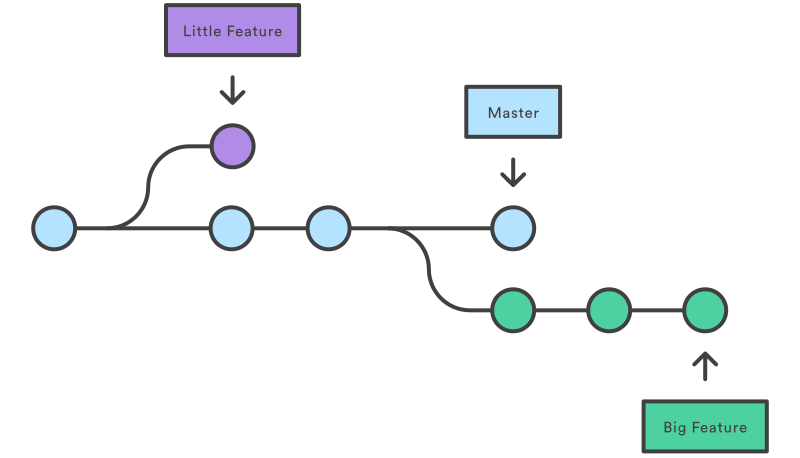
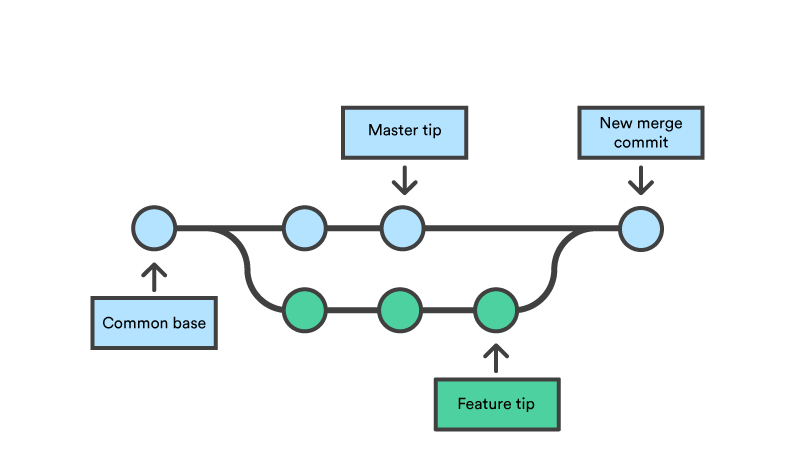
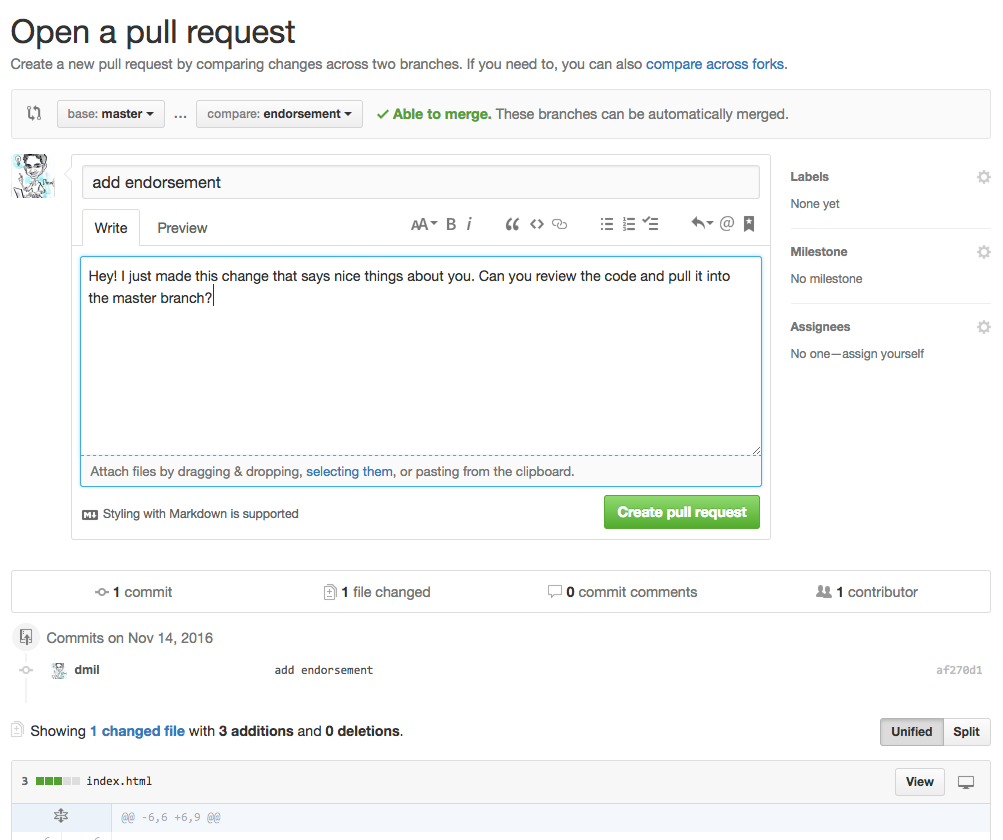
Our Demonstration Website

87 | Learn more about our team 88 | 89 | 90 | ``` 91 | 92 | 93 | Here is a sample `our-team/index.html`: 94 | 95 | ```html 96 | 97 | 98 | 99 | Demo Website 100 | 101 | 102 |

About Us!

103 | 104 | 105 | ``` 106 | 107 | 4. Everyone should clone the repository. 108 | 109 | ``` 110 | git clone git@github.com:XXXXX/demo-website.git 111 | ``` 112 | 113 | 5. All team members, should create branches titled `add-member-`. For example, I would do: 114 | 115 | ``` 116 | git checkout -b add-member-dhrumil 117 | ``` 118 | 119 | 6. In this branch, each team member should edit `our-team/index.html` and add some basic information about yourself to this page. Be sure to only create this one file - there should be no other changes to the repository. It's important to keep your code changes isolated when working with git to avoid unecessary merge conflicts. 120 | 1. Each member should: 121 | 1. commit this change to the branch 122 | 2. push it 123 | 3. create a pull request 124 | 2. Product owner should review and merge all of the PRs. There should be no conflicts. 125 | 126 | 127 | 8. All team members should checkout the master branch and pull the latest code. 128 | 129 | #### Deleting a branch locally 130 | 131 | ``` 132 | git branch -d 133 | ``` 134 | 135 | 136 | -------------------------------------------------------------------------------- /git/07-merging.md: -------------------------------------------------------------------------------- 1 | # Git: Merge Conflicts 2 | 3 | ## ❇️ Example 4 | 5 | 1. `cd` into the `-simple-website/` folder and open the directory in sublime as well. 6 | 7 | ``` 8 | cd ~/Development/-simple-website 9 | subl . 10 | ``` 11 | 12 | 2. Run `git status` to make sure the repository is "clean" (i.e. there are no "untracked files", "unstaged changes", or "staged changes"). 13 | 14 | 3. Run `git pull` to ensure you have the latest changes in the repository. 15 | 16 | 4. Create a branch called `teal-website`. 17 | 1. Add the following to the **top** of `styles/styles.css` 18 | 19 | ```css 20 | body { 21 | background: teal; 22 | } 23 | ``` 24 | 2. Use `git diff` to ensure that you only modified that one thing and nothing else. 25 | 2. Commit this change to the branch. 26 | 3. Push the branch. 27 | 4. Create a pull request but do not merge it. 28 | 29 | 5. Check out the `master` branch 30 | 31 | 6. Create a new branch called `orange-website`. 32 | 1. Add the following to the **top** of `styles/styles.css` 33 | 34 | ```css 35 | body { 36 | background: orange; 37 | } 38 | ``` 39 | 2. Use `git diff` to ensure that you only modified that one thing and nothing else. 40 | 2. Commit this change to the branch. 41 | 3. Push the branch. 42 | 4. Create a pull request but do not merge it. 43 | 44 | 7. Merge the `orange-website` pull request. Try to merge the `teal-website` pull request and it should say the branch cannot be automatically merged. This mean's there is a merge conflict. 45 | 46 | 8. Create a branch called `black-website`. 47 | 1. Add the following to the **top** of `styles/styles.css` 48 | 49 | ```css 50 | body { 51 | background: black; 52 | } 53 | ``` 54 | 2. Use `git diff` to ensure that you only modified that one thing and nothing else. 55 | 2. Commit this change to the branch. 56 | 3. Push the branch. 57 | 4. Do not merge this branch, we're going to throw away these changes 58 | 59 | ## ➡️ Try It 60 | 1. `cd` into your **universe** repository 61 | 62 | 1. Make sure the repository is clean and you are in the master branch. 63 | 64 | 2. Create a branch called `alternative-facts`. 65 | 66 | 3. Go back to the `master` branch. 67 | 1. `git checkout master` 68 | 1. Add two facts to `mars.txt`: "Mars has polar ice caps." and "Mars is a little more than half the size of earth." 69 | 2. Commit these changes to `master`. 70 | 71 | 4. Go back to the `alternative-facts` branch. 72 | 1. `git checkout alternative-facts` 73 | 1. Add two facts to `mars.txt`. "Mars is gaseous." and "Mars is double the size of earth." 74 | 2. Commit these changes to `alternative-facts`. 75 | 3. Create a pull request using `alternative-facts`. 76 | 77 | 5. Attempt to merge the pull request and try to resolve the merge conflicts. 78 | 79 | ## ➡️ Try It 80 | 81 | 1. Get into your teams. 82 | 83 | 2. The product owner should: 84 | 1. create a repository under their account named `demo-website` 85 | 2. add the remaining team members as collaborators to the repo. this is done under the repo settings 86 | 3. enable github pages on this repo with the `master` branch as the source 87 | 88 | 3. Everyone should clone the empty repository. 89 | 90 | ``` 91 | git clone git@github.com:XXXXX/demo-website.git 92 | ``` 93 | 94 | 4. The product owner should create an `index.html` and a page called `our-team/index.html`. Commit and push this change directly to the `master` branch. 95 | 96 | Here is a sample `index.html`: 97 | ```html 98 | 99 | 100 | 101 | Demo Website 102 | 103 | 104 |

Our Demonstration Website

105 | Learn more about our team 106 | 107 | 108 | ``` 109 | 110 | 111 | Here is a sample `our-team/index.html`: 112 | 113 | ```html 114 | 115 | 116 | 117 | Demo Website 118 | 119 | 120 |

About Us!

121 | 122 | 123 | ``` 124 | 125 | 5. Everyone else should pull these changes. 126 | 127 | ``` 128 | git pull 129 | ``` 130 | 131 | 6. All team members, should create branches titled `add-member-`. 132 | 133 | For example a team might have `add-member-rachel`, `add-member-monica`, `add-member-phoebe`, etc. 134 | 135 | 7. In this branch, each team member should create a file that is titled `our-team/.html`. For example, I would create `our-team/dhrumil.html`. Add some basic information about yourself to this page. Be sure to only create this one file - there should be no other changes to the repository. It's important to keep your code changes isolated when working with git to avoid unecessary merge conflicts. 136 | 1. Each member should: 137 | 1. commit this change to the branch 138 | 2. push it 139 | 3. create a pull request 140 | 2. Product owner should review and merge all of the PRs. There should be no conflicts. 141 | 142 | 8. The product owner should create links to each of these individal pages back into the `our-team/index.html`. 143 | 144 | ```html 145 | 146 | 147 | 148 | Demo Website 149 | 150 | 151 |

About Us!

152 | 160 | 161 | 162 | ``` 163 | 164 | 9. All team members should checkout the master branch and pull the latest code. 165 | 166 | ``` 167 | git checkout master 168 | git pull 169 | ``` 170 | 171 | Your repository and website should look something like this: 172 | - https://github.com/AlJohri/our-website 173 | - http://aljohri.com/our-website/ 174 | -------------------------------------------------------------------------------- /commandline/03-redirection.md: -------------------------------------------------------------------------------- 1 | # Command Line 3 2 | 3 | ## Redirection & Piping 4 | 5 | ##### Redirecting output to file: `>` 6 | 7 | ``` 8 | command > filename 9 | ``` 10 | 11 | Takes the output of `command` and saves it in `filename`. This will overwrite the file if it already exists. 12 | 13 | ##### Redirecting output and appending to file: `>>` 14 | 15 | ``` 16 | command >> filename 17 | ``` 18 | 19 | Takes the output of `command` and appends it to the end of the content of `filename`. This will create the file if it does not yet exist. 20 | 21 | ##### Piping: `|` 22 | 23 | ``` 24 | command1 | command2 25 | ``` 26 | 27 | Pipes the results from `command1` as input to `command2`, and then the results of `command2` are printed to the console. 28 | 29 | ## Lets see how it works 30 | 31 | First, lets install a new command `fortune` 32 | - mac: `brew install fortune` 33 | - ubuntu: `sudo apt-get install fortune` 34 | 35 | 1. Redirect: 36 | ``` 37 | fortune > wisething.txt 38 | ``` 39 | 2. Pipe 40 | ``` 41 | fortune | cowsay 42 | ``` 43 | 3. Pipe then Redirect 44 | ``` 45 | fortune | cowsay > wisecow.txt 46 | ``` 47 | 48 | ## ❇️ Example: Redirection 49 | 50 | 1. Redirect a fact about planet mars into the mars.txt. 51 | 52 | ``` 53 | echo "Mars is dusty." > ~/Development/universe/solar_system/planets/mars.txt 54 | ``` 55 | 56 | 2. Add another mars fact to mars.txt. 57 | 58 | ``` 59 | echo "Mars has an 687 day year." >> ~/Development/universe/solar_system/planets/mars.txt 60 | ``` 61 | 62 | 3. Cat the contents of mars.txt. 63 | 64 | ``` 65 | cat ~/Development/universe/solar_system/planets/mars.txt 66 | ``` 67 | 68 | 4. Make sure there is at least one newline at the end of `mars.txt`. 69 | 70 | You can check if there is a newline at the end of the file if there is no `%` sign that appears at the end of the file. 71 | 72 | ![](https://i.imgur.com/k8XBUQF.png) 73 | 74 | In this screenshot, the first example with the `%` at the end has no newline. The latter example does. 75 | 76 | ## ❇️ Example: piping 77 | 78 | Count the number of characters in the string "hello world" using `wc`. 79 | 80 | ``` 81 | echo "hello world" | wc -c 82 | ``` 83 | 84 | Count the number of lines in the file `mars.txt` 85 | 86 | ``` 87 | cat ~/Development/universe/solar_system/planets/mars.txt | wc -l 88 | ``` 89 | 90 | Count the number of characters in the first line of `mars.txt` 91 | 92 | ``` 93 | cat ~/Development/universe/solar_system/planets/mars.txt | head -n 1 | wc -c 94 | ``` 95 | 96 | ## ➡️ Try It 97 | 98 | Count the number of characters in `mars.txt` 99 | Count the number of characters in the last line of `mars.txt` 100 | 101 | 102 | ## ❇️ Example: piping 103 | 104 | Count number of **folders** in the `universe` folder. 105 | 106 | ``` 107 | cd ~/Development/universe 108 | find . -type d | wc -l 109 | ``` 110 | 111 | ## ➡️ Try It 112 | 113 | Count number of **files** in the `universe` folder. 114 | 115 | ## Slackcat 116 | 117 | Lets install a new command-line tool. On macOS use `brew install slackcat`. For linux, see the bottom of this page https://github.com/vektorlab/slackcat for instructions. 118 | 119 | Configure slackcat by running this command and following the instructions in your web browser: 120 | 121 | ``` 122 | slackcat --configure 123 | ``` 124 | 125 | ## ❇️ Example 126 | 127 | Let's use slackchat to send a simple message to the `#scratchwork` channel. 128 | 129 | ``` 130 | echo "hello world" | slackcat -c scratchwork 131 | ``` 132 | 133 | ## ➡️ Try It 134 | 135 | Notice how the message is being sent as a snippet. Figure out how to send a normal, non-snippet, message using slackcat. 136 | 137 | 140 | 141 | ## ➡️ Try It 142 | 143 | 1. Count the total number of files and folders in the `~/Development/universe/` directory and send this to the person sitting next to you using slackcat. Use only one line and piping. You can use the `--noop` flag to first test it out without sending the message, then you can remove it to send the message. (hint: start with `tree`) 144 | 145 | 149 | 150 | 2. In the `~/Development/universe` directory, run `ls`, pipe the output of that into slackcat and send it to the `#scratchwork` channel. This time, make sure to send it as a snippet. 151 | 152 | 156 | 157 | ## ❇️ Example: piping and redirection 158 | 159 | House Office Expenditure Data: https://projects.propublica.org/represent/expenditures 160 | 161 | 1. Let's start a new directory for the house expenditure data. 162 | 163 | ``` 164 | cd ~/Development 165 | mkdir house-expenditure 166 | cd house-expenditure 167 | ``` 168 | 169 | 4. Download the Q2 2017 expenditure detail data and pipe it into a file. 170 | 171 | ``` 172 | curl "https://projects.propublica.org/congress/assets/staffers/2017Q2-house-disburse-detail.csv" > 2017Q2-house-disburse-detail.csv 173 | ``` 174 | 175 | 5. Print the header (first line) of this file. 176 | 177 | ``` 178 | head -n 1 2017Q2-house-disburse-detail.csv 179 | ``` 180 | 181 | 6. Print the last 12 lines of this file. 182 | 183 | ``` 184 | tail -n 12 2017Q2-house-disburse-detail.csv 185 | ``` 186 | 187 | 7. Count the number of lines in this file. 188 | 189 | ``` 190 | cat 2017Q2-house-disburse-detail.csv | wc -l 191 | ``` 192 | 193 | 8. Count the number of rows in this file that contains the word "technology" (case insensitive) 194 | 195 | ``` 196 | cat 2017Q2-house-disburse-detail.csv | grep -i technology | wc -l 197 | ``` 198 | 199 | 9. Return only the rows containing the word "technology" and redirect the output into a file. Keep the header. 200 | 201 | ``` 202 | head -1 2017Q2-house-disburse-detail.csv > technology.csv 203 | cat 2017Q2-house-disburse-detail.csv | grep -i technology >> technology.csv 204 | ``` 205 | 206 | 10. Grep a word of your choice and send the first 5 lines to #scratchwork channel on slack. 207 | 208 | ``` 209 | cat 2017Q2-house-disburse-detail.csv | grep -i technology | head -n 5 | slackcat --filename technology.csv -c scratchwork 210 | ``` 211 | -------------------------------------------------------------------------------- /web/04-frontend-stack.md: -------------------------------------------------------------------------------- 1 | # Front-End Stack 2 | 3 | We'll be leaning on Mozilla's tutorials to learn the basics of HTML, CSS, and JavaScript. This is your standard front-end stack for the browser. But first, some information about websites and how they work: 4 | 5 | https://projects.propublica.org/graphics/images/data-institute/presentations/how-websites-work.pdf 6 | 7 | ## HTML 8 | 9 | * Tutorial: [https://developer.mozilla.org/en-US/docs/Learn/Getting_started_with_the_web/HTML_basics](https://developer.mozilla.org/en-US/docs/Learn/Getting_started_with_the_web/HTML_basics) 10 | 11 | ## CSS 12 | * Tutorial: [https://developer.mozilla.org/en-US/docs/Learn/Getting_started_with_the_web/CSS_basics](https://developer.mozilla.org/en-US/docs/Learn/Getting_started_with_the_web/CSS_basics) 13 | 14 | ### Addendum: Attributes - Class vs ID 15 | 16 | The `class` and `id` attributes are particularly important. These are what the CSS is going to latch onto in order to identify which elements should receive the same styles, and they are what the JavaScript will latch onto in order to determine which element it should assign a behavior to. 17 | 18 | 19 | ## ❇️ Example 20 | 21 | 1. Lets try this by adding a few more paragraphs of text. You can generate dummy text at https://www.lipsum.com/. 5 paragraphs should be enough. 22 | 23 | 2. Lets put each one of the paragraphs in a pararaph tag. 24 | 25 | 3. Between the paragraphs of lorem ipsum, lets add some more paragraph tags, but lets make these what we'd call a pullquote. Notice that the paragraphs that are quotes have an attribute `class=quote` and the first one has an attribute `id=mainquote`. 26 | 27 | 28 | ```html 29 |

Lorem ipsum dolor sit amet, consectetur adipiscing elit. Cras semper tellus quis est lacinia, non consectetur urna consequat. Aliquam sed finibus ipsum. Suspendisse nec euismod nibh. Donec id orci risus. Aliquam erat volutpat. Praesent in sem diam. Nam rutrum dui vitae ante scelerisque gravida. In eget erat sed tellus dignissim tincidunt eget non eros. Nulla facilisi. Aenean arcu tellus, gravida sed ex ut, pellentesque dapibus erat. Duis quis quam eget diam rhoncus euismod.

30 | 31 |

"Web development is cool" - Bill Joe Smith

32 | 33 |

Vestibulum vel sodales augue, quis rhoncus augue. Mauris id ligula turpis. Nulla facilisis massa sed pretium ornare. Class aptent taciti sociosqu ad litora torquent per conubia nostra, per inceptos himenaeos. Nunc nunc elit, euismod quis enim sed, hendrerit posuere dui. Aenean tempus lacinia turpis non molestie. Nullam imperdiet nibh erat, non aliquet nulla congue ac. Pellentesque habitant morbi tristique senectus et netus et malesuada fames ac turpis egestas. Donec feugiat enim vitae tempus euismod. Curabitur cursus eget orci vitae interdum. Sed varius luctus massa sit amet rhoncus. Morbi eget massa quis nibh tempor varius sit amet non felis.

34 | 35 |

"Web development is cool" - Bill Joe Smith

36 | 37 |

In eget nisi pulvinar, dapibus enim vel, molestie eros. Donec facilisis odio sed massa pharetra cursus. Nullam felis ipsum, semper vitae hendrerit in, iaculis id enim. Mauris non consequat augue. Donec a placerat sem. Aenean lacus nibh, ullamcorper eu lacus quis, facilisis pretium quam. Donec pellentesque, metus at auctor dignissim, ligula purus tincidunt mi, sit amet eleifend tellus nulla vitae orci. Donec eget ipsum sem. In laoreet ac risus quis tristique. Suspendisse felis odio, cursus id sapien non, tincidunt euismod enim. Praesent in nisi justo. Mauris in bibendum elit. In hac habitasse platea dictumst.

38 | 39 |

Sed quis egestas nunc. Donec dignissim scelerisque posuere. Maecenas eu ipsum justo. Fusce id dui lectus. Nulla aliquet pharetra aliquam. Class aptent taciti sociosqu ad litora torquent per conubia nostra, per inceptos himenaeos. Nam eu tincidunt quam, lacinia imperdiet massa. Duis sed vestibulum odio.

40 | 41 |

"JavaScript is the language of web browsers" - John Doe

42 | 43 |

Sed scelerisque commodo odio, ut consectetur arcu sodales in. Curabitur vitae rhoncus arcu. Mauris hendrerit rhoncus diam sit amet hendrerit. Suspendisse potenti. Aenean semper rhoncus mi, non semper urna porta nec. Quisque condimentum est et ultricies aliquam. Etiam et eros in dolor tempus maximus eu id turpis. Aliquam ac leo sed ligula tincidunt vulputate. Suspendisse sagittis et mauris in euismod. Integer suscipit sapien sit amet nunc finibus, sed faucibus dui dictum. Phasellus ac velit nisi.

44 | ``` 45 | 46 | 4. Make all the quotes red. Commit and push the change. 47 | 5. Make the mainquote retain all of the styles from the regular quote, but also give it a border. 48 | 49 | ## JavaScript 50 | 51 | * Tutorial: [https://developer.mozilla.org/en-US/docs/Learn/Getting_started_with_the_web/JavaScript_basics](https://developer.mozilla.org/en-US/docs/Learn/Getting_started_with_the_web/JavaScript_basics) (do Hello World only) 52 | 53 | * You have done some javascript in your terminal window for homework (http://jsforcats.com/) 54 | * Introducing Alerts 55 | 56 | ```javascript 57 | alert('Warning, this is a popup alert!!!'); 58 | ``` 59 | 60 | running that in the console window will make a JavaScript alert pop up. 61 | 62 | * Introducing Events 63 | 64 | We don't want that to happen as soon as you load the page though, so lets assign it an event. Lets make the image pop open an alert when you click on the fox. 65 | 66 | 67 | ```javascript 68 | // Define a Function 69 | function sayOuch() { 70 | alert('Ouch! Stop poking me!'); 71 | } 72 | 73 | // Use a CSS selector to identify an element 74 | var foxImage = document.querySelector('img'); 75 | 76 | // Assign the function to the onclick event on that element 77 | foxImage.onclick = sayOuch; 78 | ``` 79 | 80 | ### Bonus 81 | Add two buttons to your page, one to show the fox and one to hide it. 82 | 83 | ### Super duper bonus 84 | Make those into one button that toggles show/hide of the fox 85 | 86 | ## A note about style 87 | 88 | There are lots of tools online to help you select a color pallate: 89 | 90 | * https://www.google.com/search?q=css+color+palette&spell=1&sa=X&ved=0ahUKEwiWg_fZ28bYAhXHzIMKHVDICKoQvwUIJigA&biw=834&bih=639 91 | * https://www.w3schools.com/colors/colors_picker.asp 92 | 93 | Also, you can modify CSS in the browser window if you just want to see what a change might look like without actually making the change. 94 | -------------------------------------------------------------------------------- /git/08-forking.md: -------------------------------------------------------------------------------- 1 | # Git: Forking 2 | 3 | ## Key Terms 4 | 5 | * **fork** - make a copy of a remote repo on GitHub from one account to another. 6 | * **pull request** - ask the upstream maintainer to pull in changes from origin. 7 | * **upstream** - the name for a remote read-only repository 8 | * **origin** - the name for a remote read-and-write repository 9 | 10 | ## A Typical Setup for Forked Code 11 | ![](https://s3.amazonaws.com/media-p.slid.es/uploads/489063/images/2498675/pasted-from-clipboard.png) 12 | 13 | ## Branching vs Forking 14 | 15 | * **Branching** is a feature of Git, you've used branching already 16 | * **Forking** is a feature of GitHub 17 | * A fork is a personal copy of another user's repository that lives on your account. Forks allow you to freely make changes to a project without affecting the original. Forks remain attached to the original, allowing you to submit a pull request to the original's author to update with your changes. You can also keep your fork up to date by pulling in updates from the original. - [GitHub Glossary](https://help.github.com/articles/github-glossary/) 18 | * When you fork a repository, you get all of the branches the other person posted on GitHub 19 | * Pull requests however, don't acknowledge forks since they are a feature of GitHub and not Git. So while you can colloquially say "I'm issuing a pull request from my fork to yours", really what you're saying is "I'm issuing a pull request from the master branch of my fork to the master branch of your fork". You can actually issue a pull request from any branch in your forked repository to any branch in the original repository. 20 | 21 | ![](../assets/forkvsbranch.png) 22 | 23 | Here is a good example repository that makes use of issues and pull requests: https://github.com/openelections/ 24 | 25 | 26 | ## ❇️ Example (shorter - no local repository) 27 | 28 | 1. Step 1: Fork my repository [`dmil/simple-website`](https://github.com/dmil/simple-website). 29 | 30 | 2. Go to Settings > GitHub Pages and select the "master" branch as the source. Wait a few seconds and then go to http://`your-username`.github.io/simple-website to make sure github pages is set up correctly. 31 | 32 | 3. Normally I'd clone the forked repository locally onto my computer, push changes to the fork, then issue a pull request. For the sake of time lets cut that step out. Make **one** small edit in your fork of this code **directly in GitHub**. 33 | 34 | 4. Create a pull request. Note that this time we are creating pull request across repositories instead of just across branches within the same repository. The `base` will be `dmil/simple-website/master` while the `compare` will be `your-username/simple-website/master`. 35 | 36 | 5. Compare your website http://`your-username`.github.io/simple-website to mine: http://dhrumilmehta.com/simple-website/ 37 | 38 | 6. I will now merge your pull requests and we can see what changes you all make to the website over time. There's a good chance we may run into some merge conflicts as well. 39 | 40 | ## ❇️ Example (Longer) 41 | 42 | 1. Step 1: Fork my repository [`dmil/simple-website`](https://github.com/dmil/simple-website). 43 | 44 | 2. Go to Settings > GitHub Pages and select the "master" branch as the source. Wait a few seconds and then go to http://`your-username`.github.io/simple-website to make sure github pages is set up correctly. 45 | 46 | 3. Clone the forked repository to your Development folder. 47 | 48 | ``` 49 | git clone git@github.com:XXXX/XXXX.git 50 | ``` 51 | 52 | 4. Create a feature branch with your name. 53 | 54 | ``` 55 | git checkout -b 56 | ``` 57 | 58 | 5. Make a random change. 59 | 60 | 6. Commit and push the change. 61 | 62 | ``` 63 | git commit -m "describe your random change here" 64 | git push 65 | ``` 66 | 67 | 7. Create a pull request. Note that this time we are creating pull request across repositories instead of just across branches within the same repository. The `base` will be `dmil/simple-website/master` while the `compare` will be `your-username/simple-website/feature-branch-name`. 68 | 69 | 8. Create another pull request within the fork itself where the base is your own master branch. More explicitly, the base is `your-username/simple-website/master` and the compare is `your-username/simple-website/feature-branch-name`. Merge this pull request. 70 | 71 | *Note: Draw diagram on board* 72 | 73 | 9. Compare your website http://`your-username`.github.io/simple-website to mine: http://dhrumilmehta.com/simple-website/ 74 | 75 | 10. I will now merge your pull requests and we can see what changes you all make to the website over time. There's a good chance we may run into some merge conflicts as well. 76 | 77 | ### Woohoo! You just collaborated open-source. 78 | 79 | Open source collaboration is great for: 80 | 81 | * Not duplicating work 82 | * Collaborating accross organizations 83 | * Interacting with people - sometimes making an issue or a pull request can lead to friendship (or sources or collaborators) 84 | * Reader feedback 85 | * [Collective debugging](https://github.com/themarshallproject/klaxon/issues/107), finding critical [errors](https://github.com/fivethirtyeight/data/pull/54) faster (often also leads to better security and better data quality). 86 | * [Building upon](https://twitter.com/ascheink/status/783394500710457344) someone else's project 87 | * [Feuding](https://github.com/jashkenas/underscore/issues/2182) 88 | * [Philosophical](https://www.gnu.org/philosophy/shouldbefree.en.html) [Reasons](https://www.gnu.org/philosophy/open-source-misses-the-point.en.html) 89 | * Being [nerdy](https://github.com/fivethirtyeight/data/pull/63)? 90 | 91 | More Links 92 | 93 | - https://government.github.com/ 94 | - https://government.github.com/community/ 95 | 96 | ## ➡️ Try It 97 | 98 | 1. Find another partner, and fork their `-simple-website`. 99 | 2. Clone your fork onto your local computer and create a feature branch called `endorsement`. 100 | 3. Put an endorsement on their webpage as the last item on the site. 101 | ``` 102 |
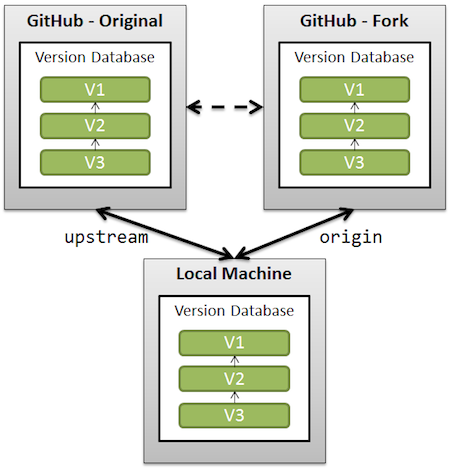
Endorsements

103 |

You are a really cool person. - Dhrumil

104 | ``` 105 | 4. Commit this endorsement and push it to your fork.. 106 | 5. Issue a pull request back to that person's github repo. 107 | 108 | ## Pull Requests and Issues in the Wild 109 | 110 | - https://github.com/tj/git-extras/pull/356 111 | - https://github.com/powmedia/backbone-forms/issues/537 112 | - https://github.com/powmedia/backbone-forms/pull/538 113 | 114 | ## ➡️ Try It 115 | 116 | Make an issue on my simple-website repository: https://github.com/dmil/simple-website 117 | 118 | --------------------------------------------------------------------------------


