"
13 | MOD_CCCTWOCLICK_DISABLED_BACKGROUND_LBL="Background Image"
14 | MOD_CCCTWOCLICK_DISABLED_BACKGROUND_DESC="Select an image that is shown instead of the disabled Iframe"
15 | MOD_CCCTWOCLICK_DISABLED_BACKGROUND_SIZE_LBL="Backgroundsize"
16 | MOD_CCCTWOCLICK_DISABLED_BACKGROUND_SIZE_AUTO="Auto"
17 | MOD_CCCTWOCLICK_DISABLED_BACKGROUND_SIZE_COVER="Cover"
18 | MOD_CCCTWOCLICK_DISABLED_BACKGROUND_SIZE_CONTAIN="Contain"
19 | MOD_CCCTWOCLICK_DISABLED_CONTENT_LBL="Content"
20 | MOD_CCCTWOCLICK_DISABLED_CONTENT_DESC="Content to show before the click. You can use html code."
21 | MOD_CCCTWOCLICK_BTN_REVEAL="Custom Button Text"
22 | MOD_CCCTWOCLICK_BTN_REVEAL_CLASS="Button Class"
23 | MOD_CCCTWOCLICK_BTN_REVEAL_TEXT="Enable Content"
24 | MOD_CCCTWOCLICK_BTN_DISABLE="Custom Button Text"
25 | MOD_CCCTWOCLICK_BTN_DISABLE_CLASS="Button Class"
26 | MOD_CCCTWOCLICK_BTN_DISABLE_TEXT="Disable"
27 | MOD_CCCTWOCLICK_SOURCE_URL="iFrame source"
28 | MOD_CCCTWOCLICK_STYLESHEET_LBL="Load module css"
29 | MOD_CCCTWOCLICK_HIDEDONATION_LBL="Hide Donation message"
30 | MOD_CCCTWOCLICK_SELECT="Please select"
31 | MOD_CCCTWOCLICK_DONATE="
Coolcat-Creations - Two Click Module Thank you for using my module! If you appreciate my work, I would be happy if you donate: Donate via paypal.me
"
32 |
33 | ## since 2.0
34 | MOD_CCCTWOCLICK_ENABLED_CONTENT_LBL="Content"
35 | MOD_CCCTWOCLICK_DISABLED_BGCOLOR_LBL="Background color"
36 | MOD_CCCTWOCLICK_DISABLED_BGCOLOR_DESC="You can chose a backgroundcolor for the box before your iframe loads"
37 | MOD_CCCTWOCLICK_POSITION_SETTINGS="
Positioning
"
38 | MOD_CCCTWOCLICK_BTNREVPOS_LBL="Reveal Button"
39 | MOD_CCCTWOCLICK_BTNDISPOS_LBL="Disable Button"
40 | MOD_CCCTWOCLICK_CONTENTBEFOREPOS_LBL="Content Before"
41 | MOD_CCCTWOCLICK_CONTENTAFTERPOS_LBL="Content After"
42 | MOD_CCCTWOCLICK_POS_TOP="Top"
43 | MOD_CCCTWOCLICK_POS_CENTER="Center"
44 | MOD_CCCTWOCLICK_POS_BOTTOM="Bottom"
45 | MOD_CCCTWOCLICK_IFRAMENAME_LBL="iFrame name"
46 | MOD_CCCTWOCLICK_IFRAMENAME_DESC="A name attribute can be used to reference the element in a JavaScript"
47 | MOD_CCCTWOCLICK_IFRAMETITLE_LBL="iFrame title"
48 | MOD_CCCTWOCLICK_IFRAMETITLE_DESC="Describes the content of the iframe (Accessibility)"
49 |
50 | ## since 2.1
51 | MOD_CCCTWOCLICK_PRIVACY_LINK_LBL="Privacy Policy Link"
52 | MOD_CCCTWOCLICK_PRIVACY_LINK_DESC="Link to your Privacy Policy"
53 | MOD_CCCTWOCLICK_DISPLAYPRIVACYLINK_LBL="Display Privacy Policy Link"
54 | MOD_CCCTWOCLICK_PRIVACYLINK_TXT_LBL="Privacy Policy Link Text"
55 | MOD_CCCTWOCLICK_PRIVACYLINK_TXT="Privacy Policy"
56 | MOD_CCCTWOCLICK_PRIVACYLINK_TXT_DESC="Create a Language override for MOD_CCCTWOCLICK_PRIVACYLINK_TXT or define a custom languagestring for the Privacy Policy Link"
57 |
--------------------------------------------------------------------------------
/mod_ccctwoclick/language/de-DE/de-DE.mod_ccctwoclick.ini:
--------------------------------------------------------------------------------
1 | MOD_CCCTWOCLICK="CCC Two Click"
2 | MOD_CCCTWOCLICK_DESC="Dieses Modul aktiviert einen externen iFrame erst nach einem Klick. (2-Klick Lösung) um die Privatsphäre des Users zu wahren."
3 | MOD_CCCTWOCLICK_OPTIONS="Optionen"
4 | MOD_CCCTWOCLICK_IFRAME_SETTINGS="
"
13 | MOD_CCCTWOCLICK_DISABLED_BACKGROUND_LBL="Hintergrundbild"
14 | MOD_CCCTWOCLICK_DISABLED_BACKGROUND_DESC="Bitte wähle ein Bild aus, welches statt dem deaktivierten Iframe angezeigt werden soll."
15 | MOD_CCCTWOCLICK_DISABLED_BACKGROUND_SIZE_LBL="Bildgröße"
16 | MOD_CCCTWOCLICK_DISABLED_BACKGROUND_SIZE_AUTO="Auto"
17 | MOD_CCCTWOCLICK_DISABLED_BACKGROUND_SIZE_COVER="Cover"
18 | MOD_CCCTWOCLICK_DISABLED_BACKGROUND_SIZE_CONTAIN="Contain"
19 | MOD_CCCTWOCLICK_DISABLED_CONTENT_LBL="Inhalt"
20 | MOD_CCCTWOCLICK_DISABLED_CONTENT_DESC="Hinweistext der vor dem Klick angezeigt werden soll (HTML möglich)"
21 | MOD_CCCTWOCLICK_BTN_REVEAL="Eigener Button Text"
22 | MOD_CCCTWOCLICK_BTN_REVEAL_CLASS="Button Klasse"
23 | MOD_CCCTWOCLICK_BTN_REVEAL_TEXT="Inhalt aktivieren"
24 | MOD_CCCTWOCLICK_BTN_DISABLE="Eigener Button Text"
25 | MOD_CCCTWOCLICK_BTN_DISABLE_CLASS="Button Klasse"
26 | MOD_CCCTWOCLICK_BTN_DISABLE_TEXT="Inhalt deaktivieren"
27 | MOD_CCCTWOCLICK_SOURCE_URL="IFrame Link"
28 | MOD_CCCTWOCLICK_STYLESHEET_LBL="Modul CSS laden"
29 | MOD_CCCTWOCLICK_HIDEDONATION_LBL="Spendenhinweis ausblenden"
30 | MOD_CCCTWOCLICK_SELECT="Bitte wählen"
31 | MOD_CCCTWOCLICK_DONATE="
Coolcat-Creations - Two Click Module Danke, dass Sie mein Modul nutzen! Wenn Sie meine Arbeit wertschätzen, freue ich mich über eine Spende: Über paypal.me spenden
"
32 |
33 | ## since 2.0
34 | MOD_CCCTWOCLICK_ENABLED_CONTENT_LBL="Inhalt"
35 | MOD_CCCTWOCLICK_DISABLED_BGCOLOR_LBL="Hintergrundfarbe"
36 | MOD_CCCTWOCLICK_DISABLED_BGCOLOR_DESC="Zusätzlich zum Hintergrundbild, kannst du hier auch eine Farbe wählen"
37 | MOD_CCCTWOCLICK_POSITION_SETTINGS="
Positionierung
"
38 | MOD_CCCTWOCLICK_BTNREVPOS_LBL="Aktivieren Button"
39 | MOD_CCCTWOCLICK_BTNDISPOS_LBL="Deaktivieren Button"
40 | MOD_CCCTWOCLICK_CONTENTBEFOREPOS_LBL="Infotext Vorher"
41 | MOD_CCCTWOCLICK_CONTENTAFTERPOS_LBL="Infotext Danach"
42 | MOD_CCCTWOCLICK_POS_TOP="Oben"
43 | MOD_CCCTWOCLICK_POS_CENTER="Mitte"
44 | MOD_CCCTWOCLICK_POS_BOTTOM="Unten"
45 | MOD_CCCTWOCLICK_IFRAMENAME_LBL="iFrame Name"
46 | MOD_CCCTWOCLICK_IFRAMENAME_DESC="Ein Names Atrribut kann genutzt werden um in JavaScript auf das Element zuzugreifen"
47 | MOD_CCCTWOCLICK_IFRAMETITLE_LBL="IiFrame Titel"
48 | MOD_CCCTWOCLICK_IFRAMETITLE_DESC="Beschreibt den Inhalt des iFrames (Accessibility)"
49 |
50 | ## since 2.1
51 | MOD_CCCTWOCLICK_PRIVACY_LINK_LBL="Datenschutz Link"
52 | MOD_CCCTWOCLICK_PRIVACY_LINK_DESC="Link zu einer Datenschutzerklärung (z.B. https://www.deinedomain.de/datenschutz)"
53 | MOD_CCCTWOCLICK_DISPLAYPRIVACYLINK_LBL="Datenschutz Link anzeigen"
54 | MOD_CCCTWOCLICK_PRIVACYLINK_TXT_LBL="Datenschutz Link Beschriftung"
55 | MOD_CCCTWOCLICK_PRIVACYLINK_TXT="Datenschutzerklärung"
56 | MOD_CCCTWOCLICK_PRIVACYLINK_TXT_DESC="Erstelle einen Sprachoverride für MOD_CCCTWOCLICK_PRIVACYLINK_TXT oder lege einen eigenen Sprachstring an"
57 |
--------------------------------------------------------------------------------
/mod_ccctwoclick/tmpl/default.php:
--------------------------------------------------------------------------------
1 | ' . Text::_($privacyLinkText) . '';
11 | }
12 |
13 | if ($privacy) {
14 | $contentBefore = $contentBefore . ' ' . $privacy . '';
15 | }
16 |
17 | $contentBefore = '
163 |
--------------------------------------------------------------------------------
/README.md:
--------------------------------------------------------------------------------
1 | [Zur deutschen Anleitung springen](#deutsch)
2 |
3 | # mod_ccctwoclick
4 | This module reveals an external iframe only after user click. (2-Click Solution) to respect the privacy of the user.
5 |
6 | This could be an iframe of a Facebook Like Box, a Facebook Comment Box, a Youtube Video or whatever.
7 | Due to EU privacy law it might be obligatory to let the user decide if an external iframe is loaded or not.
8 |
9 | In this module you can setup a specific iframe source and load it only,
10 | when the user gives the permission by clicking a button.
11 |
12 | 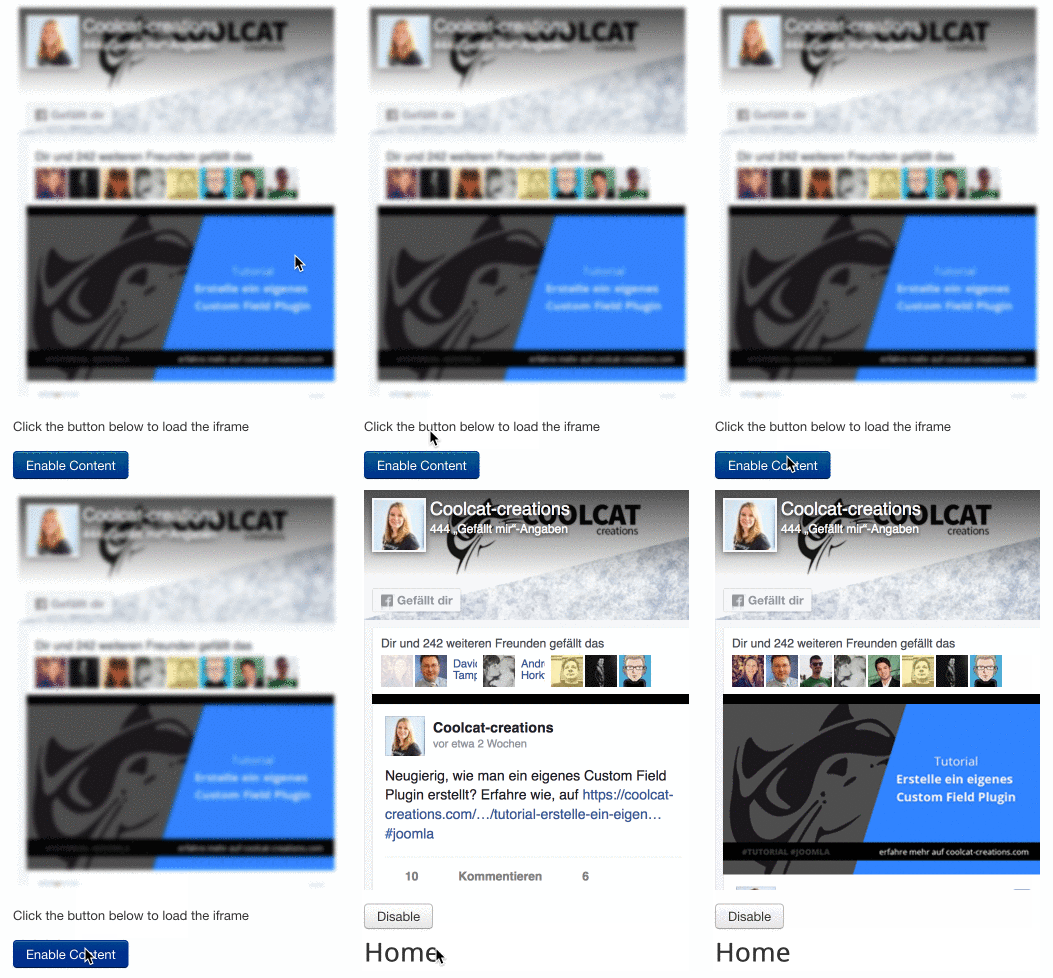
13 |
14 | ## Available Settings
15 | ### Content before click
16 |
17 | Background Image: Set up a Background Image that is shown, before the iframe is loaded.
18 | (That can be a blurry picture of the content that has to be revealed.)
19 |
20 | Backgroundsize: Select the Background Size Property (Auto, Cover or Contain)
21 |
22 | Content: You can add text here that will be shown below the image before the iframe is revealed.
23 | (That can be an information like: "We respect your privacy, to reveal the Facebook Comment box click the button below")
24 |
25 | Custom Button Text: The default button text is setup in the language file, if you want to use your custom language key or string just fill this input with your custom text.
26 |
27 | Button Class: Add here a Button Class if needed
28 |
29 | ### Content after click:
30 |
31 | Custom Button Text: The default button text is setup in the language file, if you want to use your custom language key or string just fill this input with your custom text.
32 |
33 | Button Class: Add here a Button Class if needed
34 |
35 | ### Iframe Settings:
36 | IFrame Source: Fill this input with the iframe link = A Link is an url to the embeded content and starts usually with https:// please do not fill here any iframe code or any plugin codes!
37 |
38 | Example: https://www.google.com/maps/embed?pb=!1m18!1m12!1m3!1d2593.409168866908!2d11.073657616160999!3d49.457882979350806!2m3!1f0!2f0!3f0!3m2!1i1024!2i768!4f13.1!3m3!1m2!1s0x479f57b0484a9207%3A0xa52e33decf29c9b!2sImperial+Castle+of+Nuremberg!5e0!3m2!1sen!2sde!4v1528203349104
39 |
40 | Information: You get the exact iframe Link if you:
41 | Examples:
42 | Facebook: Get the Like Box Code and take just the URL from the provided iframe HTML
43 | Google Maps: Search the Location, click on share, then on embed, and take just the URL from the provided iframe HTML
44 | Youtube: Search ypur Video, click on share, then on embed, and take just the URL from the provided iframe HTML
45 |
46 | Width: Set the iframe width here in px or %
47 | Height: Set the iframe height here in px or %
48 | (mind that the Facebook iframes have specific min/max sizes)
49 |
50 | Frameborder: Setup the Frameborder of the iframe
51 | Allow Fullscreen: Setup the fullscreen attribute to true or false
52 | Allow Transparency: Setup the transparency attribute to true or false
53 | Scrolling: Setup the scrolling attribute to yes or no
54 | Load module css: Disable the Module CSS if needed
55 |
56 | # deutsch
57 | # mod_ccctwoclick
58 | Dieses Modul zeigt ein externes iframe erst an, sobald der User auf einen Button geklickt hat (2-Klick Lösung). Dies kann zum Beispiel dazu verwendet werden um Datenschutzrichtlinien einzuhalten.
59 |
60 | Es könnte sich hierbei um eine Facebook Like Box, eine Facebook Kommentar Box, ein Youtubevideo, Google Map oder was auch immer handeln. In Anlehnung an die DSGVO könnte es verpflichtend sein, den Nutzer entscheiden zu lassen ob die Inhalte eines iFrames geladen werden oder nicht.
61 |
62 | In diesem Modul kann man einen iFrame link eingeben und laden lassen, sobald der Nutzer per Klick die Zustimmung dazu erteilt.
63 |
64 | 
65 |
66 | ## Mögliche Einstellungen
67 | ### Inhalt vor dem Klick
68 |
69 | Hintergrundbild: Hier kann ein Bild festgelegt werden, das angezeigt wird, bevor der iframe angezeigt wird.
70 | (Das könnte zum Beispiel ein verwaschenes Bild von dem Inhalt sein, der geladen werden soll - Aber bitte beachtet die Urheberrechte!)
71 |
72 | Hintergrund-Größe: Hier kann eingestellt werden, in welcher Größe das Hintergrundbild eingebunden werden soll (Auto, Cover or Contain)
73 |
74 | Inhalt: Hier kann man text eingeben der Über, Ober oder unter dem Bild angezeigt wird bevor der iFrame angezeigt wird.
75 | (Zum Beispiel: "Wir respektieren den Schutz Ihrer Daten, um eine Verbindung zu Google Maps herzustellen und unsere Karte anzuzeigen klicken Sie auf den Button unter diesem Text.")
76 |
77 | Eigener Button Text: Die Beschriftung für diesen Button ist in der Sprachdatei hinterlegt, wenn du deinen eigenen JText string verwenden willst, kannst du ihn hier eintragen oder einfach den Text eintragen, der auf dem Button stehen soll.
78 |
79 | Button Klasse: Hier kann eine eigene CSS Klasse für den Button hinterlegt werden (Beispiel: uk uk-btn-primary)
80 |
81 | ### Inhalt Nach dem Klick:
82 |
83 | Inhalt: Hier kann man Text eingeben der Ober oder unter dem iFrame angezeigt wird.
84 | (Zum Beispiel: "Wir respektieren den Schutz Ihrer Daten, um die Verbindung zu Google Maps wieder zu kappen, klicken Sie auf den Button unter diesem Text.")
85 |
86 | Eigener Button Text: Die Beschriftung für diesen Button ist in der Sprachdatei hinterlegt, wenn du deinen eigenen JText string verwenden willst, kannst du ihn hier eintragen oder einfach den Text eintragen, der auf dem Button stehen soll.
87 |
88 | Button Klasse: Hier kann eine eigene CSS Klasse für den Button hinterlegt werden (Beispiel: uk uk-btn-primary)
89 |
90 | ### Iframe Einstellungen:
91 | IFrame Source: Füge hier einen iFrame Link ein. Ein Link ist eine URL zu dem einzufügenden Inhalt und beginnt normalerweise mit https:// . Füge hier keinen iframe code und keine plugin codes ein, sondern einen Link!
92 |
93 | Beispiel: https://www.google.com/maps/embed?pb=!1m18!1m12!1m3!1d2593.409168866908!2d11.073657616160999!3d49.457882979350806!2m3!1f0!2f0!3f0!3m2!1i1024!2i768!4f13.1!3m3!1m2!1s0x479f57b0484a9207%3A0xa52e33decf29c9b!2sImperial+Castle+of+Nuremberg!5e0!3m2!1sen!2sde!4v1528203349104
94 |
95 | Information: Man bekommt diesen Link wenn man...
96 | Beispiele:
97 | Facebook: Erstelle dir bei Facebook einen Like Box Code und nehme die URL die in dem iframe HTML zur Vefügung gestellt wurde src="WAS ZWISCHEN DEN ANFÜHRUNGSZEICHEN STEHT"
98 |
99 | Google Maps: Suche die Location, klicke auf "Share" oder "Teilen", dann auf "embed" bzw. "einbetten" und nehme die URL die in dem iframe HTML zur Vefügung gestellt wurde src="WAS ZWISCHEN DEN ANFÜHRUNGSZEICHEN STEHT"
100 |
101 | Youtube: Suche das Video, klicke auf "Share" oder "Teilen", dann auf "embed" bzw. "einbetten" und nehme die URL die in dem iframe HTML zur Vefügung gestellt wurde src="WAS ZWISCHEN DEN ANFÜHRUNGSZEICHEN STEHT"
102 |
103 | Breite: Einstellung der Breite des iFrames in px oder %
104 | Höhe: Einstellung der Höhe des iFrames in px oder %
105 | (Achtung: Facebook Like Boxen haben spezifische Mindest- und Maximalgrößen)
106 |
107 | Frameborder: Hier kann der Frameborder eingestellt werden
108 | Fullscreen: Hier kann das iFrame Fullscreen Attribut auf true oder false gesetzt werden
109 | Transparenz: Hier kann das iFrame Transparency Attribut auf true oder false gesetzt werde
110 | Scrolling: Hier kann das iFrame Scrolling Attribut auf yes oder no gesetzt werden
111 | css laden: Hier kann auf Wunsch das mitgelieferte CSS deaktiviert werden.
112 |
113 | ##TODO
114 | Seit Version 2.0.0 gibt es Positionierungs Parameter die hier noch beschrieben werden müssen
115 |
116 |
--------------------------------------------------------------------------------
/mod_ccctwoclick/mod_ccctwoclick.xml:
--------------------------------------------------------------------------------
1 |
2 |
3 | mod_ccctwoclick
4 | 06/2017
5 | Elisa Foltyn
6 | 2.1-rc3
7 | COOLCAT creations, Nürnberg - www.coolcat-creations.com
8 | GNU General Public License version 2 or later; see LICENSE.txt
9 | MOD_CCCTWOCLICK_DESC
10 |
11 | mod_ccctwoclick.xml
12 | mod_ccctwoclick.php
13 | tmpl
14 | language
15 |
16 |
17 | css
18 |
19 |
20 |
21 |
321 |
322 |
343 |
344 |
345 |
346 |
347 |
348 |
349 | en-GB/en-GB.mod_ccctwoclick.ini
350 | en-GB/en-GB.mod_ccctwoclick.sys.ini
351 | de-DE/de-DE.mod_ccctwoclick.ini
352 | de-DE/de-DE.mod_ccctwoclick.sys.ini
353 |
354 |
355 |
356 |
357 | https://raw.githubusercontent.com/coolcat-creations/mod_ccctwoclick/master/manifest.xml
358 |
359 |
360 |
361 |
362 |
--------------------------------------------------------------------------------