) is a light-weight implementation of the DataCamp UI,
9 | that allows you to embed interactive exercises inside HTML documents. The tutorial package makes it easy to create these
10 | HTML files from R Markdown files. An extension to knitr, tutorial detects appropriately formatted code chunks and replaces them
11 | with DataCamp Light readable chunks in the resulting HTML file.
12 | License: MIT + file LICENSE
13 | Depends: R (>= 3.0.0)
14 | Imports:
15 | markdown,
16 | knitr,
17 | rjson,
18 | base64enc
19 | Suggests:
20 | testthat,
21 | rmarkdown,
22 | pkgdown
23 | SystemRequirements: pandoc (>= 1.12.3) - http://johnmacfarlane.net/pandoc
24 | RoxygenNote: 6.0.1
25 | VignetteBuilder: knitr
26 |
--------------------------------------------------------------------------------
/R/render.R:
--------------------------------------------------------------------------------
1 | #' @importFrom base64enc base64encode
2 | #' @importFrom rjson toJSON
3 | render_exercise <- function(block, default_height) {
4 |
5 | els <- block$els[allowed_elements[allowed_elements %in% names(block$els)]]
6 |
7 | # if there's a hint, htmlify it
8 | if ("hint" %in% names(els)) {
9 | ind <- which(names(els) == "hint")
10 | els[[ind]] <- to_html(els[[ind]])
11 | }
12 |
13 | # determine block height
14 | height <- block$height
15 | if (is.null(block$height)) {
16 | height <- default_height
17 | }
18 |
19 | # Translate pec and sample code for things to work in the encoded format
20 | els <- rename(els, "pre-exercise-code", "pre_exercise_code")
21 | els <- rename(els, "sample-code", "sample")
22 |
23 | encoded <- base64encode(charToRaw(toJSON(els)))
24 | patt <- "%s
"
25 | return(sprintf(patt, height, encoded))
26 | }
27 |
28 | rename <- function(named_vec, from, to) {
29 | x <- which(names(named_vec) == from)
30 | if (length(x) > 0) {
31 | names(named_vec)[x] <- to
32 | }
33 | return(named_vec)
34 | }
35 |
--------------------------------------------------------------------------------
/R/example.R:
--------------------------------------------------------------------------------
1 | # To pass R CMD CHECK, we want to make file.edit available. You don't want to
2 | # import file.edit from the utils package explicitly inside build_example,
3 | # because then it doesn't work as you'd expect inside RStudio (it opens the file
4 | # in a new window)
5 | utils::globalVariables("file.edit")
6 |
7 | #' Create example .Rmd file in the current working directory
8 | #'
9 | #' Create the file \code{example.Rmd} in your current working directory.
10 | #' This R Markdown files contains example code chunks that can be converted to
11 | #' interactive R playgrounds.
12 | #'
13 | #' @param open Open the file after building the example?
14 | #'
15 | #' @export
16 | build_example <- function(open = TRUE) {
17 | fname <- "example.Rmd"
18 | dest <- file.path(getwd(), fname)
19 | file.copy(from = file.path(system.file(package = "tutorial"), fname),
20 | to = dest, overwrite = TRUE)
21 | msg <- paste0("Example file 'example.Rmd' created ",
22 | "in current working directory.\n",
23 | "Simply knit the file.")
24 | message(sprintf(msg, project_alias))
25 | if (isTRUE(open)) {
26 | file.edit(dest)
27 | }
28 | return(invisible(fname))
29 | }
30 |
--------------------------------------------------------------------------------
/inst/example.Rmd:
--------------------------------------------------------------------------------
1 | ---
2 | title: "Example Document"
3 | author: "Your name here"
4 | output:
5 | html_document:
6 | self_contained: false
7 | ---
8 |
9 | ```{r, include=FALSE}
10 | tutorial::go_interactive()
11 | ```
12 |
13 | You can use the `tutorial` package to convert static code chunks into 'fiddles', i.e. editors where people can experiment with your code. If you specify the `ex` and `type` properties, `tutorial` knows what to do:
14 |
15 | ```{r}
16 | a <- 2
17 | b <- 3
18 |
19 | a + b
20 | ```
21 |
22 | You can also create interactive exercises right inside your R Markdown document. Suppose you want to explain people how variable assignment works in R. Create an exercise with a certain identifier, `create_a` in this case. Then, in different R code chunks, specify the elements of the exercise by setting the `type` inside the code chunk options.
23 |
24 | ```{r ex="create_a", type="pre-exercise-code"}
25 | b <- 5
26 | ```
27 |
28 | ```{r ex="create_a", type="sample-code"}
29 | # Create a variable a, equal to 5
30 |
31 |
32 | # Print out a
33 |
34 | ```
35 |
36 | ```{r ex="create_a", type="solution"}
37 | # Create a variable a, equal to 5
38 | a <- 5
39 |
40 | # Print out a
41 | a
42 | ```
43 |
44 | ```{r ex="create_a", type="sct"}
45 | test_object("a")
46 | test_output_contains("a", incorrect_msg = "Make sure to print `a`.")
47 | success_msg("Great!")
48 | ```
49 |
50 |
--------------------------------------------------------------------------------
/man/go_interactive.Rd:
--------------------------------------------------------------------------------
1 | % Generated by roxygen2: do not edit by hand
2 | % Please edit documentation in R/hooks.R
3 | \name{go_interactive}
4 | \alias{go_interactive}
5 | \title{Set up your R Markdown document to use DataCamp light}
6 | \usage{
7 | go_interactive(greedy = TRUE, height = 300)
8 | }
9 | \arguments{
10 | \item{greedy}{whether or not to 'greedily' convert code chunks into DataCamp
11 | Light frames.}
12 |
13 | \item{height}{height in pixels that you want the resulting DataCamp Light
14 | frame to have.}
15 | }
16 | \description{
17 | Enable hooks and parsing utilities so that special code chunks where the
18 | \code{ex} and \code{type} options are specified, are converted into
19 | interactive exercises on the resulting HTML page. Use
20 | \code{\link{build_example}} to generate an example document. Simply knitting
21 | this document will generate a document with DataCamp Light powered code
22 | chunks.
23 | }
24 | \details{
25 | With the \code{greedy} argument, you can control which elements of your R
26 | Markdown document are converted into DataCamp Light chunks. By default
27 | \code{greedy} is \code{TRUE}, leading to all R code chunks to be converted to
28 | interactive frames. Only chunks for which you specify the option \code{tut =
29 | FALSE} are not converted. If `greedy` is \code{FALSE}, only chunks for which
30 | you specify \code{tut = TRUE} are converted.
31 | }
32 |
--------------------------------------------------------------------------------
/R/hooks.R:
--------------------------------------------------------------------------------
1 | #' Set up your R Markdown document to use DataCamp light
2 | #'
3 | #' Enable hooks and parsing utilities so that special code chunks where the
4 | #' \code{ex} and \code{type} options are specified, are converted into
5 | #' interactive exercises on the resulting HTML page. Use
6 | #' \code{\link{build_example}} to generate an example document. Simply knitting
7 | #' this document will generate a document with DataCamp Light powered code
8 | #' chunks.
9 | #'
10 | #' With the \code{greedy} argument, you can control which elements of your R
11 | #' Markdown document are converted into DataCamp Light chunks. By default
12 | #' \code{greedy} is \code{TRUE}, leading to all R code chunks to be converted to
13 | #' interactive frames. Only chunks for which you specify the option \code{tut =
14 | #' FALSE} are not converted. If `greedy` is \code{FALSE}, only chunks for which
15 | #' you specify \code{tut = TRUE} are converted.
16 | #'
17 | #' @param greedy whether or not to 'greedily' convert code chunks into DataCamp
18 | #' Light frames.
19 | #' @param height height in pixels that you want the resulting DataCamp Light
20 | #' frame to have.
21 | #'
22 | #' @importFrom knitr opts_knit knit_hooks opts_hooks
23 | #' @export
24 | go_interactive <- function(greedy = TRUE, height = 300) {
25 |
26 | stopifnot(is.logical(greedy))
27 | stopifnot(is.numeric(height))
28 |
29 | default_source_hook <- knitr::knit_hooks$get("source")
30 | default_document_hook <- knitr::knit_hooks$get("document")
31 | blocks <- NULL
32 |
33 | knitr::opts_hooks$set(eval = function(options) {
34 | if (tut_active(options, greedy)) {
35 | options$eval <- FALSE
36 | }
37 | options
38 | })
39 |
40 | knitr::knit_hooks$set(source = function(x, options) {
41 | if(tut_active(options, greedy)) {
42 |
43 | ex <- options[["ex"]]
44 | if (is.null(ex)) ex <- options$label
45 |
46 | if (!(ex %in% names(blocks))) {
47 | key <- sprintf("dc_light_exercise_%s", ex)
48 | blocks[[ex]] <<- list(height = NULL,
49 | els = list(language = tolower(options$engine)),
50 | ex = ex,
51 | key = key)
52 | } else {
53 | # key is already in there
54 | key <- NULL
55 | }
56 |
57 | type <- options[["type"]]
58 | if (is.null(type)) type <- "sample-code"
59 | blocks[[ex]]$els[[type]] <<- paste(x, collapse = "\n")
60 |
61 | height <- options[["height"]]
62 | if (!is.null(height)) {
63 | blocks[[ex]]$height <<- height
64 | }
65 |
66 | return(key)
67 | } else {
68 | default_source_hook(x, options)
69 | }
70 | },
71 | document = function(x) {
72 | if (length(blocks) > 0) {
73 | for (block in blocks) {
74 | if (!all(required_elements %in% names(block$els))) {
75 | stop(sprintf("%s does not contain all required elements. You need %s",
76 | block$ex, collapse(required_elements)))
77 | }
78 | if (!all(names(block$els) %in% allowed_elements)) {
79 | stop(sprintf("%s contains elements that are not understood by %s.",
80 | block$ex, project_alias))
81 | }
82 | html <- render_exercise(block, default_height = height)
83 | x[x == sprintf("dc_light_exercise_%s", block$ex)] <- html
84 | }
85 | x <- c(script_tag, x)
86 | }
87 | return(default_document_hook(x))
88 | })
89 | }
90 |
91 | tut_active <- function(options, greedy) {
92 | if(greedy) {
93 | to_check <- is.null(options$tut) || isTRUE(options$tut)
94 | } else {
95 | to_check <- !is.null(options$tut) && isTRUE(options$tut)
96 | }
97 | to_check && options$echo && options$include
98 | }
99 |
--------------------------------------------------------------------------------
/tests/testthat/test-render.R:
--------------------------------------------------------------------------------
1 |
2 | header <- '---\ntitle: "Example Document"\nauthor: "Your name here"\noutput: html_document\n---\n\n'
3 | start <- "```{r, include=FALSE}\ntutorial::go_interactive()\n```\n"
4 | text1 <- "this is a test\n"
5 | pec1 <- "```{r, ex='test', type='pre-exercise-code'}\n# pec\n```\n"
6 | sample1 <- "```{r, ex='test', type=\"sample-code\"}\n# sample\n```\n"
7 | sample1_no_type <- "```{r, ex='test'}\n# sample\n```\n"
8 | solution1 <- "```{r, ex='test', type=\"solution\"}\n# solution\n```\n"
9 | sct1 <- "```{r, ex='test', type=\"sct\"}\n# sct\n```\n"
10 | hint1 <- "```{r, ex='test', type=\"hint\"}\nHere's a hint\n```\n"
11 | text2 <- "text with code block\n\n```{r tut=FALSE}\nhead(mtcars)\n```\n"
12 |
13 | doc1 <- spaste(header, start, text1, pec1, sample1, solution1, sct1, hint1, text2)
14 | doc2 <- spaste(header, start, text1, sample1, pec1, solution1, sct1, hint1, text2)
15 | doc3 <- spaste(header, start, text1, sample1, solution1, pec1, sct1, hint1, text2)
16 | doc4 <- spaste(header, start, text1, sample1, solution1, sct1, pec1, hint1, text2)
17 | doc5 <- spaste(header, start, text1, sample1, text2, solution1, sct1, hint1, pec1)
18 | doc6 <- spaste(header, start, text1, sample1, solution1, text2, sct1, hint1, pec1)
19 | doc7 <- spaste(header, start, text1, sample1, solution1, sct1, text2, hint1, pec1)
20 |
21 | # incorrect ones
22 | doc8 <- spaste(doc7, "```{r, ex='test', type=\"retteketet\", eval = FALSE}\n# solution\n```\n")
23 | doc9 <- spaste(doc7, "```{r, ex='hutetetut', type = \"retteketkjetket\"}\n# solution\n```\n")
24 |
25 | # fiddle: only sample-code
26 | doc10 <- spaste(header, start, text1, sample1)
27 | doc11 <- spaste(header, start, text1, sample1_no_type)
28 |
29 | library(rjson)
30 | library(base64enc)
31 | extract_parts <- function(file) {
32 | html <- readLines(file)
33 | before_ind <- grep("", html)
34 | if (length(before_ind) == 0) {
35 | return(NULL)
36 | } else {
37 | code <- html[before_ind[1] + 1]
38 | rjson::fromJSON(rawToChar(base64enc::base64decode(code)))
39 | }
40 | }
41 |
42 |
43 | if (rmarkdown::pandoc_available()) {
44 | context("renderer")
45 |
46 | test_that("renderer works as expected", {
47 |
48 | test_it <- function(doc) {
49 | input <- "test.Rmd"
50 | write(doc, file = input)
51 | output <- rmarkdown::render(input, quiet = TRUE)
52 | parts <- extract_parts(output)
53 | nms <- names(parts)
54 | expect_true("pre_exercise_code" %in% nms)
55 | expect_true("sample" %in% nms)
56 | expect_true("solution" %in% nms)
57 | expect_true("sct" %in% nms)
58 | }
59 |
60 | test_it(doc1)
61 | test_it(doc2)
62 | test_it(doc3)
63 | test_it(doc4)
64 | test_it(doc5)
65 | test_it(doc6)
66 | test_it(doc7)
67 |
68 | test_it_error <- function(doc) {
69 | input <- "test.Rmd"
70 | write(doc, file = input)
71 | expect_error(rmarkdown::render(input, quiet = TRUE))
72 | unlink(input)
73 | }
74 |
75 | test_it_error(doc8)
76 | test_it_error(doc9)
77 | })
78 |
79 | test_that("renderer works as expected in fiddle-form", {
80 |
81 | test_it <- function(doc) {
82 | input <- "test.Rmd"
83 | write(doc, file = input)
84 | rmarkdown::render(input, quiet = TRUE)
85 | output <- "test.html"
86 | parts <- extract_parts(output)
87 | nms <- names(parts)
88 | expect_true("sample" %in% nms)
89 | unlink(input)
90 | unlink(output)
91 | }
92 |
93 | test_it(doc10)
94 | test_it(doc11)
95 |
96 | })
97 |
98 | context("incorrect_formats")
99 |
100 | test_that("resilient against incorrect formats", {
101 | input <- "test.Rmd"
102 |
103 | check <- function() {
104 | output <- rmarkdown::render(input, quiet = TRUE)
105 | parts <- extract_parts(output)
106 | nms <- names(parts)
107 | expect_true("sample" %in% nms)
108 | unlink(input)
109 | unlink(output)
110 | }
111 |
112 | rest <- c(header, start, text1, sample1)
113 | write(c("---", "title: Example Document", "author: Filip", "---\n\n", rest), file = input)
114 | check()
115 |
116 | write(c("---", "title: Example Document", "author: Filip", "output: html_document", "---\n", rest), file = input)
117 | check()
118 |
119 | write(c("---", "title: Example Document", "author: Filip", "output: html_vignette", "---\n", rest), file = input)
120 | check()
121 |
122 | # write(c("---", "title: Example Document", "author: Filip", "output: pdf_document", "---\n", rest), file = input)
123 | # expect_error(rmarkdown::render(input, quiet = TRUE))
124 |
125 | })
126 |
127 | }
128 |
--------------------------------------------------------------------------------
/vignettes/tutorial-basics.Rmd:
--------------------------------------------------------------------------------
1 | ---
2 | title: "Tutorial Basics"
3 | author: "Filip Schouwenaars"
4 | date: "`r Sys.Date()`"
5 | output: rmarkdown::html_vignette
6 | vignette: >
7 | %\VignetteIndexEntry{Basics}
8 | %\VignetteEngine{knitr::rmarkdown}
9 | %\VignetteEncoding{UTF-8}
10 | ---
11 |
12 | ```{r, include=FALSE}
13 | tutorial::go_interactive()
14 | ```
15 |
16 | At DataCamp we build tools to [learn data science](https://www.datacamp.com) interactively. See e.g. our online [R tutorial](https://www.datacamp.com/courses/free-introduction-to-r) to learn R Programming and our Python For Data Science tutorial to [learn Python](https://www.datacamp.com/courses/intro-to-python-for-data-science).
17 |
18 | The `tutorial` package by DataCamp is a utility for knitr that is able to convert your static code chunks into an R editor where people can experiment. This is done with the help of [DataCamp Light](https://www.github.com/datacamp/datacamp-light), a JavaScript library that converts HTML chunks with the proper formatting into iframes that house an interactive R session.
19 |
20 | This vignette will discuss two ways of using the `tutorial` package: to create interactive 'fiddles' and to create fully-fledged coding exercise right inside your browser.
21 |
22 | ## Fiddles
23 |
24 | Suppose you have a basic R Markdown file that looks as follows:
25 |
26 | ---
27 | title: "Example Document"
28 | author: "Your name here"
29 | output:
30 | html_document:
31 | self_contained: false
32 | ---
33 |
34 | You can create variables with `<-`:
35 |
36 | `�``{r}
37 | a <- 2
38 | b <- 3
39 | ```
40 |
41 | To convert your static code chunk from before into a fiddle to experiment, you have to tell `knitr` to use `tutorial`:
42 |
43 | ---
44 | title: "Example Document"
45 | author: "Your name here"
46 | output:
47 | html_document:
48 | self_contained: false
49 | ---
50 |
51 | `�``{r, include=FALSE}
52 | tutorial::go_interactive()
53 | ```
54 |
55 | You can create variables with `<-`:
56 |
57 | `�``{r}
58 | a <- 2
59 | b <- 3
60 | ```
61 |
62 | If you now render your R Markdown file, the resulting HTML file will contain an iframe:
63 |
64 | ```{r}
65 | a <- 2
66 | b <- 3
67 | ```
68 |
69 | On the left, there is a script editor. When you hit Run, your code is executed in the console. You can also directly experiment inside this console.
70 |
71 | To not clutter the code example, you might want to pre-load some data or load some packages beforehand. You can do this by specifying a chunk with `type = 'pre-exercise-code'`. You need both `ex` and `type` options in your chunk objects to tie the two code chunks together:
72 |
73 | `�``{r ex="play_around", type="pre-exercise-code"}
74 | c <- 4
75 | library(stringr)
76 | ```
77 |
78 | `�``{r ex="play_around", type="sample-code"}
79 | a <- 2
80 | b <- 3
81 | ```
82 |
83 | ```{r ex="play_around", type="pre-exercise-code"}
84 | c <- 4
85 | library(stringr)
86 | ```
87 |
88 | ```{r ex="play_around", type="sample-code"}
89 | a <- 2
90 | b <- 3
91 | ```
92 |
93 |
94 | ## Interactive exercises
95 |
96 | Next to fiddles, you can also code up entire interactive exercises with DataCamp Light. This group of code chunks:
97 |
98 | `�``{r ex="create_a", type="pre-exercise-code"}
99 | b <- 5
100 | ```
101 |
102 | `�``{r ex="create_a", type="sample-code"}
103 | # Create a variable a, equal to 5
104 |
105 |
106 | # Print out a
107 |
108 | ```
109 |
110 | `�``{r ex="create_a", type="solution"}
111 | # Create a variable a, equal to 5
112 | a <- 5
113 |
114 | # Print out a
115 | a
116 | ```
117 |
118 | `�``{r ex="create_a", type="sct"}
119 | test_object("a")
120 | test_output_contains("a", incorrect_msg = "Make sure to print out `a`.")
121 | success_msg("Great!")
122 | ```
123 |
124 | Converts to the following DataCamp Light exercise:
125 |
126 | ```{r ex="create_a", type="pre-exercise-code"}
127 | b <- 5
128 | ```
129 |
130 | ```{r ex="create_a", type="sample-code"}
131 | # Create a variable a, equal to 5
132 |
133 |
134 | # Print out a
135 |
136 | ```
137 |
138 | ```{r ex="create_a", type="solution"}
139 | # Create a variable a, equal to 5
140 | a <- 5
141 |
142 | # Print out a
143 | a
144 | ```
145 |
146 | ```{r ex="create_a", type="sct"}
147 | test_object("a")
148 | test_output_contains("a", incorrect_msg = "Make sure to print out `a`.")
149 | success_msg("Great!")
150 | ```
151 |
152 | The `pre-exercise-code` initializes the R session. The `sample-code` is the fill-in form to start from, The `solution` specifies the solution, and finally `sct` stands for Submission Correctness Test. These tests to check whether the student submitted the correct code, can be written with the functions from the [`testwhat`](https://www.github.com/datacamp/testwhat) package.
153 |
--------------------------------------------------------------------------------
/README.md:
--------------------------------------------------------------------------------
1 | # tutorial
2 |
3 | `knitr` utility to convert your static code chunks into an R editor where people can experiment. Powered by [DataCamp Light](https://www.github.com/datacamp/datacamp-light), a lightweight version of DataCamp's learning interface.
4 |
5 | ## Installing the package
6 |
7 | Latest released version from CRAN
8 |
9 | ```R
10 | install.packages("tutorial")
11 | ```
12 |
13 | Latest development version from GitHub:
14 |
15 | ```R
16 | if(!require(devtools)) {
17 | install.packages("devtools")
18 | }
19 | devtools::install_github("datacamp/tutorial")
20 | ```
21 |
22 | ## Getting started
23 |
24 | Add the following chunk at the top of your R Markdown document
25 |
26 | ```{r, include=FALSE}
27 | tutorial::go_interactive()
28 | ```
29 |
30 | Knit your document: in RStudio, simply hit "Knit HTML", or use
31 |
32 | ```R
33 | rmarkdown::render("path_to_my_file", output_format = "html_document")
34 | ```
35 |
36 | ## How it works
37 |
38 | R vignettes, blog posts and teaching material are typically standard web pages generated with R markdown. DataCamp has developed a framework to make this static content interactive: R code chunks are converted into an R-session backed editor so readers can experiment.
39 |
40 | ### Fiddles
41 |
42 | If you render an R Markdown document like this:
43 |
44 | ---
45 | title: "Example Document"
46 | author: "Your name here"
47 | output:
48 | html_document:
49 | self_contained: false
50 | ---
51 |
52 | ```{r, include=FALSE}
53 | tutorial::go_interactive()
54 | ```
55 |
56 | By default, `tutorial` will convert all R chunks.
57 |
58 | ```{r}
59 | a <- 2
60 | b <- 3
61 |
62 | a + b
63 | ```
64 |
65 | An HTML file results that features an in-browser R editor with a session attached to it, where you can experiment.
66 |
67 | 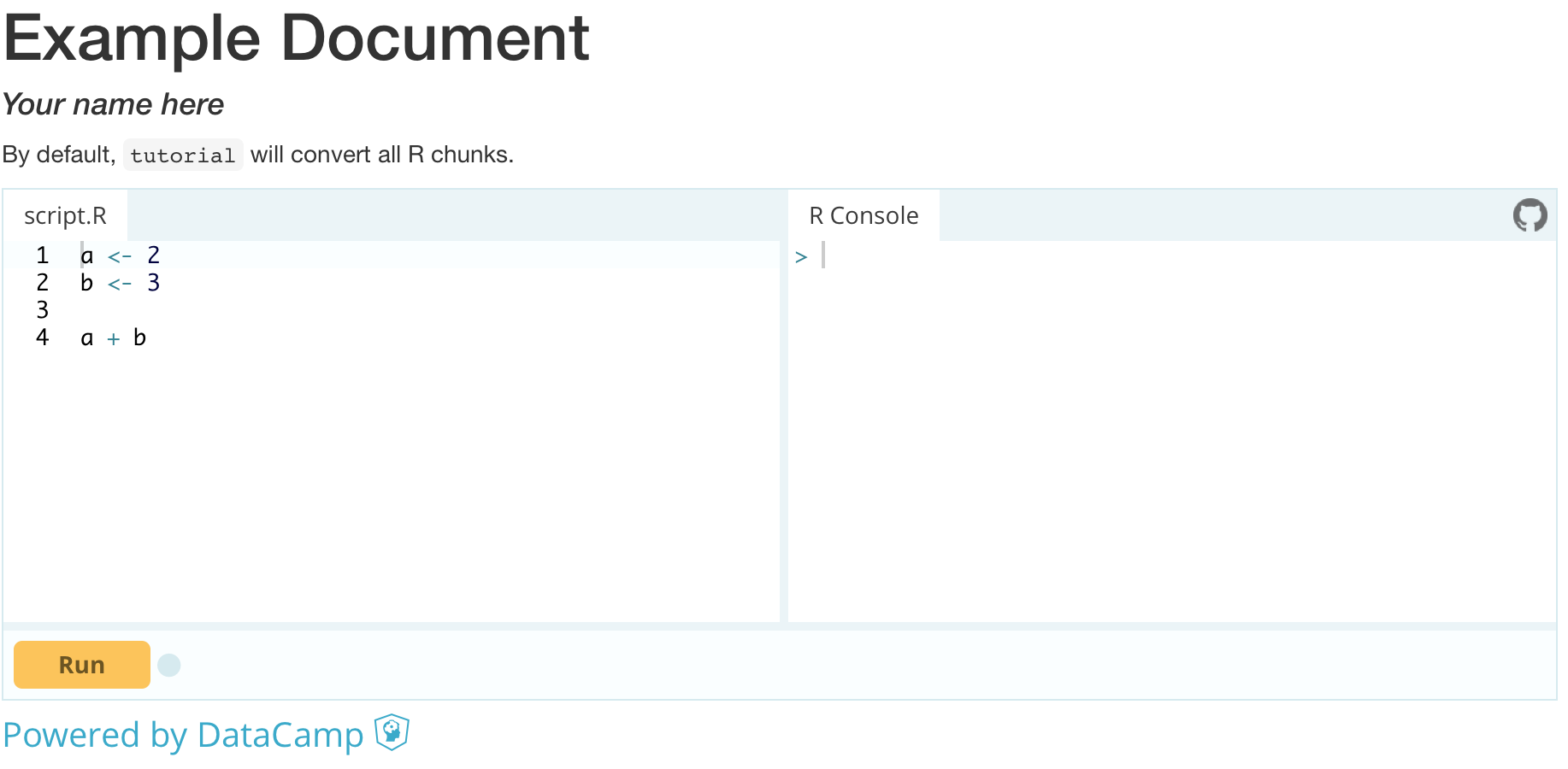
68 |
69 | Notice that the option `self_contained: false` is used. That way, always the latest version of the DataCamp Light JS library is fetched when the document is opened. If `self_contained: true`, the version of the JS library at 'knit time' is baked into the HTML document. This can cause backwards compatibility issues.
70 |
71 | ### Coding challenges
72 |
73 | You can also embed coding challenges into your webpages. This group of code chunks:
74 |
75 | ```{r ex="create_a", type="pre-exercise-code"}
76 | b <- 5
77 | ```
78 |
79 | ```{r ex="create_a", type="sample-code"}
80 | # Create a variable a, equal to 5
81 |
82 |
83 | # Print out a
84 |
85 | ```
86 |
87 | ```{r ex="create_a", type="solution"}
88 | # Create a variable a, equal to 5
89 | a <- 5
90 |
91 | # Print out a
92 | a
93 | ```
94 |
95 | ```{r ex="create_a", type="sct"}
96 | test_object("a")
97 | test_output_contains("a", incorrect_msg = "Make sure to print `a`.")
98 | success_msg("Great!")
99 | ```
100 |
101 | Converts to the following DataCamp Light exercise:
102 |
103 | 
104 |
105 | ### Vignettes
106 |
107 | You can power your package's vignettes with DataCamp Light by adding the same line to the top of your vignette:
108 |
109 | ---
110 | title: "Tutorial Basics"
111 | author: "Filip Schouwenaars"
112 | date: "`r Sys.Date()`"
113 | output: rmarkdown::html_vignette
114 | vignette: >
115 | %\VignetteIndexEntry{Tutorial Basics}
116 | %\VignetteEngine{knitr::rmarkdown}
117 | %\VignetteEncoding{UTF-8}
118 | ---
119 |
120 | ```{r, include=FALSE}
121 | tutorial::go_interactive()
122 | ```
123 |
124 | _remainder of vignette omitted_
125 |
126 | ## Python
127 |
128 | You can also code up Python exercises with `tutorial`:
129 |
130 | ---
131 | title: "Example Document"
132 | author: "Your name here"
133 | output:
134 | html_document:
135 | self_contained: false
136 | ---
137 |
138 | ```{r, include=FALSE}
139 | tutorial::go_interactive()
140 | ```
141 |
142 | Here's an example of a Python fiddle/
143 |
144 | ```{python}
145 | a = 2
146 | b = 3
147 |
148 | print(a + b)
149 | ```
150 |
151 | ## Other Documentation
152 |
153 | - [Tutorial Basics Vignette](https://cran.r-project.org/package=tutorial): explanation on how to convert your static R code chunks into interactive fiddles or exercises, where you can also experiment with DataCamp Light itself.
154 | - [R Markdown](http://rmarkdown.rstudio.com/) and [knitr](http://yihui.name/knitr/) for dynamic documents with R.
155 | - [DataCamp Light JS library](https://www.github.com/datacamp/datacamp-light)
156 | - [Course creation for DataCamp](https://www.datacamp.com/teach/documentation). The documentation includes information on how to get started with course creation, what the different components of an exercise are, how you can write Submission Correctness Tests (SCTs) etc.
157 |
158 | For more details, questions and suggestions, you can contact content-engineering@datacamp.com.
159 |
--------------------------------------------------------------------------------