├── .github
└── workflows
│ ├── sandpaper-version.txt
│ ├── pr-close-signal.yaml
│ ├── pr-post-remove-branch.yaml
│ ├── pr-preflight.yaml
│ ├── sandpaper-main.yaml
│ ├── update-workflows.yaml
│ ├── pr-receive.yaml
│ ├── update-cache.yaml
│ ├── pr-comment.yaml
│ └── README.md
├── AUTHORS
├── learners
├── discuss.md
├── reference.md
└── setup.md
├── site
└── README.md
├── episodes
├── fig
│ ├── sam_bam.png
│ ├── sam_bam3.png
│ ├── terminal.png
│ ├── bad_quality.png
│ ├── good_quality.png
│ ├── DC1_logo_small.png
│ ├── bad_quality1.8.png
│ ├── good_quality1.8.png
│ ├── igv-screenshot.png
│ ├── putty_screenshot_1.png
│ ├── putty_screenshot_2.png
│ ├── putty_screenshot_3.png
│ ├── var_calling_workflow_qc.png
│ ├── variant_calling_workflow.png
│ ├── 172px-EscherichiaColi_NIAID.jpg
│ ├── variant_calling_workflow_align.png
│ ├── lenski_LTEE_timeline_May_28_2016.png
│ ├── variant_calling_workflow_cleanup.png
│ ├── creative-commons-attribution-license.png
│ └── variant_calling_workflow.svg
├── files
│ ├── NexteraPE-PE.fa
│ ├── download-links-for-files.txt
│ ├── run_variant_calling.sh
│ ├── subsample-trimmed-fastq.txt
│ ├── Ecoli_metadata_composite_README.md
│ ├── Ecoli_metadata_composite.tsv
│ └── Ecoli_metadata_composite.csv
├── 01-background.md
├── 05-automation.md
├── 03-trimming.md
└── 04-variant_calling.md
├── profiles
└── learner-profiles.md
├── CITATION
├── CODE_OF_CONDUCT.md
├── .editorconfig
├── .gitignore
├── .zenodo.json
├── README.md
├── config.yaml
├── index.md
├── LICENSE.md
├── instructors
└── instructor-notes.md
└── CONTRIBUTING.md
/.github/workflows/sandpaper-version.txt:
--------------------------------------------------------------------------------
1 | 0.16.12
2 |
--------------------------------------------------------------------------------
/AUTHORS:
--------------------------------------------------------------------------------
1 | FIXME: list authors' names and email addresses.
2 |
--------------------------------------------------------------------------------
/learners/discuss.md:
--------------------------------------------------------------------------------
1 | ---
2 | title: Discussion
3 | ---
4 |
5 | FIXME
6 |
7 |
8 |
9 |
10 |
--------------------------------------------------------------------------------
/site/README.md:
--------------------------------------------------------------------------------
1 | This directory contains rendered lesson materials. Please do not edit files
2 | here.
3 |
--------------------------------------------------------------------------------
/episodes/fig/sam_bam.png:
--------------------------------------------------------------------------------
https://raw.githubusercontent.com/datacarpentry/wrangling-genomics/HEAD/episodes/fig/sam_bam.png
--------------------------------------------------------------------------------
/episodes/fig/sam_bam3.png:
--------------------------------------------------------------------------------
https://raw.githubusercontent.com/datacarpentry/wrangling-genomics/HEAD/episodes/fig/sam_bam3.png
--------------------------------------------------------------------------------
/episodes/fig/terminal.png:
--------------------------------------------------------------------------------
https://raw.githubusercontent.com/datacarpentry/wrangling-genomics/HEAD/episodes/fig/terminal.png
--------------------------------------------------------------------------------
/learners/reference.md:
--------------------------------------------------------------------------------
1 | ---
2 | title: 'Glossary'
3 | ---
4 |
5 | ## Glossary
6 |
7 | FIXME
8 |
9 |
10 |
--------------------------------------------------------------------------------
/episodes/fig/bad_quality.png:
--------------------------------------------------------------------------------
https://raw.githubusercontent.com/datacarpentry/wrangling-genomics/HEAD/episodes/fig/bad_quality.png
--------------------------------------------------------------------------------
/episodes/fig/good_quality.png:
--------------------------------------------------------------------------------
https://raw.githubusercontent.com/datacarpentry/wrangling-genomics/HEAD/episodes/fig/good_quality.png
--------------------------------------------------------------------------------
/profiles/learner-profiles.md:
--------------------------------------------------------------------------------
1 | ---
2 | title: FIXME
3 | ---
4 |
5 | This is a placeholder file. Please add content here.
6 |
--------------------------------------------------------------------------------
/episodes/fig/DC1_logo_small.png:
--------------------------------------------------------------------------------
https://raw.githubusercontent.com/datacarpentry/wrangling-genomics/HEAD/episodes/fig/DC1_logo_small.png
--------------------------------------------------------------------------------
/episodes/fig/bad_quality1.8.png:
--------------------------------------------------------------------------------
https://raw.githubusercontent.com/datacarpentry/wrangling-genomics/HEAD/episodes/fig/bad_quality1.8.png
--------------------------------------------------------------------------------
/episodes/fig/good_quality1.8.png:
--------------------------------------------------------------------------------
https://raw.githubusercontent.com/datacarpentry/wrangling-genomics/HEAD/episodes/fig/good_quality1.8.png
--------------------------------------------------------------------------------
/episodes/fig/igv-screenshot.png:
--------------------------------------------------------------------------------
https://raw.githubusercontent.com/datacarpentry/wrangling-genomics/HEAD/episodes/fig/igv-screenshot.png
--------------------------------------------------------------------------------
/episodes/fig/putty_screenshot_1.png:
--------------------------------------------------------------------------------
https://raw.githubusercontent.com/datacarpentry/wrangling-genomics/HEAD/episodes/fig/putty_screenshot_1.png
--------------------------------------------------------------------------------
/episodes/fig/putty_screenshot_2.png:
--------------------------------------------------------------------------------
https://raw.githubusercontent.com/datacarpentry/wrangling-genomics/HEAD/episodes/fig/putty_screenshot_2.png
--------------------------------------------------------------------------------
/episodes/fig/putty_screenshot_3.png:
--------------------------------------------------------------------------------
https://raw.githubusercontent.com/datacarpentry/wrangling-genomics/HEAD/episodes/fig/putty_screenshot_3.png
--------------------------------------------------------------------------------
/episodes/fig/var_calling_workflow_qc.png:
--------------------------------------------------------------------------------
https://raw.githubusercontent.com/datacarpentry/wrangling-genomics/HEAD/episodes/fig/var_calling_workflow_qc.png
--------------------------------------------------------------------------------
/episodes/fig/variant_calling_workflow.png:
--------------------------------------------------------------------------------
https://raw.githubusercontent.com/datacarpentry/wrangling-genomics/HEAD/episodes/fig/variant_calling_workflow.png
--------------------------------------------------------------------------------
/episodes/fig/172px-EscherichiaColi_NIAID.jpg:
--------------------------------------------------------------------------------
https://raw.githubusercontent.com/datacarpentry/wrangling-genomics/HEAD/episodes/fig/172px-EscherichiaColi_NIAID.jpg
--------------------------------------------------------------------------------
/episodes/fig/variant_calling_workflow_align.png:
--------------------------------------------------------------------------------
https://raw.githubusercontent.com/datacarpentry/wrangling-genomics/HEAD/episodes/fig/variant_calling_workflow_align.png
--------------------------------------------------------------------------------
/episodes/fig/lenski_LTEE_timeline_May_28_2016.png:
--------------------------------------------------------------------------------
https://raw.githubusercontent.com/datacarpentry/wrangling-genomics/HEAD/episodes/fig/lenski_LTEE_timeline_May_28_2016.png
--------------------------------------------------------------------------------
/episodes/fig/variant_calling_workflow_cleanup.png:
--------------------------------------------------------------------------------
https://raw.githubusercontent.com/datacarpentry/wrangling-genomics/HEAD/episodes/fig/variant_calling_workflow_cleanup.png
--------------------------------------------------------------------------------
/episodes/fig/creative-commons-attribution-license.png:
--------------------------------------------------------------------------------
https://raw.githubusercontent.com/datacarpentry/wrangling-genomics/HEAD/episodes/fig/creative-commons-attribution-license.png
--------------------------------------------------------------------------------
/CITATION:
--------------------------------------------------------------------------------
1 | Please cite as:
2 |
3 | Josh Herr, Ming Tang, Lex Nederbragt, Fotis Psomopoulos (eds): "Data Carpentry: Wrangling Genomics Lesson."
4 | Version 2017.11.0, November 2017,
5 | http://www.datacarpentry.org/wrangling-genomics/,
6 | doi: 10.5281/zenodo.1064254
7 |
--------------------------------------------------------------------------------
/episodes/files/NexteraPE-PE.fa:
--------------------------------------------------------------------------------
1 | >PrefixNX/1
2 | AGATGTGTATAAGAGACAG
3 | >PrefixNX/2
4 | AGATGTGTATAAGAGACAG
5 | >Trans1
6 | TCGTCGGCAGCGTCAGATGTGTATAAGAGACAG
7 | >Trans1_rc
8 | CTGTCTCTTATACACATCTGACGCTGCCGACGA
9 | >Trans2
10 | GTCTCGTGGGCTCGGAGATGTGTATAAGAGACAG
11 | >Trans2_rc
12 | CTGTCTCTTATACACATCTCCGAGCCCACGAGAC
--------------------------------------------------------------------------------
/learners/setup.md:
--------------------------------------------------------------------------------
1 | ---
2 | title: Setup
3 | ---
4 |
5 | This workshop is designed to be run on pre-imaged Amazon Web Services
6 | (AWS) instances. For information about how to
7 | use the workshop materials, see the
8 | [setup instructions](https://www.datacarpentry.org/genomics-workshop/index.html#setup) on the main workshop page.
9 |
10 |
11 |
--------------------------------------------------------------------------------
/CODE_OF_CONDUCT.md:
--------------------------------------------------------------------------------
1 | ---
2 | title: "Contributor Code of Conduct"
3 | ---
4 |
5 | As contributors and maintainers of this project,
6 | we pledge to follow the [The Carpentries Code of Conduct][coc].
7 |
8 | Instances of abusive, harassing, or otherwise unacceptable behavior
9 | may be reported by following our [reporting guidelines][coc-reporting].
10 |
11 |
12 | [coc-reporting]: https://docs.carpentries.org/topic_folders/policies/incident-reporting.html
13 | [coc]: https://docs.carpentries.org/topic_folders/policies/code-of-conduct.html
14 |
--------------------------------------------------------------------------------
/.editorconfig:
--------------------------------------------------------------------------------
1 | root = true
2 |
3 | [*]
4 | charset = utf-8
5 | insert_final_newline = true
6 | trim_trailing_whitespace = true
7 |
8 | [*.md]
9 | indent_size = 2
10 | indent_style = space
11 | max_line_length = 100 # Please keep this in sync with bin/lesson_check.py!
12 | trim_trailing_whitespace = false # keep trailing spaces in markdown - 2+ spaces are translated to a hard break ( )
13 |
14 | [*.r]
15 | max_line_length = 80
16 |
17 | [*.py]
18 | indent_size = 4
19 | indent_style = space
20 | max_line_length = 79
21 |
22 | [*.sh]
23 | end_of_line = lf
24 |
25 | [Makefile]
26 | indent_style = tab
27 |
--------------------------------------------------------------------------------
/.github/workflows/pr-close-signal.yaml:
--------------------------------------------------------------------------------
1 | name: "Bot: Send Close Pull Request Signal"
2 |
3 | on:
4 | pull_request:
5 | types:
6 | [closed]
7 |
8 | jobs:
9 | send-close-signal:
10 | name: "Send closing signal"
11 | runs-on: ubuntu-22.04
12 | if: ${{ github.event.action == 'closed' }}
13 | steps:
14 | - name: "Create PRtifact"
15 | run: |
16 | mkdir -p ./pr
17 | printf ${{ github.event.number }} > ./pr/NUM
18 | - name: Upload Diff
19 | uses: actions/upload-artifact@v4
20 | with:
21 | name: pr
22 | path: ./pr
23 |
--------------------------------------------------------------------------------
/episodes/files/download-links-for-files.txt:
--------------------------------------------------------------------------------
1 | # E. coli REL606
2 | ftp://ftp.ncbi.nlm.nih.gov/genomes/all/GCA/000/017/985/GCA_000017985.1_ASM1798v1/GCA_000017985.1_ASM1798v1_genomic.fna.gz # genome file
3 | ftp://ftp.ncbi.nlm.nih.gov/genomes/all/GCA/000/017/985/GCA_000017985.1_ASM1798v1/GCA_000017985.1_ASM1798v1_genomic.gff.gz # gff file
4 |
5 | # Fastq files (downloaded from ENA directly to fastq)
6 | ftp://ftp.sra.ebi.ac.uk/vol1/fastq/SRR258/004/SRR2589044/SRR2589044_1.fastq.gz
7 | ftp://ftp.sra.ebi.ac.uk/vol1/fastq/SRR258/004/SRR2589044/SRR2589044_2.fastq.gz
8 | ftp://ftp.sra.ebi.ac.uk/vol1/fastq/SRR258/003/SRR2584863/SRR2584863_1.fastq.gz
9 | ftp://ftp.sra.ebi.ac.uk/vol1/fastq/SRR258/003/SRR2584863/SRR2584863_2.fastq.gz
10 | ftp://ftp.sra.ebi.ac.uk/vol1/fastq/SRR258/006/SRR2584866/SRR2584866_1.fastq.gz
11 | ftp://ftp.sra.ebi.ac.uk/vol1/fastq/SRR258/006/SRR2584866/SRR2584866_2.fastq.gz
12 |
13 | # subsampled fastq:
14 | https://ndownloader.figshare.com/files/14418248
15 |
--------------------------------------------------------------------------------
/.github/workflows/pr-post-remove-branch.yaml:
--------------------------------------------------------------------------------
1 | name: "Bot: Remove Temporary PR Branch"
2 |
3 | on:
4 | workflow_run:
5 | workflows: ["Bot: Send Close Pull Request Signal"]
6 | types:
7 | - completed
8 |
9 | jobs:
10 | delete:
11 | name: "Delete branch from Pull Request"
12 | runs-on: ubuntu-22.04
13 | if: >
14 | github.event.workflow_run.event == 'pull_request' &&
15 | github.event.workflow_run.conclusion == 'success'
16 | permissions:
17 | contents: write
18 | steps:
19 | - name: 'Download artifact'
20 | uses: carpentries/actions/download-workflow-artifact@main
21 | with:
22 | run: ${{ github.event.workflow_run.id }}
23 | name: pr
24 | - name: "Get PR Number"
25 | id: get-pr
26 | run: |
27 | unzip pr.zip
28 | echo "NUM=$(<./NUM)" >> $GITHUB_OUTPUT
29 | - name: 'Remove branch'
30 | uses: carpentries/actions/remove-branch@main
31 | with:
32 | pr: ${{ steps.get-pr.outputs.NUM }}
33 |
--------------------------------------------------------------------------------
/.gitignore:
--------------------------------------------------------------------------------
1 | # sandpaper files
2 | episodes/*html
3 | site/*
4 | !site/README.md
5 |
6 | # History files
7 | .Rhistory
8 | .Rapp.history
9 | # Session Data files
10 | .RData
11 | # User-specific files
12 | .Ruserdata
13 | # Example code in package build process
14 | *-Ex.R
15 | # Output files from R CMD build
16 | /*.tar.gz
17 | # Output files from R CMD check
18 | /*.Rcheck/
19 | # RStudio files
20 | .Rproj.user/
21 | # produced vignettes
22 | vignettes/*.html
23 | vignettes/*.pdf
24 | # OAuth2 token, see https://github.com/hadley/httr/releases/tag/v0.3
25 | .httr-oauth
26 | # knitr and R markdown default cache directories
27 | *_cache/
28 | /cache/
29 | # Temporary files created by R markdown
30 | *.utf8.md
31 | *.knit.md
32 | # R Environment Variables
33 | .Renviron
34 | # pkgdown site
35 | docs/
36 | # translation temp files
37 | po/*~
38 | # renv detritus
39 | renv/sandbox/
40 | GC_Pipe.txt
41 | *.pyc
42 | *~
43 | .DS_Store
44 | .ipynb_checkpoints
45 | .sass-cache
46 | .jekyll-cache/
47 | .jekyll-metadata
48 | __pycache__
49 | _site
50 | .Rproj.user
51 | .bundle/
52 | .vendor/
53 | vendor/
54 | .docker-vendor/
55 | Gemfile.lock
56 | .*history
57 |
--------------------------------------------------------------------------------
/.github/workflows/pr-preflight.yaml:
--------------------------------------------------------------------------------
1 | name: "Pull Request Preflight Check"
2 |
3 | on:
4 | pull_request_target:
5 | branches:
6 | ["main"]
7 | types:
8 | ["opened", "synchronize", "reopened"]
9 |
10 | jobs:
11 | test-pr:
12 | name: "Test if pull request is valid"
13 | if: ${{ github.event.action != 'closed' }}
14 | runs-on: ubuntu-22.04
15 | outputs:
16 | is_valid: ${{ steps.check-pr.outputs.VALID }}
17 | permissions:
18 | pull-requests: write
19 | steps:
20 | - name: "Get Invalid Hashes File"
21 | id: hash
22 | run: |
23 | echo "json<> $GITHUB_OUTPUT
26 | - name: "Check PR"
27 | id: check-pr
28 | uses: carpentries/actions/check-valid-pr@main
29 | with:
30 | pr: ${{ github.event.number }}
31 | invalid: ${{ fromJSON(steps.hash.outputs.json)[github.repository] }}
32 | fail_on_error: true
33 | - name: "Comment result of validation"
34 | id: comment-diff
35 | if: ${{ always() }}
36 | uses: carpentries/actions/comment-diff@main
37 | with:
38 | pr: ${{ github.event.number }}
39 | body: ${{ steps.check-pr.outputs.MSG }}
40 |
--------------------------------------------------------------------------------
/episodes/files/run_variant_calling.sh:
--------------------------------------------------------------------------------
1 | set -e
2 | cd ~/dc_workshop/results
3 |
4 | genome=~/dc_workshop/data/ref_genome/ecoli_rel606.fasta
5 |
6 | bwa index $genome
7 |
8 | mkdir -p sam bam bcf vcf
9 |
10 | for fq1 in ~/dc_workshop/data/trimmed_fastq_small/*_1.trim.sub.fastq
11 | do
12 | echo "working with file $fq1"
13 |
14 | base=$(basename $fq1 _1.trim.sub.fastq)
15 | echo "base name is $base"
16 |
17 | fq1=~/dc_workshop/data/trimmed_fastq_small/${base}_1.trim.sub.fastq
18 | fq2=~/dc_workshop/data/trimmed_fastq_small/${base}_2.trim.sub.fastq
19 | sam=~/dc_workshop/results/sam/${base}.aligned.sam
20 | bam=~/dc_workshop/results/bam/${base}.aligned.bam
21 | sorted_bam=~/dc_workshop/results/bam/${base}.aligned.sorted.bam
22 | raw_bcf=~/dc_workshop/results/bcf/${base}_raw.bcf
23 | variants=~/dc_workshop/results/bcf/${base}_variants.vcf
24 | final_variants=~/dc_workshop/results/vcf/${base}_final_variants.vcf
25 |
26 | bwa mem $genome $fq1 $fq2 > $sam
27 | samtools view -S -b $sam > $bam
28 | samtools sort -o $sorted_bam $bam
29 | samtools index $sorted_bam
30 | bcftools mpileup -O b -o $raw_bcf -f $genome $sorted_bam
31 | bcftools call --ploidy 1 -m -v -o $variants $raw_bcf
32 | vcfutils.pl varFilter $variants > $final_variants
33 |
34 | done
35 |
--------------------------------------------------------------------------------
/episodes/files/subsample-trimmed-fastq.txt:
--------------------------------------------------------------------------------
1 | # sumbsampled fastq files were made with the following code.
2 | # The sample are available for download here: https://ndownloader.figshare.com/files/14418248
3 |
4 | mkdir -p ~/dc_workshop/data/untrimmed_fastq/
5 | cd ~/dc_workshop/data/untrimmed_fastq
6 |
7 | curl -O ftp://ftp.sra.ebi.ac.uk/vol1/fastq/SRR258/004/SRR2589044/SRR2589044_1.fastq.gz
8 | curl -O ftp://ftp.sra.ebi.ac.uk/vol1/fastq/SRR258/004/SRR2589044/SRR2589044_2.fastq.gz
9 | curl -O ftp://ftp.sra.ebi.ac.uk/vol1/fastq/SRR258/003/SRR2584863/SRR2584863_1.fastq.gz
10 | curl -O ftp://ftp.sra.ebi.ac.uk/vol1/fastq/SRR258/003/SRR2584863/SRR2584863_2.fastq.gz
11 | curl -O ftp://ftp.sra.ebi.ac.uk/vol1/fastq/SRR258/006/SRR2584866/SRR2584866_1.fastq.gz
12 | curl -O ftp://ftp.sra.ebi.ac.uk/vol1/fastq/SRR258/006/SRR2584866/SRR2584866_2.fastq.gz
13 |
14 | cd ~/dc_workshop/data/untrimmed_fastq
15 |
16 | for infile in *_1.fastq.gz
17 | do
18 | base=$(basename ${infile} _1.fastq.gz)
19 | trimmomatic PE ${infile} ${base}_2.fastq.gz \
20 | ${base}_1.trim.fastq.gz ${base}_1un.trim.fastq.gz \
21 | ${base}_2.trim.fastq.gz ${base}_2un.trim.fastq.gz \
22 | SLIDINGWINDOW:4:20 MINLEN:25 ILLUMINACLIP:NexteraPE-PE.fa:2:40:15
23 | done
24 |
25 | cd ~/dc_workshop/data/untrimmed_fastq
26 | mkdir ../trimmed_fastq
27 | mv *.trim* ../trimmed_fastq
28 |
29 | for infile in data/trimmed_fastq/*_1.trim.fastq.gz
30 | do
31 | base=$(basename ${infile} _1.trim.fastq.gz)
32 | gunzip -c ${infile} | head -n 700000 > sub/${base}_1.trim.sub.fastq
33 | gunzip -c data/trimmed_fastq/${base}_2.trim.fastq.gz | head -n 700000 > sub/${base}_2.trim.sub.fastq
34 | done
35 |
--------------------------------------------------------------------------------
/.github/workflows/sandpaper-main.yaml:
--------------------------------------------------------------------------------
1 | name: "01 Build and Deploy Site"
2 |
3 | on:
4 | push:
5 | branches:
6 | - main
7 | - master
8 | schedule:
9 | - cron: '0 0 * * 2'
10 | workflow_dispatch:
11 | inputs:
12 | name:
13 | description: 'Who triggered this build?'
14 | required: true
15 | default: 'Maintainer (via GitHub)'
16 | reset:
17 | description: 'Reset cached markdown files'
18 | required: false
19 | default: false
20 | type: boolean
21 | jobs:
22 | full-build:
23 | name: "Build Full Site"
24 |
25 | # 2024-10-01: ubuntu-latest is now 24.04 and R is not installed by default in the runner image
26 | # pin to 22.04 for now
27 | runs-on: ubuntu-22.04
28 | permissions:
29 | checks: write
30 | contents: write
31 | pages: write
32 | env:
33 | GITHUB_PAT: ${{ secrets.GITHUB_TOKEN }}
34 | RENV_PATHS_ROOT: ~/.local/share/renv/
35 | steps:
36 |
37 | - name: "Checkout Lesson"
38 | uses: actions/checkout@v4
39 |
40 | - name: "Set up R"
41 | uses: r-lib/actions/setup-r@v2
42 | with:
43 | use-public-rspm: true
44 | install-r: false
45 |
46 | - name: "Set up Pandoc"
47 | uses: r-lib/actions/setup-pandoc@v2
48 |
49 | - name: "Setup Lesson Engine"
50 | uses: carpentries/actions/setup-sandpaper@main
51 | with:
52 | cache-version: ${{ secrets.CACHE_VERSION }}
53 |
54 | - name: "Setup Package Cache"
55 | uses: carpentries/actions/setup-lesson-deps@main
56 | with:
57 | cache-version: ${{ secrets.CACHE_VERSION }}
58 |
59 | - name: "Deploy Site"
60 | run: |
61 | reset <- "${{ github.event.inputs.reset }}" == "true"
62 | sandpaper::package_cache_trigger(TRUE)
63 | sandpaper:::ci_deploy(reset = reset)
64 | shell: Rscript {0}
65 |
--------------------------------------------------------------------------------
/.zenodo.json:
--------------------------------------------------------------------------------
1 | {
2 | "contributors": [
3 | {
4 | "type": "Editor",
5 | "name": "Asela Wijeratne"
6 | },
7 | {
8 | "type": "Editor",
9 | "name": "Joshua R. Herr",
10 | "orcid": "0000-0003-3425-292X"
11 | },
12 | {
13 | "type": "Editor",
14 | "name": "Valerie Gartner",
15 | "orcid": "0000-0001-5171-401X"
16 | },
17 | {
18 | "type": "Editor",
19 | "name": "Rhondene Wint"
20 | }
21 | ],
22 | "creators": [
23 | {
24 | "name": "Fotis E. Psomopoulos",
25 | "orcid": "0000-0002-0222-4273"
26 | },
27 | {
28 | "name": "Valerie Gartner"
29 | },
30 | {
31 | "name": "A.C. Schürch",
32 | "orcid": "0000-0003-1894-7545"
33 | },
34 | {
35 | "name": "Bianca Peterson"
36 | },
37 | {
38 | "name": "Alana Alexander"
39 | },
40 | {
41 | "name": "Dinindu Senanayake"
42 | },
43 | {
44 | "name": "Tejashree Modak"
45 | },
46 | {
47 | "name": "Peter Hoyt",
48 | "orcid": "0000-0002-2767-0923"
49 | },
50 | {
51 | "name": "Ailith Ewing"
52 | },
53 | {
54 | "name": "Frederick Varn",
55 | "orcid": "0000-0001-6307-016X"
56 | },
57 | {
58 | "name": "Klemens Noga",
59 | "orcid": "0000-0002-1135-167X"
60 | },
61 | {
62 | "name": "Murray Cadzow",
63 | "orcid": "0000-0002-2299-4136"
64 | },
65 | {
66 | "name": "Nooriyah"
67 | },
68 | {
69 | "name": "SR Steinkamp"
70 | },
71 | {
72 | "name": "Sarah Williams"
73 | },
74 | {
75 | "name": "Schuyler Smith"
76 | },
77 | {
78 | "name": "Tyler Chafin"
79 | },
80 | {
81 | "name": "biowizz"
82 | },
83 | {
84 | "name": "Joseph Sarro"
85 | },
86 | {
87 | "name": "Robert Castelo",
88 | "orcid": "0000-0003-2229-4508"
89 | }
90 | ],
91 | "license": {
92 | "id": "CC-BY-4.0"
93 | }
94 | }
--------------------------------------------------------------------------------
/episodes/files/Ecoli_metadata_composite_README.md:
--------------------------------------------------------------------------------
1 | # Metadata table notes
2 |
3 | ## Blount et al. 2012
4 |
5 | Genomic analysis of a key innovation in an experimental Escherichia coli population
6 | http://dx.doi.org/10.1038/nature11514
7 | supplementary table 1: "historical Ara-3 clones subjected to whole genome sequencing"
8 | Notes:
9 | + changed clade cit+ to C3+ or C3+H to match notation in Leon et al. 2018
10 | + used information in supplementary table 1: "historical Ara-3 clones subjected to whole genome sequencing"
11 |
12 | ## Tenaillon et al. 2016
13 |
14 | Tempo and mode of genome evolution in a 50,000-generation experiment
15 | http://dx.doi.org/10.1038/nature18959
16 | supplementary data 1: https://media.nature.com/original/nature-assets/nature/journal/v536/n7615/extref/nature18959-s1.xlsx
17 |
18 | ## Leon et al. 2018
19 |
20 | Innovation in an E. coli evolution experiment is contingent on maintaining adaptive potential until competition subsides
21 | https://doi.org/10.1371/journal.pgen.1007348
22 | S1 Table. Genome sequencing of E. coli isolates from the LTEE population.
23 | Clade designations describe placement in the phylogenetic tree of all sequenced strains from the population and relative to key evolutionary transitions in this population: UC, Unsuccessful Clade; C1, Clade 1; C2, Clade 2; C3, Clade 3; C3+, Clade 3 Cit+; C3+H, Clade 3 Cit+ hypermutator.
24 | https://doi.org/10.1371/journal.pgen.1007348.s006
25 |
26 | https://tracykteal.github.io/introduction-genomics/01-intro-to-dataset.html states that genome sizes are not real data -- I haven't added these in yet.
27 | Ecoli_metadata.csv downloaded from http://www.datacarpentry.org/R-genomics/data/Ecoli_metadata.csv
28 |
29 | ### Other changes
30 |
31 | + make all column headers lower case
32 | + There was conflicting information for three strains. I chose to represent Blount et al. 2012 in the master sheet:
33 | + ZDB99 is recorded as C2 in Leon et al. 2018, but as C1 in Blount et al. 2012.
34 | + ZDB30 is recorded as C3+ (cit+) by Leon et al. 2018, but as C3 (cit-) in Blount et al. 2012
35 | + ZDB143 is recorded in Leon et al. 2018 as C2, but as Cit+ in Blount et al. 2012
36 | + When data is missing, I kept the cell blank
--------------------------------------------------------------------------------
/README.md:
--------------------------------------------------------------------------------
1 | [](https://doi.org/10.5281/zenodo.3260609)
2 | [](https://slack-invite.carpentries.org/)
3 | [](https://carpentries.slack.com/messages/C9N1K7DCY)
4 |
5 | # Wrangling Genomics
6 |
7 | Lesson for quality control and wrangling genomics data. This repository is maintained by [Josh Herr](https://github.com/jrherr), [Ming Tang](https://github.com/crazyhottommy), and [Fotis Psomopoulos](https://github.com/fpsom).
8 |
9 | Amazon public AMI for this tutorial is "dataCgen-qc".
10 |
11 | ## Background
12 |
13 | Wrangling genomics trains novice learners on a variant calling workflow. Participants will learn how to evaluate sequence quality and what to do if it is not good. We will then cover aligning reads to a genome, and calling variants, as well as discussing different file formats. Results will be visualized. Finally, we will cover how to automate the process by building a shell script.
14 |
15 | This lesson is part of the [Data Carpentry](https://www.datacarpentry.org/) [Genomics Workshop](https://www.datacarpentry.org/genomics-workshop/).
16 |
17 | ## Contribution
18 |
19 | - Make a suggestion or correct an error by [raising an Issue](https://github.com/datacarpentry/wrangling-genomics/issues).
20 |
21 | ## Code of Conduct
22 |
23 | All participants should agree to abide by the [Data Carpentry Code of Conduct](https://www.datacarpentry.org/code-of-conduct/).
24 |
25 | ## Authors
26 |
27 | Wrangling genomics is authored and maintained by the [community](https://github.com/datacarpentry/wrangling-genomics/network/members).
28 |
29 | ## Citation
30 |
31 | Please cite as:
32 |
33 | Erin Alison Becker, Taylor Reiter, Fotis Psomopoulos, Sheldon John McKay, Jessica Elizabeth Mizzi, Jason Williams, … Winni Kretzschmar. (2019, June). datacarpentry/wrangling-genomics: Data Carpentry: Genomics data wrangling and processing, June 2019 (Version v2019.06.1). Zenodo. [http://doi.org/10.5281/zenodo.3260609](https://doi.org/10.5281/zenodo.3260609)
34 |
35 |
36 |
--------------------------------------------------------------------------------
/config.yaml:
--------------------------------------------------------------------------------
1 | #------------------------------------------------------------
2 | # Values for this lesson.
3 | #------------------------------------------------------------
4 |
5 | # Which carpentry is this (swc, dc, lc, or cp)?
6 | # swc: Software Carpentry
7 | # dc: Data Carpentry
8 | # lc: Library Carpentry
9 | # cp: Carpentries (to use for instructor training for instance)
10 | # incubator: The Carpentries Incubator
11 | carpentry: 'dc'
12 |
13 | # Overall title for pages.
14 | title: 'Data Wrangling and Processing for Genomics'
15 |
16 | # Date the lesson was created (YYYY-MM-DD, this is empty by default)
17 | created: '2015-03-24'
18 |
19 | # Comma-separated list of keywords for the lesson
20 | keywords: 'software, data, lesson, The Carpentries'
21 |
22 | # Life cycle stage of the lesson
23 | # possible values: pre-alpha, alpha, beta, stable
24 | life_cycle: 'stable'
25 |
26 | # License of the lesson materials (recommended CC-BY 4.0)
27 | license: 'CC-BY 4.0'
28 |
29 | # Link to the source repository for this lesson
30 | source: 'https://github.com/datacarpentry/wrangling-genomics'
31 |
32 | # Default branch of your lesson
33 | branch: 'main'
34 |
35 | # Who to contact if there are any issues
36 | contact: 'team@carpentries.org'
37 |
38 | # Navigation ------------------------------------------------
39 | #
40 | # Use the following menu items to specify the order of
41 | # individual pages in each dropdown section. Leave blank to
42 | # include all pages in the folder.
43 | #
44 | # Example -------------
45 | #
46 | # episodes:
47 | # - introduction.md
48 | # - first-steps.md
49 | #
50 | # learners:
51 | # - setup.md
52 | #
53 | # instructors:
54 | # - instructor-notes.md
55 | #
56 | # profiles:
57 | # - one-learner.md
58 | # - another-learner.md
59 |
60 | # Order of episodes in your lesson
61 | episodes:
62 | - 01-background.md
63 | - 02-quality-control.md
64 | - 03-trimming.md
65 | - 04-variant_calling.md
66 | - 05-automation.md
67 |
68 | # Information for Learners
69 | learners:
70 |
71 | # Information for Instructors
72 | instructors:
73 |
74 | # Learner Profiles
75 | profiles:
76 |
77 | # Customisation ---------------------------------------------
78 | #
79 | # This space below is where custom yaml items (e.g. pinning
80 | # sandpaper and varnish versions) should live
81 |
82 |
83 | url: 'https://datacarpentry.github.io/wrangling-genomics'
84 | analytics: carpentries
85 | lang: en
86 |
--------------------------------------------------------------------------------
/.github/workflows/update-workflows.yaml:
--------------------------------------------------------------------------------
1 | name: "02 Maintain: Update Workflow Files"
2 |
3 | on:
4 | workflow_dispatch:
5 | inputs:
6 | name:
7 | description: 'Who triggered this build (enter github username to tag yourself)?'
8 | required: true
9 | default: 'weekly run'
10 | clean:
11 | description: 'Workflow files/file extensions to clean (no wildcards, enter "" for none)'
12 | required: false
13 | default: '.yaml'
14 | schedule:
15 | # Run every Tuesday
16 | - cron: '0 0 * * 2'
17 |
18 | jobs:
19 | check_token:
20 | name: "Check SANDPAPER_WORKFLOW token"
21 | runs-on: ubuntu-22.04
22 | outputs:
23 | workflow: ${{ steps.validate.outputs.wf }}
24 | repo: ${{ steps.validate.outputs.repo }}
25 | steps:
26 | - name: "validate token"
27 | id: validate
28 | uses: carpentries/actions/check-valid-credentials@main
29 | with:
30 | token: ${{ secrets.SANDPAPER_WORKFLOW }}
31 |
32 | update_workflow:
33 | name: "Update Workflow"
34 | runs-on: ubuntu-22.04
35 | needs: check_token
36 | if: ${{ needs.check_token.outputs.workflow == 'true' }}
37 | steps:
38 | - name: "Checkout Repository"
39 | uses: actions/checkout@v4
40 |
41 | - name: Update Workflows
42 | id: update
43 | uses: carpentries/actions/update-workflows@main
44 | with:
45 | clean: ${{ github.event.inputs.clean }}
46 |
47 | - name: Create Pull Request
48 | id: cpr
49 | if: "${{ steps.update.outputs.new }}"
50 | uses: carpentries/create-pull-request@main
51 | with:
52 | token: ${{ secrets.SANDPAPER_WORKFLOW }}
53 | delete-branch: true
54 | branch: "update/workflows"
55 | commit-message: "[actions] update sandpaper workflow to version ${{ steps.update.outputs.new }}"
56 | title: "Update Workflows to Version ${{ steps.update.outputs.new }}"
57 | body: |
58 | :robot: This is an automated build
59 |
60 | Update Workflows from sandpaper version ${{ steps.update.outputs.old }} -> ${{ steps.update.outputs.new }}
61 |
62 | - Auto-generated by [create-pull-request][1] on ${{ steps.update.outputs.date }}
63 |
64 | [1]: https://github.com/carpentries/create-pull-request/tree/main
65 | labels: "type: template and tools"
66 | draft: false
67 |
--------------------------------------------------------------------------------
/index.md:
--------------------------------------------------------------------------------
1 | ---
2 | site: sandpaper::sandpaper_site
3 | ---
4 |
5 | A lot of genomics analysis is done using command-line tools for three reasons:
6 |
7 | 1) you will often be working with a large number of files, and working through the command-line rather than
8 | through a graphical user interface (GUI) allows you to automate repetitive tasks,
9 | 2) you will often need more compute power than is available on your personal computer, and
10 | connecting to and interacting with remote computers requires a command-line interface, and
11 | 3) you will often need to customize your analyses, and command-line tools often enable more
12 | customization than the corresponding GUI tools (if in fact a GUI tool even exists).
13 |
14 | In a [previous lesson](https://www.datacarpentry.org/shell-genomics/), you learned how to use the bash shell to interact with your computer through a command line interface. In this
15 | lesson, you will be applying this new knowledge to carry out a common genomics workflow - identifying variants among sequencing samples
16 | taken from multiple individuals within a population. We will be starting with a set of sequenced reads (`.fastq` files), performing
17 | some quality control steps, aligning those reads to a reference genome, and ending by identifying and visualizing variations among these
18 | samples.
19 |
20 | As you progress through this lesson, keep in mind that, even if you aren't going to be doing this same workflow in your research,
21 | you will be learning some very important lessons about using command-line bioinformatic tools. What you learn here will enable you to
22 | use a variety of bioinformatic tools with confidence and greatly enhance your research efficiency and productivity.
23 |
24 | :::::::::::::::::::::::::::::::::::::::::: prereq
25 |
26 | ## Prerequisites
27 |
28 | This lesson assumes a working understanding of the bash shell. If you haven't already completed the [Shell Genomics](https://www.datacarpentry.org/shell-genomics/) lesson, and aren't familiar with the bash shell, please review those materials
29 | before starting this lesson.
30 |
31 | This lesson also assumes some familiarity with biological concepts, including the structure of DNA, nucleotide abbreviations, and the
32 | concept of genomic variation within a population.
33 |
34 | This lesson uses data hosted on an Amazon Machine Instance (AMI). Workshop participants will be given information on how
35 | to log-in to the AMI during the workshop. Learners using these materials for self-directed study will need to set up their own
36 | AMI. Information on setting up an AMI and accessing the required data is provided on the [Genomics Workshop setup page](https://datacarpentry.org/genomics-workshop/index.html#setup).
37 |
38 |
39 | ::::::::::::::::::::::::::::::::::::::::::::::::::
40 |
41 |
42 |
--------------------------------------------------------------------------------
/LICENSE.md:
--------------------------------------------------------------------------------
1 | ---
2 | title: "Licenses"
3 | ---
4 |
5 | ## Instructional Material
6 |
7 | All Carpentries (Software Carpentry, Data Carpentry, and Library Carpentry)
8 | instructional material is made available under the [Creative Commons
9 | Attribution license][cc-by-human]. The following is a human-readable summary of
10 | (and not a substitute for) the [full legal text of the CC BY 4.0
11 | license][cc-by-legal].
12 |
13 | You are free:
14 |
15 | - to **Share**---copy and redistribute the material in any medium or format
16 | - to **Adapt**---remix, transform, and build upon the material
17 |
18 | for any purpose, even commercially.
19 |
20 | The licensor cannot revoke these freedoms as long as you follow the license
21 | terms.
22 |
23 | Under the following terms:
24 |
25 | - **Attribution**---You must give appropriate credit (mentioning that your work
26 | is derived from work that is Copyright (c) The Carpentries and, where
27 | practical, linking to ), provide a [link to the
28 | license][cc-by-human], and indicate if changes were made. You may do so in
29 | any reasonable manner, but not in any way that suggests the licensor endorses
30 | you or your use.
31 |
32 | - **No additional restrictions**---You may not apply legal terms or
33 | technological measures that legally restrict others from doing anything the
34 | license permits. With the understanding that:
35 |
36 | Notices:
37 |
38 | * You do not have to comply with the license for elements of the material in
39 | the public domain or where your use is permitted by an applicable exception
40 | or limitation.
41 | * No warranties are given. The license may not give you all of the permissions
42 | necessary for your intended use. For example, other rights such as publicity,
43 | privacy, or moral rights may limit how you use the material.
44 |
45 | ## Software
46 |
47 | Except where otherwise noted, the example programs and other software provided
48 | by The Carpentries are made available under the [OSI][osi]-approved [MIT
49 | license][mit-license].
50 |
51 | Permission is hereby granted, free of charge, to any person obtaining a copy of
52 | this software and associated documentation files (the "Software"), to deal in
53 | the Software without restriction, including without limitation the rights to
54 | use, copy, modify, merge, publish, distribute, sublicense, and/or sell copies
55 | of the Software, and to permit persons to whom the Software is furnished to do
56 | so, subject to the following conditions:
57 |
58 | The above copyright notice and this permission notice shall be included in all
59 | copies or substantial portions of the Software.
60 |
61 | THE SOFTWARE IS PROVIDED "AS IS", WITHOUT WARRANTY OF ANY KIND, EXPRESS OR
62 | IMPLIED, INCLUDING BUT NOT LIMITED TO THE WARRANTIES OF MERCHANTABILITY,
63 | FITNESS FOR A PARTICULAR PURPOSE AND NONINFRINGEMENT. IN NO EVENT SHALL THE
64 | AUTHORS OR COPYRIGHT HOLDERS BE LIABLE FOR ANY CLAIM, DAMAGES OR OTHER
65 | LIABILITY, WHETHER IN AN ACTION OF CONTRACT, TORT OR OTHERWISE, ARISING FROM,
66 | OUT OF OR IN CONNECTION WITH THE SOFTWARE OR THE USE OR OTHER DEALINGS IN THE
67 | SOFTWARE.
68 |
69 | ## Trademark
70 |
71 | "The Carpentries", "Software Carpentry", "Data Carpentry", and "Library
72 | Carpentry" and their respective logos are registered trademarks of
73 | [The Carpentries, Inc.][carpentries].
74 |
75 | [cc-by-human]: https://creativecommons.org/licenses/by/4.0/
76 | [cc-by-legal]: https://creativecommons.org/licenses/by/4.0/legalcode
77 | [mit-license]: https://opensource.org/licenses/mit-license.html
78 | [carpentries]: https://carpentries.org
79 | [osi]: https://opensource.org
80 |
--------------------------------------------------------------------------------
/.github/workflows/pr-receive.yaml:
--------------------------------------------------------------------------------
1 | name: "Receive Pull Request"
2 |
3 | on:
4 | pull_request:
5 | types:
6 | [opened, synchronize, reopened]
7 |
8 | concurrency:
9 | group: ${{ github.ref }}
10 | cancel-in-progress: true
11 |
12 | jobs:
13 | test-pr:
14 | name: "Record PR number"
15 | if: ${{ github.event.action != 'closed' }}
16 | runs-on: ubuntu-22.04
17 | outputs:
18 | is_valid: ${{ steps.check-pr.outputs.VALID }}
19 | steps:
20 | - name: "Record PR number"
21 | id: record
22 | if: ${{ always() }}
23 | run: |
24 | echo ${{ github.event.number }} > ${{ github.workspace }}/NR # 2022-03-02: artifact name fixed to be NR
25 | - name: "Upload PR number"
26 | id: upload
27 | if: ${{ always() }}
28 | uses: actions/upload-artifact@v4
29 | with:
30 | name: pr
31 | path: ${{ github.workspace }}/NR
32 | - name: "Get Invalid Hashes File"
33 | id: hash
34 | run: |
35 | echo "json<> $GITHUB_OUTPUT
38 | - name: "echo output"
39 | run: |
40 | echo "${{ steps.hash.outputs.json }}"
41 | - name: "Check PR"
42 | id: check-pr
43 | uses: carpentries/actions/check-valid-pr@main
44 | with:
45 | pr: ${{ github.event.number }}
46 | invalid: ${{ fromJSON(steps.hash.outputs.json)[github.repository] }}
47 |
48 | build-md-source:
49 | name: "Build markdown source files if valid"
50 | needs: test-pr
51 | runs-on: ubuntu-22.04
52 | if: ${{ needs.test-pr.outputs.is_valid == 'true' }}
53 | env:
54 | GITHUB_PAT: ${{ secrets.GITHUB_TOKEN }}
55 | RENV_PATHS_ROOT: ~/.local/share/renv/
56 | CHIVE: ${{ github.workspace }}/site/chive
57 | PR: ${{ github.workspace }}/site/pr
58 | MD: ${{ github.workspace }}/site/built
59 | steps:
60 | - name: "Check Out Main Branch"
61 | uses: actions/checkout@v4
62 |
63 | - name: "Check Out Staging Branch"
64 | uses: actions/checkout@v4
65 | with:
66 | ref: md-outputs
67 | path: ${{ env.MD }}
68 |
69 | - name: "Set up R"
70 | uses: r-lib/actions/setup-r@v2
71 | with:
72 | use-public-rspm: true
73 | install-r: false
74 |
75 | - name: "Set up Pandoc"
76 | uses: r-lib/actions/setup-pandoc@v2
77 |
78 | - name: "Setup Lesson Engine"
79 | uses: carpentries/actions/setup-sandpaper@main
80 | with:
81 | cache-version: ${{ secrets.CACHE_VERSION }}
82 |
83 | - name: "Setup Package Cache"
84 | uses: carpentries/actions/setup-lesson-deps@main
85 | with:
86 | cache-version: ${{ secrets.CACHE_VERSION }}
87 |
88 | - name: "Validate and Build Markdown"
89 | id: build-site
90 | run: |
91 | sandpaper::package_cache_trigger(TRUE)
92 | sandpaper::validate_lesson(path = '${{ github.workspace }}')
93 | sandpaper:::build_markdown(path = '${{ github.workspace }}', quiet = FALSE)
94 | shell: Rscript {0}
95 |
96 | - name: "Generate Artifacts"
97 | id: generate-artifacts
98 | run: |
99 | sandpaper:::ci_bundle_pr_artifacts(
100 | repo = '${{ github.repository }}',
101 | pr_number = '${{ github.event.number }}',
102 | path_md = '${{ env.MD }}',
103 | path_pr = '${{ env.PR }}',
104 | path_archive = '${{ env.CHIVE }}',
105 | branch = 'md-outputs'
106 | )
107 | shell: Rscript {0}
108 |
109 | - name: "Upload PR"
110 | uses: actions/upload-artifact@v4
111 | with:
112 | name: pr
113 | path: ${{ env.PR }}
114 | overwrite: true
115 |
116 | - name: "Upload Diff"
117 | uses: actions/upload-artifact@v4
118 | with:
119 | name: diff
120 | path: ${{ env.CHIVE }}
121 | retention-days: 1
122 |
123 | - name: "Upload Build"
124 | uses: actions/upload-artifact@v4
125 | with:
126 | name: built
127 | path: ${{ env.MD }}
128 | retention-days: 1
129 |
130 | - name: "Teardown"
131 | run: sandpaper::reset_site()
132 | shell: Rscript {0}
133 |
--------------------------------------------------------------------------------
/.github/workflows/update-cache.yaml:
--------------------------------------------------------------------------------
1 | name: "03 Maintain: Update Package Cache"
2 |
3 | on:
4 | workflow_dispatch:
5 | inputs:
6 | name:
7 | description: 'Who triggered this build (enter github username to tag yourself)?'
8 | required: true
9 | default: 'monthly run'
10 | schedule:
11 | # Run every tuesday
12 | - cron: '0 0 * * 2'
13 |
14 | jobs:
15 | preflight:
16 | name: "Preflight Check"
17 | runs-on: ubuntu-22.04
18 | outputs:
19 | ok: ${{ steps.check.outputs.ok }}
20 | steps:
21 | - id: check
22 | run: |
23 | if [[ ${{ github.event_name }} == 'workflow_dispatch' ]]; then
24 | echo "ok=true" >> $GITHUB_OUTPUT
25 | echo "Running on request"
26 | # using single brackets here to avoid 08 being interpreted as octal
27 | # https://github.com/carpentries/sandpaper/issues/250
28 | elif [ `date +%d` -le 7 ]; then
29 | # If the Tuesday lands in the first week of the month, run it
30 | echo "ok=true" >> $GITHUB_OUTPUT
31 | echo "Running on schedule"
32 | else
33 | echo "ok=false" >> $GITHUB_OUTPUT
34 | echo "Not Running Today"
35 | fi
36 |
37 | check_renv:
38 | name: "Check if We Need {renv}"
39 | runs-on: ubuntu-22.04
40 | needs: preflight
41 | if: ${{ needs.preflight.outputs.ok == 'true'}}
42 | outputs:
43 | needed: ${{ steps.renv.outputs.exists }}
44 | steps:
45 | - name: "Checkout Lesson"
46 | uses: actions/checkout@v4
47 | - id: renv
48 | run: |
49 | if [[ -d renv ]]; then
50 | echo "exists=true" >> $GITHUB_OUTPUT
51 | fi
52 |
53 | check_token:
54 | name: "Check SANDPAPER_WORKFLOW token"
55 | runs-on: ubuntu-22.04
56 | needs: check_renv
57 | if: ${{ needs.check_renv.outputs.needed == 'true' }}
58 | outputs:
59 | workflow: ${{ steps.validate.outputs.wf }}
60 | repo: ${{ steps.validate.outputs.repo }}
61 | steps:
62 | - name: "validate token"
63 | id: validate
64 | uses: carpentries/actions/check-valid-credentials@main
65 | with:
66 | token: ${{ secrets.SANDPAPER_WORKFLOW }}
67 |
68 | update_cache:
69 | name: "Update Package Cache"
70 | needs: check_token
71 | if: ${{ needs.check_token.outputs.repo== 'true' }}
72 | runs-on: ubuntu-22.04
73 | env:
74 | GITHUB_PAT: ${{ secrets.GITHUB_TOKEN }}
75 | RENV_PATHS_ROOT: ~/.local/share/renv/
76 | steps:
77 |
78 | - name: "Checkout Lesson"
79 | uses: actions/checkout@v4
80 |
81 | - name: "Set up R"
82 | uses: r-lib/actions/setup-r@v2
83 | with:
84 | use-public-rspm: true
85 | install-r: false
86 |
87 | - name: "Update {renv} deps and determine if a PR is needed"
88 | id: update
89 | uses: carpentries/actions/update-lockfile@main
90 | with:
91 | cache-version: ${{ secrets.CACHE_VERSION }}
92 |
93 | - name: Create Pull Request
94 | id: cpr
95 | if: ${{ steps.update.outputs.n > 0 }}
96 | uses: carpentries/create-pull-request@main
97 | with:
98 | token: ${{ secrets.SANDPAPER_WORKFLOW }}
99 | delete-branch: true
100 | branch: "update/packages"
101 | commit-message: "[actions] update ${{ steps.update.outputs.n }} packages"
102 | title: "Update ${{ steps.update.outputs.n }} packages"
103 | body: |
104 | :robot: This is an automated build
105 |
106 | This will update ${{ steps.update.outputs.n }} packages in your lesson with the following versions:
107 |
108 | ```
109 | ${{ steps.update.outputs.report }}
110 | ```
111 |
112 | :stopwatch: In a few minutes, a comment will appear that will show you how the output has changed based on these updates.
113 |
114 | If you want to inspect these changes locally, you can use the following code to check out a new branch:
115 |
116 | ```bash
117 | git fetch origin update/packages
118 | git checkout update/packages
119 | ```
120 |
121 | - Auto-generated by [create-pull-request][1] on ${{ steps.update.outputs.date }}
122 |
123 | [1]: https://github.com/carpentries/create-pull-request/tree/main
124 | labels: "type: package cache"
125 | draft: false
126 |
--------------------------------------------------------------------------------
/episodes/files/Ecoli_metadata_composite.tsv:
--------------------------------------------------------------------------------
1 | strain generation clade reference population mutator facility run read_type read_length sequencing_depth cit
2 | ZDB464 20000 "(C1 C2)" Blount et al. 2012 Ara-3 None MSU RTSF SRR098285 single 36 29.7 unknown
3 | REL10979 40000 C3+H Blount et al. 2012 Ara-3 plus MSU RTSF SRR098029 single 36 30.1 plus
4 | REL10988 40000 C2 Blount et al. 2012 Ara-3 plus MSU RTSF SRR098030 single 36 30.2 minus
5 | REL2181A 5000 Tenaillon et al. 2016 Ara-3 None MSU RTSF SRR2589044 paired 150 60.2 unknown
6 | REL966A 1000 Tenaillon et al. 2016 Ara-3 None IntraGen SRR2589001 paired 101 67.3 unknown
7 | REL764B 500 Tenaillon et al. 2016 Ara-3 None IntraGen SRR2584853 paired 101 82.4 unknown
8 | REL1166A 2000 Tenaillon et al. 2016 Ara-3 None IntraGen SRR2584859 paired 101 85.9 unknown
9 | ZDB429 10000 UC Blount et al. 2012 Ara-3 None MSU RTSF SRR098282 single 35 87.3 unknown
10 | REL7179B 15000 Tenaillon et al. 2016 Ara-3 None MSU RTSF SRR2584863 paired 150 88 unknown
11 | REL1070A 1500 Tenaillon et al. 2016 Ara-3 None IntraGen SRR2584857 paired 101 92 unknown
12 | REL4538A 10000 UC Tenaillon et al. 2016 Ara-3 None MSU RTSF SRR2589045 paired 150 99.5 unknown
13 | REL966B 1000 Tenaillon et al. 2016 Ara-3 None IntraGen SRR2584856 paired 101 101.2 unknown
14 | REL1070B 1500 Tenaillon et al. 2016 Ara-3 None IntraGen SRR2584858 paired 101 102.4 unknown
15 | REL1166B 2000 Tenaillon et al. 2016 Ara-3 None MSU RTSF SRR2591041 paired 150 108.5 unknown
16 | ZDB357 30000 C2 Blount et al. 2012 Ara-3 None MSU RTSF SRR098280 single 35 111.2 unknown
17 | REL764A 500 Tenaillon et al. 2016 Ara-3 None IntraGen SRR2584852 paired 101 113.4 unknown
18 | ZDB16 30000 C1 Blount et al. 2012 Ara-3 None MSU RTSF SRR098031 single 35 113.9 unknown
19 | ZDB458 20000 "(C1 C2)" Blount et al. 2012 Ara-3 None MSU RTSF SRR098284 single 35 126.8 unknown
20 | REL11365 50000 C3+H Tenaillon et al. 2016 Ara-3 plus MSU RTSF SRR2584866 paired 150 138.3 plus
21 | ZDB446 15000 UC Blount et al. 2012 Ara-3 None MSU RTSF SRR098283 single 35 141.1 unknown
22 | ZDB409 5000 unknown Blount et al. 2012 Ara-3 MSU RTSF SRR098281 single 35 144.2 unknown
23 | REL11364 50000 C3+H Tenaillon et al. 2016 Ara-3 plus MSU RTSF SRR2584864 single 51 156.6 plus
24 | ZDB467 20000 "(C1 C2)" Blount et al. 2012 Ara-3 MSU RTSF SRR098286 single 35 unknown
25 | ZDB477 25000 C1 Blount et al. 2012 Ara-3 MSU RTSF SRR098287 single 35 unknown
26 | ZDB483 25000 C3 Blount et al. 2012 Ara-3 MSU RTSF SRR098288 single 35 unknown
27 | ZDB199 31500 C1 Blount et al. 2012 Ara-3 None MSU RTSF SRR098044 single 35 minus
28 | ZDB200 31500 C2 Blount et al. 2012 Ara-3 None MSU RTSF SRR098279 single 35 minus
29 | ZDB564 31500 C3+ Blount et al. 2012 Ara-3 None MSU RTSF SRR098289 single 36 plus
30 | ZDB172 32000 C3+ Blount et al. 2012 Ara-3 None MSU RTSF SRR098042 single 36 plus
31 | ZDB30 32000 C3 Blount et al. 2012 Ara-3 None MSU RTSF SRR098032 single 36 minus
32 | ZDB143 32500 C2 Blount et al. 2012 Ara-3 None MSU RTSF SRR098041 single 35 minus
33 | ZDB158 32500 C2 Blount et al. 2012 Ara-3 None MSU RTSF SRR098040 single 35 minus
34 | CZB152 33000 C3+ Blount et al. 2012 Ara-3 None MSU RTSF SRR098027 single 36 plus
35 | CZB154 33000 C3+ Blount et al. 2012 Ara-3 None MSU RTSF SRR097977 single 36 plus
36 | CZB199 33000 C1 Blount et al. 2012 Ara-3 None MSU RTSF SRR098026 single 35 minus
37 | ZDB83 34000 C3+ Blount et al. 2012 Ara-3 None MSU RTSF SRR098034 single 36 plus
38 | ZDB87 34000 C2 Blount et al. 2012 Ara-3 None MSU RTSF SRR098035 single 36 minus
39 | ZDB96 36000 C3+H Blount et al. 2012 Ara-3 plus MSU RTSF SRR098036 single 36 plus
40 | ZDB99 36000 C1 Blount et al. 2012 Ara-3 None MSU RTSF SRR098037 single 36 minus
41 | ZDB107 38000 C3+H Blount et al. 2012 Ara-3 plus MSU RTSF SRR098038 single 36 plus
42 | ZDB111 38000 C2 Blount et al. 2012 Ara-3 None MSU RTSF SRR098039 single 36 minus
43 | ZDB1 10000 Leon et al. 2018 Ara-3 UTA GSAF SRR6178299 paired 101 unknown
44 | ZDB425 10000 Leon et al. 2018 Ara-3 UTA GSAF SRR6178304 paired 101 unknown
45 | ZDB445 15000 Leon et al. 2018 Ara-3 UTA GSAF SRR6178301 paired 101 unknown
46 | ZDB478 25000 C3 Leon et al. 2018 Ara-3 None UTA GSAF SRR6178302 paired 101 unknown
47 | ZDB486 25000 C3 Leon et al. 2018 Ara-3 None UTA GSAF SRR6178309 paired 101 unknown
48 | ZDB488 25000 C3 Leon et al. 2018 Ara-3 None UTA GSAF SRR6178310 paired 101 unknown
49 | ZDB309 27000 C3 Leon et al. 2018 Ara-3 None UTA GSAF SRR6178307 paired 101 unknown
50 | ZDB310 27000 C3 Leon et al. 2018 Ara-3 None UTA GSAF SRR6178308 paired 101 unknown
51 | ZDB317 27000 C3 Leon et al. 2018 Ara-3 None UTA GSAF SRR6178305 paired 101 unknown
52 | ZDB334 28000 C3 Leon et al. 2018 Ara-3 None UTA GSAF SRR6178306 paired 101 unknown
53 | ZDB339 28000 C3 Leon et al. 2018 Ara-3 None UTA GSAF SRR6178303 paired 101 unknown
54 | ZDB13 29000 C3 Leon et al. 2018 Ara-3 None UTA GSAF SRR6178300 paired 101 unknown
55 | ZDB14 29000 C3 Leon et al. 2018 Ara-3 None UTA GSAF SRR6178297 paired 101 unknown
56 | ZDB17 30000 C3 Leon et al. 2018 Ara-3 None UTA GSAF SRR6178298 paired 101 unknown
57 | ZDB18 30000 C3 Leon et al. 2018 Ara-3 None UTA GSAF SRR6178295 paired 101 unknown
58 | ZDB19 30500 C3 Leon et al. 2018 Ara-3 None UTA GSAF SRR6178296 paired 101 unknown
59 | ZDB20 30500 C3 Leon et al. 2018 Ara-3 None UTA GSAF SRR6178293 paired 101 unknown
60 | ZDB23 31000 C3 Leon et al. 2018 Ara-3 None UTA GSAF SRR6178294 paired 101 unknown
61 | ZDB25 31500 C3 Leon et al. 2018 Ara-3 None UTA GSAF SRR6178291 paired 101 minus
62 | ZDB27 31500 C3 Leon et al. 2018 Ara-3 None UTA GSAF SRR6178292 paired 101 minus
63 | REL606A 0 unknown
64 |
--------------------------------------------------------------------------------
/episodes/files/Ecoli_metadata_composite.csv:
--------------------------------------------------------------------------------
1 | strain,generation,clade,reference,population,mutator,facility,run,read_type,read_length,sequencing_depth,cit
2 | ZDB464,20000,"(C1,C2)",Blount et al. 2012,Ara-3,None,MSU RTSF,SRR098285,single,36,29.7,unknown
3 | REL10979,40000,C3+H,Blount et al. 2012,Ara-3,plus,MSU RTSF,SRR098029,single,36,30.1,plus
4 | REL10988,40000,C2,Blount et al. 2012,Ara-3,plus,MSU RTSF,SRR098030,single,36,30.2,minus
5 | REL2181A,5000,,Tenaillon et al. 2016,Ara-3,None,MSU RTSF,SRR2589044,paired,150,60.2,unknown
6 | REL966A,1000,,Tenaillon et al. 2016,Ara-3,None,IntraGen,SRR2589001,paired,101,67.3,unknown
7 | REL764B,500,,Tenaillon et al. 2016,Ara-3,None,IntraGen,SRR2584853,paired,101,82.4,unknown
8 | REL1166A,2000,,Tenaillon et al. 2016,Ara-3,None,IntraGen,SRR2584859,paired,101,85.9,unknown
9 | ZDB429,10000,UC,Blount et al. 2012,Ara-3,None,MSU RTSF,SRR098282,single,35,87.3,unknown
10 | REL7179B,15000,,Tenaillon et al. 2016,Ara-3,None,MSU RTSF,SRR2584863,paired,150,88,unknown
11 | REL1070A,1500,,Tenaillon et al. 2016,Ara-3,None,IntraGen,SRR2584857,paired,101,92,unknown
12 | REL4538A,10000,UC,Tenaillon et al. 2016,Ara-3,None,MSU RTSF,SRR2589045,paired,150,99.5,unknown
13 | REL966B,1000,,Tenaillon et al. 2016,Ara-3,None,IntraGen,SRR2584856,paired,101,101.2,unknown
14 | REL1070B,1500,,Tenaillon et al. 2016,Ara-3,None,IntraGen,SRR2584858,paired,101,102.4,unknown
15 | REL1166B,2000,,Tenaillon et al. 2016,Ara-3,None,MSU RTSF,SRR2591041,paired,150,108.5,unknown
16 | ZDB357,30000,C2,Blount et al. 2012,Ara-3,None,MSU RTSF,SRR098280,single,35,111.2,unknown
17 | REL764A,500,,Tenaillon et al. 2016,Ara-3,None,IntraGen,SRR2584852,paired,101,113.4,unknown
18 | ZDB16,30000,C1,Blount et al. 2012,Ara-3,None,MSU RTSF,SRR098031,single,35,113.9,unknown
19 | ZDB458,20000,"(C1,C2)",Blount et al. 2012,Ara-3,None,MSU RTSF,SRR098284,single,35,126.8,unknown
20 | REL11365,50000,C3+H,Tenaillon et al. 2016,Ara-3,plus,MSU RTSF,SRR2584866,paired,150,138.3,plus
21 | ZDB446,15000,UC,Blount et al. 2012,Ara-3,None,MSU RTSF,SRR098283,single,35,141.1,unknown
22 | ZDB409,5000,unknown,Blount et al. 2012,Ara-3,,MSU RTSF,SRR098281,single,35,144.2,unknown
23 | REL11364,50000,C3+H,Tenaillon et al. 2016,Ara-3,plus,MSU RTSF,SRR2584864,single,51,156.6,plus
24 | ZDB467,20000,"(C1,C2)",Blount et al. 2012,Ara-3,,MSU RTSF,SRR098286,single,35,,unknown
25 | ZDB477,25000,C1,Blount et al. 2012,Ara-3,,MSU RTSF,SRR098287,single,35,,unknown
26 | ZDB483,25000,C3,Blount et al. 2012,Ara-3,,MSU RTSF,SRR098288,single,35,,unknown
27 | ZDB199,31500,C1,Blount et al. 2012,Ara-3,None,MSU RTSF,SRR098044,single,35,,minus
28 | ZDB200,31500,C2,Blount et al. 2012,Ara-3,None,MSU RTSF,SRR098279,single,35,,minus
29 | ZDB564,31500,C3+,Blount et al. 2012,Ara-3,None,MSU RTSF,SRR098289,single,36,,plus
30 | ZDB172,32000,C3+,Blount et al. 2012,Ara-3,None,MSU RTSF,SRR098042,single,36,,plus
31 | ZDB30,32000,C3,Blount et al. 2012,Ara-3,None,MSU RTSF,SRR098032,single,36,,minus
32 | ZDB143,32500,C2,Blount et al. 2012,Ara-3,None,MSU RTSF,SRR098041,single,35,,minus
33 | ZDB158,32500,C2,Blount et al. 2012,Ara-3,None,MSU RTSF,SRR098040,single,35,,minus
34 | CZB152,33000,C3+,Blount et al. 2012,Ara-3,None,MSU RTSF,SRR098027,single,36,,plus
35 | CZB154,33000,C3+,Blount et al. 2012,Ara-3,None,MSU RTSF,SRR097977,single,36,,plus
36 | CZB199,33000,C1,Blount et al. 2012,Ara-3,None,MSU RTSF,SRR098026,single,35,,minus
37 | ZDB83,34000,C3+,Blount et al. 2012,Ara-3,None,MSU RTSF,SRR098034,single,36,,plus
38 | ZDB87,34000,C2,Blount et al. 2012,Ara-3,None,MSU RTSF,SRR098035,single,36,,minus
39 | ZDB96,36000,C3+H,Blount et al. 2012,Ara-3,plus,MSU RTSF,SRR098036,single,36,,plus
40 | ZDB99,36000,C1,Blount et al. 2012,Ara-3,None,MSU RTSF,SRR098037,single,36,,minus
41 | ZDB107,38000,C3+H,Blount et al. 2012,Ara-3,plus,MSU RTSF,SRR098038,single,36,,plus
42 | ZDB111,38000,C2,Blount et al. 2012,Ara-3,None,MSU RTSF,SRR098039,single,36,,minus
43 | ZDB1,10000,,Leon et al. 2018,Ara-3,,UTA GSAF,SRR6178299,paired,101,,unknown
44 | ZDB425,10000,,Leon et al. 2018,Ara-3,,UTA GSAF,SRR6178304,paired,101,,unknown
45 | ZDB445,15000,,Leon et al. 2018,Ara-3,,UTA GSAF,SRR6178301,paired,101,,unknown
46 | ZDB478,25000,C3,Leon et al. 2018,Ara-3,None,UTA GSAF,SRR6178302,paired,101,,unknown
47 | ZDB486,25000,C3,Leon et al. 2018,Ara-3,None,UTA GSAF,SRR6178309,paired,101,,unknown
48 | ZDB488,25000,C3,Leon et al. 2018,Ara-3,None,UTA GSAF,SRR6178310,paired,101,,unknown
49 | ZDB309,27000,C3,Leon et al. 2018,Ara-3,None,UTA GSAF,SRR6178307,paired,101,,unknown
50 | ZDB310,27000,C3,Leon et al. 2018,Ara-3,None,UTA GSAF,SRR6178308,paired,101,,unknown
51 | ZDB317,27000,C3,Leon et al. 2018,Ara-3,None,UTA GSAF,SRR6178305,paired,101,,unknown
52 | ZDB334,28000,C3,Leon et al. 2018,Ara-3,None,UTA GSAF,SRR6178306,paired,101,,unknown
53 | ZDB339,28000,C3,Leon et al. 2018,Ara-3,None,UTA GSAF,SRR6178303,paired,101,,unknown
54 | ZDB13,29000,C3,Leon et al. 2018,Ara-3,None,UTA GSAF,SRR6178300,paired,101,,unknown
55 | ZDB14,29000,C3,Leon et al. 2018,Ara-3,None,UTA GSAF,SRR6178297,paired,101,,unknown
56 | ZDB17,30000,C3,Leon et al. 2018,Ara-3,None,UTA GSAF,SRR6178298,paired,101,,unknown
57 | ZDB18,30000,C3,Leon et al. 2018,Ara-3,None,UTA GSAF,SRR6178295,paired,101,,unknown
58 | ZDB19,30500,C3,Leon et al. 2018,Ara-3,None,UTA GSAF,SRR6178296,paired,101,,unknown
59 | ZDB20,30500,C3,Leon et al. 2018,Ara-3,None,UTA GSAF,SRR6178293,paired,101,,unknown
60 | ZDB23,31000,C3,Leon et al. 2018,Ara-3,None,UTA GSAF,SRR6178294,paired,101,,unknown
61 | ZDB25,31500,C3,Leon et al. 2018,Ara-3,None,UTA GSAF,SRR6178291,paired,101,,minus
62 | ZDB27,31500,C3,Leon et al. 2018,Ara-3,None,UTA GSAF,SRR6178292,paired,101,,minus
63 | REL606A,0,,unknown,,,,,,,,
64 |
--------------------------------------------------------------------------------
/episodes/01-background.md:
--------------------------------------------------------------------------------
1 | ---
2 | title: Background and Metadata
3 | teaching: 10
4 | exercises: 5
5 | ---
6 |
7 | ::::::::::::::::::::::::::::::::::::::: objectives
8 |
9 | - Why study *E. coli*?
10 | - Understand the data set.
11 | - What is hypermutability?
12 |
13 | ::::::::::::::::::::::::::::::::::::::::::::::::::
14 |
15 | :::::::::::::::::::::::::::::::::::::::: questions
16 |
17 | - What data are we using?
18 | - Why is this experiment important?
19 |
20 | ::::::::::::::::::::::::::::::::::::::::::::::::::
21 |
22 | ## Background
23 |
24 | We are going to use a long-term sequencing dataset from a population of *Escherichia coli*.
25 |
26 | - **What is *E. coli*?**
27 | - *E. coli* are rod-shaped bacteria that can survive under a wide variety of conditions including variable temperatures, nutrient availability, and oxygen levels. Most strains are harmless, but some are associated with food-poisoning.
28 |
29 | {alt='Wikimedia'}
30 |
31 |
32 |
33 | - **Why is *E. coli* important?**
34 | - *E. coli* are one of the most well-studied model organisms in science. As a single-celled organism, *E. coli* reproduces rapidly, typically doubling its population every 20 minutes, which means it can be manipulated easily in experiments. In addition, most naturally occurring strains of *E. coli* are harmless. Most importantly, the genetics of *E. coli* are fairly well understood and can be manipulated to study adaptation and evolution.
35 |
36 | ## The data
37 |
38 | - The data we are going to use is part of a long-term evolution experiment led by [Richard Lenski](https://en.wikipedia.org/wiki/E._coli_long-term_evolution_experiment).
39 |
40 | - The experiment was designed to assess adaptation in *E. coli*. A population was propagated for more than 40,000 generations in a glucose-limited minimal medium (in most conditions glucose is the best carbon source for *E. coli*, providing faster growth than other sugars). This medium was supplemented with citrate, which *E. coli* cannot metabolize in the aerobic conditions of the experiment. Sequencing of the populations at regular time points revealed that spontaneous citrate-using variant (**Cit+**) appeared between 31,000 and 31,500 generations, causing an increase in population size and diversity. In addition, this experiment showed hypermutability in certain regions. Hypermutability is important and can help accelerate adaptation to novel environments, but also can be selected against in well-adapted populations.
41 |
42 | - To see a timeline of the experiment to date, check out this [figure](https://en.wikipedia.org/wiki/E._coli_long-term_evolution_experiment#/media/File:LTEE_Timeline_as_of_May_28,_2016.png), and this paper [Blount et al. 2008: Historical contingency and the evolution of a key innovation in an experimental population of *Escherichia coli*](https://www.pnas.org/content/105/23/7899).
43 |
44 | ### View the metadata
45 |
46 | We will be working with three sample events from the **Ara-3** strain of this experiment, one from 5,000 generations, one from 15,000 generations, and one from 50,000 generations. The population changed substantially during the course of the experiment, and we will be exploring how (the evolution of a **Cit+** mutant and **hypermutability**) with our variant calling workflow. The metadata file associated with this lesson can be [downloaded directly here](files/Ecoli_metadata_composite.csv) or [viewed in Github](https://github.com/datacarpentry/wrangling-genomics/blob/main/episodes/files/Ecoli_metadata_composite.csv). If you would like to know details of how the file was created, you can look at [some notes and sources here](https://github.com/datacarpentry/wrangling-genomics/blob/main/episodes/files/Ecoli_metadata_composite_README.md).
47 |
48 | This metadata describes information on the *Ara-3* clones and the columns represent:
49 |
50 | | Column | Description |
51 | | ---------------- | ----------------------------------------------- |
52 | | strain | strain name |
53 | | generation | generation when sample frozen |
54 | | clade | based on parsimony-based tree |
55 | | reference | study the samples were originally sequenced for |
56 | | population | ancestral population group |
57 | | mutator | hypermutability mutant status |
58 | | facility | facility samples were sequenced at |
59 | | run | Sequence read archive sample ID |
60 | | read\_type | library type of reads |
61 | | read\_length | length of reads in sample |
62 | | sequencing\_depth | depth of sequencing |
63 | | cit | citrate-using mutant status |
64 |
65 | ::::::::::::::::::::::::::::::::::::::: challenge
66 |
67 | ### Challenge
68 |
69 | Based on the metadata, can you answer the following questions?
70 |
71 | 1. How many different generations exist in the data?
72 | 2. How many rows and how many columns are in this data?
73 | 3. How many citrate+ mutants have been recorded in **Ara-3**?
74 | 4. How many hypermutable mutants have been recorded in **Ara-3**?
75 |
76 | ::::::::::::::: solution
77 |
78 | ### Solution
79 |
80 | 1. 25 different generations
81 | 2. 62 rows, 12 columns
82 | 3. 10 citrate+ mutants
83 | 4. 6 hypermutable mutants
84 |
85 | :::::::::::::::::::::::::
86 |
87 | ::::::::::::::::::::::::::::::::::::::::::::::::::
88 |
89 |
90 |
91 | :::::::::::::::::::::::::::::::::::::::: keypoints
92 |
93 | - It is important to record and understand your experiment's metadata.
94 |
95 | ::::::::::::::::::::::::::::::::::::::::::::::::::
96 |
97 |
98 |
--------------------------------------------------------------------------------
/instructors/instructor-notes.md:
--------------------------------------------------------------------------------
1 | ---
2 | title: Instructor Notes
3 | ---
4 |
5 | # Instructor Notes for Wrangling Genomics
6 |
7 | ## Issues with Macs vs Windows
8 |
9 | Users are required to open *multiple* html files locally on their own browser and OS - will vary between users! Probably ctrl-click multiple selection within a file browser and right click will work on most systems?
10 |
11 | ## SAMtools or IGV?
12 |
13 | Some instructors chose to use SAMtools tview for visualization of variant calling results while other prefer than IGV. SAMtools is the default because installation of IGV can take up additional instruction time, and SAMtools tview is sufficient to visualize results. However, episode 04-variant\_calling includes instructions for installation and using IGV.
14 |
15 | ## Commands with Lengthy Run Times
16 |
17 | #### Raw Data Downloads
18 |
19 | The fastq files take about 15 minutes to download. This would be a good time to discuss the overall workflow of this lesson as illustrated by the graphic integrated on the page. It is recommended to start this lesson with the commmands to make and move to the /data/untrimmed-fastq directory and begin the download, and while files download, cover the "Bioinformatics Workflows" and "Starting with Data" texts. Beware that the last fastq file in the list takes the longest to download (~6-8 mins).
20 |
21 | #### Running FastQC
22 |
23 | The FastQC analysis on all raw reads takes about 10 minutes to run. It is a good idea to have learners start this command and cover the FastQC background material and images while FastQC runs.
24 |
25 | #### Trimmomatic
26 |
27 | The trimmomatic for loop will take about 10 minutes to run. Perhaps this would be a good time for a coffee break or a discussion about trimming.
28 |
29 | #### bcftools mpileup
30 |
31 | The bcftools mpileup command will take about 5 minutes to run. It is:
32 |
33 | ```
34 | bcftools mpileup -O b -o results/bcf/SRR2584866_raw.bcf \
35 | -f data/ref_genome/ecoli_rel606.fasta results/bam/SRR2584866.aligned.sorted.bam
36 | ```
37 |
38 | ## Commands that must be modified
39 |
40 | There are several commands that are example commands that will not run correctly if copy and pasted directly to the terminal. These commands serve as example commands and will need to be modified to fit each user. There is text around the commands outlining how they need to be changed, but it's helpful to be aware of them ahead of time as an instructor so you can set them up properly.
41 |
42 | #### scp Command to Download FastQC to local machines
43 |
44 | In the FastQC section, learners will download FastQC output files in order to open '.html `.html` summary files on their local machines in a web browser. The scp command currently contains a public DNS (for example, `ec2-34-238-162-94.compute-1.amazonaws.com`), but this will need to be replaced with the public DNS of the machine used by each learner. The Public DNS for each learner will be the same one they use to log in. The password will be provided to the Instructor when they receive instance information and will be the same for all learners.
45 |
46 | Command as is:
47 |
48 | ```
49 | scp dcuser@ec2-34-238-162-94.compute-1.amazonaws.com:~/dc_workshop/results/fastqc_untrimmed_reads/*.html ~/Desktop/fastqc_html
50 | ```
51 |
52 | Command for learners to use:
53 |
54 | ```
55 | scp dcuser@:~/dc_workshop/results/fastqc_untrimmed_reads/*.html ~/Desktop/fastqc_html
56 | ```
57 |
58 | #### The unzip for loop
59 |
60 | The for loop to unzip FastQC output will not work as directly copied pasted as:
61 |
62 | ```
63 | $ for filename in *.zip
64 | > do
65 | > unzip $filename
66 | > done
67 | ```
68 |
69 | Because the `>` symbol will cause a syntax error when copied. This command will work correctly when typed at the command line! Learners may be surprised that a for loop takes multiple lines on the terminal.
70 |
71 | #### unzip in Working with FastQC Output
72 |
73 | The command `unzip *.zip` in the Working with FastQC Output section will run successfully for the first file, but fail for subsequent files. This error introduces the need for a for loop.
74 |
75 | #### Example Trimmomatic Command
76 |
77 | The first trimmomatic serves as an explanation for trimmomatic parameters and is not meant to be run. The command is:
78 |
79 | ```
80 | $ trimmomatic PE -threads 4 SRR_1056_1.fastq SRR_1056_2.fastq \
81 | SRR_1056_1.trimmed.fastq SRR_1056_1un.trimmed.fastq \
82 | SRR_1056_2.trimmed.fastq SRR_1056_2un.trimmed.fastq \
83 | ILLUMINACLIP:SRR_adapters.fa SLIDINGWINDOW:4:20
84 | ```
85 |
86 | The correct syntax is outlined in the next section, Running Trimmomatic.
87 |
88 | #### Actual Trimmomatic Command
89 |
90 | The actual trimmomatic command is complicated for loop. It will need to be typed out by learners because the `>` symbols will raise an error if copy and pasted.
91 |
92 | For reference, this command is:
93 |
94 | ```
95 | $ for infile in *_1.fastq.gz
96 | > do
97 | > base=$(basename ${infile} _1.fastq.gz)
98 | > trimmomatic PE ${infile} ${base}_2.fastq.gz \
99 | > ${base}_1.trim.fastq.gz ${base}_1un.trim.fastq.gz \
100 | > ${base}_2.trim.fastq.gz ${base}_2un.trim.fastq.gz \
101 | > SLIDINGWINDOW:4:20 MINLEN:25 ILLUMINACLIP:NexteraPE-PE.fa:2:40:15
102 | > done
103 | ```
104 |
105 | #### bwa mem Example Command
106 |
107 | The first bwa mem command is an example and is not meant to be run. It is:
108 |
109 | ```
110 | # bwa mem ref_genome.fasta input_file_R1.fastq input_file_R2.fastq > output.sam
111 | ```
112 |
113 | The correct command follows:
114 |
115 | ```
116 | $ bwa mem data/ref_genome/ecoli_rel606.fasta data/trimmed_fastq_small/SRR2584866_1.trim.sub.fastq data/trimmed_fastq_small/SRR2584866_2.trim.sub.fastq > results/sam/SRR2584866.aligned.sam
117 | ```
118 |
119 | #### The Automation Episode
120 |
121 | The code blocks at the beginning of the automation episode (05-automation.md) are examples of for loops and scripts and are not meant to be run by learners. The first code chunks that should be run are under Analyzing Quality with FastQC.
122 |
123 | Also, after the first code chunk of code meant to be run, there is a line that reads only `read_qc.sh` and will yield a message saying that this command wasn't found. After the creation of the script, this command will run the script that will be written.
124 |
125 |
126 |
--------------------------------------------------------------------------------
/CONTRIBUTING.md:
--------------------------------------------------------------------------------
1 | ## Contributing
2 |
3 | [The Carpentries][cp-site] ([Software Carpentry][swc-site], [Data
4 | Carpentry][dc-site], and [Library Carpentry][lc-site]) are open source
5 | projects, and we welcome contributions of all kinds: new lessons, fixes to
6 | existing material, bug reports, and reviews of proposed changes are all
7 | welcome.
8 |
9 | ### Contributor Agreement
10 |
11 | By contributing, you agree that we may redistribute your work under [our
12 | license](LICENSE.md). In exchange, we will address your issues and/or assess
13 | your change proposal as promptly as we can, and help you become a member of our
14 | community. Everyone involved in [The Carpentries][cp-site] agrees to abide by
15 | our [code of conduct](CODE_OF_CONDUCT.md).
16 |
17 | ### How to Contribute
18 |
19 | The easiest way to get started is to file an issue to tell us about a spelling
20 | mistake, some awkward wording, or a factual error. This is a good way to
21 | introduce yourself and to meet some of our community members.
22 |
23 | 1. If you do not have a [GitHub][github] account, you can [send us comments by
24 | email][contact]. However, we will be able to respond more quickly if you use
25 | one of the other methods described below.
26 |
27 | 2. If you have a [GitHub][github] account, or are willing to [create
28 | one][github-join], but do not know how to use Git, you can report problems
29 | or suggest improvements by [creating an issue][repo-issues]. This allows us
30 | to assign the item to someone and to respond to it in a threaded discussion.
31 |
32 | 3. If you are comfortable with Git, and would like to add or change material,
33 | you can submit a pull request (PR). Instructions for doing this are
34 | [included below](#using-github). For inspiration about changes that need to
35 | be made, check out the [list of open issues][issues] across the Carpentries.
36 |
37 | Note: if you want to build the website locally, please refer to [The Workbench
38 | documentation][template-doc].
39 |
40 | ### Where to Contribute
41 |
42 | 1. If you wish to change this lesson, add issues and pull requests here.
43 | 2. If you wish to change the template used for workshop websites, please refer
44 | to [The Workbench documentation][template-doc].
45 |
46 |
47 | ### What to Contribute
48 |
49 | There are many ways to contribute, from writing new exercises and improving
50 | existing ones to updating or filling in the documentation and submitting [bug
51 | reports][issues] about things that do not work, are not clear, or are missing.
52 | If you are looking for ideas, please see [the list of issues for this
53 | repository][repo-issues], or the issues for [Data Carpentry][dc-issues],
54 | [Library Carpentry][lc-issues], and [Software Carpentry][swc-issues] projects.
55 |
56 | Comments on issues and reviews of pull requests are just as welcome: we are
57 | smarter together than we are on our own. **Reviews from novices and newcomers
58 | are particularly valuable**: it's easy for people who have been using these
59 | lessons for a while to forget how impenetrable some of this material can be, so
60 | fresh eyes are always welcome.
61 |
62 | ### What *Not* to Contribute
63 |
64 | Our lessons already contain more material than we can cover in a typical
65 | workshop, so we are usually *not* looking for more concepts or tools to add to
66 | them. As a rule, if you want to introduce a new idea, you must (a) estimate how
67 | long it will take to teach and (b) explain what you would take out to make room
68 | for it. The first encourages contributors to be honest about requirements; the
69 | second, to think hard about priorities.
70 |
71 | We are also not looking for exercises or other material that only run on one
72 | platform. Our workshops typically contain a mixture of Windows, macOS, and
73 | Linux users; in order to be usable, our lessons must run equally well on all
74 | three.
75 |
76 | ### Using GitHub
77 |
78 | If you choose to contribute via GitHub, you may want to look at [How to
79 | Contribute to an Open Source Project on GitHub][how-contribute]. In brief, we
80 | use [GitHub flow][github-flow] to manage changes:
81 |
82 | 1. Create a new branch in your desktop copy of this repository for each
83 | significant change.
84 | 2. Commit the change in that branch.
85 | 3. Push that branch to your fork of this repository on GitHub.
86 | 4. Submit a pull request from that branch to the [upstream repository][repo].
87 | 5. If you receive feedback, make changes on your desktop and push to your
88 | branch on GitHub: the pull request will update automatically.
89 |
90 | NB: The published copy of the lesson is usually in the `main` branch.
91 |
92 | Each lesson has a team of maintainers who review issues and pull requests or
93 | encourage others to do so. The maintainers are community volunteers, and have
94 | final say over what gets merged into the lesson.
95 |
96 | ### Other Resources
97 |
98 | The Carpentries is a global organisation with volunteers and learners all over
99 | the world. We share values of inclusivity and a passion for sharing knowledge,
100 | teaching and learning. There are several ways to connect with The Carpentries
101 | community listed at including via social
102 | media, slack, newsletters, and email lists. You can also [reach us by
103 | email][contact].
104 |
105 |
106 | [repo]: https://github.com/datacarpentry/wrangling-genomics
107 | [repo-issues]: https://github.com/datacarpentry/wrangling-genomics/issues
108 | [contact]: mailto:team@carpentries.org
109 | [cp-site]: https://carpentries.org/
110 | [dc-issues]: https://github.com/issues?q=user%3Adatacarpentry
111 | [dc-lessons]: https://datacarpentry.org/lessons/
112 | [dc-site]: https://datacarpentry.org/
113 | [discuss-list]: https://lists.software-carpentry.org/listinfo/discuss
114 | [github]: https://github.com
115 | [github-flow]: https://guides.github.com/introduction/flow/
116 | [github-join]: https://github.com/join
117 | [how-contribute]: https://egghead.io/courses/how-to-contribute-to-an-open-source-project-on-github
118 | [issues]: https://carpentries.org/help-wanted-issues/
119 | [lc-issues]: https://github.com/issues?q=user%3ALibraryCarpentry
120 | [swc-issues]: https://github.com/issues?q=user%3Aswcarpentry
121 | [swc-lessons]: https://software-carpentry.org/lessons/
122 | [swc-site]: https://software-carpentry.org/
123 | [lc-site]: https://librarycarpentry.org/
124 | [template-doc]: https://carpentries.github.io/workbench/
125 |
--------------------------------------------------------------------------------
/.github/workflows/pr-comment.yaml:
--------------------------------------------------------------------------------
1 | name: "Bot: Comment on the Pull Request"
2 |
3 | # read-write repo token
4 | # access to secrets
5 | on:
6 | workflow_run:
7 | workflows: ["Receive Pull Request"]
8 | types:
9 | - completed
10 |
11 | concurrency:
12 | group: pr-${{ github.event.workflow_run.pull_requests[0].number }}
13 | cancel-in-progress: true
14 |
15 |
16 | jobs:
17 | # Pull requests are valid if:
18 | # - they match the sha of the workflow run head commit
19 | # - they are open
20 | # - no .github files were committed
21 | test-pr:
22 | name: "Test if pull request is valid"
23 | runs-on: ubuntu-22.04
24 | if: >
25 | github.event.workflow_run.event == 'pull_request' &&
26 | github.event.workflow_run.conclusion == 'success'
27 | outputs:
28 | is_valid: ${{ steps.check-pr.outputs.VALID }}
29 | payload: ${{ steps.check-pr.outputs.payload }}
30 | number: ${{ steps.get-pr.outputs.NUM }}
31 | msg: ${{ steps.check-pr.outputs.MSG }}
32 | steps:
33 | - name: 'Download PR artifact'
34 | id: dl
35 | uses: carpentries/actions/download-workflow-artifact@main
36 | with:
37 | run: ${{ github.event.workflow_run.id }}
38 | name: 'pr'
39 |
40 | - name: "Get PR Number"
41 | if: ${{ steps.dl.outputs.success == 'true' }}
42 | id: get-pr
43 | run: |
44 | unzip pr.zip
45 | echo "NUM=$(<./NR)" >> $GITHUB_OUTPUT
46 |
47 | - name: "Fail if PR number was not present"
48 | id: bad-pr
49 | if: ${{ steps.dl.outputs.success != 'true' }}
50 | run: |
51 | echo '::error::A pull request number was not recorded. The pull request that triggered this workflow is likely malicious.'
52 | exit 1
53 | - name: "Get Invalid Hashes File"
54 | id: hash
55 | run: |
56 | echo "json<> $GITHUB_OUTPUT
59 | - name: "Check PR"
60 | id: check-pr
61 | if: ${{ steps.dl.outputs.success == 'true' }}
62 | uses: carpentries/actions/check-valid-pr@main
63 | with:
64 | pr: ${{ steps.get-pr.outputs.NUM }}
65 | sha: ${{ github.event.workflow_run.head_sha }}
66 | headroom: 3 # if it's within the last three commits, we can keep going, because it's likely rapid-fire
67 | invalid: ${{ fromJSON(steps.hash.outputs.json)[github.repository] }}
68 | fail_on_error: true
69 |
70 | # Create an orphan branch on this repository with two commits
71 | # - the current HEAD of the md-outputs branch
72 | # - the output from running the current HEAD of the pull request through
73 | # the md generator
74 | create-branch:
75 | name: "Create Git Branch"
76 | needs: test-pr
77 | runs-on: ubuntu-22.04
78 | if: ${{ needs.test-pr.outputs.is_valid == 'true' }}
79 | env:
80 | NR: ${{ needs.test-pr.outputs.number }}
81 | permissions:
82 | contents: write
83 | steps:
84 | - name: 'Checkout md outputs'
85 | uses: actions/checkout@v4
86 | with:
87 | ref: md-outputs
88 | path: built
89 | fetch-depth: 1
90 |
91 | - name: 'Download built markdown'
92 | id: dl
93 | uses: carpentries/actions/download-workflow-artifact@main
94 | with:
95 | run: ${{ github.event.workflow_run.id }}
96 | name: 'built'
97 |
98 | - if: ${{ steps.dl.outputs.success == 'true' }}
99 | run: unzip built.zip
100 |
101 | - name: "Create orphan and push"
102 | if: ${{ steps.dl.outputs.success == 'true' }}
103 | run: |
104 | cd built/
105 | git config --local user.email "actions@github.com"
106 | git config --local user.name "GitHub Actions"
107 | CURR_HEAD=$(git rev-parse HEAD)
108 | git checkout --orphan md-outputs-PR-${NR}
109 | git add -A
110 | git commit -m "source commit: ${CURR_HEAD}"
111 | ls -A | grep -v '^.git$' | xargs -I _ rm -r '_'
112 | cd ..
113 | unzip -o -d built built.zip
114 | cd built
115 | git add -A
116 | git commit --allow-empty -m "differences for PR #${NR}"
117 | git push -u --force --set-upstream origin md-outputs-PR-${NR}
118 |
119 | # Comment on the Pull Request with a link to the branch and the diff
120 | comment-pr:
121 | name: "Comment on Pull Request"
122 | needs: [test-pr, create-branch]
123 | runs-on: ubuntu-22.04
124 | if: ${{ needs.test-pr.outputs.is_valid == 'true' }}
125 | env:
126 | NR: ${{ needs.test-pr.outputs.number }}
127 | permissions:
128 | pull-requests: write
129 | steps:
130 | - name: 'Download comment artifact'
131 | id: dl
132 | uses: carpentries/actions/download-workflow-artifact@main
133 | with:
134 | run: ${{ github.event.workflow_run.id }}
135 | name: 'diff'
136 |
137 | - if: ${{ steps.dl.outputs.success == 'true' }}
138 | run: unzip ${{ github.workspace }}/diff.zip
139 |
140 | - name: "Comment on PR"
141 | id: comment-diff
142 | if: ${{ steps.dl.outputs.success == 'true' }}
143 | uses: carpentries/actions/comment-diff@main
144 | with:
145 | pr: ${{ env.NR }}
146 | path: ${{ github.workspace }}/diff.md
147 |
148 | # Comment if the PR is open and matches the SHA, but the workflow files have
149 | # changed
150 | comment-changed-workflow:
151 | name: "Comment if workflow files have changed"
152 | needs: test-pr
153 | runs-on: ubuntu-22.04
154 | if: ${{ always() && needs.test-pr.outputs.is_valid == 'false' }}
155 | env:
156 | NR: ${{ github.event.workflow_run.pull_requests[0].number }}
157 | body: ${{ needs.test-pr.outputs.msg }}
158 | permissions:
159 | pull-requests: write
160 | steps:
161 | - name: 'Check for spoofing'
162 | id: dl
163 | uses: carpentries/actions/download-workflow-artifact@main
164 | with:
165 | run: ${{ github.event.workflow_run.id }}
166 | name: 'built'
167 |
168 | - name: 'Alert if spoofed'
169 | id: spoof
170 | if: ${{ steps.dl.outputs.success == 'true' }}
171 | run: |
172 | echo 'body<> $GITHUB_ENV
173 | echo '' >> $GITHUB_ENV
174 | echo '## :x: DANGER :x:' >> $GITHUB_ENV
175 | echo 'This pull request has modified workflows that created output. Close this now.' >> $GITHUB_ENV
176 | echo '' >> $GITHUB_ENV
177 | echo 'EOF' >> $GITHUB_ENV
178 |
179 | - name: "Comment on PR"
180 | id: comment-diff
181 | uses: carpentries/actions/comment-diff@main
182 | with:
183 | pr: ${{ env.NR }}
184 | body: ${{ env.body }}
185 |
--------------------------------------------------------------------------------
/.github/workflows/README.md:
--------------------------------------------------------------------------------
1 | # Carpentries Workflows
2 |
3 | This directory contains workflows to be used for Lessons using the {sandpaper}
4 | lesson infrastructure. Two of these workflows require R (`sandpaper-main.yaml`
5 | and `pr-receive.yaml`) and the rest are bots to handle pull request management.
6 |
7 | These workflows will likely change as {sandpaper} evolves, so it is important to
8 | keep them up-to-date. To do this in your lesson you can do the following in your
9 | R console:
10 |
11 | ```r
12 | # Install/Update sandpaper
13 | options(repos = c(carpentries = "https://carpentries.r-universe.dev/",
14 | CRAN = "https://cloud.r-project.org"))
15 | install.packages("sandpaper")
16 |
17 | # update the workflows in your lesson
18 | library("sandpaper")
19 | update_github_workflows()
20 | ```
21 |
22 | Inside this folder, you will find a file called `sandpaper-version.txt`, which
23 | will contain a version number for sandpaper. This will be used in the future to
24 | alert you if a workflow update is needed.
25 |
26 | What follows are the descriptions of the workflow files:
27 |
28 | ## Deployment
29 |
30 | ### 01 Build and Deploy (sandpaper-main.yaml)
31 |
32 | This is the main driver that will only act on the main branch of the repository.
33 | This workflow does the following:
34 |
35 | 1. checks out the lesson
36 | 2. provisions the following resources
37 | - R
38 | - pandoc
39 | - lesson infrastructure (stored in a cache)
40 | - lesson dependencies if needed (stored in a cache)
41 | 3. builds the lesson via `sandpaper:::ci_deploy()`
42 |
43 | #### Caching
44 |
45 | This workflow has two caches; one cache is for the lesson infrastructure and
46 | the other is for the lesson dependencies if the lesson contains rendered
47 | content. These caches are invalidated by new versions of the infrastructure and
48 | the `renv.lock` file, respectively. If there is a problem with the cache,
49 | manual invaliation is necessary. You will need maintain access to the repository
50 | and you can either go to the actions tab and [click on the caches button to find
51 | and invalidate the failing cache](https://github.blog/changelog/2022-10-20-manage-caches-in-your-actions-workflows-from-web-interface/)
52 | or by setting the `CACHE_VERSION` secret to the current date (which will
53 | invalidate all of the caches).
54 |
55 | ## Updates
56 |
57 | ### Setup Information
58 |
59 | These workflows run on a schedule and at the maintainer's request. Because they
60 | create pull requests that update workflows/require the downstream actions to run,
61 | they need a special repository/organization secret token called
62 | `SANDPAPER_WORKFLOW` and it must have the `public_repo` and `workflow` scope.
63 |
64 | This can be an individual user token, OR it can be a trusted bot account. If you
65 | have a repository in one of the official Carpentries accounts, then you do not
66 | need to worry about this token being present because the Carpentries Core Team
67 | will take care of supplying this token.
68 |
69 | If you want to use your personal account: you can go to
70 |
71 | to create a token. Once you have created your token, you should copy it to your
72 | clipboard and then go to your repository's settings > secrets > actions and
73 | create or edit the `SANDPAPER_WORKFLOW` secret, pasting in the generated token.
74 |
75 | If you do not specify your token correctly, the runs will not fail and they will
76 | give you instructions to provide the token for your repository.
77 |
78 | ### 02 Maintain: Update Workflow Files (update-workflow.yaml)
79 |
80 | The {sandpaper} repository was designed to do as much as possible to separate
81 | the tools from the content. For local builds, this is absolutely true, but
82 | there is a minor issue when it comes to workflow files: they must live inside
83 | the repository.
84 |
85 | This workflow ensures that the workflow files are up-to-date. The way it work is
86 | to download the update-workflows.sh script from GitHub and run it. The script
87 | will do the following:
88 |
89 | 1. check the recorded version of sandpaper against the current version on github
90 | 2. update the files if there is a difference in versions
91 |
92 | After the files are updated, if there are any changes, they are pushed to a
93 | branch called `update/workflows` and a pull request is created. Maintainers are
94 | encouraged to review the changes and accept the pull request if the outputs
95 | are okay.
96 |
97 | This update is run weekly or on demand.
98 |
99 | ### 03 Maintain: Update Package Cache (update-cache.yaml)
100 |
101 | For lessons that have generated content, we use {renv} to ensure that the output
102 | is stable. This is controlled by a single lockfile which documents the packages
103 | needed for the lesson and the version numbers. This workflow is skipped in
104 | lessons that do not have generated content.
105 |
106 | Because the lessons need to remain current with the package ecosystem, it's a
107 | good idea to make sure these packages can be updated periodically. The
108 | update cache workflow will do this by checking for updates, applying them in a
109 | branch called `updates/packages` and creating a pull request with _only the
110 | lockfile changed_.
111 |
112 | From here, the markdown documents will be rebuilt and you can inspect what has
113 | changed based on how the packages have updated.
114 |
115 | ## Pull Request and Review Management
116 |
117 | Because our lessons execute code, pull requests are a secruity risk for any
118 | lesson and thus have security measures associted with them. **Do not merge any
119 | pull requests that do not pass checks and do not have bots commented on them.**
120 |
121 | This series of workflows all go together and are described in the following
122 | diagram and the below sections:
123 |
124 | 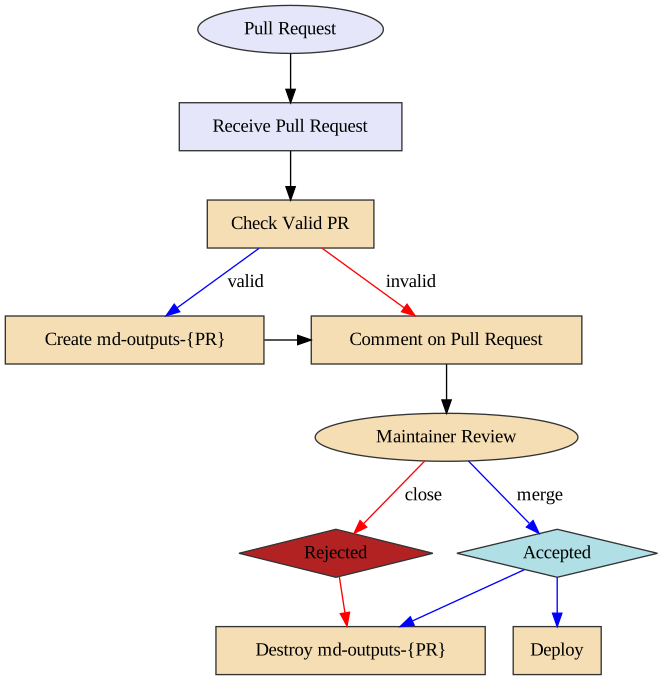
125 |
126 | ### Pre Flight Pull Request Validation (pr-preflight.yaml)
127 |
128 | This workflow runs every time a pull request is created and its purpose is to
129 | validate that the pull request is okay to run. This means the following things:
130 |
131 | 1. The pull request does not contain modified workflow files
132 | 2. If the pull request contains modified workflow files, it does not contain
133 | modified content files (such as a situation where @carpentries-bot will
134 | make an automated pull request)
135 | 3. The pull request does not contain an invalid commit hash (e.g. from a fork
136 | that was made before a lesson was transitioned from styles to use the
137 | workbench).
138 |
139 | Once the checks are finished, a comment is issued to the pull request, which
140 | will allow maintainers to determine if it is safe to run the
141 | "Receive Pull Request" workflow from new contributors.
142 |
143 | ### Receive Pull Request (pr-receive.yaml)
144 |
145 | **Note of caution:** This workflow runs arbitrary code by anyone who creates a
146 | pull request. GitHub has safeguarded the token used in this workflow to have no
147 | priviledges in the repository, but we have taken precautions to protect against
148 | spoofing.
149 |
150 | This workflow is triggered with every push to a pull request. If this workflow
151 | is already running and a new push is sent to the pull request, the workflow
152 | running from the previous push will be cancelled and a new workflow run will be
153 | started.
154 |
155 | The first step of this workflow is to check if it is valid (e.g. that no
156 | workflow files have been modified). If there are workflow files that have been
157 | modified, a comment is made that indicates that the workflow is not run. If
158 | both a workflow file and lesson content is modified, an error will occurr.
159 |
160 | The second step (if valid) is to build the generated content from the pull
161 | request. This builds the content and uploads three artifacts:
162 |
163 | 1. The pull request number (pr)
164 | 2. A summary of changes after the rendering process (diff)
165 | 3. The rendered files (build)
166 |
167 | Because this workflow builds generated content, it follows the same general
168 | process as the `sandpaper-main` workflow with the same caching mechanisms.
169 |
170 | The artifacts produced are used by the next workflow.
171 |
172 | ### Comment on Pull Request (pr-comment.yaml)
173 |
174 | This workflow is triggered if the `pr-receive.yaml` workflow is successful.
175 | The steps in this workflow are:
176 |
177 | 1. Test if the workflow is valid and comment the validity of the workflow to the
178 | pull request.
179 | 2. If it is valid: create an orphan branch with two commits: the current state
180 | of the repository and the proposed changes.
181 | 3. If it is valid: update the pull request comment with the summary of changes
182 |
183 | Importantly: if the pull request is invalid, the branch is not created so any
184 | malicious code is not published.
185 |
186 | From here, the maintainer can request changes from the author and eventually
187 | either merge or reject the PR. When this happens, if the PR was valid, the
188 | preview branch needs to be deleted.
189 |
190 | ### Send Close PR Signal (pr-close-signal.yaml)
191 |
192 | Triggered any time a pull request is closed. This emits an artifact that is the
193 | pull request number for the next action
194 |
195 | ### Remove Pull Request Branch (pr-post-remove-branch.yaml)
196 |
197 | Tiggered by `pr-close-signal.yaml`. This removes the temporary branch associated with
198 | the pull request (if it was created).
199 |
--------------------------------------------------------------------------------
/episodes/05-automation.md:
--------------------------------------------------------------------------------
1 | ---
2 | title: Automating a Variant Calling Workflow
3 | teaching: 30
4 | exercises: 15
5 | ---
6 |
7 | ::::::::::::::::::::::::::::::::::::::: objectives
8 |
9 | - Write a shell script with multiple variables.
10 | - Incorporate a `for` loop into a shell script.
11 |
12 | ::::::::::::::::::::::::::::::::::::::::::::::::::
13 |
14 | :::::::::::::::::::::::::::::::::::::::: questions
15 |
16 | - How can I make my workflow more efficient and less error-prone?
17 |
18 | ::::::::::::::::::::::::::::::::::::::::::::::::::
19 |
20 | ## What is a shell script?
21 |
22 | You wrote a simple shell script in a [previous lesson](https://www.datacarpentry.org/shell-genomics/05-writing-scripts) that we used to extract bad reads from our
23 | FASTQ files and put them into a new file.
24 |
25 | Here is the script you wrote:
26 |
27 | ```bash
28 | grep -B1 -A2 NNNNNNNNNN *.fastq > scripted_bad_reads.txt
29 |
30 | echo "Script finished!"
31 | ```
32 |
33 | That script was only two lines long, but shell scripts can be much more complicated
34 | than that and can be used to perform a large number of operations on one or many
35 | files. This saves you the effort of having to type each of those commands over for
36 | each of your data files and makes your work less error-prone and more reproducible.
37 | For example, the variant calling workflow we just carried out had about eight steps
38 | where we had to type a command into our terminal. Most of these commands were pretty
39 | long. If we wanted to do this for all six of our data files, that would be forty-eight
40 | steps. If we had 50 samples (a more realistic number), it would be 400 steps! You can
41 | see why we want to automate this.
42 |
43 | We have also used `for` loops in previous lessons to iterate one or two commands over multiple input files.
44 | In these `for` loops, the filename was defined as a variable in the `for` statement, which enabled you to run the loop on multiple files. We will be using variable assignments like this in our new shell scripts.
45 |
46 | Here is the `for` loop you wrote for unzipping `.zip` files:
47 |
48 | ```bash
49 | $ for filename in *.zip
50 | > do
51 | > unzip $filename
52 | > done
53 | ```
54 |
55 | And here is the one you wrote for running Trimmomatic on all of our `.fastq` sample files:
56 |
57 | ```bash
58 | $ for infile in *_1.fastq.gz
59 | > do
60 | > base=$(basename ${infile} _1.fastq.gz)
61 | > trimmomatic PE ${infile} ${base}_2.fastq.gz \
62 | > ${base}_1.trim.fastq.gz ${base}_1un.trim.fastq.gz \
63 | > ${base}_2.trim.fastq.gz ${base}_2un.trim.fastq.gz \
64 | > SLIDINGWINDOW:4:20 MINLEN:25 ILLUMINACLIP:NexteraPE-PE.fa:2:40:15
65 | > done
66 | ```
67 |
68 | Notice that in this `for` loop, we used two variables, `infile`, which was defined in the `for` statement, and `base`, which was created from the filename during each iteration of the loop.
69 |
70 | ::::::::::::::::::::::::::::::::::::::::: callout
71 |
72 | ### Creating variables
73 |
74 | Within the Bash shell you can create variables at any time (as we did
75 | above, and during the 'for' loop lesson). Assign any name and the
76 | value using the assignment operator: '='. You can check the current
77 | definition of your variable by typing into your script: echo $variable\_name.
78 |
79 | ::::::::::::::::::::::::::::::::::::::::::::::::::
80 |
81 | In this lesson, we will use two shell scripts to automate the variant calling analysis: one for FastQC analysis (including creating our summary file), and a second for the remaining variant calling. To write a script to run our FastQC analysis, we will take each of the commands we entered to run FastQC and process the output files and put them into a single file with a `.sh` extension. The `.sh` is not essential, but serves as a reminder to ourselves and to the computer that this is a shell script.
82 |
83 | ## Analyzing quality with FastQC
84 |
85 | We will use the command `touch` to create a new file where we will write our shell script. We will create this script in a new
86 | directory called `scripts/`. Previously, we used
87 | `nano` to create and open a new file. The command `touch` allows us to create a new file without opening that file.
88 |
89 | ```bash
90 | $ mkdir -p ~/dc_workshop/scripts
91 | $ cd ~/dc_workshop/scripts
92 | $ touch read_qc.sh
93 | $ ls
94 | ```
95 |
96 | ```output
97 | read_qc.sh
98 | ```
99 |
100 | We now have an empty file called `read_qc.sh` in our `scripts/` directory. We will now open this file in `nano` and start
101 | building our script.
102 |
103 | ```bash
104 | $ nano read_qc.sh
105 | ```
106 |
107 | **Enter the following pieces of code into your shell script (not into your terminal prompt).**
108 |
109 | Our first line will ensure that our script will exit if an error occurs, and is a good idea to include at the beginning of your scripts. The second line will move us into the `untrimmed_fastq/` directory when we run our script.
110 |
111 | ```output
112 | set -e
113 | cd ~/dc_workshop/data/untrimmed_fastq/
114 | ```
115 |
116 | These next two lines will give us a status message to tell us that we are currently running FastQC, then will run FastQC
117 | on all of the files in our current directory with a `.fastq` extension.
118 |
119 | ```output
120 | echo "Running FastQC ..."
121 | fastqc *.fastq*
122 | ```
123 |
124 | Our next line will create a new directory to hold our FastQC output files. Here we are using the `-p` option for `mkdir` again. It is a good idea to use this option in your shell scripts to avoid running into errors if you do not have the directory structure you think you do.
125 |
126 | ```output
127 | mkdir -p ~/dc_workshop/results/fastqc_untrimmed_reads
128 | ```
129 |
130 | Our next three lines first give us a status message to tell us we are saving the results from FastQC, then moves all of the files
131 | with a `.zip` or a `.html` extension to the directory we just created for storing our FastQC results.
132 |
133 | ```output
134 | echo "Saving FastQC results..."
135 | mv *.zip ~/dc_workshop/results/fastqc_untrimmed_reads/
136 | mv *.html ~/dc_workshop/results/fastqc_untrimmed_reads/
137 | ```
138 |
139 | The next line moves us to the results directory where we have stored our output.
140 |
141 | ```output
142 | cd ~/dc_workshop/results/fastqc_untrimmed_reads/
143 | ```
144 |
145 | The next five lines should look very familiar. First we give ourselves a status message to tell us that we are unzipping our ZIP
146 | files. Then we run our for loop to unzip all of the `.zip` files in this directory.
147 |
148 | ```output
149 | echo "Unzipping..."
150 | for filename in *.zip
151 | do
152 | unzip $filename
153 | done
154 | ```
155 |
156 | Next we concatenate all of our summary files into a single output file, with a status message to remind ourselves that this is
157 | what we are doing.
158 |
159 | ```output
160 | echo "Saving summary..."
161 | mkdir -p ~/dc_workshops/docs
162 | cat */summary.txt > ~/dc_workshop/docs/fastqc_summaries.txt
163 | ```
164 |
165 | ::::::::::::::::::::::::::::::::::::::::: callout
166 |
167 | ### Using `echo` statements
168 |
169 | We have used `echo` statements to add progress statements to our script. Our script will print these statements
170 | as it is running and therefore we will be able to see how far our script has progressed.
171 |
172 | ::::::::::::::::::::::::::::::::::::::::::::::::::
173 |
174 | Your full shell script should now look like this:
175 |
176 | ```output
177 | set -e
178 | cd ~/dc_workshop/data/untrimmed_fastq/
179 |
180 | echo "Running FastQC ..."
181 | fastqc *.fastq*
182 |
183 | mkdir -p ~/dc_workshop/results/fastqc_untrimmed_reads
184 |
185 | echo "Saving FastQC results..."
186 | mv *.zip ~/dc_workshop/results/fastqc_untrimmed_reads/
187 | mv *.html ~/dc_workshop/results/fastqc_untrimmed_reads/
188 |
189 | cd ~/dc_workshop/results/fastqc_untrimmed_reads/
190 |
191 | echo "Unzipping..."
192 | for filename in *.zip
193 | do
194 | unzip $filename
195 | done
196 |
197 | echo "Saving summary..."
198 | cat */summary.txt > ~/dc_workshop/docs/fastqc_summaries.txt
199 | ```
200 |
201 | Save your file and exit `nano`. We can now run our script:
202 |
203 | ```bash
204 | $ bash read_qc.sh
205 | ```
206 |
207 | ```output
208 | Running FastQC ...
209 | Started analysis of SRR2584866.fastq
210 | Approx 5% complete for SRR2584866.fastq
211 | Approx 10% complete for SRR2584866.fastq
212 | Approx 15% complete for SRR2584866.fastq
213 | Approx 20% complete for SRR2584866.fastq
214 | Approx 25% complete for SRR2584866.fastq
215 | .
216 | .
217 | .
218 | ```
219 |
220 | For each of your sample files, FastQC will ask if you want to replace the existing version with a new version. This is
221 | because we have already run FastQC on this samples files and generated all of the outputs. We are now doing this again using
222 | our scripts. Go ahead and select `A` each time this message appears. It will appear once per sample file (six times total).
223 |
224 | ```output
225 | replace SRR2584866_fastqc/Icons/fastqc_icon.png? [y]es, [n]o, [A]ll, [N]one, [r]ename:
226 | ```
227 |
228 | ## Automating the rest of our variant calling workflow
229 |
230 | We can extend these principles to the entire variant calling workflow. To do this, we will take all of the individual commands that we wrote before, put them into a single file, add variables so that the script knows to iterate through our input files and write to the appropriate output files. This is very similar to what we did with our `read_qc.sh` script, but will be a bit more complex.
231 |
232 | Download the script from [here](files/run_variant_calling.sh). Download to `~/dc_workshop/scripts`.
233 |
234 | ```bash
235 | curl -O https://datacarpentry.org/wrangling-genomics/files/run_variant_calling.sh
236 | ```
237 |
238 | Our variant calling workflow has the following steps:
239 |
240 | 1. Index the reference genome for use by bwa and samtools.
241 | 2. Align reads to reference genome.
242 | 3. Convert the format of the alignment to sorted BAM, with some intermediate steps.
243 | 4. Calculate the read coverage of positions in the genome.
244 | 5. Detect the single nucleotide variants (SNVs).
245 | 6. Filter and report the SNVs in VCF (variant calling format).
246 |
247 | Let's go through this script together:
248 |
249 | ```bash
250 | $ cd ~/dc_workshop/scripts
251 | $ less run_variant_calling.sh
252 | ```
253 |
254 | The script should look like this:
255 |
256 | ```output
257 | set -e
258 | cd ~/dc_workshop/results
259 |
260 | genome=~/dc_workshop/data/ref_genome/ecoli_rel606.fasta
261 |
262 | bwa index $genome
263 |
264 | mkdir -p sam bam bcf vcf
265 |
266 | for fq1 in ~/dc_workshop/data/trimmed_fastq_small/*_1.trim.sub.fastq
267 | do
268 | echo "working with file $fq1"
269 |
270 | base=$(basename $fq1 _1.trim.sub.fastq)
271 | echo "base name is $base"
272 |
273 | fq1=~/dc_workshop/data/trimmed_fastq_small/${base}_1.trim.sub.fastq
274 | fq2=~/dc_workshop/data/trimmed_fastq_small/${base}_2.trim.sub.fastq
275 | sam=~/dc_workshop/results/sam/${base}.aligned.sam
276 | bam=~/dc_workshop/results/bam/${base}.aligned.bam
277 | sorted_bam=~/dc_workshop/results/bam/${base}.aligned.sorted.bam
278 | raw_bcf=~/dc_workshop/results/bcf/${base}_raw.bcf
279 | variants=~/dc_workshop/results/vcf/${base}_variants.vcf
280 | final_variants=~/dc_workshop/results/vcf/${base}_final_variants.vcf
281 |
282 | bwa mem $genome $fq1 $fq2 > $sam
283 | samtools view -S -b $sam > $bam
284 | samtools sort -o $sorted_bam $bam
285 | samtools index $sorted_bam
286 | bcftools mpileup -O b -o $raw_bcf -f $genome $sorted_bam
287 | bcftools call --ploidy 1 -m -v -o $variants $raw_bcf
288 | vcfutils.pl varFilter $variants > $final_variants
289 |
290 | done
291 | ```
292 |
293 | Now, we will go through each line in the script before running it.
294 |
295 | First, notice that we change our working directory so that we can create new results subdirectories
296 | in the right location.
297 |
298 | ```output
299 | cd ~/dc_workshop/results
300 | ```
301 |
302 | Next we tell our script where to find the reference genome by assigning the `genome` variable to
303 | the path to our reference genome:
304 |
305 | ```output
306 | genome=~/dc_workshop/data/ref_genome/ecoli_rel606.fasta
307 | ```
308 |
309 | Next we index our reference genome for BWA:
310 |
311 | ```output
312 | bwa index $genome
313 | ```
314 |
315 | And create the directory structure to store our results in:
316 |
317 | ```output
318 | mkdir -p sam bam bcf vcf
319 | ```
320 |
321 | Then, we use a loop to run the variant calling workflow on each of our FASTQ files. The full list of commands
322 | within the loop will be executed once for each of the FASTQ files in the
323 | `data/trimmed_fastq_small/` directory.
324 | We will include a few `echo` statements to give us status updates on our progress.
325 |
326 | The first thing we do is assign the name of the FASTQ file we are currently working with to a variable called `fq1` and
327 | tell the script to `echo` the filename back to us so we can check which file we are on.
328 |
329 | ```bash
330 | for fq1 in ~/dc_workshop/data/trimmed_fastq_small/*_1.trim.sub.fastq
331 | do
332 | echo "working with file $fq1"
333 | ```
334 |
335 | We then extract the base name of the file (excluding the path and `.fastq` extension) and assign it
336 | to a new variable called `base`.
337 |
338 | ```bash
339 | base=$(basename $fq1 _1.trim.sub.fastq)
340 | echo "base name is $base"
341 | ```
342 |
343 | We can use the `base` variable to access both the `base_1.fastq` and `base_2.fastq` input files, and create variables to store the names of our output files. This makes the script easier to read because we do not need to type out the full name of each of the files: instead, we use the `base` variable, but add a different extension (e.g. `.sam`, `.bam`) for each file produced by our workflow.
344 |
345 | ```bash
346 | #input fastq files
347 | fq1=~/dc_workshop/data/trimmed_fastq_small/${base}_1.trim.sub.fastq
348 | fq2=~/dc_workshop/data/trimmed_fastq_small/${base}_2.trim.sub.fastq
349 |
350 | # output files
351 | sam=~/dc_workshop/results/sam/${base}.aligned.sam
352 | bam=~/dc_workshop/results/bam/${base}.aligned.bam
353 | sorted_bam=~/dc_workshop/results/bam/${base}.aligned.sorted.bam
354 | raw_bcf=~/dc_workshop/results/bcf/${base}_raw.bcf
355 | variants=~/dc_workshop/results/bcf/${base}_variants.vcf
356 | final_variants=~/dc_workshop/results/vcf/${base}_final_variants.vcf
357 | ```
358 |
359 | And finally, the actual workflow steps:
360 |
361 | 1) align the reads to the reference genome and output a `.sam` file:
362 |
363 | ```output
364 | bwa mem $genome $fq1 $fq2 > $sam
365 | ```
366 |
367 | 2) convert the SAM file to BAM format:
368 |
369 | ```output
370 | samtools view -S -b $sam > $bam
371 | ```
372 |
373 | 3) sort the BAM file:
374 |
375 | ```output
376 | samtools sort -o $sorted_bam $bam
377 | ```
378 |
379 | 4) index the BAM file for display purposes:
380 |
381 | ```output
382 | samtools index $sorted_bam
383 | ```
384 |
385 | 5) calculate the read coverage of positions in the genome:
386 |
387 | ```output
388 | bcftools mpileup -O b -o $raw_bcf -f $genome $sorted_bam
389 | ```
390 |
391 | 6) call SNVs with bcftools:
392 |
393 | ```output
394 | bcftools call --ploidy 1 -m -v -o $variants $raw_bcf
395 | ```
396 |
397 | 7) filter and report the SNVs in variant calling format (VCF):
398 |
399 | ```output
400 | vcfutils.pl varFilter $variants > $final_variants
401 | ```
402 |
403 | ::::::::::::::::::::::::::::::::::::::: challenge
404 |
405 | ### Exercise
406 |
407 | It is a good idea to add comments to your code so that you (or a collaborator) can make sense of what you did later.
408 | Look through your existing script. Discuss with a neighbor where you should add comments. Add comments (anything following
409 | a `#` character will be interpreted as a comment, bash will not try to run these comments as code).
410 |
411 | ::::::::::::::::::::::::::::::::::::::::::::::::::
412 |
413 | Now we can run our script:
414 |
415 | ```bash
416 | $ bash run_variant_calling.sh
417 | ```
418 |
419 | ::::::::::::::::::::::::::::::::::::::: challenge
420 |
421 | ### Exercise
422 |
423 | The samples we just performed variant calling on are part of the long-term evolution experiment introduced at the
424 | beginning of our variant calling workflow. From the metadata table, we know that SRR2589044 was from generation 5000,
425 | SRR2584863 was from generation 15000, and SRR2584866 was from generation 50000. How did the number of mutations per sample change
426 | over time? Examine the metadata table. What is one reason the number of mutations may have changed the way they did?
427 |
428 | Hint: You can find a copy of the output files for the subsampled trimmed FASTQ file variant calling in the
429 | `~/.solutions/wrangling-solutions/variant_calling_auto/` directory.
430 |
431 | ::::::::::::::: solution
432 |
433 | ### Solution
434 |
435 | ```bash
436 | $ for infile in ~/dc_workshop/results/vcf/*_final_variants.vcf
437 | > do
438 | > echo ${infile}
439 | > grep -v "#" ${infile} | wc -l
440 | > done
441 | ```
442 |
443 | For SRR2589044 from generation 5000 there were 10 mutations, for SRR2584863 from generation 15000 there were 25 mutations,
444 | and SRR2584866 from generation 50000 there were 766 mutations. In the last generation, a hypermutable phenotype had evolved, causing this
445 | strain to have more mutations.
446 |
447 | :::::::::::::::::::::::::
448 |
449 | ::::::::::::::::::::::::::::::::::::::::::::::::::
450 |
451 | ::::::::::::::::::::::::::::::::::::::: challenge
452 |
453 | ### Bonus exercise
454 |
455 | If you have time after completing the previous exercise, use `run_variant_calling.sh` to run the variant calling pipeline
456 | on the full-sized trimmed FASTQ files. You should have a copy of these already in `~/dc_workshop/data/trimmed_fastq`, but if
457 | you do not, there is a copy in `~/.solutions/wrangling-solutions/trimmed_fastq`. Does the number of variants change per sample?
458 |
459 | ::::::::::::::::::::::::::::::::::::::::::::::::::
460 |
461 | :::::::::::::::::::::::::::::::::::::::: keypoints
462 |
463 | - We can combine multiple commands into a shell script to automate a workflow.
464 | - Use `echo` statements within your scripts to get an automated progress update.
465 |
466 | ::::::::::::::::::::::::::::::::::::::::::::::::::
467 |
468 |
469 |
--------------------------------------------------------------------------------
/episodes/03-trimming.md:
--------------------------------------------------------------------------------
1 | ---
2 | title: Trimming and Filtering
3 | teaching: 30
4 | exercises: 25
5 | ---
6 |
7 | ::::::::::::::::::::::::::::::::::::::: objectives
8 |
9 | - Clean FASTQ reads using Trimmomatic.
10 | - Select and set multiple options for command-line bioinformatic tools.
11 | - Write `for` loops with two variables.
12 |
13 | ::::::::::::::::::::::::::::::::::::::::::::::::::
14 |
15 | :::::::::::::::::::::::::::::::::::::::: questions
16 |
17 | - How can I get rid of sequence data that does not meet my quality standards?
18 |
19 | ::::::::::::::::::::::::::::::::::::::::::::::::::
20 |
21 | ## Cleaning reads
22 |
23 | In the previous episode, we took a high-level look at the quality
24 | of each of our samples using FastQC. We visualized per-base quality
25 | graphs showing the distribution of read quality at each base across
26 | all reads in a sample and extracted information about which samples
27 | fail which quality checks. Some of our samples failed quite a few quality metrics used by FastQC. This does not mean,
28 | though, that our samples should be thrown out! It is very common to have some quality metrics fail, and this may or may not be a problem for your downstream application. For our variant calling workflow, we will be removing some of the low quality sequences to reduce our false positive rate due to sequencing error.
29 |
30 | We will use a program called
31 | [Trimmomatic](https://www.usadellab.org/cms/?page=trimmomatic) to
32 | filter poor quality reads and trim poor quality bases from our samples.
33 |
34 | ## Trimmomatic options
35 |
36 | Trimmomatic has a variety of options to trim your reads. If we run the following command, we can see some of our options.
37 |
38 | ```bash
39 | $ trimmomatic
40 | ```
41 |
42 | Which will give you the following output:
43 |
44 | ```output
45 | Usage:
46 | PE [-version] [-threads ] [-phred33|-phred64] [-trimlog ] [-summary ] [-quiet] [-validatePairs] [-basein | ] [-baseout | ] ...
47 | or:
48 | SE [-version] [-threads ] [-phred33|-phred64] [-trimlog ] [-summary ] [-quiet] ...
49 | or:
50 | -version
51 | ```
52 |
53 | This output shows us that we must first specify whether we have paired end (`PE`) or single end (`SE`) reads.
54 | Next, we specify what flag we would like to run. For example, you can specify `threads` to indicate the number of
55 | processors on your computer that you want Trimmomatic to use. In most cases using multiple threads (processors) can help to run the trimming faster. These flags are not necessary, but they can give you more control over the command. The flags are followed by positional arguments, meaning the order in which you specify them is important.
56 | In paired end mode, Trimmomatic expects the two input files, and then the names of the output files. These files are described below. While, in single end mode, Trimmomatic will expect 1 file as input, after which you can enter the optional settings and lastly the name of the output file.
57 |
58 | | option | meaning |
59 | | -------------- | ------------------------------------------------------------------------------------------------------------ |
60 | | \ | Input reads to be trimmed. Typically the file name will contain an `_1` or `_R1` in the name. |
61 | | \ | Input reads to be trimmed. Typically the file name will contain an `_2` or `_R2` in the name. |
62 | | \ | Output file that contains surviving pairs from the `_1` file. |
63 | | \ | Output file that contains orphaned reads from the `_1` file. |
64 | | \ | Output file that contains surviving pairs from the `_2` file. |
65 | | \ | Output file that contains orphaned reads from the `_2` file. |
66 |
67 | The last thing trimmomatic expects to see is the trimming parameters:
68 |
69 | | step | meaning |
70 | | -------------- | ------------------------------------------------------------------------------------------------------------ |
71 | | `ILLUMINACLIP` | Perform adapter removal. |
72 | | `SLIDINGWINDOW` | Perform sliding window trimming, cutting once the average quality within the window falls below a threshold. |
73 | | `LEADING` | Cut bases off the start of a read, if below a threshold quality. |
74 | | `TRAILING` | Cut bases off the end of a read, if below a threshold quality. |
75 | | `CROP` | Cut the read to a specified length. |
76 | | `HEADCROP` | Cut the specified number of bases from the start of the read. |
77 | | `MINLEN` | Drop an entire read if it is below a specified length. |
78 | | `TOPHRED33` | Convert quality scores to Phred-33. |
79 | | `TOPHRED64` | Convert quality scores to Phred-64. |
80 |
81 | We will use only a few of these options and trimming steps in our
82 | analysis. It is important to understand the steps you are using to
83 | clean your data. For more information about the Trimmomatic arguments
84 | and options, see [the Trimmomatic manual](https://www.usadellab.org/cms/uploads/supplementary/Trimmomatic/TrimmomaticManual_V0.32.pdf).
85 |
86 | However, a complete command for Trimmomatic will look something like the command below. This command is an example and will not work, as we do not have the files it refers to:
87 |
88 | ```bash
89 | $ trimmomatic PE -threads 4 SRR_1056_1.fastq SRR_1056_2.fastq \
90 | SRR_1056_1.trimmed.fastq SRR_1056_1un.trimmed.fastq \
91 | SRR_1056_2.trimmed.fastq SRR_1056_2un.trimmed.fastq \
92 | ILLUMINACLIP:SRR_adapters.fa SLIDINGWINDOW:4:20
93 | ```
94 |
95 | In this example, we have told Trimmomatic:
96 |
97 | | code | meaning |
98 | | -------------- | ------------------------------------------------------------------------------------------------------------ |
99 | | `PE` | that it will be taking a paired end file as input |
100 | | `-threads 4` | to use four computing threads to run (this will speed up our run) |
101 | | `SRR_1056_1.fastq` | the first input file name |
102 | | `SRR_1056_2.fastq` | the second input file name |
103 | | `SRR_1056_1.trimmed.fastq` | the output file for surviving pairs from the `_1` file |
104 | | `SRR_1056_1un.trimmed.fastq` | the output file for orphaned reads from the `_1` file |
105 | | `SRR_1056_2.trimmed.fastq` | the output file for surviving pairs from the `_2` file |
106 | | `SRR_1056_2un.trimmed.fastq` | the output file for orphaned reads from the `_2` file |
107 | | `ILLUMINACLIP:SRR_adapters.fa` | to clip the Illumina adapters from the input file using the adapter sequences listed in `SRR_adapters.fa` |
108 | | `SLIDINGWINDOW:4:20` | to use a sliding window of size 4 that will remove bases if their phred score is below 20 |
109 |
110 | ::::::::::::::::::::::::::::::::::::::::: callout
111 |
112 | ## Multi-line commands
113 |
114 | Some of the commands we ran in this lesson are long! When typing a long
115 | command into your terminal, you can use the `\` character
116 | to separate code chunks onto separate lines. This can make your code more readable.
117 |
118 |
119 | ::::::::::::::::::::::::::::::::::::::::::::::::::
120 |
121 | ## Running Trimmomatic
122 |
123 | Now we will run Trimmomatic on our data. To begin, navigate to your `untrimmed_fastq` data directory:
124 |
125 | ```bash
126 | $ cd ~/dc_workshop/data/untrimmed_fastq
127 | ```
128 |
129 | We are going to run Trimmomatic on one of our paired-end samples.
130 | While using FastQC we saw that Nextera adapters were present in our samples.
131 | The adapter sequences came with the installation of trimmomatic, so we will first copy these sequences into our current directory.
132 |
133 | ```bash
134 | $ cp ~/.miniconda3/pkgs/trimmomatic-0.38-0/share/trimmomatic-0.38-0/adapters/NexteraPE-PE.fa .
135 | ```
136 |
137 | We will also use a sliding window of size 4 that will remove bases if their
138 | phred score is below 20 (like in our example above). We will also
139 | discard any reads that do not have at least 25 bases remaining after
140 | this trimming step. Three additional pieces of code are also added to the end
141 | of the ILLUMINACLIP step. These three additional numbers (2:40:15) tell
142 | Trimmimatic how to handle sequence matches to the Nextera adapters. A detailed
143 | explanation of how they work is advanced for this particular lesson. For now we
144 | will use these numbers as a default and recognize they are needed to for Trimmomatic
145 | to run properly. This command will take a few minutes to run.
146 |
147 | ```bash
148 | $ trimmomatic PE SRR2589044_1.fastq.gz SRR2589044_2.fastq.gz \
149 | SRR2589044_1.trim.fastq.gz SRR2589044_1un.trim.fastq.gz \
150 | SRR2589044_2.trim.fastq.gz SRR2589044_2un.trim.fastq.gz \
151 | SLIDINGWINDOW:4:20 MINLEN:25 ILLUMINACLIP:NexteraPE-PE.fa:2:40:15
152 | ```
153 |
154 | ```output
155 | TrimmomaticPE: Started with arguments:
156 | SRR2589044_1.fastq.gz SRR2589044_2.fastq.gz SRR2589044_1.trim.fastq.gz SRR2589044_1un.trim.fastq.gz SRR2589044_2.trim.fastq.gz SRR2589044_2un.trim.fastq.gz SLIDINGWINDOW:4:20 MINLEN:25 ILLUMINACLIP:NexteraPE-PE.fa:2:40:15
157 | Multiple cores found: Using 2 threads
158 | Using PrefixPair: 'AGATGTGTATAAGAGACAG' and 'AGATGTGTATAAGAGACAG'
159 | Using Long Clipping Sequence: 'GTCTCGTGGGCTCGGAGATGTGTATAAGAGACAG'
160 | Using Long Clipping Sequence: 'TCGTCGGCAGCGTCAGATGTGTATAAGAGACAG'
161 | Using Long Clipping Sequence: 'CTGTCTCTTATACACATCTCCGAGCCCACGAGAC'
162 | Using Long Clipping Sequence: 'CTGTCTCTTATACACATCTGACGCTGCCGACGA'
163 | ILLUMINACLIP: Using 1 prefix pairs, 4 forward/reverse sequences, 0 forward only sequences, 0 reverse only sequences
164 | Quality encoding detected as phred33
165 | Input Read Pairs: 1107090 Both Surviving: 885220 (79.96%) Forward Only Surviving: 216472 (19.55%) Reverse Only Surviving: 2850 (0.26%) Dropped: 2548 (0.23%)
166 | TrimmomaticPE: Completed successfully
167 | ```
168 |
169 | ::::::::::::::::::::::::::::::::::::::: challenge
170 |
171 | ## Exercise
172 |
173 | Use the output from your Trimmomatic command to answer the
174 | following questions.
175 |
176 | 1) What percent of reads did we discard from our sample?
177 | 2) What percent of reads did we keep both pairs?
178 |
179 | ::::::::::::::: solution
180 |
181 | ## Solution
182 |
183 | 1) 0\.23%
184 | 2) 79\.96%
185 |
186 |
187 |
188 | :::::::::::::::::::::::::
189 |
190 | ::::::::::::::::::::::::::::::::::::::::::::::::::
191 |
192 | You may have noticed that Trimmomatic automatically detected the
193 | quality encoding of our sample. It is always a good idea to
194 | double-check this or to enter the quality encoding manually.
195 |
196 | We can confirm that we have our output files:
197 |
198 | ```bash
199 | $ ls SRR2589044*
200 | ```
201 |
202 | ```output
203 | SRR2589044_1.fastq.gz SRR2589044_1un.trim.fastq.gz SRR2589044_2.trim.fastq.gz
204 | SRR2589044_1.trim.fastq.gz SRR2589044_2.fastq.gz SRR2589044_2un.trim.fastq.gz
205 | ```
206 |
207 | The output files are also FASTQ files. It should be smaller than our
208 | input file, because we have removed reads. We can confirm this:
209 |
210 | ```bash
211 | $ ls SRR2589044* -l -h
212 | ```
213 |
214 | ```output
215 | -rw-rw-r-- 1 dcuser dcuser 124M Jul 6 20:22 SRR2589044_1.fastq.gz
216 | -rw-rw-r-- 1 dcuser dcuser 94M Jul 6 22:33 SRR2589044_1.trim.fastq.gz
217 | -rw-rw-r-- 1 dcuser dcuser 18M Jul 6 22:33 SRR2589044_1un.trim.fastq.gz
218 | -rw-rw-r-- 1 dcuser dcuser 128M Jul 6 20:24 SRR2589044_2.fastq.gz
219 | -rw-rw-r-- 1 dcuser dcuser 91M Jul 6 22:33 SRR2589044_2.trim.fastq.gz
220 | -rw-rw-r-- 1 dcuser dcuser 271K Jul 6 22:33 SRR2589044_2un.trim.fastq.gz
221 | ```
222 |
223 | We have just successfully run Trimmomatic on one of our FASTQ files!
224 | However, there is some bad news. Trimmomatic can only operate on
225 | one sample at a time and we have more than one sample. The good news
226 | is that we can use a `for` loop to iterate through our sample files
227 | quickly!
228 |
229 | We unzipped one of our files before to work with it, let's compress it again before we run our for loop.
230 |
231 | ```bash
232 | gzip SRR2584863_1.fastq
233 | ```
234 |
235 | ```bash
236 | $ for infile in *_1.fastq.gz
237 | > do
238 | > base=$(basename ${infile} _1.fastq.gz)
239 | > trimmomatic PE ${infile} ${base}_2.fastq.gz \
240 | > ${base}_1.trim.fastq.gz ${base}_1un.trim.fastq.gz \
241 | > ${base}_2.trim.fastq.gz ${base}_2un.trim.fastq.gz \
242 | > SLIDINGWINDOW:4:20 MINLEN:25 ILLUMINACLIP:NexteraPE-PE.fa:2:40:15
243 | > done
244 | ```
245 |
246 | Go ahead and run the for loop. It should take a few minutes for
247 | Trimmomatic to run for each of our six input files. Once it is done
248 | running, take a look at your directory contents. You will notice that even though we ran Trimmomatic on file `SRR2589044` before running the for loop, there is only one set of files for it. Because we matched the ending `_1.fastq.gz`, we re-ran Trimmomatic on this file, overwriting our first results. That is ok, but it is good to be aware that it happened.
249 |
250 | ```bash
251 | $ ls
252 | ```
253 |
254 | ```output
255 | NexteraPE-PE.fa SRR2584866_1.fastq.gz SRR2589044_1.trim.fastq.gz
256 | SRR2584863_1.fastq.gz SRR2584866_1.trim.fastq.gz SRR2589044_1un.trim.fastq.gz
257 | SRR2584863_1.trim.fastq.gz SRR2584866_1un.trim.fastq.gz SRR2589044_2.fastq.gz
258 | SRR2584863_1un.trim.fastq.gz SRR2584866_2.fastq.gz SRR2589044_2.trim.fastq.gz
259 | SRR2584863_2.fastq.gz SRR2584866_2.trim.fastq.gz SRR2589044_2un.trim.fastq.gz
260 | SRR2584863_2.trim.fastq.gz SRR2584866_2un.trim.fastq.gz
261 | SRR2584863_2un.trim.fastq.gz SRR2589044_1.fastq.gz
262 | ```
263 |
264 | ::::::::::::::::::::::::::::::::::::::: challenge
265 |
266 | ## Exercise
267 |
268 | We trimmed our fastq files with Nextera adapters,
269 | but there are other adapters that are commonly used.
270 | What other adapter files came with Trimmomatic?
271 |
272 | ::::::::::::::: solution
273 |
274 | ## Solution
275 |
276 | ```bash
277 | $ ls ~/.miniconda3/pkgs/trimmomatic-0.38-0/share/trimmomatic-0.38-0/adapters/
278 | ```
279 |
280 | ```output
281 | NexteraPE-PE.fa TruSeq2-SE.fa TruSeq3-PE.fa
282 | TruSeq2-PE.fa TruSeq3-PE-2.fa TruSeq3-SE.fa
283 | ```
284 |
285 | :::::::::::::::::::::::::
286 |
287 | ::::::::::::::::::::::::::::::::::::::::::::::::::
288 |
289 | We have now completed the trimming and filtering steps of our quality
290 | control process! Before we move on, let's move our trimmed FASTQ files
291 | to a new subdirectory within our `data/` directory.
292 |
293 | ```bash
294 | $ cd ~/dc_workshop/data/untrimmed_fastq
295 | $ mkdir ../trimmed_fastq
296 | $ mv *.trim* ../trimmed_fastq
297 | $ cd ../trimmed_fastq
298 | $ ls
299 | ```
300 |
301 | ```output
302 | SRR2584863_1.trim.fastq.gz SRR2584866_1.trim.fastq.gz SRR2589044_1.trim.fastq.gz
303 | SRR2584863_1un.trim.fastq.gz SRR2584866_1un.trim.fastq.gz SRR2589044_1un.trim.fastq.gz
304 | SRR2584863_2.trim.fastq.gz SRR2584866_2.trim.fastq.gz SRR2589044_2.trim.fastq.gz
305 | SRR2584863_2un.trim.fastq.gz SRR2584866_2un.trim.fastq.gz SRR2589044_2un.trim.fastq.gz
306 | ```
307 |
308 | ::::::::::::::::::::::::::::::::::::::: challenge
309 |
310 | ## Bonus exercise (advanced)
311 |
312 | Now that our samples have gone through quality control, they should perform
313 | better on the quality tests run by FastQC. Go ahead and re-run
314 | FastQC on your trimmed FASTQ files and visualize the HTML files
315 | to see whether your per base sequence quality is higher after
316 | trimming.
317 |
318 | ::::::::::::::: solution
319 |
320 | ## Solution
321 |
322 | In your AWS terminal window do:
323 |
324 | ```bash
325 | $ fastqc ~/dc_workshop/data/trimmed_fastq/*.fastq*
326 | ```
327 |
328 | In a new tab in your terminal do:
329 |
330 | ```bash
331 | $ mkdir ~/Desktop/fastqc_html/trimmed
332 | $ scp dcuser@ec2-34-203-203-131.compute-1.amazonaws.com:~/dc_workshop/data/trimmed_fastq/*.html ~/Desktop/fastqc_html/trimmed
333 | ```
334 |
335 | Then take a look at the html files in your browser.
336 |
337 | Remember to replace everything between the `@` and `:` in your scp
338 | command with your AWS instance number.
339 |
340 | After trimming and filtering, our overall quality is much higher,
341 | we have a distribution of sequence lengths, and more samples pass
342 | adapter content. However, quality trimming is not perfect, and some
343 | programs are better at removing some sequences than others. Because our
344 | sequences still contain 3' adapters, it could be important to explore
345 | other trimming tools like [cutadapt](https://cutadapt.readthedocs.io/en/stable/) to remove these, depending on your
346 | downstream application. Trimmomatic did pretty well though, and its performance
347 | is good enough for our workflow.
348 |
349 |
350 |
351 | :::::::::::::::::::::::::
352 |
353 | ::::::::::::::::::::::::::::::::::::::::::::::::::
354 |
355 | :::::::::::::::::::::::::::::::::::::::: keypoints
356 |
357 | - The options you set for the command-line tools you use are important!
358 | - Data cleaning is an essential step in a genomics workflow.
359 |
360 | ::::::::::::::::::::::::::::::::::::::::::::::::::
361 |
362 |
363 |
--------------------------------------------------------------------------------
/episodes/fig/variant_calling_workflow.svg:
--------------------------------------------------------------------------------
1 |
2 |
--------------------------------------------------------------------------------
/episodes/04-variant_calling.md:
--------------------------------------------------------------------------------
1 | ---
2 | title: Variant Calling Workflow
3 | teaching: 35
4 | exercises: 25
5 | ---
6 |
7 | ::::::::::::::::::::::::::::::::::::::: objectives
8 |
9 | - Understand the steps involved in variant calling.
10 | - Describe the types of data formats encountered during variant calling.
11 | - Use command line tools to perform variant calling.
12 |
13 | ::::::::::::::::::::::::::::::::::::::::::::::::::
14 |
15 | :::::::::::::::::::::::::::::::::::::::: questions
16 |
17 | - How do I find sequence variants between my sample and a reference genome?
18 |
19 | ::::::::::::::::::::::::::::::::::::::::::::::::::
20 |
21 | We mentioned before that we are working with files from a long-term evolution study of an *E. coli* population (designated Ara-3). Now that we have looked at our data to make sure that it is high quality, and removed low-quality base calls, we can perform variant calling to see how the population changed over time. We care how this population changed relative to the original population, *E. coli* strain REL606. Therefore, we will align each of our samples to the *E. coli* REL606 reference genome, and see what differences exist in our reads versus the genome.
22 |
23 | ## Alignment to a reference genome
24 |
25 | {alt='workflow\_align'}
26 |
27 | We perform read alignment or mapping to determine where in the genome our reads originated from. There are a number of tools to
28 | choose from and, while there is no gold standard, there are some tools that are better suited for particular NGS analyses. We will be
29 | using the [Burrows Wheeler Aligner (BWA)](https://bio-bwa.sourceforge.net/), which is a software package for mapping low-divergent
30 | sequences against a large reference genome.
31 |
32 | The alignment process consists of two steps:
33 |
34 | 1. Indexing the reference genome
35 | 2. Aligning the reads to the reference genome
36 |
37 | ## Setting up
38 |
39 | First we download the reference genome for *E. coli* REL606. Although we could copy or move the file with `cp` or `mv`, most genomics workflows begin with a download step, so we will practice that here.
40 |
41 | ```bash
42 | $ cd ~/dc_workshop
43 | $ mkdir -p data/ref_genome
44 | $ curl -L -o data/ref_genome/ecoli_rel606.fasta.gz ftp://ftp.ncbi.nlm.nih.gov/genomes/all/GCA/000/017/985/GCA_000017985.1_ASM1798v1/GCA_000017985.1_ASM1798v1_genomic.fna.gz
45 | $ gunzip data/ref_genome/ecoli_rel606.fasta.gz
46 | ```
47 |
48 | ::::::::::::::::::::::::::::::::::::::: challenge
49 |
50 | ### Exercise
51 |
52 | We saved this file as `data/ref_genome/ecoli_rel606.fasta.gz` and then decompressed it.
53 | What is the real name of the genome?
54 |
55 | ::::::::::::::: solution
56 |
57 | ### Solution
58 |
59 | ```bash
60 | $ head data/ref_genome/ecoli_rel606.fasta
61 | ```
62 |
63 | The name of the sequence follows the `>` character. The name is `CP000819.1 Escherichia coli B str. REL606, complete genome`.
64 | Keep this chromosome name (`CP000819.1`) in mind, as we will use it later in the lesson.
65 |
66 |
67 |
68 | :::::::::::::::::::::::::
69 |
70 | ::::::::::::::::::::::::::::::::::::::::::::::::::
71 |
72 | We will also download a set of trimmed FASTQ files to work with. These are small subsets of our real trimmed data,
73 | and will enable us to run our variant calling workflow quite quickly.
74 |
75 | ```bash
76 | $ curl -L -o sub.tar.gz https://ndownloader.figshare.com/files/14418248
77 | $ tar xvf sub.tar.gz
78 | $ mv sub/ ~/dc_workshop/data/trimmed_fastq_small
79 | ```
80 |
81 | You will also need to create directories for the results that will be generated as part of this workflow. We can do this in a single
82 | line of code, because `mkdir` can accept multiple new directory
83 | names as input.
84 |
85 | ```bash
86 | $ mkdir -p results/sam results/bam results/bcf results/vcf
87 | ```
88 |
89 | #### Index the reference genome
90 |
91 | Our first step is to index the reference genome for use by BWA. Indexing allows the aligner to quickly find potential alignment sites for query sequences in a genome, which saves time during alignment. Indexing the reference only has to be run once. The only reason you would want to create a new index is if you are working with a different reference genome or you are using a different tool for alignment.
92 |
93 | ```bash
94 | $ bwa index data/ref_genome/ecoli_rel606.fasta
95 | ```
96 |
97 | While the index is created, you will see output that looks something like this:
98 |
99 | ```output
100 | [bwa_index] Pack FASTA... 0.04 sec
101 | [bwa_index] Construct BWT for the packed sequence...
102 | [bwa_index] 1.05 seconds elapse.
103 | [bwa_index] Update BWT... 0.03 sec
104 | [bwa_index] Pack forward-only FASTA... 0.02 sec
105 | [bwa_index] Construct SA from BWT and Occ... 0.57 sec
106 | [main] Version: 0.7.17-r1188
107 | [main] CMD: bwa index data/ref_genome/ecoli_rel606.fasta
108 | [main] Real time: 1.765 sec; CPU: 1.715 sec
109 | ```
110 |
111 | #### Align reads to reference genome
112 |
113 | The alignment process consists of choosing an appropriate reference genome to map our reads against and then deciding on an
114 | aligner. We will use the BWA-MEM algorithm, which is the latest and is generally recommended for high-quality queries as it
115 | is faster and more accurate.
116 |
117 | An example of what a `bwa` command looks like is below. This command will not run, as we do not have the files `ref_genome.fa`, `input_file_R1.fastq`, or `input_file_R2.fastq`.
118 |
119 | ```bash
120 | $ bwa mem ref_genome.fasta input_file_R1.fastq input_file_R2.fastq > output.sam
121 | ```
122 |
123 | Have a look at the [bwa options page](https://bio-bwa.sourceforge.net/bwa.shtml). While we are running bwa with the default
124 | parameters here, your use case might require a change of parameters. *NOTE: Always read the manual page for any tool before using
125 | and make sure the options you use are appropriate for your data.*
126 |
127 | We are going to start by aligning the reads from just one of the
128 | samples in our dataset (`SRR2584866`). Later, we will be
129 | iterating this whole process on all of our sample files.
130 |
131 | ```bash
132 | $ bwa mem data/ref_genome/ecoli_rel606.fasta data/trimmed_fastq_small/SRR2584866_1.trim.sub.fastq data/trimmed_fastq_small/SRR2584866_2.trim.sub.fastq > results/sam/SRR2584866.aligned.sam
133 | ```
134 |
135 | You will see output that starts like this:
136 |
137 | ```output
138 | [M::bwa_idx_load_from_disk] read 0 ALT contigs
139 | [M::process] read 77446 sequences (10000033 bp)...
140 | [M::process] read 77296 sequences (10000182 bp)...
141 | [M::mem_pestat] # candidate unique pairs for (FF, FR, RF, RR): (48, 36728, 21, 61)
142 | [M::mem_pestat] analyzing insert size distribution for orientation FF...
143 | [M::mem_pestat] (25, 50, 75) percentile: (420, 660, 1774)
144 | [M::mem_pestat] low and high boundaries for computing mean and std.dev: (1, 4482)
145 | [M::mem_pestat] mean and std.dev: (784.68, 700.87)
146 | [M::mem_pestat] low and high boundaries for proper pairs: (1, 5836)
147 | [M::mem_pestat] analyzing insert size distribution for orientation FR...
148 | ```
149 |
150 | ##### SAM/BAM format
151 |
152 | The [SAM file](https://genome.sph.umich.edu/wiki/SAM),
153 | is a tab-delimited text file that contains information for each individual read and its alignment to the genome. While we do not
154 | have time to go into detail about the features of the SAM format, the paper by
155 | [Heng Li et al.](https://bioinformatics.oxfordjournals.org/content/25/16/2078.full) provides a lot more detail on the specification.
156 |
157 | **The compressed binary version of SAM is called a BAM file.** We use this version to reduce size and to allow for *indexing*, which enables efficient random access of the data contained within the file.
158 |
159 | The file begins with a **header**, which is optional. The header is used to describe the source of data, reference sequence, method of
160 | alignment, etc., this will change depending on the aligner being used. Following the header is the **alignment section**. Each line
161 | that follows corresponds to alignment information for a single read. Each alignment line has **11 mandatory fields** for essential
162 | mapping information and a variable number of other fields for aligner specific information. An example entry from a SAM file is
163 | displayed below with the different fields highlighted.
164 |
165 | {alt='sam\_bam1'}
166 |
167 | {alt='sam\_bam2'}
168 |
169 | We will convert the SAM file to BAM format using the `samtools` program with the `view` command and tell this command that the input is in SAM format (`-S`) and to output BAM format (`-b`):
170 |
171 | ```bash
172 | $ samtools view -S -b results/sam/SRR2584866.aligned.sam > results/bam/SRR2584866.aligned.bam
173 | ```
174 |
175 | ```output
176 | [samopen] SAM header is present: 1 sequences.
177 | ```
178 |
179 | #### Sort BAM file by coordinates
180 |
181 | Next we sort the BAM file using the `sort` command from `samtools`. `-o` tells the command where to write the output.
182 |
183 | ```bash
184 | $ samtools sort -o results/bam/SRR2584866.aligned.sorted.bam results/bam/SRR2584866.aligned.bam
185 | ```
186 |
187 | Our files are pretty small, so we will not see this output. If you run the workflow with larger files, you will see something like this:
188 |
189 | ```output
190 | [bam_sort_core] merging from 2 files...
191 | ```
192 |
193 | SAM/BAM files can be sorted in multiple ways, e.g. by location of alignment on the chromosome, by read name, etc. It is important to be aware that different alignment tools will output differently sorted SAM/BAM, and different downstream tools require differently sorted alignment files as input.
194 |
195 | You can use samtools to learn more about this bam file as well.
196 |
197 | ```bash
198 | samtools flagstat results/bam/SRR2584866.aligned.sorted.bam
199 | ```
200 |
201 | This will give you the following statistics about your sorted bam file:
202 |
203 | ```output
204 | 351169 + 0 in total (QC-passed reads + QC-failed reads)
205 | 0 + 0 secondary
206 | 1169 + 0 supplementary
207 | 0 + 0 duplicates
208 | 351103 + 0 mapped (99.98% : N/A)
209 | 350000 + 0 paired in sequencing
210 | 175000 + 0 read1
211 | 175000 + 0 read2
212 | 346688 + 0 properly paired (99.05% : N/A)
213 | 349876 + 0 with itself and mate mapped
214 | 58 + 0 singletons (0.02% : N/A)
215 | 0 + 0 with mate mapped to a different chr
216 | 0 + 0 with mate mapped to a different chr (mapQ>=5)
217 | ```
218 |
219 | ### Variant calling
220 |
221 | A variant call is a conclusion that there is a nucleotide difference vs. some reference at a given position in an individual genome
222 | or transcriptome, often referred to as a Single Nucleotide Variant (SNV). The call is usually accompanied by an estimate of
223 | variant frequency and some measure of confidence. Similar to other steps in this workflow, there are a number of tools available for
224 | variant calling. In this workshop we will be using `bcftools`, but there are a few things we need to do before actually calling the
225 | variants.
226 |
227 | {alt='workflow'}
228 |
229 | #### Step 1: Calculate the read coverage of positions in the genome
230 |
231 | Do the first pass on variant calling by counting read coverage with
232 | [bcftools](https://samtools.github.io/bcftools/bcftools.html). We will
233 | use the command `mpileup`. The flag `-O b` tells bcftools to generate a
234 | bcf format output file, `-o` specifies where to write the output file, and `-f` flags the path to the reference genome:
235 |
236 | ```bash
237 | $ bcftools mpileup -O b -o results/bcf/SRR2584866_raw.bcf \
238 | -f data/ref_genome/ecoli_rel606.fasta results/bam/SRR2584866.aligned.sorted.bam
239 | ```
240 |
241 | ```output
242 | [mpileup] 1 samples in 1 input files
243 | ```
244 |
245 | We have now generated a file with coverage information for every base.
246 |
247 | #### Step 2: Detect the single nucleotide variants (SNVs)
248 |
249 | Identify SNVs using bcftools `call`. We have to specify ploidy with the flag `--ploidy`, which is one for the haploid *E. coli*. `-m` allows for multiallelic and rare-variant calling, `-v` tells the program to output variant sites only (not every site in the genome), and `-o` specifies where to write the output file:
250 |
251 | ```bash
252 | $ bcftools call --ploidy 1 -m -v -o results/vcf/SRR2584866_variants.vcf results/bcf/SRR2584866_raw.bcf
253 | ```
254 |
255 | #### Step 3: Filter and report the SNV variants in variant calling format (VCF)
256 |
257 | Filter the SNVs for the final output in VCF format, using `vcfutils.pl`:
258 |
259 | ```bash
260 | $ vcfutils.pl varFilter results/vcf/SRR2584866_variants.vcf > results/vcf/SRR2584866_final_variants.vcf
261 | ```
262 |
263 | ::::::::::::::::::::::::::::::::::::::::: callout
264 |
265 | ### Filtering
266 |
267 | The `vcfutils.pl varFilter` call filters out variants that do not meet minimum quality default criteria, which can be changed through
268 | its options. Using `bcftools` we can verify that the quality of the variant call set has improved after this filtering step by
269 | calculating the ratio of [transitions(TS)](https://en.wikipedia.org/wiki/Transition_%28genetics%29) to
270 | [transversions (TV)](https://en.wikipedia.org/wiki/Transversion) ratio (TS/TV),
271 | where transitions should be more likely to occur than transversions:
272 |
273 | ```bash
274 | $ bcftools stats results/vcf/SRR2584866_variants.vcf | grep TSTV
275 | # TSTV, transitions/transversions:
276 | # TSTV [2]id [3]ts [4]tv [5]ts/tv [6]ts (1st ALT) [7]tv (1st ALT) [8]ts/tv (1st ALT)
277 | TSTV 0 628 58 10.83 628 58 10.83
278 | $ bcftools stats results/vcf/SRR2584866_final_variants.vcf | grep TSTV
279 | # TSTV, transitions/transversions:
280 | # TSTV [2]id [3]ts [4]tv [5]ts/tv [6]ts (1st ALT) [7]tv (1st ALT) [8]ts/tv (1st ALT)
281 | TSTV 0 621 54 11.50 621 54 11.50
282 | ```
283 |
284 | ::::::::::::::::::::::::::::::::::::::::::::::::::
285 |
286 | ### Explore the VCF format:
287 |
288 | ```bash
289 | $ less -S results/vcf/SRR2584866_final_variants.vcf
290 | ```
291 |
292 | You will see the header (which describes the format), the time and date the file was
293 | created, the version of bcftools that was used, the command line parameters used, and
294 | some additional information:
295 |
296 | ```output
297 | ##fileformat=VCFv4.2
298 | ##FILTER=
299 | ##bcftoolsVersion=1.8+htslib-1.8
300 | ##bcftoolsCommand=mpileup -O b -o results/bcf/SRR2584866_raw.bcf -f data/ref_genome/ecoli_rel606.fasta results/bam/SRR2584866.aligned.sorted.bam
301 | ##reference=file://data/ref_genome/ecoli_rel606.fasta
302 | ##contig=
303 | ##ALT=
304 | ##INFO=
305 | ##INFO=
306 | ##INFO=
307 | ##INFO=
308 | ##INFO=
310 | ##INFO=
311 | ##INFO=
312 | ##INFO=
313 | ##INFO=
314 | ##INFO=
315 | ##FORMAT=
316 | ##FORMAT=
317 | ##INFO=
318 | ##INFO=
319 | ##INFO=
320 | ##INFO=
321 | ##INFO=
322 | ##INFO=
323 | ##bcftools_callVersion=1.8+htslib-1.8
324 | ##bcftools_callCommand=call --ploidy 1 -m -v -o results/bcf/SRR2584866_variants.vcf results/bcf/SRR2584866_raw.bcf; Date=Tue Oct 9 18:48:10 2018
325 | ```
326 |
327 | Followed by information on each of the variations observed:
328 |
329 | ```output
330 | #CHROM POS ID REF ALT QUAL FILTER INFO FORMAT results/bam/SRR2584866.aligned.sorted.bam
331 | CP000819.1 1521 . C T 207 . DP=9;VDB=0.993024;SGB=-0.662043;MQSB=0.974597;MQ0F=0;AC=1;AN=1;DP4=0,0,4,5;MQ=60
332 | CP000819.1 1612 . A G 225 . DP=13;VDB=0.52194;SGB=-0.676189;MQSB=0.950952;MQ0F=0;AC=1;AN=1;DP4=0,0,6,5;MQ=60
333 | CP000819.1 9092 . A G 225 . DP=14;VDB=0.717543;SGB=-0.670168;MQSB=0.916482;MQ0F=0;AC=1;AN=1;DP4=0,0,7,3;MQ=60
334 | CP000819.1 9972 . T G 214 . DP=10;VDB=0.022095;SGB=-0.670168;MQSB=1;MQ0F=0;AC=1;AN=1;DP4=0,0,2,8;MQ=60 GT:PL
335 | CP000819.1 10563 . G A 225 . DP=11;VDB=0.958658;SGB=-0.670168;MQSB=0.952347;MQ0F=0;AC=1;AN=1;DP4=0,0,5,5;MQ=60
336 | CP000819.1 22257 . C T 127 . DP=5;VDB=0.0765947;SGB=-0.590765;MQSB=1;MQ0F=0;AC=1;AN=1;DP4=0,0,2,3;MQ=60 GT:PL
337 | CP000819.1 38971 . A G 225 . DP=14;VDB=0.872139;SGB=-0.680642;MQSB=1;MQ0F=0;AC=1;AN=1;DP4=0,0,4,8;MQ=60 GT:PL
338 | CP000819.1 42306 . A G 225 . DP=15;VDB=0.969686;SGB=-0.686358;MQSB=1;MQ0F=0;AC=1;AN=1;DP4=0,0,5,9;MQ=60 GT:PL
339 | CP000819.1 45277 . A G 225 . DP=15;VDB=0.470998;SGB=-0.680642;MQSB=0.95494;MQ0F=0;AC=1;AN=1;DP4=0,0,7,5;MQ=60
340 | CP000819.1 56613 . C G 183 . DP=12;VDB=0.879703;SGB=-0.676189;MQSB=1;MQ0F=0;AC=1;AN=1;DP4=0,0,8,3;MQ=60 GT:PL
341 | CP000819.1 62118 . A G 225 . DP=19;VDB=0.414981;SGB=-0.691153;MQSB=0.906029;MQ0F=0;AC=1;AN=1;DP4=0,0,8,10;MQ=59
342 | CP000819.1 64042 . G A 225 . DP=18;VDB=0.451328;SGB=-0.689466;MQSB=1;MQ0F=0;AC=1;AN=1;DP4=0,0,7,9;MQ=60 GT:PL
343 | ```
344 |
345 | This is a lot of information, so let's take some time to make sure we understand our output.
346 |
347 | The first few columns represent the information we have about a predicted variation.
348 |
349 | | column | info |
350 | | ------- | --------------------------------------------------------------------------------------------------------------------------------------------------------------------------------------------------------------------------------------------------------------------------------------------------------------------------------------- |
351 | | CHROM | contig location where the variation occurs |
352 | | POS | position within the contig where the variation occurs |
353 | | ID | a `.` until we add annotation information |
354 | | REF | reference genotype (forward strand) |
355 | | ALT | sample genotype (forward strand) |
356 | | QUAL | Phred-scaled probability that the observed variant exists at this site (higher is better) |
357 | | FILTER | a `.` if no quality filters have been applied, PASS if a filter is passed, or the name of the filters this variant failed |
358 |
359 | In an ideal world, the information in the `QUAL` column would be all we needed to filter out bad variant calls.
360 | However, in reality we need to filter on multiple other metrics.
361 |
362 | The last two columns contain the genotypes and can be tricky to decode.
363 |
364 | | column | info |
365 | | ------- | --------------------------------------------------------------------------------------------------------------------------------------------------------------------------------------------------------------------------------------------------------------------------------------------------------------------------------------- |
366 | | FORMAT | lists in order the metrics presented in the final column |
367 | | results | lists the values associated with those metrics in order |
368 |
369 | For our file, the metrics presented are GT:PL:GQ.
370 |
371 | | metric | definition |
372 | | ------- | --------------------------------------------------------------------------------------------------------------------------------------------------------------------------------------------------------------------------------------------------------------------------------------------------------------------------------------- |
373 | | AD, DP | the depth per allele by sample and coverage |
374 | | GT | the genotype for the sample at this loci. For a diploid organism, the GT field indicates the two alleles carried by the sample, encoded by a 0 for the REF allele, 1 for the first ALT allele, 2 for the second ALT allele, etc. A 0/0 means homozygous reference, 0/1 is heterozygous, and 1/1 is homozygous for the alternate allele. |
375 | | PL | the likelihoods of the given genotypes |
376 | | GQ | the Phred-scaled confidence for the genotype |
377 |
378 | The Broad Institute's [VCF guide](https://www.broadinstitute.org/gatk/guide/article?id=1268) is an excellent place
379 | to learn more about the VCF file format.
380 |
381 | ::::::::::::::::::::::::::::::::::::::: challenge
382 |
383 | ### Exercise
384 |
385 | Use the `grep` and `wc` commands you have learned to assess how many variants are in the vcf file.
386 |
387 | ::::::::::::::: solution
388 |
389 | ### Solution
390 |
391 | ```bash
392 | $ grep -v "#" results/vcf/SRR2584866_final_variants.vcf | wc -l
393 | ```
394 |
395 | ```output
396 | 766
397 | ```
398 |
399 | There are 766 variants in this file.
400 |
401 |
402 |
403 | :::::::::::::::::::::::::
404 |
405 | ::::::::::::::::::::::::::::::::::::::::::::::::::
406 |
407 | ### Assess the alignment (visualization) - optional step
408 |
409 | It is often instructive to look at your data in a genome browser. Visualization will allow you to get a "feel" for
410 | the data, as well as detecting abnormalities and problems. Also, exploring the data in such a way may give you
411 | ideas for further analyses. As such, visualization tools are useful for exploratory analysis. In this lesson we
412 | will describe two different tools for visualization: a light-weight command-line based one and the Broad
413 | Institute's Integrative Genomics Viewer (IGV) which requires
414 | software installation and transfer of files.
415 |
416 | In order for us to visualize the alignment files, we will need to index the BAM file using `samtools`:
417 |
418 | ```bash
419 | $ samtools index results/bam/SRR2584866.aligned.sorted.bam
420 | ```
421 |
422 | #### Viewing with `tview`
423 |
424 | [Samtools](https://www.htslib.org/) implements a very simple text alignment viewer based on the GNU
425 | `ncurses` library, called `tview`. This alignment viewer works with short indels and shows [MAQ](https://maq.sourceforge.net/) consensus.
426 | It uses different colors to display mapping quality or base quality, subjected to users' choice. Samtools viewer is known to work with a 130 GB alignment swiftly. Due to its text interface, displaying alignments over network is also very fast.
427 |
428 | In order to visualize our mapped reads, we use `tview`, giving it the sorted bam file and the reference file:
429 |
430 | ```bash
431 | $ samtools tview results/bam/SRR2584866.aligned.sorted.bam data/ref_genome/ecoli_rel606.fasta
432 | ```
433 |
434 | ```output
435 | 1 11 21 31 41 51 61 71 81 91 101 111 121
436 | AGCTTTTCATTCTGACTGCAACGGGCAATATGTCTCTGTGTGGATTAAAAAAAGAGTGTCTGATAGCAGCTTCTGAACTGGTTACCTGCCGTGAGTAAATTAAAATTTTATTGACTTAGGTCACTAAATAC
437 | ..................................................................................................................................
438 | ,,,,,,,,,,,,,,,,,,,,,,,,,,,,,,,,,,,, ..................N................. ,,,,,,,,,,,,,,,,,,,,,,,,,,,,,,,,........................
439 | ,,,,,,,,,,,,,,,,,,,,,,,,,,,,,,,,,,, ..................N................. ,,,,,,,,,,,,,,,,,,,,,,,,,,,.............................
440 | ...................................,g,,,,,,,,,,,,,,,,,,,,,,,,,,,,,,,,, .................................... ................
441 | ,,,,,,,,,,,,,,,,,,,,,,,,,,,,,,,,,,,.................................... .................................... ,,,,,,,,,,
442 | ,,,,,,,,,,,,,,,,,,,,,,,,,,,,,,,,,,,, .................................... ,,a,,,,,,,,,,,,,,,,,,,,,,,,,,,,, .......
443 | ,,,,,,,,,,,,,,,,,,,,,,,,,,,,,,, ............................. ,,,,,,,,,,,,,,,,,g,,,,, ,,,,,,,,,,,,,,,,,,,,,,,,,,,,
444 | ,,,,,,,,,,,,,,,,,,,,,,,,,,,,,,,,,,, ...........................T....... ,,,,,,,,,,,,,,,,,,,,,,,c, ......
445 | ......................... ................................ ,g,,,,,,,,,,,,,,,,,,, ...........................
446 | ,,,,,,,,,,,,,,,,,,,,, ,,,,,,,,,,,,,,,,,,,,,,,,,,,,,,, ,,,,,,,,,,,,,,,,,,,,,,,,,,, ..........................
447 | ,,,,,,,,,,,,,,,,,,,,,,,,,,,,,,,,,,, ................................T.. .............................. ,,,,,,
448 | ........................... ,,,,,,g,,,,,,,,,,,,,,,,, .................................... ,,,,,,
449 | ,,,,,,,,,,,,,,,,,,,,,,,,,, .................................... ................................... ....
450 | .................................... ........................ ,,,,,,,,,,,,,,,,,,,,,,,,,,,,,,,,,,,, ....
451 | ,,,,,,,,,,,,,,,,,,,,,,,,,,,,,,,,,,,, ,,,,,,,,,,,,,,,,,,,,,,,,,,,,,,,,,,,, ,,,,,,,,,,,,,,,,,,,,,,,,,,,,,,,,,
452 | ........................ .................................. ............................. ....
453 | ,,,,,,,,,,,,,,,,,,,,,,,,,,,,,,,,,,,, .................................... ..........................
454 | ............................... ,,,,,,,,,,,,,,,,,,,,,,,,,,,,,,,, ....................................
455 | ................................... ,,,,,,,,,,,,,,,,,,,,,,,,,,,,,,,, ,,,,,,,,,,,,,,,,,,,,,,,,,,,,,,,,,,,
456 | ,,,,,,,,,,,,,,,,,,,,,,,,,,,,,,,,,,,, ,,,,,,,,,,,,,,,,,,,,,,,,,,,,,,,,,, ..................................
457 | .................................... ,,,,,,,,,,,,,,,,,,a,,,,,,,,,,,,,,,,, ,,,,,,,,,,,,,,,,,,,,,,,,,
458 | ,,,,,,,,,,,,,,,,,,,,,,,,,,,,,,,,,,, ............................ ,,,,,,,,,,,,,,,,,,,,,,,,,,,,,,,,,,,,
459 | ```
460 |
461 | The first line of output shows the genome coordinates in our reference genome. The second line shows the reference
462 | genome sequence. The third line shows the consensus sequence determined from the sequence reads. A `.` indicates
463 | a match to the reference sequence, so we can see that the consensus from our sample matches the reference in most
464 | locations. That is good! If that was not the case, we should probably reconsider our choice of reference.
465 |
466 | Below the horizontal line, we can see all of the reads in our sample aligned with the reference genome. Only
467 | positions where the called base differs from the reference are shown. You can use the arrow keys on your keyboard
468 | to scroll or type `?` for a help menu. To navigate to a specific position, type `g`. A dialogue box will appear. In
469 | this box, type the name of the "chromosome" followed by a colon and the position of the variant you would like to view
470 | (e.g. for this sample, type `CP000819.1:50` to view the 50th base. Type `Ctrl^C` or `q` to exit `tview`.
471 |
472 | ::::::::::::::::::::::::::::::::::::::: challenge
473 |
474 | ### Exercise
475 |
476 | Visualize the alignment of the reads for our `SRR2584866` sample. What variant is present at
477 | position 4377265? What is the canonical nucleotide in that position?
478 |
479 | ::::::::::::::: solution
480 |
481 | ### Solution
482 |
483 | ```bash
484 | $ samtools tview ~/dc_workshop/results/bam/SRR2584866.aligned.sorted.bam ~/dc_workshop/data/ref_genome/ecoli_rel606.fasta
485 | ```
486 |
487 | Then type `g`. In the dialogue box, type `CP000819.1:4377265`.
488 | `G` is the variant. `A` is canonical. This variant possibly changes the phenotype of this sample to hypermutable. It occurs
489 | in the gene *mutL*, which controls DNA mismatch repair.
490 |
491 |
492 |
493 | :::::::::::::::::::::::::
494 |
495 | ::::::::::::::::::::::::::::::::::::::::::::::::::
496 |
497 | #### Viewing with IGV
498 |
499 | [IGV](https://www.broadinstitute.org/igv/) is a stand-alone browser, which has the advantage of being installed locally and providing fast access. Web-based genome browsers, like [Ensembl](https://www.ensembl.org/index.html) or the [UCSC browser](https://genome.ucsc.edu/), are slower, but provide more functionality. They not only allow for more polished and flexible visualization, but also provide easy access to a wealth of annotations and external data sources. This makes it straightforward to relate your data with information about repeat regions, known genes, epigenetic features or areas of cross-species conservation, to name just a few.
500 |
501 | In order to use IGV, we will need to transfer some files to our local machine. We know how to do this with `scp`.
502 | Open a new tab in your terminal window and create a new folder. We will put this folder on our Desktop for
503 | demonstration purposes, but in general you should avoid proliferating folders and files on your Desktop and
504 | instead organize files within a directory structure like we have been using in our `dc_workshop` directory.
505 |
506 | ```bash
507 | $ mkdir ~/Desktop/files_for_igv
508 | $ cd ~/Desktop/files_for_igv
509 | ```
510 |
511 | Now we will transfer our files to that new directory. Remember to replace the text between the `@` and the `:`
512 | with your AWS instance number. The commands to `scp` always go in the terminal window that is connected to your
513 | local computer (not your AWS instance).
514 |
515 | ```bash
516 | $ scp dcuser@ec2-34-203-203-131.compute-1.amazonaws.com:~/dc_workshop/results/bam/SRR2584866.aligned.sorted.bam ~/Desktop/files_for_igv
517 | $ scp dcuser@ec2-34-203-203-131.compute-1.amazonaws.com:~/dc_workshop/results/bam/SRR2584866.aligned.sorted.bam.bai ~/Desktop/files_for_igv
518 | $ scp dcuser@ec2-34-203-203-131.compute-1.amazonaws.com:~/dc_workshop/data/ref_genome/ecoli_rel606.fasta ~/Desktop/files_for_igv
519 | $ scp dcuser@ec2-34-203-203-131.compute-1.amazonaws.com:~/dc_workshop/results/vcf/SRR2584866_final_variants.vcf ~/Desktop/files_for_igv
520 | ```
521 |
522 | You will need to type the password for your AWS instance each time you call `scp`.
523 |
524 | Next, we need to open the IGV software. If you have not done so already, you can download IGV from the [Broad Institute's software page](https://www.broadinstitute.org/software/igv/download), double-click the `.zip` file
525 | to unzip it, and then drag the program into your Applications folder.
526 |
527 | 1. Open IGV.
528 | 2. Load our reference genome file (`ecoli_rel606.fasta`) into IGV using the **"Load Genomes from File..."** option under the **"Genomes"** pull-down menu.
529 | 3. Load our BAM file (`SRR2584866.aligned.sorted.bam`) using the **"Load from File..."** option under the **"File"** pull-down menu.
530 | 4. Do the same with our VCF file (`SRR2584866_final_variants.vcf`).
531 |
532 | Your IGV browser should look like the screenshot below:
533 |
534 | {alt='IGV'}
535 |
536 | There should be two tracks: one coresponding to our BAM file and the other for our VCF file.
537 |
538 | In the **VCF track**, each bar across the top of the plot shows the allele fraction for a single locus. The second bar shows
539 | the genotypes for each locus in each *sample*. We only have one sample called here, so we only see a single line. Dark blue =
540 | heterozygous, Cyan = homozygous variant, Grey = reference. Filtered entries are transparent.
541 |
542 | Zoom in to inspect variants you see in your filtered VCF file to become more familiar with IGV. See how quality information
543 | corresponds to alignment information at those loci.
544 | Use [this website](https://software.broadinstitute.org/software/igv/AlignmentData) and the links therein to understand how IGV colors the alignments.
545 |
546 | Now that we have run through our workflow for a single sample, we want to repeat this workflow for our other five
547 | samples. However, we do not want to type each of these individual steps again five more times. That would be very
548 | time consuming and error-prone, and would become impossible as we gathered more and more samples. Luckily, we
549 | already know the tools we need to use to automate this workflow and run it on as many files as we want using a
550 | single line of code. Those tools are: wildcards, for loops, and bash scripts. We will use all three in the next
551 | lesson.
552 |
553 | ::::::::::::::::::::::::::::::::::::::::: callout
554 |
555 | ### Installing software
556 |
557 | It is worth noting that all of the software we are using for
558 | this workshop has been pre-installed on our remote computer.
559 | This saves us a lot of time - installing software can be a
560 | time-consuming and frustrating task - however, this does mean that
561 | you will not be able to walk out the door and start doing these
562 | analyses on your own computer. You will need to install
563 | the software first. Look at the [setup instructions](https://datacarpentry.org/genomics-workshop/index.html#setup) for more information
564 | on installing these software packages.
565 |
566 |
567 | ::::::::::::::::::::::::::::::::::::::::::::::::::
568 |
569 | ::::::::::::::::::::::::::::::::::::::::: callout
570 |
571 | ### BWA alignment options
572 |
573 | BWA consists of three algorithms: BWA-backtrack, BWA-SW and BWA-MEM. The first algorithm is designed for Illumina sequence
574 | reads up to 100bp, while the other two are for sequences ranging from 70bp to 1Mbp. BWA-MEM and BWA-SW share similar features such
575 | as long-read support and split alignment, but BWA-MEM, which is the latest, is generally recommended for high-quality queries as it
576 | is faster and more accurate.
577 |
578 |
579 | ::::::::::::::::::::::::::::::::::::::::::::::::::
580 |
581 | :::::::::::::::::::::::::::::::::::::::: keypoints
582 |
583 | - Bioinformatic command line tools are collections of commands that can be used to carry out bioinformatic analyses.
584 | - To use most powerful bioinformatic tools, you will need to use the command line.
585 | - There are many different file formats for storing genomics data. It is important to understand what type of information is contained in each file, and how it was derived.
586 |
587 | ::::::::::::::::::::::::::::::::::::::::::::::::::
588 |
589 |
590 |
--------------------------------------------------------------------------------