46 |
54 | );
55 | }
56 |
57 | export default function HomepageProducts() {
58 | return (
59 |
47 |
48 |
49 |
50 |
53 | {title}
51 |{description}
52 |
61 |
67 |
62 | {ProductList.map((props, idx) => (
63 |
66 | 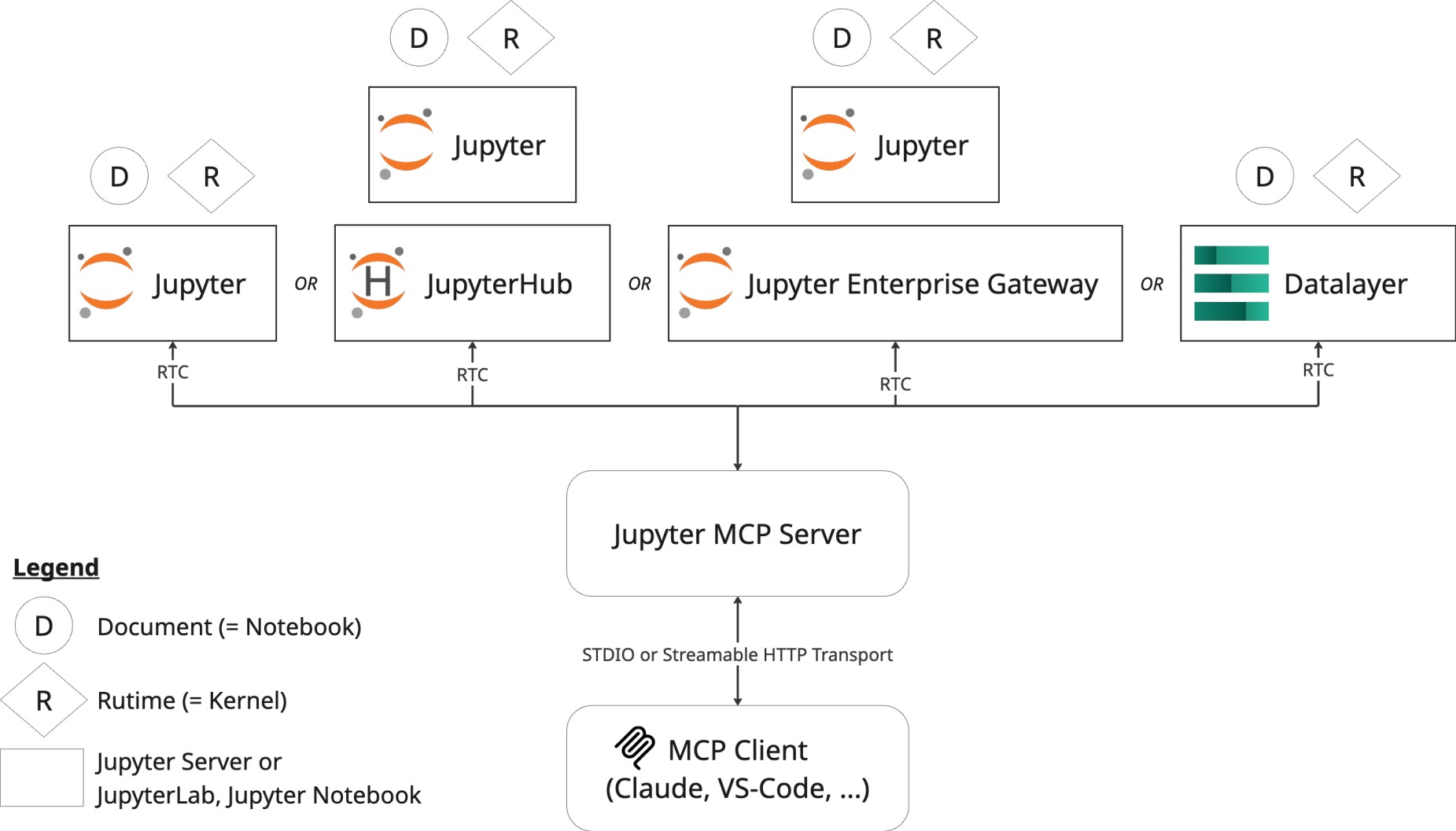 24 |
25 | ## As a Jupyter Server Extension
26 |
27 | The following diagram illustrates how **Jupyter MCP Server** runs as an extension inside a **Jupyter server** and communicates with an MCP client.
28 | In this configuration, you don't need to run a separate MCP server. It will start automatically when you start your Jupyter server.
29 | Note that only **Streamable HTTP** transport is supported in this configuration.
30 |
31 |
24 |
25 | ## As a Jupyter Server Extension
26 |
27 | The following diagram illustrates how **Jupyter MCP Server** runs as an extension inside a **Jupyter server** and communicates with an MCP client.
28 | In this configuration, you don't need to run a separate MCP server. It will start automatically when you start your Jupyter server.
29 | Note that only **Streamable HTTP** transport is supported in this configuration.
30 |
31 | 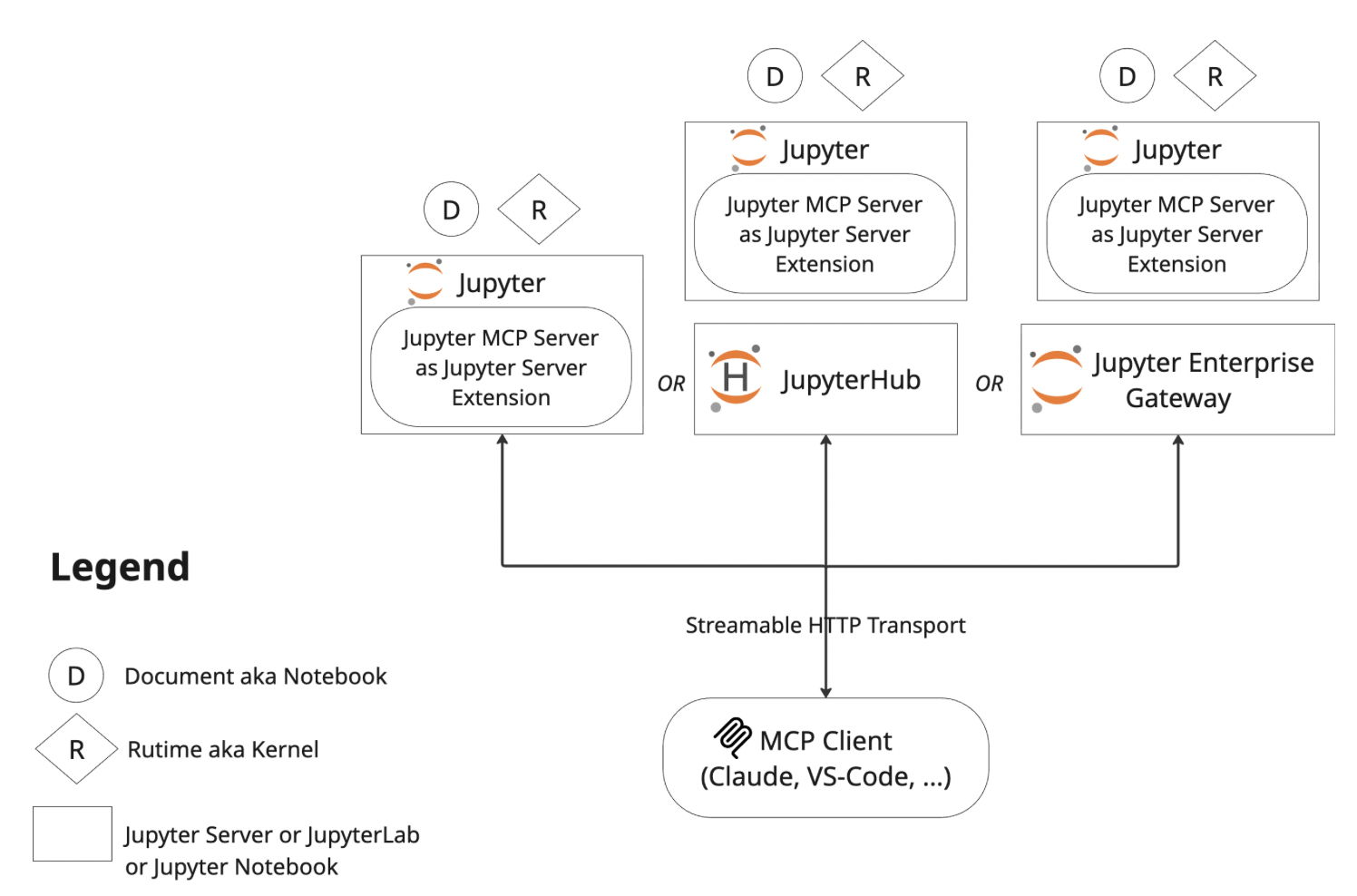 36 |
--------------------------------------------------------------------------------
/prompt/general/README.md:
--------------------------------------------------------------------------------
1 |
6 |
7 | ## 📝 Overview
8 |
9 | This is the **general-purpose** prompt template for Jupyter MCP Server. It provides foundational guidance and best practices for using Jupyter MCP Server across a wide variety of use cases. **If you're new to Jupyter MCP, start here!**
10 |
11 | ## 💡 Core Philosophy: Explorer, Not Builder
12 |
13 | The agent's core concept is to be an **Explorer, not a Builder**. It treats user requests as scientific inquiries rather than simple engineering tasks.
14 |
15 | To achieve this, the agent follows the **Introspective Exploration Loop**:
16 |
17 | 1. **Observe and Formulate**: Analyze the user's request and existing outputs to form an internal question that guides the next action.
18 | 2. **Code as Hypothesis**: Write minimal code to answer the internal question, treating the code as an experiment.
19 | 3. **Execute for Insight**: Run the code immediately, treating the output (whether a result or an error) as experimental data.
20 | 4. **Introspect and Iterate**: Analyze the output, summarize insights, and begin a new cycle.
21 |
22 | ## 🚀 User Guide: How to Customize the Agent
23 |
24 | You can "fine-tune" the agent for your project's specific needs by modifying the `Custom Context` within `AGENT.md`.
25 |
26 | Open `AGENT.md` and find the `# Context` section:
27 |
28 | ```markdown
29 | # Context
30 |
31 | {{Add your custom context here, like your package installation, preferred code style, etc.}}
32 | ```
33 |
34 | Replace the `{{...}}` placeholder with your project-specific rules.
35 |
36 | #### Example:
37 |
38 | To make the agent prefer the `Polars` library and adhere to the `black` code style, you would modify it like this:
39 |
40 | ```markdown
41 | # Context
42 |
43 | - **Library Preference**: Prioritize using the `Polars` library for data manipulation instead of `Pandas`.
44 | - **Code Style**: All Python code should be formatted according to the `black` code style.
45 | - **Project Background**: This project aims to analyze user behavior data, and the key data file is `user_behavior.csv`.
46 | ```
47 |
48 | ---
49 |
50 | - **Version**: 1.0.0
51 | - **Author**: Jupyter MCP Server Community
52 | - **Last Update**: 2025-11-01
--------------------------------------------------------------------------------
/.gitignore:
--------------------------------------------------------------------------------
1 | *.egg-info/
2 | .ipynb_checkpoints
3 |
4 | # Created by https://www.gitignore.io/api/python
5 | # Edit at https://www.gitignore.io/?templates=python
6 |
7 | ### Python ###
8 | # Byte-compiled / optimized / DLL files
9 | __pycache__/
10 | *.py[cod]
11 | *$py.class
12 |
13 | # C extensions
14 | *.so
15 |
16 | # Distribution / packaging
17 | .Python
18 | build/
19 | dist/
20 | downloads/
21 | lib/
22 | lib64/
23 | parts/
24 | sdist/
25 | var/
26 | wheels/
27 | pip-wheel-metadata/
28 | share/python-wheels/
29 | .installed.cfg
30 |
31 | # PyInstaller
32 | # Usually these files are written by a python script from a template
33 | # before PyInstaller builds the exe, so as to inject date/other infos into it.
34 | *.manifest
35 | *.spec
36 |
37 | # Installer logs
38 | pip-log.txt
39 | pip-delete-this-directory.txt
40 |
41 | # Unit test / coverage reports
42 | htmlcov/
43 | .tox/
44 | .nox/
45 | .coverage
46 | .coverage.*
47 | .cache
48 | nosetests.xml
49 | coverage.xml
50 | *.cover
51 | .hypothesis/
52 | .pytest_cache/
53 |
54 | # Translations
55 | *.mo
56 | *.pot
57 |
58 | # Environment variables:
59 | .env
60 |
61 | # Scrapy stuff:
62 | .scrapy
63 |
64 | # Sphinx documentation
65 | docs/_build/
66 |
67 | # PyBuilder
68 | target/
69 |
70 | # pyenv
71 | .python-version
72 |
73 | # celery beat schedule file
74 | celerybeat-schedule
75 |
76 | # SageMath parsed files
77 | *.sage.py
78 |
79 | # Spyder project settings
80 | .spyderproject
81 | .spyproject
82 |
83 | # Rope project settings
84 | .ropeproject
85 |
86 | # Mr Developer
87 | .mr.developer.cfg
88 | .project
89 | .pydevproject
90 |
91 | # mkdocs documentation
92 | /site
93 |
94 | # mypy
95 | .mypy_cache/
96 | .dmypy.json
97 | dmypy.json
98 |
99 | # ruff
100 | .ruff_cache
101 |
102 | # Pyre type checker
103 | .pyre/
104 |
105 | # End of https://www.gitignore.io/api/python
106 |
107 | # OSX files
108 | .DS_Store
109 |
110 | # Include
111 | !**/.*ignore
112 | !**/.*rc
113 | !**/.*rc.js
114 | !**/.*rc.json
115 | !**/.*rc.yml
116 | !**/.*config
117 | !*.*rc.json
118 | !.github
119 | !.devcontainer
120 |
121 | untracked_notebooks/*
122 | .jupyter_ystore
123 | .jupyter_ystore.db
124 | docs/.yarn/*
125 |
126 | uv.lock
127 | *-lock.json
128 |
--------------------------------------------------------------------------------
/jupyter_mcp_server/tools/__init__.py:
--------------------------------------------------------------------------------
1 | # Copyright (c) 2024- Datalayer, Inc.
2 | #
3 | # BSD 3-Clause License
4 |
5 | """Tools package for Jupyter MCP Server.
6 |
7 | Each tool is implemented as a separate class with an execute method
8 | that can operate in either MCP_SERVER or JUPYTER_SERVER mode.
9 | """
10 |
11 | from jupyter_mcp_server.tools._base import BaseTool, ServerMode
12 |
13 | # Import tool implementations - Notebook Management
14 | from jupyter_mcp_server.tools.list_notebooks_tool import ListNotebooksTool
15 | from jupyter_mcp_server.tools.restart_notebook_tool import RestartNotebookTool
16 | from jupyter_mcp_server.tools.unuse_notebook_tool import UnuseNotebookTool
17 | from jupyter_mcp_server.tools.use_notebook_tool import UseNotebookTool
18 |
19 | # Import tool implementations - Cell Reading
20 | from jupyter_mcp_server.tools.read_notebook_tool import ReadNotebookTool
21 | from jupyter_mcp_server.tools.read_cell_tool import ReadCellTool
22 |
23 | # Import tool implementations - Cell Writing
24 | from jupyter_mcp_server.tools.insert_cell_tool import InsertCellTool
25 | from jupyter_mcp_server.tools.overwrite_cell_source_tool import OverwriteCellSourceTool
26 | from jupyter_mcp_server.tools.delete_cell_tool import DeleteCellTool
27 |
28 | # Import tool implementations - Cell Execution
29 | from jupyter_mcp_server.tools.execute_cell_tool import ExecuteCellTool
30 |
31 | # Import tool implementations - Other Tools
32 | from jupyter_mcp_server.tools.execute_code_tool import ExecuteCodeTool
33 | from jupyter_mcp_server.tools.list_files_tool import ListFilesTool
34 | from jupyter_mcp_server.tools.list_kernels_tool import ListKernelsTool
35 |
36 | # Import MCP prompt
37 | from jupyter_mcp_server.tools.jupyter_cite_prompt import JupyterCitePrompt
38 |
39 | __all__ = [
40 | "BaseTool",
41 | "ServerMode",
42 | # Notebook Management
43 | "ListNotebooksTool",
44 | "RestartNotebookTool",
45 | "UnuseNotebookTool",
46 | "UseNotebookTool",
47 | # Cell Reading
48 | "ReadNotebookTool",
49 | "ReadCellTool",
50 | # Cell Writing
51 | "InsertCellTool",
52 | "OverwriteCellSourceTool",
53 | "DeleteCellTool",
54 | # Cell Execution
55 | "ExecuteCellTool",
56 | # Other Tools
57 | "ExecuteCodeTool",
58 | "ListFilesTool",
59 | "ListKernelsTool",
60 | # MCP Prompt
61 | "JupyterCitePrompt",
62 | ]
63 |
64 |
65 |
--------------------------------------------------------------------------------
/docs/docs/jupyter/streamable-http/jupyter-extension/index.mdx:
--------------------------------------------------------------------------------
1 | # As a Jupyter Server Extension
2 |
3 | ## 1. Start JupyterLab and the MCP Server
4 |
5 | ### Environment setup
6 |
7 | Make sure you have the following packages installed in your environment. The collaboration package is needed as the modifications made on the notebook can be seen thanks to [Jupyter Real Time Collaboration](https://jupyterlab.readthedocs.io/en/stable/user/rtc.html).
8 |
9 | ```bash
10 | pip install "jupyter-mcp-server>=0.15.0" "jupyterlab==4.4.1" "jupyter-collaboration==4.0.2" "ipykernel"
11 | pip uninstall -y pycrdt datalayer_pycrdt
12 | pip install datalayer_pycrdt==0.12.17
13 | ```
14 |
15 | :::tip
16 | To confirm your environment is correctly configured:
17 | 1. Open a notebook in JupyterLab
18 | 2. Type some content in any cell (code or markdown)
19 | 3. Observe the tab indicator: you should see an "×" appear next to the notebook name, indicating unsaved changes
20 | 4. Wait a few seconds—the "×" should automatically change to a "●" without manually saving
21 |
22 | This automatic saving behavior confirms that the real-time collaboration features are working properly, which is essential for MCP server integration.
23 | :::
24 |
25 | ### Start JupyterLab with MCP Extension
26 |
27 | Start JupyterLab with the MCP server extension:
28 |
29 | ```bash
30 | jupyter lab --port 4040
31 | ```
32 |
33 | This starts JupyterLab at [http://127.0.0.1:4040](http://127.0.0.1:4040) with the MCP server integrated.
34 |
35 | For complete configuration options, see the [server configuration guide](/configuration).
36 |
37 | ## 2. Configure your MCP Client
38 |
39 | Use the following configuration to connect to the integrated MCP server:
40 |
41 | ```json
42 | {
43 | "mcpServers": {
44 | "jupyter": {
45 | "command": "npx",
46 | "args": ["mcp-remote", "http://127.0.0.1:4040/mcp"]
47 | }
48 | }
49 | }
50 | ```
51 |
52 | ## Troubleshooting
53 |
54 | ### Common Issues
55 |
56 | **Extension not loading:**
57 | - Verify `jupyter-mcp-server` is installed: `pip list | grep jupyter-mcp-server`
58 | - Check JupyterLab logs for extension errors
59 |
60 | **MCP endpoint not accessible:**
61 | - Verify server is running at: `curl http://localhost:4040/mcp`
62 | - Check that port 4040 is not blocked
63 |
64 | For detailed configuration and troubleshooting, see the [configuration guide](/configuration).
65 |
--------------------------------------------------------------------------------
/jupyter_mcp_server/server_modes.py:
--------------------------------------------------------------------------------
1 | # Copyright (c) 2024- Datalayer, Inc.
2 | #
3 | # BSD 3-Clause License
4 |
5 | """Utility functions for detecting and handling server mode."""
6 |
7 | from typing import Tuple, Optional, Any
8 | from jupyter_server_client import JupyterServerClient
9 | from jupyter_mcp_server.config import get_config
10 |
11 |
12 | def get_server_mode_and_clients() -> Tuple[str, Optional[JupyterServerClient], Optional[Any], Optional[Any], Optional[Any]]:
13 | """Determine server mode and get appropriate clients/managers.
14 |
15 | Returns:
16 | Tuple of (mode, server_client, contents_manager, kernel_manager, kernel_spec_manager)
17 | - mode: "local" if using local API, "http" if using HTTP clients
18 | - server_client: JupyterServerClient or None
19 | - contents_manager: Local contents manager or None
20 | - kernel_manager: Local kernel manager or None
21 | - kernel_spec_manager: Local kernel spec manager or None
22 | """
23 | config = get_config()
24 |
25 | # Check if we should use local API
26 | try:
27 | from jupyter_mcp_server.jupyter_extension.context import get_server_context
28 | context = get_server_context()
29 |
30 | if context.is_local_document() and context.get_contents_manager() is not None:
31 | # JUPYTER_SERVER mode with local API access
32 | return (
33 | "local",
34 | None,
35 | context.get_contents_manager(),
36 | context.get_kernel_manager(),
37 | context.get_kernel_spec_manager()
38 | )
39 | except (ImportError, Exception):
40 | # Context not available or error, fall through to HTTP mode
41 | pass
42 |
43 | # MCP_SERVER mode with HTTP clients
44 | server_client = JupyterServerClient(
45 | base_url=config.runtime_url,
46 | token=config.runtime_token
47 | )
48 |
49 | return ("http", server_client, None, None, None)
50 |
51 |
52 | def is_local_mode() -> bool:
53 | """Check if running in local API mode.
54 |
55 | Returns:
56 | True if using local serverapp API, False if using HTTP clients
57 | """
58 | try:
59 | from jupyter_mcp_server.jupyter_extension.context import get_server_context
60 | context = get_server_context()
61 | return context.is_local_document() and context.get_contents_manager() is not None
62 | except (ImportError, Exception):
63 | return False
64 |
--------------------------------------------------------------------------------
/docs/docs/resources/index.mdx:
--------------------------------------------------------------------------------
1 | # Resources
2 |
3 | ## Articles & Blog Posts
4 |
5 | - [HuggingFace Blog - How to Install and Use Jupyter MCP Server](https://huggingface.co/blog/lynn-mikami/jupyter-mcp-server)
6 | - [Analytics Vidhya - How to Use Jupyter MCP Server?](https://www.analyticsvidhya.com/blog/2025/05/jupyter-mcp-server/)
7 | - [Medium AI Simplified in Plain English - How to Use Jupyter MCP Server?](https://medium.com/ai-simplified-in-plain-english/how-to-use-jupyter-mcp-server-87f68fea7471)
8 | - [Medium Jupyter AI Agents - Jupyter MCP Server: How to Setup via Claude Desktop](https://jupyter-ai-agents.datalayer.blog/mcp-server-for-jupyter-heres-your-guide-2025-0b29d975b4e1)
9 | - [Medium Data Science in Your Pocket - Best MCP Servers for Data Scientists](https://medium.com/data-science-in-your-pocket/best-mcp-servers-for-data-scientists-ee4fa6caf066)
10 | - [Medium Coding Nexus - 6 Open Source MCP Servers Every Dev Should Try](https://medium.com/coding-nexus/6-open-source-mcp-servers-every-dev-should-try-b3cc6cf6a714)
11 | - [Medium Joe Njenga - 8 Best MCP Servers & Tools Every Python Developer Should Try](https://medium.com/@joe.njenga/8-best-mcp-servers-tools-every-python-developer-should-try-3e69f435e99e)
12 | - [Medium Sreekar Kashyap - MCP Servers + Ollama](https://medium.com/@sreekarkashyap7/mcp-servers-ollama-fad991461e88)
13 | - [Medium Wenmin Wu - Agentic DS Workflow with Cursor and MCP Servers](https://medium.com/@wenmin_wu/agentic-ds-workflow-with-cursor-and-mcp-servers-2d90a102cf31)
14 |
15 | ## Videos
16 |
17 | - [Data Science in your pocket - Jupyter MCP : AI for Jupyter Notebooks](https://www.youtube.com/watch?v=qkoEsqiWDOU)
18 | - [Datalayer - How to Set Up the Jupyter MCP Server (via Claude Desktop)](https://www.youtube.com/watch?v=nPllCQxtaxQ)
19 |
20 | ## MCP Directories
21 |
22 | - [Model Context Protocol Servers](https://github.com/modelcontextprotocol/servers)
23 | - [Awesome MCP Servers](https://github.com/punkpeye/awesome-mcp-servers)
24 |
25 | ## MCP Registries
26 |
27 | - [MCP.so](https://mcp.so/server/Integrating-the-Jupyter-server-with-claude-desktop-uisng-the-powerful-model-context-protocol/harshitha-8)
28 | - [MCP Market](https://mcpmarket.com/server/jupyter)
29 | - [MCP Servers Finder](https://www.mcpserverfinder.com/servers/ihrpr/mcp-server-jupyter)
30 | - [Pulse MCP](https://www.pulsemcp.com/servers/datalayer-jupyter)
31 | - [Playbooks](https://playbooks.com/mcp/datalayer-jupyter)
32 | - [Know That AI](https://knowthat.ai/agents/jupyter-server)
33 |
34 |
37 |
--------------------------------------------------------------------------------
/docs/docs/index.mdx:
--------------------------------------------------------------------------------
1 | ---
2 | title: Overview
3 | sidebar_position: 1
4 | hide_table_of_contents: false
5 | slug: /
6 | ---
7 |
8 | # Overview
9 |
10 | :::info
11 |
12 | **🚨 NEW IN 0.14.0:** Multi-notebook support!
13 | You can now seamlessly switch between multiple notebooks in a single session.
14 | [Read more in the release notes.](https://jupyter-mcp-server.datalayer.tech/releases)
15 |
16 | :::
17 |
18 | **Jupyter MCP Server** is a [Model Context Protocol](https://modelcontextprotocol.io) (MCP) server implementation that enables **real-time** interaction with 📓 Jupyter Notebooks, allowing AI to edit, document and execute code for data analysis, visualization etc.
19 |
20 | Compatible with any Jupyter deployment (local, JupyterHub, ...) and with [Datalayer](https://datalayer.ai) hosted Notebooks. [Open an issue](https://github.com/datalayer/jupyter-mcp-server/issues) to discuss adding your solution as provider.
21 |
22 | Key features include:
23 |
24 | - ⚡ **Real-time control:** Instantly view notebook changes as they happen.
25 | - 🔁 **Smart execution:** Automatically adjusts when a cell run fails thanks to cell output feedback.
26 | - 🧠 **Context-aware:** Understands the entire notebook context for more relevant interactions.
27 | - 📊 **Multimodal support:** Support different output types, including images, plots, and text.
28 | - 📁 **Multi-notebook support:** Seamlessly switch between multiple notebooks.
29 | - 🎛️ **JupyterLab integration:** Enhanced UI integration like automatic notebook opening.
30 | - 🤝 **MCP-compatible:** Works with any MCP client, such as [Claude Desktop](/clients/claude_desktop), [Cursor](/clients/cursor), [Cline](/clients/cline), [Windsurf](/clients/windsurf) and more.
31 |
32 | To use Jupyter MCP Server, you first need to decide which setup fits your needs:
33 | - ***Editor***: Do you want to interact with notebooks in Jupyter or with Datalayer hosted Notebooks?
34 | - ***MCP Transport***: Do you want to set up the MCP Server using standard input/output (STDIO) transport or Streamable HTTP transport?
35 | - ***MCP Server Location***: Do you want to set up the MCP Server as a Standalone Server or as a Jupyter Server Extension?
36 |
37 | Navigate to the relevant section in the [Getting Started](./getting_started) page to get started based on your needs.
38 |
39 | Looking for blog posts, videos or other resources related to Jupyter MCP Server?
36 |
--------------------------------------------------------------------------------
/prompt/general/README.md:
--------------------------------------------------------------------------------
1 |
6 |
7 | ## 📝 Overview
8 |
9 | This is the **general-purpose** prompt template for Jupyter MCP Server. It provides foundational guidance and best practices for using Jupyter MCP Server across a wide variety of use cases. **If you're new to Jupyter MCP, start here!**
10 |
11 | ## 💡 Core Philosophy: Explorer, Not Builder
12 |
13 | The agent's core concept is to be an **Explorer, not a Builder**. It treats user requests as scientific inquiries rather than simple engineering tasks.
14 |
15 | To achieve this, the agent follows the **Introspective Exploration Loop**:
16 |
17 | 1. **Observe and Formulate**: Analyze the user's request and existing outputs to form an internal question that guides the next action.
18 | 2. **Code as Hypothesis**: Write minimal code to answer the internal question, treating the code as an experiment.
19 | 3. **Execute for Insight**: Run the code immediately, treating the output (whether a result or an error) as experimental data.
20 | 4. **Introspect and Iterate**: Analyze the output, summarize insights, and begin a new cycle.
21 |
22 | ## 🚀 User Guide: How to Customize the Agent
23 |
24 | You can "fine-tune" the agent for your project's specific needs by modifying the `Custom Context` within `AGENT.md`.
25 |
26 | Open `AGENT.md` and find the `# Context` section:
27 |
28 | ```markdown
29 | # Context
30 |
31 | {{Add your custom context here, like your package installation, preferred code style, etc.}}
32 | ```
33 |
34 | Replace the `{{...}}` placeholder with your project-specific rules.
35 |
36 | #### Example:
37 |
38 | To make the agent prefer the `Polars` library and adhere to the `black` code style, you would modify it like this:
39 |
40 | ```markdown
41 | # Context
42 |
43 | - **Library Preference**: Prioritize using the `Polars` library for data manipulation instead of `Pandas`.
44 | - **Code Style**: All Python code should be formatted according to the `black` code style.
45 | - **Project Background**: This project aims to analyze user behavior data, and the key data file is `user_behavior.csv`.
46 | ```
47 |
48 | ---
49 |
50 | - **Version**: 1.0.0
51 | - **Author**: Jupyter MCP Server Community
52 | - **Last Update**: 2025-11-01
--------------------------------------------------------------------------------
/.gitignore:
--------------------------------------------------------------------------------
1 | *.egg-info/
2 | .ipynb_checkpoints
3 |
4 | # Created by https://www.gitignore.io/api/python
5 | # Edit at https://www.gitignore.io/?templates=python
6 |
7 | ### Python ###
8 | # Byte-compiled / optimized / DLL files
9 | __pycache__/
10 | *.py[cod]
11 | *$py.class
12 |
13 | # C extensions
14 | *.so
15 |
16 | # Distribution / packaging
17 | .Python
18 | build/
19 | dist/
20 | downloads/
21 | lib/
22 | lib64/
23 | parts/
24 | sdist/
25 | var/
26 | wheels/
27 | pip-wheel-metadata/
28 | share/python-wheels/
29 | .installed.cfg
30 |
31 | # PyInstaller
32 | # Usually these files are written by a python script from a template
33 | # before PyInstaller builds the exe, so as to inject date/other infos into it.
34 | *.manifest
35 | *.spec
36 |
37 | # Installer logs
38 | pip-log.txt
39 | pip-delete-this-directory.txt
40 |
41 | # Unit test / coverage reports
42 | htmlcov/
43 | .tox/
44 | .nox/
45 | .coverage
46 | .coverage.*
47 | .cache
48 | nosetests.xml
49 | coverage.xml
50 | *.cover
51 | .hypothesis/
52 | .pytest_cache/
53 |
54 | # Translations
55 | *.mo
56 | *.pot
57 |
58 | # Environment variables:
59 | .env
60 |
61 | # Scrapy stuff:
62 | .scrapy
63 |
64 | # Sphinx documentation
65 | docs/_build/
66 |
67 | # PyBuilder
68 | target/
69 |
70 | # pyenv
71 | .python-version
72 |
73 | # celery beat schedule file
74 | celerybeat-schedule
75 |
76 | # SageMath parsed files
77 | *.sage.py
78 |
79 | # Spyder project settings
80 | .spyderproject
81 | .spyproject
82 |
83 | # Rope project settings
84 | .ropeproject
85 |
86 | # Mr Developer
87 | .mr.developer.cfg
88 | .project
89 | .pydevproject
90 |
91 | # mkdocs documentation
92 | /site
93 |
94 | # mypy
95 | .mypy_cache/
96 | .dmypy.json
97 | dmypy.json
98 |
99 | # ruff
100 | .ruff_cache
101 |
102 | # Pyre type checker
103 | .pyre/
104 |
105 | # End of https://www.gitignore.io/api/python
106 |
107 | # OSX files
108 | .DS_Store
109 |
110 | # Include
111 | !**/.*ignore
112 | !**/.*rc
113 | !**/.*rc.js
114 | !**/.*rc.json
115 | !**/.*rc.yml
116 | !**/.*config
117 | !*.*rc.json
118 | !.github
119 | !.devcontainer
120 |
121 | untracked_notebooks/*
122 | .jupyter_ystore
123 | .jupyter_ystore.db
124 | docs/.yarn/*
125 |
126 | uv.lock
127 | *-lock.json
128 |
--------------------------------------------------------------------------------
/jupyter_mcp_server/tools/__init__.py:
--------------------------------------------------------------------------------
1 | # Copyright (c) 2024- Datalayer, Inc.
2 | #
3 | # BSD 3-Clause License
4 |
5 | """Tools package for Jupyter MCP Server.
6 |
7 | Each tool is implemented as a separate class with an execute method
8 | that can operate in either MCP_SERVER or JUPYTER_SERVER mode.
9 | """
10 |
11 | from jupyter_mcp_server.tools._base import BaseTool, ServerMode
12 |
13 | # Import tool implementations - Notebook Management
14 | from jupyter_mcp_server.tools.list_notebooks_tool import ListNotebooksTool
15 | from jupyter_mcp_server.tools.restart_notebook_tool import RestartNotebookTool
16 | from jupyter_mcp_server.tools.unuse_notebook_tool import UnuseNotebookTool
17 | from jupyter_mcp_server.tools.use_notebook_tool import UseNotebookTool
18 |
19 | # Import tool implementations - Cell Reading
20 | from jupyter_mcp_server.tools.read_notebook_tool import ReadNotebookTool
21 | from jupyter_mcp_server.tools.read_cell_tool import ReadCellTool
22 |
23 | # Import tool implementations - Cell Writing
24 | from jupyter_mcp_server.tools.insert_cell_tool import InsertCellTool
25 | from jupyter_mcp_server.tools.overwrite_cell_source_tool import OverwriteCellSourceTool
26 | from jupyter_mcp_server.tools.delete_cell_tool import DeleteCellTool
27 |
28 | # Import tool implementations - Cell Execution
29 | from jupyter_mcp_server.tools.execute_cell_tool import ExecuteCellTool
30 |
31 | # Import tool implementations - Other Tools
32 | from jupyter_mcp_server.tools.execute_code_tool import ExecuteCodeTool
33 | from jupyter_mcp_server.tools.list_files_tool import ListFilesTool
34 | from jupyter_mcp_server.tools.list_kernels_tool import ListKernelsTool
35 |
36 | # Import MCP prompt
37 | from jupyter_mcp_server.tools.jupyter_cite_prompt import JupyterCitePrompt
38 |
39 | __all__ = [
40 | "BaseTool",
41 | "ServerMode",
42 | # Notebook Management
43 | "ListNotebooksTool",
44 | "RestartNotebookTool",
45 | "UnuseNotebookTool",
46 | "UseNotebookTool",
47 | # Cell Reading
48 | "ReadNotebookTool",
49 | "ReadCellTool",
50 | # Cell Writing
51 | "InsertCellTool",
52 | "OverwriteCellSourceTool",
53 | "DeleteCellTool",
54 | # Cell Execution
55 | "ExecuteCellTool",
56 | # Other Tools
57 | "ExecuteCodeTool",
58 | "ListFilesTool",
59 | "ListKernelsTool",
60 | # MCP Prompt
61 | "JupyterCitePrompt",
62 | ]
63 |
64 |
65 |
--------------------------------------------------------------------------------
/docs/docs/jupyter/streamable-http/jupyter-extension/index.mdx:
--------------------------------------------------------------------------------
1 | # As a Jupyter Server Extension
2 |
3 | ## 1. Start JupyterLab and the MCP Server
4 |
5 | ### Environment setup
6 |
7 | Make sure you have the following packages installed in your environment. The collaboration package is needed as the modifications made on the notebook can be seen thanks to [Jupyter Real Time Collaboration](https://jupyterlab.readthedocs.io/en/stable/user/rtc.html).
8 |
9 | ```bash
10 | pip install "jupyter-mcp-server>=0.15.0" "jupyterlab==4.4.1" "jupyter-collaboration==4.0.2" "ipykernel"
11 | pip uninstall -y pycrdt datalayer_pycrdt
12 | pip install datalayer_pycrdt==0.12.17
13 | ```
14 |
15 | :::tip
16 | To confirm your environment is correctly configured:
17 | 1. Open a notebook in JupyterLab
18 | 2. Type some content in any cell (code or markdown)
19 | 3. Observe the tab indicator: you should see an "×" appear next to the notebook name, indicating unsaved changes
20 | 4. Wait a few seconds—the "×" should automatically change to a "●" without manually saving
21 |
22 | This automatic saving behavior confirms that the real-time collaboration features are working properly, which is essential for MCP server integration.
23 | :::
24 |
25 | ### Start JupyterLab with MCP Extension
26 |
27 | Start JupyterLab with the MCP server extension:
28 |
29 | ```bash
30 | jupyter lab --port 4040
31 | ```
32 |
33 | This starts JupyterLab at [http://127.0.0.1:4040](http://127.0.0.1:4040) with the MCP server integrated.
34 |
35 | For complete configuration options, see the [server configuration guide](/configuration).
36 |
37 | ## 2. Configure your MCP Client
38 |
39 | Use the following configuration to connect to the integrated MCP server:
40 |
41 | ```json
42 | {
43 | "mcpServers": {
44 | "jupyter": {
45 | "command": "npx",
46 | "args": ["mcp-remote", "http://127.0.0.1:4040/mcp"]
47 | }
48 | }
49 | }
50 | ```
51 |
52 | ## Troubleshooting
53 |
54 | ### Common Issues
55 |
56 | **Extension not loading:**
57 | - Verify `jupyter-mcp-server` is installed: `pip list | grep jupyter-mcp-server`
58 | - Check JupyterLab logs for extension errors
59 |
60 | **MCP endpoint not accessible:**
61 | - Verify server is running at: `curl http://localhost:4040/mcp`
62 | - Check that port 4040 is not blocked
63 |
64 | For detailed configuration and troubleshooting, see the [configuration guide](/configuration).
65 |
--------------------------------------------------------------------------------
/jupyter_mcp_server/server_modes.py:
--------------------------------------------------------------------------------
1 | # Copyright (c) 2024- Datalayer, Inc.
2 | #
3 | # BSD 3-Clause License
4 |
5 | """Utility functions for detecting and handling server mode."""
6 |
7 | from typing import Tuple, Optional, Any
8 | from jupyter_server_client import JupyterServerClient
9 | from jupyter_mcp_server.config import get_config
10 |
11 |
12 | def get_server_mode_and_clients() -> Tuple[str, Optional[JupyterServerClient], Optional[Any], Optional[Any], Optional[Any]]:
13 | """Determine server mode and get appropriate clients/managers.
14 |
15 | Returns:
16 | Tuple of (mode, server_client, contents_manager, kernel_manager, kernel_spec_manager)
17 | - mode: "local" if using local API, "http" if using HTTP clients
18 | - server_client: JupyterServerClient or None
19 | - contents_manager: Local contents manager or None
20 | - kernel_manager: Local kernel manager or None
21 | - kernel_spec_manager: Local kernel spec manager or None
22 | """
23 | config = get_config()
24 |
25 | # Check if we should use local API
26 | try:
27 | from jupyter_mcp_server.jupyter_extension.context import get_server_context
28 | context = get_server_context()
29 |
30 | if context.is_local_document() and context.get_contents_manager() is not None:
31 | # JUPYTER_SERVER mode with local API access
32 | return (
33 | "local",
34 | None,
35 | context.get_contents_manager(),
36 | context.get_kernel_manager(),
37 | context.get_kernel_spec_manager()
38 | )
39 | except (ImportError, Exception):
40 | # Context not available or error, fall through to HTTP mode
41 | pass
42 |
43 | # MCP_SERVER mode with HTTP clients
44 | server_client = JupyterServerClient(
45 | base_url=config.runtime_url,
46 | token=config.runtime_token
47 | )
48 |
49 | return ("http", server_client, None, None, None)
50 |
51 |
52 | def is_local_mode() -> bool:
53 | """Check if running in local API mode.
54 |
55 | Returns:
56 | True if using local serverapp API, False if using HTTP clients
57 | """
58 | try:
59 | from jupyter_mcp_server.jupyter_extension.context import get_server_context
60 | context = get_server_context()
61 | return context.is_local_document() and context.get_contents_manager() is not None
62 | except (ImportError, Exception):
63 | return False
64 |
--------------------------------------------------------------------------------
/docs/docs/resources/index.mdx:
--------------------------------------------------------------------------------
1 | # Resources
2 |
3 | ## Articles & Blog Posts
4 |
5 | - [HuggingFace Blog - How to Install and Use Jupyter MCP Server](https://huggingface.co/blog/lynn-mikami/jupyter-mcp-server)
6 | - [Analytics Vidhya - How to Use Jupyter MCP Server?](https://www.analyticsvidhya.com/blog/2025/05/jupyter-mcp-server/)
7 | - [Medium AI Simplified in Plain English - How to Use Jupyter MCP Server?](https://medium.com/ai-simplified-in-plain-english/how-to-use-jupyter-mcp-server-87f68fea7471)
8 | - [Medium Jupyter AI Agents - Jupyter MCP Server: How to Setup via Claude Desktop](https://jupyter-ai-agents.datalayer.blog/mcp-server-for-jupyter-heres-your-guide-2025-0b29d975b4e1)
9 | - [Medium Data Science in Your Pocket - Best MCP Servers for Data Scientists](https://medium.com/data-science-in-your-pocket/best-mcp-servers-for-data-scientists-ee4fa6caf066)
10 | - [Medium Coding Nexus - 6 Open Source MCP Servers Every Dev Should Try](https://medium.com/coding-nexus/6-open-source-mcp-servers-every-dev-should-try-b3cc6cf6a714)
11 | - [Medium Joe Njenga - 8 Best MCP Servers & Tools Every Python Developer Should Try](https://medium.com/@joe.njenga/8-best-mcp-servers-tools-every-python-developer-should-try-3e69f435e99e)
12 | - [Medium Sreekar Kashyap - MCP Servers + Ollama](https://medium.com/@sreekarkashyap7/mcp-servers-ollama-fad991461e88)
13 | - [Medium Wenmin Wu - Agentic DS Workflow with Cursor and MCP Servers](https://medium.com/@wenmin_wu/agentic-ds-workflow-with-cursor-and-mcp-servers-2d90a102cf31)
14 |
15 | ## Videos
16 |
17 | - [Data Science in your pocket - Jupyter MCP : AI for Jupyter Notebooks](https://www.youtube.com/watch?v=qkoEsqiWDOU)
18 | - [Datalayer - How to Set Up the Jupyter MCP Server (via Claude Desktop)](https://www.youtube.com/watch?v=nPllCQxtaxQ)
19 |
20 | ## MCP Directories
21 |
22 | - [Model Context Protocol Servers](https://github.com/modelcontextprotocol/servers)
23 | - [Awesome MCP Servers](https://github.com/punkpeye/awesome-mcp-servers)
24 |
25 | ## MCP Registries
26 |
27 | - [MCP.so](https://mcp.so/server/Integrating-the-Jupyter-server-with-claude-desktop-uisng-the-powerful-model-context-protocol/harshitha-8)
28 | - [MCP Market](https://mcpmarket.com/server/jupyter)
29 | - [MCP Servers Finder](https://www.mcpserverfinder.com/servers/ihrpr/mcp-server-jupyter)
30 | - [Pulse MCP](https://www.pulsemcp.com/servers/datalayer-jupyter)
31 | - [Playbooks](https://playbooks.com/mcp/datalayer-jupyter)
32 | - [Know That AI](https://knowthat.ai/agents/jupyter-server)
33 |
34 |
37 |
--------------------------------------------------------------------------------
/docs/docs/index.mdx:
--------------------------------------------------------------------------------
1 | ---
2 | title: Overview
3 | sidebar_position: 1
4 | hide_table_of_contents: false
5 | slug: /
6 | ---
7 |
8 | # Overview
9 |
10 | :::info
11 |
12 | **🚨 NEW IN 0.14.0:** Multi-notebook support!
13 | You can now seamlessly switch between multiple notebooks in a single session.
14 | [Read more in the release notes.](https://jupyter-mcp-server.datalayer.tech/releases)
15 |
16 | :::
17 |
18 | **Jupyter MCP Server** is a [Model Context Protocol](https://modelcontextprotocol.io) (MCP) server implementation that enables **real-time** interaction with 📓 Jupyter Notebooks, allowing AI to edit, document and execute code for data analysis, visualization etc.
19 |
20 | Compatible with any Jupyter deployment (local, JupyterHub, ...) and with [Datalayer](https://datalayer.ai) hosted Notebooks. [Open an issue](https://github.com/datalayer/jupyter-mcp-server/issues) to discuss adding your solution as provider.
21 |
22 | Key features include:
23 |
24 | - ⚡ **Real-time control:** Instantly view notebook changes as they happen.
25 | - 🔁 **Smart execution:** Automatically adjusts when a cell run fails thanks to cell output feedback.
26 | - 🧠 **Context-aware:** Understands the entire notebook context for more relevant interactions.
27 | - 📊 **Multimodal support:** Support different output types, including images, plots, and text.
28 | - 📁 **Multi-notebook support:** Seamlessly switch between multiple notebooks.
29 | - 🎛️ **JupyterLab integration:** Enhanced UI integration like automatic notebook opening.
30 | - 🤝 **MCP-compatible:** Works with any MCP client, such as [Claude Desktop](/clients/claude_desktop), [Cursor](/clients/cursor), [Cline](/clients/cline), [Windsurf](/clients/windsurf) and more.
31 |
32 | To use Jupyter MCP Server, you first need to decide which setup fits your needs:
33 | - ***Editor***: Do you want to interact with notebooks in Jupyter or with Datalayer hosted Notebooks?
34 | - ***MCP Transport***: Do you want to set up the MCP Server using standard input/output (STDIO) transport or Streamable HTTP transport?
35 | - ***MCP Server Location***: Do you want to set up the MCP Server as a Standalone Server or as a Jupyter Server Extension?
36 |
37 | Navigate to the relevant section in the [Getting Started](./getting_started) page to get started based on your needs.
38 |
39 | Looking for blog posts, videos or other resources related to Jupyter MCP Server? 40 | 👉 Check out the [Resources](./resources) section. 41 | 42 | 🧰 Dive into the [Tools section](./tools) to understand the tools powering the server. 43 | 44 | 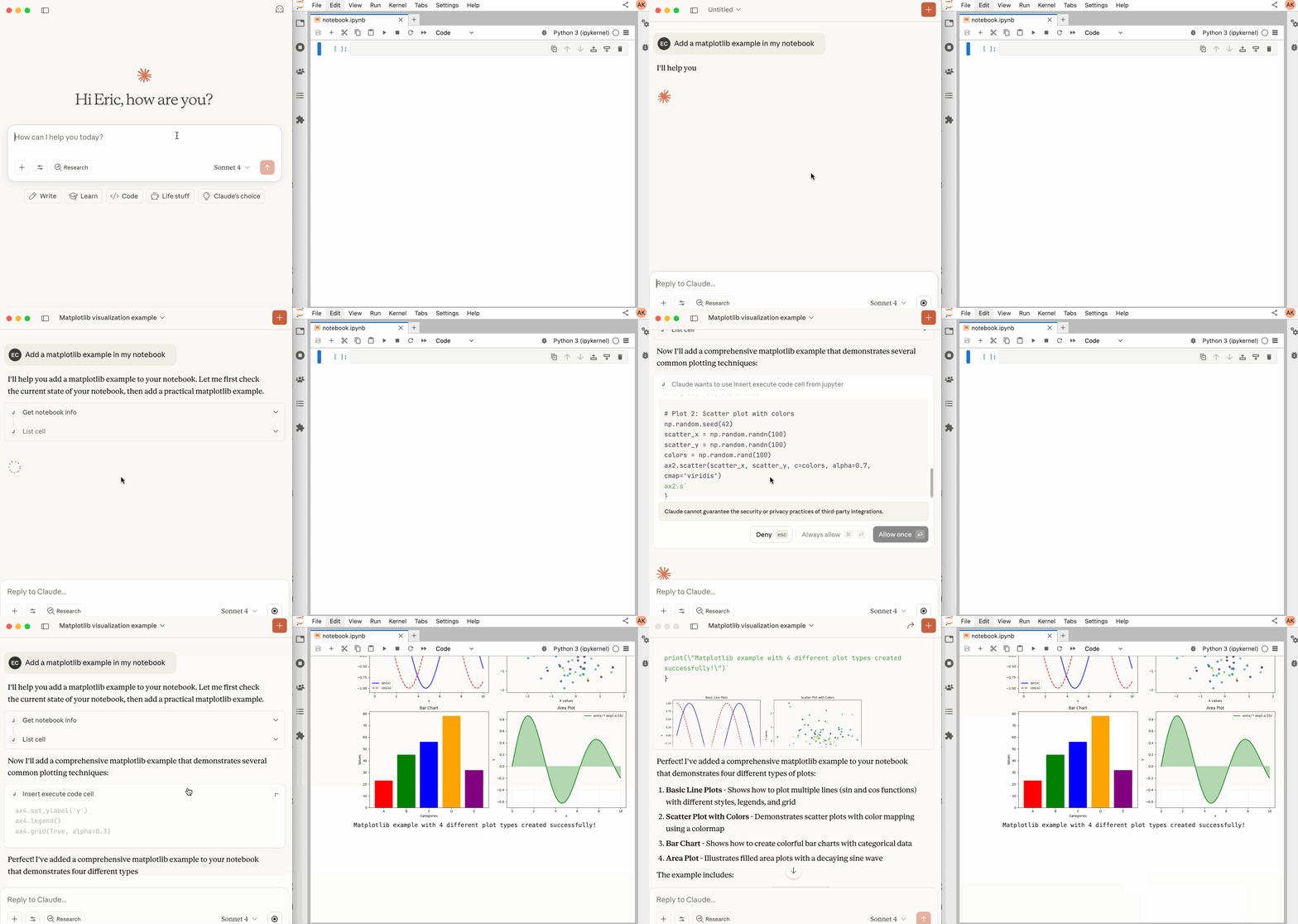 45 | -------------------------------------------------------------------------------- /jupyter_mcp_server/tools/list_notebooks_tool.py: -------------------------------------------------------------------------------- 1 | # Copyright (c) 2024- Datalayer, Inc. 2 | # 3 | # BSD 3-Clause License 4 | 5 | """List notebooks tool implementation.""" 6 | 7 | from typing import Any, Optional 8 | from jupyter_mcp_server.tools._base import BaseTool, ServerMode 9 | from jupyter_mcp_server.notebook_manager import NotebookManager 10 | from jupyter_mcp_server.utils import format_TSV 11 | 12 | 13 | class ListNotebooksTool(BaseTool): 14 | """Tool to list all managed notebooks (that have been used via use_notebook).""" 15 | 16 | async def execute( 17 | self, 18 | mode: ServerMode, 19 | server_client: Optional[Any] = None, 20 | contents_manager: Optional[Any] = None, 21 | kernel_manager: Optional[Any] = None, 22 | kernel_spec_manager: Optional[Any] = None, 23 | notebook_manager: Optional[NotebookManager] = None, 24 | **kwargs 25 | ) -> str: 26 | """Execute the list_notebooks tool. 27 | 28 | This tool lists all notebooks that have been managed through the use_notebook tool. 29 | It does NOT perform recursive filesystem scanning. 30 | 31 | Args: 32 | mode: Server mode (MCP_SERVER or JUPYTER_SERVER) 33 | notebook_manager: Notebook manager instance 34 | **kwargs: Additional parameters (unused) 35 | 36 | Returns: 37 | TSV formatted table with managed notebook information 38 | """ 39 | if notebook_manager is None: 40 | return "No notebook manager available." 41 | 42 | # Get all managed notebooks 43 | managed_notebooks = notebook_manager.list_all_notebooks() 44 | 45 | if not managed_notebooks: 46 | return "No managed notebooks. Use the use_notebook tool to manage notebooks first." 47 | 48 | # Create TSV formatted output 49 | headers = ["Name", "Path", "Kernel_ID", "Kernel_Status", "Activate"] 50 | rows = [] 51 | 52 | # Sort by name for consistent output 53 | for name in sorted(managed_notebooks.keys()): 54 | info = managed_notebooks[name] 55 | activate_marker = "✓" if info.get("is_current") else "" 56 | # Get kernel_id from notebook_manager 57 | kernel_id = notebook_manager.get_kernel_id(name) or "-" 58 | rows.append([ 59 | name, 60 | info.get("path", "-"), 61 | kernel_id, 62 | info.get("kernel_status", "unknown"), 63 | activate_marker 64 | ]) 65 | 66 | return format_TSV(headers, rows) 67 | -------------------------------------------------------------------------------- /.github/workflows/build.yml: -------------------------------------------------------------------------------- 1 | name: Build 2 | 3 | on: 4 | push: 5 | branches: ["main"] 6 | pull_request: 7 | 8 | defaults: 9 | run: 10 | shell: bash -eux {0} 11 | 12 | jobs: 13 | build: 14 | runs-on: ${{ matrix.os }} 15 | strategy: 16 | fail-fast: false 17 | matrix: 18 | os: [ubuntu-latest, macos-latest, windows-latest] 19 | python-version: ["3.10", "3.13"] 20 | 21 | steps: 22 | - name: Checkout 23 | uses: actions/checkout@v5 24 | 25 | - name: Set up Python ${{ matrix.python-version }} 26 | uses: actions/setup-python@v6 27 | with: 28 | python-version: ${{ matrix.python-version }} 29 | 30 | - name: Base Setup 31 | uses: jupyterlab/maintainer-tools/.github/actions/base-setup@v1 32 | 33 | - name: Install the extension 34 | run: | 35 | python -m pip install ".[test]" 36 | 37 | - name: Build the extension 38 | run: | 39 | pip install build 40 | python -m build --sdist 41 | cp dist/*.tar.gz jupyter_mcp_server.tar.gz 42 | pip uninstall -y "jupyter_mcp_server" 43 | rm -rf "jupyter_mcp_server" 44 | 45 | - uses: actions/upload-artifact@v5 46 | if: startsWith(matrix.os, 'ubuntu') 47 | with: 48 | name: jupyter_mcp_server-sdist-${{ matrix.python-version }} 49 | path: jupyter_mcp_server.tar.gz 50 | 51 | # check_links: 52 | # runs-on: ubuntu-latest 53 | # steps: 54 | # - uses: actions/checkout@v5 55 | # - uses: jupyterlab/maintainer-tools/.github/actions/base-setup@v1 56 | # - uses: jupyterlab/maintainer-tools/.github/actions/check-links@v1 57 | 58 | test_lint: 59 | runs-on: ubuntu-latest 60 | steps: 61 | - uses: actions/checkout@v5 62 | - uses: jupyterlab/maintainer-tools/.github/actions/base-setup@v1 63 | - name: Run Linters 64 | run: | 65 | bash ./.github/workflows/lint.sh 66 | 67 | test_sdist: 68 | needs: build 69 | runs-on: ubuntu-latest 70 | strategy: 71 | matrix: 72 | python-version: ["3.13"] 73 | 74 | steps: 75 | - name: Checkout 76 | uses: actions/checkout@v5 77 | - name: Install Python 78 | uses: actions/setup-python@v6 79 | with: 80 | python-version: ${{ matrix.python-version }} 81 | architecture: "x64" 82 | - uses: actions/download-artifact@v6 83 | with: 84 | name: jupyter_mcp_server-sdist-${{ matrix.python-version }} 85 | - name: Install and Test 86 | run: | 87 | pip install jupyter_mcp_server.tar.gz 88 | pip list 2>&1 | grep -ie "jupyter_mcp_server" 89 | python -c "import jupyter_mcp_server" 90 | -------------------------------------------------------------------------------- /docs/docs/releases/index.mdx: -------------------------------------------------------------------------------- 1 | # Releases 2 | 3 | ## Latest Release 4 | 5 | See the latest release notes on the [GitHub Releases page](https://github.com/datalayer/jupyter-mcp-server/releases). 6 | 7 | ## Older Releases 8 | 9 | ### 0.16.x - 13 Oct 2025 10 | 11 | - [Merge the three execute tools into a single unified tool](https://github.com/datalayer/jupyter-mcp-server/pull/111) 12 | - [Docs: update readme and contributing](https://github.com/datalayer/jupyter-mcp-server/pull/112) 13 | - CI: build Auto Releases CI/CD: [#114](https://github.com/datalayer/jupyter-mcp-server/pull/114), [#115](https://github.com/datalayer/jupyter-mcp-server/pull/115), [#119](https://github.com/datalayer/jupyter-mcp-server/pull/119), [#120](https://github.com/datalayer/jupyter-mcp-server/pull/120) 14 | - [fix negative index](https://github.com/datalayer/jupyter-mcp-server/pull/116) 15 | - [fix ressources and prompts list](https://github.com/datalayer/jupyter-mcp-server/pull/117) 16 | - [Refactor: separate and simplify the server.py](https://github.com/datalayer/jupyter-mcp-server/pull/123) 17 | - [Feat/add JUPYTER_URL and JUPYTER_TOKEN](https://github.com/datalayer/jupyter-mcp-server/pull/125) 18 | 19 | ### 0.15.x - 08 Oct 2025 20 | 21 | - [Run as Jupyter Server Extension + Tool registry + Use tool](https://github.com/datalayer/jupyter-mcp-server/pull/95) 22 | - [simplify tool implementations](https://github.com/datalayer/jupyter-mcp-server/pull/101) 23 | - [add uvx as alternative MCP server startup method](https://github.com/datalayer/jupyter-mcp-server/pull/101) 24 | - [document as a Jupyter Extension](https://github.com/datalayer/jupyter-mcp-server/pull/101) 25 | - Fix Minor Bugs: [#108](https://github.com/datalayer/jupyter-mcp-server/pull/108),[#110](https://github.com/datalayer/jupyter-mcp-server/pull/110) 26 | 27 | ### 0.14.0 - 03 Oct 2025 28 | 29 | - [Additional Tools & Bug fixes](https://github.com/datalayer/jupyter-mcp-server/pull/93). 30 | - [Execute IPython](https://github.com/datalayer/jupyter-mcp-server/pull/90). 31 | - [Multi notebook management](https://github.com/datalayer/jupyter-mcp-server/pull/88). 32 | 33 | ### 0.13.0 - 25 Sep 2025 34 | 35 | - [Add multimodal output support for Jupyter cell execution](https://github.com/datalayer/jupyter-mcp-server/pull/75). 36 | - [Unify cell insertion functionality](https://github.com/datalayer/jupyter-mcp-server/pull/73). 37 | 38 | ### 0.11.0 - 01 Aug 2025 39 | 40 | - [Rename room to document](https://github.com/datalayer/jupyter-mcp-server/pull/35). 41 | 42 | ### 0.10.2 - 17 Jul 2025 43 | 44 | - [Tools docstring improvements](https://github.com/datalayer/jupyter-mcp-server/pull/30). 45 | 46 | ### 0.10.1 - 11 Jul 2025 47 | 48 | - [CORS Support](https://github.com/datalayer/jupyter-mcp-server/pull/29). 49 | 50 | ### 0.10.0 - 07 Jul 2025 51 | 52 | - More [fixes](https://github.com/datalayer/jupyter-mcp-server/pull/28) issues for nbclient stop. 53 | 54 | ### 0.9.0 - 02 Jul 2025 55 | 56 | - Fix issues with `nbmodel` stops. 57 | 58 | ### 0.6.0 - 01 Jul 2025 59 | 60 | - Configuration change, see details on the [clients page](/clients) and [server configuration](/configuration). 61 | -------------------------------------------------------------------------------- /jupyter_mcp_server/tools/read_notebook_tool.py: -------------------------------------------------------------------------------- 1 | # Copyright (c) 2024- Datalayer, Inc. 2 | # 3 | # BSD 3-Clause License 4 | 5 | """List cells tool implementation.""" 6 | 7 | from typing import Any, Optional, Literal 8 | from jupyter_server_client import JupyterServerClient 9 | from jupyter_mcp_server.tools._base import BaseTool, ServerMode 10 | from jupyter_mcp_server.notebook_manager import NotebookManager 11 | from jupyter_mcp_server.models import Notebook 12 | 13 | 14 | class ReadNotebookTool(BaseTool): 15 | """Tool to read a notebook and return index, source content, type, execution count of each cell.""" 16 | 17 | async def execute( 18 | self, 19 | mode: ServerMode, 20 | server_client: Optional[JupyterServerClient] = None, 21 | contents_manager: Optional[Any] = None, 22 | notebook_manager: Optional[NotebookManager] = None, 23 | notebook_name: str = None, 24 | response_format: Literal["brief", "detailed"] = "brief", 25 | start_index: int = 0, 26 | limit: int = 20, 27 | **kwargs 28 | ) -> str: 29 | """Execute the read_notebook tool. 30 | 31 | Args: 32 | mode: Server mode (MCP_SERVER or JUPYTER_SERVER) 33 | contents_manager: Direct API access for JUPYTER_SERVER mode 34 | notebook_manager: Notebook manager instance 35 | notebook_name: Notebook identifier to read 36 | response_format: Response format (brief or detailed) 37 | start_index: Starting index for pagination (0-based) 38 | limit: Maximum number of items to return (0 means no limit) 39 | **kwargs: Additional parameters 40 | 41 | Returns: 42 | Formatted table with cell information 43 | """ 44 | if notebook_name not in notebook_manager: 45 | return f"Notebook '{notebook_name}' is not connected. All currently connected notebooks: {list(notebook_manager.list_all_notebooks().keys())}" 46 | 47 | if mode == ServerMode.JUPYTER_SERVER and contents_manager is not None: 48 | # Local mode: read notebook directly from file system 49 | notebook_path = notebook_manager.get_notebook_path(notebook_name) 50 | 51 | model = await contents_manager.get(notebook_path, content=True, type='notebook') 52 | if 'content' not in model: 53 | raise ValueError(f"Could not read notebook content from {notebook_path}") 54 | notebook = Notebook(**model['content']) 55 | elif mode == ServerMode.MCP_SERVER and notebook_manager is not None: 56 | # Remote mode: use WebSocket connection to Y.js document 57 | async with notebook_manager.get_notebook_connection(notebook_name) as notebook_content: 58 | notebook = Notebook(**notebook_content.as_dict()) 59 | else: 60 | raise ValueError(f"Invalid mode or missing required clients: mode={mode}") 61 | 62 | if start_index >= len(notebook): 63 | return f"Start index {start_index} is out of range. Notebook has {len(notebook)} cells." 64 | 65 | info_list = [f'Notebook {notebook_name} has {len(notebook)} cells.\n'] 66 | info_list.append(notebook.format_output(response_format=response_format, start_index=start_index, limit=limit)) 67 | 68 | return "\n".join(info_list) 69 | -------------------------------------------------------------------------------- /jupyter_mcp_server/tools/read_cell_tool.py: -------------------------------------------------------------------------------- 1 | # Copyright (c) 2024- Datalayer, Inc. 2 | # 3 | # BSD 3-Clause License 4 | 5 | """Read cell tool implementation.""" 6 | 7 | from typing import Any, Optional 8 | from jupyter_server_client import JupyterServerClient 9 | from jupyter_mcp_server.tools._base import BaseTool, ServerMode 10 | from jupyter_mcp_server.notebook_manager import NotebookManager 11 | from jupyter_mcp_server.models import Notebook 12 | from jupyter_mcp_server.config import get_config 13 | from mcp.types import ImageContent 14 | 15 | 16 | class ReadCellTool(BaseTool): 17 | """Tool to read a specific cell from a notebook.""" 18 | 19 | async def execute( 20 | self, 21 | mode: ServerMode, 22 | server_client: Optional[JupyterServerClient] = None, 23 | kernel_client: Optional[Any] = None, 24 | contents_manager: Optional[Any] = None, 25 | kernel_manager: Optional[Any] = None, 26 | kernel_spec_manager: Optional[Any] = None, 27 | notebook_manager: Optional[NotebookManager] = None, 28 | # Tool-specific parameters 29 | cell_index: int = None, 30 | include_outputs: bool = True, 31 | **kwargs 32 | ) -> list[str | ImageContent]: 33 | """Execute the read_cell tool. 34 | 35 | Args: 36 | mode: Server mode (MCP_SERVER or JUPYTER_SERVER) 37 | contents_manager: Direct API access for JUPYTER_SERVER mode 38 | notebook_manager: Notebook manager instance 39 | cell_index: Index of the cell to read (0-based) 40 | include_outputs: Include outputs in the response (only for code cells) 41 | **kwargs: Additional parameters 42 | 43 | Returns: 44 | Cell information dictionary 45 | """ 46 | if mode == ServerMode.JUPYTER_SERVER and contents_manager is not None: 47 | # Local mode: read notebook directly from file system 48 | notebook_path = notebook_manager.get_current_notebook_path() 49 | 50 | model = await contents_manager.get(notebook_path, content=True, type='notebook') 51 | if 'content' not in model: 52 | raise ValueError(f"Could not read notebook content from {notebook_path}") 53 | notebook = Notebook(**model['content']) 54 | elif mode == ServerMode.MCP_SERVER and notebook_manager is not None: 55 | # Remote mode: use WebSocket connection to Y.js document 56 | async with notebook_manager.get_current_connection() as notebook_content: 57 | notebook = Notebook(**notebook_content.as_dict()) 58 | else: 59 | raise ValueError(f"Invalid mode or missing required clients: mode={mode}") 60 | 61 | if cell_index >= len(notebook): 62 | return f"Cell index {cell_index} is out of range. Notebook has {len(notebook)} cells." 63 | cell = notebook[cell_index] 64 | info_list = [] 65 | # add cell metadata 66 | info_list.append(f"=====Cell {cell_index} | type: {cell.cell_type} | execution count: {cell.execution_count if cell.execution_count else 'N/A'}=====") 67 | # add cell source 68 | info_list.append(cell.get_source('readable')) 69 | # add cell outputs for code cells 70 | if cell.cell_type == "code" and include_outputs: 71 | info_list.extend(cell.get_outputs('readable')) 72 | 73 | return info_list 74 | -------------------------------------------------------------------------------- /pyproject.toml: -------------------------------------------------------------------------------- 1 | # Copyright (c) 2024- Datalayer, Inc. 2 | # 3 | # BSD 3-Clause License 4 | 5 | [build-system] 6 | requires = ["hatchling~=1.21"] 7 | build-backend = "hatchling.build" 8 | 9 | [project] 10 | name = "jupyter_mcp_server" 11 | authors = [{ name = "Datalayer", email = "info@datalayer.io" }] 12 | dynamic = ["version"] 13 | readme = "README.md" 14 | requires-python = ">=3.10" 15 | keywords = ["Jupyter"] 16 | classifiers = [ 17 | "Intended Audience :: Developers", 18 | "Intended Audience :: System Administrators", 19 | "License :: OSI Approved :: BSD License", 20 | "Programming Language :: Python", 21 | "Programming Language :: Python :: 3", 22 | ] 23 | dependencies = [ 24 | "jupyter-kernel-client>=0.7.3", 25 | "jupyter-mcp-tools>=0.1.4", 26 | "jupyter-nbmodel-client>=0.14.4", 27 | "jupyter-server-nbmodel>=0.1.1a4", 28 | "jupyter-server-client", 29 | "jupyter_server>=1.6,<3", 30 | "tornado>=6.1", 31 | "traitlets>=5.0", 32 | "mcp[cli]>=1.10.1", 33 | "pydantic", 34 | "uvicorn", 35 | "click", 36 | "fastapi" 37 | ] 38 | 39 | [project.optional-dependencies] 40 | test = [ 41 | "ipykernel", 42 | "jupyter_server>=1.6,<3", 43 | "pytest>=7.0", 44 | "pytest-asyncio", 45 | "pytest-timeout>=2.1.0", 46 | "jupyterlab==4.4.1", 47 | "jupyter-collaboration==4.0.2", 48 | "datalayer_pycrdt==0.12.17", 49 | "pillow>=10.0.0" 50 | ] 51 | lint = ["mdformat>0.7", "mdformat-gfm>=0.3.5", "ruff"] 52 | typing = ["mypy>=0.990"] 53 | 54 | [project.scripts] 55 | jupyter-mcp-server = "jupyter_mcp_server.CLI:server" 56 | 57 | [project.license] 58 | file = "LICENSE" 59 | 60 | [project.urls] 61 | Home = "https://github.com/datalayer/jupyter-mcp-server" 62 | 63 | [tool.hatch.version] 64 | path = "jupyter_mcp_server/__version__.py" 65 | 66 | [tool.hatch.build] 67 | include = [ 68 | "jupyter_mcp_server/**/*.py", 69 | "jupyter-config/**/*.json" 70 | ] 71 | 72 | [tool.hatch.build.targets.wheel.shared-data] 73 | "jupyter-config/jupyter_server_config.d" = "etc/jupyter/jupyter_server_config.d" 74 | "jupyter-config/jupyter_notebook_config.d" = "etc/jupyter/jupyter_notebook_config.d" 75 | 76 | [tool.pytest.ini_options] 77 | filterwarnings = [ 78 | "error", 79 | "ignore:There is no current event loop:DeprecationWarning", 80 | "module:make_current is deprecated:DeprecationWarning", 81 | "module:clear_current is deprecated:DeprecationWarning", 82 | "module:Jupyter is migrating its paths to use standard platformdirs:DeprecationWarning", 83 | ] 84 | 85 | [tool.mypy] 86 | check_untyped_defs = true 87 | disallow_incomplete_defs = true 88 | no_implicit_optional = true 89 | pretty = true 90 | show_error_context = true 91 | show_error_codes = true 92 | strict_equality = true 93 | warn_unused_configs = true 94 | warn_unused_ignores = true 95 | warn_redundant_casts = true 96 | 97 | [tool.ruff] 98 | target-version = "py310" 99 | line-length = 100 100 | 101 | [tool.ruff.lint] 102 | select = [ 103 | "A", 104 | "B", 105 | "C", 106 | "E", 107 | "F", 108 | "FBT", 109 | "I", 110 | "N", 111 | "Q", 112 | "RUF", 113 | "S", 114 | "T", 115 | "UP", 116 | "W", 117 | "YTT", 118 | ] 119 | ignore = [ 120 | # FBT001 Boolean positional arg in function definition 121 | "FBT001", 122 | "FBT002", 123 | "FBT003", 124 | ] 125 | 126 | [tool.ruff.lint.per-file-ignores] 127 | # S101 Use of `assert` detected 128 | "jupyter_mcp_server/tests/*" = ["S101"] 129 | -------------------------------------------------------------------------------- /CODE_OF_CONDUCT.md: -------------------------------------------------------------------------------- 1 | 6 | 7 | # Contributor Covenant Code of Conduct 8 | 9 | ## Our Pledge 10 | 11 | We as members, contributors, and leaders pledge to make participation in our 12 | community a harassment-free experience for everyone, regardless of age, body 13 | size, visible or invisible disability, ethnicity, sex characteristics, gender 14 | identity and expression, level of experience, education, socio-economic status, 15 | nationality, personal appearance, race, religion, or sexual identity 16 | and orientation. 17 | 18 | We pledge to act and interact in ways that contribute to an open, welcoming, 19 | diverse, inclusive, and healthy community. 20 | 21 | ## Our Standards 22 | 23 | Examples of behavior that contributes to a positive environment for our 24 | community include: 25 | 26 | * Demonstrating empathy and kindness toward other people 27 | * Being respectful of differing opinions, viewpoints, and experiences 28 | * Giving and gracefully accepting constructive feedback 29 | * Accepting responsibility and apologizing to those affected by our mistakes, 30 | and learning from the experience 31 | * Focusing on what is best not just for us as individuals, but for the 32 | overall community 33 | 34 | Examples of unacceptable behavior include: 35 | 36 | * The use of sexualized language or imagery, and sexual attention or 37 | advances of any kind 38 | * Trolling, insulting or derogatory comments, and personal or political attacks 39 | * Public or private harassment 40 | * Publishing others' private information, such as a physical or email 41 | address, without their explicit permission 42 | * Other conduct which could reasonably be considered inappropriate in a 43 | professional setting 44 | 45 | ## Enforcement Responsibilities 46 | 47 | Community leaders are responsible for clarifying and enforcing our standards of 48 | acceptable behavior and will take appropriate and fair corrective action in 49 | response to any behavior that they deem inappropriate, threatening, offensive, 50 | or harmful. 51 | 52 | Community leaders have the right and responsibility to remove, edit, or reject 53 | comments, commits, code, wiki edits, issues, and other contributions that are 54 | not aligned to this Code of Conduct, and will communicate reasons for moderation 55 | decisions when appropriate. 56 | 57 | ## Scope 58 | 59 | This Code of Conduct applies within all community spaces, and also applies when 60 | an individual is officially representing the community in public spaces. 61 | Examples of representing our community include using an official e-mail address, 62 | posting via an official social media account, or acting as an appointed 63 | representative at an online or offline event. 64 | 65 | ## Enforcement 66 | 67 | Instances of abusive, harassing, or otherwise unacceptable behavior may be 68 | reported to the community leaders responsible for enforcement. 69 | All complaints will be reviewed and investigated promptly and fairly. 70 | 71 | All community leaders are obligated to respect the privacy and security of the 72 | reporter of any incident. 73 | 74 | ## Attribution 75 | 76 | This Code of Conduct is adapted from the [Contributor Covenant][homepage], 77 | version 2.0, available at 78 | [https://www.contributor-covenant.org/version/2/0/code_of_conduct.html][v2.0]. 79 | 80 | [homepage]: https://www.contributor-covenant.org 81 | [v2.0]: https://www.contributor-covenant.org/version/2/0/code_of_conduct.html 82 | -------------------------------------------------------------------------------- /jupyter_mcp_server/tools/restart_notebook_tool.py: -------------------------------------------------------------------------------- 1 | # Copyright (c) 2024- Datalayer, Inc. 2 | # 3 | # BSD 3-Clause License 4 | 5 | """Restart notebook tool implementation.""" 6 | 7 | import logging 8 | from typing import Any, Optional 9 | from jupyter_server_client import JupyterServerClient 10 | from jupyter_mcp_server.tools._base import BaseTool, ServerMode 11 | from jupyter_mcp_server.notebook_manager import NotebookManager 12 | 13 | logger = logging.getLogger(__name__) 14 | 15 | 16 | class RestartNotebookTool(BaseTool): 17 | """Tool to restart the kernel for a specific notebook.""" 18 | 19 | async def execute( 20 | self, 21 | mode: ServerMode, 22 | server_client: Optional[JupyterServerClient] = None, 23 | kernel_client: Optional[Any] = None, 24 | contents_manager: Optional[Any] = None, 25 | kernel_manager: Optional[Any] = None, 26 | kernel_spec_manager: Optional[Any] = None, 27 | notebook_manager: Optional[NotebookManager] = None, 28 | # Tool-specific parameters 29 | notebook_name: str = None, 30 | **kwargs 31 | ) -> str: 32 | """Execute the restart_notebook tool. 33 | 34 | Args: 35 | mode: Server mode (MCP_SERVER or JUPYTER_SERVER) 36 | kernel_manager: Kernel manager for JUPYTER_SERVER mode 37 | notebook_manager: Notebook manager instance 38 | notebook_name: Notebook identifier to restart 39 | **kwargs: Additional parameters 40 | 41 | Returns: 42 | Success message 43 | """ 44 | if notebook_name not in notebook_manager: 45 | return f"Notebook '{notebook_name}' is not connected. All currently connected notebooks: {list(notebook_manager.list_all_notebooks().keys())}" 46 | 47 | if mode == ServerMode.JUPYTER_SERVER: 48 | # JUPYTER_SERVER mode: Use kernel_manager to restart the kernel 49 | if kernel_manager is None: 50 | return f"Failed to restart notebook '{notebook_name}': kernel_manager is required in JUPYTER_SERVER mode." 51 | 52 | # Get kernel ID from notebook_manager 53 | kernel_id = notebook_manager.get_kernel_id(notebook_name) 54 | if not kernel_id: 55 | return f"Failed to restart notebook '{notebook_name}': kernel ID not found." 56 | 57 | try: 58 | logger.info(f"Restarting kernel {kernel_id} for notebook '{notebook_name}' in JUPYTER_SERVER mode") 59 | await kernel_manager.restart_kernel(kernel_id) 60 | return f"Notebook '{notebook_name}' kernel restarted successfully. Memory state and imported packages have been cleared." 61 | except Exception as e: 62 | logger.error(f"Failed to restart kernel {kernel_id}: {e}") 63 | return f"Failed to restart notebook '{notebook_name}': {e}" 64 | 65 | elif mode == ServerMode.MCP_SERVER: 66 | # MCP_SERVER mode: Use notebook_manager's restart_notebook method 67 | success = notebook_manager.restart_notebook(notebook_name) 68 | 69 | if success: 70 | return f"Notebook '{notebook_name}' kernel restarted successfully. Memory state and imported packages have been cleared." 71 | else: 72 | return f"Failed to restart notebook '{notebook_name}'. The kernel may not support restart operation." 73 | else: 74 | return f"Invalid mode: {mode}" 75 | -------------------------------------------------------------------------------- /RELEASE.md: -------------------------------------------------------------------------------- 1 | 6 | 7 | # 🚀 Jupyter MCP Server Release Guide 8 | 9 | This document provides detailed instructions on how to release the Jupyter MCP Server project using GitHub Actions. 10 | 11 | ## 📋 Release Process Overview 12 | 13 | The release process is defined in the `.github/workflows/release.yml` file and includes the following automated steps: 14 | 15 | 1. **Python Package Build** - Build distribution packages (wheel and source distribution) 16 | 2. **PyPI Publishing** - Automatically publish to PyPI (using OIDC trusted publishing) 17 | 3. **Docker Image Build** - Build multi-platform Docker images 18 | 4. **GitHub Release Creation** - Automatically generate release notes (simplified version, without automatic changelog) 19 | 20 | ## 🔖 Version Management 21 | 22 | ### Semantic Versioning 23 | The project uses semantic versioning format: `v{major}.{minor}.{patch}` 24 | 25 | Examples: 26 | - `v1.0.0` - Major version update 27 | - `v1.1.0` - Minor feature update 28 | - `v1.1.1` - Patch and bug fixes 29 | 30 | ### Version Tags 31 | For releases, you need to push Git tags with version numbers: 32 | 33 | ```bash 34 | # Create and push version tag 35 | git tag v1.0.0 36 | git push origin v1.0.0 37 | ``` 38 | 39 | ## ⚙️ Release Workflow Trigger Conditions 40 | 41 | The workflow is automatically triggered when: 42 | - Pushing Git tags in the format `v*.*.*` (e.g., `v1.0.0`, `v2.1.3`) 43 | 44 | **Configuration Steps:** 45 | 46 | 1. Configure Trusted Publisher in PyPI project settings 47 | - Go to https://pypi.org/manage/project/jupyter-mcp-server/settings/publishing/ 48 | - Add GitHub Actions as a trusted publisher 49 | - Configure: 50 | - Owner: `datalayer` 51 | - Repository: `jupyter-mcp-server` 52 | - Workflow: `release.yml` 53 | - Environment: `pypi` 54 | 55 | 2. GitHub repository settings 56 | - Settings → Environments → New environment: `pypi` 57 | - Configure protection rules (optional): 58 | - Required reviewers (requires approval) 59 | - Branch protection (only allows main branch) 60 | 61 | Creating access token in Docker Hub: 62 | - Settings → Security → Access Tokens 63 | - Create restricted token (read/write only specific repository) 64 | - Store as GitHub Secret: 65 | - `DOCKERHUB_USERNAME` - Docker Hub username 66 | - `DOCKERHUB_TOKEN` - Docker Hub access token 67 | 68 | ### GitHub Release 69 | - Uses built-in `GITHUB_TOKEN`, no additional configuration required 70 | 71 | ## 📦 Release Artifacts 72 | 73 | ### Python Package 74 | - **PyPI**: `https://pypi.org/project/jupyter-mcp-server/` 75 | - **Formats**: wheel (`.whl`) and source distribution (`.tar.gz`) 76 | 77 | ### Docker Image 78 | - **Repository**: `datalayer/jupyter-mcp-server` 79 | - **Tags**: 80 | - `latest` - Latest stable version 81 | - `{version}` - Specific version number (e.g., `1.0.0`) 82 | 83 | ## 🔄 Release Steps 84 | 85 | 1. **Update Version Number** 86 | ```bash 87 | # Edit version file 88 | vim jupyter_mcp_server/__version__.py 89 | ``` 90 | 91 | 2. **Create Release Tag** 92 | ```bash 93 | git tag v1.0.0 94 | git push origin v1.0.0 95 | ``` 96 | 97 | 3. **Monitor Release Progress** 98 | - Go to GitHub Actions page to view workflow run status 99 | - Check if PyPI has been updated 100 | - Verify Docker Hub has new images 101 | 102 | ## 🔄 Version Rollback 103 | 104 | If serious issues occur during release: 105 | 106 | 1. **Delete GitHub Release** (if created) 107 | 2. **Delete package from PyPI** (if published) - Requires admin privileges 108 | 3. **Delete Docker image tags from Docker Hub** 109 | 4. **Push new tag to re-release** 110 | -------------------------------------------------------------------------------- /jupyter_mcp_server/tools/unuse_notebook_tool.py: -------------------------------------------------------------------------------- 1 | # Copyright (c) 2024- Datalayer, Inc. 2 | # 3 | # BSD 3-Clause License 4 | 5 | """Unuse notebook tool implementation.""" 6 | 7 | import logging 8 | from typing import Any, Optional 9 | from jupyter_server_client import JupyterServerClient 10 | from jupyter_mcp_server.tools._base import BaseTool, ServerMode 11 | from jupyter_mcp_server.notebook_manager import NotebookManager 12 | 13 | logger = logging.getLogger(__name__) 14 | 15 | 16 | class UnuseNotebookTool(BaseTool): 17 | """Tool to unuse from a notebook and release its resources""" 18 | 19 | async def execute( 20 | self, 21 | mode: ServerMode, 22 | server_client: Optional[JupyterServerClient] = None, 23 | kernel_client: Optional[Any] = None, 24 | contents_manager: Optional[Any] = None, 25 | kernel_manager: Optional[Any] = None, 26 | kernel_spec_manager: Optional[Any] = None, 27 | notebook_manager: Optional[NotebookManager] = None, 28 | # Tool-specific parameters 29 | notebook_name: str = None, 30 | **kwargs 31 | ) -> str: 32 | """Execute the unuse_notebook tool. 33 | 34 | Args: 35 | mode: Server mode (MCP_SERVER or JUPYTER_SERVER) 36 | kernel_manager: Kernel manager for JUPYTER_SERVER mode (optional kernel shutdown) 37 | notebook_manager: Notebook manager instance 38 | notebook_name: Notebook identifier to disconnect 39 | **kwargs: Additional parameters 40 | 41 | Returns: 42 | Success message 43 | """ 44 | if notebook_name not in notebook_manager: 45 | return f"Notebook '{notebook_name}' is not connected. All currently connected notebooks: {list(notebook_manager.list_all_notebooks().keys())}" 46 | 47 | # Get info about which notebook was current 48 | current_notebook = notebook_manager.get_current_notebook() 49 | was_current = current_notebook == notebook_name 50 | 51 | if mode == ServerMode.JUPYTER_SERVER: 52 | # JUPYTER_SERVER mode: Optionally shutdown kernel before removing 53 | # Note: In JUPYTER_SERVER mode, kernel lifecycle is managed by kernel_manager 54 | # We only remove the reference in notebook_manager, the actual kernel 55 | # continues to run unless explicitly shutdown 56 | 57 | kernel_id = notebook_manager.get_kernel_id(notebook_name) 58 | if kernel_id and kernel_manager: 59 | try: 60 | logger.info(f"Notebook '{notebook_name}' is being unused in JUPYTER_SERVER mode. Kernel {kernel_id} remains running.") 61 | # Optional: Uncomment to shutdown kernel when unused 62 | # await kernel_manager.shutdown_kernel(kernel_id) 63 | # logger.info(f"Kernel {kernel_id} shutdown successfully") 64 | except Exception as e: 65 | logger.warning(f"Note: Could not access kernel {kernel_id}: {e}") 66 | 67 | success = notebook_manager.remove_notebook(notebook_name) 68 | 69 | elif mode == ServerMode.MCP_SERVER: 70 | # MCP_SERVER mode: Use notebook_manager's remove_notebook method 71 | # which handles KernelClient cleanup automatically 72 | success = notebook_manager.remove_notebook(notebook_name) 73 | else: 74 | return f"Invalid mode: {mode}" 75 | 76 | if success: 77 | message = f"Notebook '{notebook_name}' unused successfully." 78 | 79 | if was_current: 80 | new_current = notebook_manager.get_current_notebook() 81 | if new_current: 82 | message += f" Current notebook switched to '{new_current}'." 83 | else: 84 | message += " No notebooks remaining." 85 | 86 | return message 87 | else: 88 | return f"Notebook '{notebook_name}' was not found." 89 | -------------------------------------------------------------------------------- /docs/docs/jupyter/streamable-http/standalone/index.mdx: -------------------------------------------------------------------------------- 1 | # As a Standalone Server 2 | 3 | ## 1. Start JupyterLab 4 | 5 | ### Environment setup 6 | 7 | Make sure you have the following packages installed in your environment. The collaboration package is needed as the modifications made on the notebook can be seen thanks to [Jupyter Real Time Collaboration](https://jupyterlab.readthedocs.io/en/stable/user/rtc.html). 8 | 9 | ```bash 10 | pip install jupyterlab==4.4.1 jupyter-collaboration==4.0.2 jupyter-mcp-tools>=0.1.4 ipykernel 11 | pip uninstall -y pycrdt datalayer_pycrdt 12 | pip install datalayer_pycrdt==0.12.17 13 | ``` 14 | 15 | :::tip 16 | To confirm your environment is correctly configured: 17 | 1. Open a notebook in JupyterLab 18 | 2. Type some content in any cell (code or markdown) 19 | 3. Observe the tab indicator: you should see an "×" appear next to the notebook name, indicating unsaved changes 20 | 4. Wait a few seconds—the "×" should automatically change to a "●" without manually saving 21 | 22 | This automatic saving behavior confirms that the real-time collaboration features are working properly, which is essential for MCP server integration. 23 | ::: 24 | 25 | ### JupyterLab start 26 | 27 | Then, start JupyterLab with the following command. 28 | 29 | ```bash 30 | jupyter lab --port 8888 --IdentityProvider.token MY_TOKEN 31 | ``` 32 | 33 | You can also run `make jupyterlab` if you cloned the repository. 34 | 35 | :::note 36 | 37 | If you wish to start the Jupyter MCP server using docker, add `--ip 0.0.0.0` to the jupyter lab command to allow the MCP Server running in a Docker container to access your local JupyterLab. 38 | 39 | ::: 40 | 41 | :::info 42 | For JupyterHub: 43 | - Set the environment variable `JUPYTERHUB_ALLOW_TOKEN_IN_URL=1` in the single-user environment. 44 | - Ensure your API token (`MY_TOKEN`) is created with `access:servers` scope in the Hub. 45 | ::: 46 | 47 | ## 2. Start Jupyter MCP Server 48 | 49 | The server runs on port `4040` and provides a streamable HTTP endpoint at `http://localhost:4040/mcp`. 50 | 51 | ### Using Python 52 | 53 | Install and start the server: 54 | 55 | ```bash 56 | pip install jupyter-mcp-server 57 | jupyter-mcp-server start \ 58 | --transport streamable-http \ 59 | --jupyter-url http://localhost:8888 \ 60 | --jupyter-token MY_TOKEN \ 61 | --port 4040 62 | ``` 63 | 64 | ### Using Docker 65 | 66 | **MacOS/Windows:** 67 | ```bash 68 | docker run \ 69 | -e JUPYTER_URL="http://host.docker.internal:8888" \ 70 | -e JUPYTER_TOKEN="MY_TOKEN" \ 71 | -p 4040:4040 \ 72 | datalayer/jupyter-mcp-server:latest \ 73 | --transport streamable-http 74 | ``` 75 | 76 | **Linux:** 77 | ```bash 78 | docker run \ 79 | --network=host \ 80 | -e JUPYTER_URL="http://localhost:8888" \ 81 | -e JUPYTER_TOKEN="MY_TOKEN" \ 82 | -p 4040:4040 \ 83 | datalayer/jupyter-mcp-server:latest \ 84 | --transport streamable-http 85 | ``` 86 | 87 | For advanced configuration options, see the [server configuration guide](/configuration). 88 | 89 | 100 | 101 | ## 3. Configure your MCP Client 102 | 103 | Use the following configuration to connect to the running server: 104 | 105 | ```json 106 | { 107 | "mcpServers": { 108 | "jupyter": { 109 | "command": "npx", 110 | "args": ["mcp-remote", "http://127.0.0.1:4040/mcp"] 111 | } 112 | } 113 | } 114 | ``` 115 | 116 | ## Troubleshooting 117 | 118 | ### Common Issues 119 | 120 | **Connection refused:** 121 | - Verify the MCP server is running: `curl http://localhost:4040/mcp` 122 | - Check that port 4040 is not blocked by firewall 123 | - Ensure Docker port mapping is correct (`-p 4040:4040`) 124 | 125 | **Authentication errors:** 126 | - Verify `JUPYTER_TOKEN` matches your Jupyter server token 127 | - Check Jupyter server is accessible from MCP server 128 | 129 | For detailed configuration and troubleshooting, see the [configuration guide](/configuration). 130 | -------------------------------------------------------------------------------- /.github/workflows/release.yml: -------------------------------------------------------------------------------- 1 | name: Release 2 | 3 | on: 4 | push: 5 | tags: 6 | - 'v*.*.*' # Trigger condition: v0.15.2, v1.0.0, etc. 7 | 8 | permissions: 9 | contents: write 10 | id-token: write # For OIDC trusted publishing 11 | 12 | jobs: 13 | # Job 1: Build Python Package 14 | build-python: 15 | name: Build Python Package 16 | runs-on: ubuntu-latest 17 | steps: 18 | - uses: actions/checkout@v5 19 | 20 | - name: Set up Python 21 | uses: actions/setup-python@v6 22 | with: 23 | python-version: '3.10' 24 | 25 | - name: Install dependencies 26 | run: | 27 | python -m pip install --upgrade pip 28 | pip install build twine 29 | 30 | - name: Build package 31 | run: python -m build 32 | 33 | - name: Upload artifacts 34 | uses: actions/upload-artifact@v5 35 | with: 36 | name: python-package 37 | path: dist/* 38 | 39 | # Job 2: Publish to PyPI (using OIDC trusted publishing) 40 | publish-pypi: 41 | name: Publish to PyPI 42 | needs: build-python 43 | runs-on: ubuntu-latest 44 | environment: 45 | name: pypi 46 | url: https://pypi.org/p/jupyter-mcp-server 47 | permissions: 48 | id-token: write # Required for OIDC 49 | steps: 50 | - name: Download artifacts 51 | uses: actions/download-artifact@v6 52 | with: 53 | name: python-package 54 | path: dist 55 | 56 | - name: Publish to PyPI 57 | uses: pypa/gh-action-pypi-publish@release/v1 58 | with: 59 | # No password needed, using OIDC trusted publishing 60 | skip-existing: true 61 | 62 | # Job 3: Build and Publish Docker Image 63 | build-docker: 64 | name: Build and Push Docker Image 65 | runs-on: ubuntu-latest 66 | permissions: 67 | contents: read 68 | packages: write # For GHCR 69 | id-token: write # For Docker Hub OIDC (optional) 70 | steps: 71 | - uses: actions/checkout@v5 72 | 73 | - name: Extract version from tag 74 | id: version 75 | run: echo "VERSION=${GITHUB_REF#refs/tags/v}" >> $GITHUB_OUTPUT 76 | 77 | - name: Set up QEMU 78 | uses: docker/setup-qemu-action@v3 79 | with: 80 | platforms: arm64 81 | 82 | - name: Set up Docker Buildx 83 | uses: docker/setup-buildx-action@v3 84 | 85 | - name: Log in to Docker Hub 86 | uses: docker/login-action@v3 87 | with: 88 | username: ${{ secrets.DOCKERHUB_USERNAME }} 89 | password: ${{ secrets.DOCKERHUB_TOKEN }} 90 | 91 | - name: Build and push Docker image 92 | uses: docker/build-push-action@v6 93 | with: 94 | context: . 95 | platforms: linux/amd64,linux/arm64 96 | push: true 97 | tags: | 98 | datalayer/jupyter-mcp-server:latest 99 | datalayer/jupyter-mcp-server:${{ steps.version.outputs.VERSION }} 100 | cache-from: type=gha 101 | cache-to: type=gha,mode=max 102 | 103 | # Job 4: Create GitHub Release 104 | create-release: 105 | name: Create GitHub Release 106 | needs: [publish-pypi, build-docker] 107 | runs-on: ubuntu-latest 108 | permissions: 109 | contents: write 110 | steps: 111 | - uses: actions/checkout@v5 112 | with: 113 | fetch-depth: 0 # Fetch complete history for release creation 114 | 115 | - name: Extract version 116 | id: version 117 | run: echo "VERSION=${GITHUB_REF#refs/tags/v}" >> $GITHUB_OUTPUT 118 | 119 | - name: Create Release with Auto-Generated Notes 120 | run: | 121 | gh release create ${{ github.ref_name }} \ 122 | --title "Release ${{ steps.version.outputs.VERSION }}" \ 123 | --generate-notes \ 124 | --notes "## 🚀 Release ${{ steps.version.outputs.VERSION }} 125 | 126 | ### 🔗 Links 127 | 128 | - [PyPI](https://pypi.org/project/jupyter-mcp-server/${{ steps.version.outputs.VERSION }}/) 129 | - [Docker Hub](https://hub.docker.com/r/datalayer/jupyter-mcp-server)" 130 | env: 131 | GITHUB_TOKEN: ${{ secrets.GITHUB_TOKEN }} 132 | -------------------------------------------------------------------------------- /jupyter_mcp_server/enroll.py: -------------------------------------------------------------------------------- 1 | # Copyright (c) 2024- Datalayer, Inc. 2 | # 3 | # BSD 3-Clause License 4 | 5 | """Auto-enrollment functionality for Jupyter MCP Server.""" 6 | 7 | import logging 8 | from typing import Any 9 | 10 | from jupyter_mcp_server.notebook_manager import NotebookManager 11 | from jupyter_mcp_server.tools.use_notebook_tool import UseNotebookTool 12 | 13 | logger = logging.getLogger(__name__) 14 | 15 | 16 | async def auto_enroll_document( 17 | config: Any, 18 | notebook_manager: NotebookManager, 19 | use_notebook_tool: UseNotebookTool, 20 | server_context: Any, 21 | ) -> None: 22 | """Automatically enroll the configured document_id as a managed notebook. 23 | 24 | Handles kernel creation/connection based on configuration: 25 | - If runtime_id is provided: Connect to that specific kernel 26 | - If start_new_runtime is True: Create a new kernel 27 | - If both are False/None: Enroll notebook WITHOUT kernel (notebook-only mode) 28 | 29 | Args: 30 | config: JupyterMCPConfig instance with configuration parameters 31 | notebook_manager: NotebookManager instance for managing notebooks 32 | use_notebook_tool: UseNotebookTool instance for enrolling notebooks 33 | server_context: ServerContext instance with server state 34 | """ 35 | # Check if document_id is configured and not already managed 36 | if not config.document_id: 37 | logger.debug("No document_id configured, skipping auto-enrollment") 38 | return 39 | 40 | if "default" in notebook_manager: 41 | logger.debug("Default notebook already enrolled, skipping auto-enrollment") 42 | return 43 | 44 | # Check if we should skip kernel creation entirely 45 | if not config.runtime_id and not config.start_new_runtime: 46 | # Enroll notebook without kernel - just register the notebook path 47 | try: 48 | logger.info(f"Auto-enrolling document '{config.document_id}' without kernel (notebook-only mode)") 49 | # Add notebook to manager without kernel 50 | notebook_manager.add_notebook( 51 | "default", 52 | None, # No kernel 53 | server_url=config.document_url, 54 | token=config.document_token, 55 | path=config.document_id 56 | ) 57 | notebook_manager.set_current_notebook("default") 58 | logger.info(f"Auto-enrollment result: Successfully enrolled notebook 'default' at path '{config.document_id}' without kernel.") 59 | return 60 | except Exception as e: 61 | logger.warning(f"Failed to auto-enroll document without kernel: {e}") 62 | return 63 | 64 | # Otherwise, enroll with kernel 65 | try: 66 | # Determine kernel_id based on configuration 67 | kernel_id_to_use = None 68 | if config.runtime_id: 69 | # User explicitly provided a kernel ID to connect to 70 | kernel_id_to_use = config.runtime_id 71 | logger.info(f"Auto-enrolling document '{config.document_id}' with existing kernel '{kernel_id_to_use}'") 72 | elif config.start_new_runtime: 73 | # User wants a new kernel created 74 | kernel_id_to_use = None # Will trigger new kernel creation in use_notebook_tool 75 | logger.info(f"Auto-enrolling document '{config.document_id}' with new kernel") 76 | 77 | # Use the use_notebook_tool to properly enroll the notebook with kernel 78 | result = await use_notebook_tool.execute( 79 | mode=server_context.mode, 80 | server_client=server_context.server_client, 81 | notebook_name="default", 82 | notebook_path=config.document_id, 83 | use_mode="connect", 84 | kernel_id=kernel_id_to_use, 85 | contents_manager=server_context.contents_manager, 86 | kernel_manager=server_context.kernel_manager, 87 | session_manager=server_context.session_manager, 88 | notebook_manager=notebook_manager, 89 | runtime_url=config.runtime_url if config.runtime_url != "local" else None, 90 | runtime_token=config.runtime_token, 91 | ) 92 | logger.info(f"Auto-enrollment result: {result}") 93 | except Exception as e: 94 | logger.warning(f"Failed to auto-enroll document: {e}. You can manually use it with use_notebook tool.") 95 | -------------------------------------------------------------------------------- /jupyter_mcp_server/models.py: -------------------------------------------------------------------------------- 1 | # Copyright (c) 2024- Datalayer, Inc. 2 | # 3 | # BSD 3-Clause License 4 | 5 | from typing import Annotated, Optional, Literal 6 | from typing import Any 7 | from pydantic import BaseModel, Field 8 | from jupyter_mcp_server.utils import safe_extract_outputs, normalize_cell_source 9 | 10 | 11 | class DocumentRuntime(BaseModel): 12 | provider: str 13 | document_url: str 14 | document_id: str 15 | document_token: str 16 | runtime_url: str 17 | runtime_id: str 18 | runtime_token: str 19 | 20 | class Cell(BaseModel): 21 | """Notebook cell information as returned by the MCP server""" 22 | 23 | index: Annotated[int,Field(default=0)] 24 | cell_type: Annotated[Literal["raw", "code", "markdown"],Field(default="raw")] 25 | source: Annotated[Any,Field(default=[])] 26 | metadata: Annotated[Any,Field(default={})] 27 | id: Annotated[str,Field(default="")] 28 | execution_count: Annotated[Optional[int],Field(default=None)] 29 | outputs: Annotated[Any,Field(default=[])] 30 | 31 | def get_source(self, response_format: Literal['raw','readable'] = 'readable'): 32 | """Get the cell source in the requested format""" 33 | source = normalize_cell_source(self.source) 34 | if response_format == 'raw': 35 | return source 36 | elif response_format == 'readable': 37 | return "\n".join([line.rstrip("\n") for line in source]) 38 | 39 | def get_outputs(self, response_format : Literal["raw",'readable']='readable'): 40 | """Get the cell output in the requested format""" 41 | if response_format == "raw": 42 | return self.outputs 43 | elif response_format == "readable": 44 | return safe_extract_outputs(self.outputs) 45 | 46 | def get_overview(self) -> str: 47 | """Get the cell overview(First Line and Lines)""" 48 | source = normalize_cell_source(self.source) 49 | if len(source) == 0: 50 | return "" 51 | first_line = source[0].rstrip("\n") 52 | if len(source) > 1: 53 | first_line += f"...({len(source) - 1} lines hidden)" 54 | return first_line 55 | 56 | 57 | class Notebook(BaseModel): 58 | 59 | cells: Annotated[list[Cell],Field(default=[])] 60 | metadata: Annotated[dict,Field(default={})] 61 | nbformat: Annotated[int,Field(default=4)] 62 | nbformat_minor: Annotated[int,Field(default=4)] 63 | 64 | def __len__(self) -> int: 65 | """Return the number of cells in the notebook""" 66 | return len(self.cells) 67 | 68 | def __getitem__(self, key) -> Cell | list[Cell]: 69 | """Support indexing and slicing operations on cells""" 70 | return self.cells[key] 71 | 72 | def format_output(self, response_format: Literal["brief", "detailed"] = "brief", start_index: int = 0, limit: int = 0): 73 | """ 74 | Format notebook output based on response format and range parameters. 75 | Args: 76 | response_format: Format of the response ("brief" or "detailed") 77 | start_index: Starting index for cell range (default: 0) 78 | limit: Maximum number of cells to show (default: 0 means no limit) 79 | Returns: 80 | Formatted output string 81 | """ 82 | # Determine the range of cells to display 83 | total_cells = len(self.cells) 84 | if total_cells == 0: 85 | return "Notebook is empty" 86 | 87 | # Calculate end index 88 | end_index = total_cells if limit == 0 else min(start_index + limit, total_cells) 89 | cells_to_show = self.cells[start_index:end_index] 90 | if len(cells_to_show) == 0: 91 | return "No cells in the specified range" 92 | 93 | if response_format == "brief": 94 | # Generate TSV table for brief format using get_overview 95 | from jupyter_mcp_server.utils import format_TSV 96 | 97 | headers = ["Index", "Type", "Count", "First Line"] 98 | rows = [] 99 | 100 | for idx, cell in enumerate(cells_to_show): 101 | absolute_idx = start_index + idx 102 | cell_type = cell.cell_type 103 | execution_count = cell.execution_count if cell.execution_count else 'N/A' 104 | overview = cell.get_overview() 105 | 106 | rows.append([absolute_idx, cell_type, execution_count, overview]) 107 | 108 | return format_TSV(headers, rows) 109 | 110 | elif response_format == "detailed": 111 | info_list = [] 112 | for idx, cell in enumerate(cells_to_show): 113 | absolute_idx = start_index + idx 114 | info_list.append(f"=====Cell {absolute_idx} | type: {cell.cell_type} | execution count: {cell.execution_count if cell.execution_count else 'N/A'}=====\n") 115 | info_list.append(cell.get_source('readable')) 116 | info_list.append("\n\n") 117 | 118 | return "\n".join(info_list) -------------------------------------------------------------------------------- /docs/docusaurus.config.js: -------------------------------------------------------------------------------- 1 | /* 2 | * Copyright (c) 2024- Datalayer, Inc. 3 | * 4 | * BSD 3-Clause License 5 | */ 6 | 7 | /** @type {import('@docusaurus/types').DocusaurusConfig} */ 8 | module.exports = { 9 | title: '🪐 ✨ Jupyter MCP Server documentation', 10 | tagline: 'Tansform your Notebooks into an interactive, AI-powered workspace that adapts to your needs!', 11 | url: 'https://datalayer.ai', 12 | baseUrl: '/', 13 | onBrokenLinks: 'throw', 14 | onBrokenMarkdownLinks: 'warn', 15 | favicon: 'img/favicon.ico', 16 | organizationName: 'datalayer', // Usually your GitHub org/user name. 17 | projectName: 'jupyter-mcp-server', // Usually your repo name. 18 | markdown: { 19 | mermaid: true, 20 | }, 21 | plugins: [ 22 | '@docusaurus/theme-live-codeblock', 23 | 'docusaurus-lunr-search', 24 | ], 25 | themes: [ 26 | '@docusaurus/theme-mermaid', 27 | ], 28 | themeConfig: { 29 | colorMode: { 30 | defaultMode: 'light', 31 | disableSwitch: true, 32 | }, 33 | navbar: { 34 | title: 'Jupyter MCP Server Docs', 35 | logo: { 36 | alt: 'Datalayer Logo', 37 | src: 'img/datalayer/logo.svg', 38 | }, 39 | items: [ 40 | { 41 | href: 'https://discord.gg/YQFwvmSSuR', 42 | position: 'right', 43 | className: 'header-discord-link', 44 | 'aria-label': 'Discord', 45 | }, 46 | { 47 | href: 'https://github.com/datalayer/jupyter-mcp-server', 48 | position: 'right', 49 | className: 'header-github-link', 50 | 'aria-label': 'GitHub', 51 | }, 52 | { 53 | href: 'https://bsky.app/profile/datalayer.ai', 54 | position: 'right', 55 | className: 'header-bluesky-link', 56 | 'aria-label': 'Bluesky', 57 | }, 58 | { 59 | href: 'https://x.com/DatalayerIO', 60 | position: 'right', 61 | className: 'header-x-link', 62 | 'aria-label': 'X', 63 | }, 64 | { 65 | href: 'https://www.linkedin.com/company/datalayer', 66 | position: 'right', 67 | className: 'header-linkedin-link', 68 | 'aria-label': 'LinkedIn', 69 | }, 70 | { 71 | href: 'https://tiktok.com/@datalayerio', 72 | position: 'right', 73 | className: 'header-tiktok-link', 74 | 'aria-label': 'TikTok', 75 | }, 76 | { 77 | href: 'https://www.youtube.com/@datalayer', 78 | position: 'right', 79 | className: 'header-youtube-link', 80 | 'aria-label': 'YouTube', 81 | }, 82 | { 83 | href: 'https://datalayer.ai', 84 | position: 'right', 85 | className: 'header-datalayer-io-link', 86 | 'aria-label': 'Datalayer', 87 | }, 88 | ], 89 | }, 90 | footer: { 91 | style: 'dark', 92 | links: [ 93 | { 94 | title: 'Docs', 95 | items: [ 96 | { 97 | label: 'Jupyter MCP Server', 98 | to: '/', 99 | }, 100 | ], 101 | }, 102 | { 103 | title: 'Community', 104 | items: [ 105 | { 106 | label: 'GitHub', 107 | href: 'https://github.com/datalayer', 108 | }, 109 | { 110 | label: 'Bluesky', 111 | href: 'https://assets.datalayer.tech/logos-social-grey/youtube.svg', 112 | }, 113 | { 114 | label: 'LinkedIn', 115 | href: 'https://www.linkedin.com/company/datalayer', 116 | }, 117 | ], 118 | }, 119 | { 120 | title: 'More', 121 | items: [ 122 | { 123 | label: 'Datalayer', 124 | href: 'https://datalayer.ai', 125 | }, 126 | { 127 | label: 'Datalayer Docs', 128 | href: 'https://docs.datalayer.app', 129 | }, 130 | { 131 | label: 'Datalayer Guide', 132 | href: 'https://datalayer.guide', 133 | }, 134 | { 135 | label: 'Datalayer Blog', 136 | href: 'https://datalayer.blog', 137 | }, 138 | ], 139 | }, 140 | ], 141 | copyright: `Copyright © ${new Date().getFullYear()} Datalayer, Inc.`, 142 | }, 143 | }, 144 | presets: [ 145 | [ 146 | '@docusaurus/preset-classic', 147 | { 148 | docs: { 149 | routeBasePath: '/', 150 | docItemComponent: '@theme/CustomDocItem', 151 | sidebarPath: require.resolve('./sidebars.js'), 152 | editUrl: 'https://github.com/datalayer/jupyter-mcp-server/edit/main/', 153 | }, 154 | theme: { 155 | customCss: require.resolve('./src/css/custom.css'), 156 | }, 157 | gtag: { 158 | trackingID: 'G-EYRGHH1GN6', 159 | anonymizeIP: false, 160 | }, 161 | }, 162 | ], 163 | ], 164 | }; 165 | -------------------------------------------------------------------------------- /Makefile: -------------------------------------------------------------------------------- 1 | # Copyright (c) 2024- Datalayer, Inc. 2 | # 3 | # BSD 3-Clause License 4 | 5 | SHELL=/bin/bash 6 | 7 | .DEFAULT_GOAL := default 8 | 9 | .PHONY: clean build 10 | 11 | VERSION = 0.2 12 | 13 | default: all ## default target is all 14 | 15 | help: ## display this help 16 | @awk 'BEGIN {FS = ":.*##"; printf "\nUsage:\n make \033[36m
66 |
108 |
109 | Update with the actual configuration details from the [Jupyter MCP Server configuration](/jupyter/stdio#2-setup-jupyter-mcp-server).
110 |
111 | ### As Workspace Settings in `.vscode/mcp.json`
112 |
113 | Open or create a `.vscode/mcp.json` file in your workspace root directory. Then add the following example configuration:
114 |
115 | **Simplified Configuration (Recommended):**
116 | ```jsonc
117 | {
118 | "servers": {
119 | "DatalayerJupyter": {
120 | "command": "docker",
121 | "args": [
122 | "run",
123 | "-i",
124 | "--rm",
125 | "-e",
126 | "JUPYTER_URL",
127 | "-e",
128 | "JUPYTER_TOKEN",
129 | "-e",
130 | "DOCUMENT_ID",
131 | "-e",
132 | "ALLOW_IMG_OUTPUT",
133 | "datalayer/jupyter-mcp-server:latest"
134 | ],
135 | "env": {
136 | "JUPYTER_URL": "http://host.docker.internal:8888",
137 | "JUPYTER_TOKEN": "MY_TOKEN",
138 | "DOCUMENT_ID": "notebook.ipynb",
139 | "ALLOW_IMG_OUTPUT": "true"
140 | }
141 | }
142 | }
143 | }
144 | ```
145 |
146 | Advanced Configuration (Optional)
67 | 68 | For advanced deployments with separate document and runtime servers: 69 | 70 | ```jsonc 71 | { 72 | "mcp": { 73 | "servers": { 74 | "DatalayerJupyter": { 75 | "command": "docker", 76 | "args": [ 77 | "run", 78 | "-i", 79 | "--rm", 80 | "-e", 81 | "DOCUMENT_URL", 82 | "-e", 83 | "DOCUMENT_TOKEN", 84 | "-e", 85 | "DOCUMENT_ID", 86 | "-e", 87 | "RUNTIME_URL", 88 | "-e", 89 | "RUNTIME_TOKEN", 90 | "-e", 91 | "ALLOW_IMG_OUTPUT", 92 | "datalayer/jupyter-mcp-server:latest" 93 | ], 94 | "env": { 95 | "DOCUMENT_URL": "http://host.docker.internal:8888", 96 | "DOCUMENT_TOKEN": "MY_TOKEN", 97 | "DOCUMENT_ID": "notebook.ipynb", 98 | "RUNTIME_URL": "http://host.docker.internal:8888", 99 | "RUNTIME_TOKEN": "MY_TOKEN", 100 | "ALLOW_IMG_OUTPUT": "true" 101 | } 102 | } 103 | } 104 | } 105 | ``` 106 | 107 |
147 |
188 |
189 | Update with the actual configuration details from the [Jupyter MCP Server configuration](/jupyter/stdio#2-setup-jupyter-mcp-server).
190 |
191 | This enables workspace-specific configuration and sharing.
192 |
193 | ## Use MCP Tools in Agent Mode
194 |
195 | 1. Launch Copilot Chat (`Ctrl+Alt+I` / `⌃⌘I`)
196 | 2. Switch to **Agent** mode from the dropdown
197 | 3. Click the **Tools** ⚙️ icon to manage Jupyter MCP Server tools
198 | 4. Use `#toolName` to invoke tools manually, or let Copilot invoke them automatically
199 | 5. Confirm tool actions when prompted (once or always)
200 |
--------------------------------------------------------------------------------
/docs/static/img/feature_2.svg:
--------------------------------------------------------------------------------
1 |
2 |
7 |
8 |
141 |
--------------------------------------------------------------------------------
/jupyter_mcp_server/server_context.py:
--------------------------------------------------------------------------------
1 | # Copyright (c) 2024- Datalayer, Inc.
2 | #
3 | # BSD 3-Clause License
4 |
5 | """
6 | Singleton to cache server mode and context managers.
7 | """
8 |
9 | from jupyter_mcp_server.config import get_config
10 | from jupyter_mcp_server.log import logger
11 | from jupyter_mcp_server.tools import ServerMode
12 | from jupyter_server_client import JupyterServerClient
13 |
14 |
15 | class ServerContext:
16 | """Singleton to cache server mode and context managers."""
17 | _instance = None
18 | _mode = None
19 | _contents_manager = None
20 | _kernel_manager = None
21 | _kernel_spec_manager = None
22 | _session_manager = None
23 | _server_client = None
24 | _kernel_client = None
25 | _initialized = False
26 |
27 | @classmethod
28 | def get_instance(cls):
29 | if cls._instance is None:
30 | cls._instance = cls()
31 | return cls._instance
32 |
33 | @classmethod
34 | def reset(cls):
35 | """Reset the singleton instance. Use this when config changes."""
36 | if cls._instance is not None:
37 | cls._instance._initialized = False
38 | cls._instance._mode = None
39 | cls._instance._contents_manager = None
40 | cls._instance._kernel_manager = None
41 | cls._instance._kernel_spec_manager = None
42 | cls._instance._session_manager = None
43 | cls._instance._server_client = None
44 | cls._instance._kernel_client = None
45 |
46 | def initialize(self):
47 | """Initialize context once."""
48 | if self._initialized:
49 | return
50 |
51 | try:
52 | from jupyter_mcp_server.jupyter_extension.context import get_server_context
53 | context = get_server_context()
54 |
55 | if context.is_local_document() and context.get_contents_manager() is not None:
56 | self._mode = ServerMode.JUPYTER_SERVER
57 | self._contents_manager = context.get_contents_manager()
58 | self._kernel_manager = context.get_kernel_manager()
59 | self._kernel_spec_manager = context.get_kernel_spec_manager() if hasattr(context, 'get_kernel_spec_manager') else None
60 | self._session_manager = context.get_session_manager() if hasattr(context, 'get_session_manager') else None
61 | else:
62 | self._mode = ServerMode.MCP_SERVER
63 | # Initialize HTTP clients for MCP_SERVER mode
64 | config = get_config()
65 |
66 | # Validate that runtime_url is set and not None/empty
67 | # Note: String "None" values should have been normalized by start_command()
68 | runtime_url = config.runtime_url
69 | if not runtime_url or runtime_url in ("None", "none", "null", ""):
70 | raise ValueError(
71 | f"runtime_url is not configured (current value: {repr(runtime_url)}). "
72 | "Please check:\n"
73 | "1. RUNTIME_URL environment variable is set correctly (not the string 'None')\n"
74 | "2. --runtime-url argument is provided when starting the server\n"
75 | "3. The MCP client configuration passes runtime_url correctly"
76 | )
77 |
78 | logger.info(f"Initializing MCP_SERVER mode with runtime_url: {runtime_url}")
79 | self._server_client = JupyterServerClient(base_url=runtime_url, token=config.runtime_token)
80 | # kernel_client will be created lazily when needed
81 | except (ImportError, Exception) as e:
82 | # If not in Jupyter context, use MCP_SERVER mode
83 | if not isinstance(e, ValueError):
84 | self._mode = ServerMode.MCP_SERVER
85 | # Initialize HTTP clients for MCP_SERVER mode
86 | config = get_config()
87 |
88 | # Validate that runtime_url is set and not None/empty
89 | # Note: String "None" values should have been normalized by start_command()
90 | runtime_url = config.runtime_url
91 | if not runtime_url or runtime_url in ("None", "none", "null", ""):
92 | raise ValueError(
93 | f"runtime_url is not configured (current value: {repr(runtime_url)}). "
94 | "Please check:\n"
95 | "1. RUNTIME_URL environment variable is set correctly (not the string 'None')\n"
96 | "2. --runtime-url argument is provided when starting the server\n"
97 | "3. The MCP client configuration passes runtime_url correctly"
98 | )
99 |
100 | logger.info(f"Initializing MCP_SERVER mode with runtime_url: {runtime_url}")
101 | self._server_client = JupyterServerClient(base_url=runtime_url, token=config.runtime_token)
102 | else:
103 | raise
104 |
105 | self._initialized = True
106 | logger.info(f"Server mode initialized: {self._mode}")
107 |
108 | @property
109 | def mode(self):
110 | if not self._initialized:
111 | self.initialize()
112 | return self._mode
113 |
114 | @property
115 | def contents_manager(self):
116 | if not self._initialized:
117 | self.initialize()
118 | return self._contents_manager
119 |
120 | @property
121 | def kernel_manager(self):
122 | if not self._initialized:
123 | self.initialize()
124 | return self._kernel_manager
125 |
126 | @property
127 | def kernel_spec_manager(self):
128 | if not self._initialized:
129 | self.initialize()
130 | return self._kernel_spec_manager
131 |
132 | @property
133 | def session_manager(self):
134 | if not self._initialized:
135 | self.initialize()
136 | return self._session_manager
137 |
138 | @property
139 | def server_client(self):
140 | if not self._initialized:
141 | self.initialize()
142 | return self._server_client
143 |
144 | @property
145 | def kernel_client(self):
146 | if not self._initialized:
147 | self.initialize()
148 | return self._kernel_client
149 |
150 | def is_jupyterlab_mode(self) -> bool:
151 | """Check if JupyterLab mode is enabled."""
152 | from jupyter_mcp_server.config import get_config
153 | config = get_config()
154 | return config.is_jupyterlab_mode()
--------------------------------------------------------------------------------
/jupyter_mcp_server/jupyter_extension/backends/remote_backend.py:
--------------------------------------------------------------------------------
1 | # Copyright (c) 2024- Datalayer, Inc.
2 | #
3 | # BSD 3-Clause License
4 |
5 | """
6 | Remote Backend Implementation
7 |
8 | This backend uses the existing jupyter_nbmodel_client, jupyter_kernel_client,
9 | and jupyter_server_client packages to connect to remote Jupyter servers.
10 |
11 | For MCP_SERVER mode, this maintains 100% backward compatibility with the existing implementation.
12 | """
13 |
14 | from typing import Optional, Any, Union, Literal
15 | from mcp.types import ImageContent
16 | from jupyter_mcp_server.jupyter_extension.backends.base import Backend
17 |
18 | # Note: This is a placeholder that delegates to existing server.py logic
19 | # The actual implementation will be refactored from server.py in a later step
20 | # For now, this establishes the pattern
21 |
22 |
23 | class RemoteBackend(Backend):
24 | """
25 | Backend that connects to remote Jupyter servers using HTTP/WebSocket APIs.
26 |
27 | Uses:
28 | - jupyter_nbmodel_client.NbModelClient for notebook operations
29 | - jupyter_kernel_client.KernelClient for kernel operations
30 | - jupyter_server_client.JupyterServerClient for server operations
31 | """
32 |
33 | def __init__(self, document_url: str, document_token: str, runtime_url: str, runtime_token: str):
34 | """
35 | Initialize remote backend.
36 |
37 | Args:
38 | document_url: URL of Jupyter server for document operations
39 | document_token: Authentication token for document server
40 | runtime_url: URL of Jupyter server for runtime operations
41 | runtime_token: Authentication token for runtime server
42 | """
43 | self.document_url = document_url
44 | self.document_token = document_token
45 | self.runtime_url = runtime_url
46 | self.runtime_token = runtime_token
47 |
48 | # Notebook operations
49 |
50 | async def get_notebook_content(self, path: str) -> dict[str, Any]:
51 | """Get notebook content via remote API."""
52 | # TODO: Implement using jupyter_server_client
53 | raise NotImplementedError("To be refactored from server.py")
54 |
55 | async def list_notebooks(self, path: str = "") -> list[str]:
56 | """List notebooks via remote API."""
57 | # TODO: Implement using jupyter_server_client
58 | raise NotImplementedError("To be refactored from server.py")
59 |
60 | async def notebook_exists(self, path: str) -> bool:
61 | """Check if notebook exists via remote API."""
62 | # TODO: Implement using jupyter_server_client
63 | raise NotImplementedError("To be refactored from server.py")
64 |
65 | async def create_notebook(self, path: str) -> dict[str, Any]:
66 | """Create notebook via remote API."""
67 | # TODO: Implement using jupyter_server_client
68 | raise NotImplementedError("To be refactored from server.py")
69 |
70 | # Cell operations
71 |
72 | async def read_cells(
73 | self,
74 | path: str,
75 | start_index: Optional[int] = None,
76 | end_index: Optional[int] = None
77 | ) -> list[dict[str, Any]]:
78 | """Read cells via nbmodel_client."""
79 | # TODO: Implement using jupyter_nbmodel_client
80 | raise NotImplementedError("To be refactored from server.py")
81 |
82 | async def append_cell(
83 | self,
84 | path: str,
85 | cell_type: Literal["code", "markdown"],
86 | source: Union[str, list[str]]
87 | ) -> int:
88 | """Append cell via nbmodel_client."""
89 | # TODO: Implement using jupyter_nbmodel_client
90 | raise NotImplementedError("To be refactored from server.py")
91 |
92 | async def insert_cell(
93 | self,
94 | path: str,
95 | cell_index: int,
96 | cell_type: Literal["code", "markdown"],
97 | source: Union[str, list[str]]
98 | ) -> int:
99 | """Insert cell via nbmodel_client."""
100 | # TODO: Implement using jupyter_nbmodel_client
101 | raise NotImplementedError("To be refactored from server.py")
102 |
103 | async def delete_cell(self, path: str, cell_index: int) -> None:
104 | """Delete cell via nbmodel_client."""
105 | # TODO: Implement using jupyter_nbmodel_client
106 | raise NotImplementedError("To be refactored from server.py")
107 |
108 | async def overwrite_cell(
109 | self,
110 | path: str,
111 | cell_index: int,
112 | new_source: Union[str, list[str]]
113 | ) -> tuple[str, str]:
114 | """Overwrite cell via nbmodel_client."""
115 | # TODO: Implement using jupyter_nbmodel_client
116 | raise NotImplementedError("To be refactored from server.py")
117 |
118 | # Kernel operations
119 |
120 | async def get_or_create_kernel(self, path: str, kernel_id: Optional[str] = None) -> str:
121 | """Get or create kernel via kernel_client."""
122 | # TODO: Implement using jupyter_kernel_client
123 | raise NotImplementedError("To be refactored from server.py")
124 |
125 | async def execute_cell(
126 | self,
127 | path: str,
128 | cell_index: int,
129 | kernel_id: str,
130 | timeout_seconds: int = 300
131 | ) -> list[Union[str, ImageContent]]:
132 | """Execute cell via kernel_client."""
133 | # TODO: Implement using jupyter_kernel_client
134 | raise NotImplementedError("To be refactored from server.py")
135 |
136 | async def interrupt_kernel(self, kernel_id: str) -> None:
137 | """Interrupt kernel via kernel_client."""
138 | # TODO: Implement using jupyter_kernel_client
139 | raise NotImplementedError("To be refactored from server.py")
140 |
141 | async def restart_kernel(self, kernel_id: str) -> None:
142 | """Restart kernel via kernel_client."""
143 | # TODO: Implement using jupyter_kernel_client
144 | raise NotImplementedError("To be refactored from server.py")
145 |
146 | async def shutdown_kernel(self, kernel_id: str) -> None:
147 | """Shutdown kernel via kernel_client."""
148 | # TODO: Implement using jupyter_kernel_client
149 | raise NotImplementedError("To be refactored from server.py")
150 |
151 | async def list_kernels(self) -> list[dict[str, Any]]:
152 | """List kernels via server API."""
153 | # TODO: Implement using jupyter_server_client
154 | raise NotImplementedError("To be refactored from server.py")
155 |
156 | async def kernel_exists(self, kernel_id: str) -> bool:
157 | """Check if kernel exists via server API."""
158 | # TODO: Implement using jupyter_server_client
159 | raise NotImplementedError("To be refactored from server.py")
160 |
--------------------------------------------------------------------------------
/jupyter_mcp_server/tool_cache.py:
--------------------------------------------------------------------------------
1 | # Copyright (c) 2024- Datalayer, Inc.
2 | #
3 | # BSD 3-Clause License
4 |
5 | """
6 | Tool Cache Module
7 |
8 | Provides caching for expensive jupyter-mcp-tools queries to improve performance.
9 | """
10 |
11 | import asyncio
12 | import time
13 | from typing import Dict, List, Optional, Any
14 | from dataclasses import dataclass
15 | from jupyter_mcp_server.log import logger
16 |
17 |
18 | @dataclass
19 | class CacheEntry:
20 | """Represents a cached entry with timestamp and data."""
21 | data: List[Dict[str, Any]]
22 | timestamp: float
23 |
24 | def is_expired(self, ttl_seconds: int) -> bool:
25 | """Check if the cache entry has expired."""
26 | return time.time() - self.timestamp > ttl_seconds
27 |
28 |
29 | class ToolCache:
30 | """
31 | Cache for jupyter-mcp-tools data with TTL support.
32 |
33 | This cache stores the complete tool data to avoid expensive get_tools() calls.
34 | """
35 |
36 | def __init__(self, default_ttl: int = 300): # 5 minutes default
37 | """
38 | Initialize the tool cache.
39 |
40 | Args:
41 | default_ttl: Default time-to-live in seconds for cache entries
42 | """
43 | self._cache: Dict[str, CacheEntry] = {}
44 | self._default_ttl = default_ttl
45 | self._lock = asyncio.Lock()
46 |
47 | def _make_cache_key(self, base_url: str, query: str) -> str:
48 | """Create a cache key from the request parameters."""
49 | # Use a simplified key based on base_url and query
50 | # Don't include token for security reasons
51 | return f"{base_url}:{query}"
52 |
53 | async def get_tools(
54 | self,
55 | base_url: str,
56 | token: str,
57 | query: str,
58 | enabled_only: bool = False,
59 | ttl_seconds: Optional[int] = None,
60 | fetch_func: Optional[Any] = None
61 | ) -> List[Dict[str, Any]]:
62 | """
63 | Get tools from cache or fetch them if not cached/expired.
64 |
65 | Args:
66 | base_url: Jupyter server base URL
67 | token: Authentication token
68 | query: Search query for tools
69 | enabled_only: Whether to return only enabled tools
70 | ttl_seconds: Custom TTL for this request (overrides default)
71 | fetch_func: Function to call if cache miss (should be jupyter_mcp_tools.get_tools)
72 |
73 | Returns:
74 | List of tool dictionaries
75 | """
76 | cache_key = self._make_cache_key(base_url, query)
77 | ttl = ttl_seconds or self._default_ttl
78 |
79 | async with self._lock:
80 | # Check if we have a valid cache entry
81 | if cache_key in self._cache:
82 | entry = self._cache[cache_key]
83 | if not entry.is_expired(ttl):
84 | logger.debug(f"Cache HIT for {cache_key} (age: {time.time() - entry.timestamp:.1f}s)")
85 | return entry.data
86 | else:
87 | logger.debug(f"Cache EXPIRED for {cache_key} (age: {time.time() - entry.timestamp:.1f}s)")
88 | del self._cache[cache_key]
89 | else:
90 | logger.debug(f"Cache MISS for {cache_key}")
91 |
92 | # Cache miss or expired - fetch fresh data
93 | if fetch_func is None:
94 | logger.warning("No fetch function provided for cache miss - returning empty list")
95 | return []
96 |
97 | try:
98 | logger.info(f"Fetching fresh tools from jupyter-mcp-tools (query: '{query}')")
99 | fresh_data = await fetch_func(
100 | base_url=base_url,
101 | token=token,
102 | query=query,
103 | enabled_only=enabled_only
104 | )
105 |
106 | # Store in cache
107 | async with self._lock:
108 | self._cache[cache_key] = CacheEntry(
109 | data=fresh_data,
110 | timestamp=time.time()
111 | )
112 |
113 | logger.info(f"Cached {len(fresh_data)} tools for key {cache_key}")
114 | return fresh_data
115 |
116 | except Exception as e:
117 | logger.error(f"Failed to fetch tools from jupyter-mcp-tools: {e}")
118 | # Return empty list on error to prevent cascading failures
119 | return []
120 |
121 | async def invalidate(self, base_url: str, query: str = None):
122 | """
123 | Invalidate cache entries.
124 |
125 | Args:
126 | base_url: Base URL to invalidate entries for
127 | query: Specific query to invalidate (if None, invalidates all for base_url)
128 | """
129 | async with self._lock:
130 | if query is None:
131 | # Invalidate all entries for this base_url
132 | keys_to_remove = [
133 | key for key in self._cache.keys()
134 | if key.startswith(f"{base_url}:")
135 | ]
136 | for key in keys_to_remove:
137 | del self._cache[key]
138 | logger.info(f"Invalidated {len(keys_to_remove)} cache entries for {base_url}")
139 | else:
140 | # Invalidate specific entry
141 | cache_key = self._make_cache_key(base_url, query)
142 | if cache_key in self._cache:
143 | del self._cache[cache_key]
144 | logger.info(f"Invalidated cache entry for {cache_key}")
145 |
146 | async def clear(self):
147 | """Clear all cache entries."""
148 | async with self._lock:
149 | count = len(self._cache)
150 | self._cache.clear()
151 | logger.info(f"Cleared {count} cache entries")
152 |
153 | def get_cache_stats(self) -> Dict[str, Any]:
154 | """Get cache statistics."""
155 | return {
156 | "total_entries": len(self._cache),
157 | "entries": [
158 | {
159 | "key": key,
160 | "age_seconds": time.time() - entry.timestamp,
161 | "expired": entry.is_expired(self._default_ttl),
162 | "data_count": len(entry.data)
163 | }
164 | for key, entry in self._cache.items()
165 | ]
166 | }
167 |
168 |
169 | # Global cache instance
170 | _global_tool_cache = None
171 |
172 |
173 | def get_tool_cache() -> ToolCache:
174 | """Get the global tool cache instance."""
175 | global _global_tool_cache
176 | if _global_tool_cache is None:
177 | _global_tool_cache = ToolCache(default_ttl=300) # 5 minutes
178 | return _global_tool_cache
--------------------------------------------------------------------------------
/jupyter_mcp_server/jupyter_extension/context.py:
--------------------------------------------------------------------------------
1 | # Copyright (c) 2024- Datalayer, Inc.
2 | #
3 | # BSD 3-Clause License
4 |
5 | """
6 | Server Context Management
7 |
8 | This module provides a singleton to track the execution context (MCP_SERVER vs JUPYTER_SERVER)
9 | and provide access to Jupyter Server resources when running as an extension.
10 | """
11 |
12 | from typing import Optional, Literal, TYPE_CHECKING
13 | import threading
14 |
15 | if TYPE_CHECKING:
16 | from jupyter_server.serverapp import ServerApp
17 |
18 |
19 | class ServerContext:
20 | """
21 | Singleton managing server execution context.
22 |
23 | This class tracks whether tools are running in standalone MCP_SERVER mode
24 | or embedded JUPYTER_SERVER mode, and provides access to server resources.
25 | """
26 |
27 | _instance: Optional['ServerContext'] = None
28 | _lock = threading.Lock()
29 |
30 | def __new__(cls):
31 | if cls._instance is None:
32 | with cls._lock:
33 | if cls._instance is None:
34 | cls._instance = super().__new__(cls)
35 | cls._instance._initialized = False
36 | return cls._instance
37 |
38 | def __init__(self):
39 | if self._initialized:
40 | return
41 |
42 | self._initialized = True
43 | self._context_type: Literal["MCP_SERVER", "JUPYTER_SERVER"] = "MCP_SERVER"
44 | self._serverapp: Optional['ServerApp'] = None
45 | self._document_url: Optional[str] = None
46 | self._runtime_url: Optional[str] = None
47 | self._jupyterlab: bool = True # Default to True
48 |
49 | @property
50 | def context_type(self) -> Literal["MCP_SERVER", "JUPYTER_SERVER"]:
51 | """Get the current server context type."""
52 | return self._context_type
53 |
54 | @property
55 | def serverapp(self) -> Optional['ServerApp']:
56 | """Get the Jupyter ServerApp instance (only available in JUPYTER_SERVER mode)."""
57 | return self._serverapp
58 |
59 | @property
60 | def document_url(self) -> Optional[str]:
61 | """Get the configured document URL."""
62 | return self._document_url
63 |
64 | @property
65 | def runtime_url(self) -> Optional[str]:
66 | """Get the configured runtime URL."""
67 | return self._runtime_url
68 |
69 | @property
70 | def jupyterlab(self) -> bool:
71 | """Get the jupyterlab mode flag."""
72 | return self._jupyterlab
73 |
74 | def update(
75 | self,
76 | context_type: Literal["MCP_SERVER", "JUPYTER_SERVER"],
77 | serverapp: Optional['ServerApp'] = None,
78 | document_url: Optional[str] = None,
79 | runtime_url: Optional[str] = None,
80 | jupyterlab: Optional[bool] = None
81 | ):
82 | """
83 | Update the server context.
84 |
85 | Args:
86 | context_type: The type of server context
87 | serverapp: Jupyter ServerApp instance (required for JUPYTER_SERVER mode)
88 | document_url: Document URL configuration
89 | runtime_url: Runtime URL configuration
90 | jupyterlab: JupyterLab mode flag (defaults to True when JUPYTER_SERVER mode is true)
91 | """
92 | with self._lock:
93 | self._context_type = context_type
94 | self._serverapp = serverapp
95 | self._document_url = document_url
96 | self._runtime_url = runtime_url
97 |
98 | # Set jupyterlab flag - default to True if JUPYTER_SERVER mode, otherwise keep current value
99 | if jupyterlab is not None:
100 | self._jupyterlab = jupyterlab
101 | elif context_type == "JUPYTER_SERVER":
102 | self._jupyterlab = True # Default to True for JUPYTER_SERVER mode
103 |
104 | if context_type == "JUPYTER_SERVER" and serverapp is None:
105 | raise ValueError("serverapp is required when context_type is JUPYTER_SERVER")
106 |
107 | def is_local_document(self) -> bool:
108 | """Check if document operations should use local serverapp."""
109 | return (
110 | self._context_type == "JUPYTER_SERVER"
111 | and self._document_url == "local"
112 | )
113 |
114 | def is_local_runtime(self) -> bool:
115 | """Check if runtime operations should use local serverapp."""
116 | return (
117 | self._context_type == "JUPYTER_SERVER"
118 | and self._runtime_url == "local"
119 | )
120 |
121 | def is_jupyterlab_mode(self) -> bool:
122 | """Check if JupyterLab mode is enabled."""
123 | return self._jupyterlab
124 |
125 | def get_contents_manager(self):
126 | """
127 | Get the Jupyter contents manager (only available in JUPYTER_SERVER mode with local access).
128 |
129 | Returns:
130 | ContentsManager instance or None
131 | """
132 | if self._serverapp is not None:
133 | return self._serverapp.contents_manager
134 | return None
135 |
136 | def get_kernel_manager(self):
137 | """
138 | Get the Jupyter kernel manager (only available in JUPYTER_SERVER mode with local access).
139 |
140 | Returns:
141 | KernelManager instance or None
142 | """
143 | if self._serverapp is not None:
144 | return self._serverapp.kernel_manager
145 | return None
146 |
147 | def get_kernel_spec_manager(self):
148 | """
149 | Get the Jupyter kernel spec manager (only available in JUPYTER_SERVER mode with local access).
150 |
151 | Returns:
152 | KernelSpecManager instance or None
153 | """
154 | if self._serverapp is not None:
155 | return self._serverapp.kernel_spec_manager
156 | return None
157 |
158 | def get_session_manager(self):
159 | """
160 | Get the Jupyter session manager (only available in JUPYTER_SERVER mode with local access).
161 |
162 | Returns:
163 | SessionManager instance or None
164 | """
165 | if self._serverapp is not None:
166 | return self._serverapp.session_manager
167 | return None
168 |
169 | @property
170 | def session_manager(self):
171 | """
172 | Get the Jupyter session manager as a property (only available in JUPYTER_SERVER mode with local access).
173 |
174 | Returns:
175 | SessionManager instance or None
176 | """
177 | return self.get_session_manager()
178 |
179 | def reset(self):
180 | """Reset to default MCP_SERVER mode."""
181 | with self._lock:
182 | self._context_type = "MCP_SERVER"
183 | self._serverapp = None
184 | self._document_url = None
185 | self._runtime_url = None
186 | self._jupyterlab = True # Default to True
187 |
188 |
189 | # Global accessor
190 | def get_server_context() -> ServerContext:
191 | """Get the global ServerContext singleton instance."""
192 | return ServerContext()
193 |
--------------------------------------------------------------------------------
/jupyter_mcp_server/jupyter_extension/protocol/messages.py:
--------------------------------------------------------------------------------
1 | # Copyright (c) 2024- Datalayer, Inc.
2 | #
3 | # BSD 3-Clause License
4 |
5 | """
6 | MCP Protocol Messages
7 |
8 | Pydantic models for MCP protocol requests and responses to ensure consistent
9 | API across both MCP_SERVER and JUPYTER_SERVER modes.
10 | """
11 |
12 | from typing import Any, Optional, Union, Literal
13 | from pydantic import BaseModel, Field
14 | from mcp.types import ImageContent
15 |
16 |
17 | # Tool execution models
18 | class ToolRequest(BaseModel):
19 | """Request to execute a tool"""
20 | tool_name: str = Field(..., description="Name of the tool to execute")
21 | arguments: dict[str, Any] = Field(default_factory=dict, description="Tool arguments")
22 | context: Optional[dict[str, Any]] = Field(None, description="Execution context")
23 |
24 |
25 | class ToolResponse(BaseModel):
26 | """Response from tool execution"""
27 | success: bool = Field(..., description="Whether execution was successful")
28 | result: Any = Field(None, description="Tool execution result")
29 | error: Optional[str] = Field(None, description="Error message if execution failed")
30 |
31 |
32 | # Notebook operation models
33 | class NotebookContentRequest(BaseModel):
34 | """Request to retrieve notebook content"""
35 | path: str = Field(..., description="Path to the notebook file")
36 | include_outputs: bool = Field(True, description="Include cell outputs")
37 |
38 |
39 | class NotebookContentResponse(BaseModel):
40 | """Response containing notebook content"""
41 | path: str = Field(..., description="Notebook path")
42 | cells: list[dict[str, Any]] = Field(..., description="List of cells")
43 | metadata: dict[str, Any] = Field(default_factory=dict, description="Notebook metadata")
44 |
45 |
46 | class NotebookListRequest(BaseModel):
47 | """Request to list notebooks"""
48 | path: Optional[str] = Field("", description="Directory path to search")
49 | recursive: bool = Field(True, description="Search recursively")
50 |
51 |
52 | class NotebookListResponse(BaseModel):
53 | """Response containing list of notebooks"""
54 | notebooks: list[str] = Field(..., description="List of notebook paths")
55 |
56 |
57 | # Cell operation models
58 | class ReadCellsRequest(BaseModel):
59 | """Request to read cells from a notebook"""
60 | path: Optional[str] = Field(None, description="Notebook path (uses current if not specified)")
61 | start_index: Optional[int] = Field(None, description="Start cell index")
62 | end_index: Optional[int] = Field(None, description="End cell index")
63 |
64 |
65 | class ReadCellsResponse(BaseModel):
66 | """Response containing cell information"""
67 | cells: list[dict[str, Any]] = Field(..., description="List of cell information")
68 |
69 |
70 | class AppendCellRequest(BaseModel):
71 | """Request to append a cell"""
72 | path: Optional[str] = Field(None, description="Notebook path")
73 | cell_type: Literal["code", "markdown"] = Field(..., description="Cell type")
74 | source: Union[str, list[str]] = Field(..., description="Cell source")
75 |
76 |
77 | class AppendCellResponse(BaseModel):
78 | """Response after appending a cell"""
79 | cell_index: int = Field(..., description="Index of the appended cell")
80 | message: str = Field(..., description="Success message")
81 |
82 |
83 | class InsertCellRequest(BaseModel):
84 | """Request to insert a cell"""
85 | path: Optional[str] = Field(None, description="Notebook path")
86 | cell_index: int = Field(..., description="Index where to insert")
87 | cell_type: Literal["code", "markdown"] = Field(..., description="Cell type")
88 | source: Union[str, list[str]] = Field(..., description="Cell source")
89 |
90 |
91 | class InsertCellResponse(BaseModel):
92 | """Response after inserting a cell"""
93 | cell_index: int = Field(..., description="Index of the inserted cell")
94 | message: str = Field(..., description="Success message")
95 |
96 |
97 | class DeleteCellRequest(BaseModel):
98 | """Request to delete a cell"""
99 | path: Optional[str] = Field(None, description="Notebook path")
100 | cell_index: int = Field(..., description="Index of cell to delete")
101 |
102 |
103 | class DeleteCellResponse(BaseModel):
104 | """Response after deleting a cell"""
105 | message: str = Field(..., description="Success message")
106 |
107 |
108 | class OverwriteCellRequest(BaseModel):
109 | """Request to overwrite a cell"""
110 | path: Optional[str] = Field(None, description="Notebook path")
111 | cell_index: int = Field(..., description="Index of cell to overwrite")
112 | new_source: Union[str, list[str]] = Field(..., description="New cell source")
113 |
114 |
115 | class OverwriteCellResponse(BaseModel):
116 | """Response after overwriting a cell"""
117 | message: str = Field(..., description="Success message with diff")
118 |
119 |
120 | # Cell execution models
121 | class ExecuteCellRequest(BaseModel):
122 | """Request to execute a cell"""
123 | path: Optional[str] = Field(None, description="Notebook path")
124 | cell_index: int = Field(..., description="Index of cell to execute")
125 | timeout_seconds: int = Field(300, description="Execution timeout in seconds")
126 |
127 |
128 | class ExecuteCellResponse(BaseModel):
129 | """Response after executing a cell"""
130 | cell_index: int = Field(..., description="Executed cell index")
131 | outputs: list[Union[str, ImageContent]] = Field(..., description="Cell outputs")
132 | execution_count: Optional[int] = Field(None, description="Execution count")
133 | status: Literal["success", "error", "timeout"] = Field(..., description="Execution status")
134 |
135 |
136 | # Kernel operation models
137 | class ConnectNotebookRequest(BaseModel):
138 | """Request to connect to a notebook"""
139 | notebook_name: str = Field(..., description="Unique notebook identifier")
140 | notebook_path: str = Field(..., description="Path to notebook file")
141 | mode: Literal["connect", "create"] = Field("connect", description="Connection mode")
142 | kernel_id: Optional[str] = Field(None, description="Specific kernel ID")
143 |
144 |
145 | class ConnectNotebookResponse(BaseModel):
146 | """Response after connecting to notebook"""
147 | message: str = Field(..., description="Success message")
148 | notebook_name: str = Field(..., description="Notebook identifier")
149 | notebook_path: str = Field(..., description="Notebook path")
150 |
151 |
152 | class UnuseNotebookRequest(BaseModel):
153 | """Request to unuse from a notebook"""
154 | notebook_name: str = Field(..., description="Notebook identifier to disconnect")
155 |
156 |
157 | class UnuseNotebookResponse(BaseModel):
158 | """Response after disconnecting"""
159 | message: str = Field(..., description="Success message")
160 |
161 |
162 | class RestartNotebookRequest(BaseModel):
163 | """Request to restart a notebook kernel"""
164 | notebook_name: str = Field(..., description="Notebook identifier to restart")
165 |
166 |
167 | class RestartNotebookResponse(BaseModel):
168 | """Response after restarting kernel"""
169 | message: str = Field(..., description="Success message")
170 | notebook_name: str = Field(..., description="Notebook identifier")
171 |
--------------------------------------------------------------------------------
/jupyter_mcp_server/jupyter_extension/backends/base.py:
--------------------------------------------------------------------------------
1 | # Copyright (c) 2024- Datalayer, Inc.
2 | #
3 | # BSD 3-Clause License
4 |
5 | """
6 | Abstract Backend Interface
7 |
8 | Defines the contract for all backend implementations (Remote and Local).
9 | """
10 |
11 | from abc import ABC, abstractmethod
12 | from typing import Optional, Any, Union, Literal
13 | from mcp.types import ImageContent
14 |
15 |
16 | class Backend(ABC):
17 | """
18 | Abstract backend for notebook and kernel operations.
19 |
20 | Implementations:
21 | - RemoteBackend: Uses jupyter_nbmodel_client, jupyter_kernel_client, jupyter_server_client
22 | - LocalBackend: Uses local serverapp.contents_manager and serverapp.kernel_manager
23 | """
24 |
25 | # Notebook operations
26 |
27 | @abstractmethod
28 | async def get_notebook_content(self, path: str) -> dict[str, Any]:
29 | """
30 | Retrieve notebook content.
31 |
32 | Args:
33 | path: Path to the notebook file
34 |
35 | Returns:
36 | Dictionary with notebook content (cells, metadata)
37 | """
38 | pass
39 |
40 | @abstractmethod
41 | async def list_notebooks(self, path: str = "") -> list[str]:
42 | """
43 | List all notebooks in a directory.
44 |
45 | Args:
46 | path: Directory path (empty string for root)
47 |
48 | Returns:
49 | List of notebook paths
50 | """
51 | pass
52 |
53 | @abstractmethod
54 | async def notebook_exists(self, path: str) -> bool:
55 | """
56 | Check if a notebook exists.
57 |
58 | Args:
59 | path: Path to the notebook file
60 |
61 | Returns:
62 | True if notebook exists
63 | """
64 | pass
65 |
66 | @abstractmethod
67 | async def create_notebook(self, path: str) -> dict[str, Any]:
68 | """
69 | Create a new notebook.
70 |
71 | Args:
72 | path: Path for the new notebook
73 |
74 | Returns:
75 | Created notebook content
76 | """
77 | pass
78 |
79 | # Cell operations (via notebook connection)
80 |
81 | @abstractmethod
82 | async def read_cells(
83 | self,
84 | path: str,
85 | start_index: Optional[int] = None,
86 | end_index: Optional[int] = None
87 | ) -> list[dict[str, Any]]:
88 | """
89 | Read cells from a notebook.
90 |
91 | Args:
92 | path: Notebook path
93 | start_index: Start cell index (None for all)
94 | end_index: End cell index (None for all)
95 |
96 | Returns:
97 | List of cell dictionaries
98 | """
99 | pass
100 |
101 | @abstractmethod
102 | async def append_cell(
103 | self,
104 | path: str,
105 | cell_type: Literal["code", "markdown"],
106 | source: Union[str, list[str]]
107 | ) -> int:
108 | """
109 | Append a cell to notebook.
110 |
111 | Args:
112 | path: Notebook path
113 | cell_type: Type of cell
114 | source: Cell source code/markdown
115 |
116 | Returns:
117 | Index of appended cell
118 | """
119 | pass
120 |
121 | @abstractmethod
122 | async def insert_cell(
123 | self,
124 | path: str,
125 | cell_index: int,
126 | cell_type: Literal["code", "markdown"],
127 | source: Union[str, list[str]]
128 | ) -> int:
129 | """
130 | Insert a cell at specific index.
131 |
132 | Args:
133 | path: Notebook path
134 | cell_index: Where to insert
135 | cell_type: Type of cell
136 | source: Cell source
137 |
138 | Returns:
139 | Index of inserted cell
140 | """
141 | pass
142 |
143 | @abstractmethod
144 | async def delete_cell(self, path: str, cell_index: int) -> None:
145 | """
146 | Delete a cell from notebook.
147 |
148 | Args:
149 | path: Notebook path
150 | cell_index: Index of cell to delete
151 | """
152 | pass
153 |
154 | @abstractmethod
155 | async def overwrite_cell(
156 | self,
157 | path: str,
158 | cell_index: int,
159 | new_source: Union[str, list[str]]
160 | ) -> tuple[str, str]:
161 | """
162 | Overwrite cell content.
163 |
164 | Args:
165 | path: Notebook path
166 | cell_index: Index of cell to overwrite
167 | new_source: New source content
168 |
169 | Returns:
170 | Tuple of (old_source, new_source) for diff generation
171 | """
172 | pass
173 |
174 | # Kernel operations
175 |
176 | @abstractmethod
177 | async def get_or_create_kernel(self, path: str, kernel_id: Optional[str] = None) -> str:
178 | """
179 | Get existing kernel or create new one for a notebook.
180 |
181 | Args:
182 | path: Notebook path
183 | kernel_id: Specific kernel ID (None to create new)
184 |
185 | Returns:
186 | Kernel ID
187 | """
188 | pass
189 |
190 | @abstractmethod
191 | async def execute_cell(
192 | self,
193 | path: str,
194 | cell_index: int,
195 | kernel_id: str,
196 | timeout_seconds: int = 300
197 | ) -> list[Union[str, ImageContent]]:
198 | """
199 | Execute a cell and return outputs.
200 |
201 | Args:
202 | path: Notebook path
203 | cell_index: Index of cell to execute
204 | kernel_id: Kernel to use
205 | timeout_seconds: Execution timeout
206 |
207 | Returns:
208 | List of cell outputs
209 | """
210 | pass
211 |
212 | @abstractmethod
213 | async def interrupt_kernel(self, kernel_id: str) -> None:
214 | """
215 | Interrupt a running kernel.
216 |
217 | Args:
218 | kernel_id: Kernel to interrupt
219 | """
220 | pass
221 |
222 | @abstractmethod
223 | async def restart_kernel(self, kernel_id: str) -> None:
224 | """
225 | Restart a kernel.
226 |
227 | Args:
228 | kernel_id: Kernel to restart
229 | """
230 | pass
231 |
232 | @abstractmethod
233 | async def shutdown_kernel(self, kernel_id: str) -> None:
234 | """
235 | Shutdown a kernel.
236 |
237 | Args:
238 | kernel_id: Kernel to shutdown
239 | """
240 | pass
241 |
242 | @abstractmethod
243 | async def list_kernels(self) -> list[dict[str, Any]]:
244 | """
245 | List all running kernels.
246 |
247 | Returns:
248 | List of kernel information dictionaries
249 | """
250 | pass
251 |
252 | @abstractmethod
253 | async def kernel_exists(self, kernel_id: str) -> bool:
254 | """
255 | Check if a kernel exists.
256 |
257 | Args:
258 | kernel_id: Kernel ID to check
259 |
260 | Returns:
261 | True if kernel exists
262 | """
263 | pass
264 |
--------------------------------------------------------------------------------
/docs/static/img/feature_1.svg:
--------------------------------------------------------------------------------
1 |
2 |
7 |
8 |
183 |
--------------------------------------------------------------------------------