├── DefectDetection
├── run.sh
├── utils
│ ├── __init__.py
│ ├── __pycache__
│ │ ├── utils.cpython-36.pyc
│ │ ├── utils.cpython-38.pyc
│ │ ├── __init__.cpython-36.pyc
│ │ ├── __init__.cpython-38.pyc
│ │ ├── datasets.cpython-36.pyc
│ │ ├── datasets.cpython-38.pyc
│ │ ├── torch_utils.cpython-36.pyc
│ │ ├── torch_utils.cpython-38.pyc
│ │ ├── google_utils.cpython-36.pyc
│ │ └── google_utils.cpython-38.pyc
│ ├── activations.py
│ ├── google_utils.py
│ └── torch_utils.py
├── docker提交教程.pdf
├── train.sh
├── models
│ ├── __pycache__
│ │ ├── yolo.cpython-36.pyc
│ │ ├── yolo.cpython-38.pyc
│ │ ├── common.cpython-36.pyc
│ │ ├── common.cpython-38.pyc
│ │ ├── experimental.cpython-36.pyc
│ │ └── experimental.cpython-38.pyc
│ ├── hub
│ │ ├── yolov5-fpn.yaml
│ │ ├── yolov5-panet.yaml
│ │ └── yolov3-spp.yaml
│ ├── yolov5l.yaml
│ ├── yolov5m.yaml
│ ├── yolov5x.yaml
│ ├── yolov5s.yaml
│ ├── yolov5s1.yaml
│ ├── yolov5-mobilenet.yaml
│ ├── export.py
│ ├── experimental.py
│ └── common.py
├── data
│ ├── voc.yaml
│ ├── coco128.yaml
│ ├── get_coco2017.sh
│ ├── coco.yaml
│ └── get_voc.sh
├── requirements.txt
├── README.md
├── 天池竞赛docker快速复现.md
├── hubconf.py
├── process_data_yolo.py
├── convertTrainLabel.py
└── detect.py
├── .gitignore
├── AerialImageSegmentation
├── img
│ ├── fcn.jpg
│ ├── tta.png
│ ├── 对比.png
│ ├── aug-1.png
│ ├── aug-2.png
│ ├── aug-3.png
│ ├── aug-4.png
│ ├── aug-5.png
│ ├── loss.png
│ ├── opencv.png
│ ├── 交叉验证.png
│ ├── 调参流程.png
│ ├── 验证集构造.png
│ ├── Droopout.png
│ ├── Snapshot.png
│ ├── albu-example.jpeg
│ ├── data-example.png
│ ├── Task3:网络模型结构发展
│ │ ├── GAN.png
│ │ ├── fcn.PNG
│ │ ├── PSPNet.png
│ │ ├── unet.PNG
│ │ ├── 图像卷积.gif
│ │ ├── 图像反卷积.gif
│ │ ├── DeepLab.png
│ │ ├── fcn分割效果图.png
│ │ ├── segnet.jpeg
│ │ ├── RefineNet.png
│ │ ├── fcn网络结构示意图.png
│ │ ├── fcn网络结构详解图.png
│ │ ├── fcn获得图像语义图.png
│ │ ├── fcn训练第一阶段.png
│ │ ├── fcn训练第三阶段.png
│ │ ├── fcn训练第二阶段.png
│ │ ├── fcn训练第四阶段.png
│ │ ├── segnet-decoder.png
│ │ └── spectrum_of_deep_features.png
│ └── Task4:评价函数与损失函数_image
│ │ ├── 分割对照.png
│ │ ├── 混淆矩阵.png
│ │ ├── target.png
│ │ ├── union.png
│ │ ├── FocalLoss.png
│ │ ├── prediction.png
│ │ └── intersection.png
├── Task0:学习说明.md
├── Task6:模型集成.md
├── Task1:赛题理解.md
├── Task5:模型训练与验证.md
└── Task2:数据扩增方法.md
├── ImageProcessingFundamentals
├── imgs
│ ├── icon.jpg
│ ├── copycode.gif
│ ├── 20160921003914442.png
│ ├── image-20200614115759788.png
│ ├── image-20200614115929086.png
│ ├── image-20200614120012770.png
│ ├── image-20200614121737820.png
│ ├── copycode-20200614121953633.gif
│ ├── 1328274-20180802215641326-115308739.png
│ ├── 1328274-20180815205201934-1228753116.png
│ ├── 1328274-20180815213149483-1209887019.png
│ ├── 1328274-20180816090314814-408684664.png
│ ├── 1328274-20180816091740279-1386968107.png
│ ├── 1328274-20180816091816844-1182177188.png
│ ├── 1328274-20180816100358784-868305710.png
│ ├── 1328274-20180816150118683-1847072909.png
│ ├── 763943-20160517093731873-1662474652.jpg
│ └── 763943-20160517093827185-746692258.jpg
├── readme.md
├── 06 边缘检测.md
├── 01 图像插值算法.md
├── 07 Harris特征点检测.md
└── 03 彩色空间互转.md
├── CharacterCodingRecognition
├── IMG
│ ├── Task01
│ │ ├── 19.png
│ │ ├── 42.png
│ │ ├── 检测.png
│ │ ├── 2411.png
│ │ ├── 7358.png
│ │ ├── 原始图片.png
│ │ ├── 原始图片标注.png
│ │ ├── 字符坐标.png
│ │ ├── 23xxxxxx.png
│ │ └── 不定长字符识别.png
│ ├── Task02
│ │ ├── 23.png
│ │ ├── 144_1.png
│ │ ├── 144_2.png
│ │ ├── 144_3.png
│ │ ├── 23_1.png
│ │ ├── 23_2.png
│ │ ├── 数据扩增.png
│ │ ├── 数据扩增示例.png
│ │ ├── 数据扩增car.png
│ │ ├── Pillow模糊原图.png
│ │ ├── Pillow缩放原图.png
│ │ ├── Pillow读取原图.png
│ │ ├── opencv灰度图.png
│ │ └── opencv边缘检测.png
│ ├── Task03
│ │ ├── VGG.png
│ │ ├── 卷积.png
│ │ ├── Le_CNN.png
│ │ ├── Le_net.png
│ │ ├── loss.png
│ │ ├── 网络发展.png
│ │ ├── Alex-net.png
│ │ ├── Resnet50.png
│ │ └── Incep-net.png
│ ├── Task05
│ │ ├── 对比.png
│ │ ├── 交叉验证.png
│ │ ├── Droopout.png
│ │ └── Snapshot.png
│ ├── Task04
│ │ ├── loss.png
│ │ ├── 调参流程.png
│ │ └── 验证集构造.png
│ └── 赛事简介
│ │ └── 数据集样本展示.png
├── 赛事介绍.md
├── Task 01 赛题理解.md
├── Task 05 模型集成.md
├── Task 03 字符识别模型.md
├── Task 04 模型训练与验证.md
└── Task 02 数据读取与数据扩增.md
└── readme.md
/DefectDetection/run.sh:
--------------------------------------------------------------------------------
1 | python
--------------------------------------------------------------------------------
/.gitignore:
--------------------------------------------------------------------------------
1 |
2 | .DS_Store
3 |
--------------------------------------------------------------------------------
/DefectDetection/utils/__init__.py:
--------------------------------------------------------------------------------
1 |
--------------------------------------------------------------------------------
/DefectDetection/docker提交教程.pdf:
--------------------------------------------------------------------------------
https://raw.githubusercontent.com/datawhalechina/team-learning-cv/HEAD/DefectDetection/docker提交教程.pdf
--------------------------------------------------------------------------------
/DefectDetection/train.sh:
--------------------------------------------------------------------------------
1 | python convertTrainLabel.py
2 | python process_data_yolo.py
3 | rm -rf ./convertor
4 | python train.py
--------------------------------------------------------------------------------
/AerialImageSegmentation/img/fcn.jpg:
--------------------------------------------------------------------------------
https://raw.githubusercontent.com/datawhalechina/team-learning-cv/HEAD/AerialImageSegmentation/img/fcn.jpg
--------------------------------------------------------------------------------
/AerialImageSegmentation/img/tta.png:
--------------------------------------------------------------------------------
https://raw.githubusercontent.com/datawhalechina/team-learning-cv/HEAD/AerialImageSegmentation/img/tta.png
--------------------------------------------------------------------------------
/AerialImageSegmentation/img/对比.png:
--------------------------------------------------------------------------------
https://raw.githubusercontent.com/datawhalechina/team-learning-cv/HEAD/AerialImageSegmentation/img/对比.png
--------------------------------------------------------------------------------
/AerialImageSegmentation/img/aug-1.png:
--------------------------------------------------------------------------------
https://raw.githubusercontent.com/datawhalechina/team-learning-cv/HEAD/AerialImageSegmentation/img/aug-1.png
--------------------------------------------------------------------------------
/AerialImageSegmentation/img/aug-2.png:
--------------------------------------------------------------------------------
https://raw.githubusercontent.com/datawhalechina/team-learning-cv/HEAD/AerialImageSegmentation/img/aug-2.png
--------------------------------------------------------------------------------
/AerialImageSegmentation/img/aug-3.png:
--------------------------------------------------------------------------------
https://raw.githubusercontent.com/datawhalechina/team-learning-cv/HEAD/AerialImageSegmentation/img/aug-3.png
--------------------------------------------------------------------------------
/AerialImageSegmentation/img/aug-4.png:
--------------------------------------------------------------------------------
https://raw.githubusercontent.com/datawhalechina/team-learning-cv/HEAD/AerialImageSegmentation/img/aug-4.png
--------------------------------------------------------------------------------
/AerialImageSegmentation/img/aug-5.png:
--------------------------------------------------------------------------------
https://raw.githubusercontent.com/datawhalechina/team-learning-cv/HEAD/AerialImageSegmentation/img/aug-5.png
--------------------------------------------------------------------------------
/AerialImageSegmentation/img/loss.png:
--------------------------------------------------------------------------------
https://raw.githubusercontent.com/datawhalechina/team-learning-cv/HEAD/AerialImageSegmentation/img/loss.png
--------------------------------------------------------------------------------
/AerialImageSegmentation/img/opencv.png:
--------------------------------------------------------------------------------
https://raw.githubusercontent.com/datawhalechina/team-learning-cv/HEAD/AerialImageSegmentation/img/opencv.png
--------------------------------------------------------------------------------
/AerialImageSegmentation/img/交叉验证.png:
--------------------------------------------------------------------------------
https://raw.githubusercontent.com/datawhalechina/team-learning-cv/HEAD/AerialImageSegmentation/img/交叉验证.png
--------------------------------------------------------------------------------
/AerialImageSegmentation/img/调参流程.png:
--------------------------------------------------------------------------------
https://raw.githubusercontent.com/datawhalechina/team-learning-cv/HEAD/AerialImageSegmentation/img/调参流程.png
--------------------------------------------------------------------------------
/AerialImageSegmentation/img/验证集构造.png:
--------------------------------------------------------------------------------
https://raw.githubusercontent.com/datawhalechina/team-learning-cv/HEAD/AerialImageSegmentation/img/验证集构造.png
--------------------------------------------------------------------------------
/AerialImageSegmentation/img/Droopout.png:
--------------------------------------------------------------------------------
https://raw.githubusercontent.com/datawhalechina/team-learning-cv/HEAD/AerialImageSegmentation/img/Droopout.png
--------------------------------------------------------------------------------
/AerialImageSegmentation/img/Snapshot.png:
--------------------------------------------------------------------------------
https://raw.githubusercontent.com/datawhalechina/team-learning-cv/HEAD/AerialImageSegmentation/img/Snapshot.png
--------------------------------------------------------------------------------
/ImageProcessingFundamentals/imgs/icon.jpg:
--------------------------------------------------------------------------------
https://raw.githubusercontent.com/datawhalechina/team-learning-cv/HEAD/ImageProcessingFundamentals/imgs/icon.jpg
--------------------------------------------------------------------------------
/AerialImageSegmentation/img/albu-example.jpeg:
--------------------------------------------------------------------------------
https://raw.githubusercontent.com/datawhalechina/team-learning-cv/HEAD/AerialImageSegmentation/img/albu-example.jpeg
--------------------------------------------------------------------------------
/AerialImageSegmentation/img/data-example.png:
--------------------------------------------------------------------------------
https://raw.githubusercontent.com/datawhalechina/team-learning-cv/HEAD/AerialImageSegmentation/img/data-example.png
--------------------------------------------------------------------------------
/CharacterCodingRecognition/IMG/Task01/19.png:
--------------------------------------------------------------------------------
https://raw.githubusercontent.com/datawhalechina/team-learning-cv/HEAD/CharacterCodingRecognition/IMG/Task01/19.png
--------------------------------------------------------------------------------
/CharacterCodingRecognition/IMG/Task01/42.png:
--------------------------------------------------------------------------------
https://raw.githubusercontent.com/datawhalechina/team-learning-cv/HEAD/CharacterCodingRecognition/IMG/Task01/42.png
--------------------------------------------------------------------------------
/CharacterCodingRecognition/IMG/Task01/检测.png:
--------------------------------------------------------------------------------
https://raw.githubusercontent.com/datawhalechina/team-learning-cv/HEAD/CharacterCodingRecognition/IMG/Task01/检测.png
--------------------------------------------------------------------------------
/CharacterCodingRecognition/IMG/Task02/23.png:
--------------------------------------------------------------------------------
https://raw.githubusercontent.com/datawhalechina/team-learning-cv/HEAD/CharacterCodingRecognition/IMG/Task02/23.png
--------------------------------------------------------------------------------
/CharacterCodingRecognition/IMG/Task03/VGG.png:
--------------------------------------------------------------------------------
https://raw.githubusercontent.com/datawhalechina/team-learning-cv/HEAD/CharacterCodingRecognition/IMG/Task03/VGG.png
--------------------------------------------------------------------------------
/CharacterCodingRecognition/IMG/Task03/卷积.png:
--------------------------------------------------------------------------------
https://raw.githubusercontent.com/datawhalechina/team-learning-cv/HEAD/CharacterCodingRecognition/IMG/Task03/卷积.png
--------------------------------------------------------------------------------
/CharacterCodingRecognition/IMG/Task05/对比.png:
--------------------------------------------------------------------------------
https://raw.githubusercontent.com/datawhalechina/team-learning-cv/HEAD/CharacterCodingRecognition/IMG/Task05/对比.png
--------------------------------------------------------------------------------
/ImageProcessingFundamentals/imgs/copycode.gif:
--------------------------------------------------------------------------------
https://raw.githubusercontent.com/datawhalechina/team-learning-cv/HEAD/ImageProcessingFundamentals/imgs/copycode.gif
--------------------------------------------------------------------------------
/CharacterCodingRecognition/IMG/Task01/2411.png:
--------------------------------------------------------------------------------
https://raw.githubusercontent.com/datawhalechina/team-learning-cv/HEAD/CharacterCodingRecognition/IMG/Task01/2411.png
--------------------------------------------------------------------------------
/CharacterCodingRecognition/IMG/Task01/7358.png:
--------------------------------------------------------------------------------
https://raw.githubusercontent.com/datawhalechina/team-learning-cv/HEAD/CharacterCodingRecognition/IMG/Task01/7358.png
--------------------------------------------------------------------------------
/CharacterCodingRecognition/IMG/Task01/原始图片.png:
--------------------------------------------------------------------------------
https://raw.githubusercontent.com/datawhalechina/team-learning-cv/HEAD/CharacterCodingRecognition/IMG/Task01/原始图片.png
--------------------------------------------------------------------------------
/CharacterCodingRecognition/IMG/Task01/原始图片标注.png:
--------------------------------------------------------------------------------
https://raw.githubusercontent.com/datawhalechina/team-learning-cv/HEAD/CharacterCodingRecognition/IMG/Task01/原始图片标注.png
--------------------------------------------------------------------------------
/CharacterCodingRecognition/IMG/Task01/字符坐标.png:
--------------------------------------------------------------------------------
https://raw.githubusercontent.com/datawhalechina/team-learning-cv/HEAD/CharacterCodingRecognition/IMG/Task01/字符坐标.png
--------------------------------------------------------------------------------
/CharacterCodingRecognition/IMG/Task02/144_1.png:
--------------------------------------------------------------------------------
https://raw.githubusercontent.com/datawhalechina/team-learning-cv/HEAD/CharacterCodingRecognition/IMG/Task02/144_1.png
--------------------------------------------------------------------------------
/CharacterCodingRecognition/IMG/Task02/144_2.png:
--------------------------------------------------------------------------------
https://raw.githubusercontent.com/datawhalechina/team-learning-cv/HEAD/CharacterCodingRecognition/IMG/Task02/144_2.png
--------------------------------------------------------------------------------
/CharacterCodingRecognition/IMG/Task02/144_3.png:
--------------------------------------------------------------------------------
https://raw.githubusercontent.com/datawhalechina/team-learning-cv/HEAD/CharacterCodingRecognition/IMG/Task02/144_3.png
--------------------------------------------------------------------------------
/CharacterCodingRecognition/IMG/Task02/23_1.png:
--------------------------------------------------------------------------------
https://raw.githubusercontent.com/datawhalechina/team-learning-cv/HEAD/CharacterCodingRecognition/IMG/Task02/23_1.png
--------------------------------------------------------------------------------
/CharacterCodingRecognition/IMG/Task02/23_2.png:
--------------------------------------------------------------------------------
https://raw.githubusercontent.com/datawhalechina/team-learning-cv/HEAD/CharacterCodingRecognition/IMG/Task02/23_2.png
--------------------------------------------------------------------------------
/CharacterCodingRecognition/IMG/Task02/数据扩增.png:
--------------------------------------------------------------------------------
https://raw.githubusercontent.com/datawhalechina/team-learning-cv/HEAD/CharacterCodingRecognition/IMG/Task02/数据扩增.png
--------------------------------------------------------------------------------
/CharacterCodingRecognition/IMG/Task02/数据扩增示例.png:
--------------------------------------------------------------------------------
https://raw.githubusercontent.com/datawhalechina/team-learning-cv/HEAD/CharacterCodingRecognition/IMG/Task02/数据扩增示例.png
--------------------------------------------------------------------------------
/CharacterCodingRecognition/IMG/Task03/Le_CNN.png:
--------------------------------------------------------------------------------
https://raw.githubusercontent.com/datawhalechina/team-learning-cv/HEAD/CharacterCodingRecognition/IMG/Task03/Le_CNN.png
--------------------------------------------------------------------------------
/CharacterCodingRecognition/IMG/Task03/Le_net.png:
--------------------------------------------------------------------------------
https://raw.githubusercontent.com/datawhalechina/team-learning-cv/HEAD/CharacterCodingRecognition/IMG/Task03/Le_net.png
--------------------------------------------------------------------------------
/CharacterCodingRecognition/IMG/Task03/loss.png:
--------------------------------------------------------------------------------
https://raw.githubusercontent.com/datawhalechina/team-learning-cv/HEAD/CharacterCodingRecognition/IMG/Task03/loss.png
--------------------------------------------------------------------------------
/CharacterCodingRecognition/IMG/Task03/网络发展.png:
--------------------------------------------------------------------------------
https://raw.githubusercontent.com/datawhalechina/team-learning-cv/HEAD/CharacterCodingRecognition/IMG/Task03/网络发展.png
--------------------------------------------------------------------------------
/CharacterCodingRecognition/IMG/Task04/loss.png:
--------------------------------------------------------------------------------
https://raw.githubusercontent.com/datawhalechina/team-learning-cv/HEAD/CharacterCodingRecognition/IMG/Task04/loss.png
--------------------------------------------------------------------------------
/CharacterCodingRecognition/IMG/Task04/调参流程.png:
--------------------------------------------------------------------------------
https://raw.githubusercontent.com/datawhalechina/team-learning-cv/HEAD/CharacterCodingRecognition/IMG/Task04/调参流程.png
--------------------------------------------------------------------------------
/CharacterCodingRecognition/IMG/Task04/验证集构造.png:
--------------------------------------------------------------------------------
https://raw.githubusercontent.com/datawhalechina/team-learning-cv/HEAD/CharacterCodingRecognition/IMG/Task04/验证集构造.png
--------------------------------------------------------------------------------
/CharacterCodingRecognition/IMG/Task05/交叉验证.png:
--------------------------------------------------------------------------------
https://raw.githubusercontent.com/datawhalechina/team-learning-cv/HEAD/CharacterCodingRecognition/IMG/Task05/交叉验证.png
--------------------------------------------------------------------------------
/CharacterCodingRecognition/IMG/赛事简介/数据集样本展示.png:
--------------------------------------------------------------------------------
https://raw.githubusercontent.com/datawhalechina/team-learning-cv/HEAD/CharacterCodingRecognition/IMG/赛事简介/数据集样本展示.png
--------------------------------------------------------------------------------
/AerialImageSegmentation/img/Task3:网络模型结构发展/GAN.png:
--------------------------------------------------------------------------------
https://raw.githubusercontent.com/datawhalechina/team-learning-cv/HEAD/AerialImageSegmentation/img/Task3:网络模型结构发展/GAN.png
--------------------------------------------------------------------------------
/AerialImageSegmentation/img/Task3:网络模型结构发展/fcn.PNG:
--------------------------------------------------------------------------------
https://raw.githubusercontent.com/datawhalechina/team-learning-cv/HEAD/AerialImageSegmentation/img/Task3:网络模型结构发展/fcn.PNG
--------------------------------------------------------------------------------
/CharacterCodingRecognition/IMG/Task01/23xxxxxx.png:
--------------------------------------------------------------------------------
https://raw.githubusercontent.com/datawhalechina/team-learning-cv/HEAD/CharacterCodingRecognition/IMG/Task01/23xxxxxx.png
--------------------------------------------------------------------------------
/CharacterCodingRecognition/IMG/Task01/不定长字符识别.png:
--------------------------------------------------------------------------------
https://raw.githubusercontent.com/datawhalechina/team-learning-cv/HEAD/CharacterCodingRecognition/IMG/Task01/不定长字符识别.png
--------------------------------------------------------------------------------
/CharacterCodingRecognition/IMG/Task02/数据扩增car.png:
--------------------------------------------------------------------------------
https://raw.githubusercontent.com/datawhalechina/team-learning-cv/HEAD/CharacterCodingRecognition/IMG/Task02/数据扩增car.png
--------------------------------------------------------------------------------
/CharacterCodingRecognition/IMG/Task03/Alex-net.png:
--------------------------------------------------------------------------------
https://raw.githubusercontent.com/datawhalechina/team-learning-cv/HEAD/CharacterCodingRecognition/IMG/Task03/Alex-net.png
--------------------------------------------------------------------------------
/CharacterCodingRecognition/IMG/Task03/Resnet50.png:
--------------------------------------------------------------------------------
https://raw.githubusercontent.com/datawhalechina/team-learning-cv/HEAD/CharacterCodingRecognition/IMG/Task03/Resnet50.png
--------------------------------------------------------------------------------
/CharacterCodingRecognition/IMG/Task05/Droopout.png:
--------------------------------------------------------------------------------
https://raw.githubusercontent.com/datawhalechina/team-learning-cv/HEAD/CharacterCodingRecognition/IMG/Task05/Droopout.png
--------------------------------------------------------------------------------
/CharacterCodingRecognition/IMG/Task05/Snapshot.png:
--------------------------------------------------------------------------------
https://raw.githubusercontent.com/datawhalechina/team-learning-cv/HEAD/CharacterCodingRecognition/IMG/Task05/Snapshot.png
--------------------------------------------------------------------------------
/AerialImageSegmentation/img/Task3:网络模型结构发展/PSPNet.png:
--------------------------------------------------------------------------------
https://raw.githubusercontent.com/datawhalechina/team-learning-cv/HEAD/AerialImageSegmentation/img/Task3:网络模型结构发展/PSPNet.png
--------------------------------------------------------------------------------
/AerialImageSegmentation/img/Task3:网络模型结构发展/unet.PNG:
--------------------------------------------------------------------------------
https://raw.githubusercontent.com/datawhalechina/team-learning-cv/HEAD/AerialImageSegmentation/img/Task3:网络模型结构发展/unet.PNG
--------------------------------------------------------------------------------
/AerialImageSegmentation/img/Task3:网络模型结构发展/图像卷积.gif:
--------------------------------------------------------------------------------
https://raw.githubusercontent.com/datawhalechina/team-learning-cv/HEAD/AerialImageSegmentation/img/Task3:网络模型结构发展/图像卷积.gif
--------------------------------------------------------------------------------
/AerialImageSegmentation/img/Task3:网络模型结构发展/图像反卷积.gif:
--------------------------------------------------------------------------------
https://raw.githubusercontent.com/datawhalechina/team-learning-cv/HEAD/AerialImageSegmentation/img/Task3:网络模型结构发展/图像反卷积.gif
--------------------------------------------------------------------------------
/CharacterCodingRecognition/IMG/Task02/Pillow模糊原图.png:
--------------------------------------------------------------------------------
https://raw.githubusercontent.com/datawhalechina/team-learning-cv/HEAD/CharacterCodingRecognition/IMG/Task02/Pillow模糊原图.png
--------------------------------------------------------------------------------
/CharacterCodingRecognition/IMG/Task02/Pillow缩放原图.png:
--------------------------------------------------------------------------------
https://raw.githubusercontent.com/datawhalechina/team-learning-cv/HEAD/CharacterCodingRecognition/IMG/Task02/Pillow缩放原图.png
--------------------------------------------------------------------------------
/CharacterCodingRecognition/IMG/Task02/Pillow读取原图.png:
--------------------------------------------------------------------------------
https://raw.githubusercontent.com/datawhalechina/team-learning-cv/HEAD/CharacterCodingRecognition/IMG/Task02/Pillow读取原图.png
--------------------------------------------------------------------------------
/CharacterCodingRecognition/IMG/Task02/opencv灰度图.png:
--------------------------------------------------------------------------------
https://raw.githubusercontent.com/datawhalechina/team-learning-cv/HEAD/CharacterCodingRecognition/IMG/Task02/opencv灰度图.png
--------------------------------------------------------------------------------
/CharacterCodingRecognition/IMG/Task02/opencv边缘检测.png:
--------------------------------------------------------------------------------
https://raw.githubusercontent.com/datawhalechina/team-learning-cv/HEAD/CharacterCodingRecognition/IMG/Task02/opencv边缘检测.png
--------------------------------------------------------------------------------
/CharacterCodingRecognition/IMG/Task03/Incep-net.png:
--------------------------------------------------------------------------------
https://raw.githubusercontent.com/datawhalechina/team-learning-cv/HEAD/CharacterCodingRecognition/IMG/Task03/Incep-net.png
--------------------------------------------------------------------------------
/AerialImageSegmentation/img/Task3:网络模型结构发展/DeepLab.png:
--------------------------------------------------------------------------------
https://raw.githubusercontent.com/datawhalechina/team-learning-cv/HEAD/AerialImageSegmentation/img/Task3:网络模型结构发展/DeepLab.png
--------------------------------------------------------------------------------
/AerialImageSegmentation/img/Task3:网络模型结构发展/fcn分割效果图.png:
--------------------------------------------------------------------------------
https://raw.githubusercontent.com/datawhalechina/team-learning-cv/HEAD/AerialImageSegmentation/img/Task3:网络模型结构发展/fcn分割效果图.png
--------------------------------------------------------------------------------
/AerialImageSegmentation/img/Task3:网络模型结构发展/segnet.jpeg:
--------------------------------------------------------------------------------
https://raw.githubusercontent.com/datawhalechina/team-learning-cv/HEAD/AerialImageSegmentation/img/Task3:网络模型结构发展/segnet.jpeg
--------------------------------------------------------------------------------
/DefectDetection/models/__pycache__/yolo.cpython-36.pyc:
--------------------------------------------------------------------------------
https://raw.githubusercontent.com/datawhalechina/team-learning-cv/HEAD/DefectDetection/models/__pycache__/yolo.cpython-36.pyc
--------------------------------------------------------------------------------
/DefectDetection/models/__pycache__/yolo.cpython-38.pyc:
--------------------------------------------------------------------------------
https://raw.githubusercontent.com/datawhalechina/team-learning-cv/HEAD/DefectDetection/models/__pycache__/yolo.cpython-38.pyc
--------------------------------------------------------------------------------
/DefectDetection/utils/__pycache__/utils.cpython-36.pyc:
--------------------------------------------------------------------------------
https://raw.githubusercontent.com/datawhalechina/team-learning-cv/HEAD/DefectDetection/utils/__pycache__/utils.cpython-36.pyc
--------------------------------------------------------------------------------
/DefectDetection/utils/__pycache__/utils.cpython-38.pyc:
--------------------------------------------------------------------------------
https://raw.githubusercontent.com/datawhalechina/team-learning-cv/HEAD/DefectDetection/utils/__pycache__/utils.cpython-38.pyc
--------------------------------------------------------------------------------
/ImageProcessingFundamentals/imgs/20160921003914442.png:
--------------------------------------------------------------------------------
https://raw.githubusercontent.com/datawhalechina/team-learning-cv/HEAD/ImageProcessingFundamentals/imgs/20160921003914442.png
--------------------------------------------------------------------------------
/AerialImageSegmentation/img/Task3:网络模型结构发展/RefineNet.png:
--------------------------------------------------------------------------------
https://raw.githubusercontent.com/datawhalechina/team-learning-cv/HEAD/AerialImageSegmentation/img/Task3:网络模型结构发展/RefineNet.png
--------------------------------------------------------------------------------
/AerialImageSegmentation/img/Task3:网络模型结构发展/fcn网络结构示意图.png:
--------------------------------------------------------------------------------
https://raw.githubusercontent.com/datawhalechina/team-learning-cv/HEAD/AerialImageSegmentation/img/Task3:网络模型结构发展/fcn网络结构示意图.png
--------------------------------------------------------------------------------
/AerialImageSegmentation/img/Task3:网络模型结构发展/fcn网络结构详解图.png:
--------------------------------------------------------------------------------
https://raw.githubusercontent.com/datawhalechina/team-learning-cv/HEAD/AerialImageSegmentation/img/Task3:网络模型结构发展/fcn网络结构详解图.png
--------------------------------------------------------------------------------
/AerialImageSegmentation/img/Task3:网络模型结构发展/fcn获得图像语义图.png:
--------------------------------------------------------------------------------
https://raw.githubusercontent.com/datawhalechina/team-learning-cv/HEAD/AerialImageSegmentation/img/Task3:网络模型结构发展/fcn获得图像语义图.png
--------------------------------------------------------------------------------
/AerialImageSegmentation/img/Task3:网络模型结构发展/fcn训练第一阶段.png:
--------------------------------------------------------------------------------
https://raw.githubusercontent.com/datawhalechina/team-learning-cv/HEAD/AerialImageSegmentation/img/Task3:网络模型结构发展/fcn训练第一阶段.png
--------------------------------------------------------------------------------
/AerialImageSegmentation/img/Task3:网络模型结构发展/fcn训练第三阶段.png:
--------------------------------------------------------------------------------
https://raw.githubusercontent.com/datawhalechina/team-learning-cv/HEAD/AerialImageSegmentation/img/Task3:网络模型结构发展/fcn训练第三阶段.png
--------------------------------------------------------------------------------
/AerialImageSegmentation/img/Task3:网络模型结构发展/fcn训练第二阶段.png:
--------------------------------------------------------------------------------
https://raw.githubusercontent.com/datawhalechina/team-learning-cv/HEAD/AerialImageSegmentation/img/Task3:网络模型结构发展/fcn训练第二阶段.png
--------------------------------------------------------------------------------
/AerialImageSegmentation/img/Task3:网络模型结构发展/fcn训练第四阶段.png:
--------------------------------------------------------------------------------
https://raw.githubusercontent.com/datawhalechina/team-learning-cv/HEAD/AerialImageSegmentation/img/Task3:网络模型结构发展/fcn训练第四阶段.png
--------------------------------------------------------------------------------
/AerialImageSegmentation/img/Task4:评价函数与损失函数_image/分割对照.png:
--------------------------------------------------------------------------------
https://raw.githubusercontent.com/datawhalechina/team-learning-cv/HEAD/AerialImageSegmentation/img/Task4:评价函数与损失函数_image/分割对照.png
--------------------------------------------------------------------------------
/AerialImageSegmentation/img/Task4:评价函数与损失函数_image/混淆矩阵.png:
--------------------------------------------------------------------------------
https://raw.githubusercontent.com/datawhalechina/team-learning-cv/HEAD/AerialImageSegmentation/img/Task4:评价函数与损失函数_image/混淆矩阵.png
--------------------------------------------------------------------------------
/DefectDetection/models/__pycache__/common.cpython-36.pyc:
--------------------------------------------------------------------------------
https://raw.githubusercontent.com/datawhalechina/team-learning-cv/HEAD/DefectDetection/models/__pycache__/common.cpython-36.pyc
--------------------------------------------------------------------------------
/DefectDetection/models/__pycache__/common.cpython-38.pyc:
--------------------------------------------------------------------------------
https://raw.githubusercontent.com/datawhalechina/team-learning-cv/HEAD/DefectDetection/models/__pycache__/common.cpython-38.pyc
--------------------------------------------------------------------------------
/DefectDetection/utils/__pycache__/__init__.cpython-36.pyc:
--------------------------------------------------------------------------------
https://raw.githubusercontent.com/datawhalechina/team-learning-cv/HEAD/DefectDetection/utils/__pycache__/__init__.cpython-36.pyc
--------------------------------------------------------------------------------
/DefectDetection/utils/__pycache__/__init__.cpython-38.pyc:
--------------------------------------------------------------------------------
https://raw.githubusercontent.com/datawhalechina/team-learning-cv/HEAD/DefectDetection/utils/__pycache__/__init__.cpython-38.pyc
--------------------------------------------------------------------------------
/DefectDetection/utils/__pycache__/datasets.cpython-36.pyc:
--------------------------------------------------------------------------------
https://raw.githubusercontent.com/datawhalechina/team-learning-cv/HEAD/DefectDetection/utils/__pycache__/datasets.cpython-36.pyc
--------------------------------------------------------------------------------
/DefectDetection/utils/__pycache__/datasets.cpython-38.pyc:
--------------------------------------------------------------------------------
https://raw.githubusercontent.com/datawhalechina/team-learning-cv/HEAD/DefectDetection/utils/__pycache__/datasets.cpython-38.pyc
--------------------------------------------------------------------------------
/AerialImageSegmentation/img/Task4:评价函数与损失函数_image/target.png:
--------------------------------------------------------------------------------
https://raw.githubusercontent.com/datawhalechina/team-learning-cv/HEAD/AerialImageSegmentation/img/Task4:评价函数与损失函数_image/target.png
--------------------------------------------------------------------------------
/AerialImageSegmentation/img/Task4:评价函数与损失函数_image/union.png:
--------------------------------------------------------------------------------
https://raw.githubusercontent.com/datawhalechina/team-learning-cv/HEAD/AerialImageSegmentation/img/Task4:评价函数与损失函数_image/union.png
--------------------------------------------------------------------------------
/DefectDetection/utils/__pycache__/torch_utils.cpython-36.pyc:
--------------------------------------------------------------------------------
https://raw.githubusercontent.com/datawhalechina/team-learning-cv/HEAD/DefectDetection/utils/__pycache__/torch_utils.cpython-36.pyc
--------------------------------------------------------------------------------
/DefectDetection/utils/__pycache__/torch_utils.cpython-38.pyc:
--------------------------------------------------------------------------------
https://raw.githubusercontent.com/datawhalechina/team-learning-cv/HEAD/DefectDetection/utils/__pycache__/torch_utils.cpython-38.pyc
--------------------------------------------------------------------------------
/ImageProcessingFundamentals/imgs/image-20200614115759788.png:
--------------------------------------------------------------------------------
https://raw.githubusercontent.com/datawhalechina/team-learning-cv/HEAD/ImageProcessingFundamentals/imgs/image-20200614115759788.png
--------------------------------------------------------------------------------
/ImageProcessingFundamentals/imgs/image-20200614115929086.png:
--------------------------------------------------------------------------------
https://raw.githubusercontent.com/datawhalechina/team-learning-cv/HEAD/ImageProcessingFundamentals/imgs/image-20200614115929086.png
--------------------------------------------------------------------------------
/ImageProcessingFundamentals/imgs/image-20200614120012770.png:
--------------------------------------------------------------------------------
https://raw.githubusercontent.com/datawhalechina/team-learning-cv/HEAD/ImageProcessingFundamentals/imgs/image-20200614120012770.png
--------------------------------------------------------------------------------
/ImageProcessingFundamentals/imgs/image-20200614121737820.png:
--------------------------------------------------------------------------------
https://raw.githubusercontent.com/datawhalechina/team-learning-cv/HEAD/ImageProcessingFundamentals/imgs/image-20200614121737820.png
--------------------------------------------------------------------------------
/AerialImageSegmentation/img/Task3:网络模型结构发展/segnet-decoder.png:
--------------------------------------------------------------------------------
https://raw.githubusercontent.com/datawhalechina/team-learning-cv/HEAD/AerialImageSegmentation/img/Task3:网络模型结构发展/segnet-decoder.png
--------------------------------------------------------------------------------
/AerialImageSegmentation/img/Task4:评价函数与损失函数_image/FocalLoss.png:
--------------------------------------------------------------------------------
https://raw.githubusercontent.com/datawhalechina/team-learning-cv/HEAD/AerialImageSegmentation/img/Task4:评价函数与损失函数_image/FocalLoss.png
--------------------------------------------------------------------------------
/DefectDetection/models/__pycache__/experimental.cpython-36.pyc:
--------------------------------------------------------------------------------
https://raw.githubusercontent.com/datawhalechina/team-learning-cv/HEAD/DefectDetection/models/__pycache__/experimental.cpython-36.pyc
--------------------------------------------------------------------------------
/DefectDetection/models/__pycache__/experimental.cpython-38.pyc:
--------------------------------------------------------------------------------
https://raw.githubusercontent.com/datawhalechina/team-learning-cv/HEAD/DefectDetection/models/__pycache__/experimental.cpython-38.pyc
--------------------------------------------------------------------------------
/DefectDetection/utils/__pycache__/google_utils.cpython-36.pyc:
--------------------------------------------------------------------------------
https://raw.githubusercontent.com/datawhalechina/team-learning-cv/HEAD/DefectDetection/utils/__pycache__/google_utils.cpython-36.pyc
--------------------------------------------------------------------------------
/DefectDetection/utils/__pycache__/google_utils.cpython-38.pyc:
--------------------------------------------------------------------------------
https://raw.githubusercontent.com/datawhalechina/team-learning-cv/HEAD/DefectDetection/utils/__pycache__/google_utils.cpython-38.pyc
--------------------------------------------------------------------------------
/ImageProcessingFundamentals/imgs/copycode-20200614121953633.gif:
--------------------------------------------------------------------------------
https://raw.githubusercontent.com/datawhalechina/team-learning-cv/HEAD/ImageProcessingFundamentals/imgs/copycode-20200614121953633.gif
--------------------------------------------------------------------------------
/AerialImageSegmentation/img/Task4:评价函数与损失函数_image/prediction.png:
--------------------------------------------------------------------------------
https://raw.githubusercontent.com/datawhalechina/team-learning-cv/HEAD/AerialImageSegmentation/img/Task4:评价函数与损失函数_image/prediction.png
--------------------------------------------------------------------------------
/AerialImageSegmentation/img/Task4:评价函数与损失函数_image/intersection.png:
--------------------------------------------------------------------------------
https://raw.githubusercontent.com/datawhalechina/team-learning-cv/HEAD/AerialImageSegmentation/img/Task4:评价函数与损失函数_image/intersection.png
--------------------------------------------------------------------------------
/AerialImageSegmentation/img/Task3:网络模型结构发展/spectrum_of_deep_features.png:
--------------------------------------------------------------------------------
https://raw.githubusercontent.com/datawhalechina/team-learning-cv/HEAD/AerialImageSegmentation/img/Task3:网络模型结构发展/spectrum_of_deep_features.png
--------------------------------------------------------------------------------
/ImageProcessingFundamentals/imgs/1328274-20180802215641326-115308739.png:
--------------------------------------------------------------------------------
https://raw.githubusercontent.com/datawhalechina/team-learning-cv/HEAD/ImageProcessingFundamentals/imgs/1328274-20180802215641326-115308739.png
--------------------------------------------------------------------------------
/ImageProcessingFundamentals/imgs/1328274-20180815205201934-1228753116.png:
--------------------------------------------------------------------------------
https://raw.githubusercontent.com/datawhalechina/team-learning-cv/HEAD/ImageProcessingFundamentals/imgs/1328274-20180815205201934-1228753116.png
--------------------------------------------------------------------------------
/ImageProcessingFundamentals/imgs/1328274-20180815213149483-1209887019.png:
--------------------------------------------------------------------------------
https://raw.githubusercontent.com/datawhalechina/team-learning-cv/HEAD/ImageProcessingFundamentals/imgs/1328274-20180815213149483-1209887019.png
--------------------------------------------------------------------------------
/ImageProcessingFundamentals/imgs/1328274-20180816090314814-408684664.png:
--------------------------------------------------------------------------------
https://raw.githubusercontent.com/datawhalechina/team-learning-cv/HEAD/ImageProcessingFundamentals/imgs/1328274-20180816090314814-408684664.png
--------------------------------------------------------------------------------
/ImageProcessingFundamentals/imgs/1328274-20180816091740279-1386968107.png:
--------------------------------------------------------------------------------
https://raw.githubusercontent.com/datawhalechina/team-learning-cv/HEAD/ImageProcessingFundamentals/imgs/1328274-20180816091740279-1386968107.png
--------------------------------------------------------------------------------
/ImageProcessingFundamentals/imgs/1328274-20180816091816844-1182177188.png:
--------------------------------------------------------------------------------
https://raw.githubusercontent.com/datawhalechina/team-learning-cv/HEAD/ImageProcessingFundamentals/imgs/1328274-20180816091816844-1182177188.png
--------------------------------------------------------------------------------
/ImageProcessingFundamentals/imgs/1328274-20180816100358784-868305710.png:
--------------------------------------------------------------------------------
https://raw.githubusercontent.com/datawhalechina/team-learning-cv/HEAD/ImageProcessingFundamentals/imgs/1328274-20180816100358784-868305710.png
--------------------------------------------------------------------------------
/ImageProcessingFundamentals/imgs/1328274-20180816150118683-1847072909.png:
--------------------------------------------------------------------------------
https://raw.githubusercontent.com/datawhalechina/team-learning-cv/HEAD/ImageProcessingFundamentals/imgs/1328274-20180816150118683-1847072909.png
--------------------------------------------------------------------------------
/ImageProcessingFundamentals/imgs/763943-20160517093731873-1662474652.jpg:
--------------------------------------------------------------------------------
https://raw.githubusercontent.com/datawhalechina/team-learning-cv/HEAD/ImageProcessingFundamentals/imgs/763943-20160517093731873-1662474652.jpg
--------------------------------------------------------------------------------
/ImageProcessingFundamentals/imgs/763943-20160517093827185-746692258.jpg:
--------------------------------------------------------------------------------
https://raw.githubusercontent.com/datawhalechina/team-learning-cv/HEAD/ImageProcessingFundamentals/imgs/763943-20160517093827185-746692258.jpg
--------------------------------------------------------------------------------
/DefectDetection/data/voc.yaml:
--------------------------------------------------------------------------------
1 | # PASCAL VOC dataset http://host.robots.ox.ac.uk/pascal/VOC/
2 | # Download command: bash ./data/get_voc.sh
3 | # Train command: python train.py --data voc.yaml
4 | # Dataset should be placed next to yolov5 folder:
5 | # /parent_folder
6 | # /VOC
7 | # /yolov5
8 |
9 | # train and val datasets (image directory or *.txt file with image paths)
10 | train: ../VOC/images/train/
11 | val: ../VOC/images/val/
12 |
13 | # number of classes
14 | nc: 20
15 |
16 | # class names
17 | names: ['aeroplane', 'bicycle', 'bird', 'boat', 'bottle', 'bus', 'car', 'cat', 'chair', 'cow', 'diningtable', 'dog',
18 | 'horse', 'motorbike', 'person', 'pottedplant', 'sheep', 'sofa', 'train', 'tvmonitor']
19 |
--------------------------------------------------------------------------------
/DefectDetection/data/coco128.yaml:
--------------------------------------------------------------------------------
1 | # COCO 2017 dataset http://cocodataset.org - first 128 training images
2 | # Download command: python -c "from yolov5.utils.google_utils import gdrive_download; gdrive_download('1n_oKgR81BJtqk75b00eAjdv03qVCQn2f','coco128.zip')"
3 | # Train command: python train.py --data ./data/coco128.yaml
4 | # Dataset should be placed next to yolov5 folder:
5 | # /parent_folder
6 | # /coco128
7 | # /yolov5
8 |
9 |
10 | # train and val datasets (image directory or *.txt file with image paths)
11 | train: ./process_data/images/train/
12 | val: ./process_data/images/val/
13 |
14 | # number of classes
15 | nc: 15
16 |
17 | # class names
18 | names: ['1', '2', '3', '4', '5', '6', '7', '8', '9', '10', '11', '12','13', '14', '15']
--------------------------------------------------------------------------------
/DefectDetection/requirements.txt:
--------------------------------------------------------------------------------
1 | # pip install -U -r requirements.txt
2 | Cython
3 | numpy==1.17
4 | opencv-python
5 | torch>=1.4
6 | matplotlib
7 | pillow
8 | tensorboard
9 | PyYAML>=5.3
10 | torchvision
11 | scipy
12 | tqdm
13 | git+https://github.com/cocodataset/cocoapi.git#subdirectory=PythonAPI
14 |
15 | # Nvidia Apex (optional) for mixed precision training --------------------------
16 | # git clone https://github.com/NVIDIA/apex && cd apex && pip install -v --no-cache-dir --global-option="--cpp_ext" --global-option="--cuda_ext" . --user && cd .. && rm -rf apex
17 |
18 | # Conda commands (in place of pip) ---------------------------------------------
19 | # conda update -yn base -c defaults conda
20 | # conda install -yc anaconda numpy opencv matplotlib tqdm pillow ipython
21 | # conda install -yc conda-forge scikit-image pycocotools tensorboard
22 | # conda install -yc spyder-ide spyder-line-profiler
23 | # conda install -yc pytorch pytorch torchvision
24 | # conda install -yc conda-forge protobuf numpy && pip install onnx==1.6.0 # https://github.com/onnx/onnx#linux-and-macos
25 |
--------------------------------------------------------------------------------
/DefectDetection/data/get_coco2017.sh:
--------------------------------------------------------------------------------
1 | #!/bin/bash
2 | # COCO 2017 dataset http://cocodataset.org
3 | # Download command: bash yolov5/data/get_coco2017.sh
4 | # Train command: python train.py --data ./data/coco.yaml
5 | # Dataset should be placed next to yolov5 folder:
6 | # /parent_folder
7 | # /coco
8 | # /yolov5
9 |
10 | # Download labels from Google Drive, accepting presented query
11 | filename="coco2017labels.zip"
12 | fileid="1cXZR_ckHki6nddOmcysCuuJFM--T-Q6L"
13 | curl -c ./cookie -s -L "https://drive.google.com/uc?export=download&id=${fileid}" > /dev/null
14 | curl -Lb ./cookie "https://drive.google.com/uc?export=download&confirm=`awk '/download/ {print $NF}' ./cookie`&id=${fileid}" -o ${filename}
15 | rm ./cookie
16 |
17 | # Unzip labels
18 | unzip -q ${filename} # for coco.zip
19 | # tar -xzf ${filename} # for coco.tar.gz
20 | rm ${filename}
21 |
22 | # Download and unzip images
23 | cd coco/images
24 | f="train2017.zip" && curl http://images.cocodataset.org/zips/$f -o $f && unzip -q $f && rm $f # 19G, 118k images
25 | f="val2017.zip" && curl http://images.cocodataset.org/zips/$f -o $f && unzip -q $f && rm $f # 1G, 5k images
26 | # f="test2017.zip" && curl http://images.cocodataset.org/zips/$f -o $f && unzip -q $f && rm $f # 7G, 41k images
27 |
28 | # cd out
29 | cd ../..
30 |
--------------------------------------------------------------------------------
/readme.md:
--------------------------------------------------------------------------------
1 | ## 简介
2 |
3 | 本项目主要存储Datawhale组队学习中“计算机视觉”方向的资料。
4 |
5 | 主要包括:
6 | - [计算机视觉基础:图像处理](https://github.com/datawhalechina/team-learning-cv/tree/master/ImageProcessingFundamentals)
7 | - [计算机视觉实践(街景字符编码识别)](https://github.com/datawhalechina/team-learning-cv/tree/master/CharacterCodingRecognition)
8 | - [计算机视觉实践(地表建筑物识别)](https://github.com/datawhalechina/team-learning-cv/tree/master/AerialImageSegmentation)
9 | - [计算机视觉实践(缺陷检测)](https://github.com/datawhalechina/team-learning-cv/tree/master/DefectDetection)
10 |
11 |
12 | ## 备注
13 |
14 | 有关组队学习的开源内容
15 |
16 | - [team-learning](https://github.com/datawhalechina/team-learning):主要展示Datawhale的组队学习计划。
17 | - [team-learning-program](https://github.com/datawhalechina/team-learning-program):主要存储Datawhale组队学习中“编程、数据结构与算法”方向的资料。
18 | - [team-learning-data-mining](https://github.com/datawhalechina/team-learning-data-mining):主要存储Datawhale组队学习中“数据挖掘/机器学习”方向的资料。
19 | - [team-learning-nlp](https://github.com/datawhalechina/team-learning-nlp):主要存储Datawhale组队学习中“自然语言处理”方向的资料。
20 | - [team-learning-cv](https://github.com/datawhalechina/team-learning-cv):主要存储Datawhale组队学习中“计算机视觉”方向的资料。
21 | - [team-learning-rs](https://github.com/datawhalechina/team-learning-rs):主要存储Datawhale组队学习中“推荐系统”方向的资料。
22 | - [team-learning-rl](https://github.com/datawhalechina/team-learning-rl):主要存储Datawhale组队学习中“强化学习”方向的资料
23 |
--------------------------------------------------------------------------------
/DefectDetection/models/hub/yolov5-fpn.yaml:
--------------------------------------------------------------------------------
1 | # parameters
2 | nc: 80 # number of classes
3 | depth_multiple: 1.0 # model depth multiple
4 | width_multiple: 1.0 # layer channel multiple
5 |
6 | # anchors
7 | anchors:
8 | - [10,13, 16,30, 33,23] # P3/8
9 | - [30,61, 62,45, 59,119] # P4/16
10 | - [116,90, 156,198, 373,326] # P5/32
11 |
12 | # YOLOv5 backbone
13 | backbone:
14 | # [from, number, module, args]
15 | [[-1, 1, Focus, [64, 3]], # 0-P1/2
16 | [-1, 1, Conv, [128, 3, 2]], # 1-P2/4
17 | [-1, 3, Bottleneck, [128]],
18 | [-1, 1, Conv, [256, 3, 2]], # 3-P3/8
19 | [-1, 9, BottleneckCSP, [256]],
20 | [-1, 1, Conv, [512, 3, 2]], # 5-P4/16
21 | [-1, 9, BottleneckCSP, [512]],
22 | [-1, 1, Conv, [1024, 3, 2]], # 7-P5/32
23 | [-1, 1, SPP, [1024, [5, 9, 13]]],
24 | [-1, 6, BottleneckCSP, [1024]], # 9
25 | ]
26 |
27 | # YOLOv5 FPN head
28 | head:
29 | [[-1, 3, BottleneckCSP, [1024, False]],
30 | [-1, 1, nn.Conv2d, [na * (nc + 5), 1, 1]], # 11 (P5/32-large)
31 |
32 | [-2, 1, nn.Upsample, [None, 2, 'nearest']],
33 | [[-1, 6], 1, Concat, [1]], # cat backbone P4
34 | [-1, 1, Conv, [512, 1, 1]],
35 | [-1, 3, BottleneckCSP, [512, False]],
36 | [-1, 1, nn.Conv2d, [na * (nc + 5), 1, 1]], # 16 (P4/16-medium)
37 |
38 | [-2, 1, nn.Upsample, [None, 2, 'nearest']],
39 | [[-1, 4], 1, Concat, [1]], # cat backbone P3
40 | [-1, 1, Conv, [256, 1, 1]],
41 | [-1, 3, BottleneckCSP, [256, False]],
42 | [-1, 1, nn.Conv2d, [na * (nc + 5), 1, 1]], # 21 (P3/8-small)
43 |
44 | [[], 1, Detect, [nc, anchors]], # Detect(P3, P4, P5)
45 | ]
46 |
--------------------------------------------------------------------------------
/DefectDetection/data/coco.yaml:
--------------------------------------------------------------------------------
1 | # COCO 2017 dataset http://cocodataset.org
2 | # Download command: bash yolov5/data/get_coco2017.sh
3 | # Train command: python train.py --data ./data/coco.yaml
4 | # Dataset should be placed next to yolov5 folder:
5 | # /parent_folder
6 | # /coco
7 | # /yolov5
8 |
9 |
10 | # train and val datasets (image directory or *.txt file with image paths)
11 | train: ../coco/train2017.txt # 118k images
12 | val: ../coco/val2017.txt # 5k images
13 | test: ../coco/test-dev2017.txt # 20k images for submission to https://competitions.codalab.org/competitions/20794
14 |
15 | # number of classes
16 | nc: 80
17 |
18 | # class names
19 | names: ['person', 'bicycle', 'car', 'motorcycle', 'airplane', 'bus', 'train', 'truck', 'boat', 'traffic light',
20 | 'fire hydrant', 'stop sign', 'parking meter', 'bench', 'bird', 'cat', 'dog', 'horse', 'sheep', 'cow',
21 | 'elephant', 'bear', 'zebra', 'giraffe', 'backpack', 'umbrella', 'handbag', 'tie', 'suitcase', 'frisbee',
22 | 'skis', 'snowboard', 'sports ball', 'kite', 'baseball bat', 'baseball glove', 'skateboard', 'surfboard',
23 | 'tennis racket', 'bottle', 'wine glass', 'cup', 'fork', 'knife', 'spoon', 'bowl', 'banana', 'apple',
24 | 'sandwich', 'orange', 'broccoli', 'carrot', 'hot dog', 'pizza', 'donut', 'cake', 'chair', 'couch',
25 | 'potted plant', 'bed', 'dining table', 'toilet', 'tv', 'laptop', 'mouse', 'remote', 'keyboard', 'cell phone',
26 | 'microwave', 'oven', 'toaster', 'sink', 'refrigerator', 'book', 'clock', 'vase', 'scissors', 'teddy bear',
27 | 'hair drier', 'toothbrush']
28 |
29 | # Print classes
30 | # with open('data/coco.yaml') as f:
31 | # d = yaml.load(f, Loader=yaml.FullLoader) # dict
32 | # for i, x in enumerate(d['names']):
33 | # print(i, x)
--------------------------------------------------------------------------------
/DefectDetection/models/yolov5l.yaml:
--------------------------------------------------------------------------------
1 | # parameters
2 | nc: 1 # number of classes
3 | depth_multiple: 1.0 # model depth multiple
4 | width_multiple: 1.0 # layer channel multiple
5 |
6 | # anchors
7 | anchors:
8 | - [116,90, 156,198, 373,326] # P5/32
9 | - [30,61, 62,45, 59,119] # P4/16
10 | - [10,13, 16,30, 33,23] # P3/8
11 |
12 | # YOLOv5 backbone
13 | backbone:
14 | # [from, number, module, args]
15 | [[-1, 1, Focus, [64, 3]], # 0-P1/2
16 | [-1, 1, Conv, [128, 3, 2]], # 1-P2/4
17 | [-1, 3, BottleneckCSP, [128]],
18 | [-1, 1, Conv, [256, 3, 2]], # 3-P3/8
19 | [-1, 9, BottleneckCSP, [256]],
20 | [-1, 1, Conv, [512, 3, 2]], # 5-P4/16
21 | [-1, 9, BottleneckCSP, [512]],
22 | [-1, 1, Conv, [1024, 3, 2]], # 7-P5/32
23 | [-1, 1, SPP, [1024, [5, 9, 13]]],
24 | ]
25 |
26 | # YOLOv5 head
27 | head:
28 | [[-1, 3, BottleneckCSP, [1024, False]], # 9
29 |
30 | [-1, 1, Conv, [512, 1, 1]],
31 | [-1, 1, nn.Upsample, [None, 2, 'nearest']],
32 | [[-1, 6], 1, Concat, [1]], # cat backbone P4
33 | [-1, 3, BottleneckCSP, [512, False]], # 13
34 |
35 | [-1, 1, Conv, [256, 1, 1]],
36 | [-1, 1, nn.Upsample, [None, 2, 'nearest']],
37 | [[-1, 4], 1, Concat, [1]], # cat backbone P3
38 | [-1, 3, BottleneckCSP, [256, False]],
39 | [-1, 1, nn.Conv2d, [na * (nc + 5), 1, 1]], # 18 (P3/8-small)
40 |
41 | [-2, 1, Conv, [256, 3, 2]],
42 | [[-1, 14], 1, Concat, [1]], # cat head P4
43 | [-1, 3, BottleneckCSP, [512, False]],
44 | [-1, 1, nn.Conv2d, [na * (nc + 5), 1, 1]], # 22 (P4/16-medium)
45 |
46 | [-2, 1, Conv, [512, 3, 2]],
47 | [[-1, 10], 1, Concat, [1]], # cat head P5
48 | [-1, 3, BottleneckCSP, [1024, False]],
49 | [-1, 1, nn.Conv2d, [na * (nc + 5), 1, 1]], # 26 (P5/32-large)
50 |
51 | [[], 1, Detect, [nc, anchors]], # Detect(P5, P4, P3)
52 | ]
53 |
--------------------------------------------------------------------------------
/DefectDetection/models/yolov5m.yaml:
--------------------------------------------------------------------------------
1 | # parameters
2 | nc: 1 # number of classes
3 | depth_multiple: 0.67 # model depth multiple
4 | width_multiple: 0.75 # layer channel multiple
5 |
6 | # anchors
7 | anchors:
8 | - [116,90, 156,198, 373,326] # P5/32
9 | - [30,61, 62,45, 59,119] # P4/16
10 | - [10,13, 16,30, 33,23] # P3/8
11 |
12 | # YOLOv5 backbone
13 | backbone:
14 | # [from, number, module, args]
15 | [[-1, 1, Focus, [64, 3]], # 0-P1/2
16 | [-1, 1, Conv, [128, 3, 2]], # 1-P2/4
17 | [-1, 3, BottleneckCSP, [128]],
18 | [-1, 1, Conv, [256, 3, 2]], # 3-P3/8
19 | [-1, 9, BottleneckCSP, [256]],
20 | [-1, 1, Conv, [512, 3, 2]], # 5-P4/16
21 | [-1, 9, BottleneckCSP, [512]],
22 | [-1, 1, Conv, [1024, 3, 2]], # 7-P5/32
23 | [-1, 1, SPP, [1024, [5, 9, 13]]],
24 | ]
25 |
26 | # YOLOv5 head
27 | head:
28 | [[-1, 3, BottleneckCSP, [1024, False]], # 9
29 |
30 | [-1, 1, Conv, [512, 1, 1]],
31 | [-1, 1, nn.Upsample, [None, 2, 'nearest']],
32 | [[-1, 6], 1, Concat, [1]], # cat backbone P4
33 | [-1, 3, BottleneckCSP, [512, False]], # 13
34 |
35 | [-1, 1, Conv, [256, 1, 1]],
36 | [-1, 1, nn.Upsample, [None, 2, 'nearest']],
37 | [[-1, 4], 1, Concat, [1]], # cat backbone P3
38 | [-1, 3, BottleneckCSP, [256, False]],
39 | [-1, 1, nn.Conv2d, [na * (nc + 5), 1, 1]], # 18 (P3/8-small)
40 |
41 | [-2, 1, Conv, [256, 3, 2]],
42 | [[-1, 14], 1, Concat, [1]], # cat head P4
43 | [-1, 3, BottleneckCSP, [512, False]],
44 | [-1, 1, nn.Conv2d, [na * (nc + 5), 1, 1]], # 22 (P4/16-medium)
45 |
46 | [-2, 1, Conv, [512, 3, 2]],
47 | [[-1, 10], 1, Concat, [1]], # cat head P5
48 | [-1, 3, BottleneckCSP, [1024, False]],
49 | [-1, 1, nn.Conv2d, [na * (nc + 5), 1, 1]], # 26 (P5/32-large)
50 |
51 | [[], 1, Detect, [nc, anchors]], # Detect(P5, P4, P3)
52 | ]
53 |
--------------------------------------------------------------------------------
/DefectDetection/models/yolov5x.yaml:
--------------------------------------------------------------------------------
1 | # parameters
2 | nc: 1 # number of classes
3 | depth_multiple: 1.33 # model depth multiple
4 | width_multiple: 1.25 # layer channel multiple
5 |
6 | # anchors
7 | anchors:
8 | - [116,90, 156,198, 373,326] # P5/32
9 | - [30,61, 62,45, 59,119] # P4/16
10 | - [10,13, 16,30, 33,23] # P3/8
11 |
12 | # YOLOv5 backbone
13 | backbone:
14 | # [from, number, module, args]
15 | [[-1, 1, Focus, [64, 3]], # 0-P1/2
16 | [-1, 1, Conv, [128, 3, 2]], # 1-P2/4
17 | [-1, 3, BottleneckCSP, [128]],
18 | [-1, 1, Conv, [256, 3, 2]], # 3-P3/8
19 | [-1, 9, BottleneckCSP, [256]],
20 | [-1, 1, Conv, [512, 3, 2]], # 5-P4/16
21 | [-1, 9, BottleneckCSP, [512]],
22 | [-1, 1, Conv, [1024, 3, 2]], # 7-P5/32
23 | [-1, 1, SPP, [1024, [5, 9, 13]]],
24 | ]
25 |
26 | # YOLOv5 head
27 | head:
28 | [[-1, 3, BottleneckCSP, [1024, False]], # 9
29 |
30 | [-1, 1, Conv, [512, 1, 1]],
31 | [-1, 1, nn.Upsample, [None, 2, 'nearest']],
32 | [[-1, 6], 1, Concat, [1]], # cat backbone P4
33 | [-1, 3, BottleneckCSP, [512, False]], # 13
34 |
35 | [-1, 1, Conv, [256, 1, 1]],
36 | [-1, 1, nn.Upsample, [None, 2, 'nearest']],
37 | [[-1, 4], 1, Concat, [1]], # cat backbone P3
38 | [-1, 3, BottleneckCSP, [256, False]],
39 | [-1, 1, nn.Conv2d, [na * (nc + 5), 1, 1]], # 18 (P3/8-small)
40 |
41 | [-2, 1, Conv, [256, 3, 2]],
42 | [[-1, 14], 1, Concat, [1]], # cat head P4
43 | [-1, 3, BottleneckCSP, [512, False]],
44 | [-1, 1, nn.Conv2d, [na * (nc + 5), 1, 1]], # 22 (P4/16-medium)
45 |
46 | [-2, 1, Conv, [512, 3, 2]],
47 | [[-1, 10], 1, Concat, [1]], # cat head P5
48 | [-1, 3, BottleneckCSP, [1024, False]],
49 | [-1, 1, nn.Conv2d, [na * (nc + 5), 1, 1]], # 26 (P5/32-large)
50 |
51 | [[], 1, Detect, [nc, anchors]], # Detect(P5, P4, P3)
52 | ]
53 |
--------------------------------------------------------------------------------
/DefectDetection/models/hub/yolov5-panet.yaml:
--------------------------------------------------------------------------------
1 | # parameters
2 | nc: 80 # number of classes
3 | depth_multiple: 1.0 # model depth multiple
4 | width_multiple: 1.0 # layer channel multiple
5 |
6 | # anchors
7 | anchors:
8 | - [116,90, 156,198, 373,326] # P5/32
9 | - [30,61, 62,45, 59,119] # P4/16
10 | - [10,13, 16,30, 33,23] # P3/8
11 |
12 | # YOLOv5 backbone
13 | backbone:
14 | # [from, number, module, args]
15 | [[-1, 1, Focus, [64, 3]], # 0-P1/2
16 | [-1, 1, Conv, [128, 3, 2]], # 1-P2/4
17 | [-1, 3, BottleneckCSP, [128]],
18 | [-1, 1, Conv, [256, 3, 2]], # 3-P3/8
19 | [-1, 9, BottleneckCSP, [256]],
20 | [-1, 1, Conv, [512, 3, 2]], # 5-P4/16
21 | [-1, 9, BottleneckCSP, [512]],
22 | [-1, 1, Conv, [1024, 3, 2]], # 7-P5/32
23 | [-1, 1, SPP, [1024, [5, 9, 13]]],
24 | ]
25 |
26 | # YOLOv5 PANet head
27 | head:
28 | [[-1, 3, BottleneckCSP, [1024, False]],
29 | [-1, 1, Conv, [512, 1, 1]], # 10
30 |
31 | [-1, 1, nn.Upsample, [None, 2, 'nearest']],
32 | [[-1, 6], 1, Concat, [1]], # cat backbone P4
33 | [-1, 3, BottleneckCSP, [512, False]],
34 | [-1, 1, Conv, [256, 1, 1]], # 14
35 |
36 | [-1, 1, nn.Upsample, [None, 2, 'nearest']],
37 | [[-1, 4], 1, Concat, [1]], # cat backbone P3
38 | [-1, 3, BottleneckCSP, [256, False]],
39 | [-1, 1, nn.Conv2d, [na * (nc + 5), 1, 1]], # 18 (P3/8-small)
40 |
41 | [-2, 1, Conv, [256, 3, 2]],
42 | [[-1, 14], 1, Concat, [1]], # cat head P4
43 | [-1, 3, BottleneckCSP, [512, False]],
44 | [-1, 1, nn.Conv2d, [na * (nc + 5), 1, 1]], # 22 (P4/16-medium)
45 |
46 | [-2, 1, Conv, [512, 3, 2]],
47 | [[-1, 10], 1, Concat, [1]], # cat head P5
48 | [-1, 3, BottleneckCSP, [1024, False]],
49 | [-1, 1, nn.Conv2d, [na * (nc + 5), 1, 1]], # 26 (P5/32-large)
50 |
51 | [[], 1, Detect, [nc, anchors]], # Detect(P5, P4, P3)
52 | ]
53 |
--------------------------------------------------------------------------------
/DefectDetection/models/yolov5s.yaml:
--------------------------------------------------------------------------------
1 | # parameters
2 | nc: 1 # number of classes
3 | depth_multiple: 0.33 # model depth multiple
4 | width_multiple: 0.50 # layer channel multiple
5 |
6 | # anchors
7 | anchors:
8 | - [116,90, 156,198, 373,326] # P5/32
9 | - [30,61, 62,45, 59,119] # P4/16
10 | - [10,13, 16,30, 33,23] # P3/8
11 |
12 | # YOLOv5 backbone
13 | backbone:
14 | # [from, number, module, args]
15 | [[-1, 1, Focus, [64, 3]], # 0-P1/2
16 | [-1, 1, Conv, [128, 3, 2]], # 1-P2/4
17 | [-1, 3, BottleneckCSP, [128]],
18 | [-1, 1, Conv, [256, 3, 2]], # 3-P3/8
19 | [-1, 9, BottleneckCSP, [256]],
20 | [-1, 1, Conv, [512, 3, 2]], # 5-P4/16
21 | [-1, 9, BottleneckCSP, [512]],
22 | [-1, 1, Conv, [1024, 3, 2]], # 7-P5/32
23 | [-1, 1, SPP, [1024, [5, 9, 13]]],
24 | ]
25 |
26 | # YOLOv5 head
27 | head:
28 | [[-1, 3, BottleneckCSP, [1024, False]], # 9
29 |
30 | [-1, 1, Conv, [512, 1, 1]],
31 | [-1, 1, nn.Upsample, [None, 2, 'nearest']],
32 | [[-1, 6], 1, Concat, [1]], # cat backbone P4
33 | [-1, 3, BottleneckCSP, [512, False]], # 13
34 |
35 | [-1, 1, Conv, [256, 1, 1]],
36 | [-1, 1, nn.Upsample, [None, 2, 'nearest']],
37 | [[-1, 4], 1, Concat, [1]], # cat backbone P3
38 | [-1, 3, BottleneckCSP, [256, False]],
39 | [-1, 1, nn.Conv2d, [na * (nc + 5), 1, 1]], # 18 (P3/8-small)
40 |
41 | [-2, 1, Conv, [256, 3, 2]],
42 | [[-1, 14], 1, Concat, [1]], # cat head P4
43 | [-1, 3, BottleneckCSP, [512, False]],
44 | [-1, 1, nn.Conv2d, [na * (nc + 5), 1, 1]], # 22 (P4/16-medium)
45 |
46 | [-2, 1, Conv, [512, 3, 2]],
47 | [[-1, 10], 1, Concat, [1]], # cat head P5
48 | [-1, 3, BottleneckCSP, [1024, False]],
49 | [-1, 1, nn.Conv2d, [na * (nc + 5), 1, 1]], # 26 (P5/32-large)
50 |
51 | [[], 1, Detect, [nc, anchors]], # Detect(P5, P4, P3) nc:number class, na:number of anchors
52 | ]
53 |
--------------------------------------------------------------------------------
/DefectDetection/models/hub/yolov3-spp.yaml:
--------------------------------------------------------------------------------
1 | # parameters
2 | nc: 80 # number of classes
3 | depth_multiple: 1.0 # model depth multiple
4 | width_multiple: 1.0 # layer channel multiple
5 |
6 | # anchors
7 | anchors:
8 | - [10,13, 16,30, 33,23] # P3/8
9 | - [30,61, 62,45, 59,119] # P4/16
10 | - [116,90, 156,198, 373,326] # P5/32
11 |
12 | # darknet53 backbone
13 | backbone:
14 | # [from, number, module, args]
15 | [[-1, 1, Conv, [32, 3, 1]], # 0
16 | [-1, 1, Conv, [64, 3, 2]], # 1-P1/2
17 | [-1, 1, Bottleneck, [64]],
18 | [-1, 1, Conv, [128, 3, 2]], # 3-P2/4
19 | [-1, 2, Bottleneck, [128]],
20 | [-1, 1, Conv, [256, 3, 2]], # 5-P3/8
21 | [-1, 8, Bottleneck, [256]],
22 | [-1, 1, Conv, [512, 3, 2]], # 7-P4/16
23 | [-1, 8, Bottleneck, [512]],
24 | [-1, 1, Conv, [1024, 3, 2]], # 9-P5/32
25 | [-1, 4, Bottleneck, [1024]], # 10
26 | ]
27 |
28 | # YOLOv3-SPP head
29 | head:
30 | [[-1, 1, Bottleneck, [1024, False]], # 11
31 | [-1, 1, SPP, [512, [5, 9, 13]]],
32 | [-1, 1, Conv, [1024, 3, 1]],
33 | [-1, 1, Conv, [512, 1, 1]],
34 | [-1, 1, Conv, [1024, 3, 1]],
35 | [-1, 1, nn.Conv2d, [na * (nc + 5), 1, 1]], # 16 (P5/32-large)
36 |
37 | [-3, 1, Conv, [256, 1, 1]],
38 | [-1, 1, nn.Upsample, [None, 2, 'nearest']],
39 | [[-1, 8], 1, Concat, [1]], # cat backbone P4
40 | [-1, 1, Bottleneck, [512, False]],
41 | [-1, 1, Bottleneck, [512, False]],
42 | [-1, 1, Conv, [256, 1, 1]],
43 | [-1, 1, Conv, [512, 3, 1]],
44 | [-1, 1, nn.Conv2d, [na * (nc + 5), 1, 1]], # 24 (P4/16-medium)
45 |
46 | [-3, 1, Conv, [128, 1, 1]],
47 | [-1, 1, nn.Upsample, [None, 2, 'nearest']],
48 | [[-1, 6], 1, Concat, [1]], # cat backbone P3
49 | [-1, 1, Bottleneck, [256, False]],
50 | [-1, 2, Bottleneck, [256, False]],
51 | [-1, 1, nn.Conv2d, [na * (nc + 5), 1, 1]], # 30 (P3/8-small)
52 |
53 | [[], 1, Detect, [nc, anchors]], # Detect(P3, P4, P5)
54 | ]
55 |
--------------------------------------------------------------------------------
/DefectDetection/utils/activations.py:
--------------------------------------------------------------------------------
1 | import torch
2 | import torch.nn as nn
3 | import torch.nn.functional as F
4 | import torch.nn as nn
5 |
6 |
7 | # Swish ------------------------------------------------------------------------
8 | class SwishImplementation(torch.autograd.Function):
9 | @staticmethod
10 | def forward(ctx, x):
11 | ctx.save_for_backward(x)
12 | return x * torch.sigmoid(x)
13 |
14 | @staticmethod
15 | def backward(ctx, grad_output):
16 | x = ctx.saved_tensors[0]
17 | sx = torch.sigmoid(x)
18 | return grad_output * (sx * (1 + x * (1 - sx)))
19 |
20 |
21 | class MemoryEfficientSwish(nn.Module):
22 | @staticmethod
23 | def forward(x):
24 | return SwishImplementation.apply(x)
25 |
26 |
27 | class HardSwish(nn.Module): # https://arxiv.org/pdf/1905.02244.pdf
28 | @staticmethod
29 | def forward(x):
30 | return x * F.hardtanh(x + 3, 0., 6., True) / 6.
31 |
32 |
33 | class Swish(nn.Module):
34 | @staticmethod
35 | def forward(x):
36 | return x * torch.sigmoid(x)
37 |
38 |
39 | # Mish ------------------------------------------------------------------------
40 | class MishImplementation(torch.autograd.Function):
41 | @staticmethod
42 | def forward(ctx, x):
43 | ctx.save_for_backward(x)
44 | return x.mul(torch.tanh(F.softplus(x))) # x * tanh(ln(1 + exp(x)))
45 |
46 | @staticmethod
47 | def backward(ctx, grad_output):
48 | x = ctx.saved_tensors[0]
49 | sx = torch.sigmoid(x)
50 | fx = F.softplus(x).tanh()
51 | return grad_output * (fx + x * sx * (1 - fx * fx))
52 |
53 |
54 | class MemoryEfficientMish(nn.Module):
55 | @staticmethod
56 | def forward(x):
57 | return MishImplementation.apply(x)
58 |
59 |
60 | class Mish(nn.Module): # https://github.com/digantamisra98/Mish
61 | @staticmethod
62 | def forward(x):
63 | return x * F.softplus(x).tanh()
64 |
--------------------------------------------------------------------------------
/DefectDetection/models/yolov5s1.yaml:
--------------------------------------------------------------------------------
1 | # parameters
2 | nc: 1 # number of classes
3 | depth_multiple: 0.33 # model depth multiple
4 | width_multiple: 0.50 # layer channel multiple
5 |
6 | # anchors
7 | anchors:
8 | - [116,90, 156,198, 373,326] # P5/32
9 | - [30,61, 62,45, 59,119] # P4/16
10 | - [10,13, 16,30, 33,23] # P3/8
11 |
12 | # YOLOv5 backbone
13 | backbone:
14 | # [from, number, module, args]
15 | [[-1, 1, Focus, [64, 3]], # 0-P1/2 640
16 | [-1, 1, Conv, [128, 3, 2]], # 1-P2/4 320
17 | [-1, 3, BottleneckMOB, [128, 1, 1]], # 320
18 | [-1, 1, Conv, [256, 3, 2]], # 3-P3/8 320
19 | [-1, 9, BottleneckCSP, [256]], # 160
20 | [-1, 1, Conv, [512, 3, 2]], # 5-P4/16 #160
21 | [-1, 9, BottleneckCSP, [512]], # 80
22 | [-1, 1, Conv, [1024, 3, 2]], # 7-P5/32 #80
23 | [-1, 1, SPP, [1024, [5, 9, 13]]], #40
24 | ]
25 |
26 | # YOLOv5 head
27 | head:
28 | [[-1, 3, BottleneckCSP, [1024, False]], # 9 40
29 |
30 | [-1, 1, Conv, [512, 1, 1]], #40
31 | [-1, 1, nn.Upsample, [None, 2, 'nearest']], #80
32 | [[-1, 6], 1, Concat, [1]], # cat backbone P4 80
33 | [-1, 3, BottleneckCSP, [512, False]], # 13 80
34 |
35 | [-1, 1, Conv, [256, 1, 1]], # 80
36 | [-1, 1, nn.Upsample, [None, 2, 'nearest']], # 160
37 | [[-1, 4], 1, Concat, [1]], # cat backbone P3 160
38 | [-1, 3, BottleneckCSP, [256, False]], # 160
39 | [-1, 1, nn.Conv2d, [na * (nc + 5), 1, 1]], # 18 (P3/8-small) 160
40 |
41 | [-2, 1, Conv, [256, 3, 2]],
42 | [[-1, 14], 1, Concat, [1]], # cat head P4
43 | [-1, 3, BottleneckCSP, [512, False]],
44 | [-1, 1, nn.Conv2d, [na * (nc + 5), 1, 1]], # 22 (P4/16-medium)
45 |
46 | [-2, 1, Conv, [512, 3, 2]],
47 | [[-1, 10], 1, Concat, [1]], # cat head P5
48 | [-1, 3, BottleneckCSP, [1024, False]],
49 | [-1, 1, nn.Conv2d, [na * (nc + 5), 1, 1]], # 26 (P5/32-large)
50 |
51 | [[], 1, Detect, [nc, anchors]], # Detect(P5, P4, P3) nc:number class, na:number of anchors
52 | ]
53 |
--------------------------------------------------------------------------------
/AerialImageSegmentation/Task0:学习说明.md:
--------------------------------------------------------------------------------
1 | # 零基础入门语义分割-地表建筑物识别
2 |
3 | ## 赛题背景
4 |
5 | 本次新人赛是Datawhale与天池联合发起的[零基础入门系列赛事 —— 零基础入门语义分割之地表建筑物识别](https://tianchi.aliyun.com/competition/entrance/531872/introduction)。
6 |
7 | 赛题以计算机视觉为背景,要求选手使用给定的航拍图像训练模型并完成地表建筑物识别任务。为更好的引导大家入门,我们为本赛题定制了学习方案和学习任务,具体包括语义分割的模型和具体的应用案例。在具体任务中我们将讲解具体工具和使用和完成任务的过程。
8 |
9 | 通过对本方案的完整学习,可以帮助掌握语义分割基本技能。同时我们也将提供专属的视频直播学习通道。
10 |
11 | ## 任务安排
12 |
13 | ### Task1:赛题理解与baseline(3天)
14 |
15 | - 学习主题:理解赛题内容解题流程
16 | - 学习内容:赛题理解、数据读取、比赛baseline构建
17 | - 学习成果:比赛baseline提交
18 |
19 | ### Task2:数据扩增方法(3天)
20 |
21 | - 学习主题:语义分割任务中数据扩增方法
22 | - 学习内容:掌握语义分割任务中数据扩增方法的细节和使用
23 | - 学习成果:数据扩增方法的实践
24 |
25 | ### Task3:网络模型结构发展(3天)
26 |
27 | - 学习主题:掌握语义分割模型的发展脉络
28 | - 学习内容:FCN、Unet、DeepLab、SegNet、PSPNet
29 | - 学习成果:多种网络模型的搭建
30 |
31 | ### Task4:评价函数与损失函数(3天)
32 |
33 | - 学习主题:语义分割模型各种评价函数与损失函数
34 | - 学习内容:Dice、IoU、BCE、Focal Loss、Lovász-Softmax
35 | - 学习成果:评价/损失函数的实践
36 |
37 | ### Task5:模型训练与验证(3天)
38 |
39 | - 学习主题:数据划分方法
40 | - 学习内容:三种数据划分方法、模型调参过程
41 | - 学习成果:数据划分具体操作
42 |
43 | ### Task6:分割模型模型集成(3天)
44 |
45 | - 学习主题:语义分割模型集成方法
46 | - 学习内容:LookaHead、SnapShot、SWA、TTA
47 | - 学习成果:模型集成思路
48 |
49 | ## 赛制说明
50 |
51 | 本次赛事分为两个阶段,分别为**正式赛**及**长期赛**。
52 |
53 | ### 正式赛
54 |
55 | 正式赛赛制选手报名成功后,选手下载数据,可以本地或天池PAI平台完成模型训练,并在测试集上进行提交。
56 |
57 | ### 长期赛
58 |
59 | 在正式赛后,本场比赛将长期开放,报名和参赛无时间限制。每天每位参赛选手可提交3次完成初赛打分;排行榜每小时更新,按照评测指标得分从高到低排序;排行榜将选择历史最优成绩进行展示;
60 |
61 | ## 赛题数据
62 |
63 | ### 数据说明
64 |
65 | 赛题数据来源(Inria Aerial Image Labeling),并进行拆分处理。数据集报名后可见并可下载。赛题数据为航拍图,需要参赛选手识别图片中的地表建筑具体像素位置。
66 |
67 | 
68 |
69 | ### 评价函数
70 |
71 | 赛题使用Dice coefficient来衡量选手结果与真实标签的差异性,Dice coefficient可以按像素差异性来比较结果的差异性。Dice coefficient的具体计算方式如下:
72 |
73 | $$
74 | \frac{2 * |X \cap Y|}{|X| + |Y|}
75 | $$
76 |
77 | 其中$X$是预测结果,$Y$为真实标签的结果。当$X$与$Y$完全相同时Dice coefficient为1,排行榜使用所有测试集图片的平均Dice coefficient来衡量,分数值越大越好。
78 |
79 |
80 | ## 关注我们
81 |

82 |
83 |
84 |
85 |
--------------------------------------------------------------------------------
/CharacterCodingRecognition/赛事介绍.md:
--------------------------------------------------------------------------------
1 | # 零基础入门CV赛事- 街景字符编码识别
2 |
3 | ## 赛题简介
4 | 本次新人赛是Datawhale与天池联合发起的0基础入门系列赛事第二场 —— 零基础入门CV之街景字符识别比赛。
5 |
6 | 赛题以计算机视觉中字符识别为背景,要求选手预测真实场景下的字符识别,这是一个典型的字符识别问题。通过这道赛题可以引导大家走入计算机视觉的世界,主要针对竞赛选手上手视觉赛题,提高对数据建模能力。
7 |
8 | 更好的引导大家入门,我们同时为本赛题定制了系列学习方案,其中包括数据科学库、通用流程和baseline方案学习三部分。通过对本方案的完整学习,可以帮助掌握数据竞赛基本技能。同时我们也将提供专属的视频直播学习通道。
9 |
10 | ## 赛制说明
11 | 本场比赛长期开放,报名和参赛无时间限制。排行榜三个月更新一次。
12 |
13 | ## 参赛报名
14 | - 要求以个人形式参与比赛,并确保报名信息准确有效;
15 | - 报名方式:用淘宝或阿里云账号登入天池官网,完成个人信息注册,即可报名参赛。
16 |
17 | ## 参赛规则
18 | - 比赛允许使用CIFAR-10和ImageNet数据集的预训练模型,不允许使用其他任何预训练模型和任何外部数据;
19 | - 报名成功后,选手下载数据,在本地调试算法,提交结果;
20 | - 提交后将进行实时评测;每天排行榜更新时间为12:00和20:00,按照评测指标得分从高到低排序;排行榜将选择历史最优成绩进行展示。
21 |
22 | ## 参赛对象
23 | 大赛面向全社会开放,参赛对象不限,要求以个人形式参赛。
24 |
25 | ## 赛题数据
26 | 赛题来源自Google街景图像中的门牌号数据集(The Street View House Numbers Dataset, SVHN),并根据一定方式采样得到比赛数据集。
27 |
28 | 数据集报名后可见并可下载,该数据来自真实场景的门牌号。训练集数据包括3W张照片,验证集数据包括1W张照片,每张照片包括颜色图像和对应的编码类别和具体位置;为了保证比赛的公平性,测试集A包括4W张照片,测试集B包括4W张照片。
29 |
30 | 
31 |
32 | 需要注意的是本赛题需要选手识别图片中所有的字符,为了降低比赛难度,我们提供了训练集、验证集和测试集中字符的位置框。
33 |
34 |
35 | ## 字段表
36 | 所有的数据(训练集、验证集和测试集)的标注使用JSON格式,并使用文件名进行索引。
37 |
38 | Field | Description|
39 | --------- | --------|
40 | top | 左上角坐标X |
41 | height | 字符高度 |
42 | left | 左上角最表Y |
43 | width | 字符宽度 |
44 | label | 字符编码 |
45 |
46 | 注:数据集来源自SVHN,网页链接 http://ufldl.stanford.edu/housenumbers/ ,并进行匿名处理和噪音处理,请各位选手使用比赛给定的数据集完成训练。
47 |
48 | ## 评分方式
49 | 评价标准为准确率。
50 | 选手提交结果与实际图片的编码进行对比,以编码整体识别准确率为评价指标,结果越大越好,具体计算公式如下:
51 |
52 | Score=编码识别正确的数量/测试集图片数量
53 |
54 | ## 结果提交
55 | 提交前请确保预测结果的格式与sample_submit.csv中的格式一致,以及提交文件后缀名为csv。
56 | 形式如下:
57 | file_name, file_code
58 | 0010000.jpg,451
59 | 0010001.jpg,232
60 | 0010002.jpg,45
61 | 0010003.jpg,67
62 | 0010004.jpg,191
63 | 0010005.jpg,892
64 |
65 | ## 数据科学库
66 | 针对numpy、pandas、sklearn、pytorch等进行学习,提供方式notebook。
67 |
68 | ## 竞赛通用流程
69 | 赛题理解、数据分析、特征工程、模型训练等通用流程进行学习,提供方式notebook或视频。
70 |
71 | ## Baseline方案
72 | 基本方案介绍,提供方式notebook或视频。
73 |
--------------------------------------------------------------------------------
/DefectDetection/README.md:
--------------------------------------------------------------------------------
1 | ## 任务安排
2 |
3 | 开营时间:02月16日21:00
4 |
5 | - 比赛题目:天池创新大赛:热身赛 布匹缺陷检测,内容:根据给出的布匹图片标注出其中的缺陷
6 |
7 | - 比赛链接:https://tianchi.aliyun.com/competition/entrance/531864/introduction?spm=5176.12281976.0.0.506441a6dTFHF3
8 |
9 |
10 | ### Task00:熟悉规则(1天)
11 |
12 | - 组队、修改群昵称。
13 | - 熟悉打卡规则。
14 | - 打卡截止时间:02月18日03:00
15 |
16 | ### Task01:比赛全流程体验(3天)
17 |
18 | - 学习如何使用Docker提交代码及比赛上分。
19 | - 记录比赛中遇到的问题,并在学习笔记中插入初始分数截图。
20 | - 打卡截止时间:02月21日03:00
21 | - 学习资料:
22 | - [Docker环境配置指南!](https://tianchi.aliyun.com/competition/entrance/231759/tab/226)
23 | - [比赛Docker相关操作](https://github.com/datawhalechina/team-learning-cv/blob/master/DefectDetection/docker%E6%8F%90%E4%BA%A4%E6%95%99%E7%A8%8B.pdf)
24 |
25 | ### Task02:Baseline学习及改进(5天)
26 |
27 | - 学习baseline,并提出自己的改进策略,提交代码并更新自己的分数排名。
28 | - 在学习笔记中插入改进baseline之后分数排名截图。
29 | - 打卡截止时间:02月26日03:00
30 | - 学习资料:
31 | - [Baseline学习及上分技巧](https://github.com/datawhalechina/team-learning-cv/blob/master/DefectDetection/README.md)
32 |
33 | ### Task03:学习者分享(2天)
34 |
35 | - 我们根据截图,邀请提分比较多的学习者进行分享。
36 |
37 |
38 | ## 文件说明
39 | - code : 存放所有相关代码的文件夹
40 | - train_data : 存放原始数据文件 guangdong1_round2_train2_20191004_Annotations guangdong1_round2_train2_20191004_images
41 | - tcdata: 存放官方测试数据文件,docker 提交后会自动生成
42 | - data :训练数据路径设置 coco128.yaml中设置训练数据路径
43 | - models : 网络相关的代码文件夹
44 | - weights : 保存训练模型的文件夹,best.pt last.pt
45 | - convertTrainLabel.py:将官方的数据集转换成yolo数据的格式 运行生成convertor数据文件夹
46 | - process_data_yolo.py:滑动窗口处理convertor数据文件夹里面数据,将大图变成1024*1024小图,生成数据文件夹process_data
47 | - train.py : 训练代码, 运行该函数进行模型的训练,可以得到模型
48 | - detect.py : 预测代码
49 | - test.py :测试模型代码
50 | - run.sh : 预测测试集,生成结果的脚本 sh run.sh
51 | - train.sh : 训练脚本 sh trian.sh
52 |
53 |
54 |
55 |
56 | ## 操作说明
57 | - step1 : 将官方训练数据集解压后放入train_data 文件夹
58 | - step2 : 训练运行 sh train.sh
59 | - train.sh 有四步
60 | -python convertTrainLabel.py
61 | -python process_data_yolo.py
62 | -rm -rf ./convertor
63 | -python train.py
64 | - step3 : 生成结果 sh run.sh
65 |
66 | ## 思路说明
67 | - 本方案采用了yolov5作为baseline
68 | - 数据处理:滑动窗口分割训练图片
69 |
70 |
71 | ## 改进思路
72 | - 数据扩增:训练样本扩增随机竖直/水平翻折,色彩空间增强,使缺陷样本均匀
73 | - 自适应anchor策略
74 | - 适当减少回归框损失的权重
75 | - 正负样本类别
76 | - 多尺度训练
77 | - 空洞卷积替换FPN最后一层
78 | - FPN改进尝试:NAS-FPN、AC-PFN
79 | - Anchor 匹配策略
80 |
--------------------------------------------------------------------------------
/AerialImageSegmentation/Task6:模型集成.md:
--------------------------------------------------------------------------------
1 | # 零基础入门语义分割-Task6 模型集成
2 |
3 | 在上一章我们学习了如何构建验证集,如何训练和验证。本章作为本次赛题学习的最后一章,将会讲解如何使用集成学习提高预测精度。
4 |
5 | ## 6 模型集成
6 |
7 | 本章讲解的知识点包括:集成学习方法、深度学习中的集成学习和结果后处理思路。
8 |
9 | ### 6.1 学习目标
10 |
11 | - 学习集成学习方法以及交叉验证情况下的模型集成
12 | - 学会使用深度学习模型的集成学习
13 |
14 | ### 6.2 集成学习方法
15 |
16 | 在机器学习中的集成学习可以在一定程度上提高预测精度,常见的集成学习方法有Stacking、Bagging和Boosting,同时这些集成学习方法与具体验证集划分联系紧密。
17 |
18 | 由于深度学习模型一般需要较长的训练周期,如果硬件设备不允许建议选取留出法,如果需要追求精度可以使用交叉验证的方法。
19 |
20 | 下面假设构建了10折交叉验证,训练得到10个语义分割模型。
21 | 
22 |
23 | 那么在10个CNN模型可以使用如下方式进行集成:
24 |
25 | - 对预测的结果的概率值进行平均,然后解码为具体字符;
26 | - 对预测的字符进行投票,得到最终字符;
27 |
28 | ### 6.3 深度学习中的集成学习
29 |
30 | 此外在深度学习中本身还有一些集成学习思路的做法,值得借鉴学习:
31 |
32 | #### 6.3.1 Dropout
33 |
34 | Dropout可以作为训练深度神经网络的一种技巧。在每个训练批次中,通过随机让一部分的节点停止工作。同时在预测的过程中让所有的节点都其作用。
35 | 
36 |
37 | Dropout经常出现在在先有的CNN网络中,可以有效的缓解模型过拟合的情况,也可以在预测时增加模型的精度。
38 |
39 | #### 6.3.2 TTA
40 | 测试集数据扩增(Test Time Augmentation,简称TTA)也是常用的集成学习技巧,数据扩增不仅可以在训练时候用,而且可以同样在预测时候进行数据扩增,对同一个样本预测三次,然后对三次结果进行平均。
41 |
42 | 
43 |
44 | ```python
45 | for idx, name in enumerate(tqdm_notebook(glob.glob('./test_mask/*.png')[:])):
46 | image = cv2.imread(name)
47 | image = trfm(image)
48 | with torch.no_grad():
49 | image = image.to(DEVICE)[None]
50 | score1 = model(image).cpu().numpy()
51 |
52 | score2 = model(torch.flip(image, [0, 3]))
53 | score2 = torch.flip(score2, [3, 0]).cpu().numpy()
54 |
55 | score3 = model(torch.flip(image, [0, 2]))
56 | score3 = torch.flip(score3, [2, 0]).cpu().numpy()
57 |
58 | score = (score1 + score2 + score3) / 3.0
59 | score_sigmoid = score[0].argmax(0) + 1
60 | ```
61 |
62 | #### 6.3.3 Snapshot
63 |
64 | 本章的开头已经提到,假设我们训练了10个CNN则可以将多个模型的预测结果进行平均。但是加入只训练了一个CNN模型,如何做模型集成呢?
65 |
66 | 在论文Snapshot Ensembles中,作者提出使用cyclical learning rate进行训练模型,并保存精度比较好的一些checkopint,最后将多个checkpoint进行模型集成。
67 | 
68 |
69 | 由于在cyclical learning rate中学习率的变化有周期性变大和减少的行为,因此CNN模型很有可能在跳出局部最优进入另一个局部最优。在Snapshot论文中作者通过使用表明,此种方法可以在一定程度上提高模型精度,但需要更长的训练时间。
70 | 
71 |
72 | ### 6.4 本章小节
73 |
74 | 在本章中我们讲解了深度学习模型做集成学习的各种方法,并以此次赛题为例讲解了部分代码。以下几点需要同学们注意
75 |
76 | - 集成学习只能在一定程度上提高精度,并需要耗费较大的训练时间,因此建议先使用提高单个模型的精度,再考虑集成学习过程;
77 | - 具体的集成学习方法需要与验证集划分方法结合,Dropout和TTA在所有场景有可以起作用。
78 |
79 | ### 6.5 课后作业
80 |
81 | - 使用交叉验证训练模型,得到多个模型权重;
82 | - 学习Snapshot和TTA的具体用法;
--------------------------------------------------------------------------------
/DefectDetection/models/yolov5-mobilenet.yaml:
--------------------------------------------------------------------------------
1 | # parameters
2 | nc: 1 # number of classes
3 | depth_multiple: 0.33 # model depth multiple
4 | width_multiple: 0.50 # layer channel multiple
5 |
6 | # anchors
7 | anchors:
8 | - [116,90, 156,198, 373,326] # P5/32
9 | - [30,61, 62,45, 59,119] # P4/16
10 | - [10,13, 16,30, 33,23] # P3/8
11 |
12 | # YOLOv5 backbone: mobilenet v2
13 | backbone:
14 | # [from, number, module, args]
15 | [[-1, 1, nn.Conv2d, [32, 3, 2]], # 0-P1/2 oup, k, s 640
16 | [-1, 1, BottleneckMOB, [16, 1, 1]], # 1-P2/4 oup, s, t 320
17 | [-1, 2, BottleneckMOB, [24, 2, 6]], # 320
18 | [-1, 1, PW_Conv, [256]], #4 output p3 160
19 | [-1, 3, BottleneckMOB, [32, 2, 6]], # 3-P3/8 160
20 | [-1, 4, BottleneckMOB, [64, 1, 6]], # 5 80
21 | [-1, 1, PW_Conv, [512]], #7 output p4 6 40
22 | [-1, 3, BottleneckMOB, [96, 2, 6]], # 7 80
23 | [-1, 3, BottleneckMOB, [160, 1, 6,]], # 40
24 | [-1, 1, BottleneckMOB, [320, 1, 6,]], # 40
25 | [-1, 1, nn.Conv2d, [1280, 1, 1]], # 40
26 | [-1, 1, SPP, [1024, [5, 9, 13]]], #11 # 40
27 | ]
28 |
29 | # YOLOv5 head
30 | head:
31 | [[-1, 3, BottleneckCSP, [1024, False]], # 12 40
32 |
33 | [-1, 1, Conv, [512, 1, 1]], # 40
34 | [-1, 1, nn.Upsample, [None, 2, 'nearest']], # 40
35 | [[-1, 6], 1, Concat, [1]], # cat backbone P4-7 # 80
36 | [-1, 3, BottleneckCSP, [512, False]], # 16 # 80
37 |
38 | [-1, 1, Conv, [256, 1, 1]], # 80
39 | [-1, 1, nn.Upsample, [None, 2, 'nearest']], # 160
40 | [[-1, 3], 1, Concat, [1]], # cat backbone P3-4 160
41 | [-1, 3, BottleneckCSP, [256, False]], # 160
42 | [-1, 1, nn.Conv2d, [na * (nc + 5), 1, 1]], # 21 (P3/8-small) # 160
43 |
44 | [-2, 1, Conv, [256, 3, 2]], # 160
45 | [[-1, 17], 1, Concat, [1]], # cat head P4 # 160
46 | [-1, 3, BottleneckCSP, [512, False]], # 160
47 | [-1, 1, nn.Conv2d, [na * (nc + 5), 1, 1]], # 25 (P4/16-medium) # 160
48 |
49 | [-2, 1, Conv, [512, 3, 2]], # 160
50 | [[-1, 13], 1, Concat, [1]], # cat head P5-13 # 160
51 | [-1, 3, BottleneckCSP, [1024, False]], # 160
52 | [-1, 1, nn.Conv2d, [na * (nc + 5), 1, 1]], # 29 (P5/32-large) 160
53 |
54 | [[21, 25, 29], 1, Detect, [nc, anchors]], # Detect(P5, P4, P3) nc:number class, na:number of anchors
55 | ]
56 |
57 |
58 |
59 |
60 |
61 |
62 |
63 |
64 |
--------------------------------------------------------------------------------
/DefectDetection/models/export.py:
--------------------------------------------------------------------------------
1 | """Exports a YOLOv5 *.pt model to ONNX and TorchScript formats
2 |
3 | Usage:
4 | $ export PYTHONPATH="$PWD" && python models/export.py --weights ./weights/yolov5s.pt --img 640 --batch 1
5 | """
6 |
7 | import argparse
8 |
9 | from models.common import *
10 | from utils import google_utils
11 |
12 | if __name__ == '__main__':
13 | parser = argparse.ArgumentParser()
14 | parser.add_argument('--weights', type=str, default='best.pt', help='weights path')
15 | parser.add_argument('--img-size', nargs='+', type=int, default=[640, 640], help='image size')
16 | parser.add_argument('--batch-size', type=int, default=1, help='batch size')
17 | opt = parser.parse_args()
18 | opt.img_size *= 2 if len(opt.img_size) == 1 else 1 # expand
19 | print(opt)
20 |
21 | # Input
22 | img = torch.zeros((opt.batch_size, 3, *opt.img_size)) # image size(1,3,320,192) iDetection
23 |
24 | # Load PyTorch model
25 | google_utils.attempt_download(opt.weights)
26 | model = torch.load(opt.weights, map_location=torch.device('cpu'))['model'].float()
27 | model.eval()
28 | model.model[-1].export = True # set Detect() layer export=True
29 | y = model(img) # dry run
30 |
31 | # TorchScript export
32 | try:
33 | print('\nStarting TorchScript export with torch %s...' % torch.__version__)
34 | f = opt.weights.replace('.pt', '.torchscript') # filename
35 | ts = torch.jit.trace(model, img)
36 | ts.save(f)
37 | print('TorchScript export success, saved as %s' % f)
38 | except Exception as e:
39 | print('TorchScript export failure: %s' % e)
40 |
41 | # ONNX export
42 | try:
43 | import onnx
44 |
45 | print('\nStarting ONNX export with onnx %s...' % onnx.__version__)
46 | f = opt.weights.replace('.pt', '.onnx') # filename
47 | model.fuse() # only for ONNX
48 | torch.onnx.export(model, img, f, verbose=False, opset_version=12, input_names=['images'],
49 | output_names=['classes', 'boxes'] if y is None else ['output'])
50 |
51 | # Checks
52 | onnx_model = onnx.load(f) # load onnx model
53 | onnx.checker.check_model(onnx_model) # check onnx model
54 | print(onnx.helper.printable_graph(onnx_model.graph)) # print a human readable model
55 | print('ONNX export success, saved as %s' % f)
56 | except Exception as e:
57 | print('ONNX export failure: %s' % e)
58 |
59 | # CoreML export
60 | try:
61 | import coremltools as ct
62 |
63 | print('\nStarting CoreML export with coremltools %s...' % ct.__version__)
64 | model = ct.convert(ts, inputs=[ct.ImageType(name='images', shape=img.shape)]) # convert
65 | f = opt.weights.replace('.pt', '.mlmodel') # filename
66 | model.save(f)
67 | print('CoreML export success, saved as %s' % f)
68 | except Exception as e:
69 | print('CoreML export failure: %s' % e)
70 |
71 | # Finish
72 | print('\nExport complete. Visualize with https://github.com/lutzroeder/netron.')
73 |
--------------------------------------------------------------------------------
/DefectDetection/天池竞赛docker快速复现.md:
--------------------------------------------------------------------------------
1 |
2 |
3 | # 天池竞赛docker快速复现
4 |
5 |
6 |
7 | ## 问题核心:制作image供比赛平台pull
8 |
9 |
10 |
11 | ## 需要三步:
12 |
13 | - 获取镜像库公网网址
14 | - 制作镜像并推送至镜像库
15 | - 在提交页面提交镜像地址
16 |
17 |
18 |
19 | ### 一、获取镜像库公网网址
20 |
21 | ```reStructuredText
22 | 1)在 https://cr.console.aliyun.com/ 上新建镜像库(请参考文档,同时直接建public库即可),查找镜像库公网网址,如:
23 | registry.cn-hangzhou.aliyuncs.com/coggle/coggle
24 |
25 | 2)如果嫌阿里云的麻烦,直接在 https://hub.docker.com/ 上注册账号新建repository即可,要方便很多(但是刚制作好的镜像push跟pull要慢一些),而且亲测可用,如:
26 | xuxml/tianchi-nlp
27 | ```
28 |
29 |
30 |
31 | ### 二、制作镜像并推送至镜像库
32 |
33 | ```
34 | 以下步骤均在本机上使用root权限操作:su - root
35 | ```
36 |
37 |
38 |
39 | ##### 1.login docker(请将tianchi替换成自己的账号)
40 |
41 | ```reStructuredText
42 | docker login --username=tianchi registry.cn-hangzhou.aliyuncs.com
43 | ```
44 |
45 |
46 |
47 | ##### 2.在文件需要copy至镜像内的目录下新建Dockerfile文件,如:
48 |
49 | ```reStructuredText
50 | |--tianchi-nlp
51 | |-- env_check.py
52 | |-- run.sh
53 | |-- result.zip
54 | |-- Dockerfile
55 |
56 | 注:tianchi目录下可以添加自己需要的内容
57 | ```
58 |
59 |
60 |
61 | 中Dockerfile文件内容为:
62 |
63 | ```reStructuredText
64 | # Base Images
65 | ## 从天池基础镜像构建
66 | FROM registry.cn-shanghai.aliyuncs.com/tcc-public/keras:latest-cuda10.0-py3
67 |
68 | ## 把当前文件夹里的文件构建到镜像的根目录下
69 | ADD . /
70 |
71 | ## 指定默认工作目录为根目录(需要把run.sh和生成的结果文件都放在该文件夹下,提交后才能运行)
72 | WORKDIR /
73 |
74 | ## 安装keras-bert包
75 | RUN pip install keras-bert -i https://mirrors.aliyun.com/pypi/simple/
76 |
77 | ## 镜像启动后统一执行 sh run.sh
78 | CMD ["sh", "run.sh"]
79 | ```
80 |
81 | run.sh 参考:
82 |
83 | ```
84 | python env_check.py
85 | ```
86 |
87 | env_check.py参考:【先只写导入包的代码,确保镜像环境没问题再加其他代码】
88 |
89 | ```
90 | import pandas as pd
91 | import numpy as np
92 | from sklearn.model_selection import KFold
93 | from keras_bert import load_trained_model_from_checkpoint, Tokenizer
94 | from keras.metrics import top_k_categorical_accuracy
95 | from keras.layers import *
96 | from keras.callbacks import *
97 | from keras.models import Model
98 | import keras.backend as K
99 | from keras.optimizers import Adam
100 | from keras.utils import to_categorical
101 | from sklearn.preprocessing import LabelEncoder
102 |
103 | print('done......')
104 | ```
105 |
106 |
107 |
108 | ##### 3.build image
109 |
110 | ```
111 | docker build -t coggle:v1 .
112 |
113 | 注意最后的 . 号
114 |
115 | 如果成功会显示:Successfully built 76c643fb44ee,其中 76c643fb44ee 即为镜像id。
116 | ```
117 |
118 |
119 |
120 | ##### 4.tag and push image
121 |
122 | ```
123 | docker tag 76c643fb44ee registry.cn-hangzhou.aliyuncs.com/coggle/coggle:v1
124 | docker push registry.cn-hangzhou.aliyuncs.com/coggle/coggle:v1
125 |
126 | 如果提交至dockerhub:
127 | docker login --username=xuxml #xuxml需替换成自己的账号
128 | docker tag 76c643fb44ee xuxml/tianchi-nlp:v1 #xuxml/tianchi-nlp需替换成自己的repository
129 | docker push xuxml/tianchi-nlp:v1
130 |
131 | 注意:
132 | 1.将76c643fb44ee替换成自己的镜像ID
133 | 2.registry.cn-hangzhou.aliyuncs.com/coggle/coggle替换成自己在步骤一中的网址,其中冒号后的字符串(本例为V1)为版本号,可自行修改。
134 | ```
135 |
136 |
137 |
138 | ### 三、在提交页面提交镜像地址及版本号
139 |
140 | ```
141 | 1)在提交页面填入:registry.cn-hangzhou.aliyuncs.com/coggle/coggle:v1 即可。
142 | 2)如果是镜像push至dockerhub,填入:docker.io/xuxml/tianchi-nlp:v1 即可。(会慢一些,因为执行的时候要从dockerhub pull镜像,国内镜像源也还没同步)
143 | ```
144 |
145 |
--------------------------------------------------------------------------------
/DefectDetection/hubconf.py:
--------------------------------------------------------------------------------
1 | """File for accessing YOLOv5 via PyTorch Hub https://pytorch.org/hub/
2 |
3 | Usage:
4 | import torch
5 | model = torch.hub.load('ultralytics/yolov5', 'yolov5s', pretrained=True, channels=3, classes=80)
6 | """
7 |
8 | dependencies = ['torch', 'yaml']
9 |
10 | import os
11 |
12 | import torch
13 |
14 | from models.yolo import Model
15 | from utils import google_utils
16 |
17 |
18 | def create(name, pretrained, channels, classes):
19 | """Creates a specified YOLOv5 model
20 |
21 | Arguments:
22 | name (str): name of model, i.e. 'yolov5s'
23 | pretrained (bool): load pretrained weights into the model
24 | channels (int): number of input channels
25 | classes (int): number of model classes
26 |
27 | Returns:
28 | pytorch model
29 | """
30 | config = os.path.join(os.path.dirname(__file__), 'models', '%s.yaml' % name) # model.yaml path
31 | model = Model(config, channels, classes)
32 | if pretrained:
33 | ckpt = '%s.pt' % name # checkpoint filename
34 | google_utils.attempt_download(ckpt) # download if not found locally
35 | state_dict = torch.load(ckpt, map_location=torch.device('cpu'))['model'].float().state_dict() # to FP32
36 | state_dict = {k: v for k, v in state_dict.items() if model.state_dict()[k].shape == v.shape} # filter
37 | model.load_state_dict(state_dict, strict=False) # load
38 | return model
39 |
40 |
41 | def yolov5s(pretrained=False, channels=3, classes=80):
42 | """YOLOv5-small model from https://github.com/ultralytics/yolov5
43 |
44 | Arguments:
45 | pretrained (bool): load pretrained weights into the model, default=False
46 | channels (int): number of input channels, default=3
47 | classes (int): number of model classes, default=80
48 |
49 | Returns:
50 | pytorch model
51 | """
52 | return create('yolov5s', pretrained, channels, classes)
53 |
54 |
55 | def yolov5m(pretrained=False, channels=3, classes=80):
56 | """YOLOv5-medium model from https://github.com/ultralytics/yolov5
57 |
58 | Arguments:
59 | pretrained (bool): load pretrained weights into the model, default=False
60 | channels (int): number of input channels, default=3
61 | classes (int): number of model classes, default=80
62 |
63 | Returns:
64 | pytorch model
65 | """
66 | return create('yolov5m', pretrained, channels, classes)
67 |
68 |
69 | def yolov5l(pretrained=False, channels=3, classes=80):
70 | """YOLOv5-large model from https://github.com/ultralytics/yolov5
71 |
72 | Arguments:
73 | pretrained (bool): load pretrained weights into the model, default=False
74 | channels (int): number of input channels, default=3
75 | classes (int): number of model classes, default=80
76 |
77 | Returns:
78 | pytorch model
79 | """
80 | return create('yolov5l', pretrained, channels, classes)
81 |
82 |
83 | def yolov5x(pretrained=False, channels=3, classes=80):
84 | """YOLOv5-xlarge model from https://github.com/ultralytics/yolov5
85 |
86 | Arguments:
87 | pretrained (bool): load pretrained weights into the model, default=False
88 | channels (int): number of input channels, default=3
89 | classes (int): number of model classes, default=80
90 |
91 | Returns:
92 | pytorch model
93 | """
94 | return create('yolov5x', pretrained, channels, classes)
95 |
--------------------------------------------------------------------------------
/AerialImageSegmentation/Task1:赛题理解.md:
--------------------------------------------------------------------------------
1 | # 零基础入门语义分割-Task1 赛题理解
2 |
3 | 本章将对语义分割赛题进行赛题背景讲解,对赛题数据读取进行说明,并给出解题思路。
4 |
5 | ## 1 赛题理解
6 | - 赛题名称:零基础入门语义分割-地表建筑物识别
7 | - 赛题目标:通过本次赛题可以引导大家熟练掌握语义分割任务的定义,具体的解题流程和相应的模型,并掌握语义分割任务的发展。
8 | - 赛题任务:赛题以计算机视觉为背景,要求选手使用给定的航拍图像训练模型并完成地表建筑物识别任务。
9 |
10 | ### 1.1 学习目标
11 | - 理解赛题背景和赛题数据
12 | - 完成赛题报名和数据下载,理解赛题的解题思路
13 |
14 | ### 1.2 赛题数据
15 |
16 | 遥感技术已成为获取地表覆盖信息最为行之有效的手段,遥感技术已经成功应用于地表覆盖检测、植被面积检测和建筑物检测任务。本赛题使用航拍数据,需要参赛选手完成地表建筑物识别,将地表航拍图像素划分为有建筑物和无建筑物两类。
17 |
18 | 如下图,左边为原始航拍图,右边为对应的建筑物标注。
19 |
20 | 
21 |
22 | 赛题数据来源(Inria Aerial Image Labeling),并进行拆分处理。数据集报名后可见并可下载。赛题数据为航拍图,需要参赛选手识别图片中的地表建筑具体像素位置。
23 |
24 | ### 1.3 数据标签
25 |
26 | 赛题为语义分割任务,因此具体的标签为图像像素类别。在赛题数据中像素属于2类(无建筑物和有建筑物),因此标签为有建筑物的像素。赛题原始图片为jpg格式,标签为RLE编码的字符串。
27 |
28 | RLE全称(run-length encoding),翻译为游程编码或行程长度编码,对连续的黑、白像素数以不同的码字进行编码。RLE是一种简单的非破坏性资料压缩法,经常用在在语义分割比赛中对标签进行编码。
29 |
30 | RLE与图片之间的转换如下:
31 |
32 | ```python
33 | import numpy as np
34 | import pandas as pd
35 | import cv2
36 |
37 | # 将图片编码为rle格式
38 | def rle_encode(im):
39 | '''
40 | im: numpy array, 1 - mask, 0 - background
41 | Returns run length as string formated
42 | '''
43 | pixels = im.flatten(order = 'F')
44 | pixels = np.concatenate([[0], pixels, [0]])
45 | runs = np.where(pixels[1:] != pixels[:-1])[0] + 1
46 | runs[1::2] -= runs[::2]
47 | return ' '.join(str(x) for x in runs)
48 |
49 | # 将rle格式进行解码为图片
50 | def rle_decode(mask_rle, shape=(512, 512)):
51 | '''
52 | mask_rle: run-length as string formated (start length)
53 | shape: (height,width) of array to return
54 | Returns numpy array, 1 - mask, 0 - background
55 |
56 | '''
57 | s = mask_rle.split()
58 | starts, lengths = [np.asarray(x, dtype=int) for x in (s[0:][::2], s[1:][::2])]
59 | starts -= 1
60 | ends = starts + lengths
61 | img = np.zeros(shape[0]*shape[1], dtype=np.uint8)
62 | for lo, hi in zip(starts, ends):
63 | img[lo:hi] = 1
64 | return img.reshape(shape, order='F')
65 | ```
66 |
67 | ### 1.4 评价指标
68 |
69 | 赛题使用Dice coefficient来衡量选手结果与真实标签的差异性,Dice coefficient可以按像素差异性来比较结果的差异性。Dice coefficient的具体计算方式如下:
70 |
71 | $$
72 | \frac{2 * |X \cap Y|}{|X| + |Y|}
73 | $$
74 |
75 | 其中$X$是预测结果,$Y$为真实标签的结果。当$X$与$Y$完全相同时Dice coefficient为1,排行榜使用所有测试集图片的平均Dice coefficient来衡量,分数值越大越好。
76 |
77 | ### 1.5 读取数据
78 |
79 | | FileName | Size | 含义 |
80 | | :---------------------- | :------- | -----------------------------------------------------------: |
81 | | test_a.zip | 314.49MB | 测试集A榜图片 |
82 | | test_a_samplesubmit.csv | 46.39KB | 测试集A榜提交样例 |
83 | | train.zip | 3.68GB | 训练集图片 |
84 | | train_mask.csv.zip | 97.52MB | 训练集图片标注 |
85 |
86 | 具体数据读取案例:
87 |
88 | ```
89 | import pandas as pd
90 | import cv2
91 | train_mask = pd.read_csv('train_mask.csv', sep='\t', names=['name', 'mask'])
92 |
93 | # 读取第一张图,并将对于的rle解码为mask矩阵
94 | img = cv2.imread('train/'+ train_mask['name'].iloc[0])
95 | mask = rle_decode(train_mask['mask'].iloc[0])
96 |
97 | print(rle_encode(mask) == train_mask['mask'].iloc[0])
98 | # 结果为True
99 | ```
100 |
101 | ### 1.6 解题思路
102 |
103 | 由于本次赛题是一个典型的语义分割任务,因此可以直接使用语义分割的模型来完成:
104 | - 步骤1:使用FCN模型模型跑通具体模型训练过程,并对结果进行预测提交;
105 | - 步骤2:在现有基础上加入数据扩增方法,并划分验证集以监督模型精度;
106 | - 步骤3:使用更加强大模型结构(如Unet和PSPNet)或尺寸更大的输入完成训练;
107 | - 步骤4:训练多个模型完成模型集成操作;
108 |
109 | ### 1.7 本章小结
110 |
111 | 本章主要对赛题背景和主要任务进行讲解,并多对赛题数据和标注读取方式进行介绍,最后列举了赛题解题思路。
112 |
113 | ### 1.8 课后作业
114 |
115 | 1. 理解RLE编码过程,并完成赛题数据读取并可视化;
116 | 2. 统计所有图片整图中没有任何建筑物像素占所有训练集图片的比例;
117 | 3. 统计所有图片中建筑物像素占所有像素的比例;
118 | 4. 统计所有图片中建筑物区域平均区域大小;
--------------------------------------------------------------------------------
/CharacterCodingRecognition/Task 01 赛题理解.md:
--------------------------------------------------------------------------------
1 | # Datawhale 零基础入门CV赛事-Task1 赛题理解
2 |
3 | 本章内容将会对街景字符识别赛题进行赛题背景讲解,对赛题数据的读取进行说明,并给出集中解题思路。
4 |
5 | ## 1 赛题理解
6 | - 赛题名称:零基础入门CV之街道字符识别
7 | - 赛题目标:通过这道赛题可以引导大家走入计算机视觉的世界,主要针对竞赛选手上手视觉赛题,提高对数据建模能力。
8 | - 赛题任务:赛题以计算机视觉中字符识别为背景,要求选手预测街道字符编码,这是一个典型的字符识别问题。
9 | 为了简化赛题难度,赛题数据采用公开数据集[SVHN](http://ufldl.stanford.edu/housenumbers/),因此大家可以选择很多相应的paper作为思路参考。
10 |
11 | ### 1.1 学习目标
12 | - 理解赛题背景和赛题数据
13 | - 完成赛题报名和数据下载,理解赛题的解题思路
14 |
15 | ### 1.2 赛题数据
16 | 赛题以街道字符为为赛题数据,数据集报名后可见并可下载,该数据来自收集的SVHN街道字符,并进行了匿名采样处理。
17 |
18 | 
19 |
20 | 注意: 按照比赛规则,所有的参赛选手只能使用比赛给定的数据集完成训练,不能使用SVHN原始数据集进行训练。比赛结束后将会对Top选手进行代码审核,违规的选手将清除排行榜成绩。
21 |
22 | 训练集数据包括3W张照片,验证集数据包括1W张照片,每张照片包括颜色图像和对应的编码类别和具体位置;为了保证比赛的公平性,测试集A包括4W张照片,测试集B包括4W张照片。
23 |
24 | 需要注意的是本赛题需要选手识别图片中所有的字符,为了降低比赛难度,我们提供了训练集、验证集中所有字符的位置框。
25 |
26 | ### 1.3 数据标签
27 | 对于训练数据每张图片将给出对于的编码标签,和具体的字符框的位置(训练集、验证集都给出字符位置),可用于模型训练:
28 | Field | Description|
29 | --------- | --------|
30 | top | 左上角坐标X |
31 | height | 字符高度 |
32 | left | 左上角最表Y |
33 | width | 字符宽度 |
34 | label | 字符编码 |
35 |
36 | 字符的坐标具体如下所示:
37 | 
38 |
39 | 在比赛数据(训练集和验证集)中,同一张图片中可能包括一个或者多个字符,因此在比赛数据的JSON标注中,会有两个字符的边框信息:
40 | |原始图片|图片JSON标注|
41 | |----|-----|
42 |  |  |
43 |
44 | ### 1.4 评测指标
45 | 选手提交结果与实际图片的编码进行对比,以编码整体识别准确率为评价指标。任何一个字符错误都为错误,最终评测指标结果越大越好,具体计算公式如下:
46 | Score=编码识别正确的数量/测试集图片数量
47 |
48 | ### 1.5 读取数据
49 | 为了方便大家进行数据读取,在此我们给出JSON中标签的读取方式:
50 |
51 | ```python
52 | import json
53 | train_json = json.load(open('../input/train.json'))
54 |
55 | # 数据标注处理
56 | def parse_json(d):
57 | arr = np.array([
58 | d['top'], d['height'], d['left'], d['width'], d['label']
59 | ])
60 | arr = arr.astype(int)
61 | return arr
62 |
63 | img = cv2.imread('../input/train/000000.png')
64 | arr = parse_json(train_json['000000.png'])
65 |
66 | plt.figure(figsize=(10, 10))
67 | plt.subplot(1, arr.shape[1]+1, 1)
68 | plt.imshow(img)
69 | plt.xticks([]); plt.yticks([])
70 |
71 | for idx in range(arr.shape[1]):
72 | plt.subplot(1, arr.shape[1]+1, idx+2)
73 | plt.imshow(img[arr[0, idx]:arr[0, idx]+arr[1, idx],arr[2, idx]:arr[2, idx]+arr[3, idx]])
74 | plt.title(arr[4, idx])
75 | plt.xticks([]); plt.yticks([])
76 | ```
77 | 
78 |
79 | ### 1.6 解题思路
80 | 赛题思路分析:赛题本质是分类问题,需要对图片的字符进行识别。但赛题给定的数据图片中不同图片中包含的字符数量不等,如下图所示。有的图片的字符个数为2,有的图片字符个数为3,有的图片字符个数为4。
81 |
82 | |字符属性|图片|
83 | |----|-----|
84 | |字符:42 字符个数:2 |  |
85 | |字符:241 字符个数:3 |  |
86 | |字符:7358 字符个数:4 |  |
87 |
88 | 因此本次赛题的难点是需要对不定长的字符进行识别,与传统的图像分类任务有所不同。为了降低参赛难度,我们提供了一些解题思路供大家参考:
89 |
90 | - 简单入门思路:定长字符识别
91 |
92 | 可以将赛题抽象为一个定长字符识别问题,在赛题数据集中大部分图像中字符个数为2-4个,最多的字符 个数为6个。
93 | 因此可以对于所有的图像都抽象为6个字符的识别问题,字符23填充为23XXXX,字符231填充为231XXX。
94 | 
95 |
96 | 经过填充之后,原始的赛题可以简化了6个字符的分类问题。在每个字符的分类中会进行11个类别的分类,假如分类为填充字符,则表明该字符为空。
97 | - 专业字符识别思路:不定长字符识别
98 |
99 | 
100 |
101 | 在字符识别研究中,有特定的方法来解决此种不定长的字符识别问题,比较典型的有CRNN字符识别模型。
102 | 在本次赛题中给定的图像数据都比较规整,可以视为一个单词或者一个句子。
103 |
104 | - 专业分类思路:检测再识别
105 |
106 | 在赛题数据中已经给出了训练集、验证集中所有图片中字符的位置,因此可以首先将字符的位置进行识别,利用物体检测的思路完成。
107 |
108 | 
109 |
110 | 此种思路需要参赛选手构建字符检测模型,对测试集中的字符进行识别。选手可以参考物体检测模型SSD或者YOLO来完成。
111 |
112 | ### 1.7 本章小节
113 | 综上所示,本次赛题虽然是一个简单的字符识别问题,但有多种解法可以使用到计算机视觉领域中的各个模型,是非常适合大家入门学习的。
114 | 三种解决思路的难度从低到高,因此建议入门学习的同学可以先学习定长字符识别的思路。在文档之后的内容中我们也会以定长字符识别为例,让大家逐渐入门计算机视觉。
115 |
116 |
--------------------------------------------------------------------------------
/DefectDetection/utils/google_utils.py:
--------------------------------------------------------------------------------
1 | # This file contains google utils: https://cloud.google.com/storage/docs/reference/libraries
2 | # pip install --upgrade google-cloud-storage
3 | # from google.cloud import storage
4 |
5 | import os
6 | import time
7 | from pathlib import Path
8 |
9 |
10 | def attempt_download(weights):
11 | # Attempt to download pretrained weights if not found locally
12 | weights = weights.strip()
13 | msg = weights + ' missing, try downloading from https://drive.google.com/drive/folders/1Drs_Aiu7xx6S-ix95f9kNsA6ueKRpN2J'
14 |
15 | r = 1
16 | if len(weights) > 0 and not os.path.isfile(weights):
17 | d = {'yolov3-spp.pt': '1mM67oNw4fZoIOL1c8M3hHmj66d8e-ni_', # yolov3-spp.yaml
18 | 'yolov5s.pt': '1R5T6rIyy3lLwgFXNms8whc-387H0tMQO', # yolov5s.yaml
19 | 'yolov5m.pt': '1vobuEExpWQVpXExsJ2w-Mbf3HJjWkQJr', # yolov5m.yaml
20 | 'yolov5l.pt': '1hrlqD1Wdei7UT4OgT785BEk1JwnSvNEV', # yolov5l.yaml
21 | 'yolov5x.pt': '1mM8aZJlWTxOg7BZJvNUMrTnA2AbeCVzS', # yolov5x.yaml
22 | }
23 |
24 | file = Path(weights).name
25 | if file in d:
26 | r = gdrive_download(id=d[file], name=weights)
27 |
28 | if not (r == 0 and os.path.exists(weights) and os.path.getsize(weights) > 1E6): # weights exist and > 1MB
29 | os.remove(weights) if os.path.exists(weights) else None # remove partial downloads
30 | s = "curl -L -o %s 'https://storage.googleapis.com/ultralytics/yolov5/ckpt/%s'" % (weights, file)
31 | r = os.system(s) # execute, capture return values
32 |
33 | # Error check
34 | if not (r == 0 and os.path.exists(weights) and os.path.getsize(weights) > 1E6): # weights exist and > 1MB
35 | os.remove(weights) if os.path.exists(weights) else None # remove partial downloads
36 | raise Exception(msg)
37 |
38 |
39 | def gdrive_download(id='1HaXkef9z6y5l4vUnCYgdmEAj61c6bfWO', name='coco.zip'):
40 | # https://gist.github.com/tanaikech/f0f2d122e05bf5f971611258c22c110f
41 | # Downloads a file from Google Drive, accepting presented query
42 | # from utils.google_utils import *; gdrive_download()
43 | t = time.time()
44 |
45 | print('Downloading https://drive.google.com/uc?export=download&id=%s as %s... ' % (id, name), end='')
46 | os.remove(name) if os.path.exists(name) else None # remove existing
47 | os.remove('cookie') if os.path.exists('cookie') else None
48 |
49 | # Attempt file download
50 | os.system("curl -c ./cookie -s -L \"https://drive.google.com/uc?export=download&id=%s\" > /dev/null" % id)
51 | if os.path.exists('cookie'): # large file
52 | s = "curl -Lb ./cookie \"https://drive.google.com/uc?export=download&confirm=`awk '/download/ {print $NF}' ./cookie`&id=%s\" -o %s" % (
53 | id, name)
54 | else: # small file
55 | s = "curl -s -L -o %s 'https://drive.google.com/uc?export=download&id=%s'" % (name, id)
56 | r = os.system(s) # execute, capture return values
57 | os.remove('cookie') if os.path.exists('cookie') else None
58 |
59 | # Error check
60 | if r != 0:
61 | os.remove(name) if os.path.exists(name) else None # remove partial
62 | print('Download error ') # raise Exception('Download error')
63 | return r
64 |
65 | # Unzip if archive
66 | if name.endswith('.zip'):
67 | print('unzipping... ', end='')
68 | os.system('unzip -q %s' % name) # unzip
69 | os.remove(name) # remove zip to free space
70 |
71 | print('Done (%.1fs)' % (time.time() - t))
72 | return r
73 |
74 | # def upload_blob(bucket_name, source_file_name, destination_blob_name):
75 | # # Uploads a file to a bucket
76 | # # https://cloud.google.com/storage/docs/uploading-objects#storage-upload-object-python
77 | #
78 | # storage_client = storage.Client()
79 | # bucket = storage_client.get_bucket(bucket_name)
80 | # blob = bucket.blob(destination_blob_name)
81 | #
82 | # blob.upload_from_filename(source_file_name)
83 | #
84 | # print('File {} uploaded to {}.'.format(
85 | # source_file_name,
86 | # destination_blob_name))
87 | #
88 | #
89 | # def download_blob(bucket_name, source_blob_name, destination_file_name):
90 | # # Uploads a blob from a bucket
91 | # storage_client = storage.Client()
92 | # bucket = storage_client.get_bucket(bucket_name)
93 | # blob = bucket.blob(source_blob_name)
94 | #
95 | # blob.download_to_filename(destination_file_name)
96 | #
97 | # print('Blob {} downloaded to {}.'.format(
98 | # source_blob_name,
99 | # destination_file_name))
100 |
--------------------------------------------------------------------------------
/DefectDetection/process_data_yolo.py:
--------------------------------------------------------------------------------
1 | #-*- coding: utf-8 -*-
2 | '''
3 | @use:将图片和对应的xml生成为裁剪后两张的图片及数据集
4 | '''
5 |
6 | from __future__ import division
7 | import os.path
8 | from PIL import Image
9 | import numpy as np
10 | import shutil
11 | import cv2
12 | from tqdm import tqdm
13 |
14 | ImgPath = './convertor/fold0/images/val/' #原始图片
15 | path = './convertor/fold0/labels/val/' #原始标注
16 |
17 | ProcessedPath = './process_data/' #生成后数据
18 |
19 | txtfiles = os.listdir(path)
20 | print(txtfiles)
21 | #patch img_size
22 | patch_size = 1024
23 | #slide window stride
24 | stride = 600
25 |
26 | txtfiles = tqdm(txtfiles)
27 | for file in txtfiles: #遍历txt进行操作
28 | image_pre, ext = os.path.splitext(file)
29 | imgfile = ImgPath + image_pre + '.jpg'
30 | txtfile = path + image_pre + '.txt'
31 | # if not os.path.isdir(file): # 判断是否是文件夹,不是文件夹才打开
32 | # print(file)
33 |
34 | img = cv2.imread(imgfile)
35 | sp = img.shape
36 | img_h, img_w = sp[0], sp[1]
37 |
38 | f = open(os.path.join(path, file), "r")
39 | lines = f.readlines()
40 | savepath_img = ProcessedPath + 'images' + '/val' #处理完的图片保存路径
41 | savepath_txt = ProcessedPath + 'labels' + '/val' #处理完的图片标签路径
42 | if not os.path.exists(savepath_img):
43 | os.makedirs(savepath_img)
44 | if not os.path.exists(savepath_txt):
45 | os.makedirs(savepath_txt)
46 |
47 | bndbox = []
48 | boxname = []
49 | for line in lines:
50 | c, x_c, y_c, w, h, _ = line.split(' ')
51 | c, x_c, y_c, w, h = float(c), float(x_c), float(y_c), float(w), float(h)
52 | bndbox.append([x_c, y_c, w, h])
53 | boxname.append([c])
54 | # print("boxname: ", boxname)
55 | # b = bndbox[1]
56 | # print(b.nodeName)
57 | #a: x起点, b: y起点, w: 宽, h: 高
58 |
59 | a = []
60 | b = []
61 | for a_ in range(0, img_w, stride):
62 | a.append(a_)
63 | for b_ in range(0, img_h, stride):
64 | b.append(b_)
65 |
66 |
67 | cropboxes = []
68 | for i in a:
69 | for j in b:
70 | cropboxes.append([i, j, i + patch_size, j + patch_size])
71 | i = 1
72 | top_size, bottom_size, left_size, right_size = (150, 0, 0, 0)
73 |
74 | def select(m, n, w, h):
75 | # m: x起点, n: y起点, w: 宽, h: 高
76 | bbox = []
77 | # 查找图片中所有的 box 框
78 | for index in range(0, len(bndbox)):
79 | boxcls = boxname[index]#获取回归框的类别
80 | # print(bndbox[index])
81 | # x min
82 | x1 = float(bndbox[index][0] * img_w - bndbox[index][2] * img_w/2)
83 | # y min
84 | y1 = float(bndbox[index][1] * img_h - bndbox[index][3] * img_h/2)
85 | # x max
86 | x2 = float(bndbox[index][0] * img_w + bndbox[index][2] * img_w/2)
87 | # y max
88 | y2 = float(bndbox[index][1] * img_h + bndbox[index][3] * img_h/2)
89 | # print("the index of the box is", index)
90 | # print("the box cls is",boxcls[0])
91 | # print("the xy", x1, y1, x2, y2)
92 | #如果标记框在第一个范围内则存入bbox[] 并转换成新的格式
93 | if x1 >= m and x2 <= m + w and y1 >= n and y2 <= n + h:
94 | a1 = x1 - m
95 | b1 = y1 - n
96 | a2 = x2 - m
97 | b2 = y2 - n
98 | box_w = a2 - a1
99 | box_h = b2 - b1
100 | x_c = (a1 + box_w/2)/w
101 | y_c = (b1 + box_h/2)/h
102 | box_w = box_w / w
103 | box_h = box_h / h
104 | bbox.append([boxcls[0], x_c, y_c, box_w, box_h]) # 更新后的标记框
105 | if bbox is not None:
106 | return bbox
107 | else:
108 | return 0
109 |
110 | img = Image.open(imgfile)
111 | for j in range(0, len(cropboxes)):
112 | # print("the img number is :", j)
113 | # 获取在 patch 的 box
114 | Bboxes = select(cropboxes[j][0], cropboxes[j][1], patch_size, patch_size)
115 | if len(Bboxes):
116 | with open(savepath_txt + '/' + image_pre + '_' + '{}'.format(j) + '.txt', 'w') as f:
117 | for Bbox in Bboxes:
118 | for data in Bbox:
119 | f.write('{} '.format(data))
120 | f.write('\n')
121 |
122 | #图片裁剪
123 | try:
124 | cropedimg = img.crop(cropboxes[j])
125 | # print(np.array(cropedimg).shape)
126 | cropedimg.save(savepath_img + '/' + image_pre + '_' + str(j) + '.jpg')
127 | # print("done!")
128 | except:
129 | continue
130 |
131 |
132 |
133 |
134 |
135 |
136 |
137 |
138 |
--------------------------------------------------------------------------------
/CharacterCodingRecognition/Task 05 模型集成.md:
--------------------------------------------------------------------------------
1 | # Datawhale 零基础入门CV赛事-Task5 模型集成
2 |
3 | 在上一章我们学习了如何构建验证集,如何训练和验证。本章作为本次赛题学习的最后一章,将会讲解如何使用集成学习提高预测精度。
4 |
5 | ## 5 模型集成
6 | 本章讲解的知识点包括:集成学习方法、深度学习中的集成学习和结果后处理思路。
7 |
8 | ### 5.1 学习目标
9 | - 学习集成学习方法以及交叉验证情况下的模型集成
10 | - 学会使用深度学习模型的集成学习
11 |
12 | ### 5.2 集成学习方法
13 |
14 | 在机器学习中的集成学习可以在一定程度上提高预测精度,常见的集成学习方法有Stacking、Bagging和Boosting,同时这些集成学习方法与具体验证集划分联系紧密。
15 |
16 | 由于深度学习模型一般需要较长的训练周期,如果硬件设备不允许建议选取留出法,如果需要追求精度可以使用交叉验证的方法。
17 |
18 | 下面假设构建了10折交叉验证,训练得到10个CNN模型。
19 | 
20 |
21 | 那么在10个CNN模型可以使用如下方式进行集成:
22 |
23 | - 对预测的结果的概率值进行平均,然后解码为具体字符;
24 | - 对预测的字符进行投票,得到最终字符。
25 |
26 | ### 5.3 深度学习中的集成学习
27 |
28 | 此外在深度学习中本身还有一些集成学习思路的做法,值得借鉴学习:
29 |
30 | #### 5.3.1 Dropout
31 | Dropout可以作为训练深度神经网络的一种技巧。在每个训练批次中,通过随机让一部分的节点停止工作。同时在预测的过程中让所有的节点都其作用。
32 | 
33 |
34 | Dropout经常出现在在先有的CNN网络中,可以有效的缓解模型过拟合的情况,也可以在预测时增加模型的精度。
35 |
36 | 加入Dropout后的网络结构如下:
37 | ```python
38 | # 定义模型
39 | class SVHN_Model1(nn.Module):
40 | def __init__(self):
41 | super(SVHN_Model1, self).__init__()
42 | # CNN提取特征模块
43 | self.cnn = nn.Sequential(
44 | nn.Conv2d(3, 16, kernel_size=(3, 3), stride=(2, 2)),
45 | nn.ReLU(),
46 | nn.Dropout(0.25),
47 | nn.MaxPool2d(2),
48 | nn.Conv2d(16, 32, kernel_size=(3, 3), stride=(2, 2)),
49 | nn.ReLU(),
50 | nn.Dropout(0.25),
51 | nn.MaxPool2d(2),
52 | )
53 | #
54 | self.fc1 = nn.Linear(32*3*7, 11)
55 | self.fc2 = nn.Linear(32*3*7, 11)
56 | self.fc3 = nn.Linear(32*3*7, 11)
57 | self.fc4 = nn.Linear(32*3*7, 11)
58 | self.fc5 = nn.Linear(32*3*7, 11)
59 | self.fc6 = nn.Linear(32*3*7, 11)
60 |
61 | def forward(self, img):
62 | feat = self.cnn(img)
63 | feat = feat.view(feat.shape[0], -1)
64 | c1 = self.fc1(feat)
65 | c2 = self.fc2(feat)
66 | c3 = self.fc3(feat)
67 | c4 = self.fc4(feat)
68 | c5 = self.fc5(feat)
69 | c6 = self.fc6(feat)
70 | return c1, c2, c3, c4, c5, c6
71 | ```
72 | #### 5.3.2 TTA
73 | 测试集数据扩增(Test Time Augmentation,简称TTA)也是常用的集成学习技巧,数据扩增不仅可以在训练时候用,而且可以同样在预测时候进行数据扩增,对同一个样本预测三次,然后对三次结果进行平均。
74 | |1|2|3|
75 | |----|-----|------|
76 | | | | |
77 |
78 | ```python
79 | def predict(test_loader, model, tta=10):
80 | model.eval()
81 | test_pred_tta = None
82 | # TTA 次数
83 | for _ in range(tta):
84 | test_pred = []
85 |
86 | with torch.no_grad():
87 | for i, (input, target) in enumerate(test_loader):
88 | c0, c1, c2, c3, c4, c5 = model(data[0])
89 | output = np.concatenate([c0.data.numpy(), c1.data.numpy(),
90 | c2.data.numpy(), c3.data.numpy(),
91 | c4.data.numpy(), c5.data.numpy()], axis=1)
92 | test_pred.append(output)
93 |
94 | test_pred = np.vstack(test_pred)
95 | if test_pred_tta is None:
96 | test_pred_tta = test_pred
97 | else:
98 | test_pred_tta += test_pred
99 |
100 | return test_pred_tta
101 | ```
102 | #### 5.3.3 Snapshot
103 |
104 | 本章的开头已经提到,假设我们训练了10个CNN则可以将多个模型的预测结果进行平均。但是加入只训练了一个CNN模型,如何做模型集成呢?
105 |
106 | 在论文Snapshot Ensembles中,作者提出使用cyclical learning rate进行训练模型,并保存精度比较好的一些checkopint,最后将多个checkpoint进行模型集成。
107 | 
108 |
109 | 由于在cyclical learning rate中学习率的变化有周期性变大和减少的行为,因此CNN模型很有可能在跳出局部最优进入另一个局部最优。在Snapshot论文中作者通过使用表明,此种方法可以在一定程度上提高模型精度,但需要更长的训练时间。
110 | 
111 |
112 | ## 5.4 结果后处理
113 | 在不同的任务中可能会有不同的解决方案,不同思路的模型不仅可以互相借鉴,同时也可以修正最终的预测结果。
114 |
115 | 在本次赛题中,可以从以下几个思路对预测结果进行后处理:
116 |
117 | - 统计图片中每个位置字符出现的频率,使用规则修正结果;
118 | - 单独训练一个字符长度预测模型,用来预测图片中字符个数,并修正结果。
119 |
120 | ## 5.5 本章小节
121 |
122 | 在本章中我们讲解了深度学习模型做集成学习的各种方法,并以此次赛题为例讲解了部分代码。以下几点需要同学们注意:
123 |
124 | - 集成学习只能在一定程度上提高精度,并需要耗费较大的训练时间,因此建议先使用提高单个模型的精度,再考虑集成学习过程;
125 | - 具体的集成学习方法需要与验证集划分方法结合,Dropout和TTA在所有场景有可以起作用。
126 |
127 |
128 |
129 |
130 |
--------------------------------------------------------------------------------
/ImageProcessingFundamentals/readme.md:
--------------------------------------------------------------------------------
1 | # 计算机视觉基础:图像处理(上)
2 |
3 |
4 | ## 基本信息
5 | - 贡献人员:王程伟、任乔牧、张强、李芝翔
6 | - 学习周期:12天,每天平均花费时间2小时-5小时不等,根据个人学习接受能力强弱有所浮动。
7 | - 学习形式:理论学习 + 练习
8 | - 人群定位:具备一定编程基础,了解OpenCV,有学习和梳理图像处理算法的需求。
9 | - 先修内容:无
10 | - 难度系数:中
11 |
12 |
13 |
14 | ## 任务安排
15 |
16 | ### Task01:OpenCV框架、图像插值算法—图像缩放(2天)
17 |
18 | **理论部分**
19 |
20 | * 了解OpenCV的框架组成
21 | * 掌握基本的图像插值算法
22 | * 最近邻插值算法:掌握OpenCV的API、理解算法原理
23 | * 双线性插值算法:掌握OpenCV的API、理解算法原理
24 |
25 | **练习部分**
26 |
27 | * 调用OpenCV插值算法的API,使用不同的插值算法完成图像的缩放
28 | * 不调用OpenCV插值算法的API,基于OpenCV自己实现两种插值算法并完成图像的缩放(可选)
29 |
30 |
31 |
32 | ### Task02:几何变换(2天)
33 |
34 | **理论部分**
35 |
36 | * 掌握图像几何变换(平移、旋转)的原理
37 |
38 | **练习部分**
39 |
40 | * 利用OpenCV实现图像的几何变换(平移、旋转)
41 | * 调用OpenCV对应的API
42 | * 不调用OpenCV对应的API,利用OpenCV自己实现(可选)
43 |
44 |
45 |
46 | ### Task03:彩色空间互转(2天)
47 |
48 | **理论部分**
49 |
50 | - 掌握RGB与灰度图互转的原理
51 | - 掌握RGB与HSV空间互转的原理
52 |
53 | **练习部分**
54 |
55 | - 利用OpenCV实现图像的RGB与灰度图互转
56 | - 调用OpenCV对应的API
57 | - 不调用OpenCV对应的API,利用OpenCV自己实现(可选)
58 | - 利用OpenCV实现图像的RGB与HSV空间互转
59 | - 调用OpenCV对应的API
60 | - 不调用OpenCV对应的API,利用OpenCV自己实现(可选)
61 |
62 |
63 |
64 | ### Task04:图像滤波(2天)
65 |
66 | **理论部分**
67 |
68 | - 掌握均值滤波和方框滤波的原理
69 | - 掌握高斯滤波的原理
70 |
71 | **练习部分**
72 |
73 | - 利用OpenCV对图像进行均值滤波和方框滤波
74 | - 调用OpenCV对应的API
75 | - 不调用OpenCV对应的API,利用OpenCV自己实现(可选)
76 | - 利用OpenCV对图像进行高斯滤波
77 | - 调用OpenCV对应的API
78 | - 不调用OpenCV对应的API,利用OpenCV自己实现 (可选)
79 | - 分析和理解不同滤波算法的适用场合和性能
80 |
81 |
82 |
83 | ### Task05:图像分割/二值化(2天)
84 |
85 | **理论部分**
86 |
87 | - 掌握大津法(最大类间方差法)的原理
88 | - 掌握自适应阈值分割法(adaptiveThreshold)的原理
89 |
90 | **练习部分**
91 |
92 | - 利用OpenCV实现大津法(最大类间方差法),对图像进行阈值分割
93 | - 调用OpenCV对应的API
94 | - 不调用OpenCV对应的API,利用OpenCV自己实现(可选)
95 | - 利用OpenCV实现自适应阈值分割法,对图像进行阈值分割
96 | - 调用OpenCV对应的API
97 | - 不调用OpenCV对应的API,利用OpenCV自己实现(可选)
98 |
99 |
100 |
101 | ### Task06:边缘检测(2天)
102 |
103 | **理论部分**
104 |
105 | - 掌握Sobel边缘检测的原理
106 | - 掌握Canny边缘检测的原理
107 |
108 | **练习部分**
109 |
110 | - 利用OpenCV实现Sobel边缘检测
111 | - 调用OpenCV对应的API
112 | - 不调用OpenCV对应的API,利用OpenCV自己实现(可选)
113 | - 利用OpenCV实现Canny边缘检测
114 | - 调用OpenCV对应的API
115 | - 不调用OpenCV对应的API,利用OpenCV自己实现(可选)
116 | - 分析和理解不同边缘检测算法的适用场合和性能
117 |
118 | ### Task07:兴趣扩展项目(可选)
119 |
120 | - 根据个人需求和兴趣,可以结合项目进行实操,为该项目添加图像处理的功能:https://github.com/QiangZiBro/opencv-pyqt5
121 |
122 |
123 | ## 参考资料
124 | - 软件包及安装
125 | - [OpenCV各版本下载](https://opencv.org/releases/)
126 | - [OpenCV+Python3.x以上,Window版和Linux版](https://github.com/vipstone/faceai/blob/master/doc/settingup.md)
127 | - [OpenCV+VS版1](https://blog.csdn.net/weixin_40647819/article/details/79938325)
128 | - [OpenCV+VS版2](http://notes.maxwi.com/2016/12/05/opencv-windows-env/)
129 | - 相关文档
130 | - [OpenCV官方文档1](https://docs.opencv.org/3.0-last-rst/)
131 | - [OpenCV官方文档2](https://docs.opencv.org/3.1.0/index.html)
132 | - [OpenCV中文网站](http://wiki.opencv.org.cn/index.php/%E9%A6%96%E9%A1%B5)
133 | - [OpenCV中文文档](http://www.woshicver.com/)
134 | - [OpenCV中文教程](https://www.kancloud.cn/aollo/aolloopencv/269602)
135 |
136 |
137 |
138 | # 计算机视觉基础:图像处理(下)
139 |
140 |
141 |
142 | ## 基本信息
143 | - 贡献人员:王程伟、张强、李芝翔
144 | - 学习周期:15天,每天平均花费时间 2小时-5小时不等,根据个人学习接受能力强弱有所浮动。
145 | - 学习形式:理论学习 + 练习
146 | - 人群定位:具备一定编程基础,了解 OpenCV,有学习和梳理图像处理算法的需求,参与过图像处理(上)组队学习者优先。
147 | - 先修内容:[计算机视觉基础:图像处理(上)](https://github.com/datawhalechina/team-learning-cv/tree/master/ImageProcessingFundamentals)
148 | - 难度系数:中
149 |
150 |
151 | ## 任务安排
152 |
153 | ### Task01:Harris特征点检测器-兴趣点检测(3天)
154 |
155 | **理论部分**
156 | - 掌握Harris特征点检测的原理
157 |
158 | **练习部分**
159 |
160 | - 使用OpenCV集成的Harris特征点检测器实现图像兴趣点检测
161 |
162 |
163 |
164 | ### Task02:LBP特征描述算子-人脸检测(4天)
165 |
166 | **理论部分**
167 |
168 | - 掌握LBP特征描述算子原理
169 |
170 | **练习部分**
171 |
172 | - 使用OpenCV的LBP检测器完成人脸检测任务
173 |
174 |
175 |
176 | ### Task03:Harr特征描述算子-人脸检测(4天)
177 |
178 | **理论部分**
179 |
180 | - 掌握Harr特征描述算子原理
181 |
182 | **练习部分**
183 |
184 | - 使用OpenCV的Harr检测器完成人脸检测任务
185 |
186 |
187 |
188 | ### Task04:HOG特征描述算子-行人检测(4天)
189 |
190 | **理论部分**
191 |
192 | - 掌握HOG特征描述算子的原理
193 |
194 | **练习部分**
195 |
196 | - 使用OpenCV预训练的HOG+SVM检测器完成行人检测任务
197 |
198 | ## 参考资料
199 | - 软件包及安装
200 | - [OpenCV各版本下载](https://opencv.org/releases/)
201 | - [OpenCV+Python3.x以上,Window版和Linux版](https://github.com/vipstone/faceai/blob/master/doc/settingup.md)
202 | - [OpenCV+VS版1](https://blog.csdn.net/weixin_40647819/article/details/79938325)
203 | - [OpenCV+VS版2](http://notes.maxwi.com/2016/12/05/opencv-windows-env/)
204 | - 相关文档
205 | - [OpenCV官方文档1](https://docs.opencv.org/3.0-last-rst/)
206 | - [OpenCV官方文档2](https://docs.opencv.org/3.1.0/index.html)
207 | - [OpenCV中文网站](http://wiki.opencv.org.cn/index.php/%E9%A6%96%E9%A1%B5)
208 | - [OpenCV中文文档](http://www.woshicver.com/)
209 | - [OpenCV中文教程](https://www.kancloud.cn/aollo/aolloopencv/269602)
210 |
211 |
--------------------------------------------------------------------------------
/DefectDetection/convertTrainLabel.py:
--------------------------------------------------------------------------------
1 | import numpy as np # linear algebra
2 | import os
3 | import json
4 | from tqdm.auto import tqdm
5 | import shutil as sh
6 | import cv2
7 |
8 | josn_path = "./train_data/guangdong1_round2_train2_20191004_Annotations/Annotations/anno_train.json"
9 | image_path = "./train_data/guangdong1_round2_train2_20191004_images/defect/"
10 |
11 | name_list = []
12 | image_h_list = []
13 | image_w_list = []
14 | c_list = []
15 | w_list = []
16 | h_list = []
17 | x_center_list = []
18 | y_center_list = []
19 |
20 | with open(josn_path, 'r') as f:
21 | temps = tqdm(json.loads(f.read()))
22 | for temp in temps:
23 | # image_w = temp["image_width"]
24 | # image_h = temp["image_height"]
25 | name = temp["name"].split('.')[0]
26 | path = os.path.join(image_path, name, temp["name"])
27 | # print('path: ',path)
28 | im = cv2.imread(path)
29 | sp = im.shape
30 | image_h, image_w = sp[0], sp[1]
31 | # print("image_h, image_w: ", image_h, image_w)
32 | # print("defect_name: ",temp["defect_name"])
33 | #bboxs
34 | x_l, y_l, x_r, y_r = temp["bbox"]
35 | # print(temp["name"], temp["bbox"])
36 | if temp["defect_name"]=="沾污":
37 | defect_name = '0'
38 | elif temp["defect_name"]=="错花":
39 | defect_name = '1'
40 | elif temp["defect_name"] == "水印":
41 | defect_name = '2'
42 | elif temp["defect_name"] == "花毛":
43 | defect_name = '3'
44 | elif temp["defect_name"] == "缝头":
45 | defect_name = '4'
46 | elif temp["defect_name"] == "缝头印":
47 | defect_name = '5'
48 | elif temp["defect_name"] == "虫粘":
49 | defect_name = '6'
50 | elif temp["defect_name"] == "破洞":
51 | defect_name = '7'
52 | elif temp["defect_name"] == "褶子":
53 | defect_name = '8'
54 | elif temp["defect_name"] == "织疵":
55 | defect_name = '9'
56 | elif temp["defect_name"] == "漏印":
57 | defect_name = '10'
58 | elif temp["defect_name"] == "蜡斑":
59 | defect_name = '11'
60 | elif temp["defect_name"] == "色差":
61 | defect_name = '12'
62 | elif temp["defect_name"] == "网折":
63 | defect_name = '13'
64 | elif temp["defect_name"] == "其他":
65 | defect_name = '14'
66 | else:
67 | defect_name = '15'
68 | print("----------------------------------error---------------------------")
69 | raise("erro")
70 | # print(image_w, image_h)
71 | # print(defect_name)
72 | x_center = (x_l + x_r)/(2*image_w)
73 | y_center = (y_l + y_r)/(2*image_h)
74 | w = (x_r - x_l)/(image_w)
75 | h = (y_r - y_l)/(image_h)
76 | # print(x_center, y_center, w, h)
77 | name_list.append(temp["name"])
78 | c_list.append(defect_name)
79 | image_h_list.append(image_w)
80 | image_w_list.append(image_h)
81 | x_center_list.append(x_center)
82 | y_center_list.append(y_center)
83 | w_list.append(w)
84 | h_list.append(h)
85 |
86 | index = list(set(name_list))
87 | print(len(index))
88 | for fold in [0]:
89 | val_index = index[len(index) * fold // 5:len(index) * (fold + 1) // 5]
90 | print(len(val_index))
91 | for num, name in enumerate(name_list):
92 | print(c_list[num], x_center_list[num], y_center_list[num], w_list[num], h_list[num])
93 | row = [c_list[num], x_center_list[num], y_center_list[num], w_list[num], h_list[num]]
94 | if name in val_index:
95 | path2save = 'val/'
96 | else:
97 | path2save = 'train/'
98 | # print('convertor\\fold{}\\labels\\'.format(fold) + path2save)
99 | # print('convertor\\fold{}/labels\\'.format(fold) + path2save + name.split('.')[0] + ".txt")
100 | # print("{}/{}".format(image_path, name))
101 | # print('convertor\\fold{}\\images\\{}\\{}'.format(fold, path2save, name))
102 | if not os.path.exists('convertor/fold{}/labels/'.format(fold) + path2save):
103 | os.makedirs('convertor/fold{}/labels/'.format(fold) + path2save)
104 | with open('convertor/fold{}/labels/'.format(fold) + path2save + name.split('.')[0] + ".txt", 'a+') as f:
105 | for data in row:
106 | f.write('{} '.format(data))
107 | f.write('\n')
108 | if not os.path.exists('convertor/fold{}/images/{}'.format(fold, path2save)):
109 | os.makedirs('convertor/fold{}/images/{}'.format(fold, path2save))
110 | sh.copy(os.path.join(image_path, name.split('.')[0], name),
111 | 'convertor/fold{}/images/{}/{}'.format(fold, path2save, name))
112 |
113 |
114 |
--------------------------------------------------------------------------------
/AerialImageSegmentation/Task5:模型训练与验证.md:
--------------------------------------------------------------------------------
1 | # 零基础入门语义分割-Task5 模型训练与验证
2 |
3 | 一个成熟合格的深度学习训练流程至少具备以下功能:
4 | - 在训练集上进行训练,并在验证集上进行验证;
5 | - 模型可以保存最优的权重,并读取权重;
6 | - 记录下训练集和验证集的精度,便于调参。
7 |
8 | ## 5 模型训练与验证
9 | 为此本章将从构建验证集、模型训练和验证、模型保存与加载和模型调参几个部分讲解,在部分小节中将会结合Pytorch代码进行讲解。
10 |
11 | ### 5.1 学习目标
12 |
13 | - 理解验证集的作用,并使用训练集和验证集完成训练
14 | - 学会使用Pytorch环境下的模型读取和加载,并了解调参流程
15 |
16 | ### 5.2 构造验证集
17 |
18 | 在机器学习模型(特别是深度学习模型)的训练过程中,模型是非常容易过拟合的。深度学习模型在不断的训练过程中训练误差会逐渐降低,但测试误差的走势则不一定。
19 |
20 | 在模型的训练过程中,模型只能利用训练数据来进行训练,模型并不能接触到测试集上的样本。因此模型如果将训练集学的过好,模型就会记住训练样本的细节,导致模型在测试集的泛化效果较差,这种现象称为过拟合(Overfitting)。与过拟合相对应的是欠拟合(Underfitting),即模型在训练集上的拟合效果较差。
21 |
22 | 
23 |
24 | 如图所示:随着模型复杂度和模型训练轮数的增加,CNN模型在训练集上的误差会降低,但在测试集上的误差会逐渐降低,然后逐渐升高,而我们为了追求的是模型在测试集上的精度越高越好。
25 |
26 | 导致模型过拟合的情况有很多种原因,其中最为常见的情况是模型复杂度(Model Complexity )太高,导致模型学习到了训练数据的方方面面,学习到了一些细枝末节的规律。
27 |
28 | 解决上述问题最好的解决方法:构建一个与测试集尽可能分布一致的样本集(可称为验证集),在训练过程中不断验证模型在验证集上的精度,并以此控制模型的训练。
29 |
30 | 在给定赛题后,赛题方会给定训练集和测试集两部分数据。参赛者需要在训练集上面构建模型,并在测试集上面验证模型的泛化能力。因此参赛者可以通过提交模型对测试集的预测结果,来验证自己模型的泛化能力。同时参赛方也会限制一些提交的次数限制,以此避免参赛选手“刷分”。
31 |
32 | 在一般情况下,参赛选手也可以自己在本地划分出一个验证集出来,进行本地验证。训练集、验证集和测试集分别有不同的作用:
33 | - #### 训练集(Train Set):模型用于训练和调整模型参数;
34 | - #### 验证集(Validation Set):用来验证模型精度和调整模型超参数;
35 | - #### 测试集(Test Set):验证模型的泛化能力。
36 |
37 | 因为训练集和验证集是分开的,所以模型在验证集上面的精度在一定程度上可以反映模型的泛化能力。在划分验证集的时候,需要注意验证集的分布应该与测试集尽量保持一致,不然模型在验证集上的精度就失去了指导意义。
38 |
39 | 既然验证集这么重要,那么如何划分本地验证集呢。在一些比赛中,赛题方会给定验证集;如果赛题方没有给定验证集,那么参赛选手就需要从训练集中拆分一部分得到验证集。验证集的划分有如下几种方式:
40 |
41 | 
42 |
43 | #### 留出法(Hold-Out)
44 | 直接将训练集划分成两部分,新的训练集和验证集。这种划分方式的优点是最为直接简单;缺点是只得到了一份验证集,有可能导致模型在验证集上过拟合。留出法应用场景是数据量比较大的情况。
45 |
46 | #### 交叉验证法(Cross Validation,CV)
47 | 将训练集划分成K份,将其中的K-1份作为训练集,剩余的1份作为验证集,循环K训练。这种划分方式是所有的训练集都是验证集,最终模型验证精度是K份平均得到。这种方式的优点是验证集精度比较可靠,训练K次可以得到K个有多样性差异的模型;CV验证的缺点是需要训练K次,不适合数据量很大的情况。
48 |
49 | #### 自助采样法(BootStrap)
50 | 通过有放回的采样方式得到新的训练集和验证集,每次的训练集和验证集都是有区别的。这种划分方式一般适用于数据量较小的情况。
51 |
52 |
53 | 在本次赛题中已经划分为验证集,因此选手可以直接使用训练集进行训练,并使用验证集进行验证精度(当然你也可以合并训练集和验证集,自行划分验证集)。
54 |
55 | 当然这些划分方法是从数据划分方式的角度来讲的,在现有的数据比赛中一般采用的划分方法是留出法和交叉验证法。如果数据量比较大,留出法还是比较合适的。当然任何的验证集的划分得到的验证集都是要保证训练集-验证集-测试集的分布是一致的,所以如果不管划分何种的划分方式都是需要注意的。
56 |
57 | 这里的分布一般指的是与标签相关的统计分布,比如在分类任务中“分布”指的是标签的类别分布,训练集-验证集-测试集的类别分布情况应该大体一致;如果标签是带有时序信息,则验证集和测试集的时间间隔应该保持一致。
58 |
59 | ### 5.3 模型训练与验证
60 | 在本节我们目标使用Pytorch来完成CNN的训练和验证过程,CNN网络结构与之前的章节中保持一致。我们需要完成的逻辑结构如下:
61 | - 构造训练集和验证集;
62 | - 每轮进行训练和验证,并根据最优验证集精度保存模型。
63 | ```python
64 | train_loader = torch.utils.data.DataLoader(
65 | train_dataset,
66 | batch_size=10,
67 | shuffle=True,
68 | num_workers=10,
69 | )
70 |
71 | val_loader = torch.utils.data.DataLoader(
72 | val_dataset,
73 | batch_size=10,
74 | shuffle=False,
75 | num_workers=10,
76 | )
77 |
78 | model = Model1()
79 | criterion = nn.CrossEntropyLoss(size_average=False)
80 | optimizer = torch.optim.Adam(model.parameters(), 0.001)
81 | best_loss = 1000.0
82 | for epoch in range(20):
83 | print('Epoch: ', epoch)
84 |
85 | train(train_loader, model, criterion, optimizer, epoch)
86 | val_loss = validate(val_loader, model, criterion)
87 |
88 | # 记录下验证集精度
89 | if val_loss < best_loss:
90 | best_loss = val_loss
91 | torch.save(model.state_dict(), './model.pt')
92 | ```
93 |
94 | 其中每个Epoch的训练代码如下:
95 | ```python
96 | def train(train_loader, model, criterion, optimizer, epoch):
97 | # 切换模型为训练模式
98 | model.train()
99 |
100 | for i, (input, target) in enumerate(train_loader):
101 | # 正向传播
102 | # 计算损失
103 | # 反向传播
104 | pass
105 | ```
106 |
107 | 其中每个Epoch的验证代码如下:
108 | ```python
109 | def validate(val_loader, model, criterion):
110 | # 切换模型为预测模型
111 | model.eval()
112 | val_loss = []
113 |
114 | # 不记录模型梯度信息
115 | with torch.no_grad():
116 | for i, (input, target) in enumerate(val_loader):
117 | # 正向传播
118 | # 计算损失
119 | pass
120 | ```
121 | ### 5.4 模型保存与加载
122 | 在Pytorch中模型的保存和加载非常简单,比较常见的做法是保存和加载模型参数:
123 | ``` torch.save(model_object.state_dict(), 'model.pt') ```
124 |
125 | ```model.load_state_dict(torch.load(' model.pt')) ```
126 |
127 | ### 5.5 模型调参流程
128 | 深度学习原理少但实践性非常强,基本上很多的模型的验证只能通过训练来完成。同时深度学习有众多的网络结构和超参数,因此需要反复尝试。训练深度学习模型需要GPU的硬件支持,也需要较多的训练时间,如何有效的训练深度学习模型逐渐成为了一门学问。
129 |
130 | 深度学习有众多的训练技巧,比较推荐的阅读链接有:
131 | - http://lamda.nju.edu.cn/weixs/project/CNNTricks/CNNTricks.html
132 | - http://karpathy.github.io/2019/04/25/recipe/
133 |
134 | 本节挑选了常见的一些技巧来讲解,并针对本次赛题进行具体分析。与传统的机器学习模型不同,深度学习模型的精度与模型的复杂度、数据量、正则化、数据扩增等因素直接相关。所以当深度学习模型处于不同的阶段(欠拟合、过拟合和完美拟合)的情况下,大家可以知道可以什么角度来继续优化模型。
135 |
136 | 在参加本次比赛的过程中,我建议大家以如下逻辑完成:
137 |
138 | - 初步构建简单的CNN模型,不用特别复杂,跑通训练、验证和预测的流程;
139 | - 简单CNN模型的损失会比较大,尝试增加模型复杂度,并观察验证集精度;
140 | - 在增加模型复杂度的同时增加数据扩增方法,直至验证集精度不变。
141 |
142 | 
143 |
144 | ### 5.6 本章小节
145 | 本章以深度学习模型的训练和验证为基础,讲解了验证集划分方法、模型训练与验证、模型保存和加载以及模型调参流程。
146 |
147 | 需要注意的是模型复杂度是相对的,并不一定模型越复杂越好。在有限设备和有限时间下,需要选择能够快速迭代训练的模型。
148 |
149 | ### 5.7 课后作业
150 |
151 | - 掌握模型训练&模型调参过程;
152 | - 掌握数据划分方法和具体实践;
153 |
154 |
155 |
--------------------------------------------------------------------------------
/DefectDetection/models/experimental.py:
--------------------------------------------------------------------------------
1 | # This file contains experimental modules
2 |
3 | from models.common import *
4 |
5 |
6 | class CrossConv(nn.Module):
7 | # Cross Convolution Downsample
8 | def __init__(self, c1, c2, k=3, s=1, g=1, e=1.0, shortcut=False):
9 | # ch_in, ch_out, kernel, stride, groups, expansion, shortcut
10 | super(CrossConv, self).__init__()
11 | c_ = int(c2 * e) # hidden channels
12 | self.cv1 = Conv(c1, c_, (1, k), (1, s))
13 | self.cv2 = Conv(c_, c2, (k, 1), (s, 1), g=g)
14 | self.add = shortcut and c1 == c2
15 |
16 | def forward(self, x):
17 | return x + self.cv2(self.cv1(x)) if self.add else self.cv2(self.cv1(x))
18 |
19 |
20 | class C3(nn.Module):
21 | # Cross Convolution CSP
22 | def __init__(self, c1, c2, n=1, shortcut=True, g=1, e=0.5): # ch_in, ch_out, number, shortcut, groups, expansion
23 | super(C3, self).__init__()
24 | c_ = int(c2 * e) # hidden channels
25 | self.cv1 = Conv(c1, c_, 1, 1)
26 | self.cv2 = nn.Conv2d(c1, c_, 1, 1, bias=False)
27 | self.cv3 = nn.Conv2d(c_, c_, 1, 1, bias=False)
28 | self.cv4 = Conv(2 * c_, c2, 1, 1)
29 | self.bn = nn.BatchNorm2d(2 * c_) # applied to cat(cv2, cv3)
30 | self.act = nn.LeakyReLU(0.1, inplace=True)
31 | self.m = nn.Sequential(*[CrossConv(c_, c_, 3, 1, g, 1.0, shortcut) for _ in range(n)])
32 |
33 | def forward(self, x):
34 | y1 = self.cv3(self.m(self.cv1(x)))
35 | y2 = self.cv2(x)
36 | return self.cv4(self.act(self.bn(torch.cat((y1, y2), dim=1))))
37 |
38 |
39 | class Sum(nn.Module):
40 | # Weighted sum of 2 or more layers https://arxiv.org/abs/1911.09070
41 | def __init__(self, n, weight=False): # n: number of inputs
42 | super(Sum, self).__init__()
43 | self.weight = weight # apply weights boolean
44 | self.iter = range(n - 1) # iter object
45 | if weight:
46 | self.w = nn.Parameter(-torch.arange(1., n) / 2, requires_grad=True) # layer weights
47 |
48 | def forward(self, x):
49 | y = x[0] # no weight
50 | if self.weight:
51 | w = torch.sigmoid(self.w) * 2
52 | for i in self.iter:
53 | y = y + x[i + 1] * w[i]
54 | else:
55 | for i in self.iter:
56 | y = y + x[i + 1]
57 | return y
58 |
59 |
60 | class GhostConv(nn.Module):
61 | # Ghost Convolution https://github.com/huawei-noah/ghostnet
62 | def __init__(self, c1, c2, k=1, s=1, g=1, act=True): # ch_in, ch_out, kernel, stride, groups
63 | super(GhostConv, self).__init__()
64 | c_ = c2 // 2 # hidden channels
65 | self.cv1 = Conv(c1, c_, k, s, g, act)
66 | self.cv2 = Conv(c_, c_, 5, 1, c_, act)
67 |
68 | def forward(self, x):
69 | y = self.cv1(x)
70 | return torch.cat([y, self.cv2(y)], 1)
71 |
72 |
73 | class GhostBottleneck(nn.Module):
74 | # Ghost Bottleneck https://github.com/huawei-noah/ghostnet
75 | def __init__(self, c1, c2, k, s):
76 | super(GhostBottleneck, self).__init__()
77 | c_ = c2 // 2
78 | self.conv = nn.Sequential(GhostConv(c1, c_, 1, 1), # pw
79 | DWConv(c_, c_, k, s, act=False) if s == 2 else nn.Identity(), # dw
80 | GhostConv(c_, c2, 1, 1, act=False)) # pw-linear
81 | self.shortcut = nn.Sequential(DWConv(c1, c1, k, s, act=False),
82 | Conv(c1, c2, 1, 1, act=False)) if s == 2 else nn.Identity()
83 |
84 | def forward(self, x):
85 | return self.conv(x) + self.shortcut(x)
86 |
87 |
88 | class MixConv2d(nn.Module):
89 | # Mixed Depthwise Conv https://arxiv.org/abs/1907.09595
90 | def __init__(self, c1, c2, k=(1, 3), s=1, equal_ch=True):
91 | super(MixConv2d, self).__init__()
92 | groups = len(k)
93 | if equal_ch: # equal c_ per group
94 | i = torch.linspace(0, groups - 1E-6, c2).floor() # c2 indices
95 | c_ = [(i == g).sum() for g in range(groups)] # intermediate channels
96 | else: # equal weight.numel() per group
97 | b = [c2] + [0] * groups
98 | a = np.eye(groups + 1, groups, k=-1)
99 | a -= np.roll(a, 1, axis=1)
100 | a *= np.array(k) ** 2
101 | a[0] = 1
102 | c_ = np.linalg.lstsq(a, b, rcond=None)[0].round() # solve for equal weight indices, ax = b
103 |
104 | self.m = nn.ModuleList([nn.Conv2d(c1, int(c_[g]), k[g], s, k[g] // 2, bias=False) for g in range(groups)])
105 | self.bn = nn.BatchNorm2d(c2)
106 | self.act = nn.LeakyReLU(0.1, inplace=True)
107 |
108 | def forward(self, x):
109 | return x + self.act(self.bn(torch.cat([m(x) for m in self.m], 1)))
110 |
111 |
112 | class Ensemble(nn.ModuleList):
113 | # Ensemble of models
114 | def __init__(self):
115 | super(Ensemble, self).__init__()
116 |
117 | def forward(self, x, augment=False):
118 | y = []
119 | for module in self:
120 | y.append(module(x, augment)[0])
121 | return torch.cat(y, 1), None # ensembled inference output, train output
122 |
--------------------------------------------------------------------------------
/AerialImageSegmentation/Task2:数据扩增方法.md:
--------------------------------------------------------------------------------
1 | # 零基础入门语义分割-Task2 数据扩增
2 |
3 | 本章对语义分割任务中常见的数据扩增方法进行介绍,并使用OpenCV和albumentations两个库完成具体的数据扩增操作。
4 |
5 | ## 2 数据扩增方法
6 |
7 | 本章主要内容为数据扩增方法、OpenCV数据扩增、albumentations数据扩增和Pytorch读取赛题数据四个部分组成。
8 |
9 | ### 2.1 学习目标
10 | - 理解基础的数据扩增方法
11 | - 学习OpenCV和albumentations完成数据扩增
12 | - Pytorch完成赛题读取
13 |
14 | ### 2.2 常见的数据扩增方法
15 |
16 | 数据扩增是一种有效的正则化方法,可以防止模型过拟合,在深度学习模型的训练过程中应用广泛。数据扩增的目的是增加数据集中样本的数据量,同时也可以有效增加样本的语义空间。
17 |
18 | 需注意:
19 |
20 | 1. 不同的数据,拥有不同的数据扩增方法;
21 |
22 | 2. 数据扩增方法需要考虑合理性,不要随意使用;
23 |
24 | 3. 数据扩增方法需要与具体任何相结合,同时要考虑到标签的变化;
25 |
26 | 对于图像分类,数据扩增方法可以分为两类:
27 |
28 | 1. 标签不变的数据扩增方法:数据变换之后图像类别不变;
29 | 2. 标签变化的数据扩增方法:数据变换之后图像类别变化;
30 |
31 | 而对于语义分割而言,常规的数据扩增方法都会改变图像的标签。如水平翻转、垂直翻转、旋转90%、旋转和随机裁剪,这些常见的数据扩增方法都会改变图像的标签,即会导致地标建筑物的像素发生改变。
32 |
33 | 
34 |
35 | ### 2.3 OpenCV数据扩增
36 |
37 | OpenCV是计算机视觉必备的库,可以很方便的完成数据读取、图像变化、边缘检测和模式识别等任务。为了加深各位对数据可做的影响,这里首先介绍OpenCV完成数据扩增的操作。
38 |
39 | 
40 |
41 |
42 | ```
43 | # 首先读取原始图片
44 | img = cv2.imread(train_mask['name'].iloc[0])
45 | mask = rle_decode(train_mask['mask'].iloc[0])
46 |
47 | plt.figure(figsize=(16, 8))
48 | plt.subplot(1, 2, 1)
49 | plt.imshow(img)
50 |
51 | plt.subplot(1, 2, 2)
52 | plt.imshow(mask)
53 | ```
54 |
55 | 
56 |
57 | ```
58 | # 垂直翻转
59 | plt.figure(figsize=(16, 8))
60 | plt.subplot(1, 2, 1)
61 | plt.imshow(cv2.flip(img, 0))
62 |
63 | plt.subplot(1, 2, 2)
64 | plt.imshow(cv2.flip(mask, 0))
65 | ```
66 | 
67 |
68 | ```
69 | # 水平翻转
70 | plt.figure(figsize=(16, 8))
71 | plt.subplot(1, 2, 1)
72 | plt.imshow(cv2.flip(img, 1))
73 |
74 | plt.subplot(1, 2, 2)
75 | plt.imshow(cv2.flip(mask, 1))
76 | ```
77 | 
78 |
79 | ```
80 | # 随机裁剪
81 | x, y = np.random.randint(0, 256), np.random.randint(0, 256)
82 |
83 | plt.figure(figsize=(16, 8))
84 | plt.subplot(1, 2, 1)
85 | plt.imshow(img[x:x+256, y:y+256])
86 |
87 | plt.subplot(1, 2, 2)
88 | plt.imshow(mask[x:x+256, y:y+256])
89 | ```
90 | 
91 |
92 | ### 2.4 albumentations数据扩增
93 |
94 | albumentations是基于OpenCV的快速训练数据增强库,拥有非常简单且强大的可以用于多种任务(分割、检测)的接口,易于定制且添加其他框架非常方便。
95 |
96 | albumentations也是计算机视觉数据竞赛中最常用的库:
97 |
98 | - GitHub: [https://github.com/albumentations-team/albumentations](https://link.zhihu.com/?target=https%3A//github.com/albumentations-team/albumentations)
99 | - 示例:[https://github.com/albumentations-team/albumentations_examples](https://link.zhihu.com/?target=https%3A//github.com/albumentations-team/albumentations_examples)
100 |
101 | 与OpenCV相比albumentations具有以下优点:
102 |
103 | - albumentations支持的操作更多,使用更加方便;
104 | - albumentations可以与深度学习框架(Keras或Pytorch)配合使用;
105 | - albumentations支持各种任务(图像分流)的数据扩增操作
106 |
107 | albumentations它可以对数据集进行逐像素的转换,如模糊、下采样、高斯造点、高斯模糊、动态模糊、RGB转换、随机雾化等;也可以进行空间转换(同时也会对目标进行转换),如裁剪、翻转、随机裁剪等。
108 |
109 | ```
110 | import albumentations as A
111 |
112 | # 水平翻转
113 | augments = A.HorizontalFlip(p=1)(image=img, mask=mask)
114 | img_aug, mask_aug = augments['image'], augments['mask']
115 |
116 | # 随机裁剪
117 | augments = A.RandomCrop(p=1, height=256, width=256)(image=img, mask=mask)
118 | img_aug, mask_aug = augments['image'], augments['mask']
119 |
120 | # 旋转
121 | augments = A.ShiftScaleRotate(p=1)(image=img, mask=mask)
122 | img_aug, mask_aug = augments['image'], augments['mask']
123 | ```
124 |
125 | albumentations还可以组合多个数据扩增操作得到更加复杂的数据扩增操作:
126 |
127 | ```
128 | trfm = A.Compose([
129 | A.Resize(256, 256),
130 | A.HorizontalFlip(p=0.5),
131 | A.VerticalFlip(p=0.5),
132 | A.RandomRotate90(),
133 | ])
134 |
135 | augments = trfm(image=img, mask=mask)
136 | img_aug, mask_aug = augments['image'], augments['mask']
137 | plt.figure(figsize=(16, 8))
138 | plt.subplot(1, 2, 1)
139 | plt.imshow(augments['image'])
140 |
141 | plt.subplot(1, 2, 2)
142 | plt.imshow(augments['mask'])aug
143 | ```
144 | 
145 |
146 | ### 2.5 Pytorch数据读取
147 |
148 | 由于本次赛题我们使用Pytorch框架讲解具体的解决方案,接下来将是解决赛题的第一步使用Pytorch读取赛题数据。在Pytorch中数据是通过Dataset进行封装,并通过DataLoder进行并行读取。所以我们只需要重载一下数据读取的逻辑就可以完成数据的读取。
149 |
150 | - Dataset:数据集,对数据进行读取并进行数据扩增;
151 | - DataLoder:数据读取器,对Dataset进行封装并进行批量读取;
152 |
153 | 定义Dataset:
154 |
155 | ```
156 | import torch.utils.data as D
157 | class TianChiDataset(D.Dataset):
158 | def __init__(self, paths, rles, transform):
159 | self.paths = paths
160 | self.rles = rles
161 | self.transform = transform
162 | self.len = len(paths)
163 |
164 | def __getitem__(self, index):
165 | img = cv2.imread(self.paths[index])
166 | mask = rle_decode(self.rles[index])
167 | augments = self.transform(image=img, mask=mask)
168 | return self.as_tensor(augments['image']), augments['mask'][None]
169 |
170 | def __len__(self):
171 | return self.len
172 | ```
173 |
174 | 实例化Dataset:
175 |
176 | ```
177 | trfm = A.Compose([
178 | A.Resize(IMAGE_SIZE, IMAGE_SIZE),
179 | A.HorizontalFlip(p=0.5),
180 | A.VerticalFlip(p=0.5),
181 | A.RandomRotate90(),
182 | ])
183 |
184 | dataset = TianChiDataset(
185 | train_mask['name'].values,
186 | train_mask['mask'].fillna('').values,
187 | trfm
188 | )
189 | ```
190 |
191 | 实例化DataLoder,批大小为10:
192 |
193 | ```
194 | loader = D.DataLoader(
195 | dataset, batch_size=10, shuffle=True, num_workers=0)
196 | ```
197 |
198 | ### 2.6 本章小结
199 |
200 | 本章对数据扩增方法进行简单介绍,并介绍并完成OpenCV数据扩增、albumentations数据扩增和Pytorch读取赛题数据的具体操作。
201 |
202 | ### 2.7 课后作业
203 |
204 | 1. 使用OpenCV完成图像加噪数据扩增;
205 | 2. 使用OpenCV完成图像旋转数据扩增;
206 | 3. 使用albumentations其他的的操作完成扩增操作;
207 | 4. 使用Pytorch完成赛题数据读取;
208 |
--------------------------------------------------------------------------------
/CharacterCodingRecognition/Task 03 字符识别模型.md:
--------------------------------------------------------------------------------
1 | # Datawhale 零基础入门CV赛事-Task3 字符识别模型
2 |
3 | 在前面的章节,我们讲解了赛题的背景知识和赛题数据的读取。本章开始构建一个字符识别模型,基于对赛题理解本章将构建一个定长多字符分类模型。
4 |
5 | ## 3 字符识别模型
6 |
7 | 本章将会讲解卷积神经网络(Convolutional Neural Network, CNN)的常见层,并从头搭建一个字符识别模型。
8 |
9 | ### 3.1 学习目标
10 | - 学习CNN基础和原理
11 | - 使用Pytorch框架构建CNN模型,并完成训练
12 |
13 | ### 3.2 CNN介绍
14 | 卷积神经网络(简称CNN)是一类特殊的人工神经网络,是深度学习中重要的一个分支。CNN在很多领域都表现优异,精度和速度比传统计算学习算法高很多。特别是在计算机视觉领域,CNN是解决图像分类、图像检索、物体检测和语义分割的主流模型。
15 |
16 | CNN每一层由众多的卷积核组成,每个卷积核对输入的像素进行卷积操作,得到下一次的输入。随着网络层的增加卷积核会逐渐扩大感受野,并缩减图像的尺寸。
17 |
18 | 
19 |
20 | CNN是一种层次模型,输入的是原始的像素数据。CNN通过卷积(convolution)、池化(pooling)、非线性激活函数(non-linear activation function)和全连接层(fully connected layer)构成。
21 |
22 | 如下图所示为LeNet网络结构,是非常经典的字符识别模型。两个卷积层,两个池化层,两个全连接层组成。卷积核都是5×5,stride=1,池化层使用最大池化。
23 |
24 | 
25 |
26 | 通过多次卷积和池化,CNN的最后一层将输入的图像像素映射为具体的输出。如在分类任务中会转换为不同类别的概率输出,然后计算真实标签与CNN模型的预测结果的差异,并通过反向传播更新每层的参数,并在更新完成后再次前向传播,如此反复直到训练完成 。
27 |
28 | 与传统机器学习模型相比,CNN具有一种端到端(End to End)的思路。在CNN训练的过程中是直接从图像像素到最终的输出,并不涉及到具体的特征提取和构建模型的过程,也不需要人工的参与。
29 |
30 | ### 3.3 CNN发展
31 | 随着网络结构的发展,研究人员最初发现网络模型结构越深、网络参数越多模型的精度更优。比较典型的是AlexNet、VGG、InceptionV3和ResNet的发展脉络。
32 | 
33 |
34 | - #### LeNet-5(1998)
35 | 
36 |
37 | - #### AlexNet(2012)
38 | 
39 |
40 | - #### VGG-16(2014)
41 | 
42 |
43 | - #### Inception-v1 (2014)
44 | 
45 |
46 | - #### ResNet-50 (2015)
47 | 
48 |
49 | ### 3.4 Pytorch构建CNN模型
50 |
51 | 在上一章节我们讲解了如何使用Pytorch来读取赛题数据集,本节我们使用本章学习到的知识构件一个简单的CNN模型,完成字符识别功能。
52 | 在Pytorch中构建CNN模型非常简单,只需要定义好模型的参数和正向传播即可,Pytorch会根据正向传播自动计算反向传播。
53 |
54 | 在本章我们会构建一个非常简单的CNN,然后进行训练。这个CNN模型包括两个卷积层,最后并联6个全连接层进行分类。
55 | ```pyhon
56 | import torch
57 | torch.manual_seed(0)
58 | torch.backends.cudnn.deterministic = False
59 | torch.backends.cudnn.benchmark = True
60 |
61 | import torchvision.models as models
62 | import torchvision.transforms as transforms
63 | import torchvision.datasets as datasets
64 | import torch.nn as nn
65 | import torch.nn.functional as F
66 | import torch.optim as optim
67 | from torch.autograd import Variable
68 | from torch.utils.data.dataset import Dataset
69 |
70 | # 定义模型
71 | class SVHN_Model1(nn.Module):
72 | def __init__(self):
73 | super(SVHN_Model1, self).__init__()
74 | # CNN提取特征模块
75 | self.cnn = nn.Sequential(
76 | nn.Conv2d(3, 16, kernel_size=(3, 3), stride=(2, 2)),
77 | nn.ReLU(),
78 | nn.MaxPool2d(2),
79 | nn.Conv2d(16, 32, kernel_size=(3, 3), stride=(2, 2)),
80 | nn.ReLU(),
81 | nn.MaxPool2d(2),
82 | )
83 | #
84 | self.fc1 = nn.Linear(32*3*7, 11)
85 | self.fc2 = nn.Linear(32*3*7, 11)
86 | self.fc3 = nn.Linear(32*3*7, 11)
87 | self.fc4 = nn.Linear(32*3*7, 11)
88 | self.fc5 = nn.Linear(32*3*7, 11)
89 | self.fc6 = nn.Linear(32*3*7, 11)
90 |
91 | def forward(self, img):
92 | feat = self.cnn(img)
93 | feat = feat.view(feat.shape[0], -1)
94 | c1 = self.fc1(feat)
95 | c2 = self.fc2(feat)
96 | c3 = self.fc3(feat)
97 | c4 = self.fc4(feat)
98 | c5 = self.fc5(feat)
99 | c6 = self.fc6(feat)
100 | return c1, c2, c3, c4, c5, c6
101 |
102 | model = SVHN_Model1()
103 | ```
104 |
105 | 接下来是训练代码:
106 | ```python
107 | # 损失函数
108 | criterion = nn.CrossEntropyLoss()
109 | # 优化器
110 | optimizer = torch.optim.Adam(model.parameters(), 0.005)
111 |
112 | loss_plot, c0_plot = [], []
113 | # 迭代10个Epoch
114 | for epoch in range(10):
115 | for data in train_loader:
116 | c0, c1, c2, c3, c4, c5 = model(data[0])
117 | loss = criterion(c0, data[1][:, 0]) + \
118 | criterion(c1, data[1][:, 1]) + \
119 | criterion(c2, data[1][:, 2]) + \
120 | criterion(c3, data[1][:, 3]) + \
121 | criterion(c4, data[1][:, 4]) + \
122 | criterion(c5, data[1][:, 5])
123 | loss /= 6
124 | optimizer.zero_grad()
125 | loss.backward()
126 | optimizer.step()
127 |
128 | loss_plot.append(loss.item())
129 | c0_plot.append((c0.argmax(1) == data[1][:, 0]).sum().item()*1.0 / c0.shape[0])
130 |
131 | print(epoch)
132 | ```
133 | 在训练完成后我们可以将训练过程中的损失和准确率进行绘制,如下图所示。从图中可以看出模型的损失在迭代过程中逐渐减小,字符预测的准确率逐渐升高。
134 |
135 | 
136 |
137 | 当然为了追求精度,也可以使用在ImageNet数据集上的预训练模型,具体方法如下:
138 | ```python
139 | class SVHN_Model2(nn.Module):
140 | def __init__(self):
141 | super(SVHN_Model1, self).__init__()
142 |
143 | model_conv = models.resnet18(pretrained=True)
144 | model_conv.avgpool = nn.AdaptiveAvgPool2d(1)
145 | model_conv = nn.Sequential(*list(model_conv.children())[:-1])
146 | self.cnn = model_conv
147 |
148 | self.fc1 = nn.Linear(512, 11)
149 | self.fc2 = nn.Linear(512, 11)
150 | self.fc3 = nn.Linear(512, 11)
151 | self.fc4 = nn.Linear(512, 11)
152 | self.fc5 = nn.Linear(512, 11)
153 |
154 | def forward(self, img):
155 | feat = self.cnn(img)
156 | # print(feat.shape)
157 | feat = feat.view(feat.shape[0], -1)
158 | c1 = self.fc1(feat)
159 | c2 = self.fc2(feat)
160 | c3 = self.fc3(feat)
161 | c4 = self.fc4(feat)
162 | c5 = self.fc5(feat)
163 | return c1, c2, c3, c4, c5
164 | ```
165 | ### 3.5 本章小节
166 | 在本章中我们介绍了CNN以及CNN的发展,并使用Pytorch构建构建了一个简易的CNN模型来完成字符分类任务。
167 |
--------------------------------------------------------------------------------
/DefectDetection/models/common.py:
--------------------------------------------------------------------------------
1 | # This file contains modules common to various models
2 |
3 | from utils.utils import *
4 |
5 |
6 | def autopad(k, p=None): # kernel, padding
7 | # Pad to 'same'
8 | if p is None:
9 | p = k // 2 if isinstance(k, int) else [x // 2 for x in k] # auto-pad
10 | return p
11 |
12 |
13 | def DWConv(c1, c2, k=1, s=1, act=True):
14 | # Depthwise convolution
15 | return Conv(c1, c2, k, s, g=math.gcd(c1, c2), act=act)
16 |
17 | #mobilenet Bottleneck InvertedResidual
18 | class BottleneckMOB(nn.Module):
19 | #c1:inp c2:oup s:stride expand_ratio:t
20 | def __init__(self, c1, c2, s, expand_ratio):
21 | super(BottleneckMOB, self).__init__()
22 | self.s = s
23 | hidden_dim = round(c1 * expand_ratio)
24 | self.use_res_connect = self.s == 1 and c1 == c2
25 | if expand_ratio == 1:
26 | self.conv = nn.Sequential(
27 | # dw
28 | nn.Conv2d(hidden_dim, hidden_dim, 3, s, 1, groups=hidden_dim, bias=False),
29 | nn.BatchNorm2d(hidden_dim),
30 | nn.ReLU6(inplace=True),
31 | # pw-linear
32 | nn.Conv2d(hidden_dim, c2, 1, 1, 0, bias=False),
33 | nn.BatchNorm2d(c2),
34 | )
35 | else:
36 | self.conv = nn.Sequential(
37 | # pw
38 | nn.Conv2d(c1, hidden_dim, 1, 1, 0, bias=False),
39 | nn.BatchNorm2d(hidden_dim),
40 | nn.ReLU6(inplace=True),
41 | # dw
42 | nn.Conv2d(hidden_dim, hidden_dim, 3, s, 1, groups=hidden_dim, bias=False),
43 | nn.BatchNorm2d(hidden_dim),
44 | nn.ReLU6(inplace=True),
45 | # pw-linear
46 | nn.Conv2d(hidden_dim, c2, 1, 1, 0, bias=False),
47 | nn.BatchNorm2d(c2),
48 | )
49 |
50 | def forward(self, x):
51 | if self.use_res_connect:
52 | return x + self.conv(x)
53 | else:
54 | return self.conv(x)
55 | #
56 | class PW_Conv(nn.Module):
57 | def __init__(self, c1, c2): # ch_in, ch_out
58 | super(PW_Conv, self).__init__()
59 | self.conv = nn.Conv2d(c1, c2, 1, 1, 0, bias=False)
60 | self.bn = nn.BatchNorm2d(c2)
61 | self.act = nn.ReLU6(inplace=True)
62 |
63 | def forward(self, x):
64 | return self.act(self.bn(self.conv(x)))
65 |
66 |
67 | class Conv(nn.Module):
68 | # Standard convolution
69 | def __init__(self, c1, c2, k=1, s=1, p=None, g=1, act=True): # ch_in, ch_out, kernel, stride, padding, groups
70 | super(Conv, self).__init__()
71 | self.conv = nn.Conv2d(c1, c2, k, s, autopad(k, p), groups=g, bias=False)
72 | self.bn = nn.BatchNorm2d(c2)
73 | self.act = nn.LeakyReLU(0.1, inplace=True) if act else nn.Identity()
74 |
75 | def forward(self, x):
76 | return self.act(self.bn(self.conv(x)))
77 |
78 | def fuseforward(self, x):
79 | return self.act(self.conv(x))
80 |
81 |
82 | class Bottleneck(nn.Module):
83 | # Standard bottleneck
84 | def __init__(self, c1, c2, shortcut=True, g=1, e=0.5): # ch_in, ch_out, shortcut, groups, expansion
85 | super(Bottleneck, self).__init__()
86 | c_ = int(c2 * e) # hidden channels
87 | self.cv1 = Conv(c1, c_, 1, 1)
88 | self.cv2 = Conv(c_, c2, 3, 1, g=g)
89 | self.add = shortcut and c1 == c2
90 |
91 | def forward(self, x):
92 | return x + self.cv2(self.cv1(x)) if self.add else self.cv2(self.cv1(x))
93 |
94 |
95 | class BottleneckCSP(nn.Module):
96 | # CSP Bottleneck https://github.com/WongKinYiu/CrossStagePartialNetworks
97 | def __init__(self, c1, c2, n=1, shortcut=True, g=1, e=0.5): # ch_in, ch_out, number, shortcut, groups, expansion
98 | super(BottleneckCSP, self).__init__()
99 | c_ = int(c2 * e) # hidden channels
100 | self.cv1 = Conv(c1, c_, 1, 1) #Conv = Conv2d + BatchNorm2d + LeakyReLU
101 | self.cv2 = nn.Conv2d(c1, c_, 1, 1, bias=False)
102 | self.cv3 = nn.Conv2d(c_, c_, 1, 1, bias=False)
103 | self.cv4 = Conv(2 * c_, c2, 1, 1)
104 | self.bn = nn.BatchNorm2d(2 * c_) # applied to cat(cv2, cv3)
105 | self.act = nn.LeakyReLU(0.1, inplace=True)
106 | self.m = nn.Sequential(*[Bottleneck(c_, c_, shortcut, g, e=1.0) for _ in range(n)]) #n个 Bottleneck
107 |
108 | def forward(self, x):
109 | #特征图分为两个部分
110 | y1 = self.cv3(self.m(self.cv1(x))) #第一部分:先后经过 Conv(C+B+L) 和 n个 Bottleneck 以及 Conv2d 得到 y 1
111 | y2 = self.cv2(x) #第二部分:经过卷积 conv 得到 y2
112 | #合并两个部分:cat y1 和 y2, 然后 BatchNorm2d标准化 和 LeakyReLU激活 再经过 Conv
113 | return self.cv4(self.act(self.bn(torch.cat((y1, y2), dim=1))))
114 |
115 |
116 | class SPP(nn.Module):
117 | # Spatial pyramid pooling layer used in YOLOv3-SPP
118 | def __init__(self, c1, c2, k=(5, 9, 13)):
119 | super(SPP, self).__init__()
120 | c_ = c1 // 2 # hidden channels
121 | self.cv1 = Conv(c1, c_, 1, 1)
122 | self.cv2 = Conv(c_ * (len(k) + 1), c2, 1, 1)
123 | self.m = nn.ModuleList([nn.MaxPool2d(kernel_size=x, stride=1, padding=x // 2) for x in k])
124 |
125 | def forward(self, x):
126 | x = self.cv1(x)
127 | return self.cv2(torch.cat([x] + [m(x) for m in self.m], 1))
128 |
129 |
130 | class Flatten(nn.Module):
131 | # Use after nn.AdaptiveAvgPool2d(1) to remove last 2 dimensions
132 | def forward(self, x):
133 | return x.view(x.size(0), -1)
134 |
135 |
136 | class Focus(nn.Module):
137 | # Focus wh information into c-space
138 | def __init__(self, c1, c2, k=1, s=1, p=None, g=1, act=True): # ch_in, ch_out, kernel, stride, padding, groups
139 | super(Focus, self).__init__()
140 | self.conv = Conv(c1 * 4, c2, k, s, p, g, act)
141 |
142 | def forward(self, x): # x(b,c,w,h) -> y(b,4c,w/2,h/2)
143 | return self.conv(torch.cat([x[..., ::2, ::2], x[..., 1::2, ::2], x[..., ::2, 1::2], x[..., 1::2, 1::2]], 1))
144 |
145 |
146 | class Concat(nn.Module):
147 | # Concatenate a list of tensors along dimension
148 | def __init__(self, dimension=1):
149 | super(Concat, self).__init__()
150 | self.d = dimension
151 |
152 | def forward(self, x):
153 | return torch.cat(x, self.d)
154 |
--------------------------------------------------------------------------------
/CharacterCodingRecognition/Task 04 模型训练与验证.md:
--------------------------------------------------------------------------------
1 | # Datawhale 零基础入门CV赛事-Task4 模型训练与验证
2 |
3 | 在上一章节我们构建了一个简单的CNN进行训练,并可视化了训练过程中的误差损失和第一个字符预测准确率,但这些还远远不够。一个成熟合格的深度学习训练流程至少具备以下功能:
4 | - 在训练集上进行训练,并在验证集上进行验证;
5 | - 模型可以保存最优的权重,并读取权重;
6 | - 记录下训练集和验证集的精度,便于调参。
7 |
8 | ## 4 模型训练与验证
9 | 为此本章将从构建验证集、模型训练和验证、模型保存与加载和模型调参几个部分讲解,在部分小节中将会结合Pytorch代码进行讲解。
10 |
11 | ### 4.1 学习目标
12 | - 理解验证集的作用,并使用训练集和验证集完成训练
13 | - 学会使用Pytorch环境下的模型读取和加载,并了解调参流程
14 |
15 | ### 4.2 构造验证集
16 | 在机器学习模型(特别是深度学习模型)的训练过程中,模型是非常容易过拟合的。深度学习模型在不断的训练过程中训练误差会逐渐降低,但测试误差的走势则不一定。
17 |
18 | 在模型的训练过程中,模型只能利用训练数据来进行训练,模型并不能接触到测试集上的样本。因此模型如果将训练集学的过好,模型就会记住训练样本的细节,导致模型在测试集的泛化效果较差,这种现象称为过拟合(Overfitting)。与过拟合相对应的是欠拟合(Underfitting),即模型在训练集上的拟合效果较差。
19 |
20 | 
21 |
22 | 如图所示:随着模型复杂度和模型训练轮数的增加,CNN模型在训练集上的误差会降低,但在测试集上的误差会逐渐降低,然后逐渐升高,而我们为了追求的是模型在测试集上的精度越高越好。
23 |
24 | 导致模型过拟合的情况有很多种原因,其中最为常见的情况是模型复杂度(Model Complexity )太高,导致模型学习到了训练数据的方方面面,学习到了一些细枝末节的规律。
25 |
26 | 解决上述问题最好的解决方法:构建一个与测试集尽可能分布一致的样本集(可称为验证集),在训练过程中不断验证模型在验证集上的精度,并以此控制模型的训练。
27 |
28 | 在给定赛题后,赛题方会给定训练集和测试集两部分数据。参赛者需要在训练集上面构建模型,并在测试集上面验证模型的泛化能力。因此参赛者可以通过提交模型对测试集的预测结果,来验证自己模型的泛化能力。同时参赛方也会限制一些提交的次数限制,以此避免参赛选手“刷分”。
29 |
30 | 在一般情况下,参赛选手也可以自己在本地划分出一个验证集出来,进行本地验证。训练集、验证集和测试集分别有不同的作用:
31 | - #### 训练集(Train Set):模型用于训练和调整模型参数;
32 | - #### 验证集(Validation Set):用来验证模型精度和调整模型超参数;
33 | - #### 测试集(Test Set):验证模型的泛化能力。
34 |
35 | 因为训练集和验证集是分开的,所以模型在验证集上面的精度在一定程度上可以反映模型的泛化能力。在划分验证集的时候,需要注意验证集的分布应该与测试集尽量保持一致,不然模型在验证集上的精度就失去了指导意义。
36 |
37 | 既然验证集这么重要,那么如何划分本地验证集呢。在一些比赛中,赛题方会给定验证集;如果赛题方没有给定验证集,那么参赛选手就需要从训练集中拆分一部分得到验证集。验证集的划分有如下几种方式:
38 |
39 | 
40 |
41 | - #### 留出法(Hold-Out)
42 | 直接将训练集划分成两部分,新的训练集和验证集。这种划分方式的优点是最为直接简单;缺点是只得到了一份验证集,有可能导致模型在验证集上过拟合。留出法应用场景是数据量比较大的情况。
43 |
44 | - #### 交叉验证法(Cross Validation,CV)
45 | 将训练集划分成K份,将其中的K-1份作为训练集,剩余的1份作为验证集,循环K训练。这种划分方式是所有的训练集都是验证集,最终模型验证精度是K份平均得到。这种方式的优点是验证集精度比较可靠,训练K次可以得到K个有多样性差异的模型;CV验证的缺点是需要训练K次,不适合数据量很大的情况。
46 |
47 | - #### 自助采样法(BootStrap)
48 | 通过有放回的采样方式得到新的训练集和验证集,每次的训练集和验证集都是有区别的。这种划分方式一般适用于数据量较小的情况。
49 |
50 | 在本次赛题中已经划分为验证集,因此选手可以直接使用训练集进行训练,并使用验证集进行验证精度(当然你也可以合并训练集和验证集,自行划分验证集)。
51 |
52 | 当然这些划分方法是从数据划分方式的角度来讲的,在现有的数据比赛中一般采用的划分方法是留出法和交叉验证法。如果数据量比较大,留出法还是比较合适的。当然任何的验证集的划分得到的验证集都是要保证训练集-验证集-测试集的分布是一致的,所以如果不管划分何种的划分方式都是需要注意的。
53 |
54 | 这里的分布一般指的是与标签相关的统计分布,比如在分类任务中“分布”指的是标签的类别分布,训练集-验证集-测试集的类别分布情况应该大体一致;如果标签是带有时序信息,则验证集和测试集的时间间隔应该保持一致。
55 |
56 | ### 4.3 模型训练与验证
57 | 在本节我们目标使用Pytorch来完成CNN的训练和验证过程,CNN网络结构与之前的章节中保持一致。我们需要完成的逻辑结构如下:
58 | - 构造训练集和验证集;
59 | - 每轮进行训练和验证,并根据最优验证集精度保存模型。
60 | ```python
61 | train_loader = torch.utils.data.DataLoader(
62 | train_dataset,
63 | batch_size=10,
64 | shuffle=True,
65 | num_workers=10,
66 | )
67 |
68 | val_loader = torch.utils.data.DataLoader(
69 | val_dataset,
70 | batch_size=10,
71 | shuffle=False,
72 | num_workers=10,
73 | )
74 |
75 | model = SVHN_Model1()
76 | criterion = nn.CrossEntropyLoss (size_average=False)
77 | optimizer = torch.optim.Adam(model.parameters(), 0.001)
78 | best_loss = 1000.0
79 | for epoch in range(20):
80 | print('Epoch: ', epoch)
81 |
82 | train(train_loader, model, criterion, optimizer, epoch)
83 | val_loss = validate(val_loader, model, criterion)
84 |
85 | # 记录下验证集精度
86 | if val_loss < best_loss:
87 | best_loss = val_loss
88 | torch.save(model.state_dict(), './model.pt')
89 | ```
90 |
91 | 其中每个Epoch的训练代码如下:
92 | ```python
93 | def train(train_loader, model, criterion, optimizer, epoch):
94 | # 切换模型为训练模式
95 | model.train()
96 |
97 | for i, (input, target) in enumerate(train_loader):
98 | c0, c1, c2, c3, c4, c5 = model(data[0])
99 | loss = criterion(c0, data[1][:, 0]) + \
100 | criterion(c1, data[1][:, 1]) + \
101 | criterion(c2, data[1][:, 2]) + \
102 | criterion(c3, data[1][:, 3]) + \
103 | criterion(c4, data[1][:, 4]) + \
104 | criterion(c5, data[1][:, 5])
105 | loss /= 6
106 | optimizer.zero_grad()
107 | loss.backward()
108 | optimizer.step()
109 | ```
110 |
111 | 其中每个Epoch的验证代码如下:
112 | ```python
113 | def validate(val_loader, model, criterion):
114 | # 切换模型为预测模型
115 | model.eval()
116 | val_loss = []
117 |
118 | # 不记录模型梯度信息
119 | with torch.no_grad():
120 | for i, (input, target) in enumerate(val_loader):
121 | c0, c1, c2, c3, c4, c5 = model(data[0])
122 | loss = criterion(c0, data[1][:, 0]) + \
123 | criterion(c1, data[1][:, 1]) + \
124 | criterion(c2, data[1][:, 2]) + \
125 | criterion(c3, data[1][:, 3]) + \
126 | criterion(c4, data[1][:, 4]) + \
127 | criterion(c5, data[1][:, 5])
128 | loss /= 6
129 | val_loss.append(loss.item())
130 | return np.mean(val_loss)
131 | ```
132 | ### 4.4 模型保存与加载
133 | 在Pytorch中模型的保存和加载非常简单,比较常见的做法是保存和加载模型参数:
134 | ``` torch.save(model_object.state_dict(), 'model.pt') ```
135 | ```model.load_state_dict(torch.load(' model.pt')) ```
136 |
137 | ### 4.5 模型调参流程
138 | 深度学习原理少但实践性非常强,基本上很多的模型的验证只能通过训练来完成。同时深度学习有众多的网络结构和超参数,因此需要反复尝试。训练深度学习模型需要GPU的硬件支持,也需要较多的训练时间,如何有效的训练深度学习模型逐渐成为了一门学问。
139 |
140 | 深度学习有众多的训练技巧,比较推荐的阅读链接有:
141 | - http://lamda.nju.edu.cn/weixs/project/CNNTricks/CNNTricks.html
142 | - http://karpathy.github.io/2019/04/25/recipe/
143 |
144 | 本节挑选了常见的一些技巧来讲解,并针对本次赛题进行具体分析。与传统的机器学习模型不同,深度学习模型的精度与模型的复杂度、数据量、正则化、数据扩增等因素直接相关。所以当深度学习模型处于不同的阶段(欠拟合、过拟合和完美拟合)的情况下,大家可以知道可以什么角度来继续优化模型。
145 |
146 | 在参加本次比赛的过程中,我建议大家以如下逻辑完成:
147 |
148 | - 1.初步构建简单的CNN模型,不用特别复杂,跑通训练、验证和预测的流程;
149 |
150 | - 2.简单CNN模型的损失会比较大,尝试增加模型复杂度,并观察验证集精度;
151 |
152 | - 3.在增加模型复杂度的同时增加数据扩增方法,直至验证集精度不变。
153 |
154 | 
155 |
156 | ### 4.6 本章小节
157 | 本章以深度学习模型的训练和验证为基础,讲解了验证集划分方法、模型训练与验证、模型保存和加载以及模型调参流程。
158 |
159 | 需要注意的是模型复杂度是相对的,并不一定模型越复杂越好。在有限设备和有限时间下,需要选择能够快速迭代训练的模型。
160 |
161 |
162 |
--------------------------------------------------------------------------------
/DefectDetection/data/get_voc.sh:
--------------------------------------------------------------------------------
1 | # PASCAL VOC dataset http://host.robots.ox.ac.uk/pascal/VOC/
2 | # Download command: bash ./data/get_voc.sh
3 | # Train command: python train.py --data voc.yaml
4 | # Dataset should be placed next to yolov5 folder:
5 | # /parent_folder
6 | # /VOC
7 | # /yolov5
8 |
9 | start=`date +%s`
10 |
11 | # handle optional download dir
12 | if [ -z "$1" ]
13 | then
14 | # navigate to ~/tmp
15 | echo "navigating to ../tmp/ ..."
16 | mkdir -p ../tmp
17 | cd ../tmp/
18 | else
19 | # check if is valid directory
20 | if [ ! -d $1 ]; then
21 | echo $1 "is not a valid directory"
22 | exit 0
23 | fi
24 | echo "navigating to" $1 "..."
25 | cd $1
26 | fi
27 |
28 | echo "Downloading VOC2007 trainval ..."
29 | # Download the data.
30 | curl -LO http://host.robots.ox.ac.uk/pascal/VOC/voc2007/VOCtrainval_06-Nov-2007.tar
31 | echo "Downloading VOC2007 test data ..."
32 | curl -LO http://host.robots.ox.ac.uk/pascal/VOC/voc2007/VOCtest_06-Nov-2007.tar
33 | echo "Done downloading."
34 |
35 | # Extract data
36 | echo "Extracting trainval ..."
37 | tar -xf VOCtrainval_06-Nov-2007.tar
38 | echo "Extracting test ..."
39 | tar -xf VOCtest_06-Nov-2007.tar
40 | echo "removing tars ..."
41 | rm VOCtrainval_06-Nov-2007.tar
42 | rm VOCtest_06-Nov-2007.tar
43 |
44 | end=`date +%s`
45 | runtime=$((end-start))
46 |
47 | echo "Completed in" $runtime "seconds"
48 |
49 | start=`date +%s`
50 |
51 | # handle optional download dir
52 | if [ -z "$1" ]
53 | then
54 | # navigate to ~/tmp
55 | echo "navigating to ../tmp/ ..."
56 | mkdir -p ../tmp
57 | cd ../tmp/
58 | else
59 | # check if is valid directory
60 | if [ ! -d $1 ]; then
61 | echo $1 "is not a valid directory"
62 | exit 0
63 | fi
64 | echo "navigating to" $1 "..."
65 | cd $1
66 | fi
67 |
68 | echo "Downloading VOC2012 trainval ..."
69 | # Download the data.
70 | curl -LO http://host.robots.ox.ac.uk/pascal/VOC/voc2012/VOCtrainval_11-May-2012.tar
71 | echo "Done downloading."
72 |
73 |
74 | # Extract data
75 | echo "Extracting trainval ..."
76 | tar -xf VOCtrainval_11-May-2012.tar
77 | echo "removing tar ..."
78 | rm VOCtrainval_11-May-2012.tar
79 |
80 | end=`date +%s`
81 | runtime=$((end-start))
82 |
83 | echo "Completed in" $runtime "seconds"
84 |
85 | cd ../tmp
86 | echo "Spliting dataset..."
87 | python3 - "$@" < train.txt
147 | cat 2007_train.txt 2007_val.txt 2007_test.txt 2012_train.txt 2012_val.txt > train.all.txt
148 |
149 | python3 - "$@" < GitHub:https://github.com/QiangZiBro
234 |
235 | > 博客:https://blog.csdn.net/Qiang_brother
236 |
237 | **关于Datawhale**:
238 |
239 | > Datawhale是一个专注于数据科学与AI领域的开源组织,汇集了众多领域院校和知名企业的优秀学习者,聚合了一群有开源精神和探索精神的团队成员。Datawhale以“for the learner,和学习者一起成长”为愿景,鼓励真实地展现自我、开放包容、互信互助、敢于试错和勇于担当。同时Datawhale 用开源的理念去探索开源内容、开源学习和开源方案,赋能人才培养,助力人才成长,建立起人与人,人与知识,人与企业和人与未来的联结。
240 |
241 |
--------------------------------------------------------------------------------
/CharacterCodingRecognition/Task 02 数据读取与数据扩增.md:
--------------------------------------------------------------------------------
1 | # Datawhale 零基础入门CV赛事-Task2 数据读取与数据扩增
2 |
3 | 在上一章节,我们给大家讲解了赛题的内容和三种不同的解决方案。从本章开始我们将逐渐的学习使用【定长字符识别】思路来构建模型,逐步讲解赛题的解决方案和相应知识点。
4 |
5 | ## 2 数据读取与数据扩增
6 | 本章主要内容为数据读取、数据扩增方法和Pytorch读取赛题数据三个部分组成。
7 |
8 | ### 2.1 学习目标
9 | - 学习Python和Pytorch中图像读取
10 | - 学会扩增方法和Pytorch读取赛题数据
11 |
12 | ### 2.2 图像读取
13 | 由于赛题数据是图像数据,赛题的任务是识别图像中的字符。因此我们首先需要完成对数据的读取操作,在Python中有很多库可以完成数据读取的操作,比较常见的有Pillow和OpenCV。
14 |
15 | #### 2.2.1 Pillow
16 | Pillow是Python图像处理函式库(PIL)的一个分支。Pillow提供了常见的图像读取和处理的操作,而且可以与ipython notebook无缝集成,是应用比较广泛的库。
17 | |效果| 代码 |
18 | |----|-----|
19 | | | from PIL import Image
# 导入Pillow库
# 读取图片
im =Image.open(cat.jpg') |
20 | | | from PIL import Image, ImageFilter
im = Image.open('cat.jpg')
# 应用模糊滤镜:
im2 = im.filter(ImageFilter.BLUR)
im2.save('blur.jpg', 'jpeg') |
21 | | | from PIL import Image
# 打开一个jpg图像文件,注意是当前路径:
im = Image.open('cat.jpg')
im.thumbnail((w//2, h//2))
im.save('thumbnail.jpg', 'jpeg') |
22 |
23 | 当然上面只演示了Pillow最基础的操作,Pillow还有很多图像操作,是图像处理的必备库。
24 | Pillow的官方文档:https://pillow.readthedocs.io/en/stable/
25 |
26 | #### 2.2.2 OpenCV
27 | OpenCV是一个跨平台的计算机视觉库,最早由Intel开源得来。OpenCV发展的非常早,拥有众多的计算机视觉、数字图像处理和机器视觉等功能。OpenCV在功能上比Pillow更加强大很多,学习成本也高很多。
28 | |效果| 代码 |
29 | |----|-----|
30 | | | import cv2
# 导入Opencv库
img = cv2.imread('cat.jpg')
# Opencv默认颜色通道顺序是BRG,转换一下
img = cv2.cvtColor(img, cv2.COLOR_BGR2RGB) |
31 | | | import cv2
# 导入Opencv库
img = cv2.imread('cat.jpg')
img = cv2.cvtColor(img, cv2.COLOR_BGR2GRAY)
# 转换为灰度图 |
32 | | | import cv2
# 导入Opencv库
img = cv2.imread('cat.jpg')
img =cv2.cvtColor(img, cv2.COLOR_BGR2GRAY)
# 转换为灰度图
# Canny边缘检测
edges = cv2.Canny(img, 30, 70)
cv2.imwrite('canny.jpg', edges) |
33 |
34 |
35 | OpenCV包含了众多的图像处理的功能,OpenCV包含了你能想得到的只要与图像相关的操作。此外OpenCV还内置了很多的图像特征处理算法,如关键点检测、边缘检测和直线检测等。
36 | OpenCV官网:https://opencv.org/
37 | OpenCV Github:https://github.com/opencv/opencv
38 | OpenCV 扩展算法库:https://github.com/opencv/opencv_contrib
39 |
40 | ### 2.3 数据扩增方法
41 | 在上一小节中给大家初步介绍了Pillow和OpenCV的使用,现在回到赛题街道字符识别任务中。在赛题中我们需要对的图像进行字符识别,因此需要我们完成的数据的读取操作,同时也需要完成数据扩增(Data Augmentation)操作。
42 |
43 | #### 2.3.1 数据扩增介绍
44 | 在深度学习中数据扩增方法非常重要,数据扩增可以增加训练集的样本,同时也可以有效缓解模型过拟合的情况,也可以给模型带来的更强的泛化能力。
45 |
46 | 
47 |
48 | - #### 数据扩增为什么有用?
49 | 在深度学习模型的训练过程中,数据扩增是必不可少的环节。现有深度学习的参数非常多,一般的模型可训练的参数量基本上都是万到百万级别,而训练集样本的数量很难有这么多。
50 | 其次数据扩增可以扩展样本空间,假设现在的分类模型需要对汽车进行分类,左边的是汽车A,右边为汽车B。如果不使用任何数据扩增方法,深度学习模型会从汽车车头的角度来进行判别,而不是汽车具体的区别。
51 |
52 | 
53 |
54 | - #### 有哪些数据扩增方法?
55 | 数据扩增方法有很多:从颜色空间、尺度空间到样本空间,同时根据不同任务数据扩增都有相应的区别。
56 | 对于图像分类,数据扩增一般不会改变标签;对于物体检测,数据扩增会改变物体坐标位置;对于图像分割,数据扩增会改变像素标签。
57 |
58 | #### 2.3.2 常见的数据扩增方法
59 | 在常见的数据扩增方法中,一般会从图像颜色、尺寸、形态、空间和像素等角度进行变换。当然不同的数据扩增方法可以自由进行组合,得到更加丰富的数据扩增方法。
60 |
61 | 以torchvision为例,常见的数据扩增方法包括:
62 |
63 | - transforms.CenterCrop 对图片中心进行裁剪
64 | - transforms.ColorJitter 对图像颜色的对比度、饱和度和零度进行变换
65 | - transforms.FiveCrop 对图像四个角和中心进行裁剪得到五分图像
66 | - transforms.Grayscale 对图像进行灰度变换
67 | - transforms.Pad 使用固定值进行像素填充
68 | - transforms.RandomAffine 随机仿射变换
69 | - transforms.RandomCrop 随机区域裁剪
70 | - transforms.RandomHorizontalFlip 随机水平翻转
71 | - transforms.RandomRotation 随机旋转
72 | - transforms.RandomVerticalFlip 随机垂直翻转
73 |
74 | 
75 |
76 | 在本次赛题中,赛题任务是需要对图像中的字符进行识别,因此对于字符图片并不能进行翻转操作。比如字符6经过水平翻转就变成了字符9,会改变字符原本的含义。
77 |
78 | #### 2.3.3 常用的数据扩增库
79 | - #### torchvision
80 | https://github.com/pytorch/vision
81 | pytorch官方提供的数据扩增库,提供了基本的数据数据扩增方法,可以无缝与torch进行集成;但数据扩增方法种类较少,且速度中等;
82 |
83 | - #### imgaug
84 | https://github.com/aleju/imgaug
85 | imgaug是常用的第三方数据扩增库,提供了多样的数据扩增方法,且组合起来非常方便,速度较快;
86 |
87 | - #### albumentations
88 | https://albumentations.readthedocs.io
89 | 是常用的第三方数据扩增库,提供了多样的数据扩增方法,对图像分类、语义分割、物体检测和关键点检测都支持,速度较快。
90 |
91 | ## 2.4 Pytorch读取数据
92 | 由于本次赛题我们使用Pytorch框架讲解具体的解决方案,接下来将是解决赛题的第一步使用Pytorch读取赛题数据。
93 | 在Pytorch中数据是通过Dataset进行封装,并通过DataLoder进行并行读取。所以我们只需要重载一下数据读取的逻辑就可以完成数据的读取。
94 |
95 | ```python
96 | import os, sys, glob, shutil, json
97 | import cv2
98 |
99 | from PIL import Image
100 | import numpy as np
101 |
102 | import torch
103 | from torch.utils.data.dataset import Dataset
104 | import torchvision.transforms as transforms
105 |
106 | class SVHNDataset(Dataset):
107 | def __init__(self, img_path, img_label, transform=None):
108 | self.img_path = img_path
109 | self.img_label = img_label
110 | if transform is not None:
111 | self.transform = transform
112 | else:
113 | self.transform = None
114 |
115 | def __getitem__(self, index):
116 | img = Image.open(self.img_path[index]).convert('RGB')
117 |
118 | if self.transform is not None:
119 | img = self.transform(img)
120 |
121 | # 原始SVHN中类别10为数字0
122 | lbl = np.array(self.img_label[index], dtype=np.int)
123 | lbl = list(lbl) + (5 - len(lbl)) * [10]
124 |
125 | return img, torch.from_numpy(np.array(lbl[:5]))
126 |
127 | def __len__(self):
128 | return len(self.img_path)
129 |
130 | train_path = glob.glob('../input/train/*.png')
131 | train_path.sort()
132 | train_json = json.load(open('../input/train.json'))
133 | train_label = [train_json[x]['label'] for x in train_json]
134 |
135 | data = SVHNDataset(train_path, train_label,
136 | transforms.Compose([
137 | # 缩放到固定尺寸
138 | transforms.Resize((64, 128)),
139 |
140 | # 随机颜色变换
141 | transforms.ColorJitter(0.2, 0.2, 0.2),
142 |
143 | # 加入随机旋转
144 | transforms.RandomRotation(5),
145 |
146 | # 将图片转换为pytorch 的tesntor
147 | # transforms.ToTensor(),
148 |
149 | # 对图像像素进行归一化
150 | # transforms.Normalize([0.485,0.456,0.406],[0.229,0.224,0.225])
151 | ]))
152 | ```
153 | 通过上述代码,可以将赛题的图像数据和对应标签进行读取,在读取过程中的进行数据扩增,效果如下所示:
154 | |1|2|3|
155 | |----|-----|------|
156 | | | | |
157 | | | | |
158 |
159 | 接下来我们将在定义好的Dataset基础上构建DataLoder,你可以会问有了Dataset为什么还要有DataLoder?其实这两个是两个不同的概念,是为了实现不同的功能。
160 | - Dataset:对数据集的封装,提供索引方式的对数据样本进行读取
161 | - DataLoder:对Dataset进行封装,提供批量读取的迭代读取
162 |
163 | 加入DataLoder后,数据读取代码改为如下:
164 | ```python
165 | import os, sys, glob, shutil, json
166 | import cv2
167 |
168 | from PIL import Image
169 | import numpy as np
170 |
171 | import torch
172 | from torch.utils.data.dataset import Dataset
173 | import torchvision.transforms as transforms
174 |
175 | class SVHNDataset(Dataset):
176 | def __init__(self, img_path, img_label, transform=None):
177 | self.img_path = img_path
178 | self.img_label = img_label
179 | if transform is not None:
180 | self.transform = transform
181 | else:
182 | self.transform = None
183 |
184 | def __getitem__(self, index):
185 | img = Image.open(self.img_path[index]).convert('RGB')
186 |
187 | if self.transform is not None:
188 | img = self.transform(img)
189 |
190 | # 原始SVHN中类别10为数字0
191 | lbl = np.array(self.img_label[index], dtype=np.int)
192 | lbl = list(lbl) + (5 - len(lbl)) * [10]
193 |
194 | return img, torch.from_numpy(np.array(lbl[:5]))
195 |
196 | def __len__(self):
197 | return len(self.img_path)
198 |
199 | train_path = glob.glob('../input/train/*.png')
200 | train_path.sort()
201 | train_json = json.load(open('../input/train.json'))
202 | train_label = [train_json[x]['label'] for x in train_json]
203 |
204 | train_loader = torch.utils.data.DataLoader(
205 | SVHNDataset(train_path, train_label,
206 | transforms.Compose([
207 | transforms.Resize((64, 128)),
208 | transforms.ColorJitter(0.3, 0.3, 0.2),
209 | transforms.RandomRotation(5),
210 | transforms.ToTensor(),
211 | transforms.Normalize([0.485, 0.456, 0.406], [0.229, 0.224, 0.225])
212 | ])),
213 | batch_size=10, # 每批样本个数
214 | shuffle=False, # 是否打乱顺序
215 | num_workers=10, # 读取的线程个数
216 | )
217 |
218 | for data in train_loader:
219 | break
220 | ```
221 |
222 | 在加入DataLoder后,数据按照批次获取,每批次调用Dataset读取单个样本进行拼接。此时data的格式为:
223 | ``` torch.Size([10, 3, 64, 128]), torch.Size([10, 6]) ```
224 | 前者为图像文件,为batchsize * chanel * height * width次序;后者为字符标签。
225 |
226 | ## 2.5 本章小节
227 | 本章对数据读取进行了详细的讲解,并介绍了常见的数据扩增方法和使用,最后使用Pytorch框架对本次赛题的数据进行读取。
228 |
229 |
230 |
231 |
--------------------------------------------------------------------------------
/DefectDetection/detect.py:
--------------------------------------------------------------------------------
1 | import argparse
2 |
3 | import torch.backends.cudnn as cudnn
4 | import json
5 | import cv2
6 | import os
7 | import torch
8 | from utils import google_utils
9 | from utils.datasets import *
10 | from utils.utils import *
11 |
12 |
13 | def detect(save_img=False):
14 | out, source, weights, view_img, save_txt, imgsz = \
15 | opt.output, opt.source, opt.weights, opt.view_img, opt.save_txt, opt.img_size
16 | webcam = source == '0' or source.startswith('rtsp') or source.startswith('http') or source.endswith('.txt')
17 | save_dir = opt.save_dir
18 | # Initialize
19 | device = torch_utils.select_device(opt.device)
20 | if os.path.exists(out):
21 | shutil.rmtree(out) # delete output folder
22 | os.makedirs(out) # make new output folder
23 | half = device.type != 'cpu' # half precision only supported on CUDA
24 |
25 | # Load model
26 | google_utils.attempt_download(weights)
27 | model = torch.load(weights, map_location=device)['model'].float().eval() # load FP32 model
28 | imgsz = check_img_size(imgsz, s=model.stride.max()) # check img_size
29 | if half:
30 | model.half() # to FP16
31 |
32 | # Second-stage classifier
33 | classify = False
34 | if classify:
35 | modelc = torch_utils.load_classifier(name='resnet101', n=2) # initialize
36 | modelc.load_state_dict(torch.load('weights/resnet101.pt', map_location=device)['model']) # load weights
37 | modelc.to(device).eval()
38 |
39 | # Set Dataloader
40 | vid_path, vid_writer = None, None
41 | if webcam:
42 | view_img = True
43 | cudnn.benchmark = True # set True to speed up constant image size inference
44 | dataset = LoadStreams(source, img_size=imgsz)
45 | else:
46 | save_img = True
47 | dataset = LoadImagesTest(source, img_size=imgsz)
48 |
49 | # Get names and colors
50 | names = model.module.names if hasattr(model, 'module') else model.names
51 | colors = [[random.randint(0, 255) for _ in range(3)] for _ in range(len(names))]
52 |
53 | # Run inference
54 | t0 = time.time()
55 | img = torch.zeros((1, 3, imgsz, imgsz), device=device) # init img
56 | _ = model(img.half() if half else img) if device.type != 'cpu' else None # run once
57 |
58 | save_json = True
59 | result = []
60 | for path, img, im0s, vid_cap in dataset:
61 | img = torch.from_numpy(img).to(device)
62 | img = img.half() if half else img.float() # uint8 to fp16/32
63 | img /= 255.0 # 0 - 255 to 0.0 - 1.0
64 | if img.ndimension() == 3:
65 | img = img.unsqueeze(0)
66 |
67 | # Inference
68 | t1 = torch_utils.time_synchronized()
69 | pred = model(img, augment=opt.augment)[0]
70 |
71 | # Apply NMS
72 | pred = non_max_suppression(pred, opt.conf_thres, opt.iou_thres, classes=opt.classes, agnostic=opt.agnostic_nms)
73 | t2 = torch_utils.time_synchronized()
74 |
75 | # Apply Classifier
76 | if classify:
77 | pred = apply_classifier(pred, modelc, img, im0s)
78 |
79 | # Process detections
80 | for i, det in enumerate(pred): # detections per image
81 | if webcam: # batch_size >= 1
82 | p, s, im0 = path[i], '%g: ' % i, im0s[i].copy()
83 | else:
84 | p, s, im0 = path, '', im0s
85 |
86 | save_path = str(Path(out) / Path(p).name)
87 | txt_path = str(Path(out) / Path(p).stem) + ('_%g' % dataset.frame if dataset.mode == 'video' else '')
88 | s += '%gx%g ' % img.shape[2:] # print string
89 | gn = torch.tensor(im0.shape)[[1, 0, 1, 0]] # normalization gain whwh
90 | if det is not None and len(det):
91 | # Rescale boxes from img_size to im0 size
92 | det[:, :4] = scale_coords(img.shape[2:], det[:, :4], im0.shape).round()
93 |
94 | # Print results
95 | for c in det[:, -1].unique():
96 | n = (det[:, -1] == c).sum() # detections per class
97 | s += '%g %ss, ' % (n, names[int(c)]) # add to string
98 |
99 | # Write results
100 | for *xyxy, conf, cls in det:
101 | if save_txt: # Write to file
102 | xywh = (xyxy2xywh(torch.tensor(xyxy).view(1, 4)) / gn).view(-1).tolist() # normalized xywh
103 | with open(txt_path + '.txt', 'a') as f:
104 | f.write(('%g ' * 5 + '\n') % (cls, *xywh)) # label format
105 |
106 | # write jiang #################
107 | if save_json:
108 | name = os.path.split(txt_path)[-1]
109 | print(name)
110 |
111 | x1, y1, x2, y2 = float(xyxy[0]), float(xyxy[1]), float(xyxy[2]), float(xyxy[3])
112 | bbox = [x1, y1, x2, y2]
113 | img_name = name
114 | conf = float(conf)
115 |
116 | #add solution remove other
117 | result.append(
118 | {'name': img_name+'.jpg', 'category': int(cls+1), 'bbox': bbox,
119 | 'score': conf})
120 | print("result: ", {'name': img_name+'.jpg', 'category': int(cls+1), 'bbox': bbox,'score': conf})
121 |
122 | if save_img or view_img: # Add bbox to image
123 | label = '%s %.2f' % (names[int(cls)], conf)
124 | plot_one_box(xyxy, im0, label=label, color=colors[int(cls)], line_thickness=3)
125 |
126 | # Print time (inference + NMS)
127 | print('%sDone. (%.3fs)' % (s, t2 - t1))
128 |
129 | # Stream results
130 | if view_img:
131 | cv2.imshow(p, im0)
132 | if cv2.waitKey(1) == ord('q'): # q to quit
133 | raise StopIteration
134 |
135 | # Save results (image with detections)
136 | if save_img:
137 | if dataset.mode == 'images':
138 | cv2.imwrite(save_path, im0)
139 | else:
140 | if vid_path != save_path: # new video
141 | vid_path = save_path
142 | if isinstance(vid_writer, cv2.VideoWriter):
143 | vid_writer.release() # release previous video writer
144 |
145 | fourcc = 'mp4v' # output video codec
146 | fps = vid_cap.get(cv2.CAP_PROP_FPS)
147 | w = int(vid_cap.get(cv2.CAP_PROP_FRAME_WIDTH))
148 | h = int(vid_cap.get(cv2.CAP_PROP_FRAME_HEIGHT))
149 | vid_writer = cv2.VideoWriter(save_path, cv2.VideoWriter_fourcc(*fourcc), fps, (w, h))
150 | vid_writer.write(im0)
151 |
152 | if save_txt or save_img:
153 | print('Results saved to %s' % os.getcwd() + os.sep + out)
154 | if platform == 'darwin': # MacOS
155 | os.system('open ' + save_path)
156 |
157 | if save_json:
158 | if not os.path.exists(save_dir):
159 | os.makedirs(save_dir)
160 | with open(os.path.join(save_dir, "result.json"), 'w') as fp:
161 | json.dump(result, fp, indent=4, ensure_ascii=False)
162 |
163 |
164 | print('Done. (%.3fs)' % (time.time() - t0))
165 |
166 |
167 |
168 | if __name__ == '__main__':
169 | parser = argparse.ArgumentParser()
170 | parser.add_argument('--weights', type=str, default='weights/best.pt', help='model.pt path')
171 | parser.add_argument('--save_dir', type=str, default='./', help='result save dir')
172 | # parser.add_argument('--source', type=str, default='convertor/fold0/images/val', help='source') # file/folder, 0 for webcam
173 | parser.add_argument('--source', type=str, default='../../data/guangdong1_round2_train_part1_20190924/defect',
174 | help='source') # file/folder, 0 for webcam
175 | parser.add_argument('--output', type=str, default='inference/output', help='output folder') # output folder
176 | parser.add_argument('--img-size', type=int, default=1024, help='inference size (pixels)')
177 | parser.add_argument('--conf-thres', type=float, default=0.04, help='object confidence threshold')
178 | parser.add_argument('--iou-thres', type=float, default=0.05, help='IOU threshold for NMS')
179 | parser.add_argument('--device', default='', help='cuda device, i.e. 0 or 0,1,2,3 or cpu')
180 | parser.add_argument('--view-img', action='store_true', help='display results')
181 | parser.add_argument('--save-txt', action='store_true', help='save results to *.txt')
182 | parser.add_argument('--classes', nargs='+', type=int, help='filter by class')
183 | parser.add_argument('--agnostic-nms', action='store_true', help='class-agnostic NMS')
184 | parser.add_argument('--augment', action='store_true', help='augmented inference')
185 | parser.add_argument('--update', action='store_true', help='update all models')
186 | opt = parser.parse_args()
187 | print(opt)
188 |
189 | with torch.no_grad():
190 | if opt.update: # update all models (to fix SourceChangeWarning)
191 | for opt.weights in ['yolov5s.pt', 'yolov5m.pt', 'yolov5l.pt', 'yolov5x.pt', 'yolov3-spp.pt']:
192 | detect()
193 | create_pretrained(opt.weights, opt.weights)
194 | else:
195 | detect()
196 |
--------------------------------------------------------------------------------
/ImageProcessingFundamentals/01 图像插值算法.md:
--------------------------------------------------------------------------------
1 | # 01 OpenCV框架与图像插值算法
2 |
3 | ## 1.1 简介
4 | 在图像处理中,平移变换、旋转变换以及放缩变换是一些基础且常用的操作。这些几何变换并不改变图象的象素值,只是在图象平面上进行象素的重新排列。在一幅输入图象$[u,v]$中,灰度值仅在整数位置上有定义。然而,输出图象[x,y]的灰度值一般由处在非整数坐标上的$(u,v)$值来决定。这就需要插值算法来进行处理,常见的插值算法有最近邻插值、双线性插值和三次样条插值。
5 |
6 | ## 1.2 学习目标
7 |
8 | - 了解插值算法与常见几何变换之间的关系
9 | - 理解插值算法的原理
10 | - 掌握OpenCV框架下插值算法API的使用
11 |
12 | ## 1.3 内容介绍
13 |
14 | 1. 插值算法原理介绍
15 | - 最近邻插值算法
16 | - 双线性插值算法
17 | 2. OpenCV代码实践
18 | - cv.resize()各项参数及含义
19 | 3. 动手实现(由读者自己完成)
20 |
21 | ## 1.4 算法理论介绍与推荐
22 |
23 | ### 1.4.1 最近邻插值算法原理
24 |
25 | 最近邻插值,是指将目标图像中的点,对应到源图像中后,找到最相邻的整数点,作为插值后的输出。
26 |
27 | 
28 |
29 |
30 |
31 | 如上图所示,目标图像中的某点投影到原图像中的位置为点P,此时易知,$f(P) = f(Q11)$.
32 |
33 | **一个例子:**
34 |
35 | 如下图所示,将一幅3X3的图像放大到4X4,用$f(x, y)$表示目标图像,$h(x, y)$表示原图像,我们有如下公式:
36 |
37 | $$
38 | \begin{array}{c}
39 | f(dst_{X}, dst_{Y}) = h(\frac{dst_{X}src_{Width}} {dst_{Width}}, \frac{dst_{Y}src_{Height}} {dst_{Height}})
40 | \end{array}
41 | $$
42 |
43 | $$
44 | \begin{array}{c}
45 | f(0,0)=h(0,0) \\
46 | f(0,1)=h(0,0.75)=h(0,1) \\
47 | f(0,2)=h(0,1.50)=h(0,2) \\
48 | f(0,3)=h(0,2.25)=h(0,2) \\
49 | ...\\
50 | \end{array}
51 | $$
52 |
53 | 
54 |
55 |
56 |
57 |
58 | **缺点:**
59 | 用该方法作放大处理时,在图象中可能出现明显的块状效应
60 |
61 |
62 | 
63 |
64 |
65 |
66 | ### 1.4.2 双线性插值
67 |
68 | 在讲双线性插值之前先看以一下线性插值,线性插值多项式为:
69 |
70 | $$
71 | f(x)=a_{1} x+a_{0}
72 | $$
73 |
74 | 
75 |
76 |
77 |
78 | $$
79 | y=y_{0}+\left(x-x_{0}\right) \frac{y_{1}-y_{0}}{x_{1}-x_{0}}=y_{0}+\frac{\left(x-x_{0}\right) y_{1}-\left(x-x_{0}\right) y_{0}}{x_{1}-x_{0}}
80 | $$
81 |
82 | 双线性插值就是线性插值在二维时的推广,在两个方向上做三次线性插值,具体操作如下图所示:
83 |
84 | 
85 |
86 |
87 | 令$f(x,y)$为两个变量的函数,其在单位正方形顶点的值已知。假设我们希望通过插值得到正方形内任意点的函数值。则可由双线性方程:
88 | $$
89 | f(x, y)=a x+b y+c x y+d
90 | $$
91 |
92 | 来定义的一个双曲抛物面与四个已知点拟合。
93 |
94 | 首先对上端的两个顶点进行线性插值得:
95 |
96 | $$
97 | f(x, 0)=f(0,0)+x[f(1,0)-f(0,0)]
98 | $$
99 |
100 | 类似地,再对底端的两个顶点进行线性插值有:
101 | $$
102 | f(x, 1)=f(0,1)+x[f(1,1)-f(0,1)]
103 | $$
104 |
105 | 最后,做垂直方向的线性插值,以确定:
106 |
107 | $$
108 | f(x, y)=f(x, 0)+y[f(x, 1)-f(x, 0)]
109 | $$
110 |
111 | 整理得:
112 |
113 | $$
114 | \begin{array}{l}
115 | f(x, y)=[f(1,0)-f(0,0)] x+[f(0,1)-f(0,0)] y \\
116 | +[f(1,1)+f(0,0)-f(0,1)-f(1,0)] x y+f(0,0)
117 | \end{array}
118 | $$
119 |
120 |
121 | ### 1.4.3 映射方法
122 |
123 | **向前映射法**
124 |
125 | 可以将几何运算想象成一次一个象素地转移到输出图象中。如果一个输入象素被映射到四个输出象素之间的位置,则其灰度值就按插值算法在4个输出象素之间进行分配。称为向前映射法,或象素移交影射。
126 |
127 | >注:从原图象坐标计算出目标图象坐标镜像、平移变换使用这种计算方法
128 |
129 |
130 | **向后映射法**
131 |
132 | 向后映射法(或象素填充算法)是输出象素一次一个地映射回到输入象素中,以便确定其灰度级。如果一个输出象素被映射到4个输入象素之间,则其灰度值插值决定,向后空间变换是向前变换的逆。
133 | >注:从结果图象的坐标计算原图象的坐标
134 |
135 | - 旋转、拉伸、放缩可以使用
136 | - 解决了漏点的问题,出现了马赛克
137 |
138 |
139 |
140 | ## 1.5 基于OpenCV的实现
141 |
142 | ### 1.5.1 C++
143 |
144 | **函数原型:**
145 |
146 | >void cv::resize(InputArray src, OutputArray dst, Size dsize, double fx=0, double fy=0, int interpolation=INTER_LINEAR )
147 |
148 | src:输入图像
149 | dst:输出图像
150 | dsize:输出图像尺寸
151 | fx、fy:x,y方向上的缩放因子
152 | INTER_LINEAR:插值方法,总共五种
153 | 1. INTER_NEAREST - 最近邻插值法
154 | 2. INTER_LINEAR - 双线性插值法(默认)
155 | 3. INTER_AREA - 基于局部像素的重采样(resampling using pixel area relation)。对于图像抽取(image decimation)来说,这可能是一个更好的方法。但如果是放大图像时,它和最近邻法的效果类似。
156 | 4. INTER_CUBIC - 基于4x4像素邻域的3次插值法
157 | 5. INTER_LANCZOS4 - 基于8x8像素邻域的Lanczos插值
158 |
159 |
160 | **代码实践:**
161 | ```cpp
162 | #include
163 | #include
164 |
165 | using namespace cv;
166 | using namespace std;
167 |
168 | int main(int argc, char* argv[])
169 | {
170 | Mat img = imread("D:/image/yuner.jpg");
171 | if (img.empty())
172 | {
173 | cout << "无法读取图像" << endl;
174 | return 0;
175 | }
176 |
177 | int height = img.rows;
178 | int width = img.cols;
179 | // 缩小图像,比例为(0.2, 0.2)
180 | Size dsize = Size(round(0.2 * width), round(0.2 * height));
181 | Mat shrink;
182 | //使用双线性插值
183 | resize(img, shrink, dsize, 0, 0, INTER_LINEAR);
184 |
185 | // 在缩小图像的基础上,放大图像,比例为(1.5, 1.5)
186 | float fx = 1.5;
187 | float fy = 1.5;
188 | Mat enlarge1, enlarge2;
189 | resize(shrink, enlarge1, Size(), fx, fy, INTER_NEAREST);
190 | resize(shrink, enlarge2, Size(), fx, fy, INTER_LINEAR);
191 |
192 | // 显示
193 | imshow("src", img);
194 | imshow("shrink", shrink);
195 | imshow("INTER_NEAREST", enlarge1);
196 | imshow("INTER_LINEAR", enlarge2);
197 | waitKey(0);
198 | return 0;
199 | }
200 | ```
201 | **原图**
202 |
203 |
204 |
205 | **0.2倍缩小,双线性插值**
206 |
207 |
208 |
209 |
210 | **1.5倍放大,最近邻插值**
211 |
212 |
213 |
214 |
215 | **1.5倍放大,双线性插值**
216 |
217 |
218 |
219 |
220 | ### 1.5.2 Python
221 |
222 | **函数原型:**
223 | >cv2.resize(src, dsize[, dst[, fx[, fy[, interpolation]]]])
224 |
225 | **参数:**
226 |
227 | | 参数 | 描述 |
228 | |--|--|
229 | | src | 【必需】原图像 |
230 | | dsize | 【必需】输出图像所需大小 |
231 | | fx | 【可选】沿水平轴的比例因子 |
232 | | fy | 【可选】沿垂直轴的比例因子 |
233 | | interpolation | 【可选】插值方式 |
234 |
235 | **插值方式:**
236 | | | |
237 | |--|--|
238 | | cv.INTER_NEAREST | 最近邻插值 |
239 | | cv.INTER_LINEAR | 双线性插值 |
240 | | cv.INTER_CUBIC | 基于4x4像素邻域的3次插值法 |
241 | | cv.INTER_AREA | 基于局部像素的重采样 |
242 |
243 | >通常,缩小使用cv.INTER_AREA,放缩使用cv.INTER_CUBIC(较慢)和cv.INTER_LINEAR(较快效果也不错)。默认情况下,所有的放缩都使用cv.INTER_LINEAR。
244 |
245 | **代码实践:**
246 | ```python
247 | import cv2
248 |
249 | if __name__ == "__main__":
250 | img = cv2.imread('D:/image/yuner.jpg', cv2.IMREAD_UNCHANGED)
251 |
252 | print('Original Dimensions : ',img.shape)
253 |
254 | scale_percent = 30 # percent of original size
255 | width = int(img.shape[1] * scale_percent / 100)
256 | height = int(img.shape[0] * scale_percent / 100)
257 | dim = (width, height)
258 | # resize image
259 | resized = cv2.resize(img, dim, interpolation = cv2.INTER_LINEAR)
260 |
261 | fx = 1.5
262 | fy = 1.5
263 |
264 | resized1 = cv2.resize(resized, dsize=None, fx=fx, fy=fy, interpolation = cv2.INTER_NEAREST)
265 |
266 | resized2 = cv2.resize(resized, dsize=None, fx=fx, fy=fy, interpolation = cv2.INTER_LINEAR)
267 | print('Resized Dimensions : ',resized.shape)
268 |
269 | cv2.imshow("Resized image", resized)
270 | cv2.imshow("INTER_NEAREST image", resized1)
271 | cv2.imshow("INTER_LINEAR image", resized2)
272 | cv2.waitKey(0)
273 | cv2.destroyAllWindows()
274 | ```
275 | **0.3倍缩小,双线性插值**
276 |
277 |
278 |
279 | **1.5倍放大,最近邻插值**
280 |
281 |
282 |
283 | **1.5倍放大,双线性插值**
284 |
285 |
286 |
287 |
288 | - 推荐书籍:学习OpenCV中文版
289 | - 推荐博客:https://blog.csdn.net/hongbin_xu/category_6936122.html
290 |
291 |
292 |
293 |
294 | ## 1.6 总结
295 |
296 | 插值算法是很多几何变换的基础和前置条件,对插值算法细节的掌握有助于对其他算法的理解,为自己的学习打下坚实的基础。
297 |
298 | ---
299 | **Task01 OpenCV框架与图像插值算法 END.**
300 |
301 | --- ***By: Aaron***
302 |
303 |
304 | >博客:https://sandy1230.github.io/
305 |
306 | >博客:https://blog.csdn.net/weixin_39940512
307 |
308 | **关于Datawhale**:
309 |
310 | >Datawhale是一个专注于数据科学与AI领域的开源组织,汇集了众多领域院校和知名企业的优秀学习者,聚合了一群有开源精神和探索精神的团队成员。Datawhale以“for the learner,和学习者一起成长”为愿景,鼓励真实地展现自我、开放包容、互信互助、敢于试错和勇于担当。同时Datawhale 用开源的理念去探索开源内容、开源学习和开源方案,赋能人才培养,助力人才成长,建立起人与人,人与知识,人与企业和人与未来的联结。
311 |
312 |
--------------------------------------------------------------------------------
/ImageProcessingFundamentals/07 Harris特征点检测.md:
--------------------------------------------------------------------------------
1 | # 07 Harris特征点检测器-兴趣点检测
2 |
3 | ## 1.1 简介
4 | 在图像处理领域中,特征点又被称为兴趣点或者角点,它通常具有旋转不变性和光照不变性和视角不变性等优点,是图像的重要特征之一,常被应用到目标匹配、目标跟踪、三维重建等应用中。点特征主要指图像中的明显点,如突出的角点、边缘端点、极值点等等,用于点特征提取的算子称为兴趣点提取(检测)算子,常用的有Harris角点检测、FAST特征检测、SIFT特征检测及SURF特征检测。
5 | 本次任务学习较为常用而且较为基础的Harris角点检测算法,它的思想以及数学理论能够很好地帮助我们了解兴趣点检测的相关原理。
6 |
7 | ## 1.2 学习目标
8 |
9 | * 理解Harris特征点检测算法的思想和数学原理
10 | * 学会利用OpenCV的Harris算子进行兴趣点检测
11 |
12 | ## 1.3 内容大纲
13 |
14 | - 基础知识
15 | - Harris角点检测算法原理
16 | - OpenCV实现
17 |
18 | ## 1.4 内容介绍
19 |
20 | ### 1.4.1 基础知识
21 | ### 1.角点
22 | 使用一个滑动窗口在下面三幅图中滑动,可以得出以下结论:
23 | * 左图表示一个平坦区域,在各方向移动,窗口内像素值均没有太大变化;
24 | * 中图表示一个边缘特征(Edges),如果沿着水平方向移动(梯度方向),像素值会发生跳变;如果沿着边缘移动(平行于边缘) ,像素值不会发生变化;
25 | * 右图表示一个角(Corners),不管你把它朝哪个方向移动,像素值都会发生很大变化。
26 | 
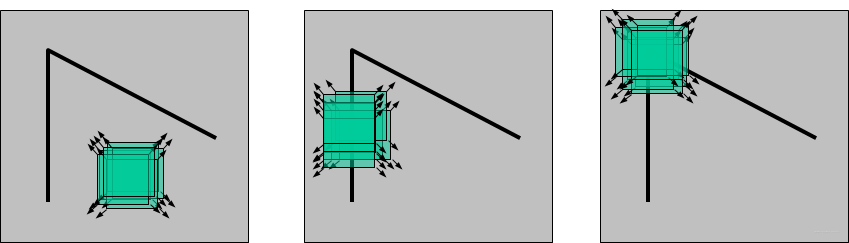
27 |
28 | 所以,右图是一个角点。
29 |
30 | ### 2.角点类型
31 | 下图展示了不同角点的类型,可以发现:如果使用一个滑动窗口以角点为中心在图像上滑动,存在朝多个方向上的移动会引起该区域的像素值发生很大变化的现象。
32 | 
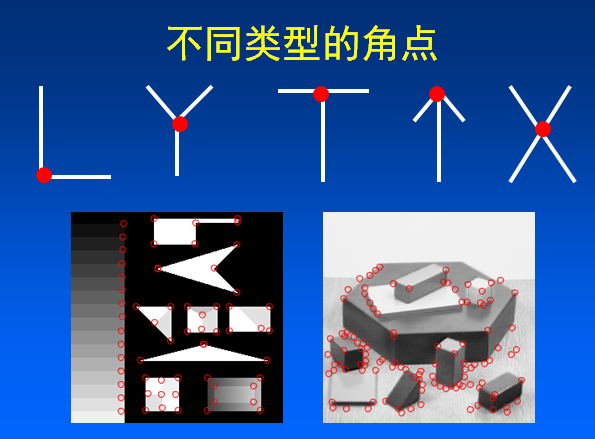
33 | ### 3.图像梯度
34 | “*像素值发生很大变化*”这一现象可以用图像梯度进行描述。在图像局部内,图像梯度越大表示该局部内像素值变化越大(灰度的变化率越大)。
35 | 而图像的梯度在数学上可用**微分或者导数**来表示。对于数字图像来说,相当于是**二维离散函数求梯度**,并使用差分来近似导数:
36 | $G_x(x,y)=H(x+1,y)-H(x-1,y)$
37 | $G_y(x,y)=H(x,y+1)-H(x,y-1)$
38 | 在实际操作中,对图像求梯度通常是考虑图像的每个像素的某个邻域内的灰度变化,因此通常对原始图像中像素某个邻域设置梯度算子,然后采用小区域模板进行卷积来计算,常用的有Prewitt算子、Sobel算子、Robinson算子、Laplace算子等。
39 |
40 | ### 1.4.2 Harris角点检测算法原理
41 | ### 1. 算法思想
42 | 算法的核心是利用局部窗口在图像上进行移动,判断灰度是否发生较大的变化。如果窗口内的灰度值(在梯度图上)都有较大的变化,那么这个窗口所在区域就存在角点。
43 |
44 | 这样就可以将 Harris 角点检测算法分为以下三步:
45 |
46 | * 当窗口(局部区域)同时向 x (水平)和 y(垂直) 两个方向移动时,计算窗口内部的像素值变化量 $E(x,y)$ ;
47 | * 对于每个窗口,都计算其对应的一个角点响应函数 $R$;
48 | * 然后对该函数进行阈值处理,如果 $R > threshold$,表示该窗口对应一个角点特征。
49 |
50 | ### 2. 第一步 — 建立数学模型
51 |
52 | **第一步是通过建立数学模型,确定哪些窗口会引起较大的灰度值变化。**
53 | 让一个窗口的中心位于灰度图像的一个位置$(x,y)$,这个位置的像素灰度值为$I(x,y)$ ,如果这个窗口分别向 $x$ 和 $y$ 方向移动一个小的位移$u$和$v$,到一个新的位置 $(x+u,y+v)$ ,这个位置的像素灰度值就是$I(x+u,y+v)$ 。
54 |
55 | $|I(x+u,y+v)-I(x,y)|$就是窗口移动引起的灰度值的变化值。
56 |
57 | 设$w(x,y)$为位置$(x,y)$处的窗口函数,表示窗口内各像素的权重,最简单的就是把窗口内所有像素的权重都设为1,即一个均值滤波核。
58 |
59 | 当然,也可以把 $w(x,y)$设定为以窗口中心为原点的高斯分布,即一个高斯核。如果窗口中心点像素是角点,那么窗口移动前后,中心点的灰度值变化非常强烈,所以该点权重系数应该设大一点,表示该点对灰度变化的贡献较大;而离窗口中心(角点)较远的点,这些点的灰度变化比较小,于是将权重系数设小一点,表示该点对灰度变化的贡献较小。
60 |
61 | 则窗口在各个方向上移动 $(u,v)$所造成的像素灰度值的变化量公式如下:
62 |
63 | 
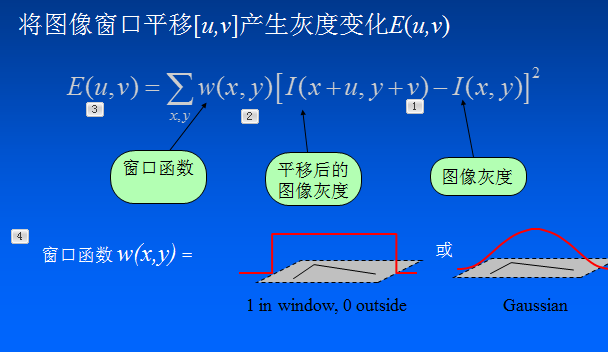
64 | 若窗口内是一个角点,则$E(u,v)$的计算结果将会很大。
65 |
66 | 为了提高计算效率,对上述公式进行简化,利用泰勒级数展开来得到这个公式的近似形式:
67 |
68 | 对于二维的泰勒展开式公式为:
69 | $T(x,y)=f(u,v)+(x-u)f_x(u,v)+(y-v)f_y(u,v)+....$
70 |
71 | 则$I(x+u,y+v)$ 为:
72 | $I(x+u,y+v)=I(x,y)+uI_x+vI_y$
73 |
74 | 其中$I_x$和$I_y$是$I$的微分(偏导),在图像中就是求$x$ 和 $y$ 方向的**梯度图**:
75 |
76 | $I_x=\frac{\partial I(x,y)}{\partial x}$
77 |
78 | $I_y=\frac{\partial I(x,y)}{\partial y}$
79 |
80 | 将$I(x+u,y+v)=I(x,y)+uI_x+vI_y$代入$E(u,v)$可得:
81 |
82 | 

83 |
84 | 提出 u 和 v ,得到最终的近似形式:
85 | 

86 |
87 | 其中矩阵M为:
88 |
89 | 

90 |
91 | 最后是把实对称矩阵对角化处理后的结果,可以把R看成旋转因子,其不影响两个正交方向的变化分量。
92 |
93 | 经对角化处理后,将两个正交方向的变化分量提取出来,就是 λ1 和 λ2(特征值)。
94 | 这里利用了**线性代数中的实对称矩阵对角化**的相关知识,有兴趣的同学可以进一步查阅相关资料。
95 |
96 |
97 | ### 3. 第二步—角点响应函数R
98 | 现在我们已经得到 $E(u,v)$的最终形式,别忘了我们的目的是要找到会引起较大的灰度值变化的那些窗口。
99 |
100 | 灰度值变化的大小则取决于矩阵M,M为梯度的协方差矩阵。在实际应用中为了能够应用更好的编程,所以定义了角点响应函数R,通过判定R大小来判断像素是否为角点。
101 |
102 | 计算每个窗口对应的得分(角点响应函数R定义):
103 | 

104 | 其中 $det(M)=\lambda_1\lambda_2$是矩阵的行列式, $trace(M)=\lambda_1+\lambda_2$ 是矩阵的迹。
105 |
106 | $λ1$ 和 $λ2$ 是矩阵$M$的特征值, $k$是一个经验常数,在范围 (0.04, 0.06) 之间。
107 |
108 | $R$的值取决于$M$的特征值,对于角点$|R|$很大,平坦的区域$|R|$很小,边缘的$R$为负值。
109 |
110 | ### 4. 第三步—角点判定
111 | 根据 R 的值,将这个窗口所在的区域划分为平面、边缘或角点。为了得到最优的角点,我们还可以使用非极大值抑制。
112 |
113 | 注意:Harris 检测器具有旋转不变性,但不具有尺度不变性,也就是说尺度变化可能会导致角点变为边缘。想要尺度不变特性的话,可以关注SIFT特征。
114 |
115 | 因为特征值 λ1 和 λ2 决定了 R 的值,所以我们可以用特征值来决定一个窗口是平面、边缘还是角点:
116 |
117 | * 平面::该窗口在平坦区域上滑动,窗口内的灰度值基本不会发生变化,所以 $|R|$ 值非常小,在水平和竖直方向的变化量均较小,即 $I_x$和 $I_y$都较小,那么 λ1 和 λ2 都较小;
118 | * 边缘:$|R|$值为负数,仅在水平或竖直方向有较大的变化量,即 $I_x$和 $I_y$只有一个较大,也就是 λ1>>λ2 或 λ2>>λ1;
119 | * 角点:[公式] 值很大,在水平、竖直两个方向上变化均较大的点,即 $I_x$和 $I_y$ 都较大,也就是 λ1 和 λ2 都很大。
120 |
121 | 如下图所示:
122 |
123 | 
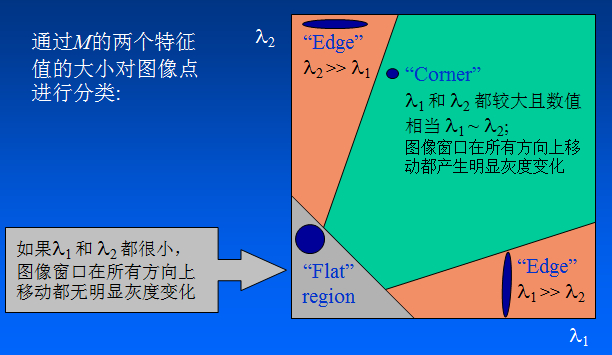
124 |
125 | Harris 角点检测的结果是带有这些分数 R 的灰度图像,设定一个阈值,分数大于这个阈值的像素就对应角点。
126 | ## 1.5 基于OpenCV的实现
127 |
128 | ### 1. API
129 | 在opencv中有提供实现 Harris 角点检测的函数 cv2.cornerHarris,我们直接调用的就可以,非常方便。
130 |
131 | 函数原型:`cv2.cornerHarris(src, blockSize, ksize, k[, dst[, borderType]])`
132 |
133 | 对于每一个像素 (x,y),在 (blockSize x blockSize) 邻域内,计算梯度图的协方差矩阵 $M(x,y)$,然后通过上面第二步中的角点响应函数得到结果图。图像中的角点可以为该结果图的局部最大值。
134 |
135 | 即可以得到输出图中的局部最大值,这些值就对应图像中的角点。
136 |
137 | 参数解释:
138 | * src - 输入灰度图像,float32类型
139 | * blockSize - 用于角点检测的邻域大小,就是上面提到的窗口的尺寸
140 | * ksize - 用于计算梯度图的Sobel算子的尺寸
141 | * k - 用于计算角点响应函数的参数k,取值范围常在0.04~0.06之间
142 |
143 | ### 代码示例
144 | ```python
145 | import cv2 as cv
146 | from matplotlib import pyplot as plt
147 | import numpy as np
148 |
149 | # detector parameters
150 | block_size = 3
151 | sobel_size = 3
152 | k = 0.06
153 |
154 | image = cv.imread('Scenery.jpg')
155 |
156 | print(image.shape)
157 | height = image.shape[0]
158 | width = image.shape[1]
159 | channels = image.shape[2]
160 | print("width: %s height: %s channels: %s"%(width, height, channels))
161 |
162 | gray_img = cv.cvtColor(image, cv2.COLOR_BGR2GRAY)
163 |
164 |
165 | # modify the data type setting to 32-bit floating point
166 | gray_img = np.float32(gray_img)
167 |
168 | # detect the corners with appropriate values as input parameters
169 | corners_img = cv.cornerHarris(gray_img, block_size, sobel_size, k)
170 |
171 | # result is dilated for marking the corners, not necessary
172 | kernel = cv2.getStructuringElement(cv2.MORPH_RECT,(3, 3))
173 | dst = cv.dilate(corners_img, kernel)
174 |
175 | # Threshold for an optimal value, marking the corners in Green
176 | #image[corners_img>0.01*corners_img.max()] = [0,0,255]
177 |
178 | for r in range(height):
179 | for c in range(width):
180 | pix=dst[r,c]
181 | if pix>0.05*dst.max():
182 | cv2.circle(image,(c,r),5,(0,0,255),0)
183 |
184 | image = cv.cvtColor(image, cv2.COLOR_BGR2RGB)
185 | plt.imshow(image)
186 | plt.show()
187 | ```
188 |
189 | ### 结果:
190 | 
191 | 
192 |
193 |
194 | ## 1.6 总结
195 | 本小节对Harris角点检测算法进行了学习。通过这次学习我们了解了角点的概念、图像梯度等基本知识,也认识了基本的角点检测算法思想。
196 |
197 | Harris角点检测的性质可总结如下:
198 | * **阈值决定角点的数量**
199 | * **Harris角点检测算子对亮度和对比度的变化不敏感(光照不变性)**
200 | 在进行Harris角点检测时,使用了微分算子对图像进行微分运算,而微分运算对图像密度的拉升或收缩和对亮度的抬高或下降不敏感。换言之,对亮度和对比度的仿射变换并不改变Harris响应的极值点出现的位置,但是,由于阈值的选择,可能会影响角点检测的数量。
201 | 
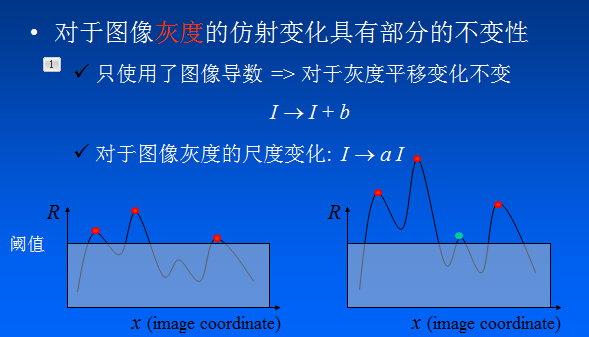
202 |
203 |
204 | * **Harris角点检测算子具有旋转不变性**
205 | Harris角点检测算子使用的是角点附近的区域灰度二阶矩矩阵。而二阶矩矩阵可以表示成一个椭圆,椭圆的长短轴正是二阶矩矩阵特征值平方根的倒数。当特征椭圆转动时,特征值并不发生变化,所以判断角点响应值也不发生变化,由此说明Harris角点检测算子具有旋转不变性。
206 | 
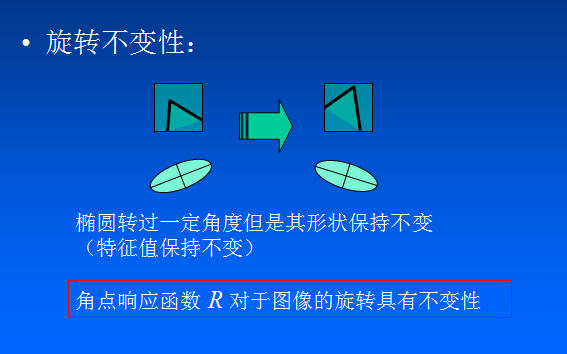
207 |
208 | * **Harris角点检测算子不具有尺度不变性**
209 | 尺度的变化会将角点变为边缘,或者边缘变为角点,Harris的理论基础并不具有尺度不变性。
210 | 
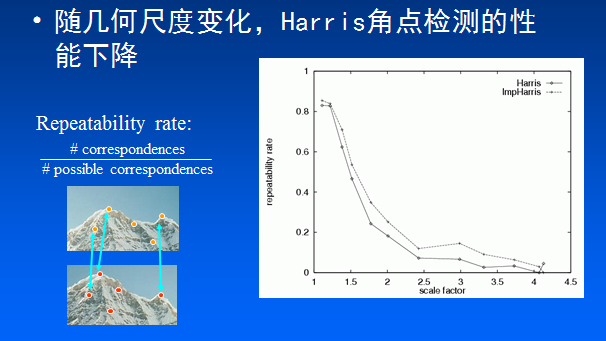
211 | ## 相关技术文档、论文推荐
212 | * [论文:《C.Harris, M.Stephens. “A Combined Corner and Edge Detector”. Proc. of 4th Alvey Vision Conference》](http://citeseerx.ist.psu.edu/viewdoc/download?doi=10.1.1.434.4816&rep=rep1&type=pdf)
213 | * [Harris角点算法](https://www.cnblogs.com/polly333/p/5416172.html)
214 | * [角点检测:Harris 与 Shi-Tomasi](https://zhuanlan.zhihu.com/p/83064609)
215 | * [https://www.cnblogs.com/ronny/p/4009425.html](https://www.cnblogs.com/ronny/p/4009425.html)
216 |
217 | ---
218 | **Task01 Harris特征点检测 END.**
219 |
220 | --- ***By: 小武***
221 |
222 |
223 | >博客:[https://blog.csdn.net/weixin_40647819](https://blog.csdn.net/weixin_40647819)
224 |
225 |
226 | **关于Datawhale**:
227 |
228 | >Datawhale是一个专注于数据科学与AI领域的开源组织,汇集了众多领域院校和知名企业的优秀学习者,聚合了一群有开源精神和探索精神的团队成员。Datawhale以“for the learner,和学习者一起成长”为愿景,鼓励真实地展现自我、开放包容、互信互助、敢于试错和勇于担当。同时Datawhale 用开源的理念去探索开源内容、开源学习和开源方案,赋能人才培养,助力人才成长,建立起人与人,人与知识,人与企业和人与未来的联结。
229 |
230 |
--------------------------------------------------------------------------------
/ImageProcessingFundamentals/03 彩色空间互转.md:
--------------------------------------------------------------------------------
1 | # 03 彩色空间互转
2 |
3 | ## 3.1 简介
4 |
5 | 图像彩色空间互转在图像处理中应用非常广泛,而且很多算法只对灰度图有效;另外,相比RGB,其他颜色空间(比如HSV、HSI)更具可分离性和可操作性,所以很多图像算法需要将图像从RGB转为其他颜色空间,所以图像彩色互转是十分重要和关键的。
6 |
7 |
8 | ## 3.2 学习目标
9 |
10 | * 了解相关颜色空间的基础知识
11 | * 理解彩色空间互转的理论
12 | * 掌握OpenCV框架下颜色空间互转API的使用
13 |
14 | ## 3.3 内容介绍
15 |
16 | 1.相关颜色空间的原理介绍
17 |
18 | 2.颜色空间互转理论的介绍
19 |
20 | 3.OpenCV代码实践
21 |
22 | 4.动手实践并打卡(读者完成)
23 |
24 | ## 3.4 算法理论介绍与资料推荐
25 |
26 | ### 3.4.1 RGB与灰度图互转
27 |
28 | RGB(红绿蓝)是依据人眼识别的颜色定义出的空间,可表示大部分颜色。但在科学研究一般不采用RGB颜色空间,因为它的细节难以进行数字化的调整。它将色调,亮度,饱和度三个量放在一起表示,很难分开。它是最通用的面向硬件的彩色模型。该模型用于彩色监视器和一大类彩色视频摄像。
29 |
30 | RGB颜色空间 基于颜色的加法混色原理,从黑色不断叠加Red,Green,Blue的颜色,最终可以得到白色,如图:
31 |
32 |
33 | 将R、G、B三个通道作为笛卡尔坐标系中的X、Y、Z轴,就得到了一种对于颜色的空间描述,如图:
34 |
35 |
36 |
37 |
38 | **对于彩色图转灰度图,有一个很著名的心理学公式:**
39 |
40 | Gray = R * 0.299 + G * 0.587 + B * 0.114
41 |
42 |
43 | ### 3.4.2 RGB与HSV互转
44 |
45 | HSV是一种将RGB色彩空间中的点在倒圆锥体中的表示方法。HSV即色相(Hue)、饱和度(Saturation)、明度(Value),又称HSB(B即Brightness)。色相是色彩的基本属性,就是平常说的颜色的名称,如红色、黄色等。饱和度(S)是指色彩的纯度,越高色彩越纯,低则逐渐变灰,取0-100%的数值。明度(V),取0-max(计算机中HSV取值范围和存储的长度有关)。HSV颜色空间可以用一个圆锥空间模型来描述。圆锥的顶点处,V=0,H和S无定义,代表黑色。圆锥的顶面中心处V=max,S=0,H无定义,代表白色。
46 |
47 | RGB颜色空间中,三种颜色分量的取值与所生成的颜色之间的联系并不直观。而HSV颜色空间,更类似于人类感觉颜色的方式,封装了关于颜色的信息:“这是什么颜色?深浅如何?明暗如何?
48 |
49 | #### HSV模型
50 | 
51 |
52 | 这个模型就是按色彩、深浅、明暗来描述的。
53 |
54 | H是色彩;
55 |
56 | S是深浅, S = 0时,只有灰度;
57 |
58 | V是明暗,表示色彩的明亮程度,但与光强无直接联系。
59 | 
60 |
61 | 应用:可以用于偏光矫正、去除阴影、图像分割等
62 |
63 |
64 | **1.RGB2HSV**
65 |
66 | 
67 |
68 | **或**
69 |
70 | 
71 |
72 |
73 | **2.HSV2RGB**
74 |
75 | 
76 |
77 |
78 | ## 3.5 基于OpenCV的实现
79 |
80 | * 工具:OpenCV3.1.0+VS2013
81 | * 平台:WIN10
82 |
83 | ### 函数原型(c++)
84 | > void cvtColor(InputArray src, OutputArray dst, int code, int dstCn=0)
85 |
86 | * src: 输入图像
87 | * dst: 输出图像
88 | * code: 颜色空间转换标识符
89 | * OpenCV2的CV_前缀宏命名规范被OpenCV3中的COLOR_式的宏命名前缀取代
90 | * 注意RGB色彩空间默认通道顺序为BGR
91 | * 具体可以参考: [enum cv::ColorConversionCode部分](http://docs.opencv.org/3.1.0/d7/d1b/group__imgproc__misc.html#ga4e0972be5de079fed4e3a10e24ef5ef0)
92 | * dstCn: 目标图像的通道数,该参数为0时,目标图像根据源图像的通道数和具体操作自动决定
93 |
94 | ### 实现示例(c++)
95 |
96 | ```
97 | #include
98 | #include
99 | #include
100 | // main
101 | int main( int argc, char** argv )
102 | {
103 | // Load image
104 | cv::Mat srcImage = cv::imread("1.jpg"), dstImage;
105 |
106 | // RGB2GHSV
107 | cv::cvtColor(srcImage, dstImage, cv::COLOR_BGR2hHSV);
108 | imshow("Lab Space", dstImage);
109 |
110 | //RGB2GRAY
111 | cv::cvtColor(srcImage, dstImage, cv::COLOR_BGR2GRAY);
112 | imshow("Gray Scale", dstImage);
113 |
114 | cv::waitKey();
115 |
116 | return 0;
117 | }
118 | ```
119 |
120 | ### 进阶实现(根据原理自己实现)
121 |
122 | * 1.RGB2GRAY
123 | ```
124 | #include
125 | #include
126 | #include
127 | #include
128 |
129 | cv::Mat RGB2GRAY(cv::Mat src, bool accelerate=false){
130 | CV_Assert(src.channels()==3);
131 | cv::Mat dst = cv::Mat::zeros(src.size(), CV_8UC1);
132 | cv::Vec3b rgb;
133 | int r = src.rows;
134 | int c = src.cols;
135 |
136 | for (int i = 0; i < r; ++i){
137 | for (int j = 0; j < c; ++j){
138 | rgb = src.at(i, j);
139 | uchar B = rgb[0]; uchar G = rgb[1]; uchar R = rgb[2];
140 | if (accelerate = false){
141 | dst.at(i, j) = R*0.299 + G*0.587 + B*0.114; //原式
142 | }
143 | else{
144 | dst.at(i, j) = (R * 4898 + G * 9618 + B * 1868) >> 14; //优化
145 | }
146 | }
147 | }
148 | return dst;
149 | }
150 |
151 | int main(){
152 | cv::Mat src = cv::imread("I:\\Learning-and-Practice\\2019Change\\Image process algorithm\\Img\\lena.jpg");
153 |
154 | if (src.empty()){
155 | return -1;
156 | }
157 | cv::Mat dst,dst1;
158 |
159 | //opencv自带
160 | double t2 = (double)cv::getTickCount(); //测时间
161 | cv::cvtColor(src, dst1, CV_RGB2GRAY);
162 | t2 = (double)cv::getTickCount() - t2;
163 | double time2 = (t2 *1000.) / ((double)cv::getTickFrequency());
164 | std::cout << "Opencv_rgb2gray=" << time2 << " ms. " << std::endl << std::endl;
165 |
166 | //RGB2GRAY
167 | double t1 = (double)cv::getTickCount(); //测时间
168 | dst = RGB2GRAY(src, true);
169 | t1 = (double)cv::getTickCount() - t1;
170 | double time1 = (t1 *1000.) / ((double)cv::getTickFrequency());
171 | std::cout << "My_rgb2gray=" << time1 << " ms. " << std::endl << std::endl;
172 |
173 |
174 | cv::namedWindow("src", CV_WINDOW_NORMAL);
175 | imshow("src", src);
176 | cv::namedWindow("My_rgb2gray", CV_WINDOW_NORMAL);
177 | imshow("My_rgb2gray", dst);
178 | cv::namedWindow("Opencv_rgb2gray", CV_WINDOW_NORMAL);
179 | imshow("Opencv_rgb2gray", dst1);
180 | cv::waitKey(0);
181 | return 0;
182 |
183 | }
184 | ```
185 |
186 | * 2.RGB2HSV/HSV2RGB
187 | ```
188 | #include
189 | #include
190 | #include
191 | #include
192 | using namespace cv;
193 |
194 |
195 | Mat RGB2HSV(Mat src) {
196 | int row = src.rows;
197 | int col = src.cols;
198 | Mat dst(row, col, CV_32FC3);
199 | for (int i = 0; i < row; i++) {
200 | for (int j = 0; j < col; j++) {
201 | float b = src.at(i, j)[0] / 255.0;
202 | float g = src.at(i, j)[1] / 255.0;
203 | float r = src.at(i, j)[2] / 255.0;
204 | float minn = min(r, min(g, b));
205 | float maxx = max(r, max(g, b));
206 | dst.at(i, j)[2] = maxx; //V
207 | float delta = maxx - minn;
208 | float h, s;
209 | if (maxx != 0) {
210 | s = delta / maxx;
211 | }
212 | else {
213 | s = 0;
214 | }
215 | if (r == maxx) {
216 | h = (g - b) / delta;
217 | }
218 | else if (g == maxx) {
219 | h = 2 + (b - r) / delta;
220 | }
221 | else if (b==maxx) {
222 | h = 4 + (r - g) / delta;
223 | }
224 | else{
225 | h = 0;
226 | }
227 | h *= 60;
228 | if (h < 0)
229 | h += 360;
230 | dst.at(i, j)[0] = h;
231 | dst.at(i, j)[1] = s;
232 | }
233 | }
234 |
235 | return dst;
236 | }
237 |
238 | Mat HSV2RGB(Mat src) {
239 | int row = src.rows;
240 | int col = src.cols;
241 | Mat dst(row, col, CV_8UC3);
242 | float r, g, b, h, s, v;
243 | for (int i = 0; i < row; i++) {
244 | for (int j = 0; j < col; j++) {
245 | h = src.at(i, j)[0];
246 | s = src.at(i, j)[1];
247 | v = src.at(i, j)[2];
248 | if (s == 0) {
249 | r = g = b = v;
250 | }
251 | else {
252 | h /= 60;
253 | int offset = floor(h);
254 | float f = h - offset;
255 | float p = v * (1 - s);
256 | float q = v * (1 - s * f);
257 | float t = v * (1 - s * (1 - f));
258 | switch (offset)
259 | {
260 | case 0: r = v; g = t; b = p; break;
261 | case 1: r = q; g = v; b = p; break;
262 | case 2: r = p; g = v; b = t; break;
263 | case 3: r = p; g = q; b = v; break;
264 | case 4: r = t; g = p; b = v; break;
265 | case 5: r = v; g = p; b = q; break;
266 | default:
267 | break;
268 | }
269 | }
270 | dst.at(i, j)[0] = int(b * 255);
271 | dst.at(i, j)[1] = int(g * 255);
272 | dst.at(i, j)[2] = int(r * 255);
273 | }
274 | }
275 | return dst;
276 | }
277 |
278 | int main(){
279 | cv::Mat src = cv::imread("I:\\Learning-and-Practice\\2019Change\\Image process algorithm\\Img\\lena.JPG");
280 |
281 | if (src.empty()){
282 | return -1;
283 | }
284 | cv::Mat dst, dst1, dst2;
285 |
286 | ////////opencv自带/////////
287 | cv::cvtColor(src, dst1, CV_RGB2HSV); //RGB2HSV
288 |
289 | //////////RGB2HSV//////////
290 | dst = RGB2HSV(src); //RGB2HSV
291 | dst2 = HSV2RGB(dst); //HSV2BGR
292 |
293 | cv::namedWindow("src", CV_WINDOW_NORMAL);
294 | imshow("src", src);
295 | cv::namedWindow("My_RGB2HSV", CV_WINDOW_NORMAL);
296 | imshow("My_RGB2HSV", dst);
297 | cv::namedWindow("My_HSV2RGB", CV_WINDOW_NORMAL);
298 | imshow("My_HSV2RGB", dst2);
299 | cv::namedWindow("Opencv_RGB2HSV", CV_WINDOW_NORMAL);
300 | imshow("Opencv_RGB2HSV", dst1);
301 | cv::waitKey(0);
302 | return 0;
303 |
304 | }
305 | ```
306 | ### 效果
307 |
308 | 
309 |
310 |
311 | 
312 |
313 | ---
314 | ### 相关技术文档、博客、书籍、项目推荐
315 |
316 | opencv文档:
317 | - https://docs.opencv.org/3.1.0/de/d25/imgproc_color_conversions.html
318 |
319 | 博客:
320 | - https://blog.csdn.net/weixin_40647819/article/details/92596879
321 | - https://blog.csdn.net/weixin_40647819/article/details/92660320
322 |
323 | python版本:
324 | - https://www.kancloud.cn/aollo/aolloopencv/263731
325 |
326 | ## 3.6 总结
327 |
328 | 该部分主要讲解彩色空间互转,彩色空间互转是传统图像算法的一个关键技术,学习颜色转换有助于我们理解图像的色域,从而为我们从事CV相关工程技术和科学研究提供一些基础、灵感和思路。
329 |
330 | ---
331 | **Task03 彩色空间互转 END.**
332 |
333 | --- ***By: 小武***
334 |
335 |
336 | >博客:https://blog.csdn.net/weixin_40647819
337 |
338 |
339 | **关于Datawhale**:
340 |
341 | >Datawhale是一个专注于数据科学与AI领域的开源组织,汇集了众多领域院校和知名企业的优秀学习者,聚合了一群有开源精神和探索精神的团队成员。Datawhale以“for the learner,和学习者一起成长”为愿景,鼓励真实地展现自我、开放包容、互信互助、敢于试错和勇于担当。同时Datawhale 用开源的理念去探索开源内容、开源学习和开源方案,赋能人才培养,助力人才成长,建立起人与人,人与知识,人与企业和人与未来的联结。
342 |
343 |
344 |
--------------------------------------------------------------------------------
/DefectDetection/utils/torch_utils.py:
--------------------------------------------------------------------------------
1 | import math
2 | import os
3 | import time
4 | from copy import deepcopy
5 |
6 | import torch
7 | import torch.backends.cudnn as cudnn
8 | import torch.nn as nn
9 | import torch.nn.functional as F
10 | import torchvision.models as models
11 |
12 |
13 | def init_seeds(seed=0):
14 | torch.manual_seed(seed)
15 |
16 | # Speed-reproducibility tradeoff https://pytorch.org/docs/stable/notes/randomness.html
17 | if seed == 0: # slower, more reproducible
18 | cudnn.deterministic = True
19 | cudnn.benchmark = False
20 | else: # faster, less reproducible
21 | cudnn.deterministic = False
22 | cudnn.benchmark = True
23 |
24 |
25 | def select_device(device='', apex=False, batch_size=None):
26 | # device = 'cpu' or '0' or '0,1,2,3'
27 | cpu_request = device.lower() == 'cpu'
28 | if device and not cpu_request: # if device requested other than 'cpu'
29 | os.environ['CUDA_VISIBLE_DEVICES'] = device # set environment variable
30 | assert torch.cuda.is_available(), 'CUDA unavailable, invalid device %s requested' % device # check availablity
31 |
32 | cuda = False if cpu_request else torch.cuda.is_available()
33 | if cuda:
34 | c = 1024 ** 2 # bytes to MB
35 | ng = torch.cuda.device_count()
36 | if ng > 1 and batch_size: # check that batch_size is compatible with device_count
37 | assert batch_size % ng == 0, 'batch-size %g not multiple of GPU count %g' % (batch_size, ng)
38 | x = [torch.cuda.get_device_properties(i) for i in range(ng)]
39 | s = 'Using CUDA ' + ('Apex ' if apex else '') # apex for mixed precision https://github.com/NVIDIA/apex
40 | for i in range(0, ng):
41 | if i == 1:
42 | s = ' ' * len(s)
43 | print("%sdevice%g _CudaDeviceProperties(name='%s', total_memory=%dMB)" %
44 | (s, i, x[i].name, x[i].total_memory / c))
45 | else:
46 | print('Using CPU')
47 |
48 | print('') # skip a line
49 | return torch.device('cuda:0' if cuda else 'cpu')
50 |
51 |
52 | def time_synchronized():
53 | torch.cuda.synchronize() if torch.cuda.is_available() else None
54 | return time.time()
55 |
56 |
57 | def is_parallel(model):
58 | # is model is parallel with DP or DDP
59 | return type(model) in (nn.parallel.DataParallel, nn.parallel.DistributedDataParallel)
60 |
61 |
62 | def initialize_weights(model):
63 | for m in model.modules():
64 | t = type(m)
65 | if t is nn.Conv2d:
66 | pass # nn.init.kaiming_normal_(m.weight, mode='fan_out', nonlinearity='relu')
67 | elif t is nn.BatchNorm2d:
68 | m.eps = 1e-4
69 | m.momentum = 0.03
70 | elif t in [nn.LeakyReLU, nn.ReLU, nn.ReLU6]:
71 | m.inplace = True
72 |
73 |
74 | def find_modules(model, mclass=nn.Conv2d):
75 | # finds layer indices matching module class 'mclass'
76 | return [i for i, m in enumerate(model.module_list) if isinstance(m, mclass)]
77 |
78 |
79 | def sparsity(model):
80 | # Return global model sparsity
81 | a, b = 0., 0.
82 | for p in model.parameters():
83 | a += p.numel()
84 | b += (p == 0).sum()
85 | return b / a
86 |
87 |
88 | def prune(model, amount=0.3):
89 | # Prune model to requested global sparsity
90 | import torch.nn.utils.prune as prune
91 | print('Pruning model... ', end='')
92 | for name, m in model.named_modules():
93 | if isinstance(m, nn.Conv2d):
94 | prune.l1_unstructured(m, name='weight', amount=amount) # prune
95 | prune.remove(m, 'weight') # make permanent
96 | print(' %.3g global sparsity' % sparsity(model))
97 |
98 |
99 | def fuse_conv_and_bn(conv, bn):
100 | # https://tehnokv.com/posts/fusing-batchnorm-and-conv/
101 | with torch.no_grad():
102 | # init
103 | fusedconv = nn.Conv2d(conv.in_channels,
104 | conv.out_channels,
105 | kernel_size=conv.kernel_size,
106 | stride=conv.stride,
107 | padding=conv.padding,
108 | bias=True).to(conv.weight.device)
109 |
110 | # prepare filters
111 | w_conv = conv.weight.clone().view(conv.out_channels, -1)
112 | w_bn = torch.diag(bn.weight.div(torch.sqrt(bn.eps + bn.running_var)))
113 | fusedconv.weight.copy_(torch.mm(w_bn, w_conv).view(fusedconv.weight.size()))
114 |
115 | # prepare spatial bias
116 | b_conv = torch.zeros(conv.weight.size(0), device=conv.weight.device) if conv.bias is None else conv.bias
117 | b_bn = bn.bias - bn.weight.mul(bn.running_mean).div(torch.sqrt(bn.running_var + bn.eps))
118 | fusedconv.bias.copy_(torch.mm(w_bn, b_conv.reshape(-1, 1)).reshape(-1) + b_bn)
119 |
120 | return fusedconv
121 |
122 |
123 | def model_info(model, verbose=False):
124 | # Plots a line-by-line description of a PyTorch model
125 | n_p = sum(x.numel() for x in model.parameters()) # number parameters
126 | n_g = sum(x.numel() for x in model.parameters() if x.requires_grad) # number gradients
127 | if verbose:
128 | print('%5s %40s %9s %12s %20s %10s %10s' % ('layer', 'name', 'gradient', 'parameters', 'shape', 'mu', 'sigma'))
129 | for i, (name, p) in enumerate(model.named_parameters()):
130 | name = name.replace('module_list.', '')
131 | print('%5g %40s %9s %12g %20s %10.3g %10.3g' %
132 | (i, name, p.requires_grad, p.numel(), list(p.shape), p.mean(), p.std()))
133 |
134 | try: # FLOPS
135 | from thop import profile
136 | flops = profile(deepcopy(model), inputs=(torch.zeros(1, 3, 64, 64),), verbose=False)[0] / 1E9 * 2
137 | fs = ', %.1f GFLOPS' % (flops * 100) # 640x640 FLOPS
138 | except:
139 | fs = ''
140 |
141 | print('Model Summary: %g layers, %g parameters, %g gradients%s' % (len(list(model.parameters())), n_p, n_g, fs))
142 |
143 |
144 | def load_classifier(name='resnet101', n=2):
145 | # Loads a pretrained model reshaped to n-class output
146 | model = models.__dict__[name](pretrained=True)
147 |
148 | # Display model properties
149 | input_size = [3, 224, 224]
150 | input_space = 'RGB'
151 | input_range = [0, 1]
152 | mean = [0.485, 0.456, 0.406]
153 | std = [0.229, 0.224, 0.225]
154 | for x in [input_size, input_space, input_range, mean, std]:
155 | print(x + ' =', eval(x))
156 |
157 | # Reshape output to n classes
158 | filters = model.fc.weight.shape[1]
159 | model.fc.bias = nn.Parameter(torch.zeros(n), requires_grad=True)
160 | model.fc.weight = nn.Parameter(torch.zeros(n, filters), requires_grad=True)
161 | model.fc.out_features = n
162 | return model
163 |
164 |
165 | def scale_img(img, ratio=1.0, same_shape=False): # img(16,3,256,416), r=ratio
166 | # scales img(bs,3,y,x) by ratio
167 | h, w = img.shape[2:]
168 | s = (int(h * ratio), int(w * ratio)) # new size
169 | img = F.interpolate(img, size=s, mode='bilinear', align_corners=False) # resize
170 | if not same_shape: # pad/crop img
171 | gs = 32 # (pixels) grid size
172 | h, w = [math.ceil(x * ratio / gs) * gs for x in (h, w)]
173 | return F.pad(img, [0, w - s[1], 0, h - s[0]], value=0.447) # value = imagenet mean
174 |
175 |
176 | class ModelEMA:
177 | """ Model Exponential Moving Average from https://github.com/rwightman/pytorch-image-models
178 | Keep a moving average of everything in the model state_dict (parameters and buffers).
179 | This is intended to allow functionality like
180 | https://www.tensorflow.org/api_docs/python/tf/train/ExponentialMovingAverage
181 | A smoothed version of the weights is necessary for some training schemes to perform well.
182 | E.g. Google's hyper-params for training MNASNet, MobileNet-V3, EfficientNet, etc that use
183 | RMSprop with a short 2.4-3 epoch decay period and slow LR decay rate of .96-.99 requires EMA
184 | smoothing of weights to match results. Pay attention to the decay constant you are using
185 | relative to your update count per epoch.
186 | To keep EMA from using GPU resources, set device='cpu'. This will save a bit of memory but
187 | disable validation of the EMA weights. Validation will have to be done manually in a separate
188 | process, or after the training stops converging.
189 | This class is sensitive where it is initialized in the sequence of model init,
190 | GPU assignment and distributed training wrappers.
191 | I've tested with the sequence in my own train.py for torch.DataParallel, apex.DDP, and single-GPU.
192 | """
193 |
194 | def __init__(self, model, decay=0.9999, device=''):
195 | # Create EMA
196 | self.ema = deepcopy(model.module if is_parallel(model) else model) # FP32 EMA
197 | self.ema.eval()
198 | self.updates = 0 # number of EMA updates
199 | self.decay = lambda x: decay * (1 - math.exp(-x / 2000)) # decay exponential ramp (to help early epochs)
200 | self.device = device # perform ema on different device from model if set
201 | if device:
202 | self.ema.to(device)
203 | for p in self.ema.parameters():
204 | p.requires_grad_(False)
205 |
206 | def update(self, model):
207 | # Update EMA parameters
208 | with torch.no_grad():
209 | self.updates += 1
210 | d = self.decay(self.updates)
211 |
212 | msd = model.module.state_dict() if is_parallel(model) else model.state_dict() # model state_dict
213 | for k, v in self.ema.state_dict().items():
214 | if v.dtype.is_floating_point:
215 | v *= d
216 | v += (1. - d) * msd[k].detach()
217 |
218 | def update_attr(self, model):
219 | # Update EMA attributes
220 | for k, v in model.__dict__.items():
221 | if not k.startswith('_') and k not in ["process_group", "reducer"]:
222 | setattr(self.ema, k, v)
223 |
--------------------------------------------------------------------------------