├── .gitignore
├── cheatsheet-vim-A4.pdf
├── images
└── vim_cheat_sheet_for_programmers_screen.png
└── README.org
/.gitignore:
--------------------------------------------------------------------------------
1 | .DS_Store
2 | *.tex
3 | README.pdf
4 |
--------------------------------------------------------------------------------
/cheatsheet-vim-A4.pdf:
--------------------------------------------------------------------------------
https://raw.githubusercontent.com/dennyzhang/cheatsheet-vim-A4/HEAD/cheatsheet-vim-A4.pdf
--------------------------------------------------------------------------------
/images/vim_cheat_sheet_for_programmers_screen.png:
--------------------------------------------------------------------------------
https://raw.githubusercontent.com/dennyzhang/cheatsheet-vim-A4/HEAD/images/vim_cheat_sheet_for_programmers_screen.png
--------------------------------------------------------------------------------
/README.org:
--------------------------------------------------------------------------------
1 | * Vim CheatSheet :Tools:
2 | :PROPERTIES:
3 | :type: tool
4 | :export_file_name: cheatsheet-vim-A4.pdf
5 | :END:
6 |
7 | #+BEGIN_HTML
8 |  9 |
14 |
15 |
9 |
14 |
15 |
16 |  17 | #+END_HTML
18 |
19 | - PDF Link: [[https://github.com/dennyzhang/cheatsheet-vim-A4/blob/master/cheatsheet-vim-A4.pdf][cheatsheet-vim-A4.pdf]], Category: [[https://cheatsheet.dennyzhang.com/category/tools/][tools]]
20 | - Blog URL: https://cheatsheet.dennyzhang.com/cheatsheet-vim-A4
21 | - Related posts: [[https://cheatsheet.dennyzhang.com/cheatsheet-shell-A4][Shell CheatSheet]], [[https://github.com/topics/denny-cheatsheets][#denny-cheatsheets]]
22 |
23 | File me [[https://github.com/dennyzhang/cheatsheet.dennyzhang.com/issues][Issues]] or star [[https://github.com/dennyzhang/cheatsheet.dennyzhang.com][this repo]].
24 | ** Basic Usage
25 | | Name | Summary |
26 | |----------------------------------+---------------------------|
27 | | Show help | =:help= |
28 | | Enter to paste mode | =:set paste= |
29 | | Put vim to background/foreground | =C-z=; =fg= |
30 | | Password protecting file | =vim +X filename= |
31 | | Install enhanced vim | =yum install vim-enhance= |
32 | ** Movement
33 | | Name | Summary |
34 | |-----------------------------+-------------------------------|
35 | | Page down/up | =C-d= / =C-b=; =C-u= / =C-f= |
36 | | Forward/backward character | =l=, =h= |
37 | | Prevous/next line | =k=, =Ctrl-p=; =j=, =Ctrl-n= |
38 | | Move to next word | =w/W= |
39 | | Go to the top | =gg= |
40 | | Go to the bottom | =G= |
41 | | Go to beginning of the line | =B= |
42 | | Go to end of the line | =0= |
43 | ** Deletion
44 | | Name | Summary |
45 | |----------------------+---------|
46 | | Delete current word | =d-w= |
47 | | Delete current line | =d-d= |
48 | | Delete to the bottom | =d-G= |
49 | ** Changes
50 | | Name | Summary |
51 | |---------------------------+-------------------|
52 | | Undo the previous changes | In view mode, =u= |
53 | | Reload file from disk | =:e= |
54 | ** Panel
55 | | Name | Summary |
56 | |----------------------+------------------|
57 | | Next panel | =C-h= |
58 | | Split panel | =:split= |
59 | | Vertical split panel | =:vsplit= |
60 | | Change panel size | =C-w >=, =C-w <= |
61 | ** Blocks
62 | | Name | Summary |
63 | |-------------------------+---------------|
64 | | Copy block | =shift+v, y= |
65 | | Paste block | =shift+v, p= |
66 | | Cut block | =shift+v, x= |
67 | | comment/uncomment block | =shift+v, gc= |
68 | ** Files
69 | | Name | Summary |
70 | |--------------------------+--------------------|
71 | | Show current filename | =:echo @%= |
72 | | Open a new file | =:edit = |
73 |
74 | #+BEGIN_HTML
75 |
17 | #+END_HTML
18 |
19 | - PDF Link: [[https://github.com/dennyzhang/cheatsheet-vim-A4/blob/master/cheatsheet-vim-A4.pdf][cheatsheet-vim-A4.pdf]], Category: [[https://cheatsheet.dennyzhang.com/category/tools/][tools]]
20 | - Blog URL: https://cheatsheet.dennyzhang.com/cheatsheet-vim-A4
21 | - Related posts: [[https://cheatsheet.dennyzhang.com/cheatsheet-shell-A4][Shell CheatSheet]], [[https://github.com/topics/denny-cheatsheets][#denny-cheatsheets]]
22 |
23 | File me [[https://github.com/dennyzhang/cheatsheet.dennyzhang.com/issues][Issues]] or star [[https://github.com/dennyzhang/cheatsheet.dennyzhang.com][this repo]].
24 | ** Basic Usage
25 | | Name | Summary |
26 | |----------------------------------+---------------------------|
27 | | Show help | =:help= |
28 | | Enter to paste mode | =:set paste= |
29 | | Put vim to background/foreground | =C-z=; =fg= |
30 | | Password protecting file | =vim +X filename= |
31 | | Install enhanced vim | =yum install vim-enhance= |
32 | ** Movement
33 | | Name | Summary |
34 | |-----------------------------+-------------------------------|
35 | | Page down/up | =C-d= / =C-b=; =C-u= / =C-f= |
36 | | Forward/backward character | =l=, =h= |
37 | | Prevous/next line | =k=, =Ctrl-p=; =j=, =Ctrl-n= |
38 | | Move to next word | =w/W= |
39 | | Go to the top | =gg= |
40 | | Go to the bottom | =G= |
41 | | Go to beginning of the line | =B= |
42 | | Go to end of the line | =0= |
43 | ** Deletion
44 | | Name | Summary |
45 | |----------------------+---------|
46 | | Delete current word | =d-w= |
47 | | Delete current line | =d-d= |
48 | | Delete to the bottom | =d-G= |
49 | ** Changes
50 | | Name | Summary |
51 | |---------------------------+-------------------|
52 | | Undo the previous changes | In view mode, =u= |
53 | | Reload file from disk | =:e= |
54 | ** Panel
55 | | Name | Summary |
56 | |----------------------+------------------|
57 | | Next panel | =C-h= |
58 | | Split panel | =:split= |
59 | | Vertical split panel | =:vsplit= |
60 | | Change panel size | =C-w >=, =C-w <= |
61 | ** Blocks
62 | | Name | Summary |
63 | |-------------------------+---------------|
64 | | Copy block | =shift+v, y= |
65 | | Paste block | =shift+v, p= |
66 | | Cut block | =shift+v, x= |
67 | | comment/uncomment block | =shift+v, gc= |
68 | ** Files
69 | | Name | Summary |
70 | |--------------------------+--------------------|
71 | | Show current filename | =:echo @%= |
72 | | Open a new file | =:edit = |
73 |
74 | #+BEGIN_HTML
75 | 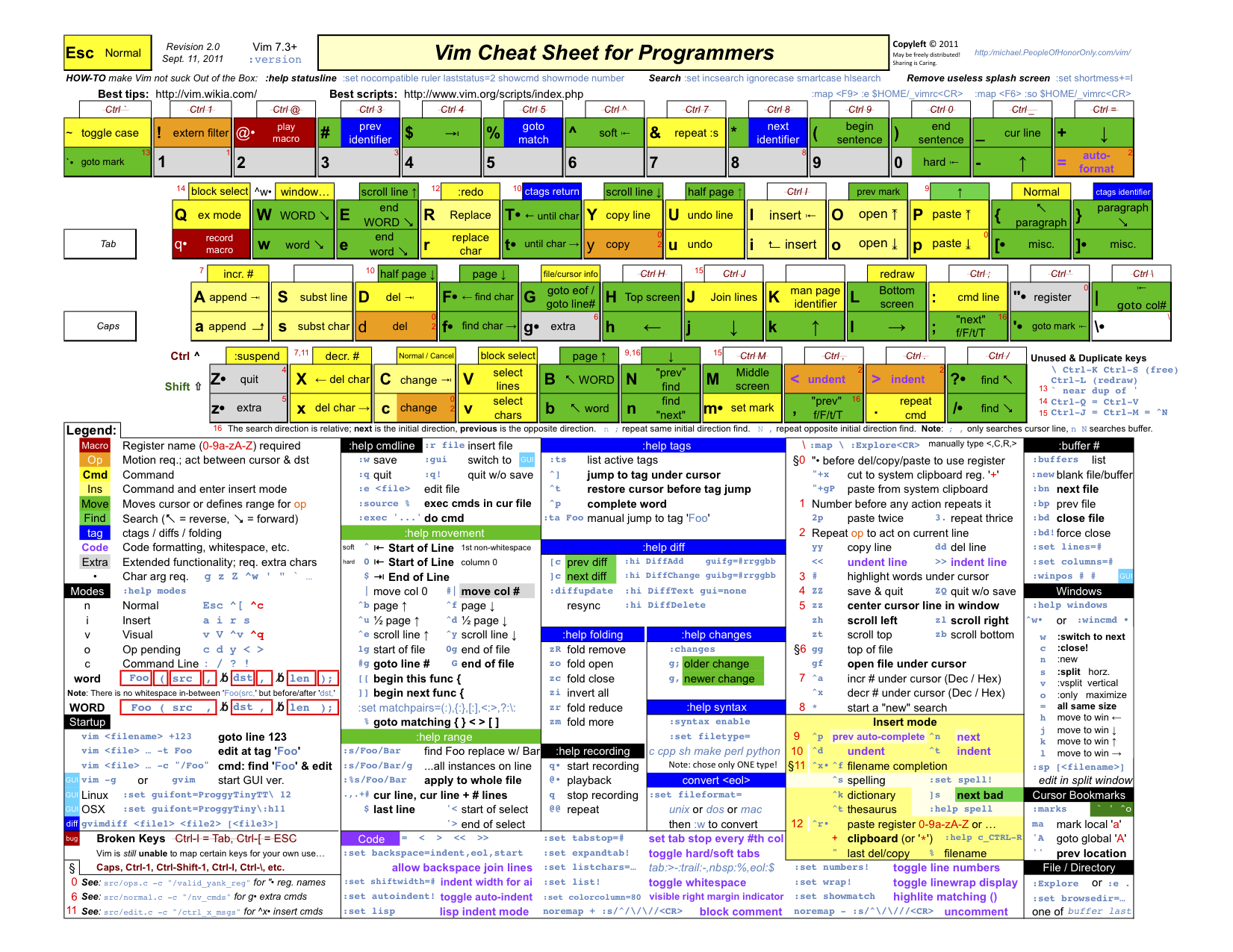 76 |
77 | Image credit to http://michael.peopleofhonoronly.com/vim/
78 | #+END_HTML
79 | ** More Resources
80 | License: Code is licensed under [[https://www.dennyzhang.com/wp-content/mit_license.txt][MIT License]].
81 | #+BEGIN_HTML
82 |
76 |
77 | Image credit to http://michael.peopleofhonoronly.com/vim/
78 | #+END_HTML
79 | ** More Resources
80 | License: Code is licensed under [[https://www.dennyzhang.com/wp-content/mit_license.txt][MIT License]].
81 | #+BEGIN_HTML
82 |  83 |
83 |  84 |
85 |
84 |
85 |  86 |
86 |  87 |
87 |  88 | #+END_HTML
89 | * org-mode configuration :noexport:
90 | #+STARTUP: overview customtime noalign logdone showall
91 | #+DESCRIPTION:
92 | #+KEYWORDS:
93 | #+LATEX_HEADER: \usepackage[margin=0.6in]{geometry}
94 | #+LaTeX_CLASS_OPTIONS: [8pt]
95 | #+LATEX_HEADER: \usepackage[english]{babel}
96 | #+LATEX_HEADER: \usepackage{lastpage}
97 | #+LATEX_HEADER: \usepackage{fancyhdr}
98 | #+LATEX_HEADER: \pagestyle{fancy}
99 | #+LATEX_HEADER: \fancyhf{}
100 | #+LATEX_HEADER: \rhead{Updated: \today}
101 | #+LATEX_HEADER: \rfoot{\thepage\ of \pageref{LastPage}}
102 | #+LATEX_HEADER: \lfoot{\href{https://github.com/dennyzhang/cheatsheet-vim-A4}{GitHub: https://github.com/dennyzhang/cheatsheet-vim-A4}}
103 | #+LATEX_HEADER: \lhead{\href{https://cheatsheet.dennyzhang.com/cheatsheet-vim-A4}{Blog URL: https://cheatsheet.dennyzhang.com/cheatsheet-vim-A4}}
104 | #+AUTHOR: Denny Zhang
105 | #+EMAIL: denny@dennyzhang.com
106 | #+TAGS: noexport(n)
107 | #+PRIORITIES: A D C
108 | #+OPTIONS: H:3 num:t toc:nil \n:nil @:t ::t |:t ^:t -:t f:t *:t <:t
109 | #+OPTIONS: TeX:t LaTeX:nil skip:nil d:nil todo:t pri:nil tags:not-in-toc
110 | #+EXPORT_EXCLUDE_TAGS: exclude noexport
111 | #+SEQ_TODO: TODO HALF ASSIGN | DONE BYPASS DELEGATE CANCELED DEFERRED
112 | #+LINK_UP:
113 | #+LINK_HOME:
114 | * # --8<-------------------------- separator ------------------------>8-- :noexport:
115 | * vim local :noexport:
116 | ** DONE vim page up: Ctrl-B
117 | CLOSED: [2017-05-21 Sun 13:22]
118 | http://vim.wikia.com/wiki/All_the_right_moves
119 | #+BEGIN_EXAMPLE
120 |
121 | Vim Tips Wiki
122 | Community portal
123 | To do
124 | On the Wiki
125 | Wiki Activity
126 | Random page
127 | Videos
128 | Images
129 | Chat
130 | Contribute
131 | All the right moves
132 | 1,625PAGES ON
133 | THIS WIKI Add New Page Edit Talk0 Share
134 | Tip 278 Printable Monobook Previous Next
135 | created 2002 · complexity basic · author vim_power · version 6.0
136 |
137 | Vim provides many ways to move the cursor. Becoming familiar with them leads to more effective text editing.
138 |
139 | h move one character left
140 | j move one row down
141 | k move one row up
142 | l move one character right
143 | w move to beginning of next word
144 | b move to previous beginning of word
145 | e move to end of word
146 | W move to beginning of next word after a whitespace
147 | B move to beginning of previous word before a whitespace
148 | E move to end of word before a whitespace
149 | All the above movements can be preceded by a count; e.g. 4j moves down 4 lines.
150 |
151 | 0 move to beginning of line
152 | $ move to end of line
153 | _ move to first non-blank character of the line
154 | g_ move to last non-blank character of the line
155 |
156 | gg move to first line
157 | G move to last line
158 | nG move to n'th line of file (n is a number; 12G moves to line 12)
159 |
160 | H move to top of screen
161 | M move to middle of screen
162 | L move to bottom of screen
163 |
164 | z. scroll the line with the cursor to the center of the screen
165 | zt scroll the line with the cursor to the top
166 | zb scroll the line with the cursor to the bottom
167 |
168 | Ctrl-D move half-page down
169 | Ctrl-U move half-page up
170 | Ctrl-B page up
171 | Ctrl-F page down
172 | Ctrl-O jump to last (older) cursor position
173 | Ctrl-I jump to next cursor position (after Ctrl-O)
174 | Ctrl-Y move view pane up
175 | Ctrl-E move view pane down
176 |
177 | n next matching search pattern
178 | N previous matching search pattern
179 | * next whole word under cursor
180 | # previous whole word under cursor
181 | g* next matching search (not whole word) pattern under cursor
182 | g# previous matching search (not whole word) pattern under cursor
183 | % jump to matching bracket { } [ ] ( )
184 |
185 | fX to next 'X' after cursor, in the same line (X is any character)
186 | FX to previous 'X' before cursor (f and F put the cursor on X)
187 | tX til next 'X' (similar to above, but cursor is before X)
188 | TX til previous 'X'
189 | ; repeat above, in same direction
190 | , repeat above, in reverse direction
191 | See :help {command} (for example, :help g_) for all of the above if you want more details.
192 | #+END_EXAMPLE
193 | ** TODO vim dotfile: git@github.com:pivotal-cf/oratos-dotfiles.git
194 | ** TODO vim copy mess up: /Users/zdenny/Dropbox/private_data/work/vmware/code/pks-ci/tests/integration-tests/wavefront-proxy-release/wavefront-proxy/wavefront_proxy_test.go
195 | ** TODO vim disable tab key: https://stackoverflow.com/questions/1878974/redefine-tab-as-4-spaces/1878984#1878984
196 | ** TODO Switch to next open file
197 | ** more content
198 | *** vim
199 | # File management
200 |
201 | :e reload file
202 | :q quit
203 | :q! quit without saving changes
204 | :w write file
205 | :w {file} write new file
206 | :x write file and exit
207 |
208 | # Movement
209 |
210 | k
211 | h l basic motion
212 | j
213 |
214 | w next start of word
215 | W next start of whitespace-delimited word
216 | e next end of word
217 | E next end of whitespace-delimited word
218 | b previous start of word
219 | B previous start of whitespace-delimited word
220 | 0 start of line
221 | $ end of line
222 | gg go to first line in file
223 | G go to end of file
224 | gk move down one displayed line
225 | gj move up one displayed line
226 |
227 | # Insertion
228 | # To exit from insert mode use Esc or Ctrl-C
229 | # Enter insertion mode and:
230 |
231 | a append after the cursor
232 | A append at the end of the line
233 | i insert before the cursor
234 | I insert at the beginning of the line
235 | o create a new line under the cursor
236 | O create a new line above the cursor
237 | R enter insert mode but replace instead of inserting chars
238 | :r {file} insert from file
239 |
240 | # Editing
241 |
242 | u undo
243 | yy yank (copy) a line
244 | y{motion} yank text that {motion} moves over
245 | p paste after cursor
246 | P paste before cursor
247 |
88 | #+END_HTML
89 | * org-mode configuration :noexport:
90 | #+STARTUP: overview customtime noalign logdone showall
91 | #+DESCRIPTION:
92 | #+KEYWORDS:
93 | #+LATEX_HEADER: \usepackage[margin=0.6in]{geometry}
94 | #+LaTeX_CLASS_OPTIONS: [8pt]
95 | #+LATEX_HEADER: \usepackage[english]{babel}
96 | #+LATEX_HEADER: \usepackage{lastpage}
97 | #+LATEX_HEADER: \usepackage{fancyhdr}
98 | #+LATEX_HEADER: \pagestyle{fancy}
99 | #+LATEX_HEADER: \fancyhf{}
100 | #+LATEX_HEADER: \rhead{Updated: \today}
101 | #+LATEX_HEADER: \rfoot{\thepage\ of \pageref{LastPage}}
102 | #+LATEX_HEADER: \lfoot{\href{https://github.com/dennyzhang/cheatsheet-vim-A4}{GitHub: https://github.com/dennyzhang/cheatsheet-vim-A4}}
103 | #+LATEX_HEADER: \lhead{\href{https://cheatsheet.dennyzhang.com/cheatsheet-vim-A4}{Blog URL: https://cheatsheet.dennyzhang.com/cheatsheet-vim-A4}}
104 | #+AUTHOR: Denny Zhang
105 | #+EMAIL: denny@dennyzhang.com
106 | #+TAGS: noexport(n)
107 | #+PRIORITIES: A D C
108 | #+OPTIONS: H:3 num:t toc:nil \n:nil @:t ::t |:t ^:t -:t f:t *:t <:t
109 | #+OPTIONS: TeX:t LaTeX:nil skip:nil d:nil todo:t pri:nil tags:not-in-toc
110 | #+EXPORT_EXCLUDE_TAGS: exclude noexport
111 | #+SEQ_TODO: TODO HALF ASSIGN | DONE BYPASS DELEGATE CANCELED DEFERRED
112 | #+LINK_UP:
113 | #+LINK_HOME:
114 | * # --8<-------------------------- separator ------------------------>8-- :noexport:
115 | * vim local :noexport:
116 | ** DONE vim page up: Ctrl-B
117 | CLOSED: [2017-05-21 Sun 13:22]
118 | http://vim.wikia.com/wiki/All_the_right_moves
119 | #+BEGIN_EXAMPLE
120 |
121 | Vim Tips Wiki
122 | Community portal
123 | To do
124 | On the Wiki
125 | Wiki Activity
126 | Random page
127 | Videos
128 | Images
129 | Chat
130 | Contribute
131 | All the right moves
132 | 1,625PAGES ON
133 | THIS WIKI Add New Page Edit Talk0 Share
134 | Tip 278 Printable Monobook Previous Next
135 | created 2002 · complexity basic · author vim_power · version 6.0
136 |
137 | Vim provides many ways to move the cursor. Becoming familiar with them leads to more effective text editing.
138 |
139 | h move one character left
140 | j move one row down
141 | k move one row up
142 | l move one character right
143 | w move to beginning of next word
144 | b move to previous beginning of word
145 | e move to end of word
146 | W move to beginning of next word after a whitespace
147 | B move to beginning of previous word before a whitespace
148 | E move to end of word before a whitespace
149 | All the above movements can be preceded by a count; e.g. 4j moves down 4 lines.
150 |
151 | 0 move to beginning of line
152 | $ move to end of line
153 | _ move to first non-blank character of the line
154 | g_ move to last non-blank character of the line
155 |
156 | gg move to first line
157 | G move to last line
158 | nG move to n'th line of file (n is a number; 12G moves to line 12)
159 |
160 | H move to top of screen
161 | M move to middle of screen
162 | L move to bottom of screen
163 |
164 | z. scroll the line with the cursor to the center of the screen
165 | zt scroll the line with the cursor to the top
166 | zb scroll the line with the cursor to the bottom
167 |
168 | Ctrl-D move half-page down
169 | Ctrl-U move half-page up
170 | Ctrl-B page up
171 | Ctrl-F page down
172 | Ctrl-O jump to last (older) cursor position
173 | Ctrl-I jump to next cursor position (after Ctrl-O)
174 | Ctrl-Y move view pane up
175 | Ctrl-E move view pane down
176 |
177 | n next matching search pattern
178 | N previous matching search pattern
179 | * next whole word under cursor
180 | # previous whole word under cursor
181 | g* next matching search (not whole word) pattern under cursor
182 | g# previous matching search (not whole word) pattern under cursor
183 | % jump to matching bracket { } [ ] ( )
184 |
185 | fX to next 'X' after cursor, in the same line (X is any character)
186 | FX to previous 'X' before cursor (f and F put the cursor on X)
187 | tX til next 'X' (similar to above, but cursor is before X)
188 | TX til previous 'X'
189 | ; repeat above, in same direction
190 | , repeat above, in reverse direction
191 | See :help {command} (for example, :help g_) for all of the above if you want more details.
192 | #+END_EXAMPLE
193 | ** TODO vim dotfile: git@github.com:pivotal-cf/oratos-dotfiles.git
194 | ** TODO vim copy mess up: /Users/zdenny/Dropbox/private_data/work/vmware/code/pks-ci/tests/integration-tests/wavefront-proxy-release/wavefront-proxy/wavefront_proxy_test.go
195 | ** TODO vim disable tab key: https://stackoverflow.com/questions/1878974/redefine-tab-as-4-spaces/1878984#1878984
196 | ** TODO Switch to next open file
197 | ** more content
198 | *** vim
199 | # File management
200 |
201 | :e reload file
202 | :q quit
203 | :q! quit without saving changes
204 | :w write file
205 | :w {file} write new file
206 | :x write file and exit
207 |
208 | # Movement
209 |
210 | k
211 | h l basic motion
212 | j
213 |
214 | w next start of word
215 | W next start of whitespace-delimited word
216 | e next end of word
217 | E next end of whitespace-delimited word
218 | b previous start of word
219 | B previous start of whitespace-delimited word
220 | 0 start of line
221 | $ end of line
222 | gg go to first line in file
223 | G go to end of file
224 | gk move down one displayed line
225 | gj move up one displayed line
226 |
227 | # Insertion
228 | # To exit from insert mode use Esc or Ctrl-C
229 | # Enter insertion mode and:
230 |
231 | a append after the cursor
232 | A append at the end of the line
233 | i insert before the cursor
234 | I insert at the beginning of the line
235 | o create a new line under the cursor
236 | O create a new line above the cursor
237 | R enter insert mode but replace instead of inserting chars
238 | :r {file} insert from file
239 |
240 | # Editing
241 |
242 | u undo
243 | yy yank (copy) a line
244 | y{motion} yank text that {motion} moves over
245 | p paste after cursor
246 | P paste before cursor
247 | or x delete a character
248 | dd delete a line
249 | d{motion} delete text that {motion} moves over
250 |
251 | # Search and replace with the `:substitute` (aka `:s`) command
252 |
253 | :s/foo/bar/ replace the first match of 'foo' with 'bar' on the current line only
254 | :s/foo/bar/g replace all matches (`g` flag) of 'foo' with 'bar' on the current line only
255 | :%s/foo/bar/g replace all matches of 'foo' with 'bar' in the entire file (`:%s`)
256 | :%s/foo/bar/gc ask to manually confirm (`c` flag) each replacement
257 |
258 | # Preceding a motion or edition with a number repeats it 'n' times
259 | # Examples:
260 | 50k moves 50 lines up
261 | 2dw deletes 2 words
262 | 5yy copies 5 lines
263 | 42G go to line 42
264 |
265 | ** vim cheatsheet: https://www.cheatography.com/stepk/cheat-sheets/vim-nerdtree/
266 | ** TODO vim c-o
267 | ** TODO vim : %s/XXX/XXX/gc
268 | ** TODO vim: G: join line
269 | ** TODO vim c-p: search
270 | ** TODO vim scheme issue
271 | ** HALF vim: D, C
272 | ** HALF vim b
273 | ** HALF vim U(captilze), u(lowercase)
274 | ** HALF vim v w
275 | ** HALF C-h, C-l
276 | ** HALF vim: C-o, C-i: buffer
277 | * TODO vim: go to the end of the line :noexport:
278 | * TODO vim :GoBuild :noexport:
279 | * HALF [#A] vim copy issue :noexport:
280 | > oratos-ci/tasks/sink-crosstalk/task && vim oratos-ci/tasks/sink-crosstalk/task
281 | bash oratos-ci/tasks/sink-crosstalk/task
282 | result="$(echo "$ns_a_result" | jq '.namespace["crosstalk-ns-b"]' --join-output)"
283 | check_result_cnt "$expected" "$result" \
284 | "Expected syslog-receiver-crosstalk-ns-a to have value $expected for crosstalk-ns-b"
285 |
286 |
287 | result="$(echo "$ns_a_result" | jq '.namespace["crosstalk-ns-b"]' --join-output)"
288 | check_result_cnt "$expected" "$result" \
289 | Expected syslog-receiver-crosstalk-ns-a to have value $expected for crosstalk-ns-b"
290 | * TODO vim cheatsheet: https://jimmysong.io/cheatsheets/vim :noexport:
291 | * # --8<-------------------------- separator ------------------------>8-- :noexport:
292 | * TODO [#A] vim paste issue: integration-tests/vrops-release/vrops_test.go :noexport:
293 |
--------------------------------------------------------------------------------