├── .github
└── workflows
│ └── registry-publish.yml
├── .gitignore
├── hook
└── index.js
├── publish.yaml
├── readme.md
├── src
├── code
│ └── app.py
├── readme.md
└── s.yaml
└── version.md
/.github/workflows/registry-publish.yml:
--------------------------------------------------------------------------------
https://raw.githubusercontent.com/devsapp/start-word2pdf/HEAD/.github/workflows/registry-publish.yml
--------------------------------------------------------------------------------
/.gitignore:
--------------------------------------------------------------------------------
https://raw.githubusercontent.com/devsapp/start-word2pdf/HEAD/.gitignore
--------------------------------------------------------------------------------
/hook/index.js:
--------------------------------------------------------------------------------
https://raw.githubusercontent.com/devsapp/start-word2pdf/HEAD/hook/index.js
--------------------------------------------------------------------------------
/publish.yaml:
--------------------------------------------------------------------------------
https://raw.githubusercontent.com/devsapp/start-word2pdf/HEAD/publish.yaml
--------------------------------------------------------------------------------
/readme.md:
--------------------------------------------------------------------------------
1 |
2 | > 注:当前项目为 Serverless Devs 应用,由于应用中会存在需要初始化才可运行的变量(例如应用部署地区、函数名等等),所以**不推荐**直接 Clone 本仓库到本地进行部署或直接复制 s.yaml 使用,**强烈推荐**通过 `s init ${模版名称}` 的方法或应用中心进行初始化,详情可参考[部署 & 体验](#部署--体验) 。
3 |
4 | # start-word2pdf-v3 帮助文档
5 |
6 |
7 |
8 | 本案例是将 word 转 pdf 的逻辑封装成一个python函数,快速创建并部署到阿里云函数计算 FC。
9 |
10 |
11 |
12 |
13 |
14 |
15 |
16 |
17 |
18 |
19 |
20 |
21 |
22 |
23 |
24 | ## 前期准备
25 |
26 | 使用该项目,您需要有开通以下服务并拥有对应权限:
27 |
28 |
29 |
30 |
31 |
32 | | 服务/业务 | 权限 | 相关文档 |
33 | | --- | --- | --- |
34 | | 函数计算 | AliyunFCFullAccess | [帮助文档](https://help.aliyun.com/product/2508973.html) [计费文档](https://help.aliyun.com/document_detail/2512928.html) |
35 |
36 |
37 |
38 |
39 |
40 |
41 |
42 |
43 |
44 |
45 |
46 |
47 |
48 |
49 |
50 | ## 部署 & 体验
51 |
52 |
53 |
54 | - :fire: 通过 [Serverless 应用中心](https://fcnext.console.aliyun.com/applications/create?template=start-word2pdf-v3) ,
55 | [](https://fcnext.console.aliyun.com/applications/create?template=start-word2pdf-v3) 该应用。
56 |
57 |
58 |
59 |
60 | - 通过 [Serverless Devs Cli](https://docs.serverless-devs.com/user-guide/install) 进行部署:
61 | - [安装 Serverless Devs Cli 开发者工具](https://docs.serverless-devs.com/user-guide/install) ,并进行[授权信息配置]( https://docs.serverless-devs.com/user-guide/config) ;
62 | - 初始化项目:`s init start-word2pdf-v3 -d start-word2pdf-v3`
63 | - 进入项目,并进行项目部署:`cd start-word2pdf-v3 && s deploy -y`
64 |
65 |
66 |
67 | ## 案例介绍
68 |
69 |
70 |
71 | 本案例是将 word 转 pdf 的逻辑封装成一个python函数,快速创建并部署到阿里云函数计算 FC。
72 |
73 | 运用了soffice,它是LibreOffice套件中的一个命令行工具,它允许用户启动LibreOffice的应用程序并处理文档
74 | 1. 文档处理:soffice可以用来打开、编辑、转换不同格式的文档文件,包括文字处理文档、电子表格、演示文稿等。
75 | 2. 格式转换:可以将文档从一个格式批量转换为另一个格式,例如将多个DOC文件转换为PDF。
76 | 3. 服务器模式:通过--headless选项,soffice可以在不启动图形用户界面的情况下运行,非常适合服务器和自动化脚本使用。
77 |
78 | 通过 Serverless 开发平台,您只需要几步,就可以体验 word 转 pdf,并享受 Serverless 架构带来的降本提效的技术红利。
79 |
80 |
81 |
82 | ## 使用流程
83 |
84 |
85 |
86 | ### 查看部署的案例
87 |
88 | 1、部署成功后,从资源信息栏,找到对应函数资源,点击函数名称跳转到函数计算控制台,如:
89 | 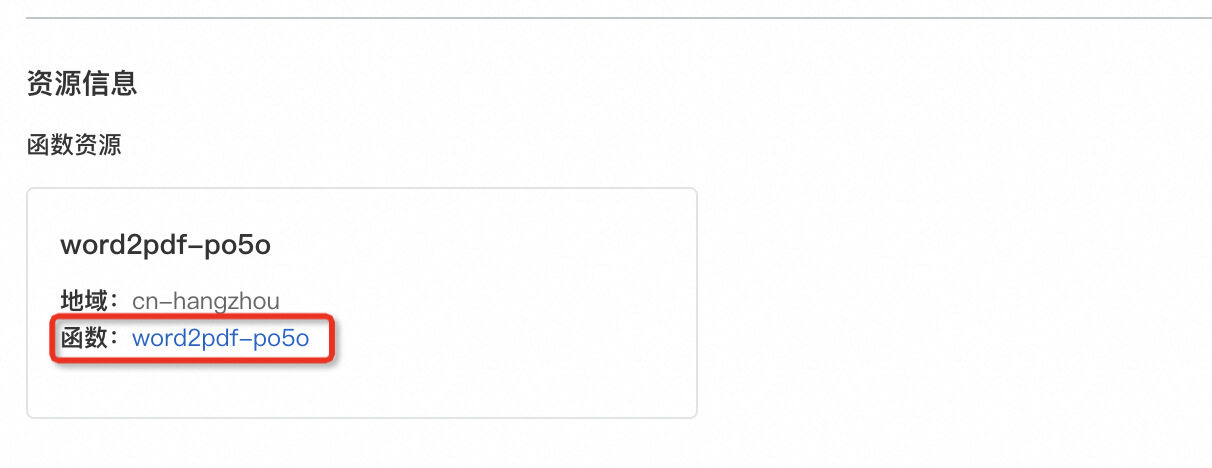
90 | 2、在代码页签,单击测试函数右侧的图标,从下拉列表中选择配置测试参数,输入如下示例测试参数,然后单击确定。
91 |
92 | ```
93 | {
94 | "word_file": "example.docx",
95 | "mark_text": "AliyunFC",
96 | "pagesize": [595.275590551181, 841.8897637795275],
97 | "font": "Helvetica",
98 | "font_size": 30,
99 | "font_color": [0, 0, 0],
100 | "rotate": 30,
101 | "opacity": 0.1,
102 | "density": [198.4251968503937, 283.46456692913387]
103 | }
104 | ```
105 |
106 | | 参数 | 是否必填 | 描述 |
107 | |----------|----------------|------------------|
108 | | word_file | 必填 | pdf文件名称 |
109 | | mark_text | 可选 | 水印文字, 如果给 PDF 加水印 |
110 | | pagesize | 可选 | 默认是 A4 大小, (21*cm, 29.7*cm), 其中 1cm=28.346456692913385 |
111 | | font | 可选 | 字体,默认为 Helvetica, 中文字体可选择为 zenhei 或 microhei |
112 | | font_size | 可选 | 字体的大小,默认为 30 |
113 | | font_color | 可选 | 字体颜色,格式为 RGB, 默认为黑色 |
114 | | rotate | 可选 | 旋转角度,默认为 0 |
115 | | opacity | 可选 | 透明度,默认为 0.1, 1 表示不透明 |
116 | | density | 可选 | 水印密度,水印文字间隔,默认是 [141.73228346456693, 141.73228346456693],即(7*cm, 10*cm), 表示每个水印文字在横坐标和纵坐标的间隔分别是 7cm 和 10 |
117 |
118 | 3、单击测试函数,函数执行成功后,查看返回结果。
119 |
120 | ```bash
121 | upload to oss success!
122 | ```
123 |
124 | 如果您需要使用 SDK 调用这个函数, 可以参考 [OpenAPI](https://next.api.aliyun.com/api/FC)
125 |
126 | 也可以通过`s invoke`命令进行触发/测试:
127 |
128 | ```bash
129 | # 调用
130 | $ s invoke -e '{"word_file":"example.docx"}'
131 | ```
132 |
133 | 函数调用成功后,生成的 pdf 文件在和 docx 相同的 OSS 目录中,比如这个例子是在 example.pdf。
134 |
135 | 如果您想 word 转 pdf 同时再加上水印, 需要增加如下相关的参数:
136 |
137 |
138 |
139 | 比如:
140 | ```bash
141 | $ s invoke -e '{"word_file":"example.docx", "mark_text": "AliyunFC", "rotate":30}'
142 |
143 | # 如果是中文水印, font 为 zenhei 或者 microhei
144 | $ s invoke -e '{"word_file":"example.docx", "mark_text": "函数计算", "rotate":30, "font": "zenhei"}'
145 | ```
146 |
147 | 生成带有水印的 example.pdf 示例:
148 |
149 | 
150 |
151 |
152 | #### layer
153 |
154 | 引入的 public layer 包含了 libreoffice 以及如下 python 第三方依赖
155 |
156 | ```
157 | oss2==2.16.0
158 | flask==2.2.2
159 | Pillow==9.4.0
160 | PyPDF2==3.0.1
161 | reportlab==3.6.12
162 | cryptography==3.4.8
163 | urllib3==1.26.2
164 | ```
165 |
166 | ### 二次开发
167 |
168 | 您可以通过云端控制台的开发功能进行二次开发。如果您之前是在本地创建的项目案例,也可以在本地项目目录`start-word2pdf-v3`文件夹下,对项目进行二次开发。开发完成后,可以通过`s deploy`进行快速部署。
169 |
170 |
171 |
172 | ## 注意事项
173 |
174 |
175 |
176 |
177 |
178 |
179 |
180 |
181 | ## 开发者社区
182 |
183 | 您如果有关于错误的反馈或者未来的期待,您可以在 [Serverless Devs repo Issues](https://github.com/serverless-devs/serverless-devs/issues) 中进行反馈和交流。如果您想要加入我们的讨论组或者了解 FC 组件的最新动态,您可以通过以下渠道进行:
184 |
185 |
186 |
187 | |  |
|  |
188 | | --------------------------------------------------------------------------------------------------------------------------------- | --------------------------------------------------------------------------------------------------------------------------------- |
189 | |
|
188 | | --------------------------------------------------------------------------------------------------------------------------------- | --------------------------------------------------------------------------------------------------------------------------------- |
189 | |
微信公众号:`serverless` | 钉钉交流群:`33947367` |
190 |
191 |
192 |
--------------------------------------------------------------------------------
/src/code/app.py:
--------------------------------------------------------------------------------
https://raw.githubusercontent.com/devsapp/start-word2pdf/HEAD/src/code/app.py
--------------------------------------------------------------------------------
/src/readme.md:
--------------------------------------------------------------------------------
https://raw.githubusercontent.com/devsapp/start-word2pdf/HEAD/src/readme.md
--------------------------------------------------------------------------------
/src/s.yaml:
--------------------------------------------------------------------------------
https://raw.githubusercontent.com/devsapp/start-word2pdf/HEAD/src/s.yaml
--------------------------------------------------------------------------------
/version.md:
--------------------------------------------------------------------------------
1 | - 第一版
2 |
--------------------------------------------------------------------------------