` 页面搭建相关的文章,记得书名大概是《Modern CSS》 ,最终开始写一些页面的交互逻辑并且看之前的书籍中不断提及 jQuery,因此去读了《Fundamentals of jQuery》来学习 jQuery 基本知识。
40 |
41 | 就这样一步一步去深入了自己的学习路径,最终实现了一个自己很喜欢的属于自己的导航页面。
42 |
43 | **掘金小册让每一个人学习技术都“有路可循”**
44 |
45 | 基于上述这个需求,围绕同一门类的内容,小册会一步步深入为一个系列小册。而在小册依赖其他门类知识的时候,小册间的学习依赖关系又会成为一个完整的小册知识网络。
46 |
47 | 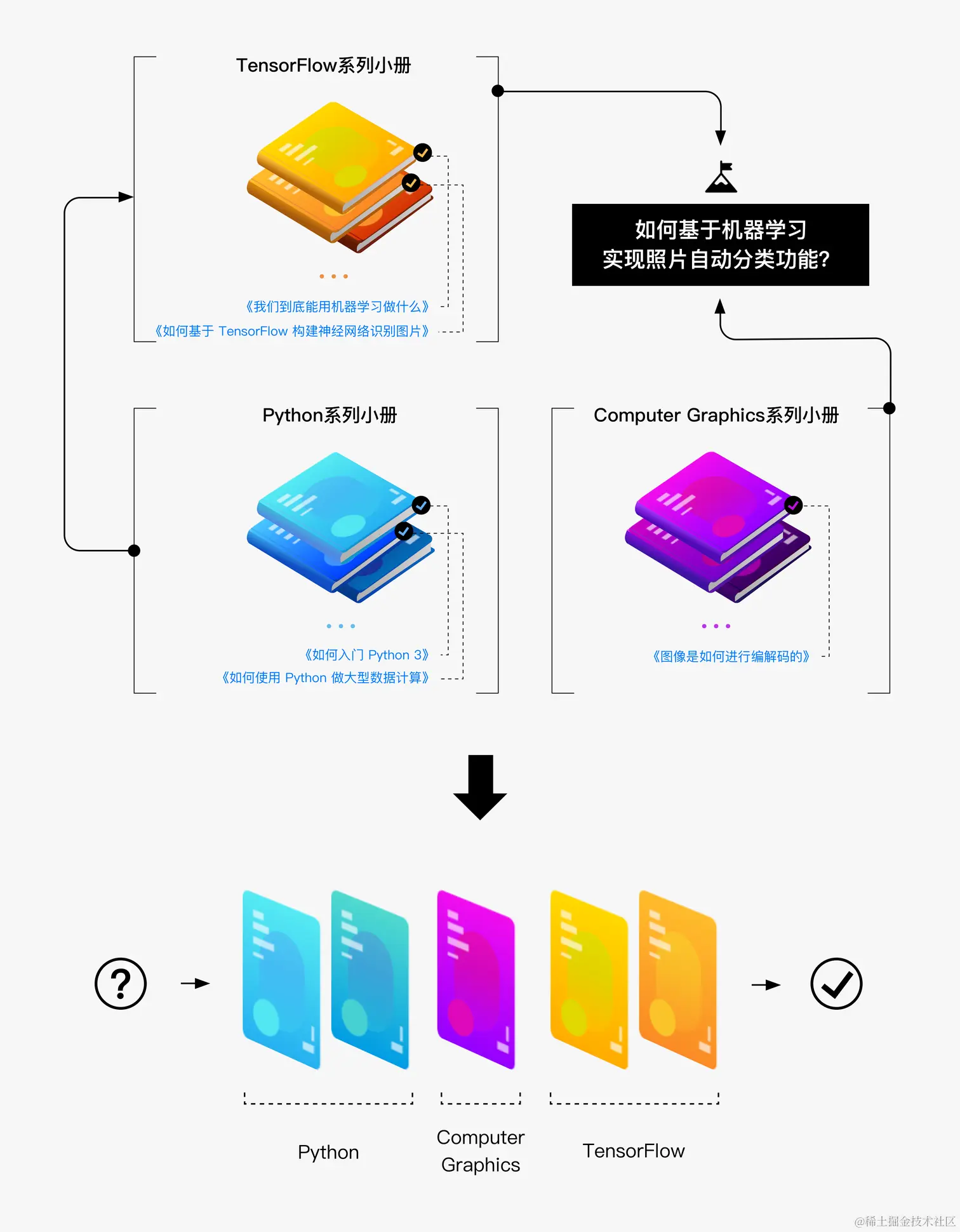
48 |
49 | 当掘金的小册内容不断完善时,系列小册的深入和内容矩阵的依赖关系帮助每一位需要学习的读者找到一条明确的学习路径,从而可以一册册地消费和学习内容。
50 |
51 | 这就是掘金小册最终的价值:用小篇幅、高浓度、成体系、有收益的小册,完成一个巨大的技术内容库,真正地满足每一位开发者的学习需求!
52 |
53 | ## 来申请成为作者吧!
54 |
55 | 如果你看完我们关于小册介绍,有任何的内容创作想法和冲动,想要成为小册作者获得收益,请填写以下个人信息及小册介绍等内容:
56 |
57 | [申请成为小册作者](https://sourl.co/zDEMwJ "https://sourl.co/zDEMwJ")
58 |
59 | 填写完后可直接联系微信:chnyifan
60 |
61 | ```!
62 | 提供完善申请信息者优先,曾经写过技术书籍、系列文章者优先。
63 | ```
64 |
65 | 其他联系方式:
66 |
67 | * 电话:17600618101
68 | * 微信:chnyifan
69 |
70 | ```!
71 | 提交完申请的作者,请不要着急,初次审核反馈会在 7-15 个工作日内完成。
72 | ```
73 |
74 | [原文地址](https://juejin.cn/book/6844723704639782920/section/6844723704757223438)
--------------------------------------------------------------------------------
/src/spider/task/spiderAll.ts:
--------------------------------------------------------------------------------
1 | import { juejinBookRegurl, juejinUrl } from '.'
2 | import { getBrowser, logger, setPageCookie } from '@/utils'
3 | import type { Booklet } from '@/types'
4 | const freeBooksIds: string[] = [
5 | '6844733795329900551',
6 | '6844723704639782920',
7 | '7127092198096502822',
8 | '7169108142868365349',
9 | ]
10 | export async function getAllBooksList(cookie: string) {
11 | const browser = await getBrowser()
12 | if (!browser) return
13 | const page = await browser.newPage()
14 | let data: Booklet[] // 存储小册数据的变量
15 | try {
16 | await page.goto(juejinUrl)
17 | await setPageCookie(page, cookie)
18 | await page.goto(juejinUrl)
19 | // 点击.avatar-wrapper
20 | await page.click('.avatar-wrapper')
21 | // 等待 a 标签的 href 属性为 /my-course 的元素出现
22 | await page.waitForSelector('a[href="/my-course"]')
23 |
24 | // 点击 a 标签的 href 属性为 /my-course 的元素
25 | await page.click('a[href="/my-course"]')
26 |
27 | await page.waitForNavigation()
28 | // 等待元素加载完成 .books-container
29 | await page.waitForSelector('.books-container')
30 | // 刷新页面
31 | await page.reload()
32 |
33 | // 创建一个Promise
34 | const dataPromise = new Promise
((resolve) => {
35 | // 获取所有的书籍
36 | page.on('response', async (response) => {
37 | const url = response.url()
38 | if (url.includes(juejinBookRegurl)) {
39 | const content = await response.json()
40 | const { data: books = [] } = content
41 | if (books.length) {
42 | logger.info(`共有${books.length}本小册`)
43 | const buyBooks = books.filter((item: { is_buy: boolean }) => item.is_buy)
44 | const freeBooks = books.filter((item: { booklet_id: string }) =>
45 | freeBooksIds.includes(item.booklet_id),
46 | )
47 | logger.info(`共有${freeBooks.length}本免费小册`)
48 | logger.info(`共有${buyBooks.length}本已购小册`)
49 | data = buyBooks?.length ? buyBooks : freeBooks
50 | } else {
51 | logger.warn('获取小册数量为0,可能是 cookie 失效了,或者是没有购买小册')
52 | }
53 | resolve(data) // 解析Promise并返回数据
54 | }
55 | })
56 | })
57 |
58 | // 等待Promise解析并返回数据
59 | data = await dataPromise
60 | } finally {
61 | // await browser.close() // 关闭浏览器
62 | return data
63 | }
64 | }
65 |
--------------------------------------------------------------------------------
/docs/如何写一本掘金小册/2-如何使用掘金发布小册.md:
--------------------------------------------------------------------------------
1 | # 如何使用掘金发布小册
2 |
3 | ### 掘金小册产品功能
4 |
5 | 目前,掘金为掘力值达到到 `Lv7` 的用户默认开通写作权限,同时也为掘力值还没达到相关要求的掘友提供了相应的申请渠道,待编辑确认后会开通写作权限,因而只有开通了相关权限,才算进入正式的写作阶段。掘金小册的申请[问卷地址](https://wenjuan.feishu.cn/m?t=sOxzuZJRgRzi-maf3 "https://wenjuan.feishu.cn/m?t=sOxzuZJRgRzi-maf3")。掘金小册的写作入口:
6 |
7 | 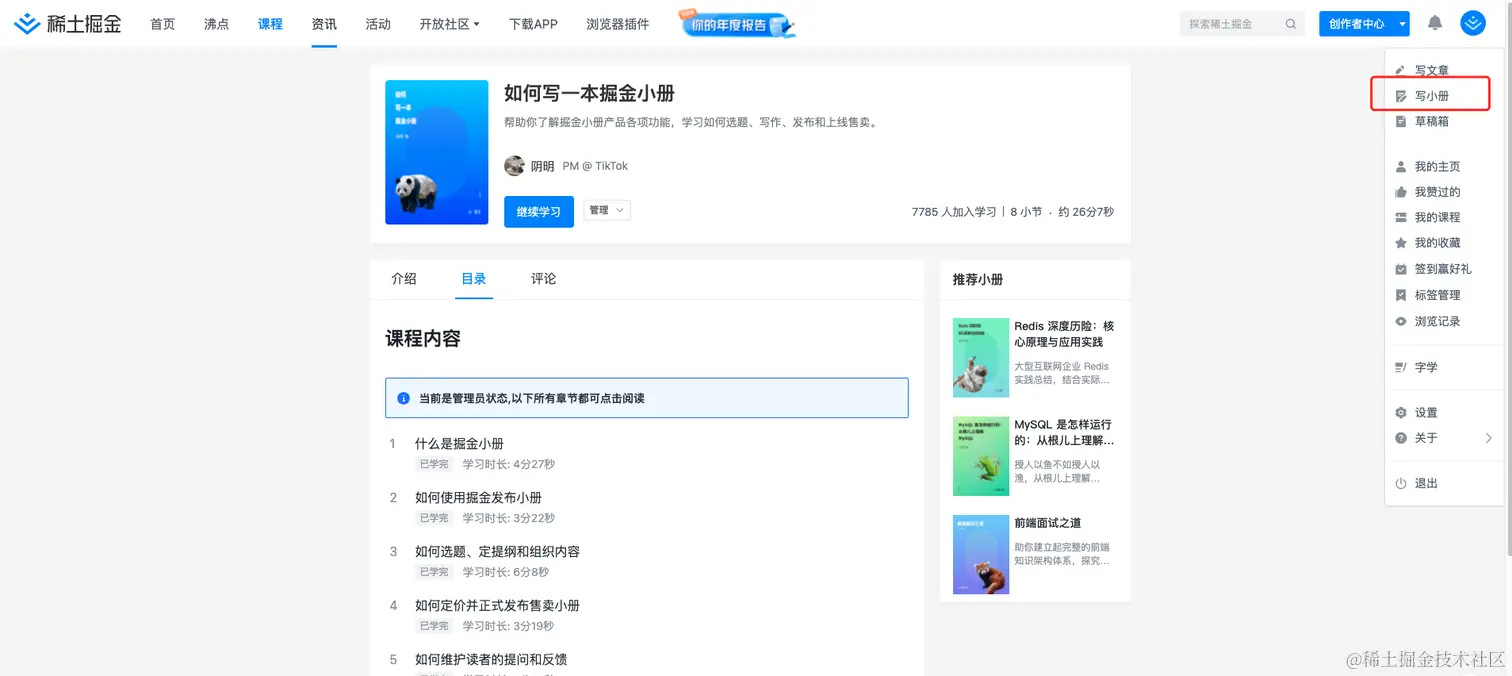
8 |
9 | 每一本小册有这样几个重要的元素:
10 |
11 | 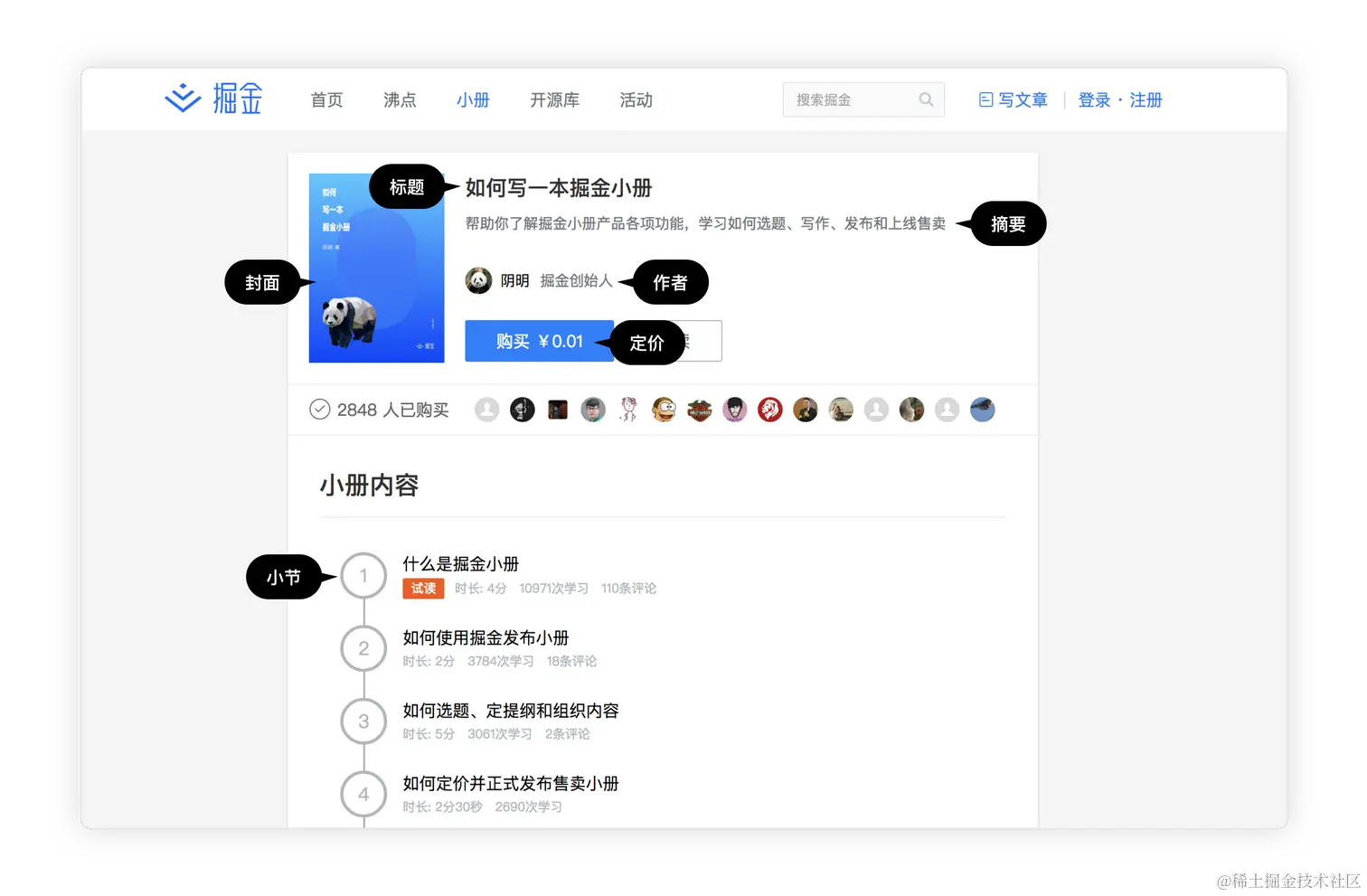
12 |
13 | * 标题:小册的标题
14 | * 摘要:一句简洁的小册介绍
15 | * 作者:小册的作者,通过掘金账户登录
16 | * 定价:每一本小册的售价
17 | * 封面:小册的封面设计图
18 | * 小节:每本小册的内容会被分到一个个小节当中
19 | * 小册介绍:一段小册的介绍文字,帮助读者了解小册解答的问题、适宜阅读人群等信息
20 |
21 | 然后,作者就可以进入写作界面。写作界面分为
22 |
23 | 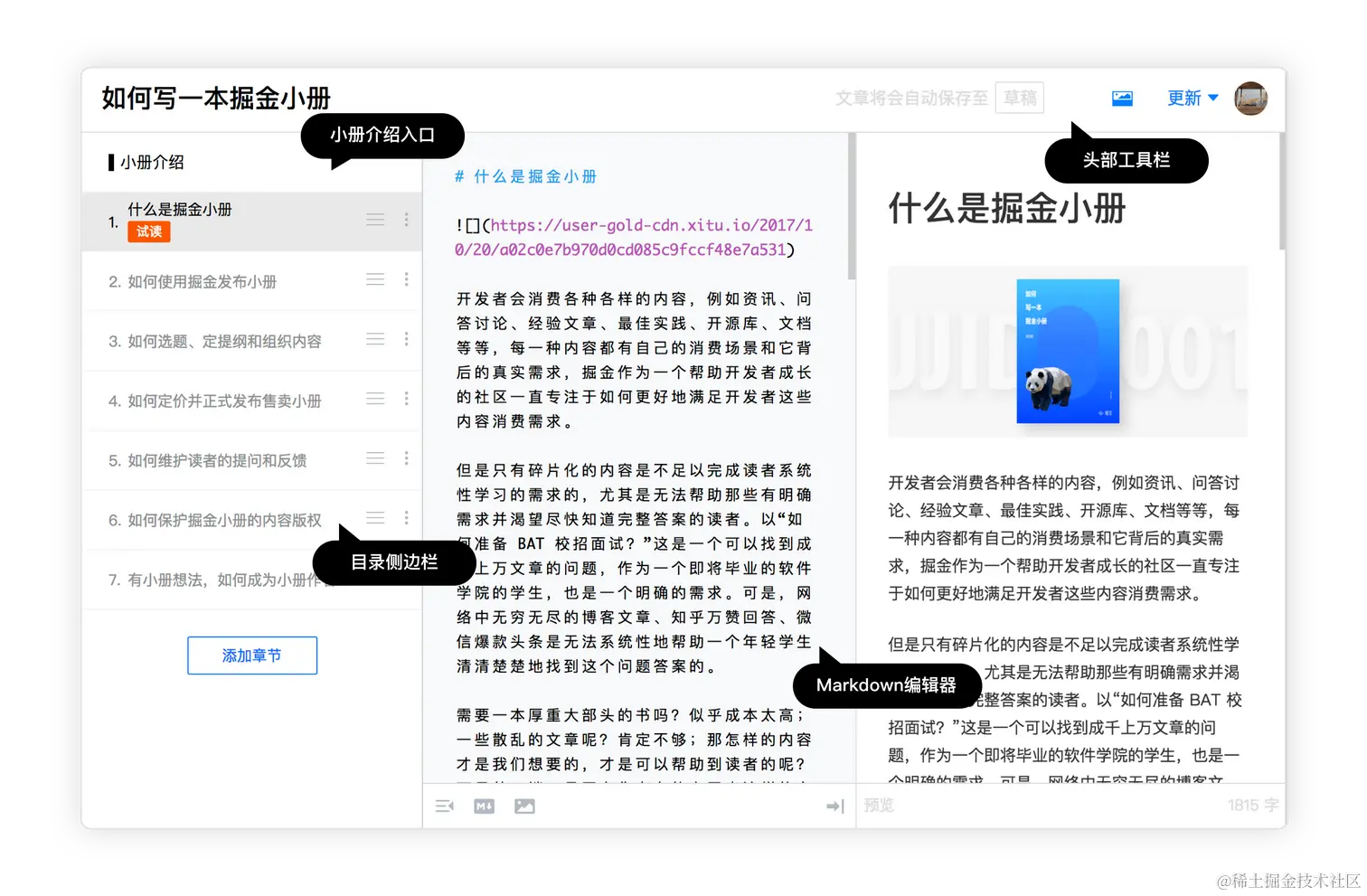
24 |
25 | * 头部工具栏:编辑小册的基础信息及提交发布入口
26 | * 目录侧边栏:排序、编辑每一个小节的标题
27 | * Markdown 编辑器:中间是类似于掘金专栏的小册小节的编辑器功能,请使用标准 Markdown 语法写作
28 | * 小册介绍入口:专门编辑小册简介内容,请使用标准 Markdown 语法写作
29 |
30 | 作者在使用掘金产品的写作界面过程中,内容会随时自动保存,图片可以通过拖拽、复制等方法轻松上传。而在作者精心写作完成后,作者需要完成小册的摘要还有介绍位子,最终通过头部工具栏确定价格、基础信息后提交发布入口,等待掘金后台的审核。
31 |
32 | ### 掘金小册发布流程
33 |
34 | 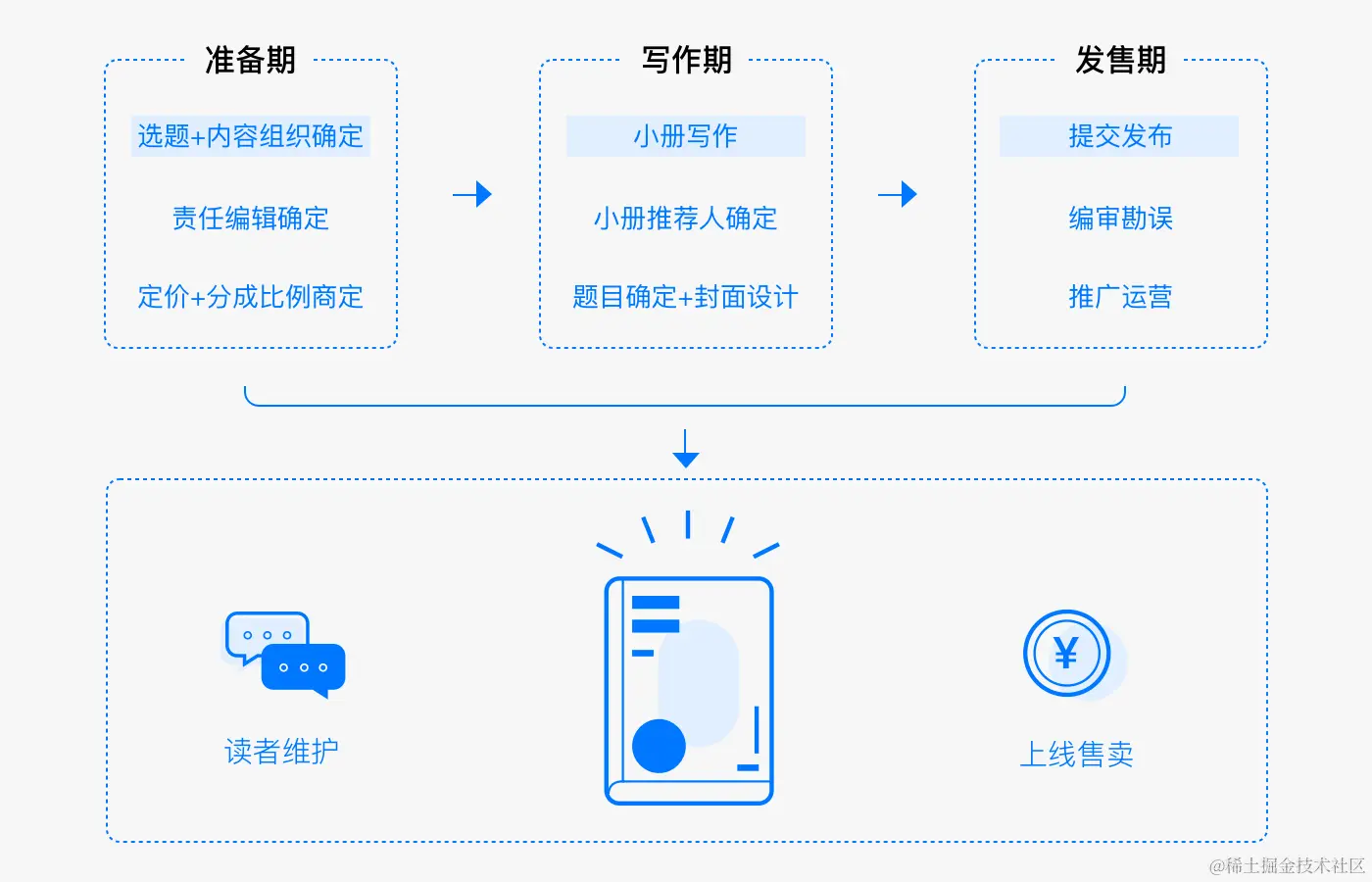
35 |
36 | 小册的写作的整体流程:
37 |
38 | 1. 小册申请:作者可以通过[提交申请](https://sourl.co/zDEMwJ "https://sourl.co/zDEMwJ")申请小册。请务必填写尽可能完整的信息。
39 | 2. 小册大纲:在您的提交申请通过编辑审核后,编辑会与您联系沟通,给予相应反馈意见。
40 | 3. 样章审核:大纲审核通过后,作者会被要求提供 3 篇样章,编辑会对您的写作内容进行审核与评估,给予真实反馈。
41 | 4. 写作开启:大纲和样章通过审核后,编辑会为您开通小册写作权限,进入正式的写作阶段。同时,编辑也会与您确定更新的频次,一个预设的截止日期,以及一个暂定的上线时间。
42 | 5. 写作至发布:作者开始小册的完整写作流程,编辑会定期给予反馈。同时,我们会邀请专家协作编审,小册完成超过 50% 时,可以发起预售,但要保证后续小册的定期更新(每周 2 篇)。
43 | 6. 上架准备:作者与编辑确认最终上架时间,掘金开始做封面设计及上架准备工作。
44 | 7. 正式发售:小册正式上线销售,作者按照约定每周更新文章。上架小册就会出现在 [juejin.cn/course](https://juejin.cn/course "https://juejin.cn/course") 页面,并可被读者访问。这之后,我们就进入小册最终的维护推广阶段了。
45 |
46 | ```!
47 | 特别提醒作者:在 1. 2. 3. 三个环节中,如果您的内容未达到编辑审核的要求,则会反馈无法上架。
48 | ```
49 |
50 | 我们在思考小册的创作流程中有一个重要的依据:
51 |
52 | > 让作者专注于内容创作
53 |
54 | 因而,在整个创作周期里,作者都是以内容创作为主要工作责任,而责任编辑会敦促其他配合工作的完成。上线后,作者专注于推广宣传还有维护读者的提问反馈,最终通过好的运营实现更好的销售结果。
55 |
56 | ### [申请成为小册作者](https://sourl.co/zDEMwJ "https://sourl.co/zDEMwJ")
57 |
58 | [原文地址](https://juejin.cn/book/6844723704639782920/section/6844723704753029133)
--------------------------------------------------------------------------------
/docs/稀土开发者大会2022/24-刘涛:车载语音对话新体验.md:
--------------------------------------------------------------------------------
1 | # 刘涛:车载语音对话新体验
2 |
3 | 
4 |
5 | 
6 |
7 | 
8 |
9 | 
10 |
11 | 
12 |
13 | 
14 |
15 | 
16 |
17 | 
18 |
19 | 
20 |
21 | 
22 |
23 | 
24 |
25 | 
26 |
27 | 
28 |
29 | 
30 |
31 | 
32 |
33 | 
34 |
35 | [原文地址](https://juejin.cn/book/7127092198096502822/section/7127550360771624964)
--------------------------------------------------------------------------------
/docs/源码共读第一期|掘金会员专属活动/index.md:
--------------------------------------------------------------------------------
1 | 源码共读第一期|掘金会员专属活动
2 |
3 | 原文地址
4 |
5 | - 1 后端|Netty 学习 第一周
6 |
7 | - 2 后端|Netty 学习 第二周
8 |
9 | - 3 后端|Netty 学习 第三周
10 |
11 | - 4 后端|Netty 学习 第四周
12 |
13 | - 5 前端|omit.js 剔除对象中的属性
14 |
15 | - 6 前端|arrify 转数组
16 |
17 | - 7 前端|vue2工具函数
18 |
19 | - 8 前端|为什么 Vue2 this 能够直接获取到 data 和 methods
20 |
21 | - 9 前端|yocto-queue 队列 链表
22 |
23 | - 10 前端|axios 工具函数
24 |
25 | - 11 前端|vue3 工具函数
26 |
27 | - 12 前端|await-to-js 如何优雅的捕获 await 的错误
28 |
29 | - 13 前端|promisify
30 |
31 | - 14 前端|mitt、tiny-emitter 发布订阅
32 |
33 | - 15 前端|跟着underscore学防抖
34 |
35 | - 16 前端|p-limit 限制并发数
36 |
37 | - 17 前端| koa-compose
38 |
39 | - 18 前端|如何发布一个 npm 库,自动化管理版本号、生成 changelog、tag 等
40 |
41 | - 19 前端| 跟着 vant-weapp 学习开发小程序组件
42 |
43 | - 20 前端|揭秘 create-vite 原理
44 |
45 | - 21 前端|vue 3.2 是怎么发布的 vue-release
46 |
47 | - 22 前端|element 初始化组件功能
48 |
49 | - 23 前端|create-vue Vue 团队公开的全新脚手架工具
50 |
51 | - 24 前端|tdesign-vue 初始化组件
52 |
53 | - 25 前端|为 vite 项目自动添加 eslint 和 prettier
54 |
55 | - 26 前端|classnames
56 |
57 | - 27 前端| js-cookie
58 |
59 | - 28 前端|一行代码统一规范 包管理器
60 |
61 | - 29 前端|项目中常用的 .env 文件原理是什么?如何实现?
62 |
63 | - 30 前端|Vue团队核心成员开发的39行小工具 install-pkg 安装包
64 |
65 | - 31 前端|open 打开浏览器
66 |
67 | - 32 前端|vue-devtools 组件可以打开编辑器
68 |
69 | - 33 前端|delay 带取消功能的延迟函数
70 |
71 |
--------------------------------------------------------------------------------
/docs/源码共读第一期|掘金会员专属活动/32-前端|vue-devtools 组件可以打开编辑器.md:
--------------------------------------------------------------------------------
1 | # 前端|vue-devtools 组件可以打开编辑器
2 |
3 | ### 本章任务提供
4 |
5 | [若川](https://juejin.cn/user/1415826704971918 "https://juejin.cn/user/1415826704971918")
6 |
7 | ## 学习文章
8 |
9 | * 学习文章,其实跟vue和react相关性不大,而是nodejs小项目,不会nodejs也能基本看懂。
10 | * 据说 99% 的人不知道 vue-devtools 还能直接打开对应组件文件?本文原理揭秘
11 |
12 | * 博客地址:[lxchuan12.gitee.io/open-in-edi…](https://link.juejin.cn?target=http%3A%2F%2Flxchuan12.gitee.io%2Fopen-in-editor "https://link.juejin.cn?target=http%3A%2F%2Flxchuan12.gitee.io%2Fopen-in-editor")
13 | * 掘金地址:[juejin.cn/post/695934…](https://juejin.cn/post/6959348263547830280 "https://juejin.cn/post/6959348263547830280")
14 |
15 | **共读目的**
16 |
17 | * 帮助学会调试源码
18 | * 锻炼耐心
19 | * 学会查阅资料
20 | * 学以致用 打开组件文件
21 |
22 | **学习流程**
23 |
24 | * 安装 vue-devtools 对应 vue3 的版本。无法访问谷歌应用市场的小伙伴,可以下方链接去下载安装。
25 | * [或者点此下载安装 vue3版本的vue-devtools](https://link.juejin.cn?target=https%3A%2F%2Fchrome.zzzmh.cn%2Finfo%3Ftoken%3Dljjemllljcmogpfapbkkighbhhppjdbg "https://link.juejin.cn?target=https%3A%2F%2Fchrome.zzzmh.cn%2Finfo%3Ftoken%3Dljjemllljcmogpfapbkkighbhhppjdbg")
26 | * [点此下载安装 vue2 版本的 vue-devtools](https://link.juejin.cn?target=https%3A%2F%2Fchrome.zzzmh.cn%2Finfo%3Ftoken%3Dnhdogjmejiglipccpnnnanhbledajbpd "https://link.juejin.cn?target=https%3A%2F%2Fchrome.zzzmh.cn%2Finfo%3Ftoken%3Dnhdogjmejiglipccpnnnanhbledajbpd")
27 | * 克隆项目,按照文章中流程,先跑起来
28 | * [本文仓库地址](https://link.juejin.cn/?target=https%3A%2F%2Fgithub.com%2Flxchuan12%2Fopen-in-editor.git "https://link.juejin.cn/?target=https%3A%2F%2Fgithub.com%2Flxchuan12%2Fopen-in-editor.git"):git clone [github.com/lxchuan12/o…](https://link.juejin.cn?target=https%3A%2F%2Fgithub.com%2Flxchuan12%2Fopen-in-editor.git%25EF%25BC%258C%25E6%259C%25AC%25E6%2596%2587%25E6%259C%2580%25E4%25BD%25B3%25E9%2598%2585%25E8%25AF%25BB%25E6%2596%25B9%25E5%25BC%258F%25EF%25BC%258C%25E5%2585%258B%25E9%259A%2586%25E4%25BB%2593%25E5%25BA%2593%25E8%2587%25AA%25E5%25B7%25B1%25E5%258A%25A8%25E6%2589%258B%25E8%25B0%2583%25E8%25AF%2595%25EF%25BC%258C%25E5%25AE%25B9%25E6%2598%2593%25E5%2590%25B8%25E6%2594%25B6%25E6%25B6%2588%25E5%258C%2596%25E3%2580%2582 "https://link.juejin.cn?target=https%3A%2F%2Fgithub.com%2Flxchuan12%2Fopen-in-editor.git%25EF%25BC%258C%25E6%259C%25AC%25E6%2596%2587%25E6%259C%2580%25E4%25BD%25B3%25E9%2598%2585%25E8%25AF%25BB%25E6%2596%25B9%25E5%25BC%258F%25EF%25BC%258C%25E5%2585%258B%25E9%259A%2586%25E4%25BB%2593%25E5%25BA%2593%25E8%2587%25AA%25E5%25B7%25B1%25E5%258A%25A8%25E6%2589%258B%25E8%25B0%2583%25E8%25AF%2595%25EF%25BC%258C%25E5%25AE%25B9%25E6%2598%2593%25E5%2590%25B8%25E6%2594%25B6%25E6%25B6%2588%25E5%258C%2596%25E3%2580%2582")
29 | * 调试全流程
30 | * 记录笔记
31 |
32 | [原文地址](https://juejin.cn/book/7169108142868365349/section/7178739231848661003)
--------------------------------------------------------------------------------
/docs/稀土开发者大会2022/6-陈满砚:一次 300 人参与、周期一年的单盲实验.md:
--------------------------------------------------------------------------------
1 | # 陈满砚:一次 300 人参与、周期一年的单盲实验
2 |
3 | 
4 |
5 | 
6 |
7 | 
8 |
9 | 
10 |
11 | 
12 |
13 | 
14 |
15 | 
16 |
17 | 
18 |
19 | 
20 |
21 | 
22 |
23 | 
24 |
25 | 
26 |
27 | 
28 |
29 | 
30 |
31 | 
32 |
33 | 
34 |
35 | 
36 |
37 | [原文地址](https://juejin.cn/book/7127092198096502822/section/7127188613791481868)
--------------------------------------------------------------------------------
/docs/稀土开发者大会2022/5-王保平(玉伯):技术人如何做产品.md:
--------------------------------------------------------------------------------
1 | # 王保平(玉伯):技术人如何做产品
2 |
3 | 
4 |
5 | 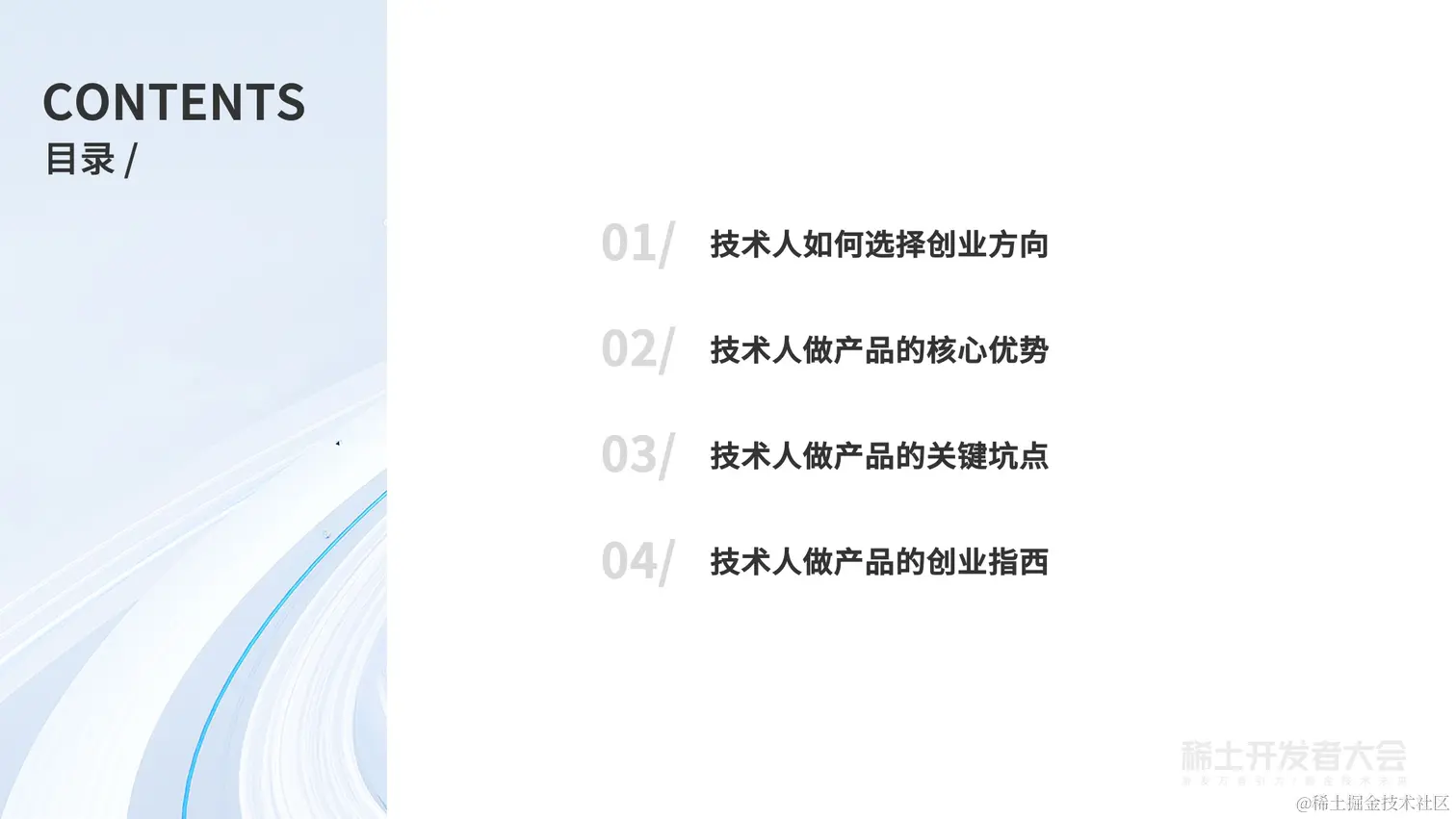
6 |
7 | 
8 |
9 | 
10 |
11 | 
12 |
13 | 
14 |
15 | 
16 |
17 | 
18 |
19 | 
20 |
21 | 
22 |
23 | 
24 |
25 | 
26 |
27 | 
28 |
29 | 
30 |
31 | 
32 |
33 | 
34 |
35 | 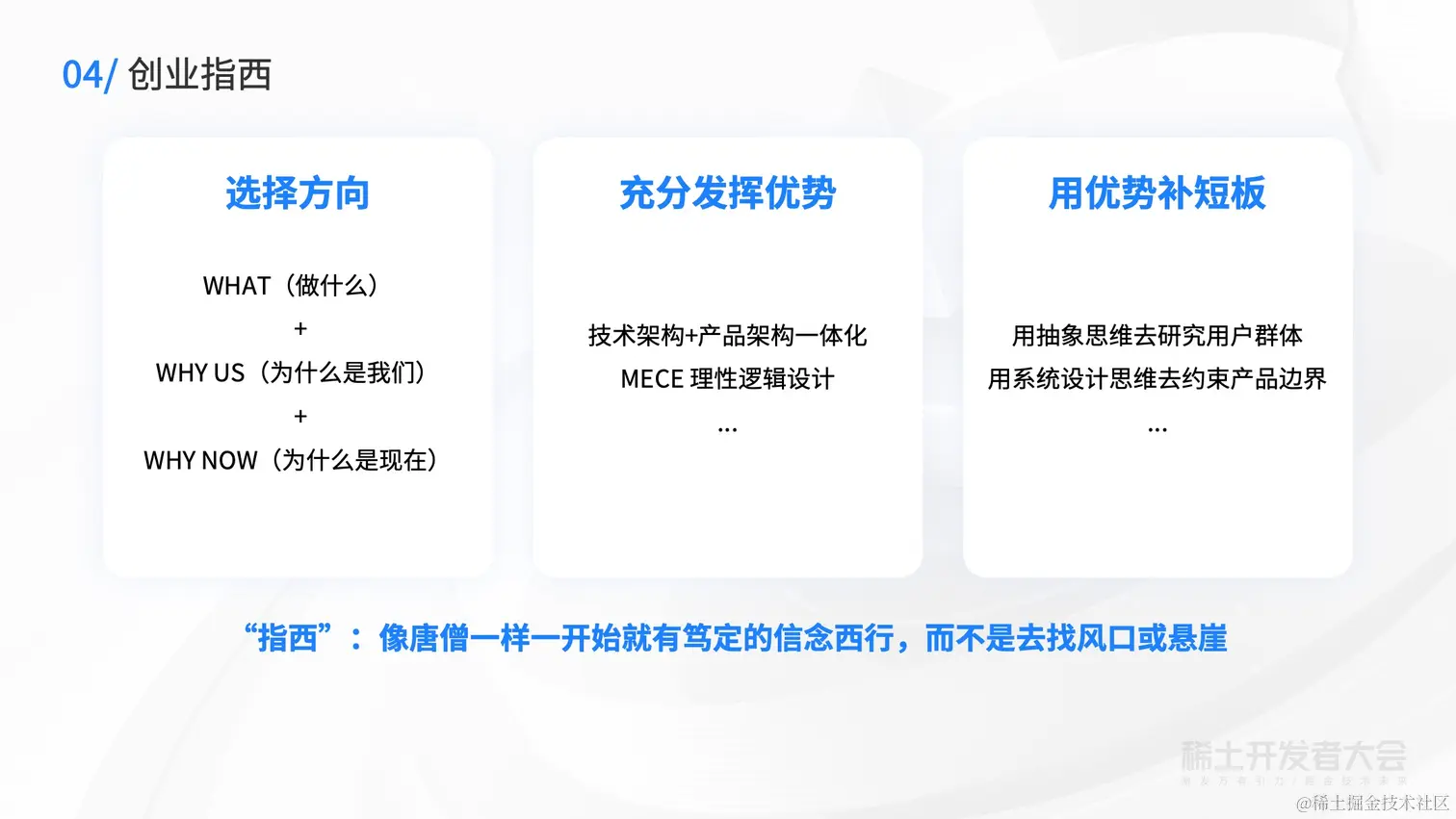
36 |
37 | 
38 |
39 | [原文地址](https://juejin.cn/book/7127092198096502822/section/7127208709352063015)
--------------------------------------------------------------------------------
/docs/如何使用掘金社区/4-了解掘金:🏆 掘力值、创作者等级与权限(新).md:
--------------------------------------------------------------------------------
1 | # 了解掘金:🏆 掘力值、创作者等级与权限(新)
2 |
3 | ## 什么是掘力值?
4 |
5 | 在社区,我们会使用掘力值来计算一个掘友创作贡献,累计贡献值的目的是为了更好地回馈优质的创作者,同时也借由他们生产的优质内容帮助到更多的掘友们。掘力值也叫 Juejin Power 或者可以简写为 JP,您可以在您的个人主页和创作中心页面上看到自己的掘力值。当前仅文章会被计入掘力值。
6 |
7 | 我们鼓励大家坚守创作初心,把创作当作一种习惯,创作对掘友有帮助的文章、创作真正优质的文章,基于此,掘力值将由以下四个维度构成:
8 |
9 | 1. **创作行为:**
10 |
11 | 创作行为掘力值是衡量创作者在掘金创作活跃度方面的得分,创作掘力值是为了激励用户在掘金平台持续创作,只要发布行为符合官方规定,便会被计入创作行为分。
12 |
13 | 2. **创作影响力:**
14 |
15 | 创作影响力掘力值是衡量创作内容发布后获得掘友反馈的得分,是系统根据发布内容所获得的点赞、评论、收藏、阅读等进行综合计算的得分。
16 |
17 | 3. **创作质量:**
18 |
19 | 创作质量掘力值是衡量创作者内容质量的得分,是系统根据内容的质量表现进行的综合计算的得分,我们鼓励创作者创作真正优质的内容。
20 |
21 | 4. **创作违规扣减:**
22 |
23 | 创作违规扣减掘力值是为了更好的规范创作行为,在作者被认定严重创作违规后,会额外进行惩罚性掘力值扣除。
24 |
25 | ## **掘力值有什么价值?**
26 |
27 | 1. 掘力值会影响到你发的文章的排序,掘力值高且活跃的用户所生产的内容会被推荐给更多的用户。
28 |
29 | 2. 掘力值会影响你是否被推荐,越来越多的掘友通过关注来消费内容,因而被推荐并获得关注可以有效地提高你的影响力。
30 |
31 | 3. 掘力值会有不同的权限,随着掘力值的不断提高,越来越多的功能和权限会被解锁,让你在掘金里畅行无阻。
32 |
33 | ## **掘力值如何计算?**
34 |
35 | ```
36 | JP(掘力值)=创作行为 掘力值+创作影响力 掘力值+创作质量分 掘力值-创作违规扣减掘力值
37 | ```
38 |
39 | *PS:2022年7月28日进行新掘力值的初始化计算,在掘力值明细里可以看到自己的历史掘力值计算详情,后续将会每天更新掘力值变化。*
40 |
41 | 具体如下:
42 |
43 | 1. ## 创作行为掘力值:
44 |
45 | * 每发1篇文章,+10掘力值,每日最多2篇会计入掘力值。
46 | 2. ## 创作影响力掘力值:
47 |
48 | * 每篇文章每获得1个赞,+1掘力值;
49 | * 每篇文章每获得100个阅读,+1掘力值;
50 | * 每篇文章每获得1个收藏,+1掘力值;
51 | * 每篇文章每获得1个人的评论(一级评论),+1个掘力值。
52 |
53 | 3. 创作质量掘力值:
54 |
55 | * 创作质量掘力值是衡量创作者内容质量的得分,是系统根据内容的质量表现进行的综合计算的得分,被系统认定高质量的文章+15掘力值。
56 |
57 | 4. 创作违规扣减掘力值:
58 |
59 | * 作者通过综合认定为涉嫌刷量等违规行为,需要额外扣减作者的掘力值N(N=运营在后台根据违规程度判定的分数)。
60 | * 违规扣减标准详见:[掘金社区行为规范&处罚措施-社区内容发布规范介绍章节](https://juejin.cn/book/6844733795329900551/section/6844733795380232200 "https://juejin.cn/book/6844733795329900551/section/6844733795380232200")
61 |
62 | **抄袭:**
63 |
64 | ```diff
65 | - 首次抄袭发现扣除抄袭文章所获得的所有掘力值
66 | - 连续两次抄袭扣除抄袭文章所获得的双倍掘力值
67 | - 连续三次及以上抄袭扣除抄袭文章所获得的三倍掘力值
68 | ```
69 |
70 | **刷量:**
71 |
72 | ```diff
73 | - 首次发现刷量发现扣除刷量文章所获得的所有掘力值
74 | - 连续两次发现刷量扣除刷量文章所获得的双倍掘力值
75 | - 连续三次及以上刷量全平台封禁刷量账号
76 | ```
77 |
78 | 特别注意:
79 |
80 | 1. 掘力值每日凌晨5点更新前日数据,如遇文章被删除,文章评论、点赞、收藏、推荐被删除或取消,创作违规等情形,对应日期的掘力值会被扣减。创作违规行为被撤销会恢复相关扣减分值。
81 |
82 | 2. 一经发现某一用户通过机器等手段刷点赞、阅读等数据,恶意提高自己的掘力值,掘金小编在核实后会给予额外扣除掘力值惩罚,撤销所有权限及成就。
83 |
84 | * **掘力值、创作等级和权益是如何对应的?**
85 |
86 | 掘力值是影响创作者等级的唯一因素,不同的掘力值对应着不同的等级,不同的等级享有不同的权益。
87 | 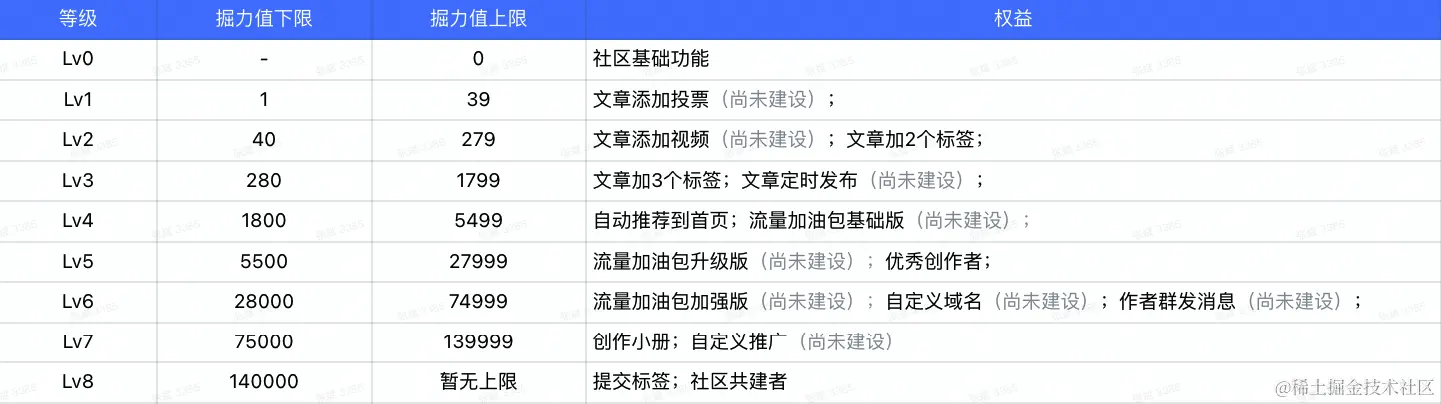
88 |
89 |
90 | **关于新等级上线后一些权限的说明:**
91 |
92 | 1.历史违规和被取消权限用户,新等级升级后依旧不会获得相应权限
93 |
94 | 2.关于近期部分用户的文章没有被推荐的说明:
95 |
96 | * 近期掘金升级了创作者权益相关的规则和机制,上线之后也受到了大家的广泛关注。但是上线后,我们也遇到了很多掘友和反馈和吐槽。笔记和更文等水文和低质量内容频繁被推上首页,更有甚者,日更占楼贴也会自动进行推荐。
97 | * 目前掘金的推荐加入二层过滤机制,对于自动推荐但是不符合推荐标准的内容进行人工干预。
98 |
99 | ### 关于旧等级、权益(成就)的处理
100 |
101 | **等级/掘力值**
102 |
103 | * 不再保留历史的等级和掘力值
104 |
105 | * 用户的等级和掘力值全按照新的计算方式
106 |
107 | **旧等级已经取得的权益(成就)**
108 |
109 | * 可以继续使用,相关权益不受等级升降影响
110 | * 等级对应权益的解锁状态,按照新等级、权益之间的关系展示。
111 |
112 | [原文地址](https://juejin.cn/book/6844733795329900551/section/6844733795371843597)
--------------------------------------------------------------------------------
/src/utils/command/index.ts:
--------------------------------------------------------------------------------
1 | import { ChildProcess, spawn } from 'node:child_process'
2 | import { logger } from '@/utils'
3 |
4 | export type QueueTask = () => Promise
5 | export let runningProcesses = 0
6 | export const processQueue: QueueTask[] = []
7 | export const maxConcurrentProcesses = 4
8 |
9 | export async function runDevCommand1(
10 | juejinBookSectionUrl: string,
11 | bookletId: string | number,
12 | title: string,
13 | ): Promise {
14 | const command = `npm run dev:all ${juejinBookSectionUrl + bookletId}`
15 | logger.info(`开始爬取小册:${title}`)
16 |
17 | // 包装 spawn 调用为一个 promise
18 | function spawnProcess(): Promise {
19 | runningProcesses++
20 | const childProcess: ChildProcess = spawn(command, [], { shell: true, stdio: 'inherit' })
21 |
22 | return new Promise((resolve, reject) => {
23 | // 监听进程退出事件
24 | childProcess.on('exit', (code) => {
25 | runningProcesses--
26 | if (code === 0) {
27 | logger.info(`小册:${title},爬取成功`)
28 | } else {
29 | logger.error(`小册:${title},爬取失败,退出码:${code}`)
30 | reject(new Error(`进程退出码为 ${code}`))
31 | }
32 | checkQueue() // 检查队列以启动下一个进程
33 | resolve()
34 | })
35 |
36 | // 监听进程启动失败事件
37 | childProcess.on('error', (err) => {
38 | runningProcesses--
39 | logger.error(`小册:${title},启动失败:${err.message}`)
40 | checkQueue() // 检查队列以启动下一个进程
41 | reject(err)
42 | })
43 | })
44 | }
45 |
46 | // 检查队列并启动新的进程(如果有空间)
47 | function checkQueue(): void {
48 | if (processQueue.length > 0 && runningProcesses < maxConcurrentProcesses) {
49 | const nextTask = processQueue.shift()
50 | if (nextTask) {
51 | nextTask()
52 | }
53 | }
54 | }
55 |
56 | // 将任务加入队列或立即执行
57 | if (runningProcesses < maxConcurrentProcesses) {
58 | await spawnProcess()
59 | } else {
60 | processQueue.push(spawnProcess)
61 | }
62 | }
63 | export async function runDevCommand(
64 | juejinBookSectionUrl: string,
65 | bookletId: string | number,
66 | title: string,
67 | ) {
68 | const command = `npm run dev:all ${juejinBookSectionUrl + bookletId}`
69 | logger.info(`开始爬取小册:${title}`)
70 |
71 | // 包装 spawn 调用为一个 promise
72 | function spawnProcess() {
73 | runningProcesses++
74 | const childProcess = spawn(command, [], { shell: true, stdio: 'inherit' })
75 |
76 | return new Promise((resolve) => {
77 | childProcess.on('exit', () => {
78 | runningProcesses--
79 | checkQueue() // 检查队列,看是否可以启动新的进程
80 | resolve()
81 | })
82 | })
83 | }
84 |
85 | // 检查队列并启动新的进程(如果有空间)
86 | function checkQueue() {
87 | if (processQueue.length > 0 && runningProcesses < 3) {
88 | const nextTask = processQueue.shift()
89 | if (nextTask) nextTask()
90 | }
91 | }
92 |
93 | // 将任务加入队列或立即执行
94 | if (runningProcesses < 3) {
95 | await spawnProcess()
96 | } else {
97 | processQueue.push(spawnProcess)
98 | }
99 | }
100 |
--------------------------------------------------------------------------------
/docs/稀土开发者大会2022/65-陆扬:视频云的机遇挑战与最佳实践方案.md:
--------------------------------------------------------------------------------
1 | # 陆扬:视频云的机遇挑战与最佳实践方案
2 |
3 | 
4 |
5 | 
6 |
7 | 
8 |
9 | 
10 |
11 | 
12 |
13 | 
14 |
15 | 
16 |
17 | 
18 |
19 | 
20 |
21 | 
22 |
23 | 
24 |
25 | 
26 |
27 | 
28 |
29 | 
30 |
31 | 
32 |
33 | 
34 |
35 | 
36 |
37 | 
38 |
39 | 
40 |
41 | 
42 |
43 | [原文地址](https://juejin.cn/book/7127092198096502822/section/7128271512758386696)
--------------------------------------------------------------------------------
/docs/稀土开发者大会2022/63-任晓蕾:云原生数据库技术趋势与英特尔最佳实践.md:
--------------------------------------------------------------------------------
1 | # 任晓蕾:云原生数据库技术趋势与英特尔最佳实践
2 |
3 | 
4 |
5 | 
6 |
7 | 
8 |
9 | 
10 |
11 | 
12 |
13 | 
14 |
15 | 
16 |
17 | 
18 |
19 | 
20 |
21 | 
22 |
23 | 
24 |
25 | 
26 |
27 | 
28 |
29 | 
30 |
31 | 
32 |
33 | 
34 |
35 | 
36 |
37 | 
38 |
39 | 
40 |
41 | 
42 |
43 | [原文地址](https://juejin.cn/book/7127092198096502822/section/7128271031709466654)
--------------------------------------------------------------------------------
/docs/如何写一本掘金小册/1-什么是掘金小册.md:
--------------------------------------------------------------------------------
1 | # 什么是掘金小册
2 |
3 | 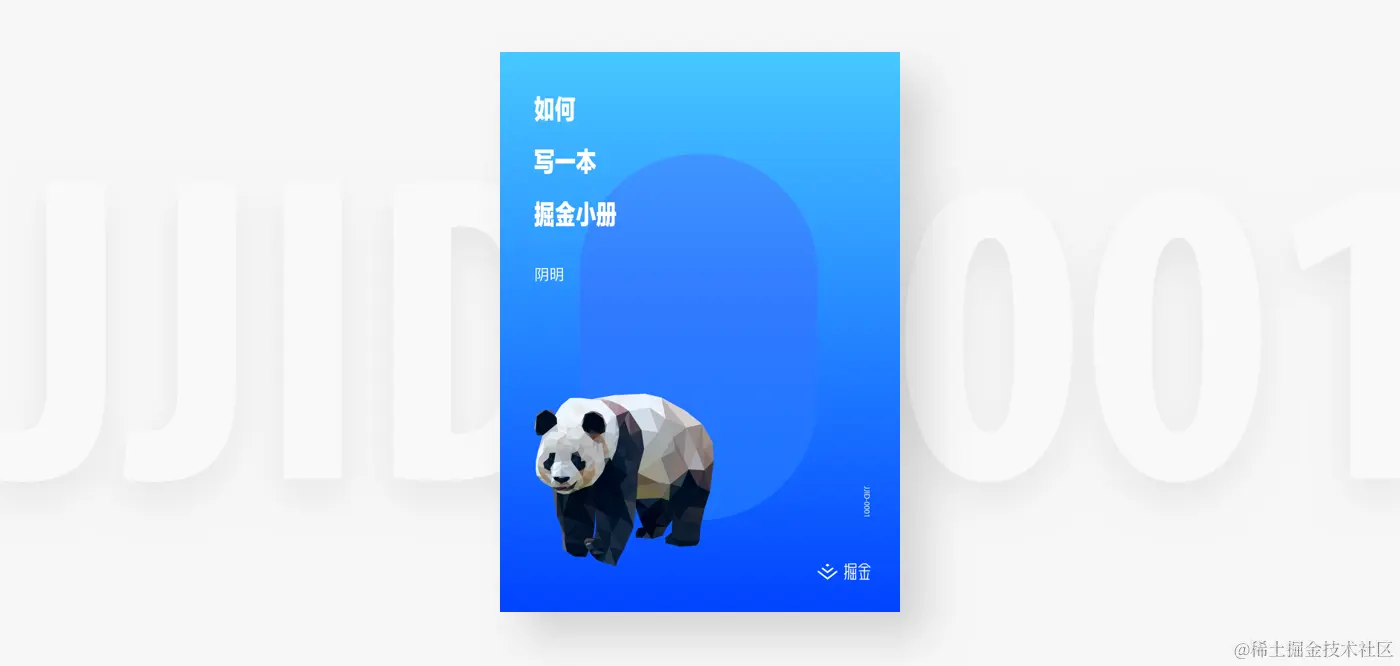
4 |
5 | 开发者会消费各种各样的内容,例如资讯、问答讨论、经验文章、最佳实践、开源库、文档等等,每一种内容都有自己的消费场景和它背后的真实需求,掘金作为一个帮助开发者成长的社区,一直专注于如何更好地满足开发者这些内容消费需求。
6 |
7 | 但是只有碎片化的内容是不足以完成读者系统性学习的需求的,尤其是无法帮助那些有明确需求并渴望尽快知道完整答案的读者。以“如何准备 BAT 校招面试”为例,这是一个可以找到成千上万文章的问题,作为一个即将毕业的软件学院的学生,也是一个明确的需求。可是,网络中无穷无尽的博客文章、知乎万赞回答、微信爆款头条是无法系统性地帮助一个年轻学生清清楚楚地找到这个问题答案的。
8 |
9 | 需要一本厚重大部头的书吗?似乎成本太高;一些散乱的文章呢?肯定不够;那怎样的内容才是我们想要的,才是可以帮助到读者的呢?而另外一端,是否有作者有能力写出这样的文章?他们是否得到了应有的财务回报呢?如果出版一本书籍是否时间成本过高?
10 |
11 | 基于这样的思考,我们想要通过一个产品去解决这个问题,而它就是:**掘金小册**
12 |
13 | ### 技术内容的载体
14 |
15 | 我们把开发者需要的内容如下排列:
16 |
17 | 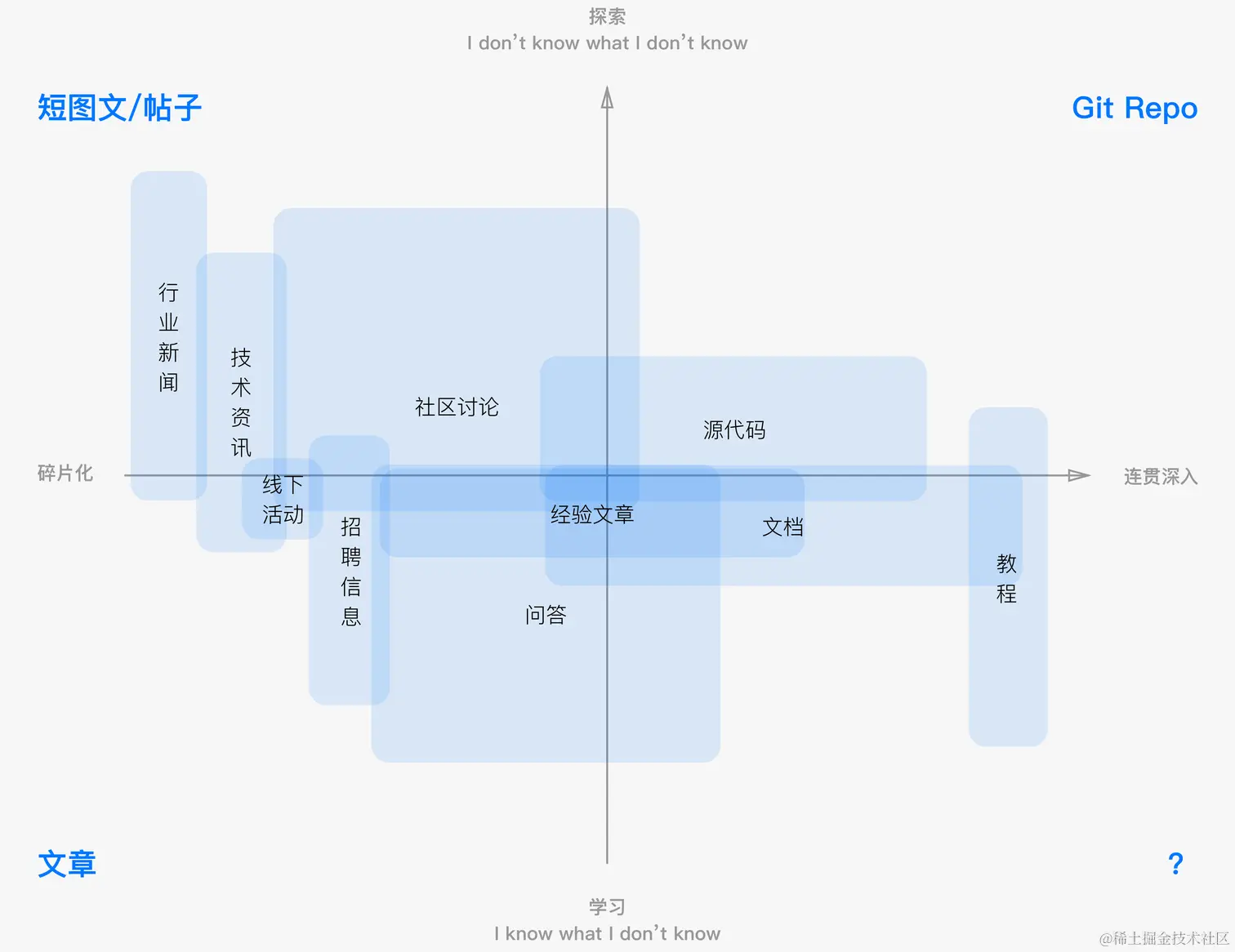
18 |
19 | 从图中可以看到,我们把这些内容根据两个坐标轴来排列:
20 |
21 | * X 轴:从碎片化内容到需要长时间连贯深入阅读的内容
22 | * Y 轴:从我明确知道自己需要获取什么信息的学习需求,到非常不明确自己需要获取什么信息的探索需求
23 |
24 | 而开发者需要的各式各样的内容也根据它们不同的使用场景和内容形式被放到了不同的内容载体中去传播。
25 |
26 | 比如,行业新闻、资讯还有社区各种闲杂的讨论,用户每天去获取这样的信息往往是上下班、工作间隙的闲暇时间看一看,不带有任何的具体的目的一定要获得什么,只是期待相应的产品可以稳定的符合预期的得到自己想要的信息。可能是新的、有趣的、有用的等等。因而,类似于微博、资讯文章这样的内容载体就很适合来承载这部分内容。
27 |
28 | 又比如,作为业务开发者,我们需要看源代码,了解一个开源库的安装、使用方法、接口参数,甚至深入去了解它的最近的更新等等,而承接这么多内容需求的就是通过一个个 Git 仓库来实现的。
29 |
30 | > 当然,所有开发者都需要连贯地、深入地并且带有明确目的性地去获取信息,而这样的内容载体会是什么呢?
31 |
32 | ### 技术内容分发模式
33 |
34 | 有了这么多不同种类的内容载体,这些内容也需要不同的内容分发模式让用户获取到这些内容。目前掘金的产品包含了我们的网站、移动应用和浏览器插件,大家可以在产品里看到自己的感兴趣的内容,刷刷网站首页、搜索一下或是去到某个关注的高手的页面、某个标签下去找内容。这一切的目的,都是希望帮助用户更方便的看到自己需要的东西。
35 |
36 | 那么,如果我们还使用之前的 X、Y 轴去分拆内容,那么不同种类的内容应该如何来分发呢:
37 |
38 | 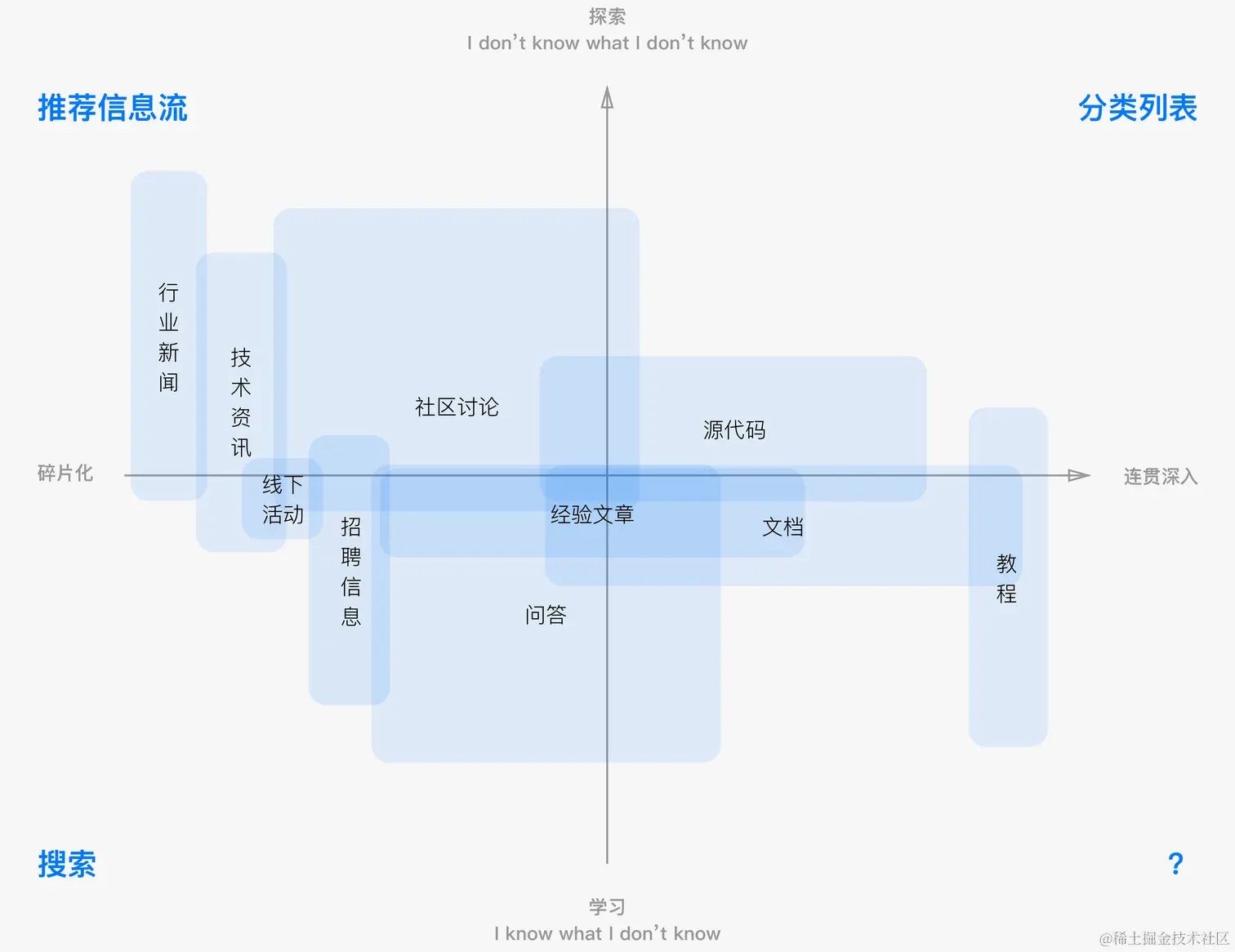
39 |
40 | 借由这些不同的内容分发模式,用户可以在不同的场景下来消费内容。例如,早晨上班想看看最新的技术资讯、行业八卦或者是自己需要了解的经验文章,刷刷首页推荐的内容;写代码的时候需要找到某一个具体的库,在某一个编程语言的库下面一点点去找;遇到了解决不了的问题,去搜索一下问题的答案等等。
41 |
42 | > 那么,当开发者持续连贯地学习某种需要深入理解的知识的时候,是怎样的分发模式在帮助读者一层一层地去持续地消费呢?
43 |
44 | ### 掘金小册
45 |
46 | 围绕着上述两个核心的问题:
47 |
48 | 1. 是什么内容载体可以去满足开发者明确的、系统性的内容需求?
49 | 2. 是什么内容分发模式可以满足开发者快速有效地获得这样的内容?
50 |
51 | 我想,掘金决定去做的小册就是为了解决上面的问题:
52 |
53 | 1. 每一本小册是一个解决具体问题的成体系的内容,确保读者的问题可以在小册内容下得到完整的解答。
54 | 2. 小册之间应该有明确的体系关系,让读者根据自己的需求可以一个一个连续阅读消费,而这样的一个完整的学习路径可以成为读者选择下一个去消费的内容的主要依据。
55 |
56 | 举个例子:当我想要明确地学习如何用 Python 做一个爬虫系统的时候,掘金小册里可以找到它,但是这个内容可能需要你去了解 Python 的基本语法、也可能需要你去了解一些前端的基本知识,这一个个的具体的内容需求形成一个内容的网络,当这些小册交织成一个完善的内容网络,也就成为了一个需要深度学习内容的分发模式。
57 |
58 | 在这个核心功能需求之上,我们同样希望解放作者的劳动力,让作者专注于内容,提高生产内容的效率。只要能完整地解答小册核心的内容需求,作者不再需要长篇累牍地完成数百页的写作,因为里面大多数的内容可以在掘金的其他内容库中找到。而线上售卖的效率、作者更高的收入比例、读者作者间的社群关系,可以更好地帮助作者完善内容,获得应得收入。
59 |
60 | 
61 |
62 | 一本掘金小册,应该是**小篇幅**、**高浓度**、**成体系**、**有收益**的内容。既满足读者的学习需求、也满足作者的创作和收益需求,而个中效率的提升就依赖着掘金小册产品模式的优化。
63 |
64 | 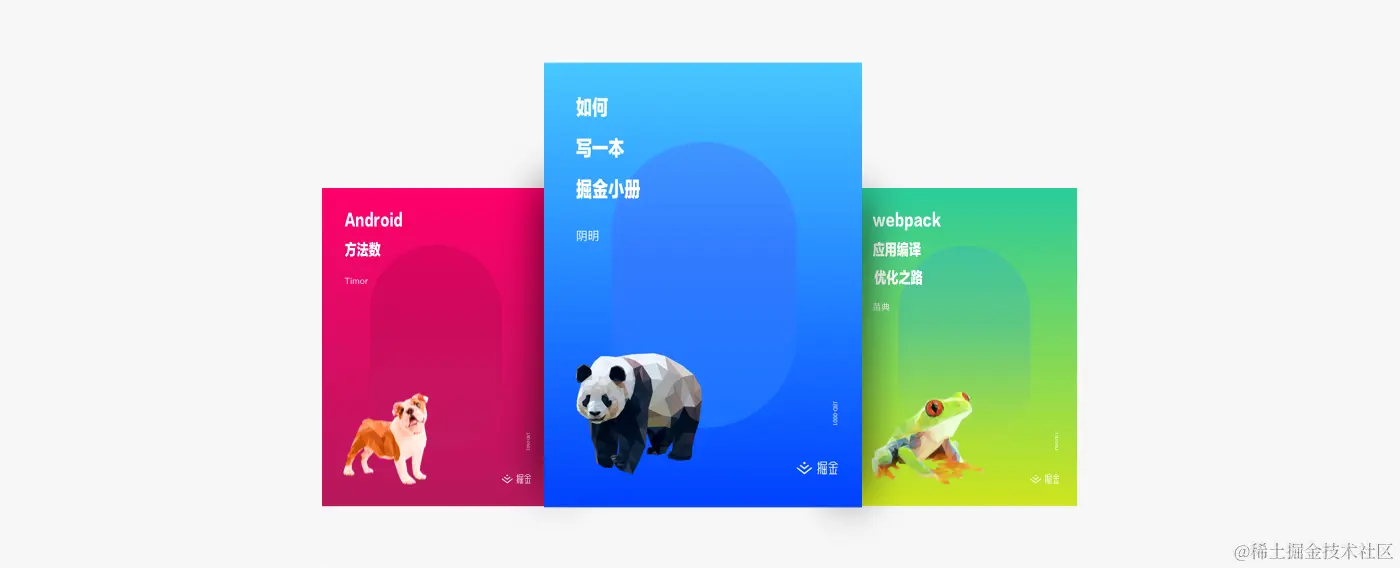
65 |
66 | 特别值得一提的是,每一本小册都是作者的作品,掘金官方会为它单独设计一个漂亮的封面。而我们也期待有千百个小册被创作出来,成为一个完整的技术内容库。
67 |
68 | ### [申请成为小册作者](https://sourl.co/zDEMwJ "https://sourl.co/zDEMwJ")
69 |
70 | [原文地址](https://juejin.cn/book/6844723704639782920/section/6844723704736251917)
--------------------------------------------------------------------------------
/docs/如何使用掘金社区/13-使用掘金:❎ 掘金社区行为规范&处罚措施.md:
--------------------------------------------------------------------------------
1 | # 使用掘金:❎ 掘金社区行为规范&处罚措施
2 |
3 | 为了帮助掘友们更好地使用掘金社区发布和阅读文章,我们总结了掘金社区的几类常见违规行为,并公布相应的处罚措施。同时,也希望掘友们可以配合我们一起监督和维护。毕竟,掘金社区并不是独立存在的,它由每一位掘友组成的,只有掘友们的共同维护,才会让社区的生态环境变得更为适宜。❤️
4 |
5 | # 社区内容发布规范
6 |
7 | ## 一、抄袭行为
8 |
9 | 抄袭是所有内容社区的大忌,这种行为既不尊重个人的版权,更不尊重知识的价值。所以,掘金社区对抄袭帖零容忍,掘金的工作同学会定期对文章进行“反抄袭”的抽查,同时,大家也可以主动举报抄袭的文章。
10 |
11 | **适用情况:**
12 |
13 | * 情况1:像素级抄袭或大篇幅抄袭
14 |
15 | * 在无转载许可的前提下,全文超过80%的内容完全复制其他文章。
16 |
17 | * 小于40%的内容与其他文章重合认定为引用,大于40%的文章内容重合认定为抄袭。
18 |
19 | * 情况2:洗稿型抄袭
20 |
21 | * 两篇文章具备结构相似,主要内容重合度高,代码基本一致等特征,会被判断为洗稿。
22 |
23 | * 情况3:利用ChatGpt等AIGC工具,发布文章。
24 |
25 | * 人工智能生成技术文章,或者其他技术体裁内容在掘金直接发布。
26 |
27 | **处罚措施:**
28 |
29 | * 抄袭文章一经投诉/举报发现,视抄袭严重程度自见或删除处理。
30 | * 人工智能生成的文章,全部不推荐,且都纳入笔记范围。一旦发现有利用类似文章参加掘金活动的行为,永久取消活动参与资格,并进行账号降权,不排除拉黑禁言等处罚策略。
31 |
32 | * 如果是参与掘金社区有奖活动的文章,视抄袭严重程度自见或删除处理,同时取消其参与的活动以及双月上线的所有活动的评奖评优资格。举例:2022年1月10日,掘金发布了某有奖征文活动,小A在参与该活动中,出现抄袭行为,那么小A在该活动中的评奖评优资格被取消,同时,如果小A参与了2022年1月-2月的其他有奖活动,也一并取消评奖评优资格。
33 |
34 | **掘力值扣减措施:**
35 |
36 | * 首次抄袭发现扣除抄袭/洗稿文章所获得的所有掘力值
37 | * 连续两次抄袭扣除抄袭/洗稿文章所获得的双倍掘力值
38 | * 连续三次及以上抄袭扣除抄袭/洗稿文章所获得的三倍掘力值
39 |
40 | ## 二、刷量行为
41 |
42 | **适用情况:**
43 |
44 | * 情况1:通过机器刷量,提升文章阅读量
45 | * 情况2:通过机器或批量注册小号,給自己的文章点赞,提升文章点赞量
46 | * 情况3:通过机器或批量注册小号,参与社区活动薅羊毛
47 | * 情况4:通过脚本或者其他未知方式,批量对他人或者自己的文章沸点进行点赞评论
48 |
49 | **处罚措施:**
50 |
51 | * 如果作者刷阅读量,官方第一次发现、第二次发现,将通过系统消息发送警告,第三次直接取消创作权限(权限不再恢复),同时禁言 30 天。创作权限包括但不限于添加多个标签权限、文章自动推荐至首页权限、资讯创作权限。
52 |
53 | * 如果作者刷阅读量严重,官方第一次发现,将通过系统消息发送警告;第二次直接取消创作权限(权限不再恢复),同时禁言30天。
54 |
55 | * 如果作者通过机器或批量注册小号给自己的文章点赞,一经发现,官方将通过系统消息发送警告,同时取消创作权限 30 天。
56 |
57 | * 如果作者通过机器或其他方式,批量给其他作者文章点赞,給其他作者造成严重打扰,官方将通过系统消息发送警告,并永久禁言。
58 |
59 | * 通过脚本或其他方式,批量给其他作者文章点赞,給其他作者造成严重打扰,官方将通过系统消息发送警告,并永久禁言。
60 |
61 | * 如果作者通过机器或批量注册小号参与社区活动薅羊毛,一经发现,官方将直接封禁所有账号并取消活动资格。
62 |
63 | * 掘力值扣减措施:
64 |
65 | * 首次发现刷量发现扣除刷量文章所获得的所有掘力值
66 | * 连续两次发现刷量扣除刷量文章所获得的双倍掘力值
67 |
68 | ## 三、发布恶意内容
69 |
70 | **适用情况:**
71 |
72 | * 发布诋毁谩骂、暴露他人隐私、引战或其他恶意内容,包括文章、沸点、评论,这类内容极不友善,并且引发矛盾,破坏社区氛围。
73 |
74 | **处罚标准:**
75 |
76 | * 一经举报发现,官方将自见/删除处理以上内容,通过系统消息警告作者,并禁言 7 天。如多次发布恶意内容,一经核实,永久封禁。
77 |
78 | ## 四、发布触犯国家相关法律法规的内容
79 |
80 | **适用情况:**
81 |
82 | 互联网信息服务管理办法规定,互联网信息服务提供者不得制作、复制、发布、传播含有下列内容的信息:
83 |
84 | * 反对宪法所确定的基本原则的;
85 | * 危害国家安全,泄露国家秘密,颠覆国家政权,破坏国家统一的;
86 | * 损害国家荣誉和利益的;
87 | * 煽动民族仇恨、民族歧视,破坏民族团结的;
88 | * 破坏国家宗教政策,宣扬邪教和封建迷信的;
89 | * 散布谣言,扰乱社会秩序,破坏社会稳定的;
90 | * 散布淫秽、色情、赌博、暴力、凶杀、恐怖或者教唆犯罪的;
91 | * 侮辱或者诽谤他人,侵害他人合法权益的;
92 | * 含有法律、行政法规禁止的其他内容的。
93 |
94 | **处罚措施:**
95 |
96 | * 如作者发布违反法律的内容,官方将删除其所有文章、沸点、评论,永久禁言/拉黑账号,情节严重将举报相关公安机关予以处理。
97 |
98 | ## 五、发布广告内容
99 |
100 | **适用情况:**
101 |
102 | * 广告类内容以推广、曝光、品牌宣传为目的,会对其他用户造成骚扰,影响社区的生态。个人在其他平台的付费教程、视频教程、书籍推广等内容也属于此范围。
103 |
104 | **处罚措施:**
105 |
106 | * 广告类内容一经发现,根据严重程度,进行自见/删除处理,并对发布者进行警告、禁言等相关处理。
107 |
108 | ## 六、发布虚假信息内容
109 |
110 | **适用情况:**
111 |
112 | * 虚假消息,包括文章内链接跳转第三方钓鱼网站、木马、病毒网站等。
113 |
114 | **处罚措施:**
115 |
116 | * 虚假信息内容一经发现,将删除相关内容,同时禁言发布者 30 天。如果故意多次虚假钓鱼信息,一经核实,将对发布者拉黑账号处理。
117 |
118 | * 冒充他人发布的文章也属于发布虚假消息范畴,一经发现,删除其所有文章、沸点并拉黑账号。 **最后,我们真诚地希望,每一篇文章都出自你的原创,在掘金,每一份知识,都会得到尊重。**
119 |
120 | ## 七、头像、昵称违规
121 |
122 | **适用情况:**
123 |
124 | * 违反社区基本规范,利用第三方工具,绕过官方规定设置,违规上传动图或差异化图片以及擦边动图。
125 |
126 | **处罚措施:**
127 |
128 | * 头像只支持支持 jpg、png、jpeg类型,对于其他格式的头像变更,一律审核不通过。
129 | * 多次上传擦边动态图,封禁30 天以上头像变更权限。
130 |
131 | [原文地址](https://juejin.cn/book/6844733795329900551/section/6844733795380232200)
--------------------------------------------------------------------------------
/docs/如何使用掘金社区/11-使用掘金:📐 掘金社区内容的标准和规范.md:
--------------------------------------------------------------------------------
1 | # 使用掘金:📐 掘金社区内容的标准和规范
2 |
3 | ## 内容规范
4 |
5 | ### 标题规范
6 |
7 | * 标题尽量简单、简约、不夸张
8 | * 禁止标题党,夸大、错误的信息
9 | * 掘金官方有权利根据规范修改标题
10 |
11 | ### 配图规范
12 |
13 | * 一定要图文相关,图片与文章内容有强相关联系,突出主题,并包含与主题强相关的技术名词
14 | * 图片背景简单,图片背景是单一的颜色或者纯色
15 | * 不要选择太大众化的内容,文章封面配图尽量选择独特、新颖的图片,有利于吸引读者
16 | * 必须遵守**掘金图片政策**
17 |
18 | ### 专栏规范
19 |
20 | > 好文章标准 技术文章是指涉及技术(这里是指程序设计)的文章,与开发相关的**技术分享**、**开发技巧**、**工具介绍**、**技术设想**、**业界评论**、**自我创作**、**职业心得**、等。
21 |
22 | 技术文章可以是:
23 |
24 | **技术细节型**
25 |
26 | 技术细节型的文章侧重于解决某个具体的问题,比如某个开源库中存在什么bug?如何解决这个bug?如何使用某个具体的技术?等等
27 |
28 | * [CocoaPods 都做了什么?](https://juejin.cn/post/6844903445367881735 "https://juejin.cn/post/6844903445367881735")
29 | * [3 分钟搞定 Vue 2.0 服务端渲染](https://juejin.cn/post/6844903447007854606 "https://juejin.cn/post/6844903447007854606")
30 |
31 | **干货型**
32 |
33 | 这类文章是作者对于某一块的内容进行的总结,具有较高的收藏价值,是属于较为受欢迎的一类文章,也更加容易在社区内和社区外传播。
34 |
35 | * [关于RxJava最友好的文章](https://juejin.cn/post/6844903447280484360 "https://juejin.cn/post/6844903447280484360")
36 | * [iView:一套基于Vue的高质量UI组件库](https://juejin.cn/post/6844903445812477965 "https://juejin.cn/post/6844903445812477965")
37 |
38 | **翻译文章,如翻译英文的技术文章**
39 |
40 | 将好的外文文章翻译为中文也是具有很高的价值,比如目前掘金官方在运营的[掘金翻译计划]。当然,给予我们对原创的尊重,如果是翻译的文章,尽量在文章前面加一个[译],并在文章的显要位置注明原作出处
41 |
42 | * [\[译\] 我最终是怎么玩转了 Vue 的作用域插槽](https://juejin.cn/post/6844903795516768263 "https://juejin.cn/post/6844903795516768263")
43 | * [Android7.0写给开发者的一封信(官网同步翻译)](https://juejin.cn/post/1 "https://juejin.cn/post/1")
44 |
45 | **实践总结型**
46 |
47 | 实践总结型的文章更像是技术细节型和干货型的结合,面向特定领域的技术,也属于干货。对于这一类型的文章,更依赖于代码,读者需要根据代码一步步往下深入
48 |
49 | * [Android和iOS开发中的异步处理(一)——开篇](https://juejin.cn/post/6844903441727225870 "https://juejin.cn/post/6844903441727225870")
50 | * [Android和iOS开发中的异步处理(二)——异步任务的回调](https://juejin.cn/post/6844903441832083463 "https://juejin.cn/post/6844903441832083463")
51 | * [Android和iOS开发中的异步处理(三)——执行多个异步任务](https://juejin.cn/post/6844903441832083470 "https://juejin.cn/post/6844903441832083470")
52 |
53 | **行业见解,职业选择**
54 |
55 | 通过自己在行业的理解和沉淀,加以事实的依据,帮助他人更完整地理解行业的发展情况以及作为开发者的职业选择、职业成长,让读者在技术之外全面提升
56 |
57 | * [小菜前端的技术栈是如何规划和演进的](https://juejin.cn/post/6844903807340511246 "https://juejin.cn/post/6844903807340511246")
58 | * [我在淘宝做前端的这三年 — 第一年](https://juejin.cn/post/6844903783198097416 "https://juejin.cn/post/6844903783198097416")
59 |
60 | 此外:
61 |
62 | * 文章的封面图和内容中的配图必须遵守掘金图片政策
63 | * 文章内容须遵守掘金社区原则和价值观
64 |
65 | ### 不受欢迎的内容
66 |
67 | * **很水的帖子式文章**:做个人备忘、记录、笔记类的内容更应该是草稿而不是正式发表的文章
68 | * **杂乱无序的内容**:排版混乱,文章结构不清晰,内容逻辑不符都可以被定义为垃圾文章
69 | * **任何推广(招聘、广告、SEO等)方面的内容**:广告如:“个人视频教程、书籍推广等内容”,这类内容属于不允许用户发布的内容范围,是对其他用户危害最大的内容。一经发现,立即删除,并对发布者给予处理
70 | * **线下活动类**:请勿私自发布线下活动类内容,如有需要请联系掘金市场部工作人员,发邮件至 `bd@xitu.io`。
71 | * **标题党式的文章**:例如夸张式标题“0202 年了,还在用 vue2.x ?”悬念式标题“震惊:这篇VUE的干货竟然说的这么全!”强迫式标题“迄今为止最全的面试题,不看后悔一辈子?”
72 |
73 | ### 评论规范
74 |
75 | * 任何用户都可对掘金内的任何文章进行评论
76 | * 评论需要紧紧围绕文章的主要内容展开
77 | * 对文章内容或者部分观点提出疑问、回复和解答其他用户的疑问、对文章内容拓展延伸、对文章中的错误观点友善的指正等行为都是掘金所倡导的
78 | * 评论内容必须客观、公正,不得对他人有不文明的言语和人身攻击行为
79 | * 不能发布任何推广(招聘、广告)方面的内容
80 | * 须遵守掘金社区原则和价值观
81 | * 但凡违反上述规则的评论会被删除,甚至采取封号处理
82 |
83 | ### 违规内容的处理
84 |
85 | * 但凡属于不受欢迎的内容,或违反**社区指导原则**和**优质内容定义**的文章给予隐藏、甚至删除的处理
86 | * 对于多次恶意发布违规内容的用户,将收回**掘金优秀作者**的相关权限,情节严重者则给予封号处理
87 |
88 | ### 掘金图片政策
89 |
90 | * 请勿上传涉及他人隐私、淫秽色情、暴力、血腥、违反国家法律法规的任何图片
91 | * 用户需要对自己所上传的图片版权负责,掘金不承担因此带来的任何第三方责任及法律风险
92 | * 违反使用规则的内容在被发现后立即删除,并对涉及的用户账号进行相应的处理,甚至采取封号处理
93 |
94 | [原文地址](https://juejin.cn/book/6844733795329900551/section/6844733795380232199)
--------------------------------------------------------------------------------
/docs/稀土开发者大会2022/25-李志明:采用 CXL 加速内存架构演进.md:
--------------------------------------------------------------------------------
1 | # 李志明:采用 CXL 加速内存架构演进
2 |
3 | 
4 |
5 | 
6 |
7 | 
8 |
9 | 
10 |
11 | 
12 |
13 | 
14 |
15 | 
16 |
17 | 
18 |
19 | 
20 |
21 | 
22 |
23 | 
24 |
25 | 
26 |
27 | 
28 |
29 | 
30 |
31 | 
32 |
33 | 
34 |
35 | 
36 |
37 | 
38 |
39 | 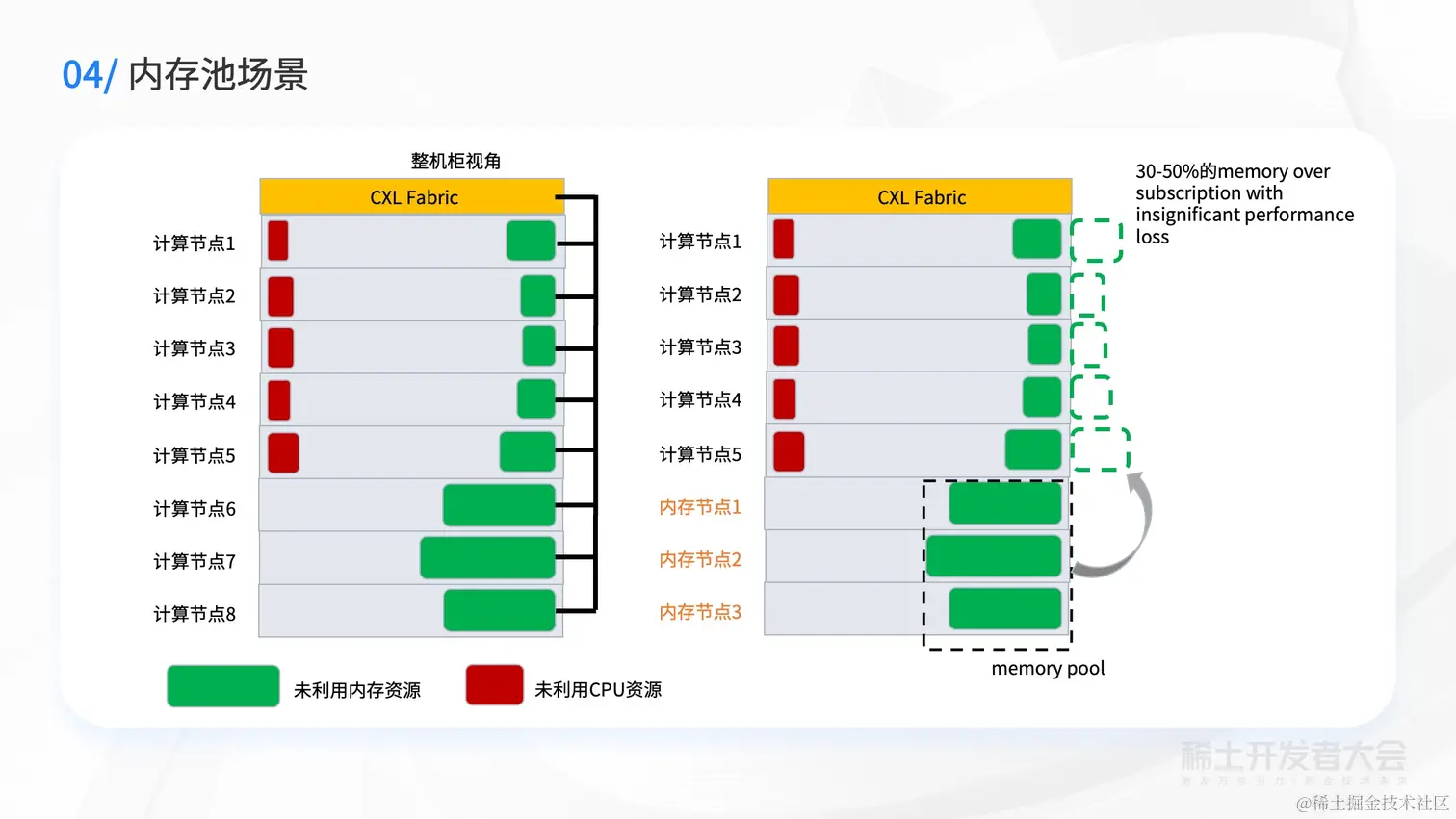
40 |
41 | 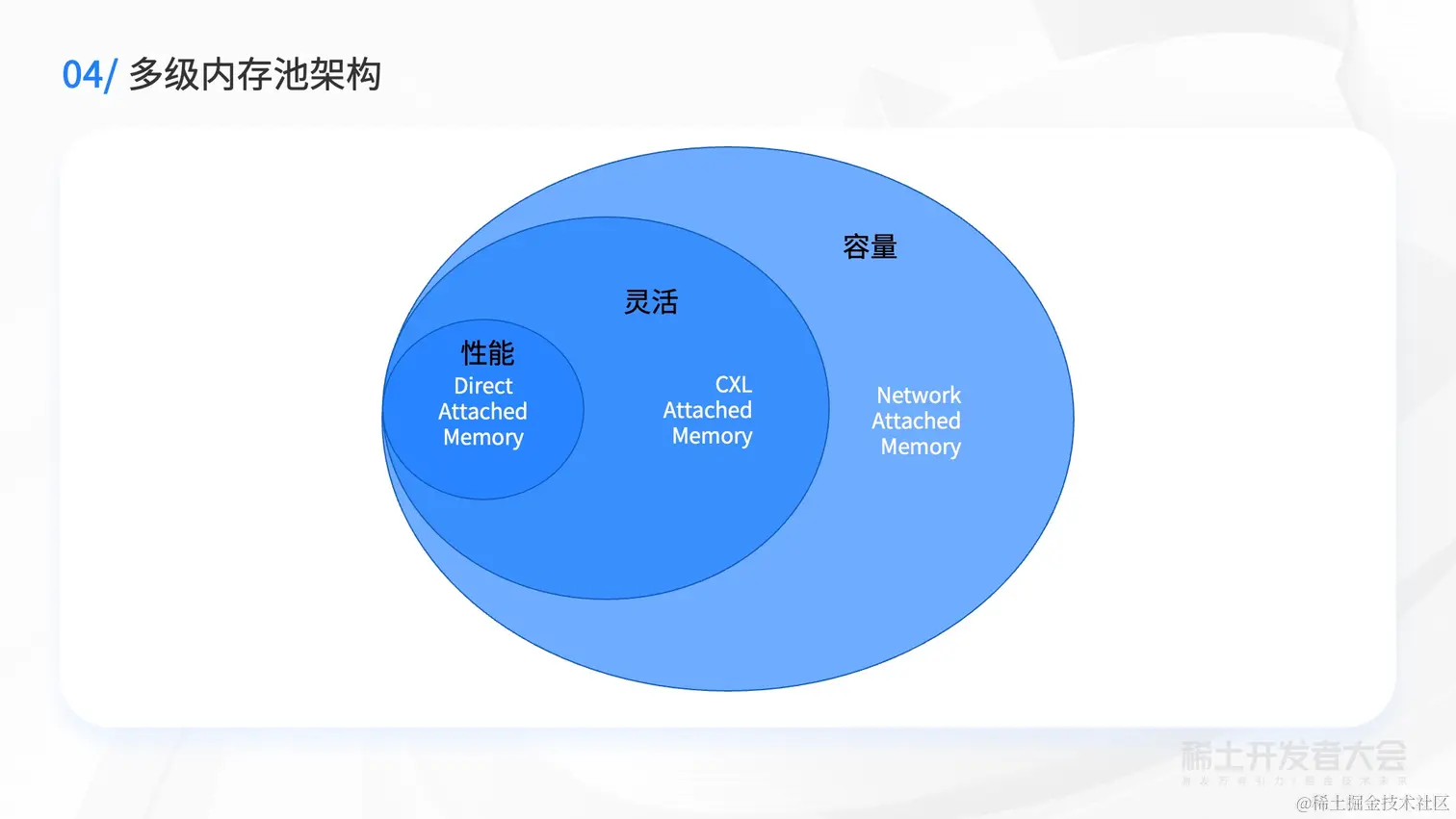
42 |
43 | 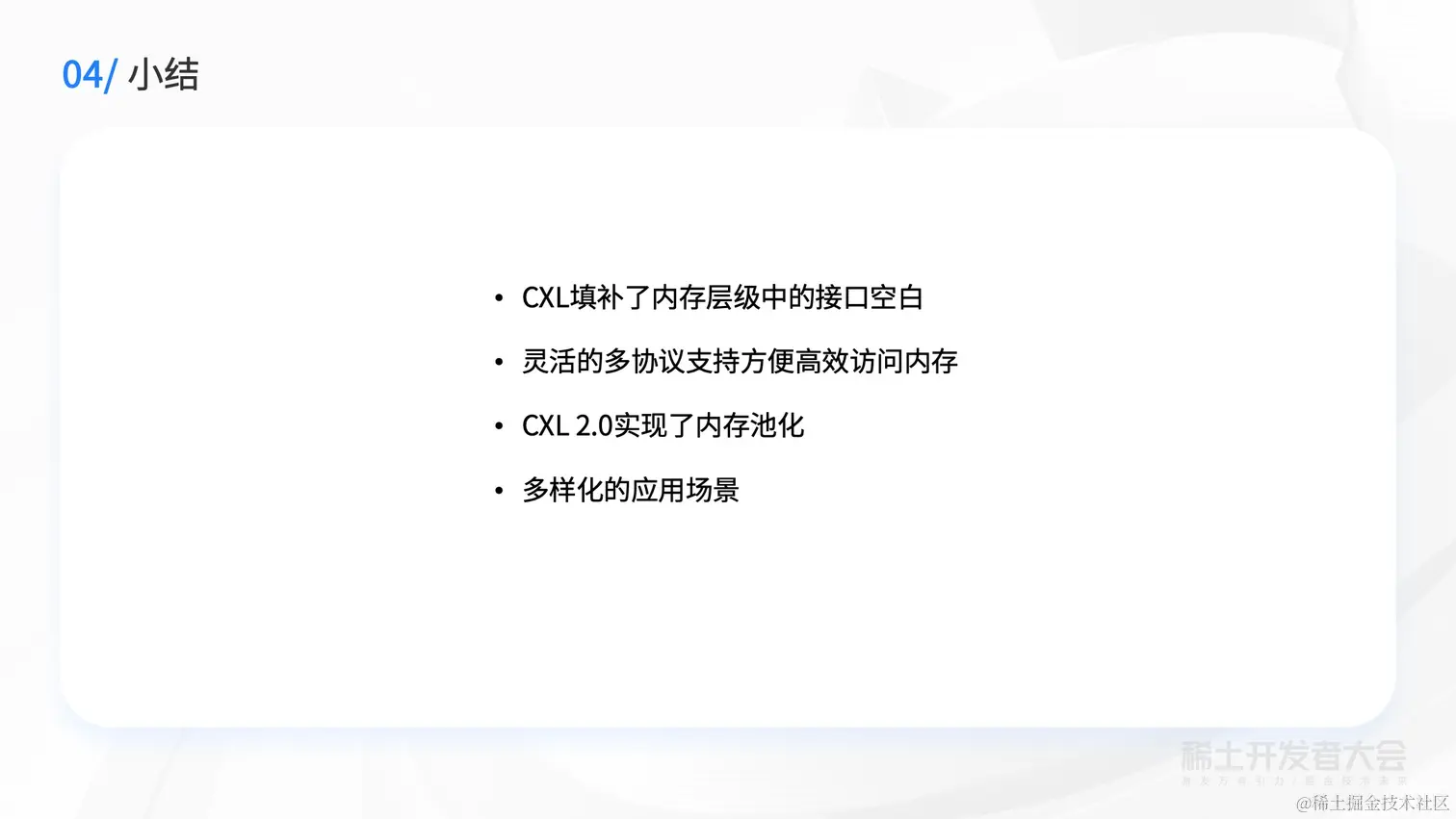
44 |
45 | 
46 |
47 | [原文地址](https://juejin.cn/book/7127092198096502822/section/7127232960343834636)
--------------------------------------------------------------------------------
/docs/稀土开发者大会2022/32-翟佳:从0-1:锻造开源创业团队的道与术.md:
--------------------------------------------------------------------------------
1 | # 翟佳:从0-1:锻造开源创业团队的道与术
2 |
3 | 
4 |
5 | 
6 |
7 | 
8 |
9 | 
10 |
11 | 
12 |
13 | 
14 |
15 | 
16 |
17 | 
18 |
19 | 
20 |
21 | 
22 |
23 | 
24 |
25 | 
26 |
27 | 
28 |
29 | 
30 |
31 | 
32 |
33 | 
34 |
35 | 
36 |
37 | 
38 |
39 | 
40 |
41 | 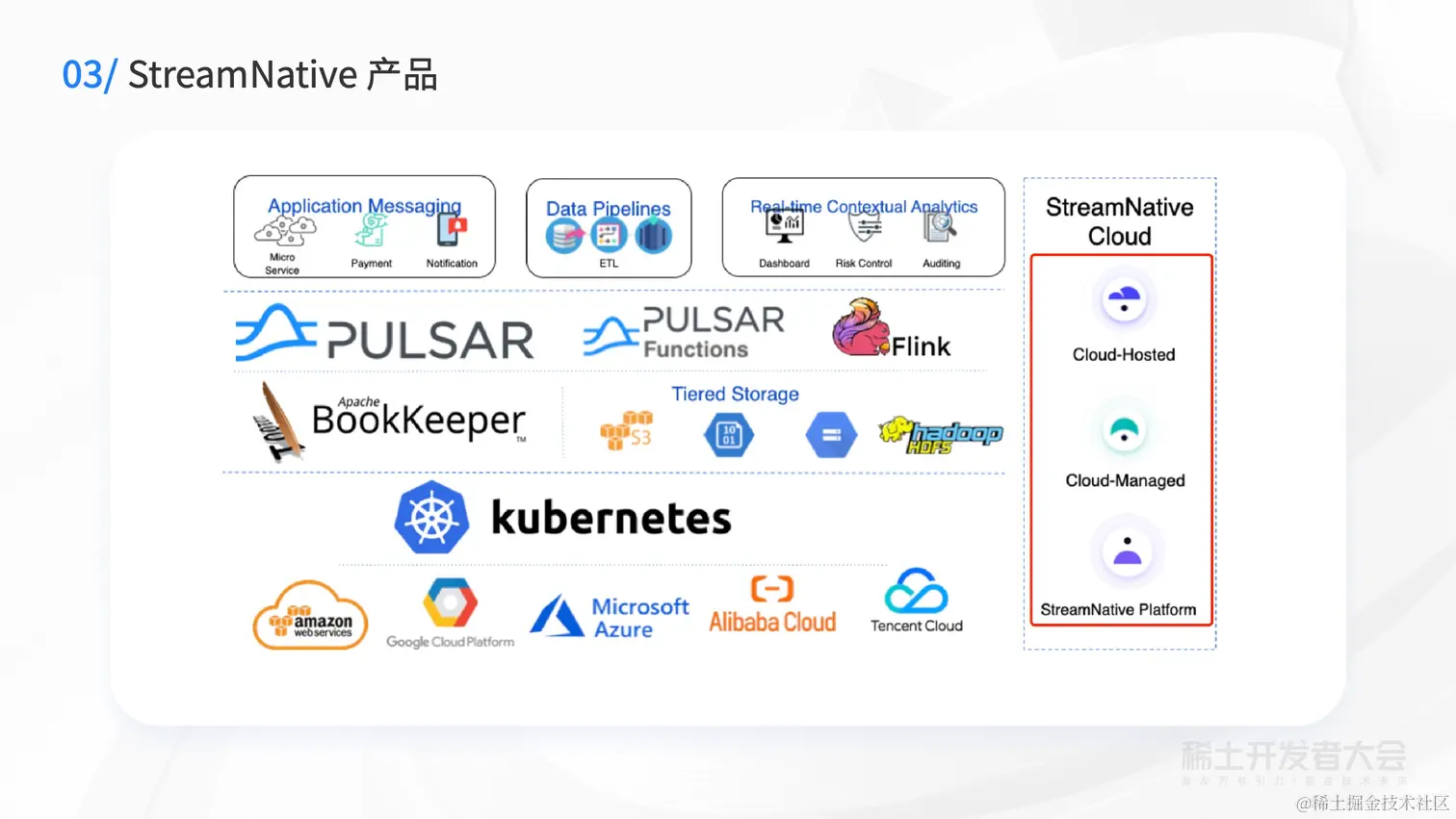
42 |
43 | 
44 |
45 | 
46 |
47 | [原文地址](https://juejin.cn/book/7127092198096502822/section/7127553016542003233)
--------------------------------------------------------------------------------
/docs/稀土开发者大会2022/35-陈驰远:CTO 职责体系构建:商业、团队和技术.md:
--------------------------------------------------------------------------------
1 | # 陈驰远:CTO 职责体系构建:商业、团队和技术
2 |
3 | 
4 |
5 | 
6 |
7 | 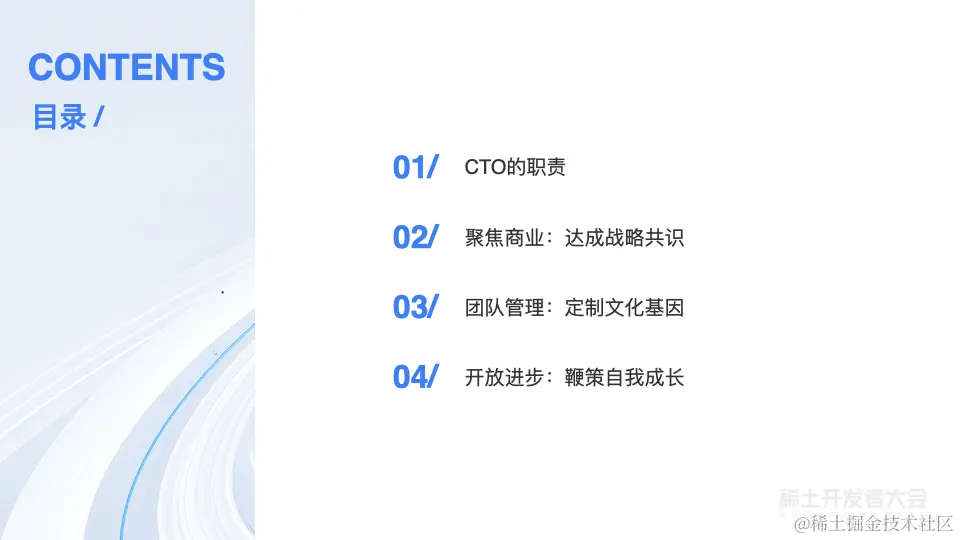
8 |
9 | 
10 |
11 | 
12 |
13 | 
14 |
15 | 
16 |
17 | 
18 |
19 | 
20 |
21 | 
22 |
23 | 
24 |
25 | 
26 |
27 | 
28 |
29 | 
30 |
31 | 
32 |
33 | 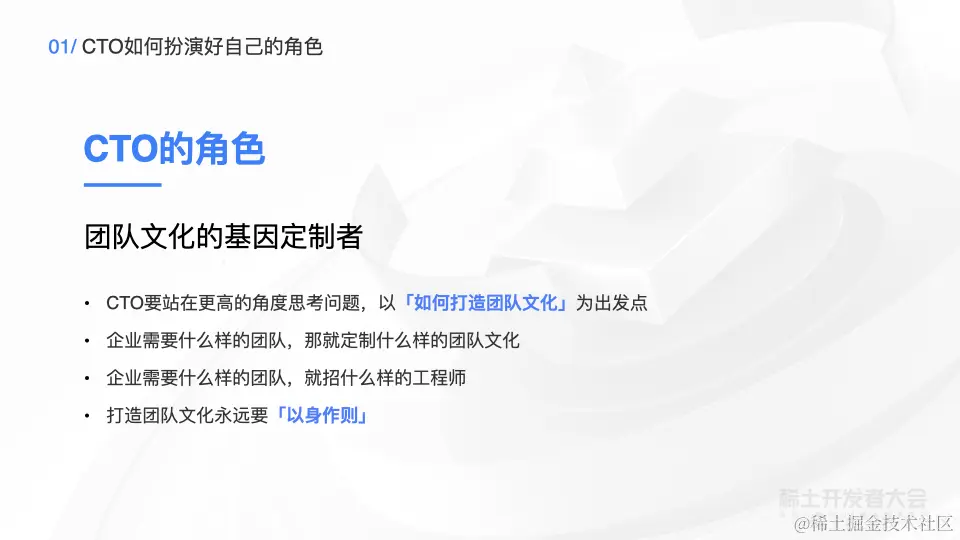
34 |
35 | 
36 |
37 | 
38 |
39 | 
40 |
41 | [原文地址](https://juejin.cn/book/7127092198096502822/section/7127534705452253195)
--------------------------------------------------------------------------------
/docs/稀土开发者大会2022/3-何晓冬:多模态智能人机对话交互技术的发展与产业实践.md:
--------------------------------------------------------------------------------
1 | # 何晓冬:多模态智能人机对话交互技术的发展与产业实践
2 |
3 | 
4 |
5 | 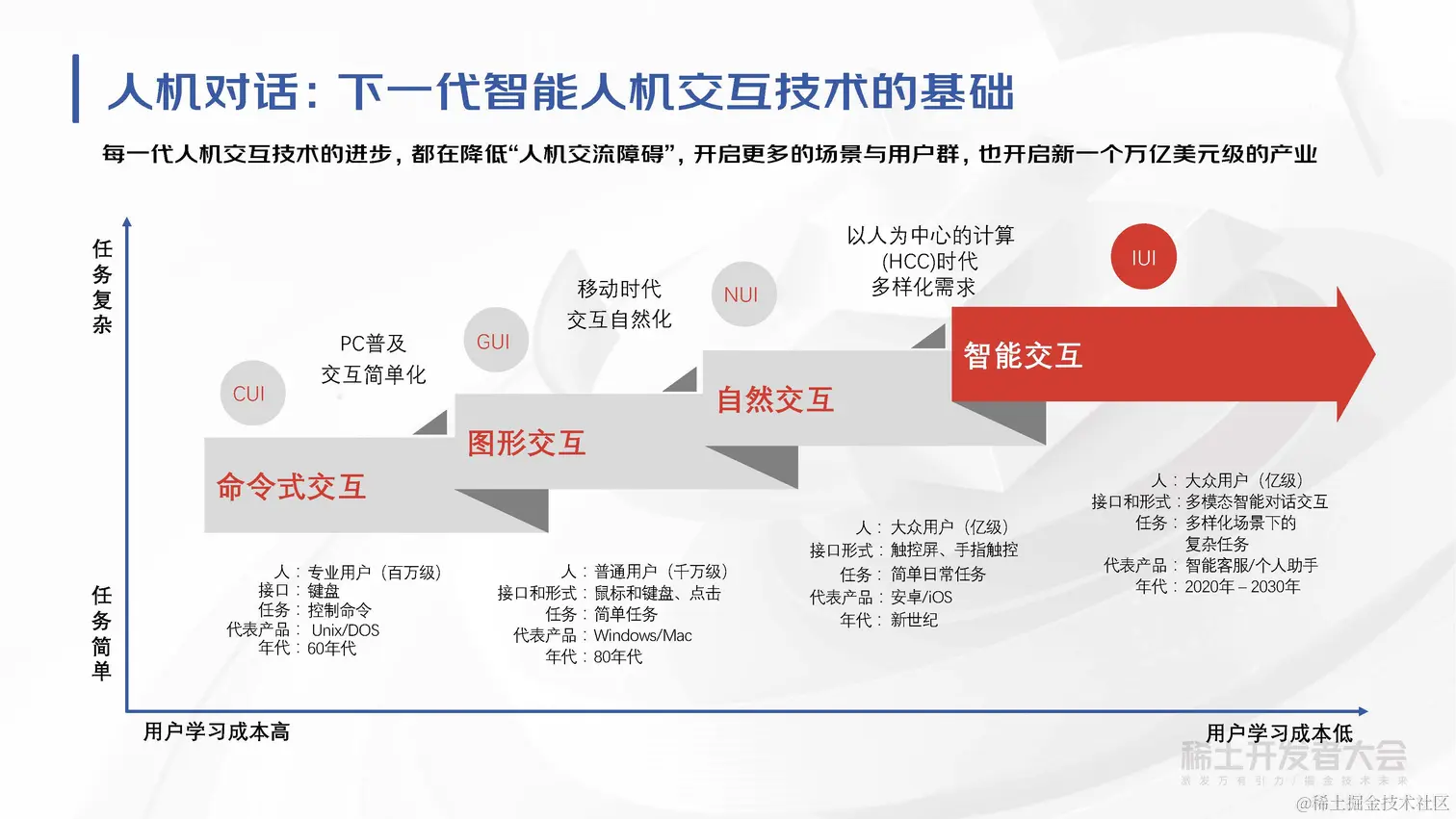
6 |
7 | 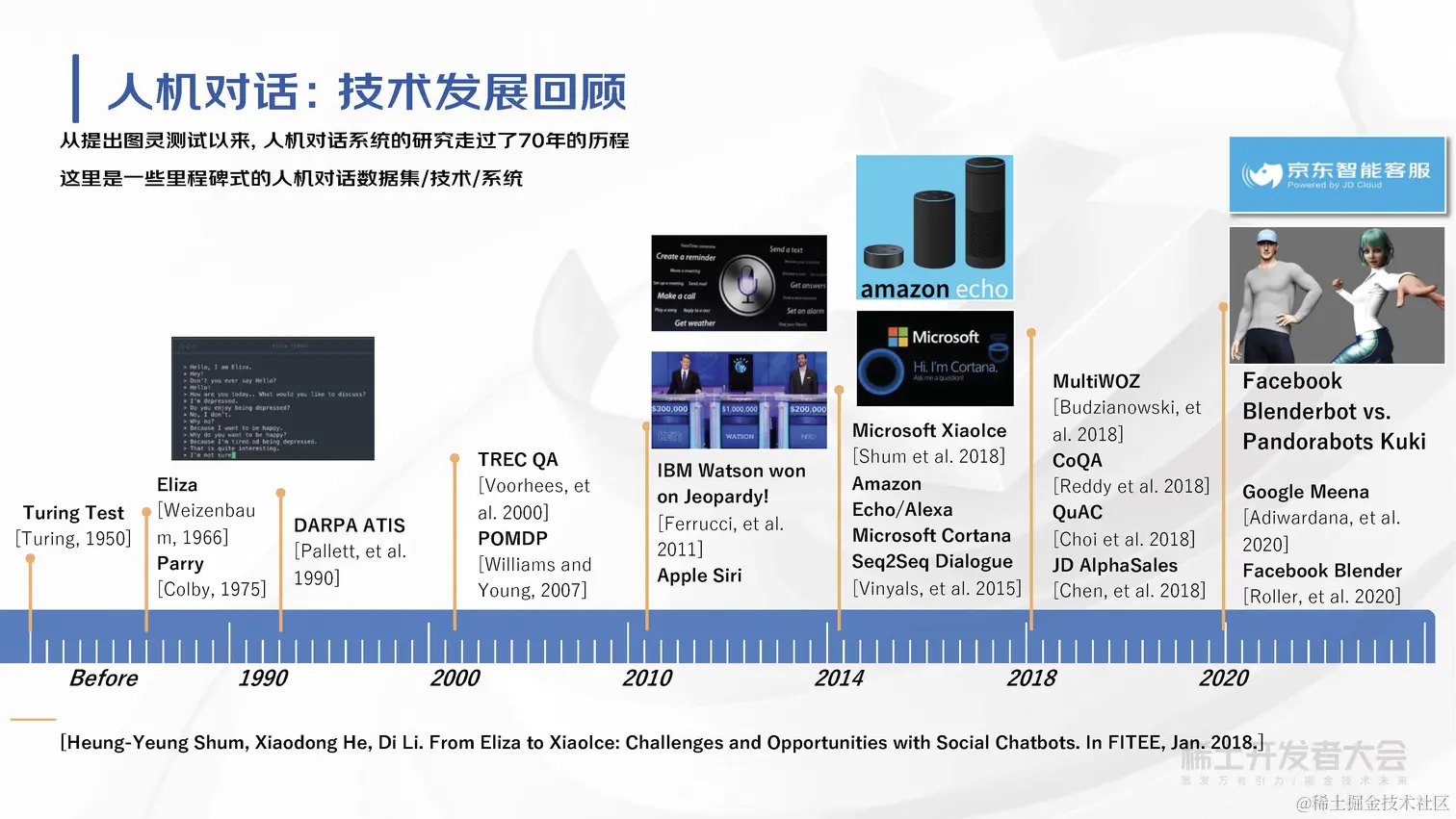
8 |
9 | 
10 |
11 | 
12 |
13 | 
14 |
15 | 
16 |
17 | 
18 |
19 | 
20 |
21 | 
22 |
23 | 
24 |
25 | 
26 |
27 | 
28 |
29 | 
30 |
31 | 
32 |
33 | 
34 |
35 | 
36 |
37 | 
38 |
39 | 
40 |
41 | 
42 |
43 | 
44 |
45 | 
46 |
47 | [原文地址](https://juejin.cn/book/7127092198096502822/section/7127158975010701316)
--------------------------------------------------------------------------------
/docs/稀土开发者大会2022/47-王越:创作正当时,相伴共成长.md:
--------------------------------------------------------------------------------
1 | # 王越:创作正当时,相伴共成长
2 |
3 | 
4 |
5 | 
6 |
7 | 
8 |
9 | 
10 |
11 | 
12 |
13 | 
14 |
15 | 
16 |
17 | 
18 |
19 | 
20 |
21 | 
22 |
23 | 
24 |
25 | 
26 |
27 | 
28 |
29 | 
30 |
31 | 
32 |
33 | 
34 |
35 | 
36 |
37 | 
38 |
39 | 
40 |
41 | 
42 |
43 | 
44 |
45 | [原文地址](https://juejin.cn/book/7127092198096502822/section/7127833785432801294)
--------------------------------------------------------------------------------
/package.json:
--------------------------------------------------------------------------------
1 | {
2 | "name": "juejinbooksspider",
3 | "type": "module",
4 | "version": "1.0.0",
5 | "packageManager": "pnpm@7.26.3",
6 | "description": "掘金小册爬虫脚本。将小册保存为markdown,pdf,html格式",
7 | "author": {
8 | "name": "h7ml",
9 | "github": "https://github.com/h7ml",
10 | "mail": "h7ml@qq.com"
11 | },
12 | "license": "Apache-2.0",
13 | "homepage": "https://h7ml.github.io/juejinBooksSpider",
14 | "repository": {
15 | "type": "git",
16 | "url": "https://github.com/h7ml/juejinBooksSpider.git"
17 | },
18 | "bugs": {
19 | "url": "https://github.com/h7ml/juejinBooksSpider/issues/new"
20 | },
21 | "keywords": [
22 | "稀土掘金",
23 | "掘金",
24 | "掘金小册",
25 | "掘金小册爬虫",
26 | "掘金小册爬虫脚本",
27 | "掘金小册markdown",
28 | "掘金小册pdf",
29 | "juejin",
30 | "book",
31 | "spider",
32 | "markdown",
33 | "pdf",
34 | "html"
35 | ],
36 | "sideEffects": false,
37 | "main": "dist/index.cjs",
38 | "types": "src/types.d.ts",
39 | "scripts": {
40 | "dev:all": "cross-env spiderAll=false tsx ./src/index.ts",
41 | "dev": "tsx ./src/index.ts",
42 | "build": "node ./scripts/build.js",
43 | "test": "node ./scripts/build.js && node ./dist/index.cjs https://juejin.cn/book/6844723704639782920",
44 | "build:github": "cross-env APP_BASE_PATH=/juejinBooksSpider/ npm run docs:build",
45 | "docs:dev": "cross-env NODE_ENV=development vitepress dev docs",
46 | "docs:build": "vitepress build docs",
47 | "prepublish": "npm run build",
48 | "format": "prettier --write .",
49 | "lint": "eslint .",
50 | "lint:fix": "eslint . --fix",
51 | "lint:md": "markdownlint-cli2 '**/*.md'",
52 | "prepare": "husky install"
53 | },
54 | "devDependencies": {
55 | "@antfu/eslint-config-ts": "^0.39.3",
56 | "@femm/prettier": "^1.1.0",
57 | "@node-rs/jieba": "^1.6.2",
58 | "@types/fs-extra": "^11.0.1",
59 | "@types/inquirer": "^9.0.3",
60 | "@types/lodash-es": "^4.17.8",
61 | "@types/node": "^20.4.8",
62 | "@types/puppeteer": "^7.0.4",
63 | "@vitejs/plugin-vue-jsx": "^3.0.0",
64 | "@w3ctech-editorial-department/vitepress-auto-configure-nav-sidebar": "^1.0.0",
65 | "chalk": "^5.3.0",
66 | "cross-env": "^7.0.3",
67 | "dayjs": "^1.11.9",
68 | "dotenv": "^16.3.1",
69 | "esbuild": "^0.18.19",
70 | "eslint": "^8.41.0",
71 | "fs-extra": "^11.1.1",
72 | "hpdf": "^1.0.3",
73 | "html-to-md": "^0.8.3",
74 | "husky": "^8.0.3",
75 | "inquirer": "^9.2.10",
76 | "lint-staged": "^13.2.2",
77 | "log4js": "^6.9.1",
78 | "markdownlint-cli2": "^0.12.1",
79 | "prettier": "^2.8.8",
80 | "puppeteer": "^21.0.1",
81 | "rimraf": "^5.0.1",
82 | "sitemap": "^7.1.1",
83 | "tsx": "^3.12.7",
84 | "typescript": "^5.1.6",
85 | "vite": "^4.1.4",
86 | "vitepress": "1.0.0-rc.39",
87 | "vitepress-plugin-back-to-top": "^1.0.1",
88 | "vitepress-plugin-google-analytics": "^1.0.2",
89 | "vitepress-plugin-life-progress": "^0.0.2",
90 | "vitepress-plugin-nprogress": "^0.0.4",
91 | "vitepress-plugin-search": "1.0.4-alpha.19",
92 | "vitepress-plugin-sidebar": "^0.0.7",
93 | "vitepress-plugin-tabs": "^0.5.0",
94 | "vue": "^3.4.15"
95 | },
96 | "volta": {
97 | "node": "18.0.0"
98 | },
99 | "licenses": [
100 | {
101 | "type": "Apache-2.0",
102 | "url": "https://github.com/h7ml/hooks/tree/main/LICENSE"
103 | }
104 | ]
105 | }
106 |
--------------------------------------------------------------------------------
/docs/如何使用掘金社区/3-了解掘金:⛏️ 掘金的功能简介.md:
--------------------------------------------------------------------------------
1 | # 了解掘金:⛏️ 掘金的功能简介
2 |
3 | ## 网站、移动应用、浏览器插件
4 |
5 | 掘金社区的内容可以通过不同的产品访问,核心有 3 个:
6 |
7 | 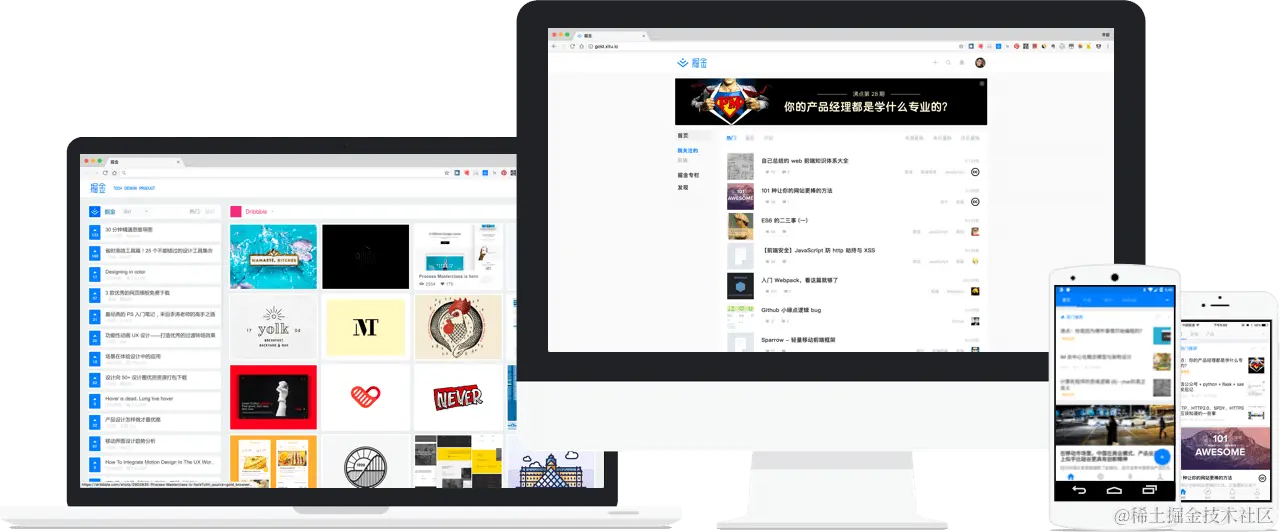
8 |
9 | 1. 网站:[juejin.cn](https://juejin.cn "https://juejin.cn")
10 | 2. 移动应用:[juejin.cn/app](https://juejin.cn/app "https://juejin.cn/app") 支持 iOS、Android
11 | 3. 浏览器插件:[juejin.cn/extension](https://juejin.cn/extension "https://juejin.cn/extension")
12 |
13 | ## 账号
14 |
15 | 掘金社区有自己的唯一账号,既可以使用手机号注册,也可以通过微博、微信、GitHub 第三方登录。
16 |
17 | ## 专栏
18 |
19 | 掘金的核心功能就是让掘友生产、分享有价值的技术内容。作者可以在导航栏处(如下图)生产不同的内容。
20 |
21 | 
22 |
23 | 在掘金上直接写作的技术文章叫做`专栏`。特别值得注意的是,在写作或分享完成后一定要配置合适的分类及标签。这样掘友们才可以更方便地找到您的内容,同样您的内容也才会被推荐给更多的用户。
24 |
25 | ### 掘金标签
26 |
27 | 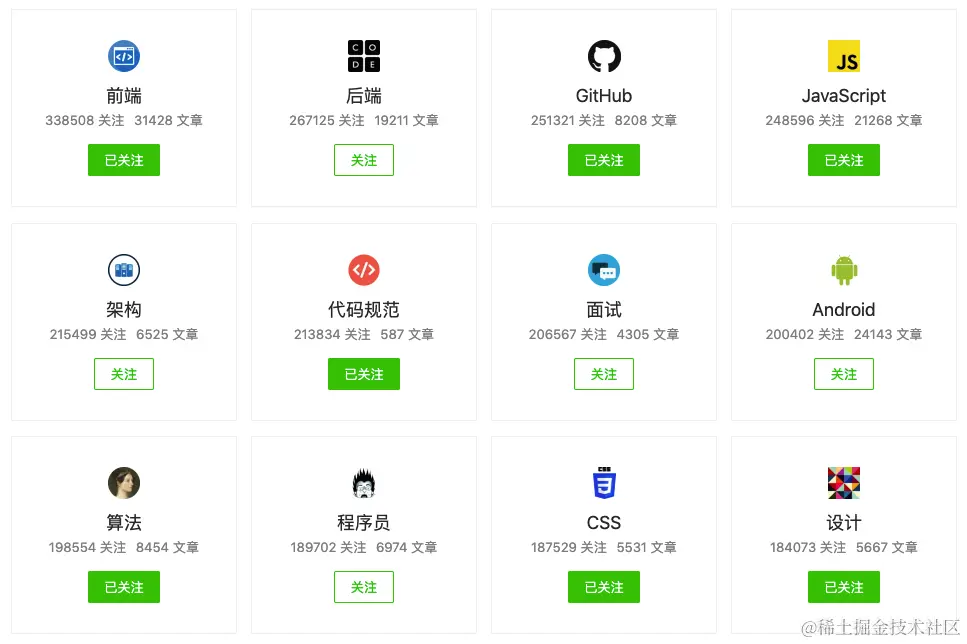
28 |
29 | 掘金上有许多的技术[标签](https://juejin.cn/subscribe/all "https://juejin.cn/subscribe/all"),用以定义大家分享的技术内容。请大家根据自己的需要来关注合适的内容标签,基于此我们会不断推荐相关的内容和优秀作者给你。
30 |
31 | ## 沸点
32 |
33 | [沸点](https://juejin.cn/activities "https://juejin.cn/activities")是掘友们的朋友圈,这是一个懂得开发者酸甜苦辣的地方。无论你是累了、高兴了、悲伤了、惊呆了,这里都有你看不完的新鲜事儿和聊不完的掘友们。日常刷一刷,上班刷一刷,午休刷一刷,睡觉刷一刷,和掘友们一起成长!这里我会推荐几个有趣的话题给你:
34 |
35 | * [开源推荐](https://juejin.cn/topic/6824710203196309518 "https://juejin.cn/topic/6824710203196309518"):来推荐你觉得优秀的开源项目,不限于开源框架、开发工具
36 | * [内推招聘](https://juejin.cn/topic/6819970850532360206 "https://juejin.cn/topic/6819970850532360206"):与大厂面对面,零距离。
37 | * [掘金相亲](https://juejin.cn/topic/6824710202416332807 "https://juejin.cn/topic/6824710202416332807"):千里姻缘掘金牵,有情人终成眷属。
38 | * [上班摸鱼](https://juejin.cn/topic/6824710203301167112 "https://juejin.cn/topic/6824710203301167112"):来分享下你上班看到的好东西吧
39 | * [应用案例](https://juejin.cn/topic/6824710202785267719 "https://juejin.cn/topic/6824710202785267719"):分享好玩、高颜值、实用的 APP、插件、扩展、小程序、H5…
40 | * [开发工具](https://juejin.cn/topic/6824710202000932877 "https://juejin.cn/topic/6824710202000932877"):来推荐一些你常用的能帮你提高效率的开发工具,不限于 IDE,开发框架,构建工具
41 | * [New 资讯](https://juejin.cn/topic/6824710203464761352 "https://juejin.cn/topic/6824710203464761352"):来分享你刚看到过的商业科技 / 互联网 / 科技数码资讯吧
42 |
43 | 掘友们也可以访问[话题](https://juejin.cn/topics "https://juejin.cn/topics")看到更多有趣的沸点内容!
44 |
45 | ## 小册
46 |
47 | [掘金小册](https://juejin.cn/books "https://juejin.cn/books")是一个小篇幅、高浓度、成体系、有收益的技术学习平台,目的是让优秀的开发者基于自己的经验写出成体系的高质量技术内容。好的内容需要付费,而掘友们可以根据自己的需要来阅读和学习各式各样的好内容。
48 |
49 | 
50 |
51 | * 如果想要了解更多,请阅读《[如何写一部掘金小册](https://juejin.cn/book/6844723704639782920 "https://juejin.cn/book/6844723704639782920")》
52 | * 如果想要申请小册作者,您可以
53 | 1. 获得 `Lv5` 及以上的等级,[更多详情](https://juejin.cn/book/6844733795329900551/section/6844733795371843597 "https://juejin.cn/book/6844733795329900551/section/6844733795371843597")
54 | 2. 在《[如何写一部掘金小册](https://juejin.cn/book/6844723704639782920 "https://juejin.cn/book/6844723704639782920")》最后一节有具体申请方法
55 |
56 | ## 字学
57 |
58 | 字学是字节跳动联合掘金为学生用户打造的专属平台,旨在让学生用户通过自我学习获得成长,字学将提供知识、技能、品格这三个方面的综合能力培养,全面提升学生的IT职业胜任力。
59 |
60 | 在字学,你可以亲切地称呼其他人为“学友”,与“学友”们一同自在地学习,参加“字学”的活动及课程就能获得相应的学习卡,解锁不同权益。
61 |
62 | 未来,字学还将联合国内外多所顶级高校联合开发“IT职业胜任力课程体系”,构建胜任力培养模型,另外,我们还会举办多种线下实践活动,不仅有玩法多样的技术训练营、备受广大学生喜爱的Byte Camp,还有新奇有趣的字节跳动OpenDay等你线下来体验!
63 |
64 | 在字学,字在学习,跳动青春 。
65 |
66 | [原文地址](https://juejin.cn/book/6844733795329900551/section/6844733795371843592)
--------------------------------------------------------------------------------
/docs/稀土开发者大会2022/28-刘建航:AI 专有芯片如何平衡高性能和通用性.md:
--------------------------------------------------------------------------------
1 | # 刘建航:AI 专有芯片如何平衡高性能和通用性
2 |
3 | 
4 |
5 | 
6 |
7 | 
8 |
9 | 
10 |
11 | 
12 |
13 | 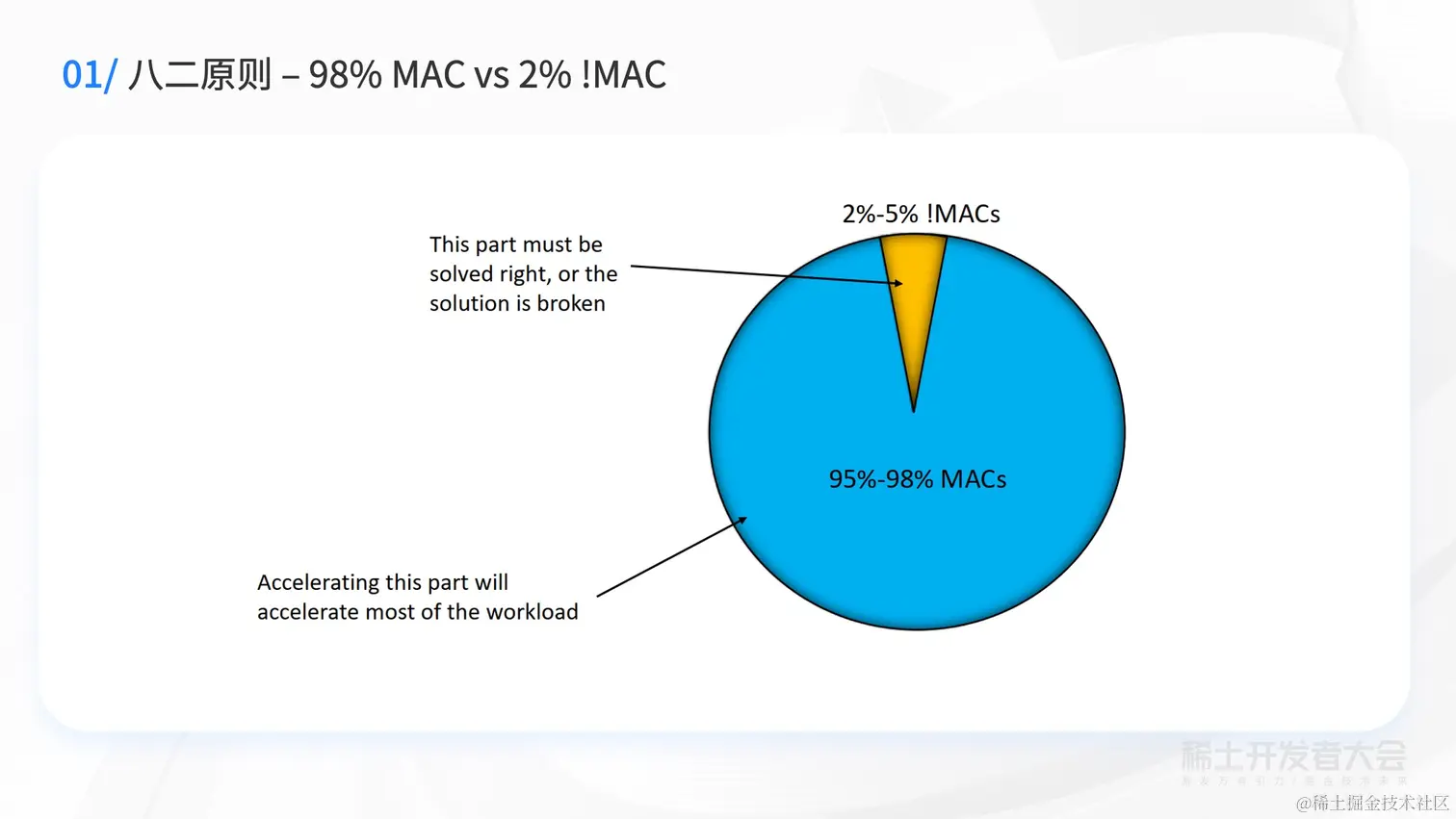
14 |
15 | 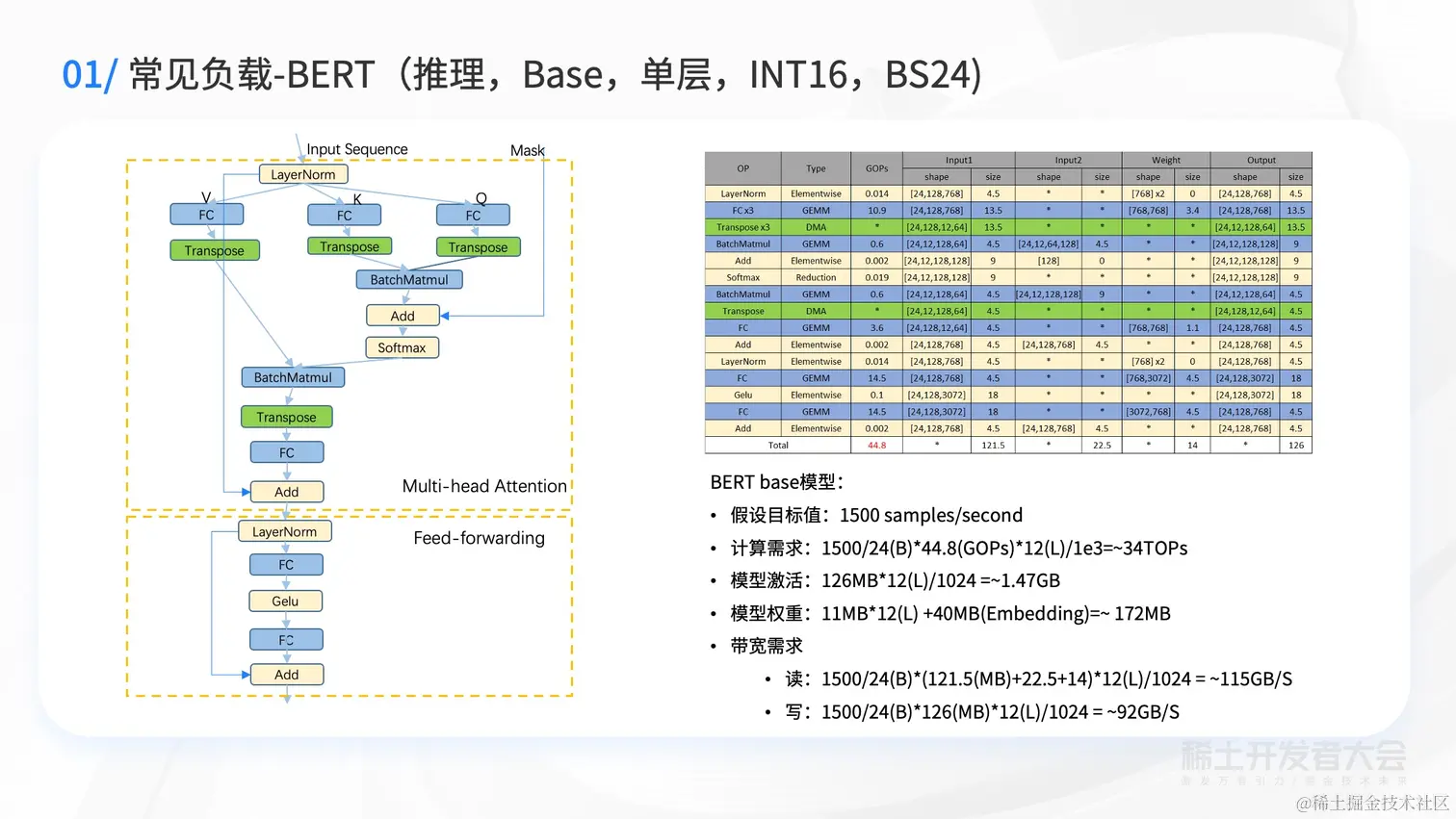
16 |
17 | 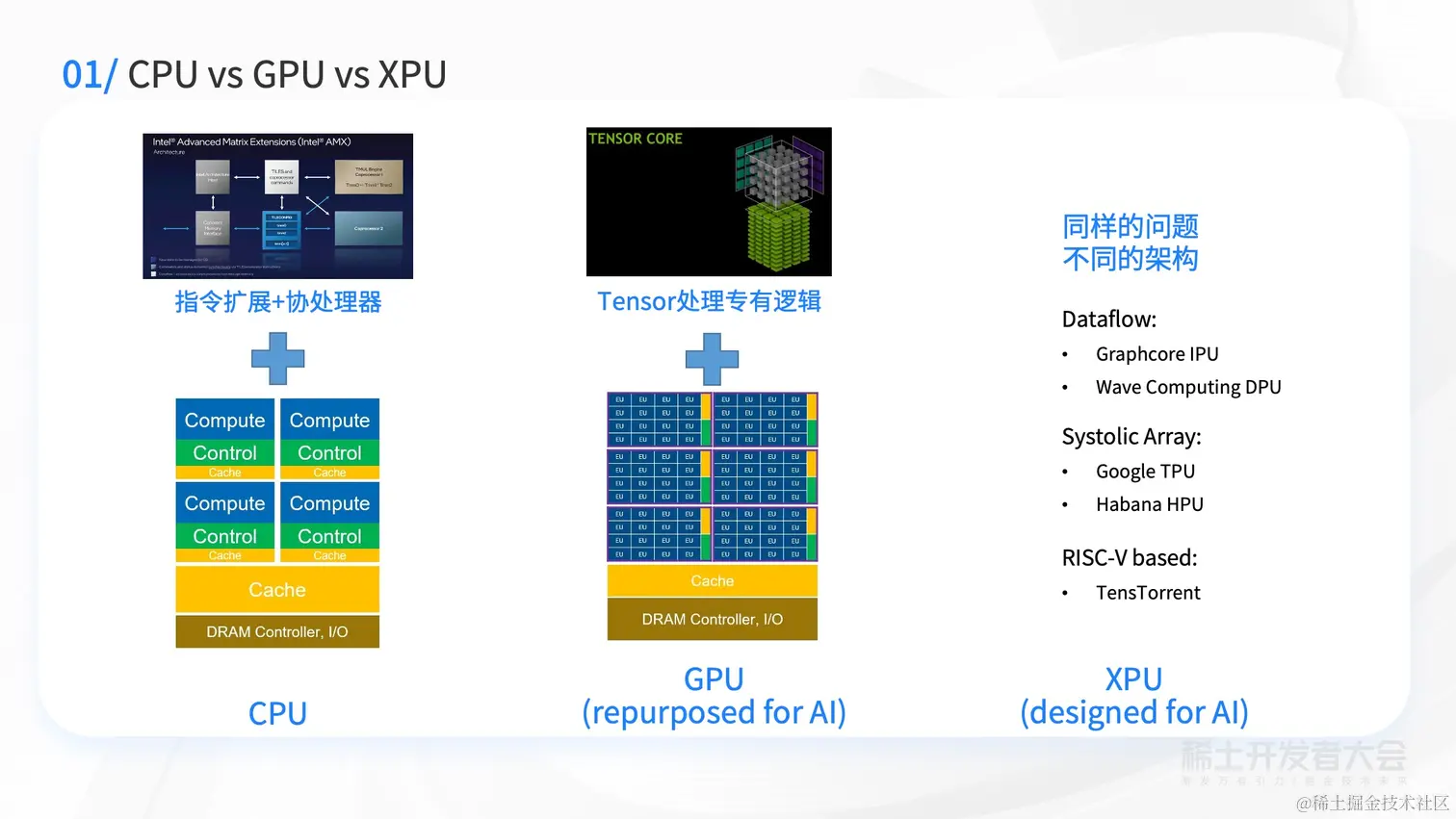
18 |
19 | 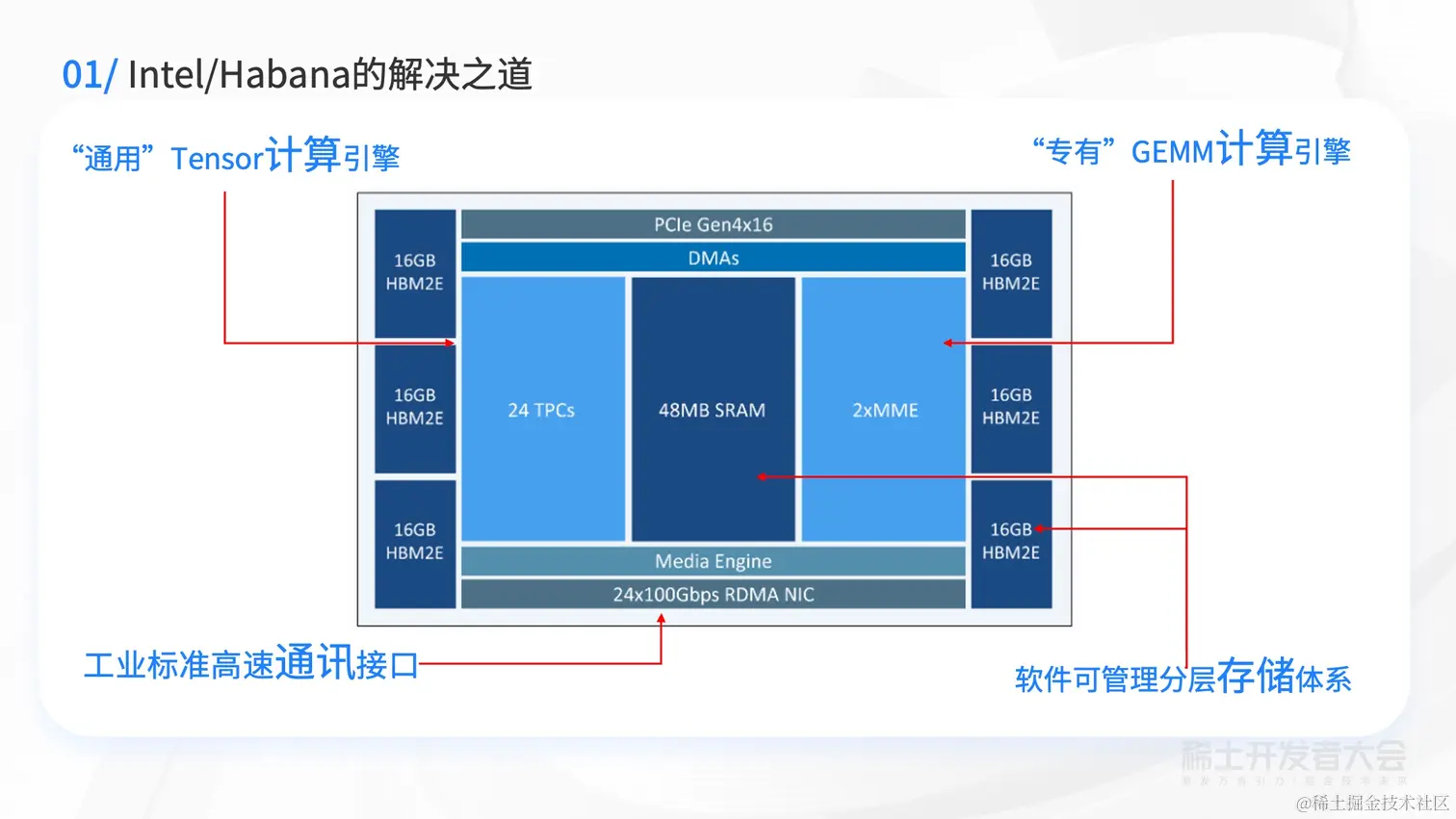
20 |
21 | 
22 |
23 | 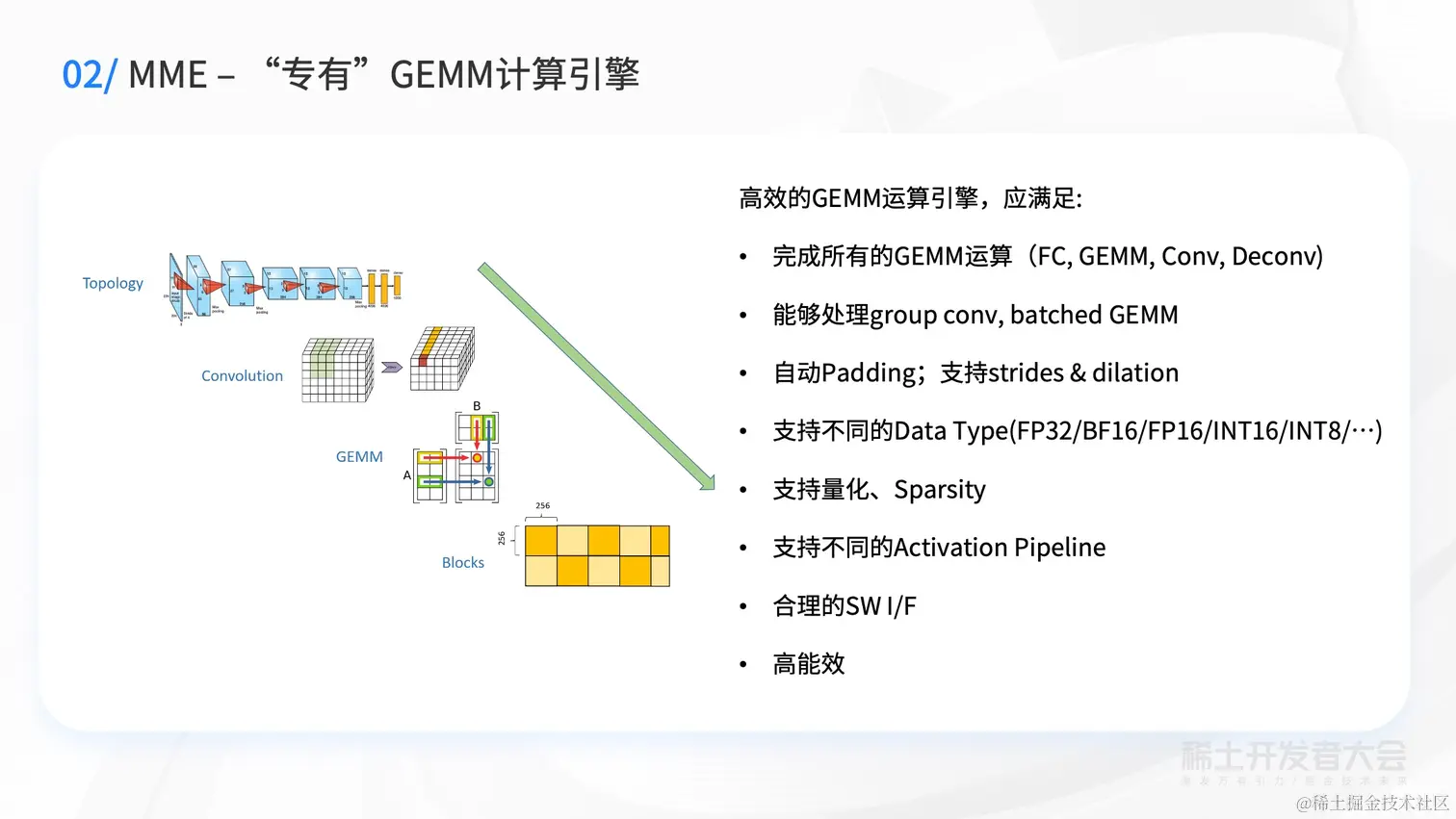
24 |
25 | 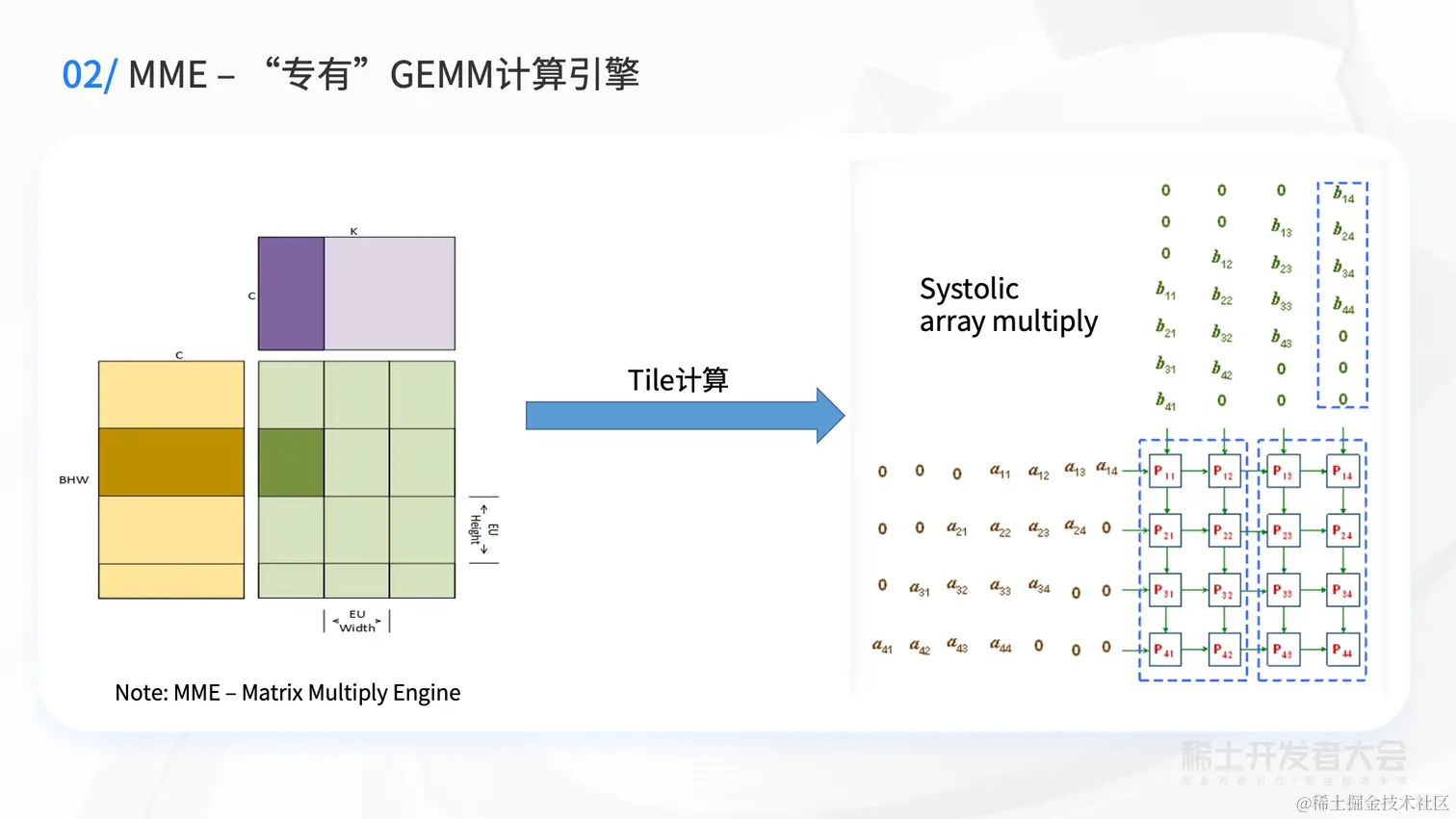
26 |
27 | 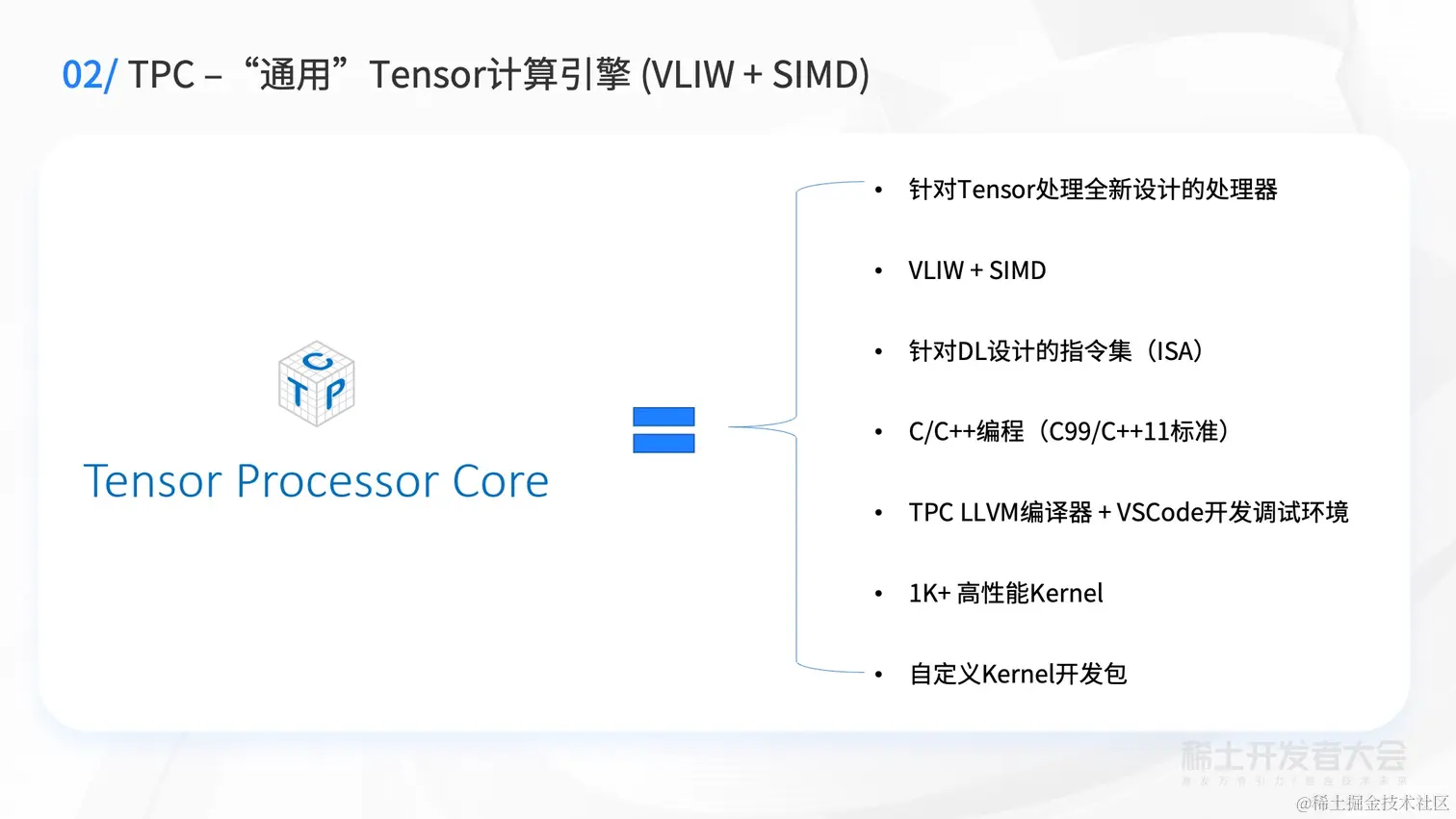
28 |
29 | 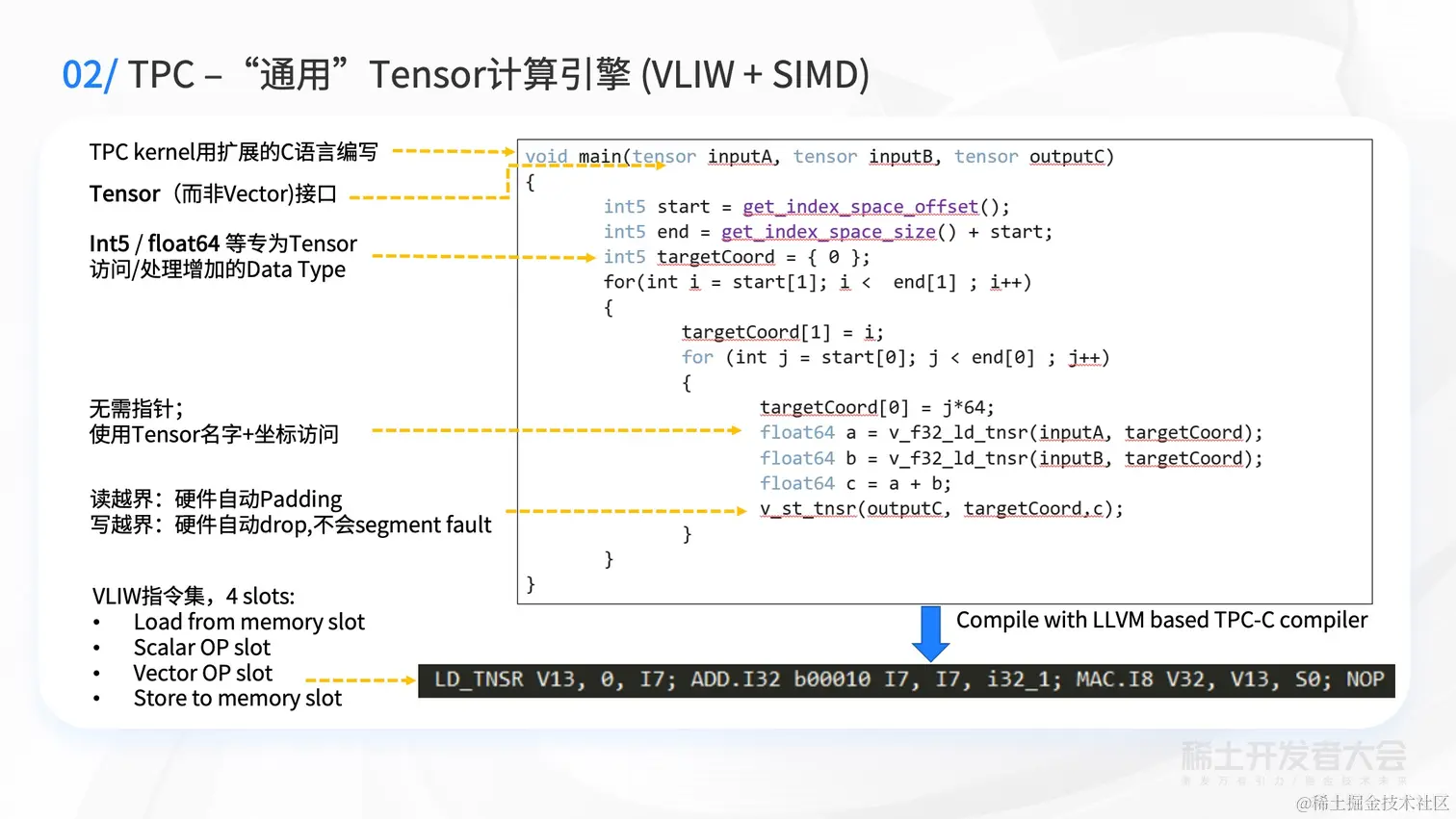
30 |
31 | 
32 |
33 | 
34 |
35 | 
36 |
37 | 
38 |
39 | 
40 |
41 | 
42 |
43 | 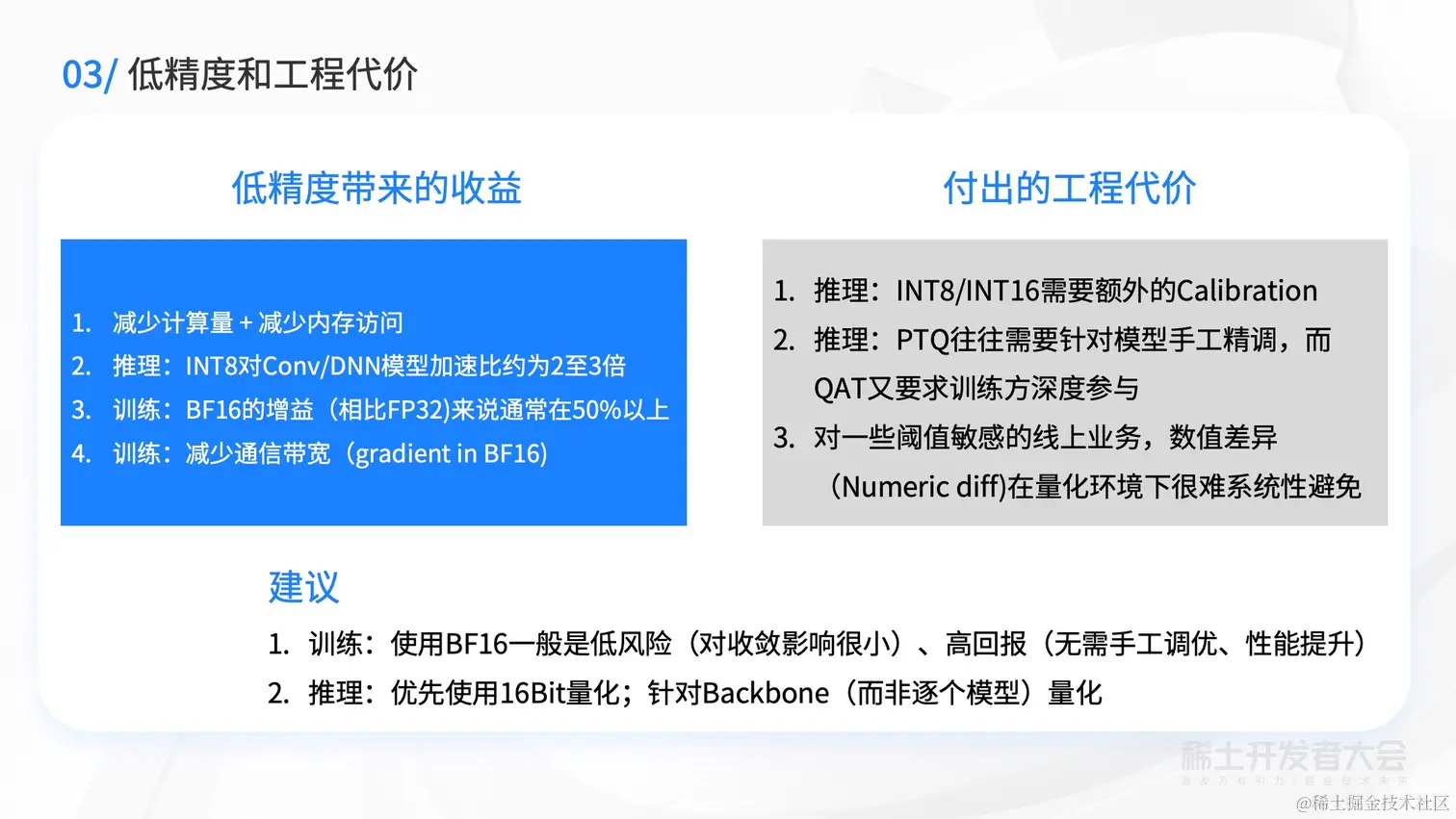
44 |
45 | 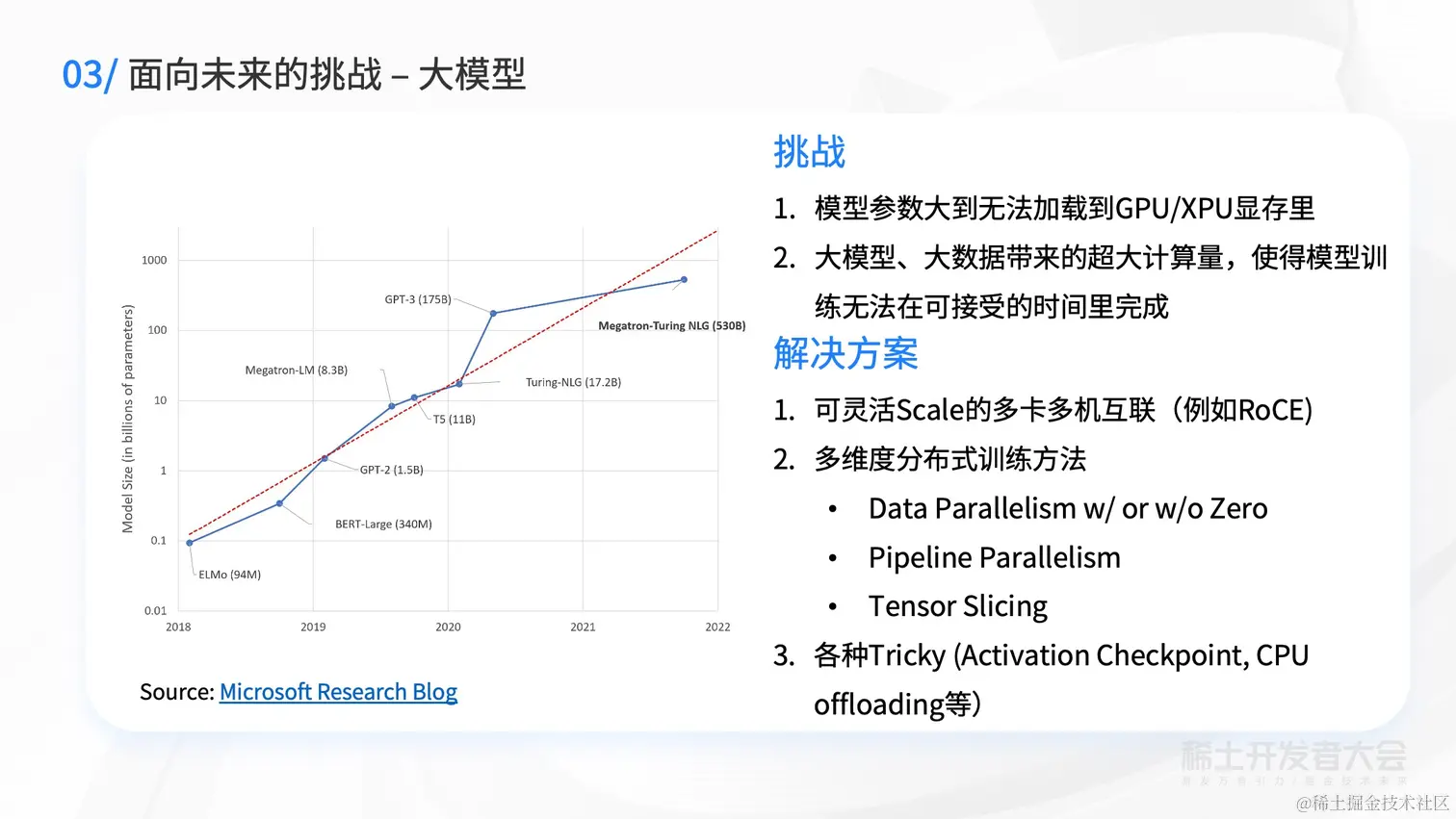
46 |
47 | 
48 |
49 | [原文地址](https://juejin.cn/book/7127092198096502822/section/7127227694386774027)
--------------------------------------------------------------------------------
/docs/稀土开发者大会2022/30-黄东旭:在全球化和多云环境中看开源软件的商业化探索.md:
--------------------------------------------------------------------------------
1 | # 黄东旭:在全球化和多云环境中看开源软件的商业化探索
2 |
3 | 
4 |
5 | 
6 |
7 | 
8 |
9 | 
10 |
11 | 
12 |
13 | 
14 |
15 | 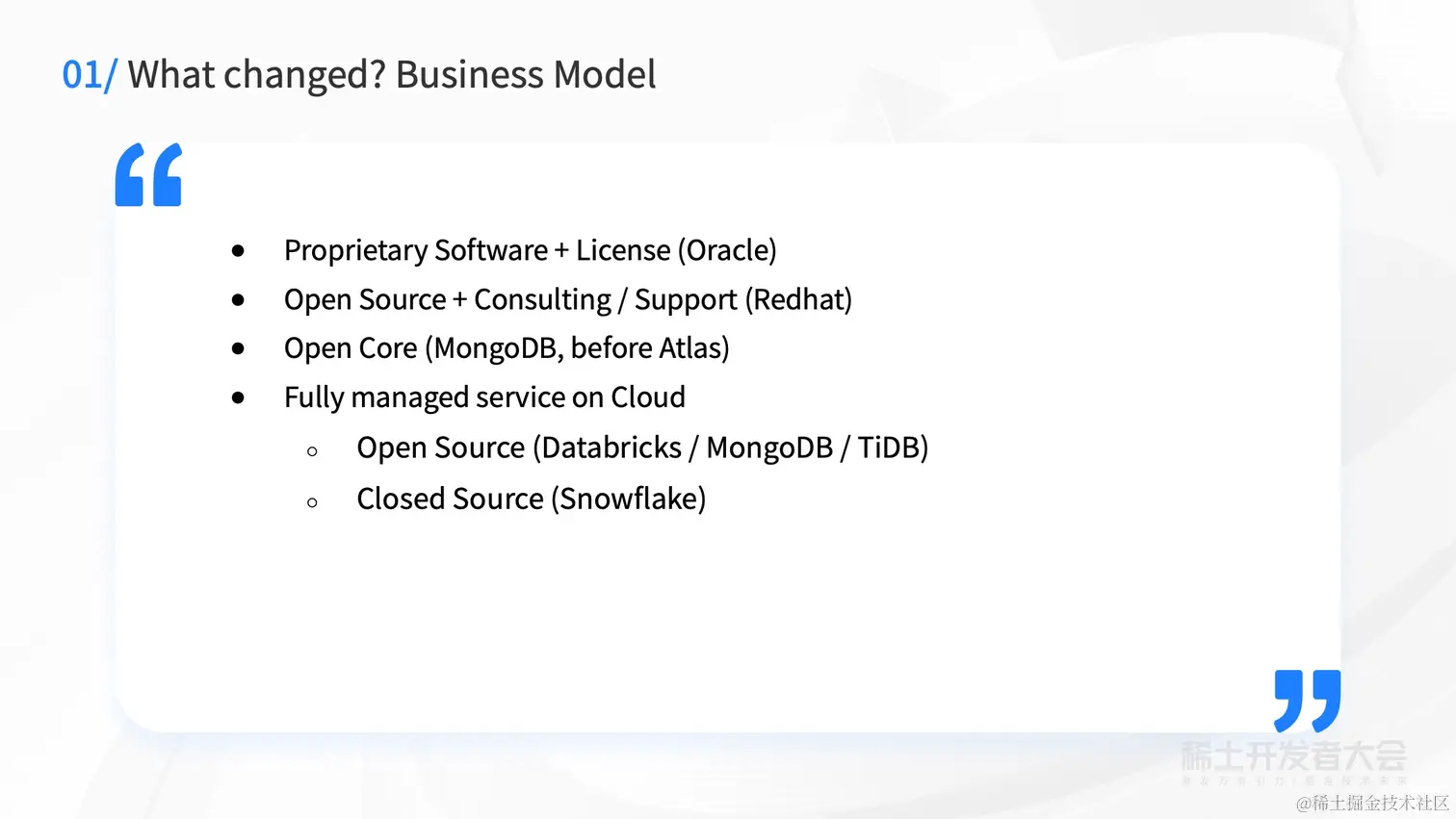
16 |
17 | 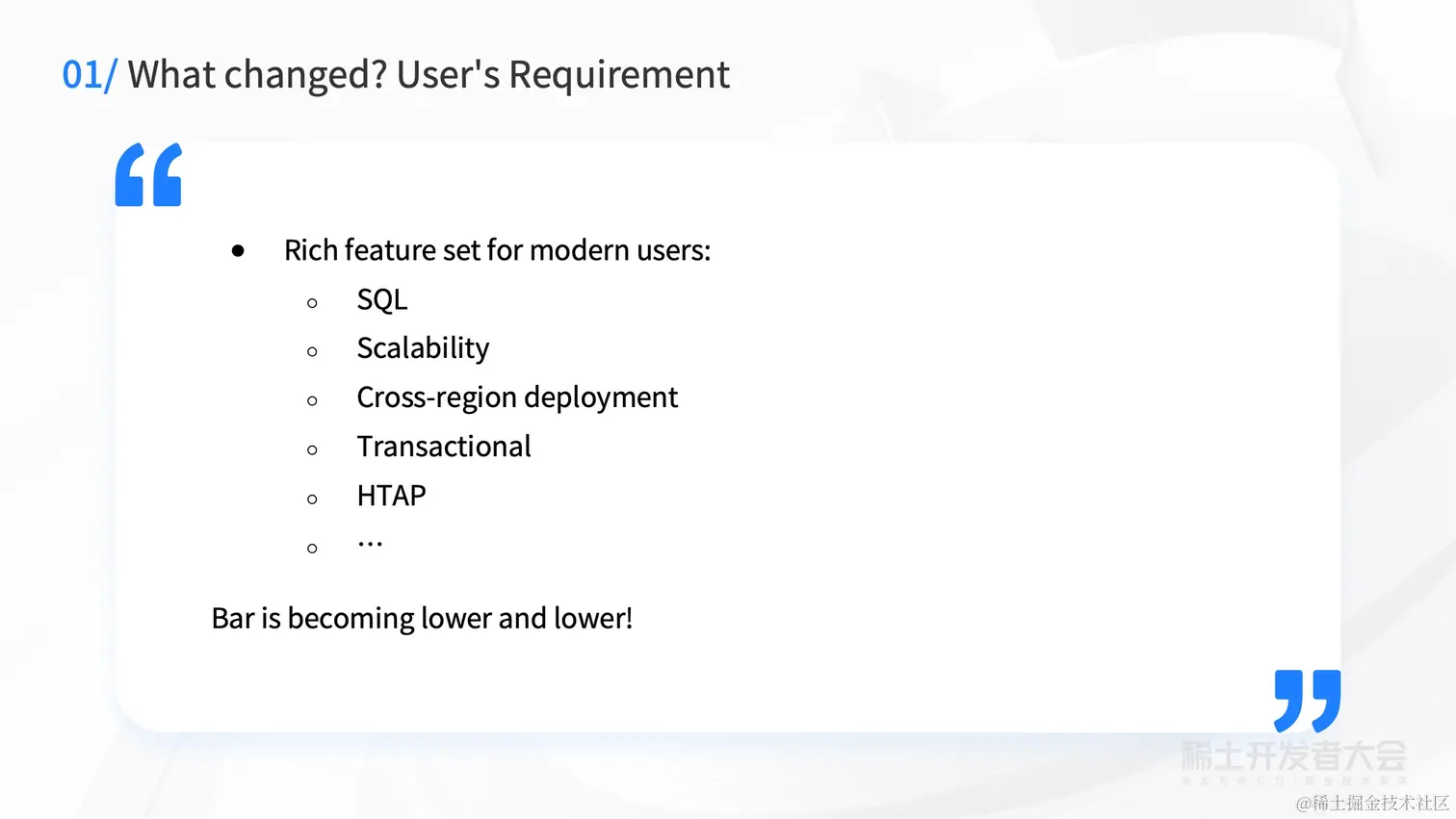
18 |
19 | 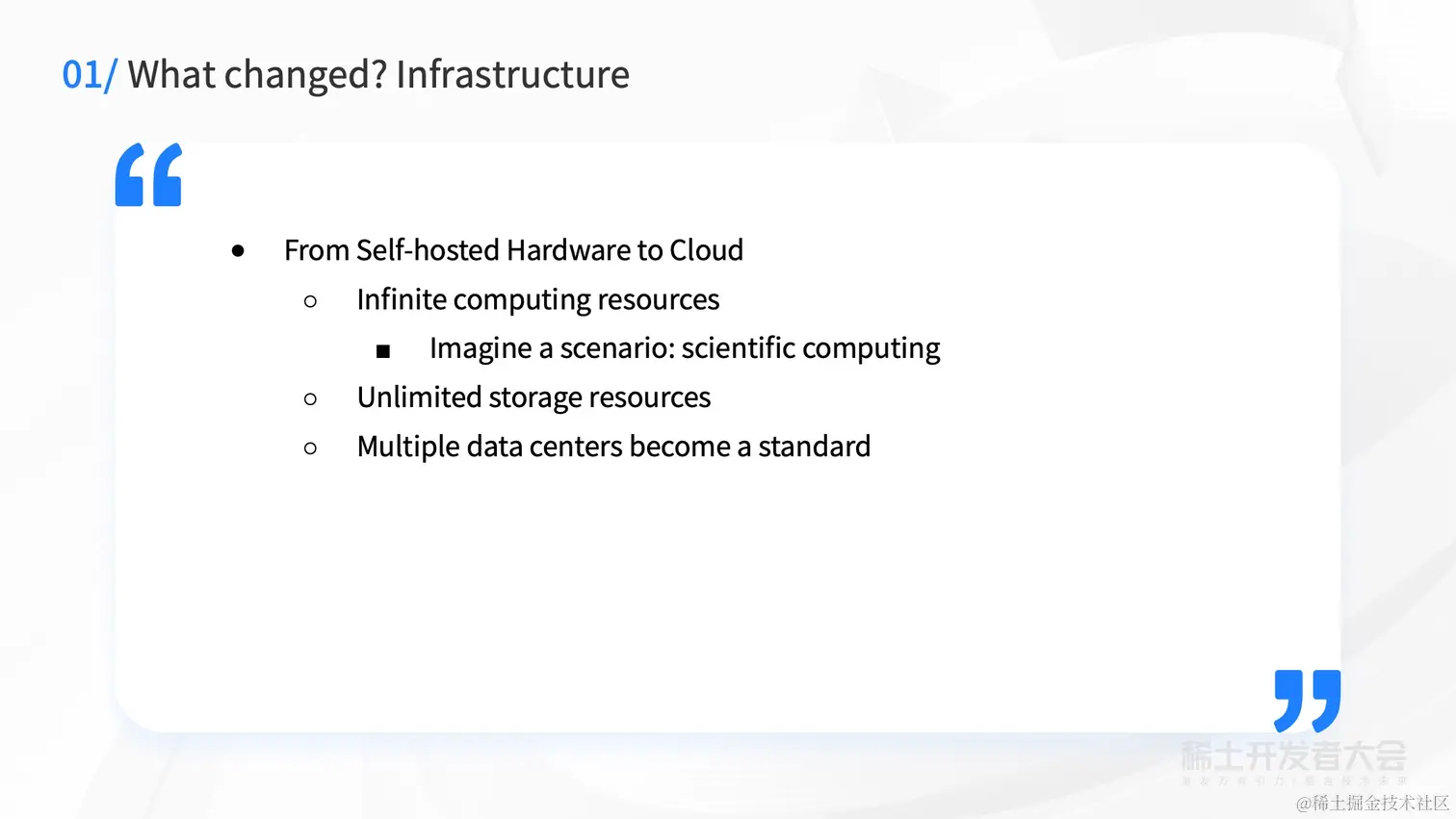
20 |
21 | 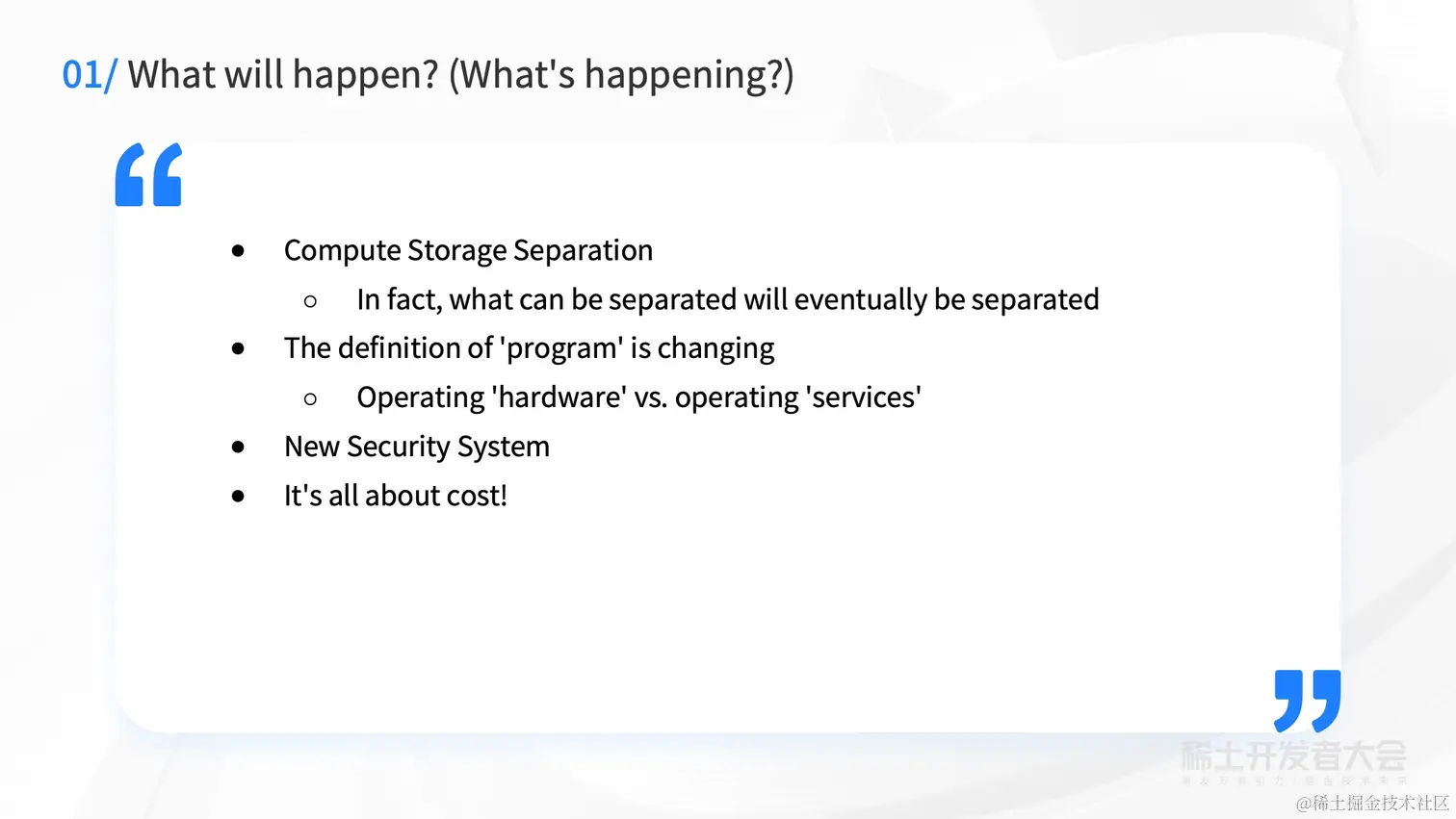
22 |
23 | 
24 |
25 | 
26 |
27 | 
28 |
29 | 
30 |
31 | 
32 |
33 | 
34 |
35 | 
36 |
37 | 
38 |
39 | 
40 |
41 | 
42 |
43 | 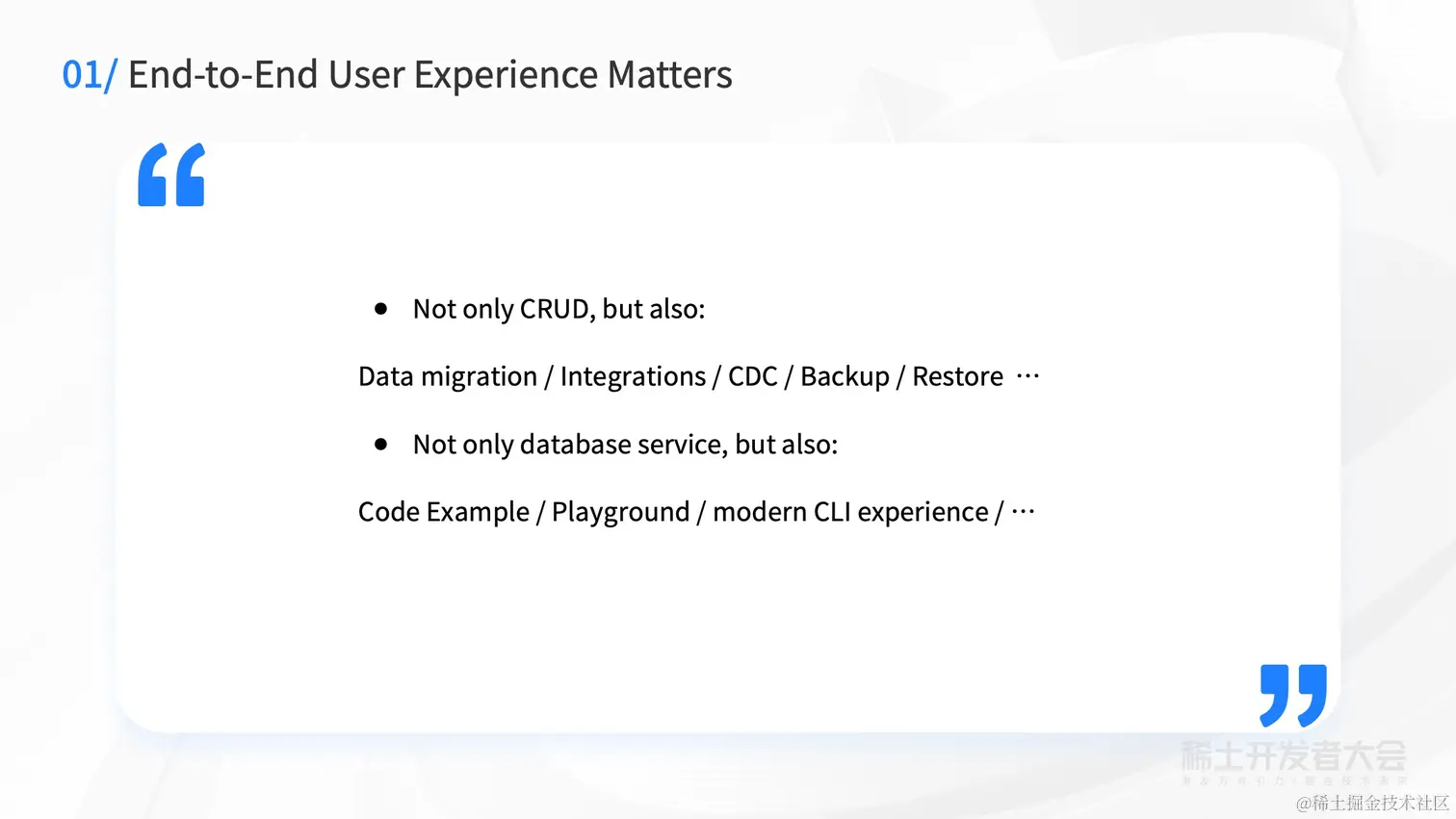
44 |
45 | 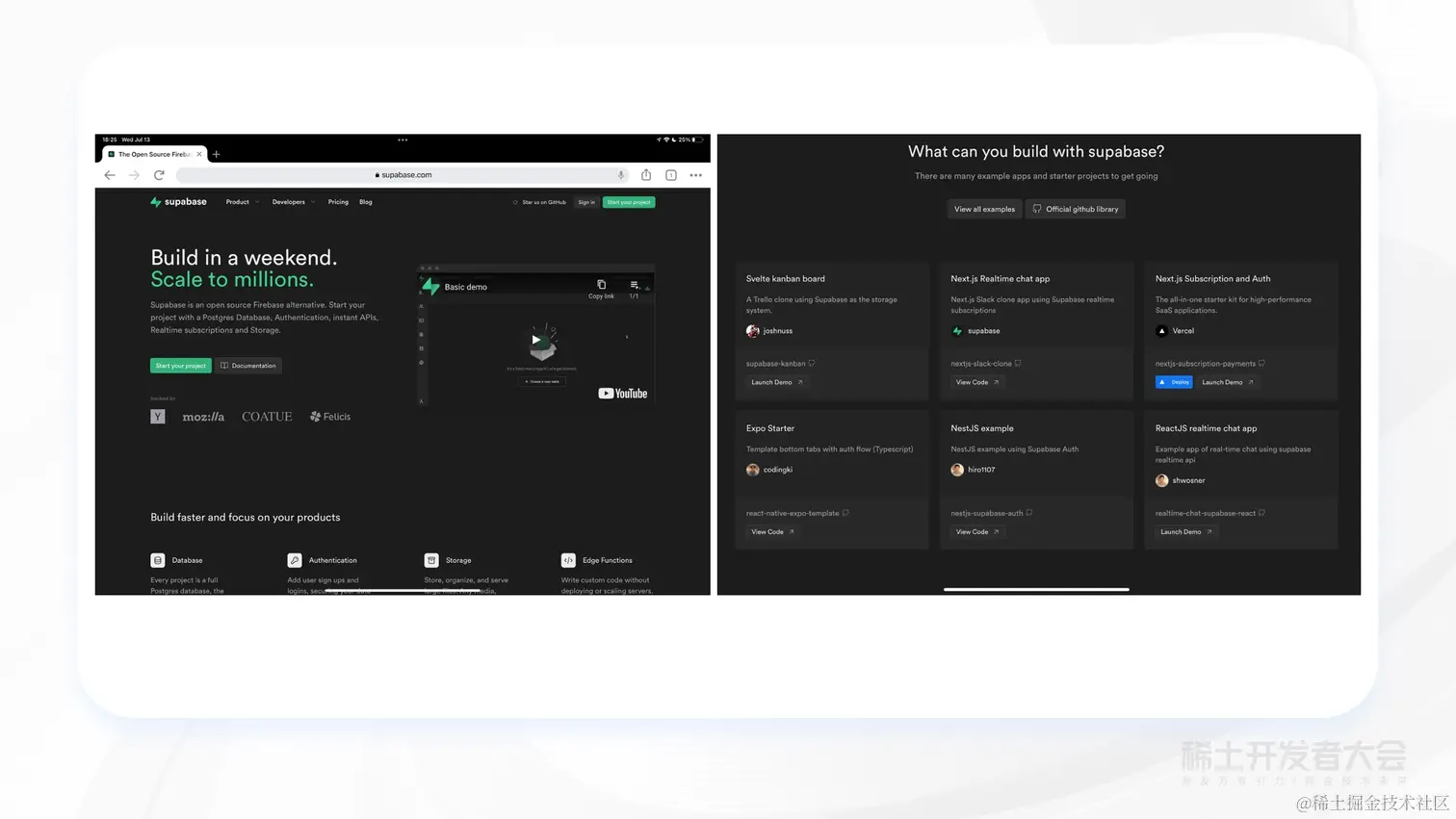
46 |
47 | 
48 |
49 | [原文地址](https://juejin.cn/book/7127092198096502822/section/7127553016172904481)
--------------------------------------------------------------------------------
/docs/稀土开发者大会2022/56-夏磊:如何利用 Intel 加速工具构建端到端的高性能应用.md:
--------------------------------------------------------------------------------
1 | # 夏磊:如何利用 Intel 加速工具构建端到端的高性能应用
2 |
3 | 
4 |
5 | 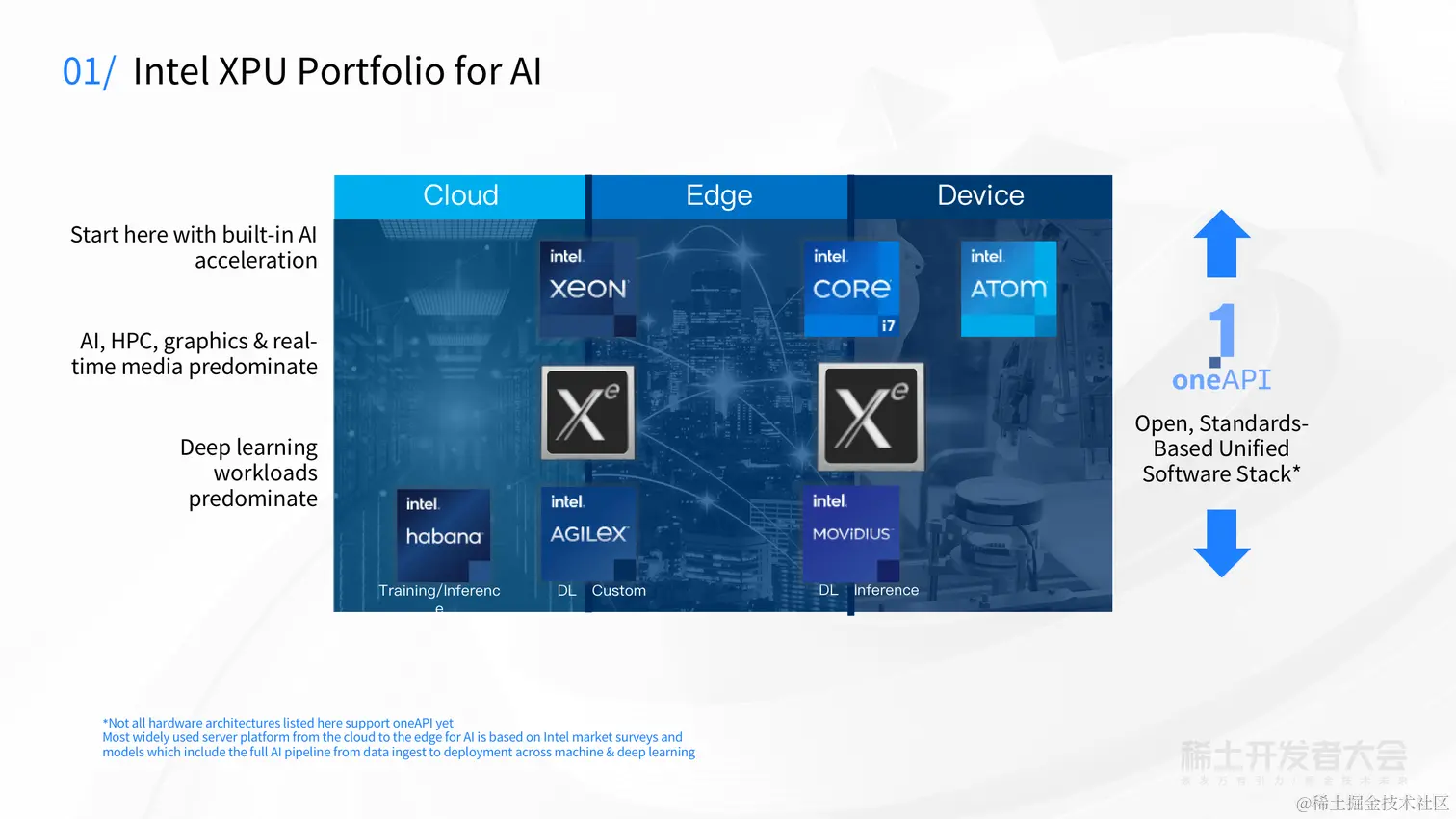
6 |
7 | 
8 |
9 | 
10 |
11 | 
12 |
13 | 
14 |
15 | 
16 |
17 | 
18 |
19 | 
20 |
21 | 
22 |
23 | 
24 |
25 | 
26 |
27 | 
28 |
29 | 
30 |
31 | 
32 |
33 | 
34 |
35 | 
36 |
37 | 
38 |
39 | 
40 |
41 | [原文地址](https://juejin.cn/book/7127092198096502822/section/7127835799264952356)
--------------------------------------------------------------------------------
/docs/稀土开发者大会2022/20-李银龙:数据驱动的智能驾驶云.md:
--------------------------------------------------------------------------------
1 | # 李银龙:数据驱动的智能驾驶云
2 |
3 | 
4 |
5 | 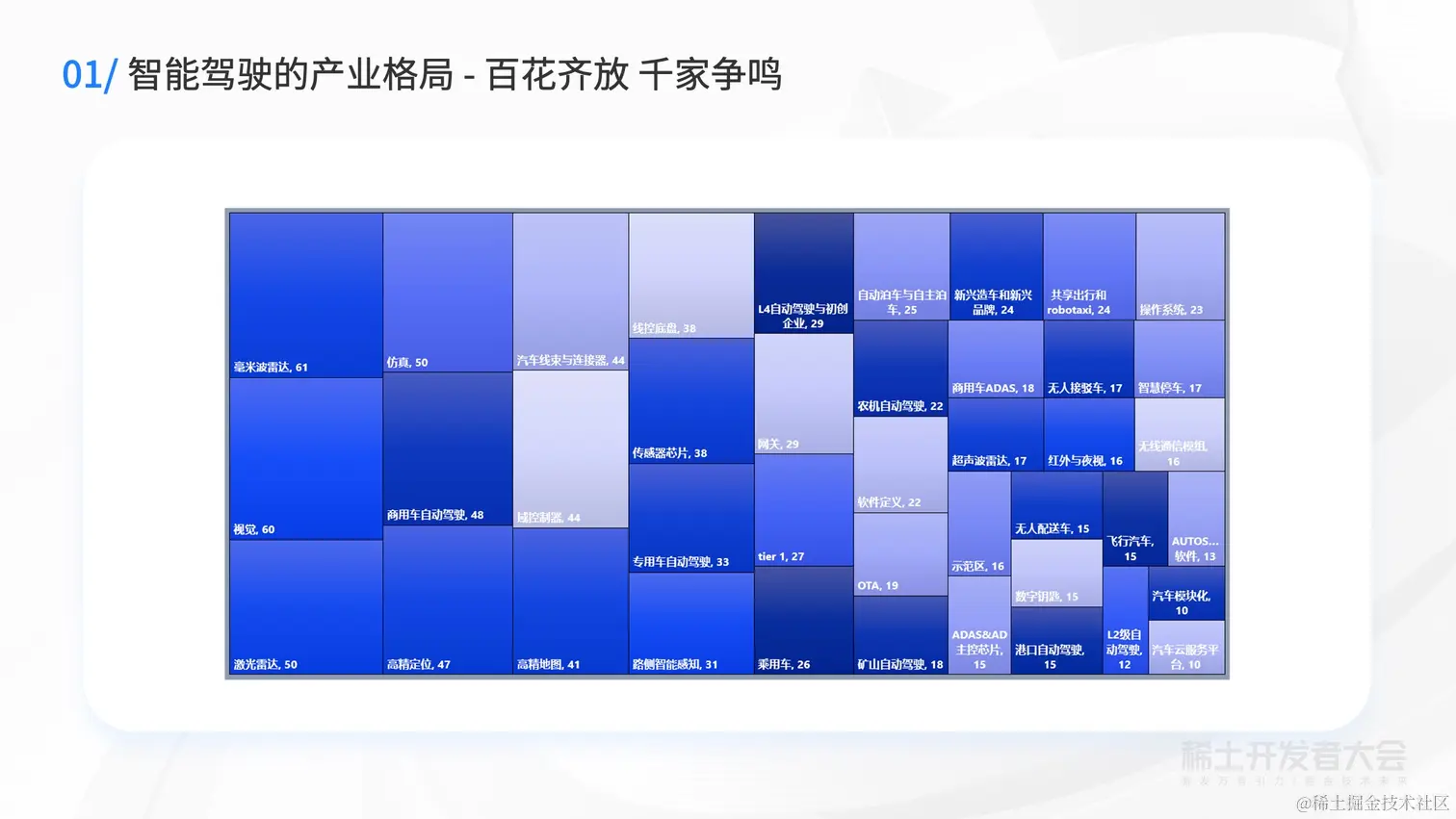
6 |
7 | 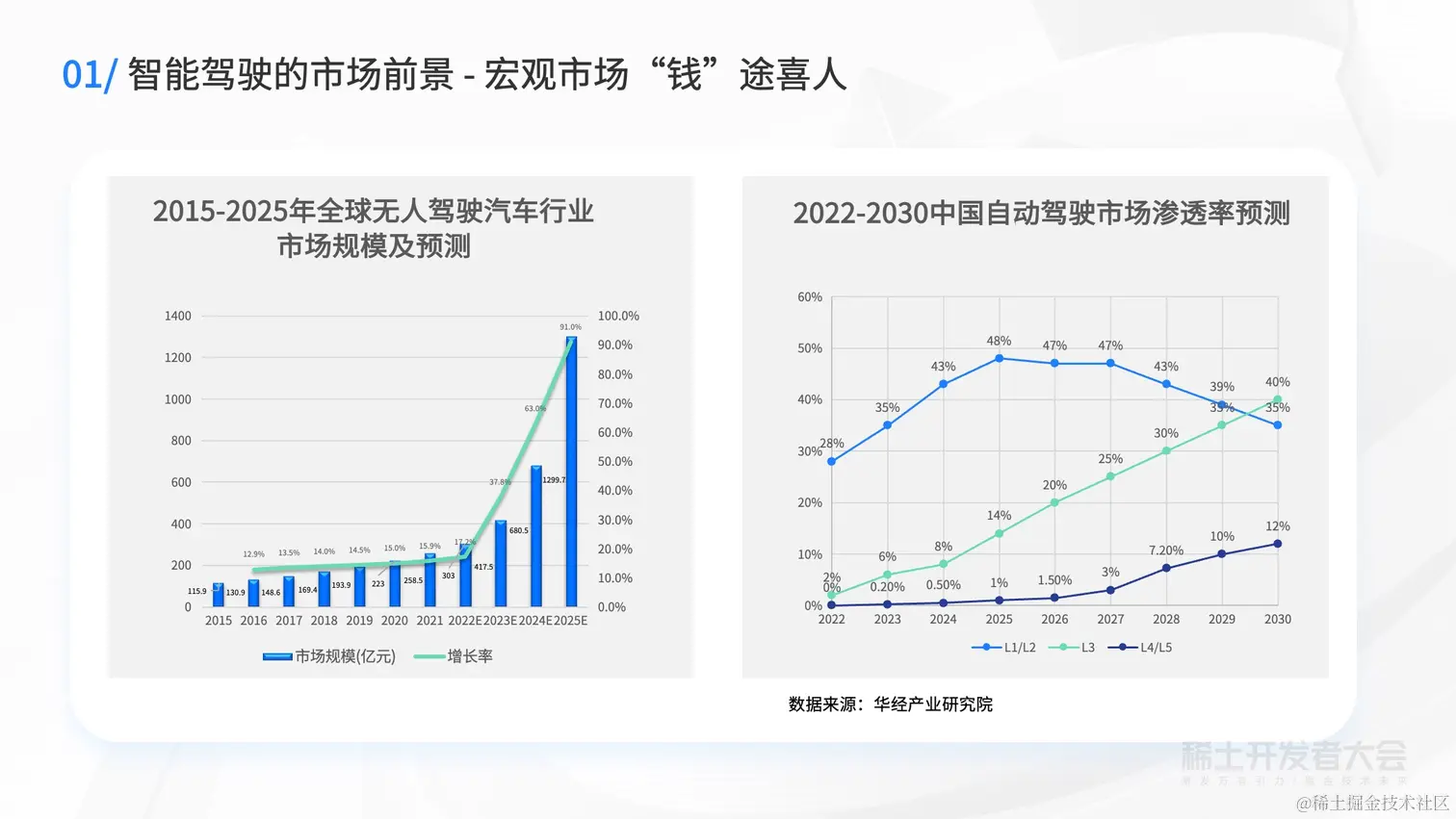
8 |
9 | 
10 |
11 | 
12 |
13 | 
14 |
15 | 
16 |
17 | 
18 |
19 | 
20 |
21 | 
22 |
23 | 
24 |
25 | 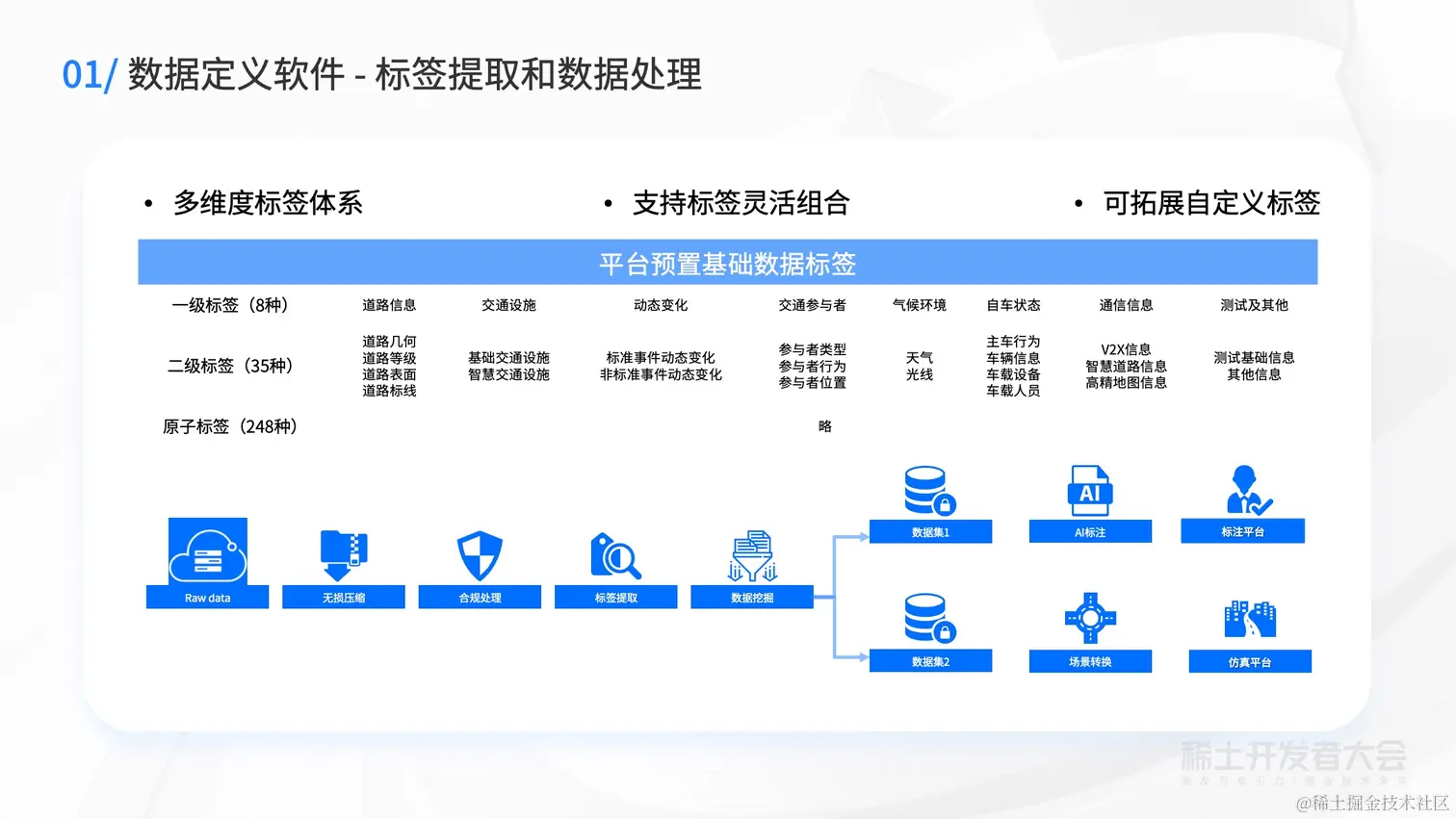
26 |
27 | 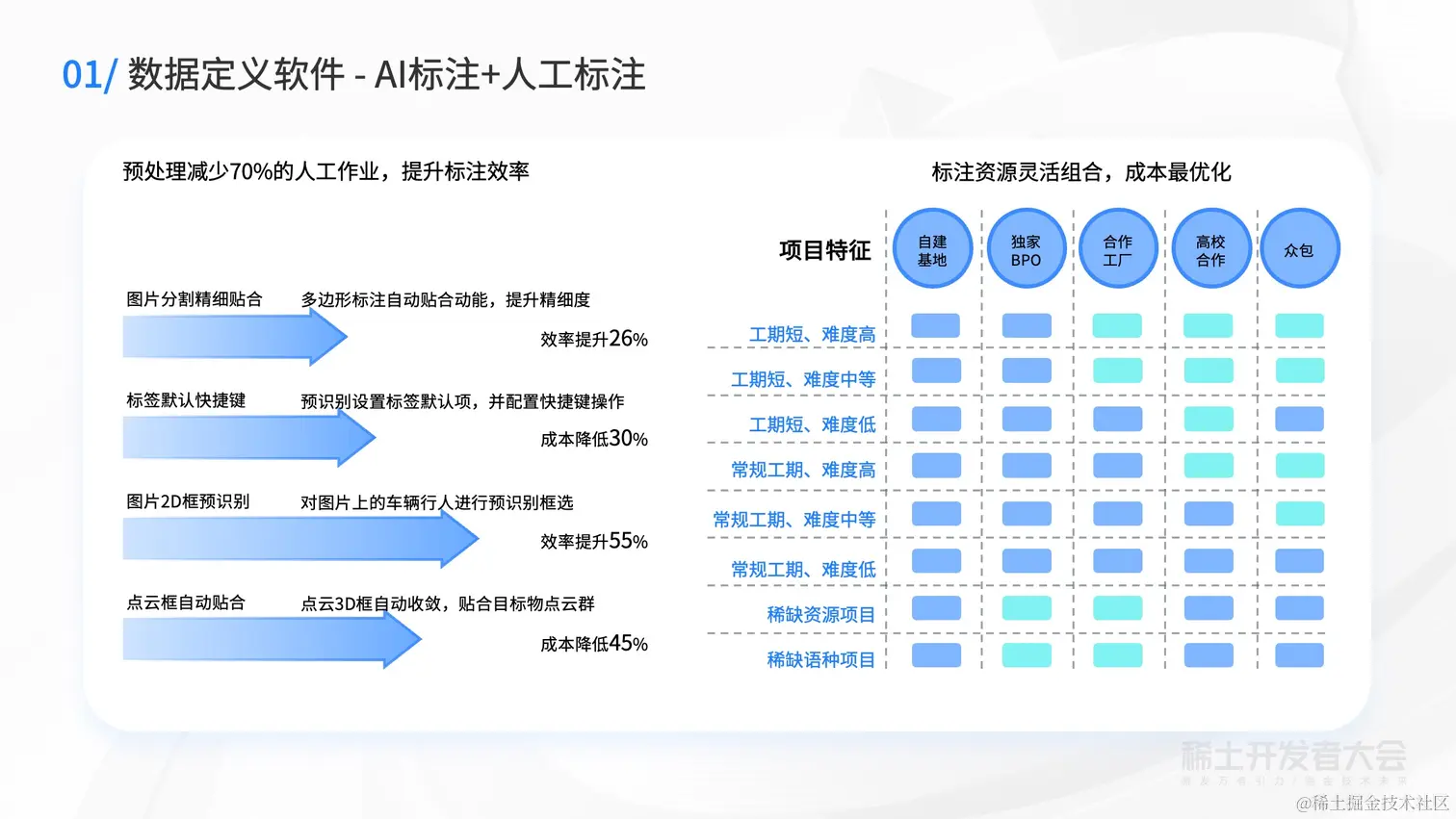
28 |
29 | 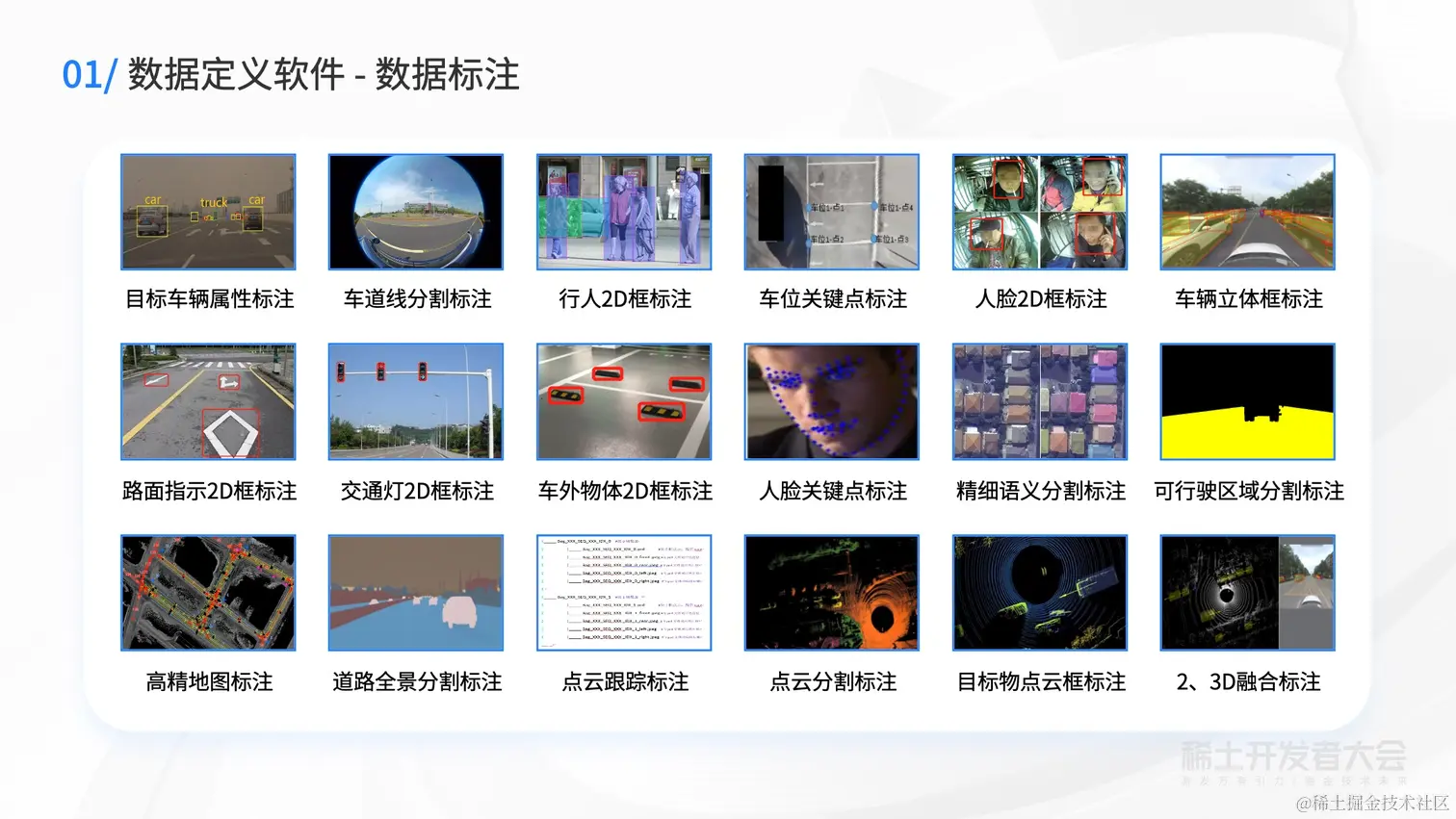
30 |
31 | 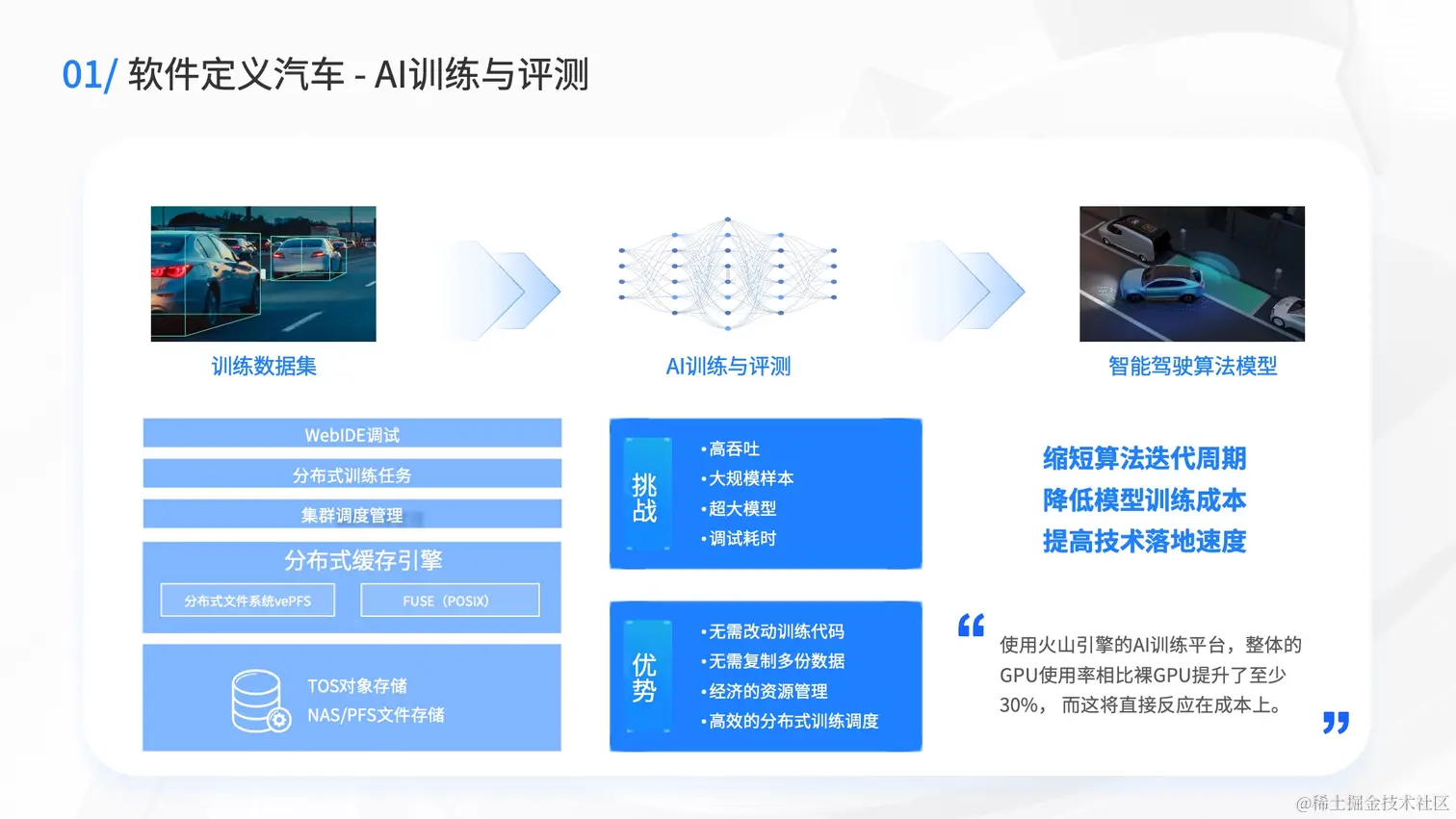
32 |
33 | 
34 |
35 | 
36 |
37 | 
38 |
39 | 
40 |
41 | 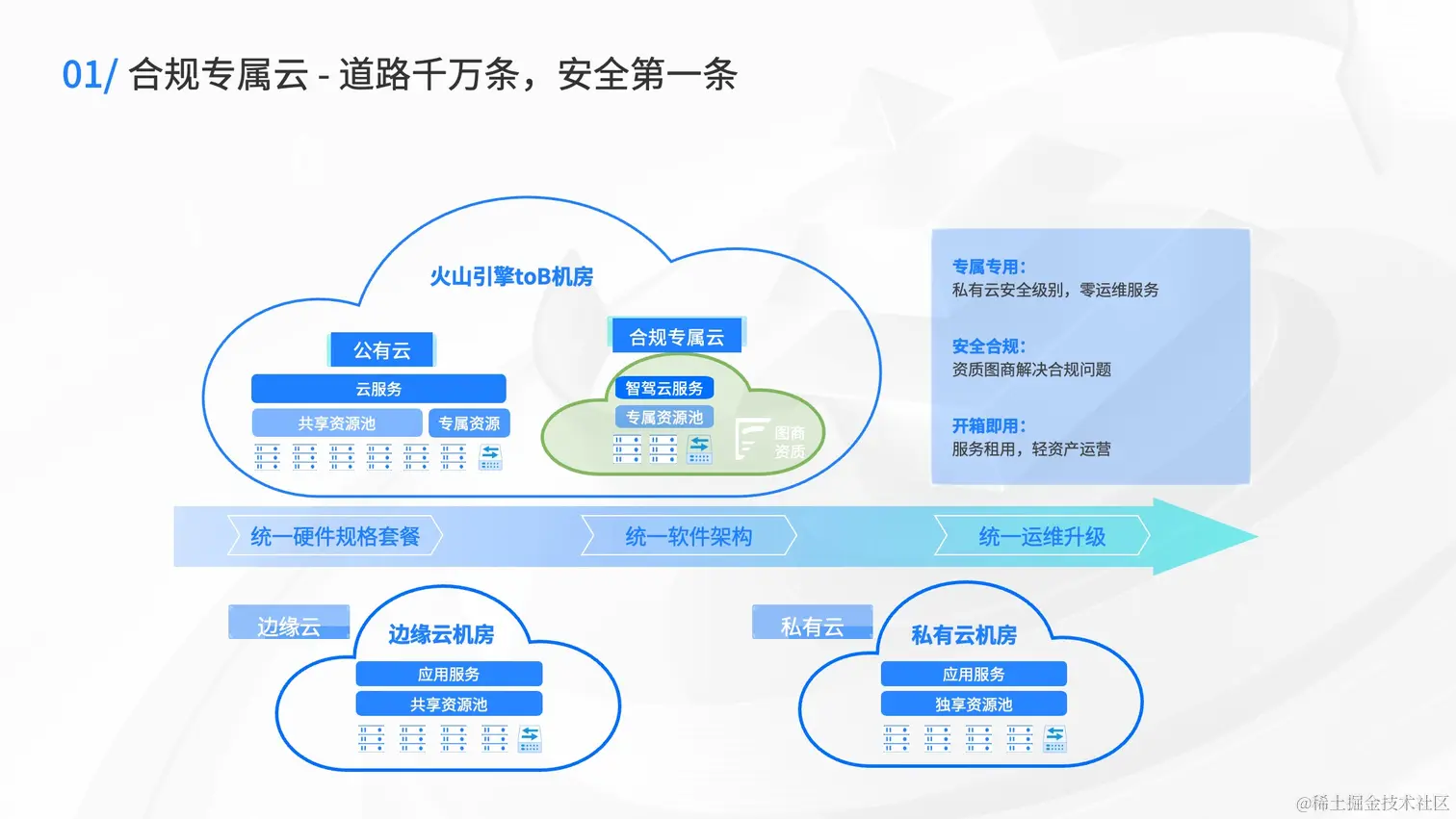
42 |
43 | 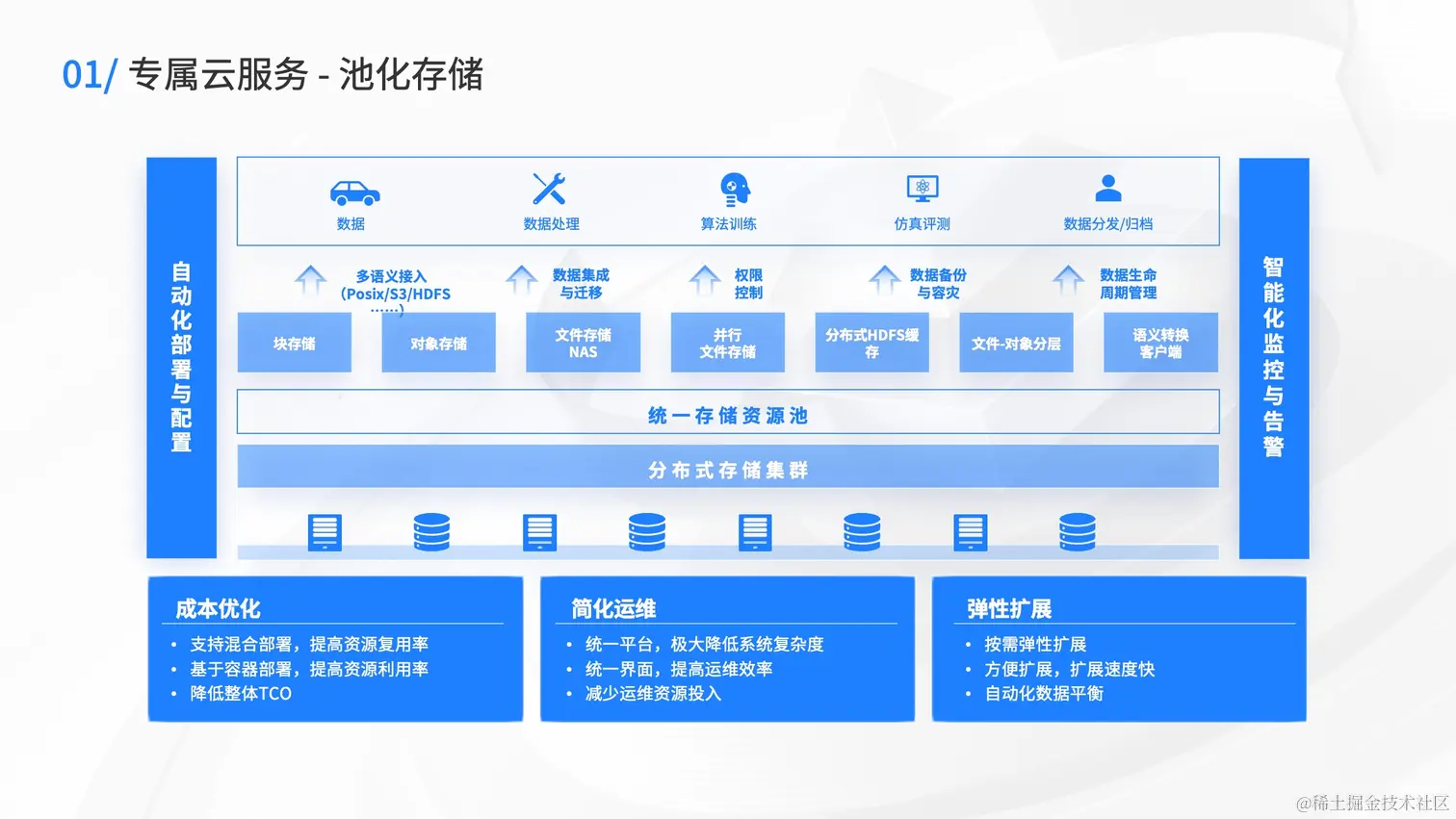
44 |
45 | 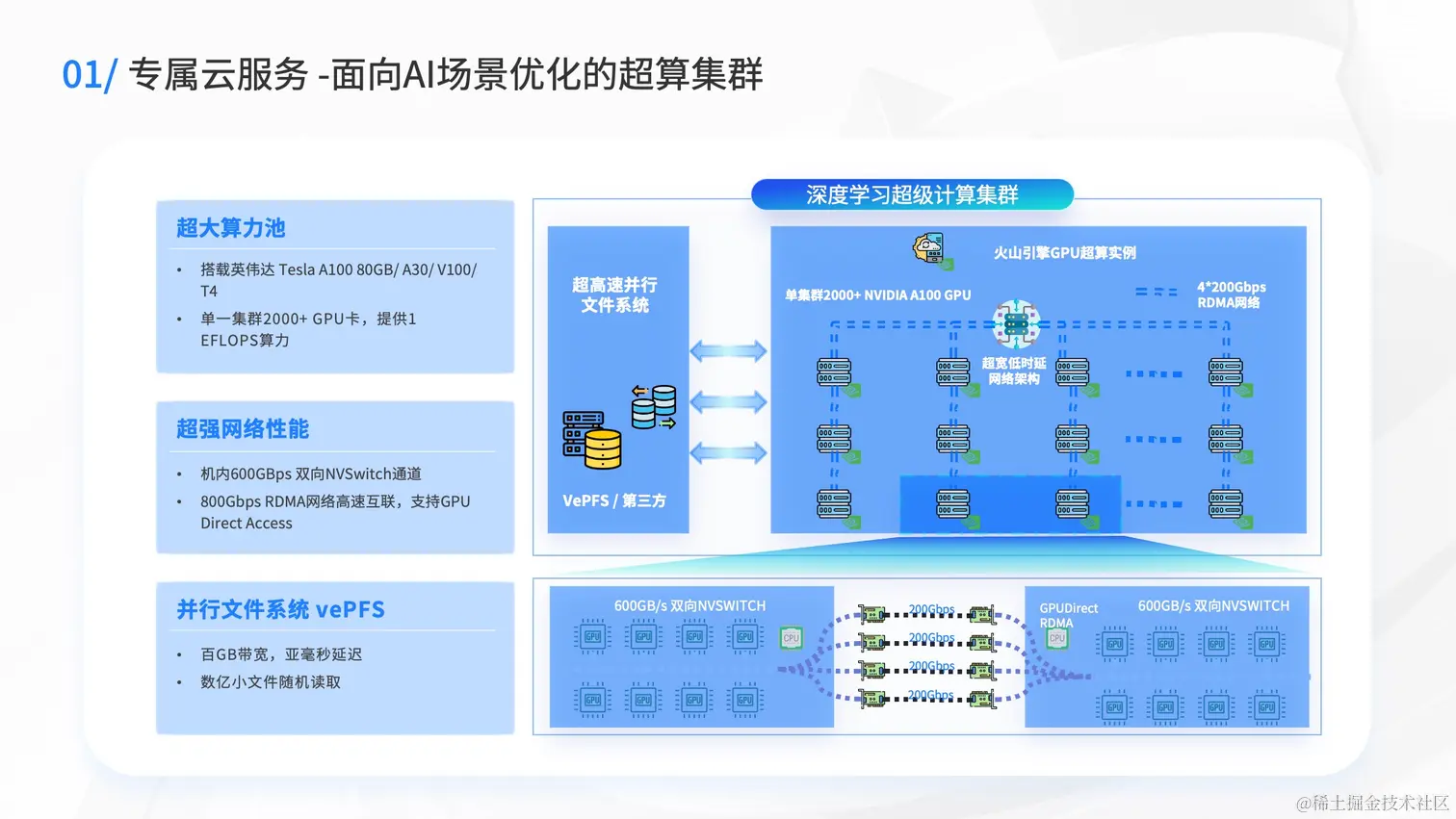
46 |
47 | 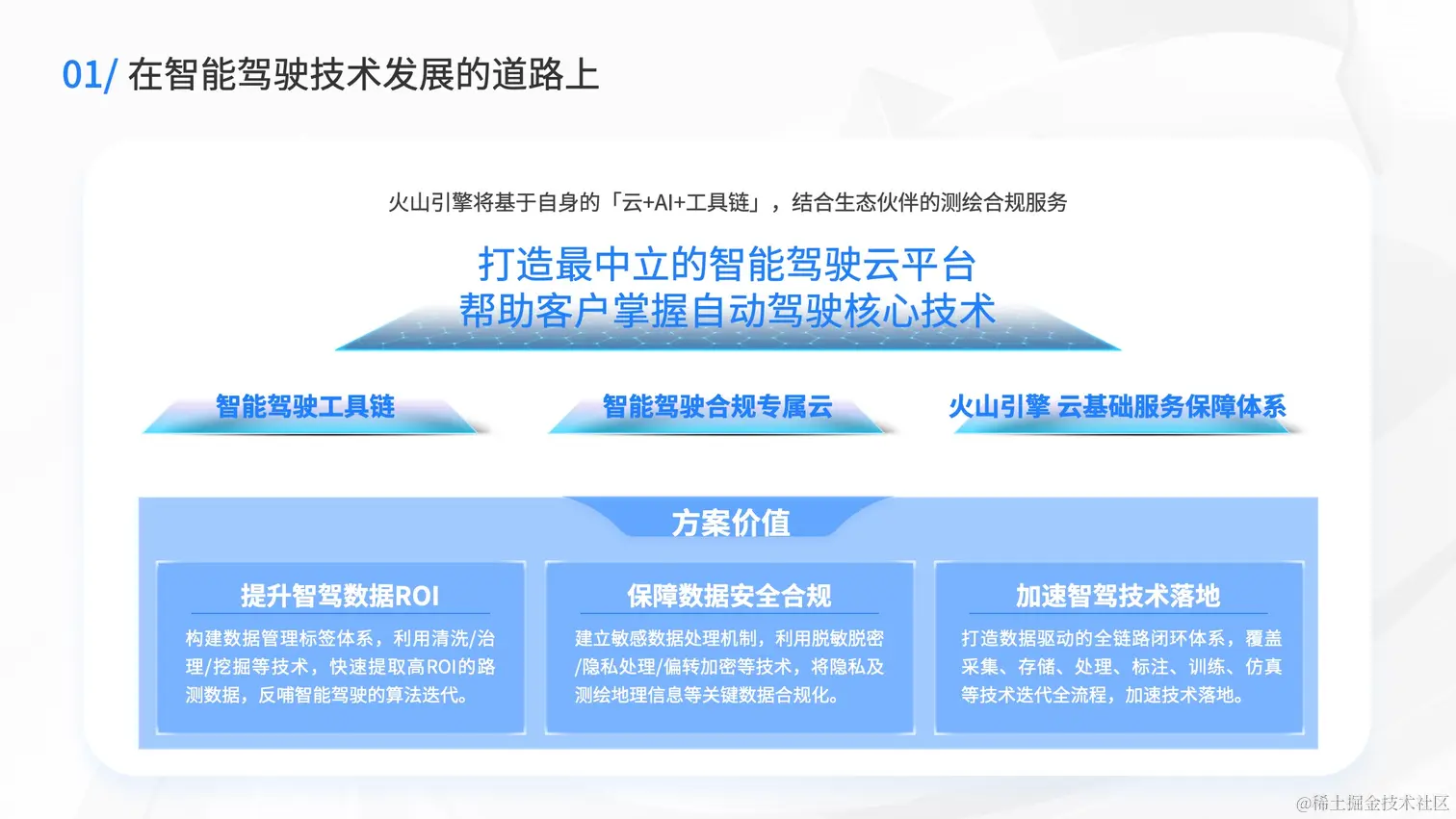
48 |
49 | 
50 |
51 | [原文地址](https://juejin.cn/book/7127092198096502822/section/7127534705242537995)
--------------------------------------------------------------------------------
/docs/稀土开发者大会2022/10-刘凡:Google Cloud 为您的云原生软件交付链保驾护航.md:
--------------------------------------------------------------------------------
1 | # 刘凡:Google Cloud 为您的云原生软件交付链保驾护航
2 |
3 | 
4 |
5 | 
6 |
7 | 
8 |
9 | 
10 |
11 | 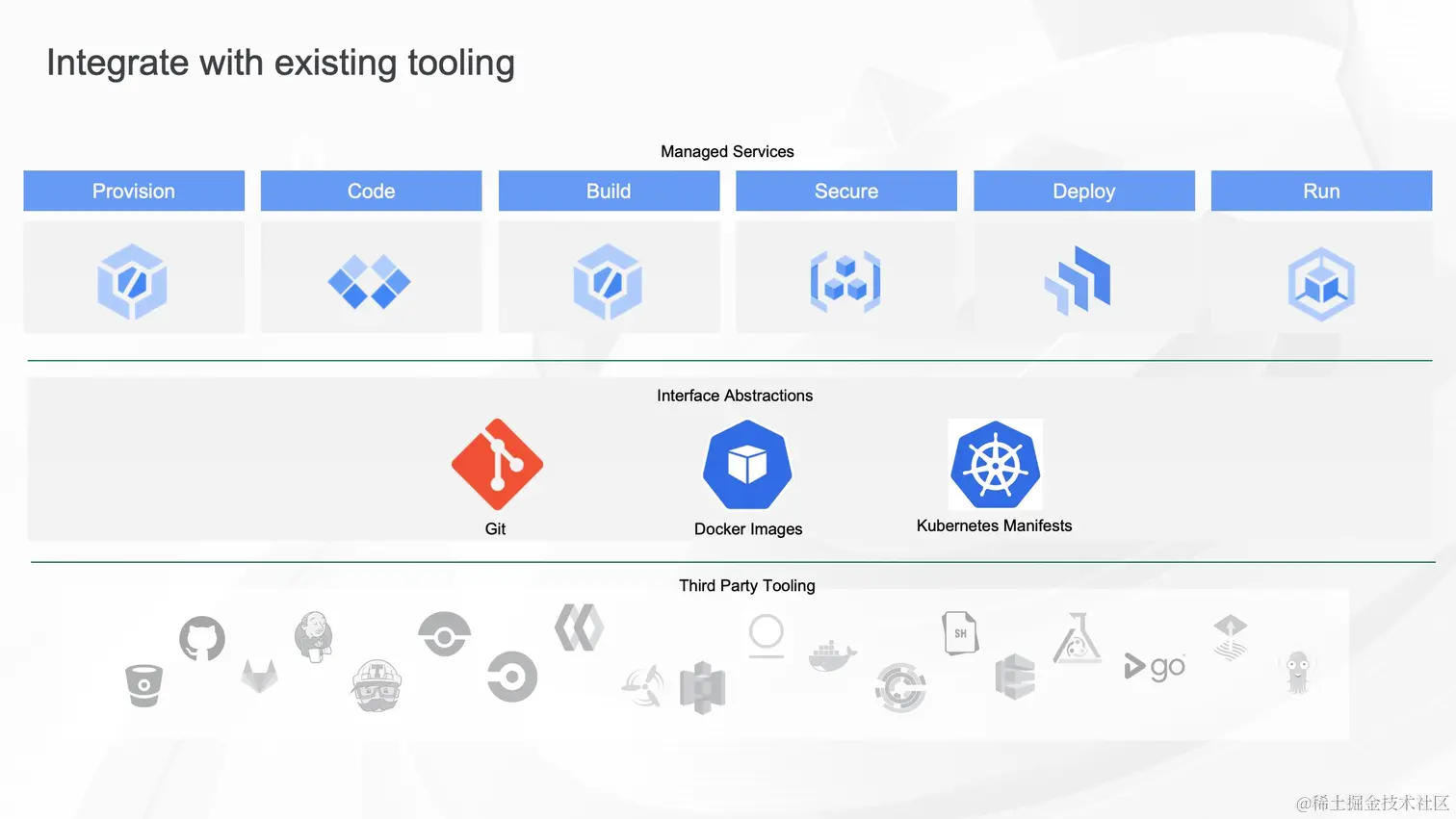
12 |
13 | 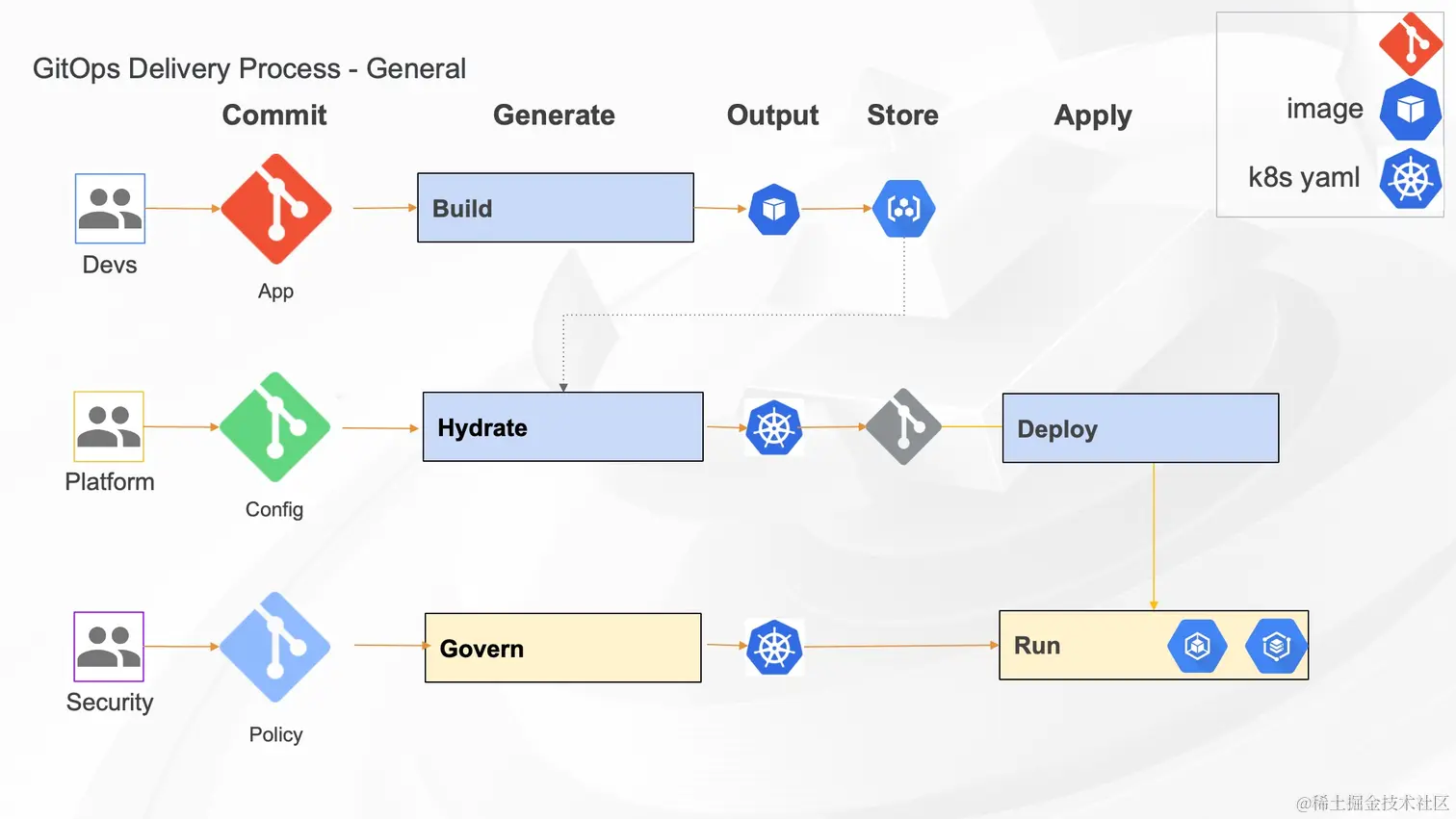
14 |
15 | 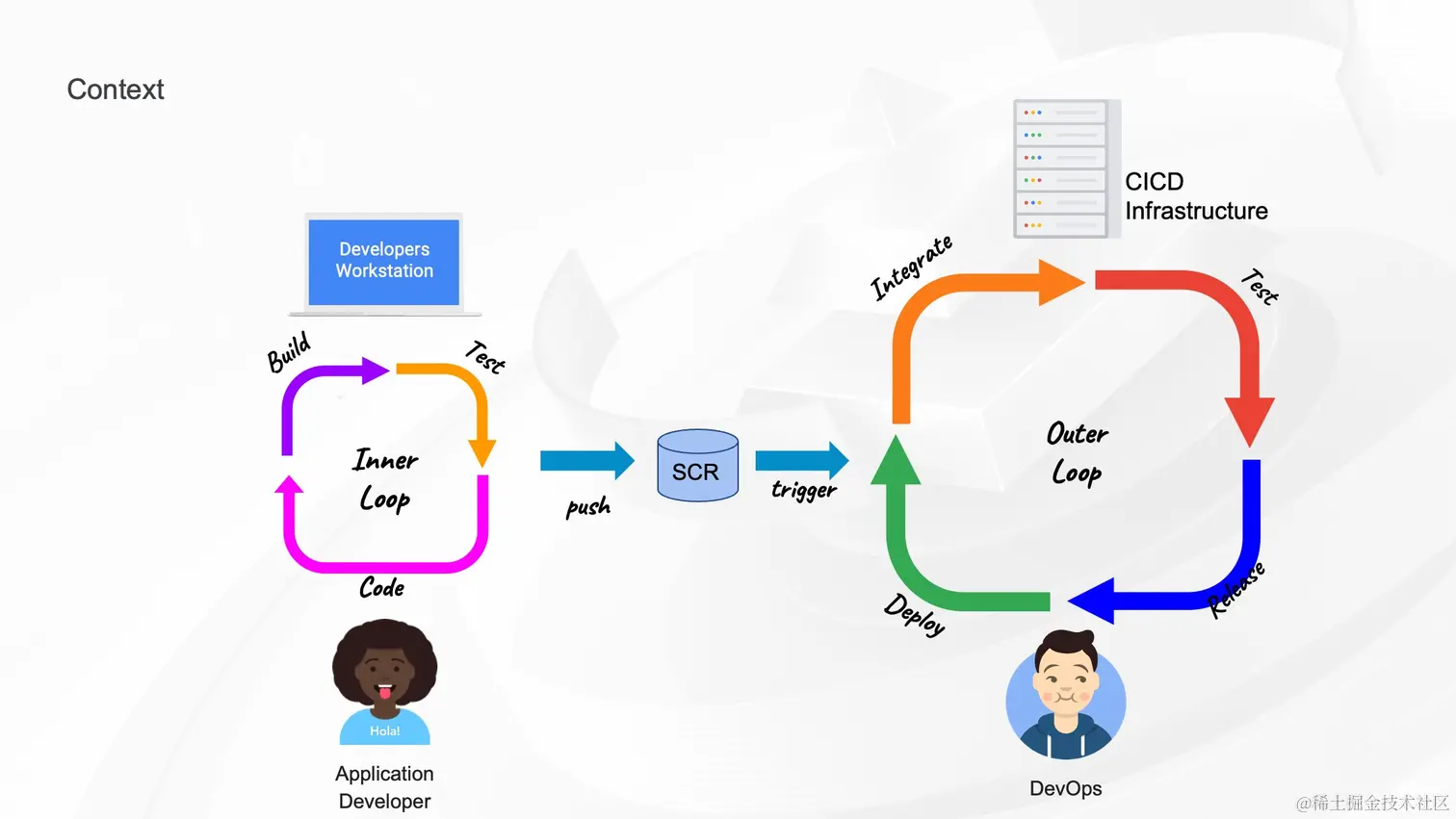
16 |
17 | 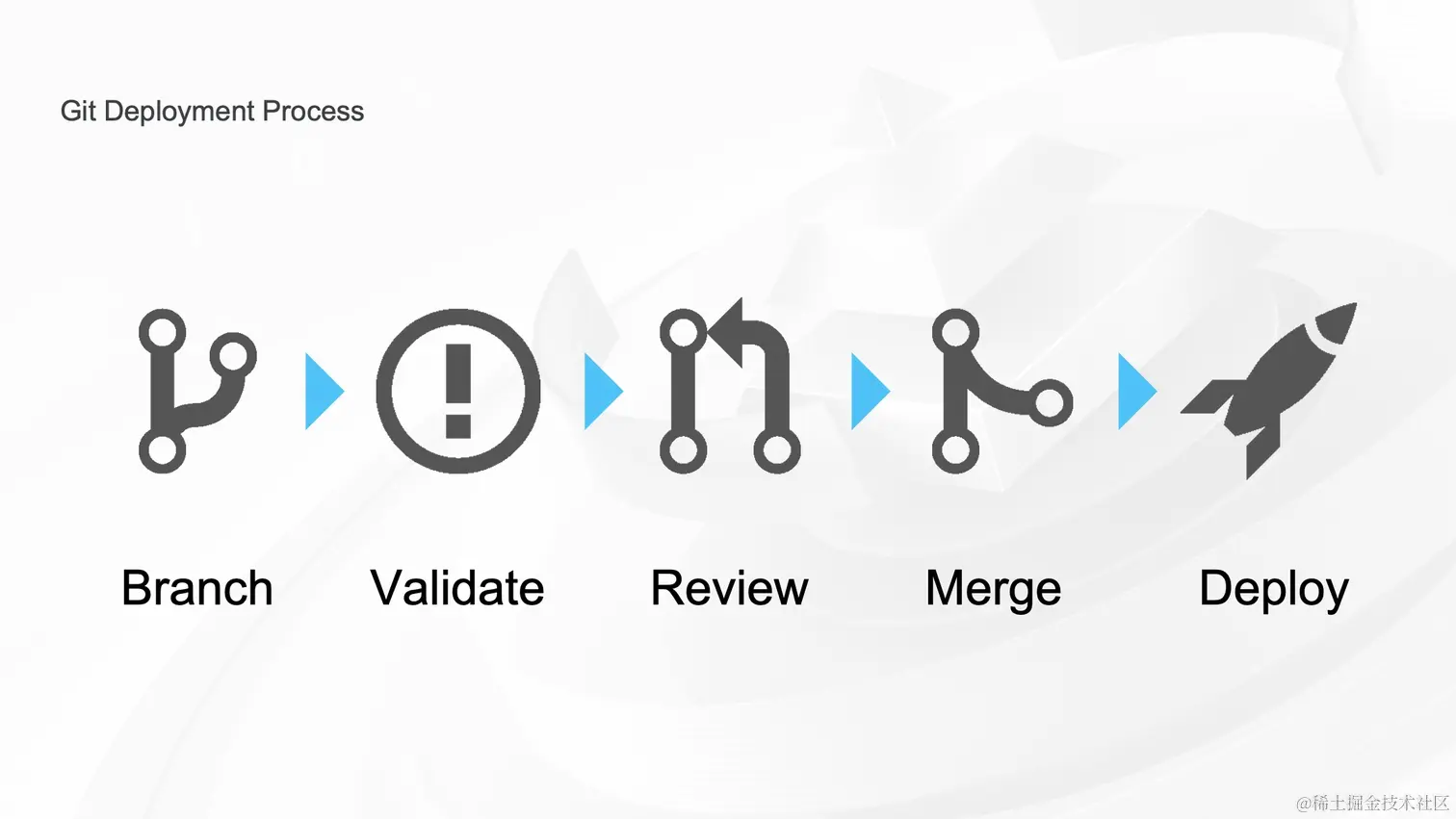
18 |
19 | 
20 |
21 | 
22 |
23 | 
24 |
25 | 
26 |
27 | 
28 |
29 | 
30 |
31 | 
32 |
33 | 
34 |
35 | 
36 |
37 | 
38 |
39 | 
40 |
41 | 
42 |
43 | 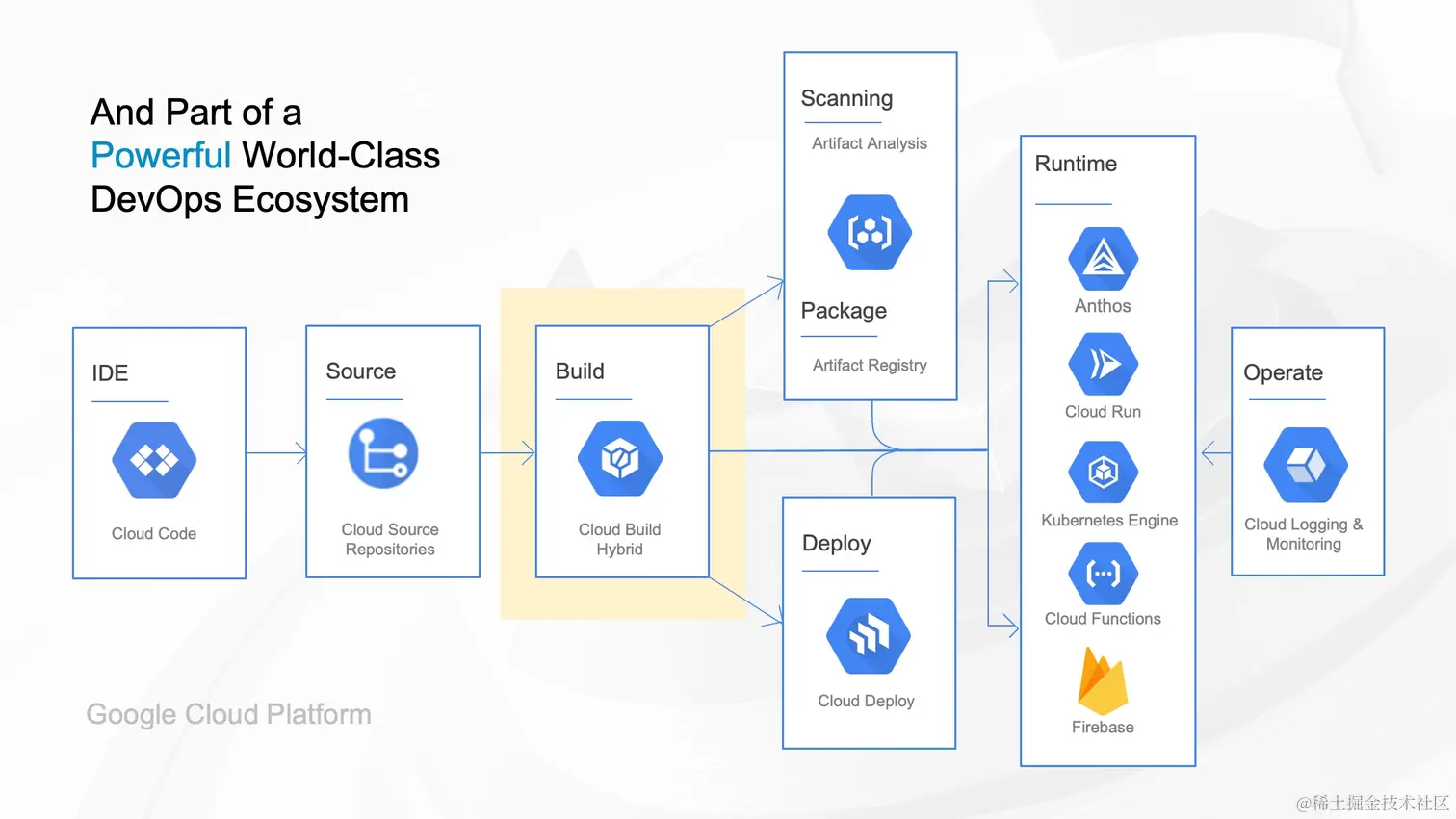
44 |
45 | 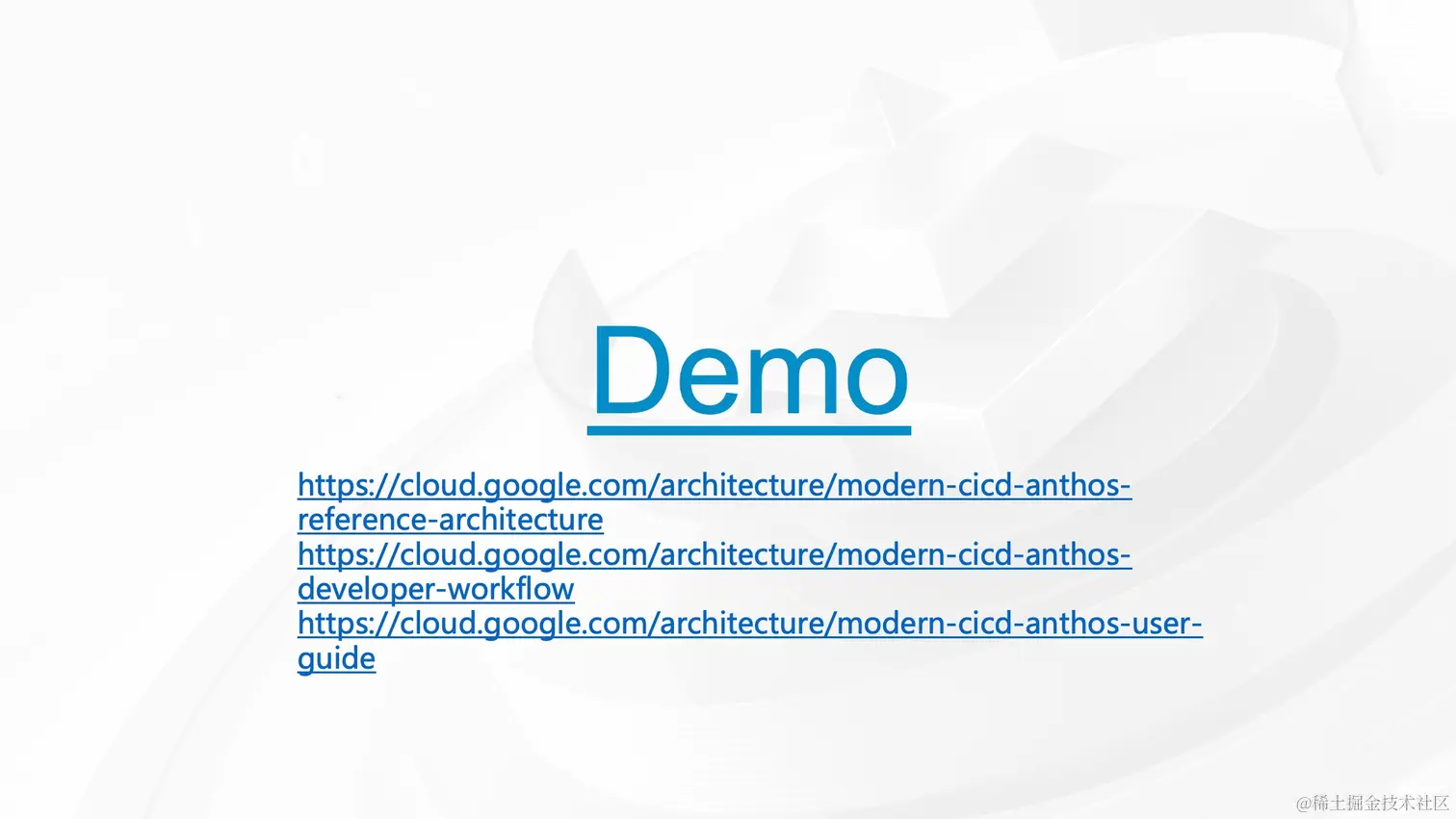
46 |
47 | 
48 |
49 | 
50 |
51 | [原文地址](https://juejin.cn/book/7127092198096502822/section/7127212048257122343)
--------------------------------------------------------------------------------
/docs/如何使用掘金社区/23-⚠️ 常见问题.md:
--------------------------------------------------------------------------------
1 | # ⚠️ 常见问题
2 |
3 | 最后,我们会持续更新大家的常见问题在此,如果内容需求比较大,我们也会更新此小册。
4 |
5 | ## 用户
6 |
7 | **如果我不小心注册了多个掘金账号怎么办?**
8 | 掘金目前的账号体系中支持第三方注册,但如果要发表内容,都必须添加**手机号**。但是掘金早期的业务中有许多未认证的账号,因此对于老用户不小心注册多账号是一个比较复杂的处理流程:
9 |
10 | - 我们尚未有账号合并的功能
11 | - 可以在 APP 去尝试注销其中你不用的账号
12 | - 如果出现了一个账号购买了小册,一个账号是日常使用的情况,迁移暂时困难
13 | - 如果你不方便,你也可以联系官方来处理,请你发送邮件到 [feedback@xitu.io](mailto:feedback@xitu.io 'mailto:feedback@xitu.io') 邮箱。
14 | - 邮件内容包含:
15 | - 你的个人账户主页链接(举例:[juejin.cn/user/852876…](https://juejin.cn/user/852876722177533%EF%BC%89 'https://juejin.cn/user/852876722177533%EF%BC%89')
16 | - 你要注销账号绑定的相关信息
17 | - 这里也说一声抱歉,后续我们会专门就此问题提升账户系统解决
18 | **我现在绑定的手机号停用了,想换绑手机号,怎么办?**
19 | - 请你发送邮件到 [feedback@xitu.io](mailto:feedback@xitu.io 'mailto:feedback@xitu.io') 邮箱。
20 | - 邮件内容包含
21 | - 你的个人账户主页链接(举例:[juejin.cn/user/852876…](https://juejin.cn/user/852876722177533%EF%BC%89 'https://juejin.cn/user/852876722177533%EF%BC%89')
22 | - 你原来的手机号 xxxx、新的手机号
23 |
24 | ## 等级权限
25 |
26 | **如何提升自己的掘金等级?**
27 | 生产更多优质的专栏,并让他获得更多的阅读数与点赞数。目前,只有原创专栏会计作掘力值的增长,沸点、分享的点赞阅读是无法增长掘力值的。
28 |
29 | - [了解掘金:🏆 掘力值、等级与权限](https://juejin.cn/book/6844733795329900551/section/6844733795371843597 'https://juejin.cn/book/6844733795329900551/section/6844733795371843597')
30 | **如何获得掘金小册写作权限?**
31 | 获得掘金小册权限,需要您的掘力值提升到 10000 以上,获得 `Lv5` 等级。或者,请访问《[如何写一本掘金小册](https://juejin.cn/book/6844723704639782920 'https://juejin.cn/book/6844723704639782920')》并通过正规申请渠道申请掘金小册。
32 |
33 | - [了解掘金:🏆 掘力值、等级与权限](https://juejin.cn/book/6844733795329900551/section/6844733795371843597 'https://juejin.cn/book/6844733795329900551/section/6844733795371843597')
34 | - 《[如何写一本掘金小册](https://juejin.cn/book/6844723704639782920 'https://juejin.cn/book/6844723704639782920')》**我已经是 lv4 了,为啥没有自动推荐权限?**
35 | - 近期掘金升级了创作者权益相关的规则和机制,上线之后也受到了大家的广泛关注。但是上线后,我们也遇到了很多掘友和反馈和吐槽。笔记和更文等水文和低质量内容频繁被推上首页,更有甚者,日更占楼贴也会自动进行推荐。
36 | - 目前掘金的推荐加入二层过滤机制,对于自动推荐但是不符合推荐标准的内容进行人工干预。
37 |
38 | ## 文章
39 |
40 | **为什么我发布的内容在推荐的最新里找不到?**
41 | 每个用户生产的内容需要根据其掘力值与影响因子的高低才能进入推荐列表。如果想让您的的内容尽快被推荐,则需要您生产更多、更好地内容。如果您的掘力值提升到 5000 即 `Lv4` 等级以上,您发布的内容会直接进入推荐列表。
42 |
43 | 而关注您的人,可以在关注入口中直接阅读您的内容,因而获得更多粉丝很有价值!
44 |
45 | - [了解掘金:🏆 掘力值、等级与权限](https://juejin.cn/book/6844733795329900551/section/6844733795371843597 'https://juejin.cn/book/6844733795329900551/section/6844733795371843597')
46 | - [使用掘金:🔥 如何让你的文章获得更多曝光和认可](https://juejin.cn/book/6844733795329900551/section/6844733795380232206 'https://juejin.cn/book/6844733795329900551/section/6844733795380232206')
47 | - [使用掘金:👮♀️ 掘金的内容审核和推荐规则](https://juejin.cn/book/6844733795329900551/section/6876001660431400967 'https://juejin.cn/book/6844733795329900551/section/6876001660431400967')
48 | - [使用掘金:❎ 违规文章是什么样的,有哪些处罚措施?](https://juejin.cn/book/6844733795329900551/section/6844733795380232200 'https://juejin.cn/book/6844733795329900551/section/6844733795380232200')
49 | - 添加我们小编微信:`chnyifan` 他会协助你。**我想发布的内容没有合适的标签**
50 | 目前,掘金的标签体系是封闭的,有小编们管理。因而,当您发布的内容没有合适的标签时,可以直接反馈给我们的小编。但是,请务必注意,掘金的标签是定义内容的核心数据,因而比较杂乱、模糊的标签不会被添加。
51 |
52 | - [使用掘金:🔥 如何让你的文章获得更多曝光和认可](https://juejin.cn/book/6844733795329900551/section/6844733795380232206 'https://juejin.cn/book/6844733795329900551/section/6844733795380232206')
53 |
54 | - [使用掘金:💬 如何给掘金社区提建议 & Bug](https://juejin.cn/book/6844733795329900551/section/6844733795384442893 'https://juejin.cn/book/6844733795329900551/section/6844733795384442893')
55 |
56 | - 添加我们小编微信:`chnyifan` 他会协助你。
57 |
58 | ## 付费相关问题
59 |
60 | **我买了小册或者会员如何开发票呢?**
61 |
62 | 目前,购买小册和会员都是可以开发票的,如果你要开发票,你可以填写以下问卷:
63 |
64 | - [发票申请链接](https://wenjuan.feishu.cn/m?t=s4bEwCnPlpyi-hxgc 'https://wenjuan.feishu.cn/m?t=s4bEwCnPlpyi-hxgc')
65 |
66 | [原文地址](https://juejin.cn/book/6844733795329900551/section/6844733795392815117)
67 |
--------------------------------------------------------------------------------
/docs/如何使用掘金社区/10-使用掘金:👮♀️掘金的内容审核和推荐规则.md:
--------------------------------------------------------------------------------
1 | # 使用掘金:👮♀️掘金的内容审核和推荐规则
2 |
3 | ## 审核规则
4 |
5 | #### 为什么会有安全审核?
6 |
7 | * **根据国家相关法律法规规定,保障平台内容安全**:过滤**涉黄、涉暴、涉毒、赌博**等安全底线问题
8 | * **保障用户体验,有助于提升平台长期价值**:打击**低俗、辱骂、广告**等低质内容
9 | * **掘金平台病友新闻等筛选机制,所以平台内容只限于技术范围内,时政类累内容会严格管控。**
10 |
11 | #### 什么样的内容需要审核?
12 |
13 | **按照相关法律法规要求,用户在掘金平台发布和传播的内容均需要审核,包括但不限于:**
14 |
15 | * 资料:用户头像昵称、职位、个人介绍等......
16 | * 所有写入内容:文章、沸点、图片、评论、视频......
17 |
18 | #### 常见的几种审核状态?
19 |
20 | * **审核中:内容发布后将进入审核状态,同时会有系统消息发送给你,提示你的内容正在审核中。**
21 | * **审核不通过(自见):内容审核不通过,系统会有消息提醒,请参考消息中的社区规范,进行内容调整,内容修改并提交后,会再次进入审核。**
22 |
23 | 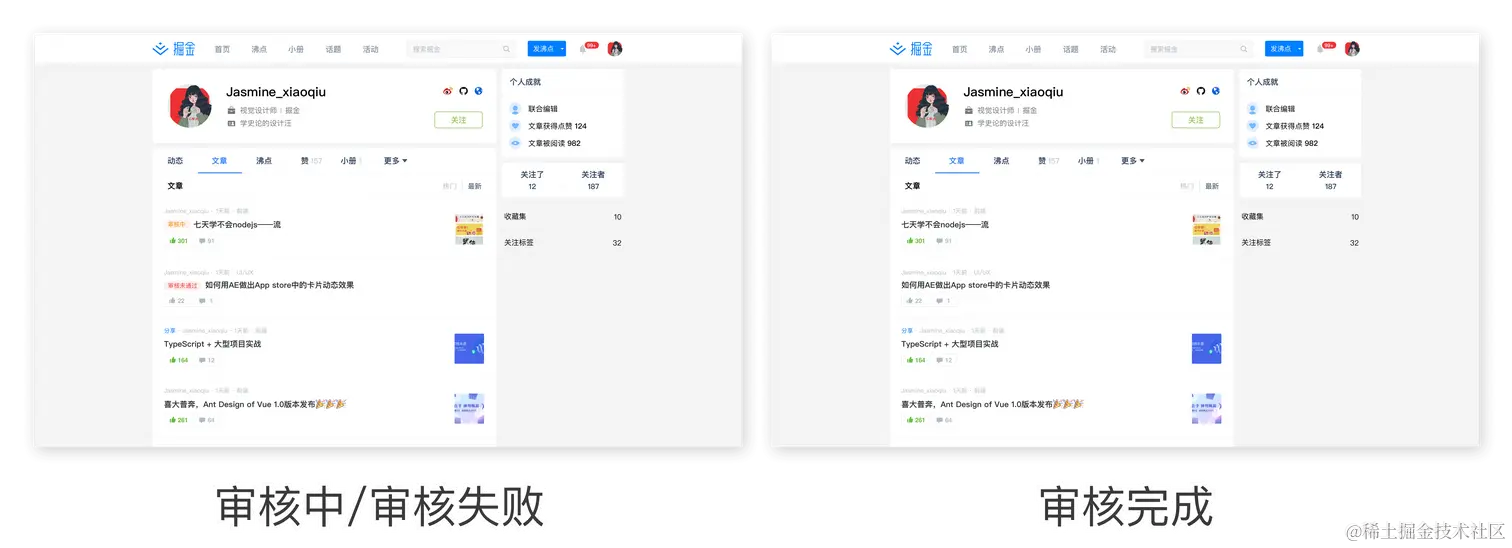 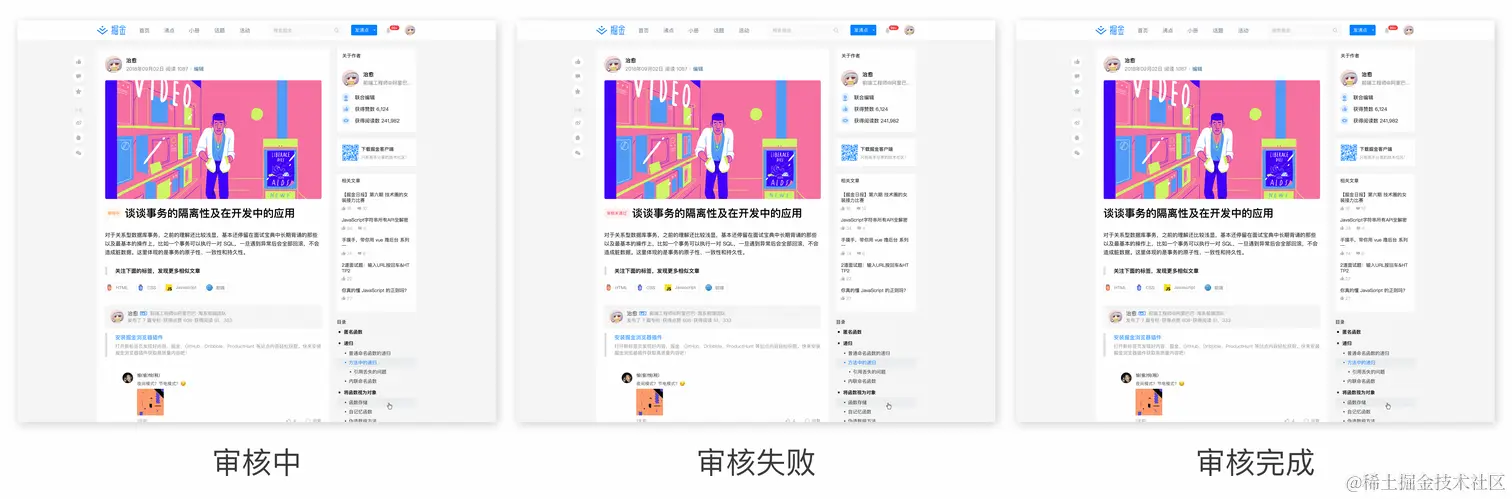
24 |
25 | * **审核通过:审核通过后的文章会发布成功并可能获得被推荐机会。**
26 | * **内容被删除:如果你发布的内容不符合相关法律法规要求,会直接删除,同时会有系统消息发送给你。**
27 |
28 | #### **申诉渠道**
29 |
30 | * 审核未通过的内容,如果作者自查后,仍无法感知到问题所在,请访问沸点话题「[反馈 & 建议](https://juejin.cn/topic/6824710202692993037?sort=newest "https://juejin.cn/topic/6824710202692993037?sort=newest")」提交你的问题和文章链接,掘金官方将在排查后给你留言反馈相关调整策略。
31 |
32 | ## 推荐规则
33 |
34 | 掘金与诸多社区的不同在于,我们一直专注在筛选和推荐优质的技术内容给合适的读者。因而,首页的推荐信息流的质量和数据反馈我们也非常关注。我们一直在努力的帮助好的文章获得更多的读者,让优秀的作者获得更多的关注者。
35 |
36 | 目前掘金内容的排行和热度就是根据掘金的热度算法的规则来进行推荐,关于算法的具体信息你可以到《[计算内容热度的算法解释》](https://juejin.cn/post/6844903833856901133 "https://juejin.cn/post/6844903833856901133")中了解。
37 |
38 | #### 推荐文章的基本标准
39 |
40 | * 内容形式:对他人有启发性且必须原创或者本人翻译的文章
41 | * 排版要求:行文排版优雅
42 | * 题材要求:原则上不限制具体题材,但是文章要符合与开发相关的技术细节、技巧干货、开源工具介绍、实践总结、行业见解、职业选择等方向;当然也可以是优秀的翻译文章,这方面可以参考前掘金官方在运营的[掘金翻译计划]。
43 | * 符合标准的引流规范:掘金作为一个帮助开发者成长的技术社区,我们原则上不支持这一行为,但是本着服务用户的原则我们也不禁止这一行为。为了帮助用户拥有更好的阅读体验,我们现对张贴公众号行为作出以下规范:
44 | * **可以是文字引导用户关注公众号**,但是对于添加个人微信账号、引导用户进群、推广产品等威胁用户信息安全的行为一律禁止。
45 |
46 | 关于评判优质内容的更多详情,请参考掘金小册中关于[掘金社区内容的标准和规范](https://juejin.cn/book/6844733795329900551/section/6844733795380232199 "https://juejin.cn/book/6844733795329900551/section/6844733795380232199")的内容规范部分。
47 |
48 | #### 影响你文章流量的相关因素
49 |
50 | 我们期待与开发者的共同成长,因而在速度与质量中,我们偏向后者,也相信在我们的模式下成长起来的开发者会有更大的回报。 与你的文章能否获得足够的流量直接相关的是:
51 |
52 | 1. 你的掘力值
53 | 2. 你文章的平均点赞数、阅读数、评论数
54 | 3. 你写专栏的活跃度
55 | 4. 文章的标签
56 | 5. 你的粉丝数
57 |
58 | 更多资料:[使用掘金:🔥 如何让你的文章获得更多曝光和认可](https://juejin.cn/book/6844733795329900551/section/6844733795380232206 "https://juejin.cn/book/6844733795329900551/section/6844733795380232206")
59 |
60 | #### 什么样的文章不会被推荐
61 |
62 | 1. **非原创文章**:内容为百科式概念定义和介绍,或做个人备忘、书摘、笔记类,没有个人研究、洞察、实践体验的文章。
63 |
64 | 2. **标题过短或篇幅过短的文章**:标题只有一两个单词,或者内容字数少于250字,很少能讲透一个知识点或解决一个问题,这样的内容本质不能称之为文章。
65 |
66 | 3. **杂乱无序的文章**:排版混乱,文章结构不清晰都可以被定义为垃圾文章,例如纯代码文章(基本没有文字描述直接贴代码)等。
67 |
68 | 4. **配图不当的文章**:图裂、使用真人或卡通美女照等恶俗配图,或者配图品质过低的文章。
69 |
70 | 5. **推广类文章**:包括招聘、广告、SEO、活动等推广内容。如“个人视频教程、书籍推广等内容”,这类内容属于不允许用户发布的内容范围,是对其他用户危害最大的内容,一经发现,立即删除,并对发布者给予处理(注:活动推广信息可以在沸点“活动推荐”圈子发布)。
71 |
72 | 6. **引流类文章**:文章含有加群或个人微信二维码、公众号二维码,一律不推荐(注:仅允许用文字引导关注公众号)。
73 |
74 | 7. **标题党文章**:故意夸大其词,或者题不对文,用与正文无关的字眼刻意煽动读者惊悚、好奇等情绪。例如:夸大悬念&震惊党标题,“震惊:这篇VUE的干货竟然说的这么全!”;强迫式标题,“迄今为止最全的面试题,不看后悔一辈子?”;用小姐姐、女朋友、男朋友等两性话题作为吸睛点,“我是如何助力小姐姐提升100%开发效率的”;以及其他标题严重与内容不符的文章。
75 |
76 | 8. **面试类文章**:机械罗列汇总面试题的文章,一律不推荐,刷题打卡类文章一律不推荐。
77 |
78 | 9. **资讯类文章**:搬运现有资讯,罗列文字链接,无个人观点表达的文章。
79 |
80 | 10. **非技术类文章**:非技术类、无厘头内容文章一律不推荐。
81 |
82 | ## 快速推荐通道与作者交流
83 |
84 | * 目前文章推荐一般时效为发布后24h内,请大家耐心等待,如想自荐优质文章可以发布在沸点:[好文推荐](https://juejin.cn/pin/club/6824710203389247501?sort=newest "https://juejin.cn/pin/club/6824710203389247501?sort=newest") 下。
85 | * 请联系掘金酱:zwcatfly,发送文章链接即可。
86 |
87 | ## 更多社区规则内容
88 |
89 | [掘金小册:如何使用掘金社区](https://juejin.cn/book/6844733795329900551 "https://juejin.cn/book/6844733795329900551")
90 |
91 | [掘金小册:如何写一本掘金小册](https://juejin.cn/book/6844723704639782920 "https://juejin.cn/book/6844723704639782920")
92 |
93 | [原文地址](https://juejin.cn/book/6844733795329900551/section/6876001660431400967)
--------------------------------------------------------------------------------
/src/utils/logger/index.ts:
--------------------------------------------------------------------------------
1 | import path from 'node:path'
2 | import type { LoggingEvent } from 'log4js'
3 | import log4js from 'log4js'
4 | import type { ChalkInstance } from 'chalk'
5 | import chalk from 'chalk'
6 | import { formatDate } from '@/utils'
7 |
8 | type LevelEmoji = Record
9 | // unused-imports/no-unused-vars
10 | type LevelColor = Record
11 |
12 | const levelEmoji: LevelEmoji = {
13 | TRACE: '🔍',
14 | DEBUG: '🐞',
15 | INFO: 'ℹ️',
16 | WARN: '⚠️',
17 | ERROR: '❌',
18 | FATAL: '💥',
19 | }
20 |
21 | const levelColor: LevelColor = {
22 | TRACE: chalk.gray,
23 | DEBUG: chalk.cyan,
24 | INFO: chalk.green,
25 | WARN: chalk.yellow,
26 | ERROR: chalk.red,
27 | FATAL: chalk.bgRed.white,
28 | }
29 | const __dirname = path.resolve()
30 | const filePath = path.join(__dirname, 'logs')
31 | // Configure appenders and categories
32 | log4js.configure({
33 | appenders: {
34 | console: { type: 'console' },
35 | file: { type: 'file', filename: `${filePath}/app.log` },
36 | traceFile: { type: 'file', filename: `${filePath}/trace.log` },
37 | debugFile: { type: 'file', filename: `${filePath}/debug.log` },
38 | infoFile: { type: 'file', filename: `${filePath}/info.log` },
39 | warnFile: { type: 'file', filename: `${filePath}/warn.log` },
40 | errorFile: { type: 'file', filename: `${filePath}/error.log` },
41 | fatalFile: { type: 'file', filename: `${filePath}/fatal.log` },
42 | },
43 | categories: {
44 | default: { appenders: ['console', 'file'], level: 'info' },
45 | trace: { appenders: ['console', 'traceFile'], level: 'trace' },
46 | debug: { appenders: ['console', 'debugFile'], level: 'debug' },
47 | info: { appenders: ['console', 'infoFile'], level: 'info' },
48 | warn: { appenders: ['console', 'warnFile'], level: 'warn' },
49 | error: { appenders: ['console', 'errorFile'], level: 'error' },
50 | fatal: { appenders: ['console', 'fatalFile'], level: 'fatal' },
51 | },
52 | })
53 |
54 | export const logger = log4js.getLogger()
55 |
56 | // Custom layout for colored log output
57 | log4js.addLayout('coloredLayout', (): ((logEvent: LoggingEvent) => string) => {
58 | return (logEvent: LoggingEvent): string => {
59 | const level = logEvent.level.toString()
60 | const emoji = levelEmoji[level] || ''
61 | const now = formatDate()
62 | const message = logEvent.data[0]
63 | const colorFn = levelColor[level] || chalk.reset
64 | const formattedMessage = `${colorFn(emoji)} ${colorFn(now)} ${colorFn(level)} ${colorFn(
65 | message,
66 | )}`
67 | return formattedMessage
68 | }
69 | })
70 |
71 | // Configure console appender with colored layout
72 | log4js.configure({
73 | appenders: {
74 | console: { type: 'console', layout: { type: 'coloredLayout' } },
75 | file: { type: 'file', filename: `${filePath}/app.log` },
76 | traceFile: { type: 'file', filename: `${filePath}/trace.log` },
77 | debugFile: { type: 'file', filename: `${filePath}/debug.log` },
78 | infoFile: { type: 'file', filename: `${filePath}/info.log` },
79 | warnFile: { type: 'file', filename: `${filePath}/warn.log` },
80 | errorFile: { type: 'file', filename: `${filePath}/error.log` },
81 | fatalFile: { type: 'file', filename: `${filePath}/fatal.log` },
82 | },
83 | categories: {
84 | default: { appenders: ['console', 'file'], level: 'info' },
85 | trace: { appenders: ['console', 'traceFile'], level: 'trace' },
86 | debug: { appenders: ['console', 'debugFile'], level: 'debug' },
87 | info: { appenders: ['console', 'infoFile'], level: 'info' },
88 | warn: { appenders: ['console', 'warnFile'], level: 'warn' },
89 | error: { appenders: ['console', 'errorFile'], level: 'error' },
90 | fatal: { appenders: ['console', 'fatalFile'], level: 'fatal' },
91 | },
92 | })
93 |
94 | export default logger
95 |
--------------------------------------------------------------------------------
/docs/稀土开发者大会2022/11-于鸿磊:云原生技术跨向生物信息计算领域的最后十公里.md:
--------------------------------------------------------------------------------
1 | # 于鸿磊:云原生技术跨向生物信息计算领域的最后十公里
2 |
3 | 
4 |
5 | 
6 |
7 | 
8 |
9 | 
10 |
11 | 
12 |
13 | 
14 |
15 | 
16 |
17 | 
18 |
19 | 
20 |
21 | 
22 |
23 | 
24 |
25 | 
26 |
27 | 
28 |
29 | 
30 |
31 | 
32 |
33 | 
34 |
35 | 
36 |
37 | 
38 |
39 | 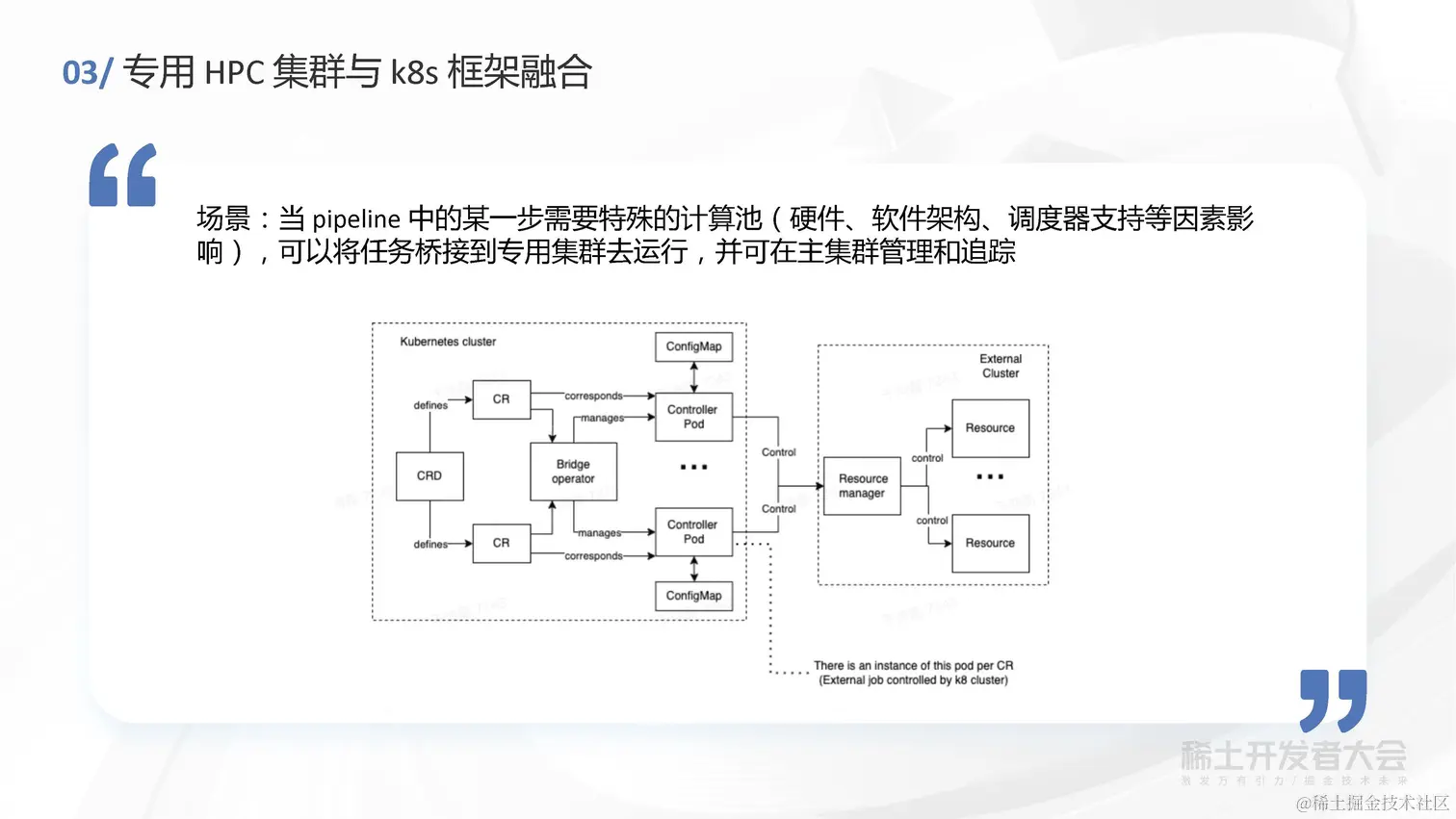
40 |
41 | 
42 |
43 | 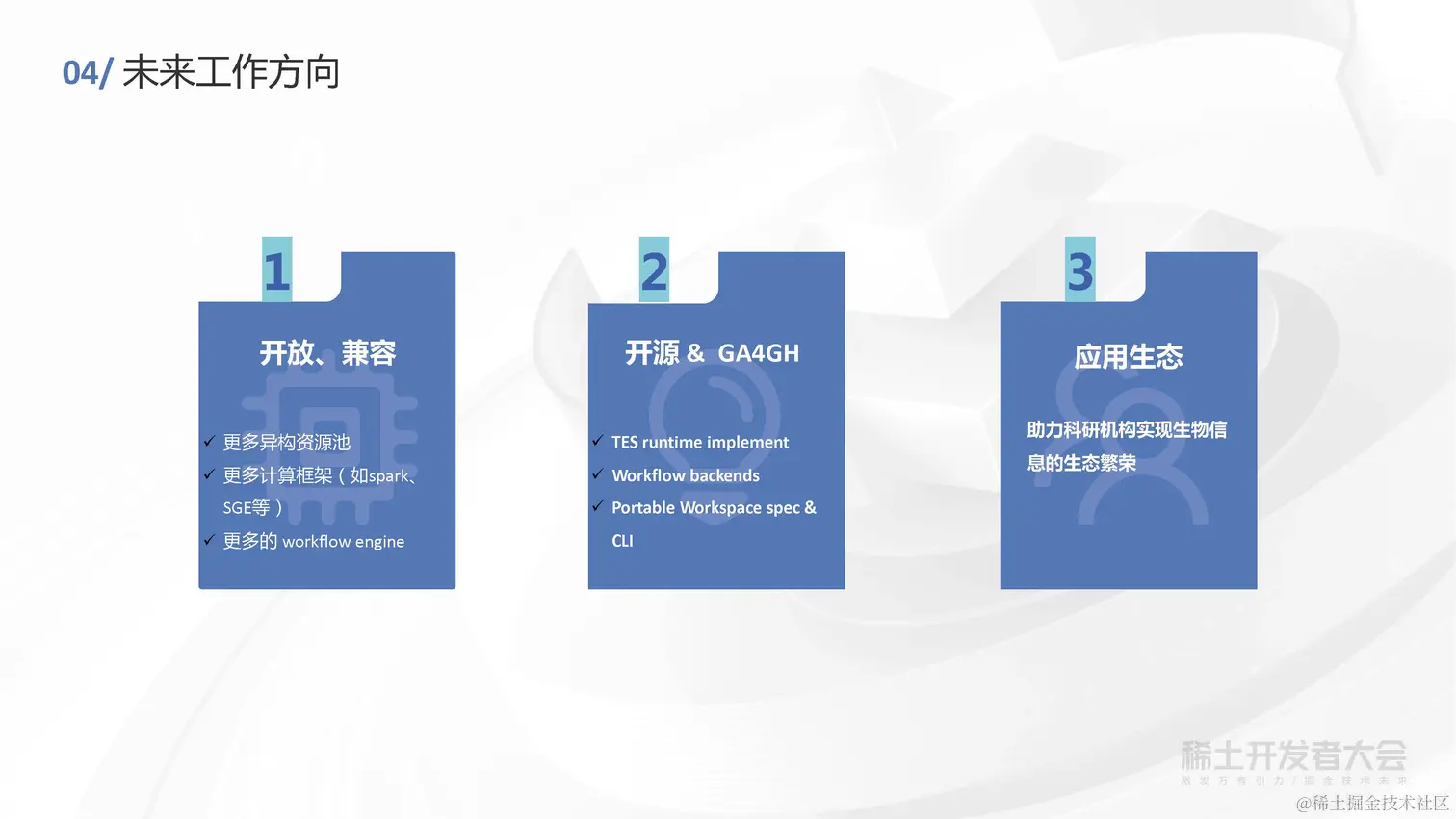
44 |
45 | [原文地址](https://juejin.cn/book/7127092198096502822/section/7127188613539823655)
--------------------------------------------------------------------------------