├── Win 8and10 Enable Administrator Account.bat
├── SetACL.exe
├── Clean Win10 Start menu
├── LGPO.exe
├── registry.pol
├── 1. BeforeLogoff.bat
├── 2. AfterLogin.bat
└── LayoutModification.xml
├── Win 10 Uninstall Unnecessary Apps.bat
├── z3.ps1
├── Win 8and10 Enable Standby Instead of Hibernate.bat
├── Win 10 Disable Unnecessary Services.bat
├── Win 10 Disable Telemetry.bat
├── Win 10 Reenable Cortana Completely.bat
├── Win 10 Disable Cortana Completely.bat
├── Win 10 Disable Automatic App Updates.bat
├── Win 10 Get Back Old Vertical Desktopicon Distance.bat
├── Win 8and10 Get Apps Access For Administrator Account.bat
├── Win 10 Disable Automatic Windows Updates.bat
├── Win 10 Hide Cortana.bat
├── Win 10 Enable Defender Malware Protection.bat
├── Win 10 Hide One Drive.bat
├── Win 10 Disable Lockscreen.bat
├── README.md
├── Win 10 Advanced Explorer Settings.bat
├── Win 10 Disable Forced Reboot After Update.bat
└── Win 10 Enable Secure Microsoft Edge Settings.bat
/Win 8and10 Enable Administrator Account.bat:
--------------------------------------------------------------------------------
1 | net user administrator /active:yes
--------------------------------------------------------------------------------
/SetACL.exe:
--------------------------------------------------------------------------------
https://raw.githubusercontent.com/dheerajbhaskar/pleasant-windows/HEAD/SetACL.exe
--------------------------------------------------------------------------------
/Clean Win10 Start menu/LGPO.exe:
--------------------------------------------------------------------------------
https://raw.githubusercontent.com/dheerajbhaskar/pleasant-windows/HEAD/Clean Win10 Start menu/LGPO.exe
--------------------------------------------------------------------------------
/Win 10 Uninstall Unnecessary Apps.bat:
--------------------------------------------------------------------------------
1 | PowerShell -NoProfile -ExecutionPolicy Bypass -Command "& {Start-Process PowerShell -ArgumentList '-NoProfile -ExecutionPolicy Bypass -File ""%~dp0\z3.ps1""' -Verb RunAs}"
--------------------------------------------------------------------------------
/Clean Win10 Start menu/registry.pol:
--------------------------------------------------------------------------------
1 | PReg�[Software\Policies\Microsoft\Windows\Explorer;LockedStartLayout;�;�;�][Software\Policies\Microsoft\Windows\Explorer;StartLayoutFile;�;4;C:\LayoutModification.xml]
--------------------------------------------------------------------------------
/z3.ps1:
--------------------------------------------------------------------------------
1 | Get-AppxPackage *3dbuilder* | Remove-AppxPackage # 3D Builder
2 | Get-AppxPackage *officehub* | Remove-AppxPackage # Get Office
3 | Get-AppxPackage *skypeapp* | Remove-AppxPackage # Get Skype
4 | Get-AppxPackage *getstarted* | Remove-AppxPackage # Get Started
5 | Get-AppxPackage *Messaging* | Remove-AppxPackage # Messaging and Skype Video
6 | Get-AppxPackage *ConnectivityStore* | Remove-AppxPackage # Microsoft Wi-Fi
7 | Get-AppxPackage *bingnews* | Remove-AppxPackage # News
8 | Get-AppxPackage *bingsports* | Remove-AppxPackage # Sports
9 | Get-AppxPackage *Office.Sway* | Remove-AppxPackage # Sway
10 | Get-AppxPackage *soundrecorder* | Remove-AppxPackage # Voice Recorder
--------------------------------------------------------------------------------
/Win 8and10 Enable Standby Instead of Hibernate.bat:
--------------------------------------------------------------------------------
1 | :checkPrivileges
2 | NET FILE 1>NUL 2>NUL
3 | if '%errorlevel%' == '0' ( goto gotPrivileges ) else ( goto getPrivileges )
4 |
5 | :getPrivileges
6 | if '%1'=='ELEV' (echo ELEV & shift /1 & goto gotPrivileges)
7 |
8 | setlocal DisableDelayedExpansion
9 | set "batchPath=%~0"
10 | setlocal EnableDelayedExpansion
11 | ECHO Set UAC = CreateObject^("Shell.Application"^) > "%temp%\OEgetPrivileges.vbs"
12 | ECHO args = "ELEV " >> "%temp%\OEgetPrivileges.vbs"
13 | ECHO For Each strArg in WScript.Arguments >> "%temp%\OEgetPrivileges.vbs"
14 | ECHO args = args ^& strArg ^& " " >> "%temp%\OEgetPrivileges.vbs"
15 | ECHO Next >> "%temp%\OEgetPrivileges.vbs"
16 | ECHO UAC.ShellExecute "!batchPath!", args, "", "runas", 1 >> "%temp%\OEgetPrivileges.vbs"
17 | "%SystemRoot%\System32\WScript.exe" "%temp%\OEgetPrivileges.vbs" %*
18 | exit /B
19 |
20 | :gotPrivileges
21 | if '%1'=='ELEV' shift /1
22 | setlocal & pushd .
23 | cd /d %~dp0
24 |
25 | :Start
26 | powercfg /H off
--------------------------------------------------------------------------------
/Clean Win10 Start menu/1. BeforeLogoff.bat:
--------------------------------------------------------------------------------
1 | :checkPrivileges
2 | NET FILE 1>NUL 2>NUL
3 | if '%errorlevel%' == '0' ( goto gotPrivileges ) else ( goto getPrivileges )
4 |
5 | :getPrivileges
6 | if '%1'=='ELEV' (echo ELEV & shift /1 & goto gotPrivileges)
7 |
8 | setlocal DisableDelayedExpansion
9 | set "batchPath=%~0"
10 | setlocal EnableDelayedExpansion
11 | ECHO Set UAC = CreateObject^("Shell.Application"^) > "%temp%\OEgetPrivileges.vbs"
12 | ECHO args = "ELEV " >> "%temp%\OEgetPrivileges.vbs"
13 | ECHO For Each strArg in WScript.Arguments >> "%temp%\OEgetPrivileges.vbs"
14 | ECHO args = args ^& strArg ^& " " >> "%temp%\OEgetPrivileges.vbs"
15 | ECHO Next >> "%temp%\OEgetPrivileges.vbs"
16 | ECHO UAC.ShellExecute "!batchPath!", args, "", "runas", 1 >> "%temp%\OEgetPrivileges.vbs"
17 | "%SystemRoot%\System32\WScript.exe" "%temp%\OEgetPrivileges.vbs" %*
18 | exit /B
19 |
20 | :gotPrivileges
21 | if '%1'=='ELEV' shift /1
22 | setlocal & pushd .
23 | cd /d %~dp0
24 |
25 | :Start
26 | xcopy /Y "%~dp0LayoutModification.xml" "C:\"
27 | cd %~dp0
28 | LGPO.exe /u "%~dp0\registry.pol"
--------------------------------------------------------------------------------
/Win 10 Disable Unnecessary Services.bat:
--------------------------------------------------------------------------------
1 | :checkPrivileges
2 | NET FILE 1>NUL 2>NUL
3 | if '%errorlevel%' == '0' ( goto gotPrivileges ) else ( goto getPrivileges )
4 | :getPrivileges
5 | if '%1'=='ELEV' (echo ELEV & shift /1 & goto gotPrivileges)
6 |
7 | setlocal DisableDelayedExpansion
8 | set "batchPath=%~0"
9 | setlocal EnableDelayedExpansion
10 | ECHO Set UAC = CreateObject^("Shell.Application"^) > "%temp%\OEgetPrivileges.vbs"
11 | ECHO args = "ELEV " >> "%temp%\OEgetPrivileges.vbs"
12 | ECHO For Each strArg in WScript.Arguments >> "%temp%\OEgetPrivileges.vbs"
13 | ECHO args = args ^& strArg ^& " " >> "%temp%\OEgetPrivileges.vbs"
14 | ECHO Next >> "%temp%\OEgetPrivileges.vbs"
15 | ECHO UAC.ShellExecute "!batchPath!", args, "", "runas", 1 >> "%temp%\OEgetPrivileges.vbs"
16 | "%SystemRoot%\System32\WScript.exe" "%temp%\OEgetPrivileges.vbs" %*
17 | exit /B
18 |
19 | :gotPrivileges
20 | if '%1'=='ELEV' shift /1
21 | setlocal & pushd .
22 | cd /d %~dp0
23 |
24 | :Start
25 | sc stop MapsBroker
26 | sc config MapsBroker start= disabled
27 | sc stop DoSvc
28 | sc config DoSvc start= disabled
29 | sc stop WSearch
30 | sc config WSearch start= disabled
--------------------------------------------------------------------------------
/Win 10 Disable Telemetry.bat:
--------------------------------------------------------------------------------
1 | :checkPrivileges
2 | NET FILE 1>NUL 2>NUL
3 | if '%errorlevel%' == '0' ( goto gotPrivileges ) else ( goto getPrivileges )
4 | :getPrivileges
5 | if '%1'=='ELEV' (echo ELEV & shift /1 & goto gotPrivileges)
6 |
7 | setlocal DisableDelayedExpansion
8 | set "batchPath=%~0"
9 | setlocal EnableDelayedExpansion
10 | ECHO Set UAC = CreateObject^("Shell.Application"^) > "%temp%\OEgetPrivileges.vbs"
11 | ECHO args = "ELEV " >> "%temp%\OEgetPrivileges.vbs"
12 | ECHO For Each strArg in WScript.Arguments >> "%temp%\OEgetPrivileges.vbs"
13 | ECHO args = args ^& strArg ^& " " >> "%temp%\OEgetPrivileges.vbs"
14 | ECHO Next >> "%temp%\OEgetPrivileges.vbs"
15 | ECHO UAC.ShellExecute "!batchPath!", args, "", "runas", 1 >> "%temp%\OEgetPrivileges.vbs"
16 | "%SystemRoot%\System32\WScript.exe" "%temp%\OEgetPrivileges.vbs" %*
17 | exit /B
18 |
19 | :gotPrivileges
20 | if '%1'=='ELEV' shift /1
21 | setlocal & pushd .
22 | cd /d %~dp0
23 |
24 | :Start
25 | sc stop DiagTrack
26 | sc config DiagTrack start= disabled
27 | sc stop dmwappushservice
28 | sc config dmwappushservice start= disabled
29 | reg add HKLM\SYSTEM\CurrentControlSet\Control\WMI\AutoLogger\AutoLogger-Diagtrack-Listener\ /v Start /t REG_DWORD /d 0 /f
30 | reg add HKLM\SOFTWARE\Policies\Microsoft\Windows\DataCollection\ /v AllowTelemetry /t REG_DWORD /d 0 /f
31 | reg add HKLM\SOFTWARE\Microsoft\WindowsSelfHost\UI\Visibility\ /v DiagnosticErrorText /t REG_DWORD /d 0 /f
32 | reg add HKLM\SOFTWARE\Microsoft\WindowsSelfHost\UI\Strings\ /v DiagnosticErrorText /t REG_SZ /d "" /f
33 | reg add HKLM\SOFTWARE\Microsoft\WindowsSelfHost\UI\Strings\ /v DiagnosticLinkText /t REG_SZ /d "" /f
--------------------------------------------------------------------------------
/Win 10 Reenable Cortana Completely.bat:
--------------------------------------------------------------------------------
1 | :checkPrivileges
2 | NET FILE 1>NUL 2>NUL
3 | if '%errorlevel%' == '0' ( goto gotPrivileges ) else ( goto getPrivileges )
4 |
5 | :getPrivileges
6 | if '%1'=='ELEV' (echo ELEV & shift /1 & goto gotPrivileges)
7 |
8 | setlocal DisableDelayedExpansion
9 | set "batchPath=%~0"
10 | setlocal EnableDelayedExpansion
11 | ECHO Set UAC = CreateObject^("Shell.Application"^) > "%temp%\OEgetPrivileges.vbs"
12 | ECHO args = "ELEV " >> "%temp%\OEgetPrivileges.vbs"
13 | ECHO For Each strArg in WScript.Arguments >> "%temp%\OEgetPrivileges.vbs"
14 | ECHO args = args ^& strArg ^& " " >> "%temp%\OEgetPrivileges.vbs"
15 | ECHO Next >> "%temp%\OEgetPrivileges.vbs"
16 | ECHO UAC.ShellExecute "!batchPath!", args, "", "runas", 1 >> "%temp%\OEgetPrivileges.vbs"
17 | "%SystemRoot%\System32\WScript.exe" "%temp%\OEgetPrivileges.vbs" %*
18 | exit /B
19 |
20 | :gotPrivileges
21 | if '%1'=='ELEV' shift /1
22 | setlocal & pushd .
23 | cd /d %~dp0
24 |
25 | :Start
26 | ren "C:\Windows\SystemApps\Microsoft.Windows.Cortana_cw5n1h2txyewy\SearchUI.bak" "SearchUI.exe"
27 | "%~dp0SetACL.exe" -on C:\Windows\SystemApps\Microsoft.Windows.Cortana_cw5n1h2txyewy\SearchUI.exe -ot file -actn setowner -ownr "n:NT SERVICE\TrustedInstaller"
28 | "%~dp0SetACL.exe" -on C:\Windows\SystemApps\Microsoft.Windows.Cortana_cw5n1h2txyewy\SearchUI.exe -ot file -actn ace -ace "n:NT SERVICE\TrustedInstaller;p:full"
29 | "%~dp0SetACL.exe" -on C:\Windows\SystemApps\Microsoft.Windows.Cortana_cw5n1h2txyewy\SearchUI.exe -ot file -actn ace -ace "n:System;p:read,write"
30 | "%~dp0SetACL.exe" -on C:\Windows\SystemApps\Microsoft.Windows.Cortana_cw5n1h2txyewy\SearchUI.exe -ot file -actn setprot -op "dacl:p_c;sacl:p_c"
--------------------------------------------------------------------------------
/Win 10 Disable Cortana Completely.bat:
--------------------------------------------------------------------------------
1 | :checkPrivileges
2 | NET FILE 1>NUL 2>NUL
3 | if '%errorlevel%' == '0' ( goto gotPrivileges ) else ( goto getPrivileges )
4 |
5 | :getPrivileges
6 | if '%1'=='ELEV' (echo ELEV & shift /1 & goto gotPrivileges)
7 |
8 | setlocal DisableDelayedExpansion
9 | set "batchPath=%~0"
10 | setlocal EnableDelayedExpansion
11 | ECHO Set UAC = CreateObject^("Shell.Application"^) > "%temp%\OEgetPrivileges.vbs"
12 | ECHO args = "ELEV " >> "%temp%\OEgetPrivileges.vbs"
13 | ECHO For Each strArg in WScript.Arguments >> "%temp%\OEgetPrivileges.vbs"
14 | ECHO args = args ^& strArg ^& " " >> "%temp%\OEgetPrivileges.vbs"
15 | ECHO Next >> "%temp%\OEgetPrivileges.vbs"
16 | ECHO UAC.ShellExecute "!batchPath!", args, "", "runas", 1 >> "%temp%\OEgetPrivileges.vbs"
17 | "%SystemRoot%\System32\WScript.exe" "%temp%\OEgetPrivileges.vbs" %*
18 | exit /B
19 |
20 | :gotPrivileges
21 | if '%1'=='ELEV' shift /1
22 | setlocal & pushd .
23 | cd /d %~dp0
24 |
25 | :Start
26 |
27 | taskkill /f /IM "SearchUI.exe"
28 | "%~dp0SetACL.exe" -on C:\Windows\SystemApps\Microsoft.Windows.Cortana_cw5n1h2txyewy\SearchUI.exe -ot file -actn setprot -op "dacl:p_nc;sacl:p_nc"
29 | "%~dp0SetACL.exe" -on C:\Windows\SystemApps\Microsoft.Windows.Cortana_cw5n1h2txyewy\SearchUI.exe -ot file -actn setowner -ownr "n:%USERNAME%"
30 | "%~dp0SetACL.exe" -on C:\Windows\SystemApps\Microsoft.Windows.Cortana_cw5n1h2txyewy\SearchUI.exe -ot file -actn ace -ace "n:%USERNAME%;p:full"
31 | "%~dp0SetACL.exe" -on C:\Windows\SystemApps\Microsoft.Windows.Cortana_cw5n1h2txyewy\SearchUI.exe -ot file -actn ace -ace "n:System;p:read"
32 | ren "C:\Windows\SystemApps\Microsoft.Windows.Cortana_cw5n1h2txyewy\SearchUI.exe" "SearchUI.bak"
33 | exit
--------------------------------------------------------------------------------
/Win 10 Disable Automatic App Updates.bat:
--------------------------------------------------------------------------------
1 | :checkPrivileges
2 | NET FILE 1>NUL 2>NUL
3 | if '%errorlevel%' == '0' ( goto gotPrivileges ) else ( goto getPrivileges )
4 |
5 | :getPrivileges
6 | if '%1'=='ELEV' (echo ELEV & shift /1 & goto gotPrivileges)
7 |
8 | setlocal DisableDelayedExpansion
9 | set "batchPath=%~0"
10 | setlocal EnableDelayedExpansion
11 | ECHO Set UAC = CreateObject^("Shell.Application"^) > "%temp%\OEgetPrivileges.vbs"
12 | ECHO args = "ELEV " >> "%temp%\OEgetPrivileges.vbs"
13 | ECHO For Each strArg in WScript.Arguments >> "%temp%\OEgetPrivileges.vbs"
14 | ECHO args = args ^& strArg ^& " " >> "%temp%\OEgetPrivileges.vbs"
15 | ECHO Next >> "%temp%\OEgetPrivileges.vbs"
16 | ECHO UAC.ShellExecute "!batchPath!", args, "", "runas", 1 >> "%temp%\OEgetPrivileges.vbs"
17 | "%SystemRoot%\System32\WScript.exe" "%temp%\OEgetPrivileges.vbs" %*
18 | exit /B
19 |
20 | :gotPrivileges
21 | if '%1'=='ELEV' shift /1
22 | setlocal & pushd .
23 | cd /d %~dp0
24 |
25 | :Start
26 | for /f "delims= " %%a in ('"wmic useraccount where name='%username%' get sid"') do (
27 | if not "%%a"=="SID" (
28 | set myvar=%%a
29 | goto :loop_end
30 | )
31 | )
32 |
33 | :loop_end
34 | set "line01=Windows Registry Editor Version 5.00"
35 | set "line02="
36 | set "line03=[HKEY_LOCAL_MACHINE\SOFTWARE\Microsoft\Windows\CurrentVersion\WindowsStore\WindowsUpdate]"
37 | set "line04="AutoDownload"=dword:00000002"
38 | set "line05="
39 |
40 | setlocal EnableDelayedExpansion
41 | (
42 | echo !line01!
43 | echo/
44 | echo !line03!
45 | echo !line04!
46 | echo/
47 |
48 | ) > "Win 10 Auto App Updates deaktivieren.reg"
49 | REGEDIT.EXE /S "%~dp0Win 10 Auto App Updates deaktivieren.reg"
50 | del /F /Q "%~dp0Win 10 Auto App Updates deaktivieren.reg"
--------------------------------------------------------------------------------
/Win 10 Get Back Old Vertical Desktopicon Distance.bat:
--------------------------------------------------------------------------------
1 | :checkPrivileges
2 | NET FILE 1>NUL 2>NUL
3 | if '%errorlevel%' == '0' ( goto gotPrivileges ) else ( goto getPrivileges )
4 |
5 | :getPrivileges
6 | if '%1'=='ELEV' (echo ELEV & shift /1 & goto gotPrivileges)
7 |
8 | setlocal DisableDelayedExpansion
9 | set "batchPath=%~0"
10 | setlocal EnableDelayedExpansion
11 | ECHO Set UAC = CreateObject^("Shell.Application"^) > "%temp%\OEgetPrivileges.vbs"
12 | ECHO args = "ELEV " >> "%temp%\OEgetPrivileges.vbs"
13 | ECHO For Each strArg in WScript.Arguments >> "%temp%\OEgetPrivileges.vbs"
14 | ECHO args = args ^& strArg ^& " " >> "%temp%\OEgetPrivileges.vbs"
15 | ECHO Next >> "%temp%\OEgetPrivileges.vbs"
16 | ECHO UAC.ShellExecute "!batchPath!", args, "", "runas", 1 >> "%temp%\OEgetPrivileges.vbs"
17 | "%SystemRoot%\System32\WScript.exe" "%temp%\OEgetPrivileges.vbs" %*
18 | exit /B
19 |
20 | :gotPrivileges
21 | if '%1'=='ELEV' shift /1
22 | setlocal & pushd .
23 | cd /d %~dp0
24 |
25 | :START
26 | for /f "delims= " %%a in ('"wmic useraccount where name='%username%' get sid"') do (
27 | if not "%%a"=="SID" (
28 | set myvar=%%a
29 | goto :loop_end
30 | )
31 | )
32 |
33 | :loop_end
34 | set "line01=Windows Registry Editor Version 5.00"
35 | set "line02="
36 | set "line03=[HKEY_CURRENT_USER\Control Panel\Desktop\WindowMetrics]"
37 | set "line04="IconVerticalSpacing"="-1125""
38 | set "line05="
39 |
40 | setlocal EnableDelayedExpansion
41 | (
42 | echo !line01!
43 | echo/
44 | echo !line03!
45 | echo !line04!
46 | echo/
47 |
48 | ) > "Win 10 Desktopicon Abstand vertikal anpassen.reg"
49 | REGEDIT.EXE /S "%~dp0Win 10 Desktopicon Abstand vertikal anpassen.reg"
50 | del /F /Q "%~dp0Win 10 Desktopicon Abstand vertikal anpassen.reg"
--------------------------------------------------------------------------------
/Clean Win10 Start menu/2. AfterLogin.bat:
--------------------------------------------------------------------------------
1 | :checkPrivileges
2 | NET FILE 1>NUL 2>NUL
3 | if '%errorlevel%' == '0' ( goto gotPrivileges ) else ( goto getPrivileges )
4 |
5 | :getPrivileges
6 | if '%1'=='ELEV' (echo ELEV & shift /1 & goto gotPrivileges)
7 |
8 | setlocal DisableDelayedExpansion
9 | set "batchPath=%~0"
10 | setlocal EnableDelayedExpansion
11 | ECHO Set UAC = CreateObject^("Shell.Application"^) > "%temp%\OEgetPrivileges.vbs"
12 | ECHO args = "ELEV " >> "%temp%\OEgetPrivileges.vbs"
13 | ECHO For Each strArg in WScript.Arguments >> "%temp%\OEgetPrivileges.vbs"
14 | ECHO args = args ^& strArg ^& " " >> "%temp%\OEgetPrivileges.vbs"
15 | ECHO Next >> "%temp%\OEgetPrivileges.vbs"
16 | ECHO UAC.ShellExecute "!batchPath!", args, "", "runas", 1 >> "%temp%\OEgetPrivileges.vbs"
17 | "%SystemRoot%\System32\WScript.exe" "%temp%\OEgetPrivileges.vbs" %*
18 | exit /B
19 |
20 | :gotPrivileges
21 | if '%1'=='ELEV' shift /1
22 | setlocal & pushd .
23 | cd /d %~dp0
24 |
25 | :Start
26 | for /f "delims= " %%a in ('"wmic useraccount where name='%username%' get sid"') do (
27 | if not "%%a"=="SID" (
28 | set myvar=%%a
29 | goto :loop_end
30 | )
31 | )
32 | set myvar2=""
33 | :loop_end
34 | set "line01=Windows Registry Editor Version 5.00"
35 | set "line02= "
36 | set "line03=[HKEY_USERS\%myvar%\SOFTWARE\Policies\Microsoft\Windows\Explorer]"
37 | set "line04="LockedStartLayout"=dword:00000000"
38 | set "line05= "
39 |
40 | setlocal EnableDelayedExpansion
41 | (
42 | echo !line01!
43 | echo/
44 | echo !line03!
45 | echo !line04!
46 | echo/
47 |
48 | ) > "Win 10 LayoutModification.reg"
49 | REGEDIT.EXE /S "%~dp0Win 10 LayoutModification.reg"
50 | del /F /Q "%~dp0Win 10 LayoutModification.reg"
51 | del /F /Q "C:\LayoutModification.xml"
--------------------------------------------------------------------------------
/Win 8and10 Get Apps Access For Administrator Account.bat:
--------------------------------------------------------------------------------
1 | :checkPrivileges
2 | NET FILE 1>NUL 2>NUL
3 | if '%errorlevel%' == '0' ( goto gotPrivileges ) else ( goto getPrivileges )
4 |
5 | :getPrivileges
6 | if '%1'=='ELEV' (echo ELEV & shift /1 & goto gotPrivileges)
7 |
8 | setlocal DisableDelayedExpansion
9 | set "batchPath=%~0"
10 | setlocal EnableDelayedExpansion
11 | ECHO Set UAC = CreateObject^("Shell.Application"^) > "%temp%\OEgetPrivileges.vbs"
12 | ECHO args = "ELEV " >> "%temp%\OEgetPrivileges.vbs"
13 | ECHO For Each strArg in WScript.Arguments >> "%temp%\OEgetPrivileges.vbs"
14 | ECHO args = args ^& strArg ^& " " >> "%temp%\OEgetPrivileges.vbs"
15 | ECHO Next >> "%temp%\OEgetPrivileges.vbs"
16 | ECHO UAC.ShellExecute "!batchPath!", args, "", "runas", 1 >> "%temp%\OEgetPrivileges.vbs"
17 | "%SystemRoot%\System32\WScript.exe" "%temp%\OEgetPrivileges.vbs" %*
18 | exit /B
19 |
20 | :gotPrivileges
21 | if '%1'=='ELEV' shift /1
22 | setlocal & pushd .
23 | cd /d %~dp0
24 |
25 | :Start
26 | for /f "delims= " %%a in ('"wmic useraccount where name='%username%' get sid"') do (
27 | if not "%%a"=="SID" (
28 | set myvar=%%a
29 | goto :loop_end
30 | )
31 | )
32 |
33 | :loop_end
34 | set "line01=Windows Registry Editor Version 5.00"
35 | set "line02="
36 | set "line03=[HKEY_LOCAL_MACHINE\SOFTWARE\Microsoft\Windows\CurrentVersion\Policies\System]"
37 | set "line04="FilterAdministratorToken"=dword:00000001"
38 | set "line05="
39 |
40 | setlocal EnableDelayedExpansion
41 | (
42 | echo !line01!
43 | echo/
44 | echo !line03!
45 | echo !line04!
46 | echo/
47 |
48 | ) > "Win 8u10 Administratorkonto den Apps Zugriff gewaehren.reg"
49 | REGEDIT.EXE /S "%~dp0Win 8u10 Administratorkonto den Apps Zugriff gewaehren.reg"
50 | del /F /Q "%~dp0Win 8u10 Administratorkonto den Apps Zugriff gewaehren.reg"
--------------------------------------------------------------------------------
/Win 10 Disable Automatic Windows Updates.bat:
--------------------------------------------------------------------------------
1 | :checkPrivileges
2 | NET FILE 1>NUL 2>NUL
3 | if '%errorlevel%' == '0' ( goto gotPrivileges ) else ( goto getPrivileges )
4 |
5 | :getPrivileges
6 | if '%1'=='ELEV' (echo ELEV & shift /1 & goto gotPrivileges)
7 |
8 | setlocal DisableDelayedExpansion
9 | set "batchPath=%~0"
10 | setlocal EnableDelayedExpansion
11 | ECHO Set UAC = CreateObject^("Shell.Application"^) > "%temp%\OEgetPrivileges.vbs"
12 | ECHO args = "ELEV " >> "%temp%\OEgetPrivileges.vbs"
13 | ECHO For Each strArg in WScript.Arguments >> "%temp%\OEgetPrivileges.vbs"
14 | ECHO args = args ^& strArg ^& " " >> "%temp%\OEgetPrivileges.vbs"
15 | ECHO Next >> "%temp%\OEgetPrivileges.vbs"
16 | ECHO UAC.ShellExecute "!batchPath!", args, "", "runas", 1 >> "%temp%\OEgetPrivileges.vbs"
17 | "%SystemRoot%\System32\WScript.exe" "%temp%\OEgetPrivileges.vbs" %*
18 | exit /B
19 |
20 | :gotPrivileges
21 | if '%1'=='ELEV' shift /1
22 | setlocal & pushd .
23 | cd /d %~dp0
24 |
25 | :Start
26 | reg add HKLM\SOFTWARE\Policies\Microsoft\Windows\WindowsUpdate\AU\ /v NoAutoUpdate /t REG_DWORD /d 1 /f
27 | reg add HKLM\SOFTWARE\WOW6432Node\Policies\Microsoft\Windows\WindowsUpdate\AU\ /v NoAutoUpdate /t REG_DWORD /d 1 /f
28 | "%~dp0SetACL.exe" -on "HKEY_LOCAL_MACHINE\SOFTWARE\Policies\Microsoft\Windows\WindowsUpdate\AU" -ot reg -actn setowner -ownr "n:%USERNAME%"
29 | "%~dp0SetACL.exe" -on "HKEY_LOCAL_MACHINE\SOFTWARE\Policies\Microsoft\Windows\WindowsUpdate\AU" -ot reg -actn ace -ace "n:%USERNAME%;p:full"
30 | "%~dp0SetACL.exe" -on "HKEY_LOCAL_MACHINE\SOFTWARE\Policies\Microsoft\Windows\WindowsUpdate\AU" -ot reg -actn ace -ace "n:SYSTEM;p:read"
31 | reg add HKLM\SOFTWARE\Policies\Microsoft\Windows\WindowsUpdate\AU\ /v NoAutoUpdate /t REG_DWORD /d 1 /f
32 | reg add HKLM\SOFTWARE\WOW6432Node\Policies\Microsoft\Windows\WindowsUpdate\AU\ /v NoAutoUpdate /t REG_DWORD /d 1 /f
--------------------------------------------------------------------------------
/Win 10 Hide Cortana.bat:
--------------------------------------------------------------------------------
1 | :checkPrivileges
2 | NET FILE 1>NUL 2>NUL
3 | if '%errorlevel%' == '0' ( goto gotPrivileges ) else ( goto getPrivileges )
4 |
5 | :getPrivileges
6 | if '%1'=='ELEV' (echo ELEV & shift /1 & goto gotPrivileges)
7 |
8 | setlocal DisableDelayedExpansion
9 | set "batchPath=%~0"
10 | setlocal EnableDelayedExpansion
11 | ECHO Set UAC = CreateObject^("Shell.Application"^) > "%temp%\OEgetPrivileges.vbs"
12 | ECHO args = "ELEV " >> "%temp%\OEgetPrivileges.vbs"
13 | ECHO For Each strArg in WScript.Arguments >> "%temp%\OEgetPrivileges.vbs"
14 | ECHO args = args ^& strArg ^& " " >> "%temp%\OEgetPrivileges.vbs"
15 | ECHO Next >> "%temp%\OEgetPrivileges.vbs"
16 | ECHO UAC.ShellExecute "!batchPath!", args, "", "runas", 1 >> "%temp%\OEgetPrivileges.vbs"
17 | "%SystemRoot%\System32\WScript.exe" "%temp%\OEgetPrivileges.vbs" %*
18 | exit /B
19 |
20 | :gotPrivileges
21 | if '%1'=='ELEV' shift /1
22 | setlocal & pushd .
23 | cd /d %~dp0
24 |
25 | :Start
26 | for /f "delims= " %%a in ('"wmic useraccount where name='%username%' get sid"') do (
27 | if not "%%a"=="SID" (
28 | set myvar=%%a
29 | goto :loop_end
30 | )
31 | )
32 |
33 | :loop_end
34 | set "line01=Windows Registry Editor Version 5.00"
35 | set "line02="
36 | set "line03=[HKEY_LOCAL_MACHINE\SOFTWARE\Policies\Microsoft\Windows\Windows Search]"
37 | set "line04="AllowCortana"=dword:00000000"
38 | set "line05="DisableWebSearch"=dword:00000001"
39 | set "line06="AllowSearchToUseLocation"=dword:00000000"
40 | set "line07="ConnectedSearchUseWeb"=dword:00000000"
41 | set "line08="
42 |
43 | setlocal EnableDelayedExpansion
44 | (
45 | echo !line01!
46 | echo/
47 | echo !line03!
48 | echo !line04!
49 | echo !line05!
50 | echo !line06!
51 | echo !line07!
52 | echo/
53 |
54 | ) > "Win 10 Cortana vollstaendig deaktivieren.reg"
55 | REGEDIT.EXE /S "%~dp0Win 10 Cortana vollstaendig deaktivieren.reg"
56 | del /F /Q "%~dp0Win 10 Cortana vollstaendig deaktivieren.reg"
--------------------------------------------------------------------------------
/Win 10 Enable Defender Malware Protection.bat:
--------------------------------------------------------------------------------
1 | :checkPrivileges
2 | NET FILE 1>NUL 2>NUL
3 | if '%errorlevel%' == '0' ( goto gotPrivileges ) else ( goto getPrivileges )
4 |
5 | :getPrivileges
6 | if '%1'=='ELEV' (echo ELEV & shift /1 & goto gotPrivileges)
7 |
8 | setlocal DisableDelayedExpansion
9 | set "batchPath=%~0"
10 | setlocal EnableDelayedExpansion
11 | ECHO Set UAC = CreateObject^("Shell.Application"^) > "%temp%\OEgetPrivileges.vbs"
12 | ECHO args = "ELEV " >> "%temp%\OEgetPrivileges.vbs"
13 | ECHO For Each strArg in WScript.Arguments >> "%temp%\OEgetPrivileges.vbs"
14 | ECHO args = args ^& strArg ^& " " >> "%temp%\OEgetPrivileges.vbs"
15 | ECHO Next >> "%temp%\OEgetPrivileges.vbs"
16 | ECHO UAC.ShellExecute "!batchPath!", args, "", "runas", 1 >> "%temp%\OEgetPrivileges.vbs"
17 | "%SystemRoot%\System32\WScript.exe" "%temp%\OEgetPrivileges.vbs" %*
18 | exit /B
19 |
20 | :gotPrivileges
21 | if '%1'=='ELEV' shift /1
22 | setlocal & pushd .
23 | cd /d %~dp0
24 |
25 | :START
26 | for /f "delims= " %%a in ('"wmic useraccount where name='%username%' get sid"') do (
27 | if not "%%a"=="SID" (
28 | set myvar=%%a
29 | goto :loop_end
30 | )
31 | )
32 |
33 | :loop_end
34 | set "line01=Windows Registry Editor Version 5.00"
35 | set "line02="
36 | set "line03=[HKEY_LOCAL_MACHINE\SOFTWARE\Policies\Microsoft\Windows Defender\MpEngine]"
37 | set "line04="MpEnablePus"=dword:00000001"
38 | set "line05="
39 |
40 | setlocal EnableDelayedExpansion
41 | (
42 | echo !line01!
43 | echo/
44 | echo !line03!
45 | echo !line04!
46 | echo/
47 |
48 | ) > "Win 10 Defender Malware Schutz.reg"
49 | "%~dp0SetACL.exe" -on "HKEY_LOCAL_MACHINE\SOFTWARE\Microsoft\Windows Defender\Exclusions\Paths" -ot reg -actn setowner -ownr "n:%USERNAME%"
50 | "%~dp0SetACL.exe" -on "HKEY_LOCAL_MACHINE\SOFTWARE\Microsoft\Windows Defender\Exclusions\Paths" -ot reg -actn ace -ace "n:%USERNAME%;p:full"
51 | REGEDIT.EXE /S "%~dp0Win 10 Defender Malware Schutz.reg"
52 | del /F /Q "%~dp0Win 10 Defender Malware Schutz.reg"
53 | "%~dp0SetACL.exe" -on "HKEY_LOCAL_MACHINE\SOFTWARE\Microsoft\Windows Defender\Exclusions\Paths" -ot reg -actn ace -ace "n:%USERNAME%;p:read"
54 | "%~dp0SetACL.exe" -on "HKEY_LOCAL_MACHINE\SOFTWARE\Microsoft\Windows Defender\Exclusions\Paths" -ot reg -actn setowner -ownr "n:SYSTEM"
--------------------------------------------------------------------------------
/Win 10 Hide One Drive.bat:
--------------------------------------------------------------------------------
1 | :checkPrivileges
2 | NET FILE 1>NUL 2>NUL
3 | if '%errorlevel%' == '0' ( goto gotPrivileges ) else ( goto getPrivileges )
4 |
5 | :getPrivileges
6 | if '%1'=='ELEV' (echo ELEV & shift /1 & goto gotPrivileges)
7 |
8 | setlocal DisableDelayedExpansion
9 | set "batchPath=%~0"
10 | setlocal EnableDelayedExpansion
11 | ECHO Set UAC = CreateObject^("Shell.Application"^) > "%temp%\OEgetPrivileges.vbs"
12 | ECHO args = "ELEV " >> "%temp%\OEgetPrivileges.vbs"
13 | ECHO For Each strArg in WScript.Arguments >> "%temp%\OEgetPrivileges.vbs"
14 | ECHO args = args ^& strArg ^& " " >> "%temp%\OEgetPrivileges.vbs"
15 | ECHO Next >> "%temp%\OEgetPrivileges.vbs"
16 | ECHO UAC.ShellExecute "!batchPath!", args, "", "runas", 1 >> "%temp%\OEgetPrivileges.vbs"
17 | "%SystemRoot%\System32\WScript.exe" "%temp%\OEgetPrivileges.vbs" %*
18 | exit /B
19 |
20 | :gotPrivileges
21 | if '%1'=='ELEV' shift /1
22 | setlocal & pushd .
23 | cd /d %~dp0
24 |
25 | :Start
26 | for /f "delims= " %%a in ('"wmic useraccount where name='%username%' get sid"') do (
27 | if not "%%a"=="SID" (
28 | set myvar=%%a
29 | goto :loop_end
30 | )
31 | )
32 |
33 | :loop_end
34 | set "line01=Windows Registry Editor Version 5.00"
35 | set "line02="
36 | set "line03=[HKEY_LOCAL_MACHINE\SOFTWARE\Policies\Microsoft\Windows\Onedrive]"
37 | set "line04="DisableLibrariesDefaultSaveToOneDrive"=dword:00000001"
38 | set "line05="DisableFileSync"=dword:00000001"
39 | set "line06="DisableMeteredNetworkFileSync"=dword:00000001"
40 | set "line07="
41 | set "line08=[HKEY_LOCAL_MACHINE\SOFTWARE\Wow6432Node\Policies\Microsoft\Windows\Onedrive]"
42 | set "line09="DisableLibrariesDefaultSaveToOneDrive"=dword:00000001"
43 | set "line10="DisableFileSync"=dword:00000001"
44 | set "line11="DisableMeteredNetworkFileSync"=dword:00000001"
45 | set "line12="
46 | set "line13=[HKEY_CLASSES_ROOT\CLSID\{018D5C66-4533-4307-9B53-224DE2ED1FE6}\ShellFolder]"
47 | set "line14="Attributes"=dword:f090004d"
48 | set "line15="
49 | set "line16=[HKEY_CLASSES_ROOT\Wow6432Node\CLSID\{018D5C66-4533-4307-9B53-224DE2ED1FE6}\ShellFolder]"
50 | set "line17="Attributes"=dword:f090004d"
51 | set "line18="
52 | set "line19=[HKEY_CURRENT_USER\Software\Classes\CLSID\{018D5C66-4533-4307-9B53-224DE2ED1FE6}\ShellFolder]"
53 | set "line20="Attributes"=dword:f090004d"
54 | set "line21="
55 | set "line22=[HKEY_CURRENT_USER\Software\Classes\Wow6432Node\CLSID\{018D5C66-4533-4307-9B53-224DE2ED1FE6}\ShellFolder]"
56 | set "line23="Attributes"=dword:f090004d"
57 | set "line24="
58 |
59 | setlocal EnableDelayedExpansion
60 | (
61 | echo !line01!
62 | echo/
63 | echo !line03!
64 | echo !line04!
65 | echo !line05!
66 | echo !line06!
67 | echo/
68 | echo !line08!
69 | echo !line09!
70 | echo !line10!
71 | echo !line11!
72 | echo/
73 | echo !line13!
74 | echo !line14!
75 | echo/
76 | echo !line16!
77 | echo !line17!
78 | echo/
79 | echo !line19!
80 | echo !line20!
81 | echo/
82 | echo !line22!
83 | echo !line23!
84 | echo/
85 |
86 | ) > "Win 10 One Drive deaktivieren.reg"
87 | REGEDIT.EXE /S "%~dp0Win 10 One Drive deaktivieren.reg"
88 | del /F /Q "%~dp0Win 10 One Drive deaktivieren.reg"
--------------------------------------------------------------------------------
/Clean Win10 Start menu/LayoutModification.xml:
--------------------------------------------------------------------------------
1 |
2 |
3 |
4 |
5 |
6 |
7 |
8 |
9 |
10 |
11 |
12 |
13 |
14 |
15 |
16 |
17 |
18 |
19 |
20 |
21 |
22 |
23 |
24 |
25 |
26 |
27 |
28 |
29 |
--------------------------------------------------------------------------------
/Win 10 Disable Lockscreen.bat:
--------------------------------------------------------------------------------
1 | :checkPrivileges
2 | NET FILE 1>NUL 2>NUL
3 | if '%errorlevel%' == '0' ( goto gotPrivileges ) else ( goto getPrivileges )
4 |
5 | :getPrivileges
6 | if '%1'=='ELEV' (echo ELEV & shift /1 & goto gotPrivileges)
7 |
8 | setlocal DisableDelayedExpansion
9 | set "batchPath=%~0"
10 | setlocal EnableDelayedExpansion
11 | ECHO Set UAC = CreateObject^("Shell.Application"^) > "%temp%\OEgetPrivileges.vbs"
12 | ECHO args = "ELEV " >> "%temp%\OEgetPrivileges.vbs"
13 | ECHO For Each strArg in WScript.Arguments >> "%temp%\OEgetPrivileges.vbs"
14 | ECHO args = args ^& strArg ^& " " >> "%temp%\OEgetPrivileges.vbs"
15 | ECHO Next >> "%temp%\OEgetPrivileges.vbs"
16 | ECHO UAC.ShellExecute "!batchPath!", args, "", "runas", 1 >> "%temp%\OEgetPrivileges.vbs"
17 | "%SystemRoot%\System32\WScript.exe" "%temp%\OEgetPrivileges.vbs" %*
18 | exit /B
19 |
20 | :gotPrivileges
21 | if '%1'=='ELEV' shift /1
22 | setlocal & pushd .
23 | cd /d %~dp0
24 |
25 | :Start
26 | for /f "delims= " %%a in ('"wmic useraccount where name='%username%' get sid"') do (
27 | if not "%%a"=="SID" (
28 | set myvar=%%a
29 | goto :loop_end
30 | )
31 | )
32 |
33 | :loop_end
34 | set "line01="
35 | set "line02="
36 | set "line03= "
37 | set "line04= 2016-08-06T12:40:47.6863074"
38 | set "line05= System"
39 | set "line06= \Disable Windows Lock Screen"
40 | set "line07= "
41 | set "line08= "
42 | set "line09= "
43 | set "line10= true"
44 | set "line11= "
45 | set "line12= "
46 | set "line13= true"
47 | set "line14= SessionUnlock"
48 | set "line15= "
49 | set "line16= "
50 | set "line17= "
51 | set "line18= "
52 | set "line19= %myvar%"
53 | set "line20= InteractiveToken"
54 | set "line21= HighestAvailable"
55 | set "line22= "
56 | set "line23= "
57 | set "line24= "
58 | set "line25= IgnoreNew"
59 | set "line26= false"
60 | set "line27= true"
61 | set "line28= true"
62 | set "line29= false"
63 | set "line30= false"
64 | set "line31= "
65 | set "line32= true"
66 | set "line33= false"
67 | set "line34= "
68 | set "line35= true"
69 | set "line36= true"
70 | set "line37= false"
71 | set "line38= false"
72 | set "line39= false"
73 | set "line40= true"
74 | set "line41= false"
75 | set "line42= PT72H"
76 | set "line43= 7"
77 | set "line44= "
78 | set "line45= "
79 | set "line46= "
80 | set "line47= reg"
81 | set "line48= add HKLM\SOFTWARE\Microsoft\Windows\CurrentVersion\Authentication\LogonUI\SessionData /t REG_DWORD /v AllowLockScreen /d 0 /f"
82 | set "line49= "
83 | set "line50= "
84 | set "line51="
85 |
86 | setlocal EnableDelayedExpansion
87 | (
88 | echo !line01!
89 | echo !line02!
90 | echo !line03!
91 | echo !line04!
92 | echo !line05!
93 | echo !line06!
94 | echo !line07!
95 | echo !line08!
96 | echo !line09!
97 | echo !line10!
98 | echo !line11!
99 | echo !line12!
100 | echo !line13!
101 | echo !line14!
102 | echo !line15!
103 | echo !line16!
104 | echo !line17!
105 | echo !line18!
106 | echo !line19!
107 | echo !line20!
108 | echo !line21!
109 | echo !line22!
110 | echo !line23!
111 | echo !line24!
112 | echo !line25!
113 | echo !line26!
114 | echo !line27!
115 | echo !line28!
116 | echo !line29!
117 | echo !line30!
118 | echo !line31!
119 | echo !line32!
120 | echo !line33!
121 | echo !line34!
122 | echo !line35!
123 | echo !line36!
124 | echo !line37!
125 | echo !line38!
126 | echo !line39!
127 | echo !line40!
128 | echo !line41!
129 | echo !line42!
130 | echo !line43!
131 | echo !line44!
132 | echo !line45!
133 | echo !line46!
134 | echo !line47!
135 | echo !line48!
136 | echo !line49!
137 | echo !line50!
138 | echo !line51!
139 |
140 | ) > "Win 10 Lockscreen deaktivieren.xml"
141 | schtasks /create /tn "Disable Windows Lock Screen" /xml "%~dp0Win 10 Lockscreen deaktivieren.xml"
142 | del /F /Q "%~dp0Win 10 Lockscreen deaktivieren.xml"
--------------------------------------------------------------------------------
/README.md:
--------------------------------------------------------------------------------
1 | # pleasant-windows
2 |
3 | Pleasant Windows 10 is a collection of one-click batch files by Ghacks reader Joern that improve the operating system in various ways.
4 |
5 | While there are plenty of [tweaking and privacy tools out there for Windows 10](http://www.ghacks.net/2015/08/14/comparison-of-windows-10-privacy-tools/), all have in common that you cannot verify any of the operations before they are executed.
6 |
7 | This may not be an issue for some users, but if you want full control of what is happening in this regard, you may prefer a solution that is more open.
8 |
9 | Batch files are ideal for that, as they open in any plain text editor. You may then go through them line by line to verify what they do before executing them.
10 |
11 | Another benefit of this approach is that you may adjust the batch file as you see fit. This is especially useful if multiple changes are made by it to the system.
12 |
13 | ### Pleasant Windows 10
14 |
15 | 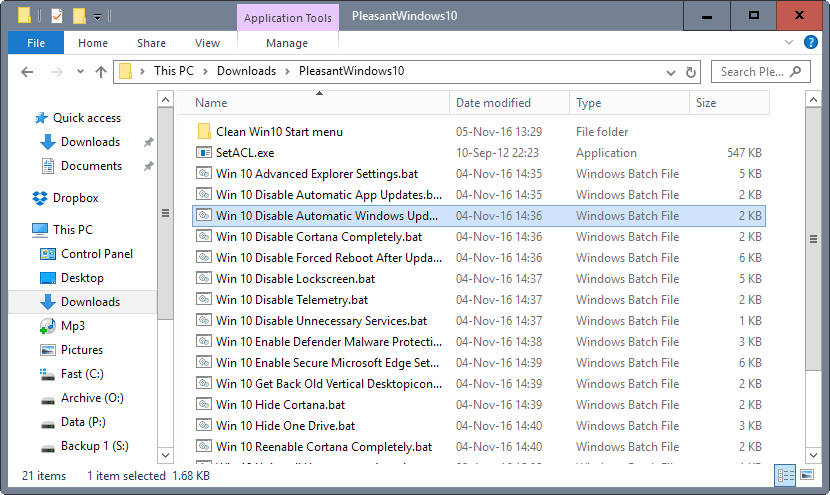
16 |
17 |  18 |
19 | **Note**: It is recommended that you [create a system restore point](http://www.ghacks.net/2015/08/02/check-if-system-restore-is-enabled-on-windows-10/), or [a backup](http://www.ghacks.net/2014/08/08/best-free-drive-backup-programs-for-windows/) before you run any of the tweaks. While you can verify what they do by opening them in a plain text editor, it is always better to be on the safe side and create a backup so that you can restore the system to a previous state should things go wrong.
20 |
21 | **Note 2**: We recommend that you check the batch files before you run them, as you may adjust them as you see fit. You may not want some settings or features changed for instance.
22 |
23 | ### The following batch files are included in the archive
24 |
25 | 1. Advanced Explorer Settings -- This changes more than a dozen File Explorer related settings on Windows 10 that turn of animations, enable menus, or turn off things like Toasts.
26 | 2. Disable Automatic App Updates -- Turns off automatic updates for Windows Store applications.
27 | 3. Disable Automatic Windows Updates -- Turns off automatic updates for the Windows 10 operating system itself.
28 | 4. Disable Cortana Completely -- Rename the cortana process searchUI.exe to searchUI.bak. This will kill the process permanetly and save your ressources.
29 | 5. Disable Forced Reboot after Update -- Blocks Windows from enforcing a reboot after updates that require one.
30 | 6. Disable Lockscreen -- Turns off the Windows 10 lockscreen.
31 | 7. Disable Telemetry -- Turns off Windows 10 Telemetry.
32 | 8. Disable Unnecessary Services -- This disables the MapsBroker, [DoSvc](http://www.ghacks.net/2015/07/03/windows-10-running-out-of-space-check-the-dosvc-directory/) and Wsearch services
33 | 9. Enable Defender Malware Protection -- Enables Windows malware Protection.
34 | 10. Enable Secure Microsoft Edge Settings -- Tweaks Microsoft Edge for security. Changes include turning of Flash and Cortana, enabling continuous browsing, and more.
35 | 11. Get Back Old Vertical Desktop Icon Distance -- Changes the vertical icon spacing on the desktop.
36 | 12. Hide Cortana -- Disables Cortana, and with it web searches and other search related parameters. The Microsoft way of disabling Cortana.
37 | 13. Hide OneDrive -- Hides OneDrive and disables several related settings.
38 | 14. Re-enable Cortana Completely -- This preferences turns Cortana on again.
39 | 15. Uninstall Unnecessary Apps -- Removes ten apps that Windows 10 ships with including 3D Builder, Skype App, Getting Started, or Voice Recorder.
40 | 16. Enable Administrator Account -- [This preference enables the hidden administrator account in Windows](http://www.ghacks.net/2014/11/12/how-to-enable-the-hidden-windows-10-administrator-account/).
41 | 17. Enable Standby instead of Hibernate -- Switch powerstate from hibernation (slow) to standby .
42 | 18. Get apps access for Administrator Account -- Enable access to applications for the administrator account.
43 |
44 | ### Verdict
45 |
46 | The batch files offer two advantages over software programs. First, they are verifiable which means that you can check them out to make sure they do what they are supposed to do and nothing else.
47 |
48 | This means as well that you can modify them to your liking, and even restore settings to their original values, for instance by creating a copy of a batch file and modifying values and commands accordingly.
49 |
50 | Second, you can run them with a single-click, and they do all the work in the background without launching a program interface first. (Thanks Joern!)
51 |
52 | ### Credits
53 |
54 | Article at http://www.ghacks.net/2016/11/08/improve-windows-10-with-one-click-batch-files/
55 |
--------------------------------------------------------------------------------
/Win 10 Advanced Explorer Settings.bat:
--------------------------------------------------------------------------------
1 | :checkPrivileges
2 | NET FILE 1>NUL 2>NUL
3 | if '%errorlevel%' == '0' ( goto gotPrivileges ) else ( goto getPrivileges )
4 |
5 | :getPrivileges
6 | if '%1'=='ELEV' (echo ELEV & shift /1 & goto gotPrivileges)
7 |
8 | setlocal DisableDelayedExpansion
9 | set "batchPath=%~0"
10 | setlocal EnableDelayedExpansion
11 | ECHO Set UAC = CreateObject^("Shell.Application"^) > "%temp%\OEgetPrivileges.vbs"
12 | ECHO args = "ELEV " >> "%temp%\OEgetPrivileges.vbs"
13 | ECHO For Each strArg in WScript.Arguments >> "%temp%\OEgetPrivileges.vbs"
14 | ECHO args = args ^& strArg ^& " " >> "%temp%\OEgetPrivileges.vbs"
15 | ECHO Next >> "%temp%\OEgetPrivileges.vbs"
16 | ECHO UAC.ShellExecute "!batchPath!", args, "", "runas", 1 >> "%temp%\OEgetPrivileges.vbs"
17 | "%SystemRoot%\System32\WScript.exe" "%temp%\OEgetPrivileges.vbs" %*
18 | exit /B
19 |
20 | :gotPrivileges
21 | if '%1'=='ELEV' shift /1
22 | setlocal & pushd .
23 | cd /d %~dp0
24 |
25 | :Start
26 | for /f "delims= " %%a in ('"wmic useraccount where name='%username%' get sid"') do (
27 | if not "%%a"=="SID" (
28 | set myvar=%%a
29 | goto :loop_end
30 | )
31 | )
32 |
33 | :loop_end
34 | set "line01=Windows Registry Editor Version 5.00"
35 | set "line02="
36 | set "line03=[HKEY_USERS\%myvar%\SOFTWARE\Microsoft\Windows\CurrentVersion\Explorer]"
37 | set "line04="ShowRecent"=dword:00000000"
38 | set "line05="ShowFrequent"=dword:00000000"
39 | set "line06="EnableAutoTray"=dword:00000000"
40 | set "line07="
41 | set "line08=[HKEY_USERS\%myvar%\SOFTWARE\Microsoft\Windows\CurrentVersion\Explorer\Advanced]"
42 | set "line09="FolderContentsInfoTip"=dword:00000000"
43 | set "line10="HideFileExt"=dword:00000000"
44 | set "line11="ShowSuperHidden"=dword:00000001"
45 | set "line12="AlwaysShowMenus"=dword:00000001"
46 | set "line13="AutoCheckSelect"=dword:00000001"
47 | set "line14="Hidden"=dword:00000001"
48 | set "line15="Start_TrackDocs"=dword:00000000"
49 | set "line16="DisablePreviewDesktop"=dword:00000000"
50 | set "line17="TaskbarAnimations"=dword:00000000"
51 | set "line18="ShowTaskViewButton"=dword:00000000"
52 | set "line19="TaskbarGlomLevel"=dword:00000001"
53 | set "line20="
54 | set "line21=[HKEY_USERS\%myvar%\SOFTWARE\Microsoft\Windows\CurrentVersion\PushNotifications]"
55 | set "line22="ToastEnabled"=dword:00000000"
56 | set "line23="
57 | set "line24=[HKEY_USERS\%myvar%\SOFTWARE\Microsoft\Windows\CurrentVersion\ContentDeliveryManager]"
58 | set "line25="SoftLandingEnabled"=dword:00000000"
59 | set "line26="SystemPaneSuggestionsEnabled"=dword:00000000"
60 | set "line27="
61 | set "line28=[HKEY_USERS\%myvar%\SOFTWARE\Microsoft\Windows\CurrentVersion\Explorer\AutoplayHandlers]"
62 | set "line29="DisableAutoplay"=dword:00000001"
63 | set "line30="
64 | set "line31=[HKEY_USERS\%myvar%\SOFTWARE\Microsoft\Windows\CurrentVersion\Themes\Personalize]"
65 | set "line32="ColorPrevalence"=dword:00000001"
66 | set "line33="
67 | set "line34=[HKEY_USERS\%myvar%\SOFTWARE\Microsoft\Windows\DWM]"
68 | set "line35="ColorPrevalence"=dword:00000001"
69 | set "line36="
70 | set "line37=[HKEY_USERS\%myvar%\Control Panel\International\User Profile]"
71 | set "line38="HttpAcceptLanguageOptOut"=dword:00000001"
72 | set "line39="
73 | set "line40=[HKEY_LOCAL_MACHINE\SOFTWARE\Microsoft\Windows\CurrentVersion\SmartGlass]"
74 | set "line41="UserAuthPolicy"=dword:00000000"
75 | set "line42="
76 | set "line43=[HKEY_USERS\%myvar%\Control Panel\Desktop\WindowMetrics]"
77 | set "line44="MinAnimate"=dword:00000000"
78 | set "line45="
79 | set "line46=[HKEY_USERS\%myvar%\SOFTWARE\Microsoft\Windows\CurrentVersion\Search]"
80 | set "line47="SearchboxTaskbarMode"=dword:00000000"
81 | set "line48="
82 | set "line49=[HKEY_USERS\%myvar%\SOFTWARE\Microsoft\Windows\CurrentVersion\Explorer\ControlPanel]"
83 | set "line50="AllItemsIconView"=dword:00000000"
84 | set "line51="StartupPage"=dword:00000001"
85 | set "line52="
86 | set "line53=[HKEY_LOCAL_MACHINE\SOFTWARE\Microsoft\Windows\CurrentVersion\DeliveryOptimization\Config]"
87 | set "line54="DODownloadMode"=dword:00000000"
88 | set "line55="
89 | set "line56=[HKEY_LOCAL_MACHINE\SOFTWARE\Policies\Microsoft\SQMClient\Windows]"
90 | set "line57="CEIPEnable"=dword:00000000"
91 | set "line58="
92 |
93 | setlocal EnableDelayedExpansion
94 | (
95 | echo !line01!
96 | echo/
97 | echo !line03!
98 | echo !line04!
99 | echo !line05!
100 | echo !line06!
101 | echo/
102 | echo !line08!
103 | echo !line09!
104 | echo !line10!
105 | echo !line11!
106 | echo !line12!
107 | echo !line13!
108 | echo !line14!
109 | echo !line15!
110 | echo !line16!
111 | echo !line17!
112 | echo !line18!
113 | echo !line19!
114 | echo/
115 | echo !line21!
116 | echo !line22!
117 | echo/
118 | echo !line24!
119 | echo !line25!
120 | echo !line26!
121 | echo/
122 | echo !line28!
123 | echo !line29!
124 | echo/
125 | echo !line31!
126 | echo !line32!
127 | echo/
128 | echo !line34!
129 | echo !line35!
130 | echo/
131 | echo !line37!
132 | echo !line38!
133 | echo/
134 | echo !line40!
135 | echo !line41!
136 | echo/
137 | echo !line43!
138 | echo !line44!
139 | echo/
140 | echo !line46!
141 | echo !line47!
142 | echo/
143 | echo !line49!
144 | echo !line50!
145 | echo !line51!
146 | echo/
147 | echo !line53!
148 | echo !line54!
149 | echo/
150 | echo !line56!
151 | echo !line57!
152 | echo/
153 |
154 | ) > "Win 10 Explorer Einstellungen.reg"
155 | REGEDIT.EXE /S "%~dp0Win 10 Explorer Einstellungen.reg"
156 | del /F /Q "%~dp0Win 10 Explorer Einstellungen.reg"
--------------------------------------------------------------------------------
/Win 10 Disable Forced Reboot After Update.bat:
--------------------------------------------------------------------------------
1 | :checkPrivileges
2 | NET FILE 1>NUL 2>NUL
3 | if '%errorlevel%' == '0' ( goto gotPrivileges ) else ( goto getPrivileges )
4 |
5 | :getPrivileges
6 | if '%1'=='ELEV' (echo ELEV & shift /1 & goto gotPrivileges)
7 |
8 | setlocal DisableDelayedExpansion
9 | set "batchPath=%~0"
10 | setlocal EnableDelayedExpansion
11 | ECHO Set UAC = CreateObject^("Shell.Application"^) > "%temp%\OEgetPrivileges.vbs"
12 | ECHO args = "ELEV " >> "%temp%\OEgetPrivileges.vbs"
13 | ECHO For Each strArg in WScript.Arguments >> "%temp%\OEgetPrivileges.vbs"
14 | ECHO args = args ^& strArg ^& " " >> "%temp%\OEgetPrivileges.vbs"
15 | ECHO Next >> "%temp%\OEgetPrivileges.vbs"
16 | ECHO UAC.ShellExecute "!batchPath!", args, "", "runas", 1 >> "%temp%\OEgetPrivileges.vbs"
17 | "%SystemRoot%\System32\WScript.exe" "%temp%\OEgetPrivileges.vbs" %*
18 | exit /B
19 |
20 | :gotPrivileges
21 | if '%1'=='ELEV' shift /1
22 | setlocal & pushd .
23 | cd /d %~dp0
24 |
25 | :Start
26 | for /f "delims= " %%a in ('"wmic useraccount where name='%username%' get sid"') do (
27 | if not "%%a"=="SID" (
28 | set myvar=%%a
29 | goto :loop_end
30 | )
31 | )
32 |
33 | :loop_end
34 | set "line01="
35 | set "line02="
36 | set "line03= "
37 | set "line04= \Microsoft\Windows\UpdateOrchestrator\Reboot"
38 | set "line05= "
39 | set "line06= "
40 | set "line07= "
41 | set "line08= 2016-09-14T00:20:38+02:00"
42 | set "line09= true"
43 | set "line10= "
44 | set "line11= "
45 | set "line12= "
46 | set "line13= "
47 | set "line14= S-1-5-18"
48 | set "line15= LeastPrivilege"
49 | set "line16= "
50 | set "line17= "
51 | set "line18= "
52 | set "line19= IgnoreNew"
53 | set "line20= true"
54 | set "line21= false"
55 | set "line22= true"
56 | set "line23= true"
57 | set "line24= false"
58 | set "line25= "
59 | set "line26= PT10M"
60 | set "line27= PT1H"
61 | set "line28= true"
62 | set "line29= false"
63 | set "line30= "
64 | set "line31= true"
65 | set "line32= false"
66 | set "line33= false"
67 | set "line34= false"
68 | set "line35= true"
69 | set "line36= PT72H"
70 | set "line37= 7"
71 | set "line38= "
72 | set "line39= PT10M"
73 | set "line40= 3"
74 | set "line41= "
75 | set "line42= "
76 | set "line43= "
77 | set "line44= "
78 | set "line45= %systemroot%\system32\MusNotification.exe"
79 | set "line46= RebootDialog"
80 | set "line47= "
81 | set "line48= "
82 | set "line49="
83 |
84 | setlocal EnableDelayedExpansion
85 | (
86 | echo !line01!
87 | echo !line02!
88 | echo !line03!
89 | echo !line04!
90 | echo !line05!
91 | echo !line06!
92 | echo !line07!
93 | echo !line08!
94 | echo !line09!
95 | echo !line10!
96 | echo !line11!
97 | echo !line12!
98 | echo !line13!
99 | echo !line14!
100 | echo !line15!
101 | echo !line16!
102 | echo !line17!
103 | echo !line18!
104 | echo !line19!
105 | echo !line20!
106 | echo !line21!
107 | echo !line22!
108 | echo !line23!
109 | echo !line24!
110 | echo !line25!
111 | echo !line26!
112 | echo !line27!
113 | echo !line28!
114 | echo !line29!
115 | echo !line30!
116 | echo !line31!
117 | echo !line32!
118 | echo !line33!
119 | echo !line34!
120 | echo !line35!
121 | echo !line36!
122 | echo !line37!
123 | echo !line38!
124 | echo !line39!
125 | echo !line40!
126 | echo !line41!
127 | echo !line42!
128 | echo !line43!
129 | echo !line44!
130 | echo !line45!
131 | echo !line46!
132 | echo !line47!
133 | echo !line48!
134 | echo !line49!
135 |
136 | ) > "Win 10 Reboot deaktivieren.xml"
137 | "%~dp0SetACL.exe" -on C:\Windows\System32\Tasks\Microsoft\Windows\UpdateOrchestrator\Reboot -ot file -actn setprot -op "dacl:p_nc;sacl:p_nc"
138 | "%~dp0SetACL.exe" -on C:\Windows\System32\Tasks\Microsoft\Windows\UpdateOrchestrator\Reboot -ot file -actn setowner -ownr "n:%USERNAME%"
139 | "%~dp0SetACL.exe" -on C:\Windows\System32\Tasks\Microsoft\Windows\UpdateOrchestrator\Reboot -ot file -actn ace -ace "n:%USERNAME%;p:full"
140 | "%~dp0SetACL.exe" -on C:\Windows\System32\Tasks\Microsoft\Windows\UpdateOrchestrator\Reboot -ot file -actn ace -ace "n:System;p:read"
141 | schtasks /delete /F /tn "Microsoft\Windows\UpdateOrchestrator\Reboot"
142 | schtasks /create /tn "Microsoft\Windows\UpdateOrchestrator\Reboot" /xml "%~dp0Win 10 Reboot deaktivieren.xml"
143 | "%~dp0SetACL.exe" -on C:\Windows\System32\Tasks\Microsoft\Windows\UpdateOrchestrator\Reboot -ot file -actn setprot -op "dacl:p_nc;sacl:p_nc"
144 | "%~dp0SetACL.exe" -on C:\Windows\System32\Tasks\Microsoft\Windows\UpdateOrchestrator\Reboot -ot file -actn setowner -ownr "n:%USERNAME%"
145 | "%~dp0SetACL.exe" -on C:\Windows\System32\Tasks\Microsoft\Windows\UpdateOrchestrator\Reboot -ot file -actn ace -ace "n:%USERNAME%;p:full"
146 | "%~dp0SetACL.exe" -on C:\Windows\System32\Tasks\Microsoft\Windows\UpdateOrchestrator\Reboot -ot file -actn ace -ace "n:System;p:read"
147 | del /F /Q "%~dp0Win 10 Reboot deaktivieren.xml"
--------------------------------------------------------------------------------
/Win 10 Enable Secure Microsoft Edge Settings.bat:
--------------------------------------------------------------------------------
1 | :checkPrivileges
2 | NET FILE 1>NUL 2>NUL
3 | if '%errorlevel%' == '0' ( goto gotPrivileges ) else ( goto getPrivileges )
4 |
5 | :getPrivileges
6 | if '%1'=='ELEV' (echo ELEV & shift /1 & goto gotPrivileges)
7 |
8 | setlocal DisableDelayedExpansion
9 | set "batchPath=%~0"
10 | setlocal EnableDelayedExpansion
11 | ECHO Set UAC = CreateObject^("Shell.Application"^) > "%temp%\OEgetPrivileges.vbs"
12 | ECHO args = "ELEV " >> "%temp%\OEgetPrivileges.vbs"
13 | ECHO For Each strArg in WScript.Arguments >> "%temp%\OEgetPrivileges.vbs"
14 | ECHO args = args ^& strArg ^& " " >> "%temp%\OEgetPrivileges.vbs"
15 | ECHO Next >> "%temp%\OEgetPrivileges.vbs"
16 | ECHO UAC.ShellExecute "!batchPath!", args, "", "runas", 1 >> "%temp%\OEgetPrivileges.vbs"
17 | "%SystemRoot%\System32\WScript.exe" "%temp%\OEgetPrivileges.vbs" %*
18 | exit /B
19 |
20 | :gotPrivileges
21 | if '%1'=='ELEV' shift /1
22 | setlocal & pushd .
23 | cd /d %~dp0
24 |
25 | :START
26 | @ECHO off
27 | for /f "delims= " %%a in ('"wmic useraccount where name='%username%' get sid"') do (
28 | if not "%%a"=="SID" (
29 | set myvar=%%a
30 | goto :loop_end
31 | )
32 | )
33 | set myvar2=""
34 | :loop_end
35 | set "line01=Windows Registry Editor Version 5.00"
36 | set "line02= "
37 | set "line03=[HKEY_USERS\%myvar%\SOFTWARE\Classes\Local Settings\Software\Microsoft\Windows\CurrentVersion\AppContainer\Storage\microsoft.microsoftedge_8wekyb3d8bbwe\MicrosoftEdge\Main]"
38 | set "line04="Cookies"=dword:00000001"
39 | set "line05= "
40 | set "line06=[HKEY_USERS\%myvar%_Classes\Local Settings\Software\Microsoft\Windows\CurrentVersion\AppContainer\Storage\microsoft.microsoftedge_8wekyb3d8bbwe\MicrosoftEdge\Main]"
41 | set "line07="Cookies"=dword:00000001"
42 | set "line08= "
43 | set "line09=[HKEY_USERS\%myvar%\SOFTWARE\Classes\Local Settings\Software\Microsoft\Windows\CurrentVersion\AppContainer\Storage\microsoft.microsoftedge_8wekyb3d8bbwe\MicrosoftEdge\ServiceUI]"
44 | set "line10="EnableCortana"=dword:00000000"
45 | set "line11= "
46 | set "line12=[HKEY_USERS\%myvar%_Classes\Local Settings\Software\Microsoft\Windows\CurrentVersion\AppContainer\Storage\microsoft.microsoftedge_8wekyb3d8bbwe\MicrosoftEdge\ServiceUI]"
47 | set "line13="EnableCortana"=dword:00000000"
48 | set "line14= "
49 | set "line15=[HKEY_USERS\%myvar%\SOFTWARE\Classes\Local Settings\Software\Microsoft\Windows\CurrentVersion\AppContainer\Storage\microsoft.microsoftedge_8wekyb3d8bbwe\MicrosoftEdge\Addons]"
50 | set "line16="FlashPlayerEnabled"=dword:00000000"
51 | set "line17= "
52 | set "line18=[HKEY_USERS\%myvar%_Classes\Local Settings\Software\Microsoft\Windows\CurrentVersion\AppContainer\Storage\microsoft.microsoftedge_8wekyb3d8bbwe\MicrosoftEdge\Addons]"
53 | set "line19="FlashPlayerEnabled"=dword:00000000"
54 | set "line20= "
55 | set "line21=[HKEY_USERS\%myvar%\SOFTWARE\Classes\Local Settings\Software\Microsoft\Windows\CurrentVersion\AppContainer\Storage\microsoft.microsoftedge_8wekyb3d8bbwe\MicrosoftEdge\User\Default\SearchScopes]"
56 | set "line22="ShowSearchSuggestionsGlobal"=dword:00000000"
57 | set "line23= "
58 | set "line24=[HKEY_USERS\%myvar%_Classes\Local Settings\Software\Microsoft\Windows\CurrentVersion\AppContainer\Storage\microsoft.microsoftedge_8wekyb3d8bbwe\MicrosoftEdge\User\Default\SearchScopes]"
59 | set "line25="ShowSearchSuggestionsGlobal"=dword:00000000"
60 | set "line26= "
61 | set "line27=[HKEY_USERS\%myvar%\SOFTWARE\Classes\Local Settings\Software\Microsoft\Windows\CurrentVersion\AppContainer\Storage\microsoft.microsoftedge_8wekyb3d8bbwe\MicrosoftEdge\ContinuousBrowsing]"
62 | set "line28="Enabled"=dword:00000001"
63 | set "line29= "
64 | set "line30=[HKEY_USERS\%myvar%_Classes\Local Settings\Software\Microsoft\Windows\CurrentVersion\AppContainer\Storage\microsoft.microsoftedge_8wekyb3d8bbwe\MicrosoftEdge\ContinuousBrowsing]"
65 | set "line31="Enabled"=dword:00000001"
66 | set "line32= "
67 | set "line33=[HKEY_USERS\%myvar%\SOFTWARE\Classes\Local Settings\Software\Microsoft\Windows\CurrentVersion\AppContainer\Storage\microsoft.microsoftedge_8wekyb3d8bbwe\MicrosoftEdge\ServiceUI]"
68 | set "line34="NewTabPageDisplayOption"=dword:00000002"
69 | set "line35= "
70 | set "line36=[HKEY_USERS\%myvar%_Classes\Local Settings\Software\Microsoft\Windows\CurrentVersion\AppContainer\Storage\microsoft.microsoftedge_8wekyb3d8bbwe\MicrosoftEdge\ServiceUI]"
71 | set "line37="NewTabPageDisplayOption"=dword:00000002"
72 | set "line38= "
73 | set "line39=[HKEY_USERS\%myvar%\SOFTWARE\Classes\Local Settings\Software\Microsoft\Windows\CurrentVersion\AppContainer\Storage\microsoft.microsoftedge_8wekyb3d8bbwe\MicrosoftEdge\Main]"
74 | set "line40="FormSuggest Passwords"="no""
75 | set "line41= "
76 | set "line42=[HKEY_USERS\%myvar%_Classes\Local Settings\Software\Microsoft\Windows\CurrentVersion\AppContainer\Storage\microsoft.microsoftedge_8wekyb3d8bbwe\MicrosoftEdge\Main]"
77 | set "line43="FormSuggest Passwords"="no""
78 | set "line44= "
79 | set "line45=[HKEY_USERS\%myvar%\SOFTWARE\Classes\Local Settings\Software\Microsoft\Windows\CurrentVersion\AppContainer\Storage\microsoft.microsoftedge_8wekyb3d8bbwe\MicrosoftEdge\Extensions]"
80 | set "line46="EnableExtensionDevelopment"=dword:00000001"
81 | set "line47= "
82 | set "line48=[HKEY_USERS\%myvar%_Classes\Local Settings\Software\Microsoft\Windows\CurrentVersion\AppContainer\Storage\microsoft.microsoftedge_8wekyb3d8bbwe\MicrosoftEdge\Extensions]"
83 | set "line49="EnableExtensionDevelopment"=dword:00000001"
84 | set "line50= "
85 |
86 | setlocal EnableDelayedExpansion
87 | (
88 | echo !line01!
89 | echo/
90 | echo !line03!
91 | echo !line04!
92 | echo/
93 | echo !line06!
94 | echo !line07!
95 | echo/
96 | echo !line09!
97 | echo !line10!
98 | echo/
99 | echo !line12!
100 | echo !line13!
101 | echo/
102 | echo !line15!
103 | echo !line16!
104 | echo/
105 | echo !line18!
106 | echo !line19!
107 | echo/
108 | echo !line21!
109 | echo !line22!
110 | echo/
111 | echo !line24!
112 | echo !line25!
113 | echo/
114 | echo !line27!
115 | echo !line28!
116 | echo/
117 | echo !line30!
118 | echo !line31!
119 | echo/
120 | echo !line33!
121 | echo !line34!
122 | echo/
123 | echo !line36!
124 | echo !line37!
125 | echo/
126 | echo !line39!
127 | echo !line40!
128 | echo/
129 | echo !line42!
130 | echo !line43!
131 | echo/
132 | echo !line45!
133 | echo !line46!
134 | echo/
135 | echo !line48!
136 | echo !line49!
137 | echo/
138 |
139 | ) > "Win 10 Edge sichere Einstellungen.reg"
140 | REGEDIT.EXE /S "%~dp0Win 10 Edge sichere Einstellungen.reg"
141 | del /F /Q "%~dp0Win 10 Edge sichere Einstellungen.reg"
--------------------------------------------------------------------------------
18 |
19 | **Note**: It is recommended that you [create a system restore point](http://www.ghacks.net/2015/08/02/check-if-system-restore-is-enabled-on-windows-10/), or [a backup](http://www.ghacks.net/2014/08/08/best-free-drive-backup-programs-for-windows/) before you run any of the tweaks. While you can verify what they do by opening them in a plain text editor, it is always better to be on the safe side and create a backup so that you can restore the system to a previous state should things go wrong.
20 |
21 | **Note 2**: We recommend that you check the batch files before you run them, as you may adjust them as you see fit. You may not want some settings or features changed for instance.
22 |
23 | ### The following batch files are included in the archive
24 |
25 | 1. Advanced Explorer Settings -- This changes more than a dozen File Explorer related settings on Windows 10 that turn of animations, enable menus, or turn off things like Toasts.
26 | 2. Disable Automatic App Updates -- Turns off automatic updates for Windows Store applications.
27 | 3. Disable Automatic Windows Updates -- Turns off automatic updates for the Windows 10 operating system itself.
28 | 4. Disable Cortana Completely -- Rename the cortana process searchUI.exe to searchUI.bak. This will kill the process permanetly and save your ressources.
29 | 5. Disable Forced Reboot after Update -- Blocks Windows from enforcing a reboot after updates that require one.
30 | 6. Disable Lockscreen -- Turns off the Windows 10 lockscreen.
31 | 7. Disable Telemetry -- Turns off Windows 10 Telemetry.
32 | 8. Disable Unnecessary Services -- This disables the MapsBroker, [DoSvc](http://www.ghacks.net/2015/07/03/windows-10-running-out-of-space-check-the-dosvc-directory/) and Wsearch services
33 | 9. Enable Defender Malware Protection -- Enables Windows malware Protection.
34 | 10. Enable Secure Microsoft Edge Settings -- Tweaks Microsoft Edge for security. Changes include turning of Flash and Cortana, enabling continuous browsing, and more.
35 | 11. Get Back Old Vertical Desktop Icon Distance -- Changes the vertical icon spacing on the desktop.
36 | 12. Hide Cortana -- Disables Cortana, and with it web searches and other search related parameters. The Microsoft way of disabling Cortana.
37 | 13. Hide OneDrive -- Hides OneDrive and disables several related settings.
38 | 14. Re-enable Cortana Completely -- This preferences turns Cortana on again.
39 | 15. Uninstall Unnecessary Apps -- Removes ten apps that Windows 10 ships with including 3D Builder, Skype App, Getting Started, or Voice Recorder.
40 | 16. Enable Administrator Account -- [This preference enables the hidden administrator account in Windows](http://www.ghacks.net/2014/11/12/how-to-enable-the-hidden-windows-10-administrator-account/).
41 | 17. Enable Standby instead of Hibernate -- Switch powerstate from hibernation (slow) to standby .
42 | 18. Get apps access for Administrator Account -- Enable access to applications for the administrator account.
43 |
44 | ### Verdict
45 |
46 | The batch files offer two advantages over software programs. First, they are verifiable which means that you can check them out to make sure they do what they are supposed to do and nothing else.
47 |
48 | This means as well that you can modify them to your liking, and even restore settings to their original values, for instance by creating a copy of a batch file and modifying values and commands accordingly.
49 |
50 | Second, you can run them with a single-click, and they do all the work in the background without launching a program interface first. (Thanks Joern!)
51 |
52 | ### Credits
53 |
54 | Article at http://www.ghacks.net/2016/11/08/improve-windows-10-with-one-click-batch-files/
55 |
--------------------------------------------------------------------------------
/Win 10 Advanced Explorer Settings.bat:
--------------------------------------------------------------------------------
1 | :checkPrivileges
2 | NET FILE 1>NUL 2>NUL
3 | if '%errorlevel%' == '0' ( goto gotPrivileges ) else ( goto getPrivileges )
4 |
5 | :getPrivileges
6 | if '%1'=='ELEV' (echo ELEV & shift /1 & goto gotPrivileges)
7 |
8 | setlocal DisableDelayedExpansion
9 | set "batchPath=%~0"
10 | setlocal EnableDelayedExpansion
11 | ECHO Set UAC = CreateObject^("Shell.Application"^) > "%temp%\OEgetPrivileges.vbs"
12 | ECHO args = "ELEV " >> "%temp%\OEgetPrivileges.vbs"
13 | ECHO For Each strArg in WScript.Arguments >> "%temp%\OEgetPrivileges.vbs"
14 | ECHO args = args ^& strArg ^& " " >> "%temp%\OEgetPrivileges.vbs"
15 | ECHO Next >> "%temp%\OEgetPrivileges.vbs"
16 | ECHO UAC.ShellExecute "!batchPath!", args, "", "runas", 1 >> "%temp%\OEgetPrivileges.vbs"
17 | "%SystemRoot%\System32\WScript.exe" "%temp%\OEgetPrivileges.vbs" %*
18 | exit /B
19 |
20 | :gotPrivileges
21 | if '%1'=='ELEV' shift /1
22 | setlocal & pushd .
23 | cd /d %~dp0
24 |
25 | :Start
26 | for /f "delims= " %%a in ('"wmic useraccount where name='%username%' get sid"') do (
27 | if not "%%a"=="SID" (
28 | set myvar=%%a
29 | goto :loop_end
30 | )
31 | )
32 |
33 | :loop_end
34 | set "line01=Windows Registry Editor Version 5.00"
35 | set "line02="
36 | set "line03=[HKEY_USERS\%myvar%\SOFTWARE\Microsoft\Windows\CurrentVersion\Explorer]"
37 | set "line04="ShowRecent"=dword:00000000"
38 | set "line05="ShowFrequent"=dword:00000000"
39 | set "line06="EnableAutoTray"=dword:00000000"
40 | set "line07="
41 | set "line08=[HKEY_USERS\%myvar%\SOFTWARE\Microsoft\Windows\CurrentVersion\Explorer\Advanced]"
42 | set "line09="FolderContentsInfoTip"=dword:00000000"
43 | set "line10="HideFileExt"=dword:00000000"
44 | set "line11="ShowSuperHidden"=dword:00000001"
45 | set "line12="AlwaysShowMenus"=dword:00000001"
46 | set "line13="AutoCheckSelect"=dword:00000001"
47 | set "line14="Hidden"=dword:00000001"
48 | set "line15="Start_TrackDocs"=dword:00000000"
49 | set "line16="DisablePreviewDesktop"=dword:00000000"
50 | set "line17="TaskbarAnimations"=dword:00000000"
51 | set "line18="ShowTaskViewButton"=dword:00000000"
52 | set "line19="TaskbarGlomLevel"=dword:00000001"
53 | set "line20="
54 | set "line21=[HKEY_USERS\%myvar%\SOFTWARE\Microsoft\Windows\CurrentVersion\PushNotifications]"
55 | set "line22="ToastEnabled"=dword:00000000"
56 | set "line23="
57 | set "line24=[HKEY_USERS\%myvar%\SOFTWARE\Microsoft\Windows\CurrentVersion\ContentDeliveryManager]"
58 | set "line25="SoftLandingEnabled"=dword:00000000"
59 | set "line26="SystemPaneSuggestionsEnabled"=dword:00000000"
60 | set "line27="
61 | set "line28=[HKEY_USERS\%myvar%\SOFTWARE\Microsoft\Windows\CurrentVersion\Explorer\AutoplayHandlers]"
62 | set "line29="DisableAutoplay"=dword:00000001"
63 | set "line30="
64 | set "line31=[HKEY_USERS\%myvar%\SOFTWARE\Microsoft\Windows\CurrentVersion\Themes\Personalize]"
65 | set "line32="ColorPrevalence"=dword:00000001"
66 | set "line33="
67 | set "line34=[HKEY_USERS\%myvar%\SOFTWARE\Microsoft\Windows\DWM]"
68 | set "line35="ColorPrevalence"=dword:00000001"
69 | set "line36="
70 | set "line37=[HKEY_USERS\%myvar%\Control Panel\International\User Profile]"
71 | set "line38="HttpAcceptLanguageOptOut"=dword:00000001"
72 | set "line39="
73 | set "line40=[HKEY_LOCAL_MACHINE\SOFTWARE\Microsoft\Windows\CurrentVersion\SmartGlass]"
74 | set "line41="UserAuthPolicy"=dword:00000000"
75 | set "line42="
76 | set "line43=[HKEY_USERS\%myvar%\Control Panel\Desktop\WindowMetrics]"
77 | set "line44="MinAnimate"=dword:00000000"
78 | set "line45="
79 | set "line46=[HKEY_USERS\%myvar%\SOFTWARE\Microsoft\Windows\CurrentVersion\Search]"
80 | set "line47="SearchboxTaskbarMode"=dword:00000000"
81 | set "line48="
82 | set "line49=[HKEY_USERS\%myvar%\SOFTWARE\Microsoft\Windows\CurrentVersion\Explorer\ControlPanel]"
83 | set "line50="AllItemsIconView"=dword:00000000"
84 | set "line51="StartupPage"=dword:00000001"
85 | set "line52="
86 | set "line53=[HKEY_LOCAL_MACHINE\SOFTWARE\Microsoft\Windows\CurrentVersion\DeliveryOptimization\Config]"
87 | set "line54="DODownloadMode"=dword:00000000"
88 | set "line55="
89 | set "line56=[HKEY_LOCAL_MACHINE\SOFTWARE\Policies\Microsoft\SQMClient\Windows]"
90 | set "line57="CEIPEnable"=dword:00000000"
91 | set "line58="
92 |
93 | setlocal EnableDelayedExpansion
94 | (
95 | echo !line01!
96 | echo/
97 | echo !line03!
98 | echo !line04!
99 | echo !line05!
100 | echo !line06!
101 | echo/
102 | echo !line08!
103 | echo !line09!
104 | echo !line10!
105 | echo !line11!
106 | echo !line12!
107 | echo !line13!
108 | echo !line14!
109 | echo !line15!
110 | echo !line16!
111 | echo !line17!
112 | echo !line18!
113 | echo !line19!
114 | echo/
115 | echo !line21!
116 | echo !line22!
117 | echo/
118 | echo !line24!
119 | echo !line25!
120 | echo !line26!
121 | echo/
122 | echo !line28!
123 | echo !line29!
124 | echo/
125 | echo !line31!
126 | echo !line32!
127 | echo/
128 | echo !line34!
129 | echo !line35!
130 | echo/
131 | echo !line37!
132 | echo !line38!
133 | echo/
134 | echo !line40!
135 | echo !line41!
136 | echo/
137 | echo !line43!
138 | echo !line44!
139 | echo/
140 | echo !line46!
141 | echo !line47!
142 | echo/
143 | echo !line49!
144 | echo !line50!
145 | echo !line51!
146 | echo/
147 | echo !line53!
148 | echo !line54!
149 | echo/
150 | echo !line56!
151 | echo !line57!
152 | echo/
153 |
154 | ) > "Win 10 Explorer Einstellungen.reg"
155 | REGEDIT.EXE /S "%~dp0Win 10 Explorer Einstellungen.reg"
156 | del /F /Q "%~dp0Win 10 Explorer Einstellungen.reg"
--------------------------------------------------------------------------------
/Win 10 Disable Forced Reboot After Update.bat:
--------------------------------------------------------------------------------
1 | :checkPrivileges
2 | NET FILE 1>NUL 2>NUL
3 | if '%errorlevel%' == '0' ( goto gotPrivileges ) else ( goto getPrivileges )
4 |
5 | :getPrivileges
6 | if '%1'=='ELEV' (echo ELEV & shift /1 & goto gotPrivileges)
7 |
8 | setlocal DisableDelayedExpansion
9 | set "batchPath=%~0"
10 | setlocal EnableDelayedExpansion
11 | ECHO Set UAC = CreateObject^("Shell.Application"^) > "%temp%\OEgetPrivileges.vbs"
12 | ECHO args = "ELEV " >> "%temp%\OEgetPrivileges.vbs"
13 | ECHO For Each strArg in WScript.Arguments >> "%temp%\OEgetPrivileges.vbs"
14 | ECHO args = args ^& strArg ^& " " >> "%temp%\OEgetPrivileges.vbs"
15 | ECHO Next >> "%temp%\OEgetPrivileges.vbs"
16 | ECHO UAC.ShellExecute "!batchPath!", args, "", "runas", 1 >> "%temp%\OEgetPrivileges.vbs"
17 | "%SystemRoot%\System32\WScript.exe" "%temp%\OEgetPrivileges.vbs" %*
18 | exit /B
19 |
20 | :gotPrivileges
21 | if '%1'=='ELEV' shift /1
22 | setlocal & pushd .
23 | cd /d %~dp0
24 |
25 | :Start
26 | for /f "delims= " %%a in ('"wmic useraccount where name='%username%' get sid"') do (
27 | if not "%%a"=="SID" (
28 | set myvar=%%a
29 | goto :loop_end
30 | )
31 | )
32 |
33 | :loop_end
34 | set "line01="
35 | set "line02="
36 | set "line03= "
37 | set "line04= \Microsoft\Windows\UpdateOrchestrator\Reboot"
38 | set "line05= "
39 | set "line06= "
40 | set "line07= "
41 | set "line08= 2016-09-14T00:20:38+02:00"
42 | set "line09= true"
43 | set "line10= "
44 | set "line11= "
45 | set "line12= "
46 | set "line13= "
47 | set "line14= S-1-5-18"
48 | set "line15= LeastPrivilege"
49 | set "line16= "
50 | set "line17= "
51 | set "line18= "
52 | set "line19= IgnoreNew"
53 | set "line20= true"
54 | set "line21= false"
55 | set "line22= true"
56 | set "line23= true"
57 | set "line24= false"
58 | set "line25= "
59 | set "line26= PT10M"
60 | set "line27= PT1H"
61 | set "line28= true"
62 | set "line29= false"
63 | set "line30= "
64 | set "line31= true"
65 | set "line32= false"
66 | set "line33= false"
67 | set "line34= false"
68 | set "line35= true"
69 | set "line36= PT72H"
70 | set "line37= 7"
71 | set "line38= "
72 | set "line39= PT10M"
73 | set "line40= 3"
74 | set "line41= "
75 | set "line42= "
76 | set "line43= "
77 | set "line44= "
78 | set "line45= %systemroot%\system32\MusNotification.exe"
79 | set "line46= RebootDialog"
80 | set "line47= "
81 | set "line48= "
82 | set "line49="
83 |
84 | setlocal EnableDelayedExpansion
85 | (
86 | echo !line01!
87 | echo !line02!
88 | echo !line03!
89 | echo !line04!
90 | echo !line05!
91 | echo !line06!
92 | echo !line07!
93 | echo !line08!
94 | echo !line09!
95 | echo !line10!
96 | echo !line11!
97 | echo !line12!
98 | echo !line13!
99 | echo !line14!
100 | echo !line15!
101 | echo !line16!
102 | echo !line17!
103 | echo !line18!
104 | echo !line19!
105 | echo !line20!
106 | echo !line21!
107 | echo !line22!
108 | echo !line23!
109 | echo !line24!
110 | echo !line25!
111 | echo !line26!
112 | echo !line27!
113 | echo !line28!
114 | echo !line29!
115 | echo !line30!
116 | echo !line31!
117 | echo !line32!
118 | echo !line33!
119 | echo !line34!
120 | echo !line35!
121 | echo !line36!
122 | echo !line37!
123 | echo !line38!
124 | echo !line39!
125 | echo !line40!
126 | echo !line41!
127 | echo !line42!
128 | echo !line43!
129 | echo !line44!
130 | echo !line45!
131 | echo !line46!
132 | echo !line47!
133 | echo !line48!
134 | echo !line49!
135 |
136 | ) > "Win 10 Reboot deaktivieren.xml"
137 | "%~dp0SetACL.exe" -on C:\Windows\System32\Tasks\Microsoft\Windows\UpdateOrchestrator\Reboot -ot file -actn setprot -op "dacl:p_nc;sacl:p_nc"
138 | "%~dp0SetACL.exe" -on C:\Windows\System32\Tasks\Microsoft\Windows\UpdateOrchestrator\Reboot -ot file -actn setowner -ownr "n:%USERNAME%"
139 | "%~dp0SetACL.exe" -on C:\Windows\System32\Tasks\Microsoft\Windows\UpdateOrchestrator\Reboot -ot file -actn ace -ace "n:%USERNAME%;p:full"
140 | "%~dp0SetACL.exe" -on C:\Windows\System32\Tasks\Microsoft\Windows\UpdateOrchestrator\Reboot -ot file -actn ace -ace "n:System;p:read"
141 | schtasks /delete /F /tn "Microsoft\Windows\UpdateOrchestrator\Reboot"
142 | schtasks /create /tn "Microsoft\Windows\UpdateOrchestrator\Reboot" /xml "%~dp0Win 10 Reboot deaktivieren.xml"
143 | "%~dp0SetACL.exe" -on C:\Windows\System32\Tasks\Microsoft\Windows\UpdateOrchestrator\Reboot -ot file -actn setprot -op "dacl:p_nc;sacl:p_nc"
144 | "%~dp0SetACL.exe" -on C:\Windows\System32\Tasks\Microsoft\Windows\UpdateOrchestrator\Reboot -ot file -actn setowner -ownr "n:%USERNAME%"
145 | "%~dp0SetACL.exe" -on C:\Windows\System32\Tasks\Microsoft\Windows\UpdateOrchestrator\Reboot -ot file -actn ace -ace "n:%USERNAME%;p:full"
146 | "%~dp0SetACL.exe" -on C:\Windows\System32\Tasks\Microsoft\Windows\UpdateOrchestrator\Reboot -ot file -actn ace -ace "n:System;p:read"
147 | del /F /Q "%~dp0Win 10 Reboot deaktivieren.xml"
--------------------------------------------------------------------------------
/Win 10 Enable Secure Microsoft Edge Settings.bat:
--------------------------------------------------------------------------------
1 | :checkPrivileges
2 | NET FILE 1>NUL 2>NUL
3 | if '%errorlevel%' == '0' ( goto gotPrivileges ) else ( goto getPrivileges )
4 |
5 | :getPrivileges
6 | if '%1'=='ELEV' (echo ELEV & shift /1 & goto gotPrivileges)
7 |
8 | setlocal DisableDelayedExpansion
9 | set "batchPath=%~0"
10 | setlocal EnableDelayedExpansion
11 | ECHO Set UAC = CreateObject^("Shell.Application"^) > "%temp%\OEgetPrivileges.vbs"
12 | ECHO args = "ELEV " >> "%temp%\OEgetPrivileges.vbs"
13 | ECHO For Each strArg in WScript.Arguments >> "%temp%\OEgetPrivileges.vbs"
14 | ECHO args = args ^& strArg ^& " " >> "%temp%\OEgetPrivileges.vbs"
15 | ECHO Next >> "%temp%\OEgetPrivileges.vbs"
16 | ECHO UAC.ShellExecute "!batchPath!", args, "", "runas", 1 >> "%temp%\OEgetPrivileges.vbs"
17 | "%SystemRoot%\System32\WScript.exe" "%temp%\OEgetPrivileges.vbs" %*
18 | exit /B
19 |
20 | :gotPrivileges
21 | if '%1'=='ELEV' shift /1
22 | setlocal & pushd .
23 | cd /d %~dp0
24 |
25 | :START
26 | @ECHO off
27 | for /f "delims= " %%a in ('"wmic useraccount where name='%username%' get sid"') do (
28 | if not "%%a"=="SID" (
29 | set myvar=%%a
30 | goto :loop_end
31 | )
32 | )
33 | set myvar2=""
34 | :loop_end
35 | set "line01=Windows Registry Editor Version 5.00"
36 | set "line02= "
37 | set "line03=[HKEY_USERS\%myvar%\SOFTWARE\Classes\Local Settings\Software\Microsoft\Windows\CurrentVersion\AppContainer\Storage\microsoft.microsoftedge_8wekyb3d8bbwe\MicrosoftEdge\Main]"
38 | set "line04="Cookies"=dword:00000001"
39 | set "line05= "
40 | set "line06=[HKEY_USERS\%myvar%_Classes\Local Settings\Software\Microsoft\Windows\CurrentVersion\AppContainer\Storage\microsoft.microsoftedge_8wekyb3d8bbwe\MicrosoftEdge\Main]"
41 | set "line07="Cookies"=dword:00000001"
42 | set "line08= "
43 | set "line09=[HKEY_USERS\%myvar%\SOFTWARE\Classes\Local Settings\Software\Microsoft\Windows\CurrentVersion\AppContainer\Storage\microsoft.microsoftedge_8wekyb3d8bbwe\MicrosoftEdge\ServiceUI]"
44 | set "line10="EnableCortana"=dword:00000000"
45 | set "line11= "
46 | set "line12=[HKEY_USERS\%myvar%_Classes\Local Settings\Software\Microsoft\Windows\CurrentVersion\AppContainer\Storage\microsoft.microsoftedge_8wekyb3d8bbwe\MicrosoftEdge\ServiceUI]"
47 | set "line13="EnableCortana"=dword:00000000"
48 | set "line14= "
49 | set "line15=[HKEY_USERS\%myvar%\SOFTWARE\Classes\Local Settings\Software\Microsoft\Windows\CurrentVersion\AppContainer\Storage\microsoft.microsoftedge_8wekyb3d8bbwe\MicrosoftEdge\Addons]"
50 | set "line16="FlashPlayerEnabled"=dword:00000000"
51 | set "line17= "
52 | set "line18=[HKEY_USERS\%myvar%_Classes\Local Settings\Software\Microsoft\Windows\CurrentVersion\AppContainer\Storage\microsoft.microsoftedge_8wekyb3d8bbwe\MicrosoftEdge\Addons]"
53 | set "line19="FlashPlayerEnabled"=dword:00000000"
54 | set "line20= "
55 | set "line21=[HKEY_USERS\%myvar%\SOFTWARE\Classes\Local Settings\Software\Microsoft\Windows\CurrentVersion\AppContainer\Storage\microsoft.microsoftedge_8wekyb3d8bbwe\MicrosoftEdge\User\Default\SearchScopes]"
56 | set "line22="ShowSearchSuggestionsGlobal"=dword:00000000"
57 | set "line23= "
58 | set "line24=[HKEY_USERS\%myvar%_Classes\Local Settings\Software\Microsoft\Windows\CurrentVersion\AppContainer\Storage\microsoft.microsoftedge_8wekyb3d8bbwe\MicrosoftEdge\User\Default\SearchScopes]"
59 | set "line25="ShowSearchSuggestionsGlobal"=dword:00000000"
60 | set "line26= "
61 | set "line27=[HKEY_USERS\%myvar%\SOFTWARE\Classes\Local Settings\Software\Microsoft\Windows\CurrentVersion\AppContainer\Storage\microsoft.microsoftedge_8wekyb3d8bbwe\MicrosoftEdge\ContinuousBrowsing]"
62 | set "line28="Enabled"=dword:00000001"
63 | set "line29= "
64 | set "line30=[HKEY_USERS\%myvar%_Classes\Local Settings\Software\Microsoft\Windows\CurrentVersion\AppContainer\Storage\microsoft.microsoftedge_8wekyb3d8bbwe\MicrosoftEdge\ContinuousBrowsing]"
65 | set "line31="Enabled"=dword:00000001"
66 | set "line32= "
67 | set "line33=[HKEY_USERS\%myvar%\SOFTWARE\Classes\Local Settings\Software\Microsoft\Windows\CurrentVersion\AppContainer\Storage\microsoft.microsoftedge_8wekyb3d8bbwe\MicrosoftEdge\ServiceUI]"
68 | set "line34="NewTabPageDisplayOption"=dword:00000002"
69 | set "line35= "
70 | set "line36=[HKEY_USERS\%myvar%_Classes\Local Settings\Software\Microsoft\Windows\CurrentVersion\AppContainer\Storage\microsoft.microsoftedge_8wekyb3d8bbwe\MicrosoftEdge\ServiceUI]"
71 | set "line37="NewTabPageDisplayOption"=dword:00000002"
72 | set "line38= "
73 | set "line39=[HKEY_USERS\%myvar%\SOFTWARE\Classes\Local Settings\Software\Microsoft\Windows\CurrentVersion\AppContainer\Storage\microsoft.microsoftedge_8wekyb3d8bbwe\MicrosoftEdge\Main]"
74 | set "line40="FormSuggest Passwords"="no""
75 | set "line41= "
76 | set "line42=[HKEY_USERS\%myvar%_Classes\Local Settings\Software\Microsoft\Windows\CurrentVersion\AppContainer\Storage\microsoft.microsoftedge_8wekyb3d8bbwe\MicrosoftEdge\Main]"
77 | set "line43="FormSuggest Passwords"="no""
78 | set "line44= "
79 | set "line45=[HKEY_USERS\%myvar%\SOFTWARE\Classes\Local Settings\Software\Microsoft\Windows\CurrentVersion\AppContainer\Storage\microsoft.microsoftedge_8wekyb3d8bbwe\MicrosoftEdge\Extensions]"
80 | set "line46="EnableExtensionDevelopment"=dword:00000001"
81 | set "line47= "
82 | set "line48=[HKEY_USERS\%myvar%_Classes\Local Settings\Software\Microsoft\Windows\CurrentVersion\AppContainer\Storage\microsoft.microsoftedge_8wekyb3d8bbwe\MicrosoftEdge\Extensions]"
83 | set "line49="EnableExtensionDevelopment"=dword:00000001"
84 | set "line50= "
85 |
86 | setlocal EnableDelayedExpansion
87 | (
88 | echo !line01!
89 | echo/
90 | echo !line03!
91 | echo !line04!
92 | echo/
93 | echo !line06!
94 | echo !line07!
95 | echo/
96 | echo !line09!
97 | echo !line10!
98 | echo/
99 | echo !line12!
100 | echo !line13!
101 | echo/
102 | echo !line15!
103 | echo !line16!
104 | echo/
105 | echo !line18!
106 | echo !line19!
107 | echo/
108 | echo !line21!
109 | echo !line22!
110 | echo/
111 | echo !line24!
112 | echo !line25!
113 | echo/
114 | echo !line27!
115 | echo !line28!
116 | echo/
117 | echo !line30!
118 | echo !line31!
119 | echo/
120 | echo !line33!
121 | echo !line34!
122 | echo/
123 | echo !line36!
124 | echo !line37!
125 | echo/
126 | echo !line39!
127 | echo !line40!
128 | echo/
129 | echo !line42!
130 | echo !line43!
131 | echo/
132 | echo !line45!
133 | echo !line46!
134 | echo/
135 | echo !line48!
136 | echo !line49!
137 | echo/
138 |
139 | ) > "Win 10 Edge sichere Einstellungen.reg"
140 | REGEDIT.EXE /S "%~dp0Win 10 Edge sichere Einstellungen.reg"
141 | del /F /Q "%~dp0Win 10 Edge sichere Einstellungen.reg"
--------------------------------------------------------------------------------