├── .gitignore
├── spleeter.amxd
├── Makefile
├── main.js
├── .github
└── ISSUE_TEMPLATE
│ ├── feature_request.md
│ └── bug_report.md
├── spleeter.js
└── README.md
/.gitignore:
--------------------------------------------------------------------------------
1 | output/
2 | pretrained_models/
3 | .DS_Store
4 | spleeter/
5 | *.zip
6 |
--------------------------------------------------------------------------------
/spleeter.amxd:
--------------------------------------------------------------------------------
https://raw.githubusercontent.com/diracdeltas/spleeter4max/master/spleeter.amxd
--------------------------------------------------------------------------------
/Makefile:
--------------------------------------------------------------------------------
1 | dist:
2 | mkdir spleeter && cp README.md spleeter/README.txt && cp -r pretrained_models spleeter/ && cp spleeter.amxd spleeter/ && cp *.js spleeter/ && zip -r spleeter spleeter/*
3 | clean:
4 | rm -r spleeter/ && rm *.zip
5 |
--------------------------------------------------------------------------------
/main.js:
--------------------------------------------------------------------------------
1 | outlets = 2
2 |
3 | function log (msg, obj) {
4 | post(msg)
5 | post(JSON.stringify(obj))
6 | post('\n')
7 | }
8 |
9 | function bang () {
10 | const clip = new LiveAPI('live_set view detail_clip')
11 | const filePath = clip.get('file_path')
12 | outlet(0, 'onFile', filePath)
13 | }
14 |
15 | function spleeterDone() {
16 | outlet(1, 'bang')
17 | }
18 |
--------------------------------------------------------------------------------
/.github/ISSUE_TEMPLATE/feature_request.md:
--------------------------------------------------------------------------------
1 | ---
2 | name: Feature request
3 | about: Suggest an idea for this project
4 | title: ''
5 | labels: ''
6 | assignees: ''
7 |
8 | ---
9 |
10 | **Is your feature request related to a problem? Please describe.**
11 | A clear and concise description of what the problem is. Ex. I'm always frustrated when [...]
12 |
13 | **Describe the solution you'd like**
14 | A clear and concise description of what you want to happen.
15 |
16 | **Describe alternatives you've considered**
17 | A clear and concise description of any alternative solutions or features you've considered.
18 |
19 | **Additional context**
20 | Add any other context or screenshots about the feature request here.
21 |
--------------------------------------------------------------------------------
/.github/ISSUE_TEMPLATE/bug_report.md:
--------------------------------------------------------------------------------
1 | ---
2 | name: Bug report
3 | about: Report a problem running the device
4 | title: ''
5 | labels: ''
6 | assignees: diracdeltas
7 |
8 | ---
9 |
10 | **Did you read the installation instructions already?**
11 | If not, read them BEFORE opening an issue. Go to https://github.com/diracdeltas/spleeter4max#before-you-start (spleeter) or https://github.com/diracdeltas/spleeter4max/blob/feature/native-spleeter/README.md#before-you-start (spleeter-native).
12 |
13 | **Describe the issue**
14 | A clear description of what problem you are having.
15 |
16 | **Max Console Screenshots**
17 | Add max console screenshots to help explain your problem. See here for instructions: https://github.com/diracdeltas/spleeter4max#help-its-still-not-working
18 |
19 | **Info:**
20 | - Using spleeter or spleeter-native?
21 | - OS: [e.g. Windows]
22 | - Ableton version [e.g. 10.1.9]
23 | - Max version [e.g. 8.1.2]
24 |
--------------------------------------------------------------------------------
/spleeter.js:
--------------------------------------------------------------------------------
1 | const path = require('path')
2 | const Max = require('max-api')
3 | const { exec, execSync } = require('child_process')
4 | const done = () => {
5 | Max.outlet('spleeterDone')
6 | }
7 |
8 | Max.post(`Loaded the ${path.basename(__filename)} script`)
9 | // Docker's default path may not be in Max Node's env path
10 | process.env.PATH = [process.env.PATH, '/usr/local/bin'].join(':')
11 | Max.outlet('bang')
12 |
13 | // Use the 'addHandler' function to register a function for a particular
14 | // message
15 | Max.addHandlers({
16 | onFile: (filename) => {
17 | if (!filename) {
18 | Max.post('No audio file found.')
19 | done()
20 | return
21 | }
22 | startDocker(filename)
23 | }
24 | })
25 |
26 | const showDir = (dir) => {
27 | // Since LOM has no way to load these files automatically into new tracks,
28 | // just open a file dialog and let the user drag-and-drop them.
29 | let opener
30 | if (process.platform === 'darwin') {
31 | opener = 'open'
32 | } else if (process.platform === 'win32') {
33 | opener = 'start ""'
34 | } else {
35 | Max.post(`Unsupported platform: ${process.platform}`)
36 | }
37 | execSync(`${opener} "${dir}"`)
38 | Max.outlet('set', `Select a clip; then press the button to start.`)
39 | }
40 |
41 | const startDocker = (filename) => {
42 | Max.outlet('set', 'Starting Docker...')
43 | try {
44 | execSync('docker container rm spleeter')
45 | } catch (e) {
46 | Max.post(`Warning: ${e.message}`)
47 | }
48 | exec('docker pull researchdeezer/spleeter@sha256:e46b042c25781c8ef041847d9615d799b3fa76d56a653ece0d0e2585067153a2', (err) => {
49 | if (err) {
50 | Max.outlet('set', `Could not run Docker. Please read README.txt`)
51 | Max.post(`Error running docker pull: ${err.message}`)
52 | done()
53 | } else {
54 | runSpleeterDocker(filename)
55 | }
56 | })
57 | }
58 |
59 | const runSpleeterDocker = (filename) => {
60 | const env = {
61 | input: path.dirname(filename),
62 | model: path.join(__dirname, 'pretrained_models')
63 | }
64 | const cmd = `docker run --name spleeter -v "${env.input}":/input -v "${env.model}":/model -e MODEL_PATH=/model researchdeezer/spleeter:3.7 separate -i "/input/${path.basename(filename)}" -o /output -p spleeter:4stems-16kHz`
65 | Max.outlet('set', `Spleeter is running. This may take a minute...`)
66 | Max.post(cmd)
67 |
68 | // Calls the spleeter python process
69 | exec(cmd, (err, stdout, stderr) => {
70 | if (err) {
71 | Max.post(`Error running Spleeter: ${err.message}`)
72 | Max.outlet('set', 'Spleeter failed. Make sure Docker can access your audio files and has enough memory.')
73 | done()
74 | return
75 | }
76 | if (stderr) {
77 | Max.post(`Spleeter stderr: ${stderr}`)
78 | }
79 | if (stdout) {
80 | Max.post(`Spleeter stdout: ${stdout}`)
81 | }
82 | const correctFilename = path.basename(filename).split('.').slice(0, -1).join('.')
83 | const outputFilename = path.join(__dirname, correctFilename)
84 | Max.post('Running docker cp...')
85 | exec(`docker cp spleeter:"/output/${correctFilename}/" "${outputFilename}"`, (err, stdout, stderr) => {
86 | if (err) {
87 | Max.post(`Error running docker cp: ${err.message}`)
88 | Max.outlet('set', `Could not copy files from Docker.`)
89 | } else {
90 | showDir(outputFilename)
91 | }
92 | done()
93 | })
94 | })
95 | }
96 |
--------------------------------------------------------------------------------
/README.md:
--------------------------------------------------------------------------------
1 | # spleeter for max
2 |
3 | ableton max device for separating a clip into stems (vocals, bass, drums, other).
4 |
5 | ## download links:
6 |
7 | there are two options for installing spleeter for max:
8 |
9 | * **spleeter with docker** (requires windows professional and macos > 10.12, but is easier to install for non-technical users): https://www.dropbox.com/s/cn90sqpx3cuzttb/spleeter.zip?dl=0 ([backup download link](https://github.com/diracdeltas/spleeter4max/releases/download/1.4/spleeter.zip))
10 | * **spleeter-native** (doesn't require docker and is faster, but potentially harder to install): https://github.com/diracdeltas/spleeter4max/blob/feature/native-spleeter/README.md#spleeter-for-max-native-version
11 |
12 | ## before you start
13 |
14 | **NOTE: if you are using spleeter-native, ignore the rest of this page and [see instructions here](https://github.com/diracdeltas/spleeter4max/blob/feature/native-spleeter/README.md#spleeter-for-max-native-version)**.
15 |
16 | otherwise install Docker from https://www.docker.com/products/docker-desktop (it's
17 | free!).
18 |
19 | once Docker is installed:
20 |
21 | 1. run the Docker application.
22 | 2. in `Preferences > Advanced`, set Memory to the maximum possible value or at least 8GB
23 | 3. on Windows, you will need to select the drives that you will load samples
24 | from in `Settings > Shared Drives`. on Mac, you may need to do this in
25 | `Settings > Resources > File Sharing` if you are loading samples from
26 | outside your home directory.
27 |
28 | ## system requirements
29 |
30 | * Windows 10 64-bit: Pro, Enterprise, or Education; must be able to enable Hyper-V and Containers Windows features. UPDATE (5/16/20): it's now possible to install [Docker on Windows Home](https://www.docker.com/blog/docker-desktop-for-windows-home-is-here/) by joining the Windows insider program.
31 | * Mac hardware must be a 2010 or a newer model / macOS must be version 10.13 or newer. **M1 Macs are NOT supported at this time. See https://github.com/diracdeltas/spleeter4max/issues/58 for more details.**
32 | * At least 8GB, preferably at least 16GB of RAM
33 | * Ableton 10.1+ and Max for Live 8.1+. (May work on earlier versions but I haven't tried it.)
34 |
35 | ## running
36 |
37 | 1. unzip spleeter.zip and add the `spleeter/` folder to your Places menu in Ableton
38 | 2. put `spleeter.amxd` onto any audio channel
39 | 3. select any audio clip in Ableton by clicking on it (don't just highlight a segment)
40 | 4. make sure docker is running.
41 | 5. press the start button in the spleeter device and wait. the first run may take a long time!
42 |
43 | once you're done, you can quit docker, but make sure to start it again the next time you want to run spleeter.
44 |
45 | ## troubleshooting and FAQs
46 |
47 | ### can i run this if i have Windows Home?
48 |
49 | i haven't tried it but apparently you can at least run docker if you opt into the latest Windows Insider builds. see https://www.docker.com/blog/docker-desktop-for-windows-home-is-here/.
50 |
51 | ### this plugin doesn't run
52 |
53 | did you already do the steps in https://github.com/diracdeltas/spleeter4max#before-you-start? if so keep reading.
54 |
55 | unfortunately this plugin may not work with versions earlier than Ableton 10.1 / Max 8.1 :(.
56 |
57 | ### the start button disappears, then nothing happens
58 |
59 | this may be because spleeter can't find what it's supposed to be splitting in the Ableton session. **you need to select an entire audio clip, not just highlight part of it.** to split an audio clip into a shorter segment, click on a point in the clip, press cmd or ctrl+e to split, then right-click and consolidate.
60 |
61 | ### spleeter seems to take forever to run
62 |
63 | the first time spleeter runs, it needs to download a virtual machine. on slow
64 | networks, this might take a long time. once this is done, subsequent runs
65 | should be faster.
66 |
67 | if it's still taking a long time, try splitting your input
68 | audio into shorter pieces. on a reasonably fast computer, spleeter usually
69 | takes about a minute to stem a 3-minute track.
70 |
71 | ### docker will not start on windows
72 |
73 | make sure you have [virtualization
74 | enabled](https://support.bluestacks.com/hc/en-us/articles/115003174386-How-can-I-enable-virtualization-VT-on-my-PC-) in your BIOS settings.
75 |
76 | ### spleeter can't run because files are missing
77 |
78 | unlike most Max devices, spleeter.amxd depends on many files that need to be in
79 | the same directory. if you move spleeter.amxd to a location, make sure to move all the contents of the spleeter folder to the new location.
80 |
81 | ### spleeter says 'Spleeter could not run.'
82 |
83 | this is a generic error message and can happen for many reasons. here's a few
84 | of the common ones:
85 |
86 | #### spleeter is out of memory
87 |
88 | see Step 2 of https://github.com/diracdeltas/spleeter4max#before-you-start. if
89 | you have already set the memory setting to the max, your audio might be too
90 | long. try splitting your audio into 3-minute segments (split in Ableton
91 | arrangement view, then right click and consolidate) and running it on
92 | one segment at a time.
93 |
94 | #### docker cannot access the drive on which your audio file is stored
95 |
96 | see Step 3 of https://github.com/diracdeltas/spleeter4max#before-you-start.
97 | this often happens if you are loading files from a different hard drive or
98 | audio files outside your home folder.
99 |
100 | ### can i run this if i have less than 16GB of memory?
101 |
102 | yes, as long as your audio files are short enough. if you get an error, try
103 | splitting your audio file in half.
104 |
105 | ### spleeter says docker could not run
106 |
107 | check that docker is running in your taskbar or task manager. if it's running,
108 | then the issue might be that docker lacks network access. make sure your
109 | firewall or proxy isn't [blocking
110 | docker](https://stackoverflow.com/questions/49387263/docker-error-response-from-daemon-get-https-registry-1-docker-io-v2-servic).
111 |
112 | ### help! it's still not working.
113 |
114 | try opening up the max console in order to get more useful error messages. instructions:
115 |
116 | 1. click on the rectangle icon in Spleeter to open max
117 | 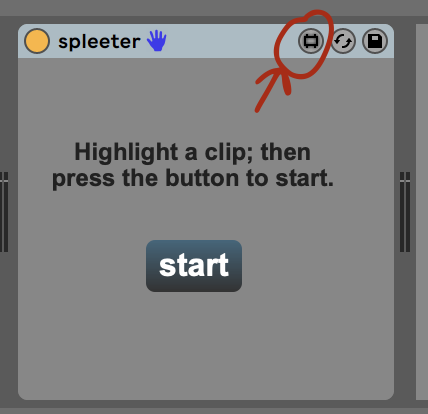 118 |
119 | 2. make sure the lock icon is set to locked. click the hamburger menu icon to open the max console.
120 |
118 |
119 | 2. make sure the lock icon is set to locked. click the hamburger menu icon to open the max console.
120 |  121 |
122 | 3. click the button to run spleeter. you should see a bunch of console messages.
123 |
121 |
122 | 3. click the button to run spleeter. you should see a bunch of console messages.
123 |  124 |
125 | ### i know how to run terminal commands. any other debugging tips?
126 |
127 | 1. you can run the docker command manually in the terminal and see what
128 | happens:
129 | https://github.com/diracdeltas/spleeter4max/blob/241ccc291d915c0b82f601948f6989ccefaeffa9/spleeter.js#L64O
130 | 2. if you have a python environment set up, you could install the original
131 | spleeter library from https://pypi.org/project/spleeter/ and use [spleeter for max native](https://github.com/diracdeltas/spleeter4max/releases/tag/1.3-native) instead, which will use the python installation.
132 |
133 | ### can i run this in other DAWs?
134 |
135 | unfortunately no
136 |
137 | ### docker is not compatible with my operating system
138 |
139 | try https://github.com/diracdeltas/spleeter4max/releases/tag/1.3-native instead
140 |
141 | ### can i stop docker?
142 |
143 | yes, you can quit docker after spleeter is done. also i would turn off the
144 | docker setting that automatically starts it when you start your computer. just
145 | remember to start it before you run spleeter.
146 |
147 | ### spleeter seems to show 'starting docker' forever
148 |
149 | this usually takes a long time when you run it for the first time, especially on slow networks, since it's downloading the VM. it might take several minutes and a few retries for the first time. if this actually seems to hang indefinitely, something on your network might be blocking the download.
150 |
151 | you could try opening a terminal and doing this manually: `docker pull researchdeezer/spleeter@sha256:e46b042c25781c8ef041847d9615d799b3fa76d56a653ece0d0e2585067153a2`. if this succeeds, the spleeter max device won't try to download it anymore.
152 |
153 | ### spleeter ends with 'could not copy files from docker'
154 |
155 | this could be due to an issue fixed in late january of 2020, so if you downloaded it prior to then, try re-downloading from the dropbox link above (and delete the old plugin) or from https://github.com/diracdeltas/spleeter4max/releases/download/1.2/spleeter.zip.
156 |
157 | another possible solution is to copy the audio files you are splitting into the spleeter folder.
158 |
159 | ## support
160 |
161 | please open an issue at https://github.com/diracdeltas/spleeter4max/issues. want a higher chance of getting a response? you can
162 | make a donation via
163 | [bandcamp](https://azuki.bandcamp.com/merch/max-for-live-stem-splitter) and
164 | mention it in the issue!
165 |
166 | ## license (MIT)
167 |
168 | Copyright 2020 Yan Zhu
169 |
170 | Permission is hereby granted, free of charge, to any person obtaining a copy of
171 | this software and associated documentation files (the "Software"), to deal in
172 | the Software without restriction, including without limitation the rights to
173 | use, copy, modify, merge, publish, distribute, sublicense, and/or sell copies
174 | of the Software, and to permit persons to whom the Software is furnished to do
175 | so, subject to the following conditions:
176 |
177 | The above copyright notice and this permission notice shall be included in all
178 | copies or substantial portions of the Software.
179 |
180 | THE SOFTWARE IS PROVIDED "AS IS", WITHOUT WARRANTY OF ANY KIND, EXPRESS OR
181 | IMPLIED, INCLUDING BUT NOT LIMITED TO THE WARRANTIES OF MERCHANTABILITY,
182 | FITNESS FOR A PARTICULAR PURPOSE AND NONINFRINGEMENT. IN NO EVENT SHALL THE
183 | AUTHORS OR COPYRIGHT HOLDERS BE LIABLE FOR ANY CLAIM, DAMAGES OR OTHER
184 | LIABILITY, WHETHER IN AN ACTION OF CONTRACT, TORT OR OTHERWISE, ARISING FROM,
185 | OUT OF OR IN CONNECTION WITH THE SOFTWARE OR THE USE OR OTHER DEALINGS IN THE
186 | SOFTWARE.
187 |
188 | ## credits
189 |
190 | https://github.com/deezer/spleeter
191 |
--------------------------------------------------------------------------------
124 |
125 | ### i know how to run terminal commands. any other debugging tips?
126 |
127 | 1. you can run the docker command manually in the terminal and see what
128 | happens:
129 | https://github.com/diracdeltas/spleeter4max/blob/241ccc291d915c0b82f601948f6989ccefaeffa9/spleeter.js#L64O
130 | 2. if you have a python environment set up, you could install the original
131 | spleeter library from https://pypi.org/project/spleeter/ and use [spleeter for max native](https://github.com/diracdeltas/spleeter4max/releases/tag/1.3-native) instead, which will use the python installation.
132 |
133 | ### can i run this in other DAWs?
134 |
135 | unfortunately no
136 |
137 | ### docker is not compatible with my operating system
138 |
139 | try https://github.com/diracdeltas/spleeter4max/releases/tag/1.3-native instead
140 |
141 | ### can i stop docker?
142 |
143 | yes, you can quit docker after spleeter is done. also i would turn off the
144 | docker setting that automatically starts it when you start your computer. just
145 | remember to start it before you run spleeter.
146 |
147 | ### spleeter seems to show 'starting docker' forever
148 |
149 | this usually takes a long time when you run it for the first time, especially on slow networks, since it's downloading the VM. it might take several minutes and a few retries for the first time. if this actually seems to hang indefinitely, something on your network might be blocking the download.
150 |
151 | you could try opening a terminal and doing this manually: `docker pull researchdeezer/spleeter@sha256:e46b042c25781c8ef041847d9615d799b3fa76d56a653ece0d0e2585067153a2`. if this succeeds, the spleeter max device won't try to download it anymore.
152 |
153 | ### spleeter ends with 'could not copy files from docker'
154 |
155 | this could be due to an issue fixed in late january of 2020, so if you downloaded it prior to then, try re-downloading from the dropbox link above (and delete the old plugin) or from https://github.com/diracdeltas/spleeter4max/releases/download/1.2/spleeter.zip.
156 |
157 | another possible solution is to copy the audio files you are splitting into the spleeter folder.
158 |
159 | ## support
160 |
161 | please open an issue at https://github.com/diracdeltas/spleeter4max/issues. want a higher chance of getting a response? you can
162 | make a donation via
163 | [bandcamp](https://azuki.bandcamp.com/merch/max-for-live-stem-splitter) and
164 | mention it in the issue!
165 |
166 | ## license (MIT)
167 |
168 | Copyright 2020 Yan Zhu
169 |
170 | Permission is hereby granted, free of charge, to any person obtaining a copy of
171 | this software and associated documentation files (the "Software"), to deal in
172 | the Software without restriction, including without limitation the rights to
173 | use, copy, modify, merge, publish, distribute, sublicense, and/or sell copies
174 | of the Software, and to permit persons to whom the Software is furnished to do
175 | so, subject to the following conditions:
176 |
177 | The above copyright notice and this permission notice shall be included in all
178 | copies or substantial portions of the Software.
179 |
180 | THE SOFTWARE IS PROVIDED "AS IS", WITHOUT WARRANTY OF ANY KIND, EXPRESS OR
181 | IMPLIED, INCLUDING BUT NOT LIMITED TO THE WARRANTIES OF MERCHANTABILITY,
182 | FITNESS FOR A PARTICULAR PURPOSE AND NONINFRINGEMENT. IN NO EVENT SHALL THE
183 | AUTHORS OR COPYRIGHT HOLDERS BE LIABLE FOR ANY CLAIM, DAMAGES OR OTHER
184 | LIABILITY, WHETHER IN AN ACTION OF CONTRACT, TORT OR OTHERWISE, ARISING FROM,
185 | OUT OF OR IN CONNECTION WITH THE SOFTWARE OR THE USE OR OTHER DEALINGS IN THE
186 | SOFTWARE.
187 |
188 | ## credits
189 |
190 | https://github.com/deezer/spleeter
191 |
--------------------------------------------------------------------------------