└── docs
├── cn
├── 50.debug
│ ├── 30.mqttx.md
│ ├── 20.log-export.md
│ └── 10.dji-pilot2-webview-debug.md
├── 30.feature-set
│ ├── 10.pilot-feature-set
│ │ ├── 80.pilot-third-party-app.md
│ │ ├── 70.pull-pilot-log.md
│ │ ├── 50.pilot-media-management.md
│ │ ├── 90.drc.md
│ │ └── 60.pilot-wayline-management.md
│ └── 20.dock-feature-set
│ │ ├── 90.remote-log.md
│ │ ├── 40.dock-media-management.md
│ │ ├── 70.remote-debug.md
│ │ ├── 80.firmware-upgrade.md
│ │ ├── 110.custom-flight-area.md
│ │ ├── 60.hms.md
│ │ ├── 100.drc.md
│ │ ├── 20.dock-device-management.md
│ │ ├── 10.dock-access-to-cloud.md
│ │ └── 30.dock-livestream.md
├── 10.overview
│ ├── 40.basic-concept
│ │ ├── 50.websocket.md
│ │ ├── 10.proper-noun.md
│ │ ├── 60.jsbridge.md
│ │ ├── 30.thing-model.md
│ │ └── 40.https.md
│ ├── 20.product-architecture.md
│ └── 10.product-introduction.md
├── 60.api-reference
│ ├── 10.pilot-to-cloud
│ │ ├── 10.https
│ │ │ ├── 20.waypoint-management
│ │ │ │ ├── 30.get-waypointfile-download-location.md
│ │ │ │ ├── 40.get-duplicated-waypointfile-name.md
│ │ │ │ ├── 60.collect-waypointfile-in-batch.md
│ │ │ │ ├── 70.cancel-collect.md
│ │ │ │ └── 50.waypointfile-upload-result-report.md
│ │ │ ├── 10.map-elements
│ │ │ │ ├── 40.delete.md
│ │ │ │ └── 20.update.md
│ │ │ └── 30.media-management
│ │ │ │ ├── 20.obtain-exited-tiny-fingerprint.md
│ │ │ │ ├── 50.group-upload-callback.md
│ │ │ │ └── 10.fast-upload.md
│ │ └── 00.mqtt
│ │ │ ├── 20.rc-pro
│ │ │ └── 10.device.md
│ │ │ └── 30.others
│ │ │ └── 20.rc
│ │ │ └── 10.device.md
│ ├── 20.dock-to-cloud
│ │ └── 00.mqtt
│ │ │ └── 20.dock
│ │ │ ├── 00.dock1
│ │ │ ├── 120.airsense.md
│ │ │ ├── 100.config.md
│ │ │ ├── 60.hms.md
│ │ │ ├── 160.esdk-transmit-custom-data.md
│ │ │ ├── 150.psdk-transmit-custom-data.md
│ │ │ └── 10.device.md
│ │ │ └── 10.dock2
│ │ │ ├── 120.airsense.md
│ │ │ ├── 100.config.md
│ │ │ ├── 60.hms.md
│ │ │ ├── 160.esdk-transmit-custom-data.md
│ │ │ ├── 150.psdk-transmit-custom-data.md
│ │ │ └── 10.device.md
│ └── 00.dji-wpml
│ │ └── 10.overview.md
├── 20.quick-start
│ ├── 10.environment-prepare-list.md
│ └── 40.function-display-video.md
├── 02.flight-safety-notification.md
└── 80.faq.md
└── en
├── 50.debug
├── 30.mqttx.md
├── 20.log-export.md
└── 10.dji-pilot2-webview-debug.md
├── 10.overview
├── 40.basic-concept
│ ├── 50.websocket.md
│ ├── 10.proper-noun.md
│ └── 60.jsbridge.md
├── 10.product-introduction.md
└── 20.product-architecture.md
├── 30.feature-set
├── 10.pilot-feature-set
│ ├── 80.pilot-third-party-app.md
│ ├── 70.pull-pilot-log.md
│ └── 50.pilot-media-management.md
└── 20.dock-feature-set
│ ├── 90.remote-log.md
│ ├── 40.dock-media-management.md
│ ├── 70.remote-debug.md
│ ├── 110.custom-flight-area.md
│ └── 20.dock-device-management.md
├── 60.api-reference
├── 10.pilot-to-cloud
│ ├── 10.https
│ │ ├── 20.waypoint-management
│ │ │ ├── 30.get-waypointfile-download-location.md
│ │ │ ├── 70.cancel-collect.md
│ │ │ ├── 40.get-duplicated-waypointfile-name.md
│ │ │ ├── 60.collect-waypointfile-in-batch.md
│ │ │ └── 50.waypointfile-upload-result-report.md
│ │ ├── 10.map-elements
│ │ │ └── 40.delete.md
│ │ └── 30.media-management
│ │ │ ├── 50.group-upload-callback.md
│ │ │ └── 20.obtain-exited-tiny-fingerprint.md
│ └── 00.mqtt
│ │ ├── 20.rc-pro
│ │ └── 10.device.md
│ │ └── 30.others
│ │ └── 20.rc
│ │ └── 10.device.md
└── 20.dock-to-cloud
│ └── 00.mqtt
│ └── 20.dock
│ ├── 00.dock1
│ ├── 100.config.md
│ ├── 150.psdk-transmit-custom-data.md
│ ├── 160.esdk-transmit-custom-data.md
│ ├── 60.hms.md
│ ├── 120.airsense.md
│ └── 10.device.md
│ └── 10.dock2
│ ├── 100.config.md
│ ├── 60.hms.md
│ ├── 150.psdk-transmit-custom-data.md
│ ├── 160.esdk-transmit-custom-data.md
│ ├── 120.airsense.md
│ └── 10.device.md
├── 20.quick-start
├── 10.environment-prepare-list.md
└── 40.function-display-video.md
├── 02.flight-safety-notification.md
└── 80.faq.md
/docs/cn/50.debug/30.mqttx.md:
--------------------------------------------------------------------------------
1 | MQTTX是一个跨平台的mqtt客户端,可以很方便的在macOS / Linux / Windows 中进行使用。具体的软件下载地址为:[下载地址](https://mqttx.app/)
2 |
3 | 具体的操作配置使用请查看相关文档:[使用说明文档](https://mqttx.app/docs)
4 |
--------------------------------------------------------------------------------
/docs/en/50.debug/30.mqttx.md:
--------------------------------------------------------------------------------
1 | MQTTX is a cross-platform MQTT client that can be easily used on macOS / Linux / Windows. [Click to download.](https://mqttx.app/)
2 |
3 | For detailed operational configuration and use, please see the [documentation](https://mqttx.app/docs).
4 |
5 |
--------------------------------------------------------------------------------
/docs/cn/30.feature-set/10.pilot-feature-set/80.pilot-third-party-app.md:
--------------------------------------------------------------------------------
1 | ## 功能概述
2 |
3 | 对于使用DJI Pilot 2无法满足的业务场景,开发商可以自己开发一个轻型App与DJI Pilot一起使用,例如需要用遥控器进行对讲、特殊的任务命令、工单等等,这样对于终端用户来说,可以直接通过DJI Pilot的webview页面打开三方的APP,而开发商只需要在打开webview页面时,自动调用唤醒第三方App的JSBridge接口即可。详细的配置可以参考链接:[Android webview 中跳转第第三方App](https://developer.aliyun.com/article/595078)。
4 |
5 |
6 |
7 | ## 接口详细实现
8 |
9 | [JSBridge](https://developer.dji.com/doc/cloud-api-tutorial/cn/api-reference/pilot-to-cloud/jsbridge.html) 跳转至第三方App `window.open('scheme://host...', arg)`
10 |
--------------------------------------------------------------------------------
/docs/cn/10.overview/40.basic-concept/50.websocket.md:
--------------------------------------------------------------------------------
1 |
2 | 对于某些功能集,需要用到Websocket通信,所以需要DJI Pilot 2和服务端建立一条Websocket通道。当DJI Pilot 2通过Webview登录上线的时候,服务端需要应答Websocket的URL地址给DJI Pilot 2,然后DJI Pilot 2会再进行Websocket连接请求。
3 |
4 | 具体的通用消息推送接口协议格式如下:
5 |
6 | ```json
7 | url: xxxx.xx.xxx
8 |
9 | body:
10 | {
11 | "biz_code": "device_topo_update",
12 | "version":"1.0"
13 | "timestamp": 146052438362,
14 | "data":{
15 | "operator": "zhangsan", //建议直接使用callsign
16 | // 具体内容随biz_code或者sub_biz_code调整
17 | }
18 | }
19 | ```
20 |
--------------------------------------------------------------------------------
/docs/cn/60.api-reference/10.pilot-to-cloud/10.https/20.waypoint-management/30.get-waypointfile-download-location.md:
--------------------------------------------------------------------------------
1 | ## 获取航线文件下载地址
2 |
3 |
4 | `GET /wayline/api/v1/workspaces/{workspace_id}/waylines/{id}/url`
5 |
Parameters
6 |
7 | |Name|In|Type|Required|Description|
8 | |---|---|---|---|---|
9 | |workspace_id|path|string|true|工作空间id|
10 | |id|path|string|true|航线文件id|
11 | |x-auth-token|header|string|true|访问令牌|
12 |
13 | Responses
14 |
15 | |Status|Meaning|Description|Schema|
16 | |---|---|---|---|
17 | |200|[OK](https://tools.ietf.org/html/rfc7231#section-6.3.1)|OK|/|
--------------------------------------------------------------------------------
/docs/en/10.overview/40.basic-concept/50.websocket.md:
--------------------------------------------------------------------------------
1 | For some features, Websocket communication is required, so DJI Pilot 2 and the server need to establish a WebSocket channel. When DJI Pilot 2 logs in and goes online through Webview, the server needs to respond to the URL address of the WebSocket to DJI Pilot 2, and then DJI Pilot 2 will make a WebSocket connection request.
2 |
3 | The specific general message push interface protocol format is as follows:
4 |
5 | ```json
6 | url: xxxx.xx.xxx
7 |
8 | body:
9 | {
10 | "biz_code": "device_topo_update",
11 | "version":"1.0"
12 | "timestamp": 146052438362,
13 | "data":{
14 | "operator": "zhangsan", //It is recommended to use callsign directly
15 | // The specific content is adjusted with biz_code or sub_biz_code
16 | }
17 | }
18 | ```
19 |
--------------------------------------------------------------------------------
/docs/en/30.feature-set/10.pilot-feature-set/80.pilot-third-party-app.md:
--------------------------------------------------------------------------------
1 | ## Overview
2 |
3 | For business scenarios that cannot be met by using DJI Pilot 2, developers can develop a lightweight App to be used together with Pilot2, such as intercom, special task commands, work orders, etc. In this way, users can directly open the third-party App through the Webview page of DJI Pilot 2. While developer only needs to automatically invoke the JsBridge interface to wake up the third-party App when opening the WebView page. The detailed configuration can be found at the link. [Jump to third-party apps in Android WebView](https://developer.aliyun.com/article/595078).
4 |
5 |
6 |
7 | ## Detailed API Realization
8 |
9 | * Jump to Third-party Apps
10 |
11 | API: Refer to App API > JSBridge API References-`window.open('scheme://host...', arg)`
12 |
13 |
--------------------------------------------------------------------------------
/docs/en/60.api-reference/10.pilot-to-cloud/10.https/20.waypoint-management/30.get-waypointfile-download-location.md:
--------------------------------------------------------------------------------
1 | ## Get Waypoints Download URL Link
2 |
3 |
4 | `GET /wayline/api/v1/workspaces/{workspace_id}/waylines/{id}/url`
5 |
6 | Parameters
7 |
8 | | Name | In | Type | Required | Description |
9 | | ------------ | ------ | ------ | -------- | ----------------- |
10 | | workspace_id | path | string | true | workspace id |
11 | | id | path | string | true | waypoints file id |
12 | | x-auth-token | header | string | true | access token |
13 |
14 | Responses
15 |
16 | | Status | Meaning | Description | Schema |
17 | | ------ | ------------------------------------------------------- | ----------- | ------ |
18 | | 200 | [OK](https://tools.ietf.org/html/rfc7231#section-6.3.1) | OK | / |
--------------------------------------------------------------------------------
/docs/cn/20.quick-start/10.environment-prepare-list.md:
--------------------------------------------------------------------------------
1 | 整个上云 API Demo 例程采用前后端分离的设计,前端采用的是 TS+Vue3 框架,后端采用的是 JAVA 语言(必须**11**及以上的版本,否则后端代码无法编译),Spring Boot 框架。使用该例程,用户需要预先学习熟悉以下知识:
2 |
3 | - **前端**
4 |
5 | 1. TypeScript、HTML、CSS 编程语言。
6 | 2. Vue3.x 框架、Node.js npm 包管理。
7 | 3. Ant Design Vue V2 组件库。
8 | 4. HTTP/Websocket 通信。
9 | 5. Linux 环境通过 Nginx 部署前端应用服务。
10 | 6. 高德地图开放 API 使用。
11 |
12 | - **后端**
13 |
14 | 1. Java
15 | 2. Spring Boot
16 | 3. MQTT
17 | 4. MySQL
18 | 5. WebSocket
19 | 6. Redis
20 |
21 | - **环境与版本**
22 |
23 | 1. Linux 云服务器,Ubuntu16.04 系统
24 | 2. Java 版本:openJDK 必须11及以上
25 | 3. MySQL 版本:8.0.26
26 | 4. EMQX 版本:4.4.0
27 | 5. Redis 版本:6.2
28 | 6. Nginx 版本:1.20.2
29 | 7. Vue 版本:3.0.5
30 | 8. Node.js 版本:17.8
31 |
32 | - **Demo 源码下载**
33 |
34 | 1. DEMO 前端源码:[下载地址](https://github.com/dji-sdk/Cloud-API-Demo-Web)
35 | 2. DEMO 后端源码:[下载地址](https://github.com/dji-sdk/DJI-Cloud-API-Demo)
36 | 3. 如果没有开发环境,可以直接下载docker包进行部署:[下载地址](https://terra-sz-hc1pro-cloudapi.oss-cn-shenzhen.aliyuncs.com/c0af9fe0d7eb4f35a8fe5b695e4d0b96/docker/cloud_api_sample_docker.zip)
37 |
38 |
--------------------------------------------------------------------------------
/docs/cn/50.debug/20.log-export.md:
--------------------------------------------------------------------------------
1 | ## 概述
2 |
3 | 当在调试上云 API 时,难免会遇到一些棘手的 BUG 需要 DJI 提供技术支持,此时一般需要开发者帮忙导出飞机、遥控器、DJI Pilot 2、大疆机场的 log 日志,以便 DJI 技术支持同学快速定位问题。
4 |
5 | > **注意**:
6 | > DJI Pilot 2的日志是加密的,所以需要开发者通过JSBridge接口提供日志加密的公钥信息,然后拉取到的日志也需要经过解密才能查看。DJI提供了解密日志的 JAR库,开发商运行脚本即可进行日志解密。具体可以查看[通过 JSBridge 获取日志](https://developer.dji.com/doc/cloud-api-tutorial/cn/feature-set/pilot-feature-set/pull-pilot-log.html)。
7 |
8 | ## 飞机日志导出
9 |
10 | 开发者需要将飞机连接到 DJI Assistant2 调参软件,选择日志导出,导出对应架次日志文件,注意调参上标注的时间是飞行架次结束的时间。
11 |
12 | ## 遥控器日志导出
13 |
14 | 将遥控器连接到 DA2 调参软件,选择日志导出,导出对应架次日志文件,注意调参上标注的时间是飞行架次结束的时间。
15 |
16 | ## DJI Pilot 2 日志导出
17 |
18 | 拷贝遥控器中如下路径的文件夹,压缩成一个 zip 文件发给 DJI 进行分析:
19 |
20 | 1. /Android/data/com.dji.industry.pilot/files/LOG 对应的日期文件夹。
21 | 2. /Android/data/com.dji.industry.pilot/files/LOG/cmd_record/当天文件。
22 | 3. /Android/data/com.dji.industry.pilot/files/LOG/Logs/当天文件。
23 | 4. /dji_logs/对应日期文件夹。
24 |
25 | 如果 DJI Pilot 2 出现崩溃、停止运行的现象,请将遥控器以下路径文件一并导出:
26 |
27 | 1. /dji_logs/anr/
28 |
29 | 2. /dji_logs/tombstones/
30 |
31 | ## 录屏、截屏
32 |
33 | 当问题现象可复现时,麻烦通过遥控器的录屏和截屏功能,快速记录现场的情况,以便更方便定位问题,避免还需要重复去复现问题,特别是一些很偶现的问题,复现难度很高,这样就给解决问题增加难度。
34 |
--------------------------------------------------------------------------------
/docs/cn/10.overview/20.product-architecture.md:
--------------------------------------------------------------------------------
1 | 产品架构图
2 |
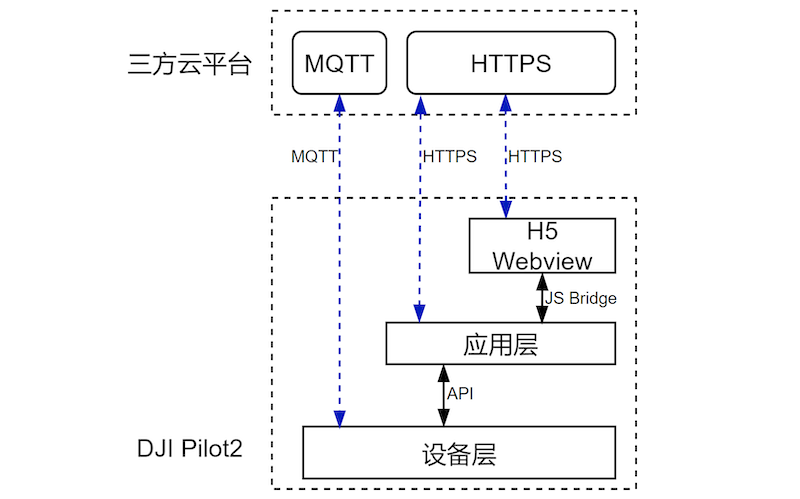
3 | 从架构分层上可以看出,上云API是基于大疆行业版无人机的基础上对外提供的接口,整体思路采用与物联网类似的端边云架构分层。此处要特别注意,无人机并不能直接接入第三方云平台,它需要先连接网关设备(遥控器、机场),然后通过遥控器中的DJI Pilot 2或者机场间接上云,DJI Pilot 2、大疆机场在注册登录第三方云平台时,会同时把飞机和负载的能力一起上报。
4 |
5 | 网关设备与第三方云平台之间的通信链路均采用业界通用的MQTT、HTTPS、Websocket协议,并在这个协议的基础上,抽象出的各个硬件设备的物模型以及业务应用所需的功能集。
6 |
7 | 第三方云平台泛指网关设备可以直接访问的各个服务端,对于上云API来说,只要通信链路能够访问到第三方云平台服务,即可进行通信,这样对于第三方云平台的环境部署就没有做限制,无论是私有化部署还是公有云部署,只要能访问均可工作。
8 |
9 | 第三方云平台需要先部署MQTT网关、HTTPS服务、Websocket服务、对象存储等基础服务,打通与网关设备的通信链路,即可进行功能集开发实现,上云API提供的功能集主要分2部分,一部分是基于DJI Pilot 2的,有飞手操作的场景,该场景下提供的功能集有:地图元素、态势感知、直播、媒体库、航线库、设备管理。另一部分是主要面向大疆机场的场景,功能集有:固件远程升级、设备异常告警、机场远程控制等等,当然,有些功能集是两种场景均有重叠的,例如视频直播,具体使用方式详见各个功能集方案及API说明章节。
10 |
11 | 第三方云平台在打通与无人机的业务之后,即可通过自身私有协议,搭建前端web页面、APP应用、小程序等,深入业务场景例如安防、能源、环保、海事等,构建一个完整的场景业务工作流。
12 |
--------------------------------------------------------------------------------
/docs/cn/10.overview/40.basic-concept/10.proper-noun.md:
--------------------------------------------------------------------------------
1 |
2 | | 名词 | 解释 |
3 | | ---------------------- | ------------------------------------------------------------ |
4 | | 硬件产品 | DJI行业应用发布的可以独立售卖的硬件类型,例如M30T、M300 RTK、H20T、DJI RC Plus等都为独立的产品。产品应具有自己的特有的物模型数据并有唯一ProductKey标识。 |
5 | | 组件 | 有些硬件产品是由多个组件构成,例如飞行平台,带有相机、云台组件。组件的能力模型合并到硬件产品的物模型中,构成统一对外的物模型能力拓扑。 |
6 | | 网关设备 | 能够直接连接云平台的设备,且具有硬件设备管理功能,能够代理硬件设备连接云端,例如遥控器、大疆机场均为网关设备。网关设备一般只有简单的地理上报,在线离线状态,开机重启等简单的功能。 |
7 | | 物模型 | 是对设备在云端的功能描述,主要包含设备的属性、服务和事件。一般采用JSON格式,服务端可以接收到物模型数据并做JSON解析。 |
8 | | 设备属性(Properties) | 设备的功能模型之一,一般用于描述设备运行时的状态,如环境监测设备所读取的当前环境温度等。属性支持 Get 和 Set 请求方式,应用系统可发起对属性的读取和设置请求。 |
9 | | 设备服务(Services) | 设备的功能模型之一,设备可被外部调用的能力或方法,可设置输入参数和输出参数。相比于属性,服务可通过一条指令实现更复杂的业务逻辑,例如航线文件传输。 |
10 | | 设备事件(Events) | 设备的功能模型之一,设备运行时的事件。事件一般包含需要被外部感知和处理的通知和告警信息,可包含多个输出参数。例如,某项任务完成的信息,或者设备发生故障或告警时的温度等,事件可以被订阅和推送。 |
11 | | 长连接 | 云平台与网关设备或者直连设备建立的双向通信连接,WebSocket,MQTT over TCP等连接。 |
12 | | 设备连接拓扑 | 硬件设备连接关系,包括飞机,负载、遥控器的连接关系。 |
13 | | 设备在线状态 | 表示设备联网状况,可分为上线,离线和下线三种。离线为设备长连接无通知的情况下断线,基本可以理解为网络引起的下线。下线为人为有意识的触发,比如任务完成,网关设备关机等动作触发。 |
14 |
--------------------------------------------------------------------------------
/docs/cn/30.feature-set/10.pilot-feature-set/70.pull-pilot-log.md:
--------------------------------------------------------------------------------
1 | ## 功能概述
2 |
3 | 对于使用DJI Pilot 2过程中,难免会出现接口通信异常,功能失效不通等问题,需要拉取Pilot2 的log日志查看进行诊断(具体可参考[Pilot 日志导出](https://developer.dji.com/doc/cloud-api-tutorial/cn/debug/log-export.html))。为了解决该问题,DJI Pilot 2也提供了JSBridge接口给开发者进行log日志拉取,并通过webview上传到开发者自己的服务器进行分析。
4 |
5 | > **注意**:
6 | > DJI Pilot 2的日志是加密的,所以需要开发者通过JSBridge接口提供日志加密的公钥信息,然后拉取到的日志也需要经过解密才能查看。DJI提供了解密日志的 JAR库,开发商运行脚本即可进行日志解密。
7 |
8 | 解密方法:通过PlogDecoder.jar库,把拉取到的Log日志运行脚本进行解密。[点击下载](https://terra-1-g.djicdn.com/71a7d383e71a4fb8887a310eb746b47f/cloudapi/V1.1/PlogDecoder.jar)
9 |
10 | 解密命令示例
11 |
12 | ```shell
13 | java -jar PlogDecoder.jar -key "Desktop/rsa_keys/pri.key" -log "/open_platform/log-2022-01-18.log".
14 | //如果没有设置公钥,可以不用 -key 参数
15 | ```
16 |
17 | ## 接口详细实现
18 |
19 | [JSBridge](https://developer.dji.com/doc/cloud-api-tutorial/cn/api-reference/pilot-to-cloud/jsbridge.html)
20 | * 获取日志路径 `window.djiBridge.platformGetLogPath()`
21 | 主要提供了可以获取到DJI Pilot 2保存的日志路径,开发者通过webview拿到路径后,可以通过文件上传的方式把日志上传。
22 |
23 | * 设置日志加密key `window.djiBridge.platformSetLogEncryptKey(String key)`
24 | DJI Pilot 2在保存日志的时候,会做加密,如果开发者没有设置加密key,则会按照DJI Pilot 2默认的key进行加密,如果有设置key,则会按照开发者的key进行加密log日志。
25 |
26 | * 清除日志加密key `window.djiBridge.platformClearLogEncryptKey()`
27 | 如果开发者设置的加密key需要变更,则需要先清除保存在DJI Pilot 2中的key,然后再重新设置。
28 | > **注意**:在清除加密key时,如果已经有部分log采用原有的key,则不会重新加密,此处需要开发者自己保存历史key,防止无法打开log文件。
29 |
--------------------------------------------------------------------------------
/docs/en/20.quick-start/10.environment-prepare-list.md:
--------------------------------------------------------------------------------
1 |
2 | The Cloud API demo is designed with a separate front-end and back-end, using the TS+Vue3 framework for the front-end and the JAVA language for the back-end (must be **11** and above, otherwise, the back-end code will not compile) and the Spring Boot framework. To use this demo, the user needs to be familiar with the following knowledge in advance.
3 |
4 | - **Front-end**
5 |
6 | 1. TypeScript, HTML, CSS.
7 | 2. Vue3.x, Node.js npm.
8 | 3. Ant Design Vue V2
9 | 4. HTTP/Websocket
10 | 5. The Linux environment deploys front-end application services via Nginx.
11 | 6. Open API for amap.
12 |
13 | - **Back-end**
14 |
15 | 1. Java
16 | 2. Spring Boot
17 | 3. MQTT
18 | 4. MySQL
19 | 5. WebSocket
20 | 6. Redis
21 |
22 | - **Environment & Versions*
23 |
24 | 1. Linux, Ubuntu16.04
25 | 2. Java version: openJDK must be **11** and above.
26 | 3. MySQL version: 8.0.26
27 | 4. EMQX version: 4.4.0
28 | 5. Redis version: 6.2
29 | 6. Nginx version: 1.20.2
30 | 7. Vue version: 3.0.5
31 | 8. Node.js version: 17.8
32 |
33 | - **Demo Download**
34 |
35 | 1. [Click to download the front-end source code.](https://github.com/dji-sdk/Cloud-API-Demo-Web)
36 | 2. [Click to download the back-end source code.](https://github.com/dji-sdk/DJI-Cloud-API-Demo)
37 | 3. If you don't want to install the development environment, you can try deploying with docker. [Click the link to download.](https://terra-sz-hc1pro-cloudapi.oss-cn-shenzhen.aliyuncs.com/c0af9fe0d7eb4f35a8fe5b695e4d0b96/docker/cloud_api_sample_docker.zip)
38 |
39 |
--------------------------------------------------------------------------------
/docs/cn/02.flight-safety-notification.md:
--------------------------------------------------------------------------------
1 | ### 关键功能开发
2 |
3 | 为保障您享受到完整的飞行器和大疆机场的维保服务,并获得飞行器事故分析与定责支持,DJI 强烈建议您在使用“上云 API”开发云端功能时,确保完成以下关键功能的开发:
4 |
5 | * [远程日志](https://developer.dji.com/doc/cloud-api-tutorial/cn/feature-set/dock-feature-set/remote-log.html)
6 |
7 | * [远程升级功能](https://developer.dji.com/doc/cloud-api-tutorial/cn/feature-set/dock-feature-set/firmware-upgrade.html)
8 |
9 | * [HMS 功能](https://developer.dji.com/doc/cloud-api-tutorial/cn/feature-set/dock-feature-set/hms.html)
10 |
11 | * [远程调试](https://developer.dji.com/doc/cloud-api-tutorial/cn/feature-set/dock-feature-set/remote-debug.html)
12 |
13 | * [显示飞行器断连的最后位置](https://developer.dji.com/doc/cloud-api-tutorial/cn/api-reference/dock-to-cloud/mqtt/dock/dock1/device.html#%E8%AE%BE%E5%A4%87%E5%B1%9E%E6%80%A7%E6%8E%A8%E9%80%81):下发任务要求设备上报飞行器 osd 属性中的 latitude 和 longitude 字段,通过机场或遥控器上传至云平台。
14 |
15 | * [计划库任务的记录](https://developer.dji.com/doc/cloud-api-tutorial/cn/api-reference/dock-to-cloud/mqtt/dock/dock1/wayline.html#%E4%B8%8B%E5%8F%91%E4%BB%BB%E5%8A%A1):在任务下发后,开发者通过数据库可以存储关联记录。
16 |
17 |
18 | ### 固件升级
19 |
20 | 为了保证大疆机场和飞行器的稳定运行,降低事故发生率,DJI 强烈建议您能在每次有新固件发布时,积极鼓励您的客户升级到最新的机场/飞行器固件。
21 |
22 | 如何检查是否有最新机场/飞行器固件,以大疆机场和 Matrice 30/30T 为例:
23 |
24 | * 在大疆机场的[官网产品页面](https://enterprise.dji.com/cn/dock/downloads),打开大疆机场 - 发布记录,可以看到最新的固件版本号,在[官网产品页面](https://enterprise.dji.com/cn/dock/downloads)可以下载最新的固件包。
25 |
26 | * 在 Matrice 30/30T 的[官网产品页面](https://enterprise.dji.com/cn/matrice-30/downloads),打开 Matrice 30/30T - 发布记录,可以看到最新的固件版本号,在[官网产品页面](https://enterprise.dji.com/cn/matrice-30/downloads)可以下载最新的固件包。
--------------------------------------------------------------------------------
/docs/cn/30.feature-set/20.dock-feature-set/90.remote-log.md:
--------------------------------------------------------------------------------
1 | ## 功能概述
2 | 为了解决机场日志与飞行器日志对人工手动获取的依赖,上云API 开放了远程日志功能,希望能够减少机场问题的人力投入、缩短问题反馈的流程、并且提升问题处理的效率。远程日志支持机场日志与飞行器日志的上传。云端服务器向设备请求获取日志文件列表,设备响应并上传列表。
3 |
4 | 以我们的远端日志Demo为例,借助云端服务器可视化界面,用户可以通过`日志文件列表获取`接口得到日志列表并呈现在web页面,勾选需要上传的日志文件,云端服务器借助`日志文件上传`接口启动日志上传任务,设备上传对应的日志文件。在上传过程中也可以通过`取消上传`接口取消上传任务。日志文件存储采用的是 OSS 对象存储方式,存储在云端的日志文件也可以下载到本地,用户可以借助获取的日志文件,自行通过邮件联系DJI售后以解决问题。
5 |
6 |
7 | > **注意:** 当前日志上传启动后,暂时不支持上传任务暂停、暂停后恢复、上传任务拒绝。
8 |
9 |
10 | ## 交互时序图
11 |
12 |
13 | ```mermaid
14 | sequenceDiagram
15 |
16 | participant client as DJI Dock
17 | participant app_server as Cloud Server
18 | participant storage as Object Storage
19 |
20 | app_server ->> client : 获取指定设备的日志文件列表 Topic: thing/product/{gateway_sn}/services Method:fileupload_list
21 | client ->> app_server : 设备返回日志文件列表 Topic: thing/product/{gateway_sn}/services_reply
22 |
23 | app_server ->> client : 启动日志文件上传任务 Topic: thing/product/{gateway_sn}/services Method:fileupload_start
24 | client -->> app_server : 设备响应 Topic: thing/product/{gateway_sn}/services_reply
25 | app_server ->> client : 取消日志文件上传(可选) Topic: thing/product/{gateway_sn}/services Method:fileupload_update
26 |
27 | activate client
28 | client ->> storage : 日志文件上传
29 | client ->> app_server : 日志文件上传进度上报 Topic: thing/product/{gateway_sn}/events Method:fileupload_progress
30 | deactivate client
31 |
32 | ```
33 |
34 |
35 | ## 接口详细说明
36 |
37 | [远程日志](https://developer.dji.com/doc/cloud-api-tutorial/cn/api-reference/dock-to-cloud/mqtt/dock/dock1/log.html)
38 | * 获取设备可上传的文件列表
39 | * 发起日志文件上传
40 | * 上传状态更新
41 | * 文件上传进度通知
42 |
43 |
44 |
--------------------------------------------------------------------------------
/docs/cn/60.api-reference/10.pilot-to-cloud/10.https/20.waypoint-management/40.get-duplicated-waypointfile-name.md:
--------------------------------------------------------------------------------
1 | ## 获取重复的航线文件名称
2 |
3 |
4 |
5 |
6 | `GET /wayline/api/v1/workspaces/:workspace_id/waylines/duplicate-names`
7 |
8 | Parameters
9 |
10 | |Name|In|Type|Required|Description|
11 | |---|---|---|---|---|
12 | |workspace_id|path|string|true|工作空间id|
13 | |name|query|array[string]|true|文件名称集合|
14 | |x-auth-token|header|string|true|访问令牌|
15 |
16 |
17 |
18 | Responses
19 |
20 | |Status|Meaning|Description|Schema|
21 | |---|---|---|---|
22 | |200|[OK](https://tools.ietf.org/html/rfc7231#section-6.3.1)|OK|[wayline.GetDuplicateNamesOutput](#schemawayline.getduplicatenamesoutput)|
23 |
24 | > Example
25 | ```json
26 | {
27 | "code": 0,
28 | "message": "string",
29 | "data": ["name1", "name2"]
30 | }
31 | ```
32 | # Schemas
33 | wayline.GetDuplicateNamesOutput
34 |
35 |
36 |
37 |
38 |
39 |
40 | ```json
41 | {
42 | "code": 0,
43 | "data": [
44 | "string"
45 | ],
46 | "message": "string"
47 | }
48 |
49 | ```
50 |
51 | *Properties*
52 | |Name|Type|Required|Restrictions|Description|
53 | |---|---|---|---|---|
54 | |code|integer|false|none|错误码|
55 | |data|array[string]|false|none|重复的文件名数组|
56 | |message|string|false|none|错误描述|
--------------------------------------------------------------------------------
/docs/cn/60.api-reference/10.pilot-to-cloud/10.https/20.waypoint-management/60.collect-waypointfile-in-batch.md:
--------------------------------------------------------------------------------
1 | ## 批量收藏航线文件
2 |
3 |
4 |
5 | `POST /wayline/api/v1/workspaces/{workspace_id}/favorites`
6 |
7 | Parameters
8 |
9 | |Name|In|Type|Required|Description|
10 | |---|---|---|---|---|
11 | |workspace_id|path|string|true|工作空间 ID|
12 | |x-auth-token|header|string|true|访问令牌|
13 | |id|path|Array|true| 航线文件 ID|
14 |
15 | Responses
16 |
17 | |Status|Meaning|Description|Schema|
18 | |---|---|---|---|
19 | |200|[OK](https://tools.ietf.org/html/rfc7231#section-6.3.1)|OK|[wayline.CreateFavoriteOutput](#schema_wayline.CreateFavoriteOutput)|
20 |
21 | > Example responses
22 | ```json
23 | {
24 | "code":0,
25 | "data":{},
26 | "message": "success"
27 | }
28 | ```
29 |
30 |
31 | # Schemas
32 |
33 | wayline.CreateFavoriteOutput
34 |
35 |
36 |
37 |
38 |
39 |
40 | ```json
41 | {
42 | "code": 0,
43 | "data": {
44 | "id": [
45 | "string"
46 | ]
47 | },
48 | "message": "string"
49 | }
50 |
51 | ```
52 |
53 | *Properties*
54 | |Name|Type|Required|Restrictions|Description|
55 | |---|---|---|---|---|
56 | |code|integer|false|none|错误码|
57 | |data|[wayline.CreateFavoriteInput](#schemawayline.createfavoriteinput)|false|none|none|
58 | |message|string|false|none|错误描述|
--------------------------------------------------------------------------------
/docs/cn/30.feature-set/20.dock-feature-set/40.dock-media-management.md:
--------------------------------------------------------------------------------
1 | ## 功能概述
2 |
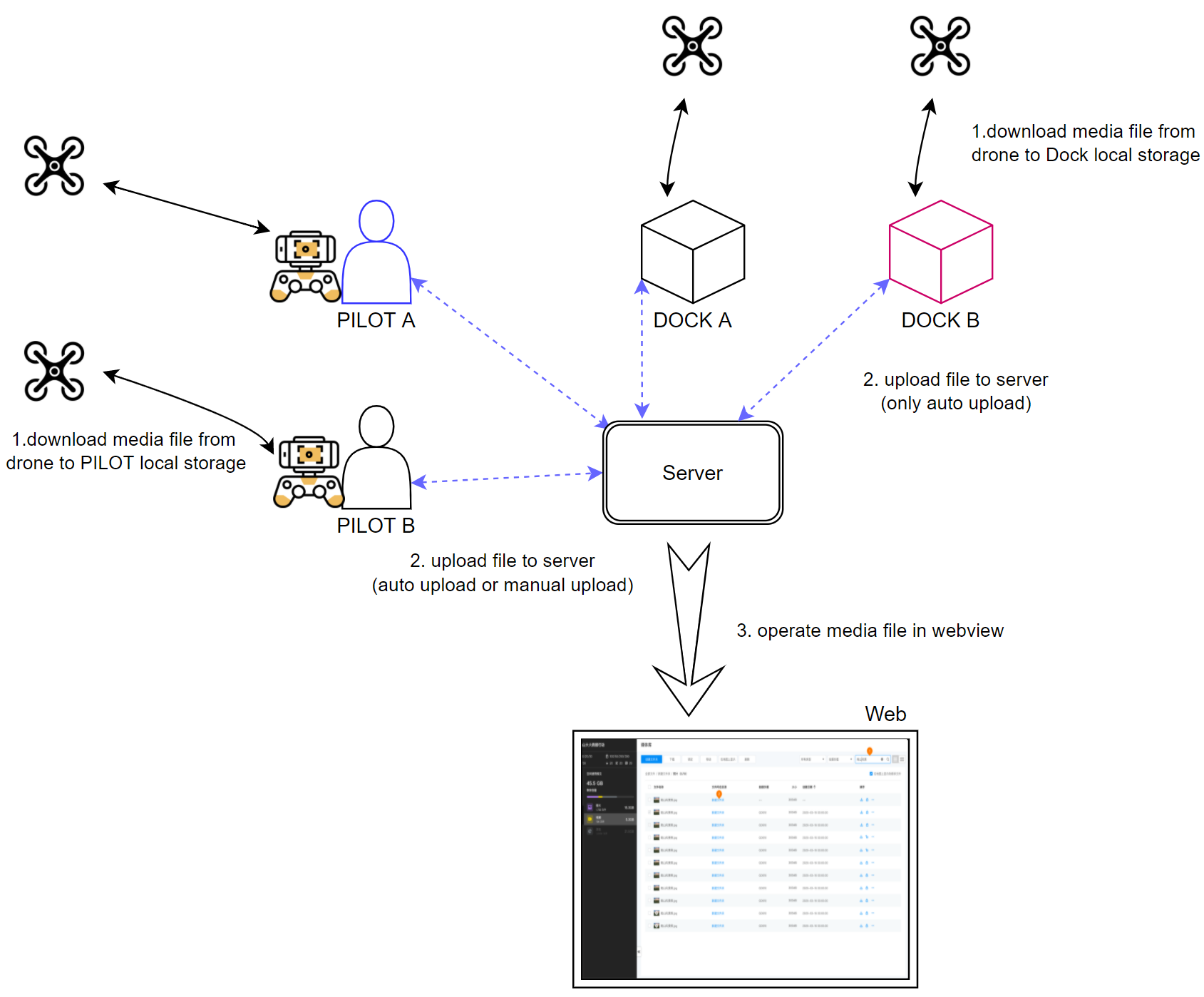
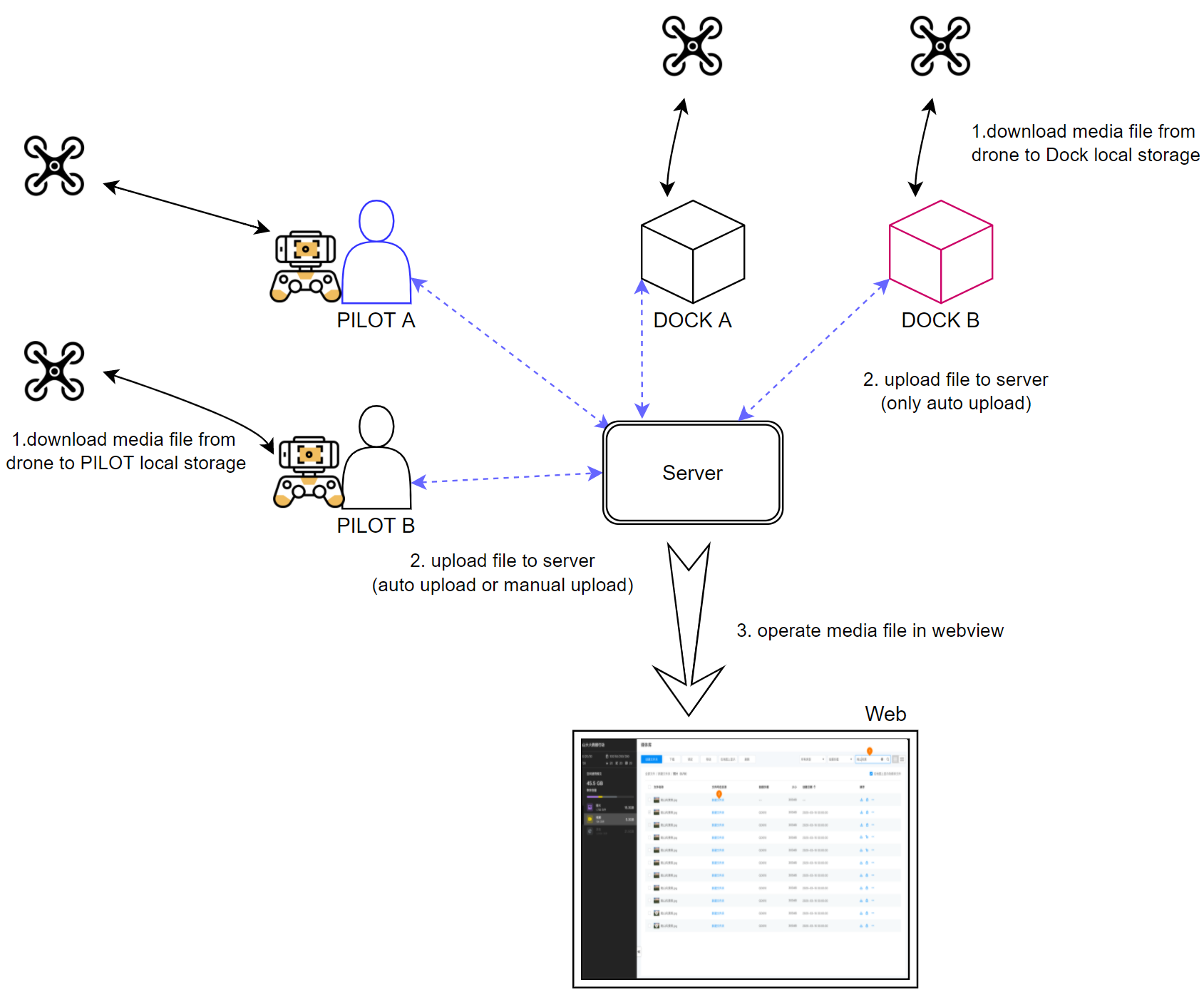
3 | 媒体库功能集主要是DJI Pilot 2或大疆机场把飞行器上的媒体文件(图片/视频)下载到遥控器/机场本地存储,然后再通过网络上传到三方服务器的过程。媒体上传包含自动上传和手动上传功能,对于机场只有自动上传功能。
4 |
5 | 使用最新版本大疆机场 2 的固件:
6 | * 产生的视频文件(红外、可见光、分屏三种视频文件)中会包含飞行器的位置和高度、云台姿态等信息(和旧固件中随视频文件产生的 SRT 字幕文件中的信息内容一致)。
7 | * 完成一个航线飞行任务后,飞行器在 SD 卡中产生的 PPK 文件(.obs、.rtk、.mrk、.nav)和 RTCM 数据(.dat 格式)也会跟随媒体文件一起上传回云端存储桶。
8 |
9 |
10 |
11 | ## 交互时序
12 | ```mermaid
13 | sequenceDiagram
14 |
15 | participant client as DJI Dock
16 | participant server as Cloud Server
17 | participant oss as Object Storage
18 |
19 | client ->> server : 获取上传临时凭证 Topic: thing/product/{gateway_sn}/requests Method: storage_config_get
20 | server -->> client : 云端下发临时凭证 Topic: thing/product/{gateway_sn}/requests_reply Method: storage_config_get
21 | client ->> oss : 执行文件上传
22 | oss -->> client : 返回上传结果
23 |
24 | activate server
25 | activate oss
26 | client ->> server : 媒体文件上传结果上报 Topic: thing/product/{gateway_sn}/events Method: file_upload_callback
27 | server -->> client : 返回上传结果 Topic: thing/product/{gateway_sn}/events_reply Method: file_upload_callback
28 | deactivate server
29 | deactivate oss
30 |
31 | ```
32 |
33 | ## 接口详细实现
34 |
35 | [媒体管理(MQTT)](https://developer.dji.com/doc/cloud-api-tutorial/cn/api-reference/dock-to-cloud/mqtt/dock/dock1/file.html)
36 | * 获取临时凭证
37 | 每次媒体文件上传时,需要向服务端获取临时文件上传凭证,这样机场在上传时会带上该凭证给对象存储服务进行校验。
38 | * 媒体文件上传结果上报
39 | 媒体文件传输结束后,机场会调用该接口向服务端告知对应的媒体文件上传结果。
40 |
41 |
--------------------------------------------------------------------------------
/docs/cn/30.feature-set/20.dock-feature-set/70.remote-debug.md:
--------------------------------------------------------------------------------
1 |
2 | ## 功能概述
3 |
4 | 远程调试为在调试的作业流中实现无人值守,即让作业人员无需到现场,在云端就可以下发命令到设备端,进行设备的远程排障。远程调试命令可分为命令(cmd)和任务(job)。命令(cmd)一般指命令下发后,设备能即刻回复的行为,而任务(job)为任务下发后,设备需要持续动作的行为。
5 |
6 | ### 远程调试指令
7 | 下发的指令经由云端跟设备之间传输的`下发控制命令`协议中“method”字段指定,详细的协议内容请根据本节中的`接口详细实现`在`云端API章节`中查看。
8 |
9 | |命令(cmd)|任务(job)|
10 | |:---:|:---:|
11 | |调试模式开启/关闭 补光灯开启/关闭 4G图传功能开启/关闭 一键返航|机场重启 飞行器开机/关机 一键排障(一键起飞自检) 飞行器数据格式化 机场数据格式化 打开/关闭舱盖 推杆展开/闭合 充电打开/关闭 |
12 |
13 | ### 任务(job)执行流程
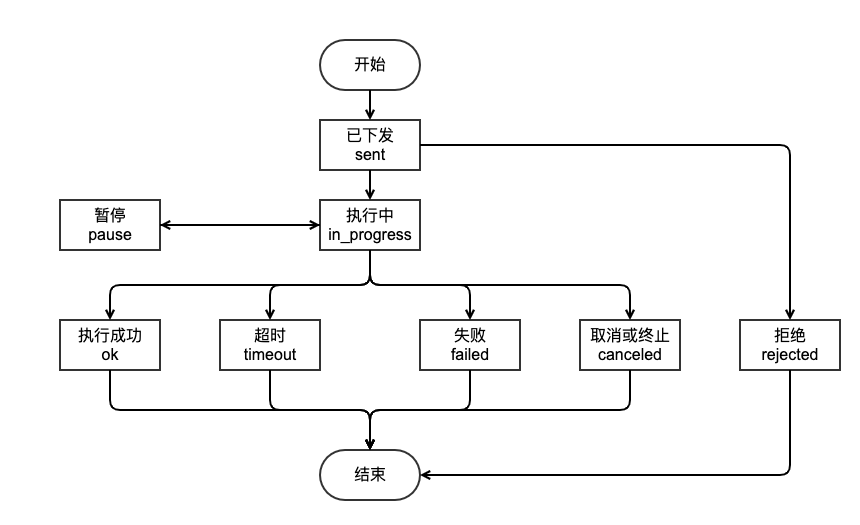
14 | 任务(job)下发后,设备将会返回执行状态。该状态定义在传输协议的“status”字段中。
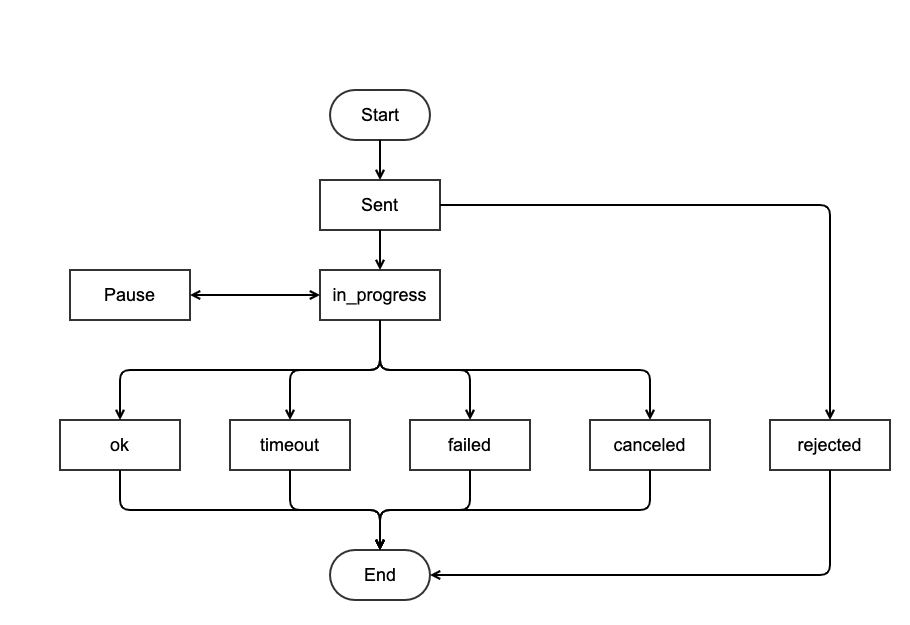
15 | 状态列举如下:
16 | * 已下发
17 | * 执行中
18 | * 执行成功
19 | * 暂停
20 | * 拒绝
21 | * 失败
22 | * 取消或终止
23 | * 超时
24 |
25 | 执行流程如下:
26 |
27 |
28 |
29 | ## 交互时序图
30 |
31 |
32 | ```mermaid
33 | sequenceDiagram
34 |
35 | participant client as DJI Dock
36 | participant app_server as Cloud Server
37 |
38 | app_server ->> client : 下发命令(cmd) Topic: thing/product/{gateway_sn}/services Method:{cmd_method}
39 | client -->> app_server : 回复是否开始执行 Topic: thing/product/{gateway_sn}/services_reply
40 |
41 | app_server ->> client : 下发任务(job) Topic: thing/product/{gateway_sn}/services Method:{cmd_method}
42 | client -->> app_server : 回复是否开始执行 Topic: thing/product/{gateway_sn}/services_reply
43 |
44 |
45 |
46 | activate client
47 |
48 | client ->> app_server : 上报任务进度 Topic: thing/product/{gateway_sn}/events Method:{cmd_method}
49 |
50 | deactivate client
51 |
52 | ```
53 |
54 |
55 | ## 接口详细实现
56 |
57 | [远程调试](https://developer.dji.com/doc/cloud-api-tutorial/cn/api-reference/dock-to-cloud/mqtt/dock/dock1/cmd.html)
58 | * 命令进度
59 | * 下发命令
60 | * 下发任务
61 | * ......
62 |
63 |
64 |
65 |
--------------------------------------------------------------------------------
/docs/cn/80.faq.md:
--------------------------------------------------------------------------------
1 | ## 如何在航线飞行任务中使用大疆机场 2 的定向拍照?
2 |
3 | 定向拍照 `orientedShoot` 相比原来的精准拍照 `accurateShoot` 机型兼容性更好,执行效率更高。如需把航线文件中的精准拍照转变成定向拍照,需执行以下步骤:
4 |
5 | 1. 在动作类型中将精准拍照 `accurateShoot` 改为定向拍照 `orientedShoot` 。
6 | 2. 在航点拍照动作中增加 `actionUUID`。`actionUUID` 由一组 32 位数的 16 进制数字构成,以连字号为分隔符,分为五段,表现形式为:8位-4位-4位-4位-12位,如 7f320139-4fbf-41d1-b3bb-3b9f6f7f334c。
7 | 3. 在航点拍照动作中设置拍照模式 `orientedPhotoMode`,其中 `normalPhoto` 代表普通拍照模式,`lowLightSmartShooting` 代表智能低光拍照模式。智能低光拍照模式适合低光环境下拍摄,适应更多光照条件的作业场景,但拍摄速度会有所降低。
8 | 4. 除 `accurateFrameValid` 字段,将所有 `accurate` 开头的字段全部改成 `oriented` 开头。
9 |
10 | > **注意:** 定向拍照支持大疆机场和大疆机场 2。
11 |
12 | ## 机场执行蛙跳任务时,B 控遥控器会自己断开吗?
13 |
14 | 执行蛙跳任务时,当已经设置了起飞和降落机场,此时 B 控遥控器的连接会被挤占而断开。
15 |
16 | ## 为什么第三方平台使用机场执行一键起飞或航线任务时,出现等待时间过长的问题?
17 |
18 | **问题现象:** 第三方平台使用机场执行一键起飞或航线任务时,每次起飞前需要检查机场的 “离线地图” 和 “自定义飞行区” 数据与云端是否一致。如果云端不回复该消息,机场会有一个超时等待逻辑,大概会等待 40s。
19 |
20 | **解决方案:** 将大疆机场 2 和 Matrice 3D/3TD 的固件升级到 v10.01.32.02 版本。如设备固件需保持在旧版本,可以针对机场的获取离线地图协议(Method: offline_map_get)和自定义飞行区文件获取协议(Method: flight_areas_get)的请求,回复以下内容:
21 |
22 | Topic: thing/product/{gateway_sn}/requests_reply
23 |
24 | Direction: down
25 |
26 | Method: flight_areas_get
27 |
28 | ```json
29 | {
30 | "bid": "xxxxxxxx-xxxx-xxxx-xxxx-xxxxxxxxxx",
31 | "data": {
32 | "result": 0
33 | },
34 | "method": "flight_areas_get",
35 | "tid": "xxxxxxxx-xxxx-xxxx-xxxx-xxxxxxxxxx",
36 | "timestamp": 1654070968655
37 | }
38 | ```
39 |
40 | Topic: thing/product/{gateway_sn}/requests_reply
41 |
42 | Direction: down
43 |
44 | Method: offline_map_get
45 |
46 | ```json
47 | {
48 | "bid": "xxxxxxxx-xxxx-xxxx-xxxx-xxxxxxxxxx",
49 | "data": {
50 | "result": 0
51 | },
52 | "method": "offline_map_get",
53 | "tid": "xxxxxxxx-xxxx-xxxx-xxxx-xxxxxxxxxx",
54 | "timestamp": 1654070968655
55 | }
56 | ```
--------------------------------------------------------------------------------
/docs/cn/60.api-reference/10.pilot-to-cloud/10.https/10.map-elements/40.delete.md:
--------------------------------------------------------------------------------
1 | ## 删除元素
2 | `DELETE /map/api/v1/workspaces/{workspace_id}/elements/{id}`
3 |
4 | Parameters
5 |
6 | |Name|In|Type|Required|Description|
7 | |---|---|---|---|---|
8 | |id|path|integer|true|元素id|
9 | |workspace_id|path|string|true|工作空间id|
10 | |x-auth-token|header|string|true|访问令牌|
11 |
12 | Responses
13 |
14 | |Status|Meaning|Description|Schema|
15 | |---|---|---|---|
16 | |200|[OK](https://tools.ietf.org/html/rfc7231#section-6.3.1)|OK|[map.SwagUUIDResp](#schemamap.swaguuidresp)|
17 |
18 | > Example responses
19 | ```json
20 | {
21 | "code":0
22 | "data":{
23 | "id":"94c51c50-f111-45e8-ac8c-4f96c93ced44"
24 | },
25 | "message": "success"
26 | }
27 |
28 | ```
29 | # Schemas
30 |
31 | map.SwagUUIDResp
32 |
33 |
34 |
35 |
36 |
37 |
38 | ```json
39 | {
40 | "code": 0,
41 | "data": {
42 | "id": "string"
43 | },
44 | "message": "string"
45 | }
46 | ```
47 |
48 | *Properties*
49 |
50 | |Name|Type|Required|Restrictions|Description|
51 | |---|---|---|---|---|
52 | |code|integer|true|none|错误码|
53 | |data|[map.UUIDResp](#schemamap.uuidresp)|true|none|none|
54 | |message|string|true|none|错误描述|
55 |
56 | map.UUIDResp
57 |
58 |
59 |
60 |
61 |
62 |
63 | ```json
64 | {
65 | "id": "string"
66 | }
67 |
68 | ```
69 | *Properties*
70 | |Name|Type|Required|Restrictions|Description|
71 | |---|---|---|---|---|
72 | |id|string|true|none|元素id|
--------------------------------------------------------------------------------
/docs/cn/60.api-reference/10.pilot-to-cloud/10.https/30.media-management/20.obtain-exited-tiny-fingerprint.md:
--------------------------------------------------------------------------------
1 | ## 获取已经存在的文件夹精简指纹
2 |
3 |
4 |
5 |
6 | `POST /media/api/v1/workspaces/{workspace_id}/files/tiny-fingerprints`
7 |
8 | Parameters
9 |
10 | |Name|In|Type|Required|Description|
11 | |---|---|---|---|---|
12 | |tiny_fingerprints|body|array[string]|true|精简指纹数组|
13 | |workspace_id|path|string|true|工作空间id|
14 | |x-auth-token|header|string|true|访问令牌|
15 |
16 |
17 | Responses
18 |
19 | |Status|Meaning|Description|Schema|
20 | |---|---|---|---|
21 | |200|[OK](https://tools.ietf.org/html/rfc7231#section-6.3.1)|OK|[media.GetTinyFingerprintsOutput](#schemamedia.gettinyfingerprintsoutput)|
22 |
23 | > Example responses
24 | ```json
25 | {
26 | "code":0,
27 | "message":"success",
28 | "data":{
29 | "tiny_fingerprints":[
30 | "5aec4c6e78052bf38fab901bcd1a2319_2021_12_8_22_13_10" //已经存在的精简文件指纹
31 | ]
32 | }
33 | }
34 | ```
35 |
36 | # Schemas
37 |
38 |
39 |
40 |
41 |
42 |
43 |
44 | ```json
45 | {
46 | "code":0,
47 | "message":"success",
48 | "data":{
49 | "tiny_fingerprints":[
50 | "string"
51 | ]
52 | }
53 | }
54 | ```
55 |
56 | *Properties*
57 | |Name|Type|Required|Restrictions|Description|
58 | |---|---|---|---|---|
59 | |code|string|false|none|错误码|
60 | |message|string|false|none|描述|
61 | |data|string|false|none|返回内容|
62 | |» tiny_fingerprints|[string]|false|none|已经存在的精简指纹数组|
--------------------------------------------------------------------------------
/docs/cn/60.api-reference/20.dock-to-cloud/00.mqtt/20.dock/00.dock1/120.airsense.md:
--------------------------------------------------------------------------------
1 |
2 |
3 |
4 |
5 |
6 | # Event
7 |
8 | ## Airsense 告警通知
9 |
10 |
11 |
12 | **Topic:** thing/product/*{gateway_sn}*/events
13 |
14 | **Direction:** up
15 |
16 | **Method:** airsense_warning
17 |
18 | **Data:**
19 |
20 | |Column|Name|Type|constraint|Description|
21 | |---|---|---|---|---|
22 | |icao|ICAO 飞机地址|text| |ICAO 民用航空飞机地址|
23 | |warning_level|告警等级|enum_int| {"0":"无危险","1":"等级一","2":"等级二","3":"等级三","4":"等级四"} |危险等级越高越危险,等级大于等于3建议无人机避让|
24 | |latitude|纬度|float| {"max":90,"min":-90} |飞机所在位置点纬度,角度值,南纬是负,北纬是正,精度到小数点后6位|
25 | |longitude|经度|float| {"max":180,"min":-180} |飞机所在位置点经度,角度值,东经是正,西经是负,精度到小数点后6位|
26 | |altitude|绝对高度|int| |航班绝对高度,单位是米|
27 | |altitude_type|绝对高度类型|enum_int| {"0":"椭球高","1":"海拔高"} ||
28 | |heading|航向|float| |航向角度,角度值,0为正北方向,90为正东方向,精度到小数点后1位|
29 | |relative_altitude|航班相对无人机高度|int| |航班相对无人机高度,单位是米|
30 | |vert_trend|相对高度变化趋势|enum_int| {"0":"相对高度不变","1":"相对高度上升","2":"相对高度下降"} ||
31 | |distance|航班与无人机的水平距离|int| {"unit_name":"米 / m"} ||
32 |
33 |
34 |
35 |
36 |
37 |
38 | **Example:**
39 | ```json
40 | {
41 | "bid": "xxxxxxxx-xxxx-xxxx-xxxx-xxxxxxxxxx",
42 | "data": [
43 | {
44 | "altitude": 100,
45 | "altitude_type": 1,
46 | "distance": 100,
47 | "heading": 89.1,
48 | "icao": "B-5931",
49 | "latitude": 12.23,
50 | "longitude": 12.23,
51 | "relative_altitude": 80,
52 | "vert_trend": 0,
53 | "warning_level": 3
54 | }
55 | ],
56 | "need_reply": 1,
57 | "tid": "xxxxxxxx-xxxx-xxxx-xxxx-xxxxxxxxxx",
58 | "timestamp": 16540709686556,
59 | "method": "airsense_warning"
60 | }
61 | ```
62 |
63 |
64 |
65 |
66 |
67 |
68 |
69 |
70 |
71 |
72 |
73 |
74 |
75 |
--------------------------------------------------------------------------------
/docs/cn/60.api-reference/20.dock-to-cloud/00.mqtt/20.dock/10.dock2/120.airsense.md:
--------------------------------------------------------------------------------
1 |
2 |
3 |
4 |
5 |
6 | # Event
7 |
8 | ## Airsense 告警通知
9 |
10 |
11 |
12 | **Topic:** thing/product/*{gateway_sn}*/events
13 |
14 | **Direction:** up
15 |
16 | **Method:** airsense_warning
17 |
18 | **Data:**
19 |
20 | |Column|Name|Type|constraint|Description|
21 | |---|---|---|---|---|
22 | |icao|ICAO 飞机地址|text| |ICAO 民用航空飞机地址|
23 | |warning_level|告警等级|enum_int| {"0":"无危险","1":"等级一","2":"等级二","3":"等级三","4":"等级四"} |危险等级越高越危险,等级大于等于3建议无人机避让|
24 | |latitude|纬度|float| {"max":90,"min":-90} |飞机所在位置点纬度,角度值,南纬是负,北纬是正,精度到小数点后6位|
25 | |longitude|经度|float| {"max":180,"min":-180} |飞机所在位置点经度,角度值,东经是正,西经是负,精度到小数点后6位|
26 | |altitude|绝对高度|int| |航班绝对高度,单位是米|
27 | |altitude_type|绝对高度类型|enum_int| {"0":"椭球高","1":"海拔高"} ||
28 | |heading|航向|float| |航向角度,角度值,0为正北方向,90为正东方向,精度到小数点后1位|
29 | |relative_altitude|航班相对无人机高度|int| |航班相对无人机高度,单位是米|
30 | |vert_trend|相对高度变化趋势|enum_int| {"0":"相对高度不变","1":"相对高度上升","2":"相对高度下降"} ||
31 | |distance|航班与无人机的水平距离|int| {"unit_name":"米 / m"} ||
32 |
33 |
34 |
35 |
36 |
37 |
38 | **Example:**
39 | ```json
40 | {
41 | "bid": "xxxxxxxx-xxxx-xxxx-xxxx-xxxxxxxxxx",
42 | "data": [
43 | {
44 | "altitude": 100,
45 | "altitude_type": 1,
46 | "distance": 100,
47 | "heading": 89.1,
48 | "icao": "B-5931",
49 | "latitude": 12.23,
50 | "longitude": 12.23,
51 | "relative_altitude": 80,
52 | "vert_trend": 0,
53 | "warning_level": 3
54 | }
55 | ],
56 | "need_reply": 1,
57 | "tid": "xxxxxxxx-xxxx-xxxx-xxxx-xxxxxxxxxx",
58 | "timestamp": 16540709686556,
59 | "method": "airsense_warning"
60 | }
61 | ```
62 |
63 |
64 |
65 |
66 |
67 |
68 |
69 |
70 |
71 |
72 |
73 |
74 |
75 |
--------------------------------------------------------------------------------
/docs/en/60.api-reference/10.pilot-to-cloud/10.https/10.map-elements/40.delete.md:
--------------------------------------------------------------------------------
1 | ## Delete Map Elements
2 | `DELETE /map/api/v1/workspaces/{workspace_id}/elements/{id}`
3 |
4 | Parameters
5 |
6 | |Name|In|Type|Required|Description|
7 | |---|---|---|---|---|
8 | |id|path|integer|true|element id|
9 | |workspace_id|path|string|true|workspace id|
10 | |x-auth-token|header|string|true|access token|
11 |
12 | Responses
13 |
14 | |Status|Meaning|Description|Schema|
15 | |---|---|---|---|
16 | |200|[OK](https://tools.ietf.org/html/rfc7231#section-6.3.1)|OK|[map.SwagUUIDResp](#schemamap.swaguuidresp)|
17 |
18 | > Example responses
19 | ```json
20 | {
21 | "code":0
22 | "data":{
23 | "id":"94c51c50-f111-45e8-ac8c-4f96c93ced44"
24 | },
25 | "message": "success"
26 | }
27 |
28 | ```
29 | # Schemas
30 |
31 | map.SwagUUIDResp
32 |
33 |
34 |
35 |
36 |
37 |
38 | ```json
39 | {
40 | "code": 0,
41 | "data": {
42 | "id": "string"
43 | },
44 | "message": "string"
45 | }
46 | ```
47 |
48 | *Properties*
49 |
50 | |Name|Type|Required|Restrictions|Description|
51 | |---|---|---|---|---|
52 | |code|integer|true|none|error code|
53 | |data|[map.UUIDResp](#schemamap.uuidresp)|true|none|none|
54 | |message|string|true|none|error description|
55 |
56 | map.UUIDResp
57 |
58 |
59 |
60 |
61 |
62 |
63 | ```json
64 | {
65 | "id": "string"
66 | }
67 |
68 | ```
69 | *Properties*
70 | |Name|Type|Required|Restrictions|Description|
71 | |---|---|---|---|---|
72 | |id|string|true|none|element id|
--------------------------------------------------------------------------------
/docs/cn/60.api-reference/20.dock-to-cloud/00.mqtt/20.dock/00.dock1/100.config.md:
--------------------------------------------------------------------------------
1 |
2 |
3 |
4 |
5 |
6 |
7 |
8 |
9 |
10 | # Requests
11 |
12 | ## 获取配置
13 |
14 |
15 |
16 | **Topic:** thing/product/*{gateway_sn}*/requests
17 |
18 | **Direction:** up
19 |
20 | **Method:** config
21 |
22 | **Data:**
23 |
24 | |Column|Name|Type|constraint|Description|
25 | |---|---|---|---|---|
26 | |config_type|配置类型|enum_string| {"json":"json 格式"} ||
27 | |config_scope|配置范围|enum_string| {"product":"产品维度"} ||
28 |
29 |
30 |
31 |
32 |
33 |
34 | **Example:**
35 | ```json
36 | {
37 | "bid": "42a19f36-5117-4520-bd13-fd61d818d52e",
38 | "data": {
39 | "config_scope": "product",
40 | "config_type": "json"
41 | },
42 | "gateway": "sn",
43 | "tid": "6a7bfe89-c386-4043-b600-b518e10096cc",
44 | "timestamp": 1667803298000,
45 | "method": "config"
46 | }
47 | ```
48 |
49 |
50 |
51 | **Topic:** thing/product/*{gateway_sn}*/requests_reply
52 |
53 | **Direction:** down
54 |
55 | **Method:** config
56 |
57 | **Data:**
58 |
59 | |Column|Name|Type|constraint|Description|
60 | |---|---|---|---|---|
61 | |ntp_server_host|NTP 服务 Host|text| ||
62 | |app_id|在 [开发者网站](https://developer.dji.com/user/apps/#all) 创建的 App 的 ID|text| ||
63 | |app_key|在 [开发者网站](https://developer.dji.com/user/apps/#all) 创建的 App 的 Key|text| ||
64 | |app_license|在 [开发者网站](https://developer.dji.com/user/apps/#all) 创建的 App 的 License|text| ||
65 | |ntp_server_port|NTP 服务端口号|int| |若请求中没有本字段,NTP 默认端口号为 123|
66 |
67 |
68 |
69 |
70 | **Example:**
71 | ```json
72 | {
73 | "bid": "42a19f36-5117-4520-bd13-fd61d818d52e",
74 | "data": {
75 | "app_id": 123456,
76 | "app_key": "app_key",
77 | "app_license": "app_license",
78 | "ntp_server_host": "host_url",
79 | "ntp_server_port": 456
80 | },
81 | "gateway": "sn",
82 | "tid": "6a7bfe89-c386-4043-b600-b518e10096cc",
83 | "timestamp": 1667803298000,
84 | "method": "config"
85 | }
86 | ```
87 |
88 |
89 |
90 |
91 |
92 |
--------------------------------------------------------------------------------
/docs/cn/60.api-reference/20.dock-to-cloud/00.mqtt/20.dock/10.dock2/100.config.md:
--------------------------------------------------------------------------------
1 |
2 |
3 |
4 |
5 |
6 |
7 |
8 |
9 |
10 | # Requests
11 |
12 | ## 获取配置
13 |
14 |
15 |
16 | **Topic:** thing/product/*{gateway_sn}*/requests
17 |
18 | **Direction:** up
19 |
20 | **Method:** config
21 |
22 | **Data:**
23 |
24 | |Column|Name|Type|constraint|Description|
25 | |---|---|---|---|---|
26 | |config_type|配置类型|enum_string| {"json":"json 格式"} ||
27 | |config_scope|配置范围|enum_string| {"product":"产品维度"} ||
28 |
29 |
30 |
31 |
32 |
33 |
34 | **Example:**
35 | ```json
36 | {
37 | "bid": "42a19f36-5117-4520-bd13-fd61d818d52e",
38 | "data": {
39 | "config_scope": "product",
40 | "config_type": "json"
41 | },
42 | "gateway": "sn",
43 | "tid": "6a7bfe89-c386-4043-b600-b518e10096cc",
44 | "timestamp": 1667803298000,
45 | "method": "config"
46 | }
47 | ```
48 |
49 |
50 |
51 | **Topic:** thing/product/*{gateway_sn}*/requests_reply
52 |
53 | **Direction:** down
54 |
55 | **Method:** config
56 |
57 | **Data:**
58 |
59 | |Column|Name|Type|constraint|Description|
60 | |---|---|---|---|---|
61 | |ntp_server_host|NTP 服务 Host|text| ||
62 | |app_id|在 [开发者网站](https://developer.dji.com/user/apps/#all) 创建的 App 的 ID|text| ||
63 | |app_key|在 [开发者网站](https://developer.dji.com/user/apps/#all) 创建的 App 的 Key|text| ||
64 | |app_license|在 [开发者网站](https://developer.dji.com/user/apps/#all) 创建的 App 的 License|text| ||
65 | |ntp_server_port|NTP 服务端口|int| |若请求中没有本字段,NTP 默认端口号为 123|
66 |
67 |
68 |
69 |
70 | **Example:**
71 | ```json
72 | {
73 | "bid": "42a19f36-5117-4520-bd13-fd61d818d52e",
74 | "data": {
75 | "app_id": 123456,
76 | "app_key": "app_key",
77 | "app_license": "app_license",
78 | "ntp_server_host": "host_url",
79 | "ntp_server_port": 456
80 | },
81 | "gateway": "sn",
82 | "tid": "6a7bfe89-c386-4043-b600-b518e10096cc",
83 | "timestamp": 1667803298000,
84 | "method": "config"
85 | }
86 | ```
87 |
88 |
89 |
90 |
91 |
92 |
--------------------------------------------------------------------------------
/docs/cn/60.api-reference/20.dock-to-cloud/00.mqtt/20.dock/10.dock2/60.hms.md:
--------------------------------------------------------------------------------
1 |
2 |
3 |
4 |
5 |
6 | # Event
7 |
8 | ## 健康告警
9 |
10 |
11 |
12 | **Topic:** thing/product/*{gateway_sn}*/events
13 |
14 | **Direction:** up
15 |
16 | **Method:** hms
17 |
18 | **Data:**
19 |
20 | |Column|Name|Type|constraint|Description|
21 | |---|---|---|---|---|
22 | |list|健康告警列表|array| {"size": 20, "item_type": struct} ||
23 | |»level|告警等级|enum_int| {"0":"通知","1":"提醒","2":"警告"} ||
24 | |»module|事件模块|enum_int| {"0":"飞行任务","1":"设备管理","2":"媒体","3":"hms"} ||
25 | |»in_the_sky|是否飞行|enum_int| {"0":"在地上","1":"在天上"} ||
26 | |»code|告警码|text| {"length":"10240"} ||
27 | |»device_type|设备类型|text| |格式为 *{domain-type-subtype}*,可以根据[产品支持](https://developer.dji.com/doc/cloud-api-tutorial/cn/overview/product-support.html)查询|
28 | |»imminent|是否为及时性的|enum_int| {"0":"否","1":"是"} |代表是否为及时性的告警码。比如风过大,会随着风力减小而自动消失。|
29 | |»args|参数|struct| ||
30 | |»»component_index|文案变量|int| {"length":"10240"} |需要填充在 '告警文案查询json文件',[hms.json](https://developer.dji.com/doc/cloud-api-tutorial/cn/feature-set/dock-feature-set/hms.html)'中的变量|
31 | |»»sensor_index|文案变量|int| {"length":"10240"} ||
32 |
33 |
34 |
35 |
36 |
37 |
38 | **Example:**
39 | ```json
40 | {
41 | "bid": "xxxxxxxx-xxxx-xxxx-xxxx-xxxxxxxxxx",
42 | "data": {
43 | "list": [
44 | {
45 | "args": {
46 | "component_index": 0,
47 | "sensor_index": 0
48 | },
49 | "code": "0x16100083",
50 | "device_type": "0-67-0",
51 | "imminent": 1,
52 | "in_the_sky": 0,
53 | "level": 2,
54 | "module": 3
55 | }
56 | ]
57 | },
58 | "tid": "xxxxxxxx-xxxx-xxxx-xxxx-xxxxxxxxxx",
59 | "timestamp": 1654070968655,
60 | "method": "hms"
61 | }
62 | ```
63 |
64 |
65 |
66 |
67 |
68 |
69 |
70 |
71 |
72 |
73 |
74 |
75 |
76 |
--------------------------------------------------------------------------------
/docs/cn/10.overview/10.product-introduction.md:
--------------------------------------------------------------------------------
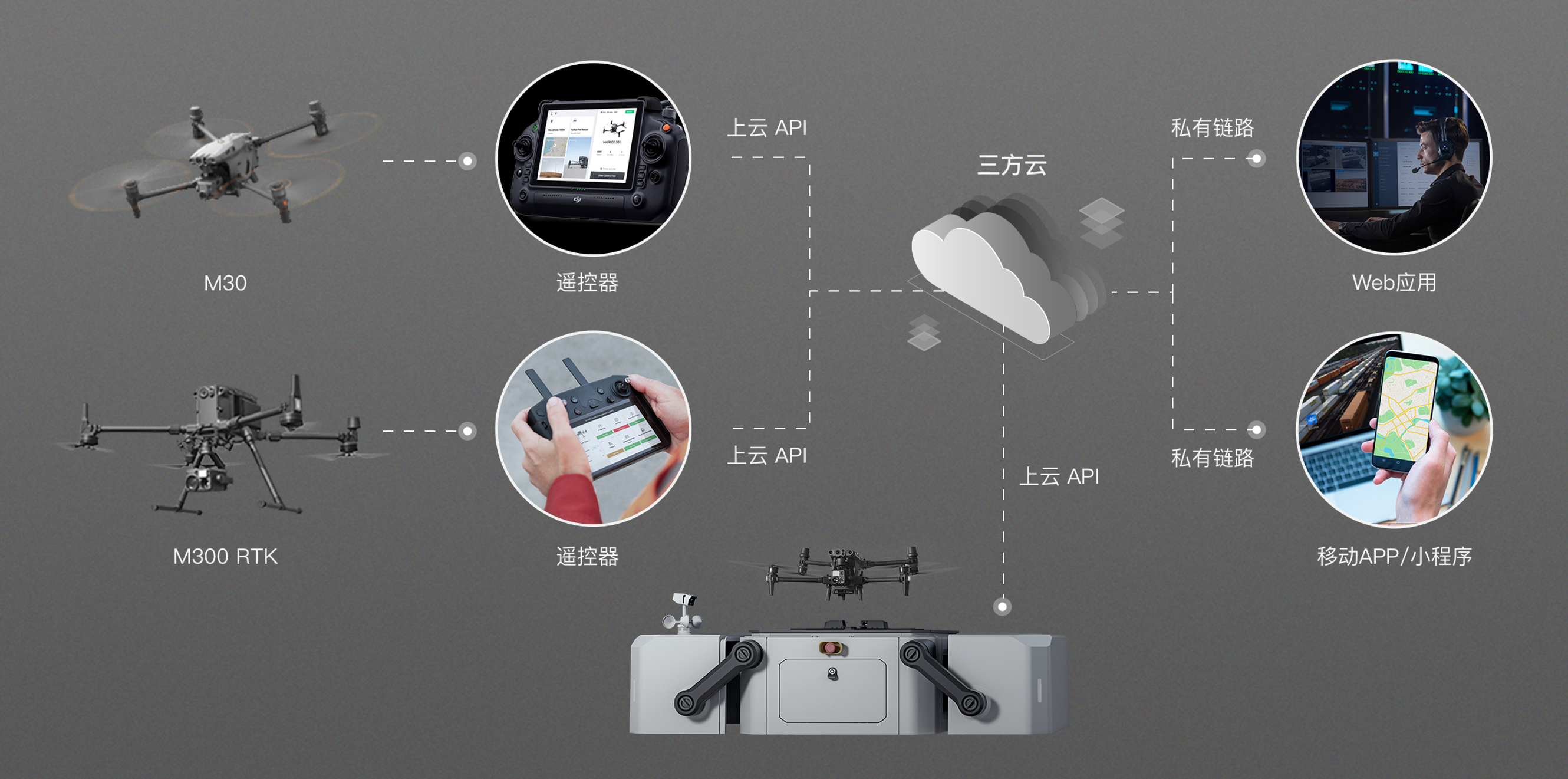
1 | ## 概述
2 |
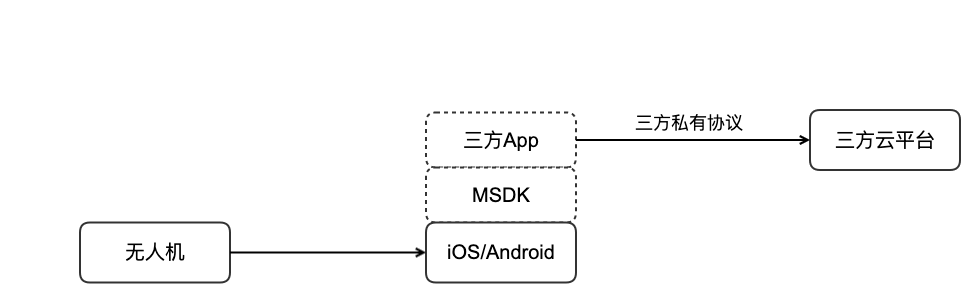
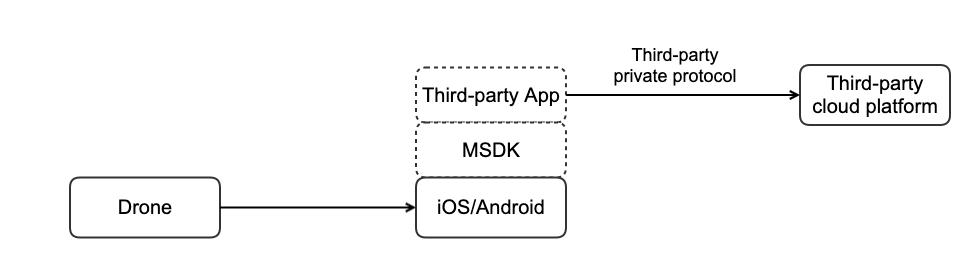
3 | 目前对于 DJI 无人机接入第三方云平台,主要是基于 MSDK 开发定制 App,然后自己定义私有上云通信协议连接到云平台中。这样对于核心业务是开发云平台,无人机只是其中一个接入硬件设备的开发者来说,重新基于 MSDK 开发 App 工作量大、成本高,同时还需要花很多精力在无人机功能接口适配上,从而导致整体的方案开发进度较为缓慢。
4 |
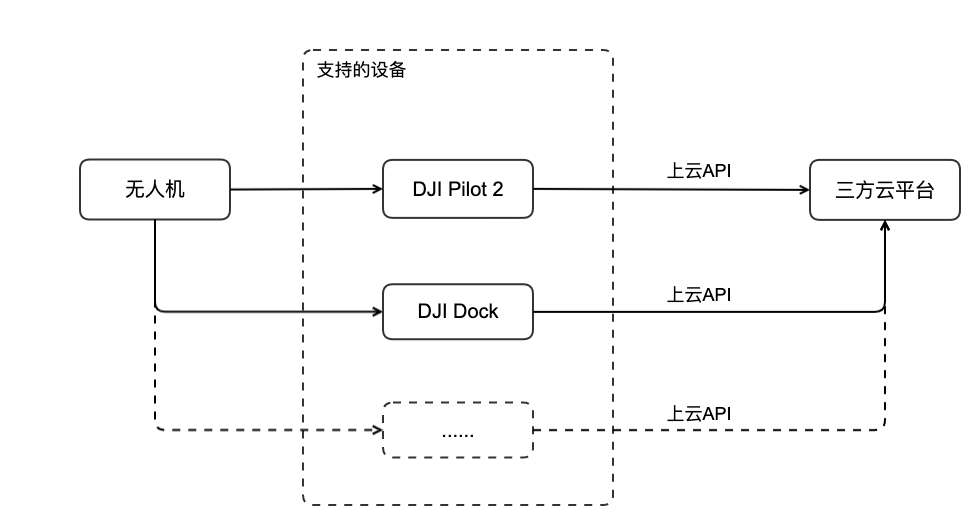
5 | 上云 API 的推出主要期望解决开发者重新造轮子的苦恼。对于没有 App 深度定制需求的开发者,直接可以采用 DJI Pilot 2 来和云平台通信,使开发商可以更加专注于上云业务接口的开发与实现。
6 |
7 | 已有的第三方云接入拓扑
8 |
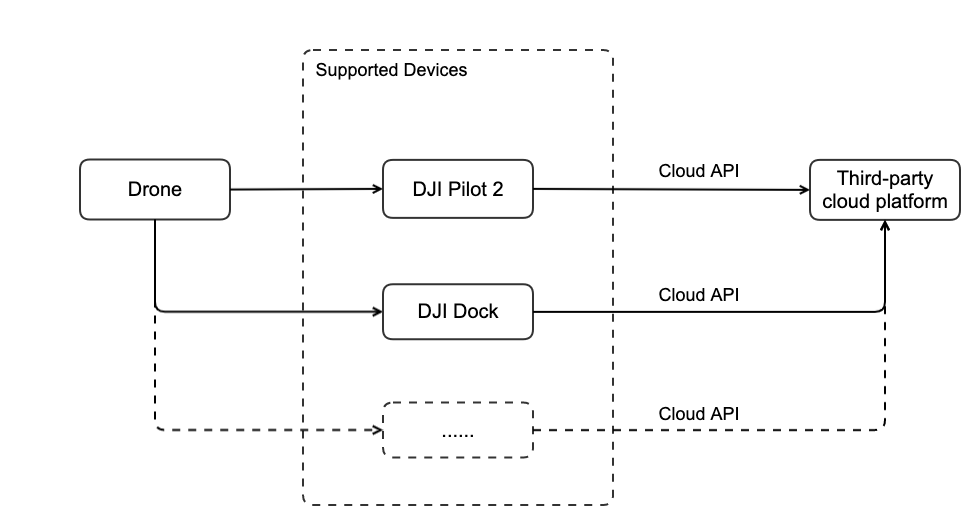
9 | 上云API接入第三方云拓扑
10 |
11 |
12 |
13 | ## 核心理念
14 |
15 | DJI 上云 API 主要是采用业界通用的 MQTT、HTTPS 和 WebSocket 协议,把飞机的能力抽象成物联网设备的物模型,开发者可以很方便的基于这个物模型进行业务开发,同时不用去关心飞机本身复杂的飞行控制问题。此外,上云 API 内置到 DJI Pilot 2 和大疆机场中,开发者无需重新开发 App,即可把无人机接入云平台。
16 |
17 | DJI Pilot 2 中通过内嵌 webview 引擎,开发者可以根据自身业务进行 web 页面定制开发,在相同的 DJI Pilot 2 上允许有业务差异化,从而兼容了多种不同业务的云平台。
18 |
19 | 从云平台的角度来说,每种 DJI 行业设备都有一份标准的物模型文件,相同的功能接口协议在各个机型上都是一样的,这样对于开发者来说只需实现适配一次就行了,无需随着每次新品机型的发布还要重新适配,间接减少开发者研发工作量,缩短上线的周期。
20 |
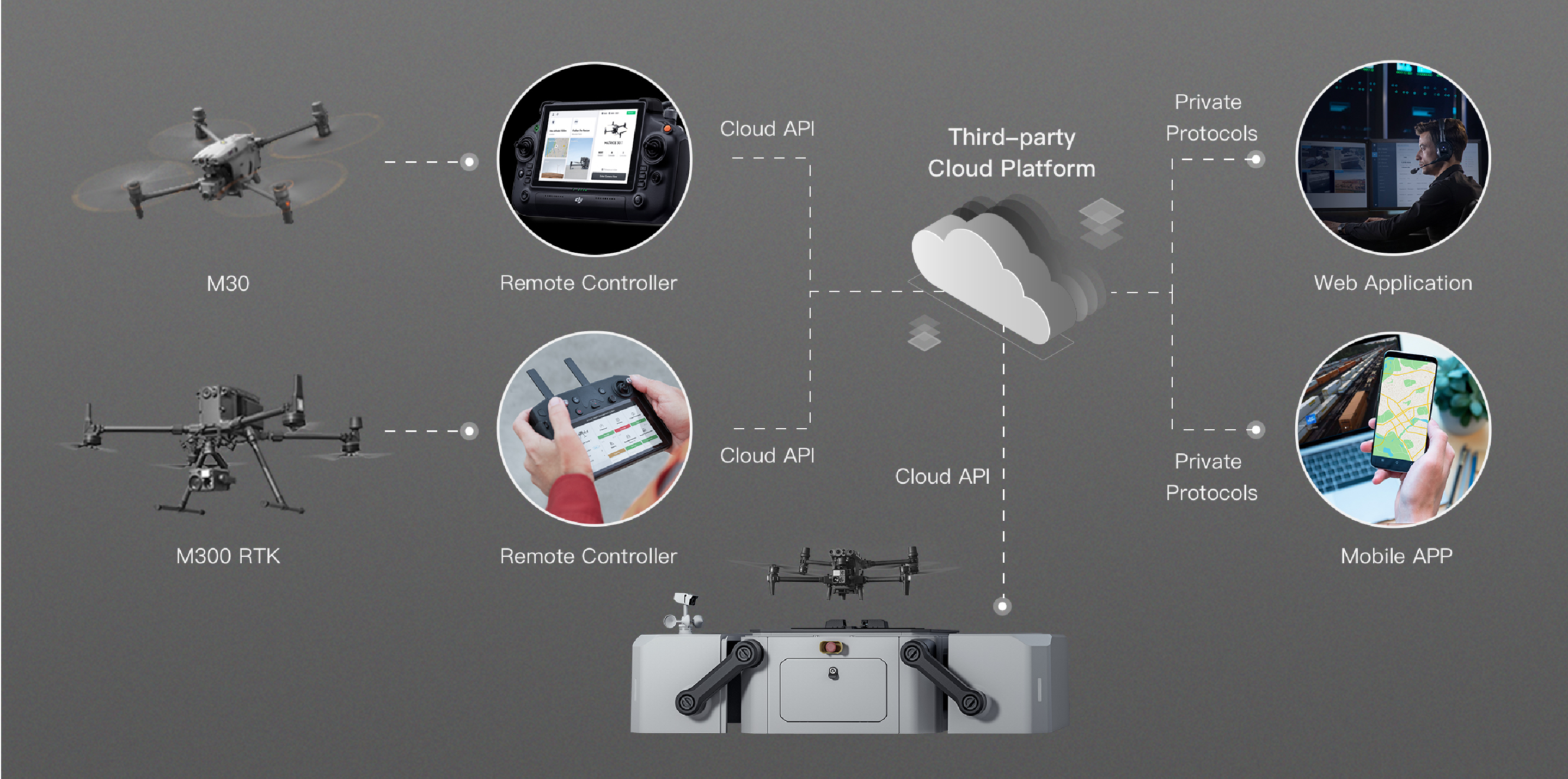
21 | 上云API全景图
22 |
23 |
--------------------------------------------------------------------------------
/docs/cn/20.quick-start/40.function-display-video.md:
--------------------------------------------------------------------------------
1 |
2 |
3 | ## Pilot 上云
4 |
5 |
6 |
7 |
8 |
9 |
10 |
11 | ## 机场上云
12 |
13 |
14 |
15 |
16 |
17 |
18 |
19 |
20 | ## 直播功能
21 |
22 |
23 |
24 |
25 |
26 |
27 |
28 |
29 | ## 地图元素
30 |
31 |
32 |
33 |
34 |
35 |
36 |
37 |
38 | ## 媒体管理
39 |
40 |
41 |
42 |
43 |
44 |
45 |
46 |
47 | ## Pilot 航线管理
48 |
49 |
50 |
51 |
52 |
53 |
54 |
55 | ## 固件升级
56 |
57 |
58 |
59 |
60 |
61 |
62 |
63 | ## 远程日志
64 |
65 |
66 |
67 |
68 |
69 |
70 |
71 | ## HMS 功能
72 |
73 |
74 |
75 |
76 |
77 |
--------------------------------------------------------------------------------
/docs/cn/30.feature-set/20.dock-feature-set/80.firmware-upgrade.md:
--------------------------------------------------------------------------------
1 |
2 | ## 功能概述
3 |
4 | 为实现对设备固件版本的维护,上云API 支持用户通过云端对机场与飞行器进行固件升级。用户可以实施单次升级以及批量升级、升级提示、升级进度的展示等。
5 |
6 | 为实现固件升级功能,需要用户预先在开发者官网下载所需的固件安装包,譬如[M30系列的固件版本包](https://www.dji.com/cn/downloads/products/matrice-30)。用户需要将固件安装包、固件版本等信息自行维护在云端服务器中。设备上报的固件属性信息与云端的固件包信息进行比对,判断是否需要固件升级。在云端下达`固件升级`命令时,需要在协议中补充升级设备的序列号、固件版本号、固件升级文件的存储地址、以及固件升级的类型等。设备可以通过`固件升级进度`命令中的`percent`与`step_key`参数得到固件升级的进度和当前步骤。具体请按照`接口详细实现`中的内容在云端 API 进行详细查阅。
7 |
8 | > **注意:**
9 | > * 通过固件升级物模型属性上传,`firmware_version`和最新固件的版本号对比,可以用来判断是否需要普通升级。`compatible_status`可以用来判断是否需要一致性升级。
10 | > * 升级的优先级顺序:普通升级 **高于** 一致性升级。普通升级能够覆盖一致性升级。因为如果设备的版本与固件最新版本一致为1.x,但是电池模块的固件偏低,所以设备端将会报需要一致性升级的物模型。但是如果固件最新版本为2.x,与设备的版本不一致,顺带会把版本偏低的电池模块升级,最终固件不一致的问题会被解决。
11 |
12 |
13 | ## 交互时序图
14 |
15 | ```mermaid
16 | sequenceDiagram
17 |
18 | participant client as DJI Dock
19 | participant app_server as Cloud Server
20 |
21 | client ->> app_server : 上报设备固件属性
22 |
23 | app_server ->> client : 创建固件升级任务 Topic: thing/product/{gateway_sn}/services Method: ota_create
24 | client -->> app_server : 设备响应 Topic: thing/product/{gateway_sn}/services_reply
25 |
26 | loop 设备上传进度与云端响应
27 |
28 | client ->> app_server : 上报升级任务进度与状态 Topic: thing/product/{gateway_sn}/events Method: ota_progress
29 | app_server -->> client : 云端响应 Topic: thing/product/{gateway_sn}/events_reply
30 |
31 | end
32 | ```
33 |
34 |
35 | ## 接口详细实现
36 |
37 | * [机场物模型属性](https://developer.dji.com/doc/cloud-api-tutorial/cn/api-reference/dock-to-cloud/mqtt/dock/dock1/properties.html)
38 |
39 | * [固件升级](https://developer.dji.com/doc/cloud-api-tutorial/cn/api-reference/dock-to-cloud/mqtt/dock/dock1/firmware.html)
40 | * 固件属性上报
41 | 固件升级功能会上报`设备固件版本号 - firmware_version`与`固件一致性 - compatible_status`两个属性字段。`firmware_version`和最新固件的版本号对比,可以用来判断是否需要普通升级。`compatible_status`可以用来判断是否需要一致性升级。
42 |
43 | * 固件升级任务下发
44 | 云端下发的固件升级 API 需要完成设备的序列号、固件升级包相关信息以及固件升级类型的填充。
45 |
46 | * 固件升级进度
47 | 设备上报固件升级进度到云端,通过字段的获取,可以在云端可视化界面呈现升级进度、升级进度百分比以及当前升级的步骤等关键信息。通过`固件升级进度`API的`ota_progress`字段来判断是否正在升级中。
48 |
49 |
50 |
51 |
--------------------------------------------------------------------------------
/docs/cn/30.feature-set/20.dock-feature-set/110.custom-flight-area.md:
--------------------------------------------------------------------------------
1 | ## 功能概述
2 |
3 | 上云 API 开放自定义飞行区功能。用户可以将敏感地点设定为禁飞区,并将这些信息同步给项目内的大疆机场。当无人机执行任务时,它会自动绕行禁飞区,从而确保作业的安全和规范性。本功能通过自定义飞行区文件圈定飞行器的飞行区域,**点击下载[自定义飞行区文件协议模板](https://terra-1-g.djicdn.com/fee90c2e03e04e8da67ea6f56365fc76/SDK%20%E6%96%87%E6%A1%A3/CloudAPI/custom-flight-area-file-template.json)**。
4 |
5 | 该功能支持用户在地图上规划自定义飞行区。自定义飞行区包括两种类型:
6 |
7 | 1. 自定义作业区:在自定义作业区内,飞行器可以起飞并进行作业,但无法飞出该区域。
8 | 2. 自定义限飞区:在自定义限飞区外,飞行器可以进行作业,但无法飞入该区域。
9 |
10 |
11 |
12 | ## 交互时序图
13 |
14 | ```mermaid
15 | sequenceDiagram
16 |
17 | participant geo_service as Cloud Server
18 | participant Dock as DJI Dock
19 | participant Drone as Aircraft
20 | participant web as Web Page
21 |
22 | geo_service -->> geo_service: 打包自定义飞行区文件,上传到存储桶
23 | geo_service -->> Dock: 通知自定义飞行区文件更新 Topic: thing/product/{gateway_sn}/services Method: flight_areas_update
24 | Dock -->> geo_service: 拉取自定义飞行区文件信息 Topic: thing/product/{gateway_sn}/requests Method: flight_areas_get
25 | geo_service -->> Dock: 返回云端最新的自定义飞行区信息
26 | Dock -->> Drone: 开启飞行器,请求升级自定义飞行区数据,携带文件下载地址和文件MD5
27 | Drone -->> Dock: 返回飞行器自身自定义飞行区的文件信息
28 | Dock -->> Dock: 自定义飞行区文件版本判断
29 | alt 文件版本判断一致
30 | Dock -->> geo_service: 上报同步完成 Topic: thing/product/{gateway_sn}/events Method: flight_areas_sync_progress
31 | geo_service -->> web: 返回已经完成同步状态
32 | else 文件版本判断不一致(不一致则以云端的版本为准)
33 | Dock -->> geo_service: 上报同步进行中,进入数据同步升级
34 | Dock -->> Drone: 从存储桶下载最新文件,上传自定义飞行区数据
35 | Drone -->> Dock: 发送自定义飞行区同步进度状态
36 | Dock -->> geo_service: 上报自定义飞行区同步进度状态 Topic: thing/product/{gateway_sn}/events Method: flight_areas_sync_progress
37 | geo_service -->> geo_service: 本地状态持久化处理
38 | geo_service -->> web: 推送自定义飞行区最新同步进度状态
39 | end
40 | Drone -->> Dock: 飞行器向机场推送飞行区信息
41 | Dock -->> geo_service: 飞行区告警信息推送 Topic: thing/product/{gateway_sn}/events Method: flight_areas_drone_location
42 | geo_service -->> web: 上报飞行器和各个区域的告警信息
43 | ```
44 |
45 | ## 接口详细实现
46 |
47 | [自定义飞行区](https://developer.dji.com/doc/cloud-api-tutorial/cn/api-reference/dock-to-cloud/mqtt/dock/dock2/custom-flight-area.html)
48 |
--------------------------------------------------------------------------------
/docs/en/30.feature-set/10.pilot-feature-set/70.pull-pilot-log.md:
--------------------------------------------------------------------------------
1 | ## Overview
2 |
3 | In the process of using DJI Pilot 2, it is inevitable to encounter problems such as abnormal interface communication and function failure, and it is necessary to pull the DJI Pilot 2 log for diagnosis(Refer to [Log Export](https://developer.dji.com/doc/cloud-api-tutorial/en/debug/log-export.html)). In order to solve this problem, DJI Pilot 2 also provides JSBridge interface for developers to pull the log. And upload the Webview to the developer's own server for analysis.
4 |
5 | > **Note:**
6 | >
7 | > DJI Pilot 2 logs are encrypted, so the developer needs to provide the public key information for log encryption through the JSBridge interface, and the pulled logs also need to be decrypted to view them. DJI provides a JAR library for decrypting logs that can be decrypted by developers running scripts.
8 |
9 | Decryption method: Use plogdecoder. jar library to run scripts to decrypt the pulled logs. [Download](https://terra-1-g.djicdn.com/71a7d383e71a4fb8887a310eb746b47f/cloudapi/V1.1/PlogDecoder.jar)
10 |
11 | **Example:**
12 |
13 | ```shell
14 | java -jar PlogDecoder.jar -key "Desktop/rsa_keys/pri.key" -log "/open_platform/log-2022-01-18.log".
15 | //If the public key is not set, you can omit the -key parameter.
16 | ```
17 |
18 | ## Detailed API Realization
19 |
20 | Please refer to [JSBridge](https://developer.dji.com/doc/cloud-api-tutorial/en/api-reference/pilot-to-cloud/jsbridge.html).
21 |
22 | * Get Logs Path `window.djiBridge.platformGetLogPath()`
23 |
24 | The developer can get the path to the logs saved by the DJI Pilot 2 via the js method and then can upload the logs via file upload.
25 |
26 | * Set Logs Encrypt Key `window.djiBridge.platformSetLogEncryptKey(String key)`
27 |
28 | * Clear Logs Encrypt Key `window.djiBridge.platformClearLogEncryptKey()`
29 |
30 | > **Note:** When clearing the encryption key, if there is already part of the log using the original key, it will not be re-encrypted. In this case, the developer needs to save the historical key himself to prevent the log file from not being opened.
31 |
32 |
--------------------------------------------------------------------------------
/docs/en/60.api-reference/10.pilot-to-cloud/10.https/20.waypoint-management/70.cancel-collect.md:
--------------------------------------------------------------------------------
1 | ## Batch Unfavorites Waypoints
2 |
3 |
4 |
5 | `DELETE /wayline/api/v1/workspaces/{workspace_id}/favorites`
6 |
7 | Parameters
8 |
9 | | Name | In | Type | Required | Description |
10 | | ------------ | ------ | ------------- | -------- | ---------------------------- |
11 | | workspace_id | path | string | true | workspace id |
12 | | id | query | array[string] | false | waypoints file id collection |
13 | | x-auth-token | header | string | true | access token |
14 |
15 |
16 | Responses
17 |
18 | | Status | Meaning | Description | Schema |
19 | | ------ | ------------------------------------------------------- | ----------- | --------------------------------------------------- |
20 | | 200 | [OK](https://tools.ietf.org/html/rfc7231#section-6.3.1) | OK | [wayline.BaseResponse](#schemawayline.baseresponse) |
21 |
22 | > Example responses
23 |
24 | ```json
25 | {
26 | "code":0
27 | "data":{},
28 | "message": "success"
29 | }
30 | ```
31 |
32 | # Schemas
33 |
34 | wayline.BaseResponse
35 |
36 |
37 |
38 |
39 |
40 |
41 |
42 | ```json
43 | {
44 | "code": 0,
45 | "data": null,
46 | "message": "string"
47 | }
48 |
49 | ```
50 |
51 | *Properties*
52 | | Name | Type | Required | Restrictions | Description |
53 | | ------- | ------- | -------- | ------------ | ----------- |
54 | | code | integer | false | none | error code |
55 | | data | any | false | none | none |
56 | | message | string | false | none | description |
--------------------------------------------------------------------------------
/docs/en/60.api-reference/20.dock-to-cloud/00.mqtt/20.dock/00.dock1/100.config.md:
--------------------------------------------------------------------------------
1 |
2 |
3 |
4 |
5 |
6 |
7 |
8 |
9 |
10 | # Requests
11 |
12 | ## Get configuration
13 |
14 |
15 |
16 | **Topic:** thing/product/*{gateway_sn}*/requests
17 |
18 | **Direction:** up
19 |
20 | **Method:** config
21 |
22 | **Data:**
23 |
24 | |Column|Name|Type|constraint|Description|
25 | |---|---|---|---|---|
26 | |config_type|Configuration type|enum_string| {"json":"JSON format"} ||
27 | |config_scope|Configuration scope|enum_string| {"product":"Product dimension"} ||
28 |
29 |
30 |
31 |
32 | **Example:**
33 | ```json
34 | {
35 | "bid": "42a19f36-5117-4520-bd13-fd61d818d52e",
36 | "data": {
37 | "config_scope": "product",
38 | "config_type": "json"
39 | },
40 | "gateway": "sn",
41 | "tid": "6a7bfe89-c386-4043-b600-b518e10096cc",
42 | "timestamp": 1667803298000,
43 | "method": "config"
44 | }
45 | ```
46 |
47 |
48 |
49 | **Topic:** thing/product/*{gateway_sn}*/requests_reply
50 |
51 | **Direction:** down
52 |
53 | **Method:** config
54 |
55 | **Data:**
56 |
57 | |Column|Name|Type|constraint|Description|
58 | |---|---|---|---|---|
59 | |ntp_server_host|NTP service host|text| ||
60 | |app_id|App ID created at [Developer Website](https://developer.dji.com/user/apps/#all)|text| ||
61 | |app_key|App Key created at [Developer Website](https://developer.dji.com/user/apps/#all)|text| ||
62 | |app_license|App License created at [Developer Website](https://developer.dji.com/user/apps/#all)|text| ||
63 | |ntp_server_port|NTP server port number|int| |If this field is not included in the request, the default NTP port number is 123|
64 |
65 |
66 |
67 |
68 | **Example:**
69 | ```json
70 | {
71 | "bid": "42a19f36-5117-4520-bd13-fd61d818d52e",
72 | "data": {
73 | "app_id": 123456,
74 | "app_key": "app_key",
75 | "app_license": "app_license",
76 | "ntp_server_host": "host_url",
77 | "ntp_server_port": 456
78 | },
79 | "gateway": "sn",
80 | "tid": "6a7bfe89-c386-4043-b600-b518e10096cc",
81 | "timestamp": 1667803298000,
82 | "method": "config"
83 | }
84 | ```
85 |
86 |
87 |
88 |
89 |
--------------------------------------------------------------------------------
/docs/en/60.api-reference/20.dock-to-cloud/00.mqtt/20.dock/10.dock2/100.config.md:
--------------------------------------------------------------------------------
1 |
2 |
3 |
4 |
5 |
6 |
7 |
8 |
9 |
10 | # Requests
11 |
12 | ## Get configuration
13 |
14 |
15 |
16 | **Topic:** thing/product/*{gateway_sn}*/requests
17 |
18 | **Direction:** up
19 |
20 | **Method:** config
21 |
22 | **Data:**
23 |
24 | |Column|Name|Type|constraint|Description|
25 | |---|---|---|---|---|
26 | |config_type|Configuration type|enum_string| {"json":"JSON format"} ||
27 | |config_scope|Configuration scope|enum_string| {"product":"Product dimension"} ||
28 |
29 |
30 |
31 |
32 | **Example:**
33 | ```json
34 | {
35 | "bid": "42a19f36-5117-4520-bd13-fd61d818d52e",
36 | "data": {
37 | "config_scope": "product",
38 | "config_type": "json"
39 | },
40 | "gateway": "sn",
41 | "tid": "6a7bfe89-c386-4043-b600-b518e10096cc",
42 | "timestamp": 1667803298000,
43 | "method": "config"
44 | }
45 | ```
46 |
47 |
48 |
49 | **Topic:** thing/product/*{gateway_sn}*/requests_reply
50 |
51 | **Direction:** down
52 |
53 | **Method:** config
54 |
55 | **Data:**
56 |
57 | |Column|Name|Type|constraint|Description|
58 | |---|---|---|---|---|
59 | |ntp_server_host|NTP service host|text| ||
60 | |app_id|App ID created at [Developer Website](https://developer.dji.com/user/apps/#all)|text| ||
61 | |app_key|App Key created at [Developer Website](https://developer.dji.com/user/apps/#all)|text| ||
62 | |app_license|App License created at [Developer Website](https://developer.dji.com/user/apps/#all)|text| ||
63 | |ntp_server_port|NTP server port number|int| |If this field is not included in the request, the default NTP port number is 123|
64 |
65 |
66 |
67 |
68 | **Example:**
69 | ```json
70 | {
71 | "bid": "42a19f36-5117-4520-bd13-fd61d818d52e",
72 | "data": {
73 | "app_id": 123456,
74 | "app_key": "app_key",
75 | "app_license": "app_license",
76 | "ntp_server_host": "host_url",
77 | "ntp_server_port": 456
78 | },
79 | "gateway": "sn",
80 | "tid": "6a7bfe89-c386-4043-b600-b518e10096cc",
81 | "timestamp": 1667803298000,
82 | "method": "config"
83 | }
84 | ```
85 |
86 |
87 |
88 |
89 |
--------------------------------------------------------------------------------
/docs/cn/60.api-reference/20.dock-to-cloud/00.mqtt/20.dock/00.dock1/60.hms.md:
--------------------------------------------------------------------------------
1 |
2 |
3 |
4 |
5 |
6 | # Event
7 |
8 | ## 健康告警
9 |
10 |
11 |
12 | **Topic:** thing/product/*{gateway_sn}*/events
13 |
14 | **Direction:** up
15 |
16 | **Method:** hms
17 |
18 | **Data:**
19 |
20 | |Column|Name|Type|constraint|Description|
21 | |---|---|---|---|---|
22 | |list|健康告警列表|array| {"size": 20, "item_type": struct} ||
23 | |»level|告警等级|enum_int| {"0":"通知","1":"提醒","2":"警告"} ||
24 | |»module|事件模块|enum_int| {"0":"飞行任务","1":"设备管理","2":"媒体","3":"hms"} ||
25 | |»in_the_sky|是否飞行|enum_int| {"0":"在地上","1":"在天上"} ||
26 | |»code|告警码|text| {"length":"10240"} ||
27 | |»device_type|设备类型|text| |格式为 *{domain-type-subtype}*,可以根据[产品支持](https://developer.dji.com/doc/cloud-api-tutorial/cn/overview/product-support.html)查询|
28 | |»imminent|是否为及时性的|enum_int| {"0":"否","1":"是"} |代表是否为及时性的告警码。比如风过大,会随着风力减小而自动消失。|
29 | |»args|参数|struct| ||
30 | |»»component_index|文案变量|int| {"length":"10240"} |需要填充在 '告警文案查询json文件',[hms.json](https://developer.dji.com/doc/cloud-api-tutorial/cn/feature-set/dock-feature-set/hms.html)'中的变量|
31 | |»»sensor_index|文案变量|int| {"length":"10240"} |需要填充在 '告警文案查询json文件',[hms.json](https://developer.dji.com/doc/cloud-api-tutorial/cn/feature-set/dock-feature-set/hms.html)'中的变量|
32 |
33 |
34 |
35 |
36 |
37 |
38 | **Example:**
39 | ```json
40 | {
41 | "bid": "xxxxxxxx-xxxx-xxxx-xxxx-xxxxxxxxxx",
42 | "data": {
43 | "list": [
44 | {
45 | "args": {
46 | "component_index": 0,
47 | "sensor_index": 0
48 | },
49 | "code": "0x16100083",
50 | "device_type": "0-67-0",
51 | "imminent": 1,
52 | "in_the_sky": 0,
53 | "level": 2,
54 | "module": 3
55 | }
56 | ]
57 | },
58 | "tid": "xxxxxxxx-xxxx-xxxx-xxxx-xxxxxxxxxx",
59 | "timestamp": 1654070968655,
60 | "method": "hms"
61 | }
62 | ```
63 |
64 |
65 |
66 |
67 |
68 |
69 |
70 |
71 |
72 |
73 |
74 |
75 |
76 |
--------------------------------------------------------------------------------
/docs/en/20.quick-start/40.function-display-video.md:
--------------------------------------------------------------------------------
1 |
2 |
3 | ## Pilot access to Cloud Server
4 |
5 |
6 |
7 |
8 |
9 |
10 |
11 | ## Dock access to Cloud Server
12 |
13 |
14 |
15 |
16 |
17 |
18 |
19 | ## Live Streaming
20 |
21 |
22 |
23 |
24 |
25 |
26 |
27 |
28 | ## Map Elements
29 |
30 |
31 |
32 |
33 |
34 |
35 |
36 |
37 | ## Media Management
38 |
39 |
40 |
41 |
42 |
43 |
44 |
45 |
46 | ## Pilot Wayline Management
47 |
48 |
49 |
50 |
51 |
52 |
53 |
54 | ## Firmware Upgrade
55 |
56 |
57 |
58 |
59 |
60 |
61 |
62 | ## Remote Log
63 |
64 |
65 |
66 |
67 |
68 |
69 |
70 | ## HMS Function
71 |
72 |
73 |
74 |
75 |
76 |
77 |
--------------------------------------------------------------------------------
/docs/cn/10.overview/40.basic-concept/60.jsbridge.md:
--------------------------------------------------------------------------------
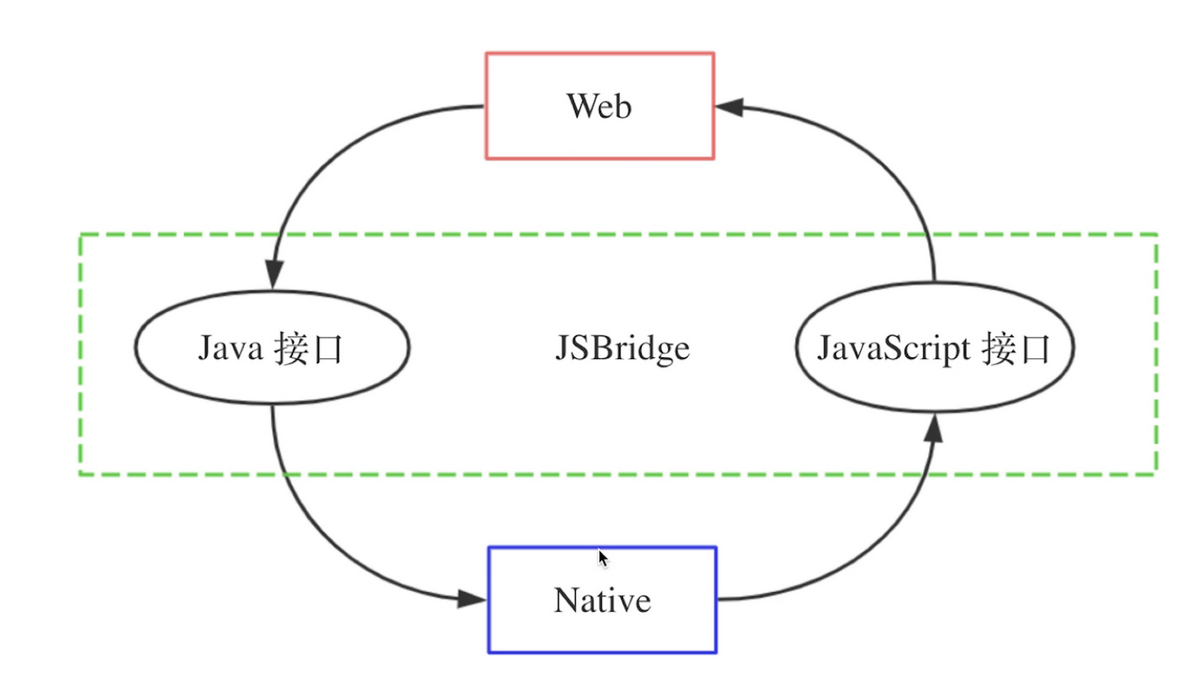
1 | ## 概述
2 |
3 | 目前大部分的移动端应用开发都选择混合开发模式(Hybrid),通常会涉及到两大类技术:原生Native、Web H5。
4 |
5 | - 原生技术主要指iOS(Objective C)、Android(Java),原生开发效率较低,开发完成需要重新打包整个App,发布依赖用户的更新,性能较高功能覆盖率更高。
6 | - Web H5主要由HTML、CSS、JavaScript组成,Web可以更好的实现发布更新,跨平台也更加优秀,但性能较低,特性也受限
7 |
8 | 在混合开发模式下,Web H5会经常需要使用Native的功能,比如调用原生页面、获取用户信息等,同时Native也需要向Web端发送推送、更新状态等,而JavaScript是运行在单独的**JS Context**中(Webview容器、JSCore等),与原生有运行环境的隔离,所以需要有一种机制实现Native端和Web端的**双向通信**,这就是JSBridge:以JavaScript引擎或Webview容器作为媒介,通过协定协议进行通信,实现Native端和Web端双向通信的一种机制。
9 |
10 | 通过JSBridge,Web端可以调用Native端的Java接口,同样Native端也可以通过JSBridge调用Web端的JavaScript接口,实现彼此的双向调用。
11 |
12 |
13 |
14 | ## Webview
15 |
16 | Webview是移动端提供的运行JavaScript的环境,是系统渲染Web网页的一个控件,可与页面JavaScript交互,实现混合开发,Android的Webview采用的是低版本和高版本使用了不同的`webkit`内核,4.4后直接使用了`Chrome`。Webview控件除了能加载指定的url外,还可以对URL请求、JavaScript的对话框、加载进度、页面交互进行强大的处理,之后会提到拦截请求、执行JS脚本都依赖于此。
17 |
18 | DJI Pilot 2中会内嵌一个Webview控件,为开发者提供一个网页环境,同时通过JSBridge与DJI Pilot 2通信。
19 |
20 | > **注意:**
21 | >
22 | > 对于M300 RTK遥控器,需要把遥控器固件升级到最新版本,不然会出现Webview页面空白的现象。
23 |
24 | ## JSBridge相互调用示例
25 |
26 | - Webview JS调用JAVA 代码
27 |
28 | ```javascript
29 | / Java 注入 js方法,
30 | webview.addJavascriptInterface(JsModule,"android");
31 |
32 | // JsModule.java
33 | @JavascriptInterface
34 | public void jsCallAndroid(){
35 | tvShowmsg.setText("Js调用Android方法");
36 | }
37 | @JavascriptInterface
38 | public void jsCallAndroidArgs(String args){
39 | tvShowmsg.setText(args);
40 | }
41 |
42 | // js 调用 java 代码
43 |
44 | ```
45 |
46 | - JAVA调用JS代码
47 |
48 | ```java
49 | // Java 调用 js方法,javacalljs()为javascript代码中的一个方法
50 | webview.loadUrl("javascript:javacalljs()");
51 | ```
52 |
53 | > **注意:**
54 | >
55 | > 1. java ↔ js 之间数据传递属于两个不同的运行环境之间的数据传递,效率上不是很快,如果传递大量的数据,会影响到性能。
56 | > 2. 对于js的运行,需要借助于 Webview实例,运行一个Webview需要占用一定的内存,所以目前不支持H5页面在后台运行,一旦退出了就会关闭H5页面,类似浏览器的方式,只有在Webview界面中才会运行第三方的H5页面。
57 |
--------------------------------------------------------------------------------
/docs/cn/60.api-reference/10.pilot-to-cloud/10.https/20.waypoint-management/70.cancel-collect.md:
--------------------------------------------------------------------------------
1 | ## 批量取消收藏航线文件
2 |
3 |
4 |
5 | `DELETE /wayline/api/v1/workspaces/{workspace_id}/favorites`
6 |
7 | Parameters
8 |
9 | |Name|In|Type|Required|Description|
10 | |---|---|---|---|---|
11 | |workspace_id|path|string|true|工作空间id|
12 | |id|query|array[string]|false|航线文件id集合|
13 | |x-auth-token|header|string|true|访问令牌|
14 |
15 |
16 | Responses
17 |
18 | |Status|Meaning|Description|Schema|
19 | |---|---|---|---|
20 | |200|[OK](https://tools.ietf.org/html/rfc7231#section-6.3.1)|OK|[wayline.BaseResponse](#schemawayline.baseresponse)|
21 |
22 | > Example responses
23 | >
24 | ```json
25 | {
26 | "code":0
27 | "data":{},
28 | "message": "success"
29 | }
30 | ```
31 |
32 | # Schemas
33 | wayline.BaseResponse
34 |
35 |
36 |
37 |
38 |
39 |
40 | ```json
41 | {
42 | "code": 0,
43 | "data": null,
44 | "message": "string"
45 | }
46 |
47 | ```
48 | *Properties*
49 | |Name|Type|Required|Restrictions|Description|
50 | |---|---|---|---|---|
51 | |code|integer|false|none|错误码|
52 | |data|any|false|none|none|
53 | |message|string|false|none|错误描述|## 批量取消收藏航线文件
54 |
55 |
56 |
57 | `DELETE /wayline/api/v1/workspaces/{workspace_id}/favorites`
58 |
59 | Parameters
60 |
61 | |Name|In|Type|Required|Description|
62 | |---|---|---|---|---|
63 | |workspace_id|path|string|true|工作空间id|
64 | |id|query|array[string]|false|航线文件id集合|
65 | |x-auth-token|header|string|true|访问令牌|
66 |
67 |
68 | Responses
69 |
70 | |Status|Meaning|Description|Schema|
71 | |---|---|---|---|
72 | |200|[OK](https://tools.ietf.org/html/rfc7231#section-6.3.1)|OK|[wayline.BaseResponse](#schemawayline.baseresponse)|
73 |
74 | > Example responses
75 | >
76 | ```json
77 | {
78 | "code":0
79 | "data":{},
80 | "message": "success"
81 | }
82 | ```
--------------------------------------------------------------------------------
/docs/en/60.api-reference/20.dock-to-cloud/00.mqtt/20.dock/10.dock2/60.hms.md:
--------------------------------------------------------------------------------
1 |
2 |
3 |
4 |
5 |
6 | # Event
7 |
8 | ## Health warning
9 | **Topic:** thing/product/*{gateway_sn}*/events
10 |
11 | **Direction:** up
12 |
13 | **Method:** hms
14 |
15 | **Data:**
16 |
17 | |Column|Name|Type|constraint|Description|
18 | |---|---|---|---|---|
19 | |list|Health alert list|array| {"size": 20, "item_type": struct} ||
20 | |»level|Alarm level|enum_int| {"0":"Notification","1":"Reminder","2":"Warning"} ||
21 | |»module|Event module|enum_int| {"0":"Flight mission","1":"Device management","2":"Media","3":"hms"} ||
22 | |»in_the_sky|In flight|enum_int| {"0":"On the ground","1":"In the sky"} ||
23 | |»code|Alarm code|text| {"length":"10240"} ||
24 | |»device_type|Device type|text| |Format is *{domain-type-subtype}*, can be check at [Product Support](https://developer.dji.com/doc/cloud-api-tutorial/cn/overview/product-support.html).|
25 | |»imminent|Whether it is imminent|enum_int| {"0":"No","1":"Yes"} |Represents whether it is an imminent alarm code. For example, if the wind is too strong, it will automatically disappear as the wind decreases.|
26 | |»args|Parameters|struct| ||
27 | |»»component_index|Copywariting variable|int| {"length":"10240"} |Parameters need to be filled in the [hms.json](https://developer.dji.com/doc/cloud-api-tutorial/cn/feature-set/dock-feature-set/hms.html).|
28 | |»»sensor_index|Copywariting variable|int| {"length":"10240"} ||
29 |
30 |
31 |
32 |
33 | **Example:**
34 | ```json
35 | {
36 | "bid": "xxxxxxxx-xxxx-xxxx-xxxx-xxxxxxxxxx",
37 | "data": {
38 | "list": [
39 | {
40 | "args": {
41 | "component_index": 0,
42 | "sensor_index": 0
43 | },
44 | "code": "0x16100083",
45 | "device_type": "0-67-0",
46 | "imminent": 1,
47 | "in_the_sky": 0,
48 | "level": 2,
49 | "module": 3
50 | }
51 | ]
52 | },
53 | "tid": "xxxxxxxx-xxxx-xxxx-xxxx-xxxxxxxxxx",
54 | "timestamp": 1654070968655
55 | }
56 | ```
57 |
58 |
59 |
60 |
61 |
62 |
63 |
64 |
65 |
66 |
67 |
68 |
69 |
--------------------------------------------------------------------------------
/docs/cn/60.api-reference/20.dock-to-cloud/00.mqtt/20.dock/00.dock1/160.esdk-transmit-custom-data.md:
--------------------------------------------------------------------------------
1 |
2 |
3 |
4 |
5 |
6 | # Event
7 |
8 | ## 自定义消息推送cloud
9 |
10 |
11 |
12 | **Topic:** thing/product/*{gateway_sn}*/events
13 |
14 | **Direction:** up
15 |
16 | **Method:** custom_data_transmission_from_esdk
17 |
18 | **Data:**
19 |
20 | |Column|Name|Type|constraint|Description|
21 | |---|---|---|---|---|
22 | |value|数据内容|text| {"length":"小于 256"} ||
23 |
24 |
25 |
26 |
27 |
28 |
29 | **Example:**
30 | ```json
31 | {
32 | "bid": "xxxxxxxx-xxxx-xxxx-xxxx-xxxxxxxxxxxx",
33 | "data": {
34 | "value": "hello world"
35 | },
36 | "gateway": "4TADKAQ000002J",
37 | "method": "custom_data_transmission_from_esdk",
38 | "tid": "xxxxxxxx-xxxx-xxxx-xxxx-xxxxxxxxxxxx",
39 | "timestamp": 1689911315621
40 | }
41 | ```
42 |
43 |
44 |
45 |
46 |
47 |
48 |
49 | # Service
50 |
51 | ## cloud-自定义消息推送到esdk
52 |
53 |
54 |
55 | **Topic:** thing/product/*{gateway_sn}*/services
56 |
57 | **Direction:** down
58 |
59 | **Method:** custom_data_transmission_to_esdk
60 |
61 | **Data:**
62 |
63 | |Column|Name|Type|constraint|Description|
64 | |---|---|---|---|---|
65 | |value|数据内容|text| {"length":"小于 256"} ||
66 |
67 |
68 |
69 |
70 |
71 |
72 | **Example:**
73 | ```json
74 | {
75 | "bid": "xxxxxxxx-xxxx-xxxx-xxxx-xxxxxxxxxxxx",
76 | "data": {
77 | "value": "hello world"
78 | },
79 | "method": "custom_data_transmission_to_esdk",
80 | "tid": "xxxxxxxx-xxxx-xxxx-xxxx-xxxxxxxxxxxx",
81 | "timestamp": 1689740550047
82 | }
83 | ```
84 |
85 |
86 |
87 | **Topic:** thing/product/*{gateway_sn}*/services_reply
88 |
89 | **Direction:** up
90 |
91 | **Method:** custom_data_transmission_to_esdk
92 |
93 | **Data:**
94 |
95 | |Column|Name|Type|constraint|Description|
96 | |---|---|---|---|---|
97 | |result|返回码|int| |非 0 代表错误|
98 |
99 |
100 |
101 |
102 | **Example:**
103 | ```json
104 | {
105 | "bid": "xxxxxxxx-xxxx-xxxx-xxxx-xxxxxxxxxxxx",
106 | "data": {
107 | "result": 0
108 | },
109 | "method": "custom_data_transmission_to_esdk",
110 | "tid": "xxxxxxxx-xxxx-xxxx-xxxx-xxxxxxxxxxxx",
111 | "timestamp": 1689740550047
112 | }
113 | ```
114 |
115 |
116 |
117 |
118 |
119 |
120 |
121 |
--------------------------------------------------------------------------------
/docs/cn/60.api-reference/20.dock-to-cloud/00.mqtt/20.dock/10.dock2/160.esdk-transmit-custom-data.md:
--------------------------------------------------------------------------------
1 |
2 |
3 |
4 |
5 |
6 | # Event
7 |
8 | ## 自定义消息推送cloud
9 |
10 |
11 |
12 | **Topic:** thing/product/*{gateway_sn}*/events
13 |
14 | **Direction:** up
15 |
16 | **Method:** custom_data_transmission_from_esdk
17 |
18 | **Data:**
19 |
20 | |Column|Name|Type|constraint|Description|
21 | |---|---|---|---|---|
22 | |value|数据内容|text| {"length":"小于 256"} ||
23 |
24 |
25 |
26 |
27 |
28 |
29 | **Example:**
30 | ```json
31 | {
32 | "bid": "xxxxxxxx-xxxx-xxxx-xxxx-xxxxxxxxxxxx",
33 | "data": {
34 | "value": "hello world"
35 | },
36 | "gateway": "4TADKAQ000002J",
37 | "method": "custom_data_transmission_from_esdk",
38 | "tid": "xxxxxxxx-xxxx-xxxx-xxxx-xxxxxxxxxxxx",
39 | "timestamp": 1689911315621
40 | }
41 | ```
42 |
43 |
44 |
45 |
46 |
47 |
48 |
49 | # Service
50 |
51 | ## cloud-自定义消息推送到esdk
52 |
53 |
54 |
55 | **Topic:** thing/product/*{gateway_sn}*/services
56 |
57 | **Direction:** down
58 |
59 | **Method:** custom_data_transmission_to_esdk
60 |
61 | **Data:**
62 |
63 | |Column|Name|Type|constraint|Description|
64 | |---|---|---|---|---|
65 | |value|数据内容|text| {"length":"小于 256"} ||
66 |
67 |
68 |
69 |
70 |
71 |
72 | **Example:**
73 | ```json
74 | {
75 | "bid": "xxxxxxxx-xxxx-xxxx-xxxx-xxxxxxxxxxxx",
76 | "data": {
77 | "value": "hello world"
78 | },
79 | "method": "custom_data_transmission_to_esdk",
80 | "tid": "xxxxxxxx-xxxx-xxxx-xxxx-xxxxxxxxxxxx",
81 | "timestamp": 1689740550047
82 | }
83 | ```
84 |
85 |
86 |
87 | **Topic:** thing/product/*{gateway_sn}*/services_reply
88 |
89 | **Direction:** up
90 |
91 | **Method:** custom_data_transmission_to_esdk
92 |
93 | **Data:**
94 |
95 | |Column|Name|Type|constraint|Description|
96 | |---|---|---|---|---|
97 | |result|返回码|int| |非 0 代表错误|
98 |
99 |
100 |
101 |
102 | **Example:**
103 | ```json
104 | {
105 | "bid": "xxxxxxxx-xxxx-xxxx-xxxx-xxxxxxxxxxxx",
106 | "data": {
107 | "result": 0
108 | },
109 | "method": "custom_data_transmission_to_esdk",
110 | "tid": "xxxxxxxx-xxxx-xxxx-xxxx-xxxxxxxxxxxx",
111 | "timestamp": 1689740550047
112 | }
113 | ```
114 |
115 |
116 |
117 |
118 |
119 |
120 |
121 |
--------------------------------------------------------------------------------
/docs/cn/60.api-reference/20.dock-to-cloud/00.mqtt/20.dock/00.dock1/150.psdk-transmit-custom-data.md:
--------------------------------------------------------------------------------
1 |
2 |
3 |
4 |
5 |
6 | # Event
7 |
8 | ## 自定义消息推送 Cloud
9 |
10 |
11 |
12 | **Topic:** thing/product/*{gateway_sn}*/events
13 |
14 | **Direction:** up
15 |
16 | **Method:** custom_data_transmission_from_psdk
17 |
18 | **Data:**
19 |
20 | |Column|Name|Type|constraint|Description|
21 | |---|---|---|---|---|
22 | |value|数据内容|text| {"length":"小于 256"} ||
23 |
24 |
25 |
26 |
27 |
28 |
29 | **Example:**
30 | ```json
31 | {
32 | "bid": "xxxxxxxx-xxxx-xxxx-xxxx-xxxxxxxxxxxx",
33 | "data": {
34 | "value": "hello world"
35 | },
36 | "gateway": "4TADKAQ000002J",
37 | "method": "custom_data_transmission_from_psdk",
38 | "tid": "xxxxxxxx-xxxx-xxxx-xxxx-xxxxxxxxxxxx",
39 | "timestamp": 1689911315621
40 | }
41 | ```
42 |
43 |
44 |
45 |
46 |
47 |
48 |
49 | # Service
50 |
51 | ## Cloud - 自定义消息推送到 PSDK
52 |
53 |
54 |
55 | **Topic:** thing/product/*{gateway_sn}*/services
56 |
57 | **Direction:** down
58 |
59 | **Method:** custom_data_transmission_to_psdk
60 |
61 | **Data:**
62 |
63 | |Column|Name|Type|constraint|Description|
64 | |---|---|---|---|---|
65 | |value|数据内容|text| {"length":"小于 256"} ||
66 |
67 |
68 |
69 |
70 |
71 |
72 | **Example:**
73 | ```json
74 | {
75 | "bid": "xxxxxxxx-xxxx-xxxx-xxxx-xxxxxxxxxxxx",
76 | "data": {
77 | "value": "hello world"
78 | },
79 | "method": "custom_data_transmission_to_psdk",
80 | "tid": "xxxxxxxx-xxxx-xxxx-xxxx-xxxxxxxxxxxx",
81 | "timestamp": 1689740550047
82 | }
83 | ```
84 |
85 |
86 |
87 | **Topic:** thing/product/*{gateway_sn}*/services_reply
88 |
89 | **Direction:** up
90 |
91 | **Method:** custom_data_transmission_to_psdk
92 |
93 | **Data:**
94 |
95 | |Column|Name|Type|constraint|Description|
96 | |---|---|---|---|---|
97 | |result|返回码|int| |非 0 代表错误|
98 |
99 |
100 |
101 |
102 | **Example:**
103 | ```json
104 | {
105 | "bid": "xxxxxxxx-xxxx-xxxx-xxxx-xxxxxxxxxxxx",
106 | "data": {
107 | "result": 0
108 | },
109 | "method": "custom_data_transmission_to_psdk",
110 | "tid": "xxxxxxxx-xxxx-xxxx-xxxx-xxxxxxxxxxxx",
111 | "timestamp": 1689740550047
112 | }
113 | ```
114 |
115 |
116 |
117 |
118 |
119 |
120 |
121 |
--------------------------------------------------------------------------------
/docs/cn/60.api-reference/20.dock-to-cloud/00.mqtt/20.dock/10.dock2/150.psdk-transmit-custom-data.md:
--------------------------------------------------------------------------------
1 |
2 |
3 |
4 |
5 |
6 | # Event
7 |
8 | ## 自定义消息推送 Cloud
9 |
10 |
11 |
12 | **Topic:** thing/product/*{gateway_sn}*/events
13 |
14 | **Direction:** up
15 |
16 | **Method:** custom_data_transmission_from_psdk
17 |
18 | **Data:**
19 |
20 | |Column|Name|Type|constraint|Description|
21 | |---|---|---|---|---|
22 | |value|数据内容|text| {"length":"小于 256"} ||
23 |
24 |
25 |
26 |
27 |
28 |
29 | **Example:**
30 | ```json
31 | {
32 | "bid": "xxxxxxxx-xxxx-xxxx-xxxx-xxxxxxxxxxxx",
33 | "data": {
34 | "value": "hello world"
35 | },
36 | "gateway": "4TADKAQ000002J",
37 | "method": "custom_data_transmission_from_psdk",
38 | "tid": "xxxxxxxx-xxxx-xxxx-xxxx-xxxxxxxxxxxx",
39 | "timestamp": 1689911315621
40 | }
41 | ```
42 |
43 |
44 |
45 |
46 |
47 |
48 |
49 | # Service
50 |
51 | ## Cloud - 自定义消息推送到 PSDK
52 |
53 |
54 |
55 | **Topic:** thing/product/*{gateway_sn}*/services
56 |
57 | **Direction:** down
58 |
59 | **Method:** custom_data_transmission_to_psdk
60 |
61 | **Data:**
62 |
63 | |Column|Name|Type|constraint|Description|
64 | |---|---|---|---|---|
65 | |value|数据内容|text| {"length":"小于 256"} ||
66 |
67 |
68 |
69 |
70 |
71 |
72 | **Example:**
73 | ```json
74 | {
75 | "bid": "xxxxxxxx-xxxx-xxxx-xxxx-xxxxxxxxxxxx",
76 | "data": {
77 | "value": "hello world"
78 | },
79 | "method": "custom_data_transmission_to_psdk",
80 | "tid": "xxxxxxxx-xxxx-xxxx-xxxx-xxxxxxxxxxxx",
81 | "timestamp": 1689740550047
82 | }
83 | ```
84 |
85 |
86 |
87 | **Topic:** thing/product/*{gateway_sn}*/services_reply
88 |
89 | **Direction:** up
90 |
91 | **Method:** custom_data_transmission_to_psdk
92 |
93 | **Data:**
94 |
95 | |Column|Name|Type|constraint|Description|
96 | |---|---|---|---|---|
97 | |result|返回码|int| |非 0 代表错误|
98 |
99 |
100 |
101 |
102 | **Example:**
103 | ```json
104 | {
105 | "bid": "xxxxxxxx-xxxx-xxxx-xxxx-xxxxxxxxxxxx",
106 | "data": {
107 | "result": 0
108 | },
109 | "method": "custom_data_transmission_to_psdk",
110 | "tid": "xxxxxxxx-xxxx-xxxx-xxxx-xxxxxxxxxxxx",
111 | "timestamp": 1689740550047
112 | }
113 | ```
114 |
115 |
116 |
117 |
118 |
119 |
120 |
121 |
--------------------------------------------------------------------------------
/docs/en/60.api-reference/20.dock-to-cloud/00.mqtt/20.dock/00.dock1/150.psdk-transmit-custom-data.md:
--------------------------------------------------------------------------------
1 |
2 |
3 |
4 |
5 |
6 | # Event
7 |
8 | ## Push Custom Message to Cloud
9 | **Topic:** thing/product/*{gateway_sn}*/events
10 |
11 | **Direction:** up
12 |
13 | **Method:** custom_data_transmission_from_psdk
14 |
15 | **Data:**
16 |
17 | |Column|Name|Type|constraint|Description|
18 | |---|---|---|---|---|
19 | |value|Data content|text| {"length":"Less than 256"} ||
20 |
21 |
22 |
23 |
24 | **Example:**
25 | ```json
26 | {
27 | "bid": "xxxxxxxx-xxxx-xxxx-xxxx-xxxxxxxxxxxx",
28 | "data": {
29 | "value": "hello world"
30 | },
31 | "gateway": "4TADKAQ000002J",
32 | "method": "custom_data_transmission_from_psdk",
33 | "tid": "xxxxxxxx-xxxx-xxxx-xxxx-xxxxxxxxxxxx",
34 | "timestamp": 1689911315621
35 | }
36 | ```
37 |
38 |
39 |
40 |
41 |
42 |
43 |
44 | # Service
45 |
46 | ## Cloud - Push Custom Message to PSDK
47 |
48 |
49 |
50 | **Topic:** thing/product/*{gateway_sn}*/services
51 |
52 | **Direction:** down
53 |
54 | **Method:** custom_data_transmission_to_psdk
55 |
56 | **Data:**
57 |
58 | |Column|Name|Type|constraint|Description|
59 | |---|---|---|---|---|
60 | |value|Data content|text| {"length":"Less than 256"} ||
61 |
62 |
63 |
64 |
65 | **Example:**
66 | ```json
67 | {
68 | "bid": "xxxxxxxx-xxxx-xxxx-xxxx-xxxxxxxxxxxx",
69 | "data": {
70 | "value": "hello world"
71 | },
72 | "method": "custom_data_transmission_to_psdk",
73 | "tid": "xxxxxxxx-xxxx-xxxx-xxxx-xxxxxxxxxxxx",
74 | "timestamp": 1689740550047
75 | }
76 | ```
77 |
78 |
79 |
80 | **Topic:** thing/product/*{gateway_sn}*/services_reply
81 |
82 | **Direction:** up
83 |
84 | **Method:** custom_data_transmission_to_psdk
85 |
86 | **Data:**
87 |
88 | |Column|Name|Type|constraint|Description|
89 | |---|---|---|---|---|
90 | |result|Return code|int| |Non-zero represents an error|
91 |
92 |
93 |
94 |
95 | **Example:**
96 | ```json
97 | {
98 | "bid": "xxxxxxxx-xxxx-xxxx-xxxx-xxxxxxxxxxxx",
99 | "data": {
100 | "result": 0
101 | },
102 | "method": "custom_data_transmission_to_psdk",
103 | "tid": "xxxxxxxx-xxxx-xxxx-xxxx-xxxxxxxxxxxx",
104 | "timestamp": 1689740550047
105 | }
106 | ```
107 |
108 |
109 |
110 |
111 |
112 |
113 |
--------------------------------------------------------------------------------
/docs/en/60.api-reference/20.dock-to-cloud/00.mqtt/20.dock/00.dock1/160.esdk-transmit-custom-data.md:
--------------------------------------------------------------------------------
1 |
2 |
3 |
4 |
5 |
6 | # Event
7 |
8 | ## Custom message push to cloud
9 | **Topic:** thing/product/*{gateway_sn}*/events
10 |
11 | **Direction:** up
12 |
13 | **Method:** custom_data_transmission_from_esdk
14 |
15 | **Data:**
16 |
17 | |Column|Name|Type|constraint|Description|
18 | |---|---|---|---|---|
19 | |value|Data content|text| {"length":"Less than 256"} ||
20 |
21 |
22 |
23 |
24 | **Example:**
25 | ```json
26 | {
27 | "bid": "xxxxxxxx-xxxx-xxxx-xxxx-xxxxxxxxxxxx",
28 | "data": {
29 | "value": "hello world"
30 | },
31 | "gateway": "4TADKAQ000002J",
32 | "method": "custom_data_transmission_from_esdk",
33 | "tid": "xxxxxxxx-xxxx-xxxx-xxxx-xxxxxxxxxxxx",
34 | "timestamp": 1689911315621
35 | }
36 | ```
37 |
38 |
39 |
40 |
41 |
42 |
43 |
44 | # Service
45 |
46 | ## Cloud - Custom message push to ESDK
47 |
48 |
49 |
50 | **Topic:** thing/product/*{gateway_sn}*/services
51 |
52 | **Direction:** down
53 |
54 | **Method:** custom_data_transmission_to_esdk
55 |
56 | **Data:**
57 |
58 | |Column|Name|Type|constraint|Description|
59 | |---|---|---|---|---|
60 | |value|Data content|text| {"length":"Less than 256"} ||
61 |
62 |
63 |
64 |
65 | **Example:**
66 | ```json
67 | {
68 | "bid": "xxxxxxxx-xxxx-xxxx-xxxx-xxxxxxxxxxxx",
69 | "data": {
70 | "value": "hello world"
71 | },
72 | "method": "custom_data_transmission_to_esdk",
73 | "tid": "xxxxxxxx-xxxx-xxxx-xxxx-xxxxxxxxxxxx",
74 | "timestamp": 1689740550047
75 | }
76 | ```
77 |
78 |
79 |
80 | **Topic:** thing/product/*{gateway_sn}*/services_reply
81 |
82 | **Direction:** up
83 |
84 | **Method:** custom_data_transmission_to_esdk
85 |
86 | **Data:**
87 |
88 | |Column|Name|Type|constraint|Description|
89 | |---|---|---|---|---|
90 | |result|Return code|int| |Non-zero represents an error|
91 |
92 |
93 |
94 |
95 | **Example:**
96 | ```json
97 | {
98 | "bid": "xxxxxxxx-xxxx-xxxx-xxxx-xxxxxxxxxxxx",
99 | "data": {
100 | "result": 0
101 | },
102 | "method": "custom_data_transmission_to_esdk",
103 | "tid": "xxxxxxxx-xxxx-xxxx-xxxx-xxxxxxxxxxxx",
104 | "timestamp": 1689740550047
105 | }
106 | ```
107 |
108 |
109 |
110 |
111 |
112 |
113 |
--------------------------------------------------------------------------------
/docs/en/60.api-reference/20.dock-to-cloud/00.mqtt/20.dock/10.dock2/150.psdk-transmit-custom-data.md:
--------------------------------------------------------------------------------
1 |
2 |
3 |
4 |
5 |
6 | # Event
7 |
8 | ## Push Custom Message to Cloud
9 | **Topic:** thing/product/*{gateway_sn}*/events
10 |
11 | **Direction:** up
12 |
13 | **Method:** custom_data_transmission_from_psdk
14 |
15 | **Data:**
16 |
17 | |Column|Name|Type|constraint|Description|
18 | |---|---|---|---|---|
19 | |value|Data content|text| {"length":"Less than 256"} ||
20 |
21 |
22 |
23 |
24 | **Example:**
25 | ```json
26 | {
27 | "bid": "xxxxxxxx-xxxx-xxxx-xxxx-xxxxxxxxxxxx",
28 | "data": {
29 | "value": "hello world"
30 | },
31 | "gateway": "4TADKAQ000002J",
32 | "method": "custom_data_transmission_from_psdk",
33 | "tid": "xxxxxxxx-xxxx-xxxx-xxxx-xxxxxxxxxxxx",
34 | "timestamp": 1689911315621
35 | }
36 | ```
37 |
38 |
39 |
40 |
41 |
42 |
43 |
44 | # Service
45 |
46 | ## Cloud - Push Custom Message to PSDK
47 |
48 |
49 |
50 | **Topic:** thing/product/*{gateway_sn}*/services
51 |
52 | **Direction:** down
53 |
54 | **Method:** custom_data_transmission_to_psdk
55 |
56 | **Data:**
57 |
58 | |Column|Name|Type|constraint|Description|
59 | |---|---|---|---|---|
60 | |value|Data content|text| {"length":"Less than 256"} ||
61 |
62 |
63 |
64 |
65 | **Example:**
66 | ```json
67 | {
68 | "bid": "xxxxxxxx-xxxx-xxxx-xxxx-xxxxxxxxxxxx",
69 | "data": {
70 | "value": "hello world"
71 | },
72 | "method": "custom_data_transmission_to_psdk",
73 | "tid": "xxxxxxxx-xxxx-xxxx-xxxx-xxxxxxxxxxxx",
74 | "timestamp": 1689740550047
75 | }
76 | ```
77 |
78 |
79 |
80 | **Topic:** thing/product/*{gateway_sn}*/services_reply
81 |
82 | **Direction:** up
83 |
84 | **Method:** custom_data_transmission_to_psdk
85 |
86 | **Data:**
87 |
88 | |Column|Name|Type|constraint|Description|
89 | |---|---|---|---|---|
90 | |result|Return code|int| |Non-zero represents an error|
91 |
92 |
93 |
94 |
95 | **Example:**
96 | ```json
97 | {
98 | "bid": "xxxxxxxx-xxxx-xxxx-xxxx-xxxxxxxxxxxx",
99 | "data": {
100 | "result": 0
101 | },
102 | "method": "custom_data_transmission_to_psdk",
103 | "tid": "xxxxxxxx-xxxx-xxxx-xxxx-xxxxxxxxxxxx",
104 | "timestamp": 1689740550047
105 | }
106 | ```
107 |
108 |
109 |
110 |
111 |
112 |
113 |
--------------------------------------------------------------------------------
/docs/en/60.api-reference/20.dock-to-cloud/00.mqtt/20.dock/10.dock2/160.esdk-transmit-custom-data.md:
--------------------------------------------------------------------------------
1 |
2 |
3 |
4 |
5 |
6 | # Event
7 |
8 | ## Custom message push to cloud
9 | **Topic:** thing/product/*{gateway_sn}*/events
10 |
11 | **Direction:** up
12 |
13 | **Method:** custom_data_transmission_from_esdk
14 |
15 | **Data:**
16 |
17 | |Column|Name|Type|constraint|Description|
18 | |---|---|---|---|---|
19 | |value|Data content|text| {"length":"Less than 256"} ||
20 |
21 |
22 |
23 |
24 | **Example:**
25 | ```json
26 | {
27 | "bid": "xxxxxxxx-xxxx-xxxx-xxxx-xxxxxxxxxxxx",
28 | "data": {
29 | "value": "hello world"
30 | },
31 | "gateway": "4TADKAQ000002J",
32 | "method": "custom_data_transmission_from_esdk",
33 | "tid": "xxxxxxxx-xxxx-xxxx-xxxx-xxxxxxxxxxxx",
34 | "timestamp": 1689911315621
35 | }
36 | ```
37 |
38 |
39 |
40 |
41 |
42 |
43 |
44 | # Service
45 |
46 | ## Cloud - Custom message push to ESDK
47 |
48 |
49 |
50 | **Topic:** thing/product/*{gateway_sn}*/services
51 |
52 | **Direction:** down
53 |
54 | **Method:** custom_data_transmission_to_esdk
55 |
56 | **Data:**
57 |
58 | |Column|Name|Type|constraint|Description|
59 | |---|---|---|---|---|
60 | |value|Data content|text| {"length":"Less than 256"} ||
61 |
62 |
63 |
64 |
65 | **Example:**
66 | ```json
67 | {
68 | "bid": "xxxxxxxx-xxxx-xxxx-xxxx-xxxxxxxxxxxx",
69 | "data": {
70 | "value": "hello world"
71 | },
72 | "method": "custom_data_transmission_to_esdk",
73 | "tid": "xxxxxxxx-xxxx-xxxx-xxxx-xxxxxxxxxxxx",
74 | "timestamp": 1689740550047
75 | }
76 | ```
77 |
78 |
79 |
80 | **Topic:** thing/product/*{gateway_sn}*/services_reply
81 |
82 | **Direction:** up
83 |
84 | **Method:** custom_data_transmission_to_esdk
85 |
86 | **Data:**
87 |
88 | |Column|Name|Type|constraint|Description|
89 | |---|---|---|---|---|
90 | |result|Return code|int| |Non-zero represents an error|
91 |
92 |
93 |
94 |
95 | **Example:**
96 | ```json
97 | {
98 | "bid": "xxxxxxxx-xxxx-xxxx-xxxx-xxxxxxxxxxxx",
99 | "data": {
100 | "result": 0
101 | },
102 | "method": "custom_data_transmission_to_esdk",
103 | "tid": "xxxxxxxx-xxxx-xxxx-xxxx-xxxxxxxxxxxx",
104 | "timestamp": 1689740550047
105 | }
106 | ```
107 |
108 |
109 |
110 |
111 |
112 |
113 |
--------------------------------------------------------------------------------
/docs/cn/10.overview/40.basic-concept/30.thing-model.md:
--------------------------------------------------------------------------------
1 |
2 | ## 概述
3 |
4 | 物模型指将物理空间中的实体数字化,并在云端构建该实体的数据模型。在物联网平台中,定义物模型即定义产品功能,完成功能定义后,系统将自动生成该产品的物模型。
5 |
6 | 物模型TSL(Thing Specification Language)是一个**JSON**格式的文件。它是物理空间中的实体,如无人机、相机、机场等在云端的数字化表示,从属性、服务和事件三个维度,分别描述了该实体是什么、能做什么、可以对外提供哪些信息。定义了这三个维度,即完成了产品功能的定义。
7 |
8 | 物模型将产品功能类型分为三类:属性、服务和事件。定义了这三类功能,即完成了物模型的定义。
9 |
10 | | 功能类型
| 说明
|
11 | | -------------- | ------------------------------------------------------------ |
12 | | 属性(Property) | 一般用于描述设备运行时的状态,如飞机姿态,电池电量,相机模式等。属性支持Get和Set请求方式,应用系统可发起对属性的读取和设置请求。 |
13 | | 服务(Service) | 设备可被外部调用的能力和方法,可设置输入参数和输出参数。相比于属性,服务可以通过一条指令实现更复杂的业务逻辑。Service无需设置Set或Get 某个Property的内容。 |
14 | | 事件(Event) | 设备运行时的事件。 事件一般包含需要被外部感知和处理的通知信息,可包含多个输出参数。如飞机靠近禁飞区,设备发生故障等事件。事件一般会被额外的系统订阅,用于告警或后续的处理动作。 |
15 |
16 | > **备注:**
17 | >
18 | > 属性Property设定好会自动生成对应属性的Get和Set方法,不需要通过Service额外添加。
19 |
20 | ## 为什么需要物模型
21 |
22 | 大疆作为智能空间硬件的设计制造商,会有不限于无人机,负载,地面终端,手持设备等各种类型的硬件产品。物模型是从硬件对外,对用户暴露的能力的角度对硬件设备进行数字化建模。设备联云之后,通过物模型的映射,可以实现自动的交互页面的展示。理论上随着物模型参数类型的丰富,后续接入硬件的成本是要大大降低的,因为同属性的组件和能力已经完成开发,可以直接复用,并且可以做到跨各种不同设备前端组件的一致性。
23 |
24 | 同时,物模型定义可以屏蔽硬件内部的复杂逻辑,可以帮助使用方更加专注于用,而非硬件内部实现细节,大大降低硬件接入的门槛。
25 |
26 |
27 | ## 物模型文件规范
28 |
29 | 任何一个产品的物模型文件均由四部分组成。
30 |
31 | ```json
32 | {
33 | "profile": {}, # 表示该产品是什么
34 | "properties": [], # 表示该产品有哪些属性
35 | "services": [], # 表示该产品有哪些可以被外部调用的能力和方法
36 | "events": [] # 表示该产品有哪些需要被外部感知和处理的通知信息
37 | }
38 | ```
39 |
40 |
41 | ## 数据触发机制
42 |
43 | | 通道
| 数据类型
| 传输机制
| 传输频率
|
44 | | ------------ | --------------- | ------------------------------------------------------------ | -------- |
45 | | `Properties` | `push_mode = 0` | 设备端主动定频推送信息。 | 0.5Hz |
46 | | `Properties` | `push_mode = 1` | 设备端不做定频推送,但是如果该Property发生变化,需要立即推送服务端。 | - |
47 | | `Properties` | `push_mode = 2` | 设备端不做定频推送,状态发生变化不无需主动通知服务端,服务端会自己触发来进行获取。 | - |
48 | | `Service` | - | 事件触发,云端通过service通道触发。 | - |
49 | | `Event` | - | 事件触发,满足物模型定义的触发事件,设备端进行主动上报。 | - |
50 |
--------------------------------------------------------------------------------
/docs/en/60.api-reference/20.dock-to-cloud/00.mqtt/20.dock/00.dock1/60.hms.md:
--------------------------------------------------------------------------------
1 |
2 |
3 |
4 |
5 |
6 | # Event
7 |
8 | ## Health warning
9 | **Topic:** thing/product/*{gateway_sn}*/events
10 |
11 | **Direction:** up
12 |
13 | **Method:** hms
14 |
15 | **Data:**
16 |
17 | |Column|Name|Type|constraint|Description|
18 | |---|---|---|---|---|
19 | |list|Health alert list|array| {"size": 20, "item_type": struct} ||
20 | |»level|Alarm level|enum_int| {"0":"Notification","1":"Reminder","2":"Warning"} ||
21 | |»module|Event module|enum_int| {"0":"Flight mission","1":"Device management","2":"Media","3":"hms"} ||
22 | |»in_the_sky|In flight|enum_int| {"0":"On the ground","1":"In the sky"} ||
23 | |»code|Alarm code|text| {"length":"10240"} ||
24 | |»device_type|Device type|text| |Format is *{domain-type-subtype}*, can be check at [Product Support](https://developer.dji.com/doc/cloud-api-tutorial/cn/overview/product-support.html).|
25 | |»imminent|Whether it is imminent|enum_int| {"0":"No","1":"Yes"} |Represents whether it is an imminent alarm code. For example, if the wind is too strong, it will automatically disappear as the wind decreases.|
26 | |»args|Parameters|struct| ||
27 | |»»component_index|Copywariting variable|int| {"length":"10240"} |Parameters need to be filled in the [hms.json](https://developer.dji.com/doc/cloud-api-tutorial/cn/feature-set/dock-feature-set/hms.html).|
28 | |»»sensor_index|Copywariting variable|int| {"length":"10240"} |Parameters need to be filled in the [hms.json](https://developer.dji.com/doc/cloud-api-tutorial/cn/feature-set/dock-feature-set/hms.html).|
29 |
30 |
31 |
32 |
33 | **Example:**
34 | ```json
35 | {
36 | "bid": "xxxxxxxx-xxxx-xxxx-xxxx-xxxxxxxxxx",
37 | "data": {
38 | "list": [
39 | {
40 | "args": {
41 | "component_index": 0,
42 | "sensor_index": 0
43 | },
44 | "code": "0x16100083",
45 | "device_type": "0-67-0",
46 | "imminent": 1,
47 | "in_the_sky": 0,
48 | "level": 2,
49 | "module": 3
50 | }
51 | ]
52 | },
53 | "tid": "xxxxxxxx-xxxx-xxxx-xxxx-xxxxxxxxxx",
54 | "timestamp": 1654070968655
55 | }
56 | ```
57 |
58 |
59 |
60 |
61 |
62 |
63 |
64 |
65 |
66 |
67 |
68 |
69 |
--------------------------------------------------------------------------------
/docs/cn/30.feature-set/10.pilot-feature-set/50.pilot-media-management.md:
--------------------------------------------------------------------------------
1 | ## 功能概述
2 |
3 | 媒体库功能集主要是DJI Pilot 2或大疆机场把飞行器上的媒体文件(图片/视频)下载到遥控器/机场的本地存储,然后再通过网络上传到三方服务器的过程。媒体上传包含自动上传和手动上传功能。
4 |
5 | 我们提供了媒体文件上传功能的Demo,实现效果可以点击[功能预览视频](https://developer.dji.com/doc/cloud-api-tutorial/cn/quick-start/function-display-video.html)查看视频。通过该视频可以了解到如何进行对象存储的配置、如何打开自动上传开关、文件自动上传与手动上传的操作流程等。
6 |
7 |
8 |
9 |
10 | ## 交互时序
11 | ```mermaid
12 | sequenceDiagram
13 |
14 | participant client as DJI Pilot2
15 | participant server as Cloud Server
16 | participant oss as Object Storage
17 |
18 | client ->> server : 文件快传 POST /media/api/v1/workspaces/{workspace_id}/fast-upload
19 |
20 | client ->> server : 获取已存在文件的精简指纹 POST /media/api/v1/workspaces/{workspace_id}/files/tiny-fingerprints 判断文件是否存在于云端
21 |
22 |
23 | alt 文件已存在云端
24 | server -->> client : 返回结果 文件已存在
25 |
26 | else 文件未存在云端
27 | client ->> server : 获取文件上传临时凭证 POST /storage/api/v1/workspaces/{workspace_id}/sts
28 | server -->> client : 返回凭证 API中“credentials”字段
29 | client ->> oss : 执行文件上传
30 | oss -->> client : 返回上传结果
31 |
32 | activate server
33 | activate oss
34 | client ->> server : 媒体文件上传结果上报 POST /media/api/v1/workspaces/{workspace_id}/upload-callback
35 | server -->> client : 返回上传结果
36 | deactivate server
37 | deactivate oss
38 | end
39 | ```
40 |
41 | ## 接口详细实现
42 |
43 | * [JSBridge](https://developer.dji.com/doc/cloud-api-tutorial/cn/api-reference/pilot-to-cloud/jsbridge.html)
44 | 加载Media媒体库模块
45 | 在使用媒体库模块功能之前,需要预先在H5页面中通过JSBridge设置好工作空间信息(workspaceId),配置好api模块,然后加载DJI Pilot 2的media模块。开发者可以考虑在上下线登录阶段直接添加加载media模块的接口。
46 |
47 | * [媒体管理(HTTPS)](https://developer.dji.com/doc/cloud-api-tutorial/cn/api-reference/pilot-to-cloud/https/media-management/fast-upload.html)
48 | * 文件快传
49 | 由于传输文件时可能会存在云端已有的图片,那么DJI Pilot 2或机场在上传文件时,会启动文件快传接口,服务端需要检查该文件是否已经上传存在了,如果存在了,直接返回上传成功。
50 |
51 | * 获取已存在文件的精简指纹
52 | 通过精简指纹校验,确认文件是否已经上传
53 |
54 | * 获取上传临时凭证
55 | 每次媒体上传时,需要向服务端获取临时文件上传凭证,这样DJI Pilot 2在上传时会带上该凭证给对象存储服务进行校验。
56 |
57 | * 媒体文件上传结果上报
58 | 媒体文件传输结束后,DJI Pilot会调用该接口向服务端告知对应的媒体文件上传结果。
59 |
60 | * 文件组上传完成后回调
61 |
--------------------------------------------------------------------------------
/docs/en/50.debug/20.log-export.md:
--------------------------------------------------------------------------------
1 | ## Overview
2 |
3 | When debugging the cloud API, you will inevitably encounter some tricky bugs that require technical support from DJI. In this case, you will usually need the developer's help to export logs of the drone, remote control, DJI Pilot 2 and DJI Dock so that DJI technical support students can quickly locate the problem.
4 |
5 | > **Note:**
6 | > DJI Pilot 2 logs are encrypted, so the developer needs to provide the public key information for log encryption through the JSBridge interface, and the pulled logs also need to be decrypted to view them. DJI provides a JAR library for decrypting logs that can be decrypted by developers running scripts. For details, you can refer to [Obtain Log via JSBridge](https://developer.dji.com/doc/cloud-api-tutorial/en/feature-set/pilot-feature-set/pull-pilot-log.html).
7 |
8 | ## Drone Log
9 |
10 | You need to connect the drone to the DJI Assistant2 software, select Log Export and export the log file for the corresponding sortie, noting that the time marked on the reference is the end of the flight.
11 |
12 | ## Remote Control Log
13 |
14 | You need to connect the remote control to the DJI Assistant2 software, select Log Export and export the log file for the corresponding sortie, noting that the time marked on the reference is the end of the flight.
15 |
16 | ## DJI Pilot 2 Log
17 |
18 | You need to copy the folder in the remote control with the following path, compress it into a zip file and send it to DJI for analysis.
19 |
20 | 1. /Android/data/com.dji.industry.pilot/files/LOG/folder for the corresponding date
21 | 2. /Android/data/com.dji.industry.pilot/files/LOG/cmd_record/file for the corresponding date
22 | 3. /Android/data/com.dji.industry.pilot/files/LOG/Logs/file for the corresponding date
23 | 4. /dji_logs/folder for the corresponding date
24 |
25 | If the DJI Pilot 2 crashes and stops running, export the following path file of the remote control along with it.
26 |
27 | 1. /dji_logs/anr/
28 |
29 | 2. /dji_logs/tombstones/
30 |
31 | ## Record or Take Screenshots
32 |
33 | When the problem is reproducible, the remote control's recording and screenshot function allow you to quickly record the situation in order to locate the problem more easily and avoid the need to reproduce it again and again, especially when the problem is very occasional and difficult to reproduce, which makes it more difficult to solve.
34 |
--------------------------------------------------------------------------------
/docs/en/60.api-reference/10.pilot-to-cloud/10.https/20.waypoint-management/40.get-duplicated-waypointfile-name.md:
--------------------------------------------------------------------------------
1 | ## Get Duplicated Waypoints Name
2 |
3 |
4 |
5 |
6 | `GET /wayline/api/v1/workspaces/:workspace_id/waylines/duplicate-names`
7 |
8 | Parameters
9 |
10 | | Name | In | Type | Required | Description |
11 | | ------------ | ------ | ------------- | -------- | ------------------------------ |
12 | | workspace_id | path | string | true | workspace id |
13 | | name | query | array[string] | true | waypoints file name collection |
14 | | x-auth-token | header | string | true | access token |
15 |
16 |
17 |
18 | Responses
19 |
20 | | Status | Meaning | Description | Schema |
21 | | ------ | ------------------------------------------------------- | ----------- | ------------------------------------------------------------ |
22 | | 200 | [OK](https://tools.ietf.org/html/rfc7231#section-6.3.1) | OK | [wayline.GetDuplicateNamesOutput](#schemawayline.getduplicatenamesoutput) |
23 |
24 | > Example
25 |
26 | ```json
27 | {
28 | "code": 0,
29 | "message": "string",
30 | "data": ["name1", "name2"]
31 | }
32 | ```
33 |
34 | # Schemas
35 |
36 | wayline.GetDuplicateNamesOutput
37 |
38 |
39 |
40 |
41 |
42 |
43 |
44 | ```json
45 | {
46 | "code": 0,
47 | "data": [
48 | "string"
49 | ],
50 | "message": "string"
51 | }
52 |
53 | ```
54 |
55 | *Properties*
56 | | Name | Type | Required | Restrictions | Description |
57 | | ------- | ------------- | -------- | ------------ | ------------------------------ |
58 | | code | integer | false | none | error code |
59 | | data | array[string] | false | none | duplicate file name collection |
60 | | message | string | false | none | description |
--------------------------------------------------------------------------------
/docs/cn/60.api-reference/10.pilot-to-cloud/10.https/30.media-management/50.group-upload-callback.md:
--------------------------------------------------------------------------------
1 | ## 文件组上传完成后回调
2 |
3 |
4 | `POST /media/api/v1/workspaces/{workspace_id}/group-upload-callback`
5 |
6 | Parameters
7 |
8 | |Name|In|Type|Required|Description|
9 | |---|---|---|---|---|
10 | |workspace_id|path|string|true|工作空间 ID|
11 | |x-auth-token|header|string|true|访问令牌|
12 | |body|body|[storage.FolderUploadCallbackInput](#schemastorage.folderuploadcallbackinput)|true| body参数|
13 |
14 | Responses
15 |
16 | |Status|Meaning|Description|Schema|
17 | |---|---|---|---|
18 | |200|[OK](https://tools.ietf.org/html/rfc7231#section-6.3.1)|OK|[storage.FolderUploadCallbackOutput](#schema_storage.FolderUploadCallbackOutput)|
19 |
20 | > Example responses
21 | ```json
22 | {
23 | "code":0,
24 | "data":{},
25 | "message": "success"
26 | }
27 | ```
28 |
29 |
30 | # Schemas
31 |
32 |
33 |
34 |
35 |
36 |
37 |
38 | ```json
39 | {
40 | "file_group_id": "xxx",
41 | "file_count": 0,
42 | "file_uploaded_count": 0
43 | }
44 |
45 | ```
46 |
47 | *Properties*
48 | |Name|Type|Required|Restrictions|Description|
49 | |---|---|---|---|---|
50 | |file_group_id|string|false|none|文件组id,在一次航线任务中产生的媒体文件组 ID 相同|
51 | |file_count|int|true|none|指定文件组的媒体文件总数|
52 | |file_uploaded_count|int|true|none|文件组中已经成功上传的媒体文件总数|
53 |
54 |
55 | storage.FolderUploadCallbackOutput
56 |
57 |
58 |
59 |
60 |
61 |
62 | ```json
63 | {
64 | "code": 0,
65 | "data": {},
66 | "message": "string"
67 | }
68 | ```
69 |
70 | *Properties*
71 | |Name|Type|Required|Restrictions|Description|
72 | |---|---|---|---|---|
73 | |code|integer|false|none|错误码|
74 | |data|[storage.CreateFavoriteInput](#schemastorage.folderuploadcallbackinput)|false|none|none|
75 | |message|string|false|none|错误描述|
--------------------------------------------------------------------------------
/docs/en/02.flight-safety-notification.md:
--------------------------------------------------------------------------------
1 | ### Key Functions Development
2 |
3 | To ensure that DJI can provide a comprehensive maintenance service for your DJI aircract and DJI Dock, as well as to analyze aircraft incidents and determine liability, DJI strongly recommmends completing the development of the following key features before using the "Cloud API" for cloud-based development:
4 |
5 | * [Remote Log](https://developer.dji.com/doc/cloud-api-tutorial/en/feature-set/dock-feature-set/remote-log.html)
6 |
7 | * [Firmware Upgrade](https://developer.dji.com/doc/cloud-api-tutorial/en/feature-set/dock-feature-set/firmware-upgrade.html)
8 |
9 | * [HMS Function](https://developer.dji.com/doc/cloud-api-tutorial/en/feature-set/dock-feature-set/hms.html)
10 |
11 | * [Remote Debugging](https://developer.dji.com/doc/cloud-api-tutorial/en/feature-set/dock-feature-set/remote-debug.html)
12 |
13 | * [Locate Last Known Position](https://developer.dji.com/doc/cloud-api-tutorial/en/server-api-reference/mqtt/thing-model/gateway/dock/device.html): Issue a task to request the device to report the aircraft's latitude and longitude parameter in osd properties, and upload it to could servers using the Dock or the remote controller.
14 |
15 | * [Record Task Plan Library History](https://developer.dji.com/doc/cloud-api-tutorial/en/api-reference/dock-to-cloud/mqtt/dock/dock1/wayline.html): After Issuing a task, developers can record associated records in a database.
16 |
17 | ### Firmware Upgrade
18 |
19 | To ensure stable operation of DJI Dock and DJI aircraft and reduce the occurrence of incidents, DJI strongly recommends encouraging your customers to upgrade to the latest firmware whenever new firmware versions are released.
20 |
21 | To check for the latest firmware version, taking DJI Dock and Matrice 30/30T as examples:
22 |
23 | * Visit the product downloads page of [DJI Dock](https://enterprise.dji.com/dock/downloads) and open the "release note" PDF file to look up for the latest firmware version. You can download the corresponding firmware package from the product downloads page of [DJI Dock](https://enterprise.dji.com/dock/downloads).
24 |
25 | * Visit the product downloads page of [Matrice 30/30T](https://enterprise.dji.com/cn/matrice-30/downloads) and open the "release note" PDF file to look up for the latest firmware version. You can download the corresponding firmware package from the product downloads page of [Matrice 30/30T](https://enterprise.dji.com/cn/matrice-30/downloads).
--------------------------------------------------------------------------------
/docs/cn/60.api-reference/10.pilot-to-cloud/10.https/20.waypoint-management/50.waypointfile-upload-result-report.md:
--------------------------------------------------------------------------------
1 | ## 上报航线文件上传结果
2 |
3 |
4 |
5 | `POST /wayline/api/v1/workspaces/{workspace_id}/upload-callback`
6 |
7 | Parameters
8 |
9 | |Name|In|Type|Required|Description|
10 | |---|---|---|---|---|
11 | |workspace_id|path|string|true|工作空间id|
12 | |x-auth-token|header|string|true|访问令牌|
13 | |body|body|[wayline.UploadCallbackInput](#schemawayline.uploadcallbackinput)|true| body 参数|
14 |
15 | Responses
16 |
17 | |Status|Meaning|Description|Schema|
18 | |---|---|---|---|
19 | |200|[OK](https://tools.ietf.org/html/rfc7231#section-6.3.1)|OK|[wayline.BaseResponse](#schemawayline.baseresponse)|
20 |
21 | > Example responses
22 | ```json
23 | {
24 | "code":0
25 | "data": {},
26 | "message": "success"
27 | }
28 | ```
29 | # Schemas
30 |
31 |
32 |
33 |
34 |
35 |
36 |
37 | ```json
38 | {
39 | "metadata": {
40 | "drone_model_key": "string",
41 | "payload_model_keys": [
42 | "string"
43 | ],
44 | "template_types": [
45 | 0
46 | ]
47 | },
48 | "name": "string",
49 | "object_key": "string",
50 | }
51 |
52 | ```
53 |
54 | *Properties*
55 | |Name|Type|Required|Restrictions|Description|
56 | |---|---|---|---|---|
57 | |metadata|[wayline.Metadata](#schemawayline.metadata)|false|none|航线文件元数据|
58 | |name|string|false|none|文件名称|
59 | |object_key|string|true|none|文件在对象存储桶的key|
60 |
61 |
62 |
63 |
64 |
65 |
66 |
67 |
68 | ```json
69 | {
70 | "drone_model_key": "string",
71 | "payload_model_keys": [
72 | "string"
73 | ],
74 | "template_types": [
75 | 0
76 | ]
77 | }
78 |
79 | ```
80 |
81 | *Properties*
82 | |Name|Type|Required|Restrictions|Description|
83 | |---|---|---|---|---|
84 | |drone_model_key|string|false|none|飞机产品枚举值|
85 | |payload_model_keys|[string]|false|none|负载产品枚举值|
86 | |template_types|[integer]|false|none|航线模版类型集合|
87 |
--------------------------------------------------------------------------------
/docs/cn/30.feature-set/20.dock-feature-set/60.hms.md:
--------------------------------------------------------------------------------
1 | ## 功能概述
2 | 上云API 开放HMS功能是为了设备的问题能在云端显示,提升用户对于风险的感知和处理能力,以保障作业安全。
3 |
4 | > **说明:** HMS 上报的是全量的告警信息。若上一次 HMS 上报中的告警,在本次 HMS 上报中消失了,则说明该告警解除了。
5 |
6 | ### 告警文案查询
7 | 用户需要通过上报的协议中的字段信息拼接`文案Key`。凭借`文案Key`在`告警文案查询json文件`中查询对应的告警文案。根据告警的设备的不同,拼接规则也有区别。
8 |
9 | * 告警文案查询json文件:[hms.json](https://terra-1-g.djicdn.com/fee90c2e03e04e8da67ea6f56365fc76/SDK%20%E6%96%87%E6%A1%A3/CloudAPI/hms.json)。
10 |
11 | * 拼接规则及示例:
12 | * {code}为告警码,{in_the_sky}为设备是否在飞行,都可通过协议中的字段获得。HMS功能的协议中的字段及其解释可参见[云端 API > HMS 功能](https://developer.dji.com/doc/cloud-api-tutorial/cn/api-reference/dock-to-cloud/mqtt/dock/dock1/hms.html#%E5%81%A5%E5%BA%B7%E5%91%8A%E8%AD%A6)。
13 |
14 | * 如果是机场设备的告警,需要将`dock_tip_`拼接在{code}前,机场拼接逻辑:`dock_tip_{code}`
15 | 以错误码为`0x16100083`为例,文案Key为:`dock_tip_0x16100083`
16 |
17 | * 如果是飞行器的告警,需要用户自行拼接`文案Key`。飞行器拼接逻辑:`fpv_tip_{code}_{in_the_sky}`
18 | 以错误码为`0x16100083`为例:
19 | * 若协议中`in_the_sky`为0,说明设备在飞行时与在地面时,统一使用`fpv_tip_0x16100083`的文案Key。
20 | * 若协议中`in_the_sky`为1,设备在飞行时,文案Key为:`fpv_tip_0x16100083_in_the_sky`。设备在地面时,文案Key为:`fpv_tip_0x16100083`。
21 |
22 |
23 |
24 | ### 告警文案填充
25 | 从告警文案查询json文件:[hms.json](https://terra-1-g.djicdn.com/fee90c2e03e04e8da67ea6f56365fc76/SDK%20%E6%96%87%E6%A1%A3/CloudAPI/hms.json)中可以看到,查询得到的告警文案中会存在"%alarmid"、"%index"等需要填充的内容。
26 |
27 |
28 | 填充规则及示例:
29 |
30 | * 用于填充的内容,可由HMS功能的协议中的“args”字段获得。args字段解释、args字段下的完整变量列举、变量介绍,具体可以参考[HMS 功能](https://developer.dji.com/doc/cloud-api-tutorial/cn/api-reference/dock-to-cloud/mqtt/dock/dock1/hms.html)。例如,变量有`alarmid`、`sensor_index`、`component_index`等。
31 | * 飞行器告警文案填充规则:
32 | 1. 若文案中带有"%alarmid",将其替换为具体的16进制alarmid,如0x16100001。
33 | 2. 若文案中带有"%index",将其替换为sensor_index + 1。
34 | 3. 若文案中带有"%component_index",将其替换为component_index + 1(最终范围限定在1和2之间,因为目前最多支持1号云台、2号云台和3号云台)。
35 | 4. 若文案中带有"%battery_index",且sensor_index为0,则使用"左"替换掉"%battery_index",否则,使用"右"替换。
36 |
37 | * 机场告警文案填充规则:
38 | 1. 若文案中带有"%dock_cover_index",且sensor_index为0,则使用"左"替换掉"%dock_cover_index",否则,使用"右"替换。
39 | 2. 若文案中带有"%charging_rod_index",在sensor_index为0时,则使用"前"替换"%charging_rod_index"。sensor_index为1,则使用"后"替换。sensor_index为2,则使用"左"替换。sensor_index为3,则使用"右"替换。
40 |
41 | ## 交互时序
42 | 设备通过`健康告警`协议(Topic: thing/product/{gateway_sn}/events Method: hms)上传机场设备与飞行器的告警信息到云端,云端通过拼接Key、查询json文件、渲染文案等行为后获得正确且完整的告警文案并呈现在Web界面。
43 |
44 |
45 | ## 接口详细实现
46 |
47 | [HMS 管理](https://developer.dji.com/doc/cloud-api-tutorial/cn/api-reference/dock-to-cloud/mqtt/dock/dock1/hms.html)
48 | * 健康告警
49 |
50 |
51 |
--------------------------------------------------------------------------------
/docs/en/60.api-reference/20.dock-to-cloud/00.mqtt/20.dock/00.dock1/120.airsense.md:
--------------------------------------------------------------------------------
1 |
2 |
3 |
4 |
5 |
6 | # Event
7 |
8 | ## AirSense warning notification
9 | **Topic:** thing/product/*{gateway_sn}*/events
10 |
11 | **Direction:** up
12 |
13 | **Method:** airsense_warning
14 |
15 | **Data:**
16 |
17 | |Column|Name|Type|constraint|Description|
18 | |---|---|---|---|---|
19 | |icao|ICAO flight address|text| |ICAO civil aviation flight address|
20 | |warning_level|Alarm level|enum_int| {"0":"No danger","1":"Level One","2":"Level Two","3":"Level Three","4":"Level Four"} |The higher the danger level, the more dangerous it is. For levels greater than or equal to 3, it is recommended for the aircraft to avoid|
21 | |latitude|Latitude|float| {"max":90,"min":-90} |Latitude of the aircraft location point, angle value, negative for south latitude, positive for north latitude, accurate to 6 decimal places.|
22 | |longitude|Longitude|float| {"max":180,"min":-180} |Longitude of the aircraft's current position, angle value, east longitude is positive, west longitude is negative, precision to 6 decimal places.|
23 | |altitude|Absolute height|int| |Flight absolute altitude, measured in meters|
24 | |altitude_type|Absolute altitude type|enum_int| {"0":"Ellipsoidal altitude","1":"Altitude above sea level"} ||
25 | |heading|Heading|float| |Heading angle in degrees, 0 for true north, 90 for true east, precision to one decimal place|
26 | |relative_altitude|Flight relative aircraft altitude|int| |Flight relative aircraft altitude in meters|
27 | |vert_trend|Trend of relative altitude change|enum_int| {"0":"Relative altitude unchanged","1":"Relative altitude increasing","2":"Relative altitude decreasing"} ||
28 | |distance|Horizontal distance between the flight and the aircraft|int| {"unit_name":"Meters / m"} ||
29 |
30 |
31 |
32 |
33 | **Example:**
34 | ```json
35 | {
36 | "bid": "xxxxxxxx-xxxx-xxxx-xxxx-xxxxxxxxxx",
37 | "data": [
38 | {
39 | "altitude": 100,
40 | "altitude_type": 1,
41 | "distance": 100,
42 | "heading": 89.1,
43 | "icao": "B-5931",
44 | "latitude": 12.23,
45 | "longitude": 12.23,
46 | "relative_altitude": 80,
47 | "vert_trend": 0,
48 | "warning_level": 3
49 | }
50 | ],
51 | "need_reply": 1,
52 | "tid": "xxxxxxxx-xxxx-xxxx-xxxx-xxxxxxxxxx",
53 | "timestamp": 16540709686556
54 | }
55 | ```
56 |
57 |
58 |
59 |
60 |
61 |
62 |
63 |
64 |
65 |
66 |
67 |
68 |
--------------------------------------------------------------------------------
/docs/en/60.api-reference/20.dock-to-cloud/00.mqtt/20.dock/10.dock2/120.airsense.md:
--------------------------------------------------------------------------------
1 |
2 |
3 |
4 |
5 |
6 | # Event
7 |
8 | ## AirSense warning notification
9 | **Topic:** thing/product/*{gateway_sn}*/events
10 |
11 | **Direction:** up
12 |
13 | **Method:** airsense_warning
14 |
15 | **Data:**
16 |
17 | |Column|Name|Type|constraint|Description|
18 | |---|---|---|---|---|
19 | |icao|ICAO flight address|text| |ICAO civil aviation flight address|
20 | |warning_level|Alarm level|enum_int| {"0":"No danger","1":"Level One","2":"Level Two","3":"Level Three","4":"Level Four"} |The higher the danger level, the more dangerous it is. For levels greater than or equal to 3, it is recommended for the aircraft to avoid|
21 | |latitude|Latitude|float| {"max":90,"min":-90} |Latitude of the aircraft location point, angle value, negative for south latitude, positive for north latitude, accurate to 6 decimal places.|
22 | |longitude|Longitude|float| {"max":180,"min":-180} |Longitude of the aircraft's current position, angle value, east longitude is positive, west longitude is negative, precision to 6 decimal places.|
23 | |altitude|Absolute height|int| |Flight absolute altitude, measured in meters|
24 | |altitude_type|Absolute altitude type|enum_int| {"0":"Ellipsoidal altitude","1":"Altitude above sea level"} ||
25 | |heading|Heading|float| |Heading angle in degrees, 0 for true north, 90 for true east, precision to one decimal place|
26 | |relative_altitude|Flight relative aircraft altitude|int| |Flight relative aircraft altitude in meters|
27 | |vert_trend|Trend of relative altitude change|enum_int| {"0":"Relative altitude unchanged","1":"Relative altitude increasing","2":"Relative altitude decreasing"} ||
28 | |distance|Horizontal distance between the flight and the aircraft|int| {"unit_name":"Meters / m"} ||
29 |
30 |
31 |
32 |
33 | **Example:**
34 | ```json
35 | {
36 | "bid": "xxxxxxxx-xxxx-xxxx-xxxx-xxxxxxxxxx",
37 | "data": [
38 | {
39 | "altitude": 100,
40 | "altitude_type": 1,
41 | "distance": 100,
42 | "heading": 89.1,
43 | "icao": "B-5931",
44 | "latitude": 12.23,
45 | "longitude": 12.23,
46 | "relative_altitude": 80,
47 | "vert_trend": 0,
48 | "warning_level": 3
49 | }
50 | ],
51 | "need_reply": 1,
52 | "tid": "xxxxxxxx-xxxx-xxxx-xxxx-xxxxxxxxxx",
53 | "timestamp": 16540709686556
54 | }
55 | ```
56 |
57 |
58 |
59 |
60 |
61 |
62 |
63 |
64 |
65 |
66 |
67 |
68 |
--------------------------------------------------------------------------------
/docs/cn/50.debug/10.dji-pilot2-webview-debug.md:
--------------------------------------------------------------------------------
1 | 目前DJI Pilot 2内嵌的webview页面调试方式有2种。
2 |
3 | 1. 使用chrome devtools工具。
4 | 2. 使用腾讯开源的vConsole插件,该插件安装简单,直接采用npm安装即可。整体效果跟PC端浏览器调试差不多。另外还有基于腾讯vConsole的基础上封装的webpack插件 vconsole-webpack-plugin,这个插件通过webpack配置即可自动添加vConsole调试功能,更加方便实用
5 |
6 | ## 电脑端基于Chrome Devtools调试
7 |
8 | - 安装完chrome浏览器之后,在输入栏中输入 ***chrome://inspect/#devices***, 在Devices页面就可以看到要调试的设备了。然后点击要调试页面“inspect”即可看到调试页面。如果页面调试工具无法正常显示,需要先开启浏览器的开发者模式,进入浏览器页面,连续点击顶部中心处。
9 |
10 |
11 |
12 |
13 |
14 |
15 |
16 |
17 |
18 | ## 基于vconsole插件调试
19 |
20 | vconsole-webpack-plugin插件相比腾讯原生的vConsole功能会有所删减,若需要全部功能的开发者可以下载腾讯原生的vConsole。
21 |
22 | 腾讯vConsole的github仓库地址:[地址](https://github.com/Tencent/vConsole)
23 |
24 | - vConsole的特性:
25 |
26 | 1. 查看console日志
27 | 2. 查看网络请求
28 | 3. 查看页面element结构
29 | 4. 查看cookies、localstorage、session storage
30 | 5. 手动执行JS 命令行
31 |
32 | - vconsole-webpack-plugin安装
33 |
34 | `$ npm install vconsole-webpack-plugin --save-dev`
35 |
36 | 然后在webpack.conf.js或者webpack.dev.conf.js文件配置里增加以下插件配置。
37 |
38 | ```
39 | // 引入插件
40 | var vConsolePlugin = require('vconsole-webpack-plugin');
41 |
42 | module.exports = {
43 | ...
44 |
45 | plugins: [
46 | new vConsolePlugin({
47 | filter: [], // 需要过滤的入口文件
48 | enable: true // 发布代码前记得改回 false
49 | }),
50 | ...
51 | ]
52 | ...
53 | }
54 | ```
55 |
56 | 重新编译前端代码之后,就可以在界面中右下角看到vConsole按钮了。
57 |
58 | *注意:vConsole建议在开发和测试阶段运行,部署到生产环境下,就需要把vConsole关闭*
59 |
60 |
61 |
62 |
63 |
--------------------------------------------------------------------------------
/docs/en/60.api-reference/10.pilot-to-cloud/10.https/30.media-management/50.group-upload-callback.md:
--------------------------------------------------------------------------------
1 | ## Callback after the File Group Upload Complete
2 |
3 |
4 | `POST /media/api/v1/workspaces/{workspace_id}/group-upload-callback`
5 |
6 | Parameters
7 |
8 | |Name|In|Type|Required|Description|
9 | |---|---|---|---|--|
10 | |workspace_id|path|string|true|Workspace ID|
11 | |x-auth-token|header|string|true|Access Token|
12 | |body|body|[storage.FolderUploadCallbackInput](#schemastorage.folderuploadcallbackinput)|true| Body parameter|
13 |
14 | Responses
15 |
16 | |Status|Meaning|Description|Schema|
17 | |---|---|---|---|
18 | |200|[OK](https://tools.ietf.org/html/rfc7231#section-6.3.1)|OK|[storage.FolderUploadCallbackOutput](#schema_storage.FolderUploadCallbackOutput)|
19 |
20 | > Example responses
21 | ```json
22 | {
23 | "code":0,
24 | "data":{},
25 | "message": "success"
26 | }
27 | ```
28 |
29 |
30 | # Schemas
31 |
32 |
33 |
34 |
35 |
36 |
37 |
38 | ```json
39 | {
40 | "file_group_id": "xxx",
41 | "file_count": 0,
42 | "file_uploaded_count": 0
43 | }
44 |
45 | ```
46 |
47 | *Properties*
48 | |Name|Type|Required|Restrictions|Description|
49 | |---|---|---|---|---|
50 | |file_group_id|string|false|none|File Group ID. The file group IDs created in one wayline task are the same.|
51 | |file_count|int|true|none|Total media file number of file group.|
52 | |file_uploaded_count|int|true|none|Total successfully uploded media file number of file group.|
53 |
54 |
55 | storage.FolderUploadCallbackOutput
56 |
57 |
58 |
59 |
60 |
61 |
62 | ```json
63 | {
64 | "code": 0,
65 | "data": {},
66 | "message": "string"
67 | }
68 | ```
69 |
70 | *Properties*
71 | |Name|Type|Required|Restrictions|Description|
72 | |---|---|---|---|---|
73 | |code|integer|false|none|Error code|
74 | |data|[storage.CreateFavoriteInput](#schemastorage.folderuploadcallbackinput)|false|none|None|
75 | |message|string|false|none|Error description|
76 |
--------------------------------------------------------------------------------
/docs/cn/30.feature-set/20.dock-feature-set/100.drc.md:
--------------------------------------------------------------------------------
1 | ## 功能概述
2 |
3 | 指令飞行功能的开放目的是解决无人机与机场在远程控制过程中,无法即时性操作的限制。在实际应用场景中,飞行器可以从空闲状态响应或暂停正在执行的航线任务。开发者通过手动方式继续控制设备或负载。通过指令飞行功能,开发者可以获得安全可靠的飞行器控制、高实时性的指令下发与直播画面传输、osd 信息上报以及对负载的控制能力。
4 |
5 | 指令飞行 API 可以划分为:飞行控制类(DRC)、负载控制类、flyto 指令与一键起飞指令。
6 |
7 | * 飞行控制类指令(DRC)
8 |
9 | DRC(drone remote control)使用 MQTT 协议,并新增两个 Topic 表示上行与下行。[MQTT Topic 定义](https://developer.dji.com/doc/cloud-api-tutorial/cn/api-reference/dock-to-cloud/mqtt/topic-definition.html)中对新增 drc Topic 结构体提供了介绍与示例。云端与设备成功建立 MQTT 连接以后,将分配一个 EMQX Broker 专门用于云端到设备端的 DRC 通信链路,使得传输与响应更快。DRC 指令需要提前开启指令飞行控制模式才能使用。DRC 指令一般不受飞行控制权的限制,但 `DRC-飞行控制 Method: drone_control`的使用必须有飞行控制权。
10 |
11 |
12 |
13 |
14 |
15 |
16 |
17 | * 负载控制类指令:负载控制类指令都需要负载控制权。当前负载控制类指令控制相机与云台的动作,实现相机的拍照录像、相机变焦、云台重置等负载操作,从而获取目标的信息。
18 |
19 | * flyto 指令与一键起飞指令:flyto 指令与一键起飞都用于让飞行器飞向目标点并悬停,区别在于前者用于飞行器在空中的场景,后者用于飞行器在机场内的场景。通过一键起飞指令飞到目标点后,飞行器后续可以继续执行 flyto 指令。当前仅支持单目标点。
20 |
21 | ### 模拟器调试
22 |
23 | 指令飞行新增支持模拟飞行。一旦使能模拟器,飞行器将正常执行飞行任务的准备工作,如机场开舱、启动等动作。飞行器将以模拟器字段中给定的经纬度作为起始点数据,执行航线任务,但飞行器不会实际起飞。飞行器执行任务期间的飞行器数据,将正常通过 osd 上报。
24 |
25 | > **注意:** 模拟器执行飞行任务不会使能 RTK。经过模拟器调试后,若要继续开展室外航线任务,需要确保获取到稳定的 RTK 信号以正常执行飞行任务。
26 |
27 | ### 指令飞行 2.0
28 |
29 | CloudAPI V1.7 迭代了指令飞行 2.0,提供更安全、更智能的飞行行为。
30 |
31 | * 针对一键起飞协议(Method:takeoff_to_point),字段 “安全起飞高度 -- security_takeoff_height” 与字段 “指点飞行高度 -- commander_flight_height”,哪个字段中设定的高度数值更高,飞行器将爬升至该高度。
32 | * 针对 flyto 协议(Method:fly_to_point),飞行器将爬升到设定的指点飞行高度,开发者可以通过对飞行器物模型中的可读可写字段 “指点飞行高度——commander_flight_height” 设置以调整指点飞行高度,该高度是全局生效的。
33 |
34 | 指令飞行 2.0可以兼容指令飞行 1.0。若使用指令飞行 2.0 配套固件,但发送了指令飞行 1.0 的协议内容:
35 | * 针对一键起飞协议(Method:takeoff_to_point),字段 “指点飞行高度 -- commander_flight_height” 将被设置为 2 m。
36 | * 针对 flyto 协议(Method:fly_to_point),飞行器将使用字段 “指点飞行高度 -- commander_flight_height” 的默认值最小值(2m)作为指点飞行高度。
37 |
38 | ## 交互时序图
39 | > **注意:** 建议在下发指令飞行 API 前执行飞行控制权抢夺与负载控制权抢夺,以防多方同时对飞行器发送指令导致飞行器故障。
40 |
41 |
42 |
43 |
44 |
45 | ## 接口详细说明
46 |
47 | > **说明:** 必须是飞行器在空中时,通过负载控制指令拍摄的媒体文件才会被媒体管理功能上传。
48 |
49 | [指令飞行](https://developer.dji.com/doc/cloud-api-tutorial/cn/api-reference/dock-to-cloud/mqtt/dock/dock1/drc.html)
50 |
51 | * 飞行控制类指令(DRC 指令)
52 | * 负载控制类指令
53 | * flyto 指令
54 | * 一键起飞指令
55 |
56 | [远程控制](https://developer.dji.com/doc/cloud-api-tutorial/cn/api-reference/dock-to-cloud/mqtt/dock/dock2/remote-control.html)
--------------------------------------------------------------------------------
/docs/en/60.api-reference/10.pilot-to-cloud/10.https/20.waypoint-management/60.collect-waypointfile-in-batch.md:
--------------------------------------------------------------------------------
1 | ## Batch Favorites Waypoints
2 |
3 |
4 |
5 | `POST /wayline/api/v1/workspaces/{workspace_id}/favorites`
6 |
7 | Parameters
8 |
9 | | Name | In | Type | Required | Description |
10 | | ------------ | ------ | ------------------------------------------------------------ | -------- | ------------ |
11 | | workspace_id | path | string | true | workspace id |
12 | | x-auth-token | header | string | true | access token |
13 | | id | path | Array | true | wayline file ID |
14 |
15 | Responses
16 |
17 | | Status | Meaning | Description | Schema |
18 | | ------ | ------------------------------------------------------- | ----------- | ------------------------------------------------------------ |
19 | | 200 | [OK](https://tools.ietf.org/html/rfc7231#section-6.3.1) | OK | [wayline_service.CreateFavoriteOutput](#schemawayline_service.createfavoriteoutput) |
20 |
21 | > Example responses
22 |
23 | ```json
24 | {
25 | "code":0,
26 | "data":{},
27 | "message": "success"
28 | }
29 | ```
30 |
31 |
32 | # Schemas
33 |
34 | wayline_service.CreateFavoriteOutput
35 |
36 |
37 |
38 |
39 |
40 |
41 |
42 | ```json
43 | {
44 | "code": 0,
45 | "data": {
46 | "id": [
47 | "string"
48 | ]
49 | },
50 | "message": "string"
51 | }
52 |
53 | ```
54 |
55 | *Properties*
56 | | Name | Type | Required | Restrictions | Description |
57 | | ------- | ------------------------------------------------------------ | -------- | ------------ | ----------- |
58 | | code | integer | false | none | error code |
59 | | data | [wayline_service.CreateFavoriteInput](#schemawayline_service.createfavoriteinput) | false | none | none |
60 | | message | string | false | none | description |
--------------------------------------------------------------------------------
/docs/cn/30.feature-set/20.dock-feature-set/20.dock-device-management.md:
--------------------------------------------------------------------------------
1 | ## 功能概述
2 | 设备管理功能支持设备向云端上报拓扑信息、推送设备属性、以及云端对设备的属性进行设置。让用户可以在云端查看以及调整设备状态,更为方便地展开工作。
3 |
4 | ## 交互时序图
5 |
6 | ```mermaid
7 | sequenceDiagram
8 | participant object as Aircraft
9 | participant client as DJI Dock
10 | participant server as Cloud Server
11 |
12 | note over object,server: 设备上线
13 | object ->> client: 设备与网关通信连接,设备上线
14 | client ->> server: 设备拓扑更新 Topic: sys/product/{gateway_sn}/status Method: update_topo
15 |
16 | loop osd属性 0.5HZ 定频推送
17 | object ->> client: 飞行器属性推送
18 | client ->> server: 设备(飞行器)属性推送 Topic: thing/product/{device_sn}/osd
19 | client ->> server: 设备(机场)属性推送 Topic: thing/product/{device_sn}/osd
20 | end
21 |
22 | opt state属性 事件性上报
23 | object ->> client: 飞行器属性推送
24 | client ->> server: 设备(飞行器)属性推送 Topic: thing/product/{device_sn}/state
25 | client ->> server: 设备(机场)属性推送 Topic: thing/product/{device_sn}/state
26 | end
27 |
28 | server ->> client: 设备属性设置 Topic: thing/product/{gateway_sn}/property/set
29 | client ->> object: 变更命令下发
30 | object ->> object: 设备属性变更
31 | object ->> client: 飞行器响应
32 | client -->> server: 设备端响应 Topic: thing/product/{gateway_sn}/property/set_reply
33 |
34 | note over object,server: 设备下线
35 | object --x client: 设备与网关设备通信断开,设备下线
36 | client ->> server: 设备拓扑更新 Topic: sys/product/{gateway_sn}/status Method: update_topo
37 |
38 | ```
39 |
40 | ## 接口详细实现
41 |
42 | * [飞行器设备属性](https://developer.dji.com/doc/cloud-api-tutorial/cn/api-reference/dock-to-cloud/mqtt/aircraft/properties.html)
43 |
44 | * [机场设备属性](https://developer.dji.com/doc/cloud-api-tutorial/cn/api-reference/dock-to-cloud/mqtt/dock/dock1/properties.html)
45 |
46 | * [设备管理(MQTT)](https://developer.dji.com/doc/cloud-api-tutorial/cn/api-reference/dock-to-cloud/mqtt/dock/dock1/device.html)
47 | * 设备拓扑更新
48 | 网关设备感知到与子设备通信的连接与断开,会向云端上报子设备的上下线状态。协议中`type`与`sub_type`的值请参照[产品支持](https://developer.dji.com/doc/cloud-api-tutorial/cn/overview/product-support.html)章节找到对照。
49 |
50 | * 设备属性推送
51 | 设备属性划分为定频数据(osd)与状态数据(state),osd 属性会以 0.5 HZ定频上报,state属性会在属性变化时上报。不同的设备属性我们提供了不同的处理策略,使用不同的topic上报。设备属性分别介绍在:[飞行器设备属性](https://developer.dji.com/doc/cloud-api-tutorial/cn/api-reference/dock-to-cloud/mqtt/aircraft/properties.html)、[机场设备属性](https://developer.dji.com/doc/cloud-api-tutorial/cn/api-reference/dock-to-cloud/mqtt/dock/dock1/properties.html)与[遥控器设备属性](https://developer.dji.com/doc/cloud-api-tutorial/cn/api-reference/dock-to-cloud/mqtt/aircraft/properties.html)章节。
52 |
53 | * 设备属性设置
54 | * 当前设备属性的设置没有实现全面覆盖,我们将在后续逐渐实现。
55 | * 在设备属性章节中通过“accessMode”标识属性的读写状态,标识为“rw”表示属性可以被设置。
56 | * 设备属性设置只支持单个属性字段的设置。譬如`飞机限远状态(distance_limit_status)`属性包括`是否开启限远(state)`和`限远距离(distance-limit)`两个字段。在做飞机限远状态的属性设置时,设置指令需要发送两次。
57 |
--------------------------------------------------------------------------------
/docs/en/30.feature-set/20.dock-feature-set/90.remote-log.md:
--------------------------------------------------------------------------------
1 | ## Function Overview
2 |
3 | Cloud API opens the remote log function, hoping to reduce the human input and improve the efficiency when resolving the Dock problems and aircraft problems. Remote log supports the upload of Dock log and aircraft log. The cloud server requests the log file list from the device, and the device responds and uploads the file list.
4 |
5 | Take the Demo of remote log for example, Users can get the log file list through the `get the uploadable file list of the designated device` interface and display the list on the Web page. Users select the log files in need, the cloud server starts the upload mission through the `start the file upload` interface and the device uploads the corresponding files. The mission can be canceled by `file upload update` during the uploading process. The progress of file uploading can be displayed on Web page through the `file upload progress` interface.
6 |
7 | Object storage is used for the log file storage. If users have problems, you can download the log of that period from the cloud server and contact our after-sales colleagues through `dev@dji.com`.
8 |
9 |
10 | > **Note:** Currently after the log starts to upload, pause the upload mission, restart after the pause, and reject the upload mission are not supported.
11 |
12 |
13 | ## Interaction Sequence Diagram
14 |
15 |
16 | ```mermaid
17 | sequenceDiagram
18 |
19 | participant client as DJI Dock
20 | participant app_server as Cloud Server
21 | participant storage as Object Storage
22 |
23 | app_server ->> client : Get the uploadable file list of the designated device Topic: thing/product/{gateway_sn}/services Method:fileupload_list
24 | client ->> app_server : Device returns the log file list Topic: thing/product/{gateway_sn}/services_reply
25 |
26 | app_server ->> client : Start the file upload Topic: thing/product/{gateway_sn}/services Method:fileupload_start
27 | client -->> app_server : Device responses Topic: thing/product/{gateway_sn}/services_reply
28 | app_server ->> client : Cancel the file upload(Optional) Topic: thing/product/{gateway_sn}/services Method:fileupload_update
29 |
30 | activate client
31 | client ->> storage : Log file upload
32 | client ->> app_server : File upload progress report Topic: thing/product/{gateway_sn}/events Method:fileupload_progress
33 | deactivate client
34 |
35 | ```
36 |
37 |
38 | ## Detailed API Realization
39 |
40 | [Remote Log](https://developer.dji.com/doc/cloud-api-tutorial/en/api-reference/dock-to-cloud/mqtt/dock/dock1/log.html)
41 | * Get the uploadable file list of the designated device
42 | * Start the file upload
43 | * Cancel the file upload
44 | * File upload progress
45 |
46 |
47 |
--------------------------------------------------------------------------------
/docs/en/60.api-reference/10.pilot-to-cloud/10.https/30.media-management/20.obtain-exited-tiny-fingerprint.md:
--------------------------------------------------------------------------------
1 | ## Get File Tiny Fingerprint
2 |
3 |
4 |
5 |
6 | `POST /media/api/v1/workspaces/{workspace_id}/files/tiny-fingerprints`
7 |
8 | Parameters
9 |
10 | | Name | In | Type | Required | Description |
11 | | ---------------- | ------ | ------------- | -------- | --------------------------- |
12 | | tiny_fingerprints | body | array[string] | true | tiny fingerprint collection |
13 | | workspace_id | path | string | true | workspace id |
14 | | x-auth-token | header | string | true | access token |
15 |
16 |
17 | Responses
18 |
19 | | Status | Meaning | Description | Schema |
20 | | ------ | ------------------------------------------------------- | ----------- | ------------------------------------------------------------ |
21 | | 200 | [OK](https://tools.ietf.org/html/rfc7231#section-6.3.1) | OK | [media.GetTinyFingerprintsOutput](#schemamedia.gettinyfingerprintsoutput) |
22 |
23 | > Example responses
24 |
25 | ```json
26 | {
27 | "code":0,
28 | "message":"success",
29 | "data":{
30 | "tiny_fingerprints":[
31 | "5aec4c6e78052bf38fab901bcd1a2319_2021_12_8_22_13_10"
32 | ]
33 | }
34 | }
35 | ```
36 |
37 | # Schemas
38 |
39 |
40 |
41 |
42 |
43 |
44 |
45 |
46 |
47 | ```json
48 | {
49 | "code":0,
50 | "message":"success",
51 | "data":{
52 | "tiny_fingerprints":[
53 | "string"
54 | ]
55 | }
56 | }
57 | ```
58 |
59 | *Properties*
60 | | Name | Type | Required | Restrictions | Description |
61 | | ------------------- | -------- | -------- | ------------ | ------------------------------------ |
62 | | code | string | false | none | error code |
63 | | message | string | false | none | description |
64 | | data | string | false | none | |
65 | | » tiny_fingerprints | [string] | false | none | existing tiny fingerprint collection |
--------------------------------------------------------------------------------
/docs/en/30.feature-set/20.dock-feature-set/40.dock-media-management.md:
--------------------------------------------------------------------------------
1 | ## Function Overview
2 |
3 | The media library is the function that helps Pilot2/DOCK to upload the photos/videos, downloaded from aircraft to the remote controller/dock, to the 3rd party server. Media upload function includes auto upload or manual upload. For the DOCK, it has auto upload only.
4 |
5 | Using the latest version of DJI Dock 2 firmware:
6 |
7 | * The generated video files (infrared, visible light, and split-screen video files) will contain information about the aircraft's position and altitude, as well as the gimbal's attitude. This information is consistent with what was previously included in the SRT subtitle files generated alongside the video files in the older firmware.
8 | * After completing a flight mission, the PPK files (.obs, .rtk, .mrk and .nav) and RTCM data (.dat) created on the aircraft's SD card will also be uploaded to the cloud storage bucket along with the media files.
9 |
10 |
11 |
12 |
13 | ## Interaction Sequence Diagram of DJI Dock
14 |
15 | ```mermaid
16 | sequenceDiagram
17 |
18 | participant client as DJI Dock
19 | participant server as Cloud Server
20 | participant oss as Object Storage
21 |
22 | client ->> server : Get temporary credentials for upload Topic: thing/product/{gateway_sn}/requests Method: storage_config_get
23 | server -->> client : Server side send temporary credentials Topic: thing/product/{gateway_sn}/requests_reply Method: storage_config_get
24 | client ->> oss : Execute file uploading
25 | oss -->> client : Return uploading result
26 |
27 | activate server
28 | activate oss
29 | client ->> server : Media file upload result report Topic: thing/product/{gateway_sn}/events Method: file_upload_callback
30 | server -->> client : Return uploading result Topic: thing/product/{gateway_sn}/events_reply Method: file_upload_callback
31 | deactivate server
32 | deactivate oss
33 |
34 | ```
35 |
36 |
37 | ## Detailed API Realization
38 |
39 | [Media Management (MQTT)](https://developer.dji.com/doc/cloud-api-tutorial/en/api-reference/dock-to-cloud/mqtt/dock/dock1/file.html)
40 | * Obtain Temporary Credential
41 | For each media upload, you need to obtain temporary file upload credentials from the server, so that DJI Dock will bring the credentials to the object storage service for verification when uploading.
42 |
43 | * Reports File Upload Result
44 | After the media file transfer is finished, DJI Dock will call this interface to inform the server of the corresponding media file upload result.
45 |
--------------------------------------------------------------------------------
/docs/en/10.overview/10.product-introduction.md:
--------------------------------------------------------------------------------
1 | ## Introduction
2 |
3 | At present, for DJI drones to access the third-party cloud platform, it is mainly based on MSDK to develop a custom App, and then define a private cloud communication protocol to connect to the cloud platform. For developers whose core business is cloud platform and drone is only one of the hardware devices, developing an App based on MSDK requires a lot of work and investment, and they also need to spend a lot of energy on drone functional interface adaptation, resulting in the relatively slow development progress of the overall scheme.
4 |
5 | The Cloud API is mainly aimed at users without in-depth App customization requirements. DJI Pilot 2 can be directly used to communicate with its own cloud platform, enabling developers to focus more on the development of the Cloud Server.
6 |
7 | Existing three-party cloud access topology
8 |
9 | Cloud API access to third-party cloud topology
10 |
11 | ## Core Ideology
12 |
13 | DJI Cloud API mainly uses the HTTPS, WebSocket and MQTT protocol commonly used in the industry to abstract the capability of the drone into an Internet of things device. Developers can easily develop logic based on the capability of the thing model of the hardware device, without having to care about the complex flight control problems of the drone itself.
14 |
15 | DJI Pilot 2 also has a Webview H5 page, which can be customized by developers to meet their business needs, giving developers more flexibility in defining their business functions.
16 |
17 | The Cloud API ensures that each DJI industry device (drone model, Remote Controller and so on) has a standard thing model file. The functional interface protocol is the same in each device so that developers only need to implement it once, without having to adapt it once with each new device release.
18 |
19 |
20 |
--------------------------------------------------------------------------------
/docs/en/10.overview/20.product-architecture.md:
--------------------------------------------------------------------------------
1 | Cloud API Framework
2 |
3 | It can be seen from the framework that the Cloud API is an interface set based on the DJI industrial drones. The overall idea adopts the layering of the device-edge-cloud architecture similar to the Internet of Things. The drone cannot be directly connected to the third-party cloud platform. It needs to connect to the gateway device first such as DJI RC Plus, DJI Dock, and then indirectly connect to the cloud through the DJI Pilot 2 in the remote controller and the DJI Dock. DJI Pilot 2 and DJI Dock are registered and logged into the third-party cloud platform. When the platform is on, the aircraft and payload capacity will be reported at the same time.
4 |
5 | The communication protocols between the gateway device and the third-party cloud platform adopt the common MQTT, HTTPS, and WebSocket protocols in the industry. On the basis of this protocol, the thing specification of each hardware device and the function set required are abstracted by business applications.
6 |
7 | The third-party cloud platform generally refers to each server that the gateway device can directly access. For the Cloud API, as long as the communication link can access the third-party cloud platform service, communication can be carried out, so there is no need for the environment deployment of the third-party cloud platform. Restrictions, whether private deployments or public cloud deployments can work as long as they are accessible.
8 |
9 | The three-party cloud platform needs to deploy basic services such as MQTT gateway, HTTPS service, Websocket service, object storage, etc., and open up the communication link with the gateway device, then the function set can be developed and implemented. The function set provided by the Cloud API is mainly divided into two parts.
10 |
11 | Part one is in the DJI Pilot 2 operation scenario. The function set provided in this scenario includes map elements, situational awareness, live broadcast, media library, route library, and equipment management. The other part is mainly for the scene of DJI Dock. The function set includes firmware remote upgrade, device abnormal alarm, DJI Dock remote control, etc. Of course, some function sets overlap both scenarios, such as live video.
12 |
13 | After the third-party cloud platform has opened up a business with drones, it can build front-end web pages, App applications, small programs, etc. through its own private agreement, and go deep into business scenarios such as security, energy, environmental protection, maritime, etc., to build a complete scene business workflow.
14 |
--------------------------------------------------------------------------------
/docs/cn/30.feature-set/10.pilot-feature-set/90.drc.md:
--------------------------------------------------------------------------------
1 | ## 功能概述
2 |
3 | Pilot 上云开放远程控制功能,云端用户可以通过 Pilot 操控飞行器云台和负载,实现看向特定位置、拍照、录像、红外测温等功能,支持飞行器的 OSD 和避障信息上报。目前仅支持控制 Mavic 3 行业系列机型,并且**不区分飞行和负载控制权**。
4 |
5 | * 飞行控制类指令(DRC)
6 |
7 | DRC(drone remote control)使用 MQTT 协议,并新增两个 Topic 表示上行与下行。[MQTT Topic 定义](https://developer.dji.com/doc/cloud-api-tutorial/cn/api-reference/dock-to-cloud/mqtt/topic-definition.html)中对新增 drc Topic 结构体提供了介绍与示例。云端与设备成功建立 MQTT 连接以后,将分配一个 EMQX Broker 专门用于云端到设备端的 DRC 通信链路,使得传输与响应更快。DRC 指令需要提前开启指令飞行控制模式才能使用。DRC 指令一般不受飞行控制权的限制,但 `DRC-飞行控制 Method: drone_control`的使用必须有控制权。
8 |
9 |
10 |
11 |
12 |
13 |
14 |
15 | * 负载控制类指令:负载控制类指令都需要控制权。当前负载控制类指令控制相机与云台的动作,实现相机的拍照录像、相机变焦、云台重置等负载操作,从而获取目标的信息。
16 |
17 |
18 | ## 交互时序图
19 |
20 | > **注意:** 建议在下发指令飞行 API 前执行控制权抢夺,以防多方同时对飞行器发送指令导致飞行器故障。
21 |
22 | ```mermaid
23 | sequenceDiagram
24 |
25 | participant web as Web Page
26 | participant cloud as Cloud Server
27 | participant mqtt as MQTT Broker
28 | participant pilot as DJI Pilot 2
29 |
30 | web -->> cloud: 请求遥控器授权云端控制
31 | cloud -->> pilot: 请求遥控器授权云端控制 Topic: thing/product/{gateway_sn}/services Method: cloud_control_auth_request
32 | pilot -->> pilot: 遥控器同意云端控制
33 | pilot -->> cloud: 回复同意授权 Topic: thing/product/{gateway_sn}/services_reply Method: cloud_control_auth_request
34 | pilot -->> cloud: 授权状态上报 Topic: thing/product/{gateway_sn}/state is_cloud_control_auth = true
35 |
36 | web -->> cloud: 请求建立远程控制链路
37 | cloud -->> pilot: 发放 MQTT 连接信息 Topic: thing/product/{gateway_sn}/services Method: drc_mode_enter
38 | pilot -->> mqtt: 建立 MQTT 连接
39 | cloud -->> web: 发放 MQTT 连接信息
40 | web -->> mqtt: 建立 MQTT 连接
41 |
42 | web -->> mqtt: 发送控制指令 Topic: thing/product/{gateway_sn}/drc/down
43 | mqtt -->> pilot: 发送控制指令 Topic: thing/product/{gateway_sn}/drc/down
44 |
45 | pilot -->> mqtt: 上报信息 Topic: thing/product/{gateway_sn}/drc/up
46 | mqtt -->> web: 上报信息
47 |
48 |
49 | note left of pilot: Pilot 用户点击抢夺控制权按钮
50 |
51 | pilot -->> pilot: 取消授权
52 | pilot -->> cloud: 授权状态上报 Topic: thing/product/{gateway_sn}/state is_cloud_control_auth = false
53 |
54 |
55 | note right of web: web 用户释放云端控制
56 |
57 | web -->> cloud: 释放云端控制
58 | cloud -->> pilot: 释放授权 Topic: thing/product/{gateway_sn}/services cloud_control_release
59 | ```
60 |
61 | ## 接口详细说明
62 |
63 | > **说明:** 需要在 DJI Pilot 界面上开启 “媒体上传”,通过负载控制指令拍摄的媒体文件才会被媒体管理功能上传。如何开启媒体上传可以[参考 《大疆司空 2 使用说明》中的 “媒体库” 章节](https://fh.dji.com/user-manual/cn/media-files.html)。
64 |
65 | [指令飞行](https://developer.dji.com/doc/cloud-api-tutorial/cn/api-reference/pilot-to-cloud/mqtt/rc-pro/drc.html)
66 |
67 | * 飞行控制类指令(DRC 指令)
68 | * 负载控制类指令
69 |
70 | [远程控制](https://developer.dji.com/doc/cloud-api-tutorial/cn/api-reference/pilot-to-cloud/mqtt/rc-pro/remote-control.html)
71 |
--------------------------------------------------------------------------------
/docs/en/80.faq.md:
--------------------------------------------------------------------------------
1 | ## How to use Take Photo (Fixed Angle) of DJI Dock 2 in wayline missions?
2 |
3 | Take Photo (Fixed Angle) `orientedShoot` has better compatibility and performs more efficiently compared to AI Spot-Check `accurateShoot`. To convert AI Spot-Check in the flight route file to Take Photo (Fixed Angle), follow these steps:
4 |
5 | 1. In the action type, change `accurateShoot` to `orientedShoot`.
6 | 2. Add `actionUUID` to the waypoint action.The `actionUUID` is a 32-bit hexadecimal number, which is divided into five segments by hyphens in the format: 8 bits-4 bits-4 bits-4 bits-12 bits. For example, 7f320139-4fbf-41d1-b3bb-3b9f6f7f334c.
7 | 3. Set the photo mode `orientedPhotoMode` in waypoint action. `normalPhoto` represents the normal photo mode and `lowLightSmartShooting` is the Smart Low-Light mode. Smart Low-Light mode suits low-light environments at a slower capturing speed, adapting to a wider range of light conditions.
8 | 4. Change all fields starting with `accurate` to start with `oriented`, excluding `accurateFrameValid`.
9 |
10 | > **Note:** DJI Dock and DJI Dock 2 both support the Take Photo (Fixed Angle).
11 |
12 | ## When the dock performs a multi-dock task will Controller B be disconnected?
13 |
14 | When a multi-dock task is being performed and the docks for takeoff and landing are set, the link for the controller B will be occupied. So the controller B will be disconnected.
15 |
16 | ## Why does the third-party platform experience prolonged wait time when executing one-key takeoff or wayline missions on the dock?
17 |
18 | **Problem:**
19 | When the third-party platform uses the dock to execute one-key takeoff or wayline missions, the data consistency of the "Offline Map" and "Custom Flight Area" between the dock and cloud will be checked before each takeoff. If no reply from the cloud to this message, the dock has a timeout logic to wait for around 40 seconds.
20 |
21 | **Solution:**
22 | Update the firmware of DJI Dock 2 and Matrice 3D/3TD to v10.01.32.02. If the firmware must be kept in earlier versions, developers can reply the following contents to the Obtain offline map protocol (Method: offline_map_get) and Obtain custom flight area file list protocol (Method: flight_areas_get).
23 |
24 | Topic: thing/product/{gateway_sn}/requests_reply
25 |
26 | Direction: down
27 |
28 | Method: flight_areas_get
29 |
30 | ```json
31 | {
32 | "bid": "xxxxxxxx-xxxx-xxxx-xxxx-xxxxxxxxxx",
33 | "data": {
34 | "result": 0
35 | },
36 | "method": "flight_areas_get",
37 | "tid": "xxxxxxxx-xxxx-xxxx-xxxx-xxxxxxxxxx",
38 | "timestamp": 1654070968655
39 | }
40 | ```
41 |
42 | Topic: thing/product/{gateway_sn}/requests_reply
43 |
44 | Direction: down
45 |
46 | Method: offline_map_get
47 |
48 | ```json
49 | {
50 | "bid": "xxxxxxxx-xxxx-xxxx-xxxx-xxxxxxxxxx",
51 | "data": {
52 | "result": 0
53 | },
54 | "method": "offline_map_get",
55 | "tid": "xxxxxxxx-xxxx-xxxx-xxxx-xxxxxxxxxx",
56 | "timestamp": 1654070968655
57 | }
58 | ```
--------------------------------------------------------------------------------
/docs/en/30.feature-set/20.dock-feature-set/70.remote-debug.md:
--------------------------------------------------------------------------------
1 |
2 | ## Functional Overview
3 |
4 | Remote debugging is to achieve unattended operation in the debugging process, that is, the operator can issue commands to the device on the cloud without going to the site to perform remote troubleshooting of the device. Remote debugging commands can be divided into commands (cmd) and tasks (job). Command (cmd) generally refers to the behavior that the device can reply to immediately after the command is issued, and the task (job) is the behavior that the device needs to continue to act on after the task is issued.
5 |
6 |
7 | ### Remote Debug Instruction
8 | The command to be sent is specified by the "method" field in the 'Send Control Command' protocol transmitted between the cloud and the device. For the detailed protocol content, please view it in the 'Cloud API ' according to the 'Interface Detailed Implementation'.
9 |
10 | |command(cmd)|task(job)|
11 | |:---:|:---:|
12 | |Debug mode on/off Fill light on/off 4G image transmission function on/off One key return|Dock restart Aircraft power on/off One Key Troubleshooting (One Key Takeoff Self-Check) Aircraft Data Format Dock Data Format Open/Close Canopy Pusher Expand/Close Charge Open /close |
13 |
14 | ### Task (job) Execution Process
15 | After the task (job) is issued, the device will return to the execution state. The status is defined in the "status" field of the transport protocol.
16 | The status is listed as follows:
17 | * issued
18 | * in progress
19 | * Executed successfully
20 | * pause
21 | * rejected
22 | * failure
23 | * Cancellation or termination
24 | * timeout
25 |
26 | The execution flow is as follows:
27 |
28 |
29 |
30 | ## Interaction Sequence Diagram
31 |
32 | ````mermaid
33 | sequenceDiagram
34 |
35 | participant client as DJI Dock
36 | participant app_server as Cloud Server
37 |
38 | app_server ->> client : issue command (cmd) Topic: thing/product/{gateway_sn}/services Method:{cmd_method}
39 | client -->> app_server : Reply whether to start executing Topic: thing/product/{gateway_sn}/services_reply
40 |
41 | app_server ->> client : send task (job) Topic: thing/product/{gateway_sn}/services Method:{cmd_method}
42 | client -->> app_server : Reply whether to start executing Topic: thing/product/{gateway_sn}/services_reply
43 |
44 |
45 | activate client
46 |
47 | client ->> app_server : report task progress Topic: thing/product/{gateway_sn}/events Method:{cmd_method}
48 |
49 | deactivate client
50 |
51 | ````
52 |
53 | ## Detailed API Realization
54 |
55 | [Remote Debugging](https://developer.dji.com/doc/cloud-api-tutorial/en/api-reference/dock-to-cloud/mqtt/dock/dock1/cmd.html)
56 |
57 | * Open the debug mode
58 | * Close the debug mode
59 | * Open the supplement light
60 | * ...
61 |
62 |
63 |
64 |
--------------------------------------------------------------------------------
/docs/cn/60.api-reference/10.pilot-to-cloud/00.mqtt/20.rc-pro/10.device.md:
--------------------------------------------------------------------------------
1 |
2 |
3 |
4 |
5 |
6 | # Event
7 |
8 | ## 设备拓扑更新
9 |
10 |
11 |
12 | **Topic:** thing/product/*{gateway_sn}*/status
13 |
14 | **Direction:** up
15 |
16 | **Method:** update_topo
17 |
18 | **Data:**
19 |
20 | |Column|Name|Type|constraint|Description|
21 | |---|---|---|---|---|
22 | |type|网关设备的产品类型|int| |参考:[产品支持](https://developer.dji.com/doc/cloud-api-tutorial/cn/overview/product-support.html)|
23 | |sub_type|网关子设备的产品子类型|int| |参考:[产品支持](https://developer.dji.com/doc/cloud-api-tutorial/cn/overview/product-support.html)|
24 | |device_secret|网关设备的密钥|text| ||
25 | |nonce|nonce|text| ||
26 | |thing_version|网关设备的物模型版本|text| ||
27 | |sub_devices|子设备列表|array| {"size": 1, "item_type": struct} ||
28 | |»sn|子设备序列号(SN)|text| ||
29 | |»type|子设备的产品类型|int| |参考:[产品支持](https://developer.dji.com/doc/cloud-api-tutorial/cn/overview/product-support.html)|
30 | |»sub_type|子设备的产品子类型|int| |参考:[产品支持](https://developer.dji.com/doc/cloud-api-tutorial/cn/overview/product-support.html)|
31 | |»device_secret|子设备的密钥|text| ||
32 | |»nonce|nonce|text| ||
33 | |»thing_version|子设备的物模型版本|text| ||
34 |
35 | ```json
36 |
37 | //sub_devices online
38 | {
39 | "tid": "xxxxxxxx-xxxx-xxxx-xxxx-xxxxxxxxxx",
40 | "bid": "xxxxxxxx-xxxx-xxxx-xxxx-xxxxxxxxxx",
41 | "method": "update_topo",
42 | "timestamp": 1234567890123,
43 | "data": {
44 | "domain": "3",
45 | "type": 119,
46 | "sub_type": 0,
47 | "device_secret": "secret",
48 | "nonce": "nonce",
49 | "thing_version": "1.1.2",
50 | "sub_devices": [
51 | {
52 | "sn": "drone001",
53 | "domain": "0",
54 | "type": 60,
55 | "sub_type": 0,
56 | "index": "A",
57 | "device_secret": "secret",
58 | "nonce": "nonce",
59 | "thing_version": "1.1.2"
60 | }
61 | ]
62 | }
63 | }
64 |
65 | //sub_devices offline
66 | {
67 | "tid": "xxxxxxxx-xxxx-xxxx-xxxx-xxxxxxxxxx",
68 | "bid": "xxxxxxxx-xxxx-xxxx-xxxx-xxxxxxxxxx",
69 | "method": "update_topo",
70 | "timestamp": 1234567890123,
71 | "data": {
72 | "domain": "3",
73 | "type": 119,
74 | "sub_type": 0,
75 | "device_secret":"secret",
76 | "nonce":"nonce",
77 | "thing_version": "1.1.2",
78 | "sub_devices":[]
79 | }
80 | }
81 | ```
82 |
83 | **Topic:** sys/product/{gateway_sn}/status_reply
84 |
85 | **Direction:** down
86 |
87 | **Method:** update_topo
88 |
89 | **Data:**
90 |
91 | |Column|Name|Type|constraint|Description|
92 | |---|---|---|---|---|
93 | |result|返回码|int| |非 0 代表错误|
94 |
95 | **Example:**
96 | ```json
97 | {
98 | "bid": "xxxxxxxx-xxxx-xxxx-xxxx-xxxxxxxxxx",
99 | "data": {
100 | "result": 0
101 | },
102 | "tid": "xxxxxxxx-xxxx-xxxx-xxxx-xxxxxxxxxx",
103 | "timestamp": 1654070968655,
104 | "method": "update_topo"
105 | }
106 | ```
107 |
108 |
109 |
110 |
111 |
112 |
113 |
114 |
115 |
116 |
117 |
118 |
119 |
120 |
--------------------------------------------------------------------------------
/docs/cn/60.api-reference/10.pilot-to-cloud/00.mqtt/30.others/20.rc/10.device.md:
--------------------------------------------------------------------------------
1 |
2 |
3 |
4 |
5 |
6 | # Event
7 |
8 | ## 设备拓扑更新
9 |
10 |
11 |
12 | **Topic:** thing/product/*{gateway_sn}*/status
13 |
14 | **Direction:** up
15 |
16 | **Method:** update_topo
17 |
18 | **Data:**
19 |
20 | |Column|Name|Type|constraint|Description|
21 | |---|---|---|---|---|
22 | |type|网关设备的产品类型|int| |参考:[产品支持](https://developer.dji.com/doc/cloud-api-tutorial/cn/overview/product-support.html)|
23 | |sub_type|网关子设备的产品子类型|int| |参考:[产品支持](https://developer.dji.com/doc/cloud-api-tutorial/cn/overview/product-support.html)|
24 | |device_secret|网关设备的密钥|text| ||
25 | |nonce|nonce|text| ||
26 | |thing_version|网关设备的物模型版本|text| ||
27 | |sub_devices|子设备列表|array| {"size": 1, "item_type": struct} ||
28 | |»sn|子设备序列号(SN)|text| ||
29 | |»type|子设备的产品类型|int| |参考:[产品支持](https://developer.dji.com/doc/cloud-api-tutorial/cn/overview/product-support.html)|
30 | |»sub_type|子设备的产品子类型|int| |参考:[产品支持](https://developer.dji.com/doc/cloud-api-tutorial/cn/overview/product-support.html)|
31 | |»device_secret|子设备的密钥|text| ||
32 | |»nonce|nonce|text| ||
33 | |»thing_version|子设备的物模型版本|text| ||
34 |
35 | ```json
36 |
37 | //sub_devices online
38 | {
39 | "tid": "xxxxxxxx-xxxx-xxxx-xxxx-xxxxxxxxxx",
40 | "bid": "xxxxxxxx-xxxx-xxxx-xxxx-xxxxxxxxxx",
41 | "method": "update_topo",
42 | "timestamp": 1234567890123,
43 | "data": {
44 | "domain": "3",
45 | "type": 119,
46 | "sub_type": 0,
47 | "device_secret": "secret",
48 | "nonce": "nonce",
49 | "thing_version": "1.1.2",
50 | "sub_devices": [
51 | {
52 | "sn": "drone001",
53 | "domain": "0",
54 | "type": 60,
55 | "sub_type": 0,
56 | "index": "A",
57 | "device_secret": "secret",
58 | "nonce": "nonce",
59 | "thing_version": "1.1.2"
60 | }
61 | ]
62 | }
63 | }
64 |
65 | //sub_devices offline
66 | {
67 | "tid": "xxxxxxxx-xxxx-xxxx-xxxx-xxxxxxxxxx",
68 | "bid": "xxxxxxxx-xxxx-xxxx-xxxx-xxxxxxxxxx",
69 | "method": "update_topo",
70 | "timestamp": 1234567890123,
71 | "data": {
72 | "domain": "3",
73 | "type": 119,
74 | "sub_type": 0,
75 | "device_secret":"secret",
76 | "nonce":"nonce",
77 | "thing_version": "1.1.2",
78 | "sub_devices":[]
79 | }
80 | }
81 | ```
82 |
83 | **Topic:** sys/product/{gateway_sn}/status_reply
84 |
85 | **Direction:** down
86 |
87 | **Method:** update_topo
88 |
89 | **Data:**
90 |
91 | |Column|Name|Type|constraint|Description|
92 | |---|---|---|---|---|
93 | |result|返回码|int| |非 0 代表错误|
94 |
95 | **Example:**
96 | ```json
97 | {
98 | "bid": "xxxxxxxx-xxxx-xxxx-xxxx-xxxxxxxxxx",
99 | "data": {
100 | "result": 0
101 | },
102 | "tid": "xxxxxxxx-xxxx-xxxx-xxxx-xxxxxxxxxx",
103 | "timestamp": 1654070968655,
104 | "method": "update_topo"
105 | }
106 | ```
107 |
108 |
109 |
110 |
111 |
112 |
113 |
114 |
115 |
116 |
117 |
118 |
119 |
120 |
--------------------------------------------------------------------------------
/docs/cn/30.feature-set/10.pilot-feature-set/60.pilot-wayline-management.md:
--------------------------------------------------------------------------------
1 |
2 | ## 功能概述
3 |
4 | 航线管理功能主要是提供同一个工作空间下的航线文件下载上传的能力,当用户通过DJI Pilot 2登录到服务端之后,可以拉取航线列表,并显示在DJI Pilot 2的航线库中,DJI Pilot 2中可以直接预览云端存在的航线,但是当用户需要编辑航线的时候,需要把航线下载到DJI Pilot 2本地进行编辑,本地编辑的内容不影响云端的航线,如果编辑后的航线需要共享,则需要重命名一个新航线,再发起上传的动作。此处要注意,如果从服务端拉取航线到DJI Pilot 2本地进行编辑,那么编辑之后保存的航线为新的航线,需要对新航线进行重命名,不然会出现传输失败的情况。
5 |
6 |
7 |
8 | 我们提供了[航线文件格式规范](https://developer.dji.com/doc/cloud-api-tutorial/cn/api-reference/dji-wpml/overview.html)。用户遵照规范编写航线文件,可以明显降低开发门槛。
9 |
10 | ## 交互时序图
11 |
12 | ```mermaid
13 | sequenceDiagram
14 | participant h5 as DJI Pilot 2 Webview
15 | participant app as DJI DJI Pilot 2
16 | participant cloud as Cloud Server
17 | participant oss as Object Storage
18 |
19 |
20 | h5 ->> cloud:登录第三方云平台
21 | note over app, h5: 需先设置workspaceId, 加载api,mission模块
22 | h5 ->> app: 加载api模块
23 | h5 ->> app: 加载mission模块
24 | cloud -->> app:连接
25 |
26 | app ->> cloud:DJI Pilot 2首次上线,请求航线列表【获取航线列表】
27 | cloud -->> app: 应答
28 |
29 | note over app,cloud: 下载航线文件
30 | app ->> app: 点击下载航线文件
31 | app ->> cloud: 【请求航线文件下载地址】接口
32 | cloud -->> app: 应答
33 | app ->> oss: 拉取航线文件
34 | oss -->> app: 应答
35 |
36 | note over app,cloud: 上传航线文件
37 | app ->> app: 创建新航线,编辑并保存,手动点击上传
38 | app ->> cloud: 【请求获取上传临时凭证sts】接口
39 | cloud -->> app: 应答
40 | app ->> oss: 上传航线文件
41 | oss -->> app: 应答
42 | app ->> cloud: 【航线文件上传结果回调推送】接口
43 | cloud -->> app: 应答
44 |
45 | note over app,cloud: 收藏或删除收藏 航线文件
46 | app ->> app: 对于高频使用的航线文件,点击收藏
47 | app ->> cloud: 调用【创建航线收藏】接口
48 | cloud -->> app: 应答
49 | app ->> app: 点击取消收藏某个航线文件
50 | app ->> cloud: 调用【删除航线收藏】接口
51 | cloud -->> app: 应答
52 |
53 | ```
54 |
55 |
56 |
57 | ## 接口详细实现
58 |
59 | * [JSBridge](https://developer.dji.com/doc/cloud-api-tutorial/cn/api-reference/pilot-to-cloud/jsbridge.html)
60 | 加载Mission航线模块
61 | 在使用航线模块功能之前,需要预先在H5页面中通过JSBridge设置好工作空间信息(workspaceId),配置好api模块,然后加载DJI Pilot 2的mission模块。开发者可以考虑在上下线登录阶段直接添加加载mission模块的接口。
62 |
63 | * [航线管理(HTTPS)](https://developer.dji.com/doc/cloud-api-tutorial/cn/api-reference/pilot-to-cloud/https/waypoint-management/obtain-waypointfile-list.html)
64 | * 获取上传临时凭证
65 | 每次航线文件上传时,需要向服务端获取临时文件上传凭证,这样DJI Pilot 2在上传时会带上该凭证给对象存储服务进行校验。
66 |
67 | * 获取航线文件列表
68 | DJI Pilot 2在加载Mission航线模块之后,会通过http向服务端拉取航线文件列表,并显示在DJI Pilot 2航线库中。
69 |
70 | * 获取航线文件下载地址
71 | 当用户点击下载DJI Pilot 2中航线列表的某个航线时,DJI Pilot 2会发起获取航线下载地址的请求。
72 |
73 | * 获取重复的航线文件名称
74 | DJI Pilot 2在本地编辑和上传的航线文件中,不允许有重复的航线名称存在,所以在上传航线文件时,需要先调用该接口,检查是否存在重复的航线文件名称,如果存在重复的航线文件名称,则会弹窗提示用户重命名航线文件名称。
75 |
76 | * 航线文件上传结果上报
77 | 航线文件上传到对象存储服务以后,DJI Pilot 2会把上传结果上报给服务端,服务端对该结果进行相应的业务操作。
78 |
79 | * 批量收藏航线文件
80 | 当用户需要特别关注某几个航线文件时,可以点击收藏,同时,通过该接口可以标记需要收藏的航线文件与该用户的绑定关系。
81 |
82 | * 批量取消收藏航线文件
83 | 同上功能,取消航线文件与用户的收藏绑定关系。
84 |
--------------------------------------------------------------------------------
/docs/en/30.feature-set/10.pilot-feature-set/50.pilot-media-management.md:
--------------------------------------------------------------------------------
1 | ## Function Overview
2 |
3 | The media library is the function that helps Pilot2/DOCK to upload the photos/videos, downloaded from aircraft to the remote controller/dock, to the third-party server. Media upload function includes auto upload or manual upload. For DJI Dock, it has auto upload only.
4 |
5 | We provide the Demo of media management function, and you can see the running result from [Function Display Video](https://developer.dji.com/doc/cloud-api-tutorial/en/quick-start/function-display-video.html). From that video, you can get how to configure the object storage, how to open the uploading switch automatically, the operation steps of automatic uploading and manual uploading. Media object storage support OSS and S3.
6 |
7 |
8 |
9 |
10 |
11 | ## Interaction Sequence Diagram
12 | 
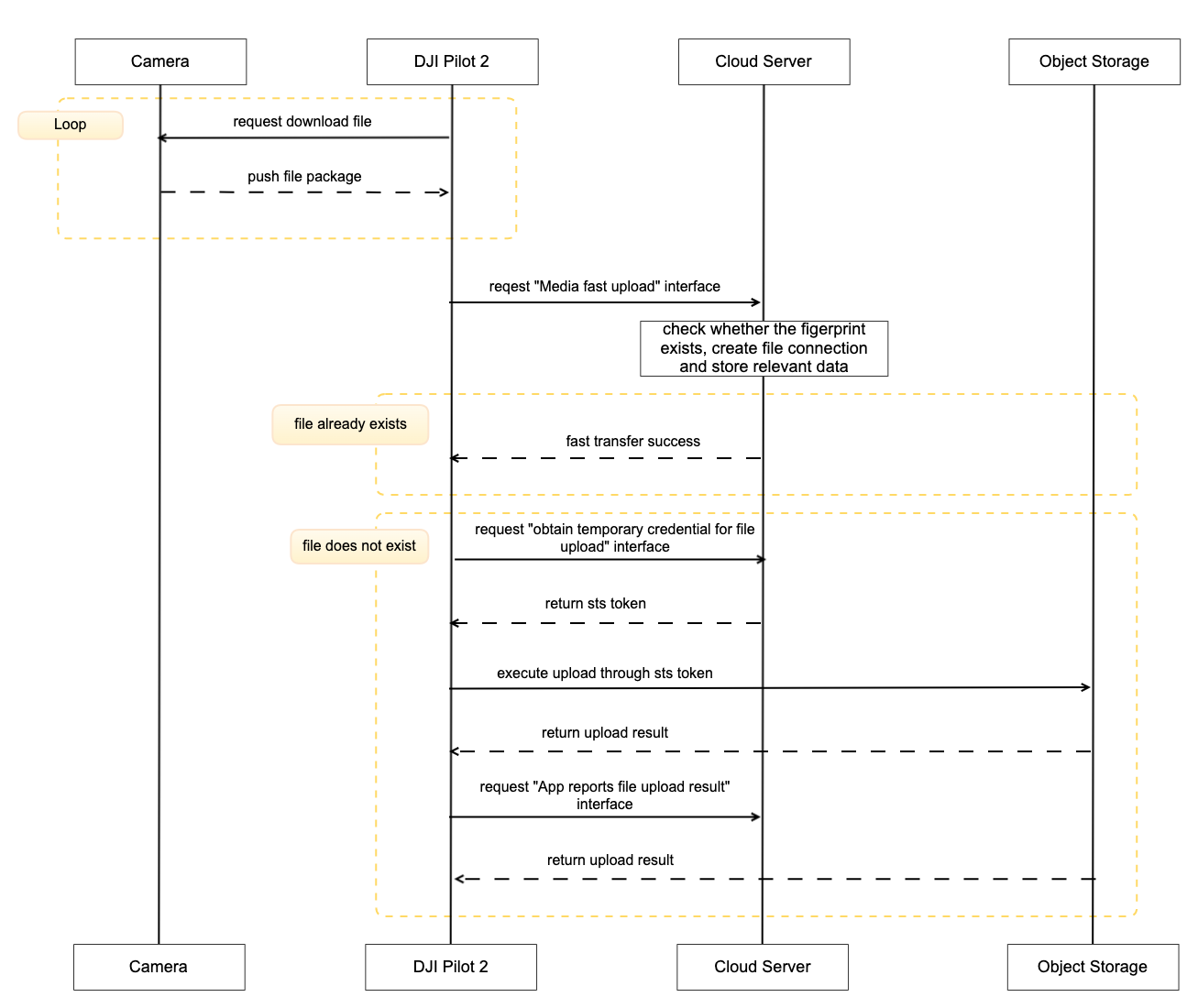
13 |
14 |
15 | ## Detailed API Realization
16 |
17 | * [JSBridge](https://developer.dji.com/doc/cloud-api-tutorial/en/api-reference/pilot-to-cloud/jsbridge.html)
18 |
19 | * Load Media Library Module `window.djiBridge.platformLoadComponent(String name, String param)`
20 | Before using the media library module, developer needs to set up the workspace ID in H5 through JSBridge, configure API module, and then load the DJI Pilot 2 media module. Also, developers can consider adding the loading interface of Media Library module in log-in phase.
21 |
22 | * [Media Management (HTTPS)](https://developer.dji.com/doc/cloud-api-tutorial/en/api-reference/pilot-to-cloud/https/media-management/fast-upload.html)
23 |
24 | * Media Fast Upload
25 | As the transfer of files may exist in the cloud of existing images, then DJI Pilot 2 or dock will start the file fast transfer interface when uploading files, the server needs to check whether the file has been uploaded exists, if it exists, directly return the upload success.
26 |
27 | * Obtain Exist File Tiny Fingerprint
28 | For whether the file exists or not, the corresponding fingerprint verification needs to be done, but since media files vary in size, DJI provides a set of media file streamlined fingerprint generation schemes, and the server side only needs to calculate the media fingerprint information according to this scheme and return it to the DJI Pilot 2 side.
29 |
30 | * Obtain Temporary Credential
31 | For each media upload, you need to obtain temporary file upload credentials from the server, so that DJI Pilot 2 will bring the credentials to the object storage service for verification when uploading.
32 |
33 | * App Reports File Upload Result
34 | After the media file transfer is finished, DJI Pilot 2 will call this interface to inform the server of the corresponding media file upload result.
35 |
36 |
--------------------------------------------------------------------------------
/docs/en/60.api-reference/10.pilot-to-cloud/00.mqtt/20.rc-pro/10.device.md:
--------------------------------------------------------------------------------
1 |
2 |
3 |
4 |
5 |
6 | # Event
7 |
8 | ## Device topology update
9 | **Topic:** thing/product/*{gateway_sn}*/status
10 |
11 | **Direction:** up
12 |
13 | **Method:** update_topo
14 |
15 | **Data:**
16 |
17 | |Column|Name|Type|constraint|Description|
18 | |---|---|---|---|---|
19 | |type|Gateway device product type|int| |Reference to [Product Support](https://developer.dji.com/doc/cloud-api-tutorial/cn/overview/product-support.html)|
20 | |sub_type|Gateway sub-device product subtype|int| |Reference to [Product Support](https://developer.dji.com/doc/cloud-api-tutorial/cn/overview/product-support.html)|
21 | |device_secret|Gateway device key|text| ||
22 | |nonce|nonce|text| ||
23 | |thing_version|Thing model version of gateway device|text| ||
24 | |sub_devices|Sub-device list|array| {"size": 1, "item_type": struct} ||
25 | |»sn|Sub-device serial number (SN)|text| ||
26 | |»type|Sub-device product type|int| |Reference to [Product Support](https://developer.dji.com/doc/cloud-api-tutorial/cn/overview/product-support.html)|
27 | |»sub_type|Sub-device product subtype|int| |Reference to [Product Support](https://developer.dji.com/doc/cloud-api-tutorial/cn/overview/product-support.html)|
28 | |»device_secret|Sub-device key|text| ||
29 | |»nonce|nonce|text| ||
30 | |»thing_version|Thing model version of sub-device|text| ||
31 |
32 |
33 | ```json
34 |
35 | //sub_devices online
36 | {
37 | "tid": "xxxxxxxx-xxxx-xxxx-xxxx-xxxxxxxxxx",
38 | "bid": "xxxxxxxx-xxxx-xxxx-xxxx-xxxxxxxxxx",
39 | "method": "update_topo",
40 | "timestamp": 1234567890123,
41 | "data": {
42 | "domain": "3",
43 | "type": 119,
44 | "sub_type": 0,
45 | "device_secret": "secret",
46 | "nonce": "nonce",
47 | "thing_version": "1.1.2",
48 | "sub_devices": [
49 | {
50 | "sn": "drone001",
51 | "domain": "0",
52 | "type": 60,
53 | "sub_type": 0,
54 | "index": "A",
55 | "device_secret": "secret",
56 | "nonce": "nonce",
57 | "thing_version": "1.1.2"
58 | }
59 | ]
60 | }
61 | }
62 |
63 | //sub_devices offline
64 | {
65 | "tid": "xxxxxxxx-xxxx-xxxx-xxxx-xxxxxxxxxx",
66 | "bid": "xxxxxxxx-xxxx-xxxx-xxxx-xxxxxxxxxx",
67 | "method": "update_topo",
68 | "timestamp": 1234567890123,
69 | "data": {
70 | "domain": "3",
71 | "type": 119,
72 | "sub_type": 0,
73 | "device_secret":"secret",
74 | "nonce":"nonce",
75 | "thing_version": "1.1.2",
76 | "sub_devices":[]
77 | }
78 | }
79 | ```
80 |
81 |
82 |
83 | **Topic:** sys/product/{gateway_sn}/status_reply
84 |
85 | **Direction:** down
86 |
87 | **Method:** update_topo
88 |
89 | **Data:**
90 |
91 | |Column|Name|Type|constraint|Description|
92 | |---|---|---|---|---|
93 | |result|Return code|int| |Non-zero represents an error|
94 |
95 | **Example:**
96 | ```json
97 | {
98 | "bid": "xxxxxxxx-xxxx-xxxx-xxxx-xxxxxxxxxx",
99 | "data": {
100 | "result": 0
101 | },
102 | "tid": "xxxxxxxx-xxxx-xxxx-xxxx-xxxxxxxxxx",
103 | "timestamp": 1654070968655,
104 | "method": "update_topo"
105 | }
106 | ```
107 |
108 |
109 |
110 |
111 |
112 |
113 |
114 |
115 |
--------------------------------------------------------------------------------
/docs/en/60.api-reference/10.pilot-to-cloud/00.mqtt/30.others/20.rc/10.device.md:
--------------------------------------------------------------------------------
1 |
2 |
3 |
4 |
5 |
6 | # Event
7 |
8 | ## Device topology update
9 | **Topic:** thing/product/*{gateway_sn}*/status
10 |
11 | **Direction:** up
12 |
13 | **Method:** update_topo
14 |
15 | **Data:**
16 |
17 | |Column|Name|Type|constraint|Description|
18 | |---|---|---|---|---|
19 | |type|Gateway device product type|int| |Reference to [Product Support](https://developer.dji.com/doc/cloud-api-tutorial/cn/overview/product-support.html)|
20 | |sub_type|Gateway sub-device product subtype|int| |Reference to [Product Support](https://developer.dji.com/doc/cloud-api-tutorial/cn/overview/product-support.html)|
21 | |device_secret|Gateway device key|text| ||
22 | |nonce|nonce|text| ||
23 | |thing_version|Thing model version of gateway device|text| ||
24 | |sub_devices|Sub-device list|array| {"size": 1, "item_type": struct} ||
25 | |»sn|Sub-device serial number (SN)|text| ||
26 | |»type|Sub-device product type|int| |Reference to [Product Support](https://developer.dji.com/doc/cloud-api-tutorial/cn/overview/product-support.html)|
27 | |»sub_type|Sub-device product subtype|int| |Reference to [Product Support](https://developer.dji.com/doc/cloud-api-tutorial/cn/overview/product-support.html)|
28 | |»device_secret|Sub-device key|text| ||
29 | |»nonce|nonce|text| ||
30 | |»thing_version|Thing model version of sub-device|text| ||
31 |
32 |
33 | ```json
34 |
35 | //sub_devices online
36 | {
37 | "tid": "xxxxxxxx-xxxx-xxxx-xxxx-xxxxxxxxxx",
38 | "bid": "xxxxxxxx-xxxx-xxxx-xxxx-xxxxxxxxxx",
39 | "method": "update_topo",
40 | "timestamp": 1234567890123,
41 | "data": {
42 | "domain": "3",
43 | "type": 119,
44 | "sub_type": 0,
45 | "device_secret": "secret",
46 | "nonce": "nonce",
47 | "thing_version": "1.1.2",
48 | "sub_devices": [
49 | {
50 | "sn": "drone001",
51 | "domain": "0",
52 | "type": 60,
53 | "sub_type": 0,
54 | "index": "A",
55 | "device_secret": "secret",
56 | "nonce": "nonce",
57 | "thing_version": "1.1.2"
58 | }
59 | ]
60 | }
61 | }
62 |
63 | //sub_devices offline
64 | {
65 | "tid": "xxxxxxxx-xxxx-xxxx-xxxx-xxxxxxxxxx",
66 | "bid": "xxxxxxxx-xxxx-xxxx-xxxx-xxxxxxxxxx",
67 | "method": "update_topo",
68 | "timestamp": 1234567890123,
69 | "data": {
70 | "domain": "3",
71 | "type": 119,
72 | "sub_type": 0,
73 | "device_secret":"secret",
74 | "nonce":"nonce",
75 | "thing_version": "1.1.2",
76 | "sub_devices":[]
77 | }
78 | }
79 | ```
80 |
81 |
82 |
83 | **Topic:** sys/product/{gateway_sn}/status_reply
84 |
85 | **Direction:** down
86 |
87 | **Method:** update_topo
88 |
89 | **Data:**
90 |
91 | |Column|Name|Type|constraint|Description|
92 | |---|---|---|---|---|
93 | |result|Return code|int| |Non-zero represents an error|
94 |
95 | **Example:**
96 | ```json
97 | {
98 | "bid": "xxxxxxxx-xxxx-xxxx-xxxx-xxxxxxxxxx",
99 | "data": {
100 | "result": 0
101 | },
102 | "tid": "xxxxxxxx-xxxx-xxxx-xxxx-xxxxxxxxxx",
103 | "timestamp": 1654070968655,
104 | "method": "update_topo"
105 | }
106 | ```
107 |
108 |
109 |
110 |
111 |
112 |
113 |
114 |
115 |
--------------------------------------------------------------------------------
/docs/cn/60.api-reference/10.pilot-to-cloud/10.https/30.media-management/10.fast-upload.md:
--------------------------------------------------------------------------------
1 | ## 文件快传
2 |
3 |
4 |
5 | `POST /media/api/v1/workspaces/{workspace_id}/fast-upload`
6 |
7 | Parameters
8 |
9 | |Name|In|Type|Required|Description|
10 | |---|---|---|---|---|
11 | |workspace_id|path|string|true|工作空间id|
12 | |x-auth-token|header|string|true|访问令牌|
13 | |body|body|[media.FastUploadInput](#schemamedia.fastuploadinput)|true|body|
14 |
15 |
16 | Responses
17 |
18 | |Status|Meaning|Description|Schema|
19 | |---|---|---|---|
20 | |200|[OK](https://tools.ietf.org/html/rfc7231#section-6.3.1)|OK|[media.FastUploadOutput](#tocS_media.FastUploadOutput)|
21 |
22 | > Example responses
23 |
24 | ```json
25 | {
26 | "code":0,
27 | "message":"success",
28 | "data":{}
29 | }
30 | ```
31 |
32 | # Schemas
33 |
34 |
35 |
36 |
37 |
38 |
39 |
40 | ```json
41 | {
42 | "ext": {
43 | "drone_model_key": "string",
44 | "is_original": true,
45 | "payload_model_key": "string",
46 | "tinny_fingerprint": "string",
47 | "sn": "string"
48 | },
49 | "fingerprint": "string",
50 | "name": "string",
51 | "path": "string"
52 | }
53 |
54 | ```
55 |
56 | ### Properties
57 |
58 | |Name|Type|Required|Restrictions|Description|
59 | |---|---|---|---|---|
60 | |ext|[media.MediaFile](#schemamedia.mediafile)|false|none|文件关联的扩展属性|
61 | |fingerprint|string|true|none|文件指纹|
62 | |name|string|false|none|文件的名称|
63 | |path|string|false|none|文件的业务路径|
64 |
65 |
66 |
67 |
68 |
69 |
70 |
71 |
72 | ```json
73 | {
74 | "drone_model_key": "string",
75 | "is_original": true,
76 | "payload_model_key": "string",
77 | "tinny_fingerprint": "string",
78 | "sn": "string"
79 | }
80 |
81 | ```
82 |
83 | ### Properties
84 |
85 | |Name|Type|Required|Restrictions|Description|
86 | |---|---|---|---|---|
87 | |drone_model_key|string|false|none|飞机产品枚举值|
88 | |is_original|boolean|false|none|是否为原图|
89 | |payload_model_key|string|false|none|负载产品枚举值|
90 | |tinny_fingerprint|string|false|none|精简指纹|
91 | |sn|string|false|none|设备序列号|
92 |
93 |
94 |
95 |
96 |
97 |
98 |
99 |
100 |
101 | ```json
102 | {
103 | "code":0,
104 | "message":"success",
105 | "data":{}
106 | }
107 | ```
108 |
109 | ### Properties
110 |
111 | |Name|Type|Required|Restrictions|Description|
112 | |---|---|---|---|---|
113 | |code|string|false|none|错误码|
114 | |message|string|false|none|描述|
115 | |data|string|false|none|返回内容|
--------------------------------------------------------------------------------
/docs/cn/60.api-reference/20.dock-to-cloud/00.mqtt/20.dock/00.dock1/10.device.md:
--------------------------------------------------------------------------------
1 |
2 |
3 |
4 |
5 |
6 |
7 |
8 |
9 |
10 |
11 |
12 |
13 |
14 | # Status
15 |
16 | ## 设备拓扑更新
17 |
18 |
19 | **Topic:** sys/product/{gateway_sn}/status
20 |
21 | **Direction:** up
22 |
23 | **Method:** update_topo
24 |
25 | **Data:**
26 |
27 | |Column|Name|Type|constraint|Description|
28 | |---|---|---|---|---|
29 | |domain|网关设备的命名空间|string| |参考:[产品支持](https://developer.dji.com/doc/cloud-api-tutorial/cn/overview/product-support.html)|
30 | |type|网关设备的产品类型|int| |参考:[产品支持](https://developer.dji.com/doc/cloud-api-tutorial/cn/overview/product-support.html)|
31 | |sub_type|网关子设备的产品子类型|int| |参考:[产品支持](https://developer.dji.com/doc/cloud-api-tutorial/cn/overview/product-support.html)|
32 | |device_secret|网关设备的密钥|text| ||
33 | |nonce|nonce|text| ||
34 | |thing_version|网关设备的物模型版本|text| ||
35 | |sub_devices|子设备列表|array| {"size": 1, "item_type": struct} ||
36 | |»sn|子设备序列号(SN)|text| ||
37 | |»domain|子设备的命名空间|string| |参考:[产品支持](https://developer.dji.com/doc/cloud-api-tutorial/cn/overview/product-support.html)|
38 | |»type|子设备的产品类型|int| |参考:[产品支持](https://developer.dji.com/doc/cloud-api-tutorial/cn/overview/product-support.html)|
39 | |»sub_type|子设备的产品子类型|int| |参考:[产品支持](https://developer.dji.com/doc/cloud-api-tutorial/cn/overview/product-support.html)|
40 | |»index|连接网关设备的通道索引|string| ||
41 | |»device_secret|子设备的密钥|text| ||
42 | |»nonce|nonce|text| ||
43 | |»thing_version|子设备的物模型版本|text| ||
44 |
45 |
46 |
47 |
48 | **Example:**
49 | ```json
50 |
51 | //sub_devices online
52 | {
53 | "tid": "xxxxxxxx-xxxx-xxxx-xxxx-xxxxxxxxxx",
54 | "bid": "xxxxxxxx-xxxx-xxxx-xxxx-xxxxxxxxxx",
55 | "method": "update_topo",
56 | "timestamp": 1234567890123,
57 | "data": {
58 | "domain": "3",
59 | "type": 119,
60 | "sub_type": 0,
61 | "device_secret": "secret",
62 | "nonce": "nonce",
63 | "thing_version": "1.1.2",
64 | "sub_devices": [
65 | {
66 | "sn": "drone001",
67 | "domain": "0",
68 | "type": 60,
69 | "sub_type": 0,
70 | "index": "A",
71 | "device_secret": "secret",
72 | "nonce": "nonce",
73 | "thing_version": "1.1.2"
74 | }
75 | ]
76 | }
77 | }
78 |
79 | //sub_devices offline
80 | {
81 | "tid": "xxxxxxxx-xxxx-xxxx-xxxx-xxxxxxxxxx",
82 | "bid": "xxxxxxxx-xxxx-xxxx-xxxx-xxxxxxxxxx",
83 | "method": "update_topo",
84 | "timestamp": 1234567890123,
85 | "data": {
86 | "domain": "3",
87 | "type": 119,
88 | "sub_type": 0,
89 | "device_secret":"secret",
90 | "nonce":"nonce",
91 | "thing_version": "1.1.2",
92 | "sub_devices":[]
93 | }
94 | }
95 | ```
96 |
97 |
98 | **Topic:** sys/product/{gateway_sn}/status_reply
99 |
100 | **Direction:** down
101 |
102 | **Method:** update_topo
103 |
104 | **Data:**
105 |
106 | |Column|Name|Type|constraint|Description|
107 | |---|---|---|---|---|
108 | |result|返回码|int| |非 0 代表错误|
109 |
110 | **Example:**
111 | ```json
112 | {
113 | "bid": "xxxxxxxx-xxxx-xxxx-xxxx-xxxxxxxxxx",
114 | "data": {
115 | "result": 0
116 | },
117 | "tid": "xxxxxxxx-xxxx-xxxx-xxxx-xxxxxxxxxx",
118 | "timestamp": 1654070968655,
119 | "method": "update_topo"
120 | }
121 | ```
122 |
--------------------------------------------------------------------------------
/docs/cn/60.api-reference/20.dock-to-cloud/00.mqtt/20.dock/10.dock2/10.device.md:
--------------------------------------------------------------------------------
1 |
2 |
3 |
4 |
5 |
6 |
7 |
8 |
9 |
10 |
11 |
12 |
13 |
14 | # Status
15 |
16 | ## 设备拓扑更新
17 |
18 |
19 | **Topic:** sys/product/{gateway_sn}/status
20 |
21 | **Direction:** up
22 |
23 | **Method:** update_topo
24 |
25 | **Data:**
26 |
27 | |Column|Name|Type|constraint|Description|
28 | |---|---|---|---|---|
29 | |domain|网关设备的命名空间|string| |参考:[产品支持](https://developer.dji.com/doc/cloud-api-tutorial/cn/overview/product-support.html)|
30 | |type|网关设备的产品类型|int| |参考:[产品支持](https://developer.dji.com/doc/cloud-api-tutorial/cn/overview/product-support.html)|
31 | |sub_type|网关子设备的产品子类型|int| |参考:[产品支持](https://developer.dji.com/doc/cloud-api-tutorial/cn/overview/product-support.html)|
32 | |device_secret|网关设备的密钥|text| ||
33 | |nonce|nonce|text| ||
34 | |thing_version|网关设备的物模型版本|text| ||
35 | |sub_devices|子设备列表|array| {"size": 1, "item_type": struct} ||
36 | |»sn|子设备序列号(SN)|text| ||
37 | |»domain|子设备的命名空间|string| |参考:[产品支持](https://developer.dji.com/doc/cloud-api-tutorial/cn/overview/product-support.html)|
38 | |»type|子设备的产品类型|int| |参考:[产品支持](https://developer.dji.com/doc/cloud-api-tutorial/cn/overview/product-support.html)|
39 | |»sub_type|子设备的产品子类型|int| |参考:[产品支持](https://developer.dji.com/doc/cloud-api-tutorial/cn/overview/product-support.html)|
40 | |»index|连接网关设备的通道索引|string| ||
41 | |»device_secret|子设备的密钥|text| ||
42 | |»nonce|nonce|text| ||
43 | |»thing_version|子设备的物模型版本|text| ||
44 |
45 |
46 |
47 |
48 | **Example:**
49 | ```json
50 |
51 | //sub_devices online
52 | {
53 | "tid": "xxxxxxxx-xxxx-xxxx-xxxx-xxxxxxxxxx",
54 | "bid": "xxxxxxxx-xxxx-xxxx-xxxx-xxxxxxxxxx",
55 | "method": "update_topo",
56 | "timestamp": 1234567890123,
57 | "data": {
58 | "domain": "3",
59 | "type": 119,
60 | "sub_type": 0,
61 | "device_secret": "secret",
62 | "nonce": "nonce",
63 | "thing_version": "1.1.2",
64 | "sub_devices": [
65 | {
66 | "sn": "drone001",
67 | "domain": "0",
68 | "type": 60,
69 | "sub_type": 0,
70 | "index": "A",
71 | "device_secret": "secret",
72 | "nonce": "nonce",
73 | "thing_version": "1.1.2"
74 | }
75 | ]
76 | }
77 | }
78 |
79 | //sub_devices offline
80 | {
81 | "tid": "xxxxxxxx-xxxx-xxxx-xxxx-xxxxxxxxxx",
82 | "bid": "xxxxxxxx-xxxx-xxxx-xxxx-xxxxxxxxxx",
83 | "method": "update_topo",
84 | "timestamp": 1234567890123,
85 | "data": {
86 | "domain": "3",
87 | "type": 119,
88 | "sub_type": 0,
89 | "device_secret":"secret",
90 | "nonce":"nonce",
91 | "thing_version": "1.1.2",
92 | "sub_devices":[]
93 | }
94 | }
95 | ```
96 |
97 | **Topic:** sys/product/{gateway_sn}/status_reply
98 |
99 | **Direction:** down
100 |
101 | **Method:** update_topo
102 |
103 | **Data:**
104 |
105 | |Column|Name|Type|constraint|Description|
106 | |---|---|---|---|---|
107 | |result|返回码|int| |非 0 代表错误|
108 |
109 | **Example:**
110 | ```json
111 | {
112 | "bid": "xxxxxxxx-xxxx-xxxx-xxxx-xxxxxxxxxx",
113 | "data": {
114 | "result": 0
115 | },
116 | "tid": "xxxxxxxx-xxxx-xxxx-xxxx-xxxxxxxxxx",
117 | "timestamp": 1654070968655,
118 | "method": "update_topo"
119 | }
120 | ```
121 |
122 |
123 |
--------------------------------------------------------------------------------
/docs/cn/60.api-reference/00.dji-wpml/10.overview.md:
--------------------------------------------------------------------------------
1 |
2 | ## 背景
3 |
4 | 航线飞行功能作为无人机自动化作业场景的重要技术承载,是用户和开发者最重视的核心功能之一。随着无人机自动化作业的普及,航线数据也迅速成为用户和开发者的重要数字资产。然而在过去很长的一段时间里,航线仅能在单一设备上编辑、执行,跨设备跨机型应用困难重重。航线文件格式不公开、不共享,用户难以独立完成二次编辑、业务调优的工作。本着为行业和用户解放重复生产力的愿景,引领无人机行业向自动化新纪元迈进,推动航线数据资产化,我们正式对外发布航线文件格式标准——WPML。
5 |
6 | ## 什么是 WPML
7 |
8 | WPML 是 **W**ay**P**oint **M**arkup **L**anguage 的缩写,即航线文件格式标准。WPML 航线文件格式标准基于 KML(Keyhole Markup Language)的定义进行扩展。WPML 航线文件遵循 KMZ 归档要求,所有航线文件以 “.kmz” 后缀结尾。WPML 航线文件格式标准作为航线数字资产的载体,具备以下几方面的优势:
9 |
10 | * 开放:WPML 的定义公开共享。航线文件使用文件包进行归档,路径采用标记语言描述,可拓展性强。用户和开发者可以依照开放原则,在其基础上持续添加业务数据而不受限。
11 | * 易读:WPML 使用最基础的 XML 标记语言格式和媒体文件格式描述航线。用户和开发者可以不依赖任何解析软件即可完成对路径定义、航线媒体等资源进行读写。
12 | * 继承:WPML 将作为航线文件格式标准持续迭代,并依据协议规则保持代际兼容。用户和开发者手中的航线文件能够成为数字资产,在不同设备、不同机型之间直接应用、持续传承。
13 |
14 | 基于 WPML 的开放原则,欢迎广大用户和开发者踊跃提出改进意见和建议。让我们一起创建无人机自动化应用的未来!
15 |
16 | ## 如何使用 WPML
17 |
18 | WPML 航线文件均以 “.kmz” 后缀结尾,实质是使用 ZIP 格式打包的归档文件。一个标准的 WPML 航线文件解压后,其文件结构如下:
19 |
20 |
21 |
22 |
23 |
24 | `template.kml`文件被称为 “模板文件”。预定义的模板为用户编辑和规划航线提供了一种便捷手段。如测绘用户使用建图航拍模板时,不需要仔细描画每条航线的路径,而只需要定义测绘区域和重叠率,即可通过 DJI Pilot 2、DJI Flighthub 2 或其它软件生成最终提供给无人机执行的路径和动作。
25 |
26 | `waylines.wpml`文件被称为 “执行文件”。执行文件定义了明确的无人机飞行和负载动作指令。这些指令由 DJI Pilot 2、DJI Flighthub 2 或者其它软件生成。这些软件通过读取 `template.kml`内的模板参数,结合路径生成算法的演算,最终生成`waylines.wpml`文件用于执行。
27 |
28 | `res`资源文件夹包含了航线所需的辅助资源,如在开始精准复拍前,预先准备的参考目标物照片等。
29 |
30 | `template.kml`、`waylines.wpml`和`res`资源文件夹都是航线文件格式标准的一部分。`template.kml`定义业务属性,方便用户进行快速调整编辑。`waylines.wpml`定义执行细节。`res`文件夹存储辅助资源文件。
31 |
32 | WPML 航线文件的字段介绍如下:
33 | * 仅用于 `template.kml` 文件的字段在[template.kml 说明](https://developer.dji.com/doc/cloud-api-tutorial/cn/api-reference/dji-wpml/template-kml.html)
34 | * 仅用于 `waylines.wpml` 文件的字段在[waylines.wpml 说明](https://developer.dji.com/doc/cloud-api-tutorial/cn/api-reference/dji-wpml/waylines-wpml.html)
35 | * `template.kml` 文件与 `waylines.wpml` 文件共用的字段在[共用元素信息](https://developer.dji.com/doc/cloud-api-tutorial/cn/api-reference/dji-wpml/common-element.html)
36 |
37 | > **注意:**
38 | >
39 | > 1. 航线文件内部各文件或文件夹的命名请遵循此规范,否则可能导致航线文件读取失败。
40 | > 2. 航线名称即航线文件的文件名。如`new_waypoints.kmz`的航线名称是`new_waypoints`。
41 |
42 |
43 | ## 已有航线转换
44 |
45 | 1、使用 Pilot2 转换。对于 M300 RTK 已有的旧航线文件(kml 格式),可以通过导入新版本 DJI Pilot 2 中并重新保存,升级至 WPML 航线文件。
46 |
47 | 2、使用航线库转换,详细可见 [MSDK 航线管理教程](https://developer.dji.com/doc/mobile-sdk-tutorial/cn/tutorials/waypoint.html),注意需要提供已有航线高度模式。
48 |
49 | 3、自定义航线数据转换为 KMZ 形式。DJI 系统下,飞行器支持 WGS84 椭球高,编辑器(司空 2/Pilot2)支持 EGM96 海拔高编辑。在此背景下,转换过程中需要注意以下要点:
50 | * 正确填写 wayline 文件,执行高度模式 (wpml:executeHeightMode),航点执行高度 (wpml:executeHeight),确保飞行器飞行高度正确。执行高度模式(wpml:executeHeightMode),支持 WGS84:椭球高模式,支持 relativeToStartPoint:相对起飞点高度模式。若使用 WGS84- 椭球高模式,对应航点执行高度 (wpml:executeHeight) 字段填入椭球高坐标系高度。也就是说,如果您自定义航线数据是在非椭球坐标系下 (如 EGM96) 下,需要通过高程转换,将坐标转换到 WGS84 下,飞行器才能准确执行对应高度飞行。
51 | * 正确填写 template 文件,航点高程参考平面 (wpml:heightMode),航点高度 (wpml:height),确保司空 2/Pilot2 导入转化文件重编辑正确。航点高程参考平面(wpml:heightMode),支持 EGM96:使用海拔高编辑,支持 relativeToStartPoint:使用相对点的高度进行编辑。若使用 EGM96- 海拔高编辑,对应航点高度 (wpml:height) 需要填入海拔高坐标系高度。同样,如果您自定义航线数据是在非海拔高坐标系下(如 WGS84),需要通过高程转换,将坐标转换到海拔高度下,司空 2/Pilot2 才能准确读取编辑高度,重编辑生成正确高度航线。
52 |
53 | > **注意:** 目前暂未开放航线格式转换库,有需要的开发者可以基于 DJI Pilot 2 转换,或基于 WPML 航线文件格式标准生成。
54 |
55 |
--------------------------------------------------------------------------------
/docs/en/10.overview/40.basic-concept/10.proper-noun.md:
--------------------------------------------------------------------------------
1 | | Noun | Explanation |
2 | | ------------------------------ | ------------------------------------------------------------ |
3 | | Hardware products | The types of hardware released by DJI that can be sold independently. For example, M300 RTK, H20T and remote control with screen are independent products. The product should have its own unique thing model data. The product has a unique ProductKey identification. |
4 | | Component | Some devices consist of multiple components, such as flight platforms, with their own Camera, Gimbal and so on. Payloads are also mounted as components and form a capability topology with the flight platform. |
5 | | Gateway device | Devices that can directly connect to the cloud platform and have hardware device management functions, and can act as an agent for hardware devices to connect to the cloud, such as remote controls with screen, DJI Dock and other devices. Gateway devices generally have only simple geographic reporting, online and offline status, power on and restart and other simple functions. |
6 | | Thing model | It is the functional description of the device in the cloud, including the properties, services and events of the device. The IoT platform describes the thing model by defining a thing description language called TSL (Thing Specification Language) in JSON format, and the server side can receive the thing model data and do JSON parsing. |
7 | | Device properties (Properties) | One of the functional models of the device, is typically used to describe the state of the device while it is running, such as the current ambient temperature as read by the environmental monitoring device. |
8 | | Device service (Services) | One of the functional models of a device, is a capability or method that the device can be invoked externally to set input parameters and output parameters. Compared to attributes, services can implement more complex business logic with a single instruction. An example is the commanded flight of an aircraft. |
9 | | Device events (Events) | One of the functional models of a device, the events that occur when the device is running. Events typically contain notification information that needs to be sensed and processed externally and can contain multiple output parameters. For example, information about the completion of a task, or the temperature of the device in case of a failure or alarm and so on, events can be subscribed to and published. |
10 | | Persistent connection | A bidirectional communication connection established between the cloud platform and the gateway device or directly connected device. Such as WebSocket, MQTT and so on. |
11 | | Device topology | Devices in the field. Including aircraft, payload, and remote control connection relationships. |
12 | | Device online status | Indicates the network status of the device, which can be divided into online, disconnected and offline. Disconnected for the persistent connection of the device without notification, can be understood as the network caused by offline. Offline is triggered by human consciousness, such as task completion, gateway device shutdown and other actions triggered. |
13 |
--------------------------------------------------------------------------------
/docs/en/30.feature-set/20.dock-feature-set/110.custom-flight-area.md:
--------------------------------------------------------------------------------
1 | ## Function Overview
2 |
3 | The Cloud API adds custom flight area functionality. Users can designate sensitive locations as restricted zone and synchronize this information with DJI Docks within the project. When the aircraft performs tasks, it will automatically bypass the restricted zone, ensuring the safety and compliance of operations. This function define the aircraft flight area via the custom flight area file. **Click to download the [Custom Flight Area File Template](https://terra-1-g.djicdn.com/fee90c2e03e04e8da67ea6f56365fc76/SDK%20%E6%96%87%E6%A1%A3/CloudAPI/custom-flight-area-file-template-en.json)**.
4 |
5 | This function allows users to plan custom flight areas on the map. There are two types of custom flight areas:
6 |
7 | 1. Custom Operation Area: Within this area, the aircraft can take off and perform tasks but cannot fly out of the area.
8 | 2. Custom GEO Zone: Outside this area, the aircraft can operate but cannot fly into the area.
9 |
10 |
11 |
12 | ## Interaction Sequence Diagram
13 |
14 | ```mermaid
15 | sequenceDiagram
16 |
17 | participant geo_service as Cloud Server
18 | participant Dock as DJI Dock
19 | participant Drone as Aircraft
20 | participant web as Web Page
21 |
22 | geo_service -->> geo_service: Package custom flight area file and upload to the storage bucket
23 | geo_service -->> Dock: Notify custom flight area file update Topic: thing/product/{gateway_sn}/services Method: flight_areas_update
24 | Dock -->> geo_service: Retrieve custom flight area file information Topic: thing/product/{gateway_sn}/requests Method: flight_areas_get
25 | geo_service -->> Dock: Return latest custom flight area information from cloud
26 | Dock -->> Drone: Turn on the aircraft request to upgrade custom flight area data, carrying file download URL and file MD5
27 | Drone -->> Dock: Return the custom flight area file information of the aircraft
28 | Dock -->> Dock: Check the custom flight area file version
29 | alt File version matches
30 | Dock -->> geo_service: Report synchronization completion Topic: thing/product/{gateway_sn}/events Method: flight_areas_sync_progress
31 | geo_service -->> web: Return synchronization completed state
32 | else File version does not match (cloud version prevails if inconsistent)
33 | Dock -->> geo_service: Report synchronization in progress, enter data synchronization upgrade
34 | Dock -->> Drone: Download the latest file from the storage bucket and upload custom flight area data
35 | Drone -->> Dock: Send custom flight area synchronization progress state
36 | Dock -->> geo_service: Report custom flight area synchronization progress state Topic: thing/product/{gateway_sn}/events Method: flight_areas_sync_progress
37 | geo_service -->> geo_service: Local state persistence processing
38 | geo_service -->> web: Push latest custom flight area synchronization progress state
39 | end
40 | Drone -->> Dock: Aircraft pushes flight area information to the dock
41 | Dock -->> geo_service: Push flight area alarm information Topic: thing/product/{gateway_sn}/events Method: flight_areas_drone_location
42 | geo_service -->> web: Report aircraft and various area alarm information
43 | ```
44 |
45 | ## Detailed API Realization
46 |
47 | [Custom Flight Area](https://developer.dji.com/doc/cloud-api-tutorial/en/api-reference/dock-to-cloud/mqtt/dock/dock2/custom-flight-area.html)
--------------------------------------------------------------------------------
/docs/cn/30.feature-set/20.dock-feature-set/10.dock-access-to-cloud.md:
--------------------------------------------------------------------------------
1 | ## 概述
2 |
3 | 机场上云需要借助遥控器内安装的 DJI Pilot 2。如下图示,开发者可按照 Pilot 内的指示一步步操作完成上云。在上云过程中,需要完成设备的检查(如急停按钮的检查、网络是否已经连接等)、将飞行器与机场对频、填写上云配置信息(如填写 MQTT 账号密码以实现 MQTT 连接)等操作。通过 Demo 中的机场上云部分,可以获得机场上云操作的演示,演示视频请查看 [功能预览视频](https://developer.dji.com/doc/cloud-api-tutorial/cn/quick-start/function-display-video.html) 中的机场上云。
4 |
5 |
6 |
7 |
8 |
9 | 机场上云需要校验 License。License 来源为[开发者网站](https://developer.dji.com/user/apps/#all)的 Cloud API 类型的 App 申请,申请结果如图示。申请成功以后,开发者可以被判定为 DJI 授权的开发者。
10 |
11 |
12 |
13 |
14 |
15 | > **注意:**
16 | >
17 | > * 当 DJI Pilot 2 与机场在接入第三方云时,对于安全性要求比较高的场景中,需要对通信链路进行加密,实现数据的安全通信。SSL 链路默认设备会认证服务端,服务端不认证设备端。若服务端开启设备认证,需要在服务端进行 “clientAuth” 的配置。
18 | > * DJI Pilot 2 与机场支持 Godaddy 颁发的证书,若开发者需要做数据安全加密,可以使用与大疆相同的认证机构证书即可实现 MQTT SSL 认证。
19 |
20 | ## 交互时序
21 |
22 | ```mermaid
23 | sequenceDiagram
24 | participant pilot as DJI Pilot 2
25 | participant client as DJI Dock
26 | participant server as Cloud Server
27 |
28 | note over pilot: 填写 MQTT 网关地址、MQTT账号密码
29 | client ->> server: MQTT 连接建立
30 |
31 | note over pilot, server: License 校验
32 |
33 | client ->> server: 请求License 校验所需参数 Topic: thing/product/{gateway_sn}/requests Method: config
34 | server -->> client: 返回参数 Topic: thing/product/{gateway_sn}/requests_reply Method: config
35 |
36 | note over client: License 校验成功
37 | opt 若校验失败,后续组织绑定流程不会进行
38 | note over client: License 校验失败
39 | client -x server: MQTT 连接断开
40 | end
41 |
42 | note over pilot, server: 组织绑定
43 | pilot ->> client: 请求设备绑定信息
44 | client ->> server: 获取设备绑定信息 Topic: thing/product/{gateway_sn}/requests Method: airport_bind_status
45 | note over server: 查询设备绑定信息
46 | server -->> client: 返回查询结果 Topic: thing/product/{gateway_sn}/requests_reply Method: airport_bind_status
47 |
48 | opt 若设备未绑定
49 | pilot ->> client: 请求设备绑定码对应的组织信息
50 | client ->> server: 请求对应的组织信息 Topic: thing/product/{gateway_sn}/requests Method: airport_organization_get
51 | note over server: 查询对应的组织信息
52 | server -->> client: 返回查询结果 Topic: thing/product/{gateway_sn}/requests_reply Method: airport_organization_get
53 | pilot ->> client: 通过设备绑定码将设备绑定到对应组织
54 | client ->> server: 设备绑定到组织 Topic: thing/product/{gateway_sn}/requests Method: airport_organization_bind
55 | note over server: 设备绑定到组织
56 | server -->> client: 返回绑定结果 Topic: thing/product/{gateway_sn}/requests_reply Method: airport_organization_bind
57 | end
58 |
59 | ```
60 |
61 |
62 |
63 | ## 接口详细实现
64 |
65 | * [Pilot 安装包获取](https://sdk-forum.dji.net/hc/zh-cn/articles/6177232395801-Pilot2-%E6%80%8E%E4%B9%88%E5%AE%89%E8%A3%85-%E5%93%AA%E9%87%8C%E8%83%BD%E5%A4%9F%E8%8E%B7%E5%8F%96%E5%88%B0%E5%AE%89%E8%A3%85%E5%8C%85-)
66 |
67 | * [配置更新](https://developer.dji.com/doc/cloud-api-tutorial/cn/api-reference/dock-to-cloud/mqtt/dock/dock1/config.html)
68 | * 获取配置
69 |
70 | * [组织管理](https://developer.dji.com/doc/cloud-api-tutorial/cn/api-reference/dock-to-cloud/mqtt/dock/dock1/organization.html)
71 | * 获取设备绑定信息
72 | * 查询设备绑定对应的组织信息
73 | 若设备绑定成功,机场与飞行器将被绑定到设备绑定码对应的组织。开发者可以自行设计如何通过在 Pilot 端填写的设备绑定码与组织 ID 以校验得到组织名称用于绑定。在我们提供的机场上云的 Demo 中,默认填写了设备绑定码,仅作为参考。
74 | * 使用设备绑定码绑定对应组织
75 |
--------------------------------------------------------------------------------
/docs/en/50.debug/10.dji-pilot2-webview-debug.md:
--------------------------------------------------------------------------------
1 | There are currently 2 ways to debug the webview pages embedded in PILOT.
2 |
3 | 1. Use the chrome devtools tool.
4 | 2. Use Tencent's open source vConsole plug-in, the plug-in is easy to install, you can install it directly with npm. The overall effect is similar to PC browser debugging. There is also a webpack plugin vConsole webpack-plugin which is encapsulated on the basis of Tencent vConsole. This plugin can automatically add the vConsole debugging function through webpack configuration, which is more convenient and practical.
5 |
6 | ## Computer Side Debug through Chrome Devtools
7 |
8 | - After installing the chrome browser, enter `chrome://inspect/#devices` in the address bar, and you can see the device to be debugged on the Devices page. Then click "inspect" of the page to be debugged to see the debug page. If the page debugging tool does not display properly, you need to turn on your browser's developer mode first, go to the third-party Cloud page and click on the top title bar continuously.
9 |
10 |
11 |
12 |
13 |
14 |
15 |
16 |
17 |
18 | ## vConsole
19 |
20 | The vconsole-webpack-plugin has reduced functionality compared to Tencent's native vConsole, so if you need all the features, you can download Tencent's native vConsole.
21 |
22 | **vConsole:** [github](https://github.com/Tencent/vConsole)
23 |
24 | - **Features**:
25 |
26 | 1. View console log.
27 | 2. View requests.
28 | 3. View the element structure of the page.
29 | 4. View cookies, local storage and session storage.
30 | 5. Execute JS commands manually.
31 |
32 | - **Installation**
33 |
34 | ```shell
35 | $ npm install vconsole-webpack-plugin --save-dev
36 | ```
37 |
38 | Then add the following plugin configuration in the webpack.conf.js or webpack.dev.conf.js file configuration.
39 |
40 | ```
41 | var vConsolePlugin = require('vconsole-webpack-plugin');
42 |
43 | module.exports = {
44 | ...
45 |
46 | plugins: [
47 | new vConsolePlugin({
48 | filter: [], // Entry files to be filtered.
49 | enable: true // Remember to change back to false before the project goes live.
50 | }),
51 | ...
52 | ]
53 | ...
54 | }
55 | ```
56 |
57 | After recompiling the front-end code, you can see the vConsole button in the bottom right corner of the interface.
58 |
59 | *Note: vConsole is recommended to run in development and test environments. Deploying to a production environment requires that vConsole be turned off.*
60 |
61 |
62 |
63 |
--------------------------------------------------------------------------------
/docs/cn/30.feature-set/20.dock-feature-set/30.dock-livestream.md:
--------------------------------------------------------------------------------
1 | ## 功能概述
2 |
3 | 直播功能主要是把无人机相机负载和大疆机场的视频码流发给第三方云平台进行播放,用户可以方便的在远程web页面点击直播。直播功能支持直播的开始、停止、清晰度设置、镜头切换。
4 |
5 | ### 支持的直播类型
6 |
7 | | 直播类型 | 描述 |
8 | | --------- | ------------------------------------------------------------ |
9 | | Agora声网 | 声网 Agora 成立于 2013 年,是实时音视频云行业开创者和全球领先的专业 PaaS 服务商。 开发者只需简单调用 Agora API,30 分钟即可在应用内构建多种实时音视频互动场景。 大疆司空2也是基于声网的“极速直播”功能进行码流推送,整体直播延迟比较低,效果好。 对于三方云私有化部署,Agora 也提供了混合云部署模式,码流和数据都在客户的私有服务器中,然后通过网闸打通一个链路到 Agora 的运维公有云,这个链路通道主要是用来对私有化部署的服务进行升级和运维。 |
10 | | RTMP | RTMP是 Real Time Messaging Protocol(实时消息传输[协议](https://baike.baidu.com/item/协议/13020269))的首字母缩写。该协议基于 TCP,是一个协议族,包括 RTMP 基本协议及 RTMPT/RTMPS/RTMPE 等多种变种。RTMP 是一种设计用来进行实时数据通信的网络协议,主要用来在 Flash/AIR 平台和支持 RTMP 协议的流媒体/交互服务器之间进行音视频和数据通信。 |
11 | | GB28181 | GB/T 28181-2016 是中国大陆地区对于安防视频设备接入平台的一种传输控制规范,对于已有 28181 下联网关的服务器,可以直接通过该协议把 DJI 行业设备的码流推到服务器中。 |
12 | | WebRTC/WHIP | WebRTC [(Web Real-Time Communication)](https://docs.dolby.io/streaming-apis/docs/webrtc-whip)是一种支持网页浏览器进行实时视频和音频流的通信技术,它提供接近实时的音视频流,确保用户体验的流畅性。该技术广泛应用于在线会议、在线教育、远程医疗等高实时通信的场景。 WHIP [(WebRTC-HTTP Ingestion Protocol)](https://millicast.medium.com/whip-the-magic-bullet-for-webrtc-media-ingest-57c2b98fb285)是一个基于 HTTP 的协议,旨在为 WebRTC 发布者和流媒体服务器之间提供一个标准化的信令协议,以便于将 WebRTC 流引入流媒体服务器。它允许基于 WebRTC 的内容输入到流媒体服务器或 CDN 中。|
13 |
14 |
15 | ### 机场直播总体框架
16 |
17 |
18 |
19 |
20 |
21 |
22 | 如上图所示,无人机飞行平台并不直接连接第三方云平台,中间是通过DJI Pilot 2或大疆机场进行转流转发,遥控器和机场与无人机之间的通信还是用DJI私有图传ocusync链路。
23 |
24 | 第三方云平台需要预先部署MQTT网关以及流媒体服务器,DJI推流协议支持 Agora/RTMP/GB28181 等模式,其中MQTT网关主要用来做消息通信,配置信息设置和读取。
25 |
26 | ## 交互时序图
27 |
28 | ```mermaid
29 | sequenceDiagram
30 | participant client as DJI Dock
31 | participant server as Cloud Server
32 | participant h5 as Web Page
33 |
34 | client ->> server: 直播能力更新 Topic: thing/product/{device_sn}/state 设备推送 state topic,云端解析直播能力结构体(live_capacity)
35 |
36 |
37 | note over client,h5: Web端点击直播
38 |
39 | server ->> client: 开始直播 Topic: thing/product/{gateway_sn}/services Method: live_start_push
40 | client -->> server: 设备响应 Topic: thing/product/{gateway_sn}/services_reply Method: live_start_push
41 |
42 | client ->> server: 机场向服务器推流
43 | server ->> h5: 拉流
44 | activate h5
45 |
46 | server ->> client: 设置直播清晰度 Topic: thing/product/{gateway_sn}/services Method: live_set_quality
47 | client -->> server: 设备响应 Topic: thing/product/{gateway_sn}/services_reply Method: live_set_quality
48 | h5 ->> h5: 清晰度调整
49 |
50 | server ->> client: 设置直播镜头 Topic: thing/product/{gateway_sn}/services Method: live_lens_change
51 | client -->> server: 设备响应 Topic: thing/product/{gateway_sn}/services_reply Method: live_lens_change
52 | h5 ->> h5: 镜头切换
53 |
54 | server ->> client: 停止直播 Topic: thing/product/{gateway_sn}/services Method: live_stop_push
55 | client -->> server: 设备响应 Topic: thing/product/{gateway_sn}/services_reply Method: live_stop_push
56 |
57 | deactivate h5
58 |
59 | ```
60 |
61 | ## 接口详细实现
62 |
63 | [直播功能(MQTT)](https://developer.dji.com/doc/cloud-api-tutorial/cn/api-reference/dock-to-cloud/mqtt/dock/dock1/live.html)
64 | * 直播能力更新
65 | live_capacity(直播能力)字段是放在网关设备的物模型中的,同时只有当设备端有状态变化时推送。直播能力字段包含可用于直播的视频流总数、可同时进行直播的视频流总数、设备直播能力列表等信息。
66 | * 开始直播
67 | 服务端下发`开始直播`指令,指令中指定使用的协议类型、直播质量等信息。直播视频流推流、拉流。
68 | * 停止直播
69 | * 设置直播清晰度
70 | 直播质量可设置,枚举值可在API章节查看。
71 | * 设置直播镜头
72 | 直播功能可以在不影响直播进程的情况下,切换镜头。直播视频流的镜头类型枚举值,可在API章节自行查看。
73 |
74 |
--------------------------------------------------------------------------------
/docs/en/60.api-reference/20.dock-to-cloud/00.mqtt/20.dock/00.dock1/10.device.md:
--------------------------------------------------------------------------------
1 |
2 |
3 |
4 |
5 |
6 |
7 |
8 |
9 |
10 |
11 |
12 | # Status
13 |
14 | ## Device topology update
15 |
16 |
17 | **Topic:** sys/product/{gateway_sn}/status
18 |
19 | **Direction:** up
20 |
21 | **Method:** update_topo
22 |
23 | **Data:**
24 |
25 | |Column|Name|Type|constraint|Description|
26 | |---|---|---|---|---|
27 | |domain|Gateway device namespace|string| |Reference to [Product Support](https://developer.dji.com/doc/cloud-api-tutorial/cn/overview/product-support.html)|
28 | |type|Gateway device product type|int| |Reference to [Product Support](https://developer.dji.com/doc/cloud-api-tutorial/cn/overview/product-support.html)|
29 | |sub_type|Gateway sub-device product subtype|int| |Reference to [Product Support](https://developer.dji.com/doc/cloud-api-tutorial/cn/overview/product-support.html)|
30 | |device_secret|Gateway device key|text| ||
31 | |nonce|nonce|text| ||
32 | |thing_version|Thing model version of gateway device|text| ||
33 | |sub_devices|Sub-device list|array| {"size": 1, "item_type": struct} ||
34 | |»sn|Sub-device serial number (SN)|text| ||
35 | |»domain|Sub-device namespace|string| |Reference to [Product Support](https://developer.dji.com/doc/cloud-api-tutorial/cn/overview/product-support.html)|
36 | |»type|Sub-device product type|int| |Reference to [Product Support](https://developer.dji.com/doc/cloud-api-tutorial/cn/overview/product-support.html)|
37 | |»sub_type|Sub-device product subtype|int| |Reference to [Product Support](https://developer.dji.com/doc/cloud-api-tutorial/cn/overview/product-support.html)|
38 | |»index|Channel index connecting to the gateway device|string| ||
39 | |»device_secret|Sub-device key|text| ||
40 | |»nonce|nonce|text| ||
41 | |»thing_version|Thing model version of sub-device|text| ||
42 |
43 |
44 |
45 |
46 | **Example:**
47 | ```json
48 |
49 | //sub_devices online
50 | {
51 | "tid": "xxxxxxxx-xxxx-xxxx-xxxx-xxxxxxxxxx",
52 | "bid": "xxxxxxxx-xxxx-xxxx-xxxx-xxxxxxxxxx",
53 | "method": "update_topo",
54 | "timestamp": 1234567890123,
55 | "data": {
56 | "domain": "3",
57 | "type": 119,
58 | "sub_type": 0,
59 | "device_secret": "secret",
60 | "nonce": "nonce",
61 | "thing_version": "1.1.2",
62 | "sub_devices": [
63 | {
64 | "sn": "drone001",
65 | "domain": "0",
66 | "type": 60,
67 | "sub_type": 0,
68 | "index": "A",
69 | "device_secret": "secret",
70 | "nonce": "nonce",
71 | "thing_version": "1.1.2"
72 | }
73 | ]
74 | }
75 | }
76 |
77 | //sub_devices offline
78 | {
79 | "tid": "xxxxxxxx-xxxx-xxxx-xxxx-xxxxxxxxxx",
80 | "bid": "xxxxxxxx-xxxx-xxxx-xxxx-xxxxxxxxxx",
81 | "method": "update_topo",
82 | "timestamp": 1234567890123,
83 | "data": {
84 | "domain": "3",
85 | "type": 119,
86 | "sub_type": 0,
87 | "device_secret":"secret",
88 | "nonce":"nonce",
89 | "thing_version": "1.1.2",
90 | "sub_devices":[]
91 | }
92 | }
93 | ```
94 |
95 |
96 | **Topic:** sys/product/{gateway_sn}/status_reply
97 |
98 | **Direction:** down
99 |
100 | **Method:** update_topo
101 |
102 | **Data:**
103 |
104 | |Column|Name|Type|constraint|Description|
105 | |---|---|---|---|---|
106 | |result|Return code|int| |Non-zero represents an error|
107 |
108 | **Example:**
109 | ```json
110 | {
111 | "bid": "xxxxxxxx-xxxx-xxxx-xxxx-xxxxxxxxxx",
112 | "data": {
113 | "result": 0
114 | },
115 | "tid": "xxxxxxxx-xxxx-xxxx-xxxx-xxxxxxxxxx",
116 | "timestamp": 1654070968655,
117 | "method": "update_topo"
118 | }
119 | ```
120 |
121 |
--------------------------------------------------------------------------------
/docs/en/60.api-reference/20.dock-to-cloud/00.mqtt/20.dock/10.dock2/10.device.md:
--------------------------------------------------------------------------------
1 |
2 |
3 |
4 |
5 |
6 |
7 |
8 |
9 |
10 |
11 |
12 | # Status
13 |
14 | ## Device topology update
15 |
16 |
17 | **Topic:** sys/product/{gateway_sn}/status
18 |
19 | **Direction:** up
20 |
21 | **Method:** update_topo
22 |
23 | **Data:**
24 |
25 | |Column|Name|Type|constraint|Description|
26 | |---|---|---|---|---|
27 | |domain|Gateway device namespace|string| |Reference to [Product Support](https://developer.dji.com/doc/cloud-api-tutorial/cn/overview/product-support.html)|
28 | |type|Gateway device product type|int| |Reference to [Product Support](https://developer.dji.com/doc/cloud-api-tutorial/cn/overview/product-support.html)|
29 | |sub_type|Gateway sub-device product subtype|int| |Reference to [Product Support](https://developer.dji.com/doc/cloud-api-tutorial/cn/overview/product-support.html)|
30 | |device_secret|Gateway device key|text| ||
31 | |nonce|nonce|text| ||
32 | |thing_version|Thing model version of gateway device|text| ||
33 | |sub_devices|Sub-device list|array| {"size": 1, "item_type": struct} ||
34 | |»sn|Sub-device serial number (SN)|text| ||
35 | |»domain|Sub-device namespace|string| |Reference to [Product Support](https://developer.dji.com/doc/cloud-api-tutorial/cn/overview/product-support.html)|
36 | |»type|Sub-device product type|int| |Reference to [Product Support](https://developer.dji.com/doc/cloud-api-tutorial/cn/overview/product-support.html)|
37 | |»sub_type|Sub-device product subtype|int| |Reference to [Product Support](https://developer.dji.com/doc/cloud-api-tutorial/cn/overview/product-support.html)|
38 | |»index|Channel index connecting to the gateway device|string| ||
39 | |»device_secret|Sub-device key|text| ||
40 | |»nonce|nonce|text| ||
41 | |»thing_version|Thing model version of sub-device|text| ||
42 |
43 |
44 |
45 |
46 | **Example:**
47 | ```json
48 |
49 | //sub_devices online
50 | {
51 | "tid": "xxxxxxxx-xxxx-xxxx-xxxx-xxxxxxxxxx",
52 | "bid": "xxxxxxxx-xxxx-xxxx-xxxx-xxxxxxxxxx",
53 | "method": "update_topo",
54 | "timestamp": 1234567890123,
55 | "data": {
56 | "domain": "3",
57 | "type": 119,
58 | "sub_type": 0,
59 | "device_secret": "secret",
60 | "nonce": "nonce",
61 | "thing_version": "1.1.2",
62 | "sub_devices": [
63 | {
64 | "sn": "drone001",
65 | "domain": "0",
66 | "type": 60,
67 | "sub_type": 0,
68 | "index": "A",
69 | "device_secret": "secret",
70 | "nonce": "nonce",
71 | "thing_version": "1.1.2"
72 | }
73 | ]
74 | }
75 | }
76 |
77 | //sub_devices offline
78 | {
79 | "tid": "xxxxxxxx-xxxx-xxxx-xxxx-xxxxxxxxxx",
80 | "bid": "xxxxxxxx-xxxx-xxxx-xxxx-xxxxxxxxxx",
81 | "method": "update_topo",
82 | "timestamp": 1234567890123,
83 | "data": {
84 | "domain": "3",
85 | "type": 119,
86 | "sub_type": 0,
87 | "device_secret":"secret",
88 | "nonce":"nonce",
89 | "thing_version": "1.1.2",
90 | "sub_devices":[]
91 | }
92 | }
93 | ```
94 |
95 |
96 | **Topic:** sys/product/{gateway_sn}/status_reply
97 |
98 | **Direction:** down
99 |
100 | **Method:** update_topo
101 |
102 | **Data:**
103 |
104 | |Column|Name|Type|constraint|Description|
105 | |---|---|---|---|---|
106 | |result|Return code|int| |Non-zero represents an error|
107 |
108 | **Example:**
109 | ```json
110 | {
111 | "bid": "xxxxxxxx-xxxx-xxxx-xxxx-xxxxxxxxxx",
112 | "data": {
113 | "result": 0
114 | },
115 | "tid": "xxxxxxxx-xxxx-xxxx-xxxx-xxxxxxxxxx",
116 | "timestamp": 1654070968655,
117 | "method": "update_topo"
118 | }
119 | ```
120 |
121 |
--------------------------------------------------------------------------------
/docs/en/60.api-reference/10.pilot-to-cloud/10.https/20.waypoint-management/50.waypointfile-upload-result-report.md:
--------------------------------------------------------------------------------
1 | ## Report Waypoints Upload Result
2 |
3 |
4 |
5 | `POST /wayline/api/v1/workspaces/{workspace_id}/upload-callback`
6 |
7 | Parameters
8 |
9 | | Name | In | Type | Required | Description |
10 | | ------------ | ------ | ------------------------------------------------------------ | -------- | ------------ |
11 | | workspace_id | path | string | true | workspace id |
12 | | x-auth-token | header | string | true | access token |
13 | | body | body | [wayline.UploadCallbackInput](#schemawayline.uploadcallbackinput) | true | body param |
14 |
15 | Responses
16 |
17 | | Status | Meaning | Description | Schema |
18 | | ------ | ------------------------------------------------------- | ----------- | --------------------------------------------------- |
19 | | 200 | [OK](https://tools.ietf.org/html/rfc7231#section-6.3.1) | OK | [wayline.BaseResponse](#schemawayline.baseresponse) |
20 |
21 | > Example responses
22 |
23 | ```json
24 | {
25 | "code":0
26 | "data": {},
27 | "message": "success"
28 | }
29 | ```
30 |
31 | # Schemas
32 |
33 |
34 |
35 |
36 |
37 |
38 |
39 |
40 |
41 | ```json
42 | {
43 | "metadata": {
44 | "drone_model_key": "string",
45 | "payload_model_keys": [
46 | "string"
47 | ],
48 | "template_types": [
49 | 0
50 | ]
51 | },
52 | "name": "string",
53 | "object_key": "string",
54 | }
55 |
56 | ```
57 |
58 | *Properties*
59 | | Name | Type | Required | Restrictions | Description |
60 | | ---------- | ------------------------------------------- | -------- | ------------ | ----------------------- |
61 | | metadata | [wayline.Metadata](#schemawayline.metadata) | false | none | waypoints file metadata |
62 | | name | string | false | none | waypoints file name |
63 | | object_key | string | true | none | object key |
64 |
65 |
66 |
67 |
68 |
69 |
70 |
71 |
72 |
73 | ```json
74 | {
75 | "drone_model_key": "string",
76 | "payload_model_keys": [
77 | "string"
78 | ],
79 | "template_types": [
80 | 0
81 | ]
82 | }
83 |
84 | ```
85 |
86 | *Properties*
87 | | Name | Type | Required | Restrictions | Description |
88 | | ------------------ | --------- | -------- | ------------ | ----------------------------- |
89 | | drone_model_key | string | false | none | device product enum |
90 | | payload_model_keys | [string] | false | none | payload product enum |
91 | | template_types | [integer] | false | none | waypoints template collection |
--------------------------------------------------------------------------------
/docs/en/30.feature-set/20.dock-feature-set/20.dock-device-management.md:
--------------------------------------------------------------------------------
1 | ## Function Overview
2 | Device management function supports reporting device topology information to the server, pushing device property to the server, and the server setting the device property. Users can check and modify the status of devices on server.
3 |
4 |
5 | ## Interaction Sequence Diagram
6 |
7 | ```mermaid
8 | sequenceDiagram
9 | participant object as Aircraft
10 | participant client as DJI Dock
11 | participant server as Cloud Server
12 |
13 | note over object,server: Device online
14 | object ->> client: Device and gateway device are connected, the device is online.
15 | client ->> server: Device Topology Update Topic: sys/product/{gateway_sn}/status Method: update_topo
16 |
17 | loop osd property is pushed at 0.5HZ
18 | object ->> client: Aircraft property push
19 | client ->> server: Aircraft property push Topic: thing/product/{device_sn}/osd
20 | client ->> server: Dock property push Topic: thing/product/{device_sn}/osd
21 | end
22 |
23 | opt state property is pushed when property is changed
24 | object ->> client: Aircraft property push
25 | client ->> server: Aircraft property push Topic: thing/product/{device_sn}/state
26 | client ->> server: Dock property push Topic: thing/product/{device_sn}/state
27 | end
28 |
29 | server ->> client: Device property set Topic: thing/product/{gateway_sn}/property/set
30 | client ->> object: Change command issued
31 | object ->> object: Device peroperty is changed
32 | object ->> client: Aircraft response
33 | client -->> server: Device response Topic: thing/product/{gateway_sn}/property/set_reply
34 |
35 | note over object,server: Device offline
36 | object --x client: Device and gateway device are not connected, the device is offline.
37 | client ->> server: Device Topology Update Topic: sys/product/{gateway_sn}/status Method: update_topo
38 |
39 | ```
40 |
41 | ## Detailed API Realization
42 | * [Aircraft device property](https://developer.dji.com/doc/cloud-api-tutorial/en/api-reference/dock-to-cloud/mqtt/aircraft/properties.html)
43 | * [DJI Dock device property](https://developer.dji.com/doc/cloud-api-tutorial/en/api-reference/dock-to-cloud/mqtt/dock/dock1/properties.html)
44 | * Device Management (MQTT):
45 | * Device Topology Update
46 | When gateway device perceives the connection and disconnection with the sub-devices, gateway device will report the online and offline status of sub-devices. The `type` and `sub_type` value of API can be checkout from [Product Type](https://developer.dji.com/doc/cloud-api-tutorial/en/overview/product-support.html).
47 |
48 | * Device Property Push
49 | Device property is divided into osd property and state property. The osd property is pushed at 0.5HZ frequency. The state property is pushed when property changes. Different properties is pushed by different topic. The properties is introduced at the chapter: [Aircraft Properties](https://developer.dji.com/doc/cloud-api-tutorial/en/api-reference/dock-to-cloud/mqtt/aircraft/properties.html), [Dock Properties](https://developer.dji.com/doc/cloud-api-tutorial/en/api-reference/dock-to-cloud/mqtt/dock/dock1/properties.html) and [Remote Controller Properties](https://developer.dji.com/doc/cloud-api-tutorial/en/server-api-reference/mqtt/thing-model/gateway/rc-plus/properties.html).
50 |
51 | * Device Property Set
52 | * Not all the device properties can be set from the Server, we will implement that in the near future.
53 | * In the "Device Property" chapter, you can check the read and write status of device properties by the symbol "accessMode". If the "accessMode" is "rw" means that the properites can be set.
54 | * Device property set only supports setting single peoperty field. For example, property `distance_limit_status` has two fields `state` and `distance-limit`. When setting the property `distance_limit_status`, the set command should be sent twice.
55 |
--------------------------------------------------------------------------------
/docs/cn/10.overview/40.basic-concept/40.https.md:
--------------------------------------------------------------------------------
1 | ## 概述
2 |
3 | 上云API中除了使用MQTT协议外,有部分功能还需要通过http/https短连接方式和服务器进行通信。由于三方业务应用多种场景,需要基于DJI Pilot 2开放一定的结合业务的自由度,因此DJI Pilot 2内嵌一个Webview组件,该组件可以通过配置https请求URL链接,直接访问第三方云平台的H5网页,在该网页中注册登录开发者自定义的账号密码之后,可以换取Token、MQTT网关地址等信息,Webview组件拿到这些信息之后,通过JSBridge接口传给DJI Pilot 2 应用层和DJI Pilot 2设备层,应用层加上Token进行应用业务通信,设备层则进行MQTT认证连接。
4 |
5 |
6 |
7 |
8 | ## 接口格式
9 | ```path
10 | {URI-scheme}://{Endpoint}/{{module}}/api/{api_version}/{resouce_path}?{query_string}
11 | ```
12 | 其中:
13 |
14 | - **URI-scheme**: 强制使用安全性高的https
15 | - **Endpoint**: 服务域名或ip
16 | - **module**: 功能模块
17 | - **api_version**: api版本号,用于管理api版本
18 | - **resource_path**: 资源路径
19 | - **query_string**: 查询参数,非必须
20 |
21 | **请求方式 **
22 |
23 | 支持的请求方式如下:
24 |
25 | - `GET`
26 | - `PUT`
27 | - `POST`
28 | - `DELETE`
29 |
30 | 请求中 `Content-Type` 需使用 `application/json`
31 |
32 | 任意接口都可以在 header 中加入如下参数:
33 |
34 |
35 | | 参数名
| 类型
| 参数位置
| 必填
| 说明
|
36 | | -------------------- | -------- | -------- | ---- | ------------------------------------------------------------ |
37 | | `X-Auth-Token` | `String` | header | 是 | 令牌, `access_token` |
38 | | `X-Device-ID` | `String` | header | 否 | 设备ID号,用于有时服务端需要判断机型来做相应处理动作,暂时不用 |
39 | | `X-Firmware-Version` | `String` | Header | 否 | 飞机的固件版本号 |
40 | | `X-Request-ID` | `String` | Header | 否 | Uuid, 标识http请求 |
41 |
42 | 参数规范:
43 |
44 | - `GET` `DELETE`请求: 参数位置在query中
45 | - `POST` `PUT`请求:参数位置为请求header中,为json格式。
46 |
47 | **Response规范 **
48 |
49 | ```json
50 | {
51 | "code":0,
52 | "message":"string",
53 | "data": {},
54 | }
55 | ```
56 |
57 | ## 错误码
58 |
59 | - **2xx:成功,操作被成功接收并处理**
60 | - 200:请求成功。一般用于GET与POST请求
61 | - 201:已创建。成功请求并创建了新的资源
62 | - **3xx:重定向,需要进一步的操作以完成请求**
63 | - 301:永久移动。请求的资源已被永久的移动到新URI,返回信息会包括新的URI,浏览器会自动定向到新URI。今后任何新的请求都应使用新的URI代替
64 | - 304:未修改。所请求的资源未修改,服务器返回此状态码时,不会返回任何资源。客户端通常会缓存访问过的资源,通过提供一个头信息指出客户端希望只返回在指定日期之后修改的资源
65 | - **4xx:客户端错误,请求包含语法错误或无法完成请求**
66 | - 400:客户端请求的语法错误,服务器无法理解
67 | - 401:请求要求用户的身份认证
68 | - 403:服务器理解请求客户端的请求,但是拒绝执行此请求
69 | - 404:服务器无法根据客户端的请求找到资源(网页)。通过此代码,网站设计人员可设置”您所请求的资源无法找到”的个性页面
70 | - 410:客户端请求的资源已经不存在。410不同于404,如果资源以前有现在被永久删除了可使用410代码,网站设计人员可通过301代码指定资源的新位置
71 | - **5xx:服务器错误,服务器在处理请求的过程中发生了错误**
72 | - 500:服务器内部错误,无法完成请求
73 |
74 | **DJI Pilot对应的错误码行为: **
75 |
76 | | 状态码 | App行为 (在图传页面) | App行为(不在图传页面) |
77 | | ------ | ----------------------------------------------------------------- | -------------------------------------------------- |
78 | | 2xx | 正常流程 | 正常流程 |
79 | | 3xx | 正常流程 | 正常流程 |
80 | | 400 | toast 提示“参数错误,请重试,或联系管理员” | toast 提示“参数错误,请重试,或联系管理员” |
81 | | 401 | 1. toast提示“云平台登录失效,请重新登录” 2. 云平台做退云处理 | 1. 云平台做退云处理 2. 弹框提示,去登录 |
82 | | 403 | toast提示“您无操作权限,请重试,或联系管理员” | toast提示“您无操作权限,请重试,或联系管理员” |
83 | | 404 | toast提示“资源不存在,请重试,或联系管理员” | toast提示“资源不存在,请重试,或联系管理员” |
84 | | 5xx | toast提示"服务器异常,请稍等重试(`resp.code`)” | toast提示"服务器异常,请稍等重试(`resp.code`)“ |
85 | | 未知 | toast提示“网络请求异常,请稍后重试(`resp.code`)” | toast提示“网络请求异常,请稍后重试(`resp.code`)” |
86 |
--------------------------------------------------------------------------------
/docs/en/10.overview/40.basic-concept/60.jsbridge.md:
--------------------------------------------------------------------------------
1 | ## Introduction
2 |
3 | Currently, most mobile Apps are developed by using the hybrid development model which involves two major technologies: Native, Web H5
4 |
5 | - Native technology mainly refers to iOS (Objective C), Android (Java), native development is less efficient, the need to repackage the entire App after development is complete, the release depends on the user's updates, higher performance higher feature coverage.
6 |
7 | - Web H5 mainly consists of HTML, CSS, JavaScript. web can be better to achieve release updates, cross-platform is also better, but the performance is lower, the characteristics are also limited.
8 |
9 | In the hybrid development model, Web H5 often needs to use Native functions, such as calling native pages, getting user information, and so on. At the same time, Native also needs to send push, update status, etc. to the Web end, while JavaScript is running in a separate JS Context (Webview container, JSCore, etc.), and the native has the isolation of the runtime environment. Therefore, there is a necessity for a mechanism to realize two-way communication between the Native end and Web end, which is the JSBridge. A mechanism to realize two-way communication between Native side and Web side by using JavaScript engine or Webview container as a medium to communicate through the protocol.
10 |
11 | ThroughJSBridge, the Web end can call the Native side's Java interface, and the Native side can also call the Web side's JavaScript interface through JSBridge, realizing the two-way call to each other.
12 |
13 |
14 |
15 | ## Webview
16 |
17 | WebView is the environment provided by mobile to run JavaScript, a control for system rendering of Web pages that can interact with page JavaScript for hybrid development. WebView control can load the specified URL, but also can be powerful for URL requests, JavaScript dialog box, loading progress, page interaction. The interception of requests and execution of JS scripts mentioned later rely on it.
18 |
19 | A Webview control will be embedded in DJI Pilot 2 to provide developers with a web page environment and communicate with DJI Pilot 2 through the JSBridge.
20 |
21 |
22 |
23 |
24 | *Note: For the M300 RTK remote control, the firmware of the remote control needs to be upgraded to the latest version, otherwise the Webview page will be blank.*
25 |
26 | ## Example ofJSBridge
27 |
28 | - JS calls Java
29 |
30 | ```javascript
31 | // Java injection js methods
32 | webview.addJavascriptInterface(JsModule,"android");
33 |
34 | // JsModule.java
35 | @JavascriptInterface
36 | public void jsCallAndroid(){
37 | tvShowmsg.setText("Js calls Android");
38 | }
39 | @JavascriptInterface
40 | public void jsCallAndroidArgs(String args){
41 | tvShowmsg.setText(args);
42 | }
43 |
44 | // Js calls Java
45 |
46 | ```
47 |
48 | - Java calls js
49 |
50 | ```java
51 | // Java calls the js method, javacalljs() is a method in the javascript code
52 | webview.loadUrl("javascript:javacalljs()");
53 | ```
54 |
55 | **Notes:**
56 |
57 | 1. The data passing between Java and js is between two different runtime environments, which is not very fast in terms of efficiency, and will affect the performance if a large amount of data is passed.
58 |
59 | 2. For js to run, it needs to run with the help of a WebView instance, and running a WebView takes up a certain amount of memory. There is no intention to have the js code of the open platform running in the background all the time in the early stage. Only when the platform page is carried out will run the third-party H5 page.
60 |
--------------------------------------------------------------------------------
/docs/cn/60.api-reference/10.pilot-to-cloud/10.https/10.map-elements/20.update.md:
--------------------------------------------------------------------------------
1 | ## 更新元素
2 |
3 | `PUT /map/api/v1/workspaces/{workspace_id}/elements/{id}`
4 | Parameters
5 |
6 | |Name|In|Type|Required|Description|
7 | |---|---|---|---|---|
8 | |workspace_id|path|string|true|工作空间id|
9 | |id|path|string|true|element id|
10 | |x-auth-token|header|string|true|访问令牌|
11 | |body|body|[map.ElementUpdateInput](#schemamap.elementupdateinput)|true|body|
12 |
13 |
14 | Responses
15 |
16 | |Status|Meaning|Description|Schema|
17 | |---|---|---|---|
18 | |200|[OK](https://tools.ietf.org/html/rfc7231#section-6.3.1)|OK|[map.SwagUUIDResp](#schemamap.swaguuidresp)|
19 | > Example responses
20 | ```json
21 | {
22 | "code":0,
23 | "data":{
24 | "id":"94c51c50-f111-45e8-ac8c-4f96c93ced44"
25 | },
26 | "message": "success"
27 | }
28 |
29 | ```
30 | # Schemas
31 |
32 |
33 |
34 |
35 |
36 |
37 |
38 |
39 | ```json
40 | {
41 | "content": {
42 | "geometry": {
43 | "coordinates": [
44 | null
45 | ],
46 | "type": "text"
47 | },
48 | "properties": {
49 | "clampToGround": true,
50 | "color": "string"
51 | },
52 | "type": "text"
53 | },
54 | "name": "string"
55 | }
56 |
57 | ```
58 |
59 | *Properties*
60 | |Name|Type|Required|Restrictions|Description|
61 | |---|---|---|---|---|
62 | |content|[map.Content](#schemamap.content)|false|none|资源内容对象|
63 | |name|string|false|none|元素名称|
64 |
65 | map.Content
66 |
67 |
68 |
69 |
70 |
71 |
72 | ```json
73 | {
74 | "geometry": {
75 | "coordinates": [
76 | null
77 | ],
78 | "type": "text"
79 | },
80 | "properties": {
81 | "clampToGround": true,
82 | "color": "string"
83 | },
84 | "type": "text"
85 | }
86 |
87 | ```
88 |
89 | *Properties*
90 | |Name|Type|Required|Restrictions|Description|
91 | |---|---|---|---|---|
92 | |geometry|object|false|none|geojson属性|
93 | |» coordinates|[any]|false|none|geojson属性|
94 | |» type|string|false|none|geojson属性|
95 | |properties|object|false|none|geojson属性|
96 | |» clampToGround|boolean|false|none|是否贴地|
97 | |» color|string|false|支持的元素颜色 * BLUE:0x2D8CF0 * GREEN - 0x19BE6B * YELLOW - 0xFFBB00 * ORANGE - 0xB620E0 * RED - 0xE23C39 * PURPLE - 0x212121||
98 | |type|string|false|none|geojson属性|
99 |
100 | map.SwagUUIDResp
101 |
102 |
103 |
104 |
105 |
106 |
107 | ```json
108 | {
109 | "code": 0,
110 | "data": {
111 | "id": "string"
112 | },
113 | "message": "string"
114 | }
115 | ```
116 |
117 | *Properties*
118 |
119 | |Name|Type|Required|Restrictions|Description|
120 | |---|---|---|---|---|
121 | |code|integer|true|none|错误码|
122 | |data|[map.UUIDResp](#schemamap.uuidresp)|true|none|none|
123 | |message|string|true|none|错误描述|
124 |
125 | map.UUIDResp
126 |
127 |
128 |
129 |
130 |
131 |
132 | ```json
133 | {
134 | "id": "string"
135 | }
136 |
137 | ```
138 | *Properties*
139 | |Name|Type|Required|Restrictions|Description|
140 | |---|---|---|---|---|
141 | |id|string|true|none|元素id|
--------------------------------------------------------------------------------