33 |
34 |
35 |
36 |
37 |
49 |
50 | */
51 | /* COLORS */
52 | .CardView {
53 | --Name-bg: red;
54 | --
55 | }
56 | /* Hide Table Head */
57 | .CardView thead{
58 | display: none;
59 | line-height: 0;
60 | height: 0px;
61 | }
62 | CardView table {
63 | border-collapse: collapse;
64 | border-spacing: 0;
65 | width: 100%;
66 | }
67 |
68 |
69 | /* Table wide Changes */
70 | /* .CardView tbody {
71 | display: flex;
72 | flex-direction: row;
73 | flex-wrap: wrap;
74 | } */
75 | /* Turn all spans into flex boxes*/
76 | .CardView span {
77 | display: flex;
78 | float: left;
79 | margin: 0;
80 | padding: 0;
81 | max-width: 350px;
82 | }
83 | /* Create a card Shape from the Table Row */
84 | .CardView tr {
85 | display: block;
86 | text-align: justify;
87 | float: left;
88 | padding: 0;
89 | margin-right: 60px;
90 | height: 475px;
91 | width: 310px;
92 | background-color: rgb(36, 32, 32) !important;
93 | border: 5px solid rgb(0, 0, 0) !important;
94 | box-shadow: 10px 11px 19px -1px #070202;
95 | }
96 |
97 | .CardView td {
98 | display: block;
99 | min-height: 50px;
100 | padding: 15px;
101 | }
102 | /* First Column Box*/
103 | .CardView td:first-child {
104 | min-height: 75px !important ;
105 | padding: auto;
106 | background-color: rgba(255, 255, 255, 0.863);
107 | border: 5px solid rgb(255, 255, 255);
108 | }
109 | /* First Column link */
110 | .CardView td:first-child span a {
111 | text-overflow: ellipsis !important;
112 | word-wrap: break-word !important;
113 | text-overflow: ellipsis !important;
114 | display: block;
115 | line-height: 1em;
116 | max-height: 2em;
117 | font-size: 23px;
118 | font-weight: bold !important;
119 | color: rgb(207, 17, 17) !important;
120 | }
121 |
122 | /* Second Column */
123 | /* column bg */
124 | .CardView td:nth-child(2) {
125 | z-index: 2;
126 | background-color: rgb(226, 75, 75);
127 | width: 175px;
128 | display: block;
129 | float: left;
130 | line-height: 1em;
131 | max-height: 2em;
132 | }
133 | /* column link */
134 | .CardView td:nth-child(2) a {
135 | color: rgb(206, 211, 189) !important;
136 | font-weight: bold !important;
137 | width: 60px;
138 | word-wrap: break-word;
139 | text-overflow: ellipsis !important;
140 | }
141 |
142 | /* third column */
143 | .CardView td:nth-child(3) {
144 | max-height: 50px !important;
145 | color: rgb(255, 81, 81) !important;
146 | z-index: -1;
147 | width: 125px;
148 | line-height: 1em;
149 | max-height: 2em;
150 | display: block;
151 | float: right;
152 | background-color: rgb(250, 246, 0);
153 | }
154 | /* third column links */
155 | .CardView td:nth-child(3) span a {
156 | color: rgb(255, 81, 81) !important;
157 | text-align: right;
158 | width: 100%;
159 | overflow: hidden;
160 | display: block;
161 | float: right;
162 | font-weight: bold !important;
163 | word-wrap: break-word;
164 | text-overflow: ellipsis !important;
165 | }
166 | /* third column strings */
167 | .CardView td:nth-child(3) span{
168 | color: rgb(255, 81, 81) !important;
169 | text-align: right;
170 | width: 100%;
171 | overflow: hidden;
172 | display: block;
173 | float: right;
174 | font-weight: bold !important;
175 | word-wrap: break-word;
176 | text-overflow: ellipsis !important;
177 | }
178 |
179 | /* Last Column Image */
180 | .CardView td span img {
181 | display: block;
182 | width: 300px;
183 | height: 300px;
184 | object-fit: contain;
185 | margin: 0 auto;
186 | padding: 0;
187 | margin: 20px auto;
188 | }
189 |
190 | ```
--------------------------------------------------------------------------------
/dmytro-shulha/Block quote.md:
--------------------------------------------------------------------------------
1 | # Block quote
2 | ```css
3 | /* for editor */
4 | .cm-quote {
5 | color: var(--text-normal) !important;
6 | }
7 |
8 | /* for preview */
9 | .markdown-preview-view blockquote {
10 | background-color: #d3d3d3;
11 | border: 0px solid;
12 | border-color: red !important;
13 | border-left-width: 5px !important;
14 | border-radius: 0 8px 8px 0;
15 | font-family: ;
16 | color: black;
17 | font-size: 15px;
18 | line-height: 1.5em;
19 | margin: 0 10px;
20 | padding-top: 2px;
21 | padding-bottom: 13px;
22 | }
23 |
24 | /* Vertical centering of text in blockquote */
25 | blockquote {
26 | display: flex;
27 | flex-direction: column;
28 | justify-content: center;
29 | }
30 | ```
31 |
32 | ## Blockquote as per Obsidianite
33 | /* in Edit mode */
34 | ```css
35 | .cm-quote {
36 | color: var(--text-normal) !important;
37 | }
38 |
39 | div:not(.CodeMirror-activeline)>.CodeMirror-line span.cm-formatting-quote {
40 | color: transparent !important;
41 | display: inline !important;
42 | }
43 |
44 | div:not(.CodeMirror-activeline)>.HyperMD-quote {
45 | border-left: 4px solid var(--text-selection);
46 | border-color: var(--text-accent);
47 | border-top-right-radius: 5px;
48 | border-bottom-right-radius: 5px;
49 | border-top-left-radius: 3px;
50 | border-bottom-left-radius: 3px;
51 | line-height: 1.3em;
52 | padding: 12px 0px 15px 8.5px; /* or 12px 15px 15px 8.5px ? */
53 | margin-right: 15px !important;
54 | margin-left: 15px !important; /* or 5px ? */
55 | border-top: transparent;
56 | border-bottom: transparent;
57 | background: linear-gradient(120deg, var(--background-secondary), var(--text-faint));
58 | display: inline-block;
59 | }
60 |
61 | div:not(.CodeMirror-activeline)>.HyperMD-quote::before {
62 | content: '';
63 | position: absolute;
64 | top: 0;
65 | left: 0px;
66 | height: 2px;
67 | width: 60%;
68 | background: linear-gradient(90deg, var(--text-accent), var(--text-faint));
69 | }
70 |
71 | div:not(.CodeMirror-activeline)>.HyperMD-quote::after {
72 | content: '';
73 | position: absolute;
74 | bottom: 0;
75 | left: 0px;
76 | height: 2px;
77 | width: 25%;
78 | background: linear-gradient(90deg, var(--text-accent), var(--text-faint));
79 | }
80 | ```
81 |
82 | /* in Preview mode */
83 | ```css
84 | .markdown-preview-view blockquote {
85 | position: relative;
86 | padding: 1rem 2rem 1rem 3rem;
87 | color: white; /* #bdbdbd */
88 | line-height: 1.4em;
89 | border-top-right-radius: 5px;
90 | border-bottom-right-radius: 5px;
91 | border-top-left-radius: 3px;
92 | border-bottom-left-radius: 3px;
93 | margin-bottom: 2em;
94 | border-left: 4px rgba(31, 178, 129, 0.9) solid;
95 | border-top: transparent;
96 | border-bottom: transparent;
97 | background: linear-gradient(135deg, var(--base4), var(--base3));
98 | border-right: transparent;
99 | display: inline-block;
100 | margin-right: 0 !important;
101 | }
102 |
103 | .markdown-preview-view blockquote::before {
104 | content: '';
105 | position: absolute;
106 | top: 0;
107 | left: 0px;
108 | height: 2px;
109 | width: 60%;
110 | background: linear-gradient(90deg, rgba(31, 178, 129, 0.9), var(--base3));
111 | }
112 |
113 | .markdown-preview-view blockquote::after {
114 | content: '';
115 | position: absolute;
116 | bottom: 0;
117 | left: 0px;
118 | height: 2px;
119 | width: 25%;
120 | background: linear-gradient(90deg, rgba(31, 178, 129, 0.9), var(--base3));
121 | }
122 |
123 | .markdown-preview-view blockquote p {
124 | position: relative;
125 | }
126 | ```
127 |
128 | ## Quotation marks
129 | ```css
130 | /* from https://forum.obsidian.md/t/meta-post-common-css-hacks/1978/39 */
131 | /* Add quotation character before quote */
132 | blockquote:before {
133 | font: 14px/20px italic Times, serif;
134 | content: "“";
135 | font-size: 3em;
136 | line-height: 0.1em;
137 | vertical-align: -0.4em;
138 | }
139 | blockquote p { display: inline; }
140 | ```
141 |
142 | /* as per Obsidianite */
143 | /* in Edit mode */
144 | ```css
145 | div:not(.CodeMirror-activeline)>.HyperMD-quote>span:first-of-type::before {
146 | content: '“' !important;
147 | font: 14px/20px italic Times, serif;
148 | font-weight: 700;
149 | font-size: 3em;
150 | color: var(--text-accent);
151 | left: 3px;
152 | top: 15px;
153 | position: relative;
154 | }
155 | ```
156 |
157 | /* in Preview mode */
158 | ```css
159 | .markdown-preview-view blockquote p:first-of-type::before {
160 | content: '“';
161 | font: 14px/20px italic Times, serif;
162 | font-weight: 700;
163 | font-size: 3em;
164 | color: var(--text-accent);
165 | position: absolute;
166 | top: 0.1rem;
167 | left: -1.8rem;
168 | }
169 | ```
170 |
171 | ## Signature: name of the person quoted
172 | ```css
173 | Put this code in the CSS sheet (courtesy Gabroel)
174 | /* signature inside the blockquote*/
175 | .signature {
176 | font-family: "SignPainter"; /**Choose a cursive font */
177 | text-align: right;
178 | }
179 |
180 | Then, in the note, at the end of the blockquote put this:
181 | `| 40 | EACH TD CORRESPONDS TO A COLUMN 41 | THEY ARE ORDERED TOP TO BOTTOM, IN ORDER FROM LEFT TO RIGHT 42 | 43 | THIS SPAN IS WHERE YOUR RETURNS INFO IS (links, images, text) 44 | 45 | | 46 |
- Name
`
182 |
183 | if you want the font size of the signature bigger, use this instead:
184 | ` - Name
`
185 | ```
186 |
187 | OR, without the css code and the div rule, you can simply write at the end of the blockquote:
188 |
189 | ` — Name `
190 |
191 | which puts the name in italics, though unstylised, and thus differentiates it from the quote.
192 |
--------------------------------------------------------------------------------
/dmytro-shulha/WYSIWYG.md:
--------------------------------------------------------------------------------
1 | # WYSIWYG
2 | ```css
3 | /**************************************/
4 | /* 5. WYSIWYG: imitation in Edit mode */
5 | /**************************************/
6 | /* Source: various people on forum, incl. Piotr and pihentagy
7 | /**************************************/
8 | /* Editor font: make thicker so it is like in Preview
9 | /* Remove markdown clutter
10 | /* Unordered lists: turn into bullets as you type, as per Typora
11 | /* Underline H1 heading in Edit mode
12 | /* Blockquote in edit mode with left border rendered instead of ">"
13 | /* Tag pills in edit mode
14 | /* Coloured headings for editor and preview, same font-weight in Edit & Preview
15 | /* ============================================================================*/
16 |
17 | /* For Edit mode use same font and font size as for Preview mode */
18 |
19 | /* Editor font: make thicker so it is like in Preview */
20 | .cm-s-obsidian .CodeMirror-line * {
21 | -webkit-font-smoothing: auto;
22 | }
23 |
24 | /* Remove markdown clutter */
25 | div:not(.CodeMirror-activeline)>.CodeMirror-line span.cm-formatting,
26 | div:not(.CodeMirror-activeline)>.CodeMirror-line span.cm-string.cm-url,
27 | div:not(.CodeMirror-activeline)>.CodeMirror-line span.cm-formatting-link,
28 | div:not(.CodeMirror-activeline)>.CodeMirror-line span.cm-formatting-link:not(.cm-link),
29 | div:not(.CodeMirror-activeline)>.CodeMirror-line span.cm-comment,
30 | div:not(.CodeMirror-activeline)>.CodeMirror-line span.cm-hmd-barelink,
31 | div:not(.CodeMirror-activeline)>.CodeMirror-line span.cm-tag {
32 | display: none !important;
33 | }
34 |
35 | /* except numbered list */
36 | div:not(.CodeMirror-activeline)>.CodeMirror-line span.cm-formatting-list {
37 | display: inline !important;
38 | }
39 |
40 | /* except list markers */ span.cm-formatting-list,
41 | /*code block backticks */ span.cm-formatting-code-block.cm-hmd-codeblock,
42 | /* optionally header hashes */ /*span.cm-formatting-header
43 | { display: inline !important; }
44 |
45 | /* and task checkboxes */
46 | span.cm-formatting-task { display: inline !important; font-family: monospace; }
47 |
48 | /* highlight (==) not visible anymore if not active line */
49 | div:not(.CodeMirror-activeline) > .CodeMirror-line .cm-formatting-highlight.cm-highlight {
50 | font-size: 0;
51 | }
52 |
53 | /* Unordered lists: turn into bullets as you type, as per Typora */
54 | span.cm-formatting-list-ul {
55 | visibility: hidden !important;
56 | }
57 |
58 | span.cm-formatting-list-ul:after {
59 | content: '• ';
60 | margin-left: -12px;
61 | color: var(--text-normal);
62 | visibility: visible !important;
63 | }
64 |
65 | /* Underline H1 heading in Edit mode */
66 | .cm-s-obsidian pre.HyperMD-header-1:after {
67 | content: "";
68 | position: absolute;
69 | bottom: 5px;
70 | left: 5px;
71 | width: calc(100% - 10px);
72 | height: 1px;
73 | background: var(--text-accent); /* rgb(123, 108, 214); */
74 | }
75 |
76 | /* Blockquote: in edit mode with left border rendered instead of > */
77 | div:not(.CodeMirror-activeline)>.CodeMirror-line span.cm-formatting.cm-formatting-quote,
78 | div:not(.CodeMirror-activeline)>.CodeMirror-line span.cm-hmd-indent-in-quote {
79 | display: inline !important;
80 | color: transparent !important;
81 | }
82 |
83 | div:not(.CodeMirror-activeline)>.HyperMD-quote {
84 | background-color:rgb(238, 234, 234);
85 | border-left: 3px solid var(--text-selection);
86 | border-color: red !important;
87 | border-radius: 0 8px 8px 0;
88 | font-size: 17px;
89 | line-height: 1.5em;
90 | margin-left: 5px;
91 | padding: 12px 10px 15px 8.5px;
92 | display: inline-block;
93 | }
94 |
95 | /* Tag pills in edit mode */
96 | div:not(.CodeMirror-activeline) > .CodeMirror-line span.cm-hashtag-end:before {
97 | content: '';
98 | }
99 | .tag, div:not(.CodeMirror-activeline) > .CodeMirror-line span.cm-hashtag-end {
100 | background-color: rgba(123, 108, 214); /* wasvar(--text-accent); */
101 | border: none;
102 | color: white !important;
103 | font-size: 14px;
104 | padding: 0px 8px;
105 | padding-top: -2px;
106 | padding-bottom: 3px;
107 | text-align: center;
108 | text-decoration: none !important;
109 | display: inline-block;
110 | margin: 1px 1px;
111 | cursor: pointer;
112 | border-radius: 14px;
113 | }
114 |
115 | .tag:hover {
116 | color: white;
117 | background-color: var(--text-accent-hover);
118 | }
119 |
120 | /* Coloured headings for editor and preview, same font-weight in Edit & Preview */
121 | .cm-s-obsidian .cm-header-1,
122 | .markdown-preview-view h1 {
123 | font-weight: 450;
124 | color: rgb(123, 108, 214); /* was(115, 98, 205); */
125 | }
126 |
127 | .cm-s-obsidian .cm-header-2,
128 | .markdown-preview-view h2 {
129 | font-weight: 450;
130 | color: rgb(123, 108, 214);
131 | }
132 |
133 | .cm-s-obsidian .cm-header-3,
134 | .markdown-preview-view h3 {
135 | font-weight: 450;
136 | color: rgb(123, 108, 214);
137 | }
138 |
139 | .cm-s-obsidian .cm-header-4,
140 | .markdown-preview-view h4 {
141 | font-weight: 450;
142 | color: rgb(123, 108, 214);
143 | }
144 |
145 | .cm-s-obsidian .cm-header-5,
146 | .markdown-preview-view h5 {
147 | font-weight: 450;
148 | color: rgb(123, 108, 214);
149 | }
150 |
151 | .cm-s-obsidian .cm-header-6,
152 | .markdown-preview-view h6 {
153 | font-weight: 450;
154 | color: rgb(123, 108, 214);
155 | }
156 | ```
157 |
158 | ```css
159 | /* Show line numbers only on hover */
160 | .theme-dark
161 | .cm-s-obsidian .CodeMirror-linenumber {
162 | opacity : 0;
163 | }
164 |
165 | .cm-s-obsidian .CodeMirror-linenumber:hover {
166 | opacity: 1;
167 | }
168 | ```
169 |
--------------------------------------------------------------------------------
/dustinknopoff/birthdays.md:
--------------------------------------------------------------------------------
1 | ---
2 | title: Upcoming Birthdays
3 | date: 2021-05-09
4 | taxonomies:
5 | tags:
6 | - dataview
7 | kind:
8 | - plugins
9 | extra:
10 | author: Moonbase59
11 | ---
12 |
13 | Here’s a rather robust and flexible list of upcoming birthdays that
14 |
15 | - shows **link**, **next birthday**, and **age** someone will turn to
16 | - has a configurabe **date range** (from today, for a “natural language” duration)
17 | - sorts by **next birthday**
18 | - uses **locale settings** from the language _Obsidian is set to_
19 | - doesn’t choke when crossing the year boundary
20 | - has YAML **searchterm** configuration
21 | - has YAML “natural language” **duration** configuration; “odd” data like `duration: 0.5 years` will be auto-translated to `6 months` (or `6 Monate` in German)
22 | - has YAML **date format** configuration (yay!)
23 | - has a configurable **info line** above the table (can be disabled)
24 |
25 | 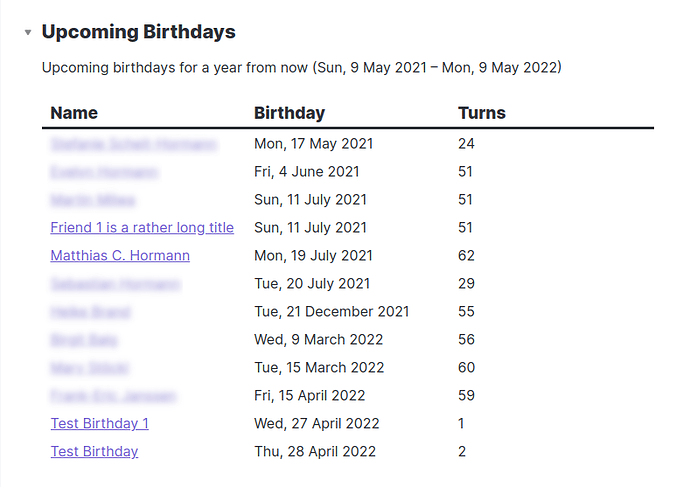
26 |
27 |
28 | Upcoming birthdays with English settings, custom date format and info line
29 |
30 | **The technically-minded** may also find interesting:
31 |
32 | - utility functions that can be used for table data
33 | - custom function for “where”
34 | - comparator function for “sort”
35 | - easily translatable “info line” with parameters
36 | - how I need to _undo_ Dataview’s YAML pre-parsing of dates and durations
37 |
38 | 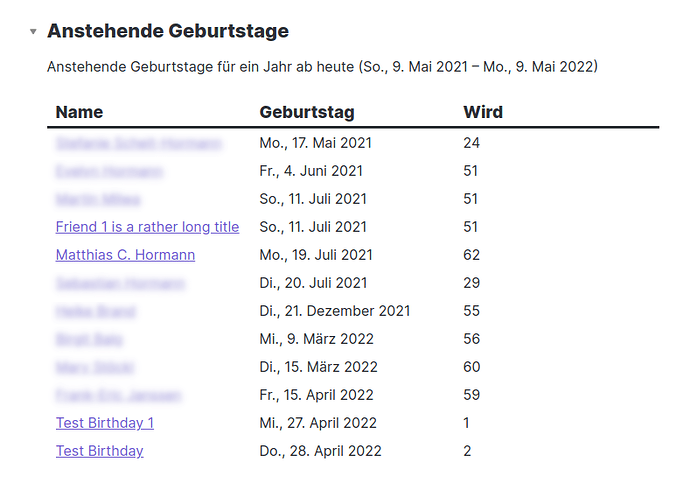
39 |
40 |
41 | Upcoming birthdays with German settings, custom date format and info line
42 |
43 | ## Requirements
44 |
45 |
46 | - _Dataview 0.3.3+_
47 | - `moment.js` (comes with Obsidian)
48 | - Notes to be included must have a birthday as `YYYY-MM-DD` in the frontmatter:
49 |
50 | birthday: 1959-07-19
51 |
52 |
53 | - The note _using_ this script **must** have the parameters `searchterm` and a (more or less) “natural language” `duration` in the frontmatter:
54 |
55 | #searchterm: "#family or #friends"
56 | searchterm: '"People"'
57 | duration: 1 year
58 |
59 |
60 | - The note using this script **_can_** have an additional `dateformat` in the frontmatter:
61 |
62 | dateformat: "ddd, D MMMM YYYY"
63 |
64 |
65 | If left out or empty, it will default to `YYYY-MM-DD`.
66 |
67 | ## Code
68 |
69 | ### YAML frontmatter example
70 |
71 | ```yaml
72 | #searchterm: "#family or #friends"
73 | searchterm: '"People"'
74 | duration: 1 year
75 | dateformat: "ddd, D MMMM YYYY"
76 | ```
77 |
78 | ### `dataviewjs` code
79 |
80 | This contains some utility functions that can be used in your table, like `nextBirthday()`, `turns()`.
81 |
82 | ```js
83 | var start = moment().startOf('day');
84 | var end = moment(start).add(dv.current().duration);
85 | var dateformat = "YYYY-MM-DD";
86 | if (dv.current().dateformat) { dateformat = dv.current().dateformat; }
87 |
88 | // info text above table, {0}=duration, {1}=start date, {2}=end date
89 | // parameters can be left out, or the string empty
90 | var infotext = "Upcoming birthdays for {0} from now ({1} – {2})"; 91 | 92 | //====================================================================== 93 | 94 | function nextBirthday(birthday) { 95 | // Get person’s next birthday on or after "start" 96 | // returns a moment 97 | 98 | // need to "unparse" because DV has already converted YAML birthday to DateTime object 99 | // shouldn’t harm if already a string 100 | var bday = moment(birthday.toString()); 101 | var bdayNext = moment(bday).year(start.year()); 102 | if (bdayNext.isBefore(start, 'day')) { 103 | bdayNext.add(1, "year"); 104 | } 105 | return bdayNext; 106 | } 107 | 108 | function turns(birthday) { 109 | // Get the age in years a person will turn to on their next birthday 110 | 111 | // need to "unparse" because DV has already converted YAML birthday to DateTime object 112 | // shouldn’t harm if already a string 113 | var bday = moment(birthday.toString()); 114 | return nextBirthday(birthday).diff(bday, 'years'); 115 | } 116 | 117 | function showBirthday(birthday) { 118 | // Determine if this birthday is in the range to be shown 119 | // including the start date, excluding the end date 120 | // because that comes from a duration calculation 121 | // for use with "where", returns true or false 122 | 123 | if (birthday) { 124 | // need to "unparse" because DV has already converted YAML birthday to DateTime object 125 | // shouldn’t harm if already a string 126 | var bday = moment(birthday.toString()); 127 | var bdayNext = nextBirthday(birthday); 128 | if (bdayNext.isBetween(start, end, 'day', '[)')) { 129 | return true; 130 | } else { 131 | return false; 132 | } 133 | } else { 134 | return false; 135 | } 136 | } 137 | 138 | function sortByNextBirthday(a, b) { 139 | // comparator function for "sort" 140 | 141 | if (nextBirthday(a).isBefore(nextBirthday(b))) { 142 | return -1; 143 | } 144 | if (nextBirthday(a).isAfter(nextBirthday(b))) { 145 | return 1; 146 | } 147 | // they’re equal 148 | return 0; 149 | } 150 | 151 | 152 | //====================================================================== 153 | 154 | dv.paragraph(infotext.format(moment.duration(dv.current().duration.toString()).humanize(), start.format(dateformat), end.format(dateformat))); 155 | 156 | dv.table( 157 | ["Name", "Birthday", "Turns"], 158 | dv.pages(dv.current().searchterm) 159 | // use a function to see if this birthday is in range to be shown 160 | .where(p => showBirthday(p.birthday)) 161 | // use a comparator function to sort by next birthday 162 | .sort(p => p.birthday, 'asc', sortByNextBirthday) 163 | .map(p => [ 164 | p.file.link, 165 | p.birthday ? nextBirthday(p.birthday).format(dateformat) : '–', 166 | turns(p.birthday) 167 | ]) 168 | ); 169 | ``` 170 | 171 | ## Notes 172 | 173 | 174 | - Dataview actually _parses_ the cell content, so if you for example set the date format to `D. MMMM`, you’ll get large vertical spacing. This is because DV _thinks_ something like `17. May` must be an _ordered list item_ and parses it accordingly. Which in turn will ruin your vertical spacing. 175 | See [0.3.3: table item converts to ordered list, ruining vertical spacing · Issue #199 · blacksmithgu/obsidian-dataview · GitHub 1](https://github.com/blacksmithgu/obsidian-dataview/issues/199). 176 | 177 | - Using durations > 1 year (like `2 years`) _work_, but don’t make much sense. The table will only display a person’s _next_ birthday. So no duplicates. 178 | 179 | [Original Forum Post](https://forum.obsidian.md/t/dataviewjs-snippet-showcase/17847/6) -------------------------------------------------------------------------------- /dustinknopoff/people-nearby.md: -------------------------------------------------------------------------------- 1 | --- 2 | title: Show family members friends and places that are nearby 3 | date: 2021-05-08 4 | taxonomies: 5 | tags: 6 | - dataview 7 | kind: 8 | - plugins 9 | extra: 10 | author: Moonbase59 11 | --- 12 | 13 | I love location data, maps, and visualizing stuff. When I plan to travel or visit a friend or family member, I love to see “what’s near” in each person or location note. Automatically linking places and people together, so to say. 14 | 15 | 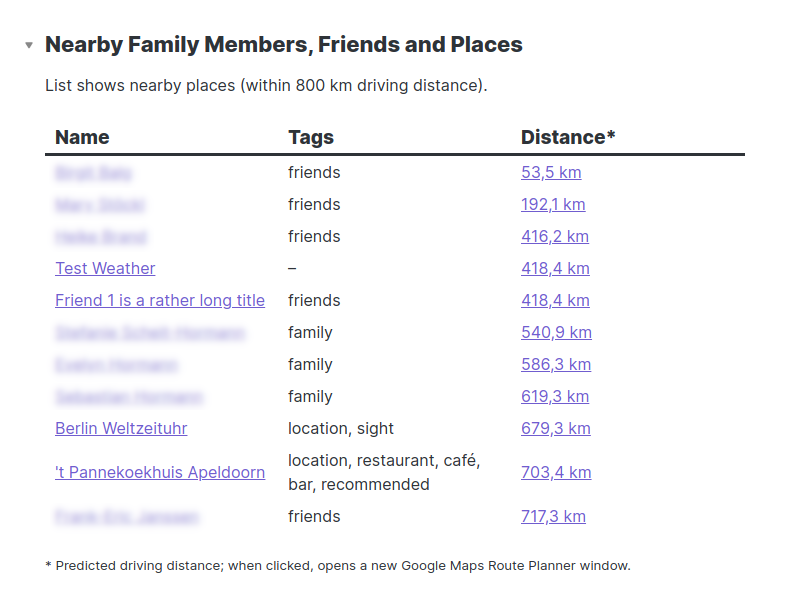 16 | 17 | * If I visit a friend, I can check if there are other friends or places of interest nearby, and we could maybe visit them together. 18 | * I can check if other friends are near enough to do something together, maybe meet for a barbeque. 19 | * When sightseeing, I won’t miss nearby friends, business contacts, favourite restaurants or other sights anymore. 20 | 21 | ## Goals 22 | - Never miss anything nearby anymore. 23 | - Have this dataview available as a template so it can be in every person, business contact, and place-of-interest note and automatically show me what’s near this place. 24 | - No more people and location notes without location data (easily be copied from Google Maps or the like). 25 | 26 | ## Requirements 27 | 28 | - All people/location notes must have a 29 | 30 | ```yaml 31 | location: [lat, lon] 32 | ``` 33 | 34 | entry in the YAML frontmatter. (This syntax has something to do with YAML & JS data structure and easy parsing. The sequence [lat, lon] has been chosen for practical reasons: People are used to it and it can easily be copied from Google Maps and others.) 35 | - _Dataview 0.3.0+_ installed. 36 | - `moment.js` available (it currently is). 37 | - Distance units of **m**, **km**, **yd** and **mi** must be usable and easy to switch. 38 | - Distances must be calculated as correct straight-line distances, taking into account that Earth is not a perfect sphere but a rotational ellipsoid. 39 | - Distances must also be available as (approximate; for speed and offline use) driving distances. 40 | - Distances shall be shown with the unit appended but internally numeric, for easy calculation/comparison. 41 | - Numbers shall be formatted *according to the language currently set in Obsidian* (`4,096.1` vs `4.096,1`). The OS’s system setting shall only be used if all else fails. 42 | - Date & time strings must be easily formatable however I wish, defaulting to ISO-8601 (`2021-05-08T10:34:05+02:00`). 43 | - Very long note title links shall optionally be shortened in Dataview table views, using my [dataview-shorten-links.css snippet](https://forum.obsidian.md/t/how-to-achieve-css-code-snippets/8474/152). 44 | - Tags (from frontmatter only, a current Dataview restriction) shall be shown in one (comma- or blank-)separated string, not as a list. 45 | - The list shall be sorted by distance from “here” (i.e., this note). 46 | - The distance values shall be clickable and lead to the Google Maps Route Planner, destination already filled in, and start point taken from the current location. 47 | - Above the table, a text line shall show the currently set “nearby” radius as well as the selected unit of measurement (`within 100 km driving distance, within 50 mi straight-line distance`), so we later know what’s actually shown in the table. 48 | 49 | ## The Code 50 | 51 | ```js 52 | // Nearby Family Members, Friends and Places 53 | // 2021-05-15 - Matthias C. Hormann (Moonbase59) 54 | 55 | // set parameters (to be supplied via YAML frontmatter, eventually) 56 | // DV 0.3.3 interprets "500000 m" as a Luxon duration, 57 | // so we have to put nearby: '"500000 m"' and remove the ". 58 | let nearby = dv.current().nearby.replace(/['"]+/g, ''); 59 | let unit = nearby.split(' ')[1]; 60 | let radius = nearby.split(' ')[0]; 61 | let origin = dv.current().location; 62 | 63 | // search term as used in dv.pages() 64 | // use "#tags" or '"folder/subfolder"' for a folder 65 | let searchterm = dv.current().searchterm; 66 | 67 | //====================================================================== 68 | 69 | function getDistance(origin, destination, unit='m') { 70 | // return distance in selected unit (m,km,yd,mi) 71 | var factor = 1.0; 72 | switch (unit) { 73 | case 'm': 74 | factor = 1.0; 75 | break; 76 | case 'km': 77 | factor = 1000.0; 78 | break; 79 | case 'yd': 80 | factor = 0.9144; 81 | break; 82 | case 'mi': 83 | factor = 1609.344; 84 | break; 85 | default: 86 | factor = 1.0; 87 | console.warn("getDistance: Invalid unit '%s', using 'm'. Valid units are: m,km,yd,mi.",unit); 88 | } 89 | 90 | var lon1 = toRadian(origin[1]), 91 | lat1 = toRadian(origin[0]), 92 | lon2 = toRadian(destination[1]), 93 | lat2 = toRadian(destination[0]); 94 | 95 | var deltaLat = lat2 - lat1; 96 | var deltaLon = lon2 - lon1; 97 | 98 | var a = Math.pow(Math.sin(deltaLat/2), 2) + Math.cos(lat1) * Math.cos(lat2) * Math.pow(Math.sin(deltaLon/2), 2); 99 | var c = 2 * Math.asin(Math.sqrt(a)); 100 | var EARTH_RADIUS = 6371000; // 6,371 km in metres 101 | return c * EARTH_RADIUS / factor; 102 | } 103 | 104 | function toRadian(degree) { 105 | return degree*Math.PI/180; 106 | } 107 | 108 | function getDrivingDistance(origin, destination, unit='m') { 109 | // PREDICTED, using a factor. 110 | // Much faster, and no need for Internet access. 111 | // The U.S. predict 1.417, based on statistical analysis. 112 | // For Germany, I’ve found 1.3 a good value (comparing w/ Google Maps "best route") 113 | var factor = 1.3; 114 | return getDistance(origin, destination, unit) * factor; 115 | } 116 | 117 | //====================================================================== 118 | 119 | // Show what we will display. 120 | dv.paragraph("List shows nearby places (within " + radius + " " + unit + " driving distance)."); 121 | dv.paragraph("
"); 122 | 123 | // get the pages 124 | let pages = dv.pages(searchterm) 125 | .where(p => p.location && 126 | // must be >0 so we don’t catch ourselves! 127 | getDrivingDistance(origin, p.location, unit) > 0.0 && 128 | getDrivingDistance(origin, p.location, unit) <= radius) 129 | .sort(p => getDistance(origin, p.location, unit)); 130 | 131 | // create table 132 | dv.table(["Name", "Tags", "Distance*"], 133 | pages.map(p => [ 134 | // The name 135 | p.file.link, 136 | // tags (show '–' if none defined) 137 | (p.file.etags ? p.file.etags.join(' ') : '–'), 138 | // straight-line distance 139 | /* 140 | getDistance(origin, p.location, unit) 141 | .toLocaleString(moment.locale(), {maximumFractionDigits: 1}) + " " + unit, 142 | */ 143 | // predicted driving distance and Google Maps Route Planner Link 144 | (getDrivingDistance(origin, p.location, unit) 145 | .toLocaleString(moment.locale(), {maximumFractionDigits: 1}) + " " + unit) 146 | .link('https://www.google.com/maps/dir/?api=1&dir_action=navigate&destination=' + p.location[0] + ',' + p.location[1]), 147 | ]) 148 | ); 149 | 150 | // show a small legend 151 | dv.paragraph("* Approximate driving distance; when clicked, opens a new Google Maps Route Planner window."); 152 | ``` 153 | 154 | [Original Forum Post](https://forum.obsidian.md/t/dataviewjs-snippet-showcase/17847/2) -------------------------------------------------------------------------------- /Default.md: -------------------------------------------------------------------------------- 1 | # Default Obsidian Theme 2 | 3 | ```css 4 | /* @settings 5 | 6 | name: Obsidian Default Theme 7 | id: obsidian-default-theme 8 | settings: 9 | - 10 | id: heading-fonts 11 | title: Fonts 12 | type: heading 13 | level: 1 14 | collapsed: true 15 | - 16 | id: default-font 17 | title: Base Font 18 | type: variable-text 19 | default: '"Inter", -apple-system, BlinkMacSystemFont, "Segoe UI", Roboto, Helvetica, Arial, sans-serif, "Apple Color Emoji", "Segoe UI Emoji", "Segoe UI Symbol", "Microsoft YaHei Light", sans-serif' 20 | - 21 | id: mermaid-font 22 | title: Mermaid Font 23 | type: variable-text 24 | default: '"Inter", -apple-system, BlinkMacSystemFont, "Segoe UI", Roboto, Helvetica, Arial, sans-serif, "Apple Color Emoji", "Segoe UI Emoji", "Segoe UI Symbol", "Microsoft YaHei Light", sans-serif' 25 | - 26 | id: reveal-font 27 | title: Reveal Font 28 | type: variable-text 29 | default: '"Inter", -apple-system, BlinkMacSystemFont, "Segoe UI", Roboto, Helvetica, Arial, sans-serif, "Apple Color Emoji", "Segoe UI Emoji", "Segoe UI Symbol", "Microsoft YaHei Light", sans-serif' 30 | - 31 | id: font-monospace 32 | title: Monospace Font 33 | description: Used for codeblocks, tables, etc. 34 | type: variable-text 35 | default: '"Source Code Pro", monospace' 36 | 37 | - 38 | id: heading-translucency 39 | title: Translucency 40 | type: heading 41 | level: 1 42 | collapsed: true 43 | - 44 | id: opacity-translucency-light 45 | title: Light Theme Translucency 46 | type: variable-number-slider 47 | default: 0.6 48 | min: 0 49 | max: 1 50 | step: 0.01 51 | - 52 | id: opacity-translucency-dark 53 | title: Dark Theme Translucency 54 | type: variable-number-slider 55 | default: 0.75 56 | min: 0 57 | max: 1 58 | step: 0.01 59 | 60 | - 61 | id: heading-colors-background 62 | title: Background Colors 63 | type: heading 64 | level: 1 65 | collapsed: true 66 | - 67 | id: background-primary 68 | title: Background Primary 69 | type: variable-themed-color 70 | opacity: false 71 | format: hex 72 | default-light: '#ffffff' 73 | default-dark: '#202020' 74 | - 75 | id: background-primary-alt 76 | title: Background Primary (alt) 77 | type: variable-themed-color 78 | opacity: false 79 | format: hex 80 | default-light: '#f5f6f8' 81 | default-dark: '#1a1a1a' 82 | - 83 | id: background-secondary 84 | title: Background Secondary 85 | type: variable-themed-color 86 | opacity: false 87 | format: hex 88 | default-light: '#f2f3f5' 89 | default-dark: '#161616' 90 | - 91 | id: background-secondary-alt 92 | title: Background Secondary (alt) 93 | type: variable-themed-color 94 | opacity: false 95 | format: hex 96 | default-light: '#e3e5e8' 97 | default-dark: '#000000' 98 | - 99 | id: background-modifier-border 100 | title: 'Background Modifier: Border' 101 | type: variable-themed-color 102 | opacity: true 103 | format: rgb 104 | default-light: '#dddddd' 105 | default-dark: '#333333' 106 | - 107 | id: background-modifier-form-field 108 | title: 'Background Modifier: Form Field' 109 | type: variable-themed-color 110 | opacity: true 111 | format: rgb 112 | default-light: '#ffffffff' 113 | default-dark: '#0000004d' 114 | - 115 | id: background-modifier-form-field-highlighted 116 | title: 'Background Modifier: Form Field (highlighted)' 117 | type: variable-themed-color 118 | opacity: true 119 | format: rgb 120 | default-light: '#ffffffff' 121 | default-dark: '#00000038' 122 | - 123 | id: background-modifier-box-shadow 124 | title: 'Background Modifier: Box Shadow' 125 | type: variable-themed-color 126 | opacity: true 127 | format: rgb 128 | default-light: '#0000001a' 129 | default-dark: '#0000004d' 130 | - 131 | id: background-modifier-success 132 | title: 'Background Modifier: Success' 133 | type: variable-themed-color 134 | opacity: true 135 | format: rgb 136 | default-light: '#A4E7C3' 137 | default-dark: '#197300' 138 | - 139 | id: background-modifier-error 140 | title: 'Background Modifier: Error' 141 | type: variable-themed-color 142 | opacity: false 143 | format: hex 144 | alt-format: 145 | - 146 | id: background-modifier-error-rgb 147 | format: rgb-values 148 | default-light: '#990000' 149 | default-dark: '#3d0000' 150 | - 151 | id: background-modifier-error-hover 152 | title: 'Background Modifier: Error (hover)' 153 | type: variable-themed-color 154 | opacity: true 155 | format: rgb 156 | default-light: '#bb0000' 157 | default-dark: '#470000' 158 | - 159 | id: background-modifier-cover 160 | title: 'Background Modifier: Cover' 161 | type: variable-themed-color 162 | opacity: true 163 | format: rgb 164 | default-light: '#000000cc' 165 | default-dark: '#000000cc' 166 | 167 | - 168 | id: heading-colors-text 169 | title: Text Colors 170 | type: heading 171 | level: 1 172 | collapsed: true 173 | - 174 | id: text-accent 175 | title: 'Text: Accent' 176 | type: variable-themed-color 177 | opacity: false 178 | format: hex 179 | default-light: '#705dcf' 180 | default-dark: '#7f6df2' 181 | - 182 | id: text-accent-hover 183 | title: 'Text: Accent (hover)' 184 | type: variable-themed-color 185 | opacity: false 186 | format: hex 187 | default-light: '#7a6ae6' 188 | default-dark: '#8875ff' 189 | - 190 | id: text-normal 191 | title: 'Text: Normal' 192 | type: variable-themed-color 193 | opacity: false 194 | format: hex 195 | default-light: '#2e3338' 196 | default-dark: '#dcddde' 197 | - 198 | id: text-muted 199 | title: 'Text: Muted' 200 | type: variable-themed-color 201 | opacity: false 202 | format: hex 203 | default-light: '#888888' 204 | default-dark: '#999999' 205 | - 206 | id: text-faint 207 | title: 'Text: Faint' 208 | type: variable-themed-color 209 | opacity: false 210 | format: hex 211 | default-light: '#999999' 212 | default-dark: '#666666' 213 | - 214 | id: text-error 215 | title: 'Text: Error' 216 | type: variable-themed-color 217 | opacity: false 218 | format: hex 219 | default-light: '#800000' 220 | default-dark: '#ff3333' 221 | - 222 | id: text-error-hover 223 | title: 'Text: Error (hover)' 224 | type: variable-themed-color 225 | opacity: false 226 | format: hex 227 | default-light: '#990000' 228 | default-dark: '#990000' 229 | - 230 | id: text-highlight-bg 231 | title: 'Text: Highlight Background' 232 | type: variable-themed-color 233 | opacity: true 234 | format: rgb 235 | default-light: '#ffff0066' 236 | default-dark: '#ffff0066' 237 | - 238 | id: text-highlight-bg-active 239 | title: 'Text: Highlight Background (active)' 240 | type: variable-themed-color 241 | opacity: true 242 | format: rgb 243 | default-light: '#ff800066' 244 | default-dark: '#ff800066' 245 | - 246 | id: text-selection 247 | title: 'Text: Selection Background' 248 | type: variable-themed-color 249 | opacity: true 250 | format: rgb 251 | default-light: '#cce6fffc' 252 | default-dark: '#17304dfc' 253 | - 254 | id: text-selection 255 | title: 'Text: On Accent' 256 | type: variable-themed-color 257 | opacity: false 258 | format: hex 259 | default-light: '#f2f2f2' 260 | default-dark: '#dcddde' 261 | 262 | - 263 | id: heading-colors-interactive 264 | title: Interactive Colors 265 | type: heading 266 | level: 1 267 | collapsed: true 268 | - 269 | id: interactive-normal 270 | title: 'Interactive: Normal' 271 | type: variable-themed-color 272 | opacity: false 273 | format: hex 274 | default-light: '#f2f3f5' 275 | default-dark: '#2a2a2a' 276 | - 277 | id: interactive-hover 278 | title: 'Interactive: Hover' 279 | type: variable-themed-color 280 | opacity: false 281 | format: hex 282 | default-light: '#e9e9e9' 283 | default-dark: '#303030' 284 | - 285 | id: interactive-accent 286 | title: 'Interactive: Accent' 287 | type: variable-themed-color 288 | opacity: false 289 | format: hex 290 | alt-format: 291 | - 292 | id: interactive-accent-rgb 293 | format: rgb-values 294 | default-light: '#7b6cd9' 295 | default-dark: '#483699' 296 | 297 | - 298 | id: interactive-accent-hover 299 | title: 'Interactive: Accent (hover)' 300 | type: variable-themed-color 301 | opacity: false 302 | format: hex 303 | default-light: '#8273e6' 304 | default-dark: '#4d3ca6' 305 | - 306 | id: interactive-success 307 | title: 'Interactive: Success' 308 | type: variable-themed-color 309 | opacity: false 310 | format: hex 311 | default-light: '#197300' 312 | default-dark: '#197300' 313 | 314 | - 315 | id: heading-colors-scrollbar 316 | title: Scrollbar Colors 317 | type: heading 318 | level: 1 319 | collapsed: true 320 | - 321 | id: scrollbar-bg 322 | title: 'Scrollbar: Background' 323 | type: variable-themed-color 324 | opacity: true 325 | format: rgb 326 | default-light: '#0000000d' 327 | default-dark: '#ffffff0d' 328 | - 329 | id: scrollbar-thumb-bg 330 | title: 'Scrollbar: Thumb Background' 331 | type: variable-themed-color 332 | opacity: true 333 | format: rgb 334 | default-light: '#0000001a' 335 | default-dark: '#ffffff1a' 336 | - 337 | id: scrollbar-active-thumb-bg 338 | title: 'Scrollbar: Active Thumb Background' 339 | type: variable-themed-color 340 | opacity: true 341 | format: rgb 342 | default-light: '#00000033' 343 | default-dark: '#ffffff33' 344 | 345 | */ 346 | ``` 347 | -------------------------------------------------------------------------------- /dmytro-shulha/Special effects.md: -------------------------------------------------------------------------------- 1 | # Special effects 2 | 3 | ## Translucent modals and popovers 4 | 5 | ```css 6 | /* Translucent modals - from: Nosedive-Obsidian */ 7 | /* Modify modal, omnibar, open looks */ 8 | input.prompt-input, input.prompt-input:active, input.prompt-input:focus { 9 | border-radius: 3px; 10 | border: 2px solid rgba(38, 38, 59, 0.5); /* in the original code this is var(--text-muted) */ 11 | background-color: transparent; 12 | box-sizing: border-box; 13 | border-collapse: collapse; 14 | } 15 | 16 | .modal-bg { 17 | background-color: #FFFFFF01; 18 | backdrop-filter: blur(20px); 19 | } 20 | 21 | /* Make legible background for menus since we overrode the background */ 22 | div.popover.hover-popover, .menu, .suggestion-container { 23 | background-color: #FFFFFF01; 24 | backdrop-filter: blur(30px); 25 | border: none; 26 | } 27 | ``` 28 | 29 | ## Oval, call-out, in sidebar 30 | 31 | ```css 32 | /* 33 | There is an amazing piece of CSS code by [Lithou](https://forum.obsidian.md/t/how-to-achieve-css-code-snippets/8474/35?u=klaas) on the forum. I have not copied the code here because it is important to 1st see what it does. Also, check out his video that he links to. 34 | */ 35 | ``` 36 | 37 | ## Sticky notes 38 | 39 | ```css 40 | /* NOTE: syntax to be used to have a sticky rendered 41 | /*
Some text
*/ 42 | 43 | 44 | /* From Gabroel - https://discord.com/channels/686053708261228577/702656734631821413/789334135788273724 and scroll down that page. Code was not quite correct, so here is the right code. */ 45 | 46 | .stickies { 47 | text-align: center; 48 | transition: width 2s; 49 | padding: 5px; 50 | margin: 10px; 51 | position: relative; 52 | float: right; 53 | right: -30px; 54 | box-shadow: 0 10px 10px 2px rgba(0, 0, 0, 0.3); 55 | width: 40%; 56 | background: hotpink; 57 | -webkit-transform: rotate(0deg); 58 | -moz-transform: rotate(0deg); 59 | -o-transform: rotate(0deg); 60 | -ms-transform: rotate(0deg); 61 | transform: rotate(2deg); 62 | transition: all 2s ease; 63 | z-index: 1; 64 | padding-top: 10px; 65 | padding-bottom: 10px; 66 | border-radius: 0px; 67 | color: black; 68 | } 69 | 70 | .stickies::after { 71 | content: ""; 72 | left: -1%; 73 | top: -10px; 74 | background: ffff00; 75 | height: 40px; 76 | width: 15px; 77 | border-radius: 10px; 78 | border: 3px solid black; 79 | display: inline-block; 80 | position: absolute; 81 | -webkit-transform: rotate(0deg); 82 | -moz-transform: rotate(0deg); 83 | -o-transform: rotate(0deg); 84 | -ms-transform: rotate(0deg); 85 | transform: rotate(-11deg); 86 | z-index: 11; 87 | } 88 | 89 | .stickies::before { 90 | width: 11px; 91 | height: 20px; 92 | content: ""; 93 | background: ffff00; 94 | display: inline-block; 95 | position: absolute; 96 | left: -1.3%; 97 | top: -2px; 98 | border-radius: 10px; 99 | border: 3px solid black; 100 | border-bottom: 0; 101 | border-bottom-right-radius: 0; 102 | border-bottom-left-radius: 0; 103 | z-index: 10; 104 | -webkit-transform: rotate(0deg); 105 | -moz-transform: rotate(0deg); 106 | -o-transform: rotate(0deg); 107 | -ms-transform: rotate(0deg); 108 | transform: rotate(-11deg); 109 | } 110 | 111 | .stickies2 { 112 | position: relative; 113 | float: left; 114 | box-shadow: 0 10px 10px 2px rgba(0, 0, 0, 0.3); 115 | width: 30%; 116 | background: #edec92; 117 | -webkit-transform: rotate(0deg); 118 | -moz-transform: rotate(0deg); 119 | -o-transform: rotate(0deg); 120 | -ms-transform: rotate(0deg); 121 | transform: rotate(-2deg); 122 | transition: all 2s ease; 123 | z-index: 1; 124 | padding: 20px; 125 | margin: 10px; 126 | color: black; 127 | } 128 | 129 | .stickies2::after { 130 | content: ""; 131 | display: block; 132 | height: 32px; 133 | width: 2px; 134 | position: absolute; 135 | left: 50%; 136 | top: -10px; 137 | z-index: 1; 138 | border-radius: 50%; 139 | display: inline-block; 140 | height: 15px; 141 | width: 15px; 142 | border: 1px; 143 | box-shadow: inset -10px -10px 10px #f0b7a4, inset 3px 3px 5px; 144 | } 145 | ``` 146 | 147 | ```css 148 | /* Another sticky possibility from j314 - https://discord.com/channels/686053708261228577/702656734631821413/801873554785566760 149 | /* NOTE: syntax to be used to have a sticky rendered 150 | /*Some text
*/ 151 | 152 | .sticky { 153 | background-color:var(--yellow); 154 | padding:10px; 155 | width:300px; 156 | height:200px; 157 | color:black; 158 | margin-left:150px; 159 | font-family: chalkboard; 160 | box-shadow: 10px 10px 7px rgb(0,0,0,0.5); 161 | transform:rotate(3deg); 162 | transition: transform .15s linear; 163 | } 164 | .sticky:hover { 165 | transform:scale(1.1); 166 | } 167 | ``` 168 | 169 | ## Images with a piece of scotch tape effect - thanks to Lithou 170 | 171 | ```css 172 | /* placement of images */ 173 | /* After putting the code below, you can get the tape effect doing */ 174 | /* ![[imagename.png#tape]] */ 175 | /* refer to Lithou's sandbox https://github.com/lithou/sandbox */ 176 | 177 | div{ 178 | --coremarg: 1%; 179 | --extramarg: 1%; /* This margin is used for any added margin between items */ 180 | --defaultwidth: 60%; /*This is the default width for core flags such as the "side" and "tape" */ 181 | } 182 | 183 | /* Core Flags */ 184 | /* side */ 185 | 186 | div[alt*="+side"]{ 187 | position: relative; 188 | width: var(--defaultwidth); 189 | float: right; 190 | margin: 0px; 191 | margin-left: var(--coremarg); 192 | } 193 | 194 | /* tape */ 195 | 196 | div[alt*="+tape"] { 197 | position: relative; 198 | float: right; 199 | width: var(--defaultwidth); 200 | margin-left: var(--coremarg); 201 | -webkit-transform: rotate(0deg); 202 | -moz-transform: rotate(0deg); 203 | -o-transform: rotate(0deg); 204 | -ms-transform: rotate(0deg); 205 | transform: rotate(2deg); 206 | } 207 | 208 | div[alt*="+tape"]::before { 209 | content: ""; 210 | display: block; 211 | position: relative; 212 | margin: auto; 213 | width: 100px; 214 | height: 30px; 215 | top: 12px; 216 | background: rgba(255, 234, 118, 0.377); /*here you can chosse the scotch tape background*/ 217 | -webkit-box-shadow: 0px 1px 3px rgba(0,0,0,0.4); 218 | -moz-box-shadow: 0px 1px 3px rgba(0,0,0,0.4); 219 | box-shadow: 0px 1px 3px rgba(0,0,0,0.4); 220 | z-index: 10; 221 | clip-path: polygon(50% 0%, 100% 0%, 222 | 98% 10%, 100% 20%, 98% 30%, 100% 40%, 98% 50%, 100% 60%, 98% 70%, 100% 80%, 98% 90%,100% 100%, 223 | 0% 100%, 2% 90%, 0% 80%, 2% 70%, 0% 60%, 2% 50%, 0% 40%, 2% 30%, 0% 20%, 2% 10%, 0% 0%); 224 | } 225 | div[alt*="-lg"]::before{ 226 | width: 100px; 227 | height: 30px; 228 | } 229 | 230 | div[alt*="-med"]::before{ 231 | width: 70px; 232 | height: 25px; 233 | } 234 | 235 | div[alt*="-sm"]::before{ 236 | width: 45px; 237 | height: 15px; 238 | top: 8px; 239 | } 240 | div[alt*="-thumb"]::before{ 241 | width: 25px; 242 | height: 5px; 243 | top: 2px; 244 | } 245 | ``` 246 | 247 | ```css 248 | /* Push Pin */ 249 | 250 | div[alt*="+pin"] { 251 | position: relative; 252 | float: right; 253 | width: var(--defaultwidth); 254 | margin: auto; 255 | margin-left: var(--coremarg); 256 | -webkit-transform: rotate(0deg); 257 | -moz-transform: rotate(0deg); 258 | -o-transform: rotate(0deg); 259 | -ms-transform: rotate(0deg); 260 | transform: rotate(2deg);} 261 | div[alt*="+pin"]::before { 262 | content: ""; 263 | position: absolute; 264 | width: 5px; 265 | height: 5px; 266 | background-color: #4588cc; 267 | top: -3%; 268 | left: 50%; 269 | border: solid #336699 8px; 270 | border-radius: 50%; 271 | box-shadow: #274d74 -5px 3px 1px;} 272 | /* Portrait and Landscape */ 273 | div[alt*="+portrait"]{ 274 | position: relative; 275 | width: calc(var(--defaultwidth)/2); 276 | float: right; 277 | /* background-color:blue; This setting will create a border effect of set color */ 278 | clip-path: ellipse(36% 46% at 50% 50%);} 279 | div[alt*="+portrait"]>img{ 280 | vertical-align: middle; 281 | clip-path: ellipse(35% 45% at 50% 50%);} 282 | div[alt*="+landscape"]{ 283 | position: relative; 284 | width: var(--defaultwidth); 285 | float: right; 286 | /* background-color:blue; This setting will create a border effect of set color */ 287 | clip-path: ellipse(46% 36% at 50% 50%);} 288 | div[alt*="+landscape"]>img{ 289 | vertical-align: middle; 290 | clip-path: ellipse(45% 35% at 50% 50%);} 291 | ``` 292 | 293 | ```css 294 | /* Banner and HR */ 295 | 296 | div[alt*="+banner"]{ 297 | height: 100px; 298 | overflow: hidden; 299 | 300 | } 301 | 302 | div[alt*="+banner"]>img{ 303 | margin-top: -130px; 304 | } 305 | 306 | div[alt*="+hr"]{ 307 | height: 10px; 308 | overflow: hidden; 309 | border-radius: 20px; 310 | 311 | } 312 | 313 | div[alt*="+hr"]>img{ 314 | margin-top: -200px; 315 | } 316 | ``` 317 | 318 | ```css 319 | /* Custom Core Flags */ 320 | 321 | div[alt*="+custom1"]{ 322 | position: relative; 323 | width: var(--defaultwidth); 324 | float: right; 325 | margin-top: 0px; 326 | margin-bottom: 0px; 327 | } 328 | div[alt*="+custom2"]{ 329 | position: relative; 330 | width: var(--defaultwidth); 331 | float: right; 332 | margin-top: 0px; 333 | margin-bottom: 0px; 334 | } 335 | ``` 336 | 337 | ```css 338 | /* Modifier Flags */ 339 | /* Orientation and position */ 340 | 341 | div[alt*="-left"]{ 342 | float: left; 343 | margin: 0px; 344 | margin-right: var(--extramarg);} 345 | div[alt*="-right"]{ 346 | float: right; 347 | margin: 0px; 348 | margin-left: var(--extramarg);} 349 | div[alt*="-fix"]{position: fixed;} 350 | div[alt*="-abs"]{position: absolute;} 351 | ``` 352 | 353 | ```css 354 | /* Size */ 355 | 356 | div[alt*="-thumb"]{width: 11.50%;} 357 | div[alt*="-sm"]{width: 24%;} 358 | div[alt*="-med"]{width: 32.3333%;} 359 | div[alt*="-lg"]{width: 49%;} 360 | div[alt*="-huge"]{width: 67%;} 361 | div[alt*="-cwidth"]{float: none;margin-left: -10%;width: 120%;} 362 | ``` 363 | 364 | ```css 365 | /* Borders */ 366 | 367 | div[alt*="-border1"]>img{border: solid black 3px;} 368 | div[alt*="-border2"]>img{border: solid white 3px;} 369 | div[alt*="-bradius1"]>img{border-radius: 5px;} 370 | div[alt*="-bradius2"]>img{border-radius: 20px;} 371 | div[alt*="-bradiustl"]>img{border-top-left-radius: 20px;} 372 | div[alt*="-bradiusbr"]>img{border-bottom-right-radius: 20px;} 373 | div[alt*="-bradiustr"]>img{border-top-right-radius: 20px;} 374 | div[alt*="-bradiusbl"]>img{border-bottom-left-radius: 20px;} 375 | div[alt*="-bthick"]>img{border-width: 5px;} 376 | div[alt*="-bthin"]>img{border-width: 1px;} 377 | ``` 378 | 379 | ```css 380 | /* Div Borders */ 381 | 382 | div[alt*="-divborder1"]{border: solid #336699 2px;} 383 | div[alt*="-divborder2"]{border: solid black 2px;} 384 | div[alt*="-divbradius1"]{border-radius: 5px;} 385 | div[alt*="-divbradius2"]{border-radius: 20px;} 386 | div[alt*="-cdivbradius1"]{border-radius: 50px;} 387 | 388 | div[alt*="-shadow1"]>img{ 389 | box-shadow: darkgrey -2px 2px 2px; 390 | 391 | } 392 | 393 | div[alt*="-glow"]>img{ 394 | box-shadow: darkgrey 0px 0px 20px; 395 | } 396 | 397 | div[alt*="-nofloat"]{ 398 | float:none 399 | } 400 | ``` 401 | -------------------------------------------------------------------------------- /dmytro-shulha/Headers.md: -------------------------------------------------------------------------------- 1 | # Headers 2 | 3 | ```css 4 | /* List styling (H1 numbering ONLY) for note content */ 5 | 6 | /* initialize css counter */ 7 | body { 8 | counter-reset: head-num-1; 9 | } 10 | 11 | /* put counter result into H1 headings */ 12 | .markdown-source-view .cm-formatting-header-1::after , h1::before { 13 | counter-increment: head-num-1; 14 | content: counter(head-num-1) ". "; 15 | } 16 | 17 | /* Do not render H6 header in Preview */ 18 | h6 { 19 | display: none; 20 | } 21 | ``` 22 | 23 | ```css 24 | /* Selection the first H1 header of the Note */ 25 | pre:nth-of-type(2).HyperMD-header.HyperMD-header-1 { 26 | color: red; 27 | } 28 | ``` 29 | 30 | ```css 31 | /* Change just 1 particular header */ 32 | /* Note: gap between 1st and 2nd line must be put in ! */ 33 | 34 | ``` 35 | 36 | OR put it in an html element with a class that changes the color 37 | 38 | ```css 39 | .important { 40 | color: red; 41 | } 42 | 43 | 44 | 45 | /* changing the color of the header in edit mode */ 46 | .cm-header-1 { 47 | color:rgb(203, 77, 73); 48 | } 49 | 50 | /* Gradient coloured headers in Edit and Preview mode */ 51 | .cm-s-obsidian .cm-header-1, 52 | .markdown-preview-view h1 { 53 | background: linear-gradient(to right, gold, coral); /* choose any 2 colors you like */ 54 | -webkit-background-clip: text; 55 | color: transparent; 56 | width: fit-content; 57 | } 58 | 59 | /* Coloured headings for editor and preview in Dracula */ 60 | .cm-header-1, .markdown-preview-view h1 61 | { 62 | font-family: var(--font-family-editor); 63 | font-weight: 500; 64 | font-size: var(--font-size-h1); 65 | color: var(--text-title-h1); 66 | } 67 | 68 | .cm-header-2, .markdown-preview-view h2 69 | { 70 | font-family: var(--font-family-editor); 71 | font-weight: 500; 72 | font-size: var(--font-size-h2); 73 | color: var(--text-title-h2); 74 | } 75 | 76 | .cm-header-3, .markdown-preview-view h3 77 | { 78 | font-family: var(--font-family-editor); 79 | font-weight: 500; 80 | font-size: var(--font-size-h3); 81 | color: var(--text-title-h3); 82 | } 83 | 84 | .cm-header-4, .markdown-preview-view h4 85 | { 86 | font-family: var(--font-family-editor); 87 | font-weight: 500; 88 | font-size: var(--font-size-h4); 89 | color: var(--text-title-h4); 90 | } 91 | 92 | .cm-header-5, .markdown-preview-view h5 93 | { 94 | font-family: var(--font-family-editor); 95 | font-weight: 500; 96 | font-size: var(--font-size-h5); 97 | color: var(--text-title-h5); 98 | } 99 | 100 | .cm-header-6, .markdown-preview-view h6 101 | { 102 | font-family: var(--font-family-editor); 103 | font-weight: 500; 104 | font-size: var(--font-size-h6); 105 | color: var(--text-title-h6); 106 | } */ 107 | 108 | /* Coloured headings for editor and preview, same font-weight in Edit & Preview */ 109 | .cm-s-obsidian .cm-header-1, 110 | .markdown-preview-view h1 { 111 | font-weight: 450; 112 | color: rgb(123, 108, 214); /* was(115, 98, 205); */ 113 | } 114 | 115 | .cm-s-obsidian .cm-header-2, 116 | .markdown-preview-view h2 { 117 | font-weight: 450; 118 | color: rgb(123, 108, 214); 119 | } 120 | 121 | .cm-s-obsidian .cm-header-3, 122 | .markdown-preview-view h3 { 123 | font-weight: 450; 124 | color: rgb(123, 108, 214); 125 | } 126 | 127 | .cm-s-obsidian .cm-header-4, 128 | .markdown-preview-view h4 { 129 | font-weight: 450; 130 | color: rgb(123, 108, 214); 131 | } 132 | 133 | .cm-s-obsidian .cm-header-5, 134 | .markdown-preview-view h5 { 135 | font-weight: 450; 136 | color: rgb(123, 108, 214); 137 | } 138 | 139 | .cm-s-obsidian .cm-header-6, 140 | .markdown-preview-view h6 { 141 | font-weight: 450; 142 | color: rgb(123, 108, 214); 143 | } 144 | 145 | /* Underline H1 heading in Edit mode */ 146 | /* .cm-header-1 { 147 | border-bottom: 1px solid var(--text-accent); 148 | } */ 149 | 150 | .cm-s-obsidian pre.HyperMD-header-1:after { 151 | content: ""; 152 | position: absolute; 153 | bottom: 5px; 154 | left: 5px; 155 | width: calc(100% - 10px); 156 | height: 1px; 157 | background: var(--text-accent); /* rgb(123, 108, 214); */ 158 | } 159 | ``` 160 | 161 | ```css 162 | 163 | /* Eliminate margin (gap, space) under headings - Preview mode only */ 164 | /* H1 underlined too */ 165 | .markdown-preview-view h1 { 166 | padding-bottom: 5px; 167 | border-bottom: 1px solid var(--base2); /* PB changed from --text-accent */ 168 | margin-bottom: -10px; 169 | } 170 | 171 | .markdown-preview-view h2, 172 | .markdown-preview-view h3, 173 | .markdown-preview-view h4, 174 | .markdown-preview-view h5, 175 | .markdown-preview-view h6 { 176 | margin-bottom: -20px; 177 | padding-bottom: 5px; 178 | } 179 | 180 | /* Changing size/color of the header hashtags # */ 181 | .cm-formatting-header { 182 | color: var(--text-faint); 183 | font-size: 0.6em; 184 | } 185 | 186 | /* USED IN CONTEXT OF "REMOVE CLUTTER" */ 187 | /* Replace header hashes (#) by H1, H2, etc. in edit mode */ 188 | /* from Blue Topaz theme: DIRTY WYSIWYM HEADERS by _ph */ 189 | 190 | /* Header folder icon */ 191 | .CodeMirror-foldgutter-open, .CodeMirror-foldgutter-folded { 192 | padding-left: -10px; 193 | } 194 | 195 | .CodeMirror-sizer{ 196 | margin-left: 35px !important; 197 | } 198 | 199 | /*-- reduce left padding --*/ 200 | .CodeMirror { 201 | height: 100%; 202 | direction: ltr; 203 | padding: 0 5px; 204 | } 205 | 206 | /*-- hide # markup--*/ 207 | .cm-formatting.cm-formatting-header.cm-formatting-header-1.cm-header.cm-header-1, 208 | .cm-formatting.cm-formatting-header.cm-formatting-header-2.cm-header.cm-header-2, 209 | .cm-formatting.cm-formatting-header.cm-formatting-header-3.cm-header.cm-header-3, 210 | .cm-formatting.cm-formatting-header.cm-formatting-header-4.cm-header.cm-header-4, 211 | .cm-formatting.cm-formatting-header.cm-formatting-header-5.cm-header.cm-header-5, 212 | .cm-formatting.cm-formatting-header.cm-formatting-header-6.cm-header.cm-header-6 213 | {font-size:0px;} 214 | 215 | /*-- display H1-h6 in gutter--*/ 216 | .cm-formatting.cm-formatting-header.cm-formatting-header-1.cm-header.cm-header-1:before{ 217 | content:"H1"; 218 | font-size:14px; 219 | color: var(--h1ys); 220 | left:-36.5px; 221 | top:11px; 222 | position:absolute; 223 | } 224 | .cm-formatting.cm-formatting-header.cm-formatting-header-2.cm-header.cm-header-2:before{ 225 | content:"H2"; 226 | font-size:13px; 227 | color: var(--h2ys); 228 | left:-36.5px; 229 | top:9px; 230 | position:absolute; 231 | } 232 | .cm-formatting.cm-formatting-header.cm-formatting-header-3.cm-header.cm-header-3:before{ 233 | content:"H3"; 234 | font-size:12px; 235 | color: var(--h3ys); 236 | left:-36.7px; 237 | top: 7px; 238 | position:absolute; 239 | } 240 | .cm-formatting.cm-formatting-header.cm-formatting-header-4.cm-header.cm-header-4:before{ 241 | content:"H4"; 242 | font-size:11px; 243 | color: var(--h4ys); 244 | left:-20.5px; 245 | top: 7px; 246 | position:absolute; 247 | } 248 | .cm-formatting.cm-formatting-header.cm-formatting-header-5.cm-header.cm-header-5:before{ 249 | content:"H5"; 250 | font-size:10px; 251 | color: var(--h5ys); 252 | left:-20px; 253 | top: 9px; 254 | position:absolute; 255 | } 256 | .cm-formatting.cm-formatting-header.cm-formatting-header-6.cm-header.cm-header-6:before{ 257 | content:"H6"; 258 | font-size:9px; 259 | color: var(--h6ys); 260 | left:-19.5px; 261 | top: 9px; 262 | position:absolute; 263 | } 264 | 265 | /*-- is active line, hide H[1-6] in gutter --*/ 266 | .CodeMirror-activeline span.cm-formatting.cm-formatting-header.cm-formatting-header-1.cm-header.cm-header-1:before, 267 | .CodeMirror-activeline span.cm-formatting.cm-formatting-header.cm-formatting-header-2.cm-header.cm-header-2:before, 268 | .CodeMirror-activeline span.cm-formatting.cm-formatting-header.cm-formatting-header-3.cm-header.cm-header-3:before, 269 | .CodeMirror-activeline span.cm-formatting.cm-formatting-header.cm-formatting-header-4.cm-header.cm-header-4:before, 270 | .CodeMirror-activeline span.cm-formatting.cm-formatting-header.cm-formatting-header-5.cm-header.cm-header-5:before, 271 | .CodeMirror-activeline span.cm-formatting.cm-formatting-header.cm-formatting-header-6.cm-header.cm-header-6:before 272 | {font-size:0px;} 273 | 274 | /*-- is active line, display # markup --*/ 275 | .CodeMirror-activeline > pre > span .cm-formatting.cm-formatting-header.cm-formatting-header-1.cm-header.cm-header-1{ 276 | font-size:24px; 277 | display:inline; 278 | } 279 | .CodeMirror-activeline > pre > span .cm-formatting.cm-formatting-header.cm-formatting-header-2.cm-header.cm-header-2{ 280 | font-size:22px; 281 | display:inline; 282 | } 283 | .CodeMirror-activeline > pre > span .cm-formatting.cm-formatting-header.cm-formatting-header-3.cm-header.cm-header-3{ 284 | font-size:20px; 285 | display:inline; 286 | } 287 | .CodeMirror-activeline > pre > span .cm-formatting.cm-formatting-header.cm-formatting-header-4.cm-header.cm-header-4{ 288 | font-size:18px; 289 | display:inline; 290 | } 291 | .CodeMirror-activeline > pre > span .cm-formatting.cm-formatting-header.cm-formatting-header-5.cm-header.cm-header-5{ 292 | font-size:16px; 293 | display:inline; 294 | } 295 | .CodeMirror-activeline > pre > span .cm-formatting.cm-formatting-header.cm-formatting-header-6.cm-header.cm-header-6{ 296 | font-size:16px; 297 | display:inline; 298 | } 299 | 300 | /* Change header size in Edit mode */ 301 | .cm-header-1 { 302 | font-size: 27px; 303 | } 304 | 305 | .cm-header-2 { 306 | font-size: 22px; 307 | } 308 | 309 | .cm-header-3 { 310 | font-size: 21px; 311 | } 312 | 313 | .cm-header-4 { 314 | font-size: 19px; 315 | } 316 | 317 | .cm-header-5 { 318 | font-size: 16px; 319 | } 320 | 321 | .cm-header-6 { 322 | font-size: 13px; 323 | } 324 | 325 | /* Change header size in Preview mode */ 326 | .markdown-preview-view h1 { 327 | font-size: 27px; 328 | } 329 | 330 | .markdown-preview-view h2 { 331 | font-size: 20px; 332 | } 333 | 334 | .markdown-preview-view h3 { 335 | font-size: 21px; 336 | } 337 | 338 | .markdown-preview-view h4 { 339 | font-size: 19px; 340 | } 341 | 342 | .markdown-preview-view h5 { 343 | font-size: 16px; 344 | } 345 | 346 | .markdown-preview-view h6 { 347 | font-size: 13px; 348 | font-weight: bold; 349 | } 350 | ``` 351 | 352 | ```css 353 | /* Automatically convert H1 headings to capitals in the Outline pane */ 354 | .outline .tree-item-inner { 355 | text-transform: uppercase; 356 | } 357 | 358 | .outline .tree-item-children .tree-item-inner { 359 | text-transform: none; 360 | } 361 | ``` 362 | 363 | If you need to have H1 headings capitalized in the note text, use: 364 | 365 | ```css 366 | /* Automatically convert H1 headings to capitals in text */ 367 | .cm-header-1, .markdown-preview-view h1 { 368 | text-transform: uppercase; 369 | } 370 | ``` 371 | 372 | In Live Preview, header hashes are hidden if the line is not active. 373 | Some people prefer to keep them visible to know what level header they are dealing with. 374 | The code below is courtesy of @NothingIsLost on the Discord forum. 375 | 376 | ```css 377 | .cm-line > span.cm-header-1:not(.cm-formatting):before { content: "# "; } 378 | .cm-line.cm-active > span.cm-header-1 > span:not(.cm-selection):before { content: "# "; } 379 | .cm-line > span.cm-header-1 ~ span.cm-header-1:not(.cm-formatting):before { content: ""; } 380 | 381 | .cm-line > span.cm-header-2:not(.cm-formatting):before { content: "## "; } 382 | .cm-line.cm-active > span.cm-header-2 > span:not(.cm-selection):before { content: "## "; } 383 | .cm-line > span.cm-header-2 ~ span.cm-header-2:not(.cm-formatting):before { content: ""; } 384 | 385 | .cm-line > span.cm-header-3:not(.cm-formatting):before { content: "### "; } 386 | .cm-line.cm-active > span.cm-header-3 > span:not(.cm-selection):before { content: "### "; } 387 | .cm-line > span.cm-header-3 ~ span.cm-header-3:not(.cm-formatting):before { content: ""; } 388 | 389 | .cm-line > span.cm-header-4:not(.cm-formatting):before { content: "#### "; } 390 | .cm-line.cm-active > span.cm-header-4 > span:not(.cm-selection):before { content: "#### "; } 391 | .cm-line > span.cm-header-4 ~ span.cm-header-4:not(.cm-formatting):before { content: ""; } 392 | 393 | .cm-line > span.cm-header-5:not(.cm-formatting):before { content: "##### "; } 394 | .cm-line.cm-active > span.cm-header-5 > span:not(.cm-selection):before { content: "##### "; } 395 | .cm-line > span.cm-header-5 ~ span.cm-header-5:not(.cm-formatting):before { content: ""; } 396 | 397 | .cm-line > span.cm-header-6:not(.cm-formatting):before { content: "###### "; } 398 | .cm-line.cm-active > span.cm-header-6 > span:not(.cm-selection):before { content: "###### "; } 399 | .cm-line > span.cm-header-6 ~ span.cm-header-6:not(.cm-formatting):before { content: ""; } 400 | ``` 401 | -------------------------------------------------------------------------------- /dmytro-shulha/File explorer - Obsidian.md: -------------------------------------------------------------------------------- 1 | # File explorer - Obsidian 2 | ```css 3 | /* condense line spacing on file explorer title list. also avoids character-level word breaks */ 4 | .nav-file-title-content, 5 | .search-result-file-title, 6 | .search-result-file-match { 7 | padding-top: 0 !important; 8 | padding-bottom: 0 !important; 9 | line-height: normal !important; 10 | word-break: keep-all; 11 | } 12 | 13 | /* file xplor : smaller & bold vault title */ 14 | .nav-folder.mod-root > .nav-folder-title { 15 | padding-left: 6px; 16 | font-size: 14px; 17 | font-weight: bolder; 18 | top:-6px; /* higher */ 19 | cursor: default; 20 | color: var(--base2); 21 | } 22 | 23 | /* Enhancing the view of folders in left pane */ 24 | /* by Shamama on https://forum.obsidian.md/t/meta-post-common-css-hacks/1978/112 */ 25 | 26 | /* outliner for the outline */ 27 | .outline-heading-children{ 28 | border-left: 1px solid rgba(118,158,165,0.2); 29 | border-radius:0 0px 0px 0; 30 | transition:all 0.5s ease-in-out; 31 | } 32 | 33 | .outline-heading-children:hover{ 34 | border-left-color:rgba(118,158,165,0.4); 35 | } 36 | 37 | /* Connectining lines for files and folders in left pane*/ 38 | .nav-folder,.nav-file{ 39 | margin:0 !important; 40 | border-left: 1px solid rgba(118,158,165,0.2); 41 | } 42 | 43 | /* == File Explorer - animation for active file as per Obuntu === */ 44 | .nav-file-title, 45 | .nav-folder-title { 46 | padding: 0px 14px 0px 20px; 47 | } 48 | 49 | .nav-folder-title { 50 | font-weight: bold; 51 | } 52 | 53 | .nav-folder.mod-root > .nav-folder-title { 54 | padding-left: 6px; 55 | font-size: 14px; 56 | font-weight: bolder; 57 | top: -6px; 58 | cursor: default; 59 | } 60 | 61 | .nav-file.is-active > .nav-file-title, 62 | .nav-file.is-active > .nav-file-title:hover { 63 | background-color: var(--background-primary); 64 | border-radius: 6px; 65 | font-weight: bold; 66 | /* color: var(--text-accent); */ 67 | border-left: 2px solid var(--text-accent); 68 | transition: all 0.5s ease; 69 | } 70 | 71 | .nav-file.is-active > .nav-file-title { 72 | padding-left: 5px; 73 | /* margin-left: 5px; */ 74 | } 75 | 76 | body:not(.is-grabbing) .nav-file-title:hover, 77 | body:not(.is-grabbing) .nav-folder-title:hover { 78 | background-color: var(--background-primary); 79 | border-radius: 2px; 80 | transition: all 0.2s ease; 81 | } 82 | 83 | .nav-file-tag { 84 | background-color: var(--background-secondary-alt); 85 | top: -1px; 86 | } 87 | 88 | /* Folder and file icons */ 89 | .nav-folder-children .nav-file-title-content:first-child::before { content: '🗒 '; } 90 | .nav-folder-children .nav-folder-title-content::before { content: '📂 '; } 91 | 92 | /* add colour to folder icons - needs 2 lines of .nav-folder-children above to work*/ 93 | .nav-folder-title-content::before { 94 | 95 | font-size: 17px; 96 | /* 97 | how to get CSS filter ? 98 | 0, open website: 99 | https://www.zhangxinxu.com/sp/filter.html 100 | 101 | 1, first: image original cloro this is : #000 102 | 2, second: display color i want : #D6FFF1 103 | 3, CSS filter trans btn clik: the result is : 104 | filter: invert(99%) sepia(90%) saturate(382%) hue-rotate(69deg) brightness(106%) contrast(102%); 105 | 106 | 4, pause👇 : OK ✌️; 107 | */ 108 | filter: invert(88%) sepia(8%) saturate(554%) hue-rotate(103deg) brightness(108%) contrast(102%); 109 | 110 | /* 111 | If you want to change the icon, you only need to modify this code.you can only change d='' 112 | */ 113 | 114 | content: url("data:image/svg+xml;charset=UTF-8, "); 115 | 116 | /* margin */ 117 | margin-right: 5px !important; 118 | } 119 | 120 | /*hover color*/ 121 | .nav-folder-title:hover .nav-folder-title-content::before { 122 | 123 | /* hover color #69fafd 👆 CSS filter 👇 */ 124 | filter: invert(87%) sepia(20%) saturate(1026%) hue-rotate(113deg) brightness(105%) contrast(103%); 125 | } 126 | 127 | /* change font size of file explorer */ 128 | .nav-file-title, .nav-folder-title { font-size: 14px; line-height: 15px; } 129 | 130 | /* change font size of search results */ 131 | .search-result-file-title { font-size: xyz; } 132 | .search-result-file-matches { font-size: xyz; } 133 | 134 | /* Reduce space of header buttons/icons - Blue Topaz */ 135 | div.nav-header{ 136 | padding: 0px 5px 5px 5px; 137 | margin-bottom: 0px; 138 | margin-top: 5px; 139 | line-height: 0px; 140 | } 141 | div.nav-buttons-container{ 142 | margin: 0px 0px 0px 0px; 143 | } 144 | input.search-input{ 145 | margin: 0px 10px -3px 10px; 146 | } 147 | .nav-action-button{ 148 | margin: 0px 2px 0px 2px !important; 149 | } 150 | .workspace-leaf-content[data-type='search'] .nav-action-button, .workspace-leaf-content[data-type='backlink'] .nav-action-button{ 151 | padding: 3px 3px 3px 3px; 152 | } 153 | 154 | /* Fix background of folder-collapse-indicator */ 155 | body:not(.is-grabbing) .nav-folder-title:hover .nav-folder-collapse-indicator { 156 | background: none; 157 | } 158 | 159 | /* Line up tabs with macOS traffic lights */ 160 | .hider-frameless .workspace-split.mod-left-split > .workspace-tabs { 161 | padding: 0;} 162 | .workspace-tab-container-inner { 163 | padding-left:30px; 164 | } 165 | ``` 166 | 167 | ## Chest-of-drawers icon in nav tab - California Coast theme by mgmeyers 168 | ```css 169 | /* Note: css variables do not work in embedded svgs, so 170 | I took the rgb equivalents of var(--text-accent) when active 171 | and of var(--text-faint) for not active */ 172 | 173 | /* when the tab is NOT in focus */ 174 | .theme-light 175 | .workspace-tab-header[aria-label="File explorer"] 176 | .workspace-tab-header-inner-icon:after { 177 | opacity: 0.5; 178 | content: url('data:image/svg+xml; utf8, '); 179 | } 180 | 181 | .theme-light 182 | .workspace-tab-header[aria-label="File explorer"]:hover 183 | .workspace-tab-header-inner-icon:after { 184 | opacity: 0.5; 185 | content: url('data:image/svg+xml; utf8, '); 186 | } 187 | 188 | /* when the tab is in focus */ 189 | .theme-light 190 | .workspace-tab-header[aria-label="File explorer"].is-active 191 | .workspace-tab-header-inner-icon:after { 192 | opacity: 0.5; 193 | content: url('data:image/svg+xml; utf8, '); 194 | } 195 | 196 | /* when the tab is NOT in focus */ 197 | .theme-dark 198 | .workspace-tab-header[aria-label="File explorer"] 199 | .workspace-tab-header-inner-icon:after { 200 | content: url('data:image/svg+xml; utf8, '); 201 | } 202 | 203 | .theme-dark 204 | .workspace-tab-header[aria-label="File explorer"]:hover 205 | .workspace-tab-header-inner-icon:after { 206 | content: url('data:image/svg+xml; utf8, '); 207 | } 208 | 209 | /* when the tab is in focus */ 210 | .theme-dark 211 | .workspace-tab-header[aria-label="File explorer"].is-active 212 | .workspace-tab-header-inner-icon:after { 213 | content: url('data:image/svg+xml; utf8, '); 214 | } 215 | 216 | .workspace-tab-header[aria-label="File explorer"] 217 | .workspace-tab-header-inner-icon:after, 218 | .view-header-icon:after, 219 | .search-input-clear-button:before, 220 | .document-search-close-button:before { 221 | line-height: 1; 222 | display: inline-block; 223 | width: 18px; 224 | height: 18px; 225 | } 226 | 227 | .workspace-tab-header[aria-label="File explorer"] 228 | .workspace-tab-header-inner-icon 229 | > svg { 230 | display: none; 231 | } 232 | ``` 233 | 234 | ## Nav titles 235 | ```css 236 | /* Wrap long nav text */ 237 | .nav-file-title, .nav-folder-title { 238 | white-space: normal; 239 | width: auto; 240 | } 241 | 242 | /* Indent wrapped nav text */ 243 | .nav-file-title-content { 244 | margin-left: 10px; 245 | text-indent: -10px; 246 | } 247 | 248 | /* Set background color when hovering over a title */ 249 | .nav-file-title-content:hover { 250 | background-color: var(--base4); 251 | } 252 | ``` 253 | 254 | ## Top tab container background color 255 | ```css 256 | .theme-dark { 257 | --background1: rgb(51, 51, 51); 258 | } 259 | 260 | .theme-light { 261 | --background1: #f2f8fd; 262 | } 263 | 264 | .workspace-tab-header-container { 265 | background-color: var(--background1); 266 | } 267 | 268 | .workspace-tab-container-before.is-before-active .workspace-tab-header-inner, 269 | .workspace-tab-container-after.is-after-active .workspace-tab-header-inner, 270 | .workspace-tab-header.is-before-active .workspace-tab-header-inner, 271 | .workspace-tab-header.is-after-active .workspace-tab-header-inner { 272 | background-color: var(--background1); 273 | } 274 | 275 | .workspace-tab-header, 276 | .workspace-tab-header-inner, 277 | .workspace-tab-container-before, 278 | .workspace-tab-container-after { 279 | transition: none; 280 | } 281 | 282 | .workspace-tabs { 283 | background-color: var(--background1); 284 | } 285 | ``` 286 | 287 | ## Emojis in folder name 288 | /* 2 examples */ 289 | ```css 290 | .nav-folder-title[data-path="+inbox"] .nav-folder-title-content::before { 291 | content: "📥 "; 292 | font-size:1.3em; 293 | } 294 | 295 | .nav-folder-title[data-path="+Obsidian"] .nav-folder-title-content::before { 296 | content: "⚙️ "; 297 | font-size:1.3em; 298 | } 299 | ``` 300 | 301 | ## Hide a folder 302 | Note: If you don’t know the data-path to put in the code below, you can open the developer with 303 | CTRL/CMD+SHIFT+I and check the path. Beware, the data path only updates after a restart for newly file/folder. 304 | ```css 305 | div[data-path='folder'], 306 | div[data-path='folder'] + div.nav-folder-children 307 | { 308 | display: none; 309 | } 310 | ``` 311 | 312 | # Hide a file 313 | ```css 314 | .nav-file-title[data-path="file_path.md"] { 315 | display: none; 316 | } 317 | ``` 318 | --------------------------------------------------------------------------------