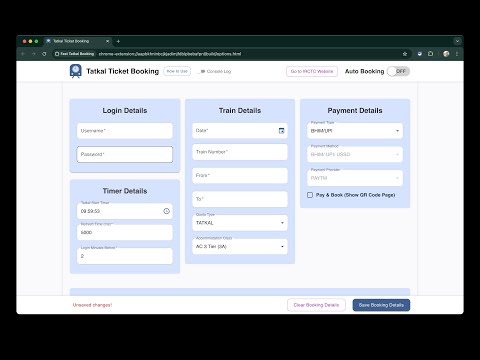
Fill in your login details. Don't worry, your information is safe and stored securely in your Chrome local storage.
16 |
Enter the details of the trains you want to book Tatkal tickets for. Use the Go to IRCTC Website button to find the required information and fill in the form.
17 |
We have provided default payment options via Paytm UPI, which is faster than other payment methods.
18 |
If you want to see the final QR code page for payment, check the Pay & Book (Show QR Code Page) box.
19 |
Timer Details:
20 |
21 |
Tatkal Start Timer:
22 |
23 |
For AC class, the Tatkal start timer is set to 09:59:53.
24 |
For Sleeper class, it's set to 10:59:53.
25 |
26 |
27 |
Refresh Time (ms) is set to 5000ms (5 seconds).
28 |
Login Minutes Before is set to 2 minutes by default.
29 |
30 |
Click the Save Settings button once all details are filled in.
31 |
32 |
33 | You can adjust both the start timer and refresh time according to your needs.
34 |
35 |
36 |
37 |
38 | Auto Booking Switch
39 |
40 |
If the switch is on, the extension will run automatically on the IRCTC website.
41 |
If the switch is off, it will not run.
42 |
43 |
44 |
45 |
46 | How to Add Master Data Passenger
47 |
48 |
Enter the Passenger First name or the exact name present in the IRCTC master data.
49 |
If there are multiple passengers, separate the names with commas (e.g., Ajay,Rahul).
50 |
51 | How to Add a New Passenger
52 |
53 |
Fill in the passenger's details and click Add Passenger.
54 |
55 |
56 | Please check the IRCTC Master Data checkbox to use the master data present in the IRCTC account.
57 |
58 |
59 |
60 |
61 | What to Do on the IRCTC Site While Booking?
62 |
63 |
At the login prompt, fill in the captcha and press Enter.
64 |
65 |
66 |
67 | );
68 | };
69 |
70 | export default HowToUse;
71 |
--------------------------------------------------------------------------------
/react-app/src/components/PassengerDetails.js:
--------------------------------------------------------------------------------
1 | import React, { useState, useEffect } from 'react';
2 | import { AppBar, Tabs, Tab, Box, Checkbox, Typography, FormControlLabel, Stack, Tooltip } from '@mui/material';
3 | import PassengerNames from './PassengerNames';
4 | import PassengerList from './PassengerList';
5 | import { sharedStyles } from '../styles';
6 | import { useAppContext } from '../contexts/AppContext';
7 |
8 | const PassengerDetails = () => {
9 | const { formData, setFormData, handleChange } = useAppContext();
10 | const [value, setValue] = useState(0); // State to manage the active tab
11 |
12 | // Retrieve selected tab from Chrome storage on mount
13 | useEffect(() => {
14 | if (typeof chrome !== 'undefined' && chrome.storage) {
15 | chrome.storage.local.get('selectedTab', (result) => {
16 | if (result.selectedTab !== undefined) {
17 | setValue(result.selectedTab);
18 | }
19 | });
20 | }
21 | }, []);
22 |
23 | const handleTabChange = (event, newValue) => {
24 | setValue(newValue);
25 | if (typeof chrome !== 'undefined' && chrome.storage) {
26 | chrome.storage.local.set({ 'selectedTab': newValue }); // Save the new tab value
27 | }
28 | };
29 |
30 | return (
31 |
32 |
33 | Passenger Details
34 |
35 |
36 |
37 |
43 | {/* AppBar with Tabs on the left side */}
44 |
45 |
46 |
54 |
55 |
56 |
57 |
58 |
59 |
60 | {/* Checkbox on the right side */}
61 |
62 |
63 |
73 | }
74 | label={
75 |
76 | Use IRCTC Master Data
77 |
78 | }
79 | sx={{ whiteSpace: 'nowrap' }}
80 | />
81 |
82 |
83 |
84 |
85 |
86 | {value === 0 && (
87 |
88 | )}
89 | {value === 1 && (
90 |
91 | )}
92 |
93 |
94 |
95 | );
96 | };
97 |
98 | export default PassengerDetails;
--------------------------------------------------------------------------------
/react-app/src/contexts/AppContext.js:
--------------------------------------------------------------------------------
1 | import React, { createContext, useContext, useState, useEffect } from 'react';
2 | import PropTypes from 'prop-types';
3 | import { isEqual } from '../utils';
4 | import defaultSettings from '../defaultSettings';
5 | import {
6 | getFormDataFromStorage,
7 | saveFormDataToStorage,
8 | removeFormDataFromStorage,
9 | getAutomationStatus,
10 | setAutomationStatus
11 | } from '../apis';
12 |
13 | const AppContext = createContext();
14 |
15 | export const AppProvider = ({ children }) => {
16 | const [formData, setFormData] = useState(defaultSettings);
17 | const [isDirty, setIsDirty] = useState(false);
18 | const [savedData, setSavedData] = useState(defaultSettings);
19 | const [isFormLoaded, setIsFormLoaded] = useState(false);
20 | const [isBookingReady, setIsBookingReady] = useState(true);
21 |
22 | // Handle change for form fields
23 | const handleChange = (e) => {
24 | let { name, value, type, checked } = e.target;
25 |
26 | setFormData((prevState) => ({
27 | ...prevState,
28 | [name]: type === 'checkbox' ? checked : value,
29 | }));
30 | };
31 |
32 | // Load form data on mount
33 | useEffect(() => {
34 | const loadData = async () => {
35 | try {
36 | const data = await getFormDataFromStorage();
37 | if (data) {
38 | setFormData(data);
39 | setSavedData(data);
40 | }
41 | setIsFormLoaded(true);
42 | } catch (error) {
43 | console.error('Failed to load data:', error);
44 | }
45 | };
46 | loadData();
47 | }, []);
48 |
49 | // Track unsaved changes after form load
50 | useEffect(() => {
51 | if (isFormLoaded) {
52 | setIsDirty(!isEqual(formData, savedData, ['automationStatus']));
53 | }
54 | }, [formData, savedData, isFormLoaded]);
55 |
56 | // Save form data to chrome.storage
57 | const saveFormData = async () => {
58 | try {
59 | await saveFormDataToStorage(formData);
60 | setSavedData(formData);
61 | setIsDirty(false);
62 | } catch (error) {
63 | console.error('Failed to save data:', error);
64 | }
65 | };
66 |
67 | // Warn user about unsaved changes on page unload
68 | useEffect(() => {
69 | const handleBeforeUnload = (e) => {
70 | if (isDirty) {
71 | e.preventDefault();
72 | e.returnValue = ''; // Modern browsers show a default message
73 | }
74 | };
75 | window.addEventListener('beforeunload', handleBeforeUnload);
76 |
77 | return () => {
78 | window.removeEventListener('beforeunload', handleBeforeUnload);
79 | };
80 | }, [isDirty]);
81 |
82 | const toggleAutomation = async () => {
83 | try {
84 | setFormData((prevState) => ({
85 | ...prevState,
86 | automationStatus: !prevState.automationStatus,
87 | }));
88 | const currentStatus = await getAutomationStatus();
89 | const updatedStatus = !currentStatus;
90 |
91 | await setAutomationStatus(updatedStatus);
92 |
93 | } catch (error) {
94 | console.error('Failed to toggle automation status:', error);
95 | }
96 | };
97 |
98 | const resetSettings = async () => {
99 | setFormData(defaultSettings);
100 | setSavedData(defaultSettings);
101 | try {
102 | await removeFormDataFromStorage();
103 | } catch (error) {
104 | console.error('Failed to reset settings:', error);
105 | }
106 | setIsDirty(false);
107 | };
108 |
109 | return (
110 |
124 | {children}
125 |
126 | );
127 | };
128 |
129 | export const useAppContext = () => useContext(AppContext);
130 |
131 | AppProvider.propTypes = {
132 | children: PropTypes.node.isRequired,
133 | };
134 |
135 | export default AppContext;
--------------------------------------------------------------------------------
/chrome-extension/src/scripts/storage.js:
--------------------------------------------------------------------------------
1 | import logger from './logger';
2 |
3 | const STORAGE_KEY = 'tatkalTicketBookingFormData';
4 |
5 | export let automationStatus = false;
6 | export let username = '';
7 | export let password = '';
8 | export let targetTime ='09:59:53';
9 | export let passengerList = [];
10 | export let masterData = false;
11 | export let passengerNames = '';
12 | export let trainNumber = '';
13 | export let from = '';
14 | export let to = '';
15 | export let quotaType = '';
16 | export let accommodationClass = '';
17 | export let dateString = '';
18 | export let refreshTime = 5000; // 5 seconds;
19 | export let paymentType = 'BHIM/UPI'; // Rs 20 chargs for bhim/upi, Rs 30 for cards / net banking / wallets
20 | export let paymentMethod = 'BHIM/ UPI/ USSD'; // or IRCTC eWallet
21 | export let paymentProvider = 'PAYTM'; // paytm, amazon / or IRCTC eWallet
22 | export let autoPay = false; // auto click on pay button
23 | export let autoProcessPopup = false;
24 | export let mobileNumber = '';
25 | export let autoUpgradation = false;
26 | export let confirmberths = false;
27 | export let travelInsuranceOpted = 'yes';
28 |
29 | const defaultSettings = {
30 | automationStatus: false,
31 | username: '',
32 | password: '',
33 | targetTime: '09:59:53',
34 | passengerList: [],
35 | masterData: false,
36 | passengerNames: [],
37 | trainNumber: '',
38 | from: '',
39 | to: '',
40 | quotaType: '',
41 | accommodationClass: '',
42 | dateString: '',
43 | refreshTime: 5000,
44 | paymentType: 'BHIM/UPI',
45 | paymentMethod: 'BHIM/ UPI/ USSD',
46 | paymentProvider: 'PAYTM',
47 | autoPay: false,
48 | autoProcessPopup: false,
49 | mobileNumber:'',
50 | autoUpgradation:false,
51 | confirmberths:false,
52 | travelInsuranceOpted:'yes'
53 | };
54 |
55 | async function getSettings() {
56 | try {
57 | const result = await chrome.storage.local.get(STORAGE_KEY);
58 | if (chrome.runtime.lastError) {
59 | logger.error("Error retrieving settings:", chrome.runtime.lastError);
60 | return;
61 | }
62 |
63 | const items = result[STORAGE_KEY] || defaultSettings;
64 | logger.info('Settings loaded:', items);
65 | // Now 'items' will contain all the settings, either retrieved from storage or the defaults
66 | username = items.username;
67 | password = items.password;
68 | targetTime = items.targetTime;
69 | passengerList = items.passengerList;
70 | masterData = items.masterData;
71 | passengerNames = items.passengerNames;
72 | trainNumber = items.trainNumber;
73 | from = items.from;
74 | to = items.to;
75 | quotaType = items.quotaType;
76 | accommodationClass = items.accommodationClass;
77 | dateString = new Date(items.dateString).toLocaleDateString('en-GB');
78 | refreshTime = items.refreshTime;
79 | autoPay = items.autoPay;
80 | paymentType = items.paymentType;
81 | paymentMethod = items.paymentMethod;
82 | paymentProvider = items.paymentProvider;
83 | autoProcessPopup = items.autoProcessPopup;
84 | mobileNumber = items.mobileNumber;
85 | autoUpgradation = items.autoUpgradation;
86 | confirmberths = items.confirmberths;
87 | travelInsuranceOpted = items.travelInsuranceOpted;
88 | } catch (error) {
89 | logger.error("Error retrieving settings:", error);
90 | }
91 | }
92 | async function getAutomationStatus() {
93 | try {
94 | const result = await chrome.storage.local.get(STORAGE_KEY);
95 | if (chrome.runtime.lastError) {
96 | logger.error("Error retrieving automation status:", chrome.runtime.lastError);
97 | return defaultSettings.automationStatus; // Return default if error
98 | }
99 |
100 | const settings = result[STORAGE_KEY] || {}; // Use empty object if not found
101 | const automationStatus = settings.automationStatus !== undefined ? settings.automationStatus : defaultSettings.automationStatus; // Use default if not found
102 | return automationStatus;
103 | } catch (error) {
104 | logger.error("Error retrieving automation status:", error);
105 | return defaultSettings.automationStatus; // Return default if error
106 | }
107 | }
108 |
109 | export {
110 | defaultSettings,
111 | getSettings,
112 | getAutomationStatus
113 | }
--------------------------------------------------------------------------------
/.github/workflows/build-and-release.yml:
--------------------------------------------------------------------------------
1 | ---
2 |
3 | name: Build and Release
4 |
5 | # Trigger the workflow on tag push, release creation, or PR to main
6 | on:
7 | push:
8 | tags:
9 | - v*
10 | release:
11 | types:
12 | - created
13 | pull_request:
14 | branches:
15 | - main
16 |
17 | jobs:
18 | build:
19 | runs-on: ubuntu-latest
20 | steps:
21 | # Checkout the repository
22 | - name: Check out the repository
23 | uses: actions/checkout@v3
24 |
25 | # Cache Node.js modules for faster builds
26 | - name: Cache Node.js modules
27 | uses: actions/cache@v3
28 | with:
29 | path: ~/.npm
30 | key: ${{ runner.os }}-node-${{ hashFiles('**/package-lock.json') }}
31 | restore-keys: |
32 | ${{ runner.os }}-node-
33 |
34 | # Set up Node.js environment
35 | - name: Set up Node.js
36 | uses: actions/setup-node@v3
37 | with:
38 | node-version: "16"
39 |
40 | # Install project dependencies
41 | - name: Install dependencies
42 | run: npm install
43 |
44 | # Build Chrome Extension and React App
45 | - name: Build Chrome Extension and React App
46 | run: npm run build
47 |
48 | # Extract the tag name from the GitHub ref
49 | - name: Get the Tag Name
50 | id: get_tag
51 | run: |
52 | if [[ "${GITHUB_REF}" == refs/tags/* ]]; then
53 | echo "tag_name=${GITHUB_REF#refs/tags/}" >> $GITHUB_ENV
54 | else
55 | echo "tag_name=none" >> $GITHUB_ENV
56 | fi
57 |
58 | # Ensure dist folder exists after build
59 | - name: Check if dist exists
60 | if: env.tag_name != 'none'
61 | run: |
62 | if [ ! -d "dist" ]; then
63 | echo "❌ dist folder not found. Build failed."
64 | exit 1
65 | fi
66 |
67 | # Zip the dist folder with repo name and tag
68 | - name: Zip the dist folder
69 | if: env.tag_name != 'none'
70 | run: |
71 | ZIP_NAME="${{ github.event.repository.name }}-${{ env.tag_name }}"
72 | mv dist "$ZIP_NAME"
73 | zip -r "$ZIP_NAME.zip" "$ZIP_NAME"
74 |
75 | # Create GitHub Release if a tag is pushed
76 | - name: Create GitHub Release
77 | if: startsWith(github.ref, 'refs/tags/')
78 | uses: softprops/action-gh-release@v1
79 | with:
80 | tag_name: ${{ env.tag_name }}
81 | env:
82 | GITHUB_TOKEN: ${{ secrets.GITHUB_TOKEN }}
83 |
84 | # Upload the zipped build as a release asset
85 | - name: Upload Release Asset
86 | if: github.event_name == 'release'
87 | uses: actions/upload-release-asset@v1
88 | with:
89 | upload_url: ${{ github.event.release.upload_url }}
90 | asset_path: ./${{ github.event.repository.name }}-${{ env.tag_name }}.zip
91 | asset_name: ${{ github.event.repository.name }}-${{ env.tag_name }}.zip
92 | asset_content_type: application/zip
93 | env:
94 | GITHUB_TOKEN: ${{ secrets.GITHUB_TOKEN }}
95 |
96 | # Notify on successful tag push
97 | - name: Notify on Tag Push
98 | if: startsWith(github.ref, 'refs/tags/')
99 | run: |
100 | echo "✅ Tag push detected. Zip file created: ${{ github.event.repository.name }}-${{ env.tag_name }}.zip"
101 |
102 | # Auto-sync dev branch with main after a successful release
103 | sync-dev:
104 | needs: build
105 | runs-on: ubuntu-latest
106 | if: github.ref == 'refs/heads/main'
107 | steps:
108 | - name: Check out repository
109 | uses: actions/checkout@v3
110 |
111 | - name: Configure Git
112 | run: |
113 | git config user.name "github-actions"
114 | git config user.email "github-actions@github.com"
115 |
116 | - name: Sync main to dev
117 | run: |
118 | git fetch origin
119 | git checkout dev
120 | git merge origin/main --no-ff -m "🔄 Sync main to dev"
121 | git push origin dev
122 | env:
123 | GITHUB_TOKEN: ${{ secrets.GITHUB_TOKEN }}
124 |
125 |
--------------------------------------------------------------------------------
/README.md:
--------------------------------------------------------------------------------
1 | # IRCTC Tatkal Booking Chrome Extension (Educational Purpose Only)
2 |
3 | Streamline your Tatkal ticket booking process with lightning-fast efficiency. Experience seamless clicks and secure your confirmed tickets hassle-free.
4 |
5 |
6 |
7 |
8 |
9 | # Project Demo Video:
10 |
11 |
12 |
13 |
14 |
15 |
16 | https://www.youtube.com/watch?v=MvgoZzUy7Uo
17 |
18 |
19 | ## Table of Contents
20 |
21 | - [Introduction](#introduction)
22 | - [Features](#features)
23 | - [Installation](#installation)
24 | - [Usage](#usage)
25 | - [Contributing](#contributing)
26 | - [License](#license)
27 |
28 | ## Introduction
29 |
30 | This Chrome extension is a personal project developed for educational purposes to demonstrate automation techniques related to ticket booking on the IRCTC website. It is not affiliated with or endorsed by IRCTC. All rights pertaining to the IRCTC platform and its services are owned by IRCTC.
31 |
32 | ## Features
33 |
34 | - Fast and efficient Tatkal ticket booking process
35 | - Seamless clicks and navigation on the IRCTC website
36 | - Customizable settings for personalized usage
37 | - Reliable performance and secure ticket booking
38 |
39 | ## Installation
40 |
41 | To install the IRCTC Tatkal Booking Chrome Extension, follow these steps:
42 | 1. Download the extension files from the [release page](https://github.com/dpak-maurya/irctc-tatkal-ticket-booking/releases). For version v6.0.0 and onwards, please download asset file i.e v6.0.0-alpha.zip
43 | 3. Extract the files to a folder on your computer.
44 | 4. Open Google Chrome.
45 | 5. Go to `chrome://extensions/`.
46 | 6. Enable Developer mode.
47 | 7. Click on "Load unpacked" and select the folder where you extracted the extension files.
48 |
49 | ## Usage
50 |
51 | Once installed, the extension will be available in your Chrome browser. Simply navigate to the IRCTC website and start using the extension to streamline your Tatkal ticket booking process.
52 |
53 | ## Contributing
54 |
55 | Contributions to the IRCTC Tatkal Booking Chrome Extension are welcome! If you have any suggestions, bug reports, or feature requests, please feel free to open an issue or submit a pull request on the GitHub repository.
56 |
57 | ## License
58 |
59 | This Chrome extension is a personal project developed for educational purposes to demonstrate automation techniques related to ticket booking on the IRCTC website. It is not affiliated with or endorsed by IRCTC. All rights pertaining to the IRCTC platform and its services are owned by IRCTC.
60 |
61 | Last updated September 19, 2024
62 |
63 |
64 | ## Disclaimer
65 | The information provided by [dpak-maurya/irctc-tatkal-ticket-booking] ("we," "us," or "our") on this repository (the "Repository") is for **educational purposes only**. All information on the Repository is provided in good faith; however, we make no representation or warranty of any kind, express or implied, regarding the accuracy, adequacy, validity, reliability, availability, or completeness of any information on the Repository.
66 |
67 | **Important Note:** Users are advised to comply with IRCTC's terms of service and should not use this tool for bulk bookings or reselling tickets. Any misuse of this tool is solely at the user's risk.
68 |
69 | Under no circumstance shall we have any liability to you for any loss or damage of any kind incurred as a result of the use of the Repository or reliance on any information provided therein. Your use of the Repository and your reliance on any information on the Repository is solely at your own risk and must comply with applicable laws and regulations.
70 |
71 | ## Privacy Policy
72 | This Chrome extension does not store any personal data or sensitive information. All operations performed by this extension are conducted locally within your browser's storage.
73 | - **Data Collection:** This extension does not collect, store, or transmit any user data to third parties.
74 | - **Local Storage:** Any data that may be temporarily stored during usage (e.g., session data) is stored only in your browser's local storage and is not accessible outside of your device.
75 | - **User Consent:** By using this extension, you acknowledge that you understand its purpose and agree to use it responsibly in accordance with IRCTC's terms of service.
76 |
--------------------------------------------------------------------------------
/react-app/src/components/Header.js:
--------------------------------------------------------------------------------
1 | // components/Header.js
2 | import React from 'react';
3 | import { Box, Button, Typography, Stack, Container, useMediaQuery } from '@mui/material';
4 | import LogoIcon from './LogoIcon';
5 | import CustomSwitch from './CustomSwitch';
6 | import { useAppContext } from '../contexts/AppContext';
7 | import BookingCountdown from './BookingCountDown';
8 | import DebugSettings from './DebugSettings';
9 |
10 | const Header = () => {
11 | const { formData, toggleAutomation } = useAppContext();
12 | const isSmallScreen = useMediaQuery((theme) => theme.breakpoints.down('sm'));
13 |
14 | return (
15 |
27 |
28 |
35 |
42 |
43 |
44 | Tatkal Ticket Booking
45 |
46 | {!isSmallScreen && (
47 |
54 |
62 |
63 |
64 |
65 |
66 | )}
67 |
68 |
69 |
70 | {isSmallScreen && ( // Conditional rendering for small screens
71 |
79 |
87 |
88 |
89 |
90 |
91 | )}
92 |
93 |
101 | {['TATKAL', 'PREMIUM TATKAL'].includes(formData.quotaType) && }
102 | {formData.quotaType === 'GENERAL' && (
103 |
116 | )}
117 |
118 |
123 |
124 |
125 |
126 |
127 | );
128 | };
129 |
130 | export default Header;
131 |
132 |
133 |
--------------------------------------------------------------------------------
/chrome-extension/src/scripts/domSelectors.js:
--------------------------------------------------------------------------------
1 | /* global module */
2 |
3 | export const APP_HEADER = 'app-header';
4 |
5 | // Login Elements
6 | export const LOGIN_SELECTORS = {
7 | LOGIN_BUTTON: 'app-header a.loginText',
8 | LOGIN_COMPONENT: 'app-login',
9 | LOGIN_USERID: 'input[formcontrolname="userid"]',
10 | LOGIN_PASSWORD: 'input[formcontrolname="password"]',
11 | LOGIN_CAPTCHA_IMAGE: 'app-captcha .captcha-img',
12 | LOGIN_CAPTCHA_INPUT: 'app-captcha #captcha',
13 | };
14 |
15 | // Search Journey Elements
16 | export const JOURNEY_SELECTORS = {
17 | JOURNEY_INPUT_COMPONENT: 'app-jp-input',
18 | ORIGIN_STATION_CODE: '#origin input',
19 | DESTINATION_STATION_CODE: '#destination input',
20 | STATION_CODE_LIST: '.ui-autocomplete-items li',
21 | JOURNEY_QUOTA: '#journeyQuota>div',
22 | JOURNEY_QUOTA_LIST: '#journeyQuota p-dropdownitem span',
23 | JOURNEY_DATE: '#jDate input',
24 | CURRENT_TIME: 'app-header .h_head1>span strong',
25 | JOURNEY_SEARCH_BUTTON: 'button[type="submit"][label="Find Trains"].search_btn.train_Search',
26 | };
27 |
28 | // Modify Search Train Elements
29 | export const MODIFY_SEARCH_SELECTORS = {
30 | MODIFY_SEARCH_COMPONENT: 'app-modify-search',
31 | MODIFY_JOURNEY_DATE: '#journeyDate input',
32 | };
33 |
34 | // Train List Elements
35 | export const TRAIN_LIST_SELECTORS = {
36 | TRAIN_LIST_COMPONENT: 'app-train-list',
37 | TRAIN_COMPONENT: 'app-train-avl-enq',
38 | FIND_TRAIN_NUMBER: 'app-train-avl-enq .train-heading',
39 | AVAILABLE_CLASS: '.pre-avl',
40 | SELECTED_CLASS_TAB: 'p-tabmenu li[role="tab"][aria-selected="true"][aria-expanded="true"] a>div',
41 | BOOK_NOW_BUTTON: 'button.btnDefault.train_Search',
42 | BUTTON_DISABLE_CLASS: 'disable-book',
43 | LINK_INSERTED: '.link.ng-star-inserted',
44 | };
45 |
46 | // Popup Elements
47 | export const POPUP_SELECTORS = {
48 | DIALOG_FROM: 'p-confirmdialog[key="tofrom"]',
49 | DIALOG_ACCEPT: '.ui-confirmdialog-acceptbutton',
50 | };
51 |
52 | // Passenger Input Elements
53 | export const PASSENGER_SELECTORS = {
54 | PASSENGER_APP_COMPONENT: 'app-passenger-input',
55 | PASSENGER_COMPONENT: 'app-passenger',
56 | PASSENGER_NEXT_ROW: 'app-passenger-input p-panel .prenext',
57 | PASSENGER_NEXT_ROW_TEXT: '+ Add Passenger',
58 | PASSENGER_REMOVE_ROW: 'app-passenger-input p-panel a.fa-remove',
59 | PASSENGER_INPUT_COMPONENT: 'app-passenger-input',
60 | PASSENGER_NAME_INPUT: 'p-autocomplete input',
61 | PASSENGER_NAME_LIST: '.ui-autocomplete-items li',
62 | PASSENGER_AGE_INPUT: 'input[formcontrolname="passengerAge"]',
63 | PASSENGER_GENDER_INPUT: 'select[formcontrolname="passengerGender"]',
64 | PASSENGER_BERTH_CHOICE: 'select[formcontrolname="passengerBerthChoice"]',
65 | PASSENGER_FOOD_CHOICE : 'select[formcontrolname="passengerFoodChoice"]',
66 | PASSENGER_MOBILE_NUMBER: 'mobileNumber',
67 | PASSENGER_PREFERENCE_AUTOUPGRADATION: 'autoUpgradation',
68 | PASSENGER_PREFERENCE_CONFIRMBERTHS: 'confirmberths',
69 | PASSENGER_PREFERENCE_TRAVELINSURANCEOPTED: 'input[type="radio"][name="travelInsuranceOpted-0"]',
70 | PASSENGER_SUBMIT_BUTTON: 'app-passenger-input button.btnDefault.train_Search',
71 | };
72 |
73 | // Review Ticket and Fill Captcha Elements
74 | export const REVIEW_SELECTORS = {
75 | REVIEW_COMPONENT: 'app-review-booking',
76 | REVIEW_TRAIN_HEADER: 'app-train-header',
77 | REVIEW_CAPTCHA_IMAGE: 'app-captcha .captcha-img',
78 | REVIEW_CAPTCHA_INPUT: 'captcha',
79 | REVIEW_AVAILABLE: '.AVAILABLE',
80 | REVIEW_WAITING: '.WL',
81 | REVIEW_SUBMIT_BUTTON: 'app-review-booking button.btnDefault.train_Search',
82 | };
83 |
84 | // Payment Details Elements
85 | export const PAYMENT_SELECTORS = {
86 | PAYMENT_COMPONENT: 'app-payment-options',
87 | PAYMENT_TYPE: 'input[type="radio"][name="paymentType"]',
88 | PAYMENT_METHOD: '.bank-type.ng-star-inserted',
89 | PAYMENT_PROVIDER: '.bank-text',
90 | PAY_BUTTON: '.btn-primary.ng-star-inserted',
91 | PAY_BUTTON_TEXT: 'Pay & Book ',
92 | };
93 |
94 | // eWallet Elements
95 | export const EWALLET_SELECTORS = {
96 | EWALLET_IRCTC_DEFAULT: 'IRCTC eWallet',
97 | EWALLET_COMPONENT: 'app-ewallet-confirm',
98 | EWALLET_BUTTON_LIST: 'button.mob-bot-btn.search_btn',
99 | EWALLET_CONFIRM_BUTTON_TEXT: 'CONFIRM',
100 | };
101 |
102 | export const TRAIN_LIST_COMPONENT = TRAIN_LIST_SELECTORS.TRAIN_LIST_COMPONENT;
103 | export const PASSENGER_APP_COMPONENT = PASSENGER_SELECTORS.PASSENGER_APP_COMPONENT;
104 | export const REVIEW_COMPONENT = REVIEW_SELECTORS.REVIEW_COMPONENT;
105 | export const PAYMENT_COMPONENT = PAYMENT_SELECTORS.PAYMENT_COMPONENT;
106 | export const EWALLET_COMPONENT = EWALLET_SELECTORS.EWALLET_COMPONENT;
107 | export const EWALLET_IRCTC_DEFAULT = EWALLET_SELECTORS.EWALLET_IRCTC_DEFAULT;
108 |
109 |
110 |
111 |
--------------------------------------------------------------------------------
/react-app/public/icon.svg:
--------------------------------------------------------------------------------
1 |
80 |
--------------------------------------------------------------------------------
/chrome-extension/assets/icon.svg:
--------------------------------------------------------------------------------
1 |
80 |
--------------------------------------------------------------------------------
/react-app/src/components/ModalPopup.js:
--------------------------------------------------------------------------------
1 | import React from 'react';
2 | import PropTypes from 'prop-types';
3 | import {
4 | Dialog,
5 | DialogTitle,
6 | DialogContent,
7 | DialogActions,
8 | Button,
9 | Typography,
10 | IconButton,
11 | } from '@mui/material';
12 | import {
13 | Close as CloseIcon,
14 | Warning as WarningIcon,
15 | Error as ErrorIcon,
16 | Info as InfoIcon,
17 | CheckCircle as SuccessIcon
18 | } from '@mui/icons-material';
19 |
20 | const ModalPopup = ({
21 | open,
22 | onClose,
23 | onConfirm,
24 | title,
25 | message,
26 | variant,
27 | }) => {
28 | const getVariantProps = () => {
29 | switch (variant) {
30 | case 'warning':
31 | return {
32 | icon: ,
33 | backgroundColor: '#ED6C02',
34 | confirmText: 'OK',
35 | showCancel: false,
36 | };
37 | case 'error':
38 | return {
39 | icon: ,
40 | backgroundColor: '#D32F2F',
41 | confirmText: 'Dismiss',
42 | showCancel: false,
43 | };
44 | case 'confirmation':
45 | return {
46 | icon: ,
47 | backgroundColor: '#D32F2F',
48 | confirmText: 'Confirm',
49 | cancelText: 'Cancel',
50 | showCancel: true,
51 | };
52 | case 'success':
53 | return {
54 | icon: ,
55 | backgroundColor: '#2E7D32',
56 | confirmText: 'OK',
57 | showCancel: false,
58 | };
59 | case 'info':
60 | default:
61 | return {
62 | icon: ,
63 | backgroundColor: '#0288D1',
64 | confirmText: 'OK',
65 | showCancel: false,
66 | };
67 | }
68 | };
69 |
70 | const { icon, backgroundColor, confirmText, cancelText, showCancel } = getVariantProps();
71 |
72 | return (
73 |
185 | );
186 | };
187 |
188 | ModalPopup.propTypes = {
189 | open: PropTypes.bool.isRequired,
190 | onClose: PropTypes.func.isRequired,
191 | onConfirm: PropTypes.func,
192 | title: PropTypes.string.isRequired,
193 | message: PropTypes.string.isRequired,
194 | variant: PropTypes.oneOf(['info', 'warning', 'error', 'confirmation', 'success']),
195 | };
196 |
197 | export default ModalPopup;
198 |
--------------------------------------------------------------------------------
/react-app/src/components/TrainDetails.js:
--------------------------------------------------------------------------------
1 | import React from 'react';
2 | import { TextField, Box, Typography, Select, MenuItem, FormControl, InputLabel } from '@mui/material';
3 | import { sharedStyles } from '../styles';
4 | import MyDatePicker from './MyDatePicker';
5 | import { useAppContext } from '../contexts/AppContext';
6 |
7 | const getTargetTime = (quotaType, accommodationClass) => {
8 | if (quotaType === 'GENERAL') return '07:59:53';
9 | if (['SL', 'FC', '2S', 'VS'].includes(accommodationClass)) return '10:59:53';
10 | return '09:59:53';
11 | };
12 |
13 | const formatStationCode = (value) => value.toUpperCase().replace(/[^A-Z]/g, '');
14 | const formatTrainNumber = (value) => value.replace(/\D/g, '');
15 |
16 | function TrainDetails() {
17 | const { formData, setFormData, handleChange } = useAppContext();
18 |
19 | const handleStationCode = (event) => {
20 | const { name, value } = event.target;
21 | setFormData({ ...formData, [name]: formatStationCode(value) });
22 | };
23 |
24 | const handleTrainNumber = (event) => {
25 | const { name, value } = event.target;
26 | setFormData({ ...formData, [name]: formatTrainNumber(value) });
27 | };
28 |
29 | const handleQuotaTypeChange = (event) => {
30 | const { value } = event.target;
31 | const targetTime = getTargetTime(value, formData?.accommodationClass);
32 | setFormData({ ...formData, quotaType: value, targetTime });
33 | };
34 |
35 | const handleAccommodationClassChange = (event) => {
36 | const { value } = event.target;
37 | const targetTime = getTargetTime(formData?.quotaType, value);
38 | setFormData({ ...formData, accommodationClass: value, targetTime });
39 | };
40 |
41 | return (
42 |
43 |
49 | Train Details
50 |
51 |
52 |
69 |
86 |
103 |
104 | Quota Type
105 |
119 |
120 |
121 |
122 | Accommodation Class
123 |
124 |
147 |
148 |
149 | );
150 | }
151 |
152 | export default TrainDetails;
153 |
--------------------------------------------------------------------------------
/react-app/src/components/PaymentDetails.js:
--------------------------------------------------------------------------------
1 | import React from 'react';
2 | import {
3 | Box,
4 | Typography,
5 | FormControlLabel,
6 | Checkbox,
7 | FormControl,
8 | InputLabel,
9 | Select,
10 | MenuItem,
11 | Tooltip
12 | } from '@mui/material';
13 | import { sharedStyles } from '../styles';
14 | import { useAppContext } from '../contexts/AppContext';
15 | import { useModalContext } from '../contexts/ModalContext';
16 | import ModalPopup from './ModalPopup';
17 |
18 | function PaymentDetails() {
19 | const { formData, handleChange } = useAppContext();
20 | const { isModalOpen, modalConfig, openModal, closeModal } = useModalContext();
21 |
22 | // Payment method options based on payment type
23 | const paymentMethodOptions = {
24 | 'BHIM/UPI': ['BHIM/ UPI/ USSD'],
25 | 'Wallets': ['IRCTC eWallet']
26 | };
27 |
28 | // Payment provider options based on payment type and method
29 | const paymentProviderOptions = {
30 | 'BHIM/ UPI/ USSD': ['PAYTM'],
31 | 'IRCTC eWallet': ['IRCTC eWallet']
32 | };
33 |
34 | const handlePaymentTypeChange = (e) => {
35 | const newPaymentType = e.target.value;
36 |
37 | // Show confirmation modal when changing payment type
38 | if (formData.paymentType && formData.paymentType !== newPaymentType) {
39 | openModal(
40 | "warning",
41 | "Payment Type Changed",
42 | "Changing payment type will update available payment methods and providers. Your previous payment method and provider selection will be reset."
43 | )
44 | }
45 |
46 | // Update payment type and set default payment method and provider
47 | handleChange({
48 | target: {
49 | name: 'paymentType',
50 | value: newPaymentType
51 | }
52 | });
53 |
54 | // Set default payment method for selected payment type
55 | handleChange({
56 | target: {
57 | name: 'paymentMethod',
58 | value: paymentMethodOptions[newPaymentType][0]
59 | }
60 | });
61 |
62 | // Set default payment provider for selected payment method
63 | handleChange({
64 | target: {
65 | name: 'paymentProvider',
66 | value: paymentProviderOptions[paymentMethodOptions[newPaymentType][0]][0]
67 | }
68 | });
69 | };
70 |
71 | return (
72 |
73 |
74 | Payment Details
75 |
76 |
77 |
78 | Payment Type
79 |
93 |
94 |
95 |
96 | Payment Method
97 |
113 |
114 |
115 |
116 | Payment Provider
117 |
133 |
134 |
135 |
136 |
137 | {formData.paymentType === 'Wallets' ? 'Enabling this will directly deduct the payment from your wallet.' : 'Enabling this will show the QR code page for payment.'}
138 |
139 | > } arrow>
140 |
148 | }
149 | label={Pay & Book {formData.paymentType === 'Wallets' ? '(Direct Deduction)' : '(Show QR Code Page)'}}
150 | />
151 |
152 |
153 | {
157 | if (modalConfig.onConfirm) modalConfig.onConfirm();
158 | closeModal();
159 | }}
160 | title={modalConfig.title || ''}
161 | message={modalConfig.message || ''}
162 | variant={modalConfig.variant || 'warning'}
163 | />
164 |
165 | );
166 | }
167 |
168 | export default PaymentDetails;
169 |
--------------------------------------------------------------------------------
/react-app/src/components/LogoIcon.js:
--------------------------------------------------------------------------------
1 |
2 | import React from 'react';
3 |
4 | const LogoIcon = () => {
5 | return (
6 |
85 | );
86 | };
87 |
88 | export default LogoIcon;
89 |
--------------------------------------------------------------------------------
/chrome-extension/src/scripts/trainSearch.js:
--------------------------------------------------------------------------------
1 | import {
2 | JOURNEY_SELECTORS,
3 | MODIFY_SEARCH_SELECTORS
4 | } from './domSelectors';
5 | import { delay } from './utils';
6 | import logger from './logger';
7 |
8 | import { from, to, quotaType, dateString, targetTime as targetTimeString } from './storage';
9 |
10 | async function autoComplete(element, value) {
11 | // Focus on the autocomplete input to trigger the generation of options
12 | element.focus();
13 |
14 | // Set the input value
15 | element.value = value;
16 |
17 | // Simulate an input event to trigger the autocomplete options
18 | var inputEvent = new Event('input', {
19 | bubbles: true,
20 | cancelable: true,
21 | });
22 |
23 | element.dispatchEvent(inputEvent);
24 |
25 | // Wait for a short delay to ensure the options are generated
26 | await delay(600);
27 |
28 | var firstItem = document.querySelector(JOURNEY_SELECTORS.STATION_CODE_LIST);
29 | if (firstItem) {
30 | await firstItem.click();
31 | }
32 | }
33 | async function typeDate(element, mydate) {
34 | if (!element) return;
35 |
36 | // Trigger focus event
37 | element.dispatchEvent(new Event('focus', { bubbles: true }));
38 |
39 | // Clear the input field
40 | element.value = '';
41 |
42 | // Trigger input event after clearing the input field
43 | element.dispatchEvent(new Event('input', { bubbles: true }));
44 |
45 | // Iterate over each character of the date string and type it
46 | for (const char of mydate) {
47 | // Set the value of the input field to the current character
48 | element.value += char;
49 |
50 | // Trigger input event after typing each character
51 | element.dispatchEvent(new Event('input', { bubbles: true }));
52 |
53 | // Trigger keydown event with the current character
54 | element.dispatchEvent(new KeyboardEvent('keydown', { key: char }));
55 |
56 | // Wait for a short delay before typing the next character
57 | await new Promise(resolve => setTimeout(resolve, 100));
58 | }
59 |
60 | // Trigger blur event to simulate losing focus
61 | element.dispatchEvent(new Event('blur', { bubbles: true }));
62 | }
63 | async function selectQuota(element,value) {
64 |
65 | await element.click();
66 |
67 | // Simulate an onChange event to trigger the autocomplete options
68 | var inputEvent = new Event('onChange', {
69 | bubbles: true,
70 | cancelable: true,
71 | });
72 |
73 | element.dispatchEvent(inputEvent);
74 |
75 | delay(500);
76 |
77 | // Get all list items within the autocomplete dropdown
78 | var listItems = document.querySelectorAll(JOURNEY_SELECTORS.JOURNEY_QUOTA_LIST);
79 |
80 | // Loop through each list item
81 | for (let item of listItems) {
82 | // Get the text content of the list item
83 | const itemText = item.textContent.trim();
84 |
85 | // Check if the text content contains the name substring (case-insensitive)
86 | if (itemText.toLowerCase().includes(value.toLowerCase())) {
87 | // Select the list item by simulating a click
88 | item.click();
89 | break;
90 | }
91 | }
92 | }
93 | // Function to fill Journey Details
94 | async function searchTrain(){
95 | let journeyInput = document.querySelector(JOURNEY_SELECTORS.JOURNEY_INPUT_COMPONENT);
96 | let origin = journeyInput.querySelector(JOURNEY_SELECTORS.ORIGIN_STATION_CODE);
97 | let destination = journeyInput.querySelector(JOURNEY_SELECTORS.DESTINATION_STATION_CODE);
98 | let quota = journeyInput.querySelector(JOURNEY_SELECTORS.JOURNEY_QUOTA);
99 | let jDate = journeyInput.querySelector(JOURNEY_SELECTORS.JOURNEY_DATE);
100 |
101 | await autoComplete(origin,from);
102 | await autoComplete(destination,to);
103 | await typeDate(jDate,dateString);
104 | await selectQuota(quota,quotaType);
105 | }
106 | // Function to update Journey Details
107 | async function modifySearchTrain(){
108 | let journeyInput = document.querySelector(MODIFY_SEARCH_SELECTORS.MODIFY_SEARCH_COMPONENT);
109 | let origin = journeyInput.querySelector(JOURNEY_SELECTORS.ORIGIN_STATION_CODE);
110 | let destination = journeyInput.querySelector(JOURNEY_SELECTORS.DESTINATION_STATION_CODE);
111 | let quota = journeyInput.querySelector(JOURNEY_SELECTORS.JOURNEY_QUOTA);
112 | let jDate = journeyInput.querySelector(MODIFY_SEARCH_SELECTORS.MODIFY_JOURNEY_DATE);
113 |
114 | await autoComplete(origin,from);
115 | await autoComplete(destination,to);
116 | await typeDate(jDate,dateString);
117 | await selectQuota(quota,quotaType);
118 | const searchButton = journeyInput.querySelector('button[type="submit"]');
119 | await searchButton.click();
120 | }
121 | async function callSearchTrainComponent(){
122 | let journeyComponent = document.querySelector(JOURNEY_SELECTORS.JOURNEY_INPUT_COMPONENT);
123 |
124 | if(journeyComponent){
125 | await searchTrain();
126 | }
127 | else{
128 | await modifySearchTrain();
129 | }
130 | }
131 | function waitForTargetTime() {
132 | // Define the interval function
133 | const intervalId = setInterval(() => {
134 | // Extract the current time element
135 | const currentTimeElement = document.querySelector(JOURNEY_SELECTORS.CURRENT_TIME);
136 |
137 | if (!currentTimeElement) {
138 | logger.error('Current time element not found.');
139 | clearInterval(intervalId);
140 | return;
141 | }
142 |
143 | // Extract the current time string from the element
144 | const currentDateTimeString = currentTimeElement.textContent.trim();
145 | const [, currentTimeString] = currentDateTimeString.match(/\[(\d+:\d+:\d+)\]/);
146 |
147 | // Split the current time string and target time string on ":"
148 | const [currentHour, currentMinute, currentSecond] = currentTimeString.split(':').map(Number);
149 | const [targetHour, targetMinute, targetSecond] = targetTimeString.split(':').map(Number);
150 |
151 | // Compare the current time with the target time
152 | if (currentHour > targetHour ||
153 | (currentHour === targetHour && currentMinute > targetMinute) ||
154 | (currentHour === targetHour && currentMinute === targetMinute && currentSecond >= targetSecond)) {
155 | const searchButton = document.querySelector(JOURNEY_SELECTORS.JOURNEY_SEARCH_BUTTON);
156 | if (searchButton) {
157 | searchButton.click();
158 | } else {
159 | logger.warn('Search button not found.');
160 | }
161 | clearInterval(intervalId); // Stop the interval once the action is triggered
162 | }
163 | }, 1000); // Interval set to 1 second (1000 milliseconds)
164 | }
165 |
166 | export {
167 | callSearchTrainComponent,
168 | waitForTargetTime
169 | };
170 |
--------------------------------------------------------------------------------
/react-app/src/components/PassengerNames.js:
--------------------------------------------------------------------------------
1 | import React, { useEffect, useState } from 'react';
2 | import {
3 | Box,
4 | Button,
5 | } from '@mui/material';
6 | import DeleteIcon from '@mui/icons-material/Delete';
7 | import { useAppContext } from '../contexts/AppContext';
8 | import AddIcon from '@mui/icons-material/Add';
9 | import EditIcon from '@mui/icons-material/Edit';
10 | import SaveIcon from '@mui/icons-material/Save';
11 | import CancelIcon from '@mui/icons-material/Close';
12 | import { DataGrid, GridToolbarContainer, GridActionsCellItem, GridRowModes } from '@mui/x-data-grid';
13 | import PropTypes from 'prop-types';
14 |
15 | // Toolbar for adding passengers
16 | function EditToolbar(props) {
17 | const { setRows, setRowModesModel } = props;
18 |
19 | const handleClick = () => {
20 | const id = Date.now(); // Generate a unique ID based on the current timestamp
21 | setRows((oldRows) => [
22 | ...oldRows,
23 | { id, name: '', isNew: true },
24 | ]);
25 | setRowModesModel((oldModel) => ({
26 | ...oldModel,
27 | [id]: { mode: GridRowModes.Edit, fieldToFocus: 'name' },
28 | }));
29 | };
30 |
31 | // Prop types validation
32 | EditToolbar.propTypes = {
33 | setRows: PropTypes.func.isRequired,
34 | setRowModesModel: PropTypes.func.isRequired,
35 | };
36 |
37 | return (
38 |
39 | } onClick={handleClick}>
40 | Add Passenger
41 |
42 |
43 | );
44 | }
45 |
46 | const PassengerNames = () => {
47 | const { formData, handleChange } = useAppContext();
48 |
49 | const columns = [
50 | { field: 'name', headerName: 'Name', width: 180, editable: true },
51 | {
52 | field: 'actions',
53 | type: 'actions',
54 | headerName: 'Actions',
55 | width: 100,
56 | cellClassName: 'actions',
57 | getActions: ({ id }) => {
58 | const isInEditMode = rowModesModel[id]?.mode === GridRowModes.Edit;
59 | if (isInEditMode) {
60 | return [
61 | } label="Save" sx={{ color: 'primary.main' }} onClick={handleSaveClick(id)} />,
62 | } label="Cancel" onClick={handleCancelClick(id)} color="inherit" />,
63 | ];
64 | }
65 |
66 | return [
67 | } label="Edit" onClick={handleEditClick(id)} color="primary" />,
68 | } label="Delete" onClick={handleDeleteClick(id)} color="error" />,
69 | ];
70 | },
71 | },
72 | ];
73 |
74 | const [rows, setRows] = useState([]);
75 | const [rowModesModel, setRowModesModel] = useState({});
76 | const [rowSelection, setRowSelection] = useState([]);
77 |
78 | // Initialize rows and selection model from formData on mount
79 | useEffect(() => {
80 | setRows(formData.passengerNames);
81 | const initiallySelectedIds = formData.passengerNames
82 | .filter((passenger) => passenger.isSelected)
83 | .map((passenger) => passenger.id);
84 | setRowSelection(initiallySelectedIds);
85 |
86 | console.log(formData.passengerNames);
87 |
88 | }, [formData.passengerNames]);
89 |
90 | // Sync passenger list with formData
91 | const syncPassengerNames = (updatedRows) => {
92 | handleChange({ target: { name: 'passengerNames', value: updatedRows } });
93 | };
94 |
95 | const handleRowEditStop = (params, event) => {
96 | if (params.reason === 'rowFocusOut') {
97 | event.defaultMuiPrevented = true;
98 | }
99 | };
100 |
101 | const handleEditClick = (id) => () => {
102 | setRowModesModel({ ...rowModesModel, [id]: { mode: GridRowModes.Edit } });
103 | };
104 |
105 | const handleSaveClick = (id) => () => {
106 | setRowModesModel({ ...rowModesModel, [id]: { mode: GridRowModes.View } });
107 | };
108 |
109 | const handleDeleteClick = (id) => () => {
110 | const filterRows = rows.filter((row) => row.id !== id);
111 | setRows(filterRows);
112 | setRowSelection(rowSelection.filter((selectedId) => selectedId !== id)); // Remove deleted id from selection
113 | syncPassengerNames(filterRows);
114 | };
115 |
116 | const handleCancelClick = (id) => () => {
117 | setRowModesModel({
118 | ...rowModesModel,
119 | [id]: { mode: GridRowModes.View, ignoreModifications: true },
120 | });
121 |
122 | const editedRow = rows.find((row) => row.id === id);
123 | if (editedRow.isNew) {
124 | setRows(rows.filter((row) => row.id !== id));
125 | }
126 | };
127 |
128 | // Handle row updates
129 | const processRowUpdate = (newRow) => {
130 | const updatedRow = { ...newRow, isNew: false };
131 | const updatedRows = rows.map((row) => (row.id === newRow.id ? updatedRow : row));
132 | setRows(updatedRows);
133 | syncPassengerNames(updatedRows);
134 | return updatedRow;
135 | };
136 | const handleRowModesModelChange = (newRowModesModel) => {
137 | setRowModesModel(newRowModesModel);
138 | };
139 |
140 | // Handle selection change and update isSelected field
141 | const handleRowSelectionChange = (newSelection) => {
142 | console.log(newSelection)
143 | setRowSelection(newSelection);
144 |
145 | const updatedRows = rows.map((row) => ({
146 | ...row,
147 | isSelected: newSelection.includes(row.id),
148 | }));
149 | syncPassengerNames(updatedRows);
150 | };
151 |
152 | return (
153 |
154 |
178 | {rows.length === 0 && (
179 |
180 | No passengers added.
181 |
182 | )}
183 |
184 | );
185 | };
186 |
187 | export default PassengerNames;
188 |
--------------------------------------------------------------------------------
/chrome-extension/how-to-use.html:
--------------------------------------------------------------------------------
1 |
2 |
3 |
4 |
5 |
6 |
7 | Tatkal Ticket Booking - How to Use
8 |
9 |
10 |
11 |
37 |
38 |
39 |
40 |
41 |
How to Use the Tatkal Ticket Booking Extension
42 |
43 |
Fill all the form Login , Train and Payment Details
44 |
45 |
46 |
Fill in your login details. Don't worry, your information is safe and stored securely in your Chrome
47 | local storage.
48 |
Enter the details of the trains you want to book Tatkal tickets for. You can use the
49 | Go to IRCTC Website button to find the required information and fill it in the form.
50 |
51 |
For now we have provided default payment options via Paytm UPI, which is faster compared to other payment methods.
52 |
53 |
If you want to see the final QR code page for payment, check the box labeled
54 | Pay & Book (Show QR Code Page).
55 |
56 |
57 | Timer Details:
58 |
59 |
Tatkal Start Timer:
60 |
61 |
If you select AC class, Tatkal start timer will be set for
62 | 09:59:53.
63 |
64 |
If you select Sleeper class, Tatkal start timer will be set for
65 | 10:59:53.
66 |
67 |
We recommend using the default timer settings.
68 |
69 |
70 |
Refresh Time (ms): Default is set to 5000 milliseconds (5 seconds). This will
71 | refresh the train availability status every 5 seconds on the IRCTC page.
72 |
Login Minutes Before: Default is set to 2 minutes. This will login at specified minutes before Tatkal start timer.
73 |
74 |
75 |
The Tatkal Start Timer will be used to transition from search
76 | train page to train
77 | list page
78 | and there we are going to refresh the selected train using refresh time here 5 seconds
79 |
Once you've filled all the details, click on the Save Settings button.
80 |
81 |
You can adjust both the start timer and refresh time according to your preferences and needs.
82 |
83 |
84 |
85 |
Auto Booking Switch
86 |
87 |
88 |
If the switch is turned on, the extension will run automatically whenever you visit the IRCTC
89 | website
90 | and attempt to book tickets using the provided settings and passenger details.
91 |
If the switch is turned off, the extension will not run on the IRCTC page.
92 |
If the switch is on and Tatkal start timer is set, the extension will automatically log at specified minutes(2 minutes by default)
93 | before the start timer, and the Go to IRCTC Website button will disappear.
94 |
If the switch is on and Tatkal start timer is set, and there is less than specified minutes available before
95 | the start timer, the Book Ticket on IRCTC button will appear, allowing you to book
96 | manually.
97 |
98 |
99 |
100 |
101 |
How to Add Passengers for Tatkal Booking 🚆
102 |
103 |
Adding a New Passenger
104 |
105 |
Select the Passengers List Tab
106 |
Click on Add Passenger and Fill in the Name, Age, Gender, and Seat Preference.
107 |
Click the Save Icon button to save them.
108 |
Now select the checkbox and the added passenger will be selected for booking.
109 |
If you don’t want to book for a passenger, simply uncheck or delete them.
110 |
111 |
112 |
Using Master Data Passengers
113 |
114 |
Select the Passengers Master Data Tab option to use saved names.
115 |
Click on Add Passenger and enter the passenger's first name or the exact name as listed in IRCTC's master data.
116 |
You can add multiple passenger by following above step
117 |
Example: If your IRCTC master data contains Ajay Singh and Rahul Singh,
118 | add Ajay and Rahul as separate entries.
119 |
120 |
Note: Master Data passengers are auto-filled during booking.
121 |
122 |
123 |
⚠ Important: You can either use Master Data OR New Passenger Data—not both at the same time.
124 |
125 |
126 |
127 |
128 |
What to Do on the IRCTC Site While Booking? 🎟️
129 |
130 |
131 |
Step 1: When prompted to log in, enter the captcha and press Enter.
132 |
Step 2: On the Review & Captcha Page, a prompt will display the Current Seat Availability.
133 |
134 |
Decide whether to proceed with booking.
135 |
If continuing, enter the captcha in the prompt and press Enter to confirm.
136 |
137 |
138 |
✅ The script will handle the rest automatically! 🚀
139 |
140 |
141 |
142 |
143 |
144 |
145 |
146 |
147 |
--------------------------------------------------------------------------------
/chrome-extension/src/scripts/bookTicket.js:
--------------------------------------------------------------------------------
1 | import { TRAIN_LIST_SELECTORS, POPUP_SELECTORS } from './domSelectors';
2 | import { delay, textIncludes, monthToNumber } from './utils';
3 | import { scrollToElement } from './elementUtils';
4 | import logger from './logger';
5 |
6 | import { trainNumber, accommodationClass, dateString, confirmberths, refreshTime } from './storage';
7 |
8 | let trainFoundAtPosition = -1;
9 | let isAvlEnquiryCompleted = false;
10 | let mutationCompletionCounter = 0;
11 |
12 | async function findRootTrain() {
13 | await delay(500);
14 | const trainHeadingElements = document.querySelectorAll(TRAIN_LIST_SELECTORS.FIND_TRAIN_NUMBER);
15 |
16 | if (!trainHeadingElements || !trainHeadingElements.length) {
17 | logger.warn('No Available Trains');
18 | return null;
19 | }
20 |
21 | let rootElement = null;
22 | for (let i = 0; i < trainHeadingElements.length; i++) {
23 | const trainHeadingElement = trainHeadingElements[i];
24 | if (textIncludes(trainHeadingElement.textContent, trainNumber)) {
25 | rootElement = trainHeadingElement.closest(TRAIN_LIST_SELECTORS.TRAIN_COMPONENT);
26 | logger.info('Found train number:', trainNumber);
27 | trainFoundAtPosition = i;
28 | break;
29 | }
30 | }
31 |
32 | if (!rootElement) {
33 | logger.warn('No train found for train number:', trainNumber);
34 | return null;
35 | }
36 | return rootElement;
37 | }
38 | async function scrollToFoundTrainAndSelectClass() {
39 |
40 | let rootElement = document.querySelectorAll(TRAIN_LIST_SELECTORS.TRAIN_COMPONENT)[trainFoundAtPosition];
41 |
42 | await scrollToElement(rootElement);
43 |
44 | const availableClasses = rootElement.querySelectorAll(TRAIN_LIST_SELECTORS.AVAILABLE_CLASS);
45 | if (!availableClasses || !availableClasses.length) {
46 | logger.warn('No available classes found.');
47 | return;
48 | }
49 | await delay(500);
50 | let selectedClass = null;
51 | for (let availableClass of availableClasses) {
52 | const classNameElement = availableClass.querySelector('strong');
53 | if (!classNameElement) continue;
54 | const classText = classNameElement.textContent;
55 | if (textIncludes(classText, accommodationClass)) {
56 | selectedClass = availableClass;
57 | break;
58 | }
59 | }
60 |
61 | if (!selectedClass) {
62 | logger.warn('No matching accommodation class found:', accommodationClass);
63 | return;
64 | }
65 |
66 | await delay(200);
67 | await selectedClass.click();
68 |
69 | logger.info(
70 | 'Selected train number:',
71 | trainNumber,
72 | ', and accommodation class:',
73 | accommodationClass
74 | );
75 | }
76 | // refresh the train by clicking selected open class tab
77 | async function refreshTrain() {
78 | try {
79 | const rootElement = document.querySelectorAll(TRAIN_LIST_SELECTORS.TRAIN_COMPONENT)[trainFoundAtPosition];
80 | const selectedTab = rootElement.querySelector(TRAIN_LIST_SELECTORS.SELECTED_CLASS_TAB);
81 | await delay(100);
82 | if (selectedTab) {
83 | await selectedTab.click();
84 | } else {
85 | logger.warn('Selected accommodation tab not found.');
86 | }
87 | } catch (error) {
88 | logger.error('An error occurred while refreshing the train:', error);
89 | }
90 | }
91 | async function selectAvailableTicket() {
92 | let rootElement = document.querySelectorAll(TRAIN_LIST_SELECTORS.TRAIN_COMPONENT)[trainFoundAtPosition];
93 |
94 | // Select the first available date
95 | const availableDateElement = rootElement.querySelector(TRAIN_LIST_SELECTORS.AVAILABLE_CLASS);
96 |
97 | if (availableDateElement) {
98 | // Extract the date string from the first strong element
99 | const avlDate = availableDateElement.querySelector('strong').textContent;
100 | const availableSeatElement = availableDateElement.querySelector('.AVAILABLE');
101 |
102 | if (!availableSeatElement && confirmberths) {
103 | logger.warn('Confirm Births Seat are not available.');
104 | alert('Confirm Births Seat are not available.');
105 | return false;
106 | }
107 | // Parse the date string to extract day and month
108 | const [day, month] = avlDate.split(', ')[1].split(' ');
109 | const [tday,tmonth]= dateString.split('/');
110 |
111 | // Check if the formatted date matches the desired date '25/04'
112 | if (day === tday && monthToNumber(month)===tmonth) {
113 | await availableDateElement.click(); // Click on the available date
114 | await delay(100); // Adjust the delay as needed
115 |
116 | // Check if the book ticket button is available
117 | const bookTicketButton = rootElement.querySelector(TRAIN_LIST_SELECTORS.BOOK_NOW_BUTTON);
118 | if (bookTicketButton && !bookTicketButton.classList.contains(TRAIN_LIST_SELECTORS.BUTTON_DISABLE_CLASS)) {
119 | await bookTicketButton.click(); // Click on the book ticket button
120 | return true; // Indicate that the ticket is selected
121 | }
122 | }
123 | }
124 | return false; // Indicate that the ticket selection failed
125 | }
126 | // Create a new MutationObserver
127 | // eslint-disable-next-line no-unused-vars
128 | const observer = new MutationObserver((mutationsList, observer) => {
129 | // Check if any mutations occurred
130 | for (let mutation of mutationsList) {
131 | // Check if nodes were added
132 | if (mutation.type === 'childList' && mutation.addedNodes.length > 0) {
133 | // Iterate over added nodes
134 | for (let node of mutation.addedNodes) {
135 | // Check if node matches the selector
136 | if (node.matches(TRAIN_LIST_SELECTORS.LINK_INSERTED)) {
137 | mutationCompletionCounter++;
138 | logger.info('Element refreshed: available accommodation classes');
139 | }
140 | }
141 | }
142 | }
143 | });
144 |
145 | async function bookTicket() {
146 | const startTime = new Date(); // Record the start time
147 | await findRootTrain();
148 |
149 | // No train found;
150 | if (trainFoundAtPosition === -1) return;
151 | let rootElement =
152 | document.querySelectorAll(TRAIN_LIST_SELECTORS.TRAIN_COMPONENT)[trainFoundAtPosition];
153 | // Start observing mutations on the parent element
154 | observer.observe(rootElement, { childList: true, subtree: true });
155 |
156 | await scrollToFoundTrainAndSelectClass();
157 |
158 | await delay(1000);
159 |
160 | while (!isAvlEnquiryCompleted) {
161 | // Check if any new mutations occurred since the last refresh
162 | if (mutationCompletionCounter > 0) {
163 | try {
164 | const ticketSelected = await selectAvailableTicket();
165 | if (ticketSelected) {
166 | isAvlEnquiryCompleted = true;
167 | return;
168 | } else {
169 | // If ticket selection failed, reset the completion flag
170 | isAvlEnquiryCompleted = false;
171 | // Reset the counters
172 | mutationCompletionCounter = 0;
173 | await refreshTrain(); // Refresh the train
174 | }
175 | } catch (error) {
176 | // Handle any errors that occur during ticket selection or train refresh
177 | logger.error("An error occurred:", error);
178 | // Optionally, you can choose to break the loop or handle the error differently
179 | }
180 | }
181 | await delay(refreshTime); // Adjust the delay as needed
182 | }
183 |
184 | // Proceed with booking the ticket
185 | const endTime = new Date(); // Record the end time
186 | logger.info(
187 | 'Search Train and Select Class Page Time taken:',
188 | endTime - startTime,
189 | 'ms'
190 | );
191 | logger.info(endTime);
192 | }
193 | // Function to check for the presence of the popup and close it if it exists
194 | function closePopupToProceed() {
195 | let popup = document.querySelector(POPUP_SELECTORS.DIALOG_FROM);
196 |
197 | if (popup) {
198 | document.querySelector(POPUP_SELECTORS.DIALOG_ACCEPT).click();
199 | logger.info('Popup closed.');
200 | } else {
201 | logger.info('Popup not found.');
202 | }
203 | }
204 |
205 | // Export functions for use in other modules
206 | export {
207 | findRootTrain,
208 | scrollToFoundTrainAndSelectClass,
209 | refreshTrain,
210 | selectAvailableTicket,
211 | bookTicket,
212 | closePopupToProceed
213 | };
--------------------------------------------------------------------------------
/react-app/src/components/PassengerList.js:
--------------------------------------------------------------------------------
1 | import React, { useEffect, useState } from 'react';
2 | import {
3 | Box,
4 | Button,
5 | } from '@mui/material';
6 | import AddIcon from '@mui/icons-material/Add';
7 | import EditIcon from '@mui/icons-material/Edit';
8 | import DeleteIcon from '@mui/icons-material/Delete';
9 | import SaveIcon from '@mui/icons-material/Save';
10 | import CancelIcon from '@mui/icons-material/Close';
11 | import { DataGrid, GridToolbarContainer, GridActionsCellItem, GridRowModes } from '@mui/x-data-grid';
12 | import PropTypes from 'prop-types';
13 | import { useAppContext } from '../contexts/AppContext';
14 |
15 | const genderOptions = [
16 | { value: 'M', label: 'Male' },
17 | { value: 'F', label: 'Female' },
18 | { value: 'T', label: 'Transgender' },
19 | ];
20 |
21 | const preferenceOptions = [
22 | { value: 'No Preference', label: 'No Preference' },
23 | { value: 'LB', label: 'Lower' },
24 | { value: 'MB', label: 'Middle' },
25 | { value: 'UB', label: 'Upper' },
26 | { value: 'SL', label: 'Side Lower' },
27 | { value: 'SU', label: 'Side Upper' },
28 | ];
29 |
30 | const foodOptions = [
31 | { value: '', label: '-' },
32 | { value: 'V', label: 'Veg' },
33 | { value: 'N', label: 'Non Veg' },
34 | { value: 'J', label: 'Jain Meal' },
35 | { value: 'F', label: 'Veg (Diabetic)' },
36 | { value: 'G', label: 'Non Veg (Diabetic)' },
37 | { value: 'D', label: 'No Food' },
38 | ];
39 |
40 | function EditToolbar(props) {
41 | const { setRows, setRowModesModel } = props;
42 |
43 | const handleClick = () => {
44 | const id = Date.now(); // Generate a new ID
45 | setRows((oldRows) => [
46 | ...oldRows,
47 | { id, name: '', age: '', gender: '', preference: '', foodChoice: '', isNew: true },
48 | ]);
49 | setRowModesModel((oldModel) => ({
50 | ...oldModel,
51 | [id]: { mode: GridRowModes.Edit, fieldToFocus: 'name' },
52 | }));
53 | };
54 |
55 | // Prop types validation
56 | EditToolbar.propTypes = {
57 | setRows: PropTypes.func.isRequired,
58 | setRowModesModel: PropTypes.func.isRequired,
59 | };
60 |
61 | return (
62 |
63 | } onClick={handleClick}>
64 | Add Passenger
65 |
66 |
67 | );
68 | }
69 |
70 | const PassengerList = () => {
71 | const { formData, handleChange } = useAppContext();
72 | const [rows, setRows] = useState([]);
73 | const [rowModesModel, setRowModesModel] = useState({});
74 | const [rowSelection, setRowSelection] = useState([]);
75 |
76 | // Initialize rows and selection model from formData on mount
77 | useEffect(() => {
78 | setRows(formData.passengerList);
79 | const initiallySelectedIds = formData.passengerList
80 | .filter((passenger) => passenger.isSelected)
81 | .map((passenger) => passenger.id);
82 | setRowSelection(initiallySelectedIds);
83 |
84 | console.log(formData.passengerList);
85 | }, [formData.passengerList]);
86 |
87 | // Sync passenger list with formData
88 | const syncPassengerList = (updatedRows) => {
89 | handleChange({ target: { name: 'passengerList', value: updatedRows } });
90 | };
91 |
92 | const handleRowEditStop = (params, event) => {
93 | if (params.reason === 'rowFocusOut') {
94 | event.defaultMuiPrevented = true;
95 | }
96 | };
97 |
98 | const handleEditClick = (id) => () => {
99 | setRowModesModel({ ...rowModesModel, [id]: { mode: GridRowModes.Edit } });
100 | };
101 |
102 | const handleSaveClick = (id) => () => {
103 | setRowModesModel({ ...rowModesModel, [id]: { mode: GridRowModes.View } });
104 | };
105 |
106 | const handleDeleteClick = (id) => () => {
107 | const filterRows = rows.filter((row) => row.id !== id);
108 | setRows(filterRows);
109 | setRowSelection(rowSelection.filter((selectedId) => selectedId !== id)); // Remove deleted id from selection
110 | syncPassengerList(filterRows);
111 | };
112 |
113 | const handleCancelClick = (id) => () => {
114 | setRowModesModel({
115 | ...rowModesModel,
116 | [id]: { mode: GridRowModes.View, ignoreModifications: true },
117 | });
118 |
119 | const editedRow = rows.find((row) => row.id === id);
120 | if (editedRow.isNew) {
121 | setRows(rows.filter((row) => row.id !== id));
122 | }
123 | };
124 |
125 | const processRowUpdate = (newRow) => {
126 | const updatedRow = {
127 | ...newRow,
128 | name: newRow?.name?.slice(0, 16), // Enforce max 16 characters
129 | isNew: false
130 | };
131 |
132 | // Validate age
133 | const isAgeValid = newRow.age >= 1 && newRow.age <= 125 && !isNaN(newRow.age);
134 | if (!isAgeValid) {
135 | return { ...newRow, error: true }; // Keeps the error indicator
136 | }
137 |
138 | const updatedRows = rows.map((row) => (row.id === newRow.id ? updatedRow : row));
139 | setRows(updatedRows);
140 | syncPassengerList(updatedRows);
141 |
142 | return updatedRow;
143 | };
144 |
145 | const handleRowModesModelChange = (newRowModesModel) => {
146 | setRowModesModel(newRowModesModel);
147 | };
148 |
149 | // Handle selection change and update isSelected field
150 | const handleRowSelectionChange = (newSelection) => {
151 | console.log(newSelection);
152 | setRowSelection(newSelection);
153 |
154 | const updatedRows = rows.map((row) => ({
155 | ...row,
156 | isSelected: newSelection.includes(row.id),
157 | }));
158 |
159 | // setRows(updatedRows);
160 | syncPassengerList(updatedRows);
161 | };
162 |
163 | const columns = [
164 | {
165 | field: 'name',
166 | headerName: 'Name',
167 | width: 180,
168 | editable: true
169 | },
170 | {
171 | field: 'age',
172 | headerName: 'Age',
173 | type: 'number',
174 | width: 80,
175 | editable: true,
176 | },
177 | {
178 | field: 'gender',
179 | headerName: 'Gender',
180 | width: 120,
181 | editable: true,
182 | type: 'singleSelect',
183 | valueOptions: genderOptions,
184 | },
185 | {
186 | field: 'preference',
187 | headerName: 'Preference',
188 | width: 180,
189 | editable: true,
190 | type: 'singleSelect',
191 | valueOptions: preferenceOptions,
192 | },
193 | {
194 | field: 'foodChoice',
195 | headerName: 'Food Choice',
196 | width: 180,
197 | editable: true,
198 | type: 'singleSelect',
199 | valueOptions: foodOptions,
200 | },
201 | {
202 | field: 'actions',
203 | type: 'actions',
204 | headerName: 'Actions',
205 | width: 100,
206 | cellClassName: 'actions',
207 | getActions: ({ id }) => {
208 | const isInEditMode = rowModesModel[id]?.mode === GridRowModes.Edit;
209 | if (isInEditMode) {
210 | return [
211 | } label="Save" sx={{ color: 'primary.main' }} onClick={handleSaveClick(id)} />,
212 | } label="Cancel" onClick={handleCancelClick(id)} color="inherit" />,
213 | ];
214 | }
215 |
216 | return [
217 | } label="Edit" onClick={handleEditClick(id)} color="primary" />,
218 | } label="Delete" onClick={handleDeleteClick(id)} color="error" />,
219 | ];
220 | },
221 | },
222 | ];
223 |
224 | return (
225 |
226 |
251 | {rows.length === 0 && (
252 |
253 | No passengers added.
254 |
255 | )}
256 |
257 | );
258 | };
259 |
260 | export default PassengerList;
261 |
--------------------------------------------------------------------------------
/chrome-extension/src/scripts/passengerManagement.js:
--------------------------------------------------------------------------------
1 | import { PASSENGER_SELECTORS, PAYMENT_SELECTORS } from './domSelectors';
2 | import { delay, textIncludes } from './utils';
3 | import logger from './logger';
4 |
5 | import { passengerList, masterData, passengerNames, confirmberths, mobileNumber, autoUpgradation, travelInsuranceOpted, paymentType } from './storage';
6 |
7 |
8 | let copyPassengerNames = '';
9 |
10 | async function addNextRow() {
11 | const prenextSpan = document.querySelector(PASSENGER_SELECTORS.PASSENGER_NEXT_ROW);
12 |
13 | if (prenextSpan && prenextSpan.textContent.trim() === PASSENGER_SELECTORS.PASSENGER_NEXT_ROW_TEXT) {
14 | await prenextSpan.closest('a').click();
15 | } else {
16 | logger.warn('Span text does not match or element not found.');
17 | }
18 | }
19 | async function removeFirstRow(){
20 | // delete the first row
21 | const firstRow = document.querySelector(PASSENGER_SELECTORS.PASSENGER_REMOVE_ROW);
22 | if(firstRow){
23 | await firstRow.click();
24 | }
25 | }
26 | function processInput() {
27 | copyPassengerNames = passengerNames
28 | .filter((passenger) => passenger.isSelected)
29 | .map((passenger) => passenger.name);
30 |
31 | if (copyPassengerNames.length === 0) {
32 | logger.warn('No selected passenger names found.');
33 | } else {
34 | logger.info('Selected passenger names:', copyPassengerNames);
35 | }
36 | }
37 |
38 | //autocomplete function
39 | async function selectAutocompleteOption(index=0,name = passengerNames) {
40 | var row = document.querySelectorAll(PASSENGER_SELECTORS.PASSENGER_COMPONENT)[index];
41 | // Find the autocomplete input element
42 | var autocompleteInput = row.querySelector(PASSENGER_SELECTORS.PASSENGER_NAME_INPUT);
43 | var ageInput = row.querySelector(PASSENGER_SELECTORS.PASSENGER_AGE_INPUT);
44 | name = name.trim().toLowerCase();
45 | // Wait until the age input field is not empty
46 | while (ageInput && ageInput.value === '') {
47 | // Focus on the autocomplete input to trigger the generation of options
48 | autocompleteInput.focus();
49 |
50 | // Create and dispatch an input event with each character of the name
51 | var inputEvent = new Event('input', {
52 | bubbles: true,
53 | cancelable: true
54 | });
55 | // Append the current character of the name to the input value
56 | autocompleteInput.value = name;
57 | // Dispatch the input event
58 | autocompleteInput.dispatchEvent(inputEvent);
59 |
60 | await delay(600);
61 |
62 | // Get all list items within the autocomplete dropdown
63 | var listItems = document.querySelectorAll(PASSENGER_SELECTORS.PASSENGER_NAME_LIST);
64 | // Loop through each list item
65 | listItems.forEach(function(item) {
66 | // Get the text content of the list item
67 | var itemText = item.textContent.trim();
68 |
69 | // Check if the text content contains the name substring
70 | if (textIncludes(itemText,name)) {
71 | // Select the list item by simulating a click
72 | item.click();
73 | logger.info("Selected item:", itemText);
74 | // Exit the loop after selecting the item
75 | return;
76 | }
77 | });
78 | // Wait for 500 milliseconds before checking again
79 | await delay(100);
80 | }
81 | }
82 | async function addMasterPassengerList() {
83 | // Process the input (if needed)
84 | processInput();
85 | // If there's only one passenger name, fill the input data and return
86 | if (copyPassengerNames.length === 1) {
87 | await selectAutocompleteOption(0,copyPassengerNames[0]);
88 | }
89 | else{
90 | const firstRow = document.querySelector(PASSENGER_SELECTORS.PASSENGER_REMOVE_ROW);
91 | await firstRow.click();
92 | for (let index = 0; index < copyPassengerNames.length; index++) {
93 | await addNextRow();
94 | delay(200);
95 | await selectAutocompleteOption(index, copyPassengerNames[index]);
96 | }
97 | }
98 | }
99 | function fillCustomPassengerDetails(passenger, row = null) {
100 | // If row is not provided, select the last added row
101 | if (!row) {
102 | row = document.querySelector(PASSENGER_SELECTORS.PASSENGER_COMPONENT);
103 | }
104 |
105 | var nameInput = row.querySelector(PASSENGER_SELECTORS.PASSENGER_NAME_INPUT);
106 | var ageInput = row.querySelector(PASSENGER_SELECTORS.PASSENGER_AGE_INPUT);
107 | var genderSelect = row.querySelector(PASSENGER_SELECTORS.PASSENGER_GENDER_INPUT);
108 | var preferenceSelect = row.querySelector(PASSENGER_SELECTORS.PASSENGER_BERTH_CHOICE);
109 | var foodSelect = row.querySelector(PASSENGER_SELECTORS.PASSENGER_FOOD_CHOICE);
110 |
111 | nameInput.value = passenger.name;
112 | nameInput.dispatchEvent(new Event('input'));
113 | delay(100);
114 |
115 | ageInput.value = passenger.age;
116 | ageInput.dispatchEvent(new Event('input'));
117 | delay(100);
118 |
119 | genderSelect.value = passenger.gender;
120 | genderSelect.dispatchEvent(new Event('change'));
121 | delay(100);
122 |
123 | preferenceSelect.value = passenger.preference;
124 | preferenceSelect.dispatchEvent(new Event('change'));
125 | delay(100);
126 |
127 | if(foodSelect && passenger && passenger.foodChoice){
128 | foodSelect.value = passenger.foodChoice;
129 | foodSelect.dispatchEvent(new Event('change'));
130 | delay(100);
131 | }
132 | }
133 | async function addCustomPassengerList() {
134 | // If there's only one passenger in the list and the row is already available, fill it directly
135 | if (passengerList.length === 1 && passengerList[0].isSelected) {
136 | fillCustomPassengerDetails(passengerList[0]);
137 | } else {
138 | // Remove the default row if there's more than one passenger
139 | await removeFirstRow();
140 | delay(50);
141 | // Iterate over each passenger in the passengerList array
142 | for (var i = 0; i < passengerList.length; i++) {
143 | if (!passengerList[i].isSelected) continue;
144 |
145 | var passenger = passengerList[i];
146 | // Add a new row for each passenger
147 | await addNextRow();
148 | delay(50);
149 | var rows = document.querySelectorAll(PASSENGER_SELECTORS.PASSENGER_COMPONENT);
150 | var currentRow = rows[rows.length - 1];
151 |
152 | fillCustomPassengerDetails(passenger, currentRow);
153 |
154 | delay(100);
155 | }
156 | }
157 | }
158 | async function addMobileNumber() {
159 | const pMobileNumber = mobileNumber;
160 | // Validate the mobile number
161 | if (pMobileNumber && /^\d{10}$/.test(pMobileNumber)) {
162 | var mobileInput = document.getElementById(PASSENGER_SELECTORS.PASSENGER_MOBILE_NUMBER);
163 | mobileInput.scrollIntoView({ behavior: 'smooth', block: 'center' });
164 | mobileInput.value = pMobileNumber;
165 | mobileInput.dispatchEvent(new Event('input'));
166 | await delay(50);
167 | logger.info('Mobile number set:', pMobileNumber);
168 | } else {
169 | logger.error('Invalid mobile number:', pMobileNumber);
170 | }
171 | }
172 | async function selectPreferences(){
173 | var autoUpgradationInput = document.getElementById(PASSENGER_SELECTORS.PASSENGER_PREFERENCE_AUTOUPGRADATION);
174 | autoUpgradationInput.scrollIntoView({ behavior: 'smooth', block: 'center' });
175 | if(autoUpgradationInput && autoUpgradation)
176 | autoUpgradationInput.click();
177 |
178 | var confirmberthsInput = document.getElementById(PASSENGER_SELECTORS.PASSENGER_PREFERENCE_CONFIRMBERTHS);
179 | if(confirmberthsInput && confirmberths)
180 | confirmberthsInput.click();
181 |
182 | // Find all input elements of type radio
183 | var inputs = document.querySelectorAll(PASSENGER_SELECTORS.PASSENGER_PREFERENCE_TRAVELINSURANCEOPTED);
184 |
185 | if (inputs) {
186 | // Loop through each input element using for...of loop
187 | for (let input of inputs) {
188 | // Get the corresponding label element
189 | var label = input && input.closest('label');
190 |
191 | // Check if the label element exists and its text content matches the specified text
192 | if (label && textIncludes(label.textContent, travelInsuranceOpted)) {
193 | input.scrollIntoView({ behavior: 'smooth', block: 'center' });
194 | // Trigger a click event on the input radio element
195 | await input.click();
196 | logger.info('Clicked on radio button for:', travelInsuranceOpted);
197 | break; // Exit the loop after clicking the input radio
198 | }
199 | }
200 | }
201 | logger.info('Auto Upgradation:', autoUpgradation, 'Confirm Berths:', confirmberths, 'Travel Insurance Opted:', travelInsuranceOpted);
202 | }
203 | async function selectPaymentType() {
204 | // Find all input elements of type radio
205 | var inputs = document.querySelectorAll(PAYMENT_SELECTORS.TYPE);
206 |
207 | if (inputs) {
208 | // Loop through each input element using for...of loop
209 | for (let input of inputs) {
210 | // Get the corresponding label element
211 | var label = input && input.closest('label');
212 |
213 | // Check if the label element exists and its text content matches the specified text
214 | if (label && textIncludes(label.textContent, paymentType)) {
215 | input.scrollIntoView({ behavior: 'smooth', block: 'center' });
216 | // Trigger a click event on the input radio element
217 | await input.click();
218 | logger.info('Clicked on radio button for:', paymentType);
219 | break; // Exit the loop after clicking the input radio
220 | }
221 | }
222 | }
223 | }
224 | export async function addPassengerInputAndContinue() {
225 | const startTime = new Date(); // Record the start time
226 | // fill all passenger list
227 | if(masterData){
228 | await addMasterPassengerList();
229 | }
230 | else{
231 | await addCustomPassengerList();
232 | }
233 | await addMobileNumber();
234 |
235 | await selectPreferences();
236 | // Call the function to select the radio button
237 | await selectPaymentType();
238 | await delay(50);
239 |
240 | // Find the "Continue" button
241 | var continueButton = document.querySelector(PASSENGER_SELECTORS.PASSENGER_SUBMIT_BUTTON);
242 | // Check if the button exists
243 | if (continueButton) {
244 | continueButton.focus();
245 | // Simulate a click on the button
246 | await continueButton.click();
247 | } else {
248 | logger.info('Continue button not found.');
249 | }
250 | // Proceed with booking the ticket
251 | const endTime = new Date(); // Record the end time
252 | logger.info(
253 | 'Add Passenger Input Page Time taken:',
254 | endTime - startTime,
255 | 'ms'
256 | );
257 | logger.info(endTime);
258 | }
259 |
--------------------------------------------------------------------------------