49 | {post.title} 50 |
51 |
60 |
66 | 63 | {post.description} 64 |
65 |63 | {post.description} 64 |
65 |21 | Building modern web applications with passion and precision 22 |
23 |72 | {post.description} 73 |
74 |20 | I am polyglot developer with {new Date().getFullYear() - 2004} years 21 | of experience, I've been all over the place but TypeScript and React 22 | has been the bulk of my latest experiences lately. 23 |
24 |25 | I started working when I was 15 years old with a PHP book and a 26 | Technical Degree, eventually I learned a lot by doing. I was 27 | able to fit a Baschelor on computer science and one of Science 28 | and technology while still working. I had a broad career seeing 29 | technologies bloom and fade away, and adapting myself at every 30 | step. 31 |
32 |33 | Currently I value testing, a tight feedback loop, and 34 | experimental development. Developers should be able to test 35 | their hypothesis often, safely and quickly. A fast and safe Dev 36 | is a happy dev. 37 |
38 |39 | On a personal level I enjoy close-up Magic, Bouldering, Board 40 | games and nice beers. 41 |
42 |114 | Taxdoo • January 2025 - Present 115 |
116 |117 | Leading development of modern web applications using 118 | React and TypeScript. Collaborating with 119 | cross-functional teams to deliver high-quality software 120 | solutions. 121 |
122 |21 | Staff Engineer · Tech Lead · Polyglot Developer 22 |
23 |54 | I am a polyglot developer with over 21 years of experience. My 55 | main stack is JavaScript-based with TypeScript, React, AWS, CDK, 56 | Cypress, and Jest, but I have also worked professionally with 57 | PHP, Python, and Java. I see languages and frameworks as tools 58 | rather than ends in themselves. 59 |
60 |61 | I have been working as a Tech Lead since 2023 and have held 62 | lead-like responsibilities for much longer. Overall, I see 63 | myself as a 64 | force multiplier who helps 65 | teams move faster and safer. I hope we can build great things together. 66 |
67 |91 | Taxdoo · Hamburg, Germany · Remote 92 |
93 |95 | January 2025 – Present 96 |
97 |147 | Zolar (Solar energy) · Berlin, Germany · Remote 148 |
149 |151 | February 2023 – January 2025 152 |
153 |207 | VISI/ONE (Automotive IoT) · Berlin, Germany · Remote 208 |
209 |211 | September 2022 – February 2023 212 |
213 |242 | heyday (Human resources · impacted by layoffs) · 243 | Berlin, Germany · Remote 244 |
245 |247 | October 2021 – September 2022 248 |
249 |294 | ThinxNet (now Ryd) · Automotive IoT · Munich, 295 | Germany · Remote 296 |
297 |299 | December 2020 – September 2021 300 |
301 |335 | Concept Reply (Automotive IoT) · Munich, Germany · 336 | Remote 337 |
338 |340 | September 2019 – December 2020 341 |
342 |375 | Workerbase (Industrial IoT) · Munich, Germany 376 |
377 |379 | May 2018 – August 2019 380 |
381 |410 | Tanaza (Cloud & WiFi Management) · Milan, Italy 411 | · Remote 412 |
413 |415 | August 2016 – May 2018 416 |
417 |446 | Miscellaneous · Multiple countries 447 |
448 |450 | February 2004 – August 2016 451 |
452 |500 | Federal University of the ABC Region · Santo André, 501 | Brazil 502 |
503 |505 | 2009 – 2016 506 |
507 |522 | Technical School Jorge Street · São Caetano do Sul, 523 | Brazil 524 |
525 |527 | 2005 – 2006 528 |
529 |544 | ReDI School of Digital Integration 547 | – Java Teacher · Spring 2020 548 |
549 |550 | ReDI School of Digital Integration 553 | – Java Teacher · Fall 2019 554 |
555 |556 | freeCodeCamp São Paulo – Community Manager · 2018–2019 558 |
559 |577 | Portuguese (native), English (C2), German (A2) 578 |
579 |At this moment the counter is
\nReload for even more counter fun!
\n\n\n```\nOur docker-compose needs to change so it will have 2 services! Also we will link the volumes so the PHP can read what node is writing.\n\n```yml\nversion: '3'\nservices:\n runner:\n image: node:13-alpine3.10\n volumes:\n - ./src/counter:/app\n - ./src/data:/data\n working_dir: /app\n command: node ./nodeCounter.js\n web:\n image: php:7.2-apache\n volumes:\n - ./src/web:/var/www/html/\n - ./src/data:/data\n ports:\n - 8081:80\n```\n\nIf we run docker-compose up we should be able to see our page on http://localhost:8081. Reload and you will see changes.\nAlso Note that our system now never stop to exit we need to send a [SIGTERM](https://www.gnu.org/software/libc/manual/html_node/Termination-Signals.html) by typing \"ctrl+c\"\n\nLet's take a moment to appreciate what is happening:\n\n- We created 2 services based on 2 different images.\n- We created 4 volumes being 2 of them shared between different containers.\n- We create a port forwarding from a container to our host machine.\n- We \"installed\" a php with apache and node with only 16 lines of code!\n\nNow that you were introduced to containers see how they can help you be a more productive and happier dev. Also there is one bonus part on the PDF [article](https://github.com/drFabio/containerDevelopment/blob/master/article.pdf) when we add a Redis database to our Node, PHP project just for the laughs.\n\nHave fun, be happy, be healthy be kind. ", 53 | "positive_reactions_count": 8, 54 | "cover_image": null, 55 | "tag_list": [ 56 | "docker" 57 | ], 58 | "canonical_url": "https://dev.to/drfabio/introduction-to-container-based-development-part-4-4-compose-41lp", 59 | "reading_time_minutes": 4, 60 | "user": { 61 | "name": "Fabio Oliveira Costa", 62 | "username": "drfabio", 63 | "twitter_username": null, 64 | "github_username": "drFabio", 65 | "user_id": 264120, 66 | "website_url": null, 67 | "profile_image": "https://media2.dev.to/dynamic/image/width=640,height=640,fit=cover,gravity=auto,format=auto/https%3A%2F%2Fdev-to-uploads.s3.amazonaws.com%2Fuploads%2Fuser%2Fprofile_image%2F264120%2F32b420f3-5d92-4e5a-9079-5c1961b38833.jpeg", 68 | "profile_image_90": "https://media2.dev.to/dynamic/image/width=90,height=90,fit=cover,gravity=auto,format=auto/https%3A%2F%2Fdev-to-uploads.s3.amazonaws.com%2Fuploads%2Fuser%2Fprofile_image%2F264120%2F32b420f3-5d92-4e5a-9079-5c1961b38833.jpeg" 69 | } 70 | }, 71 | { 72 | "type_of": "article", 73 | "id": 292627, 74 | "title": "Introduction to container based development - Part 3/4 - Volumes", 75 | "description": "This is the third part of our container based development series This post is based on the container...", 76 | "published": true, 77 | "published_at": "2020-03-26T19:50:47.247Z", 78 | "slug": "introduction-to-container-based-development-part-3-4-volumes-3pn9", 79 | "path": "/drfabio/introduction-to-container-based-development-part-3-4-volumes-3pn9", 80 | "url": "https://dev.to/drfabio/introduction-to-container-based-development-part-3-4-volumes-3pn9", 81 | "comments_count": 0, 82 | "public_reactions_count": 12, 83 | "page_views_count": 142, 84 | "published_timestamp": "2020-03-26T19:50:47Z", 85 | "body_markdown": "This is the third part of our container based development series\n\nThis post is based on the container development [article]( https://github.com/drFabio/containerDevelopment/blob/master/article.pdf) created by me.\n\nOn the previous articles we did a program that count from 0 to 19 but could not do anything besides that. A program that can not persist is not so useful so let's modify our program a little so it will count the current file content and then count to that value +20. For that we need to create a [volume](https://docs.docker.com/storage/volumes/) on the container, this will make a specific folder on the container persist when mounted. All the files for this step are on the projects repository on the [secondContainer branch](https://github.com/drFabio/containerDevelopment/tree/secondContainer).\n\nFirst we need to add a proper volume on our docker file.\n\n**Dockefile**\n\n```Dockerfile\nFROM node:13-alpine3.10\nRUN mkdir -p /app/ourApp/data\nCOPY ./nodeCounter.js /app/ourApp/\nWORKDIR /app/ourApp/\nVOLUME /app/ourApp/data/\nCMD node ./nodeCounter.js\n```\n\nThen we need to make sure our program don't stop at 20 but stops at start + 20\n\n**nodeCounter.js**\n\n```javascript\nconst fs = require('fs')\nconst path = require('path')\n\nconst counterFile = path.resolve(__dirname, './data/counter.txt')\n\nconst COUNTER_LIMIT = 20\nconst INTERVAL = 1000\nlet counterData = 0\nif (fs.existsSync(counterFile)) {\n const fileData = fs.readFileSync(counterFile)\n counterData = parseInt(fileData, 10)\n}\n\nconst stopCounter = counterData + COUNTER_LIMIT\n\nconst recursiveCounter = () => {\n if (counterData === stopCounter) {\n process.exit(0)\n }\n console.log(counterData)\n counterData++\n fs.writeFileSync(counterFile, counterData)\n setTimeout(recursiveCounter, INTERVAL)\n}\n\nrecursiveCounter()\n```\n\nThen we need to build our image with the same name and a new tag.\n\n```shell\ndocker build -t container_dev:second .\n```\n\nWe should see an output with the text:\n\n\"Successfully tagged container_dev:second\"\n\nBut out work is not over we need to actually create a volume on our computer (the host) so our container can read and write persistent data.\n\n```shell\ndocker volume create our-named-volume\n```\nBut where physically our volume is? For that we can inspect the volume and check it's exact path.\n\n```shell\ndocker volume inspect our-named-volume\n```\nThat would give all the volume data like the one below, the mountpoint is where docker created our volume.\n\n```text\n[\n {\n \"CreatedAt\": \"2020-03-20T10:44:48+01:00\",\n \"Driver\": \"local\",\n \"Labels\": {},\n \"Mountpoint\": \"/var/lib/docker/volumes/our-named-volume/_data\",\n \"Name\": \"our-named-volume\",\n \"Options\": {},\n \"Scope\": \"local\"\n }\n]\n```\n\nNow to run our app with one new argument , -v to link the volume\n\n```shell\ndocker run -v our-named-volume:/app/ourApp container_dev:second\n```\n\nRun it twice and you will notice we start where we stopped. If you open 2 shells and do it a little bit after the first one start you should see they are sharing and modifying the same file (There is a race condition here but we don't mind for now).\n\nWe have a way to persist state, actually we even have a way to share the same set of files between multiple containers!\n\nI would like to call attention about the importance of mounting, if we run without the \"-v\" command we will have the same behavior as the first time, our state would not persist.\n\nSo let's see what we learned\n\n - For a volume to be accessible in the container we need to create it at some location inside the container.\n - We need to link a volume with the -v when running the docker run argument.\n - Multiple containers can have access to the same volume.\n\nNext part: Containers and installing PHP alongside node in 16 lines of code!\n\n\n\n", 86 | "positive_reactions_count": 12, 87 | "cover_image": null, 88 | "tag_list": [ 89 | "docker" 90 | ], 91 | "canonical_url": "https://dev.to/drfabio/introduction-to-container-based-development-part-3-4-volumes-3pn9", 92 | "reading_time_minutes": 3, 93 | "user": { 94 | "name": "Fabio Oliveira Costa", 95 | "username": "drfabio", 96 | "twitter_username": null, 97 | "github_username": "drFabio", 98 | "user_id": 264120, 99 | "website_url": null, 100 | "profile_image": "https://media2.dev.to/dynamic/image/width=640,height=640,fit=cover,gravity=auto,format=auto/https%3A%2F%2Fdev-to-uploads.s3.amazonaws.com%2Fuploads%2Fuser%2Fprofile_image%2F264120%2F32b420f3-5d92-4e5a-9079-5c1961b38833.jpeg", 101 | "profile_image_90": "https://media2.dev.to/dynamic/image/width=90,height=90,fit=cover,gravity=auto,format=auto/https%3A%2F%2Fdev-to-uploads.s3.amazonaws.com%2Fuploads%2Fuser%2Fprofile_image%2F264120%2F32b420f3-5d92-4e5a-9079-5c1961b38833.jpeg" 102 | } 103 | }, 104 | { 105 | "type_of": "article", 106 | "id": 292615, 107 | "title": "Introduction to container based development - Part 2/4", 108 | "description": "This is the second part of our container based development series. This post is based on the containe...", 109 | "published": true, 110 | "published_at": "2020-03-26T19:25:22.347Z", 111 | "slug": "introduction-to-container-based-development-part-2-4-1205", 112 | "path": "/drfabio/introduction-to-container-based-development-part-2-4-1205", 113 | "url": "https://dev.to/drfabio/introduction-to-container-based-development-part-2-4-1205", 114 | "comments_count": 0, 115 | "public_reactions_count": 10, 116 | "page_views_count": 71, 117 | "published_timestamp": "2020-03-26T19:25:22Z", 118 | "body_markdown": "This is the second part of our container based development series. This post is based on the container development [article]( https://github.com/drFabio/containerDevelopment/blob/master/article.pdf) created by me.\n\n\n### Creating our image - Pressing our own CD.\n\nWe are going create a node program its behavior is the following.\n\n \n- try to find a file and read from it;\n- output the content of the file;\n- save the content +1;\n- repeat every 1 second until 19.\n- if no content is found it will create the file and save with 0;\n\nThe code is on the repository on the [firstContainer branch](https://github.com/drFabio/containerDevelopment/tree/firstContainer).\n\n**nodeCounter.js**\n```javascript\nconst fs = require('fs')\nconst path = require('path')\n\nconst counterFile = path.resolve(__dirname, './counter.txt')\n\nconst COUNTER_LIMIT = 20\nconst INTERVAL = 1000\nlet counterData = 0\nif (fs.existsSync(counterFile)) {\n const fileData = fs.readFileSync(counterFile)\n counterData = parseInt(fileData, 10)\n}\n\nconst recursiveCounter = () => {\n if (counterData === COUNTER_LIMIT) {\n process.exit(0)\n }\n console.log(counterData)\n counterData++\n fs.writeFileSync(counterFile, counterData)\n setTimeout(recursiveCounter, INTERVAL)\n}\n\nrecursiveCounter()\n```\n\nWith this code on some folder we also need to configure our container, to make how our CD is going to be built.\n\n*Dockerfile* (No extension)\n```dockerfile\nFROM node:13-alpine3.10\nRUN mkdir -p /app/ourApp/\nCOPY ./nodeCounter.js /app/ourApp/\nWORKDIR /app/ourApp/\nCMD node ./nodeCounter.js\n```\n\nThe dockerfile above have [some commands](https://docs.docker.com/engine/reference/builder/)\n\n* [FROM](https://docs.docker.com/engine/reference/builder/#from) - We are using a Node image that uses the alpien linux operating system.\n* [RUN](https://docs.docker.com/engine/reference/builder/#run) - On this image we are creating a folder.\n* [COPY](https://docs.docker.com/engine/reference/builder/#copy) - We are copying our node program to the folder.\n* [WORKDIR](https://docs.docker.com/engine/reference/builder/#workdir) - We change the working dir so all commands will run starting from this new location.\n* [CMD](https://docs.docker.com/engine/reference/builder/#cmd) - We say which command should run as soon as you play the CD.\n\nTo make our cd we execute the following on the terminal, it says to build a image called container_dev with the tag first using the dockerfile on the same folder I am executing the command.\n\n```shell\ndocker build -t container_dev:first .\n```\nThe output will be something like:\n\n```text\nSending build context to Docker daemon 70.66kB\nStep 1/5 : FROM node:13-alpine3.10\n.......\nSuccessfully built 50c9fae3a235\nSuccessfully tagged container_dev:first\n```\nIf we want to see our images we can type \n\n```shell\ndocker images\n```\n\nTo see our container data like Ids, names , tags and so on.\n\n```text\nREPOSITORY TAG IMAGE ID\ncontainer_dev first 50c9fae3a235 \nnode 13-alpine3.10 \n```\n\nNow that our image has a name and a tag we can run it:\n\n```shell\ndocker run container_dev:first\n```\n\nAnd you should see a count from 0 to 19 and our image stopping. Congratulations you just created your first image!\nThis image is saving data on a file, run it again if we persisted data it should stop immediately since we are already on the 20 but now it will start again from 0, run it twice with a little delay each count will not interfere with each other. That is part of the security of containers they are isolated.\n\nOur next topic: Volumes!\n\n", 119 | "positive_reactions_count": 10, 120 | "cover_image": null, 121 | "tag_list": [ 122 | "docker" 123 | ], 124 | "canonical_url": "https://dev.to/drfabio/introduction-to-container-based-development-part-2-4-1205", 125 | "reading_time_minutes": 2, 126 | "user": { 127 | "name": "Fabio Oliveira Costa", 128 | "username": "drfabio", 129 | "twitter_username": null, 130 | "github_username": "drFabio", 131 | "user_id": 264120, 132 | "website_url": null, 133 | "profile_image": "https://media2.dev.to/dynamic/image/width=640,height=640,fit=cover,gravity=auto,format=auto/https%3A%2F%2Fdev-to-uploads.s3.amazonaws.com%2Fuploads%2Fuser%2Fprofile_image%2F264120%2F32b420f3-5d92-4e5a-9079-5c1961b38833.jpeg", 134 | "profile_image_90": "https://media2.dev.to/dynamic/image/width=90,height=90,fit=cover,gravity=auto,format=auto/https%3A%2F%2Fdev-to-uploads.s3.amazonaws.com%2Fuploads%2Fuser%2Fprofile_image%2F264120%2F32b420f3-5d92-4e5a-9079-5c1961b38833.jpeg" 135 | } 136 | }, 137 | { 138 | "type_of": "article", 139 | "id": 292560, 140 | "title": "Introduction to container based development - Part 1/4", 141 | "description": "This post is based on the container development article wrote by me. We are going to review some basi...", 142 | "published": true, 143 | "published_at": "2020-03-26T19:19:53.719Z", 144 | "slug": "introduction-to-container-based-development-part-1-4-1ai5", 145 | "path": "/drfabio/introduction-to-container-based-development-part-1-4-1ai5", 146 | "url": "https://dev.to/drfabio/introduction-to-container-based-development-part-1-4-1ai5", 147 | "comments_count": 0, 148 | "public_reactions_count": 12, 149 | "page_views_count": 277, 150 | "published_timestamp": "2020-03-26T19:19:53Z", 151 | "body_markdown": "This post is based on the container development [article]( https://github.com/drFabio/containerDevelopment/blob/master/article.pdf) wrote by me. We are going to review some basics about containers and hopefully you are going to start loving and using them as much as me.\n\n\n## Requirements\nHave [docker](https://docs.docker.com/install/) and [docker-compose]({https://docs.docker.com/compose/install/) installed.\n\n## Introduction \nContainers borrow the name from shipping containers a mean of transportation that revolutionized the way we ship goods. Be it 100 tons of tuna, a whole house or thousands of unrelated Amazon packages they can be easily transported from anywhere to anywhere. Software containers are the same, the handlers of the containers don't care about what is inside they know how to handle containers and that is what make them flexible.\n\nOn the software world developing with containers allow us to eliminate the \"it works on my machine\", run multiple versions of the same software, create complex architectures on a local machine, make micros services with hundreds of different languages and many more nice things.\n\n## The concepts\n\n### Image\n\nThink of an image as a read only data, like a music “CD”. You could play the PHP CD, perhaps you are feeling a little javazzy and play the java CD or you want to do your own thing so you remix a CD and put the data that you need. The CD *does not have a state* it is what it is and that particular CD will always have the same contents.\nA image is built with layers on top of a filesystem. Usually you create an image using another image and create it with a series of instructions, if docker already has these instructions on cache it will use that cache instead of building from scratch. Still on our CD metaphor the CD is done with each track separated, you have the drums, the guitar, the bass and the vocals each on a different layer, if you had a karaoke version of the CD the studio one would be the karaoke with the vocals track on top of it.\n\nImages are listed on a repository like [docker hub](https://hub.docker.com/) and have a name and a tag.\n\n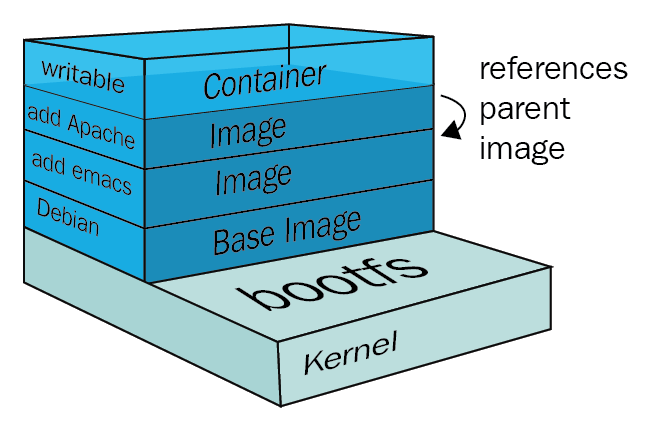\n\n### Container\n\nA container is a running image and *it has state but does not have persistence*. Think about a CD and somebody manipulating it like a DJ, it is doing changes to the current state of the CD but by the time the execution is done the CD is back on the case and nothing changed on it. The execution of the CD was the container and it can change as much as we need but it's changes will not change the image itself.\n\n### Volumes\n\nA volume is where we have *persistent state*, this is where our changes are not lost, this is how containers read and write persistent data. For example think on an application that counts sales, it would be a pretty lousy application if we lost all sale data as soon as the application was shutdown, for that we persist data on volumes. Most database images will have a volume. Still on the musical analogy our volume is our live recording, we are working on it and it will change, even if we have some fixed tracks we are still changing the data on this one.\n\n\n| |State|Persistence|\n|---|---|---|\n|Image| No | No |\n|Container| Yes | No |\n|Volume| No | Yes |\n\n## Getting started\n\n### Running the first image - Playing the CD\nFirst we need our image on our system so we pull it from the repository. Execute the code below on you terminal.\n\n```shell\ndocker pull docker/whalesay:latest\n```\nThe output should say something like:\n\n\"Status: Downloaded newer image for docker/whalesay:latest\"\n\nThe image is on our system now we need to run it (Play the cd):\n\n```shell\ndocker run docker/whalesay cowsay \"Docker is awesome\"\n```\n\nAnd you should see the following:\n\n```text\n< Docker is awesome >\n ------------------- \n \\\n \\\n \\ \n ## . \n ## ## ## == \n ## ## ## ## === \n /\"\"\"\"\"\"\"\"\"\"\"\"\"\"\"\"___/ === \n ~~~ {~~ ~~~~ ~~~ ~~~~ ~~ ~ / ===- ~~~ \n \\______ o __/ \n \\ \\ __/ \n \\____\\______/ \n```\n\nSo what happened? For a brief moment we run our image, that generated a container that printed a whale on the screen and then the container stopped.\n\nCongratulations you just used your first image and created your first container!\n\n### Acknowledgement\n\n[Photo by Kaique Rocha from Pexels](https://www.pexels.com/photo/business-commerce-container-export-379964/)", 152 | "positive_reactions_count": 12, 153 | "cover_image": "https://media2.dev.to/dynamic/image/width=1000,height=420,fit=cover,gravity=auto,format=auto/https%3A%2F%2Fdev-to-uploads.s3.amazonaws.com%2Fi%2F9bcgf9cbctedu3pejycz.jpg", 154 | "tag_list": [ 155 | "docker" 156 | ], 157 | "canonical_url": "https://dev.to/drfabio/introduction-to-container-based-development-part-1-4-1ai5", 158 | "reading_time_minutes": 3, 159 | "user": { 160 | "name": "Fabio Oliveira Costa", 161 | "username": "drfabio", 162 | "twitter_username": null, 163 | "github_username": "drFabio", 164 | "user_id": 264120, 165 | "website_url": null, 166 | "profile_image": "https://media2.dev.to/dynamic/image/width=640,height=640,fit=cover,gravity=auto,format=auto/https%3A%2F%2Fdev-to-uploads.s3.amazonaws.com%2Fuploads%2Fuser%2Fprofile_image%2F264120%2F32b420f3-5d92-4e5a-9079-5c1961b38833.jpeg", 167 | "profile_image_90": "https://media2.dev.to/dynamic/image/width=90,height=90,fit=cover,gravity=auto,format=auto/https%3A%2F%2Fdev-to-uploads.s3.amazonaws.com%2Fuploads%2Fuser%2Fprofile_image%2F264120%2F32b420f3-5d92-4e5a-9079-5c1961b38833.jpeg" 168 | } 169 | } 170 | ] 171 | } --------------------------------------------------------------------------------