├── .gitignore
├── .DS_Store
├── favicon.ico
├── src
├── index.css
├── .DS_Store
├── resources
│ ├── .DS_Store
│ ├── Screenshot.png
│ └── Screenshot2.png
├── page
│ ├── Activity.js
│ ├── 404.js
│ ├── PostList.js
│ ├── Chat.js
│ ├── About.js
│ └── Post.js
├── components
│ ├── Footer.js
│ ├── Loading.js
│ ├── BlogPost.js
│ ├── CalendarHeatmap.js
│ ├── Nav.js
│ └── Container.js
├── config.js
├── index.js
├── tailwind.config.js
├── hooks
│ └── useHash
│ │ └── index.js
├── App.js
├── style.css
├── constantFunction.js
└── output.css
├── public
├── .DS_Store
├── logo.png
├── favicon.ico
├── robots.txt
├── apple-touch-icon.png
├── manifest.json
└── index.html
├── .vercel
├── project.json
└── README.txt
├── .runtime.dockerfile
├── .deploy
├── go-heptabase
│ ├── Makefile
│ ├── local.values.yaml
│ ├── templates
│ │ ├── serviceaccount.yaml
│ │ ├── service.yaml
│ │ ├── tests
│ │ │ └── test-connection.yaml
│ │ ├── hpa.yaml
│ │ ├── NOTES.txt
│ │ ├── _helpers.tpl
│ │ ├── deployment.yaml
│ │ └── ingress.yaml
│ ├── .helmignore
│ ├── Chart.yaml
│ ├── values.yaml
│ └── template.yaml
└── blog.conf
├── tailwind.config.js
├── .github
└── workflows
│ └── main.yml
├── LICENSE
├── .env.development.local
├── package.json
├── .dockerignore
└── README.md
/.gitignore:
--------------------------------------------------------------------------------
1 | node_modules
2 | /.idea
3 | .run
4 | build
5 | .vscode
--------------------------------------------------------------------------------
/.DS_Store:
--------------------------------------------------------------------------------
https://raw.githubusercontent.com/draJiang/Heptabase-Blog/HEAD/.DS_Store
--------------------------------------------------------------------------------
/favicon.ico:
--------------------------------------------------------------------------------
https://raw.githubusercontent.com/draJiang/Heptabase-Blog/HEAD/favicon.ico
--------------------------------------------------------------------------------
/src/index.css:
--------------------------------------------------------------------------------
1 | @tailwind base;
2 | @tailwind components;
3 | @tailwind utilities;
--------------------------------------------------------------------------------
/src/.DS_Store:
--------------------------------------------------------------------------------
https://raw.githubusercontent.com/draJiang/Heptabase-Blog/HEAD/src/.DS_Store
--------------------------------------------------------------------------------
/public/.DS_Store:
--------------------------------------------------------------------------------
https://raw.githubusercontent.com/draJiang/Heptabase-Blog/HEAD/public/.DS_Store
--------------------------------------------------------------------------------
/public/logo.png:
--------------------------------------------------------------------------------
https://raw.githubusercontent.com/draJiang/Heptabase-Blog/HEAD/public/logo.png
--------------------------------------------------------------------------------
/public/favicon.ico:
--------------------------------------------------------------------------------
https://raw.githubusercontent.com/draJiang/Heptabase-Blog/HEAD/public/favicon.ico
--------------------------------------------------------------------------------
/public/robots.txt:
--------------------------------------------------------------------------------
1 | # https://www.robotstxt.org/robotstxt.html
2 | User-agent: *
3 | Disallow:
4 |
--------------------------------------------------------------------------------
/.vercel/project.json:
--------------------------------------------------------------------------------
1 | {"projectId":"prj_CsWgYEwHW4U8Tck8Mt98s8YgWQo9","orgId":"Ss3cmk6hTZAp5wWowtGvJVTu"}
--------------------------------------------------------------------------------
/src/resources/.DS_Store:
--------------------------------------------------------------------------------
https://raw.githubusercontent.com/draJiang/Heptabase-Blog/HEAD/src/resources/.DS_Store
--------------------------------------------------------------------------------
/public/apple-touch-icon.png:
--------------------------------------------------------------------------------
https://raw.githubusercontent.com/draJiang/Heptabase-Blog/HEAD/public/apple-touch-icon.png
--------------------------------------------------------------------------------
/src/resources/Screenshot.png:
--------------------------------------------------------------------------------
https://raw.githubusercontent.com/draJiang/Heptabase-Blog/HEAD/src/resources/Screenshot.png
--------------------------------------------------------------------------------
/src/resources/Screenshot2.png:
--------------------------------------------------------------------------------
https://raw.githubusercontent.com/draJiang/Heptabase-Blog/HEAD/src/resources/Screenshot2.png
--------------------------------------------------------------------------------
/.runtime.dockerfile:
--------------------------------------------------------------------------------
1 | FROM nginx:stable-bullseye
2 | ADD ./.deploy/blog.conf /etc/nginx/nginx.conf
3 | ADD ./build /var/www/
--------------------------------------------------------------------------------
/.deploy/go-heptabase/Makefile:
--------------------------------------------------------------------------------
1 | install:
2 | helm -n blog upgrade frontend . -f local.values.yaml --create-namespace --install --kube-context kiila
3 |
4 | uninstall:
5 | helm -n blog uninstall frontend --kube-context kiila
--------------------------------------------------------------------------------
/public/manifest.json:
--------------------------------------------------------------------------------
1 | {
2 | "short_name": "React App",
3 | "name": "Create React App Sample",
4 | "icons": [{
5 | "src": "favicon.ico",
6 | "sizes": "64x64 32x32 24x24 16x16",
7 | "type": "image/x-icon"
8 | }],
9 | "start_url": ".",
10 | "display": "standalone",
11 | "theme_color": "#000000",
12 | "background_color": "#ffffff"
13 | }
--------------------------------------------------------------------------------
/.deploy/go-heptabase/local.values.yaml:
--------------------------------------------------------------------------------
1 | ingress:
2 | enabled: true
3 | className: nginx
4 | annotations:
5 | kubernetes.io/tls-acme: "true"
6 | cert-manager.io/cluster-issuer: "letsencrypt-prod"
7 | hosts:
8 | - host: blog.kii.la
9 | paths:
10 | - path: /
11 | pathType: ImplementationSpecific
12 | tls:
13 | - secretName: blog.kii.la
14 | hosts:
15 | - blog.kii.la
--------------------------------------------------------------------------------
/.deploy/go-heptabase/templates/serviceaccount.yaml:
--------------------------------------------------------------------------------
1 | {{- if .Values.serviceAccount.create -}}
2 | apiVersion: v1
3 | kind: ServiceAccount
4 | metadata:
5 | name: {{ include "go-heptabase.serviceAccountName" . }}
6 | labels:
7 | {{- include "go-heptabase.labels" . | nindent 4 }}
8 | {{- with .Values.serviceAccount.annotations }}
9 | annotations:
10 | {{- toYaml . | nindent 4 }}
11 | {{- end }}
12 | {{- end }}
13 |
--------------------------------------------------------------------------------
/.deploy/go-heptabase/.helmignore:
--------------------------------------------------------------------------------
1 | # Patterns to ignore when building packages.
2 | # This supports shell glob matching, relative path matching, and
3 | # negation (prefixed with !). Only one pattern per line.
4 | .DS_Store
5 | # Common VCS dirs
6 | .git/
7 | .gitignore
8 | .bzr/
9 | .bzrignore
10 | .hg/
11 | .hgignore
12 | .svn/
13 | # Common backup files
14 | *.swp
15 | *.bak
16 | *.tmp
17 | *.orig
18 | *~
19 | # Various IDEs
20 | .project
21 | .idea/
22 | *.tmproj
23 | .vscode/
24 |
--------------------------------------------------------------------------------
/.deploy/go-heptabase/templates/service.yaml:
--------------------------------------------------------------------------------
1 | apiVersion: v1
2 | kind: Service
3 | metadata:
4 | name: {{ include "go-heptabase.fullname" . }}
5 | labels:
6 | {{- include "go-heptabase.labels" . | nindent 4 }}
7 | spec:
8 | type: {{ .Values.service.type }}
9 | ports:
10 | - port: {{ .Values.service.port }}
11 | targetPort: http
12 | protocol: TCP
13 | name: http
14 | selector:
15 | {{- include "go-heptabase.selectorLabels" . | nindent 4 }}
16 |
--------------------------------------------------------------------------------
/src/page/Activity.js:
--------------------------------------------------------------------------------
1 | import React from 'react';
2 | import { Link } from 'react-router-dom';
3 | import Nav from '../components/Nav';
4 | import Footer from '../components/Footer'
5 | import CalendarHeatmap from '../components/CalendarHeatmap'
6 |
7 |
8 | function Activity(props) {
9 |
10 | return
11 |
12 |
13 |
15 |
16 |
12 |
13 |
14 |
404 Not Found
15 |
17 |
18 |
19 |
13 | {/* */}
14 | */}
16 |
17 | )
18 |
19 | // ReactDOM.render(
21 |
22 |
27 |
28 |
29 | }
30 |
31 | export default PostList;
--------------------------------------------------------------------------------
/src/tailwind.config.js:
--------------------------------------------------------------------------------
1 | // tailwind.config.js
2 | const { nextui } = require("@nextui-org/theme");
3 |
4 | /** @type {import('tailwindcss').Config} */
5 | module.exports = {
6 | content: [
7 | // single component styles
8 | "./src/**/*.{js,jsx,ts,tsx}",
9 | "./node_modules/@nextui-org/theme/dist/components/navbar.js",
10 | ],
11 | theme: {
12 | extend: {},
13 | },
14 | darkMode: "media",
15 | plugins: [nextui()],
16 | };
17 |
18 | // /** @type {import('tailwindcss').Config} */
19 | // module.exports = {
20 | // content: [
21 | // "./src/**/*.{js,jsx,ts,tsx}",
22 | // ],
23 | // theme: {
24 | // extend: {},
25 | // },
26 | // plugins: [],
27 | // }
--------------------------------------------------------------------------------
/src/page/Chat.js:
--------------------------------------------------------------------------------
1 | import React, { useState, useEffect, useRef } from 'react';
2 | import WidgetBot, { API } from '@widgetbot/react-embed'
3 | import Nav from '../components/Nav';
4 |
5 | export default function Chat(props) {
6 |
7 | return (
8 |
9 |
10 |
11 |
12 | 欢迎交流
13 |
14 |
23 |
24 |
35 |
36 |
37 | }
38 |
39 | export default Loading;
--------------------------------------------------------------------------------
/src/hooks/useHash/index.js:
--------------------------------------------------------------------------------
1 | import { useState, useCallback, useEffect } from "react";
2 |
3 | const useHash = () => {
4 | const [hash, setHash] = useState(() => window.location.hash);
5 |
6 | // 当hash发生变化时
7 | const handleChangeEvent = useCallback(() => {
8 | setHash(window.location.hash);
9 | }, []);
10 |
11 | useEffect(() => {
12 | // 监听 hashchange ,当 hash 发生变化时执行
13 | window.addEventListener("hashchange", handleChangeEvent);
14 | // 组件卸载时将监听事件进行移除
15 | return () => {
16 | window.removeEventListener("hashchange", handleChangeEvent);
17 | };
18 | }, []);
19 |
20 | // 更新 hash
21 | const updateHash = useCallback(
22 | (newHash) => {
23 | // 只有当新输入的 hash 跟原有的 hanh 不一致时才进行更新
24 | if (newHash !== hash) {
25 | window.location.hash = newHash;
26 | }
27 | }, [hash]
28 | );
29 |
30 | // 将当前的 hash 和 updateHash 暴露出去给外面进行使用
31 | return [hash, updateHash];
32 | };
33 |
34 | export default useHash;
--------------------------------------------------------------------------------
/LICENSE:
--------------------------------------------------------------------------------
1 | MIT License
2 |
3 | Copyright (c) 2022 江子龙
4 |
5 | Permission is hereby granted, free of charge, to any person obtaining a copy
6 | of this software and associated documentation files (the "Software"), to deal
7 | in the Software without restriction, including without limitation the rights
8 | to use, copy, modify, merge, publish, distribute, sublicense, and/or sell
9 | copies of the Software, and to permit persons to whom the Software is
10 | furnished to do so, subject to the following conditions:
11 |
12 | The above copyright notice and this permission notice shall be included in all
13 | copies or substantial portions of the Software.
14 |
15 | THE SOFTWARE IS PROVIDED "AS IS", WITHOUT WARRANTY OF ANY KIND, EXPRESS OR
16 | IMPLIED, INCLUDING BUT NOT LIMITED TO THE WARRANTIES OF MERCHANTABILITY,
17 | FITNESS FOR A PARTICULAR PURPOSE AND NONINFRINGEMENT. IN NO EVENT SHALL THE
18 | AUTHORS OR COPYRIGHT HOLDERS BE LIABLE FOR ANY CLAIM, DAMAGES OR OTHER
19 | LIABILITY, WHETHER IN AN ACTION OF CONTRACT, TORT OR OTHERWISE, ARISING FROM,
20 | OUT OF OR IN CONNECTION WITH THE SOFTWARE OR THE USE OR OTHER DEALINGS IN THE
21 | SOFTWARE.
22 |
--------------------------------------------------------------------------------
/.deploy/go-heptabase/templates/hpa.yaml:
--------------------------------------------------------------------------------
1 | {{- if .Values.autoscaling.enabled }}
2 | apiVersion: autoscaling/v2
3 | kind: HorizontalPodAutoscaler
4 | metadata:
5 | name: {{ include "go-heptabase.fullname" . }}
6 | labels:
7 | {{- include "go-heptabase.labels" . | nindent 4 }}
8 | spec:
9 | scaleTargetRef:
10 | apiVersion: apps/v1
11 | kind: Deployment
12 | name: {{ include "go-heptabase.fullname" . }}
13 | minReplicas: {{ .Values.autoscaling.minReplicas }}
14 | maxReplicas: {{ .Values.autoscaling.maxReplicas }}
15 | metrics:
16 | {{- if .Values.autoscaling.targetCPUUtilizationPercentage }}
17 | - type: Resource
18 | resource:
19 | name: cpu
20 | target:
21 | type: Utilization
22 | averageUtilization: {{ .Values.autoscaling.targetCPUUtilizationPercentage }}
23 | {{- end }}
24 | {{- if .Values.autoscaling.targetMemoryUtilizationPercentage }}
25 | - type: Resource
26 | resource:
27 | name: memory
28 | target:
29 | type: Utilization
30 | averageUtilization: {{ .Values.autoscaling.targetMemoryUtilizationPercentage }}
31 | {{- end }}
32 | {{- end }}
33 |
--------------------------------------------------------------------------------
/.deploy/blog.conf:
--------------------------------------------------------------------------------
1 | events {
2 | worker_connections 1024;
3 | }
4 |
5 | http {
6 | include /etc/nginx/mime.types;
7 |
8 | underscores_in_headers on;
9 |
10 | server {
11 | listen 80 default_server;
12 | root /var/www/;
13 | gzip on;
14 | gzip_min_length 1000;
15 | gzip_types text/plain application/x-javascript application/javascript text/css application/xml application/json;
16 | charset utf-8;
17 | charset_types text/plain application/javascript application/x-javascript application/json text/css;
18 |
19 | location / {
20 | try_files $uri /index.html;
21 | }
22 |
23 | location ~* \.html$ {
24 | add_header Last-Modified $date_gmt;
25 | add_header Cache-Control 'no-store, no-cache, must-revalidate, proxy-revalidate, max-age=0';
26 | if_modified_since off;
27 | expires off;
28 | etag off;
29 | }
30 |
31 | location ~ .*\.(gif|jpg|jpeg|png|bmp|swf|mp3|js|css|otf|eot|svg|ttf|woff)$ {
32 | add_header Cache-Control max-age=2592000;
33 | }
34 |
35 | location = /ping {
36 | return 200 'pong';
37 | }
38 | }
39 | }
40 |
--------------------------------------------------------------------------------
/.deploy/go-heptabase/Chart.yaml:
--------------------------------------------------------------------------------
1 | apiVersion: v2
2 | name: go-heptabase
3 | description: A Helm chart for Kubernetes
4 |
5 | # A chart can be either an 'application' or a 'library' chart.
6 | #
7 | # Application charts are a collection of templates that can be packaged into versioned archives
8 | # to be deployed.
9 | #
10 | # Library charts provide useful utilities or functions for the chart developer. They're included as
11 | # a dependency of application charts to inject those utilities and functions into the rendering
12 | # pipeline. Library charts do not define any templates and therefore cannot be deployed.
13 | type: application
14 |
15 | # This is the chart version. This version number should be incremented each time you make changes
16 | # to the chart and its templates, including the app version.
17 | # Versions are expected to follow Semantic Versioning (https://semver.org/)
18 | version: 0.1.0
19 |
20 | # This is the version number of the application being deployed. This version number should be
21 | # incremented each time you make changes to the application. Versions are not expected to
22 | # follow Semantic Versioning. They should reflect the version the application is using.
23 | # It is recommended to use it with quotes.
24 | appVersion: "1.16.0"
25 |
--------------------------------------------------------------------------------
/.env.development.local:
--------------------------------------------------------------------------------
1 | # Created by Vercel CLI
2 | VERCEL="1"
3 | VERCEL_ENV="development"
4 | TURBO_REMOTE_ONLY="true"
5 | NX_DAEMON="false"
6 | VERCEL_URL=""
7 | VERCEL_GIT_PROVIDER=""
8 | VERCEL_GIT_PREVIOUS_SHA=""
9 | VERCEL_GIT_REPO_SLUG=""
10 | VERCEL_GIT_REPO_OWNER=""
11 | VERCEL_GIT_REPO_ID=""
12 | VERCEL_GIT_COMMIT_REF=""
13 | VERCEL_GIT_COMMIT_SHA=""
14 | VERCEL_GIT_COMMIT_MESSAGE=""
15 | VERCEL_GIT_COMMIT_AUTHOR_LOGIN=""
16 | VERCEL_GIT_COMMIT_AUTHOR_NAME=""
17 | VERCEL_GIT_PULL_REQUEST_ID=""
18 | VERCEL_ANALYTICS_ID="SkfRIostrRsfZ8XqPMEH28eD3Os"
19 | POSTGRES_URL="postgres://default:QG8qFwIn4hTY@ep-ancient-tree-596298-pooler.us-east-1.postgres.vercel-storage.com/verceldb"
20 | POSTGRES_URL_NON_POOLING="postgres://default:QG8qFwIn4hTY@ep-ancient-tree-596298.us-east-1.postgres.vercel-storage.com/verceldb"
21 | POSTGRES_PRISMA_URL="postgres://default:QG8qFwIn4hTY@ep-ancient-tree-596298-pooler.us-east-1.postgres.vercel-storage.com/verceldb?pgbouncer=true&connect_timeout=15"
22 | POSTGRES_USER="default"
23 | POSTGRES_HOST="ep-ancient-tree-596298-pooler.us-east-1.postgres.vercel-storage.com"
24 | POSTGRES_PASSWORD="QG8qFwIn4hTY"
25 | POSTGRES_DATABASE="verceldb"
26 | EDGE_CONFIG="https://edge-config.vercel.com/ecfg_4rhkf78f3vf5u9h1xuzjvhdrmyw4?token=c6fc1635-b35e-44db-928a-b53a0103c51b"
27 |
--------------------------------------------------------------------------------
/src/App.js:
--------------------------------------------------------------------------------
1 | import React, { useState, useEffect } from 'react';
2 | import { BrowserRouter as Router, Routes, Route } from 'react-router-dom';
3 | import PostList from './page/PostList';
4 | import Post from './page/Post';
5 | import Chat from './page/Chat';
6 | import Empty from './page/404';
7 | import Activity from './page/Activity';
8 |
9 | import CONFIG from "./config";
10 | // import { NextUIProvider } from "@nextui-org/system";
11 |
12 | // import generateSitemap from './sitemap';
13 |
14 |
15 | // 设置路由
16 | function App() {
17 |
18 | return (
19 | //
20 | //
21 |
22 |
23 |
35 |
36 | //
37 | //
38 | )
39 | }
40 | export default App;
--------------------------------------------------------------------------------
/.deploy/go-heptabase/templates/NOTES.txt:
--------------------------------------------------------------------------------
1 | 1. Get the application URL by running these commands:
2 | {{- if .Values.ingress.enabled }}
3 | {{- range $host := .Values.ingress.hosts }}
4 | {{- range .paths }}
5 | http{{ if $.Values.ingress.tls }}s{{ end }}://{{ $host.host }}{{ .path }}
6 | {{- end }}
7 | {{- end }}
8 | {{- else if contains "NodePort" .Values.service.type }}
9 | export NODE_PORT=$(kubectl get --namespace {{ .Release.Namespace }} -o jsonpath="{.spec.ports[0].nodePort}" services {{ include "go-heptabase.fullname" . }})
10 | export NODE_IP=$(kubectl get nodes --namespace {{ .Release.Namespace }} -o jsonpath="{.items[0].status.addresses[0].address}")
11 | echo http://$NODE_IP:$NODE_PORT
12 | {{- else if contains "LoadBalancer" .Values.service.type }}
13 | NOTE: It may take a few minutes for the LoadBalancer IP to be available.
14 | You can watch the status of by running 'kubectl get --namespace {{ .Release.Namespace }} svc -w {{ include "go-heptabase.fullname" . }}'
15 | export SERVICE_IP=$(kubectl get svc --namespace {{ .Release.Namespace }} {{ include "go-heptabase.fullname" . }} --template "{{"{{ range (index .status.loadBalancer.ingress 0) }}{{.}}{{ end }}"}}")
16 | echo http://$SERVICE_IP:{{ .Values.service.port }}
17 | {{- else if contains "ClusterIP" .Values.service.type }}
18 | export POD_NAME=$(kubectl get pods --namespace {{ .Release.Namespace }} -l "app.kubernetes.io/name={{ include "go-heptabase.name" . }},app.kubernetes.io/instance={{ .Release.Name }}" -o jsonpath="{.items[0].metadata.name}")
19 | export CONTAINER_PORT=$(kubectl get pod --namespace {{ .Release.Namespace }} $POD_NAME -o jsonpath="{.spec.containers[0].ports[0].containerPort}")
20 | echo "Visit http://127.0.0.1:8080 to use your application"
21 | kubectl --namespace {{ .Release.Namespace }} port-forward $POD_NAME 8080:$CONTAINER_PORT
22 | {{- end }}
23 |
--------------------------------------------------------------------------------
/public/index.html:
--------------------------------------------------------------------------------
1 |
2 |
3 |
4 |
5 | You need to enable JavaScript to run this app.
34 |
35 |
45 |
46 |
47 |
--------------------------------------------------------------------------------
/.deploy/go-heptabase/values.yaml:
--------------------------------------------------------------------------------
1 | # Default values for go-heptabase.
2 | # This is a YAML-formatted file.
3 | # Declare variables to be passed into your templates.
4 |
5 | replicaCount: 1
6 |
7 | image:
8 | repository: ccr.ccs.tencentyun.com/farfalle/blog
9 | pullPolicy: Always
10 | # Overrides the image tag whose default is the chart appVersion.
11 | tag: "latest"
12 |
13 | imagePullSecrets: [ ]
14 | nameOverride: ""
15 | fullnameOverride: ""
16 |
17 | serviceAccount:
18 | # Specifies whether a service account should be created
19 | create: true
20 | # Annotations to add to the service account
21 | annotations: { }
22 | # The name of the service account to use.
23 | # If not set and create is true, a name is generated using the fullname template
24 | name: ""
25 |
26 | podAnnotations: { }
27 |
28 | podSecurityContext: { }
29 | # fsGroup: 2000
30 |
31 | securityContext: { }
32 | # capabilities:
33 | # drop:
34 | # - ALL
35 | # readOnlyRootFilesystem: true
36 | # runAsNonRoot: true
37 | # runAsUser: 1000
38 |
39 | service:
40 | type: ClusterIP
41 | port: 80
42 |
43 | ingress:
44 | enabled: false
45 | className: nginx
46 | annotations:
47 | kubernetes.io/tls-acme: "true"
48 | cert-manager.io/cluster-issuer: "letsencrypt-prod"
49 | hosts: [ ]
50 | tls: [ ]
51 |
52 | resources: { }
53 | # We usually recommend not to specify default resources and to leave this as a conscious
54 | # choice for the user. This also increases chances charts run on environments with little
55 | # resources, such as Minikube. If you do want to specify resources, uncomment the following
56 | # lines, adjust them as necessary, and remove the curly braces after 'resources:'.
57 | # limits:
58 | # cpu: 100m
59 | # memory: 128Mi
60 | # requests:
61 | # cpu: 100m
62 | # memory: 128Mi
63 |
64 | autoscaling:
65 | enabled: false
66 | minReplicas: 1
67 | maxReplicas: 100
68 | targetCPUUtilizationPercentage: 80
69 | # targetMemoryUtilizationPercentage: 80
70 |
71 | nodeSelector: { }
72 |
73 | tolerations: [ ]
74 |
75 | affinity: { }
76 |
--------------------------------------------------------------------------------
/.deploy/go-heptabase/templates/_helpers.tpl:
--------------------------------------------------------------------------------
1 | {{/*
2 | Expand the name of the chart.
3 | */}}
4 | {{- define "go-heptabase.name" -}}
5 | {{- default .Chart.Name .Values.nameOverride | trunc 63 | trimSuffix "-" }}
6 | {{- end }}
7 |
8 | {{/*
9 | Create a default fully qualified app name.
10 | We truncate at 63 chars because some Kubernetes name fields are limited to this (by the DNS naming spec).
11 | If release name contains chart name it will be used as a full name.
12 | */}}
13 | {{- define "go-heptabase.fullname" -}}
14 | {{- if .Values.fullnameOverride }}
15 | {{- .Values.fullnameOverride | trunc 63 | trimSuffix "-" }}
16 | {{- else }}
17 | {{- $name := default .Chart.Name .Values.nameOverride }}
18 | {{- if contains $name .Release.Name }}
19 | {{- .Release.Name | trunc 63 | trimSuffix "-" }}
20 | {{- else }}
21 | {{- printf "%s-%s" .Release.Name $name | trunc 63 | trimSuffix "-" }}
22 | {{- end }}
23 | {{- end }}
24 | {{- end }}
25 |
26 | {{/*
27 | Create chart name and version as used by the chart label.
28 | */}}
29 | {{- define "go-heptabase.chart" -}}
30 | {{- printf "%s-%s" .Chart.Name .Chart.Version | replace "+" "_" | trunc 63 | trimSuffix "-" }}
31 | {{- end }}
32 |
33 | {{/*
34 | Common labels
35 | */}}
36 | {{- define "go-heptabase.labels" -}}
37 | helm.sh/chart: {{ include "go-heptabase.chart" . }}
38 | {{ include "go-heptabase.selectorLabels" . }}
39 | {{- if .Chart.AppVersion }}
40 | app.kubernetes.io/version: {{ .Chart.AppVersion | quote }}
41 | {{- end }}
42 | app.kubernetes.io/managed-by: {{ .Release.Service }}
43 | {{- end }}
44 |
45 | {{/*
46 | Selector labels
47 | */}}
48 | {{- define "go-heptabase.selectorLabels" -}}
49 | app.kubernetes.io/name: {{ include "go-heptabase.name" . }}
50 | app.kubernetes.io/instance: {{ .Release.Name }}
51 | {{- end }}
52 |
53 | {{/*
54 | Create the name of the service account to use
55 | */}}
56 | {{- define "go-heptabase.serviceAccountName" -}}
57 | {{- if .Values.serviceAccount.create }}
58 | {{- default (include "go-heptabase.fullname" .) .Values.serviceAccount.name }}
59 | {{- else }}
60 | {{- default "default" .Values.serviceAccount.name }}
61 | {{- end }}
62 | {{- end }}
63 |
--------------------------------------------------------------------------------
/src/page/About.js:
--------------------------------------------------------------------------------
1 | import React, { useState, useEffect, useRef } from 'react';
2 | import { BrowserRouter as Router, Routes, Route, Link, useParams } from 'react-router-dom';
3 |
4 | import Container from '../components/Container'
5 | import Nav from '../components/Nav';
6 | import Footer from '../components/Footer'
7 | import '../style.css'
8 | import Loading from '../components/Loading'
9 |
10 | import { getHeptabaseData, getClearCard, getClearImag } from '../constantFunction'
11 |
12 |
13 |
14 |
15 | function About(props) {
16 | let { slug } = useParams();
17 | let [isLoading, setLoadingState] = useState(true)
18 | let [page_id, setPageID] = useState('');
19 |
20 | document.title = props.title
21 |
22 | useEffect(() => {
23 | // console.log('scrollTo(0, 0)');
24 | window.scrollTo(0, 0);
25 | window.history.scrollRestoration = 'auto';
26 |
27 | })
28 |
29 | // 获取 About 数据的 ID
30 | let heptabase_blog_data
31 |
32 |
33 | getHeptabaseData.then((res) => {
34 | heptabase_blog_data = res.data
35 |
36 | if (res['pages']['about'] != undefined) {
37 | setLoadingState(false)
38 | setPageID(res['pages']['about']['id'])
39 | } else {
40 | // 404
41 | window.location = '/404'
42 | }
43 |
44 | })
45 |
46 | let content =
58 |
59 |
63 |
66 |
67 |
71 |
56 |
57 | {/* {post.lastEditedTimeDiff}
64 |
65 |
66 | )
67 | }
68 |
69 | return (
70 |
73 | );
74 | }
75 |
76 | // 加载中
77 | return
159 | {
168 | // if (!data.count) return
171 |
173 | );
174 | }}
175 |
176 | />
177 |
178 | )
179 | };
180 | export default CalendarHeatmap
--------------------------------------------------------------------------------
/src/components/Nav.js:
--------------------------------------------------------------------------------
1 | import React, { useState, useEffect, useRef } from 'react';
2 | import { Link } from 'react-router-dom';
3 | import CONFIG from '../config'
4 | import { Navbar, NavbarBrand, NavbarContent, NavbarItem, NavbarMenuToggle, NavbarMenu, NavbarMenuItem } from "@nextui-org/navbar";
5 |
6 |
7 | // 页面头部
8 | function Nav(props) {
9 |
10 | const [showChatWindow, setShowChatWindow] = useState(false);
11 |
12 |
13 | const handleNavBarClick = (e) => {
14 | console.log('handleNavBarClick');
15 | // 记录跳转类型,实现打开新卡片后定位到卡片顶部
16 | sessionStorage.setItem('nav_type', 3)
17 |
18 | }
19 |
20 | const handleShowChatWindow = () => {
21 | props.handleShowChatWindow()
22 | setShowChatWindow(!showChatWindow)
23 | }
24 |
25 | // 加载 Tabs
26 | let tabs = []
27 | Object.keys(CONFIG['pages']).forEach(key => {
28 |
29 | let page
30 | if (key === 'Activity') {
31 | page =
32 |
34 | } else {
35 | page =
36 |
38 | }
39 |
40 | tabs.push(page)
41 |
42 | });
43 |
44 | return (
45 |
46 | < Navbar shouldHideOnScroll isBlurred={false} maxWidth={'full'} height={'3rem'} isBordered={true} >
47 |
48 |
50 |
53 | {tabs}
54 |
55 | {(props.discord && CONFIG.server && CONFIG.channel) &&
56 |
65 |
68 | }
69 |
70 |
71 | )
72 | }
73 |
74 | export default Nav;
--------------------------------------------------------------------------------
/README.md:
--------------------------------------------------------------------------------
1 | # 使用 Heptabase 管理数字花园
2 |
3 | ## 是什么
4 |
5 | 在 Heptabase 中编写笔记,自动同步到个人的数字花园中。
6 |
7 | - [数字花园地址](https://notes.dabing.one/)
8 |
9 | - [原始白板地址](https://app.heptabase.com/w/d4cc3728297609add1a00aab108e90c4e57a1c378cfc2307c251745bf7d2a884)
10 |
11 | - Heptabase CSS 预览
12 |
13 | 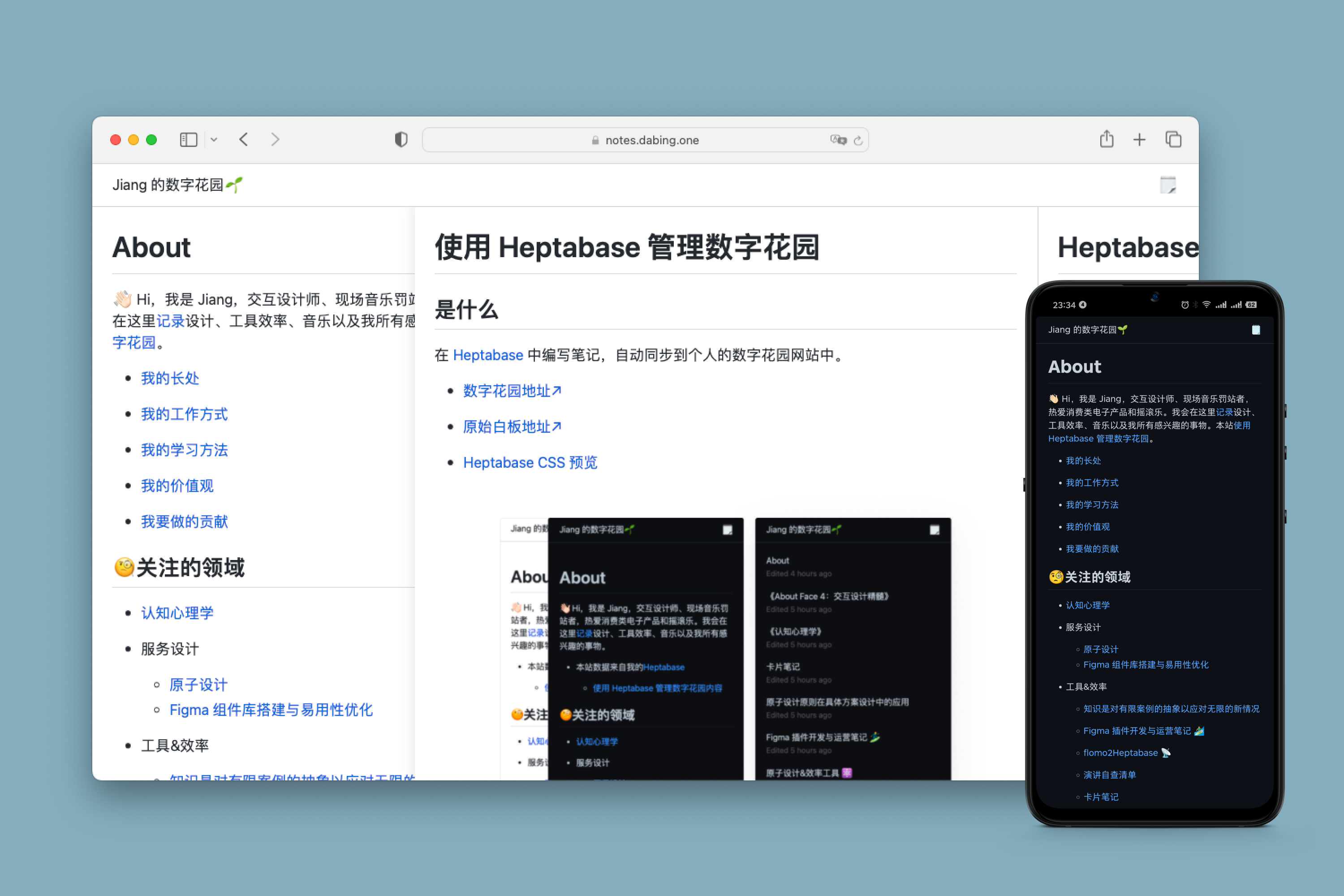
14 |
15 | 目前支持的功能
16 |
17 | - [x] 展示 Heptabase 的笔记内容
18 |
19 | - [x] Heptabase 编辑笔记可一键更新到网站
20 |
21 | - [x] 双向链接
22 |
23 | - [x] 深浅色模式
24 |
25 | - [x] 面包片导航交互(参考了 [Andyʼs working notes](https://notes.andymatuschak.org/Evergreen_notes))
26 |
27 | - [x] 文字高亮
28 |
29 | - [x] 嵌入网易云音乐歌曲、专辑
30 |
31 | - [x] 嵌入视频
32 |
33 | ## 使用方法
34 |
35 | ### Heptabase
36 |
37 | 1. 在 Heptabase 中创建一个白板,这个白板中的所有卡片都可以在数字花园中查看
38 |
39 | 2. 公开此白板
40 |
41 | 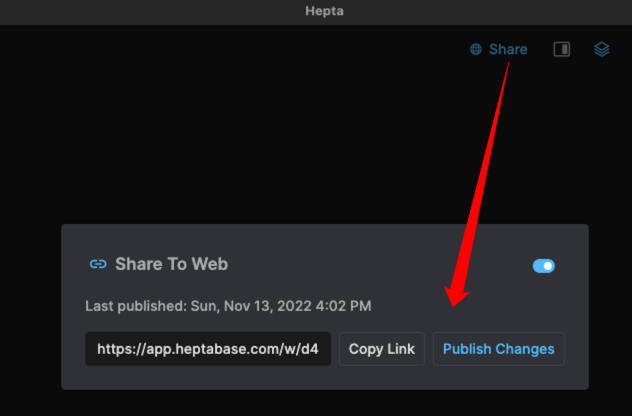
42 |
43 | 3. 根据你的喜好在上述白板中创建一些卡片,例如 About 介绍自己、Projects 介绍自己参与的项目等等
44 |
45 | ### GitHub
46 |
47 | 1. Fork [项目](https://github.com/draJiang/Heptabase-Blog)
48 |
49 | 
50 |
51 | 2. 在 `src/config.js` 中设置你的网站名称等信息
52 |
53 | ```javascript
54 | const CONFIG = {
55 | 'ga': 'G-XXXXXX', // 填写 Google Analytics 的 ID,不填也没问题
56 | 'whiteboard_id': '', // 填写白板 ID
57 | 'title': '数字花园🌱', // 站点标题
58 | 'pages': { // pages 里的标题和卡片 ID 可自定义
59 | 'Articles': '2e0bbcb8-fdf7-4cdb-8ee2-9f0651b71550',
60 | 'Projects': '2e0bbcb8-fdf7-4cdb-8ee2-9f0651b71550',
61 | 'Activity': 'activity', // 站点活跃状态热力图
62 | 'About': '2e0bbcb8-fdf7-4cdb-8ee2-9f0651b71550',
63 | 'XXXXX':'xxxx-xxxx-xxx(Heptabase 卡片 ID)'
64 | }
65 | 'server': '', // Discord 服务器 ID,非必填,填写后将在网站中显示聊天入口
66 | 'channel': '' // Discord 频道 ID,非必填,填写后将在网站中显示聊天入口
67 | }
68 | ```
69 |
70 | `pages` 里配置 Heptabase 中的卡片 ID, 配置后会显示在网站的右上角,点击会打开对应的卡片:
71 |
72 | 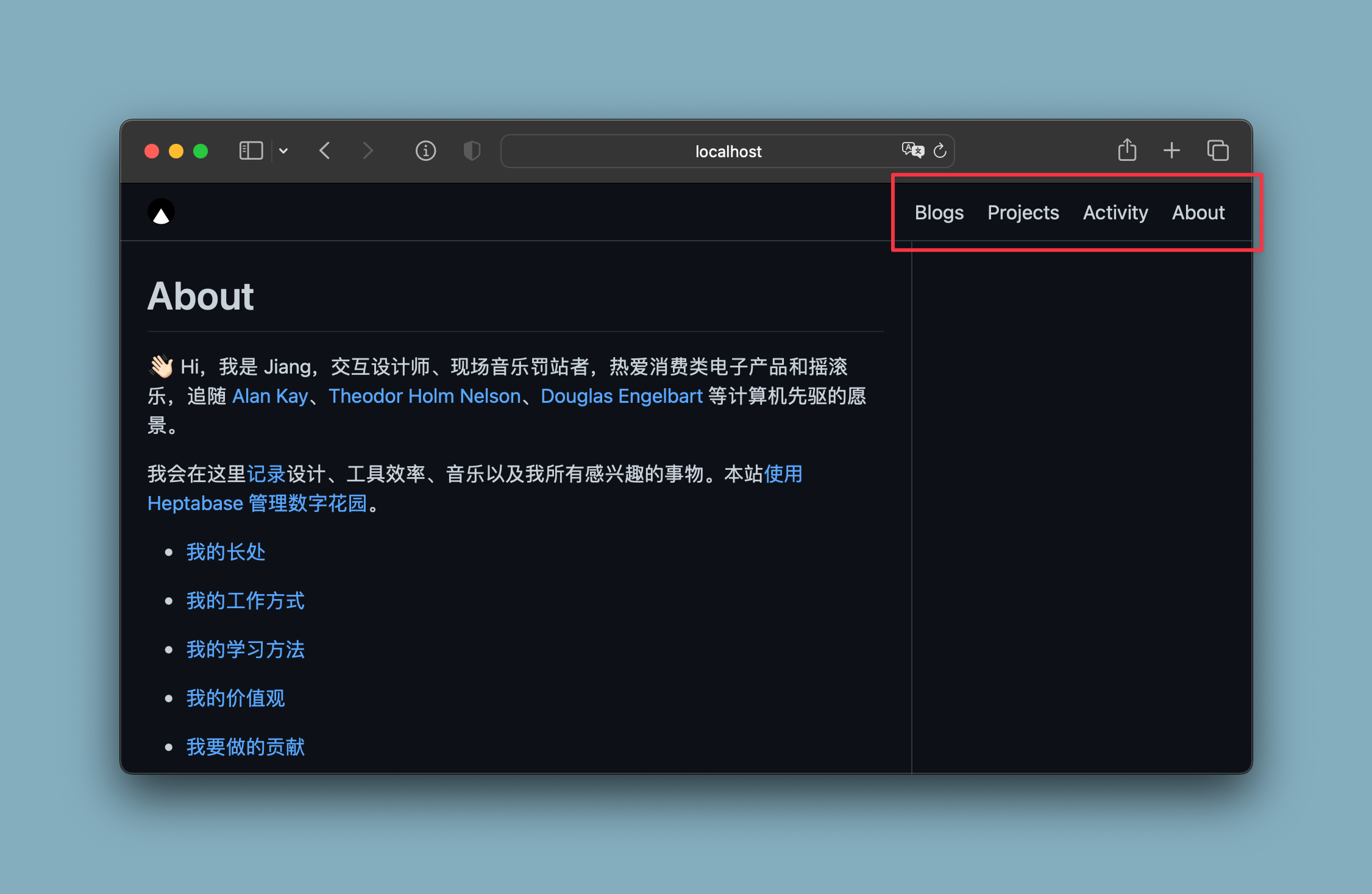
73 |
74 | `pages` 的配置会影响你的网站首页,目前的规则是:网站会在你的白板中寻找名称为 About 的卡片(不区分大小写),如果不存在,则会将 pages 配置中第 1 个卡片作为**首页**。
75 |
76 | 3. 设置 GitHub Action
77 |
78 | 编辑 `.github/workflows/main.yml` ,将 `https://api.dabing.one` 修改为 `https://api.dabing.one?whiteboard_id=your_whiteboard_id` 例如 `https://api.dabing.one?whiteboard_id=d4cc3728297609add1a00aab108e90c4e57a1c378cfc2307c251745bf7d2a884`
79 |
80 | 编辑完毕后保存,这一步是为了后续更新网站的内容。
81 |
82 | 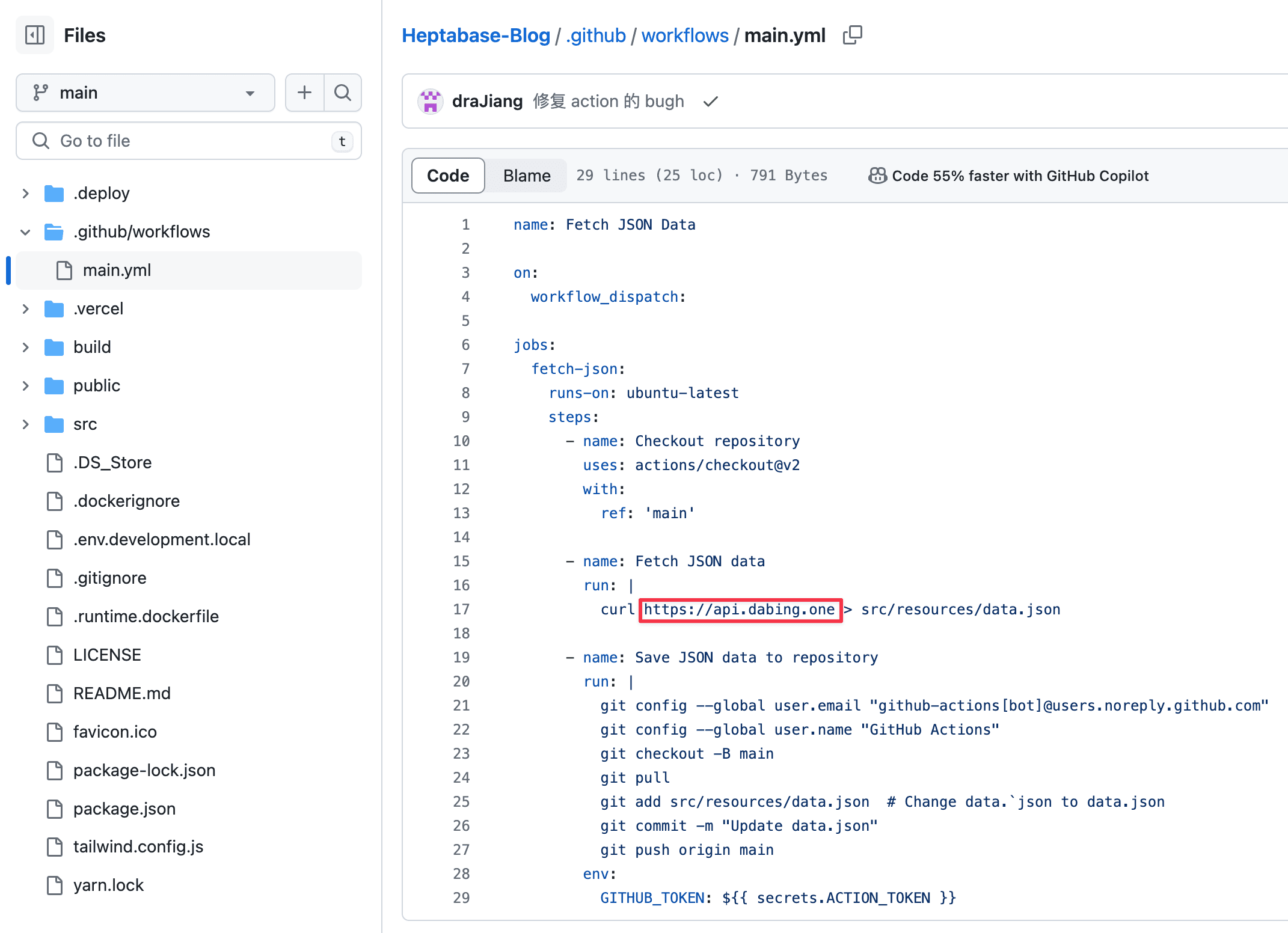
83 |
84 | 4. 自定义 LOGO
85 |
86 | 在 `public` 目录下替换 `favicon.ico`、`apple-touch-icon.png` 、`logo.png` 文件
87 |
88 | ## Vercel
89 |
90 | 1. 在 [Vercel](https://vercel.com/) 中新建项目
91 |
92 | 2. 选择 GitHub 中对应的项目名称
93 |
94 | 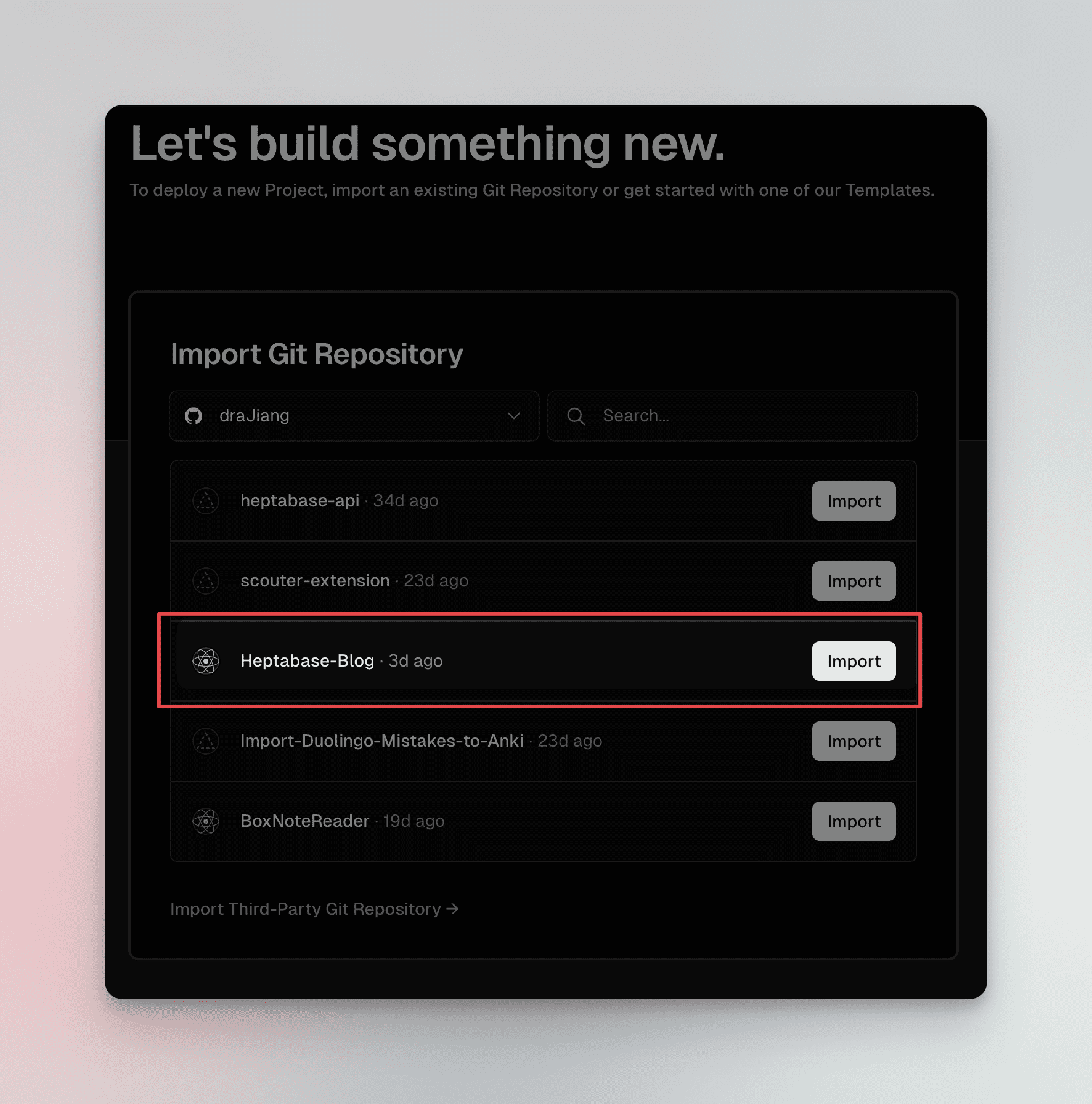
95 |
96 | 3. 自定义域名
97 |
98 | 在 Vercel 中打开项目,在 Settings 中设置自己的域名
99 |
100 | 
101 |
102 | ## 更新内容
103 |
104 | Heptabase 的白板更新后不会自动同步到网站中,需要手动进行更新,手动更新方法:
105 |
106 | 1. 在你的 GitHub 仓库中打开 Actions
107 |
108 | 2. 点击 Run workflow
109 |
110 | 3. 几分钟后网站的内容就会与 Heptabase 同步
111 |
112 | 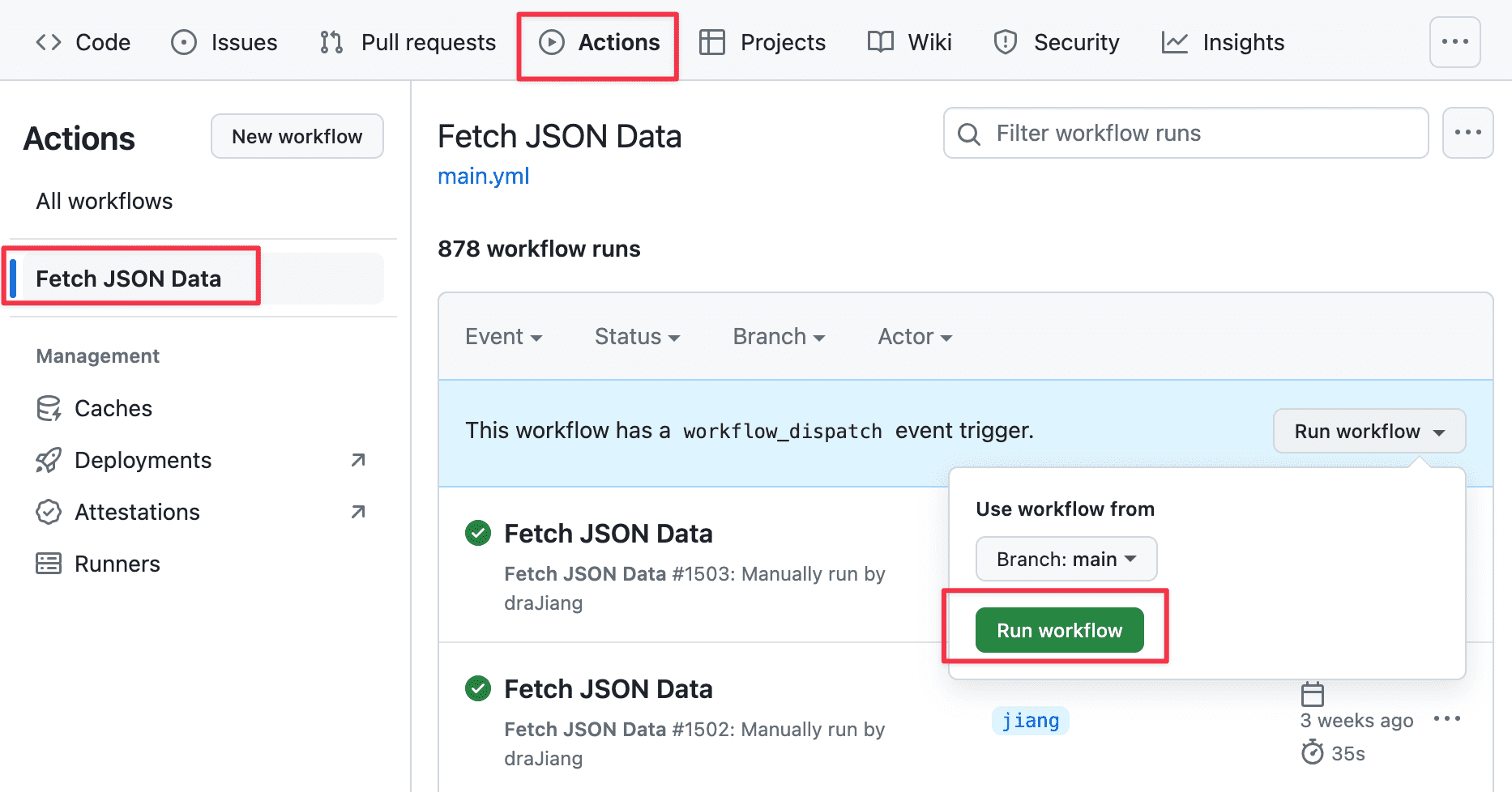
113 |
114 | ## 常见问题
115 |
116 | Q:为什么上传到 Hepta 中的图片无法在网站上显示
117 |
118 | A:直接在 Heptabase 中上传的图片,目前无法显示,一个解决方案是先将图片传到自己的图床里再放到 Hepta 里。
119 |
120 | ## 一些小技巧
121 |
122 | ### 嵌入 HTML
123 |
124 | Buy me a coffee
125 |
126 | ```html
127 | {HTML}
128 |
232 |
233 | {/*
235 | {backLink.title}
236 |
237 | {/* */}
238 |
239 |
240 | )
241 |
242 | backLinksBox =
248 | }
249 |
250 |
251 |
252 | return
253 |
254 |
255 |
256 |
257 | Created {format(new Date(props['card']['card']['createdTime']), 'yyyy-MM-dd')}
258 | {props['card']['card']['lastEditedTimeDiff']}
259 |
260 |
261 |
263 |
264 | {backLinksBox}
265 |
266 |
726 | {/*
*/}
727 |
730 |
732 | {/*
*/}
733 |
794 |
795 |
minWidth} />
796 |
797 |
798 |
803 |
804 |
808 |
809 | {card_list_dom}
810 |
811 |
812 | {showChatWindow &&
}
823 |
824 |
828 | )
829 | }
830 | // }
831 |
832 | }
833 |
834 | export default Post;
--------------------------------------------------------------------------------
/src/constantFunction.js:
--------------------------------------------------------------------------------
1 | import CONFIG from "./config";
2 | import { Modal } from 'antd';
3 | import heptabaseData from './resources/data.json';
4 |
5 | const { confirm } = Modal;
6 |
7 | const getCardName = (cardId) => {
8 |
9 | const cards = heptabaseData.data.cards
10 | for (let i = 0; i < cards.length; i++) {
11 | if (cards[i]['id'] === cardId) {
12 | return cards[i]
13 | }
14 | }
15 |
16 | return null
17 |
18 | }
19 |
20 | // fetch 错误时的反馈弹窗
21 | const showConfirm = () => {
22 | confirm({
23 | title: 'Sorry,some ting erro😥',
24 | // icon:
'
95 |
96 | return netease_music_iframe
97 |
98 | } else {
99 | return undefined
100 | }
101 |
102 | }
103 |
104 | // 修复单个 md 文件中的 img
105 | const getClearImag = (card) => {
106 |
107 | // 修改图片后缀,避免图片无法显示
108 | // 找到  符号
111 | // 删除前面 2 步 index 中间的符号
112 |
113 | let content = card['content']
114 |
115 | // 支持的图片类型
116 | let img_type = ['.png', '.jpeg', '.jpg', '.gif']
117 | // 包含以下关键字则认为是图片
118 | let img_keyword_index = content.indexOf('![')
119 |
120 | while (img_keyword_index !== -1) {
121 |
122 |
123 | // 获取下一个 ) 索引
124 | let img_end_inex = content.indexOf(')', img_keyword_index)
125 |
126 | // 获取下一个 ] 索引
127 | let img_alt_end_inex = content.indexOf(']', img_keyword_index)
128 |
129 | // 获取图片扩展名索引
130 | let img_etc_index
131 | for (let i = 0; i < img_type.length; i++) {
132 | img_etc_index = content.indexOf(img_type[i], img_keyword_index + 1)
133 | if (img_etc_index >= 0 && img_etc_index <= img_end_inex) {
134 |
135 | // 如果格式字符是这种格式 ![....jpg] 内,则跳过
136 | if (content.substring(img_etc_index + img_type[i].length, img_etc_index + img_type[i].length + 2) === '](') {
137 | img_etc_index = content.indexOf(img_type[i], img_etc_index + 1)
138 |
139 | }
140 |
141 | img_etc_index += img_type[i].length
142 | break;
143 |
144 |
145 | }
146 | }
147 |
148 | if (img_keyword_index === -1 || img_end_inex === -1 || img_etc_index === -1) {
149 | break
150 | }
151 |
152 | let img_alt = content.substring(img_keyword_index + 2, img_alt_end_inex)
153 | let img_src = content.substring(img_alt_end_inex + 2, img_etc_index)
154 |
155 | // console.log('image keyword');
156 | // console.log(img_alt);
157 | // console.log(img_src);
158 |
159 | let old_img_str = content.substring(img_keyword_index, img_end_inex + 1)
160 |
161 |
162 | // 获取 = 索引
163 | let img_width_inex = old_img_str.indexOf('=')
164 |
165 | if (img_width_inex > -1 && old_img_str.indexOf('{{width') < 0) {
166 | //将图片宽度保存到 alt 中
167 | img_alt = img_alt + '{{width ' + old_img_str.substring(img_width_inex + 1, old_img_str.length - 2) + '}}'
168 | }
169 |
170 | let new_img_str = ''
171 |
172 | content = content.replace(old_img_str, new_img_str)
173 |
174 | // 获取 ![ 索引
175 | img_keyword_index = content.indexOf('![', img_keyword_index + 1)
176 |
177 |
178 | }
179 | card['content'] = content
180 | return card
181 |
182 | }
183 |
184 | // 处理单个 md 文件中的超链接
185 | const getClearCard = (card, cards) => {
186 |
187 | // // 找到 (./ 符号以及之后的第 1 个 ,或找到 {{ 符号 }}) 符号,截取这 2 个 index 中间的字符串
188 | // // 将上述字符串放在 card 数据中匹配
189 | // // 如果找到匹配的卡片:修改上述字符串的地址为 /post/post.id
190 | // let content = card['content']
191 | let this_card_id = card['id']
192 |
193 | // 处理反向连接
194 | // 如果 A 卡片中存在当前笔记的 ID,则 A 卡片为当前笔记的反向链接之一
195 | let backLinks = []
196 | for (let i = 0; i < cards.length; i++) {
197 | let content = cards[i]['content']
198 | if (typeof (content) !== 'string') {
199 | content = cards[i]['content'].innerHTML
200 | }
201 |
202 | if (content.indexOf(this_card_id) >= 0 && cards[i]['id'] !== this_card_id) {
203 |
204 | backLinks.push(cards[i])
205 |
206 | }
207 |
208 |
209 | }
210 |
211 | // card['content'] = content
212 | return { 'card': card, 'backLinks': backLinks }
213 |
214 | }
215 |
216 | // 从服务端获取 Heptabase 的笔记数据
217 | const getHeptabaseDataFromServer = async () => {
218 | let myHeaders = new Headers();
219 | myHeaders.append("User-Agent", "Apifox/1.0.0 (https://apifox.com)");
220 |
221 | let requestOptions = {
222 | method: 'GET',
223 | headers: myHeaders,
224 | redirect: 'follow'
225 | };
226 |
227 | try {
228 | const whiteboard_id = CONFIG.whiteboard_id;
229 | const result = await fetch("https://api.blog.kii.la/?shared-id=" + whiteboard_id, requestOptions);
230 | const getDataResponse = await result.json();
231 |
232 | if (getDataResponse.code === 0) {
233 | // 成功获取数据
234 |
235 | const data = getDataResponse
236 | // 处理卡片数据
237 | const newData = handleHeptabaseData(data)
238 | return data
239 |
240 |
241 | } else {
242 | // 未成功获取,需要添加此白板到服务端中
243 |
244 | let myHeaders = new Headers();
245 | myHeaders.append("User-Agent", "Apifox/1.0.0 (https://apifox.com)");
246 | myHeaders.append("Content-Type", "application/json");
247 |
248 | let raw = JSON.stringify({
249 | "shared_id": whiteboard_id,
250 | "allow_origin": []
251 | });
252 |
253 | let requestOptions = {
254 | method: 'POST',
255 | headers: myHeaders,
256 | body: raw,
257 | redirect: 'follow'
258 | };
259 |
260 | const result = await fetch("https://api.blog.kii.la/add", requestOptions)
261 | const addWhiteboardResponse = await result.json();
262 |
263 | if (addWhiteboardResponse.code === 0) {
264 |
265 | setTimeout(() => {
266 | // 添加白板后再次获取一次数据
267 | getHeptabaseDataFromServer()
268 | }, 5000);
269 |
270 | }
271 |
272 | }
273 |
274 |
275 | } catch (error) {
276 |
277 | console.log('error', error);
278 |
279 | }
280 | };
281 |
282 | // 获取 Heptabase 的笔记数据
283 | const getHeptabaseData = async () => {
284 | console.log('getHeptabaseData');
285 |
286 | return handleHeptabaseData(heptabaseData)
287 |
288 | // 获取本地数据
289 | let heptabaseDataFromLocal = JSON.parse(localStorage.getItem("heptabase_blog_data"))
290 |
291 |
292 | if (heptabaseDataFromLocal) {
293 |
294 | // 存在本地数据
295 | if (heptabaseDataFromLocal.data?.Etag && heptabaseDataFromLocal.whiteboard_id) {
296 |
297 | // 判断本地数据是否需要更新
298 | let myHeaders = new Headers();
299 | myHeaders.append("User-Agent", "Apifox/1.0.0 (https://apifox.com)");
300 |
301 | let requestOptions = {
302 | method: 'GET',
303 | headers: myHeaders,
304 | redirect: 'follow'
305 | };
306 |
307 | const whiteboard_id = CONFIG.whiteboard_id;
308 | const result = await fetch("https://api.blog.kii.la/etag?shared-id=" + whiteboard_id, requestOptions)
309 | const etagFromServer = await result.json();
310 |
311 | console.log('etagFromServer:');
312 | console.log(etagFromServer);
313 |
314 | // Etag 不同或者本地缓存的白板 ID 与配置中的不同
315 | if (etagFromServer.data !== heptabaseDataFromLocal.data.Etag || heptabaseDataFromLocal.whiteboard_id !== whiteboard_id) {
316 | //需要更新
317 | const data = await getHeptabaseDataFromServer();
318 | return data;
319 | } else {
320 | //不需要更新
321 | return heptabaseDataFromLocal;
322 | }
323 | } else {
324 | // 需要到服务端获取
325 | const data = await getHeptabaseDataFromServer();
326 | return data;
327 | }
328 |
329 | } else {
330 | // 本地不存在数据,则需要到服务端获取
331 | const heptabaseDataFromServer = await getHeptabaseDataFromServer();
332 | return heptabaseDataFromServer;
333 | }
334 | };
335 |
336 |
337 | const handleHeptabaseData = (data) => {
338 |
339 | data.data.cards = data.data.cards.sort((a, b) => {
340 |
341 | // 最近编辑时间
342 | return b.lastEditedTime < a.lastEditedTime ? -1 : 1
343 |
344 | })
345 |
346 | let pages = {}
347 | // 获取 About、Projects 页面的数据
348 | pages.about = undefined
349 | pages.firstPage = undefined
350 | // pages.projects = undefined
351 |
352 | // 存储去重后的数组
353 | let new_cards = []
354 | // 存储卡片 ID,用户判断是否重复
355 | let cards_id = []
356 |
357 | const configPages = CONFIG.pages
358 | const firstPageKey = Object.keys(configPages)[0]
359 | const firstPageId = configPages[firstPageKey];
360 |
361 |
362 | for (let i = 0; i < data.data.cards.length; i++) {
363 |
364 | // 首页
365 | if (data.data.cards[i]['title'].toLowerCase() === 'about') {
366 |
367 | pages.about = data.data.cards[i]
368 |
369 | }
370 |
371 | // 查找 CONFIG 的 pages 中第 1 个卡片的数据
372 | if (data.data.cards[i].id === firstPageId) {
373 | pages.firstPage = data.data.cards[i]
374 | }
375 |
376 |
377 | // Projects
378 | // if (data.data.cards[i]['title'].toLowerCase() === 'projects') {
379 |
380 | // pages.projects = data.data.cards[i]
381 |
382 | // }
383 |
384 | // 去重
385 | if (cards_id.indexOf(data.data.cards[i]['id']) > -1) {
386 | // 已存在此卡片,则忽略
387 | // console.log(data.cards[i]);
388 | } else {
389 |
390 | // 不存在此卡片
391 |
392 | // 最近编辑的时间差
393 | let timeDiff = getLastEditedTime(data.data.cards[i]['lastEditedTime'])
394 | data.data.cards[i].lastEditedTimeDiff = ''
395 | if (timeDiff['day'] > 0) {
396 | data.data.cards[i].lastEditedTimeDiff = 'Edited ' + timeDiff['day'] + ' days ago'
397 | } else if (timeDiff['hours'] > 0) {
398 |
399 | data.data.cards[i].lastEditedTimeDiff = 'Edited ' + timeDiff['hours'] + ' hours ago'
400 |
401 | } else if (timeDiff['minutes'] > 0) {
402 |
403 | data.data.cards[i].lastEditedTimeDiff = 'Edited ' + timeDiff['minutes'] + ' minutes ago'
404 |
405 | } else {
406 |
407 | data.data.cards[i].lastEditedTimeDiff = 'Edited just'
408 |
409 | }
410 |
411 | new_cards.push(data.data.cards[i])
412 | cards_id.push(data.data.cards[i]['id'])
413 |
414 | }
415 |
416 | }
417 |
418 | data.data.cards = new_cards
419 | data.frontGetTime = Date.parse(new Date()) / 1000
420 | data.pages = pages
421 | data.whiteboard_id = CONFIG.whiteboard_id
422 |
423 | // 存储数据到本地缓存
424 |
425 | try {
426 | localStorage.setItem("heptabase_blog_data", JSON.stringify(data))
427 | } catch (error) {
428 | console.log(error);
429 | }
430 |
431 | return data; // 返回结果
432 |
433 | }
434 |
435 |
436 |
437 | /**
438 | * @param {Object} Hpeta_card_data Hepta 卡片数据
439 | * @returns 返回拼接后的 DOM 元素
440 | */
441 | const heptaToMD = (Hpeta_card_data) => {
442 |
443 | // 如果对象已经是 DOM 则直接返回
444 | if (Hpeta_card_data['content'] instanceof HTMLElement) {
445 | return Hpeta_card_data['content']
446 | }
447 |
448 | let parent_card_id = Hpeta_card_data['id']
449 | let box = document.createElement('div')
450 | box = heptaContentTomd(JSON.parse(Hpeta_card_data['content'])['content'], box, parent_card_id)
451 | return box
452 |
453 |
454 | }
455 |
456 | /**
457 | *
458 | * @param {list} content_list block 列表
459 | * @param {string} parent_node 要添加子元素的父级 DOM 元素
460 | * @param {string} parent_card_id 当前卡片的 ID
461 | * @returns 返回拼接后的 md 字符串
462 | */
463 | const heptaContentTomd = (content_list, parent_node, parent_card_id) => {
464 |
465 | let new_node
466 | let number_list_index = 1
467 |
468 | //遍历 content list
469 | for (let i = 0; i < content_list.length; i++) {
470 |
471 | // 根据 type 进行处理
472 | switch (content_list[i]['type']) {
473 |
474 | case 'heading':
475 |
476 | new_node = document.createElement('H' + content_list[i]['attrs']['level'])
477 |
478 | break
479 |
480 | case 'card':
481 | new_node = document.createElement('span')
482 | new_node.innerHTML = content_list[i]['attrs']['cardTitle']
483 | if (content_list[i]['attrs']['cardTitle'] === undefined) {
484 | // 找不到卡片标题,根据卡片 ID 匹配标题
485 | const card = getCardName(content_list[i]['attrs']['cardId'])
486 |
487 | if (card) {
488 | new_node.innerHTML = card.title
489 | }
490 |
491 | }
492 |
493 | let bingo = false
494 |
495 | if (content_list[i]['attrs']['cardTitle'] === 'Invalid card') {
496 | // 未知卡片
497 | // 在数据中先找一下
498 | let heptabase_blog_data = heptabaseData
499 |
500 | for (let k = 0; k < heptabase_blog_data.data.cards.length; k++) {
501 | if (heptabase_blog_data.data.cards[k]['id'] === content_list[i]['attrs']['cardId']) {
502 | new_node.innerHTML = heptabase_blog_data.data.cards[k]['title']
503 | bingo = true
504 | break
505 | }
506 | }
507 |
508 | // if (bingo === true) {
509 | // new_node.classList.add('my_link')
510 | // new_node.classList.add('article_link')
511 | // new_node.setAttribute('path', '/post/' + content_list[i]['attrs']['cardId'])
512 | // new_node.setAttribute('parent_note_id', parent_card_id)
513 | // } else {
514 | // new_node.classList.add('unknown_card')
515 | // }
516 |
517 |
518 | }
519 |
520 | if (bingo === true || content_list[i]['attrs']['cardTitle'] !== 'Invalid card') {
521 | new_node.classList.add('my_link')
522 | new_node.classList.add('article_link')
523 | new_node.setAttribute('path', '/post/' + content_list[i]['attrs']['cardId'])
524 | new_node.setAttribute('parent_note_id', parent_card_id)
525 | } else {
526 | new_node.classList.add('unknown_card')
527 | }
528 |
529 |
530 |
531 |
532 |
533 |
534 |
535 | break
536 |
537 | case 'whiteboard':
538 | new_node = document.createTextNode(content_list[i]['attrs']['whiteboardName'])
539 | break
540 |
541 | case 'image':
542 |
543 | new_node = document.createElement('div')
544 | let imgBox = document.createElement('img')
545 | imgBox.setAttribute('src', content_list[i]['attrs']['src'])
546 | new_node.classList.add('imgBox')
547 | new_node.appendChild(imgBox)
548 |
549 | if (content_list[i]['attrs']['width'] !== null) {
550 | imgBox.setAttribute('style', 'width: ' + content_list[i]['attrs']['width']);
551 | }
552 |
553 |
554 | break
555 |
556 | case 'paragraph':
557 | // 如果父元素不是 task-list-item ,则创建 P 元素
558 | if (parent_node) {
559 |
560 | if (parent_node['className'] !== 'task-list-item') {
561 | new_node = document.createElement('p')
562 | } else {
563 | new_node = document.createElement('span')
564 | new_node.setAttribute('style', 'margin-left:4px');
565 | }
566 |
567 | }
568 |
569 | break
570 |
571 | case 'text':
572 | // 普通文本
573 | if (content_list[i]['text'].indexOf('{HTML}') > -1) {
574 | break
575 | }
576 |
577 |
578 | // 判断是否有行内样式,例如 strong、mark
579 |
580 | if ('marks' in content_list[i]) {
581 |
582 | // 有行内样式
583 | content_list[i]['marks'].forEach(mark => {
584 |
585 | switch (mark['type']) {
586 |
587 | // del-line
588 | case 'strike':
589 | new_node = document.createElement('del')
590 | new_node.innerText = content_list[i]['text']
591 | break
592 |
593 | // inline-code
594 | case 'code':
595 | new_node = document.createElement('code')
596 | new_node.innerText = content_list[i]['text']
597 | break
598 |
599 | // italic
600 | case 'em':
601 | new_node = document.createElement('em')
602 | new_node.innerText = content_list[i]['text']
603 | break
604 |
605 | // strong
606 | case 'strong':
607 | new_node = document.createElement('strong')
608 | new_node.innerText = content_list[i]['text']
609 | break
610 |
611 | case 'color':
612 |
613 | new_node = document.createElement('span')
614 |
615 | if (mark['attrs']['color']) {
616 |
617 | if (mark['attrs']['type'] === 'background') {
618 | // new_node.setAttribute('style', 'background-color: ' + mark['attrs']['color']);
619 |
620 | new_node.classList.add('highlight_bg')
621 | } else {
622 | // new_node.setAttribute('style', 'color: ' + mark['attrs']['color']);
623 | new_node.classList.add('highlight_color')
624 | }
625 |
626 | }
627 |
628 | new_node.innerText = content_list[i]['text']
629 | break
630 |
631 | case 'link':
632 | // let link_title = mark['attrs']['title']
633 | // if (link_title === null) {
634 | // link_title = mark['attrs']['href']
635 | // }
636 |
637 | if (mark['attrs']['data-internal-href'] !== null) {
638 | // 内部卡片链接
639 | new_node = document.createElement('span')
640 | new_node.innerHTML = content_list[i]['text']
641 | new_node.classList.add('my_link')
642 | new_node.classList.add('article_link')
643 | new_node.setAttribute('path', '/post/' + mark['attrs']['data-internal-href'].replace('meta://card/', ''))
644 | new_node.setAttribute('parent_note_id', parent_card_id)
645 |
646 | } else {
647 |
648 | if (mark['attrs']['href'].indexOf('app.heptabase') > -1 && mark['attrs']['href'].indexOf('card/') > -1) {
649 | // Link to block
650 | // 获取 card ID
651 | let card_id_index_start = mark['attrs']['href'].indexOf('card/')
652 | let card_id_index_end = mark['attrs']['href'].indexOf('#')
653 |
654 | if (card_id_index_start > -1) {
655 | let card_id = mark['attrs']['href'].substring(card_id_index_start + 5, card_id_index_end > -1 ? card_id_index_end : mark['attrs']['href'].length)
656 |
657 | new_node = document.createElement('span')
658 | new_node.innerHTML = content_list[i]['text']
659 | new_node.classList.add('my_link')
660 | new_node.classList.add('article_link')
661 | new_node.setAttribute('path', '/post/' + card_id)
662 | new_node.setAttribute('parent_note_id', parent_card_id)
663 |
664 | } else {
665 | // 外链
666 | new_node = document.createElement('a')
667 | new_node.classList.add('external_link')
668 | new_node.href = mark['attrs']['href']
669 | new_node.innerHTML = content_list[i]['text']
670 | }
671 |
672 | } else {
673 | // 外链
674 | new_node = document.createElement('a')
675 | new_node.classList.add('external_link')
676 | new_node.href = mark['attrs']['href']
677 | new_node.innerHTML = content_list[i]['text']
678 | }
679 |
680 |
681 |
682 |
683 | }
684 |
685 | break
686 | default:
687 | break
688 |
689 | }
690 |
691 | });
692 | } else {
693 | // 无行内样式
694 | // new_node = document.createElement('span')
695 | // new_node.innerText = new_node.innerText + content_list[i]['text']
696 |
697 | new_node = document.createTextNode(content_list[i]['text'])
698 |
699 | }
700 |
701 | break
702 |
703 | case 'bullet_list_item':
704 | // List 容器
705 | const bulletListBox = document.createElement('div')
706 | bulletListBox.classList.add('listBox')
707 |
708 | // List 手柄
709 | const bulletHand = document.createElement('div')
710 | bulletHand.classList.add('listBullet')
711 |
712 | // List 内容
713 | new_node = document.createElement('div')
714 | new_node.setAttribute('style', 'overflow: auto');
715 |
716 | bulletListBox.appendChild(bulletHand)
717 | bulletListBox.appendChild(new_node)
718 |
719 | parent_node.appendChild(bulletListBox)
720 |
721 | break
722 |
723 | case 'numbered_list_item':
724 |
725 | // 如果上一个节点不是 number_list 则此节点的 index 为 1,否则 index +=1
726 | if (i > 0) {
727 | if (content_list[i - 1]['type'] !== 'numbered_list_item') {
728 | number_list_index = 1
729 | } else {
730 | number_list_index += 1
731 | }
732 | }
733 |
734 | // List 容器
735 | const numberListBox = document.createElement('div')
736 | numberListBox.classList.add('listBox')
737 |
738 | // List 手柄
739 | const numberHand = document.createElement('div')
740 | // numberHand.classList.add('listBullet')
741 | numberHand.classList.add('numberListBullet')
742 | numberHand.setAttribute('data-before', number_list_index + '.')
743 | // numberHand.attr('--before-content', beforeContent)
744 |
745 | // List 内容
746 | new_node = document.createElement('div')
747 | new_node.setAttribute('style', 'overflow: auto');
748 |
749 | numberListBox.appendChild(numberHand)
750 | numberListBox.appendChild(new_node)
751 |
752 | parent_node.appendChild(numberListBox)
753 |
754 | break
755 |
756 | case 'todo_list_item':
757 | new_node = document.createElement('li')
758 |
759 | let task_input = document.createElement('input')
760 | task_input.type = 'checkbox'
761 | // task_input.checked = 'true'
762 | if (content_list[i]['attrs']['checked']) {
763 | task_input.setAttribute("checked", content_list[i]['attrs']['checked']);
764 | }
765 |
766 | task_input.disabled = true
767 |
768 | new_node.classList.add('task-list-item')
769 | // new_node.setAttribute('style', 'margin: 16px 0');
770 | new_node.appendChild(task_input)
771 | break
772 |
773 | case 'ordered_list':
774 | new_node = document.createElement('ol')
775 | break
776 |
777 | case 'bullet_list':
778 | new_node = document.createElement('ul')
779 | break
780 |
781 | case 'toggle_list':
782 | new_node = document.createElement('div')
783 | break
784 |
785 | case 'toggle_list_item':
786 | new_node = document.createElement('div')
787 | break
788 |
789 | case 'task_list':
790 | new_node = document.createElement('ul')
791 | new_node.classList.add('task-list')
792 | break
793 |
794 | case 'list_item':
795 | new_node = document.createElement('li')
796 |
797 | // 如果是 task
798 | if (parent_node.className.indexOf('task-list') > -1) {
799 | let task_input = document.createElement('input')
800 | task_input.type = 'checkbox'
801 | // task_input.checked = 'true'
802 | if (content_list[i]['attrs']['checked']) {
803 | task_input.setAttribute("checked", content_list[i]['attrs']['checked']);
804 | }
805 |
806 | task_input.disabled = true
807 |
808 | new_node.classList.add('task-list-item')
809 | // new_node.setAttribute('style', 'margin: 16px 0');
810 | new_node.appendChild(task_input)
811 | }
812 | break
813 |
814 | case 'horizontal_rule':
815 | new_node = document.createElement('hr')
816 | break
817 |
818 | case 'blockquote':
819 | new_node = document.createElement('blockquote')
820 | break
821 |
822 | case 'code_block':
823 |
824 | new_node = document.createElement('pre')
825 | new_node.classList.add('hljs')
826 | new_node.classList.add('language-' + content_list[i]['attrs']['params'])
827 |
828 | // new_node = React.createElement('SyntaxHighlighter')
829 |
830 | // 直接渲染 code block 内的 HTML
831 | if ('content' in content_list[i] && content_list[i]['attrs']['params'] === 'html') {
832 | if (content_list[i]['content'][0]['text'].indexOf('{HTML}') > -1) {
833 | new_node = document.createElement('div')
834 | new_node.classList.add('htmlBox')
835 | new_node.innerHTML = content_list[i]['content'][0]['text'].replace('{HTML}', '')
836 | // new_node.innerHTML = ''
837 | }
838 | }
839 |
840 | break
841 |
842 | case 'table':
843 | new_node = document.createElement('table')
844 | break
845 |
846 | case 'table_row':
847 | new_node = document.createElement('tr')
848 | break
849 |
850 | case 'table_header':
851 | new_node = document.createElement('th')
852 | break
853 |
854 | case 'table_cell':
855 | new_node = document.createElement('td')
856 | break
857 |
858 | case 'video':
859 | new_node = document.createElement('video')
860 | new_node.src = content_list[i]['attrs']['url']
861 | break
862 |
863 | case 'math_inline':
864 | new_node = document.createElement('span')
865 | break
866 |
867 | default:
868 | break
869 |
870 | }
871 |
872 |
873 |
874 | if (new_node !== undefined && parent_node !== undefined) {
875 |
876 | try {
877 | if (content_list[i]['type'] === 'numbered_list_item' || content_list[i]['type'] === 'bullet_list_item') {
878 | // parent_node.appendChild(new_node)
879 | } else {
880 | parent_node.appendChild(new_node)
881 | }
882 |
883 |
884 | } catch (error) {
885 | console.log(parent_node);
886 | }
887 |
888 | } else {
889 | console.log(parent_node);
890 | }
891 |
892 | if (new_node === undefined) {
893 | console.log(new_node);
894 | // new_node = parent_node
895 | }
896 |
897 | if (parent_node === undefined) {
898 | console.log(parent_node);
899 | // new_node = parent_node
900 | }
901 |
902 |
903 | // 如果还有子 content
904 | if ('content' in content_list[i]) {
905 |
906 | heptaContentTomd(content_list[i]['content'], new_node, parent_card_id)
907 |
908 | }
909 |
910 | }
911 |
912 |
913 |
914 | return parent_node
915 |
916 | }
917 |
918 |
919 | export { getHeptabaseData, getClearImag, getClearCard, heptaToMD }
--------------------------------------------------------------------------------
/src/output.css:
--------------------------------------------------------------------------------
1 | /*
2 | ! tailwindcss v3.4.3 | MIT License | https://tailwindcss.com
3 | */
4 |
5 | /*
6 | 1. Prevent padding and border from affecting element width. (https://github.com/mozdevs/cssremedy/issues/4)
7 | 2. Allow adding a border to an element by just adding a border-width. (https://github.com/tailwindcss/tailwindcss/pull/116)
8 | */
9 |
10 | *,
11 | ::before,
12 | ::after {
13 | box-sizing: border-box;
14 | /* 1 */
15 | border-width: 0;
16 | /* 2 */
17 | border-style: solid;
18 | /* 2 */
19 | border-color: #e5e7eb;
20 | /* 2 */
21 | }
22 |
23 | ::before,
24 | ::after {
25 | --tw-content: '';
26 | }
27 |
28 | /*
29 | 1. Use a consistent sensible line-height in all browsers.
30 | 2. Prevent adjustments of font size after orientation changes in iOS.
31 | 3. Use a more readable tab size.
32 | 4. Use the user's configured `sans` font-family by default.
33 | 5. Use the user's configured `sans` font-feature-settings by default.
34 | 6. Use the user's configured `sans` font-variation-settings by default.
35 | 7. Disable tap highlights on iOS
36 | */
37 |
38 | html,
39 | :host {
40 | line-height: 1.5;
41 | /* 1 */
42 | -webkit-text-size-adjust: 100%;
43 | /* 2 */
44 | /* 3 */
45 | tab-size: 4;
46 | /* 3 */
47 | font-family: ui-sans-serif, system-ui, sans-serif, "Apple Color Emoji", "Segoe UI Emoji", "Segoe UI Symbol", "Noto Color Emoji";
48 | /* 4 */
49 | -webkit-font-feature-settings: normal;
50 | font-feature-settings: normal;
51 | /* 5 */
52 | font-variation-settings: normal;
53 | /* 6 */
54 | -webkit-tap-highlight-color: transparent;
55 | /* 7 */
56 | }
57 |
58 | /*
59 | 1. Remove the margin in all browsers.
60 | 2. Inherit line-height from `html` so users can set them as a class directly on the `html` element.
61 | */
62 |
63 | body {
64 | margin: 0;
65 | /* 1 */
66 | line-height: inherit;
67 | /* 2 */
68 | }
69 |
70 | /*
71 | 1. Add the correct height in Firefox.
72 | 2. Correct the inheritance of border color in Firefox. (https://bugzilla.mozilla.org/show_bug.cgi?id=190655)
73 | 3. Ensure horizontal rules are visible by default.
74 | */
75 |
76 | hr {
77 | height: 0;
78 | /* 1 */
79 | color: inherit;
80 | /* 2 */
81 | border-top-width: 1px;
82 | /* 3 */
83 | }
84 |
85 | /*
86 | Add the correct text decoration in Chrome, Edge, and Safari.
87 | */
88 |
89 | abbr:where([title]) {
90 | -webkit-text-decoration: underline dotted;
91 | text-decoration: underline dotted;
92 | }
93 |
94 | /*
95 | Remove the default font size and weight for headings.
96 | */
97 |
98 | h1,
99 | h2,
100 | h3,
101 | h4,
102 | h5,
103 | h6 {
104 | font-size: inherit;
105 | font-weight: inherit;
106 | }
107 |
108 | /*
109 | Reset links to optimize for opt-in styling instead of opt-out.
110 | */
111 |
112 | a {
113 | color: inherit;
114 | text-decoration: inherit;
115 | }
116 |
117 | /*
118 | Add the correct font weight in Edge and Safari.
119 | */
120 |
121 | b,
122 | strong {
123 | font-weight: bolder;
124 | }
125 |
126 | /*
127 | 1. Use the user's configured `mono` font-family by default.
128 | 2. Use the user's configured `mono` font-feature-settings by default.
129 | 3. Use the user's configured `mono` font-variation-settings by default.
130 | 4. Correct the odd `em` font sizing in all browsers.
131 | */
132 |
133 | code,
134 | kbd,
135 | samp,
136 | pre {
137 | font-family: ui-monospace, SFMono-Regular, Menlo, Monaco, Consolas, "Liberation Mono", "Courier New", monospace;
138 | /* 1 */
139 | -webkit-font-feature-settings: normal;
140 | font-feature-settings: normal;
141 | /* 2 */
142 | font-variation-settings: normal;
143 | /* 3 */
144 | font-size: 1em;
145 | /* 4 */
146 | }
147 |
148 | /*
149 | Add the correct font size in all browsers.
150 | */
151 |
152 | small {
153 | font-size: 80%;
154 | }
155 |
156 | /*
157 | Prevent `sub` and `sup` elements from affecting the line height in all browsers.
158 | */
159 |
160 | sub,
161 | sup {
162 | font-size: 75%;
163 | line-height: 0;
164 | position: relative;
165 | vertical-align: baseline;
166 | }
167 |
168 | sub {
169 | bottom: -0.25em;
170 | }
171 |
172 | sup {
173 | top: -0.5em;
174 | }
175 |
176 | /*
177 | 1. Remove text indentation from table contents in Chrome and Safari. (https://bugs.chromium.org/p/chromium/issues/detail?id=999088, https://bugs.webkit.org/show_bug.cgi?id=201297)
178 | 2. Correct table border color inheritance in all Chrome and Safari. (https://bugs.chromium.org/p/chromium/issues/detail?id=935729, https://bugs.webkit.org/show_bug.cgi?id=195016)
179 | 3. Remove gaps between table borders by default.
180 | */
181 |
182 | table {
183 | text-indent: 0;
184 | /* 1 */
185 | border-color: inherit;
186 | /* 2 */
187 | border-collapse: collapse;
188 | /* 3 */
189 | }
190 |
191 | /*
192 | 1. Change the font styles in all browsers.
193 | 2. Remove the margin in Firefox and Safari.
194 | 3. Remove default padding in all browsers.
195 | */
196 |
197 | button,
198 | input,
199 | optgroup,
200 | select,
201 | textarea {
202 | font-family: inherit;
203 | /* 1 */
204 | -webkit-font-feature-settings: inherit;
205 | font-feature-settings: inherit;
206 | /* 1 */
207 | font-variation-settings: inherit;
208 | /* 1 */
209 | font-size: 100%;
210 | /* 1 */
211 | font-weight: inherit;
212 | /* 1 */
213 | line-height: inherit;
214 | /* 1 */
215 | letter-spacing: inherit;
216 | /* 1 */
217 | color: inherit;
218 | /* 1 */
219 | margin: 0;
220 | /* 2 */
221 | padding: 0;
222 | /* 3 */
223 | }
224 |
225 | /*
226 | Remove the inheritance of text transform in Edge and Firefox.
227 | */
228 |
229 | button,
230 | select {
231 | text-transform: none;
232 | }
233 |
234 | /*
235 | 1. Correct the inability to style clickable types in iOS and Safari.
236 | 2. Remove default button styles.
237 | */
238 |
239 | button,
240 | input:where([type='button']),
241 | input:where([type='reset']),
242 | input:where([type='submit']) {
243 | -webkit-appearance: button;
244 | /* 1 */
245 | background-color: transparent;
246 | /* 2 */
247 | background-image: none;
248 | /* 2 */
249 | }
250 |
251 | /*
252 | Use the modern Firefox focus style for all focusable elements.
253 | */
254 |
255 | :-moz-focusring {
256 | outline: auto;
257 | }
258 |
259 | /*
260 | Remove the additional `:invalid` styles in Firefox. (https://github.com/mozilla/gecko-dev/blob/2f9eacd9d3d995c937b4251a5557d95d494c9be1/layout/style/res/forms.css#L728-L737)
261 | */
262 |
263 | :-moz-ui-invalid {
264 | box-shadow: none;
265 | }
266 |
267 | /*
268 | Add the correct vertical alignment in Chrome and Firefox.
269 | */
270 |
271 | progress {
272 | vertical-align: baseline;
273 | }
274 |
275 | /*
276 | Correct the cursor style of increment and decrement buttons in Safari.
277 | */
278 |
279 | ::-webkit-inner-spin-button,
280 | ::-webkit-outer-spin-button {
281 | height: auto;
282 | }
283 |
284 | /*
285 | 1. Correct the odd appearance in Chrome and Safari.
286 | 2. Correct the outline style in Safari.
287 | */
288 |
289 | [type='search'] {
290 | -webkit-appearance: textfield;
291 | /* 1 */
292 | outline-offset: -2px;
293 | /* 2 */
294 | }
295 |
296 | /*
297 | Remove the inner padding in Chrome and Safari on macOS.
298 | */
299 |
300 | ::-webkit-search-decoration {
301 | -webkit-appearance: none;
302 | }
303 |
304 | /*
305 | 1. Correct the inability to style clickable types in iOS and Safari.
306 | 2. Change font properties to `inherit` in Safari.
307 | */
308 |
309 | ::-webkit-file-upload-button {
310 | -webkit-appearance: button;
311 | /* 1 */
312 | font: inherit;
313 | /* 2 */
314 | }
315 |
316 | /*
317 | Add the correct display in Chrome and Safari.
318 | */
319 |
320 | summary {
321 | display: list-item;
322 | }
323 |
324 | /*
325 | Removes the default spacing and border for appropriate elements.
326 | */
327 |
328 | blockquote,
329 | dl,
330 | dd,
331 | h1,
332 | h2,
333 | h3,
334 | h4,
335 | h5,
336 | h6,
337 | hr,
338 | figure,
339 | p,
340 | pre {
341 | margin: 0;
342 | }
343 |
344 | fieldset {
345 | margin: 0;
346 | padding: 0;
347 | }
348 |
349 | legend {
350 | padding: 0;
351 | }
352 |
353 | ol,
354 | ul,
355 | menu {
356 | list-style: none;
357 | margin: 0;
358 | padding: 0;
359 | }
360 |
361 | /*
362 | Reset default styling for dialogs.
363 | */
364 |
365 | dialog {
366 | padding: 0;
367 | }
368 |
369 | /*
370 | Prevent resizing textareas horizontally by default.
371 | */
372 |
373 | textarea {
374 | resize: vertical;
375 | }
376 |
377 | /*
378 | 1. Reset the default placeholder opacity in Firefox. (https://github.com/tailwindlabs/tailwindcss/issues/3300)
379 | 2. Set the default placeholder color to the user's configured gray 400 color.
380 | */
381 |
382 | input::-webkit-input-placeholder, textarea::-webkit-input-placeholder {
383 | opacity: 1;
384 | /* 1 */
385 | color: #9ca3af;
386 | /* 2 */
387 | }
388 |
389 | input::placeholder,
390 | textarea::placeholder {
391 | opacity: 1;
392 | /* 1 */
393 | color: #9ca3af;
394 | /* 2 */
395 | }
396 |
397 | /*
398 | Set the default cursor for buttons.
399 | */
400 |
401 | button,
402 | [role="button"] {
403 | cursor: pointer;
404 | }
405 |
406 | /*
407 | Make sure disabled buttons don't get the pointer cursor.
408 | */
409 |
410 | :disabled {
411 | cursor: default;
412 | }
413 |
414 | /*
415 | 1. Make replaced elements `display: block` by default. (https://github.com/mozdevs/cssremedy/issues/14)
416 | 2. Add `vertical-align: middle` to align replaced elements more sensibly by default. (https://github.com/jensimmons/cssremedy/issues/14#issuecomment-634934210)
417 | This can trigger a poorly considered lint error in some tools but is included by design.
418 | */
419 |
420 | img,
421 | svg,
422 | video,
423 | canvas,
424 | audio,
425 | iframe,
426 | embed,
427 | object {
428 | display: block;
429 | /* 1 */
430 | vertical-align: middle;
431 | /* 2 */
432 | }
433 |
434 | /*
435 | Constrain images and videos to the parent width and preserve their intrinsic aspect ratio. (https://github.com/mozdevs/cssremedy/issues/14)
436 | */
437 |
438 | img,
439 | video {
440 | max-width: 100%;
441 | height: auto;
442 | }
443 |
444 | /* Make elements with the HTML hidden attribute stay hidden by default */
445 |
446 | [hidden] {
447 | display: none;
448 | }
449 |
450 | :root, [data-theme] {
451 | color: hsl(var(--nextui-foreground));
452 | background-color: hsl(var(--nextui-background));
453 | }
454 |
455 | *, ::before, ::after {
456 | --tw-border-spacing-x: 0;
457 | --tw-border-spacing-y: 0;
458 | --tw-translate-x: 0;
459 | --tw-translate-y: 0;
460 | --tw-rotate: 0;
461 | --tw-skew-x: 0;
462 | --tw-skew-y: 0;
463 | --tw-scale-x: 1;
464 | --tw-scale-y: 1;
465 | --tw-pan-x: ;
466 | --tw-pan-y: ;
467 | --tw-pinch-zoom: ;
468 | --tw-scroll-snap-strictness: proximity;
469 | --tw-gradient-from-position: ;
470 | --tw-gradient-via-position: ;
471 | --tw-gradient-to-position: ;
472 | --tw-ordinal: ;
473 | --tw-slashed-zero: ;
474 | --tw-numeric-figure: ;
475 | --tw-numeric-spacing: ;
476 | --tw-numeric-fraction: ;
477 | --tw-ring-inset: ;
478 | --tw-ring-offset-width: 0px;
479 | --tw-ring-offset-color: #fff;
480 | --tw-ring-color: rgb(59 130 246 / 0.5);
481 | --tw-ring-offset-shadow: 0 0 #0000;
482 | --tw-ring-shadow: 0 0 #0000;
483 | --tw-shadow: 0 0 #0000;
484 | --tw-shadow-colored: 0 0 #0000;
485 | --tw-blur: ;
486 | --tw-brightness: ;
487 | --tw-contrast: ;
488 | --tw-grayscale: ;
489 | --tw-hue-rotate: ;
490 | --tw-invert: ;
491 | --tw-saturate: ;
492 | --tw-sepia: ;
493 | --tw-drop-shadow: ;
494 | --tw-backdrop-blur: ;
495 | --tw-backdrop-brightness: ;
496 | --tw-backdrop-contrast: ;
497 | --tw-backdrop-grayscale: ;
498 | --tw-backdrop-hue-rotate: ;
499 | --tw-backdrop-invert: ;
500 | --tw-backdrop-opacity: ;
501 | --tw-backdrop-saturate: ;
502 | --tw-backdrop-sepia: ;
503 | --tw-contain-size: ;
504 | --tw-contain-layout: ;
505 | --tw-contain-paint: ;
506 | --tw-contain-style: ;
507 | }
508 |
509 | ::-webkit-backdrop {
510 | --tw-border-spacing-x: 0;
511 | --tw-border-spacing-y: 0;
512 | --tw-translate-x: 0;
513 | --tw-translate-y: 0;
514 | --tw-rotate: 0;
515 | --tw-skew-x: 0;
516 | --tw-skew-y: 0;
517 | --tw-scale-x: 1;
518 | --tw-scale-y: 1;
519 | --tw-pan-x: ;
520 | --tw-pan-y: ;
521 | --tw-pinch-zoom: ;
522 | --tw-scroll-snap-strictness: proximity;
523 | --tw-gradient-from-position: ;
524 | --tw-gradient-via-position: ;
525 | --tw-gradient-to-position: ;
526 | --tw-ordinal: ;
527 | --tw-slashed-zero: ;
528 | --tw-numeric-figure: ;
529 | --tw-numeric-spacing: ;
530 | --tw-numeric-fraction: ;
531 | --tw-ring-inset: ;
532 | --tw-ring-offset-width: 0px;
533 | --tw-ring-offset-color: #fff;
534 | --tw-ring-color: rgb(59 130 246 / 0.5);
535 | --tw-ring-offset-shadow: 0 0 #0000;
536 | --tw-ring-shadow: 0 0 #0000;
537 | --tw-shadow: 0 0 #0000;
538 | --tw-shadow-colored: 0 0 #0000;
539 | --tw-blur: ;
540 | --tw-brightness: ;
541 | --tw-contrast: ;
542 | --tw-grayscale: ;
543 | --tw-hue-rotate: ;
544 | --tw-invert: ;
545 | --tw-saturate: ;
546 | --tw-sepia: ;
547 | --tw-drop-shadow: ;
548 | --tw-backdrop-blur: ;
549 | --tw-backdrop-brightness: ;
550 | --tw-backdrop-contrast: ;
551 | --tw-backdrop-grayscale: ;
552 | --tw-backdrop-hue-rotate: ;
553 | --tw-backdrop-invert: ;
554 | --tw-backdrop-opacity: ;
555 | --tw-backdrop-saturate: ;
556 | --tw-backdrop-sepia: ;
557 | --tw-contain-size: ;
558 | --tw-contain-layout: ;
559 | --tw-contain-paint: ;
560 | --tw-contain-style: ;
561 | }
562 |
563 | ::backdrop {
564 | --tw-border-spacing-x: 0;
565 | --tw-border-spacing-y: 0;
566 | --tw-translate-x: 0;
567 | --tw-translate-y: 0;
568 | --tw-rotate: 0;
569 | --tw-skew-x: 0;
570 | --tw-skew-y: 0;
571 | --tw-scale-x: 1;
572 | --tw-scale-y: 1;
573 | --tw-pan-x: ;
574 | --tw-pan-y: ;
575 | --tw-pinch-zoom: ;
576 | --tw-scroll-snap-strictness: proximity;
577 | --tw-gradient-from-position: ;
578 | --tw-gradient-via-position: ;
579 | --tw-gradient-to-position: ;
580 | --tw-ordinal: ;
581 | --tw-slashed-zero: ;
582 | --tw-numeric-figure: ;
583 | --tw-numeric-spacing: ;
584 | --tw-numeric-fraction: ;
585 | --tw-ring-inset: ;
586 | --tw-ring-offset-width: 0px;
587 | --tw-ring-offset-color: #fff;
588 | --tw-ring-color: rgb(59 130 246 / 0.5);
589 | --tw-ring-offset-shadow: 0 0 #0000;
590 | --tw-ring-shadow: 0 0 #0000;
591 | --tw-shadow: 0 0 #0000;
592 | --tw-shadow-colored: 0 0 #0000;
593 | --tw-blur: ;
594 | --tw-brightness: ;
595 | --tw-contrast: ;
596 | --tw-grayscale: ;
597 | --tw-hue-rotate: ;
598 | --tw-invert: ;
599 | --tw-saturate: ;
600 | --tw-sepia: ;
601 | --tw-drop-shadow: ;
602 | --tw-backdrop-blur: ;
603 | --tw-backdrop-brightness: ;
604 | --tw-backdrop-contrast: ;
605 | --tw-backdrop-grayscale: ;
606 | --tw-backdrop-hue-rotate: ;
607 | --tw-backdrop-invert: ;
608 | --tw-backdrop-opacity: ;
609 | --tw-backdrop-saturate: ;
610 | --tw-backdrop-sepia: ;
611 | --tw-contain-size: ;
612 | --tw-contain-layout: ;
613 | --tw-contain-paint: ;
614 | --tw-contain-style: ;
615 | }
616 |
617 | .sr-only {
618 | position: absolute;
619 | width: 1px;
620 | height: 1px;
621 | padding: 0;
622 | margin: -1px;
623 | overflow: hidden;
624 | clip: rect(0, 0, 0, 0);
625 | white-space: nowrap;
626 | border-width: 0;
627 | }
628 |
629 | .pointer-events-none {
630 | pointer-events: none;
631 | }
632 |
633 | .static {
634 | position: static;
635 | }
636 |
637 | .fixed {
638 | position: fixed;
639 | }
640 |
641 | .relative {
642 | position: relative;
643 | }
644 |
645 | .sticky {
646 | position: -webkit-sticky;
647 | position: sticky;
648 | }
649 |
650 | .inset-x-0 {
651 | left: 0px;
652 | right: 0px;
653 | }
654 |
655 | .bottom-0 {
656 | bottom: 0px;
657 | }
658 |
659 | .top-0 {
660 | top: 0px;
661 | }
662 |
663 | .top-\[var\(--navbar-height\)\] {
664 | top: var(--navbar-height);
665 | }
666 |
667 | .z-30 {
668 | z-index: 30;
669 | }
670 |
671 | .z-40 {
672 | z-index: 40;
673 | }
674 |
675 | .box-border {
676 | box-sizing: border-box;
677 | }
678 |
679 | .flex {
680 | display: flex;
681 | }
682 |
683 | .hidden {
684 | display: none;
685 | }
686 |
687 | .h-\[calc\(100dvh_-_var\(--navbar-height\)_-_1px\)\] {
688 | height: calc(100dvh - var(--navbar-height) - 1px);
689 | }
690 |
691 | .h-\[var\(--navbar-height\)\] {
692 | height: var(--navbar-height);
693 | }
694 |
695 | .h-auto {
696 | height: auto;
697 | }
698 |
699 | .h-full {
700 | height: 100%;
701 | }
702 |
703 | .w-6 {
704 | width: 1.5rem;
705 | }
706 |
707 | .w-full {
708 | width: 100%;
709 | }
710 |
711 | .w-screen {
712 | width: 100vw;
713 | }
714 |
715 | .max-w-\[1024px\] {
716 | max-width: 1024px;
717 | }
718 |
719 | .max-w-\[1280px\] {
720 | max-width: 1280px;
721 | }
722 |
723 | .max-w-\[1536px\] {
724 | max-width: 1536px;
725 | }
726 |
727 | .max-w-\[640px\] {
728 | max-width: 640px;
729 | }
730 |
731 | .max-w-\[768px\] {
732 | max-width: 768px;
733 | }
734 |
735 | .max-w-full {
736 | max-width: 100%;
737 | }
738 |
739 | .flex-grow {
740 | flex-grow: 1;
741 | }
742 |
743 | .basis-0 {
744 | flex-basis: 0px;
745 | }
746 |
747 | .list-none {
748 | list-style-type: none;
749 | }
750 |
751 | .flex-row {
752 | flex-direction: row;
753 | }
754 |
755 | .flex-col {
756 | flex-direction: column;
757 | }
758 |
759 | .flex-nowrap {
760 | flex-wrap: nowrap;
761 | }
762 |
763 | .items-center {
764 | align-items: center;
765 | }
766 |
767 | .justify-start {
768 | justify-content: flex-start;
769 | }
770 |
771 | .justify-center {
772 | justify-content: center;
773 | }
774 |
775 | .justify-between {
776 | justify-content: space-between;
777 | }
778 |
779 | .gap-2 {
780 | gap: 0.5rem;
781 | }
782 |
783 | .gap-4 {
784 | gap: 1rem;
785 | }
786 |
787 | .overflow-y-auto {
788 | overflow-y: auto;
789 | }
790 |
791 | .whitespace-nowrap {
792 | white-space: nowrap;
793 | }
794 |
795 | .rounded-small {
796 | border-radius: var(--nextui-radius-small);
797 | }
798 |
799 | .border-b {
800 | border-bottom-width: 1px;
801 | }
802 |
803 | .border-divider {
804 | --tw-border-opacity: 1;
805 | border-color: hsl(var(--nextui-divider) / var(--nextui-divider-opacity, var(--tw-border-opacity)));
806 | }
807 |
808 | .bg-background {
809 | --tw-bg-opacity: 1;
810 | background-color: hsl(var(--nextui-background) / var(--nextui-background-opacity, var(--tw-bg-opacity)));
811 | }
812 |
813 | .bg-background\/70 {
814 | background-color: hsl(var(--nextui-background) / 0.7);
815 | }
816 |
817 | .bg-transparent {
818 | background-color: transparent;
819 | }
820 |
821 | .bg-stripe-gradient {
822 | background-image: linear-gradient(45deg, rgba(0, 0, 0, 0.1) 25%, transparent 25%, transparent 50%, rgba(0, 0, 0, 0.1) 50%, rgba(0, 0, 0, 0.1) 75%, transparent 75%, transparent);
823 | }
824 |
825 | .px-6 {
826 | padding-left: 1.5rem;
827 | padding-right: 1.5rem;
828 | }
829 |
830 | .pt-2 {
831 | padding-top: 0.5rem;
832 | }
833 |
834 | .text-large {
835 | font-size: var(--nextui-font-size-large);
836 | line-height: var(--nextui-line-height-large);
837 | }
838 |
839 | .text-medium {
840 | font-size: var(--nextui-font-size-medium);
841 | line-height: var(--nextui-line-height-medium);
842 | }
843 |
844 | .text-inherit {
845 | color: inherit;
846 | }
847 |
848 | .no-underline {
849 | text-decoration-line: none;
850 | }
851 |
852 | .shadow {
853 | --tw-shadow: 0 1px 3px 0 rgb(0 0 0 / 0.1), 0 1px 2px -1px rgb(0 0 0 / 0.1);
854 | --tw-shadow-colored: 0 1px 3px 0 var(--tw-shadow-color), 0 1px 2px -1px var(--tw-shadow-color);
855 | box-shadow: var(--tw-ring-offset-shadow, 0 0 #0000), var(--tw-ring-shadow, 0 0 #0000), var(--tw-shadow);
856 | }
857 |
858 | .outline-none {
859 | outline: 2px solid transparent;
860 | outline-offset: 2px;
861 | }
862 |
863 | .backdrop-blur-lg {
864 | --tw-backdrop-blur: blur(16px);
865 | -webkit-backdrop-filter: var(--tw-backdrop-blur) var(--tw-backdrop-brightness) var(--tw-backdrop-contrast) var(--tw-backdrop-grayscale) var(--tw-backdrop-hue-rotate) var(--tw-backdrop-invert) var(--tw-backdrop-opacity) var(--tw-backdrop-saturate) var(--tw-backdrop-sepia);
866 | backdrop-filter: var(--tw-backdrop-blur) var(--tw-backdrop-brightness) var(--tw-backdrop-contrast) var(--tw-backdrop-grayscale) var(--tw-backdrop-hue-rotate) var(--tw-backdrop-invert) var(--tw-backdrop-opacity) var(--tw-backdrop-saturate) var(--tw-backdrop-sepia);
867 | }
868 |
869 | .backdrop-blur-xl {
870 | --tw-backdrop-blur: blur(24px);
871 | -webkit-backdrop-filter: var(--tw-backdrop-blur) var(--tw-backdrop-brightness) var(--tw-backdrop-contrast) var(--tw-backdrop-grayscale) var(--tw-backdrop-hue-rotate) var(--tw-backdrop-invert) var(--tw-backdrop-opacity) var(--tw-backdrop-saturate) var(--tw-backdrop-sepia);
872 | backdrop-filter: var(--tw-backdrop-blur) var(--tw-backdrop-brightness) var(--tw-backdrop-contrast) var(--tw-backdrop-grayscale) var(--tw-backdrop-hue-rotate) var(--tw-backdrop-invert) var(--tw-backdrop-opacity) var(--tw-backdrop-saturate) var(--tw-backdrop-sepia);
873 | }
874 |
875 | .backdrop-saturate-150 {
876 | --tw-backdrop-saturate: saturate(1.5);
877 | -webkit-backdrop-filter: var(--tw-backdrop-blur) var(--tw-backdrop-brightness) var(--tw-backdrop-contrast) var(--tw-backdrop-grayscale) var(--tw-backdrop-hue-rotate) var(--tw-backdrop-invert) var(--tw-backdrop-opacity) var(--tw-backdrop-saturate) var(--tw-backdrop-sepia);
878 | backdrop-filter: var(--tw-backdrop-blur) var(--tw-backdrop-brightness) var(--tw-backdrop-contrast) var(--tw-backdrop-grayscale) var(--tw-backdrop-hue-rotate) var(--tw-backdrop-invert) var(--tw-backdrop-opacity) var(--tw-backdrop-saturate) var(--tw-backdrop-sepia);
879 | }
880 |
881 | .transition-opacity {
882 | transition-property: opacity;
883 | transition-timing-function: cubic-bezier(0.4, 0, 0.2, 1);
884 | transition-duration: 150ms;
885 | }
886 |
887 | :root,.light,[data-theme="light"] {
888 | color-scheme: light;
889 | --nextui-background: 0 0% 100%;
890 | --nextui-foreground-50: 0 0% 98%;
891 | --nextui-foreground-100: 240 5% 96%;
892 | --nextui-foreground-200: 240 6% 90%;
893 | --nextui-foreground-300: 240 5% 84%;
894 | --nextui-foreground-400: 240 5% 65%;
895 | --nextui-foreground-500: 240 4% 46%;
896 | --nextui-foreground-600: 240 5% 34%;
897 | --nextui-foreground-700: 240 5% 26%;
898 | --nextui-foreground-800: 240 4% 16%;
899 | --nextui-foreground-900: 240 6% 10%;
900 | --nextui-foreground: 202 24% 9%;
901 | --nextui-divider: 0 0% 7%;
902 | --nextui-divider-opacity: 0.15;
903 | --nextui-focus: 212 100% 47%;
904 | --nextui-overlay: 0 0% 0%;
905 | --nextui-content1: 0 0% 100%;
906 | --nextui-content1-foreground: 202 24% 9%;
907 | --nextui-content2: 240 5% 96%;
908 | --nextui-content2-foreground: 240 4% 16%;
909 | --nextui-content3: 240 6% 90%;
910 | --nextui-content3-foreground: 240 5% 26%;
911 | --nextui-content4: 240 5% 84%;
912 | --nextui-content4-foreground: 240 5% 34%;
913 | --nextui-default-50: 0 0% 98%;
914 | --nextui-default-100: 240 5% 96%;
915 | --nextui-default-200: 240 6% 90%;
916 | --nextui-default-300: 240 5% 84%;
917 | --nextui-default-400: 240 5% 65%;
918 | --nextui-default-500: 240 4% 46%;
919 | --nextui-default-600: 240 5% 34%;
920 | --nextui-default-700: 240 5% 26%;
921 | --nextui-default-800: 240 4% 16%;
922 | --nextui-default-900: 240 6% 10%;
923 | --nextui-default-foreground: 0 0% 0%;
924 | --nextui-default: 240 5% 84%;
925 | --nextui-primary-50: 213 92% 95%;
926 | --nextui-primary-100: 212 92% 90%;
927 | --nextui-primary-200: 212 92% 79%;
928 | --nextui-primary-300: 212 92% 69%;
929 | --nextui-primary-400: 212 92% 58%;
930 | --nextui-primary-500: 212 100% 47%;
931 | --nextui-primary-600: 212 100% 38%;
932 | --nextui-primary-700: 212 100% 29%;
933 | --nextui-primary-800: 212 100% 19%;
934 | --nextui-primary-900: 212 100% 10%;
935 | --nextui-primary-foreground: 0 0% 100%;
936 | --nextui-primary: 212 100% 47%;
937 | --nextui-secondary-50: 270 62% 95%;
938 | --nextui-secondary-100: 270 59% 89%;
939 | --nextui-secondary-200: 270 59% 79%;
940 | --nextui-secondary-300: 270 59% 68%;
941 | --nextui-secondary-400: 270 59% 58%;
942 | --nextui-secondary-500: 270 67% 47%;
943 | --nextui-secondary-600: 270 67% 38%;
944 | --nextui-secondary-700: 270 67% 28%;
945 | --nextui-secondary-800: 270 67% 19%;
946 | --nextui-secondary-900: 270 67% 9%;
947 | --nextui-secondary-foreground: 0 0% 100%;
948 | --nextui-secondary: 270 67% 47%;
949 | --nextui-success-50: 147 64% 95%;
950 | --nextui-success-100: 146 61% 89%;
951 | --nextui-success-200: 146 62% 77%;
952 | --nextui-success-300: 146 63% 66%;
953 | --nextui-success-400: 146 62% 55%;
954 | --nextui-success-500: 146 79% 44%;
955 | --nextui-success-600: 146 80% 35%;
956 | --nextui-success-700: 146 79% 26%;
957 | --nextui-success-800: 146 80% 17%;
958 | --nextui-success-900: 146 78% 9%;
959 | --nextui-success-foreground: 0 0% 0%;
960 | --nextui-success: 146 79% 44%;
961 | --nextui-warning-50: 55 92% 95%;
962 | --nextui-warning-100: 37 91% 91%;
963 | --nextui-warning-200: 37 91% 82%;
964 | --nextui-warning-300: 37 91% 73%;
965 | --nextui-warning-400: 37 91% 64%;
966 | --nextui-warning-500: 37 91% 55%;
967 | --nextui-warning-600: 37 74% 44%;
968 | --nextui-warning-700: 37 74% 33%;
969 | --nextui-warning-800: 37 75% 22%;
970 | --nextui-warning-900: 37 75% 11%;
971 | --nextui-warning-foreground: 0 0% 0%;
972 | --nextui-warning: 37 91% 55%;
973 | --nextui-danger-50: 339 92% 95%;
974 | --nextui-danger-100: 340 92% 90%;
975 | --nextui-danger-200: 339 90% 80%;
976 | --nextui-danger-300: 339 91% 71%;
977 | --nextui-danger-400: 339 90% 61%;
978 | --nextui-danger-500: 339 90% 51%;
979 | --nextui-danger-600: 339 87% 41%;
980 | --nextui-danger-700: 339 86% 31%;
981 | --nextui-danger-800: 339 87% 20%;
982 | --nextui-danger-900: 340 85% 10%;
983 | --nextui-danger-foreground: 0 0% 100%;
984 | --nextui-danger: 339 90% 51%;
985 | --nextui-spacing-unit: 4px;
986 | --nextui-spacing-unit-0: 0px;
987 | --nextui-spacing-unit-1: 0.25rem;
988 | --nextui-spacing-unit-2: 0.5rem;
989 | --nextui-spacing-unit-3: 0.75rem;
990 | --nextui-spacing-unit-4: 1rem;
991 | --nextui-spacing-unit-5: 1.25rem;
992 | --nextui-spacing-unit-6: 1.5rem;
993 | --nextui-spacing-unit-7: 1.75rem;
994 | --nextui-spacing-unit-8: 2rem;
995 | --nextui-spacing-unit-9: 2.25rem;
996 | --nextui-spacing-unit-10: 2.5rem;
997 | --nextui-spacing-unit-11: 2.75rem;
998 | --nextui-spacing-unit-12: 3rem;
999 | --nextui-spacing-unit-13: 3.25rem;
1000 | --nextui-spacing-unit-14: 3.5rem;
1001 | --nextui-spacing-unit-15: 3.75rem;
1002 | --nextui-spacing-unit-16: 4rem;
1003 | --nextui-spacing-unit-17: 4.25rem;
1004 | --nextui-spacing-unit-18: 4.5rem;
1005 | --nextui-spacing-unit-20: 5rem;
1006 | --nextui-spacing-unit-24: 6rem;
1007 | --nextui-spacing-unit-28: 7rem;
1008 | --nextui-spacing-unit-32: 8rem;
1009 | --nextui-spacing-unit-36: 9rem;
1010 | --nextui-spacing-unit-40: 10rem;
1011 | --nextui-spacing-unit-44: 11rem;
1012 | --nextui-spacing-unit-48: 12rem;
1013 | --nextui-spacing-unit-52: 13rem;
1014 | --nextui-spacing-unit-56: 14rem;
1015 | --nextui-spacing-unit-60: 15rem;
1016 | --nextui-spacing-unit-64: 16rem;
1017 | --nextui-spacing-unit-72: 18rem;
1018 | --nextui-spacing-unit-80: 20rem;
1019 | --nextui-spacing-unit-96: 24rem;
1020 | --nextui-spacing-unit-xs: 0.5rem;
1021 | --nextui-spacing-unit-sm: 0.75rem;
1022 | --nextui-spacing-unit-md: 1rem;
1023 | --nextui-spacing-unit-lg: 1.375rem;
1024 | --nextui-spacing-unit-xl: 2.25rem;
1025 | --nextui-spacing-unit-2xl: 3rem;
1026 | --nextui-spacing-unit-3xl: 5rem;
1027 | --nextui-spacing-unit-4xl: 7.5rem;
1028 | --nextui-spacing-unit-5xl: 14rem;
1029 | --nextui-spacing-unit-6xl: 18rem;
1030 | --nextui-spacing-unit-7xl: 24rem;
1031 | --nextui-spacing-unit-8xl: 32rem;
1032 | --nextui-spacing-unit-9xl: 40rem;
1033 | --nextui-spacing-unit-3_5: 0.875rem;
1034 | --nextui-disabled-opacity: .5;
1035 | --nextui-divider-weight: 1px;
1036 | --nextui-font-size-tiny: 0.75rem;
1037 | --nextui-font-size-small: 0.875rem;
1038 | --nextui-font-size-medium: 1rem;
1039 | --nextui-font-size-large: 1.125rem;
1040 | --nextui-line-height-tiny: 1rem;
1041 | --nextui-line-height-small: 1.25rem;
1042 | --nextui-line-height-medium: 1.5rem;
1043 | --nextui-line-height-large: 1.75rem;
1044 | --nextui-radius-small: 8px;
1045 | --nextui-radius-medium: 12px;
1046 | --nextui-radius-large: 14px;
1047 | --nextui-border-width-small: 1px;
1048 | --nextui-border-width-medium: 2px;
1049 | --nextui-border-width-large: 3px;
1050 | --nextui-box-shadow-small: 0px 0px 5px 0px rgb(0 0 0 / 0.02), 0px 2px 10px 0px rgb(0 0 0 / 0.06), 0px 0px 1px 0px rgb(0 0 0 / 0.3);
1051 | --nextui-box-shadow-medium: 0px 0px 15px 0px rgb(0 0 0 / 0.03), 0px 2px 30px 0px rgb(0 0 0 / 0.08), 0px 0px 1px 0px rgb(0 0 0 / 0.3);
1052 | --nextui-box-shadow-large: 0px 0px 30px 0px rgb(0 0 0 / 0.04), 0px 30px 60px 0px rgb(0 0 0 / 0.12), 0px 0px 1px 0px rgb(0 0 0 / 0.3);
1053 | --nextui-hover-opacity: .8;
1054 | }
1055 |
1056 | .dark,[data-theme="dark"] {
1057 | color-scheme: dark;
1058 | --nextui-background: 0 0% 0%;
1059 | --nextui-foreground-50: 240 6% 10%;
1060 | --nextui-foreground-100: 240 4% 16%;
1061 | --nextui-foreground-200: 240 5% 26%;
1062 | --nextui-foreground-300: 240 5% 34%;
1063 | --nextui-foreground-400: 240 4% 46%;
1064 | --nextui-foreground-500: 240 5% 65%;
1065 | --nextui-foreground-600: 240 5% 84%;
1066 | --nextui-foreground-700: 240 6% 90%;
1067 | --nextui-foreground-800: 240 5% 96%;
1068 | --nextui-foreground-900: 0 0% 98%;
1069 | --nextui-foreground: 210 6% 93%;
1070 | --nextui-focus: 212 100% 47%;
1071 | --nextui-overlay: 0 0% 0%;
1072 | --nextui-divider: 0 0% 100%;
1073 | --nextui-divider-opacity: 0.15;
1074 | --nextui-content1: 240 6% 10%;
1075 | --nextui-content1-foreground: 0 0% 98%;
1076 | --nextui-content2: 240 4% 16%;
1077 | --nextui-content2-foreground: 240 5% 96%;
1078 | --nextui-content3: 240 5% 26%;
1079 | --nextui-content3-foreground: 240 6% 90%;
1080 | --nextui-content4: 240 5% 34%;
1081 | --nextui-content4-foreground: 240 5% 84%;
1082 | --nextui-default-50: 240 6% 10%;
1083 | --nextui-default-100: 240 4% 16%;
1084 | --nextui-default-200: 240 5% 26%;
1085 | --nextui-default-300: 240 5% 34%;
1086 | --nextui-default-400: 240 4% 46%;
1087 | --nextui-default-500: 240 5% 65%;
1088 | --nextui-default-600: 240 5% 84%;
1089 | --nextui-default-700: 240 6% 90%;
1090 | --nextui-default-800: 240 5% 96%;
1091 | --nextui-default-900: 0 0% 98%;
1092 | --nextui-default-foreground: 0 0% 100%;
1093 | --nextui-default: 240 5% 26%;
1094 | --nextui-primary-50: 212 100% 10%;
1095 | --nextui-primary-100: 212 100% 19%;
1096 | --nextui-primary-200: 212 100% 29%;
1097 | --nextui-primary-300: 212 100% 38%;
1098 | --nextui-primary-400: 212 100% 47%;
1099 | --nextui-primary-500: 212 92% 58%;
1100 | --nextui-primary-600: 212 92% 69%;
1101 | --nextui-primary-700: 212 92% 79%;
1102 | --nextui-primary-800: 212 92% 90%;
1103 | --nextui-primary-900: 213 92% 95%;
1104 | --nextui-primary-foreground: 0 0% 100%;
1105 | --nextui-primary: 212 100% 47%;
1106 | --nextui-secondary-50: 270 67% 9%;
1107 | --nextui-secondary-100: 270 67% 19%;
1108 | --nextui-secondary-200: 270 67% 28%;
1109 | --nextui-secondary-300: 270 67% 38%;
1110 | --nextui-secondary-400: 270 67% 47%;
1111 | --nextui-secondary-500: 270 59% 58%;
1112 | --nextui-secondary-600: 270 59% 68%;
1113 | --nextui-secondary-700: 270 59% 79%;
1114 | --nextui-secondary-800: 270 59% 89%;
1115 | --nextui-secondary-900: 270 62% 95%;
1116 | --nextui-secondary-foreground: 0 0% 100%;
1117 | --nextui-secondary: 270 59% 58%;
1118 | --nextui-success-50: 146 78% 9%;
1119 | --nextui-success-100: 146 80% 17%;
1120 | --nextui-success-200: 146 79% 26%;
1121 | --nextui-success-300: 146 80% 35%;
1122 | --nextui-success-400: 146 79% 44%;
1123 | --nextui-success-500: 146 62% 55%;
1124 | --nextui-success-600: 146 63% 66%;
1125 | --nextui-success-700: 146 62% 77%;
1126 | --nextui-success-800: 146 61% 89%;
1127 | --nextui-success-900: 147 64% 95%;
1128 | --nextui-success-foreground: 0 0% 0%;
1129 | --nextui-success: 146 79% 44%;
1130 | --nextui-warning-50: 37 75% 11%;
1131 | --nextui-warning-100: 37 75% 22%;
1132 | --nextui-warning-200: 37 74% 33%;
1133 | --nextui-warning-300: 37 74% 44%;
1134 | --nextui-warning-400: 37 91% 55%;
1135 | --nextui-warning-500: 37 91% 64%;
1136 | --nextui-warning-600: 37 91% 73%;
1137 | --nextui-warning-700: 37 91% 82%;
1138 | --nextui-warning-800: 37 91% 91%;
1139 | --nextui-warning-900: 55 92% 95%;
1140 | --nextui-warning-foreground: 0 0% 0%;
1141 | --nextui-warning: 37 91% 55%;
1142 | --nextui-danger-50: 340 85% 10%;
1143 | --nextui-danger-100: 339 87% 20%;
1144 | --nextui-danger-200: 339 86% 31%;
1145 | --nextui-danger-300: 339 87% 41%;
1146 | --nextui-danger-400: 339 90% 51%;
1147 | --nextui-danger-500: 339 90% 61%;
1148 | --nextui-danger-600: 339 91% 71%;
1149 | --nextui-danger-700: 339 90% 80%;
1150 | --nextui-danger-800: 340 92% 90%;
1151 | --nextui-danger-900: 339 92% 95%;
1152 | --nextui-danger-foreground: 0 0% 100%;
1153 | --nextui-danger: 339 90% 51%;
1154 | --nextui-spacing-unit: 4px;
1155 | --nextui-spacing-unit-0: 0px;
1156 | --nextui-spacing-unit-1: 0.25rem;
1157 | --nextui-spacing-unit-2: 0.5rem;
1158 | --nextui-spacing-unit-3: 0.75rem;
1159 | --nextui-spacing-unit-4: 1rem;
1160 | --nextui-spacing-unit-5: 1.25rem;
1161 | --nextui-spacing-unit-6: 1.5rem;
1162 | --nextui-spacing-unit-7: 1.75rem;
1163 | --nextui-spacing-unit-8: 2rem;
1164 | --nextui-spacing-unit-9: 2.25rem;
1165 | --nextui-spacing-unit-10: 2.5rem;
1166 | --nextui-spacing-unit-11: 2.75rem;
1167 | --nextui-spacing-unit-12: 3rem;
1168 | --nextui-spacing-unit-13: 3.25rem;
1169 | --nextui-spacing-unit-14: 3.5rem;
1170 | --nextui-spacing-unit-15: 3.75rem;
1171 | --nextui-spacing-unit-16: 4rem;
1172 | --nextui-spacing-unit-17: 4.25rem;
1173 | --nextui-spacing-unit-18: 4.5rem;
1174 | --nextui-spacing-unit-20: 5rem;
1175 | --nextui-spacing-unit-24: 6rem;
1176 | --nextui-spacing-unit-28: 7rem;
1177 | --nextui-spacing-unit-32: 8rem;
1178 | --nextui-spacing-unit-36: 9rem;
1179 | --nextui-spacing-unit-40: 10rem;
1180 | --nextui-spacing-unit-44: 11rem;
1181 | --nextui-spacing-unit-48: 12rem;
1182 | --nextui-spacing-unit-52: 13rem;
1183 | --nextui-spacing-unit-56: 14rem;
1184 | --nextui-spacing-unit-60: 15rem;
1185 | --nextui-spacing-unit-64: 16rem;
1186 | --nextui-spacing-unit-72: 18rem;
1187 | --nextui-spacing-unit-80: 20rem;
1188 | --nextui-spacing-unit-96: 24rem;
1189 | --nextui-spacing-unit-xs: 0.5rem;
1190 | --nextui-spacing-unit-sm: 0.75rem;
1191 | --nextui-spacing-unit-md: 1rem;
1192 | --nextui-spacing-unit-lg: 1.375rem;
1193 | --nextui-spacing-unit-xl: 2.25rem;
1194 | --nextui-spacing-unit-2xl: 3rem;
1195 | --nextui-spacing-unit-3xl: 5rem;
1196 | --nextui-spacing-unit-4xl: 7.5rem;
1197 | --nextui-spacing-unit-5xl: 14rem;
1198 | --nextui-spacing-unit-6xl: 18rem;
1199 | --nextui-spacing-unit-7xl: 24rem;
1200 | --nextui-spacing-unit-8xl: 32rem;
1201 | --nextui-spacing-unit-9xl: 40rem;
1202 | --nextui-spacing-unit-3_5: 0.875rem;
1203 | --nextui-disabled-opacity: .5;
1204 | --nextui-divider-weight: 1px;
1205 | --nextui-font-size-tiny: 0.75rem;
1206 | --nextui-font-size-small: 0.875rem;
1207 | --nextui-font-size-medium: 1rem;
1208 | --nextui-font-size-large: 1.125rem;
1209 | --nextui-line-height-tiny: 1rem;
1210 | --nextui-line-height-small: 1.25rem;
1211 | --nextui-line-height-medium: 1.5rem;
1212 | --nextui-line-height-large: 1.75rem;
1213 | --nextui-radius-small: 8px;
1214 | --nextui-radius-medium: 12px;
1215 | --nextui-radius-large: 14px;
1216 | --nextui-border-width-small: 1px;
1217 | --nextui-border-width-medium: 2px;
1218 | --nextui-border-width-large: 3px;
1219 | --nextui-box-shadow-small: 0px 0px 5px 0px rgb(0 0 0 / 0.05), 0px 2px 10px 0px rgb(0 0 0 / 0.2), inset 0px 0px 1px 0px rgb(255 255 255 / 0.15);
1220 | --nextui-box-shadow-medium: 0px 0px 15px 0px rgb(0 0 0 / 0.06), 0px 2px 30px 0px rgb(0 0 0 / 0.22), inset 0px 0px 1px 0px rgb(255 255 255 / 0.15);
1221 | --nextui-box-shadow-large: 0px 0px 30px 0px rgb(0 0 0 / 0.07), 0px 30px 60px 0px rgb(0 0 0 / 0.26), inset 0px 0px 1px 0px rgb(255 255 255 / 0.15);
1222 | --nextui-hover-opacity: .9;
1223 | }
1224 |
1225 | .tap-highlight-transparent {
1226 | -webkit-tap-highlight-color: transparent;
1227 | }
1228 |
1229 | .transition-opacity {
1230 | transition-property: opacity;
1231 | transition-timing-function: ease;
1232 | transition-duration: 250ms;
1233 | }
1234 |
1235 | .before\:block::before {
1236 | content: var(--tw-content);
1237 | display: block;
1238 | }
1239 |
1240 | .before\:h-px::before {
1241 | content: var(--tw-content);
1242 | height: 1px;
1243 | }
1244 |
1245 | .before\:w-6::before {
1246 | content: var(--tw-content);
1247 | width: 1.5rem;
1248 | }
1249 |
1250 | .before\:-translate-y-1::before {
1251 | content: var(--tw-content);
1252 | --tw-translate-y: -0.25rem;
1253 | -webkit-transform: translate(var(--tw-translate-x), var(--tw-translate-y)) rotate(var(--tw-rotate)) skewX(var(--tw-skew-x)) skewY(var(--tw-skew-y)) scaleX(var(--tw-scale-x)) scaleY(var(--tw-scale-y));
1254 | transform: translate(var(--tw-translate-x), var(--tw-translate-y)) rotate(var(--tw-rotate)) skewX(var(--tw-skew-x)) skewY(var(--tw-skew-y)) scaleX(var(--tw-scale-x)) scaleY(var(--tw-scale-y));
1255 | }
1256 |
1257 | .before\:rotate-0::before {
1258 | content: var(--tw-content);
1259 | --tw-rotate: 0deg;
1260 | -webkit-transform: translate(var(--tw-translate-x), var(--tw-translate-y)) rotate(var(--tw-rotate)) skewX(var(--tw-skew-x)) skewY(var(--tw-skew-y)) scaleX(var(--tw-scale-x)) scaleY(var(--tw-scale-y));
1261 | transform: translate(var(--tw-translate-x), var(--tw-translate-y)) rotate(var(--tw-rotate)) skewX(var(--tw-skew-x)) skewY(var(--tw-skew-y)) scaleX(var(--tw-scale-x)) scaleY(var(--tw-scale-y));
1262 | }
1263 |
1264 | .before\:bg-current::before {
1265 | content: var(--tw-content);
1266 | background-color: currentColor;
1267 | }
1268 |
1269 | .before\:transition-transform::before {
1270 | content: var(--tw-content);
1271 | transition-property: -webkit-transform;
1272 | transition-property: transform;
1273 | transition-property: transform, -webkit-transform;
1274 | transition-timing-function: cubic-bezier(0.4, 0, 0.2, 1);
1275 | transition-duration: 150ms;
1276 | }
1277 |
1278 | .before\:duration-150::before {
1279 | content: var(--tw-content);
1280 | transition-duration: 150ms;
1281 | }
1282 |
1283 | .before\:content-\[\'\'\]::before {
1284 | --tw-content: '';
1285 | content: var(--tw-content);
1286 | }
1287 |
1288 | .before\:transition-transform::before {
1289 | content: var(--tw-content);
1290 | transition-property: -webkit-transform;
1291 | transition-property: transform;
1292 | transition-property: transform, -webkit-transform;
1293 | transition-timing-function: ease;
1294 | transition-duration: 250ms;
1295 | }
1296 |
1297 | .after\:block::after {
1298 | content: var(--tw-content);
1299 | display: block;
1300 | }
1301 |
1302 | .after\:h-px::after {
1303 | content: var(--tw-content);
1304 | height: 1px;
1305 | }
1306 |
1307 | .after\:w-6::after {
1308 | content: var(--tw-content);
1309 | width: 1.5rem;
1310 | }
1311 |
1312 | .after\:translate-y-1::after {
1313 | content: var(--tw-content);
1314 | --tw-translate-y: 0.25rem;
1315 | -webkit-transform: translate(var(--tw-translate-x), var(--tw-translate-y)) rotate(var(--tw-rotate)) skewX(var(--tw-skew-x)) skewY(var(--tw-skew-y)) scaleX(var(--tw-scale-x)) scaleY(var(--tw-scale-y));
1316 | transform: translate(var(--tw-translate-x), var(--tw-translate-y)) rotate(var(--tw-rotate)) skewX(var(--tw-skew-x)) skewY(var(--tw-skew-y)) scaleX(var(--tw-scale-x)) scaleY(var(--tw-scale-y));
1317 | }
1318 |
1319 | .after\:rotate-0::after {
1320 | content: var(--tw-content);
1321 | --tw-rotate: 0deg;
1322 | -webkit-transform: translate(var(--tw-translate-x), var(--tw-translate-y)) rotate(var(--tw-rotate)) skewX(var(--tw-skew-x)) skewY(var(--tw-skew-y)) scaleX(var(--tw-scale-x)) scaleY(var(--tw-scale-y));
1323 | transform: translate(var(--tw-translate-x), var(--tw-translate-y)) rotate(var(--tw-rotate)) skewX(var(--tw-skew-x)) skewY(var(--tw-skew-y)) scaleX(var(--tw-scale-x)) scaleY(var(--tw-scale-y));
1324 | }
1325 |
1326 | .after\:bg-current::after {
1327 | content: var(--tw-content);
1328 | background-color: currentColor;
1329 | }
1330 |
1331 | .after\:transition-transform::after {
1332 | content: var(--tw-content);
1333 | transition-property: -webkit-transform;
1334 | transition-property: transform;
1335 | transition-property: transform, -webkit-transform;
1336 | transition-timing-function: cubic-bezier(0.4, 0, 0.2, 1);
1337 | transition-duration: 150ms;
1338 | }
1339 |
1340 | .after\:duration-150::after {
1341 | content: var(--tw-content);
1342 | transition-duration: 150ms;
1343 | }
1344 |
1345 | .after\:content-\[\'\'\]::after {
1346 | --tw-content: '';
1347 | content: var(--tw-content);
1348 | }
1349 |
1350 | .after\:transition-transform::after {
1351 | content: var(--tw-content);
1352 | transition-property: -webkit-transform;
1353 | transition-property: transform;
1354 | transition-property: transform, -webkit-transform;
1355 | transition-timing-function: ease;
1356 | transition-duration: 250ms;
1357 | }
1358 |
1359 | .data-\[focus-visible\=true\]\:z-10[data-focus-visible=true] {
1360 | z-index: 10;
1361 | }
1362 |
1363 | .data-\[open\=true\]\:flex[data-open=true] {
1364 | display: flex;
1365 | }
1366 |
1367 | .data-\[justify\=end\]\:flex-grow[data-justify=end] {
1368 | flex-grow: 1;
1369 | }
1370 |
1371 | .data-\[justify\=start\]\:flex-grow[data-justify=start] {
1372 | flex-grow: 1;
1373 | }
1374 |
1375 | .data-\[justify\=end\]\:basis-0[data-justify=end] {
1376 | flex-basis: 0px;
1377 | }
1378 |
1379 | .data-\[justify\=start\]\:basis-0[data-justify=start] {
1380 | flex-basis: 0px;
1381 | }
1382 |
1383 | .data-\[justify\=start\]\:justify-start[data-justify=start] {
1384 | justify-content: flex-start;
1385 | }
1386 |
1387 | .data-\[justify\=end\]\:justify-end[data-justify=end] {
1388 | justify-content: flex-end;
1389 | }
1390 |
1391 | .data-\[justify\=center\]\:justify-center[data-justify=center] {
1392 | justify-content: center;
1393 | }
1394 |
1395 | .data-\[menu-open\=true\]\:border-none[data-menu-open=true] {
1396 | border-style: none;
1397 | }
1398 |
1399 | .data-\[active\=true\]\:font-semibold[data-active=true] {
1400 | font-weight: 600;
1401 | }
1402 |
1403 | .data-\[focus-visible\=true\]\:outline-2[data-focus-visible=true] {
1404 | outline-width: 2px;
1405 | }
1406 |
1407 | .data-\[focus-visible\=true\]\:outline-offset-2[data-focus-visible=true] {
1408 | outline-offset: 2px;
1409 | }
1410 |
1411 | .data-\[focus-visible\=true\]\:outline-focus[data-focus-visible=true] {
1412 | outline-color: hsl(var(--nextui-focus) / var(--nextui-focus-opacity, 1));
1413 | }
1414 |
1415 | .data-\[menu-open\=true\]\:backdrop-blur-xl[data-menu-open=true] {
1416 | --tw-backdrop-blur: blur(24px);
1417 | -webkit-backdrop-filter: var(--tw-backdrop-blur) var(--tw-backdrop-brightness) var(--tw-backdrop-contrast) var(--tw-backdrop-grayscale) var(--tw-backdrop-hue-rotate) var(--tw-backdrop-invert) var(--tw-backdrop-opacity) var(--tw-backdrop-saturate) var(--tw-backdrop-sepia);
1418 | backdrop-filter: var(--tw-backdrop-blur) var(--tw-backdrop-brightness) var(--tw-backdrop-contrast) var(--tw-backdrop-grayscale) var(--tw-backdrop-hue-rotate) var(--tw-backdrop-invert) var(--tw-backdrop-opacity) var(--tw-backdrop-saturate) var(--tw-backdrop-sepia);
1419 | }
1420 |
1421 | .group[data-pressed=true] .group-data-\[pressed\=true\]\:opacity-70 {
1422 | opacity: 0.7;
1423 | }
1424 |
1425 | .group[data-open=true] .group-data-\[open\=true\]\:before\:translate-y-px::before {
1426 | content: var(--tw-content);
1427 | --tw-translate-y: 1px;
1428 | -webkit-transform: translate(var(--tw-translate-x), var(--tw-translate-y)) rotate(var(--tw-rotate)) skewX(var(--tw-skew-x)) skewY(var(--tw-skew-y)) scaleX(var(--tw-scale-x)) scaleY(var(--tw-scale-y));
1429 | transform: translate(var(--tw-translate-x), var(--tw-translate-y)) rotate(var(--tw-rotate)) skewX(var(--tw-skew-x)) skewY(var(--tw-skew-y)) scaleX(var(--tw-scale-x)) scaleY(var(--tw-scale-y));
1430 | }
1431 |
1432 | .group[data-open=true] .group-data-\[open\=true\]\:before\:rotate-45::before {
1433 | content: var(--tw-content);
1434 | --tw-rotate: 45deg;
1435 | -webkit-transform: translate(var(--tw-translate-x), var(--tw-translate-y)) rotate(var(--tw-rotate)) skewX(var(--tw-skew-x)) skewY(var(--tw-skew-y)) scaleX(var(--tw-scale-x)) scaleY(var(--tw-scale-y));
1436 | transform: translate(var(--tw-translate-x), var(--tw-translate-y)) rotate(var(--tw-rotate)) skewX(var(--tw-skew-x)) skewY(var(--tw-skew-y)) scaleX(var(--tw-scale-x)) scaleY(var(--tw-scale-y));
1437 | }
1438 |
1439 | .group[data-open=true] .group-data-\[open\=true\]\:after\:translate-y-0::after {
1440 | content: var(--tw-content);
1441 | --tw-translate-y: 0px;
1442 | -webkit-transform: translate(var(--tw-translate-x), var(--tw-translate-y)) rotate(var(--tw-rotate)) skewX(var(--tw-skew-x)) skewY(var(--tw-skew-y)) scaleX(var(--tw-scale-x)) scaleY(var(--tw-scale-y));
1443 | transform: translate(var(--tw-translate-x), var(--tw-translate-y)) rotate(var(--tw-rotate)) skewX(var(--tw-skew-x)) skewY(var(--tw-skew-y)) scaleX(var(--tw-scale-x)) scaleY(var(--tw-scale-y));
1444 | }
1445 |
1446 | .group[data-open=true] .group-data-\[open\=true\]\:after\:-rotate-45::after {
1447 | content: var(--tw-content);
1448 | --tw-rotate: -45deg;
1449 | -webkit-transform: translate(var(--tw-translate-x), var(--tw-translate-y)) rotate(var(--tw-rotate)) skewX(var(--tw-skew-x)) skewY(var(--tw-skew-y)) scaleX(var(--tw-scale-x)) scaleY(var(--tw-scale-y));
1450 | transform: translate(var(--tw-translate-x), var(--tw-translate-y)) rotate(var(--tw-rotate)) skewX(var(--tw-skew-x)) skewY(var(--tw-skew-y)) scaleX(var(--tw-scale-x)) scaleY(var(--tw-scale-y));
1451 | }
--------------------------------------------------------------------------------

 49 |
49 |  129 | ```
130 |
131 | Producthunt
132 |
133 | ```html
134 | {HTML}
135 |
129 | ```
130 |
131 | Producthunt
132 |
133 | ```html
134 | {HTML}
135 |  136 | ```
137 |
138 | Bandcamp
139 |
140 | ```html
141 | {HTML}
142 |
143 | ```
144 |
145 | 上述样式在编辑器中是这个样子:
146 |
147 | 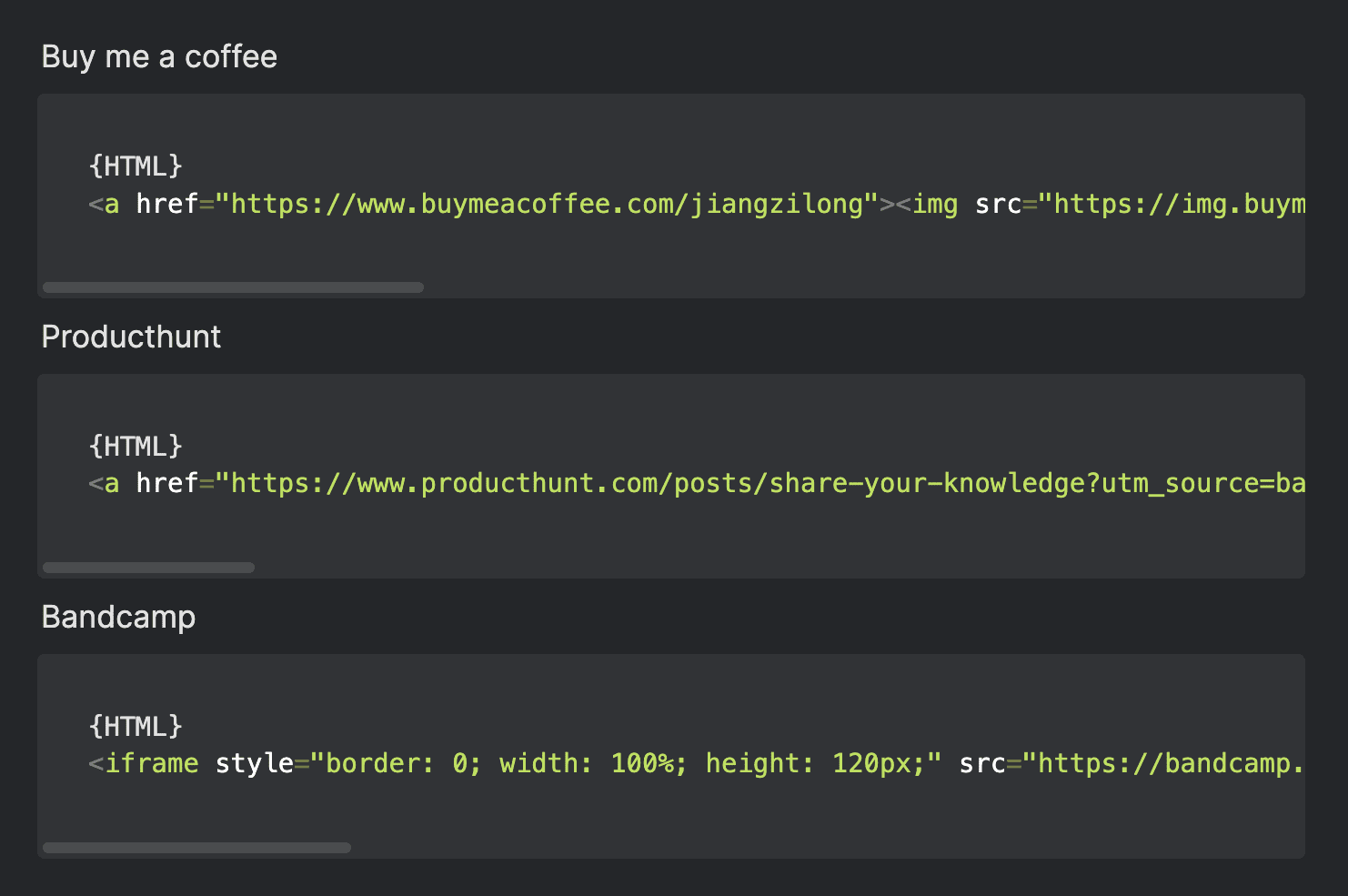
148 |
149 | ## 拉取远程更新
150 |
151 | 当此项目功能更新后你可以通过以下方式同步更新你的网站。
152 |
153 | 首先需要在终端中安装 git 以及安装 [VScode](https://code.visualstudio.com/download) 客户端。
154 |
155 | ### 将自己的项目克隆到本地
156 |
157 | 首先获取你自己的项目 URL
158 |
159 | 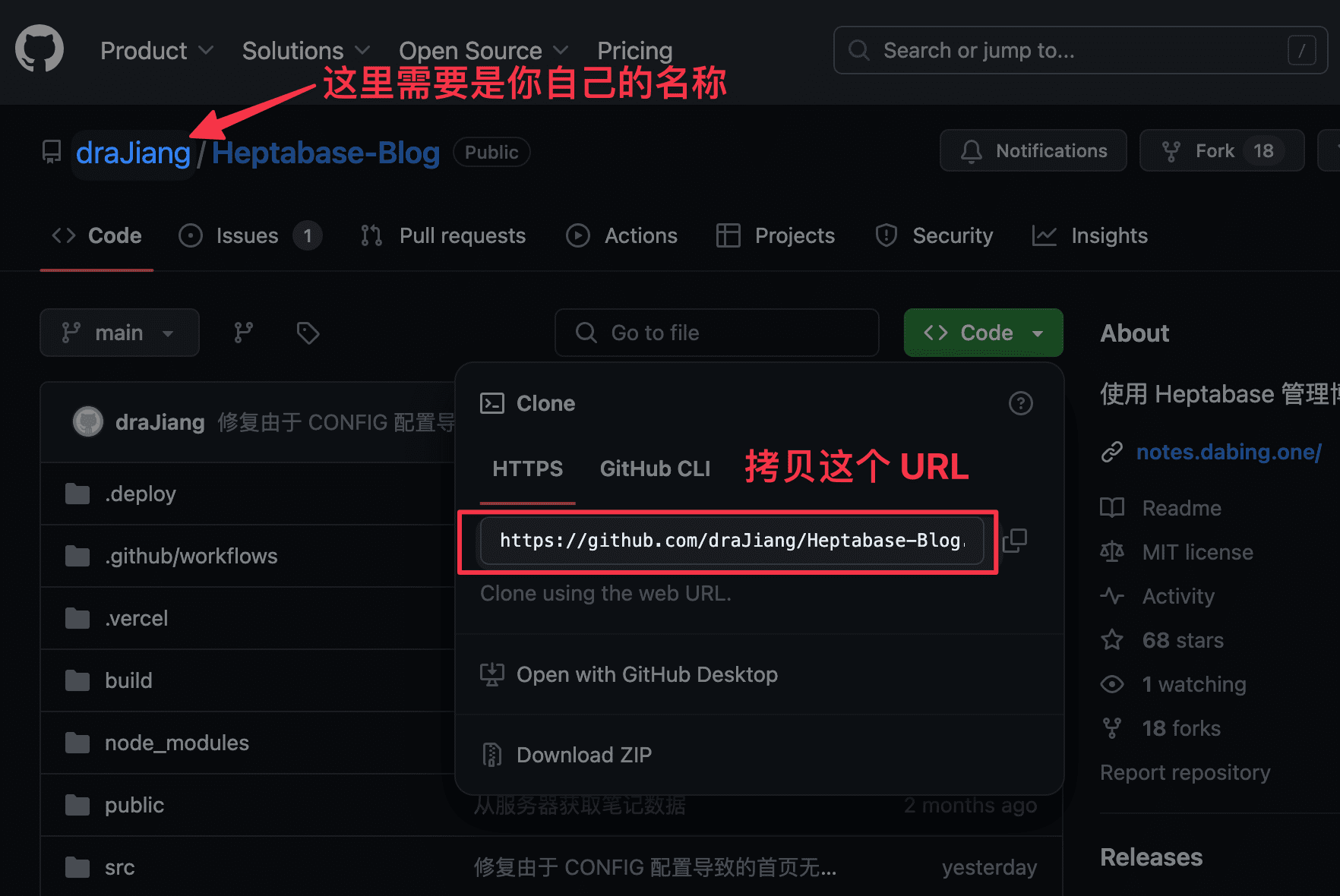
160 |
161 | 接下来在终端中操作
162 |
163 | ```shell
164 | git clone "https://github.com/YOURNAME/Heptabase-Blog.git"
165 | ```
166 |
167 | 通过以下命令进入项目文件夹
168 |
169 | ```shell
170 | cd Heptabase-Blog
171 | ```
172 |
173 | 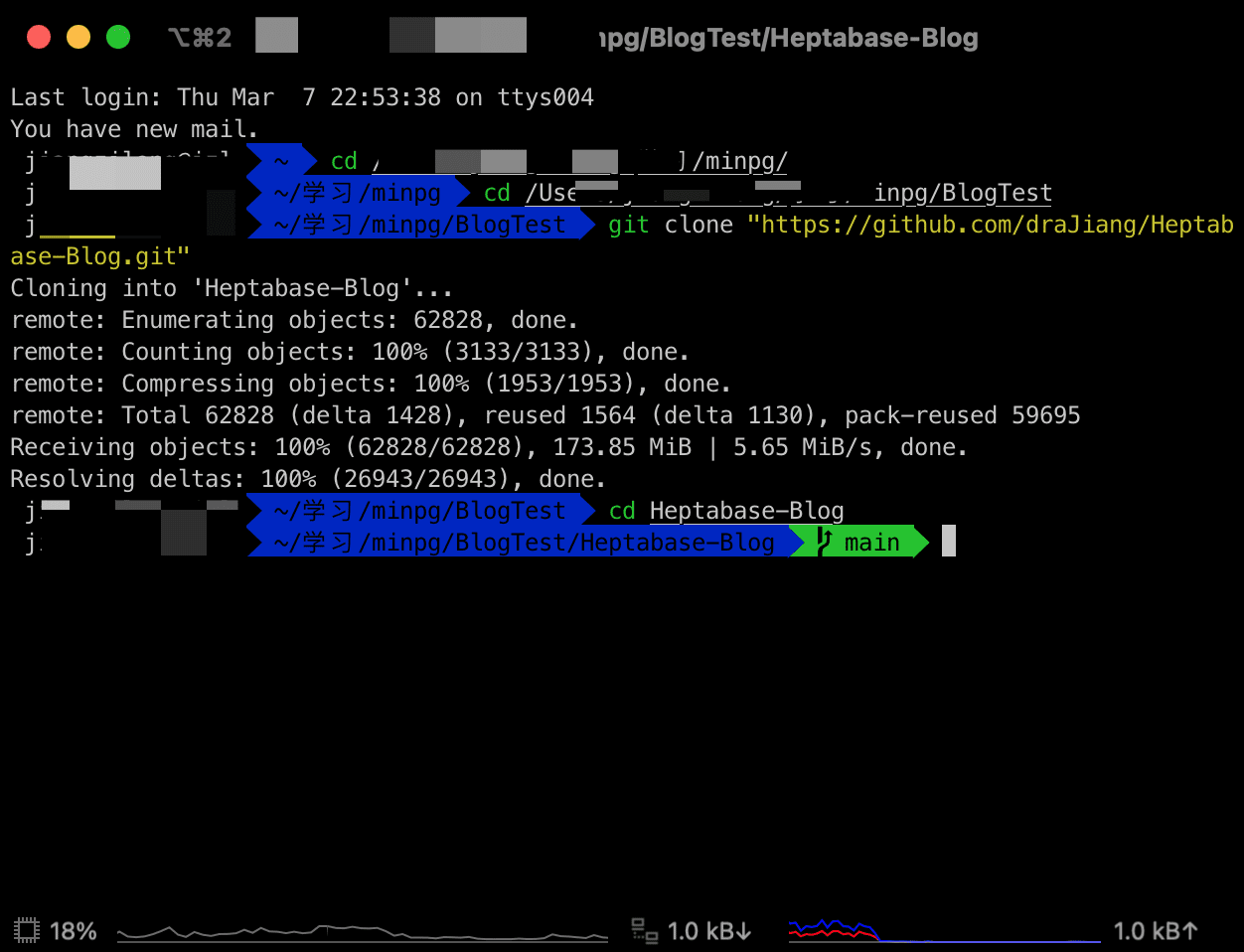
174 |
175 | ### 将本地的仓库与上游仓库关联
176 |
177 | 通过在终端中输入以下命令建立关联
178 |
179 | ```shell
180 | git remote add upstream https://github.com/draJiang/Heptabase-Blog.git
181 | ```
182 |
183 | 关联成功后,通过以下命令确认是否添加成功
184 |
185 | ```shell
186 | git remote -v
187 | ```
188 |
189 | 
190 |
191 | 用以下命令从你的上游仓库获取更新
192 |
193 | ```shell
194 | git fetch upstream
195 | ```
196 |
197 | 获取更新成功后,终端可能不会提供任何提示,接着进行下一步:合并上游仓库的更新
198 |
199 | ```shell
200 | git merge upstream/main
201 | ```
202 |
203 | 在合并的过程中可能系统会提示你**上游仓库和你的本地仓库存在冲突**,其实就是两个项目中存在差异,需要你手动选择应该如何处理这些冲突。
204 |
205 | ### 在 VSCode 中处理冲突
206 |
207 | 首先打开 VScode,然后打开本地的 Heptabase-Blog 文件夹
208 |
209 | 
210 |
211 | 在左侧的文件列表中,你可能会看到一些红色的文件名称,意味着这些文件中存在冲突,你需要点击这些文件逐个解决冲突。
212 |
213 | 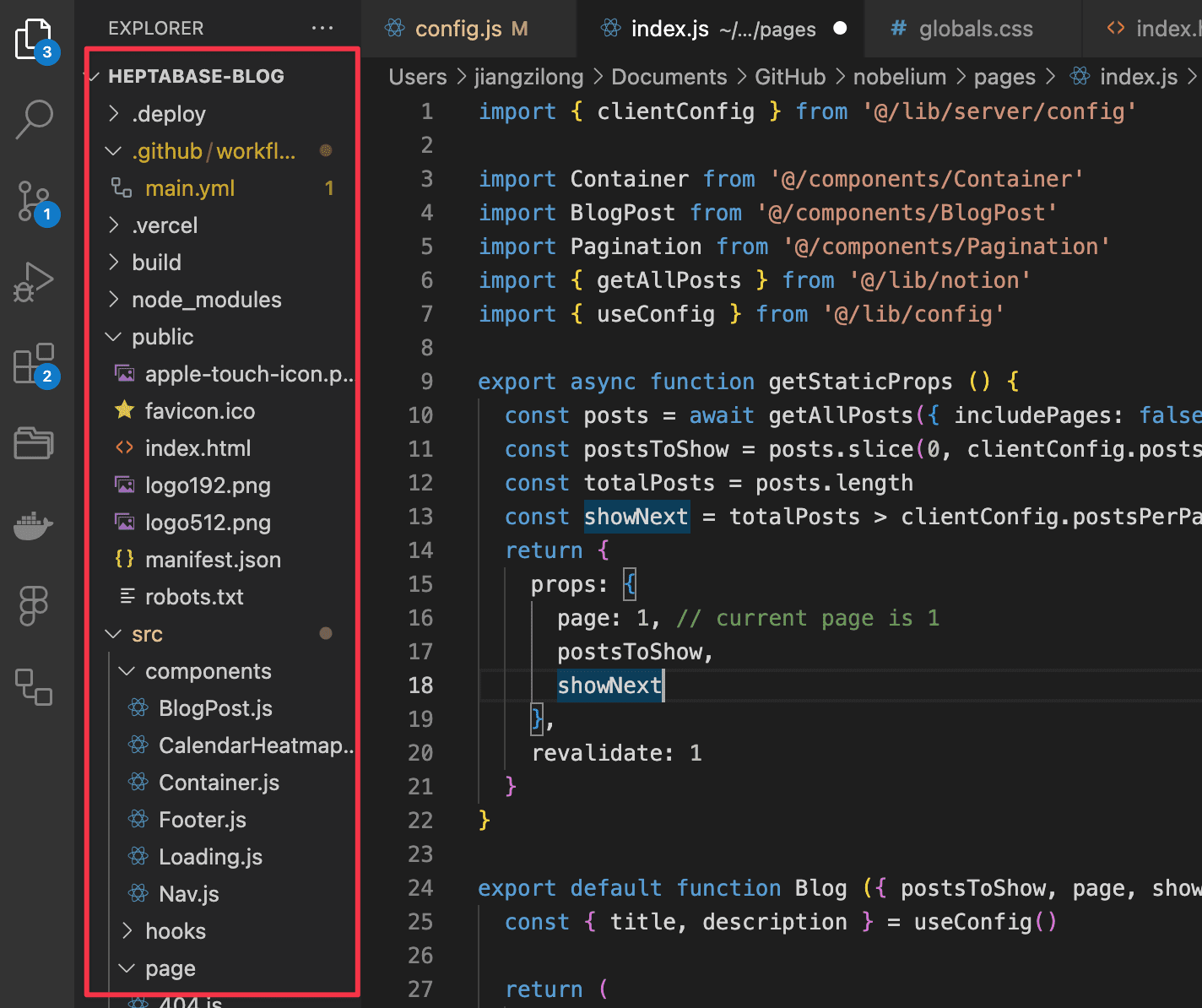
214 |
215 | 通常 `config.js` 、LOGO 等你需要自行自定义的内容,你可以选择「Accept Current Change」,其他则可以选择「Accept Incoming Change」
216 |
217 | 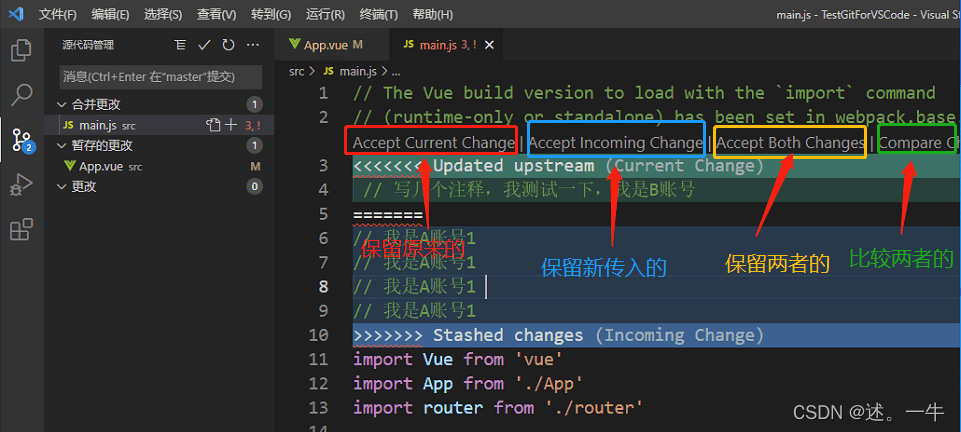
218 |
219 | ### 将本地项目推送到自己的 GitHub 仓库中
220 |
221 | 你已经解决了所有的冲突,现在可以将代码提交到你的 GitHub 仓库中,提交成功后 Vercel 会自动更新网站。
222 |
223 | 在终端中分别输入以下命令提交本次更新
224 |
225 | ```shell
226 | git add .
227 | ```
228 |
229 | ```shell
230 | git commit -m 'Conflicts resolved'
231 | ```
232 |
233 | 推送到 GitHub 仓库中
234 |
235 | ```shell
236 | git push origin main
237 | ```
238 |
239 | ### 检查 Vercel 是否更新成功
240 |
241 | 现在,一切都已完成,不过还是要检查一下 Vercel 是否正常完成网站的更新。
242 |
243 | 打开你的 GitHub 项目主页,点击注释 1 位置的图标,注意,根据部署状态这里会分别显示以下几种情况:
244 |
245 | - 🟡:正在部署
246 |
247 | - ❌:部署失败
248 |
249 | - ✅:部署成功
250 |
251 | 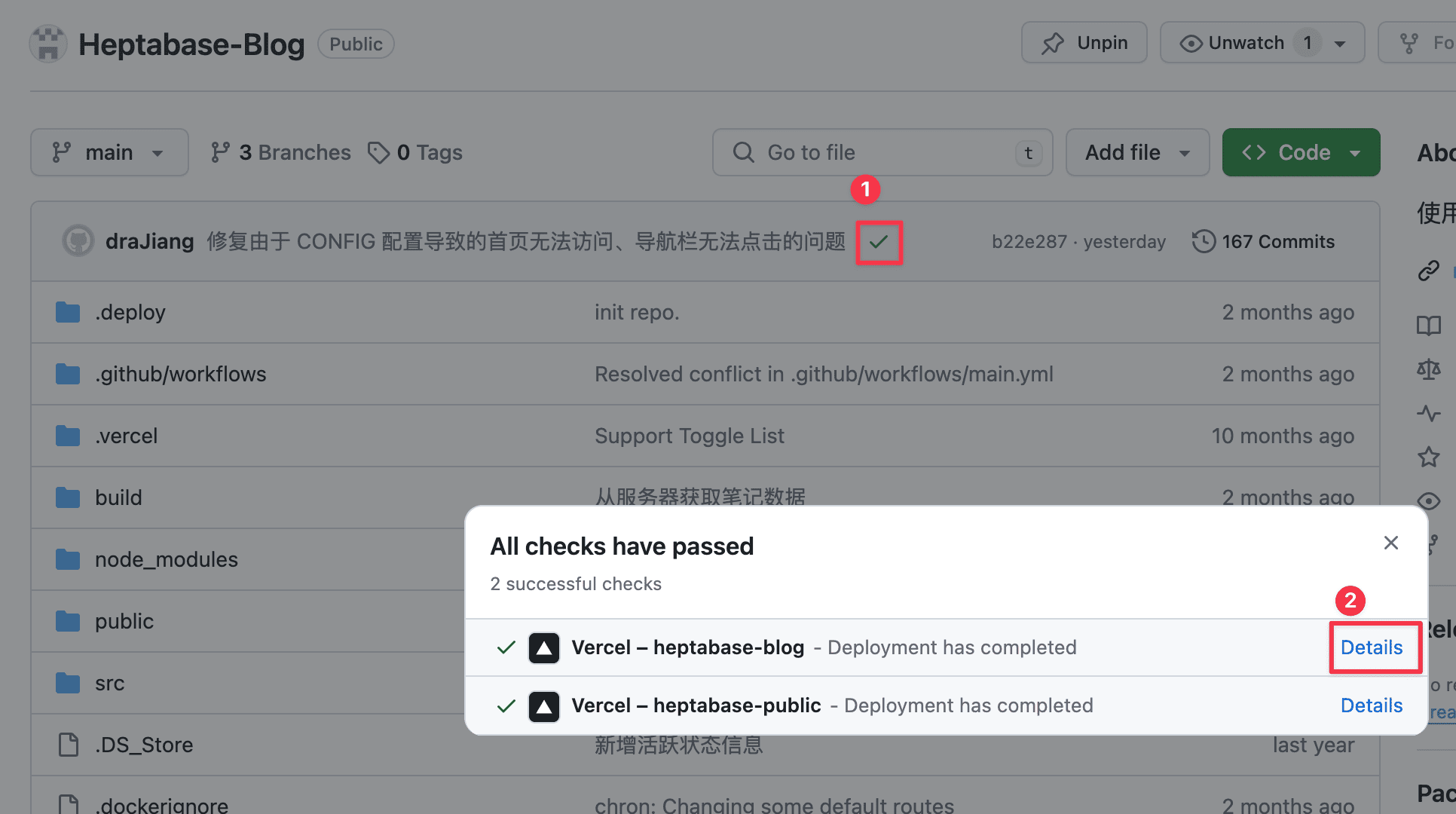
252 |
253 | 如果正在部署、部署失败,你可以点击注释 2 查看失败原因。
254 |
255 | ---
256 |
257 | ## 为什么不用其他方式
258 |
259 | ### 工具选择
260 |
261 | 尝试过 [HUGO](https://gohugo.io/) 和 [Notion](https://sspai.com/post/66678) 等方式、研究了 [obsidian publish](https://obsidian.md/publish),也实践用 Notion 维护了一年的[博客](https://blog.dabing.one/),但一直没有找到比较理想的方案。
262 |
263 | 一方面,笔记在 Heptabase 中,文章放到其他平台会导致双向链接失效。我在实践卡片笔记法,文章与笔记有高度的关联性,例如下面这篇文章中就存在多个卡片链接,但是这些链接在 Heptabase 以外的地方显示时就无法正常打卡笔记,所以不得不转为普通文本,这不但增加了工作量,也使得原本文章的脉络失效。
264 |
265 | 
266 |
267 | 另一方面,笔记、文章数据在不同平台有多份副本,后续修改起来就要穿梭在不同平台中进行更新,维护成本高。
268 |
269 | Heptabase 本身也支持公开笔记,但移动端的支持不太好,于是决定自己开发了一个。
270 |
271 | ### 博客 vs 数字花园
272 |
273 | 数字花园的理念与我正在使用的卡片笔记法、Heptabase 的设计哲学更加贴近,所以放弃了持续 1 年的博客,改用数字花园的方式维护自己的个人站点,下面会详细介绍一下原因。
274 |
275 | ## 对数字花园的理解
276 |
277 | 聊一下我对数字花园理解,以及如何将这些理解体现到网站的设计上。
278 |
279 | ### 知识的持续性
280 |
281 | 数字花园的内容是持续迭代的,我可以发布尚不成熟的想法(不一定要等到输出完整的文章)并且可以在发布后持续的修订。所以在笔记列表中,不是强调笔记的创建时间而是展示最近编辑时间,并将最近编辑的笔记展示在最前,方便阅读者理解笔记的活跃状态。
282 |
283 | 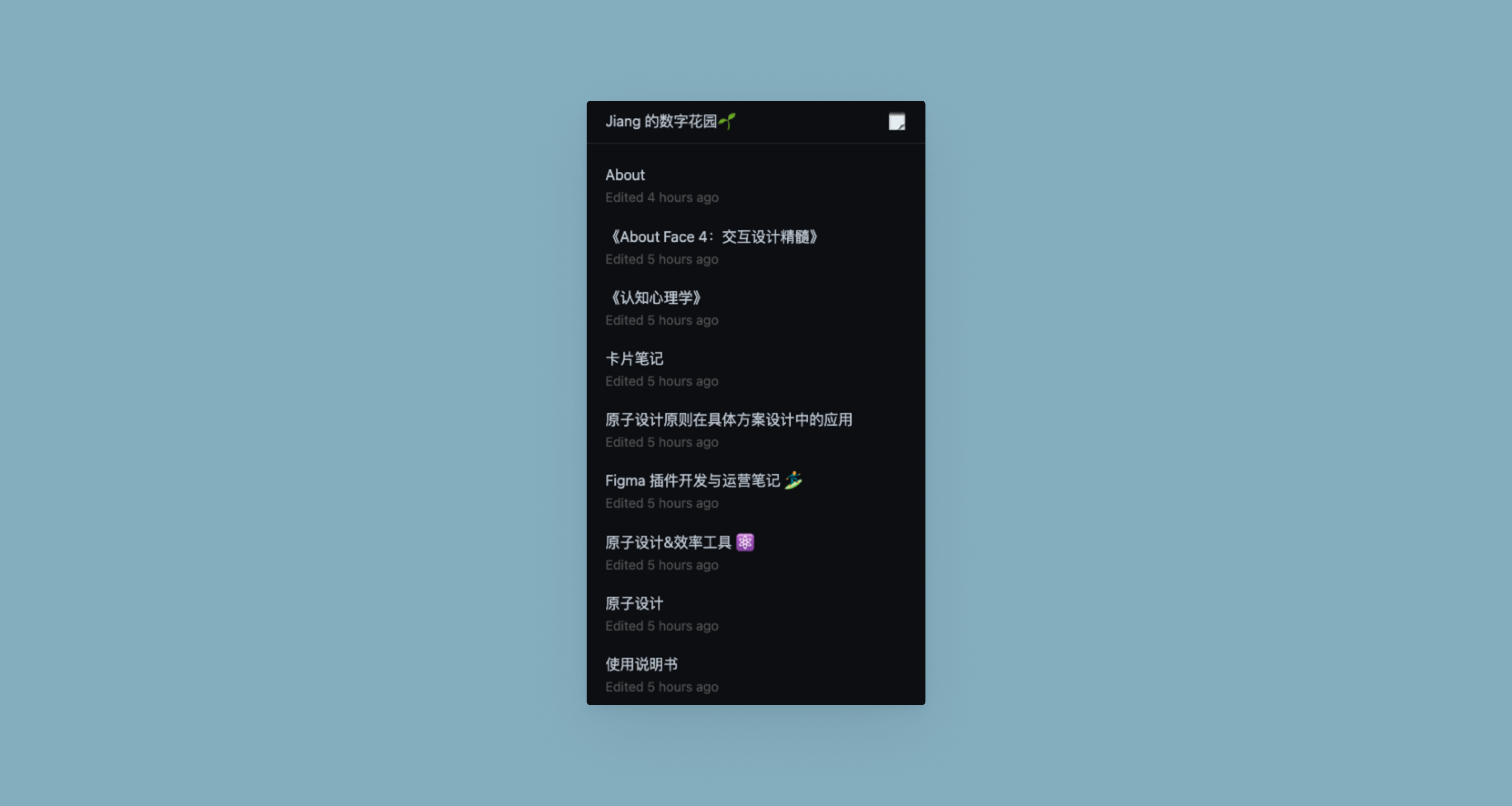
284 |
285 | 这和我运用的卡片笔记法理念一致,通过不断的积累、迭代卡片完成文章的输出,而不是一来就面对一张白纸一步到位完成创作。(写作不是从零开始)
286 |
287 | ### 思考的脉络
288 |
289 | 传统博客通常会按创建时间展示文章列表供用户阅读,通过标签筛选某个类型的文章。而数字花园则强调思考的脉络,具体体现在以下几点
290 |
291 | 1. 弱化文章列表,用一个介绍页/索引页作为阅读者漫游的起点
292 |
293 | 2. 支持双向链接,阅读者可以看到与当前文章关联的其他知识、想法
294 |
295 | 3. 支持开头提到的[面包片导航](https://notes.andymatuschak.org/Evergreen_notes)的交互方式,阅读者可以快速地在不同笔记间流转
296 |
297 | 数字花园的首页与双向链接:
298 |
299 | 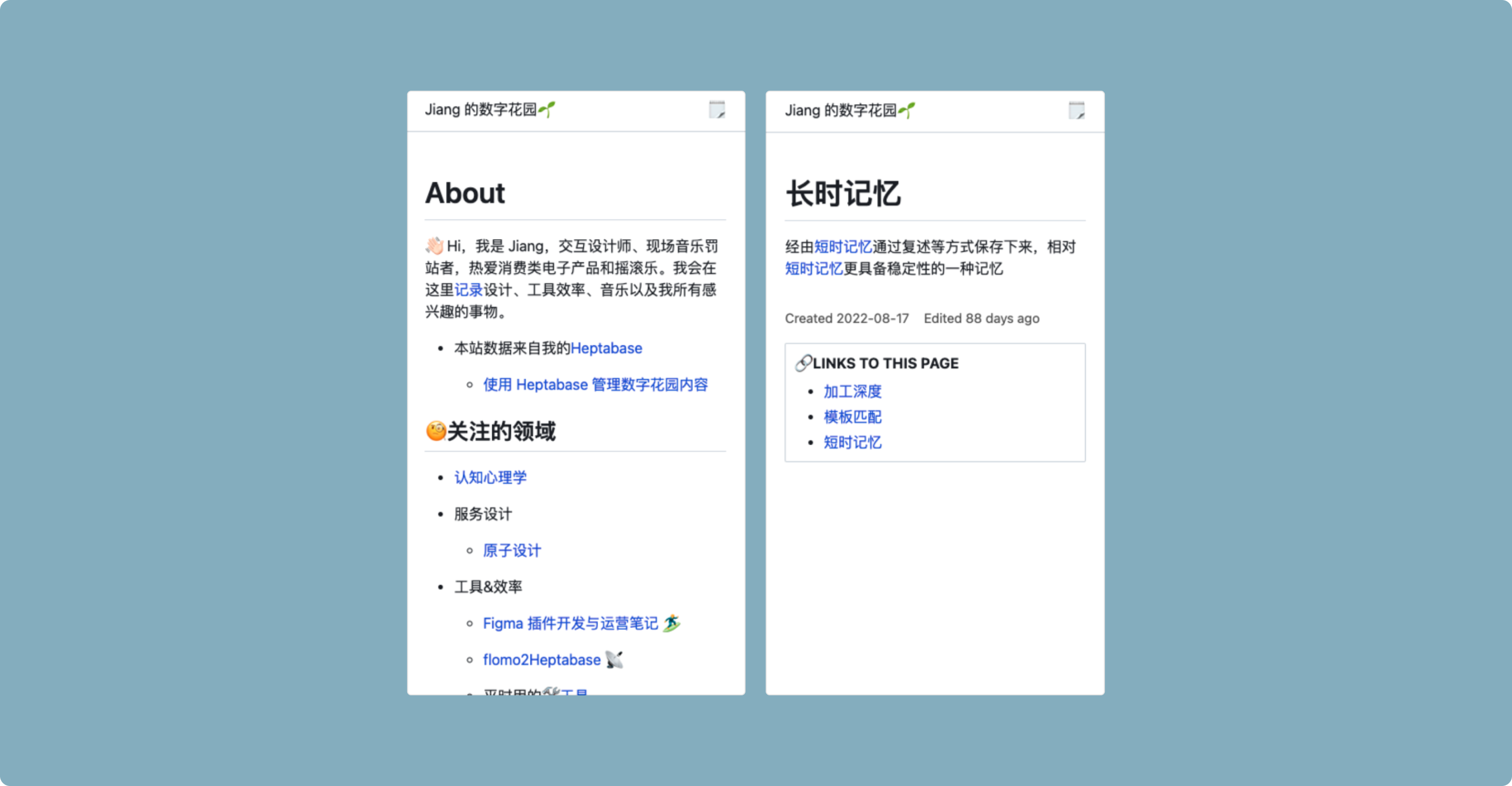
300 |
301 | 总的来说,使用持续迭代的、重在体现思考脉络的方式记录想法,最终也用同样的方式分享知识,这是我选择数字花园并开发此网站的原因。
--------------------------------------------------------------------------------
/src/components/Container.js:
--------------------------------------------------------------------------------
1 | import React, { useState, useEffect, useRef, useUrlState } from 'react';
2 | import { BrowserRouter as Router, Routes, Route, Link, useParams } from 'react-router-dom';
3 | import { useLocation } from "react-router";
4 |
5 | import { format } from 'date-fns'
6 |
7 | import '../index.css'
8 | // import 'github-markdown-css'
9 | import Loading from '../components/Loading'
10 |
11 | // import "highlight.js/styles/github.css";
12 | // import 'highlight.js/styles/dark.css';
13 | // import 'highlight.js/styles/hopscotch.css';
14 | // import hljs from "highlight.js";
15 |
16 | import { ShareAltOutlined } from '@ant-design/icons';
17 | import { Button, message, Tooltip } from 'antd';
18 |
19 |
20 | // 文章正文
21 | function Container(props) {
22 |
23 | // 记录文章的 DOM 信息,用来处理 DOM 元素,例如修改图片样式
24 | let post = useRef(null);
25 | const { pathname } = useLocation();
26 | // Tooltips 显示、隐藏
27 | let [TooltipsOpen, setTooltipsOpen] = useState(false)
28 | // 记录当前文章的 ID
29 | let [thisPageId, setPageID] = useState('')
30 |
31 | // 当前路径信息
32 | let path = window.location.pathname
33 |
34 | // 路径中包含的 post id,用以获取文章 md 信息
35 | let path_id
36 | if (path.indexOf('/post/') < 0) {
37 |
38 | // 若路径中不含 post id,则取父组件的 props
39 | path_id = props.post_id
40 |
41 | } else {
42 | path_id = path.replace('/post/', '')
43 | }
44 |
45 |
46 |
47 | // 记录自定义的 Link 数据,用来实现 DOM 链接的间接跳转
48 | // let [my_link, setLink] = useState('');
49 |
50 | // 如果当前页面 ID 为空则获取数据
51 | if (thisPageId == '') {
52 | setPageID(props.post_id)
53 | }
54 |
55 | // 如果是移动端则增加图片的尺寸
56 | let isMobile = navigator.userAgent.match(/Mobile/i)
57 | let mobileSkale = 1
58 | if (isMobile) {
59 | mobileSkale = 2
60 | }
61 |
62 | // 点击反向链接
63 | const handleBackLinkClick = (link_id, current_id) => {
64 | console.log('handleBackLinkClick');
65 | console.log(link_id);
66 | // 记录跳转类型
67 | sessionStorage.setItem('nav_type', 0)
68 | // 记录当前滚动的位置
69 | sessionStorage.setItem('scrollY', window.scrollY)
70 |
71 | props.handleLinkClick(link_id, current_id)
72 |
73 | }
74 |
75 | // 点击文内链接
76 | const handleAarticleLinkClick = (node) => {
77 |
78 | if (node !== undefined) {
79 |
80 | if (node.classList.contains('article_link') !== true || node.getAttribute('path') === undefined || node.getAttribute('path') === null) {
81 | // 如果 DOM 中的元素**不**包含 path 属性,则跳过(有 path 属性的元素才需要处理)
82 |
83 | } else {
84 | let post_id = node.getAttribute('path').replace('/post/', '')
85 | let parent_note_id = node.getAttribute('parent_note_id')
86 |
87 | if (node.getAttribute('addClickHandleFlag') !== '1') {
88 | // 如果未绑定事件,则绑定,否则不绑定
89 | node.setAttribute('addClickHandleFlag', '1')
90 |
91 | node.addEventListener('click', function () {
92 | // 记录跳转类型
93 | sessionStorage.setItem('nav_type', 1)
94 | // 记录当前滚动的位置
95 | sessionStorage.setItem('scrollY', window.scrollY)
96 | props.handleLinkClick(post_id, parent_note_id)
97 | })
98 | }
99 |
100 |
101 | // node.removeEventListener('click', handleAarticleLinkClickInstant.bind(Event, post_id, parent_note_id))
102 | // node.addEventListener('click', handleAarticleLinkClickInstant.bind(Event, post_id, parent_note_id))
103 |
104 | // node.removeEventListener('click', ttest,false)
105 | // node.addEventListener('click', ttest,false)
106 |
107 | // node.onClick = handleAarticleLinkClickInstant.bind(Event,post_id, parent_note_id)
108 | // node.onClick = function () {
109 | // console.log('ok');
110 | // handleAarticleLinkClickInstant(Event, post_id, parent_note_id)
111 | // }
112 |
113 |
114 | }
115 |
116 | }
117 |
118 | }
119 |
120 | const handleCopyBtnClick = () => {
121 | console.log(123);
122 | // 显示 Tooltips
123 | setTooltipsOpen(true)
124 |
125 | setTimeout(() => {
126 | // 隐藏 Tooltips
127 | setTooltipsOpen(false)
128 | }, 1400);
129 | }
130 |
131 | // Tooltips 显示、隐藏状态变化时
132 | const handleTooltipOnOpenChange = () => {
133 | console.log('onOpenChange');
134 | }
135 |
136 | // 组件生命周期,组件载入、更新时将触发此函数
137 | useEffect(() => {
138 |
139 | // console.log('useEffect====================');
140 | props.handleHashChange(window.location.href, props['card']['card']['id'])
141 |
142 | // dom 加载完毕后
143 | if (post.current != null) {
144 |
145 | // 设置网易云音乐播放器的尺寸
146 |
147 | // 设置 img 的尺寸
148 | // let article_img = document.getElementsByTagName('img');
149 |
150 | // for (let i = 0; i < article_img.length; i++) {
151 | // let width_key_index = article_img[i]['alt'].indexOf('{{width ')
152 | // if (width_key_index > -1) {
153 | // let img_width = article_img[i]['alt'].substring(width_key_index, article_img[i]['alt'].length)
154 | // img_width = img_width.replace('{{width ', '')
155 | // img_width = img_width.replace('}}', '')
156 |
157 | // article_img[i].setAttribute('style', 'width:' + (Number(img_width.replace('%', '')) * mobileSkale).toString() + '%')
158 | // article_img[i].style.display = 'block'
159 | // article_img[i].style.margin = '0 auto'
160 | // }
161 | // }
162 |
163 | // 设置 a 链接的点击事件,将 a 按照 Link 的方式进行跳转,避免页面不必要的刷新
164 | let article_link = document.getElementsByClassName('article_link');
165 |
166 | let links = []
167 |
168 | for (let i = 0; i < article_link.length; i++) {
169 |
170 | if (article_link[i].classList.contains('article_link') !== true || article_link[i].getAttribute('path') === undefined || article_link[i].getAttribute('path') === null) {
171 | // 如果 DOM 中的元素**不**包含 path 属性,则跳过(有 path 属性的元素才需要处理)
172 | continue
173 | }
174 |
175 | setTimeout(() => {
176 |
177 | handleAarticleLinkClick(article_link[i])
178 |
179 | }, 10);
180 |
181 | }
182 |
183 | // 设置自定义 Link 并渲染到 DOM 中
184 | // if (my_link == '' && links.length > 0) {
185 | // setLink(links)
186 | // }
187 |
188 | // 滚动到对应卡片的位置
189 | setTimeout(() => {
190 | let last_note = document.getElementsByClassName('container')
191 | // console.log(last_note[last_note.length - 1]);
192 | // document.getElementsByClassName('notes')[0].scrollTo({ left: last_note[last_note.length - 1].offsetLeft, behavior: 'smooth' })
193 | }, 100);
194 |
195 |
196 | }
197 |
198 | // // 代码高亮
199 | // // if (document.querySelectorAll('pre').length > 0) {
200 | // // document.querySelectorAll('pre').forEach(element => {
201 | // // hljs.highlightBlock(element);
202 | // // });
203 | // // }
204 |
205 |
206 |
207 |
208 | });
209 |
210 | // 加载中
211 | if (false) {
212 | console.log('isLoading');
213 |
214 | return
136 | ```
137 |
138 | Bandcamp
139 |
140 | ```html
141 | {HTML}
142 |
143 | ```
144 |
145 | 上述样式在编辑器中是这个样子:
146 |
147 | 
148 |
149 | ## 拉取远程更新
150 |
151 | 当此项目功能更新后你可以通过以下方式同步更新你的网站。
152 |
153 | 首先需要在终端中安装 git 以及安装 [VScode](https://code.visualstudio.com/download) 客户端。
154 |
155 | ### 将自己的项目克隆到本地
156 |
157 | 首先获取你自己的项目 URL
158 |
159 | 
160 |
161 | 接下来在终端中操作
162 |
163 | ```shell
164 | git clone "https://github.com/YOURNAME/Heptabase-Blog.git"
165 | ```
166 |
167 | 通过以下命令进入项目文件夹
168 |
169 | ```shell
170 | cd Heptabase-Blog
171 | ```
172 |
173 | 
174 |
175 | ### 将本地的仓库与上游仓库关联
176 |
177 | 通过在终端中输入以下命令建立关联
178 |
179 | ```shell
180 | git remote add upstream https://github.com/draJiang/Heptabase-Blog.git
181 | ```
182 |
183 | 关联成功后,通过以下命令确认是否添加成功
184 |
185 | ```shell
186 | git remote -v
187 | ```
188 |
189 | 
190 |
191 | 用以下命令从你的上游仓库获取更新
192 |
193 | ```shell
194 | git fetch upstream
195 | ```
196 |
197 | 获取更新成功后,终端可能不会提供任何提示,接着进行下一步:合并上游仓库的更新
198 |
199 | ```shell
200 | git merge upstream/main
201 | ```
202 |
203 | 在合并的过程中可能系统会提示你**上游仓库和你的本地仓库存在冲突**,其实就是两个项目中存在差异,需要你手动选择应该如何处理这些冲突。
204 |
205 | ### 在 VSCode 中处理冲突
206 |
207 | 首先打开 VScode,然后打开本地的 Heptabase-Blog 文件夹
208 |
209 | 
210 |
211 | 在左侧的文件列表中,你可能会看到一些红色的文件名称,意味着这些文件中存在冲突,你需要点击这些文件逐个解决冲突。
212 |
213 | 
214 |
215 | 通常 `config.js` 、LOGO 等你需要自行自定义的内容,你可以选择「Accept Current Change」,其他则可以选择「Accept Incoming Change」
216 |
217 | 
218 |
219 | ### 将本地项目推送到自己的 GitHub 仓库中
220 |
221 | 你已经解决了所有的冲突,现在可以将代码提交到你的 GitHub 仓库中,提交成功后 Vercel 会自动更新网站。
222 |
223 | 在终端中分别输入以下命令提交本次更新
224 |
225 | ```shell
226 | git add .
227 | ```
228 |
229 | ```shell
230 | git commit -m 'Conflicts resolved'
231 | ```
232 |
233 | 推送到 GitHub 仓库中
234 |
235 | ```shell
236 | git push origin main
237 | ```
238 |
239 | ### 检查 Vercel 是否更新成功
240 |
241 | 现在,一切都已完成,不过还是要检查一下 Vercel 是否正常完成网站的更新。
242 |
243 | 打开你的 GitHub 项目主页,点击注释 1 位置的图标,注意,根据部署状态这里会分别显示以下几种情况:
244 |
245 | - 🟡:正在部署
246 |
247 | - ❌:部署失败
248 |
249 | - ✅:部署成功
250 |
251 | 
252 |
253 | 如果正在部署、部署失败,你可以点击注释 2 查看失败原因。
254 |
255 | ---
256 |
257 | ## 为什么不用其他方式
258 |
259 | ### 工具选择
260 |
261 | 尝试过 [HUGO](https://gohugo.io/) 和 [Notion](https://sspai.com/post/66678) 等方式、研究了 [obsidian publish](https://obsidian.md/publish),也实践用 Notion 维护了一年的[博客](https://blog.dabing.one/),但一直没有找到比较理想的方案。
262 |
263 | 一方面,笔记在 Heptabase 中,文章放到其他平台会导致双向链接失效。我在实践卡片笔记法,文章与笔记有高度的关联性,例如下面这篇文章中就存在多个卡片链接,但是这些链接在 Heptabase 以外的地方显示时就无法正常打卡笔记,所以不得不转为普通文本,这不但增加了工作量,也使得原本文章的脉络失效。
264 |
265 | 
266 |
267 | 另一方面,笔记、文章数据在不同平台有多份副本,后续修改起来就要穿梭在不同平台中进行更新,维护成本高。
268 |
269 | Heptabase 本身也支持公开笔记,但移动端的支持不太好,于是决定自己开发了一个。
270 |
271 | ### 博客 vs 数字花园
272 |
273 | 数字花园的理念与我正在使用的卡片笔记法、Heptabase 的设计哲学更加贴近,所以放弃了持续 1 年的博客,改用数字花园的方式维护自己的个人站点,下面会详细介绍一下原因。
274 |
275 | ## 对数字花园的理解
276 |
277 | 聊一下我对数字花园理解,以及如何将这些理解体现到网站的设计上。
278 |
279 | ### 知识的持续性
280 |
281 | 数字花园的内容是持续迭代的,我可以发布尚不成熟的想法(不一定要等到输出完整的文章)并且可以在发布后持续的修订。所以在笔记列表中,不是强调笔记的创建时间而是展示最近编辑时间,并将最近编辑的笔记展示在最前,方便阅读者理解笔记的活跃状态。
282 |
283 | 
284 |
285 | 这和我运用的卡片笔记法理念一致,通过不断的积累、迭代卡片完成文章的输出,而不是一来就面对一张白纸一步到位完成创作。(写作不是从零开始)
286 |
287 | ### 思考的脉络
288 |
289 | 传统博客通常会按创建时间展示文章列表供用户阅读,通过标签筛选某个类型的文章。而数字花园则强调思考的脉络,具体体现在以下几点
290 |
291 | 1. 弱化文章列表,用一个介绍页/索引页作为阅读者漫游的起点
292 |
293 | 2. 支持双向链接,阅读者可以看到与当前文章关联的其他知识、想法
294 |
295 | 3. 支持开头提到的[面包片导航](https://notes.andymatuschak.org/Evergreen_notes)的交互方式,阅读者可以快速地在不同笔记间流转
296 |
297 | 数字花园的首页与双向链接:
298 |
299 | 
300 |
301 | 总的来说,使用持续迭代的、重在体现思考脉络的方式记录想法,最终也用同样的方式分享知识,这是我选择数字花园并开发此网站的原因。
--------------------------------------------------------------------------------
/src/components/Container.js:
--------------------------------------------------------------------------------
1 | import React, { useState, useEffect, useRef, useUrlState } from 'react';
2 | import { BrowserRouter as Router, Routes, Route, Link, useParams } from 'react-router-dom';
3 | import { useLocation } from "react-router";
4 |
5 | import { format } from 'date-fns'
6 |
7 | import '../index.css'
8 | // import 'github-markdown-css'
9 | import Loading from '../components/Loading'
10 |
11 | // import "highlight.js/styles/github.css";
12 | // import 'highlight.js/styles/dark.css';
13 | // import 'highlight.js/styles/hopscotch.css';
14 | // import hljs from "highlight.js";
15 |
16 | import { ShareAltOutlined } from '@ant-design/icons';
17 | import { Button, message, Tooltip } from 'antd';
18 |
19 |
20 | // 文章正文
21 | function Container(props) {
22 |
23 | // 记录文章的 DOM 信息,用来处理 DOM 元素,例如修改图片样式
24 | let post = useRef(null);
25 | const { pathname } = useLocation();
26 | // Tooltips 显示、隐藏
27 | let [TooltipsOpen, setTooltipsOpen] = useState(false)
28 | // 记录当前文章的 ID
29 | let [thisPageId, setPageID] = useState('')
30 |
31 | // 当前路径信息
32 | let path = window.location.pathname
33 |
34 | // 路径中包含的 post id,用以获取文章 md 信息
35 | let path_id
36 | if (path.indexOf('/post/') < 0) {
37 |
38 | // 若路径中不含 post id,则取父组件的 props
39 | path_id = props.post_id
40 |
41 | } else {
42 | path_id = path.replace('/post/', '')
43 | }
44 |
45 |
46 |
47 | // 记录自定义的 Link 数据,用来实现 DOM 链接的间接跳转
48 | // let [my_link, setLink] = useState('');
49 |
50 | // 如果当前页面 ID 为空则获取数据
51 | if (thisPageId == '') {
52 | setPageID(props.post_id)
53 | }
54 |
55 | // 如果是移动端则增加图片的尺寸
56 | let isMobile = navigator.userAgent.match(/Mobile/i)
57 | let mobileSkale = 1
58 | if (isMobile) {
59 | mobileSkale = 2
60 | }
61 |
62 | // 点击反向链接
63 | const handleBackLinkClick = (link_id, current_id) => {
64 | console.log('handleBackLinkClick');
65 | console.log(link_id);
66 | // 记录跳转类型
67 | sessionStorage.setItem('nav_type', 0)
68 | // 记录当前滚动的位置
69 | sessionStorage.setItem('scrollY', window.scrollY)
70 |
71 | props.handleLinkClick(link_id, current_id)
72 |
73 | }
74 |
75 | // 点击文内链接
76 | const handleAarticleLinkClick = (node) => {
77 |
78 | if (node !== undefined) {
79 |
80 | if (node.classList.contains('article_link') !== true || node.getAttribute('path') === undefined || node.getAttribute('path') === null) {
81 | // 如果 DOM 中的元素**不**包含 path 属性,则跳过(有 path 属性的元素才需要处理)
82 |
83 | } else {
84 | let post_id = node.getAttribute('path').replace('/post/', '')
85 | let parent_note_id = node.getAttribute('parent_note_id')
86 |
87 | if (node.getAttribute('addClickHandleFlag') !== '1') {
88 | // 如果未绑定事件,则绑定,否则不绑定
89 | node.setAttribute('addClickHandleFlag', '1')
90 |
91 | node.addEventListener('click', function () {
92 | // 记录跳转类型
93 | sessionStorage.setItem('nav_type', 1)
94 | // 记录当前滚动的位置
95 | sessionStorage.setItem('scrollY', window.scrollY)
96 | props.handleLinkClick(post_id, parent_note_id)
97 | })
98 | }
99 |
100 |
101 | // node.removeEventListener('click', handleAarticleLinkClickInstant.bind(Event, post_id, parent_note_id))
102 | // node.addEventListener('click', handleAarticleLinkClickInstant.bind(Event, post_id, parent_note_id))
103 |
104 | // node.removeEventListener('click', ttest,false)
105 | // node.addEventListener('click', ttest,false)
106 |
107 | // node.onClick = handleAarticleLinkClickInstant.bind(Event,post_id, parent_note_id)
108 | // node.onClick = function () {
109 | // console.log('ok');
110 | // handleAarticleLinkClickInstant(Event, post_id, parent_note_id)
111 | // }
112 |
113 |
114 | }
115 |
116 | }
117 |
118 | }
119 |
120 | const handleCopyBtnClick = () => {
121 | console.log(123);
122 | // 显示 Tooltips
123 | setTooltipsOpen(true)
124 |
125 | setTimeout(() => {
126 | // 隐藏 Tooltips
127 | setTooltipsOpen(false)
128 | }, 1400);
129 | }
130 |
131 | // Tooltips 显示、隐藏状态变化时
132 | const handleTooltipOnOpenChange = () => {
133 | console.log('onOpenChange');
134 | }
135 |
136 | // 组件生命周期,组件载入、更新时将触发此函数
137 | useEffect(() => {
138 |
139 | // console.log('useEffect====================');
140 | props.handleHashChange(window.location.href, props['card']['card']['id'])
141 |
142 | // dom 加载完毕后
143 | if (post.current != null) {
144 |
145 | // 设置网易云音乐播放器的尺寸
146 |
147 | // 设置 img 的尺寸
148 | // let article_img = document.getElementsByTagName('img');
149 |
150 | // for (let i = 0; i < article_img.length; i++) {
151 | // let width_key_index = article_img[i]['alt'].indexOf('{{width ')
152 | // if (width_key_index > -1) {
153 | // let img_width = article_img[i]['alt'].substring(width_key_index, article_img[i]['alt'].length)
154 | // img_width = img_width.replace('{{width ', '')
155 | // img_width = img_width.replace('}}', '')
156 |
157 | // article_img[i].setAttribute('style', 'width:' + (Number(img_width.replace('%', '')) * mobileSkale).toString() + '%')
158 | // article_img[i].style.display = 'block'
159 | // article_img[i].style.margin = '0 auto'
160 | // }
161 | // }
162 |
163 | // 设置 a 链接的点击事件,将 a 按照 Link 的方式进行跳转,避免页面不必要的刷新
164 | let article_link = document.getElementsByClassName('article_link');
165 |
166 | let links = []
167 |
168 | for (let i = 0; i < article_link.length; i++) {
169 |
170 | if (article_link[i].classList.contains('article_link') !== true || article_link[i].getAttribute('path') === undefined || article_link[i].getAttribute('path') === null) {
171 | // 如果 DOM 中的元素**不**包含 path 属性,则跳过(有 path 属性的元素才需要处理)
172 | continue
173 | }
174 |
175 | setTimeout(() => {
176 |
177 | handleAarticleLinkClick(article_link[i])
178 |
179 | }, 10);
180 |
181 | }
182 |
183 | // 设置自定义 Link 并渲染到 DOM 中
184 | // if (my_link == '' && links.length > 0) {
185 | // setLink(links)
186 | // }
187 |
188 | // 滚动到对应卡片的位置
189 | setTimeout(() => {
190 | let last_note = document.getElementsByClassName('container')
191 | // console.log(last_note[last_note.length - 1]);
192 | // document.getElementsByClassName('notes')[0].scrollTo({ left: last_note[last_note.length - 1].offsetLeft, behavior: 'smooth' })
193 | }, 100);
194 |
195 |
196 | }
197 |
198 | // // 代码高亮
199 | // // if (document.querySelectorAll('pre').length > 0) {
200 | // // document.querySelectorAll('pre').forEach(element => {
201 | // // hljs.highlightBlock(element);
202 | // // });
203 | // // }
204 |
205 |
206 |
207 |
208 | });
209 |
210 | // 加载中
211 | if (false) {
212 | console.log('isLoading');
213 |
214 | return