├── .gitlab-ci.yml ├── templates ├── faq-template │ ├── README.md │ ├── SUMMARY.md │ ├── gitbook.md │ ├── _layouts │ │ └── website │ │ │ └── page.html │ ├── book.json │ ├── package.json │ └── gitbook-install.md ├── doc-template │ ├── docs │ │ ├── cover.jpg │ │ ├── GLOSSARY.md │ │ ├── README.md │ │ ├── SUMMARY.md │ │ ├── appendix │ │ │ └── resources.md │ │ ├── basics │ │ │ ├── commands.md │ │ │ ├── installation.md │ │ │ ├── generating-ebooks-and-pdfs.md │ │ │ ├── deploy.md │ │ │ ├── structure.md │ │ │ └── settings.md │ │ └── advanced │ │ │ └── plugins.md │ ├── assets │ │ └── styles │ │ │ └── website.css │ ├── package.json │ └── book.json └── api-template │ ├── SUMMARY.md │ ├── README.md │ ├── book.json │ ├── package.json │ └── api-demo.md ├── assets └── images │ ├── weixin.png │ ├── favicon.ico │ ├── zhifubao.png │ ├── gitbook-clone.png │ ├── gitbook-new-book.png │ ├── gitbook-settings.png │ └── gitbook-new-book-with-github.png ├── prettier.config.js ├── package.json ├── .editorconfig ├── settings ├── nginx.conf └── book.json.simple ├── scripts ├── publish.sh └── build.sh ├── LICENSE ├── .gitattributes ├── .gitignore └── README.md /.gitlab-ci.yml: -------------------------------------------------------------------------------- 1 | build: 2 | script: "bash -l ./bin/build.sh" -------------------------------------------------------------------------------- /templates/faq-template/README.md: -------------------------------------------------------------------------------- 1 | 这是一个 GitBook FAQ 文档模板。 2 | -------------------------------------------------------------------------------- /assets/images/weixin.png: -------------------------------------------------------------------------------- https://raw.githubusercontent.com/dunwu/gitbook-templates/HEAD/assets/images/weixin.png -------------------------------------------------------------------------------- /assets/images/favicon.ico: -------------------------------------------------------------------------------- https://raw.githubusercontent.com/dunwu/gitbook-templates/HEAD/assets/images/favicon.ico -------------------------------------------------------------------------------- /assets/images/zhifubao.png: -------------------------------------------------------------------------------- https://raw.githubusercontent.com/dunwu/gitbook-templates/HEAD/assets/images/zhifubao.png -------------------------------------------------------------------------------- /assets/images/gitbook-clone.png: -------------------------------------------------------------------------------- https://raw.githubusercontent.com/dunwu/gitbook-templates/HEAD/assets/images/gitbook-clone.png -------------------------------------------------------------------------------- /assets/images/gitbook-new-book.png: -------------------------------------------------------------------------------- https://raw.githubusercontent.com/dunwu/gitbook-templates/HEAD/assets/images/gitbook-new-book.png -------------------------------------------------------------------------------- /assets/images/gitbook-settings.png: -------------------------------------------------------------------------------- https://raw.githubusercontent.com/dunwu/gitbook-templates/HEAD/assets/images/gitbook-settings.png -------------------------------------------------------------------------------- /templates/faq-template/SUMMARY.md: -------------------------------------------------------------------------------- 1 | # SUMMARY 2 | 3 | - [什么是 GitBook?](gitbook.md) 4 | - [如何安装 GitBook?](gitbook-install.md) 5 | -------------------------------------------------------------------------------- /templates/doc-template/docs/cover.jpg: -------------------------------------------------------------------------------- https://raw.githubusercontent.com/dunwu/gitbook-templates/HEAD/templates/doc-template/docs/cover.jpg -------------------------------------------------------------------------------- /templates/api-template/SUMMARY.md: -------------------------------------------------------------------------------- 1 | # Summary 2 | 3 | ## 说明 4 | 5 | - [简介](README.md) 6 | 7 | ## API 8 | 9 | - [API 示例](api-demo.md) 10 | -------------------------------------------------------------------------------- /assets/images/gitbook-new-book-with-github.png: -------------------------------------------------------------------------------- https://raw.githubusercontent.com/dunwu/gitbook-templates/HEAD/assets/images/gitbook-new-book-with-github.png -------------------------------------------------------------------------------- /templates/doc-template/docs/GLOSSARY.md: -------------------------------------------------------------------------------- 1 | ## GitBook 2 | GitBook 是一个基于 Node.js 的命令行工具,可使用 Github/Git 和 Markdown 来制作精美的电子书,GitBook 并非关于 Git 的教程。 3 | 4 | ## Markdown 5 | Markdown是一种可以使用普通文本编辑器编写的标记语言,通过简单的标记语法,它可以使普通文本内容具有一定的格式。 6 | -------------------------------------------------------------------------------- /prettier.config.js: -------------------------------------------------------------------------------- 1 | /** 2 | * @see https://prettier.io/docs/en/options.html 3 | * @see https://prettier.io/docs/en/configuration.html 4 | */ 5 | module.exports = { 6 | tabWidth: 2, 7 | semi: false, 8 | singleQuote: true 9 | } 10 | -------------------------------------------------------------------------------- /package.json: -------------------------------------------------------------------------------- 1 | { 2 | "scripts": { 3 | "clean": "rimraf publish", 4 | "build": "sh scripts/build.sh", 5 | "deploy": "gh-pages -d publish" 6 | }, 7 | "devDependencies": { 8 | "gh-pages": "^2.1.1", 9 | "rimraf": "^3.0.0" 10 | } 11 | } 12 | -------------------------------------------------------------------------------- /templates/faq-template/gitbook.md: -------------------------------------------------------------------------------- 1 | # 什么是 GitBook? 2 | 3 | GitBook 是使用 GitHub / Git 和 Markdown(或 AsciiDoc)构建漂亮书籍的命令行工具(和 Node.js 库)。 4 | 5 | GitBook 可以将您的内容作为网站(可定制和可扩展)或电子书(PDF,ePub 或 Mobi)输出。 6 | 7 | [GitBook.com](https://www.gitbook.com/) 是使用 GitBook 格式创建和托管图书的在线平台。它提供托管,协作功能和易于使用的编辑器。 8 | -------------------------------------------------------------------------------- /templates/api-template/README.md: -------------------------------------------------------------------------------- 1 | # 简介 2 | 3 | > 这是一个 GitBook API 文档模板。 4 | 5 | ## 使用方法 6 | 7 | - 必须先执行 `npm install` 安装依赖。 8 | - 执行 `npm run build` 或 `gitbook build` 可以生成电子书。本地会产生一个名为 `_book` 的目录,其中包含了可用于生产环境的构件。 9 | - 执行 `npm start` 或 `gitbook serve` 预览。 10 | - 执行 `npm run clean` 或 `rimraf _book` 11 | 12 | -------------------------------------------------------------------------------- /templates/faq-template/_layouts/website/page.html: -------------------------------------------------------------------------------- 1 | {% extends template.self %} {% block faq_menu %} 2 | 6 | {% endblock %} 7 | -------------------------------------------------------------------------------- /templates/faq-template/book.json: -------------------------------------------------------------------------------- 1 | { 2 | "language": "zh-hans", 3 | "plugins": [ 4 | "theme-faq", 5 | "-lunr", 6 | "search-pro@^2.0.2", 7 | "simple-page-toc@^0.1.1" 8 | ], 9 | "pluginsConfig": { 10 | "simple-page-toc": { 11 | "maxDepth": 4, 12 | "skipFirstH1": true 13 | } 14 | } 15 | } 16 | -------------------------------------------------------------------------------- /templates/api-template/book.json: -------------------------------------------------------------------------------- 1 | { 2 | "language": "zh-hans", 3 | "plugins": ["theme-api"], 4 | "pluginsConfig": { 5 | "theme-api": { 6 | "languages": [ 7 | { 8 | "lang": "js", 9 | "name": "JavaScript", 10 | "default": true 11 | }, 12 | { 13 | "lang": "java", 14 | "name": "Java" 15 | } 16 | ] 17 | } 18 | } 19 | } 20 | -------------------------------------------------------------------------------- /templates/doc-template/docs/README.md: -------------------------------------------------------------------------------- 1 | ## GitBook 是什么 2 | 3 | GitBook 是使用 GitHub / Git 和 Markdown(或AsciiDoc)构建漂亮书籍的命令行工具(和Node.js库)。 4 | 5 | GitBook 可以将您的内容作为网站(可定制和可扩展)或电子书(PDF,ePub或Mobi)输出。 6 | 7 | [GitBook.com](https://www.gitbook.com/ ) 是使用 GitBook 格式创建和托管图书的在线平台。它提供托管,协作功能和易于使用的编辑器。 8 | 9 | ![Image](https://camo.githubusercontent.com/c1b6c55fca8e171120ce1fd73afcee699cc2a98f/68747470733a2f2f7261772e6769746875622e636f6d2f476974626f6f6b494f2f676974626f6f6b2f6d61737465722f707265766965772e706e67) -------------------------------------------------------------------------------- /templates/doc-template/docs/SUMMARY.md: -------------------------------------------------------------------------------- 1 | # SUMMARY 2 | 3 | ## 前言 4 | 5 | * [简介](README.md) 6 | 7 | ## 基础 8 | 9 | * [安装](basics/installation.md) 10 | * [命令](basics/commands.md) 11 | * [结构](basics/structure.md) 12 | * [配置](basics/settings.md) 13 | * [发布](basics/deploy.md) 14 | * [生成电子书](basics/generating-ebooks-and-pdfs.md) 15 | 16 | ## 进阶 17 | 18 | * [插件](advanced/plugins.md) 19 | 20 | ## 附录 21 | 22 | * [资源](appendix/resources.md) 23 | 24 | ------ 25 | 26 | * [术语](GLOSSARY.md) 27 | -------------------------------------------------------------------------------- /templates/doc-template/docs/appendix/resources.md: -------------------------------------------------------------------------------- 1 | # 资源 2 | 3 | ## 官方资源 4 | 5 | - [Gitbook Github](https://github.com/GitbookIO/gitbook) 6 | 7 | - [Gitbook 官网](https://www.gitbook.com/) 8 | 9 | - [Gitbook Toolchain 文档](https://toolchain.gitbook.com/) 10 | 11 | - [Gitbook 帮助中心](https://help.gitbook.com/) 12 | 13 | ## 教程资源 14 | 15 | - [gitbook-use](https://github.com/zhangjikai/gitbook-use) by zhangjikai 16 | 17 | ## 工具 18 | 19 | - [Gitbook 编辑器](https://www.gitbook.com/editor) 20 | -------------------------------------------------------------------------------- /templates/api-template/package.json: -------------------------------------------------------------------------------- 1 | { 2 | "name": "gitbook-api-templates", 3 | "scripts": { 4 | "start": "gitbook serve", 5 | "clean": "rimraf _book", 6 | "install": "gitbook install", 7 | "serve": "gitbook serve", 8 | "build": "npm run clean & gitbook build ./ --log=debug --debug", 9 | "pdf": "gitbook pdf" 10 | }, 11 | "dependencies": { 12 | "gitbook-plugin-theme-api": "^1.1.2" 13 | }, 14 | "devDependencies": { 15 | "gh-pages": "^2.1.1", 16 | "rimraf": "^3.0.0" 17 | } 18 | } 19 | -------------------------------------------------------------------------------- /templates/faq-template/package.json: -------------------------------------------------------------------------------- 1 | { 2 | "name": "gitbook-faq-template", 3 | "scripts": { 4 | "start": "gitbook serve", 5 | "clean": "rimraf _book", 6 | "install": "gitbook install", 7 | "serve": "gitbook serve", 8 | "build": "npm run clean & gitbook build ./ --log=debug --debug", 9 | "pdf": "gitbook pdf" 10 | }, 11 | "dependencies": { 12 | "gitbook-plugin-search-pro": "^2.0.2", 13 | "gitbook-plugin-simple-page-toc": "^0.1.2", 14 | "gitbook-plugin-theme-faq": "^1.2.1" 15 | }, 16 | "devDependencies": { 17 | "gh-pages": "^2.1.1", 18 | "rimraf": "^3.0.0" 19 | } 20 | } 21 | -------------------------------------------------------------------------------- /templates/faq-template/gitbook-install.md: -------------------------------------------------------------------------------- 1 | # 如何安装 GitBook? 2 | 3 | ## 环境要求 4 | 5 | 安装 GitBook 是很简单的。您的系统只需要满足这两个要求: 6 | 7 | - NodeJS(推荐使用 v4.0.0 及以上版本) 8 | - Windows,Linux,Unix 或 Mac OS X 9 | 10 | ## 通过 NPM 安装 11 | 12 | 安装 GitBook 的最好办法是通过 **NPM**。在终端提示符下,只需运行以下命令即可安装 GitBook: 13 | 14 | ```bash 15 | $ npm install gitbook-cli -g 16 | ``` 17 | 18 | `gitbook-cli` 是 GitBook 的一个命令行工具。它将自动安装所需版本的 GitBook 来构建一本书。 19 | 20 | 执行下面的命令,查看 GitBook 版本,以验证安装成功。 21 | 22 | ```bash 23 | $ gitbook -V 24 | ``` 25 | 26 | ## 安装历史版本 27 | 28 | `gitbook-cli` 可以轻松下载并安装其他版本的 GitBook 来测试您的书籍: 29 | 30 | ```bash 31 | $ gitbook fetch beta 32 | ``` 33 | 34 | 使用 `gitbook ls-remote` 会列举可以下载的版本。 35 | -------------------------------------------------------------------------------- /.editorconfig: -------------------------------------------------------------------------------- 1 | # EditorConfig 用于在 IDE 中检查代码的基本 Code Style 2 | # @see: https://editorconfig.org/ 3 | 4 | # 配置说明: 5 | # 所有文件换行使用 Unix 风格(LF),*.bat 文件使用 Windows 风格(CRLF) 6 | # java / sh 文件缩进 4 个空格,其他所有文件缩进 2 个空格 7 | 8 | root = true 9 | 10 | [*] 11 | end_of_line = lf 12 | indent_size = 2 13 | indent_style = tab 14 | max_line_length = 120 15 | charset = utf-8 16 | trim_trailing_whitespace = true 17 | insert_final_newline = true 18 | 19 | [*.{bat, cmd}] 20 | end_of_line = crlf 21 | 22 | [*.{md, yml, yaml}] 23 | indent_style = space 24 | 25 | [*.{java, groovy, kt, sh}] 26 | indent_size = 4 27 | indent_style = tab 28 | 29 | [*.md] 30 | max_line_length = 0 31 | trim_trailing_whitespace = false 32 | -------------------------------------------------------------------------------- /settings/nginx.conf: -------------------------------------------------------------------------------- 1 | worker_processes 1; 2 | 3 | events { 4 | worker_connections 1024; 5 | } 6 | 7 | http { 8 | include mime.types; 9 | default_type application/octet-stream; 10 | sendfile on; 11 | keepalive_timeout 65; 12 | 13 | gzip on; 14 | gzip_types text/plain application/x-javascript text/css application/xml text/javascript application/javascript image/jpeg image/gif image/png; 15 | gzip_vary on; 16 | 17 | server { 18 | listen 80; 19 | server_name static.zp.cn; 20 | 21 | location / { 22 | root /app/dist; 23 | index index.html; 24 | #转发任何请求到 index.html 25 | } 26 | } 27 | } 28 | -------------------------------------------------------------------------------- /templates/api-template/api-demo.md: -------------------------------------------------------------------------------- 1 | # API 示例 2 | 3 | {% method %} 4 | 5 | ## 控制台输出 6 | 7 | 展示 JavaScript 和 Java 如何输出信息 8 | 9 | {% sample lang="js" %} 10 | 这里演示 JavaScript 如何输出信息到控制台 11 | 12 | ```js 13 | console.log('Hello World') 14 | ``` 15 | 16 | {% sample lang="java" %} 17 | 这里演示 Java 如何输出信息到控制台 18 | 19 | ```java 20 | System.out.println("Hello World"); 21 | ``` 22 | 23 | {% common %} 24 | 这里是 JavaScript 和 Java 共同的信息 25 | 26 | {% endmethod %} 27 | 28 | {% method %} 29 | 30 | ## 定义变量 31 | 32 | 这里演示 JavaScript 和 Java 如何定义变量 33 | 34 | {% sample lang="js" %} 35 | 这里演示 JavaScript 如何定义变量: 36 | 37 | ```js 38 | var i = 0 39 | var j = 'a' 40 | var k = new (function() {})() 41 | ``` 42 | 43 | {% sample lang="java" %} 44 | 这里演示 Java 如何定义变量 45 | 46 | ```java 47 | int i = 0; 48 | String j = "a"; 49 | Object o = new Object(); 50 | ``` 51 | 52 | {% endmethod %} 53 | -------------------------------------------------------------------------------- /scripts/publish.sh: -------------------------------------------------------------------------------- 1 | #!/usr/bin/env bash 2 | 3 | # --------------------------------------------------------------------------------- 4 | # 控制台颜色 5 | BLACK="\033[1;30m" 6 | RED="\033[1;31m" 7 | GREEN="\033[1;32m" 8 | YELLOW="\033[1;33m" 9 | BLUE="\033[1;34m" 10 | PURPLE="\033[1;35m" 11 | CYAN="\033[1;36m" 12 | RESET="$(tput sgr0)" 13 | # --------------------------------------------------------------------------------- 14 | 15 | printf "${BLUE}>>>>>>>> 发布 gh-pages${RESET}\n" 16 | root=$(dirname $(pwd)) 17 | 18 | if [[ ! -d ${root}/publish ]]; then 19 | printf "${RED} ${root}/publish 目录不存在${RESET}\n" 20 | sh ./build.sh 21 | fi 22 | 23 | cd ${root}/publish 24 | git init 25 | git commit --allow-empty -m "update templates" 26 | git checkout -b gh-pages && git add . 27 | git commit -am "update templates" 28 | git push git@github.com:dunwu/gitbook-templates gh-pages --force" 29 | -------------------------------------------------------------------------------- /templates/doc-template/docs/basics/commands.md: -------------------------------------------------------------------------------- 1 | # GitBook 命令 2 | 3 | 这里主要介绍一下 GitBook 的命令行工具 `gitbook-cli` 的一些命令, 首先说明两点: 4 | * `gitbook-cli` 和 `gitbook` 是两个软件 5 | * `gitbook-cli` 会将下载的 gitbook 的不同版本放到 `~/.gitbook`中, 可以通过设置`GITBOOK_DIR`环境变量来指定另外的文件夹 6 | 7 | **列出 gitbook 所有的命令** 8 | ```bash 9 | gitbook help 10 | ``` 11 | 12 | **输出 `gitbook-cli` 的帮助信息** 13 | ```bash 14 | gitbook --help 15 | ``` 16 | 17 | **生成静态网页** 18 | ```bash 19 | gitbook build 20 | ``` 21 | **生成静态网页并运行服务器** 22 | ```bash 23 | gitbook serve 24 | ``` 25 | 26 | **生成时指定gitbook的版本, 本地没有会先下载** 27 | ```bash 28 | gitbook build --gitbook=2.0.1 29 | ``` 30 | 31 | **列出本地所有的gitbook版本** 32 | ```bash 33 | gitbook ls 34 | ``` 35 | 36 | **列出远程可用的gitbook版本** 37 | ```bash 38 | gitbook ls-remote 39 | ``` 40 | 41 | **安装对应的gitbook版本** 42 | ```bash 43 | gitbook fetch 标签/版本号 44 | ``` 45 | 46 | **更新到gitbook的最新版本** 47 | ```bash 48 | gitbook update 49 | ``` 50 | 51 | **卸载对应的gitbook版本** 52 | ```bash 53 | gitbook uninstall 2.0.1 54 | ``` 55 | 56 | **指定log的级别** 57 | ```bash 58 | gitbook build --log=debug 59 | ``` 60 | 61 | **输出错误信息** 62 | ```bash 63 | gitbook builid --debug 64 | ``` 65 | -------------------------------------------------------------------------------- /LICENSE: -------------------------------------------------------------------------------- 1 | MIT License 2 | 3 | Copyright (c) 2017 Zhang Peng 4 | 5 | Permission is hereby granted, free of charge, to any person obtaining a copy 6 | of this software and associated documentation files (the "Software"), to deal 7 | in the Software without restriction, including without limitation the rights 8 | to use, copy, modify, merge, publish, distribute, sublicense, and/or sell 9 | copies of the Software, and to permit persons to whom the Software is 10 | furnished to do so, subject to the following conditions: 11 | 12 | The above copyright notice and this permission notice shall be included in all 13 | copies or substantial portions of the Software. 14 | 15 | THE SOFTWARE IS PROVIDED "AS IS", WITHOUT WARRANTY OF ANY KIND, EXPRESS OR 16 | IMPLIED, INCLUDING BUT NOT LIMITED TO THE WARRANTIES OF MERCHANTABILITY, 17 | FITNESS FOR A PARTICULAR PURPOSE AND NONINFRINGEMENT. IN NO EVENT SHALL THE 18 | AUTHORS OR COPYRIGHT HOLDERS BE LIABLE FOR ANY CLAIM, DAMAGES OR OTHER 19 | LIABILITY, WHETHER IN AN ACTION OF CONTRACT, TORT OR OTHERWISE, ARISING FROM, 20 | OUT OF OR IN CONNECTION WITH THE SOFTWARE OR THE USE OR OTHER DEALINGS IN THE 21 | SOFTWARE. 22 | -------------------------------------------------------------------------------- /templates/doc-template/assets/styles/website.css: -------------------------------------------------------------------------------- 1 | /* CSS for website */ 2 | h1, h2 { 3 | border-bottom: 1px solid #EFEAEA; 4 | padding-bottom: 3px; 5 | } 6 | 7 | .markdown-section > :first-child { 8 | margin-top: 0 !important; 9 | } 10 | 11 | .page-wrapper { 12 | margin-top: -1.275em; 13 | } 14 | 15 | .book .book-body .page-wrapper .page-inner section.normal { 16 | min-height: 350px; 17 | margin-bottom: 30px; 18 | } 19 | 20 | .book .book-body .page-wrapper .page-inner section.normal hr { 21 | height: 0px; 22 | padding: 0; 23 | margin: 1.7em 0; 24 | overflow: hidden; 25 | background-color: #e7e7e7; 26 | border-bottom: 1px dotted #e7e7e7; 27 | } 28 | 29 | .video-js { 30 | width: 100%; 31 | height: 100%; 32 | } 33 | 34 | pre[class*="language-"] { 35 | border: none; 36 | background-color: #f7f7f7; 37 | font-size: 1em; 38 | line-height: 1.2em; 39 | } 40 | 41 | .book .book-body .page-wrapper .page-inner section.normal { 42 | font-size: 16px; 43 | font-family: "ubuntu", "Tahoma", "Microsoft YaHei", arial, sans-serif; 44 | } 45 | 46 | .aceCode { 47 | font-size: 14px !important; 48 | } 49 | 50 | input[type=checkbox] { 51 | margin-left: -2em; 52 | } 53 | -------------------------------------------------------------------------------- /.gitattributes: -------------------------------------------------------------------------------- 1 | * text=auto eol=lf 2 | 3 | # plan text 4 | *.txt text 5 | *.java text 6 | *.scala text 7 | *.groovy text 8 | *.gradle text 9 | *.xml text 10 | *.xsd text 11 | *.tld text 12 | *.yaml text 13 | *.yml text 14 | *.wsdd text 15 | *.wsdl text 16 | *.jsp text 17 | *.jspf text 18 | *.js text 19 | *.jsx text 20 | *.json text 21 | *.css text 22 | *.less text 23 | *.sql text 24 | *.properties text 25 | 26 | # unix style 27 | *.sh text eol=lf 28 | 29 | # win style 30 | *.bat text eol=crlf 31 | 32 | # don't handle 33 | *.der -text 34 | *.jks -text 35 | *.pfx -text 36 | *.map -text 37 | *.patch -text 38 | *.dat -text 39 | *.data -text 40 | *.db -text 41 | 42 | # binary 43 | *.jar binary 44 | *.war binary 45 | *.zip binary 46 | *.tar binary 47 | *.tar.gz binary 48 | *.gz binary 49 | *.apk binary 50 | *.bin binary 51 | *.exe binary 52 | 53 | # images 54 | *.png binary 55 | *.jpg binary 56 | *.ico binary 57 | *.gif binary 58 | 59 | # medias 60 | *.mp3 binary 61 | *.swf binary 62 | 63 | # fonts 64 | *.eot binary 65 | *.svg binary 66 | *.ttf binary 67 | *.woff binary 68 | 69 | # others 70 | *.pdf binary 71 | *.doc binary 72 | *.docx binary 73 | *.ppt binary 74 | *.pptx binary 75 | *.xls binary 76 | *.xlsx binary 77 | *.xmind binary 78 | -------------------------------------------------------------------------------- /.gitignore: -------------------------------------------------------------------------------- 1 | # --------------------------------------------------------------------- 2 | # more gitignore templates see https://github.com/github/gitignore 3 | # --------------------------------------------------------------------- 4 | 5 | # ------------------------------- java ------------------------------- 6 | # compiled folders 7 | classes 8 | target 9 | logs 10 | .mtj.tmp/ 11 | publish 12 | 13 | # compiled files 14 | *.class 15 | 16 | # bluej files 17 | *.ctxt 18 | 19 | # package files # 20 | *.jar 21 | *.war 22 | *.nar 23 | *.ear 24 | *.zip 25 | *.tar.gz 26 | *.rar 27 | 28 | # virtual machine crash logs 29 | hs_err_pid* 30 | 31 | # maven plugin temp files 32 | .flattened-pom.xml 33 | 34 | 35 | # ------------------------------- javascript ------------------------------- 36 | # dependencies 37 | node_modules 38 | 39 | # temp folders 40 | build 41 | dist 42 | _book 43 | _jsdoc 44 | 45 | # temp files 46 | *.log 47 | npm-debug.log* 48 | yarn-debug.log* 49 | yarn-error.log* 50 | bundle*.js 51 | 52 | 53 | # ------------------------------- intellij ------------------------------- 54 | .idea 55 | *.iml 56 | 57 | 58 | # ------------------------------- eclipse ------------------------------- 59 | .classpath 60 | .project 61 | 62 | package-lock.json 63 | -------------------------------------------------------------------------------- /templates/doc-template/docs/basics/installation.md: -------------------------------------------------------------------------------- 1 | # GitBook 安装 2 | 3 | ## 目录 4 | 5 | 6 | 7 | ## 本地安装 8 | 9 | ### 环境要求 10 | 11 | 安装 GitBook 是很简单的。您的系统只需要满足这两个要求: 12 | 13 | - NodeJS(推荐使用v4.0.0及以上版本) 14 | - Windows,Linux,Unix 或 Mac OS X 15 | 16 | ### 通过NPM安装 17 | 18 | 安装 GitBook 的最好办法是通过 **NPM**。在终端提示符下,只需运行以下命令即可安装 GitBook: 19 | 20 | ```bash 21 | $ npm install gitbook-cli -g 22 | ``` 23 | 24 | `gitbook-cli` 是 GitBook 的一个命令行工具。它将自动安装所需版本的 GitBook 来构建一本书。 25 | 26 | 执行下面的命令,查看 GitBook 版本,以验证安装成功。 27 | 28 | ```bash 29 | $ gitbook -V 30 | ``` 31 | 32 | ### 安装历史版本 33 | 34 | `gitbook-cli` 可以轻松下载并安装其他版本的GitBook来测试您的书籍: 35 | 36 | ```bash 37 | $ gitbook fetch beta 38 | ``` 39 | 40 | 使用 `gitbook ls-remote` 会列举可以下载的版本。 41 | 42 | ## 创建一本书 43 | 44 | ### 初始化 45 | 46 | GitBook可以设置一个样板书: 47 | 48 | ```bash 49 | $ gitbook init 50 | ``` 51 | 52 | 如果您希望将书籍创建到一个新目录中,可以通过运行 `gitbook init ./directory` 这样做。 53 | 54 | ### 构建 55 | 56 | 使用下面的命令,会在项目的目录下生成一个 `_book` 目录,里面的内容为静态站点的资源文件: 57 | 58 | ```bash 59 | $ gitbook build 60 | ``` 61 | 62 | #### Debugging 63 | 64 | 您可以使用选项 `--log=debug` 和 `--debug` 来获取更好的错误消息(使用堆栈跟踪)。例如: 65 | 66 | ```bash 67 | $ gitbook build ./ --log=debug --debug 68 | ``` 69 | 70 | ### 启动服务 71 | 72 | 使用下列命令会运行一个 web 服务, 通过 `http://localhost:4000/` 可以预览书籍 73 | 74 | ```bash 75 | $ gitbook serve 76 | ``` 77 | -------------------------------------------------------------------------------- /templates/doc-template/docs/basics/generating-ebooks-and-pdfs.md: -------------------------------------------------------------------------------- 1 | # 生成电子书 2 | 3 | ## 目录 4 | 5 | 6 | 7 | GitBook 可以生成一个网站,但也可以输出内容作为电子书(ePub,Mobi,PDF)。 8 | 9 | ``` 10 | # Generate a PDF file 11 | $ gitbook pdf ./ ./mybook.pdf 12 | 13 | # Generate an ePub file 14 | $ gitbook epub ./ ./mybook.epub 15 | 16 | # Generate a Mobi file 17 | $ gitbook mobi ./ ./mybook.mobi 18 | ``` 19 | 20 | ## 安装 ebook-convert 21 | 22 | `ebook-convert` 可以用来生成电子书(epub,mobi,pdf)。 23 | 24 | ### GNU/Linux 25 | 26 | 安装 [Calibre application](https://calibre-ebook.com/download). 27 | 28 | ```sh 29 | $ sudo aptitude install calibre 30 | ``` 31 | 32 | 在一些 GNU / Linux 发行版中,节点被安装为 nodejs,您需要手动创建一个符号链接: 33 | 34 | ```sh 35 | $sudo ln -s /usr/bin/nodejs /usr/bin/node 36 | ``` 37 | 38 | ### OS X 39 | 40 | 下载  [Calibre application](https://calibre-ebook.com/download)。将 `calibre.app` 移动到应用程序文件夹后,创建一个符号链接到 `ebook-convert` 工具: 41 | 42 | ```sh 43 | $ sudo ln -s ~/Applications/calibre.app/Contents/MacOS/ebook-convert /usr/bin 44 | ``` 45 | 46 | 您可以使用 $PATH 中的任何目录替换 `/usr/bin` 。 47 | 48 | ## 封面 49 | 50 | 封面用于所有电子书格式。您可以自己提供一个,也可以使用 [autocover plugin](https://plugins.gitbook.com/plugin/autocover) 生成一个。 51 | 52 | 要提供封面,请将 `cover.jpg` 文件放在书本的根目录下。添加一个 `cover_small.jpg` 将指定一个较小版本的封面。封面应为 `JPEG` 文件。 53 | 54 | 好的封面应该遵守以下准则: 55 | 56 | - `cover.jpg` 的尺寸为 1800x2360 像素,`cover_small.jpg` 为 200x262 57 | - 没有边界 58 | - 清晰可见的书名 59 | - 任何重要的文字应该在小版本中可见 60 | -------------------------------------------------------------------------------- /scripts/build.sh: -------------------------------------------------------------------------------- 1 | #!/usr/bin/env bash 2 | 3 | # --------------------------------------------------------------------------------- 4 | # 控制台颜色 5 | BLACK="\033[1;30m" 6 | RED="\033[1;31m" 7 | GREEN="\033[1;32m" 8 | YELLOW="\033[1;33m" 9 | BLUE="\033[1;34m" 10 | PURPLE="\033[1;35m" 11 | CYAN="\033[1;36m" 12 | RESET="$(tput sgr0)" 13 | # --------------------------------------------------------------------------------- 14 | 15 | printf "\n${BLUE}>>>>>>>> 构建所有模板${RESET}\n\n" 16 | 17 | nvm install 10.16.2 18 | nvm use 10.16.2 19 | 20 | root=$(dirname $(pwd)) 21 | 22 | rm -rf ${root}/publish 23 | mkdir -p ${root}/publish/api 24 | mkdir -p ${root}/publish/faq 25 | mkdir -p ${root}/publish/doc 26 | 27 | printf "\n${CYAN}>>>> 构建 api-template${RESET}\n\n" 28 | cd ${root}/templates/api-template 29 | npm install 30 | npm run build 31 | cd _book 32 | rm -rf **/*.md 33 | cp -rf ${root}/templates/api-template/_book/* ${root}/publish/api/ 34 | 35 | printf "\n${CYAN}>>>> 构建 doc-template${RESET}\n\n" 36 | cd ${root}/templates/doc-template 37 | npm install 38 | npm run build 39 | cd _book 40 | rm -rf **/*.md 41 | cp -rf ${root}/templates/doc-template/_book/* ${root}/publish/doc/ 42 | 43 | printf "\n${CYAN}>>>> 构建 faq-template${RESET}\n\n" 44 | cd ${root}/templates/faq-template 45 | npm install 46 | npm run build 47 | cd _book 48 | rm -rf **/*.md 49 | cp -rf ${root}/templates/faq-template/_book/* ${root}/publish/faq/ 50 | 51 | printf "\n${GREEN}<<<<<<<< 构建结束${RESET}\n" 52 | -------------------------------------------------------------------------------- /templates/doc-template/package.json: -------------------------------------------------------------------------------- 1 | { 2 | "name": "gitbook-doc-templates", 3 | "scripts": { 4 | "start": "gitbook serve", 5 | "clean": "rimraf _book", 6 | "install": "gitbook install", 7 | "serve": "gitbook serve", 8 | "build": "npm run clean & gitbook build ./ --log=debug --debug", 9 | "pdf": "gitbook pdf" 10 | }, 11 | "homepage": "http://dunwu.github.io/gitbook-templates", 12 | "repository": { 13 | "type": "git", 14 | "url": "git@github.com:dunwu/gitbook-templates.git" 15 | }, 16 | "author": "Zhang Peng", 17 | "license": "MIT", 18 | "dependencies": { 19 | "gitbook-plugin-3-ba": "^0.9.0", 20 | "gitbook-plugin-ace": "^0.3.2", 21 | "gitbook-plugin-advanced-emoji": "^0.2.2", 22 | "gitbook-plugin-anchor-navigation-ex": "^1.0.10", 23 | "gitbook-plugin-anchors": "^0.7.1", 24 | "gitbook-plugin-donate": "^1.0.2", 25 | "gitbook-plugin-edit-link": "^2.0.2", 26 | "gitbook-plugin-emphasize": "^1.1.0", 27 | "gitbook-plugin-expandable-chapters-small": "^0.1.7", 28 | "gitbook-plugin-favicon": "0.0.2", 29 | "gitbook-plugin-github": "^2.0.0", 30 | "gitbook-plugin-github-buttons": "^2.1.0", 31 | "gitbook-plugin-include-codeblock": "^3.1.4", 32 | "gitbook-plugin-katex": "^1.1.4", 33 | "gitbook-plugin-local-video": "^1.0.1", 34 | "gitbook-plugin-mermaid": "0.0.9", 35 | "gitbook-plugin-prism": "^2.3.0", 36 | "gitbook-plugin-prism-themes": "0.0.2", 37 | "gitbook-plugin-search-plus": "0.0.11", 38 | "gitbook-plugin-sectionx": "^3.1.0", 39 | "gitbook-plugin-simple-page-toc": "^0.1.2", 40 | "gitbook-plugin-sitemap-general": "^0.1.1", 41 | "gitbook-plugin-splitter": "0.0.8", 42 | "gitbook-plugin-tbfed-pagefooter": "0.0.1", 43 | "gitbook-plugin-todo": "^0.1.3" 44 | }, 45 | "devDependencies": { 46 | "gh-pages": "^2.1.1", 47 | "rimraf": "^3.0.0" 48 | } 49 | } 50 | -------------------------------------------------------------------------------- /settings/book.json.simple: -------------------------------------------------------------------------------- 1 | { 2 | "gitbook": "3.2.2", 3 | "title": "gitbook-templates", 4 | "description": "gitbook 学习笔记", 5 | "author": "Zhang Peng", 6 | "language": "zh-hans", 7 | "root": "./docs", 8 | "links": { 9 | "sidebar": { 10 | "gitbook-templates": "https://github.com/dunwu/gitbook-templates" 11 | } 12 | }, 13 | "plugins": [ 14 | "-lunr", 15 | "-search", 16 | "advanced-emoji@^0.2.2", 17 | "anchor-navigation-ex@1.0.10", 18 | "anchors@^0.7.1", 19 | "edit-link@^2.0.2", 20 | "expandable-chapters-small@^0.1.7", 21 | "github@^2.0.0", 22 | "search-plus@^0.0.11", 23 | "simple-page-toc@^0.1.1", 24 | "splitter@^0.0.8", 25 | "tbfed-pagefooter@^0.0.1" 26 | ], 27 | "pluginsConfig": { 28 | "anchor-navigation-ex": { 29 | "showLevel": false, 30 | "associatedWithSummary": true, 31 | "multipleH1": true, 32 | "mode": "float", 33 | "isRewritePageTitle": false, 34 | "float": { 35 | "showLevelIcon": false, 36 | "level1Icon": "fa fa-hand-o-right", 37 | "level2Icon": "fa fa-hand-o-right", 38 | "level3Icon": "fa fa-hand-o-right" 39 | }, 40 | "pageTop": { 41 | "showLevelIcon": false, 42 | "level1Icon": "fa fa-hand-o-right", 43 | "level2Icon": "fa fa-hand-o-right", 44 | "level3Icon": "fa fa-hand-o-right" 45 | } 46 | }, 47 | "edit-link": { 48 | "base": "https://github.com/dunwu/gitbook-templates/blob/master", 49 | "label": "编辑此页面" 50 | }, 51 | "github": { 52 | "url": "https://github.com/dunwu" 53 | }, 54 | "simple-page-toc": { 55 | "maxDepth": 4, 56 | "skipFirstH1": true 57 | }, 58 | "sharing": { 59 | "weibo": true, 60 | "all": [ 61 | "weibo" 62 | ] 63 | }, 64 | "tbfed-pagefooter": { 65 | "copyright": "Copyright © Zhang Peng 2017", 66 | "modify_label": "该文件上次修订时间:", 67 | "modify_format": "YYYY-MM-DD HH:mm:ss" 68 | } 69 | } 70 | } 71 | -------------------------------------------------------------------------------- /templates/doc-template/docs/basics/deploy.md: -------------------------------------------------------------------------------- 1 | # Gitbook 部署 2 | 3 | ## 托管到 gitbook.com 4 | 5 | [GitBook.com](https://www.gitbook.com/ ) 是使用 GitBook 格式创建和托管图书的在线平台。它提供托管,协作功能和易于使用的编辑器。 6 | 7 | **创建新书** 8 | 9 | 如下图所示,根据个人需求,选择一个模板创建你的电子书。 10 | 11 | ![gitbook-settings](https://raw.githubusercontent.com/dunwu/gitbook-templates/master/assets/images/gitbook-new-book.png) 12 | 13 | **设置书的基本信息** 14 | 15 | ![gitbook-settings](https://raw.githubusercontent.com/dunwu/gitbook-templates/master/assets/images/gitbook-settings.png) 16 | 17 | **clone 到本地** 18 | 19 | Gitbook.com 会为每本书创建一个 git 仓库。 20 | 21 | 如下图所示,拷贝 git 地址,然后 `git clone` 到本地。 22 | 23 | ![gitbook-settings](https://raw.githubusercontent.com/dunwu/gitbook-templates/master/assets/images/gitbook-clone.png) 24 | 25 | **发布** 26 | 27 | 在本地按照 Gitbook 规范编辑电子书,然后 `git push` 到 Gitbook 的远程仓库。 28 | 29 | 默认访问地址是:https://用户名.gitbooks.io/项目名/content/ 30 | 31 | 例如:我的用户名为 dunwu,一个电子书项目名为 test,则访问路径是: `https://dunwu.gitbooks.io/test/content/` 32 | 33 | 当然,如果你有自己的域名,也可以设置 Domains 选项,来指定访问路径为你的域。 34 | 35 | ## 托管到 Github 36 | 37 | 如果你不希望使用 Gitbook 的仓库,而是想直接使用 Github 的仓库,也是可以的。 38 | 39 | 首先,你需要绑定你的 Github 账号。最简单的方式当然就是登录 Gitbook.com 时使用 Github 账号登录方式了。否则,你也可以在 Account Settings 中的 Github 设置选项中去进行绑定。 40 | 41 | ![gitbook-settings](https://raw.githubusercontent.com/dunwu/gitbook-templates/master/assets/images/gitbook-settings-github.png) 42 | 43 | 绑定了 Github 账号后,你可以在新建电子书时,选择从一个指定的 Github 仓库导入电子书项目。参考下图: 44 | 45 | ![gitbook-settings](https://raw.githubusercontent.com/dunwu/gitbook-templates/master/assets/images/gitbook-new-book-with-github.png) 46 | 47 | 只要你指定的 Github 仓库中的文档内容符合 Gitbook 规范,Gitbook 就会自动根据你的每次更新去构建生成电子书网站。 48 | 49 | 默认访问地址是: 50 | 51 | ``` 52 | https://Github用户名.gitbooks.io/Github 仓库/content/ 53 | ``` 54 | 55 | 例如:我的用户名为 dunwu,Github 仓库名为 gitbook-templates,则访问路径是: 56 | 57 | [https://dunwu.gitbooks.io/gitbook-templates/content/](https://dunwu.gitbooks.io/gitbook-templates/content/) 58 | 59 | ### 托管到 Github Pages 60 | 61 | 也许你以前也了解 Github 的一个功能: [GitHub Pages](https://pages.github.com/) 。它允许用户在 GitHub 仓库托管你的个人、组织或项目的静态页面(自动识别 html、css、javascript)。 62 | 63 | **建立 xxx.github.io 仓库** 64 | 65 | 要使用这个特性,首先,你必须建立一个严格遵循以下命名要求的仓库:`Github账号名.github.io`举例,我的 Github 账号为 dunwu,则这个仓库应该叫 `dunwu.github.io`。通常,这个仓库被用来作为个人或组织的博客。 66 | 67 | **建立 gh-pages 分支** 68 | 69 | 完成第1步后,在任意一个 Github 仓库中建立一个名为 `gh-pages` 的分支。只要 `gh-pages` 中的内容符合一个静态站点要求,就可以在如下地址中进行访问:`https://Github用户名.gitbooks.io/Github 仓库` 。例如:我的一个 Github 仓库名为 react-notes,则访问路径是:`https://dunwu.github.io/react-notes` 70 | 71 | **自动化发布到 gh-pages** 72 | 73 | 如果每次都手动 git push 到远程 gh-pages 分支,略有点麻烦。 74 | 75 | 怎么实现自动化发布呢? 76 | 77 | 有两种方法: 78 | 79 | **使用 gh-pages 插件** 80 | 81 | 如果你了解 Nodejs,那么最简单的发布方式就是使用 `gh-pages` 插件。 82 | 83 | 先在本地安装插件 84 | 85 | ``` 86 | $ npm i -D gh-pages 87 | ``` 88 | 89 | 然后,在 package.json 文件中添加脚本命令: 90 | 91 | 如下:`-d` 命令参数后面是要发布的静态站点内容的目录 92 | 93 | ```json 94 | "scripts": { 95 | "deploy": "gh-pages -d build" 96 | }, 97 | ``` 98 | 99 | **脚本** 100 | 101 | 写一个执行 git 命令的脚本就搞定了。 102 | 103 | 下面的脚本无论是在 bat 或 sh 脚本中都可以执行。 104 | 105 | ``` 106 | cd build 107 | git init 108 | git checkout -b gh-pages 109 | git add . 110 | git commit -am "Update" 111 | git push git@github.com:dunwu/gitbook-templates gh-pages --force" 112 | ``` 113 | -------------------------------------------------------------------------------- /templates/doc-template/book.json: -------------------------------------------------------------------------------- 1 | { 2 | "gitbook": "3.2.2", 3 | "title": "gitbook-templates", 4 | "description": "记录 GitBook 的配置和一些插件的使用", 5 | "author": "Zhang Peng", 6 | "language": "zh-hans", 7 | "root": "./docs", 8 | "links": { 9 | "sidebar": { 10 | "gitbook-templates": "https://github.com/dunwu/gitbook-templates" 11 | } 12 | }, 13 | "plugins": [ 14 | "-lunr", 15 | "-search", 16 | "-highlight", 17 | "-livereload", 18 | "search-plus@^0.0.11", 19 | "simple-page-toc@^0.1.1", 20 | "github@^2.0.0", 21 | "github-buttons@2.1.0", 22 | "edit-link@^2.0.2", 23 | "disqus@^0.1.0", 24 | "prism@^2.1.0", 25 | "prism-themes@^0.0.2", 26 | "advanced-emoji@^0.2.1", 27 | "anchors@^0.7.1", 28 | "include-codeblock@^3.0.2", 29 | "ace@^0.3.2", 30 | "emphasize@^1.1.0", 31 | "katex@^1.1.3", 32 | "splitter@^0.0.8", 33 | "mermaid@^0.0.9", 34 | "tbfed-pagefooter@^0.0.1", 35 | "expandable-chapters-small@^0.1.7", 36 | "sectionx@^3.1.0", 37 | "donate@^1.0.2", 38 | "local-video@^1.0.1", 39 | "sitemap-general@^0.1.1", 40 | "anchor-navigation-ex@1.0.10", 41 | "favicon@^0.0.2", 42 | "todo@^0.1.3", 43 | "3-ba@^0.9.0" 44 | ], 45 | "pluginsConfig": { 46 | "theme-default": { 47 | "showLevel": true 48 | }, 49 | "prism": { 50 | "css": ["prism-themes/themes/prism-base16-ateliersulphurpool.light.css"] 51 | }, 52 | "github": { 53 | "url": "https://github.com/dunwu/gitbook-templates" 54 | }, 55 | "github-buttons": { 56 | "repo": "dunwu/gitbook-templates", 57 | "types": ["star"], 58 | "size": "small" 59 | }, 60 | "include-codeblock": { 61 | "template": "ace", 62 | "unindent": true, 63 | "edit": true 64 | }, 65 | "sharing": { 66 | "weibo": true, 67 | "facebook": false, 68 | "twitter": false, 69 | "google": false, 70 | "instapaper": false, 71 | "vk": false 72 | }, 73 | "tbfed-pagefooter": { 74 | "copyright": "Copyright © Zhang Peng 2017", 75 | "modify_label": "文件最近一次修订时间:", 76 | "modify_format": "YYYY-MM-DD HH:mm:ss" 77 | }, 78 | "3-ba": { 79 | "token": "98c1048ef34431fef7bec1693e4a15cf" 80 | }, 81 | "donate": { 82 | "wechat": "https://raw.githubusercontent.com/dunwu/gitbook-templates/master/assets/images/weixin.png", 83 | "alipay": "https://raw.githubusercontent.com/dunwu/gitbook-templates/master/assets/images/zhifubao.png", 84 | "title": "", 85 | "button": "打赏", 86 | "alipayText": "支付宝打赏", 87 | "wechatText": "微信打赏" 88 | }, 89 | "disqus": { 90 | "shortName": "gitbook-templates" 91 | }, 92 | "simple-page-toc": { 93 | "maxDepth": 4, 94 | "skipFirstH1": true 95 | }, 96 | "edit-link": { 97 | "base": "https://github.com/dunwu/gitbook-templates/blob/master/templates/doc-template/docs", 98 | "label": "编辑此页面" 99 | }, 100 | "sitemap-general": { 101 | "prefix": "https://github.com/dunwu" 102 | }, 103 | "anchor-navigation-ex": { 104 | "showLevel": false, 105 | "associatedWithSummary": false, 106 | "multipleH1": false, 107 | "printLog": false, 108 | "mode": "float", 109 | "float": { 110 | "showLevelIcon": false, 111 | "level1Icon": "fa fa-hand-o-right", 112 | "level2Icon": "fa fa-hand-o-right", 113 | "level3Icon": "fa fa-hand-o-right" 114 | }, 115 | "pageTop": { 116 | "showLevelIcon": false, 117 | "level1Icon": "fa fa-hand-o-right", 118 | "level2Icon": "fa fa-hand-o-right", 119 | "level3Icon": "fa fa-hand-o-right" 120 | } 121 | }, 122 | "sectionx": { 123 | "tag": "b" 124 | }, 125 | "favicon": { 126 | "shortcut": "https://raw.githubusercontent.com/dunwu/gitbook-templates/master/assets/images/favicon.ico", 127 | "bookmark": "https://raw.githubusercontent.com/dunwu/gitbook-templates/master/assets/images/favicon.ico" 128 | } 129 | } 130 | } 131 | -------------------------------------------------------------------------------- /templates/doc-template/docs/basics/structure.md: -------------------------------------------------------------------------------- 1 | # Gitbook 目录结构 2 | 3 | ## 目录 4 | 5 | 6 | 7 | ## GitBook 项目结构 8 | 9 | GitBook使用简单的目录结构。在 [SUMMARY](https://toolchain.gitbook.com/pages.html) (即 `SUMMARY.md` 文件)中列出的所有 Markdown / Asciidoc 文件将被转换为 HTML。多语言书籍结构略有不同。 10 | 11 | 一个基本的 GitBook 电子书结构通常如下: 12 | 13 | ``` 14 | . 15 | ├── book.json 16 | ├── README.md 17 | ├── SUMMARY.md 18 | ├── chapter-1/ 19 | | ├── README.md 20 | | └── something.md 21 | └── chapter-2/ 22 | ├── README.md 23 | └── something.md 24 | ``` 25 | 26 | GitBook 特殊文件的功能: 27 | 28 | | 文件 | 描述 | 29 | | ------------- | ------------------------ | 30 | | `book.json` | 配置数据 (**optional**) | 31 | | `README.md` | 电子书的前言或简介 (**required**) | 32 | | `SUMMARY.md` | 电子书目录 (**optional**) | 33 | | `GLOSSARY.md` | 词汇/注释术语列表 (**optional**) | 34 | 35 | ### 静态文件和图片 36 | 37 | 静态文件是在 `SUMMARY.md` 中未列出的文件。除非被忽略,否则所有静态文件都将复制到输出路径。 38 | 39 | ### 忽略文件和文件夹 40 | 41 | GitBook将读取 `.gitignore`,`.bookignore` 和 `.ignore` 文件,以获取要过滤的文件和文件夹。这些文件中的格式遵循 `.gitignore` 的规则: 42 | 43 | ``` 44 | # This is a comment 45 | 46 | # Ignore the file test.md 47 | test.md 48 | 49 | # Ignore everything in the directory "bin" 50 | bin/* 51 | ``` 52 | 53 | ### 项目与子目录集成 54 | 55 | 56 | 对于软件项目,您可以使用子目录(如 `docs/` )来存储项目文档的图书。您可以配置根选项来指示 GitBook 可以找到该图书文件的文件夹: 57 | 58 | ``` 59 | . 60 | ├── book.json 61 | └── docs/ 62 | ├── README.md 63 | └── SUMMARY.md 64 | ``` 65 | 66 | 在 `book.json` 中配置以下内容: 67 | 68 | ```json 69 | { 70 | "root": "./docs" 71 | } 72 | ``` 73 | 74 | ## Summary 75 | 76 | GitBook 使用 `SUMMARY.md` 文件来定义本书的章节和子章节的结构。 `SUMMARY.md` 文件用于生成本书的目录。 77 | 78 | `SUMMARY.md` 的格式是一个链接列表。链接的标题将作为章节的标题,链接的目标是该章节文件的路径。 79 | 80 | 向父章节添加嵌套列表将创建子章节。 81 | 82 | **简单示例:** 83 | 84 | ``` 85 | # Summary 86 | 87 | * [Part I](part1/README.md) 88 | * [Writing is nice](part1/writing.md) 89 | * [GitBook is nice](part1/gitbook.md) 90 | * [Part II](part2/README.md) 91 | * [We love feedback](part2/feedback_please.md) 92 | * [Better tools for authors](part2/better_tools.md) 93 | ``` 94 | 95 | 每章都有一个专用页面(`part#/README.md`),并分为子章节。 96 | 97 | **锚点** 98 | 99 | 目录中的章节可以使用锚点指向文件的特定部分。 100 | 101 | ``` 102 | # Summary 103 | 104 | ### Part I 105 | 106 | * [Part I](part1/README.md) 107 | * [Writing is nice](part1/README.md#writing) 108 | * [GitBook is nice](part1/README.md#gitbook) 109 | * [Part II](part2/README.md) 110 | * [We love feedback](part2/README.md#feedback) 111 | * [Better tools for authors](part2/README.md#tools) 112 | ``` 113 | 114 | **部分** 115 | 116 | 目录可以分为以标题或水平线 `----` 分隔的部分: 117 | 118 | ``` 119 | # Summary 120 | 121 | ### Part I 122 | 123 | * [Writing is nice](part1/writing.md) 124 | * [GitBook is nice](part1/gitbook.md) 125 | 126 | ### Part II 127 | 128 | * [We love feedback](part2/feedback_please.md) 129 | * [Better tools for authors](part2/better_tools.md) 130 | 131 | ---- 132 | 133 | * [Last part without title](part3/title.md) 134 | ``` 135 | 136 | Parts 只是章节组,没有专用页面,但根据主题,它将在导航中显示。 137 | 138 | ### 页面 139 | 140 | #### Markdown 语法 141 | 142 | 默认情况下,GitBook 的大多数文件都使用 Markdown 语法。 GitBook 推荐使用这种语法。所使用的语法类似于 [GitHub Flavored Markdown syntax](https://guides.github.com/features/mastering-markdown/) 。 143 | 144 | 此外,你还可以选择 [AsciiDoc 语法](https://toolchain.gitbook.com/syntax/asciidoc.html)。 145 | 146 | **页面内容示例:** 147 | 148 | ``` 149 | # Title of the chapter 150 | 151 | This is a great introduction. 152 | 153 | ## Section 1 154 | 155 | Markdown will dictates _most_ of your **book's structure** 156 | 157 | ## Section 2 158 | 159 | ... 160 | ``` 161 | 162 | #### 页面前言 163 | 164 | 页面可以包含一个可选的前言。它可以用于定义页面的描述。前面的事情必须是文件中的第一件事,必须采取在三虚线之间设置的有效YAML的形式。这是一个基本的例子: 165 | 166 | ``` 167 | --- 168 | description: This is a short description of my page 169 | --- 170 | 171 | # The content of my page 172 | ... 173 | ``` 174 | 175 | ## Glossary 176 | 177 | 允许您指定要显示为注释的术语及其各自的定义。根据这些术语,GitBook 将自动构建索引并突出显示这些术语。 178 | 179 | `GLOSSARY.md` 的格式是 `h2` 标题的列表,以及描述段落: 180 | 181 | ``` 182 | ## Term 183 | Definition for this term 184 | 185 | ## Another term 186 | With it's definition, this can contain bold text 187 | and all other kinds of inline markup ... 188 | ``` 189 | -------------------------------------------------------------------------------- /templates/doc-template/docs/basics/settings.md: -------------------------------------------------------------------------------- 1 | # Gitbook 配置 2 | 3 | > GitBook 允许您使用灵活的配置自定义您的电子书。 4 | > 5 | > 这些选项在 `book.json` 文件中指定。对于不熟悉 JSON 语法的作者,您可以使用 [JSONlint](http://jsonlint.com/) 等工具验证语法。 6 | 7 | ## 目录 8 | 9 | 10 | 11 | ## 常规设置 12 | 13 | | 变量 | 描述 | 14 | | ------------- | ---------------------------------------- | 15 | | `root` | 包含所有图书文件的根文件夹的路径,除了 `book.json` | 16 | | `structure` | 指定自述文件,摘要,词汇表等的路径,参考 [Structure paragraph](#structure). | 17 | | `title` | 您的书名,默认值是从 README 中提取出来的。在 GitBook.com 上,这个字段是预填的。 | 18 | | `description` | 您的书籍的描述,默认值是从 README 中提取出来的。在 GitBook.com 上,这个字段是预填的。 | 19 | | `author` | 作者名。在GitBook.com上,这个字段是预填的。 | 20 | | `isbn` | 国际标准书号 ISBN | 21 | | `language` | 本书的语言类型 —— [ISO code](https://en.wikipedia.org/wiki/List_of_ISO_639-1_codes) 。默认值是 `en` | 22 | | `direction` | 文本阅读顺序。可以是 `rtl` (从右向左)或 `ltr` (从左向右),默认值依赖于 `language` 的值。 | 23 | | `gitbook` | 应该使用的GitBook版本。使用 [SemVer](http://semver.org/) 规范,并接受类似于 `“> = 3.0.0”` 的条件。 | 24 | 25 | author 26 | 27 | 作者姓名,在GitBook.com上,这个字段是预先填写的。 28 | 29 | 例: 30 | 31 | ```json 32 | "author" : "Zhang Peng" 33 | ``` 34 | 35 | description 36 | 37 | 电子书的描述,默认值是从 README 中提取出来的。在GitBook.com上,这个字段是预先填写的。 38 | 39 | 例: 40 | 41 | ```json 42 | "description" : "Gitbook 教程" 43 | ``` 44 | 45 | direction 46 | 47 | 文本的方向。可以是 rtl 或 ltr,默认值取决于语言的值。 48 | 49 | 例: 50 | 51 | ```json 52 | "direction" : "ltr" 53 | ``` 54 | 55 | gitbook 56 | 57 | 应该使用的GitBook版本。使用SemVer规范,接受类似于 >=3.0.0 的条件。 58 | 59 | 例: 60 | 61 | ```json 62 | "gitbook" : "3.0.0", 63 | "gitbook" : ">=3.0.0" 64 | ``` 65 | 66 | language 67 | 68 | Gitbook使用的语言, 版本2.6.4中可选的语言如下: 69 | 70 | ``` 71 | en, ar, bn, cs, de, en, es, fa, fi, fr, he, it, ja, ko, no, pl, pt, ro, ru, sv, uk, vi, zh-hans, zh-tw 72 | ``` 73 | 74 | 例: 75 | 76 | ```json 77 | "language" : "zh-hans", 78 | ``` 79 | 80 | links 81 | 82 | 在左侧导航栏添加链接信息 83 | 84 | 例: 85 | 86 | ```json 87 | "links" : { 88 | "sidebar" : { 89 | "Home" : "https://github.com/dunwu/gitbook-templates" 90 | } 91 | } 92 | ``` 93 | 94 | root 95 | 96 | 包含所有图书文件的根文件夹的路径, book.json 文件除外。 97 | 98 | 例: 99 | 100 | ```json 101 | "root" : "./docs", 102 | ``` 103 | 104 | structure 105 | 106 | 指定 Readme、Summary、Glossary 和 Languages 对应的文件名。 107 | 108 | styles 109 | 110 | 自定义页面样式, 默认情况下各generator对应的css文件 111 | 112 | 例: 113 | 114 | ```json 115 | "styles": { 116 | "website": "styles/website.css", 117 | "ebook": "styles/ebook.css", 118 | "pdf": "styles/pdf.css", 119 | "mobi": "styles/mobi.css", 120 | "epub": "styles/epub.css" 121 | } 122 | ``` 123 | 124 | 例如要使 `h1`、`h2` 标签有下边框, 可以在 `website.css` 中设置 125 | 126 | ```css 127 | h1 , h2{ 128 | border-bottom: 1px solid #EFEAEA; 129 | } 130 | ``` 131 | 132 | title 133 | 134 | 电子书的书名,默认值是从 README 中提取出来的。在 GitBook.com 上,这个字段是预先填写的。 135 | 136 | 例: 137 | 138 | ```json 139 | "title" : "gitbook-templates", 140 | ``` 141 | 142 | ## plugins 143 | 144 | 插件及其配置在 `book.json` 中指定。有关详细信息。 145 | 146 | 自 3.0.0 版本开始,GitBook 可以使用主题。有关详细信息,请参阅  [the theming section](https://toolchain.gitbook.com/themes/) 。 147 | 148 | | 变量 | 描述 | 149 | | --------------- | -------- | 150 | | `plugins` | 要加载的插件列表 | 151 | | `pluginsConfig` | 插件的配置 | 152 | 153 | ### 添加插件 154 | 155 | ```json 156 | "plugins": [ 157 | "splitter" 158 | ] 159 | ``` 160 | 161 | 添加新插件之后需要运行 `gitbook install` 来安装新的插件 162 | 163 | ### 去除自带插件 164 | 165 | Gitbook 默认带有 5 个插件: 166 | 167 | - highlight 168 | - search 169 | - sharing 170 | - font-settings 171 | - livereload 172 | 173 | ```json 174 | "plugins": [ 175 | "-search" 176 | ] 177 | ``` 178 | 179 | ## structure 180 | 181 | 除了 `root` 属性之外,您可以指定 Readme,Summary,Glossary 和 Languages 的名称(而不是使用默认名称,如README.md)。这些文件必须在项目的根目录下(或 `root` 的根目录,如果你在 `book.json` 中配置了 `root` 属性)。不接受的路径,如:`dir / MY_README.md`。 182 | 183 | | 变量 | 描述 | 184 | | --------------------- | --------------------------------- | 185 | | `structure.readme` | Readme 文件名(默认值是  `README.md` ) | 186 | | `structure.summary` | Summary 文件名(默认值是 `SUMMARY.md` ) | 187 | | `structure.glossary` | Glossary 文件名(默认值是 `GLOSSARY.md` ) | 188 | | `structure.languages` | Languages 文件名(默认值是 `LANGS.md` ) | 189 | 190 | ## pdf 191 | 192 | 可以使用 `book.json` 中的一组选项来定制PDF输出: 193 | 194 | | Variable | Description | 195 | | ------------------- | ---------------------------------------- | 196 | | `pdf.pageNumbers` | 将页码添加到每个页面的底部(默认为 true) | 197 | | `pdf.fontSize` | 基本字体大小(默认是 12) | 198 | | `pdf.fontFamily` | 基本字体样式(默认是 `Arial`) | 199 | | `pdf.paperSize` | 页面尺寸,选项有: `'a0', 'a1', 'a2', 'a3', 'a4', 'a5', 'a6', 'b0', 'b1', 'b2', 'b3', 'b4', 'b5', 'b6', 'legal', 'letter'` (默认值是 `a4`) | 200 | | `pdf.margin.top` | 上边界(默认值是 56) | 201 | | `pdf.margin.bottom` | 下边界(默认值是 56) | 202 | | `pdf.margin.right` | 右边界(默认值是 62) | 203 | | `pdf.margin.left` | 左边界(默认值是 62) | 204 | -------------------------------------------------------------------------------- /templates/doc-template/docs/advanced/plugins.md: -------------------------------------------------------------------------------- 1 | # GitBook 插件 2 | 记录一些实用的插件, 如果要指定插件的版本可以使用 `plugin@0.3.1`。下面的插件在 GitBook 的 `3.2.2` 版本中可以正常工作,因为一些插件可能不会随着 GitBook 版本的升级而升级,即下面的插件可能不适用高版本的 GitBook,所以这里指定了 GitBook 的版本。另外本文记录的插件在 Linux 下都是可以正确工作的,windows 系统没有测试。这里只是列举了一部分插件,如果有其它的需求,可以到 [插件官网](https://plugins.gitbook.com/) 区搜索相关插件。 3 | 4 | ## Ace 5 | 6 | [插件地址](https://plugins.gitbook.com/plugin/ace) 7 | 8 | 使 GitBook 支持ace 。默认情况下,line-height 为 1,会使代码显得比较挤,而作者好像没提供修改行高的选项,如果需要修改行高,可以到 `node_modules -> github-plugin-ace -> assets -> ace.js` 中加入下面两行代码 (30 行左右的位置): 9 | 10 | ```js 11 | editor.container.style.lineHeight = 1.25; 12 | editor.renderer.updateFontSize(); 13 | ``` 14 | 不过上面的做法有个问题就是,每次使用 `gitbook install` 安装新的插件之后,代码又会重置为原来的样子。另外可以在 `website.css` 中加入下面的 css 代码来指定 ace 字体的大小 15 | ```css 16 | .aceCode { 17 | font-size: 14px !important; 18 | } 19 | ``` 20 | 21 | 使用插件: 22 | ```json 23 | "plugins": [ 24 | "ace" 25 | ] 26 | ``` 27 | 使用示例: 28 | 29 | {%ace edit=true, lang='c_cpp'%} // This is a hello world program for C. #include 30 | 31 | int main(){ printf("Hello World!"); return 1; } {%endace%} 32 | 33 | ## Advanced Emoji 34 | 支持emoji表情 35 | 36 | [emoij表情列表](http://www.emoji-cheat-sheet.com/) 37 | 38 | [插件地址](https://plugins.gitbook.com/plugin/advanced-emoji) 39 | 40 | ```json 41 | { 42 | "plugins" : ["advanced-emoji"] 43 | } 44 | ``` 45 | 使用示例: 46 | 47 | ​:bowtie: :smile: :laughing: :blush: :smiley: :relaxed: 48 | 49 | ## Anchors 50 | 添加 Github 风格的锚点样式 51 | 52 | ![](https://cloud.githubusercontent.com/assets/2666107/3465465/9fc9a502-0266-11e4-80ca-09a1dad1473e.png) 53 | 54 | [插件地址](https://plugins.gitbook.com/plugin/anchors) 55 | ```json 56 | { 57 | "plugins" : [ "anchors" ] 58 | } 59 | ``` 60 | ## Anchor-navigation-ex 61 | 添加Toc到侧边悬浮导航以及回到顶部按钮。需要注意以下两点: 62 | * 本插件只会提取 h[1-3] 标签作为悬浮导航 63 | * 只有按照以下顺序嵌套才会被提取 64 | ``` 65 | # h1 66 | ## h2 67 | ### h3 68 | 必须要以 h1 开始,直接写 h2 不会被提取 69 | ## h2 70 | ``` 71 | 72 | [插件地址](https://plugins.gitbook.com/plugin/anchor-navigation-ex) 73 | ```json 74 | { 75 | "plugins": [ 76 | "anchor-navigation-ex" 77 | ], 78 | "pluginsConfig": { 79 | "anchor-navigation-ex": { 80 | "showLevel": false, 81 | "associatedWithSummary": true, 82 | "isRewritePageTitle": false, 83 | "float": { 84 | "showLevelIcon": false, 85 | "level1Icon": "fa fa-hand-o-right", 86 | "level2Icon": "fa fa-hand-o-right", 87 | "level3Icon": "fa fa-hand-o-right" 88 | }, 89 | "pageTop": { 90 | "showLevelIcon": false, 91 | "level1Icon": "fa fa-hand-o-right", 92 | "level2Icon": "fa fa-hand-o-right", 93 | "level3Icon": "fa fa-hand-o-right" 94 | } 95 | }, 96 | } 97 | } 98 | ``` 99 | 100 | ## Disqus 101 | 102 | 添加disqus评论 103 | 104 | [插件地址](https://plugins.gitbook.com/plugin/disqus) 105 | ```json 106 | { 107 | "plugins": ["disqus"], 108 | "pluginsConfig": { 109 | "disqus": { 110 | "shortName": "XXXXXXX" 111 | } 112 | } 113 | } 114 | ``` 115 | 116 | 使用YAML前端,可以禁用特定页面的Disqus注释: 117 | 118 | ``` 119 | --- 120 | disqus: false 121 | --- 122 | 123 | # My Page without disqus 124 | ``` 125 | 126 | 默认情况下,Disqus在创建线程时使用窗口URL作为主标识符。您可以在页面的YAML前端设置自定义标识符: 127 | 128 | ``` 129 | --- 130 | disqus: 131 | identifier: "some-identifier" 132 | --- 133 | ``` 134 | 135 | ## Edit Link 136 | 137 | 这个插件在每个页面上添加“编辑此页面”链接。 138 | 139 | ![gitbook-plugin-edit-link](https://cloud.githubusercontent.com/assets/4115/5695161/f5b79002-99b8-11e4-821a-d2af6c729348.png) 140 | 141 | [插件地址](https://plugins.gitbook.com/plugin/edit-link) 142 | 143 | ```json 144 | { 145 | "plugins": ["edit-link"], 146 | "pluginsConfig": { 147 | "edit-link": { 148 | "base": "https://github.com/USER/REPO/edit/BRANCH", 149 | "label": "Edit This Page" 150 | } 151 | } 152 | } 153 | ``` 154 | 155 | ## Emphasize 156 | 157 | 为文字加上底纹 158 | 159 | [插件地址](https://plugins.gitbook.com/plugin/emphasize) 160 | ```json 161 | { 162 | "plugins": ["emphasize"] 163 | } 164 | ``` 165 | 使用示例: 166 | 167 | This text is {% em %}highlighted !{% endem %} 168 | 169 | This text is {% em %}highlighted with **markdown**!{% endem %} 170 | 171 | This text is {% em type="green" %}highlighted in green!{% endem %} 172 | 173 | This text is {% em type="red" %}highlighted in red!{% endem %} 174 | 175 | This text is {% em color="#ff0000" %}highlighted with a custom color!{% endem %} 176 | 177 | ## Expandable-chapters-small 178 | 179 | 对可扩展章节插件进行微小的更改,以使用较小的箭头。 180 | 181 | [插件地址](https://plugins.gitbook.com/plugin/expandable-chapters-small) 182 | 183 | ```json 184 | { 185 | plugins: ["expandable-chapters-small"] 186 | } 187 | ``` 188 | 189 | ## Favicon 190 | 191 | 该插件为您的网站添加了一个图标和 Apple Touch 图标。 192 | 193 | [插件地址](https://plugins.gitbook.com/plugin/favicon) 194 | ```json 195 | { 196 | "plugins": [ 197 | "favicon" 198 | ], 199 | "pluginsConfig": { 200 | "favicon": { 201 | "shortcut": "assets/images/favicon.ico", 202 | "bookmark": "assets/images/favicon.ico", 203 | "appleTouch": "assets/images/apple-touch-icon.png", 204 | "appleTouchMore": { 205 | "120x120": "assets/images/apple-touch-icon-120x120.png", 206 | "180x180": "assets/images/apple-touch-icon-180x180.png" 207 | } 208 | } 209 | } 210 | } 211 | ``` 212 | 213 | ## Github 214 | 215 | 显示一个跳转到你的 github 地址的链接。 216 | 217 | [插件地址](https://plugins.gitbook.com/plugin/github) 218 | ```json 219 | { 220 | "plugins": [ "github" ], 221 | "pluginsConfig": { 222 | "github": { 223 | "url": "https://github.com/your/repo" 224 | } 225 | } 226 | } 227 | ``` 228 | 229 | ## Include Codeblock 230 | 231 | 使用代码块的格式显示所包含文件的内容. 该文件必须存在。插件提供了一些配置,可以区插件官网查看。如果同时使用 ace 和本插件,本插件要在 ace 插件前面加载。 232 | 233 | [插件地址](https://plugins.gitbook.com/plugin/include-codeblock) 234 | ```json 235 | { 236 | "plugins": [ 237 | "include-codeblock" 238 | ], 239 | "pluginsConfig": { 240 | "include-codeblock": { 241 | "template": "ace", 242 | "unindent": "true", 243 | "theme": "monokai" 244 | } 245 | } 246 | } 247 | ``` 248 | 使用示例: 249 | 250 | [import](../../assets/styles/website.css) 251 | 252 | ## Local Video 253 | 254 | 使用Video.js 播放本地视频 255 | 256 | [插件地址](https://plugins.gitbook.com/plugin/local-video) 257 | 258 | ```json 259 | { 260 | "plugins": [ "local-video" ] 261 | } 262 | ``` 263 | 264 | 使用示例:为了使视频可以自适应,我们指定视频的`width`为100%,并设置宽高比为`16:9`,如下面所示: 265 | 266 | ``` 267 | {% raw %} 268 | 275 | {% endraw %} 276 | ``` 277 | 另外我们还要再配置下css,即在website.css中加入 278 | ```css 279 | .video-js { 280 | width: 100%; 281 | height: 100%; 282 | } 283 | ``` 284 |
285 | {% raw %} 286 | 293 | {% endraw %} 294 | 295 | ## Prism 296 | 使用 `Prism.js` 为语法添加高亮显示,需要将 `highlight` 插件去掉。该插件自带的主题样式较少,可以再安装 `prism-themes` 插件,里面多提供了几种样式,具体的样式可以参考 [这里](https://github.com/PrismJS/prism-themes),在设置样式时要注意设置 css 文件名,而不是样式名。 297 | 298 | [Prism 插件地址](https://plugins.gitbook.com/plugin/prism)    [prism-themes 插件地址](https://plugins.gitbook.com/plugin/prism-themes) 299 | 300 | ```json 301 | { 302 | "plugins": [ 303 | "prism", 304 | "-highlight" 305 | ], 306 | "pluginsConfig": { 307 | "prism": { 308 | "css": [ 309 | "prism-themes/themes/prism-base16-ateliersulphurpool.light.css" 310 | ] 311 | } 312 | } 313 | } 314 | ``` 315 | 如果需要修改背景色、字体大小等,可以在 `website.css` 定义 `pre[class*="language-"]` 类来修改,下面是一个示例: 316 | ```css 317 | pre[class*="language-"] { 318 | border: none; 319 | background-color: #f7f7f7; 320 | font-size: 1em; 321 | line-height: 1.2em; 322 | } 323 | ``` 324 | 325 | ## Search Plus 326 | 327 | 支持中文搜索, 需要将默认的 `search` 和 `lunr` 插件去掉。 328 | 329 | [插件地址](https://plugins.gitbook.com/plugin/search-plus) 330 | 331 | ```json 332 | { 333 | "plugins": ["-lunr", "-search", "search-plus"] 334 | } 335 | ``` 336 | 337 | ## Sectionx 338 | 339 | 将页面分块显示,标签的 tag 最好是使用 b 标签,如果使用 h1-h6 可能会和其他插件冲突。 340 | 341 | [插件地址](https://plugins.gitbook.com/plugin/sectionx) 342 | 343 | ```json 344 | { 345 | "plugins": [ 346 | "sectionx" 347 | ], 348 | "pluginsConfig": { 349 | "sectionx": { 350 | "tag": "b" 351 | } 352 | } 353 | } 354 | ``` 355 | 356 | 使用示例 357 | 358 | 359 | 360 | Insert markdown content here (you should start with h3 if you use heading). 361 | 362 | 363 | 364 | ## Simple-page-toc 365 | 366 | 自动生成本页的目录结构。另外 GitBook 在处理重复的标题时有些问题,所以尽量不适用重复的标题。 367 | 368 | [插件地址](https://plugins.gitbook.com/plugin/simple-page-toc) 369 | 370 | ```json 371 | { 372 | "plugins" : [ 373 | "simple-page-toc" 374 | ], 375 | "pluginsConfig": { 376 | "simple-page-toc": { 377 | "maxDepth": 3, 378 | "skipFirstH1": true 379 | } 380 | } 381 | } 382 | ``` 383 | 384 | 使用方法: 在需要生成目录的地方加上 385 | 386 | ## Sitemap-general 387 | 388 | 生成sitemap 389 | 390 | [插件地址](https://plugins.gitbook.com/plugin/sitemap-general) 391 | ```json 392 | { 393 | "plugins": ["sitemap-general"], 394 | "pluginsConfig": { 395 | "sitemap-general": { 396 | "prefix": "https://github.com/dunwu" 397 | } 398 | } 399 | } 400 | ``` 401 | 402 | ## Splitter 403 | 使侧边栏的宽度可以自由调节 404 | 405 | ![](https://raw.githubusercontent.com/yoshidax/gitbook-plugin-splitter/master/gitbook-splitter-demo.gif) 406 | 407 | [插件地址](https://plugins.gitbook.com/plugin/splitter) 408 | ```json 409 | "plugins": [ 410 | "splitter" 411 | ] 412 | ``` 413 | 414 | ## Sharing 415 | 分享当前页面, gitbook的默认插件, 使用下面方式来禁用 416 | 417 | ```json 418 | plugins: ["-sharing"] 419 | ``` 420 | 配置: 421 | 422 | ```json 423 | "pluginsConfig": { 424 | "sharing": { 425 | "weibo": true, 426 | "facebook": true, 427 | "twitter": true, 428 | "google": false, 429 | "instapaper": false, 430 | "vk": false, 431 | "all": [ 432 | "facebook", "google", "twitter", 433 | "weibo", "instapaper" 434 | ] 435 | } 436 | } 437 | ``` 438 | ## Tbfed-pagefooter 439 | 440 | 为页面添加页脚 441 | 442 | [插件地址](https://plugins.gitbook.com/plugin/tbfed-pagefooter) 443 | 444 | ```json 445 | "plugins": [ 446 | "tbfed-pagefooter" 447 | ], 448 | "pluginsConfig": { 449 | "tbfed-pagefooter": { 450 | "copyright":"Copyright © Zhang Peng.com 2017", 451 | "modify_label": "该文件修订时间:", 452 | "modify_format": "YYYY-MM-DD HH:mm:ss" 453 | } 454 | } 455 | ``` 456 | 457 | ## Todo 458 | 459 | 添加 Todo 功能。默认的 checkbox 会向右偏移 2em,如果不希望偏移,可以在 `website.css` 里加上下面的代码: 460 | 461 | ```css 462 | input[type=checkbox]{ 463 | margin-left: -2em; 464 | } 465 | ``` 466 | 467 | [插件地址](https://plugins.gitbook.com/plugin/todo) 468 | 469 | ```json 470 | "plugins": ["todo"] 471 | ``` 472 | 473 | 使用示例: 474 | - [ ] write some articles 475 | - [x] drink a cup of tea 476 | -------------------------------------------------------------------------------- /README.md: -------------------------------------------------------------------------------- 1 | # gitbook-templates 2 | 3 | > **gitbook-templates** 是一个 Gitbook 简易教程。介绍了使用 Gitbook 生成电子书的完整过程,内容包括:安装、命令、配置、文档结构、生成电子书、部署。 4 | > 5 | > 三种主题: 6 | > 7 | > 电子书: https://dunwu.github.io/gitbook-templates/doc/ 8 | > 9 | > API:https://dunwu.github.io/gitbook-templates/api/ 10 | > 11 | > 帮助中心:https://dunwu.github.io/gitbook-templates/faq/ 12 | 13 | ## 概述 14 | 15 | GitBook 是使用 GitHub / Git 和 Markdown(或 AsciiDoc)构建漂亮书籍的命令行工具(和 Node.js 库)。 16 | 17 | GitBook 可以将您的内容作为网站(可定制和可扩展)或电子书(PDF,ePub 或 Mobi)输出。 18 | 19 | [GitBook.com](https://www.gitbook.com/) 是使用 GitBook 格式创建和托管图书的在线平台。它提供托管,协作功能和易于使用的编辑器。 20 | 21 |
22 | ## GitBook 安装 23 | 24 | ### 本地安装 25 | 26 | #### 环境要求 27 | 28 | 安装 GitBook 是很简单的。您的系统只需要满足这两个要求: 29 | 30 | - NodeJS(推荐使用 v4.0.0 及以上版本) 31 | - Windows,Linux,Unix 或 Mac OS X 32 | 33 | #### 通过 NPM 安装 34 | 35 | 安装 GitBook 的最好办法是通过 **NPM**。在终端提示符下,只需运行以下命令即可安装 GitBook: 36 | 37 | ```bash 38 | $ npm install gitbook-cli -g 39 | ``` 40 | 41 | `gitbook-cli` 是 GitBook 的一个命令行工具。它将自动安装所需版本的 GitBook 来构建一本书。 42 | 43 | 执行下面的命令,查看 GitBook 版本,以验证安装成功。 44 | 45 | ```bash 46 | $ gitbook -V 47 | ``` 48 | 49 | #### 安装历史版本 50 | 51 | `gitbook-cli` 可以轻松下载并安装其他版本的 GitBook 来测试您的书籍: 52 | 53 | ```bash 54 | $ gitbook fetch beta 55 | ``` 56 | 57 | 使用 `gitbook ls-remote` 会列举可以下载的版本。 58 | 59 | ### 创建一本书 60 | 61 | #### 初始化 62 | 63 | GitBook 可以设置一个样板书: 64 | 65 | ```bash 66 | $ gitbook init 67 | ``` 68 | 69 | 如果您希望将书籍创建到一个新目录中,可以通过运行 `gitbook init ./directory` 这样做。 70 | 71 | #### 构建 72 | 73 | 使用下面的命令,会在项目的目录下生成一个 `_book` 目录,里面的内容为静态站点的资源文件: 74 | 75 | ```bash 76 | $ gitbook build 77 | ``` 78 | 79 | ##### Debugging 80 | 81 | 您可以使用选项 `--log=debug` 和 `--debug` 来获取更好的错误消息(使用堆栈跟踪)。例如: 82 | 83 | ```bash 84 | $ gitbook build ./ --log=debug --debug 85 | ``` 86 | 87 | #### 启动服务 88 | 89 | 使用下列命令会运行一个 web 服务, 通过 `http://localhost:4000/` 可以预览书籍 90 | 91 | ```bash 92 | $ gitbook serve 93 | ``` 94 | 95 | ## GitBook 命令 96 | 97 | 这里主要介绍一下 GitBook 的命令行工具 `gitbook-cli` 的一些命令, 首先说明两点: 98 | 99 | - `gitbook-cli` 和 `gitbook` 是两个软件 100 | - `gitbook-cli` 会将下载的 gitbook 的不同版本放到 `\~/.gitbook`中, 可以通过设置`GITBOOK_DIR`环境变量来指定另外的文件夹 101 | 102 | **列出 gitbook 所有的命令** 103 | 104 | ```bash 105 | gitbook help 106 | ``` 107 | 108 | **输出 `gitbook-cli` 的帮助信息** 109 | 110 | ```bash 111 | gitbook --help 112 | ``` 113 | 114 | **生成静态网页** 115 | 116 | ```bash 117 | gitbook build 118 | ``` 119 | 120 | **生成静态网页并运行服务器** 121 | 122 | ```bash 123 | gitbook serve 124 | ``` 125 | 126 | **生成时指定 gitbook 的版本, 本地没有会先下载** 127 | 128 | ```bash 129 | gitbook build --gitbook=2.0.1 130 | ``` 131 | 132 | **列出本地所有的 gitbook 版本** 133 | 134 | ```bash 135 | gitbook ls 136 | ``` 137 | 138 | **列出远程可用的 gitbook 版本** 139 | 140 | ```bash 141 | gitbook ls-remote 142 | ``` 143 | 144 | **安装对应的 gitbook 版本** 145 | 146 | ```bash 147 | gitbook fetch 标签/版本号 148 | ``` 149 | 150 | **更新到 gitbook 的最新版本** 151 | 152 | ```bash 153 | gitbook update 154 | ``` 155 | 156 | **卸载对应的 gitbook 版本** 157 | 158 | ```bash 159 | gitbook uninstall 2.0.1 160 | ``` 161 | 162 | **指定 log 的级别** 163 | 164 | ```bash 165 | gitbook build --log=debug 166 | ``` 167 | 168 | **输出错误信息** 169 | 170 | ```bash 171 | gitbook builid --debug 172 | ``` 173 | 174 | ## Gitbook 目录结构 175 | 176 | ### GitBook 项目结构 177 | 178 | GitBook 使用简单的目录结构。在 [SUMMARY](https://toolchain.gitbook.com/pages.html) (即 `SUMMARY.md` 文件)中列出的所有 Markdown / Asciidoc 文件将被转换为 HTML。多语言书籍结构略有不同。 179 | 180 | 一个基本的 GitBook 电子书结构通常如下: 181 | 182 | ``` 183 | . 184 | ├── book.json 185 | ├── README.md 186 | ├── SUMMARY.md 187 | ├── chapter-1/ 188 | | ├── README.md 189 | | └── something.md 190 | └── chapter-2/ 191 | ├── README.md 192 | └── something.md 193 | ``` 194 | 195 | GitBook 特殊文件的功能: 196 | 197 | | 文件 | 描述 | 198 | | ------------- | --------------------------------- | 199 | | `book.json` | 配置数据 (**optional**) | 200 | | `README.md` | 电子书的前言或简介 (**required**) | 201 | | `SUMMARY.md` | 电子书目录 (**optional**) | 202 | | `GLOSSARY.md` | 词汇/注释术语列表 (**optional**) | 203 | 204 | #### 静态文件和图片 205 | 206 | 静态文件是在 `SUMMARY.md` 中未列出的文件。除非被忽略,否则所有静态文件都将复制到输出路径。 207 | 208 | #### 忽略文件和文件夹 209 | 210 | GitBook 将读取 `.gitignore`,`.bookignore` 和 `.ignore` 文件,以获取要过滤的文件和文件夹。这些文件中的格式遵循 `.gitignore` 的规则: 211 | 212 | ``` 213 | # This is a comment 214 | 215 | # Ignore the file test.md 216 | test.md 217 | 218 | # Ignore everything in the directory "bin" 219 | bin/* 220 | ``` 221 | 222 | #### 项目与子目录集成 223 | 224 | 对于软件项目,您可以使用子目录(如 `docs/` )来存储项目文档的图书。您可以配置根选项来指示 GitBook 可以找到该图书文件的文件夹: 225 | 226 | ``` 227 | . 228 | ├── book.json 229 | └── docs/ 230 | ├── README.md 231 | └── SUMMARY.md 232 | ``` 233 | 234 | 在 `book.json` 中配置以下内容: 235 | 236 | ```json 237 | { 238 | "root": "./docs" 239 | } 240 | ``` 241 | 242 | ### Summary 243 | 244 | GitBook 使用 `SUMMARY.md` 文件来定义本书的章节和子章节的结构。 `SUMMARY.md` 文件用于生成本书的目录。 245 | 246 | `SUMMARY.md` 的格式是一个链接列表。链接的标题将作为章节的标题,链接的目标是该章节文件的路径。 247 | 248 | 向父章节添加嵌套列表将创建子章节。 249 | 250 | **简单示例:** 251 | 252 | ``` 253 | # Summary 254 | 255 | * [Part I](part1/README.md) 256 | * [Writing is nice](part1/writing.md) 257 | * [GitBook is nice](part1/gitbook.md) 258 | * [Part II](part2/README.md) 259 | * [We love feedback](part2/feedback_please.md) 260 | * [Better tools for authors](part2/better_tools.md) 261 | ``` 262 | 263 | 每章都有一个专用页面(`part#/README.md`),并分为子章节。 264 | 265 | **锚点** 266 | 267 | 目录中的章节可以使用锚点指向文件的特定部分。 268 | 269 | ``` 270 | # Summary 271 | 272 | ### Part I 273 | 274 | * [Part I](part1/README.md) 275 | * [Writing is nice](part1/README.md#writing) 276 | * [GitBook is nice](part1/README.md#gitbook) 277 | * [Part II](part2/README.md) 278 | * [We love feedback](part2/README.md#feedback) 279 | * [Better tools for authors](part2/README.md#tools) 280 | ``` 281 | 282 | **部分** 283 | 284 | 目录可以分为以标题或水平线 `----` 分隔的部分: 285 | 286 | ``` 287 | # Summary 288 | 289 | ### Part I 290 | 291 | * [Writing is nice](part1/writing.md) 292 | * [GitBook is nice](part1/gitbook.md) 293 | 294 | ### Part II 295 | 296 | * [We love feedback](part2/feedback_please.md) 297 | * [Better tools for authors](part2/better_tools.md) 298 | 299 | ---- 300 | 301 | * [Last part without title](part3/title.md) 302 | ``` 303 | 304 | Parts 只是章节组,没有专用页面,但根据主题,它将在导航中显示。 305 | 306 | #### 页面 307 | 308 | **Markdown 语法** 309 | 310 | 默认情况下,GitBook 的大多数文件都使用 Markdown 语法。 GitBook 推荐使用这种语法。所使用的语法类似于 [GitHub Flavored Markdown syntax](https://guides.github.com/features/mastering-markdown/) 。 311 | 312 | 此外,你还可以选择 [AsciiDoc 语法](https://toolchain.gitbook.com/syntax/asciidoc.html)。 313 | 314 | **页面内容示例:** 315 | 316 | ``` 317 | # Title of the chapter 318 | 319 | This is a great introduction. 320 | 321 | ## Section 1 322 | 323 | Markdown will dictates _most_ of your **book's structure** 324 | 325 | ## Section 2 326 | 327 | ... 328 | ``` 329 | 330 | **页面前言** 331 | 332 | 页面可以包含一个可选的前言。它可以用于定义页面的描述。前面的事情必须是文件中的第一件事,必须采取在三虚线之间设置的有效 YAML 的形式。这是一个基本的例子: 333 | 334 | ``` 335 | --- 336 | description: This is a short description of my page 337 | --- 338 | 339 | # The content of my page 340 | ... 341 | ``` 342 | 343 | ### Glossary 344 | 345 | 允许您指定要显示为注释的术语及其各自的定义。根据这些术语,GitBook 将自动构建索引并突出显示这些术语。 346 | 347 | `GLOSSARY.md` 的格式是 `h2` 标题的列表,以及描述段落: 348 | 349 | ``` 350 | ## Term 351 | Definition for this term 352 | 353 | ## Another term 354 | With it's definition, this can contain bold text 355 | and all other kinds of inline markup ... 356 | ``` 357 | 358 | ## Gitbook 配置 359 | 360 | > GitBook 允许您使用灵活的配置自定义您的电子书。 361 | > 362 | > 这些选项在 `book.json` 文件中指定。对于不熟悉 JSON 语法的作者,您可以使用 [JSONlint](http://jsonlint.com/) 等工具验证语法。 363 | 364 | ### 常规设置 365 | 366 | | 变量 | 描述 | 367 | | ------------- | ---------------------------------------------------------------------------------------------------- | 368 | | `root` | 包含所有图书文件的根文件夹的路径,除了 `book.json` | 369 | | `structure` | 指定自述文件,摘要,词汇表等的路径,参考 [Structure paragraph](#structure). | 370 | | `title` | 您的书名,默认值是从 README 中提取出来的。在 GitBook.com 上,这个字段是预填的。 | 371 | | `description` | 您的书籍的描述,默认值是从 README 中提取出来的。在 GitBook.com 上,这个字段是预填的。 | 372 | | `author` | 作者名。在 GitBook.com 上,这个字段是预填的。 | 373 | | `isbn` | 国际标准书号 ISBN | 374 | | `language` | 本书的语言类型 —— [ISO code](https://en.wikipedia.org/wiki/List_of_ISO_639-1_codes) 。默认值是 `en` | 375 | | `direction` | 文本阅读顺序。可以是 `rtl` (从右向左)或 `ltr` (从左向右),默认值依赖于 `language` 的值。 | 376 | | `gitbook` | 应该使用的 GitBook 版本。使用 [SemVer](http://semver.org/) 规范,并接受类似于 `“> = 3.0.0”` 的条件。 | 377 | 378 | author 379 | 380 | 作者姓名,在 GitBook.com 上,这个字段是预先填写的。 381 | 382 | 例: 383 | 384 | ```json 385 | "author" : "victor zhang" 386 | ``` 387 | 388 | description 389 | 390 | 电子书的描述,默认值是从 README 中提取出来的。在 GitBook.com 上,这个字段是预先填写的。 391 | 392 | 例: 393 | 394 | ```json 395 | "description" : "Gitbook 教程" 396 | ``` 397 | 398 | direction 399 | 400 | 文本的方向。可以是 rtl 或 ltr,默认值取决于语言的值。 401 | 402 | 例: 403 | 404 | ```json 405 | "direction" : "ltr" 406 | ``` 407 | 408 | gitbook 409 | 410 | 应该使用的 GitBook 版本。使用 SemVer 规范,接受类似于 >=3.0.0 的条件。 411 | 412 | 例: 413 | 414 | ```json 415 | "gitbook" : "3.0.0", 416 | "gitbook" : ">=3.0.0" 417 | ``` 418 | 419 | language 420 | 421 | Gitbook 使用的语言, 版本 2.6.4 中可选的语言如下: 422 | 423 | ``` 424 | en, ar, bn, cs, de, en, es, fa, fi, fr, he, it, ja, ko, no, pl, pt, ro, ru, sv, uk, vi, zh-hans, zh-tw 425 | ``` 426 | 427 | 例: 428 | 429 | ```json 430 | "language" : "zh-hans", 431 | ``` 432 | 433 | links 434 | 435 | 在左侧导航栏添加链接信息 436 | 437 | 例: 438 | 439 | ```json 440 | "links" : { 441 | "sidebar" : { 442 | "Home" : "https://github.com/dunwu/gitbook-templates" 443 | } 444 | } 445 | ``` 446 | 447 | root 448 | 449 | 包含所有图书文件的根文件夹的路径, book.json 文件除外。 450 | 451 | 例: 452 | 453 | ```json 454 | "root" : "./docs", 455 | ``` 456 | 457 | structure 458 | 459 | 指定 Readme、Summary、Glossary 和 Languages 对应的文件名。 460 | 461 | styles 462 | 463 | 自定义页面样式, 默认情况下各 generator 对应的 css 文件 464 | 465 | 例: 466 | 467 | ```json 468 | "styles": { 469 | "website": "styles/website.css", 470 | "ebook": "styles/ebook.css", 471 | "pdf": "styles/pdf.css", 472 | "mobi": "styles/mobi.css", 473 | "epub": "styles/epub.css" 474 | } 475 | ``` 476 | 477 | 例如要使 `h1`、`h2` 标签有下边框, 可以在 `website.css` 中设置 478 | 479 | ```css 480 | h1, 481 | h2 { 482 | border-bottom: 1px solid #efeaea; 483 | } 484 | ``` 485 | 486 | title 487 | 488 | 电子书的书名,默认值是从 README 中提取出来的。在 GitBook.com 上,这个字段是预先填写的。 489 | 490 | 例: 491 | 492 | ```json 493 | "title" : "gitbook-templates", 494 | ``` 495 | 496 | ### plugins 497 | 498 | 插件及其配置在 `book.json` 中指定。有关详细信息。 499 | 500 | 自 3.0.0 版本开始,GitBook 可以使用主题。有关详细信息,请参阅 [the theming section](https://toolchain.gitbook.com/themes/) 。 501 | 502 | | 变量 | 描述 | 503 | | --------------- | ---------------- | 504 | | `plugins` | 要加载的插件列表 | 505 | | `pluginsConfig` | 插件的配置 | 506 | 507 | #### 添加插件 508 | 509 | ```json 510 | "plugins": [ 511 | "splitter" 512 | ] 513 | ``` 514 | 515 | 添加新插件之后需要运行 `gitbook install` 来安装新的插件 516 | 517 | ### 去除自带插件 518 | 519 | Gitbook 默认带有 5 个插件: 520 | 521 | - highlight 522 | - search 523 | - sharing 524 | - font-settings 525 | - livereload 526 | 527 | ```json 528 | "plugins": [ 529 | "-search" 530 | ] 531 | ``` 532 | 533 | ### structure 534 | 535 | 除了 `root` 属性之外,您可以指定 Readme,Summary,Glossary 和 Languages 的名称(而不是使用默认名称,如 README.md)。这些文件必须在项目的根目录下(或 `root` 的根目录,如果你在 `book.json` 中配置了 `root` 属性)。不接受的路径,如:`dir / MY_README.md`。 536 | 537 | | 变量 | 描述 | 538 | | --------------------- | ------------------------------------------ | 539 | | `structure.readme` | Readme 文件名(默认值是 `README.md` ) | 540 | | `structure.summary` | Summary 文件名(默认值是 `SUMMARY.md` ) | 541 | | `structure.glossary` | Glossary 文件名(默认值是 `GLOSSARY.md` ) | 542 | | `structure.languages` | Languages 文件名(默认值是 `LANGS.md` ) | 543 | 544 | ### pdf 545 | 546 | 可以使用 `book.json` 中的一组选项来定制 PDF 输出: 547 | 548 | | Variable | Description | 549 | | ------------------- | -------------------------------------------------------------------------------------------------------------------------------------------- | 550 | | `pdf.pageNumbers` | 将页码添加到每个页面的底部(默认为 true) | 551 | | `pdf.fontSize` | 基本字体大小(默认是 12) | 552 | | `pdf.fontFamily` | 基本字体样式(默认是 `Arial`) | 553 | | `pdf.paperSize` | 页面尺寸,选项有: `'a0', 'a1', 'a2', 'a3', 'a4', 'a5', 'a6', 'b0', 'b1', 'b2', 'b3', 'b4', 'b5', 'b6', 'legal', 'letter'` (默认值是 `a4`) | 554 | | `pdf.margin.top` | 上边界(默认值是 56) | 555 | | `pdf.margin.bottom` | 下边界(默认值是 56) | 556 | | `pdf.margin.right` | 右边界(默认值是 62) | 557 | | `pdf.margin.left` | 左边界(默认值是 62) | 558 | 559 | ## 生成电子书 560 | 561 | GitBook 可以生成一个网站,但也可以输出内容作为电子书(ePub,Mobi,PDF)。 562 | 563 | ``` 564 | # Generate a PDF file 565 | $ gitbook pdf ./ ./mybook.pdf 566 | 567 | # Generate an ePub file 568 | $ gitbook epub ./ ./mybook.epub 569 | 570 | # Generate a Mobi file 571 | $ gitbook mobi ./ ./mybook.mobi 572 | ``` 573 | 574 | ### 安装 ebook-convert 575 | 576 | `ebook-convert` 可以用来生成电子书(epub,mobi,pdf)。 577 | 578 | #### GNU/Linux 579 | 580 | 安装 [Calibre application](https://calibre-ebook.com/download). 581 | 582 | ```sh 583 | $ sudo aptitude install calibre 584 | ``` 585 | 586 | 在一些 GNU / Linux 发行版中,节点被安装为 nodejs,您需要手动创建一个符号链接: 587 | 588 | ```sh 589 | $sudo ln -s /usr/bin/nodejs /usr/bin/node 590 | ``` 591 | 592 | #### OS X 593 | 594 | 下载 [Calibre application](https://calibre-ebook.com/download)。将 `calibre.app` 移动到应用程序文件夹后,创建一个符号链接到 `ebook-convert` 工具: 595 | 596 | ```sh 597 | $ sudo ln -s ~/Applications/calibre.app/Contents/MacOS/ebook-convert /usr/bin 598 | ``` 599 | 600 | 您可以使用 \$PATH 中的任何目录替换 `/usr/bin` 。 601 | 602 | ### 封面 603 | 604 | 封面用于所有电子书格式。您可以自己提供一个,也可以使用 [autocover plugin](https://plugins.gitbook.com/plugin/autocover) 生成一个。 605 | 606 | 要提供封面,请将 `cover.jpg` 文件放在书本的根目录下。添加一个 `cover_small.jpg` 将指定一个较小版本的封面。封面应为 `JPEG` 文件。 607 | 608 | 好的封面应该遵守以下准则: 609 | 610 | - `cover.jpg` 的尺寸为 1800x2360 像素,`cover_small.jpg` 为 200x262 611 | - 没有边界 612 | - 清晰可见的书名 613 | - 任何重要的文字应该在小版本中可见 614 | 615 | ## Gitbook 部署 616 | 617 | ### 托管到 gitbook.com 618 | 619 | [GitBook.com](https://www.gitbook.com/) 是使用 GitBook 格式创建和托管图书的在线平台。它提供托管,协作功能和易于使用的编辑器。 620 | 621 | **创建新书** 622 | 623 | 如下图所示,根据个人需求,选择一个模板创建你的电子书。 624 | 625 |
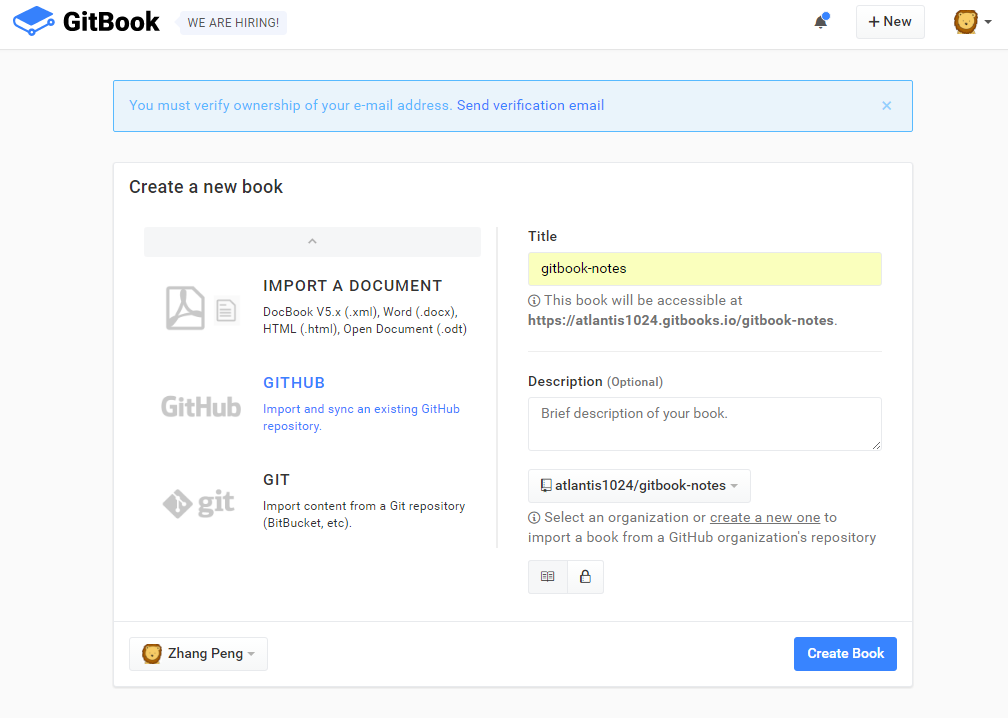
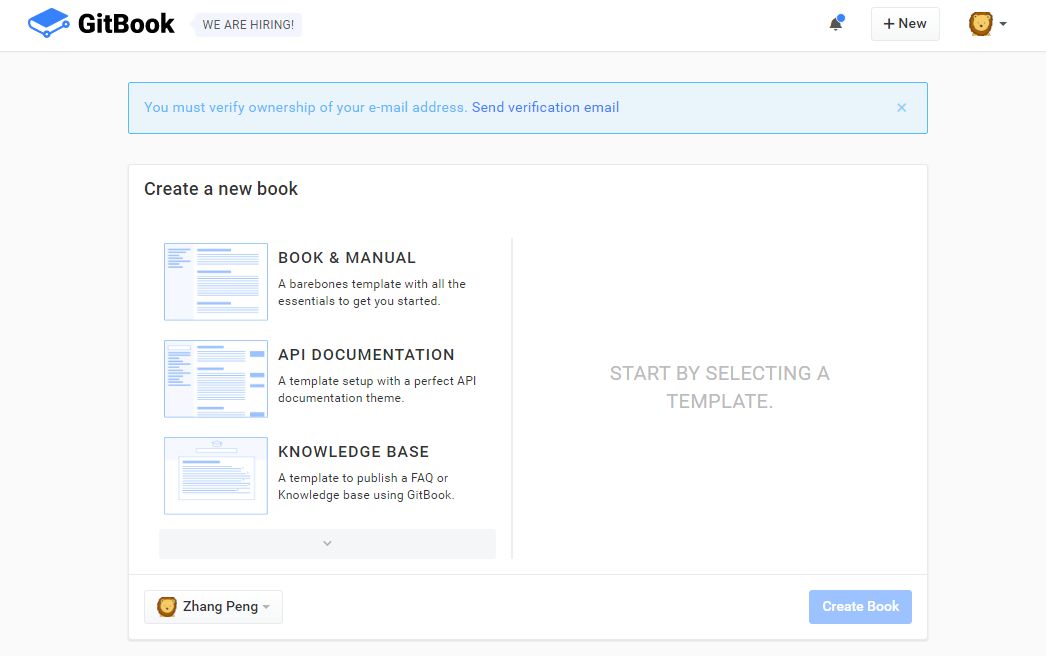
626 | **设置书的基本信息** 627 | 628 |
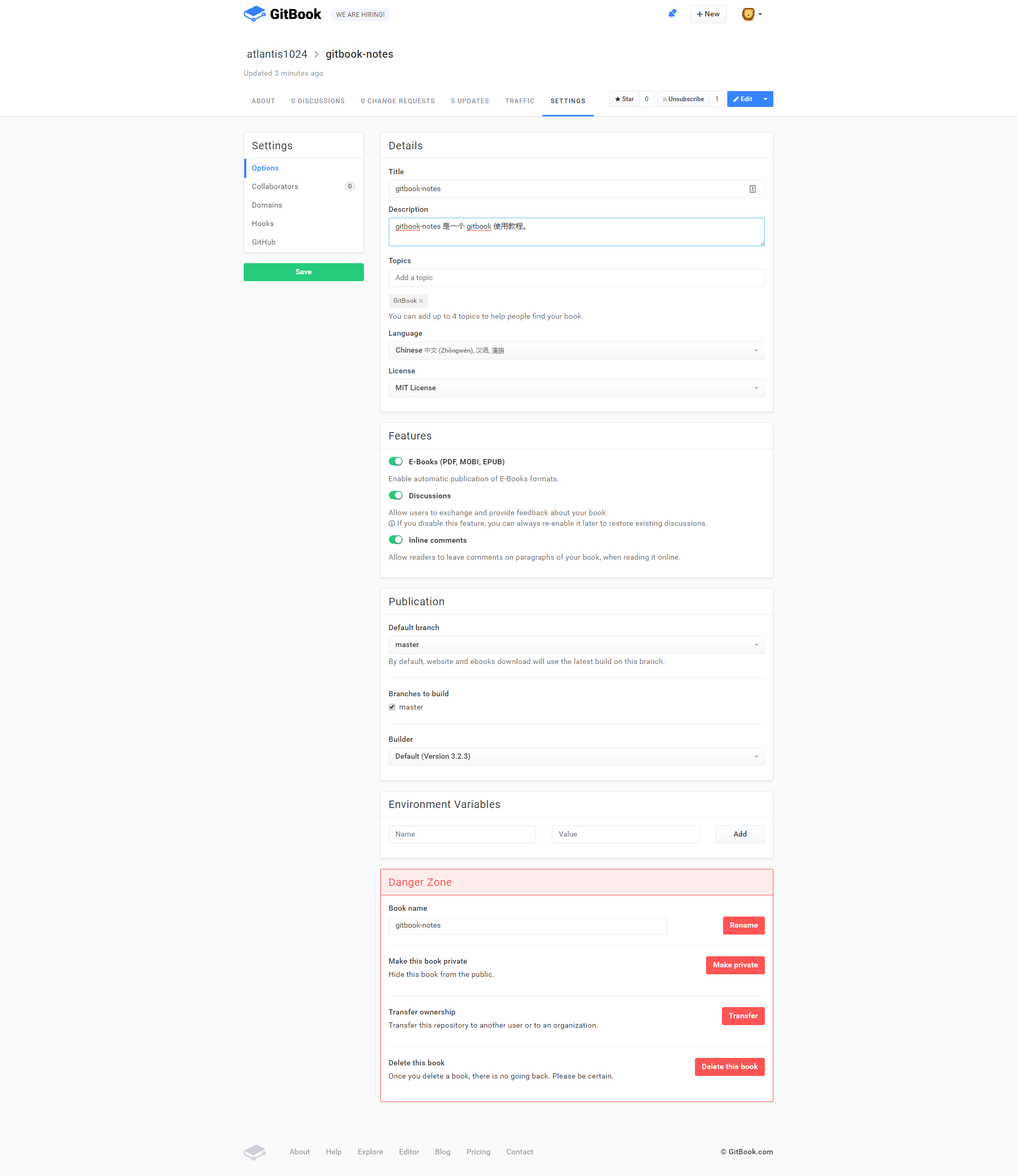
629 | **clone 到本地** 630 | 631 | Gitbook.com 会为每本书创建一个 git 仓库。 632 | 633 | 如下图所示,拷贝 git 地址,然后 `git clone` 到本地。 634 | 635 |
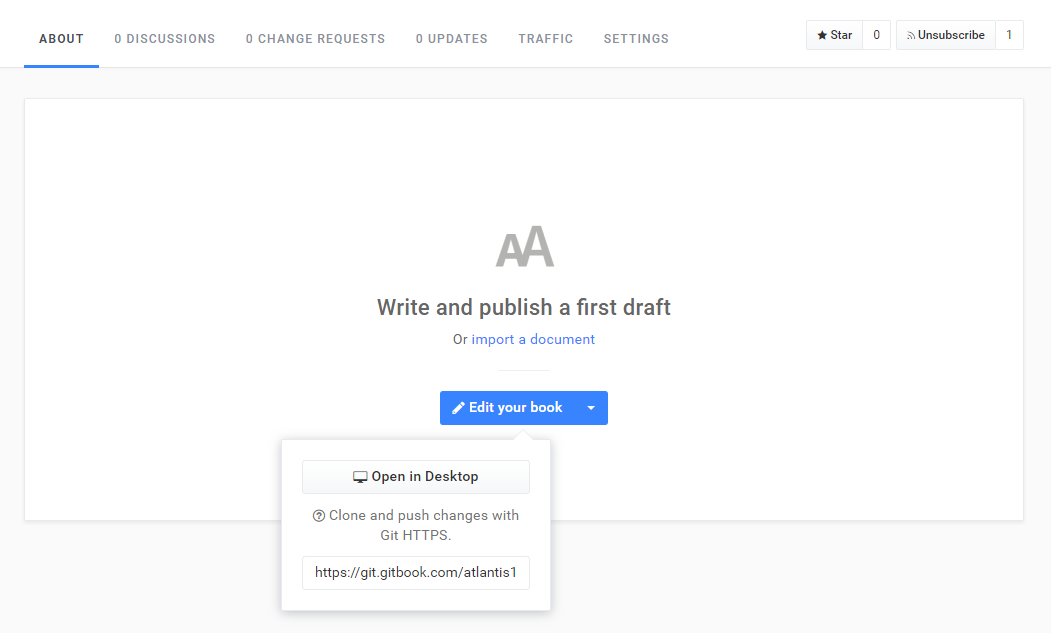
636 | **发布** 637 | 638 | 在本地按照 Gitbook 规范编辑电子书,然后 `git push` 到 Gitbook 的远程仓库。 639 | 640 | 默认访问地址是:https://用户名.gitbooks.io/项目名/content/ 641 | 642 | 例如:我的用户名为 dunwu,一个电子书项目名为 test,则访问路径是: `https://dunwu.gitbooks.io/test/content/` 643 | 644 | 当然,如果你有自己的域名,也可以设置 Domains 选项,来指定访问路径为你的域。 645 | 646 | ### 托管到 Github 647 | 648 | 如果你不希望使用 Gitbook 的仓库,而是想直接使用 Github 的仓库,也是可以的。 649 | 650 | 首先,你需要绑定你的 Github 账号。最简单的方式当然就是登录 Gitbook.com 时使用 Github 账号登录方式了。否则,你也可以在 Account Settings 中的 Github 设置选项中去进行绑定。 651 | 652 | 绑定了 Github 账号后,你可以在新建电子书时,选择从一个指定的 Github 仓库导入电子书项目。参考下图: 653 | 654 |
655 | 只要你指定的 Github 仓库中的文档内容符合 Gitbook 规范,Gitbook 就会自动根据你的每次更新去构建生成电子书网站。 656 | 657 | 默认访问地址是: 658 | 659 | ``` 660 | https://Github用户名.gitbooks.io/Github 仓库/content/ 661 | ``` 662 | 663 | 例如:我的用户名为 dunwu,Github 仓库名为 gitbook-templates,则访问路径是: 664 | 665 | [https://dunwu.gitbooks.io/gitbook-templates/content/](https://dunwu.gitbooks.io/gitbook-templates/content/) 666 | 667 | #### 托管到 Github Pages 668 | 669 | 也许你以前也了解 Github 的一个功能: [GitHub Pages](https://pages.github.com/) 。它允许用户在 GitHub 仓库托管你的个人、组织或项目的静态页面(自动识别 html、css、javascript)。 670 | 671 | **建立 xxx.github.io 仓库** 672 | 673 | 要使用这个特性,首先,你必须建立一个严格遵循以下命名要求的仓库:`Github账号名.github.io`举例,我的 Github 账号为 dunwu,则这个仓库应该叫 `dunwu.github.io`。通常,这个仓库被用来作为个人或组织的博客。 674 | 675 | **建立 gh-pages 分支** 676 | 677 | 完成第 1 步后,在任意一个 Github 仓库中建立一个名为 `gh-pages` 的分支。只要 `gh-pages` 中的内容符合一个静态站点要求,就可以在如下地址中进行访问:`https://Github用户名.gitbooks.io/Github 仓库` 。例如:我的一个 Github 仓库名为 react-notes,则访问路径是:`https://dunwu.github.io/react-notes` 678 | 679 | **自动化发布到 gh-pages** 680 | 681 | 如果每次都手动 git push 到远程 gh-pages 分支,略有点麻烦。 682 | 683 | 怎么实现自动化发布呢? 684 | 685 | 有两种方法: 686 | 687 | **使用 gh-pages 插件** 688 | 689 | 如果你了解 Nodejs,那么最简单的发布方式就是使用 `gh-pages` 插件。 690 | 691 | 先在本地安装插件 692 | 693 | ``` 694 | $ npm i -D gh-pages 695 | ``` 696 | 697 | 然后,在 package.json 文件中添加脚本命令: 698 | 699 | 如下:`-d` 命令参数后面是要发布的静态站点内容的目录 700 | 701 | ```json 702 | "scripts": { 703 | "deploy": "gh-pages -d build" 704 | }, 705 | ``` 706 | 707 | **脚本** 708 | 709 | 写一个执行 git 命令的脚本就搞定了。 710 | 711 | 下面的脚本无论是在 bat 或 sh 脚本中都可以执行。 712 | 713 | ``` 714 | cd build 715 | git init 716 | git checkout -b gh-pages 717 | git add . 718 | git commit -am "Update" 719 | git push git@github.com:dunwu/gitbook-templates gh-pages --force" 720 | ``` 721 | 722 | ## 参考资料 723 | 724 | ### 官方资源 725 | 726 | - [Gitbook Github](https://github.com/GitbookIO/gitbook) 727 | - [Gitbook 官网](https://www.gitbook.com/) 728 | - [Gitbook Toolchain 文档](https://toolchain.gitbook.com/) 729 | - [Gitbook 帮助中心](https://help.gitbook.com/) 730 | 731 | ### 教程资源 732 | 733 | - [gitbook-use](https://github.com/zhangjikai/gitbook-use) by zhangjikai 734 | 735 | ### 工具 736 | 737 | - [Gitbook 编辑器](https://www.gitbook.com/editor) 738 | --------------------------------------------------------------------------------