 4 |
5 |
4 |
5 |  153 |
154 | ## Optional Installation Locations
155 |
156 | By default, the above check-out will leave you with a new, hidden directory in your home directory, that is,
157 | ```
158 | ~/.bash-menu
159 | ```
160 |
161 | or something like `/home/laramie/.bash-menu/`. **bash-menu** knows about this because it sets DYNAMIDE_MENU in `~/.bash-menu/.bash_profile`.
162 |
163 | | _~/.bash-menu/.bash_profile_ |
164 | | :------------- |
165 | | DYNAMIDE_MENU=~/.bash-menu |
166 | | ... |
167 |
168 | If you checked out to some directory other than `~/.bash-menu`, for example `~/.my-menu/` then you need to do two things to connect **bash-menu** to your shell.
169 |
170 | 1) Edit this file, on the line where it sets DYNAMIDE_MENU (by default it is `DYNAMIDE_MENU=~/.bash-menu`), so that **bash-menu** will know where its home directory is.
171 |
172 | | _~/.my-menu/.bash_profile_ |
173 | | :------------- |
174 | | DYNAMIDE_MENU=~/.my-menu |
175 | | ... |
176 |
177 |
178 | 2) Then, in your ~/.bash_profile source in the **bash-menu** control file we just edited:
179 |
180 | | _~/.bash_profile_ |
181 | | :------------- |
182 | | source ~/.my-menu/.bash_profile |
183 |
184 |
185 | ## Help in bash-menu
186 | To see help, run with `-h` or `h` which will dump out usage.
187 |
188 | `d -h`
189 |
190 | To see help on options:
191 |
192 | `d h options`
193 |
194 | To see all the options and their alternate spellings, see:
195 |
196 | `d h aliases`
197 |
198 | To see the current configuration, see:
199 |
200 | `d h info`
201 |
202 | ## Using bash-menu
203 |
204 | To get started, just type `d` at your new prompt. From there you can choose a listed item by typing it's number.
205 |
206 | Here is the dynamide **bash-menu** being used to change to directory 6 on the menu:
207 |
208 |
153 |
154 | ## Optional Installation Locations
155 |
156 | By default, the above check-out will leave you with a new, hidden directory in your home directory, that is,
157 | ```
158 | ~/.bash-menu
159 | ```
160 |
161 | or something like `/home/laramie/.bash-menu/`. **bash-menu** knows about this because it sets DYNAMIDE_MENU in `~/.bash-menu/.bash_profile`.
162 |
163 | | _~/.bash-menu/.bash_profile_ |
164 | | :------------- |
165 | | DYNAMIDE_MENU=~/.bash-menu |
166 | | ... |
167 |
168 | If you checked out to some directory other than `~/.bash-menu`, for example `~/.my-menu/` then you need to do two things to connect **bash-menu** to your shell.
169 |
170 | 1) Edit this file, on the line where it sets DYNAMIDE_MENU (by default it is `DYNAMIDE_MENU=~/.bash-menu`), so that **bash-menu** will know where its home directory is.
171 |
172 | | _~/.my-menu/.bash_profile_ |
173 | | :------------- |
174 | | DYNAMIDE_MENU=~/.my-menu |
175 | | ... |
176 |
177 |
178 | 2) Then, in your ~/.bash_profile source in the **bash-menu** control file we just edited:
179 |
180 | | _~/.bash_profile_ |
181 | | :------------- |
182 | | source ~/.my-menu/.bash_profile |
183 |
184 |
185 | ## Help in bash-menu
186 | To see help, run with `-h` or `h` which will dump out usage.
187 |
188 | `d -h`
189 |
190 | To see help on options:
191 |
192 | `d h options`
193 |
194 | To see all the options and their alternate spellings, see:
195 |
196 | `d h aliases`
197 |
198 | To see the current configuration, see:
199 |
200 | `d h info`
201 |
202 | ## Using bash-menu
203 |
204 | To get started, just type `d` at your new prompt. From there you can choose a listed item by typing it's number.
205 |
206 | Here is the dynamide **bash-menu** being used to change to directory 6 on the menu:
207 |
208 | 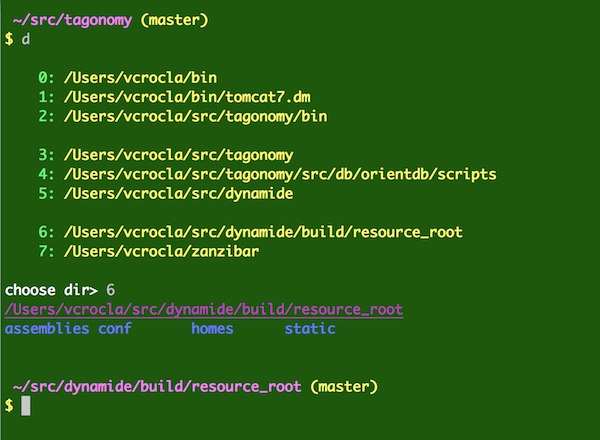 209 |
210 | Note that it shows you the directory you chose, "/Users/vcrocla/src/dynamide/build/resource_root", and then a quick "ls" of that directory, then it changes to that directory. You can tell because the fancy bash prompt has changed and now shows the current working directory as /Users/vcrocla/src/dynamide/build/resource_root, and the git status in that directory is (master) which means we are on git branch "master" with no pending pulls or pushes.
211 |
212 | ## Sub-commands
213 |
214 | From menus such as the directory menu, you can type another menu option. You can type `?` to see the mini-help of sub-commands at this menu.
215 |
216 |
209 |
210 | Note that it shows you the directory you chose, "/Users/vcrocla/src/dynamide/build/resource_root", and then a quick "ls" of that directory, then it changes to that directory. You can tell because the fancy bash prompt has changed and now shows the current working directory as /Users/vcrocla/src/dynamide/build/resource_root, and the git status in that directory is (master) which means we are on git branch "master" with no pending pulls or pushes.
211 |
212 | ## Sub-commands
213 |
214 | From menus such as the directory menu, you can type another menu option. You can type `?` to see the mini-help of sub-commands at this menu.
215 |
216 |  217 |
218 | You can choose options on the command line, and skip the menus. You can also choose some options after you have launched **bash-menu** and are sitting in a menu, where you are prompted for a choice. If you type a number from the list of choices, you will get that choice. But there are also sub-commands at these menus. These mirror options available on the command line. So you could, for example, launch right into your command menu like this:
219 |
220 | `d -m`
221 |
222 | Or, you could launch the directory menu, then change to the command menu with this sequence:
223 |
224 | `d` `Enter` `m` `Enter`
225 |
226 | that is, typing `d` at your bash prompt, then the `Enter` key (or `Return` key) then typing `m` at the **choose dir>** prompt, then `Enter` again.
227 |
228 | Here is an actual example:
229 |
230 |
217 |
218 | You can choose options on the command line, and skip the menus. You can also choose some options after you have launched **bash-menu** and are sitting in a menu, where you are prompted for a choice. If you type a number from the list of choices, you will get that choice. But there are also sub-commands at these menus. These mirror options available on the command line. So you could, for example, launch right into your command menu like this:
219 |
220 | `d -m`
221 |
222 | Or, you could launch the directory menu, then change to the command menu with this sequence:
223 |
224 | `d` `Enter` `m` `Enter`
225 |
226 | that is, typing `d` at your bash prompt, then the `Enter` key (or `Return` key) then typing `m` at the **choose dir>** prompt, then `Enter` again.
227 |
228 | Here is an actual example:
229 |
230 | 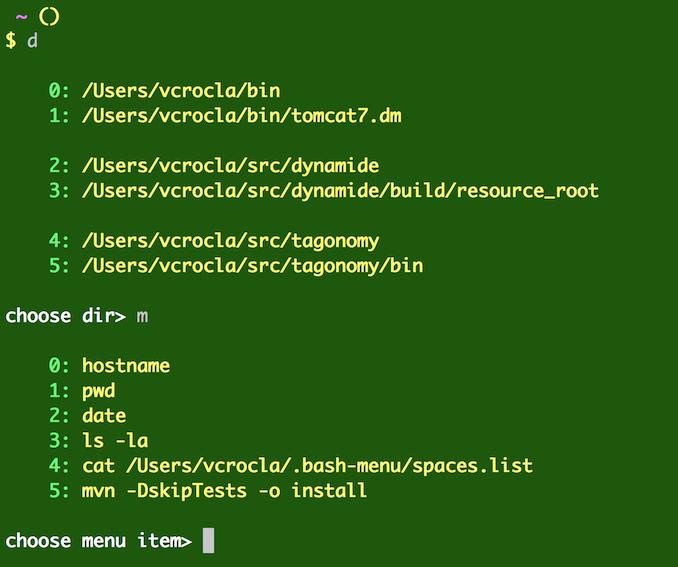 231 |
232 | The sub-commands take an option form: `-h`, a single-letter form: `h`, and a word form: `help`.
233 |
234 | Here are all the sub-command options and their equivalents (-c and -s are completely equivalent):
235 |
236 |
237 | | option | cmd | cmd | context |
238 | | ------------- | ------------- | ------------- | ------------- |
239 | | -a | a | add |directory, command|
240 | | -c | c | connect |directory, command|
241 | | -d | d | list |command, space|
242 | | -e | e | edit |*|
243 | | -h | h | help |*|
244 | | -i | i | info |*|
245 | | -l | l | list |command, space |
246 | | -m | m | menu |directory, space|
247 | | -s | s | space |directory, command|
248 | | -x | x | delete |directory, command|
249 | | -o | o | options |help|
250 | | -a | a | aliases |help|
251 | | -i | i | info |help|
252 |
253 |
254 | The _option_ form or the _cmd_ form may be used on the command line, or as sub-commands.
255 |
256 | Help takes subcommands `options`, `aliases`, and `info`, or their alternate names listed above. For example:
257 |
258 | ```
259 | d h info
260 | ```
261 |
262 | The `edit` sub-command is context-sensitive, and will launch your EDITOR or VISUAL editor to let you edit the correct menu.
263 |
264 | On the command line, using these options could look like these examples below. Eeach group of commands is equivalent, so `d m` is the same as `d -m`:
265 | ```
266 | d a # Add to your directory list
267 |
268 | d e # Edit your directory list
269 |
270 | d m # Show your command menu
271 | d -m
272 |
273 | d m e # Edit your command menu
274 | d m -e
275 | d m edit
276 |
277 | d s e # Edit your spaces menu
278 | d s -e
279 | d -s edit
280 | d -s -e
281 | d s edit
282 | ```
283 | And so on.
284 |
285 | `d -ma` takes a special option flag, `-cd` that adds a `cd` to the current directory before the command you are adding.
286 |
287 | d -ma -cd #adds the last shell command to your command menu with a cd `pwd` before it.
288 | d -ma -cd !! #adds the last shell command to your command menu with a cd `pwd` before it.
289 | d -ma -cd !480 #adds shell history command number 480 to your command menu with a cd `pwd` before it.
290 | d -ma -cd bin/make #adds 'bin/make' to your command menu with a cd `pwd` before it.
291 |
292 | This works with the alias `ma` like so:
293 |
294 | ma -cd
295 | ma -cd bin/make
296 |
297 | NOTE: *There is no alias for -cd, so you can* **NOT** *do this without the hyphen on -cd:* ~~d -ma cd /bin/mycommand~~.
298 | In other words:
299 |
300 | LEGAL----> `d -ma -cd /bin/mycommand`
301 |
302 | ILLEGAL--> `d -ma cd /bin/mycommand`
303 |
304 | ## Using the *title* command
305 |
306 | **bash-menu** comes with a custom PS1 bash prompt. This prompt can show you:
307 | - title
308 | - user
309 | - host
310 | - pwd
311 | - git-status
312 |
313 | To see all the options, type
314 |
315 | `title -h`
316 |
317 | Here is a sample of what setting various options does to your prompt:
318 |
319 |
231 |
232 | The sub-commands take an option form: `-h`, a single-letter form: `h`, and a word form: `help`.
233 |
234 | Here are all the sub-command options and their equivalents (-c and -s are completely equivalent):
235 |
236 |
237 | | option | cmd | cmd | context |
238 | | ------------- | ------------- | ------------- | ------------- |
239 | | -a | a | add |directory, command|
240 | | -c | c | connect |directory, command|
241 | | -d | d | list |command, space|
242 | | -e | e | edit |*|
243 | | -h | h | help |*|
244 | | -i | i | info |*|
245 | | -l | l | list |command, space |
246 | | -m | m | menu |directory, space|
247 | | -s | s | space |directory, command|
248 | | -x | x | delete |directory, command|
249 | | -o | o | options |help|
250 | | -a | a | aliases |help|
251 | | -i | i | info |help|
252 |
253 |
254 | The _option_ form or the _cmd_ form may be used on the command line, or as sub-commands.
255 |
256 | Help takes subcommands `options`, `aliases`, and `info`, or their alternate names listed above. For example:
257 |
258 | ```
259 | d h info
260 | ```
261 |
262 | The `edit` sub-command is context-sensitive, and will launch your EDITOR or VISUAL editor to let you edit the correct menu.
263 |
264 | On the command line, using these options could look like these examples below. Eeach group of commands is equivalent, so `d m` is the same as `d -m`:
265 | ```
266 | d a # Add to your directory list
267 |
268 | d e # Edit your directory list
269 |
270 | d m # Show your command menu
271 | d -m
272 |
273 | d m e # Edit your command menu
274 | d m -e
275 | d m edit
276 |
277 | d s e # Edit your spaces menu
278 | d s -e
279 | d -s edit
280 | d -s -e
281 | d s edit
282 | ```
283 | And so on.
284 |
285 | `d -ma` takes a special option flag, `-cd` that adds a `cd` to the current directory before the command you are adding.
286 |
287 | d -ma -cd #adds the last shell command to your command menu with a cd `pwd` before it.
288 | d -ma -cd !! #adds the last shell command to your command menu with a cd `pwd` before it.
289 | d -ma -cd !480 #adds shell history command number 480 to your command menu with a cd `pwd` before it.
290 | d -ma -cd bin/make #adds 'bin/make' to your command menu with a cd `pwd` before it.
291 |
292 | This works with the alias `ma` like so:
293 |
294 | ma -cd
295 | ma -cd bin/make
296 |
297 | NOTE: *There is no alias for -cd, so you can* **NOT** *do this without the hyphen on -cd:* ~~d -ma cd /bin/mycommand~~.
298 | In other words:
299 |
300 | LEGAL----> `d -ma -cd /bin/mycommand`
301 |
302 | ILLEGAL--> `d -ma cd /bin/mycommand`
303 |
304 | ## Using the *title* command
305 |
306 | **bash-menu** comes with a custom PS1 bash prompt. This prompt can show you:
307 | - title
308 | - user
309 | - host
310 | - pwd
311 | - git-status
312 |
313 | To see all the options, type
314 |
315 | `title -h`
316 |
317 | Here is a sample of what setting various options does to your prompt:
318 |
319 | 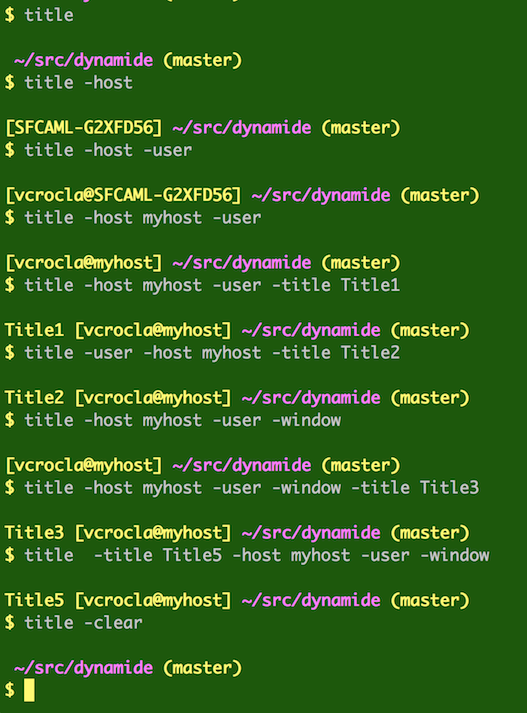 320 |
321 | In these examples, my user name is "vcrocla", my host is "SFCAML-G2XFD56", which I override with the fake hostname "myhost".
322 |
323 | The title (appears at left of the first line) is any placeholder that reminds you of what this shell was for. If you use -w, or -window, the title is also sent to the shell window's title bar.
324 |
325 | My directory "~/src/tagonomy" is a git repository, and its git status in that directory is (master) which means we are on git branch "master" with no pending pulls or pushes. My directory "~/src/dynamide" is also a git repository, and also is on branch "master".
326 |
327 | You'll also see the numbers of commits ahead/behind if you are not up-to-date. (Thanks to the authors who wrote `git-branch-status`, listed in our NOTICE file.)
328 |
329 | Here is what it looks like when you are ahead:
330 |
331 |
320 |
321 | In these examples, my user name is "vcrocla", my host is "SFCAML-G2XFD56", which I override with the fake hostname "myhost".
322 |
323 | The title (appears at left of the first line) is any placeholder that reminds you of what this shell was for. If you use -w, or -window, the title is also sent to the shell window's title bar.
324 |
325 | My directory "~/src/tagonomy" is a git repository, and its git status in that directory is (master) which means we are on git branch "master" with no pending pulls or pushes. My directory "~/src/dynamide" is also a git repository, and also is on branch "master".
326 |
327 | You'll also see the numbers of commits ahead/behind if you are not up-to-date. (Thanks to the authors who wrote `git-branch-status`, listed in our NOTICE file.)
328 |
329 | Here is what it looks like when you are ahead:
330 |
331 |  332 |
333 | If you type `git status` you'll see why:
334 |
335 |
332 |
333 | If you type `git status` you'll see why:
334 |
335 | 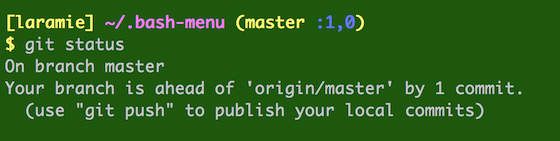 336 |
337 | Here is what it looks like when you are ahead and behind:
338 |
339 |
336 |
337 | Here is what it looks like when you are ahead and behind:
338 |
339 |  340 |
341 | If you type `git status` (I have it aliased to `st`) you'll see why:
342 |
343 |
340 |
341 | If you type `git status` (I have it aliased to `st`) you'll see why:
342 |
343 | 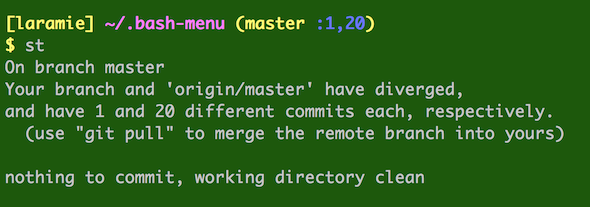 344 |
345 | To customize your prompt, call `title` in your ~/.bash_profile *after* you source in ~/.bash-menu/.bash_profile:
346 |
347 | | _~/.bash_profile_ |
348 | | :------------- |
349 | | source ~/.bash-menu/.bash_profile |
350 | | source ~/.laramie/.bash_profile |
351 |
352 | | _~/.laramie/.bash_profile_ |
353 | | :------------- |
354 | | DYNAMIDE_SPACES_LIST=~/.laramie/spaces.laramie.list |
355 | | title -user -nohost -title Lappy -window |
356 |
357 | ## Editing
358 |
359 | You can edit your menus in two ways:
360 | - 1. using the command-line args or sub-commands in menus, and
361 | - 2. using your console editor such as `vi` or `emacs`.
362 |
363 | For case (2), **bash-menu** will launch your EDITOR or VISUAL editor on the appropriate file. Just edit, then save normally. Files contain non-blank lines or separators.
364 |
365 |
366 | | _Sub-commands:_ |Editing Action|
367 | | :------------- | :------------- |
368 | |d x | launches the delete menu for directory lists|
369 | |d x 3 | deletes directory list item 3|
370 | |d mx | launches the delete menu for commands|
371 | |d mx 3 | deletes command menu item 3|
372 | |d m x | launches the delete menu for commands, using submenu|
373 | |d ma | add to the command menu, using command-line|
374 | |d m a | add to the command menu, using submenu|
375 | |d e | launch EDITOR for directory lists|
376 | |d m e | launch EDITOR for the command menu|
377 | |d s | launch the space chooser|
378 | |d s e | launch the space editor|
379 |
380 | ### Separators
381 |
382 | Separators are three hyphens alone on one line, like this:
383 | ```
384 | /some/directory/on/dirlist
385 | ---
386 | /bin/probe
387 | ---
388 | /other/dirs
389 | /other/dirs/bin
390 | ```
391 | Separators display in your menus as blank lines. So the above menu renders as:
392 |
393 |
344 |
345 | To customize your prompt, call `title` in your ~/.bash_profile *after* you source in ~/.bash-menu/.bash_profile:
346 |
347 | | _~/.bash_profile_ |
348 | | :------------- |
349 | | source ~/.bash-menu/.bash_profile |
350 | | source ~/.laramie/.bash_profile |
351 |
352 | | _~/.laramie/.bash_profile_ |
353 | | :------------- |
354 | | DYNAMIDE_SPACES_LIST=~/.laramie/spaces.laramie.list |
355 | | title -user -nohost -title Lappy -window |
356 |
357 | ## Editing
358 |
359 | You can edit your menus in two ways:
360 | - 1. using the command-line args or sub-commands in menus, and
361 | - 2. using your console editor such as `vi` or `emacs`.
362 |
363 | For case (2), **bash-menu** will launch your EDITOR or VISUAL editor on the appropriate file. Just edit, then save normally. Files contain non-blank lines or separators.
364 |
365 |
366 | | _Sub-commands:_ |Editing Action|
367 | | :------------- | :------------- |
368 | |d x | launches the delete menu for directory lists|
369 | |d x 3 | deletes directory list item 3|
370 | |d mx | launches the delete menu for commands|
371 | |d mx 3 | deletes command menu item 3|
372 | |d m x | launches the delete menu for commands, using submenu|
373 | |d ma | add to the command menu, using command-line|
374 | |d m a | add to the command menu, using submenu|
375 | |d e | launch EDITOR for directory lists|
376 | |d m e | launch EDITOR for the command menu|
377 | |d s | launch the space chooser|
378 | |d s e | launch the space editor|
379 |
380 | ### Separators
381 |
382 | Separators are three hyphens alone on one line, like this:
383 | ```
384 | /some/directory/on/dirlist
385 | ---
386 | /bin/probe
387 | ---
388 | /other/dirs
389 | /other/dirs/bin
390 | ```
391 | Separators display in your menus as blank lines. So the above menu renders as:
392 |
393 | 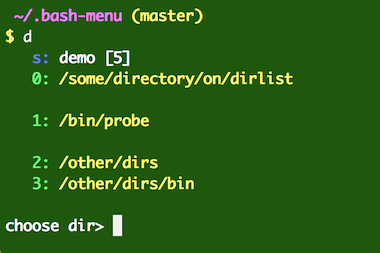 394 |
395 | You can also put line-separating labels in, which will be displayed in your menu in highlight color, minus the leading `---`. You can use more `-` characters on that line, or any other printable character. Here I'm using `=` characters to help visually break up the menu.
396 | ```
397 | /some/directory/on/dirlist
398 | ---=== Area 51 ===
399 | /bin/probe
400 | ---=== Area 52 ===
401 | /other/dirs
402 | /other/dirs/bin
403 | ```
404 |
394 |
395 | You can also put line-separating labels in, which will be displayed in your menu in highlight color, minus the leading `---`. You can use more `-` characters on that line, or any other printable character. Here I'm using `=` characters to help visually break up the menu.
396 | ```
397 | /some/directory/on/dirlist
398 | ---=== Area 51 ===
399 | /bin/probe
400 | ---=== Area 52 ===
401 | /other/dirs
402 | /other/dirs/bin
403 | ```
404 | 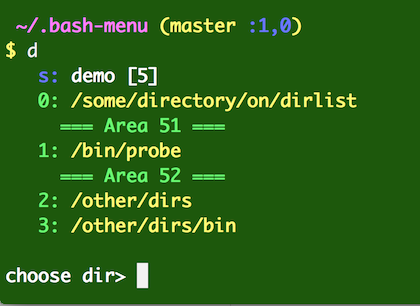 405 |
406 |
407 | ##Scripting
408 |
409 | In case you want to use **bash-menu** in a script itself, you'll want to use the quiet option: `-q` which suppresses all but the most essential output. The opposite is `-v` which gives debugging info.
410 |
411 | To keep things simple, you may wish to avoid aliases in your scripts and use the full names of things, e.g. instead of calling `d`, call `bash-menu-d` which is the name of the main bash function that `d` is aliased to.
412 |
413 | Remember that all `d` and `m` commands are relative to the current *space*, so you should change to your space first, or set it using DYNAMIDE_SPACES_LIST. You can programmatically set your space, e.g. by calling `d s 0` to select space `0` or `d s 1` to select space `1`. (NOTE: $DYNAMIDE_MENU/space.index is written out for you. However, you can overwrite it with the zero-based index of the space you want to use in DYNAMIDE_SPACES_LIST. Usually, `d s 0` is the preferred way.)
414 |
415 | After you call to set the space, e.g. `d s 0`, the following values are exported to your shell:
416 | ```
417 | DYNAMIDE_DIRLIST_LIST
418 | DYNAMIDE_MENU_LIST
419 | DYNAMIDE_MENU_SPACE_INDEX
420 | ```
421 |
422 | Here is how to set the env var to point to a specific space list, e.g.
423 | `DYNAMIDE_SPACES_LIST=~/.laramie/spaces.laramie.list`
424 |
425 | Here is how to programmatically get the menu line for an item in a file:
426 |
427 | ```
428 | line=`bash-menu-getFromList $DYNAMIDE_SPACES_LIST $DYNAMIDE_MENU_SPACE_INDEX`
429 | ```
430 |
431 | will output:
432 | ```
433 | [1]: /Users/vcrocla/.laramie/spaces/pearson
434 | ```
435 |
436 | Here is how to programmatically get the bare menu line for an item in a file without the index being displayed:
437 |
438 | ```
439 | line=`bash-menu-getFromList $DYNAMIDE_SPACES_LIST $DYNAMIDE_MENU_SPACE_INDEX bare`
440 | ```
441 |
442 | This technique can be used to read a line from any of the files: directories.list, menu.list, spaces.list, by passing the list name, and the zero-based index of non-separator lines. (Blank lines are not allowed in the list files.) For example, get the 3rd item (index 2) from your directory list:
443 |
444 | ```
445 | line=`bash-menu-getFromList $DYNAMIDE_DIRLIST_LIST 2 bare`
446 | ```
447 |
448 | For example, get the 4th item (index 3) from your menu list:
449 |
450 | ```
451 | line=`bash-menu-getFromList $DYNAMIDE_MENU_LIST 3 bare`
452 | ```
453 |
454 |
455 | ##Examples
456 |
457 |
458 | ###Show your directory menu
459 |
460 | d
461 |
462 | ###Show your command menu
463 |
464 | m
465 |
466 | ###put shell history item 467 (expanded) into your menu
467 |
468 | d -ma !467
469 |
470 | ###put a command into your menu using the alias `ma` (installed in ~/.bash-menu/aliases)
471 |
472 | ma find . -iname '*my-file.*'
473 |
474 | ###chose menu item 2 and execute it
475 |
476 | d -m 2
477 |
478 | ###chose menu item 2 and execute it
479 |
480 | m 2
481 | ###put a separator into your menu using the special string ---
482 |
483 | ma ---
484 |
485 | ###put a separating label into your menu using the special string ---
486 |
487 | ma ---Build RestReplay
488 |
489 | Everything after the `---` is treated as the label. Note that you don't need quotes around "Build RestReplay" because the ma command just grabs everything: `---Build RestReplay` is put into your menu on a line by itself.
490 |
491 | *Use separating labels help to organize and document groups in one list. Consider using the space feature, with the `d s` command, for working on other servers, or organizing by projects.*
492 |
493 | ###Add ~/zanzibar (expanded) to your directory list
494 |
495 | d -a ~/zanzibar
496 |
497 | ###Add ~/zanzibar (NOT expanded) to your directory list
498 |
499 | d -a '~/zanzibar'
500 |
501 | ###Add $JAVA_HOME (NOT expanded) to your directory list
502 |
503 | d -a '$JAVA_HOME'
504 |
505 | ###Add $JAVA_HOME (expanded) to your directory list
506 |
507 | d -a $JAVA_HOME
508 |
509 | ###Choose directory 2 from your directory list
510 |
511 | d 2
512 |
513 | ###Add . (expanded using \`pwd\`) to your directory list
514 |
515 | d -a .
516 |
517 | ###Add `foo` in current directory (expanded using `pwd`/foo) to your directory list
518 |
519 | d -a foo
520 |
521 | ###Add /var/log (full path, unexpanded) to your directory list
522 |
523 | d -a /var/log
524 |
525 | ###Add a frequently used Maven (mvn) command to the menu and use the menu to run it.
526 |
527 | The command is `mvn -DskipTests -o install` and we are adding the whole thing using the `ma` command.
528 |
529 |
405 |
406 |
407 | ##Scripting
408 |
409 | In case you want to use **bash-menu** in a script itself, you'll want to use the quiet option: `-q` which suppresses all but the most essential output. The opposite is `-v` which gives debugging info.
410 |
411 | To keep things simple, you may wish to avoid aliases in your scripts and use the full names of things, e.g. instead of calling `d`, call `bash-menu-d` which is the name of the main bash function that `d` is aliased to.
412 |
413 | Remember that all `d` and `m` commands are relative to the current *space*, so you should change to your space first, or set it using DYNAMIDE_SPACES_LIST. You can programmatically set your space, e.g. by calling `d s 0` to select space `0` or `d s 1` to select space `1`. (NOTE: $DYNAMIDE_MENU/space.index is written out for you. However, you can overwrite it with the zero-based index of the space you want to use in DYNAMIDE_SPACES_LIST. Usually, `d s 0` is the preferred way.)
414 |
415 | After you call to set the space, e.g. `d s 0`, the following values are exported to your shell:
416 | ```
417 | DYNAMIDE_DIRLIST_LIST
418 | DYNAMIDE_MENU_LIST
419 | DYNAMIDE_MENU_SPACE_INDEX
420 | ```
421 |
422 | Here is how to set the env var to point to a specific space list, e.g.
423 | `DYNAMIDE_SPACES_LIST=~/.laramie/spaces.laramie.list`
424 |
425 | Here is how to programmatically get the menu line for an item in a file:
426 |
427 | ```
428 | line=`bash-menu-getFromList $DYNAMIDE_SPACES_LIST $DYNAMIDE_MENU_SPACE_INDEX`
429 | ```
430 |
431 | will output:
432 | ```
433 | [1]: /Users/vcrocla/.laramie/spaces/pearson
434 | ```
435 |
436 | Here is how to programmatically get the bare menu line for an item in a file without the index being displayed:
437 |
438 | ```
439 | line=`bash-menu-getFromList $DYNAMIDE_SPACES_LIST $DYNAMIDE_MENU_SPACE_INDEX bare`
440 | ```
441 |
442 | This technique can be used to read a line from any of the files: directories.list, menu.list, spaces.list, by passing the list name, and the zero-based index of non-separator lines. (Blank lines are not allowed in the list files.) For example, get the 3rd item (index 2) from your directory list:
443 |
444 | ```
445 | line=`bash-menu-getFromList $DYNAMIDE_DIRLIST_LIST 2 bare`
446 | ```
447 |
448 | For example, get the 4th item (index 3) from your menu list:
449 |
450 | ```
451 | line=`bash-menu-getFromList $DYNAMIDE_MENU_LIST 3 bare`
452 | ```
453 |
454 |
455 | ##Examples
456 |
457 |
458 | ###Show your directory menu
459 |
460 | d
461 |
462 | ###Show your command menu
463 |
464 | m
465 |
466 | ###put shell history item 467 (expanded) into your menu
467 |
468 | d -ma !467
469 |
470 | ###put a command into your menu using the alias `ma` (installed in ~/.bash-menu/aliases)
471 |
472 | ma find . -iname '*my-file.*'
473 |
474 | ###chose menu item 2 and execute it
475 |
476 | d -m 2
477 |
478 | ###chose menu item 2 and execute it
479 |
480 | m 2
481 | ###put a separator into your menu using the special string ---
482 |
483 | ma ---
484 |
485 | ###put a separating label into your menu using the special string ---
486 |
487 | ma ---Build RestReplay
488 |
489 | Everything after the `---` is treated as the label. Note that you don't need quotes around "Build RestReplay" because the ma command just grabs everything: `---Build RestReplay` is put into your menu on a line by itself.
490 |
491 | *Use separating labels help to organize and document groups in one list. Consider using the space feature, with the `d s` command, for working on other servers, or organizing by projects.*
492 |
493 | ###Add ~/zanzibar (expanded) to your directory list
494 |
495 | d -a ~/zanzibar
496 |
497 | ###Add ~/zanzibar (NOT expanded) to your directory list
498 |
499 | d -a '~/zanzibar'
500 |
501 | ###Add $JAVA_HOME (NOT expanded) to your directory list
502 |
503 | d -a '$JAVA_HOME'
504 |
505 | ###Add $JAVA_HOME (expanded) to your directory list
506 |
507 | d -a $JAVA_HOME
508 |
509 | ###Choose directory 2 from your directory list
510 |
511 | d 2
512 |
513 | ###Add . (expanded using \`pwd\`) to your directory list
514 |
515 | d -a .
516 |
517 | ###Add `foo` in current directory (expanded using `pwd`/foo) to your directory list
518 |
519 | d -a foo
520 |
521 | ###Add /var/log (full path, unexpanded) to your directory list
522 |
523 | d -a /var/log
524 |
525 | ###Add a frequently used Maven (mvn) command to the menu and use the menu to run it.
526 |
527 | The command is `mvn -DskipTests -o install` and we are adding the whole thing using the `ma` command.
528 |
529 | 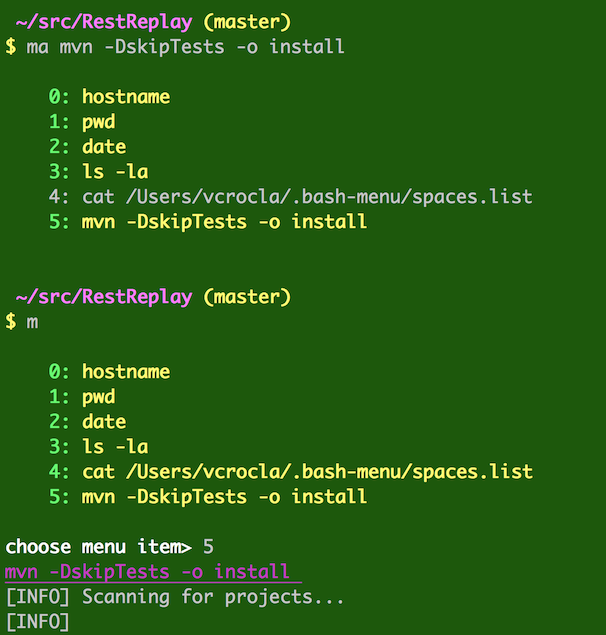 530 |
531 | `mvn` is a popular build tool. You can see where it begins to run with the line "[INFO] Scanning for projects...
532 |
533 | ###Re-run that command without looking at the menu, now that you know the number
534 |
535 |
530 |
531 | `mvn` is a popular build tool. You can see where it begins to run with the line "[INFO] Scanning for projects...
532 |
533 | ###Re-run that command without looking at the menu, now that you know the number
534 |
535 | 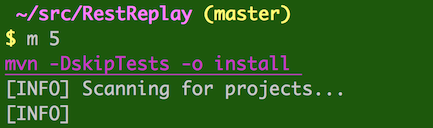 536 |
537 | *You could also run the command in your shell, then use the `ma` command to capture the command to your command list in your current space. The ma command will take a command-line as its arguments. With no arguments, the ma command grabs the last item on your history. Note that you need to read the output of the ma command to see the index of the new command, in this case, the number `4`.*
538 |
539 | ```
540 | mvn -DskipTests -o install
541 | ma
542 | m 4
543 | ```
544 |
545 |
536 |
537 | *You could also run the command in your shell, then use the `ma` command to capture the command to your command list in your current space. The ma command will take a command-line as its arguments. With no arguments, the ma command grabs the last item on your history. Note that you need to read the output of the ma command to see the index of the new command, in this case, the number `4`.*
538 |
539 | ```
540 | mvn -DskipTests -o install
541 | ma
542 | m 4
543 | ```
544 |
545 | 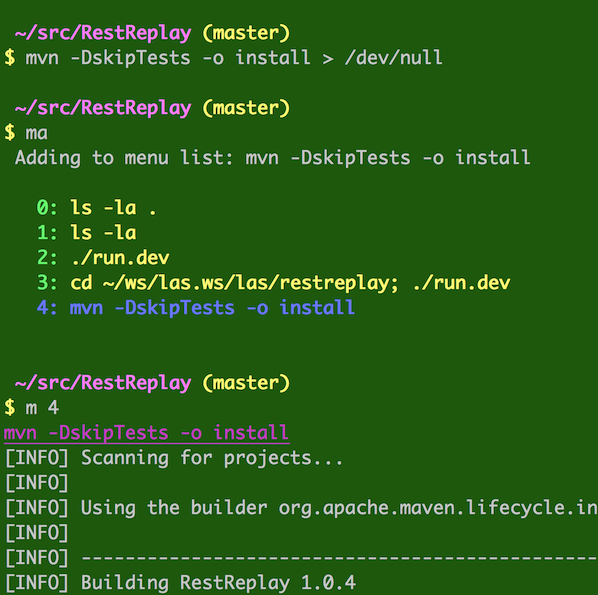 546 |
547 |
--------------------------------------------------------------------------------
/tests/restreplay/markdown-output.html:
--------------------------------------------------------------------------------
1 |
546 |
547 |
--------------------------------------------------------------------------------
/tests/restreplay/markdown-output.html:
--------------------------------------------------------------------------------
1 | 2 | bash-menu
3 | 4 |Introduction 7 | Getting the source 8 | Optional installation locations 9 | Help in bash-menu 10 | Using bash-menu 11 | Sub-commands 12 | Editing 13 | Using the title command 14 | Examples
15 | 16 |17 | Introduction
18 | 19 |dynamide bash-menu is a menu system for bash which keeps lists of
20 | 21 |-
22 |
- directories you wish to navigate to 23 |
- command lines you wish to execute 24 |
- spaces, which group directories and commands by project 25 |
You use the menu to select from these lists. Selecting a directory from a menu changes to that directory. Selecting a command from a command menu executes that command. You can use the menu or the command line to add to, remove from, and edit these lists.
28 | 29 |A fancy bash-prompt is also provided, which give you options to display on one line the title, user, host, pwd, and git-status. See Using the title command.
30 | 31 |After you install bash-menu and log in, you'll have a custom prompt, and some new commands:
32 | 33 |-
34 |
- d directory changer 35 |
- da add a directory to the list 36 |
- m menu of executable command-lines 37 |
- ma add a command to the list 38 |
- catall cat all text files in current directory with a colored line between each. 39 |
- title set the title, user, or hostname in a multi-line, colored PS1 bash prompt. 40 |
43 | Getting the source
44 | 45 |On GitHub, mash on the "Download ZIP" button, and extract to ~/.bash-menu, or use wget or curl:
 cd ~
 48 |  curl -o master.zip  https://codeload.github.com/dynamide/bash-menu/zip/master
 49 |  unzip master.zip
 50 |  mv bash-menu-master/ ~/.bash-menu/
51 | Or, checkout bash-menu from GitHub:
54 | 55 | cd ~
56 | git clone https://github.com/dynamide/bash-menu.git .bash-menu
57 | or
60 | 61 | cd ~
62 | git clone git@github.com:dynamide/bash-menu.git .bash-menu
63 | Then pull in the bash-menu from your bash profile, by sourcing in the bash menu, e.g.
66 | 67 || ~/.bash_profile | 71 |
|---|
| source ~/.bash-menu/.bash_profile | 76 |
You can source with . or source.
All of the shell aliases created by bash-menu are defined in ~/.bash-menu/aliases (or $DYNAMIDE_MENU/aliases). Please review these aliases before launching.
The next time you log in, you'll have a custom prompt, and some new commands. Try the main command d for example.
Here is a sample bash prompt on two lines with current working directory, and git status:
87 | 88 |91 | Optional Installation Locations
92 | 93 |By default, the above check-out will leave you with a new, hidden directory in your home directory, that is, ~/.bash-menu, or something like /home/laramie/.bash-menu/. bash-menu knows about this because it sets DYNAMIDE_MENU in ~/.bash-menu/.bash_profile.
If you checked out to some directory other than ~/.bash-menu, for example ~/.my-menu/ then you need to do two things to connect bash-menu to your shell.
1) Edit this file, on the line where it sets DYNAMIDE_MENU (by default it is DYNAMIDE_MENU=~/.bash-menu), so that bash-menu will know where its home directory is.
| ~/.my-menu/.bash_profile | 103 |
|---|
| DYNAMIDE_MENU=~/.my-menu | 108 |
| ... | 111 |
2) Then, in your ~/.bash_profile source in the bash-menu control file we just edited:
116 | 117 || ~/.bash_profile | 121 |
|---|
| source ~/.my-menu/.bash_profile | 126 |
131 | Help in bash-menu
132 | 133 |To see help, run with -h or h which will dump out usage.
d -h
To see help on options:
138 | 139 |d h options
To see all the options and their alternate spellings, see:
142 | 143 |d h aliases
To see the current configuration, see:
146 | 147 |d h info
150 | Using bash-menu
151 | 152 |To get started, just type d at your new prompt. From there you can choose a listed item by typing it's number.
Here is the dynamide bash-menu being used to change to directory 6 on the menu:
155 | 156 |Note that it shows you the directory you chose, "/Users/vcrocla/src/dynamide/build/resource_root", and then a quick "ls" of that directory, then it changes to that directory. You can tell because the fancy bash prompt has changed and now shows the current working directory as /Users/vcrocla/src/dynamide/build/resource_root, and the git status in that directory is (master) which means we are on git branch "master" with no pending pulls or pushes.
159 | 160 |From a menus such as the directory menu, you can type another menu option. You can type ? to see the mini-help of sub-commands at this menu.
165 | Sub-commands
166 | 167 |You can choose options on the command line, and skip the menus. You can also choose some options after you have launched bash-menu and are sitting in a menu, where you are prompted for a choice. If you type a number from the list of choices, you will get that choice. But there are also sub-commands at these menus. These mirror options available on the command line. So you could, for example, launch right into your command menu like this:
168 | 169 |d -m
Or, you could launch the directory menu, then change to the command menu with this sequence:
172 | 173 |d
174 | m
175 | This represents typing d at your bash prompt, then typing m at the choose dir> prompt.
The edit sub-command is context-sensitive, and will launch your EDITOR or VISUAL editor to let you edit the correct menu.
Here is an actual example:
182 | 183 |The sub-commands take an option form: -h, a single-letter form: h, and a word form: help.
Here are all the sub-command options and their equivalents (-c and -s are completely equivalent):
188 | 189 || option | 193 |cmd | 194 |cmd | 195 |context | 196 |
|---|---|---|---|
| -a | 201 |a | 202 |add | 203 |directory, command | 204 |
| -c | 207 |c | 208 |connect | 209 |directory, command | 210 |
| -d | 213 |d | 214 |list | 215 |command, space | 216 |
| -e | 219 |e | 220 |edit | 221 |* | 222 |
| -h | 225 |h | 226 |help | 227 |* | 228 |
| -i | 231 |i | 232 |info | 233 |* | 234 |
| -l | 237 |l | 238 |list | 239 |command, space | 240 |
| -m | 243 |m | 244 |menu | 245 |directory, space | 246 |
| -s | 249 |s | 250 |space | 251 |directory, command | 252 |
| -x | 255 |x | 256 |delete | 257 |directory, command | 258 |
| -o | 261 |o | 262 |options | 263 |help | 264 |
| -a | 267 |a | 268 |aliases | 269 |help | 270 |
| -i | 273 |i | 274 |info | 275 |help | 276 |
Options or cmd may be used on the command line.
281 | 282 |Options or cmd may be used as sub-commands.
283 | 284 |Help takes subcommands options, aliases, and info, or their alternate names listed above. For example:
d h info
287 | On the command line, these options could look like these examples:
290 | 291 |d a # Add to your directory list
292 |
293 | d e # Edit your directory list
294 |
295 | d m # Show your command menu
296 | d -m
297 |
298 | d m e # Edit your command menu
299 | d m -e
300 | d m edit
301 |
302 | d s e # Edit your spaces menu
303 | d s -e
304 | d -s edit
305 | d -s -e
306 | d s edit
307 | And so on.
310 | 311 |312 | Using the title command
313 | 314 |bash-menu comes with a custom PS1 bash prompt. This prompt can show you:
315 | 316 |-
317 |
- title 318 |
- user 319 |
- host 320 |
- pwd 321 |
- git-status 322 |
To see all the options, type
325 | 326 |title -h
Here is a sample of what setting various options does to your prompt:
329 | 330 |In these examples, my user name is "vcrocla", my host is "SFCAML-G2XFD56", which I override with the fake hostname "myhost".
333 | 334 |The title (appears at left of the first line) is any placeholder that reminds you of what this shell was for. If you use -w, or -window, the title is also sent to the shell window's title bar.
335 | 336 |My directory "~/src/tagonomy" is a git repository, and its git status in that directory is (master) which means we are on git branch "master" with no pending pulls or pushes. My directory "~/src/dynamide" is also a git repository, and also is on branch "master".
337 | 338 |You'll also see the numbers of commits ahead/behind if you are not up-to-date. (Thanks to the authors who wrote git-branch-status, listed in our NOTICE file.)
Here is what it looks like when you are ahead:
341 | 342 |If you type git status you'll see why:
Here is what it looks like when you are ahead and behind:
349 | 350 |If you type git status (I have it aliased to st) you'll see why:
To customize your prompt, call title in your ~/.bash_profile after you source in ~/.bash-menu/.bash_profile:
| ~/.bash_profile | 362 |
|---|
| source ~/.bash-menu/.bash_profile | 367 |
| source ~/.laramie/.bash_profile | 370 |
| ~/.laramie/.bash_profile | 378 |
|---|
| DYNAMIDE_SPACES_LIST=~/.laramie/spaces.laramie.list | 383 |
| title -user -nohost -title Lappy -window | 386 |
391 | Editing
392 | 393 |You can edit your menus in two ways:
394 | 395 |-
396 |
- 1. using the command-line args or sub-commands in menus, and 397 |
- 2. using your console editor such as
vioremacs.
398 |
For case (2), bash-menu will launch your EDITOR or VISUAL editor on the appropriate file. Just edit, then save normally. Files contain non-blank lines or separators. Separators are three hyphens alone on one line, like this:
401 | 402 |/some/directory/on/dirlist
403 | ---
404 | /other/dirs
405 | /other/dirs/bin
406 | | Sub-commands: | 412 |413 | |
|---|---|
| d x | 418 |launches the delete menu for directory lists | 419 |
| d x 3 | 422 |deletes directory list item 3 | 423 |
| d mx | 426 |launches the delete menu for commands | 427 |
| d mx 3 | 430 |deletes command menu item 3 | 431 |
| d m x | 434 |launches the delete menu for commands, using submenu | 435 |
| d ma | 438 |add to the command menu, using command-line | 439 |
| d m a | 442 |add to the command menu, using submenu | 443 |
| d e | 446 |launch EDITOR for directory lists | 447 |
| d m e | 450 |launch EDITOR for the command menu | 451 |
| d s | 454 |launch the space chooser | 455 |
460 | Examples
461 | 462 |Show your directory menu
463 | 464 |d
465 | Show your command menu
468 | 469 |m
470 | put shell history item 467 (expanded) into your menu
473 | 474 |d -ma !467
475 | put a command into your menu using the alias ma (installed in ~/.bash-menu/aliases)
ma find . -iname '*my-file.*'
480 | chose menu item 2 and execute it
483 | 484 |d -m 2
485 | chose menu item 2 and execute it
488 | 489 |m 2
490 | put a separator into your menu using the special string ---
493 | 494 |ma ---
495 | Add ~/zanzibar (expanded) to your directory list
498 | 499 |d -a ~/zanzibar
500 | Add ~/zanzibar (NOT expanded) to your directory list
503 | 504 |d -a '~/zanzibar'
505 | Add $JAVA_HOME (NOT expanded) to your directory list
508 | 509 |d -a '$JAVA_HOME'
510 | Add $JAVA_HOME (expanded) to your directory list
513 | 514 |d -a $JAVA_HOME
515 | Choose directory 2 from your directory list
518 | 519 |d 2
520 | Add . (expanded using `pwd`) to your directory list
523 | 524 |d -a .
525 | Add foo in current directory (expanded using pwd/foo) to your directory list
d -a foo
530 | Add /var/log (full path, unexpanded) to your directory list
533 | 534 |d -a /var/log
535 | Add a frequently used Maven (mvn) command to the menu and use the menu to run it. The command is
538 | mvn -DskipTests -o install and we are adding the whole thing using the ma command.
mvn is a popular build tool. You can see where it begins to run with the line "[INFO] Scanning for projects...
Re-run that command without looking at the menu, now that you know the number
545 | 546 |You could also run the command in your shell, then use the ma command to capture the command to your command list in your current space. The ma command will take a command-line as its arguments. With no arguments, the ma command grabs the last item on your history. Note that you need to read the output of the ma command to see the index of the new command, in this case, the number 4.
mvn -DskipTests -o install
551 | ma
552 | m 4
553 |