
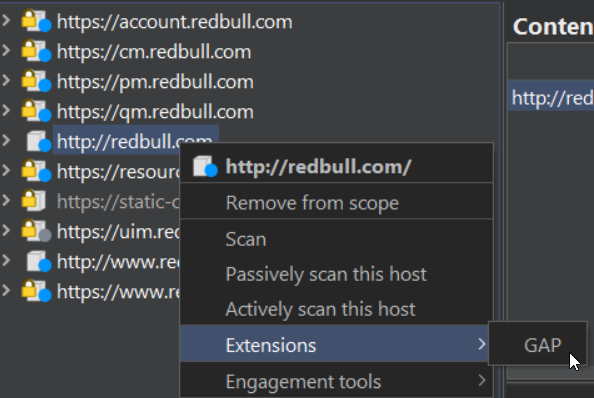
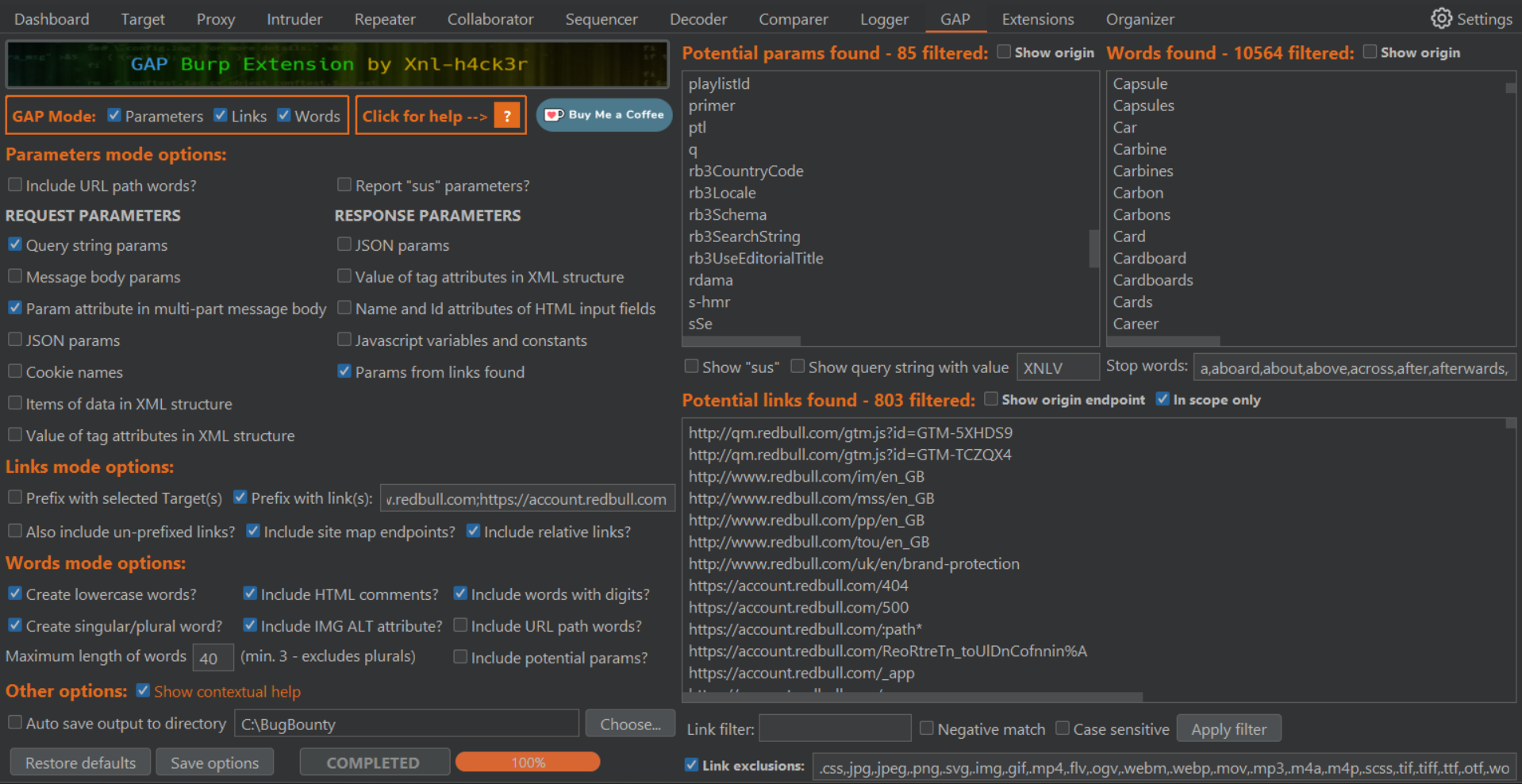
 68 |
--------------------------------------------------------------------------------
/CHANGELOG.md:
--------------------------------------------------------------------------------
1 | ## Changelog
2 |
3 | - v4.7
4 |
5 | - Changed
6 |
7 | - When more that one target is selected and the `Auto save` option is selected, GAP attempts to get the Burp project name from the root window to write the accumulated files. If it failed to get the project name, it raised an error and failed to create the files. This bug has been fixed. If GAP is unable to get the project name, it will just write the accumulated file names with `UnknownProject_`.
8 |
9 | - v4.6
10 |
11 | - New
12 |
13 | - Added `video/x-ms-wmv,image/x-png,video/quicktime,image/x-ms-bmp,font/opentype,application/x-font-opentype,application/x-woff,audio/aiff` to the list of MIME types to ignore.
14 | - If a parameter value has a backslash, forward slash, `quot;`,`apos;` or `amp;` in it, they will be removed.
15 |
16 | - Changed
17 |
18 | - After the new footer has been added in the recent version of Burp, some of the GAP controls are covered on a standard display. I have moved things around a bit to ensure they are all visible.
19 | - The functionality to remove the logo header with Ctrl-Click has been removed as is no longer relevant.
20 |
21 | - v4.5
22 |
23 | - New
24 |
25 | - Added `application/x-msdownload` and `application/x-ms-application` to the list of MIME types to ignore.
26 |
27 | - v4.4
28 |
29 | - Changed
30 |
31 | - Added `application/font-otf` to the list of MIME types to ignore.
32 |
33 | - v4.3
34 |
35 | - New
36 |
37 | - Add new Sus parameter group for Mass Assignment as requested in https://twitter.com/nullenc0de/status/1700496197570453700?s=20
38 |
39 | - v4.2
40 |
41 | - Changed
42 |
43 | - Change the test displayed in the Words mode text box if the `beautifulsoup4` module could not be loaded. This will include the installation instructions.
44 |
45 | - v4.1
46 |
47 | - New
48 |
49 | - Add `application/x-font-truetype`, `font/opentype`, `application/x-troff-man` and `image/pjpeg` to `CONTENTTYPE_EXCLUSIONS`.
50 | - Add file extensions `.jfi`,`.jfif`,`.jfif-tbnl`,`.jif`,`.jpe` and `.pjpg` to `DEFAULT_EXCLUSIONS` and `FILEEXT_EXCLUSIONS`. These relate to `image/pjpeg`.
51 | - If debug view is shown then also output the content types that are being processed. This is helpful for myself to add new content-types that should be excluded.
52 | - Only get words from a response if it is a content-type/file that we want to process. This check is done for links and parameters bit wasn't being checked for words.
53 |
54 | - Changed
55 |
56 | - When calling the Burp API callbacks `isInScope` method, don't call if the host without scheme isn't valid, e.g. doesn't match regex `^([A-Za-z0-9_-]+\.)+[A-Za-z0-9_-]{2,}$`. This prevents errors that an occur in the Burp API that crashes GAP.
57 | - The `FILEEXT_EXCLUSIONS` list is only checked if the Content-Type of a response isn't found. But there are sometimes cases where the Content-Type of a response is incorrect. Both will be checked to determine whether to get links from a response.
58 | - Change the call `soup.findAll(text=lambda` to `soup.find_all(string=lambda` because `find_all` should be used instead of `findAll` and `text` has now been deprecated and raises a warning.
59 | - When checking tag properties for values, the default was set to Null if it can't get the value, so may cause an error. The default changed to an empty string.
60 | - If a link is found and the last character is `=` or `:`, then remove it.
61 |
62 | - v4.0
63 |
64 | - New
65 |
66 | - Added `Report "Sus" parameters?` option for Parameters mode.
67 | - Added `Show "sus"` option for Parameters mode.
68 | - Raise a Burp custom Issue (not available in Community Edition) if a "Sus" parameter is identified.
69 | - For Community Edition, write details of "Sus" parameters found to the extension output.
70 | - Added `Create lowercase words?` Word option to determine whether to add a lowercase version of a word if it contains any uppercase letters. In previous versions this was done by default.
71 | - Added context help in the form of tool tips on most features and controls of GAP.
72 | - Added `Show context help` option to turn off tool tips the next time GAP is loaded.
73 | - Added `Include relative links?` Parameter option to determine whether to include links in the results if they start with `/./` or `/../`
74 | - Added functionality to get Parameters from the Request that Burp doesn't successfully detect. Initially this will just get parameters within JSON strings.
75 | - Do not get words from a `*.js.map` file. Sometimes these are JSON rather than javascript and end up adding a lot of pointless words like mapping names.
76 | - Ignore certain words if found in `robots.txt`
77 | - Do not include words that are in paths. A lot of these were previously being included even if the `Include URL path words?` option wasn't selected because of the regex to get words was not good enough.
78 | - If you hold down the Ctrl key when clicking the GAP logo header image, it will be removed. This can be used in cases where some controls are not visible on the screen.
79 | - Added the regex part `(\"|\')([A-Za-z0-9_-]+\/)+[A-Za-z0-9_-]+(\.[A-Za-z0-9]{2,}|\/?(\?|\#)[A-Za-z0-9_\-&=\[\]]*)(\"|\')` to the main Link finder regex to get more potential links. Also, ignore any links that then start with `application/`, `image/`, `model/`, `video/`, `audio/` or `text/` because these are content-types that can be confused with links.
80 | - Add `wasnt` to Stop Words list.
81 | - Add `.pdf` to `FILEEXT_EXCLUSIONS` constant.
82 | - Ignore links if they start with `/=` (some false positives).
83 | - When running GAP from the Site Map tree context, the progress bar will say `Getting reqs...` when it is getting the number of requests for the current target.
84 | - When encoding links to display, set `:` and `/` as `safe`. Also replace the value `%C3%83%C2%82%C3%82%C2%A0` which can sometimes occur when the character `Â` occurs instead of ` `.
85 |
86 | - Changed
87 |
88 | - Rewrote the `doeverything` function to deal with the Site Map tree context differently to the other contexts, to improve performance.
89 | - If you start GAP from the Site Map tree, only in scope requests will be checked.
90 | - Removed the `Include common parameters?` check box. This functionality has been removed, partially because of it's limited use, and also to allow for space to add sus parameter options.
91 | - Remove the trailing `&` off the end of the parameter query string.
92 | - If the `Include site map endpoints?` option is selected, then also include URLs of requests in the site map that haven't been requested yet (i.e. found by Burp in crawling), if they are in scope.
93 | - Fix a bug that was including a potential link that had no scheme (e.g. a file name) with AND without a prefixed `/`
94 | - Suppress errors in `addLink` when doing `urlparse`. If an error occurs then the URL will be ignored.
95 | - Only display parameters that contain at least one letter, number or \_
96 | - Improve regex to get more parameters from the response that could be parameters in encoded links
97 | - Display the progress bar as soon as GAP is started so it is clearer it is running if it takes time to get all roots and messages
98 | - Improve the regex for finding links in the responses
99 | - Don't display potential links if they contain any unprintable ASCII characters (0-31)
100 | - Remove the check for `X-SourceMap` because it is already covered by the existing regex
101 | - Improve performance initially when getting the number of messages selected to display in the progress bar
102 | - Improve `sanitizeWord` function to use regex and also remove spaces and %20. Also correct error not replacing %29
103 | - If the Parameter or Word mode `Include URL path words?` option is selected, only get if there is a response. This is because Burp will put links in the sitemap that haven't been requested, but can incorrectly get links with wrong paths that then end up with words that make no sense.
104 | - Get potential words from more `meta` tags, and also get from some relevant `link`-`rel` tags.
105 | - Remove the `Name attribute of meta tags` Parameter option because this has little to no value at all.
106 | - Show relative links without being prefixed with `/`
107 | - Pull request from [bebiksior](https://github.com/bebiksior) to improve word list by splitting words with dash, and also by comma.
108 | - Replace regex `findall`and `search` with pre-compiled statements for better performance.
109 | - Fix logic in `includeContentType` where unnecessary calls were being made. Also just call `includeContentType` once at the start and use the result later instead of calling 3 times.
110 | - Remove `robots.txt` in `DEFAULT_EXCLUSIONS` (not sure why I put it in there in the first place!)
111 | - Change `polyfill.io` to `polyfill` in `DEFAULT_EXCLUSIONS`
112 | - Resolve an issue that can cause CPU to max out if the `Prefix with selected Target(s)` option is selected, and there are a lot of targets selected with many links.
113 | - Remove the test `(?<=\=)\s*\/[0-9a-zA-Z]+[^>\n]*` from the response link Regex because it gives too many false positives and can also end up selected a huge part of JS files and cause performance issues.
114 | - Make a change to the Link regex to make sure that potential links that start with `//` are not followed by any spaces.
115 |
116 | - v3.5
117 |
118 | - Changed
119 |
120 | - Fix a bug that fails to process a root in the site map if it contains a port number.
121 |
122 | - v3.4
123 |
124 | - Changed
125 |
126 | - Fix a bug that was causing the `Show params as query string` option to not display anything if the `Include common parameters` option is not ticked.
127 | - Ensure there is a newline character at the end of the final line on output files.
128 |
129 | - v3.3
130 |
131 | - New
132 |
133 | - Allow GAP to be called from any context, not just the site map.
134 | - Add a `Link exclusion` check box. If this is unselected then ALL links wil be returned without checking the exclusion list.
135 |
136 | - Changed
137 |
138 | - Fix a bug where links that are out of scope are still shown when the `In scope only` option is selected.
139 | - Fix a bug where unicode characters weren't always being converted correctly so some links may not have been successfully extracted.
140 | - Fix a bug where if a link of `*.example.com` was found then it would be reported as `http://.example.com`
141 | - Fix a bug where links with something between parenthesis or curly brackets in part of the subdomain stops the link being identified as being in or out of scope.
142 | - FIx a bug where if a field isn't in the saved config, and exception occurs that prevents the remaining fields being set. Now if an error occurs getting any field from the saved config, it will set a default and continue.
143 |
144 | - v3.2
145 |
146 | - Changed
147 |
148 | - Amend the main link finding regex string to avoid catastrophic backtracking errors that freeze the search and break GAP.
149 | - Fix a bug where the links `Show origin endpoint` and `In scope only` options aren't enabled in some circumstances.
150 | - Ensure output files are closed properly after writing.
151 | - Fix a bug where the `Show origin` of the wrong type was checked when writing output files.
152 |
153 | - v3.1
154 |
155 | - Changed
156 |
157 | - A small fix to ensure that if the `Prefix with selected Target(s)` option is checked that output links do not have `//` after the host
158 |
159 | - v3.0
160 |
161 | - New
162 |
163 | - Add `Show origin endpoint` filter to Parameters and save as part of config when the **Save options** button is pressed.
164 | - If the `Auto save output to directory` option is checked, then files are written as follows:
165 | - Create a sub folder for each root in the target site that was selected in Site Map
166 | - Create a file in the main folder with the name of the Burp project and timestamp, e.g. if the project is called `target`, the files might be `target_20230416_133700_links.txt`, `target_20230416_133700_parans.txt` and `target_20230416_133700_words.txt` where `20230416` is the current date in `YYYYMMDD` format and `133700` is the current time in `HHMMSS` format. These files will contain what was found for ALL roots selected.
167 | - Within each sub folder, the files will only contain findings for that particular root. If there are no findings for a mode, then a file will not be created for that mode.
168 | - If the `Include common parameters` option is checked and the Parameter `Show origin endpoint` is checked, the common parameters are displayed and written to file with `[GAP]` instead of a Link where the parameter was found.
169 |
170 | - Changed
171 | - You can now select sub folders, or specific requests, from the Site Map to process with GAP.
172 | - The `Show origin endpoint` option for Parameters and Links, and the `In scope only` option are applied to what is displayed AND what is written to file.
173 | - If a link is found that has a different scheme than http or https, the `URL(link).getHost()` method returns blank. This previously resulted in the link not being checked if it was in scope and incorrectly included. This has been fixed.
174 | - Make changes to the functions that display links, parameters and words to improve speed and use less memory.
175 | - Parameters and words from path words were not correctly checked whether they are in scope or not. This has been fixed.
176 | - If a link has `\s` or `\S` in it, don't include as it's most likely a regex string, not a link.
177 | - If one mode finishes before others are, allow any filters to be used on the finished panels, even if the others aren't complete.
178 | - If Origin is written to the Links or Params file, only separate the URL and \[ORIGIN\] with one space. Two spaces are used in the UI to make it easier to view.
179 | - Suppress warnings from the beautifulsoup4 library.
180 |
181 | - v2.9
182 |
183 | - New
184 |
185 | - Add new checkbox "Prefix with selected Target(s)". If selected, any links found that don't have a domain will be prefixed with each target root that was selected in the Site Map when running GAP.
186 | - Added some tool tips
187 |
188 | - Changed
189 |
190 | - The "Prefix with links(s)" (was previously called "Link Prefix") can now have multiple links separated by a semicolon. If a schema is left off a link then it will be added on. If the field has invalid values, the text will be displayed in red, indicating it needs to be fixed. Links will be output with each prefix
191 |
192 | - v2.8
193 |
194 | - New
195 |
196 | - When GAP is searching, the tab caption will say **GAP\*** instead of **GAP**. Also, when complete, and the user is not on the GAP tab, the title will show **GAP** in Burp Orange. The text is reset to default colour when another target is searched of if any options are changed.
197 |
198 | - v2.7
199 |
200 | - New
201 |
202 | - Sanitize words before adding them to the list, e.g. remove `"`,`%22`, `<`, `%3c`, etc.
203 | - If a potential parameter has a `?` in it, then just get the value after the `?` as the parameter
204 |
205 | - Changed
206 |
207 | - Add more parameter names to the `COMMON_PARAMS` constant.
208 |
209 | - v2.6
210 |
211 | - Changed
212 |
213 | - For Parameters, Links and Words, check if the string being added contains any unicode characters. If it does, then URL encode the characters before adding them to the lists to display and output. This change prevents a number of errors output and also prevents Burp from freezing with certain conditions.
214 |
215 | - v2.5
216 |
217 | - New
218 |
219 | - Get more potential parameters from responses based on patterns like `?param=` and `¶m=`
220 |
221 | - Changed
222 |
223 | - Only get parameters from responses that don't have content types of file types in the given exclusions.
224 |
225 | - v2.4
226 |
227 | - New
228 |
229 | - Add `FILEEXT_EXCLUSIONS` constant that are file extensions we do not want to check for links. If a content type cannot be found then the extension in a URL (if there is one) will be used to check against this list and exluded if necessary.
230 |
231 | - Changed
232 | - Add these content types to the `DEFAULT_CONTENTTYPE_EXCLUSIONS` constant, and the `contentExclude` section of `config.yml`: `application/zip,application/x-zip-compressed,application/x-msdownload,application/x-apple-diskimage,application/x-rpm,application/vnd.debian.binary-package`
233 |
234 | - v2.3
235 |
236 | - New
237 | - Re-introduce the option of viewing parameters in a concatenated query string. There is now a check box below the parameter list that can be used to switch views.
238 |
239 | - v2.2
240 |
241 | - Changed
242 | - Encode parameters, links and words to ASCII before adding them to lists so that no unicode errors occur when displaying them.
243 | - Change error message for bs4 not installed to include a link to the installation instructions on github.
244 |
245 | - v2.1
246 |
247 | - Changed
248 | - Minor bug fix and improvement
249 |
250 | - v2.0
251 |
252 | - New
253 |
254 | - Add **Words** mode that will produce a target specific wordlist.
255 | - Add options for **Words** mode.
256 | - Add an option to provide a prefix for links that are found that don't have a domain.
257 | - Add `requirements.txt` file for external modules that are needed for GAP.
258 | - Add a progress bar to show how many requests per root are being processed.
259 | - Add a **Buy Me a Coffee** button.
260 | - Add `banner.png` to use on extension tab.
261 |
262 | - Changed
263 | - Sooooo many minor bug fixes to mention :)
264 | - Allow user to select a sub folder of a site mop root, or even just one endpoint to process.
265 | - Get links from the response headers too. It should have been doing this already, but wasn't.
266 | - When **Include site map endpoints in link list** option is selected, return the full URL, not just the path.
267 | - Fixed bug when saving files on Linux.
268 |
--------------------------------------------------------------------------------
/GAP Help.md:
--------------------------------------------------------------------------------
1 |
68 |
--------------------------------------------------------------------------------
/CHANGELOG.md:
--------------------------------------------------------------------------------
1 | ## Changelog
2 |
3 | - v4.7
4 |
5 | - Changed
6 |
7 | - When more that one target is selected and the `Auto save` option is selected, GAP attempts to get the Burp project name from the root window to write the accumulated files. If it failed to get the project name, it raised an error and failed to create the files. This bug has been fixed. If GAP is unable to get the project name, it will just write the accumulated file names with `UnknownProject_`.
8 |
9 | - v4.6
10 |
11 | - New
12 |
13 | - Added `video/x-ms-wmv,image/x-png,video/quicktime,image/x-ms-bmp,font/opentype,application/x-font-opentype,application/x-woff,audio/aiff` to the list of MIME types to ignore.
14 | - If a parameter value has a backslash, forward slash, `quot;`,`apos;` or `amp;` in it, they will be removed.
15 |
16 | - Changed
17 |
18 | - After the new footer has been added in the recent version of Burp, some of the GAP controls are covered on a standard display. I have moved things around a bit to ensure they are all visible.
19 | - The functionality to remove the logo header with Ctrl-Click has been removed as is no longer relevant.
20 |
21 | - v4.5
22 |
23 | - New
24 |
25 | - Added `application/x-msdownload` and `application/x-ms-application` to the list of MIME types to ignore.
26 |
27 | - v4.4
28 |
29 | - Changed
30 |
31 | - Added `application/font-otf` to the list of MIME types to ignore.
32 |
33 | - v4.3
34 |
35 | - New
36 |
37 | - Add new Sus parameter group for Mass Assignment as requested in https://twitter.com/nullenc0de/status/1700496197570453700?s=20
38 |
39 | - v4.2
40 |
41 | - Changed
42 |
43 | - Change the test displayed in the Words mode text box if the `beautifulsoup4` module could not be loaded. This will include the installation instructions.
44 |
45 | - v4.1
46 |
47 | - New
48 |
49 | - Add `application/x-font-truetype`, `font/opentype`, `application/x-troff-man` and `image/pjpeg` to `CONTENTTYPE_EXCLUSIONS`.
50 | - Add file extensions `.jfi`,`.jfif`,`.jfif-tbnl`,`.jif`,`.jpe` and `.pjpg` to `DEFAULT_EXCLUSIONS` and `FILEEXT_EXCLUSIONS`. These relate to `image/pjpeg`.
51 | - If debug view is shown then also output the content types that are being processed. This is helpful for myself to add new content-types that should be excluded.
52 | - Only get words from a response if it is a content-type/file that we want to process. This check is done for links and parameters bit wasn't being checked for words.
53 |
54 | - Changed
55 |
56 | - When calling the Burp API callbacks `isInScope` method, don't call if the host without scheme isn't valid, e.g. doesn't match regex `^([A-Za-z0-9_-]+\.)+[A-Za-z0-9_-]{2,}$`. This prevents errors that an occur in the Burp API that crashes GAP.
57 | - The `FILEEXT_EXCLUSIONS` list is only checked if the Content-Type of a response isn't found. But there are sometimes cases where the Content-Type of a response is incorrect. Both will be checked to determine whether to get links from a response.
58 | - Change the call `soup.findAll(text=lambda` to `soup.find_all(string=lambda` because `find_all` should be used instead of `findAll` and `text` has now been deprecated and raises a warning.
59 | - When checking tag properties for values, the default was set to Null if it can't get the value, so may cause an error. The default changed to an empty string.
60 | - If a link is found and the last character is `=` or `:`, then remove it.
61 |
62 | - v4.0
63 |
64 | - New
65 |
66 | - Added `Report "Sus" parameters?` option for Parameters mode.
67 | - Added `Show "sus"` option for Parameters mode.
68 | - Raise a Burp custom Issue (not available in Community Edition) if a "Sus" parameter is identified.
69 | - For Community Edition, write details of "Sus" parameters found to the extension output.
70 | - Added `Create lowercase words?` Word option to determine whether to add a lowercase version of a word if it contains any uppercase letters. In previous versions this was done by default.
71 | - Added context help in the form of tool tips on most features and controls of GAP.
72 | - Added `Show context help` option to turn off tool tips the next time GAP is loaded.
73 | - Added `Include relative links?` Parameter option to determine whether to include links in the results if they start with `/./` or `/../`
74 | - Added functionality to get Parameters from the Request that Burp doesn't successfully detect. Initially this will just get parameters within JSON strings.
75 | - Do not get words from a `*.js.map` file. Sometimes these are JSON rather than javascript and end up adding a lot of pointless words like mapping names.
76 | - Ignore certain words if found in `robots.txt`
77 | - Do not include words that are in paths. A lot of these were previously being included even if the `Include URL path words?` option wasn't selected because of the regex to get words was not good enough.
78 | - If you hold down the Ctrl key when clicking the GAP logo header image, it will be removed. This can be used in cases where some controls are not visible on the screen.
79 | - Added the regex part `(\"|\')([A-Za-z0-9_-]+\/)+[A-Za-z0-9_-]+(\.[A-Za-z0-9]{2,}|\/?(\?|\#)[A-Za-z0-9_\-&=\[\]]*)(\"|\')` to the main Link finder regex to get more potential links. Also, ignore any links that then start with `application/`, `image/`, `model/`, `video/`, `audio/` or `text/` because these are content-types that can be confused with links.
80 | - Add `wasnt` to Stop Words list.
81 | - Add `.pdf` to `FILEEXT_EXCLUSIONS` constant.
82 | - Ignore links if they start with `/=` (some false positives).
83 | - When running GAP from the Site Map tree context, the progress bar will say `Getting reqs...` when it is getting the number of requests for the current target.
84 | - When encoding links to display, set `:` and `/` as `safe`. Also replace the value `%C3%83%C2%82%C3%82%C2%A0` which can sometimes occur when the character `Â` occurs instead of ` `.
85 |
86 | - Changed
87 |
88 | - Rewrote the `doeverything` function to deal with the Site Map tree context differently to the other contexts, to improve performance.
89 | - If you start GAP from the Site Map tree, only in scope requests will be checked.
90 | - Removed the `Include common parameters?` check box. This functionality has been removed, partially because of it's limited use, and also to allow for space to add sus parameter options.
91 | - Remove the trailing `&` off the end of the parameter query string.
92 | - If the `Include site map endpoints?` option is selected, then also include URLs of requests in the site map that haven't been requested yet (i.e. found by Burp in crawling), if they are in scope.
93 | - Fix a bug that was including a potential link that had no scheme (e.g. a file name) with AND without a prefixed `/`
94 | - Suppress errors in `addLink` when doing `urlparse`. If an error occurs then the URL will be ignored.
95 | - Only display parameters that contain at least one letter, number or \_
96 | - Improve regex to get more parameters from the response that could be parameters in encoded links
97 | - Display the progress bar as soon as GAP is started so it is clearer it is running if it takes time to get all roots and messages
98 | - Improve the regex for finding links in the responses
99 | - Don't display potential links if they contain any unprintable ASCII characters (0-31)
100 | - Remove the check for `X-SourceMap` because it is already covered by the existing regex
101 | - Improve performance initially when getting the number of messages selected to display in the progress bar
102 | - Improve `sanitizeWord` function to use regex and also remove spaces and %20. Also correct error not replacing %29
103 | - If the Parameter or Word mode `Include URL path words?` option is selected, only get if there is a response. This is because Burp will put links in the sitemap that haven't been requested, but can incorrectly get links with wrong paths that then end up with words that make no sense.
104 | - Get potential words from more `meta` tags, and also get from some relevant `link`-`rel` tags.
105 | - Remove the `Name attribute of meta tags` Parameter option because this has little to no value at all.
106 | - Show relative links without being prefixed with `/`
107 | - Pull request from [bebiksior](https://github.com/bebiksior) to improve word list by splitting words with dash, and also by comma.
108 | - Replace regex `findall`and `search` with pre-compiled statements for better performance.
109 | - Fix logic in `includeContentType` where unnecessary calls were being made. Also just call `includeContentType` once at the start and use the result later instead of calling 3 times.
110 | - Remove `robots.txt` in `DEFAULT_EXCLUSIONS` (not sure why I put it in there in the first place!)
111 | - Change `polyfill.io` to `polyfill` in `DEFAULT_EXCLUSIONS`
112 | - Resolve an issue that can cause CPU to max out if the `Prefix with selected Target(s)` option is selected, and there are a lot of targets selected with many links.
113 | - Remove the test `(?<=\=)\s*\/[0-9a-zA-Z]+[^>\n]*` from the response link Regex because it gives too many false positives and can also end up selected a huge part of JS files and cause performance issues.
114 | - Make a change to the Link regex to make sure that potential links that start with `//` are not followed by any spaces.
115 |
116 | - v3.5
117 |
118 | - Changed
119 |
120 | - Fix a bug that fails to process a root in the site map if it contains a port number.
121 |
122 | - v3.4
123 |
124 | - Changed
125 |
126 | - Fix a bug that was causing the `Show params as query string` option to not display anything if the `Include common parameters` option is not ticked.
127 | - Ensure there is a newline character at the end of the final line on output files.
128 |
129 | - v3.3
130 |
131 | - New
132 |
133 | - Allow GAP to be called from any context, not just the site map.
134 | - Add a `Link exclusion` check box. If this is unselected then ALL links wil be returned without checking the exclusion list.
135 |
136 | - Changed
137 |
138 | - Fix a bug where links that are out of scope are still shown when the `In scope only` option is selected.
139 | - Fix a bug where unicode characters weren't always being converted correctly so some links may not have been successfully extracted.
140 | - Fix a bug where if a link of `*.example.com` was found then it would be reported as `http://.example.com`
141 | - Fix a bug where links with something between parenthesis or curly brackets in part of the subdomain stops the link being identified as being in or out of scope.
142 | - FIx a bug where if a field isn't in the saved config, and exception occurs that prevents the remaining fields being set. Now if an error occurs getting any field from the saved config, it will set a default and continue.
143 |
144 | - v3.2
145 |
146 | - Changed
147 |
148 | - Amend the main link finding regex string to avoid catastrophic backtracking errors that freeze the search and break GAP.
149 | - Fix a bug where the links `Show origin endpoint` and `In scope only` options aren't enabled in some circumstances.
150 | - Ensure output files are closed properly after writing.
151 | - Fix a bug where the `Show origin` of the wrong type was checked when writing output files.
152 |
153 | - v3.1
154 |
155 | - Changed
156 |
157 | - A small fix to ensure that if the `Prefix with selected Target(s)` option is checked that output links do not have `//` after the host
158 |
159 | - v3.0
160 |
161 | - New
162 |
163 | - Add `Show origin endpoint` filter to Parameters and save as part of config when the **Save options** button is pressed.
164 | - If the `Auto save output to directory` option is checked, then files are written as follows:
165 | - Create a sub folder for each root in the target site that was selected in Site Map
166 | - Create a file in the main folder with the name of the Burp project and timestamp, e.g. if the project is called `target`, the files might be `target_20230416_133700_links.txt`, `target_20230416_133700_parans.txt` and `target_20230416_133700_words.txt` where `20230416` is the current date in `YYYYMMDD` format and `133700` is the current time in `HHMMSS` format. These files will contain what was found for ALL roots selected.
167 | - Within each sub folder, the files will only contain findings for that particular root. If there are no findings for a mode, then a file will not be created for that mode.
168 | - If the `Include common parameters` option is checked and the Parameter `Show origin endpoint` is checked, the common parameters are displayed and written to file with `[GAP]` instead of a Link where the parameter was found.
169 |
170 | - Changed
171 | - You can now select sub folders, or specific requests, from the Site Map to process with GAP.
172 | - The `Show origin endpoint` option for Parameters and Links, and the `In scope only` option are applied to what is displayed AND what is written to file.
173 | - If a link is found that has a different scheme than http or https, the `URL(link).getHost()` method returns blank. This previously resulted in the link not being checked if it was in scope and incorrectly included. This has been fixed.
174 | - Make changes to the functions that display links, parameters and words to improve speed and use less memory.
175 | - Parameters and words from path words were not correctly checked whether they are in scope or not. This has been fixed.
176 | - If a link has `\s` or `\S` in it, don't include as it's most likely a regex string, not a link.
177 | - If one mode finishes before others are, allow any filters to be used on the finished panels, even if the others aren't complete.
178 | - If Origin is written to the Links or Params file, only separate the URL and \[ORIGIN\] with one space. Two spaces are used in the UI to make it easier to view.
179 | - Suppress warnings from the beautifulsoup4 library.
180 |
181 | - v2.9
182 |
183 | - New
184 |
185 | - Add new checkbox "Prefix with selected Target(s)". If selected, any links found that don't have a domain will be prefixed with each target root that was selected in the Site Map when running GAP.
186 | - Added some tool tips
187 |
188 | - Changed
189 |
190 | - The "Prefix with links(s)" (was previously called "Link Prefix") can now have multiple links separated by a semicolon. If a schema is left off a link then it will be added on. If the field has invalid values, the text will be displayed in red, indicating it needs to be fixed. Links will be output with each prefix
191 |
192 | - v2.8
193 |
194 | - New
195 |
196 | - When GAP is searching, the tab caption will say **GAP\*** instead of **GAP**. Also, when complete, and the user is not on the GAP tab, the title will show **GAP** in Burp Orange. The text is reset to default colour when another target is searched of if any options are changed.
197 |
198 | - v2.7
199 |
200 | - New
201 |
202 | - Sanitize words before adding them to the list, e.g. remove `"`,`%22`, `<`, `%3c`, etc.
203 | - If a potential parameter has a `?` in it, then just get the value after the `?` as the parameter
204 |
205 | - Changed
206 |
207 | - Add more parameter names to the `COMMON_PARAMS` constant.
208 |
209 | - v2.6
210 |
211 | - Changed
212 |
213 | - For Parameters, Links and Words, check if the string being added contains any unicode characters. If it does, then URL encode the characters before adding them to the lists to display and output. This change prevents a number of errors output and also prevents Burp from freezing with certain conditions.
214 |
215 | - v2.5
216 |
217 | - New
218 |
219 | - Get more potential parameters from responses based on patterns like `?param=` and `¶m=`
220 |
221 | - Changed
222 |
223 | - Only get parameters from responses that don't have content types of file types in the given exclusions.
224 |
225 | - v2.4
226 |
227 | - New
228 |
229 | - Add `FILEEXT_EXCLUSIONS` constant that are file extensions we do not want to check for links. If a content type cannot be found then the extension in a URL (if there is one) will be used to check against this list and exluded if necessary.
230 |
231 | - Changed
232 | - Add these content types to the `DEFAULT_CONTENTTYPE_EXCLUSIONS` constant, and the `contentExclude` section of `config.yml`: `application/zip,application/x-zip-compressed,application/x-msdownload,application/x-apple-diskimage,application/x-rpm,application/vnd.debian.binary-package`
233 |
234 | - v2.3
235 |
236 | - New
237 | - Re-introduce the option of viewing parameters in a concatenated query string. There is now a check box below the parameter list that can be used to switch views.
238 |
239 | - v2.2
240 |
241 | - Changed
242 | - Encode parameters, links and words to ASCII before adding them to lists so that no unicode errors occur when displaying them.
243 | - Change error message for bs4 not installed to include a link to the installation instructions on github.
244 |
245 | - v2.1
246 |
247 | - Changed
248 | - Minor bug fix and improvement
249 |
250 | - v2.0
251 |
252 | - New
253 |
254 | - Add **Words** mode that will produce a target specific wordlist.
255 | - Add options for **Words** mode.
256 | - Add an option to provide a prefix for links that are found that don't have a domain.
257 | - Add `requirements.txt` file for external modules that are needed for GAP.
258 | - Add a progress bar to show how many requests per root are being processed.
259 | - Add a **Buy Me a Coffee** button.
260 | - Add `banner.png` to use on extension tab.
261 |
262 | - Changed
263 | - Sooooo many minor bug fixes to mention :)
264 | - Allow user to select a sub folder of a site mop root, or even just one endpoint to process.
265 | - Get links from the response headers too. It should have been doing this already, but wasn't.
266 | - When **Include site map endpoints in link list** option is selected, return the full URL, not just the path.
267 | - Fixed bug when saving files on Linux.
268 |
--------------------------------------------------------------------------------
/GAP Help.md:
--------------------------------------------------------------------------------
1 | jython-standalone-2.7.3.jar.java -jar jython-standalone-2.7.3.jar -m ensurepip.GAP.py and requirements.txt from this project and place in the same directory.java -jar jython-standalone-2.7.3.jar -m pip install -r requirements.txt.GAP.py file30 |
var, let or const are retrieved. NOTE: Improvements are needed to retrieve more variables as there are many ways that these can be declared and difficult to retrieve all from regex.CONTENTTYPE_EXCLUSIONS in the code (these are types such as images, video, audio, fonts, etc.)
76 |
77 | /api/user/1/api/user/1. Multiple domains can be provided, separated by a semicolon, e.g. http://example.com;https://sub.example.comDEFAULT_EXCLUSIONS constant, but you can change this and save your settings. If the option is not selected, all links will be returned.ALT attribute of IMG tags will be considered.text/html,application/xml,application/json,text/plain,application/xhtml+xml,application/ld+json,text/xml<meta> tag content where:
107 | og:title, og:description, title, og:site_name or fb:adminsdescription, keywords, twitter:title, twitter:descriptionapplication-name, author, subject, copyright, abstract, topic, summary, owner, directory, category, og:title, og:type, og:site_name, og:description, csrf-param, apple-mobile-web-app-title, twitter:label1, twitter:data1, twitter:label2, twitter:data2 or twitter:title<link> tag title where:
112 | alternate, index, start, prev, next or search<style>, <script> and <link>.js to only show the links to javascript files. As soon as you clear the filter, the original results are redisplayed..js.map (javascript source map) files. These are identified by responses that contain the //# sourceMappingURL line, or have a HTTP header of SourceMap or X-SourceMap.[GAP] instead of an origin endpoint.156 |
target, the files might be target_20230416_133700_links.txt, target_20230416_133700_parans.txt and target_20230416_133700_words.txt where 20230416 is the current date in YYYYMMDD format and 133700 is the current time in HHMMSS format. These files will contain what was found for ALL roots selected.163 | 164 |
169 |
It is hard to design GAP to display all controls for all screen resolutions and font sizes. I have tried to deal with the most common setups, but if you find you cannot see all the controls, you can hold down the Ctrl button and click the GAP logo header image to remove it to make more space.
174 |
184 |
185 | Thank you for trying out GAP!188 | @xnl-h4ck3r 189 | 🤘 190 | 191 | --------------------------------------------------------------------------------