├── .github
├── workflows
│ ├── test.yml
│ └── linux-appImage.yml
└── FUNDING.yml
├── .npmrc
├── forcekill.bat
├── test.css
├── example.jpg
├── .gitignore
├── assets
└── icons
│ ├── png
│ ├── mac.png
│ ├── 16x16.png
│ ├── 32x32.png
│ └── 256x256.png
│ ├── mac
│ ├── icon.icns
│ └── icon.ico
│ └── win
│ └── icon.ico
├── renderer.js
├── ci.yml
├── index.html
├── afterSign.js
├── BENEFITS.md
├── package.json
├── preload.js
├── README.md
├── LICENSE.md
└── main.js
/.github/workflows/test.yml:
--------------------------------------------------------------------------------
1 |
--------------------------------------------------------------------------------
/.npmrc:
--------------------------------------------------------------------------------
1 | engine-strict=true
2 |
--------------------------------------------------------------------------------
/forcekill.bat:
--------------------------------------------------------------------------------
1 | taskkill/im elecap.exe /F
2 |
--------------------------------------------------------------------------------
/test.css:
--------------------------------------------------------------------------------
1 | body {
2 | background-color: green!important;
3 | }
--------------------------------------------------------------------------------
/example.jpg:
--------------------------------------------------------------------------------
https://raw.githubusercontent.com/embed/electroncapture/master/example.jpg
--------------------------------------------------------------------------------
/.gitignore:
--------------------------------------------------------------------------------
1 | /build
2 | /dist
3 | /node_modules
4 | package-lock.json
5 | mac.sh
6 |
--------------------------------------------------------------------------------
/assets/icons/png/mac.png:
--------------------------------------------------------------------------------
https://raw.githubusercontent.com/embed/electroncapture/master/assets/icons/png/mac.png
--------------------------------------------------------------------------------
/assets/icons/mac/icon.icns:
--------------------------------------------------------------------------------
https://raw.githubusercontent.com/embed/electroncapture/master/assets/icons/mac/icon.icns
--------------------------------------------------------------------------------
/assets/icons/mac/icon.ico:
--------------------------------------------------------------------------------
https://raw.githubusercontent.com/embed/electroncapture/master/assets/icons/mac/icon.ico
--------------------------------------------------------------------------------
/assets/icons/png/16x16.png:
--------------------------------------------------------------------------------
https://raw.githubusercontent.com/embed/electroncapture/master/assets/icons/png/16x16.png
--------------------------------------------------------------------------------
/assets/icons/png/32x32.png:
--------------------------------------------------------------------------------
https://raw.githubusercontent.com/embed/electroncapture/master/assets/icons/png/32x32.png
--------------------------------------------------------------------------------
/assets/icons/win/icon.ico:
--------------------------------------------------------------------------------
https://raw.githubusercontent.com/embed/electroncapture/master/assets/icons/win/icon.ico
--------------------------------------------------------------------------------
/assets/icons/png/256x256.png:
--------------------------------------------------------------------------------
https://raw.githubusercontent.com/embed/electroncapture/master/assets/icons/png/256x256.png
--------------------------------------------------------------------------------
/.github/FUNDING.yml:
--------------------------------------------------------------------------------
1 | # These are supported funding model platforms
2 |
3 | # Thank you <3
4 |
5 | github: [steveseguin]
6 |
--------------------------------------------------------------------------------
/renderer.js:
--------------------------------------------------------------------------------
1 | // This file is required by the index.html file and will
2 | // be executed in the renderer process for that window.
3 | // No Node.js APIs are available in this process because
4 | // `nodeIntegration` is turned off. Use `preload.js` to
5 | // selectively enable features needed in the rendering
6 | // process.
7 |
8 |
9 | unhandled();
10 |
--------------------------------------------------------------------------------
/ci.yml:
--------------------------------------------------------------------------------
1 | name: ci
2 | on:
3 | push:
4 | branches:
5 | - master
6 | jobs:
7 | deploy:
8 | runs-on: ubuntu-latest
9 | steps:
10 | - uses: actions/checkout@v2
11 | - uses: actions/setup-python@v2
12 | with:
13 | python-version: 3.x
14 | - run: pip install mkdocs-material
15 | - run: mkdocs gh-deploy --force
16 |
--------------------------------------------------------------------------------
/index.html:
--------------------------------------------------------------------------------
1 |
2 |
3 |
4 |
5 |
6 |
7 |
8 | Hello World!
9 |
10 |
11 | Hello World!
12 | We are using Node.js ,
13 | Chromium ,
14 | and Electron .
15 |
16 |
17 |
18 |
19 |
20 |
--------------------------------------------------------------------------------
/.github/workflows/linux-appImage.yml:
--------------------------------------------------------------------------------
1 | name: Build Electron App for Linux
2 |
3 | on:
4 | push:
5 | branches:
6 | - master
7 | pull_request:
8 | branches:
9 | - master
10 |
11 | jobs:
12 | build:
13 | env:
14 | GH_TOKEN: ${{ secrets.GH_TOKEN }}
15 |
16 | runs-on: ubuntu-latest
17 |
18 | steps:
19 | - name: Checkout code
20 | uses: actions/checkout@v2
21 |
22 | - name: Set up Node.js
23 | uses: actions/setup-node@v2
24 | with:
25 | node-version: '18'
26 |
27 | - name: Install dependencies
28 | run: npm install
29 |
30 | - name: Build Electron app for Linux
31 | run: npm run build:linux
32 |
33 | - name: Archive Artifacts
34 | uses: actions/upload-artifact@v2
35 | with:
36 | name: electron-app-linux
37 | path: dist/*.AppImage
38 |
39 |
--------------------------------------------------------------------------------
/afterSign.js:
--------------------------------------------------------------------------------
1 | const fs = require('fs');
2 | const path = require('path');
3 | var electron_notarize = require('electron-notarize');
4 |
5 | module.exports = async function (params) {
6 | // Only notarize the app on Mac OS only.
7 | if (process.platform !== 'darwin') {
8 | return;
9 | }
10 | console.log('afterSign hook triggered', params);
11 |
12 | // Same appId in electron-builder.
13 | let appId = 'ninja.vdo'
14 |
15 | let appPath = path.join(params.appOutDir, `${params.packager.appInfo.productFilename}.app`);
16 | if (!fs.existsSync(appPath)) {
17 | throw new Error(`Cannot find application at: ${appPath}`);
18 | }
19 |
20 | console.log(`Notarizing ${appId} found at ${appPath}`);
21 |
22 | try {
23 | await electron_notarize.notarize({
24 | appBundleId: appId,
25 | appPath: appPath,
26 | appleId: process.env.appleId,
27 | teamId: process.env.teamId,
28 | appleIdPassword: process.env.appleIdPassword,
29 | });
30 | } catch (error) {
31 | console.error(error);
32 | }
33 |
34 | console.log(`Done notarizing ${appId}`);
35 | };
36 |
--------------------------------------------------------------------------------
/BENEFITS.md:
--------------------------------------------------------------------------------
1 | - Better handles packet loss than OBS (Such as guests on poor Wi-Fi connections)
2 | - Using OBS to Window Capture the Electron Capture App window has lower resource usage than using the browser source directly in OBS
3 | - Able to capture the Electron Capture window in multiple instances of OBS without forcing your players' computers to output 2 different video streams (one for each OBS instance)
4 | - It's frame-less so no need to crop after a window-capture
5 | - It's a stable version and it won't auto-update on you to something unstable.
6 | - It can be launched via command line to open to a specific link
7 | - It lets you select exact window sizes (1280x720, etc), so pixel sizes are captured 1:1 exactly
8 | - It is more stable than OBS ; no video corruption caused by packet loss
9 | - Doesn't have a timestamp sync bug that is in OBS browser source
10 | - Doesn't throttle performance if backgrounded like Chrome does
11 | - There is an always on top option, allowing for screen-capping
12 | - Auto-detects and changes to the correct window size if high DPi mode is on
13 | - It loads up to a nice homepage with audio-output options and other selectable options
14 | - I guess no google tracking?
15 | - Some of the experimental builds have improved encoding peformance; max quality
16 | - Sharing a video as a screen-share into Zoom provides higher quality video versus a virtual camera input into Zoom. Helpful if you want to use OBS.Ninja to turn your iPhone into a remote webcam for Zoom Meetings maybe.
17 |
--------------------------------------------------------------------------------
/package.json:
--------------------------------------------------------------------------------
1 | {
2 | "name": "VDON.Electron.Capture.App",
3 | "version": "2.18.4",
4 | "description": "A simple tool to aid with frameless window video capture and VDON publishing",
5 | "author": "Steve Seguin ",
6 | "main": "main.js",
7 | "scripts": {
8 | "start": "electron .",
9 | "build": "run-os",
10 | "build:win32": "electron-builder --win",
11 | "build:darwin": "electron-builder --mac --universal",
12 | "build:linux": "electron-builder --linux",
13 | "build:rpi": "USE_SYSTEM_FPM=true electron-builder --armv7l --linux deb",
14 | "clean": "rimraf ./dist",
15 | "release": "electron-builder --publish always"
16 | },
17 | "repository": {
18 | "type": "git",
19 | "url": "https://github.com/steveseguin/electroncapture.git"
20 | },
21 | "build": {
22 | "appId": "capture.electron",
23 | "productName": "ElectronCapture",
24 | "files": [
25 | "**/*",
26 | "build/Release/*",
27 | "assets/icons/*.*",
28 | "assets/icons/mac/*.*",
29 | "assets/icons/png/*.*",
30 | "assets/icons/win/*.*"
31 | ],
32 | "mac": {
33 | "category": "public.build.automation",
34 | "icon": "assets/icons/mac/icon.icns",
35 | "target": [
36 | "dmg",
37 | "zip"
38 | ],
39 | "hardenedRuntime": true,
40 | "entitlements": "./build/entitlements.mac.inherit.plist",
41 | "extendInfo": {
42 | "NSCameraUsageDescription": "This app requires camera access to record video.",
43 | "NSMicrophoneUsageDescription": "This app requires microphone access to record audio."
44 | }
45 | },
46 | "dmg": {
47 | "contents": [
48 | {
49 | "x": 110,
50 | "y": 150
51 | },
52 | {
53 | "x": 440,
54 | "y": 150,
55 | "type": "link",
56 | "path": "/Applications"
57 | }
58 | ],
59 | "artifactName": "elecap-${version}.${ext}",
60 | "writeUpdateInfo": false
61 | },
62 | "win": {
63 | "target": [
64 | {
65 | "target": "nsis",
66 | "arch": [
67 | "x64"
68 | ]
69 | },
70 | {
71 | "target": "portable",
72 | "arch": [
73 | "ia32",
74 | "x64",
75 | "arm64"
76 | ]
77 | }
78 | ],
79 | "icon": "assets/icons/win/icon.ico"
80 | },
81 | "linux": {
82 | "category": "public.build.automation",
83 | "icon": "assets/icons/png/256x256.png",
84 | "artifactName": "${productName}-${version}-${arch}.${ext}",
85 | "target": "AppImage"
86 | },
87 | "nsis": {
88 | "runAfterFinish": true,
89 | "installerIcon": "assets/icons/win/icon.ico",
90 | "artifactName": "elecap-${version}.${ext}",
91 | "differentialPackage": false
92 | },
93 | "portable": {
94 | "artifactName": "elecap.exe",
95 | "requestExecutionLevel": "user",
96 | "unpackDirName": true
97 | },
98 | "appx": {
99 | "applicationId": "elecap",
100 | "backgroundColor": "#464646",
101 | "identityName": "elecap",
102 | "publisherDisplayName": "Steve Seguin",
103 | "artifactName": "elecap-${version}.${ext}"
104 | },
105 | "publish": [
106 | {
107 | "provider": "github",
108 | "releaseType": "release"
109 | }
110 | ],
111 | "afterSign": "./afterSign.js"
112 | },
113 | "devDependencies": {
114 | "electron": "^31.2.0",
115 | "electron-builder": "^24.13.3",
116 | "electron-notarize": "git://github.com/electron/notarize.git",
117 | "rimraf": "^5.0.5",
118 | "run-script-os-fix": "^1.0.4"
119 | },
120 | "dependencies": {
121 | "electron-context-menu": "^3.6.1",
122 | "electron-is-dev": "^3.0.1",
123 | "electron-prompt": "^1.7.0",
124 | "electron-unhandled": "4.0.1",
125 | "minimalist": "^1.0.0",
126 | "minimist": "github:fortiZde/minimist",
127 | "yargs": "^17.7.2"
128 | },
129 | "engines": {
130 | "node": ">=14.0.0",
131 | "npm": ">=6.0.0"
132 | }
133 | }
134 |
--------------------------------------------------------------------------------
/preload.js:
--------------------------------------------------------------------------------
1 | var { ipcRenderer, contextBridge } = require('electron');
2 |
3 | window.addEventListener('DOMContentLoaded', () => {
4 | const replaceText = (selector, text) => {
5 | const element = document.getElementById(selector)
6 | if (element) element.innerText = text
7 | }
8 | for (const type of ['chrome', 'node', 'electron']) {
9 | replaceText(`${type}-version`, process.versions[type])
10 | }
11 | try{
12 | if (session && session.version){
13 | ipcRenderer.send('vdonVersion', {ver:session.version});
14 | }
15 | } catch(e){}
16 | })
17 |
18 | window.addEventListener('message', ({ data }) => {
19 | console.log("preload.js-Message-Incoming: "+data);
20 | ipcRenderer.send('postMessage', data)
21 | });
22 |
23 |
24 | var doSomethingInWebApp = null;
25 |
26 | try {
27 | if ((typeof session !== 'undefined') && session.version){
28 | ipcRenderer.send('vdonVersion', {ver:session.version}); // clear the current Version; let it load if needed.
29 | } else {
30 | ipcRenderer.send('vdonVersion', {ver:false}); // clear the current Version; let it load if needed.
31 | }
32 | } catch(e){
33 | console.log(e);
34 | }
35 | try {
36 |
37 | contextBridge.exposeInMainWorld("electronApi", { //
38 | 'exposeDoSomethingInWebApp' : function (callback) {
39 | doSomethingInWebApp = callback;
40 | },
41 | 'updateVersion' : function (version) { // window.electronApi.updateVersion(session.version);
42 | console.log("33:"+version);
43 | ipcRenderer.send('vdonVersion', {ver:version});
44 | },
45 | 'updatePPT' : function (PPTHotkey) { // window.electronApi.updateVersion(session.version);
46 | console.log("updatePPT recieved !!!!!!!!!!!!!!!!!!!!!!!!!!!!!!!!!");
47 | ipcRenderer.send('PPTHotkey', PPTHotkey);
48 | }
49 | });
50 | } catch(e){
51 |
52 | }
53 |
54 | var storedEle = null;
55 | var PPTTimeout = null;
56 | ipcRenderer.on('postMessage', (event, ...args) => {
57 | console.log(args);
58 |
59 | try {
60 | if (!doSomethingInWebApp){
61 | if (session && session.remoteInterfaceAPI){
62 | doSomethingInWebApp = session.remoteInterfaceAPI;
63 | }
64 | }
65 | }catch(e){}
66 |
67 | try {
68 | if ("record" in args[0]) {
69 | if (doSomethingInWebApp) {
70 | console.log("doSomethingInWebApp");
71 | var x = args[0].params.x;
72 | var y = args[0].params.y;
73 | var ele = document.elementFromPoint(x,y);
74 |
75 | if (ele.id){
76 | var fauxEvent = {};
77 | fauxEvent.data = {};
78 | fauxEvent.data.record = ele.id;;
79 | doSomethingInWebApp(fauxEvent);
80 | }
81 | } else {
82 | console.log(doSomethingInWebApp);
83 | console.log(session.remoteInterfaceAPI);
84 | console.log("no doSomethingInWebApp");
85 | }
86 | }
87 |
88 | if ("hangup" in args[0]) {
89 | if (args[0].hangup == "estop"){
90 | if (doSomethingInWebApp) {
91 | console.log("HANG UP ESTOP1 ");
92 | var fauxEvent = {};
93 | fauxEvent.data = {};
94 | fauxEvent.data.hangup = "estop";
95 | doSomethingInWebApp(fauxEvent);
96 | } else {
97 | console.log("HANG UP ESTOP1 2");
98 | session.hangup(false, true); // no reload, estop=true
99 | console.log(session.remoteInterfaceAPI);
100 | console.log("no doSomethingInWebApp");
101 | }
102 | } else {
103 | if (doSomethingInWebApp) {
104 | console.log("HANG UP 1");
105 | var fauxEvent = {};
106 | fauxEvent.data = {};
107 | fauxEvent.data.close = true; // close and hangup are the same; close is compatible with older vdon versions tho. no estop tho.
108 | doSomethingInWebApp(fauxEvent);
109 | } else {
110 | console.log("HANG UP 2");
111 | session.hangup();
112 | console.log(session.remoteInterfaceAPI);
113 | console.log("no doSomethingInWebApp");
114 | }
115 | }
116 | }
117 |
118 | if (doSomethingInWebApp && ("mic" in args[0])){ // this is the new version.
119 | var fauxEvent = {};
120 | fauxEvent.data = {};
121 | fauxEvent.data.mic = args[0].mic
122 | doSomethingInWebApp(fauxEvent);
123 | return;
124 | } else if ("micOld" in args[0]) { // this is for old pre v22 version
125 | if (session && (args[0].micOld === true)){ // unmute
126 | session.muted = false; // set
127 | toggleMute(true); // apply
128 | } else if (session && (args[0].micOld === false)){ // mute
129 | session.muted = true; // set
130 | toggleMute(true); // apply
131 | } else if (args[0].micOld === "toggle") { // toggle
132 | toggleMute();
133 | }
134 | return;
135 | }
136 |
137 | if ("PPT" in args[0]){
138 | console.log(args[0].PPT);
139 | if (PPTTimeout){
140 | clearTimeout(PPTTimeout);
141 | PPTTimeout = setTimeout(function(node){
142 | PPTTimeout=null;
143 | if (node){
144 | session.muted = true;
145 | toggleMute(true);
146 | getById("mutebutton").classList.remove("PPTActive");
147 | } else if (doSomethingInWebApp){
148 | var fauxEvent = {};
149 | fauxEvent.data = {};
150 | fauxEvent.data.PPT = false;
151 | doSomethingInWebApp(fauxEvent);
152 | }
153 | },200, args[0].node);
154 | } else {
155 | if (args[0].node){
156 | session.muted = false;
157 | toggleMute(true);
158 | getById("mutebutton").classList.add("PPTActive");
159 | } else if (doSomethingInWebApp){
160 | var fauxEvent = {};
161 | fauxEvent.data = {};
162 | fauxEvent.data.PPT = true;
163 | doSomethingInWebApp(fauxEvent);
164 | }
165 | PPTTimeout = setTimeout(function(node){
166 | PPTTimeout=null;
167 | if (node){
168 | session.muted = true;
169 | toggleMute(true);
170 | getById("mutebutton").classList.remove("PPTActive");
171 | } else if (doSomethingInWebApp){
172 | var fauxEvent = {};
173 | fauxEvent.data = {};
174 | fauxEvent.data.PPT = false;
175 | doSomethingInWebApp(fauxEvent);
176 | }
177 | },600, args[0].node);
178 | }
179 | return;
180 | }
181 |
182 | if ("getDeviceList" in args[0]) {
183 |
184 | var x = args[0].params.x;
185 | var y = args[0].params.y;
186 | var ele = document.elementFromPoint(x,y);
187 | storedEle = ele;
188 | var menu = ele.dataset.menu;
189 |
190 | var response = {};
191 | response.menu = menu || false;
192 | response.eleId = ele.id || false;
193 | response.UUID = ele.dataset.UUID || false;
194 | response.params = args[0].params;
195 |
196 | if (typeof enumerateDevices === "function"){
197 | enumerateDevices().then(function(deviceInfos) {
198 | response.deviceInfos = deviceInfos;
199 | response = JSON.parse(JSON.stringify(response));
200 | ipcRenderer.send('deviceList', response);
201 | })
202 | } else {
203 | console.log("calling requestOutputAudioStream");
204 | requestOutputAudioStream().then(function(deviceInfos) {
205 |
206 | response.deviceInfos = deviceInfos;
207 | response = JSON.parse(JSON.stringify(response));
208 | ipcRenderer.send('deviceList', response);
209 |
210 | //deviceInfos = JSON.parse(JSON.stringify(deviceInfos));
211 |
212 | /* var output = [];
213 | for (var i=0;i {
265 | console.log("New Output Device:" + id);
266 | }).catch(error => {
267 | console.error(error);
268 | });
269 | }
270 |
271 | function changeAudioOutputDeviceByIdThirdParty(deviceID){
272 | console.log("Output deviceID: "+deviceID);
273 |
274 | document.querySelectorAll("audio, video").forEach(ele=>{
275 | try {
276 | if (ele.manualSink){
277 | setSink(ele,ele.manualSink);
278 | } else {
279 | setSink(ele,deviceID);
280 | }
281 | } catch(e){}
282 | });
283 | document.querySelectorAll('iframe').forEach( item =>{
284 | try{
285 | item.contentWindow.document.body.querySelectorAll("audio, video").forEach(ele=>{
286 | try {
287 | if (ele.manualSink){
288 | setSink(ele,ele.manualSink);
289 | } else {
290 | setSink(ele,deviceID);
291 | }
292 | } catch(e){}
293 | });
294 | } catch(e){}
295 | });
296 |
297 | }
298 |
299 | function enumerateDevicesThirdParty() {
300 | if (typeof navigator.enumerateDevices === "function") {
301 | return navigator.enumerateDevices();
302 | } else if (typeof navigator.mediaDevices === "object" && typeof navigator.mediaDevices.enumerateDevices === "function") {
303 | return navigator.mediaDevices.enumerateDevices();
304 | } else {
305 | return new Promise((resolve, reject) => {
306 | try {
307 | if (window.MediaStreamTrack == null || window.MediaStreamTrack.getSources == null) {
308 | throw new Error();
309 | }
310 | window.MediaStreamTrack.getSources((devices) => {
311 | resolve(devices
312 | .filter(device => {
313 | return device.kind.toLowerCase() === "video" || device.kind.toLowerCase() === "videoinput";
314 | })
315 | .map(device => {
316 | return {
317 | deviceId: device.deviceId != null ? device.deviceId : ""
318 | , groupId: device.groupId
319 | , kind: "videoinput"
320 | , label: device.label
321 | , toJSON: /* */ function() {
322 | return this;
323 | }
324 | };
325 | }));
326 | });
327 | } catch (e) {}
328 | });
329 | }
330 | }
331 |
332 | function requestOutputAudioStream() {
333 | console.log("requestOutputAudioStream");
334 | return navigator.mediaDevices.getUserMedia({audio: true, video: false}).then(function(stream) { // Apple needs thi to happen before I can access EnumerateDevices.
335 | return enumerateDevicesThirdParty().then(function(deviceInfos) {
336 | console.log("enumerateDevicesThirdParty");
337 | stream.getTracks().forEach(function(track) { // We don't want to keep it without audio; so we are going to try to add audio now.
338 | track.stop(); // I need to do this after the enumeration step, else it breaks firefox's labels
339 | });
340 | console.log(deviceInfos);
341 | return deviceInfos;
342 | });
343 | });
344 | }
--------------------------------------------------------------------------------
/README.md:
--------------------------------------------------------------------------------
1 | ## This is the **Electron Capture app**,
2 | Created originally for VDO.Ninja users, it can provide users a clean way of window capturing websites or as a production-oriented Chrome-alternative with numerous performance tweaks. It can also be used to pin live chat overlays on screen, screen share without user interaction, increase the resolution of Zoom streams, and much much more.
3 |
4 | #### Jump to Downloads Section
5 |
6 |  7 |
8 | ## Why was this made ?
9 | On some systems the OBS Browser Source plugin isn't available or doesn't work all that well, so this tool was made as a viable agnostic alternative. It was originally built to let you cleanly screen-grab just a video stream without the need of the OBS Browser Source plugin. The app was also made to make selecting the output audio playback device easy, outputting audio to something such as a Virtual Audio device: ie) https://vb-audio.com/Cable/ (Windows & macOS; donationware) or VAC (Windows @ https://vac.muzychenko.net/), or Loopback (macOS).
10 |
11 | While the OBS Browser source is ever maturing, and issues with video smearing, crashing, and dropped audio are far less common these days, there are still user reports of desync issues and other mishaps with OBS browser sources. As a result, Electron Capture remains the preference for many professional VDO.Ninja users, and over time it has evolved to offer additional solutions for many different use cases in the video production world.
12 |
13 | The app can be set to remain on top of other windows, can hide the mouse cursor when possible, provides accurate window sizes options for 1:1 pixel mapping, and supports global system hotkeys (CTRL+M on Windows, for example). It also offers relatively low-CPU usage, command-line launch tools, built-in recording options, and it won't crash if OBS crashes. It may be worth exploring before your next production.
14 |
15 | The Electron Capture app uses recent versions of Chromium, and is setup to more resistant to desync, video smearing, and other issues that might exist in the native OBS browser source capture method. If a cutting edge web feature becomes available within browsers, it will also become available to Electron Capture first, making certain experimental features within VDO.Ninja accessible. The app is also optimized to not throttle when the system is stressed, ensuring that production-critical web-oriented code and media does not slow down or stop when its most needed.
16 |
17 | For non-VDO.Ninja users, the window-sharing focus of Electron Capture is also useful for Zoom or other users. For example, when screen sharing it into Zoom, the published video will be high-resolution, since Zoom publishes virtual webcam and other camera streams at lower quality compared to screen shares. You can screen share websites without the browser frame, search history, or nav bar from appearing. When doing a Power Point presentation, you can screen share the window via Electron Capture, while also pinning the it in place on top, avoiding having to toggle between multiple windows as you present.
18 |
19 | [More benefits listed here](https://github.com/steveseguin/electroncapture/blob/master/BENEFITS.md)
20 |
21 | Lastly, since playback is agnostic, you can window-capture the same video multiple times, using one copy in a mixed-down live stream, while using a window-capture to record a clean full-resolution isolated video stream. Both YouTube, Twitch, Facebook, and more are supported in this regard, where a full-window clean output option is available for those sites as well. There's even optimizations for sites like Twitch, letting you easily full-window any video on the page, without overlays or other effects from appearing.
22 |
23 | ## Video guide on how to use Electron Capture
24 | [](https://youtu.be/mZ7X7WvRcRA "Video Guide for Electron")
25 |
26 | ## Settings and Parameters
27 |
28 | | Parameter | Alias | Description | Example values | Notes |
29 | |-------------------|-----------|-------------------------------------------------|-----------------------------------|------------------------------------------------|
30 | | --width | -w | The width of the window in pixels. | 1280 | Value in px |
31 | | --height | -h | The height of the window in pixels. | 720 | Value in px |
32 | | --x | -x | The x-position of the window in pixels. | 100 | Value in px |
33 | | --y | -y | The y-position of the window in pixels. | 100 | Value in px |
34 | | --url | -u | The URL of the window to load. | "https://vdo.ninja/electron" | |
35 | | --title | -t | The default Title for the app Window. | "My App" | Handy for use with OBS window capture |
36 | | --pin | -p | Enables always on top. | | |
37 | | --hwa | -a | Enables Hardware Acceleration. | | |
38 | | --node | -n | Enables node-integration. | | |
39 | | --minimized | --min | Starts the window minimized. | | |
40 | | --fullscreen | -f | Enables full-screen mode for the first window on its load. | | |
41 | | --unclickable | --uc | The page will pass through any mouse clicks or other mouse events. | | |
42 | | --savefolder | --sf | Where to save a file on disk. | "/path/to/folder" | |
43 | | --mediafoundation, | --mf | Enables media foundation video capture. | | |
44 | | --disablemediafoundation |--dmf | Disables media foundation video capture; helps capture some webcams. | | |
45 | | --chroma | --color | Set background CSS to target hex color. | "FFF" or "0000" | |
46 |
47 | * note: Use the --help command to get the most recent available commands and options. While I try to keep the documentation update to date, I'm not always the best at it.
48 |
49 | * The default frameless resolution of the capture window is 1280x720. The app automatically accounts for high-DPI displays, so it is always 1:1 pixel-accurate with the specified resolution on even Apple Retina displays.
50 |
51 | The optional Command Line arguments can be seen as examples below, along with their default values.
52 | ```
53 | elecap.exe --width=1280 --height=720 --url="https://vdo.ninja/electron" --title="my Window name" --x=1 --y=1 --node=1
54 | ```
55 | As shown above, using an equal sign (`=`) and double quotes to encapsulate strings is recommended for Windows command line / batch file users.
56 |
57 | On Linux or mac though, you might be able to get away with the following though:
58 | ```
59 | ./elecap -w 1280 -h 720 -u 'https://vdo.ninja/electron' -t 'my Window name' --x 10 --y 10 -n 1
60 | ```
61 |
62 | As well, if running from Windows command prompt, without encapsulating quotes, any ampersand "&" characters will need to be escaped with a "^" character, as seen below:
63 | ```
64 | elecap -t=feed2 --url https://vdo.ninja/?view=ePz9hnx^&scene^&codec=h264^&room=SOMETHINGTEST123
65 | ```
66 | The above usage isn't probably ideally suited for windows users though, but it might work.
67 |
68 |
69 | You can also use it like this, if you are in the same folder as the app itself, and so long as the complex string value is last.
70 | ```
71 | elecap.exe --node true --title feed2 --url "https://vdo.ninja/?view=ePz9hnx&scene&codec=h264&room=SOMETHINGTEST123"
72 | ````
73 | Note that the elecap.exe is the 'portable' version of Electron Capture; you can choose the installer or the single-file portable version. I personally find the portable one easier to use via command line, with the installer version better without command line usage.
74 |
75 | If running from a Windows batch file with the goal of launching multiple instances at a time, try the following as an example:
76 | ```
77 | start elecap.exe -w 640 -h 360 -x 0 -y 0 -s -u="https://vdo.ninja/?scene&fakeguests=1&room=SOMETHINGTEST123" -t="Guest 1" -p
78 | timeout /T 1
79 | start elecap.exe -w 640 -h 360 -x 640 -y 0 -u="https://vdo.ninja/?scene&fakeguests=1&room=SOMETHINGTEST123" -t="Guest 2" -p
80 | timeout /T 1
81 | start elecap.exe -w 640 -h 360 -x 0 -y 360 -u="https://vdo.ninja/?scene&fakeguests=1&room=SOMETHINGTEST123" -t="Guest 3" -p
82 | timeout /T 1
83 | start elecap.exe -w 640 -h 360 -x 640 -y 360 -u="https://vdo.ninja/?scene&fakeguests=1&room=SOMETHINGTEST123" -t="Guest 4" -p
84 | ```
85 | - If not using an equal sign (=) between the parameter and value, there may be issues with Windows command line
86 | - Please also note,the use ot timeout /T 1, as adding a delay between loading apps allows them to load correctly
87 | - x and y position is available in v1.5.2 and up; x or y values must be greater than 0.
88 |
89 |
7 |
8 | ## Why was this made ?
9 | On some systems the OBS Browser Source plugin isn't available or doesn't work all that well, so this tool was made as a viable agnostic alternative. It was originally built to let you cleanly screen-grab just a video stream without the need of the OBS Browser Source plugin. The app was also made to make selecting the output audio playback device easy, outputting audio to something such as a Virtual Audio device: ie) https://vb-audio.com/Cable/ (Windows & macOS; donationware) or VAC (Windows @ https://vac.muzychenko.net/), or Loopback (macOS).
10 |
11 | While the OBS Browser source is ever maturing, and issues with video smearing, crashing, and dropped audio are far less common these days, there are still user reports of desync issues and other mishaps with OBS browser sources. As a result, Electron Capture remains the preference for many professional VDO.Ninja users, and over time it has evolved to offer additional solutions for many different use cases in the video production world.
12 |
13 | The app can be set to remain on top of other windows, can hide the mouse cursor when possible, provides accurate window sizes options for 1:1 pixel mapping, and supports global system hotkeys (CTRL+M on Windows, for example). It also offers relatively low-CPU usage, command-line launch tools, built-in recording options, and it won't crash if OBS crashes. It may be worth exploring before your next production.
14 |
15 | The Electron Capture app uses recent versions of Chromium, and is setup to more resistant to desync, video smearing, and other issues that might exist in the native OBS browser source capture method. If a cutting edge web feature becomes available within browsers, it will also become available to Electron Capture first, making certain experimental features within VDO.Ninja accessible. The app is also optimized to not throttle when the system is stressed, ensuring that production-critical web-oriented code and media does not slow down or stop when its most needed.
16 |
17 | For non-VDO.Ninja users, the window-sharing focus of Electron Capture is also useful for Zoom or other users. For example, when screen sharing it into Zoom, the published video will be high-resolution, since Zoom publishes virtual webcam and other camera streams at lower quality compared to screen shares. You can screen share websites without the browser frame, search history, or nav bar from appearing. When doing a Power Point presentation, you can screen share the window via Electron Capture, while also pinning the it in place on top, avoiding having to toggle between multiple windows as you present.
18 |
19 | [More benefits listed here](https://github.com/steveseguin/electroncapture/blob/master/BENEFITS.md)
20 |
21 | Lastly, since playback is agnostic, you can window-capture the same video multiple times, using one copy in a mixed-down live stream, while using a window-capture to record a clean full-resolution isolated video stream. Both YouTube, Twitch, Facebook, and more are supported in this regard, where a full-window clean output option is available for those sites as well. There's even optimizations for sites like Twitch, letting you easily full-window any video on the page, without overlays or other effects from appearing.
22 |
23 | ## Video guide on how to use Electron Capture
24 | [](https://youtu.be/mZ7X7WvRcRA "Video Guide for Electron")
25 |
26 | ## Settings and Parameters
27 |
28 | | Parameter | Alias | Description | Example values | Notes |
29 | |-------------------|-----------|-------------------------------------------------|-----------------------------------|------------------------------------------------|
30 | | --width | -w | The width of the window in pixels. | 1280 | Value in px |
31 | | --height | -h | The height of the window in pixels. | 720 | Value in px |
32 | | --x | -x | The x-position of the window in pixels. | 100 | Value in px |
33 | | --y | -y | The y-position of the window in pixels. | 100 | Value in px |
34 | | --url | -u | The URL of the window to load. | "https://vdo.ninja/electron" | |
35 | | --title | -t | The default Title for the app Window. | "My App" | Handy for use with OBS window capture |
36 | | --pin | -p | Enables always on top. | | |
37 | | --hwa | -a | Enables Hardware Acceleration. | | |
38 | | --node | -n | Enables node-integration. | | |
39 | | --minimized | --min | Starts the window minimized. | | |
40 | | --fullscreen | -f | Enables full-screen mode for the first window on its load. | | |
41 | | --unclickable | --uc | The page will pass through any mouse clicks or other mouse events. | | |
42 | | --savefolder | --sf | Where to save a file on disk. | "/path/to/folder" | |
43 | | --mediafoundation, | --mf | Enables media foundation video capture. | | |
44 | | --disablemediafoundation |--dmf | Disables media foundation video capture; helps capture some webcams. | | |
45 | | --chroma | --color | Set background CSS to target hex color. | "FFF" or "0000" | |
46 |
47 | * note: Use the --help command to get the most recent available commands and options. While I try to keep the documentation update to date, I'm not always the best at it.
48 |
49 | * The default frameless resolution of the capture window is 1280x720. The app automatically accounts for high-DPI displays, so it is always 1:1 pixel-accurate with the specified resolution on even Apple Retina displays.
50 |
51 | The optional Command Line arguments can be seen as examples below, along with their default values.
52 | ```
53 | elecap.exe --width=1280 --height=720 --url="https://vdo.ninja/electron" --title="my Window name" --x=1 --y=1 --node=1
54 | ```
55 | As shown above, using an equal sign (`=`) and double quotes to encapsulate strings is recommended for Windows command line / batch file users.
56 |
57 | On Linux or mac though, you might be able to get away with the following though:
58 | ```
59 | ./elecap -w 1280 -h 720 -u 'https://vdo.ninja/electron' -t 'my Window name' --x 10 --y 10 -n 1
60 | ```
61 |
62 | As well, if running from Windows command prompt, without encapsulating quotes, any ampersand "&" characters will need to be escaped with a "^" character, as seen below:
63 | ```
64 | elecap -t=feed2 --url https://vdo.ninja/?view=ePz9hnx^&scene^&codec=h264^&room=SOMETHINGTEST123
65 | ```
66 | The above usage isn't probably ideally suited for windows users though, but it might work.
67 |
68 |
69 | You can also use it like this, if you are in the same folder as the app itself, and so long as the complex string value is last.
70 | ```
71 | elecap.exe --node true --title feed2 --url "https://vdo.ninja/?view=ePz9hnx&scene&codec=h264&room=SOMETHINGTEST123"
72 | ````
73 | Note that the elecap.exe is the 'portable' version of Electron Capture; you can choose the installer or the single-file portable version. I personally find the portable one easier to use via command line, with the installer version better without command line usage.
74 |
75 | If running from a Windows batch file with the goal of launching multiple instances at a time, try the following as an example:
76 | ```
77 | start elecap.exe -w 640 -h 360 -x 0 -y 0 -s -u="https://vdo.ninja/?scene&fakeguests=1&room=SOMETHINGTEST123" -t="Guest 1" -p
78 | timeout /T 1
79 | start elecap.exe -w 640 -h 360 -x 640 -y 0 -u="https://vdo.ninja/?scene&fakeguests=1&room=SOMETHINGTEST123" -t="Guest 2" -p
80 | timeout /T 1
81 | start elecap.exe -w 640 -h 360 -x 0 -y 360 -u="https://vdo.ninja/?scene&fakeguests=1&room=SOMETHINGTEST123" -t="Guest 3" -p
82 | timeout /T 1
83 | start elecap.exe -w 640 -h 360 -x 640 -y 360 -u="https://vdo.ninja/?scene&fakeguests=1&room=SOMETHINGTEST123" -t="Guest 4" -p
84 | ```
85 | - If not using an equal sign (=) between the parameter and value, there may be issues with Windows command line
86 | - Please also note,the use ot timeout /T 1, as adding a delay between loading apps allows them to load correctly
87 | - x and y position is available in v1.5.2 and up; x or y values must be greater than 0.
88 |
89 |  90 |
91 | If you right-click the application, you'll get a context menu with additional options. Changing resolutions dynamically is an option, for example.
92 |
93 | ### Screen-share, global hotkeys, and user-prompts
94 |
95 | ##### screen sharing
96 | Starting with version 1.6.0, to enable screen-share support and some other features, the app needs Node Integration enabled; aka, Elevated Privileges. This will allow remote websites to run node-based code, which is a security concern if visiting untrusted websites.
97 |
98 | You can enable Elevated Privileges for the app via the command line with `--node 1` or in the app by right-clicking and selecting "Elevate Privileges" from the context-menu. If right-clicking to enable this mode, the app may reload the page afterwards.
99 |
100 | A unique feature about the Electron Capture app is that it can auto-select a screen or window when screen-sharing with VDO.Ninja, without user-input. Adding to the VDO.Ninja URL, &ss=1 will select display 1, &ss=2 for the second display, etc. Or specify a window with &ss=window_name_here.
101 |
102 | To select Screen 1 automatically on load, for example you can do:
103 |
104 | ```elecap.exe --node 1 --url="https://vdo.ninja/beta/?ss=1&autostart"```
105 |
106 | or to select Discord automatically
107 |
108 | ```
109 | elecap.exe --node 1 --url="https://vdo.ninja/beta/?ss=Discord&autostart"
110 | ```
111 |
112 | It's also possible to select audio-only when screen sharing via Electron Capture with VDO.Ninja; you do not need to select a video if you wish to share audio-only.
113 |
114 | #### global hotkeys
115 |
116 | Global Hotkeys, such as CTRL+M, are supported. CTRL+M will mute the mic, in the most recently opened window. You can assign a custom global hot-key in VDO.Ninja, and it will be respected by Electron Capture. (VDO.Ninja Settings -> User -> Global Hotkey)
117 |
118 | Youtube has a built-in automatic ad-skipper added, and for both Youtube, Twitch, and more, when watching a video, you can full-window the video, allowing for clean video capture. This option is available via the context menu of Electron Capture; just right-click somewhere on the page that is empty and select Clean Video Output.
119 |
120 | 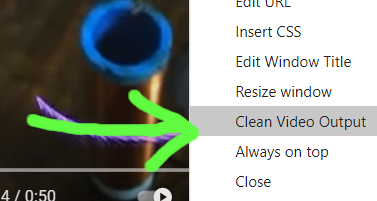
121 |
122 |
123 | ### Audio Output
124 |
125 | A popular way of outputting audio from the Electron Capture app into OBS is done using a virtual audio cable. Some such cables include:
126 |
127 | Mac Audio Options: https://rogueamoeba.com/loopback/ (macOS & non-free, but excellent), and https://existential.audio/blackhole/ (macOS & free)
128 | (and more here https://github.com/steveseguin/vdoninja/wiki/FAQ#macaudio)
129 |
130 | Windows Audio Option: https://www.vb-audio.com/Cable/ (donationware)
131 |
132 | If you intend to have more than a 6 virtual audio cables, you can try VAC instead of VB Cables, as VAC seems to support dozens of virtual audio cables, while VB Cable supports just a few: https://vac.muzychenko.net/
133 |
134 | You can also use some advanced URL parameters to output the audio to specific channels. The following link links the parameters and the outcome, based on device/software used:
135 | https://docs.google.com/spreadsheets/d/1R-y7xZ2BCn-GzTlwqq63H8lorXecO02DU9Hu4twuhuA/edit?usp=sharing
136 |
137 | You can still capture audio via OBS Browser source, appending &novideo to the URL to disable video. Appending &noaudio to the Electron Capture URL would conversely disable audio there, allowing you to capture audio with OBS browser source and video with Electron Capture. The audio/video sync might be slightly off in this setup, but not noticible in most cases.
138 |
139 | More recently, with newer versions of OBS, you can capture an application's audio using OBS natively, but with older versions you can use the following OBS plugin to also do it: https://github.com/bozbez/win-capture-audio
140 |
141 | 
142 |
143 |
144 | #### Changing the audio output device
145 |
146 | If you right click the app when on a site, you can change the audio output device for that site. This is useful for setting a Youtube or VDO.Ninja video to output to a virtual audio cable or headphones, rather than playout via the default audio device.
147 |
148 | On macOS, this is especially helpful since there is a lack of audio routing controls.
149 |
150 | Please note: To use this feature, you will need to elevate the app's privilleges, which can expose the user to security issues on untrusted websites.
151 |
152 | ### Pinning and click-pass thru
153 |
154 | You can pin the app on top of other apps via the right-click menu, and when enabled, you can then also enable "click thru" mode also via the context-menu, so no mouse input is captured. The app acts a bit like it is invisible, turning it into a bit of HUD for other applications and games.
155 |
156 | If using socialstream or vdo.ninja, you can append &transparent to those URLs to make the background transparent. You can also use custom CSS to make web pages shown semi-transparent, so you can still see underneath.
157 |
158 | Once "click thru" mode is enabled, you can re-enable click-capture by just selecting the app via the task bar, as bringing the app into focus will disable the click-thru mode.
159 |
160 | ### Syphon Output
161 |
162 | While there is no native Syphon or NDI output option yet available, one user has mentioned a solution for some users:
163 | http://www.sigmasix.ch/syphoner/
164 |
165 | ### Automation Workflows with VDO.Ninja
166 |
167 | You can see a quick start / cheat sheet guide for example uses of the app with VDO.Ninja here: https://github.com/steveseguin/vdo.ninja/blob/quickstart/automation/cheatsheet_obsn_automation.md
168 |
169 | ## Notes on Using and Closing the App
170 |
171 | #### For Windows users:
172 |
173 | - Right click to bring up the context menu, which allows you to close the app. You can also press ALT-F4 in many cases.
174 |
175 | - You can disable hardware-assisted rendering by passing '-a 0' to the command line when lauching; this can help hide the windows mouse cursor with some setups when using BitBlt capture mode.
176 |
177 | - You can use the Win+Tab key combo on Windows 10 machines to create a secondary desktop and load the Electron Capture into that. In this way, you can hide your electron capture windows, yet still have them be available to OBS for window-capture. This is a great option for window-capturing without on computers with limited desktop screen space.
178 |
179 | #### For Mac users:
180 |
181 | - You can hover your mouse cursor over the top-left corner of the app to show the close button.
182 |
183 | - Also note, the top portion of the app is draggable, so you can move it around to place it accordingly. It is also resizable.
184 |
185 | - Multiple versions of the app can run on macOS; just make a copy of the file with a different name to open up a new window.
186 |
187 | - Desktop audio capture with screen share is not supported by Electron (https://www.electronjs.org/docs/latest/api/desktop-capturer#caveats)
188 |
189 | - You need to enable Screen Capture support in the macOS security preferences for the app to enable desktop capture support on macOS 10.15 Catalina or higher. Yuo also need to enable elevated privillges in the Electron Capture app itself.
190 |
191 | - If capturing the window with OBS, you can use either DISPLAY CAPTURE with a WINDOW CROP -or- WINDOW CAPTURE
192 |
193 | --- *WINDOW CAPTURE* will have a video delay of up to ~800ms, but Windows can be stacked without issue
194 |
195 | --- *DISPLAY CAPTURE* will have no delay, but the windows cannot be stacked, which could be a problem if you only have one screen
196 |
197 | # Links to downloads below.
198 |
199 | You can find the newest release builds of the app here: https://github.com/steveseguin/electroncapture/releases or see below.
200 |
201 | Please note that the Electron Capture app does not auto-update to newer versions of Chromium. This can become a security issue if it is left to become out of date. It's also recommended to not use the Electron Capture app with websites and remote VDO.Ninja peers that you do not trust.
202 |
203 | ### Windows Version
204 |
205 | There are two versions for Windows. An installer for x64 systems. There's also a portable version, which is larger in size, but supports x64 and x86 (32-bit) systems. The portable version requires no install and is easier to use from the command-line or from a batch file.
206 |
207 | New release here: https://github.com/steveseguin/electroncapture/releases/
208 |
209 | If you have problems, try a different version or contact me on Discord.
210 |
211 | ### Mac Version
212 | - Newest version can be found here:
213 | https://github.com/steveseguin/electroncapture/releases/
214 |
215 | - If having problems, there's an older version here (v1.1.3)
216 | https://github.com/steveseguin/electroncapture/releases/download/1.1.3/obsn-1.1.3.dmg
217 |
218 | If on version of Electron doesn't work for you all that well, try a different version. There may be some issues with rounded edges depending on you macOS version and the Electron version used.
219 |
220 | ### Linux Version
221 | There are two pre-build versions of Electron Capture available currently. One built for PopOS and another for Raspbian. Those builds are here: https://github.com/steveseguin/electroncapture/releases/tag/2.5.0
222 |
223 | For most Linux users though, we're recommending Linux users build it themselves. Details below
224 |
225 | Getting the correct nodejs/npm versions can be hard on linux, but using snap can help there.
226 | ```
227 | sudo apt-get update
228 | sudo apt-get install snapd -y
229 | sudo snap install node --classic --channel=18
230 | # sudo snap refresh node --channel=20 ## If you need to update to a different version of node, to match the manifest's minimum ersion, you can do so like this I think
231 | ```
232 | Next, close the shell and open a new one, to ensure the installation is completed.
233 |
234 | To get the actual app source code and to build a distributable version, see below
235 | ```
236 | git clone https://github.com/steveseguin/electroncapture
237 | cd electroncapture
238 | npm install
239 | npm run build:linux
240 | ```
241 | The file you need to run will be in the dist folder.
242 |
243 | ## Building for the Raspberry Pi
244 |
245 | If you want to compile on Raspberry Pi, it's possible, but keep in mind the GPU may not work without also patching Electron.js to support the GPU. Currently you'll need to run it without hardware-acceleration disabled, which is rather disappointing. Contributions that can help fix this are welcomed.
246 |
247 | Anyways, this is all much like with the Linux install, but we also need to install `fpm` before trying to build the app.
248 |
249 | ```
250 | sudo apt-get update
251 | sudo apt-get install snapd -y
252 | sudo apt-get remove nodejs -y
253 | sudo snap install node --classic --channel=14
254 |
255 | ## close the current terminal shell and open a new one here ##
256 |
257 | sudo apt install ruby ruby-dev -y
258 | sudo gem install fpm
259 | ```
260 |
261 | We also need to build the app using `build:rpi` instead of `build:linux`, as we need to target ARM versus x64.
262 | ```
263 | git clone https://github.com/steveseguin/electroncapture
264 | cd electroncapture
265 | npm install
266 | npm run build:rpi
267 | ```
268 | You should get a `.deb` file in the dist file with this option. If you install the deb file, it should appear in the Raspbian start menu, under `Other -> ElectronCapture`
269 |
270 | This will probably file if you do not disable the GPU / hardware-acceration within the Electron Capture app first, but who knows -- maybe you can get it working?
271 |
272 | ## Building from source on Windows
273 |
274 | You'll also need nodejs and npm installed.
275 |
276 | If on Windows, you can find the NPM/Nodejs install files here: https://nodejs.org/en/download/current/
277 |
278 | and then to get the source code for Electron Capture,
279 |
280 | ```
281 | git clone https://github.com/steveseguin/electroncapture.git
282 | cd electroncapture
283 | ```
284 |
285 | To just run the app from source without building, you can:
286 | ```
287 | npm install
288 | npm start
289 | ```
290 |
291 | If you get an error about node versions, you can install the required version with something like this:
292 |
293 | ```
294 | npm install -g node@14.6.0
295 | npm install
296 | npm run build:win32
297 | ```
298 | ### Building the app from source on macOS :
299 |
300 | * For Mac, please also see this issue for building: https://github.com/electron-userland/electron-builder/issues/3828
301 |
302 | The basic idea is is to first install node, npm, and git. Then to clone and build the folder:
303 |
304 | ```
305 | git clone https://github.com/steveseguin/electroncapture.git
306 | cd electroncapture
307 | npm install -g node@14.6.0
308 | npm install
309 | npm run build:darwin
310 | ```
311 |
312 | If you need to sign the build, for distribution, you can then try:
313 | ```
314 | npm install
315 | export appleId={yourApp@dev.email}
316 | export appleIdPassword={app-specific-password-here}
317 | sudo -E npm run build:darwin
318 | ```
319 |
320 | ### Trouble-shooting -- if can't hide cursor when window capturing using OBS:
321 | Change the capture method in OBS to "BitBlt"and uncheck the Capture Cursor. Also make sure OBS runs in compatibility mode for win 7, so you don't get a black screen
322 |
323 | 
324 |
325 | 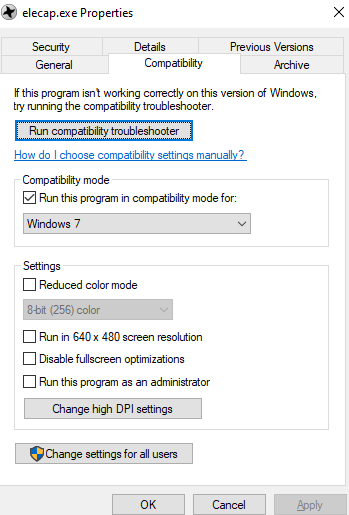
326 |
327 | Adding &nocursor to VDO.Ninja will hide the cursor in that browser window, but that often isn't enough. If the above fails, make sure you are window capturing with OBS using the same display adapter for both OBS and the Electron window.
328 |
329 | Lastly, if that still doesn't help, you can try Windows + Tab (on windows), and host the Electron Capture app on the secondary windows desktop. Window+Tab back to the main one and select the window then. You may need to toggle between the two desktops after selecting the window to capture, to get it to show in OBS, but it is one way of hiding the mouse.
330 |
331 | You can also drag the Electron Capture far off screen, so the cursor can't approach it really.
332 |
333 |
334 | ##### Issues with dependencies when compiling
335 |
336 | Sometimes a dependency won't update to the value stated in the package.json.
337 |
338 | This option might be able to update the package.json to the newest version of dependencies automatically,
339 | ```
340 | npx npm-check-updates -u
341 | npm install
342 | ```
343 | Seems to work with newer npm versions
344 |
345 | ### Thank you
346 |
347 | "Electron capture is one process that unstable atoms can use to become more stable. " - https://education.jlab.org/glossary/electroncapture.html
348 |
349 |
--------------------------------------------------------------------------------
/LICENSE.md:
--------------------------------------------------------------------------------
1 | GNU GENERAL PUBLIC LICENSE
2 | Version 3, 29 June 2007
3 |
4 | Copyright (C) 2007 Free Software Foundation, Inc.
5 | Everyone is permitted to copy and distribute verbatim copies
6 | of this license document, but changing it is not allowed.
7 |
8 | Preamble
9 |
10 | The GNU General Public License is a free, copyleft license for
11 | software and other kinds of works.
12 |
13 | The licenses for most software and other practical works are designed
14 | to take away your freedom to share and change the works. By contrast,
15 | the GNU General Public License is intended to guarantee your freedom to
16 | share and change all versions of a program--to make sure it remains free
17 | software for all its users. We, the Free Software Foundation, use the
18 | GNU General Public License for most of our software; it applies also to
19 | any other work released this way by its authors. You can apply it to
20 | your programs, too.
21 |
22 | When we speak of free software, we are referring to freedom, not
23 | price. Our General Public Licenses are designed to make sure that you
24 | have the freedom to distribute copies of free software (and charge for
25 | them if you wish), that you receive source code or can get it if you
26 | want it, that you can change the software or use pieces of it in new
27 | free programs, and that you know you can do these things.
28 |
29 | To protect your rights, we need to prevent others from denying you
30 | these rights or asking you to surrender the rights. Therefore, you have
31 | certain responsibilities if you distribute copies of the software, or if
32 | you modify it: responsibilities to respect the freedom of others.
33 |
34 | For example, if you distribute copies of such a program, whether
35 | gratis or for a fee, you must pass on to the recipients the same
36 | freedoms that you received. You must make sure that they, too, receive
37 | or can get the source code. And you must show them these terms so they
38 | know their rights.
39 |
40 | Developers that use the GNU GPL protect your rights with two steps:
41 | (1) assert copyright on the software, and (2) offer you this License
42 | giving you legal permission to copy, distribute and/or modify it.
43 |
44 | For the developers' and authors' protection, the GPL clearly explains
45 | that there is no warranty for this free software. For both users' and
46 | authors' sake, the GPL requires that modified versions be marked as
47 | changed, so that their problems will not be attributed erroneously to
48 | authors of previous versions.
49 |
50 | Some devices are designed to deny users access to install or run
51 | modified versions of the software inside them, although the manufacturer
52 | can do so. This is fundamentally incompatible with the aim of
53 | protecting users' freedom to change the software. The systematic
54 | pattern of such abuse occurs in the area of products for individuals to
55 | use, which is precisely where it is most unacceptable. Therefore, we
56 | have designed this version of the GPL to prohibit the practice for those
57 | products. If such problems arise substantially in other domains, we
58 | stand ready to extend this provision to those domains in future versions
59 | of the GPL, as needed to protect the freedom of users.
60 |
61 | Finally, every program is threatened constantly by software patents.
62 | States should not allow patents to restrict development and use of
63 | software on general-purpose computers, but in those that do, we wish to
64 | avoid the special danger that patents applied to a free program could
65 | make it effectively proprietary. To prevent this, the GPL assures that
66 | patents cannot be used to render the program non-free.
67 |
68 | The precise terms and conditions for copying, distribution and
69 | modification follow.
70 |
71 | TERMS AND CONDITIONS
72 |
73 | 0. Definitions.
74 |
75 | "This License" refers to version 3 of the GNU General Public License.
76 |
77 | "Copyright" also means copyright-like laws that apply to other kinds of
78 | works, such as semiconductor masks.
79 |
80 | "The Program" refers to any copyrightable work licensed under this
81 | License. Each licensee is addressed as "you". "Licensees" and
82 | "recipients" may be individuals or organizations.
83 |
84 | To "modify" a work means to copy from or adapt all or part of the work
85 | in a fashion requiring copyright permission, other than the making of an
86 | exact copy. The resulting work is called a "modified version" of the
87 | earlier work or a work "based on" the earlier work.
88 |
89 | A "covered work" means either the unmodified Program or a work based
90 | on the Program.
91 |
92 | To "propagate" a work means to do anything with it that, without
93 | permission, would make you directly or secondarily liable for
94 | infringement under applicable copyright law, except executing it on a
95 | computer or modifying a private copy. Propagation includes copying,
96 | distribution (with or without modification), making available to the
97 | public, and in some countries other activities as well.
98 |
99 | To "convey" a work means any kind of propagation that enables other
100 | parties to make or receive copies. Mere interaction with a user through
101 | a computer network, with no transfer of a copy, is not conveying.
102 |
103 | An interactive user interface displays "Appropriate Legal Notices"
104 | to the extent that it includes a convenient and prominently visible
105 | feature that (1) displays an appropriate copyright notice, and (2)
106 | tells the user that there is no warranty for the work (except to the
107 | extent that warranties are provided), that licensees may convey the
108 | work under this License, and how to view a copy of this License. If
109 | the interface presents a list of user commands or options, such as a
110 | menu, a prominent item in the list meets this criterion.
111 |
112 | 1. Source Code.
113 |
114 | The "source code" for a work means the preferred form of the work
115 | for making modifications to it. "Object code" means any non-source
116 | form of a work.
117 |
118 | A "Standard Interface" means an interface that either is an official
119 | standard defined by a recognized standards body, or, in the case of
120 | interfaces specified for a particular programming language, one that
121 | is widely used among developers working in that language.
122 |
123 | The "System Libraries" of an executable work include anything, other
124 | than the work as a whole, that (a) is included in the normal form of
125 | packaging a Major Component, but which is not part of that Major
126 | Component, and (b) serves only to enable use of the work with that
127 | Major Component, or to implement a Standard Interface for which an
128 | implementation is available to the public in source code form. A
129 | "Major Component", in this context, means a major essential component
130 | (kernel, window system, and so on) of the specific operating system
131 | (if any) on which the executable work runs, or a compiler used to
132 | produce the work, or an object code interpreter used to run it.
133 |
134 | The "Corresponding Source" for a work in object code form means all
135 | the source code needed to generate, install, and (for an executable
136 | work) run the object code and to modify the work, including scripts to
137 | control those activities. However, it does not include the work's
138 | System Libraries, or general-purpose tools or generally available free
139 | programs which are used unmodified in performing those activities but
140 | which are not part of the work. For example, Corresponding Source
141 | includes interface definition files associated with source files for
142 | the work, and the source code for shared libraries and dynamically
143 | linked subprograms that the work is specifically designed to require,
144 | such as by intimate data communication or control flow between those
145 | subprograms and other parts of the work.
146 |
147 | The Corresponding Source need not include anything that users
148 | can regenerate automatically from other parts of the Corresponding
149 | Source.
150 |
151 | The Corresponding Source for a work in source code form is that
152 | same work.
153 |
154 | 2. Basic Permissions.
155 |
156 | All rights granted under this License are granted for the term of
157 | copyright on the Program, and are irrevocable provided the stated
158 | conditions are met. This License explicitly affirms your unlimited
159 | permission to run the unmodified Program. The output from running a
160 | covered work is covered by this License only if the output, given its
161 | content, constitutes a covered work. This License acknowledges your
162 | rights of fair use or other equivalent, as provided by copyright law.
163 |
164 | You may make, run and propagate covered works that you do not
165 | convey, without conditions so long as your license otherwise remains
166 | in force. You may convey covered works to others for the sole purpose
167 | of having them make modifications exclusively for you, or provide you
168 | with facilities for running those works, provided that you comply with
169 | the terms of this License in conveying all material for which you do
170 | not control copyright. Those thus making or running the covered works
171 | for you must do so exclusively on your behalf, under your direction
172 | and control, on terms that prohibit them from making any copies of
173 | your copyrighted material outside their relationship with you.
174 |
175 | Conveying under any other circumstances is permitted solely under
176 | the conditions stated below. Sublicensing is not allowed; section 10
177 | makes it unnecessary.
178 |
179 | 3. Protecting Users' Legal Rights From Anti-Circumvention Law.
180 |
181 | No covered work shall be deemed part of an effective technological
182 | measure under any applicable law fulfilling obligations under article
183 | 11 of the WIPO copyright treaty adopted on 20 December 1996, or
184 | similar laws prohibiting or restricting circumvention of such
185 | measures.
186 |
187 | When you convey a covered work, you waive any legal power to forbid
188 | circumvention of technological measures to the extent such circumvention
189 | is effected by exercising rights under this License with respect to
190 | the covered work, and you disclaim any intention to limit operation or
191 | modification of the work as a means of enforcing, against the work's
192 | users, your or third parties' legal rights to forbid circumvention of
193 | technological measures.
194 |
195 | 4. Conveying Verbatim Copies.
196 |
197 | You may convey verbatim copies of the Program's source code as you
198 | receive it, in any medium, provided that you conspicuously and
199 | appropriately publish on each copy an appropriate copyright notice;
200 | keep intact all notices stating that this License and any
201 | non-permissive terms added in accord with section 7 apply to the code;
202 | keep intact all notices of the absence of any warranty; and give all
203 | recipients a copy of this License along with the Program.
204 |
205 | You may charge any price or no price for each copy that you convey,
206 | and you may offer support or warranty protection for a fee.
207 |
208 | 5. Conveying Modified Source Versions.
209 |
210 | You may convey a work based on the Program, or the modifications to
211 | produce it from the Program, in the form of source code under the
212 | terms of section 4, provided that you also meet all of these conditions:
213 |
214 | a) The work must carry prominent notices stating that you modified
215 | it, and giving a relevant date.
216 |
217 | b) The work must carry prominent notices stating that it is
218 | released under this License and any conditions added under section
219 | 7. This requirement modifies the requirement in section 4 to
220 | "keep intact all notices".
221 |
222 | c) You must license the entire work, as a whole, under this
223 | License to anyone who comes into possession of a copy. This
224 | License will therefore apply, along with any applicable section 7
225 | additional terms, to the whole of the work, and all its parts,
226 | regardless of how they are packaged. This License gives no
227 | permission to license the work in any other way, but it does not
228 | invalidate such permission if you have separately received it.
229 |
230 | d) If the work has interactive user interfaces, each must display
231 | Appropriate Legal Notices; however, if the Program has interactive
232 | interfaces that do not display Appropriate Legal Notices, your
233 | work need not make them do so.
234 |
235 | A compilation of a covered work with other separate and independent
236 | works, which are not by their nature extensions of the covered work,
237 | and which are not combined with it such as to form a larger program,
238 | in or on a volume of a storage or distribution medium, is called an
239 | "aggregate" if the compilation and its resulting copyright are not
240 | used to limit the access or legal rights of the compilation's users
241 | beyond what the individual works permit. Inclusion of a covered work
242 | in an aggregate does not cause this License to apply to the other
243 | parts of the aggregate.
244 |
245 | 6. Conveying Non-Source Forms.
246 |
247 | You may convey a covered work in object code form under the terms
248 | of sections 4 and 5, provided that you also convey the
249 | machine-readable Corresponding Source under the terms of this License,
250 | in one of these ways:
251 |
252 | a) Convey the object code in, or embodied in, a physical product
253 | (including a physical distribution medium), accompanied by the
254 | Corresponding Source fixed on a durable physical medium
255 | customarily used for software interchange.
256 |
257 | b) Convey the object code in, or embodied in, a physical product
258 | (including a physical distribution medium), accompanied by a
259 | written offer, valid for at least three years and valid for as
260 | long as you offer spare parts or customer support for that product
261 | model, to give anyone who possesses the object code either (1) a
262 | copy of the Corresponding Source for all the software in the
263 | product that is covered by this License, on a durable physical
264 | medium customarily used for software interchange, for a price no
265 | more than your reasonable cost of physically performing this
266 | conveying of source, or (2) access to copy the
267 | Corresponding Source from a network server at no charge.
268 |
269 | c) Convey individual copies of the object code with a copy of the
270 | written offer to provide the Corresponding Source. This
271 | alternative is allowed only occasionally and noncommercially, and
272 | only if you received the object code with such an offer, in accord
273 | with subsection 6b.
274 |
275 | d) Convey the object code by offering access from a designated
276 | place (gratis or for a charge), and offer equivalent access to the
277 | Corresponding Source in the same way through the same place at no
278 | further charge. You need not require recipients to copy the
279 | Corresponding Source along with the object code. If the place to
280 | copy the object code is a network server, the Corresponding Source
281 | may be on a different server (operated by you or a third party)
282 | that supports equivalent copying facilities, provided you maintain
283 | clear directions next to the object code saying where to find the
284 | Corresponding Source. Regardless of what server hosts the
285 | Corresponding Source, you remain obligated to ensure that it is
286 | available for as long as needed to satisfy these requirements.
287 |
288 | e) Convey the object code using peer-to-peer transmission, provided
289 | you inform other peers where the object code and Corresponding
290 | Source of the work are being offered to the general public at no
291 | charge under subsection 6d.
292 |
293 | A separable portion of the object code, whose source code is excluded
294 | from the Corresponding Source as a System Library, need not be
295 | included in conveying the object code work.
296 |
297 | A "User Product" is either (1) a "consumer product", which means any
298 | tangible personal property which is normally used for personal, family,
299 | or household purposes, or (2) anything designed or sold for incorporation
300 | into a dwelling. In determining whether a product is a consumer product,
301 | doubtful cases shall be resolved in favor of coverage. For a particular
302 | product received by a particular user, "normally used" refers to a
303 | typical or common use of that class of product, regardless of the status
304 | of the particular user or of the way in which the particular user
305 | actually uses, or expects or is expected to use, the product. A product
306 | is a consumer product regardless of whether the product has substantial
307 | commercial, industrial or non-consumer uses, unless such uses represent
308 | the only significant mode of use of the product.
309 |
310 | "Installation Information" for a User Product means any methods,
311 | procedures, authorization keys, or other information required to install
312 | and execute modified versions of a covered work in that User Product from
313 | a modified version of its Corresponding Source. The information must
314 | suffice to ensure that the continued functioning of the modified object
315 | code is in no case prevented or interfered with solely because
316 | modification has been made.
317 |
318 | If you convey an object code work under this section in, or with, or
319 | specifically for use in, a User Product, and the conveying occurs as
320 | part of a transaction in which the right of possession and use of the
321 | User Product is transferred to the recipient in perpetuity or for a
322 | fixed term (regardless of how the transaction is characterized), the
323 | Corresponding Source conveyed under this section must be accompanied
324 | by the Installation Information. But this requirement does not apply
325 | if neither you nor any third party retains the ability to install
326 | modified object code on the User Product (for example, the work has
327 | been installed in ROM).
328 |
329 | The requirement to provide Installation Information does not include a
330 | requirement to continue to provide support service, warranty, or updates
331 | for a work that has been modified or installed by the recipient, or for
332 | the User Product in which it has been modified or installed. Access to a
333 | network may be denied when the modification itself materially and
334 | adversely affects the operation of the network or violates the rules and
335 | protocols for communication across the network.
336 |
337 | Corresponding Source conveyed, and Installation Information provided,
338 | in accord with this section must be in a format that is publicly
339 | documented (and with an implementation available to the public in
340 | source code form), and must require no special password or key for
341 | unpacking, reading or copying.
342 |
343 | 7. Additional Terms.
344 |
345 | "Additional permissions" are terms that supplement the terms of this
346 | License by making exceptions from one or more of its conditions.
347 | Additional permissions that are applicable to the entire Program shall
348 | be treated as though they were included in this License, to the extent
349 | that they are valid under applicable law. If additional permissions
350 | apply only to part of the Program, that part may be used separately
351 | under those permissions, but the entire Program remains governed by
352 | this License without regard to the additional permissions.
353 |
354 | When you convey a copy of a covered work, you may at your option
355 | remove any additional permissions from that copy, or from any part of
356 | it. (Additional permissions may be written to require their own
357 | removal in certain cases when you modify the work.) You may place
358 | additional permissions on material, added by you to a covered work,
359 | for which you have or can give appropriate copyright permission.
360 |
361 | Notwithstanding any other provision of this License, for material you
362 | add to a covered work, you may (if authorized by the copyright holders of
363 | that material) supplement the terms of this License with terms:
364 |
365 | a) Disclaiming warranty or limiting liability differently from the
366 | terms of sections 15 and 16 of this License; or
367 |
368 | b) Requiring preservation of specified reasonable legal notices or
369 | author attributions in that material or in the Appropriate Legal
370 | Notices displayed by works containing it; or
371 |
372 | c) Prohibiting misrepresentation of the origin of that material, or
373 | requiring that modified versions of such material be marked in
374 | reasonable ways as different from the original version; or
375 |
376 | d) Limiting the use for publicity purposes of names of licensors or
377 | authors of the material; or
378 |
379 | e) Declining to grant rights under trademark law for use of some
380 | trade names, trademarks, or service marks; or
381 |
382 | f) Requiring indemnification of licensors and authors of that
383 | material by anyone who conveys the material (or modified versions of
384 | it) with contractual assumptions of liability to the recipient, for
385 | any liability that these contractual assumptions directly impose on
386 | those licensors and authors.
387 |
388 | All other non-permissive additional terms are considered "further
389 | restrictions" within the meaning of section 10. If the Program as you
390 | received it, or any part of it, contains a notice stating that it is
391 | governed by this License along with a term that is a further
392 | restriction, you may remove that term. If a license document contains
393 | a further restriction but permits relicensing or conveying under this
394 | License, you may add to a covered work material governed by the terms
395 | of that license document, provided that the further restriction does
396 | not survive such relicensing or conveying.
397 |
398 | If you add terms to a covered work in accord with this section, you
399 | must place, in the relevant source files, a statement of the
400 | additional terms that apply to those files, or a notice indicating
401 | where to find the applicable terms.
402 |
403 | Additional terms, permissive or non-permissive, may be stated in the
404 | form of a separately written license, or stated as exceptions;
405 | the above requirements apply either way.
406 |
407 | 8. Termination.
408 |
409 | You may not propagate or modify a covered work except as expressly
410 | provided under this License. Any attempt otherwise to propagate or
411 | modify it is void, and will automatically terminate your rights under
412 | this License (including any patent licenses granted under the third
413 | paragraph of section 11).
414 |
415 | However, if you cease all violation of this License, then your
416 | license from a particular copyright holder is reinstated (a)
417 | provisionally, unless and until the copyright holder explicitly and
418 | finally terminates your license, and (b) permanently, if the copyright
419 | holder fails to notify you of the violation by some reasonable means
420 | prior to 60 days after the cessation.
421 |
422 | Moreover, your license from a particular copyright holder is
423 | reinstated permanently if the copyright holder notifies you of the
424 | violation by some reasonable means, this is the first time you have
425 | received notice of violation of this License (for any work) from that
426 | copyright holder, and you cure the violation prior to 30 days after
427 | your receipt of the notice.
428 |
429 | Termination of your rights under this section does not terminate the
430 | licenses of parties who have received copies or rights from you under
431 | this License. If your rights have been terminated and not permanently
432 | reinstated, you do not qualify to receive new licenses for the same
433 | material under section 10.
434 |
435 | 9. Acceptance Not Required for Having Copies.
436 |
437 | You are not required to accept this License in order to receive or
438 | run a copy of the Program. Ancillary propagation of a covered work
439 | occurring solely as a consequence of using peer-to-peer transmission
440 | to receive a copy likewise does not require acceptance. However,
441 | nothing other than this License grants you permission to propagate or
442 | modify any covered work. These actions infringe copyright if you do
443 | not accept this License. Therefore, by modifying or propagating a
444 | covered work, you indicate your acceptance of this License to do so.
445 |
446 | 10. Automatic Licensing of Downstream Recipients.
447 |
448 | Each time you convey a covered work, the recipient automatically
449 | receives a license from the original licensors, to run, modify and
450 | propagate that work, subject to this License. You are not responsible
451 | for enforcing compliance by third parties with this License.
452 |
453 | An "entity transaction" is a transaction transferring control of an
454 | organization, or substantially all assets of one, or subdividing an
455 | organization, or merging organizations. If propagation of a covered
456 | work results from an entity transaction, each party to that
457 | transaction who receives a copy of the work also receives whatever
458 | licenses to the work the party's predecessor in interest had or could
459 | give under the previous paragraph, plus a right to possession of the
460 | Corresponding Source of the work from the predecessor in interest, if
461 | the predecessor has it or can get it with reasonable efforts.
462 |
463 | You may not impose any further restrictions on the exercise of the
464 | rights granted or affirmed under this License. For example, you may
465 | not impose a license fee, royalty, or other charge for exercise of
466 | rights granted under this License, and you may not initiate litigation
467 | (including a cross-claim or counterclaim in a lawsuit) alleging that
468 | any patent claim is infringed by making, using, selling, offering for
469 | sale, or importing the Program or any portion of it.
470 |
471 | 11. Patents.
472 |
473 | A "contributor" is a copyright holder who authorizes use under this
474 | License of the Program or a work on which the Program is based. The
475 | work thus licensed is called the contributor's "contributor version".
476 |
477 | A contributor's "essential patent claims" are all patent claims
478 | owned or controlled by the contributor, whether already acquired or
479 | hereafter acquired, that would be infringed by some manner, permitted
480 | by this License, of making, using, or selling its contributor version,
481 | but do not include claims that would be infringed only as a
482 | consequence of further modification of the contributor version. For
483 | purposes of this definition, "control" includes the right to grant
484 | patent sublicenses in a manner consistent with the requirements of
485 | this License.
486 |
487 | Each contributor grants you a non-exclusive, worldwide, royalty-free
488 | patent license under the contributor's essential patent claims, to
489 | make, use, sell, offer for sale, import and otherwise run, modify and
490 | propagate the contents of its contributor version.
491 |
492 | In the following three paragraphs, a "patent license" is any express
493 | agreement or commitment, however denominated, not to enforce a patent
494 | (such as an express permission to practice a patent or covenant not to
495 | sue for patent infringement). To "grant" such a patent license to a
496 | party means to make such an agreement or commitment not to enforce a
497 | patent against the party.
498 |
499 | If you convey a covered work, knowingly relying on a patent license,
500 | and the Corresponding Source of the work is not available for anyone
501 | to copy, free of charge and under the terms of this License, through a
502 | publicly available network server or other readily accessible means,
503 | then you must either (1) cause the Corresponding Source to be so
504 | available, or (2) arrange to deprive yourself of the benefit of the
505 | patent license for this particular work, or (3) arrange, in a manner
506 | consistent with the requirements of this License, to extend the patent
507 | license to downstream recipients. "Knowingly relying" means you have
508 | actual knowledge that, but for the patent license, your conveying the
509 | covered work in a country, or your recipient's use of the covered work
510 | in a country, would infringe one or more identifiable patents in that
511 | country that you have reason to believe are valid.
512 |
513 | If, pursuant to or in connection with a single transaction or
514 | arrangement, you convey, or propagate by procuring conveyance of, a
515 | covered work, and grant a patent license to some of the parties
516 | receiving the covered work authorizing them to use, propagate, modify
517 | or convey a specific copy of the covered work, then the patent license
518 | you grant is automatically extended to all recipients of the covered
519 | work and works based on it.
520 |
521 | A patent license is "discriminatory" if it does not include within
522 | the scope of its coverage, prohibits the exercise of, or is
523 | conditioned on the non-exercise of one or more of the rights that are
524 | specifically granted under this License. You may not convey a covered
525 | work if you are a party to an arrangement with a third party that is
526 | in the business of distributing software, under which you make payment
527 | to the third party based on the extent of your activity of conveying
528 | the work, and under which the third party grants, to any of the
529 | parties who would receive the covered work from you, a discriminatory
530 | patent license (a) in connection with copies of the covered work
531 | conveyed by you (or copies made from those copies), or (b) primarily
532 | for and in connection with specific products or compilations that
533 | contain the covered work, unless you entered into that arrangement,
534 | or that patent license was granted, prior to 28 March 2007.
535 |
536 | Nothing in this License shall be construed as excluding or limiting
537 | any implied license or other defenses to infringement that may
538 | otherwise be available to you under applicable patent law.
539 |
540 | 12. No Surrender of Others' Freedom.
541 |
542 | If conditions are imposed on you (whether by court order, agreement or
543 | otherwise) that contradict the conditions of this License, they do not
544 | excuse you from the conditions of this License. If you cannot convey a
545 | covered work so as to satisfy simultaneously your obligations under this
546 | License and any other pertinent obligations, then as a consequence you may
547 | not convey it at all. For example, if you agree to terms that obligate you
548 | to collect a royalty for further conveying from those to whom you convey
549 | the Program, the only way you could satisfy both those terms and this
550 | License would be to refrain entirely from conveying the Program.
551 |
552 | 13. Use with the GNU Affero General Public License.
553 |
554 | Notwithstanding any other provision of this License, you have
555 | permission to link or combine any covered work with a work licensed
556 | under version 3 of the GNU Affero General Public License into a single
557 | combined work, and to convey the resulting work. The terms of this
558 | License will continue to apply to the part which is the covered work,
559 | but the special requirements of the GNU Affero General Public License,
560 | section 13, concerning interaction through a network will apply to the
561 | combination as such.
562 |
563 | 14. Revised Versions of this License.
564 |
565 | The Free Software Foundation may publish revised and/or new versions of
566 | the GNU General Public License from time to time. Such new versions will
567 | be similar in spirit to the present version, but may differ in detail to
568 | address new problems or concerns.
569 |
570 | Each version is given a distinguishing version number. If the
571 | Program specifies that a certain numbered version of the GNU General
572 | Public License "or any later version" applies to it, you have the
573 | option of following the terms and conditions either of that numbered
574 | version or of any later version published by the Free Software
575 | Foundation. If the Program does not specify a version number of the
576 | GNU General Public License, you may choose any version ever published
577 | by the Free Software Foundation.
578 |
579 | If the Program specifies that a proxy can decide which future
580 | versions of the GNU General Public License can be used, that proxy's
581 | public statement of acceptance of a version permanently authorizes you
582 | to choose that version for the Program.
583 |
584 | Later license versions may give you additional or different
585 | permissions. However, no additional obligations are imposed on any
586 | author or copyright holder as a result of your choosing to follow a
587 | later version.
588 |
589 | 15. Disclaimer of Warranty.
590 |
591 | THERE IS NO WARRANTY FOR THE PROGRAM, TO THE EXTENT PERMITTED BY
592 | APPLICABLE LAW. EXCEPT WHEN OTHERWISE STATED IN WRITING THE COPYRIGHT
593 | HOLDERS AND/OR OTHER PARTIES PROVIDE THE PROGRAM "AS IS" WITHOUT WARRANTY
594 | OF ANY KIND, EITHER EXPRESSED OR IMPLIED, INCLUDING, BUT NOT LIMITED TO,
595 | THE IMPLIED WARRANTIES OF MERCHANTABILITY AND FITNESS FOR A PARTICULAR
596 | PURPOSE. THE ENTIRE RISK AS TO THE QUALITY AND PERFORMANCE OF THE PROGRAM
597 | IS WITH YOU. SHOULD THE PROGRAM PROVE DEFECTIVE, YOU ASSUME THE COST OF
598 | ALL NECESSARY SERVICING, REPAIR OR CORRECTION.
599 |
600 | 16. Limitation of Liability.
601 |
602 | IN NO EVENT UNLESS REQUIRED BY APPLICABLE LAW OR AGREED TO IN WRITING
603 | WILL ANY COPYRIGHT HOLDER, OR ANY OTHER PARTY WHO MODIFIES AND/OR CONVEYS
604 | THE PROGRAM AS PERMITTED ABOVE, BE LIABLE TO YOU FOR DAMAGES, INCLUDING ANY
605 | GENERAL, SPECIAL, INCIDENTAL OR CONSEQUENTIAL DAMAGES ARISING OUT OF THE
606 | USE OR INABILITY TO USE THE PROGRAM (INCLUDING BUT NOT LIMITED TO LOSS OF
607 | DATA OR DATA BEING RENDERED INACCURATE OR LOSSES SUSTAINED BY YOU OR THIRD
608 | PARTIES OR A FAILURE OF THE PROGRAM TO OPERATE WITH ANY OTHER PROGRAMS),
609 | EVEN IF SUCH HOLDER OR OTHER PARTY HAS BEEN ADVISED OF THE POSSIBILITY OF
610 | SUCH DAMAGES.
611 |
612 | 17. Interpretation of Sections 15 and 16.
613 |
614 | If the disclaimer of warranty and limitation of liability provided
615 | above cannot be given local legal effect according to their terms,
616 | reviewing courts shall apply local law that most closely approximates
617 | an absolute waiver of all civil liability in connection with the
618 | Program, unless a warranty or assumption of liability accompanies a
619 | copy of the Program in return for a fee.
620 |
621 | END OF TERMS AND CONDITIONS
622 |
623 | How to Apply These Terms to Your New Programs
624 |
625 | If you develop a new program, and you want it to be of the greatest
626 | possible use to the public, the best way to achieve this is to make it
627 | free software which everyone can redistribute and change under these terms.
628 |
629 | To do so, attach the following notices to the program. It is safest
630 | to attach them to the start of each source file to most effectively
631 | state the exclusion of warranty; and each file should have at least
632 | the "copyright" line and a pointer to where the full notice is found.
633 |
634 |
635 | Copyright (C)
636 |
637 | This program is free software: you can redistribute it and/or modify
638 | it under the terms of the GNU General Public License as published by
639 | the Free Software Foundation, either version 3 of the License, or
640 | (at your option) any later version.
641 |
642 | This program is distributed in the hope that it will be useful,
643 | but WITHOUT ANY WARRANTY; without even the implied warranty of
644 | MERCHANTABILITY or FITNESS FOR A PARTICULAR PURPOSE. See the
645 | GNU General Public License for more details.
646 |
647 | You should have received a copy of the GNU General Public License
648 | along with this program. If not, see .
649 |
650 | Also add information on how to contact you by electronic and paper mail.
651 |
652 | If the program does terminal interaction, make it output a short
653 | notice like this when it starts in an interactive mode:
654 |
655 | Copyright (C)
656 | This program comes with ABSOLUTELY NO WARRANTY; for details type `show w'.
657 | This is free software, and you are welcome to redistribute it
658 | under certain conditions; type `show c' for details.
659 |
660 | The hypothetical commands `show w' and `show c' should show the appropriate
661 | parts of the General Public License. Of course, your program's commands
662 | might be different; for a GUI interface, you would use an "about box".
663 |
664 | You should also get your employer (if you work as a programmer) or school,
665 | if any, to sign a "copyright disclaimer" for the program, if necessary.
666 | For more information on this, and how to apply and follow the GNU GPL, see
667 | .
668 |
669 | The GNU General Public License does not permit incorporating your program
670 | into proprietary programs. If your program is a subroutine library, you
671 | may consider it more useful to permit linking proprietary applications with
672 | the library. If this is what you want to do, use the GNU Lesser General
673 | Public License instead of this License. But first, please read
674 | .
675 |
--------------------------------------------------------------------------------
/main.js:
--------------------------------------------------------------------------------
1 | // Modules to control application life and create native browser window
2 | const electron = require('electron')
3 | const process = require('process')
4 | const prompt = require('electron-prompt');
5 | const unhandled = require('electron-unhandled');
6 | const fs = require('fs');
7 | const path = require('path');
8 | const {app, BrowserWindow, BrowserView, webFrameMain, desktopCapturer, ipcMain, screen, shell, globalShortcut, session, dialog} = require('electron')
9 | const contextMenu = require('electron-context-menu');
10 | const Yargs = require('yargs')
11 |
12 | process.on('uncaughtException', function (error) {
13 | console.error("uncaughtException");
14 | console.error(error);
15 | });
16 |
17 | unhandled();
18 |
19 | var ver = app.getVersion();
20 |
21 | function createYargs(){
22 | var argv = Yargs.usage('Usage: $0 -w=num -h=num -u="string" -p')
23 | .example(
24 | '$0 -w=1280 -h=720 -u="https://vdo.ninja/?view=xxxx"',
25 | "Loads the stream with ID xxxx into a window sized 1280x720"
26 | )
27 | .option("w", {
28 | alias: "width",
29 | describe: "The width of the window in pixel.",
30 | type: "number",
31 | nargs: 1,
32 | default: 1280
33 | })
34 | .option("h", {
35 | alias: "height",
36 | describe: "The height of the window in pixels.",
37 | type: "number",
38 | nargs: 1,
39 | default: 720
40 | })
41 | .option("u", {
42 | alias: "url",
43 | describe: "The URL of the window to load.",
44 | default: "https://vdo.ninja/electron?version="+ver,
45 | type: "string"
46 |
47 | })
48 | .option("t", {
49 | alias: "title",
50 | describe: "The default Title for the app Window",
51 | type: "string",
52 | default: null
53 | })
54 | .option("p", {
55 | alias: "pin",
56 | describe: "Toggle always on top",
57 | type: "boolean",
58 | default: process.platform == 'darwin'
59 | })
60 | .option("a", {
61 | alias: "hwa",
62 | describe: "Enable Hardware Acceleration",
63 | type: "boolean",
64 | default: true
65 | })
66 | .option("x", {
67 | alias: "x",
68 | describe: "Window X position",
69 | type: "number",
70 | nargs: 1,
71 | default: -1
72 | })
73 | .option("y", {
74 | alias: "y",
75 | describe: "Window Y position",
76 | type: "number",
77 | nargs: 1,
78 | default: -1
79 | })
80 | .option("node", {
81 | alias: "n",
82 | describe: "Enables node-integration, allowing for screen capture, global hotkeys, prompts, and more.",
83 | type: "boolean",
84 | default: false
85 | })
86 | .option("minimized", {
87 | alias: "min",
88 | describe: "Starts the window minimized",
89 | type: "boolean",
90 | default: false
91 | })
92 | .option("fullscreen", {
93 | alias: "f",
94 | describe: "Enables full-screen mode for the first window on its load.",
95 | type: "boolean",
96 | default: false
97 | })
98 | .option("unclickable", {
99 | alias: "uc",
100 | describe: "The page will pass thru any mouse clicks or other mouse events",
101 | type: "boolean",
102 | default: false
103 | })
104 | .option("savefolder", {
105 | alias: "sf",
106 | describe: "Where to save a file on disk",
107 | type: "string",
108 | default: null
109 | })
110 | .option("mediafoundation", {
111 | alias: "mf",
112 | describe: "Enable media foundation video capture",
113 | type: "string",
114 | default: null
115 | })
116 | .option("disablemediafoundation", {
117 | alias: "dmf",
118 | describe: "Disable media foundation video capture; helps capture some webcams",
119 | type: "string",
120 | default: null
121 | })
122 | .option("css", {
123 | alias: "css",
124 | describe: "Have local CSS script be auto-loaded into every page",
125 | type: "string",
126 | default: null
127 | })
128 | .option("chroma", {
129 | alias: "color",
130 | describe: "Set background CSS to target hex color; FFF or 0000 are examples.",
131 | type: "string",
132 | default: null
133 | })
134 | .option("hidecursor", {
135 | alias: "hc",
136 | describe: "Hide the mouse pointer / cursor",
137 | type: "boolean",
138 | default: null
139 | })
140 | .describe("help", "Show help.") // Override --help usage message.
141 | .wrap(process.stdout.columns);
142 |
143 | return argv.argv;
144 | }
145 |
146 | var Argv = createYargs();
147 |
148 | if (Argv.help) {
149 | Argv.showHelp();
150 | process.exit(0); // Exit the script after showing help.
151 | }
152 |
153 | if (!app.requestSingleInstanceLock(Argv)) {
154 | console.log("requestSingleInstanceLock");
155 | app.quit();
156 | }
157 |
158 | function getDirectories(path) {
159 | return fs.readdirSync(path).filter(function (file) {
160 | return fs.statSync(path+'/'+file).isDirectory();
161 | });
162 | }
163 | if (Argv.title){
164 | app.setAppUserModelId(Argv.title);
165 | } else {
166 | app.setAppUserModelId("ele.cap");
167 | }
168 |
169 |
170 | if (!(Argv.hwa)){
171 | app.disableHardwareAcceleration();
172 | console.log("HWA DISABLED");
173 | }
174 |
175 | if (!(Argv.mf)){
176 | app.commandLine.appendSwitch('enable-features', 'MediaFoundationVideoCapture');
177 | //app.commandLine.appendSwitch('force-directshow')
178 | //console.log("Media Foundations video cap ENABLED");
179 | // --force-directshow
180 | }
181 | if (!(Argv.dmf)){
182 | app.commandLine.appendSwitch('disable-features', 'MediaFoundationVideoCapture');
183 | //app.commandLine.appendSwitch('force-directshow')
184 | //console.log("Media Foundations video cap ENABLED");
185 | // --force-directshow
186 | }
187 |
188 | app.commandLine.appendSwitch('enable-features', 'WebAssemblySimd'); // Might not be needed in the future with Chromium; not supported on older Chromium. For faster greenscreen effects.
189 | app.commandLine.appendSwitch('webrtc-max-cpu-consumption-percentage', '100');
190 | app.commandLine.appendSwitch('disable-backgrounding-occluded-windows');
191 | app.commandLine.appendSwitch('max-web-media-player-count', '5000');
192 | app.commandLine.appendSwitch('disable-site-isolation-trials');
193 | app.commandLine.appendSwitch('ignore-certificate-errors');
194 | app.commandLine.appendSwitch('disable-renderer-backgrounding');
195 | app.commandLine.appendSwitch('disable-http-cache');
196 | app.commandLine.appendSwitch('unsafely-treat-insecure-origin-as-secure', 'http://insecure.vdo.ninja,http://insecure.rtc.ninja,http://whip.vdo.ninja,https://whip.vdo.ninja,http://whep.vdo.ninja,https://whep.vdo.ninja,http://insecure.versus.cam,http://127.0.0.1,https://vdo.ninja,https://versus.cam,https://rtc.ninja');
197 |
198 |
199 | var counter=0;
200 | var forcingAspectRatio = false;
201 |
202 | var extensions = [];
203 | try {
204 | var dir = false;
205 | if (process.platform == 'win32'){
206 | dir = process.env.APPDATA.replace("Roaming","")+"\\Local\\Google\\Chrome\\User Data\\Default\\Extensions";
207 | if (dir){
208 | //dir = dir.replace("Roaming","");
209 | var ttt = getDirectories(dir);
210 | ttt.forEach(d=>{
211 | try {
212 | var ddd = getDirectories(dir+"\\"+d);
213 | var fd = fs.readFileSync(dir+"\\"+d+"\\"+ddd[0]+"\\manifest.json", 'utf8');
214 | var json = JSON.parse(fd);
215 |
216 | if (json.name.startsWith("_")){
217 | return;
218 | }
219 |
220 | extensions.push({
221 | "name": json.name,
222 | "location": dir+"\\"+d+"\\"+ddd[0]
223 | });
224 | } catch(e){}
225 | });
226 | }
227 | } else if (process.platform == 'darwin'){
228 | dir = process.env.HOME + "/Library/Application Support/Google/Chrome/Default/Extensions";
229 | console.log(dir);
230 | if (dir){
231 | //dir = dir.replace("Roaming","");
232 | var ttt = getDirectories(dir);
233 | ttt.forEach(d=>{
234 | try {
235 | var ddd = getDirectories(dir+"/"+d);
236 | var fd = fs.readFileSync(dir+"."+d+"/"+ddd[0]+"/manifest.json", 'utf8');
237 | var json = JSON.parse(fd);
238 |
239 | if (json.name.startsWith("_")){
240 | return;
241 | }
242 |
243 | extensions.push({
244 | "name": json.name,
245 | "location": dir+"/"+d+"/"+ddd[0]
246 | });
247 | } catch(e){console.error(e);}
248 | });
249 | }
250 | }
251 |
252 | } catch(e){console.error(e);}
253 |
254 | function sleep(ms) {
255 | return new Promise((resolve) => {
256 | setTimeout(resolve, ms);
257 | });
258 | }
259 |
260 | function formatURL(inputURL){
261 | if (!inputURL.startsWith("http://") && !inputURL.startsWith("https://") && !inputURL.startsWith("file://")) {
262 | return "https://" + inputURL;
263 | }
264 | return inputURL;
265 | }
266 |
267 | async function createWindow(args, reuse=false){
268 | var webSecurity = true;
269 | var URL = args.url, NODE = args.node, WIDTH = args.width, HEIGHT = args.height, TITLE = args.title, PIN = args.pin, X = args.x, Y = args.y, FULLSCREEN = args.fullscreen, UNCLICKABLE = args.uc, MINIMIZED = args.min, CSS = args.css, BGCOLOR = args.chroma;
270 |
271 | console.log(args);
272 |
273 | var CSSCONTENT = "";
274 |
275 | if (BGCOLOR){
276 | CSSCONTENT = "body {background-color:#"+BGCOLOR+"!important;}";
277 | }
278 |
279 | if (CSS){
280 | var p = path.join(__dirname, '.', CSS);
281 | console.log("Trying: "+p);
282 |
283 | var res, rej;
284 | var promise = new Promise((resolve, reject) => {
285 | res = resolve;
286 | rej = reject;
287 | });
288 | promise.resolve = res;
289 | promise.reject = rej;
290 |
291 | fs.readFile(p, 'utf8', function (err, data) {
292 | if (err) {
293 | console.log("Trying: "+CSS);
294 | fs.readFile(CSS, 'utf8', function (err, data) {
295 | if (err) {
296 | console.log("Couldn't read specified CSS file");
297 | } else{
298 | CSSCONTENT += data;
299 | }
300 | promise.resolve();
301 | });
302 | } else {
303 | CSSCONTENT += data;
304 | promise.resolve();
305 | }
306 | });
307 | await promise;
308 | if (CSSCONTENT){
309 | console.log("Loaded specified file.");
310 | }
311 | }
312 |
313 |
314 |
315 | try {
316 | if (URL.startsWith("file:")){
317 | webSecurity = false; // not ideal, but to open local files, this is needed.
318 | // warn the user in some way that this window is tained. perhaps detect if they navigate to a different website or load an iframe that it will be a security concern?
319 | // maybe filter all requests to file:// and ensure they are made from a file:// resource already.
320 | } else if (!(URL.startsWith("http"))){
321 | URL = "https://"+URL.toString();
322 | }
323 | } catch(e){
324 | URL = "https://vdo.ninja/electron?version="+ver;
325 | }
326 |
327 | let currentTitle = "ElectronCapture";
328 |
329 | if (reuse){
330 | currentTitle = reuse;
331 | } else if (TITLE===null){
332 | counter+=1;
333 | currentTitle = "Electron "+(counter.toString());
334 | } else if (counter==0){
335 | counter+=1;
336 | currentTitle = TITLE.toString();
337 | } else {
338 | counter+=1;
339 | currentTitle = TITLE.toString() + " " +(counter.toString());
340 | }
341 |
342 |
343 | ipcMain.on('prompt', function(eventRet, arg) { // this enables a PROMPT pop up , which is used to BLOCK the main thread until the user provides input. VDO.Ninja uses prompt for passwords, etc.
344 | try {
345 | arg.val = arg.val || '';
346 | arg.title = arg.title.replace("\n","
90 |
91 | If you right-click the application, you'll get a context menu with additional options. Changing resolutions dynamically is an option, for example.
92 |
93 | ### Screen-share, global hotkeys, and user-prompts
94 |
95 | ##### screen sharing
96 | Starting with version 1.6.0, to enable screen-share support and some other features, the app needs Node Integration enabled; aka, Elevated Privileges. This will allow remote websites to run node-based code, which is a security concern if visiting untrusted websites.
97 |
98 | You can enable Elevated Privileges for the app via the command line with `--node 1` or in the app by right-clicking and selecting "Elevate Privileges" from the context-menu. If right-clicking to enable this mode, the app may reload the page afterwards.
99 |
100 | A unique feature about the Electron Capture app is that it can auto-select a screen or window when screen-sharing with VDO.Ninja, without user-input. Adding to the VDO.Ninja URL, &ss=1 will select display 1, &ss=2 for the second display, etc. Or specify a window with &ss=window_name_here.
101 |
102 | To select Screen 1 automatically on load, for example you can do:
103 |
104 | ```elecap.exe --node 1 --url="https://vdo.ninja/beta/?ss=1&autostart"```
105 |
106 | or to select Discord automatically
107 |
108 | ```
109 | elecap.exe --node 1 --url="https://vdo.ninja/beta/?ss=Discord&autostart"
110 | ```
111 |
112 | It's also possible to select audio-only when screen sharing via Electron Capture with VDO.Ninja; you do not need to select a video if you wish to share audio-only.
113 |
114 | #### global hotkeys
115 |
116 | Global Hotkeys, such as CTRL+M, are supported. CTRL+M will mute the mic, in the most recently opened window. You can assign a custom global hot-key in VDO.Ninja, and it will be respected by Electron Capture. (VDO.Ninja Settings -> User -> Global Hotkey)
117 |
118 | Youtube has a built-in automatic ad-skipper added, and for both Youtube, Twitch, and more, when watching a video, you can full-window the video, allowing for clean video capture. This option is available via the context menu of Electron Capture; just right-click somewhere on the page that is empty and select Clean Video Output.
119 |
120 | 
121 |
122 |
123 | ### Audio Output
124 |
125 | A popular way of outputting audio from the Electron Capture app into OBS is done using a virtual audio cable. Some such cables include:
126 |
127 | Mac Audio Options: https://rogueamoeba.com/loopback/ (macOS & non-free, but excellent), and https://existential.audio/blackhole/ (macOS & free)
128 | (and more here https://github.com/steveseguin/vdoninja/wiki/FAQ#macaudio)
129 |
130 | Windows Audio Option: https://www.vb-audio.com/Cable/ (donationware)
131 |
132 | If you intend to have more than a 6 virtual audio cables, you can try VAC instead of VB Cables, as VAC seems to support dozens of virtual audio cables, while VB Cable supports just a few: https://vac.muzychenko.net/
133 |
134 | You can also use some advanced URL parameters to output the audio to specific channels. The following link links the parameters and the outcome, based on device/software used:
135 | https://docs.google.com/spreadsheets/d/1R-y7xZ2BCn-GzTlwqq63H8lorXecO02DU9Hu4twuhuA/edit?usp=sharing
136 |
137 | You can still capture audio via OBS Browser source, appending &novideo to the URL to disable video. Appending &noaudio to the Electron Capture URL would conversely disable audio there, allowing you to capture audio with OBS browser source and video with Electron Capture. The audio/video sync might be slightly off in this setup, but not noticible in most cases.
138 |
139 | More recently, with newer versions of OBS, you can capture an application's audio using OBS natively, but with older versions you can use the following OBS plugin to also do it: https://github.com/bozbez/win-capture-audio
140 |
141 | 
142 |
143 |
144 | #### Changing the audio output device
145 |
146 | If you right click the app when on a site, you can change the audio output device for that site. This is useful for setting a Youtube or VDO.Ninja video to output to a virtual audio cable or headphones, rather than playout via the default audio device.
147 |
148 | On macOS, this is especially helpful since there is a lack of audio routing controls.
149 |
150 | Please note: To use this feature, you will need to elevate the app's privilleges, which can expose the user to security issues on untrusted websites.
151 |
152 | ### Pinning and click-pass thru
153 |
154 | You can pin the app on top of other apps via the right-click menu, and when enabled, you can then also enable "click thru" mode also via the context-menu, so no mouse input is captured. The app acts a bit like it is invisible, turning it into a bit of HUD for other applications and games.
155 |
156 | If using socialstream or vdo.ninja, you can append &transparent to those URLs to make the background transparent. You can also use custom CSS to make web pages shown semi-transparent, so you can still see underneath.
157 |
158 | Once "click thru" mode is enabled, you can re-enable click-capture by just selecting the app via the task bar, as bringing the app into focus will disable the click-thru mode.
159 |
160 | ### Syphon Output
161 |
162 | While there is no native Syphon or NDI output option yet available, one user has mentioned a solution for some users:
163 | http://www.sigmasix.ch/syphoner/
164 |
165 | ### Automation Workflows with VDO.Ninja
166 |
167 | You can see a quick start / cheat sheet guide for example uses of the app with VDO.Ninja here: https://github.com/steveseguin/vdo.ninja/blob/quickstart/automation/cheatsheet_obsn_automation.md
168 |
169 | ## Notes on Using and Closing the App
170 |
171 | #### For Windows users:
172 |
173 | - Right click to bring up the context menu, which allows you to close the app. You can also press ALT-F4 in many cases.
174 |
175 | - You can disable hardware-assisted rendering by passing '-a 0' to the command line when lauching; this can help hide the windows mouse cursor with some setups when using BitBlt capture mode.
176 |
177 | - You can use the Win+Tab key combo on Windows 10 machines to create a secondary desktop and load the Electron Capture into that. In this way, you can hide your electron capture windows, yet still have them be available to OBS for window-capture. This is a great option for window-capturing without on computers with limited desktop screen space.
178 |
179 | #### For Mac users:
180 |
181 | - You can hover your mouse cursor over the top-left corner of the app to show the close button.
182 |
183 | - Also note, the top portion of the app is draggable, so you can move it around to place it accordingly. It is also resizable.
184 |
185 | - Multiple versions of the app can run on macOS; just make a copy of the file with a different name to open up a new window.
186 |
187 | - Desktop audio capture with screen share is not supported by Electron (https://www.electronjs.org/docs/latest/api/desktop-capturer#caveats)
188 |
189 | - You need to enable Screen Capture support in the macOS security preferences for the app to enable desktop capture support on macOS 10.15 Catalina or higher. Yuo also need to enable elevated privillges in the Electron Capture app itself.
190 |
191 | - If capturing the window with OBS, you can use either DISPLAY CAPTURE with a WINDOW CROP -or- WINDOW CAPTURE
192 |
193 | --- *WINDOW CAPTURE* will have a video delay of up to ~800ms, but Windows can be stacked without issue
194 |
195 | --- *DISPLAY CAPTURE* will have no delay, but the windows cannot be stacked, which could be a problem if you only have one screen
196 |
197 | # Links to downloads below.
198 |
199 | You can find the newest release builds of the app here: https://github.com/steveseguin/electroncapture/releases or see below.
200 |
201 | Please note that the Electron Capture app does not auto-update to newer versions of Chromium. This can become a security issue if it is left to become out of date. It's also recommended to not use the Electron Capture app with websites and remote VDO.Ninja peers that you do not trust.
202 |
203 | ### Windows Version
204 |
205 | There are two versions for Windows. An installer for x64 systems. There's also a portable version, which is larger in size, but supports x64 and x86 (32-bit) systems. The portable version requires no install and is easier to use from the command-line or from a batch file.
206 |
207 | New release here: https://github.com/steveseguin/electroncapture/releases/
208 |
209 | If you have problems, try a different version or contact me on Discord.
210 |
211 | ### Mac Version
212 | - Newest version can be found here:
213 | https://github.com/steveseguin/electroncapture/releases/
214 |
215 | - If having problems, there's an older version here (v1.1.3)
216 | https://github.com/steveseguin/electroncapture/releases/download/1.1.3/obsn-1.1.3.dmg
217 |
218 | If on version of Electron doesn't work for you all that well, try a different version. There may be some issues with rounded edges depending on you macOS version and the Electron version used.
219 |
220 | ### Linux Version
221 | There are two pre-build versions of Electron Capture available currently. One built for PopOS and another for Raspbian. Those builds are here: https://github.com/steveseguin/electroncapture/releases/tag/2.5.0
222 |
223 | For most Linux users though, we're recommending Linux users build it themselves. Details below
224 |
225 | Getting the correct nodejs/npm versions can be hard on linux, but using snap can help there.
226 | ```
227 | sudo apt-get update
228 | sudo apt-get install snapd -y
229 | sudo snap install node --classic --channel=18
230 | # sudo snap refresh node --channel=20 ## If you need to update to a different version of node, to match the manifest's minimum ersion, you can do so like this I think
231 | ```
232 | Next, close the shell and open a new one, to ensure the installation is completed.
233 |
234 | To get the actual app source code and to build a distributable version, see below
235 | ```
236 | git clone https://github.com/steveseguin/electroncapture
237 | cd electroncapture
238 | npm install
239 | npm run build:linux
240 | ```
241 | The file you need to run will be in the dist folder.
242 |
243 | ## Building for the Raspberry Pi
244 |
245 | If you want to compile on Raspberry Pi, it's possible, but keep in mind the GPU may not work without also patching Electron.js to support the GPU. Currently you'll need to run it without hardware-acceleration disabled, which is rather disappointing. Contributions that can help fix this are welcomed.
246 |
247 | Anyways, this is all much like with the Linux install, but we also need to install `fpm` before trying to build the app.
248 |
249 | ```
250 | sudo apt-get update
251 | sudo apt-get install snapd -y
252 | sudo apt-get remove nodejs -y
253 | sudo snap install node --classic --channel=14
254 |
255 | ## close the current terminal shell and open a new one here ##
256 |
257 | sudo apt install ruby ruby-dev -y
258 | sudo gem install fpm
259 | ```
260 |
261 | We also need to build the app using `build:rpi` instead of `build:linux`, as we need to target ARM versus x64.
262 | ```
263 | git clone https://github.com/steveseguin/electroncapture
264 | cd electroncapture
265 | npm install
266 | npm run build:rpi
267 | ```
268 | You should get a `.deb` file in the dist file with this option. If you install the deb file, it should appear in the Raspbian start menu, under `Other -> ElectronCapture`
269 |
270 | This will probably file if you do not disable the GPU / hardware-acceration within the Electron Capture app first, but who knows -- maybe you can get it working?
271 |
272 | ## Building from source on Windows
273 |
274 | You'll also need nodejs and npm installed.
275 |
276 | If on Windows, you can find the NPM/Nodejs install files here: https://nodejs.org/en/download/current/
277 |
278 | and then to get the source code for Electron Capture,
279 |
280 | ```
281 | git clone https://github.com/steveseguin/electroncapture.git
282 | cd electroncapture
283 | ```
284 |
285 | To just run the app from source without building, you can:
286 | ```
287 | npm install
288 | npm start
289 | ```
290 |
291 | If you get an error about node versions, you can install the required version with something like this:
292 |
293 | ```
294 | npm install -g node@14.6.0
295 | npm install
296 | npm run build:win32
297 | ```
298 | ### Building the app from source on macOS :
299 |
300 | * For Mac, please also see this issue for building: https://github.com/electron-userland/electron-builder/issues/3828
301 |
302 | The basic idea is is to first install node, npm, and git. Then to clone and build the folder:
303 |
304 | ```
305 | git clone https://github.com/steveseguin/electroncapture.git
306 | cd electroncapture
307 | npm install -g node@14.6.0
308 | npm install
309 | npm run build:darwin
310 | ```
311 |
312 | If you need to sign the build, for distribution, you can then try:
313 | ```
314 | npm install
315 | export appleId={yourApp@dev.email}
316 | export appleIdPassword={app-specific-password-here}
317 | sudo -E npm run build:darwin
318 | ```
319 |
320 | ### Trouble-shooting -- if can't hide cursor when window capturing using OBS:
321 | Change the capture method in OBS to "BitBlt"and uncheck the Capture Cursor. Also make sure OBS runs in compatibility mode for win 7, so you don't get a black screen
322 |
323 | 
324 |
325 | 
326 |
327 | Adding &nocursor to VDO.Ninja will hide the cursor in that browser window, but that often isn't enough. If the above fails, make sure you are window capturing with OBS using the same display adapter for both OBS and the Electron window.
328 |
329 | Lastly, if that still doesn't help, you can try Windows + Tab (on windows), and host the Electron Capture app on the secondary windows desktop. Window+Tab back to the main one and select the window then. You may need to toggle between the two desktops after selecting the window to capture, to get it to show in OBS, but it is one way of hiding the mouse.
330 |
331 | You can also drag the Electron Capture far off screen, so the cursor can't approach it really.
332 |
333 |
334 | ##### Issues with dependencies when compiling
335 |
336 | Sometimes a dependency won't update to the value stated in the package.json.
337 |
338 | This option might be able to update the package.json to the newest version of dependencies automatically,
339 | ```
340 | npx npm-check-updates -u
341 | npm install
342 | ```
343 | Seems to work with newer npm versions
344 |
345 | ### Thank you
346 |
347 | "Electron capture is one process that unstable atoms can use to become more stable. " - https://education.jlab.org/glossary/electroncapture.html
348 |
349 |
--------------------------------------------------------------------------------
/LICENSE.md:
--------------------------------------------------------------------------------
1 | GNU GENERAL PUBLIC LICENSE
2 | Version 3, 29 June 2007
3 |
4 | Copyright (C) 2007 Free Software Foundation, Inc.
5 | Everyone is permitted to copy and distribute verbatim copies
6 | of this license document, but changing it is not allowed.
7 |
8 | Preamble
9 |
10 | The GNU General Public License is a free, copyleft license for
11 | software and other kinds of works.
12 |
13 | The licenses for most software and other practical works are designed
14 | to take away your freedom to share and change the works. By contrast,
15 | the GNU General Public License is intended to guarantee your freedom to
16 | share and change all versions of a program--to make sure it remains free
17 | software for all its users. We, the Free Software Foundation, use the
18 | GNU General Public License for most of our software; it applies also to
19 | any other work released this way by its authors. You can apply it to
20 | your programs, too.
21 |
22 | When we speak of free software, we are referring to freedom, not
23 | price. Our General Public Licenses are designed to make sure that you
24 | have the freedom to distribute copies of free software (and charge for
25 | them if you wish), that you receive source code or can get it if you
26 | want it, that you can change the software or use pieces of it in new
27 | free programs, and that you know you can do these things.
28 |
29 | To protect your rights, we need to prevent others from denying you
30 | these rights or asking you to surrender the rights. Therefore, you have
31 | certain responsibilities if you distribute copies of the software, or if
32 | you modify it: responsibilities to respect the freedom of others.
33 |
34 | For example, if you distribute copies of such a program, whether
35 | gratis or for a fee, you must pass on to the recipients the same
36 | freedoms that you received. You must make sure that they, too, receive
37 | or can get the source code. And you must show them these terms so they
38 | know their rights.
39 |
40 | Developers that use the GNU GPL protect your rights with two steps:
41 | (1) assert copyright on the software, and (2) offer you this License
42 | giving you legal permission to copy, distribute and/or modify it.
43 |
44 | For the developers' and authors' protection, the GPL clearly explains
45 | that there is no warranty for this free software. For both users' and
46 | authors' sake, the GPL requires that modified versions be marked as
47 | changed, so that their problems will not be attributed erroneously to
48 | authors of previous versions.
49 |
50 | Some devices are designed to deny users access to install or run
51 | modified versions of the software inside them, although the manufacturer
52 | can do so. This is fundamentally incompatible with the aim of
53 | protecting users' freedom to change the software. The systematic
54 | pattern of such abuse occurs in the area of products for individuals to
55 | use, which is precisely where it is most unacceptable. Therefore, we
56 | have designed this version of the GPL to prohibit the practice for those
57 | products. If such problems arise substantially in other domains, we
58 | stand ready to extend this provision to those domains in future versions
59 | of the GPL, as needed to protect the freedom of users.
60 |
61 | Finally, every program is threatened constantly by software patents.
62 | States should not allow patents to restrict development and use of
63 | software on general-purpose computers, but in those that do, we wish to
64 | avoid the special danger that patents applied to a free program could
65 | make it effectively proprietary. To prevent this, the GPL assures that
66 | patents cannot be used to render the program non-free.
67 |
68 | The precise terms and conditions for copying, distribution and
69 | modification follow.
70 |
71 | TERMS AND CONDITIONS
72 |
73 | 0. Definitions.
74 |
75 | "This License" refers to version 3 of the GNU General Public License.
76 |
77 | "Copyright" also means copyright-like laws that apply to other kinds of
78 | works, such as semiconductor masks.
79 |
80 | "The Program" refers to any copyrightable work licensed under this
81 | License. Each licensee is addressed as "you". "Licensees" and
82 | "recipients" may be individuals or organizations.
83 |
84 | To "modify" a work means to copy from or adapt all or part of the work
85 | in a fashion requiring copyright permission, other than the making of an
86 | exact copy. The resulting work is called a "modified version" of the
87 | earlier work or a work "based on" the earlier work.
88 |
89 | A "covered work" means either the unmodified Program or a work based
90 | on the Program.
91 |
92 | To "propagate" a work means to do anything with it that, without
93 | permission, would make you directly or secondarily liable for
94 | infringement under applicable copyright law, except executing it on a
95 | computer or modifying a private copy. Propagation includes copying,
96 | distribution (with or without modification), making available to the
97 | public, and in some countries other activities as well.
98 |
99 | To "convey" a work means any kind of propagation that enables other
100 | parties to make or receive copies. Mere interaction with a user through
101 | a computer network, with no transfer of a copy, is not conveying.
102 |
103 | An interactive user interface displays "Appropriate Legal Notices"
104 | to the extent that it includes a convenient and prominently visible
105 | feature that (1) displays an appropriate copyright notice, and (2)
106 | tells the user that there is no warranty for the work (except to the
107 | extent that warranties are provided), that licensees may convey the
108 | work under this License, and how to view a copy of this License. If
109 | the interface presents a list of user commands or options, such as a
110 | menu, a prominent item in the list meets this criterion.
111 |
112 | 1. Source Code.
113 |
114 | The "source code" for a work means the preferred form of the work
115 | for making modifications to it. "Object code" means any non-source
116 | form of a work.
117 |
118 | A "Standard Interface" means an interface that either is an official
119 | standard defined by a recognized standards body, or, in the case of
120 | interfaces specified for a particular programming language, one that
121 | is widely used among developers working in that language.
122 |
123 | The "System Libraries" of an executable work include anything, other
124 | than the work as a whole, that (a) is included in the normal form of
125 | packaging a Major Component, but which is not part of that Major
126 | Component, and (b) serves only to enable use of the work with that
127 | Major Component, or to implement a Standard Interface for which an
128 | implementation is available to the public in source code form. A
129 | "Major Component", in this context, means a major essential component
130 | (kernel, window system, and so on) of the specific operating system
131 | (if any) on which the executable work runs, or a compiler used to
132 | produce the work, or an object code interpreter used to run it.
133 |
134 | The "Corresponding Source" for a work in object code form means all
135 | the source code needed to generate, install, and (for an executable
136 | work) run the object code and to modify the work, including scripts to
137 | control those activities. However, it does not include the work's
138 | System Libraries, or general-purpose tools or generally available free
139 | programs which are used unmodified in performing those activities but
140 | which are not part of the work. For example, Corresponding Source
141 | includes interface definition files associated with source files for
142 | the work, and the source code for shared libraries and dynamically
143 | linked subprograms that the work is specifically designed to require,
144 | such as by intimate data communication or control flow between those
145 | subprograms and other parts of the work.
146 |
147 | The Corresponding Source need not include anything that users
148 | can regenerate automatically from other parts of the Corresponding
149 | Source.
150 |
151 | The Corresponding Source for a work in source code form is that
152 | same work.
153 |
154 | 2. Basic Permissions.
155 |
156 | All rights granted under this License are granted for the term of
157 | copyright on the Program, and are irrevocable provided the stated
158 | conditions are met. This License explicitly affirms your unlimited
159 | permission to run the unmodified Program. The output from running a
160 | covered work is covered by this License only if the output, given its
161 | content, constitutes a covered work. This License acknowledges your
162 | rights of fair use or other equivalent, as provided by copyright law.
163 |
164 | You may make, run and propagate covered works that you do not
165 | convey, without conditions so long as your license otherwise remains
166 | in force. You may convey covered works to others for the sole purpose
167 | of having them make modifications exclusively for you, or provide you
168 | with facilities for running those works, provided that you comply with
169 | the terms of this License in conveying all material for which you do
170 | not control copyright. Those thus making or running the covered works
171 | for you must do so exclusively on your behalf, under your direction
172 | and control, on terms that prohibit them from making any copies of
173 | your copyrighted material outside their relationship with you.
174 |
175 | Conveying under any other circumstances is permitted solely under
176 | the conditions stated below. Sublicensing is not allowed; section 10
177 | makes it unnecessary.
178 |
179 | 3. Protecting Users' Legal Rights From Anti-Circumvention Law.
180 |
181 | No covered work shall be deemed part of an effective technological
182 | measure under any applicable law fulfilling obligations under article
183 | 11 of the WIPO copyright treaty adopted on 20 December 1996, or
184 | similar laws prohibiting or restricting circumvention of such
185 | measures.
186 |
187 | When you convey a covered work, you waive any legal power to forbid
188 | circumvention of technological measures to the extent such circumvention
189 | is effected by exercising rights under this License with respect to
190 | the covered work, and you disclaim any intention to limit operation or
191 | modification of the work as a means of enforcing, against the work's
192 | users, your or third parties' legal rights to forbid circumvention of
193 | technological measures.
194 |
195 | 4. Conveying Verbatim Copies.
196 |
197 | You may convey verbatim copies of the Program's source code as you
198 | receive it, in any medium, provided that you conspicuously and
199 | appropriately publish on each copy an appropriate copyright notice;
200 | keep intact all notices stating that this License and any
201 | non-permissive terms added in accord with section 7 apply to the code;
202 | keep intact all notices of the absence of any warranty; and give all
203 | recipients a copy of this License along with the Program.
204 |
205 | You may charge any price or no price for each copy that you convey,
206 | and you may offer support or warranty protection for a fee.
207 |
208 | 5. Conveying Modified Source Versions.
209 |
210 | You may convey a work based on the Program, or the modifications to
211 | produce it from the Program, in the form of source code under the
212 | terms of section 4, provided that you also meet all of these conditions:
213 |
214 | a) The work must carry prominent notices stating that you modified
215 | it, and giving a relevant date.
216 |
217 | b) The work must carry prominent notices stating that it is
218 | released under this License and any conditions added under section
219 | 7. This requirement modifies the requirement in section 4 to
220 | "keep intact all notices".
221 |
222 | c) You must license the entire work, as a whole, under this
223 | License to anyone who comes into possession of a copy. This
224 | License will therefore apply, along with any applicable section 7
225 | additional terms, to the whole of the work, and all its parts,
226 | regardless of how they are packaged. This License gives no
227 | permission to license the work in any other way, but it does not
228 | invalidate such permission if you have separately received it.
229 |
230 | d) If the work has interactive user interfaces, each must display
231 | Appropriate Legal Notices; however, if the Program has interactive
232 | interfaces that do not display Appropriate Legal Notices, your
233 | work need not make them do so.
234 |
235 | A compilation of a covered work with other separate and independent
236 | works, which are not by their nature extensions of the covered work,
237 | and which are not combined with it such as to form a larger program,
238 | in or on a volume of a storage or distribution medium, is called an
239 | "aggregate" if the compilation and its resulting copyright are not
240 | used to limit the access or legal rights of the compilation's users
241 | beyond what the individual works permit. Inclusion of a covered work
242 | in an aggregate does not cause this License to apply to the other
243 | parts of the aggregate.
244 |
245 | 6. Conveying Non-Source Forms.
246 |
247 | You may convey a covered work in object code form under the terms
248 | of sections 4 and 5, provided that you also convey the
249 | machine-readable Corresponding Source under the terms of this License,
250 | in one of these ways:
251 |
252 | a) Convey the object code in, or embodied in, a physical product
253 | (including a physical distribution medium), accompanied by the
254 | Corresponding Source fixed on a durable physical medium
255 | customarily used for software interchange.
256 |
257 | b) Convey the object code in, or embodied in, a physical product
258 | (including a physical distribution medium), accompanied by a
259 | written offer, valid for at least three years and valid for as
260 | long as you offer spare parts or customer support for that product
261 | model, to give anyone who possesses the object code either (1) a
262 | copy of the Corresponding Source for all the software in the
263 | product that is covered by this License, on a durable physical
264 | medium customarily used for software interchange, for a price no
265 | more than your reasonable cost of physically performing this
266 | conveying of source, or (2) access to copy the
267 | Corresponding Source from a network server at no charge.
268 |
269 | c) Convey individual copies of the object code with a copy of the
270 | written offer to provide the Corresponding Source. This
271 | alternative is allowed only occasionally and noncommercially, and
272 | only if you received the object code with such an offer, in accord
273 | with subsection 6b.
274 |
275 | d) Convey the object code by offering access from a designated
276 | place (gratis or for a charge), and offer equivalent access to the
277 | Corresponding Source in the same way through the same place at no
278 | further charge. You need not require recipients to copy the
279 | Corresponding Source along with the object code. If the place to
280 | copy the object code is a network server, the Corresponding Source
281 | may be on a different server (operated by you or a third party)
282 | that supports equivalent copying facilities, provided you maintain
283 | clear directions next to the object code saying where to find the
284 | Corresponding Source. Regardless of what server hosts the
285 | Corresponding Source, you remain obligated to ensure that it is
286 | available for as long as needed to satisfy these requirements.
287 |
288 | e) Convey the object code using peer-to-peer transmission, provided
289 | you inform other peers where the object code and Corresponding
290 | Source of the work are being offered to the general public at no
291 | charge under subsection 6d.
292 |
293 | A separable portion of the object code, whose source code is excluded
294 | from the Corresponding Source as a System Library, need not be
295 | included in conveying the object code work.
296 |
297 | A "User Product" is either (1) a "consumer product", which means any
298 | tangible personal property which is normally used for personal, family,
299 | or household purposes, or (2) anything designed or sold for incorporation
300 | into a dwelling. In determining whether a product is a consumer product,
301 | doubtful cases shall be resolved in favor of coverage. For a particular
302 | product received by a particular user, "normally used" refers to a
303 | typical or common use of that class of product, regardless of the status
304 | of the particular user or of the way in which the particular user
305 | actually uses, or expects or is expected to use, the product. A product
306 | is a consumer product regardless of whether the product has substantial
307 | commercial, industrial or non-consumer uses, unless such uses represent
308 | the only significant mode of use of the product.
309 |
310 | "Installation Information" for a User Product means any methods,
311 | procedures, authorization keys, or other information required to install
312 | and execute modified versions of a covered work in that User Product from
313 | a modified version of its Corresponding Source. The information must
314 | suffice to ensure that the continued functioning of the modified object
315 | code is in no case prevented or interfered with solely because
316 | modification has been made.
317 |
318 | If you convey an object code work under this section in, or with, or
319 | specifically for use in, a User Product, and the conveying occurs as
320 | part of a transaction in which the right of possession and use of the
321 | User Product is transferred to the recipient in perpetuity or for a
322 | fixed term (regardless of how the transaction is characterized), the
323 | Corresponding Source conveyed under this section must be accompanied
324 | by the Installation Information. But this requirement does not apply
325 | if neither you nor any third party retains the ability to install
326 | modified object code on the User Product (for example, the work has
327 | been installed in ROM).
328 |
329 | The requirement to provide Installation Information does not include a
330 | requirement to continue to provide support service, warranty, or updates
331 | for a work that has been modified or installed by the recipient, or for
332 | the User Product in which it has been modified or installed. Access to a
333 | network may be denied when the modification itself materially and
334 | adversely affects the operation of the network or violates the rules and
335 | protocols for communication across the network.
336 |
337 | Corresponding Source conveyed, and Installation Information provided,
338 | in accord with this section must be in a format that is publicly
339 | documented (and with an implementation available to the public in
340 | source code form), and must require no special password or key for
341 | unpacking, reading or copying.
342 |
343 | 7. Additional Terms.
344 |
345 | "Additional permissions" are terms that supplement the terms of this
346 | License by making exceptions from one or more of its conditions.
347 | Additional permissions that are applicable to the entire Program shall
348 | be treated as though they were included in this License, to the extent
349 | that they are valid under applicable law. If additional permissions
350 | apply only to part of the Program, that part may be used separately
351 | under those permissions, but the entire Program remains governed by
352 | this License without regard to the additional permissions.
353 |
354 | When you convey a copy of a covered work, you may at your option
355 | remove any additional permissions from that copy, or from any part of
356 | it. (Additional permissions may be written to require their own
357 | removal in certain cases when you modify the work.) You may place
358 | additional permissions on material, added by you to a covered work,
359 | for which you have or can give appropriate copyright permission.
360 |
361 | Notwithstanding any other provision of this License, for material you
362 | add to a covered work, you may (if authorized by the copyright holders of
363 | that material) supplement the terms of this License with terms:
364 |
365 | a) Disclaiming warranty or limiting liability differently from the
366 | terms of sections 15 and 16 of this License; or
367 |
368 | b) Requiring preservation of specified reasonable legal notices or
369 | author attributions in that material or in the Appropriate Legal
370 | Notices displayed by works containing it; or
371 |
372 | c) Prohibiting misrepresentation of the origin of that material, or
373 | requiring that modified versions of such material be marked in
374 | reasonable ways as different from the original version; or
375 |
376 | d) Limiting the use for publicity purposes of names of licensors or
377 | authors of the material; or
378 |
379 | e) Declining to grant rights under trademark law for use of some
380 | trade names, trademarks, or service marks; or
381 |
382 | f) Requiring indemnification of licensors and authors of that
383 | material by anyone who conveys the material (or modified versions of
384 | it) with contractual assumptions of liability to the recipient, for
385 | any liability that these contractual assumptions directly impose on
386 | those licensors and authors.
387 |
388 | All other non-permissive additional terms are considered "further
389 | restrictions" within the meaning of section 10. If the Program as you
390 | received it, or any part of it, contains a notice stating that it is
391 | governed by this License along with a term that is a further
392 | restriction, you may remove that term. If a license document contains
393 | a further restriction but permits relicensing or conveying under this
394 | License, you may add to a covered work material governed by the terms
395 | of that license document, provided that the further restriction does
396 | not survive such relicensing or conveying.
397 |
398 | If you add terms to a covered work in accord with this section, you
399 | must place, in the relevant source files, a statement of the
400 | additional terms that apply to those files, or a notice indicating
401 | where to find the applicable terms.
402 |
403 | Additional terms, permissive or non-permissive, may be stated in the
404 | form of a separately written license, or stated as exceptions;
405 | the above requirements apply either way.
406 |
407 | 8. Termination.
408 |
409 | You may not propagate or modify a covered work except as expressly
410 | provided under this License. Any attempt otherwise to propagate or
411 | modify it is void, and will automatically terminate your rights under
412 | this License (including any patent licenses granted under the third
413 | paragraph of section 11).
414 |
415 | However, if you cease all violation of this License, then your
416 | license from a particular copyright holder is reinstated (a)
417 | provisionally, unless and until the copyright holder explicitly and
418 | finally terminates your license, and (b) permanently, if the copyright
419 | holder fails to notify you of the violation by some reasonable means
420 | prior to 60 days after the cessation.
421 |
422 | Moreover, your license from a particular copyright holder is
423 | reinstated permanently if the copyright holder notifies you of the
424 | violation by some reasonable means, this is the first time you have
425 | received notice of violation of this License (for any work) from that
426 | copyright holder, and you cure the violation prior to 30 days after
427 | your receipt of the notice.
428 |
429 | Termination of your rights under this section does not terminate the
430 | licenses of parties who have received copies or rights from you under
431 | this License. If your rights have been terminated and not permanently
432 | reinstated, you do not qualify to receive new licenses for the same
433 | material under section 10.
434 |
435 | 9. Acceptance Not Required for Having Copies.
436 |
437 | You are not required to accept this License in order to receive or
438 | run a copy of the Program. Ancillary propagation of a covered work
439 | occurring solely as a consequence of using peer-to-peer transmission
440 | to receive a copy likewise does not require acceptance. However,
441 | nothing other than this License grants you permission to propagate or
442 | modify any covered work. These actions infringe copyright if you do
443 | not accept this License. Therefore, by modifying or propagating a
444 | covered work, you indicate your acceptance of this License to do so.
445 |
446 | 10. Automatic Licensing of Downstream Recipients.
447 |
448 | Each time you convey a covered work, the recipient automatically
449 | receives a license from the original licensors, to run, modify and
450 | propagate that work, subject to this License. You are not responsible
451 | for enforcing compliance by third parties with this License.
452 |
453 | An "entity transaction" is a transaction transferring control of an
454 | organization, or substantially all assets of one, or subdividing an
455 | organization, or merging organizations. If propagation of a covered
456 | work results from an entity transaction, each party to that
457 | transaction who receives a copy of the work also receives whatever
458 | licenses to the work the party's predecessor in interest had or could
459 | give under the previous paragraph, plus a right to possession of the
460 | Corresponding Source of the work from the predecessor in interest, if
461 | the predecessor has it or can get it with reasonable efforts.
462 |
463 | You may not impose any further restrictions on the exercise of the
464 | rights granted or affirmed under this License. For example, you may
465 | not impose a license fee, royalty, or other charge for exercise of
466 | rights granted under this License, and you may not initiate litigation
467 | (including a cross-claim or counterclaim in a lawsuit) alleging that
468 | any patent claim is infringed by making, using, selling, offering for
469 | sale, or importing the Program or any portion of it.
470 |
471 | 11. Patents.
472 |
473 | A "contributor" is a copyright holder who authorizes use under this
474 | License of the Program or a work on which the Program is based. The
475 | work thus licensed is called the contributor's "contributor version".
476 |
477 | A contributor's "essential patent claims" are all patent claims
478 | owned or controlled by the contributor, whether already acquired or
479 | hereafter acquired, that would be infringed by some manner, permitted
480 | by this License, of making, using, or selling its contributor version,
481 | but do not include claims that would be infringed only as a
482 | consequence of further modification of the contributor version. For
483 | purposes of this definition, "control" includes the right to grant
484 | patent sublicenses in a manner consistent with the requirements of
485 | this License.
486 |
487 | Each contributor grants you a non-exclusive, worldwide, royalty-free
488 | patent license under the contributor's essential patent claims, to
489 | make, use, sell, offer for sale, import and otherwise run, modify and
490 | propagate the contents of its contributor version.
491 |
492 | In the following three paragraphs, a "patent license" is any express
493 | agreement or commitment, however denominated, not to enforce a patent
494 | (such as an express permission to practice a patent or covenant not to
495 | sue for patent infringement). To "grant" such a patent license to a
496 | party means to make such an agreement or commitment not to enforce a
497 | patent against the party.
498 |
499 | If you convey a covered work, knowingly relying on a patent license,
500 | and the Corresponding Source of the work is not available for anyone
501 | to copy, free of charge and under the terms of this License, through a
502 | publicly available network server or other readily accessible means,
503 | then you must either (1) cause the Corresponding Source to be so
504 | available, or (2) arrange to deprive yourself of the benefit of the
505 | patent license for this particular work, or (3) arrange, in a manner
506 | consistent with the requirements of this License, to extend the patent
507 | license to downstream recipients. "Knowingly relying" means you have
508 | actual knowledge that, but for the patent license, your conveying the
509 | covered work in a country, or your recipient's use of the covered work
510 | in a country, would infringe one or more identifiable patents in that
511 | country that you have reason to believe are valid.
512 |
513 | If, pursuant to or in connection with a single transaction or
514 | arrangement, you convey, or propagate by procuring conveyance of, a
515 | covered work, and grant a patent license to some of the parties
516 | receiving the covered work authorizing them to use, propagate, modify
517 | or convey a specific copy of the covered work, then the patent license
518 | you grant is automatically extended to all recipients of the covered
519 | work and works based on it.
520 |
521 | A patent license is "discriminatory" if it does not include within
522 | the scope of its coverage, prohibits the exercise of, or is
523 | conditioned on the non-exercise of one or more of the rights that are
524 | specifically granted under this License. You may not convey a covered
525 | work if you are a party to an arrangement with a third party that is
526 | in the business of distributing software, under which you make payment
527 | to the third party based on the extent of your activity of conveying
528 | the work, and under which the third party grants, to any of the
529 | parties who would receive the covered work from you, a discriminatory
530 | patent license (a) in connection with copies of the covered work
531 | conveyed by you (or copies made from those copies), or (b) primarily
532 | for and in connection with specific products or compilations that
533 | contain the covered work, unless you entered into that arrangement,
534 | or that patent license was granted, prior to 28 March 2007.
535 |
536 | Nothing in this License shall be construed as excluding or limiting
537 | any implied license or other defenses to infringement that may
538 | otherwise be available to you under applicable patent law.
539 |
540 | 12. No Surrender of Others' Freedom.
541 |
542 | If conditions are imposed on you (whether by court order, agreement or
543 | otherwise) that contradict the conditions of this License, they do not
544 | excuse you from the conditions of this License. If you cannot convey a
545 | covered work so as to satisfy simultaneously your obligations under this
546 | License and any other pertinent obligations, then as a consequence you may
547 | not convey it at all. For example, if you agree to terms that obligate you
548 | to collect a royalty for further conveying from those to whom you convey
549 | the Program, the only way you could satisfy both those terms and this
550 | License would be to refrain entirely from conveying the Program.
551 |
552 | 13. Use with the GNU Affero General Public License.
553 |
554 | Notwithstanding any other provision of this License, you have
555 | permission to link or combine any covered work with a work licensed
556 | under version 3 of the GNU Affero General Public License into a single
557 | combined work, and to convey the resulting work. The terms of this
558 | License will continue to apply to the part which is the covered work,
559 | but the special requirements of the GNU Affero General Public License,
560 | section 13, concerning interaction through a network will apply to the
561 | combination as such.
562 |
563 | 14. Revised Versions of this License.
564 |
565 | The Free Software Foundation may publish revised and/or new versions of
566 | the GNU General Public License from time to time. Such new versions will
567 | be similar in spirit to the present version, but may differ in detail to
568 | address new problems or concerns.
569 |
570 | Each version is given a distinguishing version number. If the
571 | Program specifies that a certain numbered version of the GNU General
572 | Public License "or any later version" applies to it, you have the
573 | option of following the terms and conditions either of that numbered
574 | version or of any later version published by the Free Software
575 | Foundation. If the Program does not specify a version number of the
576 | GNU General Public License, you may choose any version ever published
577 | by the Free Software Foundation.
578 |
579 | If the Program specifies that a proxy can decide which future
580 | versions of the GNU General Public License can be used, that proxy's
581 | public statement of acceptance of a version permanently authorizes you
582 | to choose that version for the Program.
583 |
584 | Later license versions may give you additional or different
585 | permissions. However, no additional obligations are imposed on any
586 | author or copyright holder as a result of your choosing to follow a
587 | later version.
588 |
589 | 15. Disclaimer of Warranty.
590 |
591 | THERE IS NO WARRANTY FOR THE PROGRAM, TO THE EXTENT PERMITTED BY
592 | APPLICABLE LAW. EXCEPT WHEN OTHERWISE STATED IN WRITING THE COPYRIGHT
593 | HOLDERS AND/OR OTHER PARTIES PROVIDE THE PROGRAM "AS IS" WITHOUT WARRANTY
594 | OF ANY KIND, EITHER EXPRESSED OR IMPLIED, INCLUDING, BUT NOT LIMITED TO,
595 | THE IMPLIED WARRANTIES OF MERCHANTABILITY AND FITNESS FOR A PARTICULAR
596 | PURPOSE. THE ENTIRE RISK AS TO THE QUALITY AND PERFORMANCE OF THE PROGRAM
597 | IS WITH YOU. SHOULD THE PROGRAM PROVE DEFECTIVE, YOU ASSUME THE COST OF
598 | ALL NECESSARY SERVICING, REPAIR OR CORRECTION.
599 |
600 | 16. Limitation of Liability.
601 |
602 | IN NO EVENT UNLESS REQUIRED BY APPLICABLE LAW OR AGREED TO IN WRITING
603 | WILL ANY COPYRIGHT HOLDER, OR ANY OTHER PARTY WHO MODIFIES AND/OR CONVEYS
604 | THE PROGRAM AS PERMITTED ABOVE, BE LIABLE TO YOU FOR DAMAGES, INCLUDING ANY
605 | GENERAL, SPECIAL, INCIDENTAL OR CONSEQUENTIAL DAMAGES ARISING OUT OF THE
606 | USE OR INABILITY TO USE THE PROGRAM (INCLUDING BUT NOT LIMITED TO LOSS OF
607 | DATA OR DATA BEING RENDERED INACCURATE OR LOSSES SUSTAINED BY YOU OR THIRD
608 | PARTIES OR A FAILURE OF THE PROGRAM TO OPERATE WITH ANY OTHER PROGRAMS),
609 | EVEN IF SUCH HOLDER OR OTHER PARTY HAS BEEN ADVISED OF THE POSSIBILITY OF
610 | SUCH DAMAGES.
611 |
612 | 17. Interpretation of Sections 15 and 16.
613 |
614 | If the disclaimer of warranty and limitation of liability provided
615 | above cannot be given local legal effect according to their terms,
616 | reviewing courts shall apply local law that most closely approximates
617 | an absolute waiver of all civil liability in connection with the
618 | Program, unless a warranty or assumption of liability accompanies a
619 | copy of the Program in return for a fee.
620 |
621 | END OF TERMS AND CONDITIONS
622 |
623 | How to Apply These Terms to Your New Programs
624 |
625 | If you develop a new program, and you want it to be of the greatest
626 | possible use to the public, the best way to achieve this is to make it
627 | free software which everyone can redistribute and change under these terms.
628 |
629 | To do so, attach the following notices to the program. It is safest
630 | to attach them to the start of each source file to most effectively
631 | state the exclusion of warranty; and each file should have at least
632 | the "copyright" line and a pointer to where the full notice is found.
633 |
634 |
635 | Copyright (C)
636 |
637 | This program is free software: you can redistribute it and/or modify
638 | it under the terms of the GNU General Public License as published by
639 | the Free Software Foundation, either version 3 of the License, or
640 | (at your option) any later version.
641 |
642 | This program is distributed in the hope that it will be useful,
643 | but WITHOUT ANY WARRANTY; without even the implied warranty of
644 | MERCHANTABILITY or FITNESS FOR A PARTICULAR PURPOSE. See the
645 | GNU General Public License for more details.
646 |
647 | You should have received a copy of the GNU General Public License
648 | along with this program. If not, see .
649 |
650 | Also add information on how to contact you by electronic and paper mail.
651 |
652 | If the program does terminal interaction, make it output a short
653 | notice like this when it starts in an interactive mode:
654 |
655 | Copyright (C)
656 | This program comes with ABSOLUTELY NO WARRANTY; for details type `show w'.
657 | This is free software, and you are welcome to redistribute it
658 | under certain conditions; type `show c' for details.
659 |
660 | The hypothetical commands `show w' and `show c' should show the appropriate
661 | parts of the General Public License. Of course, your program's commands
662 | might be different; for a GUI interface, you would use an "about box".
663 |
664 | You should also get your employer (if you work as a programmer) or school,
665 | if any, to sign a "copyright disclaimer" for the program, if necessary.
666 | For more information on this, and how to apply and follow the GNU GPL, see
667 | .
668 |
669 | The GNU General Public License does not permit incorporating your program
670 | into proprietary programs. If your program is a subroutine library, you
671 | may consider it more useful to permit linking proprietary applications with
672 | the library. If this is what you want to do, use the GNU Lesser General
673 | Public License instead of this License. But first, please read
674 | .
675 |
--------------------------------------------------------------------------------
/main.js:
--------------------------------------------------------------------------------
1 | // Modules to control application life and create native browser window
2 | const electron = require('electron')
3 | const process = require('process')
4 | const prompt = require('electron-prompt');
5 | const unhandled = require('electron-unhandled');
6 | const fs = require('fs');
7 | const path = require('path');
8 | const {app, BrowserWindow, BrowserView, webFrameMain, desktopCapturer, ipcMain, screen, shell, globalShortcut, session, dialog} = require('electron')
9 | const contextMenu = require('electron-context-menu');
10 | const Yargs = require('yargs')
11 |
12 | process.on('uncaughtException', function (error) {
13 | console.error("uncaughtException");
14 | console.error(error);
15 | });
16 |
17 | unhandled();
18 |
19 | var ver = app.getVersion();
20 |
21 | function createYargs(){
22 | var argv = Yargs.usage('Usage: $0 -w=num -h=num -u="string" -p')
23 | .example(
24 | '$0 -w=1280 -h=720 -u="https://vdo.ninja/?view=xxxx"',
25 | "Loads the stream with ID xxxx into a window sized 1280x720"
26 | )
27 | .option("w", {
28 | alias: "width",
29 | describe: "The width of the window in pixel.",
30 | type: "number",
31 | nargs: 1,
32 | default: 1280
33 | })
34 | .option("h", {
35 | alias: "height",
36 | describe: "The height of the window in pixels.",
37 | type: "number",
38 | nargs: 1,
39 | default: 720
40 | })
41 | .option("u", {
42 | alias: "url",
43 | describe: "The URL of the window to load.",
44 | default: "https://vdo.ninja/electron?version="+ver,
45 | type: "string"
46 |
47 | })
48 | .option("t", {
49 | alias: "title",
50 | describe: "The default Title for the app Window",
51 | type: "string",
52 | default: null
53 | })
54 | .option("p", {
55 | alias: "pin",
56 | describe: "Toggle always on top",
57 | type: "boolean",
58 | default: process.platform == 'darwin'
59 | })
60 | .option("a", {
61 | alias: "hwa",
62 | describe: "Enable Hardware Acceleration",
63 | type: "boolean",
64 | default: true
65 | })
66 | .option("x", {
67 | alias: "x",
68 | describe: "Window X position",
69 | type: "number",
70 | nargs: 1,
71 | default: -1
72 | })
73 | .option("y", {
74 | alias: "y",
75 | describe: "Window Y position",
76 | type: "number",
77 | nargs: 1,
78 | default: -1
79 | })
80 | .option("node", {
81 | alias: "n",
82 | describe: "Enables node-integration, allowing for screen capture, global hotkeys, prompts, and more.",
83 | type: "boolean",
84 | default: false
85 | })
86 | .option("minimized", {
87 | alias: "min",
88 | describe: "Starts the window minimized",
89 | type: "boolean",
90 | default: false
91 | })
92 | .option("fullscreen", {
93 | alias: "f",
94 | describe: "Enables full-screen mode for the first window on its load.",
95 | type: "boolean",
96 | default: false
97 | })
98 | .option("unclickable", {
99 | alias: "uc",
100 | describe: "The page will pass thru any mouse clicks or other mouse events",
101 | type: "boolean",
102 | default: false
103 | })
104 | .option("savefolder", {
105 | alias: "sf",
106 | describe: "Where to save a file on disk",
107 | type: "string",
108 | default: null
109 | })
110 | .option("mediafoundation", {
111 | alias: "mf",
112 | describe: "Enable media foundation video capture",
113 | type: "string",
114 | default: null
115 | })
116 | .option("disablemediafoundation", {
117 | alias: "dmf",
118 | describe: "Disable media foundation video capture; helps capture some webcams",
119 | type: "string",
120 | default: null
121 | })
122 | .option("css", {
123 | alias: "css",
124 | describe: "Have local CSS script be auto-loaded into every page",
125 | type: "string",
126 | default: null
127 | })
128 | .option("chroma", {
129 | alias: "color",
130 | describe: "Set background CSS to target hex color; FFF or 0000 are examples.",
131 | type: "string",
132 | default: null
133 | })
134 | .option("hidecursor", {
135 | alias: "hc",
136 | describe: "Hide the mouse pointer / cursor",
137 | type: "boolean",
138 | default: null
139 | })
140 | .describe("help", "Show help.") // Override --help usage message.
141 | .wrap(process.stdout.columns);
142 |
143 | return argv.argv;
144 | }
145 |
146 | var Argv = createYargs();
147 |
148 | if (Argv.help) {
149 | Argv.showHelp();
150 | process.exit(0); // Exit the script after showing help.
151 | }
152 |
153 | if (!app.requestSingleInstanceLock(Argv)) {
154 | console.log("requestSingleInstanceLock");
155 | app.quit();
156 | }
157 |
158 | function getDirectories(path) {
159 | return fs.readdirSync(path).filter(function (file) {
160 | return fs.statSync(path+'/'+file).isDirectory();
161 | });
162 | }
163 | if (Argv.title){
164 | app.setAppUserModelId(Argv.title);
165 | } else {
166 | app.setAppUserModelId("ele.cap");
167 | }
168 |
169 |
170 | if (!(Argv.hwa)){
171 | app.disableHardwareAcceleration();
172 | console.log("HWA DISABLED");
173 | }
174 |
175 | if (!(Argv.mf)){
176 | app.commandLine.appendSwitch('enable-features', 'MediaFoundationVideoCapture');
177 | //app.commandLine.appendSwitch('force-directshow')
178 | //console.log("Media Foundations video cap ENABLED");
179 | // --force-directshow
180 | }
181 | if (!(Argv.dmf)){
182 | app.commandLine.appendSwitch('disable-features', 'MediaFoundationVideoCapture');
183 | //app.commandLine.appendSwitch('force-directshow')
184 | //console.log("Media Foundations video cap ENABLED");
185 | // --force-directshow
186 | }
187 |
188 | app.commandLine.appendSwitch('enable-features', 'WebAssemblySimd'); // Might not be needed in the future with Chromium; not supported on older Chromium. For faster greenscreen effects.
189 | app.commandLine.appendSwitch('webrtc-max-cpu-consumption-percentage', '100');
190 | app.commandLine.appendSwitch('disable-backgrounding-occluded-windows');
191 | app.commandLine.appendSwitch('max-web-media-player-count', '5000');
192 | app.commandLine.appendSwitch('disable-site-isolation-trials');
193 | app.commandLine.appendSwitch('ignore-certificate-errors');
194 | app.commandLine.appendSwitch('disable-renderer-backgrounding');
195 | app.commandLine.appendSwitch('disable-http-cache');
196 | app.commandLine.appendSwitch('unsafely-treat-insecure-origin-as-secure', 'http://insecure.vdo.ninja,http://insecure.rtc.ninja,http://whip.vdo.ninja,https://whip.vdo.ninja,http://whep.vdo.ninja,https://whep.vdo.ninja,http://insecure.versus.cam,http://127.0.0.1,https://vdo.ninja,https://versus.cam,https://rtc.ninja');
197 |
198 |
199 | var counter=0;
200 | var forcingAspectRatio = false;
201 |
202 | var extensions = [];
203 | try {
204 | var dir = false;
205 | if (process.platform == 'win32'){
206 | dir = process.env.APPDATA.replace("Roaming","")+"\\Local\\Google\\Chrome\\User Data\\Default\\Extensions";
207 | if (dir){
208 | //dir = dir.replace("Roaming","");
209 | var ttt = getDirectories(dir);
210 | ttt.forEach(d=>{
211 | try {
212 | var ddd = getDirectories(dir+"\\"+d);
213 | var fd = fs.readFileSync(dir+"\\"+d+"\\"+ddd[0]+"\\manifest.json", 'utf8');
214 | var json = JSON.parse(fd);
215 |
216 | if (json.name.startsWith("_")){
217 | return;
218 | }
219 |
220 | extensions.push({
221 | "name": json.name,
222 | "location": dir+"\\"+d+"\\"+ddd[0]
223 | });
224 | } catch(e){}
225 | });
226 | }
227 | } else if (process.platform == 'darwin'){
228 | dir = process.env.HOME + "/Library/Application Support/Google/Chrome/Default/Extensions";
229 | console.log(dir);
230 | if (dir){
231 | //dir = dir.replace("Roaming","");
232 | var ttt = getDirectories(dir);
233 | ttt.forEach(d=>{
234 | try {
235 | var ddd = getDirectories(dir+"/"+d);
236 | var fd = fs.readFileSync(dir+"."+d+"/"+ddd[0]+"/manifest.json", 'utf8');
237 | var json = JSON.parse(fd);
238 |
239 | if (json.name.startsWith("_")){
240 | return;
241 | }
242 |
243 | extensions.push({
244 | "name": json.name,
245 | "location": dir+"/"+d+"/"+ddd[0]
246 | });
247 | } catch(e){console.error(e);}
248 | });
249 | }
250 | }
251 |
252 | } catch(e){console.error(e);}
253 |
254 | function sleep(ms) {
255 | return new Promise((resolve) => {
256 | setTimeout(resolve, ms);
257 | });
258 | }
259 |
260 | function formatURL(inputURL){
261 | if (!inputURL.startsWith("http://") && !inputURL.startsWith("https://") && !inputURL.startsWith("file://")) {
262 | return "https://" + inputURL;
263 | }
264 | return inputURL;
265 | }
266 |
267 | async function createWindow(args, reuse=false){
268 | var webSecurity = true;
269 | var URL = args.url, NODE = args.node, WIDTH = args.width, HEIGHT = args.height, TITLE = args.title, PIN = args.pin, X = args.x, Y = args.y, FULLSCREEN = args.fullscreen, UNCLICKABLE = args.uc, MINIMIZED = args.min, CSS = args.css, BGCOLOR = args.chroma;
270 |
271 | console.log(args);
272 |
273 | var CSSCONTENT = "";
274 |
275 | if (BGCOLOR){
276 | CSSCONTENT = "body {background-color:#"+BGCOLOR+"!important;}";
277 | }
278 |
279 | if (CSS){
280 | var p = path.join(__dirname, '.', CSS);
281 | console.log("Trying: "+p);
282 |
283 | var res, rej;
284 | var promise = new Promise((resolve, reject) => {
285 | res = resolve;
286 | rej = reject;
287 | });
288 | promise.resolve = res;
289 | promise.reject = rej;
290 |
291 | fs.readFile(p, 'utf8', function (err, data) {
292 | if (err) {
293 | console.log("Trying: "+CSS);
294 | fs.readFile(CSS, 'utf8', function (err, data) {
295 | if (err) {
296 | console.log("Couldn't read specified CSS file");
297 | } else{
298 | CSSCONTENT += data;
299 | }
300 | promise.resolve();
301 | });
302 | } else {
303 | CSSCONTENT += data;
304 | promise.resolve();
305 | }
306 | });
307 | await promise;
308 | if (CSSCONTENT){
309 | console.log("Loaded specified file.");
310 | }
311 | }
312 |
313 |
314 |
315 | try {
316 | if (URL.startsWith("file:")){
317 | webSecurity = false; // not ideal, but to open local files, this is needed.
318 | // warn the user in some way that this window is tained. perhaps detect if they navigate to a different website or load an iframe that it will be a security concern?
319 | // maybe filter all requests to file:// and ensure they are made from a file:// resource already.
320 | } else if (!(URL.startsWith("http"))){
321 | URL = "https://"+URL.toString();
322 | }
323 | } catch(e){
324 | URL = "https://vdo.ninja/electron?version="+ver;
325 | }
326 |
327 | let currentTitle = "ElectronCapture";
328 |
329 | if (reuse){
330 | currentTitle = reuse;
331 | } else if (TITLE===null){
332 | counter+=1;
333 | currentTitle = "Electron "+(counter.toString());
334 | } else if (counter==0){
335 | counter+=1;
336 | currentTitle = TITLE.toString();
337 | } else {
338 | counter+=1;
339 | currentTitle = TITLE.toString() + " " +(counter.toString());
340 | }
341 |
342 |
343 | ipcMain.on('prompt', function(eventRet, arg) { // this enables a PROMPT pop up , which is used to BLOCK the main thread until the user provides input. VDO.Ninja uses prompt for passwords, etc.
344 | try {
345 | arg.val = arg.val || '';
346 | arg.title = arg.title.replace("\n","
");
347 | prompt({
348 | title: "",
349 | label: arg.title,
350 | width: 700,
351 | useHtmlLabel: true,
352 | inputAttrs: {
353 | type: 'string',
354 | placeholder: arg.val
355 | },
356 | type: 'input',
357 | resizable: true,
358 | alwaysOnTop: true
359 | })
360 | .then((r) => {
361 | if(r === null) {
362 | console.log('user cancelled');
363 | } else {
364 | console.log('result', r);
365 | eventRet.returnValue = r;
366 | }
367 | })
368 | .catch(console.error);
369 | } catch(e){console.error(e);}
370 | });
371 |
372 |
373 |
374 | let factor = screen.getPrimaryDisplay().scaleFactor;
375 |
376 | var ttt = screen.getPrimaryDisplay().workAreaSize;
377 |
378 | var targetWidth = WIDTH / factor;
379 | var targetHeight = HEIGHT / factor;
380 |
381 | var tainted = false;
382 | if (targetWidth > ttt.width){
383 | targetHeight = parseInt(targetHeight * ttt.width / targetWidth);
384 | targetWidth = ttt.width;
385 | tainted=true;
386 | }
387 | if (targetHeight > ttt.height){
388 | targetWidth = parseInt(targetWidth * ttt.height / targetHeight);
389 | targetHeight = ttt.height;
390 | tainted=true;
391 | }
392 |
393 | // Create the browser window.
394 | var mainWindow = new BrowserWindow({
395 | transparent: true,
396 | //focusable: false,
397 | width: targetWidth,
398 | height: targetHeight,
399 | frame: false,
400 | backgroundColor: '#0000',
401 | fullscreenable: true,
402 | titleBarStyle: 'hidden',
403 | roundedCorners: false,
404 | show: false,
405 | webPreferences: {
406 | preload: path.join(__dirname, 'preload.js'),
407 | pageVisibility: true,
408 | partition: 'persist:abc',
409 | contextIsolation: !NODE,
410 | backgroundThrottling: false,
411 | webSecurity: webSecurity,
412 | nodeIntegrationInSubFrames: NODE,
413 | nodeIntegration: NODE // this could be a security hazard, but useful for enabling screen sharing and global hotkeys
414 | },
415 | title: currentTitle
416 | });
417 |
418 |
419 |
420 | mainWindow.webContents.session.webRequest.onHeadersReceived({ urls: [ "*://*/*" ] },
421 | (d, c)=>{
422 | if(d.responseHeaders['X-Frame-Options']){
423 | delete d.responseHeaders['X-Frame-Options'];
424 | } else if(d.responseHeaders['x-frame-options']) {
425 | delete d.responseHeaders['x-frame-options'];
426 | }
427 | c({cancel: false, responseHeaders: d.responseHeaders});
428 | }
429 | );
430 |
431 | //var appData = process.env.APPDATA+"\\..\\Local" || (process.platform == 'darwin' ? process.env.HOME + '/Library/Preferences' : process.env.HOME + "/.local/share")
432 |
433 |
434 |
435 | mainWindow.args = args; // storing settings
436 | mainWindow.vdonVersion = false;
437 | mainWindow.PPTHotkey = false;
438 |
439 | if (UNCLICKABLE){
440 | mainWindow.mouseEvent = true;
441 | mainWindow.setIgnoreMouseEvents(mainWindow.mouseEvent);
442 | }
443 |
444 | ipcMain.on("vdonVersion", function(eventRet, arg) { // this enables a PROMPT pop up , which is used to BLOCK the main thread until the user provides input. VDO.Ninja uses prompt for passwords, etc.
445 | if (mainWindow){
446 | mainWindow.vdonVersion = arg.ver || false;
447 | }
448 | console.log("arg vdonVersion:",arg);
449 | });
450 |
451 |
452 | ipcMain.on('PPTHotkey', function(eventRet, value) { //
453 | console.log("updatePPT recieved 2:", value);
454 | if (!mainWindow){return;}
455 |
456 | if (mainWindow.PPTHotkey){
457 | try {
458 | if (globalShortcut.isRegistered(mainWindow.PPTHotkey)){
459 | globalShortcut.unregister(mainWindow.PPTHotkey);
460 | }
461 | } catch(e){
462 | }
463 | }
464 |
465 | if (!value){
466 | mainWindow.PPTHotkey=false;
467 | return;
468 | }
469 | mainWindow.PPTHotkey = "";
470 | if (value.ctrl){
471 | mainWindow.PPTHotkey += "CommandOrControl";
472 | }
473 | if (value.alt){
474 | if (mainWindow.PPTHotkey){mainWindow.PPTHotkey+="+";}
475 | mainWindow.PPTHotkey += "Alt";
476 | }
477 | if (value.meta){
478 | if (mainWindow.PPTHotkey){mainWindow.PPTHotkey+="+";}
479 | mainWindow.PPTHotkey += "Meta";
480 | }
481 | if (value.key){
482 | if (mainWindow.PPTHotkey){mainWindow.PPTHotkey+="+";}
483 | var matched = false;
484 | if (value.key === "+"){
485 | mainWindow.PPTHotkey += "Plus";
486 | matched = true;
487 | } else if (value.key === " "){
488 | mainWindow.PPTHotkey += "Space";
489 | matched = true;
490 | } else if (value.key.length === 1){
491 | mainWindow.PPTHotkey += value.key.toUpperCase();
492 | matched = true;
493 | } else {
494 | var possibleKeyCodes = ["Space","Backspace","Tab","Capslock","Return","Enter","Plus","Numlock","Scrolllock","Delete","Insert","Return","Up","Down","Left","Right","Home","End","PageUp","PageDown","Escape","Esc","VolumeUp","VolumeDown","VolumeMute","MediaNextTrack","MediaPreviousTrack","MediaStop","MediaPlayPause","PrintScreen","num0","num1","num2","num3","num4","num5","num6","num7","num8","num9","numdec","numadd","numsub","nummult","numdiv"];
495 | for (var i = 0;i {
534 | mainWindow.setBackgroundColor('#00000000'); // tmp fix for bug in e.js
535 | globalShortcut.unregister('Alt+Enter');
536 | });
537 |
538 | mainWindow.on('focus', () => {
539 | mainWindow.setBackgroundColor('#00000000'); // tmp fix for bug in e.js
540 | globalShortcut.register('Alt+Enter', () => {
541 | if (mainWindow && mainWindow.isFocused()) {
542 | if (process.platform == "darwin"){ // On certain electron builds, fullscreen fails on macOS; this is in case it starts happening again
543 | mainWindow.isMaximized() ? mainWindow.unmaximize() : mainWindow.maximize();
544 | } else {
545 | if (mainWindow.full || mainWindow.isFullScreen()){
546 | mainWindow.full = false;
547 | mainWindow.setFullScreen(false);
548 | } else {
549 | mainWindow.full = true;
550 | mainWindow.setFullScreen(true);
551 | }
552 | }
553 | }
554 | });
555 | });
556 |
557 |
558 | mainWindow.webContents.on('will-prevent-unload', (event) => {
559 | const options = {
560 | type: 'question',
561 | buttons: ['Cancel', 'Leave'],
562 | message: 'Leave Site?',
563 | detail: 'This will end any active streams and may cause any recording that are in progress to be lost.',
564 | };
565 | const response = dialog.showMessageBoxSync(null, options)
566 | if (response === 1) event.preventDefault();
567 | });
568 |
569 | mainWindow.on('close', function(e) {
570 | e.preventDefault();
571 | mainWindow.hide(); // hide, and wait 2 second before really closing; this allows for saving of files.
572 | mainWindow.webContents.send('postMessage', {'hangup':true});
573 | setTimeout(function(mainWindow){
574 | mainWindow.destroy();
575 | mainWindow = null
576 | },1500,mainWindow); // takes 500ms to save properly; with a 1s buffer for safety
577 |
578 | globalShortcut.unregister('CommandOrControl+M');
579 | globalShortcut.unregisterAll();
580 | });
581 |
582 | mainWindow.on('closed', async function (e) {
583 | //e.preventDefault();
584 | globalShortcut.unregister('CommandOrControl+M');
585 | globalShortcut.unregisterAll();
586 | mainWindow = null
587 | });
588 |
589 | mainWindow.on("page-title-updated", function(event) {
590 | console.log("page-title-updated");
591 | event.preventDefault();
592 | });
593 |
594 | mainWindow.webContents.on("did-fail-load", function(e) {
595 | console.error("failed to load");
596 | console.error(e);
597 | //app.quit();
598 | });
599 |
600 | mainWindow.webContents.on('new-window', (event, url, frameName, disposition, options, additionalFeatures, referrer, postBody) => {
601 | console.log("new-window");
602 | mainWindow.webContents.mainFrame.frames.forEach(frame => {
603 | if (frame.url === referrer.url) {
604 | event.preventDefault();
605 | frame.executeJavaScript('(function () {\
606 | window.location = "'+url+'";\
607 | })();');
608 | } else if (frame.frames){
609 | frame.frames.forEach(subframe => {
610 | if (subframe.url === referrer.url) {
611 | event.preventDefault();
612 | subframe.executeJavaScript('(function () {\
613 | window.location = "'+url+'";\
614 | })();');
615 | }
616 | })
617 | }
618 | });
619 | });
620 |
621 |
622 |
623 | mainWindow.webContents.session.on('will-download', (event, item, webContents) => {
624 | console.log("will-download");
625 | if (mainWindow.webContents){
626 | var currentURL = mainWindow.webContents.getURL();
627 | } else if (webContents.getURL){
628 | var currentURL = webContents.getURL();
629 | }
630 | if (currentURL.includes("autorecord") || (args.savefolder!==null)){
631 | var dir = args.savefolder;
632 | if (!dir && (process.platform == 'darwin')){ //process.env.USERPROFILE
633 | dir = process.env.HOME + "/Downloads/";
634 | } else if (!dir && (process.platform == 'win32')){ //process.env.USERPROFILE
635 | dir = process.env.USERPROFILE + "\\Downloads\\";
636 | } else if (!dir && process.env.HOME){ //process.env.USERPROFILE
637 | dir = process.env.HOME + "/";
638 | } else if (!dir && process.env.USERPROFILE){ //process.env.USERPROFILE
639 | dir = process.env.USERPROFILE + "/";
640 | }
641 |
642 | if (dir!==null){
643 | console.log("Auto saving too "+dir + item.getFilename());
644 | item.setSavePath(dir + item.getFilename())
645 | }
646 | }
647 | });
648 |
649 |
650 | mainWindow.webContents.on('did-finish-load', function(e){
651 | console.log("did-finish-load");
652 | if (tainted){
653 | mainWindow.setSize(parseInt(WIDTH/factor), parseInt(HEIGHT/factor)); // allows for larger than display resolution.
654 | tainted=false;
655 | }
656 | if (mainWindow && mainWindow.webContents.getURL().includes('youtube.com')){
657 | console.log("Youtube ad skipper inserted");
658 | setInterval(function(mw){
659 | try {
660 | mw.webContents.executeJavaScript('\
661 | if (typeof xxxxxx == "undefined") {\
662 | var xxxxxx = setInterval(function(){\
663 | if (document.querySelector(".ytp-ad-skip-button")){\
664 | document.querySelector(".ytp-ad-skip-button").click();\
665 | }\
666 | },500);\
667 | }\
668 | ');
669 | } catch(e){
670 | clearInterval(this);
671 | return;
672 | }
673 | },5000, mainWindow);
674 | }
675 |
676 | if (CSSCONTENT && mainWindow && mainWindow.webContents){
677 | try {
678 | mainWindow.webContents.insertCSS(CSSCONTENT, {cssOrigin: 'user'});
679 | console.log("Inserting specified CSS contained in the file");
680 | } catch(e){
681 | console.log(e);
682 | }
683 | }
684 |
685 | //
686 | });
687 |
688 | //ipcMain.on('postMessage', (msg) => {
689 | // console.log('We received a postMessage from the preload script')
690 | //})
691 |
692 | ipcMain.on('getAppVersion', function(eventRet) {
693 | try{
694 | if (mainWindow) {
695 | mainWindow.webContents.send('appVersion', app.getVersion());
696 | }
697 | } catch(e){console.error(e);}
698 | });
699 |
700 | ipcMain.on('getSources', async function(eventRet, args) {
701 | try{
702 | if (mainWindow) {
703 | const sources = await desktopCapturer.getSources({ types: args.types });
704 | eventRet.returnValue = sources;
705 | }
706 | } catch(e){console.error(e);}
707 | });
708 |
709 |
710 | if (mainWindow){
711 | const ret = globalShortcut.register('CommandOrControl+M', () => {
712 | console.log('CommandOrControl+M is pressed')
713 | if (mainWindow.node && mainWindow.vdonVersion){
714 | mainWindow.webContents.send('postMessage', {'micOld':'toggle'})
715 | } else if (mainWindow && mainWindow.vdonVersion) {
716 | mainWindow.webContents.send('postMessage', {'mic':'toggle'})
717 | }
718 | });
719 | if (!ret) {
720 | console.log('registration failed1')
721 | }
722 | }
723 |
724 | const ret_refresh = globalShortcut.register('CommandOrControl+Shift+Alt+R', () => {
725 | console.log('CommandOrControl+Shift+Alt+R')
726 | if (mainWindow) {
727 | mainWindow.reload();
728 | }
729 | });
730 | if (!ret_refresh) {
731 | console.log('registration failed2')
732 | }
733 |
734 |
735 |
736 | const socialstream = globalShortcut.register('CommandOrControl+Shift+Alt+X', () => {
737 | console.log('CommandOrControl+Shift+Alt+X')
738 | if (mainWindow) {
739 | if (mainWindow.mouseEvent){
740 | mainWindow.mouseEvent = false;
741 | mainWindow.setIgnoreMouseEvents(mainWindow.mouseEvent);
742 | mainWindow.show()
743 |
744 | if (!mainWindow.args.pin){
745 | mainWindow.setAlwaysOnTop(false);
746 | }
747 | } else {
748 | mainWindow.mouseEvent = true;
749 | mainWindow.setIgnoreMouseEvents(mainWindow.mouseEvent);
750 |
751 | if (process.platform == 'darwin'){
752 | mainWindow.setAlwaysOnTop(true, "floating", 1)
753 | } else {
754 | mainWindow.setAlwaysOnTop(true, "level");
755 | }
756 | }
757 | }
758 | });
759 | if (!socialstream) {
760 | console.log('registration failed3')
761 | }
762 |
763 | // "CommandOrControl+Shift+X
764 |
765 | try {
766 | if (PIN == true) {
767 | // "floating" + 1 is higher than all regular windows, but still behind things
768 | // like spotlight or the screen saver
769 | mainWindow.setAlwaysOnTop(true, "level");
770 | // allows the window to show over a fullscreen window
771 | mainWindow.setVisibleOnAllWorkspaces(true);
772 | } else {
773 | mainWindow.setAlwaysOnTop(false);
774 | // allows the window to show over a fullscreen window
775 | mainWindow.setVisibleOnAllWorkspaces(false);
776 | }
777 |
778 | if (reuse){
779 | if (FULLSCREEN){
780 | if (process.platform == "darwin"){
781 | mainWindow.maximize();
782 | } else {
783 | mainWindow.setFullScreen(true);
784 | }
785 | }
786 | } else if (FULLSCREEN){
787 | if (process.platform == "darwin"){
788 | mainWindow.maximize();
789 | } else {
790 | mainWindow.setFullScreen(true);
791 | }
792 | }
793 |
794 | if (process.platform == "darwin"){
795 | try { // MacOS
796 | app.dock.hide();
797 | } catch (e){
798 | // Windows?
799 | }
800 | }
801 |
802 |
803 | } catch(e){console.error(e);}
804 |
805 |
806 |
807 | mainWindow.once('ready-to-show', () => {
808 | console.log("ready to show");
809 | if (MINIMIZED){
810 | mainWindow.minimize();
811 | //+ KravchenkoAndrey 08.01.2022
812 | } else if (UNCLICKABLE){
813 | mainWindow.showInactive();
814 | //- KravchenkoAndrey 08.01.2022
815 | } else {
816 | mainWindow.show();
817 | }
818 | if (mainWindow && mainWindow.isFocused()) {
819 | globalShortcut.register('Alt+Enter', () => {
820 | console.log("PRESSED")
821 | if (process.platform == "darwin"){ // On certain electron builds, fullscreen fails on macOS; this is in case it starts happening again
822 | mainWindow.isMaximized() ? mainWindow.unmaximize() : mainWindow.maximize();
823 | } else {
824 | console.log("mainWindow.isFullScreen(): ",mainWindow.isFullScreen());
825 |
826 | if (mainWindow.full || mainWindow.isFullScreen()){
827 | mainWindow.full = false;
828 | mainWindow.setFullScreen(false);
829 | } else {
830 | mainWindow.full = true;
831 | mainWindow.setFullScreen(true);
832 | }
833 | }
834 | });
835 | }
836 | });
837 |
838 | /* session.defaultSession.webRequest.onBeforeRequest({urls: ['file://*']}, (details, callback) => { // added for added security, but doesn't seem to be working.
839 | if (details.referrer.startsWith("http://")){
840 | callback({response:{cancel:true}});
841 | } else if (details.referrer.startsWith("https://")){ // do not let a third party load a local resource.
842 | callback({response:{cancel:true}});
843 | } else {
844 | callback({response:{cancel:false}});
845 | }
846 | }); */
847 |
848 | try {
849 | var HTML = '';
850 | await mainWindow.loadURL("data:text/html;charset=utf-8," + encodeURI(HTML));
851 | } catch(e){
852 | console.error(e);
853 | }
854 |
855 |
856 |
857 |
858 | try {
859 | mainWindow.loadURL(URL);
860 |
861 | mainWindow.webContents.on('dom-ready', (event)=> {
862 | console.log('dom-ready');
863 | if (mainWindow.args.hidecursor){
864 | mainWindow.webContents.insertCSS(`
865 | * {
866 | cursor: url(data:image/png;base64,iVBORw0KGgoAAAANSUhEUgAAAAEAAAABCAQAAAC1HAwCAAAAC0lEQVR42mNkYAAAAAYAAjCB0C8AAAAASUVORK5CYII=), none !important;
867 | user-select: none!important;
868 | }
869 | :root {
870 | --electron-drag-fix: none!important;
871 |
872 | }
873 | `);
874 | }
875 | });
876 | } catch (e){
877 | console.error(e);
878 | //app.quit();
879 | }
880 |
881 | }
882 | contextMenu({
883 | prepend: (defaultActions, params, browserWindow) => [
884 | {
885 | label: '🏠 Go to Homepage',
886 | // Only show it when right-clicking text
887 | visible: true,
888 | click: () => {
889 |
890 | DoNotClose = true;
891 | var ver = app.getVersion();
892 | var args = browserWindow.args; // reloading doesn't work otherwise
893 | args.url = "https://vdo.ninja/electron?version="+ver;
894 | var title = browserWindow.getTitle();
895 | browserWindow.destroy();
896 | createWindow(args, title); // we close the window and open it again; a faked refresh
897 | DoNotClose = false;
898 |
899 | }
900 | },
901 | {
902 | label: '🔙 Go Back',
903 | // Only show it when right-clicking text
904 | visible: browserWindow.webContents.canGoBack(),
905 | click: () => {
906 | //var args = browserWindow.args; // reloading doesn't work otherwise
907 | //args.url = "https://vdo.ninja/electron?version="+ver;
908 | //browserWindow.destroy();
909 | //createWindow(args); // we close the window and open it again; a faked refresh
910 | //DoNotClose = false;
911 | browserWindow.webContents.goBack();
912 | }
913 | },
914 | {
915 | label: '♻ Reload (Ctrl+Shift+Alt+R)',
916 | // Only show it when right-clicking text
917 | visible: true,
918 | click: () => {
919 |
920 | browserWindow.reload();
921 |
922 | /* DoNotClose = true; // avoids fully closing the app if no other windows are open
923 |
924 | var args = browserWindow.args; // reloading doesn't work otherwise
925 | args.url = browserWindow.webContents.getURL();
926 | var title = browserWindow.getTitle();
927 | browserWindow.destroy();
928 | createWindow(args, title); // we close the window and open it again; a faked refresh
929 | DoNotClose = false; */
930 | }
931 | },
932 | {
933 | label: '✖ Open New Window',
934 | // Only show it when right-clicking text
935 | visible: true,
936 | click: () => {
937 | var ver = app.getVersion();
938 | var args = browserWindow.args;
939 | args.url = "https://vdo.ninja/electron?version="+ver;
940 | createWindow(args);
941 | }
942 | },
943 | {
944 | label: '⚠ Elevate Privilege',
945 | // Only show it when right-clicking text
946 |
947 | visible: !browserWindow.node,
948 | click: () => {
949 | let options = {
950 | title : "Elevate the Allowed Privileges of websites",
951 | buttons: ["Yes","Cancel"],
952 | message: "This will reload the current page, allowing for screen-share, global-hotkeys, and message prompts.\n\nIt will however also decrease app-security, especially if on an untrusted website.\n\nContinue?"
953 | };
954 | let response = dialog.showMessageBoxSync(options);
955 | if (response==0){
956 | //var URL = browserWindow.webContents.getURL();
957 | DoNotClose = true; // avoids fully closing the app if no other windows are open
958 | //console.log(browserWindow.node);
959 | var args = browserWindow.args;
960 | args.url = browserWindow.webContents.getURL();
961 | args.node = !browserWindow.node;
962 | var title = browserWindow.getTitle();
963 | browserWindow.destroy();
964 | createWindow(args, title); // we close the window and open it again; a faked refresh
965 | DoNotClose = false;
966 | }
967 | }
968 | },
969 | /////////////
970 | {
971 | label: '🎶 Change media device',
972 | // Only show it when right-clicking text
973 | visible: true,
974 | type: 'submenu',
975 | submenu: [
976 | {
977 | label: "🔈 Change audio destination for THIS element only",
978 | // Only show it when right-clicking text
979 |
980 | visible: params.mediaType == "video" || params.mediaType == "audio" || false,
981 | click: () => {
982 | var buttons = ["Cancel"];
983 | var details = [false];
984 |
985 |
986 | // browserWindow.inspectElement(params.x, params.y)
987 | browserWindow.webContents.send('postMessage', {'getDeviceList':true, 'params':params});
988 |
989 | ipcMain.once('deviceList', (event, data) => {
990 | console.log(data);
991 | var deviceList = data.deviceInfos;
992 |
993 | //data.menu = menu || false;
994 | //data.eleId = ele.id || false;
995 | //data.UUID = ele.dataset.UUID || false;
996 | //data.deviceInfos;
997 | //data.params = params;
998 |
999 | for (var i=0;i {
1025 | var buttons = ["Cancel"];
1026 | var details = [false];
1027 |
1028 | // browserWindow.inspectElement(params.x, params.y)
1029 | browserWindow.webContents.send('postMessage', {'getDeviceList':true, 'params':params});
1030 |
1031 | ipcMain.once('deviceList', (event, data) => {
1032 | console.log(data);
1033 | var deviceList = data.deviceInfos;
1034 |
1035 | //data.menu = menu || false;
1036 | //data.eleId = ele.id || false;
1037 | //data.UUID = ele.dataset.UUID || false;
1038 | //data.deviceInfos;
1039 | //data.params = params;
1040 |
1041 | for (var i=0;i {
1067 | let options = {
1068 | title : "Elevate the Allowed Privileges of websites",
1069 | buttons: ["Yes","Cancel"],
1070 | message: "This will reload the current page, allowing for screen-share, global-hotkeys, and message prompts.\n\nIt will however also decrease app-security, especially if on an untrusted website.\n\nContinue?"
1071 | };
1072 | let response = dialog.showMessageBoxSync(options);
1073 | if (response==0){
1074 | //var URL = browserWindow.webContents.getURL();
1075 | DoNotClose = true; // avoids fully closing the app if no other windows are open
1076 | //console.log(browserWindow.node);
1077 | var args = browserWindow.args;
1078 | args.url = browserWindow.webContents.getURL();
1079 | args.node = !browserWindow.node;
1080 | var title = browserWindow.getTitle();
1081 | browserWindow.destroy();
1082 | createWindow(args, title);
1083 | DoNotClose = false;
1084 | }
1085 | }
1086 | },
1087 | {
1088 | label: '🎤 Change audio input',
1089 | // Only show it when right-clicking text
1090 |
1091 | visible: browserWindow.vdonVersion, //browserWindow.node,
1092 | click: () => {
1093 | var buttons = ["Cancel"];
1094 | var details = [false];
1095 |
1096 | browserWindow.webContents.send('postMessage', {'getDeviceList':true, 'params':params});
1097 |
1098 | ipcMain.once('deviceList', (event, data) => {
1099 | console.log(data);
1100 | var deviceList = data.deviceInfos;
1101 |
1102 | //data.menu = menu || false;
1103 | //data.eleId = ele.id || false;
1104 | //data.UUID = ele.dataset.UUID || false;
1105 | //data.deviceInfos;
1106 | //data.params = params;
1107 |
1108 | var deviceCounter = 0;
1109 | for (var i=0;i {
1140 | let options = {
1141 | title : "Elevate the Allowed Privileges of websites",
1142 | buttons: ["Yes","Cancel"],
1143 | message: "This will reload the current page, allowing for screen-share, global-hotkeys, and message prompts.\n\nIt will however also decrease app-security, especially if on an untrusted website.\n\nContinue?"
1144 | };
1145 | let response = dialog.showMessageBoxSync(options);
1146 | if (response==0){
1147 | //var URL = browserWindow.webContents.getURL();
1148 | DoNotClose = true; // avoids fully closing the app if no other windows are open
1149 | //console.log(browserWindow.node);
1150 | var args = browserWindow.args;
1151 | args.url = browserWindow.webContents.getURL();
1152 | args.node = !browserWindow.node;
1153 | var title = browserWindow.getTitle();
1154 | browserWindow.destroy();
1155 | createWindow(args, title);
1156 | DoNotClose = false;
1157 | }
1158 | }
1159 | },
1160 | {
1161 | label: '🎥 Change video input',
1162 | // Only show it when right-clicking text
1163 |
1164 | visible: browserWindow.vdonVersion, //browserWindow.node,
1165 | click: () => {
1166 | var buttons = ["Cancel"];
1167 | var details = [false];
1168 |
1169 | browserWindow.webContents.send('postMessage', {'getDeviceList':true, 'params':params});
1170 |
1171 | ipcMain.once('deviceList', (event, data) => {
1172 | console.log(data);
1173 | var deviceList = data.deviceInfos;
1174 |
1175 | //data.menu = menu || false;
1176 | //data.eleId = ele.id || false;
1177 | //data.UUID = ele.dataset.UUID || false;
1178 | //data.deviceInfos;
1179 | //data.params = params;
1180 | var deviceCounter = 0;
1181 | for (var i=0;i {
1214 | var buttons = ["Cancel"];
1215 |
1216 | for (var i=0;i {
1232 | console.log("loadExtension");
1233 | });
1234 | // extensions
1235 | }
1236 | }
1237 | },
1238 | {
1239 | label: '🔇 Mute the window',
1240 | type: 'checkbox',
1241 | visible: true,
1242 | checked: browserWindow.webContents.isAudioMuted(),
1243 | click: () => {
1244 | if (browserWindow.webContents.isAudioMuted()) {
1245 | browserWindow.webContents.setAudioMuted(false);
1246 | } else {
1247 | browserWindow.webContents.setAudioMuted(true);
1248 | }
1249 |
1250 | }
1251 | },
1252 | {
1253 | label: '🔴 Record Video (toggle)',
1254 | // Only show it when right-clicking text
1255 | visible: (browserWindow.vdonVersion && params.mediaType == "video") || false,
1256 | click: () => {
1257 | if (browserWindow){
1258 | browserWindow.webContents.send('postMessage', {'record':true, 'params':params});
1259 | }
1260 | }
1261 | },
1262 | {
1263 | label: '✏ Edit URL',
1264 | // Only show it when right-clicking text
1265 | visible: true,
1266 | click: () => {
1267 | var URL = browserWindow.webContents.getURL();
1268 | var onTop = browserWindow.isAlwaysOnTop();
1269 | if (onTop) {
1270 | browserWindow.setAlwaysOnTop(false);
1271 | }
1272 | prompt({
1273 | title: 'Edit the URL',
1274 | label: 'URL:',
1275 | value: URL,
1276 | inputAttrs: {
1277 | type: 'url'
1278 | },
1279 | resizable: true,
1280 | type: 'input',
1281 | alwaysOnTop: true
1282 | })
1283 | .then((r) => {
1284 | if(r === null) {
1285 | console.log('user cancelled');
1286 | if (onTop) {
1287 | browserWindow.setAlwaysOnTop(true);
1288 | }
1289 | } else {
1290 | console.log('result', r);
1291 | try {
1292 | browserWindow.loadURL(formatURL(r));
1293 | } catch(e){
1294 | console.error(e);
1295 | }
1296 | if (onTop) {
1297 | browserWindow.setAlwaysOnTop(true);
1298 | }
1299 | console.log(browserWindow);
1300 | console.log(formatURL(r));
1301 |
1302 | // var args = browserWindow.args; // reloading doesn't work otherwise
1303 | // args.url = r;
1304 | // var title = browserWindow.getTitle();
1305 |
1306 | // var size = browserWindow.getSize();
1307 | // args.width = size[0];
1308 | // args.height = size[1];
1309 |
1310 | // if (process.platform !== "darwin"){
1311 | // args.fullscreen = browserWindow.isFullScreen();
1312 | // } else {
1313 | // args.fullscreen = browserWindow.isMaximized();
1314 | // }
1315 |
1316 | // args.fullscreen = true;
1317 |
1318 | // browserWindow.destroy();
1319 | // createWindow(args, title); // we close the window and open it again; a faked refresh
1320 | // DoNotClose = false;
1321 |
1322 | }
1323 | })
1324 | .catch(console.error);
1325 | }
1326 | },
1327 | {
1328 | label: '🪟 IFrame Options',
1329 | // Only show it when right-clicking text
1330 | visible: params.frameURL,
1331 | type: 'submenu',
1332 | submenu: [{
1333 | label: '✏ Edit IFrame URL',
1334 | // Only show it when right-clicking text
1335 | visible: true,
1336 | click: () => {
1337 | console.log(browserWindow.webContents);
1338 | console.log(params);
1339 |
1340 | var URL = params.frameURL;
1341 | var onTop = browserWindow.isAlwaysOnTop();
1342 | if (onTop) {
1343 | browserWindow.setAlwaysOnTop(false);
1344 | }
1345 | prompt({
1346 | title: 'Edit the target IFrame URL',
1347 | label: 'URL:',
1348 | value: URL,
1349 | inputAttrs: {
1350 | type: 'url'
1351 | },
1352 | resizable: true,
1353 | type: 'input',
1354 | alwaysOnTop: true
1355 | })
1356 | .then((r) => {
1357 | if(r === null) {
1358 | console.log('user cancelled');
1359 | if (onTop) {
1360 | browserWindow.setAlwaysOnTop(true);
1361 | }
1362 | } else {
1363 | console.log('result', r);
1364 | if (onTop) {
1365 | browserWindow.setAlwaysOnTop(true);
1366 | }
1367 |
1368 | browserWindow.webContents.executeJavaScript('(function () {\
1369 | var ele = document.elementFromPoint('+params.x+', '+params.y+');\
1370 | if (ele.tagName !== "IFRAME"){\
1371 | ele = false;\
1372 | document.querySelectorAll("iframe").forEach(ee=>{\
1373 | if (ee.src == "'+URL+'"){\
1374 | ele = ee;\
1375 | }\
1376 | });\
1377 | }\
1378 | if (ele && (ele.tagName == "IFRAME")){\
1379 | ele.src = "'+r+'";\
1380 | }\
1381 | })();');
1382 |
1383 | }
1384 | })
1385 | .catch(console.error);
1386 | }
1387 | },{
1388 | label: '♻ Reload IFrame',
1389 | // Only show it when right-clicking text
1390 | visible: true,
1391 | click: () => {
1392 | browserWindow.webContents.mainFrame.frames.forEach(frame => {
1393 | if (frame.url === params.frameURL) {
1394 | frame.reload();
1395 | }
1396 | });
1397 | }
1398 | },{
1399 | label: '🔙 Go Back in IFrame',
1400 | // Only show it when right-clicking text
1401 | visible: true,
1402 | click: () => {
1403 | browserWindow.webContents.mainFrame.frames.forEach(frame => {
1404 | if (frame.url === params.frameURL) {
1405 | frame.executeJavaScript('(function () {window.history.back();})();');
1406 | }
1407 | });
1408 | }
1409 | },{
1410 | label: 'Go Forward in IFrame',
1411 | // Only show it when right-clicking text
1412 | visible: true,
1413 | click: () => {
1414 | browserWindow.webContents.mainFrame.frames.forEach(frame => {
1415 | if (frame.url === params.frameURL) {
1416 | frame.executeJavaScript('(function () {window.history.forward();})();');
1417 | }
1418 | });
1419 | }
1420 | }]
1421 | },
1422 | {
1423 | label: '📑 Insert CSS',
1424 | // Only show it when right-clicking text
1425 | visible: true,
1426 | click: async () => {
1427 | var onTop = browserWindow.isAlwaysOnTop();
1428 | if (onTop) {
1429 | browserWindow.setAlwaysOnTop(false);
1430 | }
1431 | const savedValue = await browserWindow.webContents.executeJavaScript(`localStorage.getItem('insertCSS');`);
1432 |
1433 | console.log(savedValue);
1434 | prompt({
1435 | title: 'Insert Custom CSS',
1436 | label: 'CSS:',
1437 | value: savedValue || "body {background-color:#0000;}",
1438 | inputAttrs: {
1439 | type: 'text'
1440 | },
1441 | resizable: true,
1442 | type: 'input',
1443 | alwaysOnTop: true
1444 | })
1445 | .then((r) => {
1446 | if(r === null) {
1447 | console.log('user cancelled');
1448 | if (onTop) {
1449 | browserWindow.setAlwaysOnTop(true);
1450 | }
1451 | } else {
1452 | console.log('result', r);
1453 | browserWindow.webContents.executeJavaScript(`localStorage.setItem('insertCSS', '${r}');`);
1454 | if (onTop) {
1455 | browserWindow.setAlwaysOnTop(true);
1456 | }
1457 | browserWindow.webContents.insertCSS(r, {cssOrigin: 'user'});
1458 | }
1459 | })
1460 | .catch(console.error);
1461 | }
1462 | },
1463 | {
1464 | label: '✏ Edit Window Title',
1465 | // Only show it when right-clicking text
1466 | visible: true,
1467 | click: () => {
1468 | var title2 = browserWindow.getTitle();
1469 | var onTop = browserWindow.isAlwaysOnTop();
1470 | if (onTop) {
1471 | browserWindow.setAlwaysOnTop(false);
1472 | }
1473 | prompt({
1474 | title: 'Edit Window Title',
1475 | label: 'Title:',
1476 | value: title2,
1477 | inputAttrs: {
1478 | type: 'string'
1479 | },
1480 | resizable: true,
1481 | type: 'input',
1482 | alwaysOnTop: true
1483 | }).then((r) => {
1484 | if(r === null) {
1485 | if (onTop) {
1486 | browserWindow.setAlwaysOnTop(true);
1487 | }
1488 | console.log('user cancelled');
1489 | } else {
1490 | if (onTop) {
1491 | browserWindow.setAlwaysOnTop(true);
1492 | }
1493 | console.log('result', r);
1494 | browserWindow.args.title = r;
1495 | browserWindow.setTitle(r);
1496 | }
1497 | })
1498 | .catch(console.error);
1499 | }
1500 | },
1501 | {
1502 | label: '↔ Resize window',
1503 | // Only show it when right-clicking text
1504 | visible: true,
1505 | type: 'submenu',
1506 | submenu: [
1507 | {
1508 | label: 'Fullscreen (alt+tab)',
1509 | // Only show if not already full-screen
1510 | visible: !browserWindow.isMaximized(),
1511 | click: () => {
1512 | if (process.platform == "darwin"){ // On certain electron builds, fullscreen fails on macOS; this is in case it starts happening again
1513 | browserWindow.isMaximized() ? browserWindow.unmaximize() : browserWindow.maximize();
1514 | } else {
1515 | if (browserWindow.full || browserWindow.isFullScreen()){
1516 | browserWindow.full = false;
1517 | browserWindow.setFullScreen(false);
1518 | } else {
1519 | browserWindow.full = true;
1520 | browserWindow.setFullScreen(true);
1521 | }
1522 | }
1523 |
1524 | //browserWindow.setMenu(null);
1525 | //const {width,height} = screen.getPrimaryDisplay().workAreaSize;
1526 | //browserWindow.setSize(width, height);
1527 | }
1528 | },
1529 | {
1530 | label: '1920x1080',
1531 | // Only show it when right-clicking text
1532 | visible: true,
1533 | click: () => {
1534 | if (process.platform !== "darwin"){
1535 | if (browserWindow.isFullScreen()){browserWindow.setFullScreen(false);}
1536 | } else {
1537 | if (browserWindow.isMaximized()){browserWindow.unmaximize();}
1538 | }
1539 | //let factor = screen.getPrimaryDisplay().scaleFactor;
1540 | //browserWindow.setSize(1920/factor, 1080/factor);
1541 | let point = screen.getCursorScreenPoint();
1542 | let factor = screen.getDisplayNearestPoint(point).scaleFactor || 1;
1543 | browserWindow.setSize(parseInt(1920/factor), parseInt(1080/factor));
1544 | browserWindow.full = false;
1545 | }
1546 | },
1547 | {
1548 | label: '1280x720',
1549 | // Only show it when right-clicking text
1550 | visible: true,
1551 | click: () => {
1552 | if (process.platform !== "darwin"){
1553 | if (browserWindow.isFullScreen()){browserWindow.setFullScreen(false);}
1554 | } else {
1555 | if (browserWindow.isMaximized()){browserWindow.unmaximize();}
1556 | }
1557 | let point = screen.getCursorScreenPoint();
1558 | let factor = screen.getDisplayNearestPoint(point).scaleFactor || 1;
1559 | browserWindow.setSize(parseInt(1280/factor), parseInt(720/factor));
1560 | browserWindow.full = false;
1561 | }
1562 | },
1563 | {
1564 | label: '640x360',
1565 | // Only show it when right-clicking text
1566 | visible: true,
1567 | click: () => {
1568 | if (process.platform !== "darwin"){
1569 | if (browserWindow.isFullScreen()){browserWindow.setFullScreen(false);}
1570 | } else {
1571 | if (browserWindow.isMaximized()){browserWindow.unmaximize();}
1572 | }
1573 | let point = screen.getCursorScreenPoint();
1574 | let factor = screen.getDisplayNearestPoint(point).scaleFactor || 1;
1575 | browserWindow.setSize(parseInt(640/factor), parseInt(360/factor));
1576 | browserWindow.full = false;
1577 | }
1578 | },
1579 | {
1580 | label: 'Custom resolution',
1581 | // Only show it when right-clicking text
1582 | visible: true,
1583 | click: () => {
1584 | var URL = browserWindow.webContents.getURL();
1585 | var onTop = browserWindow.isAlwaysOnTop();
1586 | if (onTop) {
1587 | browserWindow.setAlwaysOnTop(false);
1588 | }
1589 |
1590 | prompt({
1591 | title: 'Custom window resolution',
1592 | label: 'Enter a resolution:',
1593 | value: browserWindow.getSize()[0] + 'x' + browserWindow.getSize()[1],
1594 | inputAttrs: {
1595 | type: 'string',
1596 | placeholder: '1280x720'
1597 | },
1598 | type: 'input',
1599 | alwaysOnTop: true
1600 | })
1601 | .then((r) => {
1602 | if(r === null) {
1603 | console.log('user cancelled');
1604 | if (onTop) {
1605 | browserWindow.setAlwaysOnTop(true);
1606 | }
1607 | } else {
1608 | console.log('Window resized to ', r);
1609 | browserWindow.full = false;
1610 | if (onTop) {
1611 | browserWindow.setAlwaysOnTop(true);
1612 | }
1613 | if (process.platform !== "darwin"){
1614 | if (browserWindow.isFullScreen()){browserWindow.setFullScreen(false);}
1615 | } else {
1616 | if (browserWindow.isMaximized()){browserWindow.unmaximize();}
1617 | }
1618 | let point = screen.getCursorScreenPoint();
1619 | let factor = screen.getDisplayNearestPoint(point).scaleFactor || 1;
1620 | console.log(r);
1621 | console.log(factor);
1622 | browserWindow.setSize(parseInt(r.split('x')[0]/factor), parseInt(r.split('x')[1]/factor));
1623 | }
1624 | })
1625 | .catch(console.error);
1626 | }
1627 | }
1628 | ]
1629 | },
1630 | {
1631 | label: '🚿 Clean Video Output',
1632 | type: 'checkbox',
1633 | visible: (!browserWindow.webContents.getURL().includes('vdo.ninja') && !browserWindow.webContents.getURL().includes('invite.cam')),
1634 | checked: false,
1635 | click: () => {
1636 | var css = " \
1637 | .html5-video-player {\
1638 | z-index:unset!important;\
1639 | }\
1640 | .html5-video-container { \
1641 | z-index:unset!important;\
1642 | }\
1643 | video { \
1644 | width: 100vw!important;height: 100vh!important; \
1645 | left: 0px!important; \
1646 | object-fit: cover!important;\
1647 | top: 0px!important;\
1648 | overflow:hidden;\
1649 | z-index: 2147483647!important;\
1650 | position: fixed!important;\
1651 | }\
1652 | body {\
1653 | overflow: hidden!important;\
1654 | }";
1655 | browserWindow.webContents.insertCSS(css, {cssOrigin: 'user'});
1656 | browserWindow.webContents.executeJavaScript('(function () {\
1657 | var videos = document.querySelectorAll("video");\
1658 | if (videos.length>1){\
1659 | var video = videos[0];\
1660 | for (var i=1;ivideo.videoWidth)){\
1664 | video = videos[i];\
1665 | }\
1666 | }\
1667 | document.body.appendChild(video);\
1668 | } else if (videos.length){\
1669 | document.body.appendChild(videos[0]);\
1670 | }\
1671 | })();');
1672 |
1673 | if (browserWindow.webContents.getURL().includes('youtube.com')){
1674 | browserWindow.webContents.executeJavaScript('(function () {\
1675 | if (!xxxxxx){\
1676 | var xxxxxx = setInterval(function(){\
1677 | if (document.querySelector(".ytp-ad-skip-button")){\
1678 | document.querySelector(".ytp-ad-skip-button").click();\
1679 | }\
1680 | },500);\
1681 | }\
1682 | })();');
1683 | }
1684 | }
1685 | },
1686 | {
1687 | label: '🖱️ Hide cursor',
1688 | type: 'checkbox',
1689 | visible: true,
1690 | checked: browserWindow.args.hidecursor || false,
1691 | click: () => {
1692 | browserWindow.args.hidecursor = !browserWindow.args.hidecursor || false;
1693 | if (browserWindow.args.hidecursor){
1694 | browserWindow.webContents.insertCSS(`
1695 | * {
1696 | cursor: url(data:image/png;base64,iVBORw0KGgoAAAANSUhEUgAAAAEAAAABCAQAAAC1HAwCAAAAC0lEQVR42mNkYAAAAAYAAjCB0C8AAAAASUVORK5CYII=), none !important;
1697 | user-select: none!important;
1698 | }
1699 | :root {
1700 | --electron-drag-fix: none!important;
1701 |
1702 | }
1703 | `);
1704 | } else {
1705 | browserWindow.webContents.insertCSS(`
1706 | * {
1707 | cursor: auto!important;
1708 | }
1709 | :root {
1710 | --electron-drag-fix: drag!important;
1711 |
1712 | }
1713 | `);
1714 | }
1715 | }
1716 | },
1717 | {
1718 | label: '📌 Always on top',
1719 | type: 'checkbox',
1720 | visible: true,
1721 | checked: browserWindow.isAlwaysOnTop(),
1722 | click: () => {
1723 | if (browserWindow.isAlwaysOnTop()) {
1724 | browserWindow.setAlwaysOnTop(false);
1725 | browserWindow.args.pin = false;
1726 | browserWindow.setVisibleOnAllWorkspaces(false);
1727 | } else {
1728 | browserWindow.args.pin = true;
1729 | if (process.platform == 'darwin'){
1730 | browserWindow.setAlwaysOnTop(true, "floating", 1)
1731 | } else {
1732 | browserWindow.setAlwaysOnTop(true, "level");
1733 | }
1734 |
1735 | browserWindow.setVisibleOnAllWorkspaces(true);
1736 | }
1737 | }
1738 | },
1739 | {
1740 | label: '🚫🖱 ️Make UnClickable until in-focus or CTRL+SHIFT+ALT+X',
1741 | visible: true, // Only show it when pinned
1742 | click: () => {
1743 | if (browserWindow){
1744 | if (!browserWindow.isAlwaysOnTop()) {
1745 | if (process.platform == 'darwin'){
1746 | browserWindow.setAlwaysOnTop(true, "floating", 1)
1747 | } else {
1748 | browserWindow.setAlwaysOnTop(true, "level");
1749 | }
1750 | browserWindow.setVisibleOnAllWorkspaces(true);
1751 | }
1752 | browserWindow.mouseEvent = true;
1753 | browserWindow.setIgnoreMouseEvents(browserWindow.mouseEvent);
1754 | }
1755 | }
1756 | },
1757 | {
1758 | label: 'Force 16/9 aspect ratio',
1759 | type: 'checkbox',
1760 | visible: false, // need to re-ensable this at some point
1761 | checked: forcingAspectRatio,
1762 | click: () => {
1763 | if (forcingAspectRatio) {
1764 | browserWindow.setAspectRatio(0)
1765 | forcingAspectRatio = false
1766 | } else {
1767 | browserWindow.setAspectRatio(16/9)
1768 | forcingAspectRatio = true
1769 | }
1770 |
1771 | }
1772 | },
1773 | {
1774 | label: '🔍 Inspect Element',
1775 | visible: true,
1776 | click: () => {
1777 | browserWindow.inspectElement(params.x, params.y)
1778 | }
1779 | },
1780 | {
1781 | label: '❌ Close',
1782 | // Only show it when right-clicking text
1783 | visible: true,
1784 | click: () => {
1785 | browserWindow.close() // hide, and wait 2 second before really closing; this allows for saving of files.
1786 | }
1787 | }
1788 | ]
1789 | });
1790 |
1791 | app.on('second-instance', (event, commandLine, workingDirectory, argv2) => {
1792 | createWindow(argv2, argv2.title);
1793 | });
1794 |
1795 |
1796 |
1797 | var DoNotClose = false;
1798 | app.on('window-all-closed', () => {
1799 | if (DoNotClose){
1800 | //console.log("DO NOT CLOSE!");
1801 | return;
1802 | }
1803 | //console.log("DO NOT CLOSE... erk?");
1804 | globalShortcut.unregisterAll();
1805 | app.quit();
1806 | })
1807 |
1808 | var closing = 0;
1809 | app.on('before-quit', (event) => {
1810 | if (!BrowserWindow.getAllWindows().length){ // no windows open, so just close
1811 | return;
1812 | }
1813 |
1814 | if (closing!=2){
1815 | closing = 1;
1816 | event.preventDefault()
1817 | } else if (closing==2){
1818 | return;
1819 | }
1820 |
1821 | BrowserWindow.getAllWindows().forEach((bw)=>{
1822 | bw.hide();
1823 | bw.webContents.send('postMessage', {'hangup':true});
1824 | });
1825 | setTimeout(function(){
1826 | closing = 2;
1827 | app.quit();
1828 | },1600);
1829 | })
1830 |
1831 | const folder = path.join(app.getPath('appData'), `${app.name}`);
1832 | if (!fs.existsSync(folder)) {
1833 | fs.mkdirSync(folder, { recursive: true });
1834 | }
1835 | app.setPath('userData', folder);
1836 |
1837 | app.whenReady().then(function(){
1838 | //app.allowRendererProcessReuse = false;
1839 | console.log("APP READY");
1840 | session.fromPartition("default").setPermissionRequestHandler((webContents, permission, callback) => {
1841 | try {
1842 | let allowedPermissions = ["audioCapture", "desktopCapture", "pageCapture", "tabCapture", "experimental"]; // Full list here: https://developer.chrome.com/extensions/declare_permissions#manifest
1843 |
1844 | if (allowedPermissions.includes(permission)) {
1845 | callback(true); // Approve permission request
1846 | } else {
1847 | console.error(
1848 | `The application tried to request permission for '${permission}'. This permission was not whitelisted and has been blocked.`
1849 | );
1850 | callback(false); // Deny
1851 | }
1852 | } catch(e){console.error(e);}
1853 | });
1854 | createWindow(Argv);
1855 | }).catch(console.error);;
1856 |
1857 | app.on('ready', () => {
1858 | // NB: Work around electron/electron#6643
1859 | app.on('web-contents-created', (e, wc) => {
1860 | wc.on('context-menu', (ee, params) => {
1861 | wc.send('context-menu-ipc', params);
1862 | });
1863 | });
1864 |
1865 | app.on('browser-window-focus', (event, win) => {
1866 | console.log('browser-window-focus', win.webContents.id);
1867 | win.setIgnoreMouseEvents(false);
1868 | })
1869 | });
1870 |
1871 | // This method will be called when Electron has finished
1872 | // initialization and is ready to create browser windows.
1873 | // Some APIs can only be used after this event occurs.
1874 |
1875 |
1876 |
1877 | app.on('activate', function () {
1878 | // On macOS it's common to re-create a window in the app when the
1879 | // dock icon is clicked and there are no other windows open.
1880 | if (BrowserWindow.getAllWindows().length === 0) {
1881 | createWindow(Argv);
1882 | }
1883 | })
1884 |
1885 |
1886 | electron.powerMonitor.on('on-battery', () => {
1887 | var notification = new electron.Notification(
1888 | {
1889 | title: 'Electron-capture performance is degraded',
1890 | body: 'You are now on battery power. Please consider connecting your charger for improved performance.',
1891 | icon: path.join(__dirname, "assets", "icons", "png", "256x256.png")
1892 | });
1893 | notification.show();
1894 | })
1895 |
--------------------------------------------------------------------------------