├── README.md
├── SECURITY.md
├── Retail
├── includes
│ ├── SetupLab.py
│ └── CreateRawData.py
├── 02.1 - Machine Learning - Inference.py
├── 00 - Introduction.py
├── 01.2 - Delta Live Tables - Python.py
├── 03 - BI and Data Warehousing.py
├── 01.2 - Delta Live Tables - SQL.sql
├── 01 - Data Engineering with Delta.py
└── 02 - Machine Learning with MLflow.py
├── includes
└── CloudLakehouseLabsContext.py
└── LICENSE.md
/README.md:
--------------------------------------------------------------------------------
1 | # Cloud Lakehouse Labs
2 | This repository contains the content for running the Databricks Cloud Lakehouse labs in a virtual or an in-person session.
3 |
4 | The instructions of running the labs are documented in the notebooks.
5 | For each lab (a subfolder under the root directory), start with the notebook **00_Introduction**.
--------------------------------------------------------------------------------
/SECURITY.md:
--------------------------------------------------------------------------------
1 | # Security Policy
2 |
3 | ## Reporting a Vulnerability
4 |
5 | Please email bugbounty@databricks.com to report any security vulnerabilities. We will acknowledge receipt of your vulnerability and strive to send you regular updates about our progress. If you're curious about the status of your disclosure please feel free to email us again. If you want to encrypt your disclosure email, you can use [this PGP key](https://keybase.io/arikfr/key.asc).
6 |
7 |
--------------------------------------------------------------------------------
/Retail/includes/SetupLab.py:
--------------------------------------------------------------------------------
1 | # Databricks notebook source
2 | # MAGIC %run ../../includes/CloudLakehouseLabsContext
3 |
4 | # COMMAND ----------
5 |
6 | class RetailCloudLakehouseLabsContext(CloudLakehouseLabsContext):
7 | def __init__(self):
8 | super().__init__('retail')
9 | self.__databaseForDLT = self.schema() + "_dlt"
10 | self.__rawDataDirectory = "/cloud_lakehouse_labs/retail/raw"
11 | self.__rawDataVolume = self.workingVolumeDirectory()
12 | self.__deltaTablesDirectory = self.workingDirectory() + "/delta_tables"
13 | self.__dltPipelinesOutputDataDirectory = self.__rawDataVolume + "/dlt_pipelines"
14 |
15 | def dropAllDataAndSchema(self):
16 | super().dropAllDataAndSchema()
17 | try:
18 | spark.sql('DROP DATABASE IF EXISTS hive_metastore.' + self.__databaseForDLT + ' CASCADE')
19 | except Exception as e:
20 | pass
21 |
22 |
23 | def databaseForDLT(self): return self.__databaseForDLT
24 | def databaseName(self): return self.schema()
25 | def userNameId(self): return self.userId()
26 | def rawDataDirectory(self): return self.__rawDataDirectory
27 | def rawDataVolume(self): return self.__rawDataVolume
28 | def deltaTablesDirectory(self): return self.__deltaTablesDirectory
29 | def dltPipelinesOutputDataDirectory(self): return self.__dltPipelinesOutputDataDirectory
30 | def modelNameForUser(self): return "retail_churn_" + self.userId()
31 |
32 | # COMMAND ----------
33 |
34 | labContext = RetailCloudLakehouseLabsContext()
35 | databaseName = labContext.databaseName()
36 | userName = labContext.userNameId()
37 | databaseForDLT = labContext.databaseForDLT()
38 | rawDataDirectory = labContext.rawDataDirectory()
39 | rawDataVolume = labContext.rawDataVolume()
40 | deltaTablesDirectory = labContext.deltaTablesDirectory()
41 | dltPipelinesOutputDataDirectory = labContext.dltPipelinesOutputDataDirectory()
42 | modelName = labContext.modelNameForUser()
43 |
--------------------------------------------------------------------------------
/includes/CloudLakehouseLabsContext.py:
--------------------------------------------------------------------------------
1 | # Databricks notebook source
2 | # Helper class that captures the execution context
3 |
4 | import unicodedata
5 | import re
6 |
7 | class CloudLakehouseLabsContext:
8 | def __init__(self, useCase: str):
9 | self.__useCase = useCase
10 | self.__cloud = spark.conf.get("spark.databricks.clusterUsageTags.cloudProvider").lower()
11 | self.__user = dbutils.notebook.entry_point.getDbutils().notebook().getContext().tags().apply('user')
12 | text = self.__user
13 | try: text = unicode(text, 'utf-8')
14 | except (TypeError, NameError): pass
15 | text = unicodedata.normalize('NFD', text)
16 | text = text.encode('ascii', 'ignore').decode("utf-8").lower()
17 | self.__user_id = re.sub("[^a-zA-Z0-9]", "_", text)
18 | self.__volumeName = useCase
19 |
20 | # Create the working schema
21 | catalogName = None
22 | databaseName = self.__user_id + '_' + self.__useCase
23 | volumeName = self.__volumeName
24 | for catalog in ['cloud_lakehouse_labs', 'main', 'dbdemos', 'hive_metastore']:
25 | try:
26 | catalogName = catalog
27 | if catalogName != 'hive_metastore':
28 | self.__catalog = catalogName
29 | spark.sql("create database if not exists " + catalog + "." + databaseName)
30 | spark.sql("CREATE VOLUME " + catalog + "." + databaseName + "." + volumeName)
31 | else:
32 | self.__catalog = catalogName
33 | spark.sql("create database if not exists " + databaseName)
34 | break
35 | except Exception as e:
36 | pass
37 | if catalogName is None: raise Exception("No catalog found with CREATE SCHEMA privileges for user '" + self.__user + "'")
38 | self.__schema = databaseName
39 | if catalogName != 'hive_metastore': spark.sql('use catalog ' + self.__catalog)
40 | spark.sql('use database ' + self.__schema)
41 |
42 | # Create the working directory under DBFS
43 | self.__workingDirectory = '/Users/' + self.__user_id + '/' + self.__useCase
44 | dbutils.fs.mkdirs(self.__workingDirectory)
45 |
46 | def cloud(self): return self.__cloud
47 |
48 | def user(self): return self.__user
49 |
50 | def schema(self): return self.__schema
51 |
52 | def volumeName(self): return self.volumeName
53 |
54 | def catalog(self): return self.__catalog
55 |
56 | def catalogAndSchema(self): return self.__catalog + '.' + self.__schema
57 |
58 | def workingDirectory(self): return self.__workingDirectory
59 |
60 | def workingVolumeDirectory(self): return "/Volumes/main/"+self.__schema+"/"+self.__volumeName
61 |
62 | def useCase(self): return self.__useCase
63 |
64 | def userId(self): return self.__user_id
65 |
66 | def dropAllDataAndSchema(self):
67 | try:
68 | spark.sql('DROP DATABASE IF EXISTS ' + self.catalogAndSchema() + ' CASCADE')
69 | except Exception as e:
70 | print(str(e))
71 | try:
72 | dbutils.fs.rm(self.__workingDirectory, recurse=True)
73 | except Exception as e:
74 | print(str(e))
--------------------------------------------------------------------------------
/LICENSE.md:
--------------------------------------------------------------------------------
1 | Copyright (2022) Databricks, Inc.
2 |
3 | This library (the "Software") may not be used except in connection with the Licensee's use of the Databricks Platform Services pursuant to an Agreement (defined below) between Licensee (defined below) and Databricks, Inc. ("Databricks"). The Object Code version of the Software shall be deemed part of the Downloadable Services under the Agreement, or if the Agreement does not define Downloadable Services, Subscription Services, or if neither are defined then the term in such Agreement that refers to the applicable Databricks Platform Services (as defined below) shall be substituted herein for “Downloadable Services.” Licensee's use of the Software must comply at all times with any restrictions applicable to the Downlodable Services and Subscription Services, generally, and must be used in accordance with any applicable documentation. For the avoidance of doubt, the Software constitutes Databricks Confidential Information under the Agreement.
4 |
5 | Additionally, and notwithstanding anything in the Agreement to the contrary:
6 |
7 | THE SOFTWARE IS PROVIDED "AS IS", WITHOUT WARRANTY OF ANY KIND, EXPRESS OR IMPLIED, INCLUDING BUT NOT LIMITED TO THE WARRANTIES OF MERCHANTABILITY, FITNESS FOR A PARTICULAR PURPOSE AND NONINFRINGEMENT. IN NO EVENT SHALL THE AUTHORS OR COPYRIGHT HOLDERS BE LIABLE FOR ANY CLAIM, DAMAGES OR OTHER LIABILITY, WHETHER IN AN ACTION OF CONTRACT, TORT OR OTHERWISE, ARISING FROM, OUT OF OR IN CONNECTION WITH THE SOFTWARE OR THE USE OR OTHER DEALINGS IN THE SOFTWARE.
8 | you may view, make limited copies of, and may compile the Source Code version of the Software into an Object Code version of the Software. For the avoidance of doubt, you may not make derivative works of Software (or make any any changes to the Source Code version of the unless you have agreed to separate terms with Databricks permitting such modifications (e.g., a contribution license agreement)).
9 | If you have not agreed to an Agreement or otherwise do not agree to these terms, you may not use the Software or view, copy or compile the Source Code of the Software.
10 |
11 | This license terminates automatically upon the termination of the Agreement or Licensee's breach of these terms. Additionally, Databricks may terminate this license at any time on notice. Upon termination, you must permanently delete the Software and all copies thereof (including the Source Code).
12 |
13 | Agreement: the agreement between Databricks and Licensee governing the use of the Databricks Platform Services, which shall be, with respect to Databricks, the Databricks Terms of Service located at www.databricks.com/termsofservice, and with respect to Databricks Community Edition, the Community Edition Terms of Service located at www.databricks.com/ce-termsofuse, in each case unless Licensee has entered into a separate written agreement with Databricks governing the use of the applicable Databricks Platform Services.
14 |
15 | Databricks Platform Services: the Databricks services or the Databricks Community Edition services, according to where the Software is used.
16 |
17 | Licensee: the user of the Software, or, if the Software is being used on behalf of a company, the company.
18 |
19 | Object Code: is version of the Software produced when an interpreter or a compiler translates the Source Code into recognizable and executable machine code.
20 |
21 | Source Code: the human readable portion of the Software.
22 |
--------------------------------------------------------------------------------
/Retail/02.1 - Machine Learning - Inference.py:
--------------------------------------------------------------------------------
1 | # Databricks notebook source
2 | # MAGIC %md
3 | # MAGIC # Churn Prediction Inference - Batch or serverless real-time
4 | # MAGIC
5 | # MAGIC
6 | # MAGIC After running AutoML we saved our best model our MLflow registry.
7 | # MAGIC
8 | # MAGIC All we need to do now is use this model to run Inferences. A simple solution is to share the model name to our Data Engineering team and they'll be able to call this model within the pipeline they maintained.
9 | # MAGIC
10 | # MAGIC This can be done as part of a DLT pipeline or a Workflow in a separate job.
11 | # MAGIC Here is an example to show you how MLflow can be directly used to retrieve the model and run inferences.
12 |
13 | # COMMAND ----------
14 |
15 | # MAGIC %md-sandbox
16 | # MAGIC ##Deploying the model for batch inferences
17 | # MAGIC
18 | # MAGIC
19 | # MAGIC
20 | # MAGIC Now that our model is available in the Registry, we can load it to compute our inferences and save them in a table to start building dashboards.
21 | # MAGIC
22 | # MAGIC We will use MLFlow function to load a pyspark UDF and distribute our inference in the entire cluster. If the data is small, we can also load the model with plain python and use a pandas Dataframe.
23 | # MAGIC
24 | # MAGIC If you don't know how to start, Databricks can generate a batch inference notebook in just one click from the model registry: Open MLFlow model registry and click the "User model for inference" button!
25 |
26 | # COMMAND ----------
27 |
28 | # MAGIC %md-sandbox
29 | # MAGIC ## 5/ Enriching the gold data with a ML model
30 | # MAGIC
31 | # MAGIC
32 | # MAGIC
33 | # MAGIC
34 | # MAGIC Our Data scientist team has built a churn prediction model using Auto ML and saved it into Databricks Model registry.
35 | # MAGIC
36 | # MAGIC A key value of the Lakehouse is that we can easily load this model and predict our churn right into our pipeline.
37 | # MAGIC
38 | # MAGIC Note that we don't have to worry about the model framework (sklearn or other), MLflow abstracts all that for us.
39 |
40 | # COMMAND ----------
41 |
42 | # MAGIC %run ./includes/SetupLab
43 |
44 | # COMMAND ----------
45 |
46 | spark.sql("use catalog main")
47 | spark.sql("use database "+databaseForDLT)
48 | print("Database name: " + databaseForDLT)
49 | print("User name: " + userName)
50 |
51 | # COMMAND ----------
52 |
53 | # DBTITLE 1,Loading the model
54 | import mlflow
55 | # Stage/version
56 | # Model name | output
57 | # | | |
58 | mlflow.set_registry_uri('databricks-uc')
59 | modelURL = "models:/" + 'main.'+databaseForDLT+'.'+modelName + "@production" # |
60 | print("Retrieving model " + modelURL) # |
61 | predict_churn_udf = mlflow.pyfunc.spark_udf(spark, modelURL, "int")
62 | #We can use the function in SQL
63 | spark.udf.register("predict_churn", predict_churn_udf)
64 |
65 | # COMMAND ----------
66 |
67 | # DBTITLE 1,Creating the final table
68 | model_features = predict_churn_udf.metadata.get_input_schema().input_names()
69 | predictions = spark.table('churn_features').withColumn('churn_prediction', predict_churn_udf(*model_features))
70 | predictions.createOrReplaceTempView("v_churn_prediction")
71 |
72 | # COMMAND ----------
73 |
74 | # MAGIC %sql
75 | # MAGIC create or replace table churn_prediction as select * from v_churn_prediction
76 |
77 | # COMMAND ----------
78 |
79 | # MAGIC %sql
80 | # MAGIC select * from churn_prediction
81 |
--------------------------------------------------------------------------------
/Retail/00 - Introduction.py:
--------------------------------------------------------------------------------
1 | # Databricks notebook source
2 | # MAGIC %md
3 | # MAGIC ## Let's start with a business problem:
4 | # MAGIC
5 | # MAGIC ## *Building a Customer 360 database and reducing customer churn with the Databricks Lakehouse*
6 | # MAGIC
7 | # MAGIC In this demo, we'll step in the shoes of a retail company selling goods with a recurring business.
8 | # MAGIC
9 | # MAGIC The business has determined that the focus must be placed on churn. We're asked to:
10 | # MAGIC
11 | # MAGIC * Analyse and explain current customer churn: quantify churn, trends and the impact for the business
12 | # MAGIC * Build a proactive system to forecast and reduce churn by taking automated action: targeted email, phoning etc.
13 | # MAGIC
14 | # MAGIC
15 | # MAGIC ### What we'll build
16 | # MAGIC
17 | # MAGIC To do so, we'll build an end-to-end solution with the Lakehouse. To be able to properly analyse and predict our customer churn, we need information coming from different external systems: Customer profiles coming from our website, order details from our ERP system and mobile application clickstream to analyse our customers activity.
18 | # MAGIC
19 | # MAGIC At a very high level, this is the flow we'll implement:
20 | # MAGIC
21 | # MAGIC
22 | # MAGIC
23 | # MAGIC 1. Ingest and create our Customer 360 database, with tables easy to query in SQL
24 | # MAGIC 2. Secure data and grant read access to the Data Analyst and Data Science teams.
25 | # MAGIC 3. Run BI queries to analyse existing churn
26 | # MAGIC 4. Build ML model to predict which customer is going to churn and why
27 | # MAGIC
28 | # MAGIC As a result, we will have all the information required to trigger custom actions to increase retention (email personalized, special offers, phone call...)
29 | # MAGIC
30 | # MAGIC ### Our dataset
31 | # MAGIC
32 | # MAGIC For simplicity, we will assume that an external system is periodically sending data into our blob cloud storage:
33 | # MAGIC
34 | # MAGIC - Customer profile data *(name, age, address etc)*
35 | # MAGIC - Orders history *(what ours customers have bought over time)*
36 | # MAGIC - Events from our application *(when was the last time a customer used the application, what clics were recorded, typically collected through a stream)*
37 | # MAGIC
38 | # MAGIC *Note that at our data could be arriving from any source. Databricks can ingest data from any system (SalesForce, Fivetran, queuing message like kafka, blob storage, SQL & NoSQL databases...).*
39 |
40 | # COMMAND ----------
41 |
42 | # MAGIC %md
43 | # MAGIC ### Raw data generation
44 | # MAGIC
45 | # MAGIC For this demonstration we will not be using real data or an existing dataset, but will rather generate them.
46 | # MAGIC
47 | # MAGIC The cell below will execute a notebook that will generate the data and store it in a S3 bucket and governed by a unity catalog volume.
48 | # MAGIC
49 |
50 | # COMMAND ----------
51 |
52 | # MAGIC %run ./includes/CreateRawData
53 |
54 | # COMMAND ----------
55 |
56 | # DBTITLE 1,The raw data on the volume
57 | ordersFolder = rawDataVolume + '/orders'
58 | usersFolder = rawDataVolume + '/users'
59 | eventsFolder = rawDataVolume + '/events'
60 | print('Order raw data stored under the folder "' + ordersFolder + '"')
61 | print('User raw data stored under the folder "' + usersFolder + '"')
62 | print('Website event raw data stored under the folder "' + eventsFolder + '"')
63 |
64 | # COMMAND ----------
65 |
66 | # MAGIC %md-sandbox
67 | # MAGIC ## What we are going to implement
68 | # MAGIC
69 | # MAGIC We will initially load the raw data with the autoloader,
70 | # MAGIC perform some cleaning and enrichment operations,
71 | # MAGIC develop and load a model from MLFlow to predict our customer churn,
72 | # MAGIC and finally use this information to build our DBSQL dashboard to track customer behavior and churn.
73 | # MAGIC
74 | # MAGIC
75 |
76 | # COMMAND ----------
77 |
78 | # MAGIC %md
79 | # MAGIC ### Let's start with
80 | # MAGIC [Data Engineering with Delta]($./01 - Data Engineering with Delta)
81 |
--------------------------------------------------------------------------------
/Retail/01.2 - Delta Live Tables - Python.py:
--------------------------------------------------------------------------------
1 | # Databricks notebook source
2 | # The required imports that define the @dlt decorator
3 | import dlt
4 | from pyspark.sql import functions as F
5 |
6 | # The path to the blob storage with the raw data
7 | rawDataDirectory = "/cloud_lakehouse_labs/retail/raw"
8 | eventsRawDataDir = rawDataDirectory + "/events"
9 | ordersRawDataDir = rawDataDirectory + "/orders"
10 | usersRawDataDir = rawDataDirectory + "/users"
11 |
12 | # COMMAND ----------
13 |
14 | # MAGIC %md-sandbox
15 | # MAGIC ### 1/ Loading our data using Databricks Autoloader (cloud_files)
16 | # MAGIC
17 | # MAGIC
18 | # MAGIC
19 | # MAGIC
20 | # MAGIC Autoloader allow us to efficiently ingest millions of files from a cloud storage, and support efficient schema inference and evolution at scale.
21 | # MAGIC
22 | # MAGIC Let's use it to our pipeline and ingest the raw JSON & CSV data being delivered in our blob cloud storage.
23 |
24 | # COMMAND ----------
25 |
26 | # DBTITLE 1,Ingest raw app events stream in incremental mode
27 | @dlt.create_table(comment="Application events and sessions")
28 | @dlt.expect("App events correct schema", "_rescued_data IS NULL")
29 | def churn_app_events():
30 | return (
31 | spark.readStream.format("cloudFiles")
32 | .option("cloudFiles.format", "csv")
33 | .option("cloudFiles.inferColumnTypes", "true")
34 | .load(eventsRawDataDir))
35 |
36 | # COMMAND ----------
37 |
38 | # DBTITLE 1,Ingest raw orders from ERP
39 | @dlt.create_table(comment="Spending score from raw data")
40 | @dlt.expect("Orders correct schema", "_rescued_data IS NULL")
41 | def churn_orders_bronze():
42 | return (
43 | spark.readStream.format("cloudFiles")
44 | .option("cloudFiles.format", "json")
45 | .option("cloudFiles.inferColumnTypes", "true")
46 | .load(ordersRawDataDir))
47 |
48 | # COMMAND ----------
49 |
50 | # DBTITLE 1,Ingest raw user data
51 | @dlt.create_table(comment="Raw user data coming from json files ingested in incremental with Auto Loader to support schema inference and evolution")
52 | @dlt.expect("Users correct schema", "_rescued_data IS NULL")
53 | def churn_users_bronze():
54 | return (
55 | spark.readStream.format("cloudFiles")
56 | .option("cloudFiles.format", "json")
57 | .option("cloudFiles.inferColumnTypes", "true")
58 | .load(usersRawDataDir))
59 |
60 | # COMMAND ----------
61 |
62 | # MAGIC %md-sandbox
63 | # MAGIC ### 2/ Enforce quality and materialize our tables for Data Analysts
64 | # MAGIC
65 | # MAGIC
66 | # MAGIC
67 | # MAGIC
68 | # MAGIC The next layer often call silver is consuming **incremental** data from the bronze one, and cleaning up some information.
69 | # MAGIC
70 | # MAGIC We're also adding an [expectation](https://docs.databricks.com/workflows/delta-live-tables/delta-live-tables-expectations.html) on different field to enforce and track our Data Quality. This will ensure that our dashboard are relevant and easily spot potential errors due to data anomaly.
71 | # MAGIC
72 | # MAGIC These tables are clean and ready to be used by the BI team!
73 |
74 | # COMMAND ----------
75 |
76 | # DBTITLE 1,Clean and anonymise User data
77 | @dlt.create_table(comment="User data cleaned and anonymized for analysis.")
78 | @dlt.expect_or_drop("user_valid_id", "user_id IS NOT NULL")
79 | def churn_users():
80 | return (dlt
81 | .read_stream("churn_users_bronze")
82 | .select(F.col("id").alias("user_id"),
83 | F.sha1(F.col("email")).alias("email"),
84 | F.to_timestamp(F.col("creation_date"), "MM-dd-yyyy HH:mm:ss").alias("creation_date"),
85 | F.to_timestamp(F.col("last_activity_date"), "MM-dd-yyyy HH:mm:ss").alias("last_activity_date"),
86 | F.initcap(F.col("firstname")).alias("firstname"),
87 | F.initcap(F.col("lastname")).alias("lastname"),
88 | F.col("address"),
89 | F.col("channel"),
90 | F.col("country"),
91 | F.col("gender").cast("int").alias("gender"),
92 | F.col("age_group").cast("int").alias("age_group"),
93 | F.col("churn").cast("int").alias("churn")))
94 |
95 | # COMMAND ----------
96 |
97 | # DBTITLE 1,Clean orders
98 | @dlt.create_table(comment="Order data cleaned and anonymized for analysis.")
99 | @dlt.expect_or_drop("order_valid_id", "order_id IS NOT NULL")
100 | @dlt.expect_or_drop("order_valid_user_id", "user_id IS NOT NULL")
101 | def churn_orders():
102 | return (dlt
103 | .read_stream("churn_orders_bronze")
104 | .select(F.col("amount").cast("int").alias("amount"),
105 | F.col("id").alias("order_id"),
106 | F.col("user_id"),
107 | F.col("item_count").cast("int").alias("item_count"),
108 | F.to_timestamp(F.col("transaction_date"), "MM-dd-yyyy HH:mm:ss").alias("creation_date"))
109 | )
110 |
111 | # COMMAND ----------
112 |
113 | # MAGIC %md-sandbox
114 | # MAGIC ### 3/ Aggregate and join data to create our ML features
115 | # MAGIC
116 | # MAGIC
117 | # MAGIC
118 | # MAGIC
119 | # MAGIC We're now ready to create the features required for our Churn prediction.
120 | # MAGIC
121 | # MAGIC We need to enrich our user dataset with extra information which our model will use to help predicting churn, sucj as:
122 | # MAGIC
123 | # MAGIC * last command date
124 | # MAGIC * number of item bought
125 | # MAGIC * number of actions in our website
126 | # MAGIC * device used (ios/iphone)
127 | # MAGIC * ...
128 |
129 | # COMMAND ----------
130 |
131 | # DBTITLE 1,Create the feature table
132 | @dlt.create_table(comment="Final user table with all information for Analysis / ML")
133 | def churn_features():
134 | churn_app_events_stats_df = (dlt
135 | .read("churn_app_events")
136 | .groupby("user_id")
137 | .agg(F.first("platform").alias("platform"),
138 | F.count('*').alias("event_count"),
139 | F.count_distinct("session_id").alias("session_count"),
140 | F.max(F.to_timestamp("date", "MM-dd-yyyy HH:mm:ss")).alias("last_event"))
141 | )
142 |
143 | churn_orders_stats_df = (dlt
144 | .read("churn_orders")
145 | .groupby("user_id")
146 | .agg(F.count('*').alias("order_count"),
147 | F.sum("amount").alias("total_amount"),
148 | F.sum("item_count").alias("total_item"),
149 | F.max("creation_date").alias("last_transaction"))
150 | )
151 |
152 | return (dlt
153 | .read("churn_users")
154 | .join(churn_app_events_stats_df, on="user_id")
155 | .join(churn_orders_stats_df, on="user_id")
156 | .withColumn("days_since_creation", F.datediff(F.current_timestamp(), F.col("creation_date")))
157 | .withColumn("days_since_last_activity", F.datediff(F.current_timestamp(), F.col("last_activity_date")))
158 | .withColumn("days_last_event", F.datediff(F.current_timestamp(), F.col("last_event")))
159 | )
--------------------------------------------------------------------------------
/Retail/includes/CreateRawData.py:
--------------------------------------------------------------------------------
1 | # Databricks notebook source
2 | # MAGIC %pip install Faker
3 |
4 | # COMMAND ----------
5 |
6 | # MAGIC %run ./SetupLab
7 |
8 | # COMMAND ----------
9 |
10 | # DBTITLE 1,Data Generation
11 | from pyspark.sql import functions as F
12 | from faker import Faker
13 | from collections import OrderedDict
14 | import uuid
15 | import random
16 | from datetime import datetime, timedelta
17 | import re
18 | import numpy as np
19 | import matplotlib.pyplot as plt
20 | from pyspark.sql.functions import col
21 |
22 | def cleanup_folder(path):
23 | for f in dbutils.fs.ls(path):
24 | if f.name.startswith('_committed') or f.name.startswith('_started') or f.name.startswith('_SUCCESS') :
25 | dbutils.fs.rm(f.path)
26 |
27 | def fake_date_between(months=0):
28 | start = datetime.now() - timedelta(days=30*months)
29 | return F.udf(lambda: fake.date_between_dates(date_start=start, date_end=start + timedelta(days=30)).strftime("%m-%d-%Y %H:%M:%S"))
30 |
31 | fake = Faker()
32 | fake_firstname = F.udf(fake.first_name)
33 | fake_lastname = F.udf(fake.last_name)
34 | fake_email = F.udf(fake.ascii_company_email)
35 | fake_date = F.udf(lambda:fake.date_time_this_month().strftime("%m-%d-%Y %H:%M:%S"))
36 | fake_date_old = F.udf(lambda:fake.date_between_dates(date_start=datetime(2012,1,1), date_end=datetime(2015,12,31)).strftime("%m-%d-%Y %H:%M:%S"))
37 | fake_address = F.udf(fake.address)
38 | channel = OrderedDict([("WEBAPP", 0.5),("MOBILE", 0.1),("PHONE", 0.3),(None, 0.01)])
39 | fake_channel = F.udf(lambda:fake.random_elements(elements=channel, length=1)[0])
40 | fake_id = F.udf(lambda: str(uuid.uuid4()) if random.uniform(0, 1) < 0.98 else None)
41 | countries = ['FR', 'USA', 'SPAIN']
42 | fake_country = F.udf(lambda: countries[random.randint(0,2)])
43 |
44 | def get_df(size, month):
45 | df = spark.range(0, size).repartition(10)
46 | df = df.withColumn("id", fake_id())
47 | df = df.withColumn("firstname", fake_firstname())
48 | df = df.withColumn("lastname", fake_lastname())
49 | df = df.withColumn("email", fake_email())
50 | df = df.withColumn("address", fake_address())
51 | df = df.withColumn("channel", fake_channel())
52 | df = df.withColumn("country", fake_country())
53 | df = df.withColumn("creation_date", fake_date_between(month)())
54 | df = df.withColumn("last_activity_date", fake_date())
55 | df = df.withColumn("gender", F.round(F.rand()+0.2))
56 | return df.withColumn("age_group", F.round(F.rand()*10))
57 |
58 |
59 | def generateRawData():
60 | df_customers = get_df(133, 12*30).withColumn("creation_date", fake_date_old())
61 | for i in range(1, 24):
62 | df_customers = df_customers.union(get_df(2000+i*200, 24-i))
63 |
64 | df_customers = df_customers.cache()
65 |
66 | ids = df_customers.select("id").collect()
67 | ids = [r["id"] for r in ids]
68 |
69 | #Number of order per customer to generate a nicely distributed dataset
70 | np.random.seed(0)
71 | mu, sigma = 3, 2 # mean and standard deviation
72 | s = np.random.normal(mu, sigma, int(len(ids)))
73 | s = [i if i > 0 else 0 for i in s]
74 |
75 | #Most of our customers have ~3 orders
76 | count, bins, ignored = plt.hist(s, 30, density=False)
77 | plt.show()
78 | s = [int(i) for i in s]
79 |
80 | order_user_ids = list()
81 | action_user_ids = list()
82 | for i, id in enumerate(ids):
83 | for j in range(1, s[i]):
84 | order_user_ids.append(id)
85 | #Let's make 5 more actions per order (5 click on the website to buy something)
86 | for j in range(1, 5):
87 | action_user_ids.append(id)
88 |
89 | print(f"Generated {len(order_user_ids)} orders and {len(action_user_ids)} actions for {len(ids)} users")
90 |
91 | # ORDERS DATA
92 | orders = spark.createDataFrame([(i,) for i in order_user_ids], ['user_id'])
93 | orders = orders.withColumn("id", fake_id())
94 | orders = orders.withColumn("transaction_date", fake_date())
95 | orders = orders.withColumn("item_count", F.round(F.rand()*2)+1)
96 | orders = orders.withColumn("amount", F.col("item_count")*F.round(F.rand()*30+10))
97 | orders = orders.cache()
98 | orders.repartition(10).write.format("json").mode("overwrite").save(rawDataVolume+"/orders")
99 | cleanup_folder(rawDataVolume+"/orders")
100 |
101 | # WEBSITE ACTIONS DATA
102 | platform = OrderedDict([("ios", 0.5),("android", 0.1),("other", 0.3),(None, 0.01)])
103 | fake_platform = F.udf(lambda:fake.random_elements(elements=platform, length=1)[0])
104 |
105 | action_type = OrderedDict([("view", 0.5),("log", 0.1),("click", 0.3),(None, 0.01)])
106 | fake_action = F.udf(lambda:fake.random_elements(elements=action_type, length=1)[0])
107 | fake_uri = F.udf(lambda:re.sub(r'https?:\/\/.*?\/', "https://databricks.com/", fake.uri()))
108 |
109 | actions = spark.createDataFrame([(i,) for i in order_user_ids], ['user_id']).repartition(20)
110 | actions = actions.withColumn("event_id", fake_id())
111 | actions = actions.withColumn("platform", fake_platform())
112 | actions = actions.withColumn("date", fake_date())
113 | actions = actions.withColumn("action", fake_action())
114 | actions = actions.withColumn("session_id", fake_id())
115 | actions = actions.withColumn("url", fake_uri())
116 | actions = actions.cache()
117 | actions.write.format("csv").option("header", True).mode("overwrite").save(rawDataVolume+"/events")
118 | cleanup_folder(rawDataVolume+"/events")
119 |
120 | # CHURN COMPUTATION AND USER GENERATION
121 |
122 | #Let's generate the Churn information. We'll fake it based on the existing data & let our ML model learn it
123 | churn_proba_action = actions.groupBy('user_id').agg({'platform': 'first', '*': 'count'}).withColumnRenamed("count(1)", "action_count")
124 | #Let's count how many order we have per customer.
125 | churn_proba = orders.groupBy('user_id').agg({'item_count': 'sum', '*': 'count'})
126 | churn_proba = churn_proba.join(churn_proba_action, ['user_id'])
127 | churn_proba = churn_proba.join(df_customers, churn_proba.user_id == df_customers.id)
128 |
129 | #Customer having > 5 orders are likely to churn
130 |
131 | churn_proba = (churn_proba.withColumn("churn_proba", 5 + F.when(((col("count(1)") >=5) & (col("first(platform)") == "ios")) |
132 | ((col("count(1)") ==3) & (col("gender") == 0)) |
133 | ((col("count(1)") ==2) & (col("gender") == 1) & (col("age_group") <= 3)) |
134 | ((col("sum(item_count)") <=1) & (col("first(platform)") == "android")) |
135 | ((col("sum(item_count)") >=10) & (col("first(platform)") == "ios")) |
136 | (col("action_count") >=4) |
137 | (col("country") == "USA") |
138 | ((F.datediff(F.current_timestamp(), col("creation_date")) >= 90)) |
139 | ((col("age_group") >= 7) & (col("gender") == 0)) |
140 | ((col("age_group") <= 2) & (col("gender") == 1)), 80).otherwise(20)))
141 |
142 | churn_proba = churn_proba.withColumn("churn", F.rand()*100 < col("churn_proba"))
143 | churn_proba = churn_proba.drop("user_id", "churn_proba", "sum(item_count)", "count(1)", "first(platform)", "action_count")
144 | churn_proba.repartition(100).write.format("json").mode("overwrite").save(rawDataVolume+"/users")
145 | cleanup_folder(rawDataVolume+"/users")
146 |
147 | # COMMAND ----------
148 |
149 | def existsAndNotEmptyDirectory(directoryPath):
150 | try:
151 | output = dbutils.fs.ls(directoryPath)
152 | return len(output) > 0
153 | except:
154 | return False
155 |
156 | if (not existsAndNotEmptyDirectory(rawDataVolume)) or \
157 | (not existsAndNotEmptyDirectory(rawDataVolume + "/users")) or \
158 | (not existsAndNotEmptyDirectory(rawDataVolume + "/events")) or \
159 | (not existsAndNotEmptyDirectory(rawDataVolume + "/orders")):
160 | print("Generating the raw data")
161 | generateRawData()
162 | else:
163 | print("Raw data already exists")
--------------------------------------------------------------------------------
/Retail/03 - BI and Data Warehousing.py:
--------------------------------------------------------------------------------
1 | # Databricks notebook source
2 | # MAGIC %md-sandbox
3 | # MAGIC
4 | # MAGIC # Your Lakehouse is the best Warehouse
5 | # MAGIC
6 | # MAGIC Traditional Data Warehouses can’t keep up with the variety of data and use cases. Business agility requires reliable, real-time data, with insight from ML models.
7 | # MAGIC
8 | # MAGIC Working with the lakehouse unlock traditional BI analysis but also real time applications having a direct connection to your entire data, while remaining fully secured.
9 | # MAGIC
10 | # MAGIC
11 | # MAGIC Instant, elastic compute
12 | # MAGIC Lower TCO with Serveless
13 | # MAGIC Zero management
14 | # MAGIC Governance layer - row level
15 | # MAGIC Your data. Your schema (star, data vault…)
16 | # MAGIC
17 |
18 | # COMMAND ----------
19 |
20 | # MAGIC %md-sandbox
21 | # MAGIC # BI & Datawarehousing with Databricks SQL
22 | # MAGIC
23 | # MAGIC
24 | # MAGIC
25 | # MAGIC Our datasets are now properly ingested, secured, with a high quality and easily discoverable within our organization.
26 | # MAGIC
27 | # MAGIC Let's explore how Databricks SQL support your Data Analyst team with interactive BI and start analyzing our customer Churn.
28 | # MAGIC
29 | # MAGIC To start with Databricks SQL, open the SQL view on the top left menu.
30 | # MAGIC
31 | # MAGIC You'll be able to:
32 | # MAGIC
33 | # MAGIC - Create a SQL Warehouse to run your queries
34 | # MAGIC - Use DBSQL to build your own dashboards
35 | # MAGIC - Plug any BI tools (Tableau/PowerBI/..) to run your analysis
36 | # MAGIC
37 | # MAGIC
38 | # MAGIC
39 |
40 | # COMMAND ----------
41 |
42 | # MAGIC %md-sandbox
43 | # MAGIC ## Databricks SQL Warehouses: best-in-class BI engine
44 | # MAGIC
45 | # MAGIC
46 | # MAGIC
47 | # MAGIC Databricks SQL is a warehouse engine packed with thousands of optimizations to provide you with the best performance for all your tools, query types and real-world applications. It holds the Data Warehousing Performance Record.
48 | # MAGIC
49 | # MAGIC This includes the next-generation vectorized query engine Photon, which together with SQL warehouses, provides up to 12x better price/performance than other cloud data warehouses.
50 | # MAGIC
51 | # MAGIC **Serverless warehouse** provide instant, elastic SQL compute — decoupled from storage — and will automatically scale to provide unlimited concurrency without disruption, for high concurrency use cases.
52 | # MAGIC
53 | # MAGIC Make no compromise. Your best Datawarehouse is a Lakehouse.
54 | # MAGIC
55 | # MAGIC ### Creating a SQL Warehouse
56 | # MAGIC
57 | # MAGIC SQL Wharehouse are managed by databricks. [Creating a warehouse](/sql/warehouses) is a 1-click step:
58 |
59 | # COMMAND ----------
60 |
61 | # MAGIC %md-sandbox
62 | # MAGIC
63 | # MAGIC ## Creating your first Query
64 | # MAGIC
65 | # MAGIC
66 | # MAGIC
67 | # MAGIC Our users can now start running SQL queries using the SQL editor and add new visualizations.
68 | # MAGIC
69 | # MAGIC By leveraging auto-completion and the schema browser, we can start running adhoc queries on top of our data.
70 | # MAGIC
71 | # MAGIC While this is ideal for Data Analyst to start analysing our customer Churn, other personas can also leverage DBSQL to track our data ingestion pipeline, the data quality, model behavior etc.
72 | # MAGIC
73 | # MAGIC Open the [Queries menu](/sql/queries) to start writting your first analysis.
74 |
75 | # COMMAND ----------
76 |
77 | # MAGIC %md
78 | # MAGIC ## Lab exercise
79 | # MAGIC **1. Total MRR**
80 | # MAGIC ```
81 | # MAGIC SELECT
82 | # MAGIC sum(amount)/1000 as MRR
83 | # MAGIC FROM churn_orders
84 | # MAGIC WHERE
85 | # MAGIC month(to_timestamp(creation_date, 'MM-dd-yyyy HH:mm:ss')) =
86 | # MAGIC (
87 | # MAGIC select max(month(to_timestamp(creation_date, 'MM-dd-yyyy HH:mm:ss')))
88 | # MAGIC from churn_orders
89 | # MAGIC );
90 | # MAGIC
91 | # MAGIC ```
92 | # MAGIC Create a *counter* visualisation
93 | # MAGIC
94 | # MAGIC **2. Customer Tenure - Historical**
95 | # MAGIC ```
96 | # MAGIC SELECT cast(days_since_creation/30 as int) as days_since_creation, churn, count(*) as customers
97 | # MAGIC FROM churn_features
98 | # MAGIC GROUP BY days_since_creation, churn
99 | # MAGIC HAVING days_since_creation < 1000
100 | # MAGIC ```
101 | # MAGIC **3. Subscriptions by Internet Service - Historical**
102 | # MAGIC ```
103 | # MAGIC select platform, churn, count(*) as event_count
104 | # MAGIC from churn_app_events
105 | # MAGIC inner join churn_users using (user_id)
106 | # MAGIC where platform is not null
107 | # MAGIC group by platform, churn
108 | # MAGIC ```
109 | # MAGIC Create a *horizontal bar* visualisation
110 | # MAGIC
111 | # MAGIC
112 | # MAGIC **4. MRR at Risk**
113 | # MAGIC ```
114 | # MAGIC SELECT
115 | # MAGIC sum(amount)/1000 as MRR_at_risk
116 | # MAGIC FROM churn_orders
117 | # MAGIC WHERE month(to_timestamp(churn_orders.creation_date, 'MM-dd-yyyy HH:mm:ss')) =
118 | # MAGIC (
119 | # MAGIC select max(month(to_timestamp(churn_orders.creation_date, 'MM-dd-yyyy HH:mm:ss')))
120 | # MAGIC from churn_orders
121 | # MAGIC )
122 | # MAGIC and user_id in
123 | # MAGIC (
124 | # MAGIC SELECT user_id FROM churn_prediction WHERE churn_prediction=1
125 | # MAGIC )
126 | # MAGIC
127 | # MAGIC ```
128 |
129 | # COMMAND ----------
130 |
131 | # MAGIC %md
132 | # MAGIC
133 | # MAGIC **5. Customers at risk**
134 | # MAGIC ```
135 | # MAGIC SELECT count(*) as Customers, cast(churn_prediction as boolean) as `At Risk`
136 | # MAGIC FROM churn_prediction GROUP BY churn_prediction;
137 | # MAGIC
138 | # MAGIC ```
139 | # MAGIC **6. Predicted to churn by channel**
140 | # MAGIC ```
141 | # MAGIC SELECT channel, count(*) as users
142 | # MAGIC FROM churn_prediction
143 | # MAGIC WHERE churn_prediction=1 and channel is not null
144 | # MAGIC GROUP BY channel
145 | # MAGIC ```
146 | # MAGIC Create a *pie chart* visualisation
147 | # MAGIC
148 | # MAGIC **7. Predicted to churn by country**
149 | # MAGIC ```
150 | # MAGIC SELECT country, churn_prediction, count(*) as customers
151 | # MAGIC FROM churn_prediction
152 | # MAGIC GROUP BY country, churn_prediction
153 | # MAGIC ```
154 | # MAGIC Create a *bar* visualisation
155 | # MAGIC
156 | # MAGIC
157 |
158 | # COMMAND ----------
159 |
160 | # MAGIC %md-sandbox
161 | # MAGIC
162 | # MAGIC ## Creating our Churn Dashboard
163 | # MAGIC
164 | # MAGIC
165 | # MAGIC
166 | # MAGIC The next step is now to assemble our queries and their visualization in a comprehensive SQL dashboard that our business will be able to track.
167 | # MAGIC
168 | # MAGIC ### Lab exercise
169 | # MAGIC Assemple the visualisations defined with the above queries into a dashboard
170 |
171 | # COMMAND ----------
172 |
173 | # MAGIC %md-sandbox
174 | # MAGIC
175 | # MAGIC ## Using Third party BI tools
176 | # MAGIC
177 | # MAGIC
178 | # MAGIC
179 | # MAGIC SQL warehouse can also be used with an external BI tool such as Tableau or PowerBI.
180 | # MAGIC
181 | # MAGIC This will allow you to run direct queries on top of your table, with a unified security model and Unity Catalog (ex: through SSO). Now analysts can use their favorite tools to discover new business insights on the most complete and freshest data.
182 | # MAGIC
183 | # MAGIC To start using your Warehouse with third party BI tool, click on "Partner Connect" on the bottom left and chose your provider.
184 |
185 | # COMMAND ----------
186 |
187 | # MAGIC %md-sandbox
188 | # MAGIC ## Going further with DBSQL & Databricks Warehouse
189 | # MAGIC
190 | # MAGIC Databricks SQL offers much more and provides a full warehouse capabilities
191 | # MAGIC
192 | # MAGIC
193 | # MAGIC
194 | # MAGIC ### Data modeling
195 | # MAGIC
196 | # MAGIC Comprehensive data modeling. Save your data based on your requirements: Data vault, Star schema, Inmon...
197 | # MAGIC
198 | # MAGIC Databricks let you create your PK/FK, identity columns (auto-increment)
199 | # MAGIC
200 | # MAGIC ### Data ingestion made easy with DBSQL & DBT
201 | # MAGIC
202 | # MAGIC Turnkey capabilities allow analysts and analytic engineers to easily ingest data from anything like cloud storage to enterprise applications such as Salesforce, Google Analytics, or Marketo using Fivetran. It’s just one click away.
203 | # MAGIC
204 | # MAGIC Then, simply manage dependencies and transform data in-place with built-in ETL capabilities on the Lakehouse (Delta Live Table), or using your favorite tools like dbt on Databricks SQL for best-in-class performance.
205 | # MAGIC
206 | # MAGIC ### Query federation
207 | # MAGIC
208 | # MAGIC Need to access cross-system data? Databricks SQL query federation let you define datasources outside of databricks (ex: PostgreSQL)
209 | # MAGIC
210 | # MAGIC ### Materialized views
211 | # MAGIC
212 | # MAGIC Avoid expensive queries and materialize your tables. The engine will recompute only what's required when your data get updated.
213 |
--------------------------------------------------------------------------------
/Retail/01.2 - Delta Live Tables - SQL.sql:
--------------------------------------------------------------------------------
1 | -- Databricks notebook source
2 | -- MAGIC %md-sandbox
3 | -- MAGIC # Data engineering with Databricks - Building our C360 database
4 | -- MAGIC
5 | -- MAGIC Building a C360 database requires to ingest multiple datasources.
6 | -- MAGIC
7 | -- MAGIC It's a complex process requiring batch loads and streaming ingestion to support real-time insights, used for personalization and marketing targeting among other.
8 | -- MAGIC
9 | -- MAGIC Ingesting, transforming and cleaning data to create clean SQL tables for our downstream user (Data Analysts and Data Scientists) is complex.
10 | -- MAGIC
11 | -- MAGIC
12 | -- MAGIC
13 | -- MAGIC
14 | -- MAGIC
15 | -- MAGIC 73%
16 | -- MAGIC
17 | -- MAGIC
of enterprise data goes unused for analytics and decision making
18 | -- MAGIC
19 | -- MAGIC
Source: Forrester
20 | -- MAGIC
21 | -- MAGIC
22 | -- MAGIC
23 | -- MAGIC
24 | -- MAGIC ## John, as Data engineer, spends immense time….
25 | -- MAGIC
26 | -- MAGIC
27 | -- MAGIC * Hand-coding data ingestion & transformations and dealing with technical challenges:
28 | -- MAGIC *Supporting streaming and batch, handling concurrent operations, small files issues, GDPR requirements, complex DAG dependencies...*
29 | -- MAGIC * Building custom frameworks to enforce quality and tests
30 | -- MAGIC * Building and maintaining scalable infrastructure, with observability and monitoring
31 | -- MAGIC * Managing incompatible governance models from different systems
32 | -- MAGIC
33 | -- MAGIC
34 | -- MAGIC This results in **operational complexity** and overhead, requiring expert profile and ultimatly **putting data projects at risk**.
35 | -- MAGIC
36 |
37 | -- COMMAND ----------
38 |
39 | -- MAGIC %md-sandbox
40 | -- MAGIC # Simplify Ingestion and Transformation with Delta Live Tables
41 | -- MAGIC
42 | -- MAGIC
43 | -- MAGIC
44 | -- MAGIC In this notebook, we'll work as a Data Engineer to build our c360 database.
45 | -- MAGIC We'll consume and clean our raw data sources to prepare the tables required for our BI & ML workload.
46 | -- MAGIC
47 | -- MAGIC We have 3 data sources sending new files in our blob storage (`/demos/retail/churn/`) and we want to incrementally load this data into our Datawarehousing tables:
48 | -- MAGIC
49 | -- MAGIC - Customer profile data *(name, age, adress etc)*
50 | -- MAGIC - Orders history *(what our customer bough over time)*
51 | -- MAGIC - Streaming Events from our application *(when was the last time customers used the application, typically a stream from a Kafka queue)*
52 | -- MAGIC
53 | -- MAGIC
54 | -- MAGIC Databricks simplify this task with Delta Live Table (DLT) by making Data Engineering accessible to all.
55 | -- MAGIC
56 | -- MAGIC DLT allows Data Analysts to create advanced pipeline with plain SQL.
57 | -- MAGIC
58 | -- MAGIC ## Delta Live Table: A simple way to build and manage data pipelines for fresh, high quality data!
59 | -- MAGIC
60 | -- MAGIC
61 | -- MAGIC
62 | -- MAGIC
63 | -- MAGIC
64 | -- MAGIC Accelerate ETL development
65 | -- MAGIC Enable analysts and data engineers to innovate rapidly with simple pipeline development and maintenance
66 | -- MAGIC
75 | -- MAGIC
76 | -- MAGIC Trust your data
77 | -- MAGIC With built-in quality controls and quality monitoring to ensure accurate and useful BI, Data Science, and ML
78 | -- MAGIC
79 | -- MAGIC
80 | -- MAGIC
81 | -- MAGIC Simplify batch and streaming
82 | -- MAGIC With self-optimization and auto-scaling data pipelines for batch or streaming processing
83 | -- MAGIC
84 | -- MAGIC
85 | -- MAGIC
86 | -- MAGIC
87 | -- MAGIC
88 | -- MAGIC
89 | -- MAGIC
90 | -- MAGIC
91 | -- MAGIC ## Delta Lake
92 | -- MAGIC
93 | -- MAGIC All the tables we'll create in the Lakehouse will be stored as Delta Lake table. Delta Lake is an open storage framework for reliability and performance.
94 | -- MAGIC It provides many functionalities (ACID Transaction, DELETE/UPDATE/MERGE, Clone zero copy, Change data Capture...)
95 | -- MAGIC For more details on Delta Lake, run dbdemos.install('delta-lake')
96 | -- MAGIC
97 | -- MAGIC
98 | -- MAGIC
99 | -- MAGIC
100 |
101 | -- COMMAND ----------
102 |
103 | -- MAGIC %md-sandbox
104 | -- MAGIC ### 1/ Loading our data using Databricks Autoloader (cloud_files)
105 | -- MAGIC
106 | -- MAGIC
107 | -- MAGIC
108 | -- MAGIC
109 | -- MAGIC Autoloader allow us to efficiently ingest millions of files from a cloud storage, and support efficient schema inference and evolution at scale.
110 | -- MAGIC
111 | -- MAGIC Let's use it to our pipeline and ingest the raw JSON & CSV data being delivered in our blob cloud storage.
112 |
113 | -- COMMAND ----------
114 |
115 | -- DBTITLE 1,Ingest raw app events stream in incremental mode
116 | CREATE STREAMING LIVE TABLE churn_app_events (
117 | CONSTRAINT correct_schema EXPECT (_rescued_data IS NULL)
118 | )
119 | COMMENT "Application events and sessions"
120 | AS SELECT * FROM cloud_files("${rawDataVolumeLoc}/events", "csv", map("cloudFiles.inferColumnTypes", "true"))
121 |
122 | -- COMMAND ----------
123 |
124 | -- DBTITLE 1,Ingest raw orders from ERP
125 | CREATE STREAMING LIVE TABLE churn_orders_bronze (
126 | CONSTRAINT orders_correct_schema EXPECT (_rescued_data IS NULL)
127 | )
128 | COMMENT "Spending score from raw data"
129 | AS SELECT * FROM cloud_files("${rawDataVolumeLoc}/orders", "json", map("cloudFiles.inferColumnTypes", "true"))
130 |
131 | -- COMMAND ----------
132 |
133 | -- DBTITLE 1,Ingest raw user data
134 | CREATE STREAMING LIVE TABLE churn_users_bronze (
135 | CONSTRAINT correct_schema EXPECT (_rescued_data IS NULL)
136 | )
137 | COMMENT "raw user data coming from json files ingested in incremental with Auto Loader to support schema inference and evolution"
138 | AS SELECT * FROM cloud_files("${rawDataVolumeLoc}/users", "json", map("cloudFiles.inferColumnTypes", "true"))
139 |
140 | -- COMMAND ----------
141 |
142 | -- MAGIC %md-sandbox
143 | -- MAGIC ### 2/ Enforce quality and materialize our tables for Data Analysts
144 | -- MAGIC
145 | -- MAGIC
146 | -- MAGIC
147 | -- MAGIC
148 | -- MAGIC The next layer often call silver is consuming **incremental** data from the bronze one, and cleaning up some information.
149 | -- MAGIC
150 | -- MAGIC We're also adding an [expectation](https://docs.databricks.com/workflows/delta-live-tables/delta-live-tables-expectations.html) on different field to enforce and track our Data Quality. This will ensure that our dashboard are relevant and easily spot potential errors due to data anomaly.
151 | -- MAGIC
152 | -- MAGIC These tables are clean and ready to be used by the BI team!
153 |
154 | -- COMMAND ----------
155 |
156 | -- DBTITLE 1,Clean and anonymise User data
157 | CREATE STREAMING LIVE TABLE churn_users (
158 | CONSTRAINT user_valid_id EXPECT (user_id IS NOT NULL) ON VIOLATION DROP ROW
159 | )
160 | TBLPROPERTIES (pipelines.autoOptimize.zOrderCols = "id")
161 | COMMENT "User data cleaned and anonymized for analysis."
162 | AS SELECT
163 | id as user_id,
164 | sha1(email) as email,
165 | to_timestamp(creation_date, "MM-dd-yyyy HH:mm:ss") as creation_date,
166 | to_timestamp(last_activity_date, "MM-dd-yyyy HH:mm:ss") as last_activity_date,
167 | initcap(firstname) as firstname,
168 | initcap(lastname) as lastname,
169 | address,
170 | channel,
171 | country,
172 | cast(gender as int),
173 | cast(age_group as int),
174 | cast(churn as int) as churn
175 | from STREAM(live.churn_users_bronze)
176 |
177 | -- COMMAND ----------
178 |
179 | -- DBTITLE 1,Clean orders
180 | CREATE STREAMING LIVE TABLE churn_orders (
181 | CONSTRAINT order_valid_id EXPECT (order_id IS NOT NULL) ON VIOLATION DROP ROW,
182 | CONSTRAINT order_valid_user_id EXPECT (user_id IS NOT NULL) ON VIOLATION DROP ROW
183 | )
184 | COMMENT "Order data cleaned and anonymized for analysis."
185 | AS SELECT
186 | cast(amount as int),
187 | id as order_id,
188 | user_id,
189 | cast(item_count as int),
190 | to_timestamp(transaction_date, "MM-dd-yyyy HH:mm:ss") as creation_date
191 |
192 | from STREAM(live.churn_orders_bronze)
193 |
194 | -- COMMAND ----------
195 |
196 | -- MAGIC %md-sandbox
197 | -- MAGIC ### 3/ Aggregate and join data to create our ML features
198 | -- MAGIC
199 | -- MAGIC
200 | -- MAGIC
201 | -- MAGIC
202 | -- MAGIC We're now ready to create the features required for our Churn prediction.
203 | -- MAGIC
204 | -- MAGIC We need to enrich our user dataset with extra information which our model will use to help predicting churn, sucj as:
205 | -- MAGIC
206 | -- MAGIC * last command date
207 | -- MAGIC * number of item bought
208 | -- MAGIC * number of actions in our website
209 | -- MAGIC * device used (ios/iphone)
210 | -- MAGIC * ...
211 |
212 | -- COMMAND ----------
213 |
214 | -- DBTITLE 1,Create the feature table
215 | CREATE LIVE TABLE churn_features
216 | COMMENT "Final user table with all information for Analysis / ML"
217 | AS
218 | WITH
219 | churn_orders_stats AS (SELECT user_id, count(*) as order_count, sum(amount) as total_amount, sum(item_count) as total_item, max(creation_date) as last_transaction
220 | FROM live.churn_orders GROUP BY user_id),
221 | churn_app_events_stats as (
222 | SELECT first(platform) as platform, user_id, count(*) as event_count, count(distinct session_id) as session_count, max(to_timestamp(date, "MM-dd-yyyy HH:mm:ss")) as last_event
223 | FROM live.churn_app_events GROUP BY user_id)
224 |
225 | SELECT *,
226 | datediff(now(), creation_date) as days_since_creation,
227 | datediff(now(), last_activity_date) as days_since_last_activity,
228 | datediff(now(), last_event) as days_last_event
229 | FROM live.churn_users
230 | INNER JOIN churn_orders_stats using (user_id)
231 | INNER JOIN churn_app_events_stats using (user_id)
232 |
--------------------------------------------------------------------------------
/Retail/01 - Data Engineering with Delta.py:
--------------------------------------------------------------------------------
1 | # Databricks notebook source
2 | # MAGIC %md-sandbox
3 | # MAGIC # Building a Spark Data pipeline with Delta Lake
4 | # MAGIC
5 | # MAGIC With this notebook we are buidling an end-to-end pipeline consuming our customers information.
6 | # MAGIC
7 | # MAGIC We are implementing a *medaillon / multi-hop* architecture, but we could also build a star schema, a data vault or follow any other modeling approach.
8 | # MAGIC
9 | # MAGIC
10 | # MAGIC With traditional systems this can be challenging due to:
11 | # MAGIC * data quality issues
12 | # MAGIC * running concurrent operations
13 | # MAGIC * running DELETE/UPDATE/MERGE operations on files
14 | # MAGIC * governance & schema evolution
15 | # MAGIC * poor performance from ingesting millions of small files on cloud blob storage
16 | # MAGIC * processing & analysing unstructured data (image, video...)
17 | # MAGIC * switching between batch or streaming depending of your requirements...
18 | # MAGIC
19 | # MAGIC ## Overcoming these challenges with Delta Lake
20 | # MAGIC
21 | # MAGIC
22 | # MAGIC
23 | # MAGIC **What's Delta Lake? It's a OSS standard that brings SQL Transactional database capabilities on top of parquet files!**
24 | # MAGIC
25 | # MAGIC Used as a Spark format, built on top of Spark API / SQL
26 | # MAGIC
27 | # MAGIC * **ACID transactions** (Multiple writers can simultaneously modify a data set)
28 | # MAGIC * **Full DML support** (UPDATE/DELETE/MERGE)
29 | # MAGIC * **BATCH and STREAMING** support
30 | # MAGIC * **Data quality** (Expectations, Schema Enforcement, Inference and Evolution)
31 | # MAGIC * **TIME TRAVEL** (Look back on how data looked like in the past)
32 | # MAGIC * **Performance boost** with Z-Order, data skipping and Caching, which solve the small files problem
33 | # MAGIC
34 | # MAGIC
35 | # MAGIC
36 | # MAGIC
37 |
38 | # COMMAND ----------
39 |
40 | # MAGIC %md
41 | # MAGIC ##  Exploring the dataset
42 | # MAGIC
43 | # MAGIC Let's review first the raw data landed on our blob storage
44 |
45 | # COMMAND ----------
46 |
47 | # MAGIC %run ./includes/SetupLab
48 |
49 | # COMMAND ----------
50 |
51 | userRawDataVolume = rawDataVolume + '/events'
52 | print('User raw data under folder: ' + userRawDataVolume)
53 |
54 | #Listing the files under the directory
55 | for fileInfo in dbutils.fs.ls(userRawDataVolume): print(fileInfo.name)
56 |
57 |
58 |
59 | # COMMAND ----------
60 |
61 | # MAGIC %md-sandbox
62 | # MAGIC ### Review the raw data received as JSON
63 |
64 | # COMMAND ----------
65 |
66 | display(spark.sql("SELECT * FROM json.`"+rawDataVolume+"/users`"))
67 |
68 |
69 | # COMMAND ----------
70 |
71 | # MAGIC %md-sandbox
72 | # MAGIC ### Review the raw data received as CSV
73 |
74 | # COMMAND ----------
75 |
76 | # Read the CSV file into a DataFrame
77 | df = spark.read.option("header", "true").csv(rawDataVolume + "/events")
78 |
79 | # Create a temporary view so you can use SQL to query the data
80 | df.createOrReplaceTempView("eventsView")
81 |
82 | # Now you can display the data using SQL
83 | display(spark.sql("SELECT * FROM eventsView"))
84 |
85 |
86 | # COMMAND ----------
87 |
88 | # MAGIC %md-sandbox
89 | # MAGIC ### 1/ Loading our data using Databricks Autoloader (cloud_files)
90 | # MAGIC
91 | # MAGIC
92 | # MAGIC
93 | # MAGIC
94 | # MAGIC The Autoloader allows us to efficiently ingest millions of files from a cloud storage, and support efficient schema inference and evolution at scale.
95 | # MAGIC
96 | # MAGIC Let's use it to ingest the raw JSON & CSV data being delivered in our blob storage
97 | # MAGIC into the *bronze* tables
98 |
99 | # COMMAND ----------
100 |
101 | spark.sql("use catalog main")
102 | spark.sql("use database "+databaseName)
103 | print("Database name: " + databaseName)
104 | print("User name: " + userName)
105 |
106 | # COMMAND ----------
107 |
108 | # DBTITLE 1,Storing the raw data in "bronze" Delta tables, supporting schema evolution and incorrect data
109 | def ingest_folder(folder, data_format, table):
110 | bronze_products = (spark.readStream
111 | .format("cloudFiles")
112 | .option("cloudFiles.format", data_format)
113 | .option("cloudFiles.inferColumnTypes", "true")
114 | .option("cloudFiles.schemaLocation",
115 | f"{deltaTablesDirectory}/schema/{table}") #Autoloader will automatically infer all the schema & evolution
116 | .load(folder))
117 | return (bronze_products.writeStream
118 | .option("checkpointLocation",
119 | f"{deltaTablesDirectory}/checkpoint/{table}") #exactly once delivery on Delta tables over restart/kill
120 | .option("mergeSchema", "true") #merge any new column dynamically
121 | .trigger(once = True) #Remove for real time streaming
122 | .table(table)) #Table will be created if we haven't specified the schema first
123 |
124 | ingest_folder(rawDataVolume + '/orders', 'json', 'churn_orders_bronze')
125 | ingest_folder(rawDataVolume + '/events', 'csv', 'churn_app_events')
126 | ingest_folder(rawDataVolume + '/users', 'json', 'churn_users_bronze').awaitTermination()
127 |
128 | # COMMAND ----------
129 |
130 | # DBTITLE 1,Our user_bronze Delta table is now ready for efficient querying
131 | # MAGIC %sql
132 | # MAGIC -- Note the "_rescued_data" column. If we receive wrong data not matching existing schema, it will be stored here
133 | # MAGIC select * from churn_users_bronze;
134 |
135 | # COMMAND ----------
136 |
137 | # MAGIC %md-sandbox
138 | # MAGIC
139 | # MAGIC ##  2/ Silver data: anonimized table, date cleaned
140 | # MAGIC
141 | # MAGIC
142 | # MAGIC
143 | # MAGIC We can chain these incremental transformation between tables, consuming only new data.
144 | # MAGIC
145 | # MAGIC This can be triggered in near realtime, or in batch fashion, for example as a job running every night to consume daily data.
146 |
147 | # COMMAND ----------
148 |
149 | # DBTITLE 1,Silver table for the users data
150 | from pyspark.sql.functions import sha1, col, initcap, to_timestamp
151 |
152 | (spark.readStream
153 | .table("churn_users_bronze")
154 | .withColumnRenamed("id", "user_id")
155 | .withColumn("email", sha1(col("email")))
156 | .withColumn("creation_date", to_timestamp(col("creation_date"), "MM-dd-yyyy H:mm:ss"))
157 | .withColumn("last_activity_date", to_timestamp(col("last_activity_date"), "MM-dd-yyyy HH:mm:ss"))
158 | .withColumn("firstname", initcap(col("firstname")))
159 | .withColumn("lastname", initcap(col("lastname")))
160 | .withColumn("age_group", col("age_group").cast('int'))
161 | .withColumn("gender", col("gender").cast('int'))
162 | .drop(col("churn"))
163 | .drop(col("_rescued_data"))
164 | .writeStream
165 | .option("checkpointLocation", f"{deltaTablesDirectory}/checkpoint/users")
166 | .trigger(once=True)
167 | .table("churn_users").awaitTermination())
168 |
169 | # COMMAND ----------
170 |
171 | # MAGIC %sql select * from churn_users;
172 |
173 | # COMMAND ----------
174 |
175 | # DBTITLE 1,Silver table for the orders data
176 | (spark.readStream
177 | .table("churn_orders_bronze")
178 | .withColumnRenamed("id", "order_id")
179 | .withColumn("amount", col("amount").cast('int'))
180 | .withColumn("item_count", col("item_count").cast('int'))
181 | .withColumn("creation_date", to_timestamp(col("transaction_date"), "MM-dd-yyyy H:mm:ss"))
182 | .drop(col("_rescued_data"))
183 | .writeStream
184 | .option("checkpointLocation", f"{deltaTablesDirectory}/checkpoint/orders")
185 | .trigger(once=True)
186 | .table("churn_orders").awaitTermination())
187 |
188 | # COMMAND ----------
189 |
190 | # MAGIC %sql select * from churn_orders;
191 |
192 | # COMMAND ----------
193 |
194 | # MAGIC %md-sandbox
195 | # MAGIC ### 3/ Aggregate and join data to create our ML features
196 | # MAGIC
197 | # MAGIC
198 | # MAGIC
199 | # MAGIC
200 | # MAGIC We are now ready to create the features required for our churn prediction.
201 | # MAGIC
202 | # MAGIC We need to enrich our user dataset with extra information which our model will use to help predicting churn, sucj as:
203 | # MAGIC
204 | # MAGIC * last command date
205 | # MAGIC * number of item bought
206 | # MAGIC * number of actions in our website
207 | # MAGIC * device used (ios/iphone)
208 | # MAGIC * ...
209 |
210 | # COMMAND ----------
211 |
212 | # DBTITLE 1,Creating a "gold table" to be used by the Machine Learning practitioner
213 | spark.sql(
214 | """
215 | CREATE OR REPLACE TABLE churn_features AS
216 | WITH
217 | churn_orders_stats AS (
218 | SELECT
219 | user_id,
220 | count(*) as order_count,
221 | sum(amount) as total_amount,
222 | sum(item_count) as total_item,
223 | max(creation_date) as last_transaction
224 | FROM churn_orders
225 | GROUP BY user_id
226 | ),
227 | churn_app_events_stats AS (
228 | SELECT
229 | first(platform) as platform,
230 | user_id,
231 | count(*) as event_count,
232 | count(distinct session_id) as session_count,
233 | max(to_timestamp(date, "MM-dd-yyyy HH:mm:ss")) as last_event
234 | FROM churn_app_events GROUP BY user_id
235 | )
236 | SELECT
237 | *,
238 | datediff(now(), creation_date) as days_since_creation,
239 | datediff(now(), last_activity_date) as days_since_last_activity,
240 | datediff(now(), last_event) as days_last_event
241 | FROM churn_users
242 | INNER JOIN churn_orders_stats using (user_id)
243 | INNER JOIN churn_app_events_stats using (user_id)
244 | """
245 | )
246 |
247 | display(spark.table("churn_features"))
248 |
249 | # COMMAND ----------
250 |
251 | # MAGIC %md
252 | # MAGIC ## Exploiting the benefits of Delta
253 | # MAGIC
254 | # MAGIC ### (a) Simplifing operations with transactional DELETE/UPDATE/MERGE operations
255 | # MAGIC
256 | # MAGIC Traditional Data Lakes struggle to run even simple DML operations. Using Databricks and Delta Lake, your data is stored on your blob storage with transactional capabilities. You can issue DML operation on Petabyte of data without having to worry about concurrent operations.
257 |
258 | # COMMAND ----------
259 |
260 | # DBTITLE 1,We just realised we have to delete users created before 2016-01-01 for compliance; let's fix that
261 | # MAGIC %sql DELETE FROM churn_users where creation_date < '2016-01-01T03:38:55.000+0000';
262 |
263 | # COMMAND ----------
264 |
265 | # DBTITLE 1,Delta Lake keeps the history of the table operations
266 | # MAGIC %sql describe history churn_users;
267 |
268 | # COMMAND ----------
269 |
270 | # DBTITLE 1,We can leverage the history to travel back in time, restore or clone a table, enable CDC, etc.
271 | # MAGIC %sql
272 | # MAGIC -- the following also works with AS OF TIMESTAMP "yyyy-MM-dd HH:mm:ss"
273 | # MAGIC select * from churn_users version as of 1 ;
274 |
275 | # COMMAND ----------
276 |
277 | # MAGIC %sql
278 | # MAGIC -- You made the DELETE by mistake ? You can easily restore the table at a given version / date:
279 | # MAGIC RESTORE TABLE churn_users TO VERSION AS OF 1
280 | # MAGIC
281 | # MAGIC -- Or clone it (SHALLOW provides zero copy clone):
282 | # MAGIC -- CREATE TABLE user_gold_clone SHALLOW|DEEP CLONE user_gold VERSION AS OF 1
283 | # MAGIC
284 | # MAGIC
285 |
286 | # COMMAND ----------
287 |
288 | # MAGIC %md
289 | # MAGIC ### (b) Optimizing for performance
290 |
291 | # COMMAND ----------
292 |
293 | # DBTITLE 1,Ensuring that all our tables are storage-optimized
294 | # MAGIC %sql
295 | # MAGIC ALTER TABLE churn_users SET TBLPROPERTIES (delta.autooptimize.optimizewrite = TRUE, delta.autooptimize.autocompact = TRUE );
296 | # MAGIC ALTER TABLE churn_orders SET TBLPROPERTIES (delta.autooptimize.optimizewrite = TRUE, delta.autooptimize.autocompact = TRUE );
297 | # MAGIC ALTER TABLE churn_features SET TBLPROPERTIES (delta.autooptimize.optimizewrite = TRUE, delta.autooptimize.autocompact = TRUE );
298 |
299 | # COMMAND ----------
300 |
301 | # DBTITLE 1,Our user table will be queried mostly by 3 fields; let's optimize the table for that!
302 | # MAGIC %sql
303 | # MAGIC OPTIMIZE churn_users ZORDER BY user_id, firstname, lastname
304 |
--------------------------------------------------------------------------------
/Retail/02 - Machine Learning with MLflow.py:
--------------------------------------------------------------------------------
1 | # Databricks notebook source
2 | # MAGIC %md-sandbox
3 | # MAGIC
4 | # MAGIC # Data Science with Databricks
5 | # MAGIC
6 | # MAGIC ## ML is key to disruption & personalization
7 | # MAGIC
8 | # MAGIC Being able to ingest and query our C360 database is a first step, but this isn't enough to thrive in a very competitive market.
9 | # MAGIC
10 | # MAGIC ## Machine learning is data + transforms.
11 | # MAGIC
12 | # MAGIC ML is hard because delivering value to business lines isn't only about building a Model.
13 | # MAGIC The ML lifecycle is made of data pipelines: Data-preprocessing, feature engineering, training, inference, monitoring and retraining...
14 | # MAGIC Stepping back, all pipelines are data + code.
15 | # MAGIC
16 | # MAGIC
17 | # MAGIC
18 | # MAGIC
19 | # MAGIC
20 | # MAGIC
Marc, as a Data Scientist, needs a data + ML platform accelerating all the ML & DS steps:
21 | # MAGIC
22 | # MAGIC
23 | # MAGIC
Build Data Pipeline supporting real time
24 | # MAGIC
Data Exploration
25 | # MAGIC
Feature creation
26 | # MAGIC
Build & train model
27 | # MAGIC
Deploy Model (Batch or serverless)
28 | # MAGIC
Monitoring
29 | # MAGIC
30 | # MAGIC
31 | # MAGIC **Marc needs A Lakehouse**. Let's see how we can deploy a Churn model in production within the Lakehouse
32 |
33 | # COMMAND ----------
34 |
35 | # MAGIC %md
36 | # MAGIC
37 | # MAGIC ###MLflow Components
38 | # MAGIC
39 | # MAGIC
40 |
41 | # COMMAND ----------
42 |
43 | # MAGIC %md-sandbox
44 | # MAGIC ### Tracking Experiments with MLflow
45 | # MAGIC
46 | # MAGIC Over the course of the machine learning lifecycle, data scientists test many different models from various libraries with different hyperparemeters. Tracking these various results poses an organizational challenge. In brief, storing experiements, results, models, supplementary artifacts, and code creates significant challenges in the machine learning lifecycle.
47 | # MAGIC
48 | # MAGIC MLflow Tracking is a logging API specific for machine learning and agnostic to libraries and environments that do the training. It is organized around the concept of **runs**, which are executions of data science code. Runs are aggregated into **experiments** where many runs can be a part of a given experiment and an MLflow server can host many experiments.
49 | # MAGIC
50 | # MAGIC Each run can record the following information:
51 | # MAGIC
52 | # MAGIC - **Parameters:** Key-value pairs of input parameters such as the number of trees in a random forest model
53 | # MAGIC - **Metrics:** Evaluation metrics such as RMSE or Area Under the ROC Curve
54 | # MAGIC - **Artifacts:** Arbitrary output files in any format. This can include images, pickled models, and data files
55 | # MAGIC - **Source:** The code that originally ran the experiement
56 | # MAGIC
57 | # MAGIC MLflow tracking also serves as a **model registry** so tracked models can easily be stored and, as necessary, deployed into production.
58 | # MAGIC
59 | # MAGIC Experiments can be tracked using libraries in Python, R, and Java as well as by using the CLI and REST calls.
60 | # MAGIC
61 | # MAGIC
62 | # MAGIC
63 |
64 | # COMMAND ----------
65 |
66 | # MAGIC %md
67 | # MAGIC
68 | # MAGIC # Building a Churn Prediction Model
69 | # MAGIC
70 | # MAGIC Let's see how we can now leverage the C360 data to build a model predicting and explaining customer Churn.
71 | # MAGIC
72 | # MAGIC
73 | # MAGIC
74 | # MAGIC *Note: Make sure you switched to the "Machine Learning" persona on the top left menu.*
75 |
76 | # COMMAND ----------
77 |
78 | # MAGIC %run ./includes/SetupLab
79 |
80 | # COMMAND ----------
81 |
82 | # MAGIC %md
83 | # MAGIC ### Our training Data
84 | # MAGIC The tables generated with the DLT pipeline contain a **churn** flag which will be used as the label for training of the model.
85 | # MAGIC The predictions will eventually be applied to the tables generated with the spark pipeline.
86 |
87 | # COMMAND ----------
88 |
89 | spark.sql("use catalog main")
90 | spark.sql("use database "+databaseForDLT)
91 |
92 |
93 | # COMMAND ----------
94 |
95 | ## Use the tables within the DlT schema to creat our model.
96 | print("We will be working with our DLT Schema to build our final predication table:\n" + databaseForDLT + "\n")
97 |
98 | # COMMAND ----------
99 |
100 | # MAGIC %md
101 | # MAGIC ## Data exploration and analysis
102 | # MAGIC
103 | # MAGIC Let's review our dataset and start analyze the data we have to predict our churn
104 |
105 | # COMMAND ----------
106 |
107 | # DBTITLE 1,Read our churn gold table
108 | # Read our churn_features table
109 | churn_dataset = spark.table("churn_features")
110 | display(churn_dataset)
111 |
112 | # COMMAND ----------
113 |
114 | # DBTITLE 1,Data Exploration and analysis
115 | import seaborn as sns
116 | g = sns.PairGrid(churn_dataset.sample(0.01).toPandas()[['age_group','gender','order_count']], diag_sharey=False)
117 | g.map_lower(sns.kdeplot)
118 | g.map_diag(sns.kdeplot, lw=3)
119 | g.map_upper(sns.regplot)
120 |
121 | # COMMAND ----------
122 |
123 | # MAGIC %md
124 | # MAGIC ### Further data analysis and preparation using pandas API
125 | # MAGIC
126 | # MAGIC Because our Data Scientist team is familiar with Pandas, we'll use `pandas on spark` to scale `pandas` code. The Pandas instructions will be converted in the spark engine under the hood and distributed at scale.
127 | # MAGIC
128 | # MAGIC Typicaly a Data Science project would involve more a advanced preparation and likely require extra data prep steps, including more a complex feature preparation.
129 |
130 | # COMMAND ----------
131 |
132 | # DBTITLE 1,Custom pandas transformation / code on top of your entire dataset
133 | # Convert to pandas on spark
134 | dataset = churn_dataset.pandas_api()
135 | dataset.describe()
136 | # Drop columns we don't want to use in our model
137 | dataset = dataset.drop(columns=['address', 'email', 'firstname', 'lastname', 'creation_date', 'last_activity_date', 'last_event'])
138 | # Drop missing values
139 | dataset = dataset.dropna()
140 | # print the ten first rows
141 | dataset[:10]
142 |
143 | # COMMAND ----------
144 |
145 | # MAGIC %md-sandbox
146 | # MAGIC
147 | # MAGIC ## Write to Feature Store
148 | # MAGIC
149 | # MAGIC
150 | # MAGIC
151 | # MAGIC Once our features are ready, we can save them in Databricks Feature Store. Under the hood, features store are backed by a Delta Lake table.
152 | # MAGIC
153 | # MAGIC This will allow discoverability and reusability of our feature across our organization, increasing team efficiency.
154 | # MAGIC
155 | # MAGIC Feature store will bring traceability and governance in our deployment, knowing which model is dependent of which set of features. It also simplify realtime serving.
156 | # MAGIC
157 | # MAGIC Make sure you're using the "Machine Learning" menu to have access to your feature store using the UI.
158 |
159 | # COMMAND ----------
160 |
161 | from databricks.feature_store import FeatureStoreClient
162 |
163 | fs = FeatureStoreClient()
164 |
165 | try:
166 | #drop table if exists
167 | fs.drop_table('churn_user_features')
168 | except: pass
169 |
170 | #Note: You might need to delete the FS table using the UI
171 | churn_feature_table = fs.create_table(
172 | name='churn_user_features',
173 | primary_keys='user_id',
174 | schema=dataset.spark.schema(),
175 | description='These features are derived from the churn_bronze_customers table in the lakehouse. We created dummy variables for the categorical columns, cleaned up their names, and added a boolean flag for whether the customer churned or not. No aggregations were performed.'
176 | )
177 |
178 | fs.write_table(df=dataset.to_spark(), name='churn_user_features', mode='overwrite')
179 | features = fs.read_table('churn_user_features')
180 | display(features)
181 |
182 | # COMMAND ----------
183 |
184 | # MAGIC %md
185 | # MAGIC ## Training a model from the table in the Feature Store
186 | # MAGIC
187 | # MAGIC As we will be using a scikit-learn algorith, we will convert the feature table into a pandas model
188 |
189 | # COMMAND ----------
190 |
191 | # Convert to Pandas
192 | df = features.toPandas()
193 |
194 | # COMMAND ----------
195 |
196 | # MAGIC %md
197 | # MAGIC #### Train - test splitting
198 |
199 | # COMMAND ----------
200 |
201 | # Split to train and test set
202 | from sklearn.model_selection import train_test_split
203 | train_df, test_df = train_test_split(df, test_size=0.3, random_state=42)
204 |
205 | # COMMAND ----------
206 |
207 | # MAGIC %md
208 | # MAGIC #### Define the preprocessing steps
209 |
210 | # COMMAND ----------
211 |
212 | # Select the columns
213 | from databricks.automl_runtime.sklearn.column_selector import ColumnSelector
214 | supported_cols = ["event_count", "gender", "total_amount", "country", "order_count", "channel", "total_item", "days_since_last_activity", "days_last_event", "days_since_creation", "session_count", "age_group", "platform"]
215 | col_selector = ColumnSelector(supported_cols)
216 |
217 | # COMMAND ----------
218 |
219 | # Preprocessing
220 | from sklearn.compose import ColumnTransformer
221 | from sklearn.impute import SimpleImputer
222 | from sklearn.pipeline import Pipeline
223 | from sklearn.preprocessing import FunctionTransformer, StandardScaler
224 |
225 | num_imputers = []
226 | num_imputers.append(("impute_mean", SimpleImputer(), ["age_group", "days_last_event", "days_since_creation", "days_since_last_activity", "event_count", "gender", "order_count", "session_count", "total_amount", "total_item"]))
227 |
228 | numerical_pipeline = Pipeline(steps=[
229 | ("converter", FunctionTransformer(lambda df: df.apply(pd.to_numeric, errors="coerce"))),
230 | ("imputers", ColumnTransformer(num_imputers)),
231 | ("standardizer", StandardScaler()),
232 | ])
233 |
234 | numerical_transformers = [("numerical", numerical_pipeline, ["event_count", "gender", "total_amount", "order_count", "total_item", "days_since_last_activity", "days_last_event", "days_since_creation", "session_count", "age_group"])]
235 |
236 | # COMMAND ----------
237 |
238 | # Treating categorical variables
239 | from databricks.automl_runtime.sklearn import OneHotEncoder
240 | from sklearn.compose import ColumnTransformer
241 | from sklearn.impute import SimpleImputer
242 | from sklearn.pipeline import Pipeline
243 |
244 | one_hot_imputers = []
245 | one_hot_pipeline = Pipeline(steps=[
246 | ("imputers", ColumnTransformer(one_hot_imputers, remainder="passthrough")),
247 | ("one_hot_encoder", OneHotEncoder(handle_unknown="indicator")),
248 | ])
249 | categorical_one_hot_transformers = [("onehot", one_hot_pipeline, ["age_group", "channel", "country", "event_count", "gender", "order_count", "platform", "session_count"])]
250 |
251 | # COMMAND ----------
252 |
253 | # Final transformation of the columns
254 | from sklearn.compose import ColumnTransformer
255 | transformers = numerical_transformers + categorical_one_hot_transformers
256 | preprocessor = ColumnTransformer(transformers, remainder="passthrough", sparse_threshold=1)
257 |
258 | # COMMAND ----------
259 |
260 | # Separate target column from features
261 | target_col = "churn"
262 | X_train = train_df.drop([target_col], axis=1)
263 | y_train = train_df[target_col]
264 |
265 | X_test = test_df.drop([target_col], axis=1)
266 | y_test = test_df[target_col]
267 |
268 | # COMMAND ----------
269 |
270 | # MAGIC %md
271 | # MAGIC #### Training a model and logging everything with MLflow
272 |
273 | # COMMAND ----------
274 |
275 | # DBTITLE 0,Train a model and log it with MLflow
276 | import pandas as pd
277 | import mlflow
278 | from mlflow.models import Model
279 | from mlflow import pyfunc
280 | from mlflow.pyfunc import PyFuncModel
281 |
282 | import sklearn
283 | from sklearn.ensemble import RandomForestClassifier
284 | from sklearn.pipeline import Pipeline
285 |
286 | # Start a run
287 | with mlflow.start_run(run_name="simple-RF-run") as run:
288 |
289 | classifier = RandomForestClassifier()
290 | model = Pipeline([
291 | ("column_selector", col_selector),
292 | ("preprocessor", preprocessor),
293 | ("classifier", classifier),
294 | ])
295 |
296 | # Enable automatic logging of input samples, metrics, parameters, and models
297 | mlflow.sklearn.autolog(
298 | log_input_examples=True,
299 | silent=True)
300 |
301 | model.fit(X_train, y_train)
302 |
303 | # Log metrics for the test set
304 | mlflow_model = Model()
305 | pyfunc.add_to_model(mlflow_model, loader_module="mlflow.sklearn")
306 | pyfunc_model = PyFuncModel(model_meta=mlflow_model, model_impl=model)
307 | X_test[target_col] = y_test
308 | test_eval_result = mlflow.evaluate(
309 | model=pyfunc_model,
310 | data=X_test,
311 | targets=target_col,
312 | model_type="classifier",
313 | evaluator_config = {"log_model_explainability": False,
314 | "metric_prefix": "test_" , "pos_label": 1 }
315 | )
316 |
317 |
318 | # COMMAND ----------
319 |
320 | # MAGIC %md
321 | # MAGIC #### Explore the above in the UI
322 | # MAGIC
323 | # MAGIC From the experiments page on the left pane and select the "simple-RF-run" experiment as noted above
324 |
325 | # COMMAND ----------
326 |
327 | # MAGIC %md-sandbox
328 | # MAGIC
329 | # MAGIC
330 | # MAGIC
331 | # MAGIC ### Model Registry
332 | # MAGIC
333 | # MAGIC The MLflow Model Registry component is a centralized model store, set of APIs, and UI, to collaboratively manage the full lifecycle of an MLflow Model. It provides model lineage (which MLflow Experiment and Run produced the model), model versioning, stage transitions (e.g. from staging to production), annotations (e.g. with comments, tags), and deployment management (e.g. which production jobs have requested a specific model version).
334 | # MAGIC
335 | # MAGIC Model registry has the following features:
336 | # MAGIC
337 | # MAGIC * **Central Repository:** Register MLflow models with the MLflow Model Registry. A registered model has a unique name, version, stage, and other metadata.
338 | # MAGIC * **Model Versioning:** Automatically keep track of versions for registered models when updated.
339 | # MAGIC * **Model Stage:** Assigned preset or custom stages to each model version, like “Staging” and “Production” to represent the lifecycle of a model.
340 | # MAGIC * **Model Stage Transitions:** Record new registration events or changes as activities that automatically log users, changes, and additional metadata such as comments.
341 | # MAGIC * **CI/CD Workflow Integration:** Record stage transitions, request, review and approve changes as part of CI/CD pipelines for better control and governance.
342 | # MAGIC
343 | # MAGIC
344 | # MAGIC
345 | # MAGIC See the MLflow docs for more details on the model registry.
346 |
347 | # COMMAND ----------
348 |
349 | # DBTITLE 1,Register the model in the model registry
350 | from mlflow.tracking.client import MlflowClient
351 | mlflow.set_registry_uri("databricks-uc")
352 |
353 | logged_model = 'runs:/' + run.info.run_id + '/model'
354 |
355 | print("Registeting the model under the name '" + modelName + "'")
356 | result=mlflow.register_model(logged_model, 'main.'+databaseForDLT+'.'+modelName, await_registration_for=0)
357 |
358 | # COMMAND ----------
359 |
360 | # DBTITLE 1,Retrieving the model status and moving it to the "Production" stage
361 | import time
362 |
363 | # Retrieving the model
364 | client = MlflowClient()
365 | model_version_details = None
366 | while True:
367 | model_version_details = client.get_model_version(name='main.'+databaseForDLT+'.'+modelName, version=result.version)
368 | if model_version_details.status == 'READY': break
369 | time.sleep(5)
370 |
371 | #print(model_version_details)
372 |
373 | # create "Champion" alias for version 1 of model "prod.ml_team.iris_model"
374 | client.set_registered_model_alias('main.'+databaseForDLT+'.'+modelName, "production", 1)
375 |
376 | #client.transition_model_version_stage(
377 | # name=model_version_details.name,
378 | # version=model_version_details.version,
379 | # stage="Production",
380 | # archive_existing_versions = True
381 | #)
382 |
383 | # COMMAND ----------
384 |
385 | # MAGIC %md-sandbox
386 | # MAGIC
387 | # MAGIC ## Accelerating Churn model creation using MLFlow and Databricks Auto-ML
388 | # MAGIC
389 | # MAGIC MLflow is an open source project allowing model tracking, packaging and deployment. Everytime your datascientist team work on a model, Databricks will track all the parameter and data used and will save it. This ensure ML traceability and reproductibility, making it easy to know which model was build using which parameters/data.
390 | # MAGIC
391 | # MAGIC ### A glass-box solution that empowers data teams without taking away control
392 | # MAGIC
393 | # MAGIC While Databricks simplify model deployment and governance (MLOps) with MLFlow, bootstraping new ML projects can still be long and inefficient.
394 | # MAGIC
395 | # MAGIC Instead of creating the same boilerplate for each new project, Databricks Auto-ML can automatically generate state of the art models for Classifications, regression, and forecast.
396 | # MAGIC
397 | # MAGIC
398 | # MAGIC
399 | # MAGIC
400 | # MAGIC
401 | # MAGIC Models can be directly deployed, or instead leverage generated notebooks to boostrap projects with best-practices, saving you weeks of efforts.
402 | # MAGIC
403 | # MAGIC
404 | # MAGIC
405 | # MAGIC
406 | # MAGIC
407 | # MAGIC ### Using Databricks Auto ML with our Churn dataset
408 | # MAGIC
409 | # MAGIC Auto ML is available in the "Machine Learning" space. All we have to do is start a new Auto-ML experimentation and select the feature table we just created (`churn_features`)
410 | # MAGIC
411 | # MAGIC Our prediction target is the `churn` column.
412 | # MAGIC
413 | # MAGIC Click on Start, and Databricks will do the rest.
414 | # MAGIC
415 | # MAGIC While this is done using the UI, you can also leverage the [python API](https://docs.databricks.com/applications/machine-learning/automl.html#automl-python-api-1)
416 |
417 | # COMMAND ----------
418 |
419 | # MAGIC %md
420 | # MAGIC ### Next up
421 | # MAGIC [Use the model to predict the churn]($./02.1 - Machine Learning - Inference)
422 |
--------------------------------------------------------------------------------
 32 | # MAGIC
  19 | # MAGIC
20 | # MAGIC Now that our model is available in the Registry, we can load it to compute our inferences and save them in a table to start building dashboards.
21 | # MAGIC
22 | # MAGIC We will use MLFlow function to load a pyspark UDF and distribute our inference in the entire cluster. If the data is small, we can also load the model with plain python and use a pandas Dataframe.
23 | # MAGIC
24 | # MAGIC If you don't know how to start, Databricks can generate a batch inference notebook in just one click from the model registry: Open MLFlow model registry and click the "User model for inference" button!
25 |
26 | # COMMAND ----------
27 |
28 | # MAGIC %md-sandbox
29 | # MAGIC ## 5/ Enriching the gold data with a ML model
30 | # MAGIC
19 | # MAGIC
20 | # MAGIC Now that our model is available in the Registry, we can load it to compute our inferences and save them in a table to start building dashboards.
21 | # MAGIC
22 | # MAGIC We will use MLFlow function to load a pyspark UDF and distribute our inference in the entire cluster. If the data is small, we can also load the model with plain python and use a pandas Dataframe.
23 | # MAGIC
24 | # MAGIC If you don't know how to start, Databricks can generate a batch inference notebook in just one click from the model registry: Open MLFlow model registry and click the "User model for inference" button!
25 |
26 | # COMMAND ----------
27 |
28 | # MAGIC %md-sandbox
29 | # MAGIC ## 5/ Enriching the gold data with a ML model
30 | # MAGIC  22 | # MAGIC
23 | # MAGIC 1. Ingest and create our Customer 360 database, with tables easy to query in SQL
24 | # MAGIC 2. Secure data and grant read access to the Data Analyst and Data Science teams.
25 | # MAGIC 3. Run BI queries to analyse existing churn
26 | # MAGIC 4. Build ML model to predict which customer is going to churn and why
27 | # MAGIC
28 | # MAGIC As a result, we will have all the information required to trigger custom actions to increase retention (email personalized, special offers, phone call...)
29 | # MAGIC
30 | # MAGIC ### Our dataset
31 | # MAGIC
32 | # MAGIC For simplicity, we will assume that an external system is periodically sending data into our blob cloud storage:
33 | # MAGIC
34 | # MAGIC - Customer profile data *(name, age, address etc)*
35 | # MAGIC - Orders history *(what ours customers have bought over time)*
36 | # MAGIC - Events from our application *(when was the last time a customer used the application, what clics were recorded, typically collected through a stream)*
37 | # MAGIC
38 | # MAGIC *Note that at our data could be arriving from any source. Databricks can ingest data from any system (SalesForce, Fivetran, queuing message like kafka, blob storage, SQL & NoSQL databases...).*
39 |
40 | # COMMAND ----------
41 |
42 | # MAGIC %md
43 | # MAGIC ### Raw data generation
44 | # MAGIC
45 | # MAGIC For this demonstration we will not be using real data or an existing dataset, but will rather generate them.
46 | # MAGIC
47 | # MAGIC The cell below will execute a notebook that will generate the data and store it in a S3 bucket and governed by a unity catalog volume.
48 | # MAGIC
49 |
50 | # COMMAND ----------
51 |
52 | # MAGIC %run ./includes/CreateRawData
53 |
54 | # COMMAND ----------
55 |
56 | # DBTITLE 1,The raw data on the volume
57 | ordersFolder = rawDataVolume + '/orders'
58 | usersFolder = rawDataVolume + '/users'
59 | eventsFolder = rawDataVolume + '/events'
60 | print('Order raw data stored under the folder "' + ordersFolder + '"')
61 | print('User raw data stored under the folder "' + usersFolder + '"')
62 | print('Website event raw data stored under the folder "' + eventsFolder + '"')
63 |
64 | # COMMAND ----------
65 |
66 | # MAGIC %md-sandbox
67 | # MAGIC ## What we are going to implement
68 | # MAGIC
69 | # MAGIC We will initially load the raw data with the autoloader,
70 | # MAGIC perform some cleaning and enrichment operations,
71 | # MAGIC develop and load a model from MLFlow to predict our customer churn,
72 | # MAGIC and finally use this information to build our DBSQL dashboard to track customer behavior and churn.
73 | # MAGIC
74 | # MAGIC
22 | # MAGIC
23 | # MAGIC 1. Ingest and create our Customer 360 database, with tables easy to query in SQL
24 | # MAGIC 2. Secure data and grant read access to the Data Analyst and Data Science teams.
25 | # MAGIC 3. Run BI queries to analyse existing churn
26 | # MAGIC 4. Build ML model to predict which customer is going to churn and why
27 | # MAGIC
28 | # MAGIC As a result, we will have all the information required to trigger custom actions to increase retention (email personalized, special offers, phone call...)
29 | # MAGIC
30 | # MAGIC ### Our dataset
31 | # MAGIC
32 | # MAGIC For simplicity, we will assume that an external system is periodically sending data into our blob cloud storage:
33 | # MAGIC
34 | # MAGIC - Customer profile data *(name, age, address etc)*
35 | # MAGIC - Orders history *(what ours customers have bought over time)*
36 | # MAGIC - Events from our application *(when was the last time a customer used the application, what clics were recorded, typically collected through a stream)*
37 | # MAGIC
38 | # MAGIC *Note that at our data could be arriving from any source. Databricks can ingest data from any system (SalesForce, Fivetran, queuing message like kafka, blob storage, SQL & NoSQL databases...).*
39 |
40 | # COMMAND ----------
41 |
42 | # MAGIC %md
43 | # MAGIC ### Raw data generation
44 | # MAGIC
45 | # MAGIC For this demonstration we will not be using real data or an existing dataset, but will rather generate them.
46 | # MAGIC
47 | # MAGIC The cell below will execute a notebook that will generate the data and store it in a S3 bucket and governed by a unity catalog volume.
48 | # MAGIC
49 |
50 | # COMMAND ----------
51 |
52 | # MAGIC %run ./includes/CreateRawData
53 |
54 | # COMMAND ----------
55 |
56 | # DBTITLE 1,The raw data on the volume
57 | ordersFolder = rawDataVolume + '/orders'
58 | usersFolder = rawDataVolume + '/users'
59 | eventsFolder = rawDataVolume + '/events'
60 | print('Order raw data stored under the folder "' + ordersFolder + '"')
61 | print('User raw data stored under the folder "' + usersFolder + '"')
62 | print('Website event raw data stored under the folder "' + eventsFolder + '"')
63 |
64 | # COMMAND ----------
65 |
66 | # MAGIC %md-sandbox
67 | # MAGIC ## What we are going to implement
68 | # MAGIC
69 | # MAGIC We will initially load the raw data with the autoloader,
70 | # MAGIC perform some cleaning and enrichment operations,
71 | # MAGIC develop and load a model from MLFlow to predict our customer churn,
72 | # MAGIC and finally use this information to build our DBSQL dashboard to track customer behavior and churn.
73 | # MAGIC
74 | # MAGIC 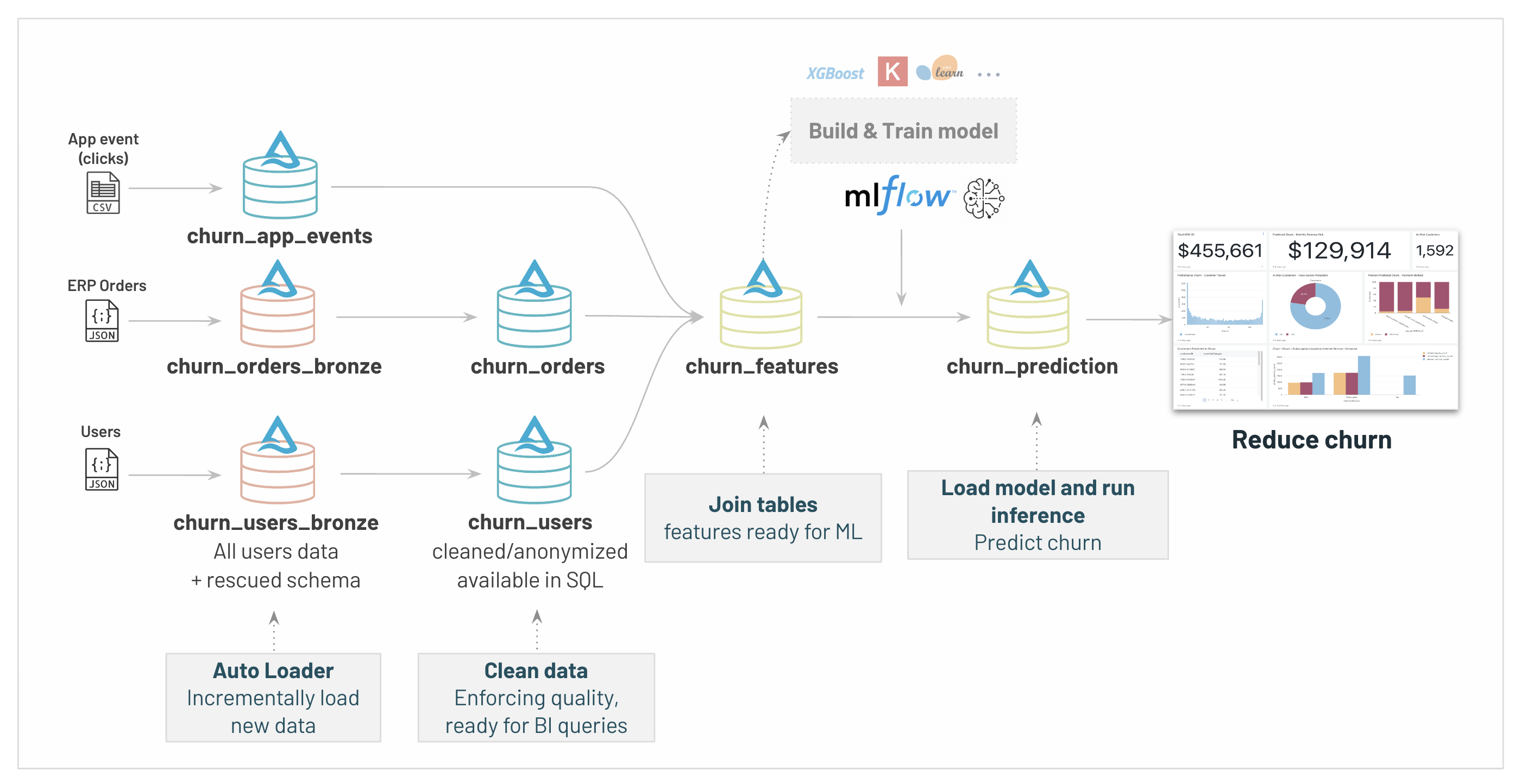
 18 | # MAGIC
  66 | # MAGIC
  117 | # MAGIC
  10 | # MAGIC
  24 | # MAGIC
25 | # MAGIC Our datasets are now properly ingested, secured, with a high quality and easily discoverable within our organization.
26 | # MAGIC
27 | # MAGIC Let's explore how Databricks SQL support your Data Analyst team with interactive BI and start analyzing our customer Churn.
28 | # MAGIC
29 | # MAGIC To start with Databricks SQL, open the SQL view on the top left menu.
30 | # MAGIC
31 | # MAGIC You'll be able to:
32 | # MAGIC
33 | # MAGIC - Create a SQL Warehouse to run your queries
34 | # MAGIC - Use DBSQL to build your own dashboards
35 | # MAGIC - Plug any BI tools (Tableau/PowerBI/..) to run your analysis
36 | # MAGIC
37 | # MAGIC
38 | # MAGIC
24 | # MAGIC
25 | # MAGIC Our datasets are now properly ingested, secured, with a high quality and easily discoverable within our organization.
26 | # MAGIC
27 | # MAGIC Let's explore how Databricks SQL support your Data Analyst team with interactive BI and start analyzing our customer Churn.
28 | # MAGIC
29 | # MAGIC To start with Databricks SQL, open the SQL view on the top left menu.
30 | # MAGIC
31 | # MAGIC You'll be able to:
32 | # MAGIC
33 | # MAGIC - Create a SQL Warehouse to run your queries
34 | # MAGIC - Use DBSQL to build your own dashboards
35 | # MAGIC - Plug any BI tools (Tableau/PowerBI/..) to run your analysis
36 | # MAGIC
37 | # MAGIC
38 | # MAGIC 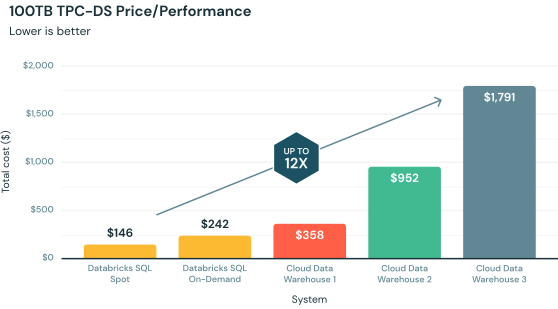 46 | # MAGIC
47 | # MAGIC Databricks SQL is a warehouse engine packed with thousands of optimizations to provide you with the best performance for all your tools, query types and real-world applications. It holds the Data Warehousing Performance Record.
48 | # MAGIC
49 | # MAGIC This includes the next-generation vectorized query engine Photon, which together with SQL warehouses, provides up to 12x better price/performance than other cloud data warehouses.
50 | # MAGIC
51 | # MAGIC **Serverless warehouse** provide instant, elastic SQL compute — decoupled from storage — and will automatically scale to provide unlimited concurrency without disruption, for high concurrency use cases.
52 | # MAGIC
53 | # MAGIC Make no compromise. Your best Datawarehouse is a Lakehouse.
54 | # MAGIC
55 | # MAGIC ### Creating a SQL Warehouse
56 | # MAGIC
57 | # MAGIC SQL Wharehouse are managed by databricks. [Creating a warehouse](/sql/warehouses) is a 1-click step:
58 |
59 | # COMMAND ----------
60 |
61 | # MAGIC %md-sandbox
62 | # MAGIC
63 | # MAGIC ## Creating your first Query
64 | # MAGIC
65 | # MAGIC
46 | # MAGIC
47 | # MAGIC Databricks SQL is a warehouse engine packed with thousands of optimizations to provide you with the best performance for all your tools, query types and real-world applications. It holds the Data Warehousing Performance Record.
48 | # MAGIC
49 | # MAGIC This includes the next-generation vectorized query engine Photon, which together with SQL warehouses, provides up to 12x better price/performance than other cloud data warehouses.
50 | # MAGIC
51 | # MAGIC **Serverless warehouse** provide instant, elastic SQL compute — decoupled from storage — and will automatically scale to provide unlimited concurrency without disruption, for high concurrency use cases.
52 | # MAGIC
53 | # MAGIC Make no compromise. Your best Datawarehouse is a Lakehouse.
54 | # MAGIC
55 | # MAGIC ### Creating a SQL Warehouse
56 | # MAGIC
57 | # MAGIC SQL Wharehouse are managed by databricks. [Creating a warehouse](/sql/warehouses) is a 1-click step:
58 |
59 | # COMMAND ----------
60 |
61 | # MAGIC %md-sandbox
62 | # MAGIC
63 | # MAGIC ## Creating your first Query
64 | # MAGIC
65 | # MAGIC 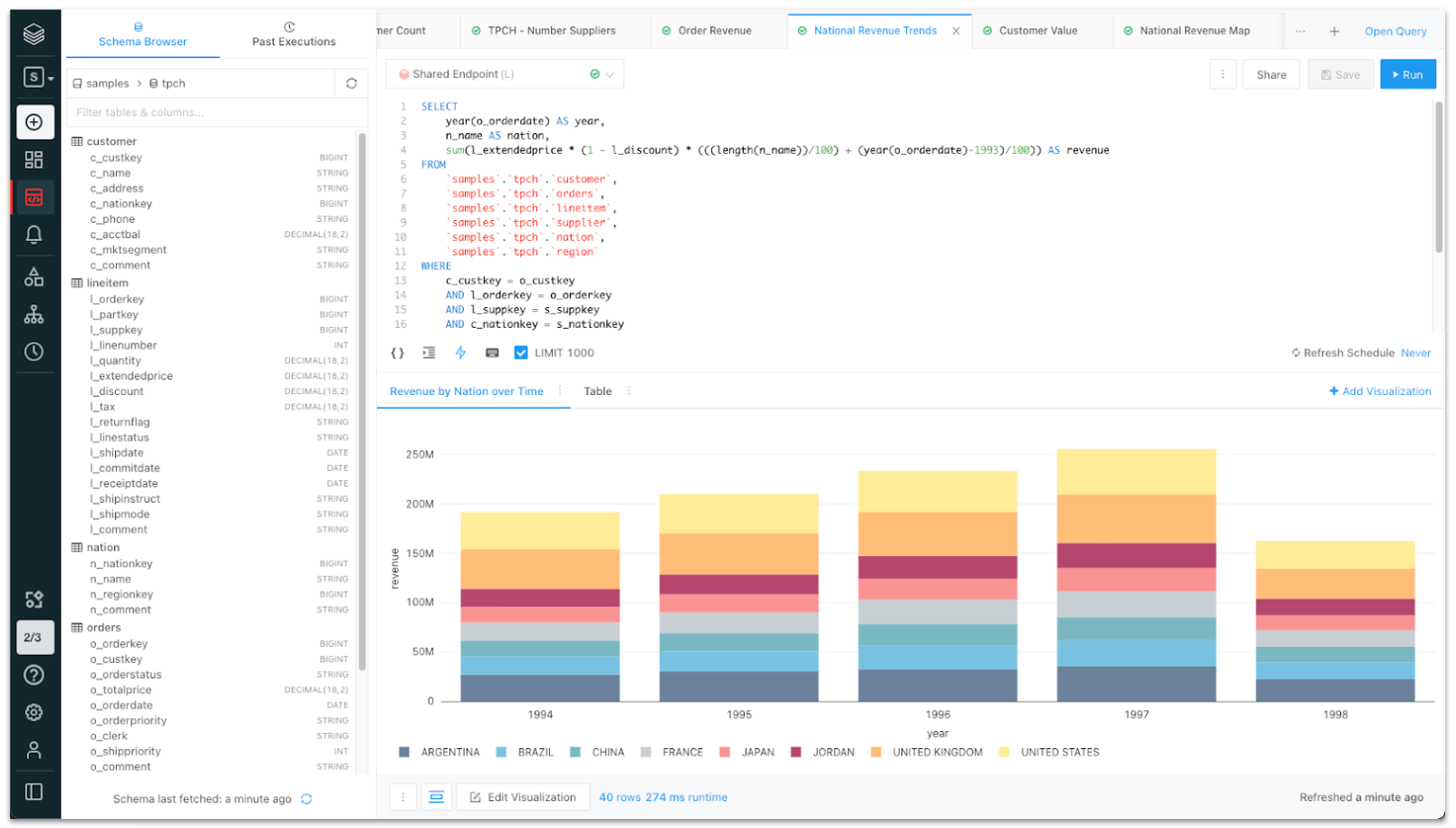 66 | # MAGIC
67 | # MAGIC Our users can now start running SQL queries using the SQL editor and add new visualizations.
68 | # MAGIC
69 | # MAGIC By leveraging auto-completion and the schema browser, we can start running adhoc queries on top of our data.
70 | # MAGIC
71 | # MAGIC While this is ideal for Data Analyst to start analysing our customer Churn, other personas can also leverage DBSQL to track our data ingestion pipeline, the data quality, model behavior etc.
72 | # MAGIC
73 | # MAGIC Open the [Queries menu](/sql/queries) to start writting your first analysis.
74 |
75 | # COMMAND ----------
76 |
77 | # MAGIC %md
78 | # MAGIC ## Lab exercise
79 | # MAGIC **1. Total MRR**
80 | # MAGIC ```
81 | # MAGIC SELECT
82 | # MAGIC sum(amount)/1000 as MRR
83 | # MAGIC FROM churn_orders
84 | # MAGIC WHERE
85 | # MAGIC month(to_timestamp(creation_date, 'MM-dd-yyyy HH:mm:ss')) =
86 | # MAGIC (
87 | # MAGIC select max(month(to_timestamp(creation_date, 'MM-dd-yyyy HH:mm:ss')))
88 | # MAGIC from churn_orders
89 | # MAGIC );
90 | # MAGIC
91 | # MAGIC ```
92 | # MAGIC Create a *counter* visualisation
93 | # MAGIC
94 | # MAGIC **2. Customer Tenure - Historical**
95 | # MAGIC ```
96 | # MAGIC SELECT cast(days_since_creation/30 as int) as days_since_creation, churn, count(*) as customers
97 | # MAGIC FROM churn_features
98 | # MAGIC GROUP BY days_since_creation, churn
99 | # MAGIC HAVING days_since_creation < 1000
100 | # MAGIC ```
101 | # MAGIC **3. Subscriptions by Internet Service - Historical**
102 | # MAGIC ```
103 | # MAGIC select platform, churn, count(*) as event_count
104 | # MAGIC from churn_app_events
105 | # MAGIC inner join churn_users using (user_id)
106 | # MAGIC where platform is not null
107 | # MAGIC group by platform, churn
108 | # MAGIC ```
109 | # MAGIC Create a *horizontal bar* visualisation
110 | # MAGIC
111 | # MAGIC
112 | # MAGIC **4. MRR at Risk**
113 | # MAGIC ```
114 | # MAGIC SELECT
115 | # MAGIC sum(amount)/1000 as MRR_at_risk
116 | # MAGIC FROM churn_orders
117 | # MAGIC WHERE month(to_timestamp(churn_orders.creation_date, 'MM-dd-yyyy HH:mm:ss')) =
118 | # MAGIC (
119 | # MAGIC select max(month(to_timestamp(churn_orders.creation_date, 'MM-dd-yyyy HH:mm:ss')))
120 | # MAGIC from churn_orders
121 | # MAGIC )
122 | # MAGIC and user_id in
123 | # MAGIC (
124 | # MAGIC SELECT user_id FROM churn_prediction WHERE churn_prediction=1
125 | # MAGIC )
126 | # MAGIC
127 | # MAGIC ```
128 |
129 | # COMMAND ----------
130 |
131 | # MAGIC %md
132 | # MAGIC
133 | # MAGIC **5. Customers at risk**
134 | # MAGIC ```
135 | # MAGIC SELECT count(*) as Customers, cast(churn_prediction as boolean) as `At Risk`
136 | # MAGIC FROM churn_prediction GROUP BY churn_prediction;
137 | # MAGIC
138 | # MAGIC ```
139 | # MAGIC **6. Predicted to churn by channel**
140 | # MAGIC ```
141 | # MAGIC SELECT channel, count(*) as users
142 | # MAGIC FROM churn_prediction
143 | # MAGIC WHERE churn_prediction=1 and channel is not null
144 | # MAGIC GROUP BY channel
145 | # MAGIC ```
146 | # MAGIC Create a *pie chart* visualisation
147 | # MAGIC
148 | # MAGIC **7. Predicted to churn by country**
149 | # MAGIC ```
150 | # MAGIC SELECT country, churn_prediction, count(*) as customers
151 | # MAGIC FROM churn_prediction
152 | # MAGIC GROUP BY country, churn_prediction
153 | # MAGIC ```
154 | # MAGIC Create a *bar* visualisation
155 | # MAGIC
156 | # MAGIC
157 |
158 | # COMMAND ----------
159 |
160 | # MAGIC %md-sandbox
161 | # MAGIC
162 | # MAGIC ## Creating our Churn Dashboard
163 | # MAGIC
164 | # MAGIC
66 | # MAGIC
67 | # MAGIC Our users can now start running SQL queries using the SQL editor and add new visualizations.
68 | # MAGIC
69 | # MAGIC By leveraging auto-completion and the schema browser, we can start running adhoc queries on top of our data.
70 | # MAGIC
71 | # MAGIC While this is ideal for Data Analyst to start analysing our customer Churn, other personas can also leverage DBSQL to track our data ingestion pipeline, the data quality, model behavior etc.
72 | # MAGIC
73 | # MAGIC Open the [Queries menu](/sql/queries) to start writting your first analysis.
74 |
75 | # COMMAND ----------
76 |
77 | # MAGIC %md
78 | # MAGIC ## Lab exercise
79 | # MAGIC **1. Total MRR**
80 | # MAGIC ```
81 | # MAGIC SELECT
82 | # MAGIC sum(amount)/1000 as MRR
83 | # MAGIC FROM churn_orders
84 | # MAGIC WHERE
85 | # MAGIC month(to_timestamp(creation_date, 'MM-dd-yyyy HH:mm:ss')) =
86 | # MAGIC (
87 | # MAGIC select max(month(to_timestamp(creation_date, 'MM-dd-yyyy HH:mm:ss')))
88 | # MAGIC from churn_orders
89 | # MAGIC );
90 | # MAGIC
91 | # MAGIC ```
92 | # MAGIC Create a *counter* visualisation
93 | # MAGIC
94 | # MAGIC **2. Customer Tenure - Historical**
95 | # MAGIC ```
96 | # MAGIC SELECT cast(days_since_creation/30 as int) as days_since_creation, churn, count(*) as customers
97 | # MAGIC FROM churn_features
98 | # MAGIC GROUP BY days_since_creation, churn
99 | # MAGIC HAVING days_since_creation < 1000
100 | # MAGIC ```
101 | # MAGIC **3. Subscriptions by Internet Service - Historical**
102 | # MAGIC ```
103 | # MAGIC select platform, churn, count(*) as event_count
104 | # MAGIC from churn_app_events
105 | # MAGIC inner join churn_users using (user_id)
106 | # MAGIC where platform is not null
107 | # MAGIC group by platform, churn
108 | # MAGIC ```
109 | # MAGIC Create a *horizontal bar* visualisation
110 | # MAGIC
111 | # MAGIC
112 | # MAGIC **4. MRR at Risk**
113 | # MAGIC ```
114 | # MAGIC SELECT
115 | # MAGIC sum(amount)/1000 as MRR_at_risk
116 | # MAGIC FROM churn_orders
117 | # MAGIC WHERE month(to_timestamp(churn_orders.creation_date, 'MM-dd-yyyy HH:mm:ss')) =
118 | # MAGIC (
119 | # MAGIC select max(month(to_timestamp(churn_orders.creation_date, 'MM-dd-yyyy HH:mm:ss')))
120 | # MAGIC from churn_orders
121 | # MAGIC )
122 | # MAGIC and user_id in
123 | # MAGIC (
124 | # MAGIC SELECT user_id FROM churn_prediction WHERE churn_prediction=1
125 | # MAGIC )
126 | # MAGIC
127 | # MAGIC ```
128 |
129 | # COMMAND ----------
130 |
131 | # MAGIC %md
132 | # MAGIC
133 | # MAGIC **5. Customers at risk**
134 | # MAGIC ```
135 | # MAGIC SELECT count(*) as Customers, cast(churn_prediction as boolean) as `At Risk`
136 | # MAGIC FROM churn_prediction GROUP BY churn_prediction;
137 | # MAGIC
138 | # MAGIC ```
139 | # MAGIC **6. Predicted to churn by channel**
140 | # MAGIC ```
141 | # MAGIC SELECT channel, count(*) as users
142 | # MAGIC FROM churn_prediction
143 | # MAGIC WHERE churn_prediction=1 and channel is not null
144 | # MAGIC GROUP BY channel
145 | # MAGIC ```
146 | # MAGIC Create a *pie chart* visualisation
147 | # MAGIC
148 | # MAGIC **7. Predicted to churn by country**
149 | # MAGIC ```
150 | # MAGIC SELECT country, churn_prediction, count(*) as customers
151 | # MAGIC FROM churn_prediction
152 | # MAGIC GROUP BY country, churn_prediction
153 | # MAGIC ```
154 | # MAGIC Create a *bar* visualisation
155 | # MAGIC
156 | # MAGIC
157 |
158 | # COMMAND ----------
159 |
160 | # MAGIC %md-sandbox
161 | # MAGIC
162 | # MAGIC ## Creating our Churn Dashboard
163 | # MAGIC
164 | # MAGIC 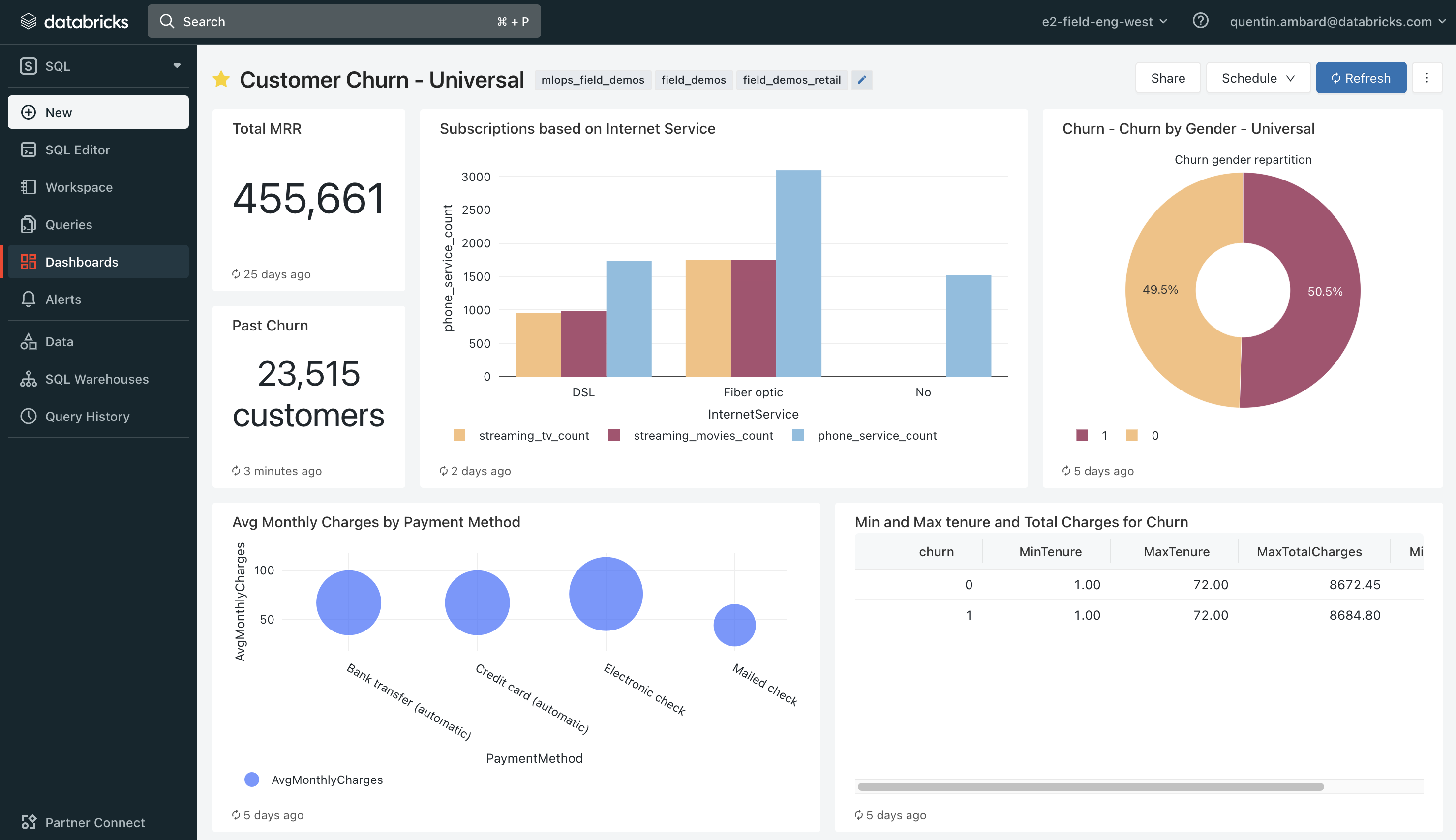 165 | # MAGIC
166 | # MAGIC The next step is now to assemble our queries and their visualization in a comprehensive SQL dashboard that our business will be able to track.
167 | # MAGIC
168 | # MAGIC ### Lab exercise
169 | # MAGIC Assemple the visualisations defined with the above queries into a dashboard
170 |
171 | # COMMAND ----------
172 |
173 | # MAGIC %md-sandbox
174 | # MAGIC
175 | # MAGIC ## Using Third party BI tools
176 | # MAGIC
177 | # MAGIC
178 | # MAGIC
179 | # MAGIC SQL warehouse can also be used with an external BI tool such as Tableau or PowerBI.
180 | # MAGIC
181 | # MAGIC This will allow you to run direct queries on top of your table, with a unified security model and Unity Catalog (ex: through SSO). Now analysts can use their favorite tools to discover new business insights on the most complete and freshest data.
182 | # MAGIC
183 | # MAGIC To start using your Warehouse with third party BI tool, click on "Partner Connect" on the bottom left and chose your provider.
184 |
185 | # COMMAND ----------
186 |
187 | # MAGIC %md-sandbox
188 | # MAGIC ## Going further with DBSQL & Databricks Warehouse
189 | # MAGIC
190 | # MAGIC Databricks SQL offers much more and provides a full warehouse capabilities
191 | # MAGIC
192 | # MAGIC
165 | # MAGIC
166 | # MAGIC The next step is now to assemble our queries and their visualization in a comprehensive SQL dashboard that our business will be able to track.
167 | # MAGIC
168 | # MAGIC ### Lab exercise
169 | # MAGIC Assemple the visualisations defined with the above queries into a dashboard
170 |
171 | # COMMAND ----------
172 |
173 | # MAGIC %md-sandbox
174 | # MAGIC
175 | # MAGIC ## Using Third party BI tools
176 | # MAGIC
177 | # MAGIC
178 | # MAGIC
179 | # MAGIC SQL warehouse can also be used with an external BI tool such as Tableau or PowerBI.
180 | # MAGIC
181 | # MAGIC This will allow you to run direct queries on top of your table, with a unified security model and Unity Catalog (ex: through SSO). Now analysts can use their favorite tools to discover new business insights on the most complete and freshest data.
182 | # MAGIC
183 | # MAGIC To start using your Warehouse with third party BI tool, click on "Partner Connect" on the bottom left and chose your provider.
184 |
185 | # COMMAND ----------
186 |
187 | # MAGIC %md-sandbox
188 | # MAGIC ## Going further with DBSQL & Databricks Warehouse
189 | # MAGIC
190 | # MAGIC Databricks SQL offers much more and provides a full warehouse capabilities
191 | # MAGIC
192 | # MAGIC 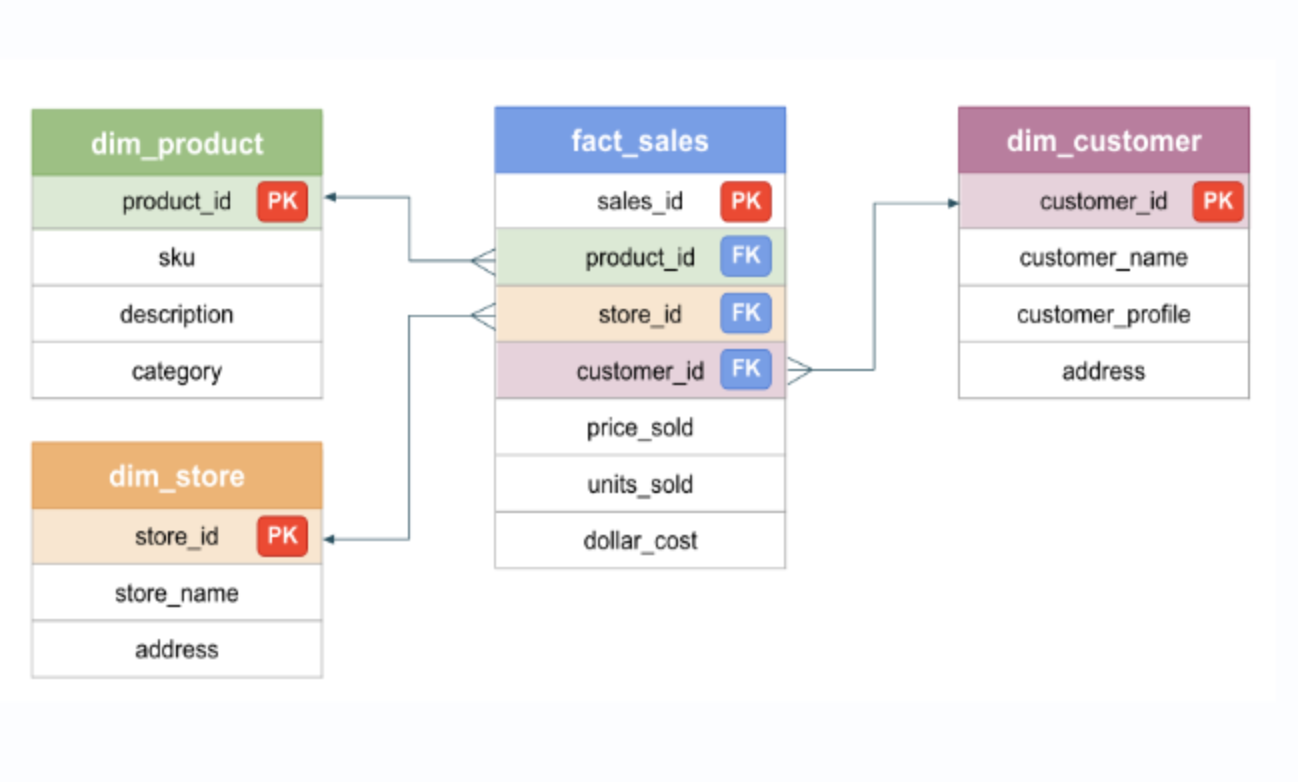 193 | # MAGIC
194 | # MAGIC ### Data modeling
195 | # MAGIC
196 | # MAGIC Comprehensive data modeling. Save your data based on your requirements: Data vault, Star schema, Inmon...
197 | # MAGIC
198 | # MAGIC Databricks let you create your PK/FK, identity columns (auto-increment)
199 | # MAGIC
200 | # MAGIC ### Data ingestion made easy with DBSQL & DBT
201 | # MAGIC
202 | # MAGIC Turnkey capabilities allow analysts and analytic engineers to easily ingest data from anything like cloud storage to enterprise applications such as Salesforce, Google Analytics, or Marketo using Fivetran. It’s just one click away.
203 | # MAGIC
204 | # MAGIC Then, simply manage dependencies and transform data in-place with built-in ETL capabilities on the Lakehouse (Delta Live Table), or using your favorite tools like dbt on Databricks SQL for best-in-class performance.
205 | # MAGIC
206 | # MAGIC ### Query federation
207 | # MAGIC
208 | # MAGIC Need to access cross-system data? Databricks SQL query federation let you define datasources outside of databricks (ex: PostgreSQL)
209 | # MAGIC
210 | # MAGIC ### Materialized views
211 | # MAGIC
212 | # MAGIC Avoid expensive queries and materialize your tables. The engine will recompute only what's required when your data get updated.
213 |
--------------------------------------------------------------------------------
/Retail/01.2 - Delta Live Tables - SQL.sql:
--------------------------------------------------------------------------------
1 | -- Databricks notebook source
2 | -- MAGIC %md-sandbox
3 | -- MAGIC # Data engineering with Databricks - Building our C360 database
4 | -- MAGIC
5 | -- MAGIC Building a C360 database requires to ingest multiple datasources.
6 | -- MAGIC
7 | -- MAGIC It's a complex process requiring batch loads and streaming ingestion to support real-time insights, used for personalization and marketing targeting among other.
8 | -- MAGIC
9 | -- MAGIC Ingesting, transforming and cleaning data to create clean SQL tables for our downstream user (Data Analysts and Data Scientists) is complex.
10 | -- MAGIC
11 | -- MAGIC
12 | -- MAGIC
193 | # MAGIC
194 | # MAGIC ### Data modeling
195 | # MAGIC
196 | # MAGIC Comprehensive data modeling. Save your data based on your requirements: Data vault, Star schema, Inmon...
197 | # MAGIC
198 | # MAGIC Databricks let you create your PK/FK, identity columns (auto-increment)
199 | # MAGIC
200 | # MAGIC ### Data ingestion made easy with DBSQL & DBT
201 | # MAGIC
202 | # MAGIC Turnkey capabilities allow analysts and analytic engineers to easily ingest data from anything like cloud storage to enterprise applications such as Salesforce, Google Analytics, or Marketo using Fivetran. It’s just one click away.
203 | # MAGIC
204 | # MAGIC Then, simply manage dependencies and transform data in-place with built-in ETL capabilities on the Lakehouse (Delta Live Table), or using your favorite tools like dbt on Databricks SQL for best-in-class performance.
205 | # MAGIC
206 | # MAGIC ### Query federation
207 | # MAGIC
208 | # MAGIC Need to access cross-system data? Databricks SQL query federation let you define datasources outside of databricks (ex: PostgreSQL)
209 | # MAGIC
210 | # MAGIC ### Materialized views
211 | # MAGIC
212 | # MAGIC Avoid expensive queries and materialize your tables. The engine will recompute only what's required when your data get updated.
213 |
--------------------------------------------------------------------------------
/Retail/01.2 - Delta Live Tables - SQL.sql:
--------------------------------------------------------------------------------
1 | -- Databricks notebook source
2 | -- MAGIC %md-sandbox
3 | -- MAGIC # Data engineering with Databricks - Building our C360 database
4 | -- MAGIC
5 | -- MAGIC Building a C360 database requires to ingest multiple datasources.
6 | -- MAGIC
7 | -- MAGIC It's a complex process requiring batch loads and streaming ingestion to support real-time insights, used for personalization and marketing targeting among other.
8 | -- MAGIC
9 | -- MAGIC Ingesting, transforming and cleaning data to create clean SQL tables for our downstream user (Data Analysts and Data Scientists) is complex.
10 | -- MAGIC
11 | -- MAGIC
12 | -- MAGIC  John, as Data engineer, spends immense time….
25 | -- MAGIC
26 | -- MAGIC
27 | -- MAGIC * Hand-coding data ingestion & transformations and dealing with technical challenges:
John, as Data engineer, spends immense time….
25 | -- MAGIC
26 | -- MAGIC
27 | -- MAGIC * Hand-coding data ingestion & transformations and dealing with technical challenges: 43 | -- MAGIC
44 | -- MAGIC In this notebook, we'll work as a Data Engineer to build our c360 database.
43 | -- MAGIC
44 | -- MAGIC In this notebook, we'll work as a Data Engineer to build our c360 database.  64 | -- MAGIC Accelerate ETL development
  69 | -- MAGIC Remove operational complexity
  76 | -- MAGIC Trust your data
  81 | -- MAGIC Simplify batch and streaming
  90 | -- MAGIC
91 | -- MAGIC ## Delta Lake
92 | -- MAGIC
93 | -- MAGIC All the tables we'll create in the Lakehouse will be stored as Delta Lake table. Delta Lake is an open storage framework for reliability and performance.
90 | -- MAGIC
91 | -- MAGIC ## Delta Lake
92 | -- MAGIC
93 | -- MAGIC All the tables we'll create in the Lakehouse will be stored as Delta Lake table. Delta Lake is an open storage framework for reliability and performance.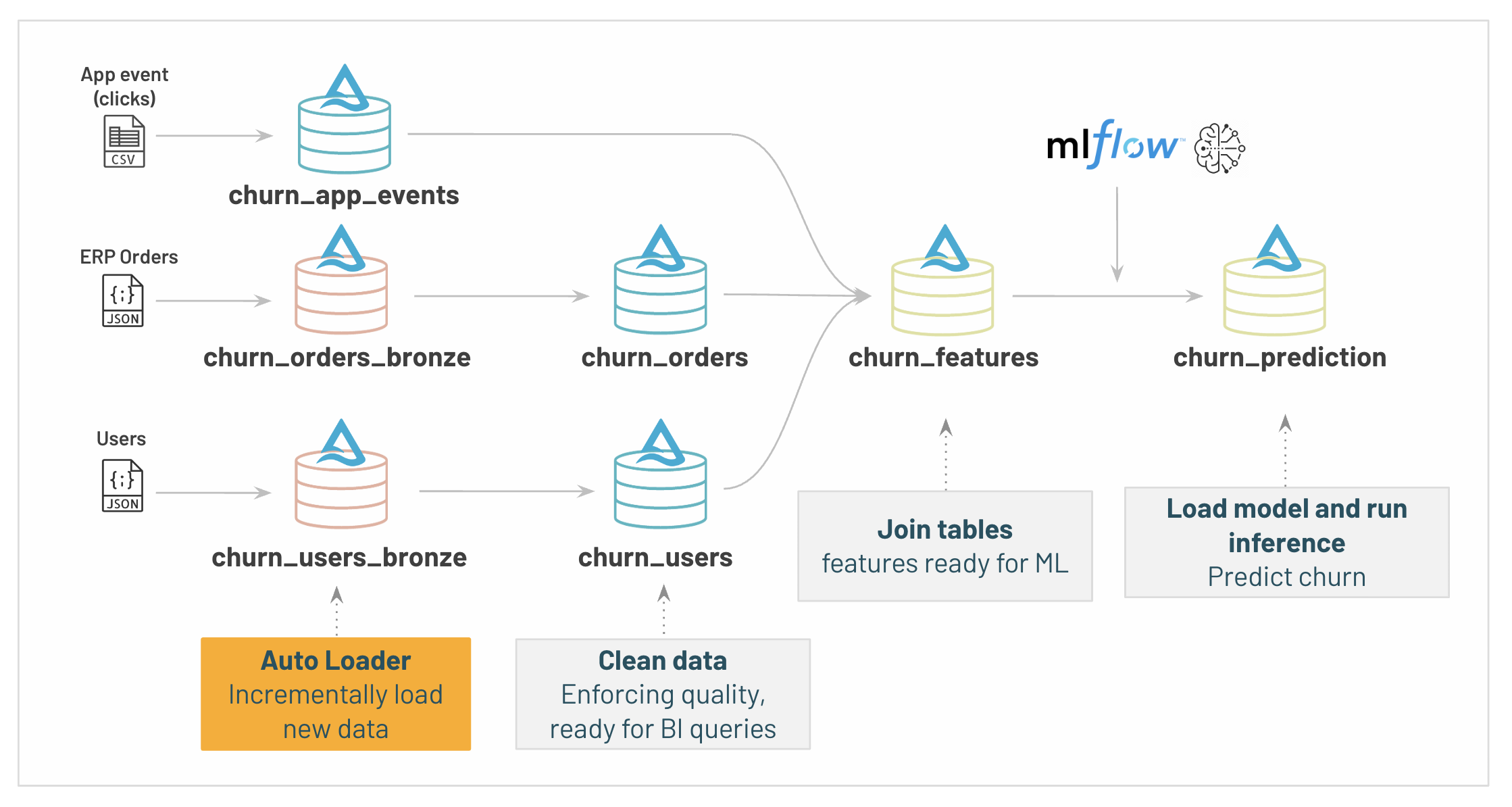 92 | # MAGIC
 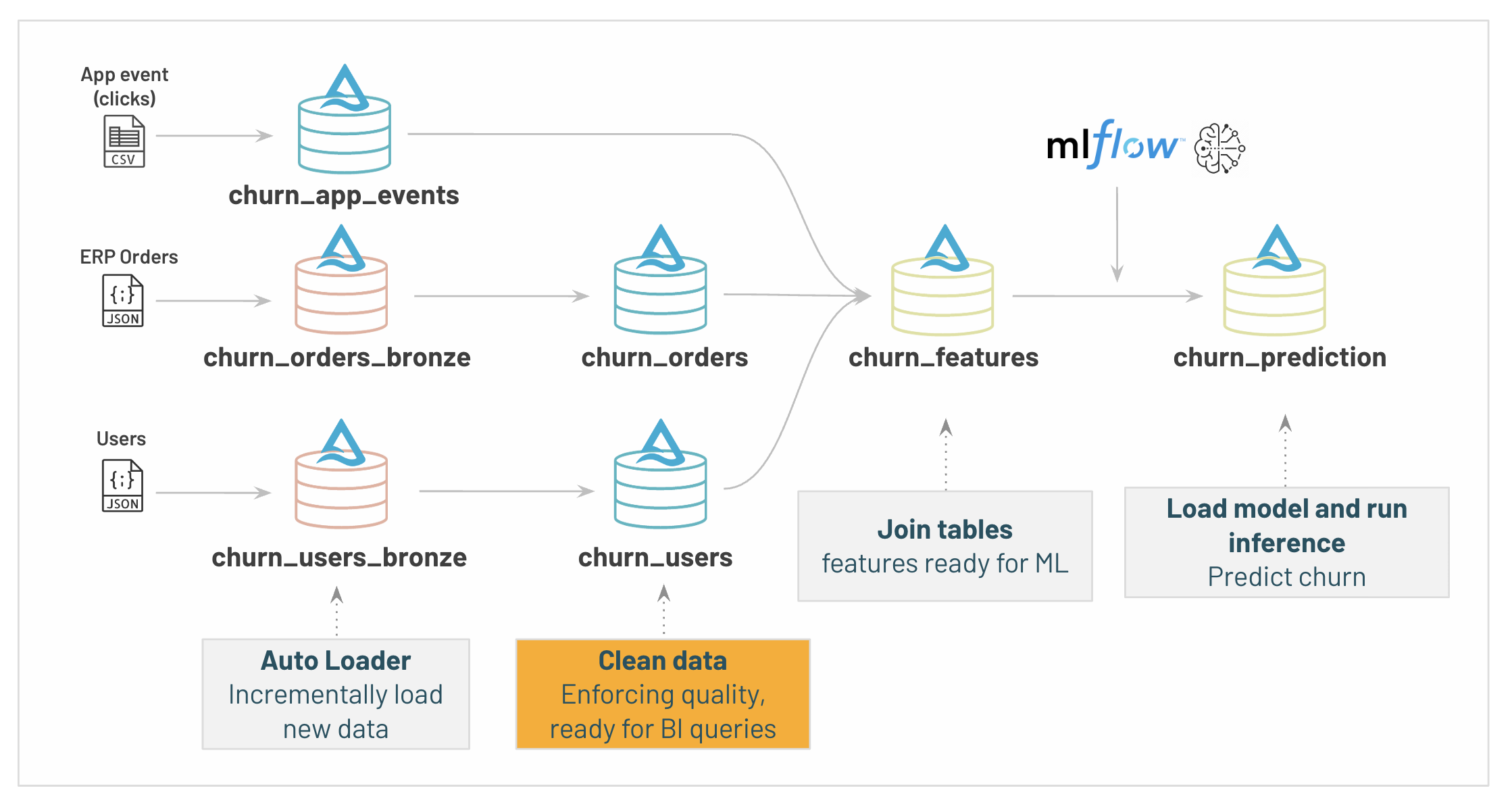 142 | # MAGIC
143 | # MAGIC We can chain these incremental transformation between tables, consuming only new data.
144 | # MAGIC
145 | # MAGIC This can be triggered in near realtime, or in batch fashion, for example as a job running every night to consume daily data.
146 |
147 | # COMMAND ----------
148 |
149 | # DBTITLE 1,Silver table for the users data
150 | from pyspark.sql.functions import sha1, col, initcap, to_timestamp
151 |
152 | (spark.readStream
153 | .table("churn_users_bronze")
154 | .withColumnRenamed("id", "user_id")
155 | .withColumn("email", sha1(col("email")))
156 | .withColumn("creation_date", to_timestamp(col("creation_date"), "MM-dd-yyyy H:mm:ss"))
157 | .withColumn("last_activity_date", to_timestamp(col("last_activity_date"), "MM-dd-yyyy HH:mm:ss"))
158 | .withColumn("firstname", initcap(col("firstname")))
159 | .withColumn("lastname", initcap(col("lastname")))
160 | .withColumn("age_group", col("age_group").cast('int'))
161 | .withColumn("gender", col("gender").cast('int'))
162 | .drop(col("churn"))
163 | .drop(col("_rescued_data"))
164 | .writeStream
165 | .option("checkpointLocation", f"{deltaTablesDirectory}/checkpoint/users")
166 | .trigger(once=True)
167 | .table("churn_users").awaitTermination())
168 |
169 | # COMMAND ----------
170 |
171 | # MAGIC %sql select * from churn_users;
172 |
173 | # COMMAND ----------
174 |
175 | # DBTITLE 1,Silver table for the orders data
176 | (spark.readStream
177 | .table("churn_orders_bronze")
178 | .withColumnRenamed("id", "order_id")
179 | .withColumn("amount", col("amount").cast('int'))
180 | .withColumn("item_count", col("item_count").cast('int'))
181 | .withColumn("creation_date", to_timestamp(col("transaction_date"), "MM-dd-yyyy H:mm:ss"))
182 | .drop(col("_rescued_data"))
183 | .writeStream
184 | .option("checkpointLocation", f"{deltaTablesDirectory}/checkpoint/orders")
185 | .trigger(once=True)
186 | .table("churn_orders").awaitTermination())
187 |
188 | # COMMAND ----------
189 |
190 | # MAGIC %sql select * from churn_orders;
191 |
192 | # COMMAND ----------
193 |
194 | # MAGIC %md-sandbox
195 | # MAGIC ### 3/ Aggregate and join data to create our ML features
196 | # MAGIC
197 | # MAGIC
142 | # MAGIC
143 | # MAGIC We can chain these incremental transformation between tables, consuming only new data.
144 | # MAGIC
145 | # MAGIC This can be triggered in near realtime, or in batch fashion, for example as a job running every night to consume daily data.
146 |
147 | # COMMAND ----------
148 |
149 | # DBTITLE 1,Silver table for the users data
150 | from pyspark.sql.functions import sha1, col, initcap, to_timestamp
151 |
152 | (spark.readStream
153 | .table("churn_users_bronze")
154 | .withColumnRenamed("id", "user_id")
155 | .withColumn("email", sha1(col("email")))
156 | .withColumn("creation_date", to_timestamp(col("creation_date"), "MM-dd-yyyy H:mm:ss"))
157 | .withColumn("last_activity_date", to_timestamp(col("last_activity_date"), "MM-dd-yyyy HH:mm:ss"))
158 | .withColumn("firstname", initcap(col("firstname")))
159 | .withColumn("lastname", initcap(col("lastname")))
160 | .withColumn("age_group", col("age_group").cast('int'))
161 | .withColumn("gender", col("gender").cast('int'))
162 | .drop(col("churn"))
163 | .drop(col("_rescued_data"))
164 | .writeStream
165 | .option("checkpointLocation", f"{deltaTablesDirectory}/checkpoint/users")
166 | .trigger(once=True)
167 | .table("churn_users").awaitTermination())
168 |
169 | # COMMAND ----------
170 |
171 | # MAGIC %sql select * from churn_users;
172 |
173 | # COMMAND ----------
174 |
175 | # DBTITLE 1,Silver table for the orders data
176 | (spark.readStream
177 | .table("churn_orders_bronze")
178 | .withColumnRenamed("id", "order_id")
179 | .withColumn("amount", col("amount").cast('int'))
180 | .withColumn("item_count", col("item_count").cast('int'))
181 | .withColumn("creation_date", to_timestamp(col("transaction_date"), "MM-dd-yyyy H:mm:ss"))
182 | .drop(col("_rescued_data"))
183 | .writeStream
184 | .option("checkpointLocation", f"{deltaTablesDirectory}/checkpoint/orders")
185 | .trigger(once=True)
186 | .table("churn_orders").awaitTermination())
187 |
188 | # COMMAND ----------
189 |
190 | # MAGIC %sql select * from churn_orders;
191 |
192 | # COMMAND ----------
193 |
194 | # MAGIC %md-sandbox
195 | # MAGIC ### 3/ Aggregate and join data to create our ML features
196 | # MAGIC
197 | # MAGIC 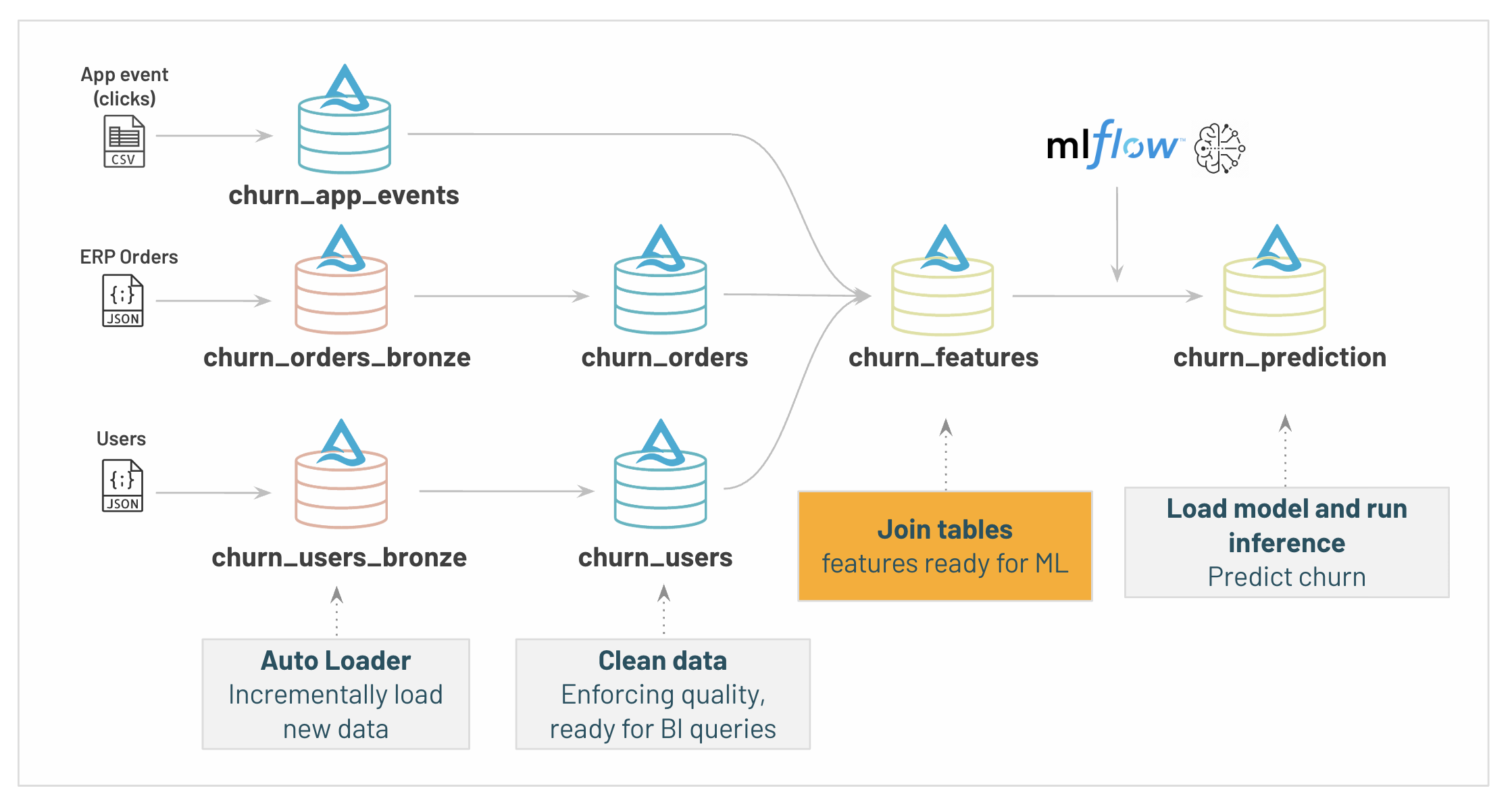 198 | # MAGIC
199 | # MAGIC
200 | # MAGIC We are now ready to create the features required for our churn prediction.
201 | # MAGIC
202 | # MAGIC We need to enrich our user dataset with extra information which our model will use to help predicting churn, sucj as:
203 | # MAGIC
204 | # MAGIC * last command date
205 | # MAGIC * number of item bought
206 | # MAGIC * number of actions in our website
207 | # MAGIC * device used (ios/iphone)
208 | # MAGIC * ...
209 |
210 | # COMMAND ----------
211 |
212 | # DBTITLE 1,Creating a "gold table" to be used by the Machine Learning practitioner
213 | spark.sql(
214 | """
215 | CREATE OR REPLACE TABLE churn_features AS
216 | WITH
217 | churn_orders_stats AS (
218 | SELECT
219 | user_id,
220 | count(*) as order_count,
221 | sum(amount) as total_amount,
222 | sum(item_count) as total_item,
223 | max(creation_date) as last_transaction
224 | FROM churn_orders
225 | GROUP BY user_id
226 | ),
227 | churn_app_events_stats AS (
228 | SELECT
229 | first(platform) as platform,
230 | user_id,
231 | count(*) as event_count,
232 | count(distinct session_id) as session_count,
233 | max(to_timestamp(date, "MM-dd-yyyy HH:mm:ss")) as last_event
234 | FROM churn_app_events GROUP BY user_id
235 | )
236 | SELECT
237 | *,
238 | datediff(now(), creation_date) as days_since_creation,
239 | datediff(now(), last_activity_date) as days_since_last_activity,
240 | datediff(now(), last_event) as days_last_event
241 | FROM churn_users
242 | INNER JOIN churn_orders_stats using (user_id)
243 | INNER JOIN churn_app_events_stats using (user_id)
244 | """
245 | )
246 |
247 | display(spark.table("churn_features"))
248 |
249 | # COMMAND ----------
250 |
251 | # MAGIC %md
252 | # MAGIC ## Exploiting the benefits of Delta
253 | # MAGIC
254 | # MAGIC ### (a) Simplifing operations with transactional DELETE/UPDATE/MERGE operations
255 | # MAGIC
256 | # MAGIC Traditional Data Lakes struggle to run even simple DML operations. Using Databricks and Delta Lake, your data is stored on your blob storage with transactional capabilities. You can issue DML operation on Petabyte of data without having to worry about concurrent operations.
257 |
258 | # COMMAND ----------
259 |
260 | # DBTITLE 1,We just realised we have to delete users created before 2016-01-01 for compliance; let's fix that
261 | # MAGIC %sql DELETE FROM churn_users where creation_date < '2016-01-01T03:38:55.000+0000';
262 |
263 | # COMMAND ----------
264 |
265 | # DBTITLE 1,Delta Lake keeps the history of the table operations
266 | # MAGIC %sql describe history churn_users;
267 |
268 | # COMMAND ----------
269 |
270 | # DBTITLE 1,We can leverage the history to travel back in time, restore or clone a table, enable CDC, etc.
271 | # MAGIC %sql
272 | # MAGIC -- the following also works with AS OF TIMESTAMP "yyyy-MM-dd HH:mm:ss"
273 | # MAGIC select * from churn_users version as of 1 ;
274 |
275 | # COMMAND ----------
276 |
277 | # MAGIC %sql
278 | # MAGIC -- You made the DELETE by mistake ? You can easily restore the table at a given version / date:
279 | # MAGIC RESTORE TABLE churn_users TO VERSION AS OF 1
280 | # MAGIC
281 | # MAGIC -- Or clone it (SHALLOW provides zero copy clone):
282 | # MAGIC -- CREATE TABLE user_gold_clone SHALLOW|DEEP CLONE user_gold VERSION AS OF 1
283 | # MAGIC
284 | # MAGIC
285 |
286 | # COMMAND ----------
287 |
288 | # MAGIC %md
289 | # MAGIC ### (b) Optimizing for performance
290 |
291 | # COMMAND ----------
292 |
293 | # DBTITLE 1,Ensuring that all our tables are storage-optimized
294 | # MAGIC %sql
295 | # MAGIC ALTER TABLE churn_users SET TBLPROPERTIES (delta.autooptimize.optimizewrite = TRUE, delta.autooptimize.autocompact = TRUE );
296 | # MAGIC ALTER TABLE churn_orders SET TBLPROPERTIES (delta.autooptimize.optimizewrite = TRUE, delta.autooptimize.autocompact = TRUE );
297 | # MAGIC ALTER TABLE churn_features SET TBLPROPERTIES (delta.autooptimize.optimizewrite = TRUE, delta.autooptimize.autocompact = TRUE );
298 |
299 | # COMMAND ----------
300 |
301 | # DBTITLE 1,Our user table will be queried mostly by 3 fields; let's optimize the table for that!
302 | # MAGIC %sql
303 | # MAGIC OPTIMIZE churn_users ZORDER BY user_id, firstname, lastname
304 |
--------------------------------------------------------------------------------
/Retail/02 - Machine Learning with MLflow.py:
--------------------------------------------------------------------------------
1 | # Databricks notebook source
2 | # MAGIC %md-sandbox
3 | # MAGIC
4 | # MAGIC # Data Science with Databricks
5 | # MAGIC
6 | # MAGIC ## ML is key to disruption & personalization
7 | # MAGIC
8 | # MAGIC Being able to ingest and query our C360 database is a first step, but this isn't enough to thrive in a very competitive market.
9 | # MAGIC
10 | # MAGIC ## Machine learning is data + transforms.
11 | # MAGIC
12 | # MAGIC ML is hard because delivering value to business lines isn't only about building a Model.
198 | # MAGIC
199 | # MAGIC
200 | # MAGIC We are now ready to create the features required for our churn prediction.
201 | # MAGIC
202 | # MAGIC We need to enrich our user dataset with extra information which our model will use to help predicting churn, sucj as:
203 | # MAGIC
204 | # MAGIC * last command date
205 | # MAGIC * number of item bought
206 | # MAGIC * number of actions in our website
207 | # MAGIC * device used (ios/iphone)
208 | # MAGIC * ...
209 |
210 | # COMMAND ----------
211 |
212 | # DBTITLE 1,Creating a "gold table" to be used by the Machine Learning practitioner
213 | spark.sql(
214 | """
215 | CREATE OR REPLACE TABLE churn_features AS
216 | WITH
217 | churn_orders_stats AS (
218 | SELECT
219 | user_id,
220 | count(*) as order_count,
221 | sum(amount) as total_amount,
222 | sum(item_count) as total_item,
223 | max(creation_date) as last_transaction
224 | FROM churn_orders
225 | GROUP BY user_id
226 | ),
227 | churn_app_events_stats AS (
228 | SELECT
229 | first(platform) as platform,
230 | user_id,
231 | count(*) as event_count,
232 | count(distinct session_id) as session_count,
233 | max(to_timestamp(date, "MM-dd-yyyy HH:mm:ss")) as last_event
234 | FROM churn_app_events GROUP BY user_id
235 | )
236 | SELECT
237 | *,
238 | datediff(now(), creation_date) as days_since_creation,
239 | datediff(now(), last_activity_date) as days_since_last_activity,
240 | datediff(now(), last_event) as days_last_event
241 | FROM churn_users
242 | INNER JOIN churn_orders_stats using (user_id)
243 | INNER JOIN churn_app_events_stats using (user_id)
244 | """
245 | )
246 |
247 | display(spark.table("churn_features"))
248 |
249 | # COMMAND ----------
250 |
251 | # MAGIC %md
252 | # MAGIC ## Exploiting the benefits of Delta
253 | # MAGIC
254 | # MAGIC ### (a) Simplifing operations with transactional DELETE/UPDATE/MERGE operations
255 | # MAGIC
256 | # MAGIC Traditional Data Lakes struggle to run even simple DML operations. Using Databricks and Delta Lake, your data is stored on your blob storage with transactional capabilities. You can issue DML operation on Petabyte of data without having to worry about concurrent operations.
257 |
258 | # COMMAND ----------
259 |
260 | # DBTITLE 1,We just realised we have to delete users created before 2016-01-01 for compliance; let's fix that
261 | # MAGIC %sql DELETE FROM churn_users where creation_date < '2016-01-01T03:38:55.000+0000';
262 |
263 | # COMMAND ----------
264 |
265 | # DBTITLE 1,Delta Lake keeps the history of the table operations
266 | # MAGIC %sql describe history churn_users;
267 |
268 | # COMMAND ----------
269 |
270 | # DBTITLE 1,We can leverage the history to travel back in time, restore or clone a table, enable CDC, etc.
271 | # MAGIC %sql
272 | # MAGIC -- the following also works with AS OF TIMESTAMP "yyyy-MM-dd HH:mm:ss"
273 | # MAGIC select * from churn_users version as of 1 ;
274 |
275 | # COMMAND ----------
276 |
277 | # MAGIC %sql
278 | # MAGIC -- You made the DELETE by mistake ? You can easily restore the table at a given version / date:
279 | # MAGIC RESTORE TABLE churn_users TO VERSION AS OF 1
280 | # MAGIC
281 | # MAGIC -- Or clone it (SHALLOW provides zero copy clone):
282 | # MAGIC -- CREATE TABLE user_gold_clone SHALLOW|DEEP CLONE user_gold VERSION AS OF 1
283 | # MAGIC
284 | # MAGIC
285 |
286 | # COMMAND ----------
287 |
288 | # MAGIC %md
289 | # MAGIC ### (b) Optimizing for performance
290 |
291 | # COMMAND ----------
292 |
293 | # DBTITLE 1,Ensuring that all our tables are storage-optimized
294 | # MAGIC %sql
295 | # MAGIC ALTER TABLE churn_users SET TBLPROPERTIES (delta.autooptimize.optimizewrite = TRUE, delta.autooptimize.autocompact = TRUE );
296 | # MAGIC ALTER TABLE churn_orders SET TBLPROPERTIES (delta.autooptimize.optimizewrite = TRUE, delta.autooptimize.autocompact = TRUE );
297 | # MAGIC ALTER TABLE churn_features SET TBLPROPERTIES (delta.autooptimize.optimizewrite = TRUE, delta.autooptimize.autocompact = TRUE );
298 |
299 | # COMMAND ----------
300 |
301 | # DBTITLE 1,Our user table will be queried mostly by 3 fields; let's optimize the table for that!
302 | # MAGIC %sql
303 | # MAGIC OPTIMIZE churn_users ZORDER BY user_id, firstname, lastname
304 |
--------------------------------------------------------------------------------
/Retail/02 - Machine Learning with MLflow.py:
--------------------------------------------------------------------------------
1 | # Databricks notebook source
2 | # MAGIC %md-sandbox
3 | # MAGIC
4 | # MAGIC # Data Science with Databricks
5 | # MAGIC
6 | # MAGIC ## ML is key to disruption & personalization
7 | # MAGIC
8 | # MAGIC Being able to ingest and query our C360 database is a first step, but this isn't enough to thrive in a very competitive market.
9 | # MAGIC
10 | # MAGIC ## Machine learning is data + transforms.
11 | # MAGIC
12 | # MAGIC ML is hard because delivering value to business lines isn't only about building a Model.  18 | # MAGIC
19 | # MAGIC
18 | # MAGIC
19 | # MAGIC  20 | # MAGIC


 73 | # MAGIC
74 | # MAGIC *Note: Make sure you switched to the "Machine Learning" persona on the top left menu.*
75 |
76 | # COMMAND ----------
77 |
78 | # MAGIC %run ./includes/SetupLab
79 |
80 | # COMMAND ----------
81 |
82 | # MAGIC %md
83 | # MAGIC ### Our training Data
84 | # MAGIC The tables generated with the DLT pipeline contain a **churn** flag which will be used as the label for training of the model.
85 | # MAGIC The predictions will eventually be applied to the tables generated with the spark pipeline.
86 |
87 | # COMMAND ----------
88 |
89 | spark.sql("use catalog main")
90 | spark.sql("use database "+databaseForDLT)
91 |
92 |
93 | # COMMAND ----------
94 |
95 | ## Use the tables within the DlT schema to creat our model.
96 | print("We will be working with our DLT Schema to build our final predication table:\n" + databaseForDLT + "\n")
97 |
98 | # COMMAND ----------
99 |
100 | # MAGIC %md
101 | # MAGIC ## Data exploration and analysis
102 | # MAGIC
103 | # MAGIC Let's review our dataset and start analyze the data we have to predict our churn
104 |
105 | # COMMAND ----------
106 |
107 | # DBTITLE 1,Read our churn gold table
108 | # Read our churn_features table
109 | churn_dataset = spark.table("churn_features")
110 | display(churn_dataset)
111 |
112 | # COMMAND ----------
113 |
114 | # DBTITLE 1,Data Exploration and analysis
115 | import seaborn as sns
116 | g = sns.PairGrid(churn_dataset.sample(0.01).toPandas()[['age_group','gender','order_count']], diag_sharey=False)
117 | g.map_lower(sns.kdeplot)
118 | g.map_diag(sns.kdeplot, lw=3)
119 | g.map_upper(sns.regplot)
120 |
121 | # COMMAND ----------
122 |
123 | # MAGIC %md
124 | # MAGIC ### Further data analysis and preparation using pandas API
125 | # MAGIC
126 | # MAGIC Because our Data Scientist team is familiar with Pandas, we'll use `pandas on spark` to scale `pandas` code. The Pandas instructions will be converted in the spark engine under the hood and distributed at scale.
127 | # MAGIC
128 | # MAGIC Typicaly a Data Science project would involve more a advanced preparation and likely require extra data prep steps, including more a complex feature preparation.
129 |
130 | # COMMAND ----------
131 |
132 | # DBTITLE 1,Custom pandas transformation / code on top of your entire dataset
133 | # Convert to pandas on spark
134 | dataset = churn_dataset.pandas_api()
135 | dataset.describe()
136 | # Drop columns we don't want to use in our model
137 | dataset = dataset.drop(columns=['address', 'email', 'firstname', 'lastname', 'creation_date', 'last_activity_date', 'last_event'])
138 | # Drop missing values
139 | dataset = dataset.dropna()
140 | # print the ten first rows
141 | dataset[:10]
142 |
143 | # COMMAND ----------
144 |
145 | # MAGIC %md-sandbox
146 | # MAGIC
147 | # MAGIC ## Write to Feature Store
148 | # MAGIC
149 | # MAGIC
73 | # MAGIC
74 | # MAGIC *Note: Make sure you switched to the "Machine Learning" persona on the top left menu.*
75 |
76 | # COMMAND ----------
77 |
78 | # MAGIC %run ./includes/SetupLab
79 |
80 | # COMMAND ----------
81 |
82 | # MAGIC %md
83 | # MAGIC ### Our training Data
84 | # MAGIC The tables generated with the DLT pipeline contain a **churn** flag which will be used as the label for training of the model.
85 | # MAGIC The predictions will eventually be applied to the tables generated with the spark pipeline.
86 |
87 | # COMMAND ----------
88 |
89 | spark.sql("use catalog main")
90 | spark.sql("use database "+databaseForDLT)
91 |
92 |
93 | # COMMAND ----------
94 |
95 | ## Use the tables within the DlT schema to creat our model.
96 | print("We will be working with our DLT Schema to build our final predication table:\n" + databaseForDLT + "\n")
97 |
98 | # COMMAND ----------
99 |
100 | # MAGIC %md
101 | # MAGIC ## Data exploration and analysis
102 | # MAGIC
103 | # MAGIC Let's review our dataset and start analyze the data we have to predict our churn
104 |
105 | # COMMAND ----------
106 |
107 | # DBTITLE 1,Read our churn gold table
108 | # Read our churn_features table
109 | churn_dataset = spark.table("churn_features")
110 | display(churn_dataset)
111 |
112 | # COMMAND ----------
113 |
114 | # DBTITLE 1,Data Exploration and analysis
115 | import seaborn as sns
116 | g = sns.PairGrid(churn_dataset.sample(0.01).toPandas()[['age_group','gender','order_count']], diag_sharey=False)
117 | g.map_lower(sns.kdeplot)
118 | g.map_diag(sns.kdeplot, lw=3)
119 | g.map_upper(sns.regplot)
120 |
121 | # COMMAND ----------
122 |
123 | # MAGIC %md
124 | # MAGIC ### Further data analysis and preparation using pandas API
125 | # MAGIC
126 | # MAGIC Because our Data Scientist team is familiar with Pandas, we'll use `pandas on spark` to scale `pandas` code. The Pandas instructions will be converted in the spark engine under the hood and distributed at scale.
127 | # MAGIC
128 | # MAGIC Typicaly a Data Science project would involve more a advanced preparation and likely require extra data prep steps, including more a complex feature preparation.
129 |
130 | # COMMAND ----------
131 |
132 | # DBTITLE 1,Custom pandas transformation / code on top of your entire dataset
133 | # Convert to pandas on spark
134 | dataset = churn_dataset.pandas_api()
135 | dataset.describe()
136 | # Drop columns we don't want to use in our model
137 | dataset = dataset.drop(columns=['address', 'email', 'firstname', 'lastname', 'creation_date', 'last_activity_date', 'last_event'])
138 | # Drop missing values
139 | dataset = dataset.dropna()
140 | # print the ten first rows
141 | dataset[:10]
142 |
143 | # COMMAND ----------
144 |
145 | # MAGIC %md-sandbox
146 | # MAGIC
147 | # MAGIC ## Write to Feature Store
148 | # MAGIC
149 | # MAGIC  150 | # MAGIC
151 | # MAGIC Once our features are ready, we can save them in Databricks Feature Store. Under the hood, features store are backed by a Delta Lake table.
152 | # MAGIC
153 | # MAGIC This will allow discoverability and reusability of our feature across our organization, increasing team efficiency.
154 | # MAGIC
155 | # MAGIC Feature store will bring traceability and governance in our deployment, knowing which model is dependent of which set of features. It also simplify realtime serving.
156 | # MAGIC
157 | # MAGIC Make sure you're using the "Machine Learning" menu to have access to your feature store using the UI.
158 |
159 | # COMMAND ----------
160 |
161 | from databricks.feature_store import FeatureStoreClient
162 |
163 | fs = FeatureStoreClient()
164 |
165 | try:
166 | #drop table if exists
167 | fs.drop_table('churn_user_features')
168 | except: pass
169 |
170 | #Note: You might need to delete the FS table using the UI
171 | churn_feature_table = fs.create_table(
172 | name='churn_user_features',
173 | primary_keys='user_id',
174 | schema=dataset.spark.schema(),
175 | description='These features are derived from the churn_bronze_customers table in the lakehouse. We created dummy variables for the categorical columns, cleaned up their names, and added a boolean flag for whether the customer churned or not. No aggregations were performed.'
176 | )
177 |
178 | fs.write_table(df=dataset.to_spark(), name='churn_user_features', mode='overwrite')
179 | features = fs.read_table('churn_user_features')
180 | display(features)
181 |
182 | # COMMAND ----------
183 |
184 | # MAGIC %md
185 | # MAGIC ## Training a model from the table in the Feature Store
186 | # MAGIC
187 | # MAGIC As we will be using a scikit-learn algorith, we will convert the feature table into a pandas model
188 |
189 | # COMMAND ----------
190 |
191 | # Convert to Pandas
192 | df = features.toPandas()
193 |
194 | # COMMAND ----------
195 |
196 | # MAGIC %md
197 | # MAGIC #### Train - test splitting
198 |
199 | # COMMAND ----------
200 |
201 | # Split to train and test set
202 | from sklearn.model_selection import train_test_split
203 | train_df, test_df = train_test_split(df, test_size=0.3, random_state=42)
204 |
205 | # COMMAND ----------
206 |
207 | # MAGIC %md
208 | # MAGIC #### Define the preprocessing steps
209 |
210 | # COMMAND ----------
211 |
212 | # Select the columns
213 | from databricks.automl_runtime.sklearn.column_selector import ColumnSelector
214 | supported_cols = ["event_count", "gender", "total_amount", "country", "order_count", "channel", "total_item", "days_since_last_activity", "days_last_event", "days_since_creation", "session_count", "age_group", "platform"]
215 | col_selector = ColumnSelector(supported_cols)
216 |
217 | # COMMAND ----------
218 |
219 | # Preprocessing
220 | from sklearn.compose import ColumnTransformer
221 | from sklearn.impute import SimpleImputer
222 | from sklearn.pipeline import Pipeline
223 | from sklearn.preprocessing import FunctionTransformer, StandardScaler
224 |
225 | num_imputers = []
226 | num_imputers.append(("impute_mean", SimpleImputer(), ["age_group", "days_last_event", "days_since_creation", "days_since_last_activity", "event_count", "gender", "order_count", "session_count", "total_amount", "total_item"]))
227 |
228 | numerical_pipeline = Pipeline(steps=[
229 | ("converter", FunctionTransformer(lambda df: df.apply(pd.to_numeric, errors="coerce"))),
230 | ("imputers", ColumnTransformer(num_imputers)),
231 | ("standardizer", StandardScaler()),
232 | ])
233 |
234 | numerical_transformers = [("numerical", numerical_pipeline, ["event_count", "gender", "total_amount", "order_count", "total_item", "days_since_last_activity", "days_last_event", "days_since_creation", "session_count", "age_group"])]
235 |
236 | # COMMAND ----------
237 |
238 | # Treating categorical variables
239 | from databricks.automl_runtime.sklearn import OneHotEncoder
240 | from sklearn.compose import ColumnTransformer
241 | from sklearn.impute import SimpleImputer
242 | from sklearn.pipeline import Pipeline
243 |
244 | one_hot_imputers = []
245 | one_hot_pipeline = Pipeline(steps=[
246 | ("imputers", ColumnTransformer(one_hot_imputers, remainder="passthrough")),
247 | ("one_hot_encoder", OneHotEncoder(handle_unknown="indicator")),
248 | ])
249 | categorical_one_hot_transformers = [("onehot", one_hot_pipeline, ["age_group", "channel", "country", "event_count", "gender", "order_count", "platform", "session_count"])]
250 |
251 | # COMMAND ----------
252 |
253 | # Final transformation of the columns
254 | from sklearn.compose import ColumnTransformer
255 | transformers = numerical_transformers + categorical_one_hot_transformers
256 | preprocessor = ColumnTransformer(transformers, remainder="passthrough", sparse_threshold=1)
257 |
258 | # COMMAND ----------
259 |
260 | # Separate target column from features
261 | target_col = "churn"
262 | X_train = train_df.drop([target_col], axis=1)
263 | y_train = train_df[target_col]
264 |
265 | X_test = test_df.drop([target_col], axis=1)
266 | y_test = test_df[target_col]
267 |
268 | # COMMAND ----------
269 |
270 | # MAGIC %md
271 | # MAGIC #### Training a model and logging everything with MLflow
272 |
273 | # COMMAND ----------
274 |
275 | # DBTITLE 0,Train a model and log it with MLflow
276 | import pandas as pd
277 | import mlflow
278 | from mlflow.models import Model
279 | from mlflow import pyfunc
280 | from mlflow.pyfunc import PyFuncModel
281 |
282 | import sklearn
283 | from sklearn.ensemble import RandomForestClassifier
284 | from sklearn.pipeline import Pipeline
285 |
286 | # Start a run
287 | with mlflow.start_run(run_name="simple-RF-run") as run:
288 |
289 | classifier = RandomForestClassifier()
290 | model = Pipeline([
291 | ("column_selector", col_selector),
292 | ("preprocessor", preprocessor),
293 | ("classifier", classifier),
294 | ])
295 |
296 | # Enable automatic logging of input samples, metrics, parameters, and models
297 | mlflow.sklearn.autolog(
298 | log_input_examples=True,
299 | silent=True)
300 |
301 | model.fit(X_train, y_train)
302 |
303 | # Log metrics for the test set
304 | mlflow_model = Model()
305 | pyfunc.add_to_model(mlflow_model, loader_module="mlflow.sklearn")
306 | pyfunc_model = PyFuncModel(model_meta=mlflow_model, model_impl=model)
307 | X_test[target_col] = y_test
308 | test_eval_result = mlflow.evaluate(
309 | model=pyfunc_model,
310 | data=X_test,
311 | targets=target_col,
312 | model_type="classifier",
313 | evaluator_config = {"log_model_explainability": False,
314 | "metric_prefix": "test_" , "pos_label": 1 }
315 | )
316 |
317 |
318 | # COMMAND ----------
319 |
320 | # MAGIC %md
321 | # MAGIC #### Explore the above in the UI
322 | # MAGIC
323 | # MAGIC From the experiments page on the left pane and select the "simple-RF-run" experiment as noted above
324 |
325 | # COMMAND ----------
326 |
327 | # MAGIC %md-sandbox
150 | # MAGIC
151 | # MAGIC Once our features are ready, we can save them in Databricks Feature Store. Under the hood, features store are backed by a Delta Lake table.
152 | # MAGIC
153 | # MAGIC This will allow discoverability and reusability of our feature across our organization, increasing team efficiency.
154 | # MAGIC
155 | # MAGIC Feature store will bring traceability and governance in our deployment, knowing which model is dependent of which set of features. It also simplify realtime serving.
156 | # MAGIC
157 | # MAGIC Make sure you're using the "Machine Learning" menu to have access to your feature store using the UI.
158 |
159 | # COMMAND ----------
160 |
161 | from databricks.feature_store import FeatureStoreClient
162 |
163 | fs = FeatureStoreClient()
164 |
165 | try:
166 | #drop table if exists
167 | fs.drop_table('churn_user_features')
168 | except: pass
169 |
170 | #Note: You might need to delete the FS table using the UI
171 | churn_feature_table = fs.create_table(
172 | name='churn_user_features',
173 | primary_keys='user_id',
174 | schema=dataset.spark.schema(),
175 | description='These features are derived from the churn_bronze_customers table in the lakehouse. We created dummy variables for the categorical columns, cleaned up their names, and added a boolean flag for whether the customer churned or not. No aggregations were performed.'
176 | )
177 |
178 | fs.write_table(df=dataset.to_spark(), name='churn_user_features', mode='overwrite')
179 | features = fs.read_table('churn_user_features')
180 | display(features)
181 |
182 | # COMMAND ----------
183 |
184 | # MAGIC %md
185 | # MAGIC ## Training a model from the table in the Feature Store
186 | # MAGIC
187 | # MAGIC As we will be using a scikit-learn algorith, we will convert the feature table into a pandas model
188 |
189 | # COMMAND ----------
190 |
191 | # Convert to Pandas
192 | df = features.toPandas()
193 |
194 | # COMMAND ----------
195 |
196 | # MAGIC %md
197 | # MAGIC #### Train - test splitting
198 |
199 | # COMMAND ----------
200 |
201 | # Split to train and test set
202 | from sklearn.model_selection import train_test_split
203 | train_df, test_df = train_test_split(df, test_size=0.3, random_state=42)
204 |
205 | # COMMAND ----------
206 |
207 | # MAGIC %md
208 | # MAGIC #### Define the preprocessing steps
209 |
210 | # COMMAND ----------
211 |
212 | # Select the columns
213 | from databricks.automl_runtime.sklearn.column_selector import ColumnSelector
214 | supported_cols = ["event_count", "gender", "total_amount", "country", "order_count", "channel", "total_item", "days_since_last_activity", "days_last_event", "days_since_creation", "session_count", "age_group", "platform"]
215 | col_selector = ColumnSelector(supported_cols)
216 |
217 | # COMMAND ----------
218 |
219 | # Preprocessing
220 | from sklearn.compose import ColumnTransformer
221 | from sklearn.impute import SimpleImputer
222 | from sklearn.pipeline import Pipeline
223 | from sklearn.preprocessing import FunctionTransformer, StandardScaler
224 |
225 | num_imputers = []
226 | num_imputers.append(("impute_mean", SimpleImputer(), ["age_group", "days_last_event", "days_since_creation", "days_since_last_activity", "event_count", "gender", "order_count", "session_count", "total_amount", "total_item"]))
227 |
228 | numerical_pipeline = Pipeline(steps=[
229 | ("converter", FunctionTransformer(lambda df: df.apply(pd.to_numeric, errors="coerce"))),
230 | ("imputers", ColumnTransformer(num_imputers)),
231 | ("standardizer", StandardScaler()),
232 | ])
233 |
234 | numerical_transformers = [("numerical", numerical_pipeline, ["event_count", "gender", "total_amount", "order_count", "total_item", "days_since_last_activity", "days_last_event", "days_since_creation", "session_count", "age_group"])]
235 |
236 | # COMMAND ----------
237 |
238 | # Treating categorical variables
239 | from databricks.automl_runtime.sklearn import OneHotEncoder
240 | from sklearn.compose import ColumnTransformer
241 | from sklearn.impute import SimpleImputer
242 | from sklearn.pipeline import Pipeline
243 |
244 | one_hot_imputers = []
245 | one_hot_pipeline = Pipeline(steps=[
246 | ("imputers", ColumnTransformer(one_hot_imputers, remainder="passthrough")),
247 | ("one_hot_encoder", OneHotEncoder(handle_unknown="indicator")),
248 | ])
249 | categorical_one_hot_transformers = [("onehot", one_hot_pipeline, ["age_group", "channel", "country", "event_count", "gender", "order_count", "platform", "session_count"])]
250 |
251 | # COMMAND ----------
252 |
253 | # Final transformation of the columns
254 | from sklearn.compose import ColumnTransformer
255 | transformers = numerical_transformers + categorical_one_hot_transformers
256 | preprocessor = ColumnTransformer(transformers, remainder="passthrough", sparse_threshold=1)
257 |
258 | # COMMAND ----------
259 |
260 | # Separate target column from features
261 | target_col = "churn"
262 | X_train = train_df.drop([target_col], axis=1)
263 | y_train = train_df[target_col]
264 |
265 | X_test = test_df.drop([target_col], axis=1)
266 | y_test = test_df[target_col]
267 |
268 | # COMMAND ----------
269 |
270 | # MAGIC %md
271 | # MAGIC #### Training a model and logging everything with MLflow
272 |
273 | # COMMAND ----------
274 |
275 | # DBTITLE 0,Train a model and log it with MLflow
276 | import pandas as pd
277 | import mlflow
278 | from mlflow.models import Model
279 | from mlflow import pyfunc
280 | from mlflow.pyfunc import PyFuncModel
281 |
282 | import sklearn
283 | from sklearn.ensemble import RandomForestClassifier
284 | from sklearn.pipeline import Pipeline
285 |
286 | # Start a run
287 | with mlflow.start_run(run_name="simple-RF-run") as run:
288 |
289 | classifier = RandomForestClassifier()
290 | model = Pipeline([
291 | ("column_selector", col_selector),
292 | ("preprocessor", preprocessor),
293 | ("classifier", classifier),
294 | ])
295 |
296 | # Enable automatic logging of input samples, metrics, parameters, and models
297 | mlflow.sklearn.autolog(
298 | log_input_examples=True,
299 | silent=True)
300 |
301 | model.fit(X_train, y_train)
302 |
303 | # Log metrics for the test set
304 | mlflow_model = Model()
305 | pyfunc.add_to_model(mlflow_model, loader_module="mlflow.sklearn")
306 | pyfunc_model = PyFuncModel(model_meta=mlflow_model, model_impl=model)
307 | X_test[target_col] = y_test
308 | test_eval_result = mlflow.evaluate(
309 | model=pyfunc_model,
310 | data=X_test,
311 | targets=target_col,
312 | model_type="classifier",
313 | evaluator_config = {"log_model_explainability": False,
314 | "metric_prefix": "test_" , "pos_label": 1 }
315 | )
316 |
317 |
318 | # COMMAND ----------
319 |
320 | # MAGIC %md
321 | # MAGIC #### Explore the above in the UI
322 | # MAGIC
323 | # MAGIC From the experiments page on the left pane and select the "simple-RF-run" experiment as noted above
324 |
325 | # COMMAND ----------
326 |
327 | # MAGIC %md-sandbox 
 See the MLflow docs for more details on the model registry.
346 |
347 | # COMMAND ----------
348 |
349 | # DBTITLE 1,Register the model in the model registry
350 | from mlflow.tracking.client import MlflowClient
351 | mlflow.set_registry_uri("databricks-uc")
352 |
353 | logged_model = 'runs:/' + run.info.run_id + '/model'
354 |
355 | print("Registeting the model under the name '" + modelName + "'")
356 | result=mlflow.register_model(logged_model, 'main.'+databaseForDLT+'.'+modelName, await_registration_for=0)
357 |
358 | # COMMAND ----------
359 |
360 | # DBTITLE 1,Retrieving the model status and moving it to the "Production" stage
361 | import time
362 |
363 | # Retrieving the model
364 | client = MlflowClient()
365 | model_version_details = None
366 | while True:
367 | model_version_details = client.get_model_version(name='main.'+databaseForDLT+'.'+modelName, version=result.version)
368 | if model_version_details.status == 'READY': break
369 | time.sleep(5)
370 |
371 | #print(model_version_details)
372 |
373 | # create "Champion" alias for version 1 of model "prod.ml_team.iris_model"
374 | client.set_registered_model_alias('main.'+databaseForDLT+'.'+modelName, "production", 1)
375 |
376 | #client.transition_model_version_stage(
377 | # name=model_version_details.name,
378 | # version=model_version_details.version,
379 | # stage="Production",
380 | # archive_existing_versions = True
381 | #)
382 |
383 | # COMMAND ----------
384 |
385 | # MAGIC %md-sandbox
386 | # MAGIC
387 | # MAGIC ## Accelerating Churn model creation using MLFlow and Databricks Auto-ML
388 | # MAGIC
389 | # MAGIC MLflow is an open source project allowing model tracking, packaging and deployment. Everytime your datascientist team work on a model, Databricks will track all the parameter and data used and will save it. This ensure ML traceability and reproductibility, making it easy to know which model was build using which parameters/data.
390 | # MAGIC
391 | # MAGIC ### A glass-box solution that empowers data teams without taking away control
392 | # MAGIC
393 | # MAGIC While Databricks simplify model deployment and governance (MLOps) with MLFlow, bootstraping new ML projects can still be long and inefficient.
394 | # MAGIC
395 | # MAGIC Instead of creating the same boilerplate for each new project, Databricks Auto-ML can automatically generate state of the art models for Classifications, regression, and forecast.
396 | # MAGIC
397 | # MAGIC
398 | # MAGIC
See the MLflow docs for more details on the model registry.
346 |
347 | # COMMAND ----------
348 |
349 | # DBTITLE 1,Register the model in the model registry
350 | from mlflow.tracking.client import MlflowClient
351 | mlflow.set_registry_uri("databricks-uc")
352 |
353 | logged_model = 'runs:/' + run.info.run_id + '/model'
354 |
355 | print("Registeting the model under the name '" + modelName + "'")
356 | result=mlflow.register_model(logged_model, 'main.'+databaseForDLT+'.'+modelName, await_registration_for=0)
357 |
358 | # COMMAND ----------
359 |
360 | # DBTITLE 1,Retrieving the model status and moving it to the "Production" stage
361 | import time
362 |
363 | # Retrieving the model
364 | client = MlflowClient()
365 | model_version_details = None
366 | while True:
367 | model_version_details = client.get_model_version(name='main.'+databaseForDLT+'.'+modelName, version=result.version)
368 | if model_version_details.status == 'READY': break
369 | time.sleep(5)
370 |
371 | #print(model_version_details)
372 |
373 | # create "Champion" alias for version 1 of model "prod.ml_team.iris_model"
374 | client.set_registered_model_alias('main.'+databaseForDLT+'.'+modelName, "production", 1)
375 |
376 | #client.transition_model_version_stage(
377 | # name=model_version_details.name,
378 | # version=model_version_details.version,
379 | # stage="Production",
380 | # archive_existing_versions = True
381 | #)
382 |
383 | # COMMAND ----------
384 |
385 | # MAGIC %md-sandbox
386 | # MAGIC
387 | # MAGIC ## Accelerating Churn model creation using MLFlow and Databricks Auto-ML
388 | # MAGIC
389 | # MAGIC MLflow is an open source project allowing model tracking, packaging and deployment. Everytime your datascientist team work on a model, Databricks will track all the parameter and data used and will save it. This ensure ML traceability and reproductibility, making it easy to know which model was build using which parameters/data.
390 | # MAGIC
391 | # MAGIC ### A glass-box solution that empowers data teams without taking away control
392 | # MAGIC
393 | # MAGIC While Databricks simplify model deployment and governance (MLOps) with MLFlow, bootstraping new ML projects can still be long and inefficient.
394 | # MAGIC
395 | # MAGIC Instead of creating the same boilerplate for each new project, Databricks Auto-ML can automatically generate state of the art models for Classifications, regression, and forecast.
396 | # MAGIC
397 | # MAGIC
398 | # MAGIC  399 | # MAGIC
400 | # MAGIC
401 | # MAGIC Models can be directly deployed, or instead leverage generated notebooks to boostrap projects with best-practices, saving you weeks of efforts.
402 | # MAGIC
403 | # MAGIC
399 | # MAGIC
400 | # MAGIC
401 | # MAGIC Models can be directly deployed, or instead leverage generated notebooks to boostrap projects with best-practices, saving you weeks of efforts.
402 | # MAGIC
403 | # MAGIC  406 | # MAGIC
407 | # MAGIC ### Using Databricks Auto ML with our Churn dataset
408 | # MAGIC
409 | # MAGIC Auto ML is available in the "Machine Learning" space. All we have to do is start a new Auto-ML experimentation and select the feature table we just created (`churn_features`)
410 | # MAGIC
411 | # MAGIC Our prediction target is the `churn` column.
412 | # MAGIC
413 | # MAGIC Click on Start, and Databricks will do the rest.
414 | # MAGIC
415 | # MAGIC While this is done using the UI, you can also leverage the [python API](https://docs.databricks.com/applications/machine-learning/automl.html#automl-python-api-1)
416 |
417 | # COMMAND ----------
418 |
419 | # MAGIC %md
420 | # MAGIC ### Next up
421 | # MAGIC [Use the model to predict the churn]($./02.1 - Machine Learning - Inference)
422 |
--------------------------------------------------------------------------------
406 | # MAGIC
407 | # MAGIC ### Using Databricks Auto ML with our Churn dataset
408 | # MAGIC
409 | # MAGIC Auto ML is available in the "Machine Learning" space. All we have to do is start a new Auto-ML experimentation and select the feature table we just created (`churn_features`)
410 | # MAGIC
411 | # MAGIC Our prediction target is the `churn` column.
412 | # MAGIC
413 | # MAGIC Click on Start, and Databricks will do the rest.
414 | # MAGIC
415 | # MAGIC While this is done using the UI, you can also leverage the [python API](https://docs.databricks.com/applications/machine-learning/automl.html#automl-python-api-1)
416 |
417 | # COMMAND ----------
418 |
419 | # MAGIC %md
420 | # MAGIC ### Next up
421 | # MAGIC [Use the model to predict the churn]($./02.1 - Machine Learning - Inference)
422 |
--------------------------------------------------------------------------------