└── README.md
/README.md:
--------------------------------------------------------------------------------
1 | ## React Interview Questions
2 |
3 | Here are the most popular questions asked at interviews of front-end developers on React.js. The topics include the basics of JavaScript and web technologies and a deep understanding of the work of React.js and related technologies (Redux, MobX, and others).
4 |
5 | **JavaScript**:
6 |
7 |
8 | What types of data exist in JavaScript?
9 |
10 |
11 |
12 |
13 | «number» - The number type represents both integer and floating point numbers.
14 |
15 |
16 | «BigInt» - BigInt type was recently added to the language to represent integers of arbitrary length.
17 |
18 |
19 | «string» - A string in JavaScript must be surrounded by quotes.
20 |
21 |
22 | «boolean» - The boolean type has only two values: true and false.
23 |
24 |
25 | «null» - The special null value does not belong to any of the types described above. It forms a separate type of its own which contains only the null value.
26 |
27 |
28 | «undefined» - The special value undefined also stands apart. It makes a type of its own, just like null. The meaning of undefined is “value is not assigned”.
29 |
30 |
31 | «object» - The object type is special. All other types are called “primitive” because their values can contain only a single thing (be it a string or a number or whatever). In contrast, objects are used to store collections of data and more complex entities.
32 |
33 |
34 | symbol - The symbol type is used to create unique identifiers for objects. We have to mention it here for the sake of completeness, but also postpone the details till we know objects.
35 |
39 |
40 |
41 |
42 | Whats is event loop in JavaScript and how it works?
43 |
44 |
45 |
JavaScript has a concurrency model based on an event loop, which is responsible for executing the code, collecting and processing events, and executing queued sub-tasks. This model is quite different from models in other languages like C and Java.
46 |
47 |
Stack
48 |
Function calls form a stack of frames.
49 |
50 |
51 | function foo(b) {
52 | let a = 10
53 | return a + b + 11
54 | }
55 |
56 | function bar(x) {
57 | let y = 3
58 | return foo(x * y)
59 | }
60 |
61 | console.log(bar(7)) //returns 42
62 |
63 |
64 | When calling bar, a first frame is created containing bar's arguments and local variables. When bar calls foo, a second frame is created and pushed on top of the first one containing foo's arguments and local variables. When foo returns, the top frame element is popped out of the stack (leaving only bar's call frame). When bar returns, the stack is empty.
65 |
66 |
Heap
67 |
68 | Objects are allocated in a heap which is just a name to denote a large (mostly unstructured) region of memory.
69 |
70 |
Queue
71 |
72 | A JavaScript runtime uses a message queue, which is a list of messages to be processed. Each message has an associated function which gets called in order to handle the message. The processing of functions continues until the stack is once again empty. Then, the event loop will process the next message in the queue (if there is one).
73 |
74 |
Event loop
75 |
76 | The event loop got its name because of how it's usually implemented, which usually resembles:
77 |
89 |
90 |
91 |
92 | What is closure in JavaScript?
93 |
94 |
95 |
96 | A closure is the combination of a function bundled together (enclosed) with references to its surrounding state (the lexical environment). In other words, a closure gives you access to an outer function’s scope from an inner function. In JavaScript, closures are created every time a function is created, at function creation time.
97 |
98 |
Every closure has three scopes:
99 |
100 |
Local Scope (Own scope)
101 |
Outer Functions Scope
102 |
Global Scope
103 |
104 |
105 | A common mistake is not realizing that, in the case where the outer function is itself a nested function, access to the outer function's scope includes the enclosing scope of the outer function—effectively creating a chain of function scopes. To demonstrate, consider the following example code.
106 |
107 |
108 |
109 | // global scope
110 | var e = 10;
111 | function sum(a){
112 | return function(b){
113 | return function(c){
114 | // outer functions scope
115 | return function(d){
116 | // local scope
117 | return a + b + c + d + e;
118 | }
119 | }
120 | }
121 | }
122 |
123 | console.log(sum(1)(2)(3)(4)); // log 20
124 |
125 | // You can also write without anonymous functions:
126 |
127 | // global scope
128 | var e = 10;
129 | function sum(a){
130 | return function sum2(b){
131 | return function sum3(c){
132 | // outer functions scope
133 | return function sum4(d){
134 | // local scope
135 | return a + b + c + d + e;
136 | }
137 | }
138 | }
139 | }
140 |
141 | var s = sum(1);
142 | var s1 = s(2);
143 | var s2 = s1(3);
144 | var s3 = s2(4);
145 | console.log(s3) //log 20
146 |
147 |
148 | In the example above, there's a series of nested functions, all of which have access to the outer functions' scope. In this context, we can say that closures have access to all outer function scopes.
149 |
152 |
153 |
154 |
155 | How does the “this” keyword work?
156 |
157 |
158 |
159 | A function's this keyword behaves a little differently in JavaScript compared to other languages. It also has some differences between strict mode and non-strict mode.
160 |
161 |
162 |
163 | Global context: In the global execution context (outside of any function), this refers to the global object whether in strict mode or not.
164 |
165 |
166 | Function context: Inside a function, the value of this depends on how the function is called.
167 |
Since the following code is not in strict mode, and because the value of this is not set by the call, this will default to the global object, which is window in a browser.
168 |
169 | function f1() {
170 | return this;
171 | }
172 |
173 | // In a browser:
174 | f1() === window; // true
175 |
176 | // In Node:
177 | f1() === globalThis; // true
178 |
179 |
180 |
181 | In strict mode, however, if the value of this is not set when entering an execution context, it remains as undefined.
182 |
183 | function f2() {
184 | 'use strict'; // see strict mode
185 | return this;
186 | }
187 |
188 | f2() === undefined; // true
189 |
190 |
191 |
192 | Class context: The behavior of this in classes and functions is similar, since classes are functions under the hood. But there are some differences and caveats. Within a class constructor, this is a regular object. All non-static methods within the class are added to the prototype of this.
193 |
194 |
195 | Derived classes: Unlike base class constructors, derived constructors have no initial this binding. Calling super() creates a this binding within the constructor and essentially has the effect of evaluating the following line of code, where Base is the inherited class. Derived classes must not return before calling super(), unless they return an Object or have no constructor at all. Referring to this before calling super() will throw an error.
196 |
217 | fulfilled: meaning that the operation completed successfully.
218 |
219 |
220 | rejected: meaning that the operation failed.
221 |
222 |
223 |
224 | A pending promise can either be fulfilled with a value, or rejected with a reason (error). When either of these options happens, the associated handlers queued up by a promise's then method are called.
225 |
226 |
227 | As the Promise.prototype.then() and Promise.prototype.catch() methods return promises, they can be chained.
228 |
229 |
230 |
231 | The methods promise.then(), promise.catch(), and promise.finally() are used to associate further action with a promise that becomes settled. These methods also return a newly generated promise object, which can optionally be used for chaining; for example, like this:
232 |
233 | const myPromise =
234 | (new Promise(myExecutorFunc))
235 | .then(handleFulfilledA,handleRejectedA)
236 | .then(handleFulfilledB,handleRejectedB)
237 | .then(handleFulfilledC,handleRejectedC);
238 |
239 | // or, perhaps better ...
240 |
241 | const myPromise =
242 | (new Promise(myExecutorFunc))
243 | .then(handleFulfilledA)
244 | .then(handleFulfilledB)
245 | .then(handleFulfilledC)
246 | .catch(handleRejectedAny);
247 |
250 |
251 |
252 |
253 |
254 | **React**:
255 |
256 |
257 | What component life cycle methods exist in React?
258 |
259 |
260 |
261 |
262 | render() — The render() method is the only required method in a class component.
263 |
264 | When called, it should examine this.props and this.state and return one of the following types: React elements, Arrays and fragments, Portals, String and numbers, Booleans or null.
265 |
266 | The render() function should be pure, meaning that it does not modify component state, it returns the same result each time it’s invoked, and it does not directly interact with the browser.
267 |
268 |
269 |
270 | constructor() - The constructor for a React component is called before it is mounted. When implementing the constructor for a React.Component subclass, you should call super(props) before any other statement. Otherwise, this.props will be undefined in the constructor, which can lead to bugs.
271 |
272 | Typically, in React constructors are only used for two purposes: Initializing local state by assigning an object to this.state. Binding event handler methods to an instance.
273 |
274 | Constructor is the only place where you should assign this.state directly. In all other methods, you need to use this.setState() instead.
275 |
276 |
277 |
278 | componentDidMount() - is invoked immediately after a component is mounted (inserted into the tree). Initialization that requires DOM nodes should go here. If you need to load data from a remote endpoint, this is a good place to instantiate the network request.
279 |
280 | This method is a good place to set up any subscriptions. If you do that, don’t forget to unsubscribe in componentWillUnmount().
281 |
282 |
283 |
284 | componentDidUpdate(prevProps, prevState, snapshot) - is invoked immediately after updating occurs. This method is not called for the initial render.
285 |
286 | Use this as an opportunity to operate on the DOM when the component has been updated. This is also a good place to do network requests as long as you compare the current props to previous props (e.g. a network request may not be necessary if the props have not changed).
287 |
288 |
289 |
290 | componentWillUnmount() - is invoked immediately before a component is unmounted and destroyed. Perform any necessary cleanup in this method, such as invalidating timers, canceling network requests, or cleaning up any subscriptions that were created in componentDidMount().
291 |
292 |
293 |
294 | shouldComponentUpdate(nextProps, nextState) - is invoked before rendering when new props or state are being received. Defaults to true. This method is not called for the initial render or when forceUpdate() is used. This method only exists as a performance optimization.
295 |
296 |
297 |
298 | static getDerivedStateFromProps(props, state) - is invoked right before calling the render method, both on the initial mount and on subsequent updates. It should return an object to update the state, or null to update nothing.
299 |
300 | This method exists for rare use cases where the state depends on changes in props over time.
301 |
302 |
303 |
304 | getSnapshotBeforeUpdate(prevProps, prevState) - is invoked right before the most recently rendered output is committed to e.g. the DOM. It enables your component to capture some information from the DOM (e.g. scroll position) before it is potentially changed. Any value returned by this lifecycle will be passed as a parameter to componentDidUpdate().
305 |
306 |
307 |
308 | static getDerivedStateFromError(error) - This lifecycle is invoked after an error has been thrown by a descendant component. It receives the error that was thrown as a parameter and should return a value to update state. getDerivedStateFromError() is called during the “render” phase, so side-effects are not permitted. For those use cases, use componentDidCatch() instead.
309 |
310 |
311 |
312 | componentDidCatch(error, info) - This lifecycle is invoked after an error has been thrown by a descendant component. It receives two parameters: error - The error that was thrown, info - An object with a componentStack key containing information about which component threw the error. It should be used for things like logging errors.
313 |
318 |
319 |
320 |
321 | What is Context in React?
322 |
323 |
324 |
Context is designed to share data that can be considered “global” for a tree of React components, such as the current authenticated user, theme, or preferred language.
325 |
Using context, we can avoid passing props through intermediate elements:
326 |
327 | // Context lets us pass a value deep into the component tree
328 | // without explicitly threading it through every component.
329 | // Create a context for the current theme (with "light" as the default).
330 | const ThemeContext = React.createContext('light');
331 |
332 | class App extends React.Component {
333 | render() {
334 | // Use a Provider to pass the current theme to the tree below.
335 | // Any component can read it, no matter how deep it is.
336 | // In this example, we're passing "dark" as the current value.
337 | return (
338 |
339 |
340 |
341 | );
342 | }
343 | }
344 |
345 | // A component in the middle doesn't have to
346 | // pass the theme down explicitly anymore.
347 | function Toolbar() {
348 | return (
349 |
350 |
351 |
352 | );
353 | }
354 |
355 | class ThemedButton extends React.Component {
356 | // Assign a contextType to read the current theme context.
357 | // React will find the closest theme Provider above and use its value.
358 | // In this example, the current theme is "dark".
359 | static contextType = ThemeContext;
360 | render() {
361 | return ;
362 | }
363 | }
364 |
365 |
Context is primarily used when some data needs to be accessible by many components at different nesting levels. Apply it sparingly because it makes component reuse more difficult.
366 |
367 | API:
368 |
369 | React.createContext - creates a Context object. When React renders a component that subscribes to this Context object it will read the current context value from the closest matching Provider above it in the tree.
370 |
371 |
372 | Context.Provider - every Context object comes with a Provider React component that allows consuming components to subscribe to context changes.
373 |
374 |
375 | Class.contextType - the contextType property on a class can be assigned a Context object created by React.createContext(). This lets you consume the nearest current value of that Context type using this.context. You can reference this in any of the lifecycle methods including the render function.
376 |
377 |
378 | Context.Consumer - a React component that subscribes to context changes. This lets you subscribe to a context within a function component. Requires a function as a child. The function receives the current context value and returns a React node. The value argument passed to the function will be equal to the value prop of the closest Provider for this context above in the tree. If there is no Provider for this context above, the value argument will be equal to the defaultValue that was passed to createContext().
379 |
380 |
381 | Context.displayName - Context object accepts a displayName string property. React DevTools uses this string to determine what to display for the context.
382 |
386 |
387 |
388 |
389 | What is the Virtual DOM?
390 |
391 |
392 |
393 | The virtual DOM (VDOM) is a programming concept where an ideal, or “virtual”, representation of a UI is kept in memory and synced with the “real” DOM by a library such as ReactDOM. This process is called reconciliation.
394 |
395 |
396 | In React world, the term “virtual DOM” is usually associated with React elements since they are the objects representing the user interface. React, however, also uses internal objects called “fibers” to hold additional information about the component tree. They may also be considered a part of “virtual DOM” implementation in React.
397 |
400 |
401 |
402 |
403 | Why do you need the key attribute when rendering lists?
404 |
405 |
406 |
407 | Keys help React identify which items have changed, are added, or are removed. Keys should be given to the elements inside the array to give the elements a stable identity
408 |
409 |
410 | The best way to pick a key is to use a string that uniquely identifies a list item among its siblings. Most often you would use IDs from your data as keys
411 |
412 |
413 | When you don’t have stable IDs for rendered items, you may use the item index as a key as a last resort. We don’t recommend using indexes for keys if the order of items may change. This can negatively impact performance and may cause issues with component state.
414 |
417 |
418 |
419 |
420 | How does "children" prop work?
421 |
422 |
423 |
424 | Some components don’t know their children ahead of time. This is especially common for components like Sidebar or Dialog that represent generic “boxes”. We recommend that such components use the special children prop to pass children elements directly into their output:
425 |
448 | Thank you for visiting our spacecraft!
449 |
450 |
451 | );
452 | }
453 |
454 |
455 | Anything inside the JSX tag gets passed into the FancyBorder component as a children prop. Since FancyBorder renders {props.children} inside a div, the passed elements appear in the final output.
456 |
459 |
460 |
461 |
462 |
463 | What is the difference between controlled and uncontrolled components?
464 |
465 |
466 |
467 | In HTML, form elements such as input, textarea, and select typically maintain their own state and update it based on user input. In React, mutable state is typically kept in the state property of components, and only updated with setState().
468 |
469 |
470 | We can combine the two by making the React state be the “single source of truth”. Then the React component that renders a form also controls what happens in that form on subsequent user input. An input form element whose value is controlled by React in this way is called a “controlled component”.
471 |
472 |
473 | To write an uncontrolled component, instead of writing an event handler for every state update, you can use a ref to get form values from the DOM.
474 |
475 |
476 | Since an uncontrolled component keeps the source of truth in the DOM, it is sometimes easier to integrate React and non-React code when using uncontrolled components. It can also be slightly less code if you want to be quick and dirty. Otherwise, you should usually use controlled components.
477 |
483 |
484 |
485 |
486 | What is PureComponent?
487 |
488 |
489 |
490 | React.PureComponent is similar to React.Component. The difference between them is that React.Component doesn’t implement shouldComponentUpdate(), but React.PureComponent implements it with a shallow prop and state comparison.
491 |
492 |
493 | If your React component’s render() function renders the same result given the same props and state, you can use React.PureComponent for a performance boost in some cases.
494 |
495 |
496 | React.PureComponent’s shouldComponentUpdate() only shallowly compares the objects. If these contain complex data structures, it may produce false-negatives for deeper differences. Only extend PureComponent when you expect to have simple props and state, or use forceUpdate() when you know deep data structures have changed. Or, consider using immutable objects to facilitate fast comparisons of nested data. Furthermore, React.PureComponent’s shouldComponentUpdate() skips prop updates for the whole component subtree. Make sure all the children components are also “pure”.
497 |
502 |
503 |
504 |
505 | What are the Higher-Order Components?
506 |
507 |
508 |
509 | A higher-order component (HOC) is an advanced technique in React for reusing component logic. HOCs are not part of the React API, per se. They are a pattern that emerges from React’s compositional nature.
510 |
511 |
512 | Concretely, a higher-order component is a function that takes a component and returns a new component.
513 |
514 | const EnhancedComponent = higherOrderComponent(WrappedComponent);
515 |
516 |
517 | HOCs are common in third-party React libraries, such as Redux’s connect and Relay’s createFragmentContainer.
518 |
523 |
524 |
525 |
526 | What are basic React Hooks?
527 |
528 |
529 |
530 | Hooks are a new addition in React 16.8. They let you use state and other React features without writing a class. Hooks don’t work inside classes. But you can use them instead of writing classes.
531 |
532 |
533 | A Hook is a special function that lets you “hook into” React features. For example, useState is a Hook that lets you add React state to function components:
534 |
535 | import React, { useState } from 'react';
536 |
537 | function Example() {
538 | // Declare a new state variable, which we'll call "count"
539 | const [count, setCount] = useState(0);
540 |
541 | return (
542 |
543 |
You clicked {count} times
544 |
547 |
548 | );
549 | }
550 |
551 |
552 | It declares a “state variable”. Our variable is called count but we could call it anything else, like banana. This is a way to “preserve” some values between the function calls — useState is a new way to use the exact same capabilities that this.state provides in a class. Normally, variables “disappear” when the function exits but state variables are preserved by React. The only argument to the useState() Hook is the initial state. Unlike with classes, the state doesn’t have to be an object. We can keep a number or a string if that’s all we need. In our example, we just want a number for how many times the user clicked, so pass 0 as initial state for our variable. (If we wanted to store two different values in state, we would call useState() twice.). It returns a pair of values: the current state and a function that updates it. This is why we write const [count, setCount] = useState().
553 |
554 |
555 | The Effect Hook lets you perform side effects in function components:
556 |
557 | import React, { useState, useEffect } from 'react';
558 |
559 | function Example() {
560 | const [count, setCount] = useState(0);
561 |
562 | // Similar to componentDidMount and componentDidUpdate:
563 | useEffect(() => {
564 | // Update the document title using the browser API
565 | document.title = `You clicked ${count} times`;
566 | });
567 |
568 | return (
569 |
570 |
You clicked {count} times
571 |
574 |
575 | );
576 | }
577 |
578 |
579 | By using this Hook, you tell React that your component needs to do something after render. React will remember the function you passed (we’ll refer to it as our “effect”), and call it later after performing the DOM updates. In this effect, we set the document title, but we could also perform data fetching or call some other imperative API. Placing useEffect inside the component lets us access the count state variable (or any props) right from the effect. We don’t need a special API to read it — it’s already in the function scope. Hooks embrace JavaScript closures and avoid introducing React-specific APIs where JavaScript already provides a solution. By default, it runs both after the first render and after every update. Instead of thinking in terms of “mounting” and “updating”, you might find it easier to think that effects happen “after render”. React guarantees the DOM has been updated by the time it runs the effects.
580 |
587 | Accepts a context object (the value returned from React.createContext) and returns the current context value for that context. The current context value is determined by the value prop of the nearest above the calling component in the tree. When the nearest above the component updates, this Hook will trigger a rerender with the latest context value passed to that MyContext provider. Even if an ancestor uses React.memo or shouldComponentUpdate, a rerender will still happen starting at the component itself using useContext.
588 |
604 | HTTP is a protocol which allows the fetching of resources, such as HTML documents. It is the foundation of any data exchange on the Web and it is a client-server protocol, which means requests are initiated by the recipient, usually the Web browser. A complete document is reconstructed from the different sub-documents fetched, for instance text, layout description, images, videos, scripts, and more.
605 |
606 |
607 |
608 | Here is a list of common features controllable with HTTP:
609 |
610 |
611 |
612 | Caching - How documents are cached can be controlled by HTTP. The server can instruct proxies and clients, about what to cache and for how long. The client can instruct intermediate cache proxies to ignore the stored document.
613 | Relaxing the origin constraint
614 |
615 |
616 | Relaxing the origin constraint - To prevent snooping and other privacy invasions, Web browsers enforce strict separation between Web sites. Only pages from the same origin can access all the information of a Web page. Though such constraint is a burden to the server, HTTP headers can relax this strict separation on the server side, allowing a document to become a patchwork of information sourced from different domains; there could even be security-related reasons to do so.
617 |
618 |
619 | Authentication - Some pages may be protected so that only specific users can access them. Basic authentication may be provided by HTTP, either using the WWW-Authenticate and similar headers, or by setting a specific session using HTTP cookies.
620 |
621 |
622 | Proxy and tunneling - Servers or clients are often located on intranets and hide their true IP address from other computers. HTTP requests then go through proxies to cross this network barrier. Not all proxies are HTTP proxies. The SOCKS protocol, for example, operates at a lower level. Other protocols, like ftp, can be handled by these proxies.
623 |
624 |
625 | Sessions - Using HTTP cookies allows you to link requests with the state of the server. This creates sessions, despite basic HTTP being a state-less protocol. This is useful not only for e-commerce shopping baskets, but also for any site allowing user configuration of the output.
626 |
 47 |
47 |  230 |
230 | 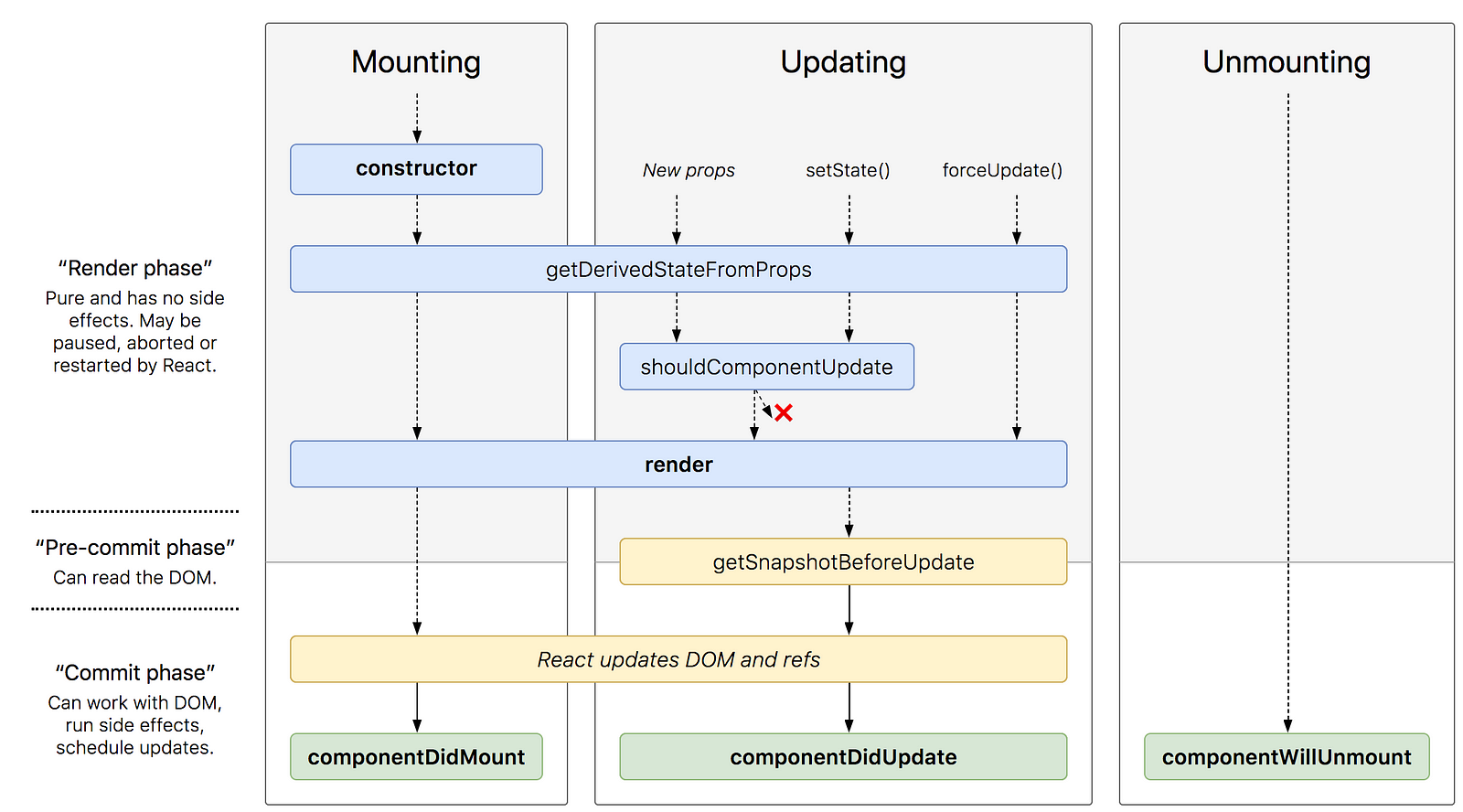 316 |
316 |  607 |
607 |