├── HotStrings
├── test
│ ├── __init__.py
│ ├── teststrings.ahk
│ └── test_hotstrings.py
├── wip_Hotstrings_import.ahk
├── a2module.json
├── a2_menu_item_export_hotstrings.py
├── a2_menu_item_export_hotstring_selected.py
├── a2_menu_item_import_hotstrings.py
└── README.md
├── .gitignore
├── gtranslate
├── a2icon24.png
├── a2module.json
├── README.md
├── gtranslate_langs.py
├── languages.json
├── a2_local_element_gtranslate_lister.py
└── gtranslate.ahk
├── ExplorerCreateFile
├── encodings.json
├── defaults.json
├── README.md
├── a2module.json
├── explorer_create_file.ahk
├── a2_local_element_file_list.py
└── explorer_create_on_paste.ahk
├── UniFormat
├── sets
│ ├── squared.txt
│ ├── squared_black.txt
│ ├── runic.txt
│ ├── bold_italic.txt
│ ├── script_bold.txt
│ ├── flipped.txt
│ ├── black_bold.txt
│ ├── sans-serif_italic.txt
│ ├── sans-serif_bold_italic.txt
│ ├── bold.txt
│ ├── circled_black.txt
│ ├── circled.txt
│ ├── monospace.txt
│ ├── sans-serif.txt
│ ├── script.txt
│ ├── sans-serif_bold.txt
│ ├── black.txt
│ ├── italic.txt
│ ├── double.txt
│ ├── full-width.txt
│ └── unicrush.txt
├── a2module.json
├── README.md
├── uniformat.ahk
└── a2_local_element_uniformat_lister.py
├── texTools
├── wordCount.ahk
├── README.md
├── texTools.ahk
└── a2module.json
├── TestAHK
├── testahk.ahk
├── README.md
└── a2module.json
├── ExplorerHotkeys
├── navOnOff.ahk
├── ftpExplorerCopy.ahk
├── README.md
├── ExplorerHotkeys.ahk
└── a2module.json
├── a2modsource.json
├── DetailsPopup
├── details_paste_entry.ahk
├── a2_menu_item_export_data.py
├── README.md
├── a2_menu_item_import_data.py
├── a2module.json
├── details_popup_menu.ahk
└── a2_local_element_details_lister.py
├── commandLine
├── open_from_explorer.ahk
├── commandLine.ahk
├── README.md
└── a2module.json
├── ocr_tool
├── README.md
├── a2module.json
└── ocr_tool.ahk
├── PastePlain
├── README.md
├── a2module.json
└── paste_plain.ahk
├── ExplorerDiff
├── README.md
├── a2module.json
└── ExplorerDiff.ahk
├── winr
├── README.md
├── a2module.json
└── winr.ahk
├── VolumeControl
├── README.md
├── volume_control.ahk
└── a2module.json
├── tastatur
├── tastatur_umlaut.ahk
├── README.md
├── a2icon.svg
└── a2module.json
├── Slasher
├── README.md
├── slasher.ahk
├── a2module.json
└── a2icon.svg
├── getWinfo
├── a2module.json
├── README.md
└── getWinfo.ahk
├── WindowControl
├── README.md
├── a2module.json
└── window_control.ahk
├── ComfortResize
├── README.md
└── a2module.json
├── webTools
├── a2module.json
├── BBCodeMenu.ahk
├── README.md
└── htmlMenu.ahk
├── CalculAid
├── README.md
├── a2module.json
└── calculAid.ahk
└── README.md
/HotStrings/test/__init__.py:
--------------------------------------------------------------------------------
1 |
--------------------------------------------------------------------------------
/.gitignore:
--------------------------------------------------------------------------------
1 | _config_backups/
2 |
3 | # Exclude all starting with . or _
4 | _ *
5 | .*
6 | *.pyc
7 |
--------------------------------------------------------------------------------
/gtranslate/a2icon24.png:
--------------------------------------------------------------------------------
https://raw.githubusercontent.com/ewerybody/a2.modules/HEAD/gtranslate/a2icon24.png
--------------------------------------------------------------------------------
/HotStrings/wip_Hotstrings_import.ahk:
--------------------------------------------------------------------------------
https://raw.githubusercontent.com/ewerybody/a2.modules/HEAD/HotStrings/wip_Hotstrings_import.ahk
--------------------------------------------------------------------------------
/ExplorerCreateFile/encodings.json:
--------------------------------------------------------------------------------
1 | {
2 | "UTF-8 (Raw)": "UTF-8-RAW",
3 | "UTF-8 (with BOM)": "UTF-8",
4 | "UTF-16 (Raw)": "UTF-16-RAW",
5 | "UTF-16 (with BOM)": "UTF-16",
6 | "ANSI Latin 1 (CP1252)": "CP1252"
7 | }
--------------------------------------------------------------------------------
/UniFormat/sets/squared.txt:
--------------------------------------------------------------------------------
1 | # name=🅂🅀🅄🄰🅁🄴🄳
2 | # case=1
3 | # desc=🅂🅀🅄🄰🅁🄴🄳 upper case letters from the "Enclosed Alphanumeric Supplement"-block.
4 |
5 | A 🄰
6 | B 🄱
7 | C 🄲
8 | D 🄳
9 | E 🄴
10 | F 🄵
11 | G 🄶
12 | H 🄷
13 | I 🄸
14 | J 🄹
15 | K 🄺
16 | L 🄻
17 | M 🄼
18 | N 🄽
19 | O 🄾
20 | P 🄿
21 | Q 🅀
22 | R 🅁
23 | S 🅂
24 | T 🅃
25 | U 🅄
26 | V 🅅
27 | W 🅆
28 | X 🅇
29 | Y 🅈
30 | Z 🅉
--------------------------------------------------------------------------------
/texTools/wordCount.ahk:
--------------------------------------------------------------------------------
1 | wordCount() {
2 | txt := clipboard_get()
3 | if (!txt) {
4 | a2tip("wordCount: Nothing selected!")
5 | Return
6 | }
7 |
8 | words := StrSplit(txt, [A_Tab, A_Space, "`n", "`r"])
9 | StringLen, length, txt
10 | lines := StrSplit(txt, "`n")
11 |
12 | msg := "wordCount: " words.MaxIndex() "`n"
13 | msg .= "characters: " length "`n"
14 | msg .= "lines: " lines.MaxIndex() "`n"
15 | a2tip(msg, wordCount_tooltip_timeout)
16 | }
17 |
--------------------------------------------------------------------------------
/TestAHK/testahk.ahk:
--------------------------------------------------------------------------------
1 | ; TestAHK - testahk.ahk
2 | ; author: Eric Werner
3 | ; created: 2017 7 6
4 |
5 | testahk() {
6 | sel := clipboard_get()
7 |
8 | if (sel == "") {
9 | tt("testahk: Nothing selected!", 1)
10 | Return
11 | }
12 |
13 | tt("testahk...", 1)
14 | sel := "#SingleInstance force`n" sel
15 | testfile = %A_Temp%\_a2_test_ahk.ahk
16 | FileDelete, %testfile%
17 | FileAppend, %sel%, %testfile%, UTF-8
18 | Run, %A_AhkPath% %testfile%
19 | }
20 |
--------------------------------------------------------------------------------
/TestAHK/README.md:
--------------------------------------------------------------------------------
1 | # TestAHK
2 |
3 | ### Tiny little Autohotkey snippet to test other Autohotkey snippets.
4 |
5 | Default Hotkey: Win + Shift + H
6 |
7 | * gets the selection
8 | * writes it to a temp file
9 | * calls Autohotkey.exe with the file
10 |
11 | Example use on the Autohotkey documentation:
12 | 
13 |
14 |
15 | [file a **TestAHK** issue](https://github.com/ewerybody/a2.modules/issues/new?labels=mod%3ATestAHK)
16 |
--------------------------------------------------------------------------------
/ExplorerHotkeys/navOnOff.ahk:
--------------------------------------------------------------------------------
1 | ; ExplorerHotkeys - navOnOff.ahk
2 | ; author: Eric Werner
3 | ; created: 2018 5 9
4 |
5 | ExplorerHotkeys_NavOnOff() {
6 | ; A little saver method to do this? I used to have trouble with
7 | ; direct send, now it seems good again :|
8 | tt("Toggle Navigation Pane", 0.5)
9 |
10 | Sleep, 100
11 | Send, {Alt Down}
12 | Sleep, 100
13 | Send, {Alt Up}
14 | Sleep, 100
15 | Send, v
16 | Sleep, 100
17 | Send, n
18 | Sleep, 100
19 | Send, {Space}
20 | }
21 |
--------------------------------------------------------------------------------
/a2modsource.json:
--------------------------------------------------------------------------------
1 | {
2 | "description": "The standard a2 script module collection.",
3 | "maintainer": "ewerybody",
4 | "maintainer_at": "gmail.com",
5 | "name": "a2.modules",
6 | "news": "* HotStrings: 0.3.2\n - made imported hotstring group selected\n - try handling encoding when parsing files\n - Parser to only log when successfully parsed\n - import now with feedback dialogs #73",
7 | "update_url": "https://github.com/ewerybody/a2.modules",
8 | "url": "https://github.com/ewerybody/a2.modules#a2modules",
9 | "version": "0.7.2",
10 | "zip_size": 88441
11 | }
--------------------------------------------------------------------------------
/DetailsPopup/details_paste_entry.ahk:
--------------------------------------------------------------------------------
1 | #Persistent
2 | SendMode, Input
3 |
4 | entry := A_Args[1]
5 |
6 | a2tip("Left Mouse Button or Return/Enter ⮐ To Paste`nEscape To Cancel", 0)
7 |
8 | Escape::Gosub, Details_Abort
9 | ~LButton::Gosub, Details_Paste
10 | Return::Gosub, Details_Paste
11 | Enter::Gosub, Details_Paste
12 |
13 | return
14 |
15 | Details_Paste:
16 | a2tip("DetailsPopup: Waiting for Clipboard ...", 0)
17 | clipboard_paste(entry)
18 |
19 | FileAppend, 0, *
20 | ExitApp
21 | Return
22 |
23 | Details_Abort:
24 | FileAppend, 1, *
25 | ExitApp
26 | Return
27 |
--------------------------------------------------------------------------------
/commandLine/open_from_explorer.ahk:
--------------------------------------------------------------------------------
1 | open_from_explorer() {
2 | ; TODO make this variable for eg PowerShell or others
3 | ; for powershell this is:
4 | ; powershell.exe -noexit -command "cd %path%"
5 | ; cmd_exe := path_join(A_WinDir, "System32", "cmd.exe")
6 | ; this is in the ComSpec built-in variable!
7 | path := explorer_get_path()
8 |
9 | cmd_exe := ComSpec
10 | Run, %cmd_exe% /k, %path%,, pid
11 |
12 | Sleep, 100
13 | win_id := WinExist("ahk_pid " pid)
14 | a2tip("commandLine from Explorer: (pid: " pid " hwnd: " win_id ")`n" path)
15 |
16 | window_activate(win_id, 1)
17 | }
18 |
--------------------------------------------------------------------------------
/ExplorerHotkeys/ftpExplorerCopy.ahk:
--------------------------------------------------------------------------------
1 | ftpExplorerCopy() {
2 | WinGet, this_id, ID, A
3 | ;legacy: Win 7: ;ControlGetText, path, ToolbarWindow322, ahk_id %this_id%
4 | ;Win 8 ;ControlGetText, path, ToolbarWindow323, ahk_id %this_id%
5 |
6 | selection := explorer_get_selected(this_id)
7 | if !(selection.Length()) {
8 | a2tip("Nothing selected!")
9 | Return
10 | }
11 |
12 | result := []
13 | for i, pth in selection
14 | {
15 | if (Substr(pth, 1, 6) == "ftp://")
16 | result.Push("http://" SubStr(pth, InStr(pth, "@") + 1))
17 | }
18 |
19 | Clipboard := string_join(result, "`n")
20 | a2tip(Clipboard)
21 | }
--------------------------------------------------------------------------------
/UniFormat/sets/squared_black.txt:
--------------------------------------------------------------------------------
1 | # name=🆂🆀🆄🅰🆁🅴🅳 🅱🅻🅰🅲🅺
2 | # case=1
3 | # desc=🆂🆀🆄🅰🆁🅴🅳 🅱🅻🅰🅲🅺 upper case letters. Although there is nothing about it the "Enclosed Alphanumeric Supplement"-block page some of these got special meanings like 🅰 refering to Blood type A and 🅿 meaning "parking space".
4 |
5 | A 🅰
6 | B 🅱
7 | C 🅲
8 | D 🅳
9 | E 🅴
10 | F 🅵
11 | G 🅶
12 | H 🅷
13 | I 🅸
14 | J 🅹
15 | K 🅺
16 | L 🅻
17 | M 🅼
18 | N 🅽
19 | O 🅾
20 | P 🅿
21 | Q 🆀
22 | R 🆁
23 | S 🆂
24 | T 🆃
25 | U 🆄
26 | V 🆅
27 | W 🆆
28 | X 🆇
29 | Y 🆈
30 | Z 🆉
31 |
--------------------------------------------------------------------------------
/UniFormat/sets/runic.txt:
--------------------------------------------------------------------------------
1 | # name=ᚱꂹꋊᛙꏸ
2 | # case=1
3 | # desc="ᚱꂹꋊᛙꏸ style english alphabet" from the the Fancy-Letters page on unicode-table.com. Mostly from the runic and Yi blocks.
4 |
5 | A ꋫ
6 | B ꃃ ꃳ
7 | C ꏸ ꀯ ꁊ
8 | D ꁕ
9 | E ꍟ ᛊ
10 | F ꄘ ᚩ ꄝ
11 | G ꁅ ꁍ ꐄ
12 | H ꑛ ꃄ ꀍ ꁝ
13 | I ᛙ ꂑ
14 | J ꀭ ꀮ 𐐈
15 | K ꀗ
16 | L ꒒
17 | M ꁒ ᛖ
18 | N ꋊ ꊮ ꇀ ᛞ ꁹ ꇁ ꎈ
19 | O ꆂ ꃪ 𐊔
20 | P ꉣ
21 | Q ꁸ
22 | R ᚱ ꒓
23 | S ꌚ ꂢ ᛇ ꒔ ꁴ
24 | T ꓅ ᛠ
25 | U ꂹ ꐇ ꁁ
26 | V ꏝ
27 | W ꅐ
28 | X ꇓ ꒾
29 | Y ꐟ
30 | Z ꁴ
31 |
--------------------------------------------------------------------------------
/commandLine/commandLine.ahk:
--------------------------------------------------------------------------------
1 | commandLine_invoke() {
2 | path := explorer_get_path()
3 |
4 | ControlGetFocus, cl_control, A
5 | if (cl_control != "Edit1")
6 | Return
7 |
8 | ControlGetText, cmd, Edit1, A
9 | If (SubStr(cmd, 1, 1) != "<")
10 | Return
11 |
12 | If (SubStr(cmd, 1, 2) == "<<")
13 | hidden := 1
14 |
15 | Send,{ESC}
16 |
17 | cl_CommandParameterC := "/k"
18 | cmd_exe := ComSpec
19 | if (hidden) {
20 | cmd := SubStr(cmd, 3)
21 | Run, %cmd_exe% %cl_CommandParameterC% %cmd%, %path%, hide
22 | }
23 | else {
24 | cmd := SubStr(cmd, 2)
25 | Run, %cmd_exe% %cl_CommandParameterC% %cmd%, %path%
26 | }
27 | }
28 |
--------------------------------------------------------------------------------
/ocr_tool/README.md:
--------------------------------------------------------------------------------
1 | # OCR Tool
2 |
3 | ### Simple [Optical Character Recognition](https://en.wikipedia.org/wiki/Optical_character_recognition) to get unselectable text into clipboard.
4 |
5 | Draw a rectangle around some letters, Get the text into your clipboard. Win+Shift+O
6 |
7 | This makes use of a **Windows built-in OCR solution** the credit for doing the Autohotkey implementation goes to **malcev** and **teadrinker** from the Autohotkey-forums.: https://www.autohotkey.com/boards/viewtopic.php?t=72674
8 |
9 | 
10 |
11 | For ideas or problems about this please: [file an **OCR Tool** issue](https://github.com/ewerybody/a2.modules/issues/new?labels=mod%3Aocr_tool)
12 |
--------------------------------------------------------------------------------
/DetailsPopup/a2_menu_item_export_data.py:
--------------------------------------------------------------------------------
1 | import a2util
2 | from a2qt import QtWidgets
3 |
4 |
5 | def main(a2, mod):
6 | element_name = 'details_lister'
7 | current_data = mod.get_user_cfg().setdefault(element_name, {})
8 | if not current_data:
9 | Msgbox = QtWidgets.QMessageBox
10 | cfg = Msgbox.Abort | Msgbox.Retry | Msgbox.Ignore
11 | Msgbox.critical(a2.win, 'ERROR', 'There is nothing to export!', *cfg)
12 | return
13 |
14 | file_path, _filter = QtWidgets.QFileDialog.getSaveFileName(
15 | a2.win, 'Export Hotstrings Data', a2.paths.a2, '*.json'
16 | )
17 |
18 | if not file_path:
19 | return
20 |
21 | a2util.json_write(file_path, current_data)
22 |
--------------------------------------------------------------------------------
/PastePlain/README.md:
--------------------------------------------------------------------------------
1 | # PastePlain
2 |
3 | ### combines functionality regarding on what you have in your clipboard:
4 | * paste **text** without formatting
5 | * paste **file paths** or base names
6 |
7 | The standard Hotkey is: Win + V
8 |
9 |
10 |
11 | With some **formatted text** it allows to just paste **without the formatting**:
12 |
13 | 
14 |
15 |
16 |
17 | With **copied files** it enables you to **paste paths** or just the **short names**:
18 |
19 | 
20 |
21 |
22 | If you have further ideas or requests please: [file a **PastePlain** issue](https://github.com/ewerybody/a2.modules/issues/new?labels=mod%3APastePlain)
23 |
--------------------------------------------------------------------------------
/UniFormat/sets/bold_italic.txt:
--------------------------------------------------------------------------------
1 | # name=𝑩𝒐𝒍𝒅 𝑰𝒕𝒂𝒍𝒊𝒄
2 | # desc=𝑩𝒐𝒍𝒅 𝑰𝒕𝒂𝒍𝒊𝒄 letters from the "Mathematical Alphanumeric Symbols"-block.
3 |
4 | A 𝑨
5 | B 𝑩
6 | C 𝑪
7 | D 𝑫
8 | E 𝑬
9 | F 𝑭
10 | G 𝑮
11 | H 𝑯
12 | I 𝑰
13 | J 𝑱
14 | K 𝑲
15 | L 𝑳
16 | M 𝑴
17 | N 𝑵
18 | O 𝑶
19 | P 𝑷
20 | Q 𝑸
21 | R 𝑹
22 | S 𝑺
23 | T 𝑻
24 | U 𝑼
25 | V 𝑽
26 | W 𝑾
27 | X 𝑿
28 | Y 𝒀
29 | Z 𝒁
30 | a 𝒂
31 | b 𝒃
32 | c 𝒄
33 | d 𝒅
34 | e 𝒆
35 | f 𝒇
36 | g 𝒈
37 | h 𝒉
38 | i 𝒊
39 | j 𝒋
40 | k 𝒌
41 | l 𝒍
42 | m 𝒎
43 | n 𝒏
44 | o 𝒐
45 | p 𝒑
46 | q 𝒒
47 | r 𝒓
48 | s 𝒔
49 | t 𝒕
50 | u 𝒖
51 | v 𝒗
52 | w 𝒘
53 | x 𝒙
54 | y 𝒚
55 | z 𝒛
56 |
--------------------------------------------------------------------------------
/UniFormat/sets/script_bold.txt:
--------------------------------------------------------------------------------
1 | # name=𝓢𝓬𝓻𝓲𝓹𝓽 𝓑𝓸𝓵𝓭
2 | # desc=𝓢𝓬𝓻𝓲𝓹𝓽 𝓑𝓸𝓵𝓭 letters from the "Mathematical Alphanumeric Symbols"-block.
3 |
4 | A 𝓐
5 | B 𝓑
6 | C 𝓒
7 | D 𝓓
8 | E 𝓔
9 | F 𝓕
10 | G 𝓖
11 | H 𝓗
12 | I 𝓘
13 | J 𝓙
14 | K 𝓚
15 | L 𝓛
16 | M 𝓜
17 | N 𝓝
18 | O 𝓞
19 | P 𝓟
20 | Q 𝓠
21 | R 𝓡
22 | S 𝓢
23 | T 𝓣
24 | U 𝓤
25 | V 𝓥
26 | W 𝓦
27 | X 𝓧
28 | Y 𝓨
29 | Z 𝓩
30 | a 𝓪
31 | b 𝓫
32 | c 𝓬
33 | d 𝓭
34 | e 𝓮
35 | f 𝓯
36 | g 𝓰
37 | h 𝓱
38 | i 𝓲
39 | j 𝓳
40 | k 𝓴
41 | l 𝓵
42 | m 𝓶
43 | n 𝓷
44 | o 𝓸
45 | p 𝓹
46 | q 𝓺
47 | r 𝓻
48 | s 𝓼
49 | t 𝓽
50 | u 𝓾
51 | v 𝓿
52 | w 𝔀
53 | x 𝔁
54 | y 𝔂
55 | z 𝔃
56 |
--------------------------------------------------------------------------------
/DetailsPopup/README.md:
--------------------------------------------------------------------------------
1 | # DetailsPopup
2 |
3 | ### A Key/Value store UI for things to paste into fields.
4 |
5 | 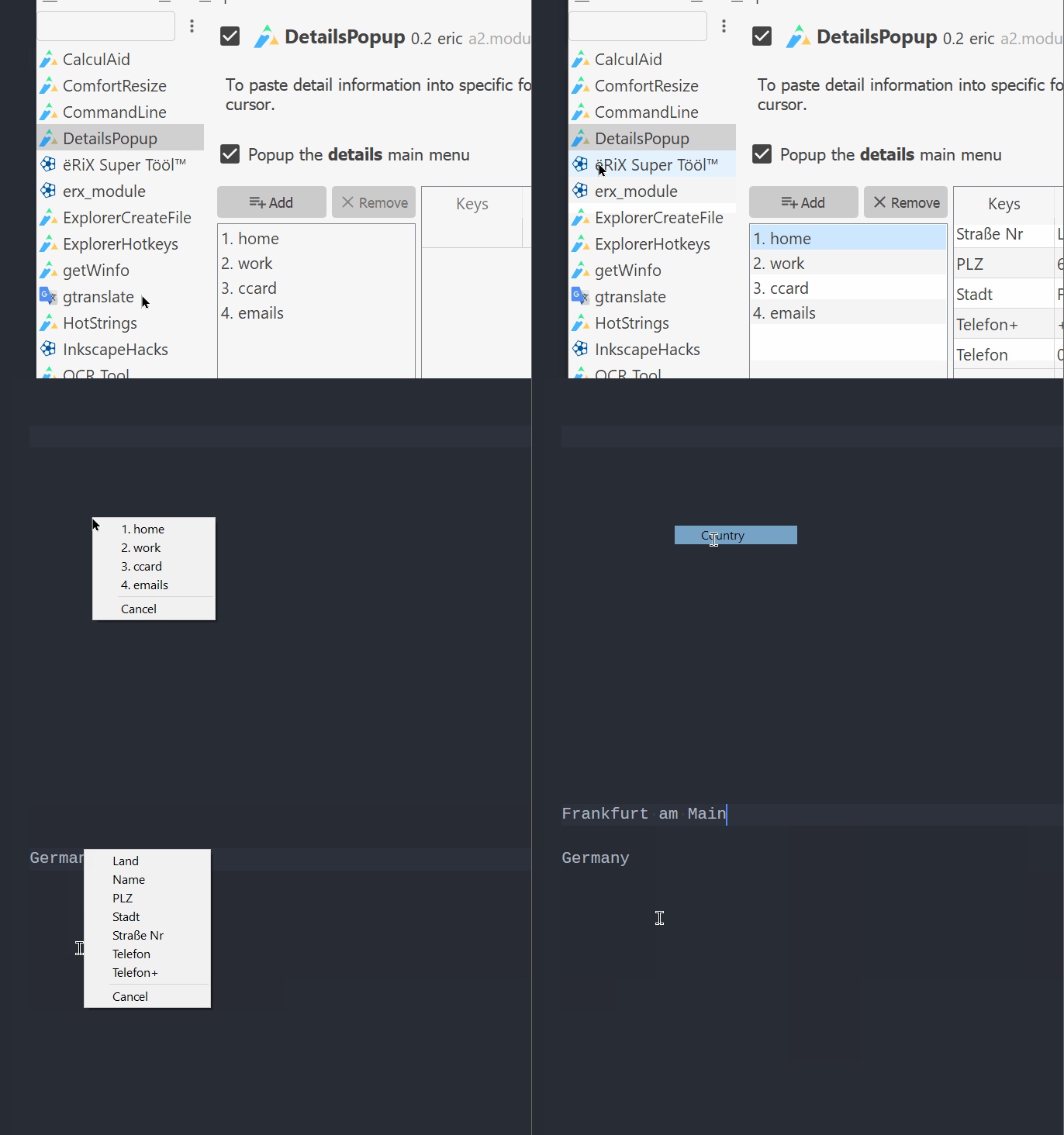
6 |
7 | * Have a menu popup with things to be pasted on Left Click or Return/Enter.
8 | * Each selection removes the item from current list until all is pasted or canceled.
9 | * "**Finish after first selected item**" ends the pasting process already when one item was pasted.
10 | * Import/Export data via JSON files from the Module menu.
11 |
12 | For any further input and ideas please: [file a **DetailsPopup** issue](https://github.com/ewerybody/a2.modules/issues/new?labels=mod%3ADetailsPopup)
13 |
--------------------------------------------------------------------------------
/UniFormat/sets/flipped.txt:
--------------------------------------------------------------------------------
1 | # name=uʍop-ǝpᴉƨpu pǝppᴉɿɟ
2 | # reverse=1
3 | # desc=Letters uʍop-ǝpᴉƨpu pǝppᴉɿɟ (with varying legibility ꓒIʍ).
4 |
5 | A ꓯ ∀
6 | B ꓭ 𐤡 𐐒
7 | C ꓛ Ɔ Ↄ
8 | D ꓷ 𐤧 ⋳ ⍧ ⦇
9 | E ꓱ Ǝ ℈
10 | F ꓞ ⅎ
11 | G ꓨ ⅁
12 |
13 |
14 | J ꓩ 𐊓 ſ
15 | K ꓘ Ʞ
16 | L ⅂ Ꞁ 𐐓
17 | M ꟽ
18 | N ᴻ
19 |
20 | P ꓒ d
21 | Q Ò Ờ
22 | R ꓤ ᴚ
23 |
24 | T Ʇ
25 | U ꓵ ⋂ ∩
26 | V Ʌ ᴧ ꓥ
27 | W ʍ M 𐤵
28 |
29 | Y ⅄
30 |
31 | a ɐ
32 | b q
33 | c ↄ
34 | d p
35 | e ǝ Ə
36 | f ɟ
37 | g ᵷ ɓ
38 | h ɥ
39 | i ᴉ ᵎ
40 | j ɾ
41 | k ʞ
42 | l ɿ ℩ ꞁ
43 | m ɯ Ɯ
44 | n u
45 |
46 | p d
47 | q b
48 | r ɹ
49 | s ƨ
50 | t ʇ
51 | u n
52 | v ʌ
53 | w ʍ
54 |
55 | y ʎ ɦ Ᏺ
56 |
57 | & ⅋
58 |
59 | 1 ꞁ ߁
60 | 2 ↊
61 | 3 ↋
62 | 4 ߈ ꕈ
63 |
64 | 6 9
65 | 7 ㄥ
66 | 9 6
67 |
68 | ! ¡
69 | ? ¿
70 |
--------------------------------------------------------------------------------
/UniFormat/sets/black_bold.txt:
--------------------------------------------------------------------------------
1 | # name=𝕭𝖑𝖆𝖈𝖐 𝖑𝖊𝖙𝖙𝖊𝖗𝖘 𝖇𝖔𝖑𝖉
2 | # desc=Bold 𝕱𝖗𝖆𝖐𝖙𝖚𝖗/𝖇𝖑𝖆𝖈𝖐 𝖑𝖊𝖙𝖙𝖊𝖗𝖘 from the "Mathematical Alphanumeric Symbols"-block.
3 |
4 | A 𝕬
5 | B 𝕭
6 | C 𝕮
7 | D 𝕯
8 | E 𝕰
9 | F 𝕱
10 | G 𝕲
11 | H 𝕳
12 | I 𝕴
13 | J 𝕵
14 | K 𝕶
15 | L 𝕷
16 | M 𝕸
17 | N 𝕹
18 | O 𝕺
19 | P 𝕻
20 | Q 𝕼
21 | R 𝕽
22 | S 𝕾
23 | T 𝕿
24 | U 𝖀
25 | V 𝖁
26 | W 𝖂
27 | X 𝖃
28 | Y 𝖄
29 | Z 𝖅
30 |
31 | a 𝖆
32 | b 𝖇
33 | c 𝖈
34 | d 𝖉
35 | e 𝖊
36 | f 𝖋
37 | g 𝖌
38 | h 𝖍
39 | i 𝖎
40 | j 𝖏
41 | k 𝖐
42 | l 𝖑
43 | m 𝖒
44 | n 𝖓
45 | o 𝖔
46 | p 𝖕
47 | q 𝖖
48 | r 𝖗
49 | s 𝖘
50 | t 𝖙
51 | u 𝖚
52 | v 𝖛
53 | w 𝖜
54 | x 𝖝
55 | y 𝖞
56 | z 𝖟
57 |
--------------------------------------------------------------------------------
/UniFormat/sets/sans-serif_italic.txt:
--------------------------------------------------------------------------------
1 | # name=𝘚𝘢𝘯𝘴 𝘚𝘦𝘳𝘪𝘧 𝘐𝘵𝘢𝘭𝘪𝘤
2 | # desc=𝘚𝘢𝘯𝘴 𝘚𝘦𝘳𝘪𝘧 𝘐𝘵𝘢𝘭𝘪𝘤 letters from the "Mathematical Alphanumeric Symbols"-block.
3 |
4 | A 𝘈
5 | B 𝘉
6 | C 𝘊
7 | D 𝘋
8 | E 𝘌
9 | F 𝘍
10 | G 𝘎
11 | H 𝘏
12 | I 𝘐
13 | J 𝘑
14 | K 𝘒
15 | L 𝘓
16 | M 𝘔
17 | N 𝘕
18 | O 𝘖
19 | P 𝘗
20 | Q 𝘘
21 | R 𝘙
22 | S 𝘚
23 | T 𝘛
24 | U 𝘜
25 | V 𝘝
26 | W 𝘞
27 | X 𝘟
28 | Y 𝘠
29 | Z 𝘡
30 |
31 | a 𝘢
32 | b 𝘣
33 | c 𝘤
34 | d 𝘥
35 | e 𝘦
36 | f 𝘧
37 | g 𝘨
38 | h 𝘩
39 | i 𝘪
40 | j 𝘫
41 | k 𝘬
42 | l 𝘭
43 | m 𝘮
44 | n 𝘯
45 | o 𝘰
46 | p 𝘱
47 | q 𝘲
48 | r 𝘳
49 | s 𝘴
50 | t 𝘵
51 | u 𝘶
52 | v 𝘷
53 | w 𝘸
54 | x 𝘹
55 | y 𝘺
56 | z 𝘻
57 |
--------------------------------------------------------------------------------
/ExplorerDiff/README.md:
--------------------------------------------------------------------------------
1 | # ExplorerDiff
2 |
3 | ### Easy diffing in the Windows Explorer.
4 |
5 | * Default Hotkey Ctrl+D. (Overrides "Delete" ...)
6 | * Set a "Diff application path". For instance
7 | [`C:\Program Files\WinMerge\WinMergeU.exe`](https://winmerge.org/downloads/)
8 | * Select a pair of files of folders and press the hotkey. Voilà
9 | * press the hotkey on Windows Explorer without having a file selected:
10 | Selects the Folder as first path and waits for you to select another one.
11 | * press hotkey in one Explorere, goto another one and press again
12 | to diff the two files without fiddling with dialogs.
13 |
14 | For any further input and ideas please: [file a **ExplorerDiff** issue](https://github.com/ewerybody/a2.modules/issues/new?labels=mod%3AExplorerDiff)
15 |
--------------------------------------------------------------------------------
/winr/README.md:
--------------------------------------------------------------------------------
1 | # WinR
2 |
3 | ### Super Windows+R that checks your selection and opens up according browsers with the given locations/urls.
4 |
5 | For example this URL that you cannot click:
6 |
7 | > https://github.com/ewerybody/a2
8 |
9 | * Just tripple click it to select
10 | * Win+R and
11 | * bam it opens up in your webbrowser!
12 |
13 | This allows handling of:
14 | * **File** or **Directory** full paths: Opens them directly or in your file browser.
15 | * **relative paths** by searching in a given list of parent paths.
16 | * **URL**: Opens URL in webbrowser.
17 |
18 |
19 | If you need more functionality for this or have any ideas: [file a **WinR** issue](https://github.com/ewerybody/a2.modules/issues/new?labels=mod%3AWinR) Much appreciated!
20 |
--------------------------------------------------------------------------------
/UniFormat/sets/sans-serif_bold_italic.txt:
--------------------------------------------------------------------------------
1 | # name=𝙎𝙖𝙣𝙨 𝙎𝙚𝙧𝙞𝙛 𝘽𝙤𝙡𝙙 𝙄𝙩𝙖𝙡𝙞𝙘
2 | # desc=𝙎𝙖𝙣𝙨 𝙎𝙚𝙧𝙞𝙛 𝘽𝙤𝙡𝙙 𝙄𝙩𝙖𝙡𝙞𝙘 letters from the "Mathematical Alphanumeric Symbols"-block.
3 |
4 | A 𝘼
5 | B 𝘽
6 | C 𝘾
7 | D 𝘿
8 | E 𝙀
9 | F 𝙁
10 | G 𝙂
11 | H 𝙃
12 | I 𝙄
13 | J 𝙅
14 | K 𝙆
15 | L 𝙇
16 | M 𝙈
17 | N 𝙉
18 | O 𝙊
19 | P 𝙋
20 | Q 𝙌
21 | R 𝙍
22 | S 𝙎
23 | T 𝙏
24 | U 𝙐
25 | V 𝙑
26 | W 𝙒
27 | X 𝙓
28 | Y 𝙔
29 | Z 𝙕
30 |
31 | a 𝙖
32 | b 𝙗
33 | c 𝙘
34 | d 𝙙
35 | e 𝙚
36 | f 𝙛
37 | g 𝙜
38 | h 𝙝
39 | i 𝙞
40 | j 𝙟
41 | k 𝙠
42 | l 𝙡
43 | m 𝙢
44 | n 𝙣
45 | o 𝙤
46 | p 𝙥
47 | q 𝙦
48 | r 𝙧
49 | s 𝙨
50 | t 𝙩
51 | u 𝙪
52 | v 𝙫
53 | w 𝙬
54 | x 𝙭
55 | y 𝙮
56 | z 𝙯
57 |
--------------------------------------------------------------------------------
/UniFormat/sets/bold.txt:
--------------------------------------------------------------------------------
1 | # name=𝐁𝐨𝐥𝐝
2 | # desc=𝐁𝐨𝐥𝐝 𝐥𝐞𝐭𝐭𝐞𝐫𝐬 from the "Mathematical Alphanumeric Symbols"-block.
3 |
4 | A 𝐀
5 | B 𝐁
6 | C 𝐂
7 | D 𝐃
8 | E 𝐄
9 | F 𝐅
10 | G 𝐆
11 | H 𝐇
12 | I 𝐈
13 | J 𝐉
14 | K 𝐊
15 | L 𝐋
16 | M 𝐌
17 | N 𝐍
18 | O 𝐎
19 | P 𝐏
20 | Q 𝐐
21 | R 𝐑
22 | S 𝐒
23 | T 𝐓
24 | U 𝐔
25 | V 𝐕
26 | W 𝐖
27 | X 𝐗
28 | Y 𝐘
29 | Z 𝐙
30 | a 𝐚
31 | b 𝐛
32 | c 𝐜
33 | d 𝐝
34 | e 𝐞
35 | f 𝐟
36 | g 𝐠
37 | h 𝐡
38 | i 𝐢
39 | j 𝐣
40 | k 𝐤
41 | l 𝐥
42 | m 𝐦
43 | n 𝐧
44 | o 𝐨
45 | p 𝐩
46 | q 𝐪
47 | r 𝐫
48 | s 𝐬
49 | t 𝐭
50 | u 𝐮
51 | v 𝐯
52 | w 𝐰
53 | x 𝐱
54 | y 𝐲
55 | z 𝐳
56 |
57 |
58 | 0 𝟎
59 | 1 𝟏
60 | 2 𝟐
61 | 3 𝟑
62 | 4 𝟒
63 | 5 𝟓
64 | 6 𝟔
65 | 7 𝟕
66 | 8 𝟖
67 | 9 𝟗
68 |
--------------------------------------------------------------------------------
/UniFormat/sets/circled_black.txt:
--------------------------------------------------------------------------------
1 | # name=🅒🅘🅡🅒🅛🅔🅓 🅑🅛🅐🅒🅚
2 | # case=1
3 | # desc=🅒🅘🅡🅒🅛🅔🅓 white on black upper case letters and numbers from the Enclosed Alphanumeric Supplement and other blocks.
4 | #
5 | # The numbers have multiple sources! For all but 0: Dingbat circled digits | sans-serif
6 | # For the 0: enclosed-alphanumeric-supplement | enclosed-alphanumerics
7 |
8 | A 🅐
9 | B 🅑
10 | C 🅒
11 | D 🅓
12 | E 🅔
13 | F 🅕
14 | G 🅖
15 | H 🅗
16 | I 🅘
17 | J 🅙
18 | K 🅚
19 | L 🅛
20 | M 🅜
21 | N 🅝
22 | O 🅞
23 | P 🅟
24 | Q 🅠
25 | R 🅡
26 | S 🅢
27 | T 🅣
28 | U 🅤
29 | V 🅥
30 | W 🅦
31 | X 🅧
32 | Y 🅨
33 | Z 🅩
34 |
35 | 0 🄌 ⓿
36 | 1 ➊ ❶
37 | 2 ➋ ❷
38 | 3 ➌ ❸
39 | 4 ➍ ❹
40 | 5 ➎ ❺
41 | 6 ➏ ❻
42 | 7 ➐ ❼
43 | 8 ➑ ❽
44 | 9 ➒ ❾
45 |
--------------------------------------------------------------------------------
/VolumeControl/README.md:
--------------------------------------------------------------------------------
1 | # VolumeControl
2 |
3 | Hotkeys for Sound Volume control.
4 |
5 | ### Volume Up/Down Win+Alt+WheelUp/Down
6 |
7 | Lower or Raise the **master** sound volume.
8 |
9 | ### Step
10 |
11 | Sets the amount of steps taken on the volume scale used by the Volume Up/Down hotkets.
12 |
13 | ### Toggle Mute
14 |
15 | Sets the audio mute state On or Off according to the current state.
16 |
17 | This one currently has no default key. If you have a good idea about what key to take for this by default, I'd like to hear about it! [file a **VolumeControl** issue](https://github.com/ewerybody/a2.modules/issues/new?labels=mod%3AVolumeControl) Thanks!
18 |
19 | ### Logarithmic Behaviour
20 |
21 | Makes it so that the changes are more finegrained at the lower end of the volume scale and bigger in the upper.
22 |
--------------------------------------------------------------------------------
/UniFormat/sets/circled.txt:
--------------------------------------------------------------------------------
1 | # name=ⓒⓘⓡⓒⓛⓔⓓ
2 | # desc=Ⓒⓘⓡⓒⓛⓔⓓ letters and numbers from the Enclosed Alphanumerics block.
3 |
4 | A Ⓐ
5 | B Ⓑ
6 | C Ⓒ
7 | D Ⓓ
8 | E Ⓔ
9 | F Ⓕ
10 | G Ⓖ
11 | H Ⓗ
12 | I Ⓘ
13 | J Ⓙ
14 | K Ⓚ
15 | L Ⓛ
16 | M Ⓜ
17 | N Ⓝ
18 | O Ⓞ
19 | P Ⓟ
20 | Q Ⓠ
21 | R Ⓡ
22 | S Ⓢ
23 | T Ⓣ
24 | U Ⓤ
25 | V Ⓥ
26 | W Ⓦ
27 | X Ⓧ
28 | Y Ⓨ
29 | Z Ⓩ
30 | a ⓐ
31 | b ⓑ
32 | c ⓒ
33 | d ⓓ
34 | e ⓔ
35 | f ⓕ
36 | g ⓖ
37 | h ⓗ
38 | i ⓘ
39 | j ⓙ
40 | k ⓚ
41 | l ⓛ
42 | m ⓜ
43 | n ⓝ
44 | o ⓞ
45 | p ⓟ
46 | q ⓠ
47 | r ⓡ
48 | s ⓢ
49 | t ⓣ
50 | u ⓤ
51 | v ⓥ
52 | w ⓦ
53 | x ⓧ
54 | y ⓨ
55 | z ⓩ
56 |
57 | 0 ⓪
58 | 1 ①
59 | 2 ②
60 | 3 ③
61 | 4 ④
62 | 5 ⑤
63 | 6 ⑥
64 | 7 ⑦
65 | 8 ⑧
66 | 9 ⑨
67 | 10 ⑩
68 | 11 ⑪
69 | 12 ⑫
70 | 13 ⑬
71 | 14 ⑭
72 | 15 ⑮
73 | 16 ⑯
74 | 17 ⑰
75 | 18 ⑱
76 | 19 ⑲
77 | 20 ⑳
78 |
--------------------------------------------------------------------------------
/UniFormat/sets/monospace.txt:
--------------------------------------------------------------------------------
1 | # name=𝙼𝚘𝚗𝚘𝚜𝚙𝚊𝚌𝚎
2 | # desc=𝙼𝚘𝚗𝚘𝚜𝚙𝚊𝚌𝚎 𝚕𝚎𝚝𝚝𝚎𝚛𝚜 from the "Mathematical Alphanumeric Symbols"-block
3 |
4 | A 𝙰
5 | B 𝙱
6 | C 𝙲
7 | D 𝙳
8 | E 𝙴
9 | F 𝙵
10 | G 𝙶
11 | H 𝙷
12 | I 𝙸
13 | J 𝙹
14 | K 𝙺
15 | L 𝙻
16 | M 𝙼
17 | N 𝙽
18 | O 𝙾
19 | P 𝙿
20 | Q 𝚀
21 | R 𝚁
22 | S 𝚂
23 | T 𝚃
24 | U 𝚄
25 | V 𝚅
26 | W 𝚆
27 | X 𝚇
28 | Y 𝚈
29 | Z 𝚉
30 |
31 | a 𝚊
32 | b 𝚋
33 | c 𝚌
34 | d 𝚍
35 | e 𝚎
36 | f 𝚏
37 | g 𝚐
38 | h 𝚑
39 | i 𝚒
40 | j 𝚓
41 | k 𝚔
42 | l 𝚕
43 | m 𝚖
44 | n 𝚗
45 | o 𝚘
46 | p 𝚙
47 | q 𝚚
48 | r 𝚛
49 | s 𝚜
50 | t 𝚝
51 | u 𝚞
52 | v 𝚟
53 | w 𝚠
54 | x 𝚡
55 | y 𝚢
56 | z 𝚣
57 |
58 | 0 𝟶
59 | 1 𝟷
60 | 2 𝟸
61 | 3 𝟹
62 | 4 𝟺
63 | 5 𝟻
64 | 6 𝟼
65 | 7 𝟽
66 | 8 𝟾
67 | 9 𝟿
68 |
--------------------------------------------------------------------------------
/UniFormat/sets/sans-serif.txt:
--------------------------------------------------------------------------------
1 | # name=𝖲𝖺𝗇𝗌 𝖲𝖾𝗋𝗂𝖿
2 | # desc=𝖲𝖺𝗇𝗌 𝖲𝖾𝗋𝗂𝖿 letters from the "Mathematical Alphanumeric Symbols"-block.
3 |
4 | A 𝖠
5 | B 𝖡
6 | C 𝖢
7 | D 𝖣
8 | E 𝖤
9 | F 𝖥
10 | G 𝖦
11 | H 𝖧
12 | I 𝖨
13 | J 𝖩
14 | K 𝖪
15 | L 𝖫
16 | M 𝖬
17 | N 𝖭
18 | O 𝖮
19 | P 𝖯
20 | Q 𝖰
21 | R 𝖱
22 | S 𝖲
23 | T 𝖳
24 | U 𝖴
25 | V 𝖵
26 | W 𝖶
27 | X 𝖷
28 | Y 𝖸
29 | Z 𝖹
30 |
31 | a 𝖺
32 | b 𝖻
33 | c 𝖼
34 | d 𝖽
35 | e 𝖾
36 | f 𝖿
37 | g 𝗀
38 | h 𝗁
39 | i 𝗂
40 | j 𝗃
41 | k 𝗄
42 | l 𝗅
43 | m 𝗆
44 | n 𝗇
45 | o 𝗈
46 | p 𝗉
47 | q 𝗊
48 | r 𝗋
49 | s 𝗌
50 | t 𝗍
51 | u 𝗎
52 | v 𝗏
53 | w 𝗐
54 | x 𝗑
55 | y 𝗒
56 | z 𝗓
57 |
58 | 0 𝟢
59 | 1 𝟣
60 | 2 𝟤
61 | 3 𝟥
62 | 4 𝟦
63 | 5 𝟧
64 | 6 𝟨
65 | 7 𝟩
66 | 8 𝟪
67 | 9 𝟫
68 |
--------------------------------------------------------------------------------
/UniFormat/sets/script.txt:
--------------------------------------------------------------------------------
1 | # name=𝒮𝒸𝓇𝒾𝓅𝓉
2 | # desc=𝒮𝒸𝓇𝒾𝓅𝓉 𝓁ℯ𝓉𝓉ℯ𝓇𝓈 assembled from the "Mathematical Alphanumeric Symbols"-block and the the "Letterlike Symbols"-block.
3 |
4 | A 𝒜
5 | B ℬ
6 | C 𝒞
7 | D 𝒟
8 | E ℰ
9 | F ℱ
10 | G 𝒢
11 | H ℋ
12 | I ℐ
13 | J 𝒥
14 | K 𝒦
15 | L ℒ
16 | M ℳ
17 | N 𝒩
18 | O 𝒪
19 | P 𝒫
20 | Q 𝒬
21 | R ℛ
22 | S 𝒮
23 | T 𝒯
24 | U 𝒰
25 | V 𝒱
26 | W 𝒲
27 | X 𝒳
28 | Y 𝒴
29 | Z 𝒵
30 | a 𝒶
31 | b 𝒷
32 | c 𝒸
33 | d 𝒹
34 | e ℯ
35 | f 𝒻
36 | g ℊ
37 | h 𝒽
38 | i 𝒾
39 | j 𝒿
40 | k 𝓀
41 | l 𝓁
42 | m 𝓂
43 | n 𝓃
44 | o ℴ
45 | p 𝓅
46 | q 𝓆
47 | r 𝓇
48 | s 𝓈
49 | t 𝓉
50 | u 𝓊
51 | v 𝓋
52 | w 𝓌
53 | x 𝓍
54 | y 𝓎
55 | z 𝓏
56 |
57 | & 🙵
58 |
--------------------------------------------------------------------------------
/tastatur/tastatur_umlaut.ahk:
--------------------------------------------------------------------------------
1 | tastatur_umlaut() {
2 | ; trying to avoid modifier key to trigger while listening to Input
3 | Hotkey, # UP, charAid_umlaut_dummy
4 | tt("umlaut...")
5 | Input, thiskey, L1, {LControl}{RControl}{LAlt}{RAlt}{LWin}{RWin}{AppsKey}{F1}{F2}{F3}{F4}{F5}{F6}{F7}{F8}{F9}{F10}{F11}{F12}{Left}{Right}{Up}{Down}{Home}{End}{PgUp}{PgDn}{Del}{Ins}{BS}{Capslock}{Numlock}{PrintScreen}{Pause}
6 | Hotkey, # UP, Off
7 |
8 | letters := ["o", "O", "a", "A", "u", "U", "e", "E", "s", "S"]
9 | umlauts := ["ö", "Ö", "ä", "Ä", "ü", "Ü", "ë", "Ë", "ß", "ẞ"]
10 | idx := string_is_in_array(thiskey, letters)
11 | if (idx != 0) {
12 | umlaut := umlauts[idx]
13 | Send, %umlaut%
14 | tt("Sending " umlaut, 0.5)
15 | }
16 | else
17 | tt("...", 0.6)
18 | }
19 |
20 | charAid_umlaut_dummy:
21 | Return
--------------------------------------------------------------------------------
/Slasher/README.md:
--------------------------------------------------------------------------------
1 | # Slasher
2 |
3 | ### Simple backslash/forwardslash handling on active selection.
4 |
5 | Default shortcut: Win+\\
6 |
7 | Pops a menu offering changes to the slashes in your active selection.
8 | ### 1. \ <> / toggle back/forward
9 |
10 | Turns `\my\current\path` into `/my/current/path` and vice versa.
11 |
12 | ### 2. \ > \\\ double backslashes
13 |
14 | From `\my\current\path` makes `\\my\\current\\path`.
15 | Useful for handling **Windows** path escaping.
16 |
17 | ### 3. \\\ > \ single backslashes
18 |
19 | From `\\my\\current\\path` back to `\my\current\path`.
20 | Also good for **Windows** path escaping and turning back to universal forward slashes.
21 |
22 |
23 | For ideas and issues about this one: [Click here to use the **mod:Slasher** label](https://github.com/ewerybody/a2.modules/issues/new?labels=mod%3ASlasher).
24 |
--------------------------------------------------------------------------------
/UniFormat/sets/sans-serif_bold.txt:
--------------------------------------------------------------------------------
1 | # name=𝗦𝗮𝗻𝘀 𝗦𝗲𝗿𝗶𝗳 𝗕𝗼𝗹𝗱
2 | # desc=𝗦𝗮𝗻𝘀 𝗦𝗲𝗿𝗶𝗳 𝗕𝗼𝗹𝗱 letters from the "Mathematical Alphanumeric Symbols"-block.
3 |
4 |
5 | A 𝗔
6 | B 𝗕
7 | C 𝗖
8 | D 𝗗
9 | E 𝗘
10 | F 𝗙
11 | G 𝗚
12 | H 𝗛
13 | I 𝗜
14 | J 𝗝
15 | K 𝗞
16 | L 𝗟
17 | M 𝗠
18 | N 𝗡
19 | O 𝗢
20 | P 𝗣
21 | Q 𝗤
22 | R 𝗥
23 | S 𝗦
24 | T 𝗧
25 | U 𝗨
26 | V 𝗩
27 | W 𝗪
28 | X 𝗫
29 | Y 𝗬
30 | Z 𝗭
31 |
32 | a 𝗮
33 | b 𝗯
34 | c 𝗰
35 | d 𝗱
36 | e 𝗲
37 | f 𝗳
38 | g 𝗴
39 | h 𝗵
40 | i 𝗶
41 | j 𝗷
42 | k 𝗸
43 | l 𝗹
44 | m 𝗺
45 | n 𝗻
46 | o 𝗼
47 | p 𝗽
48 | q 𝗾
49 | r 𝗿
50 | s 𝘀
51 | t 𝘁
52 | u 𝘂
53 | v 𝘃
54 | w 𝘄
55 | x 𝘅
56 | y 𝘆
57 | z 𝘇
58 |
59 | 0 𝟬
60 | 1 𝟭
61 | 2 𝟮
62 | 3 𝟯
63 | 4 𝟰
64 | 5 𝟱
65 | 6 𝟲
66 | 7 𝟳
67 | 8 𝟴
68 | 9 𝟵
69 |
--------------------------------------------------------------------------------
/UniFormat/a2module.json:
--------------------------------------------------------------------------------
1 | [
2 | {
3 | "author": "eric",
4 | "date": "2021 2 23",
5 | "description": "Find and Replace in selected text with sets from the huge unicode repository.",
6 | "display_name": "UniFormat",
7 | "tags": [
8 | "text"
9 | ],
10 | "typ": "nfo",
11 | "url": "",
12 | "version": "0.5"
13 | },
14 | {
15 | "disablable": true,
16 | "enabled": true,
17 | "functionCode": "uniformat_main()",
18 | "functionMode": 0,
19 | "key": [
20 | "Win+Shift+U"
21 | ],
22 | "keyChange": true,
23 | "label": "Main Menu",
24 | "multiple": true,
25 | "name": "UniFormat_Hotkey",
26 | "scopeChange": true,
27 | "typ": "hotkey"
28 | },
29 | {
30 | "file": "uniformat.ahk",
31 | "typ": "include"
32 | },
33 | {
34 | "name": "uniformat_lister",
35 | "typ": "a2_local_element"
36 | }
37 | ]
--------------------------------------------------------------------------------
/UniFormat/sets/black.txt:
--------------------------------------------------------------------------------
1 | # name=𝔅𝔩𝔞𝔠𝔨 𝔩𝔢𝔱𝔱𝔢𝔯𝔰
2 | # desc=𝔉𝔯𝔞𝔨𝔱𝔲𝔯/𝔟𝔩𝔞𝔠𝔨 𝔩𝔢𝔱𝔱𝔢𝔯𝔰 assembled from the "Mathematical Alphanumeric Symbols"-block and for some reason the "Letterlike Symbols"-block! 🤷♀️
3 |
4 | A 𝔄
5 | B 𝔅
6 | C ℭ
7 | D 𝔇
8 | E 𝔈
9 | F 𝔉
10 | G 𝔊
11 | H ℌ
12 | I ℑ
13 | J 𝔍
14 | K 𝔎
15 | L 𝔏
16 | M 𝔐
17 | N 𝔑
18 | O 𝔒
19 | P 𝔓
20 | Q 𝔔
21 | R ℜ
22 | S 𝔖
23 | T 𝔗
24 | U 𝔘
25 | V 𝔙
26 | W 𝔚
27 | X 𝔛
28 | Y 𝔜
29 | Z ℨ
30 |
31 | a 𝔞
32 | b 𝔟
33 | c 𝔠
34 | d 𝔡
35 | e 𝔢 ꬲ
36 | f 𝔣
37 | g 𝔤
38 | h 𝔥
39 | i 𝔦
40 | j 𝔧
41 | k 𝔨
42 | l 𝔩
43 | m 𝔪
44 | n 𝔫
45 | o 𝔬 ꬽ
46 | p 𝔭
47 | q 𝔮
48 | r 𝔯
49 | s 𝔰
50 | t 𝔱
51 | u 𝔲
52 | v 𝔳
53 | w 𝔴
54 | x 𝔵
55 | y 𝔶
56 | z 𝔷
57 |
--------------------------------------------------------------------------------
/ExplorerCreateFile/defaults.json:
--------------------------------------------------------------------------------
1 | {
2 | "Autohotkey": {
3 | "ext": ".ahk",
4 | "file_name": "ahk_script",
5 | "content": "#SingleInstance, Force\nSendMode, Input\nSetWorkingDir, %A_ScriptDir%",
6 | "encoding": "UTF-8 (with BOM)",
7 | "ask": true
8 | },
9 | "Python": {
10 | "ext": ".py",
11 | "file_name": "__init__",
12 | "content": "def main():\n pass\n\nif __name__ == '__main__':\n main()",
13 | "ask": true
14 | },
15 | "Text": {
16 | "ext": ".txt",
17 | "file_name": "readme",
18 | "encoding": "UTF-8 (Raw)",
19 | "ask": true
20 | },
21 | ".any": {
22 | "ask": true
23 | },
24 | "JSON": {
25 | "ext": ".json",
26 | "file_name": "some_data",
27 | "content": "{}",
28 | "ask": true,
29 | "encoding": "UTF-8 (Raw)"
30 | }
31 | }
--------------------------------------------------------------------------------
/TestAHK/a2module.json:
--------------------------------------------------------------------------------
1 | [
2 | {
3 | "author": "Eric Werner",
4 | "date": "2017 7 6",
5 | "description": "See a Autohotkey snippet you'd like to try?\nSelect it, hit the Shortcut, BAM!",
6 | "display_name": "",
7 | "tags": [
8 | "code"
9 | ],
10 | "typ": "nfo",
11 | "url": "https://github.com/ewerybody/a2.modules/tree/master/TestAHK#testahk",
12 | "version": "0.1"
13 | },
14 | {
15 | "disablable": true,
16 | "enabled": true,
17 | "functionCode": "testahk()",
18 | "functionMode": 0,
19 | "key": "Win+Shift+H",
20 | "keyChange": true,
21 | "label": "Run selected code in Autohotkey",
22 | "mode": "ahk",
23 | "multiple": true,
24 | "name": "TestAHK_Hotkey",
25 | "scope": [],
26 | "scopeChange": true,
27 | "scopeMode": 0,
28 | "typ": "hotkey"
29 | },
30 | {
31 | "file": "testahk.ahk",
32 | "typ": "include"
33 | }
34 | ]
--------------------------------------------------------------------------------
/UniFormat/sets/italic.txt:
--------------------------------------------------------------------------------
1 | # name=𝐼𝑡𝑎𝑙𝑖𝑐
2 | # desc=𝐼𝑡𝑎𝑙𝑖𝑐 𝑙𝑒𝑡𝑡𝑒𝑟𝑠 assembled from the "Mathematical Alphanumeric Symbols"-block and for some reason the "Letterlike Symbols"-block! E.g. the italic ℎ is listed as Planck Constant.
3 |
4 | A 𝐴
5 | B 𝐵
6 | C 𝐶
7 | D 𝐷
8 | E 𝐸
9 | F 𝐹
10 | G 𝐺
11 | H 𝐻
12 | I 𝐼
13 | J 𝐽
14 | K 𝐾
15 | L 𝐿
16 | M 𝑀
17 | N 𝑁
18 | O 𝑂
19 | P 𝑃
20 | Q 𝑄
21 | R 𝑅
22 | S 𝑆
23 | T 𝑇
24 | U 𝑈
25 | V 𝑉
26 | W 𝑊
27 | X 𝑋
28 | Y 𝑌
29 | Z 𝑍
30 | a 𝑎
31 | b 𝑏
32 | c 𝑐
33 | d 𝑑
34 | e 𝑒
35 | f 𝑓
36 | g 𝑔
37 | h ℎ
38 | i 𝑖
39 | j 𝑗
40 | k 𝑘
41 | l 𝑙
42 | m 𝑚
43 | n 𝑛
44 | o 𝑜
45 | p 𝑝
46 | q 𝑞
47 | r 𝑟
48 | s 𝑠
49 | t 𝑡
50 | u 𝑢
51 | v 𝑣
52 | w 𝑤
53 | x 𝑥
54 | y 𝑦
55 | z 𝑧
56 |
--------------------------------------------------------------------------------
/UniFormat/sets/double.txt:
--------------------------------------------------------------------------------
1 | # name=𝔻𝕠𝕦𝕓𝕝𝕖-𝕊𝕥𝕣𝕦𝕔𝕜
2 | # desc=𝔻𝕠𝕦𝕓𝕝𝕖-𝕊𝕥𝕣𝕦𝕔𝕜 letters assembled from the "Mathematical Alphanumeric Symbols"-block and for some reason the "Letterlike Symbols"-block! 🤷♀️
3 |
4 | A 𝔸
5 | B 𝔹
6 | C ℂ
7 | D 𝔻
8 | E 𝔼
9 | F 𝔽
10 | G 𝔾
11 | H ℍ
12 | I 𝕀
13 | J 𝕁
14 | K 𝕂
15 | L 𝕃
16 | M 𝕄
17 | N ℕ
18 | O 𝕆
19 | P ℙ
20 | Q ℚ
21 | R ℝ
22 | S 𝕊
23 | T 𝕋
24 | U 𝕌
25 | V 𝕍
26 | W 𝕎
27 | X 𝕏
28 | Y 𝕐
29 | Z ℤ
30 |
31 | a 𝕒
32 | b 𝕓
33 | c 𝕔
34 | d 𝕕
35 | e 𝕖
36 | f 𝕗
37 | g 𝕘
38 | h 𝕙
39 | i 𝕚
40 | j 𝕛
41 | k 𝕜
42 | l 𝕝
43 | m 𝕞
44 | n 𝕟
45 | o 𝕠
46 | p 𝕡
47 | q 𝕢
48 | r 𝕣
49 | s 𝕤
50 | t 𝕥
51 | u 𝕦
52 | v 𝕧
53 | w 𝕨
54 | x 𝕩
55 | y 𝕪
56 | z 𝕫
57 |
58 | 0 𝟘
59 | 1 𝟙
60 | 2 𝟚
61 | 3 𝟛
62 | 4 𝟜
63 | 5 𝟝
64 | 6 𝟞
65 | 7 𝟟
66 | 8 𝟠
67 | 9 𝟡
68 |
--------------------------------------------------------------------------------
/HotStrings/a2module.json:
--------------------------------------------------------------------------------
1 | [
2 | {
3 | "author": "eRiC",
4 | "date": "",
5 | "description": "System wide typing triggered actions! To correct spelling, insert longer words with tricky letters or even whole texts as well as fire Autohotkey ... by writing shortcuts.",
6 | "display_name": "",
7 | "tags": [
8 | "text"
9 | ],
10 | "typ": "nfo",
11 | "url": "https://github.com/ewerybody/a2.modules/tree/master/HotStrings#hotstrings",
12 | "version": "0.3.2"
13 | },
14 | {
15 | "label": "Import Hotstrings",
16 | "script_name": "import_hotstrings",
17 | "typ": "menu_item"
18 | },
19 | {
20 | "label": "Export Hotstrings - All",
21 | "script_name": "export_hotstrings",
22 | "typ": "menu_item"
23 | },
24 | {
25 | "label": "Export Hotstrings - Selected Group",
26 | "script_name": "export_hotstring_selected",
27 | "typ": "menu_item"
28 | },
29 | {
30 | "name": "hotstrings",
31 | "typ": "a2_local_element"
32 | }
33 | ]
--------------------------------------------------------------------------------
/Slasher/slasher.ahk:
--------------------------------------------------------------------------------
1 | ; codeTools - slasher.ahk
2 | ; author: eric
3 | ; created: 2015 6 11
4 |
5 | slasher() {
6 | Menu, slasher_menu, Add, 1 \ <> / toggle back/forward, slasher_menu_handler
7 | Menu, slasher_menu, Add, 2 \ > \\ double backslashes, slasher_menu_handler
8 | Menu, slasher_menu, Add, 3 \\ > \ single backslashes, slasher_menu_handler
9 |
10 | Menu, slasher_menu, Show
11 | Menu, slasher_menu, DeleteAll
12 | }
13 |
14 | slasher_menu_handler:
15 | Selection := clipboard_get()
16 | if (A_ThisMenuItemPos == 1) {
17 | IfInString, Selection, /
18 | outstr := StrReplace(Selection, "/" , "\")
19 | else
20 | IfInString, Selection, \
21 | outstr := StrReplace(Selection, "\" , "/")
22 | }
23 | else if (A_ThisMenuItemPos == 2)
24 | outstr := StrReplace(Selection, "\" , "\\")
25 | else if (A_ThisMenuItemPos == 3)
26 | outstr := StrReplace(Selection, "\\" , "\")
27 | clipboard_paste(outstr)
28 | Return
29 |
--------------------------------------------------------------------------------
/texTools/README.md:
--------------------------------------------------------------------------------
1 | # TexTools
2 |
3 | Text manipulation tool snippets.
4 |
5 | ### **wordCount** - tooltip with selected text information Win+O
6 |
7 | Show an information tooltip with stats about the current text selection.
8 | > 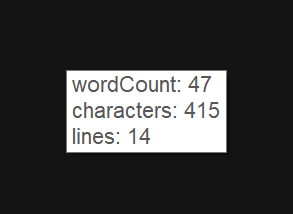
9 |
10 | ### Make selected text UPPER/lower case Alt+Shift+Up/Alt+Shift+Down
11 |
12 | With some text selected turn lower case letters into uppercase ones and vide-versa and try to reselect.
13 | * `some lower` Alt+Shift+Up `SOME LOWER`
14 | * `sOmE UpP3R` Alt+Shift+Down `some upp3r`
15 |
16 | ## Ideas welcome!
17 | Apparently this lacks quite some things that the original ac'tivAid "TextAid" provided. If there is interest in having more of these ported or any other new ideas and suggestions: Please [just open an issue](https://github.com/ewerybody/a2.modules/issues/new?labels=mod%3AtexTools) and let's chat about it!
18 |
--------------------------------------------------------------------------------
/getWinfo/a2module.json:
--------------------------------------------------------------------------------
1 | [
2 | {
3 | "author": "ewerybody",
4 | "date": "",
5 | "description": "Gathers title, window class, handle, process Id, process name, path, window size, positon, controls and command line information in a menu to get into the clipboard.",
6 | "display_name": "",
7 | "tags": [
8 | "window",
9 | "code"
10 | ],
11 | "typ": "nfo",
12 | "url": "https://github.com/ewerybody/a2.modules/tree/master/getWinfo#getwinfo",
13 | "version": "0.5"
14 | },
15 | {
16 | "file": "getWinfo.ahk",
17 | "typ": "include"
18 | },
19 | {
20 | "disablable": true,
21 | "enabled": true,
22 | "functionCode": "getWinfo()",
23 | "functionMode": 0,
24 | "key": "Win+Shift+W",
25 | "keyChange": true,
26 | "label": "call getWinfo - window information tool",
27 | "mode": "ahk",
28 | "multiple": true,
29 | "name": "getWinfo_Hotkey",
30 | "scope": [],
31 | "scopeChange": true,
32 | "scopeMode": 0,
33 | "typ": "hotkey"
34 | }
35 | ]
--------------------------------------------------------------------------------
/Slasher/a2module.json:
--------------------------------------------------------------------------------
1 | [
2 | {
3 | "author": "eric werner",
4 | "date": "2016 8 24",
5 | "description": "Simple backslash/forwardslash handling on active selection.
Shows a menu:\n 1.: toggle \\ to /\n 2.: single \\ to double backslash \\\\\n 3.: double \\\\ to single \\ backslash",
6 | "display_name": "",
7 | "tags": [
8 | "code",
9 | "file",
10 | "text"
11 | ],
12 | "typ": "nfo",
13 | "url": "https://github.com/ewerybody/a2.modules/tree/master/Slasher#Slasher",
14 | "version": "0.1"
15 | },
16 | {
17 | "file": "slasher.ahk",
18 | "typ": "include"
19 | },
20 | {
21 | "disablable": false,
22 | "enabled": true,
23 | "functionCode": "slasher()",
24 | "functionMode": 0,
25 | "key": "Win+\\",
26 | "keyChange": true,
27 | "label": "Call Slasher",
28 | "mode": "ahk",
29 | "multiple": true,
30 | "name": "Slasher_Hotkey",
31 | "scope": [],
32 | "scopeChange": true,
33 | "scopeMode": 0,
34 | "typ": "hotkey"
35 | }
36 | ]
--------------------------------------------------------------------------------
/DetailsPopup/a2_menu_item_import_data.py:
--------------------------------------------------------------------------------
1 | # a2 menu item script "a2_menu_item_import_data.py"
2 |
3 |
4 | def main(a2, mod):
5 | import os
6 | from a2qt import QtWidgets
7 |
8 | file_path, _ = QtWidgets.QFileDialog.getOpenFileName(
9 | None, 'Import Details Data', a2.paths.a2, '(*.json, *.*)'
10 | )
11 |
12 | if not os.path.isfile(file_path):
13 | return
14 |
15 | import a2util
16 | import json
17 |
18 | try:
19 | data = a2util.json_read(file_path)
20 | except json.decoder.JSONDecodeError as error:
21 | raise error
22 |
23 | element_name = 'details_lister'
24 | current_data = mod.get_user_cfg().setdefault(element_name, {})
25 | for cat_name, key_values in data.items():
26 | if cat_name in current_data:
27 | cat_name = a2util.get_next_free_number(cat_name, current_data.keys(), '_')
28 | current_data[cat_name] = key_values
29 |
30 | mod.set_user_cfg({'name': element_name}, current_data)
31 | a2.win.load_runtime_and_ui()
32 | a2.win.check_element(element_name)
33 |
--------------------------------------------------------------------------------
/HotStrings/a2_menu_item_export_hotstrings.py:
--------------------------------------------------------------------------------
1 | import os
2 | import a2util
3 | from a2qt import QtWidgets
4 | import hotstrings_io
5 |
6 |
7 | def main(a2, mod):
8 | """
9 | :param a2: Main A2 object instance.
10 | :param mod: Current a2 module instance.
11 | """
12 | title = 'Export Hotstrings - All'
13 | AHK, JSON = '*.ahk', '*.json'
14 | file_path, file_type = QtWidgets.QFileDialog.getSaveFileName(
15 | a2.win, title, a2.paths.a2, '\n'.join((AHK, JSON))
16 | )
17 | if not file_path:
18 | return
19 |
20 | file_type = '*' + os.path.splitext(file_path)[1].lower()
21 | Args = hotstrings_io.Args
22 | groups = mod.get_user_cfg().get(Args.hotstrings, {}).get(Args.groups, {})
23 | if file_type == AHK:
24 | hs_scopes = hotstrings_io.groups_to_scopes(groups)
25 | code = hotstrings_io.dict_to_ahkcode(hs_scopes)
26 | a2util.write_utf8(file_path, code)
27 | elif file_type == JSON:
28 | a2util.json_write(file_path, groups)
29 | else:
30 | raise NotImplementedError('Unknown file type "%s"!' % file_type)
31 |
--------------------------------------------------------------------------------
/ExplorerCreateFile/README.md:
--------------------------------------------------------------------------------
1 | # ExplorerCreateFile
2 |
3 | ### Create different files directly in the current Explorer directory.
4 |
5 | * Either define a **custom list of file types** that you frequently need in the module UI...
6 | > 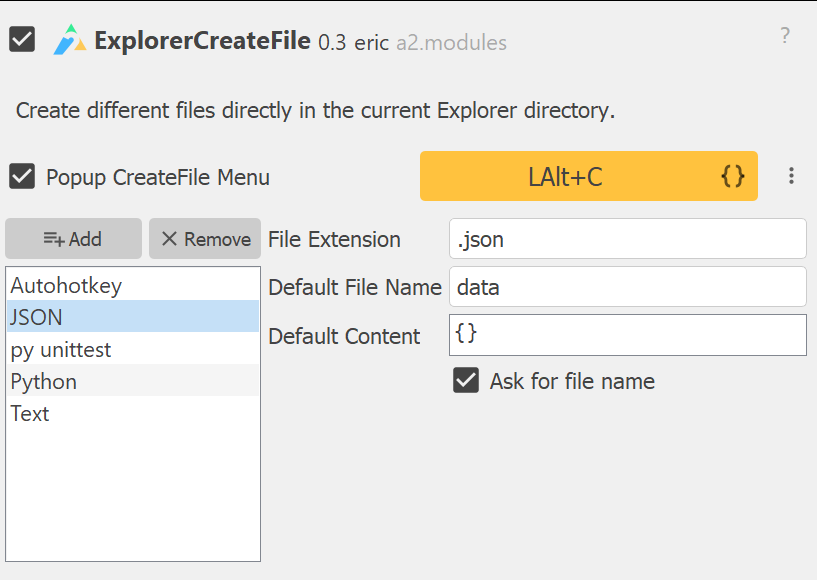
7 | * press your hotkey (default Alt+C) in the Explorer, have a tiny menu:
8 | > 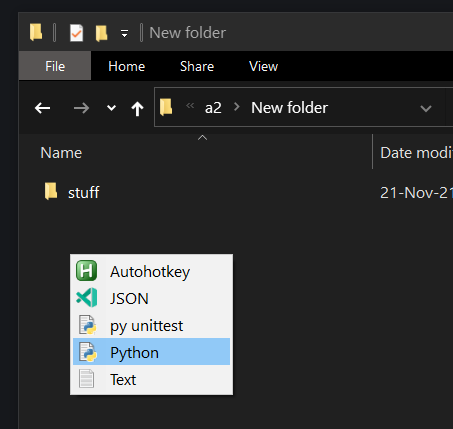
9 | * and creaete away
10 | > 
11 |
12 | * Or have **image data** in the clipboard and paste it to the Explorer
13 | (watches Ctrl+V by default)
14 | > 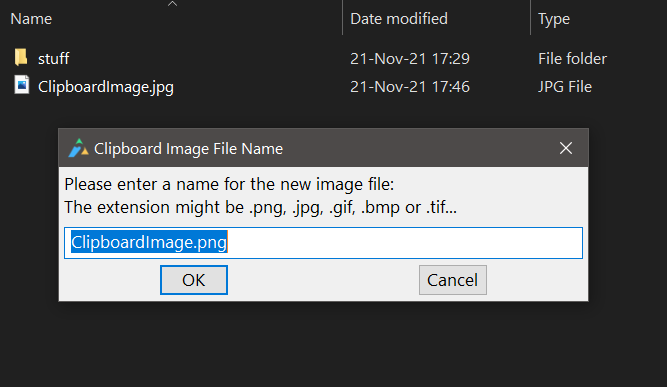
15 |
16 | For any further input and ideas please: [file a **ExplorerCreateFile** issue](https://github.com/ewerybody/a2.modules/issues/new?labels=mod%3AExplorerCreateFile)
17 |
--------------------------------------------------------------------------------
/HotStrings/test/teststrings.ahk:
--------------------------------------------------------------------------------
1 | ; Some initial comment ...
2 | #IfWinActive,
3 | :*:aucgh::auch ; a comment!
4 | :*:machne::machen
5 | :*b0o:irg.::endwie
6 | ; 1-line code blocks
7 | :*:.lrg::
8 | msgbox 👋!
9 | return
10 | ::xxx::s👍👍{!} ;needs to be un-escaped
11 | :*:shcon::schon
12 | ::arent::aren't
13 | ::Strala::Stråla
14 | :*:nat.::natürlich
15 | :r:.raw::Raw Rest{!}
16 | ; multi line code blocks
17 | ::#code::
18 | MsgBox CodeTest!
19 | MsgBox works!
20 | return
21 | :*x:#code2::MsgBox CodeTest2 works2! ; inline code hotstring
22 | :*::ck::✔
23 | ::gruse::grüße
24 | :*:::dd::ColonDouble`: ; `: also needs un-escaping
25 | #IfWinActive, ahk_class Notepad++ ; will be ignored
26 | #IfWinActive ahk_class Chrome_WidgetWin_1
27 | ; test same hotkeys in different scopes
28 | :C:AHK::Autohotkey
29 | :*C:aA::ac'tivAid
30 | #IfWinActive ahk_class MozillaWindowClass
31 | :Ct:aA::ACTIVEAID!!
32 | #IfWinNotActive, ahk_class Notepad++
33 | :*::flip::(╯°□°)╯︵ ┻━┻
34 | #IfWinActive, ahk_class SWT_Window0
35 | :C:AHK::Autohotkey in Eclipse{!}{!}
36 |
37 | #IfWinNotActive, ; empty WinNotActive defaults to global
38 | ::.sx::SomeHotstring
39 |
--------------------------------------------------------------------------------
/UniFormat/sets/full-width.txt:
--------------------------------------------------------------------------------
1 | # name=Fullwidth ASCII
2 | # desc=Fullwidth ASCII variants from the Halfwidth and Fullwidth Forms block.
3 |
4 | A A
5 | B B
6 | C C
7 | D D
8 | E E
9 | F F
10 | G G
11 | H H
12 | I I
13 | J J
14 | K K
15 | L L
16 | M M
17 | N N
18 | O O
19 | P P
20 | Q Q
21 | R R
22 | S S
23 | T T
24 | U U
25 | V V
26 | W W
27 | X X
28 | Y Y
29 | Z Z
30 |
31 | a a
32 | b b
33 | c c
34 | d d
35 | e e
36 | f f
37 | g g
38 | h h
39 | i i
40 | j j
41 | k k
42 | l l
43 | m m
44 | n n
45 | o o
46 | p p
47 | q q
48 | r r
49 | s s
50 | t t
51 | u u
52 | v v
53 | w w
54 | x x
55 | y y
56 | z z
57 |
58 | ! !
59 | ""
60 | # #
61 | $ $
62 | % %
63 | & &
64 | ' '
65 | ((
66 | ) )
67 |
68 | * *
69 | + +
70 | , ,
71 | - -
72 | . .
73 | / /
74 | 0 0
75 | 1 1
76 | 2 2
77 | 3 3
78 | 4 4
79 | 5 5
80 | 6 6
81 | 7 7
82 | 8 8
83 | 9 9
84 | : :
85 | ; ;
86 | < <
87 | = =
88 | > >
89 | ? ?
90 | @ @
91 |
92 | [ [
93 | \ \
94 | ] ]
95 | ^ ^
96 | _ _
97 | ` `
98 | { {
99 | | |
100 | } }
101 | ~ ~
102 |
--------------------------------------------------------------------------------
/PastePlain/a2module.json:
--------------------------------------------------------------------------------
1 | [
2 | {
3 | "author": "Eric Werner",
4 | "date": "2017 10 20",
5 | "description": "To paste text without formatting and file paths or names instead of the actual files.",
6 | "display_name": "",
7 | "tags": [
8 | "text",
9 | "file"
10 | ],
11 | "typ": "nfo",
12 | "url": "https://github.com/ewerybody/a2.modules/tree/master/PastePlain#pasteplain",
13 | "version": "0.1"
14 | },
15 | {
16 | "disablable": true,
17 | "enabled": true,
18 | "functionCode": "paste_plain_paste()",
19 | "functionMode": 0,
20 | "key": "Win+V",
21 | "keyChange": true,
22 | "label": "Perform PastePlain",
23 | "mode": "ahk",
24 | "multiple": true,
25 | "name": "PastePlain_Hotkey",
26 | "scope": [],
27 | "scopeChange": true,
28 | "scopeMode": 0,
29 | "typ": "hotkey"
30 | },
31 | {
32 | "file": "paste_plain.ahk",
33 | "typ": "include"
34 | },
35 | {
36 | "text": "If files are in the clipboard:",
37 | "typ": "label"
38 | },
39 | {
40 | "label": "Show Menu",
41 | "name": "PastePlain_ShowFileMenuCheckBox",
42 | "typ": "check",
43 | "value": true
44 | }
45 | ]
--------------------------------------------------------------------------------
/tastatur/README.md:
--------------------------------------------------------------------------------
1 | # tastatur
2 |
3 | ### A module to support **german users** on **english keyboards**.
4 |
5 | Of course we have **ümläuts** in german. And of course these don't exist on a usual `qwerty` keyboard. But not only these!
6 |
7 | ### keys on their old places
8 | Some keys seem convenient on the place they just were on a "deutsche Tastatur" like:
9 |
10 | - AltGr + Q to write an **@**
11 | - AltGr + E to write an **€** -Euro symbol
12 | - Alt + ~ to write an **°** -degree symbol
13 |
14 | ### umlaut tool
15 | By default press Win + ' and have a tool that waits for any of those:
16 | `a` `o` `u` `s` to write:
17 | `ä` `ö` `ü` `ß`
18 |
19 | It's like a **2 stage hotkey**:
20 | - press Win+'
21 | - press a
22 |
writes **ä**
23 | - press Win+'
24 | - press Shift+a
25 |
writes **Ä**
26 |
27 | 🆕 Now also with the officially accepted [Latin Capital Letter Sharp S](https://unicode-table.com/en/1E9E/): `ẞ`
28 |
29 |
30 | Ideas?: [file a **tastatur** issue](https://github.com/ewerybody/a2.modules/issues/new?labels=mod%3Atastatur)
31 |
--------------------------------------------------------------------------------
/WindowControl/README.md:
--------------------------------------------------------------------------------
1 | # WindowControl
2 |
3 | Hotkeys for general window management.
4 |
5 | ### Minimize Window Win+RButton
6 |
7 | Minimizes the Window under your mouse pointer. That's why the default is on Windows+Right-Click.
8 |
9 | ### Maximize Window toggle Win+Up
10 |
11 | Executes Maximize/Restore on the currently active window according the the current maximize state.
12 |
13 | ### Toggle Always-On-Top Win+Home
14 |
15 | Toggles the current "Keep-in-Foreground" state (aka Always-On-Top) and shows a tooltip with the status.
16 |
17 | ## remarks
18 |
19 | This is supposed to be port of the very omnipotent **WindowsControl** from ac'tivAid back in the days by [Wolfgang Reszel](https://github.com/Tekl) and Jack Tissen. Sadly there has not been much time to perform the whole porting and only some few functions are available here. That being said: some functionality is actually implemented in the a2 window library and some moved into Windows built-in functions. We still lack the complete overview there and any help collecting things is much appreciated! [file a **WindowControl** issue](https://github.com/ewerybody/a2.modules/issues/new?labels=mod%3AWindowControl)
20 |
21 | ...
22 |
--------------------------------------------------------------------------------
/DetailsPopup/a2module.json:
--------------------------------------------------------------------------------
1 | [
2 | {
3 | "author": "eric",
4 | "date": "2019 8 26",
5 | "description": "To paste detail information into specific forms or just anything from a simple menu under the cursor.",
6 | "display_name": "",
7 | "tags": [
8 | "text"
9 | ],
10 | "typ": "nfo",
11 | "url": "https://github.com/ewerybody/a2.modules/tree/master/DetailsPopup#detailspopup",
12 | "version": "0.4"
13 | },
14 | {
15 | "disablable": true,
16 | "enabled": true,
17 | "functionCode": "details_popup_menu()",
18 | "functionMode": 0,
19 | "key": [
20 | "Win+Shift+D"
21 | ],
22 | "keyChange": true,
23 | "label": "Popup the details main menu",
24 | "multiple": true,
25 | "name": "details_Hotkey",
26 | "scopeChange": true,
27 | "typ": "hotkey"
28 | },
29 | {
30 | "file": "details_popup_menu.ahk",
31 | "typ": "include"
32 | },
33 | {
34 | "name": "details_lister",
35 | "typ": "a2_local_element"
36 | },
37 | {
38 | "label": "Import Data",
39 | "script_name": "import_data",
40 | "typ": "menu_item"
41 | },
42 | {
43 | "label": "Export Data",
44 | "script_name": "export_data",
45 | "typ": "menu_item"
46 | }
47 | ]
--------------------------------------------------------------------------------
/HotStrings/test/test_hotstrings.py:
--------------------------------------------------------------------------------
1 | # -*- coding: utf-8 -*-
2 | import os
3 | import sys
4 | import unittest
5 | import pprint
6 |
7 | this_dir = os.path.dirname(__file__)
8 | sys.path.append(os.path.dirname(this_dir))
9 | import hotstrings_io
10 |
11 |
12 | class Test(unittest.TestCase):
13 | def testName(self):
14 | """test back and forth conversion"""
15 | test_file = os.path.join(this_dir, 'teststrings.ahk')
16 | hs_dict = hotstrings_io.file_to_dict(test_file)
17 | print(pprint.pformat(hs_dict))
18 |
19 | self.assertTrue(hotstrings_io.KEY_EXCL in hs_dict)
20 | self.assertEqual(len(hs_dict[hotstrings_io.KEY_EXCL]), 1)
21 | key = list(hs_dict[hotstrings_io.KEY_EXCL].keys())[0]
22 | hs = hs_dict[hotstrings_io.KEY_EXCL][key]
23 | self.assertTrue(key in hs_dict[hotstrings_io.KEY_EXCL])
24 | del hs_dict[hotstrings_io.KEY_EXCL][key]
25 | self.assertFalse(key in hs_dict[hotstrings_io.KEY_EXCL])
26 | key += '\nahk_class SWT_Window0'
27 | hs_dict[hotstrings_io.KEY_EXCL][key] = hs
28 |
29 | hs_code = hotstrings_io.dict_to_ahkcode(hs_dict)
30 | print('hs_code:\n%s' % hs_code)
31 |
32 |
33 | if __name__ == "__main__":
34 | unittest.main()
35 |
--------------------------------------------------------------------------------
/VolumeControl/volume_control.ahk:
--------------------------------------------------------------------------------
1 | ; VolumeControl - volume_control.ahk
2 | ; author: eric
3 | ; created: 2021 2 23
4 |
5 | volume_control_up() {
6 | master_volume := SoundGet()
7 |
8 | if(volume_control_log_change) {
9 | new_volume := master_volume*1.445
10 | if (new_volume < 0.1)
11 | new_volume := 0.14
12 | }
13 | else
14 | new_volume := master_volume + VolumeControl_Increment
15 | if (new_volume > 99)
16 | new_volume := 100
17 |
18 | _volume_control_set(new_volume)
19 | }
20 |
21 |
22 | _volume_control_set(new_volume) {
23 | a2tip("Master Volume: " Round(new_volume))
24 | SoundSet, %new_volume%
25 | Sleep, 25
26 | }
27 |
28 |
29 | volume_control_down() {
30 | master_volume := SoundGet()
31 |
32 | if(volume_control_log_change)
33 | new_volume := master_volume*0.694
34 | else
35 | new_volume := master_volume - VolumeControl_Increment
36 |
37 | if (new_volume < 0.1)
38 | new_volume := 0
39 |
40 | _volume_control_set(new_volume)
41 | }
42 |
43 | volume_control_toggle_mute() {
44 | SoundSet, +1,, Mute
45 | if SoundGet(, "Mute") == "On"
46 | a2tip("Master: Muted")
47 | else
48 | a2tip("Master Volume: " Round(SoundGet()))
49 | }
50 |
--------------------------------------------------------------------------------
/texTools/texTools.ahk:
--------------------------------------------------------------------------------
1 | ; texTools - texTools.ahk
2 | ; author: eric
3 | ; created: 2021 6 24
4 |
5 | texTools_upper() {
6 | sel := _texTools_selection()
7 | if (!sel)
8 | Return
9 |
10 | StringUpper, sel, sel
11 | clipboard_paste(sel)
12 | _texTools_reselect(sel)
13 | }
14 |
15 | texTools_lower() {
16 | sel := _texTools_selection()
17 | if (!sel)
18 | Return
19 |
20 | StringLower, sel, sel
21 | clipboard_paste(sel)
22 | _texTools_reselect(sel)
23 | }
24 |
25 | texTools_random_case() {
26 | sel := _texTools_selection()
27 | if (!sel)
28 | Return
29 |
30 | new := ""
31 | Loop, % StrLen(sel)
32 | {
33 | letter := SubStr(sel, A_Index , 1)
34 | Random, rand, 0, 1
35 | if (rand)
36 | StringLower, letter, letter
37 | else
38 | StringUpper, letter, letter
39 | new .= letter
40 | }
41 | clipboard_paste(new)
42 | _texTools_reselect(sel)
43 | }
44 |
45 | _texTools_selection() {
46 | sel := clipboard_get()
47 | if (!sel) {
48 | a2tip("TexTools: Nothing selected!")
49 | Return 0
50 | }
51 | Return sel
52 | }
53 |
54 | _textools_reselect(ByRef string) {
55 | len := StringLen(string)
56 | SendInput, +{Left %len%}
57 | }
58 |
--------------------------------------------------------------------------------
/gtranslate/a2module.json:
--------------------------------------------------------------------------------
1 | [
2 | {
3 | "author": "Eric Werner, Oliver Lipkau",
4 | "date": "2017 3 17",
5 | "description": "Makes use of translate.googleapis.com to translate short text snippets or whole websites.",
6 | "display_name": "",
7 | "tags": [
8 | "lookup",
9 | "text"
10 | ],
11 | "typ": "nfo",
12 | "url": "https://github.com/ewerybody/a2.modules/tree/master/gtranslate#gtranslate",
13 | "version": "0.4.1"
14 | },
15 | {
16 | "disablable": true,
17 | "enabled": false,
18 | "functionCode": "gtranslate_any()",
19 | "functionMode": 0,
20 | "key": [
21 | "RAlt+RShift+L"
22 | ],
23 | "keyChange": true,
24 | "label": "Translate Anything",
25 | "multiple": true,
26 | "name": "gtranslate_AnyHotkey",
27 | "scopeChange": true,
28 | "typ": "hotkey"
29 | },
30 | {
31 | "file": "gtranslate.ahk",
32 | "typ": "include"
33 | },
34 | {
35 | "name": "gtranslate_lister",
36 | "typ": "a2_local_element"
37 | },
38 | {
39 | "label": "Use Proxy",
40 | "name": "gtranslate_use_proxy",
41 | "typ": "check",
42 | "value": false
43 | },
44 | {
45 | "label": "Ask me before translating a website",
46 | "name": "gtranslate_ask_website_translate",
47 | "typ": "check",
48 | "value": true
49 | }
50 | ]
--------------------------------------------------------------------------------
/ComfortResize/README.md:
--------------------------------------------------------------------------------
1 | # ComfortResize
2 |
3 | ### Fuzzy window manipulation via 9 nice big zones divided by top, bottom, left, right, center.
4 | Just hold the Win key and click-drag a corner, edge or the center of a window to resize or move it:
5 | > 
6 |
7 | With options to
8 | * **Allow Resizing Fixed Windows** - (handle with care! Some windows have locked sizes for good reasons)
9 | * **Resize Focused Windows Only / Move Inactive Ones** - makes only active windows work with the 9 zones. Not currently focussed ones will only have "one" region: for moving.
10 | * **Show Tooltip** - during move or resize operation with stats
11 | * **Make it use a raster while holding Shift key** to lock into a discrete grid instead of pixel by pixel.
12 | * **Maximize on Doubleclick** - according to the 9 regions: left/right regions: maximize horizontaly, top/bottom region: maximize vertically, center: maximize whole window.
13 | This also **toggles** the maximization in the according regions.
14 |
15 | This one was partially ported from the original ac'tivAid ComfortResize by Bernd Schandl, [Wolfgang Reszel](https://github.com/Tekl), [Michael Telgkamp](https://telgkamp.de).\
16 | [file a **ComfortResize** issue](https://github.com/ewerybody/a2.modules/issues/new?labels=mod%3AComfortResize)
17 |
--------------------------------------------------------------------------------
/ocr_tool/a2module.json:
--------------------------------------------------------------------------------
1 | [
2 | {
3 | "author": "eric",
4 | "date": "2021 1 31",
5 | "description": "Simple Optical Character Recognition to read unselectable text.\nDraw a rectangle around some letters, Get the text into your clipboard.",
6 | "display_name": "OCR Tool",
7 | "tags": [
8 | "text"
9 | ],
10 | "typ": "nfo",
11 | "url": "https://github.com/ewerybody/a2.modules/tree/master/ocr_tool#ocr-tool",
12 | "version": "0.1.2"
13 | },
14 | {
15 | "disablable": true,
16 | "enabled": true,
17 | "functionCode": "ocr_tool()",
18 | "functionMode": 0,
19 | "key": [
20 | "Win+Shift+O"
21 | ],
22 | "keyChange": true,
23 | "label": "Call the tool",
24 | "multiple": true,
25 | "name": "ocr_tool_Hotkey",
26 | "scopeChange": true,
27 | "typ": "hotkey"
28 | },
29 | {
30 | "file": "ocr_tool.ahk",
31 | "typ": "include"
32 | },
33 | {
34 | "items": [
35 | "en-US",
36 | "de-DE",
37 | "FirstFromAvailableLanguages"
38 | ],
39 | "label": "Language",
40 | "name": "ocr_tool_Language",
41 | "typ": "combo",
42 | "user_edit": false
43 | },
44 | {
45 | "label": "Use backup method (call OCR reader in subprocess).",
46 | "name": "ocr_tool_use_backup",
47 | "typ": "check",
48 | "value": false
49 | }
50 | ]
--------------------------------------------------------------------------------
/gtranslate/README.md:
--------------------------------------------------------------------------------
1 | # gtranslate
2 |
3 | ### Make small text translation requests with your active selection.
4 |
5 | ### Translate Anything shortcut RAlt+RShift+L
6 |
7 | Gives you a menu with
8 | * your enlisted translations from the list in the gtranslate main UI
9 | * a expandable submenu with ALL the 109 supported languages
10 | * the last selected language from the submenu if any
11 |
12 | Selecting from the submenu or the last used will request a translation from ANY language aka `auto` to the selected language. For example `auto > en` for any language to english.
13 |
14 | ### Translation list
15 |
16 | Use the list in the gtranslate main UI to Add or Remove `from > to` language presets that you can also equip with a **dedicated hotkey**.
17 | Here **Detect Language (auto)** is preselected which will try to translate anything to your desired target language.
18 |
19 | ### ☑ Use Proxy
20 | Check this to make it try use the proxy settings from the **main a2 ui advanced tab**.
21 |
22 | ### ☑ Ask me before translating a website
23 | When selecting a URL gtranslate would try to bring you to a tranalated version of the urls website. You might want to translate the actual words in the URL though. This will ask you before doing either.
24 |
25 |
26 | [file a **gtranslate** issue](https://github.com/ewerybody/a2.modules/issues/new?labels=mod%3Agtranslate)
27 |
--------------------------------------------------------------------------------
/winr/a2module.json:
--------------------------------------------------------------------------------
1 | [
2 | {
3 | "author": "eric",
4 | "date": "2015",
5 | "description": "Super Windows+R that checks your selection and opens up according Browsers with the given locations/urls.",
6 | "display_name": "WinR",
7 | "tags": [
8 | "web",
9 | "file"
10 | ],
11 | "typ": "nfo",
12 | "url": "https://github.com/ewerybody/a2.modules/tree/master/winr#winr",
13 | "version": "0.2"
14 | },
15 | {
16 | "file": "winr.ahk",
17 | "typ": "include"
18 | },
19 | {
20 | "disablable": true,
21 | "enabled": true,
22 | "functionCode": "winr()",
23 | "functionMode": 0,
24 | "key": "Win+R",
25 | "keyChange": true,
26 | "label": "WinR Hotkey:",
27 | "mode": "ahk",
28 | "multiple": true,
29 | "name": "winrhotkey",
30 | "scope": [],
31 | "scopeChange": true,
32 | "scopeMode": 0,
33 | "typ": "hotkey"
34 | },
35 | {
36 | "label": "Move Run dialog to cursor",
37 | "name": "winr_move_to_cursor",
38 | "typ": "check",
39 | "value": true
40 | },
41 | {
42 | "browse_type": "0",
43 | "label": "Look up relative paths:",
44 | "max_items": 99,
45 | "name": "winr_paths",
46 | "typ": "pathlist"
47 | },
48 | {
49 | "label": "Rather explore to found Files",
50 | "name": "winr_explore_check",
51 | "typ": "check",
52 | "value": false
53 | }
54 | ]
--------------------------------------------------------------------------------
/webTools/a2module.json:
--------------------------------------------------------------------------------
1 | [
2 | {
3 | "author": "eric",
4 | "date": "2015 5 28",
5 | "description": "Snippets to work with your selection for things on the internet...",
6 | "display_name": "",
7 | "tags": [
8 | "web",
9 | "code"
10 | ],
11 | "typ": "nfo",
12 | "url": "https://github.com/ewerybody/a2.modules/tree/master/webTools#webtools",
13 | "version": "0.3"
14 | },
15 | {
16 | "file": "BBCodeMenu.ahk",
17 | "typ": "include"
18 | },
19 | {
20 | "file": "HtmlMenu.ahk",
21 | "typ": "include"
22 | },
23 | {
24 | "disablable": true,
25 | "enabled": true,
26 | "functionCode": "HtmlMenu()",
27 | "functionMode": 0,
28 | "key": "Ctrl+Alt+H",
29 | "keyChange": true,
30 | "label": "html tools menu",
31 | "mode": "ahk",
32 | "multiple": true,
33 | "name": "HtmlMenuHotkey",
34 | "scope": [],
35 | "scopeChange": true,
36 | "scopeMode": 0,
37 | "typ": "hotkey"
38 | },
39 | {
40 | "disablable": true,
41 | "enabled": true,
42 | "functionCode": "BBCodeMenu()",
43 | "functionMode": 0,
44 | "key": "Ctrl+Alt+B",
45 | "keyChange": true,
46 | "label": "bbCode & forum stuff menu",
47 | "mode": "ahk",
48 | "multiple": true,
49 | "name": "BBCodeMenuHotkey",
50 | "scope": [],
51 | "scopeChange": true,
52 | "scopeMode": 0,
53 | "typ": "hotkey"
54 | }
55 | ]
--------------------------------------------------------------------------------
/HotStrings/a2_menu_item_export_hotstring_selected.py:
--------------------------------------------------------------------------------
1 | import os
2 | import a2util
3 | from a2qt import QtWidgets
4 | import hotstrings_io
5 |
6 |
7 | def main(a2, mod):
8 | """
9 | :param a2: Main A2 object instance.
10 | :param mod: Current a2 module instance.
11 | """
12 | Args = hotstrings_io.Args
13 | settings = mod.get_user_cfg().get(Args.hotstrings, {})
14 | groups = settings.get(Args.groups, {})
15 | group_name = settings.get(Args.last_group)
16 | if group_name is None or group_name not in groups:
17 | if not groups:
18 | raise RuntimeError('No group found for export!')
19 | group_name = list(groups)[0]
20 | groups = {group_name: groups[group_name]}
21 |
22 | title = f'Export Hotstrings - "{group_name}"'
23 | AHK, JSON = '*.ahk', '*.json'
24 | file_path, file_type = QtWidgets.QFileDialog.getSaveFileName(
25 | a2.win, title, a2.paths.a2, '\n'.join((AHK, JSON))
26 | )
27 | if not file_path:
28 | return
29 |
30 | file_type = '*' + os.path.splitext(file_path)[1].lower()
31 | if file_type == AHK:
32 | hs_scopes = hotstrings_io.groups_to_scopes(groups)
33 | code = hotstrings_io.dict_to_ahkcode(hs_scopes)
34 | a2util.write_utf8(file_path, code)
35 | elif file_type == JSON:
36 | a2util.json_write(file_path, groups)
37 | else:
38 | raise NotImplementedError('Unknown file type "%s"!' % file_type)
39 |
--------------------------------------------------------------------------------
/CalculAid/README.md:
--------------------------------------------------------------------------------
1 | # CalculAid
2 |
3 | A configurable Calculator opener.
4 |
5 | Press a shortcut **Ctrl+Alt+R** (default).\
6 | and have a Calculator at your fingertips. With options to:
7 |
8 | * Make it appear under your mouse pointer.
9 | * Make it **Always On Top** so its not obstructed by other windows.
10 | * Focus already opened one/create new if none available or focussed. (contriburor idea! 🙏)
11 |
12 | And make it close by Esc if wanted. *
13 |
14 | ### Future ideas
15 |
16 | We used to take selected numbers and "open them" in a Calculator. That'd be nice to re-implement.
17 |
18 | ### * remarks
19 |
20 | Detecting this Calculator window is surely something since Windows 10... Well it once used to be like call `calc.exe` and the `pid` you get is the app and its still `calc.exe` with a dedicated class. Now MS introduced their `ApplicationFrameHost` and the new shiny Calculator makes good use of it. You still call `calc.exe` but the pid you get from it wont be the one on the resulting window. This will be just the same class and executable and pid as ALL running `ApplicationFrameHost` windows. Like the Settings Window (Win+I) for instance. So far the ONLY way to get the dedicated handle seems to be from the window title. But yeah: that depends on the language you have set. So thats:
21 | * Calculator for english
22 | * Rechner for german
23 | * ...
24 |
25 | feel free to contribute more :)\
26 | [file a **CalculAid** issue](https://github.com/ewerybody/a2.modules/issues/new?labels=mod%3ACalculAid)\
27 | _Thanks already!_
28 |
--------------------------------------------------------------------------------
/ExplorerDiff/a2module.json:
--------------------------------------------------------------------------------
1 | [
2 | {
3 | "author": "eric",
4 | "date": "2022 2 2",
5 | "description": "Easier file diffing in the Windows Explorer.\nSelect 2 files, Ctrl+D: tell if files are identical already without opening your diff tool.\nOr select one file or folder here and wait to select another there...",
6 | "display_name": "",
7 | "tags": [
8 | "file",
9 | "code",
10 | "wip"
11 | ],
12 | "typ": "nfo",
13 | "url": "",
14 | "version": "0.3"
15 | },
16 | {
17 | "disablable": false,
18 | "enabled": true,
19 | "functionCode": "ExplorerDiff()",
20 | "functionMode": 0,
21 | "key": [
22 | "Ctrl+D"
23 | ],
24 | "keyChange": true,
25 | "label": "Diff selected files",
26 | "multiple": true,
27 | "name": "ExplorerDiff_Hotkey",
28 | "scope": [
29 | "ahk_class CabinetWClass",
30 | "ahk_class #32770"
31 | ],
32 | "scopeChange": true,
33 | "scopeMode": 1,
34 | "typ": "hotkey"
35 | },
36 | {
37 | "file": "ExplorerDiff.ahk",
38 | "typ": "include"
39 | },
40 | {
41 | "browse_type": 1,
42 | "file_types": "Executable (*.exe)",
43 | "label": "Diff application path",
44 | "name": "ExplorerDiff_Path",
45 | "save_mode": false,
46 | "typ": "path",
47 | "value": ".",
48 | "writable": false
49 | },
50 | {
51 | "decimals": 1,
52 | "label": "Always use diff app if files larger than:",
53 | "max": 100.0,
54 | "min": 0.1,
55 | "name": "ExplorerDiff_MaxSize",
56 | "slider": false,
57 | "step_len": 0.1,
58 | "suffix": "MB",
59 | "typ": "number",
60 | "value": 1.0
61 | }
62 | ]
--------------------------------------------------------------------------------
/getWinfo/README.md:
--------------------------------------------------------------------------------
1 | # getWinfo
2 |
3 | ### A quick window information getter.
4 |
5 | Press the **hotkey**. (**Win+Shift+W** by default)\
6 | Get a **menu** with stats about the currently active window.\
7 | **Click** and entry to copy a value.\
8 |
9 | > 
10 |
11 | All these **lowercase** ones can be **clicked** to get their **value into the clipboard**:
12 | - **title**: The [window title](https://www.autohotkey.com/docs/misc/WinTitle.htm) no matter if visible or not.
13 | - **class**: The [class name of the window](https://www.autohotkey.com/docs/misc/WinTitle.htm#ahk_class).
14 | - **hwnd**: [window handle](https://en.wikipedia.org/wiki/Handle_(computing)).
15 | - **pid**: The windows [Process ID](https://www.autohotkey.com/docs/misc/WinTitle.htm#ahk_pid).
16 | - **process**: The process executable name.
17 | - **version**: Version info of the executable.
18 | - **path**: The path to the executable.
19 |
20 | The other options do some different things:
21 | - **Explore to path** - Opens up the Windows Explorer with the executable selected.
22 | - **Controls...** - Window controls information (if available).
23 | - **Copy All Control Info** - Will loop over all available window components and assemble a text with their info
24 | like `WindowName WindowHandle WindowText` one line per control.
25 | - **Pos** - A submenu with the windows topleft x/y position, width/height dimensions and an option to bring the window to the current cursor positon (In case it went off the screen)
26 | - **Cancel** - Dismisses the menu.
27 |
28 | [file a **getWinfo** issue](https://github.com/ewerybody/a2.modules/issues/new?labels=mod%3AgetWinfo)
29 |
--------------------------------------------------------------------------------
/gtranslate/gtranslate_langs.py:
--------------------------------------------------------------------------------
1 | """
2 | Script to turn the text list from https://cloud.google.com/translate/docs/languages
3 | into a nice, little json.
4 | """
5 | import os
6 | import a2util
7 |
8 | THIS_DIR = os.path.abspath(os.path.dirname(__file__))
9 | FILE_NAME = 'languages'
10 | SOURCE_FILE = os.path.join(THIS_DIR, FILE_NAME + '.txt')
11 | DATA_FILE = os.path.join(THIS_DIR, FILE_NAME + '.json')
12 | _DATA = {}
13 | SEPARATOR = ' > '
14 | AUTO_KEY = 'auto'
15 | AUTO_LANGUAGE = 'Detect Language (auto)'
16 | DEFAULT = 'en'
17 | DEFAULT_TRANSLATION = AUTO_KEY + SEPARATOR + DEFAULT
18 |
19 |
20 | def get():
21 | """Read data file, pass dict with language name: key."""
22 | if not _DATA:
23 | _DATA.update(a2util.json_read(DATA_FILE))
24 | return _DATA
25 |
26 |
27 | def source_to_json():
28 | """Here you have a docstring."""
29 | if not os.path.isfile(SOURCE_FILE):
30 | raise FileNotFoundError('No Source File! (%s)' % SOURCE_FILE)
31 |
32 | data = {}
33 | with open(SOURCE_FILE) as file_obj:
34 | for line in file_obj:
35 | line = line.strip()
36 | if not line:
37 | continue
38 |
39 | try:
40 | name, key = line.rsplit(None, 1)
41 | data[name] = key
42 | except ValueError:
43 | continue
44 |
45 | a2util.json_write(DATA_FILE, data)
46 |
47 |
48 | def key_to_name(key):
49 | """Find the language full name from a short key."""
50 | if key == AUTO_KEY:
51 | return AUTO_LANGUAGE
52 | langs = get()
53 | for name, this_key in langs.items():
54 | if this_key == key:
55 | return name
56 | return key_to_name(DEFAULT)
57 |
58 |
59 | if __name__ == "__main__":
60 | source_to_json()
61 |
--------------------------------------------------------------------------------
/WindowControl/a2module.json:
--------------------------------------------------------------------------------
1 | [
2 | {
3 | "author": "Wolfgang Reszel, Jack Tissen",
4 | "date": "2021 2 23",
5 | "description": "Hotkeys for general window management. Ported from ac'tivAid.\nSome of these are Windows-built-in! But by default there is no way to change and no toggle.",
6 | "display_name": "",
7 | "tags": [
8 | "window"
9 | ],
10 | "typ": "nfo",
11 | "url": "https://github.com/ewerybody/a2.modules/blob/master/WindowControl/README.md#windowcontrol",
12 | "version": "2.0.1"
13 | },
14 | {
15 | "disablable": true,
16 | "enabled": false,
17 | "functionCode": "window_control_minimize()",
18 | "functionMode": 0,
19 | "key": [
20 | "Win+Rbutton"
21 | ],
22 | "keyChange": true,
23 | "label": "Minimize Window",
24 | "multiple": true,
25 | "name": "WindowControl_Minimize_Hotkey",
26 | "scopeChange": true,
27 | "typ": "hotkey"
28 | },
29 | {
30 | "file": "window_control.ahk",
31 | "typ": "include"
32 | },
33 | {
34 | "disablable": true,
35 | "enabled": false,
36 | "functionCode": "window_control_maximize()",
37 | "functionMode": 0,
38 | "key": [
39 | "Win+Up"
40 | ],
41 | "keyChange": true,
42 | "label": "Maximize Window toggle",
43 | "multiple": true,
44 | "name": "WindowControl_Maximize_Hotkey",
45 | "scopeChange": true,
46 | "typ": "hotkey"
47 | },
48 | {
49 | "disablable": true,
50 | "enabled": true,
51 | "functionCode": "window_control_toggle_always_on_top()",
52 | "functionMode": 0,
53 | "key": [
54 | "Win+Home"
55 | ],
56 | "keyChange": true,
57 | "label": "Toggle Always-On-Top",
58 | "multiple": true,
59 | "name": "WindowControl_AOT_Hotkey",
60 | "scopeChange": true,
61 | "typ": "hotkey"
62 | }
63 | ]
--------------------------------------------------------------------------------
/commandLine/README.md:
--------------------------------------------------------------------------------
1 | # CommandLine
2 |
3 | Connects Explorer and CommandLine Console/Terminal and adds simple closing functionality.
4 |
5 | ### Close commandline window
6 |
7 | Some keys you might want to use to get rid of the CommandLine/Console/Terminal window.
8 | * Ctrl+W - The **standard** "Close Window" shortcut now also for these.
9 | * Escape - Extra quickly away with these windows. Off by default. Be careful this might be a little too quick.
10 | * Alt+F4 - Might be Windows solved this one already on it's own. This actually didn't work once. So its off by default now.
11 |
12 |
13 | ### Open Up from Explorer Win+C (on Explorer windows)
14 |
15 | Opens up a CommandLine/Console/Terminal window with the current path active.
16 |
17 | ### Use Explorer Address bar as commandline interface.
18 |
19 | WIP This replicates the behavior of the old ac'tivAid "CommandLine" extension:
20 | * Type `<` or `<<` as the first characters
21 | * append any commandline action
22 | * Hit Enter to perform on the currently active Explorer path.
23 |
24 | Where `<` means execute with visible commandline window and `<<` will just perform the action and leave no commandline window open.
25 |
26 | For Example: If you have ImageMagick installed and want to convert an image in your active Explorer window:
27 | ```
28 | << magick some_image.gif some_image.png
29 | ```
30 | Will perform the command hidden without you having to open up the path in cmd, goto the path, execute the command, and close the cmd window again.
31 |
32 | Note: Contrary to the actual commandline window there is no such auto-completion Explorer adress bar. But this wouldn't be impossible to pull of. If you want this or have ideas about it please [file a **CommandLine** issue](https://github.com/ewerybody/a2.modules/issues/new?labels=mod%3ACommandLine) and lets chat!
33 |
--------------------------------------------------------------------------------
/webTools/BBCodeMenu.ahk:
--------------------------------------------------------------------------------
1 | ; URL erzeugt links im style [URL=http://safdsadf]text[/URL]
2 | ; wenn ein URL im Clipboard ist wird dieser sofort in den href geschrieben
3 | ; nix markiert: kommt der cursor dann in die >< ansonsten kommt das markierte dazwischen
4 | ; ist ein link markiert wird der auch ins href geschrieben und der cursor zw. >< positioniert
5 |
6 | BBCodeMenu(){
7 | ; add menu entries on demand...
8 | Menu, BBCodeMenu, Add, IMG, BBCodeMenuHandler
9 | Menu, BBCodeMenu, Add, URL, BBCodeURLHandler
10 | Menu, BBCodeMenu, Add, QUOTE, BBCodeMenuHandler
11 | Menu, BBCodeMenu, Add, B, BBCodeMenuHandler
12 | Menu, BBCodeMenu, Add, , BBCodeKBDHandler
13 | Menu, BBCodeMenu, Show
14 | Menu, BBCodeMenu, DeleteAll
15 | }
16 |
17 |
18 | BBCodeMenuHandler() {
19 | sel := clipboard_get()
20 | code := "[" A_ThisMenuItem "]" sel "[/" A_ThisMenuItem "]"
21 | clipboard_paste(code)
22 | }
23 |
24 |
25 | BBCodeURLHandler() {
26 | sel := clipboard_get()
27 | If (string_is_web_address(sel))
28 | {
29 | tt("selection is URL",1)
30 | clipboard_paste( "[URL=" sel "][/URL]" )
31 | SendInput, {Left 6}
32 | }
33 | ; if clipboard already contains a URL put that in the [URL= and the selection between ][/URL]
34 | Else If (string_is_web_address(Clipboard))
35 | {
36 | tt("Clipboard is URL",1)
37 | code := "[URL=" Clipboard "]" sel "[/URL]"
38 | clipboard_paste(code)
39 | SendInput, {Left 6}
40 | }
41 | ; otherwise just put the selected into the ><
42 | Else
43 | {
44 | tt("otherwise...",1)
45 | code := "[URL=]" sel "[/URL]"
46 | clipboard_paste(code)
47 | StringLen, hLen, sel
48 | hLen += 7
49 | SendInput, {Left %hLen%}
50 | }
51 | }
52 |
53 |
54 | BBCodeKBDHandler() {
55 | sel := clipboard_get()
56 | code := "" sel ""
57 | clipboard_paste(code)
58 | StringLen, sel_len, sel
59 | ; hLen += 7
60 | SendInput, {Left 6}+{Left %sel_len%}
61 | }
62 |
--------------------------------------------------------------------------------
/Slasher/a2icon.svg:
--------------------------------------------------------------------------------
1 |
2 |
56 |
--------------------------------------------------------------------------------
/VolumeControl/a2module.json:
--------------------------------------------------------------------------------
1 | [
2 | {
3 | "author": "Wolfgang Reszel, Michael Telgkamp",
4 | "date": "2021 2 23",
5 | "description": "Hotkeys for Sound Volume control.",
6 | "display_name": "",
7 | "tags": [
8 | "wip"
9 | ],
10 | "typ": "nfo",
11 | "url": "https://github.com/ewerybody/a2.modules/tree/master/VolumeControl#volumecontrol",
12 | "version": "0.5.0"
13 | },
14 | {
15 | "disablable": true,
16 | "enabled": false,
17 | "functionCode": "volume_control_up()",
18 | "functionMode": 0,
19 | "key": [
20 | "Win+Alt+Wheelup"
21 | ],
22 | "keyChange": true,
23 | "label": "Volume Up",
24 | "multiple": true,
25 | "name": "VolumeControl_Up_Hotkey",
26 | "scopeChange": true,
27 | "typ": "hotkey"
28 | },
29 | {
30 | "disablable": true,
31 | "enabled": false,
32 | "functionCode": "volume_control_down()",
33 | "functionMode": 0,
34 | "key": [
35 | "Win+Alt+Wheeldown"
36 | ],
37 | "keyChange": true,
38 | "label": "Volume Down",
39 | "multiple": true,
40 | "name": "VolumeControl_Down_Hotkey",
41 | "scopeChange": true,
42 | "typ": "hotkey"
43 | },
44 | {
45 | "file": "volume_control.ahk",
46 | "typ": "include"
47 | },
48 | {
49 | "decimals": 0,
50 | "label": "Step",
51 | "max": 20.0,
52 | "min": 0.1,
53 | "name": "VolumeControl_Increment",
54 | "slider": true,
55 | "step_len": 1.0,
56 | "suffix": "",
57 | "typ": "number",
58 | "value": 5
59 | },
60 | {
61 | "disablable": true,
62 | "enabled": false,
63 | "functionCode": "volume_control_toggle_mute()",
64 | "functionMode": 0,
65 | "keyChange": true,
66 | "label": "Toggle Mute",
67 | "multiple": true,
68 | "name": "VolumeControl_Mute_Hotkey",
69 | "scopeChange": true,
70 | "typ": "hotkey"
71 | },
72 | {
73 | "label": "Logarithmic Behaviour",
74 | "name": "volume_control_log_change",
75 | "typ": "check",
76 | "value": false
77 | }
78 | ]
--------------------------------------------------------------------------------
/WindowControl/window_control.ahk:
--------------------------------------------------------------------------------
1 | ; WindowControl - window_control.ahk
2 | ; author: Wolfgang Reszel, Jack Tissen
3 | ; created: 2021 2 23
4 |
5 | window_control_minimize() {
6 | ; Minimize the active window.
7 | window_control_check_MouseHotkey()
8 | ; TODO: What was this for?
9 | ; If func_IsWindowInIgnoreList?()
10 | ; Return
11 | WinGet, win_id, ID, A
12 | WinSet, Bottom,, ahk_id %win_id%
13 |
14 | ; WinMinimize, ahk_id %wc_ID%
15 | ; TODO: Why is this better?
16 | PostMessage, 0x0112, 0x0000f020, 0x00f40390,, ahk_id %win_id%
17 | }
18 |
19 | window_control_maximize() {
20 | ; Toggle maximize/restore for the active window.
21 | win_id := window_control_check_MouseHotkey()
22 | window_toggle_maximize(win_id)
23 | }
24 |
25 | window_control_toggle_always_on_top() {
26 | ; Toggle always-on-top aka AOT for the active window.
27 | win_id := window_control_check_MouseHotkey()
28 | WinGetClass, win_class, ahk_id %win_id%
29 | WinGetTitle, title, ahk_id %win_id%
30 | If win_class in Shell_TrayWnd,Progman
31 | Return
32 |
33 | aot_state := window_is_aot(win_id)
34 |
35 | if (window_is_aot(win_id)) {
36 | window_set_aot(0, win_id)
37 |
38 | state := window_is_aot(win_id)
39 | if (!state)
40 | a2tip("AlwaysOnTop: OFF")
41 | Else
42 | MsgBox, Setting AOT OFF didn't work!!!`nstate: %state%
43 | } Else {
44 | window_set_aot(1, win_id)
45 |
46 | state := window_is_aot(win_id)
47 | if (state)
48 | a2tip("AlwaysOnTop: ON")
49 | Else
50 | MsgBox, Setting AOT ON didn't work!!!`nstate: %state%
51 | }
52 | }
53 |
54 | window_control_check_MouseHotkey() {
55 | ; If action is triggered via mouse key,
56 | ; make sure the window under the cursor is activated!
57 | If A_ThisHotkey contains MButton,LButton,RButton,XButton1,XButton2
58 | {
59 | MouseGetPos,,,win_id
60 | window_activate(win_id)
61 | }
62 | Else
63 | WinGet, win_id, ID, A
64 |
65 | return win_id
66 | }
67 |
--------------------------------------------------------------------------------
/webTools/README.md:
--------------------------------------------------------------------------------
1 | # WebTools
2 |
3 | Snippets to work with your selection for things on the internet...
4 |
5 | ### html tools menu Ctrl+Alt+H
6 | * a - enclose with HTML hyperlink code like `asd`
7 | **Note**: This one has some special behavior:
8 | * with URL in clipboard this will put the URL into the `href` argument
9 | * with text selected the text goes between the `> <`.
10 | * A selected URL will also put it to the `href` argument and put your cursor between the `>|<`.
11 | * b - Enclose with `` tags for **bold**/fat or **strong** text.
12 | * i - Enclose with `` tags for *italic* or slanted text.
13 | * li - Enclose with `` tags for making "list items".
14 | * img - Wrap **image tag** around, put selected text to `src` argument like ` `
15 | * testHTML - Copy your selected code to a `testHTML.html` file in your temp directory and run it with your default browser.
16 | * encodeURI - Replace non-letter-non-number characters with percentage notation. For instance "space" is `%20`
17 | `https://github.com/ewerybody/a2.modules` -> `https%3A%2F%2Fgithub%2Ecom%2Fewerybody%2Fa2%2Emodules`
18 |
19 | ### bbCode & forum stuff menu Ctrl+Alt+B
20 | * IMG - similar to the ing-HTML function ^ this makes BBCode style image notation. `[IMG]https://placekitten.com/g/200/300[/IMG]`
21 | * URL - enclose with hyperlink BBCode like `[URL=https://github.com]fafas[/URL]`
22 | **Note**: This also has some special behavior:
23 | * with URL in clipboard this will put the URL a the `URL=` argument
24 | * with text selected the text goes between the `][`.
25 | * A **selected URL** will also put it to the `URL=` argument and put your cursor between the `]|[`.
26 | * QUOTE - Enclose with `[QUOTE]` tags to make replies.
27 | * B - Enclose with `[B]` tags to make **bold**/fat or **strong** text.
28 | * `` - Enclose with `` tags to display a keyboard shortcut (This is one for **GitHub**! No idea where else this works)
29 |
30 |
31 | [file a **WebTools** issue](https://github.com/ewerybody/a2.modules/issues/new?labels=mod%3AWebTools)
32 |
--------------------------------------------------------------------------------
/ocr_tool/ocr_tool.ahk:
--------------------------------------------------------------------------------
1 | ; ocr_tool - ocr_tool.ahk
2 | ; author: eric
3 | ; created: 2021 1 31
4 |
5 | ocr_tool() {
6 | lang_list := teadrinkerocr_get_available_languages()
7 | a2tip("OCR Tool: Draw a rectangle to read from!`nLanguage: " ocr_tool_Language "`navailable: " string_join(lang_list, ", "), 2)
8 | work_area := screen_get_work_area()
9 | dimmer := dimmer_create(work_area)
10 | data := {area: work_area, dimmer: dimmer}
11 | data := dragtangle("_ocr_tool_dragging", "_ocr_tool_start", "_ocr_tool_read", "tt",, data)
12 | _ocr_tool_end(data)
13 | }
14 |
15 | _ocr_tool_dragging(data) {
16 | window_cut_hole(data.dimmer, data, data.area)
17 | ; Tooltip while dragging? We would first need to make sure that the
18 | ; tool is not reading itself! :D ie when you drag to the top left
19 | ; text := teadrinkerocr(data)
20 | ; tt(StringLen(text) ": " text, 1)
21 | }
22 |
23 | _ocr_tool_end(data) {
24 | dimmer_off()
25 | ; gdip_shutdown(data.gdip_token)
26 | }
27 |
28 | _ocr_tool_read(data) {
29 | ; data.gdip_token := gdip_startup()
30 | ; data-object was amended with .x .y .w. .h from dragtangle
31 | if ocr_tool_use_backup {
32 | text := _orc_tool_call(data, ocr_tool_Language)
33 | source := "backup"
34 | } else {
35 | text := teadrinkerocr(data, ocr_tool_Language)
36 | source := "lib"
37 | }
38 |
39 | if (text) {
40 | Clipboard := text
41 | a2tip("OCR Tool (" source "): put " StringLen(text) " characters to Clipboard`n" SubStr(text, 1, 100))
42 | } else
43 | a2tip("OCR Tool (" source "): Nothing recognized! :/")
44 | }
45 |
46 | _ocr_tool_start(data) {
47 | ; Just turn off the tooltip to not read yourself.
48 | a2tip()
49 | }
50 |
51 | _orc_tool_call(rect, lang) {
52 | script_path := path_join(a2.paths.ahklib, "teadrinkerocr.ahk")
53 | shell := ComObjCreate("WScript.Shell")
54 | cmd = "%A_AhkPath%" "%script_path%"
55 | cmd .= " " rect.x " " rect.y " " rect.w " " rect.h " " lang
56 | exec := shell.Exec(cmd)
57 | sleep, 200
58 | stderr := exec.StdErr.ReadAll()
59 | if stderr
60 | MsgBox, 16, ERROR, %Options%
61 | return exec.StdOut.ReadAll()
62 | }
63 |
--------------------------------------------------------------------------------
/texTools/a2module.json:
--------------------------------------------------------------------------------
1 | [
2 | {
3 | "author": "eric",
4 | "date": "",
5 | "description": "Text manipulation tool snippets. Ideas welcome!",
6 | "display_name": "",
7 | "tags": [
8 | "text",
9 | "wip"
10 | ],
11 | "typ": "nfo",
12 | "url": "https://github.com/ewerybody/a2.modules/tree/master/texTools#textools",
13 | "version": "0.4"
14 | },
15 | {
16 | "file": "wordCount.ahk",
17 | "typ": "include"
18 | },
19 | {
20 | "disablable": true,
21 | "enabled": true,
22 | "functionCode": "wordCount()",
23 | "functionMode": 0,
24 | "key": "Win+O",
25 | "keyChange": true,
26 | "label": "wordCount - tooltip with selected text information",
27 | "mode": "ahk",
28 | "multiple": true,
29 | "name": "wordCountHotkey",
30 | "scope": [],
31 | "scopeChange": true,
32 | "scopeMode": 0,
33 | "typ": "hotkey"
34 | },
35 | {
36 | "decimals": 0,
37 | "label": "How long to show the tooltip:",
38 | "max": 15.0,
39 | "min": 1.0,
40 | "name": "wordCount_tooltip_timeout",
41 | "slider": true,
42 | "step_len": 1.0,
43 | "suffix": "s",
44 | "typ": "number",
45 | "value": 3
46 | },
47 | {
48 | "disablable": true,
49 | "enabled": true,
50 | "functionCode": "texTools_upper()",
51 | "functionMode": 0,
52 | "key": [
53 | "Alt+Shift+Up"
54 | ],
55 | "keyChange": true,
56 | "label": "MAKE SELECTED TEXT UPPER CASE",
57 | "multiple": true,
58 | "name": "texTools_Upper_Hotkey",
59 | "scopeChange": true,
60 | "typ": "hotkey"
61 | },
62 | {
63 | "file": "texTools.ahk",
64 | "typ": "include"
65 | },
66 | {
67 | "disablable": true,
68 | "enabled": true,
69 | "functionCode": "texTools_lower()",
70 | "functionMode": 0,
71 | "key": [
72 | "Alt+Shift+Down"
73 | ],
74 | "keyChange": true,
75 | "label": "make selected text lower case",
76 | "multiple": true,
77 | "name": "texTools_lower_Hotkey",
78 | "scopeChange": true,
79 | "typ": "hotkey"
80 | },
81 | {
82 | "disablable": true,
83 | "enabled": false,
84 | "functionCode": "texTools_random_case()",
85 | "functionMode": 0,
86 | "keyChange": true,
87 | "label": "mAkE sELECtED teXt RaNdoM CaSE",
88 | "multiple": true,
89 | "name": "texTools_random_Hotkey",
90 | "scopeChange": true,
91 | "typ": "hotkey"
92 | }
93 | ]
--------------------------------------------------------------------------------
/winr/winr.ahk:
--------------------------------------------------------------------------------
1 | winr() {
2 | global winr_paths
3 | selection := clipboard_get()
4 | selection := trim(selection, " `n`t`r")
5 |
6 | if string_startswith(selection, "u'") OR string_startswith(selection, "u""")
7 | selection := substr(selection, 2)
8 | selection := string_unquote(selection)
9 | selection := string_unquote(selection, "'")
10 |
11 | if (selection == "") {
12 | winr_CallDialog()
13 | }
14 |
15 | expanded := path_expand_env(selection)
16 | if (expanded != selection) {
17 | a2tip("WinR: expanded path exists...",0.5)
18 | winr_CatchedCallRun(expanded)
19 | }
20 | else if FileExist(selection) {
21 | a2tip("WinR: path exists...",0.5)
22 | winr_CatchedCallRun(selection)
23 | }
24 | else if (string_is_web_address(selection)) {
25 | a2tip("WinR: web address...",0.5)
26 | if (!string_startswith(selection, "http"))
27 | selection := "https://" selection
28 | Run, %selection%
29 | }
30 | else {
31 | ; loop set up project paths, if combination with selection fits: run it
32 | slashed := StrReplace(selection, "/", "\")
33 | for i, ppath in winr_paths {
34 | ppath = %ppath%\%slashed%
35 | if FileExist(ppath) {
36 | a2tip("WinR: Found relative path ...",0.5)
37 | winr_CatchedCallRun(ppath)
38 | Return
39 | }
40 | }
41 |
42 | a2tip("WinR: Does not exist!`nI don't know what todo with your selection...", 1)
43 | winr_CallDialog()
44 | sleep, 300
45 | SendInput, %selection%
46 | }
47 | }
48 |
49 | winr_CallDialog() {
50 | runWindow = Run ahk_class #32770
51 | Send #r
52 | WinWaitActive, %runWindow%
53 | global winr_move_to_cursor
54 | if (winr_move_to_cursor) {
55 | CoordMode, Mouse, Screen
56 | MouseGetPos, clq_mousex, clq_mousey
57 | WinMove, %runWindow%, ,(clq_mousex - 30), (clq_mousey - 10)
58 | }
59 | }
60 |
61 | winr_CatchedCallRun(path) {
62 | path := StrReplace(path, "/", "\")
63 | global winr_explore_check
64 | if winr_explore_check
65 | explorer_show(path)
66 | else {
67 | Run, %path%,, UseErrorLevel
68 | if ErrorLevel {
69 | explorer_show(path)
70 | a2tip_add("but I cound not 'Run' it!`nExploring to ...:", 1.5)
71 | }
72 | }
73 | }
74 |
--------------------------------------------------------------------------------
/CalculAid/a2module.json:
--------------------------------------------------------------------------------
1 | [
2 | {
3 | "author": "eRiC",
4 | "date": "2015 10 10",
5 | "description": "Opening and closing the Windows calculator based on hotkeys.",
6 | "display_name": "",
7 | "tags": [],
8 | "typ": "nfo",
9 | "url": "https://github.com/ewerybody/a2.modules/tree/master/CalculAid#calculaid",
10 | "version": "0.2.2"
11 | },
12 | {
13 | "children": [
14 | {
15 | "file": "calculAid.ahk",
16 | "typ": "include"
17 | },
18 | {
19 | "disablable": true,
20 | "enabled": true,
21 | "functionCode": "calculAid_open()",
22 | "functionMode": 0,
23 | "functionSend": "",
24 | "functionURL": "",
25 | "key": "Ctrl+Alt+R",
26 | "keyChange": true,
27 | "label": "Standard Hotkey",
28 | "mode": "ahk",
29 | "multiple": true,
30 | "name": "calculAid_Hotkey",
31 | "scope": [],
32 | "scopeChange": true,
33 | "scopeMode": 0,
34 | "typ": "hotkey"
35 | },
36 | {
37 | "enabled": true,
38 | "label": "Open up at cursor position",
39 | "name": "calculAid_OpenAtCursor",
40 | "typ": "check",
41 | "value": true
42 | },
43 | {
44 | "enabled": true,
45 | "label": "Make new calculator \"Always On Top\"",
46 | "name": "calculAid_AlwaysOnTop",
47 | "typ": "check",
48 | "value": false
49 | },
50 | {
51 | "label": "Activate already open Calculator/Open New when focused.",
52 | "name": "calculAid_ReuseOpenOne",
53 | "typ": "check",
54 | "value": true
55 | }
56 | ],
57 | "disablable": true,
58 | "enabled": true,
59 | "label": "Open up the Calculator",
60 | "name": "calculAid_OpenGroup",
61 | "typ": "group"
62 | },
63 | {
64 | "disablable": true,
65 | "enabled": true,
66 | "functionCode": "WinClose, A",
67 | "functionMode": 0,
68 | "functionSend": "",
69 | "functionURL": "",
70 | "key": "Esc",
71 | "keyChange": true,
72 | "label": "Close the calculator",
73 | "mode": "ahk",
74 | "multiple": true,
75 | "name": "calculAid_CloseHotkey",
76 | "scope": [
77 | "Calculator ahk_class ApplicationFrameWindow ahk_exe ApplicationFrameHost.exe",
78 | "Calculator ahk_class CalcFrame ahk_exe calc.exe",
79 | "Rechner ahk_class ApplicationFrameWindow ahk_exe ApplicationFrameHost.exe"
80 | ],
81 | "scopeChange": false,
82 | "scopeMode": 1,
83 | "typ": "hotkey"
84 | }
85 | ]
--------------------------------------------------------------------------------
/webTools/htmlMenu.ahk:
--------------------------------------------------------------------------------
1 | ; HtmlMenu
2 | ; selecting links "a" creates html-links in the style: text
3 | ; if there is already a URL in Clipboard it's immediately written to the href!
4 | ; nothing selected: puts the cursor between the >< otherwise the selected is put inbetween
5 | ; when a link is selected: it goes to the href and cursor goes between the ><
6 |
7 | HtmlMenu() {
8 | ; add menu entries on demand...
9 | Menu, MyMenu, Add, a, HtmlMenuHandler
10 | Menu, MyMenu, Add, b, HtmlMenuHandler
11 | Menu, MyMenu, Add, i, HtmlMenuHandler
12 | Menu, MyMenu, Add, li, HtmlMenuHandler
13 | Menu, MyMenu, Add, img, HtmlMenuHandler
14 | Menu, MyMenu, Add, video, HtmlMenuHandler
15 | Menu, MyMenu, Add, testHTML, HtmlMenuHandler
16 | Menu, MyMenu, Add, encodeURL, HtmlMenuHandler
17 | Menu, MyMenu, Show
18 | Menu, MyMenu, DeleteAll
19 | }
20 |
21 |
22 | HtmlMenuHandler() {
23 | textClip := Clipboard
24 | sel := clipboard_get()
25 |
26 | if (A_ThisMenuItem == "a") {
27 | ; if selection contains http* put that into the href, point cursor between >< then
28 | If SubStr(sel,1,4) = "http" ;
29 | {
30 | tt("HtmlMenu handling link...",1)
31 | clipboard_paste( "" )
32 | SendInput, {Left 4}
33 | }
34 | ; if clipboard already contains http* put that in the href and the selection into the ><
35 | Else If SubStr(textClip,1,4) = "http"
36 | {
37 | clipboard_paste("" sel "")
38 | }
39 | ; otherwise just put the selected into the ><
40 | Else
41 | {
42 | clipboard_paste("" sel "")
43 | StringLen, hLen, sel
44 | hLen += 6
45 | SendInput, {Left %hLen%}
46 | }
47 | }
48 | Else If (A_ThisMenuItem == "img") {
49 | clipboard_paste("
`
15 | * testHTML - Copy your selected code to a `testHTML.html` file in your temp directory and run it with your default browser.
16 | * encodeURI - Replace non-letter-non-number characters with percentage notation. For instance "space" is `%20`
17 | `https://github.com/ewerybody/a2.modules` -> `https%3A%2F%2Fgithub%2Ecom%2Fewerybody%2Fa2%2Emodules`
18 |
19 | ### bbCode & forum stuff menu Ctrl+Alt+B
20 | * IMG - similar to the ing-HTML function ^ this makes BBCode style image notation. `[IMG]https://placekitten.com/g/200/300[/IMG]`
21 | * URL - enclose with hyperlink BBCode like `[URL=https://github.com]fafas[/URL]`
22 | **Note**: This also has some special behavior:
23 | * with URL in clipboard this will put the URL a the `URL=` argument
24 | * with text selected the text goes between the `][`.
25 | * A **selected URL** will also put it to the `URL=` argument and put your cursor between the `]|[`.
26 | * QUOTE - Enclose with `[QUOTE]` tags to make replies.
27 | * B - Enclose with `[B]` tags to make **bold**/fat or **strong** text.
28 | * `` - Enclose with `` tags to display a keyboard shortcut (This is one for **GitHub**! No idea where else this works)
29 |
30 |
31 | [file a **WebTools** issue](https://github.com/ewerybody/a2.modules/issues/new?labels=mod%3AWebTools)
32 |
--------------------------------------------------------------------------------
/ocr_tool/ocr_tool.ahk:
--------------------------------------------------------------------------------
1 | ; ocr_tool - ocr_tool.ahk
2 | ; author: eric
3 | ; created: 2021 1 31
4 |
5 | ocr_tool() {
6 | lang_list := teadrinkerocr_get_available_languages()
7 | a2tip("OCR Tool: Draw a rectangle to read from!`nLanguage: " ocr_tool_Language "`navailable: " string_join(lang_list, ", "), 2)
8 | work_area := screen_get_work_area()
9 | dimmer := dimmer_create(work_area)
10 | data := {area: work_area, dimmer: dimmer}
11 | data := dragtangle("_ocr_tool_dragging", "_ocr_tool_start", "_ocr_tool_read", "tt",, data)
12 | _ocr_tool_end(data)
13 | }
14 |
15 | _ocr_tool_dragging(data) {
16 | window_cut_hole(data.dimmer, data, data.area)
17 | ; Tooltip while dragging? We would first need to make sure that the
18 | ; tool is not reading itself! :D ie when you drag to the top left
19 | ; text := teadrinkerocr(data)
20 | ; tt(StringLen(text) ": " text, 1)
21 | }
22 |
23 | _ocr_tool_end(data) {
24 | dimmer_off()
25 | ; gdip_shutdown(data.gdip_token)
26 | }
27 |
28 | _ocr_tool_read(data) {
29 | ; data.gdip_token := gdip_startup()
30 | ; data-object was amended with .x .y .w. .h from dragtangle
31 | if ocr_tool_use_backup {
32 | text := _orc_tool_call(data, ocr_tool_Language)
33 | source := "backup"
34 | } else {
35 | text := teadrinkerocr(data, ocr_tool_Language)
36 | source := "lib"
37 | }
38 |
39 | if (text) {
40 | Clipboard := text
41 | a2tip("OCR Tool (" source "): put " StringLen(text) " characters to Clipboard`n" SubStr(text, 1, 100))
42 | } else
43 | a2tip("OCR Tool (" source "): Nothing recognized! :/")
44 | }
45 |
46 | _ocr_tool_start(data) {
47 | ; Just turn off the tooltip to not read yourself.
48 | a2tip()
49 | }
50 |
51 | _orc_tool_call(rect, lang) {
52 | script_path := path_join(a2.paths.ahklib, "teadrinkerocr.ahk")
53 | shell := ComObjCreate("WScript.Shell")
54 | cmd = "%A_AhkPath%" "%script_path%"
55 | cmd .= " " rect.x " " rect.y " " rect.w " " rect.h " " lang
56 | exec := shell.Exec(cmd)
57 | sleep, 200
58 | stderr := exec.StdErr.ReadAll()
59 | if stderr
60 | MsgBox, 16, ERROR, %Options%
61 | return exec.StdOut.ReadAll()
62 | }
63 |
--------------------------------------------------------------------------------
/texTools/a2module.json:
--------------------------------------------------------------------------------
1 | [
2 | {
3 | "author": "eric",
4 | "date": "",
5 | "description": "Text manipulation tool snippets. Ideas welcome!",
6 | "display_name": "",
7 | "tags": [
8 | "text",
9 | "wip"
10 | ],
11 | "typ": "nfo",
12 | "url": "https://github.com/ewerybody/a2.modules/tree/master/texTools#textools",
13 | "version": "0.4"
14 | },
15 | {
16 | "file": "wordCount.ahk",
17 | "typ": "include"
18 | },
19 | {
20 | "disablable": true,
21 | "enabled": true,
22 | "functionCode": "wordCount()",
23 | "functionMode": 0,
24 | "key": "Win+O",
25 | "keyChange": true,
26 | "label": "wordCount - tooltip with selected text information",
27 | "mode": "ahk",
28 | "multiple": true,
29 | "name": "wordCountHotkey",
30 | "scope": [],
31 | "scopeChange": true,
32 | "scopeMode": 0,
33 | "typ": "hotkey"
34 | },
35 | {
36 | "decimals": 0,
37 | "label": "How long to show the tooltip:",
38 | "max": 15.0,
39 | "min": 1.0,
40 | "name": "wordCount_tooltip_timeout",
41 | "slider": true,
42 | "step_len": 1.0,
43 | "suffix": "s",
44 | "typ": "number",
45 | "value": 3
46 | },
47 | {
48 | "disablable": true,
49 | "enabled": true,
50 | "functionCode": "texTools_upper()",
51 | "functionMode": 0,
52 | "key": [
53 | "Alt+Shift+Up"
54 | ],
55 | "keyChange": true,
56 | "label": "MAKE SELECTED TEXT UPPER CASE",
57 | "multiple": true,
58 | "name": "texTools_Upper_Hotkey",
59 | "scopeChange": true,
60 | "typ": "hotkey"
61 | },
62 | {
63 | "file": "texTools.ahk",
64 | "typ": "include"
65 | },
66 | {
67 | "disablable": true,
68 | "enabled": true,
69 | "functionCode": "texTools_lower()",
70 | "functionMode": 0,
71 | "key": [
72 | "Alt+Shift+Down"
73 | ],
74 | "keyChange": true,
75 | "label": "make selected text lower case",
76 | "multiple": true,
77 | "name": "texTools_lower_Hotkey",
78 | "scopeChange": true,
79 | "typ": "hotkey"
80 | },
81 | {
82 | "disablable": true,
83 | "enabled": false,
84 | "functionCode": "texTools_random_case()",
85 | "functionMode": 0,
86 | "keyChange": true,
87 | "label": "mAkE sELECtED teXt RaNdoM CaSE",
88 | "multiple": true,
89 | "name": "texTools_random_Hotkey",
90 | "scopeChange": true,
91 | "typ": "hotkey"
92 | }
93 | ]
--------------------------------------------------------------------------------
/winr/winr.ahk:
--------------------------------------------------------------------------------
1 | winr() {
2 | global winr_paths
3 | selection := clipboard_get()
4 | selection := trim(selection, " `n`t`r")
5 |
6 | if string_startswith(selection, "u'") OR string_startswith(selection, "u""")
7 | selection := substr(selection, 2)
8 | selection := string_unquote(selection)
9 | selection := string_unquote(selection, "'")
10 |
11 | if (selection == "") {
12 | winr_CallDialog()
13 | }
14 |
15 | expanded := path_expand_env(selection)
16 | if (expanded != selection) {
17 | a2tip("WinR: expanded path exists...",0.5)
18 | winr_CatchedCallRun(expanded)
19 | }
20 | else if FileExist(selection) {
21 | a2tip("WinR: path exists...",0.5)
22 | winr_CatchedCallRun(selection)
23 | }
24 | else if (string_is_web_address(selection)) {
25 | a2tip("WinR: web address...",0.5)
26 | if (!string_startswith(selection, "http"))
27 | selection := "https://" selection
28 | Run, %selection%
29 | }
30 | else {
31 | ; loop set up project paths, if combination with selection fits: run it
32 | slashed := StrReplace(selection, "/", "\")
33 | for i, ppath in winr_paths {
34 | ppath = %ppath%\%slashed%
35 | if FileExist(ppath) {
36 | a2tip("WinR: Found relative path ...",0.5)
37 | winr_CatchedCallRun(ppath)
38 | Return
39 | }
40 | }
41 |
42 | a2tip("WinR: Does not exist!`nI don't know what todo with your selection...", 1)
43 | winr_CallDialog()
44 | sleep, 300
45 | SendInput, %selection%
46 | }
47 | }
48 |
49 | winr_CallDialog() {
50 | runWindow = Run ahk_class #32770
51 | Send #r
52 | WinWaitActive, %runWindow%
53 | global winr_move_to_cursor
54 | if (winr_move_to_cursor) {
55 | CoordMode, Mouse, Screen
56 | MouseGetPos, clq_mousex, clq_mousey
57 | WinMove, %runWindow%, ,(clq_mousex - 30), (clq_mousey - 10)
58 | }
59 | }
60 |
61 | winr_CatchedCallRun(path) {
62 | path := StrReplace(path, "/", "\")
63 | global winr_explore_check
64 | if winr_explore_check
65 | explorer_show(path)
66 | else {
67 | Run, %path%,, UseErrorLevel
68 | if ErrorLevel {
69 | explorer_show(path)
70 | a2tip_add("but I cound not 'Run' it!`nExploring to ...:", 1.5)
71 | }
72 | }
73 | }
74 |
--------------------------------------------------------------------------------
/CalculAid/a2module.json:
--------------------------------------------------------------------------------
1 | [
2 | {
3 | "author": "eRiC",
4 | "date": "2015 10 10",
5 | "description": "Opening and closing the Windows calculator based on hotkeys.",
6 | "display_name": "",
7 | "tags": [],
8 | "typ": "nfo",
9 | "url": "https://github.com/ewerybody/a2.modules/tree/master/CalculAid#calculaid",
10 | "version": "0.2.2"
11 | },
12 | {
13 | "children": [
14 | {
15 | "file": "calculAid.ahk",
16 | "typ": "include"
17 | },
18 | {
19 | "disablable": true,
20 | "enabled": true,
21 | "functionCode": "calculAid_open()",
22 | "functionMode": 0,
23 | "functionSend": "",
24 | "functionURL": "",
25 | "key": "Ctrl+Alt+R",
26 | "keyChange": true,
27 | "label": "Standard Hotkey",
28 | "mode": "ahk",
29 | "multiple": true,
30 | "name": "calculAid_Hotkey",
31 | "scope": [],
32 | "scopeChange": true,
33 | "scopeMode": 0,
34 | "typ": "hotkey"
35 | },
36 | {
37 | "enabled": true,
38 | "label": "Open up at cursor position",
39 | "name": "calculAid_OpenAtCursor",
40 | "typ": "check",
41 | "value": true
42 | },
43 | {
44 | "enabled": true,
45 | "label": "Make new calculator \"Always On Top\"",
46 | "name": "calculAid_AlwaysOnTop",
47 | "typ": "check",
48 | "value": false
49 | },
50 | {
51 | "label": "Activate already open Calculator/Open New when focused.",
52 | "name": "calculAid_ReuseOpenOne",
53 | "typ": "check",
54 | "value": true
55 | }
56 | ],
57 | "disablable": true,
58 | "enabled": true,
59 | "label": "Open up the Calculator",
60 | "name": "calculAid_OpenGroup",
61 | "typ": "group"
62 | },
63 | {
64 | "disablable": true,
65 | "enabled": true,
66 | "functionCode": "WinClose, A",
67 | "functionMode": 0,
68 | "functionSend": "",
69 | "functionURL": "",
70 | "key": "Esc",
71 | "keyChange": true,
72 | "label": "Close the calculator",
73 | "mode": "ahk",
74 | "multiple": true,
75 | "name": "calculAid_CloseHotkey",
76 | "scope": [
77 | "Calculator ahk_class ApplicationFrameWindow ahk_exe ApplicationFrameHost.exe",
78 | "Calculator ahk_class CalcFrame ahk_exe calc.exe",
79 | "Rechner ahk_class ApplicationFrameWindow ahk_exe ApplicationFrameHost.exe"
80 | ],
81 | "scopeChange": false,
82 | "scopeMode": 1,
83 | "typ": "hotkey"
84 | }
85 | ]
--------------------------------------------------------------------------------
/webTools/htmlMenu.ahk:
--------------------------------------------------------------------------------
1 | ; HtmlMenu
2 | ; selecting links "a" creates html-links in the style: text
3 | ; if there is already a URL in Clipboard it's immediately written to the href!
4 | ; nothing selected: puts the cursor between the >< otherwise the selected is put inbetween
5 | ; when a link is selected: it goes to the href and cursor goes between the ><
6 |
7 | HtmlMenu() {
8 | ; add menu entries on demand...
9 | Menu, MyMenu, Add, a, HtmlMenuHandler
10 | Menu, MyMenu, Add, b, HtmlMenuHandler
11 | Menu, MyMenu, Add, i, HtmlMenuHandler
12 | Menu, MyMenu, Add, li, HtmlMenuHandler
13 | Menu, MyMenu, Add, img, HtmlMenuHandler
14 | Menu, MyMenu, Add, video, HtmlMenuHandler
15 | Menu, MyMenu, Add, testHTML, HtmlMenuHandler
16 | Menu, MyMenu, Add, encodeURL, HtmlMenuHandler
17 | Menu, MyMenu, Show
18 | Menu, MyMenu, DeleteAll
19 | }
20 |
21 |
22 | HtmlMenuHandler() {
23 | textClip := Clipboard
24 | sel := clipboard_get()
25 |
26 | if (A_ThisMenuItem == "a") {
27 | ; if selection contains http* put that into the href, point cursor between >< then
28 | If SubStr(sel,1,4) = "http" ;
29 | {
30 | tt("HtmlMenu handling link...",1)
31 | clipboard_paste( "" )
32 | SendInput, {Left 4}
33 | }
34 | ; if clipboard already contains http* put that in the href and the selection into the ><
35 | Else If SubStr(textClip,1,4) = "http"
36 | {
37 | clipboard_paste("" sel "")
38 | }
39 | ; otherwise just put the selected into the ><
40 | Else
41 | {
42 | clipboard_paste("" sel "")
43 | StringLen, hLen, sel
44 | hLen += 6
45 | SendInput, {Left %hLen%}
46 | }
47 | }
48 | Else If (A_ThisMenuItem == "img") {
49 | clipboard_paste(" ")
50 | }
51 | Else If (A_ThisMenuItem == "testHTML") {
52 | fileName = %A_Temp%\testHTML.html
53 | FileDelete %fileName%
54 | FileAppend, %sel%, %fileName%
55 | Run, %fileName%,,Hide
56 | }
57 | Else If (A_ThisMenuItem == "video") {
58 | code =
59 | clipboard_paste(code)
60 | }
61 | Else If (A_ThisMenuItem == "encodeURL") {
62 | clipboard_paste(uri_encode(sel))
63 | }
64 | Else {
65 | ; handle simple surrounding with the tags:
66 | clipboard_paste("<" A_ThisMenuItem ">" sel "")
67 | }
68 | }
69 |
--------------------------------------------------------------------------------
/gtranslate/languages.json:
--------------------------------------------------------------------------------
1 | {
2 | "Afrikaans": "af",
3 | "Albanian": "sq",
4 | "Amharic": "am",
5 | "Arabic": "ar",
6 | "Armenian": "hy",
7 | "Azerbaijani": "az",
8 | "Basque": "eu",
9 | "Belarusian": "be",
10 | "Bengali": "bn",
11 | "Bosnian": "bs",
12 | "Bulgarian": "bg",
13 | "Catalan": "ca",
14 | "Cebuano": "ceb",
15 | "Chinese (Simplified)": "zh",
16 | "Chinese (Traditional)": "zh-TW",
17 | "Corsican": "co",
18 | "Croatian": "hr",
19 | "Czech": "cs",
20 | "Danish": "da",
21 | "Dutch": "nl",
22 | "English": "en",
23 | "Esperanto": "eo",
24 | "Estonian": "et",
25 | "Finnish": "fi",
26 | "French": "fr",
27 | "Frisian": "fy",
28 | "Galician": "gl",
29 | "Georgian": "ka",
30 | "German": "de",
31 | "Greek": "el",
32 | "Gujarati": "gu",
33 | "Haitian Creole": "ht",
34 | "Hausa": "ha",
35 | "Hawaiian": "haw",
36 | "Hebrew": "he",
37 | "Hindi": "hi",
38 | "Hmong": "hmn",
39 | "Hungarian": "hu",
40 | "Icelandic": "is",
41 | "Igbo": "ig",
42 | "Indonesian": "id",
43 | "Irish": "ga",
44 | "Italian": "it",
45 | "Japanese": "ja",
46 | "Javanese": "jv",
47 | "Kannada": "kn",
48 | "Kazakh": "kk",
49 | "Khmer": "km",
50 | "Kinyarwanda": "rw",
51 | "Korean": "ko",
52 | "Kurdish": "ku",
53 | "Kyrgyz": "ky",
54 | "Lao": "lo",
55 | "Latin": "la",
56 | "Latvian": "lv",
57 | "Lithuanian": "lt",
58 | "Luxembourgish": "lb",
59 | "Macedonian": "mk",
60 | "Malagasy": "mg",
61 | "Malay": "ms",
62 | "Malayalam": "ml",
63 | "Maltese": "mt",
64 | "Maori": "mi",
65 | "Marathi": "mr",
66 | "Mongolian": "mn",
67 | "Myanmar (Burmese)": "my",
68 | "Nepali": "ne",
69 | "Norwegian": "no",
70 | "Nyanja (Chichewa)": "ny",
71 | "Odia (Oriya)": "or",
72 | "Pashto": "ps",
73 | "Persian": "fa",
74 | "Polish": "pl",
75 | "Portuguese (Portugal, Brazil)": "pt",
76 | "Punjabi": "pa",
77 | "Romanian": "ro",
78 | "Russian": "ru",
79 | "Samoan": "sm",
80 | "Scots Gaelic": "gd",
81 | "Serbian": "sr",
82 | "Sesotho": "st",
83 | "Shona": "sn",
84 | "Sindhi": "sd",
85 | "Sinhala (Sinhalese)": "si",
86 | "Slovak": "sk",
87 | "Slovenian": "sl",
88 | "Somali": "so",
89 | "Spanish": "es",
90 | "Sundanese": "su",
91 | "Swahili": "sw",
92 | "Swedish": "sv",
93 | "Tagalog (Filipino)": "tl",
94 | "Tajik": "tg",
95 | "Tamil": "ta",
96 | "Tatar": "tt",
97 | "Telugu": "te",
98 | "Thai": "th",
99 | "Turkish": "tr",
100 | "Turkmen": "tk",
101 | "Ukrainian": "uk",
102 | "Urdu": "ur",
103 | "Uyghur": "ug",
104 | "Uzbek": "uz",
105 | "Vietnamese": "vi",
106 | "Welsh": "cy",
107 | "Xhosa": "xh",
108 | "Yiddish": "yi",
109 | "Yoruba": "yo",
110 | "Zulu": "zu"
111 | }
--------------------------------------------------------------------------------
/CalculAid/calculAid.ahk:
--------------------------------------------------------------------------------
1 | ; CalculAid - Calculato opener/helper
2 | ;
3 | ; nice :/ on win10 although you call calc.exe the calculator process executable will be:
4 | ; "ApplicationFrameHost.exe" and the class: "ApplicationFrameWindow". Thanks MS! This can be
5 | ; ANYTHING!!! OK the title is still "Calculator" but only on an english system.
6 | ; So basically we need logic for all of that because nothing
7 | ; is for sure. Furthermore that also means that the Close-hotkeys we wanna setup in a2ui will need
8 | ; win-version and language specific scope identifyers. In the end such a function will be quite
9 | ; nice to have in a2 anyway.
10 |
11 | calculAid_open() {
12 | ; TODO fix the selected number to calculator-thing:
13 | ; sel := clipboard_get()
14 | ; RegExMatch(sel, "[0-9.,+-]+", numbers)
15 | ; RegExMatch(sel, "[0-9.,+/*=-]+", number_ops)
16 |
17 | WinGet, current_id, ID, A
18 | found_ids := calculAid_get_current()
19 | calc_is_active := string_is_in_array(current_id, found_ids)
20 |
21 | if (calculAid_ReuseOpenOne and found_ids.MaxIndex() and !calc_is_active)
22 | {
23 | a2tip("CalculAid: found one activating ...")
24 | this := found_ids[1]
25 | WinActivate, ahk_id %this%
26 | Return
27 | }
28 |
29 | ; This calls to open a Calculator, but the PID is useless.
30 | ; Windows will now use ApplicationFrameHost.exe to host a Calculator
31 | a2tip("CalculAid: Calling new ...")
32 | Run, calc.exe,, UseErrorLevel, calcPID
33 |
34 | ; We'll have to wait a moment for it to be available
35 | new_id := calculAid_wait_for_new(found_ids)
36 | ; txt := string_join(found_ids, "`n")
37 | ; MsgBox, calc_is_active: %calc_is_active%`nCalculAid_ReuseOpenOne:%CalculAid_ReuseOpenOne%`nnew_id:%new_id%`n`n%txt%
38 |
39 | If calculAid_openAtCursor {
40 | CoordMode, Mouse, Screen
41 | MouseGetPos, mx, my
42 | WinMove, ahk_id %new_id%,, (mx - 30), (my - 10)
43 | }
44 |
45 | If calculAid_AlwaysOnTop
46 | WinSet, AlwaysOnTop, On, ahk_id %new_id%
47 | }
48 |
49 |
50 | calculAid_get_current() {
51 | this_lng := SubStr(A_Language, -1)
52 | names := {09: "Calculator", 07: "Rechner"}
53 | this_name := names[this_lng]
54 |
55 | calc_ids := []
56 | WinGet, found_ids, List, %this_name% ahk_class ApplicationFrameWindow ahk_exe ApplicationFrameHost.exe
57 | Loop, %found_ids% {
58 | this := found_ids%A_Index%
59 | calc_ids.Push(this)
60 | }
61 | Return calc_ids
62 | }
63 |
64 |
65 | calculAid_wait_for_new(found_ids) {
66 | t0 := A_TickCount
67 | tries := 0
68 | Loop,
69 | {
70 | for _, id in calculAid_get_current() {
71 | if string_is_in_array(id, found_ids)
72 | Continue
73 | Return id
74 | }
75 | tries++
76 | t1 := A_TickCount - t0
77 | Sleep, 20
78 | if (t1 > 1000)
79 | Break
80 | }
81 | ; MsgBox, nothing found!`ntries: %tries%
82 | }
83 |
--------------------------------------------------------------------------------
/DetailsPopup/details_popup_menu.ahk:
--------------------------------------------------------------------------------
1 | details_popup_menu() {
2 | global _details_handled_entries
3 | _details_handled_entries := []
4 |
5 | count := 0
6 | for name, _data in details_popup_data {
7 | Menu, DetailsMenu, Add, %name%, details_popup_handler
8 | count++
9 | }
10 | if (count == 0) {
11 | MsgBox, There is nothing to popup! Apparently there was no data added yet?
12 | Return
13 | }
14 |
15 | Menu, DetailsMenu, Add
16 | Menu, DetailsMenu, Add, Cancel, details_popup_handler
17 | Menu, DetailsMenu, Show
18 | Menu, DetailsMenu, DeleteAll
19 | }
20 |
21 | details_popup_handler(menu_name) {
22 | global _details_popup_menu_name, _details_handled_entries
23 | _details_popup_menu_name := menu_name
24 | these_entries := details_popup_data[menu_name]["data"]
25 | single_item := details_popup_data[menu_name]["single_item"]
26 |
27 | if (menu_name == "Cancel" and !these_entries)
28 | Return
29 |
30 | if (single_item AND _details_handled_entries.Length()) {
31 | _details_cleanup()
32 | return
33 | }
34 |
35 | if (these_entries.Count() == _details_handled_entries.Length()) {
36 | _details_cleanup()
37 | a2tip("All Pasted!")
38 | Return
39 | }
40 |
41 | for name, _data in these_entries {
42 | if (!string_is_in_array(name, _details_handled_entries))
43 | Menu, DetailsSubMenu, Add, %name%, details_entry_handler
44 | }
45 |
46 | if (!_details_handled_entries.Length())
47 | Menu, DetailsSubMenu, Add
48 | Menu, DetailsSubMenu, Add, Cancel, details_entry_handler
49 | Menu, DetailsSubMenu, Show
50 | Menu, DetailsSubMenu, DeleteAll
51 | }
52 |
53 | details_entry_handler(entry_name) {
54 | global _details_popup_menu_name
55 | these_entries := details_popup_data[_details_popup_menu_name]["data"]
56 |
57 | if (entry_name == "Cancel" and A_ThisMenuItemPos > these_entries.Length())
58 | Return
59 |
60 | ; entry_name might be a simple number! Make sure this is a string pointing into the object:
61 | value := these_entries["" entry_name ""]
62 | cmd_path := path_neighbor(A_LineFile, "details_paste_entry.ahk")
63 |
64 | cmd = "%A_AhkPath%" "%cmd_path%" "%value%"
65 | shell := ComObjCreate("WScript.Shell")
66 | exec := shell.Exec(cmd)
67 |
68 | errors := exec.StdErr.ReadAll()
69 | if (errors)
70 | MsgBox %errors%
71 | else {
72 | result := exec.StdOut.ReadAll()
73 | if (result == 0) {
74 | global _details_handled_entries
75 | _details_handled_entries.push(entry_name)
76 | Menu, DetailsSubMenu, Delete, %entry_name%
77 | details_popup_handler(_details_popup_menu_name)
78 | } else
79 | _details_cleanup()
80 | }
81 | }
82 |
83 | _details_cleanup() {
84 | global _details_popup_menu_name, _details_handled_entries
85 | _details_popup_menu_name :=
86 | _details_handled_entries :=
87 | }
88 |
--------------------------------------------------------------------------------
/ExplorerHotkeys/README.md:
--------------------------------------------------------------------------------
1 | # ExplorerHotkeys
2 |
3 | ### Some extra shortcuts for your Windows Filebrowser.
4 |
5 | This one was partially ported from the original ac'tivAid ExplorerHotkeys by [Wolfgang Reszel](https://github.com/Tekl).
6 | If you're missing functionality or have some ideas: [Please open an issue](https://github.com/ewerybody/a2.modules/issues/new/?labels=mod:ExplorerHotkeys).
7 |
8 | * ### Call Explorer with a predefined path Win+E
9 | The standard "Open Explorer" shortcut brings you to the "This PC" space,
10 | well here you can **override** that with any directory you please.
11 |
12 | * ### Toggle Hidden Items Ctrl+H
13 | Turns the visibility of **Hidden Items** on/off accordinhg to the current state.
14 |
15 | This is usually a little buried in the Ribbon. And if you don't have the Ribbon showing. I'd be Alt, V, HH ...
16 | Now this one you can have at whatever shortcut.
17 |
18 | > **Note**: There is an issue when the toggling is not visually happening. This might happen when the main file item box of the Explorere dos NOT hava focus.
19 | > It turns the variables in the background tho! A refresh is sent but not received by this central box. You can click into the center in this case and hit F5 to see the change.
20 | > Also note that this is about the Explorere setting and does **not change** attributes on selected files.
21 |
22 | * ### Toggle File Extensions Ctrl+E
23 | Turns the visibility of **File name extensions** on/off accordinhg to the current state.
24 |
25 | That'd be Alt, V, HF on the Ribbon.
26 |
27 | > **Note**: The same **focus issue** from before applies to this one!
28 |
29 | * ### Browse Forward/Backward on MouseWheel Shift+WheelUp/Down
30 | Don't have Forward/Back-buttons on your mouse? This might be for you! Since this shortcut is also implemented in some other apps.
31 |
32 | * ### from FTP-Explorer get http-url into Clipboard Alt+V
33 | If you also use the Explorer for browsing files on your FTP this might be a nice shortcut for turning selected items there into http-links that you can paste into your code, some emails, messages for sharing of whatnot...
34 |
35 | * ### Toggle Navigation Panel (Experimental) Alt+N
36 | > Note: Sadly this one does not work so well. There seems to be no variable that we can trigger and refresh the Explorer view. So we literally try to mimic going through the Ribbon shortcuts. Since it depends on delays of certain ui elements to appear is't not always successful.
37 |
38 | * ### Go "Up" instead of Back
39 | Make your "Back-Button" go up a directory instead of back in the browsing history.
40 |
41 | * ### Reload Explorer process & windows Win+Shift+E
42 | If you need to restart the Explorer-process completely or want to remove duplicates from all your open Explorers:
43 | Looks up the current paths of all open Explorer windows, closes all running processes and re-opens an Explorer for each found path.
44 |
--------------------------------------------------------------------------------
/ExplorerCreateFile/a2module.json:
--------------------------------------------------------------------------------
1 | [
2 | {
3 | "author": "eric",
4 | "date": "2019 5 1",
5 | "description": "Create different files directly in the current Explorer directory.",
6 | "display_name": "",
7 | "tags": [
8 | "file",
9 | "code",
10 | "explorer"
11 | ],
12 | "typ": "nfo",
13 | "url": "https://github.com/ewerybody/a2.modules/tree/master/ExplorerCreateFile#explorercreatefile",
14 | "version": "0.6.2"
15 | },
16 | {
17 | "children": [
18 | {
19 | "file": "explorer_create_file.ahk",
20 | "typ": "include"
21 | },
22 | {
23 | "disablable": false,
24 | "enabled": true,
25 | "functionCode": "explorer_create_file_popup()",
26 | "functionMode": 0,
27 | "key": [
28 | "LAlt+C"
29 | ],
30 | "keyChange": true,
31 | "label": "Hotkey to call the popup menu",
32 | "multiple": true,
33 | "name": "ExplorerCreateFile_Hotkey",
34 | "scope": [
35 | "ahk_class CabinetWClass ahk_exe Explorer.EXE"
36 | ],
37 | "scopeChange": true,
38 | "scopeMode": 1,
39 | "typ": "hotkey"
40 | },
41 | {
42 | "name": "file_list",
43 | "typ": "a2_local_element"
44 | }
45 | ],
46 | "disablable": true,
47 | "enabled": true,
48 | "label": "Types Popup Menu",
49 | "name": "ExplorerCreateFile_MenuGroup",
50 | "typ": "group"
51 | },
52 | {
53 | "children": [
54 | {
55 | "disablable": false,
56 | "enabled": true,
57 | "functionCode": "explorer_create_on_paste()",
58 | "functionMode": 0,
59 | "key": [
60 | "Ctrl+V"
61 | ],
62 | "keyChange": true,
63 | "label": "Hotkey to act on \"paste\"",
64 | "multiple": true,
65 | "name": "ExplorerCreateFile_PasteHotkey",
66 | "scope": [
67 | "ahk_class CabinetWClass"
68 | ],
69 | "scopeChange": true,
70 | "scopeMode": 1,
71 | "typ": "hotkey"
72 | },
73 | {
74 | "label": "Default Image Name",
75 | "label_over_field": false,
76 | "name": "ExplorerCreateFile_DefaultImageName",
77 | "password_mode": false,
78 | "typ": "string",
79 | "value": "Clipboard Image"
80 | },
81 | {
82 | "items": [
83 | ".png",
84 | ".jpg",
85 | ".gif",
86 | ".bmp",
87 | ".tif"
88 | ],
89 | "label": "Default Image Extension",
90 | "name": "ExplorerCreateFile_DefaultImageExt",
91 | "typ": "combo",
92 | "user_edit": false
93 | },
94 | {
95 | "file": "explorer_create_on_paste.ahk",
96 | "typ": "include"
97 | }
98 | ],
99 | "disablable": true,
100 | "enabled": false,
101 | "label": "Create Files from Clipboard",
102 | "name": "ExplorerCreateFile_Group",
103 | "typ": "group"
104 | }
105 | ]
--------------------------------------------------------------------------------
/HotStrings/a2_menu_item_import_hotstrings.py:
--------------------------------------------------------------------------------
1 | # a2 menu item script "import_hotstrings"
2 | import a2core
3 | import a2mod
4 | from a2qt import QtWidgets
5 |
6 | log = a2core.get_logger(__name__)
7 | SUCCESS_MSG = (
8 | 'Importing {file_name} there were {num_hotstrings} Hotstrings '
9 | 'in {num_groups} groups:\n {groups}\n'
10 | 'The first imported group is seleced now but these are not yet enabled!'
11 | 'Review the import first and then enable a group through the menu.'
12 | )
13 |
14 |
15 | def main(a2: a2core.A2Obj, mod: a2mod.Mod):
16 | file_path, _ = QtWidgets.QFileDialog.getOpenFileName(
17 | a2.win, 'Import Hotstrings Data', a2.paths.a2,
18 | 'Autohotkey (*.ahk);;JSON (*.json);;Guess Type (*.*)'
19 | )
20 | if not file_path:
21 | return
22 |
23 | log.info('Importing Hotstrings from ...\n %s', file_path)
24 |
25 | import os
26 | import a2util
27 | import hotstrings_io
28 | from hotstrings_io import Args
29 |
30 | base = os.path.basename(file_path)
31 | ext = os.path.splitext(base)[1].lower()
32 | if ext == '.ahk':
33 | hs_input = hotstrings_io.file_to_dict(file_path)
34 | elif ext == '.json':
35 | hs_input = a2util.json_read(file_path)
36 | else:
37 | try:
38 | hs_input = hotstrings_io.file_to_dict(file_path)
39 | except Exception as parse_error:
40 | try:
41 | hs_input = a2util.json_read(file_path)
42 | except Exception as json_error:
43 | raise RuntimeError(
44 | 'Unable to guess type from file!\n'
45 | f' parse error: {parse_error}'
46 | f' JSON error: {json_error}'
47 | ) from json_error
48 |
49 | hotstrings_io.scopes_to_groups(hs_input)
50 |
51 | current_cfg = mod.get_user_cfg().get(Args.hotstrings, {})
52 | current_groups = current_cfg.get(Args.groups, {})
53 | current_names = list(current_groups)
54 |
55 | new_group_names, num_hotstrings = [], 0
56 | for name, group in hs_input.get(Args.groups, {}).items():
57 | if not Args.hotstrings in group:
58 | continue
59 | if not group[Args.hotstrings]:
60 | continue
61 | name = f'Imported {base} - {name}'
62 | name = a2util.get_next_free_number(name, current_names)
63 | group[Args.enabled] = False
64 | current_groups[name] = group
65 | current_names.append(name)
66 | new_group_names.append(name)
67 | num_hotstrings += len(group.get(Args.hotstrings, ()))
68 |
69 | if not new_group_names:
70 | QtWidgets.QMessageBox.critical(
71 | a2.win, 'Nothing imported!', f'There was nothing imported from {base}'
72 | )
73 | return
74 |
75 | current_cfg[Args.last_group] = new_group_names[0]
76 |
77 | mod.set_user_cfg({Args.hotstrings: current_cfg})
78 | a2.win.load_runtime_and_ui()
79 | a2.win.check_element(Args.hotstrings)
80 |
81 | QtWidgets.QMessageBox.information(
82 | a2.win, f'{num_hotstrings} Hotstrings Imported!',
83 | SUCCESS_MSG.format(
84 | file_name=base, num_hotstrings=num_hotstrings,
85 | num_groups=len(new_group_names),
86 | groups='\n '.join(new_group_names)
87 | )
88 | )
89 |
--------------------------------------------------------------------------------
/DetailsPopup/a2_local_element_details_lister.py:
--------------------------------------------------------------------------------
1 | from a2qt import QtWidgets
2 |
3 | import a2ctrl
4 | from a2element import DrawCtrl, EditCtrl
5 | from a2widget.a2item_editor import A2ItemEditor
6 | from a2widget.key_value_table import KeyValueTable
7 |
8 |
9 | class Draw(DrawCtrl):
10 | """
11 | The frontend widget visible to the user with options
12 | to change the default behavior of the element.
13 | """
14 |
15 | def __init__(self, *args):
16 | super(Draw, self).__init__(*args)
17 | self.main_layout = QtWidgets.QVBoxLayout(self)
18 | self.main_layout.setContentsMargins(0, 0, 0, 0)
19 |
20 | if self._fix_user_data():
21 | self.set_user_value(self.user_cfg)
22 | self.change()
23 |
24 | self.editor = DetailsLister(self.user_cfg, self)
25 | self.editor.data_changed.connect(self.delayed_check)
26 | self.main_layout.addWidget(self.editor)
27 | self.is_expandable_widget = True
28 |
29 | def check(self):
30 | self.user_cfg = self.editor.data
31 | self.set_user_value(self.user_cfg)
32 | self.change()
33 |
34 | def _fix_user_data(self):
35 | """Move strings to the `data` dict if any."""
36 | changed = False
37 | for values in self.user_cfg.values():
38 | for item in list(values):
39 | if isinstance(values[item], str):
40 | values.setdefault('data', {})[item] = values[item]
41 | del values[item]
42 | changed = True
43 | return changed
44 |
45 |
46 | class DetailsLister(A2ItemEditor):
47 | def __init__(self, cfg, parent):
48 | self.draw_ctrl = parent
49 | self.data = cfg or {}
50 | super(DetailsLister, self).__init__(parent=parent)
51 |
52 | self.key_value_table = KeyValueTable(self)
53 | self.key_value_table.changed.connect(self._update_data)
54 | self.enlist_widget('data', self.key_value_table, self.key_value_table.set_data, {})
55 | self.add_row(self.key_value_table)
56 |
57 | single_check = QtWidgets.QCheckBox(self)
58 | single_check.setText('Finish after first selected item')
59 | self.add_data_widget(
60 | 'single_item', single_check, single_check.setChecked, default_value=False
61 | )
62 |
63 | def _update_data(self):
64 | if self.selected_name:
65 | have_data = self.data.get(self.selected_name, {}).get('data', {})
66 | table_data = self.key_value_table.get_data()
67 | if have_data != table_data:
68 | self.data.setdefault(self.selected_name, {})['data'] = table_data
69 | self.data_changed.emit()
70 |
71 |
72 | class Edit(EditCtrl):
73 | """
74 | The background widget that sets up how the user can edit the element,
75 | visible when editing the module.
76 | """
77 |
78 | def __init__(self, cfg, main, parent_cfg):
79 | super(Edit, self).__init__(cfg, main, parent_cfg)
80 |
81 | @staticmethod
82 | def element_name():
83 | """The elements display name shown in UI"""
84 | return 'Details_Lister'
85 |
86 | @staticmethod
87 | def element_icon():
88 | return a2ctrl.Icons.check
89 |
90 |
91 | def get_settings(module_key, cfg, db_dict, user_cfg):
92 | if user_cfg:
93 | db_dict['variables']['details_popup_data'] = user_cfg
94 |
--------------------------------------------------------------------------------
/UniFormat/README.md:
--------------------------------------------------------------------------------
1 | # UniFormat
2 |
3 | ### Find and Replace in selected text with sets from the huge unicode repository.
4 |
5 | Docs `WIP`
6 |
7 | usage:
8 | * Select some text
9 | * press Main UniFormat hotkey (default Win+Shift+U)
10 | * select a set
11 | * 𝓥𝓸𝓲𝓵𝓪!
12 |
13 | Set up a "**Format with ... directly**" hotkey to apply that set directly to a selection without any more steps.
14 |
15 | The **տiCr㎲h** set is basically [htwins's **Unicrush**](https://htwins.net/unicrush) ported to an a2 Autohotkey module. Lots of Kudos! 🙇♀️
16 | In fact **this WHOLE thing** went off from the Unicrush idea and extrapolated to an arbitrary number of sets for finding/replacing.
17 | This isn't even constrained to Unicode at all! One could set up any list of strings to find with strings to be replaced ... (maybe find swear words and replace them with emojis or whatever ...)
18 | Making the huge amount of untapped latin unicode characters more accessible was just the most fun application. Sure lets do more!
19 |
20 | For suggestions or bug reports please [file a **UniFormat** issue](https://github.com/ewerybody/a2.modules/issues/new?labels=mod%3AUniFormat). Thank you!
21 |
22 | ### remarks
23 |
24 | Making these replacements went through quite some underlying problems. Generally it's
25 | like:
26 | * get selected text
27 | * Go through list of search, replace character pairs,
28 | * for each: look for character `a` replace it with `b`
29 | * paste changed text
30 |
31 | Simple right? Well ...
32 |
33 | #### The 'dictionaries'.
34 |
35 | In Python dictionaries are super useful, well embedded and understood. For me
36 | it still feels like "objects" how they are called (or associative arrays) are kind
37 | of new to Autohotkey. And they carry some weirdness that shines when you want to
38 | do something like this here! For instance Case-Insensitivity! In Autohotkey: `d["a"]` will point to the same as `d["A"]` so having them as a key/value data structure for search/replace pairs is out of question because we surely want to have different things based on upper and lower case versions of what we search for.
39 |
40 | Finally the internal data structure used for these pairs are now 2 lists (or simple arrays) where one index points either search or replace string.
41 |
42 | #### 69 problems
43 |
44 | With the `StrReplace` function Autohotkey can conveniently put strings to all occurences of another string. Now in the most cases it's good to make use of built-in
45 | functions like these as much as possible. But now look at our [flipped](https://github.com/ewerybody/a2.modules/blob/master/UniFormat/sets/flipped.txt)-set!
46 | We go search one pair by one and replace. For instance all `t` become `ʇ` (thats not on MY keyboard!) but conveniently `b` for instance can simply become `q`. There is more!: `p>d`, `n>u` and famously `6>9`.
47 | Now when you replaced all `b` with `q` what do you do with all the `q`s?
48 | Of course these used to be replaced with `b` again because we didn't keep track
49 | of anything and just brute replaced all.
50 | Finding these pairs of replacements that appear in searches was easy but how to do "smart" `StrReplace`? We can't even just go through the whole selection char by
51 | char because we want to (and DO already) support multi char replacements. Just
52 | remembering the positions and then replace only these may also break because lengths
53 | could have changed.
54 | Replacing with some `%%%x%%%` placeholder and then replace again afterwards also
55 | seems shaky. What if the placeholder already exists?!
--------------------------------------------------------------------------------
/UniFormat/sets/unicrush.txt:
--------------------------------------------------------------------------------
1 | # name=UniCr㎲h
2 | # desc=Shorten strings with Uni㏇de Ԙpla₠me௱s for l🙱t🙰 ㏇㎆㏌atЮ㎱.
")
50 | }
51 | Else If (A_ThisMenuItem == "testHTML") {
52 | fileName = %A_Temp%\testHTML.html
53 | FileDelete %fileName%
54 | FileAppend, %sel%, %fileName%
55 | Run, %fileName%,,Hide
56 | }
57 | Else If (A_ThisMenuItem == "video") {
58 | code =
59 | clipboard_paste(code)
60 | }
61 | Else If (A_ThisMenuItem == "encodeURL") {
62 | clipboard_paste(uri_encode(sel))
63 | }
64 | Else {
65 | ; handle simple surrounding with the tags:
66 | clipboard_paste("<" A_ThisMenuItem ">" sel "")
67 | }
68 | }
69 |
--------------------------------------------------------------------------------
/gtranslate/languages.json:
--------------------------------------------------------------------------------
1 | {
2 | "Afrikaans": "af",
3 | "Albanian": "sq",
4 | "Amharic": "am",
5 | "Arabic": "ar",
6 | "Armenian": "hy",
7 | "Azerbaijani": "az",
8 | "Basque": "eu",
9 | "Belarusian": "be",
10 | "Bengali": "bn",
11 | "Bosnian": "bs",
12 | "Bulgarian": "bg",
13 | "Catalan": "ca",
14 | "Cebuano": "ceb",
15 | "Chinese (Simplified)": "zh",
16 | "Chinese (Traditional)": "zh-TW",
17 | "Corsican": "co",
18 | "Croatian": "hr",
19 | "Czech": "cs",
20 | "Danish": "da",
21 | "Dutch": "nl",
22 | "English": "en",
23 | "Esperanto": "eo",
24 | "Estonian": "et",
25 | "Finnish": "fi",
26 | "French": "fr",
27 | "Frisian": "fy",
28 | "Galician": "gl",
29 | "Georgian": "ka",
30 | "German": "de",
31 | "Greek": "el",
32 | "Gujarati": "gu",
33 | "Haitian Creole": "ht",
34 | "Hausa": "ha",
35 | "Hawaiian": "haw",
36 | "Hebrew": "he",
37 | "Hindi": "hi",
38 | "Hmong": "hmn",
39 | "Hungarian": "hu",
40 | "Icelandic": "is",
41 | "Igbo": "ig",
42 | "Indonesian": "id",
43 | "Irish": "ga",
44 | "Italian": "it",
45 | "Japanese": "ja",
46 | "Javanese": "jv",
47 | "Kannada": "kn",
48 | "Kazakh": "kk",
49 | "Khmer": "km",
50 | "Kinyarwanda": "rw",
51 | "Korean": "ko",
52 | "Kurdish": "ku",
53 | "Kyrgyz": "ky",
54 | "Lao": "lo",
55 | "Latin": "la",
56 | "Latvian": "lv",
57 | "Lithuanian": "lt",
58 | "Luxembourgish": "lb",
59 | "Macedonian": "mk",
60 | "Malagasy": "mg",
61 | "Malay": "ms",
62 | "Malayalam": "ml",
63 | "Maltese": "mt",
64 | "Maori": "mi",
65 | "Marathi": "mr",
66 | "Mongolian": "mn",
67 | "Myanmar (Burmese)": "my",
68 | "Nepali": "ne",
69 | "Norwegian": "no",
70 | "Nyanja (Chichewa)": "ny",
71 | "Odia (Oriya)": "or",
72 | "Pashto": "ps",
73 | "Persian": "fa",
74 | "Polish": "pl",
75 | "Portuguese (Portugal, Brazil)": "pt",
76 | "Punjabi": "pa",
77 | "Romanian": "ro",
78 | "Russian": "ru",
79 | "Samoan": "sm",
80 | "Scots Gaelic": "gd",
81 | "Serbian": "sr",
82 | "Sesotho": "st",
83 | "Shona": "sn",
84 | "Sindhi": "sd",
85 | "Sinhala (Sinhalese)": "si",
86 | "Slovak": "sk",
87 | "Slovenian": "sl",
88 | "Somali": "so",
89 | "Spanish": "es",
90 | "Sundanese": "su",
91 | "Swahili": "sw",
92 | "Swedish": "sv",
93 | "Tagalog (Filipino)": "tl",
94 | "Tajik": "tg",
95 | "Tamil": "ta",
96 | "Tatar": "tt",
97 | "Telugu": "te",
98 | "Thai": "th",
99 | "Turkish": "tr",
100 | "Turkmen": "tk",
101 | "Ukrainian": "uk",
102 | "Urdu": "ur",
103 | "Uyghur": "ug",
104 | "Uzbek": "uz",
105 | "Vietnamese": "vi",
106 | "Welsh": "cy",
107 | "Xhosa": "xh",
108 | "Yiddish": "yi",
109 | "Yoruba": "yo",
110 | "Zulu": "zu"
111 | }
--------------------------------------------------------------------------------
/CalculAid/calculAid.ahk:
--------------------------------------------------------------------------------
1 | ; CalculAid - Calculato opener/helper
2 | ;
3 | ; nice :/ on win10 although you call calc.exe the calculator process executable will be:
4 | ; "ApplicationFrameHost.exe" and the class: "ApplicationFrameWindow". Thanks MS! This can be
5 | ; ANYTHING!!! OK the title is still "Calculator" but only on an english system.
6 | ; So basically we need logic for all of that because nothing
7 | ; is for sure. Furthermore that also means that the Close-hotkeys we wanna setup in a2ui will need
8 | ; win-version and language specific scope identifyers. In the end such a function will be quite
9 | ; nice to have in a2 anyway.
10 |
11 | calculAid_open() {
12 | ; TODO fix the selected number to calculator-thing:
13 | ; sel := clipboard_get()
14 | ; RegExMatch(sel, "[0-9.,+-]+", numbers)
15 | ; RegExMatch(sel, "[0-9.,+/*=-]+", number_ops)
16 |
17 | WinGet, current_id, ID, A
18 | found_ids := calculAid_get_current()
19 | calc_is_active := string_is_in_array(current_id, found_ids)
20 |
21 | if (calculAid_ReuseOpenOne and found_ids.MaxIndex() and !calc_is_active)
22 | {
23 | a2tip("CalculAid: found one activating ...")
24 | this := found_ids[1]
25 | WinActivate, ahk_id %this%
26 | Return
27 | }
28 |
29 | ; This calls to open a Calculator, but the PID is useless.
30 | ; Windows will now use ApplicationFrameHost.exe to host a Calculator
31 | a2tip("CalculAid: Calling new ...")
32 | Run, calc.exe,, UseErrorLevel, calcPID
33 |
34 | ; We'll have to wait a moment for it to be available
35 | new_id := calculAid_wait_for_new(found_ids)
36 | ; txt := string_join(found_ids, "`n")
37 | ; MsgBox, calc_is_active: %calc_is_active%`nCalculAid_ReuseOpenOne:%CalculAid_ReuseOpenOne%`nnew_id:%new_id%`n`n%txt%
38 |
39 | If calculAid_openAtCursor {
40 | CoordMode, Mouse, Screen
41 | MouseGetPos, mx, my
42 | WinMove, ahk_id %new_id%,, (mx - 30), (my - 10)
43 | }
44 |
45 | If calculAid_AlwaysOnTop
46 | WinSet, AlwaysOnTop, On, ahk_id %new_id%
47 | }
48 |
49 |
50 | calculAid_get_current() {
51 | this_lng := SubStr(A_Language, -1)
52 | names := {09: "Calculator", 07: "Rechner"}
53 | this_name := names[this_lng]
54 |
55 | calc_ids := []
56 | WinGet, found_ids, List, %this_name% ahk_class ApplicationFrameWindow ahk_exe ApplicationFrameHost.exe
57 | Loop, %found_ids% {
58 | this := found_ids%A_Index%
59 | calc_ids.Push(this)
60 | }
61 | Return calc_ids
62 | }
63 |
64 |
65 | calculAid_wait_for_new(found_ids) {
66 | t0 := A_TickCount
67 | tries := 0
68 | Loop,
69 | {
70 | for _, id in calculAid_get_current() {
71 | if string_is_in_array(id, found_ids)
72 | Continue
73 | Return id
74 | }
75 | tries++
76 | t1 := A_TickCount - t0
77 | Sleep, 20
78 | if (t1 > 1000)
79 | Break
80 | }
81 | ; MsgBox, nothing found!`ntries: %tries%
82 | }
83 |
--------------------------------------------------------------------------------
/DetailsPopup/details_popup_menu.ahk:
--------------------------------------------------------------------------------
1 | details_popup_menu() {
2 | global _details_handled_entries
3 | _details_handled_entries := []
4 |
5 | count := 0
6 | for name, _data in details_popup_data {
7 | Menu, DetailsMenu, Add, %name%, details_popup_handler
8 | count++
9 | }
10 | if (count == 0) {
11 | MsgBox, There is nothing to popup! Apparently there was no data added yet?
12 | Return
13 | }
14 |
15 | Menu, DetailsMenu, Add
16 | Menu, DetailsMenu, Add, Cancel, details_popup_handler
17 | Menu, DetailsMenu, Show
18 | Menu, DetailsMenu, DeleteAll
19 | }
20 |
21 | details_popup_handler(menu_name) {
22 | global _details_popup_menu_name, _details_handled_entries
23 | _details_popup_menu_name := menu_name
24 | these_entries := details_popup_data[menu_name]["data"]
25 | single_item := details_popup_data[menu_name]["single_item"]
26 |
27 | if (menu_name == "Cancel" and !these_entries)
28 | Return
29 |
30 | if (single_item AND _details_handled_entries.Length()) {
31 | _details_cleanup()
32 | return
33 | }
34 |
35 | if (these_entries.Count() == _details_handled_entries.Length()) {
36 | _details_cleanup()
37 | a2tip("All Pasted!")
38 | Return
39 | }
40 |
41 | for name, _data in these_entries {
42 | if (!string_is_in_array(name, _details_handled_entries))
43 | Menu, DetailsSubMenu, Add, %name%, details_entry_handler
44 | }
45 |
46 | if (!_details_handled_entries.Length())
47 | Menu, DetailsSubMenu, Add
48 | Menu, DetailsSubMenu, Add, Cancel, details_entry_handler
49 | Menu, DetailsSubMenu, Show
50 | Menu, DetailsSubMenu, DeleteAll
51 | }
52 |
53 | details_entry_handler(entry_name) {
54 | global _details_popup_menu_name
55 | these_entries := details_popup_data[_details_popup_menu_name]["data"]
56 |
57 | if (entry_name == "Cancel" and A_ThisMenuItemPos > these_entries.Length())
58 | Return
59 |
60 | ; entry_name might be a simple number! Make sure this is a string pointing into the object:
61 | value := these_entries["" entry_name ""]
62 | cmd_path := path_neighbor(A_LineFile, "details_paste_entry.ahk")
63 |
64 | cmd = "%A_AhkPath%" "%cmd_path%" "%value%"
65 | shell := ComObjCreate("WScript.Shell")
66 | exec := shell.Exec(cmd)
67 |
68 | errors := exec.StdErr.ReadAll()
69 | if (errors)
70 | MsgBox %errors%
71 | else {
72 | result := exec.StdOut.ReadAll()
73 | if (result == 0) {
74 | global _details_handled_entries
75 | _details_handled_entries.push(entry_name)
76 | Menu, DetailsSubMenu, Delete, %entry_name%
77 | details_popup_handler(_details_popup_menu_name)
78 | } else
79 | _details_cleanup()
80 | }
81 | }
82 |
83 | _details_cleanup() {
84 | global _details_popup_menu_name, _details_handled_entries
85 | _details_popup_menu_name :=
86 | _details_handled_entries :=
87 | }
88 |
--------------------------------------------------------------------------------
/ExplorerHotkeys/README.md:
--------------------------------------------------------------------------------
1 | # ExplorerHotkeys
2 |
3 | ### Some extra shortcuts for your Windows Filebrowser.
4 |
5 | This one was partially ported from the original ac'tivAid ExplorerHotkeys by [Wolfgang Reszel](https://github.com/Tekl).
6 | If you're missing functionality or have some ideas: [Please open an issue](https://github.com/ewerybody/a2.modules/issues/new/?labels=mod:ExplorerHotkeys).
7 |
8 | * ### Call Explorer with a predefined path Win+E
9 | The standard "Open Explorer" shortcut brings you to the "This PC" space,
10 | well here you can **override** that with any directory you please.
11 |
12 | * ### Toggle Hidden Items Ctrl+H
13 | Turns the visibility of **Hidden Items** on/off accordinhg to the current state.
14 |
15 | This is usually a little buried in the Ribbon. And if you don't have the Ribbon showing. I'd be Alt, V, HH ...
16 | Now this one you can have at whatever shortcut.
17 |
18 | > **Note**: There is an issue when the toggling is not visually happening. This might happen when the main file item box of the Explorere dos NOT hava focus.
19 | > It turns the variables in the background tho! A refresh is sent but not received by this central box. You can click into the center in this case and hit F5 to see the change.
20 | > Also note that this is about the Explorere setting and does **not change** attributes on selected files.
21 |
22 | * ### Toggle File Extensions Ctrl+E
23 | Turns the visibility of **File name extensions** on/off accordinhg to the current state.
24 |
25 | That'd be Alt, V, HF on the Ribbon.
26 |
27 | > **Note**: The same **focus issue** from before applies to this one!
28 |
29 | * ### Browse Forward/Backward on MouseWheel Shift+WheelUp/Down
30 | Don't have Forward/Back-buttons on your mouse? This might be for you! Since this shortcut is also implemented in some other apps.
31 |
32 | * ### from FTP-Explorer get http-url into Clipboard Alt+V
33 | If you also use the Explorer for browsing files on your FTP this might be a nice shortcut for turning selected items there into http-links that you can paste into your code, some emails, messages for sharing of whatnot...
34 |
35 | * ### Toggle Navigation Panel (Experimental) Alt+N
36 | > Note: Sadly this one does not work so well. There seems to be no variable that we can trigger and refresh the Explorer view. So we literally try to mimic going through the Ribbon shortcuts. Since it depends on delays of certain ui elements to appear is't not always successful.
37 |
38 | * ### Go "Up" instead of Back
39 | Make your "Back-Button" go up a directory instead of back in the browsing history.
40 |
41 | * ### Reload Explorer process & windows Win+Shift+E
42 | If you need to restart the Explorer-process completely or want to remove duplicates from all your open Explorers:
43 | Looks up the current paths of all open Explorer windows, closes all running processes and re-opens an Explorer for each found path.
44 |
--------------------------------------------------------------------------------
/ExplorerCreateFile/a2module.json:
--------------------------------------------------------------------------------
1 | [
2 | {
3 | "author": "eric",
4 | "date": "2019 5 1",
5 | "description": "Create different files directly in the current Explorer directory.",
6 | "display_name": "",
7 | "tags": [
8 | "file",
9 | "code",
10 | "explorer"
11 | ],
12 | "typ": "nfo",
13 | "url": "https://github.com/ewerybody/a2.modules/tree/master/ExplorerCreateFile#explorercreatefile",
14 | "version": "0.6.2"
15 | },
16 | {
17 | "children": [
18 | {
19 | "file": "explorer_create_file.ahk",
20 | "typ": "include"
21 | },
22 | {
23 | "disablable": false,
24 | "enabled": true,
25 | "functionCode": "explorer_create_file_popup()",
26 | "functionMode": 0,
27 | "key": [
28 | "LAlt+C"
29 | ],
30 | "keyChange": true,
31 | "label": "Hotkey to call the popup menu",
32 | "multiple": true,
33 | "name": "ExplorerCreateFile_Hotkey",
34 | "scope": [
35 | "ahk_class CabinetWClass ahk_exe Explorer.EXE"
36 | ],
37 | "scopeChange": true,
38 | "scopeMode": 1,
39 | "typ": "hotkey"
40 | },
41 | {
42 | "name": "file_list",
43 | "typ": "a2_local_element"
44 | }
45 | ],
46 | "disablable": true,
47 | "enabled": true,
48 | "label": "Types Popup Menu",
49 | "name": "ExplorerCreateFile_MenuGroup",
50 | "typ": "group"
51 | },
52 | {
53 | "children": [
54 | {
55 | "disablable": false,
56 | "enabled": true,
57 | "functionCode": "explorer_create_on_paste()",
58 | "functionMode": 0,
59 | "key": [
60 | "Ctrl+V"
61 | ],
62 | "keyChange": true,
63 | "label": "Hotkey to act on \"paste\"",
64 | "multiple": true,
65 | "name": "ExplorerCreateFile_PasteHotkey",
66 | "scope": [
67 | "ahk_class CabinetWClass"
68 | ],
69 | "scopeChange": true,
70 | "scopeMode": 1,
71 | "typ": "hotkey"
72 | },
73 | {
74 | "label": "Default Image Name",
75 | "label_over_field": false,
76 | "name": "ExplorerCreateFile_DefaultImageName",
77 | "password_mode": false,
78 | "typ": "string",
79 | "value": "Clipboard Image"
80 | },
81 | {
82 | "items": [
83 | ".png",
84 | ".jpg",
85 | ".gif",
86 | ".bmp",
87 | ".tif"
88 | ],
89 | "label": "Default Image Extension",
90 | "name": "ExplorerCreateFile_DefaultImageExt",
91 | "typ": "combo",
92 | "user_edit": false
93 | },
94 | {
95 | "file": "explorer_create_on_paste.ahk",
96 | "typ": "include"
97 | }
98 | ],
99 | "disablable": true,
100 | "enabled": false,
101 | "label": "Create Files from Clipboard",
102 | "name": "ExplorerCreateFile_Group",
103 | "typ": "group"
104 | }
105 | ]
--------------------------------------------------------------------------------
/HotStrings/a2_menu_item_import_hotstrings.py:
--------------------------------------------------------------------------------
1 | # a2 menu item script "import_hotstrings"
2 | import a2core
3 | import a2mod
4 | from a2qt import QtWidgets
5 |
6 | log = a2core.get_logger(__name__)
7 | SUCCESS_MSG = (
8 | 'Importing {file_name} there were {num_hotstrings} Hotstrings '
9 | 'in {num_groups} groups:\n {groups}\n'
10 | 'The first imported group is seleced now but these are not yet enabled!'
11 | 'Review the import first and then enable a group through the menu.'
12 | )
13 |
14 |
15 | def main(a2: a2core.A2Obj, mod: a2mod.Mod):
16 | file_path, _ = QtWidgets.QFileDialog.getOpenFileName(
17 | a2.win, 'Import Hotstrings Data', a2.paths.a2,
18 | 'Autohotkey (*.ahk);;JSON (*.json);;Guess Type (*.*)'
19 | )
20 | if not file_path:
21 | return
22 |
23 | log.info('Importing Hotstrings from ...\n %s', file_path)
24 |
25 | import os
26 | import a2util
27 | import hotstrings_io
28 | from hotstrings_io import Args
29 |
30 | base = os.path.basename(file_path)
31 | ext = os.path.splitext(base)[1].lower()
32 | if ext == '.ahk':
33 | hs_input = hotstrings_io.file_to_dict(file_path)
34 | elif ext == '.json':
35 | hs_input = a2util.json_read(file_path)
36 | else:
37 | try:
38 | hs_input = hotstrings_io.file_to_dict(file_path)
39 | except Exception as parse_error:
40 | try:
41 | hs_input = a2util.json_read(file_path)
42 | except Exception as json_error:
43 | raise RuntimeError(
44 | 'Unable to guess type from file!\n'
45 | f' parse error: {parse_error}'
46 | f' JSON error: {json_error}'
47 | ) from json_error
48 |
49 | hotstrings_io.scopes_to_groups(hs_input)
50 |
51 | current_cfg = mod.get_user_cfg().get(Args.hotstrings, {})
52 | current_groups = current_cfg.get(Args.groups, {})
53 | current_names = list(current_groups)
54 |
55 | new_group_names, num_hotstrings = [], 0
56 | for name, group in hs_input.get(Args.groups, {}).items():
57 | if not Args.hotstrings in group:
58 | continue
59 | if not group[Args.hotstrings]:
60 | continue
61 | name = f'Imported {base} - {name}'
62 | name = a2util.get_next_free_number(name, current_names)
63 | group[Args.enabled] = False
64 | current_groups[name] = group
65 | current_names.append(name)
66 | new_group_names.append(name)
67 | num_hotstrings += len(group.get(Args.hotstrings, ()))
68 |
69 | if not new_group_names:
70 | QtWidgets.QMessageBox.critical(
71 | a2.win, 'Nothing imported!', f'There was nothing imported from {base}'
72 | )
73 | return
74 |
75 | current_cfg[Args.last_group] = new_group_names[0]
76 |
77 | mod.set_user_cfg({Args.hotstrings: current_cfg})
78 | a2.win.load_runtime_and_ui()
79 | a2.win.check_element(Args.hotstrings)
80 |
81 | QtWidgets.QMessageBox.information(
82 | a2.win, f'{num_hotstrings} Hotstrings Imported!',
83 | SUCCESS_MSG.format(
84 | file_name=base, num_hotstrings=num_hotstrings,
85 | num_groups=len(new_group_names),
86 | groups='\n '.join(new_group_names)
87 | )
88 | )
89 |
--------------------------------------------------------------------------------
/DetailsPopup/a2_local_element_details_lister.py:
--------------------------------------------------------------------------------
1 | from a2qt import QtWidgets
2 |
3 | import a2ctrl
4 | from a2element import DrawCtrl, EditCtrl
5 | from a2widget.a2item_editor import A2ItemEditor
6 | from a2widget.key_value_table import KeyValueTable
7 |
8 |
9 | class Draw(DrawCtrl):
10 | """
11 | The frontend widget visible to the user with options
12 | to change the default behavior of the element.
13 | """
14 |
15 | def __init__(self, *args):
16 | super(Draw, self).__init__(*args)
17 | self.main_layout = QtWidgets.QVBoxLayout(self)
18 | self.main_layout.setContentsMargins(0, 0, 0, 0)
19 |
20 | if self._fix_user_data():
21 | self.set_user_value(self.user_cfg)
22 | self.change()
23 |
24 | self.editor = DetailsLister(self.user_cfg, self)
25 | self.editor.data_changed.connect(self.delayed_check)
26 | self.main_layout.addWidget(self.editor)
27 | self.is_expandable_widget = True
28 |
29 | def check(self):
30 | self.user_cfg = self.editor.data
31 | self.set_user_value(self.user_cfg)
32 | self.change()
33 |
34 | def _fix_user_data(self):
35 | """Move strings to the `data` dict if any."""
36 | changed = False
37 | for values in self.user_cfg.values():
38 | for item in list(values):
39 | if isinstance(values[item], str):
40 | values.setdefault('data', {})[item] = values[item]
41 | del values[item]
42 | changed = True
43 | return changed
44 |
45 |
46 | class DetailsLister(A2ItemEditor):
47 | def __init__(self, cfg, parent):
48 | self.draw_ctrl = parent
49 | self.data = cfg or {}
50 | super(DetailsLister, self).__init__(parent=parent)
51 |
52 | self.key_value_table = KeyValueTable(self)
53 | self.key_value_table.changed.connect(self._update_data)
54 | self.enlist_widget('data', self.key_value_table, self.key_value_table.set_data, {})
55 | self.add_row(self.key_value_table)
56 |
57 | single_check = QtWidgets.QCheckBox(self)
58 | single_check.setText('Finish after first selected item')
59 | self.add_data_widget(
60 | 'single_item', single_check, single_check.setChecked, default_value=False
61 | )
62 |
63 | def _update_data(self):
64 | if self.selected_name:
65 | have_data = self.data.get(self.selected_name, {}).get('data', {})
66 | table_data = self.key_value_table.get_data()
67 | if have_data != table_data:
68 | self.data.setdefault(self.selected_name, {})['data'] = table_data
69 | self.data_changed.emit()
70 |
71 |
72 | class Edit(EditCtrl):
73 | """
74 | The background widget that sets up how the user can edit the element,
75 | visible when editing the module.
76 | """
77 |
78 | def __init__(self, cfg, main, parent_cfg):
79 | super(Edit, self).__init__(cfg, main, parent_cfg)
80 |
81 | @staticmethod
82 | def element_name():
83 | """The elements display name shown in UI"""
84 | return 'Details_Lister'
85 |
86 | @staticmethod
87 | def element_icon():
88 | return a2ctrl.Icons.check
89 |
90 |
91 | def get_settings(module_key, cfg, db_dict, user_cfg):
92 | if user_cfg:
93 | db_dict['variables']['details_popup_data'] = user_cfg
94 |
--------------------------------------------------------------------------------
/UniFormat/README.md:
--------------------------------------------------------------------------------
1 | # UniFormat
2 |
3 | ### Find and Replace in selected text with sets from the huge unicode repository.
4 |
5 | Docs `WIP`
6 |
7 | usage:
8 | * Select some text
9 | * press Main UniFormat hotkey (default Win+Shift+U)
10 | * select a set
11 | * 𝓥𝓸𝓲𝓵𝓪!
12 |
13 | Set up a "**Format with ... directly**" hotkey to apply that set directly to a selection without any more steps.
14 |
15 | The **տiCr㎲h** set is basically [htwins's **Unicrush**](https://htwins.net/unicrush) ported to an a2 Autohotkey module. Lots of Kudos! 🙇♀️
16 | In fact **this WHOLE thing** went off from the Unicrush idea and extrapolated to an arbitrary number of sets for finding/replacing.
17 | This isn't even constrained to Unicode at all! One could set up any list of strings to find with strings to be replaced ... (maybe find swear words and replace them with emojis or whatever ...)
18 | Making the huge amount of untapped latin unicode characters more accessible was just the most fun application. Sure lets do more!
19 |
20 | For suggestions or bug reports please [file a **UniFormat** issue](https://github.com/ewerybody/a2.modules/issues/new?labels=mod%3AUniFormat). Thank you!
21 |
22 | ### remarks
23 |
24 | Making these replacements went through quite some underlying problems. Generally it's
25 | like:
26 | * get selected text
27 | * Go through list of search, replace character pairs,
28 | * for each: look for character `a` replace it with `b`
29 | * paste changed text
30 |
31 | Simple right? Well ...
32 |
33 | #### The 'dictionaries'.
34 |
35 | In Python dictionaries are super useful, well embedded and understood. For me
36 | it still feels like "objects" how they are called (or associative arrays) are kind
37 | of new to Autohotkey. And they carry some weirdness that shines when you want to
38 | do something like this here! For instance Case-Insensitivity! In Autohotkey: `d["a"]` will point to the same as `d["A"]` so having them as a key/value data structure for search/replace pairs is out of question because we surely want to have different things based on upper and lower case versions of what we search for.
39 |
40 | Finally the internal data structure used for these pairs are now 2 lists (or simple arrays) where one index points either search or replace string.
41 |
42 | #### 69 problems
43 |
44 | With the `StrReplace` function Autohotkey can conveniently put strings to all occurences of another string. Now in the most cases it's good to make use of built-in
45 | functions like these as much as possible. But now look at our [flipped](https://github.com/ewerybody/a2.modules/blob/master/UniFormat/sets/flipped.txt)-set!
46 | We go search one pair by one and replace. For instance all `t` become `ʇ` (thats not on MY keyboard!) but conveniently `b` for instance can simply become `q`. There is more!: `p>d`, `n>u` and famously `6>9`.
47 | Now when you replaced all `b` with `q` what do you do with all the `q`s?
48 | Of course these used to be replaced with `b` again because we didn't keep track
49 | of anything and just brute replaced all.
50 | Finding these pairs of replacements that appear in searches was easy but how to do "smart" `StrReplace`? We can't even just go through the whole selection char by
51 | char because we want to (and DO already) support multi char replacements. Just
52 | remembering the positions and then replace only these may also break because lengths
53 | could have changed.
54 | Replacing with some `%%%x%%%` placeholder and then replace again afterwards also
55 | seems shaky. What if the placeholder already exists?!
--------------------------------------------------------------------------------
/UniFormat/sets/unicrush.txt:
--------------------------------------------------------------------------------
1 | # name=UniCr㎲h
2 | # desc=Shorten strings with Uni㏇de Ԙpla₠me௱s for l🙱t🙰 ㏇㎆㏌atЮ㎱.
a2/Autohotkey version with kind permission of htwins's Unicrush 🙇.
3 | # shrink=1
4 | # case=1
5 |
6 | (( ⸨
7 | )) ⸩
8 | '' "
9 | ,, „
10 | '" ‴
11 | "' ‴
12 | ''' ‴
13 | '''' ⁗
14 | "" ⁗
15 | .. ‥
16 | ... …
17 | != ≠
18 | °C ℃
19 | °F ℉
20 | << «
21 | >> »
22 | +- ±
23 | -+ ∓
24 | ?? ⁇
25 | ?! ⁈
26 | !? ⁉
27 |
28 | 'n ʼn
29 |
30 | 0/000 ‱
31 | 0/3 ↉
32 | 1/ ⅟
33 | 1/2 ½
34 | 1/3 ⅓
35 | 1/4 ¼
36 | 1/5 ⅕
37 | 1/6 ⅙
38 | 1/7 ⅐
39 | 1/9 ⅑
40 | 1/8 ⅛
41 | 1/10 ⅒
42 |
43 | 2/3 ⅔
44 | 2/5 ⅖
45 | 3/4 ¾
46 | 3/5 ⅗
47 | 3/8 ⅜
48 | 4/5 ⅘
49 | 5/6 ⅚
50 | 5/8 ⅝
51 | 7/8 ⅞
52 |
53 | 1, 🄂
54 | 2, 🄃
55 | 3, 🄄
56 | 4, 🄅
57 | 5, 🄆
58 | 6, 🄇
59 | 7, 🄈
60 | 8, 🄉
61 | 9, 🄊
62 |
63 | 1. ⒈
64 | 2. ⒉
65 | 3. ⒊
66 | 4. ⒋
67 | 5. ⒌
68 | 6. ⒍
69 | 7. ⒎
70 | 8. ⒏
71 | 9. ⒐
72 |
73 | 10. ⒑
74 | 11. ⒒
75 | 12. ⒓
76 | 13. ⒔
77 | 14. ⒕
78 | 15. ⒖
79 | 16. ⒗
80 | 17. ⒘
81 | 18. ⒙
82 | 19. ⒚
83 | 20. ⒛
84 |
85 | 3K Ꚅ
86 |
87 | (A) 🄐
88 | 'A Ά
89 | a/c ℀
90 | a/s ℁
91 | A/S ⅍
92 | AE Ӕ
93 | ae ӕ ᴂ æ
94 | AO Ꜵ
95 | ao ꜵ ᴔ
96 | AA Ꜳ
97 | aa ꜳ
98 | am ㏂
99 | AR 🜇
100 | AU ㍳ Ꜷ
101 | au ꜷ
102 | AV Ꜹ
103 | av ꜹ
104 | AW ꟿ
105 | AY Ꜽ
106 | ay ꜽ
107 |
108 | bar ㍴
109 | bb 𝄫
110 | bl Ы
111 |
112 | cal ㎈
113 | cc ㏄
114 | cd ㏅
115 | CD ↀ
116 | cm ㎝
117 | Co ㏇
118 | c/o ℅
119 | c/u ℆
120 | CE ₠
121 |
122 | d' ď
123 | da ㍲
124 | dB ㏈
125 | DJ 🆐
126 | DEL ␡
127 | dl ㎗
128 | dm ㍷
129 | DZ DZ
130 | Dz Dz
131 | dz dz
132 | db ȸ
133 | du Ԃ
134 | Dp ₯
135 |
136 | er 🙰
137 | et 🙱
138 | 'E Έ
139 |
140 | FAX ℻
141 | ff ff
142 | fi fi
143 | fl fl
144 | ffi ffi
145 | ffl ffl
146 | fm ㎙
147 | ft ſt
148 | fn ʩ
149 | fff 🝝
150 |
151 | gal ㏿
152 | GB ㎇
153 | GPA ㎬
154 | GHz ㎓
155 | Gy ㏉
156 |
157 | 'H Ή
158 | ha ㏊
159 | Hb Њ
160 | hu ƕ
161 | hPa ㍱
162 | Hz ㎐
163 |
164 | 'I Ί
165 | II Ⅱ
166 | III Ⅲ
167 | ii ⅱ
168 | iii ⅲ
169 | ij ij
170 | IJ IJ
171 | IA Ꙗ
172 | IE Ѥ
173 | in ㏌
174 | IO Ю
175 | IU ㍺
176 | IX Ⅸ
177 | IV Ⅳ
178 | iv ⅳ
179 | ix ⅸ
180 |
181 | JH Ԩ
182 | JX Ԕ
183 | Jj Ԓ
184 | jh Ԡ
185 |
186 | kcal ㎉
187 | kA ㎄
188 | KK ㏍
189 | kl ㎘
190 | KB ㎅
191 | kg ㎏
192 | kHz ㎑
193 | km ㎞
194 | kPa ㎪
195 | kV ㎸
196 |
197 | l' ľ
198 | ll Ⅱ
199 | LJ LJ
200 | Lj Lj
201 | lj lj
202 | lm ㏐
203 | ln ㏑
204 | log ㏒
205 | ls ʪ
206 | lz ʫ
207 | lx ㏓
208 |
209 | mA ㎃
210 | mb ㏔
211 |
212 | MB ㎆ 🝫
213 | Mj Ɱ
214 | mg ㎎
215 | mil ㏕
216 | mol ㏖
217 | MHz ㎒
218 | Ml ㎖
219 | mm ㎜
220 | mPa ㎫
221 | ms ㎳
222 | mV ㎷
223 | MV ㎹
224 | mW ㎽
225 | MW ㎿
226 |
227 | nA ㎁
228 | nF ㎋
229 | No №
230 | NJ NJ
231 | Nj Nj
232 | nj nj
233 | nm ㎚
234 | ns ㎱
235 | nT ௱
236 | nV ㎵
237 | nW ㎻
238 |
239 | 'O Ό
240 | oc ⳪
241 | oe ɶ
242 | OO Ꚙ
243 | oo ꚙ
244 | OI Ꙕ
245 | oi ꙕ
246 | OE Œ
247 | oe ɶ
248 | Oy Ѹ
249 | oy ѹ
250 | oe ꟹ
251 | ov ㍵
252 |
253 | qp ȹ
254 | QE 🜀
255 |
256 | Pts ₧
257 | pA ㎀
258 | Pa ㎩
259 | pc ㍶
260 | pH ㏗
261 | pm ㏘
262 | PPM ㏙
263 | PR ㏚
264 | pF ㎊
265 | ps ㎰
266 | pV ㎴
267 | PK Ԗ
268 |
269 | RE Ԙ
270 | Rs ₨
271 | Rx ℞
272 | rad ㎭
273 |
274 | st st
275 | sr ㏛
276 | Sv ㏜
277 | SM ℠
278 | sss 🝜
279 |
280 | t, ƫ
281 | t' ť
282 | tc ʨ
283 | th ᵺ
284 | tf ʧ
285 | TEL ℡
286 | THz ㎔
287 | TM ™
288 | ts ʦ
289 | Tz Ꜩ
290 | tz ꜩ
291 | (T) 🄣
292 |
293 | ul ㎕
294 | ue ᵫ ᵫ
295 | un տ
296 | uo ꭣ
297 | us ㎲
298 | uV ㎶
299 | uW ㎼
300 |
301 | VB 🝬
302 | vii ⅶ
303 | vi ⅵ
304 | vii ⅶ
305 | viii ⅷ
306 | VY Ꝡ
307 | vy ꝡ
308 | VI Ⅵ
309 | VII Ⅶ
310 | VIII Ⅷ
311 |
312 | Wb ㏝
313 |
314 | xi ⅺ
315 | xii ⅻ
316 | XI Ⅺ
317 | XII Ⅻ
318 |
319 | 'Y Ύ
320 |
321 | z, ʐ
--------------------------------------------------------------------------------
/tastatur/a2icon.svg:
--------------------------------------------------------------------------------
1 |
2 |
62 |
--------------------------------------------------------------------------------
/ComfortResize/a2module.json:
--------------------------------------------------------------------------------
1 | [
2 | {
3 | "author": "eric",
4 | "date": "2019 4 19",
5 | "description": "Fuzzy window manipulation via 9 nice big zones divided by top, bottom, left, right, center.",
6 | "tags": [],
7 | "typ": "nfo",
8 | "url": "https://github.com/ewerybody/a2.modules/tree/master/ComfortResize#comfortresize",
9 | "version": "0.1"
10 | },
11 | {
12 | "code": "comfort_resize_init()",
13 | "typ": "init"
14 | },
15 | {
16 | "file": "comfort_resize_main.ahk",
17 | "typ": "include"
18 | },
19 | {
20 | "disablable": true,
21 | "enabled": true,
22 | "functionCode": "comfort_resize_main()",
23 | "functionMode": 0,
24 | "key": [
25 | "Win+Lbutton"
26 | ],
27 | "keyChange": true,
28 | "label": "call ComfortResize",
29 | "multiple": true,
30 | "name": "ComfortResize_Hotkey",
31 | "scopeChange": true,
32 | "typ": "hotkey"
33 | },
34 | {
35 | "label": "Allow Resizing Fixed Windows",
36 | "name": "cr_ResizeFixedWindows",
37 | "typ": "check",
38 | "value": false
39 | },
40 | {
41 | "label": "Resize Focused Windows Only / Move Inactive Ones",
42 | "name": "cr_AlwaysMoveNonActive",
43 | "typ": "check",
44 | "value": true
45 | },
46 | {
47 | "children": [
48 | {
49 | "label": "Position",
50 | "name": "comfort_resize_show_tooltip_pos",
51 | "typ": "check",
52 | "value": false
53 | },
54 | {
55 | "label": "Size",
56 | "name": "comfort_resize_show_tooltip_size",
57 | "typ": "check",
58 | "value": true
59 | }
60 | ],
61 | "disablable": true,
62 | "enabled": true,
63 | "label": "Show Tooltip",
64 | "name": "comfort_resize_show_tooltip",
65 | "typ": "group"
66 | },
67 | {
68 | "children": [
69 | {
70 | "text": "Hold Shift Key additionally to enable the Raster",
71 | "typ": "label"
72 | },
73 | {
74 | "label": "Raster X",
75 | "label_over_field": false,
76 | "name": "cr_RasterX",
77 | "password_mode": false,
78 | "typ": "string",
79 | "value": "1/20"
80 | },
81 | {
82 | "label": "Raster Y",
83 | "label_over_field": false,
84 | "name": "cr_RasterY",
85 | "password_mode": false,
86 | "typ": "string",
87 | "value": "1/9"
88 | },
89 | {
90 | "label": "Always use the Raster",
91 | "name": "cr_RasterAlways",
92 | "typ": "check",
93 | "value": false
94 | }
95 | ],
96 | "disablable": false,
97 | "enabled": true,
98 | "label": "Raster",
99 | "name": "ComfortResize_Raster",
100 | "typ": "group"
101 | },
102 | {
103 | "children": [
104 | {
105 | "decimals": 0,
106 | "label": "Double Click position threshold",
107 | "max": 100.0,
108 | "min": 1.0,
109 | "name": "comfort_resize_pixel_threshold",
110 | "slider": false,
111 | "step_len": 1.0,
112 | "suffix": "pixels",
113 | "typ": "number",
114 | "value": 5
115 | },
116 | {
117 | "decimals": 0,
118 | "label": "Double Click time threshold",
119 | "max": 1000.0,
120 | "min": 50.0,
121 | "name": "comfort_resize_time_threshold",
122 | "slider": false,
123 | "step_len": 1.0,
124 | "suffix": "miliseconds",
125 | "typ": "number",
126 | "value": 400
127 | }
128 | ],
129 | "disablable": true,
130 | "enabled": true,
131 | "label": "Maximize on Doubleclick",
132 | "name": "comfort_resize_doubleclick",
133 | "typ": "group"
134 | }
135 | ]
--------------------------------------------------------------------------------
/PastePlain/paste_plain.ahk:
--------------------------------------------------------------------------------
1 | ; PastePlain - paste_plain.ahk
2 | ; author: Eric Werner
3 | ; created: 2017 10 20
4 |
5 | paste_plain_paste() {
6 | files := clipboard_get_files()
7 | if (files)
8 | paste_plain_build_filesmenu(files)
9 |
10 | else {
11 | ; It looks Ridiculous! But that's fixes it most of the time.
12 | ; See our issue here: https://github.com/ewerybody/a2/issues/193
13 | tmp := ClipboardAll
14 | Clipboard := Clipboard
15 | clipboard_paste(Clipboard)
16 | Clipboard := tmp
17 | tmp := ""
18 | }
19 | }
20 |
21 | paste_plain_build_filesmenu(files) {
22 | global PastePlain_ShowFileMenuCheckBox
23 | has_links := _paste_plain_links_in_files(files)
24 | num_files := files.maxindex()
25 | if (PastePlain_ShowFileMenuCheckBox) {
26 | Menu, PastePlain_ShowFileMenu, Add, Paste Paths (%num_files%), paste_plain_files
27 | Menu, PastePlain_ShowFileMenu, Add, Basenames Only, paste_plain_basename
28 | Menu, PastePlain_ShowFileMenu, Add, /Forward/Slashes, paste_plain_forward
29 | Menu, PastePlain_ShowFileMenu, Add, \\Double\\Backslashes, paste_plain_double
30 |
31 | ; Create another menu destined to become a submenu of the above menu.
32 | Menu, PastePlain_ShowFileClipMenu, Add, Plain Paths, paste_plain_to_clipboard
33 | Menu, PastePlain_ShowFileClipMenu, Add, Basenames, paste_plain_to_clipboard_basenames
34 | Menu, PastePlain_ShowFileClipMenu, Add, /Forward/Slashes, paste_plain_to_clipboard_forward
35 | Menu, PastePlain_ShowFileClipMenu, Add, \\Double\\Backslashes, paste_plain_to_clipboard_double
36 | ; Create a submenu in the first menu (a right-arrow indicator). When the user selects it, the second menu is displayed.
37 | Menu, PastePlain_ShowFileMenu, Add, To Clipboard, :PastePlain_ShowFileClipMenu
38 |
39 | if has_links
40 | Menu, PastePlain_ShowFileMenu, Add, Paste Shortcut Target Paths, paste_plain_link_paths
41 |
42 | Menu, PastePlain_ShowFileMenu, Show
43 | Menu, PastePlain_ShowFileMenu, DeleteAll
44 | } else
45 | clipboard_paste(Clipboard)
46 | }
47 |
48 | paste_plain_files() {
49 | clipboard_paste(Clipboard)
50 | }
51 |
52 | paste_plain_basename() {
53 | clipboard_paste(_paste_plain_basenames())
54 | }
55 |
56 | paste_plain_forward() {
57 | txt := StrReplace(clipboard, "\", "/")
58 | clipboard_paste(txt)
59 | }
60 |
61 | paste_plain_double() {
62 | txt := StrReplace(clipboard, "\", "\\")
63 | clipboard_paste(txt)
64 | }
65 |
66 | paste_plain_to_clipboard() {
67 | ; looks weird but it actually converts to a string! ClipboardAll is the non-string one!
68 | clipboard := clipboard
69 | }
70 |
71 | paste_plain_to_clipboard_basenames() {
72 | clipboard := _paste_plain_basenames()
73 | }
74 |
75 | paste_plain_to_clipboard_forward() {
76 | clipboard := StrReplace(clipboard, "\", "/")
77 | }
78 |
79 | paste_plain_to_clipboard_double() {
80 | clipboard := StrReplace(clipboard, "\", "\\")
81 | }
82 |
83 | paste_plain_link_paths() {
84 | txt := ""
85 | for i, file in clipboard_get_files()
86 | {
87 | FileGetShortcut, %file%, OutTarget
88 | if OutTarget
89 | txt := txt OutTarget "`n"
90 | }
91 | ; cut the last linebreak and paste
92 | clipboard_paste(SubStr(txt, 1, -1))
93 | }
94 |
95 |
96 | ; Helper functions ---------------------------------------------------------------------------------
97 |
98 | _paste_plain_basenames() {
99 | txt := ""
100 | for i, item in clipboard_get_files()
101 | txt := txt path_basename(item) "`n"
102 | ; cut the last linebreak and return
103 | return SubStr(txt, 1, -1)
104 | }
105 |
106 | _paste_plain_links_in_files(files) {
107 | for i, item in files
108 | {
109 | FileGetShortcut, %item%, OutTarget
110 | if OutTarget
111 | return true
112 | }
113 | return false
114 | }
115 |
--------------------------------------------------------------------------------
/ExplorerCreateFile/explorer_create_file.ahk:
--------------------------------------------------------------------------------
1 | explorer_create_file_popup() {
2 | ; Provide a menu popup to aid simple file creation.
3 |
4 | ; TODO: before throwing this away, make a default?
5 | ; explorer_create_file_data := {Autohotkey: {ext: "ahk", file_name: "ahk_script", content: "", ask: true}
6 | ; , Python: {ext: "py", file_name: "__init__", content: "", ask: true}
7 | ; , JSON: {ext: "json", file_name: "some_data", content: "", ask: true}
8 | ; , Text: {ext: "txt", file_name: "text", content: "", ask: true}}
9 |
10 | if !explorer_create_file_data
11 | {
12 | msgbox_error("Please open the user interface of ""ExplorerCreateFile"" and add at least one file type."
13 | , "No files set up!")
14 | Return
15 | }
16 |
17 | for name, data in explorer_create_file_data
18 | {
19 | Menu, ExplorerCreateFileMenu, Add, %name%, explorer_create_file_handler
20 | _explorer_create_file_add_menu_icon(name, data)
21 | }
22 | Menu, ExplorerCreateFileMenu, Show
23 | Menu, ExplorerCreateFileMenu, DeleteAll
24 | }
25 |
26 | explorer_create_file_handler(menu_name) {
27 | data := explorer_create_file_data[menu_name]
28 | file_name := data["file_name"]
29 | ext := data["ext"]
30 | if ext
31 | ext := string_prefix(ext, ".")
32 | dir_path := explorer_get_path()
33 | file_name := path_get_free_name(dir_path, file_name, ext)
34 |
35 | if (data["ask"])
36 | {
37 | title := "ExplorerCreateFile: New """ menu_name """ file ..."
38 | if !explorer_create_file_dialog(file_name, dir_path, ext, """" menu_name """ file", title)
39 | Return
40 | }
41 | if !file_name
42 | file_name := menu_name
43 |
44 | if !string_endswith(file_name, ext)
45 | file_name := file_name . ext
46 | file_path := path_join(dir_path, file_name)
47 |
48 | encoding := data["encoding"]
49 | content := data["content"]
50 | try {
51 | FileAppend, %content%, %file_path%, %encoding%
52 | } catch err {
53 | Sleep, 50
54 | if !FileExist(file_path) {
55 | msgbox_error("Could not create file """ file_name """ with encoding """ encoding """"
56 | , "ExplorerCreateFile: ERROR")
57 | a2log_debug("File not created! A_LastError:" A_LastError, "ExplorerCreateFile")
58 | Return
59 | }
60 | }
61 |
62 | Send, F5
63 | sleep 1000
64 |
65 | explorer_select(file_name)
66 | }
67 |
68 | _explorer_create_file_get_icon_path(name, data) {
69 | icon_name := data["icon"]
70 | if (!icon_name) {
71 | if data["ext"] {
72 | default_icon := icon_from_type(data["ext"])
73 | if default_icon
74 | Return default_icon
75 | }
76 | ; Try a backup icon name
77 | icon_name := "icon_" name ".ico"
78 | }
79 | ; We used to have icons shipped with this module..
80 | ; TODO: maybe a backup from ui/resources?
81 | icon_path := path_neighbor(A_LineFile, icon_name)
82 | if FileExist(icon_path)
83 | return icon_path
84 | }
85 |
86 | _explorer_create_file_add_menu_icon(name, data) {
87 | icon_path := _explorer_create_file_get_icon_path(name, data)
88 | if !icon_path
89 | Return
90 |
91 | icon_nr := ""
92 | if ("," in icon_path) {
93 | parts := StrSplit(icon_path, ",")
94 | icon_path := parts[1]
95 | icon_nr := parts[2]
96 | }
97 |
98 | if (!FileExist(icon_path)) {
99 | path := path_expand_env(icon_path)
100 | ; We don't need to bend icon_path to the found path
101 | ; Setting icons with %envvars% works right away!
102 | if (!FileExist(path)) {
103 | a2log_debug("No icon path:" path, "ExplorerCreateFile")
104 | Return
105 | }
106 | }
107 |
108 | if (icon_nr != "")
109 | Menu, ExplorerCreateFileMenu, Icon, %name%, %icon_path%, %icon_nr%
110 | else
111 | Menu, ExplorerCreateFileMenu, Icon, %name%, %icon_path%
112 | }
113 |
--------------------------------------------------------------------------------
/commandLine/a2module.json:
--------------------------------------------------------------------------------
1 | [
2 | {
3 | "author": "eric, Oliver Lipkau",
4 | "date": "2015",
5 | "description": "Connects Explorer and CommandLine and adds simple closing functionality.",
6 | "display_name": "CommandLine",
7 | "tags": [],
8 | "typ": "nfo",
9 | "url": "https://github.com/ewerybody/a2.modules/tree/master/commandLine#commandLine",
10 | "version": "0.5"
11 | },
12 | {
13 | "children": [
14 | {
15 | "disablable": true,
16 | "enabled": false,
17 | "functionCode": "WinClose",
18 | "functionMode": 0,
19 | "functionURL": "Run, ",
20 | "key": "Ctrl+W",
21 | "keyChange": false,
22 | "label": "Close on Control+W",
23 | "mode": "ahk",
24 | "multiple": false,
25 | "name": "commandLine_closeHotkeyCtrlW",
26 | "scope": [
27 | "ahk_class ConsoleWindowClass"
28 | ],
29 | "scopeChange": true,
30 | "scopeMode": 1,
31 | "typ": "hotkey"
32 | },
33 | {
34 | "disablable": true,
35 | "enabled": true,
36 | "functionCode": "WinClose",
37 | "functionMode": 0,
38 | "key": "Esc",
39 | "keyChange": false,
40 | "label": "Close on Escape",
41 | "mode": "ahk",
42 | "multiple": false,
43 | "name": "commandLine_closeHotkeyEsc",
44 | "scope": [
45 | "ahk_class ConsoleWindowClass"
46 | ],
47 | "scopeChange": true,
48 | "scopeMode": 1,
49 | "typ": "hotkey"
50 | },
51 | {
52 | "disablable": true,
53 | "enabled": false,
54 | "functionCode": "WinClose",
55 | "functionMode": 0,
56 | "functionURL": "Run, ",
57 | "key": "Alt+F4",
58 | "keyChange": false,
59 | "label": "Close on Alt+F4",
60 | "mode": "ahk",
61 | "multiple": false,
62 | "name": "commandLine_closeHotkeyAltF4",
63 | "scope": [
64 | "ahk_class ConsoleWindowClass"
65 | ],
66 | "scopeChange": true,
67 | "scopeMode": 1,
68 | "typ": "hotkey"
69 | }
70 | ],
71 | "disablable": false,
72 | "enabled": true,
73 | "label": "Close commandline window",
74 | "name": "commandLine_CloseGroup",
75 | "typ": "group"
76 | },
77 | {
78 | "disablable": true,
79 | "enabled": true,
80 | "functionCode": "open_from_explorer()",
81 | "functionMode": 0,
82 | "key": [
83 | "Win+C"
84 | ],
85 | "keyChange": true,
86 | "label": "Open up from Explorer",
87 | "multiple": true,
88 | "name": "commandLine_ExplorerHotkey",
89 | "scope": [
90 | "ahk_class CabinetWClass ahk_exe explorer.exe"
91 | ],
92 | "scopeChange": true,
93 | "scopeMode": 1,
94 | "typ": "hotkey"
95 | },
96 | {
97 | "file": "open_from_explorer.ahk",
98 | "typ": "include"
99 | },
100 | {
101 | "file": "commandLine.ahk",
102 | "typ": "include"
103 | },
104 | {
105 | "children": [
106 | {
107 | "text": "Use one of these prefixes for:\n< for visible execution\n<< for hidden execution",
108 | "typ": "label"
109 | },
110 | {
111 | "disablable": false,
112 | "enabled": true,
113 | "functionCode": "commandLine_invoke()",
114 | "functionMode": 0,
115 | "key": [
116 | "~Enter"
117 | ],
118 | "keyChange": false,
119 | "label": "catch Enter on Explorer Adress bar",
120 | "multiple": false,
121 | "name": "commandLine_Hotkey",
122 | "scope": [
123 | "ahk_class CabinetWClass",
124 | "ahk_class ExploreWClass"
125 | ],
126 | "scopeChange": false,
127 | "scopeMode": 1,
128 | "typ": "hotkey"
129 | }
130 | ],
131 | "disablable": true,
132 | "enabled": true,
133 | "label": "Use Explorer Address bar as commandline interface",
134 | "name": "commandLine_ExplorerPrefixGroup",
135 | "typ": "group"
136 | }
137 | ]
--------------------------------------------------------------------------------
/tastatur/a2module.json:
--------------------------------------------------------------------------------
1 | [
2 | {
3 | "author": "Eric Werner",
4 | "date": "2017 3 28",
5 | "description": "A module to support german users on english keyboards.",
6 | "display_name": "",
7 | "tags": [
8 | "text"
9 | ],
10 | "typ": "nfo",
11 | "url": "https://github.com/ewerybody/a2.modules/tree/master/tastatur#tastatur",
12 | "version": "0.1"
13 | },
14 | {
15 | "children": [
16 | {
17 | "disablable": true,
18 | "enabled": false,
19 | "functionCode": "Send, @",
20 | "functionMode": 2,
21 | "functionSend": "Send, @",
22 | "key": "Ralt+Q",
23 | "keyChange": true,
24 | "label": "Write an @ symbol",
25 | "mode": "ahk",
26 | "multiple": true,
27 | "name": "tastatur_at_hotkey",
28 | "scope": [],
29 | "scopeChange": true,
30 | "scopeMode": 0,
31 | "typ": "hotkey"
32 | },
33 | {
34 | "disablable": true,
35 | "enabled": false,
36 | "functionCode": "Send, \u20ac",
37 | "functionMode": 2,
38 | "functionSend": "Send, \u20ac",
39 | "key": "Ralt+E",
40 | "keyChange": true,
41 | "label": "Write a \u20acuro currency symbol",
42 | "mode": "ahk",
43 | "multiple": true,
44 | "name": "tastatur_euro_hotkey",
45 | "scope": [],
46 | "scopeChange": true,
47 | "scopeMode": 0,
48 | "typ": "hotkey"
49 | },
50 | {
51 | "disablable": true,
52 | "enabled": true,
53 | "functionCode": "Send, \u00b0",
54 | "functionMode": 2,
55 | "functionSend": "Send, \u00b0",
56 | "key": "Alt+`",
57 | "keyChange": true,
58 | "label": "Write a \u00b0 degree symbol",
59 | "mode": "ahk",
60 | "multiple": true,
61 | "name": "tastatur_degree_hotkey",
62 | "scope": [],
63 | "scopeChange": true,
64 | "scopeMode": 0,
65 | "typ": "hotkey"
66 | },
67 | {
68 | "disablable": true,
69 | "enabled": true,
70 | "functionMode": 2,
71 | "functionSend": "Send, \u00b2",
72 | "key": "Ralt+2",
73 | "keyChange": true,
74 | "label": "Write a \u00b2 square symbol",
75 | "mode": "ahk",
76 | "multiple": true,
77 | "name": "tastatur_square_Hotkey",
78 | "scope": [],
79 | "scopeChange": true,
80 | "scopeMode": 0,
81 | "typ": "hotkey"
82 | },
83 | {
84 | "disablable": true,
85 | "enabled": true,
86 | "functionMode": 2,
87 | "functionSend": "Send, \u00b3",
88 | "key": "Ralt+3",
89 | "keyChange": true,
90 | "label": "Write a \u00b3 cubic symbol",
91 | "mode": "ahk",
92 | "multiple": true,
93 | "name": "tastatur_cubic_Hotkey",
94 | "scope": [],
95 | "scopeChange": true,
96 | "scopeMode": 0,
97 | "typ": "hotkey"
98 | }
99 | ],
100 | "disablable": true,
101 | "enabled": true,
102 | "label": "Some symbols on their respective places",
103 | "name": "tastatur_GroupBox",
104 | "typ": "group"
105 | },
106 | {
107 | "children": [
108 | {
109 | "file": "tastatur_umlaut.ahk",
110 | "typ": "include"
111 | },
112 | {
113 | "disablable": false,
114 | "enabled": true,
115 | "functionCode": "tastatur_umlaut()",
116 | "functionMode": 0,
117 | "key": "Win+'",
118 | "keyChange": true,
119 | "label": "Show the umlaut tool",
120 | "mode": "ahk",
121 | "multiple": true,
122 | "name": "tastatur_umlaut_hotkey",
123 | "scope": [],
124 | "scopeChange": true,
125 | "scopeMode": 0,
126 | "typ": "hotkey"
127 | }
128 | ],
129 | "disablable": true,
130 | "enabled": true,
131 | "label": "umlaut - tool to write german umlauts",
132 | "name": "tastatur_umlaut_group",
133 | "typ": "group"
134 | }
135 | ]
--------------------------------------------------------------------------------
/HotStrings/README.md:
--------------------------------------------------------------------------------
1 | # HotStrings
2 |
3 | ### A user interface for Autohotkeys typing activated string replacements or command triggering.
4 |
5 | from the original Autohotkey Hotstrings documentation - [**autohotkey.com/docs/Hotstrings**](https://autohotkey.com/docs/Hotstrings.htm):
6 | > Although hotstrings are mainly used to expand abbreviations as you type them (auto-replace), they can also be used to launch any scripted action. In this respect, they are similar to hotkeys except that they are typically composed of more than one character (that is, a string).
7 |
8 | **a2.modules HotStrings** enables you to do almost everything the original implementation does from an editor ui without hacking any code.
9 |
10 | * Gather and arrange Hotstrings in groups
11 | * Add and edit scopes of groups
12 | * to make them work context sensitively in- or excluding certain application windows.
13 | * rename or deactivate groups
14 | * Import/Export Hotstrings
15 | * to or from JSON or Autohotkey code
16 |
17 | 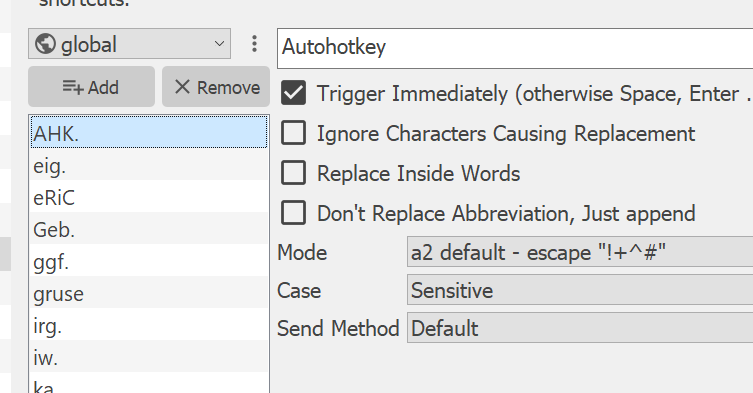
18 |
19 | In the **simplest form** a replacement is triggered by typing a new abbreviation word and "ending" it.
20 | That's usually a press of Space or Enter but also by any punctuation.
21 |
22 | ### Options:
23 |
24 | Pretty much whats [documented for the original functionality](https://autohotkey.com/docs/Hotstrings.htm#Options):
25 |
26 | * **Triggered Immediately** - makes the replacement appear as soon as the last letter of the abbreviation was typed. `*`
27 |
28 | * **Ignore Characters Causing Replacement** - will make the triggering keys like the bespoke "press of Space or Enter but also any puntuation" to not be actually written. They will cause the activation but they will not be visible. `O`
29 |
30 | * **Replace Inside Words** - makes the replacement appear although you did not type a new word. Usually when you're typing along it will make Hotstrings stop looking for matches and kick back in as soon as you start a new word. `?`
31 |
32 | * **Don't Replace Abbreviation, Just append** - turns off "automatic backspacing". The abbreviation is usually erased and replaced with the replacement text. With this the replacement will be just typed right after the abbreviation. `B0`
33 |
34 | * **Mode**
35 | * **a2 default escape "!+^#"** - To type more easily in the Hotstrings user interface [these modifier symbols](https://autohotkey.com/docs/commands/Send.htm#specialchars) are escaped for you in the background but commands like `{Enter}` will still work.
36 | * **Execute as Autohotkey code** - Will run the replacement string as Autohotkey script. Can also be multiple lines.
37 | **Be careful!** Invalid code will prevent the reloading of the a2 runtime!
38 | But you'll be back online as soon as your code is fixed!
39 | * **Let !+^# press Alt, Shift, Ctrl, Win** - The actual original mode of Hotstrings.
40 | * **Raw - Control-Characters as Plain Text** - Will cause nothing than writing the raw replacement.
41 | * **Text - new. Similar to raw mode** - See the [send documentation](https://autohotkey.com/docs/commands/Send.htm#SendText) for more.
42 |
43 | * **Case**
44 | * **Forward to text** - A kind of smart case handling. Will keep the replacement written lower case if abbreviation is lower case/Capitalize the first letter of the replacement if abbreviation is typed with first letters upper case/Makes the replacement ALL CAPS if abbreviation is typed all upper case.
45 | * **Sensitive** makes the Hotstring ONLY work if the exact cased abbreviation is typed.
46 | * **Keep Original** is triggered by any casing of the abbreviation but always writes the replacement as is.
47 |
48 | * **Send Method**
49 | * **Default** does not specify the send method for the Hotstring
50 | * **SendInput**, **SendPlay**, **SendEvent** will make the Hotstring use the specified Send method.
51 |
52 | Please also see [the Autohotkey documentation](https://autohotkey.com/docs/Hotstrings.htm#SendMode) about SendModes.
53 |
54 |
55 | For ideas or problems about this please: [file a **HotStrings** issue](https://github.com/ewerybody/a2.modules/issues/new?labels=mod%3AHotStrings)
56 |
--------------------------------------------------------------------------------
/README.md:
--------------------------------------------------------------------------------
1 | # a2.modules
2 |
3 | The standard [**a2**](https://github.com/ewerybody/a2) Autohotkey script modules collection.
4 |
5 | Mostly but not exclusively this is about re-implementing the extensions from the outdated **ac'tivAid** project for the a2 platform. So quite some ideas and code are not original to this project and credit goes to these fine folks: [**Wolfgang Reszel**](https://github.com/Tekl), [**Michael Telgkamp**](https://telgkamp.de), **David Hilberath**, **Dirk Schwarzmann**, **Jack Tissen**, Alexander Taubenkorb, Bernd Schandl, Chris Mallett, Elmar Sonnenschein, Florian Schenk, Holomind, jla, Jossekin Beilharz, Jürg, Oliver Pfeiffer, Patrick Eder, Rajat, Robert Deimel, Stephan Noy, Werner Piel, wOxxOm
6 |
7 |
8 | * [**CalculAid**](https://github.com/ewerybody/a2.modules/tree/master/CalculAid#calculaid) - A configurable Calculator opener.
9 | * [**ComfortResize**](https://github.com/ewerybody/a2.modules/tree/master/ComfortResize#ComfortResize) - Fuzzy window manipulation via 9 nice big zones.
10 | * [CommandLine](https://github.com/ewerybody/a2.modules/tree/master/commandLine#commandLine) - Connects Explorer and CommandLine and adds simple closing functionality.
11 | * [**DetailsPopup**](https://github.com/ewerybody/a2.modules/tree/master/DetailsPopup#detailspopup) - A Key/Value store UI for things to paste into fields.
12 | * [**ExplorerCreateFile**](https://github.com/ewerybody/a2.modules/tree/master/ExplorerCreateFile#ExplorerCreateFile) - Create different files directly in the current Explorer directory.
13 | * [**ExplorerDiff**](https://github.com/ewerybody/a2.modules/tree/master/ExplorerDiff#ExplorerDiff) - Context aware file comparing from a single Explorer Hotkey.
14 | * [**ExplorerHotkeys**](https://github.com/ewerybody/a2.modules/tree/master/ExplorerHotkeys#ExplorerHotkeys) - Some extra shortcuts for your Windows Filebrowser.
15 | * [**getWinfo**](https://github.com/ewerybody/a2.modules/tree/master/getWinfo#getwinfo) - A quick window information getter.
16 | * [**gtranslate**](https://github.com/ewerybody/a2.modules/tree/master/gtranslate#gtranslate) - To translate short text snippets or whole websites.
17 | * [**Hotstrings**](https://github.com/ewerybody/a2.modules/tree/master/HotStrings#hotstrings) - A user interface for Autohotkeys typing activated string replacements or command triggering.
18 | * [**OCR Tool**](https://github.com/ewerybody/a2.modules/tree/master/ocr_tool#ocr-tool) - Simple Optical Character Recognition to read unselectable text.
19 | * [**PastePlain**](https://github.com/ewerybody/a2.modules/tree/master/PastePlain#pasteplain) - Paste text without formatting or file paths from your clipboard.
20 | * [**Slasher**](https://github.com/ewerybody/a2.modules/tree/master/Slasher#Slasher) - Simple backslash/forwardslash handling on active selection.
21 | * [**tastatur**](https://github.com/ewerybody/a2.modules/tree/master/tastatur#tastatur) - A module to support german users on english keyboards.
22 | * [**TestAHK**](https://github.com/ewerybody/a2.modules/tree/master/TestAHK#testahk) - Tiny little Autohotkey snippet to test other Autohotkey snippets.
23 | * [texTools](https://github.com/ewerybody/a2.modules/tree/master/texTools#texTools) - Text manipulation tool snippets. Ideas welcome!
24 | * [UniFormat](https://github.com/ewerybody/a2.modules/tree/master/UniFormat#uniformat) - Find and Replace in selected text with sets from the huge unicode repository.
25 | * [VolumeControl](https://github.com/ewerybody/a2.modules/tree/master/VolumeControl#VolumeControl) - Hotkeys for Sound Volume control.
26 | * [webTools](https://github.com/ewerybody/a2.modules/tree/master/webTools#webTools) - Snippets to work with your selection for things on the internet...
27 | * [WindowControl](https://github.com/ewerybody/a2.modules/tree/master/WindowControl#WindowControl) - Hotkeys for general window management.
28 | * [**WinR**](https://github.com/ewerybody/a2.modules/tree/master/winr#winr) - Super Windows+R to open selected paths or URLs.
29 |
30 | Once there were many many more Extensions in ac'tiveAid but due to limited resources and or lack of interest so far these have not yet been ported. Although a2 needs way less boilerplate code porting to more modern Autohotkey is not really trivial. A tutorial on that will follow.
31 |
32 | Thanks for the interest. Please feel free to [file an issue](https://github.com/ewerybody/a2.modules/issues/new) and chat.
33 |
--------------------------------------------------------------------------------
/ExplorerHotkeys/ExplorerHotkeys.ahk:
--------------------------------------------------------------------------------
1 | ; ExplorerHotkeys
2 |
3 | ExplorerHotkeys_CallExplorer() {
4 | global ExplorerHotkeys_CallExplorerPath
5 | IfExist, %ExplorerHotkeys_CallExplorerPath%
6 | {
7 | Run, %ExplorerHotkeys_CallExplorerPath%
8 | Return
9 | }
10 |
11 | msg = The call Explorer-path set in ExplorerHotkeys is inexistent!`n`n
12 | msg = %msg% %ExplorerHotkeys_CallExplorerPath%`n`n
13 | msg = %msg%Maybe the directory was deleted? Please make sure the path exists or choose an existing one in the dialog!
14 | MsgBox, 16, ExplorerHotkeys Error, %msg%
15 |
16 | Run, "C:\\"
17 | }
18 |
19 | ExplorerHotkeys_ToggleHidden() {
20 | EH_REG_KEY := "HKCU\Software\Microsoft\Windows\CurrentVersion\Explorer\Advanced"
21 | value_name := "Hidden"
22 | RegRead, value, %EH_REG_KEY%, %value_name%
23 |
24 | If (value == 2) {
25 | new_value := 1
26 | a2tip("Hidden Items: ON")
27 | } Else {
28 | new_value := 2
29 | a2tip("Hidden Items: OFF")
30 | }
31 | RegWrite, REG_DWORD, %EH_REG_KEY%, %value_name%, %new_value%
32 | Sleep, 100 ; Whow this did only work every second time without this delay
33 |
34 | ExplorerHotkeys_Refresh()
35 | }
36 |
37 | ExplorerHotkeys_ToggleExtensions() {
38 | EH_REG_KEY := "HKCU\Software\Microsoft\Windows\CurrentVersion\Explorer\Advanced"
39 | value_name := "HideFileExt"
40 | RegRead, value, %EH_REG_KEY%, %value_name%
41 |
42 | If (value == 1) {
43 | new_value := 0
44 | a2tip("Extensions: ON")
45 | } Else {
46 | new_value := 1
47 | a2tip("Extensions: OFF")
48 | }
49 | RegWrite, REG_DWORD, %EH_REG_KEY%, %value_name%, %new_value%
50 | Sleep, 100 ; Whow this did only work every second time without this delay
51 |
52 | ExplorerHotkeys_Refresh()
53 | }
54 |
55 | ExplorerHotkeys_Refresh() {
56 | WinGetClass, win_class, A
57 | If (win_class = "#32770" OR (WinVer >= WIN_VISTA)) {
58 | send, {F5}
59 | } Else {
60 | PostMessage, 0x111, 28931,,, A
61 | }
62 | }
63 |
64 | ExplorerHotkeys_DuplicateWindow() {
65 | WinGet, this_id, ID, A
66 | geo := window_get_geometry(this_id)
67 | path := explorer_get_path()
68 | explorer_show(path)
69 |
70 | WinWaitNotActive, ahk_id %this_id%
71 | WinWaitActive, ahk_class CabinetWClass
72 | WinGet, new_id, ID, A
73 |
74 | window_set_rect(geo.x + 20, geo.y + 20, geo.w, geo.h, new_id)
75 | }
76 |
77 | ExplorerHotkeys_ReloadAll() {
78 | a2tip("Getting Explorers ...")
79 | explorers := window_list(,,"CabinetWClass")
80 | pids := processes_list_ids("explorer.exe")
81 | paths := []
82 | if (explorers.Length()) {
83 | txt := "Found " explorers.Length() " Explorer windows "
84 | for i, win in explorers
85 | {
86 | path := explorer_get_path(win.id)
87 | if (string_is_in_array(path, paths))
88 | Continue
89 | paths.Push(path)
90 | }
91 | if (paths.Length() == 1)
92 | txt .= "with 1 path:`n " paths[1]
93 | else
94 | txt .= "with " paths.Length() " different paths:`n " string_join(paths, "`n ")
95 | } else
96 | txt := "Found no Explorer windows but " pids.Length() " processes."
97 |
98 | a2tip()
99 | txt .= "`n`nDo you want to shut down & reload now?"
100 | MsgBox, 33, ExplorerHotkeys ReloadAll, %txt%
101 | IfMsgBox, Cancel
102 | return
103 |
104 | for i, pid in pids
105 | {
106 | a2tip_add("Closing PID: " pid)
107 | Process, Close, %pid%
108 | }
109 |
110 | Sleep, 100
111 | if !(paths)
112 | explorer_show("")
113 | else {
114 | for i, path in paths
115 | explorer_show(path)
116 | }
117 |
118 | pids := processes_list_ids("explorer.exe")
119 | a2tip(pids.Length() " procs after: " string_join(pids))
120 | }
121 |
122 |
123 | ExplorerHotkeys_ShowHideSeleced() {
124 | items := explorer_get_selected()
125 | if (!items.Length()) {
126 | a2tip("Nothing Selected!", 1)
127 | Return
128 | }
129 |
130 | for i, path in items
131 | {
132 | FileSetAttrib, ^H, %path%
133 | }
134 |
135 | a2tip("Toggled Visibility of " items.Length() " items.")
136 | }
--------------------------------------------------------------------------------
/ExplorerCreateFile/a2_local_element_file_list.py:
--------------------------------------------------------------------------------
1 | import os
2 |
3 | import a2util
4 | import a2ctrl
5 | from a2ctrl import Icons
6 | from a2qt import QtWidgets
7 | from a2element import DrawCtrl, EditCtrl
8 | from a2widget import a2item_editor, a2text_field, a2combo
9 |
10 | THIS_DIR = os.path.abspath(os.path.dirname(__file__))
11 | ENCODINGS = a2util.json_read(os.path.join(THIS_DIR, 'encodings.json'))
12 |
13 |
14 | class Draw(DrawCtrl):
15 | def __init__(self, *args):
16 | super(Draw, self).__init__(*args)
17 | self.main_layout = QtWidgets.QVBoxLayout(self)
18 | self.main_layout.setContentsMargins(0, 0, 0, 0)
19 |
20 | self.editor = a2item_editor.A2ItemEditor(self)
21 | self.editor.ui.item_editor_layout.setStretch(0, 1)
22 | self.editor.ui.item_editor_layout.setStretch(1, 4)
23 | self.editor.ignore_default_values = False
24 | if not self.user_cfg:
25 | self.editor.set_data(a2util.json_read(os.path.join(THIS_DIR, 'defaults.json')))
26 | self.check()
27 |
28 | self.editor.set_data(self.user_cfg)
29 | self.editor.data_changed.connect(self.delayed_check)
30 | self.main_layout.addWidget(self.editor)
31 | self.is_expandable_widget = True
32 |
33 | ext_field = QtWidgets.QLineEdit(self)
34 | self.editor.add_data_label_widget(
35 | 'ext', ext_field, ext_field.setText, ext_field.textChanged, '.txt', 'File Extension'
36 | )
37 |
38 | name = QtWidgets.QLineEdit(self)
39 | self.editor.add_data_label_widget(
40 | 'file_name', name, name.setText, name.textChanged, '', 'Default File Name'
41 | )
42 |
43 | # We do the icons now from the system. Maaaaybe we could have an override
44 | # but this way its already much easier most of the time.
45 | # icon_field = QtWidgets.QLineEdit(self)
46 | # self.editor.add_data_label_widget(
47 | # 'icon', icon_field, icon_field.setText, icon_field.textChanged, ''
48 | # )
49 |
50 | content = a2text_field.A2CodeField(self)
51 | self.editor.add_data_label_widget(
52 | 'content', content, content.setText, content.editing_finished, '', 'Default Content'
53 | )
54 |
55 | encoding_combo = a2combo.A2Combo(self)
56 | encoding_combo.setEditable(True)
57 | encoding_combo.addItems(ENCODINGS)
58 | encoding_help = QtWidgets.QToolButton(autoRaise=True, icon=Icons.help)
59 | encoding_help.clicked.connect(_encoding_docs)
60 | combo_lyt = QtWidgets.QHBoxLayout()
61 | combo_lyt.addWidget(encoding_combo)
62 | combo_lyt.addWidget(encoding_help)
63 | combo_lyt.setStretch(0, 1)
64 |
65 | self.editor.add_row('Encoding', combo_lyt)
66 | self.editor.connect_data_widget(
67 | 'encoding',
68 | encoding_combo,
69 | encoding_combo.setCurrentText,
70 | encoding_combo.currentTextChanged,
71 | list(ENCODINGS)[0],
72 | )
73 |
74 | ask_check = QtWidgets.QCheckBox('Ask for file name', self)
75 | self.editor.add_data_label_widget(
76 | 'ask', ask_check, ask_check.setChecked, ask_check.clicked, True, ''
77 | )
78 |
79 | def check(self):
80 | self.user_cfg.update(self.editor.data)
81 | self.set_user_value(self.user_cfg)
82 | self.change()
83 |
84 |
85 | def _encoding_docs():
86 | import a2util
87 |
88 | a2util.surf_to('https://autohotkey.com/docs/commands/FileEncoding.htm')
89 |
90 |
91 | class Edit(EditCtrl):
92 | def __init__(self, cfg, main, parent_cfg):
93 | super(Edit, self).__init__(cfg, main, parent_cfg)
94 |
95 | @staticmethod
96 | def element_name():
97 | """The elements display name shown in UI"""
98 | return 'File_List'
99 |
100 | @staticmethod
101 | def element_icon():
102 | return a2ctrl.Icons.check
103 |
104 |
105 | def get_settings(module_key, cfg, db_dict, user_cfg):
106 | if user_cfg:
107 | for typ, data in user_cfg.items():
108 | # replace display with AUtohotkey encoding names
109 | if data.get('encoding') in ENCODINGS:
110 | data['encoding'] = ENCODINGS[data['encoding']]
111 | db_dict['variables']['explorer_create_file_data'] = user_cfg
112 |
--------------------------------------------------------------------------------
/ExplorerCreateFile/explorer_create_on_paste.ahk:
--------------------------------------------------------------------------------
1 | explorer_create_on_paste() {
2 | ; Ensure default Explorer behaviour with files in clipboard.
3 | if WinClip.GetFiles()
4 | {
5 | Send, %A_ThisHotkey%
6 | return
7 | }
8 |
9 | current_path := explorer_get_path()
10 |
11 | for i, image_type in ["png", "jpeg"]
12 | {
13 | base64_id := "![]() ")
15 | {
16 | _explorer_create_from_base64(current_path, base64_id, image_type)
17 | Return
18 | }
19 | }
20 |
21 | token := gdip_startup()
22 | bitmap := gdipbitmap_from_clipboard()
23 | if _is_bitmap(bitmap) {
24 | _explorer_create_from_clip_bitmap(current_path, bitmap)
25 | Return
26 | }
27 |
28 | gdip_shutdown(token)
29 |
30 | Send, %A_ThisHotkey%
31 | }
32 |
33 |
34 | _explorer_create_from_base64(current_path, base64_id, image_type) {
35 | baselen := StrLen(base64_id)
36 | base64 := Substr(Clipboard, baselen + 1, StrLen(Clipboard) - baselen - 2)
37 | default_ext := "." image_type
38 | file_name := path_get_free_name(current_path, ExplorerCreateFile_DefaultImageName, default_ext)
39 | title := "ExplorerCreateFile: Image from Clipboard base64 " image_type " data"
40 | subtitle := "The extension can only be ." image_type "."
41 | if !explorer_create_file_dialog(file_name, current_path, "." image_type, "Image file", title, subtitle)
42 | Return
43 |
44 | ext := path_split_ext(file_name)[2]
45 | if !ext
46 | file_name := file_name default_ext
47 | file_path := path_join(current_path, file_name)
48 |
49 | File := FileOpen(file_path, "w")
50 | File.Write("")
51 | File.Close()
52 |
53 | nBytes := LC_Str2Bin(bitmap, base64, 0x1)
54 | File := FileOpen(file_path, "w")
55 | File.RawWrite(bitmap, nBytes)
56 | File.Close()
57 |
58 | _explorer_create_finish(file_name)
59 | }
60 |
61 | _explorer_create_from_clip_bitmap(current_path, bitmap) {
62 | if (ExplorerCreateFile_DefaultImageExt)
63 | default_ext := ExplorerCreateFile_DefaultImageExt
64 |
65 | default_ext := ".png"
66 | file_name := path_get_free_name(current_path, ExplorerCreateFile_DefaultImageName, default_ext)
67 |
68 | title := "ExplorerCreateFile: Image from Clipboard"
69 | subtitle := "The extension might be .png, .jpg, .gif, .bmp or .tif..."
70 | if !explorer_create_file_dialog(file_name, current_path, ".png", "Image file", title, subtitle)
71 | {
72 | gdip_shutdown(token)
73 | Return
74 | }
75 |
76 | ext := path_split_ext(file_name)[2]
77 | if !ext
78 | file_name := file_name default_ext
79 | file_path := path_join(current_path, file_name)
80 |
81 | a2tip("Creating image from clipboard ...")
82 | gdipbitmap_to_file(bitmap, file_path)
83 | gdip_shutdown(token)
84 |
85 | _explorer_create_finish(file_name)
86 | }
87 |
88 |
89 | _explorer_create_from_text(current_path) {
90 | Return
91 | ; Disabling Clipboard text to file for now since it's way to easy to mess up
92 | ; Renaming and writing into Address bar is hard to detect.
93 | default_ext := ".txt"
94 | file_name := path_get_free_name(current_path, ExplorerCreateFile_DefaultFileName, default_ext)
95 | title := "ExplorerCreateFile: File from Clipboard contents (" StrLen(ClipBoard) " bytes)"
96 | subtitle := "The extension might be anything. By default it'll be .txt."
97 | if !explorer_create_file_dialog(file_name, current_path, default_ext, "Text file", title, subtitle)
98 | Return
99 |
100 | ext := path_split_ext(file_name)[2]
101 | if !ext
102 | file_name := file_name default_ext
103 | file_path := _append_default_ext(current_path, file_name, default_ext)
104 |
105 | File := FileOpen(file_path, "w")
106 | File.Write(Clipboard)
107 |
108 | _explorer_create_finish(file_name)
109 | }
110 |
111 |
112 | _explorer_create_finish(file_name) {
113 | Loop, 10
114 | {
115 | if explorer_select(basename)
116 | Return
117 | Sleep, 400
118 | }
119 |
120 | ; TODO: Use the lib func in future
121 | ; if explorer_try_select(file_name)
122 | ; Return
123 |
124 | msgbox_error("Could not create file """ file_name """!", "ExplorerCreateFile: ERROR")
125 | }
126 |
127 |
128 | _is_bitmap(bitmap) {
129 | for _, error_code in [-1, -2, -3, -4] {
130 | if (error_code == bitmap)
131 | Return false
132 | }
133 | Return true
134 | }
135 |
136 | _append_default_ext(current_path, ByRef file_name, default_ext) {
137 | ext := path_split_ext(file_name)[2]
138 | if !ext
139 | file_name := file_name default_ext
140 | return path_join(current_path, file_name)
141 | }
142 |
143 |
--------------------------------------------------------------------------------
/ExplorerDiff/ExplorerDiff.ahk:
--------------------------------------------------------------------------------
1 | ; ExplorerDiff - ExplorerDiff.ahk
2 | ; Context aware file comparing from a single Explorer Hotkey.
3 | ; author: eric
4 | ; created: 2022 2 2
5 |
6 |
7 | ExplorerDiff() {
8 | paths := explorer_get_selected()
9 |
10 | if (ExplorerDiff_Path == "" OR ExplorerDiff_Path == ".") {
11 | msgbox_error("No Diff app set! Please open the dialog and set one!"
12 | , "ExplorerDiff: No Diff app")
13 | Return
14 | }
15 |
16 | if (!FileExist(ExplorerDiff_Path)) {
17 | msgbox_error("Unable to find set diff app! The path seems to be invalid!`n`n" ExplorerDiff_Path "`n??"
18 | , "ExplorerDiff: Diff app path invalid")
19 | Return
20 | }
21 |
22 | if (paths.Length() == 2) {
23 | _ExplorerDiff(paths)
24 | Return
25 | }
26 | if (!paths.Length())
27 | paths.Push(explorer_get_path())
28 |
29 | a2log_debug("paths.Length(): " paths.Length(), "ExplorerDiff")
30 | if (paths.Length() == 1) {
31 | global _ExplorerDiff_WaitForPath
32 | if (_ExplorerDiff_WaitForPath == paths[1])
33 | Return
34 |
35 | if (_ExplorerDiff_WaitForPath) {
36 | _ExplorerDiff([_ExplorerDiff_WaitForPath, paths[1]])
37 | Return
38 | }
39 |
40 | _ExplorerDiff_WaitForPath := paths[1]
41 | _ExplorerDiff_Wait()
42 | Return
43 | }
44 |
45 | msgbox_error("Please select 2 files OR 2 folders exactly!"
46 | , "ExplorerDiff: Too many paths!")
47 | }
48 |
49 | _ExplorerDiff(files) {
50 | global _ExplorerDiff_WaitForPath
51 | _ExplorerDiff_WaitForPath := ""
52 | if (path_is_dir(files[1]) AND path_is_dir(files[2])) {
53 | ExplorerDiff_Run(files)
54 | Return
55 | }
56 | if (path_is_file(files[1]) AND path_is_file(files[2])) {
57 | ExplorerDiff_Files(files)
58 | Return
59 | }
60 |
61 | msgbox_error("Please select 2 files OR 2 folders exactly!"
62 | , "ExplorerDiff: File/Folder Mismatch")
63 | Return
64 | }
65 |
66 |
67 | _ExplorerDiff_Wait() {
68 | global _ExplorerDiff_WaitForPath
69 | Sleep, 300
70 |
71 | SetTimer, _ExplorerDiff_Wait_Call, 30
72 |
73 | _ExplorerDiff_Wait_Call:
74 | if (GetKeyState("Escape", "p") == "D") {
75 | a2tip("ExplorerDiff: Escaped")
76 | _ExplorerDiff_WaitForPath := ""
77 | }
78 |
79 | if (!_ExplorerDiff_WaitForPath) {
80 | a2tip()
81 | SetTimer, _ExplorerDiff_Wait_Call, Off
82 | Return
83 | }
84 |
85 | if path_is_dir(_ExplorerDiff_WaitForPath)
86 | mode := "Folder"
87 | else
88 | mode := "File"
89 | a2tip("ExplorerDiff: Selected " mode ":`n" _ExplorerDiff_WaitForPath "`nSelect another " mode " and press " A_ThisHotkey " again.`nOr hit Escape.")
90 | Return
91 | }
92 |
93 |
94 | ExplorerDiff_Files(files) {
95 | file1 := files[1], file2 := files[2]
96 | size1 := FileGetSize(file1), size2 := FileGetSize(file2)
97 |
98 | time0 := time_unix()
99 | if (size1 != size2) {
100 | a2tip("ExplorerDiff: Sizes different ... (" size1 "/" size2 ")")
101 | ExplorerDiff_Run(files)
102 | Return
103 | }
104 |
105 | if (!ExplorerDiff_MaxSize)
106 | ExplorerDiff_MaxSize := 1.0
107 |
108 | if (size1 > (ExplorerDiff_MaxSize * 1024 * 1024)) {
109 | a2tip("ExplorerDiff: Files bigger than " ExplorerDiff_MaxSize " MB ... ")
110 | ExplorerDiff_Run(files)
111 | Return
112 | }
113 |
114 | a2tip("ExplorerDiff: reading file 1 ...", 60)
115 | FileRead, contents, %file1%
116 | lines1 := []
117 | Loop, parse, contents, `n
118 | lines1.Insert(A_LoopField)
119 |
120 | a2tip("ExplorerDiff: reading file 2 ...", 60)
121 | FileRead, contents, %file2%
122 | lines2 := []
123 | Loop, parse, contents, `n
124 | lines2.Insert(A_LoopField)
125 | contents :=
126 |
127 | if (lines1.Length() != lines2.Length()) {
128 | a2tip("ExplorerDiff: Different line lenghts ... (" lines1.Length() "/" lines2.Length() ")")
129 | ExplorerDiff_Run(files)
130 | Return
131 | }
132 |
133 | a2tip("ExplorerDiff: Same size, testing line by line ...")
134 | identical := true
135 | len := 0
136 | Loop % lines1.Length()
137 | {
138 | len += StrLen(line1)
139 | if (lines1[A_Index] != lines2[A_Index]) {
140 | a2tip("ExplorerDiff: Found Difference on line " A_Index " ... ", 15)
141 | ExplorerDiff_Run(files)
142 | Return
143 | }
144 | if Mod(A_Index, 10000) == 0
145 | {
146 | time_passed := time_unix() - time0
147 | a2tip("ExplorerDiff: Same size, testing line by line " A_Index)
148 | }
149 | }
150 |
151 | msgbox_info("ExplorerDiff: Files are identical!")
152 | }
153 |
154 |
155 | ExplorerDiff_Run(files) {
156 | cmd := """" ExplorerDiff_Path """ """ files[1] """ """ files[2] """"
157 | Run(cmd)
158 | }
159 |
--------------------------------------------------------------------------------
/UniFormat/uniformat.ahk:
--------------------------------------------------------------------------------
1 | global _uniformat_names := {}
2 |
3 | uniformat_main() {
4 | global _uniformat_selection
5 | _uniformat_selection := clipboard_get()
6 | if !_uniformat_selection {
7 | a2tip("UniFormat: Nothing selected!")
8 | return
9 | }
10 | ; Display the menu sorted by filename,
11 | menu_list := {}
12 | for name, file_name in _uniformat_get_set_names()
13 | menu_list[file_name] := name
14 | ; menu_list is automatically sorted now
15 | for i, name in menu_list
16 | Menu, UniFormatMenu, Add, %name%, _uniformat_handler
17 |
18 | Menu, UniFormatMenu, Add
19 | Menu, UniFormatMenu, Add, Cancel, _uniformat_handler
20 | Menu, UniFormatMenu, Show
21 | Menu, UniFormatMenu, DeleteAll
22 | }
23 |
24 | _uniformat_handler(menu_name) {
25 | uniformat_replace(_uniformat_get_set_names()[menu_name])
26 | }
27 |
28 | uniformat_replace(set_name) {
29 | global _uniformat_selection
30 | data := uniformat_get_letters(set_name)
31 | if (set_name == "Cancel" and !data)
32 | Return
33 |
34 | if (_uniformat_selection)
35 | new_string := _uniformat_selection
36 | else
37 | new_string := clipboard_get()
38 |
39 | sel_length_before := StrLen(_uniformat_selection)
40 | _uniformat_selection :=
41 | count := 0
42 |
43 | current_case := A_StringCaseSense
44 | if !data.case
45 | StringCaseSense, On
46 |
47 | ; To prevent double replacements we look up the replacing chars to see
48 | ; if they appear in the trigger ones to replace these by position later.
49 | replace_by_pos := []
50 | Loop, % data.num_letters
51 | if (string_is_in_array(data.replacements[A_Index], data.letters, A_Index))
52 | replace_by_pos.push(data.letters[A_Index])
53 |
54 | ; Perform StrReplace for all matching characters
55 | placeholders := {}
56 | Loop, % data.num_letters
57 | {
58 | if InStr(new_string, data.letters[A_Index], !data.case) {
59 | count++
60 | if (string_is_in_array(data.letters[A_Index], replace_by_pos)) {
61 | Loop, 42
62 | {
63 | placeholder := "<$$" string_random(10) "%%>"
64 | if (!InStr(new_string, placeholder))
65 | Break
66 | }
67 | placeholders[placeholder] := data.replacements[A_Index]
68 | new_string := StrReplace(new_string, data.letters[A_Index], placeholder)
69 | }
70 | else
71 | new_string := StrReplace(new_string, data.letters[A_Index], data.replacements[A_Index])
72 | }
73 | }
74 |
75 | ; Replace again any placeholders we assigned
76 | for placeholder, replacement in placeholders
77 | new_string := StrReplace(new_string, placeholder, replacement)
78 |
79 | if !data.case
80 | StringCaseSense, %current_case%
81 |
82 | if data.reverse
83 | new_string := string_reverse(new_string)
84 |
85 | if !count
86 | a2tip("UniFormat: Nothing replaced")
87 | else {
88 | msg := "UniFormat: Found " count " items to replace."
89 | if data.shrink
90 | msg .= "`nCharacters before/now:" sel_length_before "/" StrLen(new_string)
91 | a2tip(msg, 2)
92 | }
93 |
94 | clipboard_paste(new_string)
95 | }
96 |
97 | uniformat_get_letters(set_name) {
98 | ; Get data from a sets txt by spliting by spaces and
99 | ; getting 1st as key and 2nd as value.
100 | data := {}
101 | ; `letters` is now a LIST instead of object! lower and upper-case keys would
102 | ; collide otherwise and if we flip chars and replacements we could NOT have
103 | ; multiple things being replaced with the same text. Pcheew.
104 | data.letters := []
105 | data.replacements := []
106 | data.num_letters := 0
107 | header_done := False
108 |
109 | letters_file := path_neighbor(A_LineFile, "sets\" string_suffix(set_name, ".txt"))
110 | args := ["case", "reverse", "shrink", "onebyone"]
111 | trim_chars := ["#", " "]
112 |
113 | FileEncoding, UTF-8
114 | Loop, Read, %letters_file%
115 | {
116 | line := Trim(A_LoopReadLine)
117 | if !line
118 | Continue
119 |
120 | ;Gather settings and put them on the data object
121 | if (!header_done and string_startswith(line, "#")) {
122 | line := string_trimLeft(line, trim_chars)
123 | parts := StrSplit(line, "=",,2)
124 | if string_is_in_array(parts[1], args)
125 | data[parts[1]] := parts[2]
126 | Continue
127 | }
128 | header_done := 1
129 |
130 | chars := StrSplit(line, " ")
131 | data.letters.Push(chars[1])
132 | data.replacements.Push(chars[2])
133 | data.num_letters++
134 | }
135 |
136 | Return data
137 | }
138 |
139 | _uniformat_get_set_names() {
140 | static _uniformat_names
141 | if (!_uniformat_names) {
142 | _uniformat_names := {}
143 | sets_pattern := path_join(path_neighbor(A_LineFile, "sets"), "*.txt")
144 | FileEncoding, UTF-8
145 | Loop, Files, % sets_pattern
146 | {
147 | if (string_startswith(A_LoopFileName, "_ ") and !uniformat_show_wip)
148 | Continue
149 | line := FileReadLine(A_LoopFileFullPath, 1)
150 | if string_startswith(line, "# name=")
151 | name := SubStr(line, 8)
152 | else
153 | name := path_split_ext(A_LoopFileName)[1]
154 | _uniformat_names[name] := A_LoopFileName
155 | }
156 | }
157 |
158 | Return _uniformat_names
159 | }
--------------------------------------------------------------------------------
/ExplorerHotkeys/a2module.json:
--------------------------------------------------------------------------------
1 | [
2 | {
3 | "author": "eric",
4 | "date": "2015",
5 | "description": "Some extra Hotkeys for your Windows Filebrowser.",
6 | "display_name": "",
7 | "tags": [
8 | "file"
9 | ],
10 | "typ": "nfo",
11 | "url": "https://github.com/ewerybody/a2.modules/blob/master/ExplorerHotkeys/README.md#explorerhotkeys",
12 | "version": "0.4"
13 | },
14 | {
15 | "disablable": true,
16 | "enabled": true,
17 | "functionCode": "ExplorerHotkeys_CallExplorer()",
18 | "functionMode": 0,
19 | "key": "Win+E",
20 | "keyChange": true,
21 | "label": "Call Explorer with a predefined path",
22 | "mode": "ahk",
23 | "multiple": true,
24 | "name": "ExplorerHotkeys_CallExplorer",
25 | "scope": [],
26 | "scopeChange": false,
27 | "scopeMode": 0,
28 | "typ": "hotkey"
29 | },
30 | {
31 | "browse_type": "0",
32 | "file_types": "",
33 | "label": "Predefined Path",
34 | "name": "ExplorerHotkeys_CallExplorerPath",
35 | "save_mode": false,
36 | "typ": "path",
37 | "value": "C:\\",
38 | "writable": false
39 | },
40 | {
41 | "disablable": true,
42 | "enabled": true,
43 | "functionCode": "ExplorerHotkeys_ToggleHidden()",
44 | "functionMode": 0,
45 | "key": [
46 | "Ctrl+H"
47 | ],
48 | "keyChange": true,
49 | "label": "Toggle View Hidden Items",
50 | "multiple": true,
51 | "name": "ExplorerHotkeys_ToggleHiddenHotkey",
52 | "scope": [
53 | "ahk_class CabinetWClass"
54 | ],
55 | "scopeChange": true,
56 | "scopeMode": 1,
57 | "typ": "hotkey"
58 | },
59 | {
60 | "file": "ExplorerHotkeys.ahk",
61 | "typ": "include"
62 | },
63 | {
64 | "disablable": true,
65 | "enabled": true,
66 | "functionCode": "ExplorerHotkeys_ToggleExtensions()",
67 | "functionMode": 0,
68 | "key": [
69 | "Ctrl+E"
70 | ],
71 | "keyChange": true,
72 | "label": "Toggle View File Extensions",
73 | "multiple": true,
74 | "name": "ExplorerHotkeys_ToggleExtensionsHotkey",
75 | "scope": [
76 | "ahk_class CabinetWClass"
77 | ],
78 | "scopeChange": true,
79 | "scopeMode": 1,
80 | "typ": "hotkey"
81 | },
82 | {
83 | "disablable": true,
84 | "enabled": true,
85 | "functionCode": "ExplorerHotkeys_ShowHideSeleced()",
86 | "functionMode": 0,
87 | "key": [
88 | "Alt+H"
89 | ],
90 | "keyChange": true,
91 | "label": "Toggle Show/Hide Selected",
92 | "multiple": true,
93 | "name": "ExplorerHotkeys_ToggleSelectedVisibility",
94 | "scope": [
95 | "ahk_class CabinetWClass"
96 | ],
97 | "scopeChange": true,
98 | "scopeMode": 1,
99 | "typ": "hotkey"
100 | },
101 | {
102 | "children": [
103 | {
104 | "disablable": false,
105 | "enabled": true,
106 | "functionMode": 2,
107 | "functionSend": "Send, {Browser_Forward}",
108 | "key": [
109 | "Shift+Wheelup"
110 | ],
111 | "keyChange": true,
112 | "label": "Forward",
113 | "multiple": true,
114 | "name": "ExplorerHotkeys_ShiftWheelHotkey1",
115 | "scope": [
116 | "ahk_class CabinetWClass"
117 | ],
118 | "scopeChange": true,
119 | "scopeMode": 1,
120 | "typ": "hotkey"
121 | },
122 | {
123 | "disablable": false,
124 | "enabled": true,
125 | "functionMode": 2,
126 | "functionSend": "Send, {Browser_Back}",
127 | "key": [
128 | "Shift+Wheeldown"
129 | ],
130 | "keyChange": true,
131 | "label": "Backward",
132 | "multiple": true,
133 | "name": "ExplorerHotkeys_ShiftWheelHotkey2",
134 | "scope": [
135 | "ahk_class CabinetWClass"
136 | ],
137 | "scopeChange": true,
138 | "scopeMode": 1,
139 | "typ": "hotkey"
140 | }
141 | ],
142 | "disablable": true,
143 | "enabled": true,
144 | "label": "Browse Forward/Backward on MouseWheel",
145 | "name": "ExplorerHotkeys_ShiftWheelBox",
146 | "typ": "group"
147 | },
148 | {
149 | "file": "ftpExplorerCopy.ahk",
150 | "typ": "include"
151 | },
152 | {
153 | "disablable": true,
154 | "enabled": false,
155 | "functionCode": "ftpExplorerCopy()",
156 | "functionMode": 0,
157 | "key": "Alt+V",
158 | "keyChange": true,
159 | "label": "from FTP-Explorer get http-url into Clipboard",
160 | "mode": "ahk",
161 | "multiple": true,
162 | "name": "ftpExplorerCopyHotkey",
163 | "scope": [
164 | "ahk_class CabinetWClass"
165 | ],
166 | "scopeChange": true,
167 | "scopeMode": 1,
168 | "typ": "hotkey"
169 | },
170 | {
171 | "disablable": true,
172 | "enabled": false,
173 | "functionCode": "ExplorerHotkeys_NavOnOff()",
174 | "functionMode": 0,
175 | "functionSend": "Send, {Alt}vn{Enter}",
176 | "functionURL": "Run, ",
177 | "key": "Alt+N",
178 | "keyChange": true,
179 | "label": "Toggle Navigation Panel (Experimental)",
180 | "mode": "ahk",
181 | "multiple": true,
182 | "name": "ExplorerHotkeys_NavOnOff",
183 | "scope": [
184 | "ahk_class CabinetWClass"
185 | ],
186 | "scopeChange": true,
187 | "scopeMode": 1,
188 | "typ": "hotkey"
189 | },
190 | {
191 | "file": "navOnOff.ahk",
192 | "typ": "include"
193 | },
194 | {
195 | "disablable": true,
196 | "enabled": false,
197 | "functionCode": "a2tip(\"Explorer Up\")\nSend, !{Up}",
198 | "functionMode": 0,
199 | "functionSend": "SendRaw, a2tip(\"!{Up}\")\nSend, !{Up}",
200 | "functionURL": "Run, un, .",
201 | "key": "XButton1",
202 | "keyChange": true,
203 | "label": "Go \"Up\" instead of Back",
204 | "multiple": true,
205 | "name": "ExplorerHotkeys_BackHotkey",
206 | "scope": [
207 | "ahk_class CabinetWClass ahk_exe explorer.exe"
208 | ],
209 | "scopeChange": true,
210 | "scopeMode": 1,
211 | "typ": "hotkey"
212 | },
213 | {
214 | "disablable": true,
215 | "enabled": false,
216 | "functionCode": "ExplorerHotkeys_ReloadAll()",
217 | "functionMode": 0,
218 | "key": [
219 | "Win+Shift+E"
220 | ],
221 | "keyChange": true,
222 | "label": "Reload Explorer process & windows",
223 | "multiple": true,
224 | "name": "ExplorerHotkeys_ReloadAllHotkey",
225 | "scopeChange": true,
226 | "typ": "hotkey"
227 | }
228 | ]
--------------------------------------------------------------------------------
/UniFormat/a2_local_element_uniformat_lister.py:
--------------------------------------------------------------------------------
1 | import os
2 | from copy import deepcopy
3 |
4 | import a2ctrl
5 | import a2path
6 | import a2element.hotkey
7 | from a2element import DrawCtrl, EditCtrl
8 | from a2widget import a2hotkey, a2item_editor, key_value_table
9 | from a2qt import QtWidgets
10 |
11 | THIS_DIR = os.path.abspath(os.path.dirname(__file__))
12 | SETS = os.path.join(THIS_DIR, 'sets')
13 | WIP_CHECK = 'wip_check'
14 | _DEFAULT_HOTKEY = {
15 | 'enabled': False,
16 | 'key': [''],
17 | 'keyChange': True,
18 | 'multiple': True,
19 | 'scope': [],
20 | 'scopeChange': True,
21 | 'scopeMode': 0,
22 | }
23 | MSG_ALT = (
24 | 'Values separated by space are alternatives (currently ignored!) '
25 | 'Only the first is used!'
26 | )
27 |
28 | class Draw(DrawCtrl):
29 | def __init__(self, *args):
30 | super(Draw, self).__init__(*args)
31 | self.main_layout = QtWidgets.QVBoxLayout(self)
32 | self.main_layout.setContentsMargins(0, 0, 0, 0)
33 |
34 | self.editor = UniFormatLister(self)
35 | self.editor.data_changed.connect(self.delayed_check)
36 | self.editor.set_list_width(self.main.style.scale(170))
37 | self.main_layout.addWidget(self.editor)
38 | show_wip = self.user_cfg.get(WIP_CHECK, False)
39 | self.load_sets(show_wip)
40 |
41 | self.wip_check = QtWidgets.QCheckBox('Show WIP sets')
42 | self.wip_check.setToolTip(
43 | 'Enable sets flagged "Work in Progress" to show in list and main menu.'
44 | )
45 | self.wip_check.setChecked(show_wip)
46 | self.wip_check.clicked.connect(self.delayed_check)
47 | self.wip_check.clicked.connect(self.load_sets)
48 | self.main_layout.addWidget(self.wip_check)
49 |
50 | self.is_expandable_widget = True
51 |
52 | def load_sets(self, show_wip=None):
53 | if show_wip is None:
54 | show_wip = self.user_cfg.get(WIP_CHECK, False)
55 |
56 | data = {}
57 | user_sets = self.user_cfg.get('sets', {})
58 | for item in a2path.iter_types(SETS, ['.txt']):
59 | this_data = _get_sets_data(item.path)
60 | if not this_data:
61 | continue
62 | if not show_wip and item.base.startswith('_ ') or 'wip' in this_data:
63 | continue
64 | this_hk = user_sets.get(item.base, {}).get(a2hotkey.NAME)
65 | if this_hk is not None:
66 | this_data[a2hotkey.NAME] = this_hk
67 | data[item.base] = this_data
68 | self.editor.set_data(data)
69 |
70 | def check(self):
71 | # Gather ONLY hotkeys from editor data, no need to store anything else.
72 | # The sets stuff is just for display so far.
73 | user_sets = self.user_cfg.get('sets', {})
74 | for name, set_data in self.editor.data.items():
75 | if a2hotkey.NAME not in set_data:
76 | if a2hotkey.NAME in user_sets.get(name, {}):
77 | del user_sets[name][a2hotkey.NAME]
78 | continue
79 | user_sets.setdefault(name, {})[a2hotkey.NAME] = set_data[a2hotkey.NAME]
80 | self.user_cfg['sets'] = user_sets
81 |
82 | if self.wip_check.isChecked():
83 | self.user_cfg[WIP_CHECK] = True
84 | elif WIP_CHECK in self.user_cfg:
85 | del self.user_cfg[WIP_CHECK]
86 | self.set_user_value(self.user_cfg)
87 | self.change()
88 |
89 |
90 | class UniFormatLister(a2item_editor.A2ItemEditor):
91 | def __init__(self, parent):
92 | super().__init__(parent)
93 |
94 | self.desc = QtWidgets.QLabel(wordWrap=True, openExternalLinks=True)
95 | self.enlist_widget('desc', self.desc, self.desc.setText, '')
96 | self.add_row(self.desc)
97 |
98 | hotkey_cfg_copy = deepcopy(_DEFAULT_HOTKEY)
99 | self.hotkey = a2element.hotkey.Draw(self, hotkey_cfg_copy)
100 | self.add_data_widget(
101 | 'hotkey', self.hotkey, self.hotkey.set_config, self.hotkey.changed, hotkey_cfg_copy
102 | )
103 |
104 | self.table_lable = QtWidgets.QLabel()
105 | self.table_lable.setWordWrap(True)
106 | self.add_row(self.table_lable)
107 |
108 | self.key_value_table = key_value_table.KeyValueTable(self)
109 | self.key_value_table.setEditTriggers(QtWidgets.QTableWidget.NoEditTriggers)
110 | self.selected_name_changed.connect(self._set_hotkey_label)
111 | self.key_value_table.changed.connect(self._update_data)
112 | self.enlist_widget('letters', self.key_value_table, self.key_value_table.set_data, {})
113 | self.add_row(self.key_value_table)
114 |
115 | def _update_data(self):
116 | if self.selected_name:
117 | have_data = self.data[self.selected_name]['data']
118 | table_data = self.key_value_table.get_data()
119 | if have_data != table_data:
120 | self.data[self.selected_name]['data'] = table_data
121 | self.data_changed.emit()
122 |
123 | def _set_hotkey_label(self, name):
124 | self.hotkey.label.setText(f'Format with "{name}" directly')
125 | this_data = self.data.get(name, {})
126 | letters = this_data.get('letters', {})
127 | label = '%i keys. ' % len(letters)
128 | if any(' ' in v for v in letters.values()):
129 | label += MSG_ALT
130 |
131 | self.table_lable.setText(label)
132 |
133 |
134 | class Edit(EditCtrl):
135 | """
136 | The background widget that sets up how the user can edit the element,
137 | visible when editing the module.
138 | """
139 |
140 | def __init__(self, cfg, main, parent_cfg):
141 | super(Edit, self).__init__(cfg, main, parent_cfg)
142 |
143 | @staticmethod
144 | def element_name():
145 | """The elements display name shown in UI"""
146 | return 'Uniformat_Lister'
147 |
148 | @staticmethod
149 | def element_icon():
150 | return a2ctrl.Icons.check
151 |
152 |
153 | def _get_sets_data(path):
154 | data = {} # type: dict[str, str | bool | dict]
155 | letters = {} # type: dict[str, str]
156 | passed_comments = False
157 | with open(path, encoding='utf8') as file_obj:
158 | for line in file_obj:
159 | if not passed_comments and line.startswith('#'):
160 | line = line.strip('# ')
161 | if not line:
162 | continue
163 | pieces = line.split('=', 1)
164 | if len(pieces) == 1 or ' ' in pieces[0]:
165 | continue
166 | data[pieces[0].strip()] = pieces[1].strip()
167 | continue
168 | passed_comments = True
169 | pieces = line.rstrip().split(' ', 1)
170 | if len(pieces) <= 1:
171 | continue
172 | letters[pieces[0]] = pieces[1]
173 | data['letters'] = letters
174 | return data
175 |
176 |
177 | def get_settings(module_key, cfg, db_dict, user_cfg):
178 | if user_cfg.get(WIP_CHECK, False):
179 | db_dict['variables']['uniformat_show_wip'] = True
180 |
181 | for name, data in user_cfg.get('sets', {}).items():
182 | hotkey = data.get(a2hotkey.NAME)
183 | if hotkey is None:
184 | continue
185 |
186 | hk_cfg = deepcopy(_DEFAULT_HOTKEY)
187 | hk_cfg[a2element.hotkey.Vars.function_code] = f'uniformat_replace("{name}")'
188 | a2element.hotkey.get_settings(module_key, hk_cfg, db_dict, hotkey)
189 |
--------------------------------------------------------------------------------
/gtranslate/a2_local_element_gtranslate_lister.py:
--------------------------------------------------------------------------------
1 | """
2 | A lister element for creating arbitrary translation hotkeys.
3 | """
4 | import os
5 | import sys
6 | from copy import deepcopy
7 |
8 | from a2qt import QtWidgets, QtCore
9 |
10 | import a2ctrl
11 | import a2element.hotkey
12 | from a2element import DrawCtrl, EditCtrl
13 | from a2widget import a2item_editor, a2input_dialog, a2hotkey
14 |
15 | THIS_DIR = os.path.abspath(os.path.dirname(__file__))
16 | if THIS_DIR not in sys.path:
17 | sys.path.append(THIS_DIR)
18 | import gtranslate_langs
19 |
20 |
21 | _DEFAULT_HOTKEY = {
22 | 'disablable': True,
23 | 'enabled': True,
24 | 'functionCode': '',
25 | 'functionMode': 0,
26 | 'key': [''],
27 | 'keyChange': True,
28 | 'label': '...',
29 | 'multiple': True,
30 | 'name': 'some_name',
31 | 'scope': [],
32 | 'scopeChange': False,
33 | 'scopeMode': 0,
34 | 'typ': 'hotkey',
35 | }
36 |
37 |
38 | class GTranslateLister(a2item_editor.A2ItemEditor):
39 | def __init__(self, cfg, parent):
40 | super(GTranslateLister, self).__init__(parent)
41 | self.item_flags = (
42 | QtCore.Qt.ItemIsSelectable | QtCore.Qt.ItemIsDragEnabled | QtCore.Qt.ItemIsEnabled
43 | )
44 | self.set_data(cfg)
45 |
46 | # Contrary to other implementations hotkey data is THE data here.
47 | # This way we cannot add the hotkey widget with `add_data_widget`
48 | # because there is no subkey under our user data.
49 | self.hotkey = a2element.hotkey.Draw(self, deepcopy(_DEFAULT_HOTKEY))
50 | self.hotkey.changed.connect(self._changed)
51 | self.add_row(self.hotkey)
52 |
53 | self.selected_name_changed.connect(self._update_hotkey)
54 |
55 | if cfg:
56 | self.ui.item_list.select_names([sorted(cfg)[0]])
57 |
58 | def add_item(self):
59 | dialog = NewDialog(self, self.data.keys())
60 | dialog.accepted.connect(self._add)
61 | dialog.show()
62 |
63 | def _add(self):
64 | dialog = self.sender()
65 | if isinstance(dialog, NewDialog):
66 | key = dialog.output
67 | self.add_named_item(key)
68 | if key not in self.data:
69 | self._changed()
70 |
71 | def _update_hotkey(self, name):
72 | try:
73 | from_lang, to_lang = name.split(gtranslate_langs.SEPARATOR)
74 | except ValueError:
75 | return
76 |
77 | text = 'Translate "%s" to "%s"' % (
78 | gtranslate_langs.key_to_name(from_lang),
79 | gtranslate_langs.key_to_name(to_lang),
80 | )
81 | self.hotkey.label.setText(text)
82 | this_cfg = self.data.get(name, {})
83 | self.hotkey.set_config(this_cfg)
84 |
85 | def _changed(self):
86 | self.data[self.selected_name] = self.hotkey.get_user_dict()
87 | self.data_changed.emit()
88 |
89 |
90 | class NewDialog(a2input_dialog.A2ConfirmDialog):
91 | """Dialog to select the languages to translate between."""
92 |
93 | def __init__(self, parent, present_keys):
94 | super(NewDialog, self).__init__(
95 | parent, 'New gtranslate Hotkey', 'Select languages to translate between:'
96 | )
97 | self._present_keys = present_keys
98 |
99 | self.ui.combo_from = QtWidgets.QComboBox(self)
100 | self.ui.combo_from.addItem(gtranslate_langs.AUTO_LANGUAGE)
101 | self.ui.combo_from.setItemData(0, gtranslate_langs.AUTO_KEY)
102 |
103 | self.ui.combo_to = QtWidgets.QComboBox(self)
104 | for i, (name, key) in enumerate(self.iter_langs()):
105 | self.ui.combo_from.addItem(f'{name} ({key})')
106 | self.ui.combo_from.setItemData(i + 1, key)
107 | self.ui.combo_to.addItem(f'{name} ({key})')
108 | self.ui.combo_to.setItemData(i, key)
109 |
110 | if gtranslate_langs.DEFAULT_TRANSLATION not in self._present_keys:
111 | name = gtranslate_langs.key_to_name(gtranslate_langs.DEFAULT)
112 | self.ui.combo_to.setCurrentText(f'{name} ({gtranslate_langs.DEFAULT})')
113 |
114 | self.ui.combo_from.currentIndexChanged.connect(self.check)
115 | self.ui.combo_to.currentIndexChanged.connect(self.check)
116 | self.ui.combo_to.setFocus()
117 |
118 | form = QtWidgets.QFormLayout()
119 | form.addRow('From:', self.ui.combo_from)
120 | form.addRow('To:', self.ui.combo_to)
121 | self.ui.main_layout.insertLayout(1, form)
122 |
123 | def check(self, key=None):
124 | key = self.get_key(key)
125 | if key not in self.parent().data:
126 | self.ui.a2ok_button.setEnabled(True)
127 | self.ui.a2ok_button.setText('OK')
128 | return True
129 | else:
130 | self.ui.a2ok_button.setEnabled(False)
131 | self.ui.a2ok_button.setText(f'"{key}" is already liste!')
132 | return False
133 |
134 | @property
135 | def output(self):
136 | return self._output
137 |
138 | def okay(self):
139 | key = self.get_key()
140 | if self.check(key):
141 | self._output = key
142 | self.okayed.emit()
143 | self.accept()
144 |
145 | def get_key(self, key=None):
146 | if key is None:
147 | from_lang = self.ui.combo_from.currentData()
148 | to_lang = self.ui.combo_to.currentData()
149 | key = f'{from_lang}{gtranslate_langs.SEPARATOR}{to_lang}'
150 | return key
151 |
152 | def iter_langs(self):
153 | for name, key in gtranslate_langs.get().items():
154 | yield name, key
155 |
156 |
157 | class Draw(DrawCtrl):
158 | """
159 | The frontend widget visible to the user with options
160 | to change the default behavior of the element.
161 | """
162 |
163 | def __init__(self, *args):
164 | super(Draw, self).__init__(*args)
165 | self.main_layout = QtWidgets.QVBoxLayout(self)
166 | self.main_layout.setContentsMargins(0, 0, 0, 0)
167 |
168 | self.editor = GTranslateLister(self.user_cfg, self)
169 | self.editor.data_changed.connect(self.delayed_check)
170 | self.main_layout.addWidget(self.editor)
171 |
172 | self.is_expandable_widget = True
173 | self.editor.set_list_width(self.main.style.scale(120))
174 |
175 | def check(self):
176 | self.user_cfg = self.editor.data
177 | self.set_user_value(self.user_cfg)
178 | self.change()
179 |
180 |
181 | class Edit(EditCtrl):
182 | """
183 | The background widget that sets up how the user can edit the element,
184 | visible when editing the module.
185 | """
186 |
187 | def __init__(self, cfg, main, parent_cfg):
188 | super(Edit, self).__init__(cfg, main, parent_cfg)
189 |
190 | @staticmethod
191 | def element_name():
192 | """The elements display name shown in UI"""
193 | return 'GTranslateLister'
194 |
195 | @staticmethod
196 | def element_icon():
197 | return a2ctrl.Icons.check
198 |
199 |
200 | def get_settings(module_key, cfg, db_dict, user_cfg):
201 | """FIXME: This is currently quite a copy of the hotkey element get_settings.
202 | In future this needs to be some sort of make_hotkey-function...
203 | Not stuffing data into a dict like this :/.
204 | """
205 | for translation_name, hotkey in user_cfg.items():
206 | if not hotkey.get('enabled', False):
207 | continue
208 | key = a2ctrl.get_cfg_value(cfg, hotkey, 'key')
209 | if not key or not key[0]:
210 | continue
211 |
212 | try:
213 | from_lang, to_lang = translation_name.split(gtranslate_langs.SEPARATOR)
214 | except ValueError:
215 | continue
216 |
217 | hk_cfg = deepcopy(_DEFAULT_HOTKEY)
218 | hk_cfg[a2element.hotkey.Vars.function_code] = f'gtranslate("{from_lang}", "{to_lang}")'
219 | a2element.hotkey.get_settings(module_key, hk_cfg, db_dict, hotkey)
220 |
--------------------------------------------------------------------------------
/getWinfo/getWinfo.ahk:
--------------------------------------------------------------------------------
1 | ; getWinfo - window information tool
2 | ; gathers title, process Id, handle, class, size, positon and controls information
3 | ; in a menu that you can click to get the item in your clipboard
4 |
5 | getWinfo() {
6 | a2tip("getting Winfo ...")
7 | Sleep, 50
8 | global getWinfoID
9 | WinGet, getWinfoID, ID, A
10 | WinGetTitle, this_title, ahk_id %getWinfoID%
11 | WinGetClass, this_class, ahk_id %getWinfoID%
12 | WinGet, thisPID, PID, ahk_id %getWinfoID%
13 | WinGet, this_process, ProcessName, ahk_id %getWinfoID%
14 | WinGet, this_path, ProcessPath, ahk_id %getWinfoID%
15 | FileGetVersion, this_ver, %this_path%
16 |
17 | Menu, wInfoMenu, Add, title: %this_title%, getWinfoMenuHandler
18 | Menu, wInfoMenu, Add, class: %this_class%, getWinfoMenuHandler
19 | Menu, wInfoMenu, Add, hwnd: %getWinfoID%, getWinfoMenuHandler
20 | Menu, wInfoMenu, Add, pid: %thisPID%, getWinfoMenuHandler
21 | Menu, wInfoMenu, Add, process: %this_process%, getWinfoMenuHandler
22 | Menu, wInfoMenu, Add, version: %this_ver%, getWinfoMenuHandler
23 | Menu, wInfoMenu, Add, path: %this_path%, getWinfoMenuHandler
24 | Menu, wInfoMenu, Add, Explore to path, getWinfoGotoPath
25 |
26 | ; "The names of menus and menu items can be up to 260 characters long."
27 | ; https://www.autohotkey.com/docs/commands/Menu.htm#Remarks ...260 is a lot!
28 | max_menu_label_len := 64
29 | cmd_line := getWinfoCmdLine(thisPID, this_path)
30 | if (cmd_line) {
31 | if (StringLen(cmd_line) > max_menu_label_len) {
32 | display_line := SubStr(cmd_line, 1, max_menu_label_len) "..."
33 | }
34 | else
35 | display_line := cmd_line
36 |
37 | Menu, wInfoMenu, Add, commandline: %display_line%, getWinfoCopyCmdLinePath
38 | if FileExist(cmd_line)
39 | Menu, wInfoMenu, Add, Explore to Command line path, getWinfoGotoCmdLinePath
40 | }
41 |
42 | ctrl_list := getWinfoCtrls()
43 | if (ctrl_list.MaxIndex()) {
44 | num_ctrls := ctrl_list.MaxIndex()
45 | Menu, wInfoMenu, Add, Controls: %num_ctrls% ( click to show ... ), getWinfoCtrlsHandler
46 | Menu, wInfoMenu, Add, Copy All Control Info, getWinfoCopyCtrlsHandler
47 | }
48 | else {
49 | Menu, wInfoMenu, Add, No Controls Here, getWinfoMenuHandler
50 | Menu, wInfoMenu, Disable, No Controls Here
51 | }
52 |
53 | window_get_rect(X, Y, Width, Height, getWinfoID)
54 | CoordMode, Mouse, Screen
55 | MouseGetPos, mouseX, mouseY
56 | Menu, wInfoPosMenu, Add, x: %X%, getWinfoMenuHandler
57 | Menu, wInfoPosMenu, Add, y: %Y%, getWinfoMenuHandler
58 | Menu, wInfoPosMenu, Add, w: %Width%, getWinfoMenuHandler
59 | Menu, wInfoPosMenu, Add, h: %Height%, getWinfoMenuHandler
60 | Menu, wInfoPosMenu, Add, x|y|w|h: %x%|%y%|%Width%|%Height%, getWinfoMenuHandler
61 | Menu, wInfoPosMenu, Add, SetToCursor, getWinfoSetToCursor
62 | Menu, wInfoPosMenu, Add, MousePos: %mouseX%`,%mouseY%, getWinfoMenuHandler
63 |
64 | Menu, wInfoMenu, Add, Pos: %X% x %Y% Size: %Width% x %Height% ..., :wInfoPosMenu
65 |
66 | Menu, wInfoMenu, Add
67 | Menu, wInfoMenu, Add, Cancel, getWinfoMenuHandler
68 |
69 | CoordMode, Menu, Screen
70 | menu_x := mouseX + 15
71 | menu_y := mouseY + 47
72 | Menu, wInfoMenu, Show, %menu_x%, %menu_y%
73 | ; cleanup
74 | Menu, wInfoMenu, DeleteAll
75 | Menu, wInfoPosMenu, DeleteAll
76 | a2tip()
77 | }
78 |
79 | ; standard handler gets the menu item, cuts away the name, puts it to the clipboard
80 | getWinfoMenuHandler:
81 | getWinfoID := A_ThisMenuItem
82 | if (getWinfoID == "Cancel")
83 | Return
84 | StringGetPos, iTmp, getWinfoID, %A_Space%
85 | StringTrimLeft, getWinfoID, getWinfoID, (iTmp + 1)
86 | Clipboard := getWinfoID
87 | a2tip(getWinfoID, 0.5)
88 | return
89 |
90 | ; to recover lost windows
91 | getWinfoSetToCursor:
92 | CoordMode, Mouse, Screen
93 | MouseGetPos, mousex, mousey
94 | a2tip( getWinfoID " to " mousex "x" mousey,2)
95 | ;position the windowtitle under the cursor so one can move it instantly:
96 | WinActivate, ahk_id %getWinfoID%
97 | WinWait, ahk_id %getWinfoID%
98 | WinMove, ahk_id %getWinfoID%,,(mousex - 30), (mousey - 10)
99 | return
100 |
101 | ; returns the current windows control names in an array
102 | getWinfoCtrls() {
103 | global getWinfoID
104 | WinGet, thisControlList, ControlList, ahk_id %getWinfoID%
105 | ctrlList := []
106 | Loop, Parse, thisControlList, `n
107 | ctrlList.insert(A_LoopField)
108 | return ctrlList
109 | }
110 |
111 | getWinfoCtrlsHandler() {
112 | ; displays the windows controls and details in a menu
113 | global getWinfoID
114 |
115 | ctrlList := getWinfoCtrls()
116 | menuList := []
117 |
118 | startTime := A_TickCount
119 | for i, ctrl in ctrlList {
120 | tookTime := A_TickCount - startTime
121 | if ( tookTime > 500 ) {
122 | if ( mod(i, 10) == 10 )
123 | a2tip("gathering controls... " tookTime "`n" ctrl)
124 | }
125 |
126 | menuName := "getWinfoCtrlMenu" i
127 | menuList.insert(menuName)
128 | ControlGet, thisCtrlID, Hwnd,, %ctrl%, ahk_id %getWinfoID%
129 | ControlGetText, thisCtrlText, %ctrl%, ahk_id %getWinfoID%
130 | StringLeft, thisCtrlText, thisCtrlText, 250
131 |
132 | Menu, %menuName%, Add, name: %ctrl%, getWinfoMenuHandler
133 | Menu, %menuName%, Add, hwnd: %thisCtrlID%, getWinfoMenuHandler
134 | Menu, %menuName%, Add, text: %thisCtrlText%, getWinfoMenuHandler
135 |
136 | Menu, ctrlSubmenu, Add, %i%: %ctrl%, :%menuName%
137 | }
138 |
139 | ; Menu, wInfoMenu, Add, controls: %numCtrls%, :ctrlSubmenu
140 | Menu, ctrlSubmenu, Show
141 |
142 | Menu, ctrlSubmenu, DeleteAll
143 | Loop % menuList.maxIndex() {
144 | thisMenu := menuList[A_Index]
145 | Menu, %thisMenu%, DeleteAll
146 | }
147 | }
148 |
149 | getWinfoCopyCtrlsHandler:
150 | getWinfoCopyCtrlsHandler(getWinfoID)
151 | Return
152 |
153 | getWinfoCopyCtrlsHandler(getWinfoID) {
154 | ctrlList := getWinfoCtrls()
155 |
156 | texttmp := ""
157 | for i, ctrl in ctrlList {
158 | ControlGet, thisCtrlID, Hwnd,, %ctrl%, ahk_id %getWinfoID%
159 | ControlGetText, thisCtrlText, %ctrl%, ahk_id %getWinfoID%
160 | StringLeft, thisCtrlText, thisCtrlText, 250
161 | texttmp = %texttmp%%ctrl% %thisCtrlID% %thisCtrlText%`n
162 | }
163 | Clipboard := texttmp
164 | }
165 |
166 | getWinfoGotoPath() {
167 | global getWinfoID
168 | WinGet, this_path, ProcessPath, ahk_id %getWinfoID%
169 | explorer_show(this_path)
170 | }
171 |
172 | getWinfoCmdLine(pid, this_path) {
173 | for proc in ComObjGet("winmgmts:").ExecQuery("Select * from Win32_Process WHERE ProcessID = '" . pid . "'") {
174 | this_cmdline := string_strip(proc.CommandLine)
175 | if this_cmdline = this_path
176 | Continue
177 |
178 | if string_unquote(this_cmdline) = this_path
179 | Continue
180 |
181 | if string_startswith(this_cmdline, """"){
182 | ; try to strip quoted executable path
183 | qpos := InStr(this_cmdline, """", false, 2, 1)
184 | sub := SubStr(this_cmdline, 2, qpos - 2)
185 | rest := string_unquote(string_strip(SubStr(this_cmdline, qpos + 2)))
186 | if rest
187 | Return rest
188 |
189 | } else if string_startswith(this_cmdline, this_path) {
190 | rest := SubStr(this_cmdline, strlen(this_path) + 2)
191 | rest := string_strip(rest)
192 | if rest
193 | Return rest
194 | }
195 | Return this_cmdline
196 | }
197 | }
198 |
199 | _getWinfo_get_cmdline_path_from_id() {
200 | global getWinfoID
201 | WinGet, thisPID, PID, ahk_id %getWinfoID%
202 | WinGet, this_path, ProcessPath, ahk_id %getWinfoID%
203 | return getWinfoCmdLine(thisPID, this_path)
204 | }
205 |
206 |
207 | getWinfoGotoCmdLinePath() {
208 | explorer_show(_getWinfo_get_cmdline_path_from_id())
209 | }
210 |
211 | getWinfoCopyCmdLinePath() {
212 | Clipboard := _getWinfo_get_cmdline_path_from_id()
213 | }
214 |
--------------------------------------------------------------------------------
/gtranslate/gtranslate.ahk:
--------------------------------------------------------------------------------
1 | ; direct to user website
2 | ; https://translate.google.com/#en/de/hallo
3 | ; translate website
4 | ; https://translate.google.com/translate?sl=de&tl=en&js=y&prev=_t&hl=en&ie=UTF-8&u=&edit-text=&act=url
5 | ; translate api call
6 | ; https://translate.googleapis.com/translate_a/single?client=gtx&sl=auto&tl=de&dt=t&q=File%20not%20visible
7 | ; other translate api call
8 | ; http://translate.google.de/translate_a/t?client=x&text=File%20not%20visible&sl=auto&tl=de
9 | ; text to speech
10 | ; https://translate.google.com/translate_tts?ie=UTF-8&q=bonjour&tl=fr&client=tw-ob
11 | ; https://stackoverflow.com/questions/32053442/google-translate-tts-api-blocked
12 |
13 | __gtranslation := ""
14 | __gtranslate_search := ""
15 | __gtranslate_lngs := ""
16 |
17 | gtranslate(from="en", to="de") {
18 | global __gtranslate_search, __gtranslate_lngs
19 | sel := clipboard_get() ; get selected text
20 |
21 | __gtranslate_search := trim(sel, " `n`t`r")
22 | __gtranslate_lngs = %from%|%to%
23 |
24 | ; No Selection:
25 | if (__gtranslate_search == "")
26 | {
27 | msg := "Enter something to translate (" from " > " to ") ..."
28 | InputBox, UserInput, gtranslate, %msg%, , 640, 150
29 | if ErrorLevel
30 | return
31 | else
32 | __gtranslate_search := trim(UserInput)
33 | }
34 | else if string_is_web_address(__gtranslate_search) {
35 | if gtranslate_ask_website_translate {
36 | MsgBox, 1, Translate whole webpage?, Open translate.google.com with selected URL`nto have the whole page translated`n%from% > %to%?
37 | IfMsgBox Cancel
38 | return
39 | }
40 | url := "https://translate.google.com/translate"
41 | url .= "?sl=" from
42 | url .= "&tl=" to
43 | url .= "&js=y&prev=_t&hl=en&ie=UTF-8&u="
44 | url .= uri_encode(__gtranslate_search)
45 | url .= "&edit-text=&act=url"
46 | Run, %url%
47 | return
48 | }
49 |
50 | global __gtranslation
51 | __gtranslation := gtranslate_fetch(__gtranslate_search, from, to) ; translate
52 |
53 | if (__gtranslation == "")
54 | MsgBox No tranlation found for "%__gtranslate_search%".`nAre you connected to the internet?
55 | else {
56 | icon_copy := path_join(a2.paths.resources, "copy.ico")
57 | icon_paste := path_join(a2.paths.resources, "paste.ico")
58 | icon_path := path_neighbor(A_LineFile, "a2icon24.png")
59 | icon_audio := path_join(a2.paths.resources, "volume_up.ico")
60 |
61 | max_menu_chars := 64
62 | if StringLen(__gtranslation) > max_menu_chars
63 | menu_label := "Paste """ SubStr(__gtranslation, 1, max_menu_chars) "..."
64 | else
65 | menu_label := "Paste """ __gtranslation """"
66 |
67 | if (__gtranslation = __gtranslate_search) {
68 | if (from == "auto")
69 | same_label := "Auto translation resulted in identical output!"
70 | else
71 | same_label := "Translation resulted in identical output!"
72 | Menu, gtranslate_menu, Add, %same_label%, a2tip
73 | Menu, gtranslate_menu, Disable, %same_label%
74 | }
75 |
76 | Menu, gtranslate_menu, Add, %menu_label%, gtranslate_insert
77 | Menu, gtranslate_menu, Icon, %menu_label%, %icon_paste%,, 0
78 | Menu, gtranslate_menu, Add, Copy to Clipboard, gtranslate_copy
79 | Menu, gtranslate_menu, Icon, Copy to Clipboard, %icon_copy%,, 0
80 | audio_label := "Play Audio """ to """"
81 | Menu, gtranslate_menu, Add, %audio_label%, gtranslate_audio
82 | Menu, gtranslate_menu, Icon, %audio_label%, %icon_audio%,, 0
83 |
84 | Menu, gtranslate_menu, Add, Show in web browser, gtranslate_open_webpage
85 | Menu, gtranslate_menu, Icon, Show in web browser, %icon_path%,, 0
86 | Menu, gtranslate_menu, Show
87 | Menu, gtranslate_menu, DeleteAll
88 | }
89 | }
90 |
91 |
92 | gtranslate_fetch(srcTxt, srcLng, transLng) {
93 | global gtranslate_use_proxy
94 |
95 | a2log_debug("Text to translate:" srcTxt, "gtranslate")
96 | encoded := uri_encode(srcTxt)
97 |
98 | ApiURi := "https://translate.googleapis.com/translate_a/single?client=gtx"
99 | ApiURi .= "&sl=" srcLng
100 | ApiURi .= "&tl=" transLng
101 | ApiURi .= "&dt=t"
102 | ApiURi .= "&q=" encoded ;srcTxt
103 | a2log_debug("Calling URL:" ApiURi, "gtranslate")
104 |
105 | Headers := "Content-Type: application/json`n"
106 | Headers .= "user-agent: Mozilla/5.0`n"
107 |
108 | if gtranslate_use_proxy
109 | {
110 | Headers .= Settings.Proxy.Authentication.Username && Settings.Proxy.Authentication.Password ? "Proxy-Authorization: Basic " base64_encode(Settings.Proxy.Authentication.Username ":" Settings.Proxy.Authentication.Password) : "" ; TODO decrypt pw?
111 | Options .= Settings.Proxy.Enabled ? "Proxy: " Settings.Proxy.Address ":" Settings.Proxy.Port "`n" : ""
112 | }
113 |
114 | a2log_debug("HTTPRequest request HEADER:" Headers, "gtranslate")
115 | a2log_debug("HTTPRequest request Options:" Options, "gtranslate")
116 |
117 | a2tip("gtranslate: looking up '" SubStr(srcTxt, 1 , 32) "' ...", 2)
118 | HTTPRequest(ApiURi , response, Headers, Options)
119 | a2tip()
120 |
121 | a2log_debug("HTTPRequest response HEADER:" Headers, "gtranslate")
122 | a2log_debug("HTTPRequest response BODY:" response, "gtranslate")
123 |
124 | RegExMatch(response, "\[\""(.+?)\""", match)
125 | ;tranlation := uri_decode(match1)
126 | ;return tranlation
127 | return match1
128 | }
129 |
130 |
131 | gtranslate_insert() {
132 | global __gtranslation
133 | clipboard_paste(__gtranslation)
134 | }
135 |
136 |
137 | gtranslate_copy() {
138 | global __gtranslation
139 | Clipboard := __gtranslation
140 | }
141 |
142 |
143 | gtranslate_open_webpage(ItemName, ItemPos, MenuName) {
144 | global __gtranslate_search, __gtranslate_lngs
145 | lng_from_to := StrSplit(__gtranslate_lngs, "|")
146 | url := "https://translate.google.com/#"
147 | url .= lng_from_to[1] "/" lng_from_to[2] "/"
148 | url .= __gtranslate_search
149 | Run, %url%
150 | }
151 |
152 | gtranslate_any(){
153 | icon_path := path_neighbor(A_LineFile, "a2icon24.png")
154 | user_cfg := Jxon_Load(a2.db.find(A_LineFile, "user_cfg"))
155 | languages := Jxon_Read(path_neighbor(A_LineFile, "languages.json"))
156 | last_selected_any := a2.db.find(A_LineFile, "last_selected_any")
157 |
158 | for name, data in user_cfg.gtranslate_lister {
159 | Menu, gtranslate_anymenu, Add, %name%, _gtranslate_any_handler
160 | Menu, gtranslate_anymenu, Icon, %name%, %icon_path%,, 0
161 | }
162 |
163 | for lang, short in languages
164 | {
165 | Menu, gtranslate_submenu, Add, %lang%: %short%, _gtranslate_any_lang_handler
166 | ; NOPE! Adding icons to ALL of the languages takes a couple seconds!!
167 | ; Menu, gtranslate_submenu, Icon, %lang%: %short%, %icon_path%,, 0
168 | }
169 | Menu, gtranslate_anymenu, Add, All Languages, :gtranslate_submenu
170 | Menu, gtranslate_anymenu, Icon, All Languages, %icon_path%,, 0
171 | if (last_selected_any)
172 | {
173 | Menu, gtranslate_anymenu, Add, %last_selected_any%, _gtranslate_any_lang_handler
174 | Menu, gtranslate_anymenu, Icon, %last_selected_any%, %icon_path%,, 0
175 | }
176 |
177 | Menu, gtranslate_anymenu, Show
178 | Menu, gtranslate_anymenu, DeleteAll
179 | }
180 |
181 | _gtranslate_any_lang_handler(sel){
182 | parts := StrSplit(sel, ": ")
183 | a2.db.find_set(A_LineFile, "last_selected_any", sel)
184 | gtranslate("auto", parts[2])
185 | }
186 |
187 | _gtranslate_any_handler(sel){
188 | parts := StrSplit(sel, " > ")
189 | gtranslate(parts[1], parts[2])
190 | }
191 |
192 | ; Short version of `GetAudioFromGoogle` from Cyberklabauters input
193 | ; https://www.autohotkey.com/boards/viewtopic.php?f=6&t=63835
194 | ; credits to: teadrinker, garry
195 | gtranslate_audio() {
196 | global __gtranslation, __gtranslate_lngs
197 | lng_from_to := StrSplit(__gtranslate_lngs, "|")
198 | url := "https://translate.google.com/translate_tts?ie=UTF-8&q=" __gtranslation "&tl=" lng_from_to[2] "&client=tw-ob"
199 |
200 | whr := ComObjCreate("Msxml2.XMLHTTP.6.0")
201 | whr.Open("GET", url, false)
202 | whr.Send()
203 |
204 | if (whr.Status != 200) {
205 | a2tip("Error! Status: " . whr.Status . "`n`n" . whr.responseBody)
206 | Return
207 | }
208 |
209 | tmp_path := A_Temp . "\__translate_tts.mp3"
210 | stream := ComObjCreate("ADODB.Stream")
211 | stream.type := 1 ; Binary data
212 | stream.Open
213 | stream.Write(whr.responseBody)
214 | stream.SaveToFile(tmp_path, 2)
215 | stream.Close
216 | whr :=
217 |
218 | a2tip("gtranslate: Playing back """ lng_from_to[2] """ ...", 10)
219 | soundplay, %tmp_path%, Wait
220 | filedelete, %tmp_path%
221 | a2tip()
222 | }
223 |
--------------------------------------------------------------------------------
")
15 | {
16 | _explorer_create_from_base64(current_path, base64_id, image_type)
17 | Return
18 | }
19 | }
20 |
21 | token := gdip_startup()
22 | bitmap := gdipbitmap_from_clipboard()
23 | if _is_bitmap(bitmap) {
24 | _explorer_create_from_clip_bitmap(current_path, bitmap)
25 | Return
26 | }
27 |
28 | gdip_shutdown(token)
29 |
30 | Send, %A_ThisHotkey%
31 | }
32 |
33 |
34 | _explorer_create_from_base64(current_path, base64_id, image_type) {
35 | baselen := StrLen(base64_id)
36 | base64 := Substr(Clipboard, baselen + 1, StrLen(Clipboard) - baselen - 2)
37 | default_ext := "." image_type
38 | file_name := path_get_free_name(current_path, ExplorerCreateFile_DefaultImageName, default_ext)
39 | title := "ExplorerCreateFile: Image from Clipboard base64 " image_type " data"
40 | subtitle := "The extension can only be ." image_type "."
41 | if !explorer_create_file_dialog(file_name, current_path, "." image_type, "Image file", title, subtitle)
42 | Return
43 |
44 | ext := path_split_ext(file_name)[2]
45 | if !ext
46 | file_name := file_name default_ext
47 | file_path := path_join(current_path, file_name)
48 |
49 | File := FileOpen(file_path, "w")
50 | File.Write("")
51 | File.Close()
52 |
53 | nBytes := LC_Str2Bin(bitmap, base64, 0x1)
54 | File := FileOpen(file_path, "w")
55 | File.RawWrite(bitmap, nBytes)
56 | File.Close()
57 |
58 | _explorer_create_finish(file_name)
59 | }
60 |
61 | _explorer_create_from_clip_bitmap(current_path, bitmap) {
62 | if (ExplorerCreateFile_DefaultImageExt)
63 | default_ext := ExplorerCreateFile_DefaultImageExt
64 |
65 | default_ext := ".png"
66 | file_name := path_get_free_name(current_path, ExplorerCreateFile_DefaultImageName, default_ext)
67 |
68 | title := "ExplorerCreateFile: Image from Clipboard"
69 | subtitle := "The extension might be .png, .jpg, .gif, .bmp or .tif..."
70 | if !explorer_create_file_dialog(file_name, current_path, ".png", "Image file", title, subtitle)
71 | {
72 | gdip_shutdown(token)
73 | Return
74 | }
75 |
76 | ext := path_split_ext(file_name)[2]
77 | if !ext
78 | file_name := file_name default_ext
79 | file_path := path_join(current_path, file_name)
80 |
81 | a2tip("Creating image from clipboard ...")
82 | gdipbitmap_to_file(bitmap, file_path)
83 | gdip_shutdown(token)
84 |
85 | _explorer_create_finish(file_name)
86 | }
87 |
88 |
89 | _explorer_create_from_text(current_path) {
90 | Return
91 | ; Disabling Clipboard text to file for now since it's way to easy to mess up
92 | ; Renaming and writing into Address bar is hard to detect.
93 | default_ext := ".txt"
94 | file_name := path_get_free_name(current_path, ExplorerCreateFile_DefaultFileName, default_ext)
95 | title := "ExplorerCreateFile: File from Clipboard contents (" StrLen(ClipBoard) " bytes)"
96 | subtitle := "The extension might be anything. By default it'll be .txt."
97 | if !explorer_create_file_dialog(file_name, current_path, default_ext, "Text file", title, subtitle)
98 | Return
99 |
100 | ext := path_split_ext(file_name)[2]
101 | if !ext
102 | file_name := file_name default_ext
103 | file_path := _append_default_ext(current_path, file_name, default_ext)
104 |
105 | File := FileOpen(file_path, "w")
106 | File.Write(Clipboard)
107 |
108 | _explorer_create_finish(file_name)
109 | }
110 |
111 |
112 | _explorer_create_finish(file_name) {
113 | Loop, 10
114 | {
115 | if explorer_select(basename)
116 | Return
117 | Sleep, 400
118 | }
119 |
120 | ; TODO: Use the lib func in future
121 | ; if explorer_try_select(file_name)
122 | ; Return
123 |
124 | msgbox_error("Could not create file """ file_name """!", "ExplorerCreateFile: ERROR")
125 | }
126 |
127 |
128 | _is_bitmap(bitmap) {
129 | for _, error_code in [-1, -2, -3, -4] {
130 | if (error_code == bitmap)
131 | Return false
132 | }
133 | Return true
134 | }
135 |
136 | _append_default_ext(current_path, ByRef file_name, default_ext) {
137 | ext := path_split_ext(file_name)[2]
138 | if !ext
139 | file_name := file_name default_ext
140 | return path_join(current_path, file_name)
141 | }
142 |
143 |
--------------------------------------------------------------------------------
/ExplorerDiff/ExplorerDiff.ahk:
--------------------------------------------------------------------------------
1 | ; ExplorerDiff - ExplorerDiff.ahk
2 | ; Context aware file comparing from a single Explorer Hotkey.
3 | ; author: eric
4 | ; created: 2022 2 2
5 |
6 |
7 | ExplorerDiff() {
8 | paths := explorer_get_selected()
9 |
10 | if (ExplorerDiff_Path == "" OR ExplorerDiff_Path == ".") {
11 | msgbox_error("No Diff app set! Please open the dialog and set one!"
12 | , "ExplorerDiff: No Diff app")
13 | Return
14 | }
15 |
16 | if (!FileExist(ExplorerDiff_Path)) {
17 | msgbox_error("Unable to find set diff app! The path seems to be invalid!`n`n" ExplorerDiff_Path "`n??"
18 | , "ExplorerDiff: Diff app path invalid")
19 | Return
20 | }
21 |
22 | if (paths.Length() == 2) {
23 | _ExplorerDiff(paths)
24 | Return
25 | }
26 | if (!paths.Length())
27 | paths.Push(explorer_get_path())
28 |
29 | a2log_debug("paths.Length(): " paths.Length(), "ExplorerDiff")
30 | if (paths.Length() == 1) {
31 | global _ExplorerDiff_WaitForPath
32 | if (_ExplorerDiff_WaitForPath == paths[1])
33 | Return
34 |
35 | if (_ExplorerDiff_WaitForPath) {
36 | _ExplorerDiff([_ExplorerDiff_WaitForPath, paths[1]])
37 | Return
38 | }
39 |
40 | _ExplorerDiff_WaitForPath := paths[1]
41 | _ExplorerDiff_Wait()
42 | Return
43 | }
44 |
45 | msgbox_error("Please select 2 files OR 2 folders exactly!"
46 | , "ExplorerDiff: Too many paths!")
47 | }
48 |
49 | _ExplorerDiff(files) {
50 | global _ExplorerDiff_WaitForPath
51 | _ExplorerDiff_WaitForPath := ""
52 | if (path_is_dir(files[1]) AND path_is_dir(files[2])) {
53 | ExplorerDiff_Run(files)
54 | Return
55 | }
56 | if (path_is_file(files[1]) AND path_is_file(files[2])) {
57 | ExplorerDiff_Files(files)
58 | Return
59 | }
60 |
61 | msgbox_error("Please select 2 files OR 2 folders exactly!"
62 | , "ExplorerDiff: File/Folder Mismatch")
63 | Return
64 | }
65 |
66 |
67 | _ExplorerDiff_Wait() {
68 | global _ExplorerDiff_WaitForPath
69 | Sleep, 300
70 |
71 | SetTimer, _ExplorerDiff_Wait_Call, 30
72 |
73 | _ExplorerDiff_Wait_Call:
74 | if (GetKeyState("Escape", "p") == "D") {
75 | a2tip("ExplorerDiff: Escaped")
76 | _ExplorerDiff_WaitForPath := ""
77 | }
78 |
79 | if (!_ExplorerDiff_WaitForPath) {
80 | a2tip()
81 | SetTimer, _ExplorerDiff_Wait_Call, Off
82 | Return
83 | }
84 |
85 | if path_is_dir(_ExplorerDiff_WaitForPath)
86 | mode := "Folder"
87 | else
88 | mode := "File"
89 | a2tip("ExplorerDiff: Selected " mode ":`n" _ExplorerDiff_WaitForPath "`nSelect another " mode " and press " A_ThisHotkey " again.`nOr hit Escape.")
90 | Return
91 | }
92 |
93 |
94 | ExplorerDiff_Files(files) {
95 | file1 := files[1], file2 := files[2]
96 | size1 := FileGetSize(file1), size2 := FileGetSize(file2)
97 |
98 | time0 := time_unix()
99 | if (size1 != size2) {
100 | a2tip("ExplorerDiff: Sizes different ... (" size1 "/" size2 ")")
101 | ExplorerDiff_Run(files)
102 | Return
103 | }
104 |
105 | if (!ExplorerDiff_MaxSize)
106 | ExplorerDiff_MaxSize := 1.0
107 |
108 | if (size1 > (ExplorerDiff_MaxSize * 1024 * 1024)) {
109 | a2tip("ExplorerDiff: Files bigger than " ExplorerDiff_MaxSize " MB ... ")
110 | ExplorerDiff_Run(files)
111 | Return
112 | }
113 |
114 | a2tip("ExplorerDiff: reading file 1 ...", 60)
115 | FileRead, contents, %file1%
116 | lines1 := []
117 | Loop, parse, contents, `n
118 | lines1.Insert(A_LoopField)
119 |
120 | a2tip("ExplorerDiff: reading file 2 ...", 60)
121 | FileRead, contents, %file2%
122 | lines2 := []
123 | Loop, parse, contents, `n
124 | lines2.Insert(A_LoopField)
125 | contents :=
126 |
127 | if (lines1.Length() != lines2.Length()) {
128 | a2tip("ExplorerDiff: Different line lenghts ... (" lines1.Length() "/" lines2.Length() ")")
129 | ExplorerDiff_Run(files)
130 | Return
131 | }
132 |
133 | a2tip("ExplorerDiff: Same size, testing line by line ...")
134 | identical := true
135 | len := 0
136 | Loop % lines1.Length()
137 | {
138 | len += StrLen(line1)
139 | if (lines1[A_Index] != lines2[A_Index]) {
140 | a2tip("ExplorerDiff: Found Difference on line " A_Index " ... ", 15)
141 | ExplorerDiff_Run(files)
142 | Return
143 | }
144 | if Mod(A_Index, 10000) == 0
145 | {
146 | time_passed := time_unix() - time0
147 | a2tip("ExplorerDiff: Same size, testing line by line " A_Index)
148 | }
149 | }
150 |
151 | msgbox_info("ExplorerDiff: Files are identical!")
152 | }
153 |
154 |
155 | ExplorerDiff_Run(files) {
156 | cmd := """" ExplorerDiff_Path """ """ files[1] """ """ files[2] """"
157 | Run(cmd)
158 | }
159 |
--------------------------------------------------------------------------------
/UniFormat/uniformat.ahk:
--------------------------------------------------------------------------------
1 | global _uniformat_names := {}
2 |
3 | uniformat_main() {
4 | global _uniformat_selection
5 | _uniformat_selection := clipboard_get()
6 | if !_uniformat_selection {
7 | a2tip("UniFormat: Nothing selected!")
8 | return
9 | }
10 | ; Display the menu sorted by filename,
11 | menu_list := {}
12 | for name, file_name in _uniformat_get_set_names()
13 | menu_list[file_name] := name
14 | ; menu_list is automatically sorted now
15 | for i, name in menu_list
16 | Menu, UniFormatMenu, Add, %name%, _uniformat_handler
17 |
18 | Menu, UniFormatMenu, Add
19 | Menu, UniFormatMenu, Add, Cancel, _uniformat_handler
20 | Menu, UniFormatMenu, Show
21 | Menu, UniFormatMenu, DeleteAll
22 | }
23 |
24 | _uniformat_handler(menu_name) {
25 | uniformat_replace(_uniformat_get_set_names()[menu_name])
26 | }
27 |
28 | uniformat_replace(set_name) {
29 | global _uniformat_selection
30 | data := uniformat_get_letters(set_name)
31 | if (set_name == "Cancel" and !data)
32 | Return
33 |
34 | if (_uniformat_selection)
35 | new_string := _uniformat_selection
36 | else
37 | new_string := clipboard_get()
38 |
39 | sel_length_before := StrLen(_uniformat_selection)
40 | _uniformat_selection :=
41 | count := 0
42 |
43 | current_case := A_StringCaseSense
44 | if !data.case
45 | StringCaseSense, On
46 |
47 | ; To prevent double replacements we look up the replacing chars to see
48 | ; if they appear in the trigger ones to replace these by position later.
49 | replace_by_pos := []
50 | Loop, % data.num_letters
51 | if (string_is_in_array(data.replacements[A_Index], data.letters, A_Index))
52 | replace_by_pos.push(data.letters[A_Index])
53 |
54 | ; Perform StrReplace for all matching characters
55 | placeholders := {}
56 | Loop, % data.num_letters
57 | {
58 | if InStr(new_string, data.letters[A_Index], !data.case) {
59 | count++
60 | if (string_is_in_array(data.letters[A_Index], replace_by_pos)) {
61 | Loop, 42
62 | {
63 | placeholder := "<$$" string_random(10) "%%>"
64 | if (!InStr(new_string, placeholder))
65 | Break
66 | }
67 | placeholders[placeholder] := data.replacements[A_Index]
68 | new_string := StrReplace(new_string, data.letters[A_Index], placeholder)
69 | }
70 | else
71 | new_string := StrReplace(new_string, data.letters[A_Index], data.replacements[A_Index])
72 | }
73 | }
74 |
75 | ; Replace again any placeholders we assigned
76 | for placeholder, replacement in placeholders
77 | new_string := StrReplace(new_string, placeholder, replacement)
78 |
79 | if !data.case
80 | StringCaseSense, %current_case%
81 |
82 | if data.reverse
83 | new_string := string_reverse(new_string)
84 |
85 | if !count
86 | a2tip("UniFormat: Nothing replaced")
87 | else {
88 | msg := "UniFormat: Found " count " items to replace."
89 | if data.shrink
90 | msg .= "`nCharacters before/now:" sel_length_before "/" StrLen(new_string)
91 | a2tip(msg, 2)
92 | }
93 |
94 | clipboard_paste(new_string)
95 | }
96 |
97 | uniformat_get_letters(set_name) {
98 | ; Get data from a sets txt by spliting by spaces and
99 | ; getting 1st as key and 2nd as value.
100 | data := {}
101 | ; `letters` is now a LIST instead of object! lower and upper-case keys would
102 | ; collide otherwise and if we flip chars and replacements we could NOT have
103 | ; multiple things being replaced with the same text. Pcheew.
104 | data.letters := []
105 | data.replacements := []
106 | data.num_letters := 0
107 | header_done := False
108 |
109 | letters_file := path_neighbor(A_LineFile, "sets\" string_suffix(set_name, ".txt"))
110 | args := ["case", "reverse", "shrink", "onebyone"]
111 | trim_chars := ["#", " "]
112 |
113 | FileEncoding, UTF-8
114 | Loop, Read, %letters_file%
115 | {
116 | line := Trim(A_LoopReadLine)
117 | if !line
118 | Continue
119 |
120 | ;Gather settings and put them on the data object
121 | if (!header_done and string_startswith(line, "#")) {
122 | line := string_trimLeft(line, trim_chars)
123 | parts := StrSplit(line, "=",,2)
124 | if string_is_in_array(parts[1], args)
125 | data[parts[1]] := parts[2]
126 | Continue
127 | }
128 | header_done := 1
129 |
130 | chars := StrSplit(line, " ")
131 | data.letters.Push(chars[1])
132 | data.replacements.Push(chars[2])
133 | data.num_letters++
134 | }
135 |
136 | Return data
137 | }
138 |
139 | _uniformat_get_set_names() {
140 | static _uniformat_names
141 | if (!_uniformat_names) {
142 | _uniformat_names := {}
143 | sets_pattern := path_join(path_neighbor(A_LineFile, "sets"), "*.txt")
144 | FileEncoding, UTF-8
145 | Loop, Files, % sets_pattern
146 | {
147 | if (string_startswith(A_LoopFileName, "_ ") and !uniformat_show_wip)
148 | Continue
149 | line := FileReadLine(A_LoopFileFullPath, 1)
150 | if string_startswith(line, "# name=")
151 | name := SubStr(line, 8)
152 | else
153 | name := path_split_ext(A_LoopFileName)[1]
154 | _uniformat_names[name] := A_LoopFileName
155 | }
156 | }
157 |
158 | Return _uniformat_names
159 | }
--------------------------------------------------------------------------------
/ExplorerHotkeys/a2module.json:
--------------------------------------------------------------------------------
1 | [
2 | {
3 | "author": "eric",
4 | "date": "2015",
5 | "description": "Some extra Hotkeys for your Windows Filebrowser.",
6 | "display_name": "",
7 | "tags": [
8 | "file"
9 | ],
10 | "typ": "nfo",
11 | "url": "https://github.com/ewerybody/a2.modules/blob/master/ExplorerHotkeys/README.md#explorerhotkeys",
12 | "version": "0.4"
13 | },
14 | {
15 | "disablable": true,
16 | "enabled": true,
17 | "functionCode": "ExplorerHotkeys_CallExplorer()",
18 | "functionMode": 0,
19 | "key": "Win+E",
20 | "keyChange": true,
21 | "label": "Call Explorer with a predefined path",
22 | "mode": "ahk",
23 | "multiple": true,
24 | "name": "ExplorerHotkeys_CallExplorer",
25 | "scope": [],
26 | "scopeChange": false,
27 | "scopeMode": 0,
28 | "typ": "hotkey"
29 | },
30 | {
31 | "browse_type": "0",
32 | "file_types": "",
33 | "label": "Predefined Path",
34 | "name": "ExplorerHotkeys_CallExplorerPath",
35 | "save_mode": false,
36 | "typ": "path",
37 | "value": "C:\\",
38 | "writable": false
39 | },
40 | {
41 | "disablable": true,
42 | "enabled": true,
43 | "functionCode": "ExplorerHotkeys_ToggleHidden()",
44 | "functionMode": 0,
45 | "key": [
46 | "Ctrl+H"
47 | ],
48 | "keyChange": true,
49 | "label": "Toggle View Hidden Items",
50 | "multiple": true,
51 | "name": "ExplorerHotkeys_ToggleHiddenHotkey",
52 | "scope": [
53 | "ahk_class CabinetWClass"
54 | ],
55 | "scopeChange": true,
56 | "scopeMode": 1,
57 | "typ": "hotkey"
58 | },
59 | {
60 | "file": "ExplorerHotkeys.ahk",
61 | "typ": "include"
62 | },
63 | {
64 | "disablable": true,
65 | "enabled": true,
66 | "functionCode": "ExplorerHotkeys_ToggleExtensions()",
67 | "functionMode": 0,
68 | "key": [
69 | "Ctrl+E"
70 | ],
71 | "keyChange": true,
72 | "label": "Toggle View File Extensions",
73 | "multiple": true,
74 | "name": "ExplorerHotkeys_ToggleExtensionsHotkey",
75 | "scope": [
76 | "ahk_class CabinetWClass"
77 | ],
78 | "scopeChange": true,
79 | "scopeMode": 1,
80 | "typ": "hotkey"
81 | },
82 | {
83 | "disablable": true,
84 | "enabled": true,
85 | "functionCode": "ExplorerHotkeys_ShowHideSeleced()",
86 | "functionMode": 0,
87 | "key": [
88 | "Alt+H"
89 | ],
90 | "keyChange": true,
91 | "label": "Toggle Show/Hide Selected",
92 | "multiple": true,
93 | "name": "ExplorerHotkeys_ToggleSelectedVisibility",
94 | "scope": [
95 | "ahk_class CabinetWClass"
96 | ],
97 | "scopeChange": true,
98 | "scopeMode": 1,
99 | "typ": "hotkey"
100 | },
101 | {
102 | "children": [
103 | {
104 | "disablable": false,
105 | "enabled": true,
106 | "functionMode": 2,
107 | "functionSend": "Send, {Browser_Forward}",
108 | "key": [
109 | "Shift+Wheelup"
110 | ],
111 | "keyChange": true,
112 | "label": "Forward",
113 | "multiple": true,
114 | "name": "ExplorerHotkeys_ShiftWheelHotkey1",
115 | "scope": [
116 | "ahk_class CabinetWClass"
117 | ],
118 | "scopeChange": true,
119 | "scopeMode": 1,
120 | "typ": "hotkey"
121 | },
122 | {
123 | "disablable": false,
124 | "enabled": true,
125 | "functionMode": 2,
126 | "functionSend": "Send, {Browser_Back}",
127 | "key": [
128 | "Shift+Wheeldown"
129 | ],
130 | "keyChange": true,
131 | "label": "Backward",
132 | "multiple": true,
133 | "name": "ExplorerHotkeys_ShiftWheelHotkey2",
134 | "scope": [
135 | "ahk_class CabinetWClass"
136 | ],
137 | "scopeChange": true,
138 | "scopeMode": 1,
139 | "typ": "hotkey"
140 | }
141 | ],
142 | "disablable": true,
143 | "enabled": true,
144 | "label": "Browse Forward/Backward on MouseWheel",
145 | "name": "ExplorerHotkeys_ShiftWheelBox",
146 | "typ": "group"
147 | },
148 | {
149 | "file": "ftpExplorerCopy.ahk",
150 | "typ": "include"
151 | },
152 | {
153 | "disablable": true,
154 | "enabled": false,
155 | "functionCode": "ftpExplorerCopy()",
156 | "functionMode": 0,
157 | "key": "Alt+V",
158 | "keyChange": true,
159 | "label": "from FTP-Explorer get http-url into Clipboard",
160 | "mode": "ahk",
161 | "multiple": true,
162 | "name": "ftpExplorerCopyHotkey",
163 | "scope": [
164 | "ahk_class CabinetWClass"
165 | ],
166 | "scopeChange": true,
167 | "scopeMode": 1,
168 | "typ": "hotkey"
169 | },
170 | {
171 | "disablable": true,
172 | "enabled": false,
173 | "functionCode": "ExplorerHotkeys_NavOnOff()",
174 | "functionMode": 0,
175 | "functionSend": "Send, {Alt}vn{Enter}",
176 | "functionURL": "Run, ",
177 | "key": "Alt+N",
178 | "keyChange": true,
179 | "label": "Toggle Navigation Panel (Experimental)",
180 | "mode": "ahk",
181 | "multiple": true,
182 | "name": "ExplorerHotkeys_NavOnOff",
183 | "scope": [
184 | "ahk_class CabinetWClass"
185 | ],
186 | "scopeChange": true,
187 | "scopeMode": 1,
188 | "typ": "hotkey"
189 | },
190 | {
191 | "file": "navOnOff.ahk",
192 | "typ": "include"
193 | },
194 | {
195 | "disablable": true,
196 | "enabled": false,
197 | "functionCode": "a2tip(\"Explorer Up\")\nSend, !{Up}",
198 | "functionMode": 0,
199 | "functionSend": "SendRaw, a2tip(\"!{Up}\")\nSend, !{Up}",
200 | "functionURL": "Run, un, .",
201 | "key": "XButton1",
202 | "keyChange": true,
203 | "label": "Go \"Up\" instead of Back",
204 | "multiple": true,
205 | "name": "ExplorerHotkeys_BackHotkey",
206 | "scope": [
207 | "ahk_class CabinetWClass ahk_exe explorer.exe"
208 | ],
209 | "scopeChange": true,
210 | "scopeMode": 1,
211 | "typ": "hotkey"
212 | },
213 | {
214 | "disablable": true,
215 | "enabled": false,
216 | "functionCode": "ExplorerHotkeys_ReloadAll()",
217 | "functionMode": 0,
218 | "key": [
219 | "Win+Shift+E"
220 | ],
221 | "keyChange": true,
222 | "label": "Reload Explorer process & windows",
223 | "multiple": true,
224 | "name": "ExplorerHotkeys_ReloadAllHotkey",
225 | "scopeChange": true,
226 | "typ": "hotkey"
227 | }
228 | ]
--------------------------------------------------------------------------------
/UniFormat/a2_local_element_uniformat_lister.py:
--------------------------------------------------------------------------------
1 | import os
2 | from copy import deepcopy
3 |
4 | import a2ctrl
5 | import a2path
6 | import a2element.hotkey
7 | from a2element import DrawCtrl, EditCtrl
8 | from a2widget import a2hotkey, a2item_editor, key_value_table
9 | from a2qt import QtWidgets
10 |
11 | THIS_DIR = os.path.abspath(os.path.dirname(__file__))
12 | SETS = os.path.join(THIS_DIR, 'sets')
13 | WIP_CHECK = 'wip_check'
14 | _DEFAULT_HOTKEY = {
15 | 'enabled': False,
16 | 'key': [''],
17 | 'keyChange': True,
18 | 'multiple': True,
19 | 'scope': [],
20 | 'scopeChange': True,
21 | 'scopeMode': 0,
22 | }
23 | MSG_ALT = (
24 | 'Values separated by space are alternatives (currently ignored!) '
25 | 'Only the first is used!'
26 | )
27 |
28 | class Draw(DrawCtrl):
29 | def __init__(self, *args):
30 | super(Draw, self).__init__(*args)
31 | self.main_layout = QtWidgets.QVBoxLayout(self)
32 | self.main_layout.setContentsMargins(0, 0, 0, 0)
33 |
34 | self.editor = UniFormatLister(self)
35 | self.editor.data_changed.connect(self.delayed_check)
36 | self.editor.set_list_width(self.main.style.scale(170))
37 | self.main_layout.addWidget(self.editor)
38 | show_wip = self.user_cfg.get(WIP_CHECK, False)
39 | self.load_sets(show_wip)
40 |
41 | self.wip_check = QtWidgets.QCheckBox('Show WIP sets')
42 | self.wip_check.setToolTip(
43 | 'Enable sets flagged "Work in Progress" to show in list and main menu.'
44 | )
45 | self.wip_check.setChecked(show_wip)
46 | self.wip_check.clicked.connect(self.delayed_check)
47 | self.wip_check.clicked.connect(self.load_sets)
48 | self.main_layout.addWidget(self.wip_check)
49 |
50 | self.is_expandable_widget = True
51 |
52 | def load_sets(self, show_wip=None):
53 | if show_wip is None:
54 | show_wip = self.user_cfg.get(WIP_CHECK, False)
55 |
56 | data = {}
57 | user_sets = self.user_cfg.get('sets', {})
58 | for item in a2path.iter_types(SETS, ['.txt']):
59 | this_data = _get_sets_data(item.path)
60 | if not this_data:
61 | continue
62 | if not show_wip and item.base.startswith('_ ') or 'wip' in this_data:
63 | continue
64 | this_hk = user_sets.get(item.base, {}).get(a2hotkey.NAME)
65 | if this_hk is not None:
66 | this_data[a2hotkey.NAME] = this_hk
67 | data[item.base] = this_data
68 | self.editor.set_data(data)
69 |
70 | def check(self):
71 | # Gather ONLY hotkeys from editor data, no need to store anything else.
72 | # The sets stuff is just for display so far.
73 | user_sets = self.user_cfg.get('sets', {})
74 | for name, set_data in self.editor.data.items():
75 | if a2hotkey.NAME not in set_data:
76 | if a2hotkey.NAME in user_sets.get(name, {}):
77 | del user_sets[name][a2hotkey.NAME]
78 | continue
79 | user_sets.setdefault(name, {})[a2hotkey.NAME] = set_data[a2hotkey.NAME]
80 | self.user_cfg['sets'] = user_sets
81 |
82 | if self.wip_check.isChecked():
83 | self.user_cfg[WIP_CHECK] = True
84 | elif WIP_CHECK in self.user_cfg:
85 | del self.user_cfg[WIP_CHECK]
86 | self.set_user_value(self.user_cfg)
87 | self.change()
88 |
89 |
90 | class UniFormatLister(a2item_editor.A2ItemEditor):
91 | def __init__(self, parent):
92 | super().__init__(parent)
93 |
94 | self.desc = QtWidgets.QLabel(wordWrap=True, openExternalLinks=True)
95 | self.enlist_widget('desc', self.desc, self.desc.setText, '')
96 | self.add_row(self.desc)
97 |
98 | hotkey_cfg_copy = deepcopy(_DEFAULT_HOTKEY)
99 | self.hotkey = a2element.hotkey.Draw(self, hotkey_cfg_copy)
100 | self.add_data_widget(
101 | 'hotkey', self.hotkey, self.hotkey.set_config, self.hotkey.changed, hotkey_cfg_copy
102 | )
103 |
104 | self.table_lable = QtWidgets.QLabel()
105 | self.table_lable.setWordWrap(True)
106 | self.add_row(self.table_lable)
107 |
108 | self.key_value_table = key_value_table.KeyValueTable(self)
109 | self.key_value_table.setEditTriggers(QtWidgets.QTableWidget.NoEditTriggers)
110 | self.selected_name_changed.connect(self._set_hotkey_label)
111 | self.key_value_table.changed.connect(self._update_data)
112 | self.enlist_widget('letters', self.key_value_table, self.key_value_table.set_data, {})
113 | self.add_row(self.key_value_table)
114 |
115 | def _update_data(self):
116 | if self.selected_name:
117 | have_data = self.data[self.selected_name]['data']
118 | table_data = self.key_value_table.get_data()
119 | if have_data != table_data:
120 | self.data[self.selected_name]['data'] = table_data
121 | self.data_changed.emit()
122 |
123 | def _set_hotkey_label(self, name):
124 | self.hotkey.label.setText(f'Format with "{name}" directly')
125 | this_data = self.data.get(name, {})
126 | letters = this_data.get('letters', {})
127 | label = '%i keys. ' % len(letters)
128 | if any(' ' in v for v in letters.values()):
129 | label += MSG_ALT
130 |
131 | self.table_lable.setText(label)
132 |
133 |
134 | class Edit(EditCtrl):
135 | """
136 | The background widget that sets up how the user can edit the element,
137 | visible when editing the module.
138 | """
139 |
140 | def __init__(self, cfg, main, parent_cfg):
141 | super(Edit, self).__init__(cfg, main, parent_cfg)
142 |
143 | @staticmethod
144 | def element_name():
145 | """The elements display name shown in UI"""
146 | return 'Uniformat_Lister'
147 |
148 | @staticmethod
149 | def element_icon():
150 | return a2ctrl.Icons.check
151 |
152 |
153 | def _get_sets_data(path):
154 | data = {} # type: dict[str, str | bool | dict]
155 | letters = {} # type: dict[str, str]
156 | passed_comments = False
157 | with open(path, encoding='utf8') as file_obj:
158 | for line in file_obj:
159 | if not passed_comments and line.startswith('#'):
160 | line = line.strip('# ')
161 | if not line:
162 | continue
163 | pieces = line.split('=', 1)
164 | if len(pieces) == 1 or ' ' in pieces[0]:
165 | continue
166 | data[pieces[0].strip()] = pieces[1].strip()
167 | continue
168 | passed_comments = True
169 | pieces = line.rstrip().split(' ', 1)
170 | if len(pieces) <= 1:
171 | continue
172 | letters[pieces[0]] = pieces[1]
173 | data['letters'] = letters
174 | return data
175 |
176 |
177 | def get_settings(module_key, cfg, db_dict, user_cfg):
178 | if user_cfg.get(WIP_CHECK, False):
179 | db_dict['variables']['uniformat_show_wip'] = True
180 |
181 | for name, data in user_cfg.get('sets', {}).items():
182 | hotkey = data.get(a2hotkey.NAME)
183 | if hotkey is None:
184 | continue
185 |
186 | hk_cfg = deepcopy(_DEFAULT_HOTKEY)
187 | hk_cfg[a2element.hotkey.Vars.function_code] = f'uniformat_replace("{name}")'
188 | a2element.hotkey.get_settings(module_key, hk_cfg, db_dict, hotkey)
189 |
--------------------------------------------------------------------------------
/gtranslate/a2_local_element_gtranslate_lister.py:
--------------------------------------------------------------------------------
1 | """
2 | A lister element for creating arbitrary translation hotkeys.
3 | """
4 | import os
5 | import sys
6 | from copy import deepcopy
7 |
8 | from a2qt import QtWidgets, QtCore
9 |
10 | import a2ctrl
11 | import a2element.hotkey
12 | from a2element import DrawCtrl, EditCtrl
13 | from a2widget import a2item_editor, a2input_dialog, a2hotkey
14 |
15 | THIS_DIR = os.path.abspath(os.path.dirname(__file__))
16 | if THIS_DIR not in sys.path:
17 | sys.path.append(THIS_DIR)
18 | import gtranslate_langs
19 |
20 |
21 | _DEFAULT_HOTKEY = {
22 | 'disablable': True,
23 | 'enabled': True,
24 | 'functionCode': '',
25 | 'functionMode': 0,
26 | 'key': [''],
27 | 'keyChange': True,
28 | 'label': '...',
29 | 'multiple': True,
30 | 'name': 'some_name',
31 | 'scope': [],
32 | 'scopeChange': False,
33 | 'scopeMode': 0,
34 | 'typ': 'hotkey',
35 | }
36 |
37 |
38 | class GTranslateLister(a2item_editor.A2ItemEditor):
39 | def __init__(self, cfg, parent):
40 | super(GTranslateLister, self).__init__(parent)
41 | self.item_flags = (
42 | QtCore.Qt.ItemIsSelectable | QtCore.Qt.ItemIsDragEnabled | QtCore.Qt.ItemIsEnabled
43 | )
44 | self.set_data(cfg)
45 |
46 | # Contrary to other implementations hotkey data is THE data here.
47 | # This way we cannot add the hotkey widget with `add_data_widget`
48 | # because there is no subkey under our user data.
49 | self.hotkey = a2element.hotkey.Draw(self, deepcopy(_DEFAULT_HOTKEY))
50 | self.hotkey.changed.connect(self._changed)
51 | self.add_row(self.hotkey)
52 |
53 | self.selected_name_changed.connect(self._update_hotkey)
54 |
55 | if cfg:
56 | self.ui.item_list.select_names([sorted(cfg)[0]])
57 |
58 | def add_item(self):
59 | dialog = NewDialog(self, self.data.keys())
60 | dialog.accepted.connect(self._add)
61 | dialog.show()
62 |
63 | def _add(self):
64 | dialog = self.sender()
65 | if isinstance(dialog, NewDialog):
66 | key = dialog.output
67 | self.add_named_item(key)
68 | if key not in self.data:
69 | self._changed()
70 |
71 | def _update_hotkey(self, name):
72 | try:
73 | from_lang, to_lang = name.split(gtranslate_langs.SEPARATOR)
74 | except ValueError:
75 | return
76 |
77 | text = 'Translate "%s" to "%s"' % (
78 | gtranslate_langs.key_to_name(from_lang),
79 | gtranslate_langs.key_to_name(to_lang),
80 | )
81 | self.hotkey.label.setText(text)
82 | this_cfg = self.data.get(name, {})
83 | self.hotkey.set_config(this_cfg)
84 |
85 | def _changed(self):
86 | self.data[self.selected_name] = self.hotkey.get_user_dict()
87 | self.data_changed.emit()
88 |
89 |
90 | class NewDialog(a2input_dialog.A2ConfirmDialog):
91 | """Dialog to select the languages to translate between."""
92 |
93 | def __init__(self, parent, present_keys):
94 | super(NewDialog, self).__init__(
95 | parent, 'New gtranslate Hotkey', 'Select languages to translate between:'
96 | )
97 | self._present_keys = present_keys
98 |
99 | self.ui.combo_from = QtWidgets.QComboBox(self)
100 | self.ui.combo_from.addItem(gtranslate_langs.AUTO_LANGUAGE)
101 | self.ui.combo_from.setItemData(0, gtranslate_langs.AUTO_KEY)
102 |
103 | self.ui.combo_to = QtWidgets.QComboBox(self)
104 | for i, (name, key) in enumerate(self.iter_langs()):
105 | self.ui.combo_from.addItem(f'{name} ({key})')
106 | self.ui.combo_from.setItemData(i + 1, key)
107 | self.ui.combo_to.addItem(f'{name} ({key})')
108 | self.ui.combo_to.setItemData(i, key)
109 |
110 | if gtranslate_langs.DEFAULT_TRANSLATION not in self._present_keys:
111 | name = gtranslate_langs.key_to_name(gtranslate_langs.DEFAULT)
112 | self.ui.combo_to.setCurrentText(f'{name} ({gtranslate_langs.DEFAULT})')
113 |
114 | self.ui.combo_from.currentIndexChanged.connect(self.check)
115 | self.ui.combo_to.currentIndexChanged.connect(self.check)
116 | self.ui.combo_to.setFocus()
117 |
118 | form = QtWidgets.QFormLayout()
119 | form.addRow('From:', self.ui.combo_from)
120 | form.addRow('To:', self.ui.combo_to)
121 | self.ui.main_layout.insertLayout(1, form)
122 |
123 | def check(self, key=None):
124 | key = self.get_key(key)
125 | if key not in self.parent().data:
126 | self.ui.a2ok_button.setEnabled(True)
127 | self.ui.a2ok_button.setText('OK')
128 | return True
129 | else:
130 | self.ui.a2ok_button.setEnabled(False)
131 | self.ui.a2ok_button.setText(f'"{key}" is already liste!')
132 | return False
133 |
134 | @property
135 | def output(self):
136 | return self._output
137 |
138 | def okay(self):
139 | key = self.get_key()
140 | if self.check(key):
141 | self._output = key
142 | self.okayed.emit()
143 | self.accept()
144 |
145 | def get_key(self, key=None):
146 | if key is None:
147 | from_lang = self.ui.combo_from.currentData()
148 | to_lang = self.ui.combo_to.currentData()
149 | key = f'{from_lang}{gtranslate_langs.SEPARATOR}{to_lang}'
150 | return key
151 |
152 | def iter_langs(self):
153 | for name, key in gtranslate_langs.get().items():
154 | yield name, key
155 |
156 |
157 | class Draw(DrawCtrl):
158 | """
159 | The frontend widget visible to the user with options
160 | to change the default behavior of the element.
161 | """
162 |
163 | def __init__(self, *args):
164 | super(Draw, self).__init__(*args)
165 | self.main_layout = QtWidgets.QVBoxLayout(self)
166 | self.main_layout.setContentsMargins(0, 0, 0, 0)
167 |
168 | self.editor = GTranslateLister(self.user_cfg, self)
169 | self.editor.data_changed.connect(self.delayed_check)
170 | self.main_layout.addWidget(self.editor)
171 |
172 | self.is_expandable_widget = True
173 | self.editor.set_list_width(self.main.style.scale(120))
174 |
175 | def check(self):
176 | self.user_cfg = self.editor.data
177 | self.set_user_value(self.user_cfg)
178 | self.change()
179 |
180 |
181 | class Edit(EditCtrl):
182 | """
183 | The background widget that sets up how the user can edit the element,
184 | visible when editing the module.
185 | """
186 |
187 | def __init__(self, cfg, main, parent_cfg):
188 | super(Edit, self).__init__(cfg, main, parent_cfg)
189 |
190 | @staticmethod
191 | def element_name():
192 | """The elements display name shown in UI"""
193 | return 'GTranslateLister'
194 |
195 | @staticmethod
196 | def element_icon():
197 | return a2ctrl.Icons.check
198 |
199 |
200 | def get_settings(module_key, cfg, db_dict, user_cfg):
201 | """FIXME: This is currently quite a copy of the hotkey element get_settings.
202 | In future this needs to be some sort of make_hotkey-function...
203 | Not stuffing data into a dict like this :/.
204 | """
205 | for translation_name, hotkey in user_cfg.items():
206 | if not hotkey.get('enabled', False):
207 | continue
208 | key = a2ctrl.get_cfg_value(cfg, hotkey, 'key')
209 | if not key or not key[0]:
210 | continue
211 |
212 | try:
213 | from_lang, to_lang = translation_name.split(gtranslate_langs.SEPARATOR)
214 | except ValueError:
215 | continue
216 |
217 | hk_cfg = deepcopy(_DEFAULT_HOTKEY)
218 | hk_cfg[a2element.hotkey.Vars.function_code] = f'gtranslate("{from_lang}", "{to_lang}")'
219 | a2element.hotkey.get_settings(module_key, hk_cfg, db_dict, hotkey)
220 |
--------------------------------------------------------------------------------
/getWinfo/getWinfo.ahk:
--------------------------------------------------------------------------------
1 | ; getWinfo - window information tool
2 | ; gathers title, process Id, handle, class, size, positon and controls information
3 | ; in a menu that you can click to get the item in your clipboard
4 |
5 | getWinfo() {
6 | a2tip("getting Winfo ...")
7 | Sleep, 50
8 | global getWinfoID
9 | WinGet, getWinfoID, ID, A
10 | WinGetTitle, this_title, ahk_id %getWinfoID%
11 | WinGetClass, this_class, ahk_id %getWinfoID%
12 | WinGet, thisPID, PID, ahk_id %getWinfoID%
13 | WinGet, this_process, ProcessName, ahk_id %getWinfoID%
14 | WinGet, this_path, ProcessPath, ahk_id %getWinfoID%
15 | FileGetVersion, this_ver, %this_path%
16 |
17 | Menu, wInfoMenu, Add, title: %this_title%, getWinfoMenuHandler
18 | Menu, wInfoMenu, Add, class: %this_class%, getWinfoMenuHandler
19 | Menu, wInfoMenu, Add, hwnd: %getWinfoID%, getWinfoMenuHandler
20 | Menu, wInfoMenu, Add, pid: %thisPID%, getWinfoMenuHandler
21 | Menu, wInfoMenu, Add, process: %this_process%, getWinfoMenuHandler
22 | Menu, wInfoMenu, Add, version: %this_ver%, getWinfoMenuHandler
23 | Menu, wInfoMenu, Add, path: %this_path%, getWinfoMenuHandler
24 | Menu, wInfoMenu, Add, Explore to path, getWinfoGotoPath
25 |
26 | ; "The names of menus and menu items can be up to 260 characters long."
27 | ; https://www.autohotkey.com/docs/commands/Menu.htm#Remarks ...260 is a lot!
28 | max_menu_label_len := 64
29 | cmd_line := getWinfoCmdLine(thisPID, this_path)
30 | if (cmd_line) {
31 | if (StringLen(cmd_line) > max_menu_label_len) {
32 | display_line := SubStr(cmd_line, 1, max_menu_label_len) "..."
33 | }
34 | else
35 | display_line := cmd_line
36 |
37 | Menu, wInfoMenu, Add, commandline: %display_line%, getWinfoCopyCmdLinePath
38 | if FileExist(cmd_line)
39 | Menu, wInfoMenu, Add, Explore to Command line path, getWinfoGotoCmdLinePath
40 | }
41 |
42 | ctrl_list := getWinfoCtrls()
43 | if (ctrl_list.MaxIndex()) {
44 | num_ctrls := ctrl_list.MaxIndex()
45 | Menu, wInfoMenu, Add, Controls: %num_ctrls% ( click to show ... ), getWinfoCtrlsHandler
46 | Menu, wInfoMenu, Add, Copy All Control Info, getWinfoCopyCtrlsHandler
47 | }
48 | else {
49 | Menu, wInfoMenu, Add, No Controls Here, getWinfoMenuHandler
50 | Menu, wInfoMenu, Disable, No Controls Here
51 | }
52 |
53 | window_get_rect(X, Y, Width, Height, getWinfoID)
54 | CoordMode, Mouse, Screen
55 | MouseGetPos, mouseX, mouseY
56 | Menu, wInfoPosMenu, Add, x: %X%, getWinfoMenuHandler
57 | Menu, wInfoPosMenu, Add, y: %Y%, getWinfoMenuHandler
58 | Menu, wInfoPosMenu, Add, w: %Width%, getWinfoMenuHandler
59 | Menu, wInfoPosMenu, Add, h: %Height%, getWinfoMenuHandler
60 | Menu, wInfoPosMenu, Add, x|y|w|h: %x%|%y%|%Width%|%Height%, getWinfoMenuHandler
61 | Menu, wInfoPosMenu, Add, SetToCursor, getWinfoSetToCursor
62 | Menu, wInfoPosMenu, Add, MousePos: %mouseX%`,%mouseY%, getWinfoMenuHandler
63 |
64 | Menu, wInfoMenu, Add, Pos: %X% x %Y% Size: %Width% x %Height% ..., :wInfoPosMenu
65 |
66 | Menu, wInfoMenu, Add
67 | Menu, wInfoMenu, Add, Cancel, getWinfoMenuHandler
68 |
69 | CoordMode, Menu, Screen
70 | menu_x := mouseX + 15
71 | menu_y := mouseY + 47
72 | Menu, wInfoMenu, Show, %menu_x%, %menu_y%
73 | ; cleanup
74 | Menu, wInfoMenu, DeleteAll
75 | Menu, wInfoPosMenu, DeleteAll
76 | a2tip()
77 | }
78 |
79 | ; standard handler gets the menu item, cuts away the name, puts it to the clipboard
80 | getWinfoMenuHandler:
81 | getWinfoID := A_ThisMenuItem
82 | if (getWinfoID == "Cancel")
83 | Return
84 | StringGetPos, iTmp, getWinfoID, %A_Space%
85 | StringTrimLeft, getWinfoID, getWinfoID, (iTmp + 1)
86 | Clipboard := getWinfoID
87 | a2tip(getWinfoID, 0.5)
88 | return
89 |
90 | ; to recover lost windows
91 | getWinfoSetToCursor:
92 | CoordMode, Mouse, Screen
93 | MouseGetPos, mousex, mousey
94 | a2tip( getWinfoID " to " mousex "x" mousey,2)
95 | ;position the windowtitle under the cursor so one can move it instantly:
96 | WinActivate, ahk_id %getWinfoID%
97 | WinWait, ahk_id %getWinfoID%
98 | WinMove, ahk_id %getWinfoID%,,(mousex - 30), (mousey - 10)
99 | return
100 |
101 | ; returns the current windows control names in an array
102 | getWinfoCtrls() {
103 | global getWinfoID
104 | WinGet, thisControlList, ControlList, ahk_id %getWinfoID%
105 | ctrlList := []
106 | Loop, Parse, thisControlList, `n
107 | ctrlList.insert(A_LoopField)
108 | return ctrlList
109 | }
110 |
111 | getWinfoCtrlsHandler() {
112 | ; displays the windows controls and details in a menu
113 | global getWinfoID
114 |
115 | ctrlList := getWinfoCtrls()
116 | menuList := []
117 |
118 | startTime := A_TickCount
119 | for i, ctrl in ctrlList {
120 | tookTime := A_TickCount - startTime
121 | if ( tookTime > 500 ) {
122 | if ( mod(i, 10) == 10 )
123 | a2tip("gathering controls... " tookTime "`n" ctrl)
124 | }
125 |
126 | menuName := "getWinfoCtrlMenu" i
127 | menuList.insert(menuName)
128 | ControlGet, thisCtrlID, Hwnd,, %ctrl%, ahk_id %getWinfoID%
129 | ControlGetText, thisCtrlText, %ctrl%, ahk_id %getWinfoID%
130 | StringLeft, thisCtrlText, thisCtrlText, 250
131 |
132 | Menu, %menuName%, Add, name: %ctrl%, getWinfoMenuHandler
133 | Menu, %menuName%, Add, hwnd: %thisCtrlID%, getWinfoMenuHandler
134 | Menu, %menuName%, Add, text: %thisCtrlText%, getWinfoMenuHandler
135 |
136 | Menu, ctrlSubmenu, Add, %i%: %ctrl%, :%menuName%
137 | }
138 |
139 | ; Menu, wInfoMenu, Add, controls: %numCtrls%, :ctrlSubmenu
140 | Menu, ctrlSubmenu, Show
141 |
142 | Menu, ctrlSubmenu, DeleteAll
143 | Loop % menuList.maxIndex() {
144 | thisMenu := menuList[A_Index]
145 | Menu, %thisMenu%, DeleteAll
146 | }
147 | }
148 |
149 | getWinfoCopyCtrlsHandler:
150 | getWinfoCopyCtrlsHandler(getWinfoID)
151 | Return
152 |
153 | getWinfoCopyCtrlsHandler(getWinfoID) {
154 | ctrlList := getWinfoCtrls()
155 |
156 | texttmp := ""
157 | for i, ctrl in ctrlList {
158 | ControlGet, thisCtrlID, Hwnd,, %ctrl%, ahk_id %getWinfoID%
159 | ControlGetText, thisCtrlText, %ctrl%, ahk_id %getWinfoID%
160 | StringLeft, thisCtrlText, thisCtrlText, 250
161 | texttmp = %texttmp%%ctrl% %thisCtrlID% %thisCtrlText%`n
162 | }
163 | Clipboard := texttmp
164 | }
165 |
166 | getWinfoGotoPath() {
167 | global getWinfoID
168 | WinGet, this_path, ProcessPath, ahk_id %getWinfoID%
169 | explorer_show(this_path)
170 | }
171 |
172 | getWinfoCmdLine(pid, this_path) {
173 | for proc in ComObjGet("winmgmts:").ExecQuery("Select * from Win32_Process WHERE ProcessID = '" . pid . "'") {
174 | this_cmdline := string_strip(proc.CommandLine)
175 | if this_cmdline = this_path
176 | Continue
177 |
178 | if string_unquote(this_cmdline) = this_path
179 | Continue
180 |
181 | if string_startswith(this_cmdline, """"){
182 | ; try to strip quoted executable path
183 | qpos := InStr(this_cmdline, """", false, 2, 1)
184 | sub := SubStr(this_cmdline, 2, qpos - 2)
185 | rest := string_unquote(string_strip(SubStr(this_cmdline, qpos + 2)))
186 | if rest
187 | Return rest
188 |
189 | } else if string_startswith(this_cmdline, this_path) {
190 | rest := SubStr(this_cmdline, strlen(this_path) + 2)
191 | rest := string_strip(rest)
192 | if rest
193 | Return rest
194 | }
195 | Return this_cmdline
196 | }
197 | }
198 |
199 | _getWinfo_get_cmdline_path_from_id() {
200 | global getWinfoID
201 | WinGet, thisPID, PID, ahk_id %getWinfoID%
202 | WinGet, this_path, ProcessPath, ahk_id %getWinfoID%
203 | return getWinfoCmdLine(thisPID, this_path)
204 | }
205 |
206 |
207 | getWinfoGotoCmdLinePath() {
208 | explorer_show(_getWinfo_get_cmdline_path_from_id())
209 | }
210 |
211 | getWinfoCopyCmdLinePath() {
212 | Clipboard := _getWinfo_get_cmdline_path_from_id()
213 | }
214 |
--------------------------------------------------------------------------------
/gtranslate/gtranslate.ahk:
--------------------------------------------------------------------------------
1 | ; direct to user website
2 | ; https://translate.google.com/#en/de/hallo
3 | ; translate website
4 | ; https://translate.google.com/translate?sl=de&tl=en&js=y&prev=_t&hl=en&ie=UTF-8&u=&edit-text=&act=url
5 | ; translate api call
6 | ; https://translate.googleapis.com/translate_a/single?client=gtx&sl=auto&tl=de&dt=t&q=File%20not%20visible
7 | ; other translate api call
8 | ; http://translate.google.de/translate_a/t?client=x&text=File%20not%20visible&sl=auto&tl=de
9 | ; text to speech
10 | ; https://translate.google.com/translate_tts?ie=UTF-8&q=bonjour&tl=fr&client=tw-ob
11 | ; https://stackoverflow.com/questions/32053442/google-translate-tts-api-blocked
12 |
13 | __gtranslation := ""
14 | __gtranslate_search := ""
15 | __gtranslate_lngs := ""
16 |
17 | gtranslate(from="en", to="de") {
18 | global __gtranslate_search, __gtranslate_lngs
19 | sel := clipboard_get() ; get selected text
20 |
21 | __gtranslate_search := trim(sel, " `n`t`r")
22 | __gtranslate_lngs = %from%|%to%
23 |
24 | ; No Selection:
25 | if (__gtranslate_search == "")
26 | {
27 | msg := "Enter something to translate (" from " > " to ") ..."
28 | InputBox, UserInput, gtranslate, %msg%, , 640, 150
29 | if ErrorLevel
30 | return
31 | else
32 | __gtranslate_search := trim(UserInput)
33 | }
34 | else if string_is_web_address(__gtranslate_search) {
35 | if gtranslate_ask_website_translate {
36 | MsgBox, 1, Translate whole webpage?, Open translate.google.com with selected URL`nto have the whole page translated`n%from% > %to%?
37 | IfMsgBox Cancel
38 | return
39 | }
40 | url := "https://translate.google.com/translate"
41 | url .= "?sl=" from
42 | url .= "&tl=" to
43 | url .= "&js=y&prev=_t&hl=en&ie=UTF-8&u="
44 | url .= uri_encode(__gtranslate_search)
45 | url .= "&edit-text=&act=url"
46 | Run, %url%
47 | return
48 | }
49 |
50 | global __gtranslation
51 | __gtranslation := gtranslate_fetch(__gtranslate_search, from, to) ; translate
52 |
53 | if (__gtranslation == "")
54 | MsgBox No tranlation found for "%__gtranslate_search%".`nAre you connected to the internet?
55 | else {
56 | icon_copy := path_join(a2.paths.resources, "copy.ico")
57 | icon_paste := path_join(a2.paths.resources, "paste.ico")
58 | icon_path := path_neighbor(A_LineFile, "a2icon24.png")
59 | icon_audio := path_join(a2.paths.resources, "volume_up.ico")
60 |
61 | max_menu_chars := 64
62 | if StringLen(__gtranslation) > max_menu_chars
63 | menu_label := "Paste """ SubStr(__gtranslation, 1, max_menu_chars) "..."
64 | else
65 | menu_label := "Paste """ __gtranslation """"
66 |
67 | if (__gtranslation = __gtranslate_search) {
68 | if (from == "auto")
69 | same_label := "Auto translation resulted in identical output!"
70 | else
71 | same_label := "Translation resulted in identical output!"
72 | Menu, gtranslate_menu, Add, %same_label%, a2tip
73 | Menu, gtranslate_menu, Disable, %same_label%
74 | }
75 |
76 | Menu, gtranslate_menu, Add, %menu_label%, gtranslate_insert
77 | Menu, gtranslate_menu, Icon, %menu_label%, %icon_paste%,, 0
78 | Menu, gtranslate_menu, Add, Copy to Clipboard, gtranslate_copy
79 | Menu, gtranslate_menu, Icon, Copy to Clipboard, %icon_copy%,, 0
80 | audio_label := "Play Audio """ to """"
81 | Menu, gtranslate_menu, Add, %audio_label%, gtranslate_audio
82 | Menu, gtranslate_menu, Icon, %audio_label%, %icon_audio%,, 0
83 |
84 | Menu, gtranslate_menu, Add, Show in web browser, gtranslate_open_webpage
85 | Menu, gtranslate_menu, Icon, Show in web browser, %icon_path%,, 0
86 | Menu, gtranslate_menu, Show
87 | Menu, gtranslate_menu, DeleteAll
88 | }
89 | }
90 |
91 |
92 | gtranslate_fetch(srcTxt, srcLng, transLng) {
93 | global gtranslate_use_proxy
94 |
95 | a2log_debug("Text to translate:" srcTxt, "gtranslate")
96 | encoded := uri_encode(srcTxt)
97 |
98 | ApiURi := "https://translate.googleapis.com/translate_a/single?client=gtx"
99 | ApiURi .= "&sl=" srcLng
100 | ApiURi .= "&tl=" transLng
101 | ApiURi .= "&dt=t"
102 | ApiURi .= "&q=" encoded ;srcTxt
103 | a2log_debug("Calling URL:" ApiURi, "gtranslate")
104 |
105 | Headers := "Content-Type: application/json`n"
106 | Headers .= "user-agent: Mozilla/5.0`n"
107 |
108 | if gtranslate_use_proxy
109 | {
110 | Headers .= Settings.Proxy.Authentication.Username && Settings.Proxy.Authentication.Password ? "Proxy-Authorization: Basic " base64_encode(Settings.Proxy.Authentication.Username ":" Settings.Proxy.Authentication.Password) : "" ; TODO decrypt pw?
111 | Options .= Settings.Proxy.Enabled ? "Proxy: " Settings.Proxy.Address ":" Settings.Proxy.Port "`n" : ""
112 | }
113 |
114 | a2log_debug("HTTPRequest request HEADER:" Headers, "gtranslate")
115 | a2log_debug("HTTPRequest request Options:" Options, "gtranslate")
116 |
117 | a2tip("gtranslate: looking up '" SubStr(srcTxt, 1 , 32) "' ...", 2)
118 | HTTPRequest(ApiURi , response, Headers, Options)
119 | a2tip()
120 |
121 | a2log_debug("HTTPRequest response HEADER:" Headers, "gtranslate")
122 | a2log_debug("HTTPRequest response BODY:" response, "gtranslate")
123 |
124 | RegExMatch(response, "\[\""(.+?)\""", match)
125 | ;tranlation := uri_decode(match1)
126 | ;return tranlation
127 | return match1
128 | }
129 |
130 |
131 | gtranslate_insert() {
132 | global __gtranslation
133 | clipboard_paste(__gtranslation)
134 | }
135 |
136 |
137 | gtranslate_copy() {
138 | global __gtranslation
139 | Clipboard := __gtranslation
140 | }
141 |
142 |
143 | gtranslate_open_webpage(ItemName, ItemPos, MenuName) {
144 | global __gtranslate_search, __gtranslate_lngs
145 | lng_from_to := StrSplit(__gtranslate_lngs, "|")
146 | url := "https://translate.google.com/#"
147 | url .= lng_from_to[1] "/" lng_from_to[2] "/"
148 | url .= __gtranslate_search
149 | Run, %url%
150 | }
151 |
152 | gtranslate_any(){
153 | icon_path := path_neighbor(A_LineFile, "a2icon24.png")
154 | user_cfg := Jxon_Load(a2.db.find(A_LineFile, "user_cfg"))
155 | languages := Jxon_Read(path_neighbor(A_LineFile, "languages.json"))
156 | last_selected_any := a2.db.find(A_LineFile, "last_selected_any")
157 |
158 | for name, data in user_cfg.gtranslate_lister {
159 | Menu, gtranslate_anymenu, Add, %name%, _gtranslate_any_handler
160 | Menu, gtranslate_anymenu, Icon, %name%, %icon_path%,, 0
161 | }
162 |
163 | for lang, short in languages
164 | {
165 | Menu, gtranslate_submenu, Add, %lang%: %short%, _gtranslate_any_lang_handler
166 | ; NOPE! Adding icons to ALL of the languages takes a couple seconds!!
167 | ; Menu, gtranslate_submenu, Icon, %lang%: %short%, %icon_path%,, 0
168 | }
169 | Menu, gtranslate_anymenu, Add, All Languages, :gtranslate_submenu
170 | Menu, gtranslate_anymenu, Icon, All Languages, %icon_path%,, 0
171 | if (last_selected_any)
172 | {
173 | Menu, gtranslate_anymenu, Add, %last_selected_any%, _gtranslate_any_lang_handler
174 | Menu, gtranslate_anymenu, Icon, %last_selected_any%, %icon_path%,, 0
175 | }
176 |
177 | Menu, gtranslate_anymenu, Show
178 | Menu, gtranslate_anymenu, DeleteAll
179 | }
180 |
181 | _gtranslate_any_lang_handler(sel){
182 | parts := StrSplit(sel, ": ")
183 | a2.db.find_set(A_LineFile, "last_selected_any", sel)
184 | gtranslate("auto", parts[2])
185 | }
186 |
187 | _gtranslate_any_handler(sel){
188 | parts := StrSplit(sel, " > ")
189 | gtranslate(parts[1], parts[2])
190 | }
191 |
192 | ; Short version of `GetAudioFromGoogle` from Cyberklabauters input
193 | ; https://www.autohotkey.com/boards/viewtopic.php?f=6&t=63835
194 | ; credits to: teadrinker, garry
195 | gtranslate_audio() {
196 | global __gtranslation, __gtranslate_lngs
197 | lng_from_to := StrSplit(__gtranslate_lngs, "|")
198 | url := "https://translate.google.com/translate_tts?ie=UTF-8&q=" __gtranslation "&tl=" lng_from_to[2] "&client=tw-ob"
199 |
200 | whr := ComObjCreate("Msxml2.XMLHTTP.6.0")
201 | whr.Open("GET", url, false)
202 | whr.Send()
203 |
204 | if (whr.Status != 200) {
205 | a2tip("Error! Status: " . whr.Status . "`n`n" . whr.responseBody)
206 | Return
207 | }
208 |
209 | tmp_path := A_Temp . "\__translate_tts.mp3"
210 | stream := ComObjCreate("ADODB.Stream")
211 | stream.type := 1 ; Binary data
212 | stream.Open
213 | stream.Write(whr.responseBody)
214 | stream.SaveToFile(tmp_path, 2)
215 | stream.Close
216 | whr :=
217 |
218 | a2tip("gtranslate: Playing back """ lng_from_to[2] """ ...", 10)
219 | soundplay, %tmp_path%, Wait
220 | filedelete, %tmp_path%
221 | a2tip()
222 | }
223 |
--------------------------------------------------------------------------------