├── .gitignore
├── 00_UX Design ASAP
├── index.yaml
├── 01_Discover
│ ├── 04_Users
│ │ ├── index.yaml
│ │ └── index.md
│ ├── 01_Strategy
│ │ ├── index.yaml
│ │ └── index.md
│ ├── 02_The company
│ │ ├── index.yaml
│ │ └── index.md
│ ├── 03_The context
│ │ ├── index.yaml
│ │ └── index.md
│ ├── 05_User Research
│ │ ├── index.yaml
│ │ └── index.md
│ └── index.yaml
├── 02_Organize
│ ├── 01_Users
│ │ ├── index.yaml
│ │ └── index.md
│ ├── 05_Usability
│ │ ├── index.yaml
│ │ └── index.md
│ ├── 02_Information
│ │ ├── index.yaml
│ │ └── index.md
│ ├── 03_Interaction model
│ │ ├── index.yaml
│ │ └── index.md
│ ├── 04_Interaction design
│ │ ├── index.yaml
│ │ └── index.md
│ └── index.yaml
├── 03_Design
│ ├── 01_Sketching
│ │ ├── index.yaml
│ │ └── index.md
│ ├── 02_Wireframing
│ │ ├── index.yaml
│ │ └── index.md
│ ├── 03_Prototiping
│ │ ├── index.yaml
│ │ └── index.md
│ ├── 05_Specifications
│ │ ├── index.yaml
│ │ └── index.md
│ ├── index.yaml
│ └── 04_Visual layer & Styling
│ │ ├── index.yaml
│ │ └── index.md
└── 00_Introduction
│ ├── 01_What is UX
│ ├── index.yaml
│ └── index.md
│ ├── 02_Design process
│ ├── index.yaml
│ └── index.md
│ └── index.yaml
├── assets
├── type.png
├── wf.png
├── blocks.png
├── proto.png
├── ux-all.png
├── personas.png
├── sketching.png
├── strategy.png
├── UX-process.png
├── ia-organization.png
└── User-segmentation.png
├── LICENSE.md
├── index.yaml
├── SOURCE_CODE_LICENSE.md
└── README.md
/.gitignore:
--------------------------------------------------------------------------------
1 | .DS_Store
2 | .idea
3 | .vscode
4 |
--------------------------------------------------------------------------------
/00_UX Design ASAP/index.yaml:
--------------------------------------------------------------------------------
1 | url_name: aPVzDNzCZKQH
2 | display_name: UX Design ASAP
3 |
--------------------------------------------------------------------------------
/00_UX Design ASAP/01_Discover/04_Users/index.yaml:
--------------------------------------------------------------------------------
1 | url_name: ztZvAbYCZRoi
2 | display_name: Users
3 |
--------------------------------------------------------------------------------
/00_UX Design ASAP/02_Organize/01_Users/index.yaml:
--------------------------------------------------------------------------------
1 | url_name: verUGurGvsHD
2 | display_name: Users
3 |
--------------------------------------------------------------------------------
/assets/type.png:
--------------------------------------------------------------------------------
https://raw.githubusercontent.com/exlskills/course-ASAP-learn-ux-design/HEAD/assets/type.png
--------------------------------------------------------------------------------
/assets/wf.png:
--------------------------------------------------------------------------------
https://raw.githubusercontent.com/exlskills/course-ASAP-learn-ux-design/HEAD/assets/wf.png
--------------------------------------------------------------------------------
/00_UX Design ASAP/01_Discover/01_Strategy/index.yaml:
--------------------------------------------------------------------------------
1 | url_name: FrzsCKXNDnZf
2 | display_name: Strategy
3 |
--------------------------------------------------------------------------------
/00_UX Design ASAP/02_Organize/05_Usability/index.yaml:
--------------------------------------------------------------------------------
1 | url_name: LFLCxNLdjOXg
2 | display_name: Usability
3 |
--------------------------------------------------------------------------------
/00_UX Design ASAP/03_Design/01_Sketching/index.yaml:
--------------------------------------------------------------------------------
1 | url_name: tKHJhEkbMGmb
2 | display_name: Sketching
3 |
--------------------------------------------------------------------------------
/assets/blocks.png:
--------------------------------------------------------------------------------
https://raw.githubusercontent.com/exlskills/course-ASAP-learn-ux-design/HEAD/assets/blocks.png
--------------------------------------------------------------------------------
/assets/proto.png:
--------------------------------------------------------------------------------
https://raw.githubusercontent.com/exlskills/course-ASAP-learn-ux-design/HEAD/assets/proto.png
--------------------------------------------------------------------------------
/assets/ux-all.png:
--------------------------------------------------------------------------------
https://raw.githubusercontent.com/exlskills/course-ASAP-learn-ux-design/HEAD/assets/ux-all.png
--------------------------------------------------------------------------------
/00_UX Design ASAP/01_Discover/02_The company/index.yaml:
--------------------------------------------------------------------------------
1 | url_name: CyhhkhrFIURs
2 | display_name: The company
3 |
--------------------------------------------------------------------------------
/00_UX Design ASAP/01_Discover/03_The context/index.yaml:
--------------------------------------------------------------------------------
1 | url_name: gEMmJbZiMTwI
2 | display_name: The context
3 |
--------------------------------------------------------------------------------
/00_UX Design ASAP/02_Organize/02_Information/index.yaml:
--------------------------------------------------------------------------------
1 | url_name: gscguWmKPyWP
2 | display_name: Information
3 |
--------------------------------------------------------------------------------
/00_UX Design ASAP/03_Design/02_Wireframing/index.yaml:
--------------------------------------------------------------------------------
1 | url_name: IMsoTiVFbBEe
2 | display_name: Wireframing
3 |
--------------------------------------------------------------------------------
/00_UX Design ASAP/03_Design/03_Prototiping/index.yaml:
--------------------------------------------------------------------------------
1 | url_name: QKgOVbuTbSjQ
2 | display_name: Prototiping
3 |
--------------------------------------------------------------------------------
/assets/personas.png:
--------------------------------------------------------------------------------
https://raw.githubusercontent.com/exlskills/course-ASAP-learn-ux-design/HEAD/assets/personas.png
--------------------------------------------------------------------------------
/assets/sketching.png:
--------------------------------------------------------------------------------
https://raw.githubusercontent.com/exlskills/course-ASAP-learn-ux-design/HEAD/assets/sketching.png
--------------------------------------------------------------------------------
/assets/strategy.png:
--------------------------------------------------------------------------------
https://raw.githubusercontent.com/exlskills/course-ASAP-learn-ux-design/HEAD/assets/strategy.png
--------------------------------------------------------------------------------
/00_UX Design ASAP/00_Introduction/01_What is UX/index.yaml:
--------------------------------------------------------------------------------
1 | url_name: keEIGXsQWOvV
2 | display_name: What is UX
3 |
--------------------------------------------------------------------------------
/00_UX Design ASAP/01_Discover/05_User Research/index.yaml:
--------------------------------------------------------------------------------
1 | url_name: cxcQiddeqbHU
2 | display_name: User Research
3 |
--------------------------------------------------------------------------------
/00_UX Design ASAP/03_Design/05_Specifications/index.yaml:
--------------------------------------------------------------------------------
1 | url_name: PvKXvqkmjuXL
2 | display_name: Specifications
3 |
--------------------------------------------------------------------------------
/assets/UX-process.png:
--------------------------------------------------------------------------------
https://raw.githubusercontent.com/exlskills/course-ASAP-learn-ux-design/HEAD/assets/UX-process.png
--------------------------------------------------------------------------------
/00_UX Design ASAP/00_Introduction/02_Design process/index.yaml:
--------------------------------------------------------------------------------
1 | url_name: NBzrFXkhHXUo
2 | display_name: Design process
3 |
--------------------------------------------------------------------------------
/00_UX Design ASAP/03_Design/index.yaml:
--------------------------------------------------------------------------------
1 | url_name: USkvuMhANzQv
2 | display_name: Design
3 | graded: false
4 | format: ""
5 |
--------------------------------------------------------------------------------
/00_UX Design ASAP/01_Discover/index.yaml:
--------------------------------------------------------------------------------
1 | url_name: iiBvsVKuTxad
2 | display_name: Discover
3 | graded: false
4 | format: ""
5 |
--------------------------------------------------------------------------------
/00_UX Design ASAP/02_Organize/03_Interaction model/index.yaml:
--------------------------------------------------------------------------------
1 | url_name: ZmdsxdHuozjQ
2 | display_name: Interaction model
3 |
--------------------------------------------------------------------------------
/00_UX Design ASAP/02_Organize/04_Interaction design/index.yaml:
--------------------------------------------------------------------------------
1 | url_name: TsHhHiZTqYPI
2 | display_name: Interaction design
3 |
--------------------------------------------------------------------------------
/00_UX Design ASAP/02_Organize/index.yaml:
--------------------------------------------------------------------------------
1 | url_name: jKqBByamnGWv
2 | display_name: Organize
3 | graded: false
4 | format: ""
5 |
--------------------------------------------------------------------------------
/assets/ia-organization.png:
--------------------------------------------------------------------------------
https://raw.githubusercontent.com/exlskills/course-ASAP-learn-ux-design/HEAD/assets/ia-organization.png
--------------------------------------------------------------------------------
/00_UX Design ASAP/03_Design/04_Visual layer & Styling/index.yaml:
--------------------------------------------------------------------------------
1 | url_name: mhOIbvJgnORR
2 | display_name: Visual layer & Styling
3 |
--------------------------------------------------------------------------------
/assets/User-segmentation.png:
--------------------------------------------------------------------------------
https://raw.githubusercontent.com/exlskills/course-ASAP-learn-ux-design/HEAD/assets/User-segmentation.png
--------------------------------------------------------------------------------
/00_UX Design ASAP/00_Introduction/index.yaml:
--------------------------------------------------------------------------------
1 | url_name: maNFLLgGhyHU
2 | display_name: Introduction
3 | graded: false
4 | format: ""
5 |
--------------------------------------------------------------------------------
/LICENSE.md:
--------------------------------------------------------------------------------
1 | The content of this project itself, including, but not limited to the content of all .md (Markdown) and .yaml (YAML) files included in this project, is licensed under the [Creative Commons Attribution-NonCommercial-ShareAlike 4.0 International License](https://creativecommons.org/licenses/by-nc-sa/4.0/), and all of the source code provided alongside the content, including, but not limited to to the .java (Java) files, is licensed under the source code license provided in the SOURCE_CODE_LICENSE.md file included in the same directory as this notice.
2 |
--------------------------------------------------------------------------------
/00_UX Design ASAP/03_Design/01_Sketching/index.md:
--------------------------------------------------------------------------------
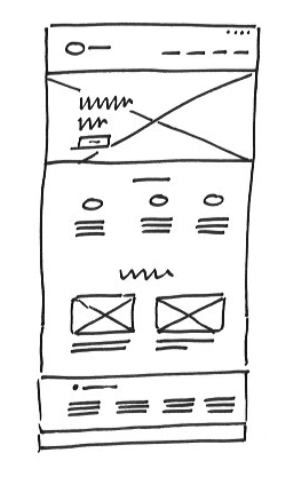
1 | ### Sketching
2 |
3 | Sketches are low quality fast design drawings. Created on paper, they help you develop your initial ideas in a fast way.
4 |
5 | It is the fastest way to start designing and creating an interface or an information piece(or pieces).
6 |
7 | Adequate for defining structures, visualize ideas in a fast way or transmiting concepts, is a powerful tool to show primary concepts and iterate in order to achieve arrangements fast.
8 |
9 | You only need paper and pen, and some colors in case you need to highlight some parts that need special attention.
10 |
11 | * Pro-TIP: Use the sketching to create mini- screens. They’ll help you visualize the whole web structure.
12 |
13 |
14 |
15 |
--------------------------------------------------------------------------------
/00_UX Design ASAP/00_Introduction/01_What is UX/index.md:
--------------------------------------------------------------------------------
1 | ### What is UX
2 |
3 | UX is the way a user understands feels and uses a system, device or service plus the sensations, perceptions or results obtained from it. What you get from it.
4 |
5 | It is composed by a variety of disciplines that affect the resultant experience of the product, interface or service designed.
6 |
7 | Each project will need different skills, as UX covers a large variety of areas, but usually we are used working in UX with teams of Concept Designer, Information Architect, Interaction Designer and Visual Designers. Those roles could be mixed based on the skills of each team member.
8 |
9 |
10 |
11 | *Note*
12 | UX and UI are not the same thing. They are related but UI is part of the other (UX) as it belongs to the UX design process. While UI refers merely to designing a User interface, UX refers to designing the experience users will have when using it.
13 |
--------------------------------------------------------------------------------
/00_UX Design ASAP/01_Discover/04_Users/index.md:
--------------------------------------------------------------------------------
1 | ### Users
2 |
3 | After we know about company objectives and its context, we need to start thinking about people, its users. We need to understand who they are, research about them, ask questions and analize their behavior.
4 |
5 | To do so, we need to define our audience moving from a big mass into a manageable chunk, dividing our audience into smaller groups.
6 |
7 |
8 | #### User segmentation
9 |
10 | User segmentation could happen on different ways, with users with certain key characteristics in common. They could be…
11 |
12 | *Demographic criteria:* gender, age, education level, marital status, income, and so on. Can be general (men 18–49) or very specific (unmarried, college-educated women 25–34, making over $50,000 a year)
13 |
14 | *Psychographic profiles* describe the attitudes and perceptions that your users have about the world or about the subject matter of your site in particular. i.e. I like reading, playing footbal, natural living, etc.
15 |
16 | Consider also... Technological knowledge, skills, frequency of use, patterns, computer usage at work, like or not, etc.
17 |
18 |
19 |
20 |
21 |
--------------------------------------------------------------------------------
/00_UX Design ASAP/02_Organize/04_Interaction design/index.md:
--------------------------------------------------------------------------------
1 | ### Interaction design
2 |
3 | Interaction design is the dialog between the user and interface, and the responses the interface gives the user. Every time the user takes an action the interface responds with a reaction, sometimes a color change, some others a movement of some content.
4 |
5 | Users need to understand what is going on, understand what hides the action they are to take and the consequences of it.
6 |
7 | It is really important to understand that sometimes things that are obvious for us are not obvious for users. And as designers we need to assume that.
8 |
9 | To make this relationship between user and interface successful we need to understand and control some elements that make users life easier and help them control the environment.
10 |
11 | Some useful tips…
12 |
13 | * *Consistency* is a must.
14 | * Design *Engagement* experiences by covering user interests and surprise them with simple solutions
15 | * Group *functions* based on their use and objectives, thinking on user's needs.
16 | * Offer *Control* by giving Trust and allowing Explorability
17 | * Detect *errors*, prevent users from making them and help users achieve their objectives by recovering from those errors.
18 | * Offer enough *affordance*. Show clearly active areas, showing users where they can click, where they can move and how.
19 |
20 |
21 |
22 |
23 |
--------------------------------------------------------------------------------
/index.yaml:
--------------------------------------------------------------------------------
1 | # This is the *unique* ID of your course
2 | url_name: ux_design_asap
3 | display_name: A$AP Learn UX Design 🎯
4 | org: EXLskills
5 | # This is the *unique* ID of your course (again) because we're maintaining compatability with other course formats. If you intend to use this with OLX or another course host, then it can have another value.
6 | weight: 0
7 | course: ux_design_asap
8 | course_image: https://cdn-course-logos.exlskills.com/ux-design-asap.png
9 | language: en
10 | est_minutes: 1200
11 | primary_topic: UX-Design
12 | skill_level: 2
13 | repo_url: https://github.com/exlskills/course-ASAP-learn-ux-design
14 | topics:
15 | - UX Design
16 | - UI Design
17 | - UI/UX Design
18 | - A$AP Learn
19 | headline: Learn UX Design ASAP to create engaging user interfaces!
20 | description: |2
21 | This is the EXLskills free open-source course to learn UX Design and start creating user-centeric interfaces.
22 | You will review different project phases, from discovery to design -- the importance of understanding project needs through research, organizing and prioritizing information to define interaction and prototype and design ready to use interfaces.
23 | info_md: |2
24 | This is your course's long-form markdown info text. This will be shown to users in the info tab of your course.
25 | The '2' above is to tell the YAML parser that everything that's indented by at least two characters below is part of this multi-line text.
26 | To 'break out' of this info markdown, just add a property without indentation and you'll be dropped back into the primary YAML
27 |
28 |
--------------------------------------------------------------------------------
/SOURCE_CODE_LICENSE.md:
--------------------------------------------------------------------------------
1 | ## Licensing
2 |
3 | Copyright 2018 EXL Inc.
4 |
5 | Licensed under the Apache License, Version 2.0 (the "License") and the Commons
6 | Clause Restriction; you may not use this file except in compliance with the
7 | License. You may obtain a copy of the License at
8 |
9 | http://www.apache.org/licenses/LICENSE-2.0
10 |
11 | Unless required by applicable law or agreed to in writing, software distributed
12 | under the License is distributed on an "AS IS" BASIS, WITHOUT WARRANTIES OR
13 | CONDITIONS OF ANY KIND, either express or implied. See the License for the
14 | specific language governing permissions and limitations under the License.
15 |
16 | ### Commons Clause Restriction
17 |
18 | The Software is provided to you by the Licensor under the License, as defined
19 | below, subject to the following condition. Without limiting other conditions in
20 | the License, the grant of rights under the License will not include, and the
21 | License does not grant to you, the right to Sell the Software. For purposes of
22 | the foregoing, “Sell” means practicing any or all of the rights granted to you
23 | under the License to provide to third parties, for a fee or other consideration,
24 | a product or service that consists, entirely or substantially, of the Software
25 | or the functionality of the Software. Any license notice or attribution required
26 | by the License must also include this Commons Cause License Condition notice.
27 |
28 | For purposes of the clause above, the “Licensor” is EXL Inc., the
29 | “License” is the Apache License, Version 2.0, and the Software is the EXL
30 | software provided with this notice.
31 |
--------------------------------------------------------------------------------
/00_UX Design ASAP/02_Organize/03_Interaction model/index.md:
--------------------------------------------------------------------------------
1 | ### Interaction model
2 |
3 | Once we have defined and organized all the information, we need to go on and start understanding the different parts of the interface, product or service we are going to design.
4 |
5 | We need to imagine how it works, what do we need to highlight and the volume of those elements to drive users into a easy to understand environment. We need to understan the interaction model.
6 |
7 | *What is an interaction model?*
8 |
9 | An interaction model is a *relationship among user actions and cognitive processes*. It is the way an application, web or interface is created to give support to the conceptual model of its target users.
10 |
11 | It makes the interaction easy and consistent with users knowledge and habits and explains how or why a particular task is mentally difficult.
12 |
13 | Jim Nietel defines a interaction model as… how all of the objects and actions that are part of an application interrelate, in ways that mirror and support real-life user interactions. It ensures that users always stay oriented and understand how to move from place to place to find information or perform tasks. It provides a common vision for an application. It enables designers, developers, and stakeholders to understand and explain how users move from objects to actions within a system.
14 | Defining the right interaction model is a foundational requirement for any digital system and contributes to a cohesive, overall UX architecture.
15 |
16 | Source: UXmatters.com
17 |
18 |
--------------------------------------------------------------------------------
/00_UX Design ASAP/00_Introduction/02_Design process/index.md:
--------------------------------------------------------------------------------
1 | ### UX design process
2 |
3 | UX design is a process where the objective is to understand and control the different elements and factors acting into a design process. The understanding of those elements gives us control about the whole process and help us design better products that fit with our users, markets or company goals.
4 |
5 | The process could be used and organized in many different ways.
6 | We think that most practical way is how it is practiced, and how real projects are done.
7 |
8 | 1. *Discover* and understand project key features, user needs and contextual elements
9 | 1. *Organize* all the information, prioritize, start giving shape
10 | 1. *Design* the product with all information you discover and organized.
11 |
12 |
13 | The stages of UX design:
14 |
15 |
16 |
17 |
18 | *Benefits*
19 | By following the UX design process we gain focus and control over each phase and ensure that all elements that take part are taken into consideration.
20 |
21 | *Good and bad practices*
22 | One of the most common mistakes designers repeat is to mix the different design phases in order to start thinking about the next phase before the current one is finished.
23 |
24 | This shouldn't be a critical problem unless we merge different phases and focus our attention on the next/previous phase instead of the current one. To avoid this problem, it's important that you understand how much time and effort you should dedicate to each step without mixing up the current phase with details in preceding or upcoming phases of the design process.
25 |
26 |
--------------------------------------------------------------------------------
/00_UX Design ASAP/01_Discover/03_The context/index.md:
--------------------------------------------------------------------------------
1 | ### Understanding the context
2 |
3 | On a User experience project is extremely important to understand the environment where the project is located. How external elements affect it and what we can do to solve the possible problems coming from it.
4 |
5 | *Social/Cultural/Economic factors*
6 | Every culture has it's own context. In a connected world it is important to understand that each country, culture, religion or region has it's own needs, different from other user needs that could turn the difference into a project.
7 |
8 | *Market/competence factors*
9 | Once we focus on the market, we need to understand 3 key points:
10 | Competitors, Differentiators and Good practices.
11 |
12 | Understanding *Competitors* is key to visualize how the product will fit into the market. Know what they are doing, what they are strong at, how they are treating the product and addressing the market. All those elements are fundamental to understand our key competitors.
13 | The technique to understand it is a well know benchmark analysis of the key competitors activity and good practices around the functionalities we are planning.
14 |
15 | The *differentiators* are the things that makes us different from others. Where our value proposition needs to be better than the others, how we can we highlight it in the market, telling the story, etc.
16 |
17 | *Good practices* help us to learn from the market, even from different markets, and adapt them if necessary, learn from them and improve our product… not only from our action area or theme, but from the whole internet.
18 |
19 | NOTE: Recommended to keep a document with all discoveries you make, organized by theme. This will save time when you need to revise all documentation, generate deliverables or review some good ideas or findings.
20 |
21 |
--------------------------------------------------------------------------------
/00_UX Design ASAP/01_Discover/01_Strategy/index.md:
--------------------------------------------------------------------------------
1 | ### Understanding strategy
2 |
3 | One of the most important things we need to do in order to *face a UX project* is to understand the *context* of the project. What kind of company we are working with, who is involved?
4 |
5 | This is the most important thing we need to understand about a project.
6 | As Jesse James Garret states in his famous book, The Elements of User Experience, the most common reason why most projects fail is that nobody ever bothered to ask some very basic questions…
7 |
8 | * What do we want to get out of this product?
9 | * What do our users want to get out of it?
10 |
11 | To understand a product strategy we need to know and understand the different parts that act into the project:
12 |
13 | * *The company & Stakeholders*: What are their objectives?
14 | * *Users*: What are their needs?
15 | * *Context*: What is happening in the market?
16 |
17 |
18 |
19 |
20 | *Iteration*
21 | In UX strategy, it's important to define iteration points so you can understand how the project is doing.
22 | Iteration could happen in different ways. One could be with company stakeholders or project managers. Another iteration point can be with users. Both are equally important and they happen in different stages.
23 |
24 | * *Iteration with stakeholders* is usually done by meeting different stakeholders or project managers, checking with them the progress and direction the project is taking regarding business goals and company needs. Specially on first stages is extremely important to iterate and define a common framework.
25 |
26 | * *Iteration with end users* instead refers to user testing or validation. It happens to understand if the idea, concept or interface fits to their needs. Specially once we define the first layout and interface concept, we can start asking users to see if the concept or interface elements are understood.
27 |
28 |
29 |
--------------------------------------------------------------------------------
/00_UX Design ASAP/02_Organize/05_Usability/index.md:
--------------------------------------------------------------------------------
1 | ### Usability
2 |
3 | Usability is the clarity and ease of learnability and usage of a interface (or product).
4 | It also includes the study of the the interaction with a computer, program or a web site.
5 |
6 | Usability considers user satisfaction and utility as quality components, and aims to improve user experience through iteration design.
7 |
8 | Jakob Nielsen defines usability it as a quality attribute that assesses on how easy user interfaces can be used. The word "usability" also refers to methods for improving ease-of-use during the design process.
9 |
10 | He expresses that Usability is defined by 5 quality components:
11 | * Learnability: How easy is it for users to accomplish basic tasks the first time they encounter the design?
12 | * Efficiency: Once users have learned the design, how quickly can they perform tasks?
13 | * Memorability: When users return to the design after a period of not using it, how easily can they reestablish proficiency?
14 | * Errors: How many errors do users make, how severe are these errors, and how easily can they recover from the errors?
15 | * Satisfaction: How pleasant is it to use the design?
16 |
17 | Usability should be treated on every page or piece of interface, but specially on those parts where users need to take actions or interact with complex situations (e.g. buying something).
18 |
19 | Interface usability is directly related to usage time and productivity. If a interface is not easy to use, read or understand, users will stop using it.
20 |
21 | To achieve those objectives is important to understand user needs and objectives in order to design effective interactions and interfaces. To that end, please review the… User research section on Discover phase.
22 |
23 | Resources and recommended readings:
24 | * https://www.nngroup.com/topic/web-usability/
25 | * https://uxmag.com/topics/usability
26 | * https://webstandards.hhs.gov/guidelines/
27 | * https://www.usability.gov
28 |
29 |
30 | It is important to understand that Usability is directly related to interaction design.
31 |
32 |
33 |
34 |
35 |
--------------------------------------------------------------------------------
/00_UX Design ASAP/03_Design/03_Prototiping/index.md:
--------------------------------------------------------------------------------
1 | ### Prototypes
2 |
3 | Usually called mockups or prototypes, they are wireframes with interactions that transmit concepts and how it works. It helps to understand what is next to the action the user is going to take (i.e. a link or button that opens a lightbox).
4 |
5 | Sometimes also created with end designs, they are useful to show user flow to customers, stakeholders or even for user testing. Remember you can do it also with wireframes on early stages, to detect improvement areas.
6 |
7 |
8 |
9 | Some tools for Prototype and wireframe creation…
10 |
11 | #### Tools
12 | There are several tools to design. Some of them are free but most are not free(you have to pay for them).
13 | Here is a list of resources you can check and choose the one that fits better with your needs and experience. Some to download and some to use online…
14 |
15 | 1. SketchApp. Most used software (and best IMHO) to create interfaces. It is useful to create both designs and wireframes. It allows you to generate patterns and use them the way you want. https://www.sketchapp.com
16 | 2. Axure. Mostly know as prototyping software. Useful to create functional (working) prototypes or mockups without coding. It allows you to create animations and share them easily. https://www.axure.com
17 | 3. Invision. Powerful tool for interactive prototipes
18 | 4. Justinmind. Another prototyping tool
19 | 5. Wireframe.cc is a popular web/app that allows you to create wireframes easily online. Worth trying it… https://wireframe.cc
20 | 6. Mockups is another online prototyping tool. Easy and simple. https://moqups.com
21 | 7. Xperience Design. Adobe's prottiping tool
22 | 8. Regular tools as Keynote, PowerPoint or any other tool that lets you represent an interface and transmit real structure with content.
23 |
24 |
25 | Note you can also use design software such as Photoshop, illustrator or others, but it is recommended to use a Wireframing tool in order to avoid complex software programs and focus on what you need to transmit.
26 |
27 |
28 |
29 |
30 |
--------------------------------------------------------------------------------
/00_UX Design ASAP/03_Design/02_Wireframing/index.md:
--------------------------------------------------------------------------------
1 | ### Wireframing
2 |
3 | Wireframes are schematic content simulations of each screen. Flat designs in black and white that transmit the concept design, showing ideas through screens and functionalities.
4 |
5 | The wireframes are not designs, nor a way to test designs, but the idea of how an interface works and how it is organized, with a clear information architecture and functional design. They need to transmit details about functionality, size or proportion of different elements, etc.
6 |
7 | They could bring different level of detail, but they need to show clearly…
8 | * the hierarchy of the elements on each screen.
9 | * Information for each screen.
10 | * Real content and Labeling
11 | * Interactive elements behavior.
12 |
13 |
14 |
15 |
16 | When creating wireframes, think about managing information in blocks, and inside of them; inside of each element and element group. This will make the whole ecosystem easier to handle.
17 |
18 | 1. Header block
19 | 1. Logo
20 | 1. Navigation Menu
21 | 1. Menu elements you want to show
22 | 1. Secondary menu
23 | 1. Help
24 | 1. Contact
25 | 1 Access
26 | 1. Login
27 | 1. Register
28 | 1. Content
29 | 1. Internal content blocks you want to show
30 | 1. Sidebar
31 | 1. Internal content blocks you want to show
32 | 1. Footer
33 | 1. Internal content blocks you want to show
34 |
35 |
36 |
37 |
38 |
39 | Recommended to get some inspiration to understand how to proceed and get some ideas.
40 |
41 | *NOTE:* Design is a organic process and designers are used to following different steps in order to translate project requirements into visual ideas. In my case I usually draw or sketch first in order to understand and think freely. Some others start directly with wireframes or code. There is no a single rule or situation, and each project requires a different solution based on the time and effort you have to spend.
42 |
43 |
44 |
45 |
46 |
--------------------------------------------------------------------------------
/00_UX Design ASAP/03_Design/05_Specifications/index.md:
--------------------------------------------------------------------------------
1 | ### Specifications
2 |
3 | Specifications are side-notes and information we add into a drawing sketch, wireframe or prototype about the characteristics of a project. It's one of the strongest part of design process.
4 | They explain how a design should work, ideas and information about our design and the values it brings to the project.
5 |
6 | On specifications we need to transmit the major intents of what we are projecting within the interface or system, and we need to transmit 3 major concepts.
7 | * *How it works* (what it does) - What is the general working model
8 | * *What is supposed to do* (how it does) - What is the objective to achieve with the previous point
9 | * *What is the intent* (what is supposed to achieve) - A general view of the interface goal we need to achieve and the relationship with its major intent.
10 |
11 | *What do you need to specify?*
12 | Actually every piece of interface you need to control and transmit information to someone else. Usually this is to developers or designers. As Ux-er, you need to transmit all the knowledge you are accumulating into a project, and specifications is the way to do so.
13 |
14 | _"Every piece of interface which is not correctly specified, is an open door you leave to free interpretation"_
15 |
16 | E.g. Slideshows, menus and dropdowns, hidden content, motion (how should it be, timeframes, etc.), lightbox and emerging elements, and all interactive elements you need to keep in a certain way. If you do not transmit this information, it will be lost or not taken into account, unless you specify it.
17 |
18 | A good way to understand specifications is checking the different guidelines we can find online. You can find really useful information there…
19 |
20 | * Material Design - https://material.io/design/
21 | * Android Development guidelines - https://developer.android.com/docs/
22 | * User interface Patterns - http://ui-patterns.com
23 | * Designing interfaces - http://designinginterfaces.com/patterns/
24 |
25 |
26 |
27 |
28 | ### Next steps: Development
29 |
30 | Once we finished designing and documenting the project, is time for development team. They will get all the document and designs you (or the team)have been creating. They need to assume all the information in order to understand the intent and make everything work in the way it has been thought.
31 |
32 | Want to learn development?
33 | You are in the right place; look our web-development courses
34 |
35 |
36 |
37 |
--------------------------------------------------------------------------------
/00_UX Design ASAP/01_Discover/05_User Research/index.md:
--------------------------------------------------------------------------------
1 | #### User Research
2 |
3 | Research methodologies help us to understand better product and user context; what motivates users, what kind of activities are they used to do.
4 |
5 | Research methodologies…
6 |
7 | * *Contextual interview:* They are interviews where researchers watch and listen as users work in their own environment (opposed to being in a lab). Contextual interviews tend to be more natural and sometimes more realistic as a result.
8 |
9 | * *Individual interview:* In individual interviews, an interviewer talks with one user for 30 minutes to an hour. Individual interviews allow you to probe their attitudes, beliefs, desires, and experiences to get a deeper understanding of the users.
10 |
11 | * *Focus groups:* A moderated discussion in groups of 3-12 participants. They are lead through a discussion about a set of topics, giving verbal and written feedback through discussion and exercises. Through a focus group, you can learn about users’ attitudes, beliefs, desires, and reactions to concepts.
12 |
13 | * *Field study:* Researchers meet with and study participants in their natural environment, where they would most likely encounter the product or service in question. Based in observation. i.e.: What they do, how they use it, etc.
14 |
15 | * *User Test:* Usability testing refers to evaluating a product or service by testing it with representative users. Participants are brought into a lab, one-on-one with a researcher, and given a set of scenarios that lead to tasks and usage of specific interest within a product or service. It is extremely important to give a context to users with clear objectives. Researchers should NOT participate or help users make their decisions.
16 |
17 | * *Card sorting:* It is a method used to help design or evaluate the information architecture of a site. In a card sorting session, participants organize topics into categories that make sense to them and they may also help you to label these groups.
18 | Card sorting will help you understand your users' expectations and understand your topics. Also knowing how your users group information can help you:
19 | * Build the structure for your website
20 | * Decide what to put on the homepage
21 | * Label categories and navigation
22 |
23 |
24 |
25 | ### Case study
26 |
27 | You need to understand extremely well what is going on to generate an effective strategy. This video shows how good research and user needs understanding make a project successful.
28 |
29 | *VIDEO* - Tesco/Homeplus - Virtual Subway Store in South Korea:
30 |
31 |
32 |
33 |
34 |
--------------------------------------------------------------------------------
/00_UX Design ASAP/02_Organize/01_Users/index.md:
--------------------------------------------------------------------------------
1 | ### Personas
2 |
3 | Persona is a *fictional character* constructed to represent the needs of a whole range (a segment) of real users. It is an archetype of a user segment, explained and detailed.
4 |
5 | To create personas, we need to *collect information* in order to generate a character. It's important to give a name to this character, adding a face to a segment of users that represent some concrete needs we need to keep in mind during the design process.
6 |
7 | All the information you collected previously on the discovery phase (research + segmentation), is the information you need to analyze in order to understand who are your key personas.
8 |
9 |
10 |
11 |
12 |
13 | *Creating personas*
14 | To create personas add all the necessary information as… age, occupation, personal situation, knowledge, technological knowledge and habits, If they use the web/internet from home, work, usual tasks they do on the net, Motivations to buy/use, Advantage they get using the service, etc.
15 |
16 | * *Primary personas* are those who need a unique interaction model that it is only appropiate for them. They have more needs than the secondary personas. They could represent a smaller group of users (even if they are primary, just because we only focus on needs).
17 |
18 | * *Secondary personas* are those who could use the web created for some other personas.
19 |
20 | In case we found more than three personas, the webpage will be difficult to create.
21 |
22 | ⚠️ IMPORTANT: Unlike marketing, UX personas are based on qualitative data (user needs) instead of quantitative data.
23 |
24 |
25 |
26 | *Scenarios*
27 |
28 | Scenario is the context where “personas” we created act. It is about putting personas in action. A description of the persona on a concrete situation using the web/interface, with a defined objective.
29 |
30 | Appreciations:
31 | * Those scenarios will be created based on the previous user interview and observations.
32 | * It’s really important to forget our previous knowledge.
33 | * We need to represent... Needs, Knowledge and Objectives
34 |
35 |
36 | Scenario typologies:
37 |
38 | *High frequency actions*
39 | They are the most used actions. They require certain pedagogy on first use experience, but they will stop being necessary because of their high frequency. As soon as they are used, users will start using shortcuts to get to their objectives. I.e: Navigation menu or a product category
40 |
41 | *Necessary actions*
42 | They are the necessary actions to complete the objective. Not really frequent but extremely important. They need to be really easy to use due to their importance. i.e: shopping cart steps
43 |
44 | *Marginal actions*
45 | They are not used really much. They could be almost ignored.
46 | Spend time on them could be a waste of time but this doe not mean that they should be deleted but they have a secondary place. i.e: FAQs, contact info, etc.
47 |
--------------------------------------------------------------------------------
/00_UX Design ASAP/01_Discover/02_The company/index.md:
--------------------------------------------------------------------------------
1 | ### Stakeholders
2 |
3 | One of the most important things you need to do before you start planning your project is to talk to different stakeholders to get valuable information in order to take the right decision.
4 |
5 | Each stakeholder has different objectives and responsibility, according to their roles and tasks. At this point it is extremely important to understand where you can get the information from and who can help you in different contexts.
6 |
7 | This valuable information is how company knowledge is spread across different people working into the company or organization. Each one has a different point of view, even if all of them are targeting the same objectives and goals.
8 |
9 | i.e. Getting content for different sections (writing texts, finding the right pictures, etc.) or even to understand the next steps the company is going to take. All this information is relevant. You should know about the past, present and future of the company, and what the direction is taking. This kind of information is extremely relevant and will help you generate a better strategy for your project, and how to move within the company or organization.
10 |
11 |
12 | ### Product Objectives
13 |
14 | Once we understand who is in charge of what, we can start asking the right questions.
15 | This information should be coming from inside the company.
16 |
17 | Company stakeholders should help you understand what objectives they are following. This information is fundamental to capture company vision and generate a good product UX strategy.
18 |
19 | Note, sometimes companies do not have a clear idea or a unified idea about the product objectives.
20 |
21 | Within this information you should find product limitations, possibilities, available resources, etc.
22 |
23 | To answer the question _What do we want to get from this product?_
24 | We need to understand…
25 | * The elements that make it different (Recognition, easy promotion, large user base, etc.)
26 | * The positive points (A huge catalog, big a amount of information, belongs to Amazon, etc.)
27 | * Negative points and weakness (Belongs to Amazon, low mobility, etc. )
28 |
29 |
30 | ### Company goals
31 |
32 | There are major goals the project aims to achieve, what the company is trying to get from it. Company goals allows you to understand if you are achieving the objectives.
33 |
34 | To measure objectives and goals is good to use metrics, measuring if users achieve assigned objectives and the time they spend to do so. Once we have a vision of past and present, we can measure and compare.
35 |
36 |
37 | ### Tools
38 | Interesting tools to capture information from stakeholders about objectives and goals; you can use these tools or the ones you prefer. These ones actually work.
39 |
40 | * Product canvas to capture information from differnet stakeholders - https://www.romanpichler.com/blog/the-product-canvas/
41 | * Lean UX canvas - http://scopecanvas.com/en
42 | * Leaner UX canvas - http://scopecanvas.com/en
43 | * Stakeholders interview checklist - http://boxesandarrows.com/a-stakeholder-interview-checklist/
44 |
--------------------------------------------------------------------------------
/README.md:
--------------------------------------------------------------------------------
1 | # EXLskills UX Design Course!
2 |
3 | This is the EXLskills free open-source course to learn UX Design and start creating user-centeric interfaces. You will review different project phases, from discovery to design -- the importance of understanding project needs through research, organizing and prioritizing information to define interaction and prototype and design ready to use interfaces.
4 |
5 | ## About EXLskills
6 |
7 | [EXLskills](https://exlskills.com) is on a mission to change education with an open-source online digital skills learning, certification, and peer-to-peer instruction platform that is committed to offering premium-quality courseware for 100% free via our open-source courseware methodology. The contents of this repository are developed using the [EXL Open Courseware Standard](https://github.com/exlskills/exl-open-courseware-standard) and are then imported/pushed to [EXLskills.com](https://exlskills.com) with the [eocsutil](https://github.com/exlskills/eocsutil) tool. This process is 100% transparent, free, and open-source.
8 |
9 | ## Make Money by Sharing Your Skills
10 |
11 | Open source courseware contributions are absolutely critical to the success of the [EXLskills.com](https://exlskills.com) mission, yet we all have to keep the lights on... To this end, we offer a peer-to-peer instruction (tutoring-like) conversational interface that learners can use to have their questions answered by a certified EXLskills instructor. As a certified instructor, you choose your own hours, topics, and even your own rate! You can use the mobile instructor chat app (powered by Intercom) to answer questions on-the-go, or use the web application to go deep with learners via chat, screen share, and video! For more information on how to become an instructor and receive your cash sign-up bonus, visit our [instructor page](https://exlskills.com/instructor/).
12 |
13 | ## Format
14 |
15 | This course is designed, maintained, and accessed through the EOCS (EXL Open Courseware Standard) format. To learn more about this interoperable standard, please refer to [the documentation](https://github.com/exlskills/exl-open-courseware-standard).
16 |
17 | ## Contributing
18 |
19 | All contributions in the form of pull-requests and issues are welcome and greatly appreciated :)
20 |
21 | ## Translations
22 |
23 | We are always working on translating this course to other languages to make it accessible to as many people around the world as we can. To open work on a new language, please create an issue in this repository for the maintainers to guage interest and we will start a translation branch.
24 |
25 | ## License
26 |
27 | The content of this project itself, including, but not limited to the content of all .md (Markdown) and .yaml (YAML) files included in this project, is licensed under the [Creative Commons Attribution-NonCommercial-ShareAlike 4.0 International License](https://creativecommons.org/licenses/by-nc-sa/4.0/), and all of the source code provided alongside the content, including, but not limited to to the .java (Java) files, is licensed under the source code license provided in the SOURCE_CODE_LICENSE.md file included in the same directory as this notice.
28 |
29 | If you have any questions regarding the license, please contact [licensing@exlinc.com](mailto:licensing@exlinc.com)
30 |
31 | ## Enterprise / Commercial Licensing & Support
32 |
33 | For enterprise licenses and/or support, please send an email enquiry to [enterprise@exlinc.com](mailto:enterprise@exlinc.com)
34 |
--------------------------------------------------------------------------------
/00_UX Design ASAP/03_Design/04_Visual layer & Styling/index.md:
--------------------------------------------------------------------------------
1 | ### Visual layer & styling
2 |
3 | Styles and branding is not only a visual part. Is much more than aesthetics but the way a brand communicates with it's users. How it is perceived by the market, by users.
4 |
5 | *Communicating the brand*
6 | When designing a user interface is important to align with the brand this interface represents.
7 | Understanding the brand style guide, how the brand addresses to its users is key for a successful project. You need to understand brand history, language, tone and voice. How the brand used to communicate with it's users and transmit them information.
8 |
9 | _"Your design will be as good as you can defend it"_
10 |
11 | *Following the eye*
12 | One of the most important things is where we focus the user attention. Think about the graphics, pictures and content you are adding, where are you bringing user's attention and where the call to actions are. This is one of the first things we need ot understand in order to guide users with style guides into the interface.
13 |
14 | *Typography*
15 | The web is 95% text. Is the most important tool to communicate, but it needs to be organized and hierarchized. When this happens the web structure and the relationship of different elements is easy to perceive and understand.
16 |
17 |
18 | Image from Internet is Hard
19 |
20 |
21 | More information about web styles…
22 | https://material.io/design/typography/#applying-the-type-scale
23 | https://internetingishard.com/html-and-css/web-typography/
24 |
25 |
26 | *Colors*
27 | Define the colors you aregoing to use on your design.
28 | Primary, secondary and tertiary colors. Include neutral colors such as white and black or grey to highlight the other colors.
29 |
30 | *Icons*
31 | Icons help users understand the meaning of a content without the need of reading it. They guide us about the intention of this content, but this happens only when the icons are easy to recognize. If you see an icon you can not recognize or you don't understand what's behind, then is not helpful and the only thing it transmits is noise.
32 |
33 | Think about easy concepts like… Contact, home, user, love.
34 | And some others as… Property, feeling, space. They are more abstract or difficult to represent with a simple picture or icon. They require more attention. In this cases a icon is only a noise source, so is better to avoid using them.
35 |
36 | *Images*
37 | Be sure all the images you are using are aligned with brand identity and they transmit the values of the brand.
38 | Is also important to think about the tone, contrast, color and saturation of the pictures we want to add in order to bring a consistent style.
39 |
40 | *Forms & buttons*
41 | This is one of the most important parts when we need to add information into a system or app.
42 |
43 | Be sure to create the form with the right hierarchy and organize form content into meaningful groups for users(i.e. location, personal info or payments). That will make easier for users to fill in the form with their info.
44 |
45 | *Spacing*
46 | Spacing is a transparent element that helps grouping elements visually or isolating them to generate certain sensation, experiences or transmitting a message.
47 | White space relaxes the eye and transmits order and serenity.
48 |
49 | We design white spaces between text and color.
50 |
51 | *Documentation*
52 | Be sure to document all the design process on each step. It is a long and hard process, so explaining how things work, what is the intention of different elements, which of them are necessary and how they interact with users will help the team or professionals on the next phase. Take into account the elements that need to be explained to transmit the information by reading the document. Be precise and sharp.
53 |
54 |
--------------------------------------------------------------------------------
/00_UX Design ASAP/02_Organize/02_Information/index.md:
--------------------------------------------------------------------------------
1 | ### Information Architecture
2 |
3 | Information architecture could be described in many different ways…
4 |
5 | In a simple way to describe it is: "the practice of deciding how to arrange the parts of something to be understandable".
6 |
7 | Louis Rosenfeld y Peter Morville defined it on their book Information Architecture for the World Wide web as… _“The art and science of shaping information products and experiences to support usability and findability”_ .
8 |
9 |
10 |
11 | Information architecture helps users understand and control where they are, vertically, moving up and down, and horizontally, moving between different categories. This approach needs to be based on strategical approach and project objectives to meet users needs.
12 |
13 | Giving control to users helps them move freely and achieve their objectives, being one of the fundamental parts of user experience.
14 |
15 | To understand Information architecture we need to understand 3 basic parts of it…
16 | * Organization
17 | * Structure
18 | * Labeling
19 |
20 |
21 |
22 | ### Organiation
23 |
24 | It is about how you are going to organize your content into categories and the way theese categories are related among them.
25 |
26 | *Exact organization schemes*
27 | Objectively divide information into mutually exclusive sections
28 | * Alphabetical (A-Z ...)
29 | * Chronological (1950 > 2016 ...)
30 | * Geographical (Europe, Asia, America...)
31 |
32 |
33 | *Subjective organization schemes*
34 | Difficult to design, they are often more useful than exact organization schemes They help users understand and draw connections between pieces of content.
35 | * Topic (Sport, Culture, Social...)
36 | * Task (Lunch, Dinner, Work...
37 | * Needs, actions, questions)
38 | * Audience (Kids, tourists, adults, students...)
39 | * Metaphors (Filmin; Eat hamburguer...)
40 |
41 |
42 |
43 | ### Structures
44 |
45 | Is about how you define the relationships among pieces of content.
46 |
47 | *Hierarchical Structures*
48 | Is a top down approach or parent/child relationships between pieces of information. Many users are familiar with structuring information in hierarchies because they see these structures on a daily basis
49 |
50 |
51 | *Sequential Structures*
52 | They require users to go step-by-step, following a specific path through content. Sequential structures assume that there is some optimal ordering of content that is associated with greater effectiveness or success. (i.e. Shopping cart)
53 |
54 |
55 | *Matrix Structure*
56 | They allow users to determine their own path since content is linked in numerous ways. This type of structure takes full advantage of the principles behind hypertext, or HTML. For example, one user could choose to navigate through a set of content based on data while another navigates based on topic.
57 |
58 |
59 | *...to take into account*
60 | * Language ambiguity and cultural diferences
61 | * Users needs and their different perspectives: how they think, their knowledge, etc.
62 | * Company or organization interests: necessary to now
63 |
64 |
65 | ### Labeling
66 |
67 | It is about how you represent information.
68 | There are some places where this is extremely important.
69 |
70 | *Contextual labels*
71 | Hyperlinks to chunks of information on other pages or to another location on the same page
72 |
73 | *Headings*
74 | Labels that simply describe the content that follows them, just as print headings do
75 |
76 | *Navigation system choices*
77 | Labels representing the options in navigation systems
78 |
79 | *Index terms*
80 | Keywords, tags, and subject headings that represent content for searching or browsing.
81 |
82 |
83 |
84 | ### Extra
85 |
86 | *Search system*
87 | They allow users to get concrete information and results.
88 | * Stats: Understand how users search will help us to understand their needs.
89 | * Alternatives: Offer alternatives to errors and orthography mistakes.
90 | * Options: Offer the possibility to adjust the search by date, size, typology, etc.
91 |
92 | *Cardsorting*
93 | Is a method used to help design or evaluate the information architecture of a site. In a card sorting session, participants organize topics into categories that make sense to them and they may also help you label these groups.
94 |
95 | Card sorting will help you understand your users' expectations and understanding of your topics.
96 |
97 | Knowing how your users group information can help you:
98 | * Build the structure for your website
99 | * Decide what to put on the homepage
100 | * Label categories and navigation
101 |
102 |
103 | ### User flow
104 |
105 | We can define user flow is the path user follow when they navigate on a web or interface. How they move across the information architecture or structure to achieve their objectives.
106 |
107 | Scenarios are a good way to start understanding user flows, test and visualize if all screens have all information users need.
108 |
109 | NOTE: Take into account that a User Journey is completely different concept, where we collect information about user but not only acting into the web, but understanding previous and next scenarios that happen out of the web/interface/app.
110 |
111 |
112 | More useful info at Interaction Design Organization
113 |
114 |
115 |
--------------------------------------------------------------------------------
 14 |
15 |
--------------------------------------------------------------------------------
/00_UX Design ASAP/00_Introduction/01_What is UX/index.md:
--------------------------------------------------------------------------------
1 | ### What is UX
2 |
3 | UX is the way a user understands feels and uses a system, device or service plus the sensations, perceptions or results obtained from it. What you get from it.
4 |
5 | It is composed by a variety of disciplines that affect the resultant experience of the product, interface or service designed.
6 |
7 | Each project will need different skills, as UX covers a large variety of areas, but usually we are used working in UX with teams of Concept Designer, Information Architect, Interaction Designer and Visual Designers. Those roles could be mixed based on the skills of each team member.
8 |
9 |
14 |
15 |
--------------------------------------------------------------------------------
/00_UX Design ASAP/00_Introduction/01_What is UX/index.md:
--------------------------------------------------------------------------------
1 | ### What is UX
2 |
3 | UX is the way a user understands feels and uses a system, device or service plus the sensations, perceptions or results obtained from it. What you get from it.
4 |
5 | It is composed by a variety of disciplines that affect the resultant experience of the product, interface or service designed.
6 |
7 | Each project will need different skills, as UX covers a large variety of areas, but usually we are used working in UX with teams of Concept Designer, Information Architect, Interaction Designer and Visual Designers. Those roles could be mixed based on the skills of each team member.
8 |
9 | 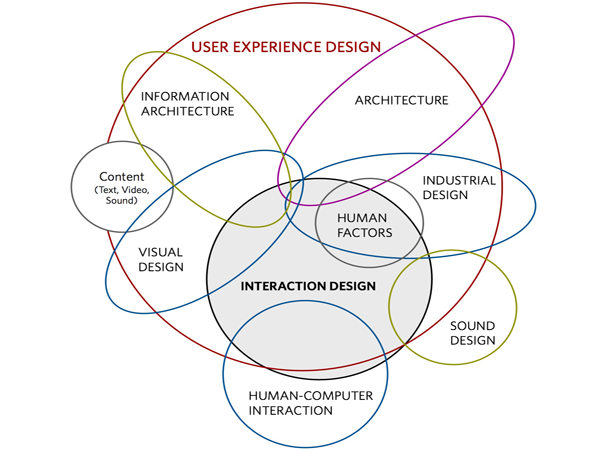 10 |
11 | *Note*
12 | UX and UI are not the same thing. They are related but UI is part of the other (UX) as it belongs to the UX design process. While UI refers merely to designing a User interface, UX refers to designing the experience users will have when using it.
13 |
--------------------------------------------------------------------------------
/00_UX Design ASAP/01_Discover/04_Users/index.md:
--------------------------------------------------------------------------------
1 | ### Users
2 |
3 | After we know about company objectives and its context, we need to start thinking about people, its users. We need to understand who they are, research about them, ask questions and analize their behavior.
4 |
5 | To do so, we need to define our audience moving from a big mass into a manageable chunk, dividing our audience into smaller groups.
6 |
7 |
8 | #### User segmentation
9 |
10 | User segmentation could happen on different ways, with users with certain key characteristics in common. They could be…
11 |
12 | *Demographic criteria:* gender, age, education level, marital status, income, and so on. Can be general (men 18–49) or very specific (unmarried, college-educated women 25–34, making over $50,000 a year)
13 |
14 | *Psychographic profiles* describe the attitudes and perceptions that your users have about the world or about the subject matter of your site in particular. i.e. I like reading, playing footbal, natural living, etc.
15 |
16 | Consider also... Technological knowledge, skills, frequency of use, patterns, computer usage at work, like or not, etc.
17 |
18 |
19 |
10 |
11 | *Note*
12 | UX and UI are not the same thing. They are related but UI is part of the other (UX) as it belongs to the UX design process. While UI refers merely to designing a User interface, UX refers to designing the experience users will have when using it.
13 |
--------------------------------------------------------------------------------
/00_UX Design ASAP/01_Discover/04_Users/index.md:
--------------------------------------------------------------------------------
1 | ### Users
2 |
3 | After we know about company objectives and its context, we need to start thinking about people, its users. We need to understand who they are, research about them, ask questions and analize their behavior.
4 |
5 | To do so, we need to define our audience moving from a big mass into a manageable chunk, dividing our audience into smaller groups.
6 |
7 |
8 | #### User segmentation
9 |
10 | User segmentation could happen on different ways, with users with certain key characteristics in common. They could be…
11 |
12 | *Demographic criteria:* gender, age, education level, marital status, income, and so on. Can be general (men 18–49) or very specific (unmarried, college-educated women 25–34, making over $50,000 a year)
13 |
14 | *Psychographic profiles* describe the attitudes and perceptions that your users have about the world or about the subject matter of your site in particular. i.e. I like reading, playing footbal, natural living, etc.
15 |
16 | Consider also... Technological knowledge, skills, frequency of use, patterns, computer usage at work, like or not, etc.
17 |
18 |
19 | 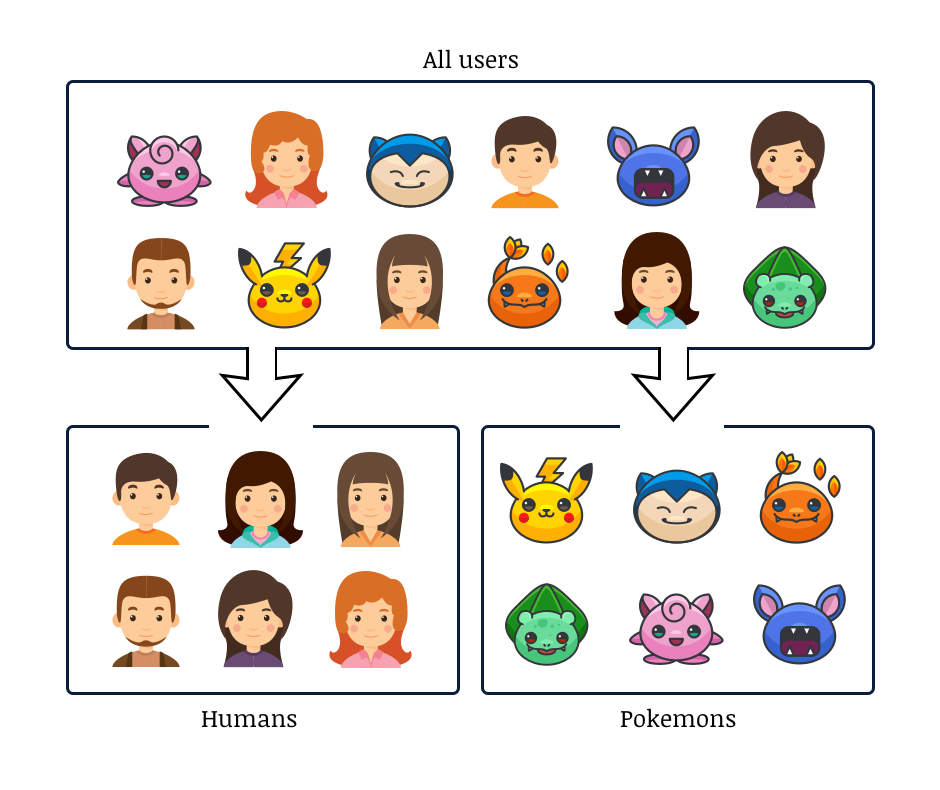 20 |
21 |
--------------------------------------------------------------------------------
/00_UX Design ASAP/02_Organize/04_Interaction design/index.md:
--------------------------------------------------------------------------------
1 | ### Interaction design
2 |
3 | Interaction design is the dialog between the user and interface, and the responses the interface gives the user. Every time the user takes an action the interface responds with a reaction, sometimes a color change, some others a movement of some content.
4 |
5 | Users need to understand what is going on, understand what hides the action they are to take and the consequences of it.
6 |
7 | It is really important to understand that sometimes things that are obvious for us are not obvious for users. And as designers we need to assume that.
8 |
9 | To make this relationship between user and interface successful we need to understand and control some elements that make users life easier and help them control the environment.
10 |
11 | Some useful tips…
12 |
13 | * *Consistency* is a must.
14 | * Design *Engagement* experiences by covering user interests and surprise them with simple solutions
15 | * Group *functions* based on their use and objectives, thinking on user's needs.
16 | * Offer *Control* by giving Trust and allowing Explorability
17 | * Detect *errors*, prevent users from making them and help users achieve their objectives by recovering from those errors.
18 | * Offer enough *affordance*. Show clearly active areas, showing users where they can click, where they can move and how.
19 |
20 |
21 |
22 |
23 |
--------------------------------------------------------------------------------
/index.yaml:
--------------------------------------------------------------------------------
1 | # This is the *unique* ID of your course
2 | url_name: ux_design_asap
3 | display_name: A$AP Learn UX Design 🎯
4 | org: EXLskills
5 | # This is the *unique* ID of your course (again) because we're maintaining compatability with other course formats. If you intend to use this with OLX or another course host, then it can have another value.
6 | weight: 0
7 | course: ux_design_asap
8 | course_image: https://cdn-course-logos.exlskills.com/ux-design-asap.png
9 | language: en
10 | est_minutes: 1200
11 | primary_topic: UX-Design
12 | skill_level: 2
13 | repo_url: https://github.com/exlskills/course-ASAP-learn-ux-design
14 | topics:
15 | - UX Design
16 | - UI Design
17 | - UI/UX Design
18 | - A$AP Learn
19 | headline: Learn UX Design ASAP to create engaging user interfaces!
20 | description: |2
21 | This is the EXLskills free open-source course to learn UX Design and start creating user-centeric interfaces.
22 | You will review different project phases, from discovery to design -- the importance of understanding project needs through research, organizing and prioritizing information to define interaction and prototype and design ready to use interfaces.
23 | info_md: |2
24 | This is your course's long-form markdown info text. This will be shown to users in the info tab of your course.
25 | The '2' above is to tell the YAML parser that everything that's indented by at least two characters below is part of this multi-line text.
26 | To 'break out' of this info markdown, just add a property without indentation and you'll be dropped back into the primary YAML
27 |
28 |
--------------------------------------------------------------------------------
/SOURCE_CODE_LICENSE.md:
--------------------------------------------------------------------------------
1 | ## Licensing
2 |
3 | Copyright 2018 EXL Inc.
4 |
5 | Licensed under the Apache License, Version 2.0 (the "License") and the Commons
6 | Clause Restriction; you may not use this file except in compliance with the
7 | License. You may obtain a copy of the License at
8 |
9 | http://www.apache.org/licenses/LICENSE-2.0
10 |
11 | Unless required by applicable law or agreed to in writing, software distributed
12 | under the License is distributed on an "AS IS" BASIS, WITHOUT WARRANTIES OR
13 | CONDITIONS OF ANY KIND, either express or implied. See the License for the
14 | specific language governing permissions and limitations under the License.
15 |
16 | ### Commons Clause Restriction
17 |
18 | The Software is provided to you by the Licensor under the License, as defined
19 | below, subject to the following condition. Without limiting other conditions in
20 | the License, the grant of rights under the License will not include, and the
21 | License does not grant to you, the right to Sell the Software. For purposes of
22 | the foregoing, “Sell” means practicing any or all of the rights granted to you
23 | under the License to provide to third parties, for a fee or other consideration,
24 | a product or service that consists, entirely or substantially, of the Software
25 | or the functionality of the Software. Any license notice or attribution required
26 | by the License must also include this Commons Cause License Condition notice.
27 |
28 | For purposes of the clause above, the “Licensor” is EXL Inc., the
29 | “License” is the Apache License, Version 2.0, and the Software is the EXL
30 | software provided with this notice.
31 |
--------------------------------------------------------------------------------
/00_UX Design ASAP/02_Organize/03_Interaction model/index.md:
--------------------------------------------------------------------------------
1 | ### Interaction model
2 |
3 | Once we have defined and organized all the information, we need to go on and start understanding the different parts of the interface, product or service we are going to design.
4 |
5 | We need to imagine how it works, what do we need to highlight and the volume of those elements to drive users into a easy to understand environment. We need to understan the interaction model.
6 |
7 | *What is an interaction model?*
8 |
9 | An interaction model is a *relationship among user actions and cognitive processes*. It is the way an application, web or interface is created to give support to the conceptual model of its target users.
10 |
11 | It makes the interaction easy and consistent with users knowledge and habits and explains how or why a particular task is mentally difficult.
12 |
13 | Jim Nietel defines a interaction model as… how all of the objects and actions that are part of an application interrelate, in ways that mirror and support real-life user interactions. It ensures that users always stay oriented and understand how to move from place to place to find information or perform tasks. It provides a common vision for an application. It enables designers, developers, and stakeholders to understand and explain how users move from objects to actions within a system.
14 | Defining the right interaction model is a foundational requirement for any digital system and contributes to a cohesive, overall UX architecture.
15 |
16 | Source: UXmatters.com
17 |
18 |
--------------------------------------------------------------------------------
/00_UX Design ASAP/00_Introduction/02_Design process/index.md:
--------------------------------------------------------------------------------
1 | ### UX design process
2 |
3 | UX design is a process where the objective is to understand and control the different elements and factors acting into a design process. The understanding of those elements gives us control about the whole process and help us design better products that fit with our users, markets or company goals.
4 |
5 | The process could be used and organized in many different ways.
6 | We think that most practical way is how it is practiced, and how real projects are done.
7 |
8 | 1. *Discover* and understand project key features, user needs and contextual elements
9 | 1. *Organize* all the information, prioritize, start giving shape
10 | 1. *Design* the product with all information you discover and organized.
11 |
12 |
13 | The stages of UX design:
14 |
15 |
20 |
21 |
--------------------------------------------------------------------------------
/00_UX Design ASAP/02_Organize/04_Interaction design/index.md:
--------------------------------------------------------------------------------
1 | ### Interaction design
2 |
3 | Interaction design is the dialog between the user and interface, and the responses the interface gives the user. Every time the user takes an action the interface responds with a reaction, sometimes a color change, some others a movement of some content.
4 |
5 | Users need to understand what is going on, understand what hides the action they are to take and the consequences of it.
6 |
7 | It is really important to understand that sometimes things that are obvious for us are not obvious for users. And as designers we need to assume that.
8 |
9 | To make this relationship between user and interface successful we need to understand and control some elements that make users life easier and help them control the environment.
10 |
11 | Some useful tips…
12 |
13 | * *Consistency* is a must.
14 | * Design *Engagement* experiences by covering user interests and surprise them with simple solutions
15 | * Group *functions* based on their use and objectives, thinking on user's needs.
16 | * Offer *Control* by giving Trust and allowing Explorability
17 | * Detect *errors*, prevent users from making them and help users achieve their objectives by recovering from those errors.
18 | * Offer enough *affordance*. Show clearly active areas, showing users where they can click, where they can move and how.
19 |
20 |
21 |
22 |
23 |
--------------------------------------------------------------------------------
/index.yaml:
--------------------------------------------------------------------------------
1 | # This is the *unique* ID of your course
2 | url_name: ux_design_asap
3 | display_name: A$AP Learn UX Design 🎯
4 | org: EXLskills
5 | # This is the *unique* ID of your course (again) because we're maintaining compatability with other course formats. If you intend to use this with OLX or another course host, then it can have another value.
6 | weight: 0
7 | course: ux_design_asap
8 | course_image: https://cdn-course-logos.exlskills.com/ux-design-asap.png
9 | language: en
10 | est_minutes: 1200
11 | primary_topic: UX-Design
12 | skill_level: 2
13 | repo_url: https://github.com/exlskills/course-ASAP-learn-ux-design
14 | topics:
15 | - UX Design
16 | - UI Design
17 | - UI/UX Design
18 | - A$AP Learn
19 | headline: Learn UX Design ASAP to create engaging user interfaces!
20 | description: |2
21 | This is the EXLskills free open-source course to learn UX Design and start creating user-centeric interfaces.
22 | You will review different project phases, from discovery to design -- the importance of understanding project needs through research, organizing and prioritizing information to define interaction and prototype and design ready to use interfaces.
23 | info_md: |2
24 | This is your course's long-form markdown info text. This will be shown to users in the info tab of your course.
25 | The '2' above is to tell the YAML parser that everything that's indented by at least two characters below is part of this multi-line text.
26 | To 'break out' of this info markdown, just add a property without indentation and you'll be dropped back into the primary YAML
27 |
28 |
--------------------------------------------------------------------------------
/SOURCE_CODE_LICENSE.md:
--------------------------------------------------------------------------------
1 | ## Licensing
2 |
3 | Copyright 2018 EXL Inc.
4 |
5 | Licensed under the Apache License, Version 2.0 (the "License") and the Commons
6 | Clause Restriction; you may not use this file except in compliance with the
7 | License. You may obtain a copy of the License at
8 |
9 | http://www.apache.org/licenses/LICENSE-2.0
10 |
11 | Unless required by applicable law or agreed to in writing, software distributed
12 | under the License is distributed on an "AS IS" BASIS, WITHOUT WARRANTIES OR
13 | CONDITIONS OF ANY KIND, either express or implied. See the License for the
14 | specific language governing permissions and limitations under the License.
15 |
16 | ### Commons Clause Restriction
17 |
18 | The Software is provided to you by the Licensor under the License, as defined
19 | below, subject to the following condition. Without limiting other conditions in
20 | the License, the grant of rights under the License will not include, and the
21 | License does not grant to you, the right to Sell the Software. For purposes of
22 | the foregoing, “Sell” means practicing any or all of the rights granted to you
23 | under the License to provide to third parties, for a fee or other consideration,
24 | a product or service that consists, entirely or substantially, of the Software
25 | or the functionality of the Software. Any license notice or attribution required
26 | by the License must also include this Commons Cause License Condition notice.
27 |
28 | For purposes of the clause above, the “Licensor” is EXL Inc., the
29 | “License” is the Apache License, Version 2.0, and the Software is the EXL
30 | software provided with this notice.
31 |
--------------------------------------------------------------------------------
/00_UX Design ASAP/02_Organize/03_Interaction model/index.md:
--------------------------------------------------------------------------------
1 | ### Interaction model
2 |
3 | Once we have defined and organized all the information, we need to go on and start understanding the different parts of the interface, product or service we are going to design.
4 |
5 | We need to imagine how it works, what do we need to highlight and the volume of those elements to drive users into a easy to understand environment. We need to understan the interaction model.
6 |
7 | *What is an interaction model?*
8 |
9 | An interaction model is a *relationship among user actions and cognitive processes*. It is the way an application, web or interface is created to give support to the conceptual model of its target users.
10 |
11 | It makes the interaction easy and consistent with users knowledge and habits and explains how or why a particular task is mentally difficult.
12 |
13 | Jim Nietel defines a interaction model as… how all of the objects and actions that are part of an application interrelate, in ways that mirror and support real-life user interactions. It ensures that users always stay oriented and understand how to move from place to place to find information or perform tasks. It provides a common vision for an application. It enables designers, developers, and stakeholders to understand and explain how users move from objects to actions within a system.
14 | Defining the right interaction model is a foundational requirement for any digital system and contributes to a cohesive, overall UX architecture.
15 |
16 | Source: UXmatters.com
17 |
18 |
--------------------------------------------------------------------------------
/00_UX Design ASAP/00_Introduction/02_Design process/index.md:
--------------------------------------------------------------------------------
1 | ### UX design process
2 |
3 | UX design is a process where the objective is to understand and control the different elements and factors acting into a design process. The understanding of those elements gives us control about the whole process and help us design better products that fit with our users, markets or company goals.
4 |
5 | The process could be used and organized in many different ways.
6 | We think that most practical way is how it is practiced, and how real projects are done.
7 |
8 | 1. *Discover* and understand project key features, user needs and contextual elements
9 | 1. *Organize* all the information, prioritize, start giving shape
10 | 1. *Design* the product with all information you discover and organized.
11 |
12 |
13 | The stages of UX design:
14 |
15 | 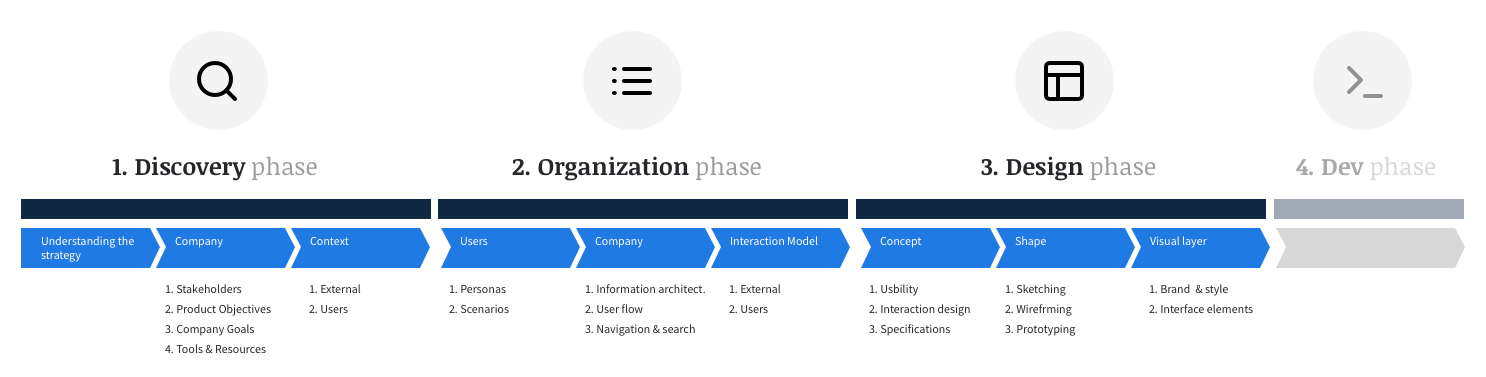 16 |
17 |
18 | *Benefits*
19 | By following the UX design process we gain focus and control over each phase and ensure that all elements that take part are taken into consideration.
20 |
21 | *Good and bad practices*
22 | One of the most common mistakes designers repeat is to mix the different design phases in order to start thinking about the next phase before the current one is finished.
23 |
24 | This shouldn't be a critical problem unless we merge different phases and focus our attention on the next/previous phase instead of the current one. To avoid this problem, it's important that you understand how much time and effort you should dedicate to each step without mixing up the current phase with details in preceding or upcoming phases of the design process.
25 |
26 |
--------------------------------------------------------------------------------
/00_UX Design ASAP/01_Discover/03_The context/index.md:
--------------------------------------------------------------------------------
1 | ### Understanding the context
2 |
3 | On a User experience project is extremely important to understand the environment where the project is located. How external elements affect it and what we can do to solve the possible problems coming from it.
4 |
5 | *Social/Cultural/Economic factors*
6 | Every culture has it's own context. In a connected world it is important to understand that each country, culture, religion or region has it's own needs, different from other user needs that could turn the difference into a project.
7 |
8 | *Market/competence factors*
9 | Once we focus on the market, we need to understand 3 key points:
10 | Competitors, Differentiators and Good practices.
11 |
12 | Understanding *Competitors* is key to visualize how the product will fit into the market. Know what they are doing, what they are strong at, how they are treating the product and addressing the market. All those elements are fundamental to understand our key competitors.
13 | The technique to understand it is a well know benchmark analysis of the key competitors activity and good practices around the functionalities we are planning.
14 |
15 | The *differentiators* are the things that makes us different from others. Where our value proposition needs to be better than the others, how we can we highlight it in the market, telling the story, etc.
16 |
17 | *Good practices* help us to learn from the market, even from different markets, and adapt them if necessary, learn from them and improve our product… not only from our action area or theme, but from the whole internet.
18 |
19 | NOTE: Recommended to keep a document with all discoveries you make, organized by theme. This will save time when you need to revise all documentation, generate deliverables or review some good ideas or findings.
20 |
21 |
--------------------------------------------------------------------------------
/00_UX Design ASAP/01_Discover/01_Strategy/index.md:
--------------------------------------------------------------------------------
1 | ### Understanding strategy
2 |
3 | One of the most important things we need to do in order to *face a UX project* is to understand the *context* of the project. What kind of company we are working with, who is involved?
4 |
5 | This is the most important thing we need to understand about a project.
6 | As Jesse James Garret states in his famous book, The Elements of User Experience, the most common reason why most projects fail is that nobody ever bothered to ask some very basic questions…
7 |
8 | * What do we want to get out of this product?
9 | * What do our users want to get out of it?
10 |
11 | To understand a product strategy we need to know and understand the different parts that act into the project:
12 |
13 | * *The company & Stakeholders*: What are their objectives?
14 | * *Users*: What are their needs?
15 | * *Context*: What is happening in the market?
16 |
17 |
16 |
17 |
18 | *Benefits*
19 | By following the UX design process we gain focus and control over each phase and ensure that all elements that take part are taken into consideration.
20 |
21 | *Good and bad practices*
22 | One of the most common mistakes designers repeat is to mix the different design phases in order to start thinking about the next phase before the current one is finished.
23 |
24 | This shouldn't be a critical problem unless we merge different phases and focus our attention on the next/previous phase instead of the current one. To avoid this problem, it's important that you understand how much time and effort you should dedicate to each step without mixing up the current phase with details in preceding or upcoming phases of the design process.
25 |
26 |
--------------------------------------------------------------------------------
/00_UX Design ASAP/01_Discover/03_The context/index.md:
--------------------------------------------------------------------------------
1 | ### Understanding the context
2 |
3 | On a User experience project is extremely important to understand the environment where the project is located. How external elements affect it and what we can do to solve the possible problems coming from it.
4 |
5 | *Social/Cultural/Economic factors*
6 | Every culture has it's own context. In a connected world it is important to understand that each country, culture, religion or region has it's own needs, different from other user needs that could turn the difference into a project.
7 |
8 | *Market/competence factors*
9 | Once we focus on the market, we need to understand 3 key points:
10 | Competitors, Differentiators and Good practices.
11 |
12 | Understanding *Competitors* is key to visualize how the product will fit into the market. Know what they are doing, what they are strong at, how they are treating the product and addressing the market. All those elements are fundamental to understand our key competitors.
13 | The technique to understand it is a well know benchmark analysis of the key competitors activity and good practices around the functionalities we are planning.
14 |
15 | The *differentiators* are the things that makes us different from others. Where our value proposition needs to be better than the others, how we can we highlight it in the market, telling the story, etc.
16 |
17 | *Good practices* help us to learn from the market, even from different markets, and adapt them if necessary, learn from them and improve our product… not only from our action area or theme, but from the whole internet.
18 |
19 | NOTE: Recommended to keep a document with all discoveries you make, organized by theme. This will save time when you need to revise all documentation, generate deliverables or review some good ideas or findings.
20 |
21 |
--------------------------------------------------------------------------------
/00_UX Design ASAP/01_Discover/01_Strategy/index.md:
--------------------------------------------------------------------------------
1 | ### Understanding strategy
2 |
3 | One of the most important things we need to do in order to *face a UX project* is to understand the *context* of the project. What kind of company we are working with, who is involved?
4 |
5 | This is the most important thing we need to understand about a project.
6 | As Jesse James Garret states in his famous book, The Elements of User Experience, the most common reason why most projects fail is that nobody ever bothered to ask some very basic questions…
7 |
8 | * What do we want to get out of this product?
9 | * What do our users want to get out of it?
10 |
11 | To understand a product strategy we need to know and understand the different parts that act into the project:
12 |
13 | * *The company & Stakeholders*: What are their objectives?
14 | * *Users*: What are their needs?
15 | * *Context*: What is happening in the market?
16 |
17 | 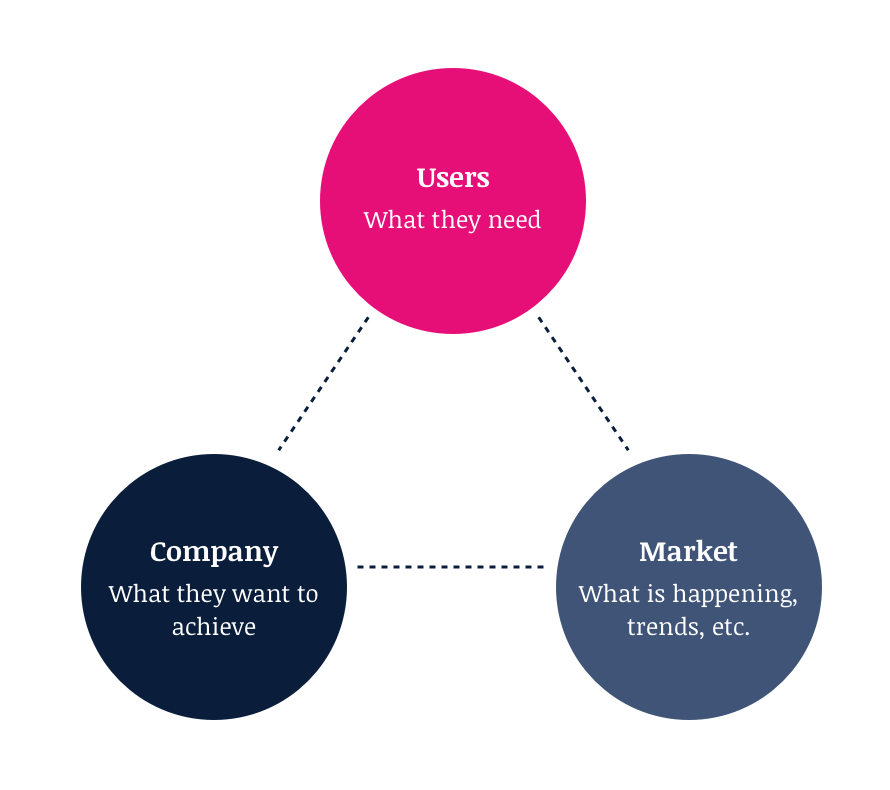 18 |
19 |
20 | *Iteration*
21 | In UX strategy, it's important to define iteration points so you can understand how the project is doing.
22 | Iteration could happen in different ways. One could be with company stakeholders or project managers. Another iteration point can be with users. Both are equally important and they happen in different stages.
23 |
24 | * *Iteration with stakeholders* is usually done by meeting different stakeholders or project managers, checking with them the progress and direction the project is taking regarding business goals and company needs. Specially on first stages is extremely important to iterate and define a common framework.
25 |
26 | * *Iteration with end users* instead refers to user testing or validation. It happens to understand if the idea, concept or interface fits to their needs. Specially once we define the first layout and interface concept, we can start asking users to see if the concept or interface elements are understood.
27 |
28 |
29 |
--------------------------------------------------------------------------------
/00_UX Design ASAP/02_Organize/05_Usability/index.md:
--------------------------------------------------------------------------------
1 | ### Usability
2 |
3 | Usability is the clarity and ease of learnability and usage of a interface (or product).
4 | It also includes the study of the the interaction with a computer, program or a web site.
5 |
6 | Usability considers user satisfaction and utility as quality components, and aims to improve user experience through iteration design.
7 |
8 | Jakob Nielsen defines usability it as a quality attribute that assesses on how easy user interfaces can be used. The word "usability" also refers to methods for improving ease-of-use during the design process.
9 |
10 | He expresses that Usability is defined by 5 quality components:
11 | * Learnability: How easy is it for users to accomplish basic tasks the first time they encounter the design?
12 | * Efficiency: Once users have learned the design, how quickly can they perform tasks?
13 | * Memorability: When users return to the design after a period of not using it, how easily can they reestablish proficiency?
14 | * Errors: How many errors do users make, how severe are these errors, and how easily can they recover from the errors?
15 | * Satisfaction: How pleasant is it to use the design?
16 |
17 | Usability should be treated on every page or piece of interface, but specially on those parts where users need to take actions or interact with complex situations (e.g. buying something).
18 |
19 | Interface usability is directly related to usage time and productivity. If a interface is not easy to use, read or understand, users will stop using it.
20 |
21 | To achieve those objectives is important to understand user needs and objectives in order to design effective interactions and interfaces. To that end, please review the… User research section on Discover phase.
22 |
23 | Resources and recommended readings:
24 | * https://www.nngroup.com/topic/web-usability/
25 | * https://uxmag.com/topics/usability
26 | * https://webstandards.hhs.gov/guidelines/
27 | * https://www.usability.gov
28 |
29 |
30 | It is important to understand that Usability is directly related to interaction design.
31 |
32 |
33 |
34 |
35 |
--------------------------------------------------------------------------------
/00_UX Design ASAP/03_Design/03_Prototiping/index.md:
--------------------------------------------------------------------------------
1 | ### Prototypes
2 |
3 | Usually called mockups or prototypes, they are wireframes with interactions that transmit concepts and how it works. It helps to understand what is next to the action the user is going to take (i.e. a link or button that opens a lightbox).
4 |
5 | Sometimes also created with end designs, they are useful to show user flow to customers, stakeholders or even for user testing. Remember you can do it also with wireframes on early stages, to detect improvement areas.
6 |
7 |
18 |
19 |
20 | *Iteration*
21 | In UX strategy, it's important to define iteration points so you can understand how the project is doing.
22 | Iteration could happen in different ways. One could be with company stakeholders or project managers. Another iteration point can be with users. Both are equally important and they happen in different stages.
23 |
24 | * *Iteration with stakeholders* is usually done by meeting different stakeholders or project managers, checking with them the progress and direction the project is taking regarding business goals and company needs. Specially on first stages is extremely important to iterate and define a common framework.
25 |
26 | * *Iteration with end users* instead refers to user testing or validation. It happens to understand if the idea, concept or interface fits to their needs. Specially once we define the first layout and interface concept, we can start asking users to see if the concept or interface elements are understood.
27 |
28 |
29 |
--------------------------------------------------------------------------------
/00_UX Design ASAP/02_Organize/05_Usability/index.md:
--------------------------------------------------------------------------------
1 | ### Usability
2 |
3 | Usability is the clarity and ease of learnability and usage of a interface (or product).
4 | It also includes the study of the the interaction with a computer, program or a web site.
5 |
6 | Usability considers user satisfaction and utility as quality components, and aims to improve user experience through iteration design.
7 |
8 | Jakob Nielsen defines usability it as a quality attribute that assesses on how easy user interfaces can be used. The word "usability" also refers to methods for improving ease-of-use during the design process.
9 |
10 | He expresses that Usability is defined by 5 quality components:
11 | * Learnability: How easy is it for users to accomplish basic tasks the first time they encounter the design?
12 | * Efficiency: Once users have learned the design, how quickly can they perform tasks?
13 | * Memorability: When users return to the design after a period of not using it, how easily can they reestablish proficiency?
14 | * Errors: How many errors do users make, how severe are these errors, and how easily can they recover from the errors?
15 | * Satisfaction: How pleasant is it to use the design?
16 |
17 | Usability should be treated on every page or piece of interface, but specially on those parts where users need to take actions or interact with complex situations (e.g. buying something).
18 |
19 | Interface usability is directly related to usage time and productivity. If a interface is not easy to use, read or understand, users will stop using it.
20 |
21 | To achieve those objectives is important to understand user needs and objectives in order to design effective interactions and interfaces. To that end, please review the… User research section on Discover phase.
22 |
23 | Resources and recommended readings:
24 | * https://www.nngroup.com/topic/web-usability/
25 | * https://uxmag.com/topics/usability
26 | * https://webstandards.hhs.gov/guidelines/
27 | * https://www.usability.gov
28 |
29 |
30 | It is important to understand that Usability is directly related to interaction design.
31 |
32 |
33 |
34 |
35 |
--------------------------------------------------------------------------------
/00_UX Design ASAP/03_Design/03_Prototiping/index.md:
--------------------------------------------------------------------------------
1 | ### Prototypes
2 |
3 | Usually called mockups or prototypes, they are wireframes with interactions that transmit concepts and how it works. It helps to understand what is next to the action the user is going to take (i.e. a link or button that opens a lightbox).
4 |
5 | Sometimes also created with end designs, they are useful to show user flow to customers, stakeholders or even for user testing. Remember you can do it also with wireframes on early stages, to detect improvement areas.
6 |
7 | 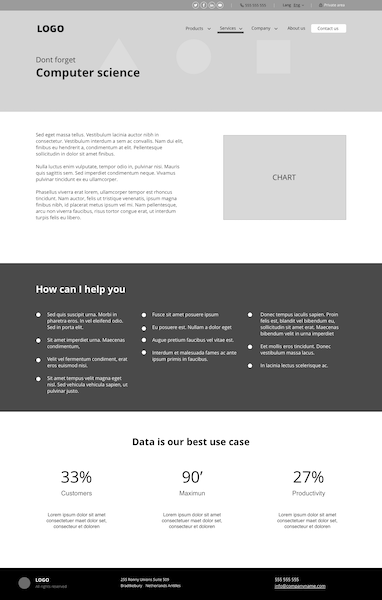 8 |
9 | Some tools for Prototype and wireframe creation…
10 |
11 | #### Tools
12 | There are several tools to design. Some of them are free but most are not free(you have to pay for them).
13 | Here is a list of resources you can check and choose the one that fits better with your needs and experience. Some to download and some to use online…
14 |
15 | 1. SketchApp. Most used software (and best IMHO) to create interfaces. It is useful to create both designs and wireframes. It allows you to generate patterns and use them the way you want. https://www.sketchapp.com
16 | 2. Axure. Mostly know as prototyping software. Useful to create functional (working) prototypes or mockups without coding. It allows you to create animations and share them easily. https://www.axure.com
17 | 3. Invision. Powerful tool for interactive prototipes
18 | 4. Justinmind. Another prototyping tool
19 | 5. Wireframe.cc is a popular web/app that allows you to create wireframes easily online. Worth trying it… https://wireframe.cc
20 | 6. Mockups is another online prototyping tool. Easy and simple. https://moqups.com
21 | 7. Xperience Design. Adobe's prottiping tool
22 | 8. Regular tools as Keynote, PowerPoint or any other tool that lets you represent an interface and transmit real structure with content.
23 |
24 |
25 | Note you can also use design software such as Photoshop, illustrator or others, but it is recommended to use a Wireframing tool in order to avoid complex software programs and focus on what you need to transmit.
26 |
27 |
28 |
29 |
30 |
--------------------------------------------------------------------------------
/00_UX Design ASAP/03_Design/02_Wireframing/index.md:
--------------------------------------------------------------------------------
1 | ### Wireframing
2 |
3 | Wireframes are schematic content simulations of each screen. Flat designs in black and white that transmit the concept design, showing ideas through screens and functionalities.
4 |
5 | The wireframes are not designs, nor a way to test designs, but the idea of how an interface works and how it is organized, with a clear information architecture and functional design. They need to transmit details about functionality, size or proportion of different elements, etc.
6 |
7 | They could bring different level of detail, but they need to show clearly…
8 | * the hierarchy of the elements on each screen.
9 | * Information for each screen.
10 | * Real content and Labeling
11 | * Interactive elements behavior.
12 |
13 |
8 |
9 | Some tools for Prototype and wireframe creation…
10 |
11 | #### Tools
12 | There are several tools to design. Some of them are free but most are not free(you have to pay for them).
13 | Here is a list of resources you can check and choose the one that fits better with your needs and experience. Some to download and some to use online…
14 |
15 | 1. SketchApp. Most used software (and best IMHO) to create interfaces. It is useful to create both designs and wireframes. It allows you to generate patterns and use them the way you want. https://www.sketchapp.com
16 | 2. Axure. Mostly know as prototyping software. Useful to create functional (working) prototypes or mockups without coding. It allows you to create animations and share them easily. https://www.axure.com
17 | 3. Invision. Powerful tool for interactive prototipes
18 | 4. Justinmind. Another prototyping tool
19 | 5. Wireframe.cc is a popular web/app that allows you to create wireframes easily online. Worth trying it… https://wireframe.cc
20 | 6. Mockups is another online prototyping tool. Easy and simple. https://moqups.com
21 | 7. Xperience Design. Adobe's prottiping tool
22 | 8. Regular tools as Keynote, PowerPoint or any other tool that lets you represent an interface and transmit real structure with content.
23 |
24 |
25 | Note you can also use design software such as Photoshop, illustrator or others, but it is recommended to use a Wireframing tool in order to avoid complex software programs and focus on what you need to transmit.
26 |
27 |
28 |
29 |
30 |
--------------------------------------------------------------------------------
/00_UX Design ASAP/03_Design/02_Wireframing/index.md:
--------------------------------------------------------------------------------
1 | ### Wireframing
2 |
3 | Wireframes are schematic content simulations of each screen. Flat designs in black and white that transmit the concept design, showing ideas through screens and functionalities.
4 |
5 | The wireframes are not designs, nor a way to test designs, but the idea of how an interface works and how it is organized, with a clear information architecture and functional design. They need to transmit details about functionality, size or proportion of different elements, etc.
6 |
7 | They could bring different level of detail, but they need to show clearly…
8 | * the hierarchy of the elements on each screen.
9 | * Information for each screen.
10 | * Real content and Labeling
11 | * Interactive elements behavior.
12 |
13 | 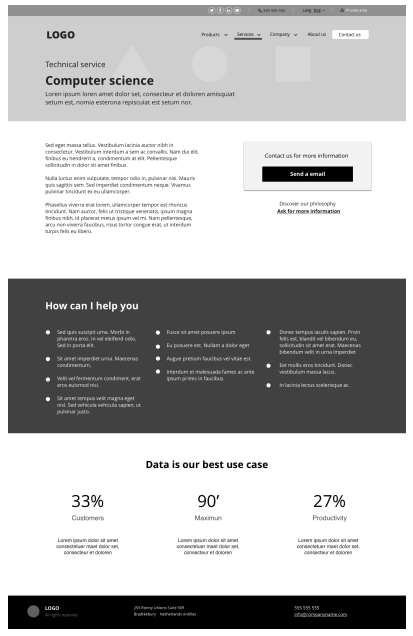 14 |
15 |
16 | When creating wireframes, think about managing information in blocks, and inside of them; inside of each element and element group. This will make the whole ecosystem easier to handle.
17 |
18 | 1. Header block
19 | 1. Logo
20 | 1. Navigation Menu
21 | 1. Menu elements you want to show
22 | 1. Secondary menu
23 | 1. Help
24 | 1. Contact
25 | 1 Access
26 | 1. Login
27 | 1. Register
28 | 1. Content
29 | 1. Internal content blocks you want to show
30 | 1. Sidebar
31 | 1. Internal content blocks you want to show
32 | 1. Footer
33 | 1. Internal content blocks you want to show
34 |
35 |
36 |
14 |
15 |
16 | When creating wireframes, think about managing information in blocks, and inside of them; inside of each element and element group. This will make the whole ecosystem easier to handle.
17 |
18 | 1. Header block
19 | 1. Logo
20 | 1. Navigation Menu
21 | 1. Menu elements you want to show
22 | 1. Secondary menu
23 | 1. Help
24 | 1. Contact
25 | 1 Access
26 | 1. Login
27 | 1. Register
28 | 1. Content
29 | 1. Internal content blocks you want to show
30 | 1. Sidebar
31 | 1. Internal content blocks you want to show
32 | 1. Footer
33 | 1. Internal content blocks you want to show
34 |
35 |
36 | 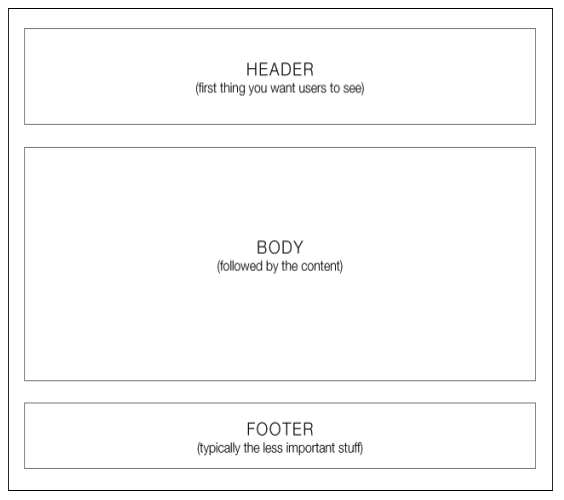 37 |
38 |
39 | Recommended to get some inspiration to understand how to proceed and get some ideas.
40 |
41 | *NOTE:* Design is a organic process and designers are used to following different steps in order to translate project requirements into visual ideas. In my case I usually draw or sketch first in order to understand and think freely. Some others start directly with wireframes or code. There is no a single rule or situation, and each project requires a different solution based on the time and effort you have to spend.
42 |
43 |
44 |
45 |
46 |
--------------------------------------------------------------------------------
/00_UX Design ASAP/03_Design/05_Specifications/index.md:
--------------------------------------------------------------------------------
1 | ### Specifications
2 |
3 | Specifications are side-notes and information we add into a drawing sketch, wireframe or prototype about the characteristics of a project. It's one of the strongest part of design process.
4 | They explain how a design should work, ideas and information about our design and the values it brings to the project.
5 |
6 | On specifications we need to transmit the major intents of what we are projecting within the interface or system, and we need to transmit 3 major concepts.
7 | * *How it works* (what it does) - What is the general working model
8 | * *What is supposed to do* (how it does) - What is the objective to achieve with the previous point
9 | * *What is the intent* (what is supposed to achieve) - A general view of the interface goal we need to achieve and the relationship with its major intent.
10 |
11 | *What do you need to specify?*
12 | Actually every piece of interface you need to control and transmit information to someone else. Usually this is to developers or designers. As Ux-er, you need to transmit all the knowledge you are accumulating into a project, and specifications is the way to do so.
13 |
14 | _"Every piece of interface which is not correctly specified, is an open door you leave to free interpretation"_
15 |
16 | E.g. Slideshows, menus and dropdowns, hidden content, motion (how should it be, timeframes, etc.), lightbox and emerging elements, and all interactive elements you need to keep in a certain way. If you do not transmit this information, it will be lost or not taken into account, unless you specify it.
17 |
18 | A good way to understand specifications is checking the different guidelines we can find online. You can find really useful information there…
19 |
20 | * Material Design - https://material.io/design/
21 | * Android Development guidelines - https://developer.android.com/docs/
22 | * User interface Patterns - http://ui-patterns.com
23 | * Designing interfaces - http://designinginterfaces.com/patterns/
24 |
25 |
26 |
27 |
28 | ### Next steps: Development
29 |
30 | Once we finished designing and documenting the project, is time for development team. They will get all the document and designs you (or the team)have been creating. They need to assume all the information in order to understand the intent and make everything work in the way it has been thought.
31 |
32 | Want to learn development?
33 | You are in the right place; look our web-development courses
34 |
35 |
36 |
37 |
--------------------------------------------------------------------------------
/00_UX Design ASAP/01_Discover/05_User Research/index.md:
--------------------------------------------------------------------------------
1 | #### User Research
2 |
3 | Research methodologies help us to understand better product and user context; what motivates users, what kind of activities are they used to do.
4 |
5 | Research methodologies…
6 |
7 | * *Contextual interview:* They are interviews where researchers watch and listen as users work in their own environment (opposed to being in a lab). Contextual interviews tend to be more natural and sometimes more realistic as a result.
8 |
9 | * *Individual interview:* In individual interviews, an interviewer talks with one user for 30 minutes to an hour. Individual interviews allow you to probe their attitudes, beliefs, desires, and experiences to get a deeper understanding of the users.
10 |
11 | * *Focus groups:* A moderated discussion in groups of 3-12 participants. They are lead through a discussion about a set of topics, giving verbal and written feedback through discussion and exercises. Through a focus group, you can learn about users’ attitudes, beliefs, desires, and reactions to concepts.
12 |
13 | * *Field study:* Researchers meet with and study participants in their natural environment, where they would most likely encounter the product or service in question. Based in observation. i.e.: What they do, how they use it, etc.
14 |
15 | * *User Test:* Usability testing refers to evaluating a product or service by testing it with representative users. Participants are brought into a lab, one-on-one with a researcher, and given a set of scenarios that lead to tasks and usage of specific interest within a product or service. It is extremely important to give a context to users with clear objectives. Researchers should NOT participate or help users make their decisions.
16 |
17 | * *Card sorting:* It is a method used to help design or evaluate the information architecture of a site. In a card sorting session, participants organize topics into categories that make sense to them and they may also help you to label these groups.
18 | Card sorting will help you understand your users' expectations and understand your topics. Also knowing how your users group information can help you:
19 | * Build the structure for your website
20 | * Decide what to put on the homepage
21 | * Label categories and navigation
22 |
23 |
24 |
25 | ### Case study
26 |
27 | You need to understand extremely well what is going on to generate an effective strategy. This video shows how good research and user needs understanding make a project successful.
28 |
29 | *VIDEO* - Tesco/Homeplus - Virtual Subway Store in South Korea:
30 |
31 |
32 |
33 |
34 |
--------------------------------------------------------------------------------
/00_UX Design ASAP/02_Organize/01_Users/index.md:
--------------------------------------------------------------------------------
1 | ### Personas
2 |
3 | Persona is a *fictional character* constructed to represent the needs of a whole range (a segment) of real users. It is an archetype of a user segment, explained and detailed.
4 |
5 | To create personas, we need to *collect information* in order to generate a character. It's important to give a name to this character, adding a face to a segment of users that represent some concrete needs we need to keep in mind during the design process.
6 |
7 | All the information you collected previously on the discovery phase (research + segmentation), is the information you need to analyze in order to understand who are your key personas.
8 |
9 |
10 |
37 |
38 |
39 | Recommended to get some inspiration to understand how to proceed and get some ideas.
40 |
41 | *NOTE:* Design is a organic process and designers are used to following different steps in order to translate project requirements into visual ideas. In my case I usually draw or sketch first in order to understand and think freely. Some others start directly with wireframes or code. There is no a single rule or situation, and each project requires a different solution based on the time and effort you have to spend.
42 |
43 |
44 |
45 |
46 |
--------------------------------------------------------------------------------
/00_UX Design ASAP/03_Design/05_Specifications/index.md:
--------------------------------------------------------------------------------
1 | ### Specifications
2 |
3 | Specifications are side-notes and information we add into a drawing sketch, wireframe or prototype about the characteristics of a project. It's one of the strongest part of design process.
4 | They explain how a design should work, ideas and information about our design and the values it brings to the project.
5 |
6 | On specifications we need to transmit the major intents of what we are projecting within the interface or system, and we need to transmit 3 major concepts.
7 | * *How it works* (what it does) - What is the general working model
8 | * *What is supposed to do* (how it does) - What is the objective to achieve with the previous point
9 | * *What is the intent* (what is supposed to achieve) - A general view of the interface goal we need to achieve and the relationship with its major intent.
10 |
11 | *What do you need to specify?*
12 | Actually every piece of interface you need to control and transmit information to someone else. Usually this is to developers or designers. As Ux-er, you need to transmit all the knowledge you are accumulating into a project, and specifications is the way to do so.
13 |
14 | _"Every piece of interface which is not correctly specified, is an open door you leave to free interpretation"_
15 |
16 | E.g. Slideshows, menus and dropdowns, hidden content, motion (how should it be, timeframes, etc.), lightbox and emerging elements, and all interactive elements you need to keep in a certain way. If you do not transmit this information, it will be lost or not taken into account, unless you specify it.
17 |
18 | A good way to understand specifications is checking the different guidelines we can find online. You can find really useful information there…
19 |
20 | * Material Design - https://material.io/design/
21 | * Android Development guidelines - https://developer.android.com/docs/
22 | * User interface Patterns - http://ui-patterns.com
23 | * Designing interfaces - http://designinginterfaces.com/patterns/
24 |
25 |
26 |
27 |
28 | ### Next steps: Development
29 |
30 | Once we finished designing and documenting the project, is time for development team. They will get all the document and designs you (or the team)have been creating. They need to assume all the information in order to understand the intent and make everything work in the way it has been thought.
31 |
32 | Want to learn development?
33 | You are in the right place; look our web-development courses
34 |
35 |
36 |
37 |
--------------------------------------------------------------------------------
/00_UX Design ASAP/01_Discover/05_User Research/index.md:
--------------------------------------------------------------------------------
1 | #### User Research
2 |
3 | Research methodologies help us to understand better product and user context; what motivates users, what kind of activities are they used to do.
4 |
5 | Research methodologies…
6 |
7 | * *Contextual interview:* They are interviews where researchers watch and listen as users work in their own environment (opposed to being in a lab). Contextual interviews tend to be more natural and sometimes more realistic as a result.
8 |
9 | * *Individual interview:* In individual interviews, an interviewer talks with one user for 30 minutes to an hour. Individual interviews allow you to probe their attitudes, beliefs, desires, and experiences to get a deeper understanding of the users.
10 |
11 | * *Focus groups:* A moderated discussion in groups of 3-12 participants. They are lead through a discussion about a set of topics, giving verbal and written feedback through discussion and exercises. Through a focus group, you can learn about users’ attitudes, beliefs, desires, and reactions to concepts.
12 |
13 | * *Field study:* Researchers meet with and study participants in their natural environment, where they would most likely encounter the product or service in question. Based in observation. i.e.: What they do, how they use it, etc.
14 |
15 | * *User Test:* Usability testing refers to evaluating a product or service by testing it with representative users. Participants are brought into a lab, one-on-one with a researcher, and given a set of scenarios that lead to tasks and usage of specific interest within a product or service. It is extremely important to give a context to users with clear objectives. Researchers should NOT participate or help users make their decisions.
16 |
17 | * *Card sorting:* It is a method used to help design or evaluate the information architecture of a site. In a card sorting session, participants organize topics into categories that make sense to them and they may also help you to label these groups.
18 | Card sorting will help you understand your users' expectations and understand your topics. Also knowing how your users group information can help you:
19 | * Build the structure for your website
20 | * Decide what to put on the homepage
21 | * Label categories and navigation
22 |
23 |
24 |
25 | ### Case study
26 |
27 | You need to understand extremely well what is going on to generate an effective strategy. This video shows how good research and user needs understanding make a project successful.
28 |
29 | *VIDEO* - Tesco/Homeplus - Virtual Subway Store in South Korea:
30 |
31 |
32 |
33 |
34 |
--------------------------------------------------------------------------------
/00_UX Design ASAP/02_Organize/01_Users/index.md:
--------------------------------------------------------------------------------
1 | ### Personas
2 |
3 | Persona is a *fictional character* constructed to represent the needs of a whole range (a segment) of real users. It is an archetype of a user segment, explained and detailed.
4 |
5 | To create personas, we need to *collect information* in order to generate a character. It's important to give a name to this character, adding a face to a segment of users that represent some concrete needs we need to keep in mind during the design process.
6 |
7 | All the information you collected previously on the discovery phase (research + segmentation), is the information you need to analyze in order to understand who are your key personas.
8 |
9 |
10 | 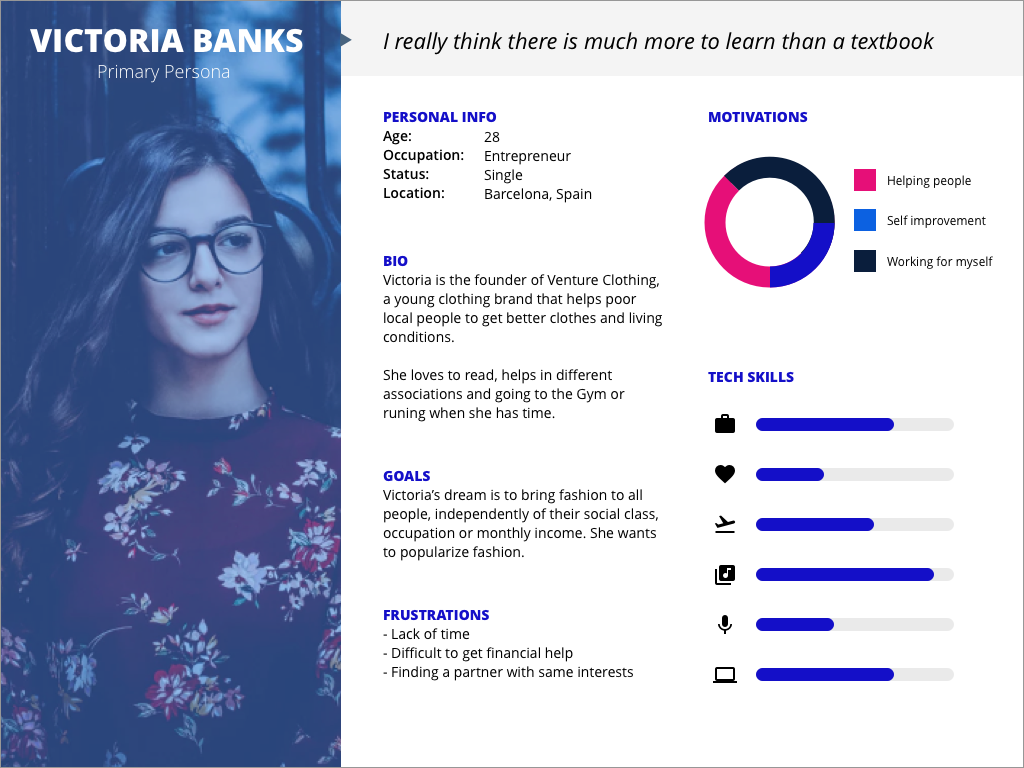 11 |
12 |
13 | *Creating personas*
14 | To create personas add all the necessary information as… age, occupation, personal situation, knowledge, technological knowledge and habits, If they use the web/internet from home, work, usual tasks they do on the net, Motivations to buy/use, Advantage they get using the service, etc.
15 |
16 | * *Primary personas* are those who need a unique interaction model that it is only appropiate for them. They have more needs than the secondary personas. They could represent a smaller group of users (even if they are primary, just because we only focus on needs).
17 |
18 | * *Secondary personas* are those who could use the web created for some other personas.
19 |
20 | In case we found more than three personas, the webpage will be difficult to create.
21 |
22 | ⚠️ IMPORTANT: Unlike marketing, UX personas are based on qualitative data (user needs) instead of quantitative data.
23 |
24 |
25 |
26 | *Scenarios*
27 |
28 | Scenario is the context where “personas” we created act. It is about putting personas in action. A description of the persona on a concrete situation using the web/interface, with a defined objective.
29 |
30 | Appreciations:
31 | * Those scenarios will be created based on the previous user interview and observations.
32 | * It’s really important to forget our previous knowledge.
33 | * We need to represent... Needs, Knowledge and Objectives
34 |
35 |
36 | Scenario typologies:
37 |
38 | *High frequency actions*
39 | They are the most used actions. They require certain pedagogy on first use experience, but they will stop being necessary because of their high frequency. As soon as they are used, users will start using shortcuts to get to their objectives. I.e: Navigation menu or a product category
40 |
41 | *Necessary actions*
42 | They are the necessary actions to complete the objective. Not really frequent but extremely important. They need to be really easy to use due to their importance. i.e: shopping cart steps
43 |
44 | *Marginal actions*
45 | They are not used really much. They could be almost ignored.
46 | Spend time on them could be a waste of time but this doe not mean that they should be deleted but they have a secondary place. i.e: FAQs, contact info, etc.
47 |
--------------------------------------------------------------------------------
/00_UX Design ASAP/01_Discover/02_The company/index.md:
--------------------------------------------------------------------------------
1 | ### Stakeholders
2 |
3 | One of the most important things you need to do before you start planning your project is to talk to different stakeholders to get valuable information in order to take the right decision.
4 |
5 | Each stakeholder has different objectives and responsibility, according to their roles and tasks. At this point it is extremely important to understand where you can get the information from and who can help you in different contexts.
6 |
7 | This valuable information is how company knowledge is spread across different people working into the company or organization. Each one has a different point of view, even if all of them are targeting the same objectives and goals.
8 |
9 | i.e. Getting content for different sections (writing texts, finding the right pictures, etc.) or even to understand the next steps the company is going to take. All this information is relevant. You should know about the past, present and future of the company, and what the direction is taking. This kind of information is extremely relevant and will help you generate a better strategy for your project, and how to move within the company or organization.
10 |
11 |
12 | ### Product Objectives
13 |
14 | Once we understand who is in charge of what, we can start asking the right questions.
15 | This information should be coming from inside the company.
16 |
17 | Company stakeholders should help you understand what objectives they are following. This information is fundamental to capture company vision and generate a good product UX strategy.
18 |
19 | Note, sometimes companies do not have a clear idea or a unified idea about the product objectives.
20 |
21 | Within this information you should find product limitations, possibilities, available resources, etc.
22 |
23 | To answer the question _What do we want to get from this product?_
24 | We need to understand…
25 | * The elements that make it different (Recognition, easy promotion, large user base, etc.)
26 | * The positive points (A huge catalog, big a amount of information, belongs to Amazon, etc.)
27 | * Negative points and weakness (Belongs to Amazon, low mobility, etc. )
28 |
29 |
30 | ### Company goals
31 |
32 | There are major goals the project aims to achieve, what the company is trying to get from it. Company goals allows you to understand if you are achieving the objectives.
33 |
34 | To measure objectives and goals is good to use metrics, measuring if users achieve assigned objectives and the time they spend to do so. Once we have a vision of past and present, we can measure and compare.
35 |
36 |
37 | ### Tools
38 | Interesting tools to capture information from stakeholders about objectives and goals; you can use these tools or the ones you prefer. These ones actually work.
39 |
40 | * Product canvas to capture information from differnet stakeholders - https://www.romanpichler.com/blog/the-product-canvas/
41 | * Lean UX canvas - http://scopecanvas.com/en
42 | * Leaner UX canvas - http://scopecanvas.com/en
43 | * Stakeholders interview checklist - http://boxesandarrows.com/a-stakeholder-interview-checklist/
44 |
--------------------------------------------------------------------------------
/README.md:
--------------------------------------------------------------------------------
1 | # EXLskills UX Design Course!
2 |
3 | This is the EXLskills free open-source course to learn UX Design and start creating user-centeric interfaces. You will review different project phases, from discovery to design -- the importance of understanding project needs through research, organizing and prioritizing information to define interaction and prototype and design ready to use interfaces.
4 |
5 | ## About EXLskills
6 |
7 | [EXLskills](https://exlskills.com) is on a mission to change education with an open-source online digital skills learning, certification, and peer-to-peer instruction platform that is committed to offering premium-quality courseware for 100% free via our open-source courseware methodology. The contents of this repository are developed using the [EXL Open Courseware Standard](https://github.com/exlskills/exl-open-courseware-standard) and are then imported/pushed to [EXLskills.com](https://exlskills.com) with the [eocsutil](https://github.com/exlskills/eocsutil) tool. This process is 100% transparent, free, and open-source.
8 |
9 | ## Make Money by Sharing Your Skills
10 |
11 | Open source courseware contributions are absolutely critical to the success of the [EXLskills.com](https://exlskills.com) mission, yet we all have to keep the lights on... To this end, we offer a peer-to-peer instruction (tutoring-like) conversational interface that learners can use to have their questions answered by a certified EXLskills instructor. As a certified instructor, you choose your own hours, topics, and even your own rate! You can use the mobile instructor chat app (powered by Intercom) to answer questions on-the-go, or use the web application to go deep with learners via chat, screen share, and video! For more information on how to become an instructor and receive your cash sign-up bonus, visit our [instructor page](https://exlskills.com/instructor/).
12 |
13 | ## Format
14 |
15 | This course is designed, maintained, and accessed through the EOCS (EXL Open Courseware Standard) format. To learn more about this interoperable standard, please refer to [the documentation](https://github.com/exlskills/exl-open-courseware-standard).
16 |
17 | ## Contributing
18 |
19 | All contributions in the form of pull-requests and issues are welcome and greatly appreciated :)
20 |
21 | ## Translations
22 |
23 | We are always working on translating this course to other languages to make it accessible to as many people around the world as we can. To open work on a new language, please create an issue in this repository for the maintainers to guage interest and we will start a translation branch.
24 |
25 | ## License
26 |
27 | The content of this project itself, including, but not limited to the content of all .md (Markdown) and .yaml (YAML) files included in this project, is licensed under the [Creative Commons Attribution-NonCommercial-ShareAlike 4.0 International License](https://creativecommons.org/licenses/by-nc-sa/4.0/), and all of the source code provided alongside the content, including, but not limited to to the .java (Java) files, is licensed under the source code license provided in the SOURCE_CODE_LICENSE.md file included in the same directory as this notice.
28 |
29 | If you have any questions regarding the license, please contact [licensing@exlinc.com](mailto:licensing@exlinc.com)
30 |
31 | ## Enterprise / Commercial Licensing & Support
32 |
33 | For enterprise licenses and/or support, please send an email enquiry to [enterprise@exlinc.com](mailto:enterprise@exlinc.com)
34 |
--------------------------------------------------------------------------------
/00_UX Design ASAP/03_Design/04_Visual layer & Styling/index.md:
--------------------------------------------------------------------------------
1 | ### Visual layer & styling
2 |
3 | Styles and branding is not only a visual part. Is much more than aesthetics but the way a brand communicates with it's users. How it is perceived by the market, by users.
4 |
5 | *Communicating the brand*
6 | When designing a user interface is important to align with the brand this interface represents.
7 | Understanding the brand style guide, how the brand addresses to its users is key for a successful project. You need to understand brand history, language, tone and voice. How the brand used to communicate with it's users and transmit them information.
8 |
9 | _"Your design will be as good as you can defend it"_
10 |
11 | *Following the eye*
12 | One of the most important things is where we focus the user attention. Think about the graphics, pictures and content you are adding, where are you bringing user's attention and where the call to actions are. This is one of the first things we need ot understand in order to guide users with style guides into the interface.
13 |
14 | *Typography*
15 | The web is 95% text. Is the most important tool to communicate, but it needs to be organized and hierarchized. When this happens the web structure and the relationship of different elements is easy to perceive and understand.
16 |
17 |
11 |
12 |
13 | *Creating personas*
14 | To create personas add all the necessary information as… age, occupation, personal situation, knowledge, technological knowledge and habits, If they use the web/internet from home, work, usual tasks they do on the net, Motivations to buy/use, Advantage they get using the service, etc.
15 |
16 | * *Primary personas* are those who need a unique interaction model that it is only appropiate for them. They have more needs than the secondary personas. They could represent a smaller group of users (even if they are primary, just because we only focus on needs).
17 |
18 | * *Secondary personas* are those who could use the web created for some other personas.
19 |
20 | In case we found more than three personas, the webpage will be difficult to create.
21 |
22 | ⚠️ IMPORTANT: Unlike marketing, UX personas are based on qualitative data (user needs) instead of quantitative data.
23 |
24 |
25 |
26 | *Scenarios*
27 |
28 | Scenario is the context where “personas” we created act. It is about putting personas in action. A description of the persona on a concrete situation using the web/interface, with a defined objective.
29 |
30 | Appreciations:
31 | * Those scenarios will be created based on the previous user interview and observations.
32 | * It’s really important to forget our previous knowledge.
33 | * We need to represent... Needs, Knowledge and Objectives
34 |
35 |
36 | Scenario typologies:
37 |
38 | *High frequency actions*
39 | They are the most used actions. They require certain pedagogy on first use experience, but they will stop being necessary because of their high frequency. As soon as they are used, users will start using shortcuts to get to their objectives. I.e: Navigation menu or a product category
40 |
41 | *Necessary actions*
42 | They are the necessary actions to complete the objective. Not really frequent but extremely important. They need to be really easy to use due to their importance. i.e: shopping cart steps
43 |
44 | *Marginal actions*
45 | They are not used really much. They could be almost ignored.
46 | Spend time on them could be a waste of time but this doe not mean that they should be deleted but they have a secondary place. i.e: FAQs, contact info, etc.
47 |
--------------------------------------------------------------------------------
/00_UX Design ASAP/01_Discover/02_The company/index.md:
--------------------------------------------------------------------------------
1 | ### Stakeholders
2 |
3 | One of the most important things you need to do before you start planning your project is to talk to different stakeholders to get valuable information in order to take the right decision.
4 |
5 | Each stakeholder has different objectives and responsibility, according to their roles and tasks. At this point it is extremely important to understand where you can get the information from and who can help you in different contexts.
6 |
7 | This valuable information is how company knowledge is spread across different people working into the company or organization. Each one has a different point of view, even if all of them are targeting the same objectives and goals.
8 |
9 | i.e. Getting content for different sections (writing texts, finding the right pictures, etc.) or even to understand the next steps the company is going to take. All this information is relevant. You should know about the past, present and future of the company, and what the direction is taking. This kind of information is extremely relevant and will help you generate a better strategy for your project, and how to move within the company or organization.
10 |
11 |
12 | ### Product Objectives
13 |
14 | Once we understand who is in charge of what, we can start asking the right questions.
15 | This information should be coming from inside the company.
16 |
17 | Company stakeholders should help you understand what objectives they are following. This information is fundamental to capture company vision and generate a good product UX strategy.
18 |
19 | Note, sometimes companies do not have a clear idea or a unified idea about the product objectives.
20 |
21 | Within this information you should find product limitations, possibilities, available resources, etc.
22 |
23 | To answer the question _What do we want to get from this product?_
24 | We need to understand…
25 | * The elements that make it different (Recognition, easy promotion, large user base, etc.)
26 | * The positive points (A huge catalog, big a amount of information, belongs to Amazon, etc.)
27 | * Negative points and weakness (Belongs to Amazon, low mobility, etc. )
28 |
29 |
30 | ### Company goals
31 |
32 | There are major goals the project aims to achieve, what the company is trying to get from it. Company goals allows you to understand if you are achieving the objectives.
33 |
34 | To measure objectives and goals is good to use metrics, measuring if users achieve assigned objectives and the time they spend to do so. Once we have a vision of past and present, we can measure and compare.
35 |
36 |
37 | ### Tools
38 | Interesting tools to capture information from stakeholders about objectives and goals; you can use these tools or the ones you prefer. These ones actually work.
39 |
40 | * Product canvas to capture information from differnet stakeholders - https://www.romanpichler.com/blog/the-product-canvas/
41 | * Lean UX canvas - http://scopecanvas.com/en
42 | * Leaner UX canvas - http://scopecanvas.com/en
43 | * Stakeholders interview checklist - http://boxesandarrows.com/a-stakeholder-interview-checklist/
44 |
--------------------------------------------------------------------------------
/README.md:
--------------------------------------------------------------------------------
1 | # EXLskills UX Design Course!
2 |
3 | This is the EXLskills free open-source course to learn UX Design and start creating user-centeric interfaces. You will review different project phases, from discovery to design -- the importance of understanding project needs through research, organizing and prioritizing information to define interaction and prototype and design ready to use interfaces.
4 |
5 | ## About EXLskills
6 |
7 | [EXLskills](https://exlskills.com) is on a mission to change education with an open-source online digital skills learning, certification, and peer-to-peer instruction platform that is committed to offering premium-quality courseware for 100% free via our open-source courseware methodology. The contents of this repository are developed using the [EXL Open Courseware Standard](https://github.com/exlskills/exl-open-courseware-standard) and are then imported/pushed to [EXLskills.com](https://exlskills.com) with the [eocsutil](https://github.com/exlskills/eocsutil) tool. This process is 100% transparent, free, and open-source.
8 |
9 | ## Make Money by Sharing Your Skills
10 |
11 | Open source courseware contributions are absolutely critical to the success of the [EXLskills.com](https://exlskills.com) mission, yet we all have to keep the lights on... To this end, we offer a peer-to-peer instruction (tutoring-like) conversational interface that learners can use to have their questions answered by a certified EXLskills instructor. As a certified instructor, you choose your own hours, topics, and even your own rate! You can use the mobile instructor chat app (powered by Intercom) to answer questions on-the-go, or use the web application to go deep with learners via chat, screen share, and video! For more information on how to become an instructor and receive your cash sign-up bonus, visit our [instructor page](https://exlskills.com/instructor/).
12 |
13 | ## Format
14 |
15 | This course is designed, maintained, and accessed through the EOCS (EXL Open Courseware Standard) format. To learn more about this interoperable standard, please refer to [the documentation](https://github.com/exlskills/exl-open-courseware-standard).
16 |
17 | ## Contributing
18 |
19 | All contributions in the form of pull-requests and issues are welcome and greatly appreciated :)
20 |
21 | ## Translations
22 |
23 | We are always working on translating this course to other languages to make it accessible to as many people around the world as we can. To open work on a new language, please create an issue in this repository for the maintainers to guage interest and we will start a translation branch.
24 |
25 | ## License
26 |
27 | The content of this project itself, including, but not limited to the content of all .md (Markdown) and .yaml (YAML) files included in this project, is licensed under the [Creative Commons Attribution-NonCommercial-ShareAlike 4.0 International License](https://creativecommons.org/licenses/by-nc-sa/4.0/), and all of the source code provided alongside the content, including, but not limited to to the .java (Java) files, is licensed under the source code license provided in the SOURCE_CODE_LICENSE.md file included in the same directory as this notice.
28 |
29 | If you have any questions regarding the license, please contact [licensing@exlinc.com](mailto:licensing@exlinc.com)
30 |
31 | ## Enterprise / Commercial Licensing & Support
32 |
33 | For enterprise licenses and/or support, please send an email enquiry to [enterprise@exlinc.com](mailto:enterprise@exlinc.com)
34 |
--------------------------------------------------------------------------------
/00_UX Design ASAP/03_Design/04_Visual layer & Styling/index.md:
--------------------------------------------------------------------------------
1 | ### Visual layer & styling
2 |
3 | Styles and branding is not only a visual part. Is much more than aesthetics but the way a brand communicates with it's users. How it is perceived by the market, by users.
4 |
5 | *Communicating the brand*
6 | When designing a user interface is important to align with the brand this interface represents.
7 | Understanding the brand style guide, how the brand addresses to its users is key for a successful project. You need to understand brand history, language, tone and voice. How the brand used to communicate with it's users and transmit them information.
8 |
9 | _"Your design will be as good as you can defend it"_
10 |
11 | *Following the eye*
12 | One of the most important things is where we focus the user attention. Think about the graphics, pictures and content you are adding, where are you bringing user's attention and where the call to actions are. This is one of the first things we need ot understand in order to guide users with style guides into the interface.
13 |
14 | *Typography*
15 | The web is 95% text. Is the most important tool to communicate, but it needs to be organized and hierarchized. When this happens the web structure and the relationship of different elements is easy to perceive and understand.
16 |
17 | 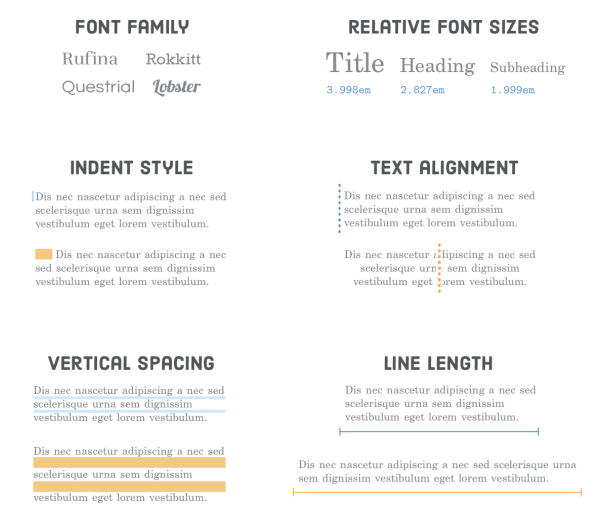 18 | Image from Internet is Hard
19 |
20 |
21 | More information about web styles…
22 | https://material.io/design/typography/#applying-the-type-scale
23 | https://internetingishard.com/html-and-css/web-typography/
24 |
25 |
26 | *Colors*
27 | Define the colors you aregoing to use on your design.
28 | Primary, secondary and tertiary colors. Include neutral colors such as white and black or grey to highlight the other colors.
29 |
30 | *Icons*
31 | Icons help users understand the meaning of a content without the need of reading it. They guide us about the intention of this content, but this happens only when the icons are easy to recognize. If you see an icon you can not recognize or you don't understand what's behind, then is not helpful and the only thing it transmits is noise.
32 |
33 | Think about easy concepts like… Contact, home, user, love.
34 | And some others as… Property, feeling, space. They are more abstract or difficult to represent with a simple picture or icon. They require more attention. In this cases a icon is only a noise source, so is better to avoid using them.
35 |
36 | *Images*
37 | Be sure all the images you are using are aligned with brand identity and they transmit the values of the brand.
38 | Is also important to think about the tone, contrast, color and saturation of the pictures we want to add in order to bring a consistent style.
39 |
40 | *Forms & buttons*
41 | This is one of the most important parts when we need to add information into a system or app.
42 |
43 | Be sure to create the form with the right hierarchy and organize form content into meaningful groups for users(i.e. location, personal info or payments). That will make easier for users to fill in the form with their info.
44 |
45 | *Spacing*
46 | Spacing is a transparent element that helps grouping elements visually or isolating them to generate certain sensation, experiences or transmitting a message.
47 | White space relaxes the eye and transmits order and serenity.
48 |
49 | We design white spaces between text and color.
50 |
51 | *Documentation*
52 | Be sure to document all the design process on each step. It is a long and hard process, so explaining how things work, what is the intention of different elements, which of them are necessary and how they interact with users will help the team or professionals on the next phase. Take into account the elements that need to be explained to transmit the information by reading the document. Be precise and sharp.
53 |
54 |
--------------------------------------------------------------------------------
/00_UX Design ASAP/02_Organize/02_Information/index.md:
--------------------------------------------------------------------------------
1 | ### Information Architecture
2 |
3 | Information architecture could be described in many different ways…
4 |
5 | In a simple way to describe it is: "the practice of deciding how to arrange the parts of something to be understandable".
6 |
7 | Louis Rosenfeld y Peter Morville defined it on their book Information Architecture for the World Wide web as… _“The art and science of shaping information products and experiences to support usability and findability”_ .
8 |
9 |
18 | Image from Internet is Hard
19 |
20 |
21 | More information about web styles…
22 | https://material.io/design/typography/#applying-the-type-scale
23 | https://internetingishard.com/html-and-css/web-typography/
24 |
25 |
26 | *Colors*
27 | Define the colors you aregoing to use on your design.
28 | Primary, secondary and tertiary colors. Include neutral colors such as white and black or grey to highlight the other colors.
29 |
30 | *Icons*
31 | Icons help users understand the meaning of a content without the need of reading it. They guide us about the intention of this content, but this happens only when the icons are easy to recognize. If you see an icon you can not recognize or you don't understand what's behind, then is not helpful and the only thing it transmits is noise.
32 |
33 | Think about easy concepts like… Contact, home, user, love.
34 | And some others as… Property, feeling, space. They are more abstract or difficult to represent with a simple picture or icon. They require more attention. In this cases a icon is only a noise source, so is better to avoid using them.
35 |
36 | *Images*
37 | Be sure all the images you are using are aligned with brand identity and they transmit the values of the brand.
38 | Is also important to think about the tone, contrast, color and saturation of the pictures we want to add in order to bring a consistent style.
39 |
40 | *Forms & buttons*
41 | This is one of the most important parts when we need to add information into a system or app.
42 |
43 | Be sure to create the form with the right hierarchy and organize form content into meaningful groups for users(i.e. location, personal info or payments). That will make easier for users to fill in the form with their info.
44 |
45 | *Spacing*
46 | Spacing is a transparent element that helps grouping elements visually or isolating them to generate certain sensation, experiences or transmitting a message.
47 | White space relaxes the eye and transmits order and serenity.
48 |
49 | We design white spaces between text and color.
50 |
51 | *Documentation*
52 | Be sure to document all the design process on each step. It is a long and hard process, so explaining how things work, what is the intention of different elements, which of them are necessary and how they interact with users will help the team or professionals on the next phase. Take into account the elements that need to be explained to transmit the information by reading the document. Be precise and sharp.
53 |
54 |
--------------------------------------------------------------------------------
/00_UX Design ASAP/02_Organize/02_Information/index.md:
--------------------------------------------------------------------------------
1 | ### Information Architecture
2 |
3 | Information architecture could be described in many different ways…
4 |
5 | In a simple way to describe it is: "the practice of deciding how to arrange the parts of something to be understandable".
6 |
7 | Louis Rosenfeld y Peter Morville defined it on their book Information Architecture for the World Wide web as… _“The art and science of shaping information products and experiences to support usability and findability”_ .
8 |
9 |  10 |
11 | Information architecture helps users understand and control where they are, vertically, moving up and down, and horizontally, moving between different categories. This approach needs to be based on strategical approach and project objectives to meet users needs.
12 |
13 | Giving control to users helps them move freely and achieve their objectives, being one of the fundamental parts of user experience.
14 |
15 | To understand Information architecture we need to understand 3 basic parts of it…
16 | * Organization
17 | * Structure
18 | * Labeling
19 |
20 |
21 |
22 | ### Organiation
23 |
24 | It is about how you are going to organize your content into categories and the way theese categories are related among them.
25 |
26 | *Exact organization schemes*
27 | Objectively divide information into mutually exclusive sections
28 | * Alphabetical (A-Z ...)
29 | * Chronological (1950 > 2016 ...)
30 | * Geographical (Europe, Asia, America...)
31 |
32 |
33 | *Subjective organization schemes*
34 | Difficult to design, they are often more useful than exact organization schemes They help users understand and draw connections between pieces of content.
35 | * Topic (Sport, Culture, Social...)
36 | * Task (Lunch, Dinner, Work...
37 | * Needs, actions, questions)
38 | * Audience (Kids, tourists, adults, students...)
39 | * Metaphors (Filmin; Eat hamburguer...)
40 |
41 |
42 |
43 | ### Structures
44 |
45 | Is about how you define the relationships among pieces of content.
46 |
47 | *Hierarchical Structures*
48 | Is a top down approach or parent/child relationships between pieces of information. Many users are familiar with structuring information in hierarchies because they see these structures on a daily basis
49 |
50 |
51 | *Sequential Structures*
52 | They require users to go step-by-step, following a specific path through content. Sequential structures assume that there is some optimal ordering of content that is associated with greater effectiveness or success. (i.e. Shopping cart)
53 |
54 |
55 | *Matrix Structure*
56 | They allow users to determine their own path since content is linked in numerous ways. This type of structure takes full advantage of the principles behind hypertext, or HTML. For example, one user could choose to navigate through a set of content based on data while another navigates based on topic.
57 |
58 |
59 | *...to take into account*
60 | * Language ambiguity and cultural diferences
61 | * Users needs and their different perspectives: how they think, their knowledge, etc.
62 | * Company or organization interests: necessary to now
63 |
64 |
65 | ### Labeling
66 |
67 | It is about how you represent information.
68 | There are some places where this is extremely important.
69 |
70 | *Contextual labels*
71 | Hyperlinks to chunks of information on other pages or to another location on the same page
72 |
73 | *Headings*
74 | Labels that simply describe the content that follows them, just as print headings do
75 |
76 | *Navigation system choices*
77 | Labels representing the options in navigation systems
78 |
79 | *Index terms*
80 | Keywords, tags, and subject headings that represent content for searching or browsing.
81 |
82 |
83 |
84 | ### Extra
85 |
86 | *Search system*
87 | They allow users to get concrete information and results.
88 | * Stats: Understand how users search will help us to understand their needs.
89 | * Alternatives: Offer alternatives to errors and orthography mistakes.
90 | * Options: Offer the possibility to adjust the search by date, size, typology, etc.
91 |
92 | *Cardsorting*
93 | Is a method used to help design or evaluate the information architecture of a site. In a card sorting session, participants organize topics into categories that make sense to them and they may also help you label these groups.
94 |
95 | Card sorting will help you understand your users' expectations and understanding of your topics.
96 |
97 | Knowing how your users group information can help you:
98 | * Build the structure for your website
99 | * Decide what to put on the homepage
100 | * Label categories and navigation
101 |
102 |
103 | ### User flow
104 |
105 | We can define user flow is the path user follow when they navigate on a web or interface. How they move across the information architecture or structure to achieve their objectives.
106 |
107 | Scenarios are a good way to start understanding user flows, test and visualize if all screens have all information users need.
108 |
109 | NOTE: Take into account that a User Journey is completely different concept, where we collect information about user but not only acting into the web, but understanding previous and next scenarios that happen out of the web/interface/app.
110 |
111 |
112 | More useful info at Interaction Design Organization
113 |
114 |
115 |
--------------------------------------------------------------------------------
10 |
11 | Information architecture helps users understand and control where they are, vertically, moving up and down, and horizontally, moving between different categories. This approach needs to be based on strategical approach and project objectives to meet users needs.
12 |
13 | Giving control to users helps them move freely and achieve their objectives, being one of the fundamental parts of user experience.
14 |
15 | To understand Information architecture we need to understand 3 basic parts of it…
16 | * Organization
17 | * Structure
18 | * Labeling
19 |
20 |
21 |
22 | ### Organiation
23 |
24 | It is about how you are going to organize your content into categories and the way theese categories are related among them.
25 |
26 | *Exact organization schemes*
27 | Objectively divide information into mutually exclusive sections
28 | * Alphabetical (A-Z ...)
29 | * Chronological (1950 > 2016 ...)
30 | * Geographical (Europe, Asia, America...)
31 |
32 |
33 | *Subjective organization schemes*
34 | Difficult to design, they are often more useful than exact organization schemes They help users understand and draw connections between pieces of content.
35 | * Topic (Sport, Culture, Social...)
36 | * Task (Lunch, Dinner, Work...
37 | * Needs, actions, questions)
38 | * Audience (Kids, tourists, adults, students...)
39 | * Metaphors (Filmin; Eat hamburguer...)
40 |
41 |
42 |
43 | ### Structures
44 |
45 | Is about how you define the relationships among pieces of content.
46 |
47 | *Hierarchical Structures*
48 | Is a top down approach or parent/child relationships between pieces of information. Many users are familiar with structuring information in hierarchies because they see these structures on a daily basis
49 |
50 |
51 | *Sequential Structures*
52 | They require users to go step-by-step, following a specific path through content. Sequential structures assume that there is some optimal ordering of content that is associated with greater effectiveness or success. (i.e. Shopping cart)
53 |
54 |
55 | *Matrix Structure*
56 | They allow users to determine their own path since content is linked in numerous ways. This type of structure takes full advantage of the principles behind hypertext, or HTML. For example, one user could choose to navigate through a set of content based on data while another navigates based on topic.
57 |
58 |
59 | *...to take into account*
60 | * Language ambiguity and cultural diferences
61 | * Users needs and their different perspectives: how they think, their knowledge, etc.
62 | * Company or organization interests: necessary to now
63 |
64 |
65 | ### Labeling
66 |
67 | It is about how you represent information.
68 | There are some places where this is extremely important.
69 |
70 | *Contextual labels*
71 | Hyperlinks to chunks of information on other pages or to another location on the same page
72 |
73 | *Headings*
74 | Labels that simply describe the content that follows them, just as print headings do
75 |
76 | *Navigation system choices*
77 | Labels representing the options in navigation systems
78 |
79 | *Index terms*
80 | Keywords, tags, and subject headings that represent content for searching or browsing.
81 |
82 |
83 |
84 | ### Extra
85 |
86 | *Search system*
87 | They allow users to get concrete information and results.
88 | * Stats: Understand how users search will help us to understand their needs.
89 | * Alternatives: Offer alternatives to errors and orthography mistakes.
90 | * Options: Offer the possibility to adjust the search by date, size, typology, etc.
91 |
92 | *Cardsorting*
93 | Is a method used to help design or evaluate the information architecture of a site. In a card sorting session, participants organize topics into categories that make sense to them and they may also help you label these groups.
94 |
95 | Card sorting will help you understand your users' expectations and understanding of your topics.
96 |
97 | Knowing how your users group information can help you:
98 | * Build the structure for your website
99 | * Decide what to put on the homepage
100 | * Label categories and navigation
101 |
102 |
103 | ### User flow
104 |
105 | We can define user flow is the path user follow when they navigate on a web or interface. How they move across the information architecture or structure to achieve their objectives.
106 |
107 | Scenarios are a good way to start understanding user flows, test and visualize if all screens have all information users need.
108 |
109 | NOTE: Take into account that a User Journey is completely different concept, where we collect information about user but not only acting into the web, but understanding previous and next scenarios that happen out of the web/interface/app.
110 |
111 |
112 | More useful info at Interaction Design Organization
113 |
114 |
115 |
--------------------------------------------------------------------------------