├── .gitignore
├── .gitattributes
├── .vscode
├── extensions.json
└── settings.json
├── shared
├── content
│ ├── assets
│ │ ├── favicon.png
│ │ ├── home
│ │ │ ├── nfc.JPG
│ │ │ ├── gpio.JPG
│ │ │ ├── rfid.jpg
│ │ │ ├── sub1.jpg
│ │ │ ├── ibutton.JPG
│ │ │ ├── infrared.jpg
│ │ │ ├── quickstart.jpg
│ │ │ ├── cover-usage.jpg
│ │ │ └── cover-development.jpg
│ │ ├── how-to-dfu.mp4
│ │ ├── firmware
│ │ │ ├── vcp.png
│ │ │ ├── cli-prompt.png
│ │ │ └── vcp-usbmodem.png
│ │ ├── how-to-reboot.mp4
│ │ ├── how-to-power-on.mp4
│ │ ├── applications
│ │ │ ├── power-charging-on.png
│ │ │ └── power-charging-off.png
│ │ ├── flashing-firmware
│ │ │ ├── dfuse-target.png
│ │ │ └── dfuse-upgrade.png
│ │ └── logo.svg
│ ├── javascripts
│ │ └── extra.js
│ └── stylesheets
│ │ └── home.css
├── overrides
│ ├── home.html
│ ├── icons
│ │ └── flp
│ │ │ └── btn
│ │ │ ├── down.svg
│ │ │ ├── left.svg
│ │ │ ├── right.svg
│ │ │ ├── up.svg
│ │ │ ├── ok.svg
│ │ │ └── back.svg
│ ├── partials
│ │ └── integrations
│ │ │ └── disqus.html
│ └── main.html
├── main.py
└── mkdocs.yml
├── en
├── content
│ ├── assets
│ │ └── flashing-firmware
│ │ │ ├── win-device-manager.png
│ │ │ ├── win-driver-update-2.png
│ │ │ ├── win-driver-update.png
│ │ │ └── win-device-manager-updated.png
│ ├── usage
│ │ ├── general
│ │ │ ├── first-boot.md
│ │ │ ├── rebooting.md
│ │ │ └── flashing-firmware.md
│ │ └── applications
│ │ │ └── power.md
│ ├── index.md.save
│ ├── index.md
│ └── development
│ │ ├── mechanics
│ │ └── blueprints.md
│ │ ├── hardware
│ │ ├── devboard-stlinkV3.md
│ │ └── schematic.md
│ │ └── firmware
│ │ └── cli.md
└── mkdocs.yml
├── ru
├── content
│ ├── assets
│ │ └── flashing-firmware
│ │ │ ├── win-device-manager.png
│ │ │ ├── win-driver-update-2.png
│ │ │ ├── win-driver-update.png
│ │ │ └── win-device-manager-updated.png
│ ├── usage
│ │ ├── general
│ │ │ ├── first-boot.md
│ │ │ ├── rebooting.md
│ │ │ └── flashing-firmware.md
│ │ └── applications
│ │ │ └── power.md
│ ├── index.md
│ └── development
│ │ ├── mechanics
│ │ └── blueprints.md
│ │ ├── hardware
│ │ ├── devboard-stlinkV3.md
│ │ └── schematic.md
│ │ └── firmware
│ │ └── cli.md
└── mkdocs.yml
├── .github
└── workflows
│ ├── build-pr.yml
│ └── deploy.yml
├── Dockerfile
├── nginx.conf
├── README.md
└── serve.py
/.gitignore:
--------------------------------------------------------------------------------
1 | __pycache__
2 | .DS_Store
3 | .idea
4 | site/
5 |
--------------------------------------------------------------------------------
/.gitattributes:
--------------------------------------------------------------------------------
1 | # Auto detect text files and perform LF normalization
2 | * text=auto
3 |
--------------------------------------------------------------------------------
/.vscode/extensions.json:
--------------------------------------------------------------------------------
1 | {
2 | "recommendations": [
3 | "zaaack.markdown-editor"
4 | ]
5 | }
--------------------------------------------------------------------------------
/shared/content/assets/favicon.png:
--------------------------------------------------------------------------------
https://raw.githubusercontent.com/flipperdevices/docs/HEAD/shared/content/assets/favicon.png
--------------------------------------------------------------------------------
/shared/content/assets/home/nfc.JPG:
--------------------------------------------------------------------------------
https://raw.githubusercontent.com/flipperdevices/docs/HEAD/shared/content/assets/home/nfc.JPG
--------------------------------------------------------------------------------
/shared/content/assets/home/gpio.JPG:
--------------------------------------------------------------------------------
https://raw.githubusercontent.com/flipperdevices/docs/HEAD/shared/content/assets/home/gpio.JPG
--------------------------------------------------------------------------------
/shared/content/assets/home/rfid.jpg:
--------------------------------------------------------------------------------
https://raw.githubusercontent.com/flipperdevices/docs/HEAD/shared/content/assets/home/rfid.jpg
--------------------------------------------------------------------------------
/shared/content/assets/home/sub1.jpg:
--------------------------------------------------------------------------------
https://raw.githubusercontent.com/flipperdevices/docs/HEAD/shared/content/assets/home/sub1.jpg
--------------------------------------------------------------------------------
/shared/content/assets/how-to-dfu.mp4:
--------------------------------------------------------------------------------
https://raw.githubusercontent.com/flipperdevices/docs/HEAD/shared/content/assets/how-to-dfu.mp4
--------------------------------------------------------------------------------
/shared/content/assets/firmware/vcp.png:
--------------------------------------------------------------------------------
https://raw.githubusercontent.com/flipperdevices/docs/HEAD/shared/content/assets/firmware/vcp.png
--------------------------------------------------------------------------------
/shared/content/assets/home/ibutton.JPG:
--------------------------------------------------------------------------------
https://raw.githubusercontent.com/flipperdevices/docs/HEAD/shared/content/assets/home/ibutton.JPG
--------------------------------------------------------------------------------
/shared/content/assets/home/infrared.jpg:
--------------------------------------------------------------------------------
https://raw.githubusercontent.com/flipperdevices/docs/HEAD/shared/content/assets/home/infrared.jpg
--------------------------------------------------------------------------------
/shared/content/assets/how-to-reboot.mp4:
--------------------------------------------------------------------------------
https://raw.githubusercontent.com/flipperdevices/docs/HEAD/shared/content/assets/how-to-reboot.mp4
--------------------------------------------------------------------------------
/shared/content/assets/home/quickstart.jpg:
--------------------------------------------------------------------------------
https://raw.githubusercontent.com/flipperdevices/docs/HEAD/shared/content/assets/home/quickstart.jpg
--------------------------------------------------------------------------------
/shared/content/assets/how-to-power-on.mp4:
--------------------------------------------------------------------------------
https://raw.githubusercontent.com/flipperdevices/docs/HEAD/shared/content/assets/how-to-power-on.mp4
--------------------------------------------------------------------------------
/shared/content/assets/home/cover-usage.jpg:
--------------------------------------------------------------------------------
https://raw.githubusercontent.com/flipperdevices/docs/HEAD/shared/content/assets/home/cover-usage.jpg
--------------------------------------------------------------------------------
/shared/content/assets/firmware/cli-prompt.png:
--------------------------------------------------------------------------------
https://raw.githubusercontent.com/flipperdevices/docs/HEAD/shared/content/assets/firmware/cli-prompt.png
--------------------------------------------------------------------------------
/shared/overrides/home.html:
--------------------------------------------------------------------------------
1 | {% extends "main.html" %}
2 |
3 |
4 | {% block content %}
5 | {{ page.content }}
6 | {% endblock %}
--------------------------------------------------------------------------------
/shared/content/assets/firmware/vcp-usbmodem.png:
--------------------------------------------------------------------------------
https://raw.githubusercontent.com/flipperdevices/docs/HEAD/shared/content/assets/firmware/vcp-usbmodem.png
--------------------------------------------------------------------------------
/shared/content/assets/home/cover-development.jpg:
--------------------------------------------------------------------------------
https://raw.githubusercontent.com/flipperdevices/docs/HEAD/shared/content/assets/home/cover-development.jpg
--------------------------------------------------------------------------------
/shared/content/assets/applications/power-charging-on.png:
--------------------------------------------------------------------------------
https://raw.githubusercontent.com/flipperdevices/docs/HEAD/shared/content/assets/applications/power-charging-on.png
--------------------------------------------------------------------------------
/shared/content/assets/flashing-firmware/dfuse-target.png:
--------------------------------------------------------------------------------
https://raw.githubusercontent.com/flipperdevices/docs/HEAD/shared/content/assets/flashing-firmware/dfuse-target.png
--------------------------------------------------------------------------------
/.vscode/settings.json:
--------------------------------------------------------------------------------
1 | {
2 | "markdown-editor.useVscodeThemeColor": false,
3 | "markdown-editor.imageSaveFolder": "${projectRoot}/shared/content/assets/images"
4 | }
--------------------------------------------------------------------------------
/en/content/assets/flashing-firmware/win-device-manager.png:
--------------------------------------------------------------------------------
https://raw.githubusercontent.com/flipperdevices/docs/HEAD/en/content/assets/flashing-firmware/win-device-manager.png
--------------------------------------------------------------------------------
/en/content/assets/flashing-firmware/win-driver-update-2.png:
--------------------------------------------------------------------------------
https://raw.githubusercontent.com/flipperdevices/docs/HEAD/en/content/assets/flashing-firmware/win-driver-update-2.png
--------------------------------------------------------------------------------
/en/content/assets/flashing-firmware/win-driver-update.png:
--------------------------------------------------------------------------------
https://raw.githubusercontent.com/flipperdevices/docs/HEAD/en/content/assets/flashing-firmware/win-driver-update.png
--------------------------------------------------------------------------------
/ru/content/assets/flashing-firmware/win-device-manager.png:
--------------------------------------------------------------------------------
https://raw.githubusercontent.com/flipperdevices/docs/HEAD/ru/content/assets/flashing-firmware/win-device-manager.png
--------------------------------------------------------------------------------
/ru/content/assets/flashing-firmware/win-driver-update-2.png:
--------------------------------------------------------------------------------
https://raw.githubusercontent.com/flipperdevices/docs/HEAD/ru/content/assets/flashing-firmware/win-driver-update-2.png
--------------------------------------------------------------------------------
/ru/content/assets/flashing-firmware/win-driver-update.png:
--------------------------------------------------------------------------------
https://raw.githubusercontent.com/flipperdevices/docs/HEAD/ru/content/assets/flashing-firmware/win-driver-update.png
--------------------------------------------------------------------------------
/shared/content/assets/applications/power-charging-off.png:
--------------------------------------------------------------------------------
https://raw.githubusercontent.com/flipperdevices/docs/HEAD/shared/content/assets/applications/power-charging-off.png
--------------------------------------------------------------------------------
/shared/content/assets/flashing-firmware/dfuse-upgrade.png:
--------------------------------------------------------------------------------
https://raw.githubusercontent.com/flipperdevices/docs/HEAD/shared/content/assets/flashing-firmware/dfuse-upgrade.png
--------------------------------------------------------------------------------
/en/content/assets/flashing-firmware/win-device-manager-updated.png:
--------------------------------------------------------------------------------
https://raw.githubusercontent.com/flipperdevices/docs/HEAD/en/content/assets/flashing-firmware/win-device-manager-updated.png
--------------------------------------------------------------------------------
/ru/content/assets/flashing-firmware/win-device-manager-updated.png:
--------------------------------------------------------------------------------
https://raw.githubusercontent.com/flipperdevices/docs/HEAD/ru/content/assets/flashing-firmware/win-device-manager-updated.png
--------------------------------------------------------------------------------
/en/content/usage/general/first-boot.md:
--------------------------------------------------------------------------------
1 | Flipper Zero comes in transportation mode, meaning it's turned off.
2 |
3 | {{ gif("assets/how-to-power-on.mp4") }}
4 |
5 | Press and hold :flp-btn-back: for a second to turn it on.
--------------------------------------------------------------------------------
/en/content/usage/general/rebooting.md:
--------------------------------------------------------------------------------
1 | If your Flipper Zero hangs, you can always restart it with a simple shortcut.
2 |
3 | {{ gif("assets/how-to-reboot.mp4") }}
4 |
5 | Press and hold :flp-btn-left: + :flp-btn-back: for a second to reboot it.
--------------------------------------------------------------------------------
/ru/content/usage/general/first-boot.md:
--------------------------------------------------------------------------------
1 | Из коробки Flipper Zero находится в режиме транспортировки, то есть выключен.
2 |
3 | {{ gif("assets/how-to-power-on.mp4") }}
4 |
5 | Нажмите и удержите :flp-btn-back: на секунду, чтобы включить устройство.
--------------------------------------------------------------------------------
/en/content/index.md.save:
--------------------------------------------------------------------------------
1 | ---
2 | template: home.html
3 | hide:
4 | - navigation
5 | - toc
6 | ---
7 |
8 | Welcome to the Flipper Zero Docsss.
9 |
10 |
11 | The main page is still in a WIP state.
12 |
13 | Use tabs and sidebar to navigate.
14 |
--------------------------------------------------------------------------------
/ru/content/usage/general/rebooting.md:
--------------------------------------------------------------------------------
1 | Если ваш Flipper Zero зависнет, вы всегда можете перезагрузить его нажатием простой комбинации кнопок.
2 |
3 | {{ gif("assets/how-to-reboot.mp4") }}
4 |
5 | Нажмите и удержите :flp-btn-left: + :flp-btn-back: на секунду, чтобы перезагрузить устройство.
--------------------------------------------------------------------------------
/shared/overrides/icons/flp/btn/down.svg:
--------------------------------------------------------------------------------
1 |
--------------------------------------------------------------------------------
/shared/overrides/icons/flp/btn/left.svg:
--------------------------------------------------------------------------------
1 |
--------------------------------------------------------------------------------
/shared/overrides/icons/flp/btn/right.svg:
--------------------------------------------------------------------------------
1 |
--------------------------------------------------------------------------------
/shared/overrides/icons/flp/btn/up.svg:
--------------------------------------------------------------------------------
1 |
--------------------------------------------------------------------------------
/shared/content/javascripts/extra.js:
--------------------------------------------------------------------------------
1 | let basePath = document.querySelector('.md-logo').href;
2 | let documentPath = document.baseURI.replace(basePath, '');
3 |
4 | if (documentPath) {
5 | document.querySelectorAll('.md-select__link').forEach(function(selector) {
6 | let url = new URL(selector.href + documentPath, document.baseURI).href;
7 | fetch(url, {
8 | method: 'HEAD'
9 | })
10 | .then(function(response) {
11 | if (response.status === 200) {
12 | selector.href += documentPath;
13 | }
14 | });
15 | });
16 | }
--------------------------------------------------------------------------------
/shared/overrides/icons/flp/btn/ok.svg:
--------------------------------------------------------------------------------
1 |
--------------------------------------------------------------------------------
/ru/content/index.md:
--------------------------------------------------------------------------------
1 | ---
2 | template: home.html
3 | hide:
4 | - navigation
5 | - toc
6 | ---
7 |
27 |
--------------------------------------------------------------------------------
/en/content/index.md:
--------------------------------------------------------------------------------
1 | ---
2 | template: home.html
3 | hide:
4 | - navigation
5 | - toc
6 | ---
7 |
8 |
28 |
--------------------------------------------------------------------------------
/en/content/development/mechanics/blueprints.md:
--------------------------------------------------------------------------------
1 | # Mechanical Blueprints
2 | ## Uncased External Module
3 |
4 | 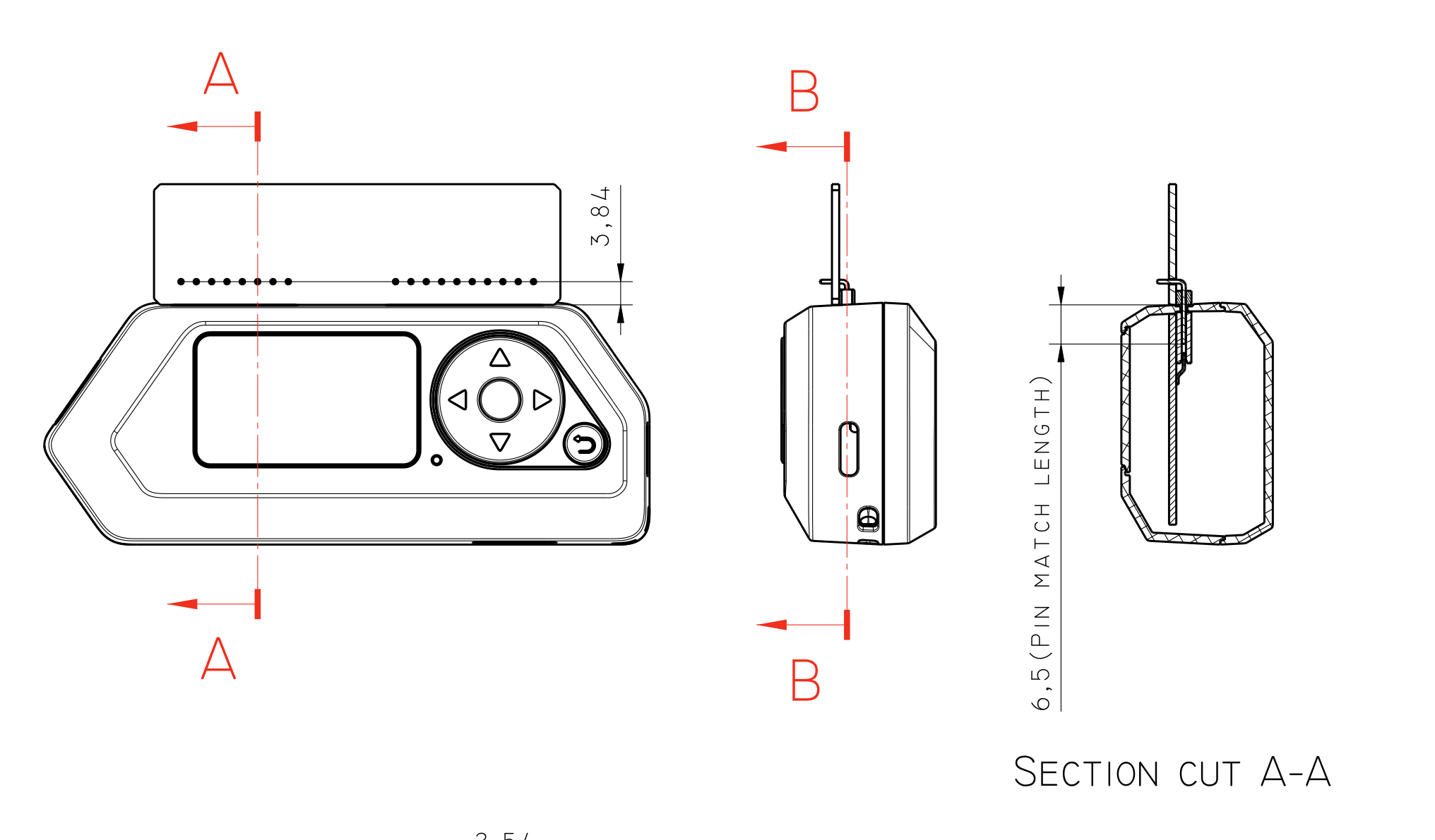
5 |
6 | 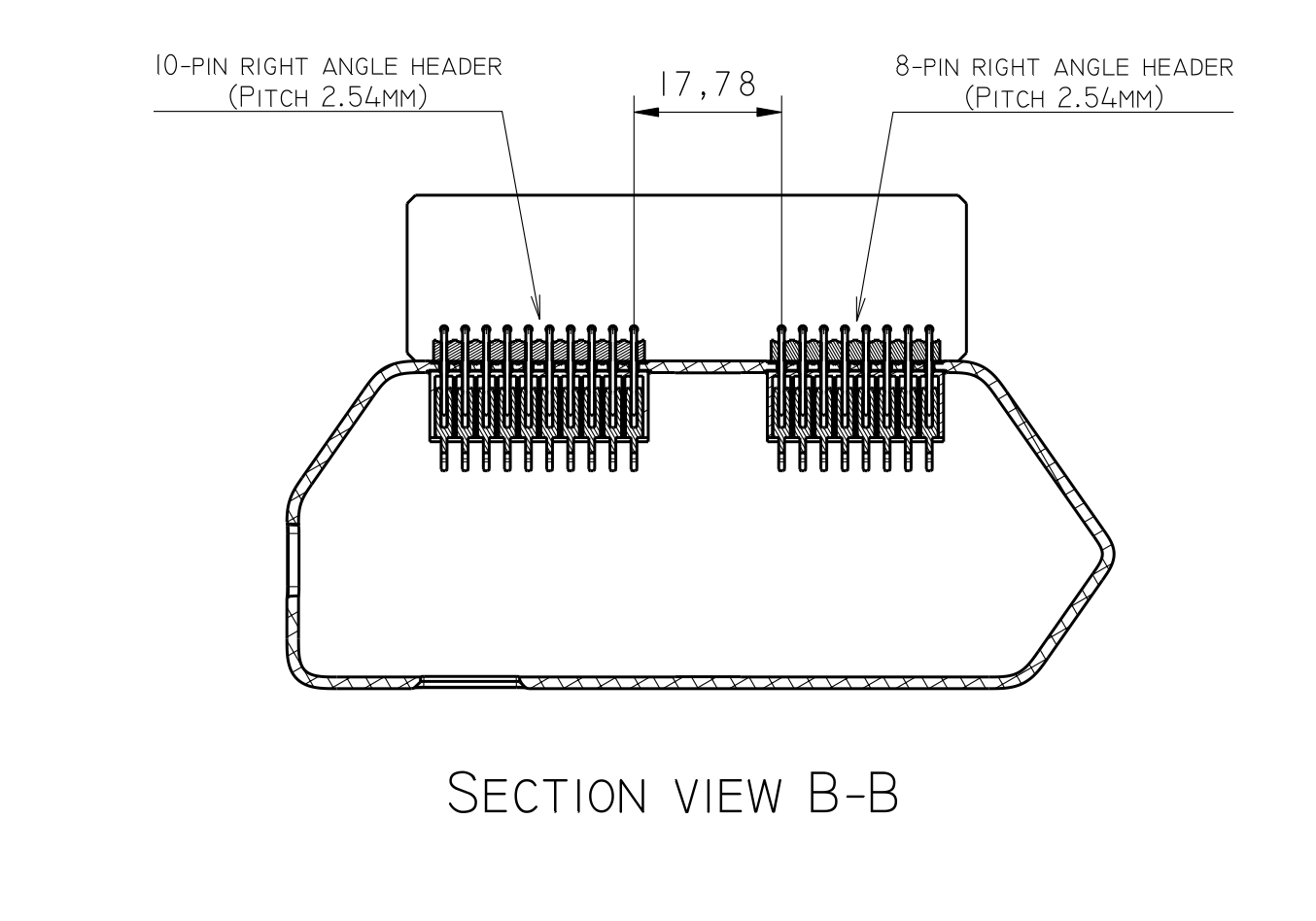
7 |
8 | 
9 |
10 |
11 | 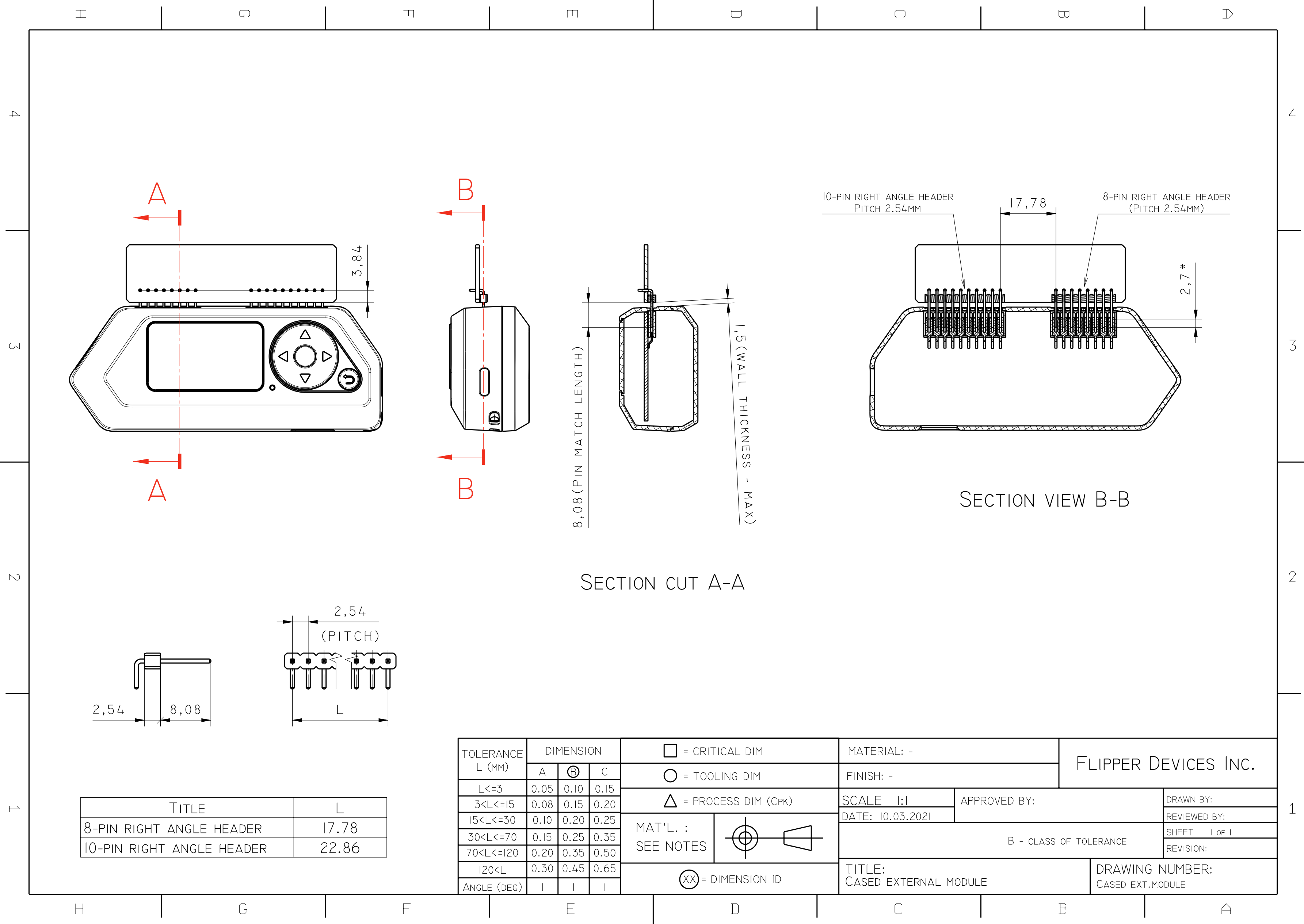
12 |
13 |  14 | [Flipper Zero Uncased Ext. Module Drawing.pdf](https://cdn.flipperzero.one/Flipper-Zero-Uncased-Ext-module-Drawing.pdf)
--------------------------------------------------------------------------------
/ru/content/development/mechanics/blueprints.md:
--------------------------------------------------------------------------------
1 | # Механические чертежи
2 | ## Внешний модуль без корпуса
3 |
4 | 
5 |
6 | 
7 |
8 | 
9 |
10 |
11 | 
12 |
13 |
14 | [Flipper Zero Uncased Ext. Module Drawing.pdf](https://cdn.flipperzero.one/Flipper-Zero-Uncased-Ext-module-Drawing.pdf)
--------------------------------------------------------------------------------
/shared/overrides/icons/flp/btn/back.svg:
--------------------------------------------------------------------------------
1 |
--------------------------------------------------------------------------------
/.github/workflows/build-pr.yml:
--------------------------------------------------------------------------------
1 | name: Build PR
2 |
3 | on:
4 | pull_request:
5 | branches: master
6 |
7 | jobs:
8 | build:
9 | runs-on: ubuntu-latest
10 | steps:
11 | - name: Checkout code
12 | uses: actions/checkout@v2
13 | with:
14 | fetch-depth: 0
15 | - name: Set up QEMU
16 | uses: docker/setup-qemu-action@v1
17 | - name: Set up Docker Buildx
18 | uses: docker/setup-buildx-action@v1
19 | - name: Login to GitHub Container Registry
20 | uses: docker/login-action@v1
21 | with:
22 | registry: ghcr.io
23 | username: ${{ secrets.CR_USERNAME }}
24 | password: ${{ secrets.CR_PAT }}
25 | - name: Build
26 | id: docker_build
27 | uses: docker/build-push-action@v2
28 | with:
29 | context: .
30 | tags: docs
31 |
--------------------------------------------------------------------------------
/en/mkdocs.yml:
--------------------------------------------------------------------------------
1 | nav:
2 | - Home: index.md
3 | - Usage:
4 | - General:
5 | - First Boot: usage/general/first-boot.md
6 | - Rebooting: usage/general/rebooting.md
7 | - Flashing Firmware: usage/general/flashing-firmware.md
8 | - Applications:
9 | - Power: usage/applications/power.md
10 | - Development:
11 | - Firmware:
12 | - Command Line Interface: development/firmware/cli.md
13 | - Hardware:
14 | - Circuit Diagrams: development/hardware/schematic.md
15 | - Developer Board: development/hardware/devboard-stlinkV3.md
16 | - Mechanics:
17 | - Blueprints: development/mechanics/blueprints.md
18 |
19 | site_name: Flipper Zero — Documentation
20 | site_url: https://docs.flipperzero.one/en/
21 | edit_uri: https://github.com/Flipper-Zero/docs/edit/master/en/content/
22 |
23 | extra:
24 | remark: docs-en
25 |
26 | theme:
27 | language: en
28 |
--------------------------------------------------------------------------------
/.github/workflows/deploy.yml:
--------------------------------------------------------------------------------
1 | name: Deploy
2 |
3 | on:
4 | push:
5 | branches: master
6 |
7 | jobs:
8 | build:
9 | runs-on: ubuntu-latest
10 | steps:
11 | - name: Checkout code
12 | uses: actions/checkout@v2
13 | with:
14 | fetch-depth: 0
15 | - name: Set up QEMU
16 | uses: docker/setup-qemu-action@v1
17 | - name: Set up Docker Buildx
18 | uses: docker/setup-buildx-action@v1
19 | - name: Login to GitHub Container Registry
20 | uses: docker/login-action@v1
21 | with:
22 | registry: ghcr.io
23 | username: ${{ secrets.CR_USERNAME }}
24 | password: ${{ secrets.CR_PAT }}
25 | - name: Build and push
26 | id: docker_build
27 | uses: docker/build-push-action@v2
28 | with:
29 | context: .
30 | push: true
31 | tags: ghcr.io/flipper-zero/docs:latest
32 | - name: Image digest
33 | run: echo ${{ steps.docker_build.outputs.digest }}
--------------------------------------------------------------------------------
/shared/overrides/partials/integrations/disqus.html:
--------------------------------------------------------------------------------
1 | {% set remark = config.extra.remark %}
2 | {% if page and page.meta and page.meta.remark is string %}
3 | {% set remark = page.meta.remark %}
4 | {% endif %}
5 | {% if not page.is_homepage and remark %}
6 |
7 |
8 |
27 | {% endif %}
--------------------------------------------------------------------------------
/ru/mkdocs.yml:
--------------------------------------------------------------------------------
1 | nav:
2 | - Главная: index.md
3 | - Использование:
4 | - Основное:
5 | - Первое включение: usage/general/first-boot.md
6 | - Перезагрузка: usage/general/rebooting.md
7 | - Обновление прошивки: usage/general/flashing-firmware.md
8 | - Приложения:
9 | - Power: usage/applications/power.md
10 | - Рaзработка:
11 | - Прошивка:
12 | - Командная строка: development/firmware/cli.md
13 | - Железо:
14 | - Принципиальные схемы: development/hardware/schematic.md
15 | - Отладочная плата: development/hardware/devboard-stlinkV3.md
16 | - Механика:
17 | - Чертежи: development/mechanics/blueprints.md
18 |
19 |
20 | site_name: Flipper Zero — Документация
21 | site_url: https://docs.flipperzero.one/ru/
22 | edit_uri: https://github.com/Flipper-Zero/docs/edit/master/ru/content/
23 |
24 | extra:
25 | remark: docs-ru
26 |
27 | copyright: Copyright © 2021 Flipper Devices Inc.
28 |
29 | markdown_extensions:
30 | - toc:
31 | permalink: true
32 | slugify: !!python/name:pymdownx.slugs.uslugify
33 |
34 | theme:
35 | language: ru
36 |
--------------------------------------------------------------------------------
/Dockerfile:
--------------------------------------------------------------------------------
1 | FROM squidfunk/mkdocs-material as builder
2 |
3 | RUN apk add yq rsync --repository=http://dl-cdn.alpinelinux.org/alpine/edge/community
4 |
5 | RUN pip install mkdocs-macros-plugin mkdocs-git-revision-date-localized-plugin mkdocs-smart-meta-plugin
6 |
7 | COPY shared /docs/shared
8 | COPY en /docs/en
9 | COPY ru /docs/ru
10 | COPY .git /docs/.git
11 |
12 | WORKDIR /docs/en
13 | RUN rsync -a --exclude mkdocs.yml ../shared/ . && \
14 | yq eval-all 'select(fileIndex == 0) *d select(fileIndex == 1)' ../shared/mkdocs.yml mkdocs.yml > mkdocs.yml.tmp && \
15 | rm mkdocs.yml && \
16 | mv mkdocs.yml.tmp mkdocs.yml
17 | RUN mkdocs build -s
18 |
19 | WORKDIR /docs/ru
20 | RUN rsync -a --exclude mkdocs.yml ../shared/ . && \
21 | yq eval-all 'select(fileIndex == 0) *d select(fileIndex == 1)' ../shared/mkdocs.yml mkdocs.yml > mkdocs.yml.tmp && \
22 | rm mkdocs.yml && \
23 | mv mkdocs.yml.tmp mkdocs.yml
24 | RUN mkdocs build -s
25 |
26 |
27 | FROM nginx:alpine
28 | COPY nginx.conf /etc/nginx/conf.d/default.conf
29 | COPY --from=builder /docs/en/site /usr/share/nginx/html/en
30 | COPY --from=builder /docs/ru/site /usr/share/nginx/html/ru
31 |
32 |
33 | EXPOSE 80
34 | ENTRYPOINT ["nginx", "-g", "daemon off;"]
35 |
--------------------------------------------------------------------------------
/nginx.conf:
--------------------------------------------------------------------------------
1 | server {
2 | listen 80;
3 |
4 | location ~ ^/en(?:/(.*))?$ {
5 | error_page 404 /en/404.html;
6 | root /usr/share/nginx/html;
7 | }
8 |
9 | location ~ ^/ru(?:/(.*))?$ {
10 | error_page 404 /ru/404.html;
11 | root /usr/share/nginx/html;
12 | }
13 |
14 | location = / {
15 | # Set first language in Accept-Language browser header
16 | # accept-language: en,en-US;q=0.8,ja;q=0.6
17 | set $first_language $http_accept_language;
18 | if ($http_accept_language ~* '^(.+?),') {
19 | set $first_language $1;
20 | }
21 |
22 | # Set default language to EN if no cookie
23 | set $language_suffix 'en';
24 |
25 | if ($first_language ~* 'ru') {
26 | set $language_suffix 'ru';
27 | }
28 |
29 | # If mkdocs_lang set, use it value as lang suffix
30 | if ($cookie_mkdocs_lang ~* '^([a-z]{2})$'){
31 | set $language_suffix $1;
32 | }
33 |
34 | # If not english, got to lang specific folder
35 | if ($language_suffix !~* 'en') {
36 | return 302 https://$http_host/$language_suffix$request_uri;
37 | }
38 |
39 | # Else return english page
40 | return 302 https://$http_host/en$request_uri;
41 | }
42 | }
--------------------------------------------------------------------------------
/en/content/development/hardware/devboard-stlinkV3.md:
--------------------------------------------------------------------------------
1 | # Developer board with ST-Link V3
2 |
3 | 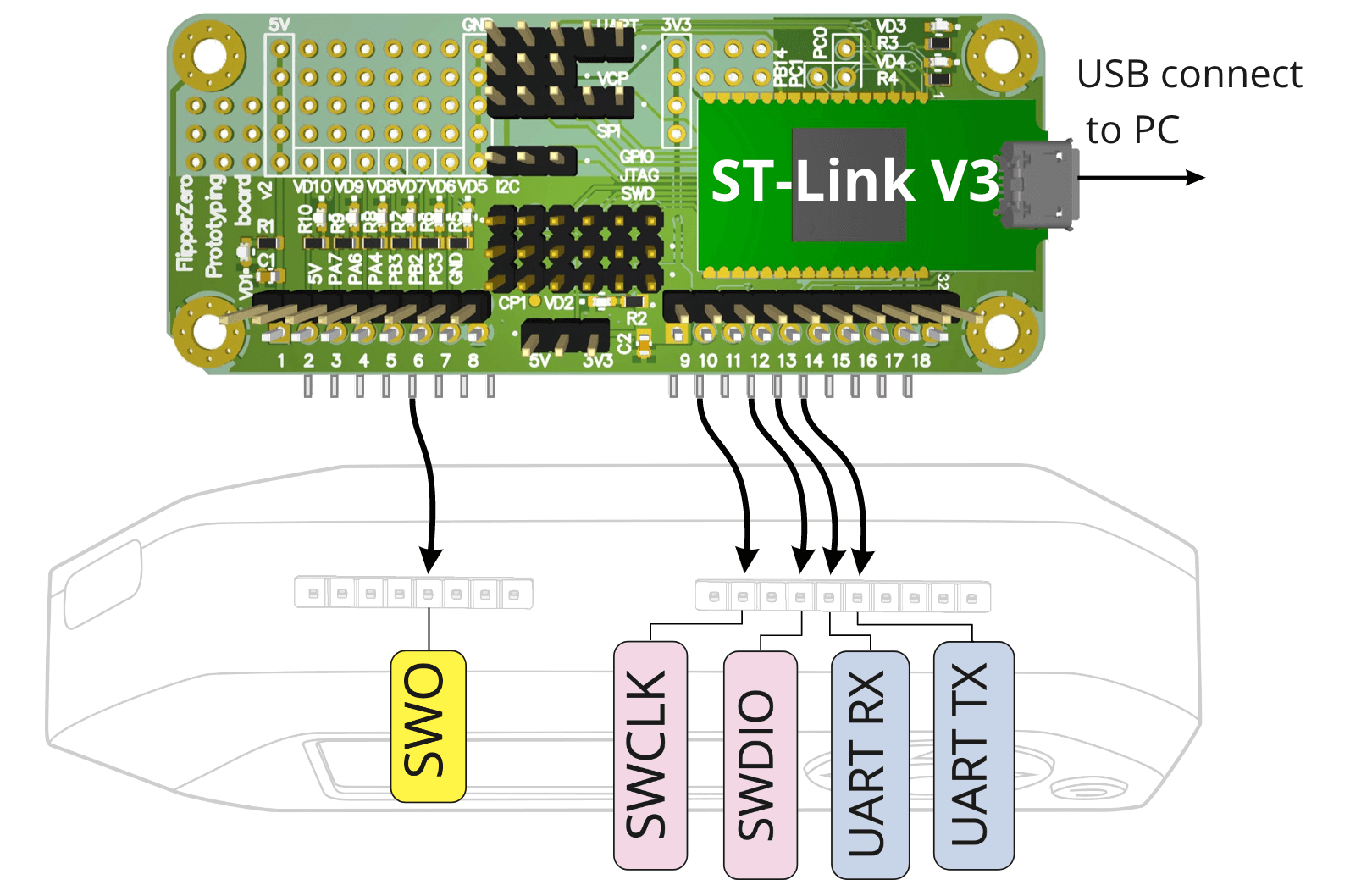
4 |
5 | This is a devboard for advanced developers, who need in-circuit debug. It is based on [ST-Link V3 Mini](https://www.st.com/en/development-tools/stlink-v3mini.html), and **differs only in form factor** and ease of connection. Some unused ST-Link and Flipper Zero pins are broken out additionally.
6 |
7 | !!! warning "You do not need this board to update Flipper Zero"
8 | You can update the firmware, develop and upload your own firmware to Flipper Zero via USB without this devboard! It is only needed for in-circuit debug while firmware is running using GDB/OpenOCD/etc. If you don't know exactly how to use it, you don't need this board.
9 |
10 | ## Specifications
11 |
12 | * ST-Link V3 Mini for firmware flashing and in-circuit debug
13 | * Built-in UART to USB, connected to Flipper Zero's UART (GPIO 13, 14)
14 | * Unused Flipper Zero pins are broken out for debug and prototyping
15 |
16 | ## Schematic and BOM
17 |
18 | {{ altium("0ec64b13-433d-419c-8d70-d2e84bef7532") }}
19 |
20 | ## Altium Designer project sources
21 |
22 | [github.com/Flipper-Zero/flipperzero-devboard-stlinkv3](https://github.com/Flipper-Zero/flipperzero-devboard-stlinkv3)
23 |
--------------------------------------------------------------------------------
/ru/content/development/hardware/devboard-stlinkV3.md:
--------------------------------------------------------------------------------
1 | # Отладочная плата на базе ST-Link V3
2 |
3 | 
4 |
5 | Отладочная плата для продвинутых разработчиков, которым нужна внутрисхемная отладка своих программ. Построена на базе обычного [ST-Link V3 Mini](https://www.st.com/en/development-tools/stlink-v3mini.html), **отличается только формфактором** и удобством подключения. Дополнительно на плату выведены неиспользуемые интерфейсы ST-Link и GPIO Flipper Zero.
6 |
7 | !!! warning "Отладочная плата не нужна для прошивки Flipper Zero"
8 | Вы можете обновлять прошивку, разрабатывать и загружать свою прошивку во Flipper Zero по USB без отладочной платы! Отладочная плата нужна для внутрисхемной отладки запущенных программ, например через GDB, OpenOCD. Если вы точно не знаете, как ее использовать, эта плата вам не нужна.
9 |
10 | ## Технические характеристики
11 |
12 | * ST-Link V3 Mini для прошивки и внутрисхемной отладки
13 | * Встроенный UART to USB, подключенный к UART Flipper Zero (GPIO 13, 14)
14 | * Выводы неиспользуемых GPIO Flipper Zero для отладки и макетирования
15 |
16 | ## Схема и BOM
17 |
18 | {{ altium("0ec64b13-433d-419c-8d70-d2e84bef7532") }}
19 |
20 | ## Исходники проекта в Altium Designer
21 |
22 | [github.com/Flipper-Zero/flipperzero-devboard-stlinkv3](https://github.com/Flipper-Zero/flipperzero-devboard-stlinkv3)
23 |
--------------------------------------------------------------------------------
/shared/overrides/main.html:
--------------------------------------------------------------------------------
1 | {% extends "base.html" %}
2 |
3 | {% block extrahead %}
4 | {% set title = config.site_name %}
5 | {% if page and page.meta and page.meta.title %}
6 | {% set title = page.meta.title %}
7 | {% elif page and page.title and not page.is_homepage %}
8 | {% set title = page.title | striptags %}
9 | {% endif %}
10 |
11 |
12 | {% if page and page.meta and page.meta.description %}
13 | {% set description = page.meta.description %}
14 | {% elif page and page.meta and page.meta.smart_description %}
15 | {% set description = page.meta.smart_description %}
16 | {% endif %}
17 | {% if description %}
18 |
19 | {% endif %}
20 |
21 | {% if page and page.meta and page.meta.image %}
22 | {% set image = page.meta.image %}
23 | {% elif page and page.meta and page.meta.smart_image %}
24 | {% set image = page.meta.smart_image %}
25 | {% endif %}
26 | {% if image %}
27 |
28 | {% endif %}
29 |
30 |
31 |
32 |
33 |
34 | {% endblock %}
--------------------------------------------------------------------------------
/shared/main.py:
--------------------------------------------------------------------------------
1 | from urllib.parse import urlparse, urljoin
2 |
3 |
4 | def is_absolute(url):
5 | return bool(urlparse(url).netloc)
6 |
7 |
8 | def define_env(env):
9 | "Hook function"
10 |
11 | @env.macro
12 | def gif(url):
13 | if not is_absolute(url):
14 | url = urljoin(env.conf['site_url'], url)
15 | return f''
16 |
17 | @env.macro
18 | def video(url):
19 | if not is_absolute(url):
20 | url = urljoin(env.conf['site_url'], url)
21 | return f''
22 |
23 | @env.macro
24 | def screenshot(url, width='400px'):
25 | if not is_absolute(url):
26 | url = urljoin(env.conf['site_url'], url)
27 | return f''
28 |
29 | @env.macro
30 | def altium(id):
31 | return f''
--------------------------------------------------------------------------------
/shared/content/stylesheets/home.css:
--------------------------------------------------------------------------------
1 | /* Menu: 1st lvl */
2 |
3 | ul.home-menu {
4 | display: flex;
5 | flex-wrap: wrap;
6 | width: 100%;
7 | margin: 1.5rem 0;
8 | list-style-type: none;
9 | }
10 |
11 | ul.home-menu > li {
12 | display: flex;
13 | align-items: stretch;
14 | width: calc(50% - 30px);
15 | min-height: 280px;
16 | border: 1px solid var(--md-typeset-kbd-border-color);
17 | border-radius: 4px;
18 | margin: 0;
19 | }
20 |
21 | ul.home-menu > li:nth-child(2n) {
22 | margin-left: 60px;
23 | }
24 |
25 | ul.home-menu > li:nth-child(n + 3) {
26 | margin-top: 60px;
27 | }
28 |
29 | ul.home-menu > li aside {
30 | flex-shrink: 0;
31 | width: 38.19660113%;
32 | }
33 |
34 | ul.home-menu > li aside img {
35 | width: 100%;
36 | height: 100%;
37 | object-fit: cover;
38 | }
39 |
40 | ul.home-menu li main {
41 | flex-grow: 1;
42 | padding: 0 1.5rem;
43 | }
44 |
45 | ul.home-menu li main h2 {
46 | margin: 1rem 0;
47 | text-align: center;
48 | }
49 |
50 | /* Menu: 2nd lvl */
51 |
52 | ul.home-submenu {
53 | display: flex;
54 | flex-direction: column;
55 | padding-bottom: 1rem;
56 | }
57 |
58 | ul.home-submenu a {
59 | color: var(--md-typeset-color);
60 | }
61 |
62 | ul.home-submenu a:hover,
63 | ul.home-submenu a:focus {
64 | color: var(--md-typeset-a-color);
65 | }
66 |
67 | /* Vertical layout */
68 |
69 | @media (max-width: 1024px) {
70 | ul.home-menu {
71 | flex-wrap: none;
72 | flex-direction: column;
73 | }
74 |
75 | ul.home-menu > li {
76 | width: 100%;
77 | margin-left: 0 !important;
78 | }
79 |
80 | ul.home-menu > li:not(:first-of-type) {
81 | margin-top: 40px !important;
82 | }
83 | }
84 |
85 | @media (max-width: 720px) {
86 | ul.home-menu > li {
87 | flex-direction: column;
88 | }
89 |
90 | ul.home-menu > li aside {
91 | width: 100%;
92 | height: 40vw;
93 | max-height: 200px;
94 | }
95 | }
--------------------------------------------------------------------------------
/en/content/development/hardware/schematic.md:
--------------------------------------------------------------------------------
1 | # Circuit Diagrams
2 |
3 | 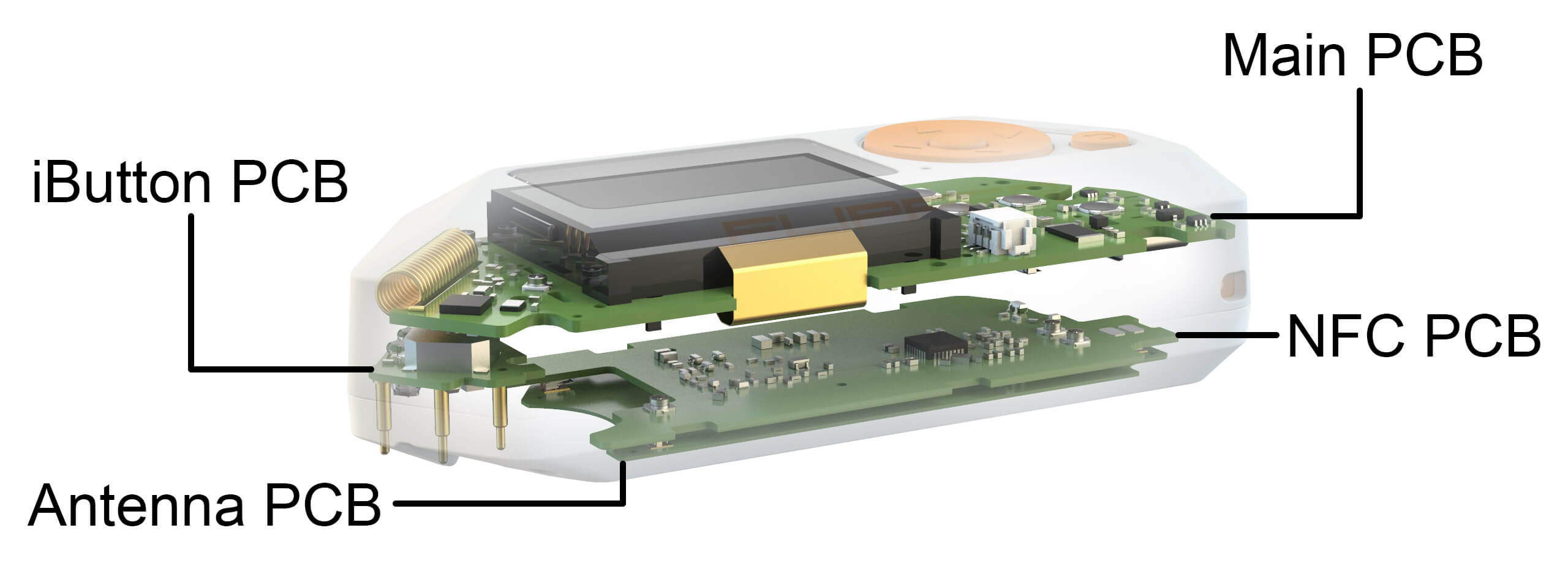
4 | These are circuit diagrams of all Flipper Zero PCBs. They could be useful for hardware module developers and for low-level debug. These schematics are for educational purposes only and can't be treated as production documentation.
5 |
6 | !!! warning "Schematics are stripped"
7 | **All Flipper Zero schematics** are published below, but values of some passive components are ommited to complicate device cloning before official release.
8 |
9 | ## Main PCB
10 | 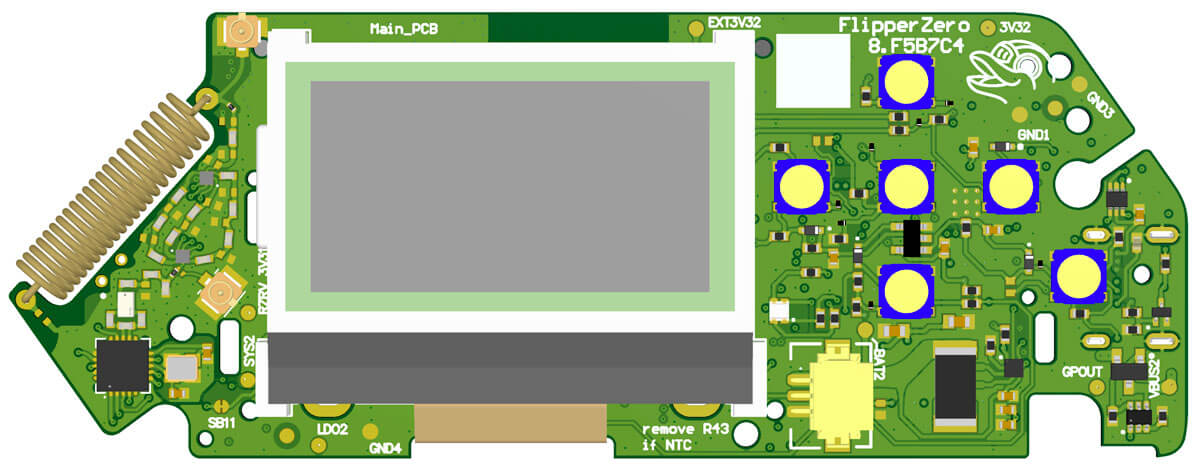
11 |
12 | ### Main blocks overview
13 | Every block is shown in detail as a separate document below.
14 | {{ altium("77b5e9f1-7fd1-47b2-879b-42631ccf1aeb") }}
15 |
16 | ### Power
17 | Power management system for all components.
18 | {{ altium("a41279af-a514-4eef-b0e6-caffcecea7d5") }}
19 |
20 | ### Periphery
21 | {{ altium("1c1704de-b682-4693-88e0-74342e87bb44") }}
22 |
23 | ### MCU STM32WB55
24 | {{ altium("eb69a746-c7bf-4301-9a4b-906995425d9c") }}
25 |
26 | ### LCD Display
27 | {{ altium("3ad3a937-2a28-4678-bfc4-36e5a1f72d8b") }}
28 |
29 | ### Sub-1 GHz CC1101
30 | {{ altium("c28de394-dc04-4c0d-8d9a-ba7cc9b5a9d8") }}
31 |
32 | ### Buttons
33 | {{ altium("d0bcb592-ee4c-4912-9167-e34b86a9e4f9") }}
34 |
35 | ## iButton PCB
36 | Piezo speaker and IR are also placed on this PCB.
37 | 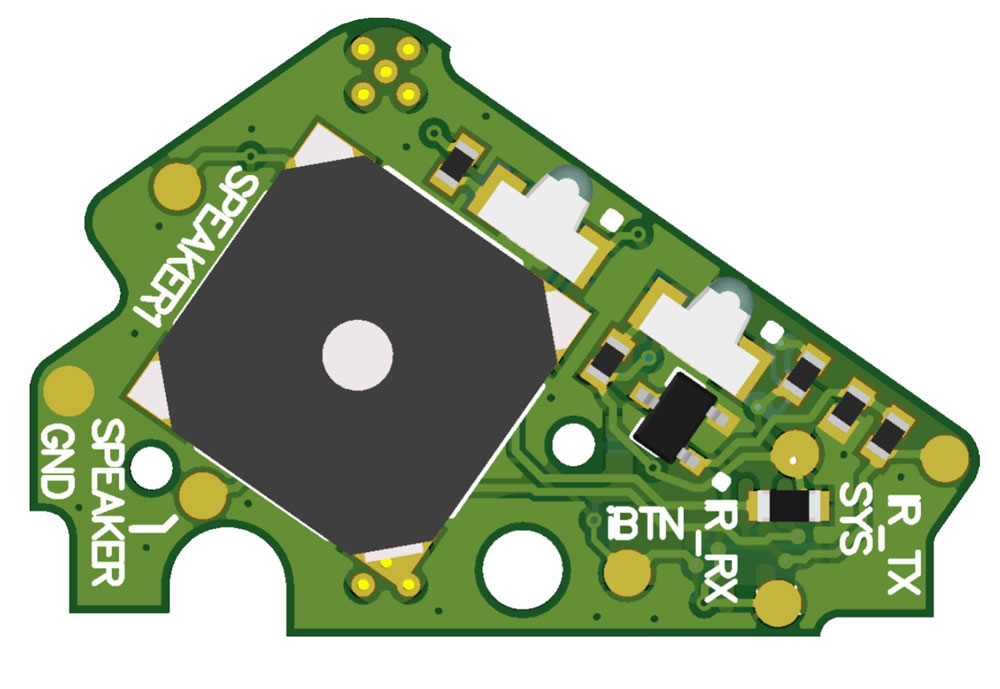
38 |
39 | {{ altium("3d9c4181-e623-4504-b520-bfef6ba96cef") }}
40 |
41 | ## NFC PCB
42 | This PCB contains RFID 125 KHz and NFC modules.
43 | 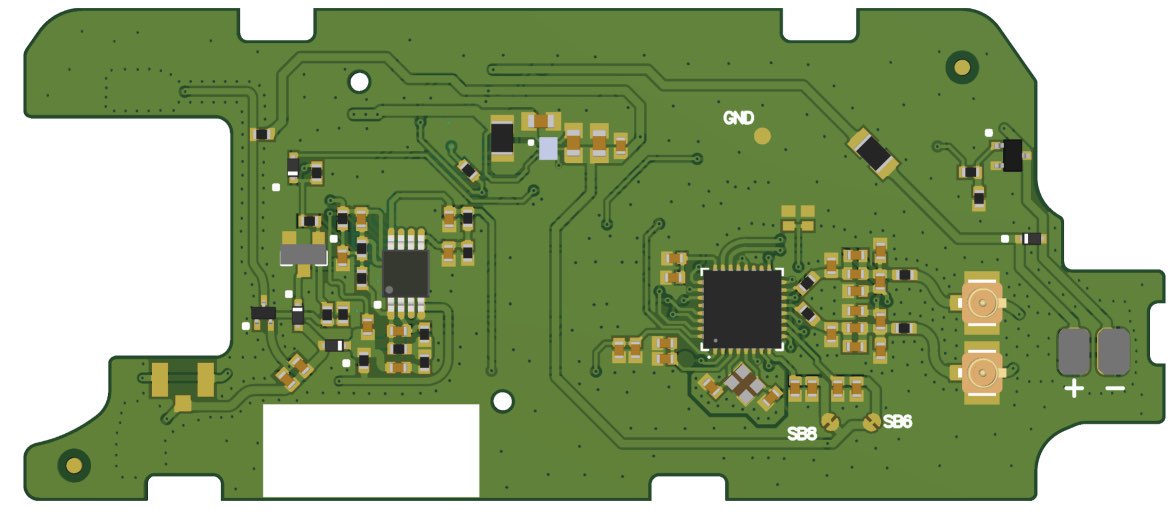
44 |
45 | ### NFC blocks overview
46 | {{ altium("da79a091-8e8b-46df-9398-45f1dfcffa6e") }}
47 |
48 | ### NFC
49 | {{ altium("308a6997-56f9-40aa-825d-5b77a3d98f39") }}
50 |
51 | ### RFID PERIPHERY
52 | {{ altium("06f61470-8f77-449f-8930-46659635d796") }}
53 |
54 | ### RFID_iBTN
55 | {{ altium("bd11bd9a-85e3-4f0d-bd8e-9ed7057658b8") }}
56 |
57 | ## RFID Antenna PCB
58 | 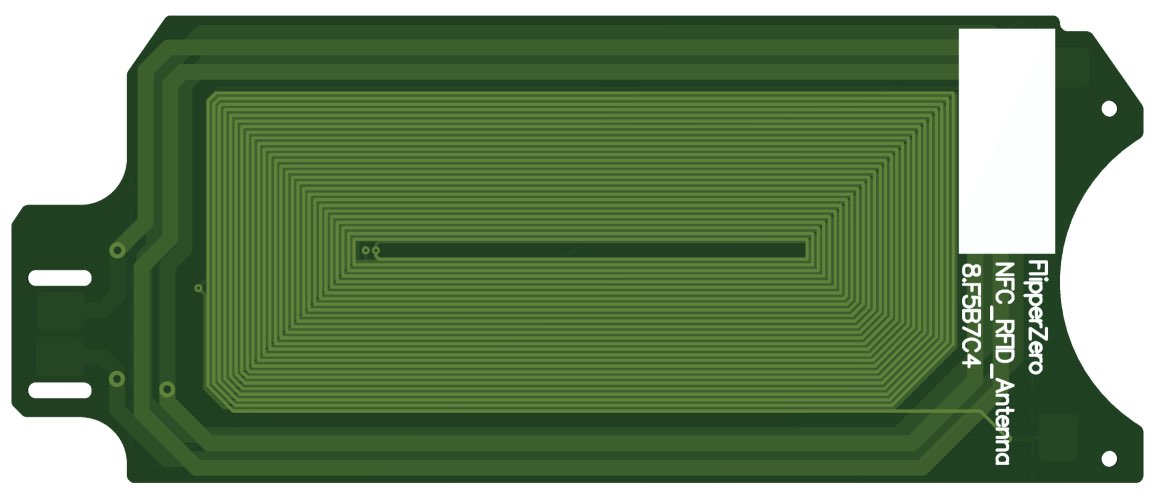
--------------------------------------------------------------------------------
/ru/content/development/hardware/schematic.md:
--------------------------------------------------------------------------------
1 | # Принципиальные схемы
2 |
3 | 
4 | Здесь находятся принципиальные схемы всех плат Flipper Zero. Они могут быть полезны разработчикам модулей и для низкоуровневой отладки. Схемы опубликованы как справочный материал и не являются точной производственной документацией.
5 |
6 | !!! warning "Схемы сокращены"
7 | Ниже выложены **все схемы Flipper Zero**, однако у некоторых пассивных компонентов убраны номиналы. Это сделано для усложнения копирования устройства до официального релиза.
8 |
9 | ## Плата Main
10 | 
11 |
12 | ### Общая схема блоков Main
13 | Каждый блок вынесен отдельным документом ниже.
14 | {{ altium("77b5e9f1-7fd1-47b2-879b-42631ccf1aeb") }}
15 |
16 | ### Power
17 | Система питания всех компонентов.
18 | {{ altium("a41279af-a514-4eef-b0e6-caffcecea7d5") }}
19 |
20 | ### Periphery
21 | {{ altium("1c1704de-b682-4693-88e0-74342e87bb44") }}
22 |
23 | ### MCU STM32WB55
24 | {{ altium("eb69a746-c7bf-4301-9a4b-906995425d9c") }}
25 |
26 | ### LCD Display
27 | {{ altium("3ad3a937-2a28-4678-bfc4-36e5a1f72d8b") }}
28 |
29 | ### Sub-1 GHz CC1101
30 | {{ altium("c28de394-dc04-4c0d-8d9a-ba7cc9b5a9d8") }}
31 |
32 | ### Buttons
33 | {{ altium("d0bcb592-ee4c-4912-9167-e34b86a9e4f9") }}
34 |
35 | ## Плата iButton
36 | На плате iButton также размещены пьезодинамик и ИК-порт.
37 | 
38 |
39 | {{ altium("3d9c4181-e623-4504-b520-bfef6ba96cef") }}
40 |
41 | ## Плата NFC
42 | На плате находятся модули RFID 125 кГц и NFC.
43 | 
44 |
45 | ### Общая схема блоков NFC
46 | {{ altium("da79a091-8e8b-46df-9398-45f1dfcffa6e") }}
47 |
48 | ### NFC
49 | {{ altium("308a6997-56f9-40aa-825d-5b77a3d98f39") }}
50 |
51 | ### RFID PERIPHERY
52 | {{ altium("06f61470-8f77-449f-8930-46659635d796") }}
53 |
54 | ### RFID_iBTN
55 | {{ altium("bd11bd9a-85e3-4f0d-bd8e-9ed7057658b8") }}
56 |
57 | ## Антенная плата RFID
58 | 
--------------------------------------------------------------------------------
/en/content/usage/applications/power.md:
--------------------------------------------------------------------------------
1 | Flipper Zero has a power management system, which mainly consists of **fuel gauge** and **charger** ICs.
2 |
3 | The main goal of the fuel gauge is to monitor the battery charging level. It works by calculating the incoming and spent energy precisely.
4 |
5 | Charger IC controls the charging process, which is very important for battery life and user safety.
6 |
7 | Power state application obtains information from these ICs and shows it on display. Let's examine each line of that information.
8 |
9 | ## Review
10 |
11 | === "Not charging"
12 | {{ screenshot("assets/applications/power-charging-off.png") }}
13 | === "Charging"
14 | {{ screenshot("assets/applications/power-charging-on.png") }}
15 |
16 | ### Current
17 |
18 | The first value is current, reported by fuel gauge (consumed by the battery). While Flipper is not charging, the value is negative and shows current consumption.
19 |
20 | The second value is the charging current, reported by the charger IC. It goes up as the charging starts.
21 |
22 | ### Voltage
23 |
24 | This line shows current voltage levels: from the fuel gauge and from the charger respectively.
25 |
26 | !!! warning
27 | The voltage level given by the charger is correct only during the charging process.
28 |
29 | ### Charge
30 |
31 | The current battery level is shown on this line in percentage.
32 |
33 | It's calculated by the fuel gauge using the value of energy consumed by the battery during charging, and spent during the device usage.
34 |
35 | ### Capacity
36 |
37 | The first value on this line shows energy left in the battery, and the second one shows its full capacity.
38 |
39 | The remaining energy can be calculated correctly only if the installed battery has the same full capacity value that was set during fuel gauge calibration.
40 |
41 | !!! warning
42 | As seen on the screenshot above, some testing units might report that the full capacity is 3000 mAh, which is wrong and leads to battery level miscalculations. The real capacity is 2000 mAh.
43 |
44 | ### Temperature
45 |
46 | The last line shows the fuel gauge and the battery Celsius temperatures respectively.
47 |
48 | The battery temperature is measured using NTC thermistor, which is placed on the battery and connected to the charger IC. It changes its resistance depending on the temperature.
--------------------------------------------------------------------------------
/README.md:
--------------------------------------------------------------------------------
1 | # Flipper Zero Docs
2 |
3 | ## Participation
4 |
5 | To fix a bug or add something new to this repository, you need to **open a pull-request**. Also,
6 | on every page of the site, there is an edit icon (pencil) to the right of the header.
7 |
8 | ### I18N and `shared` folder
9 |
10 | - Put assets, custom HTMLs, scripts, and stylesheets to `shared` until they're language-specific
11 | - **Keep the navigation structure the same** for all languages* so the language selector can work properly
12 |
13 | ### Creating a new document
14 |
15 | After creating a new document, add it to the `nav:` block in the language-specific `mkdocs.yml`.
16 |
17 | ### Writing
18 |
19 | Documents are written in Markdown. [Material for Mkdocs](https://squidfunk.github.io/mkdocs-material/reference/abbreviations/) and [Mkdocs](https://www.mkdocs.org/user-guide/writing-your-docs/#writing-with-markdown) docs might help you showing what blocks are supported.
20 |
21 | ### Assets
22 |
23 | All images, videos, and other assets must be uploaded to the `assets` folder.
24 |
25 | ### GIFs, Videos and screenshots
26 |
27 | We have some custom macros to embed "gifs" and videos.
28 |
29 | To embed a "gif" (autoplayable silent MP4 video), use:
30 |
31 | ```
32 | {{ gif("/assets/example-gif-file-name.mp4") }}
33 | ```
34 |
35 | To embed a video, use:
36 |
37 | ```
38 | {{ video("/assets/example-video-file-name.mp4") }}
39 | ```
40 |
41 | To embed a Flipper Zero screenshot, use:
42 |
43 | ```
44 | {{ screenshot("/assets/example-screenshot.png") }}
45 | ```
46 |
47 | The screenshot should be 128*64 PNG with transparent background.
48 |
49 | ## Live MkDocs server
50 |
51 | You can run mkdocs server locally and render changes on the fly while editing.
52 |
53 | ## macOS
54 |
55 | 1. `brew install yq rsync`
56 | 2. Install mkdocs insiders version if you have a token:
57 |
58 | `pip3 install git+https://${GH_TOKEN}@github.com/squidfunk/mkdocs-material-insiders.git`
59 |
60 | `pip3 install mkdocs-macros-plugin mkdocs-git-revision-date-localized-plugin mkdocs-smart-meta-plugin`
61 |
62 | **OR** onstall public version
63 |
64 | `pip3 install mkdocs-material mkdocs-macros-plugin mkdocs-git-revision-date-localized-plugin mkdocs-smart-meta-plugin`
65 |
66 | 3. Run `python3 ./serve.py` being in the root directory
67 | 4. Proceed to `http://localhost:8000`
68 |
69 | **P.S. If you use publoc version of mkdocs the live preview might look a bit different to production, because we use [mkdocs-material-insiders](https://squidfunk.github.io/mkdocs-material/insiders/) version.**
70 |
71 | ## Linux
72 |
73 | TODO
74 |
75 | ## Windows
76 |
77 | TODO
78 |
--------------------------------------------------------------------------------
/ru/content/usage/applications/power.md:
--------------------------------------------------------------------------------
1 | Система управления питанием Flipper Zero представлена двумя специальными чипами: **контроллером уровня заряда батареи** (fuel gauge) и **контроллером заряда** (charger).
2 |
3 | Главной задачей первого является отслеживание уровня заряда батареи. Это реализуется благодаря точному учету чипом количества энергии, которое прошло в батарею и было истраченно из нее.
4 |
5 | Контроллер заряда нужен для соблюдения требований к процессу заряда литиевой батареи, что очень важно для продления ее срока службы, а также для обеспечения безопасности при использовании устройства.
6 |
7 | Приложение Power state получает информацию от этих чипов и выводит ее на экран. Давайте разберемся, что все это значит.
8 |
9 | ## Обзор
10 |
11 | === "Без зарядки"
12 | {{ screenshot("assets/applications/power-charging-off.png") }}
13 | === "При зарядке"
14 | {{ screenshot("assets/applications/power-charging-on.png") }}
15 |
16 | ### Current
17 |
18 | Первое число — это ток, полученный от контроллера уровня заряда, который сейчас «втекает» в батарею. Если Флиппер не подключен к внешнему источнику питания и заряд сейчас не происходит, то в этом месте будет отрицательное значение, означающее ток разряда.
19 |
20 | Второе значение — это ток заряда, который расчитывается самим контроллером заряда. Число может быть положительным только в процессе заряда.
21 |
22 | ### Voltage
23 |
24 | Эта строка отображает напряжения, полученные от контроллера уровня заряда и от зарядного контроллера соответственно.
25 |
26 | !!! warning "Внимание"
27 | Второе значение напряжения будет валидным только в процессе заряда АКБ.
28 |
29 | ### Charge
30 |
31 | Строка показывает текущий уровень заряда батареи в процентах.
32 |
33 | Это значение расчитывается контроллером уровня заряда исходя из количества энергии, вошедшей в батарею и вышедшей из нее за время пользования устройством.
34 |
35 | ### Capacity
36 |
37 | Первое значение в этой строке показывает количество энергии, оставшейся в батарее, а второе — полную емкость.
38 |
39 | Оставшаяся энергия рассчитывается верно только в случае соответствия полной емкости установленной батареи укзанному при калибровке контроллера значению.
40 |
41 | !!! warning "Внимание"
42 | Как видно на скриншоте выше, некоторые тестовые устройства сообщают о полной емкости 3000 мАч, что неверно и приводит к ошибочным вычислениям уровня заряда. Реальная емкость установленных батарей — 2000 мАч.
43 |
44 | ### Temperature
45 |
46 | В последней строке выводятся температуры контроллера уровня заряда и батареи соответственно.
47 |
48 | Для измерения температуры батареи используется NTC-термистор, который размещен на самом АКБ, а подключен к контроллеру заряда. Он изменяет свое сопротивление в зависимости от температуры батареи, таким образом позволяя ее измерить.
--------------------------------------------------------------------------------
/en/content/development/firmware/cli.md:
--------------------------------------------------------------------------------
1 | Flipper Zero has its own command line interface, which might be useful for automated testing or remote control.
2 |
3 | ## Connection
4 |
5 | Connect your Flipper Zero to the PC over USB. Your host will detect a virtual COM-port:
6 |
7 | 
8 |
9 | This COM-port does not require a special driver and is accessible on most modern operating systems.
10 |
11 | You will need any terminal client to open the port: `screen`, `minicom`, etc. No additional setup required except choosing the right port.
12 |
13 | For example, the port name in macOS starts with `/dev/tty.usbmodem`:
14 |
15 | 
16 |
17 | It is `/dev/tty.usbmodem2069315E544E1` in our case.
18 |
19 | To connect to the CLI using `screen` substitute your port name and enter this command in the shell:
20 | ```sh
21 | screen /dev/tty.usbmodem2069315E544E1
22 | ```
23 |
24 | You will see command prompt and firmware build information:
25 |
26 | 
27 |
28 | ## Commands
29 |
30 | ### Basic
31 |
32 | | Command | Description |
33 | | ------: | :------- |
34 | | `?` or `help` | Outputs all available commands |
35 | | `!` or `version` | Outputs firmware build information |
36 | | `uid` | Outputs unique device identificator |
37 | | `log` | Redirects stdout to the port |
38 | | `date` | Outputs current real time clock value |
39 |
40 | ### Power and Boot
41 |
42 | | Command | Description |
43 | | ------: | :------- |
44 | | `poweroff` | Turns off the device |
45 | | `reset` | Reboots the device |
46 | | `dfu` | Reboots the device to [DFU-mode](../../usage/general/flashing-firmware.md) |
47 | | `power_otg_on` | Turns on periphery power |
48 | | `power_otg_off` | Turns off periphery power |
49 | | `power_test` | Outputs battery and charging info |
50 |
51 | ### User Interface
52 |
53 | | Command | Parameters | Description |
54 | | ------: | :-------- | :------- |
55 | | `input_send` | ` ` | Emulates button presses.
14 | [Flipper Zero Uncased Ext. Module Drawing.pdf](https://cdn.flipperzero.one/Flipper-Zero-Uncased-Ext-module-Drawing.pdf)
--------------------------------------------------------------------------------
/ru/content/development/mechanics/blueprints.md:
--------------------------------------------------------------------------------
1 | # Механические чертежи
2 | ## Внешний модуль без корпуса
3 |
4 | 
5 |
6 | 
7 |
8 | 
9 |
10 |
11 | 
12 |
13 |
14 | [Flipper Zero Uncased Ext. Module Drawing.pdf](https://cdn.flipperzero.one/Flipper-Zero-Uncased-Ext-module-Drawing.pdf)
--------------------------------------------------------------------------------
/shared/overrides/icons/flp/btn/back.svg:
--------------------------------------------------------------------------------
1 |
--------------------------------------------------------------------------------
/.github/workflows/build-pr.yml:
--------------------------------------------------------------------------------
1 | name: Build PR
2 |
3 | on:
4 | pull_request:
5 | branches: master
6 |
7 | jobs:
8 | build:
9 | runs-on: ubuntu-latest
10 | steps:
11 | - name: Checkout code
12 | uses: actions/checkout@v2
13 | with:
14 | fetch-depth: 0
15 | - name: Set up QEMU
16 | uses: docker/setup-qemu-action@v1
17 | - name: Set up Docker Buildx
18 | uses: docker/setup-buildx-action@v1
19 | - name: Login to GitHub Container Registry
20 | uses: docker/login-action@v1
21 | with:
22 | registry: ghcr.io
23 | username: ${{ secrets.CR_USERNAME }}
24 | password: ${{ secrets.CR_PAT }}
25 | - name: Build
26 | id: docker_build
27 | uses: docker/build-push-action@v2
28 | with:
29 | context: .
30 | tags: docs
31 |
--------------------------------------------------------------------------------
/en/mkdocs.yml:
--------------------------------------------------------------------------------
1 | nav:
2 | - Home: index.md
3 | - Usage:
4 | - General:
5 | - First Boot: usage/general/first-boot.md
6 | - Rebooting: usage/general/rebooting.md
7 | - Flashing Firmware: usage/general/flashing-firmware.md
8 | - Applications:
9 | - Power: usage/applications/power.md
10 | - Development:
11 | - Firmware:
12 | - Command Line Interface: development/firmware/cli.md
13 | - Hardware:
14 | - Circuit Diagrams: development/hardware/schematic.md
15 | - Developer Board: development/hardware/devboard-stlinkV3.md
16 | - Mechanics:
17 | - Blueprints: development/mechanics/blueprints.md
18 |
19 | site_name: Flipper Zero — Documentation
20 | site_url: https://docs.flipperzero.one/en/
21 | edit_uri: https://github.com/Flipper-Zero/docs/edit/master/en/content/
22 |
23 | extra:
24 | remark: docs-en
25 |
26 | theme:
27 | language: en
28 |
--------------------------------------------------------------------------------
/.github/workflows/deploy.yml:
--------------------------------------------------------------------------------
1 | name: Deploy
2 |
3 | on:
4 | push:
5 | branches: master
6 |
7 | jobs:
8 | build:
9 | runs-on: ubuntu-latest
10 | steps:
11 | - name: Checkout code
12 | uses: actions/checkout@v2
13 | with:
14 | fetch-depth: 0
15 | - name: Set up QEMU
16 | uses: docker/setup-qemu-action@v1
17 | - name: Set up Docker Buildx
18 | uses: docker/setup-buildx-action@v1
19 | - name: Login to GitHub Container Registry
20 | uses: docker/login-action@v1
21 | with:
22 | registry: ghcr.io
23 | username: ${{ secrets.CR_USERNAME }}
24 | password: ${{ secrets.CR_PAT }}
25 | - name: Build and push
26 | id: docker_build
27 | uses: docker/build-push-action@v2
28 | with:
29 | context: .
30 | push: true
31 | tags: ghcr.io/flipper-zero/docs:latest
32 | - name: Image digest
33 | run: echo ${{ steps.docker_build.outputs.digest }}
--------------------------------------------------------------------------------
/shared/overrides/partials/integrations/disqus.html:
--------------------------------------------------------------------------------
1 | {% set remark = config.extra.remark %}
2 | {% if page and page.meta and page.meta.remark is string %}
3 | {% set remark = page.meta.remark %}
4 | {% endif %}
5 | {% if not page.is_homepage and remark %}
6 |
7 |
8 |
27 | {% endif %}
--------------------------------------------------------------------------------
/ru/mkdocs.yml:
--------------------------------------------------------------------------------
1 | nav:
2 | - Главная: index.md
3 | - Использование:
4 | - Основное:
5 | - Первое включение: usage/general/first-boot.md
6 | - Перезагрузка: usage/general/rebooting.md
7 | - Обновление прошивки: usage/general/flashing-firmware.md
8 | - Приложения:
9 | - Power: usage/applications/power.md
10 | - Рaзработка:
11 | - Прошивка:
12 | - Командная строка: development/firmware/cli.md
13 | - Железо:
14 | - Принципиальные схемы: development/hardware/schematic.md
15 | - Отладочная плата: development/hardware/devboard-stlinkV3.md
16 | - Механика:
17 | - Чертежи: development/mechanics/blueprints.md
18 |
19 |
20 | site_name: Flipper Zero — Документация
21 | site_url: https://docs.flipperzero.one/ru/
22 | edit_uri: https://github.com/Flipper-Zero/docs/edit/master/ru/content/
23 |
24 | extra:
25 | remark: docs-ru
26 |
27 | copyright: Copyright © 2021 Flipper Devices Inc.
28 |
29 | markdown_extensions:
30 | - toc:
31 | permalink: true
32 | slugify: !!python/name:pymdownx.slugs.uslugify
33 |
34 | theme:
35 | language: ru
36 |
--------------------------------------------------------------------------------
/Dockerfile:
--------------------------------------------------------------------------------
1 | FROM squidfunk/mkdocs-material as builder
2 |
3 | RUN apk add yq rsync --repository=http://dl-cdn.alpinelinux.org/alpine/edge/community
4 |
5 | RUN pip install mkdocs-macros-plugin mkdocs-git-revision-date-localized-plugin mkdocs-smart-meta-plugin
6 |
7 | COPY shared /docs/shared
8 | COPY en /docs/en
9 | COPY ru /docs/ru
10 | COPY .git /docs/.git
11 |
12 | WORKDIR /docs/en
13 | RUN rsync -a --exclude mkdocs.yml ../shared/ . && \
14 | yq eval-all 'select(fileIndex == 0) *d select(fileIndex == 1)' ../shared/mkdocs.yml mkdocs.yml > mkdocs.yml.tmp && \
15 | rm mkdocs.yml && \
16 | mv mkdocs.yml.tmp mkdocs.yml
17 | RUN mkdocs build -s
18 |
19 | WORKDIR /docs/ru
20 | RUN rsync -a --exclude mkdocs.yml ../shared/ . && \
21 | yq eval-all 'select(fileIndex == 0) *d select(fileIndex == 1)' ../shared/mkdocs.yml mkdocs.yml > mkdocs.yml.tmp && \
22 | rm mkdocs.yml && \
23 | mv mkdocs.yml.tmp mkdocs.yml
24 | RUN mkdocs build -s
25 |
26 |
27 | FROM nginx:alpine
28 | COPY nginx.conf /etc/nginx/conf.d/default.conf
29 | COPY --from=builder /docs/en/site /usr/share/nginx/html/en
30 | COPY --from=builder /docs/ru/site /usr/share/nginx/html/ru
31 |
32 |
33 | EXPOSE 80
34 | ENTRYPOINT ["nginx", "-g", "daemon off;"]
35 |
--------------------------------------------------------------------------------
/nginx.conf:
--------------------------------------------------------------------------------
1 | server {
2 | listen 80;
3 |
4 | location ~ ^/en(?:/(.*))?$ {
5 | error_page 404 /en/404.html;
6 | root /usr/share/nginx/html;
7 | }
8 |
9 | location ~ ^/ru(?:/(.*))?$ {
10 | error_page 404 /ru/404.html;
11 | root /usr/share/nginx/html;
12 | }
13 |
14 | location = / {
15 | # Set first language in Accept-Language browser header
16 | # accept-language: en,en-US;q=0.8,ja;q=0.6
17 | set $first_language $http_accept_language;
18 | if ($http_accept_language ~* '^(.+?),') {
19 | set $first_language $1;
20 | }
21 |
22 | # Set default language to EN if no cookie
23 | set $language_suffix 'en';
24 |
25 | if ($first_language ~* 'ru') {
26 | set $language_suffix 'ru';
27 | }
28 |
29 | # If mkdocs_lang set, use it value as lang suffix
30 | if ($cookie_mkdocs_lang ~* '^([a-z]{2})$'){
31 | set $language_suffix $1;
32 | }
33 |
34 | # If not english, got to lang specific folder
35 | if ($language_suffix !~* 'en') {
36 | return 302 https://$http_host/$language_suffix$request_uri;
37 | }
38 |
39 | # Else return english page
40 | return 302 https://$http_host/en$request_uri;
41 | }
42 | }
--------------------------------------------------------------------------------
/en/content/development/hardware/devboard-stlinkV3.md:
--------------------------------------------------------------------------------
1 | # Developer board with ST-Link V3
2 |
3 | 
4 |
5 | This is a devboard for advanced developers, who need in-circuit debug. It is based on [ST-Link V3 Mini](https://www.st.com/en/development-tools/stlink-v3mini.html), and **differs only in form factor** and ease of connection. Some unused ST-Link and Flipper Zero pins are broken out additionally.
6 |
7 | !!! warning "You do not need this board to update Flipper Zero"
8 | You can update the firmware, develop and upload your own firmware to Flipper Zero via USB without this devboard! It is only needed for in-circuit debug while firmware is running using GDB/OpenOCD/etc. If you don't know exactly how to use it, you don't need this board.
9 |
10 | ## Specifications
11 |
12 | * ST-Link V3 Mini for firmware flashing and in-circuit debug
13 | * Built-in UART to USB, connected to Flipper Zero's UART (GPIO 13, 14)
14 | * Unused Flipper Zero pins are broken out for debug and prototyping
15 |
16 | ## Schematic and BOM
17 |
18 | {{ altium("0ec64b13-433d-419c-8d70-d2e84bef7532") }}
19 |
20 | ## Altium Designer project sources
21 |
22 | [github.com/Flipper-Zero/flipperzero-devboard-stlinkv3](https://github.com/Flipper-Zero/flipperzero-devboard-stlinkv3)
23 |
--------------------------------------------------------------------------------
/ru/content/development/hardware/devboard-stlinkV3.md:
--------------------------------------------------------------------------------
1 | # Отладочная плата на базе ST-Link V3
2 |
3 | 
4 |
5 | Отладочная плата для продвинутых разработчиков, которым нужна внутрисхемная отладка своих программ. Построена на базе обычного [ST-Link V3 Mini](https://www.st.com/en/development-tools/stlink-v3mini.html), **отличается только формфактором** и удобством подключения. Дополнительно на плату выведены неиспользуемые интерфейсы ST-Link и GPIO Flipper Zero.
6 |
7 | !!! warning "Отладочная плата не нужна для прошивки Flipper Zero"
8 | Вы можете обновлять прошивку, разрабатывать и загружать свою прошивку во Flipper Zero по USB без отладочной платы! Отладочная плата нужна для внутрисхемной отладки запущенных программ, например через GDB, OpenOCD. Если вы точно не знаете, как ее использовать, эта плата вам не нужна.
9 |
10 | ## Технические характеристики
11 |
12 | * ST-Link V3 Mini для прошивки и внутрисхемной отладки
13 | * Встроенный UART to USB, подключенный к UART Flipper Zero (GPIO 13, 14)
14 | * Выводы неиспользуемых GPIO Flipper Zero для отладки и макетирования
15 |
16 | ## Схема и BOM
17 |
18 | {{ altium("0ec64b13-433d-419c-8d70-d2e84bef7532") }}
19 |
20 | ## Исходники проекта в Altium Designer
21 |
22 | [github.com/Flipper-Zero/flipperzero-devboard-stlinkv3](https://github.com/Flipper-Zero/flipperzero-devboard-stlinkv3)
23 |
--------------------------------------------------------------------------------
/shared/overrides/main.html:
--------------------------------------------------------------------------------
1 | {% extends "base.html" %}
2 |
3 | {% block extrahead %}
4 | {% set title = config.site_name %}
5 | {% if page and page.meta and page.meta.title %}
6 | {% set title = page.meta.title %}
7 | {% elif page and page.title and not page.is_homepage %}
8 | {% set title = page.title | striptags %}
9 | {% endif %}
10 |
11 |
12 | {% if page and page.meta and page.meta.description %}
13 | {% set description = page.meta.description %}
14 | {% elif page and page.meta and page.meta.smart_description %}
15 | {% set description = page.meta.smart_description %}
16 | {% endif %}
17 | {% if description %}
18 |
19 | {% endif %}
20 |
21 | {% if page and page.meta and page.meta.image %}
22 | {% set image = page.meta.image %}
23 | {% elif page and page.meta and page.meta.smart_image %}
24 | {% set image = page.meta.smart_image %}
25 | {% endif %}
26 | {% if image %}
27 |
28 | {% endif %}
29 |
30 |
31 |
32 |
33 |
34 | {% endblock %}
--------------------------------------------------------------------------------
/shared/main.py:
--------------------------------------------------------------------------------
1 | from urllib.parse import urlparse, urljoin
2 |
3 |
4 | def is_absolute(url):
5 | return bool(urlparse(url).netloc)
6 |
7 |
8 | def define_env(env):
9 | "Hook function"
10 |
11 | @env.macro
12 | def gif(url):
13 | if not is_absolute(url):
14 | url = urljoin(env.conf['site_url'], url)
15 | return f''
16 |
17 | @env.macro
18 | def video(url):
19 | if not is_absolute(url):
20 | url = urljoin(env.conf['site_url'], url)
21 | return f''
22 |
23 | @env.macro
24 | def screenshot(url, width='400px'):
25 | if not is_absolute(url):
26 | url = urljoin(env.conf['site_url'], url)
27 | return f''
28 |
29 | @env.macro
30 | def altium(id):
31 | return f''
--------------------------------------------------------------------------------
/shared/content/stylesheets/home.css:
--------------------------------------------------------------------------------
1 | /* Menu: 1st lvl */
2 |
3 | ul.home-menu {
4 | display: flex;
5 | flex-wrap: wrap;
6 | width: 100%;
7 | margin: 1.5rem 0;
8 | list-style-type: none;
9 | }
10 |
11 | ul.home-menu > li {
12 | display: flex;
13 | align-items: stretch;
14 | width: calc(50% - 30px);
15 | min-height: 280px;
16 | border: 1px solid var(--md-typeset-kbd-border-color);
17 | border-radius: 4px;
18 | margin: 0;
19 | }
20 |
21 | ul.home-menu > li:nth-child(2n) {
22 | margin-left: 60px;
23 | }
24 |
25 | ul.home-menu > li:nth-child(n + 3) {
26 | margin-top: 60px;
27 | }
28 |
29 | ul.home-menu > li aside {
30 | flex-shrink: 0;
31 | width: 38.19660113%;
32 | }
33 |
34 | ul.home-menu > li aside img {
35 | width: 100%;
36 | height: 100%;
37 | object-fit: cover;
38 | }
39 |
40 | ul.home-menu li main {
41 | flex-grow: 1;
42 | padding: 0 1.5rem;
43 | }
44 |
45 | ul.home-menu li main h2 {
46 | margin: 1rem 0;
47 | text-align: center;
48 | }
49 |
50 | /* Menu: 2nd lvl */
51 |
52 | ul.home-submenu {
53 | display: flex;
54 | flex-direction: column;
55 | padding-bottom: 1rem;
56 | }
57 |
58 | ul.home-submenu a {
59 | color: var(--md-typeset-color);
60 | }
61 |
62 | ul.home-submenu a:hover,
63 | ul.home-submenu a:focus {
64 | color: var(--md-typeset-a-color);
65 | }
66 |
67 | /* Vertical layout */
68 |
69 | @media (max-width: 1024px) {
70 | ul.home-menu {
71 | flex-wrap: none;
72 | flex-direction: column;
73 | }
74 |
75 | ul.home-menu > li {
76 | width: 100%;
77 | margin-left: 0 !important;
78 | }
79 |
80 | ul.home-menu > li:not(:first-of-type) {
81 | margin-top: 40px !important;
82 | }
83 | }
84 |
85 | @media (max-width: 720px) {
86 | ul.home-menu > li {
87 | flex-direction: column;
88 | }
89 |
90 | ul.home-menu > li aside {
91 | width: 100%;
92 | height: 40vw;
93 | max-height: 200px;
94 | }
95 | }
--------------------------------------------------------------------------------
/en/content/development/hardware/schematic.md:
--------------------------------------------------------------------------------
1 | # Circuit Diagrams
2 |
3 | 
4 | These are circuit diagrams of all Flipper Zero PCBs. They could be useful for hardware module developers and for low-level debug. These schematics are for educational purposes only and can't be treated as production documentation.
5 |
6 | !!! warning "Schematics are stripped"
7 | **All Flipper Zero schematics** are published below, but values of some passive components are ommited to complicate device cloning before official release.
8 |
9 | ## Main PCB
10 | 
11 |
12 | ### Main blocks overview
13 | Every block is shown in detail as a separate document below.
14 | {{ altium("77b5e9f1-7fd1-47b2-879b-42631ccf1aeb") }}
15 |
16 | ### Power
17 | Power management system for all components.
18 | {{ altium("a41279af-a514-4eef-b0e6-caffcecea7d5") }}
19 |
20 | ### Periphery
21 | {{ altium("1c1704de-b682-4693-88e0-74342e87bb44") }}
22 |
23 | ### MCU STM32WB55
24 | {{ altium("eb69a746-c7bf-4301-9a4b-906995425d9c") }}
25 |
26 | ### LCD Display
27 | {{ altium("3ad3a937-2a28-4678-bfc4-36e5a1f72d8b") }}
28 |
29 | ### Sub-1 GHz CC1101
30 | {{ altium("c28de394-dc04-4c0d-8d9a-ba7cc9b5a9d8") }}
31 |
32 | ### Buttons
33 | {{ altium("d0bcb592-ee4c-4912-9167-e34b86a9e4f9") }}
34 |
35 | ## iButton PCB
36 | Piezo speaker and IR are also placed on this PCB.
37 | 
38 |
39 | {{ altium("3d9c4181-e623-4504-b520-bfef6ba96cef") }}
40 |
41 | ## NFC PCB
42 | This PCB contains RFID 125 KHz and NFC modules.
43 | 
44 |
45 | ### NFC blocks overview
46 | {{ altium("da79a091-8e8b-46df-9398-45f1dfcffa6e") }}
47 |
48 | ### NFC
49 | {{ altium("308a6997-56f9-40aa-825d-5b77a3d98f39") }}
50 |
51 | ### RFID PERIPHERY
52 | {{ altium("06f61470-8f77-449f-8930-46659635d796") }}
53 |
54 | ### RFID_iBTN
55 | {{ altium("bd11bd9a-85e3-4f0d-bd8e-9ed7057658b8") }}
56 |
57 | ## RFID Antenna PCB
58 | 
--------------------------------------------------------------------------------
/ru/content/development/hardware/schematic.md:
--------------------------------------------------------------------------------
1 | # Принципиальные схемы
2 |
3 | 
4 | Здесь находятся принципиальные схемы всех плат Flipper Zero. Они могут быть полезны разработчикам модулей и для низкоуровневой отладки. Схемы опубликованы как справочный материал и не являются точной производственной документацией.
5 |
6 | !!! warning "Схемы сокращены"
7 | Ниже выложены **все схемы Flipper Zero**, однако у некоторых пассивных компонентов убраны номиналы. Это сделано для усложнения копирования устройства до официального релиза.
8 |
9 | ## Плата Main
10 | 
11 |
12 | ### Общая схема блоков Main
13 | Каждый блок вынесен отдельным документом ниже.
14 | {{ altium("77b5e9f1-7fd1-47b2-879b-42631ccf1aeb") }}
15 |
16 | ### Power
17 | Система питания всех компонентов.
18 | {{ altium("a41279af-a514-4eef-b0e6-caffcecea7d5") }}
19 |
20 | ### Periphery
21 | {{ altium("1c1704de-b682-4693-88e0-74342e87bb44") }}
22 |
23 | ### MCU STM32WB55
24 | {{ altium("eb69a746-c7bf-4301-9a4b-906995425d9c") }}
25 |
26 | ### LCD Display
27 | {{ altium("3ad3a937-2a28-4678-bfc4-36e5a1f72d8b") }}
28 |
29 | ### Sub-1 GHz CC1101
30 | {{ altium("c28de394-dc04-4c0d-8d9a-ba7cc9b5a9d8") }}
31 |
32 | ### Buttons
33 | {{ altium("d0bcb592-ee4c-4912-9167-e34b86a9e4f9") }}
34 |
35 | ## Плата iButton
36 | На плате iButton также размещены пьезодинамик и ИК-порт.
37 | 
38 |
39 | {{ altium("3d9c4181-e623-4504-b520-bfef6ba96cef") }}
40 |
41 | ## Плата NFC
42 | На плате находятся модули RFID 125 кГц и NFC.
43 | 
44 |
45 | ### Общая схема блоков NFC
46 | {{ altium("da79a091-8e8b-46df-9398-45f1dfcffa6e") }}
47 |
48 | ### NFC
49 | {{ altium("308a6997-56f9-40aa-825d-5b77a3d98f39") }}
50 |
51 | ### RFID PERIPHERY
52 | {{ altium("06f61470-8f77-449f-8930-46659635d796") }}
53 |
54 | ### RFID_iBTN
55 | {{ altium("bd11bd9a-85e3-4f0d-bd8e-9ed7057658b8") }}
56 |
57 | ## Антенная плата RFID
58 | 
--------------------------------------------------------------------------------
/en/content/usage/applications/power.md:
--------------------------------------------------------------------------------
1 | Flipper Zero has a power management system, which mainly consists of **fuel gauge** and **charger** ICs.
2 |
3 | The main goal of the fuel gauge is to monitor the battery charging level. It works by calculating the incoming and spent energy precisely.
4 |
5 | Charger IC controls the charging process, which is very important for battery life and user safety.
6 |
7 | Power state application obtains information from these ICs and shows it on display. Let's examine each line of that information.
8 |
9 | ## Review
10 |
11 | === "Not charging"
12 | {{ screenshot("assets/applications/power-charging-off.png") }}
13 | === "Charging"
14 | {{ screenshot("assets/applications/power-charging-on.png") }}
15 |
16 | ### Current
17 |
18 | The first value is current, reported by fuel gauge (consumed by the battery). While Flipper is not charging, the value is negative and shows current consumption.
19 |
20 | The second value is the charging current, reported by the charger IC. It goes up as the charging starts.
21 |
22 | ### Voltage
23 |
24 | This line shows current voltage levels: from the fuel gauge and from the charger respectively.
25 |
26 | !!! warning
27 | The voltage level given by the charger is correct only during the charging process.
28 |
29 | ### Charge
30 |
31 | The current battery level is shown on this line in percentage.
32 |
33 | It's calculated by the fuel gauge using the value of energy consumed by the battery during charging, and spent during the device usage.
34 |
35 | ### Capacity
36 |
37 | The first value on this line shows energy left in the battery, and the second one shows its full capacity.
38 |
39 | The remaining energy can be calculated correctly only if the installed battery has the same full capacity value that was set during fuel gauge calibration.
40 |
41 | !!! warning
42 | As seen on the screenshot above, some testing units might report that the full capacity is 3000 mAh, which is wrong and leads to battery level miscalculations. The real capacity is 2000 mAh.
43 |
44 | ### Temperature
45 |
46 | The last line shows the fuel gauge and the battery Celsius temperatures respectively.
47 |
48 | The battery temperature is measured using NTC thermistor, which is placed on the battery and connected to the charger IC. It changes its resistance depending on the temperature.
--------------------------------------------------------------------------------
/README.md:
--------------------------------------------------------------------------------
1 | # Flipper Zero Docs
2 |
3 | ## Participation
4 |
5 | To fix a bug or add something new to this repository, you need to **open a pull-request**. Also,
6 | on every page of the site, there is an edit icon (pencil) to the right of the header.
7 |
8 | ### I18N and `shared` folder
9 |
10 | - Put assets, custom HTMLs, scripts, and stylesheets to `shared` until they're language-specific
11 | - **Keep the navigation structure the same** for all languages* so the language selector can work properly
12 |
13 | ### Creating a new document
14 |
15 | After creating a new document, add it to the `nav:` block in the language-specific `mkdocs.yml`.
16 |
17 | ### Writing
18 |
19 | Documents are written in Markdown. [Material for Mkdocs](https://squidfunk.github.io/mkdocs-material/reference/abbreviations/) and [Mkdocs](https://www.mkdocs.org/user-guide/writing-your-docs/#writing-with-markdown) docs might help you showing what blocks are supported.
20 |
21 | ### Assets
22 |
23 | All images, videos, and other assets must be uploaded to the `assets` folder.
24 |
25 | ### GIFs, Videos and screenshots
26 |
27 | We have some custom macros to embed "gifs" and videos.
28 |
29 | To embed a "gif" (autoplayable silent MP4 video), use:
30 |
31 | ```
32 | {{ gif("/assets/example-gif-file-name.mp4") }}
33 | ```
34 |
35 | To embed a video, use:
36 |
37 | ```
38 | {{ video("/assets/example-video-file-name.mp4") }}
39 | ```
40 |
41 | To embed a Flipper Zero screenshot, use:
42 |
43 | ```
44 | {{ screenshot("/assets/example-screenshot.png") }}
45 | ```
46 |
47 | The screenshot should be 128*64 PNG with transparent background.
48 |
49 | ## Live MkDocs server
50 |
51 | You can run mkdocs server locally and render changes on the fly while editing.
52 |
53 | ## macOS
54 |
55 | 1. `brew install yq rsync`
56 | 2. Install mkdocs insiders version if you have a token:
57 |
58 | `pip3 install git+https://${GH_TOKEN}@github.com/squidfunk/mkdocs-material-insiders.git`
59 |
60 | `pip3 install mkdocs-macros-plugin mkdocs-git-revision-date-localized-plugin mkdocs-smart-meta-plugin`
61 |
62 | **OR** onstall public version
63 |
64 | `pip3 install mkdocs-material mkdocs-macros-plugin mkdocs-git-revision-date-localized-plugin mkdocs-smart-meta-plugin`
65 |
66 | 3. Run `python3 ./serve.py` being in the root directory
67 | 4. Proceed to `http://localhost:8000`
68 |
69 | **P.S. If you use publoc version of mkdocs the live preview might look a bit different to production, because we use [mkdocs-material-insiders](https://squidfunk.github.io/mkdocs-material/insiders/) version.**
70 |
71 | ## Linux
72 |
73 | TODO
74 |
75 | ## Windows
76 |
77 | TODO
78 |
--------------------------------------------------------------------------------
/ru/content/usage/applications/power.md:
--------------------------------------------------------------------------------
1 | Система управления питанием Flipper Zero представлена двумя специальными чипами: **контроллером уровня заряда батареи** (fuel gauge) и **контроллером заряда** (charger).
2 |
3 | Главной задачей первого является отслеживание уровня заряда батареи. Это реализуется благодаря точному учету чипом количества энергии, которое прошло в батарею и было истраченно из нее.
4 |
5 | Контроллер заряда нужен для соблюдения требований к процессу заряда литиевой батареи, что очень важно для продления ее срока службы, а также для обеспечения безопасности при использовании устройства.
6 |
7 | Приложение Power state получает информацию от этих чипов и выводит ее на экран. Давайте разберемся, что все это значит.
8 |
9 | ## Обзор
10 |
11 | === "Без зарядки"
12 | {{ screenshot("assets/applications/power-charging-off.png") }}
13 | === "При зарядке"
14 | {{ screenshot("assets/applications/power-charging-on.png") }}
15 |
16 | ### Current
17 |
18 | Первое число — это ток, полученный от контроллера уровня заряда, который сейчас «втекает» в батарею. Если Флиппер не подключен к внешнему источнику питания и заряд сейчас не происходит, то в этом месте будет отрицательное значение, означающее ток разряда.
19 |
20 | Второе значение — это ток заряда, который расчитывается самим контроллером заряда. Число может быть положительным только в процессе заряда.
21 |
22 | ### Voltage
23 |
24 | Эта строка отображает напряжения, полученные от контроллера уровня заряда и от зарядного контроллера соответственно.
25 |
26 | !!! warning "Внимание"
27 | Второе значение напряжения будет валидным только в процессе заряда АКБ.
28 |
29 | ### Charge
30 |
31 | Строка показывает текущий уровень заряда батареи в процентах.
32 |
33 | Это значение расчитывается контроллером уровня заряда исходя из количества энергии, вошедшей в батарею и вышедшей из нее за время пользования устройством.
34 |
35 | ### Capacity
36 |
37 | Первое значение в этой строке показывает количество энергии, оставшейся в батарее, а второе — полную емкость.
38 |
39 | Оставшаяся энергия рассчитывается верно только в случае соответствия полной емкости установленной батареи укзанному при калибровке контроллера значению.
40 |
41 | !!! warning "Внимание"
42 | Как видно на скриншоте выше, некоторые тестовые устройства сообщают о полной емкости 3000 мАч, что неверно и приводит к ошибочным вычислениям уровня заряда. Реальная емкость установленных батарей — 2000 мАч.
43 |
44 | ### Temperature
45 |
46 | В последней строке выводятся температуры контроллера уровня заряда и батареи соответственно.
47 |
48 | Для измерения температуры батареи используется NTC-термистор, который размещен на самом АКБ, а подключен к контроллеру заряда. Он изменяет свое сопротивление в зависимости от температуры батареи, таким образом позволяя ее измерить.
--------------------------------------------------------------------------------
/en/content/development/firmware/cli.md:
--------------------------------------------------------------------------------
1 | Flipper Zero has its own command line interface, which might be useful for automated testing or remote control.
2 |
3 | ## Connection
4 |
5 | Connect your Flipper Zero to the PC over USB. Your host will detect a virtual COM-port:
6 |
7 | 
8 |
9 | This COM-port does not require a special driver and is accessible on most modern operating systems.
10 |
11 | You will need any terminal client to open the port: `screen`, `minicom`, etc. No additional setup required except choosing the right port.
12 |
13 | For example, the port name in macOS starts with `/dev/tty.usbmodem`:
14 |
15 | 
16 |
17 | It is `/dev/tty.usbmodem2069315E544E1` in our case.
18 |
19 | To connect to the CLI using `screen` substitute your port name and enter this command in the shell:
20 | ```sh
21 | screen /dev/tty.usbmodem2069315E544E1
22 | ```
23 |
24 | You will see command prompt and firmware build information:
25 |
26 | 
27 |
28 | ## Commands
29 |
30 | ### Basic
31 |
32 | | Command | Description |
33 | | ------: | :------- |
34 | | `?` or `help` | Outputs all available commands |
35 | | `!` or `version` | Outputs firmware build information |
36 | | `uid` | Outputs unique device identificator |
37 | | `log` | Redirects stdout to the port |
38 | | `date` | Outputs current real time clock value |
39 |
40 | ### Power and Boot
41 |
42 | | Command | Description |
43 | | ------: | :------- |
44 | | `poweroff` | Turns off the device |
45 | | `reset` | Reboots the device |
46 | | `dfu` | Reboots the device to [DFU-mode](../../usage/general/flashing-firmware.md) |
47 | | `power_otg_on` | Turns on periphery power |
48 | | `power_otg_off` | Turns off periphery power |
49 | | `power_test` | Outputs battery and charging info |
50 |
51 | ### User Interface
52 |
53 | | Command | Parameters | Description |
54 | | ------: | :-------- | :------- |
55 | | `input_send` | ` ` | Emulates button presses.
Available buttons: `up`, `down`, `left`, `right`, `ok`, `back`.
Available events: `press`, `release`, `short`, `long`. |
56 | | `led` | ` ` | Controls the LED and display backlight.
Available channels: `r`, `g`, `b`, `bl`.
Value range: `[0-255]` |
57 | | `vibro` | `` | Turns on (`1`) or turns off (`0`) the vibration motor |
58 | | `screen_stream ` | | Outputs the display framebuffer to the port. Used for screen streaming and gets called automatically |
59 |
60 | ### GPIO
61 |
62 | | Command | Parameters | Description |
63 | | ------: | :-------- | :------- |
64 | | `gpio_set` | ` ` | Controls GPIO in push-pull output mode |
65 |
66 | ### SD Card
67 |
68 | | Command | Description |
69 | | ------: | :------- |
70 | | `sd_info` | Outputs the SD Card info |
71 | | `sd_status` | Outputs the SD Card status |
72 | | `sd_format` | Formats SD Card **without confirmation** |
73 |
74 | ### NFC
75 |
76 | | Command | Description |
77 | | ------: | :------- |
78 | | `nfc_detect` | Starts reading NFC tags |
79 |
80 | ### Bluetooth
81 |
82 | | Command | Description |
83 | | ------: | :------- |
84 | | `bt_info` | Outputs Bluetooth subsystem info |
85 |
86 | ### Applications Launcher
87 |
88 | Any app could be launched using a command prefixed with `app_`, for example `app_iButton`.
89 |
90 | See more in the `help` command output.
--------------------------------------------------------------------------------
/shared/mkdocs.yml:
--------------------------------------------------------------------------------
1 | docs_dir: content
2 | repo_url: https://github.com/Flipper-Zero/docs
3 | repo_name: flipper-zero/docs
4 |
5 | extra:
6 | social:
7 | - icon: fontawesome/brands/discord
8 | link: https://flipperzero.one/discord
9 | - icon: fontawesome/brands/twitter
10 | link: https://twitter.com/flipper_zero
11 | - icon: fontawesome/brands/youtube
12 | link: https://www.youtube.com/channel/UCfKVWB_pOfsY-HQ2siMBn6g
13 | - icon: fontawesome/brands/facebook
14 | link: https://facebook.com/flipperzero
15 | - icon: fontawesome/brands/instagram
16 | link: https://instagram.com/flipper_zero
17 | alternate:
18 | - name: English
19 | link: /en/
20 | lang: en
21 | - name: Русский
22 | link: /ru/
23 | lang: ru
24 | home:
25 | - 0:
26 | img: quickstart.jpg
27 | title:
28 | en: Quick start
29 | ru: Быстрый start
30 | path: usage/general/first-boot
31 | children:
32 | - 0:
33 | title:
34 | en: First Boot
35 | ru: First Boot
36 | path: usage/general/first-boot
37 | - 1:
38 | title:
39 | en: Rebooting
40 | ru: Rebooting
41 | path: usage/general/rebooting
42 | - 2:
43 | title:
44 | en: Flashing Firmware
45 | ru: Flashing Firmware
46 | path: usage/general/flashing-firmware
47 | - 3:
48 | title:
49 | en: Power
50 | ru: Power
51 | path: usage/applications/power
52 | - 1:
53 | img: sub1.jpg
54 | title:
55 | en: Sub-1 Ghz
56 | ru: Sub-1 Ghz
57 | children:
58 | - 0:
59 | title:
60 | en: Circuit Diagrams
61 | ru: Жопа Diagrams
62 | path: development/hardware/devboard-stlinkV3
63 |
64 | extra_css:
65 | - stylesheets/home.css
66 |
67 | extra_javascript:
68 | - javascripts/extra.js
69 |
70 | copyright: Copyright © 2021 Flipper Devices Inc.
71 |
72 | markdown_extensions:
73 | - toc:
74 | permalink: true
75 | - abbr
76 | - admonition
77 | - attr_list
78 | - pymdownx.snippets
79 | - pymdownx.emoji:
80 | emoji_index: !!python/name:materialx.emoji.twemoji
81 | emoji_generator: !!python/name:materialx.emoji.to_svg
82 | options:
83 | custom_icons:
84 | - overrides/icons
85 | - pymdownx.highlight
86 | - pymdownx.superfences
87 | - pymdownx.tabbed
88 |
89 | plugins:
90 | - search
91 | - git-revision-date-localized
92 | - macros
93 | - smart-meta
94 |
95 | theme:
96 | name: material
97 | custom_dir: overrides
98 | palette:
99 | - scheme: default
100 | primary: deep orange
101 | accent: deep orange
102 | toggle:
103 | icon: material/toggle-switch-off-outline
104 | name: Switch to dark mode
105 | - scheme: slate
106 | primary: deep orange
107 | accent: deep orange
108 | toggle:
109 | icon: material/toggle-switch
110 | name: Switch to light mode
111 | logo: assets/logo.svg
112 | favicon: assets/favicon.png
113 | icon:
114 | logo: material/library
115 | repo: fontawesome/brands/github-alt
116 | translate: material/web
117 | features:
118 | - navigation.tabs
119 | - navigation.sections
120 |
--------------------------------------------------------------------------------
/ru/content/development/firmware/cli.md:
--------------------------------------------------------------------------------
1 | У Flipper Zero есть командная строка, которая может быть полезна для автоматизации тестирования устройства или удалённого управления.
2 |
3 | ## Подключение
4 |
5 | Соедините Flipper Zero с компьютером с помощью USB-кабеля. Ваш хост определит виртуальный COM-порт:
6 |
7 | 
8 |
9 | Этот COM-порт не требует специального драйвера и доступен на всех современных операционных системах.
10 |
11 | Для работы с ним требуется терминальный клиент: `screen`, `minicom` или любой другой. Кроме выбора порта никаких дополнительных настроек больше не требуется.
12 |
13 | В macOS, например, название такого порта будет начинаться на `/dev/tty.usbmodem`:
14 |
15 | 
16 |
17 | В нашем примере это `/dev/tty.usbmodem2069315E544E1`.
18 |
19 | Для подключения к командной строке с помощью `screen` выполните следующую команду в консоли, подставив название своего порта:
20 | ```sh
21 | screen /dev/tty.usbmodem2069315E544E1
22 | ```
23 |
24 | Вы увидите приглашение командной строки и информацию об установленной прошивке:
25 |
26 | 
27 |
28 | ## Команды
29 |
30 | ### Основное
31 |
32 | | Команда | Описание |
33 | | ------: | :------- |
34 | | `?` или `help` | Выводит список доступных команд |
35 | | `!` или `version` | Выводит информацию об установленной прошивке |
36 | | `uid` | Выводит уникальный идентификатор устройства |
37 | | `log` | Переадресовывает вывод stdout в консоль |
38 | | `date` | Выводит текущее значение часов реального времени |
39 |
40 | ### Питание и загрузка
41 |
42 | | Команда | Описание |
43 | | ------: | :------- |
44 | | `poweroff` | Выключает устройство |
45 | | `reset` | Перезагружает устройство |
46 | | `dfu` | Перезагружает устройство в [DFU-режим](../../usage/general/flashing-firmware.md) |
47 | | `power_otg_on` | Включает питание периферии |
48 | | `power_otg_off` | Выключает питание периферии |
49 | | `power_test` | Выводит информацию об аккумуляторе и зарядке |
50 |
51 | ### Интерфейс
52 |
53 | | Команда | Параметры | Описание |
54 | | ------: | :-------- | :------- |
55 | | `input_send` | ` ` | Имитирует использование кнопок.
Доступные кнопки: `up`, `down`, `left`, `right`, `ok`, `back`.
Доступные события: `press`, `release`, `short`, `long`. |
56 | | `led` | ` ` | Управляет светодиодом и подсветкой дисплея.
Доступные каналы: `r`, `g`, `b`, `bl`.
Диапазон значений: `[0-255]` |
57 | | `vibro` | `` | Включает (`1`) или выключает (`0`) вибромотор |
58 | | `screen_stream ` | | Выводит буфер дисплея в консоль. Используется для трансляции экрана, вызывается автоматически |
59 |
60 | ### GPIO
61 |
62 | | Команда | Параметры | Описание |
63 | | ------: | :-------- | :------- |
64 | | `gpio_set` | ` ` | Управляет GPIO в режиме push-pull output |
65 |
66 | ### SD-карта
67 |
68 | | Команда | Описание |
69 | | ------: | :------- |
70 | | `sd_info` | Выводит информацию об SD-карте |
71 | | `sd_status` | Выводит статус SD-карты |
72 | | `sd_format` | Форматирует SD-карту **без предупреждения** |
73 |
74 | ### NFC
75 |
76 | | Команда | Описание |
77 | | ------: | :------- |
78 | | `nfc_detect` | Запускает чтение NFC-метки |
79 |
80 | ### Bluetooth
81 |
82 | | Команда | Описание |
83 | | ------: | :------- |
84 | | `bt_info` | Выводит информацию о подсистеме Bluetooth |
85 |
86 | ### Запуск приложений
87 |
88 | Любое приложение можно запустить командой с префиксом `app_`, например `app_iButton`.
89 |
90 | Подробнее смотри в выводе команды `help`.
--------------------------------------------------------------------------------
/en/content/usage/general/flashing-firmware.md:
--------------------------------------------------------------------------------
1 | ## Download latest firmware
2 |
3 | Click the image to download latest build of full firmware:
4 | [{: width="400"}](https://update.flipperzero.one/release/full.dfu)
5 |
6 | ## Enter DFU Mode
7 |
8 | DFU means Device Firmware Update.
9 |
10 | {{ gif("assets/how-to-dfu.mp4") }}
11 |
12 | To enter DFU Mode:
13 |
14 | 1. Press and hold :flp-btn-left: + :flp-btn-back:, just like for reboot, then wait a second
15 | 2. Release :flp-btn-back:, but keep holding :flp-btn-left: for one more second
16 | 3. Release :flp-btn-left:
17 |
18 | The display should turn off, and the LED lights up in blue color, meaning you are in DFU Mode.
19 |
20 | Connect your Flipper Zero to the PC over USB.
21 |
22 | ## Flash in Windows
23 |
24 | ### Fix drivers
25 |
26 | This step has to be done just once.
27 |
28 | As you can see, our Flipper Zero appeared as `DFU in FS Mode`, and we need to install a compatible driver.
29 |
30 | 
31 |
32 | Go to Windows Update Centre -> View optional updates.
33 |
34 | 
35 |
36 | Find `STMicroelectronics` in driver updates, select it and press `Download and install`.
37 |
38 | 
39 |
40 | Check that the name of the device in Device Manager has changed to `STM Device in DFU Mode`.
41 | In some cases, PC reboot is required.
42 |
43 | 
44 |
45 | ### Install DfuSeDemo
46 |
47 | This step has to be done just once.
48 |
49 | [DfuSeDemo](https://www.st.com/en/development-tools/stsw-stm32080.html) is required to flash Flipper Zero in Windows.
50 |
51 | Click the link, download it for free and install.
52 |
53 | The website will ask you to register to download the software, that's okay.
54 |
55 | ### Flashing
56 |
57 | Launch DfuSeDemo and select `STM Device in DFU Mode` in the top section of the app.
58 |
59 | After that, choose `00 Internal Flash 256 sectors…` section in targets table.
60 |
61 | Next, click `Choose` in the bottom of the window and select the firmware file you downloaded on the first step.
62 |
63 | 
64 |
65 | Press Upgrade and click “Yes” in pop-up window.
66 |
67 | 
68 |
69 | [Reboot](rebooting.md) Flipper Zero after successful upgrade.
70 |
71 | ## Flash in macOS/Linux
72 |
73 | ### Install dfu-util
74 |
75 | `dfu-util` is currently required to flash Flipper Zero firmware via USB-C port.
76 |
77 | You can skip this part if you have `dfu-util` installed.
78 |
79 | === "macOS"
80 | Install [Homebrew](https://brew.sh) if you don't have it:
81 | ``` sh
82 | /bin/bash -c "$(curl -fsSL https://raw.githubusercontent.com/Homebrew/install/HEAD/install.sh)"
83 | ```
84 |
85 | Install `dfu-util`:
86 | ``` sh
87 | brew install dfu-util
88 | ```
89 | === "Ubuntu/Debian"
90 | ``` sh
91 | sudo apt-get install dfu-util
92 | ```
93 | === "Fedora"
94 | ``` sh
95 | sudo yum install dfu-util
96 | ```
97 | === "Arch"
98 | ``` sh
99 | sudo pacman -Sy dfu-util
100 | ```
101 | === "Linux Sources"
102 | You can always [build dfu-util from sources](http://dfu-util.sourceforge.net/build.html).
103 |
104 | ### Upload firmware
105 |
106 | Run this command in the terminal to upload new firmware:
107 | ``` sh
108 | dfu-util -a 0 -D full.dfu
109 | ```
110 |
111 | After flashing the firmware, [reboot](rebooting.md) to exit DFU mode.
112 |
113 | The USB cable can be unplugged before or after rebooting.
114 |
--------------------------------------------------------------------------------
/shared/content/assets/logo.svg:
--------------------------------------------------------------------------------
1 |
--------------------------------------------------------------------------------
/ru/content/usage/general/flashing-firmware.md:
--------------------------------------------------------------------------------
1 | ## Скачивание свежей прошивки
2 |
3 | Кликните на картинку, чтобы скачать свежую сборку полной прошивки:
4 | [{: width="400"}](https://update.flipperzero.one/release/full.dfu)
5 |
6 | ## Вход в режим DFU
7 |
8 | DFU означает Device Firmware Update.
9 |
10 | {{ gif("assets/how-to-dfu.mp4") }}
11 |
12 | Чтобы войти в режим DFU:
13 |
14 | 1. Нажмите и удержите :flp-btn-left: + :flp-btn-back: как при перезагрузке, подождите секунду
15 | 2. Отпустите :flp-btn-back:, но продолжайте держать :flp-btn-left: ещё на секунду
16 | 3. Отпустите :flp-btn-left:
17 |
18 | Дисплей погаснет, а светодиод загорится синим, что означает успешный вход в режим DFU.
19 |
20 | Подключите ваш Flipper Zero к компьютеру с помощью USB-кабеля.
21 |
22 | ## Прошивка в Windows
23 |
24 | ### Установка драйвера
25 |
26 | Этот шаг не нужно выполнять каждый раз.
27 |
28 | В диспетчере устройств Flipper Zero отображается как `DFU in FS Mode`, и для него необходимо установить драйвер.
29 |
30 | 
31 |
32 | Перейдите в Центр обновления Windows -> Посмотреть необязательные обновления.
33 |
34 | 
35 |
36 | Найдите пункт `STMicroelectronics`, отметьте галочкой и нажмите `Загрузить`.
37 |
38 | 
39 |
40 | После загрузки и установки драйвера название в диспетчере устройств изменится на `STM Device in DFU Mode`.
41 | Иногда может потребоваться перезагрузка ПК.
42 |
43 | 
44 |
45 | ### Установка DfuSeDemo
46 |
47 | Этот шаг не нужно выполнять каждый раз.
48 |
49 | Для прошивки Flipper Zero в Windows необходима утилита [DfuSeDemo](https://www.st.com/en/development-tools/stsw-stm32080.html).
50 |
51 | Кликните по ссылке, скачайте бесплатную утилиту и установите.
52 |
53 | Сайт попросит вас зарегистрироваться для скачивания, это нормально.
54 |
55 | ### Прошивка
56 |
57 | Запустите DfuSeDemo и выберите `STM Device in DFU Mode` в верхней части окна.
58 |
59 | В таблице выберите раздел `00 Internal Flash 256 sectors…`.
60 |
61 | Нажмите `Choose` в нижней части окна и выберите скачанный на первом шаге файл прошивки.
62 |
63 | 
64 |
65 | Нажимаем `Upgrade`, а во всплывающем окне выберите `Да`.
66 |
67 | 
68 |
69 | После успешной прошивки [перезагрузите](rebooting.md) Flipper Zero.
70 |
71 | ## Прошивка в macOS/Linux
72 |
73 | ### Установка dfu-util
74 |
75 | Сейчас для прошивки Flipper Zero через USB-C порт необходима утилита `dfu-util`.
76 |
77 | Вы можете пропустить эту часть, если у вас `dfu-util` уже установлен.
78 |
79 | === "macOS"
80 | Установите [Homebrew](https://brew.sh), если у вас его нет:
81 | ``` sh
82 | /bin/bash -c "$(curl -fsSL https://raw.githubusercontent.com/Homebrew/install/HEAD/install.sh)"
83 | ```
84 |
85 | Установите `dfu-util`:
86 | ``` sh
87 | brew install dfu-util
88 | ```
89 | === "Ubuntu/Debian"
90 | ``` sh
91 | sudo apt-get install dfu-util
92 | ```
93 | === "Fedora"
94 | ``` sh
95 | sudo yum install dfu-util
96 | ```
97 | === "Arch"
98 | ``` sh
99 | sudo pacman -Sy dfu-util
100 | ```
101 | === "Из исходников"
102 | dfu-util всегда можно [собрать из исходников](http://dfu-util.sourceforge.net/build.html).
103 |
104 | ### Прошивка
105 |
106 | Запустите эту команду в терминале, чтобы загрузить прошивку на устройство:
107 | ``` sh
108 | dfu-util -a 0 -D full.dfu
109 | ```
110 |
111 | После установки прошивки [перезагрузитесь](rebooting.md), чтобы выйти из режима DFU.
112 |
113 | USB-кабель можно вытаскивать как до перезагрузки, так и после.
114 |
--------------------------------------------------------------------------------
/serve.py:
--------------------------------------------------------------------------------
1 | #!/usr/bin/env python3
2 | import logging
3 | import os
4 | import shutil
5 | import tempfile
6 | import sys
7 | import subprocess
8 |
9 | import tornado.web
10 |
11 | from os.path import isfile, join
12 |
13 | from mkdocs.commands.build import build
14 | from mkdocs.config import load_config
15 |
16 | log = logging.getLogger('mkdocs')
17 | log.propagate = False
18 | stream = logging.StreamHandler()
19 | formatter = logging.Formatter("%(levelname)-7s - %(message)s ")
20 | stream.setFormatter(formatter)
21 | log.addHandler(stream)
22 | log.setLevel(logging.INFO)
23 |
24 |
25 | def _init_asyncio_patch():
26 | if sys.platform.startswith("win") and sys.version_info >= (3, 8):
27 | import asyncio
28 | try:
29 | from asyncio import WindowsSelectorEventLoopPolicy
30 | except ImportError:
31 | pass # Can't assign a policy which doesn't exist.
32 | else:
33 | if not isinstance(asyncio.get_event_loop_policy(), WindowsSelectorEventLoopPolicy):
34 | asyncio.set_event_loop_policy(WindowsSelectorEventLoopPolicy())
35 |
36 |
37 | def _get_handler(site_dir, handler):
38 | from tornado.template import Loader
39 |
40 | class WebHandler(handler):
41 |
42 | def write_error(self, status_code, **kwargs):
43 | if status_code in (404, 500):
44 | error_page = '{}.html'.format(status_code)
45 | if isfile(join(site_dir, error_page)):
46 | self.write(Loader(site_dir).load(error_page).generate())
47 | else:
48 | super().write_error(status_code, **kwargs)
49 |
50 | return WebHandler
51 |
52 |
53 | def _get_redirect_handler(language):
54 | class RedirectHandler(tornado.web.RequestHandler):
55 | def get(self, path):
56 | self.redirect(os.path.join('/' + language, path))
57 |
58 | return RedirectHandler
59 |
60 |
61 | def _livereload(host, port, languages, builder, site_dir):
62 | # We are importing here for anyone that has issues with livereload. Even if
63 | # this fails, the --no-livereload alternative should still work.
64 | _init_asyncio_patch()
65 | from livereload import Server
66 | import livereload.handlers
67 |
68 | class LiveReloadServer(Server):
69 | def _setup_logging(self):
70 | logger = logging.getLogger('livereload')
71 | logger.setLevel(logging.INFO)
72 | return
73 |
74 | def get_web_handlers(self, script):
75 | handlers = []
76 | for lang in languages:
77 | handlers.append((fr'/{lang}/(.*)',
78 | _get_handler(os.path.join(site_dir, lang), livereload.handlers.StaticFileHandler), {
79 | 'path': os.path.join(site_dir, lang),
80 | 'default_filename': self.default_filename,
81 | }))
82 | handlers.append((r'/(.*)', _get_redirect_handler(languages[0])))
83 | return handlers
84 |
85 | server = LiveReloadServer()
86 |
87 | def full_builder_func():
88 | for lang in languages:
89 | builder(lang)
90 |
91 | server.watch('shared', full_builder_func, delay=0)
92 | for lang in languages:
93 | server.watch(lang, create_builder(builder, lang), delay=0)
94 |
95 | server.serve(root=site_dir, host=host, port=port, restart_delay=0)
96 |
97 |
98 | def create_builder(builder, lang):
99 | def func():
100 | builder(lang)
101 |
102 | return func
103 |
104 |
105 | def pre_build(language, out):
106 | subprocess.call(['rsync', '-a', '--delete', '.git', out])
107 |
108 | subprocess.call(['rsync', '-a', '--delete', '--exclude', 'mkdocs.yml',
109 | 'shared/', language + '/', out + '/' + language])
110 | config = subprocess.check_output(['yq', 'eval-all', 'select(fileIndex == 0) *d select(fileIndex == 1)',
111 | os.path.join('shared', 'mkdocs.yml'), os.path.join(language, 'mkdocs.yml')])
112 | with open(os.path.join(out, language, 'mkdocs.yml'), 'wb') as out:
113 | out.write(config)
114 |
115 |
116 | def serve(host, port, languages):
117 | docs_dir = tempfile.mkdtemp(prefix='mkdocs_')
118 | site_dir = tempfile.mkdtemp(prefix='mkdocs_out_')
119 |
120 | def builder(lang):
121 | log.info(f'Building {lang}...')
122 | pre_build(lang, docs_dir)
123 |
124 | lang_path = os.path.join(docs_dir, lang)
125 |
126 | config = load_config(
127 | config_file=os.path.join(lang_path, 'mkdocs.yml'),
128 | dev_addr=f'{host}:{port}',
129 | strict=True,
130 | site_dir=os.path.join(site_dir, lang)
131 | )
132 |
133 | config['site_url'] = f'http://{host}:{port}/{lang}/'
134 |
135 | # mkdocs is usually launched from the docs root directory, so it doesn't resolve relative paths smart enough,
136 | # leading to some bugs when launched from another place.
137 | # For example, custom_icons don't work without this dirty hack, and our neat Flipper buttons fail to load :(
138 | # I could've filled an issue to mkdocs-material-extensions regarding this, but I believe it's more reliable
139 | # to just switch the working directory, cause there might be other features that rely on it.
140 | #
141 | # It was kinda hard to figure this out, and it's actually 9 AM right now and I haven't slept yet, so please
142 | # satisfy my praise kink by saying 'good girl' telepathically
143 | cwd = os.getcwd()
144 | os.chdir(lang_path)
145 |
146 | build(config, live_server=True, dirty=False)
147 |
148 | os.chdir(cwd)
149 |
150 | try:
151 | for lang in languages:
152 | builder(lang)
153 | _livereload(host, port, languages, builder, site_dir)
154 | finally:
155 | shutil.rmtree(docs_dir)
156 | shutil.rmtree(site_dir)
157 |
158 |
159 | if __name__ == '__main__':
160 | serve('localhost', 8000, ['en', 'ru'])
161 |
--------------------------------------------------------------------------------