3 |
9 |
10 |
11 |
12 | 32 |
33 |
34 |
35 |
38 |
--------------------------------------------------------------------------------
/client/components/StatsChartLegend.vue:
--------------------------------------------------------------------------------
1 |
2 | 10 |
11 |
12 | 32 |
3 |
18 |
19 |
20 |
28 |
29 |
51 |
--------------------------------------------------------------------------------
/test_integration/lib/form_attribute.js:
--------------------------------------------------------------------------------
1 | const ElementDetails = require('./element_details.js');
2 | const Exceptions = require('./exceptions.js');
3 |
4 | /*
5 | * A class that encapsulates information about the UIs form fields such as
6 | * if it's allowed to be edited and how to locate the form field on the page
7 | * and the value we want it to contain
8 | */
9 | module.exports = class FormAttribute {
10 | /*
11 | * @param {String} value - the value of the form field e.g. fnproject/hello
12 | * for the fn image's name
13 | * @param {ElementDetails} elementDetails - an instance of ElementDetails
14 | * information about the element such as its location on the page
15 | * @param {bool} isEditable - whether it's possible to update the field once
16 | * it's been created
17 | */
18 | constructor(value, elementDetails, isEditable=true) {
19 | this.value = value;
20 | this.isEditable = isEditable;
21 |
22 | if (elementDetails.type !== ElementDetails.TYPE.ID) {
23 | throw new Exceptions.UnimplementedError(
24 | `Unimplemented element type: ${elementDetails.type} for ` +
25 | `${elementDetails.selector}. FormAttribute only supports element IDs`
26 | );
27 | }
28 |
29 | this.elementId = elementDetails.selector;
30 | }
31 | };
32 |
--------------------------------------------------------------------------------
/test_integration/lib/form_details.js:
--------------------------------------------------------------------------------
1 | /*
2 | * This class is used to store information about Fn forms that are on the Fn UI
3 | */
4 | module.exports = class FormDetails {
5 | /*
6 | * @param attributes {Object} - a collection of FormAttributes which detail
7 | * information about the form's fields
8 | */
9 | constructor(attributes) {
10 | this.attributes = attributes;
11 | }
12 |
13 | /*
14 | * Return the value of the name attribute
15 | */
16 | get name() {
17 | return this.attributes.name.value;
18 | }
19 |
20 | /*
21 | * Get a list of all the valid FormAttributes for the Fn Form
22 | *
23 | * @return {Array} - an array of FormAttributes for the form
24 | */
25 | getAttributes() {
26 | return Object.values(this.attributes).filter( (attribute) => {
27 | return attribute.value !== null;
28 | });
29 | }
30 |
31 | /*
32 | * Get a list of FormAttributes which can be edited
33 | *
34 | * This is used so that the Selenium tests don't try to edit fields that
35 | * cannot be edited
36 | *
37 | * @return {Array} - an array of FormAttributes of form fields which can be
38 | * edited
39 | */
40 | getEditableAttributes() {
41 | return this.getAttributes().filter( (attribute) => {
42 | return attribute.isEditable;
43 | });
44 | }
45 | };
46 |
--------------------------------------------------------------------------------
/client/css/main.css:
--------------------------------------------------------------------------------
1 | .main {
2 | padding: 20px;
3 |
4 | & .page-header {
5 | margin-top: 0;
6 | }
7 |
8 | & .dropdown-menu {
9 | border-radius: 1px;
10 | & > li > a {
11 | padding: 5px 10px;
12 | }
13 | }
14 |
15 | & .toolbar {
16 | & .btn-group {
17 | white-space: nowrap;
18 | display: flex;
19 |
20 | & .dropdown-toggle {
21 | border-left: 1px solid #DDD;
22 | }
23 | }
24 | & .btn {
25 | border: none;
26 | }
27 | & .fa {
28 | font-size: 1em;
29 | margin-right: 5px;
30 | }
31 | }
32 |
33 | & a.text-danger,
34 | & .text-danger,
35 | & a.text-danger:hover,
36 | & .text-danger:hover {
37 | color: #E74C3C;
38 | }
39 | }
40 |
41 | .table {
42 | & thead.transparent {
43 | opacity: .1;
44 | pointer-events: none;
45 | }
46 | & tbody tr .no-matches {
47 | text-align: center;
48 | width: 100%;
49 | z-index: 1;
50 | font-size: 30px;
51 | opacity: 1;
52 | color: #B8B8B8;
53 | margin: 40px 0;
54 | line-height: 1.5em;
55 | padding: 30px 0;
56 | }
57 | }
58 |
59 | @media (min-width: 768px) {
60 | .main {
61 | padding-right: 40px;
62 | padding-left: 40px;
63 |
64 | & .modal .modal-title {
65 | text-align: center;
66 | }
67 |
68 | & .modal-content {
69 | box-shadow: 0 5px 10px rgba(0,0,0,.25);
70 | border: none;
71 | border-radius: 2px;
72 | }
73 | }
74 | }
75 |
--------------------------------------------------------------------------------
/test/test_general_stats_parser.js:
--------------------------------------------------------------------------------
1 | /**
2 | * Test the GeneralStatsParser class
3 | */
4 |
5 | const GeneralStatsParser = require('../server/helpers/general-stats-parser.js');
6 | const sharedStatsParserLibs = require('./lib/shared-stats-parser-libs.js');
7 | const sharedStatsParserTests = require('./lib/shared-stats-parser-tests.js');
8 | const UnitTestData = require('./lib/unit-test-data.js');
9 |
10 | describe('Test General Stats Parser', function() {
11 | let tests = [
12 | expectedStatsData(),
13 | sharedStatsParserTests.irrelevantStatsData(),
14 | sharedStatsParserTests.invalidStatsData(),
15 | ];
16 |
17 | sharedStatsParserLibs.run_tests(new GeneralStatsParser(), tests);
18 | });
19 |
20 | /**
21 | * Test the parser correctly handles data it is expected to parse
22 | */
23 | function expectedStatsData() {
24 | let test = 'parse expected data';
25 |
26 | // Test things like Prometheus comments and multi-digit values
27 | let inputData = `
28 | # HELP fn_queued calls currently queued against agent
29 | # TYPE fn_queued untyped
30 | fn_queued 9.0
31 | # HELP fn_running calls currently running in agent
32 | # TYPE fn_running untyped
33 | fn_running 987.0
34 | # HELP fn_completed calls completed in agent
35 | # TYPE fn_completed untyped
36 | fn_completed 9876.0
37 | `;
38 |
39 | let expectedResult = {
40 | 'Queue': 9,
41 | 'Running': 987,
42 | 'Complete': 9876,
43 | };
44 |
45 | return new UnitTestData(test, inputData, expectedResult);
46 | }
47 |
--------------------------------------------------------------------------------
/test_integration/lib/fn_details.js:
--------------------------------------------------------------------------------
1 | const AppPageSelector = require('./app_page_selector.js');
2 | const FormAttribute = require('./form_attribute.js');
3 | const FormDetails = require('./form_details.js');
4 |
5 | /*
6 | * This class is used to edit/add Fn Functions using the create/edit Function
7 | * form on the Fn UI
8 | *
9 | * It contains a mapping of where to find the form field on the page and what
10 | * the value should be set to
11 | */
12 | module.exports = class FnDetails extends FormDetails {
13 | /*
14 | * @param name {String} - the name of the Function
15 | * @param image {String} - the image the Function uses
16 | * @param memory {Integer} - the memory limit of the Function
17 | * @param timeout {Integet} - the timeout for the Function
18 | * @param idle_timeout {Integer} - the idle timeout for the Function
19 | */
20 | constructor(name, image, memory=null, timeout=null, idle_timeout=null) {
21 | super({
22 | name: new FormAttribute(
23 | name, AppPageSelector.fnNameInput(), false
24 | ),
25 | image: new FormAttribute(
26 | image, AppPageSelector.fnImageInput()
27 | ),
28 | memory: new FormAttribute(
29 | memory, AppPageSelector.fnMemoryInput()
30 | ),
31 | timeout: new FormAttribute(
32 | timeout, AppPageSelector.fnTimeoutInput()
33 | ),
34 | idle_timeout: new FormAttribute(
35 | idle_timeout, AppPageSelector.fnIdleTimeoutInput()
36 | ),
37 | });
38 | }
39 | };
40 |
--------------------------------------------------------------------------------
/.circleci/config.yml:
--------------------------------------------------------------------------------
1 | version: 2
2 | jobs:
3 | build:
4 | machine: true
5 | steps:
6 | - checkout
7 |
8 | - run:
9 | name: "Lint the code"
10 | command: |
11 | npm install --loglevel error --only dev
12 | npm run lint
13 |
14 | - run:
15 | name: "Run the unit tests"
16 | command: |
17 | npm install --loglevel silent --no-save
18 | npm test
19 |
20 | - run:
21 | name: "Update Docker"
22 | command: |
23 | # There's need to update docker if we aren't deploying
24 | if [ "${CIRCLE_BRANCH}" == "master" ]; then
25 | docker version
26 | sudo service docker stop
27 | curl -fsSL https://get.docker.com/ | sudo sh
28 | fi
29 | - run: docker version
30 |
31 | # Clean up after linting and testing e.g. remove node_modules/
32 | # so test packages aren't included in any production images
33 | - deploy:
34 | name: "Clean up linting and test files"
35 | command: |
36 | git clean -fxd
37 | git reset --hard
38 |
39 | - deploy:
40 | name: "Build docker image and release"
41 | command: |
42 | if [ "${CIRCLE_BRANCH}" == "master" ]; then
43 | docker login -u $DOCKER_USER -p $DOCKER_PASS
44 | git config --global user.email "ci@fnproject.com"
45 | git config --global user.name "CI"
46 | git branch --set-upstream-to=origin/${CIRCLE_BRANCH} ${CIRCLE_BRANCH}
47 | ./release.sh
48 | fi
49 |
--------------------------------------------------------------------------------
/public/images/icons/wrench.svg:
--------------------------------------------------------------------------------
1 |
2 |
--------------------------------------------------------------------------------
/server/controllers/apps.js:
--------------------------------------------------------------------------------
1 | var express = require('express');
2 | var router = express.Router();
3 | var helpers = require('../helpers/app-helpers.js');
4 |
5 | router.get('/', function(req, res) {
6 | var successcb = function(data){
7 | res.json(data.items);
8 | };
9 | helpers.getApiEndpoint(req, "/v2/apps", {}, successcb, helpers.standardErrorcb(res));
10 | });
11 |
12 | router.get('/:app', function(req, res) {
13 | var successcb = function(data){
14 | res.json(data);
15 | };
16 |
17 | helpers.getApiEndpoint(req, "/v2/apps/" + encodeURIComponent(req.params.app), {}, successcb, helpers.standardErrorcb(res));
18 | });
19 |
20 | // Create New App
21 | router.post('/', function(req, res) {
22 | var successcb = function(data){
23 | res.json(data);
24 | };
25 | var data = req.body;
26 |
27 | helpers.postApiEndpoint(req, "/v2/apps", {}, data, successcb, helpers.standardErrorcb(res));
28 | });
29 |
30 | // Update App
31 | router.put('/:app', function(req, res) {
32 | var successcb = function(data){
33 | res.json(data);
34 | };
35 |
36 | var data = req.body;
37 | delete data.id;
38 | delete data.name;
39 | delete data.created_at;
40 | delete data.updated_at;
41 |
42 | helpers.execApiEndpoint('PUT', req, "/v2/apps/" + encodeURIComponent(req.params.app) , {}, data, successcb, helpers.standardErrorcb(res));
43 | });
44 |
45 | // Delete App
46 | router.delete('/:app', function(req, res) {
47 | var successcb = function(data){
48 | res.json(data);
49 | };
50 |
51 | helpers.execApiEndpoint('DELETE', req, "/v2/apps/" + encodeURIComponent(req.params.app) , {}, {}, successcb, helpers.standardErrorcb(res));
52 | });
53 |
54 |
55 | module.exports = router;
56 |
--------------------------------------------------------------------------------
/test/lib/shared-stats-parser-tests.js:
--------------------------------------------------------------------------------
1 | /**
2 | * This module contains stats parser tests that are applicable to multiple
3 | * Stats parsers
4 | */
5 |
6 | const UnitTestData = require('./unit-test-data.js');
7 |
8 | /**
9 | * Test the parsers ignore Prometheus data that they aren't looking for
10 | *
11 | * @return {UnitTestData}
12 | */
13 | exports.irrelevantStatsData = function() {
14 | let test = 'ignore irrelevant data';
15 |
16 | let inputData = `
17 | # HELP fn_api_latency Latency distribution of API requests
18 | # TYPE fn_api_latency histogram
19 | fn_api_latency_bucket{blame="service",method="GET",path="/metrics",status="200",le="1.0"} 6.0
20 | go_memstats_mspan_inuse_bytes 72200.0
21 | go_threads 13.0
22 | fn_calls 2.0
23 | fn_errors 1.0
24 | fn_util_mem_used 0.0
25 | fn_container_wait_duration_seconds_bucket{app_id="01D8JQSKDENG8G00GZJ000000B",fn_id="01D8RVJ0QANG8G00GZJ000000J",image_name="fndemouser/sleeplonger:0.0.2",le="120000.0"} 3.0
26 | `;
27 |
28 | let expectedResult = {};
29 |
30 | return new UnitTestData(test, inputData, expectedResult);
31 | };
32 |
33 | /**
34 | * Test the parsers ignore invalid Prometheus data
35 | *
36 | * @return {UnitTestData}
37 | */
38 | exports.invalidStatsData = function() {
39 | let test = 'handle invalid data';
40 |
41 | // Test things such as negative/non-numeric fn stats and also stats that
42 | // contain app data which shouldn't
43 | let inputData = `
44 | fn_queued {app_id="01D8JQSKDENG8G00GZJ000000B",fn_id="01D8JQSQ2VNG8G00GZJ000000C",image_name="fndemouser/sleepy:0.0.10"} 9.0
45 | fn_running invalid
46 | fn_complete -54
47 | `;
48 |
49 | let expectedResult = {};
50 |
51 | return new UnitTestData(test, inputData, expectedResult);
52 | };
53 |
--------------------------------------------------------------------------------
/public/images/icons/github-logo.svg:
--------------------------------------------------------------------------------
1 |
2 |
--------------------------------------------------------------------------------
/client/components/FnNotification.vue:
--------------------------------------------------------------------------------
1 |
2 | -
4 |
- 5 | 12 | 13 | {{ chartDataSet.label }}: {{ chartDataSet.data.slice(-1).toString() }} 14 | 15 | 16 |
4 |
5 |
6 |
7 |
3 |
4 |
26 |
27 |
28 |
46 |
47 |
57 |
--------------------------------------------------------------------------------
/client/components/IndividualStatsChart.vue:
--------------------------------------------------------------------------------
1 |
2 |
5 |
25 |
6 |
7 |
19 |
8 |
9 |
10 |
11 |
12 |
13 |
14 |
17 |
18 |
20 |
21 | Add line
22 |
23 |
24 |
3 |
7 |
8 |
33 |
34 |
35 |
36 |
37 |
75 |
--------------------------------------------------------------------------------
/package.json:
--------------------------------------------------------------------------------
1 | {
2 | "name": "FunctionsUI",
3 | "description": "Functions UI",
4 | "version": "0.0.39",
5 | "private": true,
6 | "scripts": {
7 | "start": "node server",
8 | "lint": "./node_modules/.bin/eslint .",
9 | "test": "./node_modules/.bin/mocha test/test_*.js",
10 | "test-integration": "./node_modules/.bin/mocha test_integration/test_*.js"
11 | },
12 | "dependencies": {
13 | "babel-core": "^6.0.0",
14 | "babel-loader": "^6.0.0",
15 | "babel-plugin-transform-runtime": "^6.0.0",
16 | "babel-preset-es2015": "^6.0.0",
17 | "babel-preset-stage-2": "^6.0.0",
18 | "babel-runtime": "^6.26.0",
19 | "body-parser": "^1.15.2",
20 | "bootstrap": "^3.3.7",
21 | "chart.js": "^2.6.0",
22 | "config-logger": "0.0.4",
23 | "css-loader": "^0.23.1",
24 | "expose-loader": "^0.7.1",
25 | "express": "~4.13.4",
26 | "extract-text-webpack-plugin": "^1.0.1",
27 | "file-loader": "^0.8.5",
28 | "font-awesome": "^4.7.0",
29 | "jquery": "^3.1.0",
30 | "lodash": "^4.13.1",
31 | "normalize-css": "^2.3.1",
32 | "postcss-cssnext": "^2.7.0",
33 | "postcss-font-magician": "^1.4.0",
34 | "postcss-fontpath": "^0.3.0",
35 | "postcss-hexrgba": "^0.2.0",
36 | "postcss-import": "^8.1.2",
37 | "postcss-loader": "^0.9.1",
38 | "postcss-url": "^5.1.2",
39 | "request": "^2.72.0",
40 | "style-loader": "^0.13.0",
41 | "stylelint": "^7.1.0",
42 | "stylelint-loader": "^6.2.0",
43 | "url-loader": "^0.5.7",
44 | "vue": "^2.1.6",
45 | "vue-chartjs": "^2.8.2",
46 | "vue-loader": "^10.0.2",
47 | "vue-router": "^2.1.1",
48 | "vue-template-compiler": "^2.0.0",
49 | "webpack": "^1.14.0"
50 | },
51 | "devDependencies": {
52 | "assert": "^2.0.0",
53 | "eslint": "^5.16.0",
54 | "eslint-plugin-mocha": "^5.3.0",
55 | "eslint-plugin-vue": "^5.2.2",
56 | "mocha": "^6.1.4",
57 | "randomstring": "^1.1.5",
58 | "selenium-webdriver": "^4.0.0-alpha.1",
59 | "yaml": "^1.5.1"
60 | }
61 | }
62 |
--------------------------------------------------------------------------------
/test_integration/lib/config.js:
--------------------------------------------------------------------------------
1 | const fs = require('fs');
2 | const yaml = require('yaml');
3 |
4 | /*
5 | * This class is used to access values from the integration test config
6 | */
7 | module.exports = class Config {
8 | constructor(configLocation='test_integration/etc/config.yaml') {
9 |
10 | // Stores default values to use if they aren't specified in the config
11 | this.defaults = {
12 | fn_url: 'http://localhost:4000/',
13 | headless: true,
14 | };
15 |
16 | let configFile;
17 | try {
18 | configFile = fs.readFileSync(configLocation, 'utf8');
19 | } catch (err) {
20 | // eslint-disable-next-line no-console
21 | console.warn(`Unable to read config file: ${configLocation}. ${err}`);
22 | return;
23 | }
24 |
25 | this.config = yaml.parse(configFile);
26 | }
27 |
28 | /*
29 | * Get the config value
30 | *
31 | * It will first try to use the value specified in the config file. If this
32 | * doesn't exist, it will then use the value provided in defaultOverride,
33 | * if this is null then it will use the default value for the config key
34 | *
35 | * @param key {String} - the key for the config value you wish to get
36 | * @param defaultOverride - the value to use if the config value does not
37 | * exist. If set to null, it will use the default value as specified
38 | * by the class.
39 | *
40 | * @return - the value of config
41 | */
42 | get(key, defaultOverride=null) {
43 | // If the value's specified in the config, use this
44 | if(this.config !== undefined &&
45 | this.config.fn_ui !== undefined &&
46 | this.config.fn_ui[key] !== null
47 | ) {
48 | return this.config.fn_ui[key];
49 | }
50 |
51 | // Otherwise use the defaultOverride value if it's been specified
52 | if(defaultOverride !== null) {
53 | return defaultOverride;
54 | }
55 |
56 | // Otherwise use the default value according to this class
57 | return this.defaults[key];
58 | }
59 | };
60 |
--------------------------------------------------------------------------------
/server/helpers/general-stats-parser.js:
--------------------------------------------------------------------------------
1 | const logger = require('config-logger');
2 |
3 | const StatsParser = require('./stats-parser.js');
4 |
5 | /**
6 | * This parser is used to parse the fn_queue, fn_running and fn_complete data
7 | * from the Fn server's metrics API. This data isn't app specific, but is for
8 | * the whole system.
9 | */
10 | module.exports = class GeneralStatsParser extends StatsParser {
11 | constructor() {
12 | super();
13 |
14 | this._metricNames = {
15 | 'fn_queued': 'Queue',
16 | 'fn_running': 'Running',
17 | 'fn_completed': 'Complete',
18 | };
19 |
20 | var metricNameRE = '(' + Object.keys(this._metricNames).join('|') + ')';
21 | var metricsRE = '^' + metricNameRE + this._spacesRE + this._valueRE;
22 |
23 | this._regex = RegExp(metricsRE, 'gm');
24 |
25 | //regexMatch[0] = the whole match
26 | //regexMatch[1] = metric name (e.g. fn_completed)
27 | //regexMatch[2] = metric value (integer)
28 | this._WHOLE_MATCH = 0;
29 | this._METRIC_NAME = 1;
30 | this._METRIC_VALUE = 2;
31 | }
32 |
33 | /*
34 | * Parse the Fn server stats data and return an object containing the
35 | * results.
36 | *
37 | * Example data structure for object being returned:
38 | * Complete: 3
39 | * Queue: 0
40 | * Running: 1
41 | *
42 | * @param {String} data the data to parse.
43 | *
44 | * @return {Object} an object representing the parsed data as per the
45 | * documentation above.
46 | */
47 | parse(data) {
48 | var jsonData = {};
49 |
50 | var metricData;
51 | while((metricData = this._regex.exec(data)) !== null) {
52 | logger.debug(
53 | "Processing General Stat: " + metricData[this._WHOLE_MATCH]
54 | );
55 |
56 | var metricsName = metricData[this._METRIC_NAME];
57 | var metricsHumanName = this._metricNames[metricsName];
58 | var metricsValue = parseInt(metricData[this._METRIC_VALUE]);
59 |
60 | jsonData[metricsHumanName] = metricsValue;
61 | }
62 |
63 | return jsonData;
64 | }
65 | };
66 |
--------------------------------------------------------------------------------
/client/fonts/Open_Sans-italic-400.css:
--------------------------------------------------------------------------------
1 | @font-face {
2 | font-family: "OpenSans-Italic";
3 | src: url("fonts/Open_Sans-italic-400.eot");
4 | src: url("fonts/Open_Sans-italic-400.eot?#iefix") format("embedded-opentype"),
5 | url("fonts/Open_Sans-italic-400.woff2") format("woff2"),
6 | url("fonts/Open_Sans-italic-400.woff") format("woff"),
7 | url("fonts/Open_Sans-italic-400.ttf") format("ttf"),
8 | url("fonts/Open_Sans-italic-400.svg#OpenSans-Italic") format("svg");
9 | font-style: italic;
10 | font-weight: 300;
11 | }
12 |
13 | @font-face {
14 | font-family: "OpenSans-Light";
15 | src: url("fonts/Open_Sans-normal-300.eot");
16 | src: url("fonts/Open_Sans-normal-300.eot?#iefix") format("embedded-opentype"),
17 | url("fonts/Open_Sans-normal-300.woff2") format("woff2"),
18 | url("fonts/Open_Sans-normal-300.woff") format("woff"),
19 | url("fonts/Open_Sans-normal-300.ttf") format("ttf"),
20 | url("fonts/Open_Sans-normal-300.svg#OpenSans-Light") format("svg");
21 | font-style: normal;
22 | font-weight: 300;
23 | }
24 |
25 | @font-face {
26 | font-family: "OpenSans";
27 | src: url("fonts/Open_Sans-normal-400.eot");
28 | src: url("fonts/Open_Sans-normal-400.eot?#iefix") format("embedded-opentype"),
29 | url("fonts/Open_Sans-normal-400.woff2") format("woff2"),
30 | url("fonts/Open_Sans-normal-400.woff") format("woff"),
31 | url("fonts/Open_Sans-normal-400.ttf") format("ttf"),
32 | url("fonts/Open_Sans-normal-400.svg#OpenSans") format("svg");
33 | font-style: normal;
34 | font-weight: 300;
35 | }
36 |
37 | @font-face {
38 | font-family: "OpenSans-Bold";
39 | src: url("fonts/Open_Sans-normal-700.eot");
40 | src: url("fonts/Open_Sans-normal-700.eot?#iefix") format("embedded-opentype"),
41 | url("fonts/Open_Sans-normal-700.woff2") format("woff2"),
42 | url("fonts/Open_Sans-normal-700.woff") format("woff"),
43 | url("fonts/Open_Sans-normal-700.ttf") format("ttf"),
44 | url("fonts/Open_Sans-normal-700.svg#OpenSans-Bold") format("svg");
45 | font-style: normal;
46 | font-weight: 700;
47 | }
48 |
--------------------------------------------------------------------------------
/public/fonts/Open_Sans-italic-400.css:
--------------------------------------------------------------------------------
1 | @font-face {
2 | font-family: "OpenSans-Italic";
3 | src: url("fonts/Open_Sans-italic-400.eot");
4 | src: url("fonts/Open_Sans-italic-400.eot?#iefix") format("embedded-opentype"),
5 | url("fonts/Open_Sans-italic-400.woff2") format("woff2"),
6 | url("fonts/Open_Sans-italic-400.woff") format("woff"),
7 | url("fonts/Open_Sans-italic-400.ttf") format("ttf"),
8 | url("fonts/Open_Sans-italic-400.svg#OpenSans-Italic") format("svg");
9 | font-style: italic;
10 | font-weight: 300;
11 | }
12 |
13 | @font-face {
14 | font-family: "OpenSans-Light";
15 | src: url("fonts/Open_Sans-normal-300.eot");
16 | src: url("fonts/Open_Sans-normal-300.eot?#iefix") format("embedded-opentype"),
17 | url("fonts/Open_Sans-normal-300.woff2") format("woff2"),
18 | url("fonts/Open_Sans-normal-300.woff") format("woff"),
19 | url("fonts/Open_Sans-normal-300.ttf") format("ttf"),
20 | url("fonts/Open_Sans-normal-300.svg#OpenSans-Light") format("svg");
21 | font-style: normal;
22 | font-weight: 300;
23 | }
24 |
25 | @font-face {
26 | font-family: "OpenSans";
27 | src: url("fonts/Open_Sans-normal-400.eot");
28 | src: url("fonts/Open_Sans-normal-400.eot?#iefix") format("embedded-opentype"),
29 | url("fonts/Open_Sans-normal-400.woff2") format("woff2"),
30 | url("fonts/Open_Sans-normal-400.woff") format("woff"),
31 | url("fonts/Open_Sans-normal-400.ttf") format("ttf"),
32 | url("fonts/Open_Sans-normal-400.svg#OpenSans") format("svg");
33 | font-style: normal;
34 | font-weight: 300;
35 | }
36 |
37 | @font-face {
38 | font-family: "OpenSans-Bold";
39 | src: url("fonts/Open_Sans-normal-700.eot");
40 | src: url("fonts/Open_Sans-normal-700.eot?#iefix") format("embedded-opentype"),
41 | url("fonts/Open_Sans-normal-700.woff2") format("woff2"),
42 | url("fonts/Open_Sans-normal-700.woff") format("woff"),
43 | url("fonts/Open_Sans-normal-700.ttf") format("ttf"),
44 | url("fonts/Open_Sans-normal-700.svg#OpenSans-Bold") format("svg");
45 | font-style: normal;
46 | font-weight: 700;
47 | }
48 |
--------------------------------------------------------------------------------
/test_integration/lib/fn_page.js:
--------------------------------------------------------------------------------
1 | const ElementDetails = require('./element_details.js');
2 | const Exceptions = require('./exceptions.js');
3 | const Page = require('./page.js');
4 |
5 | /*
6 | * This class provides functionality for interacting with a page on the Fn UI
7 | */
8 | module.exports = class FnPage extends Page {
9 | // Gets the value of any error messages that have appeared on the Fn UI
10 | async getError() {
11 | let flashMessageAlert = await this.findById('flash-messages');
12 | return await flashMessageAlert.getText();
13 | }
14 |
15 | /*
16 | * Fills in an Fn form using the provided formDetails
17 | *
18 | * @param {FormDetails} formDetails - an instance of FormDetails containing
19 | * information on where to find the form elements and the values that
20 | * should be filled into the form
21 | */
22 | async _fillFormDetails(formDetails) {
23 | let promiseArray = [];
24 | for (let i = 0; i < formDetails.length; i++) {
25 | let fillField = this.findById(formDetails[i].elementId)
26 | .then(async function(field) {
27 | await field.clear();
28 | field.sendKeys(formDetails[i].value);
29 | }
30 | );
31 |
32 | promiseArray.push(fillField);
33 | }
34 | await Promise.all(promiseArray);
35 | }
36 |
37 | /*
38 | * Find an element on the page using the provided elementDetails
39 | *
40 | * @param {ElementDetails} elementDetails - an instance of ElementDetails
41 | * containing information on how to find the HTML element.
42 | *
43 | * @return {selenium-webdriver.By} containing the HTML element location
44 | */
45 | async findByElementDetails(elementDetails) {
46 | if (elementDetails.type === ElementDetails.TYPE.ID) {
47 | return await this.findById(elementDetails.selector);
48 | }
49 |
50 | if (elementDetails.type === ElementDetails.TYPE.CSS) {
51 | return await this.findByCss(elementDetails.selector);
52 | }
53 |
54 | throw new Exceptions.UnimplementedError(
55 | `Unable to find element: '${elementDetails.selector}'. ` +
56 | `Unimplemented element type: ${elementDetails.type}`
57 | );
58 | }
59 | };
60 |
--------------------------------------------------------------------------------
/test_integration/lib/page.js:
--------------------------------------------------------------------------------
1 | const {Builder, By, until} = require('selenium-webdriver');
2 |
3 | const chrome = require('selenium-webdriver/chrome');
4 |
5 | const Config = require('./config.js');
6 |
7 | /*
8 | * This class provides functionality for interacting with a page using Selenium
9 | */
10 | module.exports = class Page {
11 | constructor() {
12 | let config = new Config();
13 |
14 | let chromeOptions = new chrome.Options();
15 |
16 | if(config.get('headless')) {
17 | chromeOptions.addArguments('headless');
18 | }
19 |
20 | this.driver = new Builder()
21 | .setChromeOptions(chromeOptions)
22 | .forBrowser('chrome')
23 | .build();
24 | }
25 |
26 | // Visit the specified URL using Selenium
27 | async visit(url) {
28 | return await this.driver.get(url);
29 | }
30 |
31 | // Get the current URL the Selenium driver is on
32 | async getCurrentUrl() {
33 | return await this.driver.getCurrentUrl();
34 | }
35 |
36 | // Quit the Selenium browser
37 | async quit() {
38 | return await this.driver.quit();
39 | }
40 |
41 | /*
42 | * Find and return an element on the page once it's visible using its locator
43 | *
44 | * @param locator {selenium-webdriver.By} - information on how to find the
45 | * element e.g. a By.id(id)
46 | *
47 | * @return {selenium-webdriver.WebElementPromise}
48 | */
49 | async findByLocator(locator) {
50 | await this.driver.wait(until.elementLocated(locator), 10000, 'Looking for element: ' + locator);
51 | const element = await this.driver.findElement(locator);
52 | await this.driver.wait(until.elementIsVisible(element), 10000, 'Waiting for element to become visible: ' + locator);
53 | return element;
54 | }
55 |
56 | // Find an element on the page by its HTML ID
57 | async findById(id) {
58 | return await this.findByLocator(By.id(id));
59 | }
60 |
61 | // Find an element on the page by its CSS selector
62 | async findByCss(selector) {
63 | return await this.findByLocator(By.css(selector));
64 | }
65 |
66 | // Write the specified text into the specified element
67 | async write(element, text) {
68 | return await element.sendKeys(text);
69 | }
70 | };
71 |
--------------------------------------------------------------------------------
/test_integration/test_homepage.js:
--------------------------------------------------------------------------------
1 | const assert = require('assert');
2 | const randomstring = require('randomstring');
3 |
4 | const AppDetails = require('./lib/app_details.js');
5 | const Config = require('./lib/config.js');
6 | const HomePage = require('./lib/homepage.js');
7 |
8 | /*
9 | * This test uses the Mocha testing framewith with Selenium to test
10 | * the functionality of the Fn UI's homepage
11 | */
12 | (async function test_homepage() {
13 | try {
14 | describe('Test Fn UI homepage', async function() {
15 | this.timeout(50000);
16 |
17 | // Use a random App name so it's less likely to conflict
18 | // with an app that already exists on the Fn server
19 | let appName = randomstring.generate({
20 | length: 30,
21 | charset: 'alphabetic'
22 | });
23 |
24 | let page;
25 | beforeEach(async () => {
26 | page = new HomePage();
27 | let config = new Config();
28 | let fn_url = config.get('fn_url');
29 | await page.visit(fn_url);
30 | });
31 |
32 | afterEach (async () => {
33 | await page.quit();
34 | });
35 |
36 | it('can load interface', async () => {
37 | assert.ok(await page.loadedCorrectly());
38 | });
39 |
40 | it('can create an app', async () => {
41 | let appDetails = new AppDetails(appName);
42 | await page.createApp(appDetails);
43 | });
44 |
45 | it('can edit an app', async () => {
46 | // Use the .invalid TLD so it doesn't link to an actual syslog server
47 | let syslogUrl = 'tcp://syslogserver.invalid';
48 | let appDetails = new AppDetails(appName, syslogUrl);
49 | await page.editApp(appDetails);
50 | assert.equal(await page.getAppSyslogUrl(appDetails.name), syslogUrl);
51 | });
52 |
53 | it('should disallow invalid syslog urls', async () => {
54 | let appDetails = new AppDetails(appName, 'invalid-syslog-url');
55 | await page.editApp(appDetails);
56 |
57 | let errorText = await page.getError();
58 | assert.ok(errorText.includes('invalid syslog url'));
59 | });
60 |
61 | it('can delete an app', async () => {
62 | await page.deleteApp(appName);
63 | });
64 | });
65 | } catch (ex) {
66 | // eslint-disable-next-line no-console
67 | console.error(new Error(ex.message));
68 | }
69 | })();
70 |
--------------------------------------------------------------------------------
/client/css/sidebar.css:
--------------------------------------------------------------------------------
1 | /* Hide for mobile, show later */
2 | .sidebar {
3 | display: none;
4 | color: white;
5 | background: #2E2E2E;
6 |
7 | & .navbar-brand {
8 | float: none;
9 | display: block;
10 | padding: 0;
11 | margin-bottom: 20px;
12 | }
13 |
14 | & img.navbar-brand {
15 | height: 50px;
16 | }
17 |
18 | & h4 {
19 | margin-bottom: 30px;
20 | }
21 |
22 | & p {
23 | font-size: 12px;
24 | color: rgba(255,255,255,.35);
25 | border-bottom: 1px solid rgba(255,255,255,.1);
26 | padding-bottom: 20px;
27 | }
28 |
29 | & .welcome-section .fa {
30 | font-size: 30px;
31 | vertical-align: middle;
32 | margin-right: 10px;
33 | width: 25px;
34 | text-align: center;
35 | margin-left: -35px;
36 | }
37 | }
38 |
39 | @media (min-width: 768px) {
40 | .sidebar {
41 | position: fixed;
42 | top: 0;
43 | bottom: 0;
44 | left: 0;
45 | z-index: 1000;
46 | display: block;
47 | padding: 20px;
48 | overflow-x: hidden;
49 |
50 | /* Scrollable contents if viewport is shorter than content. */
51 | overflow-y: auto;
52 |
53 | /* Sidebar navigation */
54 | & .nav-sidebar {
55 | margin-right: -21px; /* 20px padding + 1px border */
56 | margin-bottom: 20px;
57 | margin-left: -20px;
58 | margin-top: 20px;
59 |
60 | & > li > a {
61 | padding: 10px 10px 10px 20px;
62 | color: rgba(255,255,255,.75);
63 | }
64 | & > li > a:hover,
65 | & > li > a:focus,
66 | & > li > a:active:hover {
67 | color: white;
68 | background-color: rgba(#7E38FF, .25);
69 | }
70 | & > .active > a,
71 | & > .active > a:hover,
72 | & > .active > a:focus {
73 | color: white;
74 | background-color: #7E38FF;
75 | }
76 | }
77 |
78 | & .welcome-section .nav-sidebar > li > a {
79 | padding: 10px 5px 10px 55px;
80 | }
81 | }
82 | }
83 |
84 | .navbar-inverse {
85 | background-color: #2E2E2E;
86 | border: none;
87 | display: block;
88 |
89 | & .navbar-brand {
90 | padding: 5px 0 5px 15px;
91 | }
92 |
93 | & img.navbar-brand {
94 | height: 50px;
95 | }
96 |
97 | }
98 |
99 | @media (min-width: 768px) {
100 | .navbar-inverse {
101 | display: none;
102 | }
103 | }
104 |
105 | #navbar .nav {
106 | & .fa {
107 | font-size: 30px;
108 | vertical-align: middle;
109 | margin-right: 10px;
110 | width: 25px;
111 | text-align: center;
112 | }
113 | }
114 |
--------------------------------------------------------------------------------
/client/lib/helpers.js:
--------------------------------------------------------------------------------
1 | import { eventBus } from '../client';
2 |
3 |
4 |
5 | export const defaultErrorHandler = function(jqXHR){
6 | var text = "Something went terribly wrong (Status Code: " + jqXHR.status + ")";
7 | try {
8 | text = jqXHR.responseJSON.msg;
9 | } catch (_err) {
10 | // continue regardless of error
11 | }
12 | eventBus.$emit('NotificationError', text);
13 | };
14 |
15 |
16 | // lines is array in format [{key: "", value: ""}]
17 | // config is key-value hash
18 | export const configToLines = function(config){
19 | config = config || {};
20 | var lines = [];
21 | var k;
22 | for (k in config) {
23 | lines.push({key: k, value: config[k]});
24 | }
25 | // Always show at least one empty line
26 | if (lines.length == 0) {
27 | lines.push(newConfig());
28 | }
29 | return lines;
30 | };
31 |
32 | export const linesToConfig = function(lines){
33 | var config = {};
34 | for (var k = 0, i = 0, len = lines.length; i < len; k = ++i) {
35 | var v = lines[k];
36 | if (v.key){
37 | config[v.key] = v.value;
38 | }
39 | }
40 | return config;
41 | };
42 |
43 | // Initialises and returns an empty config object
44 | export const newConfig = function() {
45 | // 'delete' indicates when this config should be deleted from the server.
46 | // 'new' indicates that this config value has just been added and means the
47 | // key should be editable on the UI.
48 | return {key: "", value: "", delete: false, new: true};
49 | };
50 |
51 | export const headersToLines = function(headers){
52 | headers = headers || {};
53 | var lines = [];
54 | var k;
55 | for (k in headers) {
56 | lines.push({key: k, value: headers[k][0]});
57 | }
58 | // Always show at least one empty line
59 | if (lines.length == 0) {
60 | lines.push({key: "", value: ""});
61 | }
62 | return lines;
63 | };
64 |
65 | export const linesToHeaders = function(lines){
66 | var headers = {};
67 | for (var k = 0, i = 0, len = lines.length; i < len; k = ++i) {
68 | var v = lines[k];
69 | if (v.key){
70 | headers[v.key] = [v.value];
71 | }
72 | }
73 | return headers;
74 | };
75 |
76 | export const getApiUrl = function(cb, errCb){
77 | errCb = errCb || null;
78 | $.ajax({
79 | headers: {'Authorization': getAuthToken()},
80 | url: '/api/info/api-url',
81 | method: 'GET',
82 | contentType: "application/json",
83 | dataType: 'json',
84 | success: (res) => {
85 | cb(res.url);
86 | },
87 | error: function(jqXHR, textStatus, errorThrown){
88 | if (errCb){
89 | errCb(jqXHR, textStatus, errorThrown);
90 | }
91 | }
92 | });
93 | };
94 |
95 | export const getAuthToken = function(){
96 | return window.localStorage['FN_TOKEN'];
97 | };
98 |
--------------------------------------------------------------------------------
/test_integration/lib/homepage_selector.js:
--------------------------------------------------------------------------------
1 | const ElementDetails = require('./element_details.js');
2 |
3 | /*
4 | * This module contains information about how to find elements on the Fn UI's
5 | * Homepage
6 | */
7 |
8 | // Return the CSS selector for the table row which contains information about
9 | // the specified App
10 | function _appTableRowSelector(appName) {
11 | return `#appsTable tr[name="${appName}"]`;
12 | }
13 |
14 | // Helper function for HTML elements which are located in the Apps table.
15 | // It appends the element's selector to the end of the App Table row selector
16 | function _appTableRowElement(appName, elementSelector) {
17 | return new ElementDetails(
18 | _appTableRowSelector(appName) + ' ' + elementSelector,
19 | ElementDetails.TYPE.CSS
20 | );
21 | }
22 |
23 | // Return information on how to find the App's row in the Apps table
24 | exports.appTableRow = function(appName) {
25 | return new ElementDetails(
26 | _appTableRowSelector(appName),
27 | ElementDetails.TYPE.CSS
28 | );
29 | };
30 |
31 | // Return information on how to find the CreateApp button
32 | exports.openCreateAppBtn = function() {
33 | return new ElementDetails('openCreateApp', ElementDetails.TYPE.ID);
34 | };
35 |
36 | // Return information on how to find the Apps table
37 | exports.appTable = function() {
38 | return new ElementDetails('appsTable', ElementDetails.TYPE.ID);
39 | };
40 |
41 | // Return information on how to find the create/edit App submit button
42 | exports.submitAppBtn = function() {
43 | return new ElementDetails('submitApp', ElementDetails.TYPE.ID);
44 | };
45 |
46 | // Return information on how to find the App Name input field
47 | exports.appNameInput = function() {
48 | return new ElementDetails('appName', ElementDetails.TYPE.ID);
49 | };
50 |
51 | // Return information on how to find the Syslog URL input field
52 | exports.appSyslogUrlInput = function() {
53 | return new ElementDetails('appSyslogUrl', ElementDetails.TYPE.ID);
54 | };
55 |
56 | // Return information on how to find the edit App button
57 | exports.openEditAppBtn = function(appName) {
58 | return _appTableRowElement(appName, '[name="openEditApp"]');
59 | };
60 |
61 | // Return information on how to find the App more options button
62 | exports.openMoreOptionsBtn = function(appName) {
63 | return _appTableRowElement(appName, '[name="openMoreOptions"]');
64 | };
65 |
66 | // Return information on how to find the delete App button
67 | exports.deleteAppBtn = function(appName) {
68 | return _appTableRowElement(appName, '[name="deleteApp"]');
69 | };
70 |
71 | // Return information on how to find the link to the App's details page
72 | exports.appLink = function(appName) {
73 | return _appTableRowElement(appName, '[name="appLink"]');
74 | };
75 |
--------------------------------------------------------------------------------
/server/controllers/functions.js:
--------------------------------------------------------------------------------
1 | var express = require('express');
2 | var router = express.Router();
3 | var helpers = require('../helpers/app-helpers.js');
4 | var logger = require('config-logger');
5 |
6 | router.get('/', function(req, res) {
7 | var successcb = function(data){
8 | res.json(data.items);
9 | };
10 |
11 | helpers.getApiEndpoint(req, "/v2/fns", req.query, successcb, helpers.standardErrorcb(res));
12 | });
13 |
14 | router.get('/:fn', function(req, res) {
15 | var successcb = function(data){
16 | res.json(data);
17 | };
18 |
19 | helpers.getApiEndpoint(req, "/v2/fns/" + encodeURIComponent(req.params.fn), {}, successcb, helpers.standardErrorcb(res));
20 | });
21 |
22 | // Create New Fn
23 | router.post('/', function(req, res) {
24 | var successcb = function(data){
25 | res.json(data);
26 | };
27 | var data = req.body;
28 |
29 | helpers.postApiEndpoint(req, "/v2/fns", {}, data, successcb, helpers.standardErrorcb(res));
30 | });
31 |
32 | // Update Fn
33 | router.put('/:fn', function(req, res) {
34 | var successcb = function(data){
35 | res.json(data);
36 | };
37 |
38 | var data = req.body;
39 | delete data.id;
40 | delete data.created_at;
41 | delete data.updated_at;
42 |
43 | helpers.execApiEndpoint('PUT', req, "/v2/fns/" + encodeURIComponent(req.params.fn), {}, data, successcb, helpers.standardErrorcb(res));
44 | });
45 |
46 | // Delete Fn
47 | router.delete('/:fn', function(req, res) {
48 | var successcb = function(data){
49 | res.json(data);
50 | };
51 |
52 | helpers.execApiEndpoint('DELETE', req, "/v2/fns/" + encodeURIComponent(req.params.fn), {}, {}, successcb, helpers.standardErrorcb(res));
53 | });
54 |
55 | // Run Function
56 | router.post('/invoke/:fn', function(req, res) {
57 | var successcb = function(data){
58 | res.json({output: data});
59 | };
60 | var errcb = function(status, err){
61 | logger.error("Error. Api responded with ", status, err);
62 | var text = "Something went terribly wrong (Status Code: " + status + ") ";
63 | if (err){
64 | try {
65 | var parsed = JSON.parse(err);
66 | if (parsed && parsed.error && parsed.error.message){
67 | text = parsed.error.message;
68 | }
69 | if (parsed.request_id){
70 | text += "\n request_id: " + parsed.request_id;
71 | }
72 | } catch (e) {
73 | // continue regardless of error
74 | }
75 | }
76 | res.status(400).json({msg: text});
77 | };
78 |
79 | // If the payload is JSON parse it, otherwise use the plain text
80 | var data;
81 | try {
82 | data = JSON.parse(req.body.payload);
83 | } catch(e) {
84 | data = req.body.payload;
85 | }
86 |
87 | helpers.execApiEndpointRaw('POST', req, "/invoke/" + encodeURIComponent(req.params.fn), {}, data, successcb, errcb);
88 | });
89 |
90 | module.exports = router;
91 |
--------------------------------------------------------------------------------
/client/css/fonts.css:
--------------------------------------------------------------------------------
1 | @font-face {
2 | font-family: 'Open Sans';
3 | font-style: normal;
4 | font-weight: 300;
5 | src: url(../fonts/Open_Sans-normal-300.woff) format('woff');
6 | unicode-range: U+0-10FFFF;
7 | }
8 |
9 | @font-face {
10 | font-family: 'Open Sans';
11 | font-style: normal;
12 | font-weight: 400;
13 | src: url(../fonts/Open_Sans-normal-400.woff) format('woff');
14 | unicode-range: U+0-10FFFF;
15 | }
16 |
17 | @font-face {
18 | font-family: 'Open Sans';
19 | font-style: normal;
20 | font-weight: 700;
21 | src: url(../fonts/Open_Sans-normal-700.woff) format('woff');
22 | unicode-range: U+0-10FFFF;
23 | }
24 |
25 | @font-face {
26 | font-family: 'Open Sans';
27 | font-style: italic;
28 | font-weight: 400;
29 | src: url(../fonts/Open_Sans-italic-400.woff) format('woff');
30 | unicode-range: U+0-10FFFF;
31 | }
32 |
33 |
34 | @font-face {
35 | font-family: "OpenSans-Italic";
36 | src: url("../fonts/Open_Sans-italic-400.eot");
37 | src: url("../fonts/Open_Sans-italic-400.eot?#iefix") format("embedded-opentype"),
38 | url("../fonts/Open_Sans-italic-400.woff2") format("woff2"),
39 | url("../fonts/Open_Sans-italic-400.woff") format("woff"),
40 | url("../fonts/Open_Sans-italic-400.ttf") format("ttf"),
41 | url("../fonts/Open_Sans-italic-400.svg#OpenSans-Italic") format("svg");
42 | font-style: italic;
43 | font-weight: 300;
44 | }
45 |
46 | @font-face {
47 | font-family: "OpenSans-Light";
48 | src: url("../fonts/Open_Sans-normal-300.eot");
49 | src: url("../fonts/Open_Sans-normal-300.eot?#iefix") format("embedded-opentype"),
50 | url("../fonts/Open_Sans-normal-300.woff2") format("woff2"),
51 | url("../fonts/Open_Sans-normal-300.woff") format("woff"),
52 | url("../fonts/Open_Sans-normal-300.ttf") format("ttf"),
53 | url("../fonts/Open_Sans-normal-300.svg#OpenSans-Light") format("svg");
54 | font-style: normal;
55 | font-weight: 300;
56 | }
57 |
58 | @font-face {
59 | font-family: "OpenSans";
60 | src: url("../fonts/Open_Sans-normal-400.eot");
61 | src: url("../fonts/Open_Sans-normal-400.eot?#iefix") format("embedded-opentype"),
62 | url("../fonts/Open_Sans-normal-400.woff2") format("woff2"),
63 | url("../fonts/Open_Sans-normal-400.woff") format("woff"),
64 | url("../fonts/Open_Sans-normal-400.ttf") format("ttf"),
65 | url("../fonts/Open_Sans-normal-400.svg#OpenSans") format("svg");
66 | font-style: normal;
67 | font-weight: 300;
68 | }
69 |
70 | @font-face {
71 | font-family: "OpenSans-Bold";
72 | src: url("../fonts/Open_Sans-normal-700.eot");
73 | src: url("../fonts/Open_Sans-normal-700.eot?#iefix") format("embedded-opentype"),
74 | url("../fonts/Open_Sans-normal-700.woff2") format("woff2"),
75 | url("../fonts/Open_Sans-normal-700.woff") format("woff"),
76 | url("../fonts/Open_Sans-normal-700.ttf") format("ttf"),
77 | url("../fonts/Open_Sans-normal-700.svg#OpenSans-Bold") format("svg");
78 | font-style: normal;
79 | font-weight: 700;
80 | }
81 |
--------------------------------------------------------------------------------
/README.md:
--------------------------------------------------------------------------------
1 | # UI for [Fn](https://github.com/fnproject/fn) [](https://circleci.com/gh/fnproject/ui)
2 |
3 | ## Usage
4 |
5 | Start an fn server
6 |
7 | ```sh
8 | fn start
9 | ```
10 |
11 | Start the UI:
12 |
13 | ```sh
14 | docker run --rm -it --link fnserver:api -p 4000:4000 -e "FN_API_URL=http://api:8080" fnproject/ui
15 | ```
16 |
17 | ## Screenshots
18 |
19 | All apps view:
20 |
21 | {{chartConfig.NAME}}: {{this.total}}
4 |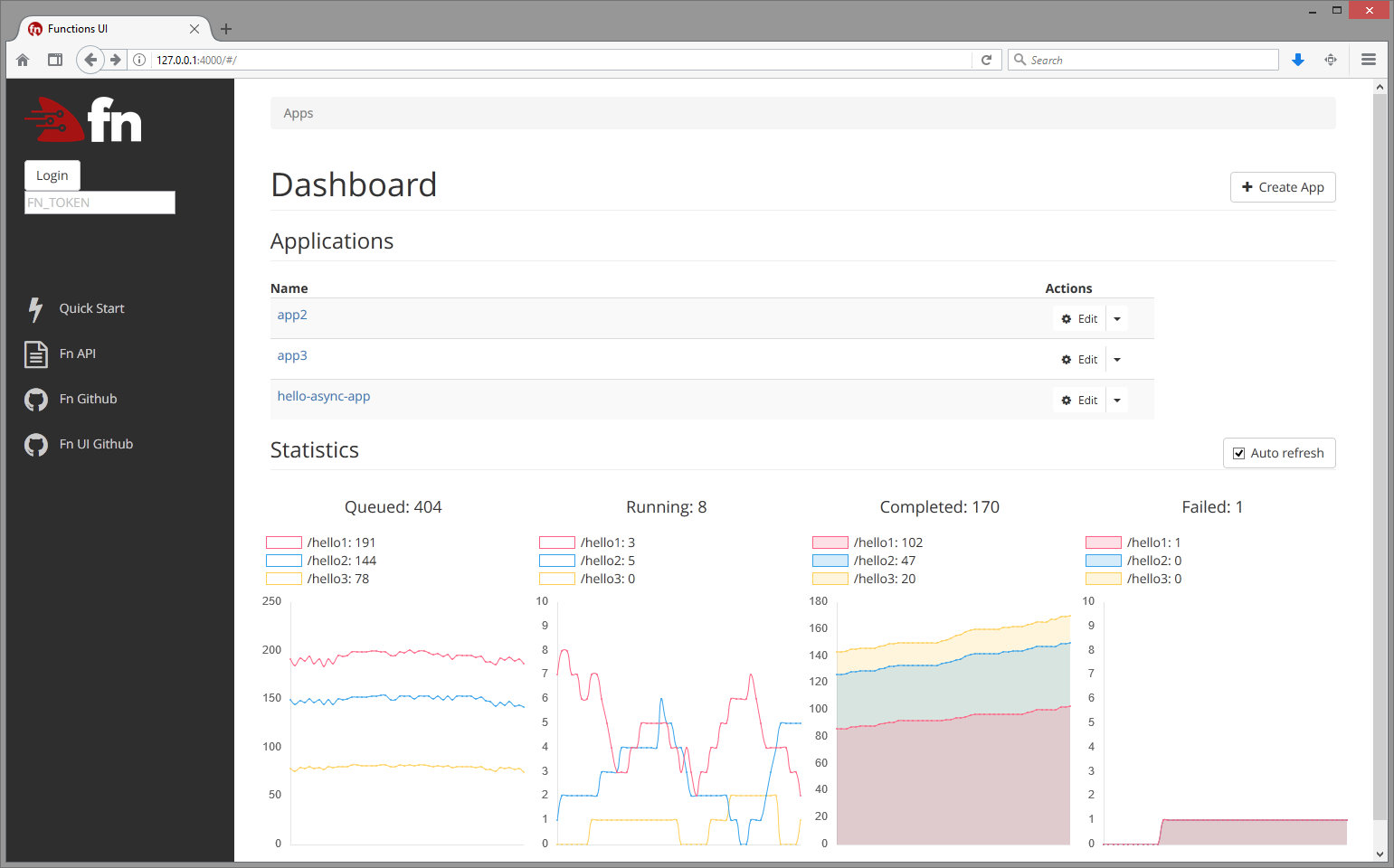 22 |
23 | All functions in an app:
24 |
25 |
22 |
23 | All functions in an app:
24 |
25 | 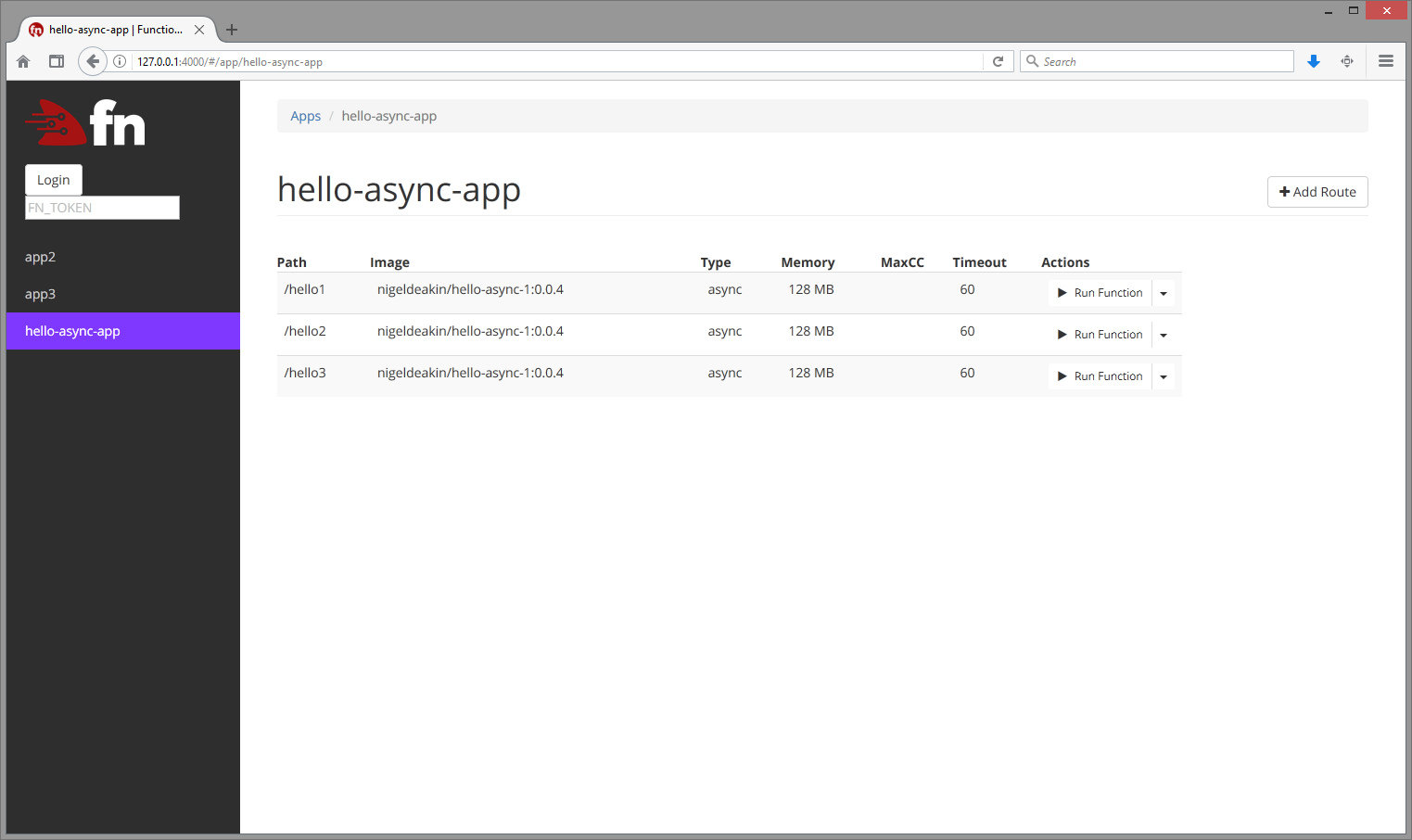 26 |
27 | ## Development
28 |
29 | ### Setup
30 |
31 | #### 1) Install dependencies
32 |
33 | ```sh
34 | npm install
35 |
36 | # if you want webpack globally
37 | sudo npm install -g webpack@^1.14.0
38 | ```
39 |
40 | #### 2) Start Functions API (see [Fn on GitHub](http://github.com/fnproject/fn))
41 |
42 | ```sh
43 | fn start
44 | ```
45 |
46 | #### 3) Compile assets
47 |
48 | ```sh
49 | # option 1: if global webpack
50 | webpack
51 |
52 | # option 2: if local webpack
53 | npx webpack
54 | ```
55 |
56 | #### 4) Start web server
57 |
58 | ```sh
59 | PORT=4000 FN_API_URL=http://localhost:8080 npm start
60 | ```
61 |
62 | * `PORT` - port to run UI on. Optional, 4000 by default
63 | * `FN_API_URL` - Functions API URL. Required
64 |
65 | #### 5) View in browser
66 |
67 | [http://localhost:4000/](http://localhost:4000/)
68 |
69 | #### Configuring log levels
70 |
71 | UI uses [console-logging](https://www.npmjs.com/package/config-logger) for server-side logging.
72 | This supports log levels of `debug`, `verbose`, `info`, `warn` and `error`. By default the log level is `info` (this is configured in `config/default.json`). To set a log level of `debug`, use
73 |
74 | ```
75 | NODE_CONFIG='{"logLevel":"debug"}' PORT=4000 FN_API_URL=http://localhost:8080 npm start
76 |
77 | ```
78 |
79 | ### Automated Testing
80 | #### Integration tests
81 |
82 | The Fn UI has some basic Selenium integration tests that can be used to automatically test the UI's core functionality. These tests use the `mocha` testing framework as the driver.
83 |
84 | To run the tests:
85 |
86 | ##### 1) Install the Chrome Driver
87 | Download the ChromeDriver from [Google](https://sites.google.com/a/chromium.org/chromedriver/downloads) and put it in a place which is in your path e.g. `/usr/local/bin/chromedriver`.
88 |
89 | ##### 2) Install the Node dev dependencies
90 | Ensure you have the Node dev dependencies installed with:
91 | ```
92 | npm install [--only dev]
93 | ```
94 |
95 | ##### 3) Run the Fn interface
96 | See the instructions above for how to start the Node webserver.
97 |
98 | ##### 4) Configure your tests
99 | Edit [test_integration/etc/config.yaml](test_integration/etc/config.yaml) accordingly e.g. point `fn_url` to your Fn UI if you're not running it at its default location.
100 |
101 | ##### 5) Run the tests
102 | ```
103 | npm run test-integration
104 | ```
--------------------------------------------------------------------------------
/test_integration/lib/app_page_selector.js:
--------------------------------------------------------------------------------
1 | const ElementDetails = require('./element_details.js');
2 |
3 | /*
4 | * This module contains information about how to find elements on the Fn UI's
5 | * App Details page
6 | */
7 |
8 | // Return the CSS selector for the table row which contains information about
9 | // the specified Function
10 | function _fnTableRowSelector(fnName) {
11 | return `#fnTable tr[name="${fnName}"]`;
12 | }
13 |
14 | // Helper function for HTML elements which are located in the Functions table.
15 | // It appends the element's selector to the end of the Fn Table row selector
16 | function _fnTableRowElement(fnName, elementSelector) {
17 | return new ElementDetails(
18 | _fnTableRowSelector(fnName) + ' ' + elementSelector,
19 | ElementDetails.TYPE.CSS
20 | );
21 | }
22 |
23 | // Return information on how to find the Function's row in the Fn Table
24 | exports.fnTableRow = function(fnName) {
25 | return new ElementDetails(
26 | _fnTableRowSelector(fnName),
27 | ElementDetails.TYPE.CSS
28 | );
29 | };
30 |
31 | // Return information on how to find the openCreateFn button
32 | exports.openCreateFnBtn = function() {
33 | return new ElementDetails('openCreateFn', ElementDetails.TYPE.ID);
34 | };
35 |
36 | // Return information on how to find the Functions table
37 | exports.fnTable = function() {
38 | return new ElementDetails('fnTable', ElementDetails.TYPE.ID);
39 | };
40 |
41 | // Return information on how to find the create/edit Function submit button
42 | exports.submitFnBtn = function() {
43 | return new ElementDetails('submitFn', ElementDetails.TYPE.ID);
44 | };
45 |
46 | // Return information on how to find the fn name input field
47 | exports.fnNameInput = function() {
48 | return new ElementDetails('fnName', ElementDetails.TYPE.ID);
49 | };
50 |
51 | // Return information on how to find the fn image input field
52 | exports.fnImageInput = function() {
53 | return new ElementDetails('fnImage', ElementDetails.TYPE.ID);
54 | };
55 |
56 | // Return information on how to find the fn memory input field
57 | exports.fnMemoryInput = function() {
58 | return new ElementDetails('fnMemory', ElementDetails.TYPE.ID);
59 | };
60 |
61 | // Return information on how to find the fn timeout input field
62 | exports.fnTimeoutInput = function() {
63 | return new ElementDetails('fnTimeout', ElementDetails.TYPE.ID);
64 | };
65 |
66 | // Return information on how to find the fn idle timeout input field
67 | exports.fnIdleTimeoutInput = function() {
68 | return new ElementDetails('fnIdleTimeout', ElementDetails.TYPE.ID);
69 | };
70 |
71 | // Return information on how to find the edit Fn button
72 | exports.openEditFnBtn = function(fnName) {
73 | return _fnTableRowElement(fnName, '[name="openEditFn"]');
74 | };
75 |
76 | // Return information on how to find the Fn more options button
77 | exports.openMoreOptionsBtn = function(fnName) {
78 | return _fnTableRowElement(fnName, '[name="openMoreOptions"]');
79 | };
80 |
81 | // Return information on how to find the delete Fn button
82 | exports.deleteFnBtn = function(fnName) {
83 | return _fnTableRowElement(fnName, '[name="deleteFn"]');
84 | };
85 |
--------------------------------------------------------------------------------
/test_integration/test_app_page.js:
--------------------------------------------------------------------------------
1 | const assert = require('assert');
2 | const randomstring = require('randomstring');
3 |
4 | const AppDetails = require('./lib/app_details.js');
5 | const AppPage = require('./lib/app_page.js');
6 | const Config = require('./lib/config.js');
7 | const FnDetails = require('./lib/fn_details.js');
8 | const HomePage = require('./lib/homepage.js');
9 |
10 | /*
11 | * This test uses the Mocha testing framework with Selenium to test
12 | * the functionality of the App Details page (/app/$appId)
13 | */
14 | (async function test_app_page() {
15 | let config = new Config();
16 | let fn_url = config.get('fn_url');
17 |
18 | // Use a random App name so it's less likely to conflict
19 | // with an app that already exists on the Fn server
20 | let appName = randomstring.generate({
21 | length: 30,
22 | charset: 'alphabetic'
23 | });
24 | let appDetails = new AppDetails(appName);
25 |
26 | let fnName = 'myFn';
27 | let fnImage = 'fndemouser/myFn';
28 |
29 | try {
30 |
31 | describe('Test Fn UI app page', async function() {
32 | this.timeout(50000);
33 |
34 | // Before running the tests, create an app that we can test against
35 | let appUrl;
36 | before(async () => {
37 | let homepage = new HomePage();
38 | await homepage.visit(fn_url);
39 | await homepage.createApp(appDetails);
40 | await homepage.visitApp(appName);
41 |
42 | appUrl = await homepage.getCurrentUrl();
43 | await homepage.quit();
44 | });
45 |
46 | // Clean up after the tests have completed
47 | after(async () => {
48 | let homepage = new HomePage();
49 | await homepage.visit(fn_url);
50 | await homepage.deleteApp(appName);
51 | await homepage.quit();
52 | });
53 |
54 | let appPage;
55 | beforeEach(async () => {
56 | appPage = new AppPage();
57 | await appPage.visit(appUrl);
58 | });
59 |
60 | afterEach(async () => {
61 | await appPage.quit();
62 | });
63 |
64 | it('can load interface', async () => {
65 | assert.ok(await appPage.loadedCorrectly());
66 | });
67 |
68 | it('can create a function', async () => {
69 | let fnDetails = new FnDetails(fnName, fnImage);
70 | await appPage.createFn(fnDetails);
71 | });
72 |
73 | it('can edit a function', async () => {
74 | let newFnImage = fnImage + '2';
75 | let fnDetails = new FnDetails(fnName, newFnImage);
76 | await appPage.editFn(fnDetails);
77 | assert.equal(await appPage.getFnImage(fnDetails.name), newFnImage);
78 | });
79 |
80 | it('should disallow large memory allocation', async () => {
81 | let fnDetails = new FnDetails(fnName, null, Number.MAX_SAFE_INTEGER);
82 | await appPage.editFn(fnDetails);
83 |
84 | let errorText = await appPage.getError();
85 | assert.ok(errorText.includes('out of range'));
86 | });
87 |
88 | it('can delete a function', async () => {
89 | await appPage.deleteFn(fnName);
90 | });
91 | });
92 | } catch (err) {
93 | // eslint-disable-next-line no-console
94 | console.error(new Error(err.message));
95 | }
96 | })();
97 |
--------------------------------------------------------------------------------
/client/components/FnRunFunction.vue:
--------------------------------------------------------------------------------
1 |
2 |
26 |
27 | ## Development
28 |
29 | ### Setup
30 |
31 | #### 1) Install dependencies
32 |
33 | ```sh
34 | npm install
35 |
36 | # if you want webpack globally
37 | sudo npm install -g webpack@^1.14.0
38 | ```
39 |
40 | #### 2) Start Functions API (see [Fn on GitHub](http://github.com/fnproject/fn))
41 |
42 | ```sh
43 | fn start
44 | ```
45 |
46 | #### 3) Compile assets
47 |
48 | ```sh
49 | # option 1: if global webpack
50 | webpack
51 |
52 | # option 2: if local webpack
53 | npx webpack
54 | ```
55 |
56 | #### 4) Start web server
57 |
58 | ```sh
59 | PORT=4000 FN_API_URL=http://localhost:8080 npm start
60 | ```
61 |
62 | * `PORT` - port to run UI on. Optional, 4000 by default
63 | * `FN_API_URL` - Functions API URL. Required
64 |
65 | #### 5) View in browser
66 |
67 | [http://localhost:4000/](http://localhost:4000/)
68 |
69 | #### Configuring log levels
70 |
71 | UI uses [console-logging](https://www.npmjs.com/package/config-logger) for server-side logging.
72 | This supports log levels of `debug`, `verbose`, `info`, `warn` and `error`. By default the log level is `info` (this is configured in `config/default.json`). To set a log level of `debug`, use
73 |
74 | ```
75 | NODE_CONFIG='{"logLevel":"debug"}' PORT=4000 FN_API_URL=http://localhost:8080 npm start
76 |
77 | ```
78 |
79 | ### Automated Testing
80 | #### Integration tests
81 |
82 | The Fn UI has some basic Selenium integration tests that can be used to automatically test the UI's core functionality. These tests use the `mocha` testing framework as the driver.
83 |
84 | To run the tests:
85 |
86 | ##### 1) Install the Chrome Driver
87 | Download the ChromeDriver from [Google](https://sites.google.com/a/chromium.org/chromedriver/downloads) and put it in a place which is in your path e.g. `/usr/local/bin/chromedriver`.
88 |
89 | ##### 2) Install the Node dev dependencies
90 | Ensure you have the Node dev dependencies installed with:
91 | ```
92 | npm install [--only dev]
93 | ```
94 |
95 | ##### 3) Run the Fn interface
96 | See the instructions above for how to start the Node webserver.
97 |
98 | ##### 4) Configure your tests
99 | Edit [test_integration/etc/config.yaml](test_integration/etc/config.yaml) accordingly e.g. point `fn_url` to your Fn UI if you're not running it at its default location.
100 |
101 | ##### 5) Run the tests
102 | ```
103 | npm run test-integration
104 | ```
--------------------------------------------------------------------------------
/test_integration/lib/app_page_selector.js:
--------------------------------------------------------------------------------
1 | const ElementDetails = require('./element_details.js');
2 |
3 | /*
4 | * This module contains information about how to find elements on the Fn UI's
5 | * App Details page
6 | */
7 |
8 | // Return the CSS selector for the table row which contains information about
9 | // the specified Function
10 | function _fnTableRowSelector(fnName) {
11 | return `#fnTable tr[name="${fnName}"]`;
12 | }
13 |
14 | // Helper function for HTML elements which are located in the Functions table.
15 | // It appends the element's selector to the end of the Fn Table row selector
16 | function _fnTableRowElement(fnName, elementSelector) {
17 | return new ElementDetails(
18 | _fnTableRowSelector(fnName) + ' ' + elementSelector,
19 | ElementDetails.TYPE.CSS
20 | );
21 | }
22 |
23 | // Return information on how to find the Function's row in the Fn Table
24 | exports.fnTableRow = function(fnName) {
25 | return new ElementDetails(
26 | _fnTableRowSelector(fnName),
27 | ElementDetails.TYPE.CSS
28 | );
29 | };
30 |
31 | // Return information on how to find the openCreateFn button
32 | exports.openCreateFnBtn = function() {
33 | return new ElementDetails('openCreateFn', ElementDetails.TYPE.ID);
34 | };
35 |
36 | // Return information on how to find the Functions table
37 | exports.fnTable = function() {
38 | return new ElementDetails('fnTable', ElementDetails.TYPE.ID);
39 | };
40 |
41 | // Return information on how to find the create/edit Function submit button
42 | exports.submitFnBtn = function() {
43 | return new ElementDetails('submitFn', ElementDetails.TYPE.ID);
44 | };
45 |
46 | // Return information on how to find the fn name input field
47 | exports.fnNameInput = function() {
48 | return new ElementDetails('fnName', ElementDetails.TYPE.ID);
49 | };
50 |
51 | // Return information on how to find the fn image input field
52 | exports.fnImageInput = function() {
53 | return new ElementDetails('fnImage', ElementDetails.TYPE.ID);
54 | };
55 |
56 | // Return information on how to find the fn memory input field
57 | exports.fnMemoryInput = function() {
58 | return new ElementDetails('fnMemory', ElementDetails.TYPE.ID);
59 | };
60 |
61 | // Return information on how to find the fn timeout input field
62 | exports.fnTimeoutInput = function() {
63 | return new ElementDetails('fnTimeout', ElementDetails.TYPE.ID);
64 | };
65 |
66 | // Return information on how to find the fn idle timeout input field
67 | exports.fnIdleTimeoutInput = function() {
68 | return new ElementDetails('fnIdleTimeout', ElementDetails.TYPE.ID);
69 | };
70 |
71 | // Return information on how to find the edit Fn button
72 | exports.openEditFnBtn = function(fnName) {
73 | return _fnTableRowElement(fnName, '[name="openEditFn"]');
74 | };
75 |
76 | // Return information on how to find the Fn more options button
77 | exports.openMoreOptionsBtn = function(fnName) {
78 | return _fnTableRowElement(fnName, '[name="openMoreOptions"]');
79 | };
80 |
81 | // Return information on how to find the delete Fn button
82 | exports.deleteFnBtn = function(fnName) {
83 | return _fnTableRowElement(fnName, '[name="deleteFn"]');
84 | };
85 |
--------------------------------------------------------------------------------
/test_integration/test_app_page.js:
--------------------------------------------------------------------------------
1 | const assert = require('assert');
2 | const randomstring = require('randomstring');
3 |
4 | const AppDetails = require('./lib/app_details.js');
5 | const AppPage = require('./lib/app_page.js');
6 | const Config = require('./lib/config.js');
7 | const FnDetails = require('./lib/fn_details.js');
8 | const HomePage = require('./lib/homepage.js');
9 |
10 | /*
11 | * This test uses the Mocha testing framework with Selenium to test
12 | * the functionality of the App Details page (/app/$appId)
13 | */
14 | (async function test_app_page() {
15 | let config = new Config();
16 | let fn_url = config.get('fn_url');
17 |
18 | // Use a random App name so it's less likely to conflict
19 | // with an app that already exists on the Fn server
20 | let appName = randomstring.generate({
21 | length: 30,
22 | charset: 'alphabetic'
23 | });
24 | let appDetails = new AppDetails(appName);
25 |
26 | let fnName = 'myFn';
27 | let fnImage = 'fndemouser/myFn';
28 |
29 | try {
30 |
31 | describe('Test Fn UI app page', async function() {
32 | this.timeout(50000);
33 |
34 | // Before running the tests, create an app that we can test against
35 | let appUrl;
36 | before(async () => {
37 | let homepage = new HomePage();
38 | await homepage.visit(fn_url);
39 | await homepage.createApp(appDetails);
40 | await homepage.visitApp(appName);
41 |
42 | appUrl = await homepage.getCurrentUrl();
43 | await homepage.quit();
44 | });
45 |
46 | // Clean up after the tests have completed
47 | after(async () => {
48 | let homepage = new HomePage();
49 | await homepage.visit(fn_url);
50 | await homepage.deleteApp(appName);
51 | await homepage.quit();
52 | });
53 |
54 | let appPage;
55 | beforeEach(async () => {
56 | appPage = new AppPage();
57 | await appPage.visit(appUrl);
58 | });
59 |
60 | afterEach(async () => {
61 | await appPage.quit();
62 | });
63 |
64 | it('can load interface', async () => {
65 | assert.ok(await appPage.loadedCorrectly());
66 | });
67 |
68 | it('can create a function', async () => {
69 | let fnDetails = new FnDetails(fnName, fnImage);
70 | await appPage.createFn(fnDetails);
71 | });
72 |
73 | it('can edit a function', async () => {
74 | let newFnImage = fnImage + '2';
75 | let fnDetails = new FnDetails(fnName, newFnImage);
76 | await appPage.editFn(fnDetails);
77 | assert.equal(await appPage.getFnImage(fnDetails.name), newFnImage);
78 | });
79 |
80 | it('should disallow large memory allocation', async () => {
81 | let fnDetails = new FnDetails(fnName, null, Number.MAX_SAFE_INTEGER);
82 | await appPage.editFn(fnDetails);
83 |
84 | let errorText = await appPage.getError();
85 | assert.ok(errorText.includes('out of range'));
86 | });
87 |
88 | it('can delete a function', async () => {
89 | await appPage.deleteFn(fnName);
90 | });
91 | });
92 | } catch (err) {
93 | // eslint-disable-next-line no-console
94 | console.error(new Error(err.message));
95 | }
96 | })();
97 |
--------------------------------------------------------------------------------
/client/components/FnRunFunction.vue:
--------------------------------------------------------------------------------
1 |
2 |
34 |
35 |
36 |
3 |
4 |
5 |
6 |  7 |
7 |
8 |
32 |
33 |
34 |
97 |
98 |
101 |
--------------------------------------------------------------------------------
/webpack.config.js:
--------------------------------------------------------------------------------
1 | const path = require('path');
2 | const fs = require('fs');
3 | const extractTextPlugin = require("extract-text-webpack-plugin");
4 |
5 | // style
6 | const postcssImport = require('postcss-import');
7 | const postcssURL = require('postcss-url');
8 | const cssnext = require('postcss-cssnext');
9 | const fontMagician = require('postcss-font-magician');
10 |
11 |
12 | var nodeModules = {};
13 | fs.readdirSync('node_modules')
14 | .filter(function(x) {
15 | return ['.bin'].indexOf(x) === -1;
16 | })
17 | .forEach(function(mod) {
18 | nodeModules[mod] = 'commonjs ' + mod;
19 | });
20 |
21 | module.exports = [
22 | {
23 | name: 'server',
24 | entry: './server/server.js',
25 | target: 'node',
26 | output: {
27 | path: path.join(__dirname, 'build'),
28 | filename: 'backend.js'
29 | },
30 | externals: nodeModules
31 | },
32 | {
33 | name: 'client',
34 | entry: [
35 | 'jquery/',
36 | './client/client.js',
37 | ],
38 | // target: 'web', // by default
39 | output: {
40 | path: path.join(__dirname, 'public', 'build'),
41 | filename: 'app.js',
42 | },
43 | resolve: {
44 | extensions: ['', '.js', '.vue', '.json'],
45 | fallback: [path.join(__dirname, './node_modules')],
46 |
47 | alias: {
48 | 'vue$': path.join(__dirname, './node_modules/vue/dist/vue.common.js'),
49 | 'vue-router$': path.join(__dirname, './node_modules/vue-router/dist/vue-router.common.js'),
50 | }
51 | },
52 | module: {
53 | preLoaders: [
54 | { test: /\.css$/, loader: 'stylelint' }
55 | ],
56 | loaders: [
57 | // {
58 | // test:/bootstrap-sass[\/\\]assets[\/\\]javascripts[\/\\]/,
59 | // loader: 'imports?jQuery=jquery'
60 | // },
61 | {
62 | test: /\.vue$/,
63 | loader: 'vue',
64 | options: {
65 | // vue-loader options go here
66 | }
67 | },
68 |
69 | // Extract css files
70 | {
71 | test: /\.css$/,
72 | loader: extractTextPlugin.extract("style-loader", "css-loader!postcss")
73 | },
74 |
75 | // ES2015
76 | {
77 | test: /\.js$/,
78 | loader: 'babel',
79 | exclude: /node_modules/
80 | },
81 |
82 | {
83 | test: /\.woff2?(\?v=[0-9]\.[0-9]\.[0-9])?$/,
84 | loader: "url?limit=10000"
85 | },
86 |
87 | {
88 | test: /\.(ttf|eot|svg)(\?[\s\S]+)?$/,
89 | loader: 'file'
90 | }
91 | ]
92 | },
93 | plugins: [
94 | new extractTextPlugin("app.css", {
95 | allChunks: true
96 | })
97 | ],
98 | stylelint: {
99 | configFile: path.join(__dirname, './stylelint.config.js'),
100 | configOverrides: {
101 | rules: {
102 | // Your rule overrides here
103 | }
104 | }
105 | },
106 | postcss: [
107 | // inline @import need to merge vars
108 | postcssImport(),
109 | fontMagician({
110 | hosted: path.join(__dirname, './public/fonts/Roboto')
111 | }),
112 | postcssURL(),
113 | require('postcss-hexrgba')(),
114 | cssnext()
115 | ]
116 | }
117 | ];
118 |
--------------------------------------------------------------------------------
/client/components/StatsCharts.vue:
--------------------------------------------------------------------------------
1 |
2 |
7 |
9 |
19 |
20 |
28 |
29 |
30 |
10 |
13 |
14 |
15 |
18 |
3 |
4 |
25 |
26 |
27 |
60 |
61 |
94 |
--------------------------------------------------------------------------------
/client/components/FnAppForm.vue:
--------------------------------------------------------------------------------
1 |
2 | No statistics found for App. Possible reasons for this are:
18 |-
19 |
- None of the App's functions have been run since the Fn server has started. 20 |
- The Fn server isn't configured to produce metrics for individual Apps. 21 |
23 |
24 |
25 |
38 |
95 |
96 |
97 |
98 |
99 |
--------------------------------------------------------------------------------
/client/lib/VueBootstrapModal.vue:
--------------------------------------------------------------------------------
1 |
2 |
81 |
82 |
94 |
83 |
86 |
92 |
93 |
87 |
91 |
88 |
90 |
3 |
33 |
34 |
35 |
156 |
157 |
--------------------------------------------------------------------------------
/client/components/FnFunctionForm.vue:
--------------------------------------------------------------------------------
1 |
2 |
4 |
31 |
32 |
5 |
29 |
30 |
42 |
43 |
44 |
3 |
4 |
7 |
8 |
9 | Dashboard
10 |
11 |
18 |
19 |
74 | Statistics
75 |
81 |
82 |
87 |
88 |
89 |
143 |
144 |
147 |
--------------------------------------------------------------------------------
/server/helpers/app-helpers.js:
--------------------------------------------------------------------------------
1 | var url = require('url');
2 | var request = require('request');
3 | var logger = require('config-logger');
4 |
5 | exports.extend = function(target) {
6 | var sources = [].slice.call(arguments, 1);
7 | sources.forEach(function (source) {
8 | for (var prop in source) {
9 | target[prop] = source[prop];
10 | }
11 | });
12 | return target;
13 | };
14 |
15 | exports.apiFullUrl = function(req, path) {
16 | var apiUrl = req.app.get('api-url');
17 | var httpurl = url.format(apiUrl) + path.replace(/^\//, "");
18 | return httpurl;
19 | };
20 |
21 | exports.getApiEndpoint = function(req, path, params, successcb, errorcb) {
22 | var url = exports.apiFullUrl(req, path);
23 |
24 | logger.debug("GET " + url + ", params: ", params);
25 |
26 | var options = {url: url, qs: params};
27 |
28 | options = exports.addAuth(options, req);
29 |
30 | request(
31 | options,
32 | function(error, response, body){
33 | exports.requestCB(successcb, errorcb, error, response, body);
34 | }
35 | );
36 | };
37 |
38 | exports.getApiEndpointRaw = function(req, path, params, successcb, errorcb) {
39 | var url = exports.apiFullUrl(req, path);
40 |
41 | logger.debug("GET " + url + ", params: ", params);
42 |
43 | var options = {url: url, qs: params};
44 |
45 | options = exports.addAuth(options, req);
46 |
47 | request(
48 | options,
49 | function(error, response, body){
50 | exports.requestCBRaw(successcb, errorcb, error, response, body);
51 | }
52 | );
53 | };
54 |
55 | exports.postApiEndpoint = function(req, path, params, postfields, successcb, errorcb) {
56 | exports.execApiEndpoint('POST', req, path, params, postfields, successcb, errorcb);
57 | };
58 |
59 | exports.execApiEndpoint = function(method, req, path, params, postfields, successcb, errorcb) {
60 | var options = {
61 | uri: exports.apiFullUrl(req, path),
62 | method: method,
63 | json: postfields
64 | };
65 |
66 | logger.debug(options.method + " " + options.uri + ", params: ", options.body);
67 |
68 | options = exports.addAuth(options, req);
69 |
70 | request(
71 | options,
72 | function(error, response, body){
73 | exports.requestCB(successcb, errorcb, error, response, body);
74 | }
75 | );
76 | };
77 |
78 | exports.execApiEndpointRaw = function(method, req, path, params, postfields, successcb, errorcb) {
79 | var options = {
80 | uri: exports.apiFullUrl(req, path),
81 | method: method,
82 | json: postfields
83 | };
84 |
85 | logger.debug(options.method + " " + options.uri + ", params: ", options.body);
86 |
87 | options = exports.addAuth(options, req);
88 |
89 | request(
90 | options,
91 | function(error, response, body){
92 | exports.requestCBRaw(successcb, errorcb, error, response, body);
93 | }
94 | );
95 | };
96 |
97 | exports.addAuth = function(options, req) {
98 | if (req.get('Authorization') !== undefined) {
99 | options.headers = {
100 | 'Authorization': req.get('Authorization')
101 | };
102 | }
103 | return options;
104 | };
105 |
106 | // expects response as json
107 | exports.requestCB = function (successcb, errorcb, error, response, body) {
108 | var parsed;
109 | if (!error && response.statusCode >= 200 && response.statusCode < 300) {
110 | try {
111 | if (typeof body == "string"){
112 | parsed = JSON.parse(body);
113 | } else {
114 | parsed = body;
115 | }
116 | } catch (e) {
117 | logger.error("Can not parse json:", body, e);
118 | }
119 |
120 | // A 204 status code indicates a success but there won't be any data. E.g.
121 | // on the deletion of an app. This will throw an error down the line so
122 | // initialise parsed.
123 | if (!parsed && response.statusCode == 204) {
124 | parsed = {};
125 | }
126 |
127 | if (parsed){
128 | successcb(parsed);
129 | } else {
130 | errorcb(response.statusCode, "Can not parse api response");
131 | }
132 | } else {
133 | var message;
134 | try {
135 | if (typeof body == "string"){
136 | parsed = JSON.parse(body);
137 | } else {
138 | parsed = body;
139 | }
140 | if (parsed) {
141 | if(parsed.error && parsed.error.message){
142 | message = parsed.error.message;
143 | } else if(parsed.message){
144 | message = parsed.message;
145 | }
146 | }
147 | } catch (e) {
148 | message = "Can not parse api response";
149 | }
150 | message = message || "An error ocurred.";
151 | var status = response ? response.statusCode : error.code;
152 | logger.error("[ERR] " + status + " | " + message);
153 | errorcb(status, message);
154 | }
155 | };
156 |
157 | // expects response as plain text
158 | exports.requestCBRaw = function (successcb, errorcb, error, response, body) {
159 | if (!error && response.statusCode >= 200 && response.statusCode < 300) {
160 | successcb(body);
161 | } else {
162 | var status = response ? response.statusCode : error.code;
163 | errorcb(status, body);
164 | }
165 | };
166 |
167 | exports.standardErrorcb = function(res){
168 | return function(status, err){
169 | logger.error("Error. Api responded with ", status, err);
170 | var text = "Something went terribly wrong (Status Code: " + status + ") ";
171 | if (err){
172 | text = "Error: " + err;
173 | }
174 | res.status(400).json({msg: text});
175 | };
176 | };
177 |
--------------------------------------------------------------------------------
/test/test_app_stats_parser.js:
--------------------------------------------------------------------------------
1 | /**
2 | * Test the AppStatsParser class
3 | */
4 |
5 | const AppStatsParser = require('../server/helpers/app-stats-parser.js');
6 | const sharedStatsParserLibs = require('./lib/shared-stats-parser-libs.js');
7 | const sharedStatsParserTests = require('./lib/shared-stats-parser-tests.js');
8 | const UnitTestData = require('./lib/unit-test-data.js');
9 |
10 | describe('Test App Stats Parser', function() {
11 | let tests = [
12 | expectedStatsData(),
13 | missingLabelData(),
14 | additionalLabelData(),
15 | reorderedLabelData(),
16 | sharedStatsParserTests.irrelevantStatsData(),
17 | sharedStatsParserTests.invalidStatsData(),
18 | unexpectedData(),
19 | ];
20 |
21 | sharedStatsParserLibs.run_tests(new AppStatsParser(), tests);
22 | });
23 |
24 | /**
25 | * Test the parser correctly handles data it is expected to parse
26 | */
27 | function expectedStatsData() {
28 | let test = 'parse expected data';
29 |
30 | let inputData = `
31 | # HELP fn_container_start_total containers in state container_start_total
32 | # TYPE fn_container_start_total untyped
33 | fn_container_start_total{app_id="01D7MD7GTBNG8G00GZJ0000001",fn_id="01D7MD7M48NG8G00GZJ0000002",image_name="fndemouser/testapp:0.0.2"} 3.0
34 | fn_container_start_total{app_id="01D8JQSKDENG8G00GZJ000000B",fn_id="01D8JQSQ2VNG8G00GZJ000000C",image_name="fndemouser/sleepy:0.0.10"} 0.0
35 | fn_container_start_total{app_id="01D8JQSKDENG8G00GZJ000000B",fn_id="01D8RVJ0QANG8G00GZJ000000J",image_name="fndemouser/sleeplonger:0.0.2"} 9.0
36 | # HELP fn_container_busy_total containers in state container_busy_total
37 | # TYPE fn_container_busy_total untyped
38 | fn_container_busy_total{app_id="01D7MD7GTBNG8G00GZJ0000001",fn_id="01D7MD7M48NG8G00GZJ0000002",image_name="fndemouser/testapp:0.0.2"} 0.0
39 | fn_container_busy_total{app_id="01D8JQSKDENG8G00GZJ000000B",fn_id="01D8JQSQ2VNG8G00GZJ000000C",image_name="fndemouser/sleepy:0.0.10"} 1.0
40 | fn_container_busy_total{app_id="01D8JQSKDENG8G00GZJ000000B",fn_id="01D8RVJ0QANG8G00GZJ000000J",image_name="fndemouser/sleeplonger:0.0.2"} 54.0
41 | # HELP fn_container_idle_total containers in state container_idle_total
42 | # TYPE fn_container_idle_total untyped
43 | fn_container_idle_total{app_id="01D7MD7GTBNG8G00GZJ0000001",fn_id="01D7MD7M48NG8G00GZJ0000002",image_name="fndemouser/testapp:0.0.2"} 2.0
44 | fn_container_idle_total{app_id="01D8JQSKDENG8G00GZJ000000B",fn_id="01D8JQSQ2VNG8G00GZJ000000C",image_name="fndemouser/sleepy:0.0.10"} 1.0
45 | fn_container_idle_total{app_id="01D8JQSKDENG8G00GZJ000000B",fn_id="01D8RVJ0QANG8G00GZJ000000J",image_name="fndemouser/sleeplonger:0.0.2"} 0.0
46 | # HELP fn_container_paused_total containers in state container_paused_total
47 | # TYPE fn_container_paused_total untyped
48 | fn_container_paused_total{app_id="01D7MD7GTBNG8G00GZJ0000001",fn_id="01D7MD7M48NG8G00GZJ0000002",image_name="fndemouser/testapp:0.0.2"} 0.0
49 | fn_container_paused_total{app_id="01D8JQSKDENG8G00GZJ000000B",fn_id="01D8RVJ0QANG8G00GZJ000000J",image_name="fndemouser/sleeplonger:0.0.2"} 3.0
50 | # HELP fn_container_wait_total containers in state container_wait_total
51 | # TYPE fn_container_wait_total untyped
52 | fn_container_wait_total{app_id="01D7MD7GTBNG8G00GZJ0000001",fn_id="01D7MD7M48NG8G00GZJ0000002",image_name="fndemouser/testapp:0.0.2"} 107.0
53 | fn_container_wait_total{app_id="01D8JQSKDENG8G00GZJ000000B",fn_id="01D8JQSQ2VNG8G00GZJ000000C",image_name="fndemouser/sleepy:0.0.10"} 5.0
54 | fn_container_wait_total{app_id="01D8JQSKDENG8G00GZJ000000B",fn_id="01D8RVJ0QANG8G00GZJ000000J",image_name="fndemouser/sleeplonger:0.0.2"} 0.0
55 | `;
56 |
57 | let expectedResult = {
58 | '01D7MD7GTBNG8G00GZJ0000001': {
59 | 'Functions': {
60 | '01D7MD7M48NG8G00GZJ0000002': {
61 | 'Busy': 0,
62 | 'Idling': 2,
63 | 'Paused': 0,
64 | 'Starting': 3,
65 | 'Waiting': 107,
66 | },
67 | },
68 | },
69 | '01D8JQSKDENG8G00GZJ000000B': {
70 | 'Functions': {
71 | '01D8JQSQ2VNG8G00GZJ000000C': {
72 | 'Busy': 1,
73 | 'Idling': 1,
74 | 'Starting': 0,
75 | 'Waiting': 5,
76 | },
77 | '01D8RVJ0QANG8G00GZJ000000J': {
78 | 'Busy': 54,
79 | 'Idling': 0,
80 | 'Paused': 3,
81 | 'Starting': 9,
82 | 'Waiting': 0,
83 | },
84 | },
85 | },
86 | };
87 |
88 | return new UnitTestData(test, inputData, expectedResult);
89 | }
90 |
91 | /**
92 | * Test how the parser copes with missing label data
93 | */
94 | function missingLabelData() {
95 | let test = 'handle missing label data';
96 |
97 | let inputData =`
98 | fn_container_busy_total{app_id="01D7MD7GTBNG8G00GZJ0000001",fn_id="01D7MD7M48NG8G00GZJ0000002"} 1.0
99 | fn_container_wait_total{app_id="01D7MD7GTBNG8G00GZJ0000001",image_name="fndemouser/testapp:0.0.2"} 2.0
100 | fn_container_paused_total{fn_id="01D7MD7M48NG8G00GZJ0000002",image_name="fndemouser/testapp:0.0.2"} 3.0
101 | fn_container_start_total 4.0
102 | `;
103 |
104 | let expectedResult = {
105 | '01D7MD7GTBNG8G00GZJ0000001': {
106 | 'Functions': {
107 | '01D7MD7M48NG8G00GZJ0000002': {
108 | 'Busy': 1,
109 | },
110 | undefined: {
111 | 'Waiting': 2,
112 | }
113 | },
114 | },
115 | undefined: {
116 | 'Functions': {
117 | '01D7MD7M48NG8G00GZJ0000002': {
118 | 'Paused': 3,
119 | },
120 | },
121 | },
122 | };
123 |
124 | return new UnitTestData(test, inputData, expectedResult);
125 | }
126 |
127 | /**
128 | * Test how the parser copes with label data it isn't expecting to see
129 | */
130 | function additionalLabelData() {
131 | let test = 'handle additional label data';
132 |
133 | let inputData = `
134 | fn_container_start_total{app_id="01D7MD7GTBNG8G00GZJ0000001",fn_id="01D7MD7M48NG8G00GZJ0000002",image_name="fndemouser/testapp:0.0.2",extra_data="additional_data"} 1.0
135 | `;
136 |
137 | let expectedResult = {
138 | '01D7MD7GTBNG8G00GZJ0000001': {
139 | 'Functions': {
140 | '01D7MD7M48NG8G00GZJ0000002': {
141 | 'Starting': 1,
142 | },
143 | },
144 | },
145 | };
146 |
147 | return new UnitTestData(test, inputData, expectedResult);
148 | }
149 |
150 | /**
151 | * Test the parser is able to parse the label data, no matter what order it's
152 | * in
153 | */
154 | function reorderedLabelData() {
155 | let test = 'handle re-ordered label data';
156 |
157 | let inputData = `
158 | fn_container_start_total{fn_id="01D7MD7M48NG8G00GZJ0000002",app_id="01D7MD7GTBNG8G00GZJ0000001",image_name="fndemouser/testapp:0.0.2"} 3.0
159 | `;
160 |
161 | let expectedResult = {
162 | '01D7MD7GTBNG8G00GZJ0000001': {
163 | 'Functions': {
164 | '01D7MD7M48NG8G00GZJ0000002': {
165 | 'Starting': 3,
166 | },
167 | },
168 | },
169 | };
170 |
171 | return new UnitTestData(test, inputData, expectedResult);
172 | }
173 |
174 | /**
175 | * Test the parser can handle data that it isn't expecting
176 | */
177 | function unexpectedData() {
178 | let test = 'handle unexpected data';
179 |
180 | let inputData = `
181 | fn_container_wait_total{app_id="",fn_id="",image_name=""} 1.1
182 | `;
183 |
184 | let expectedResult = {
185 | '': {
186 | 'Functions': {
187 | '': {
188 | 'Waiting': 1,
189 | },
190 | },
191 | },
192 | };
193 |
194 | return new UnitTestData(test, inputData, expectedResult);
195 | }
196 |
--------------------------------------------------------------------------------
/client/pages/AppPage.vue:
--------------------------------------------------------------------------------
1 |
2 | 8 |
9 | Dashboard
10 |
11 |
12 |
16 |
17 |
18 |
19 | Applications
20 | 21 |
22 |
71 |
72 |
73 |
23 |
24 |
70 |
25 |
26 |
27 |
68 |
69 | | Name | 28 |Actions | 29 | 30 | 31 ||||||||||||||||||||||||||||||||||||||||||||||||||||||||||||||||||||||||||||||||||||||||||||||||||
|---|---|---|---|---|---|---|---|---|---|---|---|---|---|---|---|---|---|---|---|---|---|---|---|---|---|---|---|---|---|---|---|---|---|---|---|---|---|---|---|---|---|---|---|---|---|---|---|---|---|---|---|---|---|---|---|---|---|---|---|---|---|---|---|---|---|---|---|---|---|---|---|---|---|---|---|---|---|---|---|---|---|---|---|---|---|---|---|---|---|---|---|---|---|---|---|---|---|---|
|
33 | |
35 | 36 | 54 | | 55 ||||||||||||||||||||||||||||||||||||||||||||||||||||||||||||||||||||||||||||||||||||||||||||||||||
|
58 | No Apps
59 | |
60 | ||||||||||||||||||||||||||||||||||||||||||||||||||||||||||||||||||||||||||||||||||||||||||||||||||
|
63 | Loading...
64 | |
65 | ||||||||||||||||||||||||||||||||||||||||||||||||||||||||||||||||||||||||||||||||||||||||||||||||||
74 | Statistics
75 |
76 |
78 |
79 |
80 |
81 |
82 |
3 |
7 |
8 | 9 | 10 |
11 | {{app.name}}
12 |
13 |
17 |
18 |
19 | 20 | 21 |
81 | Statistics
82 |
88 |
93 |
94 |
95 |
218 |
219 |
222 |
--------------------------------------------------------------------------------
/client/components/graphUtilities.js:
--------------------------------------------------------------------------------
1 | // Utility functions used by the graph components
2 |
3 | // Update the graph and legend for the specified chart using the data in chart.stats and chart.statshistory
4 | export function updateChart (chart) {
5 |
6 | // work out the function to extract the required metric from a stats object from JSON
7 | var metricGetter = chart.chartConfig.METRIC_GETTER;
8 |
9 | var isStacked = chart.chartConfig.isStacked;
10 |
11 | if (chart.statshistory && chart.stats){
12 | chart.datacollection = {};
13 | chart.datacollection["labels"]= chart.statshistory.map(() => "" );
14 | chart.datacollection["datasets"]=[];
15 |
16 | var totalCount = 0;
17 |
18 | if (chart.appid == null) {
19 | totalCount = displayGeneralMetric(chart, metricGetter, isStacked);
20 | } else {
21 | // display metrics for a specific app
22 |
23 | var thisApp = chart.stats.Apps[chart.appid];
24 | totalCount = processAppMetrics(chart, metricGetter, isStacked, thisApp);
25 | }
26 |
27 | chart.total = totalCount;
28 | }
29 | }
30 |
31 | // extract app and fn details and display metrics for them accordingly
32 | function processAppMetrics(chart, metricGetter, isStacked, app) {
33 | if (app === undefined) {
34 | // There are no stats for this app e.g. if none of the functions
35 | // have been run since the server started
36 | return 0;
37 | }
38 |
39 | var totalCount = 0;
40 |
41 | // Create a cache mapping of fnId to fnName so we don't need to keep
42 | // iterating over the array trying to find the correct name for an id
43 | var fnsCache = {};
44 | chart.fns.forEach(function(fn) {
45 | fnsCache[fn.id] = fn.name;
46 | });
47 |
48 | for (var fnId in app.Functions) {
49 |
50 | // Handle the cases where the fn server doesn't return fnIds in its
51 | // metrics API or if the server doesn't know the name of the function
52 | var fnName = fnsCache[fnId];
53 | if (!fnName) {
54 | fnName = 'Unknown Function';
55 | }
56 |
57 | var appDetails = {
58 | 'appId' : chart.appid,
59 | 'fnId' : fnId,
60 | 'fnName' : fnName,
61 | };
62 |
63 | totalCount += displayAppMetric(chart, metricGetter, isStacked, appDetails);
64 | }
65 |
66 | return totalCount;
67 | }
68 |
69 | // display a single line on the specified chart, showing historical values of
70 | // the metric in addition, return the current value of the metric
71 | function displayGeneralMetric(chart, metricGetter, isStacked) {
72 | var value = getMetricFor(chart.stats, metricGetter);
73 |
74 | // assemble an array containing historical values of the metric that this chart is displaying
75 | var plotHistory = [];
76 | for (var i = 0; i < chart.statshistory.length; i++) {
77 | plotHistory.push(getMetricFor(chart.statshistory[i],metricGetter));
78 | }
79 |
80 | // The identifier is just used to map what colour this series should be
81 | // listed as. As general metrics only have one series we don't need to
82 | // use a unique identifier
83 | var identifier = 'generalMetric';
84 |
85 | var dataSet = generateDataSet(
86 | 'Amount',
87 | isStacked,
88 | getBackgroundColorFor(identifier),
89 | getBorderColorFor(identifier),
90 | plotHistory
91 | );
92 |
93 | chart.datacollection["datasets"].push(dataSet);
94 |
95 | return value;
96 | }
97 |
98 | // display a single line on a chart detailing app metrics. In addition, return
99 | // the current value of the metric
100 | function displayAppMetric(chart, metricGetter, isStacked, appDetails) {
101 | var appStats = getFnStatsFromApp(chart.stats, appDetails);
102 | var value = getMetricFor(appStats, metricGetter);
103 |
104 | var plotHistory = [];
105 | for (var i = 0; i < chart.statshistory.length; i++) {
106 | var historicStat = getFnStatsFromApp(chart.statshistory[i], appDetails);
107 | var statsHistory = getMetricFor(historicStat, metricGetter);
108 |
109 | plotHistory.push(statsHistory);
110 | }
111 |
112 | // Create a unique identifier for this metric
113 | var identifier = Object.values(appDetails).join('-');
114 |
115 | var dataSet = generateDataSet(
116 | appDetails.fnName,
117 | isStacked,
118 | getBackgroundColorFor(identifier),
119 | getBorderColorFor(identifier),
120 | plotHistory
121 | );
122 |
123 | chart.datacollection["datasets"].push(dataSet);
124 |
125 | return value;
126 | }
127 |
128 | // get stats object for Fn using the passed in appDetails
129 | function getFnStatsFromApp(stats, appDetails) {
130 | try {
131 | return stats.Apps[appDetails.appId].Functions[appDetails.fnId];
132 | } catch (e) {
133 | // The keys in the stats history won't exist to start with so just return
134 | // null rather than crashing in this case
135 | if(e instanceof TypeError) {
136 | return null;
137 | } else {
138 | throw e;
139 | }
140 | }
141 | }
142 |
143 | // generate the Dataset that the Vue chart will use
144 | function generateDataSet(valueName, isStacked, backgroundColor, borderColor, statHistory) {
145 | return {
146 | label: valueName,
147 | // Use a fill color to distingusih stacked and non-stacked charts
148 | fill: isStacked,
149 | // Use a fill color for stacked charts
150 | backgroundColor: isStacked ? backgroundColor : 'white',
151 | borderColor: borderColor,
152 | borderWidth: lineWidthInPixels,
153 | radius:pointRadiusInPixels,
154 | data: statHistory
155 | };
156 | }
157 |
158 | // return the metric value from the specified stats object. If the stats
159 | // object doesn't exist then zero is returned
160 | function getMetricFor(stats, metricGetter){
161 | if (stats == null){
162 | // we didn't have any information about this app at the time this historical stat was added
163 | // either we have a partially-initialised statshistory or the app has not been created yet
164 | return 0;
165 | } else {
166 | return metricGetter(stats);
167 | }
168 | }
169 |
170 | export var chartConfig = {
171 |
172 | // General charts
173 | QUEUED: {
174 | NAME: 'Queued',
175 | LEGEND_DIV_NAME: 'queuedChartLegend',
176 | METRIC_GETTER: results => results.Queue || 0,
177 | IS_STACKED: false,
178 | SHOW_LEGEND: false,
179 | },
180 | RUNNING: {
181 | NAME: 'Running',
182 | LEGEND_DIV_NAME: 'runningChartLegend',
183 | METRIC_GETTER: results => results.Running || 0,
184 | IS_STACKED: false,
185 | SHOW_LEGEND: false,
186 | },
187 | COMPLETED: {
188 | NAME: 'Completed',
189 | LEGEND_DIV_NAME: 'completedChartLegend',
190 | METRIC_GETTER: results => results.Complete || 0,
191 | IS_STACKED: true,
192 | SHOW_LEGEND: false,
193 | },
194 |
195 | // Charts for app data
196 | BUSY: {
197 | NAME: 'Busy',
198 | LEGEND_DIV_NAME: 'busyChartLegend',
199 | METRIC_GETTER: results => results.Busy || 0,
200 | IS_STACKED: false,
201 | SHOW_LEGEND: true,
202 | },
203 | IDLING: {
204 | NAME: 'Idling',
205 | LEGEND_DIV_NAME: 'idlingChartLegend',
206 | METRIC_GETTER: results => results.Idling || 0,
207 | IS_STACKED: false,
208 | SHOW_LEGEND: true,
209 | },
210 | PAUSED: {
211 | NAME: 'Paused',
212 | LEGEND_DIV_NAME: 'pausedChartLegend',
213 | METRIC_GETTER: results => results.Paused || 0,
214 | IS_STACKED: false,
215 | SHOW_LEGEND: true,
216 | },
217 | STARTING: {
218 | NAME: 'Starting',
219 | LEGEND_DIV_NAME: 'startingChartLegend',
220 | METRIC_GETTER: results => results.Starting || 0,
221 | IS_STACKED: false,
222 | SHOW_LEGEND: true,
223 | },
224 | WAITING: {
225 | NAME: 'Waiting',
226 | LEGEND_DIV_NAME: 'waitingChartLegend',
227 | METRIC_GETTER: results => results.Waiting || 0,
228 | IS_STACKED: false,
229 | SHOW_LEGEND: true,
230 | },
231 | };
232 |
233 | // factory for background colors; simply iterate round these arrays of colors
234 | const backgroundColors = ['rgba(255, 99, 132, 0.2)', 'rgba(54, 162, 235, 0.2)', 'rgba(255, 206, 86, 0.2)', 'rgba(75, 192, 192, 0.2)', 'rgba(153, 102, 255, 0.2)', 'rgba(255, 159, 64, 0.2)' ];
235 | const borderColors = ['rgba(255,99,132,1)', 'rgba(54, 162, 235, 1)', 'rgba(255, 206, 86, 1)', 'rgba(75, 192, 192, 1)', 'rgba(153, 102, 255, 1)', 'rgba(255, 159, 64, 1)'];
236 |
237 | export const lineWidthInPixels = 1;
238 | export const pointRadiusInPixels = 0.5;
239 |
240 | var backgroundColorMap = {};
241 | export function getBackgroundColorFor(path){
242 | if (!backgroundColorMap[path]){
243 | backgroundColorMap[path]=backgroundColors[(Object.keys(backgroundColorMap).length) % (backgroundColors.length)];
244 | }
245 | return backgroundColorMap[path];
246 | }
247 |
248 | var borderColorMap = {};
249 | export function getBorderColorFor(path){
250 | if (!borderColorMap[path]){
251 | borderColorMap[path]=borderColors[(Object.keys(borderColorMap).length) % (borderColors.length)];
252 | }
253 | return borderColorMap[path];
254 | }
255 |
256 |
--------------------------------------------------------------------------------
/LICENSE:
--------------------------------------------------------------------------------
1 | Apache License
2 | Version 2.0, January 2004
3 | http://www.apache.org/licenses/
4 |
5 | TERMS AND CONDITIONS FOR USE, REPRODUCTION, AND DISTRIBUTION
6 |
7 | 1. Definitions.
8 |
9 | "License" shall mean the terms and conditions for use, reproduction,
10 | and distribution as defined by Sections 1 through 9 of this document.
11 |
12 | "Licensor" shall mean the copyright owner or entity authorized by
13 | the copyright owner that is granting the License.
14 |
15 | "Legal Entity" shall mean the union of the acting entity and all
16 | other entities that control, are controlled by, or are under common
17 | control with that entity. For the purposes of this definition,
18 | "control" means (i) the power, direct or indirect, to cause the
19 | direction or management of such entity, whether by contract or
20 | otherwise, or (ii) ownership of fifty percent (50%) or more of the
21 | outstanding shares, or (iii) beneficial ownership of such entity.
22 |
23 | "You" (or "Your") shall mean an individual or Legal Entity
24 | exercising permissions granted by this License.
25 |
26 | "Source" form shall mean the preferred form for making modifications,
27 | including but not limited to software source code, documentation
28 | source, and configuration files.
29 |
30 | "Object" form shall mean any form resulting from mechanical
31 | transformation or translation of a Source form, including but
32 | not limited to compiled object code, generated documentation,
33 | and conversions to other media types.
34 |
35 | "Work" shall mean the work of authorship, whether in Source or
36 | Object form, made available under the License, as indicated by a
37 | copyright notice that is included in or attached to the work
38 | (an example is provided in the Appendix below).
39 |
40 | "Derivative Works" shall mean any work, whether in Source or Object
41 | form, that is based on (or derived from) the Work and for which the
42 | editorial revisions, annotations, elaborations, or other modifications
43 | represent, as a whole, an original work of authorship. For the purposes
44 | of this License, Derivative Works shall not include works that remain
45 | separable from, or merely link (or bind by name) to the interfaces of,
46 | the Work and Derivative Works thereof.
47 |
48 | "Contribution" shall mean any work of authorship, including
49 | the original version of the Work and any modifications or additions
50 | to that Work or Derivative Works thereof, that is intentionally
51 | submitted to Licensor for inclusion in the Work by the copyright owner
52 | or by an individual or Legal Entity authorized to submit on behalf of
53 | the copyright owner. For the purposes of this definition, "submitted"
54 | means any form of electronic, verbal, or written communication sent
55 | to the Licensor or its representatives, including but not limited to
56 | communication on electronic mailing lists, source code control systems,
57 | and issue tracking systems that are managed by, or on behalf of, the
58 | Licensor for the purpose of discussing and improving the Work, but
59 | excluding communication that is conspicuously marked or otherwise
60 | designated in writing by the copyright owner as "Not a Contribution."
61 |
62 | "Contributor" shall mean Licensor and any individual or Legal Entity
63 | on behalf of whom a Contribution has been received by Licensor and
64 | subsequently incorporated within the Work.
65 |
66 | 2. Grant of Copyright License. Subject to the terms and conditions of
67 | this License, each Contributor hereby grants to You a perpetual,
68 | worldwide, non-exclusive, no-charge, royalty-free, irrevocable
69 | copyright license to reproduce, prepare Derivative Works of,
70 | publicly display, publicly perform, sublicense, and distribute the
71 | Work and such Derivative Works in Source or Object form.
72 |
73 | 3. Grant of Patent License. Subject to the terms and conditions of
74 | this License, each Contributor hereby grants to You a perpetual,
75 | worldwide, non-exclusive, no-charge, royalty-free, irrevocable
76 | (except as stated in this section) patent license to make, have made,
77 | use, offer to sell, sell, import, and otherwise transfer the Work,
78 | where such license applies only to those patent claims licensable
79 | by such Contributor that are necessarily infringed by their
80 | Contribution(s) alone or by combination of their Contribution(s)
81 | with the Work to which such Contribution(s) was submitted. If You
82 | institute patent litigation against any entity (including a
83 | cross-claim or counterclaim in a lawsuit) alleging that the Work
84 | or a Contribution incorporated within the Work constitutes direct
85 | or contributory patent infringement, then any patent licenses
86 | granted to You under this License for that Work shall terminate
87 | as of the date such litigation is filed.
88 |
89 | 4. Redistribution. You may reproduce and distribute copies of the
90 | Work or Derivative Works thereof in any medium, with or without
91 | modifications, and in Source or Object form, provided that You
92 | meet the following conditions:
93 |
94 | (a) You must give any other recipients of the Work or
95 | Derivative Works a copy of this License; and
96 |
97 | (b) You must cause any modified files to carry prominent notices
98 | stating that You changed the files; and
99 |
100 | (c) You must retain, in the Source form of any Derivative Works
101 | that You distribute, all copyright, patent, trademark, and
102 | attribution notices from the Source form of the Work,
103 | excluding those notices that do not pertain to any part of
104 | the Derivative Works; and
105 |
106 | (d) If the Work includes a "NOTICE" text file as part of its
107 | distribution, then any Derivative Works that You distribute must
108 | include a readable copy of the attribution notices contained
109 | within such NOTICE file, excluding those notices that do not
110 | pertain to any part of the Derivative Works, in at least one
111 | of the following places: within a NOTICE text file distributed
112 | as part of the Derivative Works; within the Source form or
113 | documentation, if provided along with the Derivative Works; or,
114 | within a display generated by the Derivative Works, if and
115 | wherever such third-party notices normally appear. The contents
116 | of the NOTICE file are for informational purposes only and
117 | do not modify the License. You may add Your own attribution
118 | notices within Derivative Works that You distribute, alongside
119 | or as an addendum to the NOTICE text from the Work, provided
120 | that such additional attribution notices cannot be construed
121 | as modifying the License.
122 |
123 | You may add Your own copyright statement to Your modifications and
124 | may provide additional or different license terms and conditions
125 | for use, reproduction, or distribution of Your modifications, or
126 | for any such Derivative Works as a whole, provided Your use,
127 | reproduction, and distribution of the Work otherwise complies with
128 | the conditions stated in this License.
129 |
130 | 5. Submission of Contributions. Unless You explicitly state otherwise,
131 | any Contribution intentionally submitted for inclusion in the Work
132 | by You to the Licensor shall be under the terms and conditions of
133 | this License, without any additional terms or conditions.
134 | Notwithstanding the above, nothing herein shall supersede or modify
135 | the terms of any separate license agreement you may have executed
136 | with Licensor regarding such Contributions.
137 |
138 | 6. Trademarks. This License does not grant permission to use the trade
139 | names, trademarks, service marks, or product names of the Licensor,
140 | except as required for reasonable and customary use in describing the
141 | origin of the Work and reproducing the content of the NOTICE file.
142 |
143 | 7. Disclaimer of Warranty. Unless required by applicable law or
144 | agreed to in writing, Licensor provides the Work (and each
145 | Contributor provides its Contributions) on an "AS IS" BASIS,
146 | WITHOUT WARRANTIES OR CONDITIONS OF ANY KIND, either express or
147 | implied, including, without limitation, any warranties or conditions
148 | of TITLE, NON-INFRINGEMENT, MERCHANTABILITY, or FITNESS FOR A
149 | PARTICULAR PURPOSE. You are solely responsible for determining the
150 | appropriateness of using or redistributing the Work and assume any
151 | risks associated with Your exercise of permissions under this License.
152 |
153 | 8. Limitation of Liability. In no event and under no legal theory,
154 | whether in tort (including negligence), contract, or otherwise,
155 | unless required by applicable law (such as deliberate and grossly
156 | negligent acts) or agreed to in writing, shall any Contributor be
157 | liable to You for damages, including any direct, indirect, special,
158 | incidental, or consequential damages of any character arising as a
159 | result of this License or out of the use or inability to use the
160 | Work (including but not limited to damages for loss of goodwill,
161 | work stoppage, computer failure or malfunction, or any and all
162 | other commercial damages or losses), even if such Contributor
163 | has been advised of the possibility of such damages.
164 |
165 | 9. Accepting Warranty or Additional Liability. While redistributing
166 | the Work or Derivative Works thereof, You may choose to offer,
167 | and charge a fee for, acceptance of support, warranty, indemnity,
168 | or other liability obligations and/or rights consistent with this
169 | License. However, in accepting such obligations, You may act only
170 | on Your own behalf and on Your sole responsibility, not on behalf
171 | of any other Contributor, and only if You agree to indemnify,
172 | defend, and hold each Contributor harmless for any liability
173 | incurred by, or claims asserted against, such Contributor by reason
174 | of your accepting any such warranty or additional liability.
175 |
176 | END OF TERMS AND CONDITIONS
177 |
178 | APPENDIX: How to apply the Apache License to your work.
179 |
180 | To apply the Apache License to your work, attach the following
181 | boilerplate notice, with the fields enclosed by brackets "{}"
182 | replaced with your own identifying information. (Don't include
183 | the brackets!) The text should be enclosed in the appropriate
184 | comment syntax for the file format. We also recommend that a
185 | file or class name and description of purpose be included on the
186 | same "printed page" as the copyright notice for easier
187 | identification within third-party archives.
188 |
189 | Copyright {yyyy} {name of copyright owner}
190 |
191 | Licensed under the Apache License, Version 2.0 (the "License");
192 | you may not use this file except in compliance with the License.
193 | You may obtain a copy of the License at
194 |
195 | http://www.apache.org/licenses/LICENSE-2.0
196 |
197 | Unless required by applicable law or agreed to in writing, software
198 | distributed under the License is distributed on an "AS IS" BASIS,
199 | WITHOUT WARRANTIES OR CONDITIONS OF ANY KIND, either express or implied.
200 | See the License for the specific language governing permissions and
201 | limitations under the License.
202 |
--------------------------------------------------------------------------------
8 | 9 | 10 |
11 | {{app.name}}
12 |
13 |
14 |
15 |
16 |
17 |
18 | 19 | 20 | 21 |
22 |
79 |
80 |
23 |
24 |
25 |
77 |
78 | | Name | 26 |Image | 27 |Memory | 28 |Timeout | 29 |Idle Timeout | 30 |Actions | 31 | 32 | 33 ||||||||||||||||||||||||||||||||||||||||||||||||||||||||||||||||||||||||||||||||||||||||||||||
|---|---|---|---|---|---|---|---|---|---|---|---|---|---|---|---|---|---|---|---|---|---|---|---|---|---|---|---|---|---|---|---|---|---|---|---|---|---|---|---|---|---|---|---|---|---|---|---|---|---|---|---|---|---|---|---|---|---|---|---|---|---|---|---|---|---|---|---|---|---|---|---|---|---|---|---|---|---|---|---|---|---|---|---|---|---|---|---|---|---|---|---|---|---|---|---|---|---|---|
| {{fn.name}} | 35 |{{fn.image}} | 36 |{{fn.memory}} MB | 37 |{{fn.timeout}} | 38 |{{fn.idle_timeout}} | 39 |40 | 61 | | 62 ||||||||||||||||||||||||||||||||||||||||||||||||||||||||||||||||||||||||||||||||||||||||||||||
|
65 |
66 | No Functions
67 |
68 | |
69 | ||||||||||||||||||||||||||||||||||||||||||||||||||||||||||||||||||||||||||||||||||||||||||||||||||
|
72 | Loading...
73 | |
74 | ||||||||||||||||||||||||||||||||||||||||||||||||||||||||||||||||||||||||||||||||||||||||||||||||||