├── .gitignore
├── sample_image.png
├── AnkiFields
├── front.html
├── styling.css
└── back.html
├── README.md
└── AnkiWeb_Description.html
/.gitignore:
--------------------------------------------------------------------------------
1 | .idea
--------------------------------------------------------------------------------
/sample_image.png:
--------------------------------------------------------------------------------
https://raw.githubusercontent.com/friedrich-de/Basic-Mining-Deck/HEAD/sample_image.png
--------------------------------------------------------------------------------
/AnkiFields/front.html:
--------------------------------------------------------------------------------
1 | {{Word}}
2 | {{Hint}}
3 |
4 |
5 |
--------------------------------------------------------------------------------
/README.md:
--------------------------------------------------------------------------------
1 | # Archived 09-03-2025
2 |
3 | Please consider using one of these alternatives instead:
4 |
5 | - https://github.com/friedrich-de/lapis-modified
6 | - https://github.com/donkuri/lapis
7 |
8 | _______
9 |
10 | # Mining Deck Template
11 | A basic functional Anki deck template for Japanese language learning.
12 |
13 | 
14 |
15 | ## Features
16 | - Requires zero editing of Yomichan templates (handlebars)
17 | and should therefore no longer break on Yomichan updates.
18 | - Determines whether the expression matches the reading and
19 | if it does, puts the example sentence on the front of the
20 | card as recommended by [Animecards](https://animecards.site).
21 | - Automatically formats the HTML created by Yomichan to
22 | create switchable definitions using the arrow keys or click/touch. If you see something
23 | like `(1/6)` at the start of the card, it means there are 6 definitions, through
24 | which you can scroll by clicking on the definition or using the arrow keys. The first
25 | definition should be the most relevant one, as you shouldn't be switching during reviews.
26 | - Sets a few fallback fonts so there is no possibility of Chinese being displayed.
27 | - Should work on all devices. If it doesn't look good on your device,
28 | feel free to make a PR.
29 | - Hides the main image on mobile, so you don't go around showing off your Anime :). See
30 | below for a way to remedy this.
31 |
32 | ## Yomichan Fields
33 | | Anki Field | Yomichan Template |
34 | |---------------|--------------------------|
35 | | Word | {expression} |
36 | | Reading | {reading} |
37 | | Glossary | {glossary-no-dictionary} |
38 | | Sentence | {clipboard-text} |
39 | | Picture | |
40 | | Audio | {audio} |
41 | | SentenceAudio | |
42 | | Graph | {pitch-accent-graphs} |
43 | | Hint | |
44 |
45 | ## Handlebars
46 | Use default handlebars. If you have non-standard handlebars from a previous version, reset your handlebars.
47 |
48 | ## Direct Download
49 | https://ankiweb.net/shared/info/151553357
50 |
51 | ## How to update
52 | Open a card with the corresponding template in Anki.
53 |
54 | Then `Edit` > `Cards...`
55 |
56 | Go to repository directory AnkiFields and copy the text from `front.html` to `Front`,
57 | from `back.html` to `Back` and from `styling.css` to `Styling`.
58 |
59 | If you changed field names to something else, you will have to make changes to the
60 | corresponding text in the files.
61 |
62 | ## How to hide images on mobile
63 | Activate the following lines from the `Styling` section of your card:
64 |
65 | ```css
66 | .iphone .main_image {
67 | display: none;
68 | }
69 |
70 | .mobile .main_image {
71 | display: none;
72 | }
73 | ```
74 |
--------------------------------------------------------------------------------
/AnkiFields/styling.css:
--------------------------------------------------------------------------------
1 | .card {
2 | font-family: "MS UI Gothic", "Noto Sans CJK JP", "ヒラギノ角ゴ Pro W3", "Hiragino Kaku Gothic Pro", Osaka, メイリオ, Meiryo, "MS Pゴシック", "MS PGothic", "MS ゴシック", "MS Gothic", TakaoPGothic, sans-serif;
3 | font-size: calc(1em + 2vmax);
4 | text-align: center;
5 | margin-left: auto;
6 | margin-right: auto;
7 | }
8 |
9 | /*Adjust cards to screen size*/
10 | @media screen and (orientation: portrait) {
11 | .card {
12 | max-width: 90%;
13 | font-size: calc(1.5em + 3vmax);
14 | }
15 | }
16 |
17 | @media screen and (orientation: portrait) and (min-height: 1000px) {
18 | .card {
19 | max-width: 90%;
20 | font-size: calc(2em + 5vmax);
21 | }
22 | }
23 |
24 | @media screen and (orientation: landscape) {
25 | .card {
26 | max-width: 80%;
27 | }
28 | }
29 |
30 | @media only screen and (orientation: landscape) and (min-width: 1200px) {
31 | .card {
32 | max-width: 70%;
33 | }
34 | }
35 |
36 | @media only screen and (orientation: landscape) and (min-width: 2000px) {
37 | .card {
38 | max-width: 50%;
39 | font-size: calc(1em + 3vmax);
40 | }
41 | }
42 |
43 |
44 | /*Basic spacing and font size options*/
45 |
46 | #expression-field {
47 | margin-bottom: -0.2rem;
48 | }
49 |
50 | #hint-field {
51 | font-size: 40%;
52 | }
53 |
54 | #reading-field {
55 | font-size: 80%;
56 | }
57 |
58 | #glossary-field {
59 | font-size: 40%;
60 | }
61 |
62 | #sentence-field {
63 | font-size: 50%;
64 | }
65 |
66 | #accent-graph {
67 | font-size: 50%;
68 | transform: scaleX(1.3);
69 | }
70 |
71 | /*Restrict size of screenshots.*/
72 |
73 | img {
74 | width: 100%;
75 | height: 100%;
76 | object-fit: contain;
77 | max-width: 600px;
78 | max-height: 300px;
79 |
80 | }
81 |
82 | /*Prevent long definition list cluttering by only displaying the first entry and centering it. This only triggers
83 | if the script to cycle through definitions fails.*/
84 |
85 | ol {
86 | list-style-type: none;
87 | display: inline;
88 | margin: 0;
89 | padding: 0;
90 | }
91 |
92 | ul {
93 | list-style-type: none;
94 | display: inline;
95 | margin: 0;
96 | padding: 0;
97 | }
98 |
99 | li:first-child {
100 | text-align: center;
101 | }
102 |
103 | li:first-child ~ li {
104 | display: none;
105 | }
106 |
107 | /*Create border*/
108 | #box-definition {
109 | border: 1px solid gray;
110 | border-radius: 20px;
111 | width: fit-content;
112 | padding: 5px;
113 | margin: auto;
114 | }
115 |
116 | /*Don't show the main screenshot on mobile (to prevent showing anime/VNs in public).*/
117 |
118 | /* .iphone .main_image {
119 | display: none;
120 | }
121 |
122 | .mobile .main_image {
123 | display: none;
124 | } */
125 |
--------------------------------------------------------------------------------
/AnkiFields/back.html:
--------------------------------------------------------------------------------
1 | {{FrontSide}}
2 |
3 |
4 |
5 |
6 |
7 |
{{Graph}}
8 | {{Reading}}
9 |
10 |
{{Glossary}}
11 |
{{Picture}}
12 |
{{Sentence}}
15 |
16 | {{Audio}}{{SentenceAudio}}
17 |
18 |
77 |
--------------------------------------------------------------------------------
/AnkiWeb_Description.html:
--------------------------------------------------------------------------------
1 | Anime Cards Mining Deck Template
2 |
3 | See the GitHub repository for information about the template:
4 | https://github.com/friedrich-de/Basic-Mining-Deck
5 |
6 | 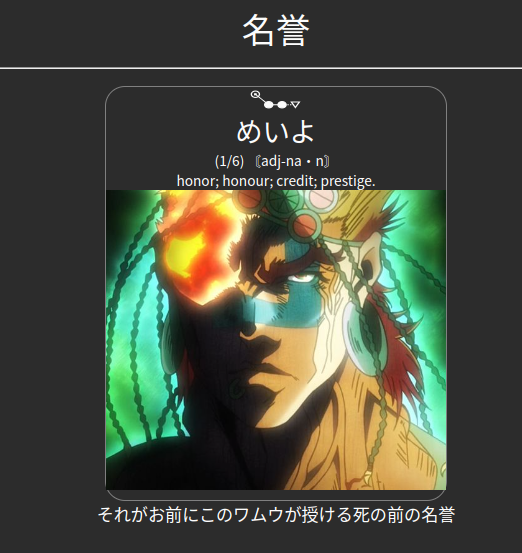 7 |
8 | Sample Cards Overview
9 |
10 | This template changed quite a bit from the last version and thus most of the
11 | sample cards lost their concrete purpose. Still I would like to explain what is going
12 | on with most cards in the following section.
13 |
14 | Sample Cards #1 #2
15 |
16 | Normal cards with an English definition as generated by the templates above. Simply
17 | ensure you have the Yomichan pitch accent dictionary installed and that JMdict is at
18 | the top. The first card has no example sentence, the second does. To automatically insert
19 | the example sentence simply copy it to your clipboard before making the card.
20 |
21 | Sample Cards #3 #4
22 |
23 | Cards with additional media (screenshot and sentence audio) captured from native media.
24 | See https://animecards.site for more information on how to do this.
25 |
26 | Sample Cards #5 #6
27 |
28 | Cards now have Japanese definitions. These are very good to switch to when you feel able to,
29 | as they provide you with more input.
30 |
31 | Sample Cards #9 #10
32 |
33 | Showing off the hint field (where it makes sense).
34 | In this case you have reading alternatives for 音読み and 訓読み variants,
35 | so I put the type of reading the card covers for ambiguous words on the front.
36 | Other words where this differentiation would make sense:
37 |
38 | 武士 (ぶし - もののふ)
39 | 海風 (かいふう - うみかぜ)
40 | 赤子 (せきし - あかご)
41 | 耳朶 (じだ - みみたぶ)
42 | 足跡 (そくせき - あしあと)
43 | 悪口 (あっこう - わるくち)
44 |
45 | And the list goes on and on. Its important indicator to not make your cards ambiguous.
46 |
47 | Sample Cards #11 #12
48 |
49 | Another usage for the hint field. Some words appear only in certain expressions or
50 | contexts, in those cases it makes sense to put that expression on the front as it
51 | will be much harder to review the card without that context, and it's pretty much the
52 | only context you see those words in.
53 | If you are asking yourself why you wouldn't just mine the entire expression,
54 | it's simply less convenient. Usually the expressions don't have entries in Japanese
55 | dictionaries (as they are sorted under the word in question) and they are often not
56 | voiced in the Japanese pod audio. Of course, you are free to handle this however you like.
57 |
58 | Sample Cards #13 #14
59 |
60 | Another usage for the hint field. Onomatopoeic words are difficult to review on
61 | their own without context. The hint straight up serves the purpose of making those
62 | cards easier. It also makes sense to use the hint field for other non-kanji words.
63 | The reason you can review kanji words without a context is because the kanji themselves
64 | carry semantic hints that make guessing the meaning not difficult at all.
65 | Ultimately you review faster and more effectively than if you used sentence cards
66 | and a context you are already familiar with.
67 |
68 | Sample Cards #15 #16
69 |
70 | Two more well-formed cards. These are the types of cards you should strive to make.
71 |
72 | Join the Discord community: https://animecards.site/discord/
73 |
--------------------------------------------------------------------------------
7 |
8 | Sample Cards Overview
9 |
10 | This template changed quite a bit from the last version and thus most of the
11 | sample cards lost their concrete purpose. Still I would like to explain what is going
12 | on with most cards in the following section.
13 |
14 | Sample Cards #1 #2
15 |
16 | Normal cards with an English definition as generated by the templates above. Simply
17 | ensure you have the Yomichan pitch accent dictionary installed and that JMdict is at
18 | the top. The first card has no example sentence, the second does. To automatically insert
19 | the example sentence simply copy it to your clipboard before making the card.
20 |
21 | Sample Cards #3 #4
22 |
23 | Cards with additional media (screenshot and sentence audio) captured from native media.
24 | See https://animecards.site for more information on how to do this.
25 |
26 | Sample Cards #5 #6
27 |
28 | Cards now have Japanese definitions. These are very good to switch to when you feel able to,
29 | as they provide you with more input.
30 |
31 | Sample Cards #9 #10
32 |
33 | Showing off the hint field (where it makes sense).
34 | In this case you have reading alternatives for 音読み and 訓読み variants,
35 | so I put the type of reading the card covers for ambiguous words on the front.
36 | Other words where this differentiation would make sense:
37 |
38 | 武士 (ぶし - もののふ)
39 | 海風 (かいふう - うみかぜ)
40 | 赤子 (せきし - あかご)
41 | 耳朶 (じだ - みみたぶ)
42 | 足跡 (そくせき - あしあと)
43 | 悪口 (あっこう - わるくち)
44 |
45 | And the list goes on and on. Its important indicator to not make your cards ambiguous.
46 |
47 | Sample Cards #11 #12
48 |
49 | Another usage for the hint field. Some words appear only in certain expressions or
50 | contexts, in those cases it makes sense to put that expression on the front as it
51 | will be much harder to review the card without that context, and it's pretty much the
52 | only context you see those words in.
53 | If you are asking yourself why you wouldn't just mine the entire expression,
54 | it's simply less convenient. Usually the expressions don't have entries in Japanese
55 | dictionaries (as they are sorted under the word in question) and they are often not
56 | voiced in the Japanese pod audio. Of course, you are free to handle this however you like.
57 |
58 | Sample Cards #13 #14
59 |
60 | Another usage for the hint field. Onomatopoeic words are difficult to review on
61 | their own without context. The hint straight up serves the purpose of making those
62 | cards easier. It also makes sense to use the hint field for other non-kanji words.
63 | The reason you can review kanji words without a context is because the kanji themselves
64 | carry semantic hints that make guessing the meaning not difficult at all.
65 | Ultimately you review faster and more effectively than if you used sentence cards
66 | and a context you are already familiar with.
67 |
68 | Sample Cards #15 #16
69 |
70 | Two more well-formed cards. These are the types of cards you should strive to make.
71 |
72 | Join the Discord community: https://animecards.site/discord/
73 |
--------------------------------------------------------------------------------