├── docs ├── CNAME ├── blog │ ├── author │ │ └── web │ │ │ ├── 3zhuyuning │ │ │ └── README.md │ │ │ ├── flyingpig │ │ │ └── README.md │ │ │ ├── shaoxiawjc │ │ │ └── README.md │ │ │ ├── stephenJun │ │ │ └── README.md │ │ │ └── luke │ │ │ ├── open-telemetry │ │ │ ├── assets │ │ │ │ ├── 0.png │ │ │ │ ├── architecture.png │ │ │ │ └── 1615358153662-47637834-4b53-40e4-bbad-7b2fe2ecfff4.png │ │ │ └── research-20240112.md │ │ │ └── README.md │ ├── posts │ │ ├── 202402110004 │ │ │ ├── markdown-img │ │ │ │ └── MySQL索引.assets │ │ │ │ │ ├── image-20240129182659248.png │ │ │ │ │ ├── image-20240129182717290.png │ │ │ │ │ ├── image-20240129182944086.png │ │ │ │ │ ├── image-20240129183042857.png │ │ │ │ │ ├── image-20240130232339517.png │ │ │ │ │ ├── image-20240130234831120.png │ │ │ │ │ ├── image-20240130234855518.png │ │ │ │ │ ├── image-20240131123120106.png │ │ │ │ │ ├── image-20240131125544271.png │ │ │ │ │ └── image-20240131125553772.png │ │ │ └── MySQL索引.md │ │ ├── 202402020003 │ │ │ └── 开发中需要防止用户哪些骚操作.md │ │ ├── 202402020001cglib │ │ │ └── cglib.md │ │ ├── 202402020002docker │ │ │ └── 关于下载docker服务.md │ │ └── 202403070005 │ │ │ └── pinia.md │ ├── index.md │ └── .authors.yml ├── assets │ ├── icon.png │ ├── logo-white.png │ ├── wechat-qrcode.png │ ├── WX20240111-163536@2x.png │ └── icon.svg ├── interview │ └── README.md ├── guide │ ├── mobile │ │ ├── README.assets │ │ │ ├── ios.png │ │ │ ├── android.png │ │ │ ├── plugins.jpg │ │ │ ├── flutter_ios.png │ │ │ ├── flutter_mac.png │ │ │ ├── flutter_win.png │ │ │ └── flutter_android.png │ │ └── README.md │ ├── README.md │ ├── git │ │ ├── before.md │ │ ├── pr.md │ │ ├── basic.md │ │ └── ops.md │ ├── front-end │ │ └── Front-end.md │ └── back-end │ │ └── Back-end.md ├── cs-internal │ ├── debug-theory.assets │ │ └── gdb-cheat-sheet.pdf │ ├── README.md │ └── debug-theory.md ├── javascripts │ └── mathjax,js ├── about.md └── index.md ├── overrides ├── main.html └── partials │ └── comments.html ├── .cache └── plugin │ └── git-committers │ └── page-authors.json ├── .github └── workflows │ └── main.yml ├── README.md ├── mkdocs.yml └── LICENSE /docs/CNAME: -------------------------------------------------------------------------------- 1 | molihua.wiki 2 | -------------------------------------------------------------------------------- /docs/blog/author/web/3zhuyuning/README.md: -------------------------------------------------------------------------------- 1 | web组前端考核成员 2 | 3 | -------------------------------------------------------------------------------- /docs/blog/author/web/flyingpig/README.md: -------------------------------------------------------------------------------- 1 | 未来的SOSD正式成员 2 | 3 | 后端入门选手 4 | -------------------------------------------------------------------------------- /docs/blog/author/web/shaoxiawjc/README.md: -------------------------------------------------------------------------------- 1 | SOSD web组后端考核成员 2 | 3 | java选手 -------------------------------------------------------------------------------- /docs/assets/icon.png: -------------------------------------------------------------------------------- https://raw.githubusercontent.com/fzu-sosd-web/molihua/HEAD/docs/assets/icon.png -------------------------------------------------------------------------------- /docs/assets/logo-white.png: -------------------------------------------------------------------------------- https://raw.githubusercontent.com/fzu-sosd-web/molihua/HEAD/docs/assets/logo-white.png -------------------------------------------------------------------------------- /docs/blog/author/web/stephenJun/README.md: -------------------------------------------------------------------------------- 1 | SOSD web组考核成员 since 2023.10 2 | 3 | 主要方向:后端 4 | 5 | 主要语言:java -------------------------------------------------------------------------------- /docs/assets/wechat-qrcode.png: -------------------------------------------------------------------------------- https://raw.githubusercontent.com/fzu-sosd-web/molihua/HEAD/docs/assets/wechat-qrcode.png -------------------------------------------------------------------------------- /docs/interview/README.md: -------------------------------------------------------------------------------- 1 | # SOSD 面试经历 2 | 3 | 可以来分享你面试的一些经历,比如说问了什么问题、面试时间等可以帮助到他人的信息 4 | 5 | !!! tip "注意保护好个人隐私哦~" -------------------------------------------------------------------------------- /docs/assets/WX20240111-163536@2x.png: -------------------------------------------------------------------------------- https://raw.githubusercontent.com/fzu-sosd-web/molihua/HEAD/docs/assets/WX20240111-163536@2x.png -------------------------------------------------------------------------------- /docs/guide/mobile/README.assets/ios.png: -------------------------------------------------------------------------------- https://raw.githubusercontent.com/fzu-sosd-web/molihua/HEAD/docs/guide/mobile/README.assets/ios.png -------------------------------------------------------------------------------- /docs/guide/README.md: -------------------------------------------------------------------------------- 1 | # SOSD 学习路线 2 | 3 | 我们将我们对于考核成员的学习路线和一些学习任务放在这里,通过结合实践的方式更好的学习我们需要的技术栈。 4 | 5 | !!! tip "feel free to ask any question~" -------------------------------------------------------------------------------- /docs/guide/mobile/README.assets/android.png: -------------------------------------------------------------------------------- https://raw.githubusercontent.com/fzu-sosd-web/molihua/HEAD/docs/guide/mobile/README.assets/android.png -------------------------------------------------------------------------------- /docs/guide/mobile/README.assets/plugins.jpg: -------------------------------------------------------------------------------- https://raw.githubusercontent.com/fzu-sosd-web/molihua/HEAD/docs/guide/mobile/README.assets/plugins.jpg -------------------------------------------------------------------------------- /docs/guide/mobile/README.assets/flutter_ios.png: -------------------------------------------------------------------------------- https://raw.githubusercontent.com/fzu-sosd-web/molihua/HEAD/docs/guide/mobile/README.assets/flutter_ios.png -------------------------------------------------------------------------------- /docs/guide/mobile/README.assets/flutter_mac.png: -------------------------------------------------------------------------------- https://raw.githubusercontent.com/fzu-sosd-web/molihua/HEAD/docs/guide/mobile/README.assets/flutter_mac.png -------------------------------------------------------------------------------- /docs/guide/mobile/README.assets/flutter_win.png: -------------------------------------------------------------------------------- https://raw.githubusercontent.com/fzu-sosd-web/molihua/HEAD/docs/guide/mobile/README.assets/flutter_win.png -------------------------------------------------------------------------------- /docs/guide/mobile/README.assets/flutter_android.png: -------------------------------------------------------------------------------- https://raw.githubusercontent.com/fzu-sosd-web/molihua/HEAD/docs/guide/mobile/README.assets/flutter_android.png -------------------------------------------------------------------------------- /docs/blog/author/web/luke/open-telemetry/assets/0.png: -------------------------------------------------------------------------------- https://raw.githubusercontent.com/fzu-sosd-web/molihua/HEAD/docs/blog/author/web/luke/open-telemetry/assets/0.png -------------------------------------------------------------------------------- /docs/cs-internal/debug-theory.assets/gdb-cheat-sheet.pdf: -------------------------------------------------------------------------------- https://raw.githubusercontent.com/fzu-sosd-web/molihua/HEAD/docs/cs-internal/debug-theory.assets/gdb-cheat-sheet.pdf -------------------------------------------------------------------------------- /docs/guide/git/before.md: -------------------------------------------------------------------------------- 1 | # 一些基本的git语法和github使用教程 2 | 3 | 4 | 你应该先阅读基础篇,并进行环境的配置。 5 | 6 | 完成后,可以查看[lab1](./pr.md)。完成你的第一个(或许不是)pull request,踏出你的第一步。 7 | 8 | 9 | -------------------------------------------------------------------------------- /docs/blog/author/web/luke/open-telemetry/assets/architecture.png: -------------------------------------------------------------------------------- https://raw.githubusercontent.com/fzu-sosd-web/molihua/HEAD/docs/blog/author/web/luke/open-telemetry/assets/architecture.png -------------------------------------------------------------------------------- /docs/blog/author/web/luke/README.md: -------------------------------------------------------------------------------- 1 | 2 | hi 3 | 4 | SOSD web组正式成员 since 2023.3 5 | 6 | 主要方向:后端 7 | 8 | 主要语言:java/go 9 | 10 | Contributor of [@apolloconfig](https://github.com/apolloconfig) Apollo Config 11 | 12 | -------------------------------------------------------------------------------- /docs/blog/posts/202402110004/markdown-img/MySQL索引.assets/image-20240129182659248.png: -------------------------------------------------------------------------------- https://raw.githubusercontent.com/fzu-sosd-web/molihua/HEAD/docs/blog/posts/202402110004/markdown-img/MySQL索引.assets/image-20240129182659248.png -------------------------------------------------------------------------------- /docs/blog/posts/202402110004/markdown-img/MySQL索引.assets/image-20240129182717290.png: -------------------------------------------------------------------------------- https://raw.githubusercontent.com/fzu-sosd-web/molihua/HEAD/docs/blog/posts/202402110004/markdown-img/MySQL索引.assets/image-20240129182717290.png -------------------------------------------------------------------------------- /docs/blog/posts/202402110004/markdown-img/MySQL索引.assets/image-20240129182944086.png: -------------------------------------------------------------------------------- https://raw.githubusercontent.com/fzu-sosd-web/molihua/HEAD/docs/blog/posts/202402110004/markdown-img/MySQL索引.assets/image-20240129182944086.png -------------------------------------------------------------------------------- /docs/blog/posts/202402110004/markdown-img/MySQL索引.assets/image-20240129183042857.png: -------------------------------------------------------------------------------- https://raw.githubusercontent.com/fzu-sosd-web/molihua/HEAD/docs/blog/posts/202402110004/markdown-img/MySQL索引.assets/image-20240129183042857.png -------------------------------------------------------------------------------- /docs/blog/posts/202402110004/markdown-img/MySQL索引.assets/image-20240130232339517.png: -------------------------------------------------------------------------------- https://raw.githubusercontent.com/fzu-sosd-web/molihua/HEAD/docs/blog/posts/202402110004/markdown-img/MySQL索引.assets/image-20240130232339517.png -------------------------------------------------------------------------------- /docs/blog/posts/202402110004/markdown-img/MySQL索引.assets/image-20240130234831120.png: -------------------------------------------------------------------------------- https://raw.githubusercontent.com/fzu-sosd-web/molihua/HEAD/docs/blog/posts/202402110004/markdown-img/MySQL索引.assets/image-20240130234831120.png -------------------------------------------------------------------------------- /docs/blog/posts/202402110004/markdown-img/MySQL索引.assets/image-20240130234855518.png: -------------------------------------------------------------------------------- https://raw.githubusercontent.com/fzu-sosd-web/molihua/HEAD/docs/blog/posts/202402110004/markdown-img/MySQL索引.assets/image-20240130234855518.png -------------------------------------------------------------------------------- /docs/blog/posts/202402110004/markdown-img/MySQL索引.assets/image-20240131123120106.png: -------------------------------------------------------------------------------- https://raw.githubusercontent.com/fzu-sosd-web/molihua/HEAD/docs/blog/posts/202402110004/markdown-img/MySQL索引.assets/image-20240131123120106.png -------------------------------------------------------------------------------- /docs/blog/posts/202402110004/markdown-img/MySQL索引.assets/image-20240131125544271.png: -------------------------------------------------------------------------------- https://raw.githubusercontent.com/fzu-sosd-web/molihua/HEAD/docs/blog/posts/202402110004/markdown-img/MySQL索引.assets/image-20240131125544271.png -------------------------------------------------------------------------------- /docs/blog/posts/202402110004/markdown-img/MySQL索引.assets/image-20240131125553772.png: -------------------------------------------------------------------------------- https://raw.githubusercontent.com/fzu-sosd-web/molihua/HEAD/docs/blog/posts/202402110004/markdown-img/MySQL索引.assets/image-20240131125553772.png -------------------------------------------------------------------------------- /overrides/main.html: -------------------------------------------------------------------------------- 1 | {% extends "base.html" %} 2 | 3 | {% block content %} 4 | molihua - SOSD 5 | {{ super() }} 6 |
7 | 版权声明 © 本网站内所有文章著作权归作者所有,禁止转载。 8 | {% endblock %} -------------------------------------------------------------------------------- /docs/blog/author/web/luke/open-telemetry/assets/1615358153662-47637834-4b53-40e4-bbad-7b2fe2ecfff4.png: -------------------------------------------------------------------------------- https://raw.githubusercontent.com/fzu-sosd-web/molihua/HEAD/docs/blog/author/web/luke/open-telemetry/assets/1615358153662-47637834-4b53-40e4-bbad-7b2fe2ecfff4.png -------------------------------------------------------------------------------- /docs/cs-internal/README.md: -------------------------------------------------------------------------------- 1 | # SOSD 计算机内功修炼指南 2 | 3 | !!! question "什么是计算机内功?" 4 | 5 | 计算机内功,包括算法与数据结构、操作系统、组成原理和计算机网络等计算机基础学科,是计算机科学领域的核心要素。这些学科犹如武学中的内功心法,为计算机领域的从业者提供了坚实的基础。 6 | 7 | 修炼这些计算机内功,对于计算机专业人员来说至关重要。它们不仅为个体提供了强大的技术能力,也为整个计算机领域的发展奠定了坚实的基础。通过深入研究和不断实践,计算机从业者能够不断提升自己的技术水平,更好地应对日益复杂的计算机系统和应用需求。这就如同武者通过修炼内功,不断强化自身的功力,最终能够在各种挑战面前游刃有余。 -------------------------------------------------------------------------------- /docs/javascripts/mathjax,js: -------------------------------------------------------------------------------- 1 | window.MathJax = { 2 | tex: { 3 | inlineMath: [["\\(", "\\)"]], 4 | displayMath: [["\\[", "\\]"]], 5 | processEscapes: true, 6 | processEnvironments: true, 7 | }, 8 | options: { 9 | ignoreHtmlClass: ".*|", 10 | processHtmlClass: "arithmatex", 11 | }, 12 | }; 13 | 14 | document$.subscribe(() => { 15 | MathJax.typesetPromise(); 16 | }); 17 | -------------------------------------------------------------------------------- /docs/about.md: -------------------------------------------------------------------------------- 1 | # 关于我们 2 | 3 | 福州大学服务外包与软件设计实验室成立于2013年,先后组织队员们参与了**“中国大学生服务外包创新创业大赛”、“中国软件杯大学生软件设计大赛”、“移动应用创新赛”、“中国大学生计算机设计大赛”、“国际用户体验创新大赛”、“泛珠三角大学生计算机作品赛”、“海峡两岸信息服务创新大赛”** 等比赛。 4 | 5 | 累计斩获国家 特等奖1项,一等奖4项,二等奖24项,三等奖36项;省级 一等奖26项, 二等奖60项,三等奖59项。 6 | 7 | 8 | 目前实验室主要设有三个小组:Web组、移动组和设计组,正式成员60余名。 9 | 10 | 实验室先后开发了包括福州大学算法与数据结构教学网站、福州大学教务信息化管理系统在内的一系列应用软件。 11 | 12 | ## 我们的官网 13 | 14 | - [校园网内网访问](https://sosd.fzu.edu.cn/) 15 | - [外网访问](https://sosd.creatorsn.com/) 16 | - 微信公众号 17 | 18 | ![](./assets/WX20240111-163536@2x.png) 19 | 20 | ## 运维支持 21 | 22 | 目前由Web组进行维护 23 | 24 | 有任何问题可以发邮件咨询 维护人 -------------------------------------------------------------------------------- /.cache/plugin/git-committers/page-authors.json: -------------------------------------------------------------------------------- 1 | {"cache_date": "2024-03-21", "page_authors": {"docs/index.md": {"last_commit_date": "2024-01-11", "authors": []}, "docs/about.md": {"last_commit_date": "2024-01-11", "authors": []}, "docs/cs-internal/index.md": {"last_commit_date": "2024-01-11", "authors": []}, "docs/guide/README.md": {"last_commit_date": "2024-01-11", "authors": []}, "docs/guide/git/basic.md": {"last_commit_date": "2024-01-11", "authors": []}, "docs/guide/git/before.md": {"last_commit_date": "2024-01-11", "authors": []}, "docs/guide/git/ops.md": {"last_commit_date": "2024-01-11", "authors": []}, "docs/interview/index.md": {"last_commit_date": "2024-01-11", "authors": []}}} -------------------------------------------------------------------------------- /docs/blog/index.md: -------------------------------------------------------------------------------- 1 | # SOSD 技术博客 2 | 3 | 这边是我们分享的技术博客,内容可以涵盖每个方面,可以是某个组件、库函数的使用心得,可以是某次踩坑的经历,可以是对某个领域的探究以及任何你认为值得分享的东西...... 4 | 5 | **使用导航栏中的搜索功能以获得最好的检索体验** 6 | 7 | !!! tip "路径应该按照 **blog/posts/{yyyyMMdd+xxxxx}/...** 来方便管理博客" 8 | 9 | ## 如果你有什么想分享的,非常欢迎在github上提交pr! 10 | 11 | [!!!关于如何写好一篇blog,参考文档!!!](https://squidfunk.github.io/mkdocs-material/setup/setting-up-a-blog/) 12 | 13 | ### 几个注意的点 14 | 15 | 1. 首先 在./.authors.yml中添加你的信息 16 | 2. 在博客的md文件的最上方添加如下的信息 17 | 18 | ``` 19 | --- 20 | authors: 21 | - "你在第一步中写的配置项中你的id" 22 | date: 发表时间 23 | tags: 24 | # 会被搜索检索到 25 | # - CGlib 26 | categories: 27 | # 会创建或加入一个技术栈分类别中 28 | # - Java 29 | # - Reflection 30 | --- 31 | ``` 32 | 33 | **然后一定要记得在你的博客的前几行插入一个 ==``== 来生成文章摘要,没有这一步生成摘要,网站无法将博客渲染出来!** 34 | 35 | 36 | ------ 37 | 38 | # 最新博客 -------------------------------------------------------------------------------- /.github/workflows/main.yml: -------------------------------------------------------------------------------- 1 | name: ci on Github Pages 2 | on: 3 | push: 4 | branches: 5 | - main 6 | jobs: 7 | deploy: 8 | runs-on: ubuntu-latest 9 | steps: 10 | - uses: actions/checkout@v4 11 | - name: Configure Git Credentials 12 | run: | 13 | git config user.name github-actions[bot] 14 | git config user.email 41898282+github-actions[bot]@users.noreply.github.com 15 | - uses: actions/setup-python@v4 16 | with: 17 | python-version: 3.x 18 | - uses: actions/cache@v3 19 | with: 20 | key: ${{ github.ref }} 21 | path: .cache 22 | 23 | - run: pip install mkdocs-material 24 | - run: pip install mdx-truly-sane-lists 25 | - run: pip install mkdocs-git-committers-plugin-2 26 | 27 | - run: mkdocs gh-deploy --force 28 | -------------------------------------------------------------------------------- /README.md: -------------------------------------------------------------------------------- 1 | # molihua - SOSD的知识分享平台 2 | 3 | 4 | ## molihua的由来 5 | 6 | molihua(茉莉花)原本是SOSD内网的一个wiki知识库系统,是我们内部的一个分享知识和经验的平台,但是出于一些原因并没有得到很好的维护和发展。 7 | 8 | 我们决定将它换一个展现形式,使用Github来作为承载平台,基于更加便捷的CI能力来进行运维,期望它可以得到更好的发展。 9 | 10 | 11 | ## molihua上会有什么? 12 | 13 | 内网时期的molihua是用于存放一些知识博客和实验室一些项目的文档。现在的molihua是面向互联网的,**知识博客**这一个职责当然是会延续下去,同时存放一些**优秀的课内笔记**也是很不错的选择。 14 | 15 | 我们也希望molihua能承担更多的职责,比如提供一些我们**考核期的学习路线文档**,一些我们可以公开的内部**公开课的课件**,关于**计算机内功的一些修炼指南**,一些推荐的**国外名校公开课**(rock学长极力推荐),又甚至是一些**面试的经验**...... 16 | 17 | molihua会是什么样的,取决于大家,非常欢迎大家加入我们,共同维护这个平台。 18 | 19 | 网址:[molihua.wiki](https://molihua.wiki/) 20 | 21 | ## 贡献者 22 | 23 | As always, thanks to our amazing contributors! 24 | 25 | 26 | 27 | 28 | 29 | -------------------------------------------------------------------------------- /docs/blog/.authors.yml: -------------------------------------------------------------------------------- 1 | authors: 2 | luke: 3 | name: 魏知乐 # Author name 4 | description: sosd web admin # Author description 5 | avatar: https://avatars.githubusercontent.com/u/94302726 # Author avatar 6 | url: /blog/author/web/luke/ # Author website URL 7 | stephenJun: 8 | name: 严文骏 9 | description: sosd web Assessment members 10 | avatar: https://avatars.githubusercontent.com/u/119308964 11 | url: /blog/author/web/stephenJun/ 12 | flyingpig: 13 | name: 朱嘉翔 14 | description: sosd web Assessment members 15 | avatar: https://avatars.githubusercontent.com/u/117554874 16 | url: /blog/author/web/flyingpig/ 17 | shaoxiawjc: 18 | name: 吴金超 19 | description: sosd web Assessment members 20 | avatar: https://avatars.githubusercontent.com/u/143303485 21 | url: /blog/author/web/shaoxiawjc/ 22 | 3zhuyuning: 23 | name: 吴限 24 | description: sosd web Assessment members 25 | avatar: https://avatars.githubusercontent.com/u/145993470 26 | url: /blog/author/web/3zhuyuning/ -------------------------------------------------------------------------------- /docs/index.md: -------------------------------------------------------------------------------- 1 | # molihua - SOSD的知识分享平台 2 | 3 | 4 | ## molihua的由来 5 | 6 | molihua(茉莉花)原本是SOSD(福州大学服务外包与软件设计实验室)内网的一个wiki知识库系统,是我们内部的一个分享知识和经验的平台,但是出于一些原因并没有得到很好的维护和发展。 7 | 8 | 我们决定将它换一个展现形式,使用Github来作为承载平台,基于更加便捷的CI能力来进行运维,期望它可以得到更好的发展。 9 | 10 | 11 | ## molihua上会有什么? 12 | 13 | 内网时期的molihua是用于存放一些知识博客和实验室一些项目的文档。现在的molihua是面向互联网的,**知识博客**这一个职责当然是会延续下去,同时存放一些**优秀的课内笔记**也是很不错的选择。 14 | 15 | 我们也希望molihua能承担更多的职责,比如提供一些我们**考核期的学习路线文档**,一些我们可以公开的内部**公开课的课件**,关于**计算机内功的一些修炼指南**,一些推荐的**国外名校公开课**(rock学长极力推荐),又甚至是一些**面试的经验**...... 16 | 17 | molihua会是什么样的,取决于大家,非常欢迎大家加入我们,共同维护这个平台。 18 | 19 | !!! question "如何参与?" 20 | 21 | 首先你需要大概了解我们使用的[开源docs框架](https://squidfunk.github.io/mkdocs-material/setup/),然后你可能需要掌握基本的git工作流程,使用pr提交你分享的宝贵的知识。[仓库地址](https://github.com/Fzu-SOSD-Lab/molihua) 22 | 23 | !!! question "不会使用git || 不会这个docs框架?" 24 | 25 | 没关系,你可以在[关于我们](./about.md)找到我们实验室维护这个平台的同学的邮箱,发送你的诉求,我们会帮你进行相关的操作。 26 | 27 | !!! success "如果你觉得molihua不错,欢迎在github上给我们点个star哦 [star](https://github.com/Fzu-SOSD-Lab/molihua)" 28 | 29 | ## 贡献者 30 | 31 | As always, thanks to our amazing contributors! 32 | 33 | 34 | 35 | 36 | -------------------------------------------------------------------------------- /docs/guide/git/pr.md: -------------------------------------------------------------------------------- 1 | # 添加你的名片! 2 | 3 | 任务要求:在 `https://github.com/Fzu-SOSD-Lab/git-lab/` 的lab1文件夹下添加你的电子名片 4 | 5 | 名片格式:可以参考[我的名片](https://github.com/Fzu-SOSD-Lab/git-lab/blob/main/lab1/luke.md) 6 | 7 | 8 | !!! question "那么如何把你的名片添加到我们的仓库呢?" 9 | 10 | # 如何在 GitHub 上提交 Pull Request 11 | 12 | 在 GitHub 上提交 Pull Request(PR)是协作开发项目中的重要步骤之一。通过提交 PR,你可以向项目贡献代码、修复错误或改进项目。以下是提交 PR 的简单步骤。 13 | 14 | ## 步骤 1:Fork 项目 15 | 16 | 首先,在你的 GitHub 帐户中 Fork 项目的仓库。Fork 意味着创建项目的一个副本,该副本将在你的 GitHub 帐户中。 17 | 18 | 1. 打开你要贡献的项目的 GitHub 仓库页面。 19 | 2. 点击右上角的 "Fork" 按钮。 20 | 21 | ## 步骤 2:克隆仓库 22 | 23 | 将你 Fork 的项目克隆到本地计算机: 24 | 25 | 记住,这边clone的仓库是你自己的github仓库,千万记住哦,下面引号,你懂的。 26 | 27 | ```bash 28 | git clone https://github.com/"xxxxxxxxx"/git-lab.git 29 | ``` 30 | 31 | ## 步骤 3:创建分支 32 | 33 | 为了使你的更改有组织,创建一个新的分支: 34 | 35 | 这个引号,我建议可以是 'add-self-intro',描述你的行为。 36 | 37 | ```bash 38 | git checkout -b 'new branch name' 39 | ``` 40 | 41 | ## 步骤 4:进行更改 42 | 43 | 在新分支上进行你的更改,可以编辑文件、添加新功能或修复错误。 44 | 45 | 在更改前,请确认你的本地开发分支是最新的状态! 46 | 47 | ## 步骤 5:提交更改 48 | 49 | 将你的更改添加到暂存区并提交: 50 | 51 | ```shell 52 | git add . 53 | git commit -m "描述你的更改" 54 | ``` 55 | 56 | ## 步骤 6:推送分支 57 | 58 | 将你的新分支推送到你的 GitHub 仓库: 59 | 60 | ```shell 61 | git push origin 'new branch name' 62 | ``` 63 | 64 | ## 步骤 7:创建 Pull Request 65 | 66 | 1. 打开你 Fork 的项目的 GitHub 仓库页面。 67 | 2. 在仓库页面上,点击 "New Pull Request" 按钮。 68 | 3. 在比较页面中,选择你刚刚创建的分支。 69 | 4. 输入一个描述你的 PR 的标题和说明。 70 | 5. 点击 "Create Pull Request" 按钮。 71 | 72 | ## 步骤 8:等待审查 73 | 74 | 项目维护者也就是我将会审查你的 PR。我可能会要求你进行更改,所以请保持耐心并按照他们的建议进行操作。 75 | 76 | ## 步骤 9:PR 合并 77 | 78 | 一旦你的 PR 被审查并通过,项目维护者将合并你的更改到主分支。 79 | 80 | ## 结语 81 | 82 | 恭喜你,你已经成功提交了一个 Pull Request!通过这种方式,你可以为更多的开源项目做出贡献,改进代码库,提高你的编程技能。 -------------------------------------------------------------------------------- /overrides/partials/comments.html: -------------------------------------------------------------------------------- 1 | {% if page.meta.comments %} 2 |

{{ lang.t("meta.comments") }}

3 | 4 | 19 | 20 | 54 | {% endif %} 55 | -------------------------------------------------------------------------------- /docs/guide/front-end/Front-end.md: -------------------------------------------------------------------------------- 1 | ## 前端开发学习(2023.09.25版) 2 | 3 | 只是根据我自己大一下学期学习的时候给出的大概路线 4 | 5 | 因为每个人的空闲时间不同,我就不给出具体的学习任务,但是还是希望大家能多多投入时间,不然可能有点来不及 6 | 7 | 附:我当时基本上找的都是国外老师的教程,所以时长基本上都比较长,大家也可以根据自己的时间安排来选择适合自己的教程! 8 | 9 | 🌟是指对大家之后的比赛开发的适用程度,并不是重要程度。 10 | 11 | ##### Node.js也是很有帮助的,有时间可以看!! 12 | 13 | ## 1.基本的三件套部分(善用MDN Web Docs) 14 | 15 | ### 1) html+css(🌟🌟🌟) 16 | 17 | 这两个部分,不要求掌握所有的内容,就像html和css的所有属性(部分现在使用的也比较少,可以通过javascript实现一样的效果)。部分的属性可以到开发真正需要的时候来搜索 18 | 19 | 个人推荐视频👇 20 | 21 | https://www.bilibili.com/video/BV1A34y1e7wL/?spm_id_from=333.999.0.0&vd_source=8c6b6aff2ab21d2569269571a7cc0218 22 | 23 | 国外的课程普遍偏向把知识融入项目,而且我觉得对培养前端的审美也是很好的example,这个课程的finial project是一个叫omnifood的单页网站(有部署,可以直接搜,看看这个项目你是否),也有其他的小项目🎉,老师同样有教授上传GitHub以及部署等流程。 24 | 25 | ###### 附:这个老师同样有Css进阶课程,掌握更多的高级属性以及动画,可以自行选择 26 | 27 | ### 2)JavaScript(🌟🌟🌟🌟) 28 | 29 | 非常重要!!所有框架都是建立在语言的基础上,千万别轻视,Vue和React这些框架让开发过程更轻松,但是本质都是js,理解好js才能更好的学习。JS也还是在不断迭代的一个过程。 30 | 31 | #### Section1 JavaScript基础(🌟🌟🌟🌟) 32 | 33 | 学好这部分对开发就暂时足够了基本上,进阶部分可以你自己的学习情况决定 34 | 35 | 个人推荐视频👇 36 | 37 | https://www.bilibili.com/video/BV1vA4y197C7/?spm_id_from=333.999.0.0&vd_source=8c6b6aff2ab21d2569269571a7cc0218 38 | 39 | 相同的老师!并且包括ajax的学习,jQuery部分老师涉及的较少,有兴趣的也可以自己再寻找相关的视频学习,比较模块化,很适合分时段学习。 40 | 41 | #### Section2 JavaScript进阶(🌟🌟) 42 | 43 | 进阶部分会涉及到比较底层的一些东西,是对基础部分的部分内容的拔高,可以有时间了再回来学 44 | 45 | 个人推荐视频👇 46 | 47 | https://www.bilibili.com/video/BV19i4y1Q7w7?p=1&vd_source=8c6b6aff2ab21d2569269571a7cc0218 48 | 49 | ## 2.框架部分 50 | 51 | ### Vue(🌟🌟🌟🌟): 52 | 53 | 推荐先从Vue2学起,结合Vue官方文档食用,看文档才是对培养自学最好的手段!! 54 | 55 | 了解组件、生命周期、路由以及mixns等的使用等基本的使用,了解Vue的快捷指令,明白双向数据流。 56 | 57 | (Vue3和Vue2我的理解是没有真正的优劣,Vue3对于大型项目来说可能更好维护,Composition API的,但是也失去了一定的逻辑性) 58 | 59 | 了解完Vue2之后,再来看Vue3的新特性,新的生命周期钩子函数 60 | 61 | 个人推荐视频👇 62 | 63 | https://www.bilibili.com/video/BV1Wr4y1n7rG/?spm_id_from=333.999.0.0 64 | 65 | 通过该视频,你可以了解到 66 | 67 | 什么是 VueJS,你为什么要使用它? 基础知识(包括基本语法、理解模板等等!) 如何输出反应性数据和监听事件 与 DOM 交互(渲染列表、有条件地附加/分离元素......) 设置开发环境和工作流程 使用组件(以及从什么组件开始) 深入了解 Vue的幕后 绑定到表单输入 向后端 API发送Http 请求 身份验证和 Vue 如何使用动画和过渡让您的应用程序更漂亮 如何使用路由创建出色的单页应用程序(SPA) 如何使用Vuex(Vue3情况下更推荐Pinia)改进状态管理 如何部署应用程序。 68 | 69 | ### React: 70 | 71 | 还没学完,之后再补充😭 -------------------------------------------------------------------------------- /docs/guide/back-end/Back-end.md: -------------------------------------------------------------------------------- 1 | ## 后端开发学习(2024.03.21版) 2 | 3 | > 鸣谢陈建辉学长的知识分享,本文大致路线由建辉学长共享🎉! 4 | 5 | ## 前言 6 | 7 | 1. 掌握Typora的用法,学会使用一个笔记工具会方便后续知识笔记的记载,也能帮助自己整理归纳知识。回头复习也会更方便查看,也更利于知识分享! 8 | 2. 学习代码,不能使用背和硬记的方式,更多需要理解和手敲实践! 9 | 3. git与github的使用,可以看molihua上魏知乐学长的git学习,学会对代码的管理 10 | 4. 学会问问题和学会使用chatgpt和coplit等ai助手,能帮助你学会自己解决问题。也要学会沟通,talking is free 11 | 5. 因为网上对于java的学习知识分享已经非常丰富,这里更多只是对学习的推荐,具体还是要靠个人的领悟和在实验室考核项目的学习,更重要的是在项目中学习! 12 | > 下面是由我半学期来学习的分享,仅供参考 13 | ## 入门篇(初入java) 14 | 15 | #### 第一步:基础语法学习 16 | 17 | 在学习一门语言之前,要先认识java,知道java是什么,和一些基本概念。就算已经是身经百战的后端选手,也可以重新温习基础内容来巩固自己的代码能力! 18 | 19 | 这里推荐通过文档学习和视频学习 20 | 21 | 文档: ⭐[Java 教程 | 菜鸟教程 (runoob.com)](https://www.runoob.com/java/java-tutorial.html) 22 | 23 | 视频学习:⭐[黑马程序员Java零基础视频教程_上部(Java入门,含斯坦福大学练习题+力扣算法题和大厂java面试题)_哔哩哔哩_bilibili](https://www.bilibili.com/video/BV17F411T7Ao/?spm_id_from=333.337.search-card.all.click) 24 | 25 | > 能够独立完成视频和文档中给出的小demo,并且再遇到同样问题是能够独立解决才能算掌握 26 | 27 | #### 第二步,数据库学习 28 | 29 | 数据库也是后端学习的核心,这里推荐学习**Mysql**。Mysql的学习也是可以通过文档和视频学习的 30 | 31 | 文档:⭐[MySQL 教程 | 菜鸟教程 (runoob.com)](https://www.runoob.com/mysql/mysql-tutorial.html) 32 | 33 | 视频学习:⭐https://www.bilibili.com/video/BV1Kr4y1i7ru/?spm_id_from=333.337.search-card.all.click(这里只需要把基础篇看完就ok了) 34 | 35 | > 数据库的学习要能掌握基础的DDL和DML,DQL语句就可以了,能对数据简单的crud(增删改查)就ok了!后面就要随着复杂的业务继续学习,因为业务场景很非常多,只有再真正的解决了一个业务后,才能对crud的组合更有领悟 36 | 37 | #### 第三步,**Web框架**和**ORM框架** 38 | 39 | **Web框架**:基本后端的web框架主流是Springboot,而且网上资源非常多,所以学好Springboot是关键,也是迈向开发的第一大步!不过Springboot的内容是非常多的,但是得先学会如何使用,才能更好的去学习框架更深层的内容,也能更好理解前人设计框架的思路! 40 | 41 | 文档学习:⭐[Spring Boot 中文文档 (springdoc.cn)](https://springdoc.cn/spring-boot/) 42 | 43 | 视频学习:⭐[黑马程序员JavaWeb开发教程,实现javaweb企业开发全流程(涵盖Spring+MyBatis+SpringMVC+SpringBoot等)_哔哩哔哩_bilibili](https://www.bilibili.com/video/BV1m84y1w7Tb/?vd_source=50c25dd856b65e44eeee828162fa0976) 44 | 45 | > 推荐先可以学习Springboot再回头看SSM,可以更好地理解!在springboot中的学习,要能够基本掌握maven对模块的处理和pom文件中配置的理解,还有springboot中三层架构的认识和能够熟练的通过springboot整合ORM进行对数据的crud。还要能够理解AOP理念和JWT的使用,一定要能够理解为什么分三层使用,和三层如何使用!!! 46 | 47 | **ORM框架**:**Mybatis**与**Mybatisplus** 48 | 49 | ORM框架学习可以更加便于我们的开发,这里推荐看完这个视频就🆗了 50 | 51 | ⭐[黑马程序员最新MybatisPlus全套视频教程,4小时快速精通mybatis-plus框架_哔哩哔哩_bilibili](https://www.bilibili.com/video/BV1Xu411A7tL/?spm_id_from=333.337.search-card.all.click) 52 | 53 | > 其实这部分就是让你更能够高效使用mp来crud,能够提高开发效率 54 | 55 | #### ⭐⭐⭐第四步,项目实战。 56 | 57 | 尝试独立完成实验室考核项目后端,如果遇到问题,擅用ChatGpt和bilibili。黑马程序员,尚硅谷,狂神都是不错的入门课程。 58 | 59 | 注意:以上的学习仅要求保持会用阶段,学完这些,算入门后端开发了。 60 | 61 | > 对我而言:更多的是在实战项目中成长起来的,在很多时候只有面对困难再去想着解决时才能够激发出潜能,也才能够对一个技能的学习更加深刻,所以**希望大家能够多参与到实验室的项目中来**,前提是要先掌握好上面技能的熟练使用,要不然在项目中回头学习也是十分头疼的,然后遇到项目的困难时不要畏惧而是坚信自己能做完!只有这样才能够稳步前进。 62 | 63 | ---- 64 | 65 | 以上学习路线仅供参考,更多要靠自己自主学习,最重要的是坚持! 66 | 之后会慢慢完善 67 | 68 | 后续由建辉学长再进行补充.... -------------------------------------------------------------------------------- /docs/assets/icon.svg: -------------------------------------------------------------------------------- 1 | 2 | 4 | 7 | 8 | 10 | 30 | 32 | 34 | 43 | 45 | 48 | 51 | 52 | 53 | -------------------------------------------------------------------------------- /docs/blog/posts/202402020003/开发中需要防止用户哪些骚操作.md: -------------------------------------------------------------------------------- 1 | --- 2 | authors: 3 | - flyingpig 4 | date: 2024-02-02 5 | tags: 6 | - security 7 | - 安全 8 | categories: 9 | - web security 10 | - web开发 11 | --- 12 | 13 | 14 | 15 | **首先的话作为一个标准安全的后台认证和鉴权是一定要做好的,除此之外一下业务场景和常见问题也要进行考虑和预防。** 16 | 17 | ## **一.业务逻辑** 18 | 19 | 网页的业务逻辑需要严密。 20 | 比如收藏和点赞,前后端都要对点赞和收藏状态进行控制。简单说就是已经点赞和收藏的用户不能再进行点赞和收藏。 21 | 还有我上次设置的考勤软件,里面设置学生为督导会将学生以及对应的督导课程添加到对应的表里面,这个信息是唯一的。结果添加的时候没有检查,在一次网络不好的情况下连续添加两次,导致闪退。 22 | 23 | 总而言之,我们要检查数据是否唯一,确保数据的一致性等等。 24 | 25 | ## **二.频繁请求某个接口** 26 | 27 | **解决方案:通过用户id或者IP等限制用户的访问次数/访问频率** 28 | 29 | **【1】场景一:刷访问量和搜索量** 30 | 对用户刷量行为进行控制(最终会影响的推荐,排行榜之类功能的准确性),可以根据用户 id 或 IP 等维度来保证单用户的浏览量不重复统计来避免刷量。 31 | **【2】场景二:爬虫** 32 | 可以通过校验码、限制用户浏览条数等方式一定程度上预防爬虫 33 | **【3】场景三:用户疯狂调用很消耗资源的接口** 34 | 如收费的API接口(手机验证码)等烧钱的接口!还有上传文件的接口等等很消耗CPU或者带宽的接口 35 | **【4】场景四:用户暴力破解密码登录** 36 | 可以通过验证码、限流、限制单账号密码错误次数等方式防止密码暴力破解 37 | 38 | ## **三.上传文件的骚操作** 39 | 40 | **上传文件是一件很消费硬盘和带宽的事情,而且用户的文件也不一定是安全的。** 41 | **所以我们要防止用户上传超大文件或者频繁上传文件或者上传危险的脚本文件 42 | 解决方法:(1)限制上传文件的大小和格式 43 | (2)如果用户频繁访问超大图片,给存储文件添加防盗链、缓存等防护 / 减压措施,防止资源浪费** 44 | 45 | ## **四.XSS与用户输入骚操作** 46 | 47 | **XSS,即跨站脚本攻击。** 48 | 49 | **简单说就是让客户端的游览器执行黑客的脚本。这些脚本有的隐藏在URL的参数里,有的隐藏在URL#后面里,有的隐藏在页面中,如评论区。但不管哪种类型本质上都是相同的,都是XSS。** 50 | 51 | ### **1.反射型--黑客制作的URL传参中含有恶意脚本,你点击了** 52 | 53 | ![img](https://img-blog.csdnimg.cn/direct/8ef3faa707f6412a9845f1a5f597acb8.png) 54 | 55 | **反射型XSS一般是利用网页的检索功能,你搜索的关键词会体现在URL里,服务器会根据URL反射展示在你的页面里,换句话说你的URL的其中一部分被展示在页面里。【因为你搜索之后搜索框中的信息会在页面里】** 56 | 57 | 如果服务器没有对检索的URL进行过滤,刚好URL里含有恶意的代码,恶意的代码就会被植入到你的页面里面。 58 | 59 | > 测试:我们在输入框里输入字符,并且点击设置按钮就会进行检索 60 | > 网页也会把结果返回到页面上,URL里有什么请求字符,就把请求字符反射到页面上来 61 | > 看看网页的源码,我们刚刚输入的字符被包裹在这个B标签里面,如果我们想把输入的字符变大 62 | > 比方说使用H1标签,那我们就直接在URL上为搜索字符包裹H1标签,结果会呈现大字体的字符。 63 | > 64 | > ![img](https://img-blog.csdnimg.cn/direct/22e4dca947a5436da04b5adeab54d4e9.png) 65 | 66 | **当然黑客发给你的并不是网页标签,而是js脚本之类的,网页解析到在URL中的js脚本,URL中的js脚本映射到页面中,游览器就会自动执行js脚本,然后黑客就可以搞一些事情了。** 67 | 68 | ### **2.存储型--黑客脚本存储在页面中【比如在评论中书写脚本】** 69 | 70 | ![img](https://img-blog.csdnimg.cn/direct/5ffc5cd582b3460fbae62cadb70bcfa2.png) 71 | 72 | **比如黑客不发表正常的评论,而是把恶意代码脚本作为评论发送给网站服务器,如果服务器不进行过滤,就会把评论永久保存起来到数据库里面。** 73 | 74 | **每个浏览这个网站的用户都会被迫看到有恶意代码的评论,看到恶意代码的同时,浏览器就会自动执行恶意代码,然后进行一些恶意操作,比如把你的信息泄露给了黑客。 75 | 用户并不是因为点击乱七八糟的URL中招,而是在你访问网站评论区的时候就自动中招了。** 76 | 77 | 又比如B站允许用户发送弹幕,如果服务器不过滤用户发送的恶意信息,这些信息就会保存在B站服务器里,只要有用户访问当前端视频页面就中招,直到服务器那边把恶意代码删除为止。 78 | 79 | > 测试:在没有对评论进行过滤的评论区书写alert弹窗语句,会发现查看评论的时候弹窗出现,证明我们注入成功了。 80 | > ![img](https://img-blog.csdnimg.cn/direct/7f64a3fce3744325b33fd62c3baf55f2.png) 81 | 82 | ### **3.DOM型--黑客在#号后面书写恶意脚本** 83 | 84 | ![img](https://img-blog.csdnimg.cn/direct/a6393fe65a5c4a27bf0b1691c93a355b.png) 85 | 86 | 简单说就是我们静态资源的链接一般的话都会在后面一般开发者使用这有个#号,这个井号是为了方便用户跳转,对服务器的请求进行客户端渲染,但是井号后面这一片段,默认是不发送给服务器的,也就是说浏览器向服务器请求前面的一部分URL,并且正常进行渲染。如果UNL里需要跳转到井号的部分,是在页面上进行操作的。 87 | 所以黑客们就在#号后面书写恶意脚本,然后将这个URL发给用户,用户通过#号前的URL请求网站,然后返回到自己游览器的时候,#号后面的脚本就会被游览器执行,然后黑客就会进行一系列的操作。 88 | 89 | 当然还有其他的XSS类型。 90 | 91 | ### 4.如何防止XSS攻击 92 | 93 | ![img](https://img-blog.csdnimg.cn/direct/f8524b7bb90a4c5eb1b1cc4bc6e3c0b2.png) 94 | 95 | ### 5.如何防止用户输入骚操作 96 | 97 | **客户端的一切输入都是不安全的!!!因此需要预防。** 98 | 99 | 100 | 101 | **【1】校验方面,例如我们需要校验邮件和手机号输入是否合法,****前后端都需要对用户输入的邮件和手机号用正则表达式进行检查** 102 | 103 | **【2】XSS方面,对用户搜索框输入和评论区之类的输入都要进行过滤,防止恶意脚本** 104 | 105 | **【3】限制输入长度之类的,前后端都需要检查用户输入的内容是否太长,这样即防止用户无休无止的输入,又防止输入过长增加黑客操作可能性。** 106 | 107 | **【4】另外的话还要加上一条,就是内容检查,对用户评论和发布的内容进行审核,防止灌水和黄色暴力等内容。** 108 | 109 | ## **六.DOS和DDOS** 110 | 111 | (1)**尽量不要暴露网关后面的源服务器IP**,为什么呢? 112 | 因为一般访问接口的话访问的是网关,网关的特点是带宽大,但是占用磁盘IO这类的资源小,并且有负载均衡,IP网段等黑名单进行请求过滤。 113 | 如果直接攻击源服务器,请求没有过滤,没有负载均衡,那个源服务器就容易崩。 114 | 现在还有些直接消耗tcp资源,因为tcp的资源是有限的。 115 | (2)**给系统添加防火墙**,比如我们有mysql和redis等服务,一般都是暴露给本机或者内网服务器使用,如果暴露给外网的话可能很快就崩了。 116 | 我上次的话开放了redis的端口,又没有设密码,一会儿就挂了。 -------------------------------------------------------------------------------- /docs/guide/mobile/README.md: -------------------------------------------------------------------------------- 1 | --- 2 | comments: true 3 | --- 4 | 5 | # MobileInit 6 | 7 | ## Flutter -> Dart 8 | 9 | 1. Study Resource 10 | 11 | [中文文档](https://flutter.cn/docs) 12 | 13 | [依赖库](https://pub-web.flutter-io.cn/) 14 | 15 | [王叔不秃](https://space.bilibili.com/589533168?spm_id_from=333.337.0.0) 16 | 17 | 《Flutter组件详解与实战》 18 | 19 | 2. Some Library 20 | 21 | ```dart 22 | get: ^4.6.5 23 | status_bar_control: ^3.2.1 24 | flutter_native_splash: ^2.2.19 25 | fluttertoast: ^8.1.2 26 | photo_view: ^0.14.0 27 | flutter_screenutil: ^5.6.0 28 | flutter_keyboard_visibility: ^5.4.0 29 | mmkv: ^1.2.14 30 | statusbarz: ^1.0.12 31 | path_provider: ^2.0.11 32 | path: ^1.8.0 33 | image_picker: ^0.8.5+3 34 | head_image_cropper: ^3.1.0 35 | badges: ^2.0.3 36 | path_provider: ^2.0.11 37 | path: ^1.8.0 38 | fluttertoast: ^8.0.7 39 | lottie: ^1.0.1 40 | panorama: ^0.4.1 41 | mmkv: ^1.2.14 42 | scrollview_observer: ^1.5.0 43 | spring: ^2.0.2 44 | animations: ^2.0.5 # flower 45 | printing: ^5.9.3 46 | flutter_typeahead: ^4.1.1 47 | pinch_zoom: ^1.0.0 48 | shape_of_view_null_safe: ^2.0.0 49 | showcaseview: ^2.0.0+1 50 | google_mlkit_object_detection: ^0.6.0 51 | google_mlkit_commons: ^0.2.0 52 | camera: ^0.10.1 53 | adobe_xd: ^2.0.1 54 | touchable: ^1.0.2 55 | hand_signature: ^3.0.1 56 | pytorch_mobile: ^0.2.2 57 | pytorch_lite: ^1.1.2 58 | animator: ^3.2.0 59 | crypto: ^3.0.1 60 | convert: ^3.0.0 61 | flutter_screenutil: ^5.0.0+2 62 | flutter_local_notifications: ^8.0.0 63 | shared_preferences: ^2.0.6 64 | dio: ^4.0.6 65 | cookie_jar: ^3.0.1 66 | dio_cookie_manager: ^2.0.0 67 | cached_network_image: ^3.2.1 68 | badges: ^2.0.3 69 | intro_slider: ^3.0.9 70 | image_picker: ^0.8.5+3 71 | head_image_cropper: ^3.1.0 72 | permission_handler: ^10.0.0 73 | pull_to_refresh: ^2.0.0 74 | statusbarz: ^1.0.11 75 | photo_view: ^0.14.0 76 | video_player: ^2.4.7 77 | chewie: ^1.2.5 78 | flutter_keyboard_visibility: ^5.3.0 79 | auto_animated: ^3.1.0 # flower 80 | image_sequence_animator: ^2.0.0 81 | feedback: ^2.5.0 82 | pin_code_fields: ^7.4.0 83 | flutter_animated_dialog: ^2.0.1 84 | spring_button: ^2.0.0 85 | video_thumbnail: ^0.5.3 86 | better_player: ^0.0.83 87 | bruno: ^3.1.0 88 | webview_flutter: ^4.0.1 89 | flutter_bounceable: ^1.0.3 90 | introduction_screen: ^3.1.1 91 | liquid_swipe: ^3.0.0 92 | swipable_stack: ^2.0.0 93 | styled_widget: ^0.4.1 94 | styled_text: ^6.0.0 95 | shrink_sidemenu: ^2.0.0+2-null-safety 96 | model_viewer_plus: ^1.4.0 97 | carousel_slider: ^4.2.1 98 | ``` 99 | 100 | 101 | 102 | ## Android -> Kotlin 103 | 104 | [Android官网](https://developer.android.google.cn/guide?hl=zh-cn) 105 | 106 | [Jetpack Compose](https://developer.android.google.cn/jetpack?hl=zh-cn) 107 | 108 | [Kotlin文档](https://book.kotlincn.net/text/home.html) 109 | 110 | [扔物线](https://space.bilibili.com/27559447?spm_id_from=333.337.0.0) 111 | 112 | ## IOS -> Swift 113 | 114 | [Swift语言学习](http://www.swift51.com/swift5.1/) 115 | 116 | [SwiftUI Tutorials](https://developer.apple.com/tutorials/swiftui) 117 | 118 | [Technologies | Apple Developer Documentation](https://developer.apple.com/documentation/technologies) 119 | 120 | [tca 框架](https://github.com/pointfreeco/swift-composable-architecture) 121 | 122 | ## Plugins 123 | 124 | Android Studio 125 | 126 | 127 | 128 | Xcode "mac of lab" 129 | 130 | ## ScreenShot 131 | 132 | 133 | 134 | 135 | 136 | -------------------------------------------------------------------------------- /docs/blog/posts/202402020001cglib/cglib.md: -------------------------------------------------------------------------------- 1 | --- 2 | authors: 3 | - luke 4 | date: 2024-02-02 5 | tags: 6 | - CGlib 7 | categories: 8 | - Java 9 | - Reflection 10 | --- 11 | 12 | # CGLIB——简单使用 13 | 14 | 在Java中,CGLIB(Code Generation Library)是一个功能强大的代码生成库,它可以在运行时生成字节码,常被用于实现动态代理。 15 | 16 | 17 | 18 | ## MethodInterceptor 19 | 20 | `MethodInterceptor`是CGLIB中的一个接口,用于拦截方法的调用。通过实现这个接口,可以在目标方法执行前后进行一些自定义的处理。 21 | 22 | 下面是一个简单的示例,演示了如何使用CGLIB的`MethodInterceptor`: 23 | 24 | 首先,您需要添加相关的依赖。如果使用Maven,可以在项目的`pom.xml`文件中添加: 25 | 26 | ```xml 27 | 28 | cglib 29 | cglib 30 | 3.3.0 31 | 32 | ``` 33 | 34 | 然后,可以使用以下代码创建一个动态代理类,并在`MethodInterceptor`中实现拦截逻辑: 35 | 36 | ```java 37 | import net.sf.cglib.proxy.Enhancer; 38 | import net.sf.cglib.proxy.MethodInterceptor; 39 | import net.sf.cglib.proxy.MethodProxy; 40 | 41 | import java.lang.reflect.Method; 42 | 43 | public class SampleInterceptor implements MethodInterceptor { 44 | 45 | public static void main(String[] args) { 46 | // 创建Enhancer对象,类似于JDK动态代理的Proxy类 47 | Enhancer enhancer = new Enhancer(); 48 | // 设置目标类 49 | enhancer.setSuperclass(SampleClass.class); 50 | // 设置回调(拦截器) 51 | enhancer.setCallback(new SampleInterceptor()); 52 | 53 | // 创建代理对象 54 | SampleClass proxy = (SampleClass) enhancer.create(); 55 | 56 | // 调用代理对象的方法 57 | proxy.sampleMethod(); 58 | } 59 | 60 | @Override 61 | public Object intercept(Object obj, Method method, Object[] args, MethodProxy proxy) throws Throwable { 62 | System.out.println("Before method: " + method.getName()); 63 | 64 | // 调用原始方法 65 | Object result = proxy.invokeSuper(obj, args); 66 | 67 | System.out.println("After method: " + method.getName()); 68 | 69 | return result; 70 | } 71 | } 72 | 73 | class SampleClass { 74 | public void sampleMethod() { 75 | System.out.println("Inside sampleMethod"); 76 | } 77 | } 78 | ``` 79 | 80 | 在上述示例中,`SampleInterceptor`实现了`MethodInterceptor`接口,并在`intercept`方法中添加了在目标方法执行前后打印日志的逻辑。`Enhancer`类用于创建代理对象,并设置了目标类和拦截器。 81 | 82 | 请注意,CGLIB通过生成字节码来创建代理类,因此与JDK动态代理相比,它对于代理的类没有接口限制。 83 | 84 | ## InterfaceMaker 85 | 86 | `InterfaceMaker`是CGLIB库中的一个类,用于在运行时创建接口。通常,它与`Enhancer`一起使用,通过`InterfaceMaker`可以生成一个接口,然后使用该接口的实现类作为代理。 87 | 88 | 以下是一个简单的示例,演示了如何使用`InterfaceMaker`创建接口: 89 | 90 | ```java 91 | import net.sf.cglib.proxy.Enhancer; 92 | import net.sf.cglib.proxy.InterfaceMaker; 93 | 94 | import java.lang.reflect.Method; 95 | 96 | public class InterfaceMakerExample { 97 | 98 | public static void main(String[] args) { 99 | // 创建InterfaceMaker对象 100 | InterfaceMaker interfaceMaker = new InterfaceMaker(); 101 | 102 | // 添加l方法到接口 103 | interfaceMaker.add(SampleClass.class); 104 | 105 | // 通过生成的接口创建代理对象 106 | Class proxyInterface = interfaceMaker.create(); 107 | Enhancer enhancer = new Enhancer(); 108 | enhancer.setInterfaces(new Class[]{proxyInterface}); 109 | enhancer.setCallback((obj, method, args1, proxy) -> { 110 | System.out.println("Before method: " + method.getName()); 111 | 112 | // 调用原始方法 113 | Object result = proxy.invokeSuper(obj, args1); 114 | 115 | System.out.println("After method: " + method.getName()); 116 | 117 | return result; 118 | }); 119 | 120 | // 创建代理对象 121 | SampleInterface proxy = (SampleInterface) enhancer.create(); 122 | 123 | // 调用代理对象的方法 124 | proxy.sampleMethod(); 125 | } 126 | } 127 | 128 | class SampleClass { 129 | public void sampleMethod() { 130 | System.out.println("Inside sampleMethod"); 131 | } 132 | } 133 | 134 | interface SampleInterface { 135 | void sampleMethod(); 136 | } 137 | ``` 138 | 139 | 在上述示例中,`InterfaceMaker`用于从`SampleClass`中提取方法,然后创建了一个新的接口`SampleInterface`。通过`Enhancer`,我们创建了一个实现`SampleInterface`接口的代理对象,实现了方法拦截。 140 | 141 | 请注意,由于CGLIB是基于字节码生成的,所以在运行时创建接口和代理对象时,性能可能会相对较低,而且生成的代码可能比较复杂。在一般情况下,使用`Enhancer`和`MethodInterceptor`直接创建代理类可能更为常见和简便。 -------------------------------------------------------------------------------- /mkdocs.yml: -------------------------------------------------------------------------------- 1 | site_name: "茉莉花molihua" 2 | site_author: sosd-luke 3 | site_description: "molihua-SOSD的知识分享平台" 4 | # Repository 5 | repo_name: Fzu-SOSD-Lab/molihua 6 | repo_url: https://github.com/Fzu-SOSD-Lab/molihua 7 | 8 | use_directory_urls: false # 不使用目录URL 9 | 10 | nav: 11 | - "molihua": index.md 12 | - 关于我们: about.md 13 | - 学习路线: 14 | - guide/README.md 15 | - git学习: 16 | - "说在前面": guide/git/before.md 17 | - "基础篇": guide/git/basic.md 18 | - "lab1": guide/git/pr.md 19 | - "git常用操作": guide/git/ops.md 20 | - 移动开发学习: 21 | - "大概": guide/mobile/README.md 22 | - 前端开发学习: 23 | - "大概": guide/front-end/Front-end.md 24 | - 后端开发学习: 25 | - "入门基础": guide/back-end/Back-end.md 26 | - 计算机内功: 27 | - cs-internal/README.md 28 | - "调试理论": cs-internal/debug-theory.md 29 | - 技术博客: 30 | - blog/index.md 31 | 32 | extra: 33 | analytics: 34 | provider: google 35 | property: G-FXMGVHJBB4 36 | social: 37 | - icon: fontawesome/brands/github 38 | link: https://github.com/Fzu-SOSD-Lab/molihua 39 | - icon: fontawesome/brands/chrome 40 | link: https://sosd.creatorsn.com/ 41 | - icon: fontawesome/solid/paper-plane 42 | link: mailto: 43 | 44 | theme: 45 | font: 46 | text: Roboto 47 | code: Roboto Mono 48 | logo: "assets/logo-white.png" 49 | favicon: "assets/icon.png" 50 | name: material 51 | highlightjs: true 52 | hljs_languages: 53 | - yaml 54 | - rust 55 | - java 56 | - bash 57 | language: zh 58 | palette: 59 | - media: "(prefers-color-scheme: light)" 60 | primary: "teal" 61 | scheme: default 62 | accent: "orange" 63 | toggle: 64 | icon: material/weather-night 65 | name: 暗色模式 66 | - media: "(prefers-color-scheme: dark)" 67 | primary: "black" 68 | scheme: slate 69 | toggle: 70 | icon: material/weather-sunny 71 | name: 亮色模式 72 | custom_dir: overrides 73 | features: 74 | - navigation.tabs 75 | - navigation.indexes 76 | - navigation.tabs.sticky 77 | - navigation.tracking 78 | - toc.follow 79 | - content.action.edit 80 | - navigation.footer 81 | - navigation.path 82 | - navigation.top 83 | - search.suggest 84 | - search.highlight 85 | - search.share 86 | icon: 87 | admonition: 88 | note: octicons/tag-16 89 | abstract: octicons/checklist-16 90 | info: octicons/info-16 91 | tip: octicons/squirrel-16 92 | success: octicons/check-16 93 | question: octicons/question-16 94 | warning: octicons/alert-16 95 | failure: octicons/x-circle-16 96 | danger: octicons/zap-16 97 | bug: octicons/bug-16 98 | example: octicons/beaker-16 99 | quote: octicons/quote-16 100 | 101 | markdown_extensions: 102 | - pymdownx.critic 103 | - pymdownx.caret 104 | - pymdownx.keys 105 | - pymdownx.mark 106 | - pymdownx.tilde 107 | - admonition #MkDocs 警告框 108 | - footnotes #脚注 109 | - meta #自定义文章元数据 110 | - pymdownx.caret #下划线 111 | - pymdownx.mark #文本高亮 112 | - pymdownx.tilde #删除线 113 | - pymdownx.highlight: # 代码块语法高亮 114 | anchor_linenums: true # 启用行号 115 | line_spans: __span # 自定义行范围 116 | pygments_lang_class: true # 使用语言类名 117 | - pymdownx.inlinehilite # 行内代码高亮 118 | - pymdownx.snippets #代码片段, 没用过, 抄的配置 119 | - pymdownx.superfences #代码块增强 120 | - pymdownx.arithmatex: # latex 121 | generic: true 122 | - toc: # 大纲 123 | permalink: true 124 | baselevel: 2 # 将大纲的基本级别设置为2(#会变为
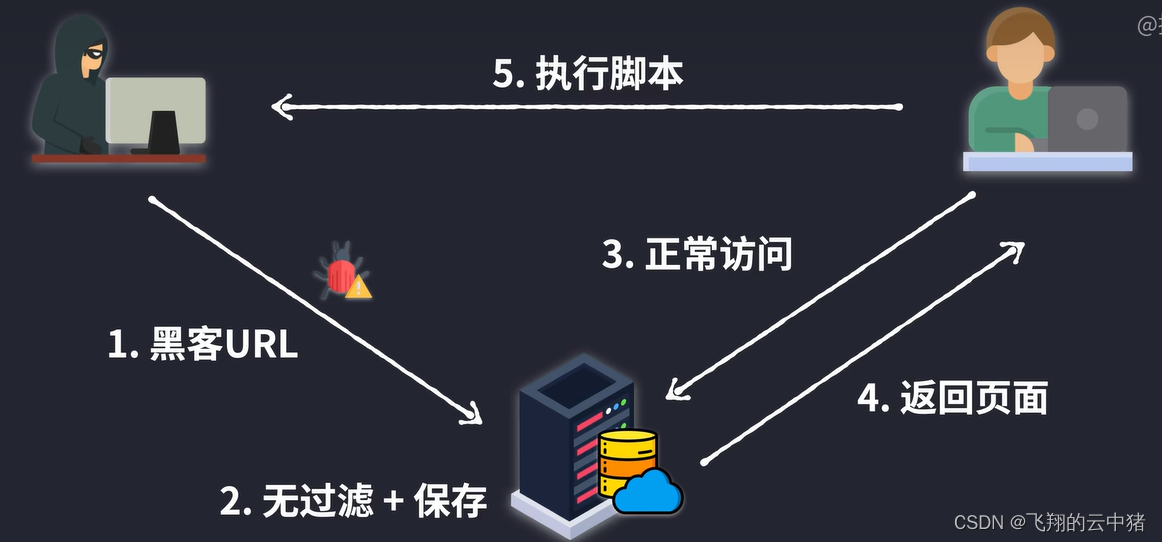
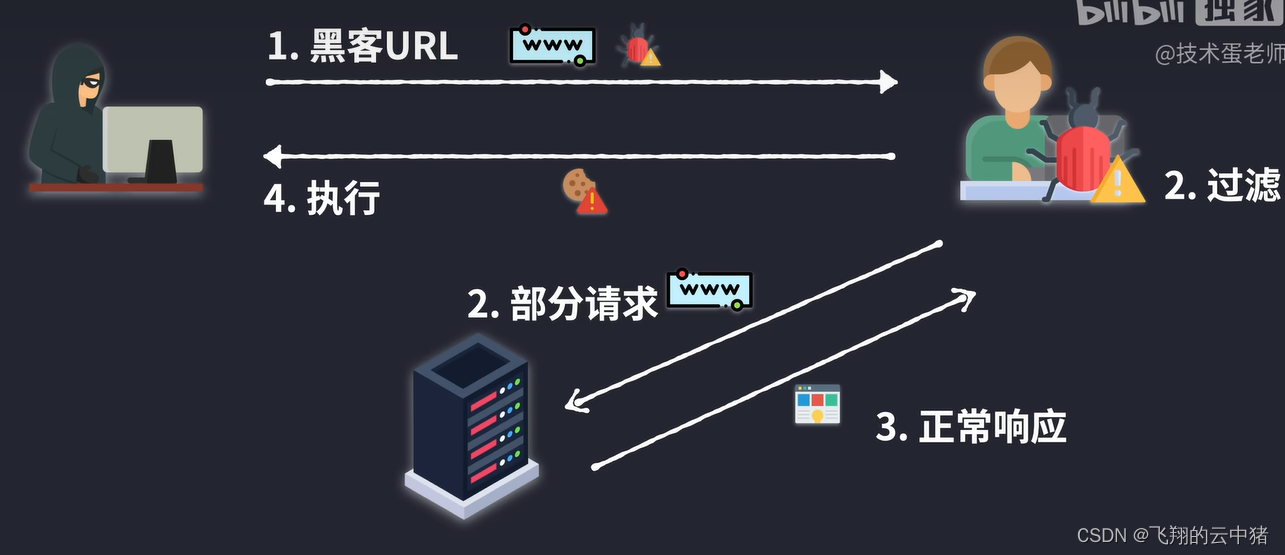
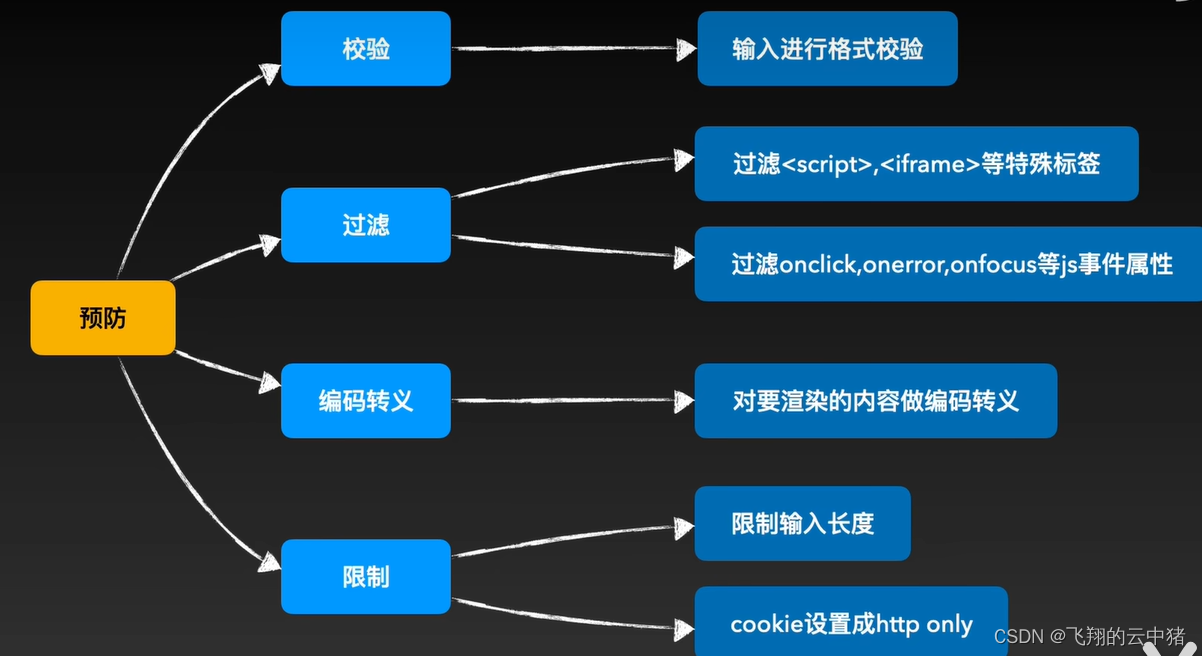
) 125 | - def_list # 列表 126 | - pymdownx.tasklist: 127 | custom_checkbox: true 128 | - mdx_truly_sane_lists # 多级列表 129 | 130 | # latex 131 | extra_javascript: 132 | - javascripts/mathjax.js 133 | - https://polyfill.io/v3/polyfill.min.js?features=es6 134 | - https://cdn.jsdelivr.net/npm/mathjax@3/es5/tex-mml-chtml.js 135 | 136 | plugins: 137 | - search 138 | - git-committers: 139 | repository: Fzu-SOSD-Lab/molihua 140 | branch: main 141 | enabled: !ENV [CI, false] 142 | - blog: 143 | blog_toc: true 144 | post_excerpt: required 145 | archive: false 146 | categories_name: 技术栈分类 147 | pagination_per_page: 5 148 | -------------------------------------------------------------------------------- /docs/guide/git/basic.md: -------------------------------------------------------------------------------- 1 | --- 2 | comments: true 3 | --- 4 | 5 | # Git 和 GitHub 基本操作指南 6 | 7 | 8 | ## 1. 介绍 9 | 10 | Git 是一个分布式版本控制系统,用于跟踪和管理项目中的代码更改。GitHub 是一个托管 Git 仓库的在线平台,它使多人协作变得更容易。 11 | 12 | 本指南将教你如何开始使用 Git 和 GitHub,以及如何解决可能出现的问题。 13 | 14 | ## 2. 安装 Git 15 | 16 | 首先,你需要在计算机上安装 Git。你可以从 [Git 官方网站](https://git-scm.com/downloads) 下载适用于你的操作系统的安装程序。 17 | 18 | **具体安装教程不多赘述,请参考博客[安装Git](https://www.liaoxuefeng.com/wiki/896043488029600/896067074338496)。** 19 | 20 | 安装完成后,打开终端(在 Windows 上使用 Git Bash 或命令提示符,Mac 和 Linux 上使用终端),运行以下命令以确认安装成功: 21 | 22 | ``` 23 | git --version 24 | ``` 25 | 26 | ## 3. 配置 Git 27 | 28 | 在开始使用 Git 之前,你需要配置一些基本信息,如你的用户名和电子邮件地址。运行以下命令来配置: 29 | 30 | **切记切记,这边的your name指的就是你的帐号名字,引号里面的才需要你自己修改成你自己的用户名和邮箱** 31 | 32 | ``` 33 | git config --global user.name "Your Name" 34 | git config --global user.email "your.email@example.com" 35 | ``` 36 | 37 | 注意`git config`命令的`--global`参数,用了这个参数,表示你这台机器上所有的Git仓库都会使用这个配置,当然也可以对某个仓库指定不同的用户名和Email地址。 38 | 39 | ## 4. 创建一个 GitHub 帐户 40 | 41 | 如果你还没有 GitHub 帐户,前往 [GitHub](https://github.com/) 注册一个帐户。 42 | 43 | ## 5. 创建一个新的仓库 44 | 45 | 1. 登录到 GitHub 帐户。 46 | 2. 点击右上角的加号(+)按钮,选择 "New repository"。 47 | 3. 输入仓库名称,选择**公开或私有**,然后点击 "Create repository"。 48 | 49 | ## 6. 克隆仓库 50 | 51 | 因为我们打算使用ssh的形式来完成和github的通信,所以需要跟着这篇博客来完成ssh的认证 52 | 53 | [远程仓库](https://www.liaoxuefeng.com/wiki/896043488029600/896954117292416), 后续我会自己写一篇更好理解的(画饼)。 54 | 55 | 要在本地计算机上使用仓库,你需要将其克隆到本地: 56 | 57 | ```shell 58 | git clone git@github.com:your-username/your-repo.git 59 | ``` 60 | 61 | **替换 `your-username` 和 `your-repo` 为你的 GitHub 用户名和仓库名称。** 62 | 63 | ## 7. 添加和提交更改 64 | 65 | 1. 在本地编辑文件。 66 | 2. 使用以下命令将更改添加到暂存区: 67 | 68 | ``` 69 | git add 'filename' 70 | 可以使用 git add . 来把当前目录下所有文件都加进去 71 | RockRockWhite:"git add .中.是相对当前工作路径的所有文件" 72 | ``` 73 | 74 | **记得我说的吗?引号里面的需要改成你自己的东西!** 75 | 76 | 3. 使用以下命令提交更改: 77 | 78 | ``` 79 | git commit -m 'Description of the changes' 80 | ``` 81 | 82 | ## 8. 拉取和合并更改 83 | 84 | 在你开始工作之前,确保你的本地仓库是最新的。使用以下命令拉取远程更改并将它们合并到你的分支: 85 | 86 | **记得我说的吗?引号里面的需要改成你自己的东西!确认你的远程仓库的主分支名称是main还是master!** 87 | 88 | ``` 89 | git pull origin 'your origin branchname' 90 | ``` 91 | 92 | ## 9. 发布更改 93 | 94 | 将本地更改发布到 GitHub 仓库: 95 | 96 | ``` 97 | git push origin 'your origin branchname' 98 | ``` 99 | 100 | ## 10. 常见错误和解决方案 101 | 102 | ### 1. 错误 : `fatal: remote origin already exists` 103 | 104 | **解决方案**: 这表示你已经添加了一个名为 "origin" 的远程仓库。你可以使用以下命令来更改远程仓库的 URL: 105 | 106 | ``` 107 | git remote set-url origin new-url 108 | ``` 109 | 110 | ### 2. 错误: `Permission denied (publickey).` 111 | 112 | **解决方案**: 这表示你没有正确的 SSH 密钥配置。请参考 [GitHub SSH 密钥文档](https://docs.github.com/en/authentication/connecting-to-github-with-ssh) 进行设置。 113 | 114 | ### 3. 错误:`fatal: not a git repository (or any of the parent directories): .git` 115 | 116 | **解决方案**:这个错误通常表示你不在一个包含Git仓库的目录中。确保你在正确的目录中运行Git命令,或者在目标目录中初始化一个新的Git仓库: 117 | 118 | ``` 119 | git init 120 | ``` 121 | 122 | ### 4. 错误:`error: Your local changes to the following files would be overwritten by merge` 123 | 124 | **解决方案**:这个错误表示你有未提交的更改,而Git无法自动合并。你可以选择放弃本地更改或提交本地更改后再进行合并。如果要放弃更改,可以使用以下命令: 125 | 126 | ``` 127 | git stash 128 | git pull origin branch-name 129 | git stash pop 130 | ``` 131 | 132 | ### 5. 错误:`remote: Support for password authentication was removed` 133 | 134 | **解决方案**:GitHub 不再支持使用密码进行认证。你应该配置SSH密钥并使用它们进行认证。请查看 [GitHub的SSH密钥文档](https://docs.github.com/en/authentication/connecting-to-github-with-ssh) 以设置SSH密钥。 135 | 136 | ### 6. 错误:`fatal: refusing to merge unrelated histories` 137 | 138 | **解决方案**:这个错误通常发生在合并两个不相关的Git历史时。你可以使用以下命令来合并它们: 139 | 140 | ``` 141 | git pull origin branch-name --allow-unrelated-histories 142 | ``` 143 | 144 | ### 7. 错误:`fatal: unable to access 'https://github.com/your-username/your-repo.git/': SSL certificate problem` 145 | 146 | **解决方案**:这个错误可能是由于SSL证书问题引起的。你可以尝试切换到使用SSH协议来解决此问题,或者验证你的系统上的SSL证书。 147 | 148 | ### 8. 错误:`error: pathspec 'filename' did not match any file(s) known to git` 149 | 150 | **解决方案**:这个错误通常表示Git无法找到指定的文件。确保文件名拼写正确,并且文件在Git仓库中。 151 | 152 | ### 9. 错误:`error: failed to push some refs to 'https://github.com/your-username/your-repo.git'` 153 | 154 | **解决方案**:这个错误表示你试图将更改推送到GitHub仓库时发生问题。可能是因为你没有足够的权限或远程仓库已经有了一些不同的更改。确保你有权限并尝试使用`git pull`来合并远程更改,然后再次尝试`git push`。 155 | 156 | ## 12. 结语 157 | 158 | 这个指南涵盖了 Git 和 GitHub 的基本操作,以及一些常见的错误 -------------------------------------------------------------------------------- /docs/blog/posts/202402020002docker/关于下载docker服务.md: -------------------------------------------------------------------------------- 1 | --- 2 | authors: 3 | - stephenJun 4 | date: 2024-02-02 5 | tags: 6 | - docker 7 | categories: 8 | - Docker 9 | - 运维 10 | --- 11 | 12 | # 安装docker 13 | ## 完整脚本 14 | sudo apt update 15 | sudo apt install apt-transport-https ca-certificates curl gnupg-agent software-properties-common -y 16 | 17 | sudo apt-get remove docker docker.io containerd runc -y 18 | 19 | curl -fsSL https://download.docker.com/linux/ubuntu/gpg | sudo apt-key add - 20 | 21 | sudo add-apt-repository "deb [arch=amd64] https://download.docker.com/linux/ubuntu $(lsb_release -cs) stable" 22 | 23 | sudo apt update 24 | sudo apt install docker-ce docker-ce-cli containerd.io -y 25 | 26 | 27 | 28 | ### 1. 先使用命名去更新软件包索引 29 | 30 | sudo apt update 31 | **PS**:APT软件包索引是记录了可用软件包的元数据、版本信息、依赖关系和其他相关信息。软件包索引是操作系统中的一个关键组成部分,用于帮助系统管理和维护已安装的软件包,以及在需要时安装新的软件包通过更新软件包索引,用户可以获取最新的软件包信息,包括新版本、安全更新和新功能,以便更轻松地管理和维护系统中的软件、 32 | 33 | ### 2. 然后再用curl指令导入docker仓库的GPG密钥并安装docker运行命令 34 | 35 | sudo apt install apt-transport-https ca-certificates curl gnupg-agent software-properties-common -y 36 | **解释**: 37 | - `apt-transport-https`:这是一个 APT(Advanced Package Tool)软件包管理器的传输插件,它允许通过 HTTPS 协议下载和安装软件包。HTTPS 是一种安全的通信协议,可确保在传输软件包时数据是加密的,因此更安全。 38 | 39 | - `ca-certificates`:这是包含根证书和可信任的 SSL 证书的软件包。它是确保系统能够验证通过 HTTPS 提供的软件源的证书有效性的一部分。没有正确的 SSL 证书,系统可能无法建立安全的连接到外部资源。 40 | 41 | - `curl`:curl 是一个用于在命令行中传输数据的工具,通常用于下载文件和与网络服务交互。在这种情况下,它可能被用于添加软件源或下载 GPG 密钥。 42 | 43 | - `gnupg-agent`:这是 GNU Privacy Guard(GnuPG 或 GPG)的一个组件,用于管理加密密钥和数字签名。在软件包管理中,它通常用于验证下载的软件包和软件源的签名,确保它们没有被篡改。 44 | 45 | - `software-properties-common`:这个软件包包含一些常用的软件包源管理工具和脚本,可以方便地添加、删除和管理软件源。 46 | 47 | 综合来说,运行这些命令是为了确保系统能够通过 HTTPS 安全地下载软件包、验证软件源的签名,并具备添加和管理新软件源的工具。这对于安装和更新软件非常重要,特别是在从不同来源获取软件包时。 48 | 49 | ### 3. 然后删除原有的docker服务(卸载与 Docker 相关的软件包和容器运行时组件,以彻底移除 Docker 容器平台及其关联的工具) 50 | sudo apt-get remove docker docker.io containerd runc -y 51 | 52 | ### 4.安装 Docker 软件包 53 | curl -fsSL https://download.docker.com/linux/ubuntu/gpg | sudo apt-key add - 54 | **解释**: 55 | `curl -fsSL https://download.docker.com/linux/ubuntu/gpg`:这部分使用 curl 命令从指定的 URL(https://download.docker.com/linux/ubuntu/gpg)下载 GPG 公钥。 56 | 57 | `-f`:表示在请求失败时不显示错误消息,以保持输出简洁。 58 | `-s`:表示以静默模式运行,不显示进度信息或其他提示。 59 | `-S`:表示在发生错误时仍然显示错误消息,但仅在 -s 和 -f 都存在时有效。 60 | `-L`:表示要求 curl 遵循重定向,以确保从指定的 URL 下载 GPG 密钥。 61 | `|`:这是管道操作符,它将 curl 命令的输出传递给下一个命令。 62 | `sudo apt-key add -`:这部分使用 sudo 命令以超级用户权限来运行 apt-key add 命令,将 curl 命令下载的 GPG 公钥添加到系统的 GPG 密钥环中。 63 | `-` 表示从标准输入中读取 GPG 公钥数据。 64 | 65 | 总结起来,这个命令的目的是从 Docker 官方网站下载 Docker 软件仓库的 GPG 公钥,并将其添加到系统,以便在安装 Docker 软件包时,系统能够使用该密钥验证软件包的签名,确保软件包的完整性和真实性。这有助于防止恶意软件或篡改的软件包被安装到系统中。 66 | ### 5. 安装docker软件仓库 67 | sudo add-apt-repository "deb [arch=amd64] https://download.docker.com/linux/ubuntu $(lsb_release -cs) stable" 68 | sudo apt update 69 | sudo apt install docker-ce docker-ce-cli containerd.io -y 70 | **解释**: 71 | - `add-apt-repository`:这是一个 Ubuntu 的命令,用于添加新的 APT 软件包源。 72 | - `"deb [arch=amd64] https://download.docker.com/linux/ubuntu $(lsb_release -cs) stable"`:这是软件包源的描述。它告诉系统从指定的 URL 73 | - `https://download.docker.com/linux/ubuntu` 下载 Docker 软件包,并使用当前系统的发行代号 $(lsb_release -cs),通常是 Ubuntu 版本的代号,例如 "focal" 或 "bionic"。stable 表示使用 Docker 的稳定版本。这个命令将在系统中创建一个新的软件包源文件,以便后续通过 apt 包管理器安装 Docker。 74 | - `sudo apt install docker-ce docker-ce-cli containerd.io -y`: 75 | 这个命令用于安装 Docker 软件包。具体来说,它安装了 Docker 的核心组件,包括 Docker 引擎 (docker-ce)、Docker 命令行工具 (docker-ce-cli) 和容器运行时 (containerd.io)。 76 | - `-y` 选项表示在提示是否安装时自动确认,以便无需手动确认安装过程。 77 | 78 | ## 解除sudo运行docker(推荐) 79 | sudo usermod -aG docker $USER 80 | newgrp docker 81 | **解释**:$USER是保存您当前用户名的环境变量,newgrp命令使usermod命令更改在当前终端中生效。 82 | 83 | # 删除docker 84 | 如果你保留Docker的数据我们建议你运行下面命令卸载Docker。 85 | 86 | sudo apt remove containerd.io docker-compose-plugin docker-ce 87 | 88 | 89 | 如果你删除了Docker所有数据,可以使用 90 | 91 | sudo apt purge containerd.io docker-compose-plugin docker-ce 92 | 卸载Docker。这也会把Docker的配置文件删除。 93 | 94 | # 配置docker镜像源 95 | ### 1.创建或修改配置文件 96 | 97 | vim /etc/docker/daemon.json 98 | 99 | ### 编辑内容 100 | { 101 | "registry-mirrors": [ 102 | "https://mirror.ccs.tencentyun.com", 103 | "https://docker.mirrors.ustc.edu.cn", 104 | "https://hub-mirror.c.163.com" 105 | ] 106 | } 107 | vim: i编写模式,esc命令模式,:wq保存并退出 -------------------------------------------------------------------------------- /docs/blog/author/web/luke/open-telemetry/research-20240112.md: -------------------------------------------------------------------------------- 1 | 2 | ## brief 摘要 3 | 4 | OpenTracing主要且也仅侧重于Trace方面,而OpenTelemetery主要涵盖了三个部分:Trace、Metrics、Log 5 | 6 | ![Cross cutting concerns](./assets/architecture.png) 7 | 8 | 9 | 10 | **Opentelemetry 项目组成** 11 | 12 | > OpenTelemetry is developed on a signal by **signal basis**. **Tracing, metrics, baggage, and logging** are examples of signals. Signals are built **on top of context propagation**, a shared mechanism for correlating data across distributed systems. 13 | 14 | ## Signals 信号源 15 | 16 | > The purpose of OpenTelemetry is to **collect, process, and export [signals](https://opentelemetry.io/docs/specs/otel/glossary/#signals).** 17 | > 18 | > OpenTelemetry currently supports **[traces](https://opentelemetry.io/docs/concepts/signals/traces), [metrics](https://opentelemetry.io/docs/concepts/signals/metrics), [logs](https://opentelemetry.io/docs/concepts/signals/logs) and [baggage](https://opentelemetry.io/docs/concepts/signals/baggage).** 19 | 20 | - "Signal" 这个术语并不是指一个特定的组件或实体,而是一种通用的概念,用于表示**不同类型的观测数据**。 21 | 22 | - 其中 Baggage 不是一个可观察性工具,它是一个将任意键和值附加到事务中的系统,以便下游服务可以访问它们。因此,Baggage 没有 OTLP 或收集器组件。 23 | 24 | - 跟踪(tracing)、度量(metrics)和日志(logs)可以同时使用,形成一个全面的观测解决方案。 25 | 26 | - ![](./assets/1615358153662-47637834-4b53-40e4-bbad-7b2fe2ecfff4.png) 27 | 28 | - 传统架构下Logs、Traces、Metrics都是单独产生并收集的,在OpenTelemetry的规划中,所有的数据都会通过OpenTelemetry的Collector进行采集并传输到统一的后端进行关联。好处非常明显: 29 | 30 | 1. 应用只需要一个SDK就可以做所有可观测性上的事情,依赖更少、资源消耗也更小 31 | 2. 采集端只需要一个,部署和运维代价更低 32 | 3. 数据格式统一,数据关联更容易 33 | 34 | 可以在这里查看官方对这四个signal的[支持情况](https://opentelemetry.io/docs/specs/status/#current-status) 35 | 36 | - 每个信号源都有[ 四个核心组件](https://opentelemetry.io/docs/concepts/components/): 37 | 38 | - APIs 39 | 40 | - SDKs 41 | 42 | - [OpenTelemetry Protocol](https://opentelemetry.io/docs/specs/otlp/) (OTLP) 43 | 44 | - [Collector](https://opentelemetry.io/docs/collector/) 45 | 46 | - 信号源还具有 contrib 组件,即pluginsinstrumentations(仪器:用于在应用程序代码中自动仪器化跟踪和度量的工具和库)的**生态系统**。共享相同的语义约定,以确保它们在观察常见操作(例如 HTTP 请求)时生成相同的数据。 47 | 48 | ## Components 组件 49 | 50 | ![](./assets/0.png) 51 | 52 | > OpenTelemetry is currently made up of several main components: 53 | > 54 | > - [Specification](https://opentelemetry.io/docs/concepts/components/#specification) 55 | > - [Collector](https://opentelemetry.io/docs/concepts/components/#collector) 56 | > - Language-specific API & SDK implementations 57 | > - [Instrumentation Libraries](https://opentelemetry.io/docs/concepts/components/#instrumentation-libraries) 58 | > - [Exporters](https://opentelemetry.io/docs/concepts/components/#exporters) 59 | > - [Automatic Instrumentation](https://opentelemetry.io/docs/concepts/components/#automatic-instrumentation) 60 | > - [Resource Detectors](https://opentelemetry.io/docs/concepts/components/#resource-detectors) 61 | > - [Cross Service Propagators](https://opentelemetry.io/docs/concepts/components/#cross-service-propagators) 62 | > - [Sampler](https://opentelemetry.io/docs/concepts/components/#sampler) 63 | > - [K8s operator](https://opentelemetry.io/docs/concepts/components/#k8s-operator) 64 | > - [Function as a Service assets](https://opentelemetry.io/docs/concepts/components/#function-as-a-service-assets) 65 | 66 | ### Specification **跨语言规范说明** 67 | 68 | 描述所有实现的跨语言要求和期望。除了术语定义之外,该规范还定义了以下内容: 69 | 70 | - **API:**定义用于生成和关联跟踪、指标和日志记录数据的数据类型和操作。 71 | - **SDK:**定义特定于语言的 API 实现的要求。配置、数据处理和导出概念也在这里定义。 72 | - **数据:**定义遥测后端可以提供支持的开放遥测协议 (OTLP) 和与供应商无关的语义约定。 73 | 74 | ### 特定语言的 APIs 和 SDKs 实现 75 | 76 | OpenTelemetry 还具有语言 SDK,以便开发人员能够在各种语言中集成观测功能。 77 | 78 | 每个语言的 API 提供了开发人员在应用程序中使用观测功能的标准接口,而相应的 SDK 实现则提供了这些接口的具体实现和底层逻辑。Instrumentation Libraries 自动化工具用于自动将观测功能集成到应用程序中,减少了手动操作的需求。 79 | 80 | **Java:** 81 | 82 | - **API:** OpenTelemetry Java API 83 | - **SDK:** OpenTelemetry Java SDK 84 | - **自动仪器化:** 使用 Java Agent 进行自动仪器化 85 | 86 | ### Collector 收集器 87 | 88 | OpenTelemetry Collector 是一个**与供应者无关**的**代理**,可以接收、处理和导出遥测数据。它支持**接收多种格式**的遥测数据(例如,OTLP、Jaeger、Prometheus 以及许多商业/专有工具)并将数据发送到一个或多个后端。它还支持在导出遥测数据之前对其进行处理和过滤。 89 | 90 | - 收集器有两种部署模型: 91 | 1. 与应用驻留在同一主机上的代理(例如,二进制、DaemonSet、sidecar 等) 92 | 2. 与应用完全分离的独立进程 93 | 94 | 由于收集器只是收集和发送远程监测的规范,因此它仍然需要一个后端来接收和存储数据。 95 | 96 | ### Exportor 出口器 97 | 98 | 作为特定于语言的实现的一部分,有许多可用的导出器。其中,OpenTelemetry Protocol (OTLP) 导出器为最终用户提供最佳体验,因为它是在 OpenTelemetry 项目范围内设计的通用遥测数据传输协议。 99 | 100 | 遥测客户端与外部通信所需要实现的协议规范主要是指 OpenTelemetry Protocol (简称 OTLP)。OTLP 是 Opentelemetry 原生的遥测信号传递协议,虽然在 Opentelemetry 的项目中contrib组件支持了 Zipkin v2 或 Jaeger Thrift 的协议格式的实现,但是都是以第三方贡献库的形式提供的。只有 OTLP 是 Opentelemetry 官方原生支持的格式。 -------------------------------------------------------------------------------- /docs/blog/posts/202402110004/MySQL索引.md: -------------------------------------------------------------------------------- 1 | --- 2 | authors: 3 | - shaoxiawjc 4 | date: 2024-02-11 5 | tags: 6 | - mysql 7 | categories: 8 | - Java 9 | - mysql 10 | --- 11 | 12 | # MySQL的索引 13 | 14 | # 一、搜索树 15 | 16 | ## 1、二叉搜索树 17 | 18 | 二叉搜索树(Binary Search Tree,简称BST)是一种二叉树数据结构,具有以下性质: 19 | 20 | 1. **有序性:** 对于二叉搜索树中的每个节点,其左子树中的所有节点的值都小于该节点的值,而右子树中的所有节点的值都大于该节点的值。 21 | 2. **递归性:** 二叉搜索树的左子树和右子树也是二叉搜索树。 22 | 23 | 24 | 25 | 这两个性质保证了在二叉搜索树中进行查找、插入和删除等操作时的高效性。由于有序性,可以利用二分查找的思想进行快速搜索。 26 | 27 | 以下是一个简单的二叉搜索树的示例: 28 | 29 | ```markdown 30 | 5 31 | / \ 32 | 3 8 33 | / \ / \ 34 | 2 4 6 9 35 | ``` 36 | 37 | 在这个示例中,树中的每个节点都遵循二叉搜索树的有序性。对于任意节点,其左子树中的值都小于节点的值,而右子树中的值都大于节点的值。 38 | 39 | ### 操作: 40 | 41 | 1. **查找:** 从根节点开始,比较要查找的值与当前节点的值,根据比较结果沿着左子树或右子树递归查找。 42 | 2. **插入:** 从根节点开始,根据要插入的值的大小,递归地在左子树或右子树中找到合适的位置插入新节点。 43 | 3. **删除:** 删除节点时需要考虑不破坏二叉搜索树的有序性。分为三种情况: 44 | - 如果节点没有子节点,直接删除即可。 45 | - 如果节点有一个子节点,将其父节点指向子节点。 46 | - 如果节点有两个子节点,可以选择用其右子树中的最小值节点替换该节点,然后在右子树中删除这个最小值节点。 47 | 48 | 二叉搜索树的平均时间复杂度为O(log n),其中n是树中节点的数量。但在最坏情况下,当树高度接近n时,时间复杂度可能退化为O(n)。因此,为了确保平衡性,人们引入了平衡二叉搜索树的概念,例如B/B+树和红黑树。这些树在插入和删除节点时保持平衡,提高了查找等操作的性能。 49 | 50 | ## 2、B-Tree 51 | 52 | ### 2.1定义 53 | 54 | B树是一种平衡的多叉树,我们一般叫m阶B树,它必须满足以下性质 55 | 56 | * 每一个节点最多只有m个节点 57 | * 每个内部节点(除了根节点和叶子节点)都至少具有[m/2]个子节点 58 | * 如果根不是叶节点,则根至少有俩个节点 59 | * 具有k个子节点的非叶节点有k-1个键 60 | * 所有叶子节点的高度一致 61 | 62 | **B树的阶** 63 | 64 | 也就是我们上面所说的m,是一个节点的子节点的个数的最大值 65 | 66 | 比如下图的【13 16 19】的子节点个数达到了4,就是m 67 | 68 | ![image-20240130232339517](./markdown-img/MySQL索引.assets/image-20240130232339517.png) 69 | 70 | **根节点** 71 | 72 | 如图中的【10】就是根节点,这个还是比较直观的。 73 | 74 | 当然,根节点可以不止一个,对于一个m阶的B树,其根节点满足: 75 | 76 | * 2 <= M <= m 其中 M 为子节点数量 77 | * 1 <= K <= m-1 其中 K 为根节点的元素个数 78 | 79 | 以上的关系式还是比较好理解的,可以有上面的B树的定义4得来 80 | 81 | **内部节点** 82 | 83 | 除了根节点换个最下面的节点,比如图的 【3 6】【13 16 19】 84 | 85 | 假设m阶B树的内部节点的子节点数量为M,则有 86 | 87 | * [m/2]+1<= M <=m 88 | 89 | 对应的元素个数K=M-1 90 | 91 | 满足 92 | 93 | * [m/2]<= K <=m-1 94 | 95 | 这里讲一下为什么又这个关系式。==**个人理解:**==首先这个关系式是为了保持B树的“矮胖”,想象一下,有一颗茂盛的100阶B树,假设它有100个高度。接下来你要对它进行删除操作,如果不考虑上面的关系式,那么你最后是可以把它删成每一个节点只有1个数据的100层 96 | 97 | 的B数,但其实它是完全可以向上合并的。 98 | 99 | **叶子节点** 100 | 101 | 最下面的节点,由于其不含字节点,因此只需满足 102 | 103 | * [m/2]<= K <=m-1 104 | 105 | K 为元素个数 106 | 107 | 108 | 109 | 110 | 111 | ## 3、磁盘存储和预读 112 | 113 | 计算机存储一般分为俩种:内存和外存 114 | 115 | 众所周知,内存的时间是远远大于外存的,但是内存的贵而且断电即失 116 | 117 | 而外存,一般是磁盘存储,其时间之所以慢,是因为内存使用电,而磁盘使用机械运动,磁盘花在存储上的时间由3部分组成,分别为寻道时间,旋转延迟和传输时间 118 | 119 | * 寻道时间和旋转延迟 120 | 121 | ![image-20240130234831120](./markdown-img/MySQL索引.assets/image-20240130234831120.png) 122 | 123 | ![image-20240130234855518](./markdown-img/MySQL索引.assets/image-20240130234855518.png) 124 | 125 | 126 | 127 | 如上俩张图,圆圆的是磁盘,黑黑的长长的是磁头,当我们需要从磁盘里读取数据时,操作系统会发送数据逻辑地址给磁盘,C盘将其转化为物理地址,就是哪一个磁道,然后把磁头放上去读,那么磁头放上去所花费的时间,我们就称为**寻道时间**,一般在5ms以下,然后磁盘旋转将目标扇区转到磁头下面所花费的时间称为**旋转延迟**,一般在4ms左右 128 | 129 | * 传输时间 130 | 131 | 指的是得到数据把它从磁盘里读出去,或者把数据写进去的时间,一般只有0.几ms,相对于上面俩位大哥可以忽略不计 132 | 133 | 那么5+4=9ms,如果在MySQL里执行上百万条数据,重复这样的过程会非常的耗时 134 | 135 | 考虑到磁盘IO是非常高昂的操作,计算机操作系统做了一些优化,当一次IO时,不光把当前磁盘地址的数据,而是把相邻的数据也都读取到内存缓冲区内,因为局部预读性原理告诉我们,当计算机访问一个地址的数据的时候,与其相邻的数据也会很快被访问到。每一次IO读取的数据我们称之为一页(page)。具体一页有多大数据跟操作系统有关,一般为4k或8k,也就是我们读取一页内的数据时候,实际上才发生了一次IO,这个理论对于索引的数据结构设计非常有帮助。 136 | 137 | 从上我们可以得出 138 | 139 | * 我们要少查磁盘 140 | * 磁盘读1K和1B的时间差不多 141 | 142 | 假设我们一次I/O的查询量为8K,索引使用int4字节存储,一个节点最多2000条数据,那么我们考虑三层B树,总共大约有 143 | 144 | 2000 * (2000+1)*(2000+3)= 80亿条数据,而3层我们只需查3次I/O,由此可见B树的强大之处 145 | 146 | 147 | 148 | ## 4、B+树 149 | 150 | B+树的特征 151 | 152 | * 有m个子节点的中间节点包含m个元素(和B树不一样,B树是m-1个)==请注意,这一点在很多地方是有争议的,有些地方认为B+树的非叶子节点元素个数仍然是m-1个== 153 | * 每个元素不包含数据,只拿来做索引 154 | * 叶子节点包含了全部关键字的信息和指向数据的指针,并且叶子节点本身按照关键字大小顺序排序 155 | * 所有的非终端节点都可以看成索引部分,节点里的元素可以看出对应子节点是大于还是小于 156 | 157 | 关于B+树的插入和删除可以参考上面的博客 158 | 159 | **为什么说B+树更适合做数据库索引** 160 | 161 | 1. B树的非叶子节点不存储数据了,那么空间就大了,相对于B树就可以存储更多的关键字了,那么树的高度就降低了,提高了检索的效率 162 | 2. 查询效率稳定。每次查询一棵B+树一定要走到叶子节点,也就是说每次的查询时间差不多 163 | 3. 便于范围查询,由于B+树的叶子节点是一个有序的链表,我们在查询到一个上限或下限关键字后,可以直接遍历来查询。而B树必须一次一次的查询 164 | 165 | 166 | 167 | 168 | 169 | # 二、MySQL索引实现 170 | 171 | ## 1、MyISAM索引实现 172 | 173 | ![image-20240131123120106](./markdown-img/MySQL索引.assets/image-20240131123120106.png) 174 | 175 | MyISAM使用B+数作为其索引的数据结构,其中叶子节点存储的是对应数据的物理地址 176 | 177 | 我们由之前的磁盘存储原理可知,MyISAM在查询到地址后还要重新寻道旋转,具体过程如下: 178 | 179 | 1. **索引的读取:** 查询开始时,MyISAM 存储引擎会首先读取索引树,这是一个 B 树结构,树的节点包含了索引键值和指向下一级节点的指针。这一步操作通常需要进行多次 I/O 操作,尤其是在树的深度较大的情况下。 180 | 2. **定位叶子节点:** 一旦找到了包含目标索引键值的叶子节点,MyISAM 会再次进行 I/O 操作,将叶子节点读入内存。 181 | 3. **获取物理地址:** 叶子节点中存储了数据行的物理地址(磁盘上的位置)。MyISAM 会从叶子节点中获取这些物理地址。 182 | 4. **磁盘 I/O 操作:** 最后,MyISAM 需要进行一次或多次磁盘 I/O 操作,以从磁盘上读取或写入实际的数据行。这可能涉及到寻找磁头、寻道、旋转等磁盘操作。 183 | 184 | 因此,MyISAM的查询会经过多次I/O操作,很影响性能,所以我们不用 185 | 186 | **MyISAM的辅助索引** 187 | 188 | MyISAM的辅助索引使用的是B+树数据结构,但是MyISAM的辅助索引是可以重复的(这里注意一点,B+树是可以重复数据的,使得对应叶子节点的元素会存储多个数据行),其中叶子节点的data存放的是主键的物理地址,myisam在查询数据时是先查找辅助索引,查询到主键后,在查找对应的数据 189 | 190 | 191 | 192 | ## 2、InnoDB索引实现 193 | 194 | InnoDB的索引也是使用B+树实现的,与上面那位不同的是,InnoDB的叶子节点的数据存放的是一整个数据行 195 | 196 | ![image-20240131125544271](./markdown-img/MySQL索引.assets/image-20240131125544271.png) 197 | 198 | 可以看到,InnoDB的数据是按主键聚集的,因此InnoDB的索引也叫聚集索引,上面那位叫非聚集索引。因此InnoDB必须要有主键,如果没有,MySQL会自己创建一列6位的长整型来当做主键 199 | 200 | **InnoDB的辅助索引** 201 | 202 | 和上面那位不同的是,InnoDB的辅助索引存储的是主键的值而不是地址。 203 | 204 | InnoDB使用辅助索引查询需要检索俩次:先检索辅助索引获得主键,在检索主键获得数据 205 | 206 | 207 | 208 | # 参考链接 209 | 210 | 211 | 212 | https://blog.codinglabs.org/articles/theory-of-mysql-index.html 213 | 214 | https://github.com/wardseptember/notes/blob/master/docs/B%E6%A0%91%E5%92%8CB+%E6%A0%91%E8%AF%A6%E8%A7%A3.md 215 | 216 | https://juejin.cn/post/6990616210895273991 217 | 218 | https://zhuanlan.zhihu.com/p/54102723 219 | 220 | 221 | 222 | 223 | 224 | -------------------------------------------------------------------------------- /docs/cs-internal/debug-theory.md: -------------------------------------------------------------------------------- 1 | --- 2 | date: 3 | created: 2024-05-04 4 | updated: 2024-05-04 5 | categories: 6 | - 杂项 7 | comments: true 8 | --- 9 | 10 | # 调试理论 11 | 12 | > 来自蒋炎岩老师的OS2024Spring课程 13 | > 14 | > - [Yanyan's Wiki (jyywiki.cn)](https://jyywiki.cn/OS/2024/lect8.md) 15 | > - [08-调试理论与实践 \(Fault, Error, Failure;调试一切\)【南京大学2024操作系统】](https://www.bilibili.com/video/BV16p421U7fk) 16 | 17 | ## 调试心态 18 | 19 | ### 公理 1:**机器永远是对的** 20 | 21 | - CPU: “无情的、执行指令的机器” 22 | - Crash, Wrong Answer, 虚拟机神秘重启 23 | - 99.9999% 是自己的问题 24 | - 有亿点点概率是编译器错了 (但你可以知道) 25 | - 有亿点点点点概率是处理器错了 (你也可以知道) 26 | 27 | ### 公理 2:**未测代码永远是错的** 28 | 29 | - 未反复测试过的代码都是错的 30 | - 快速地测试→测试框架&&测试用例 31 | - 你以为最不可能出 bug 的地方,往往 bug 就在那躺着 32 | 33 | 34 | 35 | ## Why is there bug? 36 | 37 | > 每个鏖战的夜晚都会发出的怒吼QAQ 38 | 39 | ### “软件” 的两层含义 40 | 41 | - 人类需求在信息世界的**投影** 42 | - 理解错需求 → bug 43 | - 计算过程的精确 (数学) 描述 44 | - 实现错误 → bug 45 | 46 | ### 调试为什么困难? 47 | 48 | - Bug 的触发经历了漫长的过程 49 | - 可观测的现象未必能直接对应到 root cause 上 50 | 51 | ### Fault, Error, 和 Failure 52 | 53 | 需求 → 设计 → 代码 (*[起因]* **Fault/bug**) → 执行 (*[中间因素]* **Error**) → 失败 (*[结果]* **Failure**) 54 | 55 | - 我们只能观测到 failure (可观测的结果中的错误) 56 | 57 | - 我们可以检查状态的正确性 (但非常费时) 58 | 59 | - 无法预知 bug 在哪里 (每一行 “看起来” 都挺对的) 60 | 61 | - ```c 62 | for (int i = 0; i < n; i++) 63 | for (int j = 0; j < n; i++) { 64 | ... 65 | } 66 | ``` 67 | 68 | - 人总是 “默认” (不默认,浪费的时间就太多了) 69 | 70 | ## 调试理论 71 | 72 | > 调试理论:如果我们能判定任意程序状态的正确性,那么给定一个 failure,我们可以通过二分查找定位到第一个 error 的状态,此时的代码就是 fault (bug)。 73 | 74 | ### 推论 75 | 76 | - 为什么我们喜欢 “单步调试”? 77 | - 从一个假定正确的状态出发 78 | - 每个语句的行为有限,容易判定是否是 error 79 | - 为什么调试理论看起来很没用? 80 | - **“判定状态正确” 非常困难** 81 | - (是否在调试 DP 题/图论算法时陷入时间黑洞?) 82 | 83 | ### 调试 = 观察状态机执行 (trace) 的某个侧面 84 | 85 | > 程序的运行就是一个状态机 86 | 87 | - 缩小错误状态 (error) 可能产生的位置 88 | - 提出假设,作出验证 89 | 90 | ### 观察状态机执行的两个基本工具 91 | 92 | - printf → 自定义 log 的 trace 93 | - 灵活可控、能快速定位问题大概位置、适用于大型软件 94 | - 用多个log将程序的运行状态分隔, 进行bug定位 95 | - 无法精确定位、大量的 logs 管理起来比较麻烦 96 | - gdb → 指令/语句级 trace 97 | - 精确、指令级定位、任意查看程序内部状态 98 | - 耗费大量时间 99 | 100 | ### 如何理解调试理论 101 | 102 | 调试理论给了大家在遇到 “任何问题” 时候 self-check 的列表: 103 | 104 | > 记住: **机器永远是对的** 105 | 106 | 1. 是怎样的程序 (状态机) 在运行? 107 | 2. 我们遇到了怎样的 failure? 108 | 3. 我们能从状态机的运行中从易到难得到什么信息? 109 | 4. 如何二分检查这些信息和 error 之间的关联? 110 | 111 | 112 | 113 | ## 调试一切 114 | 115 | ### Computer world: 一切皆可调试 116 | 117 | #### 计算机随时随地都在拒绝你 118 | 119 | ```shell 120 | bash: curl: command not found 121 | fatal error: 'sys/cdefs.h': No such file or directory #include 122 | /usr/bin/ld: cannot find -lgcc: No such file or directory 123 | make[2]: *** run: No such file or directory. Stop. Makefile:31: recipe for target 'run' failed 124 | ``` 125 | 126 | **万能方法:假设你遇到的问题是别人也遇到的** 127 | 128 | - 但如果这是一个全新的问题? 129 | 130 | #### 程序 = 计算机系统 = 状态机 131 | 132 | > 机器永远是对的 133 | 134 | UNIX 世界里你做任何事情都是在**编程** 135 | 136 | - “用编程语言把脑中所想传达给电脑” 137 | - 命令行的命令就是编程 → 一个简短的shell脚本 138 | - 最开始使用图形化界面运行/debug也是编程 → 可以发现vscode只是代替你执行了一些命令行语句 139 | - 刚才的问题都可以看成是程序/输入/配置有 bug 140 | 141 | #### 调试理论可以用于解决任何 “问题” 142 | 143 | - curl: command not found 144 | - `'sys/cdefs.h'`: No such file or directory 145 | - Makefile:31: recipe for target 'run' failed 146 | 147 | ### 使用调试理论 148 | 149 | #### Fault (程序/输入/配置错) → Error → Failure (可观测) 150 | 151 | - 大部分 Error 和 Failure 都比较接近 152 | - 出错时,使用 perror 打印日志 153 | 154 | #### “找不到问题” 的原因 155 | 156 | - **出错原因报告不准确** 157 | - 也可能是没看懂 158 | - 对于大型项目(如Spring)更是这样, 对于一种Failure有多种可能的Fault, 当STFW时, 很可能会搜到多种不相干的Fault:disappointed: 159 | - 这个时候把这些报错信息丢给LLM不失为一个好选择:smile: 160 | - **程序执行的过程看不到** 161 | - 那我们想办法 “看到” 状态机的执行过程就好了! 162 | 163 | #### 理解状态机执行:不是 “调试”,也是 “调试” 164 | 165 | - `ssh`:使用 `-v` 选项检查日志 166 | - `gcc`:使用 `-v` 选项打印各种过程 167 | - `make`:使用 `-nB` 选项查看完整命令历史 168 | 169 | #### 调试:不仅是 “调试器” 170 | 171 | - Profiler: `perf` - “采样” 状态机 172 | - Trace: `strace` - 追踪系统调用 173 | 174 | #### 例: 'sys/cdefs.h': No such file or directory 175 | 176 | - (这看起来是用 `perror()` 打印出来的!) 177 | - 问题分析 178 | - `#include` = 复制粘贴,自然会经过路径解析 179 | - 明明 `/usr/include/x86_64-linux-gnu/sys/cdefs.h` 是存在的 (`man 1 locate`) 180 | 181 | ##### 两种方法 182 | 183 | - 日志: 运行时添加 `--verbose`选项 184 | - strace,直接看访问过的文件! 185 | 186 | ### 调试程序 187 | 188 | #### GDB:状态机查看器 189 | 190 | - 允许我们控制执行流、检查状态 191 | - 而且原生支持 Python 192 | - 因此拥有众多前端:gdb-gui, cgdb, pwndbg, gdb-dashboard, vscode, ddd, .. 193 | - (我觉得最好用的还是自己按需轻量定制) 194 | 195 | #### 使用 GNU Debugger 196 | 197 | - GDB: 最常用的命令在[gdb cheat sheet](./debug-theory.assets/gdb-cheat-sheet.pdf) 198 | - 打印贴在电脑前,调试时候看一遍,很快就大致记住了 199 | 200 | #### 我们依旧需要 [RTFM](https://sourceware.org/gdb/current/onlinedocs/gdb.html/) 201 | 202 | - 否则我们甚至不知道 gdb 有多强大 203 | 204 | #### Cheat Sheet 里没有的功能 205 | 206 | - Text UI (我已经默认启动) 207 | - Stack, optimized code, macros, ... 208 | - Reverse execution 209 | - Record and replay 210 | - Scheduler 211 | 212 | ## 调试理论的应用 213 | 214 | **需求 → 设计 → 代码 → Fault → Error → Failure** 215 | 216 | - “Technical Debt”: 每当你写出不好维护的代码,你都在给你未来的调试/需求变更挖坑 217 | - 论敏捷开发与:shit:山代码 218 | 219 | ### 调试理论: 推论1 220 | 221 | #### 需求 → 设计 → 代码 → Fault → Error → Failure 222 | 223 | - **写好代码**:不要在写代码的时候忘记需求和设计 224 | - 不言自明 (Self-explanatory) 225 | - 能通过字面知道需求 (流程) 226 | - 不言自证 (Self-evident) 227 | - 能通过字面确认代码和需求一致 228 | 229 | ### **一个评判标准** 230 | 231 | - AI 是否能正确理解/维护你的代码: [toybox](http://git.nju.edu.cn/jyy/toybox) 232 | 233 | > Programs are meant to be read by humans and only incidentally for computers to execute. (Donald E. Knuth) 234 | > 235 | > 程序首先是给人读的, 其次才是给机器去执行 236 | 237 | ### 调试理论:推论 (2) 238 | 239 | #### 需求 → 设计 → 代码 → Fault → Error → Failure 240 | 241 | - **做好测试**:未测代码永远是错的 242 | - 残酷的现实:相信自己写不对代码 243 | - LLM 一样经常犯 “傻” 错 244 | 245 | #### Small Scope Hypothesis 246 | 247 | > If a system does not have a counterexample (i.e., an error or a bug) for a certain property within a small scope (a limited size or configuration), then it is unlikely to have a counterexample in a larger scope. (Daniel Jackson) 248 | > 249 | > 如果一个系统在有限的范围(有限的大小或配置)内对某个特定属性没有反例(即错误或漏洞),那么它在更大的范围内也不太可能有反例。 250 | 251 | 252 | 253 | ### 调试理论:推论 (3) 254 | 255 | #### 需求 → 设计 → 代码 → Fault → Error → Failure 256 | 257 | - 测试的目的: 将隐藏的Fault暴露出来 变成可观测的Failure 258 | - **多写断言ASSERT**:把代码中的 “隐藏性质” 写出来 259 | - 机器总是对的, 但人总可能犯错→在你发现bug前, 描述正确代码应该有的性质, 用断言来表述他们 260 | - Error 暴露的越晚,调试越困难 261 | - 追溯导致 assert failure 的变量值 (slice) 通常可以快速定位到 bug 262 | 263 | > “There are two ways of constructing a software design: One way is to make it so simple that there are obviously no deficiencies, and the other way is to make it so complicated that there are no obvious deficiencies” (Tony Hoare) 264 | > 265 | > 构建软件设计有两种方式:一种方式是让它简单到明显没有缺陷;另一种方式是让它复杂到没有明显的缺陷 266 | > 267 | > - **简单到无懈可击**:第一种方法是设计一个极其简单明了的系统,简单到没有任何明显的缺陷或漏洞 268 | > - **复杂到难以察觉缺陷**:第二种方法是创建一个如此复杂和深奥的设计,以至于缺陷并不明显 269 | 270 | 271 | 272 | -------------------------------------------------------------------------------- /docs/guide/git/ops.md: -------------------------------------------------------------------------------- 1 | # git 常用命令。 2 | 3 | !!! note "贡献者: [Raven](https://github.com/0128130Raven) at 2023-09-27" 4 | 5 | 6 | ## 创建SSH Key 7 | ```shell 8 | $ ssh-keygen -t rsa -C "youremail@example.com" 9 | ``` 10 | 11 | ## 测试SSH key配对成功 12 | 13 | ```shell 14 | $ ssh -T git@gitee.com 15 | ``` 16 | 17 | 18 | 19 | ## 配置用户信息 20 | 21 | ```shell 22 | $ git config --global user.name "Your Name" 23 | $ git config --global user.email "email@example.com" 24 | ``` 25 | 26 | ## 检查配置成功 27 | 28 | ```shell 29 | $ git config 30 | ``` 31 | 32 | ## 仓库 33 | 34 | > 在当前目录新建一个Git代码库 35 | ```shell 36 | $ git init 37 | ``` 38 | 39 | > 新建一个目录,将其初始化为Git代码库 40 | ```shell 41 | $ git init [project-name] 42 | ``` 43 | 44 | > 下载一个项目和它的整个代码历史 45 | ```shell 46 | $ git clone [url] 47 | ``` 48 | ## 增加/删除文件 49 | > 添加指定文件到暂存区 50 | ```shell 51 | $ git add [file1] [file2] ... 52 | ``` 53 | 54 | > 添加指定目录到暂存区,包括子目录 55 | ```shell 56 | $ git add [dir] 57 | ``` 58 | 59 | > 添加当前目录的所有文件到暂存区 60 | ```shell 61 | $ git add . 62 | ``` 63 | 64 | > 添加每个变化前,都会要求确认 65 | > 对于同一个文件的多处变化,可以实现分次提交 66 | ```shell 67 | $ git add -p 68 | ``` 69 | 70 | > 删除工作区文件,并且将这次删除放入暂存区 71 | ```shell 72 | $ git rm [file1] [file2] ... 73 | ``` 74 | 75 | > 停止追踪指定文件,但该文件会保留在工作区 76 | ```shell 77 | $ git rm --cached [file] 78 | ``` 79 | 80 | > 改名文件,并且将这个改名放入暂存区 81 | ```shell 82 | $ git mv [file-original] [file-renamed] 83 | ``` 84 | ## 代码提交 85 | > 提交暂存区到仓库区 86 | ```shell 87 | $ git commit -m [message] 88 | ``` 89 | 90 | > 提交工作区自上次commit之后的变化,直接到仓库区 91 | ```shell 92 | $ git commit -a 93 | ``` 94 | 95 | > 提交时显示所有diff信息 96 | ```shell 97 | $ git commit -v 98 | ``` 99 | 100 | > 使用一次新的commit,替代上一次提交 101 | > 如果代码没有任何新变化,则用来改写上一次commit的提交信息 102 | ```shell 103 | $ git commit --amend -m [message] 104 | ``` 105 | 106 | > 重做上一次commit,并包括指定文件的新变化 107 | ```shell 108 | $ git commit --amend [file1] [file2] ... 109 | ``` 110 | ## 查看信息 111 | > 显示有变更的文件 112 | ```shell 113 | $ git status 114 | ``` 115 | 116 | > 显示当前分支的版本历史 117 | ```shell 118 | $ git log 119 | ``` 120 | 121 | > 显示commit历史,以及每次commit发生变更的文件 122 | ```shell 123 | $ git log --stat 124 | ``` 125 | 126 | > 搜索提交历史,根据关键词 127 | ```shell 128 | $ git log -S [keyword] 129 | ``` 130 | 131 | > 显示某个commit之后的所有变动,每个commit占据一行 132 | ```shell 133 | $ git log [tag] HEAD --pretty=format:%s 134 | ``` 135 | 136 | > 显示某个commit之后的所有变动,其"提交说明"必须符合搜索条件 137 | ```shell 138 | $ git log [tag] HEAD --grep feature 139 | ``` 140 | 141 | > 显示某个文件的版本历史,包括文件改名 142 | ```shell 143 | $ git log --follow [file] 144 | ``` 145 | 146 | > 显示指定文件相关的每一次diff 147 | ```shell 148 | $ git log -p [file] 149 | ``` 150 | 151 | > 显示过去5次提交 152 | ```shell 153 | $ git log -5 --pretty --oneline 154 | ``` 155 | 156 | > 显示所有提交过的用户,按提交次数排序 157 | ```shell 158 | $ git shortlog -sn 159 | ``` 160 | 161 | > 显示指定文件是什么人在什么时间修改过 162 | ```shell 163 | $ git blame [file] 164 | ``` 165 | 166 | > 显示暂存区和工作区的差异 167 | ```shell 168 | $ git diff 169 | ``` 170 | 171 | > 显示暂存区和上一个commit的差异 172 | ```shell 173 | $ git diff --cached [file] 174 | ``` 175 | 176 | > 显示工作区与当前分支最新commit之间的差异 177 | ```shell 178 | $ git diff HEAD 179 | ``` 180 | 181 | > 显示两次提交之间的差异 182 | ```shell 183 | $ git diff [first-branch]...[second-branch] 184 | ``` 185 | 186 | > 显示今天你写了多少行代码 187 | ```shell 188 | $ git diff --shortstat "@{0 day ago}" 189 | ``` 190 | 191 | > 显示某次提交的元数据和内容变化 192 | ```shell 193 | $ git show [commit] 194 | ``` 195 | 196 | > 显示某次提交发生变化的文件 197 | ```shell 198 | $ git show --name-only [commit] 199 | ``` 200 | 201 | > 显示某次提交时,某个文件的内容 202 | ```shell 203 | $ git show [commit]:[filename] 204 | ``` 205 | 206 | > 显示当前分支的最近几次提交 207 | ```shell 208 | $ git reflog 209 | ``` 210 | ## 分支 211 | 212 | > 列出所有本地分支 213 | 214 | ```shell 215 | $ git branch 216 | ``` 217 | 218 | > 列出所有远程分支 219 | 220 | ```shell 221 | $ git branch -r 222 | ``` 223 | 224 | > 列出所有本地分支和远程分支 225 | 226 | ```shell 227 | $ git branch -a 228 | ``` 229 | 230 | > 新建一个分支,但依然停留在当前分支 231 | 232 | ```shell 233 | $ git branch [branch-name] 234 | ``` 235 | 236 | > 新建一个分支,并切换到该分支 237 | 238 | ```shell 239 | $ git checkout -b [branch] 240 | ``` 241 | 242 | > 新建一个分支,指向指定commit 243 | 244 | ```shell 245 | $ git branch [branch] [commit] 246 | ``` 247 | 248 | > 新建一个分支,与指定的远程分支建立追踪关系 249 | 250 | ```shell 251 | $ git branch --track [branch] [remote-branch] 252 | ``` 253 | 254 | > 切换到指定分支,并更新工作区 255 | 256 | ```shell 257 | $ git checkout [branch-name] 258 | ``` 259 | 260 | > 切换到上一个分支 261 | 262 | ```shell 263 | $ git checkout - 264 | ``` 265 | 266 | > 建立追踪关系,在现有分支与指定的远程分支之间 267 | 268 | ```shell 269 | $ git branch --set-upstream [branch] [remote-branch] 270 | ``` 271 | 272 | > 合并指定分支到当前分支 273 | 274 | ```shell 275 | $ git merge [branch] 276 | ``` 277 | 278 | > 选择一个commit,合并进当前分支 279 | 280 | ```shell 281 | $ git cherry-pick [commit] 282 | ``` 283 | 284 | > 删除分支 285 | 286 | ```shell 287 | $ git branch -d [branch-name] 288 | ``` 289 | 290 | > 删除远程分支 291 | 292 | ```shell 293 | $ git push origin --delete [branch-name] 294 | ``` 295 | 296 | ## 标签 297 | 298 | > 列出所有tag 299 | 300 | ```shell 301 | $ git tag 302 | ``` 303 | 304 | > 新建一个tag在当前commit 305 | 306 | ```shell 307 | $ git tag [tag] 308 | ``` 309 | 310 | > 新建一个tag在指定commit 311 | 312 | ```shell 313 | $ git tag [tag] [commit] 314 | ``` 315 | 316 | > 删除本地tag 317 | 318 | ```shell 319 | $ git tag -d [tag] 320 | ``` 321 | 322 | > 删除远程tag 323 | 324 | ```shell 325 | $ git push origin :refs/tags/[tagName] 326 | ``` 327 | 328 | > 查看tag信息 329 | 330 | ```shell 331 | $ git show [tag] 332 | ``` 333 | 334 | > 提交指定tag 335 | 336 | ```shell 337 | $ git push [remote] [tag] 338 | ``` 339 | 340 | > 提交所有tag 341 | 342 | ```shell 343 | $ git push [remote] --tags 344 | ``` 345 | 346 | > 新建一个分支,指向某个tag 347 | 348 | ```shell 349 | $ git checkout -b [branch] [tag] 350 | ``` 351 | 352 | ## 远程同步 353 | 354 | > 下载远程仓库的所有变动 355 | ```shell 356 | $ git fetch [remote] 357 | ``` 358 | 359 | > 显示所有远程仓库 360 | ```shell 361 | $ git remote -v 362 | ``` 363 | 364 | > 显示某个远程仓库的信息 365 | ```shell 366 | $ git remote show [remote] 367 | ``` 368 | 369 | > 增加一个新的远程仓库,并命名 370 | ```shell 371 | $ git remote add [shortname] [url] 372 | ``` 373 | 374 | > 取回远程仓库的变化,并与本地分支合并 375 | ```shell 376 | $ git pull [remote] [branch] 377 | ``` 378 | 379 | > 允许不相关历史提交,并强制合并 380 | ```shell 381 | $ git pull origin master --allow-unrelated-histories 382 | ``` 383 | 384 | > 上传本地指定分支到远程仓库 385 | ```shell 386 | $ git push [remote] [branch] 387 | ``` 388 | 389 | > 强行推送当前分支到远程仓库,即使有冲突 390 | ```shell 391 | $ git push [remote] --force 392 | ``` 393 | 394 | > 推送所有分支到远程仓库 395 | ```shell 396 | $ git push [remote] --all 397 | ``` 398 | ## 撤销 399 | > 恢复暂存区的指定文件到工作区 400 | ```shell 401 | $ git checkout [file] 402 | ``` 403 | 404 | > 恢复某个commit的指定文件到暂存区和工作区 405 | ```shell 406 | $ git checkout [commit] [file] 407 | ``` 408 | 409 | > 恢复暂存区的所有文件到工作区 410 | ```shell 411 | $ git checkout . 412 | ``` 413 | 414 | > 重置暂存区的指定文件,与上一次commit保持一致,但工作区不变 415 | ```shell 416 | $ git reset [file] 417 | ``` 418 | 419 | > 重置暂存区与工作区,与上一次commit保持一致 420 | ```shell 421 | $ git reset --hard 422 | ``` 423 | 424 | > 重置当前分支的指针为指定commit,同时重置暂存区,但工作区不变 425 | ```shell 426 | $ git reset [commit] 427 | ``` 428 | 429 | > 重置当前分支的HEAD为指定commit,同时重置暂存区和工作区,与指定commit一致 430 | ```shell 431 | $ git reset --hard [commit] 432 | ``` 433 | 434 | > 重置当前HEAD为指定commit,但保持暂存区和工作区不变 435 | ```shell 436 | $ git reset --keep [commit] 437 | ``` 438 | 439 | > 新建一个commit,用来撤销指定commit 440 | > 后者的所有变化都将被前者抵消,并且应用到当前分支 441 | ```shell 442 | $ git revert [commit] 443 | ``` 444 | 445 | > 暂时将未提交的变化移除,稍后再移入 446 | ```shell 447 | $ git stash 448 | $ git stash pop 449 | ``` 450 | 451 | ## 忽略文件配置(.gitignore) 452 | 453 | 1、配置语法: 454 | 455 | > 以斜杠“/”开头表示目录; 456 | > 457 | > 以星号“*”通配多个字符; 458 | > 459 | > 以问号“?”通配单个字符 460 | > 461 | > 以方括号“[]”包含单个字符的匹配列表; 462 | > 463 | > 以叹号“!”表示不忽略(跟踪)匹配到的文件或目录; 464 | 465 | 此外,git 对于 .ignore 配置文件是按行从上到下进行规则匹配的,意味着如果前面的规则匹配的范围更大,则后面的规则将不会生效; 466 | 467 | 2、示例: 468 | 469 |   (1)规则:fd1/* 470 |      说明:忽略目录 fd1 下的全部内容;注意,不管是根目录下的 /fd1/ 目录,还是某个子目录 /child/fd1/ 目录,都会被忽略; 471 | 472 |   (2)规则:/fd1/* 473 |      说明:忽略根目录下的 /fd1/ 目录的全部内容; 474 | 475 |   (3)规则: 476 | 477 | /* 478 | !.gitignore 479 | !/fw/bin/ 480 | !/fw/sf/ 481 | 482 | 说明:忽略全部内容,但是不忽略 .gitignore 文件、根目录下的 /fw/bin/ 和 /fw/sf/ 目录; -------------------------------------------------------------------------------- /docs/blog/posts/202403070005/pinia.md: -------------------------------------------------------------------------------- 1 | --- 2 | authors: 3 | - 3zhuyuning 4 | date: 2024-03-07 5 | tags: 6 | - Vue 7 | - Pinia 8 | categories: 9 | - Frontend 10 | --- 11 | 12 | 13 | # Pinia学习笔记 14 | 15 | - [Pinia学习笔记](#pinia学习笔记) 16 | - [前前前言](#前前前言) 17 | - [什么是Pinia](#什么是pinia) 18 | - [store与Pinia的关系](#store与pinia的关系) 19 | - [Pinia的配置](#pinia的配置) 20 | - [Pinia的使用](#pinia的使用) 21 | - [前言](#前言) 22 | - [State部分](#state部分) 23 | - [使用mutations来修改state](#使用mutations来修改state) 24 | - [使用actions来修改state](#使用actions来修改state) 25 | - [Getter部分](#getter部分) 26 | - [向 getter 传递参数](#向-getter-传递参数) 27 | - [Action部分](#action部分) 28 | - [该笔记中用到所有例子整合的index.js文件代码](#该笔记中用到所有例子整合的indexjs文件代码) 29 | 30 | ## 前前前言 31 | 该学习笔记只最粗略的讲述Pinia的各项功能应如何实现,**所有想法观点仅代表个人理解,不一定百分百正确**,笔记中使用的代码均使用过或来自官方文档(部分代码来自ChatGpt),且官方代码诸如变量的命名均已修改为我之前使用的样例一致,结尾的index.js文件代码复制即用,但是如有报错别骂我,我心里脆弱,可能是哪里cv错了 32 | ## 什么是Pinia 33 | 在迎来Vue3的更新后,Pinia是尤雨溪强推的一个项目,与Vue2时期的VueX相比,Pinia使用起来更为简便,以下是Vue官方对Pinia的介绍: 34 | 35 | > Pinia 是 Vue 的专属状态管理库,它允许你跨组件或页面共享状态。 36 | 37 | 就我个人使用下来的理解是,Pinia的作用就是允许你在Vue项目中使用全局变量,更简单的满足使用者跨组件传数据的需求而不是再使用prop等来跨组件传递数据,该笔记仅讲述如何使用Pinia来满足自己的相关需求,而不讲述更深层的逻辑之类,直接跟着该笔记中的步骤走即可实现较基本的Pinia功能(cv加改相关变量名即可) 38 | 39 | ### store与Pinia的关系 40 | 在学习的使用Pinia的过程中总是会出现Store这个词,以下是gpt的回答 41 | >在前端应用中,store 是一个用于管理应用状态的对象或者实例。在 Vue.js 中,通常会使用 Vuex 或者 Pinia 来实现状态管理,而这些状态管理库中的核心概念就是 store。 42 | 43 | 我个人理解为store就是负责储存应用状态即各种共享变量即函数的一个容器,而Pinia就是实现Store这一概念的工具 44 | ## Pinia的配置 45 | 与Router相同,Pinia的使用同样需要在相关文件中去配置,但是其实在创建Vue项目的时候终端会有提供是否配置Pinia的选项,如果你已经配置好了,请跳转到[Pinia的使用](#pinia的使用)部分 46 | 如果你还没有进行Pinia的配置,请按以下简单的步骤进行Pinia的配置: 47 | 1.首先,用你喜欢的包管理器安装Pinia: 48 | ``` 49 | yarn add pinia 50 | # 或者使用 npm 51 | npm install pinia 52 | ``` 53 | 54 | 2.在Vue项目的src下创建store文件夹(规范命名),并在store(s)文件夹下创建index.js文件(或其他名字,笔记以index.js为例),在index.js文件中: 55 | ``` 56 | import { defineStore } from 'pinia' 57 | 58 | export const useUserStore = defineStore('user', { 59 | state: () => { 60 | return { 61 | //在该处存储你的state状态(即全局变量) 62 | username:'aaa', 63 | users: [], 64 | count:1, 65 | userData;null, //留空用于储存用户数据 66 | } 67 | } 68 | }) 69 | ``` 70 | 注意以上的**useUserStore**与**user**均为使用者自定义的ID 71 | >user:在示例index.js中是该store的名字 72 | 73 | >useUserStore:在示例index.js中是通过defineStore方法创建的变量,其中包含了使用者在**store**中定义的状态、getters、actions等(Pinia官方文档建议该变量应以use开头Store结尾)。 74 | 75 | 3.最后我们在main.js文件中完成挂载即可: 76 | ``` 77 | import { createPinia } from 'pinia' 78 | const pinia = createPinia() 79 | app.use(pinia) 80 | ``` 81 | ## Pinia的使用 82 | ### 前言 83 | 结合Vue官方文档,我个人将Pinia分为下面三个主要部分(仅代表个人观点),同样接下来将讲述如何使用这三个部分来实现使用者的需求。 84 | ### State部分 85 | State我个人认为就是储存Vue项目全局变量的地方,你可以在该部分设定你想在不同组件高频率使用的数据,如基本的用户信息或者后端传过来的token,State分为在index.js的初始化及在Vue组件中使用两部分来说明,同样只讲述我目前所涉及到的较简单的需求。 86 | 1.在index.js中的配置: 87 | ``` 88 | state: () => { 89 | return { 90 | //你可以在return中存储你想在全局使用的数据,按以下形式存储你需要的数据即可 91 | //注意通常并不需要声明数据类型,Pinia会自动推断数据类型 92 | //如果你想规定State返回的数据类型也是可以做到的,在Pinia官方文档的State-Typescript部分有具体例子,该处不做详细介绍 93 | username:'aaa', 94 | users: [], 95 | count:1, 96 | } 97 | } 98 | ``` 99 | 2.以/src/views/data.vue组件为例,展示如何在组件中读取username变量: 100 | ``` 101 | 156 | ``` 157 | 158 | #### 使用actions来修改state 159 | 在index.js中(该代码我并未完全理解,摘自gpt,故不放在末尾index.js的代码中了): 160 | ``` 161 | 162 | import axios from 'axios'; 163 | 164 | const useUser = defineStore('user', { 165 | state: () => ({ 166 | username: '' 167 | }), 168 | actions: { 169 | async fetchUser() { 170 | try { 171 | // 发送网络请求 172 | const response = await axios.get('https://api.example.com/user'); 173 | const data = response.data; 174 | 175 | // 提交 mutation 来修改 state 176 | this.setUsername(data.username); 177 | } catch (error) { 178 | console.error('Error fetching user:', error); 179 | // 处理错误 180 | } 181 | }, 182 | setUsername(newUsername) { 183 | // 提交 mutation 来修改 state 184 | this.$patch({ username: newUsername }); 185 | } 186 | } 187 | }); 188 | ``` 189 | 综上,通常在Action中执行异步操作(目前我只知道一个网络请求),再使用mutation修改state状态,因此,简单的操作使用mutation即可,复杂的操作使用Action来修改state的状态 190 | 191 | ### Getter部分 192 | >Getter 完全等同于 store 的 state 的计算值。可以通过 defineStore() 中的 getters 属性来定义它们。 193 | 194 | 这是Pinia官方文档中对Getter的介绍,我个人认为Getter就是一个以State为参数的函数,它将返回一个对State的计算值,但是我目前并未具体用到需要使用Getter的需求,因此接下来介绍的是最最最基本的Getter的使用。 195 | 1.在index.js中配置Getter(Pinia官方文档的代码,我觉得已经非常明了就直接copy过来): 196 | ``` 197 | getters: { 198 | // 自动推断出返回类型是一个 number 199 | //在此处可以看出Getter是一个接收state为参数的函数,它将返回一个state的计算值 200 | doubleCount(state) { 201 | return state.count * 2 202 | }, 203 | // 返回类型**必须**明确设置 204 | //此处可看出它也可以不依赖state来使用 205 | doublePlusOne(): number { 206 | // 整个 store 的 自动补全和类型标注 ✨ 207 | return this.doubleCount + 1 208 | }, 209 | }, 210 | ``` 211 | 212 | 2.在组件中使用Getter: 213 | ``` 214 | 215 | {{store.doubleCount}} 216 | {{store.doublePlusOne}} 217 | 218 | 270 | 271 | 274 | ``` 275 | ### Action部分 276 | >类似 getter,action 也可通过 this 访问整个 store 实例,并支持完整的类型标注(以及自动补全✨)。不同的是,action 可以是异步的,你可以在它们里面 await 调用任何 API,以及其他 action! 277 | 278 | 以上是Pinia官方文档中对Action的介绍,我个人总结下来认为它的特点在它是异步的,这使得它可以完成更复杂的操作,我个人认为前后端交接的大部分数据都是通过通过Action来完成储存的 279 | 与Getter相似,Action中存储函数,不同的是它是异步函数,因此要声明为async函数(以官方文档的registerUser函数为例): 280 | ``` 281 | import { mande } from 'mande' 282 | 283 | const api = mande('/api/users')//mande函数将axios函数变为一个实例'/api/users'为对应的url 284 | 285 | export const useUserStore = defineStore('user', { 286 | state: () => ({ 287 | userData: null, 288 | // ... 289 | }), 290 | 291 | actions: { 292 | async registerUser(login, password) { 293 | try { 294 | this.userData = await api.post({ login, password })//在该处调用HTTP库的post函数并在接收数据后将其赋给userData储存在store中 295 | showTooltip(`Welcome back ${this.userData.name}!`) //这里的showTooltip为Vue官方编写的一个方法 296 | } catch (error) { 297 | showTooltip(error) 298 | // 让表单组件显示错误 299 | return error 300 | } 301 | }, 302 | }, 303 | }) 304 | ``` 305 | 以及该函数在组件中的使用: 306 | ``` 307 | 310 | 311 | 316 | 317 | ``` 318 | 319 | ## 该笔记中用到所有例子整合的index.js文件代码 320 | ``` 321 | import { defineStore } from 'pinia' 322 | 323 | import { mande } from 'mande' 324 | 325 | const api = mande('/api/users') 326 | 327 | export const useUserStore = defineStore('user', { 328 | state: () => { 329 | return { 330 | //在该处存储你的state状态(即全局变量),以username为例 331 | username:'aaa', 332 | users: [], 333 | count:1, 334 | userData;null, //留空用于储存用户数据 335 | } 336 | }, 337 | getters: { 338 | doubleCount(state) { 339 | return state.count * 2 340 | }, 341 | doublePlusOne(): number { 342 | return this.doubleCount + 1 343 | }, 344 | getUserById: (state) => { 345 | return (userId) => state.users.find((user) => user.id === userId) 346 | }, 347 | }, 348 | mutations: { 349 | setUsername(state, newUsername) { 350 | state.username = newUsername; 351 | } 352 | }, 353 | actions: { 354 | async registerUser(login, password) { 355 | try { 356 | this.userData = await api.post({ login, password }) 357 | showTooltip(`Welcome back ${this.userData.name}!`) 358 | } catch (error) { 359 | showTooltip(error) 360 | return error 361 | } 362 | }, 363 | }, 364 | }) 365 | ``` -------------------------------------------------------------------------------- /LICENSE: -------------------------------------------------------------------------------- 1 | GNU AFFERO GENERAL PUBLIC LICENSE 2 | Version 3, 19 November 2007 3 | 4 | Copyright (C) 2007 Free Software Foundation, Inc. 5 | Everyone is permitted to copy and distribute verbatim copies 6 | of this license document, but changing it is not allowed. 7 | 8 | Preamble 9 | 10 | The GNU Affero General Public License is a free, copyleft license for 11 | software and other kinds of works, specifically designed to ensure 12 | cooperation with the community in the case of network server software. 13 | 14 | The licenses for most software and other practical works are designed 15 | to take away your freedom to share and change the works. By contrast, 16 | our General Public Licenses are intended to guarantee your freedom to 17 | share and change all versions of a program--to make sure it remains free 18 | software for all its users. 19 | 20 | When we speak of free software, we are referring to freedom, not 21 | price. Our General Public Licenses are designed to make sure that you 22 | have the freedom to distribute copies of free software (and charge for 23 | them if you wish), that you receive source code or can get it if you 24 | want it, that you can change the software or use pieces of it in new 25 | free programs, and that you know you can do these things. 26 | 27 | Developers that use our General Public Licenses protect your rights 28 | with two steps: (1) assert copyright on the software, and (2) offer 29 | you this License which gives you legal permission to copy, distribute 30 | and/or modify the software. 31 | 32 | A secondary benefit of defending all users' freedom is that 33 | improvements made in alternate versions of the program, if they 34 | receive widespread use, become available for other developers to 35 | incorporate. Many developers of free software are heartened and 36 | encouraged by the resulting cooperation. However, in the case of 37 | software used on network servers, this result may fail to come about. 38 | The GNU General Public License permits making a modified version and 39 | letting the public access it on a server without ever releasing its 40 | source code to the public. 41 | 42 | The GNU Affero General Public License is designed specifically to 43 | ensure that, in such cases, the modified source code becomes available 44 | to the community. It requires the operator of a network server to 45 | provide the source code of the modified version running there to the 46 | users of that server. Therefore, public use of a modified version, on 47 | a publicly accessible server, gives the public access to the source 48 | code of the modified version. 49 | 50 | An older license, called the Affero General Public License and 51 | published by Affero, was designed to accomplish similar goals. This is 52 | a different license, not a version of the Affero GPL, but Affero has 53 | released a new version of the Affero GPL which permits relicensing under 54 | this license. 55 | 56 | The precise terms and conditions for copying, distribution and 57 | modification follow. 58 | 59 | TERMS AND CONDITIONS 60 | 61 | 0. Definitions. 62 | 63 | "This License" refers to version 3 of the GNU Affero General Public License. 64 | 65 | "Copyright" also means copyright-like laws that apply to other kinds of 66 | works, such as semiconductor masks. 67 | 68 | "The Program" refers to any copyrightable work licensed under this 69 | License. Each licensee is addressed as "you". "Licensees" and 70 | "recipients" may be individuals or organizations. 71 | 72 | To "modify" a work means to copy from or adapt all or part of the work 73 | in a fashion requiring copyright permission, other than the making of an 74 | exact copy. The resulting work is called a "modified version" of the 75 | earlier work or a work "based on" the earlier work. 76 | 77 | A "covered work" means either the unmodified Program or a work based 78 | on the Program. 79 | 80 | To "propagate" a work means to do anything with it that, without 81 | permission, would make you directly or secondarily liable for 82 | infringement under applicable copyright law, except executing it on a 83 | computer or modifying a private copy. Propagation includes copying, 84 | distribution (with or without modification), making available to the 85 | public, and in some countries other activities as well. 86 | 87 | To "convey" a work means any kind of propagation that enables other 88 | parties to make or receive copies. Mere interaction with a user through 89 | a computer network, with no transfer of a copy, is not conveying. 90 | 91 | An interactive user interface displays "Appropriate Legal Notices" 92 | to the extent that it includes a convenient and prominently visible 93 | feature that (1) displays an appropriate copyright notice, and (2) 94 | tells the user that there is no warranty for the work (except to the 95 | extent that warranties are provided), that licensees may convey the 96 | work under this License, and how to view a copy of this License. If 97 | the interface presents a list of user commands or options, such as a 98 | menu, a prominent item in the list meets this criterion. 99 | 100 | 1. Source Code. 101 | 102 | The "source code" for a work means the preferred form of the work 103 | for making modifications to it. "Object code" means any non-source 104 | form of a work. 105 | 106 | A "Standard Interface" means an interface that either is an official 107 | standard defined by a recognized standards body, or, in the case of 108 | interfaces specified for a particular programming language, one that 109 | is widely used among developers working in that language. 110 | 111 | The "System Libraries" of an executable work include anything, other 112 | than the work as a whole, that (a) is included in the normal form of 113 | packaging a Major Component, but which is not part of that Major 114 | Component, and (b) serves only to enable use of the work with that 115 | Major Component, or to implement a Standard Interface for which an 116 | implementation is available to the public in source code form. A 117 | "Major Component", in this context, means a major essential component 118 | (kernel, window system, and so on) of the specific operating system 119 | (if any) on which the executable work runs, or a compiler used to 120 | produce the work, or an object code interpreter used to run it. 121 | 122 | The "Corresponding Source" for a work in object code form means all 123 | the source code needed to generate, install, and (for an executable 124 | work) run the object code and to modify the work, including scripts to 125 | control those activities. However, it does not include the work's 126 | System Libraries, or general-purpose tools or generally available free 127 | programs which are used unmodified in performing those activities but 128 | which are not part of the work. For example, Corresponding Source 129 | includes interface definition files associated with source files for 130 | the work, and the source code for shared libraries and dynamically 131 | linked subprograms that the work is specifically designed to require, 132 | such as by intimate data communication or control flow between those 133 | subprograms and other parts of the work. 134 | 135 | The Corresponding Source need not include anything that users 136 | can regenerate automatically from other parts of the Corresponding 137 | Source. 138 | 139 | The Corresponding Source for a work in source code form is that 140 | same work. 141 | 142 | 2. Basic Permissions. 143 | 144 | All rights granted under this License are granted for the term of 145 | copyright on the Program, and are irrevocable provided the stated 146 | conditions are met. This License explicitly affirms your unlimited 147 | permission to run the unmodified Program. The output from running a 148 | covered work is covered by this License only if the output, given its 149 | content, constitutes a covered work. This License acknowledges your 150 | rights of fair use or other equivalent, as provided by copyright law. 151 | 152 | You may make, run and propagate covered works that you do not 153 | convey, without conditions so long as your license otherwise remains 154 | in force. You may convey covered works to others for the sole purpose 155 | of having them make modifications exclusively for you, or provide you 156 | with facilities for running those works, provided that you comply with 157 | the terms of this License in conveying all material for which you do 158 | not control copyright. Those thus making or running the covered works 159 | for you must do so exclusively on your behalf, under your direction 160 | and control, on terms that prohibit them from making any copies of 161 | your copyrighted material outside their relationship with you. 162 | 163 | Conveying under any other circumstances is permitted solely under 164 | the conditions stated below. Sublicensing is not allowed; section 10 165 | makes it unnecessary. 166 | 167 | 3. Protecting Users' Legal Rights From Anti-Circumvention Law. 168 | 169 | No covered work shall be deemed part of an effective technological 170 | measure under any applicable law fulfilling obligations under article 171 | 11 of the WIPO copyright treaty adopted on 20 December 1996, or 172 | similar laws prohibiting or restricting circumvention of such 173 | measures. 174 | 175 | When you convey a covered work, you waive any legal power to forbid 176 | circumvention of technological measures to the extent such circumvention 177 | is effected by exercising rights under this License with respect to 178 | the covered work, and you disclaim any intention to limit operation or 179 | modification of the work as a means of enforcing, against the work's 180 | users, your or third parties' legal rights to forbid circumvention of 181 | technological measures. 182 | 183 | 4. Conveying Verbatim Copies. 184 | 185 | You may convey verbatim copies of the Program's source code as you 186 | receive it, in any medium, provided that you conspicuously and 187 | appropriately publish on each copy an appropriate copyright notice; 188 | keep intact all notices stating that this License and any 189 | non-permissive terms added in accord with section 7 apply to the code; 190 | keep intact all notices of the absence of any warranty; and give all 191 | recipients a copy of this License along with the Program. 192 | 193 | You may charge any price or no price for each copy that you convey, 194 | and you may offer support or warranty protection for a fee. 195 | 196 | 5. Conveying Modified Source Versions. 197 | 198 | You may convey a work based on the Program, or the modifications to 199 | produce it from the Program, in the form of source code under the 200 | terms of section 4, provided that you also meet all of these conditions: 201 | 202 | a) The work must carry prominent notices stating that you modified 203 | it, and giving a relevant date. 204 | 205 | b) The work must carry prominent notices stating that it is 206 | released under this License and any conditions added under section 207 | 7. This requirement modifies the requirement in section 4 to 208 | "keep intact all notices". 209 | 210 | c) You must license the entire work, as a whole, under this 211 | License to anyone who comes into possession of a copy. This 212 | License will therefore apply, along with any applicable section 7 213 | additional terms, to the whole of the work, and all its parts, 214 | regardless of how they are packaged. This License gives no 215 | permission to license the work in any other way, but it does not 216 | invalidate such permission if you have separately received it. 217 | 218 | d) If the work has interactive user interfaces, each must display 219 | Appropriate Legal Notices; however, if the Program has interactive 220 | interfaces that do not display Appropriate Legal Notices, your 221 | work need not make them do so. 222 | 223 | A compilation of a covered work with other separate and independent 224 | works, which are not by their nature extensions of the covered work, 225 | and which are not combined with it such as to form a larger program, 226 | in or on a volume of a storage or distribution medium, is called an 227 | "aggregate" if the compilation and its resulting copyright are not 228 | used to limit the access or legal rights of the compilation's users 229 | beyond what the individual works permit. Inclusion of a covered work 230 | in an aggregate does not cause this License to apply to the other 231 | parts of the aggregate. 232 | 233 | 6. Conveying Non-Source Forms. 234 | 235 | You may convey a covered work in object code form under the terms 236 | of sections 4 and 5, provided that you also convey the 237 | machine-readable Corresponding Source under the terms of this License, 238 | in one of these ways: 239 | 240 | a) Convey the object code in, or embodied in, a physical product 241 | (including a physical distribution medium), accompanied by the 242 | Corresponding Source fixed on a durable physical medium 243 | customarily used for software interchange. 244 | 245 | b) Convey the object code in, or embodied in, a physical product 246 | (including a physical distribution medium), accompanied by a 247 | written offer, valid for at least three years and valid for as 248 | long as you offer spare parts or customer support for that product 249 | model, to give anyone who possesses the object code either (1) a 250 | copy of the Corresponding Source for all the software in the 251 | product that is covered by this License, on a durable physical 252 | medium customarily used for software interchange, for a price no 253 | more than your reasonable cost of physically performing this 254 | conveying of source, or (2) access to copy the 255 | Corresponding Source from a network server at no charge. 256 | 257 | c) Convey individual copies of the object code with a copy of the 258 | written offer to provide the Corresponding Source. This 259 | alternative is allowed only occasionally and noncommercially, and 260 | only if you received the object code with such an offer, in accord 261 | with subsection 6b. 262 | 263 | d) Convey the object code by offering access from a designated 264 | place (gratis or for a charge), and offer equivalent access to the 265 | Corresponding Source in the same way through the same place at no 266 | further charge. You need not require recipients to copy the 267 | Corresponding Source along with the object code. If the place to 268 | copy the object code is a network server, the Corresponding Source 269 | may be on a different server (operated by you or a third party) 270 | that supports equivalent copying facilities, provided you maintain 271 | clear directions next to the object code saying where to find the 272 | Corresponding Source. Regardless of what server hosts the 273 | Corresponding Source, you remain obligated to ensure that it is 274 | available for as long as needed to satisfy these requirements. 275 | 276 | e) Convey the object code using peer-to-peer transmission, provided 277 | you inform other peers where the object code and Corresponding 278 | Source of the work are being offered to the general public at no 279 | charge under subsection 6d. 280 | 281 | A separable portion of the object code, whose source code is excluded 282 | from the Corresponding Source as a System Library, need not be 283 | included in conveying the object code work. 284 | 285 | A "User Product" is either (1) a "consumer product", which means any 286 | tangible personal property which is normally used for personal, family, 287 | or household purposes, or (2) anything designed or sold for incorporation 288 | into a dwelling. In determining whether a product is a consumer product, 289 | doubtful cases shall be resolved in favor of coverage. For a particular 290 | product received by a particular user, "normally used" refers to a 291 | typical or common use of that class of product, regardless of the status 292 | of the particular user or of the way in which the particular user 293 | actually uses, or expects or is expected to use, the product. A product 294 | is a consumer product regardless of whether the product has substantial 295 | commercial, industrial or non-consumer uses, unless such uses represent 296 | the only significant mode of use of the product. 297 | 298 | "Installation Information" for a User Product means any methods, 299 | procedures, authorization keys, or other information required to install 300 | and execute modified versions of a covered work in that User Product from 301 | a modified version of its Corresponding Source. The information must 302 | suffice to ensure that the continued functioning of the modified object 303 | code is in no case prevented or interfered with solely because 304 | modification has been made. 305 | 306 | If you convey an object code work under this section in, or with, or 307 | specifically for use in, a User Product, and the conveying occurs as 308 | part of a transaction in which the right of possession and use of the 309 | User Product is transferred to the recipient in perpetuity or for a 310 | fixed term (regardless of how the transaction is characterized), the 311 | Corresponding Source conveyed under this section must be accompanied 312 | by the Installation Information. But this requirement does not apply 313 | if neither you nor any third party retains the ability to install 314 | modified object code on the User Product (for example, the work has 315 | been installed in ROM). 316 | 317 | The requirement to provide Installation Information does not include a 318 | requirement to continue to provide support service, warranty, or updates 319 | for a work that has been modified or installed by the recipient, or for 320 | the User Product in which it has been modified or installed. Access to a 321 | network may be denied when the modification itself materially and 322 | adversely affects the operation of the network or violates the rules and 323 | protocols for communication across the network. 324 | 325 | Corresponding Source conveyed, and Installation Information provided, 326 | in accord with this section must be in a format that is publicly 327 | documented (and with an implementation available to the public in 328 | source code form), and must require no special password or key for 329 | unpacking, reading or copying. 330 | 331 | 7. Additional Terms. 332 | 333 | "Additional permissions" are terms that supplement the terms of this 334 | License by making exceptions from one or more of its conditions. 335 | Additional permissions that are applicable to the entire Program shall 336 | be treated as though they were included in this License, to the extent 337 | that they are valid under applicable law. If additional permissions 338 | apply only to part of the Program, that part may be used separately 339 | under those permissions, but the entire Program remains governed by 340 | this License without regard to the additional permissions. 341 | 342 | When you convey a copy of a covered work, you may at your option 343 | remove any additional permissions from that copy, or from any part of 344 | it. (Additional permissions may be written to require their own 345 | removal in certain cases when you modify the work.) You may place 346 | additional permissions on material, added by you to a covered work, 347 | for which you have or can give appropriate copyright permission. 348 | 349 | Notwithstanding any other provision of this License, for material you 350 | add to a covered work, you may (if authorized by the copyright holders of 351 | that material) supplement the terms of this License with terms: 352 | 353 | a) Disclaiming warranty or limiting liability differently from the 354 | terms of sections 15 and 16 of this License; or 355 | 356 | b) Requiring preservation of specified reasonable legal notices or 357 | author attributions in that material or in the Appropriate Legal 358 | Notices displayed by works containing it; or 359 | 360 | c) Prohibiting misrepresentation of the origin of that material, or 361 | requiring that modified versions of such material be marked in 362 | reasonable ways as different from the original version; or 363 | 364 | d) Limiting the use for publicity purposes of names of licensors or 365 | authors of the material; or 366 | 367 | e) Declining to grant rights under trademark law for use of some 368 | trade names, trademarks, or service marks; or 369 | 370 | f) Requiring indemnification of licensors and authors of that 371 | material by anyone who conveys the material (or modified versions of 372 | it) with contractual assumptions of liability to the recipient, for 373 | any liability that these contractual assumptions directly impose on 374 | those licensors and authors. 375 | 376 | All other non-permissive additional terms are considered "further 377 | restrictions" within the meaning of section 10. If the Program as you 378 | received it, or any part of it, contains a notice stating that it is 379 | governed by this License along with a term that is a further 380 | restriction, you may remove that term. If a license document contains 381 | a further restriction but permits relicensing or conveying under this 382 | License, you may add to a covered work material governed by the terms 383 | of that license document, provided that the further restriction does 384 | not survive such relicensing or conveying. 385 | 386 | If you add terms to a covered work in accord with this section, you 387 | must place, in the relevant source files, a statement of the 388 | additional terms that apply to those files, or a notice indicating 389 | where to find the applicable terms. 390 | 391 | Additional terms, permissive or non-permissive, may be stated in the 392 | form of a separately written license, or stated as exceptions; 393 | the above requirements apply either way. 394 | 395 | 8. Termination. 396 | 397 | You may not propagate or modify a covered work except as expressly 398 | provided under this License. Any attempt otherwise to propagate or 399 | modify it is void, and will automatically terminate your rights under 400 | this License (including any patent licenses granted under the third 401 | paragraph of section 11). 402 | 403 | However, if you cease all violation of this License, then your 404 | license from a particular copyright holder is reinstated (a) 405 | provisionally, unless and until the copyright holder explicitly and 406 | finally terminates your license, and (b) permanently, if the copyright 407 | holder fails to notify you of the violation by some reasonable means 408 | prior to 60 days after the cessation. 409 | 410 | Moreover, your license from a particular copyright holder is 411 | reinstated permanently if the copyright holder notifies you of the 412 | violation by some reasonable means, this is the first time you have 413 | received notice of violation of this License (for any work) from that 414 | copyright holder, and you cure the violation prior to 30 days after 415 | your receipt of the notice. 416 | 417 | Termination of your rights under this section does not terminate the 418 | licenses of parties who have received copies or rights from you under 419 | this License. If your rights have been terminated and not permanently 420 | reinstated, you do not qualify to receive new licenses for the same 421 | material under section 10. 422 | 423 | 9. Acceptance Not Required for Having Copies. 424 | 425 | You are not required to accept this License in order to receive or 426 | run a copy of the Program. Ancillary propagation of a covered work 427 | occurring solely as a consequence of using peer-to-peer transmission 428 | to receive a copy likewise does not require acceptance. However, 429 | nothing other than this License grants you permission to propagate or 430 | modify any covered work. These actions infringe copyright if you do 431 | not accept this License. Therefore, by modifying or propagating a 432 | covered work, you indicate your acceptance of this License to do so. 433 | 434 | 10. Automatic Licensing of Downstream Recipients. 435 | 436 | Each time you convey a covered work, the recipient automatically 437 | receives a license from the original licensors, to run, modify and 438 | propagate that work, subject to this License. You are not responsible 439 | for enforcing compliance by third parties with this License. 440 | 441 | An "entity transaction" is a transaction transferring control of an 442 | organization, or substantially all assets of one, or subdividing an 443 | organization, or merging organizations. If propagation of a covered 444 | work results from an entity transaction, each party to that 445 | transaction who receives a copy of the work also receives whatever 446 | licenses to the work the party's predecessor in interest had or could 447 | give under the previous paragraph, plus a right to possession of the 448 | Corresponding Source of the work from the predecessor in interest, if 449 | the predecessor has it or can get it with reasonable efforts. 450 | 451 | You may not impose any further restrictions on the exercise of the 452 | rights granted or affirmed under this License. For example, you may 453 | not impose a license fee, royalty, or other charge for exercise of 454 | rights granted under this License, and you may not initiate litigation 455 | (including a cross-claim or counterclaim in a lawsuit) alleging that 456 | any patent claim is infringed by making, using, selling, offering for 457 | sale, or importing the Program or any portion of it. 458 | 459 | 11. Patents. 460 | 461 | A "contributor" is a copyright holder who authorizes use under this 462 | License of the Program or a work on which the Program is based. The 463 | work thus licensed is called the contributor's "contributor version". 464 | 465 | A contributor's "essential patent claims" are all patent claims 466 | owned or controlled by the contributor, whether already acquired or 467 | hereafter acquired, that would be infringed by some manner, permitted 468 | by this License, of making, using, or selling its contributor version, 469 | but do not include claims that would be infringed only as a 470 | consequence of further modification of the contributor version. For 471 | purposes of this definition, "control" includes the right to grant 472 | patent sublicenses in a manner consistent with the requirements of 473 | this License. 474 | 475 | Each contributor grants you a non-exclusive, worldwide, royalty-free 476 | patent license under the contributor's essential patent claims, to 477 | make, use, sell, offer for sale, import and otherwise run, modify and 478 | propagate the contents of its contributor version. 479 | 480 | In the following three paragraphs, a "patent license" is any express 481 | agreement or commitment, however denominated, not to enforce a patent 482 | (such as an express permission to practice a patent or covenant not to 483 | sue for patent infringement). To "grant" such a patent license to a 484 | party means to make such an agreement or commitment not to enforce a 485 | patent against the party. 486 | 487 | If you convey a covered work, knowingly relying on a patent license, 488 | and the Corresponding Source of the work is not available for anyone 489 | to copy, free of charge and under the terms of this License, through a 490 | publicly available network server or other readily accessible means, 491 | then you must either (1) cause the Corresponding Source to be so 492 | available, or (2) arrange to deprive yourself of the benefit of the 493 | patent license for this particular work, or (3) arrange, in a manner 494 | consistent with the requirements of this License, to extend the patent 495 | license to downstream recipients. "Knowingly relying" means you have 496 | actual knowledge that, but for the patent license, your conveying the 497 | covered work in a country, or your recipient's use of the covered work 498 | in a country, would infringe one or more identifiable patents in that 499 | country that you have reason to believe are valid. 500 | 501 | If, pursuant to or in connection with a single transaction or 502 | arrangement, you convey, or propagate by procuring conveyance of, a 503 | covered work, and grant a patent license to some of the parties 504 | receiving the covered work authorizing them to use, propagate, modify 505 | or convey a specific copy of the covered work, then the patent license 506 | you grant is automatically extended to all recipients of the covered 507 | work and works based on it. 508 | 509 | A patent license is "discriminatory" if it does not include within 510 | the scope of its coverage, prohibits the exercise of, or is 511 | conditioned on the non-exercise of one or more of the rights that are 512 | specifically granted under this License. You may not convey a covered 513 | work if you are a party to an arrangement with a third party that is 514 | in the business of distributing software, under which you make payment 515 | to the third party based on the extent of your activity of conveying 516 | the work, and under which the third party grants, to any of the 517 | parties who would receive the covered work from you, a discriminatory 518 | patent license (a) in connection with copies of the covered work 519 | conveyed by you (or copies made from those copies), or (b) primarily 520 | for and in connection with specific products or compilations that 521 | contain the covered work, unless you entered into that arrangement, 522 | or that patent license was granted, prior to 28 March 2007. 523 | 524 | Nothing in this License shall be construed as excluding or limiting 525 | any implied license or other defenses to infringement that may 526 | otherwise be available to you under applicable patent law. 527 | 528 | 12. No Surrender of Others' Freedom. 529 | 530 | If conditions are imposed on you (whether by court order, agreement or 531 | otherwise) that contradict the conditions of this License, they do not 532 | excuse you from the conditions of this License. If you cannot convey a 533 | covered work so as to satisfy simultaneously your obligations under this 534 | License and any other pertinent obligations, then as a consequence you may 535 | not convey it at all. For example, if you agree to terms that obligate you 536 | to collect a royalty for further conveying from those to whom you convey 537 | the Program, the only way you could satisfy both those terms and this 538 | License would be to refrain entirely from conveying the Program. 539 | 540 | 13. Remote Network Interaction; Use with the GNU General Public License. 541 | 542 | Notwithstanding any other provision of this License, if you modify the 543 | Program, your modified version must prominently offer all users 544 | interacting with it remotely through a computer network (if your version 545 | supports such interaction) an opportunity to receive the Corresponding 546 | Source of your version by providing access to the Corresponding Source 547 | from a network server at no charge, through some standard or customary 548 | means of facilitating copying of software. This Corresponding Source 549 | shall include the Corresponding Source for any work covered by version 3 550 | of the GNU General Public License that is incorporated pursuant to the 551 | following paragraph. 552 | 553 | Notwithstanding any other provision of this License, you have 554 | permission to link or combine any covered work with a work licensed 555 | under version 3 of the GNU General Public License into a single 556 | combined work, and to convey the resulting work. The terms of this 557 | License will continue to apply to the part which is the covered work, 558 | but the work with which it is combined will remain governed by version 559 | 3 of the GNU General Public License. 560 | 561 | 14. Revised Versions of this License. 562 | 563 | The Free Software Foundation may publish revised and/or new versions of 564 | the GNU Affero General Public License from time to time. Such new versions 565 | will be similar in spirit to the present version, but may differ in detail to 566 | address new problems or concerns. 567 | 568 | Each version is given a distinguishing version number. If the 569 | Program specifies that a certain numbered version of the GNU Affero General 570 | Public License "or any later version" applies to it, you have the 571 | option of following the terms and conditions either of that numbered 572 | version or of any later version published by the Free Software 573 | Foundation. If the Program does not specify a version number of the 574 | GNU Affero General Public License, you may choose any version ever published 575 | by the Free Software Foundation. 576 | 577 | If the Program specifies that a proxy can decide which future 578 | versions of the GNU Affero General Public License can be used, that proxy's 579 | public statement of acceptance of a version permanently authorizes you 580 | to choose that version for the Program. 581 | 582 | Later license versions may give you additional or different 583 | permissions. However, no additional obligations are imposed on any 584 | author or copyright holder as a result of your choosing to follow a 585 | later version. 586 | 587 | 15. Disclaimer of Warranty. 588 | 589 | THERE IS NO WARRANTY FOR THE PROGRAM, TO THE EXTENT PERMITTED BY 590 | APPLICABLE LAW. EXCEPT WHEN OTHERWISE STATED IN WRITING THE COPYRIGHT 591 | HOLDERS AND/OR OTHER PARTIES PROVIDE THE PROGRAM "AS IS" WITHOUT WARRANTY 592 | OF ANY KIND, EITHER EXPRESSED OR IMPLIED, INCLUDING, BUT NOT LIMITED TO, 593 | THE IMPLIED WARRANTIES OF MERCHANTABILITY AND FITNESS FOR A PARTICULAR 594 | PURPOSE. THE ENTIRE RISK AS TO THE QUALITY AND PERFORMANCE OF THE PROGRAM 595 | IS WITH YOU. SHOULD THE PROGRAM PROVE DEFECTIVE, YOU ASSUME THE COST OF 596 | ALL NECESSARY SERVICING, REPAIR OR CORRECTION. 597 | 598 | 16. Limitation of Liability. 599 | 600 | IN NO EVENT UNLESS REQUIRED BY APPLICABLE LAW OR AGREED TO IN WRITING 601 | WILL ANY COPYRIGHT HOLDER, OR ANY OTHER PARTY WHO MODIFIES AND/OR CONVEYS 602 | THE PROGRAM AS PERMITTED ABOVE, BE LIABLE TO YOU FOR DAMAGES, INCLUDING ANY 603 | GENERAL, SPECIAL, INCIDENTAL OR CONSEQUENTIAL DAMAGES ARISING OUT OF THE 604 | USE OR INABILITY TO USE THE PROGRAM (INCLUDING BUT NOT LIMITED TO LOSS OF 605 | DATA OR DATA BEING RENDERED INACCURATE OR LOSSES SUSTAINED BY YOU OR THIRD 606 | PARTIES OR A FAILURE OF THE PROGRAM TO OPERATE WITH ANY OTHER PROGRAMS), 607 | EVEN IF SUCH HOLDER OR OTHER PARTY HAS BEEN ADVISED OF THE POSSIBILITY OF 608 | SUCH DAMAGES. 609 | 610 | 17. Interpretation of Sections 15 and 16. 611 | 612 | If the disclaimer of warranty and limitation of liability provided 613 | above cannot be given local legal effect according to their terms, 614 | reviewing courts shall apply local law that most closely approximates 615 | an absolute waiver of all civil liability in connection with the 616 | Program, unless a warranty or assumption of liability accompanies a 617 | copy of the Program in return for a fee. 618 | 619 | END OF TERMS AND CONDITIONS 620 | 621 | How to Apply These Terms to Your New Programs 622 | 623 | If you develop a new program, and you want it to be of the greatest 624 | possible use to the public, the best way to achieve this is to make it 625 | free software which everyone can redistribute and change under these terms. 626 | 627 | To do so, attach the following notices to the program. It is safest 628 | to attach them to the start of each source file to most effectively 629 | state the exclusion of warranty; and each file should have at least 630 | the "copyright" line and a pointer to where the full notice is found. 631 | 632 | 633 | Copyright (C) 634 | 635 | This program is free software: you can redistribute it and/or modify 636 | it under the terms of the GNU Affero General Public License as published 637 | by the Free Software Foundation, either version 3 of the License, or 638 | (at your option) any later version. 639 | 640 | This program is distributed in the hope that it will be useful, 641 | but WITHOUT ANY WARRANTY; without even the implied warranty of 642 | MERCHANTABILITY or FITNESS FOR A PARTICULAR PURPOSE. See the 643 | GNU Affero General Public License for more details. 644 | 645 | You should have received a copy of the GNU Affero General Public License 646 | along with this program. If not, see . 647 | 648 | Also add information on how to contact you by electronic and paper mail. 649 | 650 | If your software can interact with users remotely through a computer 651 | network, you should also make sure that it provides a way for users to 652 | get its source. For example, if your program is a web application, its 653 | interface could display a "Source" link that leads users to an archive 654 | of the code. There are many ways you could offer source, and different 655 | solutions will be better for different programs; see section 13 for the 656 | specific requirements. 657 | 658 | You should also get your employer (if you work as a programmer) or school, 659 | if any, to sign a "copyright disclaimer" for the program, if necessary. 660 | For more information on this, and how to apply and follow the GNU AGPL, see 661 | . --------------------------------------------------------------------------------