├── start_server.bat
├── package.json
├── .github
└── FUNDING.yml
├── LICENSE
├── index.html
├── botcp.js
└── README.md
/start_server.bat:
--------------------------------------------------------------------------------
1 | @echo off
2 | node botcp.js
--------------------------------------------------------------------------------
/package.json:
--------------------------------------------------------------------------------
1 | {
2 | "name": "botcp",
3 | "version": "1.0.0",
4 | "description": "A test http server by wrex",
5 | "dependencies": {
6 | "body-parser": "^1.18.2",
7 | "child_process": "^1.0.2",
8 | "express": "^4.17.3",
9 | "forever": "^0.15.3"
10 | },
11 | "author": "generalwrex",
12 | "license": "MIT"
13 | }
14 |
--------------------------------------------------------------------------------
/.github/FUNDING.yml:
--------------------------------------------------------------------------------
1 | # These are supported funding model platforms
2 |
3 | github: generalwrex
4 | patreon: generalwrex
5 | # open_collective: # Replace with a single Open Collective username
6 | # ko_fi: # Replace with a single Ko-fi username
7 | # tidelift: # Replace with a single Tidelift platform-name/package-name e.g., npm/babel
8 | # community_bridge: # Replace with a single Community Bridge project-name e.g., cloud-foundry
9 | # liberapay: # Replace with a single Liberapay username
10 | # issuehunt: # Replace with a single IssueHunt username
11 | # otechie: # Replace with a single Otechie username
12 | # custom: # Replace with up to 4 custom sponsorship URLs e.g., ['link1', 'link2']
13 |
--------------------------------------------------------------------------------
/LICENSE:
--------------------------------------------------------------------------------
1 | MIT License
2 |
3 | Copyright (c) 2017 General Wrex
4 |
5 | Permission is hereby granted, free of charge, to any person obtaining a copy
6 | of this software and associated documentation files (the "Software"), to deal
7 | in the Software without restriction, including without limitation the rights
8 | to use, copy, modify, merge, publish, distribute, sublicense, and/or sell
9 | copies of the Software, and to permit persons to whom the Software is
10 | furnished to do so, subject to the following conditions:
11 |
12 | The above copyright notice and this permission notice shall be included in all
13 | copies or substantial portions of the Software.
14 |
15 | THE SOFTWARE IS PROVIDED "AS IS", WITHOUT WARRANTY OF ANY KIND, EXPRESS OR
16 | IMPLIED, INCLUDING BUT NOT LIMITED TO THE WARRANTIES OF MERCHANTABILITY,
17 | FITNESS FOR A PARTICULAR PURPOSE AND NONINFRINGEMENT. IN NO EVENT SHALL THE
18 | AUTHORS OR COPYRIGHT HOLDERS BE LIABLE FOR ANY CLAIM, DAMAGES OR OTHER
19 | LIABILITY, WHETHER IN AN ACTION OF CONTRACT, TORT OR OTHERWISE, ARISING FROM,
20 | OUT OF OR IN CONNECTION WITH THE SOFTWARE OR THE USE OR OTHER DEALINGS IN THE
21 | SOFTWARE.
22 |
--------------------------------------------------------------------------------
/index.html:
--------------------------------------------------------------------------------
1 |
2 |
3 |
4 |
5 |
6 | DBM Bot Control Panel
7 |
8 |
35 |
36 |
37 |
38 | Bot Folder Path:
39 |
40 |
41 |
42 |
43 |
44 |
--------------------------------------------------------------------------------
/botcp.js:
--------------------------------------------------------------------------------
1 | // BotCP by General Wrex
2 | var forever = require('forever-monitor');
3 | var express = require("express");
4 | var bodyParser = require("body-parser");
5 | var app = express();
6 |
7 | app.use(bodyParser.json());
8 | app.use(bodyParser.urlencoded({ extended: true }));
9 |
10 | app.get('/', function (req, res) {
11 | res.sendFile('index.html', { root: __dirname });
12 | });
13 |
14 | var child = null;
15 | var isRunning = false;
16 | let bPath;
17 |
18 | app.post('/start', function (req, res) {
19 | bPath = req.body.path;
20 |
21 | if(!child && bPath){
22 | child = new (forever.Monitor)('bot.js', {
23 |
24 | max: 3,
25 | silent: false,
26 | sourceDir: bPath,
27 | watchDirectory: bPath,
28 | cwd: bPath,
29 | args: []
30 | });
31 |
32 | child.on('exit', function () {
33 | console.log('bot.js has exited');
34 | });
35 |
36 | child.on('error', function (error) {
37 | console.log('Error! ' + error);
38 | });
39 | }
40 |
41 | if(child && !isRunning){
42 | try {
43 | child.start();
44 | isRunning = true;
45 | } catch (error) {
46 | console.log('Error! ' + error);
47 | }
48 |
49 | }
50 |
51 | res.send('done');
52 | });
53 |
54 | app.post('/stop', function (req, res) {
55 | if(child && isRunning){
56 | child.stop();
57 | isRunning = false;
58 | }
59 | res.send('done');
60 | });
61 |
62 | var server = app.listen(3000, function () {
63 | console.log("Listening on port %s...", server.address().port);
64 | });
65 |
66 |
67 |
68 |
69 |
70 |
71 |
--------------------------------------------------------------------------------
/README.md:
--------------------------------------------------------------------------------
1 | # SimpleBotControlPanel
2 | A simple control panel to remote access NodeJS Discord Bots
3 |
4 | **Currently Looking for collaborators that want to help, check issue [#1](https://github.com/generalwrex/SimpleBotControlPanel/issues/1)**
5 |
6 |
7 | Currently the control panel uses [Forever](https://github.com/foreverjs/forever) to handle controlling the bot,
8 | and NodeJS [Express](https://expressjs.com/) to serve and handle the control panels requests.
9 |
10 | This may be paired with a DBM Actions and Events to allow the control panel to communicate with the bot that its controlling for advanced features in the future.
11 |
12 | # Testing
13 |
14 | If you want to test it, download the repository, extract into a folder somewhere,
15 |
16 | If on windows can run it with the provided start_bot.bat, otherwise
17 |
18 | node botcp.js
19 |
20 |
21 | Navigate to http://localhost:3000
22 |
23 | Put the path to your bot into the Bot Folder Path
24 |
25 | 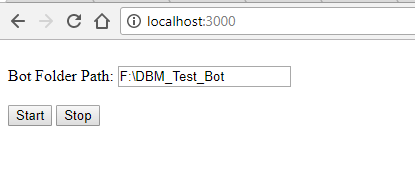
26 |
27 | Click start and your bot **should** run from it, watch the console!
28 |
29 | Try to access it from another device on your network ( like a smartphone ) by putting your machine's local ip address in place of localhost (i.e. http://[machineip]:3000 )
30 |
31 | To find the machine ip (on windows), type **cmd** into the search bar, type **ipconfig** and hit enter, your machine ip should be the first one marked **Ethernet** next to **Ipv4 Address** then type that into your other device as http://[machineip]:3000
32 |
33 | on linux run **ifconfig** and normally the one marked with **eth0** is your primary connection and your machine ip is next to
34 | **inet addr**
35 |
36 |
37 | Note: Dont forward the port in your router to access it somewhere outside of your network yet as it currently doesn't have any type of security
38 |
--------------------------------------------------------------------------------