├── RvtToTopoJson
├── packages.config
├── App.cs
├── RvtToTopoJson.addin
├── Properties
│ └── AssemblyInfo.cs
├── Helpers.cs
├── FileExport.cs
├── TopoJson.cs
├── RvtToTopoJson.csproj
├── CreateGeoJson.cs
└── Command.cs
├── RvtToTopoJson.addin
├── RvtToTopoJson.sln
├── README.md
├── .gitattributes
└── .gitignore
/RvtToTopoJson/packages.config:
--------------------------------------------------------------------------------
1 |
2 |
3 |
4 |
5 |
--------------------------------------------------------------------------------
/RvtToTopoJson.addin:
--------------------------------------------------------------------------------
1 |
2 |
3 |
4 | Command RevitGeoJson
5 | RvtToTopoJson\RvtToTopoJson.dll
6 | RvtToTopoJson.App
7 | fc82fb14-1b85-4580-b86d-1e385c09d85b
8 | com.typepad.thebuildingcoder
9 | The Building Coder, http://thebuildingcoder.typepad.com
10 |
11 |
12 |
--------------------------------------------------------------------------------
/RvtToTopoJson/App.cs:
--------------------------------------------------------------------------------
1 | #region Namespaces
2 | using System;
3 | using System.Collections.Generic;
4 | using Autodesk.Revit.ApplicationServices;
5 | using Autodesk.Revit.Attributes;
6 | using Autodesk.Revit.DB;
7 | using Autodesk.Revit.UI;
8 | #endregion
9 |
10 | namespace RvtToTopoJson
11 | {
12 | class App : IExternalApplication
13 | {
14 | public Result OnStartup(UIControlledApplication a)
15 | {
16 | return Result.Succeeded;
17 | }
18 |
19 | public Result OnShutdown(UIControlledApplication a)
20 | {
21 | return Result.Succeeded;
22 | }
23 | }
24 | }
25 |
--------------------------------------------------------------------------------
/RvtToTopoJson/RvtToTopoJson.addin:
--------------------------------------------------------------------------------
1 |
2 |
3 |
4 | Command RevitGeoJson
5 | Some description for RevitGeoJson
6 | .\RvtToTopoJson\RvtToTopoJson.dll
7 | RvtToTopoJson.CreateGeoJson
8 | 99605c33-5b4e-4641-9361-818c81026ea9
9 | com.typepad.thebuildingcoder
10 | The Building Coder, http://thebuildingcoder.typepad.com
11 |
12 |
13 | Application RevitGeoJson
14 | .\RvtToTopoJson\RvtToTopoJson.dll
15 | RvtToTopoJson.App
16 | fc82fb14-1b85-4580-b86d-1e385c09d85b
17 | com.typepad.thebuildingcoder
18 | The Building Coder, http://thebuildingcoder.typepad.com
19 |
20 |
21 |
--------------------------------------------------------------------------------
/RvtToTopoJson.sln:
--------------------------------------------------------------------------------
1 |
2 | Microsoft Visual Studio Solution File, Format Version 12.00
3 | # Visual Studio 15
4 | VisualStudioVersion = 15.0.27130.2036
5 | MinimumVisualStudioVersion = 10.0.40219.1
6 | Project("{FAE04EC0-301F-11D3-BF4B-00C04F79EFBC}") = "RvtToTopoJson", "RvtToTopoJson\RvtToTopoJson.csproj", "{32130E5C-5707-431F-BF4D-8BE464625C52}"
7 | EndProject
8 | Global
9 | GlobalSection(SolutionConfigurationPlatforms) = preSolution
10 | Debug|Any CPU = Debug|Any CPU
11 | Release|Any CPU = Release|Any CPU
12 | EndGlobalSection
13 | GlobalSection(ProjectConfigurationPlatforms) = postSolution
14 | {32130E5C-5707-431F-BF4D-8BE464625C52}.Debug|Any CPU.ActiveCfg = Debug|Any CPU
15 | {32130E5C-5707-431F-BF4D-8BE464625C52}.Debug|Any CPU.Build.0 = Debug|Any CPU
16 | {32130E5C-5707-431F-BF4D-8BE464625C52}.Release|Any CPU.ActiveCfg = Release|Any CPU
17 | {32130E5C-5707-431F-BF4D-8BE464625C52}.Release|Any CPU.Build.0 = Release|Any CPU
18 | EndGlobalSection
19 | GlobalSection(SolutionProperties) = preSolution
20 | HideSolutionNode = FALSE
21 | EndGlobalSection
22 | GlobalSection(ExtensibilityGlobals) = postSolution
23 | SolutionGuid = {57B2D2C6-A177-4CE7-8223-DE95F9104E33}
24 | EndGlobalSection
25 | EndGlobal
26 |
--------------------------------------------------------------------------------
/RvtToTopoJson/Properties/AssemblyInfo.cs:
--------------------------------------------------------------------------------
1 | using System.Reflection;
2 | using System.Runtime.CompilerServices;
3 | using System.Runtime.InteropServices;
4 |
5 | // Allgemeine Informationen über eine Assembly werden über die folgenden
6 | // Attribute gesteuert. Ändern Sie diese Attributwerte, um die Informationen zu ändern,
7 | // die einer Assembly zugeordnet sind.
8 | [assembly: AssemblyTitle("dokaGeoreader")]
9 | [assembly: AssemblyDescription("")]
10 | [assembly: AssemblyConfiguration("")]
11 | [assembly: AssemblyCompany("")]
12 | [assembly: AssemblyProduct("dokaGeoreader")]
13 | [assembly: AssemblyCopyright("Copyright © 2018")]
14 | [assembly: AssemblyTrademark("")]
15 | [assembly: AssemblyCulture("")]
16 |
17 | // Durch Festlegen von ComVisible auf FALSE werden die Typen in dieser Assembly
18 | // für COM-Komponenten unsichtbar. Wenn Sie auf einen Typ in dieser Assembly von
19 | // COM aus zugreifen müssen, sollten Sie das ComVisible-Attribut für diesen Typ auf "True" festlegen.
20 | [assembly: ComVisible(false)]
21 |
22 | // Die folgende GUID bestimmt die ID der Typbibliothek, wenn dieses Projekt für COM verfügbar gemacht wird
23 | [assembly: Guid("32130e5c-5707-431f-bf4d-8be464625c52")]
24 |
25 | // Versionsinformationen für eine Assembly bestehen aus den folgenden vier Werten:
26 | //
27 | // Hauptversion
28 | // Nebenversion
29 | // Buildnummer
30 | // Revision
31 | //
32 | // Sie können alle Werte angeben oder Standardwerte für die Build- und Revisionsnummern verwenden,
33 | // indem Sie "*" wie unten gezeigt eingeben:
34 | // [assembly: AssemblyVersion("1.0.*")]
35 | [assembly: AssemblyVersion("1.0.0.0")]
36 | [assembly: AssemblyFileVersion("1.0.0.0")]
37 |
--------------------------------------------------------------------------------
/RvtToTopoJson/Helpers.cs:
--------------------------------------------------------------------------------
1 | using Autodesk.Revit.DB;
2 | using GeoJSON.Net.Geometry;
3 | using System.Collections.Generic;
4 |
5 | namespace RvtToTopoJson
6 | {
7 | internal class Helpers
8 | {
9 | public double Area { get; set; }
10 | public string RoomName { get; set; }
11 |
12 | public static Polygon RoomBoundary(Document doc, Reference re, Transform ttr)
13 | {
14 | SpatialElement se = doc.GetElement(re) as SpatialElement;
15 |
16 | SpatialElementBoundaryOptions opt = new SpatialElementBoundaryOptions();
17 |
18 | IList> loops = se.GetBoundarySegments(opt);
19 |
20 | List positions = new List();
21 |
22 |
23 | foreach (IList loop in loops)
24 | {
25 |
26 | ElementId segId = new ElementId(123456);
27 |
28 | foreach (BoundarySegment seg in loop)
29 | {
30 | Line segLine = seg.GetCurve() as Line;
31 |
32 | XYZ endPt = segLine.Origin;
33 |
34 | XYZ p = ttr.OfPoint(endPt);
35 |
36 | Position firstpos = new Position(p.Y, p.X, p.Z);
37 |
38 |
39 | if (segId == seg.ElementId)
40 | {
41 |
42 | }
43 | else
44 | {
45 | positions.Add(new Position(p.Y, p.X, p.Z));
46 | }
47 |
48 | positions.Add(firstpos);
49 |
50 | segId = seg.ElementId;
51 |
52 | }
53 | }
54 |
55 | return new Polygon(new List { new LineString(positions) });
56 | }
57 |
58 | }
59 |
60 | }
--------------------------------------------------------------------------------
/README.md:
--------------------------------------------------------------------------------
1 | # RvtToTopoJson
2 |
3 | Export Rooms from Revit to GeoJson for Power BI Shape Maps.
4 |
5 | [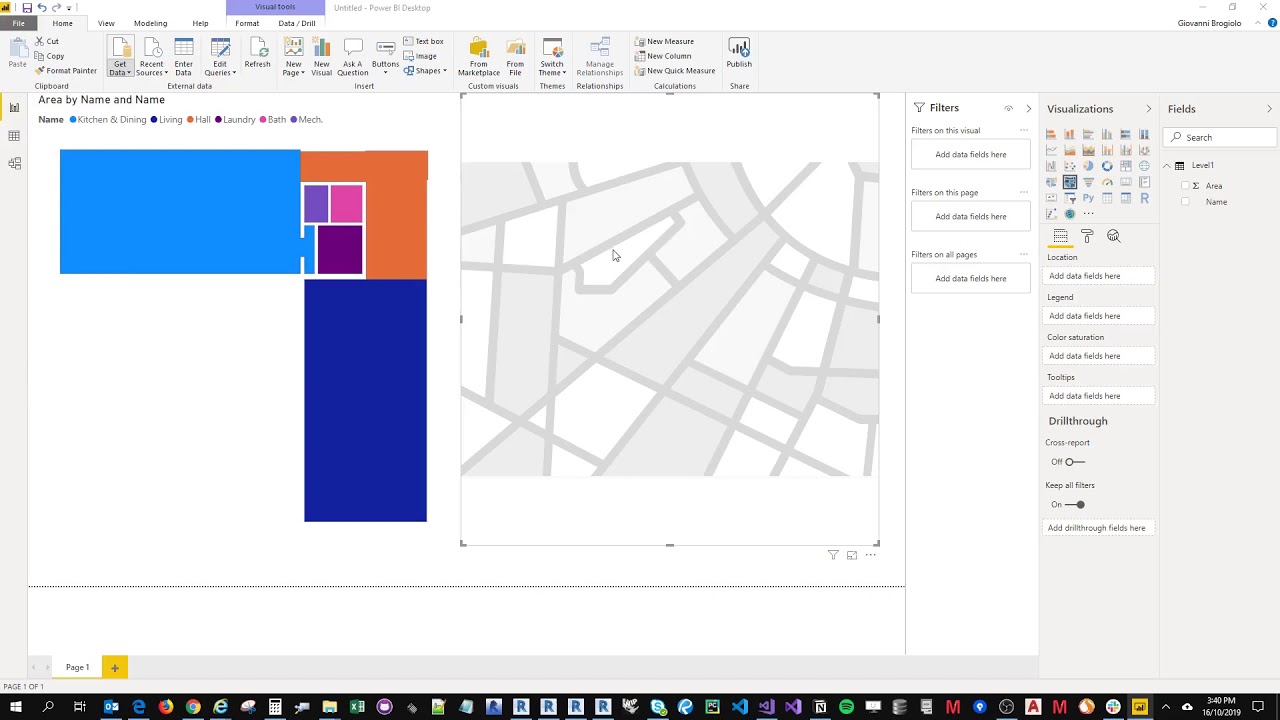](https://youtu.be/O-y7gwi6wtk)
6 |
7 | - Credits: https://forums.autodesk.com/t5/revit-architecture-forum/projecting-revit-model-on-a-map-using-geojson/td-p/7973803
8 | - GeoJson wiki: https://macwright.org/2015/03/23/geojson-second-bite.html
9 | - https://docs.microsoft.com/en-us/power-bi/visuals/desktop-shape-map
10 | - GeoJson to TopoJson converter:
11 | - https://mapshaper.org/
12 | - http://jeffpaine.github.io/geojson-topojson/
13 |
14 | ## How it should work
15 |
16 | - The External Command code is saved in [CreateGeoJson.cs](https://github.com/giobel/RvtToTopoJson/blob/master/RvtToTopoJson/CreateGeoJson.cs). It takes a Room corner points, its name and its area and it exports them as GeoJson using the GeoJSON.Net library (credits to Daniel Ignjat for sharing his code on the Autodesk Forum). The GeoJson file is saved as C:\Temp\export.json.
17 | - I've then used mapshaper to transform it into a TopoJson. This file can be imported in Power BI using a Shape map. The TopoJson file can be expanded to access its properties but it's not the best way to do it (I think it would be better to save Room Name and Area in a csv file and use that as a table source in Power BI).
18 | - To update all the maps at the same time, the tables must have a relationship between them. I've manually created a new Table merging the Room Names and link it to the Name's column of the other Tables. Again, this is not the best way to do it. Having the Room Names and Areas in a database and pull the data from there would be the best option.
19 |
20 | ## Bugs
21 |
22 | Currently it does not support rooms with internal boundaries (i.e. columns or shaft openings)
23 |
24 | 
25 |
26 |
--------------------------------------------------------------------------------
/RvtToTopoJson/FileExport.cs:
--------------------------------------------------------------------------------
1 | using System.Collections.Generic;
2 | using System.IO;
3 | using Newtonsoft.Json;
4 | using GeoJSON.Net.Geometry;
5 | using GeoJSON.Net.Feature;
6 |
7 | //credits https://forums.autodesk.com/t5/revit-architecture-forum/projecting-revit-model-on-a-map-using-geojson/td-p/7973803
8 |
9 | namespace RvtToTopoJson
10 | {
11 | public class FileExport {
12 | private string exportString = "";
13 |
14 | public string ExportString { get => exportString; set => exportString = value; }
15 |
16 | private List poly = new List();
17 |
18 | public FileExport(List poly) {
19 | this.poly=poly;
20 | }
21 |
22 | public void CreateTextFile(string name, IDictionary> data) {
23 | StreamWriter writetext = new StreamWriter(name);
24 | foreach (var a in data.Keys)
25 | {
26 | ExportString += a + ",\n";
27 | foreach (var i in data[a])
28 | {
29 | ExportString += i.ToString() + ",\n";
30 | }
31 | }
32 | writetext.WriteLine(ExportString);
33 | writetext.Flush();
34 | writetext.Close();
35 |
36 | }
37 | public void CreateTextFile(string name, HashSet