20 |
21 |
22 |
23 |
24 |
12 |
16 | )
17 |
18 | export default PageHeader
19 |
--------------------------------------------------------------------------------
/data/blog/post-25.mdx:
--------------------------------------------------------------------------------
1 | ---
2 | title: 他人的学习方法论
3 | publishedAt: 2019-03-17T04:18:41Z
4 | summary: 查看全文>>
5 | tags: ["Learning"]
6 | ---
7 |
8 | 纪录一些网友分享的学习经验,提供给大家参考。
9 | 不管是工作还是业余,总会有新人问你是如何学习的,或者是你带团队了,给团队同学进行指导辅导,有些别人实践的经验可以借鉴来作为指导,另外,尽管你自认为是老司机,也应该了解别人的学习方式,借鉴、思考、实践、总结、到演变;知识、技能、学习的方式都应该在不停的进步或改变的路上,你才能走的更远!
10 |
11 | ## 前端
12 |
13 | - [我如何零基础转行成为一个自信的前端](https://juejin.im/post/5c75d34851882564965edb23)
14 | - [一名【合格】前端工程师的自检清单](https://juejin.im/post/5cc1da82f265da036023b628)
15 |
16 |
17 |
18 |
19 | ---
20 | 本人自动发布于:[https://github.com/giscafer/blog/issues/25](https://github.com/giscafer/blog/issues/25)
21 |
--------------------------------------------------------------------------------
/tsconfig.json:
--------------------------------------------------------------------------------
1 | {
2 | "compilerOptions": {
3 | "baseUrl": ".",
4 | "target": "es5",
5 | "lib": ["dom", "dom.iterable", "esnext"],
6 | "allowJs": true,
7 | "skipLibCheck": true,
8 | "strict": false,
9 | "forceConsistentCasingInFileNames": true,
10 | "noEmit": true,
11 | "esModuleInterop": true,
12 | "module": "esnext",
13 | "moduleResolution": "node",
14 | "resolveJsonModule": true,
15 | "isolatedModules": true,
16 | "jsx": "preserve",
17 | "downlevelIteration": true
18 | },
19 | "include": ["next-env.d.ts", "**/*.ts", "**/*.tsx"],
20 | "exclude": ["node_modules"]
21 | }
22 |
--------------------------------------------------------------------------------
/components/postswitch.tsx:
--------------------------------------------------------------------------------
1 | import Switch from 'rc-switch'
2 | import { FC } from 'react'
3 | import styles from './postswitch.module.scss'
4 |
5 | type PostListSwitchProps = {
6 | checked: boolean
7 | // eslint-disable-next-line no-unused-vars
8 | onChange: (v: boolean) => void
9 | }
10 |
11 | const PostListSwitch: FC{title}
13 | {description &&{description}
} 14 | {children} 15 |
14 | onChange(v)} checkedChildren="显示封面" unCheckedChildren="隐藏封面" />
15 |
16 | )
17 | }
18 |
19 | export default PostListSwitch
20 |
--------------------------------------------------------------------------------
/.gitignore:
--------------------------------------------------------------------------------
1 | # See https://help.github.com/articles/ignoring-files/ for more about ignoring files.
2 |
3 | # dependencies
4 | /node_modules
5 | /.pnp
6 | .pnp.js
7 |
8 | # testing
9 | /coverage
10 |
11 | # next.js
12 | /.next/
13 | /out/
14 |
15 | # production
16 | /build
17 | public/sitemap.xml
18 | public/feed.xml
19 |
20 | # misc
21 | .DS_Store
22 | *.pem
23 | .eslintcache
24 |
25 | # debug
26 | npm-debug.log*
27 | yarn-debug.log*
28 | yarn-error.log*
29 |
30 | # local env files
31 | .env.local
32 | .env.development.local
33 | .env.test.local
34 | .env.production.local
35 |
36 | # vercel
37 | .vercel
38 |
39 |
40 | # Contentlayer
41 | .contentlayer
42 |
--------------------------------------------------------------------------------
/components/badge.module.scss:
--------------------------------------------------------------------------------
1 | .tag {
2 | display: inline-flex;
3 | align-items: center;
4 | box-sizing: border-box;
5 | padding-top: 0.125rem;
6 | padding-right: 0.625rem;
7 | padding-bottom: 0.125rem;
8 | padding-left: 0.625rem;
9 | color: var(--tag-color);
10 | font-size: 0.75rem;
11 | font-family: ui-monospace, SFMono-Regular, Menlo, Monaco, Consolas, Liberation Mono, Courier New, monospace;
12 | line-height: 1rem;
13 | tab-size: 4;
14 | background-color: var(--tag-bg-color);
15 | border: 0 solid #eaeaea;
16 | border-radius: 9999px;
17 | cursor: pointer;
18 | -webkit-text-size-adjust: 100%;
19 | -webkit-font-smoothing: antialiased;
20 | }
21 |
--------------------------------------------------------------------------------
/components/tags.tsx:
--------------------------------------------------------------------------------
1 | import Link from 'next/link'
2 |
3 | import styles from './tags.module.scss'
4 |
5 | type TagsProps = {
6 | tags: string[]
7 | }
8 |
9 | const Tags = ({ tags }: TagsProps): JSX.Element | null => {
10 | if (!tags?.length) {
11 | return null
12 | }
13 | return (
14 | -
15 | {tags.map(tag => {
16 | return (
17 |
- 18 | {`#${tag}`} 19 | {/* {`#${tag}`} */} 20 | 21 | ) 22 | })} 23 |
7 |
16 | )
17 |
18 | export default ParallaxCover
19 |
--------------------------------------------------------------------------------
/components/pageheader.module.scss:
--------------------------------------------------------------------------------
1 | .wrapper {
2 | margin-bottom: 50px;
3 |
4 | // @media (min-width: 480px) {
5 | // margin-bottom: 90px;
6 | // }
7 | }
8 |
9 | .wrapperCompact {
10 | margin-bottom: 0;
11 |
12 | @media (min-width: 480px) {
13 | margin-bottom: 40px;
14 | }
15 | }
16 |
17 | .title {
18 | margin-bottom: 12px;
19 | font-weight: 800;
20 | font-size: 26px;
21 | letter-spacing: -0.3px;
22 |
23 | @media (min-width: 480px) {
24 | margin-bottom: 15px;
25 | font-size: 38px;
26 | }
27 | }
28 |
29 | .description {
30 | margin-bottom: 30px;
31 | font-weight: 500;
32 | font-size: 17px;
33 | line-height: 1.5;
34 | opacity: 0.8;
35 |
36 | @media (min-width: 480px) {
37 | font-size: 19px;
38 | }
39 | }
40 |
--------------------------------------------------------------------------------
/components/seo.tsx:
--------------------------------------------------------------------------------
1 | import { DefaultSeo } from 'next-seo'
2 |
3 | const config = {
4 | title: 'Nicky Lao - Frontend Developer & Designer',
5 | description:
6 | '自驱型前端工程师,9年多大型复杂产品开发经验,4年前端团队管理经验,熟悉跨端APP 如 Ionic、React Native开发,熟悉 微前端、DevOps 等,具备全栈开发能力。',
7 | openGraph: {
8 | type: 'website',
9 | locale: 'zh_CN',
10 | url: 'https://www.giscafer.com',
11 | site_name: 'giscafer | Nicky Lao',
12 | images: [
13 | {
14 | url: 'https://giscafer.com/avatar.png',
15 | alt: 'Nicky Lao',
16 | },
17 | ],
18 | },
19 | twitter: {
20 | handle: '@giscafer',
21 | site: '@giscafer',
22 | cardType: 'summary_large_image',
23 | },
24 | }
25 |
26 | const SEO = (): JSX.Element => {
27 | return
8 |
9 |
11 |
12 | {/*
13 |
*/}
15 | {children}
25 | }
26 |
27 | const SectionRoot: FC = ({ children }: PageProps) => {
28 | return
19 |
25 | ```
26 |
27 | 思路来自:http://stackoverflow.com/questions/17801988/dynamically-loading-controllers-and-ng-include
28 |
29 | ---
30 |
31 | 2016-8-31 09:51:42
32 |
33 |
34 | ---
35 | 本人自动发布于:[https://github.com/giscafer/blog/issues/9](https://github.com/giscafer/blog/issues/9)
36 |
--------------------------------------------------------------------------------
/scripts/github/job.js:
--------------------------------------------------------------------------------
1 | /* eslint-disable */
2 | const cron = require('node-cron')
3 | const syncPost = require('./syncPost')
4 |
5 | // https://www.npmjs.com/package/node-cron
6 | // # ┌────────────── second (optional)
7 | // # │ ┌──────────── minute
8 | // # │ │ ┌────────── hour
9 | // # │ │ │ ┌──────── day of month
10 | // # │ │ │ │ ┌────── month
11 | // # │ │ │ │ │ ┌──── day of week
12 | // # │ │ │ │ │ │
13 | // # │ │ │ │ │ │
14 | // # * * * * * *
15 | // const timeString = '15 * * * *'
16 | const timeString = '* 0 1 * * *' // Running a job at 01:00 every day
17 |
18 | let job = null
19 |
20 | function stopJob() {
21 | if (job) {
22 | job.stop()
23 | job = null
24 | }
25 | }
26 |
27 | function startJob() {
28 | stopJob()
29 | job = cron.schedule(
30 | timeString,
31 | () => {
32 | // eslint-disable-next-line no-console
33 | console.log('🚀🚀 同步issue到mdx文件')
34 | syncPost()
35 | },
36 | {
37 | scheduled: true,
38 | timezone: 'Asia/Shanghai',
39 | },
40 | )
41 |
42 | job.start()
43 | console.log('====================================')
44 | console.log('🚀🚀 同步代码定时任务已开启')
45 | console.log('====================================')
46 | }
47 |
48 | // syncPost() // 先执行一次
49 |
50 | export { startJob }
51 |
--------------------------------------------------------------------------------
/components/button.tsx:
--------------------------------------------------------------------------------
1 | import Link from 'next/link'
2 | import cn from 'classnames'
3 | import styles from './button.module.scss'
4 |
5 | type ButtonProps = {
6 | children: JSX.Element | JSX.Element[] | string
7 | type?: 'button' | 'submit' | 'reset'
8 | href?: string
9 | onClick?: () => void
10 | variant?: 'transparent' | 'like'
11 | disabled?: boolean
12 | }
13 |
14 | const Button = ({ children, type, href, variant, onClick, disabled }: ButtonProps): JSX.Element => {
15 | const classes = cn(styles.button, styles[variant])
16 | if (onClick || !href) {
17 | return (
18 |
21 | )
22 | }
23 | if (href.startsWith('/')) {
24 | return (
25 |
26 |
27 |
30 |
31 |
32 | )
33 | }
34 |
35 | return (
36 |
37 | {children}
38 |
39 | )
40 | }
41 |
42 | export default Button
43 |
--------------------------------------------------------------------------------
/components/likebutton.tsx:
--------------------------------------------------------------------------------
1 | import { useEffect, useState } from 'react'
2 | import { Heart } from 'react-feather'
3 | import Button from 'components/button'
4 | import { safeLocalStorage as localStorage } from 'lib/localstorage'
5 |
6 | import useSWR, { mutate } from 'swr'
7 | import fetcher from 'lib/fetcher'
8 |
9 | import styles from './likebutton.module.scss'
10 |
11 | const LikeButton = ({ slug }: { slug: string }): JSX.Element | null => {
12 | const [mounted, setMounted] = useState(false)
13 | const { data } = useSWR(`/api/likes?slug=${slug}`, fetcher)
14 | const likes = data?.likes
15 | const liked = localStorage.getItem(slug) === 'true'
16 |
17 | useEffect(() => setMounted(true), [])
18 |
19 | const onLike = async () => {
20 | // 本地记录了喜欢过本文章
21 | localStorage.setItem(slug, 'true')
22 | // 请求更新like
23 | mutate(`/api/likes?slug=${slug}`, { ...data, likes: likes + 1 }, false)
24 | await fetch(`/api/likes?slug=${slug}`, { method: 'POST' })
25 | }
26 |
27 | if (!mounted) return null
28 |
29 | return (
30 |
33 | )
34 | }
35 |
36 | export default LikeButton
37 |
--------------------------------------------------------------------------------
/components/messages.tsx:
--------------------------------------------------------------------------------
1 | import cn from 'classnames'
2 | import styles from './messages.module.scss'
3 |
4 | export const TailBreakdown = () => (
5 | -
6 |
- Hello 7 |
-
23 | {messages.map(({ text, sent }, i) => {
24 | const isLast = i === messages.length - 1
25 | const noTail = !isLast && messages[i + 1]?.sent === sent
26 | return (
27 |
- 28 | {text} 29 | 30 | ) 31 | })} 32 |
-
14 | {items.map((item, i) => {
15 | const isActive = i === activeItem
16 | return (
17 |
 38 |
39 |
42 |
43 | ---
44 |
45 | > [giscafer.com](http://giscafer.com) ·
46 | > GitHub [@giscafer](https://github.com/giscafer) ·
47 | > Twitter [@Nicky Lao](https://twitter.com/nicky_lao)
48 |
--------------------------------------------------------------------------------
/components/segmentedcontrol.module.scss:
--------------------------------------------------------------------------------
1 | .list {
2 | display: inline-flex;
3 | margin: 0;
4 | padding: 3px;
5 | list-style: none;
6 | background-color: var(--boxBg);
7 | border-radius: 10px;
8 |
9 | .item {
10 | position: relative;
11 | margin-bottom: 0;
12 | line-height: 1;
13 |
14 | &:after {
15 | position: absolute;
16 | top: 15%;
17 | right: -0.5px;
18 | display: block;
19 | width: 1px;
20 | height: 70%;
21 | background-color: var(--border);
22 | transition: opacity 200ms ease-out;
23 | content: '';
24 | }
25 |
26 | &:last-of-type {
27 | &:after {
28 | display: none;
29 | }
30 | }
31 | }
32 | }
33 |
34 | .itemNoDivider {
35 | composes: item;
36 |
37 | &:after {
38 | opacity: 0;
39 | }
40 | }
41 |
42 | .button {
43 | position: relative;
44 | margin: 0;
45 | padding: 7px 30px;
46 | color: var(--text);
47 | line-height: 1;
48 | background: transparent;
49 | border: none;
50 | outline: none;
51 |
52 | &:hover,
53 | &:focus {
54 | cursor: pointer;
55 | }
56 | }
57 |
58 | .label {
59 | position: relative;
60 | z-index: 2;
61 | }
62 |
63 | .active {
64 | position: absolute;
65 | top: 0;
66 | right: 0;
67 | bottom: 0;
68 | left: 0;
69 | z-index: 1;
70 | background-color: var(--inputBg);
71 | border-radius: 7px;
72 | box-shadow: var(--shadow);
73 | content: '';
74 | }
75 |
--------------------------------------------------------------------------------
/components/themechanger.module.scss:
--------------------------------------------------------------------------------
1 | .wrapper {
2 | position: relative;
3 | display: none;
4 | width: 51px;
5 | height: 51px;
6 | margin-right: -3px;
7 |
8 | @media (min-width: 480px) {
9 | display: block;
10 | }
11 | }
12 |
13 | .menu {
14 | position: absolute;
15 | top: 0;
16 | right: 0;
17 | display: flex;
18 | padding: 3px;
19 | }
20 |
21 | .bg {
22 | position: absolute;
23 | top: 0;
24 | right: 0;
25 | bottom: 0;
26 | left: 0;
27 | width: 100%;
28 | background-color: black;
29 | border-radius: 9999px;
30 | box-shadow: 0 3px 13px rgba(0, 0, 0, 0.2);
31 | content: '';
32 | }
33 |
34 | .button {
35 | position: relative;
36 | flex-shrink: 0;
37 | width: 45px;
38 | height: 45px;
39 | margin: 0;
40 | margin-right: 10px;
41 | padding: 0;
42 | color: white;
43 | background-color: transparent;
44 | border: none;
45 |
46 | &:last-of-type {
47 | margin-right: 0;
48 | }
49 |
50 | &:hover,
51 | &:focus {
52 | cursor: pointer;
53 | }
54 | }
55 |
56 | .buttonBackground {
57 | position: absolute;
58 | top: 0;
59 | right: 0;
60 | bottom: 0;
61 | left: 0;
62 | z-index: 1;
63 | display: block;
64 | width: 100%;
65 | height: 100%;
66 | background-color: var(--brand);
67 | border-radius: 9999px;
68 | }
69 |
70 | .buttonLabel {
71 | position: absolute;
72 | top: 50%;
73 | left: 50%;
74 | z-index: 2;
75 | transform: translate(-50%, -50%);
76 | }
77 |
--------------------------------------------------------------------------------
/.eslintrc.js:
--------------------------------------------------------------------------------
1 | module.exports = {
2 | env: {
3 | browser: true,
4 | es2021: true,
5 | node: true,
6 | },
7 | extends: ['plugin:react/recommended', 'plugin:@typescript-eslint/recommended', 'airbnb', 'plugin:prettier/recommended'],
8 | parser: '@typescript-eslint/parser',
9 | parserOptions: {
10 | ecmaFeatures: {
11 | jsx: true,
12 | },
13 | ecmaVersion: 12,
14 | sourceType: 'module',
15 | tsconfigRootDir: './',
16 | },
17 | plugins: ['react', 'react-hooks', '@typescript-eslint', 'prettier', 'import'],
18 | rules: {
19 | 'react/react-in-jsx-scope': 0,
20 | 'react/jsx-filename-extension': [
21 | 1,
22 | {
23 | extensions: ['.js', '.tsx'],
24 | },
25 | ],
26 | 'react/jsx-one-expression-per-line': 0,
27 | 'react/require-default-props': 0,
28 | 'react/jsx-props-no-spreading': 0,
29 | 'jsx-a11y/anchor-is-valid': 0, // next-links require empty a tags
30 | 'jsx-a11y/label-has-associated-control': 0,
31 | 'import/prefer-default-export': 0,
32 | 'import/extensions': 0,
33 | 'jsx-a11y/click-events-have-key-events': 0,
34 | 'jsx-a11y/no-static-element-interactions': 0,
35 | 'jsx-a11y/interactive-supports-focus': 0,
36 | '@typescript-eslint/explicit-module-boundary-types': 0,
37 | 'no-underscore-dangle': 0,
38 | },
39 | globals: {
40 | JSX: true,
41 | },
42 | settings: {
43 | 'import/resolver': {
44 | typescript: {},
45 | },
46 | },
47 | }
48 |
--------------------------------------------------------------------------------
/components/blog/rating.module.scss:
--------------------------------------------------------------------------------
1 | .container {
2 | position: relative;
3 | display: inline-flex;
4 | align-items: center;
5 | }
6 |
7 | .star {
8 | display: flex;
9 | width: 18px;
10 | margin-right: 2px;
11 | color: var(--brand);
12 | fill: var(--brand);
13 |
14 | &:last-of-type {
15 | margin-right: 0;
16 | }
17 | }
18 |
19 | .overlay {
20 | position: absolute;
21 | top: 0;
22 | right: 0;
23 | bottom: 0;
24 | z-index: 1;
25 | background-color: black;
26 | opacity: 0.7;
27 |
28 | @supports (mix-blend-mode: color) {
29 | opacity: unset;
30 | mix-blend-mode: color;
31 | }
32 | }
33 |
34 | .playground {
35 | display: flex;
36 | flex-direction: column;
37 | align-items: center;
38 | padding: 40px 20px 10px;
39 | background-color: var(--boxBg);
40 |
41 | @media (min-width: 480px) {
42 | padding: 40px 40px 20px;
43 | }
44 |
45 | svg {
46 | width: 24px;
47 | height: auto;
48 | }
49 | }
50 |
51 | .controls {
52 | display: flex;
53 | padding-top: 30px;
54 |
55 | label {
56 | display: flex;
57 | align-items: center;
58 | margin: 0 10px;
59 | }
60 |
61 | input {
62 | margin-bottom: 0;
63 | margin-left: 8px;
64 | padding: 6px 8px;
65 | font-size: 1em;
66 | font-family: inherit;
67 | background-color: var(--bg);
68 | border: none;
69 | border-radius: 4px;
70 | }
71 | }
72 |
73 | .pointer {
74 | color: var(--textTinted);
75 | font-size: 0.9em;
76 | text-align: center;
77 | }
78 |
--------------------------------------------------------------------------------
/components/button.module.scss:
--------------------------------------------------------------------------------
1 | .button {
2 | display: inline-flex;
3 | align-items: center;
4 | padding: 10px 18px;
5 | color: var(--brand);
6 | font-weight: 700;
7 | font-size: 16px;
8 | font-family: var(--fontFamily);
9 | background-color: var(--brandTinted);
10 | border: none;
11 | border-radius: 9999px;
12 | transition: background-color 200ms ease-out, color 200ms ease-out;
13 |
14 | &:hover,
15 | &:focus {
16 | background-color: var(--brandTintedActive);
17 | cursor: pointer;
18 | }
19 |
20 | svg {
21 | width: 18px;
22 | margin-left: 8px;
23 | }
24 |
25 | &[disabled] {
26 | opacity: 0.5;
27 | pointer-events: none;
28 | }
29 | }
30 |
31 | .transparent {
32 | padding: 0;
33 | color: var(--brand);
34 | font-weight: 500;
35 | background-color: transparent;
36 |
37 | &:hover,
38 | &:focus {
39 | color: var(--brandActive);
40 | background-color: transparent;
41 | cursor: pointer;
42 | }
43 | }
44 |
45 | .like {
46 | margin-bottom: 50px;
47 | padding: 14px 60px;
48 | color: var(--text);
49 | font-weight: 700;
50 | font-size: 18px;
51 | line-height: 1;
52 | background-color: var(--likeButton);
53 | border-radius: 30px;
54 | transition: transform 200ms ease-out, background-color 200ms ease-out;
55 |
56 | &:hover,
57 | &:focus {
58 | background-color: var(--likeButtonHover);
59 | transform: scale(1.03);
60 | }
61 |
62 | &[disabled] {
63 | opacity: 1;
64 | }
65 |
66 | svg {
67 | width: 20px;
68 | margin-right: 10px;
69 | margin-left: 0;
70 | }
71 | }
72 |
--------------------------------------------------------------------------------
/components/blog/rating.tsx:
--------------------------------------------------------------------------------
1 | import { useState } from 'react'
2 | import { Star } from 'react-feather'
3 | import styles from './rating.module.scss'
4 |
5 | type RatingProps = {
6 | value: number
7 | max?: number
8 | }
9 |
10 | const Rating = ({ value, max = 5 }: RatingProps) => {
11 | /* Calculate how much of the stars should be "filled" */
12 | const percentage = Math.round((value / max) * 100)
13 |
14 | return (
15 |
38 |
39 |
42 |
43 | ---
44 |
45 | > [giscafer.com](http://giscafer.com) ·
46 | > GitHub [@giscafer](https://github.com/giscafer) ·
47 | > Twitter [@Nicky Lao](https://twitter.com/nicky_lao)
48 |
--------------------------------------------------------------------------------
/components/segmentedcontrol.module.scss:
--------------------------------------------------------------------------------
1 | .list {
2 | display: inline-flex;
3 | margin: 0;
4 | padding: 3px;
5 | list-style: none;
6 | background-color: var(--boxBg);
7 | border-radius: 10px;
8 |
9 | .item {
10 | position: relative;
11 | margin-bottom: 0;
12 | line-height: 1;
13 |
14 | &:after {
15 | position: absolute;
16 | top: 15%;
17 | right: -0.5px;
18 | display: block;
19 | width: 1px;
20 | height: 70%;
21 | background-color: var(--border);
22 | transition: opacity 200ms ease-out;
23 | content: '';
24 | }
25 |
26 | &:last-of-type {
27 | &:after {
28 | display: none;
29 | }
30 | }
31 | }
32 | }
33 |
34 | .itemNoDivider {
35 | composes: item;
36 |
37 | &:after {
38 | opacity: 0;
39 | }
40 | }
41 |
42 | .button {
43 | position: relative;
44 | margin: 0;
45 | padding: 7px 30px;
46 | color: var(--text);
47 | line-height: 1;
48 | background: transparent;
49 | border: none;
50 | outline: none;
51 |
52 | &:hover,
53 | &:focus {
54 | cursor: pointer;
55 | }
56 | }
57 |
58 | .label {
59 | position: relative;
60 | z-index: 2;
61 | }
62 |
63 | .active {
64 | position: absolute;
65 | top: 0;
66 | right: 0;
67 | bottom: 0;
68 | left: 0;
69 | z-index: 1;
70 | background-color: var(--inputBg);
71 | border-radius: 7px;
72 | box-shadow: var(--shadow);
73 | content: '';
74 | }
75 |
--------------------------------------------------------------------------------
/components/themechanger.module.scss:
--------------------------------------------------------------------------------
1 | .wrapper {
2 | position: relative;
3 | display: none;
4 | width: 51px;
5 | height: 51px;
6 | margin-right: -3px;
7 |
8 | @media (min-width: 480px) {
9 | display: block;
10 | }
11 | }
12 |
13 | .menu {
14 | position: absolute;
15 | top: 0;
16 | right: 0;
17 | display: flex;
18 | padding: 3px;
19 | }
20 |
21 | .bg {
22 | position: absolute;
23 | top: 0;
24 | right: 0;
25 | bottom: 0;
26 | left: 0;
27 | width: 100%;
28 | background-color: black;
29 | border-radius: 9999px;
30 | box-shadow: 0 3px 13px rgba(0, 0, 0, 0.2);
31 | content: '';
32 | }
33 |
34 | .button {
35 | position: relative;
36 | flex-shrink: 0;
37 | width: 45px;
38 | height: 45px;
39 | margin: 0;
40 | margin-right: 10px;
41 | padding: 0;
42 | color: white;
43 | background-color: transparent;
44 | border: none;
45 |
46 | &:last-of-type {
47 | margin-right: 0;
48 | }
49 |
50 | &:hover,
51 | &:focus {
52 | cursor: pointer;
53 | }
54 | }
55 |
56 | .buttonBackground {
57 | position: absolute;
58 | top: 0;
59 | right: 0;
60 | bottom: 0;
61 | left: 0;
62 | z-index: 1;
63 | display: block;
64 | width: 100%;
65 | height: 100%;
66 | background-color: var(--brand);
67 | border-radius: 9999px;
68 | }
69 |
70 | .buttonLabel {
71 | position: absolute;
72 | top: 50%;
73 | left: 50%;
74 | z-index: 2;
75 | transform: translate(-50%, -50%);
76 | }
77 |
--------------------------------------------------------------------------------
/.eslintrc.js:
--------------------------------------------------------------------------------
1 | module.exports = {
2 | env: {
3 | browser: true,
4 | es2021: true,
5 | node: true,
6 | },
7 | extends: ['plugin:react/recommended', 'plugin:@typescript-eslint/recommended', 'airbnb', 'plugin:prettier/recommended'],
8 | parser: '@typescript-eslint/parser',
9 | parserOptions: {
10 | ecmaFeatures: {
11 | jsx: true,
12 | },
13 | ecmaVersion: 12,
14 | sourceType: 'module',
15 | tsconfigRootDir: './',
16 | },
17 | plugins: ['react', 'react-hooks', '@typescript-eslint', 'prettier', 'import'],
18 | rules: {
19 | 'react/react-in-jsx-scope': 0,
20 | 'react/jsx-filename-extension': [
21 | 1,
22 | {
23 | extensions: ['.js', '.tsx'],
24 | },
25 | ],
26 | 'react/jsx-one-expression-per-line': 0,
27 | 'react/require-default-props': 0,
28 | 'react/jsx-props-no-spreading': 0,
29 | 'jsx-a11y/anchor-is-valid': 0, // next-links require empty a tags
30 | 'jsx-a11y/label-has-associated-control': 0,
31 | 'import/prefer-default-export': 0,
32 | 'import/extensions': 0,
33 | 'jsx-a11y/click-events-have-key-events': 0,
34 | 'jsx-a11y/no-static-element-interactions': 0,
35 | 'jsx-a11y/interactive-supports-focus': 0,
36 | '@typescript-eslint/explicit-module-boundary-types': 0,
37 | 'no-underscore-dangle': 0,
38 | },
39 | globals: {
40 | JSX: true,
41 | },
42 | settings: {
43 | 'import/resolver': {
44 | typescript: {},
45 | },
46 | },
47 | }
48 |
--------------------------------------------------------------------------------
/components/blog/rating.module.scss:
--------------------------------------------------------------------------------
1 | .container {
2 | position: relative;
3 | display: inline-flex;
4 | align-items: center;
5 | }
6 |
7 | .star {
8 | display: flex;
9 | width: 18px;
10 | margin-right: 2px;
11 | color: var(--brand);
12 | fill: var(--brand);
13 |
14 | &:last-of-type {
15 | margin-right: 0;
16 | }
17 | }
18 |
19 | .overlay {
20 | position: absolute;
21 | top: 0;
22 | right: 0;
23 | bottom: 0;
24 | z-index: 1;
25 | background-color: black;
26 | opacity: 0.7;
27 |
28 | @supports (mix-blend-mode: color) {
29 | opacity: unset;
30 | mix-blend-mode: color;
31 | }
32 | }
33 |
34 | .playground {
35 | display: flex;
36 | flex-direction: column;
37 | align-items: center;
38 | padding: 40px 20px 10px;
39 | background-color: var(--boxBg);
40 |
41 | @media (min-width: 480px) {
42 | padding: 40px 40px 20px;
43 | }
44 |
45 | svg {
46 | width: 24px;
47 | height: auto;
48 | }
49 | }
50 |
51 | .controls {
52 | display: flex;
53 | padding-top: 30px;
54 |
55 | label {
56 | display: flex;
57 | align-items: center;
58 | margin: 0 10px;
59 | }
60 |
61 | input {
62 | margin-bottom: 0;
63 | margin-left: 8px;
64 | padding: 6px 8px;
65 | font-size: 1em;
66 | font-family: inherit;
67 | background-color: var(--bg);
68 | border: none;
69 | border-radius: 4px;
70 | }
71 | }
72 |
73 | .pointer {
74 | color: var(--textTinted);
75 | font-size: 0.9em;
76 | text-align: center;
77 | }
78 |
--------------------------------------------------------------------------------
/components/button.module.scss:
--------------------------------------------------------------------------------
1 | .button {
2 | display: inline-flex;
3 | align-items: center;
4 | padding: 10px 18px;
5 | color: var(--brand);
6 | font-weight: 700;
7 | font-size: 16px;
8 | font-family: var(--fontFamily);
9 | background-color: var(--brandTinted);
10 | border: none;
11 | border-radius: 9999px;
12 | transition: background-color 200ms ease-out, color 200ms ease-out;
13 |
14 | &:hover,
15 | &:focus {
16 | background-color: var(--brandTintedActive);
17 | cursor: pointer;
18 | }
19 |
20 | svg {
21 | width: 18px;
22 | margin-left: 8px;
23 | }
24 |
25 | &[disabled] {
26 | opacity: 0.5;
27 | pointer-events: none;
28 | }
29 | }
30 |
31 | .transparent {
32 | padding: 0;
33 | color: var(--brand);
34 | font-weight: 500;
35 | background-color: transparent;
36 |
37 | &:hover,
38 | &:focus {
39 | color: var(--brandActive);
40 | background-color: transparent;
41 | cursor: pointer;
42 | }
43 | }
44 |
45 | .like {
46 | margin-bottom: 50px;
47 | padding: 14px 60px;
48 | color: var(--text);
49 | font-weight: 700;
50 | font-size: 18px;
51 | line-height: 1;
52 | background-color: var(--likeButton);
53 | border-radius: 30px;
54 | transition: transform 200ms ease-out, background-color 200ms ease-out;
55 |
56 | &:hover,
57 | &:focus {
58 | background-color: var(--likeButtonHover);
59 | transform: scale(1.03);
60 | }
61 |
62 | &[disabled] {
63 | opacity: 1;
64 | }
65 |
66 | svg {
67 | width: 20px;
68 | margin-right: 10px;
69 | margin-left: 0;
70 | }
71 | }
72 |
--------------------------------------------------------------------------------
/components/blog/rating.tsx:
--------------------------------------------------------------------------------
1 | import { useState } from 'react'
2 | import { Star } from 'react-feather'
3 | import styles from './rating.module.scss'
4 |
5 | type RatingProps = {
6 | value: number
7 | max?: number
8 | }
9 |
10 | const Rating = ({ value, max = 5 }: RatingProps) => {
11 | /* Calculate how much of the stars should be "filled" */
12 | const percentage = Math.round((value / max) * 100)
13 |
14 | return (
15 |
16 | {/* Create an array based on the max rating, render a star for each */}
17 | {Array.from(Array(max).keys()).map((_, i) => (
18 |
23 | )
24 | }
25 |
26 | export const RatingPlayground = () => {
27 | const [value, setValue] = useState(4.6)
28 | const [max, setMax] = useState(5)
29 |
30 | return (
31 |
32 |
45 | )
46 | }
47 |
48 | export default Rating
49 |
--------------------------------------------------------------------------------
/components/parallax.tsx:
--------------------------------------------------------------------------------
1 | import { useState, useRef, useLayoutEffect, ReactNode } from 'react'
2 | import { motion, useViewportScroll, useTransform, useSpring, useReducedMotion } from 'framer-motion'
3 |
4 | type ParallaxProps = {
5 | children: ReactNode
6 | offset?: number
7 | clampInitial?: boolean
8 | clampFinal?: boolean
9 | }
10 |
11 | const Parallax = ({ children, offset = 50, clampInitial, clampFinal }: ParallaxProps): JSX.Element => {
12 | const prefersReducedMotion = useReducedMotion()
13 | const [elementTop, setElementTop] = useState(0)
14 | const [clientHeight, setClientHeight] = useState(0)
15 | const ref = useRef(null)
16 |
17 | const { scrollY } = useViewportScroll()
18 |
19 | const initial = elementTop - clientHeight
20 | const final = elementTop + offset
21 |
22 | const yRange = useTransform(scrollY, [initial, final], [clampInitial ? 0 : offset, clampFinal ? 0 : -offset])
23 | const y = useSpring(yRange, { stiffness: 400, damping: 90 })
24 |
25 | useLayoutEffect(() => {
26 | const element = ref.current
27 | const onResize = () => {
28 | if (element) {
29 | setElementTop(element?.getBoundingClientRect().top + window.scrollY || window.pageYOffset)
30 | setClientHeight(window.innerHeight)
31 | }
32 | }
33 | onResize()
34 | window.addEventListener('resize', onResize)
35 | return () => window.removeEventListener('resize', onResize)
36 | }, [ref])
37 |
38 | // Don't parallax if the user has "reduced motion" enabled
39 | if (prefersReducedMotion) {
40 | return <>{children}
41 | }
42 |
43 | return (
44 |
34 |
38 |
42 |
43 | Test the component by changing the values above 👆
44 |
21 |
22 |
53 | )
54 | }
55 |
56 | export default Project
57 |
--------------------------------------------------------------------------------
/components/postlist.tsx:
--------------------------------------------------------------------------------
1 | import Link from 'next/link'
2 |
3 | // Components
4 | import BlogImage from 'components/blogimage'
5 | import ParallaxCover from 'components/blog/parallaxcover'
6 |
7 | // Utils
8 | import { formatDate } from 'lib/formatdate'
9 | import type { Post } from '.contentlayer/types'
10 |
11 | import styles from './postlist.module.scss'
12 |
13 | type PostListProps = {
14 | posts: Post[]
15 | hideImage?: boolean
16 | }
17 |
18 | const PostList = ({ posts, hideImage = false }: PostListProps): JSX.Element => (
19 |
23 | {image && (
24 |
31 |
32 |
33 |
25 |
29 | )}
30 |
26 |
28 | {title}
34 |{description}
35 |
36 | {link && (
37 |
38 | {linkText || `访问 ${link}`}
39 |
52 | -
20 | {posts.length === 0 &&
-
25 | {!hideImage &&
26 | (slug === 'post-22' ? (
27 |
28 |
29 |
30 | 31 | 32 | ) : ( 33 | <> 34 | {image && ( 35 | 36 | 37 | 38 | 39 | 40 | )} 41 | 42 | ))} 43 | 44 | {title} 45 | 46 | {/* TODO: mdx没有summary时智能提取? */} 47 | {summary !== '查看全文>>' && {summary}
} 48 | 49 |50 | 发布于 · 预估阅读 {Math.ceil(readTime.minutes * 5)} 分钟 51 |
52 |
53 | )
54 | })}
55 |
🧐 No posts found
} 21 | {posts.map(post => { 22 | const { summary, title, readingTime: readTime, publishedAt, image, slug } = post 23 | return ( 24 |
22 |
23 |
24 |
51 | -
50 | {messages.map(({ text, sent }, i) => {
51 | const isLast = i === messages.length - 1
52 | const noTail = !isLast && messages[i + 1]?.sent === sent
53 | return (
54 |
个人作品
62 | {projects.map(project => ( 63 |
26 |
28 | {children}
29 |
30 |
56 |
57 | )
58 |
59 | export default Page
60 |
--------------------------------------------------------------------------------
/data/blog/post-61.mdx:
--------------------------------------------------------------------------------
1 | ---
2 | title: 程序员的下一个风口
3 | publishedAt: 2023-04-08T09:10:40Z
4 | summary: 查看全文>>
5 | tags: ["成长"]
6 | ---
7 |
8 |
9 | 
10 |
11 | 面对近一年的裁员潮,以及 GPT 出现带来的 AI 颠覆潮流,各种话题出现:「前端已死」、「后端已死」、「Copy/Paste 程序员将被 AI 取代」。程序员行业是否还有发展空间?
12 |
13 | 这一两年的就业机会是因为经济衰落周期内造成的,不只是程序员行业不行,所有行业都出现危机,只是互联网行业一直在风口浪尖,每隔 5~10 年就会出现技术颠覆,技术人员必须跟上脚步,才能保证发展空间。
14 |
15 | 其实本质上,程序员的发展空间一直没变,职业发展路上持续前进本身就比较难。AI 减少的可能是低端重复的简单工作,是金字塔底部的工种;反而会增加金字塔顶部的机会,比如算法岗、AI 领域开发相关岗位。
16 |
17 | ### 除技术能力之外,哪些软能力比较重要?
18 |
19 | - **学习能力。**
20 | - **自我解决问题能力**。 互联网上什么解决方案都有,出现问题自己能找出问题的根本,然后自行找资料学习解决。
21 | - **数据敏感度**。对数据的思考和观察推测。
22 | - **对自身不设限**。不画圈。比如你是做后端开发的,当有能力和机会做点前端或者 DevOps 方向的工作,不去排斥,这个能给自身带来综合能力的发展。
23 | - **创新能力**。比如日复一日的做一样的事情,思维上是否有思考,尝试去突破和改变现状。比如更换了代码实现,设计模式,架构方面的改进。
24 | - **追求极致**。有该特点的人会在做事的时候能将事情做好,可能当下只能做这么多,但是因为这个性格特点,也会对未来能达到的程度有自己的想法。
25 |
26 | ### 程序员的发展三条主流路线
27 |
28 | 1、深耕技术
29 | 在自己目前的领域技术上深耕,但需要跟进新技术,也不能脱离业务价值,做到极致。
30 |
31 | 2、业务管理
32 | 深入业务理解,进入纯管理路线。技术人员走这个方向可能是要到部门经理的级别,纯管理路线的会跟不上技术,离开熟悉的业务跳槽没竞争力,只能在管理和资源方面打出自己的优势能力。
33 |
34 | 3、技术管理
35 | 这个方向是结合 1、2 两个能力,类似研发经理、技术架构专家,属于技术与业务同行,辅助业务成功,证明技术价值。
36 |
37 | ### 想走技术管理线的程序员应该具备哪些技能?
38 |
39 | 多花时间学习
40 |
41 | 1、技术思维的转变
42 | 懂业务、技术,并有自己的视野,对待问题时,不能只从技术的角度看,这可能不只是一个技术问题。做好这个业务功能效果,最好的选择技术框架是什么,而不是只限于自己熟悉的老旧技术栈。
43 |
44 | 2、做好管理工作
45 | 团队沟通、跨团队沟通、向上管理、向下管理,解决问题,做出好结果。
46 |
47 | 3、应对技术
48 | 在技术上有自己的见解,但可以不需要全 hold 住,团队梯度上有较强的人 backup,对技术方案能有把控和点评。
49 | 最重要的能力是发现问题、分析问题、解决问题的能力。
50 |
51 | ### 程序员的下一个风口
52 |
53 | 以当下正火的 ChatGPT 为例,自然语言处理工具、人工智能领域是否会成为程序员的下一个风口?
54 |
55 | 自然语言处理工具和人工智能领域是当今技术领域中最具前景和发展潜力的领域之一。随着技术的不断发展和应用场景的不断拓展,这些领域将成为程序员的重要技能之一。
56 |
57 | 对于自然语言处理工具,越来越多的公司和组织正在探索和应用自然语言处理技术,例如机器翻译、语音识别、情感分析、智能客服等等。这些应用场景的不断涌现将为程序员提供越来越多的机会和需求。
58 |
59 | 在人工智能领域,深度学习、神经网络、机器学习等技术正在被广泛应用于图像识别、语音识别、自然语言处理、智能推荐等领域。这些技术的应用场景越来越广泛,对于程序员的技术水平、创新思维和实践经验等方面提出了更高的要求。
60 |
61 | 因此,学习自然语言处理和人工智能领域的知识和技能将有助于程序员在技术领域中保持竞争优势,拥有更广阔的职业发展前景。
62 |
63 |
64 |
65 | ---
66 | 本人自动发布于:[https://github.com/giscafer/blog/issues/61](https://github.com/giscafer/blog/issues/61)
67 |
--------------------------------------------------------------------------------
/pages/about.tsx:
--------------------------------------------------------------------------------
1 | import Image from 'next/image'
2 | import Page from 'components/page'
3 | import Button from 'components/button'
4 | import { NextSeo } from 'next-seo'
5 | import styles from './about.module.scss'
6 | // import me from 'public/nicky.jpeg'
7 |
8 | const About = (): JSX.Element => {
9 | const linkProps = {
10 | target: '_blank',
11 | rel: 'noopener noreferrer',
12 | }
13 | const seoTitle = 'About Nicky Lao'
14 | return (
15 |
29 |
62 |
63 | Hey I’m Nicky Lao, a fullstack developer currently living in 🇨🇳 Guangzhou, China.
30 | 31 |32 | 资深前端工程师,具备全栈开发能力,9年多大型复杂产品开发经验,4年前端团队管理经验。熟悉React/Vue/Angular/小程序等前端框架,跨端APP 33 | Native、Ionic开发,熟悉微前端、DevOps 等。 34 |
35 |36 | 对我感兴趣 (可查看{' '} 37 | 38 | 在线简历 39 | {' '} 40 | ). 41 |
42 |43 |
-
44 |
- 45 | 46 | Github 47 | 48 | 49 |
- 50 | 51 | 知乎 52 | 53 | 54 |
- 55 | 56 | Twitter 57 | 58 | 59 |
/g, '\n')} 33 | 34 | --- 35 | 本人自动发布于:[${html_url}](${html_url}) 36 | ` 37 | } 38 | 39 | function main() { 40 | const filePath = path.resolve(__dirname, blogOutputPath) 41 | // 只查询自己的issues,避免别人创建的也更新到博客 42 | issueInstance.listIssues({ creator: 'giscafer' }).then(({ data }) => { 43 | let successCount = 0 44 | fs.ensureDirSync(filePath) 45 | fs.emptyDirSync(filePath) 46 | for (const item of data) { 47 | try { 48 | const content = generateMdx(item) 49 | /* const tempFileName = item.title?.trim().replace(/\//g, '&').replace(/、/g, '-').replace(/ - /g, '-').replace(/\s/g, '-') 50 | const result = pinyin(tempFileName, { 51 | style: 0, 52 | }) 53 | const fileName = _.flatten(result).join('') */ 54 | // 文件名换成issue number 55 | const fileName = `post-${item.number}` 56 | fs.writeFileSync(`${filePath}/${fileName}.mdx`, content) 57 | console.log(`${filePath}/${fileName}.mdx`, 'success') 58 | successCount++ 59 | } catch (error) { 60 | console.log(error) 61 | } 62 | } 63 | if (successCount === data.length) { 64 | console.log('文章全部同步成功!', data.length) 65 | } else { 66 | console.log('文章同步失败!失败数量=', data.length - successCount) 67 | } 68 | }) 69 | } 70 | 71 | module.exports = main 72 | -------------------------------------------------------------------------------- /data/blog/post-13.mdx: -------------------------------------------------------------------------------- 1 | --- 2 | title: Angular AOT构建优化与后端渲染 3 | publishedAt: 2017-05-03T07:06:38Z 4 | summary: 查看全文>> 5 | tags: ["Angular"] 6 | --- 7 | 8 | # AOT 编译 9 | 10 | ## 相关文章 11 | 12 | [如何评价 angular 2 中的 AoT?](https://www.zhihu.com/question/53434390/answer/134984857) 13 | 14 | [Angular 预编译(AOT) ](https://coyee.com/article/11723-ahead-of-time-compilation-in-angular) 15 | 16 | [预 (AOT) 编译器](https://angular.cn/guide/aot-compiler) 17 | 18 | 19 | JIT: Just-in-Time Compiler 20 | AOT:Ahead-of-Time Compiler 21 | 22 | ## Issues 23 | 24 | - 使用`ng build --prod -aot `构建的时候,工程中未使用到的components会报错,如下;删除未引用的文件即可 25 | 26 | > Cannot determine the module for class ImComponent 27 | 28 | 29 | [解决方案](https://github.com/angular/angular-cli/issues/1663) 30 | > 31 | > ERROR in main.19f09357128c495bb8e8.bundle.js from UglifyJs 32 | > Unexpected token: name (Wrapper_RouterOutlet) [main.19f09357128c495bb8e8.bundle.js:15,6] 33 | 34 | 35 | **构建如果报错JavaScript heap out of memory** 36 | 37 | ``` 38 | <--- JS stacktrace ---> 39 | 40 | ==== JS stack trace ========================================= 41 | 42 | Security context: 00000319856CFB61
48 |
49 |
52 |
56 | )
57 | }
58 |
59 | return (
60 |
84 | )
85 | }
86 |
87 | export default Subscribe
88 |
--------------------------------------------------------------------------------
/data/blog/post-40.mdx:
--------------------------------------------------------------------------------
1 | ---
2 | title: V8工作原理
3 | publishedAt: 2020-02-24T02:32:08Z
4 | summary: 查看全文>>
5 | tags: ["JavaScript","Review"]
6 | ---
7 |
8 | # V8工作原理
9 |
10 | JavaScript 共有8中数据类型,其中有7中**原始类型**(Number\String\Boolean\undefined\null\BigInt\Symbol)和1种**引用类型**(Object)。原始类型的赋值会完整的赋值变量值,引用类型的赋值是复制引用地址。
11 |
12 | JavaScript 的内存模型分为三种:代码空间、栈空间、堆空间。
13 |
14 | ## 栈空间和堆空间
15 |
16 | 原始类型的数据存放在**栈**中,引用类型存在堆中。堆中的数据是通过引用和变量关联起来的,JavaScript 的变量没有数据类型,值才有数据类型,变量可以持有任何数据类型的数据。
17 |
18 | 
19 |
20 | 为什么引用数据类型放在**堆**空间?因为该类型数据占用的空间往往比较大,如果放在**栈**中,会影响到调用栈的执行上下文的切换效率,也可能导致栈空间不足;而堆空间比较大,能存放很多大的数据。
21 |
22 |
23 |
24 | ## 垃圾回收机制
25 |
26 | 程序中,有些数据在使用之后,我们不再需要了,这种数据就称为**垃圾数据**。只有回收了垃圾数据,才能释放内存空间,无法回收或回收不及时的情况,我们就称为**内存泄漏**。
27 |
28 | JavaScript 的垃圾是由**垃圾回收器自动回收**的。数据存放在“栈空间”和“堆空间”,那垃圾回收器是如何回收的呢?
29 |
30 | #### 调用栈中的数据是如何回收的
31 |
32 | 调用栈在入栈时存储上下文数据,当某上下文执行完成出栈(pop stack) 后,就销毁掉了执行上下文,相应的内存空间就会被回收。
33 |
34 | 调用栈中通过记录当前执行状态的指针(称为 ESP)下移操作,来销毁执行完毕的函数存在栈中的执行上下文的过程。
35 |
36 | #### 堆中的数据是如何回收的
37 |
38 | 回收堆中的垃圾数据,如要利用 JavaScript 的垃圾回收器。
39 |
40 | #### 代际假说和分代收集
41 |
42 | **代际假说(The Generational Hypothesis)**
43 |
44 | - 第一个是大部分对象在内存中存在的时间很短,就是很多对象一经过分配内存,很快就变得不可访问。
45 | - 第二个是不死的对象,会活得更久。
46 |
47 | V8 中会把堆分为**新生代**和**老生代**两个区域,**新生代中存放的是生存时间短的对象,老生代中存放的生存时间久的对象**。新生代区通常只支持 1~8M 的容量,老生代区则容量大很多。这两块区域,V8分别使用了不同的垃圾回收器,以便更高效的实施垃圾回收。
48 |
49 | - 副垃圾回收器,主要负责新生代的垃圾回收。
50 | - 主垃圾回收器,主要负责老生代的垃圾回收。
51 |
52 | #### 垃圾回收器的工作流程
53 |
54 | - 1、标记空间汇总活动对象和非活动对象
55 | - 2、回收非活动对象所占据的内存
56 | - 3、内存整理
57 |
58 | **副垃圾回收器**使用 **Scavenge 算法** 结合 **对象晋升策略**。
59 |
60 | **主垃圾回收器**使用 **标记-清除(Mark-Sweep)**算法进行垃圾回收,然后使用**标记-整理(Mark-Compact)**进行内存整理。
61 |
62 | #### 全停顿
63 |
64 | 由于垃圾回收器是运行在 JavaScript 主线程上的,单线程的原因,执行垃圾回收算法的时候使得 JavaScript 脚本执行暂停,导致性能下降。为了解决这个问题,V8 将垃圾回收中的标记过程分为一个个的子标记过程,同时让垃圾回收标记和 JavaScript 应用逻辑交替进行,知道标记阶段完成(**增量标记 Incremental Marking 算法**)。
65 |
66 |
67 |
68 | ## 编译器和解析器
69 |
70 | **编译型语言** 在执行程序之前,需要经过编译器的编译过程,并且编译之后会直接保留机器能读懂的二进制文件,这样每次运行程序时,都可以直接运行该二进制文件,而不需要再次重新编译了。比如 C/C++、GO、Java等。
71 |
72 | **解释型语言** 在每次运行时都需要通过解释器对程序进行动态的解释和执行。比如 Python、JavaScript。
73 |
74 |
75 |
76 | 
77 |
78 |
79 |
80 | V8 依据 JavaScript 代码生成 AST 和执行上下文,再基于 AST 生成字节码(编译),然后通过解释器执行字节码,通过编译器来优化编译字节码。
81 |
82 | JavaScript 中编译面向的是全局代码或函数,比如下载完一个js文件,先编译这个js文件,但是js文件内定义的函数是不会编译的,等调用到该函数的时候,JavaScript 引擎才会去编译该函数。
83 |
84 | 可以吧 JavaScript 的编译看成部分:
85 |
86 | - 第一部分从一段 JavaScript 代码编译到字节码,然后解释器解释执行字节码;
87 | - 第二部分深度编译,将活跃的字节码编译成二进制,然后直接执行二进制。
88 |
89 |
90 |
91 | ---
92 |
93 | *参考资源:[《浏览器的工作原理与实践》](https://time.geekbang.org/column/article/131887)极客时间-李兵*
94 |
95 |
96 |
97 | ---
98 | 本人自动发布于:[https://github.com/giscafer/blog/issues/40](https://github.com/giscafer/blog/issues/40)
99 |
--------------------------------------------------------------------------------
/components/postswitch.module.scss:
--------------------------------------------------------------------------------
1 | $duration: 0.3s;
2 |
3 | .postSwitch {
4 | margin-bottom: 30px;
5 | :global {
6 | .rc-switch {
7 | position: relative;
8 | display: inline-block;
9 | box-sizing: border-box;
10 | width: 80px;
11 | height: 22px;
12 | padding: 0;
13 | line-height: 20px;
14 | vertical-align: middle;
15 | background-color: #ccc;
16 | border: 1px solid #ccc;
17 | border-radius: 20px 20px;
18 | cursor: pointer;
19 | transition: all $duration cubic-bezier(0.35, 0, 0.25, 1);
20 |
21 | &-inner {
22 | position: absolute;
23 | top: 0;
24 | left: 24px;
25 | color: #fff;
26 | font-size: 12px;
27 | }
28 |
29 | &:after {
30 | position: absolute;
31 | top: 1px;
32 | left: 2px;
33 | width: 18px;
34 | height: 18px;
35 | background-color: #fff;
36 | border-radius: 50% 50%;
37 | box-shadow: 0 2px 5px rgba(0, 0, 0, 0.26);
38 | transform: scale(1);
39 | cursor: pointer;
40 | transition: left $duration cubic-bezier(0.35, 0, 0.25, 1);
41 | animation-name: rcSwitchOff;
42 | animation-duration: $duration;
43 | animation-timing-function: cubic-bezier(0.35, 0, 0.25, 1);
44 | content: ' ';
45 | }
46 |
47 | &:hover:after, &:focus:after {
48 | transform: scale(1.1);
49 | animation-name: rcSwitchOn;
50 | }
51 |
52 | &:focus {
53 | outline: none;
54 | box-shadow: 0 0 0 2px tint(#2db7f5, 80%);
55 | }
56 |
57 | &-checked {
58 | background-color: var(--brand);
59 | border: 1px solid var(--brand);
60 |
61 | .rc-switch-inner {
62 | left: 6px;
63 | }
64 |
65 | &:after {
66 | left: 58px;
67 | }
68 | }
69 |
70 | &-disabled {
71 | background: #ccc;
72 | border-color: #ccc;
73 | cursor: no-drop;
74 |
75 | &:after {
76 | background: #9e9e9e;
77 | cursor: no-drop;
78 | animation-name: none;
79 | }
80 |
81 | &:hover:after, &:focus:after {
82 | transform: scale(1);
83 | animation-name: none;
84 | }
85 | }
86 |
87 | &-label {
88 | display: inline-block;
89 | padding-left: 10px;
90 | font-size: 14px;
91 | line-height: 20px;
92 | white-space: normal;
93 | vertical-align: middle;
94 | user-select: text;
95 | pointer-events: none;
96 | }
97 | }
98 | }
99 | }
100 |
101 | @keyframes rcSwitchOn {
102 | 0% {
103 | transform: scale(1);
104 | }
105 | 50% {
106 | transform: scale(1.25);
107 | }
108 | 100% {
109 | transform: scale(1.1);
110 | }
111 | }
112 |
113 | @keyframes rcSwitchOff {
114 | 0% {
115 | transform: scale(1.1);
116 | }
117 | 100% {
118 | transform: scale(1);
119 | }
120 | }
121 |
--------------------------------------------------------------------------------
/data/blog/post-30.mdx:
--------------------------------------------------------------------------------
1 | ---
2 | title: 代码分支和版本管理
3 | publishedAt: 2019-04-24T03:17:10Z
4 | summary: 查看全文>>
5 | tags: ["Team"]
6 | ---
7 |
8 | > 说明:以下是前期公司内部试行的简单的代码分支版本流程管理规范,规范其实和运维有很大的关联,随着管理方式和流程的完善,代码版本管理流程也是会改变的。仅供参考!!!
9 |
10 | ## 分支说明
11 |
12 | - `dev-xxx` 为开发分支,`xxx`表示版本,建议使用上线`年月日`时间串,比如`dev-20180612` 或 为需求功能点名称,比如`dev-xx需求`
13 | - `test` 为测试分支 (如果存在多版本同时测试,可能存在 `test-xxx` 分支,意思是多个测试环境,有做压测或者是功能测试的)
14 | - `master` 主分支为 `uat` 回归测试分支(预生产/准生产分支)。(此分支会做分支保护,不允许直接 push 和 只有主程序员可以 merge )
15 | - `prod` 为生产发布分支
16 | - `prod-xxx` 为生产上线后备份tag
17 |
18 | ## 分支版本流程管理
19 |
20 | 
21 |
22 |
23 | **图解:**
24 |
25 | - (1)在主工程仓库,基于 `prod` 分支创建新开发分支 `dev-xxx`;
26 | - (2)开发人员 `fork` 主仓库到自己名下,(如果原来已经 fork 过,可以通过更新的方式更新获取到最新的`master`和`dev-xxx`代码),切换到分支 `dev-xxx` 进行开发;
27 | - (3)平时开发正常提交到自己的 `fork` 仓库,适当时机 `PR` merge 到 远程项目主仓库对应的 `dev-xxx` 分支;
28 | - (4) 如果要提测了,将 `dev-xxx` 分支代码合并提交到 `test` 分支;(建议是 `fork` 仓库的分支 `dev-xxx` 提交到了远程主仓库的 `dev-xxx` 分支,再用主仓库的远程`dev-xxx`分支合并到`test` 分支)
29 | - (5)QA 测试过程提 bug,开发人员改 bug 的话,就是重复(3)(4)步骤;
30 | - (6)QA 验证 `test` 分支代码通过后,就将 `test` 分支 PR 合并到 `master`分支,进行回归测试;
31 | - (7)如果 `uat` 测试有 bug,重复(3)(4)(6)步骤;如果 `uat` 测试失败,运维要回滚 `uat` 环境和生产一致。
32 | - (8)`uat` 测试通过,产品验收通过,则将代码覆盖更新到 `prod` 分支,进行上线安排,上线出问题还是要有紧急回滚机制。
33 | - (9)上线验收成功后,给生产 `prod` 分支版本打标签,如 `prod-xxxx`(xxx 为上线日期)
34 |
35 | _(一个完整流程到此结束)_
36 |
37 | ## 情景举例说明
38 |
39 | ### 迭代新版本
40 |
41 | > 当有新需求开发时,一般是经过需求评审后,定下的冲刺迭代版本,评估了开发周期,确认了上线时间。
42 |
43 | - 如果有多个需求(迭代)并行开发,上线时间不一样,那就是不同版本,这时候,需要基于 `prod-xxxx` 创建一个分支出来,比如取名为 `dev-xxxx`,然后基于此分支开发同版本的需求上线,要提交 Jenkins 构建的话就 merge 到对应的测试分支。
44 | - 如果新需求都是同一个版本,步骤同上,只是一个 dev 分支
45 | - 以上的新需求分支开发完成后,提测的话就 `PR` 到 `test` 分支,QA 完成功能测试没问题后,将 `test` 分支 merge 到 `master` 分支进行回归测试。
46 |
47 | ### 生产上有 bug,需紧急修复上线
48 |
49 | - 基于 `prod-xxx` 创建分支修改 bug,分支名称为`bug-prod-xxx`,改完自验没问题需要提交测试的时候,`merge` 到相应测试分支(如`test`),`Jenkins` 构建后验证通过,上线生产。上线完成后,别忘记了备份新生产分支`prod-xxxx`。然后其他正常使用的分支,需要拉取最新生产分支代码`prod-xxxx`,保证拥有最新的生产分支代码,避免 bug 又上线了(这个过程在以上把 master 定为准生产分支时规避掉了)。
50 |
51 | #### 故事举例:
52 |
53 | **(一)冲突的新需求情景:**
54 |
55 | `2018-06-09` CRM 前端上线了,上线后开发人员备份了生产分支代码为 `prod-20180609`,第二天,前端开发人员紧接着开发新需求,并且新需求有两个版本,版本一 是在下周上线;版本二 是在月底上上线。版本一和版本二是不同的开发人员,启动开发时间是一样的。这时候,开发人员应该基于 `master` 分支创建出两个分支,假设为 `dev-20180618-需求1` 和 `dev-20180625-需求2`,然后他们都是各自在各自分支里边开发,相互不影响。
56 |
57 | - 提交测试前的任何分支,都要拉取一下主分支`master`,合并最新生产代码(因为可能会有遗漏,有人改过没更新同步你们的分支),然后再 `PR` 到 `test` 分支测试。
58 |
59 | **(二)线上 BUG 情景:**
60 |
61 | 问题来了:上线后第三天,线上用户反馈了 bug,需要紧急修复。
62 |
63 | 做法:基于远程仓库主分支的版本标签 `prod-20180609` 创建新分支`bug-prod-xxx`,在此新分支修改 bug,自测没问题后 `PR` 到主仓库 `test`(如果该分支已经被新需求占用,可以创建新分支`test-bug`,Jenkins 构建选对就好),`jenkins`构建后 QA 测试,没问题后,将 `test` 分支 `merge`到 `master` 分支,没问题后再覆盖更新到 `prod`上线,上线完成后,备份新生产分支,打标签`prod-xxxx`。
64 |
65 | **(三)公共代码(非需求代码变动)情景:**
66 |
67 | 修改公共代码的同学,需要自己创建一个专门用来改公共代码的分支出来。公共代码或者是公共类库和基础服务等代码改动了,也要和业务代码一样,提测走完测试流程。
68 |
69 | ## 总结
70 |
71 | 本文属于[《前端团队工程化记录》](https://github.com/giscafer/front-end-manual/issues/26) 的一小节内容,更多请前往了解。
72 |
73 |
74 | ---
75 | 本人自动发布于:[https://github.com/giscafer/blog/issues/30](https://github.com/giscafer/blog/issues/30)
76 |
--------------------------------------------------------------------------------
/pages/blog/post.module.scss:
--------------------------------------------------------------------------------
1 | .image {
2 | @media (max-width: 479px) {
3 | /* On mobile devices the blogimage should sit flush with the header */
4 | margin-top: -30px;
5 | }
6 | }
7 |
8 | .article {
9 | margin-bottom: 40px;
10 | overflow: hidden;
11 | color: var(--text);
12 | font-size: 1.125em;
13 | line-height: 1.6;
14 |
15 | @media (min-width: 480px) {
16 | margin-bottom: 60px;
17 | }
18 | :global {
19 | img {
20 | max-width: 100%;
21 | }
22 | }
23 | h1 {
24 | margin-top: 1em;
25 | margin-bottom: 0.5em;
26 | font-weight: 900;
27 | font-size: 1.8em;
28 | }
29 |
30 | h2 {
31 | margin-top: 1.1em;
32 | margin-bottom: 0.2em;
33 | font-weight: 700;
34 | font-size: 1.5em;
35 | }
36 |
37 | h3 {
38 | margin-top: 1.1em;
39 | margin-bottom: 0.5em;
40 | font-weight: 700;
41 | font-size: 1.2em;
42 | }
43 |
44 | h4 {
45 | margin-top: 1.1em;
46 | margin-bottom: 0.5em;
47 | font-weight: 700;
48 | font-size: 1.1em;
49 | }
50 |
51 | hr {
52 | margin-top: 2.1em;
53 | margin-bottom: 2.1em;
54 | border-width: 1px;
55 | border-color: var(--border);
56 | }
57 |
58 | strong {
59 | font-weight: 700;
60 | }
61 |
62 | p {
63 | margin-top: 1.25em;
64 | margin-bottom: 1.25em;
65 |
66 | & > code {
67 | margin: 0 3px;
68 | padding: 3px 7px;
69 | font-size: 1.1em;
70 | white-space: nowrap;
71 | background-color: var(--boxBg);
72 | border-radius: 5px;
73 | }
74 | }
75 |
76 | pre {
77 | margin-bottom: 2em;
78 | padding: 20px 25px;
79 | overflow: auto;
80 | font-weight: 500;
81 | border-radius: 5px;
82 | }
83 |
84 | blockquote {
85 | margin-top: 1.8em;
86 | margin-bottom: 1.8em;
87 | margin-left: 0;
88 | padding-left: 2em;
89 | font-weight: 500;
90 | font-size: 1.2em;
91 | line-height: 1.4;
92 | border-left: 3px solid var(--border);
93 | opacity: 0.7;
94 | }
95 |
96 | ol,
97 | ul {
98 | margin-bottom: 1.8em;
99 | }
100 |
101 | li {
102 | margin-bottom: 0.4em;
103 |
104 | p {
105 | margin-bottom: 0.7em;
106 | }
107 | }
108 |
109 | ol li {
110 | margin-bottom: 0.6em;
111 | }
112 |
113 | a {
114 | color: var(--brand);
115 | }
116 |
117 | :global(.footnotes) {
118 | font-size: 16px;
119 | opacity: 0.7;
120 |
121 | ol {
122 | padding-left: 20px;
123 | }
124 |
125 | @media (min-width: 480px) {
126 | font-size: 18px;
127 | }
128 | }
129 | }
130 |
131 | .meta {
132 | margin: 0;
133 | opacity: 0.7;
134 |
135 | span {
136 | margin: 0 3px;
137 | }
138 | }
139 |
140 | .buttons {
141 | margin-bottom: 30px;
142 | text-align: center;
143 | }
144 |
145 | .subscribe {
146 | margin-bottom: 30px;
147 |
148 | @media (min-width: 480px) {
149 | margin-right: -20px;
150 | margin-bottom: 50px;
151 | margin-left: -20px;
152 | }
153 | }
154 |
155 | .relatedHeading {
156 | margin-top: 0;
157 | margin-bottom: 20px;
158 | font-size: 26px;
159 |
160 | @media (min-width: 480px) {
161 | margin-bottom: 40px;
162 | }
163 | }
164 |
--------------------------------------------------------------------------------
/data/blog/post-18.mdx:
--------------------------------------------------------------------------------
1 | ---
2 | title: Guide to PWA
3 | publishedAt: 2018-05-02T02:23:34Z
4 | summary: 查看全文>>
5 | tags: ["PWA"]
6 | ---
7 |
8 | # PWA
9 | ## Official
10 | https://developers.google.com/web/progressive-web-apps/
11 |
12 | _国内无需科学上网:https://developers.google.cn/web/progressive-web-apps/_
13 |
14 | ## Framework
15 |
16 | [百度的lavas](https://lavas.baidu.com/demo) (这里也有PWA文档:https://lavas.baidu.com/pwa/ )
17 |
18 | ## Awesome
19 |
20 | https://github.com/TalAter/awesome-progressive-web-apps
21 |
22 | ## Article
23 |
24 | - [Upgrading to Progressive Web Apps@huxpro @JSConf.CN ](https://huangxuan.me/jsconfcn2017/#/)
25 |
26 | - [下一代 Web 应用模型 —— Progressive Web App](https://huangxuan.me/2017/02/09/nextgen-web-pwa/)
27 | - [腾讯Web前端大会 企鹅电竞PWA实战(MR_LP)](https://blog.csdn.net/mr_lp/article/details/73823593)
28 |
29 | - [30 天 Progressive Web App 學習筆記](https://ithelp.ithome.com.tw/users/20071512/ironman/1222)
30 |
31 | - [The Service Worker Lifecycle](https://bitsofco.de/the-service-worker-lifecycle/)
32 |
33 | - [改造你的网站,变身 PWA](https://segmentfault.com/a/1190000008880637)
34 |
35 | - [Progressive Web Apps Simply Make Sense](https://cloudfour.com/thinks/progressive-web-apps-simply-make-sense/?utm_source=mobilewebweekly&utm_medium=email#fn-4857-1)
36 |
37 | ## Book
38 | - [serviceworker-cookbook](https://github.com/mozilla/serviceworker-cookbook)
39 | - [PWA-Book-CN](https://github.com/SangKa/PWA-Book-CN)
40 | - [Progressive Web Apps - A book by Dean Hume](https://github.com/deanhume/progressive-web-apps-book)
41 |
42 | ## Ionic
43 |
44 | - [Introducing A New Guide to Progressive Web Apps](https://blog.ionicframework.com/introducing-a-new-guide-to-progressive-web-apps/)
45 | pdf:[The Architect's Guide to PWAs.pdf](https://github.com/giscafer/front-end-manual/files/1965765/The.Architect.s.Guide.to.PWAs.pdf)
46 |
47 | # Service Worker
48 |
49 | - [【Service Worker】生命周期那些事儿](https://segmentfault.com/a/1190000007487049)
50 |
51 | - [The Service Worker Lifecycle](https://bitsofco.de/the-service-worker-lifecycle/)
52 |
53 | - [Service Worker 生命周期](https://lavas.baidu.com/pwa/offline-and-cache-loading/service-worker/service-worker-lifecycle)
54 |
55 | - [Workbox3- Service Worker 也可以那么简单](https://zhuanlan.zhihu.com/p/41652314)
56 |
57 | _Service Worker 和 Web Worker 的区别也可以了解一下_
58 |
59 | # Other
60 |
61 | - [ Web App Manifest Generator ](https://app-manifest.firebaseapp.com/)
62 | - [Service Worker实现浏览器端页面渲染或CSS,JS编译](https://www.zhangxinxu.com/wordpress/2018/04/service-worker-client-online-html-css-complie/)
63 | - [sw-toolbox](https://github.com/GoogleChromeLabs/sw-toolbox)(针对动态/运行时请求的离线缓存)
64 | - [sw-precache](https://github.com/GoogleChromeLabs/sw-precache)(针对静态资产/Application Shell 的离线预缓存)
65 | - [workbox](https://developers.google.cn/web/tools/workbox/) (谷歌官方封装service worker api工具)
66 | - [offline-plugin](https://github.com/NekR/offline-plugin) (Offline plugin (ServiceWorker, AppCache) for webpack)
67 | ---
68 |
69 | - [ionic-team/ionic-pwa-toolkit](https://github.com/ionic-team/ionic-pwa-toolkit)
70 | - [@angular/pwa](https://blog.csdn.net/wf19930209/article/details/80213448) 使用 `ng add @angular/pwa`即可
71 | - [react-pwa](https://github.com/Atyantik/react-pwa)
72 | - [vuejs-templates/pwa](https://github.com/vuejs-templates/pwa)
73 |
74 | ---
75 | 本人自动发布于:[https://github.com/giscafer/blog/issues/18](https://github.com/giscafer/blog/issues/18)
76 |
--------------------------------------------------------------------------------
/data/blog/post-80.mdx:
--------------------------------------------------------------------------------
1 | ---
2 | title: 可视化编辑器产品智能化设计
3 | publishedAt: 2025-11-07T09:38:13Z
4 | summary: 查看全文>>
5 | tags: ["技术方案","AI"]
6 | ---
7 |
8 | 2025年了,还有产品没有集成AI能力的就是落伍了
9 |
10 | 
11 |
12 | 以下几个场景能力可实现组态平台的智能化升级:
13 |
14 | **1. 智能知识库**
15 | 通过智能知识库快速查询问题、降低用户学习成本。
16 |
17 | **2. 数字人控件**
18 | 编辑器控件、语音介绍大屏内容的数据情况、功能介绍等、提升大屏交互体验、智能化、高级感!
19 |
20 | **3. AI Coding**
21 | 组态有不少的地方需要写点JS处理业务逻辑的,这些地方都可以通过 AI Coding 自动生成 JS 代码,用户通过Prompt实现自动编写,简化业务逻辑开发、智能化、傻瓜式。
22 |
23 |
24 | ## 一、数字人控件
25 |
26 | 在组态大屏编辑器中新增 “数字人控件”,用户可配置数字人形象、语音内容(关联大屏数据 / 功能说明),运行时数字人通过语音 + 动作讲解内容。
27 |
28 | ### 1.1 数字人形象与动作
29 |
30 | - 采用 “腾讯云数字人” API(支持 2D/3D 形象定制,动作与语音同步);
31 | - 备选方案:本地部署 “SadTalker”(开源数字人驱动工具,需前端集成 WebGL 渲染)。
32 |
33 | ### 1.2 语音合成(TTS)
34 |
35 | - 对接 “阿里云智能语音服务”(支持多音色、语速调节,可将文本 / 变量动态转为语音);
36 | - 关键需求:支持从大屏数据中提取变量(如 “当前温度 `{{temp}}`℃”),TTS 需实时解析变量值并合成语音。
37 |
38 | ### 1.3 控件交互逻辑
39 |
40 | **1.3.1 编辑器端:用户拖拽 “数字人控件” 至画布,配置面板支持**
41 |
42 | - 形象选择(调用腾讯云数字人列表 API);
43 | - 语音内容编辑(支持文本输入 + 数据变量绑定,如关联图表的 “最大值”“平均值”);
44 | - 触发方式(定时播放 / 点击播放 / 数据变化触发)。
45 |
46 | **1.3.2 运行时**
47 |
48 | - 前端实时获取大屏数据,替换语音文本模板中的变量;
49 | - 调用阿里云 TTS API 生成语音音频(返回 MP3 格式);
50 | - 将音频 URL 传入腾讯云数字人 API,获取带动作的数字人视频流(或 WebGL 渲染数据),在控件区域播放。
51 |
52 |
53 |
54 |
55 | ## 二、智能知识库
56 |
57 | 用户可通过自然语言查询组态平台的操作指南、API 文档、常见问题等,获取精准答案。
58 |
59 | ### 2.1、腾讯云的VDB
60 |
61 | 
62 |
63 | 详情可以去腾讯[官方文档](https://cloud.tencent.cn/product/vdb?from=21325&from_column=21325)了解。
64 |
65 |
66 |
67 | ### 2.2、使用Dify
68 |
69 | 开源 LLM 应用开发平台,支持知识库管理、prompt 工程、多模型集成:[Introduction - Dify Docs](https://docs.dify.ai/en/introduction)
70 |
71 | **2.2.1 模型选择**
72 |
73 | - 基础问答:优先使用通义千问 - 7B(本地化部署,低延迟);
74 | - 复杂问题:调用 GPT-4 API(高精度,通过 Dify 的模型路由功能动态切换)。
75 |
76 | **2.2.2 知识库数据来源**
77 |
78 | - 结构化数据:组态平台的产品手册(PDF)、API 文档(Swagger 导出 JSON)、帮助中心文章(Markdown);
79 | - 非结构化数据:用户常见问题日志(通过后端埋点收集,定期同步至 Dify)。
80 |
81 | **2.2.3 实现流程**
82 |
83 | - 通过 Dify 的 “知识库” 功能,上传 / 同步上述数据,自动进行文本分割与向量存储(依赖 Dify 集成的 Chroma 向量数据库);
84 | - 前端新增 “Copilot 问答入口”(悬浮窗 / 侧边栏),用户输入问题后,前端调用后端封装的 Dify API(需携带用户 Token 鉴权);
85 | - 后端通过 Dify 的 “对话 API” 发起查询,Dify 自动匹配知识库上下文并生成答案,返回至前端展示;
86 | - 支持 “追问” 功能(前端缓存历史对话,每次请求携带上下文)。
87 |
88 |
89 | ## 三、JS 代码自动生成
90 |
91 | 在组态平台需编写 JS 业务逻辑的场景(如自定义函数、数据解析、echarts配置、表格等),用户通过自然语言描述需求,AI 自动生成可直接使用的 JS 代码。
92 |
93 |
94 | **3.1 代码生成模型**
95 |
96 | - 基础场景:使用 “CodeLlama-7B”(本地化部署,支持 JS 语法,开源免费);
97 | - 复杂场景:调用 “GPT-4o Code” API(高精度,支持上下文理解)。
98 |
99 | **3.2 集成工具**
100 |
101 | - 前端编辑器:基于 “Monaco Editor”(VS Code 同款内核)扩展,新增 “AI 生成” 按钮;
102 | - 后端服务:使用 “LangChain” 封装模型调用逻辑,添加组态平台特有的代码生成规则(如 API 约束、变量命名规范)。
103 |
104 | **3.3 实现流程**
105 |
106 | 1. 用户在代码编辑区点击 “AI 生成”,输入需求描述(如 “当按钮点击时,过滤表格中温度大于 30 的数据”、再如:“帮我处理这个xx数据源的接口返回结构为表格的格式”);
107 | 2. 前端自动补充上下文信息(如当前可用的 API 列表、变量类型,通过后端接口获取),一并发送至后端;
108 | 3. 后端通过 LangChain 构建 prompt(格式:需求:` ${userInput}\n约束:${apiRules}\n生成JS代码:`),调用代码生成模型;
109 | 4. 模型返回代码后,后端进行语法校验(使用 “ESLint”)和安全性过滤(禁止 eval、document.write 等危险操作);
110 | 5. 前端将校验后的代码填充至编辑区,支持 “一键替换”“二次编辑”。
111 |
112 | ## 总结
113 |
114 | 以上是个人在工作中,负责组态可视化编辑器开发时做的设计。具体实现细节可能和本文有所差异,但是方向是一致的。
115 |
116 |
117 |
118 | ---
119 | 本人自动发布于:[https://github.com/giscafer/blog/issues/80](https://github.com/giscafer/blog/issues/80)
120 |
--------------------------------------------------------------------------------
/data/blog/post-67.mdx:
--------------------------------------------------------------------------------
1 | ---
2 | title: Node-RED 节点之 Kafka 消息中间件
3 | publishedAt: 2023-07-24T15:16:19Z
4 | summary: 查看全文>>
5 | tags: ["NodeRED"]
6 | ---
7 |
8 |
9 |
10 | 因项目需求需要测试 Node-RED 节点数据发送到 Kafka,本人首次玩 Kafka,通过一次本地部署的折腾了解,然后再创建腾讯云的 CKafka 服务,最终在 Node.js 和 Node-RED 节点上测试成功。
11 |
12 | ## 一、本地 Docker 部署 Kafka
13 |
14 | 使用 `docker-compose.yml` 去部署
15 |
16 | > Kafka v3.5 版本是不依赖 zookeeper 的
17 |
18 | ```bash
19 | curl -sSL https://raw.githubusercontent.com/bitnami/containers/main/bitnami/kafka/docker-compose.yml > docker-compose.yml
20 | docker-compose up -d
21 | ```
22 |
23 | ### 1.测试 Kafka 服务
24 |
25 | 进入容器 `docker exec -it {容器名称或ID} /bin/bash`
26 |
27 | ```bash
28 | docker exec -it kafka_kafka_1 /bin/bash
29 | ```
30 |
31 | #### 1.1 创建 Topic
32 |
33 | ```
34 | /opt/bitnami/kafka/bin/kafka-topics.sh --create --bootstrap-server localhost:9092 --replication-factor 1 --partitions 1 --topic test
35 | ```
36 |
37 | 查看 Topic
38 |
39 | ```bash
40 | /opt/bitnami/kafka/bin/kafka-topics.sh --list --bootstrap-server localhost:9092
41 | ```
42 |
43 | #### 1.2 创建生产者
44 |
45 | 创建生产者发送消息
46 |
47 | ```
48 | /opt/bitnami/kafka/bin/kafka-console-producer.sh --bootstrap-server localhost:9092 --topic test
49 | ```
50 |
51 | #### 1.3 创建消费者
52 |
53 | 此时发消息的地方有新增数据时,消费者处会实时获取到。
54 |
55 | ```
56 | /opt/bitnami/kafka/bin/kafka-console-consumer.sh --bootstrap-server localhost:9092 --topic test --from-beginning
57 | ```
58 |
59 | 整体输出如下
60 |
61 | ```bash
62 | giscafer!@d891b053607f:/$ /opt/bitnami/kafka/bin/kafka-topics.sh --create --bootstrap-server localhost:9092 --replication-factor 1 --partitions 1 --topic test
63 | Created topic test.
64 | giscafer!@d891b053607f:/$ /opt/bitnami/kafka/bin/kafka-console-producer.sh --bootstrap-server localhost:9092 --topic test
65 | >
66 | >Hello kafka
67 | >exit
68 |
69 | giscafer!@d891b053607f:/$ /opt/bitnami/kafka/bin/kafka-console-consumer.sh --bootstrap-server localhost:9092 --topic test --from-beginning
70 |
71 | Hello kafka
72 | exit
73 | ```
74 |
75 | #### 1.4 修改 server.properties
76 |
77 | 拷贝 kafka 配置出来,按需修改
78 |
79 | ```bash
80 | docker cp {容器名称或ID}doc:/opt/bitnami/kafka/config/server.properties d:/server.properties
81 | ```
82 |
83 | 本地修改完成后
84 |
85 | ```bash
86 | docker cp d:/server.properties {容器名称或ID}doc:/opt/bitnami/kafka/config/server.properties
87 | ```
88 |
89 | ### 2. Kafka 其他异常
90 |
91 | https://zhuanlan.zhihu.com/p/426913642
92 |
93 | ## 二、腾讯云 CKafka
94 |
95 | https://cloud.tencent.com/product/ckafka
96 |
97 | 可以在腾讯云上申请免费试用 CKafka 服务,体验 Cloud Kafka,可以省去本地部署和配置的麻烦。
98 |
99 | ### 1.1 Node.js 连接 Kafka
100 |
101 | nodejs 模块:https://github.com/Blizzard/node-rdkafka
102 |
103 | 根据文档[公网 SASL_PLAINTEXT 方式接入](https://cloud.tencent.com/document/product/597/55485),去联调测试 CKafka 服务
104 |
105 | ### 1.2 Node-RED 节点
106 |
107 | 可以使用 Node-RED 的节点[node-red-contrib-rdkafka](https://github.com/dalelane/node-red-contrib-rdkafka)进行测试
108 |
109 | 在腾讯云发送消息Node-RED接收
110 |
111 | 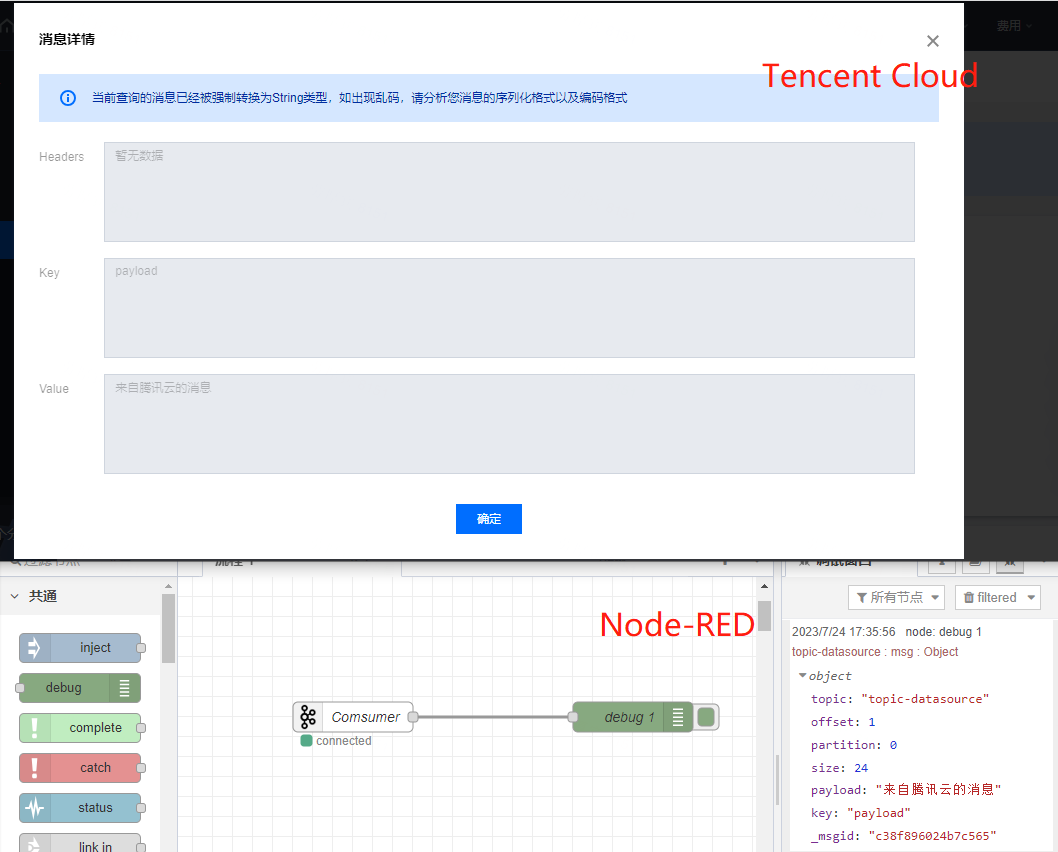
112 |
113 | Node-RED模拟Producer
114 |
115 | 
116 |
117 | ---
118 | 本人自动发布于:[https://github.com/giscafer/blog/issues/67](https://github.com/giscafer/blog/issues/67)
119 |
--------------------------------------------------------------------------------
/data/blog/post-55.mdx:
--------------------------------------------------------------------------------
1 | ---
2 | title: 拓扑编辑器技术方案
3 | publishedAt: 2022-04-02T09:24:10Z
4 | summary: 查看全文>>
5 | tags: ["JavaScript","技术方案"]
6 | ---
7 |
8 | ## 1.概述
9 |
10 | ### 1.1 需求背景
11 |
12 | (业务项目,脱敏,省略内容。。。)
13 |
14 | ### 1.2 关键难点功能分解
15 |
16 | 只列出一些对技术实现影响比较大和选型的点
17 |
18 | - 编辑器画布
19 | - 拖拉拽
20 | - 属性面板
21 | - 连线工具
22 | - 外观内容
23 | - 样式设置(位置&颜色字体)
24 | - 撤销&还原操作
25 | - 组件控件
26 | - 支持自定义组件(建议图片)
27 | - 画布组件支持点击指定超链接或按钮弹窗查看详情
28 | - 预览拓扑绘制结果
29 |
30 | ## 2. 总体设计
31 |
32 | ### 2.1 界面设计
33 |
34 | 场景的各种可视化编辑器的界面结构都类似下图所示,本次拓扑编辑器也类似
35 |
36 | 
37 |
38 |
39 | ### 2.2 编码设计
40 |
41 | 开发编辑器这种复杂功能,要设计好页面区块拆分、组件封装、数据通信等,将复杂问题简化,保证后期的可扩展性的同时,开发维护也简单。
42 |
43 | #### 2.2.1 代码结构设计
44 |
45 | 编辑器大致的代码目录结构举例
46 | ```bash
47 | ├── pages
48 | │ ├── topology
49 | │ │ ├── Header # 编辑器菜单栏
50 | │ │ ├── Layout # 编辑器
51 | │ │ │ ├── LeftAreaPanel # 左侧组件栏面板 (内部要细分区块组件)
52 | │ │ │ ├── RightAreaPanel # 右侧属性栏面板 (内部要细分区块组件)
53 | │ │ │ ├── Plugin # 编辑器核心或插件相关
54 | │ │ │ ├── index.less
55 | │ │ │ ├── index.tsx
56 | │ │ ├── Preview # 拓扑图预览
57 | │ │ ├── config # 拓扑编辑器相关配置 (这里不放在项目全局,目的是编辑器这块功能独立解耦,整个topology迁移出去都是完整的功能)
58 | │ │ └── index.tsx # 拓扑编辑器主入口
59 | ```
60 |
61 | Umi 的路由配置
62 | ```js
63 | {
64 | path: '/topology',
65 | name: 'Topology',
66 | layout: false, // 去掉布局,可以全屏
67 | icon: 'rh-icon-topology',
68 | component: './topology',
69 | },
70 | ```
71 |
72 | ## 3. 技术分析
73 |
74 | 经调研,目前了解到有两个技术方案实现成本相对较低:
75 |
76 | - Topology [https://github.com/le5le-com/topology](https://github.com/le5le-com/topology)
77 | - X6 [https://x6.antv.vision/zh/examples/gallery](https://x6.antv.vision/zh/examples/gallery)
78 |
79 | ### 3.1 Topology
80 |
81 | Topology是一个集动态交互、丰富展示、数据管理等一体的全功能可视化引擎,为物联网、工业互联网、电力能源、水利工程、智慧农业、智慧医疗、智慧城市等智能可视化场景而生。
82 |
83 | 在做调研的时候,也查找资源,结合 Umi 实现了个demo效果:[https://github.com/giscafer/topology-umi-demo](https://github.com/giscafer/topology-umi-demo), 可预览demo,点击 Topology 菜单
84 |
85 | 
86 |
87 |
88 | demo 依赖了指定版本的topology包
89 | ```js
90 | @topology/activity-diagram 0.3.0
91 | @topology/chart-diagram 0.3.0
92 | @topology/class-diagram 0.3.0
93 | @topology/core 0.5.8
94 | @topology/flow-diagram 0.3.0
95 | @topology/sequence-diagram 0.3.0
96 | ```
97 |
98 | ### 3.2 X6 (推荐)
99 |
100 | X6 是 AntV 旗下的图编辑引擎,提供了一系列开箱即用的交互组件和简单易用的节点定制能力,方便我们快速搭建 DAG 图、ER 图、流程图等应用。
101 |
102 | - 🌱 极易定制:支持使用 SVG/HTML/React/Vue 定制节点样式和交互
103 | - 🚀 开箱即用:内置 10+ 图编辑配套扩展,如框选、对齐线、小地图等
104 | - 🧲 数据驱动:基于 MVC 架构,用户更加专注于数据逻辑和业务逻辑
105 | - 💯 事件驱动:完备的事件系统,可以监听图表内发生的任何事件
106 |
107 | 文档: [https://x6.antv.vision/zh/examples](https://x6.antv.vision/zh/examples/gallery)
108 | demo: [https://gitee.com/martsforever-pot/react-x6-editor](https://gitee.com/martsforever-pot/react-x6-editor)
109 |
110 | ### 总结
111 |
112 | 对比 Topology 和 X6 ,个人更推荐 X6,因为出自蚂蚁金服,节点可定制化和文档都比较清晰。社区支持度也相对于 Topology 活跃些。
113 |
114 | - topology 免费版开源版本 v0.3.0,最新版本(>1.0)是商业付费。
115 | - X6 是开源免费,最新版本
116 |
117 |
118 |
119 |
120 | ---
121 | 本人自动发布于:[https://github.com/giscafer/blog/issues/55](https://github.com/giscafer/blog/issues/55)
122 |
--------------------------------------------------------------------------------
/data/blog/post-36.mdx:
--------------------------------------------------------------------------------
1 | ---
2 | title: Mac OS 使用记录
3 | publishedAt: 2020-01-30T16:20:17Z
4 | summary: 查看全文>>
5 | tags: ["Tool"]
6 | ---
7 |
8 | ## 软件
9 |
10 | - [Best-App列表](https://github.com/hzlzh/Best-App)
11 |
12 | ---
13 |
14 | - 效率
15 | - iTerm 强大的命令行工具,代替 Terminal
16 | - [iTerm2 + Oh My Zsh 打造舒适终端体验](https://segmentfault.com/a/1190000014992947)
17 | - Alfred 快速启动工具
18 | - https://github.com/withfig/autocomplete
19 | - https://github.com/aikuyun/iterm2-zmodem
20 | - 文档
21 | - Typora :Markdown编辑器
22 | - Notion
23 | - 截图
24 | - iShot 截图工具
25 | - 录屏
26 | - [LICEcap](https://www.cockos.com/licecap/) 超轻量录屏gif工具
27 | - [Kap](https://getkap.co/) (开源)
28 | - [Monosnap](https://monosnap.com/)
29 | - 视频
30 | - [IINA](https://github.com/iina/iina) 播放器
31 | - HandBrake 视频处理
32 | - 压缩
33 | - [eZip](https://ezip.awehunt.com/) 压缩和解压
34 | - [The Unarchiver](https://theunarchiver.com/) 压缩和解压
35 | - 其他
36 | - Paste 超级棒的剪贴板工具
37 | - SketchBook: 画板
38 | - [Itsycal](https://www.mowglii.com/itsycal/) 日历最强工具
39 | - [stats](https://github.com/exelban/stats) macOS system monitor in your menu bar
40 |
41 |
42 |
43 | ## 开发
44 |
45 | 之前一直用公司的 Mac , 环境直接安装没啥问题,自己入手的 mbp 就遇到一些问题,记录一下。
46 |
47 | ### shell scripts 包管理器
48 |
49 | Basher 允许您直接从 github(或其他站点)快速安装 shell 软件包。 basher 无需为每个软件包寻找特定的安装说明并弄乱您的路径,而是将为所有软件包创建一个中心位置并为您管理其二进制文件。
50 |
51 | https://github.com/basherpm/basher
52 |
53 | ### Terminal 总是要输入用户密码,或者 npm install 总需要 sudo 权限
54 |
55 | ```shell
56 | sudo vi /etc/sudoers
57 | 找到:
58 | # root and users in group wheel can run anything on any machine as any user
59 | root ALL = (ALL) ALL
60 | %admin ALL = (ALL) ALL
61 |
62 | 修改为:
63 | # root and users in group wheel can run anything on any machine as any user
64 | #root ALL = (ALL) ALL
65 | #%admin ALL = (ALL) ALL
66 | root ALL = (ALL) NOPASSWD: NOPASSWD: ALL
67 | %admin ALL = (ALL) NOPASSWD: NOPASSWD: ALL
68 | ```
69 |
70 | - 可以通过配置免密的方式解除 sudo (存在风险)
71 |
72 | ### 修改 `~/.bash_profile` 文件环境变量& source 了也不生效
73 |
74 | > Terminal 可能使用的是 zsh (看终端title是否有这个后缀),zsh加载的是 ~/.zshrc文件,而 ‘.zshrc’ 文件中并没有定义任务环境变量
75 |
76 |
77 | - `vim ~/.zshrc` 创建文件
78 | - 在 `~/.zshrc` 文件最后,增加一行:`source ~/.bash_profile`
79 | - 执行命令,使其立即生效 `source ~/.zshrc `
80 |
81 | 各环境文件补充说明:[MAC OSX环境变量$PATH
82 | ](https://www.jianshu.com/p/a63d0b8f184c)
83 |
84 | ### 使用 rmtrash 替代 rm -rf
85 |
86 | 避免误删文件无法恢复
87 |
88 | ```bash
89 | brew install rmtrash
90 | echo "alias rm='rmtrash'" >> ~/.bash_profile
91 | source ~/.bash_profile
92 | ```
93 |
94 | ### gyp: No Xcode or CLT version detected!
95 |
96 | [gyp: No Xcode or CLT version detected macOS Catalina | Anansewaa](https://medium.com/flawless-app-stories/gyp-no-xcode-or-clt-version-detected-macos-catalina-anansewaa-38b536389e8d)
97 |
98 | ```
99 | sudo rm -rf $(xcode-select -print-path)
100 | xcode-select --install
101 | ```
102 |
103 | ## VPN 全局代理
104 |
105 | 1.bash_profile Alias
106 |
107 | ```bash
108 | alias proxy='export https_proxy=http://127.0.0.1:1087 export http_proxy=http://127.0.0.1:1087 export all_proxy=socks5://127.0.0.1:1087'
109 | alias unproxy='unset https_proxy unset http_proxy unset all_proxy'
110 | alias ip='curl cip.cc'
111 | ```
112 | bash_profile 设置加入HTTP 和 HTTPS
113 |
114 | 2.ClashX 配置文件
115 |
116 | 在ClashX的配置文件中加入 - 'DOMAIN-SUFFIX,cip.cc,Proxy'
117 | 这一步的设置是可以走规则判断,不用使用全局模式
118 |
119 |
120 | ---
121 | 本人自动发布于:[https://github.com/giscafer/blog/issues/36](https://github.com/giscafer/blog/issues/36)
122 |
--------------------------------------------------------------------------------
/data/blog/post-19.mdx:
--------------------------------------------------------------------------------
1 | ---
2 | title: React Native 开发技术点整理
3 | publishedAt: 2018-08-28T02:47:12Z
4 | summary: 查看全文>>
5 | tags: ["React","App","React Native"]
6 | ---
7 |
8 | ## Working Group
9 |
10 | - [React Native New Architecture Working Group](https://github.com/reactwg/react-native-new-architecture)
11 |
12 | ## 脚手架
13 |
14 | - https://github.com/RootLinkFE/react-native-template
15 |
16 | ## 学习资源
17 |
18 | * [ES6教程](http://es6.ruanyifeng.com)
19 | * [typescript](https://zhongsp.gitbooks.io/typescript-handbook/content/)
20 | * [搭建开发环境](https://reactnative.cn/docs/getting-started/)
21 | * [react-native-guide中文资源](https://github.com/reactnativecn/react-native-guide)
22 | * [How to use `create-react-native-app` with GraphQL & Apollo](https://www.prisma.io/blog/tutorial-using-create-react-native-app-with-graphql-apollo-e630aee3ae1e/)
23 | * [Redux](http://www.redux.org.cn)
24 | * [MobX](https://cn.mobx.js.org/)
25 | * [RNStudyNotes React Native 研究与实践](https://github.com/crazycodeboy/RNStudyNotes)
26 | * [sucese/vinci](https://github.com/guoxiaoxing/vinci) A user guide and principle analysis for React Native (RN源码导读,从代码调用、启动流程、渲染原理、线程模型、通信机制等诸多方面对 React Native 进行了解读)
27 |
28 |
29 | ## 调试
30 |
31 | * [react-native-debugger](https://github.com/jhen0409/react-native-debugger)
32 | * 推荐 https://fbflipper.com/
33 |
34 | ## 软件
35 |
36 | - android用户推荐:[genymotion 模拟器](https://share.weiyun.com/5GgYGCX)
37 |
38 | ## 新手环境
39 |
40 | - [React Native 错误集合](https://juejin.im/post/5b4d47e96fb9a04f844abde0)
41 | - [Failed to find Build Tools revision 23.0.1](failed-to-find-build-tools-revision-23-0-1)
42 | - [com.android.builder.testing.api.DeviceException: Could not create ADB Bridge](https://stackoverflow.com/questions/35959350/react-native-android-genymotion-adb-server-didnt-ack)
43 | - ["AccessibilityInfo","message":"Unable to resolve module `AccessibilityInfo](https://github.com/facebook/react-native/issues/14209)
44 | - [could not connect to development server react native android](https://stackoverflow.com/questions/42064283/react-nativecould-not-connect-to-development-server-on-android)
45 | - [Error running adb: Error running app. Error: Activity not started](https://github.com/react-community/create-react-native-app/issues/398)
46 | - [only the original thread that created a view hierarchy can touch its views](https://github.com/facebook/react-native/issues/16042)
47 | - [:react-native-video:prepareReleaseDependencies](https://github.com/react-native-community/react-native-video/issues/914)
48 | - [No resource found that matches the given name: attr 'android:keyboardNavigationCluster'](https://github.com/react-community/react-native-image-picker/issues/882)
49 |
50 | 某些问题可以尝试`cd android && gradlew clean`
51 |
52 |
53 | ## UI 组件
54 |
55 | - [NativeBase](https://github.com/GeekyAnts/nativebase/)
56 |
57 | ## 插件库
58 |
59 | 见个人 star : https://github.com/stars/giscafer/lists/react-native
60 |
61 | ## 性能测试与优化
62 |
63 | - [React Native Performance Optimization and Profiling](https://medium.com/@Osterberg/react-native-performance-optimization-and-profiling-5b586e9018f8)
64 | - [Optimizing list render performance in React Native](http://matthewsessions.com/2017/05/15/optimizing-list-render-performance.html)
65 | - [Medium上性能优化相关的博文](https://medium.com/search?q=React%20Native%20Performance)
66 | - [Scheduling in React,关于如何让 React 应用快速响应](https://philippspiess.com/scheduling-in-react/)
67 |
68 | ## 文章
69 |
70 | - [去中心化的 React Native 架构探索](https://mp.weixin.qq.com/s/c6D0-iuDRhTiJwsBqax7nA)
71 |
72 | # Flutter
73 |
74 | - [从架构到源码:一文了解Flutter渲染机制](https://developer.aliyun.com/article/770384)
75 |
76 |
77 |
78 |
79 | ---
80 | 本人自动发布于:[https://github.com/giscafer/blog/issues/19](https://github.com/giscafer/blog/issues/19)
81 |
--------------------------------------------------------------------------------
/data/blog/post-35.mdx:
--------------------------------------------------------------------------------
1 | ---
2 | title: Web 安全之 CSP (内容安全策略) 和 SRI(子资源完整性)
3 | publishedAt: 2019-11-27T06:46:39Z
4 | summary: 查看全文>>
5 | tags: ["Web安全"]
6 | ---
7 |
8 | `CSP` 和 `SRI` 可以预防`XSS攻击`和`数据包嗅探攻击`。
9 |
10 | ## Content-Security-Policy (内容安全策略)
11 |
12 | > 来自MDN 的介绍
13 |
14 | `内容安全策略(Content-Security-Policy)` 是一个额外的安全层,用于检测并削弱某些特定类型的攻击,包括 `跨站脚本 (XSS)` 和`数据注入攻击`等。无论是数据盗取、网站内容污染还是散发恶意软件,这些攻击都是主要的手段。
15 |
16 | `CSP` 被设计成完全向后兼容(除`CSP2` 在向后兼容有明确提及的不一致; 更多细节查看这里 章节1.1)。不支持 `CSP` 的浏览器也能与实现了 `CSP` 的服务器正常合作,反之亦然:不支持 `CSP` 的浏览器只会忽略它,如常运行,默认为网页内容使用标准的同源策略。如果网站不提供 `CSP 头部`,浏览器也使用标准的同源策略。
17 |
18 | 为使 `CSP` 可用, 你需要配置你的网络服务器返回 `Content-Security-Policy` HTTP头部 ( 有时你会看到一些关于 `X-Content-Security-Policy` 头部的提法, 那是旧版本,你无须再如此指定它)。
19 |
20 | **HTTP Response Headers** ,举例:
21 |
22 | 
23 |
24 | 除此之外, **``** 元素也可以被用来配置该策略, 例如
25 |
26 | ```html
27 |
28 | ```
29 |
30 |
31 | ### 策略
32 |
33 | ```
34 | "Content-Security-Policy":策略字符串
35 | ```
36 |
37 | 资源限制可以精细到 `img`、`font`、`style`、`frame`等粒度。
38 |
39 | #### default-src
40 |
41 | ```
42 | Content-Security-Policy: default-src 'self'
43 | ```
44 | 一个网站管理者想要所有内容均来自站点的同一个源 (不包括其子域名),详细 [Content-Security-Policy/default-src](https://developer.mozilla.org/zh-CN/docs/Web/HTTP/Headers/Content-Security-Policy/default-src)
45 |
46 | #### media-src 、 img-src、script-src
47 |
48 | ```
49 | Content-Security-Policy: default-src 'self'; img-src *; media-src media1.com media2.com; script-src userscripts.example.com
50 | ```
51 |
52 | 在这里,各种内容默认仅允许从文档所在的源获取, 但存在如下例外:
53 |
54 | - 图片可以从任何地方加载(注意 "*" 通配符)。
55 | - 多媒体文件仅允许从 media1.com 和 media2.com 加载(不允许从这些站点的子域名)。
56 | - 可运行脚本仅允许来自于userscripts.example.com。
57 |
58 | #### 'unsafe-eval'
59 |
60 | 允许使用 eval() 以及相似的函数来从字符串创建代码。必须有单引号。
61 |
62 |
63 |
64 | 更多策略见 [CSP directives](https://developer.mozilla.org/zh-CN/docs/Web/HTTP/Headers/Content-Security-Policy)
65 |
66 | ### 常见网站设置
67 |
68 | - 知乎
69 | 
70 |
71 |
72 | - Twitter
73 |
74 | 
75 |
76 |
77 |
78 | ## Subresource Integrity(子资源完整性)
79 |
80 | `子资源完整性(SRI)` 是允许浏览器检查其获得的资源(例如从 CDN 获得的)是否被篡改的一项安全特性。它通过验证获取文件的哈希值是否和你提供的哈希值一样来判断资源是否被篡改。
81 |
82 | 很多时候我们使用CDN多个站点之间共享了脚本和样式,以便提高网站性能节省宽带。然而也存在风险,如果攻击者获取了CDN的控制权,就可以将任意内容恶意注入到CDN文件中,从而攻击了加载此CDN资源的站点。所以就需要 `SRI` 来确保Web应用程序获得的文件未经过第三方注入或者其他形式的修改来降低被攻击的风险。
83 |
84 | ### SRI 原理
85 |
86 | 将文件内容通过 `base64 编码` 后的哈希值,写入你所引用的 `
95 | ```
96 |
97 | ### 内容安全策略及子资源完整性
98 |
99 | 你可以根据`内容安全策略(CSP)`来配置你的服务器使得指定类型的文件遵守 `SRI`。这是通过在 `CSP 头部` 添加 `require-sri-for` 指令实现的:
100 |
101 | ```
102 | Content-Security-Policy: require-sri-for script;
103 | ```
104 | 这条指令规定了所有 `JavaScript` 都要有 **integrity** 属性,且通过验证才能被加载。
105 |
106 | 所以,只要文件变化了,浏览器就不会执行,有效避免了脚本攻击。
107 |
108 |
109 |
110 | ---
111 | 参考链接
112 |
113 | - https://developer.mozilla.org/zh-CN/docs/Web/Security
114 | - https://www.jianshu.com/p/217b11f5f953
115 |
116 |
117 | ---
118 | 本人自动发布于:[https://github.com/giscafer/blog/issues/35](https://github.com/giscafer/blog/issues/35)
119 |
--------------------------------------------------------------------------------
/data/blog/post-59.mdx:
--------------------------------------------------------------------------------
1 | ---
2 | title: 编程中的23种设计模式
3 | publishedAt: 2022-10-11T11:10:03Z
4 | summary: 查看全文>>
5 | tags: ["设计模式"]
6 | ---
7 |
8 | > 王争《设计模式之美》专栏学习笔记
9 |
10 | 设计模式要干的事情就是解耦。创建型模式是将创建和使用代码解耦,结构型模式是将不同功能代码解耦,行为型模式是将不同的行为代码解耦。
11 |
12 | 设计模式在于设计的意图,也就是应用场景。如果单纯看设计思路或者代码实现,一些模式是比较相似的,比如策略模式和工厂模式。
13 |
14 | 借助设计模式,我们利用更好的代码结构,将一大坨代码拆分成职责更单一的小类,让其满足开闭原则,高内聚低耦合等特性,从此来控制和应对代码的复杂性,提供代码的可扩展性。
15 | ### 创建型模式
16 | > 解决对象的创建问题
17 |
18 | - 单例模式
19 | - 工厂模式
20 | - 建造者模式
21 | - 原型模式
22 |
23 | ### 结构性模式
24 |
25 | > 类或对象的组合或组装
26 |
27 | - 代理模式
28 | - 增强原始类无关的功能
29 | - 常用于:监控、统计、鉴权、限流、事务、幂等、日志、RPC、缓存等
30 | - 桥接模式
31 | - “抽象”和“实现”独立开发,通过对象之间的组合关系,组装在一起。
32 | - 应用1:JDBC驱动(JDBC和Driver独立开发,组合在一起)
33 | - 应用2:API监控告警,通知渠道:邮件、短信、微信、自动语音电话;紧急程度:严重、紧急、普通、无关要紧;不同的紧急程度对应不同的通知渠道
34 | - 装饰器模式
35 | - 增强原始类相关的方法(所以需要继承同样的父类或者实现同样的接口),能嵌套多个装饰器
36 | - 应用1:Java IO 流
37 | - 应用2:增加缓存
38 | - 适配器模式
39 | - “补救策略”,提供跟原始类不同的接口。代理模式和装饰器模式提供的都是跟原始类相同的接口。
40 | - 应用:
41 | - 封装有缺陷的接口设计
42 | - 统一多个类的接口设计
43 | - 替换依赖的外部系统
44 | - 兼容老版本接口
45 | - 适配不同的数据格式
46 | - 门面模式
47 | - 解决的是接口易用性、性能、事务问题,而适配器解决的是原接口和目标接口不适配的兼容性问题。
48 | - 应用:子系统(或App)需要调用多个接口的情况;用户和钱包两个领域的分布式事务问题。
49 | - 组合模式
50 | - 应用:文件系统目录结构
51 | - 享元模式
52 | - 目的是共享使用对象,达到复用目的(通过一个List或Map缓存已经创建好的享元对象)
53 | - 应用1:棋牌模式、文本编辑器
54 | - 应用2:Java Integer(-127~127利用享元模式提前创建好)、String 利用享元模式复用字符串常量。
55 |
56 | ### 行为型模式
57 |
58 | > 类或对象之间的交互
59 |
60 | - 观察者模式
61 | - 也称为发布订阅模式,是一对多的关系。将观察者和被观察者代码解耦。
62 | - 应用1:RSS Feeds,邮件订阅
63 | - 应用2:进程内有同步阻塞或异步非阻塞实现方式,异步非阻塞如EventBus;跨进程的观察者模式如RPC接口调用,消息队列MQ
64 | - 与**生产者>消费者**的区别:
65 | - 生产者和消费者是以异步实现,多对多,**并且消费者存在竞争关系,一条消息只能被一个消费者消费。**
66 | - 发布订阅则可以同步也可以异步方式实现,**一对多,一条消息可以被多个订阅者消费**,订阅者没有竞争关系,发布和订阅两者也在流程上存在先后关系
67 | - 模板模式
68 | - 模板方法和回调应用场景是一致的,都是定义好算法骨架,并对外开放扩展点,符合开闭原则;两者的却别是代码的实现上不同,**模板方法是通过继承来实现,是自己调用自己**;**回调是类之间的组**合。
69 | - 应用:JdbcTemplate、RedisTemplate、RestTemplate
70 | - 策略模式
71 | - 解耦策略的定义、创建、使用,控制代码复杂度,让每个部分都不至于过复杂,代码行数过多。移除 if-else 和 switch-case 分支逻辑判断(策略工厂),保证代码的可维护性,和遵循KISS原则。
72 | - **应用**:对一个文件进行排序。文件中只有整数,并且相邻的数字通过逗号区隔。文件的大小可能:10GB(外部排序)、100GB(多线程外部排序)、 1TB(多机MapReduce)。
73 | - 职责链模式
74 | - 将请求的发送和接收解耦,让多个接收对象都有机会处理这个请求。将这些接收对象串成一条链,并沿着这条链传递这个请求,直到链上的某个接收对象能够处理它为止。
75 | - **应用**:敏感词过滤、Servlet Filter、Spring Interceptor
76 | - 状态模式
77 | - 又叫有限状态机,有3个部分组成:状态、事件、动作。其中,事件也称为转移条件。事件触发转态的转移和动作的执行。动作可以不是必须的。**状态机的三种实现方式**:分支逻辑法、查表法、状态模式。
78 | - 应用:游戏、工作流引擎
79 | - 迭代器模式
80 | - 数组遍历器,在编程语言中已经提供为一种类库来使用
81 | - 应用:1、遍历集合的同时不要增删元素;2、设计一个支持快照功能的iterator
82 | - 访问者模式
83 | - 允许一个或多个操作应用到一组对象上,解耦操作和对象本身。双分派语言(Double Dispatch)不需要支持访问者模式
84 | - 应用:批量处理PDF、PPT、Word文件,提取内容放到 txt 文件中。定义访问者类(Extractor、Compressor),将对象和操作解耦,将业务操作抽离出来,使得符合开闭原则。
85 | - 备忘录模式
86 | - 也叫快照模式,在不违背封装原则的前提下,捕获一个对象的内部状态,并在该对象之外保存这个状态,一遍之后方便恢复对象为先前状态。
87 | - 应用:防丢失、撤销、恢复等。通过**全量备份和增量备份结合**的方式(低频全量备份,高频增量备份),减少存储和时间的消耗。
88 | - 命令模式
89 | - 命令模式将请求(命令)封装为一个对象,这样可以使用不同的请求参数化其他对象(将不同请求依赖注入到其他对象),并且能够支持请求(命令)的排队执行、记录日志、撤销等(附加控制)功能。
90 | - 应用:用来控制命令的执行,比如:异步、延迟、排队执行命令、存储命令、给命令记录日志等。
91 | - 解释器模式
92 | - 解释器模式为某个语言定义它的语法(或者叫文法)表示,并定义一个解释器来处理这个语法。
93 | - 应用:1、告警规则,如触发条件:key1 > 100 && key2 < 1000 || key3 == 200;2、计算表达式等,如 8 3 2 4 - + *
94 | - 中介模式
95 | - 中介模式的设计思想跟中间层很像,通过引入中介这个中间层,将一组对象之间的交互关系(或者依赖关系)从多对多(网状关系)转换为一对多(星状关系)。原来一个对象要跟 n 个对象交互,现在只需要跟一个中介对象交互,从而最小化对象之间的交互关系,降低了代码的复杂度,提高了代码的可读性和可维护性。
96 | - 应用:UI交互,如注册用户页面,切换用户登录和用户注册的UI,显示不同输入框等。
97 | - 与观察者模式的区别:中介模式一般可以控制参与者的执行顺序,而观察者一般控制不了。
98 |
99 | ### 总结
100 |
101 | 熟悉23种设计模式的原理、实现、设计意图和应用场景。避免过度设计,避免设计不足。设计的初衷是提高代码质量,不要脱离具体的场景去谈设计。
102 |
103 | 
104 |
105 |
106 |
107 |
108 | ---
109 | 本人自动发布于:[https://github.com/giscafer/blog/issues/59](https://github.com/giscafer/blog/issues/59)
110 |
--------------------------------------------------------------------------------
/data/blog/post-33.mdx:
--------------------------------------------------------------------------------
1 | ---
2 | title: Angular 工程 ng build 构建提速
3 | publishedAt: 2019-08-30T02:53:19Z
4 | summary: 查看全文>>
5 | tags: ["性能优化","Angular"]
6 | ---
7 |
8 | > 公司项目统一都使用 [angular-cli](https://github.com/angular/angular-cli) 来搭建工程环境,从 Angular2 到 Angular8 版本都经历了,老项目都基本升级到 Angular4、6,新一点的项目,ng 版本都是7、8了。许多项目构建的速度,一直都是正常的表现,某一两个项目表现的比较异常,这不得不采取相关改进措施。
9 |
10 | Angular 生产环境构建打包 `ng build --prod` 是开启了 `AOT` ([为什么要AOT编译](https://angular.cn/guide/aot-compiler#why-compile-with-aot)),`ng build` 构建配置项也比较多,含义介绍见文档:[build](https://angular.io/cli/build),常见配置属性设置如下:
11 |
12 | ```json
13 | "prod": {
14 | "optimization": true,
15 | "outputHashing": "all",
16 | "sourceMap": false,
17 | "extractCss": true,
18 | "namedChunks": false,
19 | "aot": true,
20 | "extractLicenses": true,
21 | "vendorChunk": false,
22 | "buildOptimizer": true,
23 | "fileReplacements": [
24 | {
25 | "replace": "src/environments/environment.local.ts",
26 | "with": "src/environments/environment.prod.ts"
27 | }
28 | ]
29 | }
30 | ```
31 |
32 | 同样的配置,在不同的项目,构建时间长短也是不一样的。所以影响项目构建时间的原因可能有:
33 |
34 | - **项目代码问题**(结构,路由划分,代码规范)
35 | 后期优化的可能性小,所以前期需要做好规范限制;
36 | - **代码量**(系统越大,ts文件越多,构建时间会越长)
37 | 和系统大小有关,建议根据模块和路由划分,来加载划分一些模块代码,对构建生成的chunk大小也有帮助;
38 | - **第三方依赖**( node_modules 依赖第三方的模块数量)
39 | - **Angular CLI 版本**(cli 自身问题)
40 | 关注版本变化更新日记
41 | - **angular.json 配置影响**
42 | - **系统硬件性能**( 16G 的iMac 明显比 16G内存的Windows 10系统快两倍多)
43 | - **变更脚手架** (改用SystemJS 和 Webpack 搭建环境,不用ng-cli)
44 |
45 |
46 |
47 | ## 解决方案探索
48 |
49 | _Tips: 我们构建默认都统一加大了node.js的执行内存_
50 |
51 |
52 | 我们有个项目,再上线工单系统的页面之后,多出了10分钟的构建时间,构建时间在 15~20分钟 区间浮动。截图是 Gitlab CI/CD Build Job的(iMac 是8分钟内)
53 |
54 | 感谢您确认邮件!
51 |53 | 你在名单上,在新的内容发布时会受到通知。 54 |
55 | 55 |
56 | 本地iMac的构建速度:
57 |
58 |
55 |
56 | 本地iMac的构建速度:
57 |
58 |  59 |
60 |
61 | 至于为什么 构建参数、配置不变的情况下,iMac 构建会比 gitlab runner(Linux 以及 Windows 系统)快很多,初步单纯认为是硬件性能的影响。我们项目持续集成服务器是 Linux 非 iMac,所以优化的时候,以CI/CD服务器构建效果的速度作为参考。
62 |
63 | ### 找到构建过程最慢的点
64 |
65 | 构建过程最慢的有两个地方分别是`79%` 和92%的操作:
66 |
67 | ```bash
68 | 79% chunk modules optimization ModuleConcatenationPlugin
69 | ```
70 | ```bash
71 | 92% chuck asset optimization
72 | ```
73 |
74 | 所有慢的构建都在这里浪费时间的,有网友是这么描述:
75 |
76 | > I've just upgraded my CLI to 1.7.2 (I've double checked the node_modules and --version) and a my build time has gone from about 15 seconds to infinity
77 | > It hangs forever at "92% chunk asset optimization", I've waited more than 10 mins before giving up
78 | > It's a very small app
79 |
80 | 理解这两个过程是干了什么,然后再去查找解决方案。官方文档是这么描述着两个属性配置的:
81 |
82 |
83 | buildOptimizer=true\|false | Enables '@angular-devkit/build-optimizer' optimizations when using the 'aot' option.Default: false
84 | -- | --
85 |
86 | optimization=true\|false | Enables optimization of the build output.
87 | -- | --
88 |
89 | ### 关闭 optimization 和 buildOptimizer
90 |
91 | 经实践,修改着两个配置属性为`false`后,构建就提速多倍,如图
92 |
93 |
59 |
60 |
61 | 至于为什么 构建参数、配置不变的情况下,iMac 构建会比 gitlab runner(Linux 以及 Windows 系统)快很多,初步单纯认为是硬件性能的影响。我们项目持续集成服务器是 Linux 非 iMac,所以优化的时候,以CI/CD服务器构建效果的速度作为参考。
62 |
63 | ### 找到构建过程最慢的点
64 |
65 | 构建过程最慢的有两个地方分别是`79%` 和92%的操作:
66 |
67 | ```bash
68 | 79% chunk modules optimization ModuleConcatenationPlugin
69 | ```
70 | ```bash
71 | 92% chuck asset optimization
72 | ```
73 |
74 | 所有慢的构建都在这里浪费时间的,有网友是这么描述:
75 |
76 | > I've just upgraded my CLI to 1.7.2 (I've double checked the node_modules and --version) and a my build time has gone from about 15 seconds to infinity
77 | > It hangs forever at "92% chunk asset optimization", I've waited more than 10 mins before giving up
78 | > It's a very small app
79 |
80 | 理解这两个过程是干了什么,然后再去查找解决方案。官方文档是这么描述着两个属性配置的:
81 |
82 |
83 | buildOptimizer=true\|false | Enables '@angular-devkit/build-optimizer' optimizations when using the 'aot' option.Default: false
84 | -- | --
85 |
86 | optimization=true\|false | Enables optimization of the build output.
87 | -- | --
88 |
89 | ### 关闭 optimization 和 buildOptimizer
90 |
91 | 经实践,修改着两个配置属性为`false`后,构建就提速多倍,如图
92 |
93 |  94 |
95 | 又得必有失,从图中也可以看出来,提速了,但是单个文件代码体积明显提升了,因为关闭了optimization ,输出的文件体积没有做优化。
96 |
97 | ### 其他手段
98 |
99 | ……未完待续
100 |
101 | ---
102 | 参考资源:
103 | - https://www.bountysource.com/issues/46543750-build-with-ng-prod-is-extremely-slow
104 | - https://github.com/angular/angular-cli/issues/6795
105 |
106 |
107 | ---
108 |
109 | > Author: [@giscafer](https://github.com/giscafer),原文地址:[front-end-manual/issues/33](https://github.com/giscafer/front-end-manual/issues/33) ,
110 | > 欢迎讨论
111 |
112 |
113 |
114 | ---
115 | 本人自动发布于:[https://github.com/giscafer/blog/issues/33](https://github.com/giscafer/blog/issues/33)
116 |
--------------------------------------------------------------------------------
/data/blog/post-51.mdx:
--------------------------------------------------------------------------------
1 | ---
2 | title: 设计模式 - 单例模式
3 | publishedAt: 2021-08-11T06:04:04Z
4 | summary: 查看全文>>
5 | tags: ["设计模式"]
6 | ---
7 |
8 | **单例模式(Singleton Design Patterns)**:一个类只允许创建一个实例,单例一般用来处理资源访问冲突、或者是表示一个全局唯一类。
9 |
10 | ## 为什么说支持懒加载的双重检测不比饿汉式更优?
11 |
12 | - 饿汉模式:类加载时提前初始化静态实例,不支持延迟加载
13 | - 懒汉模式:支持延迟加载,但函数锁造成加锁解锁频繁,并发低,存在性能问题
14 | - 双重检测:在函数内部进行判断加类就级别锁,静态对象实例化之后不再触发加锁解锁的情况,并发高
15 | - 内部静态类:比双重检测简单。
16 |
17 | 在前端,由于js是单线程的,所以,不会存在锁的情况,不过也可以了解后端是通过锁来解决这个并发问题的。
18 |
19 |
20 | ### 饿汉模式
21 |
22 | > ts 代码
23 |
24 | ```ts
25 | class SingletonEhan {
26 | private id: number = 0;
27 | private static instance: SingletonEhan = new SingletonEhan();
28 | private SingletonEhan() {}
29 | private static getInstance() {
30 | return SingletonEhan.instance;
31 | }
32 |
33 | getId() {
34 | return (this.id += 1);
35 | }
36 | }
37 | ```
38 |
39 | ### 懒汉模式
40 |
41 | > ts 代码
42 |
43 | ```ts
44 | class SingletonLhan {
45 | private id: number = 0;
46 | private static instance: SingletonLhan;
47 | private SingletonLhan() {}
48 | // java 写的话函数加上 synchronized 锁,导致频繁加锁和解锁并发低
49 | // js 单线程所以不需要考虑此问题
50 | private static getInstance() {
51 | if (!this.instance) {
52 | this.instance = new SingletonLhan();
53 | }
54 |
55 | return this.instance;
56 | }
57 |
58 | getId() {
59 | return (this.id += 1);
60 | }
61 | }
62 | ```
63 |
64 | ### 双重检测
65 |
66 | > ts 代码
67 |
68 | ```ts
69 | class SingletonLhan2 {
70 | private id: number = 0;
71 | private static instance: SingletonLhan;
72 | private SingletonLhan() {}
73 |
74 | private static getInstance() {
75 | if (!this.instance) {
76 | // java 写的话函数加上 synchronized 锁,解决频繁加锁和解锁并发低问题
77 | // js 单线程所以不需要考虑此问题
78 | // synchronized(SingletonLhan2.class){
79 | // if (!this.instance) {
80 | // this.instance = new SingletonLhan();
81 | // }
82 | // }
83 | this.instance = new SingletonLhan();
84 | }
85 |
86 | return this.instance;
87 | }
88 |
89 | getId() {
90 | return (this.id += 1);
91 | }
92 | }
93 | ```
94 |
95 | ### 静态内部类
96 |
97 | > java 代码
98 |
99 | ```java
100 |
101 | public class SingletonInner{
102 | private int id=0;
103 |
104 | private constructor(){}
105 |
106 | private static class Inner{
107 | private static SingletonInner instance = new SingletonInner();
108 | }
109 |
110 | private static SingletonInner getInstance(){
111 | return Inner.instance;
112 | }
113 |
114 | public int getId(){
115 | return id+=1;
116 | }
117 | }
118 |
119 | ```
120 |
121 | ---
122 |
123 | 思考,如果不是用 typescript 来写,es6 写的话不存在 private 属性的东西,如何实现?
124 |
125 | —— 闭包
126 |
127 | ## 单例模式有哪些问题?有没有替代方案?
128 |
129 | ### 单例的问题
130 |
131 | - 单例对OOP特性(封装、抽象、继承、多态)编程不友好
132 | - 单例会隐藏类之间的依赖关系
133 | - 单例对代码的扩展性不友好
134 | 比如,如果设计数据库连接池为单例类,慢SQL优化的时候,想将慢SQL独立一个数据库连接池,这时候扩展性就比较差。不适合设计成单例模式。
135 | - 单例对代码的可测试性不友好
136 | 单例的局部变量是全局可变、被所有代码共享的,修改会影响到别的测试结果。
137 | - 单例不支持有参数的构造函数
138 | 实际上可扩展支持
139 |
140 | ### 替代方案
141 |
142 | 为了保证全局唯一性,除了单例类,还可以用以下方法:
143 |
144 | - 静态方法实现。
145 | - 将单例生成的对象,作为参数传入函数。
146 | - 工程模式、IOC
147 |
148 |
149 |
150 | ## 集群环境下的分布式单例模式
151 |
152 | #### 单例模式中的唯一性
153 |
154 | 一个单例类只能实例化一个实例对象。
155 |
156 | #### 线程唯一的单例
157 |
158 | 一个线程中单例实例是唯一的,线程间实例不同,可以用 `HashMap<线程id,单例实例对象>` 来存储区分
159 |
160 | #### 进程唯一的单例
161 |
162 | 一个进程中的单例实例是唯一的,进程中多线程都是使用同一个单例实例对象。进程间不唯一。因为应用程序最新执行单元就是进程起步,进程分配了独立的运行空间,不同进程间的环境和内存是独立隔离开的。
163 |
164 | #### 如何实现集群环境下的单例?
165 |
166 | 集群是多个服务器或者多个应用程序部署,程序运行环境和内存都是独立的,实际上就是多进程如何保证单例唯一。要使得集群应用的单例是唯一的,需要借助存储共享的能力。
167 |
168 | 使用共享存储区(比如文件),在进程使用到单例时,从共享存储区读取到内存,并反序列化为对象,然后再使用,使用完成之后还要再存储到外部共享存储区。
169 |
170 | 为了保证任何时间,进程之间只有一份对象存在,一进程在获取到对象之后,需要对对象进行加锁,避免其他进程再对其读取。并在使用完成这个对象之后,还需要显式的将对象从内存删除,并释放对对象的加锁。
171 |
172 | #### 如何实现一个多例模式?
173 |
174 | 使用HashMap 来控制
175 |
176 | ---
177 |
178 | Java中单例的唯一性作用的范围不是进程,而是类的加载器
179 |
180 |
181 |
182 |
183 |
184 |
185 |
186 |
187 |
188 |
189 | ---
190 | 本人自动发布于:[https://github.com/giscafer/blog/issues/51](https://github.com/giscafer/blog/issues/51)
191 |
--------------------------------------------------------------------------------
/data/blog/post-58.mdx:
--------------------------------------------------------------------------------
1 | ---
2 | title: 我的摸鱼划水实践方案
3 | publishedAt: 2022-08-28T10:57:08Z
4 | summary: 查看全文>>
5 | tags: ["技术方案"]
6 | ---
7 |
8 | ## 背景
9 |
10 | 对于中后台Web管理系统,不管需求怎么变,不管UED怎么设计,都是千变一律的列表+表单+详情页面展示。面对不同的产品,不同的设计师,可能会重复的去写这些千变一律的代码。这样的问题怎么去解决?有两个大方向:1、生成代码,尽量不写;2、区块、组件资源物料市场。
11 |
12 | **生成代码,尽量不写**。业界上的 Low-Code 和 No Code 方案框架也层出不穷,只是在不停的卷。但没有多少能真正解决中小型公司的问题。强行套用也只会变成维护难,技术债。对于这方面的框架学了解,可以阅读之前整理的文章 [《Low-Code开源项目调研》](https://github.com/giscafer/blog/issues/50)
13 |
14 | **区块、组件资源物料市场**。需要考验前端团队基建能力,以及日常开发代码规范,抽象能力,让物料市场持续丰富起来。在公司里的各部门直接共享是可以的。但是当脱离了公司,或者是换了公司,基本也是从0开始了。物料市场,之前也测试搞了个试验品,源码开源,了解前往:[roothub](https://github.com/RootLinkFE/roothub)
15 |
16 | 以上两个方案都有实践尝试过,在不投入更多的研发成本和时间积累成本,是无法做到真正的效益的。对于小团队,是否有别的选择呢?下边介绍一下我业余整的「**摸鱼最佳解决方案**」工程脚手架
17 |
18 | ## 为何叫「摸鱼」解决方案?
19 |
20 | 摸鱼划水。并不代表是贬义的,只要你是个工作认真负责,也有极客追求精神;摸鱼就可以认为是释放生产力,研发效能提升的代名词。多少时间是重复得浪费在前后端联调对接接口,CURD千篇一律,接口返回值处理,表单页面开发和表单验证逻辑处理等。只要不需要再写这些,研发时间就可以减少60%。
21 |
22 | 早之前尝试过百度 [amis](https://github.com/baidu/amis) 的前端低代码框架,获得了一些设计灵感。在试用amis时也写过一个 [sailor(水手)](https://github.com/giscafer/sailor)demo 。暗示:摸鱼划水选手!
23 |
24 | ## 摸鱼最佳解决方案
25 |
26 | 摸鱼最佳解决方案遵守的三个原则:
27 |
28 | - 1、**更少的代码**。 不写可能重复写的任何代码逻辑。
29 | - 2、**可扩展性,无技术债**。组件封装都无 breaking changed,**保留原生写法的前提**下扩展动态配置开发方式。
30 | - 3、**保证易维护性、复用性**。换团队时组件、配置化开发方式都能复用;只要你用 antd 就可以摸鱼了。
31 |
32 | 整个方案提效的两大点:
33 | - 列表开发 RhTable
34 | - 动态表单 RhDynamicToolkit
35 |
36 | 详细用法和 demo 请前往查看 [giscafer/rh-template-umi](https://github.com/giscafer/rh-template-umi.git)
37 |
38 | ## 实践测评
39 |
40 | 开发摸鱼方案之后,自己也在真是项目开发中实践使用了。业余时间或周末开发,总耗时约 5天左右完成一个后台管理系统。以下是整个系统的提交日记
41 |
42 |
94 |
95 | 又得必有失,从图中也可以看出来,提速了,但是单个文件代码体积明显提升了,因为关闭了optimization ,输出的文件体积没有做优化。
96 |
97 | ### 其他手段
98 |
99 | ……未完待续
100 |
101 | ---
102 | 参考资源:
103 | - https://www.bountysource.com/issues/46543750-build-with-ng-prod-is-extremely-slow
104 | - https://github.com/angular/angular-cli/issues/6795
105 |
106 |
107 | ---
108 |
109 | > Author: [@giscafer](https://github.com/giscafer),原文地址:[front-end-manual/issues/33](https://github.com/giscafer/front-end-manual/issues/33) ,
110 | > 欢迎讨论
111 |
112 |
113 |
114 | ---
115 | 本人自动发布于:[https://github.com/giscafer/blog/issues/33](https://github.com/giscafer/blog/issues/33)
116 |
--------------------------------------------------------------------------------
/data/blog/post-51.mdx:
--------------------------------------------------------------------------------
1 | ---
2 | title: 设计模式 - 单例模式
3 | publishedAt: 2021-08-11T06:04:04Z
4 | summary: 查看全文>>
5 | tags: ["设计模式"]
6 | ---
7 |
8 | **单例模式(Singleton Design Patterns)**:一个类只允许创建一个实例,单例一般用来处理资源访问冲突、或者是表示一个全局唯一类。
9 |
10 | ## 为什么说支持懒加载的双重检测不比饿汉式更优?
11 |
12 | - 饿汉模式:类加载时提前初始化静态实例,不支持延迟加载
13 | - 懒汉模式:支持延迟加载,但函数锁造成加锁解锁频繁,并发低,存在性能问题
14 | - 双重检测:在函数内部进行判断加类就级别锁,静态对象实例化之后不再触发加锁解锁的情况,并发高
15 | - 内部静态类:比双重检测简单。
16 |
17 | 在前端,由于js是单线程的,所以,不会存在锁的情况,不过也可以了解后端是通过锁来解决这个并发问题的。
18 |
19 |
20 | ### 饿汉模式
21 |
22 | > ts 代码
23 |
24 | ```ts
25 | class SingletonEhan {
26 | private id: number = 0;
27 | private static instance: SingletonEhan = new SingletonEhan();
28 | private SingletonEhan() {}
29 | private static getInstance() {
30 | return SingletonEhan.instance;
31 | }
32 |
33 | getId() {
34 | return (this.id += 1);
35 | }
36 | }
37 | ```
38 |
39 | ### 懒汉模式
40 |
41 | > ts 代码
42 |
43 | ```ts
44 | class SingletonLhan {
45 | private id: number = 0;
46 | private static instance: SingletonLhan;
47 | private SingletonLhan() {}
48 | // java 写的话函数加上 synchronized 锁,导致频繁加锁和解锁并发低
49 | // js 单线程所以不需要考虑此问题
50 | private static getInstance() {
51 | if (!this.instance) {
52 | this.instance = new SingletonLhan();
53 | }
54 |
55 | return this.instance;
56 | }
57 |
58 | getId() {
59 | return (this.id += 1);
60 | }
61 | }
62 | ```
63 |
64 | ### 双重检测
65 |
66 | > ts 代码
67 |
68 | ```ts
69 | class SingletonLhan2 {
70 | private id: number = 0;
71 | private static instance: SingletonLhan;
72 | private SingletonLhan() {}
73 |
74 | private static getInstance() {
75 | if (!this.instance) {
76 | // java 写的话函数加上 synchronized 锁,解决频繁加锁和解锁并发低问题
77 | // js 单线程所以不需要考虑此问题
78 | // synchronized(SingletonLhan2.class){
79 | // if (!this.instance) {
80 | // this.instance = new SingletonLhan();
81 | // }
82 | // }
83 | this.instance = new SingletonLhan();
84 | }
85 |
86 | return this.instance;
87 | }
88 |
89 | getId() {
90 | return (this.id += 1);
91 | }
92 | }
93 | ```
94 |
95 | ### 静态内部类
96 |
97 | > java 代码
98 |
99 | ```java
100 |
101 | public class SingletonInner{
102 | private int id=0;
103 |
104 | private constructor(){}
105 |
106 | private static class Inner{
107 | private static SingletonInner instance = new SingletonInner();
108 | }
109 |
110 | private static SingletonInner getInstance(){
111 | return Inner.instance;
112 | }
113 |
114 | public int getId(){
115 | return id+=1;
116 | }
117 | }
118 |
119 | ```
120 |
121 | ---
122 |
123 | 思考,如果不是用 typescript 来写,es6 写的话不存在 private 属性的东西,如何实现?
124 |
125 | —— 闭包
126 |
127 | ## 单例模式有哪些问题?有没有替代方案?
128 |
129 | ### 单例的问题
130 |
131 | - 单例对OOP特性(封装、抽象、继承、多态)编程不友好
132 | - 单例会隐藏类之间的依赖关系
133 | - 单例对代码的扩展性不友好
134 | 比如,如果设计数据库连接池为单例类,慢SQL优化的时候,想将慢SQL独立一个数据库连接池,这时候扩展性就比较差。不适合设计成单例模式。
135 | - 单例对代码的可测试性不友好
136 | 单例的局部变量是全局可变、被所有代码共享的,修改会影响到别的测试结果。
137 | - 单例不支持有参数的构造函数
138 | 实际上可扩展支持
139 |
140 | ### 替代方案
141 |
142 | 为了保证全局唯一性,除了单例类,还可以用以下方法:
143 |
144 | - 静态方法实现。
145 | - 将单例生成的对象,作为参数传入函数。
146 | - 工程模式、IOC
147 |
148 |
149 |
150 | ## 集群环境下的分布式单例模式
151 |
152 | #### 单例模式中的唯一性
153 |
154 | 一个单例类只能实例化一个实例对象。
155 |
156 | #### 线程唯一的单例
157 |
158 | 一个线程中单例实例是唯一的,线程间实例不同,可以用 `HashMap<线程id,单例实例对象>` 来存储区分
159 |
160 | #### 进程唯一的单例
161 |
162 | 一个进程中的单例实例是唯一的,进程中多线程都是使用同一个单例实例对象。进程间不唯一。因为应用程序最新执行单元就是进程起步,进程分配了独立的运行空间,不同进程间的环境和内存是独立隔离开的。
163 |
164 | #### 如何实现集群环境下的单例?
165 |
166 | 集群是多个服务器或者多个应用程序部署,程序运行环境和内存都是独立的,实际上就是多进程如何保证单例唯一。要使得集群应用的单例是唯一的,需要借助存储共享的能力。
167 |
168 | 使用共享存储区(比如文件),在进程使用到单例时,从共享存储区读取到内存,并反序列化为对象,然后再使用,使用完成之后还要再存储到外部共享存储区。
169 |
170 | 为了保证任何时间,进程之间只有一份对象存在,一进程在获取到对象之后,需要对对象进行加锁,避免其他进程再对其读取。并在使用完成这个对象之后,还需要显式的将对象从内存删除,并释放对对象的加锁。
171 |
172 | #### 如何实现一个多例模式?
173 |
174 | 使用HashMap 来控制
175 |
176 | ---
177 |
178 | Java中单例的唯一性作用的范围不是进程,而是类的加载器
179 |
180 |
181 |
182 |
183 |
184 |
185 |
186 |
187 |
188 |
189 | ---
190 | 本人自动发布于:[https://github.com/giscafer/blog/issues/51](https://github.com/giscafer/blog/issues/51)
191 |
--------------------------------------------------------------------------------
/data/blog/post-58.mdx:
--------------------------------------------------------------------------------
1 | ---
2 | title: 我的摸鱼划水实践方案
3 | publishedAt: 2022-08-28T10:57:08Z
4 | summary: 查看全文>>
5 | tags: ["技术方案"]
6 | ---
7 |
8 | ## 背景
9 |
10 | 对于中后台Web管理系统,不管需求怎么变,不管UED怎么设计,都是千变一律的列表+表单+详情页面展示。面对不同的产品,不同的设计师,可能会重复的去写这些千变一律的代码。这样的问题怎么去解决?有两个大方向:1、生成代码,尽量不写;2、区块、组件资源物料市场。
11 |
12 | **生成代码,尽量不写**。业界上的 Low-Code 和 No Code 方案框架也层出不穷,只是在不停的卷。但没有多少能真正解决中小型公司的问题。强行套用也只会变成维护难,技术债。对于这方面的框架学了解,可以阅读之前整理的文章 [《Low-Code开源项目调研》](https://github.com/giscafer/blog/issues/50)
13 |
14 | **区块、组件资源物料市场**。需要考验前端团队基建能力,以及日常开发代码规范,抽象能力,让物料市场持续丰富起来。在公司里的各部门直接共享是可以的。但是当脱离了公司,或者是换了公司,基本也是从0开始了。物料市场,之前也测试搞了个试验品,源码开源,了解前往:[roothub](https://github.com/RootLinkFE/roothub)
15 |
16 | 以上两个方案都有实践尝试过,在不投入更多的研发成本和时间积累成本,是无法做到真正的效益的。对于小团队,是否有别的选择呢?下边介绍一下我业余整的「**摸鱼最佳解决方案**」工程脚手架
17 |
18 | ## 为何叫「摸鱼」解决方案?
19 |
20 | 摸鱼划水。并不代表是贬义的,只要你是个工作认真负责,也有极客追求精神;摸鱼就可以认为是释放生产力,研发效能提升的代名词。多少时间是重复得浪费在前后端联调对接接口,CURD千篇一律,接口返回值处理,表单页面开发和表单验证逻辑处理等。只要不需要再写这些,研发时间就可以减少60%。
21 |
22 | 早之前尝试过百度 [amis](https://github.com/baidu/amis) 的前端低代码框架,获得了一些设计灵感。在试用amis时也写过一个 [sailor(水手)](https://github.com/giscafer/sailor)demo 。暗示:摸鱼划水选手!
23 |
24 | ## 摸鱼最佳解决方案
25 |
26 | 摸鱼最佳解决方案遵守的三个原则:
27 |
28 | - 1、**更少的代码**。 不写可能重复写的任何代码逻辑。
29 | - 2、**可扩展性,无技术债**。组件封装都无 breaking changed,**保留原生写法的前提**下扩展动态配置开发方式。
30 | - 3、**保证易维护性、复用性**。换团队时组件、配置化开发方式都能复用;只要你用 antd 就可以摸鱼了。
31 |
32 | 整个方案提效的两大点:
33 | - 列表开发 RhTable
34 | - 动态表单 RhDynamicToolkit
35 |
36 | 详细用法和 demo 请前往查看 [giscafer/rh-template-umi](https://github.com/giscafer/rh-template-umi.git)
37 |
38 | ## 实践测评
39 |
40 | 开发摸鱼方案之后,自己也在真是项目开发中实践使用了。业余时间或周末开发,总耗时约 5天左右完成一个后台管理系统。以下是整个系统的提交日记
41 |
42 |  43 |
44 | 这种后台管理系统。**只要摸鱼方案解决了列表+表单的逻辑处理和接口CURD,其他内容的代码开发基本很少消耗开发者的时间** 。
45 |
46 | ### 列表开发和详情页面开发
47 |
48 |
43 |
44 | 这种后台管理系统。**只要摸鱼方案解决了列表+表单的逻辑处理和接口CURD,其他内容的代码开发基本很少消耗开发者的时间** 。
45 |
46 | ### 列表开发和详情页面开发
47 |
48 |  49 |
49 |  50 |
50 |  51 |
52 | ### 动态表单页面
53 |
54 | - 支持modal form、drawer form 和 单页表单
55 | - 表单编辑&新增逻辑不需要硬编码,配置api url 即可
56 | - 表单验证配置
57 |
58 | #### 表单验证 validator 规则
59 |
60 | `validator` 是个 数组,数组中每一项为一个对象,对象中的属性名称为可以是下面的任意一个,对象中还有一个 `message` 属性,用于描述错误信息。都有默认错误信息模版,满足可以不填,**但建议正则表达式填写错误提示信息,以便用户可以明确知道真正的输入格式。**
61 |
62 | - pattern 正则表达式(默认错误信息为:`格式不正确`)
63 | - range 数值区间(默认错误信息为:`请输入${range[0]}~${range[1]}之间的数字`)
64 | - rangeInt 整数数值区间(默认错误信息为:`请输入${range[0]}~${range[1]}之间的整数`)
65 | - maxLength 文本最大长度(默认错误信息为:`请输入${maxLength}个字符以内`)
66 | - min 数值最小值(默认错误信息为:`请输入大于等于${min}的数字`)
67 | - max 数值最大值(默认错误信息为:`请输入小于等于${max}的数字`)
68 | - expression 表达式验证器 (无默认错误信息,建议配置 `message` 字段)
69 |
70 | 举例:
71 |
72 | > 建议在正则校验规则里通过 `message` 自定义提示,才能让用户明确清楚要怎么填,否则只能提示默认模版的`格式不正确`
73 |
74 | ```js
75 | {
76 | "validator": [
77 | {
78 | "type": "pattern",
79 | "value": "^[a-zA-Z_]w*$",
80 | "message": "只能输入字母、数字和下划线,不能以数字开头"
81 | },
82 | // 支持多种规则,但如果有一种能验证完就用一种就好
83 | { "type": "maxLength", "value": 15 }
84 | ]
85 | }
86 | ```
87 |
88 | `expression` 表达式验证器,支持用模版 `${数学表达式}` 来验证表单;程序内置了强大的表达式引擎,详细见文档:[表达式](https://github.com/giscafer/rh-template-umi/blob/main/packages/rh-components/src/RhDynamicToolkit/docs/expression.md)
89 |
90 | ```json
91 | {
92 | "validator": [
93 | {
94 | "type": "expression",
95 | "value": "${collection.packagePrice+value<=60}",
96 | "message": "保证价格与运费价格之和不能超过60"
97 | }
98 | ]
99 | }
100 | ```
101 |
102 | 一个表单配置文件举例:
103 |
104 |
51 |
52 | ### 动态表单页面
53 |
54 | - 支持modal form、drawer form 和 单页表单
55 | - 表单编辑&新增逻辑不需要硬编码,配置api url 即可
56 | - 表单验证配置
57 |
58 | #### 表单验证 validator 规则
59 |
60 | `validator` 是个 数组,数组中每一项为一个对象,对象中的属性名称为可以是下面的任意一个,对象中还有一个 `message` 属性,用于描述错误信息。都有默认错误信息模版,满足可以不填,**但建议正则表达式填写错误提示信息,以便用户可以明确知道真正的输入格式。**
61 |
62 | - pattern 正则表达式(默认错误信息为:`格式不正确`)
63 | - range 数值区间(默认错误信息为:`请输入${range[0]}~${range[1]}之间的数字`)
64 | - rangeInt 整数数值区间(默认错误信息为:`请输入${range[0]}~${range[1]}之间的整数`)
65 | - maxLength 文本最大长度(默认错误信息为:`请输入${maxLength}个字符以内`)
66 | - min 数值最小值(默认错误信息为:`请输入大于等于${min}的数字`)
67 | - max 数值最大值(默认错误信息为:`请输入小于等于${max}的数字`)
68 | - expression 表达式验证器 (无默认错误信息,建议配置 `message` 字段)
69 |
70 | 举例:
71 |
72 | > 建议在正则校验规则里通过 `message` 自定义提示,才能让用户明确清楚要怎么填,否则只能提示默认模版的`格式不正确`
73 |
74 | ```js
75 | {
76 | "validator": [
77 | {
78 | "type": "pattern",
79 | "value": "^[a-zA-Z_]w*$",
80 | "message": "只能输入字母、数字和下划线,不能以数字开头"
81 | },
82 | // 支持多种规则,但如果有一种能验证完就用一种就好
83 | { "type": "maxLength", "value": 15 }
84 | ]
85 | }
86 | ```
87 |
88 | `expression` 表达式验证器,支持用模版 `${数学表达式}` 来验证表单;程序内置了强大的表达式引擎,详细见文档:[表达式](https://github.com/giscafer/rh-template-umi/blob/main/packages/rh-components/src/RhDynamicToolkit/docs/expression.md)
89 |
90 | ```json
91 | {
92 | "validator": [
93 | {
94 | "type": "expression",
95 | "value": "${collection.packagePrice+value<=60}",
96 | "message": "保证价格与运费价格之和不能超过60"
97 | }
98 | ]
99 | }
100 | ```
101 |
102 | 一个表单配置文件举例:
103 |
104 |  105 |
106 |
107 | ## 总结
108 |
109 | - 效能提升高达60%+
110 | - 未来规划:继续完善摸鱼方案,实践中反哺;最后会结合 sawgger codegen 生成表单配置文件和列表配置代码,进行进一步提效。
111 |
112 |
113 |
114 |
115 |
116 |
117 | ---
118 | 本人自动发布于:[https://github.com/giscafer/blog/issues/58](https://github.com/giscafer/blog/issues/58)
119 |
--------------------------------------------------------------------------------
/data/blog/post-72.mdx:
--------------------------------------------------------------------------------
1 | ---
2 | title: 前端学习AI应用开发路线
3 | publishedAt: 2025-03-06T07:44:14Z
4 | summary: 查看全文>>
5 | tags: ["AI"]
6 | ---
7 |
8 | 作为前端转型 AI 应用开发,你需要补充以下核心知识体系,并逐步建立 AI 工程化思维。以下是系统化学习路径和资源推荐:
9 |
10 | ---
11 |
12 | ### **一、基础理论储备**
13 | #### 1. **机器学习基础**
14 | + **必学概念**:
15 | - 监督学习 vs 无监督学习
16 | - 神经网络基础(感知机、激活函数、反向传播)
17 | - 损失函数与优化器(梯度下降、Adam)
18 | - 过拟合与正则化(Dropout、L1/L2)
19 | + **推荐资源**:
20 | - 📚 书籍:《机器学习实战:基于 Scikit-Learn、Keras 和 TensorFlow》(实践导向)
21 | - 🎥 课程:[吴恩达《机器学习》](https://www.bilibili.com/video/BV1W34y1i7xK/)(经典理论基础)
22 | - 📄 图解教程:[《Visualizing Machine Learning Concepts》](https://jalammar.github.io/)(适合视觉化学习)
23 | - 📄🎥 [aka.ms/ai-agents-beginners](https://aka.ms/ai-agents-beginners)
24 | - 📄🎥 [microsoft/generative-ai-for-beginners](https://github.com/microsoft/generative-ai-for-beginners)
25 | - 📄 [赋范2025大模型技术全景地图](https://kq4b3vgg5b.feishu.cn/wiki/MTuywZLzhioQhHk2yolcjgawnTg)
26 |
27 | #### 2. **深度学习核心**
28 | + **关键领域**:
29 | - NLP(Transformer、BERT、GPT 架构)
30 | - 计算机视觉(CNN、目标检测、图像生成)
31 | - 生成式模型(Diffusion Models、GAN)
32 | + **学习工具**:
33 | - 🛠️ [TensorFlow Playground](https://playground.tensorflow.org/)(神经网络可视化实验)
34 | - 🧩 [Colab Notebooks](https://colab.research.google.com/)(快速运行 AI 代码)
35 |
36 | ---
37 |
38 | ### **二、AI 工程化技能**
39 | #### 1. **AI 应用架构设计**
40 | + **典型架构模式**:
41 |
42 | ```bash
43 | 前端 → API 网关 → 模型服务 → 数据存储
44 | ↘ 缓存层 ↗
45 | ```
46 |
47 | + **关键技术点**:
48 | - 模型服务化(REST/gRPC 接口)
49 | - 流式传输(SSE/WebSocket)
50 | - 边缘计算(WebAssembly + ONNX 模型)
51 |
52 | #### 2. **大模型应用开发**
53 | + **核心能力**:
54 | - Prompt Engineering(结构化提示词设计)
55 | - RAG(检索增强生成)架构实现
56 | - Fine-tuning(基于 LoRA 的高效微调)
57 | + **实践工具**:
58 | - 🔧 [LangChain](https://python.langchain.com/)(AI 应用编排框架)
59 | - 🧠 [LlamaIndex](https://www.llamaindex.ai/)(知识库增强检索)
60 | - ⚡ [OpenAI API](https://platform.openai.com/docs)(商业模型快速接入)
61 | - [Model Context Protocol (MCP) ](https://modelcontextprotocol.io/introduction)
62 |
63 | #### 3. **浏览器端 AI**
64 | + **关键技术**:
65 | - TensorFlow.js 模型部署
66 | - WebGL 加速推理
67 | - ONNX Runtime Web 集成
68 | + **实战项目**:
69 | - 实现浏览器内图像分类(MobileNet)
70 | - 文字生成(GPT-2 量化模型)
71 | - 示例代码:
72 |
73 | ```javascript
74 | import * as tf from '@tensorflow/tfjs';
75 | const model = await tf.loadLayersModel('model.json');
76 | const pred = model.predict(tensorInput);
77 | ```
78 |
79 | ---
80 |
81 | ### **三、工具链与技术栈**
82 |
83 | #### 1. **AI 开发工具**
84 |
85 | | 工具类型 | 推荐选择 | 学习重点 |
86 | | --- | --- | --- |
87 | | **开发框架** | PyTorch / TensorFlow.js | 模型部署与转换 |
88 | | **模型仓库** | Hugging Face / Model Zoo | 预训练模型下载与微调 |
89 | | **可视化工具** | Weights & Biases / TensorBoard | 训练过程监控 |
90 | | **边缘计算** | ONNX Runtime / WebDNN | 浏览器端推理优化 |
91 |
92 |
93 | #### 2. **全栈技术延伸**
94 | + **后端技能**:
95 | - Python FastAPI(模型服务化)
96 | - Node.js + TensorFlow.js(全 JS 栈 AI)
97 | - GraphQL(复杂数据查询)
98 | + **DevOps**:
99 | - 模型容器化(Docker + Triton Inference Server)
100 | - 监控(Prometheus + Grafana)
101 |
102 | ---
103 |
104 | ### **四、学习路径与资源**
105 | #### 1. **分阶段学习计划**
106 |
107 | 
108 |
109 | #### 2. **精选资源列表**
110 | + **免费课程**:
111 | - [Fast.ai《面向程序员的深度学习》](https://course.fast.ai/)(实战优先)
112 | - [Google《生成式 AI 学习路径》](https://cloud.google.com/learn/pathways/generative-ai)(大模型专项)
113 | + **付费课程**:
114 | - [Udacity AI 纳米学位](https://www.udacity.com/school-of-ai)(系统化项目实战)
115 | + **开发文档**:
116 | - [Hugging Face 文档](https://huggingface.co/docs)
117 | - [TensorFlow.js 指南](https://www.tensorflow.org/js/guide)
118 | + **社区与资讯**:
119 | - [Papers With Code](https://paperswithcode.com/)(最新论文+代码)
120 | - [AI Weekly](https://aiweekly.co/)(行业动态简报)
121 |
122 | ---
123 |
124 | ### **五、项目实战推荐**
125 | #### 1. **入门级项目**
126 | + **智能聊天助手**:
127 | - 技术栈:Next.js + OpenAI API + LangChain
128 | - 扩展点:增加知识库检索(LlamaIndex)
129 | + **浏览器图像处理**:
130 | - 技术栈:TensorFlow.js + MobileNet
131 | - 功能:实时滤镜风格迁移
132 |
133 | #### 2. **进阶项目**
134 | + **文档智能分析工具**:
135 | - 技术栈:Python + LangChain + Pinecone
136 | - 功能:PDF 解析与语义搜索
137 | + **低代码 AI 工作流平台**:
138 | - 技术栈:React + FastAPI + Hugging Face
139 | - 功能:拖拽式模型编排
140 |
141 | ---
142 |
143 | ### **六、避坑指南**
144 | 1. **不要过度深入数学**:
145 | 聚焦应用层开发时,理解算法输入输出和调参方法比推导公式更重要。
146 | 2. **警惕技术镀金**:
147 | 优先掌握主流框架(PyTorch/TensorFlow),而非追逐最新论文模型。
148 | 3. **重视数据工程**:
149 | 实际项目中 60% 时间会花在数据清洗和特征工程上。
150 | 4. **工程化思维**:
151 | 学会设计可扩展的 AI 系统架构,而非只关注模型准确率。
152 |
153 | ---
154 |
155 | 转型 AI 应用开发的关键在于 **将前端工程化能力与 AI 模型落地经验结合**。保持对新技术的好奇心,同时深耕 1-2 个垂直领域(如 AIGC 工具开发、智能客服系统),逐步建立技术壁垒。
156 |
157 |
158 |
159 | ---
160 | 本人自动发布于:[https://github.com/giscafer/blog/issues/72](https://github.com/giscafer/blog/issues/72)
161 |
--------------------------------------------------------------------------------
/data/blog/post-24.mdx:
--------------------------------------------------------------------------------
1 | ---
2 | title: 理解 Virtual DOM
3 | publishedAt: 2019-03-13T02:48:34Z
4 | summary: 查看全文>>
5 | tags: ["Review","React"]
6 | ---
7 |
8 | # Question List
9 |
10 | - 什么是Virtual DOM?
11 | - Virtual DOM 的对比过程 (preact为例)
12 |
13 | # Answer
14 |
15 |
16 | ## DOM介绍 & 存在问题
17 |
18 | DOM (Document Object Model)是一种通过对象来表示结构化文档的方法,它是一种跨平台的、与语言无关的约定,用于表示HTML、XML和其他格式的数据并与之交互。浏览器通过处理DOM来实现细节,我们可以使用 JavaScript、CSS来与它交互。可以搜索节点并更改它的详细信息,删除或者插入新节点。
19 |
20 | DOM 几乎是跨平台和跨浏览器的,那它有什么问题呢?主要问题是 **DOM 从来没有为创建动态UI进行优化**。
21 |
22 | 我们通过一张图来看浏览器是如何呈现web页面的:
23 | 
24 |
25 | 浏览器中的页面呈现引擎解析HTML网页以创建DOM,同时解析CSS,并将CSS应用于HTML,和DOM组成一个渲染树(Render Tree),这个过程称为**Attachment**。布局过程(Layout)为每个节点提供精确的坐标,节点在其中进行绘制和展示。我们对DOM进行操作的时候,浏览器就会重复上边的渲染过程。
26 |
27 | 我们可以使用JavaScript 和像 jQuery这样的库去处理DOM,但它们在解决性能问题方面做得很少。想象一下,像微博、Twitter、Facebook 这种社交平台,页面滚动一定情况后,用户浏览器下将有数万个节点,使这些节点之间进行有效的交互、动态UI是一个巨大的问题。
28 |
29 |
30 | ## 如何解决 DOM 性能问题
31 |
32 | ### Shadow DOM
33 |
34 | `Shadow DOM` 是W3C工作草案标准。该规范描述了将多个DOM树组合成一个层次结构的方法,以及这些树如何在文档中相互交互,从而实现更好的DOM组合
35 |
36 | 参考:
37 | - [Shadow DOM](https://www.w3.org/TR/shadow-dom/)
38 | - [Shadow DOM v1:独立的网络组件](https://developers.google.cn/web/fundamentals/web-components/shadowdom?hl=zh-cn)
39 |
40 |
41 |
42 | ### Virtual DOM
43 |
44 | 
45 |
46 |
47 | 指不是直接地接触DOM,而是构建它的`抽象`版本。这样我们使用DOM的某种`轻量副本`,就可以随意的修改它,然后保存到真正的DOM树种。保存时我们应该进行比较,找出DOM节点差异并更改(重新渲染)应该更改的内容。
48 |
49 | 它比直接操作DOM快得多,因为它不需要进入真正DOM的所有重量级部分。它工作得很好,但只有当我们以正确的方式使用它的时候。有两个问题需要解决:`何时重新渲染DOM`以及`如何有效的实现它`。
50 |
51 | **何时重新渲染DOM**——当数据发送更改并需要更新时。
52 |
53 | 但我们怎么知道数据被改变了呢?
54 |
55 | 我们有两个选择:
56 |
57 | - 第一种是 `脏值检测`(dirty checking),定期轮询检测,并递归检测数据结构中的所有值。
58 | - 第二种方式是监听观察状态变化 (observable),如果状态没有改变,我们不需要做什么;如果状态发生改变,我们确切地知道要更新什么了。
59 |
60 | **怎么做**才能真正快速。
61 |
62 | - 高效的 `diff算法`
63 | - 批处理DOM的读写操作
64 | - 只针对子树进行有效的更新
65 | - 使用可观察(Observable )的而不是脏检查来检测更改
66 |
67 |
68 | 总结:`Virtual DOM` 是一种技术和一组库/算法,它允许我们通过避免直接使用DOM和只使用模拟DOM树的轻量级JavaScript对象来提高前端性能。
69 |
70 |
71 | ## Virtual DOM 在 React 中的实现
72 |
73 | ReactJS 使用 `Observale` 来查找修改后的组件,每当在任何组件上调用 `setState()` 方法时,ReactJS 都会标记该组件为`dirty`,并重新渲染它。
74 |
75 | 无论何时调用 `setState()` 方法,ReactJS 都会从头创建整个 `Virtual DOM` ,创建整个`Virtual DOM`非常快,不影响性能。在任何给定的时间,ReactJS 维护两个 `Virtual DOM`,一个使用更新状态后的`Virtual DOM`,另一个使用之前(老的)状态的`Virtual DOM`。
76 |
77 | ReactJS 使用 `diff 算法` 比较两个 `Virtual DOM` 去查找更新真实DOM(Real DOM)的最小步骤。在两棵树之间寻找最小修改数的复杂度为`O(n^3)`。但是React使用启发式方法,并带有一些假设,使得问题的复杂度为 `O(n)`。
78 |
79 | ReactJS 使用以下步骤来查找两个`Virtual DOM`的不同之处:
80 |
81 | - **如果父状态更改,重新渲染所有子状态** 如果父组件状态变化了,ReactJS 会重新渲染所有子组件,不管子组件状态是否发生变化,所以 ReactJS 提供了 `shouldComponentUpdate()` 生命周期方法,用来有效的减少一些没必要的渲染,提升性能
82 | - **广度优先搜索(BFS)**
83 | - **Reconciliation** 确定 `Real DOM` 哪些需要更新的过程:1、不同的元素类型将产生不同的树;2、开发人员可以通过设置`key`属性来告知 ReactJS 哪些子元素可能是稳定的。详细见官方文档[docs/reconciliation](https://reactjs.org/docs/reconciliation.html)
84 | - **批量更新(Batch Update)** ReactJS 等待所有的事件循环完成,才批量将对比好的需要更新的元素更新到 `Real DOM`
85 |
86 | 执行完所有步骤后,React将重新绘制 `Real DOM`。这意味着在事件循环期间,只有一次绘制 `Real DOM`。因此,所有的布局过程只会按时运行,以更新 `Real DOM`。
87 |
88 | ## Virtual DOM Algorithm Flowchart For Preact
89 |
90 | 
91 |
92 | ## React Native
93 |
94 | 归功于VDOM,React Native 可以实现跨平台,详细:[Does React Native have a 'Virtual DOM'?](https://stackoverflow.com/questions/41804855/does-react-native-have-a-virtual-dom)
95 |
96 | ---
97 |
98 | - [浏览器的工作原理:新式网络浏览器幕后揭秘](https://www.html5rocks.com/zh/tutorials/internals/howbrowserswork/)
99 | - [A quick guide to learn React and how its Virtual DOM works](https://medium.freecodecamp.org/a-quick-guide-to-learn-react-and-how-its-virtual-dom-works-c869d788cd44)
100 | - [What is Virtual Dom](https://medium.com/@tony_freed/what-is-virtual-dom-c0ec6d6a925c)
101 | - [Performance Comparison for React, Angular and Knockout](http://chrisharrington.github.io/demos/performance/)
102 | - [网上都说操作真实 DOM 慢,但测试结果却比 React 更快,为什么?](https://www.zhihu.com/question/31809713)
103 | - [Medium上Virtual DOM的文章](https://medium.com/search?q=Virtual%20DOM)
104 | - [Virtual DOM in ReactJS](https://hackernoon.com/virtual-dom-in-reactjs-43a3fdb1d130)
105 | - [界面之下:还原真实的MV*模式](https://github.com/livoras/blog/issues/11)
106 | - [深度剖析:如何实现一个 Virtual DOM 算法](https://github.com/livoras/blog/issues/13)
107 | - [Matt-Esch/virtual-dom](https://github.com/Matt-Esch/virtual-dom) A Virtual DOM and diffing algorithm
108 | - https://en.wikipedia.org/wiki/Levenshtein_distance
109 |
110 |
111 |
112 | ---
113 | 本人自动发布于:[https://github.com/giscafer/blog/issues/24](https://github.com/giscafer/blog/issues/24)
114 |
--------------------------------------------------------------------------------
/data/blog/post-50.mdx:
--------------------------------------------------------------------------------
1 | ---
2 | title: Low-Code开源项目调研整理
3 | publishedAt: 2021-02-21T03:04:03Z
4 | summary: 查看全文>>
5 | tags: []
6 | ---
7 |
8 | # 开源的 Low-Code 项目调研
9 |
10 |
11 |
12 | **`Low-Code`** 一词早在 2014 年就由 Forrester 提出了。(见 [wikipedia](https://en.wikipedia.org/wiki/Low-code_development_platform))。
13 |
14 | 你 Google 搜关键词 **“Low-code development platform”** 可以找到很多关于 `Low-Code` 的内容。类似的词有** Pro-Code(纯代码)、Less Code(少写代码)、No-Code(无代码、自动化)**。Low-Code 应该介于 Less Code 与 No-Code 之间。
15 |
16 |
17 | ## 什么是低代码平台(Low-Code)❓
18 |
19 |
20 | - 低代码开发平台能够实现业务应用的快速交付。也就是说,不只是像传统开发平台一样“能”开发应用而已,低代码开发平台的重点是开发应用更“快”。更重要的是,这个快的程度是颠覆性的:根据Forrester在2016年的调研,大部分公司反馈低代码平台帮助他们把开发效率提升了5-10倍。而且我们有理由相信,随着低代码技术、产品和行业的不断成熟,这个提升倍数还能继续上涨。
21 |
22 | - 低代码开发平台能够降低业务应用的开发成本。一方面,低代码开发在软件全生命周期流程上的投入都要更低(代码编写更少、环境设置和部署成本也更简单);另一方面,低代码开发还显著降低了开发人员的使用门槛,非专业开发者经过简单的IT基础培训就能快速上岗,既能充分调动和利用企业现有的各方面人力资源,也能大幅降低对昂贵专业开发者资源的依赖。
23 |
24 |
25 |
26 | 更多介绍>> [文章:什么是低代码平台?](https://mp.weixin.qq.com/s/tMC1Uas99F28_tU5lH0CNw)
27 |
28 | ## 低代码开源项目(一):平台、框架
29 |
30 |
31 | > 搜索相关类别的开源项目,可以利用 Github 主题分类的筛选方式,比如 [https://github.com/topics/low-code-development-platform](https://github.com/topics/low-code-development-platform),可以点击 Star 关注这类主题,日后 Github 会在你的个人主页推送相关的流行项目。
32 |
33 |
34 |
35 | ### [ice](https://ice.work/) 团队
36 |
37 |
38 | 阿里的物料平台、前端解决方案,详细介绍见 [关于飞冰](https://ice.work/docs/guide/about)
39 |
40 |
41 | **试用感受**:大而全。可以整合自己的物料,根据飞冰的规范、定制自己的物料生态。飞冰出来好几年了,但也未见很多团队去使用开来,有可能是大家使用源码自答了私服?团队太小,不适合使用,团队大了,自身业务和设计也有自己的特色,用不起来,不如自己搭建物料平台。没有自研能力的时候,可以去试用看是否能借飞冰来提升研发效能或者是沉淀自己的物料资源。
42 |
43 |
44 | ### [budibase](https://github.com/Budibase/budibase) 团队
45 |
46 | Budibase是一个开源的低代码开发平台
47 |
48 | **试用感受**:暂未体验,不过看官方感觉挺不错
49 |
50 |
51 | ### [formily](https://github.com/alibaba/formily) 团队
52 |
53 | 阿里巴巴集团统一表单解决方案。
54 |
55 |
56 | **试用感受**:是一个表单框架,主要是阿里业务中后台表单的沉淀,对于大众也比较试用,表单组件库以及schema表单都支持,是写代码的表单方案。
57 |
58 | ### [amis](https://github.com/baidu/amis) 团队
59 |
60 | 百度开源的前端低代码框架,通过 JSON 配置就能生成各种页面。
61 |
62 |
63 | **试用感受:**通过 JSON 配置就能生成各种后台页面,极大减少开发成本,甚至可以不需要了解前端。在一些只注重数据处理和展示的平台中,少定制化的情况下比较适合试用。
64 |
65 |
66 | ### [n8n](https://github.com/n8n-io/n8n) 团队
67 |
68 | n8n是一个可扩展的工作流自动化工具。通过 [Fair-code](https://faircode.io/) 的代码分发模式,可以自托管,并允许您添加自己的自定义功能代码逻辑和应用程序。n8n 基于节点的方法使它具有高度通用性,使您能够将任何东西连接到所有东西。
69 |
70 |
71 | **试用感受:**可以自己去看个2分钟的视频 [https://www.youtube.com/watch?v=3w7xIMKLVAg](https://www.youtube.com/watch?v=3w7xIMKLVAg) , 这类项目适合结合 DevOps 去实践。
72 |
73 |
74 | ### [ngx-formly](https://github.com/ngx-formly/ngx-formly) 团队
75 |
76 |
77 | 支持多UI组件,Angular 技术栈,团队持续维护
78 |
79 |
80 |
81 |
82 | ## 低代码开源项目(二):拖拽生成页面
83 |
84 |
85 | ### [react-visual-editor](https://github.com/brick-design/react-visual-editor) 独立开发者
86 |
87 |
88 | 组件可视化拖拽,页面搭建,源码生成工具,自由拖拽嵌套,可实现任何真实开发中的复杂页面,所见即所得,可完美还原UI设计,多平台展示支持。
89 |
90 |
91 | **试用感受**:支持手机和PC两种平台,生成源码 react + antd 的源码可直接使用,组件基本满足开发场景,对于没有物料市场、模板工程、脚手架的团队,可以说是一个方便的工具。
92 |
93 |
94 | ### [luban-h5](https://github.com/ly525/luban-h5) 独立开发者
95 |
96 |
97 | 类似易企秀的H5制作、建站工具、可视化搭建系统。
98 |
99 | **试用感受**:H5 页面完善度不错,可以支持多页H5编辑,是一个可以直接使用的开源项目。
100 |
101 |
102 | ### [quark-h5](https://github.com/huangwei9527/quark-h5) 独立开发者
103 |
104 |
105 | 基于vue2 + koa2的 H5制作工具。让不会写代码的人也能轻松快速上手制作H5页面。类似易企秀、百度H5等H5制作、建站工具。
106 |
107 |
108 | **试用感受**:H5页面只做,基本满足要求,可存储模板,组件和细节完善的话是可以使用到业务场景中的一个项目。
109 |
110 |
111 | ### [gods-pen](https://github.com/ymm-tech/gods-pen) 团队
112 |
113 |
114 | 基于vue的高扩展在线网页制作平台,可自定义组件,可添加脚本,可数据统计。
115 |
116 |
117 | **试用感受**:比上边几个同类H5好很多,还有组件商城。
118 |
119 |
120 | ### [sparrow](https://github.com/sparrow-js/sparrow) 独立开发者
121 |
122 | 核心目标仅有一条“提升研发效率”,目前提供基于vue、element-ui组件库中后台项目的实践,实时输出源代码。
123 |
124 |
125 | 感受:后续团队内部的物料平台搭建,可以考虑参考。
126 |
127 |
128 | ## 总结
129 |
130 | 几年前,为了提供团队内的研发效率,自己也研究过类似的小应用。比如基于 json schema 实现表单页面自动生成并产出源代码的学习工程: [ngx-form-builder](https://github.com/giscafer/ngx-form-builder)
131 |
132 | 现在 Low-Code 的流行,越来越多的开源项目可以参考学习。是否能被自己所用,还需要结合公司的产品业务、团队的情况去看,类似的时候,进行开源项目的改造也是可以探索一下研发效能的提升。
133 |
134 | 最近项目要搞一个可视化大屏编辑器,就是那种数据大屏,通过编辑器拖和编辑实现。也因为自己之前学习了解一些Low-Code平台的东西,才能短时间内在技术上可以hold住。短时间=几周实现一个编辑器,疯了吗?我都觉得疯了,项目时间不合理,只能硬着头往前赶。
135 |
136 | 开发不到一周的编辑器雏形:
137 | 
138 |
139 |
140 | ## 相关资料
141 |
142 |
143 | - [国内外低代码平台简析](https://zhuanlan.zhihu.com/p/158551880?utm_source=wechat_session&utm_medium=social&s_r=0#showWechatShareTip)
144 | - [awesome-lowcode](https://github.com/taowen/awesome-lowcode) 国内低代码平台从业者交流 (更多好产品可以选择pr到此)
145 |
146 | ---
147 |
148 | 推荐阅读:
149 |
150 | 「可视化搭建系统」——从设计到架构,探索前端领域技术和业务价值 - Lucas HC的文章 - 知乎 https://zhuanlan.zhihu.com/p/164558106
151 |
152 | ---
153 | 本人自动发布于:[https://github.com/giscafer/blog/issues/50](https://github.com/giscafer/blog/issues/50)
154 |
--------------------------------------------------------------------------------
/pages/blog/index.tsx:
--------------------------------------------------------------------------------
1 | import { pick } from '@contentlayer/client'
2 | // import Subscribe from 'components/subscribe'
3 | import Input from 'components/input'
4 | // Components
5 | import Page from 'components/page'
6 | import PageHeader from 'components/pageheader'
7 | import PostList from 'components/postlist'
8 | import { Section } from 'components/section'
9 | import Badge from 'components/badge'
10 | // Utils
11 | import * as gtag from 'lib/gtag'
12 | import debounce from 'lodash.debounce'
13 | import { GetStaticProps } from 'next'
14 | import Link from 'next/link'
15 | import { NextSeo } from 'next-seo'
16 | import { useCallback, useEffect, useState } from 'react'
17 | import { Search } from 'react-feather'
18 | import PostListSwitch from 'components/postswitch'
19 | import type { Post } from '.contentlayer/types'
20 | import { allPosts } from '.contentlayer/data'
21 | import styles from './index.module.scss'
22 |
23 | type BlogProps = {
24 | posts: Post[]
25 | tagList: string[]
26 | }
27 |
28 | const Blog = ({ posts, tagList }: BlogProps): JSX.Element => {
29 | const [currentSearch, setCurrentSearch] = useState('')
30 | const [hideCoverMode, setHideCoverMode] = useState(false)
31 | const [showBackToTop, setShowBackToTop] = useState(false)
32 | const trackSearch = useCallback(
33 | debounce((value: string) => gtag.search(value), 500),
34 | [],
35 | )
36 | const seoTitle = 'Blog | Nicky Lao'
37 | const seoDesc = '关于大前端的技术文章,包含且不限于 React、Angular、React Native 等。'
38 | const filteredPosts = posts
39 | .sort((a, b) => new Date(b.publishedAt).getTime() - new Date(a.publishedAt).getTime())
40 | .filter(({ title, summary, tags }) => {
41 | const searchString = `${title.toLowerCase()} ${summary.toLowerCase()} ${tags?.join(' ')}`
42 | return searchString.includes(currentSearch.toLowerCase())
43 | })
44 |
45 | const handleInputChange = e => {
46 | const searchString = e.target.value
47 | if (searchString !== '') {
48 | trackSearch(searchString) // Save what people are interested in reading
49 | }
50 | setCurrentSearch(searchString)
51 | }
52 |
53 | useEffect(() => {
54 | const handleScroll = () => {
55 | setShowBackToTop(window.scrollY > 200)
56 | }
57 | window.addEventListener('scroll', handleScroll)
58 | handleScroll()
59 | return () => {
60 | window.removeEventListener('scroll', handleScroll)
61 | }
62 | }, [])
63 |
64 | const handleBackToTop = () => {
65 | window.scrollTo({ top: 0, behavior: 'smooth' })
66 | }
67 |
68 | return (
69 |
105 |
106 |
107 | ## 总结
108 |
109 | - 效能提升高达60%+
110 | - 未来规划:继续完善摸鱼方案,实践中反哺;最后会结合 sawgger codegen 生成表单配置文件和列表配置代码,进行进一步提效。
111 |
112 |
113 |
114 |
115 |
116 |
117 | ---
118 | 本人自动发布于:[https://github.com/giscafer/blog/issues/58](https://github.com/giscafer/blog/issues/58)
119 |
--------------------------------------------------------------------------------
/data/blog/post-72.mdx:
--------------------------------------------------------------------------------
1 | ---
2 | title: 前端学习AI应用开发路线
3 | publishedAt: 2025-03-06T07:44:14Z
4 | summary: 查看全文>>
5 | tags: ["AI"]
6 | ---
7 |
8 | 作为前端转型 AI 应用开发,你需要补充以下核心知识体系,并逐步建立 AI 工程化思维。以下是系统化学习路径和资源推荐:
9 |
10 | ---
11 |
12 | ### **一、基础理论储备**
13 | #### 1. **机器学习基础**
14 | + **必学概念**:
15 | - 监督学习 vs 无监督学习
16 | - 神经网络基础(感知机、激活函数、反向传播)
17 | - 损失函数与优化器(梯度下降、Adam)
18 | - 过拟合与正则化(Dropout、L1/L2)
19 | + **推荐资源**:
20 | - 📚 书籍:《机器学习实战:基于 Scikit-Learn、Keras 和 TensorFlow》(实践导向)
21 | - 🎥 课程:[吴恩达《机器学习》](https://www.bilibili.com/video/BV1W34y1i7xK/)(经典理论基础)
22 | - 📄 图解教程:[《Visualizing Machine Learning Concepts》](https://jalammar.github.io/)(适合视觉化学习)
23 | - 📄🎥 [aka.ms/ai-agents-beginners](https://aka.ms/ai-agents-beginners)
24 | - 📄🎥 [microsoft/generative-ai-for-beginners](https://github.com/microsoft/generative-ai-for-beginners)
25 | - 📄 [赋范2025大模型技术全景地图](https://kq4b3vgg5b.feishu.cn/wiki/MTuywZLzhioQhHk2yolcjgawnTg)
26 |
27 | #### 2. **深度学习核心**
28 | + **关键领域**:
29 | - NLP(Transformer、BERT、GPT 架构)
30 | - 计算机视觉(CNN、目标检测、图像生成)
31 | - 生成式模型(Diffusion Models、GAN)
32 | + **学习工具**:
33 | - 🛠️ [TensorFlow Playground](https://playground.tensorflow.org/)(神经网络可视化实验)
34 | - 🧩 [Colab Notebooks](https://colab.research.google.com/)(快速运行 AI 代码)
35 |
36 | ---
37 |
38 | ### **二、AI 工程化技能**
39 | #### 1. **AI 应用架构设计**
40 | + **典型架构模式**:
41 |
42 | ```bash
43 | 前端 → API 网关 → 模型服务 → 数据存储
44 | ↘ 缓存层 ↗
45 | ```
46 |
47 | + **关键技术点**:
48 | - 模型服务化(REST/gRPC 接口)
49 | - 流式传输(SSE/WebSocket)
50 | - 边缘计算(WebAssembly + ONNX 模型)
51 |
52 | #### 2. **大模型应用开发**
53 | + **核心能力**:
54 | - Prompt Engineering(结构化提示词设计)
55 | - RAG(检索增强生成)架构实现
56 | - Fine-tuning(基于 LoRA 的高效微调)
57 | + **实践工具**:
58 | - 🔧 [LangChain](https://python.langchain.com/)(AI 应用编排框架)
59 | - 🧠 [LlamaIndex](https://www.llamaindex.ai/)(知识库增强检索)
60 | - ⚡ [OpenAI API](https://platform.openai.com/docs)(商业模型快速接入)
61 | - [Model Context Protocol (MCP) ](https://modelcontextprotocol.io/introduction)
62 |
63 | #### 3. **浏览器端 AI**
64 | + **关键技术**:
65 | - TensorFlow.js 模型部署
66 | - WebGL 加速推理
67 | - ONNX Runtime Web 集成
68 | + **实战项目**:
69 | - 实现浏览器内图像分类(MobileNet)
70 | - 文字生成(GPT-2 量化模型)
71 | - 示例代码:
72 |
73 | ```javascript
74 | import * as tf from '@tensorflow/tfjs';
75 | const model = await tf.loadLayersModel('model.json');
76 | const pred = model.predict(tensorInput);
77 | ```
78 |
79 | ---
80 |
81 | ### **三、工具链与技术栈**
82 |
83 | #### 1. **AI 开发工具**
84 |
85 | | 工具类型 | 推荐选择 | 学习重点 |
86 | | --- | --- | --- |
87 | | **开发框架** | PyTorch / TensorFlow.js | 模型部署与转换 |
88 | | **模型仓库** | Hugging Face / Model Zoo | 预训练模型下载与微调 |
89 | | **可视化工具** | Weights & Biases / TensorBoard | 训练过程监控 |
90 | | **边缘计算** | ONNX Runtime / WebDNN | 浏览器端推理优化 |
91 |
92 |
93 | #### 2. **全栈技术延伸**
94 | + **后端技能**:
95 | - Python FastAPI(模型服务化)
96 | - Node.js + TensorFlow.js(全 JS 栈 AI)
97 | - GraphQL(复杂数据查询)
98 | + **DevOps**:
99 | - 模型容器化(Docker + Triton Inference Server)
100 | - 监控(Prometheus + Grafana)
101 |
102 | ---
103 |
104 | ### **四、学习路径与资源**
105 | #### 1. **分阶段学习计划**
106 |
107 | 
108 |
109 | #### 2. **精选资源列表**
110 | + **免费课程**:
111 | - [Fast.ai《面向程序员的深度学习》](https://course.fast.ai/)(实战优先)
112 | - [Google《生成式 AI 学习路径》](https://cloud.google.com/learn/pathways/generative-ai)(大模型专项)
113 | + **付费课程**:
114 | - [Udacity AI 纳米学位](https://www.udacity.com/school-of-ai)(系统化项目实战)
115 | + **开发文档**:
116 | - [Hugging Face 文档](https://huggingface.co/docs)
117 | - [TensorFlow.js 指南](https://www.tensorflow.org/js/guide)
118 | + **社区与资讯**:
119 | - [Papers With Code](https://paperswithcode.com/)(最新论文+代码)
120 | - [AI Weekly](https://aiweekly.co/)(行业动态简报)
121 |
122 | ---
123 |
124 | ### **五、项目实战推荐**
125 | #### 1. **入门级项目**
126 | + **智能聊天助手**:
127 | - 技术栈:Next.js + OpenAI API + LangChain
128 | - 扩展点:增加知识库检索(LlamaIndex)
129 | + **浏览器图像处理**:
130 | - 技术栈:TensorFlow.js + MobileNet
131 | - 功能:实时滤镜风格迁移
132 |
133 | #### 2. **进阶项目**
134 | + **文档智能分析工具**:
135 | - 技术栈:Python + LangChain + Pinecone
136 | - 功能:PDF 解析与语义搜索
137 | + **低代码 AI 工作流平台**:
138 | - 技术栈:React + FastAPI + Hugging Face
139 | - 功能:拖拽式模型编排
140 |
141 | ---
142 |
143 | ### **六、避坑指南**
144 | 1. **不要过度深入数学**:
145 | 聚焦应用层开发时,理解算法输入输出和调参方法比推导公式更重要。
146 | 2. **警惕技术镀金**:
147 | 优先掌握主流框架(PyTorch/TensorFlow),而非追逐最新论文模型。
148 | 3. **重视数据工程**:
149 | 实际项目中 60% 时间会花在数据清洗和特征工程上。
150 | 4. **工程化思维**:
151 | 学会设计可扩展的 AI 系统架构,而非只关注模型准确率。
152 |
153 | ---
154 |
155 | 转型 AI 应用开发的关键在于 **将前端工程化能力与 AI 模型落地经验结合**。保持对新技术的好奇心,同时深耕 1-2 个垂直领域(如 AIGC 工具开发、智能客服系统),逐步建立技术壁垒。
156 |
157 |
158 |
159 | ---
160 | 本人自动发布于:[https://github.com/giscafer/blog/issues/72](https://github.com/giscafer/blog/issues/72)
161 |
--------------------------------------------------------------------------------
/data/blog/post-24.mdx:
--------------------------------------------------------------------------------
1 | ---
2 | title: 理解 Virtual DOM
3 | publishedAt: 2019-03-13T02:48:34Z
4 | summary: 查看全文>>
5 | tags: ["Review","React"]
6 | ---
7 |
8 | # Question List
9 |
10 | - 什么是Virtual DOM?
11 | - Virtual DOM 的对比过程 (preact为例)
12 |
13 | # Answer
14 |
15 |
16 | ## DOM介绍 & 存在问题
17 |
18 | DOM (Document Object Model)是一种通过对象来表示结构化文档的方法,它是一种跨平台的、与语言无关的约定,用于表示HTML、XML和其他格式的数据并与之交互。浏览器通过处理DOM来实现细节,我们可以使用 JavaScript、CSS来与它交互。可以搜索节点并更改它的详细信息,删除或者插入新节点。
19 |
20 | DOM 几乎是跨平台和跨浏览器的,那它有什么问题呢?主要问题是 **DOM 从来没有为创建动态UI进行优化**。
21 |
22 | 我们通过一张图来看浏览器是如何呈现web页面的:
23 | 
24 |
25 | 浏览器中的页面呈现引擎解析HTML网页以创建DOM,同时解析CSS,并将CSS应用于HTML,和DOM组成一个渲染树(Render Tree),这个过程称为**Attachment**。布局过程(Layout)为每个节点提供精确的坐标,节点在其中进行绘制和展示。我们对DOM进行操作的时候,浏览器就会重复上边的渲染过程。
26 |
27 | 我们可以使用JavaScript 和像 jQuery这样的库去处理DOM,但它们在解决性能问题方面做得很少。想象一下,像微博、Twitter、Facebook 这种社交平台,页面滚动一定情况后,用户浏览器下将有数万个节点,使这些节点之间进行有效的交互、动态UI是一个巨大的问题。
28 |
29 |
30 | ## 如何解决 DOM 性能问题
31 |
32 | ### Shadow DOM
33 |
34 | `Shadow DOM` 是W3C工作草案标准。该规范描述了将多个DOM树组合成一个层次结构的方法,以及这些树如何在文档中相互交互,从而实现更好的DOM组合
35 |
36 | 参考:
37 | - [Shadow DOM](https://www.w3.org/TR/shadow-dom/)
38 | - [Shadow DOM v1:独立的网络组件](https://developers.google.cn/web/fundamentals/web-components/shadowdom?hl=zh-cn)
39 |
40 |
41 |
42 | ### Virtual DOM
43 |
44 | 
45 |
46 |
47 | 指不是直接地接触DOM,而是构建它的`抽象`版本。这样我们使用DOM的某种`轻量副本`,就可以随意的修改它,然后保存到真正的DOM树种。保存时我们应该进行比较,找出DOM节点差异并更改(重新渲染)应该更改的内容。
48 |
49 | 它比直接操作DOM快得多,因为它不需要进入真正DOM的所有重量级部分。它工作得很好,但只有当我们以正确的方式使用它的时候。有两个问题需要解决:`何时重新渲染DOM`以及`如何有效的实现它`。
50 |
51 | **何时重新渲染DOM**——当数据发送更改并需要更新时。
52 |
53 | 但我们怎么知道数据被改变了呢?
54 |
55 | 我们有两个选择:
56 |
57 | - 第一种是 `脏值检测`(dirty checking),定期轮询检测,并递归检测数据结构中的所有值。
58 | - 第二种方式是监听观察状态变化 (observable),如果状态没有改变,我们不需要做什么;如果状态发生改变,我们确切地知道要更新什么了。
59 |
60 | **怎么做**才能真正快速。
61 |
62 | - 高效的 `diff算法`
63 | - 批处理DOM的读写操作
64 | - 只针对子树进行有效的更新
65 | - 使用可观察(Observable )的而不是脏检查来检测更改
66 |
67 |
68 | 总结:`Virtual DOM` 是一种技术和一组库/算法,它允许我们通过避免直接使用DOM和只使用模拟DOM树的轻量级JavaScript对象来提高前端性能。
69 |
70 |
71 | ## Virtual DOM 在 React 中的实现
72 |
73 | ReactJS 使用 `Observale` 来查找修改后的组件,每当在任何组件上调用 `setState()` 方法时,ReactJS 都会标记该组件为`dirty`,并重新渲染它。
74 |
75 | 无论何时调用 `setState()` 方法,ReactJS 都会从头创建整个 `Virtual DOM` ,创建整个`Virtual DOM`非常快,不影响性能。在任何给定的时间,ReactJS 维护两个 `Virtual DOM`,一个使用更新状态后的`Virtual DOM`,另一个使用之前(老的)状态的`Virtual DOM`。
76 |
77 | ReactJS 使用 `diff 算法` 比较两个 `Virtual DOM` 去查找更新真实DOM(Real DOM)的最小步骤。在两棵树之间寻找最小修改数的复杂度为`O(n^3)`。但是React使用启发式方法,并带有一些假设,使得问题的复杂度为 `O(n)`。
78 |
79 | ReactJS 使用以下步骤来查找两个`Virtual DOM`的不同之处:
80 |
81 | - **如果父状态更改,重新渲染所有子状态** 如果父组件状态变化了,ReactJS 会重新渲染所有子组件,不管子组件状态是否发生变化,所以 ReactJS 提供了 `shouldComponentUpdate()` 生命周期方法,用来有效的减少一些没必要的渲染,提升性能
82 | - **广度优先搜索(BFS)**
83 | - **Reconciliation** 确定 `Real DOM` 哪些需要更新的过程:1、不同的元素类型将产生不同的树;2、开发人员可以通过设置`key`属性来告知 ReactJS 哪些子元素可能是稳定的。详细见官方文档[docs/reconciliation](https://reactjs.org/docs/reconciliation.html)
84 | - **批量更新(Batch Update)** ReactJS 等待所有的事件循环完成,才批量将对比好的需要更新的元素更新到 `Real DOM`
85 |
86 | 执行完所有步骤后,React将重新绘制 `Real DOM`。这意味着在事件循环期间,只有一次绘制 `Real DOM`。因此,所有的布局过程只会按时运行,以更新 `Real DOM`。
87 |
88 | ## Virtual DOM Algorithm Flowchart For Preact
89 |
90 | 
91 |
92 | ## React Native
93 |
94 | 归功于VDOM,React Native 可以实现跨平台,详细:[Does React Native have a 'Virtual DOM'?](https://stackoverflow.com/questions/41804855/does-react-native-have-a-virtual-dom)
95 |
96 | ---
97 |
98 | - [浏览器的工作原理:新式网络浏览器幕后揭秘](https://www.html5rocks.com/zh/tutorials/internals/howbrowserswork/)
99 | - [A quick guide to learn React and how its Virtual DOM works](https://medium.freecodecamp.org/a-quick-guide-to-learn-react-and-how-its-virtual-dom-works-c869d788cd44)
100 | - [What is Virtual Dom](https://medium.com/@tony_freed/what-is-virtual-dom-c0ec6d6a925c)
101 | - [Performance Comparison for React, Angular and Knockout](http://chrisharrington.github.io/demos/performance/)
102 | - [网上都说操作真实 DOM 慢,但测试结果却比 React 更快,为什么?](https://www.zhihu.com/question/31809713)
103 | - [Medium上Virtual DOM的文章](https://medium.com/search?q=Virtual%20DOM)
104 | - [Virtual DOM in ReactJS](https://hackernoon.com/virtual-dom-in-reactjs-43a3fdb1d130)
105 | - [界面之下:还原真实的MV*模式](https://github.com/livoras/blog/issues/11)
106 | - [深度剖析:如何实现一个 Virtual DOM 算法](https://github.com/livoras/blog/issues/13)
107 | - [Matt-Esch/virtual-dom](https://github.com/Matt-Esch/virtual-dom) A Virtual DOM and diffing algorithm
108 | - https://en.wikipedia.org/wiki/Levenshtein_distance
109 |
110 |
111 |
112 | ---
113 | 本人自动发布于:[https://github.com/giscafer/blog/issues/24](https://github.com/giscafer/blog/issues/24)
114 |
--------------------------------------------------------------------------------
/data/blog/post-50.mdx:
--------------------------------------------------------------------------------
1 | ---
2 | title: Low-Code开源项目调研整理
3 | publishedAt: 2021-02-21T03:04:03Z
4 | summary: 查看全文>>
5 | tags: []
6 | ---
7 |
8 | # 开源的 Low-Code 项目调研
9 |
10 |
11 |
12 | **`Low-Code`** 一词早在 2014 年就由 Forrester 提出了。(见 [wikipedia](https://en.wikipedia.org/wiki/Low-code_development_platform))。
13 |
14 | 你 Google 搜关键词 **“Low-code development platform”** 可以找到很多关于 `Low-Code` 的内容。类似的词有** Pro-Code(纯代码)、Less Code(少写代码)、No-Code(无代码、自动化)**。Low-Code 应该介于 Less Code 与 No-Code 之间。
15 |
16 |
17 | ## 什么是低代码平台(Low-Code)❓
18 |
19 |
20 | - 低代码开发平台能够实现业务应用的快速交付。也就是说,不只是像传统开发平台一样“能”开发应用而已,低代码开发平台的重点是开发应用更“快”。更重要的是,这个快的程度是颠覆性的:根据Forrester在2016年的调研,大部分公司反馈低代码平台帮助他们把开发效率提升了5-10倍。而且我们有理由相信,随着低代码技术、产品和行业的不断成熟,这个提升倍数还能继续上涨。
21 |
22 | - 低代码开发平台能够降低业务应用的开发成本。一方面,低代码开发在软件全生命周期流程上的投入都要更低(代码编写更少、环境设置和部署成本也更简单);另一方面,低代码开发还显著降低了开发人员的使用门槛,非专业开发者经过简单的IT基础培训就能快速上岗,既能充分调动和利用企业现有的各方面人力资源,也能大幅降低对昂贵专业开发者资源的依赖。
23 |
24 |
25 |
26 | 更多介绍>> [文章:什么是低代码平台?](https://mp.weixin.qq.com/s/tMC1Uas99F28_tU5lH0CNw)
27 |
28 | ## 低代码开源项目(一):平台、框架
29 |
30 |
31 | > 搜索相关类别的开源项目,可以利用 Github 主题分类的筛选方式,比如 [https://github.com/topics/low-code-development-platform](https://github.com/topics/low-code-development-platform),可以点击 Star 关注这类主题,日后 Github 会在你的个人主页推送相关的流行项目。
32 |
33 |
34 |
35 | ### [ice](https://ice.work/) 团队
36 |
37 |
38 | 阿里的物料平台、前端解决方案,详细介绍见 [关于飞冰](https://ice.work/docs/guide/about)
39 |
40 |
41 | **试用感受**:大而全。可以整合自己的物料,根据飞冰的规范、定制自己的物料生态。飞冰出来好几年了,但也未见很多团队去使用开来,有可能是大家使用源码自答了私服?团队太小,不适合使用,团队大了,自身业务和设计也有自己的特色,用不起来,不如自己搭建物料平台。没有自研能力的时候,可以去试用看是否能借飞冰来提升研发效能或者是沉淀自己的物料资源。
42 |
43 |
44 | ### [budibase](https://github.com/Budibase/budibase) 团队
45 |
46 | Budibase是一个开源的低代码开发平台
47 |
48 | **试用感受**:暂未体验,不过看官方感觉挺不错
49 |
50 |
51 | ### [formily](https://github.com/alibaba/formily) 团队
52 |
53 | 阿里巴巴集团统一表单解决方案。
54 |
55 |
56 | **试用感受**:是一个表单框架,主要是阿里业务中后台表单的沉淀,对于大众也比较试用,表单组件库以及schema表单都支持,是写代码的表单方案。
57 |
58 | ### [amis](https://github.com/baidu/amis) 团队
59 |
60 | 百度开源的前端低代码框架,通过 JSON 配置就能生成各种页面。
61 |
62 |
63 | **试用感受:**通过 JSON 配置就能生成各种后台页面,极大减少开发成本,甚至可以不需要了解前端。在一些只注重数据处理和展示的平台中,少定制化的情况下比较适合试用。
64 |
65 |
66 | ### [n8n](https://github.com/n8n-io/n8n) 团队
67 |
68 | n8n是一个可扩展的工作流自动化工具。通过 [Fair-code](https://faircode.io/) 的代码分发模式,可以自托管,并允许您添加自己的自定义功能代码逻辑和应用程序。n8n 基于节点的方法使它具有高度通用性,使您能够将任何东西连接到所有东西。
69 |
70 |
71 | **试用感受:**可以自己去看个2分钟的视频 [https://www.youtube.com/watch?v=3w7xIMKLVAg](https://www.youtube.com/watch?v=3w7xIMKLVAg) , 这类项目适合结合 DevOps 去实践。
72 |
73 |
74 | ### [ngx-formly](https://github.com/ngx-formly/ngx-formly) 团队
75 |
76 |
77 | 支持多UI组件,Angular 技术栈,团队持续维护
78 |
79 |
80 |
81 |
82 | ## 低代码开源项目(二):拖拽生成页面
83 |
84 |
85 | ### [react-visual-editor](https://github.com/brick-design/react-visual-editor) 独立开发者
86 |
87 |
88 | 组件可视化拖拽,页面搭建,源码生成工具,自由拖拽嵌套,可实现任何真实开发中的复杂页面,所见即所得,可完美还原UI设计,多平台展示支持。
89 |
90 |
91 | **试用感受**:支持手机和PC两种平台,生成源码 react + antd 的源码可直接使用,组件基本满足开发场景,对于没有物料市场、模板工程、脚手架的团队,可以说是一个方便的工具。
92 |
93 |
94 | ### [luban-h5](https://github.com/ly525/luban-h5) 独立开发者
95 |
96 |
97 | 类似易企秀的H5制作、建站工具、可视化搭建系统。
98 |
99 | **试用感受**:H5 页面完善度不错,可以支持多页H5编辑,是一个可以直接使用的开源项目。
100 |
101 |
102 | ### [quark-h5](https://github.com/huangwei9527/quark-h5) 独立开发者
103 |
104 |
105 | 基于vue2 + koa2的 H5制作工具。让不会写代码的人也能轻松快速上手制作H5页面。类似易企秀、百度H5等H5制作、建站工具。
106 |
107 |
108 | **试用感受**:H5页面只做,基本满足要求,可存储模板,组件和细节完善的话是可以使用到业务场景中的一个项目。
109 |
110 |
111 | ### [gods-pen](https://github.com/ymm-tech/gods-pen) 团队
112 |
113 |
114 | 基于vue的高扩展在线网页制作平台,可自定义组件,可添加脚本,可数据统计。
115 |
116 |
117 | **试用感受**:比上边几个同类H5好很多,还有组件商城。
118 |
119 |
120 | ### [sparrow](https://github.com/sparrow-js/sparrow) 独立开发者
121 |
122 | 核心目标仅有一条“提升研发效率”,目前提供基于vue、element-ui组件库中后台项目的实践,实时输出源代码。
123 |
124 |
125 | 感受:后续团队内部的物料平台搭建,可以考虑参考。
126 |
127 |
128 | ## 总结
129 |
130 | 几年前,为了提供团队内的研发效率,自己也研究过类似的小应用。比如基于 json schema 实现表单页面自动生成并产出源代码的学习工程: [ngx-form-builder](https://github.com/giscafer/ngx-form-builder)
131 |
132 | 现在 Low-Code 的流行,越来越多的开源项目可以参考学习。是否能被自己所用,还需要结合公司的产品业务、团队的情况去看,类似的时候,进行开源项目的改造也是可以探索一下研发效能的提升。
133 |
134 | 最近项目要搞一个可视化大屏编辑器,就是那种数据大屏,通过编辑器拖和编辑实现。也因为自己之前学习了解一些Low-Code平台的东西,才能短时间内在技术上可以hold住。短时间=几周实现一个编辑器,疯了吗?我都觉得疯了,项目时间不合理,只能硬着头往前赶。
135 |
136 | 开发不到一周的编辑器雏形:
137 | 
138 |
139 |
140 | ## 相关资料
141 |
142 |
143 | - [国内外低代码平台简析](https://zhuanlan.zhihu.com/p/158551880?utm_source=wechat_session&utm_medium=social&s_r=0#showWechatShareTip)
144 | - [awesome-lowcode](https://github.com/taowen/awesome-lowcode) 国内低代码平台从业者交流 (更多好产品可以选择pr到此)
145 |
146 | ---
147 |
148 | 推荐阅读:
149 |
150 | 「可视化搭建系统」——从设计到架构,探索前端领域技术和业务价值 - Lucas HC的文章 - 知乎 https://zhuanlan.zhihu.com/p/164558106
151 |
152 | ---
153 | 本人自动发布于:[https://github.com/giscafer/blog/issues/50](https://github.com/giscafer/blog/issues/50)
154 |
--------------------------------------------------------------------------------
/pages/blog/index.tsx:
--------------------------------------------------------------------------------
1 | import { pick } from '@contentlayer/client'
2 | // import Subscribe from 'components/subscribe'
3 | import Input from 'components/input'
4 | // Components
5 | import Page from 'components/page'
6 | import PageHeader from 'components/pageheader'
7 | import PostList from 'components/postlist'
8 | import { Section } from 'components/section'
9 | import Badge from 'components/badge'
10 | // Utils
11 | import * as gtag from 'lib/gtag'
12 | import debounce from 'lodash.debounce'
13 | import { GetStaticProps } from 'next'
14 | import Link from 'next/link'
15 | import { NextSeo } from 'next-seo'
16 | import { useCallback, useEffect, useState } from 'react'
17 | import { Search } from 'react-feather'
18 | import PostListSwitch from 'components/postswitch'
19 | import type { Post } from '.contentlayer/types'
20 | import { allPosts } from '.contentlayer/data'
21 | import styles from './index.module.scss'
22 |
23 | type BlogProps = {
24 | posts: Post[]
25 | tagList: string[]
26 | }
27 |
28 | const Blog = ({ posts, tagList }: BlogProps): JSX.Element => {
29 | const [currentSearch, setCurrentSearch] = useState('')
30 | const [hideCoverMode, setHideCoverMode] = useState(false)
31 | const [showBackToTop, setShowBackToTop] = useState(false)
32 | const trackSearch = useCallback(
33 | debounce((value: string) => gtag.search(value), 500),
34 | [],
35 | )
36 | const seoTitle = 'Blog | Nicky Lao'
37 | const seoDesc = '关于大前端的技术文章,包含且不限于 React、Angular、React Native 等。'
38 | const filteredPosts = posts
39 | .sort((a, b) => new Date(b.publishedAt).getTime() - new Date(a.publishedAt).getTime())
40 | .filter(({ title, summary, tags }) => {
41 | const searchString = `${title.toLowerCase()} ${summary.toLowerCase()} ${tags?.join(' ')}`
42 | return searchString.includes(currentSearch.toLowerCase())
43 | })
44 |
45 | const handleInputChange = e => {
46 | const searchString = e.target.value
47 | if (searchString !== '') {
48 | trackSearch(searchString) // Save what people are interested in reading
49 | }
50 | setCurrentSearch(searchString)
51 | }
52 |
53 | useEffect(() => {
54 | const handleScroll = () => {
55 | setShowBackToTop(window.scrollY > 200)
56 | }
57 | window.addEventListener('scroll', handleScroll)
58 | handleScroll()
59 | return () => {
60 | window.removeEventListener('scroll', handleScroll)
61 | }
62 | }, [])
63 |
64 | const handleBackToTop = () => {
65 | window.scrollTo({ top: 0, behavior: 'smooth' })
66 | }
67 |
68 | return (
69 |
86 |
87 |
89 |
90 | Tags
91 |
92 |
102 |
103 |
93 | {tagList.sort().map(tag => (
94 |
95 |
96 | #{tag}
97 |
98 |
99 | ))}
100 |
101 |
62 |
63 |
64 | {active && (
65 |
78 | {(selected || active) && (
79 | setHovered(variant)}
81 | layout
82 | animate={{ opacity: 1, scale: 1 }}
83 | exit={{ opacity: 0, scale: 0.85 }}
84 | initial={{ opacity: 0, scale: 0.85 }}
85 | type="button"
86 | title={variant}
87 | key={variant}
88 | className={styles.button}
89 | onClick={() => {
90 | if (!active) {
91 | return setActive(true)
92 | }
93 | setActive(false)
94 | return setTheme(variant)
95 | }}
96 | >
97 | {((!active && selected) || isHovered) && (
98 |
102 | )}
103 |
104 | )
105 | })}
106 |
107 |
108 |
109 |