├── .gitignore
├── requirements.txt
├── source
├── _static
│ ├── api-docs.png
│ ├── bots-cycle.png
│ ├── copy-abi.png
│ ├── run-docker.png
│ ├── Positive (1).png
│ ├── bot-account.png
│ ├── event-lockingid.png
│ ├── open-protocol.png
│ ├── trading_process.png
│ ├── sequence-deposit.png
│ ├── state-of-auction.png
│ ├── cli-trading-process.png
│ ├── Sol_Badge_SlateOnTrans@2x.png
│ ├── docs
│ │ ├── DutchX_Documentation.pdf
│ │ ├── DutchX_Market_Makers.pdf
│ │ ├── DutchX_1.0_Audit Report.pdf
│ │ ├── DutchX_2.0_Audit Report.pdf
│ │ ├── DutchXmarketmakersupdated.pdf
│ │ ├── DutchX_Handbook_New_Tokens.pdf
│ │ └── DutchX_Market Maker_to share_ReadTheDocs_update Jan2019.pdf
│ ├── api-docs-try-functionality.png
│ ├── DutchX Smart Contract Architecture.png
│ ├── DutchX Smart Contract Architecture_final.png
│ ├── DutchX-logo.svg
│ ├── Black.svg
│ ├── Positive.svg
│ ├── White.svg
│ └── DutchX-logo_blue.svg
├── contribute.md
├── smart-contract-documentation.rst
├── dev-truffle.md
├── dev-onchain-oracle.md
├── dev-get-started.md
├── TODO_build_an_app_using_dx.md
├── market-makers.md
├── _templates
│ └── layout.html
├── analytics.md
├── bots-security.md
├── price-oracle.md
├── api.md
├── dev-deposit.md
├── dxDAO.md
├── security-of-the-contracts.md
├── ERC20-pool-for-MGN.md
├── dutchx-as-an-open-protocol.md
├── community-resources.md
├── hackathons.md
├── add-token-to-trade.md
├── index.rst
├── interfaces.md
├── conf.py
├── bots-price-feed.md
├── bots-market-making.md
├── dxdao-abi-participation.md
├── integration-ideas.md
├── smart-contracts_addresses.md
├── uniswap-arbitrage.md
├── bots-types.md
├── cli.md
├── mechanism.md
└── add-token-pair.md
├── Makefile
├── make.bat
├── LICENSE
└── README.md
/.gitignore:
--------------------------------------------------------------------------------
1 | .history
2 | build
3 | .vscode
--------------------------------------------------------------------------------
/requirements.txt:
--------------------------------------------------------------------------------
1 | sphinx
2 | recommonmark
3 | sphinx_rtd_theme
--------------------------------------------------------------------------------
/source/_static/api-docs.png:
--------------------------------------------------------------------------------
https://raw.githubusercontent.com/gnosis/dx-docs/HEAD/source/_static/api-docs.png
--------------------------------------------------------------------------------
/source/_static/bots-cycle.png:
--------------------------------------------------------------------------------
https://raw.githubusercontent.com/gnosis/dx-docs/HEAD/source/_static/bots-cycle.png
--------------------------------------------------------------------------------
/source/_static/copy-abi.png:
--------------------------------------------------------------------------------
https://raw.githubusercontent.com/gnosis/dx-docs/HEAD/source/_static/copy-abi.png
--------------------------------------------------------------------------------
/source/_static/run-docker.png:
--------------------------------------------------------------------------------
https://raw.githubusercontent.com/gnosis/dx-docs/HEAD/source/_static/run-docker.png
--------------------------------------------------------------------------------
/source/_static/Positive (1).png:
--------------------------------------------------------------------------------
https://raw.githubusercontent.com/gnosis/dx-docs/HEAD/source/_static/Positive (1).png
--------------------------------------------------------------------------------
/source/_static/bot-account.png:
--------------------------------------------------------------------------------
https://raw.githubusercontent.com/gnosis/dx-docs/HEAD/source/_static/bot-account.png
--------------------------------------------------------------------------------
/source/_static/event-lockingid.png:
--------------------------------------------------------------------------------
https://raw.githubusercontent.com/gnosis/dx-docs/HEAD/source/_static/event-lockingid.png
--------------------------------------------------------------------------------
/source/_static/open-protocol.png:
--------------------------------------------------------------------------------
https://raw.githubusercontent.com/gnosis/dx-docs/HEAD/source/_static/open-protocol.png
--------------------------------------------------------------------------------
/source/_static/trading_process.png:
--------------------------------------------------------------------------------
https://raw.githubusercontent.com/gnosis/dx-docs/HEAD/source/_static/trading_process.png
--------------------------------------------------------------------------------
/source/_static/sequence-deposit.png:
--------------------------------------------------------------------------------
https://raw.githubusercontent.com/gnosis/dx-docs/HEAD/source/_static/sequence-deposit.png
--------------------------------------------------------------------------------
/source/_static/state-of-auction.png:
--------------------------------------------------------------------------------
https://raw.githubusercontent.com/gnosis/dx-docs/HEAD/source/_static/state-of-auction.png
--------------------------------------------------------------------------------
/source/_static/cli-trading-process.png:
--------------------------------------------------------------------------------
https://raw.githubusercontent.com/gnosis/dx-docs/HEAD/source/_static/cli-trading-process.png
--------------------------------------------------------------------------------
/source/_static/Sol_Badge_SlateOnTrans@2x.png:
--------------------------------------------------------------------------------
https://raw.githubusercontent.com/gnosis/dx-docs/HEAD/source/_static/Sol_Badge_SlateOnTrans@2x.png
--------------------------------------------------------------------------------
/source/_static/docs/DutchX_Documentation.pdf:
--------------------------------------------------------------------------------
https://raw.githubusercontent.com/gnosis/dx-docs/HEAD/source/_static/docs/DutchX_Documentation.pdf
--------------------------------------------------------------------------------
/source/_static/docs/DutchX_Market_Makers.pdf:
--------------------------------------------------------------------------------
https://raw.githubusercontent.com/gnosis/dx-docs/HEAD/source/_static/docs/DutchX_Market_Makers.pdf
--------------------------------------------------------------------------------
/source/_static/api-docs-try-functionality.png:
--------------------------------------------------------------------------------
https://raw.githubusercontent.com/gnosis/dx-docs/HEAD/source/_static/api-docs-try-functionality.png
--------------------------------------------------------------------------------
/source/_static/docs/DutchX_1.0_Audit Report.pdf:
--------------------------------------------------------------------------------
https://raw.githubusercontent.com/gnosis/dx-docs/HEAD/source/_static/docs/DutchX_1.0_Audit Report.pdf
--------------------------------------------------------------------------------
/source/_static/docs/DutchX_2.0_Audit Report.pdf:
--------------------------------------------------------------------------------
https://raw.githubusercontent.com/gnosis/dx-docs/HEAD/source/_static/docs/DutchX_2.0_Audit Report.pdf
--------------------------------------------------------------------------------
/source/_static/docs/DutchXmarketmakersupdated.pdf:
--------------------------------------------------------------------------------
https://raw.githubusercontent.com/gnosis/dx-docs/HEAD/source/_static/docs/DutchXmarketmakersupdated.pdf
--------------------------------------------------------------------------------
/source/_static/docs/DutchX_Handbook_New_Tokens.pdf:
--------------------------------------------------------------------------------
https://raw.githubusercontent.com/gnosis/dx-docs/HEAD/source/_static/docs/DutchX_Handbook_New_Tokens.pdf
--------------------------------------------------------------------------------
/source/_static/DutchX Smart Contract Architecture.png:
--------------------------------------------------------------------------------
https://raw.githubusercontent.com/gnosis/dx-docs/HEAD/source/_static/DutchX Smart Contract Architecture.png
--------------------------------------------------------------------------------
/source/_static/DutchX Smart Contract Architecture_final.png:
--------------------------------------------------------------------------------
https://raw.githubusercontent.com/gnosis/dx-docs/HEAD/source/_static/DutchX Smart Contract Architecture_final.png
--------------------------------------------------------------------------------
/source/_static/docs/DutchX_Market Maker_to share_ReadTheDocs_update Jan2019.pdf:
--------------------------------------------------------------------------------
https://raw.githubusercontent.com/gnosis/dx-docs/HEAD/source/_static/docs/DutchX_Market Maker_to share_ReadTheDocs_update Jan2019.pdf
--------------------------------------------------------------------------------
/source/contribute.md:
--------------------------------------------------------------------------------
1 | # Contribute
2 | The DutchX is **100% open source** and has been built as a community effort to improve
3 | the problems that current centralized and decentralized platforms face.
4 |
5 | The community is what makes the DutchX great.
6 |
7 | Become part of it and contribute to create new interfaces, improve tools,
8 | and spread the word.
9 |
10 | Meet the community on Github and the [Gitter channel](https://gitter.im/gnosis/DutchX).
11 |
12 | Checkout the **Developer Guides** and documents
13 | [DutchX as an open protocol](dutchx-as-an-open-protocol.html).
14 |
15 | Join the public [DutchX telegram channel](https://t.me/dutchxprotocol).
16 |
--------------------------------------------------------------------------------
/Makefile:
--------------------------------------------------------------------------------
1 | # Minimal makefile for Sphinx documentation
2 | #
3 |
4 | # You can set these variables from the command line.
5 | SPHINXOPTS =
6 | SPHINXBUILD = sphinx-build
7 | SPHINXPROJ = DutchX
8 | SOURCEDIR = source
9 | BUILDDIR = build
10 |
11 | # Put it first so that "make" without argument is like "make help".
12 | help:
13 | @$(SPHINXBUILD) -M help "$(SOURCEDIR)" "$(BUILDDIR)" $(SPHINXOPTS) $(O)
14 |
15 | .PHONY: help Makefile
16 |
17 | # Catch-all target: route all unknown targets to Sphinx using the new
18 | # "make mode" option. $(O) is meant as a shortcut for $(SPHINXOPTS).
19 | %: Makefile
20 | @$(SPHINXBUILD) -M $@ "$(SOURCEDIR)" "$(BUILDDIR)" $(SPHINXOPTS) $(O)
--------------------------------------------------------------------------------
/source/smart-contract-documentation.rst:
--------------------------------------------------------------------------------
1 | Smart Contracts
2 | ===============
3 |
4 | --------------------------------
5 | Smart contract documentation
6 | --------------------------------
7 | To get a deeper knowledge about the DutchX mechanisms, and the math behind them,
8 | check out the:
9 |
10 | * :download:`DutchX Documentation PDF <./_static/docs/DutchX_Documentation.pdf>`
11 |
12 | --------------------------------
13 | Smart contract project project
14 | --------------------------------
15 | The smart contracts are avaliable in:
16 |
17 | * DutchX Smart Contract project: `@gnosis/dx-contracts`_
18 | * DutchX Master Contract: `DutchExchange.sol`_
19 | * DutchX Proxy Contract: `DutchExchangeProxy.sol`_
20 |
--------------------------------------------------------------------------------
/source/dev-truffle.md:
--------------------------------------------------------------------------------
1 | # Basic truffle project
2 | This guide is an example that shows how to create a new project from scratch
3 | that depends on DutchX and how you can deploy the DutchX contracts in a
4 | `ganache-cli` local node.
5 |
6 | This project is interesting for allowing to deploy easily the contracts in local,
7 | so we don't depend on testnets like Rinkeby and we can speed up the development.
8 |
9 | Also truffle has many other advantages that makes easier the development, so it
10 | should be consider for medium size project.
11 |
12 | Follow the steps in the guide:
13 | * [Create a truffle project and migrate DutchX contracts](https://github.com/gnosis/dx-examples-dev/tree/master/02_truffle-migrate)
14 |
15 | ## Next steps
16 | Once you have the guide completed, a good idea is continuing with this guide
17 | [Example 03: Onchain integration - Use it as an oracle](./dev-onchain-oracle.html).
18 |
--------------------------------------------------------------------------------
/make.bat:
--------------------------------------------------------------------------------
1 | @ECHO OFF
2 |
3 | pushd %~dp0
4 |
5 | REM Command file for Sphinx documentation
6 |
7 | if "%SPHINXBUILD%" == "" (
8 | set SPHINXBUILD=sphinx-build
9 | )
10 | set SOURCEDIR=source
11 | set BUILDDIR=build
12 | set SPHINXPROJ=DutchX
13 |
14 | if "%1" == "" goto help
15 |
16 | %SPHINXBUILD% >NUL 2>NUL
17 | if errorlevel 9009 (
18 | echo.
19 | echo.The 'sphinx-build' command was not found. Make sure you have Sphinx
20 | echo.installed, then set the SPHINXBUILD environment variable to point
21 | echo.to the full path of the 'sphinx-build' executable. Alternatively you
22 | echo.may add the Sphinx directory to PATH.
23 | echo.
24 | echo.If you don't have Sphinx installed, grab it from
25 | echo.http://sphinx-doc.org/
26 | exit /b 1
27 | )
28 |
29 | %SPHINXBUILD% -M %1 %SOURCEDIR% %BUILDDIR% %SPHINXOPTS%
30 | goto end
31 |
32 | :help
33 | %SPHINXBUILD% -M help %SOURCEDIR% %BUILDDIR% %SPHINXOPTS%
34 |
35 | :end
36 | popd
37 |
--------------------------------------------------------------------------------
/source/dev-onchain-oracle.md:
--------------------------------------------------------------------------------
1 | # Onchain integration
2 | ## Use DutchX as an Oracle
3 | Before starting this guide, you should be already familiar with how to
4 | [Local Development + Truffle](./dev-truffle.html). Please, complete
5 | that guide first before you start with this one.
6 |
7 | Once you know how to create a project that depends on the DutchX, and you know
8 | how to migrate the contracts for local development, you are ready to use the
9 | contract from our project.
10 |
11 | One simple use-case of the DutchX is as an on-chain price oracle.
12 |
13 | **Don't forget to check out the [Price Oracle](https://dutchx.readthedocs.io/en/latest/price-oracle.html) section for an explanation of the two different price oracles available.**
14 |
15 | Learn how to get the price for any token pair from the DutchX following the
16 | steps described in this project:
17 | * [Example 03: Onchain integration - Use it as an oracle](https://github.com/gnosis/dx-examples-dev/tree/master/03_onchain-integration-oracle)
18 |
--------------------------------------------------------------------------------
/source/dev-get-started.md:
--------------------------------------------------------------------------------
1 | # Get started: Build on top of the DutchX
2 | We've prepared some examples on how you can build on top of the DutchX.
3 |
4 | There's many guides, but we recomend you to start by doing the:
5 | * [Example 01: Basic Web - Deposit](https://github.com/gnosis/dx-examples-dev/tree/master/01_basic-web-deposit).
6 |
7 | ## Next steps
8 | Although the way of using the contracts of the
9 | [Example 01: Basic Web - Deposit](https://github.com/gnosis/dx-examples-dev/tree/master/01_basic-web-deposit)
10 | works for many projects, others prefer to work using a local node like
11 | `ganache-cli` to speed up the development.
12 |
13 | Also, for medium size projects, you'll find yourself doing things that are
14 | **much easier using truffle** (test, migrations, interaction, sharing contracts,
15 | etc...)
16 |
17 | Next step will show you how to create a project from scratch that depends on
18 | the DutchX NPM Package and migrate all the contracts to a local ganache.
19 | * [Example 02: Truffle Migrate](./dev-truffle.html).
20 |
--------------------------------------------------------------------------------
/LICENSE:
--------------------------------------------------------------------------------
1 | MIT License
2 |
3 | Copyright (c) 2018 GNOSIS
4 |
5 | Permission is hereby granted, free of charge, to any person obtaining a copy
6 | of this software and associated documentation files (the "Software"), to deal
7 | in the Software without restriction, including without limitation the rights
8 | to use, copy, modify, merge, publish, distribute, sublicense, and/or sell
9 | copies of the Software, and to permit persons to whom the Software is
10 | furnished to do so, subject to the following conditions:
11 |
12 | The above copyright notice and this permission notice shall be included in all
13 | copies or substantial portions of the Software.
14 |
15 | THE SOFTWARE IS PROVIDED "AS IS", WITHOUT WARRANTY OF ANY KIND, EXPRESS OR
16 | IMPLIED, INCLUDING BUT NOT LIMITED TO THE WARRANTIES OF MERCHANTABILITY,
17 | FITNESS FOR A PARTICULAR PURPOSE AND NONINFRINGEMENT. IN NO EVENT SHALL THE
18 | AUTHORS OR COPYRIGHT HOLDERS BE LIABLE FOR ANY CLAIM, DAMAGES OR OTHER
19 | LIABILITY, WHETHER IN AN ACTION OF CONTRACT, TORT OR OTHERWISE, ARISING FROM,
20 | OUT OF OR IN CONNECTION WITH THE SOFTWARE OR THE USE OR OTHER DEALINGS IN THE
21 | SOFTWARE.
22 |
--------------------------------------------------------------------------------
/source/TODO_build_an_app_using_dx.md:
--------------------------------------------------------------------------------
1 | # Get started - Use DX in your project
2 | Add it to your project:
3 |
4 | ```bash
5 | # Install the dependencies
6 | yarn add truffle-contract @gnosis.pm/dx-contracts --save # or npm install @gnosis.pm/dx-contracts --save
7 | ```
8 |
9 | You will find the compiled truffle contracts in the `build/contracts` folder,
10 | these contract abstractions will also contain the addresses for the DX for
11 | **mainnet** and the **testnets**.
12 |
13 | For example:
14 | ```js
15 | const contract = require('truffle-contract')
16 |
17 | // Create the truffle contracts
18 | const DutchExchangeProxy = contract(require('@gnosis.pm/dx-contracts/build/contracts/DutchExchangeProxy'))
19 | const DutchExchange = contract(require('@gnosis.pm/dx-contracts/build/contracts/DutchExchange'))
20 |
21 | // Setup your provider
22 | // provider = ...
23 | DutchExchange.setProvider(provider)
24 | DutchExchangeProxy.setProvider(provider)
25 |
26 | // Get the contract instance
27 | DutchExchangeProxy.deployed(async proxy => {
28 | const dx = DutchExchange.at(proxy.address)
29 |
30 | // Use any of the dx methods
31 | const token1 = '0x123456'
32 | const token1 = '0x654321'
33 | const auctionIndex = await dx.getAuctionIndex.call(token1, token2)
34 | console.log(auctionIndex)
35 | })
36 | ```
37 |
--------------------------------------------------------------------------------
/README.md:
--------------------------------------------------------------------------------
1 |
2 |
3 |
4 |
5 | # DutchX Documentation
6 | The **DutchX** is a fully decentralized trading protocol, which allows
7 | **anyone** to add any trading token pair.
8 |
9 | It uses the **[Dutch auction](https://en.wikipedia.org/wiki/Dutch_auction)**
10 | principle to prevent the problems that other exchanges are experiencing (such
11 | as front running, low volume trading, and third party risk), creating a more fair ecosystem for everyone to use.
12 |
13 | There is no restriction besides the fact that tokens must be
14 | [ERC20](https://github.com/ethereum/EIPs/blob/master/EIPS/eip-20.md) compliant.
15 |
16 | ## Documentation
17 | Read the last documentation in:
18 | * [http://dutchx.readthedocs.io/en/latest/](http://dutchx.readthedocs.io/en/latest/)
19 |
20 | This is a work in progress, so comments, suggestions, and collaborations are more than
21 | welcome.
22 |
23 | ## Collaboration
24 | The DutchX is made by and for the community, with the goal of having a more fair standard
25 | to exchange any kind of token.
26 |
27 | Meet the community in our Gitter channel!
28 | * https://gitter.im/gnosis/DutchX
29 |
30 | # Generate the doc
31 | ```bash
32 | pip3 install -r requirements.txt
33 | make html
34 | ```
35 |
--------------------------------------------------------------------------------
/source/market-makers.md:
--------------------------------------------------------------------------------
1 | # Marketmakers
2 | The DutchX is an open, decentralized trading protocol for ERC20 tokens using
3 | the Dutch auction mechanism to determine a fair value for the tokens.
4 |
5 | The mechanisms used on the DutchX differ to orderbook-based exchanges.
6 | The DutchX has a number of inherent benefits for high volume traders. Check out some details in this slide deck:
7 |
8 | **DutchX for Marketmakers**
9 |
10 | ## Looking for Marketmakers?
11 |
12 | In case you would like technical help in listing your token to the DutchX Protocol and run minimal liquidity bots, we have collected a handful of market makers that are able to facilitate this.
13 | We have been in touch with all of them, have explained the exact mechanism and are confident that they are technically able to interact with the DutchX protocol. We have no contractual relations and do not know what proposal they will make and which services they include. In no particular order, feel free to reach out to:
14 |
15 | * [Keyrock](https://keyrock.eu/): write an to info@keyrock.eu with subject *Market Making for DutchX + [Your Name]*
16 | * [POINT95 Global Trading Limited](http://www.p95g.com/): write an email to bd@p95g.com
17 | * [Prycto](https://www.prycto.com/): write an email to DutchX@prycto.com
18 |
--------------------------------------------------------------------------------
/source/_templates/layout.html:
--------------------------------------------------------------------------------
1 | {% extends "!layout.html" %}
2 | {% block footer %} {{ super() }}
3 |
4 |
57 | {% endblock %}
--------------------------------------------------------------------------------
/source/analytics.md:
--------------------------------------------------------------------------------
1 | # Analytics & Alerts
2 |
3 | Where can you gather information on what's happening on the DutchX Protocol Level on the Ethereum blockchain?
4 |
5 | There are some sources available for you:
6 |
7 | 1. Check out the [**read-API**](https://dutchx.readthedocs.io/en/latest/api.html)
8 | 2. Check out this [**VisualX**](https://visualx.d.exchange), displaying past market data, auction details, check-balances functions and much more.
9 | 3. Check out the [**DutchX Subgraph**](https://thegraph.com/explorer/subgraph/gnosis/dutchx) ([+Github Link](https://github.com/gnosis/dx-subgraph))
10 | 4. Check out this [**dashboard**](https://explore.duneanalytics.com/public/dashboards/nigajDs8cp1lkmoXYNgdo3jMh2XCzUIiLk0J5Fst) provided by [Dune Analytics](https://www.duneanalytics.com/)
11 |
12 | You can also create your own alert on [**Alethio Monitoring**](https://company.aleth.io/blockchain-monitoring) to get notified of certain events on the DutchX. As an example, below is a step-by-step guide for an alert that tracks the event of a new token being added to the DutchX:
13 | - Select to monitor **Smart Contracts**
14 | - Add the contract address of the DutchX proxy contract: **0xb9812e2fa995ec53b5b6df34d21f9304762c5497**
15 | - Filter for both transactions and contract messages (internal transactions)
16 | - Filter for the payload prefix (method ID), in case of the addTokenPair function this is **0xe9f8cd70**
17 | - To get notified every time the the addTokenPair function is called, set the trigger criteria to a **1% increase** within **5 min**
18 | - Choose your prefered notification channel (currently only slack & email available)
19 |
--------------------------------------------------------------------------------
/source/bots-security.md:
--------------------------------------------------------------------------------
1 | # Security
2 | As soon as you start using your bots with real funds. There will be security trade-offs. If you run the bots in a regular cloud server with a MNEMONIC phrase or a Private key, if an attacker breaks your server security and is able to reveal those secrets, would easily steal all your funds.
3 |
4 | One solution we developed to mititate that risk is using multi signature software for holding the funds, specifically [Gnosis Safe Contracts](https://github.com/gnosis/safe-contracts) in conjuction with a [Safe module](https://github.com/gnosis/safe-modules/blob/master/contracts/DutchXCompleteModule.sol) that is operated through a regular account (with Mnemonic / private key) but with restricted access, the scope of actions is limited to those related with posting orders and depositing tokens, but not the possibility to withdraw funds from the DX. In case you want to withdraw the funds, you need to sign a transaction with the safe contract owners (should be different accounts than the operators).
5 |
6 | This setup is a bit complex to setup from the scratch so for making it easier to manage, we created a [CLI](https://github.com/gnosis/dx-safe-cli)
7 |
8 | The main roles involved are:
9 |
10 | 1. **Safe contract.** It's the contract that holds the tokens and Ether used for the DutchX. It should have at least two owners and two required confirmations.
11 | 2. **Safe module (DutchXComplete or DutchXSeller).** Has to be enabled by the safe contract, so it can execute transaction on behalf of the safe. It limits the actions to: deposit, approve tokens, wrap ETH, post sell order, post buy order (only in complete version) and claiming.
12 | 3. **Operator.** Regular account that interacts with the safe-module. This is the account the bots will use to generate the transactions. Need to have a bit of ether for paying the transaction fees. It doesn't have tokens.
13 | 4. **Whitelisted tokens.** Tokens allowed to be used in the DX by Safe module.
--------------------------------------------------------------------------------
/source/price-oracle.md:
--------------------------------------------------------------------------------
1 | # Price Oracle
2 | The DutchX smart contract has one on-chain price oracle function, which is always the *weighted average price of the last ended auction of the Token with respect to ETH*. Weighted average by volume of the two opposite auctions (Token-ETH and ETH-Token). It can be used by other smart contracts. Obviously it’s not updated as often as in other exchanges but is hence also much less volatile. Check out the function in the [code](https://github.com/gnosis/dx-contracts/blob/1fc99740a86a1635c9bf856a370b16295915b76d/contracts/DutchExchange.sol#L936).
3 |
4 | For various applications, this price feed might not be sufficient. More so, as it only consists of data of *one* auction pair, it might not only be gamable, its accuracy might also depend on the volume of that particular auction pair.
5 |
6 | Taking a median may remedy these problems. Note that the median of a number of auctions on the DutchX is taken over time (rather than across many platforms at the same time), which may make it not as usable for some finance related decentralized applications, which need accurate prices by the second.
7 |
8 | The price oracle smart contract, however, might be very useful for other applications, such as the calculation of the token value used on the vote staking interface of the dxDAO.
9 |
10 | **How does this DutchXPriceOracle work?**
11 |
12 | It takes the median of the last 9 auctions of that token pair on the DutchX, if they have run consecutively (i.e. constant liquidity is important), else it will not return a price feed.
13 | - This price feed also only works for tokens with (W)ETH
14 | - There are two functions: getPrice and getPriceCustom
15 | - getPrice only works for actually [whitelisted tokens](https://dutchx.readthedocs.io/en/latest/mechanism.html#whitelist)
16 | - getPriceCutstom allows customization (for other tokens).
17 |
18 | Check out this [Price Oracle API endpoint](https://dutchx.d.exchange/api/docs/#!/Prices/getOraclePrice).
19 |
20 | Check out the [code](https://github.com/gnosis/dx-price-oracle/tree/master).
21 |
--------------------------------------------------------------------------------
/source/api.md:
--------------------------------------------------------------------------------
1 | # API
2 | The API is an alternative and easier way to access the information on
3 | the smart contracts.
4 |
5 | It was built to make the information more accessible, so it hides the barriers
6 | that a newcomer to Ethereum development may find.
7 |
8 | The API is accessible for:
9 | * **Mainnet**: [https://dutchx.d.exchange/api](https://dutchx.d.exchange/api)
10 | * **Rinkeby**: [https://dutchx-rinkeby.d.exchange/api](https://dutchx-rinkeby.d.exchange/api)
11 |
12 | The API provides a simple way to browse over all methods:
13 |
14 | 
15 |
16 | You can also use the **TRY** button to test the endpoint:
17 |
18 |
19 |
20 |
21 |
22 | The API is Open Source, so anyone can run it in its own server.
23 |
24 | Also, this very cool **Subgraph** is available: [https://thegraph.com/explorer/subgraph/infinitestyles/dutchx](https://thegraph.com/explorer/subgraph/infinitestyles/dutchx)
25 |
26 | ## Read only API
27 | The API provides read-only access, because it's not configured with private keys
28 | and is not involved in any transaction signing.
29 |
30 | It just gets the information from the smart contracts.
31 |
32 | *Note: The API is provided for information purposes only and reads data from the DutchX trading protocol on the Ethereum Blockchain. We have no control over the transactions executed, attempted to be executed or erroneously executed via the DutchX trading protocol, which is permissionless. We do not give any guarantee that any displayed information is accurate. No assessment or selection is conducted as to the display of the executed, falsely executed or attempted transactions on the DutchX trading protocol. It is possible that this API displays tokens or features that are not compatible with the DutchX trading protocol, because transactions or listings have been made in error. Accordingly, it is not advised to rely on the data displayed on this API to assess the compatibility of an intended transactions with the DutchX trading protocol We do not accept any liability to you or anyone else for any losses of any nature resulting from any transactions made or action taken in reliance on the information contained on this API. All and any such responsibility is expressly disclaimed.*
33 |
34 | ## Integration with the API
35 | For developers, it should be very easy to get information form the API, check
36 | out these examples:
37 | * [DutchX Example: How to use the API](https://github.com/gnosis/dx-examples-api)
38 |
--------------------------------------------------------------------------------
/source/dev-deposit.md:
--------------------------------------------------------------------------------
1 | # Deposit tokens
2 | The DutchX allows to exhange any ERC20 compatible tokens.
3 |
4 | In order to post sell orders, buy orders or add token pairs, you first need to
5 | deposit the tokens in the DutchX, so it's important you understand how to:
6 | * Wrap ether (into WETH - Wrapped Ether)
7 | * Set an allowance of any token for the DutchX
8 | * Deposit in the DutchX
9 |
10 | ## WETH (Wrapped Ether)
11 | Ether is not an ERC20 token, this is why we need to wrap it first.
12 |
13 | Technically, this means that we need to **send some ether to the `deposit` function in a token contract called WETH (Wrapped Ether)**:
14 | * WETH contract: [https://rinkeby.etherscan.io/address/0xc778417e063141139fce010982780140aa0cd5ab#code](https://rinkeby.etherscan.io/address/0xc778417e063141139fce010982780140aa0cd5ab#code)
15 | * Info about WETH: [https://weth.io](https://weth.io)
16 | * More info about WETH: [https://blog.0xproject.com/canonical-weth-a9aa7d0279dd](https://blog.0xproject.com/canonical-weth-a9aa7d0279dd)
17 |
18 | ## Allowance (any ERC20 token)
19 | Other important thing we should know, is that the `deposit` function in DutchX,
20 | will call the ERC20 token contract `transferFrom` function to withdraw the
21 | amount for the user:
22 | * This `transferFrom` will fail if the user don't set an allowance of at least
23 | the deposited amount for the DutchX proxy address (entry point for DutchX)
24 | * So you first need to invoke the `approve` function
25 | * This step is **mandatory** for WETH and for any other ERC20 token.
26 |
27 | ## Deposit
28 | The DutchX deposit operation will allow you to add tokens to your balance.
29 |
30 | When you have balance in the DutchX you'll be able to:
31 | * Submit sell orders
32 | * Submit buy orders
33 | * Add token pairs
34 |
35 | ## Sequence diagram
36 | This sequence diagram will shows how the different contracts and the user
37 | interact in order to do a deposit:
38 | 1. **Wrap 0.1 WETH**: Remember Ether is not ERC20 compatible, so we need to do this
39 | step (`deposit` function on WETH contract).
40 | 2. **Set allowance, so DutchX proxy can transfer 0.1 WETH**: Otherwise the
41 | deposit will fail, because the DutchX wouln't be entitled to do the operation.
42 | 3. **Deposit 0.1 ETH in DutchX proxy**: If we did the two prior steps, the user
43 | will have 0.1 WETH more in it's balance.
44 |
45 | 
46 |
47 | ## How to do it?
48 | In [this guided example](https://github.com/gnosis/dx-examples-dev/tree/master/01_basic-web-deposit) you
49 | will make a dApp that wraps ether, sets the allowance and deposit into the dutchx.
50 |
51 | Also you can use the [CLI](./cli.md)
52 |
--------------------------------------------------------------------------------
/source/dxDAO.md:
--------------------------------------------------------------------------------
1 | # dxDAO
2 | The dxDAO is a community-governed DAO with total control over the DutchX trading protocol.
3 |
4 | The dxDAO is not a Gnosis DAO. Gnosis is not part of the dxDAO. Although the technical development of the dxDAO is a project of Gnosis Limited with the support of DAOstack based on DAOstack’s Framework, the contribution of the Companies was limited to providing the technical basis for the dxDAO, including its one month initialisation phase, which ran from 29 May to 28 June 2019. Gnosis Limited did not participate in the initial voting rights’ distribution in the dxDAO.
5 |
6 | This readthedocs document aims to make it easier for interested third parties to understand the DutchX and dxDAO data as critical infrastructure of the Ethereum blockchain ecosystem
7 |
8 | [**GNOSIS HAS STEPPED BACK FROM THE DXDAO**](https://blog.gnosis.pm/gnosis-is-stepping-back-from-the-dxdao-5d368bc269a3)
9 |
10 | Vote Staking Period was completed on 28th of June 2019.
11 | Have a look at the outcome: [Overview of the dxDAO Reputation Distribution](https://medium.com/@gnosisPM/overview-of-the-dxdao-reputation-distribution-50755a7cdedf)
12 |
13 | Governance has started, so make sure to read: **[How to submit a proposal and vote in the dxDAO](https://blog.gnosis.pm/how-to-submit-proposals-and-vote-in-the-dxdao-d24554163617)**
14 |
15 | --> Anyone can do this, not only Reputation holders.
16 | --> You must read the [**participation agreement**](https://ipfs.io/ipfs/QmRQhXUKKfUCgsAf5jre18T3bz5921fSfvnZCB5rR8mCKj)
17 |
18 | Still reading?
19 | - Read the dxDAO [whitepaper](https://github.com/gnosis/dx-daostack/blob/master/dxdao_whitepaper_v1.pdf)
20 | - Check out [Dune Analytics' Dashboard](https://explore.duneanalytics.com/public/dashboards/cE1wo5jA2Dy6whfQnzkfZV1A7MUoyYNvfZtlTXZK)
21 | - Former vote staking interface [Stake for your vote](https://dxdao.daostack.io/stake-for-your-vote)
22 |
23 | ## Social
24 | - Join the public telegram channel - meet the community & ask questions [here](https://t.me/dxDAO)
25 | - Take part in the discussion on [DAOtalk](https://daotalk.org/c/daos/dx-dao)
26 |
27 | ## Catch up on the topic
28 |
29 | - [Epicenter Podcast](https://www.youtube.com/watch?v=YPh-XDaQG5I)
30 | - [Update on the Bug Bounty](https://blog.gnosis.pm/security-update-on-the-dxdao-bug-bounty-52cec0f02cde)
31 | - [Test dxDAO bug bounty live](https://blog.gnosis.pm/test-dxdao-bug-bounties-live-939095b7dd8d)
32 | - [Introducing the dxDAO](https://blog.gnosis.pm/introducing-the-dxdao-27ec4301eced)
33 | - [A brief discussion of the protocol governing the dxDAO](https://blog.gnosis.pm/a-brief-discussion-of-the-protocol-governing-the-dxdao-7331407a2555)
34 | - [2019 is the Year of the DAO](https://blog.gnosis.pm/2019-is-the-year-of-the-dao-5a428f90fb55)
35 | - [THE dxDAO HAS AWOKEN](https://blog.gnosis.pm/the-dxdao-has-awoken-78cb2e39661c)
36 | - dxDAO is based on [DAOstack's](https://daostack.io/) governance framework
37 | - Check out another DAOstack DAO, the [Genesis Alpha](https://alchemy.daostack.io/dao/0x294f999356ed03347c7a23bcbcf8d33fa41dc830)
38 |
39 | ## Miscellaneous
40 |
41 | - [dxDAO contract addresses](https://github.com/gnosis/dx-daostack)
42 | - [dxDAO Alchemy interface](https://alchemy.daostack.io/dao/0x519b70055af55A007110B4Ff99b0eA33071c720a)
43 |
44 | ## Participation using ABI
45 | - Stake using MEW/Mycrypto or any other ABI tools [following this guide](dxdao-abi-participation)
46 |
--------------------------------------------------------------------------------
/source/security-of-the-contracts.md:
--------------------------------------------------------------------------------
1 | # Security
2 | Security was the main focus on the design and implementation of the DutchX.
3 |
4 | The mechanism is designed to solve the problems various exchanges (centralized
5 | and decentralized ones) face, aiming to remove parties that take advantage and
6 | profit out of the users.
7 |
8 | The result is a fair exchange of tokens where all users interact under the same rules.
9 |
10 | The smart contracts code was submitted to:
11 |
12 | ### Internal audit
13 | * The code is open source and public for anyone to review.
14 | * During construction, it was subjected to constant internal audits, peer
15 | reviews, and unit testing.
16 |
17 | ### External audit
18 |
19 |
24 |
25 | **DutchX 1.0**
26 |
27 | An external audit by three auditors of [Solidified](https://solidified.io/) was conducted.
28 |
29 | * Three auditors reviewed the code in parallel in an isolated review. Then they
30 | compared the findings and came to a group consensus. After some minor iterations all the risks are mitigated.
31 | * Check out the Solidify Audit Report.
32 | * Check this post Securing Gnosis’ Dutch exchange smart contracts — a case study to learn more on this audit process.
33 |
34 | **DutchX 2.0**
35 |
36 | * Two auditors of Solidified (the same auditors as for the prior audit) reviewed the code.
37 | * Check out the Solidify Audit Report.
38 | * Also check out this Solidified [audit report](https://github.com/gnosis/dx-price-oracle/blob/develop/docs/audit_report/Solidified_Audit_Report.pdf) of the [price oracle](https://dutchx.readthedocs.io/en/latest/price-oracle.html)
39 |
40 | ### Bug bounties
41 | * On top of the audits, a Bug bounty program was created. It offers generous
42 | prizes for finding security risks or any other bug.
43 | * The bug bounty is still ongoing today on the DutchX smart contract code base 2.0 (no bugs have been discovered on DutchX 1.0).
44 | * Check the details in DutchX Smart Contracts 2.0 Bug Bounty for more information.
45 |
46 | ### Other intgerations
47 | The DutchX is a non-custodial trading protocol. Your funds are only held in
48 | the audited smart contracts, so **no company or organization holds the funds**,
49 | just the audited contracts.
50 |
51 | *Note*: [The dxDAO](https://dutchx.readthedocs.io/en/latest/dxDAO.html) will govern the DutchX. This decentralized autonomous organization may update the master logic of the DutchX with a 30 day time delay. In case of a malicous update, you must: 1) remove your funds from the DutchX smart contracts and 2) revoke any token allowances set! Other than via this update, there is no other connection to the dxDAO. The dxDAO cannot access funds of the DutchX!
52 |
53 | *Note*: Keep in mind that, as a user of a decentralized application, you are the only
54 | one who has access to your private key, so it's important that you
55 | **keep you keys safe**.
56 |
--------------------------------------------------------------------------------
/source/ERC20-pool-for-MGN.md:
--------------------------------------------------------------------------------
1 | # ERC20 pooling contract for MGN
2 |
3 | ### *Disclaimer*
4 | *Please note that due to the mechanism design of the DutchX MGN Pool, it is expected that when participating in the DutchX MGN Pool the remaining number of the deposited tokens, which may be reclaimed following the end of the trading period, will be significantly lower than the initially deposited number of tokens and may in fact be nil (0). It is therefore advised to only participate in the DutchX MGN Pool, if one wishes to accrue MGN and values such accrued MGN sufficiently high to justify the significant risk of losing all tokens initially deposited into the DutchX MGN Pool.*
5 |
6 | ### Status
7 | **The MGN pooling contract is no longer active**
8 | The remainer of this section is kept merely for information and open source re-use by interested parties.
9 |
10 | Read the former **[Walkthrough](https://medium.com/@slow_trade/how-to-use-the-dutchx-mgn-pool-interface-e151efe7094b)**
11 |
12 | ### Purpose of the contract
13 | The MGN pooling contract works on top of the DutchX trading protocol. The purpose is for anyone to be able to participate easily in trades on the DutchX in order to generate Magnolia.
14 | Users may participate in this pool with their funds, which they will reiceve back at the end of the trading period (or more precisely: the value of their deposit at the end of the pooling period, which may have increased or decreased).
15 | The user will also receive the share of their MGN that was generated using their funds.
16 |
17 | ### Logic of the contract
18 | - The contract is set to run a certain amount of time (one for WETH-Token and one for Token-WETH)
19 | - The contract uses all funds to continuously take part (with all funds) in the sell side of the auction
20 | - The contract claims back the receiving token after an auction has finished and takes part in the sell side of the opposite auction
21 | - This process continues until the pre-defined time has been reached and an even number of auctions have been run
22 | - [Magnolia](https://dutchx.readthedocs.io/en/latest/mechanism.html#magnolia) is generated based on the rules of the DutchX (the pair has to be [whitelisted](https://dutchx.readthedocs.io/en/latest/mechanism.html#whitelist))
23 |
24 | ### Users' actions
25 | As the purpose is easy participation for a user, only three actions have to be conducted:
26 | - The user may **deposit funds** (one defined ERC20 token) at any point in time before the pooling time has ended (and may deposit more throughout time)
27 | - The user may only **claim back** the **deposited funds** at the end of the pre-defined pooling time. *Note that the funds may have been subject to price increases or decreases*. Funds are received back in the same token the user deposited.
28 | - The user may also **claim their** share of **Magnolia** (this is only possible at the end of the pooling period + 24hours later)
29 | - The user does not pay gas for the trading activity
30 |
31 | ### Application to any ERC20 token
32 | - Note that the contract is open source and may be deployed by anyone (ERC20 token to be specified upon deployment)
33 | - Note that the deployment is always launching two contracts, one represeting ERC20 - WETH and the other representing the WETH - ERC20 trading pair, so that the both auctions can get liquidty.
34 | - Note that at the same time also a bot should be run that claims on behalf of the smart contract and triggers the next participation (this is the bot paying gas)
35 | - Note that though this ensures sell-side liquidity, it is highly advised to ensure the bidder side has also sufficient liquidity to buy up the sell-orders
36 |
37 | ### Code and audit
38 | - MGN-Pooling smart contract [Github Repo](https://github.com/gnosis/dx-mgn-pool)
39 | - Script of [automated participation bot](https://github.com/gnosis/dx-mgn-pool/tree/master/scripts)
40 | - [Interface Repo](https://github.com/gnosis/dx-mgn-pool-react)
41 | - [Audit report](https://github.com/g0-group/Audits/blob/master/DX-MGN-POOL.md)
42 |
--------------------------------------------------------------------------------
/source/dutchx-as-an-open-protocol.md:
--------------------------------------------------------------------------------
1 | # DutchX as an open protocol
2 | The DutchX is **100% open source** and has been built as a community effort to improve
3 | the problems that current centralized and decentralized platforms face.
4 |
5 | The DutchX is an ecosystem of interfaces, on chain apps, and smart contracts that
6 | create a common liquidity pool that all users can benefit from.
7 |
8 | 
9 |
10 | ## Smart contracts
11 | The core of the project is the Smart Contracts, which hold the logic described in
12 | the [Smart Contract Documentation](./smart-contract-documentation.html), and
13 | can be found in [https://github.com/gnosis/dx-contracts](https://github.com/gnosis/dx-contracts)
14 |
15 | The smart contracts are the base of this open protocol, and anyone can build
16 | tools, applications and interfaces on top of them, making the DutchX a unique and
17 | fair protocol to exchange tokens.
18 |
19 | The main contracts are:
20 | * [**DutchExchange.sol**](https://github.com/gnosis/dx-contracts/blob/master/contracts/DutchExchange.sol):
21 | This contract contains all the Dutch Auction mechanisms. It includes the
22 | logic for adding a new token pair, posting a sell order, or a buy order.
23 | * [**DutchExchangeProxy.sol**](https://github.com/gnosis/dx-contracts/blob/master/contracts/DutchExchangeProxy.sol):
24 | This contract acts as an intermediary between the users and the core contract.
25 | This contract is the one holding the data of the DutchX, so it's the one we should
26 | use to interact with the DutchX. Please, read more about the Proxy Pattern for
27 | Smart Contracts in this Solidity DelegateProxy post.
28 |
29 | Security was the main focus on the design and implementation of the DutchX.
30 | Check out this [Security in DutchX](./security-of-the-contracts.html) document for more information.
31 |
32 | ## Services, API, Bots and CLI
33 | Another important piece of the DutchX is the [DutchX services](https://github.com/gnosis/dx-services) project.
34 |
35 | This project uses the smart contract as a base layer, and builds some
36 | repositories, services and utilities on top of it.
37 |
38 | This project may be split into different smaller ones in the future.
39 |
40 | It has the following parts:
41 | * **Repositories**: Abstraction on top of the smart contracts to make it easier
42 | to interact with them. For example, they add the same validations that are going
43 | to be performed in the smart contract, so they can throw more meaningful errors,
44 | instead of the `revert` that smart contracts throw by default.
45 | * **Services**: Some use cases built on top of the DutchX. The CLI, Bots and API
46 | use this layer to perform all its tasks.
47 | * **API**: REST Api that provides a simpler access to the data in the DutchX.
48 | Check out the [API documentation](./api.html)
49 | * **CLI**: The Command Line Interface is a very useful tool to invoke some
50 | operations in the smart contracts such as posting sell/buy orders, and
51 | extracting information from them (for example getting the status of a token
52 | pair).
53 | It can be used in test nets like `rinkeby` or in `mainnet`.
54 | Learn more about the [CLI](./cli.html) page.
55 | * **Bots**: The bots are a series of small applications that run in the background
56 | and have a scoped task to fulfill. They interact with the DutchX performing some
57 | operations. For example the liquidity bots watch some markets and provide
58 | liquidity, ensuring that auctions run continuously and that prices don't drop below
59 | market price. Learn more about bots in the following guide.
60 | [Run your own bots](./bots-market-making.html)
61 |
62 | ## Contribute
63 | The community is what makes the DutchX great.
64 |
65 | Become part of it and contribute to create new interfaces, improve tools,
66 | and spread the word.
67 |
68 | Meet the community on Github and our [Gitter channel](https://gitter.im/gnosis/DutchX).
69 |
--------------------------------------------------------------------------------
/source/community-resources.md:
--------------------------------------------------------------------------------
1 | # Community Resources
2 |
3 | The DutchX is not just another trading platform, but an open trading protocol that anyone can build on. In order to keep this spirit of interactive use, we have a series of communication channels so you can contribute, build your own use case, and stay up to date on our latest news.
4 |
5 | #### Blog Posts
6 |
7 | [DutchX Blog](https://blog.gnosis.pm/tagged/dutchx):
8 |
9 | - [Introducing the DutchX](https://blog.gnosis.pm/introducing-the-gnosis-dutch-exchange-53bd3d51f9b2)
10 |
11 | - [The Mechanism Design of the DutchX](https://blog.gnosis.pm/the-mechanism-design-of-the-gnosis-dutch-exchange-4299a045d523)
12 |
13 | - [On all things Tokens](https://blog.gnosis.pm/on-all-things-tokens-1fd977184649)
14 |
15 | - [The Liquidity Contributions Model](https://blog.gnosis.pm/the-fee-model-7419285bf03f)
16 |
17 | - [The Main Benefits of the DutchX Mechanism](https://blog.gnosis.pm/the-main-benefits-of-the-dutchx-mechanism-6fc2ef6ee8b4)
18 |
19 | - [User Groups](https://blog.gnosis.pm/user-groups-7ebe1f28d63a)
20 |
21 | - [Gnosis DutchX and Initial OWL Generation Bug Bounty](https://blog.gnosis.pm/gnosis-dutchx-and-initial-owl-generation-bug-bounty-71ba53dfd2db)
22 |
23 | - [The DutchX as an Open Protocol](https://blog.gnosis.pm/the-dutchx-as-an-open-protocol-24a65c1ae94c)
24 |
25 | - [The DutchX Smart Contracts are Live on Mainnet](https://blog.gnosis.pm/the-dutchx-smart-contracts-are-live-on-the-mainnet-af1446eef199)
26 |
27 | - [The Road towards a Fully Decentralized Exchange](https://blog.gnosis.pm/the-dutchx-smart-contracts-are-live-on-the-mainnet-af1446eef199)
28 |
29 | - [The DutchX Pilot](https://blog.gnosis.pm/the-dutchx-pilot-d8f3e2007ae4)
30 |
31 | - [The DutchX — Take Part in the Arbitrage Opportunity](https://blog.gnosis.pm/the-dutchx-take-part-in-the-arbitrage-opportunity-eeacc20ef6f)
32 |
33 | - [DutchX Smart Contracts 2.0 Bug Bounty](https://blog.gnosis.pm/dutchx-smart-contracts-2-0-bug-bounty-861ad756de52)
34 |
35 | - [New DutchX Smart Contracts are Now Live](https://blog.gnosis.pm/new-dutchx-smart-contracts-are-now-live-665d83f31930)
36 |
37 | - [DutchX Token Listing Reward](https://blog.gnosis.pm/dutchx-token-listing-reward-ece1036d1099)
38 |
39 |
40 | #### Videos
41 |
42 | - [Christiane Ernst, DutchX PM presents the DutchX and dxDAO at EthCC Paris 2019](https://www.youtube.com/watch?v=JduIYf3s9Mc&t=1218s)
43 |
44 | - [Christiane Ernst, DutchX PM, and Angel Rodriguez, DutchX tech lead, present the DutchX at Web3.0](https://www.youtube.com/watch?v=tnERUmnyNzk)
45 |
46 | - [Christiane Ernst, product manager of the DutchX, speaks at DappCon 2018](https://www.youtube.com/watch?v=HrFbN3shoz0&list=PLgPxQehVVkoS6cjI6MU5mmzG82CuiDIQC)
47 |
48 | - [Listen to our CTO, Stefan George, giving a DutchX intro at Ethereum London](https://www.youtube.com/watch?v=1j70C7sbCNY)
49 |
50 | - [Christiane Ernst introduces the DutchX at EthCC Paris 2018](https://www.youtube.com/watch?v=7rJ8VwHEOSo)
51 |
52 |
53 | #### Projects building on the DutchX
54 |
55 | - [Eazy Exchange](https://eazy.exchange/) - an interface built by [Midas](https://midas.social/), using the DutchX as the protocol (currently on Rinkeby)
56 |
57 | - [slow.trade](https://slow.trade) - a graphical interface and trading platform that lets you seamlessly interact with the DutchX decentralised trading protocol as a **Seller**.
58 |
59 | - [FairDex](https://fairdex.net/) - a graphical interface and trading platform that lets you seamlessly interact with the DutchX decentralised trading protocol as a **Bidder**.
60 |
61 | Add this cool logo to your site if you built on top of the DutchX:
62 |
63 |
64 |
65 |
66 |
67 |
68 |
69 | #### Communication Channels
70 |
71 | - [DutchX Telegram Group](https://t.me/joinchat/B7O4-FR2OPPYQvl6RvjkwQ)
72 |
73 | - [Gnosis Twitter](https://twitter.com/gnosisPM)
74 |
75 | - [Gnosis Reddit](https://www.reddit.com/r/gnosisPM/)
76 |
77 | - [Ethresearch](https://ethresear.ch/t/dutchx-fully-decentralized-auction-based-exchange/2443)
78 |
79 | - [Gitter](https://gitter.im/gnosis/DutchX)
80 |
--------------------------------------------------------------------------------
/source/hackathons.md:
--------------------------------------------------------------------------------
1 | # Hackathons
2 | *Develop use cases, raise awareness, improve usability, encourage further integration, and ultimately draw liquidity to one global DutchX pool*
3 |
4 | ## Upcoming / ongoing
5 | *none to report at the moment*
6 |
7 | ## Previous
8 | - [UK university Competition 21-23 of November 2018](https://www.futureofblockchain.co.uk/gnosis)
9 | - Challenge 1: Build an inferfae between our latest prediction markets to the realitio contracts.
10 | - Challenge 2: Create an alternative front end or client for the Gnosis Safe. Check information for both challenges in the link above!
11 |
12 | - [DutchX/Difusion Workshop and Hackathon 8-9 of December 2018](https://www.eventbrite.com/e/free-decentralised-exchange-dfusiondutchx-workshop-and-hackathon-tickets-52363205758)
13 | - Thanks to the great help of [Work on Blockchain](https://workonblockchain.com), we are hosting a DutchX/Dfusion workshop and Hackathon beginning of December. Warm up your Dev skills and build your Dapp on top of the DutchX.
14 |
15 | - Berlin Blockchain Week - [ETHBerlin](https://ethberlin.com/) 7-9th of September 2018
16 | - Win 24ETH (5'000€) for a DutchX integration
17 | - If you've missed the DutchX Developer Workshop held ahead of ETHBerlin, check out the [recording](https://www.youtube.com/watch?v=ctBRuewslbI) to get up to speed on integration cases
18 |
19 | ### Participation details
20 | - Submission
21 | - Via [Gitcoin](https://gitcoin.co/issue/ethberlin-hackathon/ETHBerlin-Bounties/7/1119)
22 | - Readme should include team details, idea description and use case
23 | - **Sunday, September 9th 2018, 12:30CEST**
24 | - 5-7min pitching the idea on Sunday afternoon
25 | - Can be on local host (Ganache-CLI) or Rinkeby
26 | - Details
27 | - **WIN 24ETH** (5'000€)
28 | - It's independent of the ETHBerlin prize and can be announced on top
29 | - [ETHBerlin rules](https://github.com/ethberlin-hackathon/ETHBerlin-Bounties) apply
30 | - Support?
31 | - We are here to support you! Come by the Gnosis booth on the 2rd floor.
32 | If you can't find us (esp. on Saturday), we will monitor our [Gitter](https://gitter.im/gnosis/DutchX) for you.
33 |
34 | ### The winning team
35 | - *PoolX*, the winning team wrote a smart contract to pool initial liquidity for the first auction to list a new token to the DutchX Protocol. They also integrated this into a telegram bot for users to take part in the Pool. Super cool!
36 |
37 |
38 | ## Judging Criteria
39 |
40 | **The Idea** (20%)
41 |
42 | In this categories factors such as use and relevancy will weigh in. Does the idea make sense and is it relevant to the DutchX? Further considerations include whether the idea fits with the DutchX "values" (e.g. fair and decentralized) and some points will go towards originality.
43 |
44 | **Technical difficulty** (35%)
45 |
46 | This is straight forward: In this category all things "technical" will be considered, such as: level of complexity, how was it implemented and documented; how well is the code written, is the code bug-free and does it go beyond the SDK and documentation that is already provided for you?
47 |
48 | **Usability for others** (30%)
49 |
50 | This category can be either considered for usability fostering further technical integration or in case you are targeting end-users, for those. Hence, the category includes anything ranging from ease of use, design, intended behavior, parameterization, re-usability of the code etc.
51 |
52 | **Size of potential users** (10%)
53 |
54 | This category asks two questions: How much liquidity is expected per user (plus how often is it used per user) and what is the potential reach of unique users?
55 |
56 | **The WOW-factor** (5%)
57 |
58 | Bonus points for anything that stood out and was beyond expectations!
59 |
60 | *Cannot decide what idea to pursue?*
61 |
62 | Ultimately, and each of the categories, can be summarized in "how and to what extent does this help the liquidity of the DutchX"? Ask yourselves this when you're struggling to decide from a number of awesome ideas.
63 |
64 | *Struggling to find an idea?*
65 |
66 | Have a look at the side bar: we've included some development ideas. Some are well defined already, some are really more a collection of rough ideas. Find your inspiration there, take it away and make it your own idea or come up with something completely novel.
67 |
--------------------------------------------------------------------------------
/source/add-token-to-trade.md:
--------------------------------------------------------------------------------
1 | # Listing a token
2 | Some information that you might find relevant when thinking about adding a token to the DutchX protocol:
3 | - It is completely permissionless and decentralized: anyone can add a token pair based on the same rules of the smart contract
4 | - No central entity decides on which tokens become tradable!
5 | - It is completely free (gas costs, of course, incur)
6 | - If a token is available to trade on the DutchX it does not necessairly imply that there is enough liquidity to actually be traded
7 | - A token that is available to trade is not the same as a [*whitelisted*](https://dutchx.readthedocs.io/en/latest/basic-mechanism.html#whitelist) token
8 | - **Gnosis Ltd does not decide on which tokens become tradable on the DutchX open protocol!**
9 |
10 | ## The theory to list
11 | - A new token always has to be added as a pair with WETH
12 | - For this, the first auction that is initiated has to be funded with an equivalent of 1k USD worth of WETH
13 | - The initiator has to set a price for WETH-NewToken; the auction will start at twice this price
14 | - There is an incentive to set the correct price: if it is too low, the initiator sells their WETH below marketprice. if it is too high, the auction will run longer.
15 | - The auction starts after 6 hours
16 | - No need to add two sides
17 | - Someone should be ready to bid
18 | - Adding is free: the funding is not "invested" or "lost", it is merely exchanged
19 | - After this, auction can run as defined in the smartc contracts:
20 | - Opposite auctions start and run at the same time (i.e. A-WETH (sellToken is A, buyToken is WETH) & WETH-A (sellToken is WETH, buyToken is A))
21 | - There is always only one auction running at the same time for a particular pair
22 | - Subsequent auctions only start if the sellVolume of both opposite auctions is each above USD 1k
23 |
24 | ## Some benefits of being traded on the DutchX
25 | - Reduces reliance on centralized exchanges; the DutchX is non-custodial in nature
26 | - Open: Incentivises building on top of a permissionless protocol, low barriers to entry and set and unbiased rules to be enforced by the [dxDAO](https://dutchx.readthedocs.io/en/latest/dxDAO.html)
27 | - A fair price finding mechanism and a redistribution of paid fees to the users of the DutchX
28 | - Fully on-chain: smart contracts can interact directly because there is no need for off-chain receipt/signing of a transaction
29 | - The first fully decentralized & upgradable token trading protocol
30 | - Particularly great for low-liquidity tokens due to the duration of the batching of the sell Volume and the single clearing price
31 | - Don't forget that the liquidity contribution retained in the ecosystem remain allocated to the same token pair. These contributions are added to the sell side of the next auction without any dilution with other pairs on the DutchX
32 | - Provides an reliable on-chain [price oracle](https://dutchx.readthedocs.io/en/latest/price-oracle.html)
33 | - There are [several interfaces](https://dutchx.readthedocs.io/en/latest/interfaces.html) available for technical and non-technical traders
34 |
35 | ## Liquidity
36 | **Please be aware: Having listed, does not mean that the token is traded. For this - of course - sufficient liquidity is needed.**
37 | - It is recommended that the lister initially also ensures that there is enough liquidity for the listed token pair
38 | - It is a two-sided market place and for the network effects to work, the market has to function first
39 | - There are two relatively easy options available right now:
40 | - [Check out the section on running minimal liquidity bots](https://dutchx.readthedocs.io/en/latest/bots-market-making.html)
41 | - [Check out the section about market makers](https://dutchx.readthedocs.io/en/latest/market-makers.html)
42 |
43 | ## Availabilty of different pairs
44 | - Each token has to first be added as a pair with WETH
45 | - Two tokens that are already available with WETH on the DutchX, may be initiated with one another
46 | - For this, no price setting is needed (as both are available with WETH)
47 | - For the listing of a pair that is not WETH, the accumulated sell Volume amount of both opposite auctions has to be at least 1K USD.
48 |
49 | ## Technical steps
50 | - Read the code [here](https://github.com/gnosis/dx-contracts/blob/1fc99740a86a1635c9bf856a370b16295915b76d/contracts/DutchExchange.sol#L347)
51 | - Check the [Developer Guide](https://dutchx.readthedocs.io/en/latest/add-token-pair.html)
52 |
--------------------------------------------------------------------------------
/source/index.rst:
--------------------------------------------------------------------------------
1 | .. image:: ./_static/DutchX-logo_blue.svg
2 | :width: 350px
3 | :align: center
4 | :alt: DutchX
5 | :class: dutchx-logo
6 |
7 |
8 | The **DutchX** is a fully decentralized trading protocol that
9 | allows **anyone** to add any trading token pair.
10 |
11 | It uses the `Dutch auction`_ principle to prevent the problems that exchanges are experiencing (such
12 | as front running, issues with low liquidity, and third party risk), thereby creating a more fair ecosystem for everyone to use.
13 |
14 | The DutchX is governed by a series of smart contracts deployed on the Ethereum Blockchain that allow peer-to-peer trades between users applying a Dutch auction mechanism without the need for intermediaries.
15 |
16 | It is fully on-chain and permissionless. There is no restriction besides the fact that tokens traded on the DutchX must be `ERC20`_
17 | compliant.
18 |
19 | It was developed by Gnosis Limited as infrastructure of the Ethereum Blockchain. It is upgradeable and those powers are retained by the [dxDAO](https://dutchx.readthedocs.io/en/latest/dxDAO.html). Gnosis Limited is not part of the dxDAO and retains absolutely no miscellaneous powers over or to affect the DutchX.
20 |
21 | .. raw:: html
22 |
23 |
24 |
25 |
26 |
27 | Learn more about DutchX
28 | -----------------------
29 | Here are some interesting links to learn all about the mechanisms of the DutchX:
30 |
31 | * **Small introduction to the features of DutchX**: https://ethresear.ch/t/dutchx-fully-decentralized-auction-based-exchange/2443
32 | * **Blog with information about DutchX**: https://blog.gnosis.pm/tagged/dutchx
33 |
34 | Documentation for the Smart Contracts
35 | -------------------------------------
36 | To get a deeper knowledge about the DutchX mechanisms, and the math behind them,
37 | check out the :download:`DutchX Documentation <./_static/docs/DutchX_Documentation.pdf>` for the smart contracts.
38 |
39 |
40 | .. toctree::
41 | :maxdepth: 0
42 | :caption: Documents:
43 |
44 | Introduction
45 | Mechanism
46 | Price Oracle
47 | List a token to trade
48 | dutchx-as-an-open-protocol
49 | The dxDAO
50 | market-makers
51 | Interfaces
52 | Pooling for MGN
53 | api
54 | cli
55 | analytics
56 |
57 | .. toctree::
58 | :maxdepth: 0
59 | :caption: Developer guides:
60 |
61 | Get started: Build on top of DutchX
62 | Local development + truffle
63 | On-chain integration
64 | Deposit tokens
65 | Add a token pair
66 | Bots: Automated minimal liquidity
67 | Bots: Types
68 | Bots: Security
69 | Bots: Add a price feed for the bots
70 | Bots: Arbitrage to Uniswap
71 |
72 | .. toctree::
73 | :maxdepth: 2
74 | :caption: Community:
75 |
76 | hackathons
77 | community-resources
78 | integration-ideas
79 | contribute
80 |
81 | .. toctree::
82 | :maxdepth: 2
83 | :caption: Reference:
84 |
85 | smart-contracts_addresses
86 | security-of-the-contracts
87 | Github: Smart Contracts
88 | Github: API, Bots, CLI, services
89 |
90 |
91 | Related Github projects
92 | -----------------------------
93 |
94 | * **Smart contracts**: https://github.com/gnosis/dx-contracts
95 | * **Seller interface for DutchX**: https://github.com/gnosis/dx-react
96 | * **Services, API, Bots and CLI**: https://github.com/gnosis/dx-services
97 |
98 | **Examples and guides**:
99 | * **Examples on how to build on top of the DutchX**: https://github.com/gnosis/dx-examples-dev
100 | * **Example on using the bots**: https://github.com/gnosis/dx-examples-liquidity-bots
101 | * **Example on using the read API**: https://github.com/gnosis/dx-examples-api
102 | * **Example on using the CLI**: https://github.com/gnosis/dx-tools
103 |
104 | Contact the DutchX community
105 | ==============================
106 | Find the community in: https://gitter.im/gnosis/DutchX
107 |
108 | .. _Dutch auction: https://en.wikipedia.org/wiki/Dutch_auction
109 | .. _ERC20: https://github.com/ethereum/EIPs/blob/master/EIPS/eip-20.md
110 |
--------------------------------------------------------------------------------
/source/interfaces.md:
--------------------------------------------------------------------------------
1 | # Interfaces
2 |
3 | ### TL;DR
4 | - Graphical User Interface for Sellers [slow.trade](https://slow.trade/#/)
5 | - Graphical User Interface for Bidders [fairdex.net](https://fairdex.net/)
6 | - [CLI](https://dutchx.readthedocs.io/en/latest/cli.html)
7 | - [API](https://dutchx.readthedocs.io/en/latest/api.html)
8 |
9 | ### DutchX as an open protocol
10 | The DutchX is **100% open source** and has been built as a community effort to improve
11 | the problems that current centralized and decentralized platforms face.
12 |
13 | The DutchX is an ecosystem of interfaces, on chain apps, and smart contracts that
14 | create a common liquidity pool that all users can benefit from.
15 |
16 | 
17 |
18 | ## Available interfaces
19 |
20 | Interacting with the blockchain directly (or via the command line interface), users/traders are technically enabled to trade any pair that is listed on the DutchX protocol.
21 |
22 | For users not quite as tech-savvy to interact with the blockchain directly, there are at least two graphical user interfaces built on top of the protocol by two independent and separate teams. These interfaces (platforms) allow direct interaction with the DutchX protocol - one single global liquidity pool, which these interfaces access.
23 |
24 | The two graphical user interfaces are in nature very different as one allows participation as a seller in an auction and the other allows participation as a bidder in an auction. Both interfaces are mainly provided in a centralized manner (however, the teams are planning both to publish on IPFS/ENS).
25 |
26 | The two graphical user interfaces are an ideal gateway for users to generate Magnolia: users need a compatible wallet (like Metamask or the Gnosis Safe for example) with some ETH or any traded ERC20 token to start trading.
27 |
28 | ## Seller interface
29 | The slow.trade team has a Mainnet interface available at [slow.trade](https://slow.trade/#/). A rinkeby version - to test - is also available at [slow.trade/rinkeby](https://slow.trade/rinkeby/).
30 | On slow.trade, the user is facilitated to take part as a seller, i.e. to deposit a token into an auction. The interface is extremely simple and a user can already take part by depositing at any point in time - the deposit gets automatically put into the next running auction. Slow.trade is - on purpose - kept simple, with little additional information.
31 | It is recommended for users that do not have a price perception: no strategy is needed to take part!
32 | Slow.trade is additionally useful for any user as it displays the Magnolia balance attached to a user’s address (which cannot be seen in the wallet as it is locked in a separate contract).
33 | The project is open source, with this [Github](https://github.com/gnosis/dx-react).
34 | *The team decides on which tokens to list on their interface (which may be only a subset of those tradable (of which only some might be whitelisted))*.
35 |
36 | ## Bidder interface
37 | The bidder interface is available at [fairdex.net](https://fairdex.net/). Switch between Mainnet and Rinkeby with your wallet provider. This interface reflects more relevant data for bidders in particular:
38 | Participating as a bidder requires more active participation (though made super simple via this interface). For one, bidders need to be active in moment of time that the price reflects their willingness to pay.
39 | In fact, this is the best strategy for participation: participation at a higher price, the bidder is at risk to overpay and participation below, the bidder is at risk to not be able to take part in the auction. This is the ideal strategy due to the fact that in the end - at auction closing - all bidders pay the same final (lowest) price! Rather than getting anything back, the bidder obtains more of the token that he/she purchased. This in turn means: upon participation, the bidder knows the minimum amount that he/she will receive.
40 | On top of this, actually, the user can claim already this amount (and then any additional amounts and the remainder also upon closing of the auction). Hence, a bidder has instant liquidity, where this is important.
41 | In summary: the bidders need to have a defined willingness to pay!
42 | *The team decides on which tokens to list on their interface (which may be only a subset of those tradable (of which only some might be whitelisted))*.
43 |
44 | ## Command line interface (CLI)
45 | For more tech-savvy users of the DutchX protocol, instructions to using the command line interface are available [here](https://dutchx.readthedocs.io/en/latest/cli.html).
46 | *The command line interface is token-agnostic.*
47 |
48 | ## Application programming interface (API)
49 | Check out the API [here](https://dutchx.readthedocs.io/en/latest/api.html), available for both mainnet and rinkeby.
50 | This is a read-only (REST) version and returns a number of auction details. It is directly linked to the blockchain (other than token symbol, which shouldn’t be used for query: always use a token address!).
51 | *The application programming interface is token-agnostic.*
52 |
--------------------------------------------------------------------------------
/source/_static/DutchX-logo.svg:
--------------------------------------------------------------------------------
1 |
2 |
--------------------------------------------------------------------------------
/source/conf.py:
--------------------------------------------------------------------------------
1 | # -*- coding: utf-8 -*-
2 | #
3 | # Configuration file for the Sphinx documentation builder.
4 | #
5 | # This file does only contain a selection of the most common options. For a
6 | # full list see the documentation:
7 | # http://www.sphinx-doc.org/en/master/config
8 |
9 | # -- Path setup --------------------------------------------------------------
10 |
11 | # If extensions (or modules to document with autodoc) are in another directory,
12 | # add these directories to sys.path here. If the directory is relative to the
13 | # documentation root, use os.path.abspath to make it absolute, like shown here.
14 | #
15 | # import os
16 | # import sys
17 | # sys.path.insert(0, os.path.abspath('.'))
18 |
19 |
20 | # -- Project information -----------------------------------------------------
21 |
22 | project = 'DutchX'
23 | copyright = '2018, DutchX'
24 | author = 'DutchX'
25 |
26 | # The short X.Y version
27 | version = ''
28 | # The full version, including alpha/beta/rc tags
29 | release = ''
30 |
31 |
32 | # -- General configuration ---------------------------------------------------
33 |
34 | # If your documentation needs a minimal Sphinx version, state it here.
35 | #
36 | # needs_sphinx = '1.0'
37 |
38 | # Add any Sphinx extension module names here, as strings. They can be
39 | # extensions coming with Sphinx (named 'sphinx.ext.*') or your custom
40 | # ones.
41 | extensions = [
42 | ]
43 |
44 | # Add any paths that contain templates here, relative to this directory.
45 | templates_path = ['_templates']
46 |
47 | # The suffix(es) of source filenames.
48 | # You can specify multiple suffix as a list of string:
49 |
50 | # -- Markdown support --------------------------------------------------------
51 |
52 | from recommonmark.parser import CommonMarkParser
53 |
54 | source_parsers = {
55 | '.md': CommonMarkParser,
56 | }
57 | source_suffix = ['.rst', '.md']
58 | # source_suffix = '.rst'
59 |
60 | # The master toctree document.
61 | master_doc = 'index'
62 |
63 | # The language for content autogenerated by Sphinx. Refer to documentation
64 | # for a list of supported languages.
65 | #
66 | # This is also used if you do content translation via gettext catalogs.
67 | # Usually you set "language" from the command line for these cases.
68 | language = None
69 |
70 | # List of patterns, relative to source directory, that match files and
71 | # directories to ignore when looking for source files.
72 | # This pattern also affects html_static_path and html_extra_path .
73 | exclude_patterns = []
74 |
75 | # The name of the Pygments (syntax highlighting) style to use.
76 | pygments_style = 'sphinx'
77 |
78 |
79 | # -- Options for HTML output -------------------------------------------------
80 |
81 | # The theme to use for HTML and HTML Help pages. See the documentation for
82 | # a list of builtin themes.
83 | #
84 | # html_theme = 'alabaster'
85 | html_theme = 'sphinx_rtd_theme'
86 | html_logo = './_static/DutchX-logo.svg'
87 | html_theme_options = {
88 | 'canonical_url': '',
89 | 'analytics_id': '',
90 | 'logo_only': True,
91 | 'display_version': True,
92 | 'prev_next_buttons_location': 'bottom',
93 | 'style_external_links': False,
94 | #'vcs_pageview_mode': '',
95 | # Toc options
96 | 'collapse_navigation': True,
97 | 'sticky_navigation': True,
98 | 'navigation_depth': 4,
99 | 'includehidden': True,
100 | 'titles_only': False
101 | }
102 |
103 |
104 | # Theme options are theme-specific and customize the look and feel of a theme
105 | # further. For a list of options available for each theme, see the
106 | # documentation.
107 | #
108 | # html_theme_options = {}
109 |
110 | # Add any paths that contain custom static files (such as style sheets) here,
111 | # relative to this directory. They are copied after the builtin static files,
112 | # so a file named "default.css" will overwrite the builtin "default.css".
113 | html_static_path = ['_static']
114 |
115 | # Custom sidebar templates, must be a dictionary that maps document names
116 | # to template names.
117 | #
118 | # The default sidebars (for documents that don't match any pattern) are
119 | # defined by theme itself. Builtin themes are using these templates by
120 | # default: ``['localtoc.html', 'relations.html', 'sourcelink.html',
121 | # 'searchbox.html']``.
122 | #
123 | # html_sidebars = {}
124 |
125 |
126 | # -- Options for HTMLHelp output ---------------------------------------------
127 |
128 | # Output file base name for HTML help builder.
129 | htmlhelp_basename = 'DutchXdoc'
130 |
131 |
132 | # -- Options for LaTeX output ------------------------------------------------
133 |
134 | latex_elements = {
135 | # The paper size ('letterpaper' or 'a4paper').
136 | #
137 | # 'papersize': 'letterpaper',
138 |
139 | # The font size ('10pt', '11pt' or '12pt').
140 | #
141 | # 'pointsize': '10pt',
142 |
143 | # Additional stuff for the LaTeX preamble.
144 | #
145 | # 'preamble': '',
146 |
147 | # Latex figure (float) alignment
148 | #
149 | # 'figure_align': 'htbp',
150 | }
151 |
152 | # Grouping the document tree into LaTeX files. List of tuples
153 | # (source start file, target name, title,
154 | # author, documentclass [howto, manual, or own class]).
155 | latex_documents = [
156 | (master_doc, 'DutchX.tex', 'DutchX Documentation',
157 | 'DutchX', 'manual'),
158 | ]
159 |
160 |
161 | # -- Options for manual page output ------------------------------------------
162 |
163 | # One entry per manual page. List of tuples
164 | # (source start file, name, description, authors, manual section).
165 | man_pages = [
166 | (master_doc, 'dutchx', 'DutchX Documentation',
167 | [author], 1)
168 | ]
169 |
170 |
171 | # -- Options for Texinfo output ----------------------------------------------
172 |
173 | # Grouping the document tree into Texinfo files. List of tuples
174 | # (source start file, target name, title, author,
175 | # dir menu entry, description, category)
176 | texinfo_documents = [
177 | (master_doc, 'DutchX', 'DutchX Documentation',
178 | author, 'DutchX', 'One line description of project.',
179 | 'Miscellaneous'),
180 | ]
--------------------------------------------------------------------------------
/source/_static/Black.svg:
--------------------------------------------------------------------------------
1 |
--------------------------------------------------------------------------------
/source/bots-price-feed.md:
--------------------------------------------------------------------------------
1 | # Buy Bot price feed
2 | If you are running the bots it's important to have a good price feed for the
3 | token pair you are trading.
4 |
5 | The **Buy Bot** can be configured to follow some rules. For example:
6 | * Buy `33%` of the sell volume if we are 1% below the market price
7 | * Buy `66%` if we are 2% below the market price
8 | * Buy `100%` if we are 4% below the market price
9 |
10 | The thing is, **how does the bot know what is the market price?**
11 |
12 | In the bot configuration, the market will be associated with a list of
13 | price feeds (exchanges that report the current price):
14 | * https://github.com/gnosis/dx-examples-liquidity-bots/blob/master/conf/bots.js#L73
15 |
16 | Every market can have it's own feed list, and can be configured to use them
17 | following a strategy. At least one price feed is necessary.
18 |
19 | ## Price Feed
20 | There are many price feeds already implemented, for example:
21 | * **Binance**: https://www.binance.com
22 | * **Bitfinex**: https://www.bitfinex.com/
23 | * **HitBTC**: https://hitbtc.com/
24 | * **Huobi**: https://www.huobi.com
25 | * **Kraken**: http://kraken.com
26 | * **Liquid**: https://www.liquid.com/
27 |
28 | You can use any price feed available here:
29 | https://github.com/gnosis/dx-services/tree/master/src/repositories/PriceRepo/feeds
30 |
31 | The next section will show you how to add a new price feed.
32 |
33 | ## Add your own Price Feed
34 | You can use any price feed available here:
35 | https://github.com/gnosis/dx-services/tree/master/src/repositories/PriceRepo/feeds
36 |
37 | If the one that you need is missing, you can implement it on your own and
38 | create a `Pull Request` so it can be added to the project.
39 |
40 | To implement a new price feed, is as simple as create a new Javascript file
41 | that implement the function:
42 |
43 | ```js
44 | + getPrice ({ tokenA: String, tokenB: String }) : Promise
45 | ```
46 |
47 | ## 1. Fork dx-services project
48 | Bots are implemented in the
49 | [DutchX Services](https://github.com/gnosis/dx-services) project and are Open
50 | Source for anyone to use, modify, or improve.
51 |
52 | You should fork this project, using `develop` branch.
53 |
54 | ## 2. Add the new price feed repository
55 | The price repository is implemented in
56 | [src/repositories/priceRepo](https://github.com/gnosis/dx-services/tree/develop/src/repositories/PriceRepo)
57 | In this folder you can find another two folders:
58 | * **feeds**:
59 | * Price feeds implementations
60 | * **strategies**:
61 | * Strategies used to check the price.
62 | * Right now only `sequence` strategy is implemented.
63 | * This strategy will be configured with a list of price feeds
64 | * The strategy will try to get the price from the first feed, if the price is
65 | not available (i.e. the exchange API service is down), it'll try with the
66 | second feed in the list, and so forth.
67 | * It's OK to have just one feed in your list, but keep in mind that if the
68 | feed is down, the buy bot will wait until is up again.
69 |
70 | So,to add a new price feed, we need to add a new implementation to the `feeds`
71 | folder.
72 |
73 | You can check other integrations or use them as a template in order to speedup
74 | your task.
75 |
76 | Your new implementation should expose the following method:
77 |
78 | ```js
79 | + getPrice ({ tokenA: String, tokenB: String }) : Promise
80 | ```
81 |
82 | This function receives a token pair (i.e. `{ tokenA: 'RDN', tokenB, 'WETH' }`)
83 | and returns a promise with the current price of the token pair.
84 |
85 | Check out [this example](https://github.com/gnosis/dx-services/blob/85439c3d80481e3f0c321ebfc12c2676c1463b5f/src/repositories/PriceRepo/feeds/PriceRepoBinance.js#L37):
86 |
87 | If you take a look on another feeds you will also notice a `getSymbols` function,
88 | which is very useful for checking that the queried token pair exists at the
89 | external provider.
90 |
91 | Usually this function also determines if the given token order is correct,
92 | as many external providers will only accept token pair query in a precise order.
93 |
94 | We have also implemented a Cache system for the `getSymbols` function that you
95 | should use in order to avoid repeating lot of heavy queries, as the symbols get
96 | updated very rarely and some exchanges might limit the number of request they
97 | allow you to do.
98 |
99 | You can check [this example](https://github.com/gnosis/dx-services/blob/85439c3d80481e3f0c321ebfc12c2676c1463b5f/src/repositories/PriceRepo/feeds/PriceRepoBinance.js#L16) for the `getSymbols` function.
100 |
101 | ## 3. While adding the price feed
102 | You can use our playground to see if your integration is returning the expected
103 | values.
104 | [ExchangePriceRepo playground](https://github.com/gnosis/dx-services/blob/develop/tests/playground/ExchangePriceRepo/getPrice.js)
105 |
106 | You may change the configuration, run this file with
107 | `node tests/playground/ExchangePriceRepo/getPrice.js` and check if your integration is
108 | returning the price values or some error
109 |
110 | ## 4. Unit testing the price repository
111 | Add also a test for the new price feed.
112 |
113 | It'll verify that it works properly and can help to detect possible future
114 | changes of the API your feed implementation rely on.
115 |
116 | You can find some automated unit testing in
117 | [tests/repositories/ExchangePriceRepo](https://github.com/gnosis/dx-services/tree/develop/tests/repositories/ExchangePriceRepo)
118 |
119 | Add the unit test for your feed in this folder and, as before, use one of the
120 | already existing ones to speed up your task.
121 |
122 | ## 5. Add a Pull Request to our repository
123 | Once you are comfortable with your integration you should upload your changes to
124 | Github and open a Pull Request to `develop` branch on
125 | [DutchX Services](https://github.com/gnosis/dx-services).
126 |
127 | We will review your code and merge it to our repository if everything is correct.
128 |
129 | Once merged into `develop`, a new docker image with the changes will be
130 | automatically pushed:
131 | * https://hub.docker.com/r/gnosispm/dx-services/tags/
132 |
133 | Periodically, a new stable version is release, so once merged into master, the
134 | changes will be ready in the `staging` version.
135 |
136 | ## 6. Thank you for your collaboration
137 | Thank you so much for your collaboration!!
138 |
--------------------------------------------------------------------------------
/source/_static/Positive.svg:
--------------------------------------------------------------------------------
1 |
--------------------------------------------------------------------------------
/source/_static/White.svg:
--------------------------------------------------------------------------------
1 |
--------------------------------------------------------------------------------
/source/_static/DutchX-logo_blue.svg:
--------------------------------------------------------------------------------
1 |
2 |
--------------------------------------------------------------------------------
/source/bots-market-making.md:
--------------------------------------------------------------------------------
1 | # Run your own bots on the DutchX
2 | Bots are series of small applications that run in the background and have a
3 | scoped task to fulfill.
4 |
5 | They interact with the DutchX performing some operations.
6 |
7 | For example, **liquidity bots** watch some markets and provide liquidity to ensure
8 | that auctions run continuously and prices don't drop below the market price.
9 |
10 | Running bots is important for markets where there's insufficient volume or a
11 | market maker in place.
12 |
13 | 
14 |
15 | Bots are implemented in the
16 | [DutchX Services](https://github.com/gnosis/dx-services) project and are Open
17 | Source for anyone to use, modify, or improve.
18 |
19 | ## How to run the bots
20 |
21 | In this guide we will show how to run the DutchX bots to ensure liquidity for any
22 | ERC20 token pair list.
23 |
24 | To make it easier, we provide a `Docker` image with all the **bots** and the
25 | [**CLI**](./cli.html).
26 |
27 | Follow through this document to run your own bots and learn how to operate on
28 | the DutchX.
29 |
30 | If you follow through, you'll get:
31 |
32 | * The liquidity bots, up and running
33 | * You'll known how to fund them so they can operate
34 | * You'll learn how to use the CLI (command line interface)
35 | * To check the state of the auctions
36 | * To interact with the DX: Claim, buy, sell, etc.
37 |
38 | An easy way to run the bots is to use [dx-tools](https://github.com/gnosis/dx-tools)
39 |
40 | ### 0. Requirements
41 | Before being able to run the bots you will need to:
42 |
43 | **1. Install Docker**
44 | * Windows: https://store.docker.com/editions/community/docker-ce-desktop-windows
45 | * Mac OS: https://store.docker.com/editions/community/docker-ce-desktop-mac
46 | * For other platforms or more details: https://docs.docker.com/install/
47 |
48 | **2. Clone the dx-tools repository**
49 | If you are a Git user open the Command Prompt or Terminal, and type in the following:
50 |
51 | ```bash
52 | # Clone repo
53 | git clone https://github.com/gnosis/dx-tools.git
54 | cd dx-tools
55 | ```
56 | > Alternatively, you can download the
57 | > [ZIP file](https://github.com/gnosis/dx-tools/archive/master.zip) instead of
58 | > cloning the git repository.
59 |
60 | ### 1. Create the config file for the bots
61 |
62 | Create a config file for the bots, like the one in
63 | [conf/bots-conf.js.example](https://github.com/gnosis/dx-tools/blob/master/conf/bots-conf.js.example), where:
64 |
65 | * `MARKETS`: List of the ERC20 token pairs you want the bots to watch.
66 | * Format: `[{ tokenA: , tokenB: }, { tokenA: , tokenB: }]*`
67 | * Example: `[{ tokenA: WETH, tokenB: RDN },{ tokenA: WETH, tokenB: OMG }]`
68 | * It's important that for every distinct token provided, you also provide the
69 | address, the can be passed either in the config file you are creating or as ENV_VAR.
70 | If you add them to the config file **REMEMBER** to add them to the module.exports section.
71 | * **WETH_TOKEN_ADDRESS**: `0xc58b96a0278bd2c77bc93e01b148282fb8e753a5`
72 | * **RDN_TOKEN_ADDRESS**: `0x3615757011112560521536258c1e7325ae3b48ae`
73 | * **OMG_TOKEN_ADDRESS**: `0x00df91984582e6e96288307e9c2f20b38c8fece9`
74 | * `TOKENS`: List of the ERC20 tokens to be used with the bots.
75 | * This list is handful to configure the `BALANCE_CHECK_BOT` and `DEPOSIT_BOT`
76 | * `MAIN_BOT_ACCOUNT`:
77 | * Select the main bot account (account index of the ones generated from the `MNEMONIC`)
78 | * The main bot account that will be used to generate reports
79 | * `PRICE_REPO`: You can configure which external price feeds to use. You can get more information [here](./bots-types.html#buy-liquidity-bot-price-repository)
80 | * `BOTS`: a list of bots to be created. Can contain one or more of the following. Any bot can be disabled by not adding it to this list.
81 | * `BUY_BOT`: [Configuration for buying bot](./bots-types.html#buy-liquidity-bot-configuration)
82 | * `SELL_BOT`: [Configuration for selling bot](./bots-types.html#sell-liquidity-bot-configuration)
83 | * `BALANCE_CHECK_BOT`: [Configuration for balance check bot](./bots-types.html#balance-check-bot-configuration)
84 | * `HIGH_SELL_VOLUME_BOT`: [Configuration for high sell volume bot](./bots-types.html#high-sell-volume-bot-configuration)
85 | * `WATCH_EVENTS_BOT`: [Configuration for watch events bot](./bots-types.html#watch-events-bot)
86 | * `DEPOSIT_BOT`: [Configuration for deposit bot](./bots-types.html#deposit-bot-configuration)
87 | * `CLAIM_BOT`: [Configuration for claim bot](./bots-types.html#claim-bot-configuration)
88 |
89 | WARNING: When creating a new configuration file you may name it as you wish,
90 | but make sure you update
91 | [base-bots.sh](https://github.com/gnosis/dx-tools/blob/master/util/base-bots.sh#L13)
92 | in order to use your own configuration.
93 |
94 |
95 | ### 2. Run the Bots
96 |
97 | You should consider filling this environment variables with your own configuration.
98 | For an easy use you can create a local.conf file using
99 | [local.conf.example](https://github.com/gnosis/dx-tools/blob/master/conf/local.conf.example)
100 | * `MNEMONIC`:
101 | * Use your secret BIP39 mnemonic.
102 | * The bot address will be the first account generated by that mnemonic.
103 | * `PK`:
104 | * You can alternatively use a private key
105 | * Private key can't be used at the same time with a MNEMONIC
106 | * `ETHEREUM_RPC_URL`:
107 | * Url for a Ethereum node
108 | * You can use your own node or setup infura for example:
109 | `https://rinkeby.infura.io`
110 | * `DX_SERVICE_VERSION`
111 | * It is highly recommended that you set a fixed version to avoid accidental upgrades that may bring breaking changes
112 | * You can review the existent versions [here](https://hub.docker.com/r/gnosispm/dx-services/tags/)
113 |
114 |
115 | We provide three scripts in order to launch your bots. Once configured correctly
116 | you can simply run:
117 | ```bash
118 | # Rinkeby
119 | ./bots/bots-rinkeby
120 |
121 | # Kovan
122 | ./bots/bots-kovan
123 |
124 | # Mainnet
125 | ./bots/bots-mainnet
126 | ```
127 |
128 | When you run it for the first time, you should see something similar to:
129 |
130 | 
131 |
132 | Don't worry for now about the **WARN** message shown at the bottom, we'll deal
133 | with it in the **Fund the bots** section.
134 |
135 | This script will:
136 |
137 | * Start the configured bots that will ensure the liquidity. You can check more
138 | info about the different types of bots in [DutchX Bots Types](./bots-types)
139 |
140 | * Runs a simple API server that exposes basic information:
141 | [http://localhost:8081]()
142 |
143 | ## Fund the bots
144 |
145 | The bots automatically participate in the auctions performing bids and asks when
146 | the time is right.
147 |
148 | In order to place this bids and asks, they need to have a balance in the `DutchX`
149 | smart contract.
150 |
151 | In order to fund the bots, we need to know their Ethereum address, this is
152 | determined by the secret mnemonic you've used to run the bots.
153 |
154 | An easy way to know the address is just to visit the about endpoint:
155 |
156 | * [http://localhost:8081]()
157 |
158 | You should see among other information, the accounts used by the bots:
159 |
160 | 
161 |
162 | Once you have the **bot account**, your **secret mnemonic** and the
163 | **bots running**, you are all set for the funding.
164 |
165 | > The easiest way is to use the **DutchX CLI**.
166 | >
167 | > Check out the **Deposit** section in [this guide](./cli.html#deposit-tokens)
168 |
169 | ## DutchX CLI (Command Line Interface)
170 |
171 | In the docker image, it's also available a CLI, with some basic operations for
172 | using the DutchX.
173 |
174 | You can use it for getting the state of a token pair, or to trade in an auction
175 | among other things.
176 |
177 | > Checkout the CLI documentation to learn how to use it.
178 | > * [Trading commands for the CLI](./cli.html#start-trading)
179 |
180 | This sample project also provides a simple [CLI script](./cli) you can use.
181 |
182 | ### State of a DutchX Auction
183 | There's a basic command in the CLI that is very helpful to get the state of the
184 | auctions.
185 |
186 | Run the `help` command to get a list of all available commands:
187 | ```bash
188 | # Rinkeby
189 | ./dutchx-rinkeby -h
190 |
191 | # Kovan
192 | ./dutchx-kovan -h
193 |
194 | # Mainnet
195 | ./dutchx-mainnet -h
196 | ```
197 |
198 | **Example: Get the state of the WETH-RDN auction**
199 | ```bash
200 | ./dutchx-mainnet state WETH-RDN
201 | ```
202 |
203 | We would get something similar to:
204 |
205 | 
206 |
207 |
208 | > For other methods, or to learn how to use the CLI go to:
209 | > * [DutchX CLI page](./cli.html)
210 |
211 | ## Debug
212 | To increase the debug level, you can change the bot script to run with
213 | `run bots-dev` instead of `run bots`.
214 |
215 | > Don't forget to change it back for the production script.
216 |
217 | ## Next steps
218 | You may be also interested in:
219 | * [Add a price feed for your bots](./bots-price-feed.html)
220 | * [DutchX as an open protocol](./dutchx-as-an-open-protocol.html)
221 | * [Add a token pair](./add-token-pair.html)
222 | * [API](./api.html)
223 | * [CLI](./cli.html)
224 |
--------------------------------------------------------------------------------
/source/dxdao-abi-participation.md:
--------------------------------------------------------------------------------
1 | # Participating in the dxDAO staking period directly using ABI tools
2 |
3 | If you are using a smart contract multisig or some other contract to participate in the dxDAO, maybe your only way to go is creating the transactions "manually", here you will find how to do it so.
4 |
5 | This guide expects that you already read all materials linked in [the previous section](dxDAO) and that you have understanding of the different staking percentages, ways to participate.
6 |
7 | ## IMPORTANT NOTICE:
8 | While doing this step you automatically sign our participation agreement. Please read it carefully before continuing: [https://ipfs.io/ipfs/QmRQhXUKKfUCgsAf5jre18T3bz5921fSfvnZCB5rR8mCKj](https://ipfs.io/ipfs/QmRQhXUKKfUCgsAf5jre18T3bz5921fSfvnZCB5rR8mCKj)
9 | * **THE PARTICIPATION AGREEMENT INCLUDES THE TERMS OF PARTICIPATION IN THE DXDAO.**
10 | * **THE PARTICIPATION AGREEMENT IS CRYPTOGRAPHICALLY HASHED BY EVERY TRANSACTION YOU SUBMIT ON THE ETHEREUM BLOCKCHAIN WHETHER VIA THE INTERFACE OR BY DIRECT INTERACTION WITH THE RESPECTIVE SMART CONTRACTS IN THE VOTE STAKING PERIOD (AS DEFINED IN THE AGREEMENT).**
11 | ### By signing your transaction, you confirm that:
12 | * **any such hash shall constitute conclusive evidence of your intent to be bound by this participation agreement and you waive any right to claim otherwise or to argue against its admissibility or authenticity in any legal proceedings;
13 | you have read, fully understood, and accept all the terms contained in the participation agreement.**
14 |
15 |
16 | Contract Addresses:
17 | * [DxLockEth4Rep](https://etherscan.io/address/0x4564BFe303900178578769b2D76B1a13533E5fd5#contracts): 0x4564BFe303900178578769b2D76B1a13533E5fd5
18 | * [DxLockWhitelisted4Rep](https://etherscan.io/address/0x1cb5B2BB4030220ad5417229A7A1E3c373cDD2F6#contracts): 0x1cb5B2BB4030220ad5417229A7A1E3c373cDD2F6
19 | * [DxLockMgnForRep](https://etherscan.io/address/0x2e6fae82c77e1d6433ccaaaf90281523b99d0d0a#contracts): 0x2E6FaE82c77e1D6433CCaAaF90281523b99D0D0a
20 | * [DxGenAuction4Rep](https://etherscan.io/address/0x4d8db062defa0254d00a44aa1602c30594e47b12#contracts): 0x4D8DB062dEFa0254d00a44aA1602C30594e47B12
21 |
22 | dxDAO Agreement document:
23 | - Link: https://ipfs.io/ipfs/QmRQhXUKKfUCgsAf5jre18T3bz5921fSfvnZCB5rR8mCKj
24 | - hash: 0x2d9c919cecf0e19b7717a86747f703d8cf0f9ffd98e4e8a13638b1a92ef0b25a
25 |
26 | ### How can you verify that the agreement hash is correct?
27 |
28 | You can retrieve the agreement via IPFS. Please note that IPFS uses a different encoding (Base68).
29 | You can convert this hash into the propper IPFS hash here: https://incoherency.co.uk/base58/
30 | Note that you have to add the prefix "1220"
31 |
32 | The 12 describes the hashing algo: https://github.com/multiformats/go-multihash/blob/master/multihash.go#L41
33 | and tje 20 indicates the length. This is why usually IPFS hashes start with "Qm"
34 |
35 | QmRQhXUKKfUCgsAf5jre18T3bz5921fSfvnZCB5rR8mCKj (base58) =>
36 | 12202d9c919cecf0e19b7717a86747f703d8cf0f9ffd98e4e8a13638b1a92ef0b25a (hex) => without prefix:
37 | 0x2d9c919cecf0e19b7717a86747f703d8cf0f9ffd98e4e8a13638b1a92ef0b25a
38 |
39 |
40 | ## 1. Staking Ether.
41 | In this method you will participate using Ether directly, not WETH.
42 | The Smart Contract used is https://etherscan.io/address/0x4564BFe303900178578769b2D76B1a13533E5fd5#contracts and you can find there the code and also the ABI, just below the smart contract code.
43 |
44 | 
45 |
46 | The Ether staking contract has two main methods: lock and release. You need to first lock your ETH for a period of time X and when that period is over, release the ETH to your account.
47 |
48 | This is the lock method:
49 | ```js
50 | lock(uint256 _period, bytes32 _agreementHash)
51 | ```
52 | There are two parameters:
53 | * Period: The amount of time to lock the ETH in the contract (in seconds).
54 | * AgreementHash: The hash of the dxDAO agreement document.
55 |
56 | There is a 3rd parameter that is implicit in the transaction, the ETH sent.
57 |
58 | So, for staking with ETH, choose your favourite tool to create the transactions ([MEW](https://www.myetherwallet.com/), [Mycrypto](https://mycrypto.com/), [Gnosis Multisig](https://wallet.gnosis.pm/#/wallets)) and initiate a new smart contract interaction.
59 |
60 | * **MEW**: Access my wallet > Contract > Interact with contract.
61 | * **Mycrypto**: Tools > Interact with Contracts
62 | * **Gnosis Multisig**: Click on your Multisig > Multisig transactions add.
63 |
64 | ### Steps
65 | 1. In the to/destination field, enter to DxLockEth4Rep smartcontract address.
66 |
67 | 2. Paste the ABI
68 |
69 | 3. A dropdown appears with all the smart contract methods.
70 |
71 | 4. Select the method `lock``
72 |
73 | 5. Enter desired period (in seconds)
74 | Some example periods are:
75 | * 1 day: 86400
76 | * 1 week: 604800
77 | * 30 days: 18144000
78 | 6. Enter the hash of the agreement document. (Link to post where it's shown)
79 |
80 | 7. Enter the ETH value for the locking.
81 |
82 | 8. Sign and submit transaction.
83 |
84 | After compleating these steps and the transactions is mined, you are now part of the staking of dxDAO, but will want to get back your Ether when the staking period is over, for that you will the a parameter called lockingId. You can get this, by clicking on the transaction receipt and going to the events section in Etherscan.
85 |
86 | 
87 |
88 | In this screenshot, you can see lockingId is the indexed topic with index 2, that's `0xda52...`
89 |
90 | When your locking period is over, you will be able to release the ETH through the release function.
91 | ```js
92 | release(address _beneficiary, bytes32 _lockingId)
93 | ```
94 | * **beneficiary**: The ethereum address that will receive your ETH.
95 | * **lockingId**: The ID for the locking, you obtained in the event detailed above.
96 |
97 |
98 | Follow the same steps as before 1-3.
99 |
100 | 4. Select method `release`
101 |
102 | 5. Enter beneficiary, usually your account address/multisig.
103 |
104 | 6. Enter the locking ID.
105 |
106 | 7. Sign and send transaction.
107 |
108 | 8. ETH should be in your beneficiary address now if the locking period was over.
109 |
110 | ## 2. Register MGN
111 | Magnolia (MGN) holders can also obtain dxDAO reputation by registering for MGN staking. For this, you need to call the DxLockMgnForRep contract and register the address that holds or will hold MGN at the end of the stacking period. After the staking period is over, you can redeem the dxDAO reputation tokens an ethereum address you pass as parameter.
112 |
113 | The two functions involved are:
114 | 1. `register(bytes32 _agreementHash)`
115 | 2. `claim(address _beneficiary, bytes32 _agreementHash)`
116 |
117 | ### Steps
118 | 1. Enter as to/destination the smart contract address of DxLockMgnForRep.
119 | 2. Paste the ABI.
120 | 3. Select method `register``
121 | 4. Enter the dxDAO Document Agreement Hash
122 | 5. Sign and send transaction.
123 |
124 | Now if the transaction was succesful the wallet you used will take part in the staking with MGN.
125 |
126 | After the staking period is over, you can claim your REP, follow same step 1-2.
127 |
128 | 3. Select method `claim`
129 | 4. Enter benificiary, usally your same account/multisig.
130 | 5. Enter the dxDAO Document Agreement Hash
131 | 6. Sign and send transaction.
132 |
133 | If the transaction was succesful, you should have the Reputation tokens in the beneficiary ethereum address.
134 |
135 | ## 3. Staking Tokens.
136 | For participating in the staking using Tokens, first you need to use a token that is accepted in the dxDAO. After that, an ERC20 token approval has to be made to allow the staking contract (DxLockWhitelisted4Rep) to lock your tokens. Finally, last but not least, trigger the locking function.
137 |
138 | The functions involved in the process are:
139 | 1. `lock(uint256 _amount, uint256 _period, address _token, bytes32 _agreementHash)`
140 | * amount: Amount of tokens used in the locking (note that should be the full value/wei)
141 | * period: Duration of locking in seconds.
142 | * token: ERC20 token address.
143 | * agreementHash: dxDAO agreement document hash.
144 | 2. `release(address _beneficiary, bytes32 _lockingId)`
145 |
146 | ### Steps:
147 | 1. Enter as to/destination the smart contract address of DxLockWhitelisted4Rep.
148 | 2. Paste the ABI.
149 | 3. Select method `lock`
150 | 4. Enter amount of tokens with decimals as offset: e.g 1 DAI -> 1e18 DAI
151 | 5. Enter the period of locking in seconds. (Same as stacking ETH)
152 | 6. Enter the token you want to use for locking (Only tokens with enough liquidity are allowed to be used for staking, please verify before hand in the main dxDAO stacking interface that the token you want to use is going to work)
153 | 7. Enter the dxDAO Document Agreement Hash
154 | 8. Sign and send transaction.
155 |
156 | The locking generates an Ethereum event where the lockingID can be seen and used for the release of the tokens, after the locking period you set is over.
157 |
158 | #### For releasing:
159 | 1. Enter as to/destination the smart contract address of DxLockWhitelisted4Rep.
160 | 2. Paste the ABI.
161 | 3. Select method `release`
162 | 4. Enter beneficiary address. Usually the same address you used for locking.
163 | 5. Enter the dxDAO Document Agreement Hash
164 | 6. Sign and send transaction.
165 |
166 | ## 4. GEN Auctions.
167 | The 4th method to get Reputation in the dxDAO during the staking period is to participate in the GEN auction that will take place. For that end, you need to hold GEN and allow the Auction4Reputation contract to use your GEN tokens.
168 |
169 | The functions involved in the process are:
170 | 1. `bid(uint256 _amount, uint256 _auctionId)`
171 |
172 | # Steps:
173 | 1. Enter as to/destination the smart contract address of Auction4Reputation.
174 | 2. Paste the ABI.
175 | 3. Select method `bid`
176 | 4. Enter amount of GEN with decimal offset: e.g 1 Token of GEN -> 1e18 GEN
177 | 5. Enter the auctionId you want to participate in. Check what's the current one in the dxDAO website.
178 | 6. Sign and send transaction.
179 |
--------------------------------------------------------------------------------
/source/integration-ideas.md:
--------------------------------------------------------------------------------
1 | # Integration Ideas
2 |
3 | **Gnosis is not funding any additional projects building on top of the DutchX as the DutchX is fully governed by [the dxDAO](https://dutchx.readthedocs.io/en/latest/dxDAO.html).** Check out how to submit a proposal and be funded by the dxDAO
4 |
5 | Below you find a collection of random ideas that came up while designing the DutchX.
6 |
7 | ## More defined sample ideas
8 |
9 | ### Smart contracts
10 |
11 | ##### “End to end”-participation solution
12 |
13 | - On an interface level (the trading platform that allows the user to interact with the DutchX open protocol), the user must sign several transactions
14 | - Wrapping ETH
15 | - Paying with OWL (if available)
16 | - Allowance of token
17 | - Confirmation of Order
18 | - Claim and Withdraw
19 |
20 | - It would make sense to have a contract where the user can send ETH (specifically for an auction pair) and the contract does everything automatically and even sends back the exchanged funds to the user’s address
21 | - Smart contract must know how much comes from which address and allocate the exchanged token to this one.
22 | - Must overcome problem that the DutchX contract needs to be requested to do claim and withdraw
23 | - Must overcome gas problem (take liquidity contribution from user)?
24 | - Must overcome problem that the pre-set gas limit in most applications might be too low to do one transaction up to confirmation of order.
25 |
26 | ##### An arbitrage bot which can act as a bridge between the DutchX and another exchange and does a transaction atomically (i.e. one transaction that buys on another exchange and takes part with the funding on the DutchX)
27 |
28 | - Arbitrage opportunities exist if there is a price differential on another exchange and on the DutchX
29 | - For example, on Exchange Y, the price for A in units of B is 1.5. Once the auction A-B reaches this price, it is worthwhile to buy B on Exchange Y and use it to bid in the A-B auction on the DutchX.
30 | - You need to find an exchange with sufficient liquidity and where such an atomic transaction is possible.
31 | - Added complexity: If it is not the same token pair, but another transaction in between i.e. A for B, B for C and C for A.
32 |
33 | ##### Pooling contract to list a token
34 |
35 | Note: This idea has been picked and is actively pursued.
36 |
37 | - The rules in the smart contract is such that a listing token pair is done by
38 | - i) specifying the NewToken
39 | - ii) Funding the auction
40 | - iii) setting the price
41 | - After 6h, the auction will start
42 |
43 | - There might not be sufficient interest by just one party to initiate this; hence, the funding could be pooled
44 | - Contract would specify who inputs how much money and then allocates the exchanged funds based on the same percentage
45 | - Optional but highly recommended: also collecting funds for the bid side and taking part at a prior specified price.
46 |
47 | ##### Token BuyBacks (and burn?):
48 |
49 | Note: Check first what has been done as part of this [bounty](https://github.com/GnosisEcosystemFund/Gnosis-Bounties-/pull/4) before you proceed with a similar idea.
50 |
51 | - A token project might have the need to buy back tokens
52 | - The difficulties thereby could be:
53 | - On which exchange would the project do this?
54 | - And how would it publicly announce it?
55 | - Is it binding? How will it be ensured that they stick to this?
56 | - Oftentimes it’s difficult to move funds between exchanges
57 |
58 | - If there is a smart contract that keeps some parameters open (is somewhat customizable), projects could use the DutchX, which is available to anyone without and larger hurdle.
59 | - The project would inject an amount of ETH as a sellVolume and declare that it will take part in the ETH/SpecificToken auction
60 | - The contract would work such that the following parameters would need to be specified:
61 | - Amount of ETH to be included in the buy back
62 | - How many auctions
63 | - Which specific auctions (by index) and how much in each auction
64 | - Amount would need to be pre-submitted
65 |
66 | - A sample of a buy-and-burn need could be this one: https://research.aragon.org/t/thoughts-on-aragon-network-treasury-governance-and-reserves/180
67 |
68 | ##### The DutchX as an alternative to OTCs?
69 | OTCs (over-the-counter) trades are trades that are executed in other ways than via traditional exchanges.
70 | Usually two parties execute a trade with one another by being matched via a dealer and oftentimes it is larger orders that are being executed. OTC are particularly common for illiquid markets.
71 | There are some risk attached to OTC trades such as the lack of (reliable) information and likely high bid-ask spreads that make it difficult to trade profitably.
72 | The DutchX could solve this problem by offering an alternative to OTCs:
73 | By having a set of smart contracts where large orders are added (and automatically scheduled in set auctions), plus a public forum where this is announced, could lead to much better prices (and the pre-commitment and announcement should help within illiquid markets.
74 |
75 |
76 | ### Front-end
77 |
78 | - Provision of a widget that does data analytics specifically tailored to the need of a seller active on. Two samples of trading interfaces built on top of the DutchX smart contracts are [https://eazy.exchange/](https://eazy.exchange/) and [https://dutchx-rinkeby.d.exchange/](https://dutchx-rinkeby.d.exchange/)
79 | - Data analytics may include but are not limited to:
80 | - ETH to EUR/USD price feed
81 | - Highest volume auctions
82 | - Liquidity contributions as part of the sellVolume
83 | - Last available price overview
84 | - Countdown for next auction to start (approximation only)
85 |
86 | ### Services
87 |
88 | - A bot that automates listing a token to the back-end.
89 | - The rules in the smart contract is such that a listing token pair is done by
90 | - specifying the NewToken
91 | - Funding the auction with the equivalent of 10kUSD in ETH
92 | - setting the price for ETH/NewToken
93 | - After 6h, the auction will start
94 |
95 | - A token project might not want to do this. The bot (or alternatively together with a simple interface) would therefore receive the funding and ask for the price input (both needed to start the auction)
96 | - Added feature: Bot could take part on the buy side as well as this should really be ensured for triggering the auction. In that case, naturally, the bot would need the bidToken in funding as well.
97 | - Added feature: the bot could take the price feed from another exchange rather than asking for it (if a price feed is available).
98 |
99 | ## Further ideas
100 |
101 | ### Smart Contracts
102 |
103 | - Imitating limit order buy having a contract that is funded by the user and buys back at a certain price (floor)
104 | - Contract that takes out data information from the DutchX - more concrete and historic data.
105 | - Creating a price feed out of it to be used in another instance → build a bridge into another projects (sample project for this: [https://github.com/gnosis/dx-examples-dev/tree/master/03_onchain-integration-oracle](https://github.com/gnosis/dx-examples-dev/tree/master/03_onchain-integration-oracle))
106 | - Arbitrage strategies may differ:
107 | - Funds are needed to match the order first and buy back (or first on the DutchX)
108 | - The token swap is such that the order may be settled on behalf of the user (without needing to put up the funds)
109 | - User needs to set allowance with other exchange and DutchX. Ideally contract would also then cancel the other order on the other exchange.
110 |
111 | - Might be an integration into e.g. 0x.
112 | - OTC trades are usually not done over an exchange, which is the whole point of it. However, these deals are typically for low-liquidity tokens, which is ideal for a DutchX application. Would be cool to see a smart contract pre-commitment for OTC deals.
113 | - Smart contract that allows tokens to be traded which are not available as a pair on the DutchX (e.g. via WETH as all listed tokens have to be available with ETH). E.g. user would like to trade A vs. B but only A-WETH and B-WETH is available. Smart contract can be designed to automate A for WETH and then WETH for B.
114 |
115 | ### Front-ends
116 |
117 | - Anything that is a graphical display/widgets. Check out some samples here: [https://www.tradingview.com/widget/](https://www.tradingview.com/widget/)
118 | - Interface to start the listing process
119 | - Deposit and withdraw widget (incl. wrapping and unwrapping ETH)
120 | - Currently only deposit and postOrder is done in one and also claim and withdraw.
121 |
122 | ### Services
123 |
124 | - Email (or bot) notification service when an address has claimable funds
125 | - User enters to this website
126 | - User enters email address and wallet address
127 | - "I would like to be notified if there are claimable funds available in connection with this wallet address" (submit)
128 | - First time user receives email to confirm email address and privacy policy (if applicable)
129 | - User has the option to unsubscribe
130 |
131 | - Notification bot when a token pair reaches a certain price
132 | - Arbitrage bot between the two opposite auctions
133 |
134 | ### Ideas for financial instruments
135 |
136 | - Decentralized token lending protocol (uses price feed of DutchX and liquidates using the DutchX if collateral falls below a certain amount (proposals have already been handed in)
137 | - A “top 10”-token Fund on the DutchX. Always invests 10% into each of the 10 highest priced tokens. Those token fund tokens can be purchase via the DutchX also
138 |
139 |
140 | ### Ideas for larger projects
141 |
142 | - Interface for a bidder participation
143 | - A widget for integration on any project’s website that goes through the DutchX process
144 | - “Buy ABC”
145 | - Includes participation in the DutchX as a seller (using ETH)
146 | - Ideally built on top of the “end-to-end”-solution mentioned above
147 |
148 | ### Ideas for documentation
149 |
150 | - Screencast on CLI participation
151 | - Screencast on participation directly on smart contract level
152 | - Screencast on API
153 | - Screencast on using the minimal liquidity bots
154 |
--------------------------------------------------------------------------------
/source/smart-contracts_addresses.md:
--------------------------------------------------------------------------------
1 | # Smart Contracts Addresses
2 |
3 |
4 |
5 | # DutchX 2.0 - dxDAO
6 | ## Mainnet
7 | * DutchX (proxy): [https://etherscan.io/address/0xb9812e2fa995ec53b5b6df34d21f9304762c5497](https://etherscan.io/address/0xb9812e2fa995ec53b5b6df34d21f9304762c5497)
8 | * DutchX (master): [https://etherscan.io/address/0x2bae491b065032a76be1db9e9ecf5738afae203e](https://etherscan.io/address/0x2bae491b065032a76be1db9e9ecf5738afae203e)
9 | * PriceOracleInterface: [https://etherscan.io/address/0xef6e5fc1a796db0a9a848eb1bb1156a9648f5ac6](https://etherscan.io/address/0xef6e5fc1a796db0a9a848eb1bb1156a9648f5ac6)
10 | * Medianizer: [https://etherscan.io/address/0x729D19f657BD0614b4985Cf1D82531c67569197B](https://etherscan.io/address/0x729D19f657BD0614b4985Cf1D82531c67569197B)
11 | * [https://developer.makerdao.com/feeds](https://developer.makerdao.com/feeds)
12 | * [https://makerdao.com/feeds](https://makerdao.com/feeds)
13 | * TokenFRT - MGN (proxy): [https://etherscan.io/token/0x80f222a749a2e18eb7f676d371f19ad7efeee3b7](https://etherscan.io/token/0x80f222a749a2e18eb7f676d371f19ad7efeee3b7)
14 | * TokenFRT - MGN (master): [https://etherscan.io/token/0xbe4eecb9ebc040183a95f22a74a5763d442dfbb5](https://etherscan.io/token/0xbe4eecb9ebc040183a95f22a74a5763d442dfbb5)
15 | * TokenOWL (proxy): [https://etherscan.io/token/0x1a5f9352af8af974bfc03399e3767df6370d82e4](https://etherscan.io/token/0x1a5f9352af8af974bfc03399e3767df6370d82e4)
16 | * DutchExchangeHelper: [https://etherscan.io/token/0x64832950abccaa3d02ab8eb09aa058d789f5bb6a](https://etherscan.io/token/0x64832950abccaa3d02ab8eb09aa058d789f5bb6a)
17 |
18 | ## Rinkeby
19 | * DutchX (proxy): [https://rinkeby.etherscan.io/address/0xaaeb2035ff394fdb2c879190f95e7676f1a9444b](https://rinkeby.etherscan.io/address/0xaaeb2035ff394fdb2c879190f95e7676f1a9444b)
20 | * DutchX (master): [https://rinkeby.etherscan.io/address/0x7b7dc59adbe59ca4d0eb32042fd5259cf5329de1](https://rinkeby.etherscan.io/address/0x7b7dc59adbe59ca4d0eb32042fd5259cf5329de1)
21 | * PriceOracleInterface: [https://rinkeby.etherscan.io/address/0xbee04d92b297d79889b3bca0c33ed76e02de62b4](https://rinkeby.etherscan.io/address/0xbee04d92b297d79889b3bca0c33ed76e02de62b4)
22 | * Medianizer: [https://rinkeby.etherscan.io/address/0xbfff80b73f081cc159534d922712551c5ed8b3d3](https://rinkeby.etherscan.io/address/0xbfff80b73f081cc159534d922712551c5ed8b3d3)
23 | * [https://developer.makerdao.com/feeds](https://developer.makerdao.com/feeds)
24 | * [https://makerdao.com/feeds](https://makerdao.com/feeds)
25 | * TokenFRT - MGN (proxy): [https://rinkeby.etherscan.io/token/0x4ed5e1ec6bdbecf5967fe257f60e05237db9d583](https://rinkeby.etherscan.io/token/0x4ed5e1ec6bdbecf5967fe257f60e05237db9d583)
26 | * TokenFRT - MGN (master): [https://rinkeby.etherscan.io/token/0x84fb65d27ffa1c5ed2671e680438a988f295a4f4](https://rinkeby.etherscan.io/token/0x84fb65d27ffa1c5ed2671e680438a988f295a4f4)
27 | * TokenOWL (proxy): [https://rinkeby.etherscan.io/token/0xa7d1c04faf998f9161fc9f800a99a809b84cfc9d](https://rinkeby.etherscan.io/token/0xa7d1c04faf998f9161fc9f800a99a809b84cfc9d)
28 | * DutchExchangeHelper: [https://rinkeby.etherscan.io/token/0x97f73cde38699065ba00fb5eeb34c02dcda667cd](https://rinkeby.etherscan.io/token/0x97f73cde38699065ba00fb5eeb34c02dcda667cd)
29 |
30 | ## Kovan
31 | * DutchX (proxy): [https://kovan.etherscan.io/address/0x775ea749a82a87f12199019e5166980f305f4c8f](https://kovan.etherscan.io/address/0x775ea749a82a87f12199019e5166980f305f4c8f)
32 | * DutchX (master): [https://kovan.etherscan.io/address/0xab4860ccc54f27a1e2c7a8bed64e2980142461b2](https://kovan.etherscan.io/address/0xab4860ccc54f27a1e2c7a8bed64e2980142461b2)
33 | * PriceOracleInterface: [https://kovan.etherscan.io/address/0xbf72ca4c2e7c0edf1ca82ff6c9f6e9204d1e9580](https://kovan.etherscan.io/address/0xbf72ca4c2e7c0edf1ca82ff6c9f6e9204d1e9580)
34 | * Medianizer: [https://kovan.etherscan.io/address/0xa944bd4b25c9f186a846fd5668941aa3d3b8425f](https://kovan.etherscan.io/address/0xa944bd4b25c9f186a846fd5668941aa3d3b8425f)
35 | * [https://developer.makerdao.com/feeds](https://developer.makerdao.com/feeds)
36 | * [https://makerdao.com/feeds](https://makerdao.com/feeds)
37 | * TokenFRT - MGN (proxy): [https://kovan.etherscan.io/token/0x2b3a76ed4edb76e8fcd261fd978e78efb313d5a2](https://kovan.etherscan.io/token/0x2b3a76ed4edb76e8fcd261fd978e78efb313d5a2)
38 | * TokenFRT - MGN (master): [https://kovan.etherscan.io/token/0xb4d40b3dba88e53cdbd9361717f5d86899ede1b3](https://kovan.etherscan.io/token/0xb4d40b3dba88e53cdbd9361717f5d86899ede1b3)
39 | * TokenOWL (proxy): [https://kovan.etherscan.io/token/0xb6f77a34ff81dd13fa68b5774d74541a61047fe8](https://kovan.etherscan.io/token/0xb6f77a34ff81dd13fa68b5774d74541a61047fe8)
40 | * DutchExchangeHelper: [https://kovan.etherscan.io/token/0xa71d54360d4adf8d52460fe068611dd608b0a8ef](https://kovan.etherscan.io/token/0xa71d54360d4adf8d52460fe068611dd608b0a8ef)
41 |
42 |
43 | # DutchX 1.0
44 | ## Mainnet
45 | * DutchX (proxy): [https://etherscan.io/address/0xaf1745c0f8117384dfa5fff40f824057c70f2ed3](https://etherscan.io/address/0xaf1745c0f8117384dfa5fff40f824057c70f2ed3)
46 | * DutchX (master): [https://etherscan.io/address/0x039fb002d21c1c5eeb400612aef3d64d49eb0d94](https://etherscan.io/address/0x039fb002d21c1c5eeb400612aef3d64d49eb0d94)
47 | * PriceOracleInterface: [https://etherscan.io/address/0xff29b0b15a0a1da474bc9a132077153c53a2373b](https://etherscan.io/address/0xff29b0b15a0a1da474bc9a132077153c53a2373b)
48 | * Medianizer: [https://etherscan.io/address/0x729D19f657BD0614b4985Cf1D82531c67569197B](https://etherscan.io/address/0x729D19f657BD0614b4985Cf1D82531c67569197B)
49 | * [https://developer.makerdao.com/feeds](https://developer.makerdao.com/feeds)
50 | * [https://makerdao.com/feeds](https://makerdao.com/feeds)
51 | * TokenFRT - MGN: [https://etherscan.io/token/0xb9625381f086e7b8512e4825f6af1117e9c84d43](https://etherscan.io/token/0xb9625381f086e7b8512e4825f6af1117e9c84d43)
52 | * TokenOWL (proxy): [https://etherscan.io/token/0x1a5f9352af8af974bfc03399e3767df6370d82e4](https://etherscan.io/token/0x1a5f9352af8af974bfc03399e3767df6370d82e4)
53 |
54 | ## Rinkeby
55 | * DutchX (proxy): [https://rinkeby.etherscan.io/address/0x4e69969d9270ff55fc7c5043b074d4e45f795587](https://rinkeby.etherscan.io/address/0x4e69969d9270ff55fc7c5043b074d4e45f795587)
56 | * DutchX (master): [https://rinkeby.etherscan.io/address/0x9e5e05700045dc70fc42c125d4bd661c798d4ce9](https://rinkeby.etherscan.io/address/0x9e5e05700045dc70fc42c125d4bd661c798d4ce9)
57 | * PriceOracleInterface: [https://rinkeby.etherscan.io/address/0xa6a644ef9da924b3ecea6cbfd137a825d1ff2a91](https://rinkeby.etherscan.io/address/0xa6a644ef9da924b3ecea6cbfd137a825d1ff2a91)
58 | * Medianizer: [https://rinkeby.etherscan.io/address/0xbfff80b73f081cc159534d922712551c5ed8b3d3](https://rinkeby.etherscan.io/address/0xbfff80b73f081cc159534d922712551c5ed8b3d3)
59 | * [https://developer.makerdao.com/feeds](https://developer.makerdao.com/feeds)
60 | * [https://makerdao.com/feeds](https://makerdao.com/feeds)
61 | * TokenFRT - MGN: [https://rinkeby.etherscan.io/token/0x152af9ad40ccef2060cd14356647ee1773a43437](https://rinkeby.etherscan.io/token/0x152af9ad40ccef2060cd14356647ee1773a43437)
62 | * TokenOWL (proxy): [https://rinkeby.etherscan.io/token/0xa7d1c04faf998f9161fc9f800a99a809b84cfc9d](https://rinkeby.etherscan.io/token/0xa7d1c04faf998f9161fc9f800a99a809b84cfc9d)
63 |
64 | ## Kovan
65 | * DutchX (proxy): [https://kovan.etherscan.io/address/0x4183931cce346feece44eae2cf14d84c3347d779](https://kovan.etherscan.io/address/0x4183931cce346feece44eae2cf14d84c3347d779)
66 | * DutchX (master): [https://kovan.etherscan.io/address/0xd133d9f2fdce177ae3b3cc2aaa8dfef23414c5aa](https://kovan.etherscan.io/address/0xd133d9f2fdce177ae3b3cc2aaa8dfef23414c5aa)
67 | * PriceOracleInterface: [https://kovan.etherscan.io/address/0xdcd22750a182a7a055d069c9f3295f8f3290d6d2](https://kovan.etherscan.io/address/0xdcd22750a182a7a055d069c9f3295f8f3290d6d2)
68 | * Medianizer: [https://kovan.etherscan.io/address/0xa944bd4b25c9f186a846fd5668941aa3d3b8425f](https://kovan.etherscan.io/address/0xa944bd4b25c9f186a846fd5668941aa3d3b8425f)
69 | * [https://developer.makerdao.com/feeds](https://developer.makerdao.com/feeds)
70 | * [https://makerdao.com/feeds](https://makerdao.com/feeds)
71 | * TokenFRT - MGN: [https://kovan.etherscan.io/token/0x98709b83af325a46edfac2f053a730a2980b3682](https://kovan.etherscan.io/token/0x98709b83af325a46edfac2f053a730a2980b3682)
72 | * TokenOWL (proxy): [https://kovan.etherscan.io/token/0xb6f77a34ff81dd13fa68b5774d74541a61047fe8](https://kovan.etherscan.io/token/0xb6f77a34ff81dd13fa68b5774d74541a61047fe8)
73 |
74 | # Changes from DutchX 1.0 to 2.0
75 |
76 | Please see this list for a comprehensive overview of the changes made from the DutchX 1.0 to the DutchX 2.0 smart contracts with each corresponding pull request:
77 |
78 | - [Liquidity contribution goes down to 0.1%](https://github.com/gnosis/dx-contracts/pull/60)
79 | - [Magnolia tokens can only be unlocked at once](https://github.com/gnosis/dx-contracts/pull/59)
80 | - [Both sides of the auction each need a min. of $1,000 to start](https://github.com/gnosis/dx-contracts/pull/62)
81 | - [Closing theoretically closed auctions when posting sellOrders](https://github.com/gnosis/dx-contracts/pull/65)
82 | - [Claim and withdraw function for all auction indices together](https://github.com/gnosis/dx-contracts/pull/66)
83 | - [Proxy contracts for the Magnolia tokens](https://github.com/gnosis/dx-contracts/pull/71)
84 | - [Fix re-entry vulnerability](https://github.com/gnosis/dx-contracts/pull/55)
85 | - [Extract functionality out of the main contract](https://github.com/gnosis/dx-contracts/pull/58)
86 | - [Adapt migrations to Truffle 5](https://github.com/gnosis/dx-contracts/pull/58)
87 | - [Remove auctioneer check for upgrading the Price Oracle and Master Contract](https://github.com/gnosis/dx-contracts/pull/70)
88 | - [Add linter for Solidity](https://github.com/gnosis/dx-contracts/pull/77)
89 | - [Extract some getter functions from DutchX](https://github.com/gnosis/dx-contracts/pull/82)
90 | - [Upgrade to Solidity 0.5](https://github.com/gnosis/dx-contracts/pull/75)
91 | - [Make price oracle interface Read-Only](https://github.com/gnosis/dx-contracts/pull/76)
92 | - [Add clearing times](https://github.com/gnosis/dx-contracts/pull/72)
93 | - [Solve BadTokenProblem](https://github.com/gnosis/dx-contracts/pull/74)
94 |
--------------------------------------------------------------------------------
/source/uniswap-arbitrage.md:
--------------------------------------------------------------------------------
1 | # DX-Uniswap-Arbitrage
2 |
3 | ## Overview
4 | - Introduction
5 | - Contracts
6 | - Bots
7 |
8 | ## Introduction
9 | Blockchains have brought with them the paradigm of programmable money. Whereas before, money could be _represented_ in software it is now a native type and a first class citizen. As such there are interesting opportunities to wield them. One such opportunity is an arbitrage between two decentralized exchanges—in our situation we are using the __DutchX__ and __Uniswap__.
10 |
11 | Previously, making a purchase of an asset on one exchange in order to sell it at a higher price on another entailed the risk of price movement during the operation. That movement might invalidate the original opportunity so that the arbitrageur either took a loss of profit or was left holding an asset they no longer wanted. This could occur because that process is actually asynchronous—the buyer has at least two discreet actions (the buy and the sell) and time will pass between them. In our decentralized exchange scenario we are able to combine all of our actions into one so there is no time that passes between the buy and the sell and we can eliminate the risk of price change.
12 |
13 | This document and the software it describes can be used to execute arbitrage opportunities between __ERC-20__ tokens that are listed on both the __DutchX__ and __Uniswap__. It requires available __Ether__ to execute these orders and comes with configurable Bots that can be used to automatically execute the opportunity.
14 |
15 | ## Contracts
16 | The DutchX uses a [proxy contract](https://github.com/gnosis/dx-contracts/blob/master/contracts/DutchExchangeProxy.sol) to interact with a main [DutchExchange.sol](https://github.com/gnosis/dx-contracts/blob/master/contracts/DutchExchange.sol) contract where there are a series of auctions constantly underway. Typically the auctions begin when there is enough sell volume to instigate them. The price of these sell auctions begin at 2x the price of the previous closing. This price decreases over time with the goal of reaching the previous closing price after 6 hours and reaching 0 after 24 hours. During this time buy orders can be made at the current price. Since the price will keep decaying until all assets have been sold, the buyer knows that they will receive at least as much as they paid for in that moment. Since they know they have purchased at least as much as the current price dictates, they are able to instantly withdraw that amount (although it is likely they will actually have purchased more than that amount in total at a lower price). The ability to withdraw at least that amount is what makes the synchronous arbitrage possible.
17 |
18 | Uniswap has one main [Factory contract](https://github.com/Uniswap/contracts-vyper/blob/master/contracts/uniswap_factory.vy) which keeps track of all Uniswap Exchanges and is used to make new ones as well. Each Uniswap Exchange is a copy of the [Exchange template](https://github.com/Uniswap/contracts-vyper/blob/master/contracts/uniswap_exchange.vy) and contains a single pair of ERC-20 tokens or a pair between an ERC-20 and Ether (most are of the latter type). Similar to the DutchX, these contracts contain the ability to buy or sell an asset in a single transaction making our atomic swap of assets between the exchanges possible.
19 |
20 | Our [Arbitrage Contract](https://github.com/gnosis/dx-uniswap-arbitrage/blob/master/contracts/Arbitrage.sol) needs to reference the DutchX proxy address as well as the Uniswap Factory Address. To save gas these are hard-coded for [Rinkeby](https://github.com/gnosis/dx-uniswap-arbitrage/blob/master/contracts/ArbitrageRinkeby.sol) and [Mainnet](https://github.com/gnosis/dx-uniswap-arbitrage/blob/master/contracts/ArbitrageMainnet.sol), but left as constructor arguments for [local development](https://github.com/gnosis/dx-uniswap-arbitrage/blob/master/contracts/ArbitrageLocal.sol). The main arbitrage contract comes with some abilities to manage balances on the DutchX as well as the ability to execute arbitrage opportunities.
21 |
22 | If a specific token is cheaper on the DutchX with relation to Ether it would initially be bought from the DutchX and sold for Ether on Uniswap; This is called a `dutchOpportunity`. If a specific token is cheaper on Uniswap it would be purchased with Ether and sold on the DutchX for Ether; this is called a `uniswapOpportunity`. Each method will execute the subsequent buys and sells on the respective exchanges in a single transaction. At the end of the transaction the total amount of profit gained is confirmed. If the methods were executed when there was in fact no opportunity for an arbitrage, this will be detected and the transaction is reverted. The only potential loss is in the gas used to check the opportunity. That is why the bots used to determine when to execute are important in saving the loss of unnecessary gas expenditures.
23 |
24 | The arbitrage contract has the following Interface:
25 |
26 | ```solidity
27 | contract Arbitrage is Ownable {
28 |
29 | /// @dev Payable fallback function has nothing inside so it won't run out of gas with gas limited transfers
30 | function() external payable {}
31 |
32 | /// @dev Only owner can deposit contract Ether into the DutchX as WETH
33 | function depositEther() public payable onlyOwner;
34 |
35 | /// @dev Only owner can withdraw WETH from DutchX, convert to Ether and transfer to owner
36 | /// @param amount The amount of Ether to withdraw
37 | function withdrawEtherThenTransfer(uint amount) external onlyOwner;
38 |
39 | /// @dev Only owner can transfer any Ether currently in the contract to the owner address.
40 | /// @param amount The amount of Ether to withdraw
41 | function transferEther(uint amount) external onlyOwner;
42 |
43 | /// @dev Only owner function to withdraw WETH from the DutchX, convert it to Ether and keep it in contract
44 | /// @param amount The amount of WETH to withdraw and convert.
45 | function withdrawEther(uint amount) external onlyOwner;
46 |
47 | /// @dev Internal function to withdraw WETH from the DutchX, convert it to Ether and keep it in contract
48 | /// @param amount The amount of WETH to withdraw and convert.
49 | function _withdrawEther(uint amount) internal;
50 |
51 | /// @dev Only owner can withdraw a token from the DutchX
52 | /// @param token The token address that is being withdrawn.
53 | /// @param amount The amount of token to withdraw. Can be larger than available balance and maximum will be withdrawn.
54 | /// @return Returns the amount actually withdrawn from the DutchX
55 | function withdrawToken(address token, uint amount) external onlyOwner returns (uint);
56 |
57 | /// @dev Only owner can transfer tokens to the owner that belong to this contract
58 | /// @param token The token address that is being transferred.
59 | /// @param amount The amount of token to transfer.
60 | function transferToken(address token, uint amount) external onlyOwner;
61 |
62 | /// @dev Only owner can approve tokens to be used by the DutchX
63 | /// @param token The token address to be approved for use
64 | /// @param allowance The amount of tokens that should be approved
65 | function approveToken(address token, uint allowance) external onlyOwner;
66 |
67 | /// @dev Only owner can deposit token to the DutchX
68 | /// @param token The token address that is being deposited.
69 | /// @param amount The amount of token to deposit.
70 | function depositToken(address token, uint amount) external onlyOwner;
71 |
72 | /// @dev Internal function to deposit token to the DutchX
73 | /// @param token The token address that is being deposited.
74 | /// @param amount The amount of token to deposit.
75 | function _depositToken(address token, uint amount) internal;
76 |
77 | /// @dev Executes a trade opportunity on DutchX. Assumes that there is a balance of WETH already on the DutchX
78 | /// @param arbToken Address of the token that should be arbitraged.
79 | /// @param amount Amount of Ether to use in arbitrage.
80 | /// @return Returns if transaction can be executed.
81 | function dutchOpportunity(address arbToken, uint256 amount) external onlyOwner;
82 |
83 | /// @dev Executes a trade opportunity on uniswap.
84 | /// @param arbToken Address of the token that should be arbitraged.
85 | /// @param amount Amount of Ether to use in arbitrage.
86 | /// @return Returns if transaction can be executed.
87 | function uniswapOpportunity(address arbToken, uint256 amount) external onlyOwner;
88 |
89 | }
90 | ```
91 |
92 | ## Bots
93 | Gnosis has developed a sophisticated system of Bots available in the [dx-services]() repository on Github. These services are primarily used to populate auctions with assets and execute buy orders if a price reaches a threshold below what a seller was willing to sell at. This repo now includes services to facilitate arbitrage opportunities as well. These can be executed manually via the Command Line Interface (CLI) or via auto-executed Bots.
94 |
95 | In order to calculate whether there currently exists an arbitrage opportunity the bots periodically check the current price of an asset on both Uniswap and the DutchX. It is possible that the current price on Uniswap will be lower than the DutchX while there may still not be an arbitrage opportunity. This is because Uniswap has a great deal of price slippage that depends on how liquid the actual market is. After an initial arbitrage opportunity is detected it is checked incrementally how large of a purchase order would be possible on Uniswap before the price slippage would ruin the opportunity. After that limit is reached, the potential profit gained is checked against the gas cost of executing the order. If there is still a potential profit, the order is executed.
96 |
97 | With regard to the arbitrage CLI the following commands are available:
98 |
99 | ```bash
100 | deposit-ether [--arbitrage-contract address]
101 | Deposit any Ether in the contract to the DutchX as WETH
102 |
103 | deposit-token [--arbitrage-contract address]
104 | Deposit any token in the contract to the DutchX
105 |
106 | dutch-opportunity [--arbitrage-contract address]
107 | Execute a Dutch Opportunity transaction with Arbitrage contract
108 |
109 | get-balance [token] [--arbitrage-contract address]
110 | Get the arbitrage contract balance of any token (blank token for Ether)
111 |
112 | manual-trigger [--arbitrage-contract address] [--minimum-usd-profit profit]
113 | Attempt an arbitrage
114 |
115 | transfer-ether [--arbitrage-contract address]
116 | Transfer Arbitrage contract ETH to contract owner (amount = 0 transfers total balance)
117 |
118 | transfer-ownership
119 | Transfer ownership of the Arbitrage contract
120 |
121 | transfer-token [--arbitrage-contract address]
122 | Transfer Arbitrage contract token balance to contract owner
123 |
124 | uniswap-opportunity [--arbitrage-contract address]
125 | Execute an Uniswap Opportunity transaction with Arbitrage contract
126 |
127 | withdraw-ether [--arbitrage-contract address]
128 | Withdraw WETH from DutchX and convert to Ether
129 |
130 | withdraw-token [--arbitrage-contract address]
131 | Withdraw token from DutchX
132 |
133 | withdraw-transfer-ether [--arbitrage-contract address]
134 | Withdraw WETH from DutchX, convert to Ether and transfer to owner address
135 | ```
136 |
137 | With regard to the bots the following config could be used for checking arbitrage between Ether and Raiden as well as Ether and Omisego:
138 |
139 | ```
140 | {
141 | name: 'Arbitrage bot',
142 | factory: 'src/bots/ArbitrageBot',
143 | botAddress: '0x123',
144 | markets: [
145 | { tokenA: 'WETH', tokenB: 'RDN' },
146 | { tokenA: 'WETH', tokenB: 'OMG' }
147 | ],
148 | arbitrageContractAddress: '0x234',
149 | minimumProfitInUsd: 5, // $5
150 | notifications: [{
151 | type: 'slack',
152 | channel: 'CABG321'
153 | }],
154 | checkTimeInMilliseconds: 60 * 1000 // 60s
155 | }
156 | ```
157 |
--------------------------------------------------------------------------------
/source/bots-types.md:
--------------------------------------------------------------------------------
1 | # DutchX Bots
2 | When we start the application, it will start also 3 bots.
3 |
4 | Every bot is created with one goal, so once they are up, the will try to do
5 | their jobs.
6 |
7 | ## Sell Liquidity Bot
8 | > This bot requires WATCH_EVENTS_BOT to be configured and tracking the same MARKETS
9 |
10 | This bot will make sure we meet the minimum liquidity required
11 | by the smart contract for the auction to start.
12 |
13 | In other words, it makes sure the auction starts automatically filling the
14 | missing sell volume.
15 |
16 | The smart contract won't start the auction, unless we have more than
17 | `$1.000` worth of the sell token, so this bot fill the missing difference.
18 |
19 | **When will this bot ensure the sell liquidity?**
20 |
21 | It will ensure it as soon as both of the opposite auctions clear for a token pair.
22 |
23 | **Which of the two auctions it will fund?**
24 |
25 | It will fund the one with the highest funding, so it has to fill with less worth
26 | of tokens.
27 |
28 | ### Sell Liquidity Bot configuration
29 | * `SELL_BOT_MAIN`:
30 | * **name**: The name to display in notifications and messages
31 | * **factory**: The factory to create the bot. You can create your own bot if you want!
32 | * **markets**: An object selecting the markets to watch (as explained [here](./bots-market-making.html#create-the-config-file-for-the-bots))
33 | * **accountIndex**: The accountIndex from the accounts generated from the `MNEMONIC` that is going to be used by this bot
34 | * **notifications**: The notification system to be used by the bot. For now only `slack` is available
35 | * **checkTimeInMilliseconds**: the time between bot checking to sell liquidity
36 |
37 | ## Buy Liquidity Bot
38 | This bot will make sure the auction closes when we reach the market price.
39 |
40 | If nobody bids when the auction is on the market price, the price will continue
41 | to go down, and eventually, after 24h, could get to 0.
42 |
43 | To avoid this situation, the buy bot will buy automatically when the token price
44 | is at a right price.
45 |
46 | **How does the bot know what is the market price?**
47 |
48 | Right now the buy bot can check in any of these exchanges:
49 |
50 | * **Binance**: https://www.binance.com
51 | * **Bitfinex**: https://www.bitfinex.com/
52 | * **HitBTC**: https://hitbtc.com/
53 | * **Huobi**: https://www.huobi.com
54 | * **IDEX**: https://idex.market/
55 | * **Kraken**: http://kraken.com
56 | * **Liquid**: https://www.liquid.com/
57 |
58 | Depending on the token pair, we can configure an strategy for getting the
59 | market price.
60 |
61 | If you consider that none of these exchanges fits to your needs you can make a
62 | pull request and add a new one. Check here
63 | [how to add a price feed](https://dutchx.readthedocs.io/en/latest/bots-price-feed.html)
64 |
65 | ### Buy Liquidity Bot configuration
66 | * `BUY_BOT_MAIN`:
67 | * **name**: The name to display in notifications and messages
68 | * **factory**: The factory to create the bot. You can create your own bot if you want!
69 | * **markets**: An object selecting the markets to watch (as explained [here](./bots-market-making.html#create-the-config-file-for-the-bots))
70 | * **accountIndex**: The accountIndex from the accounts generated from the `MNEMONIC` that is going to be used by this bot
71 | * **rules**: The rules to indicate the bot when to do buys (read next section)
72 | * **notifications**: The notification system to be used by the bot. For now only `slack` is available
73 | * **checkTimeInMilliseconds**: the time between bot checking to buy liquidity
74 |
75 | ### Buy Liquidity Bot price repository
76 | * `PRICE_REPO`:
77 | * **factory**: The factory to create the repository. You can create your own repository if you want!
78 | * **priceFeedStrategiesDefault**: The default price feed strategy object (read next section)
79 | * **priceFeedStrategies**: The price feed strategy object for each token pair (read next section)
80 | * **priceFeeds**: The price feed factory. You can implement your own
81 | * **strategies**: The strategies factory. You can create your own
82 |
83 | **Strategies for getting the price - Sequence**
84 |
85 | The current strategy implemented by the buy bot is called `sequence`, but more
86 | strategies could be implemented for future versions.
87 |
88 | For example, we could configure the bots with the following strategies:
89 | ```js
90 | priceFeedStrategiesDefault: {
91 | strategy: 'sequence',
92 | feeds: ['binance', 'huobi', 'kraken', 'bitfinex']
93 | },
94 |
95 | priceFeedStrategies: {
96 | 'WETH-OMG': {
97 | strategy: 'sequence',
98 | feeds: ['binance', 'huobi', 'bitfinex']
99 | },
100 | 'WETH-RDN': {
101 | strategy: 'sequence',
102 | feeds: ['huobi', 'binance', 'bitfinex']
103 | }
104 | }
105 | ```
106 |
107 | For the `sequence` strategy we can define a sorted list of the exchanges we want
108 | to use for getting the price.
109 |
110 | The buy bot will try to get the price from the first exchange, if it's down or
111 | unresponsive, it will try to get the price from the second one, and so on.
112 |
113 | The idea is to pick the order using first the most trusted exchanges, for
114 | example we could use the trade volume to help us decide.
115 |
116 | You can select other strategies or priceFeeds. First they should be added to the
117 | bots git repository and then you can add them by configuration. Check here [how to add a price feed](https://dutchx.readthedocs.io/en/latest/bots-price-feed.html)
118 | ```js
119 | priceFeeds: {
120 | binance: {
121 | factory: 'src/repositories/PriceRepo/feeds/PriceRepoBinance'
122 | },
123 | kraken: {
124 | factory: 'src/repositories/PriceRepo/feeds/PriceRepoKraken',
125 | url: 'https://api.kraken.com',
126 | version: '0'
127 | }
128 | },
129 | strategies: {
130 | sequence: {
131 | factory: 'src/repositories/PriceRepo/strategies/sequence'
132 | }
133 | }
134 | ```
135 |
136 | **Buy liquidity rules**
137 |
138 | Another important part of the buy liquidity bot, is the buy rules.
139 |
140 | These rules allow the bot to decide how much they should buy, and in what
141 | precise moment.
142 |
143 | For example, we could define these rules:
144 | * Ensure that **1/3 of the sell volume** is bought when the **price equals the
145 | market price**.
146 | * Ensure that **2/3 of the sell volume** is bought when the **price is 2% below
147 | the market price**.
148 | * Ensure that **the whole sell volume** is bought when the **price is 4% below
149 | the market price**.
150 |
151 | This rules can be specified using this configuration:
152 |
153 | ```js
154 | const BUY_LIQUIDITY_RULES = [
155 | // Buy 1/3 if price equals market price
156 | {
157 | marketPriceRatio: {
158 | numerator: 1,
159 | denominator: 1
160 | },
161 | buyRatio: {
162 | numerator: 1,
163 | denominator: 3
164 | }
165 | },
166 |
167 | // Buy 2/3 if price falls below 98%
168 | {
169 | marketPriceRatio: {
170 | numerator: 98,
171 | denominator: 100
172 | },
173 | buyRatio: {
174 | numerator: 2,
175 | denominator: 3
176 | }
177 | },
178 |
179 | // Buy the 100% if price falls below 96%
180 | {
181 | marketPriceRatio: {
182 | numerator: 96,
183 | denominator: 100
184 | },
185 | buyRatio: {
186 | numerator: 1,
187 | denominator: 1
188 | }
189 | }
190 | ]
191 | ```
192 |
193 | ## Balance Check Bot
194 | The liquidity bots are very useful, but in order to operate, they need to have
195 | enough tokens to perform the bids and asks, and also some Ether so they can
196 | pay the gas costs for the transactions.
197 |
198 | This bot will check periodically the balances for the bots and will show a
199 | warning message when we are below the defined threshold.
200 |
201 | > In the future, we will provide a way to send the notification using Slack or
202 | > mail.
203 |
204 | ### Balance Check Bot configuration
205 | * `BALANCE_CHECK_BOT`:
206 | * **name**: The name to display in notifications and messages
207 | * **factory**: The factory to create the bot. You can create your own bot if you want!
208 | * **tokens**: A list selecting the desired tokens to follow (ex. ['WETH', 'RDN'])
209 | * **accountIndex**: The accountIndex from the accounts generated from the `MNEMONIC` that is going to be used by this bot
210 | * **notifications**: The notification system to be used by the bot. For now only `slack` is available
211 | * **minimumAmountForEther**: the minimum amount of Ether we want the bot to hold
212 | * **minimumAmountInUsdForToken**: the minimum amount of any other token in USD
213 |
214 | **Balance thresholds**
215 |
216 | For example, the rules could be, notify if we are below:
217 | * `0.4 Ether`
218 | * `$5000` worth of any tokens
219 |
220 | So we would have this configuration:
221 | ```js
222 | minimumAmountForEther: 0.4, // 0.4 Ether
223 | minimumAmountInUsdForToken: 5000 // $5000
224 | ````
225 |
226 | ## High Sell Volume Bot
227 | This bot will check the markets you select and will send a log notification if
228 | any of the markets volume is over your account balance. This is very handful if
229 | you want to ensure liquidity to a market and want to make sure that all liquidity
230 | is bought.
231 |
232 | ### High Sell Volume Bot configuration
233 | * `HIGH_SELL_VOLUME_BOT`:
234 | * **name**: The name to display in notifications and messages
235 | * **factory**: The factory to create the bot. You can create your own bot if you want!
236 | * **markets**: An object selecting the markets to watch (as explained [here](./bots-market-making.html#create-the-config-file-for-the-bots))
237 | * **accountIndex**: The accountIndex from the accounts generated from the `MNEMONIC` that is going to be used by this bot
238 | * **notifications**: The notification system to be used by the bot. For now only `slack` is available
239 |
240 |
241 | ## Deposit Bot
242 | This bot will check periodically your account balances and will automatically
243 | deposit tokens into the DutchX. This is very handful when a bot is running out
244 | of funding. You just have to send the tokens to the bot account and the deposit
245 | bot will handle the rest.
246 |
247 | ### Deposit Bot configuration
248 | * `DEPOSIT_BOT`:
249 | * **name**: The name to display in notifications and messages
250 | * **factory**: The factory to create the bot. You can create your own bot if you want!
251 | * **tokens**: A list selecting the desired tokens to follow and deposit (ex. ['WETH', 'RDN'])
252 | * **accountIndex**: The accountIndex from the accounts generated from the `MNEMONIC` that is going to be used by this bot
253 | * **notifications**: The notification system to be used by the bot. For now only `slack` is available
254 | * **inactivityPeriods**: a list of from-to time periods in which the bot will not deposit funds (useful when you want to withdraw)
255 | * **checkTimeInMilliseconds**: the time between bot checking to deposit funds
256 |
257 | ## Claim Bot
258 | This bot will check periodically for unclaimed balances in the configured markets
259 | and will automatically claim all of them. This is useful so the bot can recover
260 | on his own funds used on previous auctions.
261 |
262 | ### Claim Bot configuration
263 | * `CLAIM_BOT`:
264 | * **name**: The name to display in notifications and messages
265 | * **factory**: The factory to create the bot. You can create your own bot if you want!
266 | * **markets**: An object selecting the markets to watch (as explained [here](./bots-market-making.html#create-the-config-file-for-the-bots))
267 | * **accountIndex**: The accountIndex from the accounts generated from the `MNEMONIC` that is going to be used by this bot
268 | * **notifications**: The notification system to be used by the bot. For now only `slack` is available
269 | * **autoClaimAuctions**: the number of previous auctions you want the bot to check (ex. 90 will correspond to aprox 3 weeks of auctions if around 4 auctions each day)
270 | * **cronSchedule**: You can select using crontab style a time schedule for the claim. You can check [here](https://crontab.guru/#0_02,06,10,14,18,22_*_*_*) if you have doubts.
271 |
272 | ## Watch Events Bot
273 | This bot can watch for events in market auctions to operate immediately once an auction
274 | has closed.
275 |
276 | * `WATCH_EVENTS_BOT`:
277 | * **name**: The name to display in notifications and messages
278 | * **factory**: The factory to create the bot. You can create your own bot if you want!
279 | * **markets**: An object selecting the markets to watch (as explained [here](./bots-market-making.html#create-the-config-file-for-the-bots))
280 |
--------------------------------------------------------------------------------
/source/cli.md:
--------------------------------------------------------------------------------
1 | # CLI
2 | The Command Line Interface is a very useful tool to trigger smart contract operations such as the following:
3 | * Get the DutchX account **balance** for any account.
4 | * **Deposit** or **withdraw** funds into/from your DutchX account balance.
5 | * Check the **state** of a given token pair: Auction index, sell/buy volume,
6 | start time, estimated closing time, etc.
7 | * Post a sell order or a buy order.
8 | * Claim back your tokens once the auction has cleared.
9 | * ..and many other useful operations.
10 |
11 | It can be used both on testnets like `rinkeby`, or on `mainnet`.
12 |
13 | **Implementation of the CLI**
14 |
15 | The CLI logic is implemented in the [DutchX Services](https://github.com/gnosis/dx-services).
16 |
17 | ## How to run the CLI
18 | **1. Install docker**
19 | * Windows: https://store.docker.com/editions/community/docker-ce-desktop-windows
20 | * Mac OS: https://store.docker.com/editions/community/docker-ce-desktop-mac
21 | * For other platforms or more details: https://docs.docker.com/install/
22 |
23 | **2. Clone the CLI scripts**
24 |
25 | Open the Command Prompt or Terminal, and type in the following:
26 |
27 | ```bash
28 | # Clone repo
29 | git clone https://github.com/gnosis/dx-tools.git
30 | cd dx-tools
31 | ```
32 | > Alternatively, you can download the
33 | > [ZIP file](https://github.com/gnosis/dx-tools/archive/master.zip) instead of
34 | > cloning the git repository.
35 |
36 | **3. Create `local.conf` using [local.conf.example](https://github.com/gnosis/dx-tools/blob/master/conf/local.conf.example)**
37 | > This step can be omitted if you plan to use the CLI for read-only operations.
38 |
39 | **IMPORTANT**: Your mnemonic phrase will be required in order to link your wallet to the DutchX. Make sure you don't share
40 | this information and that you keep the `local.conf` file that you will create offline. If you don't do this, you risk losing your funds! Never commit this to Github. If you don't know how to get your mnemonic phrase, you probably should not continue.
41 |
42 | Go to the folder where you downloaded the repository, create a copy of the [local.conf.example](https://github.com/gnosis/dx-tools/blob/master/conf/local.conf.example) file
43 | and call the new
44 | file `local.conf`.
45 |
46 | Edit the `DEFAULT_MNEMONIC` and add your own secret mnemonic, which is the one from the account that will be used to sign
47 | the transactions.
48 |
49 | Additionally, in this file you can add any custom configuration. Note that by
50 | modifying only this file you can keep your CLI in sync with future changes.
51 |
52 | > **NOTE**: The `local.conf` is git ignored, so you can add your wallet config
53 | > here.
54 |
55 |
56 |
57 | **4. Make sure the scripts are executable**
58 | ```bash
59 | # Allow the CLI script to be executed
60 | chmod +x dutchx*
61 | ```
62 |
63 | **5. Network info: Review the list of tokens you want to use**
64 |
65 | > **NOTE**: This step can be skipped if you don't intend to list new tokens on the DutchX.
66 |
67 | This step is relevant because the DutchX is an open protocol where anyone can list new tokens to trade.
68 |
69 | Each network has the following configuration:
70 | * [network-rinkeby.conf](https://github.com/gnosis/dx-tools/blob/master/conf/network-rinkeby.conf)
71 | * [network-kovan.conf](https://github.com/gnosis/dx-tools/blob/master/conf/network-kovan.conf)
72 | * [network-mainnet.conf](https://github.com/gnosis/dx-tools/blob/master/conf/network-mainnet.conf)
73 |
74 | Check out the complete list of tokens listed on the `DutchX` here:
75 | * **Rinkeby**:
76 | * [https://dutchx-rinkeby.d.exchange/api/docs/#!/markets/getMarkets](https://dutchx-rinkeby.d.exchange/api/docs/#!/markets/getMarkets)
77 | * **Mainnet**:
78 | * [https://dutchx.d.exchange/api/docs/#!/markets/getMarkets](https://dutchx.d.exchange/api/docs/#!/markets/getMarkets)
79 | * **Kovan**: Unlike `Rinkeby` and `Mainnet`, `Kovan` doesn't have a published API. To check all available markets, you must do so on smart contract level:
80 | * https://dutchx.readthedocs.io/en/latest/smart-contracts_addresses.html
81 |
82 | **6. Try the CLI**
83 |
84 | Run the `help` command to get a list of all available commands:
85 | ```bash
86 | # Rinkeby
87 | ./dutchx-rinkeby -h
88 |
89 | # Kovan
90 | ./dutchx-kovan -h
91 |
92 | # Mainnet
93 | ./dutchx-mainnet -h
94 | ```
95 |
96 | ## Start trading
97 | **Disclaimer**
98 |
99 | Reliance on the CLI is at your own risk and your full responsibility. We will not be liable to you for any loss or damage, whether in contract, tort (including negligence), breach of statutory duty, or otherwise. We will not be liable for loss of profits, sales, business, or revenue, business interruption, anticipated savings, business opportunity, goodwill or reputation or any indirect or consequential loss or damage.
100 |
101 | **DutchX trading process**
102 |
103 | To be able to trade, you have to add your own `mnemonic` phrase to the `config.file`, as stated on step 3 above.
104 |
105 | Trading on the DutchX requires you to send your tokens to a smart contract, where the trading occurs.
106 | The whole trading process takes place as shown in the following image:
107 |
108 |
109 |
110 |
111 |
112 | Before we start explaining each step in the image, we will use the balance command to make the process more clear.
113 | All the commands used in this explanation will be for the Rinkeby Testnet. If you want to trade on the Ethereum Mainnet, use `./dutchx-mainnet` instead of `./dutchx-rinkeby`.
114 |
115 |
116 | ```bash
117 | # Show the balance of the account inputed in the local.config file
118 | ./dutchx-rinkeby balances
119 |
120 | # You will see the balances your balances displayed in a similar way as below:
121 | INFO-cli ACCOUNT: "Your public Ethereum address" +427ms
122 | INFO-cli BALANCE: 4.430652555999879 ETH +3ms
123 | INFO-cli
124 | INFO-cli Balances RDN (0x3615757011112560521536258c1e7325ae3b48ae): +941ms
125 | INFO-cli - Balance in DX: 222.972178357604664181 +1ms
126 | INFO-cli - Balance of user: 111.617365082280797714 +2ms
127 | INFO-cli Balances WETH (0xc778417e063141139fce010982780140aa0cd5ab): +1ms
128 | INFO-cli
129 | INFO-cli - Balance in DX: 11.4032061309442109 +2ms
130 | INFO-cli - Balance of user: 0 +0ms
131 | ```
132 |
133 | As you can see, there are two types of balance for every listed token:
134 |
135 | * `Balance of user` indicates the balance in the users wallet.
136 |
137 | * `Balance in DX` indicates the balance that has been deposited in the DutchX smart contract and is ready to trade. Lets now
138 | go through the steps in the image one-by-one.
139 |
140 | #### 1. Deposit tokens
141 | Use the following command to deposit tokens you want to trade:
142 |
143 | ```bash
144 | ./dutchx-rinkeby deposit 0.35 WETH
145 | ```
146 |
147 | > **NOTE**: Since ETH is not an ERC-20, the DutchX will automatically call the wrapped Ether smart contract and wrap your Ether.
148 |
149 | #### 2. Trade on the DutchX
150 |
151 | You can now take part in the running auction as a bidder in the current auction, or post a sell order for the coming one.
152 |
153 | > **NOTE**: Remember that as a seller you can only submit to the running auction if it is in the 10 min waiting period before it starts or else the upcoming auction. Sellers cannot deposit to auctions happening after the upcoming auction.
154 |
155 | Before placing a trade, we recommend you try the following commands:
156 |
157 | ```bash
158 | # This commands outputs all the available token pairs
159 | ./dutchx-rinkeby markets
160 |
161 | # This command outputs information about the current auction of a given pair
162 | ./dutchx-rinkeby state WETH-RDN
163 | ```
164 |
165 | After picking the pair you want to trade and checking the state of a given auction, you can start trading with the following commands:
166 |
167 | ```bash
168 | # This commands will place a bid in the running auction (no need to specify the auction index)
169 | ./dutchx-rinkeby buy 5 WETH-RDN
170 |
171 | # This command posts a sell order for the specified auction index.
172 |
173 | ./dutchx-rinkeby sell 5 WETH-RDN 361
174 | ```
175 |
176 | > **NOTE**: For the sell command, you currently need to specify the index of the upcoming auction in which you want to sell your tokens. To ensure that it is the next auction which start, check the state again, see which one is running and add 1 to the auction index. The 361 noted in the command above is an example only.
177 |
178 | #### 3. Claim the tokens from the auction you took part in
179 |
180 | In order to see the resulting balance after trading in `Balance in DX`, you must execute the following commands:
181 |
182 | ```bash
183 | # Claim tokens, which will give you the tokens of the auction you participated in, not mattering if you were selling or bidding
184 | ./dutchx-rinkeby claim-tokens WETH-RDN
185 |
186 | # Claim tokens after participating as a seller, which will give you the second token in the pair
187 | ./dutchx-rinkeby claim-seller WETH-RDN
188 |
189 | # Claim tokens after participating as a bidder, which will give you the first token in the pair
190 | ./dutchx-rinkeby claim-buyer WETH-RDN
191 | ```
192 |
193 | It is important to remember that sellers can only claim their receiving tokens once the auction has finished. Bidders can claim
194 | the sell tokens they aqcuire (once they bid) anytime during the auction and can claim any additional increments in the future.
195 |
196 | We recommend that bidders claim tokens once the auction has ended in order to avoid unnecessary gas costs.
197 |
198 | #### 4. Withrdaw tokens from the DutchX smart contract
199 |
200 | This is the final step if you would like to have your tokens back in your wallet. It simply sends tokens from your `Balance in DX` to your `Balance of user`
201 |
202 | ```bash
203 | ./dutchx-rinkeby withdraw 0.35 WETH
204 | ```
205 |
206 | We recommend users that plan on trading often in the DutchX to leave their tokens in the smart contract in order to avoid unnecessary gas costs.
207 |
208 | ## Useful commands
209 |
210 | So far we have covered the process of executing trades on the DutchX, but there are several additional commands that will give important information and facilitate the process.
211 |
212 | We will do a rundown on some useful commands, starting by reminding you the command to view all commands :)
213 |
214 | ```bash
215 | # Rinkeby
216 | ./dutchx-rinkeby -h
217 | ```
218 | #### Price related commands
219 | These set of commands will output one of the most important pieces of information when exchanging tokens - price.
220 | There are several prices you can call depending on your needs:
221 | ```bash
222 | # Current price of an ongoing auction
223 | # This price is the price bidders use (it's going down)
224 | # A N/A means there is no price (i.e. an auction that didn't run, so you
225 | # cannot bid).
226 | ./dutchx-rinkeby price WETH-RDN
227 |
228 | # USD price for a specific token
229 | # It will use the closing price and the Ether oracle
230 | ./dutchx-rinkeby usd-price 1 RDN
231 |
232 | # Closing prices
233 | # This shows the last N closing prices
234 | ./dutchx-rinkeby closing-prices WETH-RDN
235 |
236 |
237 | # Price of an external exchange (i.e. 'binance', 'huobi', 'kraken', 'bitfinex')
238 | # This is not part of the DX. It's just a reference.
239 | ./dutchx-rinkeby market-price WETH-RDN
240 | ```
241 | #### Auction and trading history commands
242 |
243 | It can prove useful to check information of previous auctions and trades in the past. You can display the information
244 | of cleared auctions and filter it by dates using the following commands:
245 | > For valid date formats we use [ISO 8601](https://en.wikipedia.org/wiki/ISO_8601)
246 |
247 | ```bash
248 | # Get today's auctions
249 | ./dutchx-rinkeby auctions --period today
250 |
251 | # Get auctions from the last 7 days
252 | ./dutchx-rinkeby auctions --period week
253 |
254 | # Get this week's auctions
255 | ./dutchx-rinkeby auctions --period week
256 |
257 | # Get last week's auctions
258 | ./dutchx-rinkeby auctions --period last-week
259 |
260 | # Get auctions from a specified date range
261 | ./dutchx-rinkeby auctions --from-date=2018-05-25 --to-date=2018-05-26
262 |
263 | # Export auctions from a given date range to a .csv file
264 | ./dutchx-rinkeby auctions --from-date=2018-05-25 --to-date=2018-05-26 --file=auctions.csv
265 | ```
266 |
267 | As mentioned previously, you can also get the history of previous trades. Use the following commands:
268 |
269 | ```bash
270 | # Get todays auctions
271 | ./dutchx-rinkeby trades --period today
272 |
273 | # Get last 7 days auctions
274 | ./dutchx-rinkeby trades --period week
275 |
276 | # Get this week's auctions
277 | ./dutchx-rinkeby trades --period week
278 |
279 | # Get last week's auctions
280 | ./dutchx-rinkeby trades --period last-week
281 |
282 | # Get auctions between two dates
283 | ./dutchx-rinkeby trades --from-date=2018-05-25 --to-date=2018-05-26
284 | ```
285 |
286 | Additionally, you can apply any of these filters:
287 | ```bash
288 | # Filter by token
289 | # It will filter by trades of auctions that contain the given token
290 | ./dutchx-rinkeby trades --period today --token RDN
291 |
292 | #Filter by wallet
293 | # You can use any of the additional commands and specify a wallet in order to just see these trades
294 | ./dutchx-rinkeby trades --period today --token RDN --account=0x45345b00156efe2a859b7e254ab3ae0bb2ebfc0e
295 |
296 | # Filter by sell token
297 | # It will filter by trades of auctions that contain the given token as a sell
298 | # token
299 | ./dutchx-rinkeby trades --period today --sell-token RDN
300 |
301 | # Filter by buy token
302 | # It will filter by trades of auctions that contain the given token as a buy
303 | # token
304 | ./dutchx-rinkeby trades --period today --buy-token RDN
305 |
306 | # Filter by auction index
307 | # It will filter by trades of auctions that contain the given token as a buy
308 | # token
309 | ./dutchx-rinkeby trades --period today --auction-index 24
310 |
311 | # Filter by account
312 | # It will filter by trades of the given account address
313 | ./dutchx-rinkeby trades --period today --auction-index 24
314 |
315 | # Export the result to a file
316 | ./dutchx-rinkeby trades --from-date=2018-05-25 --to-date=2018-05-26 --file=auctions.csv
317 | ```
318 |
--------------------------------------------------------------------------------
/source/mechanism.md:
--------------------------------------------------------------------------------
1 | # Decentralized trading protocol for ERC20 tokens
2 |
3 | The DutchX has two phases (for each token pair):
4 | (1) the batching before an auction starts (for sellers to deposit their tokens)
5 | (2) and the running Dutch auction (when bidders are active).
6 |
7 | Sellers can submit the tokens they would like to sell at any point in time. These tokens will automatically be placed into the next available auction as no tokens can be submitted into the running auction.
8 |
9 | Bidders are only active during the running of an auction.
10 |
11 | There is always only one auction per token pair running (with opposite auctions running simultaneously). All auctions run independent of one another.
12 | When an auction for a given token pair begins, the initial price is set at twice the final closing price of the previous auction (of the same pairing). From this initial price, the price falls according to a decreasing function. During the auction bidders can submit their bid at any point in time at that current price (remember: the price function is decreasing). The bidders are guaranteed the minimum amount of tokens at the price point at which they took part. Bidders can submit bids until the auction closes (where bidVolume x price = sellVolume). Note that all bidders receive the same final and therefore lowest price. Bidders should therefore take part where the current price of the auction reflects their maximum willingness to pay.
13 | Since bidders will only pay the final market clearing price, which is either at their bid or lower, they have an economic incentive to submit the bid at their highest willingness to pay.
14 |
15 | Check the section on [**interfaces**](https://dutchx.readthedocs.io/en/latest/interfaces.html) for ways to participate.
16 |
17 | ## Liquidity contribution
18 | On the DutchX Protocol, liquidity contribution is levied on users in place of traditional fees.
19 | **These do not go to anyone** (not to Gnosis, or any other party):
20 | Rather, the liquidity contribution is committed to the next running auction for the respective auction pair and are thus *redistributed to all users of the DutchX protocol*! This mechanism helps boost volume and use of the protocol.
21 |
22 | Your individual liqudity contribution depends on your amount of Magnolia token held as a percentage of the entire Magnolia market (it is a step function):
23 | =>10% of Magnolia held --> 0.1% liquidity contribution
24 | 1%-10% of Magnolia held --> 0.2% of liquidity contribution
25 | 0.1%-1% of Magnolia held --> 0.3% of liquidity contribution
26 | 0.01%-0.1% of Magnolia held --> 0.4% of liquidity contribution
27 | anything below 0.01% of Magnolia held --> 0.5% of liquidity contribution.
28 |
29 | **The liquidity contribution could also be positive** for a trader that has lower contribution than other traders in the same pair!
30 |
31 | ## Magnolia
32 | Magnolia (MGN) tokens are intrinsic to the DutchX and lower the default liquidity contribution on the DutchX Protocol.
33 | MGN are automatically generated and credited to users: 1 MGN is credited for trading 1 ETH worth of any whitelisted token pair (and of course trading any fraction of ETH generates the same fraction of MGN).
34 | MGN are locked by default into a smart contract for which the user’s address is associated with a particular balance.
35 | A user may unlock all Magnolia associated with an address at once and after 24 hours have passed, these tokens may be transferred to another address. The new holder must then lock their tokens again (or a portion thereof) in order to use the Magnolia balance for liquidity contribution reduction.
36 | Magnolia are inflationary, which should incentivise early adoption and continuous use of the DutchX protocol.
37 | Magnolia are not needed to participate as a seller or bidder on the DutchX.
38 |
39 | ## Whitelist
40 | Whitelisted tokens are tokens that generate Magnolia when traded in a whitelisted pair. Non-whitelisted tokens can still be traded (if added to the DutchX protocol), but will not generate Magnolia! The idea of whitelisted tokens is to maintain MGN's benefit: no token should be traded with the sole intention to create Magnolia and benefit from liquidity contributions (and others' liquidity contribution to be hence reduced).
41 | Whitelisting is - as per 14 July 2019, 12GMT noon - determined by [the dxDAO](https://dutchx.readthedocs.io/en/latest/dxDAO.html).
42 | During the Vote Staking Period, Gnosis whitelisted any tokens that were added to the protocol, which had a reasonable pricefeed AND were also part of this [suggested whitelist](https://github.com/gnosis/dx-contracts/blob/master/test/resources/approve-tokens/dxDAO_approved_tokens.js).
43 | This suggested list had been put together based on a legal assessment of token characteristics, which suggest that legislation of major jurisdictions regulating securities, financial instruments or similar and/or mandating customer due diligence procedures do not apply to them at this point in time for the purposes of the DutchX protocol.
44 | Regardless of being whitelisted, tokens will still first need to be added to the protocol before trading is possible.
45 |
46 | Note that whitelisted tokens are not the same as **listed** and **traded** tokens. A whitelisted token has the potential to create Magnolia tokens (used for reduction of liquidity contribution) if traded in a whitelisted pair. Tokens can be listed for trading on the DutchX protocol, albeit not whitelisted (and hence trades do not generate Magnolia); on the flip side, tokens could in the future also be whitelisted by the dxDAO, however not listed/traded on the DutchX protocol.
47 |
48 | - **Check out [this API endpoint](https://dutchx.d.exchange/api/docs/#!/Markets_and_supported_tokens/getWhitelistedTokens) on actually whitelisted tokens.**
49 | - **Check out [this API endpoint](https://dutchx.d.exchange/api/docs/#!/Markets_and_supported_tokens/getTokens) on added tokens to the DutchX protocol.**
50 |
51 | ## GNO
52 | There is no special use case for GNO. It is treated as any other ERC20 token.
53 |
54 | ## OWL
55 | In version DutchX 2.0, OWL is part of the DutchX Protocol:
56 |
57 | ### What is OWL?
58 | - OWL is an ERC20 token. Check it out on [Etherscan](https://etherscan.io/token/0x1a5f9352af8af974bfc03399e3767df6370d82e4).
59 | - Read this [blog post](https://blog.gnosis.pm/owl-token-use-cases-6094027ecb37) on all the various use cases.
60 |
61 | ### What is OWL used for on the DutchX?
62 | - Users *may* use OWL to settle half of their liquidity contribution. The rest is settled in the token they are taking part in.
63 | - This does not affect the reduction of your liquidity contribution. The reduction happens first, *then* half may be settled in OWL.
64 | - 1 OWL is treated as an equivalent of 1USD worth of fees.
65 | - The OWL used will not go to **any party** but will instead be burnt (consumed).
66 |
67 | *An example:
68 | 1) user takes part with 100A, where A is any ERC-20 token listed on the DutchX
69 | 2) liquidity contribution is calculated, e.g. 0.3%
70 | 3) total fees are 0.3A
71 | 4) user chooses to settle half in OWL
72 | 5) calculation of 0.3A into ETH then into USD (e.g. 0.6USD)
73 | 6) 0.3 OWL is deducted (1USD = 1OWL)
74 | 7) remainder of 0.3USD (=0.15 A) is taken from the order
75 | 8) 99.85A is placed for the user as his/her order. Note that 0.3OWL are burnt and 0.15A go into the next auction as an extra sellVolume*
76 |
77 | ### How is it used on the DutchX?
78 | - OWL is completely optional to use. You must set an allowance for the smart contract for OWL.
79 | - OWL is then deducted automatically (available using the same address you are trading from).
80 | - OWL are, however, not needed to participate as a seller or bidder on the DutchX; its use is completely voluntary.
81 |
82 | ### Why would one want to use OWL?
83 | - You might have OWL as you used your GNO to generate it.
84 | - You might be able to acquire it for less than 1USD worth and would hence reduce your liquidity contribution!
85 |
86 | ### How does one get OWL?
87 | - OWL is generated by locking GNO (of course you get the GNO back) during special generation times.
88 | - Check [this website](https://owl.gnosis.io/) to see if there is an ongoing generation or to see past generations and claim back your GNO if you haven't done so already.
89 | - OWL may be traded on secondary markets or OTC.
90 |
91 | ## Auctioneer Powers
92 |
93 | ### What are auctioneer powers?
94 | On smart contract level, the DutchX has a number of clearly defined modifiable parameters that can be changed. The auctioneer has the powers over the following (complete list):
95 |
96 | - De- & whitelisting of tokens that generate Magnolia
97 | - Changing the threshold to start auctions
98 | - Changing the threshold to add tokens to the DutchX protocol
99 | - Setting a new external ETH/USD price feed
100 | - Updating the DutchX contract logic, and
101 | - Setting a new entity able to modify the contract parameters (the ‘auctioneer’).
102 |
103 | ### Why are auctioneer powers needed?
104 | The DutchX was designed to be a fully-decentralized trading protocol. This means that changes to the DutchX protocol must also be decided in a decentralized fashion.
105 |
106 | Specifically, however, there are two reasons that make upgrade by hard-forks only (the alternative to an owner) not very user friendly:
107 | 1) Some parameters need more frequent updating (such as the whitelisting mentioned)
108 | 2) One of the value propositions of the DutchX is to be one global liquidity pool. If there was not a possibility to upgrade the master logic, one would risk splitting liquidity with every upgrade.
109 |
110 | ### Who holds auctioneer powers to DutchX 1.0?
111 | In the first version of the DutchX smart contracts, these auctioneer powers were relinquished. This meant that **neither Gnosis nor anyone else**, had the ability to alter the contracts parameters or logic.
112 |
113 | ### Who holds auctioneer powers to DutchX 2.0?
114 | The primary aim with this deployment was to provide the [dxDAO](https://dutchx.readthedocs.io/en/latest/dxDAO.html) with the auctioneer powers of the DutchX. The following parameters may be modified by successful proposal in the dxDAO.
115 |
116 | ### Some more details on the auctioneer powers:
117 | #### De- & whitelisting of tokens that generate Magnolia
118 | Whitelisted tokens - if they aretraded in a whitelisted pair - generate Magnolia, which can be used to reduce liquditiy contribution.
119 | Read above about [Magnolia](https://dutchx.readthedocs.io/en/latest/mechanism.html#magnolia), [Whitelist](https://dutchx.readthedocs.io/en/latest/mechanism.html#whitelist) and [Liquidity contribution](https://dutchx.readthedocs.io/en/latest/mechanism.html#liquidity-contribution).
120 | - Whitelisting (and de-whitelisting) can happen for each token individually or for an entire list of tokens
121 | - It is not necessary that the token is either listed for trading or actively traded
122 | - The auctioneer calls the function *updateApprovalOfToken* on the DutchExchangeProxy contract which is implemented in the [Token Whitelist contract](https://github.com/gnosis/dx-contracts/blob/master/contracts/base/TokenWhitelist.sol#L28)
123 | - There is no time lag to the execution of this function
124 | - It applies immediately and is effective upon users *claiming* their tokens of whitelisted tokens (if traded in a whitelisted pair), also if the auction had finished prior to triggering this function
125 |
126 | #### Changing the threshold to start auctions
127 | Once this defined sellVolume (deposit) threshold is reached by both opposite auctions (each), and the prior auctions have finished, the new auctions commences.
128 | - The auctioneer calls the function *updateThresholdNewAuction* of the [Master Contract](https://github.com/gnosis/dx-contracts/blob/master/contracts/DutchExchange.sol) (via the [Proxy](https://github.com/gnosis/dx-contracts/blob/master/contracts/DutchExchangeProxy.sol))
129 | - At the time of writing, this value is set at USD1000 *(Technical note: In the contract 1 USD is represented as 1e18 uint256. E.g. USD1000 = 1000000000000000000000)*
130 | - There is no time lag to calling this function
131 | - It applies to all auctions (no individual change possible) that have not started (also if currently waiting for funding)
132 |
133 | #### Changing the threshold to add tokens to the DutchX protocol
134 | - Once this defined sellVolume (deposit) threshold is reached, the first ever auction for this pair will commence. *(Technical note: only one side has to reach the threshold if after 24h the thresholds have not been reached)*
135 | - The very first auction for an entirely new token on the DutchX has to be with WETH, where the defined threshold has to be reached solely on the WETH sellVolume.
136 | - For the very first aucion of another token pair (without WETH), the defined threshold can be reached through the combined sellVolumes on both sides of the auctions.
137 | - The auctioneer calls the function *updateThresholdNewTokenPair* of the [Master Contract](https://github.com/gnosis/dx-contracts/blob/master/contracts/DutchExchange.sol) (via the [Proxy](https://github.com/gnosis/dx-contracts/blob/master/contracts/DutchExchangeProxy.sol))
138 | - At the time of writing this value is set at USD1000 *(Technical note: In the contract 1 USD is represented as 1e18 uint256. E.g. USD1000 = 1000000000000000000000)*
139 | - There is no time lag to calling this function
140 | - It applies to all auctions (no individual change possible) that have not started (also if currently waiting for funding)
141 |
142 | #### Setting a new external ETH/USD price feed
143 | The DutchX needs an ETH-USD price feed for two purposes: (i) to calculate the thresholds mentioned above as well as (ii) calculating the liquidity contribution which can be settled in USD.
144 | - The auctioneer calls the function *initiateEthUsdOracleUpdate* on the DutchExchangeProxy contract which is implemented in the [EthOracle Contract](https://github.com/gnosis/dx-contracts/blob/master/contracts/base/EthOracle.sol#L20)
145 | - There is a 30-day time lag for execution of this function
146 | - After the 30 days are up, the auctioneer or anyone else calls the function *updateEthUSDOracle* in the same contract
147 | - A slightly more technical side-note: though *updateETHUSDOracle* may be triggerd by anyone, only the auctioneer can commence the 30 day time period.
148 |
149 | #### Updating the DutchX contract logic
150 | Due to the proxy architecture of the smart contracts, the auctioneer may update the entire DutchX Mastercontract, hence being able to change any part of the DutchX logic (not only the modifiable parameters mentioned here), *likely* without the need for integrations to be renewed and deposits to be withdrawn.
151 | - The auctioneer calls the *startMasterCopyCountdown* function on the DutchExchangeProxy contract which is implemented in the [DxUpgrade contract](https://github.com/gnosis/dx-contracts/blob/master/contracts/base/DxUpgrade.sol#L17)
152 | - This triggers a 30-day time window before the change is executed
153 | - A slightly more technical side-note: though *updateMasterCopy* may be triggerd by anyone, only the auctioneer can commence the-30 day time period.
154 | - The function can be called again during the time window effectively overwriting the prior change
155 | - The triggering can also be effectively cancelled by calling the same function with the *current* address as the *new* address.
156 |
157 | #### Setting a new auctioneer
158 | The auctioneer holds the power to update itself.
159 | - The auctioneer calls the *updateAuctioneer* function on the DutchExchangeProxy contract which is implemented in the [AuctioneerManaged contract](https://github.com/gnosis/dx-contracts/blob/master/contracts/base/AuctioneerManaged.sol#L8)
160 | - There is no time lag for its execution when triggering this function.
161 |
--------------------------------------------------------------------------------
/source/add-token-pair.md:
--------------------------------------------------------------------------------
1 | # Add a token pair
2 | The DutchX is an open protocol, and as such, anybody can add a token pair to trade.
3 |
4 | **IMPORTANT NOTES**
5 | * Make sure the token you are adding is in fact an ERC20 token - the protocol does not double check. Only ERC20 tokens are tradable!
6 | * Make sure you are aware that the DutchX price at Smart Contract level of a given token pair `Token A - Token B` is
7 | `Token A in wei / Token B in wei`. Normally, the tokens have 18 decimals, so the
8 | price at protocol level is the same number as a user might expect.
9 | But *it's not the case if the token have a different number of decimals*.
10 | When we list the token, we should express the price in how much wei of token B I get for one wei of token A.
11 |
12 | There are several ways to add a token pair to the DutchX. All of them end up
13 | using the `addTokenPair` function in the
14 | [**DutchExchange.sol**](https://github.com/gnosis/dx-contracts/blob/master/contracts/DutchExchange.sol)
15 | contract.
16 | * **Important** we don't interact directly with this contract, as it is described
17 | next, all interactions must be done through a proxy.
18 | * The deployed contract is in [https://etherscan.io/address/0x2bae491b065032a76be1db9e9ecf5738afae203e#code](https://etherscan.io/address/0x2bae491b065032a76be1db9e9ecf5738afae203e#code)
19 |
20 | To invoke the `addTokenPair` operation, we need to do it through the address
21 | of the deployed [**DutchExchangeProxy.sol**](https://github.com/gnosis/dx-contracts/blob/master/contracts/DutchExchangeProxy.sol)
22 | * The address for the proxy is: [https://etherscan.io/address/0xb9812e2fa995ec53b5b6df34d21f9304762c5497](https://etherscan.io/address/0xb9812e2fa995ec53b5b6df34d21f9304762c5497)
23 | * All the other address can be found in: [https://dutchx.readthedocs.io/en/latest/smart-contracts_addresses.html](https://dutchx.readthedocs.io/en/latest/smart-contracts_addresses.html)
24 | * Please, read more about the Proxy Pattern for Smart Contracts in
25 | this Solidity DelegateProxy post.
26 |
27 | **Note:** if you would like to have a token listed on a graphical user interface *on Rinkeby only*, please check [this information](https://github.com/gnosis/dx-react/blob/master/ADD_TOKEN_REQUEST_TEMPLATE.md).
28 |
29 | ## SUMMARY of the process of adding a token
30 | > **IMPORTANT**: Before you add a token
31 | > * It is recomended to add it in Rinkeby first (See
32 | > [Rinkeby contract addresses](https://dutchx.readthedocs.io/en/latest/smart-contracts_addresses.html#rinkeby))
33 | > * Make sure there's market makers and arbitrage bots before adding a market
34 | > (See [Run your own bots on the DutchX](https://dutchx.readthedocs.io/en/latest/bots-market-making.html))
35 | > * You can do this process manually, interacting directly with the contracts,
36 | > however, we provide a CLI and truffle scripts that will make it simpler and they
37 | > will do some validations before sending the transaction.
38 | > * If you require help, check out this section on
39 | > [market makers](./market-makers.html#looking-for-market-makers).
40 |
41 | To add a token pair, follow this steps:
42 | * Make sure you have the address of the [ERC20](https://github.com/ethereum/EIPs/blob/master/EIPS/eip-20.md)
43 | token and `$1,000` worth of [WETH](https://weth.io/) (it'll be used for
44 | the first auction, so you'll get it back after is cleared)
45 | * Set an allowance for the DutchX (proxy), so it can take the required amount of
46 | WETH when you call the deposit function (call `approve` function in WETH contract)
47 | * Deposit the WETH into your DutchX balance (call the `deposit` function in the DutchX proxy)
48 | * Add token pair (call the `addTokenPair` function in the DutchX proxy)
49 | * Make sure now your token is listed, for example using the API [https://dutchx.d.exchange/api/v1/markets](https://dutchx.d.exchange/api/v1/markets)
50 | * 🎉Celebrate
51 | * 🔈Spread the work so sellers/bidders participate in the new market
52 | * 📈 Run bots and arbitrage bots to ensure there's a market
53 |
54 | ## 1. Get the information for adding a token pair
55 | Let's assume we want to add the `RDN-WETH` token pair.
56 |
57 | To add a token pair you will need the following information:
58 | * **Address of the first token**: `WETH` in this case
59 | * When you list a token for the first time it's mandatory to use
60 | `Wrapped Ether` (`WETH`) as the other token in the pairing.
61 | * Check out this [this link](https://weth.io/) in order to learn more
62 | about Wrapped Ether.
63 | * The addresses for `WETH` are:
64 | * `mainnet`: [0xc02aaa39b223fe8d0a0e5c4f27ead9083c756cc2](https://etherscan.io/token/0xc02aaa39b223fe8d0a0e5c4f27ead9083c756cc2)
65 | * `rinkeby`: [0xc778417e063141139fce010982780140aa0cd5ab](https://rinkeby.etherscan.io/token/0xc778417e063141139fce010982780140aa0cd5ab)
66 | * **Address of the token you want to add**: `RDN` in this case.
67 | * This is the address of the `ERC20` token you want to add.
68 | * For example, on the mainnet `RDN` token has the address [0x255Aa6DF07540Cb5d3d297f0D0D4D84cb52bc8e6](https://etherscan.io/token/0x255aa6df07540cb5d3d297f0d0d4d84cb52bc8e6)
69 | * **Price of the token pair**:
70 | * This is the price you claim that your token has against the other token,
71 | that's `WETH-RDN` price in this case (`584 ETH/RDN` by the time this
72 | document was written)
73 | * Note that there's no benefit on adding the wrong price:
74 | * If you decide to use a very low price, anyone could participate in the
75 | auction and buy cheap the `WETH` you deposit when you add a token pair.
76 | * If you set it to high, the auction will take more time to reach the market
77 | price. It'll end up closing with the market price.
78 | * If you are confused about how the mechanism work, read the
79 | [Blog posts](https://blog.gnosis.pm/tagged/dutchx), and for a very detailed
80 | mathematical explanation, check out the
81 | [Smart Contract Documentation](smart-contract-documentation.html).
82 | * **Funding for first token** (in Weis): For example `18 WETH` (more than
83 | `1,000$`, note we use `584 ETH/RDN` as the price)
84 | * This is the amount you are going to deposit for the first auction of the token pair.
85 | * It's important to know that, in order to add a token, you should surplus the
86 | **minimum threshold for adding a token pair** (`$1,000` of the token). For
87 | the calculation of the worth in USD of your tokens, the DutchX will use two
88 | things:
89 | * **The price you provide**: This is the price you claim your token is
90 | worth.
91 | * **The price of `WETH-USD`**: The DutchX uses an oracle that reports
92 | the current price for this pairing.
93 | * Your account should have this amount of tokens in its DutchX balance. Don't
94 | worry about this right now, because it's covered in the **Fund the account**
95 | section.
96 | * **Funding for the second token**:
97 | * This is not mandatory, so you can set a `0` here.
98 | * It's enough to provide liquidity in any of the sides. If one of the tokens
99 | is `WETH` (this case), you must provide it in that token.
100 |
101 | ## 2. Fund the account
102 | Once you know the amount you need to do the deposit of the token (`18 WETH` in the
103 | example).
104 |
105 | In order two add balance to your account, we need to invoke two operations in the
106 | smart contracts:
107 | * **Approve the DX to withdraw tokens in your name**: This is a call to the
108 | [ERC20](https://github.com/ethereum/EIPs/blob/master/EIPS/eip-20.md)
109 | `approve` for the funding token (`WETH` in this case). You must approve at
110 | least the funding amount, and use the
111 | [DutchExchangeProxy address](./smart-contracts_addresses.html) contract, so
112 | the DutchX is entitled to deposit the amount into your balance when you
113 | invoke the next operation (`deposit`).
114 | * **Deposit funds in your DutchX balance**: This is a call to
115 | [**DutchExchange.sol**](https://github.com/gnosis/dx-contracts/blob/master/contracts/DutchExchange.sol)
116 | `deposit`. You must use at least the funding amount.
117 |
118 | The easiest way to invoke these two operations is to use the `CLI`, so please
119 | set it up by following the steps described in the [CLI](./cli.html) page.
120 |
121 |
122 | **1. Verify that your account has the tokens**
123 | We are trying to deposit some tokens into the DutchX, so first we should make
124 | sure they are in our balance:
125 |
126 | ```bash
127 | ./dutchx-rinkeby balances --account
128 | ```
129 |
130 | **2. Do the deposit**
131 | Once the `CLI` is ready, just execute the deposit operation, make sure:
132 | * You use the right **network** (`rinkeby` or `mainnet`)
133 | * You use the right **mnemonic** (the one that has the tokens you want
134 | to deposit into the DutchX)
135 | * **NOTE**: the `CLI` will automatically do a `approve` and a `deposit`. Additionally,
136 | in the case of `WETH`, it'll wrap `Ether` if you don't have enough balance.
137 |
138 | ```bash
139 | # Wrap, approve and deposit into the DutchX
140 | ./dutchx-rinkeby deposit 18 WETH
141 | ```
142 |
143 | **3. Verify your new balance on the DutchX**
144 | ```bash
145 | ./dutchx-rinkeby balances --account
146 | ```
147 |
148 |
149 | ## 3. Add the token pair
150 | Once you have all the information and you have deposited in the DutchX the funding amount, you are ready to invoke the `addTokenPairFunction`.
151 |
152 | There are several ways to do this:
153 | * **Use the `add-token-pair` script**: This is the recommended one, since it
154 | also performs some validations and shows help messages.
155 | * **Use truffle console**: Since the
156 | [DutchX Smart Contracts](https://github.com/gnosis/dx-contracts) is a truffle
157 | project, you can use the console to add the token pair or invoke any other
158 | logic of the contract.
159 | * **From a migration in your project**: Use this option if you are building a
160 | project and you want to also add the tokens in your local development node.
161 | * **Using the CLI**: The `CLI` has also a `add-token-pair` that uses the same
162 | format as the `add-token-pair` script.
163 |
164 | ### 3a. Use the add-token-pair script (`recommended`)
165 | To make things easier, there's a [truffle script](https://github.com/gnosis/dx-contracts/blob/master/src/truffle/add-token-pairs.js) in the
166 | [dx-contracts](https://github.com/gnosis/dx-contracts) project.
167 |
168 | So the steps would be:
169 |
170 | **1. Clone the the repo and install the dependencies**:
171 |
172 | ```bash
173 | # Clone the repo and cd into the project
174 | git clone https://github.com/gnosis/dx-contracts.git
175 | cd dx-contracts
176 |
177 | # Install the dependencies
178 | npm install
179 |
180 | # Compile contracts and inject the network info
181 | npm run restore
182 | ```
183 |
184 | **2. Create a file with the information required for the operation**
185 | * Read the required information in the previous section
186 | * You can use [WETH_RDN.js](https://github.com/gnosis/dx-contracts/blob/master/test/resources/add-token-pair/mainnet/WETH_RDN.js)
187 | as an example on how to provide the information.
188 | * Save your config file in the current directory, for example `ABC-WETH.js`
189 |
190 | **3. Run it first in dry-run mode**:
191 |
192 | It'll check if everything is OK for adding the token pair, but it won't execute
193 | the transaction:
194 | * Use the mnemonic of the account that deposited the initial funding.
195 | * Use the file you created in the previous step (i.e. `./ABC-WETH.js`)
196 | * Provide the name of the network in which you want to add the token pair: `mainnet` or `rinkeby`.
197 | * Don't forget the `--dry-run`
198 |
199 | ```bash
200 | MNEMONIC="your secret mnemonic ..." npm run -- add-token-pairs -f ./ABC-WETH.js --network mainnet --dry-run
201 | ```
202 |
203 | If everything went smoothly, you should now be able to execute it for real.
204 | Otherwise, the command will tell you what is the problem and what you need to
205 | do in order to solve it.
206 |
207 | > Please make sure that you provide the correct route to your token pair file.
208 | > This route should be relative to project root `dx-contracts`
209 |
210 | **4. Run the script without the dry-run**:
211 | ```bash
212 | MNEMONIC="your secret mnemonic ..." npm run -- add-token-pairs -f ./ABC-WETH.js --network mainnet
213 | ```
214 |
215 | ### 3b. Using truffle console
216 | Since the [DutchX Smart Contracts](https://github.com/gnosis/dx-contracts) is a
217 | truffle project, you can use the console to add the token pair or invoke any
218 | other logic of the contract.
219 |
220 | So the steps would be:
221 |
222 | **1. Clone the the repo and install the dependencies**:
223 |
224 | ```bash
225 | git clone https://github.com/gnosis/dx-contracts.git
226 | cd dx-contracts
227 | npm install
228 | ```
229 |
230 | **2. Enter into the truffle console**
231 |
232 | Make sure you:
233 | * Use the mnemonic of the account from which the initial funding was deposited.
234 | * Provide the name of the network in which you want to add the token pair: `mainnet` or `rinkeby`.
235 |
236 | ```bash
237 | MNEMONIC="your secret mnemonic ..." truffle console --network mainnet
238 | ```
239 |
240 | **3. In the truffle console**
241 |
242 | Enter the following commands, one by one:
243 | ```js
244 | // Get the DutchExchange instance using the DuthExchange contract and the
245 | // DuthExchangeProxy addres.
246 | DutchExchangeProxy.deployed().then(p => proxy = p)
247 | dx = DutchExchange.at(proxy.address)
248 |
249 | // Add token pair
250 | /*
251 | addTokenPair(
252 | address token1,
253 | address token2,
254 | uint token1Funding,
255 | uint token2Funding,
256 | uint initialClosingPriceNum,
257 | uint initialClosingPriceDen
258 | )
259 | */
260 | dx.addTokenPair(
261 | // WETH
262 | '0xc02aaa39b223fe8d0a0e5c4f27ead9083c756cc2',
263 |
264 | // RDN
265 | '0x255Aa6DF07540Cb5d3d297f0D0D4D84cb52bc8e6',
266 |
267 | // 18 WETH
268 | 18000000000000000000,
269 |
270 | // 0 RDN
271 | 0,
272 |
273 | // Check price of RDN-WETH in:
274 | // https://www.coingecko.com/en/price_charts/raiden-network/eth
275 | // 1 ETH = 584 RDN
276 | 584, // numerator
277 | 1 // denominator
278 | )
279 | ```
280 |
281 | ### 3c. From a migration in your code
282 | To add the token pair using migrations, you should first be familiarized on
283 | how to build on top of the DutchX.
284 |
285 | Make sure you have completed these two guides:
286 | * [Local Development + Truffle](./dev-truffle.html)
287 | * [Onchain integration: Oracle](./dev-onchain-oracle.html)
288 |
289 | After those guides, you should be able to create a new migration like this one:
290 |
291 | ```js
292 | /* global artifacts */
293 | /* eslint no-undef: "error" */
294 | const DutchExchange = artifacts.require("DutchExchange")
295 |
296 | module.exports = function (deployer, network, accounts) {
297 | return deployer
298 | deployer
299 | // Make sure DutchX is deployed
300 | .then(() => DutchExchangeProxy.deployed())
301 | .then(dxProxy => {
302 | // Get a DutchX instance
303 | const dx = DutchExchange.at(dxProxy.address)
304 |
305 | // Add your token pair
306 | return dx.addTokenPair(
307 | // WETH
308 | '0xc02aaa39b223fe8d0a0e5c4f27ead9083c756cc2',
309 |
310 | // RDN
311 | '0x255Aa6DF07540Cb5d3d297f0D0D4D84cb52bc8e6',
312 |
313 | // 18 WETH
314 | 18000000000000000000,
315 |
316 | // 0 RDN
317 | 0,
318 |
319 | // Check price of RDN-WETH in:
320 | // https://www.coingecko.com/en/price_charts/raiden-network/eth
321 | // 1 ETH = 584 RDN
322 | 584, // numerator
323 | 1 // denominator
324 | )
325 | })
326 | DutchExchangeProxy
327 | }
328 | ```
329 |
330 | ### 3d. Using the CLI
331 | The `CLI` has also an `add-token-pair` operation that uses the same format as the
332 | `add-token-pair` script.
333 |
334 | Usually, it is preferable to use the `add-token-pairs` script instead of the `CLI`,
335 | it has some advantages, so consider using it.
336 |
337 | To use the CLI:
338 |
339 | **1. Create a file like the one described in add-token-pair script section**
340 |
341 | You can use
342 | [this file](https://github.com/gnosis/dx-tools/blob/master/resources/add-token-pair/RDN-WETH.js.example)
343 | as a template. It's important that you create your new file in the same folder.
344 |
345 | **2. Execute the add-token-pair operation**
346 |
347 | Execute the command, and make sure:
348 | * You use the right **network** (`rinkeby` or `mainnet`)
349 | * You use the right **mnemonic** (the one that has the tokens in its DutchX
350 | balance)
351 |
352 | ```bash
353 | ./dutchx-rinkeby add-token-pair --file /resources/add-token-pair/ABC-WETH.js
354 | ```
355 |
--------------------------------------------------------------------------------
 3 |
3 |  20 |
20 |  22 |
23 |
22 |
23 | .png) 65 |
66 |
65 |
66 | 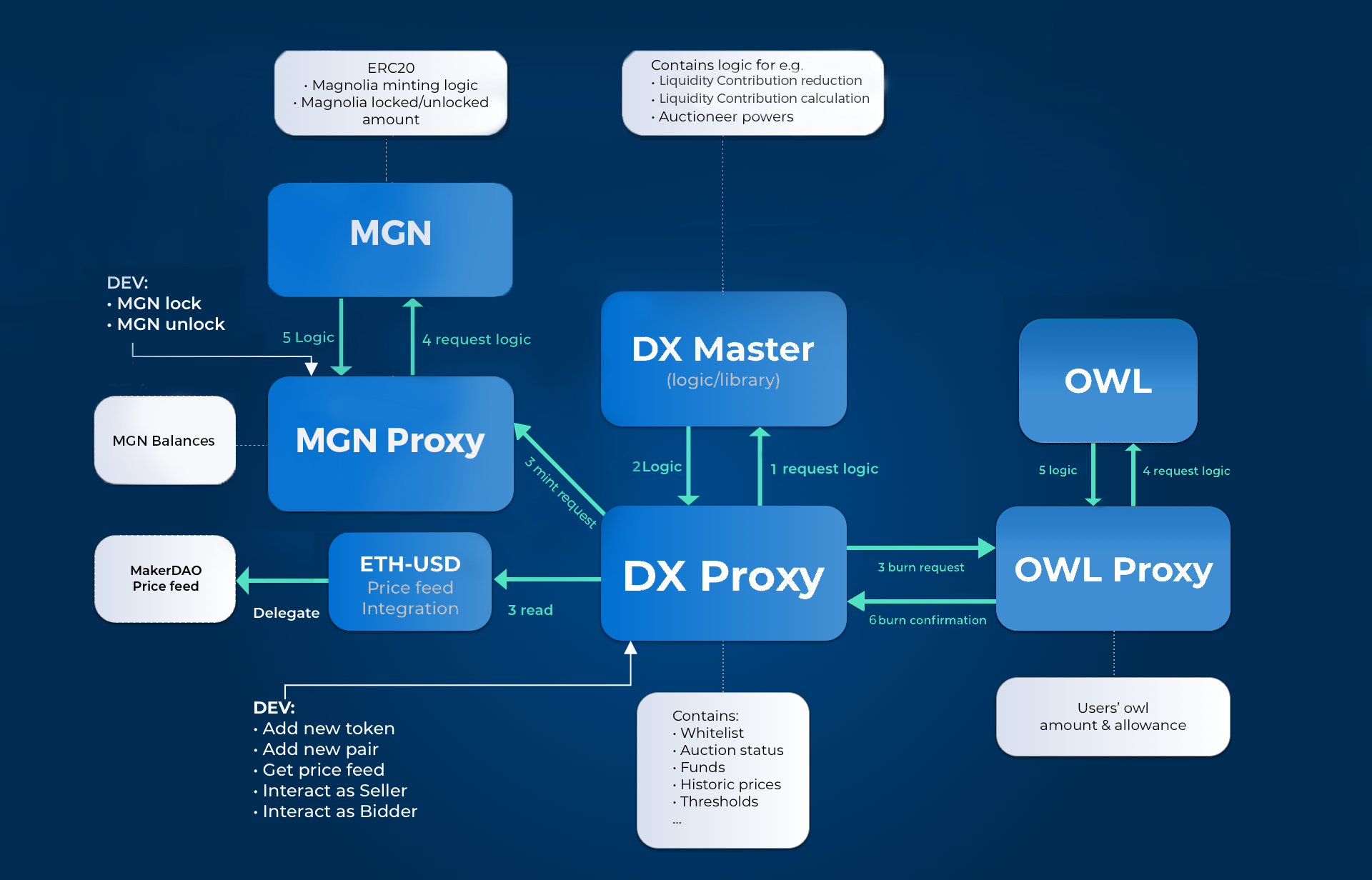 4 |
5 | # DutchX 2.0 - dxDAO
6 | ## Mainnet
7 | * DutchX (proxy): [https://etherscan.io/address/0xb9812e2fa995ec53b5b6df34d21f9304762c5497](https://etherscan.io/address/0xb9812e2fa995ec53b5b6df34d21f9304762c5497)
8 | * DutchX (master): [https://etherscan.io/address/0x2bae491b065032a76be1db9e9ecf5738afae203e](https://etherscan.io/address/0x2bae491b065032a76be1db9e9ecf5738afae203e)
9 | * PriceOracleInterface: [https://etherscan.io/address/0xef6e5fc1a796db0a9a848eb1bb1156a9648f5ac6](https://etherscan.io/address/0xef6e5fc1a796db0a9a848eb1bb1156a9648f5ac6)
10 | * Medianizer: [https://etherscan.io/address/0x729D19f657BD0614b4985Cf1D82531c67569197B](https://etherscan.io/address/0x729D19f657BD0614b4985Cf1D82531c67569197B)
11 | * [https://developer.makerdao.com/feeds](https://developer.makerdao.com/feeds)
12 | * [https://makerdao.com/feeds](https://makerdao.com/feeds)
13 | * TokenFRT - MGN (proxy): [https://etherscan.io/token/0x80f222a749a2e18eb7f676d371f19ad7efeee3b7](https://etherscan.io/token/0x80f222a749a2e18eb7f676d371f19ad7efeee3b7)
14 | * TokenFRT - MGN (master): [https://etherscan.io/token/0xbe4eecb9ebc040183a95f22a74a5763d442dfbb5](https://etherscan.io/token/0xbe4eecb9ebc040183a95f22a74a5763d442dfbb5)
15 | * TokenOWL (proxy): [https://etherscan.io/token/0x1a5f9352af8af974bfc03399e3767df6370d82e4](https://etherscan.io/token/0x1a5f9352af8af974bfc03399e3767df6370d82e4)
16 | * DutchExchangeHelper: [https://etherscan.io/token/0x64832950abccaa3d02ab8eb09aa058d789f5bb6a](https://etherscan.io/token/0x64832950abccaa3d02ab8eb09aa058d789f5bb6a)
17 |
18 | ## Rinkeby
19 | * DutchX (proxy): [https://rinkeby.etherscan.io/address/0xaaeb2035ff394fdb2c879190f95e7676f1a9444b](https://rinkeby.etherscan.io/address/0xaaeb2035ff394fdb2c879190f95e7676f1a9444b)
20 | * DutchX (master): [https://rinkeby.etherscan.io/address/0x7b7dc59adbe59ca4d0eb32042fd5259cf5329de1](https://rinkeby.etherscan.io/address/0x7b7dc59adbe59ca4d0eb32042fd5259cf5329de1)
21 | * PriceOracleInterface: [https://rinkeby.etherscan.io/address/0xbee04d92b297d79889b3bca0c33ed76e02de62b4](https://rinkeby.etherscan.io/address/0xbee04d92b297d79889b3bca0c33ed76e02de62b4)
22 | * Medianizer: [https://rinkeby.etherscan.io/address/0xbfff80b73f081cc159534d922712551c5ed8b3d3](https://rinkeby.etherscan.io/address/0xbfff80b73f081cc159534d922712551c5ed8b3d3)
23 | * [https://developer.makerdao.com/feeds](https://developer.makerdao.com/feeds)
24 | * [https://makerdao.com/feeds](https://makerdao.com/feeds)
25 | * TokenFRT - MGN (proxy): [https://rinkeby.etherscan.io/token/0x4ed5e1ec6bdbecf5967fe257f60e05237db9d583](https://rinkeby.etherscan.io/token/0x4ed5e1ec6bdbecf5967fe257f60e05237db9d583)
26 | * TokenFRT - MGN (master): [https://rinkeby.etherscan.io/token/0x84fb65d27ffa1c5ed2671e680438a988f295a4f4](https://rinkeby.etherscan.io/token/0x84fb65d27ffa1c5ed2671e680438a988f295a4f4)
27 | * TokenOWL (proxy): [https://rinkeby.etherscan.io/token/0xa7d1c04faf998f9161fc9f800a99a809b84cfc9d](https://rinkeby.etherscan.io/token/0xa7d1c04faf998f9161fc9f800a99a809b84cfc9d)
28 | * DutchExchangeHelper: [https://rinkeby.etherscan.io/token/0x97f73cde38699065ba00fb5eeb34c02dcda667cd](https://rinkeby.etherscan.io/token/0x97f73cde38699065ba00fb5eeb34c02dcda667cd)
29 |
30 | ## Kovan
31 | * DutchX (proxy): [https://kovan.etherscan.io/address/0x775ea749a82a87f12199019e5166980f305f4c8f](https://kovan.etherscan.io/address/0x775ea749a82a87f12199019e5166980f305f4c8f)
32 | * DutchX (master): [https://kovan.etherscan.io/address/0xab4860ccc54f27a1e2c7a8bed64e2980142461b2](https://kovan.etherscan.io/address/0xab4860ccc54f27a1e2c7a8bed64e2980142461b2)
33 | * PriceOracleInterface: [https://kovan.etherscan.io/address/0xbf72ca4c2e7c0edf1ca82ff6c9f6e9204d1e9580](https://kovan.etherscan.io/address/0xbf72ca4c2e7c0edf1ca82ff6c9f6e9204d1e9580)
34 | * Medianizer: [https://kovan.etherscan.io/address/0xa944bd4b25c9f186a846fd5668941aa3d3b8425f](https://kovan.etherscan.io/address/0xa944bd4b25c9f186a846fd5668941aa3d3b8425f)
35 | * [https://developer.makerdao.com/feeds](https://developer.makerdao.com/feeds)
36 | * [https://makerdao.com/feeds](https://makerdao.com/feeds)
37 | * TokenFRT - MGN (proxy): [https://kovan.etherscan.io/token/0x2b3a76ed4edb76e8fcd261fd978e78efb313d5a2](https://kovan.etherscan.io/token/0x2b3a76ed4edb76e8fcd261fd978e78efb313d5a2)
38 | * TokenFRT - MGN (master): [https://kovan.etherscan.io/token/0xb4d40b3dba88e53cdbd9361717f5d86899ede1b3](https://kovan.etherscan.io/token/0xb4d40b3dba88e53cdbd9361717f5d86899ede1b3)
39 | * TokenOWL (proxy): [https://kovan.etherscan.io/token/0xb6f77a34ff81dd13fa68b5774d74541a61047fe8](https://kovan.etherscan.io/token/0xb6f77a34ff81dd13fa68b5774d74541a61047fe8)
40 | * DutchExchangeHelper: [https://kovan.etherscan.io/token/0xa71d54360d4adf8d52460fe068611dd608b0a8ef](https://kovan.etherscan.io/token/0xa71d54360d4adf8d52460fe068611dd608b0a8ef)
41 |
42 |
43 | # DutchX 1.0
44 | ## Mainnet
45 | * DutchX (proxy): [https://etherscan.io/address/0xaf1745c0f8117384dfa5fff40f824057c70f2ed3](https://etherscan.io/address/0xaf1745c0f8117384dfa5fff40f824057c70f2ed3)
46 | * DutchX (master): [https://etherscan.io/address/0x039fb002d21c1c5eeb400612aef3d64d49eb0d94](https://etherscan.io/address/0x039fb002d21c1c5eeb400612aef3d64d49eb0d94)
47 | * PriceOracleInterface: [https://etherscan.io/address/0xff29b0b15a0a1da474bc9a132077153c53a2373b](https://etherscan.io/address/0xff29b0b15a0a1da474bc9a132077153c53a2373b)
48 | * Medianizer: [https://etherscan.io/address/0x729D19f657BD0614b4985Cf1D82531c67569197B](https://etherscan.io/address/0x729D19f657BD0614b4985Cf1D82531c67569197B)
49 | * [https://developer.makerdao.com/feeds](https://developer.makerdao.com/feeds)
50 | * [https://makerdao.com/feeds](https://makerdao.com/feeds)
51 | * TokenFRT - MGN: [https://etherscan.io/token/0xb9625381f086e7b8512e4825f6af1117e9c84d43](https://etherscan.io/token/0xb9625381f086e7b8512e4825f6af1117e9c84d43)
52 | * TokenOWL (proxy): [https://etherscan.io/token/0x1a5f9352af8af974bfc03399e3767df6370d82e4](https://etherscan.io/token/0x1a5f9352af8af974bfc03399e3767df6370d82e4)
53 |
54 | ## Rinkeby
55 | * DutchX (proxy): [https://rinkeby.etherscan.io/address/0x4e69969d9270ff55fc7c5043b074d4e45f795587](https://rinkeby.etherscan.io/address/0x4e69969d9270ff55fc7c5043b074d4e45f795587)
56 | * DutchX (master): [https://rinkeby.etherscan.io/address/0x9e5e05700045dc70fc42c125d4bd661c798d4ce9](https://rinkeby.etherscan.io/address/0x9e5e05700045dc70fc42c125d4bd661c798d4ce9)
57 | * PriceOracleInterface: [https://rinkeby.etherscan.io/address/0xa6a644ef9da924b3ecea6cbfd137a825d1ff2a91](https://rinkeby.etherscan.io/address/0xa6a644ef9da924b3ecea6cbfd137a825d1ff2a91)
58 | * Medianizer: [https://rinkeby.etherscan.io/address/0xbfff80b73f081cc159534d922712551c5ed8b3d3](https://rinkeby.etherscan.io/address/0xbfff80b73f081cc159534d922712551c5ed8b3d3)
59 | * [https://developer.makerdao.com/feeds](https://developer.makerdao.com/feeds)
60 | * [https://makerdao.com/feeds](https://makerdao.com/feeds)
61 | * TokenFRT - MGN: [https://rinkeby.etherscan.io/token/0x152af9ad40ccef2060cd14356647ee1773a43437](https://rinkeby.etherscan.io/token/0x152af9ad40ccef2060cd14356647ee1773a43437)
62 | * TokenOWL (proxy): [https://rinkeby.etherscan.io/token/0xa7d1c04faf998f9161fc9f800a99a809b84cfc9d](https://rinkeby.etherscan.io/token/0xa7d1c04faf998f9161fc9f800a99a809b84cfc9d)
63 |
64 | ## Kovan
65 | * DutchX (proxy): [https://kovan.etherscan.io/address/0x4183931cce346feece44eae2cf14d84c3347d779](https://kovan.etherscan.io/address/0x4183931cce346feece44eae2cf14d84c3347d779)
66 | * DutchX (master): [https://kovan.etherscan.io/address/0xd133d9f2fdce177ae3b3cc2aaa8dfef23414c5aa](https://kovan.etherscan.io/address/0xd133d9f2fdce177ae3b3cc2aaa8dfef23414c5aa)
67 | * PriceOracleInterface: [https://kovan.etherscan.io/address/0xdcd22750a182a7a055d069c9f3295f8f3290d6d2](https://kovan.etherscan.io/address/0xdcd22750a182a7a055d069c9f3295f8f3290d6d2)
68 | * Medianizer: [https://kovan.etherscan.io/address/0xa944bd4b25c9f186a846fd5668941aa3d3b8425f](https://kovan.etherscan.io/address/0xa944bd4b25c9f186a846fd5668941aa3d3b8425f)
69 | * [https://developer.makerdao.com/feeds](https://developer.makerdao.com/feeds)
70 | * [https://makerdao.com/feeds](https://makerdao.com/feeds)
71 | * TokenFRT - MGN: [https://kovan.etherscan.io/token/0x98709b83af325a46edfac2f053a730a2980b3682](https://kovan.etherscan.io/token/0x98709b83af325a46edfac2f053a730a2980b3682)
72 | * TokenOWL (proxy): [https://kovan.etherscan.io/token/0xb6f77a34ff81dd13fa68b5774d74541a61047fe8](https://kovan.etherscan.io/token/0xb6f77a34ff81dd13fa68b5774d74541a61047fe8)
73 |
74 | # Changes from DutchX 1.0 to 2.0
75 |
76 | Please see this list for a comprehensive overview of the changes made from the DutchX 1.0 to the DutchX 2.0 smart contracts with each corresponding pull request:
77 |
78 | - [Liquidity contribution goes down to 0.1%](https://github.com/gnosis/dx-contracts/pull/60)
79 | - [Magnolia tokens can only be unlocked at once](https://github.com/gnosis/dx-contracts/pull/59)
80 | - [Both sides of the auction each need a min. of $1,000 to start](https://github.com/gnosis/dx-contracts/pull/62)
81 | - [Closing theoretically closed auctions when posting sellOrders](https://github.com/gnosis/dx-contracts/pull/65)
82 | - [Claim and withdraw function for all auction indices together](https://github.com/gnosis/dx-contracts/pull/66)
83 | - [Proxy contracts for the Magnolia tokens](https://github.com/gnosis/dx-contracts/pull/71)
84 | - [Fix re-entry vulnerability](https://github.com/gnosis/dx-contracts/pull/55)
85 | - [Extract functionality out of the main contract](https://github.com/gnosis/dx-contracts/pull/58)
86 | - [Adapt migrations to Truffle 5](https://github.com/gnosis/dx-contracts/pull/58)
87 | - [Remove auctioneer check for upgrading the Price Oracle and Master Contract](https://github.com/gnosis/dx-contracts/pull/70)
88 | - [Add linter for Solidity](https://github.com/gnosis/dx-contracts/pull/77)
89 | - [Extract some getter functions from DutchX](https://github.com/gnosis/dx-contracts/pull/82)
90 | - [Upgrade to Solidity 0.5](https://github.com/gnosis/dx-contracts/pull/75)
91 | - [Make price oracle interface Read-Only](https://github.com/gnosis/dx-contracts/pull/76)
92 | - [Add clearing times](https://github.com/gnosis/dx-contracts/pull/72)
93 | - [Solve BadTokenProblem](https://github.com/gnosis/dx-contracts/pull/74)
94 |
--------------------------------------------------------------------------------
/source/uniswap-arbitrage.md:
--------------------------------------------------------------------------------
1 | # DX-Uniswap-Arbitrage
2 |
3 | ## Overview
4 | - Introduction
5 | - Contracts
6 | - Bots
7 |
8 | ## Introduction
9 | Blockchains have brought with them the paradigm of programmable money. Whereas before, money could be _represented_ in software it is now a native type and a first class citizen. As such there are interesting opportunities to wield them. One such opportunity is an arbitrage between two decentralized exchanges—in our situation we are using the __DutchX__ and __Uniswap__.
10 |
11 | Previously, making a purchase of an asset on one exchange in order to sell it at a higher price on another entailed the risk of price movement during the operation. That movement might invalidate the original opportunity so that the arbitrageur either took a loss of profit or was left holding an asset they no longer wanted. This could occur because that process is actually asynchronous—the buyer has at least two discreet actions (the buy and the sell) and time will pass between them. In our decentralized exchange scenario we are able to combine all of our actions into one so there is no time that passes between the buy and the sell and we can eliminate the risk of price change.
12 |
13 | This document and the software it describes can be used to execute arbitrage opportunities between __ERC-20__ tokens that are listed on both the __DutchX__ and __Uniswap__. It requires available __Ether__ to execute these orders and comes with configurable Bots that can be used to automatically execute the opportunity.
14 |
15 | ## Contracts
16 | The DutchX uses a [proxy contract](https://github.com/gnosis/dx-contracts/blob/master/contracts/DutchExchangeProxy.sol) to interact with a main [DutchExchange.sol](https://github.com/gnosis/dx-contracts/blob/master/contracts/DutchExchange.sol) contract where there are a series of auctions constantly underway. Typically the auctions begin when there is enough sell volume to instigate them. The price of these sell auctions begin at 2x the price of the previous closing. This price decreases over time with the goal of reaching the previous closing price after 6 hours and reaching 0 after 24 hours. During this time buy orders can be made at the current price. Since the price will keep decaying until all assets have been sold, the buyer knows that they will receive at least as much as they paid for in that moment. Since they know they have purchased at least as much as the current price dictates, they are able to instantly withdraw that amount (although it is likely they will actually have purchased more than that amount in total at a lower price). The ability to withdraw at least that amount is what makes the synchronous arbitrage possible.
17 |
18 | Uniswap has one main [Factory contract](https://github.com/Uniswap/contracts-vyper/blob/master/contracts/uniswap_factory.vy) which keeps track of all Uniswap Exchanges and is used to make new ones as well. Each Uniswap Exchange is a copy of the [Exchange template](https://github.com/Uniswap/contracts-vyper/blob/master/contracts/uniswap_exchange.vy) and contains a single pair of ERC-20 tokens or a pair between an ERC-20 and Ether (most are of the latter type). Similar to the DutchX, these contracts contain the ability to buy or sell an asset in a single transaction making our atomic swap of assets between the exchanges possible.
19 |
20 | Our [Arbitrage Contract](https://github.com/gnosis/dx-uniswap-arbitrage/blob/master/contracts/Arbitrage.sol) needs to reference the DutchX proxy address as well as the Uniswap Factory Address. To save gas these are hard-coded for [Rinkeby](https://github.com/gnosis/dx-uniswap-arbitrage/blob/master/contracts/ArbitrageRinkeby.sol) and [Mainnet](https://github.com/gnosis/dx-uniswap-arbitrage/blob/master/contracts/ArbitrageMainnet.sol), but left as constructor arguments for [local development](https://github.com/gnosis/dx-uniswap-arbitrage/blob/master/contracts/ArbitrageLocal.sol). The main arbitrage contract comes with some abilities to manage balances on the DutchX as well as the ability to execute arbitrage opportunities.
21 |
22 | If a specific token is cheaper on the DutchX with relation to Ether it would initially be bought from the DutchX and sold for Ether on Uniswap; This is called a `dutchOpportunity`. If a specific token is cheaper on Uniswap it would be purchased with Ether and sold on the DutchX for Ether; this is called a `uniswapOpportunity`. Each method will execute the subsequent buys and sells on the respective exchanges in a single transaction. At the end of the transaction the total amount of profit gained is confirmed. If the methods were executed when there was in fact no opportunity for an arbitrage, this will be detected and the transaction is reverted. The only potential loss is in the gas used to check the opportunity. That is why the bots used to determine when to execute are important in saving the loss of unnecessary gas expenditures.
23 |
24 | The arbitrage contract has the following Interface:
25 |
26 | ```solidity
27 | contract Arbitrage is Ownable {
28 |
29 | /// @dev Payable fallback function has nothing inside so it won't run out of gas with gas limited transfers
30 | function() external payable {}
31 |
32 | /// @dev Only owner can deposit contract Ether into the DutchX as WETH
33 | function depositEther() public payable onlyOwner;
34 |
35 | /// @dev Only owner can withdraw WETH from DutchX, convert to Ether and transfer to owner
36 | /// @param amount The amount of Ether to withdraw
37 | function withdrawEtherThenTransfer(uint amount) external onlyOwner;
38 |
39 | /// @dev Only owner can transfer any Ether currently in the contract to the owner address.
40 | /// @param amount The amount of Ether to withdraw
41 | function transferEther(uint amount) external onlyOwner;
42 |
43 | /// @dev Only owner function to withdraw WETH from the DutchX, convert it to Ether and keep it in contract
44 | /// @param amount The amount of WETH to withdraw and convert.
45 | function withdrawEther(uint amount) external onlyOwner;
46 |
47 | /// @dev Internal function to withdraw WETH from the DutchX, convert it to Ether and keep it in contract
48 | /// @param amount The amount of WETH to withdraw and convert.
49 | function _withdrawEther(uint amount) internal;
50 |
51 | /// @dev Only owner can withdraw a token from the DutchX
52 | /// @param token The token address that is being withdrawn.
53 | /// @param amount The amount of token to withdraw. Can be larger than available balance and maximum will be withdrawn.
54 | /// @return Returns the amount actually withdrawn from the DutchX
55 | function withdrawToken(address token, uint amount) external onlyOwner returns (uint);
56 |
57 | /// @dev Only owner can transfer tokens to the owner that belong to this contract
58 | /// @param token The token address that is being transferred.
59 | /// @param amount The amount of token to transfer.
60 | function transferToken(address token, uint amount) external onlyOwner;
61 |
62 | /// @dev Only owner can approve tokens to be used by the DutchX
63 | /// @param token The token address to be approved for use
64 | /// @param allowance The amount of tokens that should be approved
65 | function approveToken(address token, uint allowance) external onlyOwner;
66 |
67 | /// @dev Only owner can deposit token to the DutchX
68 | /// @param token The token address that is being deposited.
69 | /// @param amount The amount of token to deposit.
70 | function depositToken(address token, uint amount) external onlyOwner;
71 |
72 | /// @dev Internal function to deposit token to the DutchX
73 | /// @param token The token address that is being deposited.
74 | /// @param amount The amount of token to deposit.
75 | function _depositToken(address token, uint amount) internal;
76 |
77 | /// @dev Executes a trade opportunity on DutchX. Assumes that there is a balance of WETH already on the DutchX
78 | /// @param arbToken Address of the token that should be arbitraged.
79 | /// @param amount Amount of Ether to use in arbitrage.
80 | /// @return Returns if transaction can be executed.
81 | function dutchOpportunity(address arbToken, uint256 amount) external onlyOwner;
82 |
83 | /// @dev Executes a trade opportunity on uniswap.
84 | /// @param arbToken Address of the token that should be arbitraged.
85 | /// @param amount Amount of Ether to use in arbitrage.
86 | /// @return Returns if transaction can be executed.
87 | function uniswapOpportunity(address arbToken, uint256 amount) external onlyOwner;
88 |
89 | }
90 | ```
91 |
92 | ## Bots
93 | Gnosis has developed a sophisticated system of Bots available in the [dx-services](
4 |
5 | # DutchX 2.0 - dxDAO
6 | ## Mainnet
7 | * DutchX (proxy): [https://etherscan.io/address/0xb9812e2fa995ec53b5b6df34d21f9304762c5497](https://etherscan.io/address/0xb9812e2fa995ec53b5b6df34d21f9304762c5497)
8 | * DutchX (master): [https://etherscan.io/address/0x2bae491b065032a76be1db9e9ecf5738afae203e](https://etherscan.io/address/0x2bae491b065032a76be1db9e9ecf5738afae203e)
9 | * PriceOracleInterface: [https://etherscan.io/address/0xef6e5fc1a796db0a9a848eb1bb1156a9648f5ac6](https://etherscan.io/address/0xef6e5fc1a796db0a9a848eb1bb1156a9648f5ac6)
10 | * Medianizer: [https://etherscan.io/address/0x729D19f657BD0614b4985Cf1D82531c67569197B](https://etherscan.io/address/0x729D19f657BD0614b4985Cf1D82531c67569197B)
11 | * [https://developer.makerdao.com/feeds](https://developer.makerdao.com/feeds)
12 | * [https://makerdao.com/feeds](https://makerdao.com/feeds)
13 | * TokenFRT - MGN (proxy): [https://etherscan.io/token/0x80f222a749a2e18eb7f676d371f19ad7efeee3b7](https://etherscan.io/token/0x80f222a749a2e18eb7f676d371f19ad7efeee3b7)
14 | * TokenFRT - MGN (master): [https://etherscan.io/token/0xbe4eecb9ebc040183a95f22a74a5763d442dfbb5](https://etherscan.io/token/0xbe4eecb9ebc040183a95f22a74a5763d442dfbb5)
15 | * TokenOWL (proxy): [https://etherscan.io/token/0x1a5f9352af8af974bfc03399e3767df6370d82e4](https://etherscan.io/token/0x1a5f9352af8af974bfc03399e3767df6370d82e4)
16 | * DutchExchangeHelper: [https://etherscan.io/token/0x64832950abccaa3d02ab8eb09aa058d789f5bb6a](https://etherscan.io/token/0x64832950abccaa3d02ab8eb09aa058d789f5bb6a)
17 |
18 | ## Rinkeby
19 | * DutchX (proxy): [https://rinkeby.etherscan.io/address/0xaaeb2035ff394fdb2c879190f95e7676f1a9444b](https://rinkeby.etherscan.io/address/0xaaeb2035ff394fdb2c879190f95e7676f1a9444b)
20 | * DutchX (master): [https://rinkeby.etherscan.io/address/0x7b7dc59adbe59ca4d0eb32042fd5259cf5329de1](https://rinkeby.etherscan.io/address/0x7b7dc59adbe59ca4d0eb32042fd5259cf5329de1)
21 | * PriceOracleInterface: [https://rinkeby.etherscan.io/address/0xbee04d92b297d79889b3bca0c33ed76e02de62b4](https://rinkeby.etherscan.io/address/0xbee04d92b297d79889b3bca0c33ed76e02de62b4)
22 | * Medianizer: [https://rinkeby.etherscan.io/address/0xbfff80b73f081cc159534d922712551c5ed8b3d3](https://rinkeby.etherscan.io/address/0xbfff80b73f081cc159534d922712551c5ed8b3d3)
23 | * [https://developer.makerdao.com/feeds](https://developer.makerdao.com/feeds)
24 | * [https://makerdao.com/feeds](https://makerdao.com/feeds)
25 | * TokenFRT - MGN (proxy): [https://rinkeby.etherscan.io/token/0x4ed5e1ec6bdbecf5967fe257f60e05237db9d583](https://rinkeby.etherscan.io/token/0x4ed5e1ec6bdbecf5967fe257f60e05237db9d583)
26 | * TokenFRT - MGN (master): [https://rinkeby.etherscan.io/token/0x84fb65d27ffa1c5ed2671e680438a988f295a4f4](https://rinkeby.etherscan.io/token/0x84fb65d27ffa1c5ed2671e680438a988f295a4f4)
27 | * TokenOWL (proxy): [https://rinkeby.etherscan.io/token/0xa7d1c04faf998f9161fc9f800a99a809b84cfc9d](https://rinkeby.etherscan.io/token/0xa7d1c04faf998f9161fc9f800a99a809b84cfc9d)
28 | * DutchExchangeHelper: [https://rinkeby.etherscan.io/token/0x97f73cde38699065ba00fb5eeb34c02dcda667cd](https://rinkeby.etherscan.io/token/0x97f73cde38699065ba00fb5eeb34c02dcda667cd)
29 |
30 | ## Kovan
31 | * DutchX (proxy): [https://kovan.etherscan.io/address/0x775ea749a82a87f12199019e5166980f305f4c8f](https://kovan.etherscan.io/address/0x775ea749a82a87f12199019e5166980f305f4c8f)
32 | * DutchX (master): [https://kovan.etherscan.io/address/0xab4860ccc54f27a1e2c7a8bed64e2980142461b2](https://kovan.etherscan.io/address/0xab4860ccc54f27a1e2c7a8bed64e2980142461b2)
33 | * PriceOracleInterface: [https://kovan.etherscan.io/address/0xbf72ca4c2e7c0edf1ca82ff6c9f6e9204d1e9580](https://kovan.etherscan.io/address/0xbf72ca4c2e7c0edf1ca82ff6c9f6e9204d1e9580)
34 | * Medianizer: [https://kovan.etherscan.io/address/0xa944bd4b25c9f186a846fd5668941aa3d3b8425f](https://kovan.etherscan.io/address/0xa944bd4b25c9f186a846fd5668941aa3d3b8425f)
35 | * [https://developer.makerdao.com/feeds](https://developer.makerdao.com/feeds)
36 | * [https://makerdao.com/feeds](https://makerdao.com/feeds)
37 | * TokenFRT - MGN (proxy): [https://kovan.etherscan.io/token/0x2b3a76ed4edb76e8fcd261fd978e78efb313d5a2](https://kovan.etherscan.io/token/0x2b3a76ed4edb76e8fcd261fd978e78efb313d5a2)
38 | * TokenFRT - MGN (master): [https://kovan.etherscan.io/token/0xb4d40b3dba88e53cdbd9361717f5d86899ede1b3](https://kovan.etherscan.io/token/0xb4d40b3dba88e53cdbd9361717f5d86899ede1b3)
39 | * TokenOWL (proxy): [https://kovan.etherscan.io/token/0xb6f77a34ff81dd13fa68b5774d74541a61047fe8](https://kovan.etherscan.io/token/0xb6f77a34ff81dd13fa68b5774d74541a61047fe8)
40 | * DutchExchangeHelper: [https://kovan.etherscan.io/token/0xa71d54360d4adf8d52460fe068611dd608b0a8ef](https://kovan.etherscan.io/token/0xa71d54360d4adf8d52460fe068611dd608b0a8ef)
41 |
42 |
43 | # DutchX 1.0
44 | ## Mainnet
45 | * DutchX (proxy): [https://etherscan.io/address/0xaf1745c0f8117384dfa5fff40f824057c70f2ed3](https://etherscan.io/address/0xaf1745c0f8117384dfa5fff40f824057c70f2ed3)
46 | * DutchX (master): [https://etherscan.io/address/0x039fb002d21c1c5eeb400612aef3d64d49eb0d94](https://etherscan.io/address/0x039fb002d21c1c5eeb400612aef3d64d49eb0d94)
47 | * PriceOracleInterface: [https://etherscan.io/address/0xff29b0b15a0a1da474bc9a132077153c53a2373b](https://etherscan.io/address/0xff29b0b15a0a1da474bc9a132077153c53a2373b)
48 | * Medianizer: [https://etherscan.io/address/0x729D19f657BD0614b4985Cf1D82531c67569197B](https://etherscan.io/address/0x729D19f657BD0614b4985Cf1D82531c67569197B)
49 | * [https://developer.makerdao.com/feeds](https://developer.makerdao.com/feeds)
50 | * [https://makerdao.com/feeds](https://makerdao.com/feeds)
51 | * TokenFRT - MGN: [https://etherscan.io/token/0xb9625381f086e7b8512e4825f6af1117e9c84d43](https://etherscan.io/token/0xb9625381f086e7b8512e4825f6af1117e9c84d43)
52 | * TokenOWL (proxy): [https://etherscan.io/token/0x1a5f9352af8af974bfc03399e3767df6370d82e4](https://etherscan.io/token/0x1a5f9352af8af974bfc03399e3767df6370d82e4)
53 |
54 | ## Rinkeby
55 | * DutchX (proxy): [https://rinkeby.etherscan.io/address/0x4e69969d9270ff55fc7c5043b074d4e45f795587](https://rinkeby.etherscan.io/address/0x4e69969d9270ff55fc7c5043b074d4e45f795587)
56 | * DutchX (master): [https://rinkeby.etherscan.io/address/0x9e5e05700045dc70fc42c125d4bd661c798d4ce9](https://rinkeby.etherscan.io/address/0x9e5e05700045dc70fc42c125d4bd661c798d4ce9)
57 | * PriceOracleInterface: [https://rinkeby.etherscan.io/address/0xa6a644ef9da924b3ecea6cbfd137a825d1ff2a91](https://rinkeby.etherscan.io/address/0xa6a644ef9da924b3ecea6cbfd137a825d1ff2a91)
58 | * Medianizer: [https://rinkeby.etherscan.io/address/0xbfff80b73f081cc159534d922712551c5ed8b3d3](https://rinkeby.etherscan.io/address/0xbfff80b73f081cc159534d922712551c5ed8b3d3)
59 | * [https://developer.makerdao.com/feeds](https://developer.makerdao.com/feeds)
60 | * [https://makerdao.com/feeds](https://makerdao.com/feeds)
61 | * TokenFRT - MGN: [https://rinkeby.etherscan.io/token/0x152af9ad40ccef2060cd14356647ee1773a43437](https://rinkeby.etherscan.io/token/0x152af9ad40ccef2060cd14356647ee1773a43437)
62 | * TokenOWL (proxy): [https://rinkeby.etherscan.io/token/0xa7d1c04faf998f9161fc9f800a99a809b84cfc9d](https://rinkeby.etherscan.io/token/0xa7d1c04faf998f9161fc9f800a99a809b84cfc9d)
63 |
64 | ## Kovan
65 | * DutchX (proxy): [https://kovan.etherscan.io/address/0x4183931cce346feece44eae2cf14d84c3347d779](https://kovan.etherscan.io/address/0x4183931cce346feece44eae2cf14d84c3347d779)
66 | * DutchX (master): [https://kovan.etherscan.io/address/0xd133d9f2fdce177ae3b3cc2aaa8dfef23414c5aa](https://kovan.etherscan.io/address/0xd133d9f2fdce177ae3b3cc2aaa8dfef23414c5aa)
67 | * PriceOracleInterface: [https://kovan.etherscan.io/address/0xdcd22750a182a7a055d069c9f3295f8f3290d6d2](https://kovan.etherscan.io/address/0xdcd22750a182a7a055d069c9f3295f8f3290d6d2)
68 | * Medianizer: [https://kovan.etherscan.io/address/0xa944bd4b25c9f186a846fd5668941aa3d3b8425f](https://kovan.etherscan.io/address/0xa944bd4b25c9f186a846fd5668941aa3d3b8425f)
69 | * [https://developer.makerdao.com/feeds](https://developer.makerdao.com/feeds)
70 | * [https://makerdao.com/feeds](https://makerdao.com/feeds)
71 | * TokenFRT - MGN: [https://kovan.etherscan.io/token/0x98709b83af325a46edfac2f053a730a2980b3682](https://kovan.etherscan.io/token/0x98709b83af325a46edfac2f053a730a2980b3682)
72 | * TokenOWL (proxy): [https://kovan.etherscan.io/token/0xb6f77a34ff81dd13fa68b5774d74541a61047fe8](https://kovan.etherscan.io/token/0xb6f77a34ff81dd13fa68b5774d74541a61047fe8)
73 |
74 | # Changes from DutchX 1.0 to 2.0
75 |
76 | Please see this list for a comprehensive overview of the changes made from the DutchX 1.0 to the DutchX 2.0 smart contracts with each corresponding pull request:
77 |
78 | - [Liquidity contribution goes down to 0.1%](https://github.com/gnosis/dx-contracts/pull/60)
79 | - [Magnolia tokens can only be unlocked at once](https://github.com/gnosis/dx-contracts/pull/59)
80 | - [Both sides of the auction each need a min. of $1,000 to start](https://github.com/gnosis/dx-contracts/pull/62)
81 | - [Closing theoretically closed auctions when posting sellOrders](https://github.com/gnosis/dx-contracts/pull/65)
82 | - [Claim and withdraw function for all auction indices together](https://github.com/gnosis/dx-contracts/pull/66)
83 | - [Proxy contracts for the Magnolia tokens](https://github.com/gnosis/dx-contracts/pull/71)
84 | - [Fix re-entry vulnerability](https://github.com/gnosis/dx-contracts/pull/55)
85 | - [Extract functionality out of the main contract](https://github.com/gnosis/dx-contracts/pull/58)
86 | - [Adapt migrations to Truffle 5](https://github.com/gnosis/dx-contracts/pull/58)
87 | - [Remove auctioneer check for upgrading the Price Oracle and Master Contract](https://github.com/gnosis/dx-contracts/pull/70)
88 | - [Add linter for Solidity](https://github.com/gnosis/dx-contracts/pull/77)
89 | - [Extract some getter functions from DutchX](https://github.com/gnosis/dx-contracts/pull/82)
90 | - [Upgrade to Solidity 0.5](https://github.com/gnosis/dx-contracts/pull/75)
91 | - [Make price oracle interface Read-Only](https://github.com/gnosis/dx-contracts/pull/76)
92 | - [Add clearing times](https://github.com/gnosis/dx-contracts/pull/72)
93 | - [Solve BadTokenProblem](https://github.com/gnosis/dx-contracts/pull/74)
94 |
--------------------------------------------------------------------------------
/source/uniswap-arbitrage.md:
--------------------------------------------------------------------------------
1 | # DX-Uniswap-Arbitrage
2 |
3 | ## Overview
4 | - Introduction
5 | - Contracts
6 | - Bots
7 |
8 | ## Introduction
9 | Blockchains have brought with them the paradigm of programmable money. Whereas before, money could be _represented_ in software it is now a native type and a first class citizen. As such there are interesting opportunities to wield them. One such opportunity is an arbitrage between two decentralized exchanges—in our situation we are using the __DutchX__ and __Uniswap__.
10 |
11 | Previously, making a purchase of an asset on one exchange in order to sell it at a higher price on another entailed the risk of price movement during the operation. That movement might invalidate the original opportunity so that the arbitrageur either took a loss of profit or was left holding an asset they no longer wanted. This could occur because that process is actually asynchronous—the buyer has at least two discreet actions (the buy and the sell) and time will pass between them. In our decentralized exchange scenario we are able to combine all of our actions into one so there is no time that passes between the buy and the sell and we can eliminate the risk of price change.
12 |
13 | This document and the software it describes can be used to execute arbitrage opportunities between __ERC-20__ tokens that are listed on both the __DutchX__ and __Uniswap__. It requires available __Ether__ to execute these orders and comes with configurable Bots that can be used to automatically execute the opportunity.
14 |
15 | ## Contracts
16 | The DutchX uses a [proxy contract](https://github.com/gnosis/dx-contracts/blob/master/contracts/DutchExchangeProxy.sol) to interact with a main [DutchExchange.sol](https://github.com/gnosis/dx-contracts/blob/master/contracts/DutchExchange.sol) contract where there are a series of auctions constantly underway. Typically the auctions begin when there is enough sell volume to instigate them. The price of these sell auctions begin at 2x the price of the previous closing. This price decreases over time with the goal of reaching the previous closing price after 6 hours and reaching 0 after 24 hours. During this time buy orders can be made at the current price. Since the price will keep decaying until all assets have been sold, the buyer knows that they will receive at least as much as they paid for in that moment. Since they know they have purchased at least as much as the current price dictates, they are able to instantly withdraw that amount (although it is likely they will actually have purchased more than that amount in total at a lower price). The ability to withdraw at least that amount is what makes the synchronous arbitrage possible.
17 |
18 | Uniswap has one main [Factory contract](https://github.com/Uniswap/contracts-vyper/blob/master/contracts/uniswap_factory.vy) which keeps track of all Uniswap Exchanges and is used to make new ones as well. Each Uniswap Exchange is a copy of the [Exchange template](https://github.com/Uniswap/contracts-vyper/blob/master/contracts/uniswap_exchange.vy) and contains a single pair of ERC-20 tokens or a pair between an ERC-20 and Ether (most are of the latter type). Similar to the DutchX, these contracts contain the ability to buy or sell an asset in a single transaction making our atomic swap of assets between the exchanges possible.
19 |
20 | Our [Arbitrage Contract](https://github.com/gnosis/dx-uniswap-arbitrage/blob/master/contracts/Arbitrage.sol) needs to reference the DutchX proxy address as well as the Uniswap Factory Address. To save gas these are hard-coded for [Rinkeby](https://github.com/gnosis/dx-uniswap-arbitrage/blob/master/contracts/ArbitrageRinkeby.sol) and [Mainnet](https://github.com/gnosis/dx-uniswap-arbitrage/blob/master/contracts/ArbitrageMainnet.sol), but left as constructor arguments for [local development](https://github.com/gnosis/dx-uniswap-arbitrage/blob/master/contracts/ArbitrageLocal.sol). The main arbitrage contract comes with some abilities to manage balances on the DutchX as well as the ability to execute arbitrage opportunities.
21 |
22 | If a specific token is cheaper on the DutchX with relation to Ether it would initially be bought from the DutchX and sold for Ether on Uniswap; This is called a `dutchOpportunity`. If a specific token is cheaper on Uniswap it would be purchased with Ether and sold on the DutchX for Ether; this is called a `uniswapOpportunity`. Each method will execute the subsequent buys and sells on the respective exchanges in a single transaction. At the end of the transaction the total amount of profit gained is confirmed. If the methods were executed when there was in fact no opportunity for an arbitrage, this will be detected and the transaction is reverted. The only potential loss is in the gas used to check the opportunity. That is why the bots used to determine when to execute are important in saving the loss of unnecessary gas expenditures.
23 |
24 | The arbitrage contract has the following Interface:
25 |
26 | ```solidity
27 | contract Arbitrage is Ownable {
28 |
29 | /// @dev Payable fallback function has nothing inside so it won't run out of gas with gas limited transfers
30 | function() external payable {}
31 |
32 | /// @dev Only owner can deposit contract Ether into the DutchX as WETH
33 | function depositEther() public payable onlyOwner;
34 |
35 | /// @dev Only owner can withdraw WETH from DutchX, convert to Ether and transfer to owner
36 | /// @param amount The amount of Ether to withdraw
37 | function withdrawEtherThenTransfer(uint amount) external onlyOwner;
38 |
39 | /// @dev Only owner can transfer any Ether currently in the contract to the owner address.
40 | /// @param amount The amount of Ether to withdraw
41 | function transferEther(uint amount) external onlyOwner;
42 |
43 | /// @dev Only owner function to withdraw WETH from the DutchX, convert it to Ether and keep it in contract
44 | /// @param amount The amount of WETH to withdraw and convert.
45 | function withdrawEther(uint amount) external onlyOwner;
46 |
47 | /// @dev Internal function to withdraw WETH from the DutchX, convert it to Ether and keep it in contract
48 | /// @param amount The amount of WETH to withdraw and convert.
49 | function _withdrawEther(uint amount) internal;
50 |
51 | /// @dev Only owner can withdraw a token from the DutchX
52 | /// @param token The token address that is being withdrawn.
53 | /// @param amount The amount of token to withdraw. Can be larger than available balance and maximum will be withdrawn.
54 | /// @return Returns the amount actually withdrawn from the DutchX
55 | function withdrawToken(address token, uint amount) external onlyOwner returns (uint);
56 |
57 | /// @dev Only owner can transfer tokens to the owner that belong to this contract
58 | /// @param token The token address that is being transferred.
59 | /// @param amount The amount of token to transfer.
60 | function transferToken(address token, uint amount) external onlyOwner;
61 |
62 | /// @dev Only owner can approve tokens to be used by the DutchX
63 | /// @param token The token address to be approved for use
64 | /// @param allowance The amount of tokens that should be approved
65 | function approveToken(address token, uint allowance) external onlyOwner;
66 |
67 | /// @dev Only owner can deposit token to the DutchX
68 | /// @param token The token address that is being deposited.
69 | /// @param amount The amount of token to deposit.
70 | function depositToken(address token, uint amount) external onlyOwner;
71 |
72 | /// @dev Internal function to deposit token to the DutchX
73 | /// @param token The token address that is being deposited.
74 | /// @param amount The amount of token to deposit.
75 | function _depositToken(address token, uint amount) internal;
76 |
77 | /// @dev Executes a trade opportunity on DutchX. Assumes that there is a balance of WETH already on the DutchX
78 | /// @param arbToken Address of the token that should be arbitraged.
79 | /// @param amount Amount of Ether to use in arbitrage.
80 | /// @return Returns if transaction can be executed.
81 | function dutchOpportunity(address arbToken, uint256 amount) external onlyOwner;
82 |
83 | /// @dev Executes a trade opportunity on uniswap.
84 | /// @param arbToken Address of the token that should be arbitraged.
85 | /// @param amount Amount of Ether to use in arbitrage.
86 | /// @return Returns if transaction can be executed.
87 | function uniswapOpportunity(address arbToken, uint256 amount) external onlyOwner;
88 |
89 | }
90 | ```
91 |
92 | ## Bots
93 | Gnosis has developed a sophisticated system of Bots available in the [dx-services](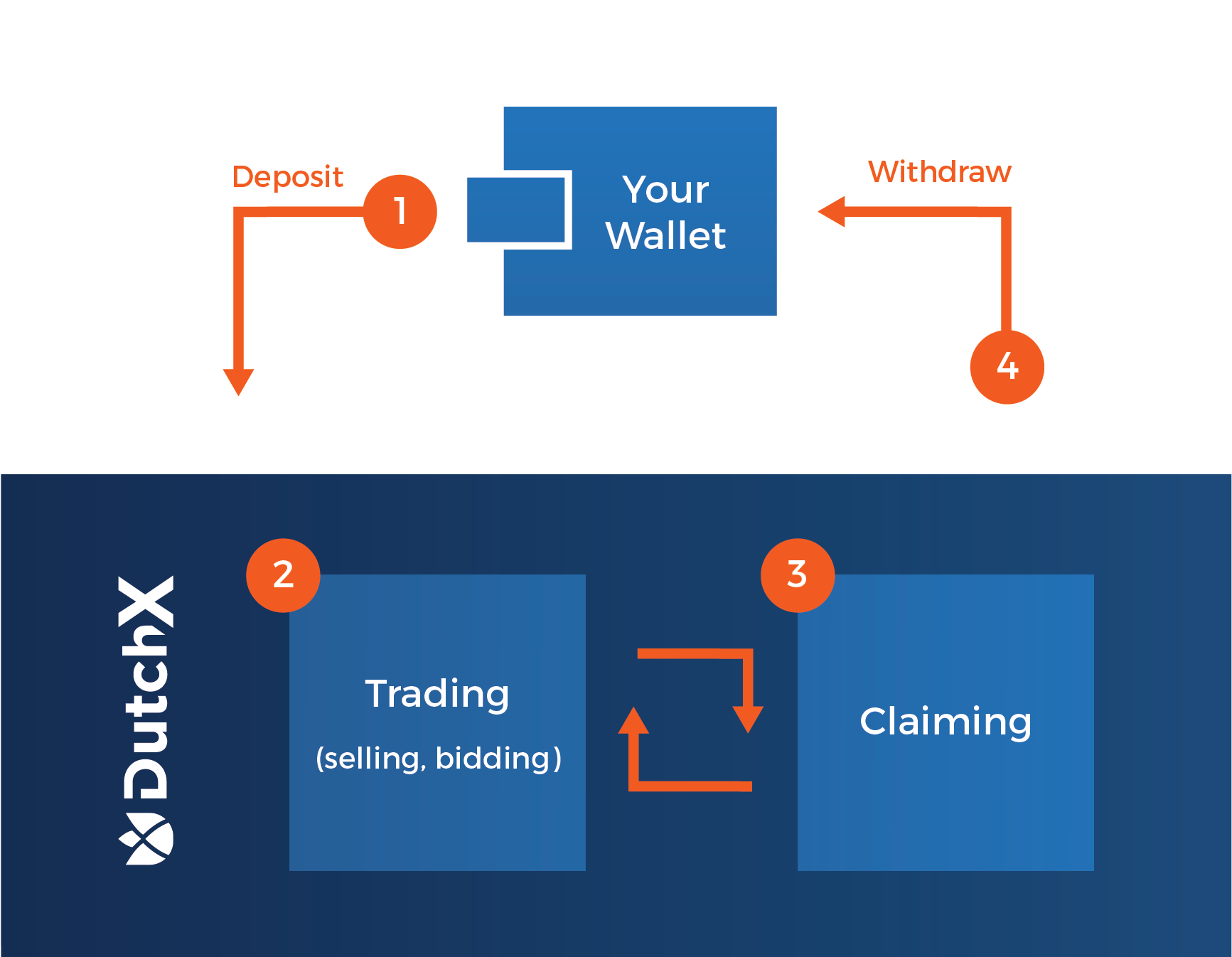 109 |
110 |
111 |
112 | Before we start explaining each step in the image, we will use the balance command to make the process more clear.
113 | All the commands used in this explanation will be for the Rinkeby Testnet. If you want to trade on the Ethereum Mainnet, use `./dutchx-mainnet` instead of `./dutchx-rinkeby`.
114 |
115 |
116 | ```bash
117 | # Show the balance of the account inputed in the local.config file
118 | ./dutchx-rinkeby balances
119 |
120 | # You will see the balances your balances displayed in a similar way as below:
121 | INFO-cli ACCOUNT: "Your public Ethereum address" +427ms
122 | INFO-cli BALANCE: 4.430652555999879 ETH +3ms
123 | INFO-cli
124 | INFO-cli Balances RDN (0x3615757011112560521536258c1e7325ae3b48ae): +941ms
125 | INFO-cli - Balance in DX: 222.972178357604664181 +1ms
126 | INFO-cli - Balance of user: 111.617365082280797714 +2ms
127 | INFO-cli Balances WETH (0xc778417e063141139fce010982780140aa0cd5ab): +1ms
128 | INFO-cli
129 | INFO-cli - Balance in DX: 11.4032061309442109 +2ms
130 | INFO-cli - Balance of user: 0 +0ms
131 | ```
132 |
133 | As you can see, there are two types of balance for every listed token:
134 |
135 | * `Balance of user` indicates the balance in the users wallet.
136 |
137 | * `Balance in DX` indicates the balance that has been deposited in the DutchX smart contract and is ready to trade. Lets now
138 | go through the steps in the image one-by-one.
139 |
140 | #### 1. Deposit tokens
141 | Use the following command to deposit tokens you want to trade:
142 |
143 | ```bash
144 | ./dutchx-rinkeby deposit 0.35 WETH
145 | ```
146 |
147 | > **NOTE**: Since ETH is not an ERC-20, the DutchX will automatically call the wrapped Ether smart contract and wrap your Ether.
148 |
149 | #### 2. Trade on the DutchX
150 |
151 | You can now take part in the running auction as a bidder in the current auction, or post a sell order for the coming one.
152 |
153 | > **NOTE**: Remember that as a seller you can only submit to the running auction if it is in the 10 min waiting period before it starts or else the upcoming auction. Sellers cannot deposit to auctions happening after the upcoming auction.
154 |
155 | Before placing a trade, we recommend you try the following commands:
156 |
157 | ```bash
158 | # This commands outputs all the available token pairs
159 | ./dutchx-rinkeby markets
160 |
161 | # This command outputs information about the current auction of a given pair
162 | ./dutchx-rinkeby state WETH-RDN
163 | ```
164 |
165 | After picking the pair you want to trade and checking the state of a given auction, you can start trading with the following commands:
166 |
167 | ```bash
168 | # This commands will place a bid in the running auction (no need to specify the auction index)
169 | ./dutchx-rinkeby buy 5 WETH-RDN
170 |
171 | # This command posts a sell order for the specified auction index.
172 |
173 | ./dutchx-rinkeby sell 5 WETH-RDN 361
174 | ```
175 |
176 | > **NOTE**: For the sell command, you currently need to specify the index of the upcoming auction in which you want to sell your tokens. To ensure that it is the next auction which start, check the state again, see which one is running and add 1 to the auction index. The 361 noted in the command above is an example only.
177 |
178 | #### 3. Claim the tokens from the auction you took part in
179 |
180 | In order to see the resulting balance after trading in `Balance in DX`, you must execute the following commands:
181 |
182 | ```bash
183 | # Claim tokens, which will give you the tokens of the auction you participated in, not mattering if you were selling or bidding
184 | ./dutchx-rinkeby claim-tokens WETH-RDN
185 |
186 | # Claim tokens after participating as a seller, which will give you the second token in the pair
187 | ./dutchx-rinkeby claim-seller WETH-RDN
188 |
189 | # Claim tokens after participating as a bidder, which will give you the first token in the pair
190 | ./dutchx-rinkeby claim-buyer WETH-RDN
191 | ```
192 |
193 | It is important to remember that sellers can only claim their receiving tokens once the auction has finished. Bidders can claim
194 | the sell tokens they aqcuire (once they bid) anytime during the auction and can claim any additional increments in the future.
195 |
196 | We recommend that bidders claim tokens once the auction has ended in order to avoid unnecessary gas costs.
197 |
198 | #### 4. Withrdaw tokens from the DutchX smart contract
199 |
200 | This is the final step if you would like to have your tokens back in your wallet. It simply sends tokens from your `Balance in DX` to your `Balance of user`
201 |
202 | ```bash
203 | ./dutchx-rinkeby withdraw 0.35 WETH
204 | ```
205 |
206 | We recommend users that plan on trading often in the DutchX to leave their tokens in the smart contract in order to avoid unnecessary gas costs.
207 |
208 | ## Useful commands
209 |
210 | So far we have covered the process of executing trades on the DutchX, but there are several additional commands that will give important information and facilitate the process.
211 |
212 | We will do a rundown on some useful commands, starting by reminding you the command to view all commands :)
213 |
214 | ```bash
215 | # Rinkeby
216 | ./dutchx-rinkeby -h
217 | ```
218 | #### Price related commands
219 | These set of commands will output one of the most important pieces of information when exchanging tokens - price.
220 | There are several prices you can call depending on your needs:
221 | ```bash
222 | # Current price of an ongoing auction
223 | # This price is the price bidders use (it's going down)
224 | # A N/A means there is no price (i.e. an auction that didn't run, so you
225 | # cannot bid).
226 | ./dutchx-rinkeby price WETH-RDN
227 |
228 | # USD price for a specific token
229 | # It will use the closing price and the Ether oracle
230 | ./dutchx-rinkeby usd-price 1 RDN
231 |
232 | # Closing prices
233 | # This shows the last N closing prices
234 | ./dutchx-rinkeby closing-prices WETH-RDN
235 |
236 |
237 | # Price of an external exchange (i.e. 'binance', 'huobi', 'kraken', 'bitfinex')
238 | # This is not part of the DX. It's just a reference.
239 | ./dutchx-rinkeby market-price WETH-RDN
240 | ```
241 | #### Auction and trading history commands
242 |
243 | It can prove useful to check information of previous auctions and trades in the past. You can display the information
244 | of cleared auctions and filter it by dates using the following commands:
245 | > For valid date formats we use [ISO 8601](https://en.wikipedia.org/wiki/ISO_8601)
246 |
247 | ```bash
248 | # Get today's auctions
249 | ./dutchx-rinkeby auctions --period today
250 |
251 | # Get auctions from the last 7 days
252 | ./dutchx-rinkeby auctions --period week
253 |
254 | # Get this week's auctions
255 | ./dutchx-rinkeby auctions --period week
256 |
257 | # Get last week's auctions
258 | ./dutchx-rinkeby auctions --period last-week
259 |
260 | # Get auctions from a specified date range
261 | ./dutchx-rinkeby auctions --from-date=2018-05-25 --to-date=2018-05-26
262 |
263 | # Export auctions from a given date range to a .csv file
264 | ./dutchx-rinkeby auctions --from-date=2018-05-25 --to-date=2018-05-26 --file=auctions.csv
265 | ```
266 |
267 | As mentioned previously, you can also get the history of previous trades. Use the following commands:
268 |
269 | ```bash
270 | # Get todays auctions
271 | ./dutchx-rinkeby trades --period today
272 |
273 | # Get last 7 days auctions
274 | ./dutchx-rinkeby trades --period week
275 |
276 | # Get this week's auctions
277 | ./dutchx-rinkeby trades --period week
278 |
279 | # Get last week's auctions
280 | ./dutchx-rinkeby trades --period last-week
281 |
282 | # Get auctions between two dates
283 | ./dutchx-rinkeby trades --from-date=2018-05-25 --to-date=2018-05-26
284 | ```
285 |
286 | Additionally, you can apply any of these filters:
287 | ```bash
288 | # Filter by token
289 | # It will filter by trades of auctions that contain the given token
290 | ./dutchx-rinkeby trades --period today --token RDN
291 |
292 | #Filter by wallet
293 | # You can use any of the additional commands and specify a wallet in order to just see these trades
294 | ./dutchx-rinkeby trades --period today --token RDN --account=0x45345b00156efe2a859b7e254ab3ae0bb2ebfc0e
295 |
296 | # Filter by sell token
297 | # It will filter by trades of auctions that contain the given token as a sell
298 | # token
299 | ./dutchx-rinkeby trades --period today --sell-token RDN
300 |
301 | # Filter by buy token
302 | # It will filter by trades of auctions that contain the given token as a buy
303 | # token
304 | ./dutchx-rinkeby trades --period today --buy-token RDN
305 |
306 | # Filter by auction index
307 | # It will filter by trades of auctions that contain the given token as a buy
308 | # token
309 | ./dutchx-rinkeby trades --period today --auction-index 24
310 |
311 | # Filter by account
312 | # It will filter by trades of the given account address
313 | ./dutchx-rinkeby trades --period today --auction-index 24
314 |
315 | # Export the result to a file
316 | ./dutchx-rinkeby trades --from-date=2018-05-25 --to-date=2018-05-26 --file=auctions.csv
317 | ```
318 |
--------------------------------------------------------------------------------
/source/mechanism.md:
--------------------------------------------------------------------------------
1 | # Decentralized trading protocol for ERC20 tokens
2 |
3 | The DutchX has two phases (for each token pair):
109 |
110 |
111 |
112 | Before we start explaining each step in the image, we will use the balance command to make the process more clear.
113 | All the commands used in this explanation will be for the Rinkeby Testnet. If you want to trade on the Ethereum Mainnet, use `./dutchx-mainnet` instead of `./dutchx-rinkeby`.
114 |
115 |
116 | ```bash
117 | # Show the balance of the account inputed in the local.config file
118 | ./dutchx-rinkeby balances
119 |
120 | # You will see the balances your balances displayed in a similar way as below:
121 | INFO-cli ACCOUNT: "Your public Ethereum address" +427ms
122 | INFO-cli BALANCE: 4.430652555999879 ETH +3ms
123 | INFO-cli
124 | INFO-cli Balances RDN (0x3615757011112560521536258c1e7325ae3b48ae): +941ms
125 | INFO-cli - Balance in DX: 222.972178357604664181 +1ms
126 | INFO-cli - Balance of user: 111.617365082280797714 +2ms
127 | INFO-cli Balances WETH (0xc778417e063141139fce010982780140aa0cd5ab): +1ms
128 | INFO-cli
129 | INFO-cli - Balance in DX: 11.4032061309442109 +2ms
130 | INFO-cli - Balance of user: 0 +0ms
131 | ```
132 |
133 | As you can see, there are two types of balance for every listed token:
134 |
135 | * `Balance of user` indicates the balance in the users wallet.
136 |
137 | * `Balance in DX` indicates the balance that has been deposited in the DutchX smart contract and is ready to trade. Lets now
138 | go through the steps in the image one-by-one.
139 |
140 | #### 1. Deposit tokens
141 | Use the following command to deposit tokens you want to trade:
142 |
143 | ```bash
144 | ./dutchx-rinkeby deposit 0.35 WETH
145 | ```
146 |
147 | > **NOTE**: Since ETH is not an ERC-20, the DutchX will automatically call the wrapped Ether smart contract and wrap your Ether.
148 |
149 | #### 2. Trade on the DutchX
150 |
151 | You can now take part in the running auction as a bidder in the current auction, or post a sell order for the coming one.
152 |
153 | > **NOTE**: Remember that as a seller you can only submit to the running auction if it is in the 10 min waiting period before it starts or else the upcoming auction. Sellers cannot deposit to auctions happening after the upcoming auction.
154 |
155 | Before placing a trade, we recommend you try the following commands:
156 |
157 | ```bash
158 | # This commands outputs all the available token pairs
159 | ./dutchx-rinkeby markets
160 |
161 | # This command outputs information about the current auction of a given pair
162 | ./dutchx-rinkeby state WETH-RDN
163 | ```
164 |
165 | After picking the pair you want to trade and checking the state of a given auction, you can start trading with the following commands:
166 |
167 | ```bash
168 | # This commands will place a bid in the running auction (no need to specify the auction index)
169 | ./dutchx-rinkeby buy 5 WETH-RDN
170 |
171 | # This command posts a sell order for the specified auction index.
172 |
173 | ./dutchx-rinkeby sell 5 WETH-RDN 361
174 | ```
175 |
176 | > **NOTE**: For the sell command, you currently need to specify the index of the upcoming auction in which you want to sell your tokens. To ensure that it is the next auction which start, check the state again, see which one is running and add 1 to the auction index. The 361 noted in the command above is an example only.
177 |
178 | #### 3. Claim the tokens from the auction you took part in
179 |
180 | In order to see the resulting balance after trading in `Balance in DX`, you must execute the following commands:
181 |
182 | ```bash
183 | # Claim tokens, which will give you the tokens of the auction you participated in, not mattering if you were selling or bidding
184 | ./dutchx-rinkeby claim-tokens WETH-RDN
185 |
186 | # Claim tokens after participating as a seller, which will give you the second token in the pair
187 | ./dutchx-rinkeby claim-seller WETH-RDN
188 |
189 | # Claim tokens after participating as a bidder, which will give you the first token in the pair
190 | ./dutchx-rinkeby claim-buyer WETH-RDN
191 | ```
192 |
193 | It is important to remember that sellers can only claim their receiving tokens once the auction has finished. Bidders can claim
194 | the sell tokens they aqcuire (once they bid) anytime during the auction and can claim any additional increments in the future.
195 |
196 | We recommend that bidders claim tokens once the auction has ended in order to avoid unnecessary gas costs.
197 |
198 | #### 4. Withrdaw tokens from the DutchX smart contract
199 |
200 | This is the final step if you would like to have your tokens back in your wallet. It simply sends tokens from your `Balance in DX` to your `Balance of user`
201 |
202 | ```bash
203 | ./dutchx-rinkeby withdraw 0.35 WETH
204 | ```
205 |
206 | We recommend users that plan on trading often in the DutchX to leave their tokens in the smart contract in order to avoid unnecessary gas costs.
207 |
208 | ## Useful commands
209 |
210 | So far we have covered the process of executing trades on the DutchX, but there are several additional commands that will give important information and facilitate the process.
211 |
212 | We will do a rundown on some useful commands, starting by reminding you the command to view all commands :)
213 |
214 | ```bash
215 | # Rinkeby
216 | ./dutchx-rinkeby -h
217 | ```
218 | #### Price related commands
219 | These set of commands will output one of the most important pieces of information when exchanging tokens - price.
220 | There are several prices you can call depending on your needs:
221 | ```bash
222 | # Current price of an ongoing auction
223 | # This price is the price bidders use (it's going down)
224 | # A N/A means there is no price (i.e. an auction that didn't run, so you
225 | # cannot bid).
226 | ./dutchx-rinkeby price WETH-RDN
227 |
228 | # USD price for a specific token
229 | # It will use the closing price and the Ether oracle
230 | ./dutchx-rinkeby usd-price 1 RDN
231 |
232 | # Closing prices
233 | # This shows the last N closing prices
234 | ./dutchx-rinkeby closing-prices WETH-RDN
235 |
236 |
237 | # Price of an external exchange (i.e. 'binance', 'huobi', 'kraken', 'bitfinex')
238 | # This is not part of the DX. It's just a reference.
239 | ./dutchx-rinkeby market-price WETH-RDN
240 | ```
241 | #### Auction and trading history commands
242 |
243 | It can prove useful to check information of previous auctions and trades in the past. You can display the information
244 | of cleared auctions and filter it by dates using the following commands:
245 | > For valid date formats we use [ISO 8601](https://en.wikipedia.org/wiki/ISO_8601)
246 |
247 | ```bash
248 | # Get today's auctions
249 | ./dutchx-rinkeby auctions --period today
250 |
251 | # Get auctions from the last 7 days
252 | ./dutchx-rinkeby auctions --period week
253 |
254 | # Get this week's auctions
255 | ./dutchx-rinkeby auctions --period week
256 |
257 | # Get last week's auctions
258 | ./dutchx-rinkeby auctions --period last-week
259 |
260 | # Get auctions from a specified date range
261 | ./dutchx-rinkeby auctions --from-date=2018-05-25 --to-date=2018-05-26
262 |
263 | # Export auctions from a given date range to a .csv file
264 | ./dutchx-rinkeby auctions --from-date=2018-05-25 --to-date=2018-05-26 --file=auctions.csv
265 | ```
266 |
267 | As mentioned previously, you can also get the history of previous trades. Use the following commands:
268 |
269 | ```bash
270 | # Get todays auctions
271 | ./dutchx-rinkeby trades --period today
272 |
273 | # Get last 7 days auctions
274 | ./dutchx-rinkeby trades --period week
275 |
276 | # Get this week's auctions
277 | ./dutchx-rinkeby trades --period week
278 |
279 | # Get last week's auctions
280 | ./dutchx-rinkeby trades --period last-week
281 |
282 | # Get auctions between two dates
283 | ./dutchx-rinkeby trades --from-date=2018-05-25 --to-date=2018-05-26
284 | ```
285 |
286 | Additionally, you can apply any of these filters:
287 | ```bash
288 | # Filter by token
289 | # It will filter by trades of auctions that contain the given token
290 | ./dutchx-rinkeby trades --period today --token RDN
291 |
292 | #Filter by wallet
293 | # You can use any of the additional commands and specify a wallet in order to just see these trades
294 | ./dutchx-rinkeby trades --period today --token RDN --account=0x45345b00156efe2a859b7e254ab3ae0bb2ebfc0e
295 |
296 | # Filter by sell token
297 | # It will filter by trades of auctions that contain the given token as a sell
298 | # token
299 | ./dutchx-rinkeby trades --period today --sell-token RDN
300 |
301 | # Filter by buy token
302 | # It will filter by trades of auctions that contain the given token as a buy
303 | # token
304 | ./dutchx-rinkeby trades --period today --buy-token RDN
305 |
306 | # Filter by auction index
307 | # It will filter by trades of auctions that contain the given token as a buy
308 | # token
309 | ./dutchx-rinkeby trades --period today --auction-index 24
310 |
311 | # Filter by account
312 | # It will filter by trades of the given account address
313 | ./dutchx-rinkeby trades --period today --auction-index 24
314 |
315 | # Export the result to a file
316 | ./dutchx-rinkeby trades --from-date=2018-05-25 --to-date=2018-05-26 --file=auctions.csv
317 | ```
318 |
--------------------------------------------------------------------------------
/source/mechanism.md:
--------------------------------------------------------------------------------
1 | # Decentralized trading protocol for ERC20 tokens
2 |
3 | The DutchX has two phases (for each token pair):