├── docs
├── public
│ ├── k8s.png
│ ├── favicon.ico
│ ├── homepage.png
│ ├── screenshot.png
│ └── nextdevkit-template.png
├── .vitepress
│ ├── theme
│ │ ├── index.ts
│ │ ├── layout
│ │ │ ├── MyLayout.vue
│ │ │ └── Comments.vue
│ │ └── style.css
│ └── config.mts
├── index.md
├── dashboard.md
├── namespace.md
├── secret.md
├── container.md
├── pre.md
├── configmap.md
├── pod.md
├── job.md
├── ingress.md
├── service.md
├── deployment.md
└── helm.md
├── configmaps
├── hellok8s-config-dev.yaml
├── hellok8s-config-test.yaml
├── Dockerfile
├── hellok8s.yaml
└── main.go
├── secret
├── hellok8s-secret.yaml
├── Dockerfile
├── hellok8s.yaml
└── main.go
├── namespaces
└── namespaces.yaml
├── pod
├── hellok8s.yaml
└── nginx.yaml
├── helm-charts
└── hello-helm
│ ├── Chart.yaml
│ ├── values-dev.yaml
│ ├── templates
│ ├── hellok8s-configmaps.yaml
│ ├── hellok8s-secret.yaml
│ ├── nginx-service.yaml
│ ├── hellok8s-service.yaml
│ ├── nginx-deployment.yaml
│ ├── ingress.yaml
│ └── hellok8s-deployment.yaml
│ ├── values.yaml
│ ├── Dockerfile
│ ├── .helmignore
│ ├── main.go
│ └── _helpers.tpl
├── package.json
├── service
├── service-hellok8s-nodeport.yaml
├── Dockerfile
├── main.go
├── deployment.yaml
└── service-hellok8s-clusterip.yaml
├── container
├── main.go
└── Dockerfile
├── deployment
├── v2
│ ├── main.go
│ ├── Dockerfile
│ └── deployment.yaml
├── liveness
│ ├── Dockerfile
│ ├── deployment.yaml
│ └── main.go
├── readiness
│ ├── Dockerfile
│ ├── main.go
│ └── deployment.yaml
└── v1
│ └── deployment.yaml
├── job
└── hello-job.yaml
├── .gitignore
├── cronJob
└── hello-cronjob.yaml
├── ingress
├── nginx.yaml
├── hellok8s.yaml
└── ingress.yaml
├── LICENSE
├── .github
└── workflows
│ └── release.yml
├── README.md
└── images
├── hellok8s_pod.excalidraw
├── pod.excalidraw
├── deployment.excalidraw
├── service-clusterip.excalidraw
└── ingress.excalidraw
/docs/public/k8s.png:
--------------------------------------------------------------------------------
https://raw.githubusercontent.com/guangzhengli/k8s-tutorials/HEAD/docs/public/k8s.png
--------------------------------------------------------------------------------
/docs/public/favicon.ico:
--------------------------------------------------------------------------------
https://raw.githubusercontent.com/guangzhengli/k8s-tutorials/HEAD/docs/public/favicon.ico
--------------------------------------------------------------------------------
/docs/public/homepage.png:
--------------------------------------------------------------------------------
https://raw.githubusercontent.com/guangzhengli/k8s-tutorials/HEAD/docs/public/homepage.png
--------------------------------------------------------------------------------
/docs/public/screenshot.png:
--------------------------------------------------------------------------------
https://raw.githubusercontent.com/guangzhengli/k8s-tutorials/HEAD/docs/public/screenshot.png
--------------------------------------------------------------------------------
/docs/public/nextdevkit-template.png:
--------------------------------------------------------------------------------
https://raw.githubusercontent.com/guangzhengli/k8s-tutorials/HEAD/docs/public/nextdevkit-template.png
--------------------------------------------------------------------------------
/configmaps/hellok8s-config-dev.yaml:
--------------------------------------------------------------------------------
1 | apiVersion: v1
2 | kind: ConfigMap
3 | metadata:
4 | name: hellok8s-config
5 | data:
6 | DB_URL: "http://DB_ADDRESS_DEV"
--------------------------------------------------------------------------------
/configmaps/hellok8s-config-test.yaml:
--------------------------------------------------------------------------------
1 | apiVersion: v1
2 | kind: ConfigMap
3 | metadata:
4 | name: hellok8s-config
5 | data:
6 | DB_URL: "http://DB_ADDRESS_TEST"
--------------------------------------------------------------------------------
/secret/hellok8s-secret.yaml:
--------------------------------------------------------------------------------
1 | # hellok8s-secret.yaml
2 | apiVersion: v1
3 | kind: Secret
4 | metadata:
5 | name: hellok8s-secret
6 | data:
7 | DB_PASSWORD: "ZGJfcGFzc3dvcmQK"
--------------------------------------------------------------------------------
/namespaces/namespaces.yaml:
--------------------------------------------------------------------------------
1 | apiVersion: v1
2 | kind: Namespace
3 | metadata:
4 | name: dev
5 |
6 | ---
7 |
8 | apiVersion: v1
9 | kind: Namespace
10 | metadata:
11 | name: test
--------------------------------------------------------------------------------
/pod/hellok8s.yaml:
--------------------------------------------------------------------------------
1 | # hellok8s.yaml
2 | apiVersion: v1
3 | kind: Pod
4 | metadata:
5 | name: hellok8s
6 | spec:
7 | containers:
8 | - name: hellok8s-container
9 | image: guangzhengli/hellok8s:v1
--------------------------------------------------------------------------------
/helm-charts/hello-helm/Chart.yaml:
--------------------------------------------------------------------------------
1 | apiVersion: v2
2 | name: hello-helm
3 | description: A k8s tutorials in https://github.com/guangzhengli/k8s-tutorials
4 | type: application
5 | version: 0.1.0
6 | appVersion: "1.16.0"
7 |
--------------------------------------------------------------------------------
/helm-charts/hello-helm/values-dev.yaml:
--------------------------------------------------------------------------------
1 | application:
2 | hellok8s:
3 | message: "It works with Helm Values values-dev.yaml!"
4 | database:
5 | url: "http://DB_ADDRESS_DEV"
6 | password: "db_password_dev"
--------------------------------------------------------------------------------
/helm-charts/hello-helm/templates/hellok8s-configmaps.yaml:
--------------------------------------------------------------------------------
1 | apiVersion: v1
2 | kind: ConfigMap
3 | metadata:
4 | name: {{ .Values.application.name }}-config
5 | data:
6 | DB_URL: {{ .Values.application.hellok8s.database.url }}
--------------------------------------------------------------------------------
/pod/nginx.yaml:
--------------------------------------------------------------------------------
1 | apiVersion: v1
2 | kind: Pod
3 | metadata:
4 | name: nginx-pod
5 | spec:
6 | containers:
7 | - name: nginx-container
8 | image: nginx
9 |
10 | # default page in: /usr/share/nginx/html/index.html
--------------------------------------------------------------------------------
/package.json:
--------------------------------------------------------------------------------
1 | {
2 | "scripts": {
3 | "docs:dev": "vitepress dev",
4 | "docs:build": "vitepress build",
5 | "docs:preview": "vitepress preview"
6 | },
7 | "dependencies": {
8 | "vitepress": "1.0.0-rc.4"
9 | }
10 | }
--------------------------------------------------------------------------------
/service/service-hellok8s-nodeport.yaml:
--------------------------------------------------------------------------------
1 | apiVersion: v1
2 | kind: Service
3 | metadata:
4 | name: service-hellok8s-nodeport
5 | spec:
6 | type: NodePort
7 | selector:
8 | app: hellok8s
9 | ports:
10 | - port: 3000
11 | nodePort: 30000
--------------------------------------------------------------------------------
/helm-charts/hello-helm/templates/hellok8s-secret.yaml:
--------------------------------------------------------------------------------
1 | # hellok8s-secret.yaml
2 | apiVersion: v1
3 | kind: Secret
4 | metadata:
5 | name: {{ .Values.application.name }}-secret
6 | data:
7 | DB_PASSWORD: {{ .Values.application.hellok8s.database.password | b64enc }}
--------------------------------------------------------------------------------
/helm-charts/hello-helm/templates/nginx-service.yaml:
--------------------------------------------------------------------------------
1 | apiVersion: v1
2 | kind: Service
3 | metadata:
4 | name: service-nginx-clusterip
5 | spec:
6 | type: ClusterIP
7 | selector:
8 | app: nginx
9 | ports:
10 | - port: 4000
11 | targetPort: 80
--------------------------------------------------------------------------------
/helm-charts/hello-helm/templates/hellok8s-service.yaml:
--------------------------------------------------------------------------------
1 | apiVersion: v1
2 | kind: Service
3 | metadata:
4 | name: service-hellok8s-clusterip
5 | spec:
6 | type: ClusterIP
7 | selector:
8 | app: hellok8s
9 | ports:
10 | - port: 3000
11 | targetPort: 3000
--------------------------------------------------------------------------------
/container/main.go:
--------------------------------------------------------------------------------
1 | package main
2 |
3 | import (
4 | "io"
5 | "net/http"
6 | )
7 |
8 | func hello(w http.ResponseWriter, r *http.Request) {
9 | io.WriteString(w, "[v1] Hello, Kubernetes!")
10 | }
11 |
12 | func main() {
13 | http.HandleFunc("/", hello)
14 | http.ListenAndServe(":3000", nil)
15 | }
--------------------------------------------------------------------------------
/deployment/v2/main.go:
--------------------------------------------------------------------------------
1 | package main
2 |
3 | import (
4 | "io"
5 | "net/http"
6 | )
7 |
8 | func hello(w http.ResponseWriter, r *http.Request) {
9 | io.WriteString(w, "[v2] Hello, Kubernetes!")
10 | }
11 |
12 | func main() {
13 | http.HandleFunc("/", hello)
14 | http.ListenAndServe(":3000", nil)
15 | }
--------------------------------------------------------------------------------
/docs/.vitepress/theme/index.ts:
--------------------------------------------------------------------------------
1 | // https://vitepress.dev/guide/custom-theme
2 | import Theme from 'vitepress/theme'
3 | import MyLayout from './layout/MyLayout.vue'
4 | import './style.css'
5 |
6 | export default {
7 | extends: Theme,
8 | Layout: MyLayout,
9 | enhanceApp({ app, router, siteData }) {
10 | // ...
11 | }
12 | }
13 |
--------------------------------------------------------------------------------
/secret/Dockerfile:
--------------------------------------------------------------------------------
1 | # Dockerfile
2 | FROM golang:1.16-buster AS builder
3 | RUN mkdir /src
4 | ADD . /src
5 | WORKDIR /src
6 |
7 | RUN go env -w GO111MODULE=auto
8 | RUN go build -o main .
9 |
10 | FROM gcr.io/distroless/base-debian10
11 |
12 | WORKDIR /
13 |
14 | COPY --from=builder /src/main /main
15 | EXPOSE 3000
16 | ENTRYPOINT ["/main"]
--------------------------------------------------------------------------------
/configmaps/Dockerfile:
--------------------------------------------------------------------------------
1 | # Dockerfile
2 | FROM golang:1.16-buster AS builder
3 | RUN mkdir /src
4 | ADD . /src
5 | WORKDIR /src
6 |
7 | RUN go env -w GO111MODULE=auto
8 | RUN go build -o main .
9 |
10 | FROM gcr.io/distroless/base-debian10
11 |
12 | WORKDIR /
13 |
14 | COPY --from=builder /src/main /main
15 | EXPOSE 3000
16 | ENTRYPOINT ["/main"]
--------------------------------------------------------------------------------
/container/Dockerfile:
--------------------------------------------------------------------------------
1 | # Dockerfile
2 | FROM golang:1.16-buster AS builder
3 | RUN mkdir /src
4 | ADD . /src
5 | WORKDIR /src
6 |
7 | RUN go env -w GO111MODULE=auto
8 | RUN go build -o main .
9 |
10 | FROM gcr.io/distroless/base-debian10
11 |
12 | WORKDIR /
13 |
14 | COPY --from=builder /src/main /main
15 | EXPOSE 3000
16 | ENTRYPOINT ["/main"]
--------------------------------------------------------------------------------
/helm-charts/hello-helm/values.yaml:
--------------------------------------------------------------------------------
1 | application:
2 | name: hellok8s
3 | hellok8s:
4 | image: guangzhengli/hellok8s:v6
5 | replicas: 3
6 | message: "It works with Helm Values[v2]!"
7 | database:
8 | url: "http://DB_ADDRESS_DEFAULT"
9 | password: "db_password"
10 | nginx:
11 | image: nginx
12 | replicas: 2
--------------------------------------------------------------------------------
/service/Dockerfile:
--------------------------------------------------------------------------------
1 | # Dockerfile
2 | FROM golang:1.16-buster AS builder
3 | RUN mkdir /src
4 | ADD . /src
5 | WORKDIR /src
6 |
7 | RUN go env -w GO111MODULE=auto
8 | RUN go build -o main .
9 |
10 | FROM gcr.io/distroless/base-debian10
11 |
12 | WORKDIR /
13 |
14 | COPY --from=builder /src/main /main
15 | EXPOSE 3000
16 | ENTRYPOINT ["/main"]
--------------------------------------------------------------------------------
/deployment/v2/Dockerfile:
--------------------------------------------------------------------------------
1 | # Dockerfile
2 | FROM golang:1.16-buster AS builder
3 | RUN mkdir /src
4 | ADD . /src
5 | WORKDIR /src
6 |
7 | RUN go env -w GO111MODULE=auto
8 | RUN go build -o main .
9 |
10 | FROM gcr.io/distroless/base-debian10
11 |
12 | WORKDIR /
13 |
14 | COPY --from=builder /src/main /main
15 | EXPOSE 3000
16 | ENTRYPOINT ["/main"]
--------------------------------------------------------------------------------
/docs/.vitepress/theme/layout/MyLayout.vue:
--------------------------------------------------------------------------------
1 |
7 |
8 |
9 |
10 |
11 |
12 |
13 |
14 |
--------------------------------------------------------------------------------
/deployment/liveness/Dockerfile:
--------------------------------------------------------------------------------
1 | # Dockerfile
2 | FROM golang:1.16-buster AS builder
3 | RUN mkdir /src
4 | ADD . /src
5 | WORKDIR /src
6 |
7 | RUN go env -w GO111MODULE=auto
8 | RUN go build -o main .
9 |
10 | FROM gcr.io/distroless/base-debian10
11 |
12 | WORKDIR /
13 |
14 | COPY --from=builder /src/main /main
15 | EXPOSE 3000
16 | ENTRYPOINT ["/main"]
--------------------------------------------------------------------------------
/deployment/readiness/Dockerfile:
--------------------------------------------------------------------------------
1 | # Dockerfile
2 | FROM golang:1.16-buster AS builder
3 | RUN mkdir /src
4 | ADD . /src
5 | WORKDIR /src
6 |
7 | RUN go env -w GO111MODULE=auto
8 | RUN go build -o main .
9 |
10 | FROM gcr.io/distroless/base-debian10
11 |
12 | WORKDIR /
13 |
14 | COPY --from=builder /src/main /main
15 | EXPOSE 3000
16 | ENTRYPOINT ["/main"]
--------------------------------------------------------------------------------
/helm-charts/hello-helm/Dockerfile:
--------------------------------------------------------------------------------
1 | # Dockerfile
2 | FROM golang:1.16-buster AS builder
3 | RUN mkdir /src
4 | ADD . /src
5 | WORKDIR /src
6 |
7 | RUN go env -w GO111MODULE=auto
8 | RUN go build -o main .
9 |
10 | FROM gcr.io/distroless/base-debian10
11 |
12 | WORKDIR /
13 |
14 | COPY --from=builder /src/main /main
15 | EXPOSE 3000
16 | ENTRYPOINT ["/main"]
--------------------------------------------------------------------------------
/configmaps/hellok8s.yaml:
--------------------------------------------------------------------------------
1 | apiVersion: v1
2 | kind: Pod
3 | metadata:
4 | name: hellok8s-pod
5 | spec:
6 | containers:
7 | - name: hellok8s-container
8 | image: guangzhengli/hellok8s:v4
9 | env:
10 | - name: DB_URL
11 | valueFrom:
12 | configMapKeyRef:
13 | name: hellok8s-config
14 | key: DB_URL
--------------------------------------------------------------------------------
/service/main.go:
--------------------------------------------------------------------------------
1 | package main
2 |
3 | import (
4 | "fmt"
5 | "io"
6 | "net/http"
7 | "os"
8 | )
9 |
10 | func hello(w http.ResponseWriter, r *http.Request) {
11 | host, _ := os.Hostname()
12 | io.WriteString(w, fmt.Sprintf("[v3] Hello, Kubernetes!, From host: %s", host))
13 | }
14 |
15 | func main() {
16 | http.HandleFunc("/", hello)
17 | http.ListenAndServe(":3000", nil)
18 | }
--------------------------------------------------------------------------------
/secret/hellok8s.yaml:
--------------------------------------------------------------------------------
1 | # hellok8s.yaml
2 | apiVersion: v1
3 | kind: Pod
4 | metadata:
5 | name: hellok8s-pod
6 | spec:
7 | containers:
8 | - name: hellok8s-container
9 | image: guangzhengli/hellok8s:v5
10 | env:
11 | - name: DB_PASSWORD
12 | valueFrom:
13 | secretKeyRef:
14 | name: hellok8s-secret
15 | key: DB_PASSWORD
--------------------------------------------------------------------------------
/service/deployment.yaml:
--------------------------------------------------------------------------------
1 | apiVersion: apps/v1
2 | kind: Deployment
3 | metadata:
4 | name: hellok8s-deployment
5 | spec:
6 | replicas: 3
7 | selector:
8 | matchLabels:
9 | app: hellok8s
10 | template:
11 | metadata:
12 | labels:
13 | app: hellok8s
14 | spec:
15 | containers:
16 | - image: guangzhengli/hellok8s:v3
17 | name: hellok8s-container
--------------------------------------------------------------------------------
/deployment/v1/deployment.yaml:
--------------------------------------------------------------------------------
1 | apiVersion: apps/v1
2 | kind: Deployment
3 | metadata:
4 | name: hellok8s-deployment
5 | spec:
6 | replicas: 3
7 | selector:
8 | matchLabels:
9 | app: hellok8s
10 | template:
11 | metadata:
12 | labels:
13 | app: hellok8s
14 | spec:
15 | containers:
16 | - image: guangzhengli/hellok8s:v1
17 | name: hellok8s-container
--------------------------------------------------------------------------------
/deployment/v2/deployment.yaml:
--------------------------------------------------------------------------------
1 | apiVersion: apps/v1
2 | kind: Deployment
3 | metadata:
4 | name: hellok8s-deployment
5 | spec:
6 | replicas: 3
7 | selector:
8 | matchLabels:
9 | app: hellok8s
10 | template:
11 | metadata:
12 | labels:
13 | app: hellok8s
14 | spec:
15 | containers:
16 | - image: guangzhengli/hellok8s:v2
17 | name: hellok8s-container
--------------------------------------------------------------------------------
/deployment/readiness/main.go:
--------------------------------------------------------------------------------
1 | package main
2 |
3 | import (
4 | "io"
5 | "net/http"
6 | )
7 |
8 | func hello(w http.ResponseWriter, r *http.Request) {
9 | io.WriteString(w, "[v2] Hello, Kubernetes!")
10 | }
11 |
12 | func main() {
13 | http.HandleFunc("/healthz", func(w http.ResponseWriter, r *http.Request) {
14 | w.WriteHeader(500)
15 | })
16 |
17 | http.HandleFunc("/", hello)
18 | http.ListenAndServe(":3000", nil)
19 | }
--------------------------------------------------------------------------------
/job/hello-job.yaml:
--------------------------------------------------------------------------------
1 | apiVersion: batch/v1
2 | kind: Job
3 | metadata:
4 | name: hello-job
5 | spec:
6 | parallelism: 3
7 | completions: 5
8 | template:
9 | spec:
10 | restartPolicy: OnFailure
11 | containers:
12 | - name: echo
13 | image: busybox
14 | command:
15 | - "/bin/sh"
16 | args:
17 | - "-c"
18 | - "for i in 9 8 7 6 5 4 3 2 1 ; do echo $i ; done"
--------------------------------------------------------------------------------
/configmaps/main.go:
--------------------------------------------------------------------------------
1 | package main
2 |
3 | import (
4 | "fmt"
5 | "io"
6 | "net/http"
7 | "os"
8 | )
9 |
10 | func hello(w http.ResponseWriter, r *http.Request) {
11 | host, _ := os.Hostname()
12 | dbURL := os.Getenv("DB_URL")
13 | io.WriteString(w, fmt.Sprintf("[v4] Hello, Kubernetes! From host: %s, Get Database Connect URL: %s", host, dbURL))
14 | }
15 |
16 | func main() {
17 | http.HandleFunc("/", hello)
18 | http.ListenAndServe(":3000", nil)
19 | }
--------------------------------------------------------------------------------
/service/service-hellok8s-clusterip.yaml:
--------------------------------------------------------------------------------
1 | apiVersion: v1
2 | kind: Service
3 | metadata:
4 | name: service-hellok8s-clusterip
5 | spec:
6 | type: ClusterIP
7 | selector:
8 | app: hellok8s
9 | ports:
10 | - port: 3000
11 | targetPort: 3000
12 |
13 | ---
14 |
15 | apiVersion: v1
16 | kind: Pod
17 | metadata:
18 | name: nginx-pod
19 | labels:
20 | app: nginx
21 | spec:
22 | containers:
23 | - name: nginx-container
24 | image: nginx
--------------------------------------------------------------------------------
/helm-charts/hello-helm/templates/nginx-deployment.yaml:
--------------------------------------------------------------------------------
1 | apiVersion: apps/v1
2 | kind: Deployment
3 | metadata:
4 | name: nginx-deployment
5 | spec:
6 | replicas: {{ .Values.application.nginx.replicas }}
7 | selector:
8 | matchLabels:
9 | app: nginx
10 | template:
11 | metadata:
12 | labels:
13 | app: nginx
14 | spec:
15 | containers:
16 | - image: {{ .Values.application.nginx.image }}
17 | name: nginx-container
--------------------------------------------------------------------------------
/secret/main.go:
--------------------------------------------------------------------------------
1 | package main
2 |
3 | import (
4 | "fmt"
5 | "io"
6 | "net/http"
7 | "os"
8 | )
9 |
10 | func hello(w http.ResponseWriter, r *http.Request) {
11 | host, _ := os.Hostname()
12 | dbPassword := os.Getenv("DB_PASSWORD")
13 | io.WriteString(w, fmt.Sprintf("[v5] Hello, Kubernetes! From host: %s, Get Database Connect Password: %s", host, dbPassword))
14 | }
15 |
16 | func main() {
17 | http.HandleFunc("/", hello)
18 | http.ListenAndServe(":3000", nil)
19 | }
--------------------------------------------------------------------------------
/.gitignore:
--------------------------------------------------------------------------------
1 | ### IntelliJ IDEA ###
2 | .idea
3 | *.iws
4 | *.iml
5 | *.ipr
6 | out/
7 |
8 | ### VS Code ###
9 | .vscode/
10 |
11 | ### project ###
12 | .settings/
13 |
14 | ### apple ###
15 | .DS_Store
16 | **/.DS_Store
17 |
18 |
19 | /coverage
20 | /src/client/shared.ts
21 | /src/node/shared.ts
22 | *.log
23 | *.tgz
24 | .DS_Store
25 | .idea
26 | .temp
27 | .vite_opt_cache
28 | .vscode
29 | dist
30 | cache
31 | temp
32 | examples-temp
33 | node_modules
34 | pnpm-global
35 | TODOs.md
--------------------------------------------------------------------------------
/helm-charts/hello-helm/.helmignore:
--------------------------------------------------------------------------------
1 | # Patterns to ignore when building packages.
2 | # This supports shell glob matching, relative path matching, and
3 | # negation (prefixed with !). Only one pattern per line.
4 | .DS_Store
5 | # Common VCS dirs
6 | .git/
7 | .gitignore
8 | .bzr/
9 | .bzrignore
10 | .hg/
11 | .hgignore
12 | .svn/
13 | # Common backup files
14 | *.swp
15 | *.bak
16 | *.tmp
17 | *.orig
18 | *~
19 | # Various IDEs
20 | .project
21 | .idea/
22 | *.tmproj
23 | .vscode/
24 |
--------------------------------------------------------------------------------
/cronJob/hello-cronjob.yaml:
--------------------------------------------------------------------------------
1 | apiVersion: batch/v1
2 | kind: CronJob
3 | metadata:
4 | name: hello-cronjob
5 | spec:
6 | schedule: "* * * * *" # Every minute
7 | jobTemplate:
8 | spec:
9 | template:
10 | spec:
11 | restartPolicy: Never
12 | containers:
13 | - name: echo
14 | image: busybox
15 | command:
16 | - "bin/sh"
17 | - "-c"
18 | - "for i in 1 2 3 4 5 6 7 8 9 ; do echo $i ; done"
--------------------------------------------------------------------------------
/ingress/nginx.yaml:
--------------------------------------------------------------------------------
1 | apiVersion: v1
2 | kind: Service
3 | metadata:
4 | name: service-nginx-clusterip
5 | spec:
6 | type: ClusterIP
7 | selector:
8 | app: nginx
9 | ports:
10 | - port: 4000
11 | targetPort: 80
12 |
13 | ---
14 |
15 | apiVersion: apps/v1
16 | kind: Deployment
17 | metadata:
18 | name: nginx-deployment
19 | spec:
20 | replicas: 2
21 | selector:
22 | matchLabels:
23 | app: nginx
24 | template:
25 | metadata:
26 | labels:
27 | app: nginx
28 | spec:
29 | containers:
30 | - image: nginx
31 | name: nginx-container
--------------------------------------------------------------------------------
/ingress/hellok8s.yaml:
--------------------------------------------------------------------------------
1 | apiVersion: v1
2 | kind: Service
3 | metadata:
4 | name: service-hellok8s-clusterip
5 | spec:
6 | type: ClusterIP
7 | selector:
8 | app: hellok8s
9 | ports:
10 | - port: 3000
11 | targetPort: 3000
12 |
13 | ---
14 |
15 | apiVersion: apps/v1
16 | kind: Deployment
17 | metadata:
18 | name: hellok8s-deployment
19 | spec:
20 | replicas: 3
21 | selector:
22 | matchLabels:
23 | app: hellok8s
24 | template:
25 | metadata:
26 | labels:
27 | app: hellok8s
28 | spec:
29 | containers:
30 | - image: guangzhengli/hellok8s:v3
31 | name: hellok8s-container
--------------------------------------------------------------------------------
/deployment/liveness/deployment.yaml:
--------------------------------------------------------------------------------
1 | apiVersion: apps/v1
2 | kind: Deployment
3 | metadata:
4 | name: hellok8s-deployment
5 | spec:
6 | strategy:
7 | rollingUpdate:
8 | maxSurge: 1
9 | maxUnavailable: 1
10 | replicas: 3
11 | selector:
12 | matchLabels:
13 | app: hellok8s
14 | template:
15 | metadata:
16 | labels:
17 | app: hellok8s
18 | spec:
19 | containers:
20 | - image: guangzhengli/hellok8s:liveness
21 | name: hellok8s-container
22 | livenessProbe:
23 | httpGet:
24 | path: /healthz
25 | port: 3000
26 | initialDelaySeconds: 3
27 | periodSeconds: 3
--------------------------------------------------------------------------------
/deployment/readiness/deployment.yaml:
--------------------------------------------------------------------------------
1 | apiVersion: apps/v1
2 | kind: Deployment
3 | metadata:
4 | name: hellok8s-deployment
5 | spec:
6 | strategy:
7 | rollingUpdate:
8 | maxSurge: 1
9 | maxUnavailable: 1
10 | replicas: 3
11 | selector:
12 | matchLabels:
13 | app: hellok8s
14 | template:
15 | metadata:
16 | labels:
17 | app: hellok8s
18 | spec:
19 | containers:
20 | - image: guangzhengli/hellok8s:bad
21 | name: hellok8s-container
22 | readinessProbe:
23 | httpGet:
24 | path: /healthz
25 | port: 3000
26 | initialDelaySeconds: 1
27 | successThreshold: 5
--------------------------------------------------------------------------------
/helm-charts/hello-helm/main.go:
--------------------------------------------------------------------------------
1 | package main
2 |
3 | import (
4 | "fmt"
5 | "io"
6 | "net/http"
7 | "os"
8 | )
9 |
10 | func hello(w http.ResponseWriter, r *http.Request) {
11 | host, _ := os.Hostname()
12 | message := os.Getenv("MESSAGE")
13 | namespace := os.Getenv("NAMESPACE")
14 | dbURL := os.Getenv("DB_URL")
15 | dbPassword := os.Getenv("DB_PASSWORD")
16 |
17 | io.WriteString(w, fmt.Sprintf("[v6] Hello, Helm! Message from helm values: %s, From namespace: %s, From host: %s, Get Database Connect URL: %s, Database Connect Password: %s", message, namespace, host, dbURL, dbPassword))
18 | }
19 |
20 | func main() {
21 | http.HandleFunc("/", hello)
22 | http.ListenAndServe(":3000", nil)
23 | }
--------------------------------------------------------------------------------
/deployment/liveness/main.go:
--------------------------------------------------------------------------------
1 | package main
2 |
3 | import (
4 | "fmt"
5 | "io"
6 | "net/http"
7 | "time"
8 | )
9 |
10 | func hello(w http.ResponseWriter, r *http.Request) {
11 | io.WriteString(w, "[v2] Hello, Kubernetes!")
12 | }
13 |
14 | func main() {
15 | started := time.Now()
16 | http.HandleFunc("/healthz", func(w http.ResponseWriter, r *http.Request) {
17 | duration := time.Since(started)
18 | if duration.Seconds() > 15 {
19 | w.WriteHeader(500)
20 | w.Write([]byte(fmt.Sprintf("error: %v", duration.Seconds())))
21 | } else {
22 | w.WriteHeader(200)
23 | w.Write([]byte("ok"))
24 | }
25 | })
26 |
27 | http.HandleFunc("/", hello)
28 | http.ListenAndServe(":3000", nil)
29 | }
--------------------------------------------------------------------------------
/ingress/ingress.yaml:
--------------------------------------------------------------------------------
1 | apiVersion: networking.k8s.io/v1
2 | kind: Ingress
3 | metadata:
4 | name: hello-ingress
5 | annotations:
6 | # We are defining this annotation to prevent nginx
7 | # from redirecting requests to `https` for now
8 | nginx.ingress.kubernetes.io/ssl-redirect: "false"
9 | spec:
10 | rules:
11 | - http:
12 | paths:
13 | - path: /hello
14 | pathType: Prefix
15 | backend:
16 | service:
17 | name: service-hellok8s-clusterip
18 | port:
19 | number: 3000
20 | - path: /
21 | pathType: Prefix
22 | backend:
23 | service:
24 | name: service-nginx-clusterip
25 | port:
26 | number: 4000
27 |
--------------------------------------------------------------------------------
/docs/index.md:
--------------------------------------------------------------------------------
1 | # Kubernetes 练习手册
2 |
3 | k8s 作为云原生时代的操作系统,学习它的必要性不言而喻,如果你遇到了任何问题,可以在 [Discussions](https://github.com/guangzhengli/k8s-tutorials/discussions) 中评论或者 Issue 中提出,如果你觉得这个仓库对你有价值,欢迎 star 或者提 PR / Issue,让它变得更好!
4 |
5 | 在学习本教程前,需要注意本教程侧重于实战引导,以渐进式修改代码的方式,将从最基础的 container 容器的定义开始,经过 `pod`, `deployment`, `service`, `ingress`, `configmap`, `secret` 等资源直到用 `helm` 来打包部署一套完整服务。所以如果你对容器和 k8s 的基础理论知识不甚了解的话,建议先从 [官网文档](https://kubernetes.io/zh-cn/home/) 或者其它教程获取基础理论知识,再通过实战加深对知识的掌握!
6 |
7 | 这里是文档的索引:
8 | * [准备工作](pre.md)
9 | * [container](container.md)
10 | * [pod](pod.md)
11 | * [deployment](deployment.md)
12 | * [service](service.md)
13 | * [ingress](ingress.md)
14 | * [namespace](namespace.md)
15 | * [configmap](configmap.md)
16 | * [secret](secret.md)
17 | * [job/cronjob](job.md)
18 | * [helm](helm.md)
19 | * [dashboard](dashboard.md)
--------------------------------------------------------------------------------
/docs/dashboard.md:
--------------------------------------------------------------------------------
1 | ---
2 | prev:
3 | text: 'Helm'
4 | link: 'helm'
5 | next: false
6 | ---
7 |
8 | # Dashboard
9 |
10 | ## kubernetes dashboard
11 |
12 | > Dashboard 是基于网页的 Kubernetes 用户界面。 你可以使用 Dashboard 将容器应用部署到 Kubernetes 集群中,也可以对容器应用排错,还能管理集群资源。 你可以使用 Dashboard 获取运行在集群中的应用的概览信息,也可以创建或者修改 Kubernetes 资源 (如 Deployment,Job,DaemonSet 等等)。 例如,你可以对 Deployment 实现弹性伸缩、发起滚动升级、重启 Pod 或者使用向导创建新的应用。
13 |
14 | 在本地 minikube 环境,可以直接通过下面命令开启 Dashboard。更多用法可以参考官网或者自行探索。
15 |
16 | ```shell
17 | minikube dashboard
18 | ```
19 |
20 | 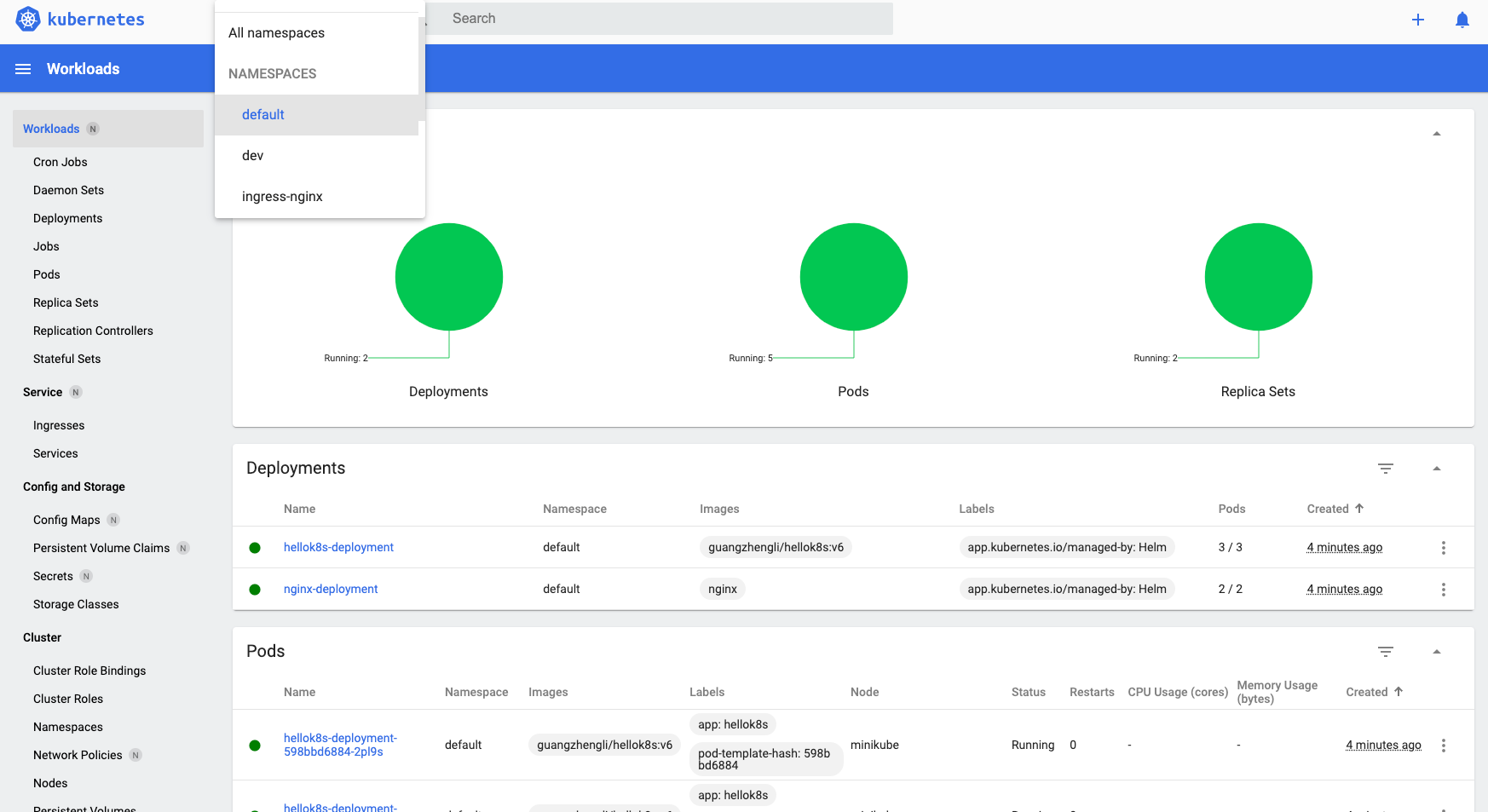
21 |
22 | ## K9s
23 |
24 | [K9s](https://k9scli.io/) 是一个基于 Terminal 的轻量级 UI,可以更加轻松的观察和管理已部署的 k8s 资源。使用方式非常简单,安装后输入 `k9s` 即可开启 Terminal Dashboard,更多用法可以参考官网。
25 |
26 | 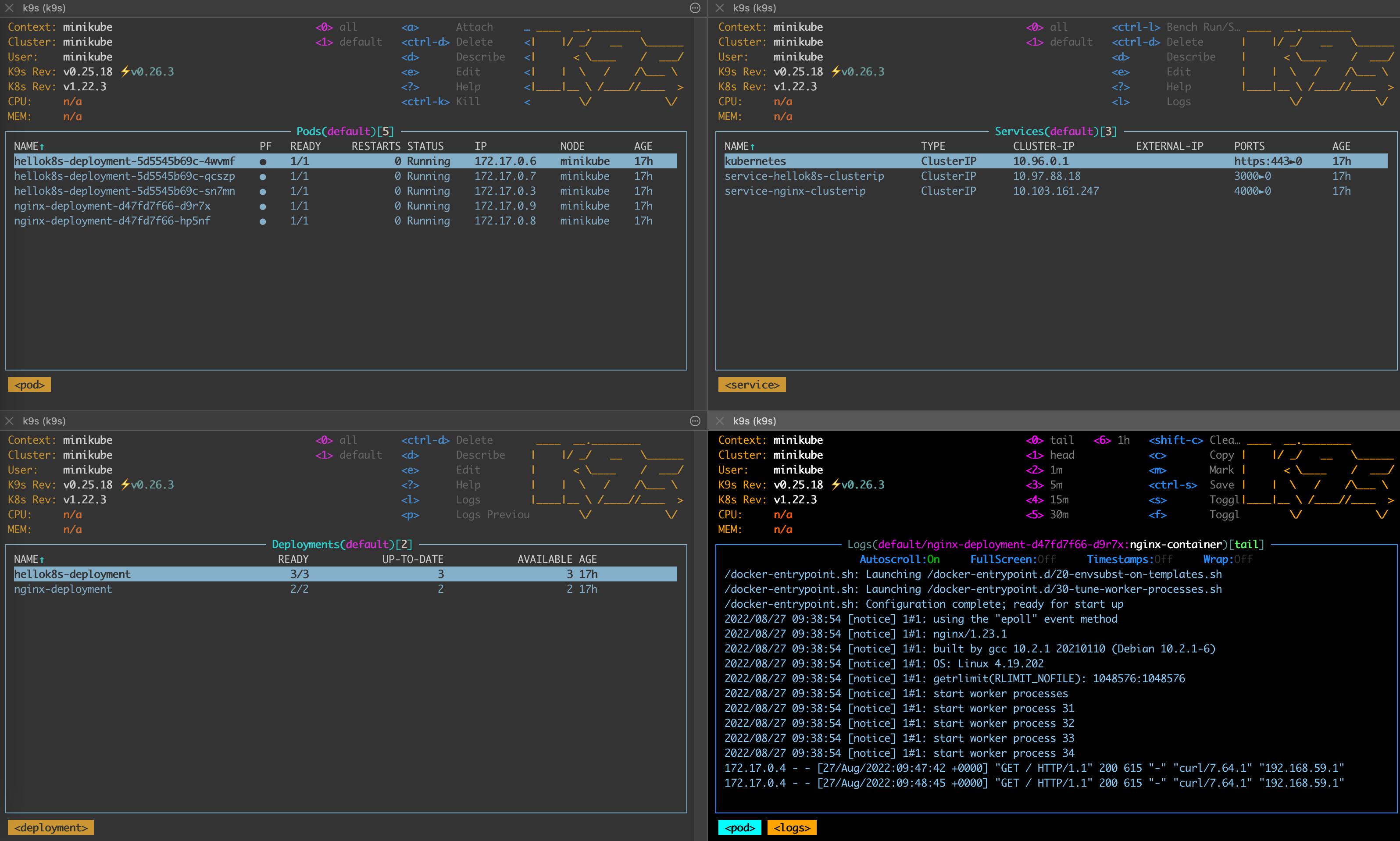
27 |
--------------------------------------------------------------------------------
/helm-charts/hello-helm/templates/ingress.yaml:
--------------------------------------------------------------------------------
1 | apiVersion: networking.k8s.io/v1
2 | kind: Ingress
3 | metadata:
4 | name: {{ .Values.application.name }}-ingress
5 | annotations:
6 | # We are defining this annotation to prevent nginx
7 | # from redirecting requests to `https` for now
8 | nginx.ingress.kubernetes.io/ssl-redirect: "false"
9 | spec:
10 | rules:
11 | - http:
12 | paths:
13 | - path: /hello
14 | pathType: Prefix
15 | backend:
16 | service:
17 | name: service-hellok8s-clusterip
18 | port:
19 | number: 3000
20 | - path: /
21 | pathType: Prefix
22 | backend:
23 | service:
24 | name: service-nginx-clusterip
25 | port:
26 | number: 4000
27 |
--------------------------------------------------------------------------------
/docs/.vitepress/theme/layout/Comments.vue:
--------------------------------------------------------------------------------
1 |
13 |
14 |
15 |
36 |
37 |
--------------------------------------------------------------------------------
/helm-charts/hello-helm/templates/hellok8s-deployment.yaml:
--------------------------------------------------------------------------------
1 | apiVersion: apps/v1
2 | kind: Deployment
3 | metadata:
4 | name: {{ .Values.application.name }}-deployment
5 | spec:
6 | replicas: {{ .Values.application.hellok8s.replicas }}
7 | selector:
8 | matchLabels:
9 | app: hellok8s
10 | template:
11 | metadata:
12 | labels:
13 | app: hellok8s
14 | spec:
15 | containers:
16 | - image: {{ .Values.application.hellok8s.image }}
17 | name: hellok8s-container
18 | env:
19 | - name: DB_URL
20 | valueFrom:
21 | configMapKeyRef:
22 | name: {{ .Values.application.name }}-config
23 | key: DB_URL
24 | - name: DB_PASSWORD
25 | valueFrom:
26 | secretKeyRef:
27 | name: {{ .Values.application.name }}-secret
28 | key: DB_PASSWORD
29 | - name: NAMESPACE
30 | value: {{ .Release.Namespace }}
31 | - name: MESSAGE
32 | value: {{ .Values.application.hellok8s.message }}
--------------------------------------------------------------------------------
/LICENSE:
--------------------------------------------------------------------------------
1 | MIT License
2 |
3 | Copyright (c) 2022-2023 liguangzheng
4 |
5 | Permission is hereby granted, free of charge, to any person obtaining a copy
6 | of this software and associated documentation files (the "Software"), to deal
7 | in the Software without restriction, including without limitation the rights
8 | to use, copy, modify, merge, publish, distribute, sublicense, and/or sell
9 | copies of the Software, and to permit persons to whom the Software is
10 | furnished to do so, subject to the following conditions:
11 |
12 | The above copyright notice and this permission notice shall be included in all
13 | copies or substantial portions of the Software.
14 |
15 | THE SOFTWARE IS PROVIDED "AS IS", WITHOUT WARRANTY OF ANY KIND, EXPRESS OR
16 | IMPLIED, INCLUDING BUT NOT LIMITED TO THE WARRANTIES OF MERCHANTABILITY,
17 | FITNESS FOR A PARTICULAR PURPOSE AND NONINFRINGEMENT. IN NO EVENT SHALL THE
18 | AUTHORS OR COPYRIGHT HOLDERS BE LIABLE FOR ANY CLAIM, DAMAGES OR OTHER
19 | LIABILITY, WHETHER IN AN ACTION OF CONTRACT, TORT OR OTHERWISE, ARISING FROM,
20 | OUT OF OR IN CONNECTION WITH THE SOFTWARE OR THE USE OR OTHER DEALINGS IN THE
21 | SOFTWARE.
--------------------------------------------------------------------------------
/.github/workflows/release.yml:
--------------------------------------------------------------------------------
1 | name: Release Charts
2 |
3 | on:
4 | push:
5 | branches:
6 | - main
7 |
8 | jobs:
9 | release:
10 | # depending on default permission settings for your org (contents being read-only or read-write for workloads), you will have to add permissions
11 | # see: https://docs.github.com/en/actions/security-guides/automatic-token-authentication#modifying-the-permissions-for-the-github_token
12 | permissions:
13 | contents: write
14 | runs-on: ubuntu-latest
15 | steps:
16 | - name: Checkout
17 | uses: actions/checkout@v2
18 | with:
19 | fetch-depth: 0
20 |
21 | - name: Configure Git
22 | run: |
23 | git config user.name "$GITHUB_ACTOR"
24 | git config user.email "$GITHUB_ACTOR@users.noreply.github.com"
25 |
26 | - name: Install Helm
27 | uses: azure/setup-helm@v1
28 | with:
29 | version: v3.8.1
30 |
31 | - name: Run chart-releaser
32 | uses: helm/chart-releaser-action@v1.4.0
33 | with:
34 | charts_dir: helm-charts
35 | env:
36 | CR_TOKEN: "${{ secrets.GITHUB_TOKEN }}"
--------------------------------------------------------------------------------
/docs/namespace.md:
--------------------------------------------------------------------------------
1 | ---
2 | prev:
3 | text: 'Ingress'
4 | link: 'ingress'
5 | next:
6 | text: 'ConfigMap'
7 | link: 'configmap'
8 | ---
9 |
10 | # Namespace
11 |
12 | 在实际的开发当中,有时候我们需要不同的环境来做开发和测试,例如 `dev` 环境给开发使用,`test` 环境给 QA 使用,那么 k8s 能不能在不同环境 `dev` `test` `uat` `prod` 中区分资源,让不同环境的资源独立互相不影响呢,答案是肯定的,k8s 提供了名为 Namespace 的资源来帮助隔离资源。
13 |
14 | 在 Kubernetes 中,**名字空间(Namespace)** 提供一种机制,将同一集群中的资源划分为相互隔离的组。 同一名字空间内的资源名称要唯一,但跨名字空间时没有这个要求。 名字空间作用域仅针对带有名字空间的对象,例如 Deployment、Service 等。
15 |
16 | 前面的教程中,默认使用的 namespace 是 `default`。
17 |
18 | 下面展示如何创建一个新的 namespace, `namespace.yaml` 文件定义了两个不同的 namespace,分别是 `dev` 和 `test`。
19 |
20 | ``` yaml
21 | apiVersion: v1
22 | kind: Namespace
23 | metadata:
24 | name: dev
25 |
26 | ---
27 |
28 | apiVersion: v1
29 | kind: Namespace
30 | metadata:
31 | name: test
32 | ```
33 |
34 | 可以通过`kubectl apply -f namespaces.yaml` 创建两个新的 namespace,分别是 `dev` 和 `test`。
35 |
36 | ```yaml
37 | kubectl apply -f namespaces.yaml
38 | # namespace/dev created
39 | # namespace/test created
40 |
41 |
42 | kubectl get namespaces
43 | # NAME STATUS AGE
44 | # default Active 215d
45 | # dev Active 2m44s
46 | # ingress-nginx Active 110d
47 | # kube-node-lease Active 215d
48 | # kube-public Active 215d
49 | # kube-system Active 215d
50 | # test Active 2m44s
51 | ```
52 |
53 | 那么如何在新的 namespace 下创建资源和获取资源呢?只需要在命令后面加上 `-n namespace` 即可。例如根据上面教程中,在名为 `dev` 的 namespace 下创建 `hellok8s:v3` 的 deployment 资源。
54 |
55 | ```shell
56 | kubectl apply -f deployment.yaml -n dev
57 |
58 | kubectl get pods -n dev
59 | ```
60 |
--------------------------------------------------------------------------------
/helm-charts/hello-helm/_helpers.tpl:
--------------------------------------------------------------------------------
1 | {{/*
2 | Expand the name of the chart.
3 | */}}
4 | {{- define "helm-hello.name" -}}
5 | {{- default .Chart.Name .Values.nameOverride | trunc 63 | trimSuffix "-" }}
6 | {{- end }}
7 |
8 | {{/*
9 | Create a default fully qualified app name.
10 | We truncate at 63 chars because some Kubernetes name fields are limited to this (by the DNS naming spec).
11 | If release name contains chart name it will be used as a full name.
12 | */}}
13 | {{- define "helm-hello.fullname" -}}
14 | {{- if .Values.fullnameOverride }}
15 | {{- .Values.fullnameOverride | trunc 63 | trimSuffix "-" }}
16 | {{- else }}
17 | {{- $name := default .Chart.Name .Values.nameOverride }}
18 | {{- if contains $name .Release.Name }}
19 | {{- .Release.Name | trunc 63 | trimSuffix "-" }}
20 | {{- else }}
21 | {{- printf "%s-%s" .Release.Name $name | trunc 63 | trimSuffix "-" }}
22 | {{- end }}
23 | {{- end }}
24 | {{- end }}
25 |
26 | {{/*
27 | Create chart name and version as used by the chart label.
28 | */}}
29 | {{- define "helm-hello.chart" -}}
30 | {{- printf "%s-%s" .Chart.Name .Chart.Version | replace "+" "_" | trunc 63 | trimSuffix "-" }}
31 | {{- end }}
32 |
33 | {{/*
34 | Common labels
35 | */}}
36 | {{- define "helm-hello.labels" -}}
37 | helm.sh/chart: {{ include "helm-hello.chart" . }}
38 | {{ include "helm-hello.selectorLabels" . }}
39 | {{- if .Chart.AppVersion }}
40 | app.kubernetes.io/version: {{ .Chart.AppVersion | quote }}
41 | {{- end }}
42 | app.kubernetes.io/managed-by: {{ .Release.Service }}
43 | {{- end }}
44 |
45 | {{/*
46 | Selector labels
47 | */}}
48 | {{- define "helm-hello.selectorLabels" -}}
49 | app.kubernetes.io/name: {{ include "helm-hello.name" . }}
50 | app.kubernetes.io/instance: {{ .Release.Name }}
51 | {{- end }}
52 |
53 | {{/*
54 | Create the name of the service account to use
55 | */}}
56 | {{- define "helm-hello.serviceAccountName" -}}
57 | {{- if .Values.serviceAccount.create }}
58 | {{- default (include "helm-hello.fullname" .) .Values.serviceAccount.name }}
59 | {{- else }}
60 | {{- default "default" .Values.serviceAccount.name }}
61 | {{- end }}
62 | {{- end }}
63 |
--------------------------------------------------------------------------------
/README.md:
--------------------------------------------------------------------------------
1 | Kubernetes Tutorials | k8s 教程 | 免费 | 开源
2 | 课程网址
3 |
4 | [](https://github.com/guangzhengli/k8s-tutorials/network)[](https://github.com/guangzhengli/k8s-tutorials/stargazers)[](https://github.com/guangzhengli/k8s-tutorials/issues)[](https://github.com/guangzhengli/k8s-tutorials/blob/main/LICENSE)
5 |
6 | 🌈 Kubernetes | 📰 Tutorials
7 |
8 | 
9 |
10 | k8s 作为云原生时代的操作系统,学习它的必要性不言而喻,如果你遇到了任何问题,可以在 [Discussions](https://github.com/guangzhengli/k8s-tutorials/discussions) 中评论或者 Issue 中提出,如果你觉得这个仓库对你有价值,欢迎 star 或者提 PR / Issue,让它变得更好!
11 |
12 | 在学习本教程前,需要注意本教程侧重于实战引导,以渐进式修改代码的方式,将从最基础的 container 容器的定义开始,经过 `pod`, `deployment`, `service`, `ingress`, `configmap`, `secret` 等资源直到用 `helm` 来打包部署一套完整服务。所以如果你对容器和 k8s 的基础理论知识不甚了解的话,建议先从 [官网文档](https://kubernetes.io/zh-cn/docs/home/) 或者其它教程获取基础理论知识,再通过实战加深对知识的掌握!
13 |
14 |
15 | 已发布到个人网站,观看体验更佳
16 |
17 | 这里是文档的索引:
18 | * [准备工作](docs/pre.md)
19 | * [container](docs/container.md)
20 | * [pod](docs/pod.md)
21 | * [deployment](docs/deployment.md)
22 | * [service](docs/service.md)
23 | * [ingress](docs/ingress.md)
24 | * [namespace](docs/namespace.md)
25 | * [configmap](docs/configmap.md)
26 | * [secret](docs/secret.md)
27 | * [job/cronjob](docs/job.md)
28 | * [helm](docs/helm.md)
29 | * [dashboard](docs/dashboard.md)
30 |
31 | ## Sponsor
32 |
33 | 本仓库是开源的,欢迎大家 star 和 fork,如果你觉得这个仓库对你有帮助,可以通过以下方式支持我:
34 |
35 |
36 |
37 |
38 |
39 |
40 | 
41 |
42 | ## Star History
43 |
44 | [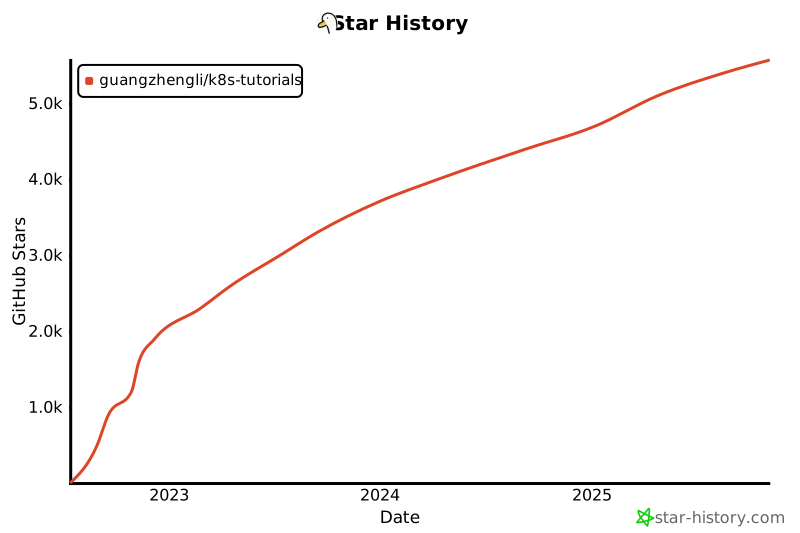](https://star-history.com/#guangzhengli/k8s-tutorials&Date)
45 |
--------------------------------------------------------------------------------
/docs/.vitepress/theme/style.css:
--------------------------------------------------------------------------------
1 | /**
2 | * Customize default theme styling by overriding CSS variables:
3 | * https://github.com/vuejs/vitepress/blob/main/src/client/theme-default/styles/vars.css
4 | */
5 |
6 | /**
7 | * Colors
8 | * -------------------------------------------------------------------------- */
9 |
10 | :root {
11 | --vp-c-brand: #646cff;
12 | --vp-c-brand-light: #747bff;
13 | --vp-c-brand-lighter: #9499ff;
14 | --vp-c-brand-lightest: #bcc0ff;
15 | --vp-c-brand-dark: #535bf2;
16 | --vp-c-brand-darker: #454ce1;
17 | --vp-c-brand-dimm: rgba(100, 108, 255, 0.08);
18 | }
19 |
20 | /**
21 | * Component: Button
22 | * -------------------------------------------------------------------------- */
23 |
24 | :root {
25 | --vp-button-brand-border: var(--vp-c-brand-light);
26 | --vp-button-brand-text: var(--vp-c-white);
27 | --vp-button-brand-bg: var(--vp-c-brand);
28 | --vp-button-brand-hover-border: var(--vp-c-brand-light);
29 | --vp-button-brand-hover-text: var(--vp-c-white);
30 | --vp-button-brand-hover-bg: var(--vp-c-brand-light);
31 | --vp-button-brand-active-border: var(--vp-c-brand-light);
32 | --vp-button-brand-active-text: var(--vp-c-white);
33 | --vp-button-brand-active-bg: var(--vp-button-brand-bg);
34 | }
35 |
36 | /**
37 | * Component: Home
38 | * -------------------------------------------------------------------------- */
39 |
40 | :root {
41 | --vp-home-hero-name-color: transparent;
42 | --vp-home-hero-name-background: -webkit-linear-gradient(
43 | 120deg,
44 | #bd34fe 30%,
45 | #41d1ff
46 | );
47 |
48 | --vp-home-hero-image-background-image: linear-gradient(
49 | -45deg,
50 | #bd34fe 50%,
51 | #47caff 50%
52 | );
53 | --vp-home-hero-image-filter: blur(40px);
54 | }
55 |
56 | @media (min-width: 640px) {
57 | :root {
58 | --vp-home-hero-image-filter: blur(56px);
59 | }
60 | }
61 |
62 | @media (min-width: 960px) {
63 | :root {
64 | --vp-home-hero-image-filter: blur(72px);
65 | }
66 | }
67 |
68 | /**
69 | * Component: Custom Block
70 | * -------------------------------------------------------------------------- */
71 |
72 | :root {
73 | --vp-custom-block-tip-border: var(--vp-c-brand);
74 | --vp-custom-block-tip-text: var(--vp-c-brand-darker);
75 | --vp-custom-block-tip-bg: var(--vp-c-brand-dimm);
76 | }
77 |
78 | .dark {
79 | --vp-custom-block-tip-border: var(--vp-c-brand);
80 | --vp-custom-block-tip-text: var(--vp-c-brand-lightest);
81 | --vp-custom-block-tip-bg: var(--vp-c-brand-dimm);
82 | }
83 |
84 | /**
85 | * Component: Algolia
86 | * -------------------------------------------------------------------------- */
87 |
88 | .DocSearch {
89 | --docsearch-primary-color: var(--vp-c-brand) !important;
90 | }
91 |
92 | .layout-comments {
93 | margin-top: 2rem;
94 | }
95 |
96 |
--------------------------------------------------------------------------------
/docs/secret.md:
--------------------------------------------------------------------------------
1 | ---
2 | prev:
3 | text: 'ConfigMap'
4 | link: 'configmap'
5 | next:
6 | text: 'Job'
7 | link: 'job'
8 | ---
9 |
10 | # Secret
11 |
12 | 上面提到,我们会选择以 configmap 的方式挂载配置信息,但是当我们的配置信息需要加密的时候, configmap 就无法满足这个要求。例如上面要挂载数据库密码的时候,就需要明文挂载。
13 |
14 | 这个时候就需要 Secret 来存储加密信息,虽然在资源文件的编码上,只是通过 Base64 的方式简单编码,但是在实际生产过程中,可以通过 pipeline 或者专业的 [AWS KMS](https://aws.amazon.com/kms/) 服务进行密钥管理。这样就大大减少了安全事故。
15 |
16 | > Secret 是一种包含少量敏感信息例如密码、令牌或密钥的对象。由于创建 Secret 可以独立于使用它们的 Pod, 因此在创建、查看和编辑 Pod 的工作流程中暴露 Secret(及其数据)的风险较小。 Kubernetes 和在集群中运行的应用程序也可以对 Secret 采取额外的预防措施, 例如避免将机密数据写入非易失性存储。
17 | >
18 | > 默认情况下,Kubernetes Secret 未加密地存储在 API 服务器的底层数据存储(etcd)中。 任何拥有 API 访问权限的人都可以检索或修改 Secret,任何有权访问 etcd 的人也可以。 此外,任何有权限在命名空间中创建 Pod 的人都可以使用该访问权限读取该命名空间中的任何 Secret; 这包括间接访问,例如创建 Deployment 的能力。
19 | >
20 | > 为了安全地使用 Secret,请至少执行以下步骤:
21 | >
22 | > 1. 为 Secret [启用静态加密](https://kubernetes.io/docs/tasks/administer-cluster/encrypt-data/);
23 | > 2. [启用或配置 RBAC 规则](https://kubernetes.io/docs/reference/access-authn-authz/authorization/)来限制读取和写入 Secret 的数据(包括通过间接方式)。需要注意的是,被准许创建 Pod 的人也隐式地被授权获取 Secret 内容。
24 | > 3. 在适当的情况下,还可以使用 RBAC 等机制来限制允许哪些主体创建新 Secret 或替换现有 Secret。
25 |
26 | Secret 的资源定义和 ConfigMap 结构基本一致,唯一区别在于 kind 是 `Secret`,还有 Value 需要 Base64 编码,你可以通过下面命令快速 Base64 编解码。当然 Secret 也提供了一种 `stringData`,可以不需要 Base64 编码。
27 |
28 | ```shell
29 | echo "db_password" | base64
30 | # ZGJfcGFzc3dvcmQK
31 |
32 | echo "ZGJfcGFzc3dvcmQK" | base64 -d
33 | # db_password
34 | ```
35 |
36 | 这里将 Base64 编码过后的值,填入对应的 key - value 中。
37 |
38 | ```yaml
39 | # hellok8s-secret.yaml
40 | apiVersion: v1
41 | kind: Secret
42 | metadata:
43 | name: hellok8s-secret
44 | data:
45 | DB_PASSWORD: "ZGJfcGFzc3dvcmQK"
46 | ```
47 |
48 | ```yaml
49 | # hellok8s.yaml
50 | apiVersion: v1
51 | kind: Pod
52 | metadata:
53 | name: hellok8s-pod
54 | spec:
55 | containers:
56 | - name: hellok8s-container
57 | image: guangzhengli/hellok8s:v5
58 | env:
59 | - name: DB_PASSWORD
60 | valueFrom:
61 | secretKeyRef:
62 | name: hellok8s-secret
63 | key: DB_PASSWORD
64 | ```
65 |
66 | ```go
67 | package main
68 |
69 | import (
70 | "fmt"
71 | "io"
72 | "net/http"
73 | "os"
74 | )
75 |
76 | func hello(w http.ResponseWriter, r *http.Request) {
77 | host, _ := os.Hostname()
78 | dbPassword := os.Getenv("DB_PASSWORD")
79 | io.WriteString(w, fmt.Sprintf("[v5] Hello, Kubernetes! From host: %s, Get Database Connect Password: %s", host, dbPassword))
80 | }
81 |
82 | func main() {
83 | http.HandleFunc("/", hello)
84 | http.ListenAndServe(":3000", nil)
85 | }
86 | ```
87 |
88 | 在代码中读取 `DB_PASSWORD` 环境变量,直接返回对应字符串。Secret 的使用方法和前面教程中 ConfigMap 基本一致,这里就不再过多赘述。
89 |
90 | ```shell
91 | docker build . -t guangzhengli/hellok8s:v5
92 |
93 | docker push guangzhengli/hellok8s:v5
94 |
95 | kubectl apply -f hellok8s-secret.yaml
96 |
97 | kubectl apply -f hellok8s.yaml
98 |
99 | kubectl port-forward hellok8s-pod 3000:3000
100 | ```
101 |
--------------------------------------------------------------------------------
/docs/container.md:
--------------------------------------------------------------------------------
1 | ---
2 | prev:
3 | text: 'Pre'
4 | link: 'pre'
5 | next:
6 | text: 'Pod'
7 | link: 'pod'
8 | ---
9 |
10 | # Container
11 |
12 | 我们的旅程从一段代码开始。新建一个 `main.go` 文件,复制下面的代码到文件中。
13 |
14 | ```go
15 | package main
16 |
17 | import (
18 | "io"
19 | "net/http"
20 | )
21 |
22 | func hello(w http.ResponseWriter, r *http.Request) {
23 | io.WriteString(w, "[v1] Hello, Kubernetes!")
24 | }
25 |
26 | func main() {
27 | http.HandleFunc("/", hello)
28 | http.ListenAndServe(":3000", nil)
29 | }
30 | ```
31 |
32 | 上面是一串用 [Go](https://go.dev/) 写的代码,代码逻辑非常的简单,首先启动 HTTP 服务器,监听 `3000` 端口,当访问路由 `/`的时候 返回字符串 `[v1] Hello, Kubernetes!`。
33 |
34 | 在以前,如果你想将这段代码运行起来并测试一下。你首先需要懂得如何下载 golang 的安装包进行安装,接着需要懂得 `golang module` 的基本使用,最后还需要了解 golang 的编译和运行命令,才能将该代码运行起来。甚至在过程中,可能会因为环境变量问题、操作系统问题、处理器架构等问题导致编译或运行失败。
35 |
36 | 但是通过 Container (容器) 技术,只需要上面的代码,附带着对应的容器 `Dockerfile` 文件,那么你就不需要 golang 的任何知识,也能将代码顺利运行起来。
37 |
38 | > Container (容器) 是一种沙盒技术。它是基于 Linux 中 Namespace / Cgroups / chroot 等技术结合而成,更多技术细节可以参看这个视频 [如何自己实现一个容器](https://www.youtube.com/watch?v=8fi7uSYlOdc)。
39 |
40 | 下面就是 Go 代码对应的 `Dockerfile`,简单的方案是直接使用 golang 的 alpine 镜像来打包,但是因为我们后续练习需要频繁的推送镜像到 DockerHub 和拉取镜像到 k8s 集群中,为了优化网络速度,我们选择先在 `golang:1.16-buster` 中将上述 Go 代码编译成二进制文件,再将二进制文件复制到 `base-debian10` 镜像中运行 (Dockerfile 不理解没有关系,不影响后续教程学习)。
41 |
42 | 这样我们可以将 300MB 大小的镜像变成只有 20MB 的镜像,甚至压缩上传到 DockerHub 后大小只有 10MB!
43 |
44 | ```dockerfile
45 | # Dockerfile
46 | FROM golang:1.16-buster AS builder
47 | RUN mkdir /src
48 | ADD . /src
49 | WORKDIR /src
50 |
51 | RUN go env -w GO111MODULE=auto
52 | RUN go build -o main .
53 |
54 | FROM gcr.io/distroless/base-debian10
55 |
56 | WORKDIR /
57 |
58 | COPY --from=builder /src/main /main
59 | EXPOSE 3000
60 | ENTRYPOINT ["/main"]
61 | ```
62 |
63 | 需要注意 `main.go` 文件需要和 `Dockerfile` 文件在同一个目录下,执行下方 `docker build` 命令,第一次需要耐心等待拉取基础镜像。并且**需要注意将 `guangzhengli` 替换成自己的 `DockerHub` 账号名称**。 这样我们后续可以推送镜像到自己注册的 `DockerHub` 仓库当中。
64 |
65 | ```shell
66 | docker build . -t guangzhengli/hellok8s:v1
67 | # Step 1/11 : FROM golang:1.16-buster AS builder
68 | # ...
69 | # ...
70 | # Step 11/11 : ENTRYPOINT ["/main"]
71 | # Successfully tagged guangzhengli/hellok8s:v1
72 |
73 |
74 | docker images
75 | # guangzhengli/hellok8s v1 f956e8cf7d18 8 days ago 25.4MB
76 | ```
77 |
78 | `docker build` 命令完成后我们可以通过 `docker images` 命令查看镜像是否 build 成功,最后我们执行 `docker run` 命令将容器启动, `-p` 指定 `3000` 作为端口,`-d` 指定刚打包成功的镜像名称。
79 |
80 | ```shell
81 | docker run -p 3000:3000 --name hellok8s -d guangzhengli/hellok8s:v1
82 | ```
83 |
84 | 运行成功后,可以通过浏览器或者 `curl` 来访问 `http://127.0.0.1:3000` , 查看是否成功返回字符串 `[v1] Hello, Kubernetes!`。
85 |
86 | 这里因为我本地只用 Docker CLI,而 docker runtime 是使用 `minikube`,所以我需要先调用 `minikube ip` 来返回 minikube IP 地址,例如返回了 `192.168.59.100`,所以我需要访问 `http://192.168.59.100:3000` 来判断是否成功返回字符串 `[v1] Hello, Kubernetes!`。
87 |
88 | 最后确认没有问题,使用 `docker push` 将镜像上传到远程的 `DockerHub` 仓库当中,这样可以供他人下载使用,也方便后续 `Minikube` 下载镜像使用。 **需要注意将 `guangzhengli` 替换成自己的 `DockerHub` 账号名称**。
89 |
90 | ```shell
91 | docker push guangzhengli/hellok8s:v1
92 | ```
93 |
94 | 经过这一节的练习,有没有对容器的强大有一个初步的认识呢?可以想象当你想部署一个更复杂的服务时,例如 Nginx,MySQL,Redis。你只需要到 [DockerHub 搜索](https://hub.docker.com/search?q=) 中搜索对应的镜像,通过 `docker pull` 下载镜像,`docker run` 启动服务即可!而无需关系依赖和各种配置!
95 |
--------------------------------------------------------------------------------
/docs/pre.md:
--------------------------------------------------------------------------------
1 | ---
2 | prev: false
3 | next:
4 | text: 'Container'
5 | link: 'container'
6 | ---
7 |
8 | # 准备工作
9 |
10 | 在开始本教程之前,需要配置好本地环境,以下是需要安装的依赖和包。
11 |
12 | ## 安装 docker
13 |
14 | 首先我们需要安装 `docker` 来打包镜像,如果你本地已经安装了 `docker`,那么你可以选择跳过这一小节。
15 |
16 | ### 推荐安装方法
17 |
18 | 目前使用 [Docker Desktop](https://www.docker.com/products/docker-desktop/) 来安装 docker 还是最简单的方案,打开官网下载对应你电脑操作系统的包即可 (https://www.docker.com/products/docker-desktop/),
19 |
20 | 当安装完成后,可以通过 `docker run hello-world` 来快速校验是否安装成功!
21 |
22 | ### 其它安装方法
23 |
24 | 目前 Docker 公司宣布 [Docker Desktop](https://www.docker.com/products/docker-desktop/) 只对个人开发者或者小型团体免费 (2021年起对大型公司不再免费),所以如果你不能通过 [Docker Desktop](https://www.docker.com/products/docker-desktop/) 的方式下载安装 `docker`,可以参考 [这篇文章](https://dhwaneetbhatt.com/blog/run-docker-without-docker-desktop-on-macos) 只安装 [Docker CLI](https://github.com/docker/cli)。
25 |
26 | ## 安装 minikube
27 |
28 | 我们还需要搭建一套 k8s 本地集群 (使用云厂商或者其它 k8s 集群都可) 。本地搭建 k8s 集群的方式推荐使用 [minikube](https://minikube.sigs.k8s.io/docs/)。
29 |
30 | 可以根据 [minikube 快速安装](https://minikube.sigs.k8s.io/docs/start/) 来进行下载安装,这里简单列举 MacOS 的安装方式,Linux & Windows 操作系统可以参考[官方文档](https://minikube.sigs.k8s.io/docs/start/) 快速安装。
31 |
32 | ```shell
33 | brew install minikube
34 | ```
35 |
36 | ### 启动 minikube
37 |
38 | 因为 minikube 支持很多容器和虚拟化技术 ([Docker](https://minikube.sigs.k8s.io/docs/drivers/docker/), [Hyperkit](https://minikube.sigs.k8s.io/docs/drivers/hyperkit/), [Hyper-V](https://minikube.sigs.k8s.io/docs/drivers/hyperv/), [KVM](https://minikube.sigs.k8s.io/docs/drivers/kvm2/), [Parallels](https://minikube.sigs.k8s.io/docs/drivers/parallels/), [Podman](https://minikube.sigs.k8s.io/docs/drivers/podman/), [VirtualBox](https://minikube.sigs.k8s.io/docs/drivers/virtualbox/), or [VMware Fusion/Workstation](https://minikube.sigs.k8s.io/docs/drivers/vmware/)),也是问题出现比较多的地方,所以这里还是稍微说明一下。
39 |
40 | 如果你使用 `docker` 的方案是上面推荐的 [Docker Desktop](https://www.docker.com/products/docker-desktop/) ,那么你以下面的命令启动 minikube 即可,需要耐心等待下载依赖。
41 |
42 | ```shell
43 | minikube start --vm-driver docker --container-runtime=docker
44 | ```
45 |
46 | 启动完成后,运行 `minikube status` 查看当前状态确定是否启动成功!
47 |
48 | 如果你本地只有 Docker CLI,判断标准如果执行 `docker ps` 等命令,返回错误 `Cannot connect to the Docker daemon at unix:///Users/xxxx/.colima/docker.sock. Is the docker daemon running?` 那么就需要操作下面的命令。
49 |
50 | ```shell
51 | brew install hyperkit
52 | minikube start --vm-driver hyperkit --container-runtime=docker
53 |
54 | # Tell Docker CLI to talk to minikube's VM
55 | eval $(minikube docker-env)
56 |
57 | # Save IP to a hostname
58 | echo "`minikube ip` docker.local" | sudo tee -a /etc/hosts > /dev/null
59 |
60 | # Test
61 | docker run hello-world
62 | ```
63 |
64 | **minikube 命令速查**
65 |
66 | `minikube stop` 不会删除任何数据,只是停止 VM 和 k8s 集群。
67 |
68 | `minikube delete` 删除所有 minikube 启动后的数据。
69 |
70 | `minikube ip` 查看集群和 docker enginer 运行的 IP 地址。
71 |
72 | `minikube pause` 暂停当前的资源和 k8s 集群
73 |
74 | `minikube status` 查看当前集群状态
75 |
76 | ## 安装 kubectl
77 |
78 | 这一步是可选的,如果不安装的话,后续所有 `kubectl` 相关的命令,使用 `minikube kubectl` 命令替代即可。
79 |
80 | 如果你不想使用 `minikube kubectl` 或者配置相关环境变量来进行下面的教学的话,可以考虑直接安装 `kubectl`。
81 | 以下为 MacOS 的安装方式,Linux & Windows 操作系统可以参考[官方文档](https://kubernetes.io/zh-cn/docs/tasks/tools/)快速安装。
82 |
83 | ```shell
84 | brew install kubectl
85 | ```
86 |
87 | ## 注册 docker hub 账号登录
88 |
89 | 因为默认 minikube 使用的镜像地址是 DockerHub,所以我们还需要在 DockerHub(https://hub.docker.com/) 中注册账号,并且使用 login 命令登录账号。
90 |
91 | ```shell
92 | docker login
93 | ```
94 |
--------------------------------------------------------------------------------
/docs/.vitepress/config.mts:
--------------------------------------------------------------------------------
1 | import { defineConfig } from 'vitepress'
2 |
3 | // https://vitepress.dev/reference/site-config
4 | export default defineConfig({
5 | title: "Kubernetes 练习手册",
6 | description: "A tutorials for k8s",
7 | srcExclude: ['**/README.md'],
8 | sitemap: {
9 | hostname: 'https://k8s-tutorials.pages.dev'
10 | },
11 |
12 | head: [
13 | ['link', { rel: 'icon', href: '/favicon.ico' }],
14 | ['meta', { name: 'author', content: 'Guangzheng Li' }],
15 | ['meta', { name: 'keywords', content: 'kubernetes, k8s, tutorials, workshop, practice, guangzheng li' }],
16 | ['meta', { name: 'og:title', content: 'Kubernetes 练习手册' }],
17 | ['meta', { name: 'og:description', content: 'A tutorials for k8s' }],
18 | ['meta', { name: 'og:image', content: '/k8s.png' }],
19 | ['meta', { name: 'og:url', content: 'https://k8s-tutorials.pages.dev' }],
20 | ['meta', { name: 'google-site-verification', content: 'd13KXsNzbyvOCb8km5-Jja-m7nlizj8qJ_2mUSAOy2g' }],
21 | ['script', { async: '', src: 'https://analytics.guangzhengli.com/hugo-ladder', 'data-website-id': 'c566e0a6-b11d-4fdc-ab1c-fd0b5ac2d852', 'defer': '' }],
22 | ],
23 | themeConfig: {
24 | // https://vitepress.dev/reference/default-theme-config
25 | search: {
26 | provider: 'local'
27 | },
28 | editLink: {
29 | pattern: 'https://github.com/guangzhengli/k8s-tutorials/edit/main/:path'
30 | },
31 | nav: [
32 | { text: 'Home', link: '/' },
33 | ],
34 |
35 | sidebar: [
36 | {
37 | text: '开始',
38 | items: [
39 | { text: '准备工作', link: 'pre' },
40 | ]
41 | },
42 | {
43 | text: 'Kubernetes',
44 | items: [
45 | { text: 'Container', link: 'container' },
46 | { text: 'Pod', link: 'pod' },
47 | { text: 'Deployment', link: 'deployment' },
48 | { text: 'Service', link: 'service' },
49 | { text: 'Ingress', link: 'ingress' },
50 | { text: 'Namespace', link: 'namespace' },
51 | { text: 'ConfigMap', link: 'configmap' },
52 | { text: 'Secret', link: 'secret' },
53 | { text: 'Job', link: 'job' },
54 | ]
55 | },
56 | {
57 | text: 'Helm',
58 | items: [
59 | { text: 'Helm', link: 'helm' },
60 | ]
61 | },
62 | {
63 | text: 'Others',
64 | items: [
65 | { text: 'Dashboard', link: 'dashboard' },
66 | ]
67 | }
68 | ],
69 |
70 | socialLinks: [
71 | { icon: 'github', link: 'https://github.com/guangzhengli/k8s-tutorials' },
72 | { icon: 'twitter', link: 'https://twitter.com/iguangzhengli' },
73 | { icon: { svg: ''},
74 | link: 'https://guangzhengli.com' },
75 | { icon: { svg: ''},
76 | link: 'https://guangzhengli.com/sponsors' },
77 | ],
78 | }
79 | })
80 |
--------------------------------------------------------------------------------
/docs/configmap.md:
--------------------------------------------------------------------------------
1 | ---
2 | prev:
3 | text: 'Namespace'
4 | link: 'namespace'
5 | next:
6 | text: 'Secret'
7 | link: 'secret'
8 | ---
9 |
10 | # ConfigMap
11 |
12 | 上面的教程提到,我们在不同环境 `dev` `test` `uat` `prod` 中区分资源,可以让其资源独立互相不受影响,但是随之而来也会带来一些问题,例如不同环境的数据库的地址往往是不一样的,那么如果在代码中写同一个数据库的地址,就会出现问题。
13 |
14 | K8S 使用 ConfigMap 来将你的配置数据和应用程序代码分开,将非机密性的数据保存到键值对中。ConfigMap 在设计上不是用来保存大量数据的。在 ConfigMap 中保存的数据不可超过 1 MiB。如果你需要保存超出此尺寸限制的数据,你可能考虑挂载存储卷。
15 |
16 | 下面我们可以来看一个例子,我们修改之前代码,假设不同环境的数据库地址不同,下面代码从环境变量中获取 `DB_URL`,并将它返回。
17 |
18 | ```go
19 | package main
20 |
21 | import (
22 | "fmt"
23 | "io"
24 | "net/http"
25 | "os"
26 | )
27 |
28 | func hello(w http.ResponseWriter, r *http.Request) {
29 | host, _ := os.Hostname()
30 | dbURL := os.Getenv("DB_URL")
31 | io.WriteString(w, fmt.Sprintf("[v4] Hello, Kubernetes! From host: %s, Get Database Connect URL: %s", host, dbURL))
32 | }
33 |
34 | func main() {
35 | http.HandleFunc("/", hello)
36 | http.ListenAndServe(":3000", nil)
37 | }
38 | ```
39 |
40 | 构建 `hellok8s:v4` 的镜像,推送到远程仓库。并删除之前创建的所有资源。
41 |
42 | ```shell
43 | docker build . -t guangzhengli/hellok8s:v4
44 | docker push guangzhengli/hellok8s:v4
45 |
46 | kubectl delete deployment,service,ingress --all
47 | ```
48 |
49 | 接下来创建不同 namespace 的 configmap 来存放 `DB_URL`。
50 |
51 | 创建 `hellok8s-config-dev.yaml` 文件
52 |
53 | ```yaml
54 | apiVersion: v1
55 | kind: ConfigMap
56 | metadata:
57 | name: hellok8s-config
58 | data:
59 | DB_URL: "http://DB_ADDRESS_DEV"
60 | ```
61 |
62 | 创建 `hellok8s-config-test.yaml` 文件
63 |
64 | ```yaml
65 | apiVersion: v1
66 | kind: ConfigMap
67 | metadata:
68 | name: hellok8s-config
69 | data:
70 | DB_URL: "http://DB_ADDRESS_TEST"
71 | ```
72 |
73 | 分别在 `dev` `test` 两个 namespace 下创建相同的 `ConfigMap`,名字都叫 hellok8s-config,但是存放的 Pair 对中 Value 值不一样。
74 |
75 | ```shell
76 | kubectl apply -f hellok8s-config-dev.yaml -n dev
77 | # configmap/hellok8s-config created
78 |
79 | kubectl apply -f hellok8s-config-test.yaml -n test
80 | # configmap/hellok8s-config created
81 |
82 | kubectl get configmap --all-namespaces
83 | NAMESPACE NAME DATA AGE
84 | dev hellok8s-config 1 3m12s
85 | test hellok8s-config 1 2m1s
86 | ```
87 |
88 | 接着使用 POD 的方式来部署 `hellok8s:v4`,其中 `env.name` 表示的是将 configmap 中的值写进环境变量,这样代码从环境变量中获取 `DB_URL`,这个 KEY 名称必须保持一致。`valueFrom` 代表从哪里读取,`configMapKeyRef` 这里表示从名为 `hellok8s-config` 的 `configMap` 中读取 `KEY=DB_URL` 的 Value。
89 |
90 | ```yaml
91 | apiVersion: v1
92 | kind: Pod
93 | metadata:
94 | name: hellok8s-pod
95 | spec:
96 | containers:
97 | - name: hellok8s-container
98 | image: guangzhengli/hellok8s:v4
99 | env:
100 | - name: DB_URL
101 | valueFrom:
102 | configMapKeyRef:
103 | name: hellok8s-config
104 | key: DB_URL
105 | ```
106 |
107 | 下面分别在 `dev` `test` 两个 namespace 下创建 `hellok8s:v4`,接着通过 `port-forward` 的方式访问不同 namespace 的服务,可以看到返回的 `Get Database Connect URL: http://DB_ADDRESS_TEST` 是不一样的!
108 |
109 | ```shell
110 | kubectl apply -f hellok8s.yaml -n dev
111 | # pod/hellok8s-pod created
112 |
113 | kubectl apply -f hellok8s.yaml -n test
114 | # pod/hellok8s-pod created
115 |
116 | kubectl port-forward hellok8s-pod 3000:3000 -n dev
117 |
118 | curl http://localhost:3000
119 | # [v4] Hello, Kubernetes! From host: hellok8s-pod, Get Database Connect URL: http://DB_ADDRESS_DEV
120 |
121 | kubectl port-forward hellok8s-pod 3000:3000 -n test
122 |
123 | curl http://localhost:3000
124 | # [v4] Hello, Kubernetes! From host: hellok8s-pod, Get Database Connect URL: http://DB_ADDRESS_TEST
125 | ```
126 |
--------------------------------------------------------------------------------
/docs/pod.md:
--------------------------------------------------------------------------------
1 | ---
2 | prev:
3 | text: 'Container'
4 | link: 'container'
5 | next:
6 | text: 'Deployment'
7 | link: 'deployment'
8 | ---
9 |
10 | # Pod
11 |
12 | 如果在生产环境中运行的都是独立的单体服务,那么 Container (容器) 也就够用了,但是在实际的生产环境中,维护着大规模的集群和各种不同的服务,服务之间往往存在着各种各样的关系。而这些关系的处理,才是手动管理最困难的地方。
13 |
14 | **Pod** 是我们将要创建的第一个 k8s 资源,也是可以在 Kubernetes 中创建和管理的、最小的可部署的计算单元。在了解 `pod` 和 `container` 的区别之前,我们可以先创建一个简单的 pod 试试,
15 |
16 | 我们先创建 `nginx.yaml` 文件,编写一个可以创建 `nginx` 的 Pod。
17 |
18 | ```yaml
19 | # nginx.yaml
20 | apiVersion: v1
21 | kind: Pod
22 | metadata:
23 | name: nginx-pod
24 | spec:
25 | containers:
26 | - name: nginx-container
27 | image: nginx
28 | ```
29 |
30 | 其中 `kind` 表示我们要创建的资源是 `Pod` 类型, `metadata.name` 表示要创建的 pod 的名字,这个名字需要是唯一的。 `spec.containers` 表示要运行的容器的名称和镜像名称。镜像默认来源 `DockerHub`。
31 |
32 | 我们运行第一条 k8s 命令 `kubectl apply -f nginx.yaml` 命令来创建 `nginx` Pod。
33 |
34 | 接着通过 `kubectl get pods` 来查看 pod 是否正常启动。
35 |
36 | 最后通过 `kubectl port-forward nginx-pod 4000:80` 命令将 `nginx` 默认的 `80` 端口映射到本机的 `4000` 端口,打开浏览器或者 `curl` 来访问 `http://127.0.0.1:4000` , 查看是否成功访问 `nginx` 默认页面!
37 |
38 | ``` shell
39 | kubectl apply -f nginx.yaml
40 | # pod/nginx-pod created
41 |
42 | kubectl get pods
43 | # nginx-pod 1/1 Running 0 6s
44 |
45 | kubectl port-forward nginx-pod 4000:80
46 | # Forwarding from 127.0.0.1:4000 -> 80
47 | # Forwarding from [::1]:4000 -> 80
48 | ```
49 |
50 | `kubectl exec -it` 可以用来进入 Pod 内容器的 Shell。通过命令下面的命令来配置 `nginx` 的首页内容。
51 |
52 | ```shell
53 | kubectl exec -it nginx-pod -- /bin/bash
54 |
55 | echo "hello kubernetes by nginx!" > /usr/share/nginx/html/index.html
56 |
57 | kubectl port-forward nginx-pod 4000:80
58 | ```
59 |
60 | 最后可以通过浏览器或者 `curl` 来访问 `http://127.0.0.1:4000` , 查看是否成功启动 `nginx` 和返回字符串 `hello kubernetes by nginx!`。
61 |
62 | ## Pod 与 Container 的不同
63 |
64 | 回到 `pod` 和 `container` 的区别,我们会发现刚刚创建出来的资源如下图所示,在最内层是我们的服务 `nginx`,运行在 `container` 容器当中, `container` (容器) 的本质是进程,而 `pod` 是管理这一组进程的资源。
65 |
66 | 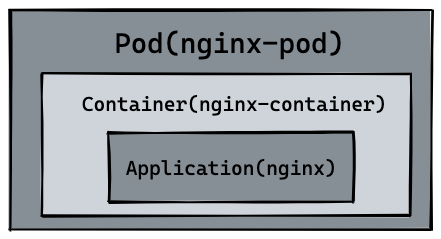
67 |
68 | 所以自然 `pod` 可以管理多个 `container`,在某些场景例如服务之间需要文件交换(日志收集),本地网络通信需求(使用 localhost 或者 Socket 文件进行本地通信),在这些场景中使用 `pod` 管理多个 `container` 就非常的推荐。而这,也是 k8s 如何处理服务之间复杂关系的第一个例子,如下图所示:
69 |
70 | 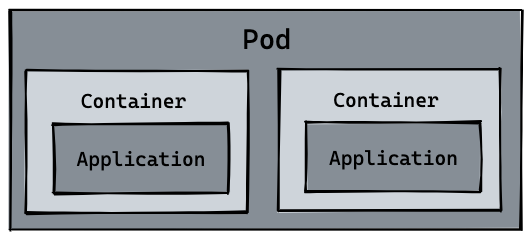
71 |
72 | ## Pod 其它命令
73 |
74 | 我们可以通过 `logs` 或者 `logs -f` 命令查看 pod 日志,可以通过 `exec -it` 进入 pod 或者调用容器命令,通过 `delete pod` 或者 `delete -f nginx.yaml` 的方式删除 pod 资源。这里可以看到 [kubectl 所有命令](https://kubernetes.io/docs/reference/kubectl/cheatsheet/)。
75 |
76 | ```shell
77 | kubectl logs --follow nginx-pod
78 |
79 | kubectl exec nginx-pod -- ls
80 |
81 | kubectl delete pod nginx-pod
82 | # pod "nginx-pod" deleted
83 |
84 | kubectl delete -f nginx.yaml
85 | # pod "nginx-pod" deleted
86 | ```
87 |
88 | 最后,根据我们在 `container` 的那节构建的 `hellok8s:v1` 的镜像,同时参考 `nginx` pod 的资源定义,你能独自编写出 `hellok8s:v1` Pod 的资源文件吗?并通过 `port-forward` 到本地的 `3000` 端口进行访问,最终得到字符串 `[v1] Hello, Kubernetes!`。
89 |
90 | `hellok8s:v1` Pod 资源定义和相应的命令如下所示:
91 |
92 | ```yaml
93 | # hellok8s.yaml
94 | apiVersion: v1
95 | kind: Pod
96 | metadata:
97 | name: hellok8s
98 | spec:
99 | containers:
100 | - name: hellok8s-container
101 | image: guangzhengli/hellok8s:v1
102 | ```
103 |
104 | ```shell
105 | kubectl apply -f hellok8s.yaml
106 |
107 | kubectl get pods
108 |
109 | kubectl port-forward hellok8s 3000:3000
110 | ```
111 |
112 | 关于启动失败
113 |
114 | 如果查看Pod的状态为 ErrImagePull 或者 ImagePullBackOff
115 |
116 | ```
117 | NAME READY STATUS RESTARTS AGE
118 | hellok8s 0/1 ImagePullBackOff 0 22m
119 | ```
120 |
121 | 尝试切换为当前环境的docker-env, 删除pod, 然后重新构建镜像即可
122 | + 官方文档: [Pushing directly to the in-cluster Docker daemon (docker-env)](https://minikube.sigs.k8s.io/docs/handbook/pushing/)
123 |
124 | ```shell
125 | eval $(minikube docker-env)
126 | ```
127 |
--------------------------------------------------------------------------------
/docs/job.md:
--------------------------------------------------------------------------------
1 | ---
2 | prev:
3 | text: 'Secret'
4 | link: 'secret'
5 | next:
6 | text: 'Helm'
7 | link: 'helm'
8 | ---
9 |
10 | # Job
11 |
12 | 在实际的开发过程中,还有一类任务是之前的资源不能满足的,即一次性任务。例如常见的计算任务,只需要拿到相关数据计算后得出结果即可,无需一直运行。而处理这一类任务的资源就是 Job。
13 |
14 | > Job 会创建一个或者多个 Pod,并将继续重试 Pod 的执行,直到指定数量的 Pod 成功终止。 随着 Pod 成功结束,Job 跟踪记录成功完成的 Pod 个数。 当数量达到指定的成功个数阈值时,任务(即 Job)结束。 删除 Job 的操作会清除所创建的全部 Pod。 挂起 Job 的操作会删除 Job 的所有活跃 Pod,直到 Job 被再次恢复执行。
15 | >
16 | > 一种简单的使用场景下,你会创建一个 Job 对象以便以一种可靠的方式运行某 Pod 直到完成。 当第一个 Pod 失败或者被删除(比如因为节点硬件失效或者重启)时,Job 对象会启动一个新的 Pod。
17 |
18 | 下面来看一个 Job 的资源定义,其中 Kind 和 metadata.name 是资源类型和名字就不再解释,`completions` 指的是会创建 Pod 的数量,每个 pod 都会完成下面的任务。`parallelism` 指的是并发执行最大数量,例如下面就会先创建 3 个 pod 并发执行任务,一旦某个 pod 执行完成,就会再创建新的 pod 来执行,直到 5 个 pod 执行完成,Job 才会被标记为完成。
19 |
20 | `restartPolicy = "OnFailure` 的含义和 Pod 生命周期相关,Pod 中的容器可能因为退出时返回值非零, 或者容器因为超出内存约束而被杀死等等。 如果发生这类事件,并且 `.spec.template.spec.restartPolicy = "OnFailure"`, Pod 则继续留在当前节点,但容器会被重新运行。因此,你的程序需要能够处理在本地被重启的情况,或者要设置 `.spec.template.spec.restartPolicy = "Never"`。
21 |
22 | ```yaml
23 | apiVersion: batch/v1
24 | kind: Job
25 | metadata:
26 | name: hello-job
27 | spec:
28 | parallelism: 3
29 | completions: 5
30 | template:
31 | spec:
32 | restartPolicy: OnFailure
33 | containers:
34 | - name: echo
35 | image: busybox
36 | command:
37 | - "/bin/sh"
38 | args:
39 | - "-c"
40 | - "for i in 9 8 7 6 5 4 3 2 1 ; do echo $i ; done"
41 | ```
42 |
43 | 通过下面的命令创建 job,可以通过 `kubectl get pods -w` 来观察 job 创建 pod 的过程和结果。最后可以通过 `logs` 命令查看日志。
44 |
45 | ```shell
46 | kubectl apply -f hello-job.yaml
47 |
48 | kubectl get jobs
49 | # NAME COMPLETIONS DURATION AGE
50 | # hello-job 5/5 19s 83s
51 |
52 | kubectl get pods
53 | # NAME READY STATUS RESTARTS AGE
54 | # hello-job--1-5gjjr 0/1 Completed 0 34s
55 | # hello-job--1-8ffmn 0/1 Completed 0 26s
56 | # hello-job--1-ltsvm 0/1 Completed 0 34s
57 | # hello-job--1-mttwv 0/1 Completed 0 29s
58 | # hello-job--1-ww2qp 0/1 Completed 0 34s
59 |
60 | kubectl logs -f hello-job--1-5gjjr
61 | # 1
62 | # ...
63 | ```
64 |
65 | Job 完成时不会再创建新的 Pod,不过已有的 Pod [通常](https://kubernetes.io/docs/concepts/workloads/controllers/job/#pod-backoff-failure-policy)也不会被删除。 保留这些 Pod 使得你可以查看已完成的 Pod 的日志输出,以便检查错误、警告或者其它诊断性输出。 可以使用 `kubectl` 来删除 Job(例如 `kubectl delete -f hello-job.yaml`)。当使用 `kubectl` 来删除 Job 时,该 Job 所创建的 Pod 也会被删除。
66 |
67 | ## CronJob
68 |
69 | *CronJob* 可以理解为定时任务,创建基于 Cron 时间调度的 [Jobs](https://kubernetes.ion/docs/concepts/workloads/controllers/job/)。
70 |
71 | > CronJob 用于执行周期性的动作,例如备份、报告生成等。 这些任务中的每一个都应该配置为周期性重复的(例如:每天/每周/每月一次); 你可以定义任务开始执行的时间间隔。
72 |
73 | Cron 时间表语法
74 |
75 | ```
76 | # ┌───────────── 分钟 (0 - 59)
77 | # │ ┌───────────── 小时 (0 - 23)
78 | # │ │ ┌───────────── 月的某天 (1 - 31)
79 | # │ │ │ ┌───────────── 月份 (1 - 12)
80 | # │ │ │ │ ┌───────────── 周的某天 (0 - 6)(周日到周一;在某些系统上,7 也是星期日)
81 | # │ │ │ │ │ 或者是 sun,mon,tue,web,thu,fri,sat
82 | # │ │ │ │ │
83 | # │ │ │ │ │
84 | # * * * * *
85 | ```
86 |
87 | 用法除了需要加上 cron 表达式之外,其余基本和 Job 保持一致。
88 |
89 | ```yaml
90 | apiVersion: batch/v1
91 | kind: CronJob
92 | metadata:
93 | name: hello-cronjob
94 | spec:
95 | schedule: "* * * * *" # Every minute
96 | jobTemplate:
97 | spec:
98 | template:
99 | spec:
100 | restartPolicy: OnFailure
101 | containers:
102 | - name: echo
103 | image: busybox
104 | command:
105 | - "/bin/sh"
106 | args:
107 | - "-c"
108 | - "for i in 9 8 7 6 5 4 3 2 1 ; do echo $i ; done"
109 | ```
110 |
111 | 使用命令和 Job 也基本保持一致,这里就不过多赘述。
112 |
113 | ```shell
114 | kubectl apply -f hello-cronjob.yaml
115 | # cronjob.batch/hello-cronjob created
116 |
117 | kubectl get cronjob
118 | # NAME SCHEDULE SUSPEND ACTIVE LAST SCHEDULE AGE
119 | # hello-cronjob * * * * * False 0 8s
120 |
121 | kubectl get pods
122 | # NAME READY STATUS RESTARTS AGE
123 | # hello-cronjob-27694609--1-2nmdx 0/1 Completed 0 15s
124 | ```
125 |
--------------------------------------------------------------------------------
/images/hellok8s_pod.excalidraw:
--------------------------------------------------------------------------------
1 | {
2 | "type": "excalidraw",
3 | "version": 2,
4 | "source": "https://marketplace.visualstudio.com/items?itemName=pomdtr.excalidraw-editor",
5 | "elements": [
6 | {
7 | "type": "rectangle",
8 | "version": 517,
9 | "versionNonce": 767157754,
10 | "isDeleted": false,
11 | "id": "3Taf6SQEUFnyNVBDQj6LL",
12 | "fillStyle": "solid",
13 | "strokeWidth": 2,
14 | "strokeStyle": "solid",
15 | "roughness": 1,
16 | "opacity": 100,
17 | "angle": 0,
18 | "x": 326.2457275390625,
19 | "y": 232.59429931640625,
20 | "strokeColor": "#000000",
21 | "backgroundColor": "#868e96",
22 | "width": 421.81848144531256,
23 | "height": 219.51153564453125,
24 | "seed": 205955050,
25 | "groupIds": [],
26 | "strokeSharpness": "sharp",
27 | "boundElements": [],
28 | "updated": 1661263285347,
29 | "link": null,
30 | "locked": false
31 | },
32 | {
33 | "type": "rectangle",
34 | "version": 166,
35 | "versionNonce": 1702791014,
36 | "isDeleted": false,
37 | "id": "StLUnK8_aWclA_O-l2VhJ",
38 | "fillStyle": "solid",
39 | "strokeWidth": 2,
40 | "strokeStyle": "solid",
41 | "roughness": 1,
42 | "opacity": 100,
43 | "angle": 0,
44 | "x": 358.394287109375,
45 | "y": 296.3746337890625,
46 | "strokeColor": "#000000",
47 | "backgroundColor": "#ced4da",
48 | "width": 368.18023681640636,
49 | "height": 141.8179931640625,
50 | "seed": 1930360618,
51 | "groupIds": [],
52 | "strokeSharpness": "sharp",
53 | "boundElements": [],
54 | "updated": 1661263250011,
55 | "link": null,
56 | "locked": false
57 | },
58 | {
59 | "type": "rectangle",
60 | "version": 211,
61 | "versionNonce": 1216541242,
62 | "isDeleted": false,
63 | "id": "b_BbBp0Ow3zukTvoZz59r",
64 | "fillStyle": "solid",
65 | "strokeWidth": 2,
66 | "strokeStyle": "solid",
67 | "roughness": 1,
68 | "opacity": 100,
69 | "angle": 0,
70 | "x": 424.8642578125,
71 | "y": 355.21533203125,
72 | "strokeColor": "#000000",
73 | "backgroundColor": "#868e96",
74 | "width": 245,
75 | "height": 69,
76 | "seed": 637392566,
77 | "groupIds": [],
78 | "strokeSharpness": "sharp",
79 | "boundElements": [
80 | {
81 | "type": "text",
82 | "id": "Yne5FFQKRqrxOFo7yZjmh"
83 | }
84 | ],
85 | "updated": 1661263277049,
86 | "link": null,
87 | "locked": false
88 | },
89 | {
90 | "type": "text",
91 | "version": 109,
92 | "versionNonce": 1362212582,
93 | "isDeleted": false,
94 | "id": "2L2zhPF3DCcFKOATvDjMP",
95 | "fillStyle": "hachure",
96 | "strokeWidth": 2,
97 | "strokeStyle": "solid",
98 | "roughness": 1,
99 | "opacity": 100,
100 | "angle": 0,
101 | "x": 398.0712890625,
102 | "y": 314.04498291015625,
103 | "strokeColor": "#000000",
104 | "backgroundColor": "transparent",
105 | "width": 306,
106 | "height": 24,
107 | "seed": 1475240694,
108 | "groupIds": [],
109 | "strokeSharpness": "sharp",
110 | "boundElements": [],
111 | "updated": 1661263253002,
112 | "link": null,
113 | "locked": false,
114 | "fontSize": 20,
115 | "fontFamily": 3,
116 | "text": "Container(nginx-container)",
117 | "baseline": 20,
118 | "textAlign": "left",
119 | "verticalAlign": "top",
120 | "containerId": null,
121 | "originalText": "Container(nginx-container)"
122 | },
123 | {
124 | "type": "text",
125 | "version": 146,
126 | "versionNonce": 721938022,
127 | "isDeleted": false,
128 | "id": "Yne5FFQKRqrxOFo7yZjmh",
129 | "fillStyle": "hachure",
130 | "strokeWidth": 2,
131 | "strokeStyle": "solid",
132 | "roughness": 1,
133 | "opacity": 100,
134 | "angle": 0,
135 | "x": 429.8642578125,
136 | "y": 378.21533203125,
137 | "strokeColor": "#000000",
138 | "backgroundColor": "transparent",
139 | "width": 235,
140 | "height": 23,
141 | "seed": 1876547562,
142 | "groupIds": [],
143 | "strokeSharpness": "sharp",
144 | "boundElements": [],
145 | "updated": 1661263277049,
146 | "link": null,
147 | "locked": false,
148 | "fontSize": 20,
149 | "fontFamily": 3,
150 | "text": "Application(nginx)",
151 | "baseline": 19,
152 | "textAlign": "center",
153 | "verticalAlign": "middle",
154 | "containerId": "b_BbBp0Ow3zukTvoZz59r",
155 | "originalText": "Application(nginx)"
156 | },
157 | {
158 | "type": "text",
159 | "version": 378,
160 | "versionNonce": 1523475763,
161 | "isDeleted": false,
162 | "id": "vEiHX0L6LGen6t74B0yJV",
163 | "fillStyle": "solid",
164 | "strokeWidth": 2,
165 | "strokeStyle": "solid",
166 | "roughness": 1,
167 | "opacity": 100,
168 | "angle": 0,
169 | "x": 430.6610107421875,
170 | "y": 248.43606567382812,
171 | "strokeColor": "#000000",
172 | "backgroundColor": "#fd7e14",
173 | "width": 231,
174 | "height": 34,
175 | "seed": 1821629814,
176 | "groupIds": [],
177 | "strokeSharpness": "sharp",
178 | "boundElements": [],
179 | "updated": 1661346147399,
180 | "link": null,
181 | "locked": false,
182 | "fontSize": 28,
183 | "fontFamily": 3,
184 | "text": "Pod(nginx-pod)",
185 | "baseline": 27,
186 | "textAlign": "left",
187 | "verticalAlign": "top",
188 | "containerId": null,
189 | "originalText": "Pod(nginx-pod)"
190 | }
191 | ],
192 | "appState": {
193 | "gridSize": null,
194 | "viewBackgroundColor": "#ffffff"
195 | },
196 | "files": {}
197 | }
--------------------------------------------------------------------------------
/docs/ingress.md:
--------------------------------------------------------------------------------
1 | ---
2 | prev:
3 | text: 'Service'
4 | link: 'service'
5 | next:
6 | text: 'Namespace'
7 | link: 'namespace'
8 | ---
9 |
10 | # Ingress
11 |
12 | [Ingress](https://kubernetes.io/docs/reference/generated/kubernetes-api/v1.25/#ingress-v1beta1-networking-k8s-io) 公开从集群外部到集群内[服务](https://kubernetes.io/docs/concepts/services-networking/service/)的 HTTP 和 HTTPS 路由。 流量路由由 Ingress 资源上定义的规则控制。Ingress 可为 Service 提供外部可访问的 URL、负载均衡流量、 SSL/TLS,以及基于名称的虚拟托管。你必须拥有一个 [Ingress 控制器](https://kubernetes.io/zh-cn/docs/concepts/services-networking/ingress-controllers) 才能满足 Ingress 的要求。 仅创建 Ingress 资源本身没有任何效果。 [Ingress 控制器](https://kubernetes.io/docs/concepts/services-networking/ingress-controllers) 通常负责通过负载均衡器来实现 Ingress,例如 `minikube` 默认使用的是 [nginx-ingress](https://minikube.sigs.k8s.io/docs/tutorials/nginx_tcp_udp_ingress/),目前 `minikube` 也支持 [Kong-Ingress](https://minikube.sigs.k8s.io/docs/handbook/addons/kong-ingress/)。
13 |
14 | Ingress 可以“简单理解”为服务的网关 Gateway,它是所有流量的入口,经过配置的路由规则,将流量重定向到后端的服务。
15 |
16 | 在 `minikube` 中,可以通过下面命令开启 Ingress-Controller 的功能。默认使用的是 [nginx-ingress](https://minikube.sigs.k8s.io/docs/tutorials/nginx_tcp_udp_ingress/)。
17 |
18 | ```shell
19 | minikube addons enable ingress
20 | ```
21 |
22 | 接着删除之前创建的所有 `pod`, `deployment`, `service` 资源。
23 |
24 | ``` shell
25 | kubectl delete deployment,service --all
26 | ```
27 |
28 | 接着根据之前的教程,创建 `hellok8s:v3` 和 `nginx` 的`deployment`与 `service` 资源。Service 的 type 为 ClusterIP 即可。
29 |
30 | `hellok8s:v3` 的端口映射为 `3000:3000`,`nginx` 的端口映射为 `4000:80`,这里后续写 Ingress Route 规则时会用到。
31 |
32 | ```yaml
33 | apiVersion: v1
34 | kind: Service
35 | metadata:
36 | name: service-hellok8s-clusterip
37 | spec:
38 | type: ClusterIP
39 | selector:
40 | app: hellok8s
41 | ports:
42 | - port: 3000
43 | targetPort: 3000
44 |
45 | ---
46 |
47 | apiVersion: apps/v1
48 | kind: Deployment
49 | metadata:
50 | name: hellok8s-deployment
51 | spec:
52 | replicas: 3
53 | selector:
54 | matchLabels:
55 | app: hellok8s
56 | template:
57 | metadata:
58 | labels:
59 | app: hellok8s
60 | spec:
61 | containers:
62 | - image: guangzhengli/hellok8s:v3
63 | name: hellok8s-container
64 | ```
65 |
66 | ```yaml
67 | apiVersion: v1
68 | kind: Service
69 | metadata:
70 | name: service-nginx-clusterip
71 | spec:
72 | type: ClusterIP
73 | selector:
74 | app: nginx
75 | ports:
76 | - port: 4000
77 | targetPort: 80
78 |
79 | ---
80 |
81 | apiVersion: apps/v1
82 | kind: Deployment
83 | metadata:
84 | name: nginx-deployment
85 | spec:
86 | replicas: 2
87 | selector:
88 | matchLabels:
89 | app: nginx
90 | template:
91 | metadata:
92 | labels:
93 | app: nginx
94 | spec:
95 | containers:
96 | - image: nginx
97 | name: nginx-container
98 | ```
99 |
100 | ```shell
101 | kubectl apply -f hellok8s.yaml
102 | # service/service-hellok8s-clusterip created
103 | # deployment.apps/hellok8s-deployment created
104 |
105 | kubectl apply -f nginx.yaml
106 | # service/service-nginx-clusterip created
107 | # deployment.apps/nginx-deployment created
108 |
109 | kubectl get pods
110 | # NAME READY STATUS RESTARTS AGE
111 | # hellok8s-deployment-5d5545b69c-4wvmf 1/1 Running 0 55s
112 | # hellok8s-deployment-5d5545b69c-qcszp 1/1 Running 0 55s
113 | # hellok8s-deployment-5d5545b69c-sn7mn 1/1 Running 0 55s
114 | # nginx-deployment-d47fd7f66-d9r7x 1/1 Running 0 34s
115 | # nginx-deployment-d47fd7f66-hp5nf 1/1 Running 0 34s
116 |
117 | kubectl get service
118 | # NAME TYPE CLUSTER-IP EXTERNAL-IP PORT(S) AGE
119 | # service-hellok8s-clusterip ClusterIP 10.97.88.18 3000/TCP 77s
120 | # service-nginx-clusterip ClusterIP 10.103.161.247 4000/TCP 56s
121 | ```
122 |
123 | 这样在 k8s 集群中,就有 3 个 `hellok8s:v3` 的 pod,2 个 `nginx` 的 pod。并且`hellok8s:v3` 的端口映射为 `3000:3000`,`nginx` 的端口映射为 `4000:80`。在这个基础上,接下来编写 Ingress 资源的定义,`nginx.ingress.kubernetes.io/ssl-redirect: "false"` 的意思是这里关闭 `https` 连接,只使用 `http` 连接。
124 |
125 | 匹配前缀为 `/hello` 的路由规则,重定向到 `hellok8s:v3` 服务,匹配前缀为 `/` 的跟路径重定向到 `nginx`。
126 |
127 | ```yaml
128 | apiVersion: networking.k8s.io/v1
129 | kind: Ingress
130 | metadata:
131 | name: hello-ingress
132 | annotations:
133 | # We are defining this annotation to prevent nginx
134 | # from redirecting requests to `https` for now
135 | nginx.ingress.kubernetes.io/ssl-redirect: "false"
136 | spec:
137 | rules:
138 | - http:
139 | paths:
140 | - path: /hello
141 | pathType: Prefix
142 | backend:
143 | service:
144 | name: service-hellok8s-clusterip
145 | port:
146 | number: 3000
147 | - path: /
148 | pathType: Prefix
149 | backend:
150 | service:
151 | name: service-nginx-clusterip
152 | port:
153 | number: 4000
154 |
155 | ```
156 |
157 | ```shell
158 | kubectl apply -f ingress.yaml
159 | # ingress.extensions/hello-ingress created
160 |
161 | kubectl get ingress
162 | # NAME CLASS HOSTS ADDRESS PORTS AGE
163 | # hello-ingress nginx * 80 16s
164 |
165 | # replace 192.168.59.100 by your minikube ip
166 | curl http://192.168.59.100/hello
167 | # [v3] Hello, Kubernetes!, From host: hellok8s-deployment-5d5545b69c-sn7mn
168 |
169 | curl http://192.168.59.100/
170 | # (....Thank you for using nginx.....)
171 | ```
172 | 这里和service一样,如果本地使用 Docker Desktop(minikube start --driver=docker)的话,那你大概率无法通过minikube ip获取到的ip地址来请求,你可以先通过`minikube service list`来查看服务列表,然后通过`minikube service ingress-nginx-controller -n ingress-nginx --url`来公开服务,然后通过`curl`或者浏览器来访问。
173 | ```shell
174 | minikube service list
175 | # |---------------|------------------------------------|--------------|---------------------------|
176 | # | NAMESPACE | NAME | TARGET PORT | URL |
177 | # |---------------|------------------------------------|--------------|---------------------------|
178 | # | default | kubernetes | No node port |
179 | # | default | service-hellok8s-clusterip | No node port |
180 | # | default | service-nginx-clusterip | No node port |
181 | # | ingress-nginx | ingress-nginx-controller | http/80 | http://192.168.49.2:32339 |
182 | # | | | https/443 | http://192.168.49.2:32223 |
183 | # | ingress-nginx | ingress-nginx-controller-admission | No node port |
184 | # | kube-system | kube-dns | No node port |
185 | # |---------------|------------------------------------|--------------|---------------------------|
186 | minikube service ingress-nginx-controller -n ingress-nginx --url
187 | # http://127.0.0.1:61691 http
188 | # http://127.0.0.1:61692 https
189 | # ❗ Because you are using a Docker driver on windows, the terminal needs to be open to run it.
190 | # 第一个是http,第二个是https,这里我们只需要http,所以我们只需要第一个地址
191 | curl http://127.0.0.1:61691/hello
192 | # [v3] Hello, Kubernetes!, From host: hellok8s-deployment-5d5545b69c-sn7mn
193 | curl http://127.0.0.1:61691/
194 | # (....Thank you for using nginx.....)
195 | ```
196 |
197 | 上面的教程中将所有流量都发送到 Ingress 中,如下图所示:
198 |
199 | 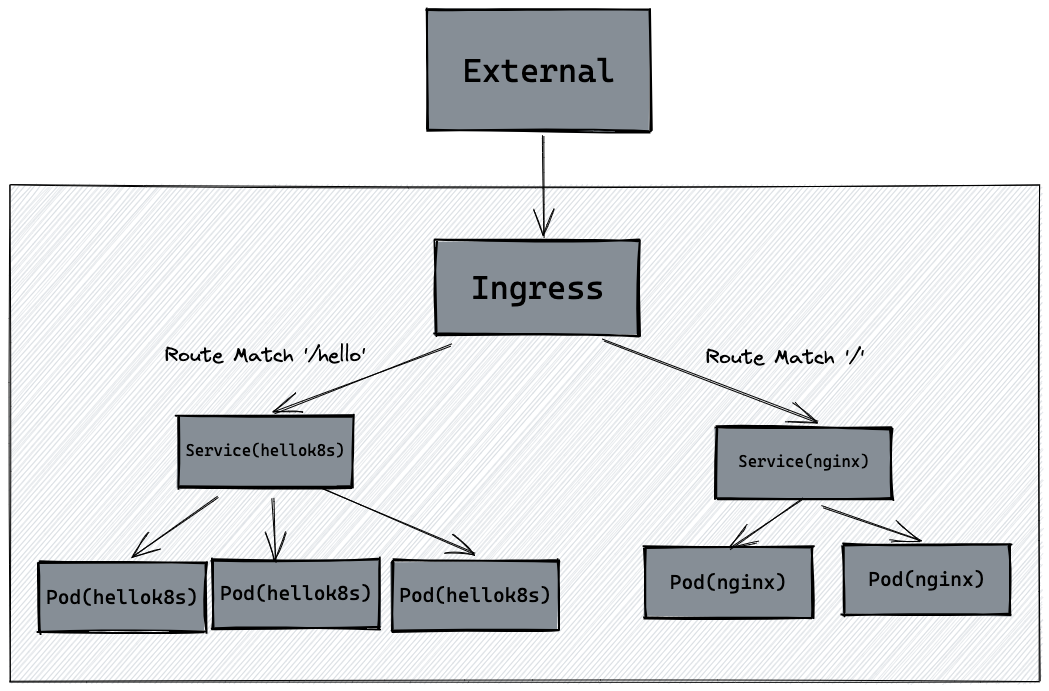
200 |
--------------------------------------------------------------------------------
/images/pod.excalidraw:
--------------------------------------------------------------------------------
1 | {
2 | "type": "excalidraw",
3 | "version": 2,
4 | "source": "https://marketplace.visualstudio.com/items?itemName=pomdtr.excalidraw-editor",
5 | "elements": [
6 | {
7 | "id": "3Taf6SQEUFnyNVBDQj6LL",
8 | "type": "rectangle",
9 | "x": 342.345458984375,
10 | "y": 235.58343505859375,
11 | "width": 511.59655761718756,
12 | "height": 219.51153564453125,
13 | "angle": 0,
14 | "strokeColor": "#000000",
15 | "backgroundColor": "#868e96",
16 | "fillStyle": "solid",
17 | "strokeWidth": 2,
18 | "strokeStyle": "solid",
19 | "roughness": 1,
20 | "opacity": 100,
21 | "groupIds": [],
22 | "strokeSharpness": "sharp",
23 | "seed": 205955050,
24 | "version": 273,
25 | "versionNonce": 1403867126,
26 | "isDeleted": false,
27 | "boundElements": null,
28 | "updated": 1661262630376,
29 | "link": null,
30 | "locked": false
31 | },
32 | {
33 | "id": "StLUnK8_aWclA_O-l2VhJ",
34 | "type": "rectangle",
35 | "x": 358.394287109375,
36 | "y": 296.3746337890625,
37 | "width": 221.49334716796875,
38 | "height": 141.8179931640625,
39 | "angle": 0,
40 | "strokeColor": "#000000",
41 | "backgroundColor": "#ced4da",
42 | "fillStyle": "solid",
43 | "strokeWidth": 2,
44 | "strokeStyle": "solid",
45 | "roughness": 1,
46 | "opacity": 100,
47 | "groupIds": [],
48 | "strokeSharpness": "sharp",
49 | "seed": 1930360618,
50 | "version": 134,
51 | "versionNonce": 615244086,
52 | "isDeleted": false,
53 | "boundElements": null,
54 | "updated": 1661262638402,
55 | "link": null,
56 | "locked": false
57 | },
58 | {
59 | "id": "b_BbBp0Ow3zukTvoZz59r",
60 | "type": "rectangle",
61 | "x": 385.825927734375,
62 | "y": 349.52203369140625,
63 | "width": 175,
64 | "height": 68.9559326171875,
65 | "angle": 0,
66 | "strokeColor": "#000000",
67 | "backgroundColor": "#868e96",
68 | "fillStyle": "solid",
69 | "strokeWidth": 2,
70 | "strokeStyle": "solid",
71 | "roughness": 1,
72 | "opacity": 100,
73 | "groupIds": [],
74 | "strokeSharpness": "sharp",
75 | "seed": 637392566,
76 | "version": 112,
77 | "versionNonce": 2001033962,
78 | "isDeleted": false,
79 | "boundElements": [
80 | {
81 | "type": "text",
82 | "id": "Yne5FFQKRqrxOFo7yZjmh"
83 | }
84 | ],
85 | "updated": 1661262755597,
86 | "link": null,
87 | "locked": false
88 | },
89 | {
90 | "id": "2L2zhPF3DCcFKOATvDjMP",
91 | "type": "text",
92 | "x": 413.11376953125,
93 | "y": 313.64044189453125,
94 | "width": 107,
95 | "height": 24,
96 | "angle": 0,
97 | "strokeColor": "#000000",
98 | "backgroundColor": "transparent",
99 | "fillStyle": "hachure",
100 | "strokeWidth": 2,
101 | "strokeStyle": "solid",
102 | "roughness": 1,
103 | "opacity": 100,
104 | "groupIds": [],
105 | "strokeSharpness": "sharp",
106 | "seed": 1475240694,
107 | "version": 61,
108 | "versionNonce": 1738088490,
109 | "isDeleted": false,
110 | "boundElements": null,
111 | "updated": 1661262080475,
112 | "link": null,
113 | "locked": false,
114 | "text": "Container",
115 | "fontSize": 20,
116 | "fontFamily": 3,
117 | "textAlign": "left",
118 | "verticalAlign": "top",
119 | "baseline": 20,
120 | "containerId": null,
121 | "originalText": "Container"
122 | },
123 | {
124 | "id": "Yne5FFQKRqrxOFo7yZjmh",
125 | "type": "text",
126 | "x": 390.825927734375,
127 | "y": 372.5,
128 | "width": 165,
129 | "height": 23,
130 | "angle": 0,
131 | "strokeColor": "#000000",
132 | "backgroundColor": "transparent",
133 | "fillStyle": "hachure",
134 | "strokeWidth": 2,
135 | "strokeStyle": "solid",
136 | "roughness": 1,
137 | "opacity": 100,
138 | "groupIds": [],
139 | "strokeSharpness": "sharp",
140 | "seed": 1876547562,
141 | "version": 43,
142 | "versionNonce": 2075585258,
143 | "isDeleted": false,
144 | "boundElements": null,
145 | "updated": 1661262223464,
146 | "link": null,
147 | "locked": false,
148 | "text": "Application",
149 | "fontSize": 20,
150 | "fontFamily": 3,
151 | "textAlign": "center",
152 | "verticalAlign": "middle",
153 | "baseline": 19,
154 | "containerId": "b_BbBp0Ow3zukTvoZz59r",
155 | "originalText": "Application"
156 | },
157 | {
158 | "id": "vEiHX0L6LGen6t74B0yJV",
159 | "type": "text",
160 | "x": 574.5738525390625,
161 | "y": 247.95635986328125,
162 | "width": 50,
163 | "height": 34,
164 | "angle": 0,
165 | "strokeColor": "#000000",
166 | "backgroundColor": "#fd7e14",
167 | "fillStyle": "solid",
168 | "strokeWidth": 2,
169 | "strokeStyle": "solid",
170 | "roughness": 1,
171 | "opacity": 100,
172 | "groupIds": [],
173 | "strokeSharpness": "sharp",
174 | "seed": 1821629814,
175 | "version": 110,
176 | "versionNonce": 317839914,
177 | "isDeleted": false,
178 | "boundElements": null,
179 | "updated": 1661262357326,
180 | "link": null,
181 | "locked": false,
182 | "text": "Pod",
183 | "fontSize": 28,
184 | "fontFamily": 3,
185 | "textAlign": "left",
186 | "verticalAlign": "top",
187 | "baseline": 27,
188 | "containerId": null,
189 | "originalText": "Pod"
190 | },
191 | {
192 | "type": "rectangle",
193 | "version": 194,
194 | "versionNonce": 717332458,
195 | "isDeleted": false,
196 | "id": "djP1CchuDwvtUsVkisJfr",
197 | "fillStyle": "solid",
198 | "strokeWidth": 2,
199 | "strokeStyle": "solid",
200 | "roughness": 1,
201 | "opacity": 100,
202 | "angle": 0,
203 | "x": 610.9083557128906,
204 | "y": 295.0615234375,
205 | "strokeColor": "#000000",
206 | "backgroundColor": "#ced4da",
207 | "width": 221.49334716796875,
208 | "height": 141.8179931640625,
209 | "seed": 480233578,
210 | "groupIds": [],
211 | "strokeSharpness": "sharp",
212 | "boundElements": [],
213 | "updated": 1661262712180,
214 | "link": null,
215 | "locked": false
216 | },
217 | {
218 | "type": "rectangle",
219 | "version": 171,
220 | "versionNonce": 328739766,
221 | "isDeleted": false,
222 | "id": "Qg0u0H0QhsNI_2gaaJ1jF",
223 | "fillStyle": "solid",
224 | "strokeWidth": 2,
225 | "strokeStyle": "solid",
226 | "roughness": 1,
227 | "opacity": 100,
228 | "angle": 0,
229 | "x": 638.3399963378906,
230 | "y": 348.20892333984375,
231 | "strokeColor": "#000000",
232 | "backgroundColor": "#868e96",
233 | "width": 175,
234 | "height": 68.9559326171875,
235 | "seed": 1416547126,
236 | "groupIds": [],
237 | "strokeSharpness": "sharp",
238 | "boundElements": [
239 | {
240 | "id": "TN_iChyAi4dr-qeA3Ay_m",
241 | "type": "text"
242 | },
243 | {
244 | "type": "text",
245 | "id": "TN_iChyAi4dr-qeA3Ay_m"
246 | }
247 | ],
248 | "updated": 1661262712180,
249 | "link": null,
250 | "locked": false
251 | },
252 | {
253 | "type": "text",
254 | "version": 121,
255 | "versionNonce": 574964982,
256 | "isDeleted": false,
257 | "id": "1KQl8gQ2NRr9kD23XdO65",
258 | "fillStyle": "hachure",
259 | "strokeWidth": 2,
260 | "strokeStyle": "solid",
261 | "roughness": 1,
262 | "opacity": 100,
263 | "angle": 0,
264 | "x": 665.6278381347656,
265 | "y": 312.32733154296875,
266 | "strokeColor": "#000000",
267 | "backgroundColor": "transparent",
268 | "width": 107,
269 | "height": 24,
270 | "seed": 119483178,
271 | "groupIds": [],
272 | "strokeSharpness": "sharp",
273 | "boundElements": [],
274 | "updated": 1661262712180,
275 | "link": null,
276 | "locked": false,
277 | "fontSize": 20,
278 | "fontFamily": 3,
279 | "text": "Container",
280 | "baseline": 20,
281 | "textAlign": "left",
282 | "verticalAlign": "top",
283 | "containerId": null,
284 | "originalText": "Container"
285 | },
286 | {
287 | "type": "text",
288 | "version": 104,
289 | "versionNonce": 840569514,
290 | "isDeleted": false,
291 | "id": "TN_iChyAi4dr-qeA3Ay_m",
292 | "fillStyle": "hachure",
293 | "strokeWidth": 2,
294 | "strokeStyle": "solid",
295 | "roughness": 1,
296 | "opacity": 100,
297 | "angle": 0,
298 | "x": 643.3399963378906,
299 | "y": 371.1868896484375,
300 | "strokeColor": "#000000",
301 | "backgroundColor": "transparent",
302 | "width": 165,
303 | "height": 23,
304 | "seed": 1578890358,
305 | "groupIds": [],
306 | "strokeSharpness": "sharp",
307 | "boundElements": [],
308 | "updated": 1661262712180,
309 | "link": null,
310 | "locked": false,
311 | "fontSize": 20,
312 | "fontFamily": 3,
313 | "text": "Application",
314 | "baseline": 19,
315 | "textAlign": "center",
316 | "verticalAlign": "middle",
317 | "containerId": "Qg0u0H0QhsNI_2gaaJ1jF",
318 | "originalText": "Application"
319 | }
320 | ],
321 | "appState": {
322 | "gridSize": null,
323 | "viewBackgroundColor": "#ffffff"
324 | },
325 | "files": {}
326 | }
--------------------------------------------------------------------------------
/docs/service.md:
--------------------------------------------------------------------------------
1 | ---
2 | prev:
3 | text: 'Deployment'
4 | link: 'deployment'
5 | next:
6 | text: 'Ingress'
7 | link: 'ingress'
8 | ---
9 |
10 | # Service
11 |
12 | 经过前面几节的练习,可能你会有一些疑惑:
13 |
14 | * 为什么 pod 不就绪 (Ready) 的话,`kubernetes` 不会将流量重定向到该 pod,这是怎么做到的?
15 | * 前面访问服务的方式是通过 `port-forword` 将 pod 的端口暴露到本地,不仅需要写对 pod 的名字,一旦 deployment 重新创建新的 pod,pod 名字和 IP 地址也会随之变化,如何保证稳定的访问地址呢?。
16 | * 如果使用 deployment 部署了多个 Pod 副本,如何做负载均衡呢?
17 |
18 | `kubernetes` 提供了一种名叫 `Service` 的资源帮助解决这些问题,它为 pod 提供一个稳定的 Endpoint。Service 位于 pod 的前面,负责接收请求并将它们传递给它后面的所有pod。一旦服务中的 Pod 集合发生更改,Endpoints 就会被更新,请求的重定向自然也会导向最新的 pod。
19 |
20 | ## ClusterIP
21 |
22 | 我们先来看看 `Service` 默认使用的 `ClusterIP` 类型,首先做一些准备工作,在之前的 `hellok8s:v2` 版本上加上返回当前服务所在的 `hostname` 功能,升级到 `v3` 版本。
23 |
24 | ``` go
25 | package main
26 |
27 | import (
28 | "fmt"
29 | "io"
30 | "net/http"
31 | "os"
32 | )
33 |
34 | func hello(w http.ResponseWriter, r *http.Request) {
35 | host, _ := os.Hostname()
36 | io.WriteString(w, fmt.Sprintf("[v3] Hello, Kubernetes!, From host: %s", host))
37 | }
38 |
39 | func main() {
40 | http.HandleFunc("/", hello)
41 | http.ListenAndServe(":3000", nil)
42 | }
43 | ```
44 |
45 | `Dockerfile` 和之前保持一致,打包 `tag=v3` 并推送到远程仓库。
46 |
47 | ``` shell
48 | docker build . -t guangzhengli/hellok8s:v3
49 |
50 | docker push guangzhengli/hellok8s:v3
51 | ```
52 |
53 | 修改 deployment 的 `hellok8s` 为 `v3` 版本。执行 `kubectl apply -f deployment.yaml` 更新 deployment。
54 |
55 | ```yaml
56 | apiVersion: apps/v1
57 | kind: Deployment
58 | metadata:
59 | name: hellok8s-deployment
60 | spec:
61 | replicas: 3
62 | selector:
63 | matchLabels:
64 | app: hellok8s
65 | template:
66 | metadata:
67 | labels:
68 | app: hellok8s
69 | spec:
70 | containers:
71 | - image: guangzhengli/hellok8s:v3
72 | name: hellok8s-container
73 | ```
74 |
75 | 接下来是 `Service` 资源的定义,我们使用 `ClusterIP` 的方式定义 Service,通过 `kubernetes` 集群的内部 IP 暴露服务,当我们只需要让集群中运行的其他应用程序访问我们的 pod 时,就可以使用这种类型的Service。首先创建一个 service-hellok8s-clusterip.yaml 文件。
76 |
77 | ``` yaml
78 | apiVersion: v1
79 | kind: Service
80 | metadata:
81 | name: service-hellok8s-clusterip
82 | spec:
83 | type: ClusterIP
84 | selector:
85 | app: hellok8s
86 | ports:
87 | - port: 3000
88 | targetPort: 3000
89 | ```
90 |
91 | 首先通过 `kubectl get endpoints` 来看看 Endpoint。被 selector 选中的 Pod,就称为 Service 的 Endpoints。它维护着 Pod 的 IP 地址,只要服务中的 Pod 集合发生更改,Endpoints 就会被更新。通过 `kubectl get pod -o wide` 命令获取 Pod 更多的信息,可以看到 3 个 Pod 的 IP 地址和 Endpoints 中是保持一致的,你可以试试增大或减少 Deployment 中 Pod 的 replicas,观察 Endpoints 会不会发生变化。
92 |
93 | ```shell
94 | kubectl apply -f service-hellok8s-clusterip.yaml
95 |
96 | kubectl get endpoints
97 | # NAME ENDPOINTS AGE
98 | # service-hellok8s-clusterip 172.17.0.10:3000,172.17.0.2:3000,172.17.0.3:3000 10s
99 |
100 | kubectl get pod -o wide
101 | # NAME READY STATUS RESTARTS AGE IP NODE
102 | # hellok8s-deployment-5d5545b69c-24lw5 1/1 Running 0 112s 172.17.0.7 minikube
103 | # hellok8s-deployment-5d5545b69c-9g94t 1/1 Running 0 112s 172.17.0.3 minikube
104 | # hellok8s-deployment-5d5545b69c-9gm8r 1/1 Running 0 112s 172.17.0.2 minikube
105 | # nginx 1/1 Running 0 112s 172.17.0.9 minikube
106 |
107 | kubectl get service
108 | # NAME TYPE CLUSTER-IP EXTERNAL-IP PORT(S) AGE
109 | # service-hellok8s-clusterip ClusterIP 10.104.96.153 3000/TCP 10s
110 | ```
111 |
112 | 接着我们可以通过在集群其它应用中访问 `service-hellok8s-clusterip` 的 IP 地址 `10.104.96.153` 来访问 `hellok8s:v3` 服务。
113 |
114 | 这里通过在集群内创建一个 `nginx` 来访问 `hellok8s` 服务。创建后进入 `nginx` 容器来用 `curl` 命令访问 `service-hellok8s-clusterip` 。
115 |
116 | ```yaml
117 | apiVersion: v1
118 | kind: Pod
119 | metadata:
120 | name: nginx-pod
121 | labels:
122 | app: nginx
123 | spec:
124 | containers:
125 | - name: nginx-container
126 | image: nginx
127 | ```
128 |
129 | ```shell
130 | kubectl get pods
131 | # NAME READY STATUS RESTARTS AGE
132 | # hellok8s-deployment-5d5545b69c-24lw5 1/1 Running 0 27m
133 | # hellok8s-deployment-5d5545b69c-9g94t 1/1 Running 0 27m
134 | # hellok8s-deployment-5d5545b69c-9gm8r 1/1 Running 0 27m
135 | # nginx 1/1 Running 0 41m
136 |
137 | kubectl get service
138 | # NAME TYPE CLUSTER-IP EXTERNAL-IP PORT(S) AGE
139 | # service-hellok8s-clusterip ClusterIP 10.104.96.153 3000/TCP 10s
140 |
141 | kubectl exec -it nginx-pod -- /bin/bash
142 | # root@nginx-pod:/# curl 10.104.96.153:3000
143 | # [v3] Hello, Kubernetes!, From host: hellok8s-deployment-5d5545b69c-9gm8r
144 | # root@nginx-pod:/# curl 10.104.96.153:3000
145 | #[v3] Hello, Kubernetes!, From host: hellok8s-deployment-5d5545b69c-9g94t
146 | ```
147 |
148 | 可以看到,我们多次 `curl 10.104.96.153:3000` 访问 `hellok8s` Service IP 地址,返回的 `hellok8s:v3` `hostname` 不一样,说明 Service 可以接收请求并将它们传递给它后面的所有 pod,还可以自动负载均衡。你也可以试试增加或者减少 `hellok8s:v3` pod 副本数量,观察 Service 的请求是否会动态变更。调用过程如下图所示:
149 |
150 | 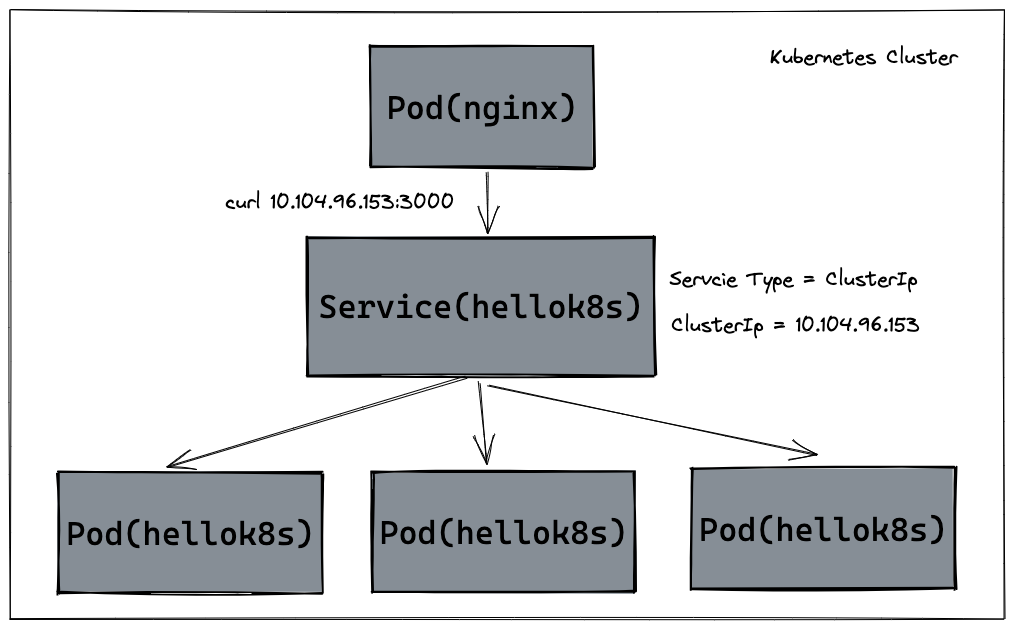
151 |
152 | 除了上述的 `ClusterIp` 的方式外,Kubernetes `ServiceTypes` 允许指定你所需要的 Service 类型,默认是 `ClusterIP`。`Type` 的值包括如下:
153 |
154 | - `ClusterIP`:通过集群的内部 IP 暴露服务,选择该值时服务只能够在集群内部访问。 这也是默认的 `ServiceType`。
155 | - [`NodePort`](https://kubernetes.io/docs/concepts/services-networking/service/#type-nodeport):通过每个节点上的 IP 和静态端口(`NodePort`)暴露服务。 `NodePort` 服务会路由到自动创建的 `ClusterIP` 服务。 通过请求 `<节点 IP>:<节点端口>`,你可以从集群的外部访问一个 `NodePort` 服务。
156 | - [`LoadBalancer`](https://kubernetes.io/docs/concepts/services-networking/service/#loadbalancer):使用云提供商的负载均衡器向外部暴露服务。 外部负载均衡器可以将流量路由到自动创建的 `NodePort` 服务和 `ClusterIP` 服务上。
157 | - [`ExternalName`](https://kubernetes.io/docs/concepts/services-networking/service/#externalname):通过返回 `CNAME` 和对应值,可以将服务映射到 `externalName` 字段的内容(例如,`foo.bar.example.com`)。 无需创建任何类型代理。
158 |
159 | ## NodePort
160 |
161 | 我们知道`kubernetes` 集群并不是单机运行,它管理着多台节点即 [Node](https://kubernetes.io/docs/concepts/architecture/nodes/),可以通过每个节点上的 IP 和静态端口(`NodePort`)暴露服务。如下图所示,如果集群内有两台 Node 运行着 `hellok8s:v3`,我们创建一个 `NodePort` 类型的 Service,将 `hellok8s:v3` 的 `3000` 端口映射到 Node 机器的 `30000` 端口 (在 30000-32767 范围内),就可以通过访问 `http://node1-ip:30000` 或者 `http://node2-ip:30000` 访问到服务。
162 |
163 | 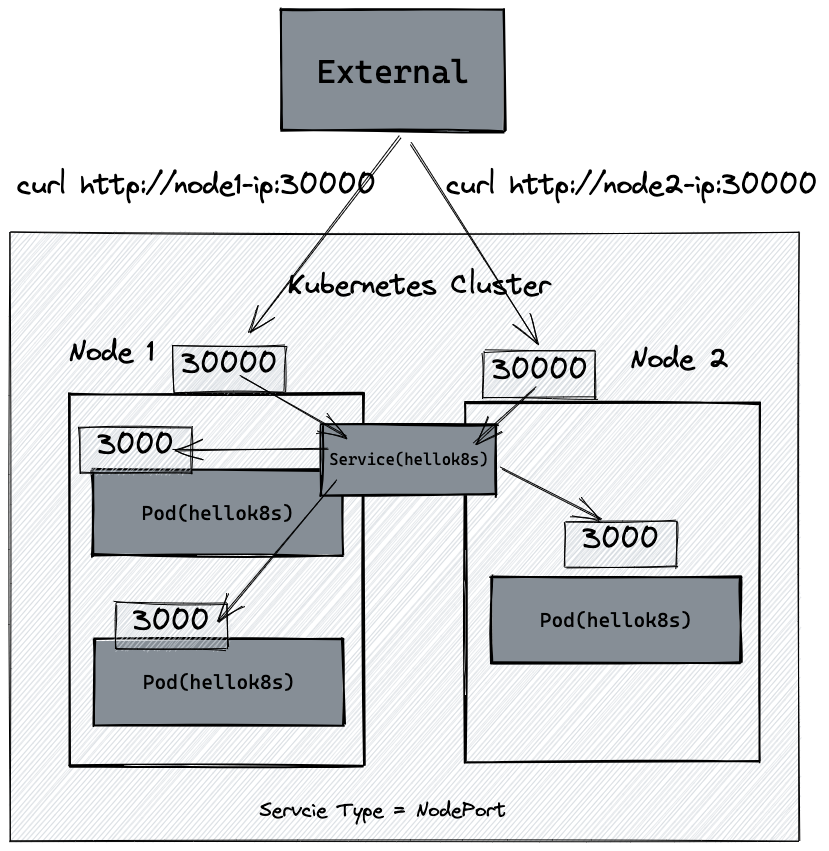
164 |
165 | 这里以 `minikube` 为例,我们可以通过 `minikube ip` 命令拿到 k8s cluster node IP地址。下面的教程都以我本机的 `192.168.59.100` 为例,需要替换成你的 IP 地址。
166 |
167 | ```shell
168 | minikube ip
169 | # 192.168.59.100
170 | ```
171 |
172 | 接着以 NodePort 的 ServiceType 创建一个 Service 来接管 pod 流量。通过`minikube` 节点上的 IP `192.168.59.100` 暴露服务。 `NodePort` 服务会路由到自动创建的 `ClusterIP` 服务。 通过请求 `<节点 IP>:<节点端口>` -- `192.168.59.100`:30000,你可以从集群的外部访问一个 `NodePort` 服务,最终重定向到 `hellok8s:v3` 的 `3000` 端口。
173 |
174 | ```yaml
175 | apiVersion: v1
176 | kind: Service
177 | metadata:
178 | name: service-hellok8s-nodeport
179 | spec:
180 | type: NodePort
181 | selector:
182 | app: hellok8s
183 | ports:
184 | - port: 3000
185 | nodePort: 30000
186 | ```
187 |
188 | 创建 `service-hellok8s-nodeport` Service 后,使用 `curl` 命令或者浏览器访问 `http://192.168.59.100:30000` 可以得到结果。
189 |
190 | ```shell
191 | kubectl apply -f service-hellok8s-nodeport.yaml
192 |
193 | kubectl get service
194 | # NAME TYPE CLUSTER-IP EXTERNAL-IP PORT(S) AGE
195 | # service-hellok8s-nodeport NodePort 10.109.188.161 3000:30000/TCP 28s
196 |
197 | kubectl get pods
198 | # NAME READY STATUS RESTARTS AGE
199 | # hellok8s-deployment-5d5545b69c-24lw5 1/1 Running 0 27m
200 | # hellok8s-deployment-5d5545b69c-9g94t 1/1 Running 0 27m
201 | # hellok8s-deployment-5d5545b69c-9gm8r 1/1 Running 0 27m
202 |
203 | curl http://192.168.59.100:30000
204 | # [v3] Hello, Kubernetes!, From host: hellok8s-deployment-5d5545b69c-9g94t
205 |
206 | curl http://192.168.59.100:30000
207 | # [v3] Hello, Kubernetes!, From host: hellok8s-deployment-5d5545b69c-24lw5
208 | ```
209 | 如果本地使用 Docker Desktop(minikube start --driver=docker)的话,那你大概率无法通过`minikube ip`获取到的ip地址来请求,因为 docker 部分网络限制导致无法通过 ip 直连 docker container,这代表 NodePort 类型的 Service、Ingress 组件都无法通过 minikube ip 提供的 ip 地址来访问。无法直接访问Node IP。你可以通过`minikube service service-hellok8s-nodeport --url`来公开服务,然后通过`curl`或者浏览器访问。
210 |
211 | ```shell
212 | minikube service service-hellok8s-nodeport --url
213 | # http://127.0.0.1:50896
214 | # Because you are using a Docker driver on windows, the terminal needs to be open to run it.
215 | curl http://127.0.0.1:50896
216 | # [v3] Hello, Kubernetes!, From host: hellok8s-deployment-559cfdd58c-zp2pc
217 | curl http://127.0.0.1:50896
218 | # [v3] Hello, Kubernetes!, From host: hellok8s-deployment-559cfdd58c-2j2x2
219 | ```
220 | ## LoadBalancer
221 |
222 | [`LoadBalancer`](https://kubernetes.io/docs/concepts/services-networking/service/#loadbalancer) 是使用云提供商的负载均衡器向外部暴露服务。 外部负载均衡器可以将流量路由到自动创建的 `NodePort` 服务和 `ClusterIP` 服务上,假如你在 [AWS](https://aws.amazon.com) 的 [EKS](https://aws.amazon.com/eks/) 集群上创建一个 Type 为 `LoadBalancer` 的 Service。它会自动创建一个 ELB ([Elastic Load Balancer](https://aws.amazon.com/elasticloadbalancing)) ,并可以根据配置的 IP 池中自动分配一个独立的 IP 地址,可以供外部访问。
223 |
224 | 这里因为我们使用的是 `minikube`,可以使用 `minikube tunnel` 来辅助创建 LoadBalancer 的 `EXTERNAL_IP`,具体教程可以查看[官网文档](https://minikube.sigs.k8s.io/docs/handbook/accessing/#loadbalancer-access),但是和实际云提供商的 LoadBalancer 还是有本质区别,所以 [Repository](https://github.com/guangzhengli/kubernetes_workshop) 不做更多阐述,有条件的可以使用 [AWS](https://aws.amazon.com) 的 [EKS](https://aws.amazon.com/eks/) 集群上创建一个 ELB ([Elastic Load Balancer](https://aws.amazon.com/elasticloadbalancing)) 试试。
225 |
226 | 下图显示 LoadBalancer 的 Service 架构图。
227 |
228 | 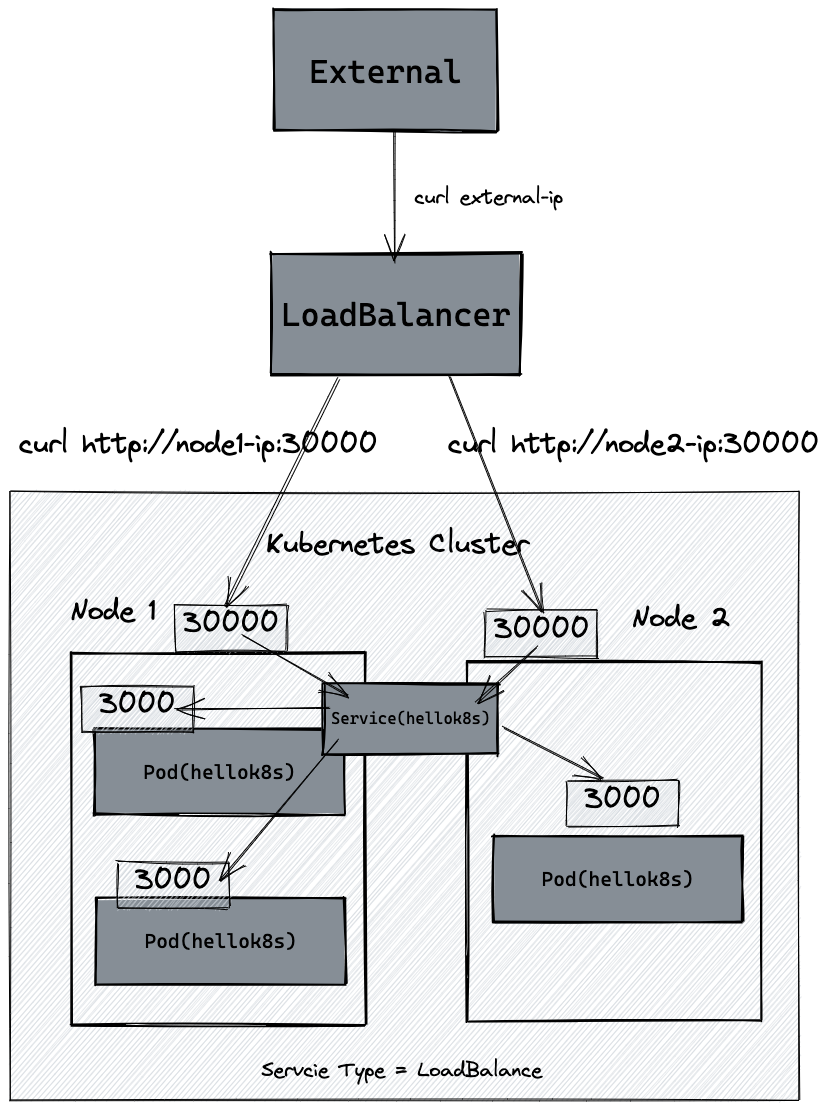
229 |
--------------------------------------------------------------------------------
/images/deployment.excalidraw:
--------------------------------------------------------------------------------
1 | {
2 | "type": "excalidraw",
3 | "version": 2,
4 | "source": "https://marketplace.visualstudio.com/items?itemName=pomdtr.excalidraw-editor",
5 | "elements": [
6 | {
7 | "type": "rectangle",
8 | "version": 799,
9 | "versionNonce": 1757584472,
10 | "isDeleted": false,
11 | "id": "JRQ7XCpjAwqSfMteuZ6oD",
12 | "fillStyle": "solid",
13 | "strokeWidth": 2,
14 | "strokeStyle": "solid",
15 | "roughness": 1,
16 | "opacity": 100,
17 | "angle": 0,
18 | "x": 455.968922842374,
19 | "y": 109.68296574762604,
20 | "strokeColor": "#000000",
21 | "backgroundColor": "#868e96",
22 | "width": 630.9715783859224,
23 | "height": 524.5783151599811,
24 | "seed": 1910544936,
25 | "groupIds": [],
26 | "strokeSharpness": "sharp",
27 | "boundElements": [],
28 | "updated": 1661434433778,
29 | "link": null,
30 | "locked": false
31 | },
32 | {
33 | "type": "rectangle",
34 | "version": 380,
35 | "versionNonce": 796581976,
36 | "isDeleted": false,
37 | "id": "U1dWEjmy6DrMyRyd9FRkq",
38 | "fillStyle": "solid",
39 | "strokeWidth": 2,
40 | "strokeStyle": "solid",
41 | "roughness": 1,
42 | "opacity": 100,
43 | "angle": 0,
44 | "x": 502.02769391737695,
45 | "y": 230.1476019455049,
46 | "strokeColor": "#000000",
47 | "backgroundColor": "#ced4da",
48 | "width": 542.033647438293,
49 | "height": 387.17794102692596,
50 | "seed": 229342296,
51 | "groupIds": [],
52 | "strokeSharpness": "sharp",
53 | "boundElements": [],
54 | "updated": 1661434406336,
55 | "link": null,
56 | "locked": false
57 | },
58 | {
59 | "type": "rectangle",
60 | "version": 407,
61 | "versionNonce": 2009637160,
62 | "isDeleted": false,
63 | "id": "AjS5qMP-xAfFSZmcF1eHk",
64 | "fillStyle": "solid",
65 | "strokeWidth": 2,
66 | "strokeStyle": "solid",
67 | "roughness": 1,
68 | "opacity": 100,
69 | "angle": 0,
70 | "x": 686.0567794148272,
71 | "y": 321.91504933982606,
72 | "strokeColor": "#000000",
73 | "backgroundColor": "#868e96",
74 | "width": 184,
75 | "height": 121,
76 | "seed": 303764776,
77 | "groupIds": [],
78 | "strokeSharpness": "sharp",
79 | "boundElements": [
80 | {
81 | "id": "gW9x2qmRUWATjSjDc51UH",
82 | "type": "text"
83 | },
84 | {
85 | "type": "text",
86 | "id": "gW9x2qmRUWATjSjDc51UH"
87 | }
88 | ],
89 | "updated": 1661434408812,
90 | "link": null,
91 | "locked": false
92 | },
93 | {
94 | "type": "text",
95 | "version": 378,
96 | "versionNonce": 1064002904,
97 | "isDeleted": false,
98 | "id": "gW9x2qmRUWATjSjDc51UH",
99 | "fillStyle": "hachure",
100 | "strokeWidth": 2,
101 | "strokeStyle": "solid",
102 | "roughness": 1,
103 | "opacity": 100,
104 | "angle": 0,
105 | "x": 691.0567794148272,
106 | "y": 362.91504933982606,
107 | "strokeColor": "#000000",
108 | "backgroundColor": "transparent",
109 | "width": 174,
110 | "height": 39,
111 | "seed": 1531850792,
112 | "groupIds": [],
113 | "strokeSharpness": "sharp",
114 | "boundElements": [],
115 | "updated": 1661434408813,
116 | "link": null,
117 | "locked": false,
118 | "fontSize": 32.572625259596414,
119 | "fontFamily": 3,
120 | "text": "Pod",
121 | "baseline": 32,
122 | "textAlign": "center",
123 | "verticalAlign": "middle",
124 | "containerId": "AjS5qMP-xAfFSZmcF1eHk",
125 | "originalText": "Pod"
126 | },
127 | {
128 | "type": "text",
129 | "version": 239,
130 | "versionNonce": 452690984,
131 | "isDeleted": false,
132 | "id": "k4uCXgYur6sOXYZvcSOv-",
133 | "fillStyle": "solid",
134 | "strokeWidth": 2,
135 | "strokeStyle": "solid",
136 | "roughness": 1,
137 | "opacity": 100,
138 | "angle": 0,
139 | "x": 633.9560423316755,
140 | "y": 142.64806394421132,
141 | "strokeColor": "#000000",
142 | "backgroundColor": "#fd7e14",
143 | "width": 263,
144 | "height": 54,
145 | "seed": 1812612696,
146 | "groupIds": [],
147 | "strokeSharpness": "sharp",
148 | "boundElements": [],
149 | "updated": 1661434305462,
150 | "link": null,
151 | "locked": false,
152 | "fontSize": 44.59586534266728,
153 | "fontFamily": 3,
154 | "text": "Deployment",
155 | "baseline": 43,
156 | "textAlign": "left",
157 | "verticalAlign": "top",
158 | "containerId": null,
159 | "originalText": "Deployment"
160 | },
161 | {
162 | "id": "n_SrweHTd6aAMDGQo2vDY",
163 | "type": "text",
164 | "x": 686.1086094299271,
165 | "y": 260.93951074353663,
166 | "width": 182,
167 | "height": 34,
168 | "angle": 0,
169 | "strokeColor": "#000000",
170 | "backgroundColor": "transparent",
171 | "fillStyle": "hachure",
172 | "strokeWidth": 1,
173 | "strokeStyle": "solid",
174 | "roughness": 1,
175 | "opacity": 100,
176 | "groupIds": [],
177 | "strokeSharpness": "sharp",
178 | "seed": 1323030312,
179 | "version": 47,
180 | "versionNonce": 213623384,
181 | "isDeleted": false,
182 | "boundElements": null,
183 | "updated": 1661434363535,
184 | "link": null,
185 | "locked": false,
186 | "text": "Replica Set",
187 | "fontSize": 28,
188 | "fontFamily": 3,
189 | "textAlign": "left",
190 | "verticalAlign": "top",
191 | "baseline": 27,
192 | "containerId": null,
193 | "originalText": "Replica Set"
194 | },
195 | {
196 | "type": "rectangle",
197 | "version": 367,
198 | "versionNonce": 220553560,
199 | "isDeleted": false,
200 | "id": "IFylRukrXPVyyWdRXCjV3",
201 | "fillStyle": "solid",
202 | "strokeWidth": 2,
203 | "strokeStyle": "solid",
204 | "roughness": 1,
205 | "opacity": 100,
206 | "angle": 0,
207 | "x": 828.3074303401888,
208 | "y": 464.88595137540733,
209 | "strokeColor": "#000000",
210 | "backgroundColor": "#868e96",
211 | "width": 162,
212 | "height": 104,
213 | "seed": 2029355608,
214 | "groupIds": [],
215 | "strokeSharpness": "sharp",
216 | "boundElements": [
217 | {
218 | "id": "3M4FoVExmI4AWGizpz6Es",
219 | "type": "text"
220 | },
221 | {
222 | "id": "3M4FoVExmI4AWGizpz6Es",
223 | "type": "text"
224 | },
225 | {
226 | "type": "text",
227 | "id": "3M4FoVExmI4AWGizpz6Es"
228 | }
229 | ],
230 | "updated": 1661434379244,
231 | "link": null,
232 | "locked": false
233 | },
234 | {
235 | "type": "text",
236 | "version": 337,
237 | "versionNonce": 1264451624,
238 | "isDeleted": false,
239 | "id": "3M4FoVExmI4AWGizpz6Es",
240 | "fillStyle": "hachure",
241 | "strokeWidth": 2,
242 | "strokeStyle": "solid",
243 | "roughness": 1,
244 | "opacity": 100,
245 | "angle": 0,
246 | "x": 833.3074303401888,
247 | "y": 497.38595137540733,
248 | "strokeColor": "#000000",
249 | "backgroundColor": "transparent",
250 | "width": 152,
251 | "height": 39,
252 | "seed": 1557950248,
253 | "groupIds": [],
254 | "strokeSharpness": "sharp",
255 | "boundElements": [],
256 | "updated": 1661434379244,
257 | "link": null,
258 | "locked": false,
259 | "fontSize": 32.572625259596414,
260 | "fontFamily": 3,
261 | "text": "Pod",
262 | "baseline": 32,
263 | "textAlign": "center",
264 | "verticalAlign": "middle",
265 | "containerId": "IFylRukrXPVyyWdRXCjV3",
266 | "originalText": "Pod"
267 | },
268 | {
269 | "type": "rectangle",
270 | "version": 367,
271 | "versionNonce": 2137649192,
272 | "isDeleted": false,
273 | "id": "ZBuB6hOlMFzBC2AzGKmYW",
274 | "fillStyle": "solid",
275 | "strokeWidth": 2,
276 | "strokeStyle": "solid",
277 | "roughness": 1,
278 | "opacity": 100,
279 | "angle": 0,
280 | "x": 563.3698409794584,
281 | "y": 467.7680292357753,
282 | "strokeColor": "#000000",
283 | "backgroundColor": "#868e96",
284 | "width": 162,
285 | "height": 104,
286 | "seed": 521717032,
287 | "groupIds": [],
288 | "strokeSharpness": "sharp",
289 | "boundElements": [
290 | {
291 | "id": "gvaHK5o36YxOK8-4DQLFW",
292 | "type": "text"
293 | },
294 | {
295 | "id": "gvaHK5o36YxOK8-4DQLFW",
296 | "type": "text"
297 | },
298 | {
299 | "type": "text",
300 | "id": "gvaHK5o36YxOK8-4DQLFW"
301 | }
302 | ],
303 | "updated": 1661434376511,
304 | "link": null,
305 | "locked": false
306 | },
307 | {
308 | "type": "text",
309 | "version": 337,
310 | "versionNonce": 2022344280,
311 | "isDeleted": false,
312 | "id": "gvaHK5o36YxOK8-4DQLFW",
313 | "fillStyle": "hachure",
314 | "strokeWidth": 2,
315 | "strokeStyle": "solid",
316 | "roughness": 1,
317 | "opacity": 100,
318 | "angle": 0,
319 | "x": 568.3698409794584,
320 | "y": 500.2680292357753,
321 | "strokeColor": "#000000",
322 | "backgroundColor": "transparent",
323 | "width": 152,
324 | "height": 39,
325 | "seed": 262111576,
326 | "groupIds": [],
327 | "strokeSharpness": "sharp",
328 | "boundElements": [],
329 | "updated": 1661434376511,
330 | "link": null,
331 | "locked": false,
332 | "fontSize": 32.572625259596414,
333 | "fontFamily": 3,
334 | "text": "Pod",
335 | "baseline": 32,
336 | "textAlign": "center",
337 | "verticalAlign": "middle",
338 | "containerId": "ZBuB6hOlMFzBC2AzGKmYW",
339 | "originalText": "Pod"
340 | }
341 | ],
342 | "appState": {
343 | "gridSize": null,
344 | "viewBackgroundColor": "#ffffff"
345 | },
346 | "files": {}
347 | }
--------------------------------------------------------------------------------
/docs/deployment.md:
--------------------------------------------------------------------------------
1 | ---
2 | prev:
3 | text: 'Pod'
4 | link: 'pod'
5 | next:
6 | text: 'Service'
7 | link: 'service'
8 | ---
9 |
10 | # Deployment
11 |
12 | 在生产环境中,我们基本上不会直接管理 pod,我们需要 `kubernetes` 来帮助我们来完成一些自动化操作,例如自动扩容或者自动升级版本。可以想象在生产环境中,我们手动部署了 10 个 `hellok8s:v1` 的 pod,这个时候我们需要升级成 `hellok8s:v2` 版本,我们难道需要一个一个的将 `hellok8s:v1` 的 pod 手动升级吗?
13 |
14 | 这个时候就需要我们来看 `kubeates` 的另外一个资源 `deployment`,来帮助我们管理 pod。
15 |
16 | ## 扩容
17 |
18 | 首先可以创建一个 `deployment.yaml` 的文件。来管理 `hellok8s` pod。
19 |
20 | ```yaml
21 | apiVersion: apps/v1
22 | kind: Deployment
23 | metadata:
24 | name: hellok8s-deployment
25 | spec:
26 | replicas: 1
27 | selector:
28 | matchLabels:
29 | app: hellok8s
30 | template:
31 | metadata:
32 | labels:
33 | app: hellok8s
34 | spec:
35 | containers:
36 | - image: guangzhengli/hellok8s:v1
37 | name: hellok8s-container
38 | ```
39 |
40 | 其中 `kind` 表示我们要创建的资源是 `deployment` 类型, `metadata.name` 表示要创建的 deployment 的名字,这个名字需要是**唯一**的。
41 |
42 | 在 `spec` 里面表示,首先 `replicas` 表示的是部署的 pod 副本数量,`selector` 里面表示的是 `deployment` 资源和 `pod` 资源关联的方式,这里表示 `deployment` 会管理 (selector) 所有 `labels=app: hellok8s` 的 pod。
43 |
44 | `template` 的内容是用来定义 `pod` 资源的,你会发现和作业一:Hellok8s Pod 资源的定义是差不多的,唯一的区别是我们需要加上 `metadata.labels` 来和上面的 `selector.matchLabels` 对应起来。来表明 pod 是被 deployment 管理,不用在`template` 里面加上 `metadata.name` 是因为 deployment 会主动为我们创建 pod 的唯一`name`。
45 |
46 | 接下来输入下面的命令,可以创建 `deployment` 资源。通过 `get` 和 `delete pod` 命令,我们会初步感受 deployment 的魅力。**每次创建的 pod 名称都会变化,某些命令记得替换成你的 pod 的名称**
47 |
48 | ```shell
49 | kubectl apply -f deployment.yaml
50 |
51 | kubectl get deployments
52 | #NAME READY UP-TO-DATE AVAILABLE AGE
53 | #hellok8s-deployment 1/1 1 1 39s
54 |
55 | kubectl get pods
56 | #NAME READY STATUS RESTARTS AGE
57 | #hellok8s-deployment-77bffb88c5-qlxss 1/1 Running 0 119s
58 |
59 | kubectl delete pod hellok8s-deployment-77bffb88c5-qlxss
60 | #pod "hellok8s-deployment-77bffb88c5-qlxss" deleted
61 |
62 | kubectl get pods
63 | #NAME READY STATUS RESTARTS AGE
64 | #hellok8s-deployment-77bffb88c5-xp8f7 1/1 Running 0 18s
65 | ```
66 |
67 | 我们会发现一个有趣的现象,当手动删除一个 `pod` 资源后,deployment 会自动创建一个新的 `pod`,这和我们之前手动创建 pod 资源有本质的区别!这代表着当生产环境管理着成千上万个 pod 时,我们不需要关心具体的情况,只需要维护好这份 `deployment.yaml` 文件的资源定义即可。
68 |
69 | 接下来我们通过自动扩容来加深这个知识点,当我们想要将 `hellok8s:v1` 的资源扩容到 3 个副本时,只需要将 `replicas` 的值设置成 3,接着重新输入 `kubectl apply -f deployment.yaml` 即可。如下所示:
70 |
71 | ```yaml
72 | apiVersion: apps/v1
73 | kind: Deployment
74 | metadata:
75 | name: hellok8s-deployment
76 | spec:
77 | replicas: 3
78 | selector:
79 | matchLabels:
80 | app: hellok8s
81 | template:
82 | metadata:
83 | labels:
84 | app: hellok8s
85 | spec:
86 | containers:
87 | - image: guangzhengli/hellok8s:v1
88 | name: hellok8s-container
89 | ```
90 |
91 | 可以在 `kubectl apply` 之前通过新建窗口执行 `kubectl get pods --watch` 命令来观察 pod 启动和删除的记录,想要减少副本数时也很简单,你可以尝试将副本数随意增大或者缩小,再通过 `watch` 来观察它的状态。
92 |
93 | 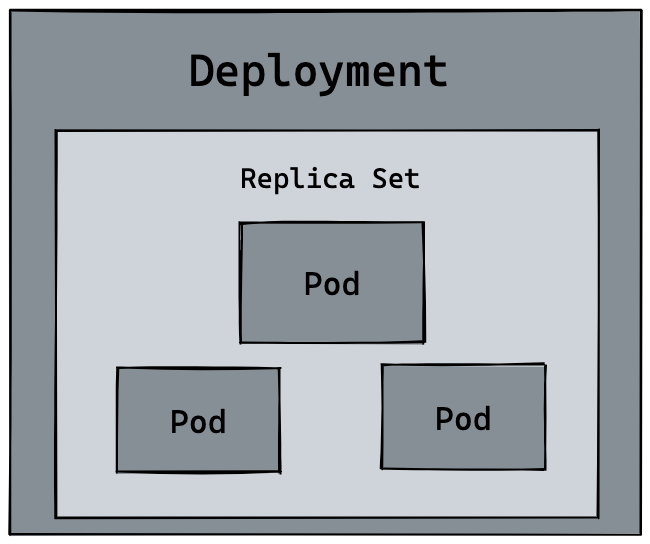
94 |
95 | ## 升级版本
96 |
97 | 我们接下来尝试将所有 `v1` 版本的 `pod` 升级到 `v2` 版本。首先我们需要构建一份 `hellok8s:v2` 的版本镜像。唯一的区别就是字符串替换成了 `[v2] Hello, Kubernetes!`。
98 |
99 | ```go
100 | package main
101 |
102 | import (
103 | "io"
104 | "net/http"
105 | )
106 |
107 | func hello(w http.ResponseWriter, r *http.Request) {
108 | io.WriteString(w, "[v2] Hello, Kubernetes!")
109 | }
110 |
111 | func main() {
112 | http.HandleFunc("/", hello)
113 | http.ListenAndServe(":3000", nil)
114 | }
115 | ```
116 |
117 | 将 `hellok8s:v2` 推到 DockerHub 仓库中。
118 |
119 | ```shell
120 | docker build . -t guangzhengli/hellok8s:v2
121 | docker push guangzhengli/hellok8s:v2
122 | ```
123 |
124 | 接着编写 `v2` 版本的 deployment 资源文件。
125 |
126 | ```yaml
127 | apiVersion: apps/v1
128 | kind: Deployment
129 | metadata:
130 | name: hellok8s-deployment
131 | spec:
132 | replicas: 3
133 | selector:
134 | matchLabels:
135 | app: hellok8s
136 | template:
137 | metadata:
138 | labels:
139 | app: hellok8s
140 | spec:
141 | containers:
142 | - image: guangzhengli/hellok8s:v2
143 | name: hellok8s-container
144 | ```
145 |
146 | ```shell
147 | kubectl apply -f deployment.yaml
148 | # deployment.apps/hellok8s-deployment configured
149 |
150 | kubectl get pods
151 | # NAME READY STATUS RESTARTS AGE
152 | # hellok8s-deployment-66799848c4-kpc6q 1/1 Running 0 3s
153 | # hellok8s-deployment-66799848c4-pllj6 1/1 Running 0 3s
154 | # hellok8s-deployment-66799848c4-r7qtg 1/1 Running 0 3s
155 |
156 | kubectl port-forward hellok8s-deployment-66799848c4-kpc6q 3000:3000
157 | # Forwarding from 127.0.0.1:3000 -> 3000
158 | # Forwarding from [::1]:3000 -> 3000
159 |
160 | # open another terminal
161 | curl http://localhost:3000
162 | # [v2] Hello, Kubernetes!
163 | ```
164 |
165 | 你也可以输入 `kubectl describe pod hellok8s-deployment-66799848c4-kpc6q` 来看是否是 `v2` 版本的镜像。
166 |
167 | ## Rolling Update(滚动更新)
168 |
169 | 如果我们在生产环境上,管理着多个副本的 `hellok8s:v1` 版本的 pod,我们需要更新到 `v2` 的版本,像上面那样的部署方式是可以的,但是也会带来一个问题,就是所有的副本在同一时间更新,这会导致我们 `hellok8s` 服务在短时间内是不可用的,因为所有 pod 都在升级到 `v2` 版本的过程中,需要等待某个 pod 升级完成后才能提供服务。
170 |
171 | 这个时候我们就需要滚动更新 (rolling update),在保证新版本 `v2` 的 pod 还没有 `ready` 之前,先不删除 `v1` 版本的 pod。
172 |
173 | 在 deployment 的资源定义中, `spec.strategy.type` 有两种选择:
174 |
175 | - **RollingUpdate:** 逐渐增加新版本的 pod,逐渐减少旧版本的 pod。
176 | - **Recreate:** 在新版本的 pod 增加前,先将所有旧版本 pod 删除。
177 |
178 | 大多数情况下我们会采用滚动更新 (RollingUpdate) 的方式,滚动更新又可以通过 `maxSurge` 和 `maxUnavailable` 字段来控制升级 pod 的速率,具体可以详细看[官网定义](https://kubernetes.io/zh-cn/docs/concepts/workloads/controllers/deployment/)。:
179 |
180 | - [**maxSurge:**](https://kubernetes.io/docs/concepts/workloads/controllers/deployment/#max-surge) 最大峰值,用来指定可以创建的超出期望 Pod 个数的 Pod 数量。
181 | - [**maxUnavailable:**](https://kubernetes.io/docs/concepts/workloads/controllers/deployment/#max-unavailable,) 最大不可用,用来指定更新过程中不可用的 Pod 的个数上限。
182 |
183 | 我们先输入命令回滚我们的 deployment,输入 `kubectl describe pod` 会发现 deployment 已经把 `v2` 版本的 pod 回滚到 ` v1` 的版本。
184 |
185 | ``` shell
186 | kubectl rollout undo deployment hellok8s-deployment
187 |
188 | kubectl get pods
189 | # NAME READY STATUS RESTARTS AGE
190 | # hellok8s-deployment-77bffb88c5-cvm5c 1/1 Running 0 39s
191 | # hellok8s-deployment-77bffb88c5-lktbl 1/1 Running 0 41s
192 | # hellok8s-deployment-77bffb88c5-nh82z 1/1 Running 0 37s
193 |
194 | kubectl describe pod hellok8s-deployment-77bffb88c5-cvm5c
195 | # Image: guangzhengli/hellok8s:v1
196 | ```
197 |
198 | 除了上面的命令,还可以用 `history` 来查看历史版本,`--to-revision=2` 来回滚到指定版本。
199 |
200 | ```shell
201 | kubectl rollout history deployment hellok8s-deployment
202 | kubectl rollout undo deployment/hellok8s-deployment --to-revision=2
203 | ```
204 |
205 | 接着设置 `strategy=rollingUpdate` , `maxSurge=1` , `maxUnavailable=1` 和 `replicas=3` 到 deployment.yaml 文件中。这个参数配置意味着最大可能会创建 4 个 hellok8s pod (replicas + maxSurge),最小会有 2 个 hellok8s pod 存活 (replicas - maxUnavailable)。
206 |
207 | ```yaml
208 | apiVersion: apps/v1
209 | kind: Deployment
210 | metadata:
211 | name: hellok8s-deployment
212 | spec:
213 | strategy:
214 | rollingUpdate:
215 | maxSurge: 1
216 | maxUnavailable: 1
217 | replicas: 3
218 | selector:
219 | matchLabels:
220 | app: hellok8s
221 | template:
222 | metadata:
223 | labels:
224 | app: hellok8s
225 | spec:
226 | containers:
227 | - image: guangzhengli/hellok8s:v2
228 | name: hellok8s-container
229 | ```
230 |
231 | 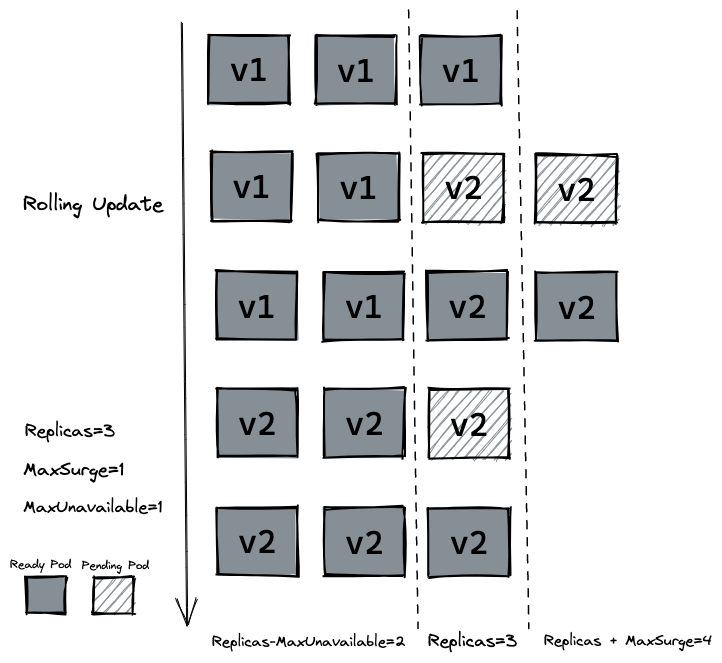
232 |
233 | ## 存活探针 (livenessProbe)
234 |
235 | > 存活探测器来确定什么时候要重启容器。 例如,存活探测器可以探测到应用死锁(应用程序在运行,但是无法继续执行后面的步骤)情况。 重启这种状态下的容器有助于提高应用的可用性,即使其中存在缺陷。-- [LivenessProbe](https://kubernetes.io/docs/tasks/configure-pod-container/configure-liveness-readiness-startup-probes/)
236 |
237 | 在生产中,有时候因为某些 bug 导致应用死锁或者线程耗尽了,最终会导致应用无法继续提供服务,这个时候如果没有手段来自动监控和处理这一问题的话,可能会导致很长一段时间无人发现。[kubelet](https://kubernetes.io/docs/reference/command-line-tools-reference/kubelet/) 使用存活探测器 (livenessProbe) 来确定什么时候要重启容器。
238 |
239 | 接下来我们写一个 `/healthz` 接口来说明 `livenessProbe` 如何使用。 `/healthz` 接口会在启动成功的 15s 内正常返回 200 状态码,在 15s 后,会一直返回 500 的状态码。
240 |
241 | ```go
242 | package main
243 |
244 | import (
245 | "fmt"
246 | "io"
247 | "net/http"
248 | "time"
249 | )
250 |
251 | func hello(w http.ResponseWriter, r *http.Request) {
252 | io.WriteString(w, "[v2] Hello, Kubernetes!")
253 | }
254 |
255 | func main() {
256 | started := time.Now()
257 | http.HandleFunc("/healthz", func(w http.ResponseWriter, r *http.Request) {
258 | duration := time.Since(started)
259 | if duration.Seconds() > 15 {
260 | w.WriteHeader(500)
261 | w.Write([]byte(fmt.Sprintf("error: %v", duration.Seconds())))
262 | } else {
263 | w.WriteHeader(200)
264 | w.Write([]byte("ok"))
265 | }
266 | })
267 |
268 | http.HandleFunc("/", hello)
269 | http.ListenAndServe(":3000", nil)
270 | }
271 | ```
272 |
273 | ```yaml
274 | # Dockerfile
275 | FROM golang:1.16-buster AS builder
276 | RUN mkdir /src
277 | ADD . /src
278 | WORKDIR /src
279 |
280 | RUN go env -w GO111MODULE=auto
281 | RUN go build -o main .
282 |
283 | FROM gcr.io/distroless/base-debian10
284 |
285 | WORKDIR /
286 |
287 | COPY --from=builder /src/main /main
288 | EXPOSE 3000
289 | ENTRYPOINT ["/main"]
290 | ```
291 |
292 | `Dockerfile` 的编写和原来保持一致,我们把 `tag` 修改为 `liveness` 并推送到远程仓库。
293 |
294 | ```shell
295 | docker build . -t guangzhengli/hellok8s:liveness
296 | docker push guangzhengli/hellok8s:liveness
297 | ```
298 |
299 | 最后编写 deployment 的定义,这里使用存活探测方式是使用 HTTP GET 请求,请求的是刚才定义的 `/healthz` 接口,`periodSeconds` 字段指定了 kubelet 每隔 3 秒执行一次存活探测。 `initialDelaySeconds` 字段告诉 kubelet 在执行第一次探测前应该等待 3 秒。如果服务器上 `/healthz` 路径下的处理程序返回成功代码,则 kubelet 认为容器是健康存活的。 如果处理程序返回失败代码,则 kubelet 会杀死这个容器并将其重启。
300 |
301 | ```yaml
302 | apiVersion: apps/v1
303 | kind: Deployment
304 | metadata:
305 | name: hellok8s-deployment
306 | spec:
307 | strategy:
308 | rollingUpdate:
309 | maxSurge: 1
310 | maxUnavailable: 1
311 | replicas: 3
312 | selector:
313 | matchLabels:
314 | app: hellok8s
315 | template:
316 | metadata:
317 | labels:
318 | app: hellok8s
319 | spec:
320 | containers:
321 | - image: guangzhengli/hellok8s:liveness
322 | name: hellok8s-container
323 | livenessProbe:
324 | httpGet:
325 | path: /healthz
326 | port: 3000
327 | initialDelaySeconds: 3
328 | periodSeconds: 3
329 | ```
330 |
331 | 通过 `get` 或者 `describe` 命令可以发现 pod 一直处于重启当中。
332 |
333 | ```shell
334 | kubectl apply -f deployment.yaml
335 |
336 | kubectl get pods
337 | # NAME READY STATUS RESTARTS AGE
338 | # hellok8s-deployment-5995ff9447-d5fbz 1/1 Running 4 (6s ago) 102s
339 | # hellok8s-deployment-5995ff9447-gz2cx 1/1 Running 4 (5s ago) 101s
340 | # hellok8s-deployment-5995ff9447-rh29x 1/1 Running 4 (6s ago) 102s
341 |
342 | kubectl describe pod hellok8s-68f47f657c-zwn6g
343 |
344 | # ...
345 | # ...
346 | # ...
347 | # Events:
348 | # Type Reason Age From Message
349 | # ---- ------ ---- ---- -------
350 | # Normal Scheduled 12m default-scheduler Successfully assigned default/hellok8s-deployment-5995ff9447-rh29x to minikube
351 | # Normal Pulled 11m (x4 over 12m) kubelet Container image "guangzhengli/hellok8s:liveness" already present on machine
352 | # Normal Created 11m (x4 over 12m) kubelet Created container hellok8s-container
353 | # Normal Started 11m (x4 over 12m) kubelet Started container hellok8s-container
354 | # Normal Killing 11m (x3 over 12m) kubelet Container hellok8s-container failed liveness probe, will be restarted
355 | # Warning Unhealthy 11m (x10 over 12m) kubelet Liveness probe failed: HTTP probe failed with statuscode: 500
356 | # Warning BackOff 2m41s (x36 over 10m) kubelet Back-off restarting failed container
357 | ```
358 |
359 | ## 就绪探针 (readiness)
360 |
361 | > 就绪探测器可以知道容器何时准备好接受请求流量,当一个 Pod 内的所有容器都就绪时,才能认为该 Pod 就绪。 这种信号的一个用途就是控制哪个 Pod 作为 Service 的后端。 若 Pod 尚未就绪,会被从 Service 的负载均衡器中剔除。-- [ReadinessProbe](https://kubernetes.io/docs/tasks/configure-pod-container/configure-liveness-readiness-startup-probes/)
362 |
363 | 在生产环境中,升级服务的版本是日常的需求,这时我们需要考虑一种场景,即当发布的版本存在问题,就不应该让它升级成功。kubelet 使用就绪探测器可以知道容器何时准备好接受请求流量,当一个 pod 升级后不能就绪,即不应该让流量进入该 pod,在配合 `rollingUpate` 的功能下,也不能允许升级版本继续下去,否则服务会出现全部升级完成,导致所有服务均不可用的情况。
364 |
365 | 这里我们把服务回滚到 `hellok8s:v2` 的版本,可以通过上面学习的方法进行回滚。
366 |
367 | ```shell
368 | kubectl rollout undo deployment hellok8s-deployment --to-revision=2
369 | ```
370 |
371 | 这里我们将应用的 `/healthz` 接口直接设置成返回 500 状态码,代表该版本是一个有问题的版本。
372 |
373 | ```go
374 | package main
375 |
376 | import (
377 | "io"
378 | "net/http"
379 | )
380 |
381 | func hello(w http.ResponseWriter, r *http.Request) {
382 | io.WriteString(w, "[v2] Hello, Kubernetes!")
383 | }
384 |
385 | func main() {
386 | http.HandleFunc("/healthz", func(w http.ResponseWriter, r *http.Request) {
387 | w.WriteHeader(500)
388 | })
389 |
390 | http.HandleFunc("/", hello)
391 | http.ListenAndServe(":3000", nil)
392 | }
393 | ```
394 |
395 | 在 `build` 阶段我们将 `tag` 设置为 `bad`,打包后 push 到远程仓库。
396 |
397 | ``` shell
398 | docker build . -t guangzhengli/hellok8s:bad
399 |
400 | docker push guangzhengli/hellok8s:bad
401 | ```
402 |
403 | 接着编写 deployment 资源文件,[Probe](https://kubernetes.io/docs/reference/generated/kubernetes-api/v1.25/#probe-v1-core) 有很多配置字段,可以使用这些字段精确地控制就绪检测的行为:
404 |
405 | - `initialDelaySeconds`:容器启动后要等待多少秒后才启动存活和就绪探测器, 默认是 0 秒,最小值是 0。
406 | - `periodSeconds`:执行探测的时间间隔(单位是秒)。默认是 10 秒。最小值是 1。
407 | - `timeoutSeconds`:探测的超时后等待多少秒。默认值是 1 秒。最小值是 1。
408 | - `successThreshold`:探测器在失败后,被视为成功的最小连续成功数。默认值是 1。 存活和启动探测的这个值必须是 1。最小值是 1。
409 | - `failureThreshold`:当探测失败时,Kubernetes 的重试次数。 对存活探测而言,放弃就意味着重新启动容器。 对就绪探测而言,放弃意味着 Pod 会被打上未就绪的标签。默认值是 3。最小值是 1。
410 |
411 | ``` yaml
412 | apiVersion: apps/v1
413 | kind: Deployment
414 | metadata:
415 | name: hellok8s-deployment
416 | spec:
417 | strategy:
418 | rollingUpdate:
419 | maxSurge: 1
420 | maxUnavailable: 1
421 | replicas: 3
422 | selector:
423 | matchLabels:
424 | app: hellok8s
425 | template:
426 | metadata:
427 | labels:
428 | app: hellok8s
429 | spec:
430 | containers:
431 | - image: guangzhengli/hellok8s:bad
432 | name: hellok8s-container
433 | readinessProbe:
434 | httpGet:
435 | path: /healthz
436 | port: 3000
437 | initialDelaySeconds: 1
438 | successThreshold: 5
439 | ```
440 |
441 | 通过 `get` 命令可以发现两个 pod 一直处于还没有 Ready 的状态当中,通过 `describe` 命令可以看到是因为 `Readiness probe failed: HTTP probe failed with statuscode: 500` 的原因。又因为设置了最大不可用的服务数量为`maxUnavailable=1`,这样能保证剩下两个 `v2` 版本的 `hellok8s` 能继续提供服务!
442 |
443 | ```shell
444 | kubectl apply -f deployment.yaml
445 |
446 | kubectl get pods
447 | # NAME READY STATUS RESTARTS AGE
448 | # hellok8s-deployment-66799848c4-8xzsz 1/1 Running 0 102s
449 | # hellok8s-deployment-66799848c4-m9dl5 1/1 Running 0 102s
450 | # hellok8s-deployment-9c57c7f56-rww7k 0/1 Running 0 26s
451 | # hellok8s-deployment-9c57c7f56-xt9tw 0/1 Running 0 26s
452 |
453 |
454 | kubectl describe pod hellok8s-deployment-9c57c7f56-rww7k
455 | # Events:
456 | # Type Reason Age From Message
457 | # ---- ------ ---- ---- -------
458 | # Normal Scheduled 74s default-scheduler Successfully assigned default/hellok8s-deployment-9c57c7f56-rww7k to minikube
459 | # Normal Pulled 73s kubelet Container image "guangzhengli/hellok8s:bad" already present on machine
460 | # Normal Created 73s kubelet Created container hellok8s-container
461 | # Normal Started 73s kubelet Started container hellok8s-container
462 | # Warning Unhealthy 0s (x10 over 72s) kubelet Readiness probe failed: HTTP probe failed with statuscode: 500
463 | ```
464 |
--------------------------------------------------------------------------------
/docs/helm.md:
--------------------------------------------------------------------------------
1 | ---
2 | prev:
3 | text: 'Job'
4 | link: 'job'
5 | next:
6 | text: 'Dashboard'
7 | link: 'dashboard'
8 | ---
9 |
10 | # Helm
11 |
12 | 经过前面的教程,想必你已经对 kubernetes 的使用有了一定的理解。但是不知道你是否想过这样一个问题,就是我们前面教程中提到的所有资源,包括用 `pod`, `deployment`, `service`, `ingress`, `configmap`,`secret` 所有资源来部署一套完整的 `hellok8s` 服务的话,难道需要一个一个的 `kubectl apply -f` 来创建吗?如果换一个 namespace,或者说换一套 kubernetes 集群部署的话,又要重复性的操作创建的过程吗?
13 |
14 | 我们平常使用操作系统时,需要安装一个应用的话,可以直接使用 `apt` 或者 `brew` 来直接安装,而不需要关心这个应用需要哪些依赖,哪些配置。在使用 kubernetes 安装应用服务 `hellok8s` 时,我们自然也希望能够一个命令就安装完成,而提供这个能力的,就是 CNCF 的毕业项目 [Helm](https://github.com/helm/helm)。
15 |
16 | > Helm 帮助您管理 Kubernetes 应用—— Helm Chart,Helm 是查找、分享和使用软件构建 [Kubernetes](https://kubernetes.io/) 的最优方式。
17 | >
18 | > 复杂性管理 ——即使是最复杂的应用,Helm Chart 依然可以描述, 提供使用单点授权的可重复安装应用程序。
19 | >
20 | > 易于升级 ——随时随地升级和自定义的钩子消除您升级的痛苦。
21 | >
22 | > 分发简单 —— Helm Chart 很容易在公共或私有化服务器上发版,分发和部署站点。
23 | >
24 | > 回滚 —— 使用 `helm rollback` 可以轻松回滚到之前的发布版本。
25 |
26 | 我们通过 brew 来安装 helm。更多方式可以参考[官方文档](https://helm.sh/zh/docs/intro/install/)。
27 |
28 | ```shell
29 | brew install helm
30 | ```
31 |
32 | Helm 的使用方式可以解释为:Helm 安装 *charts* 到 Kubernetes 集群中,每次安装都会创建一个新的 *release*。你可以在 Helm 的 chart *repositories* 中寻找新的 chart。
33 |
34 | ## 用 helm 安装 hellok8s
35 | 开始本节教程前,我们先把之前手动创建的 hellok8s 相关的资源删除(防止使用 helm 创建同名的 k8s 资源失败)。
36 |
37 | 在尝试自己创建 hellok8s helm chart 之前,我们可以先来熟悉一下怎么使用 helm chart。在这里我先创建好了一个 hellok8s(包括会创建 deployment, service, ingress, configmaps, secret)的 helm chart。通过 GitHub actions 生成放在了 [gh-pages](https://github.com/guangzhengli/k8s-tutorials/tree/gh-pages/) 分支下的 `index.yaml` 文件中。
38 |
39 | 接着可以使用下面命令进行快速安装,其中 `helm repo add` 表示将我创建好的 hellok8s chart 添加到自己本地的仓库当中,`helm install` 表示从仓库中安装 hellok8s/hello-helm 到 k8s 集群当中。
40 |
41 | ```shell
42 | helm repo add hellok8s https://guangzhengli.github.io/k8s-tutorials/
43 | # "hellok8s" has been added to your repositories
44 |
45 | helm install my-hello-helm hellok8s/hello-helm --version 0.1.0
46 | # NAME: my-hello-helm
47 | # NAMESPACE: default
48 | # STATUS: deployed
49 | # REVISION: 1
50 | ```
51 |
52 | 创建完成后,通过 `kubectl get` 等命令可以看到所有 hellok8s 资源都创建成功,`helm` 一条命令即可做到之前教程中所有资源的创建!通过 `curl` k8s 集群的 ingress 地址,也可以看到返回字符串!
53 |
54 | ```shell
55 | kubectl get pods
56 | # NAME READY STATUS RESTARTS AGE
57 | # hellok8s-deployment-f88f984c6-k8hpz 1/1 Running 0 15h
58 | # hellok8s-deployment-f88f984c6-nzwg6 1/1 Running 0 15h
59 | # hellok8s-deployment-f88f984c6-s89s7 1/1 Running 0 15h
60 | # nginx-deployment-d47fd7f66-6w76b 1/1 Running 0 15h
61 | # nginx-deployment-d47fd7f66-tsqj5 1/1 Running 0 15h
62 |
63 | kubectl get deployments
64 | # NAME READY UP-TO-DATE AVAILABLE AGE
65 | # hellok8s-deployment 3/3 3 3 15h
66 | # nginx-deployment 2/2 2 2 15h
67 |
68 | kubectl get service
69 | # NAME TYPE CLUSTER-IP EXTERNAL-IP PORT(S) AGE
70 | # kubernetes ClusterIP 10.96.0.1 443/TCP 13d
71 | # service-hellok8s-clusterip ClusterIP 10.107.198.175 3000/TCP 15h
72 | # service-nginx-clusterip ClusterIP 10.100.144.49 4000/TCP 15h
73 |
74 | kubectl get ingress
75 | # NAME CLASS HOSTS ADDRESS PORTS AGE
76 | # hellok8s-ingress nginx * localhost 80 15h
77 |
78 | kubectl get configmap
79 | # NAME DATA AGE
80 | # hellok8s-config 1 15h
81 |
82 | kubectl get secret
83 | # NAME TYPE DATA AGE
84 | # hellok8s-secret Opaque 1 15h
85 | # sh.helm.release.v1.my-hello-helm.v1 helm.sh/release.v1
86 |
87 | curl http://192.168.59.100/hello
88 | # [v6] Hello, Helm! Message from helm values: It works with Helm Values[v2]!, From namespace: default, From host: hellok8s-deployment-598bbd6884-ttk78, Get Database Connect URL: http://DB_ADDRESS_DEFAULT, Database Connect Password: db_password
89 | ```
90 |
91 | ## 创建 helm charts
92 |
93 |
94 | 在使用已经创建好的 hello-helm charts 来创建整个 hellok8s 资源后,你可能还是有很多的疑惑,包括 Chart 是如何生成和发布的,如何创建一个新的 Chart?在这节教程中,我们会尝试自己来创建 hello-helm Chart 来完成之前的操作。
95 |
96 | 首先建议使用 `helm create` 命令来创建一个初始的 Chart,该命令默认会创建一些 k8s 资源定义的初始文件,并且会生成官网推荐的目录结构,如下所示:
97 |
98 | ```shell
99 | helm create hello-helm
100 |
101 | .
102 | ├── Chart.yaml
103 | ├── charts
104 | ├── templates
105 | │ ├── NOTES.txt
106 | │ ├── _helpers.tpl
107 | │ ├── deployment.yaml
108 | │ ├── hpa.yaml
109 | │ ├── ingress.yaml
110 | │ ├── service.yaml
111 | │ ├── serviceaccount.yaml
112 | │ └── tests
113 | │ └── test-connection.yaml
114 | └── values.yaml
115 | ```
116 |
117 | 我们将默认生成在 templates 目录下面的 `yaml` 文件删除,用之前教程中 `yaml` 文件替换它,最终的结构长这样:
118 |
119 | ```shell
120 | .
121 | ├── Chart.yaml
122 | ├── Dockerfile
123 | ├── _helpers.tpl
124 | ├── charts
125 | ├── hello-helm-0.1.0.tgz
126 | ├── index.yaml
127 | ├── main.go
128 | ├── templates
129 | │ ├── hellok8s-configmaps.yaml
130 | │ ├── hellok8s-deployment.yaml
131 | │ ├── hellok8s-secret.yaml
132 | │ ├── hellok8s-service.yaml
133 | │ ├── ingress.yaml
134 | │ ├── nginx-deployment.yaml
135 | │ └── nginx-service.yaml
136 | └── values.yaml
137 | ```
138 |
139 | 其中 `main.go` 定义的是 `hellok8s:v6` 版本的代码,主要是从系统中拿到 message,namespace,dbURL,dbPassword 这几个环境变量,拼接成字符串返回。
140 |
141 | ```go
142 | package main
143 |
144 | import (
145 | "fmt"
146 | "io"
147 | "net/http"
148 | "os"
149 | )
150 |
151 | func hello(w http.ResponseWriter, r *http.Request) {
152 | host, _ := os.Hostname()
153 | message := os.Getenv("MESSAGE")
154 | namespace := os.Getenv("NAMESPACE")
155 | dbURL := os.Getenv("DB_URL")
156 | dbPassword := os.Getenv("DB_PASSWORD")
157 |
158 | io.WriteString(w, fmt.Sprintf("[v6] Hello, Helm! Message from helm values: %s, From namespace: %s, From host: %s, Get Database Connect URL: %s, Database Connect Password: %s", message, namespace, host, dbURL, dbPassword))
159 | }
160 |
161 | func main() {
162 | http.HandleFunc("/", hello)
163 | http.ListenAndServe(":3000", nil)
164 | }
165 | ```
166 |
167 | 为了让大家更加了解 helm charts values 的使用和熟悉 k8s 资源配置,这几个环境变量 `MESSAGE`, `NAMESPACE`, `DB_URL`, `DB_PASSWORD` 分别有不同的来源。
168 |
169 | 首先修改根目录下的 `values.yaml` 文件,定义自定义的配置信息,从之前教程的 k8s 资源文件中,将一些易于变化的参数提取出来,放在 `values.yaml` 文件中。全部配置信息如下所示:
170 |
171 | ```yaml
172 | application:
173 | name: hellok8s
174 | hellok8s:
175 | image: guangzhengli/hellok8s:v6
176 | replicas: 3
177 | message: "It works with Helm Values!"
178 | database:
179 | url: "http://DB_ADDRESS_DEFAULT"
180 | password: "db_password"
181 | nginx:
182 | image: nginx
183 | replicas: 2
184 | ```
185 |
186 | 那自定义好了这些配置后,如何在 k8s 资源定义中使用这些配置信息呢?Helm 默认使用 [Go template 的方式](https://helm.sh/zh/docs/howto/charts_tips_and_tricks/) 来完成。
187 |
188 | 例如之前教程中,将环境变量 `DB_URL` 定义在 k8s configmaps 中,那么该资源可以定义成如文件所示 `hellok8s-configmaps.yaml`。其中 `metadata.name` 的值是 `{{ .Values.application.name }}-config`,意思是从 `values.yaml` 文件中获取 `application.name` 的值 `hellok8s`,拼接 `-config` 字符串,这样创建出来的 configmaps 资源名称就是 `hellok8s-config`。
189 |
190 | 同理 `{{ .Values.application.hellok8s.database.url }}` 就是获取值为 `http://DB_ADDRESS_DEFAULT` 放入 configmaps 对应 key 为 DB_URL 的 value 中。
191 |
192 | ```yaml
193 | apiVersion: v1
194 | kind: ConfigMap
195 | metadata:
196 | name: {{ .Values.application.name }}-config
197 | data:
198 | DB_URL: {{ .Values.application.hellok8s.database.url }}
199 | ```
200 |
201 | 上面定义的最终效果和之前在 `configmaps` 教程中定义的资源没有区别,这种做的好处是可以将所有可变的参数定义在 `values.yaml` 文件中,使用该 helm charts 的人无需了解具体 k8s 的定义,只需改变成自己想要的参数,即可创建自定义的资源!
202 |
203 | 同样,我们可以根据之前的教程将 `DB_PASSWORD` 放入 secret 中,并且通过 `b64enc` 方法将值 Base64 编码。
204 |
205 | ```shell
206 | # hellok8s-secret.yaml
207 | apiVersion: v1
208 | kind: Secret
209 | metadata:
210 | name: {{ .Values.application.name }}-secret
211 | data:
212 | DB_PASSWORD: {{ .Values.application.hellok8s.database.password | b64enc }}
213 | ```
214 |
215 | 最后,修改 `hellok8s-deployment` 文件,根据前面的教程,将 `metadata.name` `replicas` `image` `configMapKeyRef.name` `secretKeyRef.name` 等值修改成从 `values.yaml` 文件中获取。
216 |
217 | 再添加代码中需要的 `NAMESPACE` 环境变量,从 `.Release.Namespace` [内置对象](https://helm.sh/zh/docs/chart_template_guide/builtin_objects/) 中获取。最后添加 `MESSAGE` 环境变量,直接从 `{{ .Values.application.hellok8s.message }}` 中获取。
218 |
219 | ```yaml
220 | apiVersion: apps/v1
221 | kind: Deployment
222 | metadata:
223 | name: {{ .Values.application.name }}-deployment
224 | spec:
225 | replicas: {{ .Values.application.hellok8s.replicas }}
226 | selector:
227 | matchLabels:
228 | app: hellok8s
229 | template:
230 | metadata:
231 | labels:
232 | app: hellok8s
233 | spec:
234 | containers:
235 | - image: {{ .Values.application.hellok8s.image }}
236 | name: hellok8s-container
237 | env:
238 | - name: DB_URL
239 | valueFrom:
240 | configMapKeyRef:
241 | name: {{ .Values.application.name }}-config
242 | key: DB_URL
243 | - name: DB_PASSWORD
244 | valueFrom:
245 | secretKeyRef:
246 | name: {{ .Values.application.name }}-secret
247 | key: DB_PASSWORD
248 | - name: NAMESPACE
249 | value: {{ .Release.Namespace }}
250 | - name: MESSAGE
251 | value: {{ .Values.application.hellok8s.message }}
252 | ```
253 |
254 | 修改 `ingress.yaml` 将 `metadata.name` 的值,其它没有变化
255 |
256 | ``` yaml
257 | apiVersion: networking.k8s.io/v1
258 | kind: Ingress
259 | metadata:
260 | name: {{ .Values.application.name }}-ingress
261 | ...
262 | ...
263 | ...
264 | ```
265 |
266 | `nginx-deployment.yaml`
267 |
268 | ```yaml
269 | apiVersion: apps/v1
270 | kind: Deployment
271 | metadata:
272 | name: nginx-deployment
273 | spec:
274 | replicas: {{ .Values.application.nginx.replicas }}
275 | selector:
276 | matchLabels:
277 | app: nginx
278 | template:
279 | metadata:
280 | labels:
281 | app: nginx
282 | spec:
283 | containers:
284 | - image: {{ .Values.application.nginx.image }}
285 | name: nginx-container
286 | ```
287 |
288 | `nginx-service.yaml` 和 `hellok8s-service.yaml` 没有变化。所有代码可以在 [这里](https://github.com/guangzhengli/k8s-tutorials/tree/main/helm-charts/hello-helm) 查看。
289 |
290 | 稍微修改下默认生成的`Chart.yaml`
291 |
292 | ```yaml
293 | apiVersion: v2
294 | name: hello-helm
295 | description: A k8s tutorials in https://github.com/guangzhengli/k8s-tutorials
296 | type: application
297 | version: 0.1.0
298 | appVersion: "1.16.0"
299 | ```
300 |
301 | 定义完成所有的 helm 资源后,首先**将 `hellok8s:v6` 镜像打包推送到 DockerHub**。
302 |
303 | 之后即可在 `hello-helm` 的目录下执行 `helm upgrade` 命令进行安装,安装成功后,执行 curl 命令便能直接得到结果!查看 pod 和 service 等资源,便会发现 helm 能一键安装所有资源!
304 |
305 | ```shell
306 | helm upgrade --install hello-helm --values values.yaml .
307 | # Release "hello-helm" does not exist. Installing it now.
308 | # NAME: hello-helm
309 | # NAMESPACE: default
310 | # STATUS: deployed
311 | # REVISION: 1
312 |
313 | curl http://192.168.59.100/hello
314 | # [v6] Hello, Helm! Message from helm values: It works with Helm Values!, From namespace: default, From host: hellok8s-deployment-57d7df7964-m6gcc, Get Database Connect URL: http://DB_ADDRESS_DEFAULT, Database Connect Password: db_password
315 |
316 | kubectl get pods
317 | # NAME READY STATUS RESTARTS AGE
318 | # hellok8s-deployment-f88f984c6-k8hpz 1/1 Running 0 32m
319 | # hellok8s-deployment-f88f984c6-nzwg6 1/1 Running 0 32m
320 | # hellok8s-deployment-f88f984c6-s89s7 1/1 Running 0 32m
321 | # nginx-deployment-d47fd7f66-6w76b 1/1 Running 0 32m
322 | # nginx-deployment-d47fd7f66-tsqj5 1/1 Running 0 32m
323 | ```
324 |
325 | ## rollback
326 |
327 | Helm 也提供了 Rollback 的功能,我们先修改一下 `message: "It works with Helm Values[v2]!"` 加上 [v2]。
328 |
329 | ```
330 | application:
331 | name: hellok8s
332 | hellok8s:
333 | image: guangzhengli/hellok8s:v6
334 | replicas: 3
335 | message: "It works with Helm Values[v2]!"
336 | database:
337 | url: "http://DB_ADDRESS_DEFAULT"
338 | password: "db_password"
339 | nginx:
340 | image: nginx
341 | replicas: 2
342 | ```
343 |
344 | 再执行 `helm upgrade` 命令更新 k8s 资源,通过 `curl http://192.168.59.100/hello` 可以看到资源已经更新。
345 |
346 | ```shell
347 | ➜ hello-helm git:(main) ✗ helm upgrade --install hello-helm --values values.yaml .
348 | # Release "hello-helm" has been upgraded. Happy Helming!
349 | NAME: hello-helm
350 | NAMESPACE: default
351 | STATUS: deployed
352 | REVISION: 2
353 |
354 | curl http://192.168.59.100/hello
355 | # [v6] Hello, Helm! Message from helm values: It works with Helm Values[v2]!, From namespace: default, From host: hellok8s-deployment-598bbd6884-4b9bw, Get Database Connect URL: http://DB_ADDRESS_DEFAULT, Database Connect Password: db_password
356 | ```
357 |
358 | 如果这一次更新有问题的话,可以通过 ` helm rollback` 快速回滚。通过下面命令看到,和 deployment 的 rollback 一样,回滚后 REVISION 版本都会增大到 3 而不是回滚到 1,回滚后使用 `curl` 命令返回的 v1 版本的字符串。
359 |
360 | ```shell
361 | helm ls
362 | # NAME NAMESPACE REVISION STATUS CHART APP VERSION
363 | # hello-helm default 2 deployed hello-helm-0.1.0 1.16.0
364 |
365 | helm rollback hello-helm 1
366 | # Rollback was a success! Happy Helming!
367 |
368 | helm ls
369 | # NAME NAMESPACE REVISION STATUS CHART APP VERSION
370 | # hello-helm default 3 deployed hello-helm-0.1.0 1.16.0
371 |
372 | curl http://192.168.59.100/hello
373 | # [v6] Hello, Helm! Message from helm values: It works with Helm Values!, From namespace: default, From host: hellok8s-deployment-57d7df7964-482xw, Get Database Connect URL: http://DB_ADDRESS_DEFAULT, Database Connect Password: db_password
374 | ```
375 |
376 | ### 多环境配置
377 |
378 | 使用 Helm 也很容易多环境部署,新建 `values-dev.yaml` 文件,里面内容自定义 `dev` 环境需要的配置信息。
379 |
380 | ```yaml
381 | application:
382 | hellok8s:
383 | message: "It works with Helm Values values-dev.yaml!"
384 | database:
385 | url: "http://DB_ADDRESS_DEV"
386 | password: "db_password_dev"
387 | ```
388 |
389 | 可以多次指定'--values -f'参数,最后(最右边)指定的文件优先级最高,这里最右边的是 `values-dev.yaml` 文件,所以 `values-dev.yaml` 文件中的值会覆盖 `values.yaml` 中相同的值,`-n dev` 表示在名字为 dev 的 namespace 中创建 k8s 资源,执行完成后,我们可以通过 `curl` 命令看到返回的字符串中读取的是 `values-dev.yaml` 文件的配置,并且 `From namespace = dev`。
390 |
391 | ```shell
392 | helm upgrade --install hello-helm -f values.yaml -f values-dev.yaml -n dev .
393 |
394 | # Release "hello-helm" does not exist. Installing it now.
395 | # NAME: hello-helm
396 | # NAMESPACE: dev
397 | # STATUS: deployed
398 | # REVISION: 1
399 |
400 | curl http://192.168.59.100/hello
401 | # [v6] Hello, Helm! Message from helm values: It works with Helm Values values-dev.yaml!, From namespace: dev, From host: hellok8s-deployment-f5fff9df-89sn6, Get Database Connect URL: http://DB_ADDRESS_DEV, Database Connect Password: db_password_dev
402 |
403 | kubectl get pods -n dev
404 | # NAME READY STATUS RESTARTS AGE
405 | # hellok8s-deployment-f5fff9df-89sn6 1/1 Running 0 4m23s
406 | # hellok8s-deployment-f5fff9df-tkh6g 1/1 Running 0 4m23s
407 | # hellok8s-deployment-f5fff9df-wmlpb 1/1 Running 0 4m23s
408 | # nginx-deployment-d47fd7f66-cdlmf 1/1 Running 0 4m23s
409 | # nginx-deployment-d47fd7f66-cgst2 1/1 Running 0 4m23s
410 | ```
411 |
412 | 除此之外,还可以使用 '--set-file' 设置独立的值,类似于 `helm upgrade --install hello-helm -f values.yaml -f values-dev.yaml --set application.hellok8s.message="It works with set helm values" -n dev .` 方式在命令中设置 values 的值,可以随意修改相关配置,此方法在 CICD 中经常用到。
413 |
414 | ## helm chart 打包和发布
415 |
416 | 上面的例子展示了我们可以用一行命令在一个新的环境中安装所有需要的 k8s 资源!那么如何将 helm chart 打包、分发和下载呢?在官网中,提供了两种教程,一种是以 [GCS 存储的教程](https://helm.sh/zh/docs/howto/chart_repository_sync_example/),还有一种是以 [GitHub Pages 存储的教程](https://helm.sh/zh/docs/howto/chart_releaser_action/)。
417 |
418 | 这里我们使用第二种,并且使用 [chart-releaser-action](https://github.com/helm/chart-releaser-action) 来做自动发布,该 action 会默认生成 helm chart 发布到 `gh-pages` 分支上,本教程的 hellok8s helm chart 就发布在了本仓库的[gh-pages](https://github.com/guangzhengli/k8s-tutorials/tree/gh-pages/) 分支上的 `index.yaml` 文件中。
419 |
420 |
421 | 在使用 action 自动生成 chart 之前,我们可以先熟悉一下如何手动生成,在 `hello-helm` 目录下,执行 `helm package` 将chart目录打包到chart归档中。`helm repo index` 命令可以基于包含打包chart的目录,生成仓库的索引文件 `index.yaml`。
422 |
423 | 最后,可以使用 `helm upgrade --install *.tgz` 命令将该指定包进行安装使用。
424 |
425 | ```shell
426 | helm package hello-helm
427 | # Successfully packaged chart and saved it to: /Users/guangzheng.li/workspace/k8s-tutorials/hello-helm/hello-helm-0.1.0.tgz
428 |
429 | helm repo index .
430 |
431 | helm upgrade --install hello-helm hello-helm-0.1.0.tgz
432 | ```
433 |
434 | 基于上面的步骤,你可能已经想到,所谓的 helm 打包和发布,就是 `hello-helm-0.1.0.tgz` 文件和 `index.yaml` 生成和上传的一个过程。而 helm 下载和安装,就是如何将 `.tgz` 和 `index.yaml` 文件下载和 `helm upgrade --install` 的过程。
435 |
436 | 接下来我们发布生成的 hellok8s helm chart,先将手动生成的 `hello-helm-0.1.0.tgz` 和 `index.yaml` 文件删除,后续使用 GitHub action 自动生成和发布这两个文件。
437 |
438 | GitHub action 的代码可以参考 [官网文档](https://helm.sh/zh/docs/howto/chart_releaser_action/) 或者本仓库 `.github/workflows/release.yml` 文件。代表当 push 代码到远程仓库时,将 `helm-charts` 目录下的所有 charts 自动打包和发布到 `gh-pages` 分支去(需要保证 `gh-pages` 分支已经存在,否则会报错)。
439 |
440 |
441 | ```yaml
442 | name: Release Charts
443 |
444 | on:
445 | push:
446 | branches:
447 | - main
448 |
449 | jobs:
450 | release:
451 | # depending on default permission settings for your org (contents being read-only or read-write for workloads), you will have to add permissions
452 | # see: https://docs.github.com/en/actions/security-guides/automatic-token-authentication#modifying-the-permissions-for-the-github_token
453 | permissions:
454 | contents: write
455 | runs-on: ubuntu-latest
456 | steps:
457 | - name: Checkout
458 | uses: actions/checkout@v2
459 | with:
460 | fetch-depth: 0
461 |
462 | - name: Configure Git
463 | run: |
464 | git config user.name "$GITHUB_ACTOR"
465 | git config user.email "$GITHUB_ACTOR@users.noreply.github.com"
466 |
467 | - name: Install Helm
468 | uses: azure/setup-helm@v1
469 | with:
470 | version: v3.8.1
471 |
472 | - name: Run chart-releaser
473 | uses: helm/chart-releaser-action@v1.4.0
474 | with:
475 | charts_dir: helm-charts
476 | env:
477 | CR_TOKEN: "${{ secrets.GITHUB_TOKEN }}"
478 | ```
479 |
480 | 接着配置仓库的 `Settings -> Pages -> Build and deployment -> Branch`,选择 `gh-pages` 分支,GitHub 会自动在 `https://username.github.io/project` 发布 helm chart。
481 |
482 | 最后,你可以将自己的 helm charts 发布到社区中去,可以考虑发布到 [ArtifactHub](https://artifacthub.io/) 中,像本仓库生成的 helm charts 即发布在 [ArtifactHub hellok8s](https://artifacthub.io/packages/helm/hellok8s/hello-helm) 中。
483 |
484 | 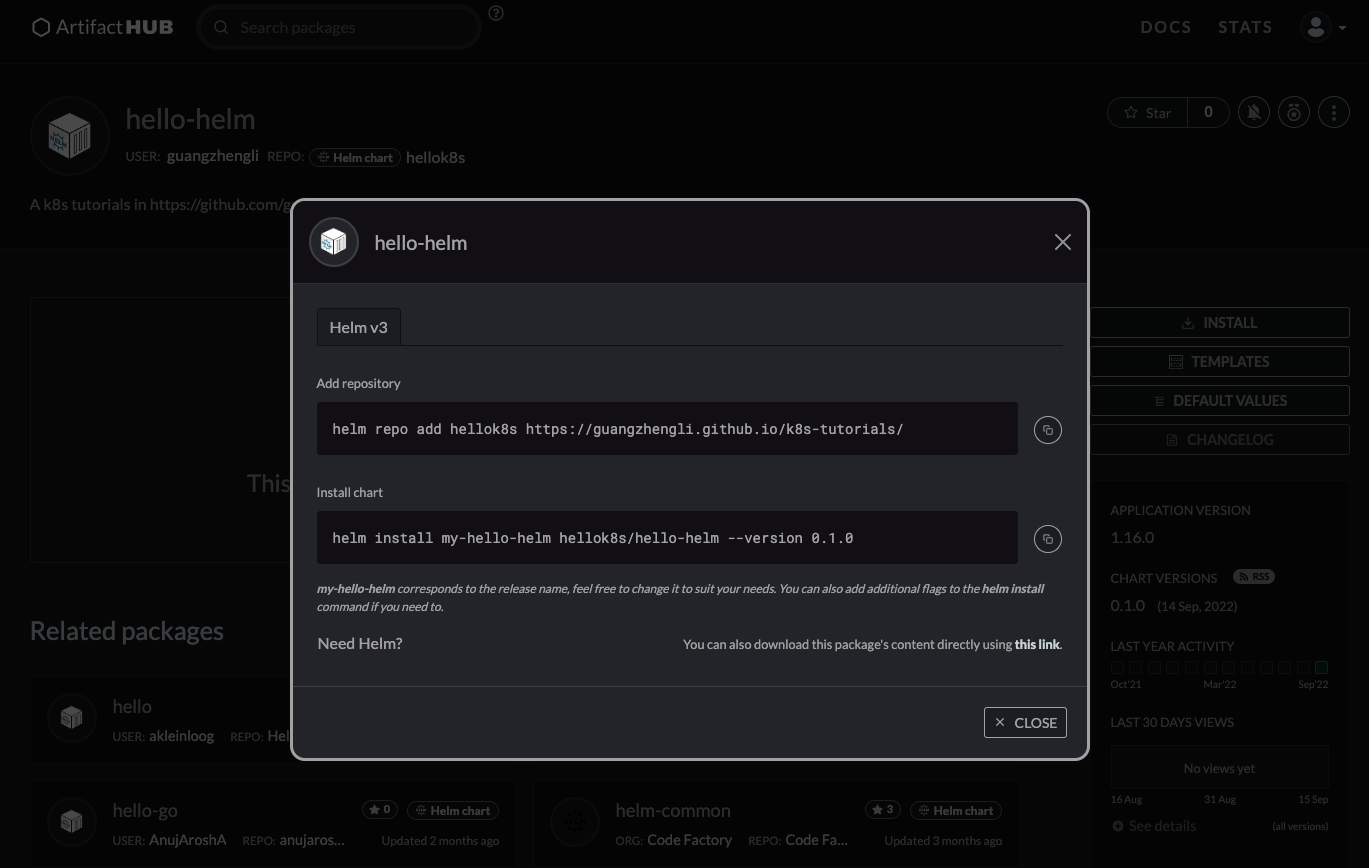
485 |
--------------------------------------------------------------------------------
/images/service-clusterip.excalidraw:
--------------------------------------------------------------------------------
1 | {
2 | "type": "excalidraw",
3 | "version": 2,
4 | "source": "https://marketplace.visualstudio.com/items?itemName=pomdtr.excalidraw-editor",
5 | "elements": [
6 | {
7 | "type": "rectangle",
8 | "version": 532,
9 | "versionNonce": 408523771,
10 | "isDeleted": false,
11 | "id": "AjS5qMP-xAfFSZmcF1eHk",
12 | "fillStyle": "solid",
13 | "strokeWidth": 2,
14 | "strokeStyle": "solid",
15 | "roughness": 1,
16 | "opacity": 100,
17 | "angle": 0,
18 | "x": 674.9455839388751,
19 | "y": 463.3424865301439,
20 | "strokeColor": "#000000",
21 | "backgroundColor": "#868e96",
22 | "width": 263,
23 | "height": 121,
24 | "seed": 303764776,
25 | "groupIds": [],
26 | "strokeSharpness": "sharp",
27 | "boundElements": [
28 | {
29 | "id": "gW9x2qmRUWATjSjDc51UH",
30 | "type": "text"
31 | },
32 | {
33 | "type": "text",
34 | "id": "gW9x2qmRUWATjSjDc51UH"
35 | },
36 | {
37 | "id": "mOarMD9oTs_aS6MOwuUPV",
38 | "type": "arrow"
39 | }
40 | ],
41 | "updated": 1661573155033,
42 | "link": null,
43 | "locked": false
44 | },
45 | {
46 | "type": "text",
47 | "version": 517,
48 | "versionNonce": 786905691,
49 | "isDeleted": false,
50 | "id": "gW9x2qmRUWATjSjDc51UH",
51 | "fillStyle": "hachure",
52 | "strokeWidth": 2,
53 | "strokeStyle": "solid",
54 | "roughness": 1,
55 | "opacity": 100,
56 | "angle": 0,
57 | "x": 679.9455839388751,
58 | "y": 504.8424865301439,
59 | "strokeColor": "#000000",
60 | "backgroundColor": "transparent",
61 | "width": 253,
62 | "height": 38,
63 | "seed": 1531850792,
64 | "groupIds": [],
65 | "strokeSharpness": "sharp",
66 | "boundElements": [],
67 | "updated": 1661573115437,
68 | "link": null,
69 | "locked": false,
70 | "fontSize": 32.572625259596414,
71 | "fontFamily": 3,
72 | "text": "Pod(hellok8s)",
73 | "baseline": 31,
74 | "textAlign": "center",
75 | "verticalAlign": "middle",
76 | "containerId": "AjS5qMP-xAfFSZmcF1eHk",
77 | "originalText": "Pod(hellok8s)"
78 | },
79 | {
80 | "type": "rectangle",
81 | "version": 685,
82 | "versionNonce": 605875125,
83 | "isDeleted": false,
84 | "id": "uQBZwXifk-T_MukkthQmb",
85 | "fillStyle": "solid",
86 | "strokeWidth": 2,
87 | "strokeStyle": "solid",
88 | "roughness": 1,
89 | "opacity": 100,
90 | "angle": 0,
91 | "x": 610.2245754671306,
92 | "y": 229.25776873281097,
93 | "strokeColor": "#000000",
94 | "backgroundColor": "#868e96",
95 | "width": 347,
96 | "height": 138,
97 | "seed": 467248750,
98 | "groupIds": [],
99 | "strokeSharpness": "sharp",
100 | "boundElements": [
101 | {
102 | "id": "5rfo2IATCZzSwwSnap6RS",
103 | "type": "text"
104 | },
105 | {
106 | "id": "5rfo2IATCZzSwwSnap6RS",
107 | "type": "text"
108 | },
109 | {
110 | "type": "text",
111 | "id": "5rfo2IATCZzSwwSnap6RS"
112 | },
113 | {
114 | "id": "lHyTueJDYXKe2Ex_KbihU",
115 | "type": "arrow"
116 | },
117 | {
118 | "id": "YwwbHaACrooBxYZOnnGZ4",
119 | "type": "arrow"
120 | },
121 | {
122 | "id": "mOarMD9oTs_aS6MOwuUPV",
123 | "type": "arrow"
124 | },
125 | {
126 | "id": "KuEy6ohRC6xW2M7EbiipI",
127 | "type": "arrow"
128 | }
129 | ],
130 | "updated": 1661573162954,
131 | "link": null,
132 | "locked": false
133 | },
134 | {
135 | "type": "text",
136 | "version": 684,
137 | "versionNonce": 710291323,
138 | "isDeleted": false,
139 | "id": "5rfo2IATCZzSwwSnap6RS",
140 | "fillStyle": "hachure",
141 | "strokeWidth": 2,
142 | "strokeStyle": "solid",
143 | "roughness": 1,
144 | "opacity": 100,
145 | "angle": 0,
146 | "x": 615.2245754671306,
147 | "y": 279.257768732811,
148 | "strokeColor": "#000000",
149 | "backgroundColor": "transparent",
150 | "width": 337,
151 | "height": 38,
152 | "seed": 1691139954,
153 | "groupIds": [],
154 | "strokeSharpness": "sharp",
155 | "boundElements": [],
156 | "updated": 1661573126458,
157 | "link": null,
158 | "locked": false,
159 | "fontSize": 32.572625259596414,
160 | "fontFamily": 3,
161 | "text": "Service(hellok8s)",
162 | "baseline": 31,
163 | "textAlign": "center",
164 | "verticalAlign": "middle",
165 | "containerId": "uQBZwXifk-T_MukkthQmb",
166 | "originalText": "Service(hellok8s)"
167 | },
168 | {
169 | "type": "rectangle",
170 | "version": 716,
171 | "versionNonce": 2098439771,
172 | "isDeleted": false,
173 | "id": "wflri2Vod_cAZlpBgMqnN",
174 | "fillStyle": "solid",
175 | "strokeWidth": 2,
176 | "strokeStyle": "solid",
177 | "roughness": 1,
178 | "opacity": 100,
179 | "angle": 0,
180 | "x": 673.6617770929361,
181 | "y": 38.52692106239674,
182 | "strokeColor": "#000000",
183 | "backgroundColor": "#868e96",
184 | "width": 223,
185 | "height": 121,
186 | "seed": 1781774005,
187 | "groupIds": [],
188 | "strokeSharpness": "sharp",
189 | "boundElements": [
190 | {
191 | "id": "-wU6T1Q6XdKj3-pH90lCg",
192 | "type": "text"
193 | },
194 | {
195 | "id": "-wU6T1Q6XdKj3-pH90lCg",
196 | "type": "text"
197 | },
198 | {
199 | "type": "text",
200 | "id": "-wU6T1Q6XdKj3-pH90lCg"
201 | },
202 | {
203 | "id": "lHyTueJDYXKe2Ex_KbihU",
204 | "type": "arrow"
205 | }
206 | ],
207 | "updated": 1661573297768,
208 | "link": null,
209 | "locked": false
210 | },
211 | {
212 | "type": "text",
213 | "version": 695,
214 | "versionNonce": 1277477077,
215 | "isDeleted": false,
216 | "id": "-wU6T1Q6XdKj3-pH90lCg",
217 | "fillStyle": "hachure",
218 | "strokeWidth": 2,
219 | "strokeStyle": "solid",
220 | "roughness": 1,
221 | "opacity": 100,
222 | "angle": 0,
223 | "x": 678.6617770929361,
224 | "y": 80.02692106239674,
225 | "strokeColor": "#000000",
226 | "backgroundColor": "transparent",
227 | "width": 213,
228 | "height": 38,
229 | "seed": 1292892955,
230 | "groupIds": [],
231 | "strokeSharpness": "sharp",
232 | "boundElements": [],
233 | "updated": 1661573297768,
234 | "link": null,
235 | "locked": false,
236 | "fontSize": 32.572625259596414,
237 | "fontFamily": 3,
238 | "text": "Pod(nginx)",
239 | "baseline": 31,
240 | "textAlign": "center",
241 | "verticalAlign": "middle",
242 | "containerId": "wflri2Vod_cAZlpBgMqnN",
243 | "originalText": "Pod(nginx)"
244 | },
245 | {
246 | "type": "rectangle",
247 | "version": 567,
248 | "versionNonce": 961522965,
249 | "isDeleted": false,
250 | "id": "JrQazu4KoJ3jX0AMzhPjL",
251 | "fillStyle": "solid",
252 | "strokeWidth": 2,
253 | "strokeStyle": "solid",
254 | "roughness": 1,
255 | "opacity": 100,
256 | "angle": 0,
257 | "x": 994.5929694058343,
258 | "y": 460.22693495986823,
259 | "strokeColor": "#000000",
260 | "backgroundColor": "#868e96",
261 | "width": 263,
262 | "height": 121,
263 | "seed": 33844437,
264 | "groupIds": [],
265 | "strokeSharpness": "sharp",
266 | "boundElements": [
267 | {
268 | "id": "LaVO_W6pLApUyi7AU-JL_",
269 | "type": "text"
270 | },
271 | {
272 | "id": "LaVO_W6pLApUyi7AU-JL_",
273 | "type": "text"
274 | },
275 | {
276 | "type": "text",
277 | "id": "LaVO_W6pLApUyi7AU-JL_"
278 | },
279 | {
280 | "id": "KuEy6ohRC6xW2M7EbiipI",
281 | "type": "arrow"
282 | }
283 | ],
284 | "updated": 1661573162954,
285 | "link": null,
286 | "locked": false
287 | },
288 | {
289 | "type": "text",
290 | "version": 551,
291 | "versionNonce": 2143276987,
292 | "isDeleted": false,
293 | "id": "LaVO_W6pLApUyi7AU-JL_",
294 | "fillStyle": "hachure",
295 | "strokeWidth": 2,
296 | "strokeStyle": "solid",
297 | "roughness": 1,
298 | "opacity": 100,
299 | "angle": 0,
300 | "x": 999.5929694058343,
301 | "y": 501.72693495986823,
302 | "strokeColor": "#000000",
303 | "backgroundColor": "transparent",
304 | "width": 253,
305 | "height": 38,
306 | "seed": 1617245947,
307 | "groupIds": [],
308 | "strokeSharpness": "sharp",
309 | "boundElements": [],
310 | "updated": 1661573121077,
311 | "link": null,
312 | "locked": false,
313 | "fontSize": 32.572625259596414,
314 | "fontFamily": 3,
315 | "text": "Pod(hellok8s)",
316 | "baseline": 31,
317 | "textAlign": "center",
318 | "verticalAlign": "middle",
319 | "containerId": "JrQazu4KoJ3jX0AMzhPjL",
320 | "originalText": "Pod(hellok8s)"
321 | },
322 | {
323 | "type": "rectangle",
324 | "version": 606,
325 | "versionNonce": 932061147,
326 | "isDeleted": false,
327 | "id": "D1Qi0bn6HoGEfvTtz1oDx",
328 | "fillStyle": "solid",
329 | "strokeWidth": 2,
330 | "strokeStyle": "solid",
331 | "roughness": 1,
332 | "opacity": 100,
333 | "angle": 0,
334 | "x": 361.75318871071954,
335 | "y": 464.2630123290339,
336 | "strokeColor": "#000000",
337 | "backgroundColor": "#868e96",
338 | "width": 263,
339 | "height": 121,
340 | "seed": 1251603515,
341 | "groupIds": [],
342 | "strokeSharpness": "sharp",
343 | "boundElements": [
344 | {
345 | "id": "cjgNF9AGzBVdcJ89FX332",
346 | "type": "text"
347 | },
348 | {
349 | "id": "cjgNF9AGzBVdcJ89FX332",
350 | "type": "text"
351 | },
352 | {
353 | "type": "text",
354 | "id": "cjgNF9AGzBVdcJ89FX332"
355 | },
356 | {
357 | "id": "YwwbHaACrooBxYZOnnGZ4",
358 | "type": "arrow"
359 | }
360 | ],
361 | "updated": 1661573145040,
362 | "link": null,
363 | "locked": false
364 | },
365 | {
366 | "type": "text",
367 | "version": 590,
368 | "versionNonce": 912251573,
369 | "isDeleted": false,
370 | "id": "cjgNF9AGzBVdcJ89FX332",
371 | "fillStyle": "hachure",
372 | "strokeWidth": 2,
373 | "strokeStyle": "solid",
374 | "roughness": 1,
375 | "opacity": 100,
376 | "angle": 0,
377 | "x": 366.75318871071954,
378 | "y": 505.7630123290339,
379 | "strokeColor": "#000000",
380 | "backgroundColor": "transparent",
381 | "width": 253,
382 | "height": 38,
383 | "seed": 995803381,
384 | "groupIds": [],
385 | "strokeSharpness": "sharp",
386 | "boundElements": [],
387 | "updated": 1661573119126,
388 | "link": null,
389 | "locked": false,
390 | "fontSize": 32.572625259596414,
391 | "fontFamily": 3,
392 | "text": "Pod(hellok8s)",
393 | "baseline": 31,
394 | "textAlign": "center",
395 | "verticalAlign": "middle",
396 | "containerId": "D1Qi0bn6HoGEfvTtz1oDx",
397 | "originalText": "Pod(hellok8s)"
398 | },
399 | {
400 | "type": "arrow",
401 | "version": 170,
402 | "versionNonce": 2011160117,
403 | "isDeleted": false,
404 | "id": "lHyTueJDYXKe2Ex_KbihU",
405 | "fillStyle": "hachure",
406 | "strokeWidth": 1,
407 | "strokeStyle": "solid",
408 | "roughness": 1,
409 | "opacity": 100,
410 | "angle": 0,
411 | "x": 790.0457303570687,
412 | "y": 163.54217541202098,
413 | "strokeColor": "#000000",
414 | "backgroundColor": "transparent",
415 | "width": 0.586088140755578,
416 | "height": 62.11809176136046,
417 | "seed": 947423259,
418 | "groupIds": [],
419 | "strokeSharpness": "round",
420 | "boundElements": [],
421 | "updated": 1661573297768,
422 | "link": null,
423 | "locked": false,
424 | "startBinding": {
425 | "elementId": "wflri2Vod_cAZlpBgMqnN",
426 | "focus": -0.0381597055002916,
427 | "gap": 4.015254349624193
428 | },
429 | "endBinding": {
430 | "elementId": "uQBZwXifk-T_MukkthQmb",
431 | "focus": 0.043595524708146594,
432 | "gap": 3.597501559429503
433 | },
434 | "lastCommittedPoint": null,
435 | "startArrowhead": null,
436 | "endArrowhead": "arrow",
437 | "points": [
438 | [
439 | 0,
440 | 0
441 | ],
442 | [
443 | 0.586088140755578,
444 | 62.11809176136046
445 | ]
446 | ]
447 | },
448 | {
449 | "type": "arrow",
450 | "version": 155,
451 | "versionNonce": 58405339,
452 | "isDeleted": false,
453 | "id": "YwwbHaACrooBxYZOnnGZ4",
454 | "fillStyle": "hachure",
455 | "strokeWidth": 1,
456 | "strokeStyle": "solid",
457 | "roughness": 1,
458 | "opacity": 100,
459 | "angle": 0,
460 | "x": 768.8674379439904,
461 | "y": 369.1015767671953,
462 | "strokeColor": "#000000",
463 | "backgroundColor": "transparent",
464 | "width": 297.4922634030636,
465 | "height": 89.5900479061678,
466 | "seed": 1295081685,
467 | "groupIds": [],
468 | "strokeSharpness": "round",
469 | "boundElements": [],
470 | "updated": 1661573159436,
471 | "link": null,
472 | "locked": false,
473 | "startBinding": {
474 | "elementId": "uQBZwXifk-T_MukkthQmb",
475 | "focus": -0.5473793629107759,
476 | "gap": 1.843808034384324
477 | },
478 | "endBinding": {
479 | "elementId": "D1Qi0bn6HoGEfvTtz1oDx",
480 | "focus": -0.7258641350996748,
481 | "gap": 5.571387655670833
482 | },
483 | "lastCommittedPoint": null,
484 | "startArrowhead": null,
485 | "endArrowhead": "arrow",
486 | "points": [
487 | [
488 | 0,
489 | 0
490 | ],
491 | [
492 | -297.4922634030636,
493 | 89.5900479061678
494 | ]
495 | ]
496 | },
497 | {
498 | "type": "arrow",
499 | "version": 54,
500 | "versionNonce": 1656094005,
501 | "isDeleted": false,
502 | "id": "mOarMD9oTs_aS6MOwuUPV",
503 | "fillStyle": "hachure",
504 | "strokeWidth": 1,
505 | "strokeStyle": "solid",
506 | "roughness": 1,
507 | "opacity": 100,
508 | "angle": 0,
509 | "x": 781.7494866183794,
510 | "y": 373.7517351652152,
511 | "strokeColor": "#000000",
512 | "backgroundColor": "transparent",
513 | "width": 7.719359978078046,
514 | "height": 80.66535597906693,
515 | "seed": 1230562075,
516 | "groupIds": [],
517 | "strokeSharpness": "round",
518 | "boundElements": [],
519 | "updated": 1661573157015,
520 | "link": null,
521 | "locked": false,
522 | "startBinding": {
523 | "elementId": "uQBZwXifk-T_MukkthQmb",
524 | "focus": 0.0510794680635825,
525 | "gap": 6.49396643240425
526 | },
527 | "endBinding": {
528 | "elementId": "AjS5qMP-xAfFSZmcF1eHk",
529 | "focus": -0.07526423487488346,
530 | "gap": 8.925395385861748
531 | },
532 | "lastCommittedPoint": null,
533 | "startArrowhead": null,
534 | "endArrowhead": "arrow",
535 | "points": [
536 | [
537 | 0,
538 | 0
539 | ],
540 | [
541 | 7.719359978078046,
542 | 80.66535597906693
543 | ]
544 | ]
545 | },
546 | {
547 | "type": "arrow",
548 | "version": 50,
549 | "versionNonce": 1765840411,
550 | "isDeleted": false,
551 | "id": "KuEy6ohRC6xW2M7EbiipI",
552 | "fillStyle": "hachure",
553 | "strokeWidth": 1,
554 | "strokeStyle": "solid",
555 | "roughness": 1,
556 | "opacity": 100,
557 | "angle": 0,
558 | "x": 790.9928597825406,
559 | "y": 376.8232310395563,
560 | "strokeColor": "#000000",
561 | "backgroundColor": "transparent",
562 | "width": 330.1791868884866,
563 | "height": 70.42513075459112,
564 | "seed": 2123251323,
565 | "groupIds": [],
566 | "strokeSharpness": "round",
567 | "boundElements": [],
568 | "updated": 1661573162954,
569 | "link": null,
570 | "locked": false,
571 | "startBinding": {
572 | "elementId": "uQBZwXifk-T_MukkthQmb",
573 | "focus": 0.7265141122231463,
574 | "gap": 9.565462306745303
575 | },
576 | "endBinding": {
577 | "elementId": "JrQazu4KoJ3jX0AMzhPjL",
578 | "focus": 0.8179617294869039,
579 | "gap": 12.978573165720832
580 | },
581 | "lastCommittedPoint": null,
582 | "startArrowhead": null,
583 | "endArrowhead": "arrow",
584 | "points": [
585 | [
586 | 0,
587 | 0
588 | ],
589 | [
590 | 330.1791868884866,
591 | 70.42513075459112
592 | ]
593 | ]
594 | },
595 | {
596 | "type": "rectangle",
597 | "version": 200,
598 | "versionNonce": 629771733,
599 | "isDeleted": false,
600 | "id": "IDQ_wrzfdnGfzdGpa1s0G",
601 | "fillStyle": "hachure",
602 | "strokeWidth": 1,
603 | "strokeStyle": "solid",
604 | "roughness": 1,
605 | "opacity": 100,
606 | "angle": 0,
607 | "x": 312.97357121530524,
608 | "y": 1.9570827705281886,
609 | "strokeColor": "#000000",
610 | "backgroundColor": "transparent",
611 | "width": 994.2831821112891,
612 | "height": 608.9927499003371,
613 | "seed": 971740405,
614 | "groupIds": [],
615 | "strokeSharpness": "sharp",
616 | "boundElements": [],
617 | "updated": 1661573777843,
618 | "link": null,
619 | "locked": false
620 | },
621 | {
622 | "type": "text",
623 | "version": 86,
624 | "versionNonce": 1669662422,
625 | "isDeleted": false,
626 | "id": "yJASC9ukMyCVsHZ8hlCS_",
627 | "fillStyle": "hachure",
628 | "strokeWidth": 1,
629 | "strokeStyle": "solid",
630 | "roughness": 1,
631 | "opacity": 100,
632 | "angle": 0,
633 | "x": 1072.6750994076187,
634 | "y": 36.766906180282916,
635 | "strokeColor": "#000000",
636 | "backgroundColor": "transparent",
637 | "width": 189,
638 | "height": 25,
639 | "seed": 859460763,
640 | "groupIds": [],
641 | "strokeSharpness": "sharp",
642 | "boundElements": [],
643 | "updated": 1661696100291,
644 | "link": null,
645 | "locked": false,
646 | "fontSize": 20,
647 | "fontFamily": 1,
648 | "text": "Kubernetes Cluster",
649 | "baseline": 18,
650 | "textAlign": "left",
651 | "verticalAlign": "top",
652 | "containerId": null,
653 | "originalText": "Kubernetes Cluster"
654 | },
655 | {
656 | "type": "text",
657 | "version": 120,
658 | "versionNonce": 661128315,
659 | "isDeleted": false,
660 | "id": "xygR92JO_GsQiq-7Ld0zA",
661 | "fillStyle": "hachure",
662 | "strokeWidth": 1,
663 | "strokeStyle": "solid",
664 | "roughness": 1,
665 | "opacity": 100,
666 | "angle": 0,
667 | "x": 972.5227954988331,
668 | "y": 259.3888543047165,
669 | "strokeColor": "#000000",
670 | "backgroundColor": "transparent",
671 | "width": 249,
672 | "height": 25,
673 | "seed": 1869493749,
674 | "groupIds": [],
675 | "strokeSharpness": "sharp",
676 | "boundElements": [],
677 | "updated": 1661573667437,
678 | "link": null,
679 | "locked": false,
680 | "fontSize": 20,
681 | "fontFamily": 1,
682 | "text": "Servcie Type = ClusterIp",
683 | "baseline": 18,
684 | "textAlign": "left",
685 | "verticalAlign": "top",
686 | "containerId": null,
687 | "originalText": "Servcie Type = ClusterIp"
688 | },
689 | {
690 | "type": "text",
691 | "version": 29,
692 | "versionNonce": 1520721013,
693 | "isDeleted": false,
694 | "id": "K6BEZZaN31Jbhqe3MiqbC",
695 | "fillStyle": "hachure",
696 | "strokeWidth": 1,
697 | "strokeStyle": "solid",
698 | "roughness": 1,
699 | "opacity": 100,
700 | "angle": 0,
701 | "x": 974.58302851293,
702 | "y": 305.18300915527584,
703 | "strokeColor": "#000000",
704 | "backgroundColor": "transparent",
705 | "width": 250,
706 | "height": 25,
707 | "seed": 215622229,
708 | "groupIds": [],
709 | "strokeSharpness": "sharp",
710 | "boundElements": [],
711 | "updated": 1661573690706,
712 | "link": null,
713 | "locked": false,
714 | "fontSize": 20,
715 | "fontFamily": 1,
716 | "text": "ClusterIp = 10.104.96.153",
717 | "baseline": 18,
718 | "textAlign": "left",
719 | "verticalAlign": "top",
720 | "containerId": null,
721 | "originalText": "ClusterIp = 10.104.96.153"
722 | },
723 | {
724 | "type": "text",
725 | "version": 69,
726 | "versionNonce": 373102331,
727 | "isDeleted": false,
728 | "id": "kgqEVxiqRq6ke2tkWQjlE",
729 | "fillStyle": "hachure",
730 | "strokeWidth": 1,
731 | "strokeStyle": "solid",
732 | "roughness": 1,
733 | "opacity": 100,
734 | "angle": 0,
735 | "x": 528.460581637036,
736 | "y": 182.2764148384256,
737 | "strokeColor": "#000000",
738 | "backgroundColor": "transparent",
739 | "width": 230,
740 | "height": 25,
741 | "seed": 438145307,
742 | "groupIds": [],
743 | "strokeSharpness": "sharp",
744 | "boundElements": [],
745 | "updated": 1661573711867,
746 | "link": null,
747 | "locked": false,
748 | "fontSize": 20,
749 | "fontFamily": 1,
750 | "text": "curl 10.104.96.153:3000",
751 | "baseline": 18,
752 | "textAlign": "left",
753 | "verticalAlign": "top",
754 | "containerId": null,
755 | "originalText": "curl 10.104.96.153:3000"
756 | }
757 | ],
758 | "appState": {
759 | "gridSize": null,
760 | "viewBackgroundColor": "#ffffff"
761 | },
762 | "files": {}
763 | }
--------------------------------------------------------------------------------
/images/ingress.excalidraw:
--------------------------------------------------------------------------------
1 | {
2 | "type": "excalidraw",
3 | "version": 2,
4 | "source": "https://marketplace.visualstudio.com/items?itemName=pomdtr.excalidraw-editor",
5 | "elements": [
6 | {
7 | "type": "rectangle",
8 | "version": 1123,
9 | "versionNonce": 105016794,
10 | "isDeleted": false,
11 | "id": "IDQ_wrzfdnGfzdGpa1s0G",
12 | "fillStyle": "hachure",
13 | "strokeWidth": 1,
14 | "strokeStyle": "solid",
15 | "roughness": 1,
16 | "opacity": 100,
17 | "angle": 0,
18 | "x": 1038.0884560833902,
19 | "y": 62.18368489138595,
20 | "strokeColor": "#000000",
21 | "backgroundColor": "#ced4da",
22 | "width": 1029.4566030414846,
23 | "height": 496.55098591921114,
24 | "seed": 971740405,
25 | "groupIds": [],
26 | "strokeSharpness": "sharp",
27 | "boundElements": [
28 | {
29 | "id": "i0VYkFD-Nv9xIaws4XXL3",
30 | "type": "arrow"
31 | }
32 | ],
33 | "updated": 1661594115077,
34 | "link": null,
35 | "locked": false
36 | },
37 | {
38 | "type": "rectangle",
39 | "version": 1384,
40 | "versionNonce": 1671043974,
41 | "isDeleted": false,
42 | "id": "wflri2Vod_cAZlpBgMqnN",
43 | "fillStyle": "solid",
44 | "strokeWidth": 2,
45 | "strokeStyle": "solid",
46 | "roughness": 1,
47 | "opacity": 100,
48 | "angle": 0,
49 | "x": 1455.5824640540277,
50 | "y": -112.87440469678876,
51 | "strokeColor": "#000000",
52 | "backgroundColor": "#868e96",
53 | "width": 223,
54 | "height": 121,
55 | "seed": 1781774005,
56 | "groupIds": [],
57 | "strokeSharpness": "sharp",
58 | "boundElements": [
59 | {
60 | "id": "-wU6T1Q6XdKj3-pH90lCg",
61 | "type": "text"
62 | },
63 | {
64 | "id": "-wU6T1Q6XdKj3-pH90lCg",
65 | "type": "text"
66 | },
67 | {
68 | "type": "text",
69 | "id": "-wU6T1Q6XdKj3-pH90lCg"
70 | },
71 | {
72 | "id": "rWXY51cL3PQGQ5_-OUzcq",
73 | "type": "arrow"
74 | }
75 | ],
76 | "updated": 1661594118040,
77 | "link": null,
78 | "locked": false
79 | },
80 | {
81 | "type": "text",
82 | "version": 1392,
83 | "versionNonce": 1330366426,
84 | "isDeleted": false,
85 | "id": "-wU6T1Q6XdKj3-pH90lCg",
86 | "fillStyle": "hachure",
87 | "strokeWidth": 2,
88 | "strokeStyle": "solid",
89 | "roughness": 1,
90 | "opacity": 100,
91 | "angle": 0,
92 | "x": 1460.5824640540277,
93 | "y": -70.87440469678876,
94 | "strokeColor": "#000000",
95 | "backgroundColor": "transparent",
96 | "width": 213,
97 | "height": 37,
98 | "seed": 1292892955,
99 | "groupIds": [],
100 | "strokeSharpness": "sharp",
101 | "boundElements": [],
102 | "updated": 1661594118040,
103 | "link": null,
104 | "locked": false,
105 | "fontSize": 32.572625259596414,
106 | "fontFamily": 3,
107 | "text": "External",
108 | "baseline": 30,
109 | "textAlign": "center",
110 | "verticalAlign": "middle",
111 | "containerId": "wflri2Vod_cAZlpBgMqnN",
112 | "originalText": "External"
113 | },
114 | {
115 | "type": "arrow",
116 | "version": 669,
117 | "versionNonce": 1694088346,
118 | "isDeleted": false,
119 | "id": "rWXY51cL3PQGQ5_-OUzcq",
120 | "fillStyle": "hachure",
121 | "strokeWidth": 1,
122 | "strokeStyle": "solid",
123 | "roughness": 1,
124 | "opacity": 100,
125 | "angle": 0,
126 | "x": 1571.8904632940933,
127 | "y": 12.942563755358606,
128 | "strokeColor": "#000000",
129 | "backgroundColor": "transparent",
130 | "width": 0.8240705621058169,
131 | "height": 101.57614590129556,
132 | "seed": 591244136,
133 | "groupIds": [],
134 | "strokeSharpness": "round",
135 | "boundElements": [],
136 | "updated": 1661594118041,
137 | "link": null,
138 | "locked": false,
139 | "startBinding": {
140 | "elementId": "wflri2Vod_cAZlpBgMqnN",
141 | "focus": -0.047090878084201586,
142 | "gap": 4.816968452147364
143 | },
144 | "endBinding": {
145 | "elementId": "rvgZncUXqcgyAcC8kyqFc",
146 | "focus": 0.04948241996183322,
147 | "gap": 2.849506414016659
148 | },
149 | "lastCommittedPoint": null,
150 | "startArrowhead": null,
151 | "endArrowhead": "arrow",
152 | "points": [
153 | [
154 | 0,
155 | 0
156 | ],
157 | [
158 | -0.8240705621058169,
159 | 101.57614590129556
160 | ]
161 | ]
162 | },
163 | {
164 | "type": "rectangle",
165 | "version": 1338,
166 | "versionNonce": 1970073734,
167 | "isDeleted": false,
168 | "id": "N9B5hUMOXng_3fygcVflE",
169 | "fillStyle": "solid",
170 | "strokeWidth": 2,
171 | "strokeStyle": "solid",
172 | "roughness": 1,
173 | "opacity": 100,
174 | "angle": 0,
175 | "x": 1066.7059875800069,
176 | "y": 439.2425498039349,
177 | "strokeColor": "#000000",
178 | "backgroundColor": "#868e96",
179 | "width": 167,
180 | "height": 70,
181 | "seed": 2102686874,
182 | "groupIds": [],
183 | "strokeSharpness": "sharp",
184 | "boundElements": [
185 | {
186 | "id": "bEp71MUeQRCyFpO6igOEh",
187 | "type": "text"
188 | },
189 | {
190 | "id": "bEp71MUeQRCyFpO6igOEh",
191 | "type": "text"
192 | },
193 | {
194 | "id": "bEp71MUeQRCyFpO6igOEh",
195 | "type": "text"
196 | },
197 | {
198 | "id": "bEp71MUeQRCyFpO6igOEh",
199 | "type": "text"
200 | },
201 | {
202 | "id": "bEp71MUeQRCyFpO6igOEh",
203 | "type": "text"
204 | },
205 | {
206 | "type": "text",
207 | "id": "bEp71MUeQRCyFpO6igOEh"
208 | },
209 | {
210 | "id": "-lTehKClz29FUbwRExNGY",
211 | "type": "arrow"
212 | }
213 | ],
214 | "updated": 1661593967945,
215 | "link": null,
216 | "locked": false
217 | },
218 | {
219 | "type": "text",
220 | "version": 1241,
221 | "versionNonce": 40003418,
222 | "isDeleted": false,
223 | "id": "bEp71MUeQRCyFpO6igOEh",
224 | "fillStyle": "hachure",
225 | "strokeWidth": 2,
226 | "strokeStyle": "solid",
227 | "roughness": 1,
228 | "opacity": 100,
229 | "angle": 0,
230 | "x": 1071.7059875800069,
231 | "y": 462.7425498039349,
232 | "strokeColor": "#000000",
233 | "backgroundColor": "transparent",
234 | "width": 157,
235 | "height": 23,
236 | "seed": 130955782,
237 | "groupIds": [],
238 | "strokeSharpness": "sharp",
239 | "boundElements": [],
240 | "updated": 1661593938790,
241 | "link": null,
242 | "locked": false,
243 | "fontSize": 20,
244 | "fontFamily": 3,
245 | "text": "Pod(hellok8s)",
246 | "baseline": 18,
247 | "textAlign": "center",
248 | "verticalAlign": "middle",
249 | "containerId": "N9B5hUMOXng_3fygcVflE",
250 | "originalText": "Pod(hellok8s)"
251 | },
252 | {
253 | "type": "rectangle",
254 | "version": 1436,
255 | "versionNonce": 1272754438,
256 | "isDeleted": false,
257 | "id": "NpaajBmNpsZZdFuZT5f7U",
258 | "fillStyle": "solid",
259 | "strokeWidth": 2,
260 | "strokeStyle": "solid",
261 | "roughness": 1,
262 | "opacity": 100,
263 | "angle": 0,
264 | "x": 1240.6830319711962,
265 | "y": 435.9578993984381,
266 | "strokeColor": "#000000",
267 | "backgroundColor": "#868e96",
268 | "width": 167,
269 | "height": 70,
270 | "seed": 431698118,
271 | "groupIds": [],
272 | "strokeSharpness": "sharp",
273 | "boundElements": [
274 | {
275 | "id": "EamiSpKC06A--CpwK34Dv",
276 | "type": "text"
277 | },
278 | {
279 | "id": "EamiSpKC06A--CpwK34Dv",
280 | "type": "text"
281 | },
282 | {
283 | "id": "EamiSpKC06A--CpwK34Dv",
284 | "type": "text"
285 | },
286 | {
287 | "id": "EamiSpKC06A--CpwK34Dv",
288 | "type": "text"
289 | },
290 | {
291 | "id": "EamiSpKC06A--CpwK34Dv",
292 | "type": "text"
293 | },
294 | {
295 | "id": "EamiSpKC06A--CpwK34Dv",
296 | "type": "text"
297 | },
298 | {
299 | "type": "text",
300 | "id": "EamiSpKC06A--CpwK34Dv"
301 | }
302 | ],
303 | "updated": 1661593947716,
304 | "link": null,
305 | "locked": false
306 | },
307 | {
308 | "type": "text",
309 | "version": 1340,
310 | "versionNonce": 1917274714,
311 | "isDeleted": false,
312 | "id": "EamiSpKC06A--CpwK34Dv",
313 | "fillStyle": "hachure",
314 | "strokeWidth": 2,
315 | "strokeStyle": "solid",
316 | "roughness": 1,
317 | "opacity": 100,
318 | "angle": 0,
319 | "x": 1245.6830319711962,
320 | "y": 459.4578993984381,
321 | "strokeColor": "#000000",
322 | "backgroundColor": "transparent",
323 | "width": 157,
324 | "height": 23,
325 | "seed": 1466017434,
326 | "groupIds": [],
327 | "strokeSharpness": "sharp",
328 | "boundElements": [],
329 | "updated": 1661593947716,
330 | "link": null,
331 | "locked": false,
332 | "fontSize": 20,
333 | "fontFamily": 3,
334 | "text": "Pod(hellok8s)",
335 | "baseline": 18,
336 | "textAlign": "center",
337 | "verticalAlign": "middle",
338 | "containerId": "NpaajBmNpsZZdFuZT5f7U",
339 | "originalText": "Pod(hellok8s)"
340 | },
341 | {
342 | "type": "rectangle",
343 | "version": 1435,
344 | "versionNonce": 453865798,
345 | "isDeleted": false,
346 | "id": "FCq-6IisH8LHBQ2ZxIqvl",
347 | "fillStyle": "solid",
348 | "strokeWidth": 2,
349 | "strokeStyle": "solid",
350 | "roughness": 1,
351 | "opacity": 100,
352 | "angle": 0,
353 | "x": 1419.9547916338006,
354 | "y": 437.9365896853379,
355 | "strokeColor": "#000000",
356 | "backgroundColor": "#868e96",
357 | "width": 167,
358 | "height": 70,
359 | "seed": 2085111834,
360 | "groupIds": [],
361 | "strokeSharpness": "sharp",
362 | "boundElements": [
363 | {
364 | "id": "2sDaA77oqaJxXc7tUs_7h",
365 | "type": "text"
366 | },
367 | {
368 | "id": "2sDaA77oqaJxXc7tUs_7h",
369 | "type": "text"
370 | },
371 | {
372 | "id": "2sDaA77oqaJxXc7tUs_7h",
373 | "type": "text"
374 | },
375 | {
376 | "id": "2sDaA77oqaJxXc7tUs_7h",
377 | "type": "text"
378 | },
379 | {
380 | "id": "2sDaA77oqaJxXc7tUs_7h",
381 | "type": "text"
382 | },
383 | {
384 | "id": "2sDaA77oqaJxXc7tUs_7h",
385 | "type": "text"
386 | },
387 | {
388 | "type": "text",
389 | "id": "2sDaA77oqaJxXc7tUs_7h"
390 | },
391 | {
392 | "id": "5wcpdHhk9O5EmzYaqsE5m",
393 | "type": "arrow"
394 | }
395 | ],
396 | "updated": 1661593971993,
397 | "link": null,
398 | "locked": false
399 | },
400 | {
401 | "type": "text",
402 | "version": 1337,
403 | "versionNonce": 2114057818,
404 | "isDeleted": false,
405 | "id": "2sDaA77oqaJxXc7tUs_7h",
406 | "fillStyle": "hachure",
407 | "strokeWidth": 2,
408 | "strokeStyle": "solid",
409 | "roughness": 1,
410 | "opacity": 100,
411 | "angle": 0,
412 | "x": 1424.9547916338006,
413 | "y": 461.4365896853378,
414 | "strokeColor": "#000000",
415 | "backgroundColor": "transparent",
416 | "width": 157,
417 | "height": 23,
418 | "seed": 22240902,
419 | "groupIds": [],
420 | "strokeSharpness": "sharp",
421 | "boundElements": [],
422 | "updated": 1661593940392,
423 | "link": null,
424 | "locked": false,
425 | "fontSize": 20,
426 | "fontFamily": 3,
427 | "text": "Pod(hellok8s)",
428 | "baseline": 18,
429 | "textAlign": "center",
430 | "verticalAlign": "middle",
431 | "containerId": "FCq-6IisH8LHBQ2ZxIqvl",
432 | "originalText": "Pod(hellok8s)"
433 | },
434 | {
435 | "type": "rectangle",
436 | "version": 1423,
437 | "versionNonce": 501269254,
438 | "isDeleted": false,
439 | "id": "Eveq0DeHQ_T1mEAvgO2vJ",
440 | "fillStyle": "solid",
441 | "strokeWidth": 2,
442 | "strokeStyle": "solid",
443 | "roughness": 1,
444 | "opacity": 100,
445 | "angle": 0,
446 | "x": 1673.0553296233306,
447 | "y": 424.862826768788,
448 | "strokeColor": "#000000",
449 | "backgroundColor": "#868e96",
450 | "width": 167,
451 | "height": 70,
452 | "seed": 350408922,
453 | "groupIds": [],
454 | "strokeSharpness": "sharp",
455 | "boundElements": [
456 | {
457 | "id": "z7fTO6Dg9QMrdDswoJo9w",
458 | "type": "text"
459 | },
460 | {
461 | "id": "z7fTO6Dg9QMrdDswoJo9w",
462 | "type": "text"
463 | },
464 | {
465 | "id": "z7fTO6Dg9QMrdDswoJo9w",
466 | "type": "text"
467 | },
468 | {
469 | "id": "z7fTO6Dg9QMrdDswoJo9w",
470 | "type": "text"
471 | },
472 | {
473 | "id": "z7fTO6Dg9QMrdDswoJo9w",
474 | "type": "text"
475 | },
476 | {
477 | "id": "z7fTO6Dg9QMrdDswoJo9w",
478 | "type": "text"
479 | },
480 | {
481 | "type": "text",
482 | "id": "z7fTO6Dg9QMrdDswoJo9w"
483 | }
484 | ],
485 | "updated": 1661593937246,
486 | "link": null,
487 | "locked": false
488 | },
489 | {
490 | "type": "text",
491 | "version": 1331,
492 | "versionNonce": 1069897818,
493 | "isDeleted": false,
494 | "id": "z7fTO6Dg9QMrdDswoJo9w",
495 | "fillStyle": "hachure",
496 | "strokeWidth": 2,
497 | "strokeStyle": "solid",
498 | "roughness": 1,
499 | "opacity": 100,
500 | "angle": 0,
501 | "x": 1678.0553296233306,
502 | "y": 448.362826768788,
503 | "strokeColor": "#000000",
504 | "backgroundColor": "transparent",
505 | "width": 157,
506 | "height": 23,
507 | "seed": 1007862214,
508 | "groupIds": [],
509 | "strokeSharpness": "sharp",
510 | "boundElements": [],
511 | "updated": 1661593937246,
512 | "link": null,
513 | "locked": false,
514 | "fontSize": 20,
515 | "fontFamily": 3,
516 | "text": "Pod(nginx)",
517 | "baseline": 18,
518 | "textAlign": "center",
519 | "verticalAlign": "middle",
520 | "containerId": "Eveq0DeHQ_T1mEAvgO2vJ",
521 | "originalText": "Pod(nginx)"
522 | },
523 | {
524 | "type": "rectangle",
525 | "version": 1456,
526 | "versionNonce": 1066690374,
527 | "isDeleted": false,
528 | "id": "x_zJRietUUb7GFHU2vcq5",
529 | "fillStyle": "solid",
530 | "strokeWidth": 2,
531 | "strokeStyle": "solid",
532 | "roughness": 1,
533 | "opacity": 100,
534 | "angle": 0,
535 | "x": 1871.4042964296582,
536 | "y": 421.9424632674356,
537 | "strokeColor": "#000000",
538 | "backgroundColor": "#868e96",
539 | "width": 167,
540 | "height": 70,
541 | "seed": 1714041542,
542 | "groupIds": [],
543 | "strokeSharpness": "sharp",
544 | "boundElements": [
545 | {
546 | "id": "2gd7FZ9xRDmZwj5eoOH7I",
547 | "type": "text"
548 | },
549 | {
550 | "id": "2gd7FZ9xRDmZwj5eoOH7I",
551 | "type": "text"
552 | },
553 | {
554 | "id": "2gd7FZ9xRDmZwj5eoOH7I",
555 | "type": "text"
556 | },
557 | {
558 | "id": "2gd7FZ9xRDmZwj5eoOH7I",
559 | "type": "text"
560 | },
561 | {
562 | "id": "2gd7FZ9xRDmZwj5eoOH7I",
563 | "type": "text"
564 | },
565 | {
566 | "id": "2gd7FZ9xRDmZwj5eoOH7I",
567 | "type": "text"
568 | },
569 | {
570 | "id": "2gd7FZ9xRDmZwj5eoOH7I",
571 | "type": "text"
572 | },
573 | {
574 | "type": "text",
575 | "id": "2gd7FZ9xRDmZwj5eoOH7I"
576 | },
577 | {
578 | "id": "4O0TIFq5mE--RG5BcNrK6",
579 | "type": "arrow"
580 | }
581 | ],
582 | "updated": 1661593978241,
583 | "link": null,
584 | "locked": false
585 | },
586 | {
587 | "type": "text",
588 | "version": 1362,
589 | "versionNonce": 2143098906,
590 | "isDeleted": false,
591 | "id": "2gd7FZ9xRDmZwj5eoOH7I",
592 | "fillStyle": "hachure",
593 | "strokeWidth": 2,
594 | "strokeStyle": "solid",
595 | "roughness": 1,
596 | "opacity": 100,
597 | "angle": 0,
598 | "x": 1876.4042964296582,
599 | "y": 445.4424632674356,
600 | "strokeColor": "#000000",
601 | "backgroundColor": "transparent",
602 | "width": 157,
603 | "height": 23,
604 | "seed": 249283738,
605 | "groupIds": [],
606 | "strokeSharpness": "sharp",
607 | "boundElements": [],
608 | "updated": 1661593978241,
609 | "link": null,
610 | "locked": false,
611 | "fontSize": 20,
612 | "fontFamily": 3,
613 | "text": "Pod(nginx)",
614 | "baseline": 18,
615 | "textAlign": "center",
616 | "verticalAlign": "middle",
617 | "containerId": "x_zJRietUUb7GFHU2vcq5",
618 | "originalText": "Pod(nginx)"
619 | },
620 | {
621 | "type": "rectangle",
622 | "version": 2645,
623 | "versionNonce": 1455839686,
624 | "isDeleted": false,
625 | "id": "80lTvX2c8PzF1tRGpufTp",
626 | "fillStyle": "solid",
627 | "strokeWidth": 2,
628 | "strokeStyle": "solid",
629 | "roughness": 1,
630 | "opacity": 100,
631 | "angle": 0,
632 | "x": 1205.7272454532667,
633 | "y": 293.1596887087383,
634 | "strokeColor": "#000000",
635 | "backgroundColor": "#868e96",
636 | "width": 175,
637 | "height": 71,
638 | "seed": 1711250118,
639 | "groupIds": [],
640 | "strokeSharpness": "sharp",
641 | "boundElements": [
642 | {
643 | "id": "1PV4ytu9aEqnPCbOtF4HG",
644 | "type": "text"
645 | },
646 | {
647 | "id": "1PV4ytu9aEqnPCbOtF4HG",
648 | "type": "text"
649 | },
650 | {
651 | "id": "1PV4ytu9aEqnPCbOtF4HG",
652 | "type": "text"
653 | },
654 | {
655 | "id": "lHyTueJDYXKe2Ex_KbihU",
656 | "type": "arrow"
657 | },
658 | {
659 | "id": "YwwbHaACrooBxYZOnnGZ4",
660 | "type": "arrow"
661 | },
662 | {
663 | "id": "mOarMD9oTs_aS6MOwuUPV",
664 | "type": "arrow"
665 | },
666 | {
667 | "id": "KuEy6ohRC6xW2M7EbiipI",
668 | "type": "arrow"
669 | },
670 | {
671 | "id": "1PV4ytu9aEqnPCbOtF4HG",
672 | "type": "text"
673 | },
674 | {
675 | "id": "Hs4JeeqborpCO3eVYdPBW",
676 | "type": "arrow"
677 | },
678 | {
679 | "type": "text",
680 | "id": "1PV4ytu9aEqnPCbOtF4HG"
681 | },
682 | {
683 | "id": "-lTehKClz29FUbwRExNGY",
684 | "type": "arrow"
685 | },
686 | {
687 | "id": "y2NC79DhTW0K6G8yE2wNy",
688 | "type": "arrow"
689 | },
690 | {
691 | "id": "5wcpdHhk9O5EmzYaqsE5m",
692 | "type": "arrow"
693 | },
694 | {
695 | "id": "6xUsIHyXOAlBm6f4O3VEv",
696 | "type": "arrow"
697 | }
698 | ],
699 | "updated": 1661593999798,
700 | "link": null,
701 | "locked": false
702 | },
703 | {
704 | "type": "text",
705 | "version": 2569,
706 | "versionNonce": 23909126,
707 | "isDeleted": false,
708 | "id": "1PV4ytu9aEqnPCbOtF4HG",
709 | "fillStyle": "hachure",
710 | "strokeWidth": 2,
711 | "strokeStyle": "solid",
712 | "roughness": 1,
713 | "opacity": 100,
714 | "angle": 0,
715 | "x": 1210.7272454532667,
716 | "y": 318.6596887087383,
717 | "strokeColor": "#000000",
718 | "backgroundColor": "transparent",
719 | "width": 165,
720 | "height": 20,
721 | "seed": 795925658,
722 | "groupIds": [],
723 | "strokeSharpness": "sharp",
724 | "boundElements": [],
725 | "updated": 1661593963895,
726 | "link": null,
727 | "locked": false,
728 | "fontSize": 16,
729 | "fontFamily": 3,
730 | "text": "Service(hellok8s)",
731 | "baseline": 16,
732 | "textAlign": "center",
733 | "verticalAlign": "middle",
734 | "containerId": "80lTvX2c8PzF1tRGpufTp",
735 | "originalText": "Service(hellok8s)"
736 | },
737 | {
738 | "type": "rectangle",
739 | "version": 2665,
740 | "versionNonce": 697760454,
741 | "isDeleted": false,
742 | "id": "qdHUk68xeg1lgspvBW7YW",
743 | "fillStyle": "solid",
744 | "strokeWidth": 2,
745 | "strokeStyle": "solid",
746 | "roughness": 1,
747 | "opacity": 100,
748 | "angle": 0,
749 | "x": 1744.5778766033168,
750 | "y": 304.95679847669743,
751 | "strokeColor": "#000000",
752 | "backgroundColor": "#868e96",
753 | "width": 175,
754 | "height": 71,
755 | "seed": 305213958,
756 | "groupIds": [],
757 | "strokeSharpness": "sharp",
758 | "boundElements": [
759 | {
760 | "id": "-ai1S9-UaajuODmnkPeru",
761 | "type": "text"
762 | },
763 | {
764 | "id": "-ai1S9-UaajuODmnkPeru",
765 | "type": "text"
766 | },
767 | {
768 | "id": "-ai1S9-UaajuODmnkPeru",
769 | "type": "text"
770 | },
771 | {
772 | "id": "lHyTueJDYXKe2Ex_KbihU",
773 | "type": "arrow"
774 | },
775 | {
776 | "id": "YwwbHaACrooBxYZOnnGZ4",
777 | "type": "arrow"
778 | },
779 | {
780 | "id": "mOarMD9oTs_aS6MOwuUPV",
781 | "type": "arrow"
782 | },
783 | {
784 | "id": "KuEy6ohRC6xW2M7EbiipI",
785 | "type": "arrow"
786 | },
787 | {
788 | "id": "-ai1S9-UaajuODmnkPeru",
789 | "type": "text"
790 | },
791 | {
792 | "id": "Hs4JeeqborpCO3eVYdPBW",
793 | "type": "arrow"
794 | },
795 | {
796 | "id": "-ai1S9-UaajuODmnkPeru",
797 | "type": "text"
798 | },
799 | {
800 | "type": "text",
801 | "id": "-ai1S9-UaajuODmnkPeru"
802 | },
803 | {
804 | "id": "h4IwhXlvNtNyUt-XeLWx5",
805 | "type": "arrow"
806 | },
807 | {
808 | "id": "4O0TIFq5mE--RG5BcNrK6",
809 | "type": "arrow"
810 | },
811 | {
812 | "id": "zltuam6XGfS32xcLcmrm7",
813 | "type": "arrow"
814 | }
815 | ],
816 | "updated": 1661594001997,
817 | "link": null,
818 | "locked": false
819 | },
820 | {
821 | "type": "text",
822 | "version": 2595,
823 | "versionNonce": 1379617242,
824 | "isDeleted": false,
825 | "id": "-ai1S9-UaajuODmnkPeru",
826 | "fillStyle": "hachure",
827 | "strokeWidth": 2,
828 | "strokeStyle": "solid",
829 | "roughness": 1,
830 | "opacity": 100,
831 | "angle": 0,
832 | "x": 1749.5778766033168,
833 | "y": 330.45679847669743,
834 | "strokeColor": "#000000",
835 | "backgroundColor": "transparent",
836 | "width": 165,
837 | "height": 18,
838 | "seed": 1245141338,
839 | "groupIds": [],
840 | "strokeSharpness": "sharp",
841 | "boundElements": [],
842 | "updated": 1661593960192,
843 | "link": null,
844 | "locked": false,
845 | "fontSize": 16,
846 | "fontFamily": 3,
847 | "text": "Service(nginx)",
848 | "baseline": 14,
849 | "textAlign": "center",
850 | "verticalAlign": "middle",
851 | "containerId": "qdHUk68xeg1lgspvBW7YW",
852 | "originalText": "Service(nginx)"
853 | },
854 | {
855 | "id": "-lTehKClz29FUbwRExNGY",
856 | "type": "arrow",
857 | "x": 1245.4354429215327,
858 | "y": 374.74062950926236,
859 | "width": 84.51528199118184,
860 | "height": 60.32435863620435,
861 | "angle": 0,
862 | "strokeColor": "#000000",
863 | "backgroundColor": "transparent",
864 | "fillStyle": "hachure",
865 | "strokeWidth": 1,
866 | "strokeStyle": "solid",
867 | "roughness": 1,
868 | "opacity": 100,
869 | "groupIds": [],
870 | "strokeSharpness": "round",
871 | "seed": 918702170,
872 | "version": 26,
873 | "versionNonce": 1984075290,
874 | "isDeleted": false,
875 | "boundElements": null,
876 | "updated": 1661593967945,
877 | "link": null,
878 | "locked": false,
879 | "points": [
880 | [
881 | 0,
882 | 0
883 | ],
884 | [
885 | -84.51528199118184,
886 | 60.32435863620435
887 | ]
888 | ],
889 | "lastCommittedPoint": null,
890 | "startBinding": {
891 | "elementId": "80lTvX2c8PzF1tRGpufTp",
892 | "focus": -0.12218549536497361,
893 | "gap": 10.580940800524047
894 | },
895 | "endBinding": {
896 | "elementId": "N9B5hUMOXng_3fygcVflE",
897 | "focus": -0.33330049208834495,
898 | "gap": 4.177561658468164
899 | },
900 | "startArrowhead": null,
901 | "endArrowhead": "arrow"
902 | },
903 | {
904 | "id": "y2NC79DhTW0K6G8yE2wNy",
905 | "type": "arrow",
906 | "x": 1300.2469508722756,
907 | "y": 374.8827018471337,
908 | "width": 3.7125277789987194,
909 | "height": 64.21847262204506,
910 | "angle": 0,
911 | "strokeColor": "#000000",
912 | "backgroundColor": "transparent",
913 | "fillStyle": "hachure",
914 | "strokeWidth": 1,
915 | "strokeStyle": "solid",
916 | "roughness": 1,
917 | "opacity": 100,
918 | "groupIds": [],
919 | "strokeSharpness": "round",
920 | "seed": 410829530,
921 | "version": 25,
922 | "versionNonce": 1471712218,
923 | "isDeleted": false,
924 | "boundElements": null,
925 | "updated": 1661593969997,
926 | "link": null,
927 | "locked": false,
928 | "points": [
929 | [
930 | 0,
931 | 0
932 | ],
933 | [
934 | 3.7125277789987194,
935 | 64.21847262204506
936 | ]
937 | ],
938 | "lastCommittedPoint": null,
939 | "startBinding": {
940 | "elementId": "80lTvX2c8PzF1tRGpufTp",
941 | "focus": -0.04854718418743757,
942 | "gap": 10.723013138395402
943 | },
944 | "endBinding": null,
945 | "startArrowhead": null,
946 | "endArrowhead": "arrow"
947 | },
948 | {
949 | "id": "5wcpdHhk9O5EmzYaqsE5m",
950 | "type": "arrow",
951 | "x": 1350.0006835948002,
952 | "y": 365.5343420152029,
953 | "width": 152.97416992262924,
954 | "height": 65.88959849625621,
955 | "angle": 0,
956 | "strokeColor": "#000000",
957 | "backgroundColor": "transparent",
958 | "fillStyle": "hachure",
959 | "strokeWidth": 1,
960 | "strokeStyle": "solid",
961 | "roughness": 1,
962 | "opacity": 100,
963 | "groupIds": [],
964 | "strokeSharpness": "round",
965 | "seed": 1261306010,
966 | "version": 34,
967 | "versionNonce": 1854138714,
968 | "isDeleted": false,
969 | "boundElements": null,
970 | "updated": 1661593971993,
971 | "link": null,
972 | "locked": false,
973 | "points": [
974 | [
975 | 0,
976 | 0
977 | ],
978 | [
979 | 152.97416992262924,
980 | 65.88959849625621
981 | ]
982 | ],
983 | "lastCommittedPoint": null,
984 | "startBinding": {
985 | "elementId": "80lTvX2c8PzF1tRGpufTp",
986 | "focus": 0.16971271177910616,
987 | "gap": 1.3746533064646087
988 | },
989 | "endBinding": {
990 | "elementId": "FCq-6IisH8LHBQ2ZxIqvl",
991 | "focus": 0.5820570621242384,
992 | "gap": 6.512649173878742
993 | },
994 | "startArrowhead": null,
995 | "endArrowhead": "arrow"
996 | },
997 | {
998 | "id": "h4IwhXlvNtNyUt-XeLWx5",
999 | "type": "arrow",
1000 | "x": 1830.4325013403445,
1001 | "y": 376.1897673555495,
1002 | "width": 73.18323714172357,
1003 | "height": 49.36258981732283,
1004 | "angle": 0,
1005 | "strokeColor": "#000000",
1006 | "backgroundColor": "transparent",
1007 | "fillStyle": "hachure",
1008 | "strokeWidth": 1,
1009 | "strokeStyle": "solid",
1010 | "roughness": 1,
1011 | "opacity": 100,
1012 | "groupIds": [],
1013 | "strokeSharpness": "round",
1014 | "seed": 2075242010,
1015 | "version": 37,
1016 | "versionNonce": 1362951066,
1017 | "isDeleted": false,
1018 | "boundElements": null,
1019 | "updated": 1661593974393,
1020 | "link": null,
1021 | "locked": false,
1022 | "points": [
1023 | [
1024 | 0,
1025 | 0
1026 | ],
1027 | [
1028 | -73.18323714172357,
1029 | 49.36258981732283
1030 | ]
1031 | ],
1032 | "lastCommittedPoint": null,
1033 | "startBinding": {
1034 | "elementId": "qdHUk68xeg1lgspvBW7YW",
1035 | "focus": -0.36630758142857295,
1036 | "gap": 1
1037 | },
1038 | "endBinding": null,
1039 | "startArrowhead": null,
1040 | "endArrowhead": "arrow"
1041 | },
1042 | {
1043 | "id": "4O0TIFq5mE--RG5BcNrK6",
1044 | "type": "arrow",
1045 | "x": 1850.2075264340601,
1046 | "y": 383.29338424911384,
1047 | "width": 97.14975025290141,
1048 | "height": 33.901456654466074,
1049 | "angle": 0,
1050 | "strokeColor": "#000000",
1051 | "backgroundColor": "transparent",
1052 | "fillStyle": "hachure",
1053 | "strokeWidth": 1,
1054 | "strokeStyle": "solid",
1055 | "roughness": 1,
1056 | "opacity": 100,
1057 | "groupIds": [],
1058 | "strokeSharpness": "round",
1059 | "seed": 1108244570,
1060 | "version": 55,
1061 | "versionNonce": 1398211802,
1062 | "isDeleted": false,
1063 | "boundElements": null,
1064 | "updated": 1661593978241,
1065 | "link": null,
1066 | "locked": false,
1067 | "points": [
1068 | [
1069 | 0,
1070 | 0
1071 | ],
1072 | [
1073 | 97.14975025290141,
1074 | 33.901456654466074
1075 | ]
1076 | ],
1077 | "lastCommittedPoint": null,
1078 | "startBinding": {
1079 | "elementId": "qdHUk68xeg1lgspvBW7YW",
1080 | "focus": 0.5497198258170635,
1081 | "gap": 7.336585772416413
1082 | },
1083 | "endBinding": {
1084 | "elementId": "x_zJRietUUb7GFHU2vcq5",
1085 | "focus": 0.5786565823341472,
1086 | "gap": 4.747622363855669
1087 | },
1088 | "startArrowhead": null,
1089 | "endArrowhead": "arrow"
1090 | },
1091 | {
1092 | "type": "rectangle",
1093 | "version": 1266,
1094 | "versionNonce": 1382203354,
1095 | "isDeleted": false,
1096 | "id": "rvgZncUXqcgyAcC8kyqFc",
1097 | "fillStyle": "solid",
1098 | "strokeWidth": 2,
1099 | "strokeStyle": "solid",
1100 | "roughness": 1,
1101 | "opacity": 100,
1102 | "angle": 0,
1103 | "x": 1463.5916401031693,
1104 | "y": 117.36821607067083,
1105 | "strokeColor": "#000000",
1106 | "backgroundColor": "#868e96",
1107 | "width": 204,
1108 | "height": 95,
1109 | "seed": 1870498822,
1110 | "groupIds": [],
1111 | "strokeSharpness": "sharp",
1112 | "boundElements": [
1113 | {
1114 | "id": "2TsVx6pUryvtC_07NzWVj",
1115 | "type": "text"
1116 | },
1117 | {
1118 | "id": "2TsVx6pUryvtC_07NzWVj",
1119 | "type": "text"
1120 | },
1121 | {
1122 | "id": "2TsVx6pUryvtC_07NzWVj",
1123 | "type": "text"
1124 | },
1125 | {
1126 | "id": "2TsVx6pUryvtC_07NzWVj",
1127 | "type": "text"
1128 | },
1129 | {
1130 | "id": "YRwjjv6cuYujxLkvL_rC2",
1131 | "type": "arrow"
1132 | },
1133 | {
1134 | "type": "text",
1135 | "id": "2TsVx6pUryvtC_07NzWVj"
1136 | },
1137 | {
1138 | "id": "6xUsIHyXOAlBm6f4O3VEv",
1139 | "type": "arrow"
1140 | },
1141 | {
1142 | "id": "zltuam6XGfS32xcLcmrm7",
1143 | "type": "arrow"
1144 | },
1145 | {
1146 | "id": "rWXY51cL3PQGQ5_-OUzcq",
1147 | "type": "arrow"
1148 | }
1149 | ],
1150 | "updated": 1661594091499,
1151 | "link": null,
1152 | "locked": false
1153 | },
1154 | {
1155 | "type": "text",
1156 | "version": 1301,
1157 | "versionNonce": 439068378,
1158 | "isDeleted": false,
1159 | "id": "2TsVx6pUryvtC_07NzWVj",
1160 | "fillStyle": "hachure",
1161 | "strokeWidth": 2,
1162 | "strokeStyle": "solid",
1163 | "roughness": 1,
1164 | "opacity": 100,
1165 | "angle": 0,
1166 | "x": 1468.5916401031693,
1167 | "y": 146.36821607067083,
1168 | "strokeColor": "#000000",
1169 | "backgroundColor": "transparent",
1170 | "width": 194,
1171 | "height": 37,
1172 | "seed": 2046140250,
1173 | "groupIds": [],
1174 | "strokeSharpness": "sharp",
1175 | "boundElements": [],
1176 | "updated": 1661593996056,
1177 | "link": null,
1178 | "locked": false,
1179 | "fontSize": 32.572625259596414,
1180 | "fontFamily": 3,
1181 | "text": "Ingress",
1182 | "baseline": 30,
1183 | "textAlign": "center",
1184 | "verticalAlign": "middle",
1185 | "containerId": "rvgZncUXqcgyAcC8kyqFc",
1186 | "originalText": "Ingress"
1187 | },
1188 | {
1189 | "id": "6xUsIHyXOAlBm6f4O3VEv",
1190 | "type": "arrow",
1191 | "x": 1478.9739519143545,
1192 | "y": 221.55823481644063,
1193 | "width": 176.99593840032867,
1194 | "height": 69.12795984760987,
1195 | "angle": 0,
1196 | "strokeColor": "#000000",
1197 | "backgroundColor": "transparent",
1198 | "fillStyle": "hachure",
1199 | "strokeWidth": 1,
1200 | "strokeStyle": "solid",
1201 | "roughness": 1,
1202 | "opacity": 100,
1203 | "groupIds": [],
1204 | "strokeSharpness": "round",
1205 | "seed": 753552326,
1206 | "version": 47,
1207 | "versionNonce": 1961998554,
1208 | "isDeleted": false,
1209 | "boundElements": null,
1210 | "updated": 1661593999798,
1211 | "link": null,
1212 | "locked": false,
1213 | "points": [
1214 | [
1215 | 0,
1216 | 0
1217 | ],
1218 | [
1219 | -176.99593840032867,
1220 | 69.12795984760987
1221 | ]
1222 | ],
1223 | "lastCommittedPoint": null,
1224 | "startBinding": {
1225 | "elementId": "rvgZncUXqcgyAcC8kyqFc",
1226 | "focus": -0.2617482877882144,
1227 | "gap": 9.190018745769805
1228 | },
1229 | "endBinding": {
1230 | "elementId": "80lTvX2c8PzF1tRGpufTp",
1231 | "focus": -0.495962174090005,
1232 | "gap": 2.4734940446878113
1233 | },
1234 | "startArrowhead": null,
1235 | "endArrowhead": "arrow"
1236 | },
1237 | {
1238 | "id": "zltuam6XGfS32xcLcmrm7",
1239 | "type": "arrow",
1240 | "x": 1631.3039125799487,
1241 | "y": 217.3528936154505,
1242 | "width": 215.21561716798396,
1243 | "height": 81.40134492947959,
1244 | "angle": 0,
1245 | "strokeColor": "#000000",
1246 | "backgroundColor": "transparent",
1247 | "fillStyle": "hachure",
1248 | "strokeWidth": 1,
1249 | "strokeStyle": "solid",
1250 | "roughness": 1,
1251 | "opacity": 100,
1252 | "groupIds": [],
1253 | "strokeSharpness": "round",
1254 | "seed": 582585754,
1255 | "version": 38,
1256 | "versionNonce": 1401522138,
1257 | "isDeleted": false,
1258 | "boundElements": null,
1259 | "updated": 1661594001997,
1260 | "link": null,
1261 | "locked": false,
1262 | "points": [
1263 | [
1264 | 0,
1265 | 0
1266 | ],
1267 | [
1268 | 215.21561716798396,
1269 | 81.40134492947959
1270 | ]
1271 | ],
1272 | "lastCommittedPoint": null,
1273 | "startBinding": {
1274 | "elementId": "rvgZncUXqcgyAcC8kyqFc",
1275 | "focus": 0.32098445148651467,
1276 | "gap": 4.984677544779686
1277 | },
1278 | "endBinding": {
1279 | "elementId": "qdHUk68xeg1lgspvBW7YW",
1280 | "focus": 0.6875817156662306,
1281 | "gap": 6.2025599317673255
1282 | },
1283 | "startArrowhead": null,
1284 | "endArrowhead": "arrow"
1285 | },
1286 | {
1287 | "id": "-cNGymrgYausrv171VSW8",
1288 | "type": "text",
1289 | "x": 1734.1074562636118,
1290 | "y": 221.79293677807436,
1291 | "width": 160,
1292 | "height": 25,
1293 | "angle": 0,
1294 | "strokeColor": "#000000",
1295 | "backgroundColor": "transparent",
1296 | "fillStyle": "hachure",
1297 | "strokeWidth": 1,
1298 | "strokeStyle": "solid",
1299 | "roughness": 1,
1300 | "opacity": 100,
1301 | "groupIds": [],
1302 | "strokeSharpness": "sharp",
1303 | "seed": 39377242,
1304 | "version": 17,
1305 | "versionNonce": 1564893018,
1306 | "isDeleted": false,
1307 | "boundElements": null,
1308 | "updated": 1661594012959,
1309 | "link": null,
1310 | "locked": false,
1311 | "text": "Route Match '/'",
1312 | "fontSize": 20,
1313 | "fontFamily": 1,
1314 | "textAlign": "left",
1315 | "verticalAlign": "top",
1316 | "baseline": 18,
1317 | "containerId": null,
1318 | "originalText": "Route Match '/'"
1319 | },
1320 | {
1321 | "type": "text",
1322 | "version": 75,
1323 | "versionNonce": 124550170,
1324 | "isDeleted": false,
1325 | "id": "4K-tEKIS43KIg6yCve3W9",
1326 | "fillStyle": "hachure",
1327 | "strokeWidth": 1,
1328 | "strokeStyle": "solid",
1329 | "roughness": 1,
1330 | "opacity": 100,
1331 | "angle": 0,
1332 | "x": 1193.0884915600113,
1333 | "y": 219.90024109425724,
1334 | "strokeColor": "#000000",
1335 | "backgroundColor": "transparent",
1336 | "width": 202,
1337 | "height": 25,
1338 | "seed": 1691746950,
1339 | "groupIds": [],
1340 | "strokeSharpness": "sharp",
1341 | "boundElements": [],
1342 | "updated": 1661594026902,
1343 | "link": null,
1344 | "locked": false,
1345 | "fontSize": 20,
1346 | "fontFamily": 1,
1347 | "text": "Route Match '/hello'",
1348 | "baseline": 18,
1349 | "textAlign": "left",
1350 | "verticalAlign": "top",
1351 | "containerId": null,
1352 | "originalText": "Route Match '/hello'"
1353 | }
1354 | ],
1355 | "appState": {
1356 | "gridSize": null,
1357 | "viewBackgroundColor": "#ffffff"
1358 | },
1359 | "files": {}
1360 | }
--------------------------------------------------------------------------------