├── sample
├── .gitignore
├── src
│ └── main
│ │ ├── res
│ │ ├── values
│ │ │ ├── strings.xml
│ │ │ ├── colors.xml
│ │ │ └── styles.xml
│ │ ├── mipmap-hdpi
│ │ │ ├── ic_launcher.png
│ │ │ └── ic_launcher_round.png
│ │ ├── mipmap-mdpi
│ │ │ ├── ic_launcher.png
│ │ │ └── ic_launcher_round.png
│ │ ├── mipmap-xhdpi
│ │ │ ├── ic_launcher.png
│ │ │ └── ic_launcher_round.png
│ │ ├── mipmap-xxhdpi
│ │ │ ├── ic_launcher.png
│ │ │ └── ic_launcher_round.png
│ │ ├── mipmap-xxxhdpi
│ │ │ ├── ic_launcher.png
│ │ │ └── ic_launcher_round.png
│ │ ├── mipmap-anydpi-v26
│ │ │ ├── ic_launcher.xml
│ │ │ └── ic_launcher_round.xml
│ │ ├── layout
│ │ │ └── activity_main.xml
│ │ ├── drawable-v24
│ │ │ └── ic_launcher_foreground.xml
│ │ └── drawable
│ │ │ └── ic_launcher_background.xml
│ │ ├── AndroidManifest.xml
│ │ └── java
│ │ └── nu
│ │ └── aaro
│ │ └── gustav
│ │ └── sample
│ │ └── MainActivity.java
├── proguard-rules.pro
└── build.gradle
├── PassWordStrengthMeter
├── .gitignore
├── src
│ └── main
│ │ ├── res
│ │ └── values
│ │ │ ├── strings.xml
│ │ │ └── attrs.xml
│ │ ├── AndroidManifest.xml
│ │ └── java
│ │ └── nu
│ │ └── aaro
│ │ └── gustav
│ │ └── passwordstrengthmeter
│ │ ├── OnPasswordAccceptedListener.java
│ │ ├── PasswordStrengthLevel.java
│ │ ├── PasswordStrengthCalculator.java
│ │ ├── StrengthIndicatorView.java
│ │ └── PasswordStrengthMeter.java
├── proguard-rules.pro
└── build.gradle
├── settings.gradle
├── gradle
└── wrapper
│ ├── gradle-wrapper.jar
│ └── gradle-wrapper.properties
├── .gitignore
├── gradle.properties
├── gradlew.bat
├── gradlew
├── README.md
└── LICENSE
/sample/.gitignore:
--------------------------------------------------------------------------------
1 | /build
2 |
--------------------------------------------------------------------------------
/PassWordStrengthMeter/.gitignore:
--------------------------------------------------------------------------------
1 | /build
2 |
--------------------------------------------------------------------------------
/settings.gradle:
--------------------------------------------------------------------------------
1 | include ':passwordstrengthmeter', ':sample'
2 |
--------------------------------------------------------------------------------
/sample/src/main/res/values/strings.xml:
--------------------------------------------------------------------------------
1 |
2 | sample
3 |
4 |
--------------------------------------------------------------------------------
/gradle/wrapper/gradle-wrapper.jar:
--------------------------------------------------------------------------------
https://raw.githubusercontent.com/gustavaa/AndroidPasswordStrengthMeter/HEAD/gradle/wrapper/gradle-wrapper.jar
--------------------------------------------------------------------------------
/PassWordStrengthMeter/src/main/res/values/strings.xml:
--------------------------------------------------------------------------------
1 |
2 | PasswordStrengthMeter
3 |
4 |
--------------------------------------------------------------------------------
/sample/src/main/res/mipmap-hdpi/ic_launcher.png:
--------------------------------------------------------------------------------
https://raw.githubusercontent.com/gustavaa/AndroidPasswordStrengthMeter/HEAD/sample/src/main/res/mipmap-hdpi/ic_launcher.png
--------------------------------------------------------------------------------
/sample/src/main/res/mipmap-mdpi/ic_launcher.png:
--------------------------------------------------------------------------------
https://raw.githubusercontent.com/gustavaa/AndroidPasswordStrengthMeter/HEAD/sample/src/main/res/mipmap-mdpi/ic_launcher.png
--------------------------------------------------------------------------------
/sample/src/main/res/mipmap-xhdpi/ic_launcher.png:
--------------------------------------------------------------------------------
https://raw.githubusercontent.com/gustavaa/AndroidPasswordStrengthMeter/HEAD/sample/src/main/res/mipmap-xhdpi/ic_launcher.png
--------------------------------------------------------------------------------
/sample/src/main/res/mipmap-xxhdpi/ic_launcher.png:
--------------------------------------------------------------------------------
https://raw.githubusercontent.com/gustavaa/AndroidPasswordStrengthMeter/HEAD/sample/src/main/res/mipmap-xxhdpi/ic_launcher.png
--------------------------------------------------------------------------------
/sample/src/main/res/mipmap-xxxhdpi/ic_launcher.png:
--------------------------------------------------------------------------------
https://raw.githubusercontent.com/gustavaa/AndroidPasswordStrengthMeter/HEAD/sample/src/main/res/mipmap-xxxhdpi/ic_launcher.png
--------------------------------------------------------------------------------
/.gitignore:
--------------------------------------------------------------------------------
1 | *.iml
2 | .gradle
3 | /local.properties
4 | /.idea/workspace.xml
5 | /.idea/libraries
6 | .DS_Store
7 | /build
8 | /captures
9 | .externalNativeBuild
10 |
--------------------------------------------------------------------------------
/PassWordStrengthMeter/src/main/AndroidManifest.xml:
--------------------------------------------------------------------------------
1 |
3 |
--------------------------------------------------------------------------------
/sample/src/main/res/mipmap-hdpi/ic_launcher_round.png:
--------------------------------------------------------------------------------
https://raw.githubusercontent.com/gustavaa/AndroidPasswordStrengthMeter/HEAD/sample/src/main/res/mipmap-hdpi/ic_launcher_round.png
--------------------------------------------------------------------------------
/sample/src/main/res/mipmap-mdpi/ic_launcher_round.png:
--------------------------------------------------------------------------------
https://raw.githubusercontent.com/gustavaa/AndroidPasswordStrengthMeter/HEAD/sample/src/main/res/mipmap-mdpi/ic_launcher_round.png
--------------------------------------------------------------------------------
/sample/src/main/res/mipmap-xhdpi/ic_launcher_round.png:
--------------------------------------------------------------------------------
https://raw.githubusercontent.com/gustavaa/AndroidPasswordStrengthMeter/HEAD/sample/src/main/res/mipmap-xhdpi/ic_launcher_round.png
--------------------------------------------------------------------------------
/sample/src/main/res/mipmap-xxhdpi/ic_launcher_round.png:
--------------------------------------------------------------------------------
https://raw.githubusercontent.com/gustavaa/AndroidPasswordStrengthMeter/HEAD/sample/src/main/res/mipmap-xxhdpi/ic_launcher_round.png
--------------------------------------------------------------------------------
/sample/src/main/res/mipmap-xxxhdpi/ic_launcher_round.png:
--------------------------------------------------------------------------------
https://raw.githubusercontent.com/gustavaa/AndroidPasswordStrengthMeter/HEAD/sample/src/main/res/mipmap-xxxhdpi/ic_launcher_round.png
--------------------------------------------------------------------------------
/PassWordStrengthMeter/src/main/java/nu/aaro/gustav/passwordstrengthmeter/OnPasswordAccceptedListener.java:
--------------------------------------------------------------------------------
1 | package nu.aaro.gustav.passwordstrengthmeter;
2 |
3 | public interface OnPasswordAcceptedListener {
4 | public void onPasswordAccepted();
5 | }
6 |
--------------------------------------------------------------------------------
/sample/src/main/res/values/colors.xml:
--------------------------------------------------------------------------------
1 |
2 |
3 | #3F51B5
4 | #303F9F
5 | #FF4081
6 |
7 |
--------------------------------------------------------------------------------
/gradle/wrapper/gradle-wrapper.properties:
--------------------------------------------------------------------------------
1 | #Mon Feb 08 19:33:43 CET 2021
2 | distributionBase=GRADLE_USER_HOME
3 | distributionPath=wrapper/dists
4 | zipStoreBase=GRADLE_USER_HOME
5 | zipStorePath=wrapper/dists
6 | distributionUrl=https\://services.gradle.org/distributions/gradle-6.5-all.zip
7 |
--------------------------------------------------------------------------------
/sample/src/main/res/mipmap-anydpi-v26/ic_launcher.xml:
--------------------------------------------------------------------------------
1 |
2 |
3 |
4 |
5 |
--------------------------------------------------------------------------------
/sample/src/main/res/mipmap-anydpi-v26/ic_launcher_round.xml:
--------------------------------------------------------------------------------
1 |
2 |
3 |
4 |
5 |
--------------------------------------------------------------------------------
/sample/src/main/res/values/styles.xml:
--------------------------------------------------------------------------------
1 |
2 |
3 |
4 |
10 |
11 |
12 |
--------------------------------------------------------------------------------
/PassWordStrengthMeter/src/main/res/values/attrs.xml:
--------------------------------------------------------------------------------
1 |
2 |
3 |
4 |
5 |
6 |
7 |
8 |
9 |
10 |
11 |
--------------------------------------------------------------------------------
/PassWordStrengthMeter/src/main/java/nu/aaro/gustav/passwordstrengthmeter/PasswordStrengthLevel.java:
--------------------------------------------------------------------------------
1 | package nu.aaro.gustav.passwordstrengthmeter;
2 |
3 | /**
4 | * Created by gustavaaro on 2018-10-04.
5 | */
6 |
7 | public class PasswordStrengthLevel {
8 |
9 | private int indicatorColor;
10 | private String displayName;
11 |
12 | public PasswordStrengthLevel(String displayName, int indicatorColor){
13 | this.indicatorColor = indicatorColor;
14 | this.displayName = displayName;
15 | }
16 |
17 | public String getDisplayName() {
18 | return displayName;
19 | }
20 |
21 | public int getIndicatorColor() {
22 | return indicatorColor;
23 | }
24 | }
25 |
--------------------------------------------------------------------------------
/gradle.properties:
--------------------------------------------------------------------------------
1 | # Project-wide Gradle settings.
2 |
3 | # IDE (e.g. Android Studio) users:
4 | # Gradle settings configured through the IDE *will override*
5 | # any settings specified in this file.
6 |
7 | # For more details on how to configure your build environment visit
8 | # http://www.gradle.org/docs/current/userguide/build_environment.html
9 |
10 | # Specifies the JVM arguments used for the daemon process.
11 | # The setting is particularly useful for tweaking memory settings.
12 | org.gradle.jvmargs=-Xmx1536m
13 |
14 | # When configured, Gradle will run in incubating parallel mode.
15 | # This option should only be used with decoupled projects. More details, visit
16 | # http://www.gradle.org/docs/current/userguide/multi_project_builds.html#sec:decoupled_projects
17 | # org.gradle.parallel=true
18 |
--------------------------------------------------------------------------------
/sample/src/main/AndroidManifest.xml:
--------------------------------------------------------------------------------
1 |
2 |
4 |
5 |
12 |
13 |
14 |
15 |
16 |
17 |
18 |
19 |
20 |
21 |
--------------------------------------------------------------------------------
/sample/proguard-rules.pro:
--------------------------------------------------------------------------------
1 | # Add project specific ProGuard rules here.
2 | # You can control the set of applied configuration files using the
3 | # proguardFiles setting in build.gradle.
4 | #
5 | # For more details, see
6 | # http://developer.android.com/guide/developing/tools/proguard.html
7 |
8 | # If your project uses WebView with JS, uncomment the following
9 | # and specify the fully qualified class name to the JavaScript interface
10 | # class:
11 | #-keepclassmembers class fqcn.of.javascript.interface.for.webview {
12 | # public *;
13 | #}
14 |
15 | # Uncomment this to preserve the line number information for
16 | # debugging stack traces.
17 | #-keepattributes SourceFile,LineNumberTable
18 |
19 | # If you keep the line number information, uncomment this to
20 | # hide the original source file name.
21 | #-renamesourcefileattribute SourceFile
22 |
--------------------------------------------------------------------------------
/PassWordStrengthMeter/proguard-rules.pro:
--------------------------------------------------------------------------------
1 | # Add project specific ProGuard rules here.
2 | # You can control the set of applied configuration files using the
3 | # proguardFiles setting in build.gradle.
4 | #
5 | # For more details, see
6 | # http://developer.android.com/guide/developing/tools/proguard.html
7 |
8 | # If your project uses WebView with JS, uncomment the following
9 | # and specify the fully qualified class name to the JavaScript interface
10 | # class:
11 | #-keepclassmembers class fqcn.of.javascript.interface.for.webview {
12 | # public *;
13 | #}
14 |
15 | # Uncomment this to preserve the line number information for
16 | # debugging stack traces.
17 | #-keepattributes SourceFile,LineNumberTable
18 |
19 | # If you keep the line number information, uncomment this to
20 | # hide the original source file name.
21 | #-renamesourcefileattribute SourceFile
22 |
--------------------------------------------------------------------------------
/sample/build.gradle:
--------------------------------------------------------------------------------
1 | apply plugin: 'com.android.application'
2 |
3 | android {
4 | compileSdkVersion 27
5 | defaultConfig {
6 | applicationId "nu.aaro.gustav.sample"
7 | minSdkVersion 17
8 | targetSdkVersion 27
9 | versionCode 1
10 | versionName "1.0"
11 |
12 | testInstrumentationRunner "android.support.test.runner.AndroidJUnitRunner"
13 |
14 | }
15 |
16 | buildTypes {
17 | release {
18 | minifyEnabled false
19 | proguardFiles getDefaultProguardFile('proguard-android.txt'), 'proguard-rules.pro'
20 | }
21 | }
22 |
23 | }
24 |
25 | dependencies {
26 | implementation fileTree(dir: 'libs', include: ['*.jar'])
27 |
28 | implementation 'com.android.support:appcompat-v7:27.1.1'
29 | implementation 'com.android.support.constraint:constraint-layout:1.1.3'
30 | testImplementation 'junit:junit:4.12'
31 | androidTestImplementation 'com.android.support.test:runner:1.0.2'
32 | androidTestImplementation 'com.android.support.test.espresso:espresso-core:3.0.2'
33 | implementation project(":passwordstrengthmeter")
34 |
35 | }
36 |
--------------------------------------------------------------------------------
/PassWordStrengthMeter/src/main/java/nu/aaro/gustav/passwordstrengthmeter/PasswordStrengthCalculator.java:
--------------------------------------------------------------------------------
1 | package nu.aaro.gustav.passwordstrengthmeter;
2 |
3 | /**
4 | * Created by gustavaaro on 2018-10-04.
5 | */
6 |
7 |
8 | public interface PasswordStrengthCalculator {
9 |
10 | /**
11 | * Calculates the current password strength.
12 | * @param password the password entered by the user
13 | * @return an int in the range [0-N], where n is the number of defined security levels.
14 | */
15 | int calculatePasswordSecurityLevel(String password);
16 |
17 |
18 | /**
19 | * Defines the minimum length of a password
20 | * @return An integer value which represents the minimum length of a password.
21 | */
22 | int getMinimumLength();
23 |
24 |
25 | /**
26 | * Defines what minimum security level is required for an accepted password.
27 | * @param level the current security level of the password.
28 | */
29 |
30 | boolean passwordAccepted(int level);
31 |
32 | /**
33 | * Is called when the password is accepted.
34 | * @param password the current password.
35 | */
36 | void onPasswordAccepted(String password);
37 |
38 | }
--------------------------------------------------------------------------------
/PassWordStrengthMeter/build.gradle:
--------------------------------------------------------------------------------
1 | apply plugin: 'com.android.library'
2 | apply plugin: 'com.vanniktech.maven.publish'
3 |
4 | android {
5 | compileSdkVersion 28
6 |
7 | defaultConfig {
8 | minSdkVersion 17
9 | targetSdkVersion 28
10 | versionCode 1
11 | versionName "1.0"
12 |
13 | testInstrumentationRunner "android.support.test.runner.AndroidJUnitRunner"
14 | }
15 |
16 | buildTypes {
17 | release {
18 | minifyEnabled false
19 | proguardFiles getDefaultProguardFile('proguard-android.txt'), 'proguard-rules.pro'
20 | }
21 | }
22 |
23 | }
24 |
25 | buildscript {
26 | repositories {
27 | jcenter()
28 | mavenCentral()
29 | }
30 | dependencies {
31 | classpath 'com.vanniktech:gradle-maven-publish-plugin:0.13.0'
32 | classpath 'org.jetbrains.dokka:dokka-gradle-plugin:1.4.10.2'
33 | }
34 | }
35 |
36 | dependencies {
37 | implementation fileTree(dir: 'libs', include: ['*.jar'])
38 | testImplementation 'junit:junit:4.12'
39 | androidTestImplementation 'com.android.support.test:runner:1.0.2'
40 | androidTestImplementation 'com.android.support.test.espresso:espresso-core:3.0.2'
41 | }
42 |
--------------------------------------------------------------------------------
/sample/src/main/res/layout/activity_main.xml:
--------------------------------------------------------------------------------
1 |
2 |
11 |
12 |
18 |
19 |
29 |
30 |
31 |
32 |
--------------------------------------------------------------------------------
/sample/src/main/java/nu/aaro/gustav/sample/MainActivity.java:
--------------------------------------------------------------------------------
1 | package nu.aaro.gustav.sample;
2 |
3 | import android.support.v7.app.AppCompatActivity;
4 | import android.os.Bundle;
5 | import android.widget.EditText;
6 | import android.widget.LinearLayout;
7 |
8 | import nu.aaro.gustav.passwordstrengthmeter.PasswordStrengthLevel;
9 | import nu.aaro.gustav.passwordstrengthmeter.PasswordStrengthMeter;
10 |
11 |
12 | public class MainActivity extends AppCompatActivity {
13 |
14 | @Override
15 | protected void onCreate(Bundle savedInstanceState) {
16 | super.onCreate(savedInstanceState);
17 | setContentView(R.layout.activity_main);
18 |
19 | // Meter initialized from XML
20 | EditText passwordInput = findViewById(R.id.password_input);
21 | PasswordStrengthMeter meter1 = findViewById(R.id.passwordInputMeter);
22 | meter1.setEditText(passwordInput);
23 |
24 |
25 | // Meter initialized programmatically
26 | PasswordStrengthMeter meter = new PasswordStrengthMeter(this);
27 | meter.setEditText(passwordInput);
28 | meter.setStrengthLevels(new PasswordStrengthLevel[]{
29 | new PasswordStrengthLevel("Level 0", android.R.color.white),
30 | new PasswordStrengthLevel("Level 1", android.R.color.holo_red_light),
31 | new PasswordStrengthLevel("Level 2", android.R.color.holo_orange_light),
32 | new PasswordStrengthLevel("Level 4", android.R.color.holo_green_light)});
33 | meter.setAnimationDuration(300);
34 | meter.setShowStrengthIndicator(true);
35 | meter.setShowStrengthLabel(true);
36 |
37 |
38 | LinearLayout ll = findViewById(R.id.container);
39 | //ll.addView(meter);
40 |
41 | }
42 | }
43 |
--------------------------------------------------------------------------------
/sample/src/main/res/drawable-v24/ic_launcher_foreground.xml:
--------------------------------------------------------------------------------
1 |
7 |
12 |
13 |
19 | 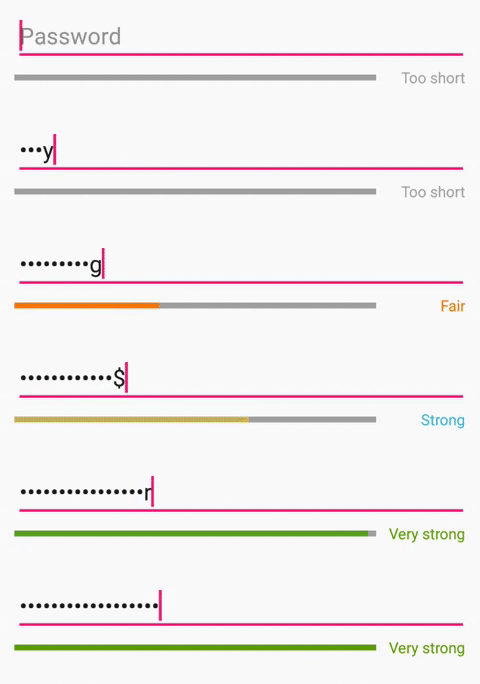 6 |
7 | ## Usage
8 |
9 | **Project level build.gradle**
10 |
11 | ~~~~gradle
12 | allprojects {
13 | repositories {
14 | mavenCentral()
15 | }
16 | }
17 | ~~~~
18 |
19 | App level build.gradle
20 |
21 | ~~~~gradle
22 | dependencies {
23 | implementation 'nu.aaro.gustav:passwordstrengthmeter:0.4'
24 | }
25 | ~~~~
26 |
27 | ## Examples
28 |
29 | ### XML
30 |
31 | PasswordStrengthMeter can be initialized by defining it in a layout XML file, for example:
32 |
33 | ~~~~xml
34 |
45 | ~~~~
46 |
47 | Then all you have to do is to set it up like this in your activity of fragment
48 |
49 | ~~~~java
50 | PasswordStrengthMeter meter = findViewById(R.id.passwordInputMeter);
51 | meter.setEditText(passwordInputEditText);
52 | ~~~~
53 |
54 | #### XML properties
55 | * **showStrengthBar:** Define whether or not the view should show the strength indicator bar. Default: true
56 | * **strengthBarHeight:** The height of the strength indicator bar. Default: 5dp
57 | * **animateChanges:** Define whether or not the bar should animate changes. Default: true
58 | * **animationDuration:** The duration of the password strength level change animation in ms. Default: 300ms.
59 | * **showStrengthLabel:** Define whether or not the view should show a label which show the current strength level display name. Default: true
60 | * **labelTextSize:** The label text size. Default: 12sp
61 |
62 | ### Java
63 | PasswordStrengthMeter can also be initalized programatically:
64 |
65 | ~~~~java
66 | PasswordStrengthMeter meter = new PasswordStrengthMeter(this);
67 | meter.setEditText(passwordInput);
68 | linearLayout.addView(meter);
69 |
70 | // And some customization can be done by:
71 | meter.setAnimationDuration(300);
72 | meter.setShowStrengthIndicator(true);
73 | meter.setShowStrengthLabel(true);
74 | ~~~~
75 |
76 | ## Customization
77 | Apart from the basic cosmetic customization described above, PasswordStrengthMeter can also be customized in other aspects.
78 |
79 | ### Password strength calculation algorithm
80 |
81 | PasswordStrengthMeter implements a default algorithm for password strength estimation, although it is very basic and should not be considered the main contribution of this library. Instead, I recommend you to implement an algorithm that fits your system the best using the `PasswordStrengthCalculator`interface:
82 |
83 | ~~~~java
84 | meter.setPasswordStrengthCalculator(new PasswordStrengthCalculator() {
85 | @Override
86 | public int calculatePasswordSecurityLevel(String password) {
87 | // Do some calculation and return an int corresponding to the "points" or "level" the user password got
88 | return points;
89 | }
90 |
91 | @Override
92 | public int getMinimumLength() {
93 | // Define the minimum length of a password. Anything below this should always yield a score of 0
94 | return 8;
95 | }
96 |
97 | @Override
98 | public boolean passwordAccepted(int level) {
99 | // Define whether or not the level is an accepted level or not.
100 | return level > 3;
101 | }
102 |
103 | @Override
104 | public void onPasswordAccepted(String password) {
105 | // Called when the password entered meets your requirements of length and strength levels
106 | }
107 | });
108 | ~~~~
109 |
110 | ### Password strength levels
111 |
112 | PasswordStrengthMeter has 5 (or 6 if you count level 0) default password strength levels. These are simply `PasswordStrengthLevel` objects that defines a display name and a color associated with the level. These are stored in an array, where the index corresponds to the numerical "level" or "score" from the password strength calculation algorithm.
113 |
114 | The default levels are defined as follows:
115 |
116 | ~~~~java
117 | PasswordStrengthLevel[] strengthLevels = {
118 | new PasswordStrengthLevel("Too short", android.R.color.darker_gray), // level 0
119 | new PasswordStrengthLevel("Weak", android.R.color.holo_red_dark), // level 1
120 | new PasswordStrengthLevel("Fair", android.R.color.holo_orange_dark), // level 2
121 | new PasswordStrengthLevel("Good", android.R.color.holo_orange_light), // level 3
122 | new PasswordStrengthLevel("Strong", android.R.color.holo_blue_light), // level 4
123 | new PasswordStrengthLevel("Very strong", android.R.color.holo_green_dark)}; // level 5
124 | ~~~~
125 |
126 | These levels can easily be changed by simply creating a similar array and call `setStrengthLevels`:
127 |
128 | ~~~~java
129 | PasswordStrengthMeter meter = new PasswordStrengthMeter(this);
130 | meter.setStrengthLevels(new PasswordStrengthLevel[]{
131 | new PasswordStrengthLevel("Level 0", android.R.color.white),
132 | new PasswordStrengthLevel("Level 1", android.R.color.holo_red_light),
133 | new PasswordStrengthLevel("Level 2", android.R.color.holo_orange_light),
134 | new PasswordStrengthLevel("Level 3", android.R.color.holo_green_light)});
135 | ~~~~
136 |
137 | **NOTE** that for the best result, you should provide the meter with a number of levels that is adapted for the strength estimation algorithm used. I.e. if the algorithm yields a level between 0 and 5 (as the default implementation), you should provide the meter with a total of 6 strength levels.
138 |
139 |
140 |
141 |
142 |
143 |
144 |
145 |
146 |
147 |
--------------------------------------------------------------------------------
/sample/src/main/res/drawable/ic_launcher_background.xml:
--------------------------------------------------------------------------------
1 |
2 |
7 |
10 |
15 |
20 |
25 |
30 |
35 |
40 |
45 |
50 |
55 |
60 |
65 |
70 |
75 |
80 |
85 |
90 |
95 |
100 |
105 |
110 |
115 |
120 |
125 |
130 |
135 |
140 |
145 |
150 |
155 |
160 |
165 |
170 |
171 |
--------------------------------------------------------------------------------
/LICENSE:
--------------------------------------------------------------------------------
1 | Apache License
2 | Version 2.0, January 2004
3 | http://www.apache.org/licenses/
4 |
5 | TERMS AND CONDITIONS FOR USE, REPRODUCTION, AND DISTRIBUTION
6 |
7 | 1. Definitions.
8 |
9 | "License" shall mean the terms and conditions for use, reproduction,
10 | and distribution as defined by Sections 1 through 9 of this document.
11 |
12 | "Licensor" shall mean the copyright owner or entity authorized by
13 | the copyright owner that is granting the License.
14 |
15 | "Legal Entity" shall mean the union of the acting entity and all
16 | other entities that control, are controlled by, or are under common
17 | control with that entity. For the purposes of this definition,
18 | "control" means (i) the power, direct or indirect, to cause the
19 | direction or management of such entity, whether by contract or
20 | otherwise, or (ii) ownership of fifty percent (50%) or more of the
21 | outstanding shares, or (iii) beneficial ownership of such entity.
22 |
23 | "You" (or "Your") shall mean an individual or Legal Entity
24 | exercising permissions granted by this License.
25 |
26 | "Source" form shall mean the preferred form for making modifications,
27 | including but not limited to software source code, documentation
28 | source, and configuration files.
29 |
30 | "Object" form shall mean any form resulting from mechanical
31 | transformation or translation of a Source form, including but
32 | not limited to compiled object code, generated documentation,
33 | and conversions to other media types.
34 |
35 | "Work" shall mean the work of authorship, whether in Source or
36 | Object form, made available under the License, as indicated by a
37 | copyright notice that is included in or attached to the work
38 | (an example is provided in the Appendix below).
39 |
40 | "Derivative Works" shall mean any work, whether in Source or Object
41 | form, that is based on (or derived from) the Work and for which the
42 | editorial revisions, annotations, elaborations, or other modifications
43 | represent, as a whole, an original work of authorship. For the purposes
44 | of this License, Derivative Works shall not include works that remain
45 | separable from, or merely link (or bind by name) to the interfaces of,
46 | the Work and Derivative Works thereof.
47 |
48 | "Contribution" shall mean any work of authorship, including
49 | the original version of the Work and any modifications or additions
50 | to that Work or Derivative Works thereof, that is intentionally
51 | submitted to Licensor for inclusion in the Work by the copyright owner
52 | or by an individual or Legal Entity authorized to submit on behalf of
53 | the copyright owner. For the purposes of this definition, "submitted"
54 | means any form of electronic, verbal, or written communication sent
55 | to the Licensor or its representatives, including but not limited to
56 | communication on electronic mailing lists, source code control systems,
57 | and issue tracking systems that are managed by, or on behalf of, the
58 | Licensor for the purpose of discussing and improving the Work, but
59 | excluding communication that is conspicuously marked or otherwise
60 | designated in writing by the copyright owner as "Not a Contribution."
61 |
62 | "Contributor" shall mean Licensor and any individual or Legal Entity
63 | on behalf of whom a Contribution has been received by Licensor and
64 | subsequently incorporated within the Work.
65 |
66 | 2. Grant of Copyright License. Subject to the terms and conditions of
67 | this License, each Contributor hereby grants to You a perpetual,
68 | worldwide, non-exclusive, no-charge, royalty-free, irrevocable
69 | copyright license to reproduce, prepare Derivative Works of,
70 | publicly display, publicly perform, sublicense, and distribute the
71 | Work and such Derivative Works in Source or Object form.
72 |
73 | 3. Grant of Patent License. Subject to the terms and conditions of
74 | this License, each Contributor hereby grants to You a perpetual,
75 | worldwide, non-exclusive, no-charge, royalty-free, irrevocable
76 | (except as stated in this section) patent license to make, have made,
77 | use, offer to sell, sell, import, and otherwise transfer the Work,
78 | where such license applies only to those patent claims licensable
79 | by such Contributor that are necessarily infringed by their
80 | Contribution(s) alone or by combination of their Contribution(s)
81 | with the Work to which such Contribution(s) was submitted. If You
82 | institute patent litigation against any entity (including a
83 | cross-claim or counterclaim in a lawsuit) alleging that the Work
84 | or a Contribution incorporated within the Work constitutes direct
85 | or contributory patent infringement, then any patent licenses
86 | granted to You under this License for that Work shall terminate
87 | as of the date such litigation is filed.
88 |
89 | 4. Redistribution. You may reproduce and distribute copies of the
90 | Work or Derivative Works thereof in any medium, with or without
91 | modifications, and in Source or Object form, provided that You
92 | meet the following conditions:
93 |
94 | (a) You must give any other recipients of the Work or
95 | Derivative Works a copy of this License; and
96 |
97 | (b) You must cause any modified files to carry prominent notices
98 | stating that You changed the files; and
99 |
100 | (c) You must retain, in the Source form of any Derivative Works
101 | that You distribute, all copyright, patent, trademark, and
102 | attribution notices from the Source form of the Work,
103 | excluding those notices that do not pertain to any part of
104 | the Derivative Works; and
105 |
106 | (d) If the Work includes a "NOTICE" text file as part of its
107 | distribution, then any Derivative Works that You distribute must
108 | include a readable copy of the attribution notices contained
109 | within such NOTICE file, excluding those notices that do not
110 | pertain to any part of the Derivative Works, in at least one
111 | of the following places: within a NOTICE text file distributed
112 | as part of the Derivative Works; within the Source form or
113 | documentation, if provided along with the Derivative Works; or,
114 | within a display generated by the Derivative Works, if and
115 | wherever such third-party notices normally appear. The contents
116 | of the NOTICE file are for informational purposes only and
117 | do not modify the License. You may add Your own attribution
118 | notices within Derivative Works that You distribute, alongside
119 | or as an addendum to the NOTICE text from the Work, provided
120 | that such additional attribution notices cannot be construed
121 | as modifying the License.
122 |
123 | You may add Your own copyright statement to Your modifications and
124 | may provide additional or different license terms and conditions
125 | for use, reproduction, or distribution of Your modifications, or
126 | for any such Derivative Works as a whole, provided Your use,
127 | reproduction, and distribution of the Work otherwise complies with
128 | the conditions stated in this License.
129 |
130 | 5. Submission of Contributions. Unless You explicitly state otherwise,
131 | any Contribution intentionally submitted for inclusion in the Work
132 | by You to the Licensor shall be under the terms and conditions of
133 | this License, without any additional terms or conditions.
134 | Notwithstanding the above, nothing herein shall supersede or modify
135 | the terms of any separate license agreement you may have executed
136 | with Licensor regarding such Contributions.
137 |
138 | 6. Trademarks. This License does not grant permission to use the trade
139 | names, trademarks, service marks, or product names of the Licensor,
140 | except as required for reasonable and customary use in describing the
141 | origin of the Work and reproducing the content of the NOTICE file.
142 |
143 | 7. Disclaimer of Warranty. Unless required by applicable law or
144 | agreed to in writing, Licensor provides the Work (and each
145 | Contributor provides its Contributions) on an "AS IS" BASIS,
146 | WITHOUT WARRANTIES OR CONDITIONS OF ANY KIND, either express or
147 | implied, including, without limitation, any warranties or conditions
148 | of TITLE, NON-INFRINGEMENT, MERCHANTABILITY, or FITNESS FOR A
149 | PARTICULAR PURPOSE. You are solely responsible for determining the
150 | appropriateness of using or redistributing the Work and assume any
151 | risks associated with Your exercise of permissions under this License.
152 |
153 | 8. Limitation of Liability. In no event and under no legal theory,
154 | whether in tort (including negligence), contract, or otherwise,
155 | unless required by applicable law (such as deliberate and grossly
156 | negligent acts) or agreed to in writing, shall any Contributor be
157 | liable to You for damages, including any direct, indirect, special,
158 | incidental, or consequential damages of any character arising as a
159 | result of this License or out of the use or inability to use the
160 | Work (including but not limited to damages for loss of goodwill,
161 | work stoppage, computer failure or malfunction, or any and all
162 | other commercial damages or losses), even if such Contributor
163 | has been advised of the possibility of such damages.
164 |
165 | 9. Accepting Warranty or Additional Liability. While redistributing
166 | the Work or Derivative Works thereof, You may choose to offer,
167 | and charge a fee for, acceptance of support, warranty, indemnity,
168 | or other liability obligations and/or rights consistent with this
169 | License. However, in accepting such obligations, You may act only
170 | on Your own behalf and on Your sole responsibility, not on behalf
171 | of any other Contributor, and only if You agree to indemnify,
172 | defend, and hold each Contributor harmless for any liability
173 | incurred by, or claims asserted against, such Contributor by reason
174 | of your accepting any such warranty or additional liability.
175 |
176 | END OF TERMS AND CONDITIONS
177 |
178 | APPENDIX: How to apply the Apache License to your work.
179 |
180 | To apply the Apache License to your work, attach the following
181 | boilerplate notice, with the fields enclosed by brackets "[]"
182 | replaced with your own identifying information. (Don't include
183 | the brackets!) The text should be enclosed in the appropriate
184 | comment syntax for the file format. We also recommend that a
185 | file or class name and description of purpose be included on the
186 | same "printed page" as the copyright notice for easier
187 | identification within third-party archives.
188 |
189 | Copyright [yyyy] [name of copyright owner]
190 |
191 | Licensed under the Apache License, Version 2.0 (the "License");
192 | you may not use this file except in compliance with the License.
193 | You may obtain a copy of the License at
194 |
195 | http://www.apache.org/licenses/LICENSE-2.0
196 |
197 | Unless required by applicable law or agreed to in writing, software
198 | distributed under the License is distributed on an "AS IS" BASIS,
199 | WITHOUT WARRANTIES OR CONDITIONS OF ANY KIND, either express or implied.
200 | See the License for the specific language governing permissions and
201 | limitations under the License.
202 |
--------------------------------------------------------------------------------
/PassWordStrengthMeter/src/main/java/nu/aaro/gustav/passwordstrengthmeter/PasswordStrengthMeter.java:
--------------------------------------------------------------------------------
1 | package nu.aaro.gustav.passwordstrengthmeter;
2 |
3 | /**
4 | * Created by gustavaaro on 2018-10-04.
5 | */
6 |
7 | import android.content.Context;
8 | import android.content.res.TypedArray;
9 | import android.text.Editable;
10 | import android.text.TextWatcher;
11 | import android.util.AttributeSet;
12 | import android.util.DisplayMetrics;
13 | import android.util.TypedValue;
14 | import android.view.Gravity;
15 | import android.view.View;
16 | import android.view.ViewGroup;
17 | import android.widget.EditText;
18 | import android.widget.LinearLayout;
19 | import android.widget.TextView;
20 |
21 | /**
22 | * Created by gustavaaro on 2016-11-09.
23 | */
24 |
25 | public class PasswordStrengthMeter extends LinearLayout {
26 |
27 | // Meter preferences
28 | private boolean animateChanges = true;
29 | private boolean showStrengthLabel = true;
30 | private boolean showStrengthBar = true;
31 | private int animationDuration = 300;
32 | private float strengthBarHeight;
33 | private float textSize;
34 |
35 | private Context context;
36 | private TextView strengthLabel;
37 | private StrengthIndicatorView strengthIndicatorView;
38 | private TextWatcher textWatcher;
39 | private EditText input;
40 |
41 | public static final int ID_MODIFIER = 321;
42 |
43 | private static String TAG = "PasswordStrengthMeter";
44 | private PasswordStrengthCalculator passwordStrengthCalculator;
45 | private OnPasswordAcceptedListener onPasswordAcceptedListener;
46 |
47 | // The default array with the defined strength display names and colors for the different levels in order
48 | private PasswordStrengthLevel[] strengthLevels = {
49 | new PasswordStrengthLevel("Too short", android.R.color.darker_gray),
50 | new PasswordStrengthLevel("Weak", android.R.color.holo_red_dark),
51 | new PasswordStrengthLevel("Fair", android.R.color.holo_orange_dark),
52 | new PasswordStrengthLevel("Good", android.R.color.holo_orange_light),
53 | new PasswordStrengthLevel("Strong", android.R.color.holo_blue_light),
54 | new PasswordStrengthLevel("Very strong", android.R.color.holo_green_dark)};
55 |
56 |
57 | /**
58 | * Constructor used when created programmatically
59 | *
60 | * @param context the context of the component
61 | */
62 |
63 | public PasswordStrengthMeter(Context context) {
64 | super(context);
65 | this.context = context;
66 | setId(View.generateViewId());
67 | strengthBarHeight = convertDpToPx(5);
68 | textSize = convertDpToPx(14);
69 | initStrengthMeter();
70 | }
71 |
72 | /**
73 | * Constructor used when created from xml.
74 | *
75 | * @param context the context of the component.
76 | * @param attrs the AttributeSet with properties from the xml.
77 | */
78 |
79 | public PasswordStrengthMeter(Context context, AttributeSet attrs) {
80 | super(context, attrs);
81 | this.context = context;
82 |
83 | TypedArray a = context.getTheme().obtainStyledAttributes(
84 | attrs,
85 | R.styleable.PasswordStrengthMeter,
86 | 0, 0);
87 |
88 | try {
89 | showStrengthLabel = a.getBoolean(R.styleable.PasswordStrengthMeter_showStrengthLabel, true);
90 | showStrengthBar = a.getBoolean(R.styleable.PasswordStrengthMeter_showStrengthBar, true);
91 | animateChanges = a.getBoolean(R.styleable.PasswordStrengthMeter_animateChanges, true);
92 | animationDuration = a.getInt(R.styleable.PasswordStrengthMeter_animationDuration, animationDuration);
93 | strengthBarHeight = a.getDimension(R.styleable.PasswordStrengthMeter_strengthBarHeight, convertDpToPx(5));
94 | textSize = a.getDimension(R.styleable.PasswordStrengthMeter_labelTextSize, convertDpToPx(14));
95 | } finally {
96 | a.recycle();
97 | }
98 |
99 | initStrengthMeter();
100 | }
101 |
102 | @Override
103 | public void setOrientation(int orientation) {
104 | super.setOrientation(HORIZONTAL);
105 | }
106 |
107 | /**
108 | * Initializes the view by defining components and laying them out
109 | */
110 |
111 | public void initStrengthMeter() {
112 | setOrientation(HORIZONTAL);
113 | setVerticalGravity(Gravity.CENTER_VERTICAL);
114 | this.setPasswordStrengthCalculator(defaultPassWordStrengthCalculator);
115 |
116 | if (showStrengthBar) {
117 | strengthIndicatorView = new StrengthIndicatorView(context);
118 | strengthIndicatorView.setPasswordStrengthLevels(strengthLevels);
119 | strengthIndicatorView.setAnimDuration(animationDuration);
120 | strengthIndicatorView.setAnimate(animateChanges);
121 | strengthIndicatorView.setHeight((int) strengthBarHeight);
122 | strengthIndicatorView.setId(View.generateViewId());
123 | addView(strengthIndicatorView);
124 | }
125 |
126 | if (showStrengthLabel) {
127 | strengthLabel = new TextView(context);
128 | strengthLabel.setGravity(Gravity.END);
129 | strengthLabel.setTextSize(TypedValue.COMPLEX_UNIT_PX, textSize);
130 | addView(strengthLabel);
131 | strengthLabel.setMinWidth(getMaxWidth());
132 | strengthLabel.setText(strengthLevels[0].getDisplayName());
133 | strengthLabel.setTextColor(getResources().getColor(strengthLevels[0].getIndicatorColor()));
134 | strengthLabel.setId(View.generateViewId());
135 | }
136 | setLayoutParams();
137 |
138 | textWatcher = new TextWatcher() {
139 | @Override
140 | public void beforeTextChanged(CharSequence charSequence, int i, int i1, int i2) {
141 |
142 | }
143 |
144 | @Override
145 | public void onTextChanged(CharSequence charSequence, int i, int i1, int i2) {
146 |
147 | }
148 |
149 | @Override
150 | public void afterTextChanged(Editable editable) {
151 | refresh();
152 | }
153 | };
154 | }
155 |
156 | /**
157 | * Set animation duration for meter change animations
158 | *
159 | * @param animationDuration
160 | */
161 | public void setAnimationDuration(int animationDuration) {
162 | this.animationDuration = animationDuration;
163 | strengthIndicatorView.setAnimDuration(animationDuration);
164 | }
165 |
166 | @Override
167 | protected void onMeasure(int widthMeasureSpec, int heightMeasureSpec) {
168 | setLayoutParams();
169 | super.onMeasure(widthMeasureSpec, heightMeasureSpec);
170 | }
171 |
172 | @Override
173 | protected void onLayout(boolean changed, int l, int t, int r, int b) {
174 | super.onLayout(changed, l, t, r, b);
175 | if (changed) setLayoutParams();
176 | }
177 |
178 |
179 | private void refresh() {
180 | if (input != null) {
181 | int level = normalizeLevel(passwordStrengthCalculator.calculatePasswordSecurityLevel(input.getText().toString()));
182 |
183 | if (this.passwordStrengthCalculator.passwordAccepted(level)) {
184 | this.passwordStrengthCalculator.onPasswordAccepted(input.getText().toString());
185 | if (this.onPasswordAcceptedListener != null) {
186 | onPasswordAcceptedListener.onPasswordAccepted();
187 | }
188 | }
189 |
190 | if (showStrengthBar) {
191 | strengthIndicatorView.setSecurityLevel(normalizeLevel(level), false);
192 | }
193 |
194 | if (showStrengthLabel) {
195 | strengthLabel.setText(strengthLevels[level].getDisplayName());
196 | strengthLabel.setTextColor(getResources().getColor(strengthLevels[level].getIndicatorColor()));
197 | }
198 | }
199 | }
200 |
201 | /**
202 | * Get the maximum width of all level display names
203 | *
204 | * @return the maximum width of the displaynames
205 | */
206 | private int getMaxWidth() {
207 | int max = 0;
208 | strengthLabel.setMinWidth(0);
209 | for (PasswordStrengthLevel level : strengthLevels) {
210 | strengthLabel.setText(level.getDisplayName());
211 | strengthLabel.measure(0, 0);
212 | max = strengthLabel.getMeasuredWidth() > max ? strengthLabel.getMeasuredWidth() : max;
213 | }
214 | return max;
215 | }
216 |
217 |
218 | /**
219 | * Safety methods that normalizes the calculated level to one that is defined. If the strength calculation
220 | * algorithm returns a number that correctly corresponds to the number of levels defined, this won't do anything.
221 | *
222 | * @param level the non normalized strength level
223 | * @return normalized strength level
224 | */
225 | private int normalizeLevel(int level) {
226 | if (level < 0) {
227 | level = 0;
228 | } else if (level >= strengthLevels.length) {
229 | level = strengthLevels.length - 1;
230 | }
231 | return level;
232 | }
233 |
234 | /**
235 | * Calculates the width of the components
236 | */
237 | private void setLayoutParams() {
238 | int labelWidth = 0;
239 | int marginEnd = 0;
240 | int marginStart = 0;
241 | if (showStrengthLabel) {
242 | strengthLabel.measure(0, 0);
243 | labelWidth = strengthLabel.getMeasuredWidth();
244 | marginEnd = convertDpToPx(2);
245 | marginStart = convertDpToPx(10);
246 | LayoutParams labelparams = new LayoutParams(ViewGroup.LayoutParams.MATCH_PARENT, ViewGroup.LayoutParams.WRAP_CONTENT);
247 | labelparams.setMarginEnd(marginEnd);
248 | labelparams.setMarginStart(marginStart);
249 | strengthLabel.setLayoutParams(labelparams);
250 | }
251 |
252 | if (showStrengthBar) {
253 | int indicatorWidth = getWidth() - labelWidth - marginEnd - marginStart;
254 | if (indicatorWidth < 0) indicatorWidth = 0;
255 | LayoutParams indicatorParams = new LayoutParams(indicatorWidth, ViewGroup.LayoutParams.WRAP_CONTENT);
256 | indicatorParams.setMargins(0, convertDpToPx(8), 0, convertDpToPx(8));
257 | strengthIndicatorView.setLayoutParams(indicatorParams);
258 | }
259 | }
260 |
261 | /**
262 | * Sets the strength levels for the meter, defined by a color and a display name
263 | *
264 | * @param strengthLevels array of PasswordStrengthLevel
265 | */
266 | public void setStrengthLevels(PasswordStrengthLevel[] strengthLevels) {
267 | this.strengthLevels = strengthLevels;
268 | strengthIndicatorView.setPasswordStrengthLevels(strengthLevels);
269 | strengthIndicatorView.invalidate();
270 | strengthLabel.setMinWidth(getMaxWidth());
271 | refresh();
272 | invalidate();
273 | }
274 | /**
275 | Sets a listener for when the password was accepted by the standard rules
276 | */
277 |
278 | public void setOnPasswordAcceptedListener(OnPasswordAcceptedListener onPasswordAcceptedListener) {
279 | this.onPasswordAcceptedListener = onPasswordAcceptedListener;
280 | }
281 |
282 | /**
283 | * Sets whether or not the line indicator should be visible.
284 | *
285 | * @param showStrengthIndicator show strength indicator boolean.
286 | */
287 |
288 | public void setShowStrengthIndicator(boolean showStrengthIndicator) {
289 | showStrengthBar = showStrengthIndicator;
290 | if (showStrengthIndicator) strengthIndicatorView.setVisibility(VISIBLE);
291 | else strengthIndicatorView.setVisibility(GONE);
292 | }
293 |
294 |
295 | public void setEditText(EditText passwordInput) {
296 | passwordInput.addTextChangedListener(textWatcher);
297 | this.input = passwordInput;
298 | }
299 |
300 | /**
301 | * Sets whether or not the text indicator should be visible.
302 | *
303 | * @param showStrengthLabel show text indicator boolean.
304 | */
305 |
306 | public void setShowStrengthLabel(boolean showStrengthLabel) {
307 | this.showStrengthLabel = showStrengthLabel;
308 | if (showStrengthLabel) strengthLabel.setVisibility(VISIBLE);
309 | else strengthLabel.setVisibility(GONE);
310 | }
311 |
312 |
313 | /**
314 | * Sets the handler responsible for the strength-algorithm. The default value is
315 | * this class itself.
316 | *
317 | * @param passwordStrengthCalculator handler responsible for calculations and requirements.
318 | */
319 |
320 | public void setPasswordStrengthCalculator(PasswordStrengthCalculator passwordStrengthCalculator) {
321 | this.passwordStrengthCalculator = passwordStrengthCalculator;
322 | }
323 |
324 |
325 | /**
326 | * Default algorithm for calculating password strength, providing 5 basic strength levels
327 | * NOTE: This is a very basic algorithm and you are strongly advised to implement one customized to your needs
328 | */
329 |
330 | private PasswordStrengthCalculator defaultPassWordStrengthCalculator = new PasswordStrengthCalculator() {
331 | @Override
332 | public int calculatePasswordSecurityLevel(String password) {
333 | int level = 0;
334 | int minLength = getMinimumLength();
335 |
336 | // Checks if password meets minimum length
337 | if (password.length() < minLength) {
338 | return 0;
339 | } else {
340 | ++level;
341 | }
342 |
343 | // Give level for extra long password
344 | if (password.length() >= (minLength * (3.0 / 2))) ++level;
345 |
346 | boolean hasUppercase = !password.equals(password.toLowerCase());
347 | boolean hasLowercase = !password.equals(password.toUpperCase());
348 |
349 | // Give level for password containing both upper and lower case letters
350 | if (hasLowercase && hasUppercase) ++level;
351 |
352 | // Give level for password containing digits
353 | boolean hasNumber = password.matches(".*\\d.*");
354 | if (hasNumber) ++level;
355 |
356 | // Give level for password containing special characters
357 | boolean hasSpecial = password.matches(".*[!@#€£©§|≈$%^&*].*");
358 | if (hasSpecial) ++level;
359 |
360 | return level;
361 | }
362 |
363 | @Override
364 | public int getMinimumLength() {
365 | return 8;
366 | }
367 |
368 | @Override
369 | public boolean passwordAccepted(int level) {
370 | return level > 0;
371 | }
372 |
373 | @Override
374 | public void onPasswordAccepted(String password) {
375 |
376 | }
377 | };
378 |
379 | /**
380 | * Convinience method for calculating dp values to pixel values
381 | *
382 | * @param dp the value in dp
383 | * @return the value in px
384 | */
385 | private int convertDpToPx(int dp) {
386 | DisplayMetrics displayMetrics = context.getResources().getDisplayMetrics();
387 | return Math.round(dp * (displayMetrics.xdpi / DisplayMetrics.DENSITY_DEFAULT));
388 | }
389 |
390 |
391 | }
--------------------------------------------------------------------------------
6 |
7 | ## Usage
8 |
9 | **Project level build.gradle**
10 |
11 | ~~~~gradle
12 | allprojects {
13 | repositories {
14 | mavenCentral()
15 | }
16 | }
17 | ~~~~
18 |
19 | App level build.gradle
20 |
21 | ~~~~gradle
22 | dependencies {
23 | implementation 'nu.aaro.gustav:passwordstrengthmeter:0.4'
24 | }
25 | ~~~~
26 |
27 | ## Examples
28 |
29 | ### XML
30 |
31 | PasswordStrengthMeter can be initialized by defining it in a layout XML file, for example:
32 |
33 | ~~~~xml
34 |
45 | ~~~~
46 |
47 | Then all you have to do is to set it up like this in your activity of fragment
48 |
49 | ~~~~java
50 | PasswordStrengthMeter meter = findViewById(R.id.passwordInputMeter);
51 | meter.setEditText(passwordInputEditText);
52 | ~~~~
53 |
54 | #### XML properties
55 | * **showStrengthBar:** Define whether or not the view should show the strength indicator bar. Default: true
56 | * **strengthBarHeight:** The height of the strength indicator bar. Default: 5dp
57 | * **animateChanges:** Define whether or not the bar should animate changes. Default: true
58 | * **animationDuration:** The duration of the password strength level change animation in ms. Default: 300ms.
59 | * **showStrengthLabel:** Define whether or not the view should show a label which show the current strength level display name. Default: true
60 | * **labelTextSize:** The label text size. Default: 12sp
61 |
62 | ### Java
63 | PasswordStrengthMeter can also be initalized programatically:
64 |
65 | ~~~~java
66 | PasswordStrengthMeter meter = new PasswordStrengthMeter(this);
67 | meter.setEditText(passwordInput);
68 | linearLayout.addView(meter);
69 |
70 | // And some customization can be done by:
71 | meter.setAnimationDuration(300);
72 | meter.setShowStrengthIndicator(true);
73 | meter.setShowStrengthLabel(true);
74 | ~~~~
75 |
76 | ## Customization
77 | Apart from the basic cosmetic customization described above, PasswordStrengthMeter can also be customized in other aspects.
78 |
79 | ### Password strength calculation algorithm
80 |
81 | PasswordStrengthMeter implements a default algorithm for password strength estimation, although it is very basic and should not be considered the main contribution of this library. Instead, I recommend you to implement an algorithm that fits your system the best using the `PasswordStrengthCalculator`interface:
82 |
83 | ~~~~java
84 | meter.setPasswordStrengthCalculator(new PasswordStrengthCalculator() {
85 | @Override
86 | public int calculatePasswordSecurityLevel(String password) {
87 | // Do some calculation and return an int corresponding to the "points" or "level" the user password got
88 | return points;
89 | }
90 |
91 | @Override
92 | public int getMinimumLength() {
93 | // Define the minimum length of a password. Anything below this should always yield a score of 0
94 | return 8;
95 | }
96 |
97 | @Override
98 | public boolean passwordAccepted(int level) {
99 | // Define whether or not the level is an accepted level or not.
100 | return level > 3;
101 | }
102 |
103 | @Override
104 | public void onPasswordAccepted(String password) {
105 | // Called when the password entered meets your requirements of length and strength levels
106 | }
107 | });
108 | ~~~~
109 |
110 | ### Password strength levels
111 |
112 | PasswordStrengthMeter has 5 (or 6 if you count level 0) default password strength levels. These are simply `PasswordStrengthLevel` objects that defines a display name and a color associated with the level. These are stored in an array, where the index corresponds to the numerical "level" or "score" from the password strength calculation algorithm.
113 |
114 | The default levels are defined as follows:
115 |
116 | ~~~~java
117 | PasswordStrengthLevel[] strengthLevels = {
118 | new PasswordStrengthLevel("Too short", android.R.color.darker_gray), // level 0
119 | new PasswordStrengthLevel("Weak", android.R.color.holo_red_dark), // level 1
120 | new PasswordStrengthLevel("Fair", android.R.color.holo_orange_dark), // level 2
121 | new PasswordStrengthLevel("Good", android.R.color.holo_orange_light), // level 3
122 | new PasswordStrengthLevel("Strong", android.R.color.holo_blue_light), // level 4
123 | new PasswordStrengthLevel("Very strong", android.R.color.holo_green_dark)}; // level 5
124 | ~~~~
125 |
126 | These levels can easily be changed by simply creating a similar array and call `setStrengthLevels`:
127 |
128 | ~~~~java
129 | PasswordStrengthMeter meter = new PasswordStrengthMeter(this);
130 | meter.setStrengthLevels(new PasswordStrengthLevel[]{
131 | new PasswordStrengthLevel("Level 0", android.R.color.white),
132 | new PasswordStrengthLevel("Level 1", android.R.color.holo_red_light),
133 | new PasswordStrengthLevel("Level 2", android.R.color.holo_orange_light),
134 | new PasswordStrengthLevel("Level 3", android.R.color.holo_green_light)});
135 | ~~~~
136 |
137 | **NOTE** that for the best result, you should provide the meter with a number of levels that is adapted for the strength estimation algorithm used. I.e. if the algorithm yields a level between 0 and 5 (as the default implementation), you should provide the meter with a total of 6 strength levels.
138 |
139 |
140 |
141 |
142 |
143 |
144 |
145 |
146 |
147 |
--------------------------------------------------------------------------------
/sample/src/main/res/drawable/ic_launcher_background.xml:
--------------------------------------------------------------------------------
1 |
2 |
7 |
10 |
15 |
20 |
25 |
30 |
35 |
40 |
45 |
50 |
55 |
60 |
65 |
70 |
75 |
80 |
85 |
90 |
95 |
100 |
105 |
110 |
115 |
120 |
125 |
130 |
135 |
140 |
145 |
150 |
155 |
160 |
165 |
170 |
171 |
--------------------------------------------------------------------------------
/LICENSE:
--------------------------------------------------------------------------------
1 | Apache License
2 | Version 2.0, January 2004
3 | http://www.apache.org/licenses/
4 |
5 | TERMS AND CONDITIONS FOR USE, REPRODUCTION, AND DISTRIBUTION
6 |
7 | 1. Definitions.
8 |
9 | "License" shall mean the terms and conditions for use, reproduction,
10 | and distribution as defined by Sections 1 through 9 of this document.
11 |
12 | "Licensor" shall mean the copyright owner or entity authorized by
13 | the copyright owner that is granting the License.
14 |
15 | "Legal Entity" shall mean the union of the acting entity and all
16 | other entities that control, are controlled by, or are under common
17 | control with that entity. For the purposes of this definition,
18 | "control" means (i) the power, direct or indirect, to cause the
19 | direction or management of such entity, whether by contract or
20 | otherwise, or (ii) ownership of fifty percent (50%) or more of the
21 | outstanding shares, or (iii) beneficial ownership of such entity.
22 |
23 | "You" (or "Your") shall mean an individual or Legal Entity
24 | exercising permissions granted by this License.
25 |
26 | "Source" form shall mean the preferred form for making modifications,
27 | including but not limited to software source code, documentation
28 | source, and configuration files.
29 |
30 | "Object" form shall mean any form resulting from mechanical
31 | transformation or translation of a Source form, including but
32 | not limited to compiled object code, generated documentation,
33 | and conversions to other media types.
34 |
35 | "Work" shall mean the work of authorship, whether in Source or
36 | Object form, made available under the License, as indicated by a
37 | copyright notice that is included in or attached to the work
38 | (an example is provided in the Appendix below).
39 |
40 | "Derivative Works" shall mean any work, whether in Source or Object
41 | form, that is based on (or derived from) the Work and for which the
42 | editorial revisions, annotations, elaborations, or other modifications
43 | represent, as a whole, an original work of authorship. For the purposes
44 | of this License, Derivative Works shall not include works that remain
45 | separable from, or merely link (or bind by name) to the interfaces of,
46 | the Work and Derivative Works thereof.
47 |
48 | "Contribution" shall mean any work of authorship, including
49 | the original version of the Work and any modifications or additions
50 | to that Work or Derivative Works thereof, that is intentionally
51 | submitted to Licensor for inclusion in the Work by the copyright owner
52 | or by an individual or Legal Entity authorized to submit on behalf of
53 | the copyright owner. For the purposes of this definition, "submitted"
54 | means any form of electronic, verbal, or written communication sent
55 | to the Licensor or its representatives, including but not limited to
56 | communication on electronic mailing lists, source code control systems,
57 | and issue tracking systems that are managed by, or on behalf of, the
58 | Licensor for the purpose of discussing and improving the Work, but
59 | excluding communication that is conspicuously marked or otherwise
60 | designated in writing by the copyright owner as "Not a Contribution."
61 |
62 | "Contributor" shall mean Licensor and any individual or Legal Entity
63 | on behalf of whom a Contribution has been received by Licensor and
64 | subsequently incorporated within the Work.
65 |
66 | 2. Grant of Copyright License. Subject to the terms and conditions of
67 | this License, each Contributor hereby grants to You a perpetual,
68 | worldwide, non-exclusive, no-charge, royalty-free, irrevocable
69 | copyright license to reproduce, prepare Derivative Works of,
70 | publicly display, publicly perform, sublicense, and distribute the
71 | Work and such Derivative Works in Source or Object form.
72 |
73 | 3. Grant of Patent License. Subject to the terms and conditions of
74 | this License, each Contributor hereby grants to You a perpetual,
75 | worldwide, non-exclusive, no-charge, royalty-free, irrevocable
76 | (except as stated in this section) patent license to make, have made,
77 | use, offer to sell, sell, import, and otherwise transfer the Work,
78 | where such license applies only to those patent claims licensable
79 | by such Contributor that are necessarily infringed by their
80 | Contribution(s) alone or by combination of their Contribution(s)
81 | with the Work to which such Contribution(s) was submitted. If You
82 | institute patent litigation against any entity (including a
83 | cross-claim or counterclaim in a lawsuit) alleging that the Work
84 | or a Contribution incorporated within the Work constitutes direct
85 | or contributory patent infringement, then any patent licenses
86 | granted to You under this License for that Work shall terminate
87 | as of the date such litigation is filed.
88 |
89 | 4. Redistribution. You may reproduce and distribute copies of the
90 | Work or Derivative Works thereof in any medium, with or without
91 | modifications, and in Source or Object form, provided that You
92 | meet the following conditions:
93 |
94 | (a) You must give any other recipients of the Work or
95 | Derivative Works a copy of this License; and
96 |
97 | (b) You must cause any modified files to carry prominent notices
98 | stating that You changed the files; and
99 |
100 | (c) You must retain, in the Source form of any Derivative Works
101 | that You distribute, all copyright, patent, trademark, and
102 | attribution notices from the Source form of the Work,
103 | excluding those notices that do not pertain to any part of
104 | the Derivative Works; and
105 |
106 | (d) If the Work includes a "NOTICE" text file as part of its
107 | distribution, then any Derivative Works that You distribute must
108 | include a readable copy of the attribution notices contained
109 | within such NOTICE file, excluding those notices that do not
110 | pertain to any part of the Derivative Works, in at least one
111 | of the following places: within a NOTICE text file distributed
112 | as part of the Derivative Works; within the Source form or
113 | documentation, if provided along with the Derivative Works; or,
114 | within a display generated by the Derivative Works, if and
115 | wherever such third-party notices normally appear. The contents
116 | of the NOTICE file are for informational purposes only and
117 | do not modify the License. You may add Your own attribution
118 | notices within Derivative Works that You distribute, alongside
119 | or as an addendum to the NOTICE text from the Work, provided
120 | that such additional attribution notices cannot be construed
121 | as modifying the License.
122 |
123 | You may add Your own copyright statement to Your modifications and
124 | may provide additional or different license terms and conditions
125 | for use, reproduction, or distribution of Your modifications, or
126 | for any such Derivative Works as a whole, provided Your use,
127 | reproduction, and distribution of the Work otherwise complies with
128 | the conditions stated in this License.
129 |
130 | 5. Submission of Contributions. Unless You explicitly state otherwise,
131 | any Contribution intentionally submitted for inclusion in the Work
132 | by You to the Licensor shall be under the terms and conditions of
133 | this License, without any additional terms or conditions.
134 | Notwithstanding the above, nothing herein shall supersede or modify
135 | the terms of any separate license agreement you may have executed
136 | with Licensor regarding such Contributions.
137 |
138 | 6. Trademarks. This License does not grant permission to use the trade
139 | names, trademarks, service marks, or product names of the Licensor,
140 | except as required for reasonable and customary use in describing the
141 | origin of the Work and reproducing the content of the NOTICE file.
142 |
143 | 7. Disclaimer of Warranty. Unless required by applicable law or
144 | agreed to in writing, Licensor provides the Work (and each
145 | Contributor provides its Contributions) on an "AS IS" BASIS,
146 | WITHOUT WARRANTIES OR CONDITIONS OF ANY KIND, either express or
147 | implied, including, without limitation, any warranties or conditions
148 | of TITLE, NON-INFRINGEMENT, MERCHANTABILITY, or FITNESS FOR A
149 | PARTICULAR PURPOSE. You are solely responsible for determining the
150 | appropriateness of using or redistributing the Work and assume any
151 | risks associated with Your exercise of permissions under this License.
152 |
153 | 8. Limitation of Liability. In no event and under no legal theory,
154 | whether in tort (including negligence), contract, or otherwise,
155 | unless required by applicable law (such as deliberate and grossly
156 | negligent acts) or agreed to in writing, shall any Contributor be
157 | liable to You for damages, including any direct, indirect, special,
158 | incidental, or consequential damages of any character arising as a
159 | result of this License or out of the use or inability to use the
160 | Work (including but not limited to damages for loss of goodwill,
161 | work stoppage, computer failure or malfunction, or any and all
162 | other commercial damages or losses), even if such Contributor
163 | has been advised of the possibility of such damages.
164 |
165 | 9. Accepting Warranty or Additional Liability. While redistributing
166 | the Work or Derivative Works thereof, You may choose to offer,
167 | and charge a fee for, acceptance of support, warranty, indemnity,
168 | or other liability obligations and/or rights consistent with this
169 | License. However, in accepting such obligations, You may act only
170 | on Your own behalf and on Your sole responsibility, not on behalf
171 | of any other Contributor, and only if You agree to indemnify,
172 | defend, and hold each Contributor harmless for any liability
173 | incurred by, or claims asserted against, such Contributor by reason
174 | of your accepting any such warranty or additional liability.
175 |
176 | END OF TERMS AND CONDITIONS
177 |
178 | APPENDIX: How to apply the Apache License to your work.
179 |
180 | To apply the Apache License to your work, attach the following
181 | boilerplate notice, with the fields enclosed by brackets "[]"
182 | replaced with your own identifying information. (Don't include
183 | the brackets!) The text should be enclosed in the appropriate
184 | comment syntax for the file format. We also recommend that a
185 | file or class name and description of purpose be included on the
186 | same "printed page" as the copyright notice for easier
187 | identification within third-party archives.
188 |
189 | Copyright [yyyy] [name of copyright owner]
190 |
191 | Licensed under the Apache License, Version 2.0 (the "License");
192 | you may not use this file except in compliance with the License.
193 | You may obtain a copy of the License at
194 |
195 | http://www.apache.org/licenses/LICENSE-2.0
196 |
197 | Unless required by applicable law or agreed to in writing, software
198 | distributed under the License is distributed on an "AS IS" BASIS,
199 | WITHOUT WARRANTIES OR CONDITIONS OF ANY KIND, either express or implied.
200 | See the License for the specific language governing permissions and
201 | limitations under the License.
202 |
--------------------------------------------------------------------------------
/PassWordStrengthMeter/src/main/java/nu/aaro/gustav/passwordstrengthmeter/PasswordStrengthMeter.java:
--------------------------------------------------------------------------------
1 | package nu.aaro.gustav.passwordstrengthmeter;
2 |
3 | /**
4 | * Created by gustavaaro on 2018-10-04.
5 | */
6 |
7 | import android.content.Context;
8 | import android.content.res.TypedArray;
9 | import android.text.Editable;
10 | import android.text.TextWatcher;
11 | import android.util.AttributeSet;
12 | import android.util.DisplayMetrics;
13 | import android.util.TypedValue;
14 | import android.view.Gravity;
15 | import android.view.View;
16 | import android.view.ViewGroup;
17 | import android.widget.EditText;
18 | import android.widget.LinearLayout;
19 | import android.widget.TextView;
20 |
21 | /**
22 | * Created by gustavaaro on 2016-11-09.
23 | */
24 |
25 | public class PasswordStrengthMeter extends LinearLayout {
26 |
27 | // Meter preferences
28 | private boolean animateChanges = true;
29 | private boolean showStrengthLabel = true;
30 | private boolean showStrengthBar = true;
31 | private int animationDuration = 300;
32 | private float strengthBarHeight;
33 | private float textSize;
34 |
35 | private Context context;
36 | private TextView strengthLabel;
37 | private StrengthIndicatorView strengthIndicatorView;
38 | private TextWatcher textWatcher;
39 | private EditText input;
40 |
41 | public static final int ID_MODIFIER = 321;
42 |
43 | private static String TAG = "PasswordStrengthMeter";
44 | private PasswordStrengthCalculator passwordStrengthCalculator;
45 | private OnPasswordAcceptedListener onPasswordAcceptedListener;
46 |
47 | // The default array with the defined strength display names and colors for the different levels in order
48 | private PasswordStrengthLevel[] strengthLevels = {
49 | new PasswordStrengthLevel("Too short", android.R.color.darker_gray),
50 | new PasswordStrengthLevel("Weak", android.R.color.holo_red_dark),
51 | new PasswordStrengthLevel("Fair", android.R.color.holo_orange_dark),
52 | new PasswordStrengthLevel("Good", android.R.color.holo_orange_light),
53 | new PasswordStrengthLevel("Strong", android.R.color.holo_blue_light),
54 | new PasswordStrengthLevel("Very strong", android.R.color.holo_green_dark)};
55 |
56 |
57 | /**
58 | * Constructor used when created programmatically
59 | *
60 | * @param context the context of the component
61 | */
62 |
63 | public PasswordStrengthMeter(Context context) {
64 | super(context);
65 | this.context = context;
66 | setId(View.generateViewId());
67 | strengthBarHeight = convertDpToPx(5);
68 | textSize = convertDpToPx(14);
69 | initStrengthMeter();
70 | }
71 |
72 | /**
73 | * Constructor used when created from xml.
74 | *
75 | * @param context the context of the component.
76 | * @param attrs the AttributeSet with properties from the xml.
77 | */
78 |
79 | public PasswordStrengthMeter(Context context, AttributeSet attrs) {
80 | super(context, attrs);
81 | this.context = context;
82 |
83 | TypedArray a = context.getTheme().obtainStyledAttributes(
84 | attrs,
85 | R.styleable.PasswordStrengthMeter,
86 | 0, 0);
87 |
88 | try {
89 | showStrengthLabel = a.getBoolean(R.styleable.PasswordStrengthMeter_showStrengthLabel, true);
90 | showStrengthBar = a.getBoolean(R.styleable.PasswordStrengthMeter_showStrengthBar, true);
91 | animateChanges = a.getBoolean(R.styleable.PasswordStrengthMeter_animateChanges, true);
92 | animationDuration = a.getInt(R.styleable.PasswordStrengthMeter_animationDuration, animationDuration);
93 | strengthBarHeight = a.getDimension(R.styleable.PasswordStrengthMeter_strengthBarHeight, convertDpToPx(5));
94 | textSize = a.getDimension(R.styleable.PasswordStrengthMeter_labelTextSize, convertDpToPx(14));
95 | } finally {
96 | a.recycle();
97 | }
98 |
99 | initStrengthMeter();
100 | }
101 |
102 | @Override
103 | public void setOrientation(int orientation) {
104 | super.setOrientation(HORIZONTAL);
105 | }
106 |
107 | /**
108 | * Initializes the view by defining components and laying them out
109 | */
110 |
111 | public void initStrengthMeter() {
112 | setOrientation(HORIZONTAL);
113 | setVerticalGravity(Gravity.CENTER_VERTICAL);
114 | this.setPasswordStrengthCalculator(defaultPassWordStrengthCalculator);
115 |
116 | if (showStrengthBar) {
117 | strengthIndicatorView = new StrengthIndicatorView(context);
118 | strengthIndicatorView.setPasswordStrengthLevels(strengthLevels);
119 | strengthIndicatorView.setAnimDuration(animationDuration);
120 | strengthIndicatorView.setAnimate(animateChanges);
121 | strengthIndicatorView.setHeight((int) strengthBarHeight);
122 | strengthIndicatorView.setId(View.generateViewId());
123 | addView(strengthIndicatorView);
124 | }
125 |
126 | if (showStrengthLabel) {
127 | strengthLabel = new TextView(context);
128 | strengthLabel.setGravity(Gravity.END);
129 | strengthLabel.setTextSize(TypedValue.COMPLEX_UNIT_PX, textSize);
130 | addView(strengthLabel);
131 | strengthLabel.setMinWidth(getMaxWidth());
132 | strengthLabel.setText(strengthLevels[0].getDisplayName());
133 | strengthLabel.setTextColor(getResources().getColor(strengthLevels[0].getIndicatorColor()));
134 | strengthLabel.setId(View.generateViewId());
135 | }
136 | setLayoutParams();
137 |
138 | textWatcher = new TextWatcher() {
139 | @Override
140 | public void beforeTextChanged(CharSequence charSequence, int i, int i1, int i2) {
141 |
142 | }
143 |
144 | @Override
145 | public void onTextChanged(CharSequence charSequence, int i, int i1, int i2) {
146 |
147 | }
148 |
149 | @Override
150 | public void afterTextChanged(Editable editable) {
151 | refresh();
152 | }
153 | };
154 | }
155 |
156 | /**
157 | * Set animation duration for meter change animations
158 | *
159 | * @param animationDuration
160 | */
161 | public void setAnimationDuration(int animationDuration) {
162 | this.animationDuration = animationDuration;
163 | strengthIndicatorView.setAnimDuration(animationDuration);
164 | }
165 |
166 | @Override
167 | protected void onMeasure(int widthMeasureSpec, int heightMeasureSpec) {
168 | setLayoutParams();
169 | super.onMeasure(widthMeasureSpec, heightMeasureSpec);
170 | }
171 |
172 | @Override
173 | protected void onLayout(boolean changed, int l, int t, int r, int b) {
174 | super.onLayout(changed, l, t, r, b);
175 | if (changed) setLayoutParams();
176 | }
177 |
178 |
179 | private void refresh() {
180 | if (input != null) {
181 | int level = normalizeLevel(passwordStrengthCalculator.calculatePasswordSecurityLevel(input.getText().toString()));
182 |
183 | if (this.passwordStrengthCalculator.passwordAccepted(level)) {
184 | this.passwordStrengthCalculator.onPasswordAccepted(input.getText().toString());
185 | if (this.onPasswordAcceptedListener != null) {
186 | onPasswordAcceptedListener.onPasswordAccepted();
187 | }
188 | }
189 |
190 | if (showStrengthBar) {
191 | strengthIndicatorView.setSecurityLevel(normalizeLevel(level), false);
192 | }
193 |
194 | if (showStrengthLabel) {
195 | strengthLabel.setText(strengthLevels[level].getDisplayName());
196 | strengthLabel.setTextColor(getResources().getColor(strengthLevels[level].getIndicatorColor()));
197 | }
198 | }
199 | }
200 |
201 | /**
202 | * Get the maximum width of all level display names
203 | *
204 | * @return the maximum width of the displaynames
205 | */
206 | private int getMaxWidth() {
207 | int max = 0;
208 | strengthLabel.setMinWidth(0);
209 | for (PasswordStrengthLevel level : strengthLevels) {
210 | strengthLabel.setText(level.getDisplayName());
211 | strengthLabel.measure(0, 0);
212 | max = strengthLabel.getMeasuredWidth() > max ? strengthLabel.getMeasuredWidth() : max;
213 | }
214 | return max;
215 | }
216 |
217 |
218 | /**
219 | * Safety methods that normalizes the calculated level to one that is defined. If the strength calculation
220 | * algorithm returns a number that correctly corresponds to the number of levels defined, this won't do anything.
221 | *
222 | * @param level the non normalized strength level
223 | * @return normalized strength level
224 | */
225 | private int normalizeLevel(int level) {
226 | if (level < 0) {
227 | level = 0;
228 | } else if (level >= strengthLevels.length) {
229 | level = strengthLevels.length - 1;
230 | }
231 | return level;
232 | }
233 |
234 | /**
235 | * Calculates the width of the components
236 | */
237 | private void setLayoutParams() {
238 | int labelWidth = 0;
239 | int marginEnd = 0;
240 | int marginStart = 0;
241 | if (showStrengthLabel) {
242 | strengthLabel.measure(0, 0);
243 | labelWidth = strengthLabel.getMeasuredWidth();
244 | marginEnd = convertDpToPx(2);
245 | marginStart = convertDpToPx(10);
246 | LayoutParams labelparams = new LayoutParams(ViewGroup.LayoutParams.MATCH_PARENT, ViewGroup.LayoutParams.WRAP_CONTENT);
247 | labelparams.setMarginEnd(marginEnd);
248 | labelparams.setMarginStart(marginStart);
249 | strengthLabel.setLayoutParams(labelparams);
250 | }
251 |
252 | if (showStrengthBar) {
253 | int indicatorWidth = getWidth() - labelWidth - marginEnd - marginStart;
254 | if (indicatorWidth < 0) indicatorWidth = 0;
255 | LayoutParams indicatorParams = new LayoutParams(indicatorWidth, ViewGroup.LayoutParams.WRAP_CONTENT);
256 | indicatorParams.setMargins(0, convertDpToPx(8), 0, convertDpToPx(8));
257 | strengthIndicatorView.setLayoutParams(indicatorParams);
258 | }
259 | }
260 |
261 | /**
262 | * Sets the strength levels for the meter, defined by a color and a display name
263 | *
264 | * @param strengthLevels array of PasswordStrengthLevel
265 | */
266 | public void setStrengthLevels(PasswordStrengthLevel[] strengthLevels) {
267 | this.strengthLevels = strengthLevels;
268 | strengthIndicatorView.setPasswordStrengthLevels(strengthLevels);
269 | strengthIndicatorView.invalidate();
270 | strengthLabel.setMinWidth(getMaxWidth());
271 | refresh();
272 | invalidate();
273 | }
274 | /**
275 | Sets a listener for when the password was accepted by the standard rules
276 | */
277 |
278 | public void setOnPasswordAcceptedListener(OnPasswordAcceptedListener onPasswordAcceptedListener) {
279 | this.onPasswordAcceptedListener = onPasswordAcceptedListener;
280 | }
281 |
282 | /**
283 | * Sets whether or not the line indicator should be visible.
284 | *
285 | * @param showStrengthIndicator show strength indicator boolean.
286 | */
287 |
288 | public void setShowStrengthIndicator(boolean showStrengthIndicator) {
289 | showStrengthBar = showStrengthIndicator;
290 | if (showStrengthIndicator) strengthIndicatorView.setVisibility(VISIBLE);
291 | else strengthIndicatorView.setVisibility(GONE);
292 | }
293 |
294 |
295 | public void setEditText(EditText passwordInput) {
296 | passwordInput.addTextChangedListener(textWatcher);
297 | this.input = passwordInput;
298 | }
299 |
300 | /**
301 | * Sets whether or not the text indicator should be visible.
302 | *
303 | * @param showStrengthLabel show text indicator boolean.
304 | */
305 |
306 | public void setShowStrengthLabel(boolean showStrengthLabel) {
307 | this.showStrengthLabel = showStrengthLabel;
308 | if (showStrengthLabel) strengthLabel.setVisibility(VISIBLE);
309 | else strengthLabel.setVisibility(GONE);
310 | }
311 |
312 |
313 | /**
314 | * Sets the handler responsible for the strength-algorithm. The default value is
315 | * this class itself.
316 | *
317 | * @param passwordStrengthCalculator handler responsible for calculations and requirements.
318 | */
319 |
320 | public void setPasswordStrengthCalculator(PasswordStrengthCalculator passwordStrengthCalculator) {
321 | this.passwordStrengthCalculator = passwordStrengthCalculator;
322 | }
323 |
324 |
325 | /**
326 | * Default algorithm for calculating password strength, providing 5 basic strength levels
327 | * NOTE: This is a very basic algorithm and you are strongly advised to implement one customized to your needs
328 | */
329 |
330 | private PasswordStrengthCalculator defaultPassWordStrengthCalculator = new PasswordStrengthCalculator() {
331 | @Override
332 | public int calculatePasswordSecurityLevel(String password) {
333 | int level = 0;
334 | int minLength = getMinimumLength();
335 |
336 | // Checks if password meets minimum length
337 | if (password.length() < minLength) {
338 | return 0;
339 | } else {
340 | ++level;
341 | }
342 |
343 | // Give level for extra long password
344 | if (password.length() >= (minLength * (3.0 / 2))) ++level;
345 |
346 | boolean hasUppercase = !password.equals(password.toLowerCase());
347 | boolean hasLowercase = !password.equals(password.toUpperCase());
348 |
349 | // Give level for password containing both upper and lower case letters
350 | if (hasLowercase && hasUppercase) ++level;
351 |
352 | // Give level for password containing digits
353 | boolean hasNumber = password.matches(".*\\d.*");
354 | if (hasNumber) ++level;
355 |
356 | // Give level for password containing special characters
357 | boolean hasSpecial = password.matches(".*[!@#€£©§|≈$%^&*].*");
358 | if (hasSpecial) ++level;
359 |
360 | return level;
361 | }
362 |
363 | @Override
364 | public int getMinimumLength() {
365 | return 8;
366 | }
367 |
368 | @Override
369 | public boolean passwordAccepted(int level) {
370 | return level > 0;
371 | }
372 |
373 | @Override
374 | public void onPasswordAccepted(String password) {
375 |
376 | }
377 | };
378 |
379 | /**
380 | * Convinience method for calculating dp values to pixel values
381 | *
382 | * @param dp the value in dp
383 | * @return the value in px
384 | */
385 | private int convertDpToPx(int dp) {
386 | DisplayMetrics displayMetrics = context.getResources().getDisplayMetrics();
387 | return Math.round(dp * (displayMetrics.xdpi / DisplayMetrics.DENSITY_DEFAULT));
388 | }
389 |
390 |
391 | }
--------------------------------------------------------------------------------