This init script is supposed to be placed
6 | under /etc/init.d/touchui. Use update-rc.d touchui defaults to
7 | create the required links. touchui-init will try to run a
8 | file named /root/touchui/touchui.
9 |
10 |
touchui
11 |
This shell script is supposed to be placed under
12 | /root/touchui/touchui and will be called by
13 | touchui-init. It will launch
14 | /root/touchui/launcher.py and thus expects the whole
15 | touchui directory to be placed under /root.
16 |
--------------------------------------------------------------------------------
/appstore/packages/00packages:
--------------------------------------------------------------------------------
1 | ; list of packages
2 | ; this file contains all manifests
3 |
4 | [clock]
5 | name: Clock
6 | category: Tools
7 | icon: icon.png
8 | desc: A simple clock app
9 | exec: clock.py
10 | managed: yes
11 | uuid: 4fdef96d-4a27-4209-85c6-7786110d9f2f
12 | version: 1.0
13 | firmware: 0.9
14 |
15 | [calc]
16 | name: Calc
17 | category: Tools
18 | icon: icon.png
19 | desc: A simple calculator
20 | exec: calc.py
21 | managed: yes
22 | uuid: 2093ec3e-e85f-47cb-aebc-3809b482d145
23 | version: 1.0
24 | firmware: 0.9
25 |
26 | [widgetgallery]
27 | name: Gallery
28 | category: Tests
29 | icon: icon.png
30 | desc: QT Widgets gallery
31 | exec: widgetgallery.py
32 | managed: yes
33 | uuid: 94cac4ea-14ef-49a2-a000-20ca5720fb78
34 | version: 1.0
35 | firmware: 0.9
36 |
--------------------------------------------------------------------------------
/appstore/README.md:
--------------------------------------------------------------------------------
1 | # TouchGUI app store
2 |
3 | This repository contains apps for the TouchGUI. The store app uses
4 | this as a default to download apps.
5 |
6 | App development tutorials can be found in the [wiki](https://github.com/ftCommunity/ftcommunity-TXT/wiki) of the [ftcommunity-TXT](https://github.com/ftCommunity).
7 |
8 | These tutorials use the ```Txt``` prefix for all function and class names as they were written for the Fischertechnik TXT. The TouchUI uses ```Touch``` instead. So e.g. if the tutorials mention the class ```TxtApplication``` you'll have to use ```TouchApplication``` instead.
9 |
10 | - [Tutorial 1: The first app](https://github.com/ftCommunity/ftcommunity-TXT/wiki/Tutorial-1%3A-The-first-app)
11 | - [Tutorial 2: Development](https://github.com/ftCommunity/ftcommunity-TXT/wiki/Tutorial-2%3A-Development)
12 |
--------------------------------------------------------------------------------
/appstore/packages/mkindex.py:
--------------------------------------------------------------------------------
1 | #! /usr/bin/env python3
2 | # -*- coding: utf-8 -*-
3 | #
4 |
5 | # Improvements:
6 | # - run manifest through configparser
7 | # - only transfer entries needed for the store app
8 | # - make sure no mandatory entry is missing
9 | # - check if zip file needs to be rebuild
10 | # - rebuild zip file automatically
11 |
12 | import sys
13 | import os
14 |
15 | print("Building package index ...")
16 |
17 | pkgfile = open("00packages", "w")
18 | pkgfile.write("; list of packages\n")
19 | pkgfile.write("; this file contains all manifests\n")
20 |
21 | # scan the directory for app directories
22 | for l in os.listdir("."):
23 | if os.path.isdir(l):
24 | m = os.path.join(l, "manifest")
25 | if os.path.isfile(m):
26 | print("Adding", l, "...")
27 | pkgfile.write("\n")
28 | pkgfile.write("["+l+"]\n")
29 |
30 | # copy manifest contents. Skip [app] entry
31 | f = open(m)
32 | for line in f:
33 | if not "[app]" in line:
34 | pkgfile.write(line)
35 | f.close()
36 |
37 | pkgfile.close()
38 |
--------------------------------------------------------------------------------
/touchui/plugins/kbd.py:
--------------------------------------------------------------------------------
1 | #! /usr/bin/env python3
2 | # -*- coding: utf-8 -*-
3 | # plugin checking for presence of physical keyboard
4 |
5 | import os
6 |
7 | name = "Keyboard"
8 |
9 | def keyboard_present():
10 | try:
11 | for i in os.listdir("/dev/input/by-id"):
12 | if i[-4:] == "-kbd":
13 | return True
14 | except:
15 | pass
16 |
17 | return False
18 |
19 | def icon():
20 | # create icon from png: convert x.png -monochrome x.xpm
21 | icon_data = [ "16 16 2 1 ", " c None", ". c white",
22 | " ",
23 | " ",
24 | " ",
25 | " ",
26 | " ",
27 | " . . . . . . .. ",
28 | " . ",
29 | " .. . . . . . . ",
30 | " ",
31 | " ... . . . . .. ",
32 | " ",
33 | " .. ...... .. ",
34 | " ",
35 | " ",
36 | " ",
37 | " " ]
38 |
39 | if keyboard_present():
40 | return icon_data
41 | else:
42 | return None
43 |
44 | def status():
45 | if keyboard_present():
46 | return "Available"
47 | else:
48 | return "Not available"
49 |
--------------------------------------------------------------------------------
/support/touchui-init:
--------------------------------------------------------------------------------
1 | #! /bin/sh
2 | ### BEGIN INIT INFO
3 | # Provides: touchui
4 | # Should-Start: console-screen kbd acpid dbus hal consolekit
5 | # Required-Start: $local_fs $remote_fs x11-common
6 | # Required-Stop: $local_fs $remote_fs
7 | # Default-Start: 2 3 4 5
8 | # Default-Stop: 0 1 6
9 | # Short-Description: TouchUI
10 | # Description: Debian init script for the TouchUI
11 | ### END INIT INFO
12 | #
13 | # Author: Till Harbaum
14 | set -e
15 |
16 | PATH=/sbin:/bin:/usr/sbin:/usr/bin
17 | DAEMON=/root/touchui/touchui
18 |
19 | test -x $DAEMON || exit 0
20 |
21 | if [ -r /etc/default/locale ]; then
22 | . /etc/default/locale
23 | export LANG LANGUAGE
24 | fi
25 |
26 | . /lib/lsb/init-functions
27 |
28 | case "$1" in
29 | start)
30 | log_daemon_msg "Starting TouchUI" "touchui"
31 | start-stop-daemon --start --quiet --pidfile /var/run/touchui.pid --name touchui --exec $DAEMON -b|| echo -n " already running"
32 | log_end_msg $?
33 | ;;
34 | stop)
35 | log_daemon_msg "Stopping TouchUI" "touchui"
36 | set +e
37 | start-stop-daemon --stop --quiet --pidfile /var/run/touchui.pid \
38 | --name touchui --retry 5
39 | set -e
40 | log_end_msg $?
41 | ;;
42 | reload)
43 | log_daemon_msg "Scheduling reload of TouchUI configuration" "touchui"
44 | set +e
45 | start-stop-daemon --stop --signal USR1 --quiet --pidfile \
46 | /var/run/touchui.pid --name touchui
47 | set -e
48 | log_end_msg $?
49 | ;;
50 | status)
51 | status_of_proc -p "$PIDFILE" "$DAEMON" touchui && exit 0 || exit $?
52 | ;;
53 | restart|force-reload)
54 | $0 stop
55 | sleep 1
56 | $0 start
57 | ;;
58 | *)
59 | echo "Usage: /etc/init.d/touchui {start|stop|restart|reload|force-reload|status}"
60 | exit 1
61 | ;;
62 | esac
63 |
64 | exit 0
65 |
66 |
--------------------------------------------------------------------------------
/touchui/apps/system/store/not_installed.svg:
--------------------------------------------------------------------------------
1 |
2 |
3 |
4 |
72 |
--------------------------------------------------------------------------------
/touchui/plugins/eth.py:
--------------------------------------------------------------------------------
1 | #! /usr/bin/env python3
2 | # -*- coding: utf-8 -*-
3 | # ethernet link monitoring plugin
4 |
5 | import fcntl, socket, struct
6 |
7 | name = "Ethernet"
8 |
9 | DEV = "eth0"
10 | SYS_PATH = "/sys/class/net/"+DEV+"/"
11 | FILE_CARRIER = SYS_PATH+"carrier"
12 |
13 | def get_carrier():
14 | try:
15 | return int(open(FILE_CARRIER,'r').read().strip())
16 | except:
17 | return None
18 |
19 | def _ifinfo(sock, addr, ifname):
20 | iface = struct.pack('256s', bytes(ifname[:15], "UTF-8"))
21 | info = fcntl.ioctl(sock.fileno(), addr, iface)
22 | return socket.inet_ntoa(info[20:24])
23 |
24 | def get_ip():
25 | try:
26 | SIOCGIFADDR = 0x8915
27 | s = socket.socket(socket.AF_INET, socket.SOCK_DGRAM)
28 | return _ifinfo(s, SIOCGIFADDR, DEV)
29 | except:
30 | return None
31 |
32 | def icon():
33 | # create icon from png: convert x.png -monochrome x.xpm
34 | icon_data = [ "16 16 2 1 ", " c None", ". c white",
35 | " ",
36 | " .... ",
37 | " .... ",
38 | " .............. ",
39 | " .............. ",
40 | " .. .. ",
41 | " .. .. ",
42 | " .. .. ",
43 | " .. .. ",
44 | " .. .. ",
45 | " .............. ",
46 | " .............. ",
47 | " .. .. .. .. .. ",
48 | " .. .. .. .. .. ",
49 | " ",
50 | " " ]
51 |
52 | carrier = get_carrier()
53 | if carrier != None:
54 | if carrier == 1:
55 | icon_data[2] = ". c white"
56 | return icon_data
57 | else:
58 | # device present but no link: draw darkgrey
59 | icon_data[2] = ". c #606060"
60 | return icon_data
61 | else:
62 | return None
63 |
64 | def status():
65 | carrier = get_carrier()
66 |
67 | if carrier != None:
68 | if carrier == 1:
69 | ip = get_ip()
70 | if ip:
71 | return "Up, " + ip
72 | else:
73 | return "Up, no IP"
74 | else:
75 | return "No link"
76 | else:
77 | return "Not available"
78 |
79 |
--------------------------------------------------------------------------------
/touchui/plugins/wifi.py:
--------------------------------------------------------------------------------
1 | #! /usr/bin/env python3
2 | # -*- coding: utf-8 -*-
3 |
4 | import fcntl, socket, struct
5 |
6 | name = "WiFi"
7 |
8 | DEV = "wlan0"
9 | SYS_PATH = "/sys/class/net/"+DEV+"/"
10 | FILE_OPERSTATE = SYS_PATH+"operstate"
11 |
12 | def get_operstate():
13 | try:
14 | return open(FILE_OPERSTATE,'r').read().strip()
15 | except:
16 | return None
17 |
18 | def _ifinfo(sock, addr, ifname):
19 | iface = struct.pack('256s', bytes(ifname[:15], "UTF-8"))
20 | info = fcntl.ioctl(sock.fileno(), addr, iface)
21 | return socket.inet_ntoa(info[20:24])
22 |
23 | def get_ip():
24 | try:
25 | SIOCGIFADDR = 0x8915
26 | s = socket.socket(socket.AF_INET, socket.SOCK_DGRAM)
27 | return _ifinfo(s, SIOCGIFADDR, DEV)
28 | except:
29 | return None
30 |
31 | def icon():
32 | icon_data = [ "16 16 2 1 ", " c None", ". c white",
33 | " ",
34 | " ",
35 | " ...... ",
36 | " .......... ",
37 | " ... ... ",
38 | " .. .. ",
39 | " . .... . ",
40 | " ........ ",
41 | " ... ... ",
42 | " . . ",
43 | " .. ",
44 | " .... ",
45 | " .... ",
46 | " .. ",
47 | " ",
48 | " " ]
49 |
50 | operstate = get_operstate()
51 | if operstate:
52 | if operstate == "up":
53 | # device up: draw white
54 | icon_data[2] = ". c white"
55 | return icon_data
56 |
57 | elif operstate == "dormant" or operstate == "down":
58 | # device present but no link: draw darkgrey
59 | icon_data[2] = ". c #606060"
60 | return icon_data
61 |
62 | else:
63 | # device present but unknown operstate
64 | icon_data[2] = ". c red"
65 | return icon_data
66 |
67 | else:
68 | return None
69 |
70 | def status():
71 | operstate = get_operstate()
72 | if operstate:
73 | if operstate == "up":
74 | ip = get_ip()
75 | if ip:
76 | return "Up, " + ip
77 | else:
78 | return "Up, no IP"
79 |
80 | else:
81 | return operstate
82 | else:
83 | return "Not available"
84 |
--------------------------------------------------------------------------------
/touchui/themes/default/spinbox_down.svg:
--------------------------------------------------------------------------------
1 |
2 |
3 |
4 |
74 |
--------------------------------------------------------------------------------
/touchui/apps/system/wifi/erase.svg:
--------------------------------------------------------------------------------
1 |
2 |
3 |
4 |
75 |
--------------------------------------------------------------------------------
/touchui/themes/default/osk_erase.svg:
--------------------------------------------------------------------------------
1 |
2 |
3 |
4 |
75 |
--------------------------------------------------------------------------------
/touchui/apps/system/wifi/caps.svg:
--------------------------------------------------------------------------------
1 |
2 |
3 |
4 |
75 |
--------------------------------------------------------------------------------
/touchui/themes/default/scrollarrow_left.svg:
--------------------------------------------------------------------------------
1 |
2 |
3 |
4 |
74 |
--------------------------------------------------------------------------------
/touchui/themes/default/scrollarrow_right.svg:
--------------------------------------------------------------------------------
1 |
2 |
3 |
4 |
74 |
--------------------------------------------------------------------------------
/touchui/themes/default/scrollbar_handle.svg:
--------------------------------------------------------------------------------
1 |
2 |
3 |
4 |
74 |
--------------------------------------------------------------------------------
/touchui/themes/default/spinbox_up.svg:
--------------------------------------------------------------------------------
1 |
2 |
3 |
4 |
75 |
--------------------------------------------------------------------------------
/touchui/themes/default/spinbox_down_disabled.svg:
--------------------------------------------------------------------------------
1 |
2 |
3 |
4 |
74 |
--------------------------------------------------------------------------------
/touchui/themes/default/spinbox_up_disabled.svg:
--------------------------------------------------------------------------------
1 |
2 |
3 |
4 |
75 |
--------------------------------------------------------------------------------
/touchui/themes/default/osk_caps.svg:
--------------------------------------------------------------------------------
1 |
2 |
3 |
4 |
78 |
--------------------------------------------------------------------------------
/touchui/apps/system/store/installed.svg:
--------------------------------------------------------------------------------
1 |
2 |
3 |
4 |
82 |
--------------------------------------------------------------------------------
/appstore/packages/widgetgallery/widgetgallery.py:
--------------------------------------------------------------------------------
1 | #! /usr/bin/env python3
2 | # -*- coding: utf-8 -*-
3 | #
4 |
5 | import sys
6 | from TouchStyle import *
7 |
8 | class FtcGuiApplication(TouchApplication):
9 | def __init__(self, args):
10 | TouchApplication.__init__(self, args)
11 |
12 | # create the empty main window
13 | w = TouchWindow("Widgets")
14 |
15 | self.tab = QTabWidget()
16 |
17 | # http://doc.qt.io/qt-4.8/widgets-and-layouts.html
18 |
19 | # ============= dial and lcdnumber widgets ================
20 | page = QWidget()
21 | vbox = QVBoxLayout()
22 |
23 | dial = QDial()
24 | dial.setNotchesVisible(True)
25 | vbox.addWidget(dial)
26 |
27 | lcd = QLCDNumber(2)
28 | vbox.addWidget(lcd)
29 |
30 | dial.valueChanged.connect(lcd.display)
31 |
32 | dial.setValue(50)
33 |
34 | page.setLayout(vbox)
35 | self.tab.addTab(page, "Dial")
36 |
37 | # ============= spinbox and progressbar widgets ================
38 |
39 | page = QWidget()
40 | vbox = QVBoxLayout()
41 |
42 | sb = QSpinBox()
43 | sb.lineEdit().setReadOnly(True) # we don't have a keyboard in the TXT
44 | sb.setRange(0, 100)
45 | vbox.addWidget(sb)
46 |
47 | slider = QSlider(Qt.Horizontal)
48 | slider.setRange(0, 100)
49 | vbox.addWidget(slider)
50 |
51 | pb = QProgressBar()
52 | pb.setRange(0,100)
53 | vbox.addWidget(pb)
54 |
55 | slider.valueChanged.connect(pb.setValue)
56 | slider.valueChanged.connect(sb.setValue)
57 | sb.valueChanged.connect(pb.setValue)
58 | sb.valueChanged.connect(slider.setValue)
59 |
60 | sb.setValue(50)
61 |
62 | page.setLayout(vbox)
63 | self.tab.addTab(page, "Bar")
64 |
65 | # ============= text with scrollbars ================
66 |
67 | page = QWidget()
68 | vbox = QVBoxLayout()
69 |
70 | text = QTextEdit("Lorem ipsum dolor sit amet, consetetur sadipscing elitr, sed diam nonumy eirmod tempor invidunt ut labore et dolore magna aliquyam erat, sed diam voluptua. At vero eos et accusam et justo duo dolores et ea rebum. Stet clita kasd gubergren, no sea takimata sanctus est Lorem ipsum dolor sit amet. Lorem ipsum dolor sit amet, consetetur sadipscing elitr, sed diam nonumy eirmod tempor invidunt ut labore et dolore magna aliquyam erat, sed diam voluptua. At vero eos et accusam et justo duo dolores et ea rebum. Stet clita kasd gubergren, no sea takimata sanctus est Lorem ipsum dolor sit amet.")
71 | vbox.addWidget(text)
72 |
73 | page.setLayout(vbox)
74 | self.tab.addTab(page, "Txt")
75 |
76 | w.setCentralWidget(self.tab)
77 |
78 | w.show()
79 | self.exec_()
80 |
81 | if __name__ == "__main__":
82 | FtcGuiApplication(sys.argv)
83 |
--------------------------------------------------------------------------------
/touchui/apps/system/power/power.py:
--------------------------------------------------------------------------------
1 | #! /usr/bin/env python3
2 | # -*- coding: utf-8 -*-
3 | #
4 | import sys, os, socket
5 | from subprocess import call
6 | from TouchStyle import *
7 |
8 | # a toolbutton with drop shadow
9 | class ShadowButton(QToolButton):
10 | def __init__(self, iconname):
11 | QToolButton.__init__(self)
12 |
13 | shadow = QGraphicsDropShadowEffect(self)
14 | shadow.setOffset(QPointF(3,3))
15 | self.setGraphicsEffect(shadow)
16 |
17 | self.setSizePolicy(QSizePolicy.Expanding, QSizePolicy.Expanding)
18 | self.setToolButtonStyle(Qt.ToolButtonTextUnderIcon)
19 | pix = QPixmap(os.path.join(os.path.dirname(os.path.realpath(__file__)), iconname))
20 | icon = QIcon(pix)
21 | self.setIcon(icon)
22 | self.setIconSize(pix.size())
23 |
24 | # hide shadow while icon is pressed
25 | def mousePressEvent(self, event):
26 | self.graphicsEffect().setEnabled(False)
27 | QToolButton.mousePressEvent(self,event)
28 |
29 | def mouseReleaseEvent(self, event):
30 | self.graphicsEffect().setEnabled(True)
31 | QToolButton.mouseReleaseEvent(self,event)
32 |
33 | class FtcGuiApplication(TouchApplication):
34 | def __init__(self, args):
35 | TouchApplication.__init__(self, args)
36 |
37 | # create the empty main window
38 | self.w = TouchWindow("Power")
39 |
40 | self.vbox = QVBoxLayout()
41 |
42 | self.vbox.addStretch()
43 |
44 | self.poweroff = ShadowButton("powerdown")
45 | self.poweroff.setText("Power off")
46 | self.poweroff.clicked.connect(self.on_poweroff)
47 | self.vbox.addWidget(self.poweroff)
48 |
49 | self.vbox.addStretch()
50 |
51 | self.reboot = ShadowButton("reboot")
52 | self.reboot.setText("Reboot")
53 | self.reboot.clicked.connect(self.on_reboot)
54 | self.vbox.addWidget(self.reboot)
55 |
56 | self.vbox.addStretch()
57 |
58 | self.w.centralWidget.setLayout(self.vbox)
59 |
60 | self.w.show()
61 | self.exec_()
62 |
63 | def on_poweroff(self):
64 | print("poweroff")
65 | self.notify_launcher("Shutting down ...")
66 | call(["sudo", "poweroff"])
67 |
68 | def on_reboot(self):
69 | print("reboot")
70 | self.notify_launcher("Rebooting ...")
71 | call(["sudo", "reboot"])
72 |
73 | def notify_launcher(self, msg):
74 | # send a signal so launcher knows that the app
75 | # is up and can stop the busy animation
76 | sock = socket.socket(socket.AF_INET, socket.SOCK_STREAM)
77 | try:
78 | # Connect to server and send data
79 | sock.connect(("localhost", 9000))
80 | sock.sendall(bytes("msg {}\n".format(msg), "UTF-8"))
81 | except socket.error as msg:
82 | print(("Unable to connect to launcher:", msg))
83 | finally:
84 | sock.close()
85 |
86 | if __name__ == "__main__":
87 | FtcGuiApplication(sys.argv)
88 |
--------------------------------------------------------------------------------
/touchui/themes/default/checkicon.svg:
--------------------------------------------------------------------------------
1 |
2 |
3 |
4 |
87 |
--------------------------------------------------------------------------------
/touchui/themes/default/confirmicon.svg:
--------------------------------------------------------------------------------
1 |
2 |
3 |
4 |
87 |
--------------------------------------------------------------------------------
/touchui/themes/default/checkbox_unchecked.svg:
--------------------------------------------------------------------------------
1 |
2 |
3 |
4 |
73 |
--------------------------------------------------------------------------------
/touchui/themes/default/menuicon.svg:
--------------------------------------------------------------------------------
1 |
2 |
3 |
4 |
86 |
--------------------------------------------------------------------------------
/touchui/themes/default/closeicon.svg:
--------------------------------------------------------------------------------
1 |
2 |
3 |
4 |
74 |
--------------------------------------------------------------------------------
/touchui/apps/system/netinfo/netinfo.py:
--------------------------------------------------------------------------------
1 | #! /usr/bin/env python3
2 | # -*- coding: utf-8 -*-
3 | #
4 |
5 | import sys, os, socket, array, struct, fcntl, string, platform
6 | from TouchStyle import *
7 |
8 | DEFAULT="wlan0"
9 |
10 | SIOCGIFCONF = 0x8912
11 | SIOCGIFADDR = 0x8915
12 | SIOCGIFNETMASK = 0x891b
13 |
14 | def _ifinfo(sock, addr, ifname):
15 | iface = struct.pack('256s', bytes(ifname[:15], "UTF-8"))
16 | info = fcntl.ioctl(sock.fileno(), addr, iface)
17 | return socket.inet_ntoa(info[20:24])
18 |
19 | def all_interfaces():
20 | if platform.machine() == "armv7l": size = 32
21 | else: size = 40
22 |
23 | bytes = 8 * size
24 | s = socket.socket(socket.AF_INET, socket.SOCK_DGRAM)
25 | names = array.array('B', b'\x00' * bytes)
26 | outbytes = struct.unpack('iL', fcntl.ioctl(
27 | s.fileno(), SIOCGIFCONF,
28 | struct.pack('iL', bytes, names.buffer_info()[0])
29 | ))[0]
30 | namestr = names.tostring()
31 |
32 | # get additional info for all interfaces found
33 | lst = { }
34 | for i in range(0, outbytes, size):
35 | name = namestr[i:i+16].decode('UTF-8').split('\0', 1)[0]
36 | if name != "" and not name in lst:
37 | addr = _ifinfo(s, SIOCGIFADDR, name)
38 | mask = _ifinfo(s, SIOCGIFNETMASK, name)
39 | lst[name] = (addr, mask)
40 | return lst
41 |
42 | class FtcGuiApplication(TouchApplication):
43 | def __init__(self, args):
44 | TouchApplication.__init__(self, args)
45 | self.w = TouchWindow("NetInfo")
46 |
47 | self.ifs = all_interfaces()
48 | names = sorted(list(self.ifs.keys()))
49 |
50 | self.vbox = QVBoxLayout()
51 |
52 | self.nets_w = QComboBox()
53 | self.nets_w.activated[str].connect(self.set_net)
54 | for i in names:
55 | self.nets_w.addItem(i)
56 |
57 | self.vbox.addWidget(self.nets_w)
58 |
59 | self.vbox.addStretch()
60 |
61 | self.ip_lbl = QLabel("Address:")
62 | self.ip_lbl.setAlignment(Qt.AlignCenter)
63 | self.vbox.addWidget(self.ip_lbl)
64 |
65 | self.ip = QLabel("")
66 | self.ip.setObjectName("smalllabel")
67 | self.ip.setAlignment(Qt.AlignCenter)
68 | self.vbox.addWidget(self.ip)
69 |
70 | self.mask_lbl = QLabel("Netmask:")
71 | self.mask_lbl.setAlignment(Qt.AlignCenter)
72 | self.vbox.addWidget(self.mask_lbl)
73 |
74 | self.mask = QLabel("")
75 | self.mask.setObjectName("smalllabel")
76 | self.mask.setAlignment(Qt.AlignCenter)
77 | self.vbox.addWidget(self.mask)
78 |
79 | # select wlan0 if in list
80 | if DEFAULT in names:
81 | self.nets_w.setCurrentIndex(names.index(DEFAULT))
82 | self.set_net(DEFAULT)
83 | else:
84 | self.set_net(names[0])
85 |
86 | self.vbox.addStretch()
87 |
88 | self.w.centralWidget.setLayout(self.vbox)
89 |
90 | self.w.show()
91 | self.exec_()
92 |
93 | def set_net(self,name):
94 | interface = self.ifs[name]
95 | self.ip.setText(interface[0])
96 | self.mask.setText(interface[1])
97 |
98 | if __name__ == "__main__":
99 | FtcGuiApplication(sys.argv)
100 |
--------------------------------------------------------------------------------
/touchui/themes/default/cancelicon.svg:
--------------------------------------------------------------------------------
1 |
2 |
3 |
4 |
93 |
--------------------------------------------------------------------------------
/touchui/themes/default/checkbox_checked.svg:
--------------------------------------------------------------------------------
1 |
2 |
3 |
4 |
79 |
--------------------------------------------------------------------------------
/touchui/apps/system/wifi/edit.svg:
--------------------------------------------------------------------------------
1 |
2 |
3 |
4 |
98 |
--------------------------------------------------------------------------------
/touchui/apps/system/store/update_available.svg:
--------------------------------------------------------------------------------
1 |
2 |
3 |
4 |
106 |
--------------------------------------------------------------------------------
/touchui/icon.svg:
--------------------------------------------------------------------------------
1 |
2 |
3 |
4 |
115 |
--------------------------------------------------------------------------------
/README.md:
--------------------------------------------------------------------------------
1 | #  TouchUI
2 |
3 | The TouchUI was initially started as part of the [ftcommunity-TXT
4 | project](https://github.com/ftCommunity/ftcommunity-TXT). It has now
5 | become a stand-alone GUI project aiming to create a simple yet useful
6 | user interface for small touch screen enabled devices like the
7 | Raspberry Pi using a display module add-on.
8 |
9 | 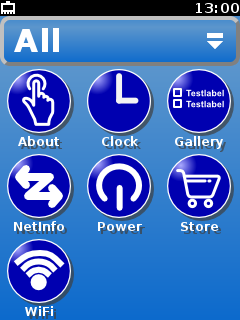 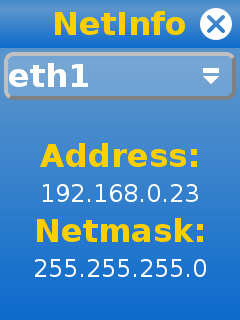 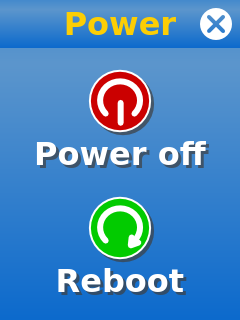 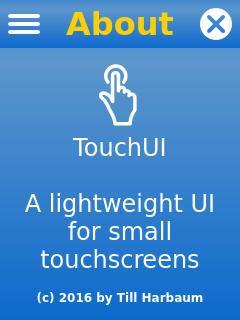 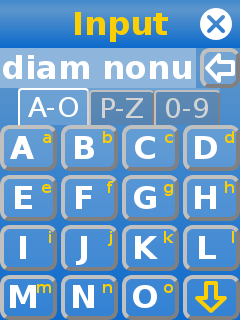
10 |
11 | TouchUI is based on Python, Qt and PyQt. It runs on any device
12 | supporting these incl. the Raspberry Pi and the Fischertechnik TXT.
13 | It's designed for resultions from 240x320 to 480x320 / 320x480
14 | and is meant to be used with a touchscreen.
15 |
16 | ## Raspberry Pi installation
17 |
18 | Installing the TouchUI on a raspberry pi is quite simple. The following
19 | instructions assume that you have a raspberry pi running raspbian with
20 | a small 3.2 or 3.5 inch LCD.
21 |
22 | ### Display orientation
23 |
24 | The TouchUI is meant to be used with at least 320 pixel
25 | vertically. Thus a 320x240 display needs to be configured for portrait
26 | mode. The exact steps for this differ from display to display. E.g. a
27 | Waveshare 3.2 inch LCD with 320x240 pixels can be rotated by adding
28 | the rotate option like `dtoverlay=waveshare35a,rotate=0` to the file
29 | `/boot/config.txt`.
30 |
31 | Furthermore the touchscreen also needs to be rotated. This is done in the
32 | file `/etc/X11/xorg.conf.d/99-calibration.conf` by removing the `SwapAxes` option
33 | and by exachanging the Calibration values of both axes:
34 |
35 | ```
36 | Section "InputClass"
37 | Identifier "calibration"
38 | MatchProduct "ADS7846 Touchscreen"
39 | Option "Calibration" "300 3932 294 3801"
40 | EndSection
41 | ```
42 |
43 | Afterwards the display and touchscreen should work as usual but in upright
44 | orientation.
45 |
46 | ### Hide mouse cursor and disable screen blanking
47 |
48 | The TouchUI is meant to be used with the finger. This no mouse cursor
49 | is needed. Also scren blanking is usually not wanted in this case. This
50 | can be accomplished by changing the file `/etc/X11/xinit/xserverrc`
51 | like this.
52 |
53 | ```
54 | #!/bin/sh
55 | exec /usr/bin/X -s 0 dpms -nocursor -nolisten tcp "$@"
56 | ```
57 |
58 | ### Disable existing GUI
59 |
60 | Raspbian comes with the lightdm window manager installed by default.
61 | You can simply uninstall it via the command `apt-get remove lightdm`.
62 |
63 | ### Boot TouchUI
64 |
65 | First place the entire [touchui directory](https://github.com/harbaum/TouchUI/tree/master/touchui) in the `/root` directoy.
66 |
67 | Then install the [init
68 | script](https://github.com/harbaum/TouchUI/blob/master/support/touchui-init)
69 | under `/etc/init.d/touchui-init` and the [touch ui start script](https://github.com/harbaum/TouchUI/blob/master/support/touchui) under `/root/touchui/touchui`.
70 |
71 | Acivate the init script by executing the following command:
72 |
73 | ```
74 | update-rc.d touchui-init defaults
75 | ```
76 |
77 | Make sure python3, Qt and PyQt are installed on your Pi e.g. with the following command:
78 | ```
79 | apt-get install python3
80 | apt-get install python3-pyqt4
81 | ```
82 |
83 | After a reboot the TouchUI should show up.
84 |
85 | ## PC Demo
86 |
87 | The TouchUI can run an a PC inside a window. The launcher
88 | ([`touchui/launcher.py`](https://github.com/harbaum/TouchUI/blob/master/touchui/launcher.py))
89 | can just be started. If apps are being used the enironment variable
90 | `PYTHONPATH` needs to be set to the directory where
91 | [`TouchStyle.py`](https://github.com/harbaum/TouchUI/blob/master/touchui/TouchStyle.py)
92 | is located.
93 |
94 | When run on a desktop PC the TouchUI runs inside a window. The
95 | size of this window can be changed. E.g. the command
96 |
97 | ```
98 | SCREEN=480x320 ./launcher.py
99 | ```
100 |
101 | will run the launcher inside a window of 320x480 pixels size:
102 |
103 | 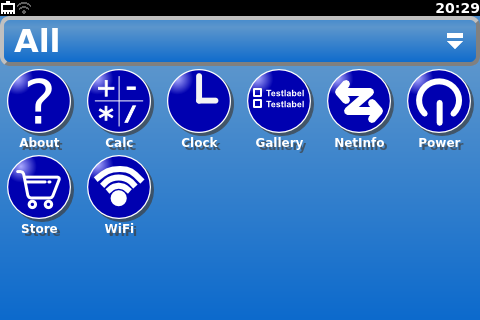
104 |
105 |
--------------------------------------------------------------------------------
/touchui/apps/system/about/about.py:
--------------------------------------------------------------------------------
1 | #! /usr/bin/env python3
2 | # -*- coding: utf-8 -*-
3 | #
4 | import sys, os
5 | from TouchStyle import *
6 |
7 | class LicenseDialog(TouchDialog):
8 | def __init__(self,title,lic,parent):
9 | TouchDialog.__init__(self, title, parent)
10 |
11 | txt = QTextEdit()
12 | txt.setReadOnly(True)
13 |
14 | font = QFont()
15 | font.setPointSize(16)
16 | txt.setFont(font)
17 |
18 | # load gpl from disk
19 | name = os.path.join(os.path.dirname(os.path.realpath(__file__)), lic)
20 | text=open(name).read()
21 | txt.setPlainText(text)
22 |
23 | self.setCentralWidget(txt)
24 |
25 | class SmallLabel(QLabel):
26 | def __init__(self, str, parent=None):
27 | super(SmallLabel, self).__init__(str, parent)
28 | self.setObjectName("smalllabel")
29 |
30 | class VersionWidget(QWidget):
31 | def __init__(self,title,str,parent=None):
32 | super(VersionWidget,self).__init__(parent)
33 | vbox = QVBoxLayout()
34 | vbox.addWidget(QLabel(title))
35 | vbox.addWidget(SmallLabel(str))
36 | self.setLayout(vbox)
37 |
38 | class VersionsDialog(TouchDialog):
39 | def str_from_file(self, fname):
40 | try:
41 | return open(fname).readline().strip()
42 | except:
43 | return "???"
44 |
45 | def __init__(self,title,parent):
46 | TouchDialog.__init__(self, title, parent)
47 |
48 | vbox_w = QWidget(self.centralWidget)
49 |
50 | # add various version info
51 | vbox = QVBoxLayout()
52 |
53 | # --------- kernel version -----------
54 | vbox.addWidget(VersionWidget("Linux", self.str_from_file("/proc/version").split()[2]))
55 |
56 | # --------- python version ----------
57 | py_ver_str = ""
58 | for i in range(len(sys.version_info)):
59 | py_ver_str += str(sys.version_info[i])
60 | if(i < 2): py_ver_str += "."
61 | vbox.addWidget(VersionWidget("Python", py_ver_str))
62 |
63 | # --------- qt -----------
64 | vbox.addWidget(VersionWidget("Qt", QT_VERSION_STR))
65 |
66 | vbox.addWidget(VersionWidget("PyQt", PYQT_VERSION_STR))
67 |
68 | vbox_w.setLayout(vbox)
69 |
70 | # put everything inside a scroll area
71 | scroll = QScrollArea(self.centralWidget)
72 | scroll.setWidget(vbox_w)
73 |
74 | self.setCentralWidget(scroll)
75 |
76 | class FtcGuiApplication(TouchApplication):
77 | def __init__(self, args):
78 | TouchApplication.__init__(self, args)
79 |
80 | # create the empty main window
81 | self.w = TouchWindow("About")
82 |
83 | menu = self.w.addMenu()
84 | menu_ver = menu.addAction("Versions")
85 | menu_ver.triggered.connect(self.show_version)
86 |
87 | menu.addSeparator()
88 |
89 | menu_lic_gpl = menu.addAction("License")
90 | menu_lic_gpl.triggered.connect(self.show_license_gpl)
91 |
92 | self.vbox = QVBoxLayout()
93 |
94 | self.vbox.addStretch()
95 |
96 | self.logo = QLabel("")
97 | name = os.path.join(os.path.dirname(os.path.realpath(__file__)), "logo.png")
98 | pix = QPixmap(name)
99 | self.logo.setPixmap(pix)
100 |
101 | self.logo.setAlignment(Qt.AlignCenter)
102 | self.vbox.addWidget(self.logo)
103 |
104 | # and add some text
105 | self.txt = QLabel("TouchUI\n\nA lightweight UI for small touchscreens")
106 | self.txt.setObjectName("smalllabel")
107 | self.txt.setWordWrap(True)
108 | self.txt.setAlignment(Qt.AlignCenter)
109 | self.vbox.addWidget(self.txt)
110 |
111 | self.vbox.addStretch()
112 |
113 | self.c = QLabel("(c) 2016 by Till Harbaum")
114 | self.c.setObjectName("tinylabel")
115 | self.c.setWordWrap(True)
116 | self.c.setAlignment(Qt.AlignCenter)
117 | self.vbox.addWidget(self.c)
118 |
119 | self.vbox.addStretch()
120 | self.w.centralWidget.setLayout(self.vbox)
121 |
122 | self.w.show()
123 | self.exec_()
124 |
125 | def show_license_gpl(self):
126 | dialog = LicenseDialog("GPL", "gpl.txt", self.w)
127 | dialog.exec_()
128 |
129 | def show_version(self):
130 | dialog = VersionsDialog("Versions", self.w)
131 | dialog.exec_()
132 |
133 | if __name__ == "__main__":
134 | FtcGuiApplication(sys.argv)
135 |
--------------------------------------------------------------------------------
/appstore/packages/clock/icon.svg:
--------------------------------------------------------------------------------
1 |
2 |
3 |
4 |
124 |
--------------------------------------------------------------------------------
/touchui/apps/system/power/powerdown.svg:
--------------------------------------------------------------------------------
1 |
2 |
3 |
4 |
115 |
--------------------------------------------------------------------------------
/touchui/apps/system/power/reboot.svg:
--------------------------------------------------------------------------------
1 |
2 |
3 |
4 |
115 |
--------------------------------------------------------------------------------
/touchui/apps/system/power/icon.svg:
--------------------------------------------------------------------------------
1 |
2 |
3 |
4 |
140 |
--------------------------------------------------------------------------------
/appstore/packages/clock/clock.py:
--------------------------------------------------------------------------------
1 | #! /usr/bin/env python3
2 | # -*- coding: utf-8 -*-
3 | #
4 |
5 | import sys, os
6 | from TouchStyle import *
7 |
8 | class AnalogClock(QWidget):
9 |
10 | # Emitted when the clock's time changes.
11 | timeChanged = pyqtSignal(QTime)
12 |
13 | # Emitted when the clock's time zone changes.
14 | timeZoneChanged = pyqtSignal(int)
15 |
16 | def __init__(self, parent=None):
17 |
18 | super(AnalogClock, self).__init__(parent)
19 |
20 | self.timeZoneOffset = 0
21 |
22 | timer = QTimer(self)
23 | timer.timeout.connect(self.update)
24 | timer.timeout.connect(self.updateTime)
25 | timer.start(1000)
26 |
27 | self.hourHand = QPolygon([
28 | QPoint(7, 8),
29 | QPoint(-7, 8),
30 | QPoint(0, -40)
31 | ])
32 | self.minuteHand = QPolygon([
33 | QPoint(7, 8),
34 | QPoint(-7, 8),
35 | QPoint(0, -70)
36 | ])
37 |
38 | self.hourColor = QColor(255,255,255)
39 | self.minuteColor = QColor(255, 255, 255, 192)
40 |
41 | qsp = QSizePolicy(QSizePolicy.Preferred, QSizePolicy.Preferred)
42 | qsp.setHeightForWidth(True)
43 | self.setSizePolicy(qsp)
44 |
45 | def heightForWidth(self,w):
46 | return w
47 |
48 | def paintEvent(self, event):
49 |
50 | side = min(self.width(), self.height())
51 | time = QTime.currentTime()
52 | time = time.addSecs(self.timeZoneOffset * 3600)
53 |
54 | painter = QPainter()
55 | painter.begin(self)
56 |
57 | painter.setRenderHint(QPainter.Antialiasing)
58 | painter.translate(self.width() / 2, self.height() / 2)
59 | painter.scale(side / 200.0, side / 200.0)
60 |
61 | painter.setPen(Qt.NoPen)
62 | painter.setBrush(QBrush(self.hourColor))
63 |
64 | painter.save()
65 | painter.rotate(30.0 * ((time.hour() + time.minute() / 60.0)))
66 | painter.drawConvexPolygon(self.hourHand)
67 | painter.restore()
68 |
69 | painter.setPen(QPen(self.minuteColor, 1.5))
70 |
71 | for i in range(0, 12):
72 | painter.drawLine(88, 0, 96, 0)
73 | painter.rotate(30.0)
74 |
75 | painter.setPen(Qt.NoPen)
76 | painter.setBrush(QBrush(self.minuteColor))
77 |
78 | painter.save()
79 | painter.rotate(6.0 * (time.minute() + time.second() / 60.0))
80 | painter.drawConvexPolygon(self.minuteHand)
81 | painter.restore()
82 |
83 | painter.setPen(QPen(self.minuteColor, 1.5))
84 |
85 | for j in range(0, 60):
86 | if (j % 5) != 0:
87 | painter.drawLine(92, 0, 96, 0)
88 | painter.rotate(6.0)
89 |
90 | painter.rotate(6.0 * time.second())
91 | painter.setPen(QPen(self.minuteColor, 1.5))
92 | painter.drawLine(0, 0, 80, 0)
93 |
94 | painter.end()
95 |
96 |
97 | def updateTime(self):
98 | self.timeChanged.emit(QTime.currentTime())
99 |
100 | # The timeZone property is implemented using the getTimeZone() getter
101 | # method, the setTimeZone() setter method, and the resetTimeZone() method.
102 |
103 | # The getter just returns the internal time zone value.
104 | def getTimeZone(self):
105 | return self.timeZoneOffset
106 |
107 | # The setTimeZone() method is also defined to be a slot. The @pyqtSlot
108 | # decorator is used to tell PyQt which argument type the method expects,
109 | # and is especially useful when you want to define slots with the same
110 | # name that accept different argument types.
111 |
112 | @pyqtSlot(int)
113 | def setTimeZone(self, value):
114 | self.timeZoneOffset = value
115 | self.timeZoneChanged.emit(value)
116 | self.update()
117 |
118 | # Qt's property system supports properties that can be reset to their
119 | # original values. This method enables the timeZone property to be reset.
120 | def resetTimeZone(self):
121 | self.timeZoneOffset = 0
122 | self.timeZoneChanged.emit(0)
123 | self.update()
124 |
125 | # Qt-style properties are defined differently to Python's properties.
126 | # To declare a property, we call pyqtProperty() to specify the type and,
127 | # in this case, getter, setter and resetter methods.
128 | timeZone = pyqtProperty(int, getTimeZone, setTimeZone, resetTimeZone)
129 |
130 | class FtcGuiApplication(TouchApplication):
131 | def __init__(self, args):
132 | TouchApplication.__init__(self, args)
133 |
134 | # create the empty main window
135 | self.w = TouchWindow("Clock")
136 |
137 | self.vbox = QVBoxLayout()
138 | self.vbox.addStretch()
139 |
140 | self.clock = AnalogClock()
141 | self.clock.timeChanged.connect(self.updateDate)
142 | self.vbox.addWidget(self.clock)
143 |
144 | self.vbox.addStretch()
145 |
146 | self.date = QLabel()
147 | self.date.setObjectName("smalllabel")
148 | self.date.setAlignment(Qt.AlignCenter)
149 | self.vbox.addWidget(self.date)
150 | self.date_str = None
151 | self.updateDate()
152 |
153 | self.vbox.addStretch()
154 | self.w.centralWidget.setLayout(self.vbox)
155 |
156 | self.w.show()
157 |
158 | self.exec_()
159 |
160 | def updateDate(self):
161 | str = QDate.currentDate().toString()
162 | if self.date_str != str:
163 | self.date.setText(str)
164 | self.date_str = str
165 |
166 | if __name__ == "__main__":
167 | FtcGuiApplication(sys.argv)
168 |
--------------------------------------------------------------------------------
/touchui/next.svg:
--------------------------------------------------------------------------------
1 |
2 |
3 |
4 |
172 |
--------------------------------------------------------------------------------
/appstore/packages/widgetgallery/icon.svg:
--------------------------------------------------------------------------------
1 |
2 |
3 |
4 |
152 |
--------------------------------------------------------------------------------
/touchui/prev.svg:
--------------------------------------------------------------------------------
1 |
2 |
3 |
4 |
173 |
--------------------------------------------------------------------------------
/touchui/apps/system/about/logo.svg:
--------------------------------------------------------------------------------
1 |
2 |
3 |
4 |
107 |
--------------------------------------------------------------------------------
/appstore/packages/calc/calc.py:
--------------------------------------------------------------------------------
1 | #! /usr/bin/env python3
2 | # -*- coding: utf-8 -*-
3 | # based on http://thecodeinn.blogspot.de/2013/07/tutorial-pyqt-calculator.html
4 |
5 | import sys, os
6 | from TouchStyle import *
7 |
8 | num = 0.0
9 | newNum = 0.0
10 | sumAll = 0.0
11 | operator = ""
12 |
13 | opVar = False
14 | sumIt = 0
15 |
16 | class ExpandingButton(QPushButton):
17 | def __init__(self, str):
18 | QPushButton.__init__(self, str)
19 | self.setSizePolicy(QSizePolicy.Expanding, QSizePolicy.Expanding)
20 |
21 | class CalcWidget(QWidget):
22 |
23 | def __init__(self):
24 | QWidget.__init__(self)
25 |
26 | self.grid = QGridLayout()
27 | self.grid.setSpacing(4)
28 | self.grid.setContentsMargins(0,0,0,0)
29 |
30 | self.line = QLineEdit("0")
31 | self.line.setSizePolicy(QSizePolicy.Expanding, QSizePolicy.Expanding)
32 | self.line.setReadOnly(True)
33 | self.line.setAlignment(Qt.AlignRight)
34 | self.grid.addWidget(self.line,0,0,1,4);
35 |
36 | zero = ExpandingButton("0")
37 | self.grid.addWidget(zero,5,0)
38 |
39 | one = ExpandingButton("1")
40 | self.grid.addWidget(one,4,0)
41 |
42 | two = ExpandingButton("2")
43 | self.grid.addWidget(two,4,1)
44 |
45 | three = ExpandingButton("3")
46 | self.grid.addWidget(three,4,2)
47 |
48 | four = ExpandingButton("4")
49 | self.grid.addWidget(four,3,0)
50 |
51 | five = ExpandingButton("5")
52 | self.grid.addWidget(five,3,1)
53 |
54 | six = ExpandingButton("6")
55 | self.grid.addWidget(six,3,2)
56 |
57 | seven = ExpandingButton("7")
58 | self.grid.addWidget(seven,2,0)
59 |
60 | eight = ExpandingButton("8")
61 | self.grid.addWidget(eight,2,1)
62 |
63 | nine = ExpandingButton("9")
64 | self.grid.addWidget(nine,2,2)
65 |
66 | point = ExpandingButton(".")
67 | self.grid.addWidget(point,5,1)
68 | point.clicked.connect(self.Point)
69 |
70 | sign = ExpandingButton("+/-")
71 | self.grid.addWidget(sign,5,2)
72 | sign.clicked.connect(self.Neg)
73 |
74 | c = ExpandingButton("C")
75 | self.grid.addWidget(c,1,2,1,2)
76 | c.clicked.connect(self.C)
77 |
78 | div = ExpandingButton("/")
79 | self.grid.addWidget(div,1,0)
80 |
81 | mult = ExpandingButton("*")
82 | self.grid.addWidget(mult,1,1)
83 |
84 | plus = ExpandingButton("+")
85 | self.grid.addWidget(plus,2,3)
86 |
87 | minus = ExpandingButton("-")
88 | self.grid.addWidget(minus,3,3)
89 |
90 | equal = ExpandingButton("=")
91 | self.grid.addWidget(equal,4,3,2,1)
92 | equal.setSizePolicy(QSizePolicy.Preferred, QSizePolicy.Expanding);
93 | equal.clicked.connect(self.Equal)
94 |
95 | self.setLayout(self.grid)
96 |
97 |
98 | nums = [zero,one,two,three,four,five,six,seven,eight,nine]
99 |
100 | ops = [sign,div,mult,minus,plus,equal]
101 |
102 | for i in nums:
103 | i.clicked.connect(self.Nums)
104 |
105 | for i in ops:
106 | i.setStyleSheet("color:#fcce04;")
107 |
108 | for i in ops[1:5]:
109 | i.clicked.connect(self.Operator)
110 |
111 |
112 | def Nums(self):
113 | global num
114 | global newNum
115 | global opVar
116 |
117 | sender = self.sender()
118 |
119 | newNum = int(sender.text())
120 | setNum = str(newNum)
121 |
122 | if opVar == False and self.line.text() != "0":
123 | self.line.setText(self.line.text() + setNum)
124 | else:
125 | self.line.setText(setNum)
126 | opVar = False
127 |
128 | def Operator(self):
129 | global num
130 | global opVar
131 | global operator
132 | global sumIt
133 |
134 | sumIt += 1
135 |
136 | if sumIt > 1:
137 | self.Equal()
138 |
139 | num = self.line.text()
140 |
141 | sender = self.sender()
142 |
143 | operator = sender.text()
144 |
145 | opVar = True
146 |
147 | def Point(self):
148 | global opVar
149 |
150 | if "." not in self.line.text():
151 | self.line.setText(self.line.text() + ".")
152 |
153 | def Neg(self):
154 | global num
155 |
156 | try:
157 | num = int(self.line.text())
158 |
159 | except:
160 | num = float(self.line.text())
161 |
162 | num = num - num * 2
163 |
164 | numStr = str(num)
165 |
166 | self.line.setText(numStr)
167 |
168 | def Equal(self):
169 | global num
170 | global newNum
171 | global sumAll
172 | global operator
173 | global opVar
174 | global sumIt
175 |
176 | sumIt = 0
177 |
178 | newNum = self.line.text()
179 |
180 | if operator == "+":
181 | sumAll = float(num) + float(newNum)
182 |
183 | elif operator == "-":
184 | sumAll = float(num) - float(newNum)
185 |
186 | elif operator == "/":
187 | sumAll = float(num) / float(newNum)
188 |
189 | elif operator == "*":
190 | sumAll = float(num) * float(newNum)
191 |
192 | self.line.setText(str(sumAll))
193 | opVar = True
194 |
195 | def C(self):
196 | global newNum
197 | global sumAll
198 | global operator
199 | global num
200 |
201 | self.line.setText("0")
202 |
203 | num = 0.0
204 | newNum = 0.0
205 | sumAll = 0.0
206 | operator = ""
207 |
208 | class FtcGuiApplication(TouchApplication):
209 | def __init__(self, args):
210 | TouchApplication.__init__(self, args)
211 |
212 | # create the empty main window
213 | self.w = TouchWindow("Calc")
214 | self.w.setCentralWidget(CalcWidget())
215 |
216 | self.w.show()
217 | self.exec_()
218 |
219 | if __name__ == "__main__":
220 | FtcGuiApplication(sys.argv)
221 |
--------------------------------------------------------------------------------
/touchui/apps/system/wifi/icon.svg:
--------------------------------------------------------------------------------
1 |
2 |
3 |
4 |
158 |
--------------------------------------------------------------------------------
/screenshots/logo.svg:
--------------------------------------------------------------------------------
1 |
2 |
3 |
4 |
126 |
--------------------------------------------------------------------------------
/touchui/apps/system/netinfo/icon.svg:
--------------------------------------------------------------------------------
1 |
2 |
3 |
4 |
187 |
--------------------------------------------------------------------------------
/appstore/packages/calc/icon.svg:
--------------------------------------------------------------------------------
1 |
2 |
3 |
4 |
176 |
--------------------------------------------------------------------------------
/touchui/apps/system/about/icon.svg:
--------------------------------------------------------------------------------
1 |
2 |
3 |
4 |
139 |
--------------------------------------------------------------------------------
/touchui/apps/system/store/icon.svg:
--------------------------------------------------------------------------------
1 |
2 |
3 |
4 |
301 |
--------------------------------------------------------------------------------