├── styles.css
├── context
├── skins
│ ├── hackerman.css
│ ├── chrome-dark.css
│ ├── kali_dark.css
│ ├── chrome-bright.css
│ └── custom.css
├── context.min.js
└── context.js
├── README.md
└── index.html
/styles.css:
--------------------------------------------------------------------------------
1 | body {
2 | font-family: Arial, Helvetica, sans-serif;
3 | font-size: 18pt;
4 | background: #696969;
5 | }
6 |
7 | .panel {
8 | margin: 70px;
9 | }
10 |
11 | .centered {
12 | position: absolute;
13 | top: 50%;
14 | left: 50%;
15 | transform: translate(-50%,-50%);
16 | }
17 |
18 | .no {
19 | -webkit-touch-callout: none;
20 | -webkit-user-select: none;
21 | -khtml-user-select: none;
22 | -moz-user-select: none;
23 | -ms-user-select: none;
24 | user-select: none;
25 | }
26 |
27 | .container {
28 | text-align: center;
29 | }
30 |
31 | .watermark {
32 | color: #787878;
33 | font-size: 80pt;
34 | }
--------------------------------------------------------------------------------
/context/skins/hackerman.css:
--------------------------------------------------------------------------------
1 | .context {
2 | display: inline-block;
3 | position: fixed;
4 | top: 0px;
5 | left: 0px;
6 | min-width: 270px;
7 | font-family: 'Segoe UI', Tahoma, Geneva, Verdana, sans-serif;
8 | color: #878B90;
9 | background: rgba(0, 0, 0, 0.7);
10 | font-size: 9pt;
11 | border: 1px solid #333333;
12 | box-shadow: 0px 0px 3px 0px rgba(0, 0, 0, 0.5);
13 | padding: 3px 0px;
14 | -webkit-touch-callout: none;
15 | -webkit-user-select: none;
16 | -khtml-user-select: none;
17 | -moz-user-select: none;
18 | -ms-user-select: none;
19 | user-select: none;
20 | }
21 |
22 | .context .item {
23 | padding: 4px 19px;
24 | cursor: default;
25 | color: #878B90;
26 | }
27 |
28 | .context .enabled.item:hover {
29 | background: #73ff00;
30 | color: #000;
31 | font-weight: bold;
32 | }
33 |
34 | .context .separator {
35 | margin: 4px 0px;
36 | height: 0;
37 | padding: 0;
38 | border-top: 1px solid #454545;
39 | }
40 |
41 | .context .hotkey {
42 | float: right;
43 | }
44 |
45 | .context .has-subitems .hotkey {
46 | font-weight: bold;
47 | }
48 |
49 | .context .enabled.item {
50 | color: #73ff00;
51 | }
--------------------------------------------------------------------------------
/context/skins/chrome-dark.css:
--------------------------------------------------------------------------------
1 | .context {
2 | display: inline-block;
3 | position: fixed;
4 | top: 0px;
5 | left: 0px;
6 | min-width: 270px;
7 | font-family: 'Segoe UI', Tahoma, Geneva, Verdana, sans-serif;
8 | color: #fff;
9 | background: #292A2D;
10 | font-size: 9pt;
11 | border: 1px solid #333333;
12 | box-shadow: 4px 4px 3px -1px rgba(0, 0, 0, 0.5);
13 | padding: 3px 0px;
14 | -webkit-touch-callout: none;
15 | -webkit-user-select: none;
16 | -khtml-user-select: none;
17 | -moz-user-select: none;
18 | -ms-user-select: none;
19 | user-select: none;
20 | }
21 |
22 | .context .item {
23 | padding: 4px 19px;
24 | cursor: default;
25 | color: inherit;
26 | }
27 |
28 | .context .item:hover {
29 | background: #4B4C4F;
30 | }
31 |
32 | .context .item:hover .hotkey {
33 | color: #fff;
34 | }
35 |
36 | .context .disabled {
37 | color: #878B90;
38 | }
39 |
40 | .context .disabled:hover {
41 | background: inherit;
42 | }
43 |
44 | .context .disabled:hover .hotkey {
45 | color: #878B90;
46 | }
47 |
48 | .context .separator {
49 | margin: 4px 0px;
50 | height: 0;
51 | padding: 0;
52 | border-top: 1px solid #454545;
53 | }
54 |
55 | .hotkey {
56 | color: #878B90;
57 | float: right;
58 | }
--------------------------------------------------------------------------------
/context/skins/kali_dark.css:
--------------------------------------------------------------------------------
1 | .context {
2 | display: inline-block;
3 | position: fixed;
4 | top: 0px;
5 | left: 0px;
6 | min-width: 270px;
7 | font-family: 'Segoe UI', Tahoma, Geneva, Verdana, sans-serif;
8 | color: #fff;
9 | background: #262933;
10 | font-size: 9pt;
11 | border: 1px solid #333333;
12 | border-radius: 6px;
13 | box-shadow: 2px 2px 2px -1px rgba(0, 0, 0, 0.5);
14 | padding: 3px 0px;
15 | -webkit-touch-callout: none;
16 | -webkit-user-select: none;
17 | -khtml-user-select: none;
18 | -moz-user-select: none;
19 | -ms-user-select: none;
20 | user-select: none;
21 | }
22 |
23 | .context .item {
24 | padding: 4px 19px;
25 | cursor: default;
26 | color: inherit;
27 | }
28 |
29 | .context .item:hover {
30 | background: #2777FF;
31 | }
32 |
33 | .context .item:hover .hotkey {
34 | color: #fff;
35 | }
36 |
37 | .context .disabled {
38 | color: #878B90;
39 | }
40 |
41 | .context .disabled:hover {
42 | background: inherit;
43 | }
44 |
45 | .context .disabled:hover .hotkey {
46 | color: #878B90;
47 | }
48 |
49 | .context .separator {
50 | margin: 4px 0px;
51 | height: 0;
52 | padding: 0;
53 | border-top: 1px solid #454545;
54 | }
55 |
56 | .hotkey {
57 | color: #878B90;
58 | float: right;
59 | }
--------------------------------------------------------------------------------
/context/skins/chrome-bright.css:
--------------------------------------------------------------------------------
1 | .context {
2 | display: inline-block;
3 | position: fixed;
4 | top: 0px;
5 | left: 0px;
6 | min-width: 270px;
7 | font-family: 'Segoe UI', Tahoma, Geneva, Verdana, sans-serif;
8 | color: #000;
9 | background: #f5f5f5;
10 | font-size: 9pt;
11 | border: 1px solid #333333;
12 | box-shadow: 4px 4px 3px -1px rgba(0, 0, 0, 0.5);
13 | padding: 3px 0px;
14 | -webkit-touch-callout: none;
15 | -webkit-user-select: none;
16 | -khtml-user-select: none;
17 | -moz-user-select: none;
18 | -ms-user-select: none;
19 | user-select: none;
20 | }
21 |
22 | .context .item {
23 | padding: 4px 19px;
24 | cursor: default;
25 | color: inherit;
26 | }
27 |
28 | .context .item:hover {
29 | background: #e3e3e3 !important;
30 | }
31 |
32 | .context .item:hover .hotkey {
33 | color: #000 !important;
34 | }
35 |
36 | .context .disabled {
37 | color: #878B90 !important;
38 | }
39 |
40 | .context .disabled:hover {
41 | background: inherit !important;
42 | }
43 |
44 | .context .disabled:hover .hotkey {
45 | color: #878B90 !important;
46 | }
47 |
48 | .context .separator {
49 | margin: 4px 0px;
50 | height: 0;
51 | padding: 0;
52 | border-top: 1px solid #b3b3b3;
53 | }
54 |
55 | .hotkey {
56 | color: #878B90;
57 | float: right;
58 | }
--------------------------------------------------------------------------------
/context/skins/custom.css:
--------------------------------------------------------------------------------
1 | .context {
2 | display: inline-block;
3 | position: fixed;
4 | top: 0px;
5 | left: 0px;
6 | min-width: 270px;
7 | font-family: 'Segoe UI', Tahoma, Geneva, Verdana, sans-serif;
8 | color: #fff;
9 | background: #292A2D;
10 | font-size: 9pt;
11 | border: 2px solid #fff836;
12 | box-shadow: 4px 4px 3px -1px rgba(0, 0, 0, 0.5);
13 | padding: 3px 0px;
14 | -webkit-touch-callout: none;
15 | -webkit-user-select: none;
16 | -khtml-user-select: none;
17 | -moz-user-select: none;
18 | -ms-user-select: none;
19 | user-select: none;
20 | }
21 |
22 | .context .item {
23 | padding: 4px 19px;
24 | cursor: default;
25 | color: inherit;
26 | border: 2px solid #ff3636;
27 | }
28 |
29 | .context .item:hover {
30 | background: #4B4C4F;
31 | }
32 |
33 | .context .item:hover .hotkey {
34 | color: #fff;
35 | }
36 |
37 | .context .disabled {
38 | color: #878B90;
39 | }
40 |
41 | .context .disabled:hover {
42 | background: inherit;
43 | }
44 |
45 | .context .disabled:hover .hotkey {
46 | color: #878B90;
47 | }
48 |
49 | .context .separator {
50 | margin: 4px 0px;
51 | height: 0;
52 | padding: 0;
53 | border-top: 1px solid #454545;
54 | }
55 |
56 | .label {
57 | border: 2px solid #36ff5b;
58 | }
59 |
60 | .hotkey {
61 | color: #878B90;
62 | float: right;
63 | border: 2px solid #8636ff;
64 | }
--------------------------------------------------------------------------------
/README.md:
--------------------------------------------------------------------------------
1 | 
2 | (image: fake context-menu for Chrome, dark theme)
3 |
4 | # About
5 | Context.js is a context-menu library for web and of course written in JavaScript.\
6 | You can try out this [demo](https://heapoverride.sexy/contextjs).
7 |
8 | # Installation
9 | ### Step 1
10 | Copy **context** folder to your project directory.
11 | ### Step 2
12 | Link CSS styles to your HTML code
13 | ```html
14 |
15 | ```
16 | ### Step 3
17 | Link Context.js to your HTML code
18 | ```html
19 |
20 | ```
21 |
22 | # Example
23 | ```js
24 | const clickHandler = e => {
25 | e.label.innerText = e.label.innerText.split('').reverse().join('');
26 | e.data.text = e.label.innerText;
27 | e.handled = true;
28 | }
29 |
30 | const contextMenu = new ContextMenu(document.body, [
31 | {text: 'Back', hotkey: 'Alt+Left arrow', disabled: true, onclick: clickHandler},
32 | {text: 'Forward', hotkey: 'Alt+Right arrow', disabled: true, onclick: clickHandler},
33 | {text: 'Reload', hotkey: 'Ctrl+R', onclick: clickHandler},
34 | null,
35 | {text: 'Save as...', hotkey: 'Ctrl+S', onclick: clickHandler},
36 | {text: 'Print...', hotkey: 'Ctrl+P', onclick: clickHandler},
37 | {text: 'Cast...', onclick: clickHandler},
38 | {text: 'Translate to English', onclick: clickHandler},
39 | null,
40 | {text: 'View page source', hotkey: 'Ctrl+U', onclick: clickHandler},
41 | {text: 'Inspect', hotkey: 'Ctrl+Shift+I', onclick: clickHandler},
42 | ]);
43 |
44 | contextMenu.install();
45 | ```
46 |
47 | # Properties
48 | **text** - Menu item's text\
49 | **hotkey** - Menu item's hotkey text\
50 | **color** - Menu item's custom text color (hexadecimal notation, #RRGGBB)\
51 | **disabled** - A boolean value that when set to true will mark this item disabled (`onclick` is not called if item is disabled)\
52 | **onclick** - A function that is called when user clicks on this item\
53 | **subitems** - Array of menu item's subitems (`onclick` is ignored if item has subitems)\
54 | **submenu** - ContextMenu instance that will be shown here (doesn't work together with `subitems`)
55 |
56 | # Public methods
57 | ```js
58 | /* Show ContextMenu at specific position */
59 | ContextMenu.show(x, y)
60 | ```
61 | ```js
62 | /* Hide this ContextMenu DOM element and it's child elements */
63 | ContextMenu.hide()
64 | ```
65 | ```js
66 | /* Add event listeners for this ContextMenu object */
67 | ContextMenu.install()
68 | ```
69 | ```js
70 | /* Remove event listeners and DOM elements
71 | associated with this ContextMenu object */
72 | ContextMenu.uninstall()
73 | ```
74 |
75 | # CSS classes
76 | 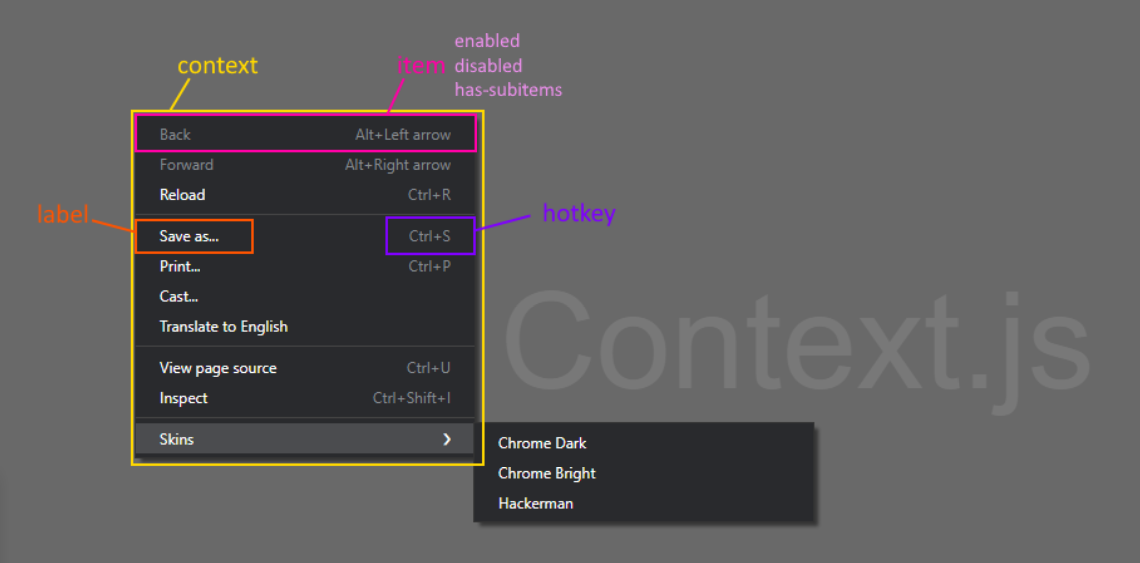
77 |
78 | # Default skins
79 | ### chrome-dark.css
80 | 
81 | ### chrome-bright.css
82 | 
83 | ### hackerman.css
84 | 
85 | ### kali_dark.css
86 | 
87 |
--------------------------------------------------------------------------------
/context/context.min.js:
--------------------------------------------------------------------------------
1 | /* Author: @UnrealSec */
2 | class ContextMenu{constructor(t,e){this.container=t,this.dom=null,this.shown=!1,this.root=!0,this.parent=null,this.submenus=[],this.items=e,this._onclick=(t=>{!this.dom||t.target==this.dom||t.target.parentElement==this.dom||t.target.classList.contains("item")||t.target.parentElement.classList.contains("item")||this.hideAll()}),this._oncontextmenu=(t=>{t.preventDefault(),t.target==this.dom||t.target.parentElement==this.dom||t.target.classList.contains("item")||t.target.parentElement.classList.contains("item")||(this.hideAll(),this.show(t.clientX,t.clientY))}),this._oncontextmenu_keydown=(t=>{93==t.keyCode&&(t.preventDefault(),this.hideAll(),this.show(t.clientX,t.clientY))}),this._onblur=(t=>{this.hideAll()})}getMenuDom(){const t=document.createElement("div");t.classList.add("context");for(const e of this.items)t.appendChild(this.itemToDomEl(e));return t}itemToDomEl(t){const e=document.createElement("div");if(null===t)return e.classList="separator",e;t.hasOwnProperty("color")&&/^#([a-f\d]{2})([a-f\d]{2})([a-f\d]{2})$/i.exec(t.color.toString())&&(e.style.cssText=`color: ${t.color}`),e.classList.add("item");const s=document.createElement("span");s.classList="label",s.innerText=t.hasOwnProperty("text")?t.text.toString():"",e.appendChild(s),t.hasOwnProperty("disabled")&&t.disabled?e.classList.add("disabled"):e.classList.add("enabled");const n=document.createElement("span");if(n.classList="hotkey",n.innerText=t.hasOwnProperty("hotkey")?t.hotkey.toString():"",e.appendChild(n),t.hasOwnProperty("subitems")&&Array.isArray(t.subitems)&&t.subitems.length>0){const s=new ContextMenu(this.container,t.subitems);s.root=!1,s.parent=this;const n=n=>{if(t.hasOwnProperty("disabled")&&1==t.disabled)return;this.hideSubMenus();const i=this.dom.offsetLeft+this.dom.clientWidth+e.offsetLeft,o=this.dom.offsetTop+e.offsetTop;s.shown?s.hide():s.show(i,o)};this.submenus.push(s),e.classList.add("has-subitems"),e.addEventListener("click",n),e.addEventListener("mousemove",n)}else if(t.hasOwnProperty("submenu")&&t.submenu instanceof ContextMenu){const s=t.submenu;s.root=!1,s.parent=this;const n=n=>{if(t.hasOwnProperty("disabled")&&1==t.disabled)return;this.hideSubMenus();const i=this.dom.offsetLeft+this.dom.clientWidth+e.offsetLeft,o=this.dom.offsetTop+e.offsetTop;s.shown?s.hide():s.show(i,o)};this.submenus.push(s),e.classList.add("has-subitems"),e.addEventListener("click",n),e.addEventListener("mousemove",n)}else e.addEventListener("click",i=>{if(this.hideSubMenus(),!e.classList.contains("disabled"))if(t.hasOwnProperty("onclick")&&"function"==typeof t.onclick){const i={handled:!1,item:e,label:s,hotkey:n,items:this.items,data:t};t.onclick(i),i.handled||this.hide()}else this.hide()}),e.addEventListener("mousemove",t=>{this.hideSubMenus()});return e}hideAll(){!this.root||this.parent?this.parent.hide():this.shown&&(this.hideSubMenus(),this.shown=!1,this.container.removeChild(this.dom),this.parent&&this.parent.shown&&this.parent.hide())}hide(){this.dom&&this.shown&&(this.shown=!1,this.hideSubMenus(),this.container.removeChild(this.dom),this.parent&&this.parent.shown&&this.parent.hide())}hideSubMenus(){for(const t of this.submenus)t.shown&&(t.shown=!1,t.container.removeChild(t.dom)),t.hideSubMenus()}show(t,e){this.dom=this.getMenuDom(),this.dom.style.left=`${t}px`,this.dom.style.top=`${e}px`,this.shown=!0,this.container.appendChild(this.dom)}install(){this.container.addEventListener("contextmenu",this._oncontextmenu),this.container.addEventListener("keydown",this._oncontextmenu_keydown),this.container.addEventListener("click",this._onclick),window.addEventListener("blur",this._onblur)}uninstall(){this.dom=null,this.container.removeEventListener("contextmenu",this._oncontextmenu),this.container.removeEventListener("keydown",this._oncontextmenu_keydown),this.container.removeEventListener("click",this._onclick),window.removeEventListener("blur",this._onblur)}}
--------------------------------------------------------------------------------
/index.html:
--------------------------------------------------------------------------------
1 |
2 |
3 | Context.js demo
4 |
5 |
6 |
7 |
8 |
9 |
10 |
11 | Context.js
12 |
13 |