├── 1.png
├── 2.png
├── 3.png
├── 4.png
├── _config.yml
├── mapeditor.md
└── README.md
/1.png:
--------------------------------------------------------------------------------
https://raw.githubusercontent.com/hemisemidemipresent/btd6-modding-tutorial/HEAD/1.png
--------------------------------------------------------------------------------
/2.png:
--------------------------------------------------------------------------------
https://raw.githubusercontent.com/hemisemidemipresent/btd6-modding-tutorial/HEAD/2.png
--------------------------------------------------------------------------------
/3.png:
--------------------------------------------------------------------------------
https://raw.githubusercontent.com/hemisemidemipresent/btd6-modding-tutorial/HEAD/3.png
--------------------------------------------------------------------------------
/4.png:
--------------------------------------------------------------------------------
https://raw.githubusercontent.com/hemisemidemipresent/btd6-modding-tutorial/HEAD/4.png
--------------------------------------------------------------------------------
/_config.yml:
--------------------------------------------------------------------------------
1 |
2 | plugins:
3 | - jekyll-relative-links
4 | relative_links:
5 | enabled: true
6 | collections: true
7 | include:
8 | - README.md
9 |
10 | theme: jekyll-theme-hacker
--------------------------------------------------------------------------------
/mapeditor.md:
--------------------------------------------------------------------------------
1 | note: if your Windows is set to a language that uses commas instead of periods to represent decimals (like polish), then the map editor doesn't work.
2 |
3 | # How to use the map editor
4 | - Start by copying the files from the [zip](https://github.com/Timotheeee/btd6_mods/blob/master/map_editor/map_editor.zip) into your Mods folder. The mods folder should have include the mod helper, the 2 dll files from the map editor and the map_editor folder.
5 | - go in the map_editor folder, make a copy of the "example" folder and rename it to the name of your map
6 | - Now go in that new folder and open info.txt, you will be able to change the music and difficulty (0 = beginner, 3 = expert etc)
7 | - Replace "image.png" with the image of your map (make sure the new file is called image.png)
8 | - Now launch the game and enter your map, so you can start defining what the paths and areas should be.
9 |
10 | ## defining paths
11 | press F1, click around, press F1 again when you're done. You can define multiple tracks. Before moving on, make sure you pressed F1 to finish up the last track you made.
12 |
13 | ## defining areas
14 | Areas define collisions and where towers can be placed. They are defined by pressing F2, but first you need to tell the mod what type of area you want.
15 | - Pressing 0 will select the type of "track" (default)
16 | - Pressing 1 will select the type of "water"
17 | - Pressing 2 will select the type of "land"
18 | - Pressing 3 will select the type of "unplaceable" (there doesn't seem to be a difference between "track" and this one)
19 | - Pressing 4 will toggle whether or not the area should block line of sight. (by default, it doesn't)
20 |
21 | After defining the area type, press F2. Now click around to define a polygon, then press F2 again when you're done. It is highly recommended to start by making the entire map a "land" area (by clicking in all 4 corners) and then drawing the water/walls on top of that (placing towers in a spot that has no area defined crashes the game). Polygons autocomplete themselves (unless the area blocks LOS!) and the newest areas are stacked on top of the older ones.
22 |
23 | ## undoing changes
24 | in the map's folder you can edit or delete the paths.txt and areas.txt files to undo your recent changes or to start from scratch.
25 |
26 | ## end
27 | Once you are done defining your map, close the game. You can now remove the map editor mod if you want to, but keep the map loader. When you restart the game, your map will load and should be playable.
28 |
29 | ## available music
30 | MusicBTD5JazzA
31 | MusicCityA
32 | MusicCoopA
33 | MusicDarkA
34 | MusicSailsAgain
35 | MusicUpbeat1A
36 | MusicUpbeat2A
37 | MusicUpbeat3A
38 |
39 | # How to use the map loader
40 | - Extract map_editor.zip in your Mods folder
41 | - Delete map_editor.dll
42 | - If someone sent you a zip file with a map in it, just extract it into the map_editor folder.
43 |
44 | # Troubleshooting
45 | ## The game crashes when entering the custom map, after defining the tracks and areas.
46 | You probably messed up while editing. you can edit or delete the paths.txt and areas.txt files to try to fix the problem or to start from scratch. Alternatively you can send those 2 files and your latest.log file in the help channel of one of the modding discord servers.
47 |
48 | ## If you can't find your map in the map list
49 | make sure you don't end up with a "map_editor" folder inside of another "map_editor" folder
50 |
51 | ## The game crashes when placing towers
52 | You need to start by defining the entire map as "land". (read the above sections again)
53 |
54 |
55 |
56 |
--------------------------------------------------------------------------------
/README.md:
--------------------------------------------------------------------------------
1 | # Downloads and Installation
2 |
3 | If run into any issues while installing, then check the [troubleshooting section](https://hemisemidemipresent.github.io/btd6-modding-tutorial/#troubleshooting) down below.
4 |
5 | **IMPORTANT**: To use Melonloader you now need to download and install [.NET 6.0](https://dotnet.microsoft.com/en-us/download/dotnet/thank-you/runtime-6.0.12-windows-x64-installer). If you don't have it, you will get an error when launching the game.
6 |
7 | Download [the mod helper](https://github.com/gurrenm3/BTD-Mod-Helper/releases/latest/download/Btd6ModHelper.dll) and [MelonLoader](https://nightly.link/LavaGang/MelonLoader/workflows/build/alpha-development/MelonLoader.Windows.x64.CI.Release.zip)
8 |
9 | Open the Melonloader zip you just downloaded, then select all of the files in the zip and copy them
10 |
11 | 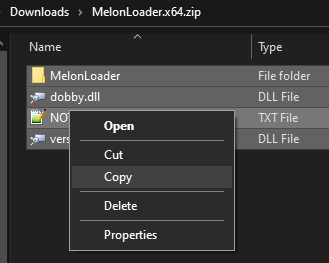 12 |
13 | Navigate to the BTD6 directory, which by default is located at: `C:\Program Files (x86)\Steam\steamapps\common\BloonsTD6`
14 |
15 | Paste the files from the zip into the BTD6 directory
16 |
17 |
12 |
13 | Navigate to the BTD6 directory, which by default is located at: `C:\Program Files (x86)\Steam\steamapps\common\BloonsTD6`
14 |
15 | Paste the files from the zip into the BTD6 directory
16 |
17 | 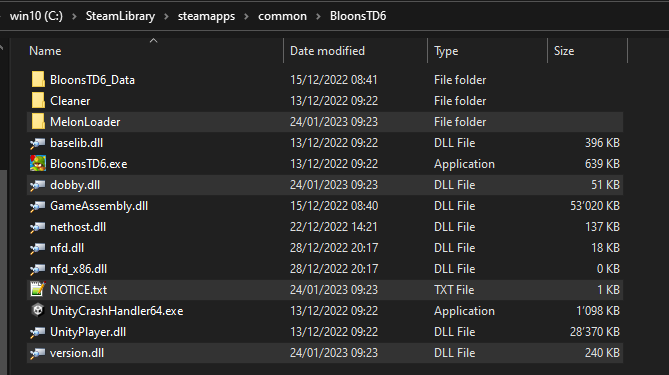 18 |
19 | Download [.NET 6.0](https://dotnet.microsoft.com/en-us/download/dotnet/thank-you/runtime-6.0.12-windows-x64-installer) and install it
20 |
21 |
18 |
19 | Download [.NET 6.0](https://dotnet.microsoft.com/en-us/download/dotnet/thank-you/runtime-6.0.12-windows-x64-installer) and install it
20 |
21 |  22 |
23 |
24 | Now launch the game to generate the "Mods" folder. If you get the MSVCP140.dll was not found error, or the game doesn't launch at all then install [visual c++](https://aka.ms/vs/16/release/vc_redist.x64.exe) and then restart your pc.
25 |
26 | Put **`Btd6ModHelper.dll`** in the "Mods" folder
27 |
28 | If all goes well, the Mods directory should look like this:
29 |
30 |
22 |
23 |
24 | Now launch the game to generate the "Mods" folder. If you get the MSVCP140.dll was not found error, or the game doesn't launch at all then install [visual c++](https://aka.ms/vs/16/release/vc_redist.x64.exe) and then restart your pc.
25 |
26 | Put **`Btd6ModHelper.dll`** in the "Mods" folder
27 |
28 | If all goes well, the Mods directory should look like this:
29 |
30 |  31 |
32 | **IMPORTANT: `Btd6ModHelper.dll` needs to be in the Mods directory at all times. If you don't have the mod helper, the game will not save progress and most mods will not work.**
33 |
34 | If you are using the **`Epic Games`** version of the game, then you will also need to follow [this tutorial](https://github.com/GrahamKracker/BTD6EpicGamesModCompat/) to make melonloader work.
35 |
36 | There is a common problem where some anti-viruses delete certain melonloader files. This is usually not an issue with Windows Defender. If you are using another anti-virus, then add an exception to the melonloader folder.
37 |
38 | To create your own mods, watch [this video](https://www.youtube.com/watch?v=NSINBN3em6w) and check out the tips down below.
39 |
40 | ## How to uninstall Melonloader
41 |
42 | delete the melonloader, mods, plugins, userdata, userlibs folders as well as dobby.dll, notice.txt and version.dll
43 |
44 | ## Common Mods
45 |
46 | [Fire Rate Changer](https://github.com/Timotheeee/btd6_mods/blob/master/rate_changer/rate_changer.dll) (custom speed hypersonic, press F9 to use)
47 |
48 | [Speedhack](https://github.com/Timotheeee/btd6_mods/blob/master/speedhackmelon/speedhackmelon.dll) (use keys 6,7,8,9 to change the speed)
49 |
50 | [Race Button](https://github.com/Timotheeee/btd6_mods/blob/master/racemod/racemod.dll) and [Round changer](https://github.com/Timotheeee/btd6_mods/raw/master/round_changer/round_changer.dll) (press F8 to use)
51 |
52 |
53 | # Obtaining Mods
54 |
55 | The mod helper adds a new button to the bottom right of the main menu which allows you to access the mod browser, where you can find a bunch of mods as well as mod repositories.
56 |
57 | You can also get mods from this discord server:
58 |
59 | [BTD6 Mods and Discussions](https://discord.gg/hENWNsd5pY)
60 |
61 | Avoid using Nexus mods as the vast majority of them are outdated/stolen.
62 |
63 | To download mods from github, try to find a dll file and download it. If there is no dll file, then check if there are any releases.
64 |
65 | To disable some mods, you can manually move the files to another directory.
66 |
67 | ## Hacker pool
68 |
69 | By default the game doesn't let you access public coop, races, collection events, the trophy store and odyssey if you are using mods (to prevent cheating).
70 | Using mods that give your account an advantage such as infinite money/xp/trophies/knowledge mods will get your account flagged.
71 | To protect your main account it is recommended to play on an alternate account. If you don't want to do this, turning off your internet connection is also an effective way to avoid getting flagged while using mods in singleplayer/challenge editor (although not guaranteed to always work).
72 | If you are flagged, you will have 2 leaves above your settings icon and you will no longer be able to play public coop games, play contested territory or submit race times.
73 | Using mods in private coop is risky, it is best to use an account that you don't care about and also make sure that every player is using the same mods with the same configurations. If you do get flagged, you will still be able to play private coop.
74 |
75 |
76 | # Troubleshooting
77 |
78 | ## The console or a popup window says "il2cpp_init detour failed"
79 |
80 | You need to install the .Net 6 Runtime [https://dotnet.microsoft.com/en-us/download/dotnet/thank-you/runtime-6.0.12-windows-x64-installer](https://dotnet.microsoft.com/en-us/download/dotnet/thank-you/runtime-6.0.12-windows-x64-installer)
81 |
82 | ## A popup window says "failed to initialize: failed to find bootstrap"
83 |
84 | You didn't uninstall melonloader correctly. you need to delete the melonloader, mods, plugins, userdata, userlibs folders as well as dobby.dll, notice.txt and version.dll
85 |
86 | ## A popup window says "failed to initialize: failed to load library"
87 |
88 | The path to the BTD6 exe file should not have any special characters. This includes dashes **`-`** and modified letters like **`À`**
89 |
90 | ## The console says "Could not load file or assembly ..."
91 |
92 | Delete the MelonLoader folder, then reinstall Melonloader with your antivirus turned off. If you get the exact same error again, try replacing the melonloader folder with these [files](https://cdn.discordapp.com/attachments/500665135711387680/1121347870885412974/MelonLoader.zip)
93 |
94 | ## The console says "1 Plugin loaded" and then gets stuck
95 | Use [this](https://nightly.link/LavaGang/MelonLoader/workflows/build/alpha-development) melonloader version
96 |
97 | ## The game is not saving
98 |
99 | Make sure you have the mod helper, you can download the latest release here: [https://github.com/gurrenm3/BTD-Mod-Helper/releases/latest/download/Btd6ModHelper.dll](https://github.com/gurrenm3/BTD-Mod-Helper/releases/latest/download/Btd6ModHelper.dll)
100 |
101 | If you are trying to uninstall, read the section above
102 |
103 | ## The game crashes while loading mods, or the mods are not working
104 |
105 | -Make sure you have the mod helper, you can download the latest release here: [https://github.com/gurrenm3/BTD-Mod-Helper/releases/latest/download/Btd6ModHelper.dll](https://github.com/gurrenm3/BTD-Mod-Helper/releases/latest/download/Btd6ModHelper.dll)
106 |
107 | -Make sure you are not using any mods that were last updated before december 26th 2022
108 |
109 | -Make sure your mods are in the dll format directly inside of the "Mods" folder. They should not be in a zip or in a subfolder.
110 |
111 | -Game updates sometimes break mods and not all mod developers update their mods.
112 |
113 | -Avoid using nexus mods as the vast majority of them are outdated/low quality/stolen.
114 |
115 | -If none of the above tips solve the problem, navigate to the Melonloader folder and check the "latest.log" file. If you see that a specific mod appears to be causing errors, remove it or check for a new version. If the log file doesn't contain any errors then check if the console does. You can also try removing each mod one by one until you find the one that is causing issues. If you can't figure it out yourself, join the discord server linked above and post the log file or a screenshot of the console in the help channel.
116 |
117 | ## The game does not open at all, or gives an MSVCP140.dll was not found error
118 |
119 | Install this: [https://aka.ms/vs/16/release/vc_redist.x64.exe](https://aka.ms/vs/16/release/vc_redist.x64.exe)
120 |
121 |
122 |
123 |
124 | # How to make mods
125 |
126 | ## Prerequisites
127 |
128 | - [Visual Studio](https://visualstudio.microsoft.com/) (not Visual Studio code)
129 | - Some basic knowledge of [c#](https://docs.microsoft.com/en-us/dotnet/csharp/), though if you already know Java, it is close enough
130 |
131 | ## getting started
132 | Read [this](https://github.com/gurrenm3/BTD-Mod-Helper/wiki/Getting-Started). The mod helper wiki also has a bunch of useful info about the game's structure.
133 |
134 | ## Tips
135 |
136 | A lot of mods are open source, their code can give you an idea on how to do things.
137 |
138 | Most mods use something known as harmony patches. The can be used to run code both before and after the game's functions are called, and can also be used to modify/read parameters and return values.
139 |
140 | [UnityExplorer mod](https://github.com/GrahamKracker/UnityExplorer) makes it possible to view the unity scene.
141 |
142 | If you want to import your own 3D models into the game, you will need to create an asset bundle using the unity version the game uses, check your melonloader log or console to see this, then use
143 |
144 | ```cs
145 | AssetBundle.LoadFromMemory(File.ReadAllBytes(@"bundle"))
146 | ```
147 |
148 | ## Editing the gamemodel
149 |
150 | The gamemodel defines everything from towers to bloons to difficulties.
151 |
152 | For a better overview of how it works here is [the whole thing converted to JSON](https://github.com/Btd6ModHelper/btd6-game-data)
153 |
154 | [Here](https://github.com/Btd6ModHelper/btd6-game-data/tree/main/Towers) is the JSON for each individual tower
155 |
156 | You can also get newer json files by going into the in-game mod helper settings, there should be an option to dump the gamemodel there.
157 |
158 | If you want to create a custom tower you can use [this](https://github.com/Timotheeee/btd6_mods/blob/master/handkanonier/Main.cs) as a template. Creating custom towers mostly involves copying existing behaviors and pasting them together. Use the JSON above to see how towers are defined. Use [this video](https://www.youtube.com/watch?v=NSINBN3em6w) as a guide.
159 |
160 | If you want to modify existing towers you can use [this](https://github.com/Timotheeee/btd6_mods/blob/master/no_rng/Main.cs) as a template.
161 |
162 | ## [How to install mods on Linux]
163 | Install MelonLoader with [this guide](https://melonwiki.xyz/#/?id=linux-instructions). Make sure you put Mod Helper in the Mods folder.
164 |
165 | # Credits
166 |
167 | Hosted by: [hemidemisemipresent](https://github.com/hemisemidemipresent)
168 |
169 | Maintained by: [hemidemisemipresent](https://github.com/hemisemidemipresent), [Timotheeee](https://github.com/Timotheeee/btd6_mods) and [Silentstorm](https://github.com/Onixiya)
170 |
171 | If you want to change something here, contact `hemidemisemipresent` / `timotheeee1` / `sil3ntstorm` on discord or [create a fork and make a pull request](https://docs.github.com/en/free-pro-team@latest/github/collaborating-with-issues-and-pull-requests/creating-a-pull-request) on the [github repo](https://github.com/hemisemidemipresent/btd6-modding-tutorial)
172 |
--------------------------------------------------------------------------------
31 |
32 | **IMPORTANT: `Btd6ModHelper.dll` needs to be in the Mods directory at all times. If you don't have the mod helper, the game will not save progress and most mods will not work.**
33 |
34 | If you are using the **`Epic Games`** version of the game, then you will also need to follow [this tutorial](https://github.com/GrahamKracker/BTD6EpicGamesModCompat/) to make melonloader work.
35 |
36 | There is a common problem where some anti-viruses delete certain melonloader files. This is usually not an issue with Windows Defender. If you are using another anti-virus, then add an exception to the melonloader folder.
37 |
38 | To create your own mods, watch [this video](https://www.youtube.com/watch?v=NSINBN3em6w) and check out the tips down below.
39 |
40 | ## How to uninstall Melonloader
41 |
42 | delete the melonloader, mods, plugins, userdata, userlibs folders as well as dobby.dll, notice.txt and version.dll
43 |
44 | ## Common Mods
45 |
46 | [Fire Rate Changer](https://github.com/Timotheeee/btd6_mods/blob/master/rate_changer/rate_changer.dll) (custom speed hypersonic, press F9 to use)
47 |
48 | [Speedhack](https://github.com/Timotheeee/btd6_mods/blob/master/speedhackmelon/speedhackmelon.dll) (use keys 6,7,8,9 to change the speed)
49 |
50 | [Race Button](https://github.com/Timotheeee/btd6_mods/blob/master/racemod/racemod.dll) and [Round changer](https://github.com/Timotheeee/btd6_mods/raw/master/round_changer/round_changer.dll) (press F8 to use)
51 |
52 |
53 | # Obtaining Mods
54 |
55 | The mod helper adds a new button to the bottom right of the main menu which allows you to access the mod browser, where you can find a bunch of mods as well as mod repositories.
56 |
57 | You can also get mods from this discord server:
58 |
59 | [BTD6 Mods and Discussions](https://discord.gg/hENWNsd5pY)
60 |
61 | Avoid using Nexus mods as the vast majority of them are outdated/stolen.
62 |
63 | To download mods from github, try to find a dll file and download it. If there is no dll file, then check if there are any releases.
64 |
65 | To disable some mods, you can manually move the files to another directory.
66 |
67 | ## Hacker pool
68 |
69 | By default the game doesn't let you access public coop, races, collection events, the trophy store and odyssey if you are using mods (to prevent cheating).
70 | Using mods that give your account an advantage such as infinite money/xp/trophies/knowledge mods will get your account flagged.
71 | To protect your main account it is recommended to play on an alternate account. If you don't want to do this, turning off your internet connection is also an effective way to avoid getting flagged while using mods in singleplayer/challenge editor (although not guaranteed to always work).
72 | If you are flagged, you will have 2 leaves above your settings icon and you will no longer be able to play public coop games, play contested territory or submit race times.
73 | Using mods in private coop is risky, it is best to use an account that you don't care about and also make sure that every player is using the same mods with the same configurations. If you do get flagged, you will still be able to play private coop.
74 |
75 |
76 | # Troubleshooting
77 |
78 | ## The console or a popup window says "il2cpp_init detour failed"
79 |
80 | You need to install the .Net 6 Runtime [https://dotnet.microsoft.com/en-us/download/dotnet/thank-you/runtime-6.0.12-windows-x64-installer](https://dotnet.microsoft.com/en-us/download/dotnet/thank-you/runtime-6.0.12-windows-x64-installer)
81 |
82 | ## A popup window says "failed to initialize: failed to find bootstrap"
83 |
84 | You didn't uninstall melonloader correctly. you need to delete the melonloader, mods, plugins, userdata, userlibs folders as well as dobby.dll, notice.txt and version.dll
85 |
86 | ## A popup window says "failed to initialize: failed to load library"
87 |
88 | The path to the BTD6 exe file should not have any special characters. This includes dashes **`-`** and modified letters like **`À`**
89 |
90 | ## The console says "Could not load file or assembly ..."
91 |
92 | Delete the MelonLoader folder, then reinstall Melonloader with your antivirus turned off. If you get the exact same error again, try replacing the melonloader folder with these [files](https://cdn.discordapp.com/attachments/500665135711387680/1121347870885412974/MelonLoader.zip)
93 |
94 | ## The console says "1 Plugin loaded" and then gets stuck
95 | Use [this](https://nightly.link/LavaGang/MelonLoader/workflows/build/alpha-development) melonloader version
96 |
97 | ## The game is not saving
98 |
99 | Make sure you have the mod helper, you can download the latest release here: [https://github.com/gurrenm3/BTD-Mod-Helper/releases/latest/download/Btd6ModHelper.dll](https://github.com/gurrenm3/BTD-Mod-Helper/releases/latest/download/Btd6ModHelper.dll)
100 |
101 | If you are trying to uninstall, read the section above
102 |
103 | ## The game crashes while loading mods, or the mods are not working
104 |
105 | -Make sure you have the mod helper, you can download the latest release here: [https://github.com/gurrenm3/BTD-Mod-Helper/releases/latest/download/Btd6ModHelper.dll](https://github.com/gurrenm3/BTD-Mod-Helper/releases/latest/download/Btd6ModHelper.dll)
106 |
107 | -Make sure you are not using any mods that were last updated before december 26th 2022
108 |
109 | -Make sure your mods are in the dll format directly inside of the "Mods" folder. They should not be in a zip or in a subfolder.
110 |
111 | -Game updates sometimes break mods and not all mod developers update their mods.
112 |
113 | -Avoid using nexus mods as the vast majority of them are outdated/low quality/stolen.
114 |
115 | -If none of the above tips solve the problem, navigate to the Melonloader folder and check the "latest.log" file. If you see that a specific mod appears to be causing errors, remove it or check for a new version. If the log file doesn't contain any errors then check if the console does. You can also try removing each mod one by one until you find the one that is causing issues. If you can't figure it out yourself, join the discord server linked above and post the log file or a screenshot of the console in the help channel.
116 |
117 | ## The game does not open at all, or gives an MSVCP140.dll was not found error
118 |
119 | Install this: [https://aka.ms/vs/16/release/vc_redist.x64.exe](https://aka.ms/vs/16/release/vc_redist.x64.exe)
120 |
121 |
122 |
123 |
124 | # How to make mods
125 |
126 | ## Prerequisites
127 |
128 | - [Visual Studio](https://visualstudio.microsoft.com/) (not Visual Studio code)
129 | - Some basic knowledge of [c#](https://docs.microsoft.com/en-us/dotnet/csharp/), though if you already know Java, it is close enough
130 |
131 | ## getting started
132 | Read [this](https://github.com/gurrenm3/BTD-Mod-Helper/wiki/Getting-Started). The mod helper wiki also has a bunch of useful info about the game's structure.
133 |
134 | ## Tips
135 |
136 | A lot of mods are open source, their code can give you an idea on how to do things.
137 |
138 | Most mods use something known as harmony patches. The can be used to run code both before and after the game's functions are called, and can also be used to modify/read parameters and return values.
139 |
140 | [UnityExplorer mod](https://github.com/GrahamKracker/UnityExplorer) makes it possible to view the unity scene.
141 |
142 | If you want to import your own 3D models into the game, you will need to create an asset bundle using the unity version the game uses, check your melonloader log or console to see this, then use
143 |
144 | ```cs
145 | AssetBundle.LoadFromMemory(File.ReadAllBytes(@"bundle"))
146 | ```
147 |
148 | ## Editing the gamemodel
149 |
150 | The gamemodel defines everything from towers to bloons to difficulties.
151 |
152 | For a better overview of how it works here is [the whole thing converted to JSON](https://github.com/Btd6ModHelper/btd6-game-data)
153 |
154 | [Here](https://github.com/Btd6ModHelper/btd6-game-data/tree/main/Towers) is the JSON for each individual tower
155 |
156 | You can also get newer json files by going into the in-game mod helper settings, there should be an option to dump the gamemodel there.
157 |
158 | If you want to create a custom tower you can use [this](https://github.com/Timotheeee/btd6_mods/blob/master/handkanonier/Main.cs) as a template. Creating custom towers mostly involves copying existing behaviors and pasting them together. Use the JSON above to see how towers are defined. Use [this video](https://www.youtube.com/watch?v=NSINBN3em6w) as a guide.
159 |
160 | If you want to modify existing towers you can use [this](https://github.com/Timotheeee/btd6_mods/blob/master/no_rng/Main.cs) as a template.
161 |
162 | ## [How to install mods on Linux]
163 | Install MelonLoader with [this guide](https://melonwiki.xyz/#/?id=linux-instructions). Make sure you put Mod Helper in the Mods folder.
164 |
165 | # Credits
166 |
167 | Hosted by: [hemidemisemipresent](https://github.com/hemisemidemipresent)
168 |
169 | Maintained by: [hemidemisemipresent](https://github.com/hemisemidemipresent), [Timotheeee](https://github.com/Timotheeee/btd6_mods) and [Silentstorm](https://github.com/Onixiya)
170 |
171 | If you want to change something here, contact `hemidemisemipresent` / `timotheeee1` / `sil3ntstorm` on discord or [create a fork and make a pull request](https://docs.github.com/en/free-pro-team@latest/github/collaborating-with-issues-and-pull-requests/creating-a-pull-request) on the [github repo](https://github.com/hemisemidemipresent/btd6-modding-tutorial)
172 |
--------------------------------------------------------------------------------