├── firmware ├── readme.md ├── command_line │ ├── readme.md │ ├── freemem.h │ ├── commandline.h │ ├── phduino.h │ ├── float2string.h │ └── pHduino_v041_firmware_20120312.ino └── basic_code │ └── phduino_basic_code.ino ├── hardware ├── readme.md ├── images │ ├── pHduino_v03_pcb.png │ ├── pHduino_v03_mask.png │ ├── pHduino_v03_scheme.png │ └── pHduino_v03_shield.png ├── pdf │ ├── pHduino_v03_scheme.pdf │ └── pHduino_v03_shield.pdf └── pHduino_v03.brd ├── software ├── readme.md └── phduino_jabberbot_v01.py ├── javascripts └── main.js ├── images ├── bkg.png └── blacktocat.png ├── wiki ├── ChangeLogHardware.wiki ├── ChangelogFirmware.wiki ├── pYpHpoTManual.wiki ├── FAQ.wiki ├── pHduinoDatalogger.wiki ├── OperationManual.wiki ├── PartList.wiki └── pHduino_Jabberbot.wiki ├── stylesheets ├── github-dark.css └── stylesheet.css ├── params.json ├── README.md └── index.html /firmware/readme.md: -------------------------------------------------------------------------------- 1 | #firmware 2 | -------------------------------------------------------------------------------- /hardware/readme.md: -------------------------------------------------------------------------------- 1 | # hardware 2 | -------------------------------------------------------------------------------- /software/readme.md: -------------------------------------------------------------------------------- 1 | #jabberbot 2 | -------------------------------------------------------------------------------- /firmware/command_line/readme.md: -------------------------------------------------------------------------------- 1 | #command line 2 | -------------------------------------------------------------------------------- /javascripts/main.js: -------------------------------------------------------------------------------- 1 | console.log('This would be the main JS file.'); 2 | -------------------------------------------------------------------------------- /images/bkg.png: -------------------------------------------------------------------------------- https://raw.githubusercontent.com/hephesto/phduino/HEAD/images/bkg.png -------------------------------------------------------------------------------- /images/blacktocat.png: -------------------------------------------------------------------------------- https://raw.githubusercontent.com/hephesto/phduino/HEAD/images/blacktocat.png -------------------------------------------------------------------------------- /hardware/images/pHduino_v03_pcb.png: -------------------------------------------------------------------------------- https://raw.githubusercontent.com/hephesto/phduino/HEAD/hardware/images/pHduino_v03_pcb.png -------------------------------------------------------------------------------- /hardware/pdf/pHduino_v03_scheme.pdf: -------------------------------------------------------------------------------- https://raw.githubusercontent.com/hephesto/phduino/HEAD/hardware/pdf/pHduino_v03_scheme.pdf -------------------------------------------------------------------------------- /hardware/pdf/pHduino_v03_shield.pdf: -------------------------------------------------------------------------------- https://raw.githubusercontent.com/hephesto/phduino/HEAD/hardware/pdf/pHduino_v03_shield.pdf -------------------------------------------------------------------------------- /hardware/images/pHduino_v03_mask.png: -------------------------------------------------------------------------------- https://raw.githubusercontent.com/hephesto/phduino/HEAD/hardware/images/pHduino_v03_mask.png -------------------------------------------------------------------------------- /hardware/images/pHduino_v03_scheme.png: -------------------------------------------------------------------------------- https://raw.githubusercontent.com/hephesto/phduino/HEAD/hardware/images/pHduino_v03_scheme.png -------------------------------------------------------------------------------- /hardware/images/pHduino_v03_shield.png: -------------------------------------------------------------------------------- https://raw.githubusercontent.com/hephesto/phduino/HEAD/hardware/images/pHduino_v03_shield.png -------------------------------------------------------------------------------- /firmware/command_line/freemem.h: -------------------------------------------------------------------------------- 1 | // this function will return the number of bytes currently free in RAM 2 | // written by David A. Mellis 3 | // based on code by Rob Faludi http://www.faludi.com 4 | int availableMemory() { 5 | int size = 1024; // Use 2048 with ATmega328 6 | byte *buf; 7 | 8 | while ((buf = (byte *) malloc(--size)) == NULL) 9 | ; 10 | 11 | free(buf); 12 | 13 | return size; 14 | } 15 | -------------------------------------------------------------------------------- /wiki/ChangeLogHardware.wiki: -------------------------------------------------------------------------------- 1 | #summary Changelog Hardware 2 | #labels Featured 3 | 4 | === v02_20100907 === 5 | 6 | * Changed the BNC connector to not show the metallic part in the gerber files. The layout is exactly the same. 7 | 8 | === v02_20090823 === 9 | 10 | * Fixed the problem of the offset signal amplification before the compensation. 11 | * Increase the value of the resistors to reduce the electric current consume (Dr. do Lago). 12 | * Changed the charge pump inverter capacitors from 1000uFx6.3V to 100uFx25V. 13 | * Removed zener diode and trimpot used to adjusts the voltage reference by a resistor of fixed value. 14 | * Added a ADC channel to reads the reference voltage. 15 | 16 | === v01_20090811 === 17 | 18 | * First release. -------------------------------------------------------------------------------- /software/phduino_jabberbot_v01.py: -------------------------------------------------------------------------------- 1 | from jabberbot import JabberBot 2 | import datetime 3 | import serial 4 | 5 | class SystemInfoJabberBot(JabberBot): 6 | 7 | def init_serial(self): 8 | self.ser = serial.Serial(serial_port, baud_rate, timeout=5) 9 | return 10 | 11 | def close_serial(self): 12 | self.ser.close() 13 | return 14 | 15 | def bot_cmd (self, mess, args): 16 | """Send a command to the pHduino. Type cmd help for a help.""" 17 | self.ser.write(str(mess.getBody())) 18 | print str(mess.getBody()) 19 | return 20 | 21 | def idle_proc(self): 22 | """Callback function that read strings from serial port and send to a recipient by a jabber connection.""" 23 | if self.ser.inWaiting(): 24 | line = self.ser.readline() 25 | line = line.strip() 26 | self.send(recipient, line) 27 | return 28 | 29 | username = 'pHduino xmmp account' 30 | password = 'pHduino xmpp password' 31 | recipient = 'Your xmpp account' 32 | #serial_port = '/dev/ttyUSB0' # for linux 33 | serial_port = 'COM9' # for Windows 34 | baud_rate = 115200 35 | 36 | print('Starting pHduino-Jabberbot...') 37 | print('To close the phduino_jabberbot.py, press Ctrl-C.') 38 | print('To list the pHduino commands, send cmd help from your IM account to pHduino-Jabberbot IM account.') 39 | 40 | bot = SystemInfoJabberBot(username, password) 41 | bot.init_serial() 42 | bot.serve_forever() 43 | bot.close_serial() 44 | 45 | print('Bye') 46 | -------------------------------------------------------------------------------- /wiki/ChangelogFirmware.wiki: -------------------------------------------------------------------------------- 1 | #summary Changelog Firmware. 2 | #labels Featured 3 | 4 | === v041_20120312 === 5 | 6 | * Removed all WProgram.h and WConstants.h and replaced by Arduino.h. 7 | * DS1307.cpp: Included Arduino.h. 8 | * DS1307.cpp: Typecast: from Wire.write(0x00) to Wire.write((uint8_t)0x00). 9 | * DS1307.h and twi_eeprom.h: Changed all Wire.send to Wire.write and all Wire.receive to Wire.read. 10 | * acme.h: Change from Serial.print(c,BYTE) to Serial.write(c). 11 | * Changed the main program .pde to .ino. 12 | * Changed CL_MAX_PARAMS_NUM in commandline.h from 2 to 3 (fco). 13 | 14 | === v041_20100421 === 15 | 16 | * Removed duplicated unsigned word from readADC function. 17 | * Added magic number for check empty memory or different data block. 18 | * Clean up of version strings. 19 | 20 | === v04_20090920 === 21 | 22 | * Changed file name from phduino.h to pHduino.h. 23 | * Added codename version. 24 | * Changed UART baudrate from 9600 to 115200. 25 | * Added function to set the pH range for the pH alarm. 26 | * Added pH alarm feature: LED, beeps, message by serial port and LCD. 27 | * Added feature to save parameters in the EEPROM memory of the Arduino board. 28 | * Added function to reset parameters in the EEPROM. 29 | 30 | === v03_20090912 === 31 | 32 | * Fixed comment about time of one 60Hz cycle in phduino.h file. 33 | * Added time for 50Hz power line. 34 | * Added command line feature to configure the pHduino. 35 | * Added option to work without temperature sensor by setting a temperature value by command line. 36 | * Added option to configure the time interval between acquisitions. 37 | * Added option to start/stop data sending by serial. 38 | * Added a help function. 39 | 40 | === v02_20090825 === 41 | 42 | * First release. -------------------------------------------------------------------------------- /wiki/pYpHpoTManual.wiki: -------------------------------------------------------------------------------- 1 | #summary pYpHpoT Manual. 2 | #labels Phase-Deploy 3 | 4 | = Introduction = 5 | 6 | The pYpHpoT is a Python script that reads the data from the pHduino and plots the pH and the temperature and save the data in a text file. 7 | 8 | This software is multiplatform and runs in Linux , Windows and MacOSX (the last one was not tested, yet). 9 | 10 | = Dependence = 11 | 12 | * Python 13 | * numpy 14 | * pyQt 15 | * pyQWT 16 | * pyserial 17 | 18 | Pay attention to the packages versions. 19 | 20 | *TIP: Read the second topic about the pyQWT installation at the download page.* 21 | 22 | http://pyqwt.sourceforge.net/download.html 23 | 24 | = Editing the GUI = 25 | 26 | The Graphical User Interface (GUI) is encoded in the pyphpot.ui file. You can modify the GUI using the GUI Editor QtDesigner. 27 | 28 | http://qt.nokia.com/ 29 | 30 | Most Linux distributions have the QtDesigner in the repositories. 31 | 32 | 33 | After a modification in the pyphplot.ui, you need run pyuic4 to converts a ui file to a python module. It is very important don't change the files names. 34 | 35 | For example 36 | 37 | Linux machine 38 | 39 | {{{ 40 | # pyuic4 pyphpot.ui -o pyphpotui.py 41 | }}} 42 | 43 | Windows machine 44 | 45 | {{{ 46 | $ pyuic4 pyphpot.ui > pyphpotui.py 47 | }}} 48 | 49 | At the end, run the python script. 50 | 51 | = Troubleshootings = 52 | 53 | If you had a problem like this 54 | 55 | {{{ 56 | $ python pyphplot_v01.py 57 | 58 | Traceback (most recent call last): 59 | 60 | File "pyphpot_v01.py", line 8, in 61 | 62 | from pyphpotui import Ui_MainWindow 63 | 64 | File "/home/me/Projects/pyphpot_v7/pyphpotui.py", line 135, in 65 | 66 | from qwt_plot import QwtPlot 67 | 68 | ImportError: No module named qwt_plot 69 | }}} 70 | 71 | Open the pyphplotui.py in a text editor and change the line from 72 | 73 | {{{ 74 | from qwt_plot import QwtPlot 75 | }}} 76 | 77 | to 78 | 79 | {{{ 80 | from PyQt4.Qwt5 import QwtPlot 81 | }}} 82 | 83 | 84 | Reference: 85 | 86 | http://www.riverbankcomputing.com/pipermail/pyqt/2006-August/013960.html 87 | 88 | 89 | = Tips = 90 | 91 | Adjust the acquisition time to avoid huge data files. To do this, open a serial terminal and use the command interval_ms. Remember: temperature and pH are slow measurements. 92 | 93 | The date and time format is the ISO 8601. 94 | 95 | http://en.wikipedia.org/wiki/ISO_8601 96 | 97 | Check the serial port name out of the pHduino. Examples of serial ports are: 98 | 99 | Linux: /dev/ttyUSB0 100 | 101 | Windows: COM1 -------------------------------------------------------------------------------- /firmware/command_line/commandline.h: -------------------------------------------------------------------------------- 1 | // commandline.h 2 | // 3 | // http://www.arduino.cc/cgi-bin/yabb2/YaBB.pl?num=1250265171/1#1 4 | // 5 | // With some modifications. 6 | 7 | #define CL_MAX_CMD_CHAR_NUM 10 // max length of the command string 8 | #define CL_MAX_PARAMS_NUM 3 // max number of parameters 9 | #define CL_MAX_PARAM_LEN 20 // max length of the parameters 10 | #define CL_MAX_PARAM_CHAR_NUM 63 // max length of the parameters string 11 | #define CL_MAX_CMD_LINE 80 // max length of the string (cmd + spacers + parameters) 12 | 13 | char cmd_line[CL_MAX_CMD_LINE]; //entire input command line 14 | char cmd_str[CL_MAX_CMD_CHAR_NUM]; //first word of command line 15 | char cmd_parm_str[CL_MAX_PARAM_CHAR_NUM]; // rest of the line parsed out 16 | int cmd_n_parms; //populated size of cmd_parm up to max_params 17 | char cmd_parm[CL_MAX_PARAMS_NUM][CL_MAX_PARAM_LEN]; //up to six parameters, of twelve characters each, separated by commas or spaces 18 | 19 | unsigned int cl_i, cl_j, cl_k, cl_l; 20 | char cl_in_ch; 21 | 22 | char process_command_line(){ 23 | 24 | if (Serial.available()) 25 | { 26 | //Serial.println("Receiving...."); 27 | 28 | delay(500); 29 | cl_i=0; 30 | cl_j=0; 31 | cl_k=0; 32 | cl_l=0; 33 | cmd_line[0]='\0'; 34 | cmd_parm_str[0]='\0'; // clear param string 35 | cmd_n_parms=0; 36 | for (int x;x. 18 | 19 | Author: Carlos A. Neves 20 | */ 21 | 22 | // firmware version 23 | #define PH_PHDUINO_VERSION "0.4.1_20120312" 24 | #define PH_PHDUINO_CODENAME "acetic acid" 25 | 26 | // Magic number 27 | #define MAGIC_NUMBER 0xB45E // base 28 | 29 | // button pin 30 | #define PH_BUTTON_CTRL_PIN 2 31 | 32 | // buzzer pin 33 | #define PH_BUZZER_PIN 3 34 | 35 | // LCD pins 36 | #define PH_LCD_RS_PIN 6 37 | #define PH_LCD_RW_PIN 7 38 | #define PH_LCD_E_PIN 8 39 | #define PH_LCD_D4_PIN 9 40 | #define PH_LCD_D5_PIN 10 41 | #define PH_LCD_D6_PIN 11 42 | #define PH_LCD_D7_PIN 12 43 | 44 | // Status led pin 45 | #define PH_LED_PIN 13 46 | 47 | // ADC pins 48 | #define PH_PH_ADC_PIN 0 49 | #define PH_REF_ADC_PIN 1 50 | #define PH_TEMP_ADC_PIN 2 51 | 52 | #define PH_PH_LOWER_LIMIT 0.0 53 | #define PH_PH_UPPER_LIMIT 14.0 54 | 55 | #define PH_PH_VOLTAGE_ADC_LOWER_LIMIT 0.0 56 | #define PH_PH_VOLTAGE_ADC_UPPER_LIMIT 4.0 57 | 58 | // constants 59 | #define PH_R 8.31451 // general gases constant, J * K^-1 * mol^-1 60 | #define PH_F 96485 // Faraday constant, C * mol^-1 61 | 62 | // Gain of the non-inverter amplifier (stage1 of the schematic circuit), 63 | // considering a nernstiane glass electrode (delta_E=-59.2mV/pH) and 64 | // no influence from offset voltage divider. 65 | #define PH_GAIN_STAGE1_PH 4.8262 // gain = ((4000mV)/(14*59.2mV)=828.8mV) 66 | 67 | // Stage2 gain applyed to VREF. 68 | #define PH_GAIN_STAGE2_REF 2.0 69 | 70 | // One 60Hz cycle cycle has 16.66ms or 16666us (limit up to 1,000,000us) 71 | // One 50Hz cycle cycle has 20.00ms or 20000us (limit up to 1,000,000us) 72 | // uncomment the right line. 73 | #define PH_TIME_ADC_READINGS_MICROSECONS 16666 // 60Hz 74 | //#define PH_TIME_ADC_READINGS_MICROSECONS 20000 // 50Hz 75 | 76 | // Initial temperature for non temperature sensor mode 77 | #define PH_TEMPERATURE_VALUE_INITIAL_CELCIUS 25.0 78 | 79 | // Initial interval between acquisition 80 | #define PH_INITIAL_TIME_BETWEEN_ACQUISITIONS_MS 1000 81 | 82 | // Initial pH range to the pH alarm 83 | #define PH_ALARM_INF 0.0 84 | #define PH_ALARM_SUP 14.0 85 | 86 | // functions 87 | 88 | unsigned int readADC(unsigned char channel, unsigned reading_time) { 89 | 90 | double d; 91 | int i; 92 | unsigned long t0_us; 93 | 94 | d = 0.0; 95 | i = 0; 96 | t0_us = micros(); 97 | while((micros()-t0_us)De pHduino Datalogger 7 | 8 |
De pHduino Datalogger
9 | 10 |
De pHduino Datalogger
11 | 12 | The pHduino Datalogger software and hardware are an extention of the pHduino project. The datalogger is a shield using an I2C real time clock (RTC) and an I2C EEPROM memory. The circuit is simple and you can mount it using a breadboard or a universal prototype board. 13 | 14 | The AT24C512 I2C EEPROM (512kB) is not a big memory, but I decided to use it because it is cheap and easy to use. 15 | 16 | The DS1307 I2C Real-Time clock is a standard RTC for microcontrollers. To retain the parameters, I used a CR2032 battery. 17 | 18 | == COMPILE == 19 | 20 | The datalogger code is a little bit bigger than the single pHduino code. Therefore, it doesn't fit in an atmega168. You need an atmega328. 21 | 22 | == DEPENDENCE == 23 | 24 | DS1307 RTC I2C library 25 | 26 | http://code.google.com/p/sjunnesson/wiki/DS1307 27 | 28 | Download it and unpack it inside the skechbook/libraries directory. 29 | 30 | Obs.: delete the applet directory inside of DS1307/examples/ds1307_rtc directory. 31 | 32 | == CHANGING THE DATA STRUCT == 33 | 34 | You can edit the data code to put more or less information inside of the I2C EEPROM. You need change the myRecLog_T struct, datalogger_write function, and datalogger_read function. 35 | 36 | Although 512kB, or 65536 bytes, is not a big memory, you can have change some parameters to improve the data acquisition. For example, storaging the year (unsigned char), month (unsigned char), day (unsigned char), hour (unsigned char), minute (unsigned char), temperature (float), and the pH (float), you will spend 13 bytes with this block of data (unsigned char = 1 byte and float = 4 bytes). It is defined at the myRecLog_T struct, inside the pHduino datalogger code. 65536 byes divided by 13 bytes give us 5041 bocks of data. Using one block per minute it is the same of 5041 minutes of acquisition or 84 hours or 3.5 days. Instead of it, you can acquire each 15 minutes (1260 hours or 52 days). You can, also, change the myRecLog_T struct to reduce the data block. 37 | 38 | == OPERATION == 39 | 40 | The code will only store data when the pHduino code is in the start mode (cmd phduino start) and in the log mode (cmd log on). 41 | 42 | Reset the EEPROM memory. 43 | 44 | {{{ 45 | cmd log reset 46 | }}} 47 | 48 | Adjust the acquisition time. t is an interger value in minutes from 1 up to 60. 49 | 50 | {{{ 51 | cmd log time_min t 52 | }}} 53 | 54 | Dump the log parameters. 55 | 56 | {{{ 57 | cmd log dump 58 | }}} 59 | 60 | Make an acquisition and store it. 61 | 62 | {{{ 63 | cmd log write 64 | }}} 65 | 66 | Read the data storaged in the EEPROM memory. 67 | 68 | {{{ 69 | cmd log read 70 | }}} 71 | 72 | Read the date and time from the RTC. 73 | 74 | {{{ 75 | cmd get_rtc 76 | }}} 77 | 78 | Set the date and time up of the RTC. 79 | 80 | {{{ 81 | cmd set_rtc YY/MM/DD-d-hh:mm:ss 82 | }}} 83 | 84 | YY=year, MM=month, DD=day, d=day of week (1-sunday, 2-monday ...), hh=hour, mm=minute, and ss=second. 85 | 86 | Start to log continuously. 87 | 88 | {{{ 89 | cmd log on 90 | }}} 91 | 92 | Stop to log. 93 | 94 | {{{ 95 | cmd log off 96 | }}} -------------------------------------------------------------------------------- /firmware/basic_code/phduino_basic_code.ino: -------------------------------------------------------------------------------- 1 | /* 2 | pHduino_basic_code.ino - pHduino basic code. 3 | Copyright (c) 2015 Carlos A. Neves 4 | 5 | This program is free software: you can redistribute it and/or modify 6 | it under the terms of the GNU General Public License as published by 7 | the Free Software Foundation, either version 3 of the License, or 8 | (at your option) any later version. 9 | 10 | This program is distributed in the hope that it will be useful, 11 | but WITHOUT ANY WARRANTY; without even the implied warranty of 12 | MERCHANTABILITY or FITNESS FOR A PARTICULAR PURPOSE. See the 13 | GNU General Public License for more details. 14 | 15 | You should have received a copy of the GNU General Public License 16 | along with this program. If not, see . 17 | 18 | Author: Carlos A. Neves 19 | */ 20 | 21 | #include 22 | 23 | // ADC pins 24 | #define PH_PH_ADC_PIN 0 25 | #define PH_REF_ADC_PIN 1 26 | #define PH_TEMP_ADC_PIN 2 27 | 28 | // Status led pin 29 | #define PH_LED_PIN 13 30 | 31 | // buzzer pin 32 | #define PH_BUZZER_PIN 3 33 | 34 | #define PH_PH_LOWER_LIMIT 0.0 35 | #define PH_PH_UPPER_LIMIT 14.0 36 | 37 | #define PH_PH_VOLTAGE_ADC_LOWER_LIMIT 0.0 38 | #define PH_PH_VOLTAGE_ADC_UPPER_LIMIT 4.0 39 | 40 | // constants 41 | #define PH_R 8.31451 // general gases constant, J * K^-1 * mol^-1 42 | #define PH_F 96485 // Faraday constant, C * mol^-1 43 | 44 | // Gain of the non-inverter amplifier (stage1 of the schematic circuit), 45 | // considering a nernstiane glass electrode (delta_E=-59.2mV/pH) and 46 | // no influence from offset voltage divider. 47 | #define PH_GAIN_STAGE1_PH 4.8262 // gain = ((4000mV)/(14*59.2mV)=828.8mV) 48 | 49 | // Stage2 gain applyed to VREF. 50 | #define PH_GAIN_STAGE2_REF 2.0 51 | 52 | // One 60Hz cycle cycle has 16.66ms or 16666us (limit up to 1,000,000us) 53 | // One 50Hz cycle cycle has 20.00ms or 20000us (limit up to 1,000,000us) 54 | // uncomment the right line. 55 | #define PH_TIME_ADC_READINGS_MICROSECONS 16666 // 60Hz 56 | //#define PH_TIME_ADC_READINGS_MICROSECONS 20000 // 50Hz 57 | 58 | // Initial temperature for non temperature sensor mode 59 | #define PH_TEMPERATURE_VALUE_INITIAL_CELCIUS 25.0 60 | 61 | // Initial interval between acquisition 62 | #define PH_TIME_BETWEEN_ACQUISITIONS_MS 1000 63 | 64 | // ordinary variables 65 | int val_E; 66 | int val_R; 67 | int val_T; 68 | float E; 69 | float R; 70 | float T; 71 | float pH; 72 | 73 | unsigned int readADC(unsigned char channel, unsigned reading_time) { 74 | double d; 75 | int i; 76 | unsigned long t0_us; 77 | d = 0.0; 78 | i = 0; 79 | t0_us = micros(); 80 | while((micros()-t0_us) 128 | // where, 129 | // gas constant R = 8.31451 J * K^-1 * mol^-1 130 | // Kelvin temperature T = celcius temperature plus 273.15 K 131 | // Faraday constant F = 96485 C 132 | pH = (float)((-5038.8 * E / (273.15 + T)) + 7.0); 133 | 134 | Serial.print(pH, 2); 135 | Serial.println(); 136 | 137 | digitalWrite(PH_BUZZER_PIN, HIGH); 138 | delay(100); 139 | digitalWrite(PH_BUZZER_PIN, LOW); 140 | 141 | digitalWrite(PH_LED_PIN, LOW); 142 | 143 | delay(PH_TIME_BETWEEN_ACQUISITIONS_MS); 144 | 145 | } 146 | 147 | 148 | 149 | -------------------------------------------------------------------------------- /wiki/OperationManual.wiki: -------------------------------------------------------------------------------- 1 | #summary Operation Manual 2 | #labels Featured 3 | 4 | = Introduction = 5 | 6 | This document describes how to power it up and control it. 7 | 8 | = Power up and control = 9 | 10 | The pHduino can be operated powered by an external power supply from 9V up to 12V or by USB cable. 11 | 12 | You don´t need the LCD if you are using the pHduino connect to a USB port. The results can be showed and saved using a terminal serial program. Suggestions: 13 | 14 | === for Windows === 15 | 16 | * Hyperterminal 17 | * Realterm [http://realterm.sourceforge.net/ http://realterm.sourceforge.net/] 18 | * Terminalbpp [https://sites.google.com/site/terminalbpp/ https://sites.google.com/site/terminalbpp/] 19 | 20 | === for GNU/Linux === 21 | 22 | * Cutecom [http://cutecom.sourceforge.net/ http://cutecom.sourceforge.net/] 23 | * gtkterm [http://gtkterm.feige.net/ http://gtkterm.feige.net/] 24 | 25 | === for MacOSX === 26 | 27 | * screen command line. Example: screen /dev/tty.usbserial 9600 28 | 29 | == Temperature sensor == 30 | 31 | *WARNING*: Don´t sock the temperature sensor LM35 in the solution without a water proof case! The suggestion is tape it outside of the bottle. 32 | 33 | You can operate the pHduino without a LM35 sensor. In this case, you need use the commands: 34 | 35 | cmd set_temp_sensor on|off 36 | cmd set_temp FLOAT 37 | 38 | Obs.: Replace on|off by on or off and the FLOAT word by a floating point number (celcius degree). 39 | 40 | = LCD Informations = 41 | 42 | When the pHduino is powered up, it shows the project name and the firmware version. Just after, the firmware starts to show the measurements. 43 | 44 | There are four informations on display. 45 | 46 | || temperature / celsius degree || pH from 0 to 14 || 47 | || pH sensor voltage / mV || ADC value from 0 to 830 || 48 | 49 | The date are sent continuously by USB port in a string. The fields are separated by spaces and the line is ended with \r\n (Serial.println() function from Arduino). 50 | 51 | = Calibration = 52 | 53 | To calibrate a pH meter you need two buffer solutions. Select the buffer solutions depending on the pH range that you will work. This procedure considers that you pH sensor is linear in the working range: from 1 or 2 to 10 or 12 typically. Without this range the glass electrode has deviation. 54 | 55 | * Acid or neutral solutions: pH 4 and 7 buffers. 56 | * Alkaline solutions: pH 7 and 9 or 10 buffers. 57 | 58 | Pay attention that you can find buffer solutions with values a little bit different. Example of buffer values for pH meter calibration are 4.01, 6,86, 7.01, 9.18, 10.01, and etc. What is important is to know the correct buffer value. 59 | 60 | You can buy bottles or sachets of ready to use buffer solutions or buy sachets of poured buffer to mix with distillated water. Buffer solutions must be maintained in a refrigerator (*don´t mix with food!*) and they have a life time (they can develop fungus or bacterias). 61 | 62 | = Calibration Procedure = 63 | 64 | *WARNING*: Take care with the glass bubble. It is fragile. 65 | 66 | == Calibration for acid or neutral range == 67 | 68 | * Adjust the gain trimpot to an intermediate value. 69 | * Remove the glass electrode protection. 70 | * Wash the electrode with distillated water and dry it using a soft paper carefully. 71 | * Put the pH sensor inside of pH 7 solution (remember that can be the pH 6.86 o 7.01). 72 | * Wait for the stabilization of the signal. 73 | * Adjust the offset trimpot to the nominal buffer value. 74 | * Wash the electrode with distillated water and dry it using a soft paper carefully. 75 | * Put the pH sensor inside of pH 4 solution (remember that can be the pH 4.01). 76 | * Wait for the stabilization of the signal. 77 | * Adjust the gain trimpot to the nominal buffer value. 78 | * Wash the electrode with distillated water and dry it using a soft paper carefully. 79 | 80 | == Calibration for alkaline range == 81 | 82 | * Adjust the gain trimpot to an intermediate value. 83 | * Remove the glass electrode protection. 84 | * Wash the electrode with distillated water and dry it using a soft paper carefully. 85 | * Put the pH sensor inside of pH 7 solution (remember that can be the pH 6.86 o 7.01). 86 | * Wait for the stabilization of the signal. 87 | * Adjust the offset trimpot to the nominal buffer value. 88 | * Wash the electrode with distillated water and dry it using a soft paper carefully. 89 | * Put the pH sensor inside of pH 9 solution (remember that can be the pH 9.18 or 10.01). 90 | * Wait for the stabilization of the signal. 91 | * Adjust the gain trimpot to the nominal buffer value. 92 | * Wash the electrode with distillated water and dry it using a soft paper carefully. 93 | 94 | The pH sensor is ready to use. To read the pH of your sample, put it inside of the sample and wait for stabilization of the signal. Always wash it and dry it carefully to avoid contamination when you change the samples. 95 | 96 | After the use, wash it and dry it with a piece of soft paper carefully, and keep it in water solution to avoid dehydration of the glass bubble and the reference electrode porous ions channel. -------------------------------------------------------------------------------- /params.json: -------------------------------------------------------------------------------- 1 | { 2 | "name": "pHduino - pH meter shield for Arduino", 3 | "tagline": "pHduino Github page", 4 | "body": "# phduino\r\n\r\nAutomatically exported from code.google.com/p/phduino\r\n\r\n\r\n#About\r\n\r\nThis project describes an open software open hardware [pH meter](http://en.wikipedia.org/wiki/PH_meter) using an [Arduino](http://www.arduino.cc)/[Freeduino](http://www.freeduino.org) board. In other words, this is an electronic circuit to be connected with a [glass electrode](http://en.wikipedia.org/wiki/Glass_electrode) [pH] (http://en.wikipedia.org/wiki/PH) sensor.\r\n\r\nIt was possible by the idea from my friend Mr. Denis Vidal, the space that my supervisor gave me, prof. Dr. Emanuel Carrilho, [BioMicS Group](http://sites.google.com/site/biomicsgroup/), [Instituto de Química de São Carlos](http://www.iqsc.usp.br/), [Universidade de São Paulo](http://www.usp.br/), Brazil, and by facilities and suggestions from prof. Dr. Claudimir Lucio do Lago, [LAIA Laboratory](http://sites.google.com/site/laiaiqusp/), [Instituto de Química da Universidade de São Paulo](http://www.iq.usp.br/), Brazil. Thanks [Fapesp - Fundação de Amparo à Pesquisa do Estado de São Paulo](http://www.fapesp.br/) by the financial support for my different projects during my academic life.\r\n\r\n[pHduino](https://goo.gl/photos/o2cWYBubxp1B6Yo87)\r\n\r\n#Importance and Applications\r\n\r\n[pH](http://en.wikipedia.org/wiki/PH) is a very important property in aqueous solutions. The pH is defined the colog (-log) of the hydrogen ion (H^+^) activity in the medium (or concentration when the H^+^ is low quantity). This property indicates if the medium is acid, neutral, or basic.\r\n\r\nFor example, it is necessary control the pH of an aquarium. Some species of fish can not live out of a range of pH. So, we need read it and make the write correction of the pH. Other areas or applications where is important to know the pH are hydroponic, fermentation processes like beer and wine production, environmental monitoring of soils, water of rivers, lakes, and rain, sewage treatment tanks, monitoring of solution and buffers in laboratories of chemistry, and etc.\r\n\r\n#Overview\r\n\r\nThe pHduino can operate using a LCD to display the pH and the temperature data like a pH meter. Also, you can control it using a computer by USB port.\r\n\r\nThe signal gain (slope) and the signal offset are adjusted manually by trimpots. The signal is compensated by a temperature sensor.\r\n\r\nIt seems inferior and a little bit more expensive compared with a pH meter bench instrument. However, it is interfaceable, programmable, expansible, and, the more important, open and free!\r\n\r\nAgain, it is not intent to be a high resolution analytical instrument to compete with a commercial pH meter. It is to be simple, easy to understand, easy to modify, and different!\r\n\r\n#News\r\n\r\n * *2015-04-29* Released hardware v0.3: update of parts and Eagle 7.\r\n \r\n * *2015-04-03* Exported to the Github.\r\n \r\n * *2012-07-13* Released Python Jabberbot script v0.1.\r\n\r\n * *2012-03-12* Arduino 1.0 compatible.\r\n\r\n * *2011-01-01* pHduino Datalogger hardware v0.1 and firmware v0.4.1-0.3 released.\r\n\r\n * *2010-09-07* Released new hardware v0.2_0.3 and gerber files package v0.1.\r\n\r\n * *2010-04-25* Released pYpHpoT v0.1.\r\n\r\n * *2010-04-21* Released firmware v0.4.1.\r\n\r\n * *2009-09-20* Released firmware v0.4.\r\n\r\n * *2009-09-13* Released firmware v0.3.\r\n\r\n * *2009-08-31* Released hardware v0.2 and firmware v0.2.\r\n\r\n * *2009-08-12* First public release of the electronic circuit.\r\n\r\n * *2009-08-04* Project opened.\r\n\r\n#License\r\n\r\nThe layout PCB is under Creative Commons 3.0 and the source code under GPLv2.\r\n\r\n#Photos\r\n\r\n[PCB Layout](https://goo.gl/photos/V8zAEUFp36tf4swK9)\r\n\r\n[Electronic scheme](https://goo.gl/photos/vdPVSdEFYUDS8PLh9)\r\n\r\n#References\r\n\r\nThe Simplest Possible pH Meter\r\n\r\n[http://www.66pacific.com/ph/simplest_ph.aspx] (http://www.66pacific.com/ph/simplest_ph.aspx)\r\n\r\npH Meter - ProjectWIKI\r\n\r\n[http://blea.ch/wiki/index.php/PH_Meter](http://blea.ch/wiki/index.php/PH_Meter)\r\n\r\npH Meter - Circuit Operation\r\n\r\n[http://home.zonnet.nl/rsetteur/ph_ice.org/www.ice.org/equipment/phmeter/phoper.html](http://home.zonnet.nl/rsetteur/ph_ice.org/www.ice.org/equipment/phmeter/phoper.html)\r\n\r\npH-meter.info\r\n\r\n[http://www.ph-meter.info/pH-meter-construction](http://www.ph-meter.info/pH-meter-construction)\r\n\r\nTiny pH-meter\r\n\r\n[http://damien.douxchamps.net/elec/ph_meter/](http://damien.douxchamps.net/elec/ph_meter/)\r\n\r\npH Amplifier for Micro\r\n\r\n[http://www.electro-tech-online.com/electronic-projects/41430-ph-amplifier-micro.html](http://www.electro-tech-online.com/electronic-projects/41430-ph-amplifier-micro.html)\r\n\r\npH Probe Amplifier/Temperature Compensator\r\n\r\n[http://www.national.com/ds/LF/LF444.pdf LF444 Datasheet - Typical Application](http://www.national.com/ds/LF/LF444.pdf)\r\n\r\npH Meter\r\n\r\n[http://focus.ti.com/lit/ds/symlink/opa129.pdf OPA129 Datasheet - High impedance amplifier.](http://focus.ti.com/lit/ds/symlink/opa129.pdf)\r\n\r\n#Articles\r\n\r\n[http://jchemed.chem.wisc.edu/Journal/Issues/1995/Dec/abs1135.html Da Rocha, Rogerio T.; Gutz, Ivano G. R.; do Lago, Claudimir L., \"From Christmas Ornament to Glass Electrode\", Journal of Chemical Education, 1995, 72, 1135-1136](http://jchemed.chem.wisc.edu/Journal/Issues/1995/Dec/abs1135.html)\r\n\r\n----\r\nUpdated: 2016-12-05\r\n", 5 | "google": "UA-76417060-1", 6 | "note": "Don't delete this file! It's used internally to help with page regeneration." 7 | } -------------------------------------------------------------------------------- /stylesheets/stylesheet.css: -------------------------------------------------------------------------------- 1 | body { 2 | margin: 0; 3 | padding: 0; 4 | background: #151515 url("../images/bkg.png") 0 0; 5 | color: #eaeaea; 6 | font: 16px; 7 | line-height: 1.5; 8 | font-family: Monaco, "Bitstream Vera Sans Mono", "Lucida Console", Terminal, monospace; 9 | } 10 | 11 | /* General & 'Reset' Stuff */ 12 | 13 | .container { 14 | width: 90%; 15 | max-width: 600px; 16 | margin: 0 auto; 17 | } 18 | 19 | section { 20 | display: block; 21 | margin: 0 0 20px 0; 22 | } 23 | 24 | h1, h2, h3, h4, h5, h6 { 25 | margin: 0 0 20px; 26 | } 27 | 28 | li { 29 | line-height: 1.4 ; 30 | } 31 | 32 | /* Header,
33 | header - container 34 | h1 - project name 35 | h2 - project description 36 | */ 37 | 38 | header { 39 | background: rgba(0, 0, 0, 0.1); 40 | width: 100%; 41 | border-bottom: 1px dashed #b5e853; 42 | padding: 20px 0; 43 | margin: 0 0 40px 0; 44 | } 45 | 46 | header h1 { 47 | font-size: 30px; 48 | line-height: 1.5; 49 | margin: 0 0 0 -40px; 50 | font-weight: bold; 51 | font-family: Monaco, "Bitstream Vera Sans Mono", "Lucida Console", Terminal, monospace; 52 | color: #b5e853; 53 | text-shadow: 0 1px 1px rgba(0, 0, 0, 0.1), 54 | 0 0 5px rgba(181, 232, 83, 0.1), 55 | 0 0 10px rgba(181, 232, 83, 0.1); 56 | letter-spacing: -1px; 57 | -webkit-font-smoothing: antialiased; 58 | } 59 | 60 | header h1:before { 61 | content: "./ "; 62 | font-size: 24px; 63 | } 64 | 65 | header h2 { 66 | font-size: 18px; 67 | font-weight: 300; 68 | color: #666; 69 | } 70 | 71 | #downloads .btn { 72 | display: inline-block; 73 | text-align: center; 74 | margin: 0; 75 | } 76 | 77 | /* Main Content 78 | */ 79 | 80 | #main_content { 81 | width: 100%; 82 | -webkit-font-smoothing: antialiased; 83 | } 84 | section img { 85 | max-width: 100% 86 | } 87 | 88 | h1, h2, h3, h4, h5, h6 { 89 | font-weight: normal; 90 | font-family: Monaco, "Bitstream Vera Sans Mono", "Lucida Console", Terminal, monospace; 91 | color: #b5e853; 92 | letter-spacing: -0.03em; 93 | text-shadow: 0 1px 1px rgba(0, 0, 0, 0.1), 94 | 0 0 5px rgba(181, 232, 83, 0.1), 95 | 0 0 10px rgba(181, 232, 83, 0.1); 96 | } 97 | 98 | #main_content h1 { 99 | font-size: 30px; 100 | } 101 | 102 | #main_content h2 { 103 | font-size: 24px; 104 | } 105 | 106 | #main_content h3 { 107 | font-size: 18px; 108 | } 109 | 110 | #main_content h4 { 111 | font-size: 14px; 112 | } 113 | 114 | #main_content h5 { 115 | font-size: 12px; 116 | text-transform: uppercase; 117 | margin: 0 0 5px 0; 118 | } 119 | 120 | #main_content h6 { 121 | font-size: 12px; 122 | text-transform: uppercase; 123 | color: #999; 124 | margin: 0 0 5px 0; 125 | } 126 | 127 | dt { 128 | font-style: italic; 129 | font-weight: bold; 130 | } 131 | 132 | ul li { 133 | list-style: none; 134 | } 135 | 136 | ul li:before { 137 | content: ">>"; 138 | font-family: Monaco, "Bitstream Vera Sans Mono", "Lucida Console", Terminal, monospace; 139 | font-size: 13px; 140 | color: #b5e853; 141 | margin-left: -37px; 142 | margin-right: 21px; 143 | line-height: 16px; 144 | } 145 | 146 | blockquote { 147 | color: #aaa; 148 | padding-left: 10px; 149 | border-left: 1px dotted #666; 150 | } 151 | 152 | pre { 153 | background: rgba(0, 0, 0, 0.9); 154 | border: 1px solid rgba(255, 255, 255, 0.15); 155 | padding: 10px; 156 | font-size: 14px; 157 | color: #b5e853; 158 | border-radius: 2px; 159 | -moz-border-radius: 2px; 160 | -webkit-border-radius: 2px; 161 | text-wrap: normal; 162 | overflow: auto; 163 | overflow-y: hidden; 164 | } 165 | 166 | table { 167 | width: 100%; 168 | margin: 0 0 20px 0; 169 | } 170 | 171 | th { 172 | text-align: left; 173 | border-bottom: 1px dashed #b5e853; 174 | padding: 5px 10px; 175 | } 176 | 177 | td { 178 | padding: 5px 10px; 179 | } 180 | 181 | hr { 182 | height: 0; 183 | border: 0; 184 | border-bottom: 1px dashed #b5e853; 185 | color: #b5e853; 186 | } 187 | 188 | /* Buttons 189 | */ 190 | 191 | .btn { 192 | display: inline-block; 193 | background: -webkit-linear-gradient(top, rgba(40, 40, 40, 0.3), rgba(35, 35, 35, 0.3) 50%, rgba(10, 10, 10, 0.3) 50%, rgba(0, 0, 0, 0.3)); 194 | padding: 8px 18px; 195 | border-radius: 50px; 196 | border: 2px solid rgba(0, 0, 0, 0.7); 197 | border-bottom: 2px solid rgba(0, 0, 0, 0.7); 198 | border-top: 2px solid rgba(0, 0, 0, 1); 199 | color: rgba(255, 255, 255, 0.8); 200 | font-family: Helvetica, Arial, sans-serif; 201 | font-weight: bold; 202 | font-size: 13px; 203 | text-decoration: none; 204 | text-shadow: 0 -1px 0 rgba(0, 0, 0, 0.75); 205 | box-shadow: inset 0 1px 0 rgba(255, 255, 255, 0.05); 206 | } 207 | 208 | .btn:hover { 209 | background: -webkit-linear-gradient(top, rgba(40, 40, 40, 0.6), rgba(35, 35, 35, 0.6) 50%, rgba(10, 10, 10, 0.8) 50%, rgba(0, 0, 0, 0.8)); 210 | } 211 | 212 | .btn .icon { 213 | display: inline-block; 214 | width: 16px; 215 | height: 16px; 216 | margin: 1px 8px 0 0; 217 | float: left; 218 | } 219 | 220 | .btn-github .icon { 221 | opacity: 0.6; 222 | background: url("../images/blacktocat.png") 0 0 no-repeat; 223 | } 224 | 225 | /* Links 226 | a, a:hover, a:visited 227 | */ 228 | 229 | a { 230 | color: #63c0f5; 231 | text-shadow: 0 0 5px rgba(104, 182, 255, 0.5); 232 | } 233 | 234 | /* Clearfix */ 235 | 236 | .cf:before, .cf:after { 237 | content:""; 238 | display:table; 239 | } 240 | 241 | .cf:after { 242 | clear:both; 243 | } 244 | 245 | .cf { 246 | zoom:1; 247 | } -------------------------------------------------------------------------------- /README.md: -------------------------------------------------------------------------------- 1 | # phduino 2 | 3 | Automatically exported from code.google.com/p/phduino 4 | 5 | 6 | #About 7 | 8 | This project describes an open software open hardware [http://en.wikipedia.org/wiki/PH_meter pH meter] using an [http://www.arduino.cc Arduino]/[http://www.freeduino.org Freeduino] board. In other words, this is an electronic circuit to be connected with a [http://en.wikipedia.org/wiki/Glass_electrode glass electrode] [http://en.wikipedia.org/wiki/PH pH] sensor. 9 | 10 | It was possible by the idea from my friend Mr. Denis Vidal, the space that my supervisor gave me, prof. Dr. Emanuel Carrilho, [http://sites.google.com/site/biomicsgroup/ BioMicS Group], [http://www.iqsc.usp.br/ Instituto de Química de São Carlos], [http://www.usp.br/ Universidade de São Paulo], Brazil, and by facilities and suggestions from prof. Dr. Claudimir Lucio do Lago, [http://sites.google.com/site/laiaiqusp/ LAIA Laboratory], [http://www.iq.usp.br/ Instituto de Química da Universidade de São Paulo], Brazil. Thanks [http://www.fapesp.br/ Fapesp - Fundação de Amparo à Pesquisa do Estado de São Paulo] by the financial support for my different projects during my academic life. 11 | 12 |
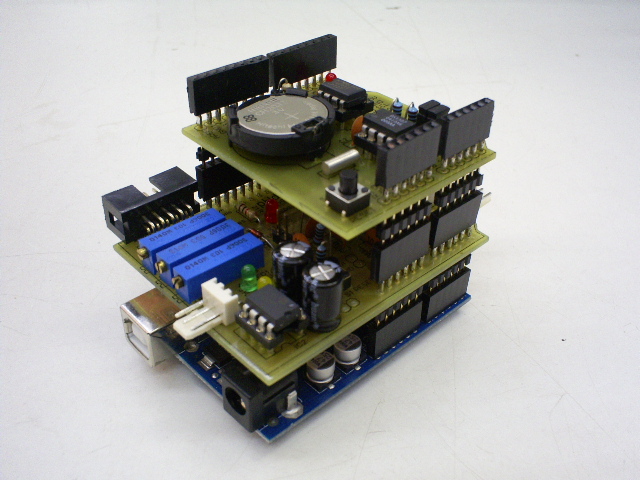
pHduino
13 | 14 | #Importance and Applications 15 | 16 | [http://en.wikipedia.org/wiki/PH pH] is a very important property in aqueous solutions. The pH is defined the colog (-log) of the hydrogen ion (H^+^) activity in the medium (or concentration when the H^+^ is low quantity). This property indicates if the medium is acid, neutral, or basic. 17 | 18 | For example, it is necessary control the pH of an aquarium. Some species of fish can not live out of a range of pH. So, we need read it and make the write correction of the pH. Other areas or applications where is important to know the pH are hydroponic, fermentation processes like beer and wine production, environmental monitoring of soils, water of rivers, lakes, and rain, sewage treatment tanks, monitoring of solution and buffers in laboratories of chemistry, and etc. 19 | 20 | #Overview 21 | 22 | The pHduino can operate using a LCD to display the pH and the temperature data like a pH meter. Also, you can control it using a computer by USB port. 23 | 24 | The signal gain (slope) and the signal offset are adjusted manually by trimpots. The signal is compensated by a temperature sensor. 25 | 26 | It seems inferior and a little bit more expensive compared with a pH meter bench instrument. However, it is interfaceable, programmable, expansible, and, the more important, open and free! 27 | 28 | Again, it is not intent to be a high resolution analytical instrument to compete with a commercial pH meter. It is to be simple, easy to understand, easy to modify, and different! 29 | 30 | #News 31 | 32 | * *2015-04-29* Released hardware v0.3: update of parts and Eagle 7. 33 | 34 | * *2015-04-03* Exported to the Github. 35 | 36 | * *2012-07-13* Released Python Jabberbot script v0.1. 37 | 38 | * *2012-03-12* Arduino 1.0 compatible. 39 | 40 | * *2011-01-01* pHduino Datalogger hardware v0.1 and firmware v0.4.1-0.3 released. 41 | 42 | * *2010-09-07* Released new hardware v0.2_0.3 and gerber files package v0.1. 43 | 44 | * *2010-04-25* Released pYpHpoT v0.1. 45 | 46 | * *2010-04-21* Released firmware v0.4.1. 47 | 48 | * *2009-09-20* Released firmware v0.4. 49 | 50 | * *2009-09-13* Released firmware v0.3. 51 | 52 | * *2009-08-31* Released hardware v0.2 and firmware v0.2. 53 | 54 | * *2009-08-12* First public release of the electronic circuit. 55 | 56 | * *2009-08-04* Project opened. 57 | 58 | #License 59 | 60 | The layout PCB is under Creative Commons 3.0 and the source code under GPLv2. 61 | 62 | #Photos 63 | 64 | PCB layout. 65 | 66 | 67 | 68 | Electronic scheme. 69 | 70 | 71 | 72 | #References 73 | 74 | The Simplest Possible pH Meter 75 | [http://www.66pacific.com/ph/simplest_ph.aspx http://www.66pacific.com/ph/simplest_ph.aspx] 76 | 77 | pH Meter - ProjectWIKI 78 | [http://blea.ch/wiki/index.php/PH_Meter http://blea.ch/wiki/index.php/PH_Meter] 79 | 80 | pH Meter - Circuit Operation 81 | [http://home.zonnet.nl/rsetteur/ph_ice.org/www.ice.org/equipment/phmeter/phoper.html] 82 | 83 | pH-meter.info 84 | [http://www.ph-meter.info/pH-meter-construction http://www.ph-meter.info/pH-meter-construction] 85 | 86 | Tiny pH-meter 87 | [http://damien.douxchamps.net/elec/ph_meter/ http://damien.douxchamps.net/elec/ph_meter/] 88 | 89 | pH Amplifier for Micro 90 | [http://www.electro-tech-online.com/electronic-projects/41430-ph-amplifier-micro.html http://www.electro-tech-online.com/electronic-projects/41430-ph-amplifier-micro.html] 91 | 92 | pH Probe Amplifier/Temperature Compensator 93 | [http://www.national.com/ds/LF/LF444.pdf LF444 Datasheet - Typical Application] 94 | 95 | pH Meter 96 | [http://focus.ti.com/lit/ds/symlink/opa129.pdf OPA129 Datasheet - High impedance amplifier.] 97 | 98 | #Articles 99 | 100 | [http://jchemed.chem.wisc.edu/Journal/Issues/1995/Dec/abs1135.html Da Rocha, Rogerio T.; Gutz, Ivano G. R.; do Lago, Claudimir L., "From Christmas Ornament to Glass Electrode", Journal of Chemical Education, 1995, 72, 1135-1136]. 101 | 102 | ---- 103 | Updated: 2015-04-29 104 | -------------------------------------------------------------------------------- /firmware/command_line/float2string.h: -------------------------------------------------------------------------------- 1 | // floatToString.h 2 | // 3 | // Tim Hirzel 4 | // tim@growdown.com 5 | // March 2008 6 | // float to string 7 | // 8 | // If you don't save this as a .h, you will want to remove the default arguments 9 | // uncomment this first line, and swap it for the next. I don't think keyword arguments compile in .pde files 10 | 11 | //char * floatToString(char * outstr, float value, int places, int minwidth=, bool rightjustify) { 12 | char * floatToString(char * outstr, float value, int places, int minwidth=0, bool rightjustify=false) { 13 | // this is used to write a float value to string, outstr. oustr is also the return value. 14 | int digit; 15 | float tens = 0.1; 16 | int tenscount = 0; 17 | int i; 18 | float tempfloat = value; 19 | int c = 0; 20 | int charcount = 1; 21 | int extra = 0; 22 | // make sure we round properly. this could use pow from , but doesn't seem worth the import 23 | // if this rounding step isn't here, the value 54.321 prints as 54.3209 24 | 25 | // calculate rounding term d: 0.5/pow(10,places) 26 | float d = 0.5; 27 | if (value < 0) 28 | d *= -1.0; 29 | // divide by ten for each decimal place 30 | for (i = 0; i < places; i++) 31 | d/= 10.0; 32 | // this small addition, combined with truncation will round our values properly 33 | tempfloat += d; 34 | 35 | // first get value tens to be the large power of ten less than value 36 | if (value < 0) 37 | tempfloat *= -1.0; 38 | while ((tens * 10.0) <= tempfloat) { 39 | tens *= 10.0; 40 | tenscount += 1; 41 | } 42 | 43 | if (tenscount > 0) 44 | charcount += tenscount; 45 | else 46 | charcount += 1; 47 | 48 | if (value < 0) 49 | charcount += 1; 50 | charcount += 1 + places; 51 | 52 | minwidth += 1; // both count the null final character 53 | if (minwidth > charcount){ 54 | extra = minwidth - charcount; 55 | charcount = minwidth; 56 | } 57 | 58 | if (extra > 0 and rightjustify) { 59 | for (int i = 0; i< extra; i++) { 60 | outstr[c++] = ' '; 61 | } 62 | } 63 | 64 | // write out the negative if needed 65 | if (value < 0) 66 | outstr[c++] = '-'; 67 | 68 | if (tenscount == 0) 69 | outstr[c++] = '0'; 70 | 71 | for (i=0; i< tenscount; i++) { 72 | digit = (int) (tempfloat/tens); 73 | itoa(digit, &outstr[c++], 10); 74 | tempfloat = tempfloat - ((float)digit * tens); 75 | tens /= 10.0; 76 | } 77 | 78 | // if no places after decimal, stop now and return 79 | 80 | // otherwise, write the point and continue on 81 | if (places > 0) 82 | outstr[c++] = '.'; 83 | 84 | 85 | // now write out each decimal place by shifting digits one by one into the ones place and writing the truncated value 86 | for (i = 0; i < places; i++) { 87 | tempfloat *= 10.0; 88 | digit = (int) tempfloat; 89 | itoa(digit, &outstr[c++], 10); 90 | // once written, subtract off that digit 91 | tempfloat = tempfloat - (float) digit; 92 | } 93 | if (extra > 0 and not rightjustify) { 94 | for (int i = 0; i< extra; i++) { 95 | outstr[c++] = ' '; 96 | } 97 | } 98 | 99 | 100 | outstr[c++] = '\0'; 101 | return outstr; 102 | } 103 | 104 | 105 | /* EXAMPLE APPLICATION 106 | #include "floatToString.h" //set to whatever is the location of floatToStrig 107 | 108 | void setup() { 109 | 110 | Serial.begin(9600); 111 | 112 | char buffer[25]; // just give it plenty to write out any values you want to test 113 | // ========================================== 114 | // now run a series on the floatToString function 115 | 116 | // looking at the precision of the float 117 | 118 | Serial.println("floatToString(buffer, 1000000.321 , 5);"); 119 | Serial.println(floatToString(buffer, 1000000.321, 5)); 120 | Serial.println(); 121 | Serial.println("floatToString(buffer, 100000.321 , 5);"); 122 | Serial.println(floatToString(buffer, 100000.321, 5)); 123 | Serial.println(); 124 | Serial.println("floatToString(buffer, 10000.321 , 5);"); 125 | Serial.println(floatToString(buffer, 10000.321, 5)); 126 | Serial.println(); 127 | Serial.println("floatToString(buffer, 1000.321 , 5);"); 128 | Serial.println(floatToString(buffer, 1000.321, 5)); 129 | Serial.println(); 130 | Serial.println("floatToString(buffer, 100.321 , 5);"); 131 | Serial.println(floatToString(buffer, 100.321, 5)); 132 | Serial.println(); 133 | 134 | // ========================================== 135 | // looking at effect of changing precision 136 | Serial.println("floatToString(buffer, 100000.321 , 6);"); 137 | Serial.println(floatToString(buffer, 100000.321, 6)); 138 | Serial.println(); 139 | Serial.println("floatToString(buffer, 100000.321 , 7);"); 140 | Serial.println(floatToString(buffer, 100000.321, 7)); 141 | Serial.println(); 142 | Serial.println("floatToString(buffer, 100000.321 , 8);"); 143 | Serial.println(floatToString(buffer, 100000.321, 8)); 144 | Serial.println(); 145 | Serial.println("floatToString(buffer, 100000.321 , 9);"); 146 | Serial.println(floatToString(buffer, 100000.321, 9)); 147 | Serial.println(); 148 | 149 | 150 | // ========================================== 151 | 152 | // check negatives and rounding, and some edge cases 153 | Serial.println("floatToString(buffer, -5004.321 , 5);"); 154 | Serial.println(floatToString(buffer, -5004.321 , 5)); 155 | Serial.println(); 156 | 157 | Serial.println("floatToString(buffer, 99.999 , 3); "); 158 | Serial.println(floatToString(buffer, 99.999 , 3)); 159 | Serial.println(); 160 | 161 | Serial.println("floatToString(buffer, 100, 1);"); 162 | Serial.println(floatToString(buffer, 100, 1)); 163 | Serial.println(); 164 | 165 | Serial.println("floatToString(buffer, -100.999 , 1);"); 166 | Serial.println(floatToString(buffer, -100.999 , 1)); 167 | Serial.println(); 168 | 169 | Serial.println("floatToString(buffer, -54.321 , 0);"); 170 | Serial.println(floatToString(buffer, -54.321 , 0)); 171 | Serial.println(); 172 | 173 | Serial.println("floatToString(buffer, 0.321 , 5);"); 174 | Serial.println(floatToString(buffer, 0.321 , 5)); 175 | Serial.println(); 176 | 177 | Serial.println("floatToString(buffer, -1.0001 , 5);"); 178 | Serial.println(floatToString(buffer, -1.0001 , 5)); 179 | Serial.println(); 180 | 181 | Serial.println("floatToString(buffer, -0.000001 , 5);"); 182 | Serial.println(floatToString(buffer, -0.000001 , 5)); 183 | Serial.println(); 184 | 185 | Serial.println("floatToString(buffer, 0.000001 , 5);"); 186 | Serial.println(floatToString(buffer, 0.000001 , 5)); 187 | Serial.println(); 188 | 189 | Serial.println("floatToString(buffer, -0.00001 , 5);"); 190 | Serial.println(floatToString(buffer, -0.00001 , 5)); 191 | Serial.println(); 192 | 193 | Serial.println("floatToString(buffer, 0.000099 , 5);"); 194 | Serial.println(floatToString(buffer, 0.000099 , 5)); 195 | Serial.println(); 196 | 197 | // alternative technique that depends on 198 | //Serial.println("Serial.println(dtostrf(-1.0001, 2, 5, s));"); 199 | //char s[32]; 200 | // Serial.println(dtostrf(-1.0001, 2, 5, s))); 201 | 202 | delay(1000); 203 | Serial.println(); 204 | 205 | } 206 | 207 | void loop() { 208 | } 209 | */ 210 | 211 | -------------------------------------------------------------------------------- /index.html: -------------------------------------------------------------------------------- 1 | 2 | 3 | 4 | 5 | 6 | 7 | 8 | 9 | 10 | 11 | pHduino - pH meter shield for Arduino by hephesto 12 | 13 | 14 | 15 | 16 |
17 |
18 |

pHduino - pH meter shield for Arduino

19 |

pHduino Github page

20 | 21 |
22 | Download as .zip 23 | Download as .tar.gz 24 | View on GitHub 25 |
26 |
27 |
28 | 29 |
30 |
31 |

32 | phduino

33 | 34 |

Automatically exported from code.google.com/p/phduino

35 | 36 |

37 | About

38 | 39 |

This project describes an open software open hardware pH meter using an Arduino/Freeduino board. In other words, this is an electronic circuit to be connected with a glass electrode pH sensor.

40 | 41 |

It was possible by the idea from my friend Mr. Denis Vidal, the space that my supervisor gave me, prof. Dr. Emanuel Carrilho, BioMicS Group, Instituto de Química de São Carlos, Universidade de São Paulo, Brazil, and by facilities and suggestions from prof. Dr. Claudimir Lucio do Lago, LAIA Laboratory, Instituto de Química da Universidade de São Paulo, Brazil. Thanks Fapesp - Fundação de Amparo à Pesquisa do Estado de São Paulo by the financial support for my different projects during my academic life.

42 | 43 |

pHduino

44 | 45 |

46 | Importance and Applications

47 | 48 |

pH is a very important property in aqueous solutions. The pH is defined the colog (-log) of the hydrogen ion (H^+^) activity in the medium (or concentration when the H^+^ is low quantity). This property indicates if the medium is acid, neutral, or basic.

49 | 50 |

For example, it is necessary control the pH of an aquarium. Some species of fish can not live out of a range of pH. So, we need read it and make the write correction of the pH. Other areas or applications where is important to know the pH are hydroponic, fermentation processes like beer and wine production, environmental monitoring of soils, water of rivers, lakes, and rain, sewage treatment tanks, monitoring of solution and buffers in laboratories of chemistry, and etc.

51 | 52 |

53 | Overview

54 | 55 |

The pHduino can operate using a LCD to display the pH and the temperature data like a pH meter. Also, you can control it using a computer by USB port.

56 | 57 |

The signal gain (slope) and the signal offset are adjusted manually by trimpots. The signal is compensated by a temperature sensor.

58 | 59 |

It seems inferior and a little bit more expensive compared with a pH meter bench instrument. However, it is interfaceable, programmable, expansible, and, the more important, open and free!

60 | 61 |

Again, it is not intent to be a high resolution analytical instrument to compete with a commercial pH meter. It is to be simple, easy to understand, easy to modify, and different!

62 | 63 |

64 | News

65 | 66 |
    67 |
  • 2015-04-29 Released hardware v0.3: update of parts and Eagle 7.

  • 68 |
  • 2015-04-03 Exported to the Github.

  • 69 |
  • 2012-07-13 Released Python Jabberbot script v0.1.

  • 70 |
  • 2012-03-12 Arduino 1.0 compatible.

  • 71 |
  • 2011-01-01 pHduino Datalogger hardware v0.1 and firmware v0.4.1-0.3 released.

  • 72 |
  • 2010-09-07 Released new hardware v0.2_0.3 and gerber files package v0.1.

  • 73 |
  • 2010-04-25 Released pYpHpoT v0.1.

  • 74 |
  • 2010-04-21 Released firmware v0.4.1.

  • 75 |
  • 2009-09-20 Released firmware v0.4.

  • 76 |
  • 2009-09-13 Released firmware v0.3.

  • 77 |
  • 2009-08-31 Released hardware v0.2 and firmware v0.2.

  • 78 |
  • 2009-08-12 First public release of the electronic circuit.

  • 79 |
  • 2009-08-04 Project opened.

  • 80 |
81 | 82 |

83 | License

84 | 85 |

The layout PCB is under Creative Commons 3.0 and the source code under GPLv2.

86 | 87 |

88 | Photos

89 | 90 |

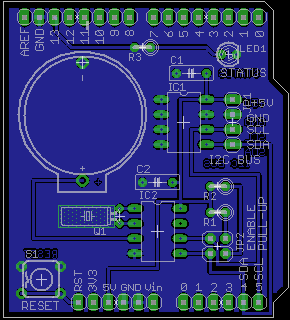
PCB Layout

91 | 92 |

Electronic scheme

93 | 94 |

95 | References

96 | 97 |

The Simplest Possible pH Meter

98 | 99 |

http://www.66pacific.com/ph/simplest_ph.aspx

100 | 101 |

pH Meter - ProjectWIKI

102 | 103 |

http://blea.ch/wiki/index.php/PH_Meter

104 | 105 |

pH Meter - Circuit Operation

106 | 107 |

http://home.zonnet.nl/rsetteur/ph_ice.org/www.ice.org/equipment/phmeter/phoper.html

108 | 109 |

pH-meter.info

110 | 111 |

http://www.ph-meter.info/pH-meter-construction

112 | 113 |

Tiny pH-meter

114 | 115 |

http://damien.douxchamps.net/elec/ph_meter/

116 | 117 |

pH Amplifier for Micro

118 | 119 |

http://www.electro-tech-online.com/electronic-projects/41430-ph-amplifier-micro.html

120 | 121 |

pH Probe Amplifier/Temperature Compensator

122 | 123 |

http://www.national.com/ds/LF/LF444.pdf LF444 Datasheet - Typical Application

124 | 125 |

pH Meter

126 | 127 |

http://focus.ti.com/lit/ds/symlink/opa129.pdf OPA129 Datasheet - High impedance amplifier.

128 | 129 |

130 | Articles

131 | 132 |

http://jchemed.chem.wisc.edu/Journal/Issues/1995/Dec/abs1135.html Da Rocha, Rogerio T.; Gutz, Ivano G. R.; do Lago, Claudimir L., "From Christmas Ornament to Glass Electrode", Journal of Chemical Education, 1995, 72, 1135-1136

133 | 134 |
135 | 136 |

Updated: 2016-12-05

137 |
138 |
139 | 140 | 144 | 150 | 151 | 152 | 153 | -------------------------------------------------------------------------------- /wiki/PartList.wiki: -------------------------------------------------------------------------------- 1 | #labels Featured 2 | = Partlist = 3 | 4 | Exported from pHduino_v02.02.sch at 28/08/10 19:31 5 | 6 | EAGLE Version 5.10.0 Copyright (c) 1988-2010 CadSoft 7 | 8 | ---- 9 | 10 | * Part Value Device Package Library Sheet * 11 | 12 | C1 100nF C-EU050-025X075 C050-025X075 rcl 1 13 | 14 | C2 100nF C-EU050-025X075 C050-025X075 rcl 1 15 | 16 | C3 100nF C-EU050-025X075 C050-025X075 rcl 1 17 | 18 | C4 100nF C-EU050-025X075 C050-025X075 rcl 1 19 | 20 | C5 100nF C-EU050-025X075 C050-025X075 rcl 1 21 | 22 | C6 100nF C-EU050-025X075 C050-025X075 rcl 1 23 | 24 | C7 100nF C-EU050-025X075 C050-025X075 rcl 1 25 | 26 | C8 100nF C-EU050-025X075 C050-025X075 rcl 1 27 | 28 | C9 100nF C-EU050-025X075 C050-025X075 rcl 1 29 | 30 | C10 100uFx25V CPOL-EUE2.5-7 E2,5-7 rcl 1 31 | 32 | C11 100uFx25V CPOL-EUE2.5-7 E2,5-7 rcl 1 33 | 34 | C12 100nF C-EU050-025X075 C050-025X075 rcl 1 35 | 36 | C13 100nF C-EU050-025X075 C050-025X075 rcl 1 37 | 38 | D1 BZX55C5V1 BZX55 DO35Z10 diode 1 39 | 40 | IC1 TL072P TL072P DIL08 linear 1 41 | 42 | IC2 TC1121CPA TC1121CPA DIL8 tc1121 1 43 | 44 | JP1 PINHD-1X1 1X01 pinhead 1 45 | 46 | JP2 PINHD-1X1 1X01 pinhead 1 47 | 48 | JP3 PINHD-1X1 1X01 pinhead 1 49 | 50 | JP4 PINHD-1X2 1X02 pinhead 1 51 | 52 | JP5 PINHD-1X2 1X02 pinhead 1 53 | 54 | JP6 PINHD-1X3 1X03 pinhead 1 55 | 56 | JP7 PINHD-1X3 1X03 pinhead 1 57 | 58 | JP8 PINHD-2X5 2X05 pinhead 1 59 | 60 | LED1 LED3MM LED3MM led 1 61 | 62 | LED2 LED3MM LED3MM led 1 63 | 64 | LED3 LED3MM LED3MM led 1 65 | 66 | MCU1 ARDUINO-USBLONG_PADS_NO_TEXT ARDUINO-USBLONG_PADS_NO_TEXT SHIELD-NOTEXT Arduino-Various 1 67 | 68 | R1 100k R-EU_0207/5V 0207/5V rcl 1 69 | 70 | R2 1M R-TRIMM43P RTRIM43P rcl 1 71 | 72 | R3 10k R-TRIMM43P RTRIM43P rcl 1 73 | 74 | R4 10k R-EU_0207/5V 0207/5V rcl 1 75 | 76 | R5 10k R-EU_0207/5V 0207/5V rcl 1 77 | 78 | R6 10k R-EU_0207/2V 0207/2V rcl 1 79 | 80 | R7 10k R-EU_0207/5V 0207/5V rcl 1 81 | 82 | R8 10k R-EU_0207/2V 0207/2V rcl 1 83 | 84 | R9 40k2 R-EU_0207/10 0207/10 rcl 1 85 | 86 | R10 10k R-EU_0207/10 0207/10 rcl 1 87 | 88 | R11 1k R-EU_0207/10 0207/10 rcl 1 89 | 90 | R12 1k R-EU_0207/7 0207/7 rcl 1 91 | 92 | R13 1k R-EU_0207/2V 0207/2V rcl 1 93 | 94 | R14 1k R-EU_0207/2V 0207/2V rcl 1 95 | 96 | R15 1k R-EU_0207/2V 0207/2V rcl 1 97 | 98 | R16 10k R-TRIMM43P RTRIM43P rcl 1 99 | 100 | S1 TAC_SWITCHPTH TACTILE-PTH SparkFun 1 101 | 102 | S2 TAC_SWITCHPTH TACTILE-PTH SparkFun 1 103 | 104 | SG1 F/TMB F/TMB F/TMB buzzer 1 105 | 106 | X1 1-227161-0 1-227161-0 AMP_227161 con-coax 1 107 | 108 | ---- 109 | Obs: 40k2 is the same of 40.2k ohm. It is a short in electronics. 110 | 111 | 112 | = Parts not showed and comments = 113 | 114 | == LCD == 115 | 116 | Anyone compatible with the HD44780 controller with two lines and 16 columns. You can use a different one and change the code. 117 | 118 | It is not necessary to control the pHduino if you want to control it only by serial port. In this case, you don't need the connector JP8 and the trimpot R16. 119 | 120 | == Temperature sensor == 121 | 122 | Use the LM35DZ (TO-92 package). WARNING! Don't put it inside of the water or you will damage your circuit! I suggest you put it outside of the reservoir, using a adhesive tape, that you want to measure. 123 | 124 | It is not necessary if the environment has a short variation of temperature. Your could fix the pH measurement by software. The pHduino firmware has an option to set a fixed temperature value. In this case, the capacitors C8, C9 and the connector JP6 are not necessary. 125 | 126 | http://www.national.com/mpf/LM/LM35.html 127 | 128 | == J-FET Operational Amplifier == 129 | 130 | The IC1 could be replaced by the TL082. Today, there is no electric difference between these operational amplifiers. Read the datasheets. 131 | 132 | http://www.datasheetcatalog.com/datasheets_pdf/T/L/0/7/TL072.shtml 133 | 134 | http://www.datasheetcatalog.com/datasheets_pdf/T/L/0/8/TL082.shtml 135 | 136 | There is a improvement of this part called TL052. It is full specified to work with +/-5V. 137 | 138 | http://www.ti.com/product/tl052 139 | 140 | == Negative Charge Pump == 141 | 142 | The IC2 TC1121 can be replaced by the ICL7660, ICL7660A, or ICL7660S. The ICL7660S is a direct replacement for the industry standard ICL7660 offering an extended operating supply voltage range up to 12V, with lower supply current. But, you need left the low voltage LV pin (pin 6) not connected. Just rise it or cut it. 143 | 144 | TC1121 from Microchip 145 | 146 | http://www.microchip.com/wwwproducts/Devices.aspx?dDocName=en010559 147 | 148 | ICL7660S from Intersil 149 | 150 | http://www.intersil.com/products/deviceinfo.asp?pn=ICL7660S 151 | 152 | ICL7660 / ICL7660A from Intersil 153 | 154 | http://www.intersil.com/products/deviceinfo.asp?pn=ICL7660 155 | 156 | == Sockets for the integrated circuits == 157 | 158 | I suggest you use 8 pins sockets for the IC1 and IC2 and a PCB with very neat welds. Remember that input impedance is about 1E12 ohms. Make a neat job. 159 | 160 | == Microcontroller == 161 | 162 | In this version, I am using a Arduino board. You can change to use a RBBB, Teensy or other compatible Arduino microcontroller. 163 | 164 | == Control button == 165 | 166 | It is not in use by now. It is for a custom control. You could remove the push button S2, the resistor R15, the capacitor R13, and the connector JP5. 167 | 168 | == Buzzer == 169 | 170 | It is not necessary for the pHduino operation. In case you don't need sound alarms, you could remove the buzzer SG1. 171 | 172 | == Status LED == 173 | 174 | It is not necessary for the pHduino operation. In case you don't need visual alarms, you could remove LED3 and the resistor R12. 175 | 176 | == Test points == 177 | 178 | There are three test points. You don't really need them. You could remove the JP1 (VSENSE), JP2 (VREF), and JP3 (GND). 179 | 180 | == Power Monitors == 181 | 182 | The LED1 and LED2 show if +5V and the -5V are on. You don't really need them. You could remove LED1, LED2, and the resistors R13 and R14. 183 | 184 | == Trimming pot == 185 | 186 | The R2, R3, and R16 are trimming potentiometers multi-turn. It is a high precision variable resistor multi-turn (about 22 turns). You can find with different names: trimpot, trimpot multiturn, or trimmer. The name depends of the seller and of the country. The package is 3/8" (19mm). Bourns is one of the manufactures (3006 serie - trimpot trimming potentiometer). 187 | 188 | http://www.bourns.com/data/global/pdfs/3006.pdf -------------------------------------------------------------------------------- /firmware/command_line/pHduino_v041_firmware_20120312.ino: -------------------------------------------------------------------------------- 1 | /* 2 | pHduino.pde - pHduino firmware for Arduino. 3 | Copyright (c) 2009 Carlos A. Neves 4 | http://code.google.com/p/phduino 5 | 6 | This program is free software: you can redistribute it and/or modify 7 | it under the terms of the GNU General Public License as published by 8 | the Free Software Foundation, either version 3 of the License, or 9 | (at your option) any later version. 10 | 11 | This program is distributed in the hope that it will be useful, 12 | but WITHOUT ANY WARRANTY; without even the implied warranty of 13 | MERCHANTABILITY or FITNESS FOR A PARTICULAR PURPOSE. See the 14 | GNU General Public License for more details. 15 | 16 | You should have received a copy of the GNU General Public License 17 | along with this program. If not, see . 18 | 19 | Author: Carlos A. Neves 20 | 21 | */ 22 | 23 | #include 24 | //#include "WProgram.h" 25 | #include 26 | #include "pHduino.h" 27 | #include "float2string.h" 28 | #include "commandline.h" 29 | #include "string.h" 30 | #include "stdlib.h" 31 | #include 32 | //#include "freemem.h" 33 | 34 | // Creates the LCD instance 35 | LiquidCrystal lcd(PH_LCD_RS_PIN, PH_LCD_RW_PIN, PH_LCD_E_PIN, PH_LCD_D4_PIN, PH_LCD_D5_PIN, PH_LCD_D6_PIN, PH_LCD_D7_PIN); 36 | 37 | // ordinary variables 38 | char myStr[16]; 39 | int val_E; 40 | int val_R; 41 | int val_T; 42 | float E; 43 | float R; 44 | float T; 45 | float pH; 46 | int i; 47 | unsigned long ul; 48 | float f, f2; 49 | 50 | unsigned long int my_timer0; 51 | unsigned long int my_timer; 52 | 53 | boolean pH_alarm_status = false; 54 | 55 | // struct of parameters 56 | struct myRec_T{ 57 | unsigned int magic_number; 58 | boolean start_flag; 59 | unsigned int time_between_acquisitions_ms; 60 | boolean temperature_sensor_flag; 61 | float temperature_constant_celcius; 62 | boolean pH_alarm_flag; 63 | float pH_inf; 64 | float pH_sup; 65 | } 66 | myRec; 67 | 68 | void parameters_reset(void){ 69 | 70 | myRec.magic_number = MAGIC_NUMBER; 71 | myRec.start_flag = true; 72 | myRec.time_between_acquisitions_ms = PH_INITIAL_TIME_BETWEEN_ACQUISITIONS_MS; 73 | myRec.temperature_sensor_flag = true; 74 | myRec.temperature_constant_celcius = PH_TEMPERATURE_VALUE_INITIAL_CELCIUS; 75 | myRec.pH_alarm_flag = false; 76 | myRec.pH_inf = 0.0; 77 | myRec.pH_sup = 14.0; 78 | 79 | eeprom_write_block(&myRec, (void *)0, sizeof(myRec)); 80 | } 81 | 82 | void setup(void){ 83 | 84 | // Init serial port 85 | Serial.begin(115200); 86 | 87 | // setup LED, button, and buzzer 88 | pinMode(PH_LED_PIN, OUTPUT); 89 | pinMode(PH_BUTTON_CTRL_PIN, INPUT); 90 | pinMode(PH_BUZZER_PIN, OUTPUT); 91 | 92 | // initialize LED and buzzer 93 | digitalWrite(PH_LED_PIN, LOW); 94 | digitalWrite(PH_BUZZER_PIN, LOW); 95 | 96 | // begin LCD 97 | lcd.begin(16, 2); 98 | lcd.clear(); 99 | lcd.noCursor(); 100 | lcd.home(); 101 | lcd.display(); 102 | 103 | // Initial messagens. 104 | digitalWrite(PH_BUZZER_PIN, HIGH); 105 | delay(200); 106 | digitalWrite(PH_BUZZER_PIN, LOW); 107 | 108 | digitalWrite(PH_LED_PIN, HIGH); 109 | lcd.setCursor(0,0); 110 | lcd.print("pHduino"); 111 | lcd.setCursor(0,1); 112 | lcd.print(PH_PHDUINO_VERSION); 113 | delay(2000); 114 | digitalWrite(PH_LED_PIN, LOW); 115 | 116 | // read parameters from EEPROM 117 | eeprom_read_block(&myRec, (void *)0, sizeof(myRec)); 118 | 119 | // check for empty memory or different data block 120 | if (myRec.magic_number != MAGIC_NUMBER){ 121 | parameters_reset(); 122 | } 123 | 124 | lcd.clear(); 125 | 126 | // Free memory check 127 | //Serial.println(availableMemory()); 128 | } 129 | 130 | void process_data(void){ 131 | 132 | digitalWrite(PH_LED_PIN, HIGH); 133 | 134 | // print temperature 135 | // Obs.: You can operate the pHduino without a temperature sensor. 136 | // In this case, you need setup a temperature value 137 | // and comment the readADC and calc lines. 138 | 139 | if (myRec.temperature_sensor_flag == true){ 140 | val_T = readADC(PH_TEMP_ADC_PIN, PH_TIME_ADC_READINGS_MICROSECONS); 141 | T = 100 * val_T * 5.0 / 1024; 142 | } 143 | else 144 | { 145 | T = myRec.temperature_constant_celcius; // celcius temperature to operates without a temperature sensor. 146 | } 147 | 148 | floatToString(myStr, T, 1); 149 | 150 | lcd.setCursor(0,0); 151 | lcd.print(myStr); 152 | lcd.print((char)223); // degree symbol 153 | lcd.print("C "); 154 | 155 | //Serial.print(val_T, DEC); 156 | //Serial.print(" "); 157 | Serial.print(myStr); 158 | Serial.print(" "); 159 | 160 | val_R = readADC(PH_REF_ADC_PIN, PH_TIME_ADC_READINGS_MICROSECONS); 161 | R = PH_GAIN_STAGE2_REF * (val_R * 5.0 / 1024); 162 | 163 | //floatToString(myStr, R, 3); 164 | 165 | //lcd.setCursor(0,0); 166 | //lcd.print(myStr); 167 | //lcd.print((char)223); // degree symbol 168 | //lcd.print("C "); 169 | 170 | //Serial.print(val_T, DEC); 171 | //Serial.print(" "); 172 | //Serial.print(myStr); 173 | //Serial.print(" "); 174 | 175 | // print ADC value and voltage of electrochemical potential 176 | val_E = readADC(PH_PH_ADC_PIN, PH_TIME_ADC_READINGS_MICROSECONS); 177 | E = -1 * ((val_E * 5.0 / 1024) - R) / PH_GAIN_STAGE1_PH; 178 | 179 | //floatToString(myStr, E, 3); 180 | 181 | lcd.setCursor(0, 1); 182 | lcd.print((int)(E*1000), DEC); // mili volts 183 | lcd.print("mV "); 184 | 185 | lcd.setCursor(8, 1); 186 | lcd.print("AD:"); 187 | lcd.print(val_E, DEC); 188 | lcd.print(" "); 189 | 190 | Serial.print(val_E); 191 | Serial.print(" "); 192 | Serial.print((int)(E*1000), DEC); // mili volts 193 | Serial.print(" "); 194 | 195 | // print pH 196 | // delta_pH = -(F/(2.303*R*T))*delta_E 197 | // 198 | // where, 199 | // gas constant R = 8.31451 J * K^-1 * mol^-1 200 | // Kelvin temperature T = celcius temperature plus 273.15 K 201 | // Faraday constant F = 96485 C 202 | pH = (float)((-5038.8 * E / (273.15 + T)) + 7.0); 203 | 204 | floatToString(myStr, pH, 2); 205 | 206 | lcd.setCursor(8, 0); 207 | lcd.print("pH:"); 208 | lcd.print(myStr); 209 | lcd.print(" "); 210 | 211 | Serial.print(myStr); 212 | Serial.print(" "); 213 | 214 | // print alarm signal 215 | if (myRec.pH_alarm_flag == true){ 216 | Serial.print(1, DEC); 217 | Serial.print(" "); 218 | if ((pH < myRec.pH_inf) || (pH > myRec.pH_sup)){ 219 | Serial.print(1, DEC); 220 | pH_alarm_status = true; 221 | lcd.setCursor(7, 0); 222 | lcd.print("*"); 223 | } 224 | else{ 225 | Serial.print(0, DEC); 226 | pH_alarm_status = false; 227 | lcd.setCursor(7, 0); 228 | lcd.print(" "); 229 | } 230 | } 231 | else{ 232 | Serial.print(0, DEC); 233 | Serial.print(" "); 234 | Serial.print(0, DEC); 235 | pH_alarm_status = false; 236 | } 237 | 238 | Serial.println(); 239 | 240 | if (pH_alarm_status == false){ 241 | digitalWrite(PH_LED_PIN, LOW); 242 | } 243 | else{ 244 | digitalWrite(PH_BUZZER_PIN, HIGH); 245 | delay(100); 246 | digitalWrite(PH_BUZZER_PIN, LOW); 247 | } 248 | } 249 | 250 | void process_cmd(void){ 251 | 252 | if (process_command_line() == 1){ 253 | 254 | // cmd 255 | if (strcmp(cmd_str, "cmd") == 0){ 256 | Serial.println(cmd_parm_str); 257 | 258 | // cmd phduino on|off 259 | if (strcmp(cmd_parm[0], "phduino") == 0){ 260 | 261 | if (strcmp(cmd_parm[1], "start") == 0){ 262 | myRec.start_flag = true; 263 | 264 | digitalWrite(PH_BUZZER_PIN, HIGH); 265 | delay(200); 266 | digitalWrite(PH_BUZZER_PIN, LOW); 267 | 268 | } 269 | 270 | if (strcmp(cmd_parm[1], "stop") == 0){ 271 | myRec.start_flag = false; 272 | 273 | lcd.clear(); 274 | 275 | digitalWrite(PH_BUZZER_PIN, HIGH); 276 | delay(200); 277 | digitalWrite(PH_BUZZER_PIN, LOW); 278 | } 279 | } 280 | 281 | // cmd interval_ms INT 282 | if ((cmd_n_parms > 1) && (strcmp(cmd_parm[0], "interval_ms") == 0)){ 283 | ul = atol(cmd_parm[1]); 284 | if (ul > 0){ 285 | myRec.time_between_acquisitions_ms = ul; 286 | my_timer0 = millis(); // reset the timer 287 | } 288 | } 289 | 290 | // cmd set_temp_sensor on|off 291 | if (strcmp(cmd_parm[0], "set_temp_sensor") == 0){ 292 | 293 | if (strcmp(cmd_parm[1], "on") == 0){ 294 | myRec.temperature_sensor_flag = true; 295 | } 296 | 297 | if (strcmp(cmd_parm[1], "off") == 0){ 298 | myRec.temperature_sensor_flag = false; 299 | } 300 | } 301 | 302 | // cmd set_temp FLOAT 303 | if (strcmp(cmd_parm[0], "set_temp") == 0){ 304 | 305 | f = (float)atof(cmd_parm[1]); 306 | 307 | if ((f >= 0.0) && (f <= 100.0)){ 308 | myRec.temperature_constant_celcius = f; 309 | } 310 | else{ 311 | Serial.println("Error: Temperature range from 0.0 to 100.0"); 312 | } 313 | } 314 | 315 | // set pH alarm range 316 | if (strcmp(cmd_parm[0], "set_ph_alarm") == 0){ 317 | 318 | f = (float)atof(cmd_parm[1]); 319 | f2 = (float)atof(cmd_parm[2]); 320 | 321 | if ((f >= 0.0) && (f <= 14.0) && (f2 >= 0.0) && (f2 <= 14.0) && (f2 > f)){ 322 | myRec.pH_inf = f; 323 | myRec.pH_sup = f2; 324 | } 325 | else{ 326 | Serial.println("Error: pH range from 0.0 to 14.0"); 327 | } 328 | } 329 | 330 | // pH alarm 331 | if (strcmp(cmd_parm[0], "ph_alarm") == 0){ 332 | 333 | if (strcmp(cmd_parm[1], "on") == 0){ 334 | myRec.pH_alarm_flag = true; 335 | } 336 | 337 | if (strcmp(cmd_parm[1], "off") == 0){ 338 | myRec.pH_alarm_flag = false; 339 | digitalWrite(PH_LED_PIN, LOW); 340 | lcd.setCursor(7, 0); 341 | lcd.print(" "); 342 | } 343 | } 344 | 345 | // reset parameters 346 | if (strcmp(cmd_parm[0], "reset") == 0){ 347 | parameters_reset(); 348 | } 349 | 350 | // cmd help 351 | if (strcmp(cmd_parm[0], "help") == 0){ 352 | 353 | Serial.println("cmd help"); 354 | Serial.println("cmd phduino start|stop"); 355 | Serial.println("cmd interval_ms INT"); 356 | Serial.println("cmd set_temp_sensor on|off"); 357 | Serial.println("cmd set_temp FLOAT"); 358 | Serial.println("cmd set_ph_alarm TEMP_INF TEMP_SUP"); 359 | Serial.println("cmd ph_alarm on|off"); 360 | Serial.println("cmd reset"); 361 | } 362 | 363 | // save parameters 364 | eeprom_write_block(&myRec, (void *)0, sizeof(myRec)); 365 | } 366 | } 367 | } 368 | 369 | void loop(void){ 370 | 371 | my_timer = millis(); 372 | 373 | if ((my_timer-my_timer0) > myRec.time_between_acquisitions_ms){ 374 | 375 | // reset the timer 376 | my_timer0 = my_timer; 377 | 378 | if (myRec.start_flag == true){ 379 | process_data(); 380 | } 381 | } 382 | 383 | process_cmd(); 384 | } 385 | 386 | -------------------------------------------------------------------------------- /wiki/pHduino_Jabberbot.wiki: -------------------------------------------------------------------------------- 1 | #summary Controlling the pHduino with a Python-Jabberbot script 2 | #labels Featured 3 | 4 | 5 | 6 | = Introduction = 7 | 8 | This is a simple suggestion to control the pHduino over Internet using the Python-Jabberbot framework. It could be interesting, for example, if you want to monitor the pH of an aquarium from your work or using your smartphone from anywhere. 9 | 10 | Of course you can change the python jabberbot script to control other devices over USB-Serial and an IM connection. It works well for slow streaming of messages. XMPP protocol is open, widely accepted, and works fine with python for multi platform solutions. There are many clients that use the XMPP protocol. 11 | 12 | You will need: 13 | 14 | * a pHduino working. 15 | * a computer (Linux or Windows) with an internet connection and a USB port with the virtual comm port (VCP) working. 16 | * two XMPP instant messages accounts (jabber.org, Google Talk...) and changing messages between them. 17 | * the Python interpreter with the modules python-setuptools, python-serial, python-xmpp, and python-jabberbot. 18 | * The python jabberbot script to control the pHduino. 19 | 20 | I described the process for Linux and Windows. I did not test it for Mac but the users could test the Windows procedure. 21 | 22 | = Software dependence = 23 | 24 | Python 2.7.3 25 | http://www.python.org 26 | 27 | Python Setuptools 0.6c11 28 | http://pypi.python.org/pypi/setuptools/0.6c11 29 | 30 | Python Serial 2.6 31 | http://pyserial.sourceforge.net/ 32 | 33 | Python XMPP 0.5.0-rc1 34 | http://xmpppy.sourceforge.net/ 35 | 36 | Python Jabberbot 0.15 37 | http://thp.io/2007/python-jabberbot/ 38 | 39 | Check for packages updates and pay attention with the Python version. 40 | 41 | = pHduino = 42 | 43 | I am assuming the pHduino working properly by USB-Serial port. 44 | 45 | First of all, it is important change the pHduino parameter interval_ms from 1000 to 10000 or more. The reason is to not flood the IM with too many messages to not difficult the human reading and reduce the traffic of messages on the Internet. To do this you need a serial terminal to set the parameter. My suggestions: cutecom for Linux (http://cutecom.sourceforge.net/), terminalbpp for Windows (https://sites.google.com/site/terminalbpp/), and screens for Mac. 46 | 47 | Select baudrate 115200 for the firmware version v041 and No Line End to send strings. Open the connection and type 48 | 49 | {{{ 50 | cmd interval_ms 10000 51 | }}} 52 | 53 | You will listen a beep. Now, you have a message by serial every 10s. 54 | 55 | = XMPP accounts = 56 | 57 | You need two IM accounts that uses the XMPP protocol. One account for pHduino and another one for you access the pHduino from anywhere. The accounts could be both from Google Talk, or both from Jabber.org, or one from the Google Talk and another one from the Jabber.org. Anyway, what is important is the XMPP protocol. Don't forget to add the contacts in the lists of each other. 58 | 59 | Software installing for Linux 60 | 61 | For Linux users the software install is simple because you can find all programs in the repositories. The package name could be different if you are using a different Linux distribution. I am using the Ubuntu 12.04. 62 | 63 | Probably, the Python interpreter is already installed. 64 | 65 | Now, you need the python serial module. Open a terminal and type 66 | 67 | {{{ 68 | sudo apt-get install python-serial 69 | }}} 70 | 71 | Install the the Jabberbot. The xmpppy (python-xmpp) dependence will be installed. 72 | 73 | {{{ 74 | sudo apt-get install python-jabberbot 75 | }}} 76 | 77 | In case your Linux distribution does not have the modules jabberbot and xmpppy in the repository, you must download, build, and install them. To do this, install the python-setuptools. 78 | 79 | {{{ 80 | sudo apt-get install python-setuptools 81 | }}} 82 | 83 | Software installing for Windows 84 | 85 | I tested the the python jabberbot script in an Windows 7 64-bits and it worked. 86 | 87 | = Python = 88 | 89 | Download and install the Python 2.7.3 Windows Installed (Windows binary -- does not include source) from 90 | 91 | http://www.python.org/download/ 92 | 93 | There is a detail to work: be sure the python directory distribution is in the PATH environment variable. Go to Start -> Control Painel -> System -> Advanced System Settings -> Environment Variables. Look for the PATH variable at System Variables and edit it adding at the end of the line (take care to not overwrite your settings). The procedure is similar for Windows XP or Vista. Append the following string. 94 | 95 | {{{ 96 | C:\Python27; 97 | }}} 98 | 99 | To test, open a command prompt (Start -> Programs -> Acessories -> Command prompt) and type python and press enter. You should have the python interpreter. Type quit() to quit. 100 | 101 | = pyserial = 102 | 103 | To open a serial connection with the pHduino install the python-serial module. I installed the old version pyserial-2.5.win32.exe from 104 | 105 | http://sourceforge.net/projects/pyserial/files/pyserial/2.5/ 106 | 107 | = Setup-tools = 108 | 109 | Next, install the python-setuptools to build and install the xmpp and jabberbot modules. Download and execute the file setuptools-0.6c11.win32-py2.7.exe from 110 | 111 | http://pypi.python.org/pypi/setuptools/ 112 | 113 | No problem if the file is win32 binary and the Windows 7 is 64-bit. 114 | 115 | = xmpppy = 116 | 117 | You must build and install the module by the sources because there is no exe or msi file. Download the xmpppy-0.5.0rc1.tar.gz from 118 | 119 | http://xmpppy.sourceforge.net/ 120 | 121 | I suggest you install the 7-zip because it can unpack .tar.gz (or .tgz) files. Download the 64-bit version if your Windows is 64-bit. 122 | 123 | http://www.7-zip.org/ 124 | 125 | Right click on xmpppy-0.5.0rc1.tar.gz and extract here option. This operation generates a .tar file. Again, right click and extract here. Copy the xmpppy-0.5.0rc1 directory to C: and rename it to xmpppy just to make the job easy. 126 | 127 | Open a command prompt and type 128 | 129 | {{{ 130 | cd C:\xmpppy 131 | python setup.py build 132 | python setup.py install 133 | }}} 134 | 135 | You will see a list of directories during the install process. Do not forget to remove this directory from the C:\ when all is finished. 136 | 137 | = Jabberbot = 138 | 139 | Download the jabberbot-0.15.tar.gz from 140 | 141 | http://thp.io/2007/python-jabberbot/ 142 | 143 | Again, extract it in the same way of xmppy and rename it to jabberbot. Move it to C:/ and type 144 | 145 | {{{ 146 | cd C:\jabberbot 147 | python setup.py build 148 | python setup.py install 149 | }}} 150 | 151 | Again, you will see the list of directories during the install process. Remove the jabberbot directory when the job is done. 152 | 153 | = Python Jabberbot script = 154 | 155 | This python script is simple because the jabberbot framework simplify the configurations. There is a difference between the python jabberbot framework (the python module) and the python jabberbot script (the code to control the pHduino). 156 | 157 | 158 | from jabberbot import JabberBot 159 | import datetime 160 | import serial 161 | 162 | class SystemInfoJabberBot(JabberBot): 163 | 164 | def init_serial(self): 165 | self.ser = serial.Serial(serial_port, baud_rate, timeout=5) 166 | return 167 | 168 | def close_serial(self): 169 | self.ser.close() 170 | return 171 | 172 | def bot_cmd (self, mess, args): 173 | """Send a command to the pHduino. Type cmd help for a help.""" 174 | self.ser.write(str(mess.getBody())) 175 | print str(mess.getBody()) 176 | return 177 | 178 | def idle_proc(self): 179 | """Callback function that read strings from serial port and send to a recipient by a jabber connection.""" 180 | if self.ser.inWaiting(): 181 | line = self.ser.readline() 182 | line = line.strip() 183 | self.send(recipient, line) 184 | return 185 | 186 | username = 'pHduino xmmp account' 187 | password = 'pHduino xmpp password' 188 | recipient = 'Your xmpp account' 189 | #serial_port = '/dev/ttyUSB0' # for linux 190 | serial_port = 'COM9' # for Windows 191 | baud_rate = 115200 192 | 193 | print('Starting pHduino-Jabberbot...') 194 | print('To close the phduino_jabberbot.py, press Ctrl-C.') 195 | print('To list the pHduino commands, send cmd help from your IM account to pHduino-Jabberbot IM account.') 196 | 197 | bot = SystemInfoJabberBot(username, password) 198 | bot.init_serial() 199 | bot.serve_forever() 200 | bot.close_serial() 201 | 202 | print('Bye') 203 | 204 | 205 | 206 | You can download the phduino_jabberbot_v01.py from the pHduino project. 207 | 208 | In the script above, you need edit the username, password, and recipient variables. username and password is the account for the computer with the pHduino to connect by USB. recipient is your account that receive the messages from the pHduino. Edit the serial_port and baud_rate. Save it and run it by clicking or by typing the command on the command prompt or terminal 209 | 210 | python phduino_jabberbot_v01.py 211 | 212 | You will see the initial messages from the script. Let's test from your IM account. 213 | 214 | Open your xmpp account in the same computer or in another computer using your favorite IM client. When you finish the logging, you will receive messages like 215 | 216 | {{{ 217 | 18.6 375 27 6.53 1 0 218 | 18.6 375 25 6.56 1 0 219 | 18.6 375 25 6.56 1 0 220 | 18.6 375 25 6.56 1 0 221 | 18.6 375 27 6.53 1 0 222 | }}} 223 | 224 | Description of the columns: (1) temperature (celcius), (2) ADC value, (3) electrochemical potential (mV), (4) pH, (5) alarm enabled flag, and (6) alarm flag (0 for pH in the limits and 1 for pH out of the limits). 225 | 226 | = pHduino operation = 227 | 228 | For the help, type 229 | 230 | {{{ 231 | cmd help 232 | }}} 233 | 234 | and you will see 235 | 236 | {{{ 237 | cmd help 238 | cmd phduino start|stop 239 | cmd interval_ms INT 240 | cmd set_temp_sensor on|off 241 | cmd set_temp FLOAT 242 | cmd set_ph_alarm PH_INF PH_SUP 243 | cmd ph_alarm on|off 244 | cmd reset 245 | }}} 246 | 247 | If you want stop the strings, send the command 248 | 249 | {{{ 250 | cmd phduino stop 251 | }}} 252 | 253 | To return to receive them 254 | 255 | {{{ 256 | cmd phduino start 257 | }}} 258 | 259 | To set the pH range for the alarm type 260 | 261 | {{{ 262 | cmd set_ph_alarm 6.0 8.0 263 | }}} 264 | 265 | This example set the alarm range from pH 6.0 to 8.0. 266 | 267 | To turn the alarm on, type 268 | 269 | {{{ 270 | cmd ph_alarm on 271 | }}} 272 | 273 | You will see the alarm flag with value 1 and the pHduino will start beeping indicating that the pH is out of range. Remember that without a pH sensor connected you will see the pH saturated (pH 15.03 or similar value) and out of range like 274 | 275 | {{{ 276 | 18.5 834 -437 15.03 0 0 277 | }}} 278 | 279 | To turn the alarm off, type 280 | 281 | {{{ 282 | cmd ph_alarm off 283 | }}} 284 | 285 | If you have a thermostatized system (system with the temperature controlled), you don't need the temperature sensor. Just set the temperature and disable the temperature sensor. For example 286 | 287 | {{{ 288 | cmd set_temp 20.0 289 | cmd set_temp_sensor off 290 | }}} 291 | 292 | To reset all parameters to default values, type 293 | 294 | {{{ 295 | cmd reset 296 | }}} 297 | 298 | And remember: pH notation is lowercase "p" and uppercase "H". 299 | 300 | Good hacks. 301 | 302 | http://phduino.blogspot.com.br/2012/07/controlling-phduino-with-python.html -------------------------------------------------------------------------------- /hardware/pHduino_v03.brd: -------------------------------------------------------------------------------- 1 | 2 | 3 | 4 | 5 | 6 | 7 | 8 | 9 | 10 | 11 | 12 | 13 | 14 | 15 | 16 | 17 | 18 | 19 | 20 | 21 | 22 | 23 | 24 | 25 | 26 | 27 | 28 | 29 | 30 | 31 | 32 | 33 | 34 | 35 | 36 | 37 | 38 | 39 | 40 | 41 | 42 | 43 | 44 | 45 | 46 | 47 | 48 | 49 | 50 | 51 | 52 | 53 | 54 | 55 | 56 | 57 | 58 | 59 | 60 | 61 | 62 | 63 | 64 | 65 | 66 | 67 | 68 | 69 | 70 | 71 | 72 | 73 | 74 | 75 | 76 | 77 | LM35 78 | GND 79 | VTEMP 80 | +5V 81 | +5V 82 | 0V 83 | -5V 84 | +5V 85 | -5V 86 | VSENSE 87 | RESET 88 | Vc 89 | Vs 90 | Ve 91 | RS 92 | RW 93 | E 94 | D4 95 | D5 96 | D6 97 | D7 98 | LCD 99 | Carlos A. Neves <caneves@gmail.com> 100 | Creative 101 | Commons 102 | pHduino 103 | https://github.com/hephesto/phduino 104 | by Neves 105 | STATUS 106 | v0.2 107 | pHduino 108 | v0.3 109 | https://github.com/hephesto/phduino 110 | by Neves 111 | v3.0 112 | +5V 113 | 0V 114 | -5V 115 | GAIN 116 | LCD CONTRAST 117 | LCD 118 | +5V 119 | VTEMP 120 | GND 121 | RESET 122 | VSENSE 123 | LM35 124 | -5V 125 | +5V 126 | STATUS 127 | CTRL 128 | CTRL 129 | BUZZER 130 | LCD CONTRAST 131 | OFFSET 132 | E 133 | RW 134 | RS 135 | D4 136 | D5 137 | D6 138 | D7 139 | VREF 140 | VREF 141 | LAIA 142 | BioMicS 143 | FAPESP 144 | USP 145 | + 146 | + 147 | BioMicS 148 | FAPESP 149 | USP 150 | LAIA 151 | GND 152 | GND 153 | OFFSET 154 | GAIN 155 | + 156 | CC v3.0 157 | 158 | 159 | 160 | 161 | 162 | Unnamed long Solderpads eg. for homemade etched PCBs 163 | 164 | 165 | 166 | 167 | 168 | 169 | 170 | 171 | 172 | 173 | 174 | 175 | 176 | 177 | 178 | 179 | 180 | 181 | 182 | 183 | 184 | 185 | 186 | 187 | 188 | 189 | 190 | 191 | 192 | 193 | 194 | 195 | 196 | 197 | 198 | 199 | 200 | 201 | 202 | 203 | 204 | 205 | 206 | <b>JACK, RIGHT ANGLE, 50 OHM, PCB, BNC</b><p> 207 | Source: amp_227161.pdf 208 | 209 | 210 | 211 | 212 | 213 | 214 | 215 | 216 | 217 | 218 | 219 | 220 | 221 | >NAME 222 | >VALUE 223 | 224 | 225 | 226 | 227 | 228 | 229 | 230 | 231 | <b>RESISTOR</b><p> 232 | type 0207, grid 2.5 mm 233 | 234 | 235 | 236 | 237 | 238 | 239 | 240 | >NAME 241 | >VALUE 242 | 243 | 244 | <b>CAPACITOR</b><p> 245 | grid 5 mm, outline 2.5 x 7.5 mm 246 | 247 | 248 | 249 | 250 | 251 | 252 | 253 | 254 | 255 | 256 | 257 | 258 | 259 | 260 | 261 | 262 | >NAME 263 | >VALUE 264 | 265 | 266 | <b>Trimm resistor</b> Spectrol<p> 267 | waschfest MIL-R-22097 268 | 269 | 270 | 271 | 272 | 273 | 274 | 275 | 276 | 277 | 278 | 279 | 280 | 281 | 282 | >NAME 283 | >VALUE 284 | 285 | 286 | <b>ELECTROLYTIC CAPACITOR</b><p> 287 | grid 2.54 mm, diameter 7 mm 288 | 289 | 290 | 291 | 292 | 293 | 294 | 295 | 296 | 297 | 298 | 299 | 300 | >NAME 301 | >VALUE 302 | 303 | 304 | 305 | <b>RESISTOR</b><p> 306 | type 0207, grid 10 mm 307 | 308 | 309 | 310 | 311 | 312 | 313 | 314 | 315 | 316 | 317 | 318 | 319 | 320 | 321 | 322 | 323 | 324 | 325 | 326 | 327 | >NAME 328 | >VALUE 329 | 330 | 331 | 332 | 333 | <b>RESISTOR</b><p> 334 | type 0207, grid 5 mm 335 | 336 | 337 | 338 | 339 | 340 | 341 | 342 | >NAME 343 | >VALUE 344 | 345 | 346 | <b>RESISTOR</b><p> 347 | type 0207, grid 7.5 mm 348 | 349 | 350 | 351 | 352 | 353 | 354 | 355 | 356 | 357 | 358 | 359 | 360 | 361 | 362 | 363 | 364 | 365 | 366 | 367 | 368 | >NAME 369 | >VALUE 370 | 371 | 372 | 373 | 374 | 375 | 376 | 377 | 378 | <B>DIODE</B><p> 379 | diameter 2 mm, horizontal, grid 10.16mm 380 | 381 | 382 | 383 | 384 | 385 | 386 | 387 | 388 | 389 | 390 | 391 | 392 | 393 | 394 | 395 | 396 | 397 | 398 | 399 | 400 | >NAME 401 | >VALUE 402 | 403 | 404 | 405 | 406 | 407 | 408 | 409 | 410 | 411 | <b>PIN HEADER</b> 412 | 413 | 414 | 415 | 416 | 417 | 418 | 419 | 420 | 421 | 422 | 423 | 424 | 425 | 426 | 427 | 428 | 429 | >NAME 430 | >VALUE 431 | 432 | 433 | 434 | 435 | <b>PIN HEADER</b> 436 | 437 | 438 | 439 | 440 | 441 | 442 | 443 | 444 | 445 | 446 | 447 | 448 | 449 | 450 | 451 | 452 | 453 | 454 | 455 | 456 | 457 | 458 | 459 | 460 | 461 | >NAME 462 | >VALUE 463 | 464 | 465 | 466 | 467 | 468 | <b>PIN HEADER</b> 469 | 470 | 471 | 472 | 473 | 474 | 475 | 476 | 477 | 478 | 479 | 480 | 481 | 482 | 483 | 484 | 485 | 486 | 487 | 488 | 489 | 490 | 491 | 492 | 493 | 494 | 495 | 496 | 497 | 498 | 499 | 500 | 501 | 502 | 503 | 504 | 505 | 506 | 507 | 508 | 509 | 510 | 511 | 512 | 513 | 514 | 515 | >NAME 516 | >VALUE 517 | 518 | 519 | 520 | 521 | 522 | 523 | 524 | 525 | 526 | 527 | 528 | 529 | <b>PIN HEADER</b> 530 | 531 | 532 | 533 | 534 | 535 | 536 | 537 | 538 | 539 | >NAME 540 | >VALUE 541 | 542 | 543 | 544 | 545 | 546 | 547 | 548 | <b>Dual In Line Package</b> 549 | 550 | 551 | 552 | 553 | 554 | 555 | 556 | 557 | 558 | 559 | 560 | 561 | 562 | 563 | >NAME 564 | >VALUE 565 | 566 | 567 | 568 | 569 | 570 | 571 | <B>LED</B><p> 572 | 3 mm, round 573 | 574 | 575 | 576 | 577 | 578 | 579 | 580 | 581 | 582 | 583 | 584 | 585 | 586 | 587 | 588 | 589 | 590 | 591 | 592 | 593 | 594 | >NAME 595 | >VALUE 596 | 597 | 598 | 599 | 600 | 601 | 602 | <b>OMRON SWITCH</b> 603 | 604 | 605 | 606 | 607 | 608 | 609 | 610 | 611 | 612 | 613 | 614 | 615 | 616 | 617 | 618 | 619 | 620 | 621 | 622 | 623 | 624 | 625 | 626 | 627 | >NAME 628 | 629 | 630 | 631 | 632 | 633 | 634 | <b>BUZZER</b> 635 | 636 | 637 | 638 | 639 | 640 | 641 | 642 | >VALUE 643 | >NAME 644 | 645 | 646 | 647 | 648 | <B>TC7660 Charge Pump DC-to-DC Voltage Converter</B> - Version 1.0 649 | <P> 650 | <AUTHOR>Federico Battaglin<BR>E-mail: info@febat.com<BR>Web site: www.febat.com</AUTHOR> 651 | 652 | 653 | DIL8 654 | 655 | 656 | 657 | 658 | 659 | 660 | 661 | 662 | 663 | 664 | 665 | 666 | 667 | 668 | >NAME 669 | >VALUE 670 | 671 | 672 | 673 | 674 | 675 | 676 | 677 | 678 | 679 | 680 | 681 | 682 | 683 | <b>EAGLE Design Rules</b> 684 | <p> 685 | Die Standard-Design-Rules sind so gewählt, dass sie für 686 | die meisten Anwendungen passen. Sollte ihre Platine 687 | besondere Anforderungen haben, treffen Sie die erforderlichen 688 | Einstellungen hier und speichern die Design Rules unter 689 | einem neuen Namen ab. 690 | <b>EAGLE Design Rules</b> 691 | <p> 692 | The default Design Rules have been set to cover 693 | a wide range of applications. Your particular design 694 | may have different requirements, so please make the 695 | necessary adjustments and save your customized 696 | design rules under a new name. 697 | 698 | 699 | 700 | 701 | 702 | 703 | 704 | 705 | 706 | 707 | 708 | 709 | 710 | 711 | 712 | 713 | 714 | 715 | 716 | 717 | 718 | 719 | 720 | 721 | 722 | 723 | 724 | 725 | 726 | 727 | 728 | 729 | 730 | 731 | 732 | 733 | 734 | 735 | 736 | 737 | 738 | 739 | 740 | 741 | 742 | 743 | 744 | 745 | 746 | 747 | 748 | 749 | 750 | 751 | 752 | 753 | 754 | 755 | 756 | 757 | 758 | 759 | 760 | 761 | 762 | 763 | 764 | 765 | 766 | 767 | 768 | 769 | 770 | 771 | 772 | 773 | 774 | 775 | 776 | 777 | 778 | 779 | 780 | 781 | 782 | 783 | 784 | 785 | 786 | 787 | 788 | 789 | 790 | 791 | 792 | 793 | 794 | 795 | 796 | 797 | 798 | 799 | 800 | 801 | 802 | 803 | 804 | 805 | 806 | 807 | 808 | 809 | 810 | 811 | 812 | 813 | 814 | 815 | 816 | 817 | 818 | 819 | 820 | 821 | 822 | 823 | 824 | 825 | 826 | 827 | 828 | 829 | 830 | 831 | 832 | 833 | 834 | 835 | 836 | 837 | 838 | 839 | 840 | 841 | 842 | 843 | 844 | 845 | 846 | 847 | 848 | 849 | 850 | 851 | 852 | 853 | 854 | 855 | 856 | 857 | 858 | 859 | 860 | 861 | 862 | 863 | 864 | 865 | 866 | 867 | 868 | 869 | 870 | 871 | 872 | 873 | 874 | 875 | 876 | 877 | 878 | 879 | 880 | 881 | 882 | 883 | 884 | 885 | 886 | 887 | 888 | 889 | 890 | 891 | 892 | 893 | 894 | 895 | 896 | 897 | 898 | 899 | 900 | 901 | 902 | 903 | 904 | 905 | 906 | 907 | 908 | 909 | 910 | 911 | 912 | 913 | 914 | 915 | 916 | 917 | 918 | 919 | 920 | 921 | 922 | 923 | 924 | 925 | 926 | 927 | 928 | 929 | 930 | 931 | 932 | 933 | 934 | 935 | 936 | 937 | 938 | 939 | 940 | 941 | 942 | 943 | 944 | 945 | 946 | 947 | 948 | 949 | 950 | 951 | 952 | 953 | 954 | 955 | 956 | 957 | 958 | 959 | 960 | 961 | 962 | 963 | 964 | 965 | 966 | 967 | 968 | 969 | 970 | 971 | 972 | 973 | 974 | 975 | 976 | 977 | 978 | 979 | 980 | 981 | 982 | 983 | 984 | 985 | 986 | 987 | 988 | 989 | 990 | 991 | 992 | 993 | 994 | 995 | 996 | 997 | 998 | 999 | 1000 | 1001 | 1002 | 1003 | 1004 | 1005 | 1006 | 1007 | 1008 | 1009 | 1010 | 1011 | 1012 | 1013 | 1014 | 1015 | 1016 | 1017 | 1018 | 1019 | 1020 | 1021 | 1022 | 1023 | 1024 | 1025 | 1026 | 1027 | 1028 | 1029 | 1030 | 1031 | 1032 | 1033 | 1034 | 1035 | 1036 | 1037 | 1038 | 1039 | 1040 | 1041 | 1042 | 1043 | 1044 | 1045 | 1046 | 1047 | 1048 | 1049 | 1050 | 1051 | 1052 | 1053 | 1054 | 1055 | 1056 | 1057 | 1058 | 1059 | 1060 | 1061 | 1062 | 1063 | 1064 | 1065 | 1066 | 1067 | 1068 | 1069 | 1070 | 1071 | 1072 | 1073 | 1074 | 1075 | 1076 | 1077 | 1078 | 1079 | 1080 | 1081 | 1082 | 1083 | 1084 | 1085 | 1086 | 1087 | 1088 | 1089 | 1090 | 1091 | 1092 | 1093 | 1094 | 1095 | 1096 | 1097 | 1098 | 1099 | 1100 | 1101 | 1102 | 1103 | 1104 | 1105 | 1106 | 1107 | 1108 | 1109 | 1110 | 1111 | 1112 | 1113 | 1114 | 1115 | 1116 | 1117 | 1118 | 1119 | 1120 | 1121 | 1122 | 1123 | 1124 | 1125 | 1126 | 1127 | 1128 | 1129 | 1130 | 1131 | 1132 | 1133 | 1134 | 1135 | 1136 | 1137 | 1138 | 1139 | 1140 | 1141 | 1142 | 1143 | 1144 | 1145 | 1146 | 1147 | 1148 | 1149 | 1150 | 1151 | 1152 | 1153 | 1154 | 1155 | 1156 | 1157 | 1158 | 1159 | 1160 | 1161 | 1162 | 1163 | 1164 | 1165 | 1166 | 1167 | 1168 | 1169 | 1170 | 1171 | 1172 | 1173 | 1174 | 1175 | 1176 | 1177 | 1178 | 1179 | 1180 | 1181 | 1182 | 1183 | 1184 | 1185 | 1186 | 1187 | 1188 | 1189 | 1190 | 1191 | 1192 | 1193 | 1194 | 1195 | 1196 | 1197 | 1198 | 1199 | 1200 | 1201 | 1202 | 1203 | 1204 | 1205 | 1206 | 1207 | 1208 | 1209 | 1210 | 1211 | 1212 | 1213 | 1214 | 1215 | 1216 | 1217 | 1218 | 1219 | 1220 | 1221 | 1222 | 1223 | 1224 | 1225 | 1226 | 1227 | 1228 | 1229 | 1230 | 1231 | 1232 | 1233 | 1234 | 1235 | 1236 | 1237 | 1238 | 1239 | 1240 | 1241 | 1242 | 1243 | 1244 | 1245 | 1246 | 1247 | 1248 | 1249 | 1250 | 1251 | 1252 | 1253 | 1254 | 1255 | 1256 | 1257 | 1258 | 1259 | 1260 | 1261 | 1262 | 1263 | 1264 | 1265 | 1266 | 1267 | 1268 | 1269 | 1270 | 1271 | 1272 | 1273 | 1274 | 1275 | 1276 | 1277 | 1278 | 1279 | 1280 | 1281 | 1282 | 1283 | 1284 | 1285 | 1286 | 1287 | 1288 | 1289 | 1290 | 1291 | 1292 | 1293 | 1294 | 1295 | 1296 | 1297 | 1298 | 1299 | 1300 | 1301 | 1302 | 1303 | 1304 | 1305 | 1306 | 1307 | 1308 | 1309 | 1310 | 1311 | 1312 | 1313 | 1314 | 1315 | 1316 | 1317 | 1318 | 1319 | --------------------------------------------------------------------------------