├── problem.md
├── tech
├── proxy.md
├── image
│ ├── proxy
│ │ ├── proxy_flow.png
│ │ └── proxy_detail.png
│ ├── viewdrawflow
│ │ ├── measure_layout.png
│ │ ├── draw_method_flow.png
│ │ ├── measurechildflow.png
│ │ ├── view_mechanism_flow.png
│ │ └── view_draw_method_chain.png
│ └── README.md
├── uml
│ └── README.md
├── annotation.md
├── README.md
├── minutiae.md
└── viewdrawflow.md
├── dagger
└── images
│ ├── dag.png
│ ├── dag-di.png
│ ├── dag_base.png
│ ├── uml_types.png
│ ├── code-after-compiled.png
│ ├── code-before-compiled.png
│ ├── dagger_flow_chart_compile.png
│ └── dagger_flow_chart_runtime.png
├── xutils
├── uml
│ └── xUtils.mdl
├── image
│ ├── db_sq.png
│ ├── design.png
│ ├── HttpClass.png
│ ├── ViewClass.png
│ ├── db_sque.png
│ ├── http_sque.png
│ ├── view_sque.png
│ ├── BitmapClass.png
│ ├── DbSequence.png
│ ├── bitmap_sque.png
│ ├── http_class.png
│ ├── http_design.png
│ ├── BitmapSequence.png
│ ├── HttpSequence.png
│ ├── ViewSequence.png
│ ├── bitmap_class.png
│ ├── bitmap_de_sque.png
│ ├── bitmap_design.png
│ └── request_sque.png
└── README.md
├── common
├── tool
│ ├── staruml.pdf
│ ├── README.md
│ └── schedule.md
└── README.md
├── volley
├── image
│ ├── design.png
│ ├── volley.png
│ ├── volley-class.png
│ ├── Volley-run-flow-chart.png
│ ├── RequestQueue-add-flow-chart.png
│ ├── response-process-flow-chart.png
│ ├── CacheDispatcher-run-flow-chart.png
│ └── NetworkDispatcher-run-flow-chart.png
└── README.md
├── photoview
├── images
│ ├── flow.jpg
│ ├── scale.png
│ ├── skew.png
│ ├── matrix.jpg
│ ├── rotate.png
│ ├── startuml.jpg
│ └── tranlate.png
└── README.md
├── holographlibrary
├── image
│ ├── Bar.png
│ ├── Line.png
│ ├── Pie.png
│ ├── flow.png
│ ├── uml.png
│ ├── bargraphflow.png
│ ├── holographflow.png
│ ├── linegraphflow.png
│ └── piegraphflow.png
└── README.md
├── android-lockpattern
├── image
│ ├── Main.png
│ ├── ScreenShot.png
│ ├── CreatePattern.png
│ └── ComparePattern.png
└── README.md
├── event-bus
├── image
│ ├── class-relation.png
│ ├── post-flow-chart.png
│ ├── register-flow-chart.png
│ ├── relation-flow-chart.png
│ └── event-response-flow-chart.png
└── README.md
├── green-dao-maogy
├── image
│ ├── core-class.png
│ ├── generator.png
│ ├── introduce.png
│ ├── class-relation.png
│ ├── create-entity.png
│ ├── project-design.png
│ └── greenDAO-performance.png
├── README.md
└── documents.md
├── universal-image-loader
└── image
│ ├── lru_put.png
│ ├── uil-flow.png
│ ├── lru_header.png
│ ├── lru_put_trim.png
│ ├── lru_trim_result.png
│ ├── overall-design.png
│ ├── relation-class.png
│ ├── load-display-flow-chart.png
│ ├── lru_put_exceed_maxsize.png
│ ├── lru_put_exceed_maxsize2.png
│ ├── display-image-flow-chart.png
│ └── universal-image-loader-flow.png
├── circular-floating-action-menu
├── image
│ ├── 流程图.jpg
│ ├── menu.jpg
│ ├── menu_uml.jpg
│ ├── circlemenu.jpg
│ └── menu-demo.jpeg
└── README.md
├── view-pager-indicator
├── image
│ ├── class_relation.png
│ ├── measure_layout.png
│ ├── view_mechanism_flow.png
│ ├── title_indicator_draw_flow.png
│ └── circle_indicator_method_flow.png
└── README.md
├── listview-animations-waylife
├── images
│ ├── items_animation_getview.png
│ ├── items_animation_animateview.png
│ ├── items_animation_class_diagram.png
│ ├── items_animation_animateviewifnecessary.png
│ └── items_animation_animationadapter_constructor.png
└── README.md
├── view-pager-indicator-demo-longtaoge
├── image
│ └── ViewPagerIndicator.gif
└── README.md
├── notes.md
├── author.md
├── .gitignore
├── fancycoverflow-zmywly8866
└── README.md
├── picasso-liang7
└── README.md
├── pager-sliding-tab-strip-over140
└── README.md
├── README.md
├── procedure.md
├── retrofit-zonda
└── README.md
├── butterknife-cheyiliu
└── README.md
├── schedule.md
└── LICENSE
/problem.md:
--------------------------------------------------------------------------------
1 | 目前分析过程中遇到的问题
2 | ---------
3 | ####一. Demo 网络请求无稳定后台
4 | - Volley Demo 目前无稳定 post 请求后台
5 |
--------------------------------------------------------------------------------
/tech/proxy.md:
--------------------------------------------------------------------------------
https://raw.githubusercontent.com/hongyangAndroid/android-open-project-analysis/HEAD/tech/proxy.md
--------------------------------------------------------------------------------
/dagger/images/dag.png:
--------------------------------------------------------------------------------
https://raw.githubusercontent.com/hongyangAndroid/android-open-project-analysis/HEAD/dagger/images/dag.png
--------------------------------------------------------------------------------
/xutils/uml/xUtils.mdl:
--------------------------------------------------------------------------------
https://raw.githubusercontent.com/hongyangAndroid/android-open-project-analysis/HEAD/xutils/uml/xUtils.mdl
--------------------------------------------------------------------------------
/common/tool/staruml.pdf:
--------------------------------------------------------------------------------
https://raw.githubusercontent.com/hongyangAndroid/android-open-project-analysis/HEAD/common/tool/staruml.pdf
--------------------------------------------------------------------------------
/volley/image/design.png:
--------------------------------------------------------------------------------
https://raw.githubusercontent.com/hongyangAndroid/android-open-project-analysis/HEAD/volley/image/design.png
--------------------------------------------------------------------------------
/volley/image/volley.png:
--------------------------------------------------------------------------------
https://raw.githubusercontent.com/hongyangAndroid/android-open-project-analysis/HEAD/volley/image/volley.png
--------------------------------------------------------------------------------
/xutils/image/db_sq.png:
--------------------------------------------------------------------------------
https://raw.githubusercontent.com/hongyangAndroid/android-open-project-analysis/HEAD/xutils/image/db_sq.png
--------------------------------------------------------------------------------
/xutils/image/design.png:
--------------------------------------------------------------------------------
https://raw.githubusercontent.com/hongyangAndroid/android-open-project-analysis/HEAD/xutils/image/design.png
--------------------------------------------------------------------------------
/dagger/images/dag-di.png:
--------------------------------------------------------------------------------
https://raw.githubusercontent.com/hongyangAndroid/android-open-project-analysis/HEAD/dagger/images/dag-di.png
--------------------------------------------------------------------------------
/dagger/images/dag_base.png:
--------------------------------------------------------------------------------
https://raw.githubusercontent.com/hongyangAndroid/android-open-project-analysis/HEAD/dagger/images/dag_base.png
--------------------------------------------------------------------------------
/photoview/images/flow.jpg:
--------------------------------------------------------------------------------
https://raw.githubusercontent.com/hongyangAndroid/android-open-project-analysis/HEAD/photoview/images/flow.jpg
--------------------------------------------------------------------------------
/photoview/images/scale.png:
--------------------------------------------------------------------------------
https://raw.githubusercontent.com/hongyangAndroid/android-open-project-analysis/HEAD/photoview/images/scale.png
--------------------------------------------------------------------------------
/photoview/images/skew.png:
--------------------------------------------------------------------------------
https://raw.githubusercontent.com/hongyangAndroid/android-open-project-analysis/HEAD/photoview/images/skew.png
--------------------------------------------------------------------------------
/xutils/image/HttpClass.png:
--------------------------------------------------------------------------------
https://raw.githubusercontent.com/hongyangAndroid/android-open-project-analysis/HEAD/xutils/image/HttpClass.png
--------------------------------------------------------------------------------
/xutils/image/ViewClass.png:
--------------------------------------------------------------------------------
https://raw.githubusercontent.com/hongyangAndroid/android-open-project-analysis/HEAD/xutils/image/ViewClass.png
--------------------------------------------------------------------------------
/xutils/image/db_sque.png:
--------------------------------------------------------------------------------
https://raw.githubusercontent.com/hongyangAndroid/android-open-project-analysis/HEAD/xutils/image/db_sque.png
--------------------------------------------------------------------------------
/xutils/image/http_sque.png:
--------------------------------------------------------------------------------
https://raw.githubusercontent.com/hongyangAndroid/android-open-project-analysis/HEAD/xutils/image/http_sque.png
--------------------------------------------------------------------------------
/xutils/image/view_sque.png:
--------------------------------------------------------------------------------
https://raw.githubusercontent.com/hongyangAndroid/android-open-project-analysis/HEAD/xutils/image/view_sque.png
--------------------------------------------------------------------------------
/dagger/images/uml_types.png:
--------------------------------------------------------------------------------
https://raw.githubusercontent.com/hongyangAndroid/android-open-project-analysis/HEAD/dagger/images/uml_types.png
--------------------------------------------------------------------------------
/photoview/images/matrix.jpg:
--------------------------------------------------------------------------------
https://raw.githubusercontent.com/hongyangAndroid/android-open-project-analysis/HEAD/photoview/images/matrix.jpg
--------------------------------------------------------------------------------
/photoview/images/rotate.png:
--------------------------------------------------------------------------------
https://raw.githubusercontent.com/hongyangAndroid/android-open-project-analysis/HEAD/photoview/images/rotate.png
--------------------------------------------------------------------------------
/xutils/image/BitmapClass.png:
--------------------------------------------------------------------------------
https://raw.githubusercontent.com/hongyangAndroid/android-open-project-analysis/HEAD/xutils/image/BitmapClass.png
--------------------------------------------------------------------------------
/xutils/image/DbSequence.png:
--------------------------------------------------------------------------------
https://raw.githubusercontent.com/hongyangAndroid/android-open-project-analysis/HEAD/xutils/image/DbSequence.png
--------------------------------------------------------------------------------
/xutils/image/bitmap_sque.png:
--------------------------------------------------------------------------------
https://raw.githubusercontent.com/hongyangAndroid/android-open-project-analysis/HEAD/xutils/image/bitmap_sque.png
--------------------------------------------------------------------------------
/xutils/image/http_class.png:
--------------------------------------------------------------------------------
https://raw.githubusercontent.com/hongyangAndroid/android-open-project-analysis/HEAD/xutils/image/http_class.png
--------------------------------------------------------------------------------
/xutils/image/http_design.png:
--------------------------------------------------------------------------------
https://raw.githubusercontent.com/hongyangAndroid/android-open-project-analysis/HEAD/xutils/image/http_design.png
--------------------------------------------------------------------------------
/holographlibrary/image/Bar.png:
--------------------------------------------------------------------------------
https://raw.githubusercontent.com/hongyangAndroid/android-open-project-analysis/HEAD/holographlibrary/image/Bar.png
--------------------------------------------------------------------------------
/holographlibrary/image/Line.png:
--------------------------------------------------------------------------------
https://raw.githubusercontent.com/hongyangAndroid/android-open-project-analysis/HEAD/holographlibrary/image/Line.png
--------------------------------------------------------------------------------
/holographlibrary/image/Pie.png:
--------------------------------------------------------------------------------
https://raw.githubusercontent.com/hongyangAndroid/android-open-project-analysis/HEAD/holographlibrary/image/Pie.png
--------------------------------------------------------------------------------
/holographlibrary/image/flow.png:
--------------------------------------------------------------------------------
https://raw.githubusercontent.com/hongyangAndroid/android-open-project-analysis/HEAD/holographlibrary/image/flow.png
--------------------------------------------------------------------------------
/holographlibrary/image/uml.png:
--------------------------------------------------------------------------------
https://raw.githubusercontent.com/hongyangAndroid/android-open-project-analysis/HEAD/holographlibrary/image/uml.png
--------------------------------------------------------------------------------
/photoview/images/startuml.jpg:
--------------------------------------------------------------------------------
https://raw.githubusercontent.com/hongyangAndroid/android-open-project-analysis/HEAD/photoview/images/startuml.jpg
--------------------------------------------------------------------------------
/photoview/images/tranlate.png:
--------------------------------------------------------------------------------
https://raw.githubusercontent.com/hongyangAndroid/android-open-project-analysis/HEAD/photoview/images/tranlate.png
--------------------------------------------------------------------------------
/tech/image/proxy/proxy_flow.png:
--------------------------------------------------------------------------------
https://raw.githubusercontent.com/hongyangAndroid/android-open-project-analysis/HEAD/tech/image/proxy/proxy_flow.png
--------------------------------------------------------------------------------
/volley/image/volley-class.png:
--------------------------------------------------------------------------------
https://raw.githubusercontent.com/hongyangAndroid/android-open-project-analysis/HEAD/volley/image/volley-class.png
--------------------------------------------------------------------------------
/xutils/image/BitmapSequence.png:
--------------------------------------------------------------------------------
https://raw.githubusercontent.com/hongyangAndroid/android-open-project-analysis/HEAD/xutils/image/BitmapSequence.png
--------------------------------------------------------------------------------
/xutils/image/HttpSequence.png:
--------------------------------------------------------------------------------
https://raw.githubusercontent.com/hongyangAndroid/android-open-project-analysis/HEAD/xutils/image/HttpSequence.png
--------------------------------------------------------------------------------
/xutils/image/ViewSequence.png:
--------------------------------------------------------------------------------
https://raw.githubusercontent.com/hongyangAndroid/android-open-project-analysis/HEAD/xutils/image/ViewSequence.png
--------------------------------------------------------------------------------
/xutils/image/bitmap_class.png:
--------------------------------------------------------------------------------
https://raw.githubusercontent.com/hongyangAndroid/android-open-project-analysis/HEAD/xutils/image/bitmap_class.png
--------------------------------------------------------------------------------
/xutils/image/bitmap_de_sque.png:
--------------------------------------------------------------------------------
https://raw.githubusercontent.com/hongyangAndroid/android-open-project-analysis/HEAD/xutils/image/bitmap_de_sque.png
--------------------------------------------------------------------------------
/xutils/image/bitmap_design.png:
--------------------------------------------------------------------------------
https://raw.githubusercontent.com/hongyangAndroid/android-open-project-analysis/HEAD/xutils/image/bitmap_design.png
--------------------------------------------------------------------------------
/xutils/image/request_sque.png:
--------------------------------------------------------------------------------
https://raw.githubusercontent.com/hongyangAndroid/android-open-project-analysis/HEAD/xutils/image/request_sque.png
--------------------------------------------------------------------------------
/tech/image/proxy/proxy_detail.png:
--------------------------------------------------------------------------------
https://raw.githubusercontent.com/hongyangAndroid/android-open-project-analysis/HEAD/tech/image/proxy/proxy_detail.png
--------------------------------------------------------------------------------
/android-lockpattern/image/Main.png:
--------------------------------------------------------------------------------
https://raw.githubusercontent.com/hongyangAndroid/android-open-project-analysis/HEAD/android-lockpattern/image/Main.png
--------------------------------------------------------------------------------
/event-bus/image/class-relation.png:
--------------------------------------------------------------------------------
https://raw.githubusercontent.com/hongyangAndroid/android-open-project-analysis/HEAD/event-bus/image/class-relation.png
--------------------------------------------------------------------------------
/event-bus/image/post-flow-chart.png:
--------------------------------------------------------------------------------
https://raw.githubusercontent.com/hongyangAndroid/android-open-project-analysis/HEAD/event-bus/image/post-flow-chart.png
--------------------------------------------------------------------------------
/green-dao-maogy/image/core-class.png:
--------------------------------------------------------------------------------
https://raw.githubusercontent.com/hongyangAndroid/android-open-project-analysis/HEAD/green-dao-maogy/image/core-class.png
--------------------------------------------------------------------------------
/green-dao-maogy/image/generator.png:
--------------------------------------------------------------------------------
https://raw.githubusercontent.com/hongyangAndroid/android-open-project-analysis/HEAD/green-dao-maogy/image/generator.png
--------------------------------------------------------------------------------
/green-dao-maogy/image/introduce.png:
--------------------------------------------------------------------------------
https://raw.githubusercontent.com/hongyangAndroid/android-open-project-analysis/HEAD/green-dao-maogy/image/introduce.png
--------------------------------------------------------------------------------
/dagger/images/code-after-compiled.png:
--------------------------------------------------------------------------------
https://raw.githubusercontent.com/hongyangAndroid/android-open-project-analysis/HEAD/dagger/images/code-after-compiled.png
--------------------------------------------------------------------------------
/dagger/images/code-before-compiled.png:
--------------------------------------------------------------------------------
https://raw.githubusercontent.com/hongyangAndroid/android-open-project-analysis/HEAD/dagger/images/code-before-compiled.png
--------------------------------------------------------------------------------
/volley/image/Volley-run-flow-chart.png:
--------------------------------------------------------------------------------
https://raw.githubusercontent.com/hongyangAndroid/android-open-project-analysis/HEAD/volley/image/Volley-run-flow-chart.png
--------------------------------------------------------------------------------
/android-lockpattern/image/ScreenShot.png:
--------------------------------------------------------------------------------
https://raw.githubusercontent.com/hongyangAndroid/android-open-project-analysis/HEAD/android-lockpattern/image/ScreenShot.png
--------------------------------------------------------------------------------
/event-bus/image/register-flow-chart.png:
--------------------------------------------------------------------------------
https://raw.githubusercontent.com/hongyangAndroid/android-open-project-analysis/HEAD/event-bus/image/register-flow-chart.png
--------------------------------------------------------------------------------
/event-bus/image/relation-flow-chart.png:
--------------------------------------------------------------------------------
https://raw.githubusercontent.com/hongyangAndroid/android-open-project-analysis/HEAD/event-bus/image/relation-flow-chart.png
--------------------------------------------------------------------------------
/green-dao-maogy/image/class-relation.png:
--------------------------------------------------------------------------------
https://raw.githubusercontent.com/hongyangAndroid/android-open-project-analysis/HEAD/green-dao-maogy/image/class-relation.png
--------------------------------------------------------------------------------
/green-dao-maogy/image/create-entity.png:
--------------------------------------------------------------------------------
https://raw.githubusercontent.com/hongyangAndroid/android-open-project-analysis/HEAD/green-dao-maogy/image/create-entity.png
--------------------------------------------------------------------------------
/green-dao-maogy/image/project-design.png:
--------------------------------------------------------------------------------
https://raw.githubusercontent.com/hongyangAndroid/android-open-project-analysis/HEAD/green-dao-maogy/image/project-design.png
--------------------------------------------------------------------------------
/holographlibrary/image/bargraphflow.png:
--------------------------------------------------------------------------------
https://raw.githubusercontent.com/hongyangAndroid/android-open-project-analysis/HEAD/holographlibrary/image/bargraphflow.png
--------------------------------------------------------------------------------
/holographlibrary/image/holographflow.png:
--------------------------------------------------------------------------------
https://raw.githubusercontent.com/hongyangAndroid/android-open-project-analysis/HEAD/holographlibrary/image/holographflow.png
--------------------------------------------------------------------------------
/holographlibrary/image/linegraphflow.png:
--------------------------------------------------------------------------------
https://raw.githubusercontent.com/hongyangAndroid/android-open-project-analysis/HEAD/holographlibrary/image/linegraphflow.png
--------------------------------------------------------------------------------
/holographlibrary/image/piegraphflow.png:
--------------------------------------------------------------------------------
https://raw.githubusercontent.com/hongyangAndroid/android-open-project-analysis/HEAD/holographlibrary/image/piegraphflow.png
--------------------------------------------------------------------------------
/universal-image-loader/image/lru_put.png:
--------------------------------------------------------------------------------
https://raw.githubusercontent.com/hongyangAndroid/android-open-project-analysis/HEAD/universal-image-loader/image/lru_put.png
--------------------------------------------------------------------------------
/universal-image-loader/image/uil-flow.png:
--------------------------------------------------------------------------------
https://raw.githubusercontent.com/hongyangAndroid/android-open-project-analysis/HEAD/universal-image-loader/image/uil-flow.png
--------------------------------------------------------------------------------
/android-lockpattern/image/CreatePattern.png:
--------------------------------------------------------------------------------
https://raw.githubusercontent.com/hongyangAndroid/android-open-project-analysis/HEAD/android-lockpattern/image/CreatePattern.png
--------------------------------------------------------------------------------
/circular-floating-action-menu/image/流程图.jpg:
--------------------------------------------------------------------------------
https://raw.githubusercontent.com/hongyangAndroid/android-open-project-analysis/HEAD/circular-floating-action-menu/image/流程图.jpg
--------------------------------------------------------------------------------
/dagger/images/dagger_flow_chart_compile.png:
--------------------------------------------------------------------------------
https://raw.githubusercontent.com/hongyangAndroid/android-open-project-analysis/HEAD/dagger/images/dagger_flow_chart_compile.png
--------------------------------------------------------------------------------
/dagger/images/dagger_flow_chart_runtime.png:
--------------------------------------------------------------------------------
https://raw.githubusercontent.com/hongyangAndroid/android-open-project-analysis/HEAD/dagger/images/dagger_flow_chart_runtime.png
--------------------------------------------------------------------------------
/tech/image/viewdrawflow/measure_layout.png:
--------------------------------------------------------------------------------
https://raw.githubusercontent.com/hongyangAndroid/android-open-project-analysis/HEAD/tech/image/viewdrawflow/measure_layout.png
--------------------------------------------------------------------------------
/universal-image-loader/image/lru_header.png:
--------------------------------------------------------------------------------
https://raw.githubusercontent.com/hongyangAndroid/android-open-project-analysis/HEAD/universal-image-loader/image/lru_header.png
--------------------------------------------------------------------------------
/android-lockpattern/image/ComparePattern.png:
--------------------------------------------------------------------------------
https://raw.githubusercontent.com/hongyangAndroid/android-open-project-analysis/HEAD/android-lockpattern/image/ComparePattern.png
--------------------------------------------------------------------------------
/circular-floating-action-menu/image/menu.jpg:
--------------------------------------------------------------------------------
https://raw.githubusercontent.com/hongyangAndroid/android-open-project-analysis/HEAD/circular-floating-action-menu/image/menu.jpg
--------------------------------------------------------------------------------
/event-bus/image/event-response-flow-chart.png:
--------------------------------------------------------------------------------
https://raw.githubusercontent.com/hongyangAndroid/android-open-project-analysis/HEAD/event-bus/image/event-response-flow-chart.png
--------------------------------------------------------------------------------
/green-dao-maogy/image/greenDAO-performance.png:
--------------------------------------------------------------------------------
https://raw.githubusercontent.com/hongyangAndroid/android-open-project-analysis/HEAD/green-dao-maogy/image/greenDAO-performance.png
--------------------------------------------------------------------------------
/tech/image/viewdrawflow/draw_method_flow.png:
--------------------------------------------------------------------------------
https://raw.githubusercontent.com/hongyangAndroid/android-open-project-analysis/HEAD/tech/image/viewdrawflow/draw_method_flow.png
--------------------------------------------------------------------------------
/tech/image/viewdrawflow/measurechildflow.png:
--------------------------------------------------------------------------------
https://raw.githubusercontent.com/hongyangAndroid/android-open-project-analysis/HEAD/tech/image/viewdrawflow/measurechildflow.png
--------------------------------------------------------------------------------
/universal-image-loader/image/lru_put_trim.png:
--------------------------------------------------------------------------------
https://raw.githubusercontent.com/hongyangAndroid/android-open-project-analysis/HEAD/universal-image-loader/image/lru_put_trim.png
--------------------------------------------------------------------------------
/view-pager-indicator/image/class_relation.png:
--------------------------------------------------------------------------------
https://raw.githubusercontent.com/hongyangAndroid/android-open-project-analysis/HEAD/view-pager-indicator/image/class_relation.png
--------------------------------------------------------------------------------
/view-pager-indicator/image/measure_layout.png:
--------------------------------------------------------------------------------
https://raw.githubusercontent.com/hongyangAndroid/android-open-project-analysis/HEAD/view-pager-indicator/image/measure_layout.png
--------------------------------------------------------------------------------
/volley/image/RequestQueue-add-flow-chart.png:
--------------------------------------------------------------------------------
https://raw.githubusercontent.com/hongyangAndroid/android-open-project-analysis/HEAD/volley/image/RequestQueue-add-flow-chart.png
--------------------------------------------------------------------------------
/volley/image/response-process-flow-chart.png:
--------------------------------------------------------------------------------
https://raw.githubusercontent.com/hongyangAndroid/android-open-project-analysis/HEAD/volley/image/response-process-flow-chart.png
--------------------------------------------------------------------------------
/circular-floating-action-menu/image/menu_uml.jpg:
--------------------------------------------------------------------------------
https://raw.githubusercontent.com/hongyangAndroid/android-open-project-analysis/HEAD/circular-floating-action-menu/image/menu_uml.jpg
--------------------------------------------------------------------------------
/tech/image/viewdrawflow/view_mechanism_flow.png:
--------------------------------------------------------------------------------
https://raw.githubusercontent.com/hongyangAndroid/android-open-project-analysis/HEAD/tech/image/viewdrawflow/view_mechanism_flow.png
--------------------------------------------------------------------------------
/universal-image-loader/image/lru_trim_result.png:
--------------------------------------------------------------------------------
https://raw.githubusercontent.com/hongyangAndroid/android-open-project-analysis/HEAD/universal-image-loader/image/lru_trim_result.png
--------------------------------------------------------------------------------
/universal-image-loader/image/overall-design.png:
--------------------------------------------------------------------------------
https://raw.githubusercontent.com/hongyangAndroid/android-open-project-analysis/HEAD/universal-image-loader/image/overall-design.png
--------------------------------------------------------------------------------
/universal-image-loader/image/relation-class.png:
--------------------------------------------------------------------------------
https://raw.githubusercontent.com/hongyangAndroid/android-open-project-analysis/HEAD/universal-image-loader/image/relation-class.png
--------------------------------------------------------------------------------
/volley/image/CacheDispatcher-run-flow-chart.png:
--------------------------------------------------------------------------------
https://raw.githubusercontent.com/hongyangAndroid/android-open-project-analysis/HEAD/volley/image/CacheDispatcher-run-flow-chart.png
--------------------------------------------------------------------------------
/circular-floating-action-menu/image/circlemenu.jpg:
--------------------------------------------------------------------------------
https://raw.githubusercontent.com/hongyangAndroid/android-open-project-analysis/HEAD/circular-floating-action-menu/image/circlemenu.jpg
--------------------------------------------------------------------------------
/circular-floating-action-menu/image/menu-demo.jpeg:
--------------------------------------------------------------------------------
https://raw.githubusercontent.com/hongyangAndroid/android-open-project-analysis/HEAD/circular-floating-action-menu/image/menu-demo.jpeg
--------------------------------------------------------------------------------
/tech/image/viewdrawflow/view_draw_method_chain.png:
--------------------------------------------------------------------------------
https://raw.githubusercontent.com/hongyangAndroid/android-open-project-analysis/HEAD/tech/image/viewdrawflow/view_draw_method_chain.png
--------------------------------------------------------------------------------
/view-pager-indicator/image/view_mechanism_flow.png:
--------------------------------------------------------------------------------
https://raw.githubusercontent.com/hongyangAndroid/android-open-project-analysis/HEAD/view-pager-indicator/image/view_mechanism_flow.png
--------------------------------------------------------------------------------
/volley/image/NetworkDispatcher-run-flow-chart.png:
--------------------------------------------------------------------------------
https://raw.githubusercontent.com/hongyangAndroid/android-open-project-analysis/HEAD/volley/image/NetworkDispatcher-run-flow-chart.png
--------------------------------------------------------------------------------
/universal-image-loader/image/load-display-flow-chart.png:
--------------------------------------------------------------------------------
https://raw.githubusercontent.com/hongyangAndroid/android-open-project-analysis/HEAD/universal-image-loader/image/load-display-flow-chart.png
--------------------------------------------------------------------------------
/universal-image-loader/image/lru_put_exceed_maxsize.png:
--------------------------------------------------------------------------------
https://raw.githubusercontent.com/hongyangAndroid/android-open-project-analysis/HEAD/universal-image-loader/image/lru_put_exceed_maxsize.png
--------------------------------------------------------------------------------
/universal-image-loader/image/lru_put_exceed_maxsize2.png:
--------------------------------------------------------------------------------
https://raw.githubusercontent.com/hongyangAndroid/android-open-project-analysis/HEAD/universal-image-loader/image/lru_put_exceed_maxsize2.png
--------------------------------------------------------------------------------
/view-pager-indicator/image/title_indicator_draw_flow.png:
--------------------------------------------------------------------------------
https://raw.githubusercontent.com/hongyangAndroid/android-open-project-analysis/HEAD/view-pager-indicator/image/title_indicator_draw_flow.png
--------------------------------------------------------------------------------
/universal-image-loader/image/display-image-flow-chart.png:
--------------------------------------------------------------------------------
https://raw.githubusercontent.com/hongyangAndroid/android-open-project-analysis/HEAD/universal-image-loader/image/display-image-flow-chart.png
--------------------------------------------------------------------------------
/universal-image-loader/image/universal-image-loader-flow.png:
--------------------------------------------------------------------------------
https://raw.githubusercontent.com/hongyangAndroid/android-open-project-analysis/HEAD/universal-image-loader/image/universal-image-loader-flow.png
--------------------------------------------------------------------------------
/view-pager-indicator/image/circle_indicator_method_flow.png:
--------------------------------------------------------------------------------
https://raw.githubusercontent.com/hongyangAndroid/android-open-project-analysis/HEAD/view-pager-indicator/image/circle_indicator_method_flow.png
--------------------------------------------------------------------------------
/listview-animations-waylife/images/items_animation_getview.png:
--------------------------------------------------------------------------------
https://raw.githubusercontent.com/hongyangAndroid/android-open-project-analysis/HEAD/listview-animations-waylife/images/items_animation_getview.png
--------------------------------------------------------------------------------
/listview-animations-waylife/images/items_animation_animateview.png:
--------------------------------------------------------------------------------
https://raw.githubusercontent.com/hongyangAndroid/android-open-project-analysis/HEAD/listview-animations-waylife/images/items_animation_animateview.png
--------------------------------------------------------------------------------
/view-pager-indicator-demo-longtaoge/image/ViewPagerIndicator.gif:
--------------------------------------------------------------------------------
https://raw.githubusercontent.com/hongyangAndroid/android-open-project-analysis/HEAD/view-pager-indicator-demo-longtaoge/image/ViewPagerIndicator.gif
--------------------------------------------------------------------------------
/listview-animations-waylife/images/items_animation_class_diagram.png:
--------------------------------------------------------------------------------
https://raw.githubusercontent.com/hongyangAndroid/android-open-project-analysis/HEAD/listview-animations-waylife/images/items_animation_class_diagram.png
--------------------------------------------------------------------------------
/listview-animations-waylife/images/items_animation_animateviewifnecessary.png:
--------------------------------------------------------------------------------
https://raw.githubusercontent.com/hongyangAndroid/android-open-project-analysis/HEAD/listview-animations-waylife/images/items_animation_animateviewifnecessary.png
--------------------------------------------------------------------------------
/tech/image/README.md:
--------------------------------------------------------------------------------
1 | 图片资源
2 | ====================================
3 | > 这里主要存放 [Android 开源项目实现原理解析](https://github.com/android-cn/android-open-project-analysis) 公共技术点介绍文章的图片资源
4 |
5 | ####添加规范
6 | 新建子文件夹存放现相关图片,以技术点英文名为文件夹名
7 |
8 |
--------------------------------------------------------------------------------
/tech/uml/README.md:
--------------------------------------------------------------------------------
1 | UML 资源
2 | ====================================
3 | > 这里主要存放 [Android 开源项目实现原理解析](https://github.com/android-cn/android-open-project-analysis) 公共技术点介绍文章的 UML 资源
4 |
5 | ####添加规范
6 | 新建子文件夹存放现相关 UML 文件,以技术点英文名为文件夹名
7 |
8 |
--------------------------------------------------------------------------------
/listview-animations-waylife/images/items_animation_animationadapter_constructor.png:
--------------------------------------------------------------------------------
https://raw.githubusercontent.com/hongyangAndroid/android-open-project-analysis/HEAD/listview-animations-waylife/images/items_animation_animationadapter_constructor.png
--------------------------------------------------------------------------------
/notes.md:
--------------------------------------------------------------------------------
1 | 一些注意事项
2 | ============
3 | ###1. Git
4 | ####1.1 在 Windows 下使用 Git 的,需要配置下
5 | `git config --global core.autocrlf true`
6 | 防止将 Windows 的换行提交到了仓库中,其他系统忽略这个问题
7 |
8 | ####1.2. 禁止使用 push 的 force 选项,如
9 | `git push --force`
10 | 特殊情况请现在群里说明
11 |
--------------------------------------------------------------------------------
/tech/annotation.md:
--------------------------------------------------------------------------------
1 | Java 注解 Annotation
2 | ----------------
3 | > 本文为 [Android 开源项目实现原理解析](https://github.com/android-cn/android-open-project-analysis) 公共技术点的 注解 部分
4 | > 分析者:[Trinea](https://github.com/trinea)
5 |
6 | 请先看进入 [Java Annotation 及几个常用开源项目注解原理简析](http://www.trinea.cn/android/java-annotation-android-open-source-analysis/) 查看,后面会在这里补充一份
7 |
8 |
--------------------------------------------------------------------------------
/author.md:
--------------------------------------------------------------------------------
1 | 开源项目分析项目成员信息
2 | ============
3 | #### 第一期成员
4 |
5 | 成员 | 分析文档 | GitHub | 微博 | 博客 | 其他
6 | :--|:--|:-- |:-- |:-- |:--
7 | Trinea | [EventBus 分析](https://github.com/android-cn/android-open-project-analysis/tree/master/event-bus) | [Trinea](https://github.com/Trinea) | [Trinea](http://weibo.com/trinea) | [trinea.cn](http://www.trinea.cn) | [Trinea@Google Plus](https://plus.google.com/u/0/+Trineatrinea)
8 | | | | | |
--------------------------------------------------------------------------------
/tech/README.md:
--------------------------------------------------------------------------------
1 | 源码解析公共技术点
2 | ----------------
3 | > 这里主要放 [Android 开源项目实现原理解析](https://github.com/android-cn/android-open-project-analysis) 涉及到的公共技术点,如注解、动态代理、事件传递、View 绘制流程等
4 |
5 | 大家可直接按下面规范添加或修改已有技术点,并在群里通知下其他人。
6 |
7 | ####添加规范
8 | 以技术点英文名为文件名新建 md 文件介绍相关技术点,然后在下面列表添加链接。
9 |
10 | ####技术点列表
11 | 技术点 | 作者
12 | :-- |:--
13 | [依赖注入](https://github.com/android-cn/blog/tree/master/java/dependency-injection) | [扔物线](https://github.com/rengwuxian)
14 | [注解](annotation.md) | [Trinea](https://github.com/Trinea)
15 | [动态代理](https://github.com/android-cn/android-open-project-analysis/blob/master/tech/proxy.md)| [Caij](https://github.com/Caij)
16 | 事件传递 |
17 | [View 绘制流程](https://github.com/android-cn/android-open-project-analysis/blob/master/tech/viewdrawflow.md) | [lightSky](https://github.com/lightSky)
18 |
--------------------------------------------------------------------------------
/.gitignore:
--------------------------------------------------------------------------------
1 | # built application files
2 | # *.apk
3 | *.ap_
4 | lint.xml
5 | # temp GitBook file
6 | SUMMARY.md
7 | _book/
8 | book.pdf
9 | node_modules/
10 |
11 | # files for the dex VM
12 | *.dex
13 |
14 | # Java class files
15 | *.class
16 |
17 | # generated files
18 | bin/
19 | gen/
20 |
21 | # maven
22 | target/
23 |
24 | # Local configuration file (sdk path, etc)
25 | local.properties
26 |
27 | # Windows thumbnail db
28 | Thumbs.db
29 |
30 | # OSX files
31 | .DS_Store
32 |
33 | # Eclipse project files
34 | .classpath
35 | .project
36 | .settings
37 |
38 | # Android Studio
39 | .idea
40 | #.idea/workspace.xml - remove # and delete .idea if it better suit your needs.
41 | build/
42 | .gradle
43 |
44 | # Proguard folder generated by Eclipse
45 | proguard/
46 |
47 | # Log Files
48 | *.log
49 |
50 | # Other
51 | .svn
52 |
53 |
--------------------------------------------------------------------------------
/common/tool/README.md:
--------------------------------------------------------------------------------
1 | 工具
2 | ====================================
3 | > 本文介绍 [Android 开源项目实现原理解析](https://github.com/android-cn/android-open-project-analysis) 可能用到的工具
4 | > 有其他工具欢迎补充和推荐
5 |
6 | ###1. Markdown
7 | - Markdown 语法
8 | [Markdown 入门手册](https://github.com/android-cn/blog/blob/master/dev-tool/markdown.md)
9 | - Markdown 工具
10 | [Macdown](http://macdown.uranusjr.com/)、[Mou](http://25.io/mou/)、[马克飞象](http://maxiang.info/)
11 |
12 | ###2. 绘图
13 | - 流程图
14 | 推荐 [Google Drawing](https://docs.google.com/drawings)、[Visio](http://products.office.com/en-us/visio/flowchart-software)、[StarUML](http://staruml.io/)
15 |
16 | - 类图
17 | [StarUML](http://staruml.io/)
18 | 关于 StarUML 使用可参考:[StarUML 教程](https://github.com/android-cn/android-open-project-analysis/blob/master/common/tool/staruml.pdf)
19 |
20 | ###3. IDE
21 | - Android Studio
22 | [Android Studio 上手指南](https://github.com/android-cn/blog/blob/master/dev-tool/android-studio/README.md)
23 |
24 | ###4. 翻墙
25 | - 云梯
26 | [云梯推荐,全平台支持,3 天内可退,合买买月 5 元](http://www.trinea.cn/dev-tools/vpn-tool/)
27 |
--------------------------------------------------------------------------------
/fancycoverflow-zmywly8866/README.md:
--------------------------------------------------------------------------------
1 | FancyCoverFlow 源码解析
2 | ----------------
3 | > 本文为 [Android 开源项目实现原理解析](https://github.com/android-cn/android-open-project-analysis) 中 FancyCoverFlow 部分
4 | > 项目地址:[FancyCoverFlow](https://github.com/davidschreiber/FancyCoverFlow),分析的版本:,Demo 地址:
5 | > 分析者:[zmywly8866](https://github.com/zmywly8866),校对者:,完成状态:未完成
6 |
7 | ### 1. 功能介绍
8 | (1)功能介绍:FancyCoverFlow是一个提供给你的应用一个独特的外观和感觉的灵活的Android coverflow组件,通俗来讲它就是android平台的一款开源软件,实现了类似苹果系统上的coverflow效果。
9 | (2)优、缺点:
10 |
11 |
12 | ### 2. 详细设计
13 | 包括核心类功能介绍,类关系图
14 | - 核心类介绍,包括类功能及核心函数功能
15 | - 类关系图,类的继承及调用关系图,工程太小此步骤可忽略
16 | - 可使用 StartUML 工具,其他工具推荐
17 |
18 | ### 3. 流程图
19 | 功能流程图
20 | - 如 Retrofit、Volley 的请求处理流程,Android-Universal-Image-Loader 的图片处理流程图
21 | - 可使用 Visio 等工具完成,其他工具推荐
22 | - 非所有项目必须,不需要的请先在群里反馈
23 |
24 | ### 4. 总体设计
25 | 整个库分为哪些模块及模块之间的调用关系
26 | - 如大多数图片缓存会分为 Loader 和 Processer 等模块
27 | - 可使用 Visio 等工具完成,其他工具推荐
28 | - 非所有项目必须,不需要的请先在群里反馈
29 |
30 | ### 5. 杂谈
31 | 该项目存在的问题及可优化点等,非所有项目必须
32 |
33 | ### 6. 修改完善
34 | 按照反顺序,从`总体设计` -> `流程图` -> `详细设计` -> `功能介绍` -> `示例工程` 自行校验优化一遍。
35 | 确认无误后,将`4. 总体设计` -> `3. 流程图` -> `2. 详细设计` 顺序倒置,并删除本模板所有内容提示语句。
36 |
--------------------------------------------------------------------------------
/picasso-liang7/README.md:
--------------------------------------------------------------------------------
1 | Picasso 源码解析
2 | ----------------
3 | > 本文为 [Android开源项目实现原理解析](https://github.com/android-cn/android-open-project-analysis) 中 Picasso 部分
4 | > 项目地址:[Picasso](https://github.com/square/picasso),分析的版本:,Demo 地址:[picasso-demo](https://github.com/android-cn/android-open-project-demo/tree/master/picasso-demo)
5 | > 分析者:[愛早起](https://github.com/liang7),校对者:完成状态:未完成
6 |
7 | ###1. 功能介绍
8 | #####Android系统下载和缓存图片并加载的项目。
9 | - 自动处理ImageView的回收和下载任务管理。
10 | - 处理复杂的图像转换以减少内存使用。
11 | - 提供内存和磁盘的高速缓存。
12 |
13 | ####1.1 一句话就能使用
14 |
15 | ```java
16 | Picasso.with(context).load("http://i.imgur.com/DvpvklR.png").into(imageView);
17 | ```
18 |
19 | ####1.2 项目配置
20 | #####1.2.1 添加依赖
21 |
22 | ```Gradle
23 | compile 'com.squareup.picasso:picasso:2.4.0'
24 | ```
25 |
26 | or Maven:
27 |
28 | ```Maven
29 |
30 | com.squareup.picasso
31 | picasso
32 | 2.4.0
33 |
34 | ```
35 |
36 | #####1.2.2添加权限
37 |
38 | ```xml
39 |
40 |
41 | ```
42 |
43 |
--------------------------------------------------------------------------------
/pager-sliding-tab-strip-over140/README.md:
--------------------------------------------------------------------------------
1 | Android PagerSlidingTabStrip 源码解析
2 | ----------------
3 | > 本文为 [Android 开源项目实现原理解析](https://github.com/android-cn/android-open-project-analysis) 中 PagerSlidingTabStrip 部分
4 | > 项目地址:[PagerSlidingTabStrip](https://github.com/astuetz/PagerSlidingTabStrip),分析的版本:,Demo 地址:
5 | > 分析者:[over140](https://github.com/over140),校对者:,完成状态:未完成
6 |
7 | # 简介
8 |
9 | PagerSlidingTabStrip 是一个搭配ViewPager实现Tab滑动导航效果的控件。
10 |
11 | 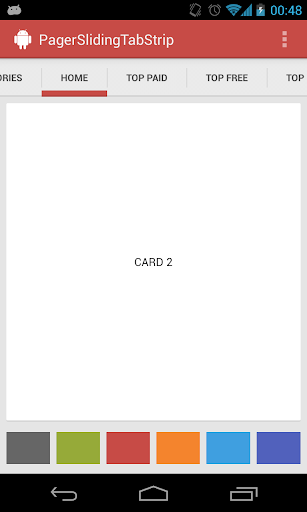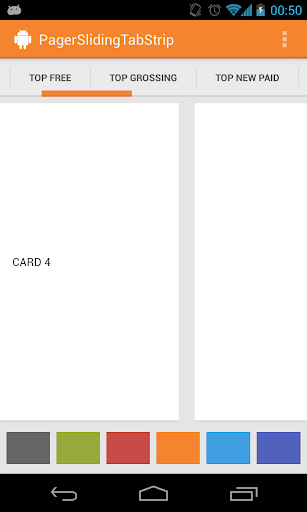
12 |
13 | 主要特点:
14 | * 简单,就一个类
15 | * 效果好
16 |
17 | # 使用方法
18 |
19 |
20 |
21 | # 相关属性
22 |
23 | * `pstsIndicatorColor` 滑动指示器的颜色
24 | * `pstsUnderlineColor` 设置Tab底部与下面分割的细线的颜色
25 | * `pstsDividerColor` Tab之前分割线的颜色
26 | * `pstsIndicatorHeight` 滑动指示器的高度
27 | * `pstsUnderlineHeight` 设置Tab底部与下面分割的细线的高度
28 | * `pstsDividerPadding` 设置Tab直接分割线顶部和底部的边距
29 | * `pstsTabPaddingLeftRight` 设置Tab的左右边距
30 | * `pstsScrollOffset` 选中Tab的偏移
31 | * `pstsTabBackground` 设置Tab的背景
32 | * `pstsShouldExpand` 如果设置为true,所有Tab将使用相同的weight,默认为false。
33 | * `pstsTextAllCaps` 如果设置为true,所有Tab的标题将使用大写,默认true。
34 |
--------------------------------------------------------------------------------
/README.md:
--------------------------------------------------------------------------------
1 | Android 优秀开源项目实现原理解析
2 | ====================================
3 |
4 | 这是一个协作项目,最终多数开源库原理解析会在这里分享出来。
5 |
6 | 欢迎大家`Star`、`Fork`,让更多的人知道并加入进来!
7 | - 如果你在用各种开源库
8 | - 如果你有兴趣去深挖它们优雅的实现
9 | - 如果你希望知其然知其所以然提高自己
10 |
11 | 那么加入我们吧!!!
12 | > 欢迎加入 QQ 交流群:[383537512(入群理由必须填写群简介问题答案)](http://shang.qq.com/wpa/qunwpa?idkey=69b7c4278fc3a33690d4847ed7f9a72b9e4feb51221265a7326cf5261ccd5862 "入群理由必须填写群简介问题答案")(二群有空位)
13 | > [377723625](http://shang.qq.com/wpa/qunwpa?idkey=12ba39b0c3f5d27620ab0cb63ff80507a8a30fd743a11fad028e7742a871e0dc "入群理由必须填写群简介问题答案")(一群已满) [63224677](http://shang.qq.com/wpa/qunwpa?idkey=fb2eaf0c4b4a8c838ad15e6bdd69d901f038a50f4a77360845b9e6d7ee0ba3ee "入群理由必须填写群简介问题答案")(三群已满) [148844489](http://shang.qq.com/wpa/qunwpa?idkey=5dc2f22b2f9fe3b6136f9cad29399713b118bfaa9a2330e410757362a37572bc "入群理由必须填写群简介问题答案")(四群已满) [214742675](http://jq.qq.com/?_wv=1027&k=Zl6Yyj "入群理由必须填写群简介问题答案")(五群已满) [185715999](http://jq.qq.com/?_wv=1027&k=fJlrh1 "入群理由必须填写群简介问题答案")(六群已满) 请不要重复加群
14 |
15 | ### 我们不重复造轮子不表示我们不需要知道轮子该怎么造及如何更好的造!
16 |
17 | ## 一、具体计划
18 | 请先读完下面步骤
19 | ###1. 加入开源交流 QQ 群
20 | 见上面几行,入群理由必须为群简介问题答案。
21 |
22 | ###2. 开始认领
23 | 问群主`协作 QQ 群`群号,以自己`有兴趣分析的开源库库名`申请加入`协作 QQ 群`。
24 |
25 | ###3. 寻找 Buddy
26 | 加入`协作 QQ 群`后,在群里找到一个后期帮忙做校验的 Buddy
27 |
28 | ###4. 开始
29 | 了解编写步骤:[编写步骤](https://github.com/android-cn/android-open-project-analysis/blob/master/procedure.md)
30 | 填写自己的时间安排:[时间计划表](https://github.com/android-cn/android-open-project-analysis/blob/master/schedule.md)
31 |
--------------------------------------------------------------------------------
/common/README.md:
--------------------------------------------------------------------------------
1 | ${项目名} 实现原理解析
2 | ====================================
3 | > 本文为 [Android 开源项目实现原理解析](https://github.com/android-cn/android-open-project-analysis) 中 ${项目名} 部分
4 | > 项目地址:[${项目名}](${项目原地址}),分析的版本:[${commitId}.substring(0, 7)](${项目原地址}/commit/${commitId} "Commit id is ${commitId}"),Demo 地址:[${项目名} Demo](https://github.com/android-cn/android-open-project-demo/tree/master/${项目 Demo 地址})
5 | > 分析者:[${分析者}](${分析者 Github 地址}),校对者:[${校对者}](${校对者 Github 地址}),校对状态:未完成
6 |
7 | `复制一份到自己的项目文件夹下,然后根据自己项目替换掉 ${} 内容,删掉本句内容。`
8 |
9 | ###1. 功能介绍
10 | 功能介绍,包括功能或优点等
11 |
12 | **完成时间**
13 | - `一天内`完成
14 |
15 | ###2. 详细设计
16 | ###2.1 类详细介绍
17 | 核心类、函数功能介绍及核心功能流程图,流程图可使用 StartUML、Visio 或 Google Drawing。
18 | ###2.2 类关系图
19 | 类关系图,类的继承、组合关系图,可是用 StartUML 工具。
20 |
21 | **完成时间**
22 | - 根据项目大小而定,目前简单根据项目 Java 文件数判断,完成时间大致为:`文件数 * 7 / 10`天,特殊项目具体对待
23 |
24 | ###3. 流程图
25 | 主要功能流程图
26 | - 如 Retrofit、Volley 的请求处理流程,Android-Universal-Image-Loader 的图片处理流程图
27 | - 可使用 StartUML、Visio 或 Google Drawing 等工具完成,其他工具推荐??
28 | - 非所有项目必须,不需要的请先在群里反馈
29 |
30 | **完成时间**
31 | - `两天内`完成
32 |
33 | ###4. 总体设计
34 | 整个库分为哪些模块及模块之间的调用关系。
35 | - 如大多数图片缓存会分为 Loader 和 Processer 等模块。
36 | - 可使用 StartUML、Visio 或 Google Drawing 等工具完成,其他工具推荐??
37 | - 非所有项目必须,不需要的请先在群里反馈。
38 |
39 | **完成时间**
40 | - `两天内`完成
41 |
42 | ###5. 杂谈
43 | 该项目存在的问题、可优化点及类似功能项目对比等,非所有项目必须。
44 |
45 | **完成时间**
46 | - `两天内`完成
47 |
48 | ###6. 修改完善
49 | 在完成了上面 5 个部分后,移动模块顺序,将
50 | `2. 详细设计` -> `2.1 核心类功能介绍` -> `2.2 类关系图` -> `3. 流程图` -> `4. 总体设计`
51 | 顺序变为
52 | `2. 总体设计` -> `3. 流程图` -> `4. 详细设计` -> `4.1 类关系图` -> `4.2 核心类功能介绍`
53 | 并自行校验优化一遍,确认无误后,让`校对 Buddy`进行校对,`校对 Buddy`校对完成后将
54 | `校对状态:未完成`
55 | 变为:
56 | `校对状态:已完成`
57 |
58 | **完成时间**
59 | - `两天内`完成
60 |
61 | **到此便大功告成,恭喜大家^_^**
62 |
--------------------------------------------------------------------------------
/tech/minutiae.md:
--------------------------------------------------------------------------------
1 | Android 开源项目实现原理解析细节点
2 | ====================================
3 | > 本文为 [Android 开源项目实现原理解析](https://github.com/android-cn/android-open-project-analysis) 中 细节点 部分
4 | > 分析者:[Trinea](https://github.com/trinea),校对者:[Grumoon](https://github.com/grumoon)、[Trinea](https://github.com/trinea),校对状态:未完成
5 |
6 | ###Volley 细节点
7 | #####(1) HttpURLConnection 与 HttpClient
8 |
9 | ###Android Universal Image Loader 细节点
10 | #####(1) FlushedInputStream.java
11 | 为了解决早期 Android 版本`BitmapFactory.decodeStream(…)`在慢网络情况下 decode image 异常的 Bug。
12 | 主要通过重写`FilterInputStream`的 skip(long n) 函数解决,确保 skip(long n) 始终跳过了 n 个字节。如果返回结果即跳过的字节数小于 n,则不断循环直到 skip(long n) 跳过 n 字节或到达文件尾。
13 | 见:http://code.google.com/p/android/issues/detail?id=6066
14 |
15 | ####(2). BaseImageDownloader.getStreamFromNetwork(String imageUri, Object extra)
16 | 通过`HttpURLConnection`从网络获取图片的`InputStream`。支持 response code 为 3xx 的重定向。这里有个小细节代码如下:
17 | ```java
18 | try {
19 | imageStream = conn.getInputStream();
20 | } catch (IOException e) {
21 | // Read all data to allow reuse connection (http://bit.ly/1ad35PY)
22 | IoUtils.readAndCloseStream(conn.getErrorStream());
23 | throw e;
24 | }
25 | ```
26 | 在发生异常时会调用`conn.getErrorStream()`继续读取 Error Stream,这是为了利于网络连接回收及复用。但有意思的是在 Froyo(2.2) 之前,HttpURLConnection 有个重大 Bug,调用 close() 函数会影响连接池,导致连接复用失效,不少库通过在 2.3 之前使用 AndroidHttpClient 解决这个问题。
27 | 见:http://docs.oracle.com/javase/6/docs/technotes/guides/net/http-keepalive.html
28 |
29 | #####(3). ViewAware.ViewAware(View view, boolean checkActualViewSize)
30 | 构造函数。
31 | `view`表示需要显示图片的对象。
32 | `checkActualViewSize`表示通过`getWidth()`和`getHeight()`获取图片宽高时返回真实的宽和高,还是`LayoutParams`的宽高,true 表示返回真实宽和高。
33 | 如果为`true`会导致一个问题,`View`在还没有初始化完成时加载图片,这时它的真实宽高为0,会取它`LayoutParams`的宽高,而图片缓存的 key 与这个宽高有关,所以当`View`初始化完成再次需要加载该图片时,`getWidth()`和`getHeight()`返回的宽高都已经变化,缓存 key 不一样,从而导致缓存命中失败会再次从网络下载一次图片。可通过`ImageLoaderConfiguration.Builder.denyCacheImageMultipleSizesInMemory()`设置不允许内存缓存缓存一张图片的多个尺寸。
34 | 见:https://github.com/nostra13/Android-Universal-Image-Loader/issues/376
--------------------------------------------------------------------------------
/procedure.md:
--------------------------------------------------------------------------------
1 | 编写步骤如下
2 | ---------
3 | ###一. 准备
4 | - 进群后
5 | 按照群公告修改群昵称,以想分析的库开头。群里发下自己的 Github 帐号并 @Trinea 以添加权限
6 | - 填写时间计划表
7 | 读完本文档后,根据自己的时间安排,填写 [时间计划表](https://github.com/android-cn/android-open-project-analysis/blob/master/schedule.md),并在以后编写的每个阶段完成后更新时间计划表
8 |
9 | ###二. 编写该开源库的使用示例
10 | 到 [android-open-project-demo](https://github.com/android-cn/android-open-project-demo) 项目下新建文件夹,用于后续上传该开源库使用示例工程代码
11 | - 该文件夹以`开源库名-demo`命名,全小写,单词间用`-`连接。如果已有该文件夹,则以`开源库名-demo-${GitHub 用户名}`命名,如`event-bus-demo-trinea`;
12 | - 示例工程要求覆盖到该开源项目所有功能,不允许拷贝官方 Demo;
13 | - 若没有自己的 Code Format 文件,使用 [common](https://github.com/android-cn/android-open-project-demo/tree/master/common) 文件夹下 code format,code template 文件;
14 | - 文件夹下需要有名为 apk 的子文件夹,用于存放可运行 APK 文件;
15 | - 文件夹下需要有名为 README.md 的介绍文件,其中包含以下内容。
16 | (1). Demo Download
17 | (2). Screenshot 截图可使用 [licecap](http://www.cockos.com/licecap/)
18 | 具体可参考:[EventBus Demo ReadMe](https://github.com/android-cn/android-open-project-demo/tree/master/event-bus-demo)
19 |
20 | **完成时间**
21 | - 示例工程需要在认领后`三天内`完成全部提交,中间每天需要有一定的提交
22 |
23 | ###三. 编写原理文档
24 | 到 [android-open-project-analysis](https://github.com/android-cn/android-open-project-analysis) 项目下新建文件夹
25 | ####3.1 文件夹规范
26 | - 该文件夹以`开源库名`命名,全小写,单词间用-连接。如果已有该文件夹,则以`开源库名-${GitHub 用户名}`命名,如`event-bus-trinea`;
27 | - 从 [common](https://github.com/android-cn/android-open-project-analysis/tree/master/common) 文件夹下拷贝模板文件 README.md,复制到上面的文件夹中,所有内容在 README.md 中用 [Markdown](https://github.com/android-cn/blog/blob/master/dev-tool/markdown.md) 编写。如果内容较多可分多个 md 文件,但 README.md 为总体的概括文件;
28 | - 文件夹下可有名为`image`子文件夹存放相关流程图等图片,`uml`子文件夹存放 uml 文件。
29 |
30 | ####3.2 文档需包含的模块及预计时间
31 | 具体编写的模块及各模块预计耗时请参考:[Common README](https://github.com/android-cn/android-open-project-analysis/blob/master/common/README.md)。
32 |
33 | ####3.3 公共技术点及工具
34 | 我们整理了一份公共技术点,如果你分析的库涉及到请直接链过去,以节省精力,地址:[开源分析公共技术点](https://github.com/android-cn/android-open-project-analysis/tree/master/tech)
35 | 我们整理了一份你可能需要用到的工具库,地址:[Tool](https://github.com/android-cn/android-open-project-analysis/blob/master/common/tool/README.md)
36 |
37 | ###四、Buddy Check
38 | 分析完成后在协作群里找到一个后期帮忙做校验的 Buddy,Buddy Check 的内容包括:
39 | (1) 看完文档后能了解该库的原理
40 | (2) 然后对照代码看下分析过程是否完整及是否有错误
41 | Check 完后应该能达到 Buddy 对这个库原理也完全了解的效果。
42 |
43 | 项目中遇到的问题可汇总到 [项目过程中问题](https://github.com/android-cn/android-open-project-analysis/blob/master/problem.md),其他问题及建议及时在 Q 群里反馈
44 |
45 | **希望大家都能在分析和 Buddy 的过程中收获很多,同时分析文档能为其他开发者带来便利,一起加油!**
46 |
--------------------------------------------------------------------------------
/retrofit-zonda/README.md:
--------------------------------------------------------------------------------
1 | Retrofit 源码解析
2 | ----------------
3 | > 本文为 [Android 开源项目实现原理解析](https://github.com/android-cn/android-open-project-analysis) 中 Retrofit 部分
4 | > 项目地址:[Retrofit](https://github.com/square/retrofit),分析的版本:,Demo 地址:
5 | > 分析者:[zonda](https://github.com/zonda),校对者:,完成状态:未完成
6 |
7 | ## 1、什么是Retrofit?
8 | ## 2、常用示例
9 | ## 3、动态代理
10 | ## 4、使用场景
11 | ## 5、结语
12 | ***
13 | ## 1、什么是Retrofit?
14 | 按照 [官方文档](http://square.github.io/retrofit/), Retrofit 是用于 Android 或 Java [REST](http://zh.wikipedia.org/wiki/REST) 客户端的一个类型安全的框架。换句话说,Retrofit 是一个通过 Java 动态代理,针对 REST API 实现的网络请求框架,将 REST API 转化为 Java 的接口。
15 | ***
16 | ## 2、常用示例
17 | Retrofit 的使用较为简单,以 RetrofitDemo为例,Retrofit 首先,需要实现一个接口 OpenWeatherApiService,其中每个方法对应一个 API,通过设置返回值类型和是否有 Callback 回调,告知 Retrofit 是否需要异步请求;然后,创建一个 RestAdapter 用于动态生成对应接口 OpenWeatherApiService 的一个实例;最后,使用该实例请求服务器数据。
18 |
19 |
20 | 根据接口设置的返回值类型和参数,Retrofit 的接口方法可分为 3 类,以 OpenWeatherApiService 中的方法为例:
21 |
22 |
23 | - “同步”请求,无 Callback 回调,有返回值
24 |
25 |
26 | ```java
27 | @GET("/history/city")
28 | public WeatherHistoryResult getHistoryWeather(@Query("q") String queryInfo);
29 | ```
30 | - “异步”请求,有 Callback 回调,无返回值
31 |
32 |
33 | ```java
34 | @GET("/weather")
35 | public void getTodayWeather(@Query("q") String queryInfo, @Query("lang") String language,
36 | Callback callback);
37 | ```
38 | - “RxJava”请求,无 Callback 回调,有返回值,且返回值为 Observable 类型,***此时,工程必须包含 [rxjava-core.jar](http://search.maven.org/#search%7Cga%7C1%7Cg%3A%22com.netflix.rxjava%22%20AND%20a%3A%22rxjava-core%22)***
39 | ```java
40 | @GET("/weather")
41 | public Observable getTodayWeather(@QueryMap Map params);
42 | ```
43 | ## 3、动态代理
44 |
45 |
46 | 动态代理即通过实现 InvocationHandler 接口创建自己的调用处理器,同时为Proxy指定 ClassLoader 对象和一组接口来创建动态代理类,Retrofit 的核心便是 Java 的动态代理。实现动态代理有两种方式,代码如下:
47 |
48 |
49 | ```java
50 | (T)Proxy.newProxyInstance(T.class.getClassLoader(),new Class[]{T.class}),new InvocationHanlder());
51 | ```
52 |
53 |
54 | ```java
55 | Class proxyClass = Proxy.getProxyClass(T.class.getClassLoader(), new Class[]{T.class});
56 | InvocationHandler handler = new InvocationHanlder();
57 | (T)proxyClass.getConstructor(new Class[]{InvactionHandler.class}).newInstance(new Object[]{handler});
58 | ```
59 | ## 4、使用场景
60 |
61 |
62 | Retrofit 通过动态代理很好的实现了网络请求和UI的解耦,但是作为一个库他并未提供网络数据存储的部分,对于线程控制也未做过多的优化,因此如有以上需求的项目可能就需要自行扩展相应的功能。此外,对于 [RxJava](https://github.com/Netflix/RxJava/wiki) 是 Netflix 编写的一个库,主要用于改进下载序列的回调时的嵌套带来的麻烦。因此,个人觉得若不是有一个相互关联的任务集合,则无使用 RxJava 的必要。
63 |
64 |
65 | ## 5、结语
66 |
67 | 以上仅仅是关于 Retrofit 的一个基本介绍,关于 [RxJava](https://github.com/Netflix/RxJava/wiki)、[OkHttp](http://square.github.io/okhttp/) 等相关内容并不在本文范围之内,因此未做过多介绍,如有遗漏或错误请多多指正。
68 |
69 |
--------------------------------------------------------------------------------
/holographlibrary/README.md:
--------------------------------------------------------------------------------
1 | HoloGraphLibrary 实现原理解析
2 | ====================================
3 | > 本文为 [Android 开源项目实现原理解析](https://github.com/android-cn/android-open-project-analysis) 中 HoloGraphLibrary 部分
4 | > 项目地址:[HoloGraphLibrary](https://github.com/Androguide/HoloGraphLibrary),分析的版本:[028cd2a](https://github.com/Androguide/HoloGraphLibrary/commit/028cd2ae6916308bbb96472aafa9ecd8b1343d5c "Commit id is 028cd2ae6916308bbb96472aafa9ecd8b1343d5c"),Demo 地址:[HoloGraphLibrary Demo](https://github.com/android-cn/android-open-project-demo/tree/master/holo-graph-library-demo)
5 | > 分析者:[AaronPlay](https://github.com/AaronPlay),校对者:[lightSky](https://github.com/lightSky),校对状态:完成
6 |
7 | ###1. 功能介绍
8 | HoloGraphLibrary 是一个可用于绘制图表的项目,支持绘制线状图、柱状图、饼状图。
9 |
10 | 优点:图形设计友好,使用方便。
11 |
12 | ###2. 总体设计
13 | 本项目较为简单,总体设计请参考`4.1类关系图`。
14 |
15 | ###3. 流程图
16 | 本项目的每个控件的流程较为类似,可以抽象成一个流程图来理解。
17 |
18 | 
19 |
20 | ###4. 详细设计
21 |
22 | ###4.1 类关系图
23 |
24 | 
25 |
26 |
27 | ###4.2 核心类功能介绍
28 |
29 | ####4.2.1柱状图:
30 | Bar.java:用于表现一个柱体,构成柱状图的基本元素。封装了颜色,名字,BarStackSegment(下文将会涉及)数组等属性。若需要对Bar的每一个片段进行控制,通过改变BarStackSegment的数组即可。
31 |
32 | BarStackSegment.java: 一般来说,一个柱体用于展示一个类型的数据,而BarStackSegment是作为柱体的扩展部分,用在同一个柱体上有展现多个不同区间的数据。
33 |
34 | BarGraph.java:继承View类,负责柱状图的绘制。
35 |
36 | - onDraw的流程图:
37 |
38 | 
39 |
40 | - onDraw源码分析
41 |
42 | 1.绘制的样式定义(柱体颜色、宽度大小等属性)
43 |
44 | ```java
45 |
46 | public void onDraw(Canvas ca) {
47 | ...
48 |
49 | //柱体的样式定义
50 | float maxValue = 0;
51 | float padding = 7;
52 | int selectPadding = 4;
53 | float bottomPadding = 40;
54 |
55 | //定义绘制柱体的区间
56 | float usableHeight;
57 | if (showBarText) {
58 | this.p.setTextSize(40);
59 | this.p.getTextBounds(unit, 0, 1, r3);
60 | usableHeight = getHeight() - bottomPadding - Math.abs(r3.top - r3.bottom) - 26;
61 | } else {
62 | usableHeight = getHeight() - bottomPadding;
63 | }
64 |
65 | ...
66 |
67 | //绘制柱体
68 | int count = 0;
69 | for (Bar p : points) {
70 | //绘制每个柱体里的自定义区间
71 | if(p.getStackedBar()){
72 | ...
73 | }
74 | }else {
75 | //若没有自定义区间,则正常绘制
76 | ...
77 | }
78 |
79 | ...
80 | }
81 |
82 | ```
83 |
84 | 2.绘制计算过程(详细看源码):
85 |
86 | 1)绘制x轴
87 |
88 | 2)确定柱体的数量
89 |
90 | 3)计算柱体所需的宽度
91 |
92 | 4)如果使用动画,柱体最大值(影响绘画的高度)使用动态计算的最大值
93 |
94 | 5)计算x轴上标签的字体的大小(不考虑动画状态,否则会导致字体抖动)
95 |
96 | 6)设置柱体边界
97 |
98 | 7)绘制柱体
99 |
100 | 8)创建选择区域
101 |
102 | 9)绘制标签
103 |
104 | 10)绘制柱体顶部的文字
105 |
106 | 11)限制总体宽度,防止弹出
107 |
108 | 12)若有使用后,设置监听,对进行动画更新
109 |
110 | ####4.2.2饼状图
111 | PieSlice.java: 扇形,构成饼状图的基本元素。封装了颜色,值,标题,路径以及区域等属性。
112 |
113 | PieGraph.java:继承View类, 负责绘制饼状图。
114 |
115 | - onDraw的流程图:
116 |
117 | 
118 |
119 | 绘制计算过程(详细看源码):
120 |
121 | 1)若有背景图片,设置背景图片
122 |
123 | 2)设置扇形的开始的位置,大小,圆心
124 |
125 | 3)计算不同的扇形的大小,从上次结束的位置进行绘制,记录好该扇形结束的位置。重复此步骤,直到所有扇形绘制完成。
126 |
127 |
128 |
129 | ####4.2.3折线图:
130 | LinePoint.java:折线的最基本元素,两点构成一条直线,属性包括二维坐标,路径以及区域等属性。
131 |
132 | Line.java : 由点构成线,里面封装了一个包含LinePoint的数组。
133 |
134 | LineGraph.java: 继承View类,负责折线图的绘制。
135 |
136 | - onDraw的流程图:
137 |
138 | 
139 |
140 | 绘制计算过程(详细看源码):
141 |
142 | 1)若需要填充,先对整个绘制范围内进行直线绘制,然后擦除折线以上的直线。
143 |
144 | 2)绘制X轴
145 |
146 | 3)绘制折线
147 |
148 | 4)绘制折点
149 |
150 | ###5. 杂谈
151 | 其实,这个项目的代码并不适写的很好,但无碍我们的使用,有兴趣的同学可以重构一下。对于控件类的开源库,可以把重点放在与用户交互关联的触发器上。而这个开源库,也有开发者fork之后扩展得更加有趣。[->链接](https://bitbucket.org/danielnadeau/holographlibrary)
152 |
153 | **延伸:**
154 |
155 | 关于View绘制的原理请浏览:[View 绘制流程](../tech/viewdrawflow.md)
156 |
157 |
158 |
--------------------------------------------------------------------------------
/green-dao-maogy/README.md:
--------------------------------------------------------------------------------
1 | greenDAO 源码解析
2 | ----------------
3 | > 本文为 [Android 开源项目实现原理解析](https://github.com/android-cn/android-open-project-analysis) 中 greenDAO 部分
4 | > 项目地址:[greenDAO](https://github.com/greenrobot/greenDAO),分析的版本:,Demo 地址:
5 | > 分析者:[maogy](https://github.com/maogy),校对者:,完成状态:未完成
6 |
7 | 1.功能介绍
8 | 1.1greenDao是一个ORM库,将传统数据库操作建表、编写sql语句、使用事务批量处理,都封装到greenDao中,提供方便的面向对象接口,完成数据库操作.库里面还提供异步数据库操作,缓存查找出来的结果.整个代码设计很巧妙,包名和包的功能明确、类名、变量名都非常好理解.整个单元测试代码很完善.
9 |
10 | 1.2概念
11 | ORM(object-relation mapping,对象关系映射):是将数据类和一个数据库表对应起来,它其实是创建了一个可在编程语言里使用的“虚拟对象数据库
12 |
13 | Entity:实体,对应数据库中的一张表,通过java工程,我们设置属性通过代码来自动生成.
14 |
15 | 一对多/多对多:entity之间的关系,如订单和消费者是两个entity,一个消费者生成多个订单,是一对多关系,
16 |
17 | 2.总体设计
18 | 
19 |
20 | 3.流程图
21 |
22 | 4. 详细设计
23 | 4.1 类关系图
24 | 
25 |
26 |
27 | 1.包de.greeenrobot.dao,主要的类
28 | 一、DbUtils类
29 | vacuum函数:清除数据库的空闲空间,减少数据库大小
30 | executeSqlScript函数:执行assert目录文件中的sql语句,可以指定是否开启事务执行
31 | readAsset函数:读取assert文件返回byte数组
32 | logTableDump函数:将数据库中指定表的内容输出到debug日志
33 |
34 | 二、DaoLog类
35 | 将系统Log类封装,将tag变量隐藏而已,tag值为greenDao.倒数第二个函数应该是作者写错了,如:Log.w应该是Log.e
36 | ``
37 | public static int e(String msg) {
38 | return Log.w(TAG, msg);
39 | }
40 | ``
41 |
42 | 三、AbstractDao类
43 | 所有生成代码xxDao的基类,使用泛型,AbstractDao其中T是数据库实体(entity)类型,K是主键类型.使用模板模式,来完成crud方法,是抽象类,定义了许多abstract方法,子类来定义它的行为.
44 | 通过DaoConfig和AbstractDaoSession来构造,提供许多crud方法,支持在批处理中执行:
45 | T load(K key):通过主键值来查找实体结果
46 | T loadByRowId(long rowId):通过行号来查询结果
47 | List loadAll():加载所有结果
48 | executeInsertInTx:批量插入
49 | ....
50 |
51 | 四、AbstractDaoMaster类
52 | 通过SQLiteDatabase和版本号构造,持有SQLiteDatabase对象,保持一个泛型的容器Map>, DaoConfig> ,做Dao和DaoConfig的缓存,另外加2个抽象方法,给子类来实现
53 |
54 | 五、AbstractDaoSession类
55 | 所有DaoSession的基类,包含一个Map, AbstractDao> entityToDao对象,缓存所有实体类和实体Dao对应关系。因为可以获取Dao,可以做一些crud操作,可以生成异步的session来完成crud操作
56 |
57 | 六、Property类
58 | 对应存入类中的一个属性,对应数据库中一列,用来生成where子句使用。在实体Dao中有引用。
59 |
60 | 2.de.greenrobot.dao.async包,完成数据库的异步操作,主要的类
61 | 一、AsyncOperation类
62 | 表示一个将在子线程完成的操作,包含操作的类型、是否成功、操作的Dao、SQLiteDatabase、操作开始和结束时间、是否和其他操作合并、操作唯一号码、操作的实体对象(数组、单个元素或迭代器)
63 |
64 | 二、AsyncOperationExecutor类
65 | 执行数据库操作的类,是runnable对象,还能回调主线程,内部有AsyncOperation类型的阻塞队列,完成数据库操作加入队列、执行操作、结果回调、合并数据库操作等工作。
66 |
67 | 三、AsyncOperationListener类
68 | 数据库异步操作完成后的回调接口
69 |
70 | 四、AsyncSession类
71 | 对外提供的类,可以初始化它,并调用它的异步方法来完成数据库操作的异步执行功能。对它设置回调listen,完成操作后,将整个AsyncOperation回调给界面
72 |
73 |
74 | 3.de.greenrobot.dao.identityscope包
75 | 这个包主要是定义一个k-v的缓存组件,定义一些操作缓存的接口,key支持long和object类型,value是entity类型,使用软引用.
76 |
77 | 一、IdentityScope类
78 | 接口类,使用泛型加接口的形式用来派生key为long和key为object的子类,也是实体对象的主键,提供根据主键来查询、删除、插入entity.
79 |
80 | 二、IdentityScopeLong类
81 | 内部有一个锁的成员变量,map使用自定义优化过的LongHashMap,支持带锁操作map和不带锁操作map
82 |
83 | 三、IdentityScopeObject类
84 | 和IdentityScopeLong类似,只是内部使用hashMap,key是object类型
85 |
86 | 4.de.greenrobot.dao.internal包
87 | 里面包含一些内部使用的工具类,
88 | 一、DaoConfig类
89 | 被AbstractDaoMaster引用。由SQLiteDatabase和AbstractDao的子类来构造,通过这两个参数,反射获取Dao类的属性、主键、主键类型、表名。通过构造方法和Cloneable接口提供创建新对象的方法。
90 |
91 | 二、FastCursor类
92 | 给AbstractDao类的子类使用,快速读取cursor数据。
93 | 它实现Cursor接口,重载读取当前游标指向数据的方法(getDouble、getFloat等),提供移动游标函数(),
94 | 如move(int offset)、moveToPosition(int position)等,来快速访问Cursor数据。
95 |
96 | 三、LongHashMap类
97 | 给IdentityScopeLong类使用,是自定义的map,针对long类型对map进行优化,例如get、put方法,通过位移运算符来很快完成插入、查找结果
98 |
99 | 四、SqlUtils类
100 | 内部使用,在给AbstractDao类的子类使用,用来帮助创建crud操作的sql语句
101 |
102 | 五、TableStatements类
103 | greenDao内部使用,给DaoConfig引用,用来给指定的tab创建SQLiteStatement。由DaoConfig传入tab相关的信息来构造,如表名、所有列名、主键名。
104 |
105 | 5.de.greenrobot.dao.query包
106 | 这整个包的作用是使用面向对象的方式来提供可复用的查询对象,用于内部测试
107 |
108 | 一、AbstractQuery类
109 | 一些可以复用的查询基类,返回实体entity,包含泛型T,是entity的类型,包含一些查询必要的参数信息,用于实现子类的查询
110 |
111 | 二、AbstractQueryData类
112 | 辅助类,使用模板方法,来构造AbstractQuery的子类,其中的泛型T是实体类型(entity),Q是需要构造的AbstractQuery子类
113 |
114 | 三、CountQuery类
115 | AbstractQuery的子类,提供查找数据库符合条件entity的个数
116 |
117 | 四、DeleteQuery类
118 | AbstractQuery的子类,提供删除符合条件的entity,其中executeDeleteWithoutDetachingEntities方法不会清除identity scope中的缓存
119 |
120 | 五、Query类
121 | AbstractQuery的子类,提供查找符合条件的entity,以多种形式返回查找结果,如List、带缓存的LazyList
122 |
123 | 六、WhereCondition类
124 | 用来在查询中构造where子句,使用Dao类中的Property对象构造查询条件
125 |
126 | 七、QueryBuilder类
127 | 构造自定义的查询对象,而不使用sql语句,查询对象内部会生成sql语句,并且在编译时进行语法检查。可以通过AbstractDao.queryBuilder或者AbstractDaoSession.queryBuilder来获取
128 |
129 | 八、WhereCondition类
130 | 内部的接口来构造查询中的where条件,使用DAO类中的Property对象来构造新的查询条件.代码结构是一个接口,加2个实现,分别来构造属性条件和字符串条件
131 |
--------------------------------------------------------------------------------
/view-pager-indicator-demo-longtaoge/README.md:
--------------------------------------------------------------------------------
1 | Android-ViewPagerIndicator 源码解析
2 | ----------------
3 | > 本文为 [Android-ViewPagerIndicator](https://github.com/JakeWharton/Android-ViewPagerIndicator) 原理解析中 ViewPagerIndicator 部分
4 | > 项目地址:[ViewPagerIndicator](https://github.com/JakeWharton/Android-ViewPagerIndicator),分析的版本:,Demo 地址:[ViewPagerIndicator Demo](https://github.com/android-cn/android-open-project-analysis/tree/master/view_pager_indicator_longtaoge/ListSamples)
5 | > 分析者:[longtaoge](https://github.com/longtaoge),校对者:,完成状态:未完成
6 |
7 | ## 1. 功能介绍 ##
8 |
9 | 功能介绍,包括功能或优点等
10 |
11 | ### Android ViewPagerIndicator ###
12 |
13 | 这是一个[ViewPager][2]的自定义扩展控件,提供了圆形,图标、线形、页签、标题、下划线共六种Viewpager的自定义指示器,使用方便,功能齐全。 同时兼容 [ActionBarSherlock][3]!
14 |
15 | 
16 | ![ViewPagerIndicator Sample Screenshots][9]
17 |
18 |
19 | ### 使用方法 ##
20 |
21 | *请参阅代码示例文件夹中的例子*
22 |
23 |
24 | 1. 首先要把这个组件放到布局文件中,这个组件主要是配合Viewpager使用的,所以,一般是在Viewpager的上方或者下方,挨着放就行了
25 |
26 |
30 |
31 |
32 |
33 |
34 | 1. 在Activity中的 `onCreate` 方法中 (或 Fragment的`onCreateView`方法中), 初始化这个控件(findviewbyID,你懂的)
35 |
36 |
37 | //设置适配器(Adapter)
38 | ViewPager pager = (ViewPager)findViewById(R.id.pager);
39 | pager.setAdapter(new TestAdapter(getSupportFragmentManager()));
40 |
41 | //绑定 指示器(title indicator )到 adapter
42 | TitlePageIndicator titleIndicator = (TitlePageIndicator)findViewById(R.id.titles);
43 | titleIndicator.setViewPager(pager);
44 |
45 |
46 | 1. *(可选项)* 如果你想在你的Viewpager上使用Viewpager的页面切换状态监听 `OnPageChangeListener`
47 | 应该把监听设置到指示器个.
48 |
49 | //例如
50 | titleIndicator.setOnPageChangeListener(mPageChangeListener);
51 |
52 |
53 |
54 | ### 主题与样式 ###
55 | 有三种方式配置indicators指示器的样式 .
56 |
57 | 1. **Theme XML**.主题文件 每个 indicator 都提供了配置属性,可能能过XML中的属性进行配置
58 | 可以定制自己的样式.
59 | 2. **Layout XML**. 也可以在布局文件中进行配置
60 | 3. **Object methods**. 并且,指示器还提供了主题的set和get方法。
61 | 三种方法都可以改变指示器的主题.
62 |
63 |
64 | 每种指示器 都有一个能过三种方法改变主题的示例
65 |
66 |
67 | ### 导入并应用到你的项目 ###
68 |
69 | 由于Android-ViewPagerIndicator是一个基于 [Android library project][7]. 的项目库
70 | ,里面包含了主题、样式等XML属性文件,所以是不可能打包成一个单独的JAR包的,你可以通过Eclipse或ant作为一个[library][8]引入到你的项目中。
71 |
72 | 如果你是 Maven 用户,那么你可以简单的通过下面的方法引入这个库
73 | a dependency:
74 |
75 |
76 | com.viewpagerindicator
77 | library
78 | 2.4.1
79 | apklib
80 |
81 |
82 | 这个项目是建立在 `ViewPager`类的基础之上的,具体的细节可以参见
83 | [Android Support Library][2] 或 [ActionBarSherlock][3]的网站或文档
84 |
85 |
86 |
87 |
88 | ### 开发者 ###
89 |
90 | * Jake Wharton -
91 | ### 参与人员 ###
92 | * [Patrik Åkerfeldt][1] - [ViewFlow][4]的作者, ViewFlow是一个支持标题和圆形指示器视图的Viewpager指示器开源项目
93 |
94 | * [Francisco Figueiredo Jr.][5] - Idea and [first implementation][6] 支持Fragment的Viewpager
95 |
96 | [1]: https://github.com/pakerfeldt
97 | [2]: http://developer.android.com/sdk/compatibility-library.html
98 | [3]: http://actionbarsherlock.com
99 | [4]: https://github.com/pakerfeldt/android-viewflow
100 | [5]: https://github.com/franciscojunior
101 | [6]: https://gist.github.com/1122947
102 | [7]: http://developer.android.com/guide/developing/projects/projects-eclipse.html
103 | [8]: http://developer.android.com/guide/developing/projects/projects-eclipse.html#ReferencingLibraryProject
104 | [9]: https://raw.github.com/JakeWharton/Android-ViewPagerIndicator/master/sample/screens.png
105 | [10]: https://play.google.com/store/apps/details?id=com.viewpagerindicator.sample
106 |
107 |
108 |
109 |
110 | **完成时间**
111 | 11/22/2014 4:03:56 PM 完成
112 |
113 | ##2. 详细设计
114 | ##2.1 核心类功能介绍
115 | 核心类、函数功能介绍及核心功能流程图,流程图可使用 StartUML、Visio 或 Google Drawing。
116 | ##2.2 类关系图
117 | 类关系图,类的继承、组合关系图,可是用 StartUML 工具。
118 |
119 | **完成时间**
120 | - 根据项目大小而定,目前简单根据项目 Java 文件数判断,完成时间大致为:`文件数 * 7 / 10`天,特殊项目具体对待
121 |
122 | ##3. 流程图
123 | 主要功能流程图
124 | - 如 Retrofit、Volley 的请求处理流程,Android-Universal-Image-Loader 的图片处理流程图
125 | - 可使用 StartUML、Visio 或 Google Drawing 等工具完成,其他工具推荐??
126 | - 非所有项目必须,不需要的请先在群里反馈
127 |
128 | **完成时间**
129 | - `两天内`完成
130 |
131 | ##4. 总体设计
132 | 整个库分为哪些模块及模块之间的调用关系。
133 | - 如大多数图片缓存会分为 Loader 和 Processer 等模块。
134 | - 可使用 StartUML、Visio 或 Google Drawing 等工具完成,其他工具推荐??
135 | - 非所有项目必须,不需要的请先在群里反馈。
136 |
137 | **完成时间**
138 | - `两天内`完成
139 |
140 | ##5. 杂谈
141 | 该项目存在的问题、可优化点及类似功能项目对比等,非所有项目必须。
142 |
143 | **完成时间**
144 | - `两天内`完成
145 |
146 | ##6. 修改完善
147 | 在完成了上面 5 个部分后,移动模块顺序,将
148 | `2. 详细设计` -> `2.1 核心类功能介绍` -> `2.2 类关系图` -> `3. 流程图` -> `4. 总体设计`
149 | 顺序变为
150 | `2. 总体设计` -> `3. 流程图` -> `4. 详细设计` -> `4.1 类关系图` -> `4.2 核心类功能介绍`
151 | 并自行校验优化一遍,确认无误后,让`校对 Buddy`进行校对,`校对 Buddy`校队完成后将
152 | `校对状态:未完成`
153 | 变为:
154 | `校对状态:已完成`
155 |
156 | **完成时间**
157 | - `两天内`完成
158 |
159 | **到此便大功告成,恭喜大家^_^**
160 |
--------------------------------------------------------------------------------
/common/tool/schedule.md:
--------------------------------------------------------------------------------
1 | 时间计划表
2 | ============
3 | 根据自己的时间安排补充 Demo、功能介绍、详细设计、流程图、总体设计、校验 6个阶段的 DeadLine 时间点。
4 | 预计时间可参考:[Common README](https://github.com/android-cn/android-open-project-analysis/blob/master/common/README.md)
5 |
6 | ####进行中计划
7 | 请在这张表添加自己的计划,**并在相应阶段完成后改为`Done`,其中`校验阶段`由 Buddy 校验完成后改为 `Done`**
8 |
9 | 开源库名 | 认领者 | Buddy | Demo | 功能介绍 | 详细设计 | 流程图 | 总体设计 | 校验
10 | :--|:-- |:-- |:-- |:-- |:-- |:-- |:-- |:-- |
11 | [EventBus](https://github.com/greenrobot/EventBus) | [Trinea](https://github.com/Trinea) | [扔物线](https://github.com/rengwuxian) | Done | Done | Done | Done | Done | Done
12 | [Dagger](https://github.com/square/dagger) | [扔物线](https://github.com/rengwuxian) | [Trinea](https://github.com/Trinea) | | | | | |
13 | [AndroidViewHover](https://github.com/daimajia/AndroidViewHover) | [drakeet](https://github.com/drakeet) | [lightSky](https://github.com/lightSky) | 11/21 | 11/25 | 11/29 | 12/2 | 12/6 | 12/9
14 | [photup](https://github.com/chrisbanes/photup) | [aiqianxian](https://github.com/aiqianxian) | | 11/28 | 12/01 | 12/05 | 12/08 | 12/12 | 12/15
15 | [Volley](https://android.googlesource.com/platform/frameworks/volley) | [grumoon](https://github.com/grumoon) | [promeG](https://github.com/promeG) |11/26 |11/28 | 12/03| 12/05|12/08 | 12/11
16 | [Otto](https://github.com/square/otto) | [promeG](https://github.com/promeG) | [grumoon](https://github.com/grumoon) | 11/23 | 11/27 | 12/03 | 12/10 | 12/17 | 12/20
17 | [ViewPagerIndicator](https://github.com/JakeWharton/Android-ViewPagerIndicator) | [lightSky](https://github.com/lightSky) | [drakeet](https://github.com/drakeet) |11/26 |11/27 | 11/30| 12/02|12/05 | 12/08
18 | [HoloGraphLibrary](https://github.com/Androguide/HoloGraphLibrary) | [aaronplay](https://github.com/AaronPlay) | | 11/23 | 11/24 | 11/26 | 11/28 | 11/30 | 12/02
19 | [picasso](https://github.com/square/picasso) | [爱早起](https://github.com/liang7) | | 11/26 | 11/28 | 12/02 | 12/07 | 12/13 | 12/14
20 | [XUtils](https://github.com/wyouflf/xUtils) | [Caij](https://github.com/Caij) | | 11/24 | 11/27 | 12/07 | 12/11 | 12/16 | 12/17
21 | [DataDroid](https://github.com/foxykeep/DataDroid) | [cheyiliu](https://github.com/cheyiliu) | | Done | 11/30 | 12/05 | 12/10 | 12/15 | 12/20
22 | [CircularFloat…](https://github.com/oguzbilgener/CircularFloatingActionMenu "CircularFloatingActionMenu") | [cpacm](https://github.com/cpacm) | | 11/24 | 11/25 | 11/27 | 11/29 | 12/01 | 12/03
23 | [ListViewAnimations](https://github.com/nhaarman/ListViewAnimations) | [waylife](https://github.com/waylife) | | Done | Done | 11/23 | 11/30 | 12/7 | 12/14
24 | [GreenDAO](https://github.com/greenrobot/greenDAO) | [maogy](https://github.com/maogy) |[Caij](https://github.com/Caij) | 11/25 | 11/30 | 12/05 | 12/10 | 12/15 | 12/20
25 | [ViewPagerIndicator](https://github.com/JakeWharton/Android-ViewPagerIndicator) | [longtaoge](https://github.com/longtaoge) | | Done | 11/30 | 12/05 | 12/10 | 12/15 | 12/20
26 | [UniversalImage…](https://github.com/nostra13/Android-Universal-Image-Loader "Android-Universal-Image-Loader") | [huxian99](https://github.com/huxian99) | | 11/28 | 12/1 | 12/6 | 12/8 | 12/10 | 12/12
27 | ####之前的计划安排
28 |
29 | 开源库名 | 认领者 | Buddy | Demo | 功能介绍 | 详细设计 | 流程图 | 总体设计 | 完成
30 | :--|:-- |:-- |:-- |:-- |:-- |:-- |:-- |:-- |
31 | [EventBus](https://github.com/greenrobot/EventBus) | [Trinea](https://github.com/Trinea) | [扔物线](https://github.com/rengwuxian) | 11/07 | 11/08 | 11/10 | 11/15 | 11/18 | 11/20
32 | [Dagger](https://github.com/square/dagger) | [扔物线](https://github.com/rengwuxian) | [Trinea](https://github.com/Trinea) | | | | | |
33 | [AndroidViewHover](https://github.com/daimajia/AndroidViewHover) | [drakeet](https://github.com/drakeet) | [lightSky](https://github.com/lightSky) | 11/21 | 11/25 | 11/29 | 12/2 | 12/6 | 12/9
34 | [photup](https://github.com/chrisbanes/photup) | [aiqianxian](https://github.com/aiqianxian) | | 11/28 | 12/01 | 12/05 | 12/08 | 12/12 | 12/15
35 | [Volley](https://android.googlesource.com/platform/frameworks/volley) | [grumoon](https://github.com/grumoon) | [promeG](https://github.com/promeG) |11/26 |11/28 | 12/03| 12/05|12/08 | 12/11
36 | [Otto](https://github.com/square/otto) | [promeG](https://github.com/promeG) | [grumoon](https://github.com/grumoon) | 11/23 | 11/27 | 12/03 | 12/10 | 12/17 | 12/20
37 | [ViewPagerIndicator](https://github.com/JakeWharton/Android-ViewPagerIndicator) | [lightSky](https://github.com/lightSky) | [drakeet](https://github.com/drakeet) |11/26 |11/27 | 11/30| 12/02|12/05 | 12/08
38 | [HoloGraphLibrary](https://github.com/Androguide/HoloGraphLibrary) | [aaronplay](https://github.com/AaronPlay) | | 11/23 | 11/24 | 11/26 | 11/28 | 11/30 | 12/02
39 | [picasso](https://github.com/square/picasso) | [爱早起](https://github.com/liang7) | | 11/26 | 11/28 | 12/02 | 12/07 | 12/13 | 12/14
40 | [XUtils](https://github.com/wyouflf/xUtils) | [Caij](https://github.com/Caij) | | 11/24 | 11/27 | 12/07 | 12/11 | 12/16 | 12/17
41 | [DataDroid](https://github.com/foxykeep/DataDroid) | [cheyiliu](https://github.com/cheyiliu) | | Done | 11/30 | 12/05 | 12/10 | 12/15 | 12/20
42 | [CircularFloatingActionMenu](https://github.com/oguzbilgener/CircularFloatingActionMenu) | [cpacm](https://github.com/cpacm) | | 11/24 | 11/25 | 11/27 | 11/29 | 12/01 | 12/03
43 | [ListViewAnimations](https://github.com/nhaarman/ListViewAnimations) | [waylife](https://github.com/waylife) | | Done | Done | 11/23 | 11/30 | 12/7 | 12/14
44 | [GreenDAO](https://github.com/greenrobot/greenDAO) | [maogy](https://github.com/maogy) |[Caij](https://github.com/Caij) | 11/25 | 11/30 | 12/05 | 12/10 | 12/15 | 12/20
45 | [ViewPagerIndicator](https://github.com/JakeWharton/Android-ViewPagerIndicator) | [longtaoge](https://github.com/longtaoge) | | Done | 11/30 | 12/05 | 12/10 | 12/15 | 12/20
46 | [Android-Universal-Image-Loader](https://github.com/nostra13/Android-Universal-Image-Loader) | [huxian99](https://github.com/huxian99) | | 11/28 | 12/1 | 12/6 | 12/8 | 12/10 | 12/12
--------------------------------------------------------------------------------
/butterknife-cheyiliu/README.md:
--------------------------------------------------------------------------------
1 | ButterKnife 源码解析
2 | ----------------
3 | > 本文为 [Android 开源项目实现原理解析](https://github.com/android-cn/android-open-project-analysis) 中 ButterKnife 部分
4 | > 项目地址:[Butter Knife](https://github.com/JakeWharton/butterknife),分析的版本:,Demo 地址:
5 | > 分析者:[cheyiliu](https://github.com/cheyiliu),校对者:,完成状态:未完成
6 |
7 | # 简介
8 |
9 | ButterKnife 是一个 View 注入库, 使用注解配置, 可以简化开发, 使代码更加优雅和易读。
10 |
11 | 主要有两个功能
12 |
13 | * 各种 `View` 的注入
14 | * 各种 `事件` 的注入
15 |
16 | 带来了两个好处
17 |
18 | * 不用再写 `findViewById()`
19 | * 不用再写 `setOnXXListener()`
20 |
21 | # 使用方法
22 |
23 | ## 入门实例
24 |
25 | ### 使用 `ButterKnife` 之前, 在一个 `Activity` 中你可能会写类似代码
26 |
27 | ```java
28 | public class SimpleActivity extends Activity implements OnClickListener,
29 | OnItemClickListener {
30 |
31 | TextView mTextView;
32 | Button mButton;
33 | ListView mListView;
34 |
35 | @Override
36 | protected void onCreate(Bundle savedInstanceState) {
37 | super.onCreate(savedInstanceState);
38 | setContentView(R.layout.activity_simple);
39 |
40 | // findView
41 | mTextView = (TextView) this.findViewById(R.id.textview);
42 | mButton = (Button) this.findViewById(R.id.button);
43 | mListView = (ListView) this.findViewById(R.id.listview);
44 |
45 | mButton.setOnClickListener(this);
46 |
47 | mListView.setOnItemClickListener(this);
48 | }
49 |
50 | @Override
51 | public void onClick(View v) {
52 | // Button click
53 | }
54 |
55 | @Override
56 | public void onItemClick(AdapterView parent, View view, int position,
57 | long id) {
58 | // ListView item click
59 | }
60 |
61 | }
62 | ```
63 |
64 | ### 使用 `ButterKnife` 之后,你可以这么写
65 |
66 | ```java
67 | public class SimpleActivity extends Activity {
68 |
69 | @InjectView(R.id.textview)
70 | TextView mTextView;
71 | @InjectView(R.id.button)
72 | Button mButton;
73 | @InjectView(R.id.listview)
74 | ListView mListView;
75 |
76 | @Override
77 | protected void onCreate(Bundle savedInstanceState) {
78 | super.onCreate(savedInstanceState);
79 | setContentView(R.layout.activity_simple);
80 | // 开始注入
81 | ButterKnife.inject(this);
82 | }
83 |
84 | @OnClick(R.id.button)
85 | public void onClick(View v) {
86 | // Button click
87 | }
88 |
89 | @OnItemClick(R.id.listview)
90 | public void onItemClick(AdapterView parent, View view, int position,
91 | long id) {
92 | // ListView item click
93 | }
94 |
95 | }
96 | ```
97 |
98 | 我们使用 **注解** 代替了繁琐的 **findView** 和 **设置事件** 的代码。
99 |
100 | ## 使用详解
101 |
102 | ### 注入类型
103 |
104 | `View` 注入相关的注解,修饰在 **属性** 上
105 |
106 | * @InjectView(int)
107 | * 修饰在一个 View **Field** 上, 参数是一个 View 的 ID
108 | * @InjectViews(int[])
109 | * 修饰在一个 View数组 **Field** 上, 参数是一组 View ID
110 |
111 | `事件` 注入相关的注解,修饰在 **方法** 上,注解参数都是 View ID 的数组。
112 |
113 | * @OnCheckedChanged
114 | * View 类型:`android.widget.CompoundButton`
115 | * 对应的方法:`setOnCheckedChangeListener`
116 | * 方法参数:`(android.widget.CompoundButton, boolean)`
117 | * @OnClick
118 | * View 类型:`android.view.View`
119 | * 对应的方法:`setOnClickListener`
120 | * 方法参数:`(android.view.View)`
121 | * @OnEditorAction
122 | * View 类型:`android.widget.TextView`
123 | * 对应的方法:`setOnEditorActionListener`
124 | * 方法参数:`(android.widget.TextView, int, android.view.KeyEvent)`
125 | * 返回类型:`boolean`
126 | * @OnFocusChange
127 | * View 类型:`android.view.View`
128 | * 对应的方法:`setOnFocusChangeListener`
129 | * 方法参数:`(android.view.View, boolean)`
130 | * @OnItemClick
131 | * View 类型:`android.widget.AdapterView`
132 | * 对应的方法:`setOnItemClickListener`
133 | * 方法参数:`(android.widget.AdapterView, android.view.View, int, long)`
134 | * @OnItemLongClick
135 | * View 类型:`android.widget.AdapterView`
136 | * 对应的方法:`setOnItemLongClickListener`
137 | * 方法参数:`(android.widget.AdapterView, android.view.View, int, long)`
138 | * 返回类型:`boolean`
139 | * @OnItemSelected
140 | * View 类型:`android.widget.AdapterView`
141 | * 对应的方法:`setOnItemSelectedListener`
142 | * `OnItemSelectedListener` 接口有两个方法,该注解有第二个参数,是枚举类型,可以指定监听哪个方法
143 | * Callback.ITEM_SELECTED (默认)
144 | * 对应方法:`onItemSelected`
145 | * 方法参数:`(android.widget.AdapterView, android.view.View, int, long)`
146 | * Callback.NOTHING_SELECTED
147 | * 对应方法:`onNothingSelected`
148 | * 方法参数:`(android.widget.AdapterView)`
149 | * @OnLongClick
150 | * View 类型:`android.view.View`
151 | * 对应的方法:`setOnLongClickListener`
152 | * 方法参数:`(android.view.View)`
153 | * 返回类型:`boolean`
154 | * @OnPageChange
155 | * View 类型:`android.support.v4.view.ViewPager`
156 | * 对应的方法:`setOnPageChangeListener`
157 | * `OnPageChangeListener` 接口有三个方法,该注解有第二个参数,是枚举类型,可以指定监听哪个方法
158 | * Callback.PAGE_SELECTED (默认)
159 | * 对应方法:`onPageSelected`
160 | * 方法参数:`(int)`
161 | * Callback.PAGE_SCROLLED
162 | * 对应方法:`onPageScrolled`
163 | * 方法参数:`(int, float, int)`
164 | * Callback.PAGE_SCROLL_STATE_CHANGED
165 | * 对应方法:`onPageScrollStateChanged`
166 | * 方法参数:`(int)`
167 | * @OnTextChanged
168 | * View 类型:`android.widget.TextView`
169 | * 对应的方法:`addTextChangedListener`
170 | * `TextWatcher` 接口有三个方法,该注解有第二个参数,是枚举类型,可以指定监听哪个方法
171 | * Callback.TEXT_CHANGED (默认)
172 | * 对应方法:`onTextChanged`
173 | * 方法参数:`(java.lang.CharSequence, int, int, int)`
174 | * Callback.BEFORE_TEXT_CHANGED
175 | * 对应方法:`beforeTextChanged`
176 | * 方法参数:`(java.lang.CharSequence, int, int, int)`
177 | * Callback.AFTER_TEXT_CHANGED
178 | * 对应方法:`afterTextChanged`
179 | * 方法参数:`(android.text.Editable)`
180 | * @OnTouch
181 | * View 类型:`android.view.View`
182 | * 对应的方法:`setOnTouchListener`
183 | * 方法参数:`(android.view.View, android.view.MotionEvent)`
184 | * 返回类型:`boolean`
185 |
186 | 可选类型,修饰在 Field 和 Method 上,如果不加可选类型,View ID 不存在会抛出异常。
187 |
188 | * @Optional
189 |
190 | ### 使用场景
191 |
192 |
193 | ## 其他功能
194 |
195 | # 原理
196 |
197 | ## 原理简析
198 | * see http://www.trinea.cn/android/java-annotation-android-open-source-analysis/
199 | ## 流程分析
200 |
--------------------------------------------------------------------------------
/android-lockpattern/README.md:
--------------------------------------------------------------------------------
1 | android-lockpattern 实现原理解析
2 | ====================================
3 | > 本文为 [Android 开源项目实现原理解析](https://github.com/android-cn/android-open-project-analysis) 中 android-lockpattern 部分
4 | > 项目地址:[android-lockpattern](https://code.google.com/p/android-lockpattern/),分析的版本:[40293d2250c2](https://code.google.com/p/android-lockpattern/source/detail?r=40293d2250c2b273223ba25e4aeb3d290a0fdfad),Demo 地址:等待添加
5 | > 分析者:[爱早起](https://github.com/liang7),校对者:[${校对者}](${校对者 Github 地址}),校对状态:未完成
6 |
7 | ###1. 介绍
8 |
9 | ####1.1 关于
10 |
11 | Android的图案密码解锁,基于[Android Source Code](https://android.googlesource.com/platform/frameworks/base/+/master/core/java/com/android/internal/widget/LockPatternView.java)
12 |
13 | 
14 |
15 | ####1.2 特点
16 |
17 | - 支持: Android 1.6+ (API 4+).
18 | - 无特殊依赖.
19 | - 支持手机与平板的布局.
20 | - Stealth mode (invisible pattern).
21 | - 5种主题:
22 | - Dark/Light
23 | - Light with dark action bar (API 14+)
24 | - Dark/Light dialogs
25 | - 有验证码模式.
26 |
27 | ###2. 总体设计
28 |
29 | 用户只需要做一些配置后启动这个LockPatternActivity就能够使用,对外接口很友好,使用很方便,具体实现请参考下面的分析。
30 |
31 | ###3. 流程图
32 |
33 | ####3.1 创建解锁图形
34 |
35 | 
36 |
37 | ####3.2 验证解锁图形
38 |
39 | 
40 |
41 | ###4. 详细设计
42 |
43 | ####4.1 类关系图
44 |
45 | 
46 |
47 | ####4.2 核心类功能介绍
48 |
49 | #####4.2.1 LockPatternActivity.java
50 |
51 | LockPatternActivity 类负责所有外部请求,根据 `ACTION_CREATE_PATTERN` `ACTION_COMPARE_PATTERN` `ACTION_VERIFY_CAPTCHA` 等Action选择操作模式,加载设置后初始化LockPatternView,在用户完成操作后退出并返回结果。
52 |
53 | 主要方法说明:
54 |
55 | - public void onCreate(Bundle savedInstanceState)
56 | 首次创建时调用,根据intent设置theme,设置resultIntent,调用loadSettings() initContentView()
57 | - private void loadSettings()
58 | 根据metaData与Settings类的内容进行显示模式、最少图形点数、自动存储、自定义加密等配置。
59 | - private void initContentView()
60 | 根据Aciton与配置信息初始化UI,实例化OnPatternListener设置到LockPatternView类的对象。
61 | - private void doCheckAndCreatePattern(final List pattern)
62 | 首先检查pattern是否合法,然后判断Intent是否保存有特征码,如果没有就把pattern加密并提取特征码put到Intent,如果有就把特征码解密并与pattern对比,根据对比结果设置UI。
63 | - private void doComparePattern(final List pattern)
64 | 首先检查pattern是否合法,然后从Intent或者Settings中get特征码,把特征码解密后与pattern对比,成功则调用finishWithResultOk(null),失败次数超过最大次数则调用finishWithNegativeResult(result_failed)。
65 | - private void finishWithResultOk(char[] pattern)
66 | - private void finishWithNegativeResult(int resultCode)
67 |
68 | #####4.2.2 LockPatternView.java
69 |
70 | LockPatternView 类主要是显示解锁的图形界面,在用户操作的时候显示连线与动画,用户操作完成后根据结果做提示。
71 |
72 | **添加图形点**
73 |
74 | - private int getRowHit(float y)
75 | 遍历所有图形点行高,寻找坐标y在哪个图案点的行高范围内。
76 | - private int getColumnHit(float x)
77 | 遍历所有图形点列宽,寻找坐标x在哪个图案点的列宽范围内。
78 | - private Cell checkForNewHit(float x, float y)
79 | 根据```getRowHit(float y)```与```getColumnHit(float x)```返回的行、列判断是否是新的图形点,如果是返回新点否则返回null。
80 | - private Cell detectAndAddHit(float x, float y)
81 | 调用```checkForNewHit(float x, float y)```返回当前图形点,如图形点非null,继续判断pattern list是否为空,如果不为空就把last与当前的图形点之间同一直线的其他点加入list,然后把当前点加入list。
82 |
83 | **按下事件**
84 |
85 | - handleActionDown(MotionEvent event)
86 | 首先清理屏幕,获取当前手指的坐标,调用```detectAndAddHit(float x, float y)```并判断其返回值发送通知与局部刷新。
87 |
88 | **移动事件**
89 |
90 | - private void handleActionMove(MotionEvent event)
91 | 检查手指移动过程中每一个点的坐标,判断如果pattern list不为空,则把最后一个图形点的坐标与当前手指坐标的区域进行局部刷新,如果在移动过程中加入了新的图形点则以此点坐标继续局部刷新。
92 |
93 | **弹起事件**
94 |
95 | - private void handleActionUp(MotionEvent event)
96 | 检查pattern list如果不为空则停止添加,发送完成消息,全局刷新。
97 |
98 | **onDraw**
99 |
100 | ###5. 对比
101 |
102 | ####5.1 与Android source code对比
103 |
104 | 待续
105 |
106 | ###6. 使用
107 |
108 | ####6.1 准备
109 | ```
110 |
113 | ```
114 | ####6.2 创建图形锁模式
115 |
116 | ```
117 | private static final int REQ_CREATE_PATTERN = 1;
118 |
119 | Intent intent = new Intent(LockPatternActivity.ACTION_CREATE_PATTERN, null, your-context, LockPatternActivity.class);
120 | startActivityForResult(intent, REQ_CREATE_PATTERN);
121 | ```
122 |
123 | ```
124 |
125 | @Override
126 | protected void onActivityResult(int requestCode, int resultCode,
127 | Intent data) {
128 | switch (requestCode) {
129 | case REQ_CREATE_PATTERN: {
130 | if (resultCode == RESULT_OK) {
131 | char[] pattern = data.getCharArrayExtra(
132 | LockPatternActivity.EXTRA_PATTERN);
133 | ...
134 | }
135 | break;
136 | }// REQ_CREATE_PATTERN
137 | }
138 | }
139 | ```
140 |
141 | ####6.3 验证图形锁
142 |
143 | ```
144 | private static final int REQ_ENTER_PATTERN = 2;
145 |
146 | char[] savedPattern = ...
147 |
148 | Intent intent = new Intent(LockPatternActivity.ACTION_COMPARE_PATTERN, null,
149 | your-context, LockPatternActivity.class);
150 | intent.putExtra(LockPatternActivity.EXTRA_PATTERN, savedPattern);
151 | startActivityForResult(intent, REQ_ENTER_PATTERN);
152 | ```
153 |
154 | ```
155 | @Override
156 | protected void onActivityResult(int requestCode, int resultCode,
157 | Intent data) {
158 | switch (requestCode) {
159 | case REQ_ENTER_PATTERN: {
160 |
161 | switch (resultCode) {
162 | case RESULT_OK:
163 | // The user passed
164 | break;
165 | case RESULT_CANCELED:
166 | // The user cancelled the task
167 | break;
168 | case LockPatternActivity.RESULT_FAILED:
169 | // The user failed to enter the pattern
170 | break;
171 | case LockPatternActivity.RESULT_FORGOT_PATTERN:
172 | // The user forgot the pattern and invoked your recovery Activity.
173 | break;
174 | }
175 |
176 | int retryCount = data.getIntExtra(
177 | LockPatternActivity.EXTRA_RETRY_COUNT, 0);
178 |
179 | break;
180 | }// REQ_ENTER_PATTERN
181 | }
182 | }
183 | ```
184 |
--------------------------------------------------------------------------------
/listview-animations-waylife/README.md:
--------------------------------------------------------------------------------
1 | ListViewAnimations 源码解析
2 | ----------------
3 | > 本文为 [Android 开源项目实现原理解析](https://github.com/android-cn/android-open-project-analysis) 中 ListViewAnimations 部分
4 | > 项目地址:[ListViewAnimations](https://github.com/nhaarman/ListViewAnimations),分析的版本:,Demo 地址:
5 | > 分析者:[waylife](https://github.com/waylife),校对者:,完成状态:未完成
6 |
7 | #功能介绍
8 | 原项目主页[https://github.com/nhaarman/ListViewAnimations/](https://github.com/nhaarman/ListViewAnimations/)
9 | demo工程:[https://github.com/android-cn/android-open-project-demo/tree/master/listview-animations-demo](https://github.com/android-cn/android-open-project-demo/tree/master/listview-animations-demo)
10 | demo apk:[https://github.com/android-cn/android-open-project-demo/tree/master/listview-animations-demo/apk](https://github.com/android-cn/android-open-project-demo/tree/master/listview-animations-demo/apk)
11 |
12 | 正如名字所言,这是一个针对ListView的动画库。通过它我们可以很方便的给ListView(或GridView)增加item动画。
13 | 同时,除了列表动画之外,也集成了一些其他的操作,比如列表项的滑动删除,列表项的拖动,列表项的删除动画,列表项的展开以及动画等等。
14 | 该库依赖于NineOldAndroids来支持3.0以下版本的动画。
15 | 可通过简单的API调用实现以下**功能**:
16 | 1. **item展示动画**
17 | - 内置动画(底部滑入动画、左边滑入动画、右边滑入动画、item渐变显示、item放大动画)
18 | - 其他自定义动画等等
19 | 2. **item操作**
20 | - 滑动删除(以及删除撤销)
21 | - item拖动
22 | - item(可以是多个item)删除动画
23 | - item展开以及动画
24 |
25 | 本文分析的[ListViewAnimations](https://github.com/android-cn/android-open-project-demo/tree/master/listview-animations-demo/ListviewAnimationLib)库可能不是最新的库,但基本原理应该差别不大。
26 | 本文分析的库基于[此版本](https://github.com/android-cn/android-open-project-demo/tree/master/listview-animations-demo/ListviewAnimationLib)
27 |
28 | #如何使用
29 | 本文主要介绍ListViewAnimations原理,故此处不过多介绍。
30 | 详细用法请参考[https://github.com/nhaarman/ListViewAnimations/wiki](https://github.com/nhaarman/ListViewAnimations/wiki)
31 | 或者demo [https://github.com/android-cn/android-open-project-demo/tree/master/listview-animations-demo](https://github.com/android-cn/android-open-project-demo/tree/master/listview-animations-demo)
32 |
33 | #详细分析
34 | ##item展示动画
35 | 也就是列表展示时的动画。
36 | 这里所谓的列表包含哪些呢,一般来说继承自AbsListview的类(抽象出来的一个列表基类)都是,包括`ListView`、`GridView`都是它的子类。
37 | 我们知道,使用ListView的时候需要给它一个Adapter对象,每次显示一项时,Adapter的getView都会被调用。
38 | 而动画就是在getView的时候被调用的。
39 | 也就是说原理十分简单,就是**调用getView的时候播放一个预定义的动画**。那**在什么时候播放**、**如何播放**、**播放什么动画**呢?
40 |
41 | **那在什么时候播放呢?**
42 | 先看一下没有动画的调用代码
43 | ```java
44 | YourCustomAdapter mYourCustomAdapter = new YourCustomAdapter(this);
45 | mListview.setAdapter(mYourCustomAdapter);
46 | ```
47 | 再看一下包含动画的调用代码,这里以右边滑入(`SwingRightInAnimationAdapter`)动画为例:
48 | ```java
49 | YourCustomAdapter mYourCustomAdapter = new YourCustomAdapter(this);
50 | SwingRightInAnimationAdapter swingRightInAnimationAdapter = new SwingRightInAnimationAdapter(mYourCustomAdapter);
51 | swingRightInAnimationAdapter.setAbsListView(mListView);
52 | mListview.setAdapter(swingRightInAnimationAdapter);
53 | ```
54 | 与之前的Adapter区别在于设置mListview Adapter前先用swingRightInAnimationAdapter对mYourCustomAdapter进行处理,同时,给swingRightInAnimationAdapter传入调用的AbsListview。
55 | 也就说,swingRightInAnimationAdapter对getView方法进行了处理。找到`SwingRightInAnimationAdapter`类的代码,发现没有getView这个方法,继续找父类。它的父类是`SingleAnimationAdapter`,它也没有。继续找父类,`AnimationAdapter`,太棒了,里面有getView方法,我们看下内容是什么。
56 |
57 | 
58 | mHasParentAnimationAdapter是做什么用的呢。由于动画库可以同时叠加使用多个动画,先看下如何使用多个动画
59 | ```java
60 | YourCustomAdapter mAdapter = new YourCustomAdapter (this);
61 | SwingRightInAnimationAdapter swingRightInAnimationAdapter = new SwingRightInAnimationAdapter(mAdapter);
62 | SwingBottomInAnimationAdapter swingBottomInAnimationAdapter = new SwingBottomInAnimationAdapter(swingRightInAnimationAdapter);
63 |
64 | swingRightInAnimationAdapter.setAbsListView(mListview);
65 | mListview.setAdapter(swingBottomInAnimationAdapter);
66 | ```
67 | 与上面的单个动画相比,在于swingRightInAnimationAdapter不是直接传给mListview的setAdapter,而是,传给swingBottomInAnimationAdapter的构造函数,然后,swingRightInAnimationAdaptermListview的setAdapter。
68 | 可以肯定的是mAdapter,swingRightInAnimationAdapter,swingBottomInAnimationAdapter的getView方法都被调用了,上述的调用顺序为swingBottomInAnimationAdapter.getView、swingRightInAnimationAdapte.getView、mAdapter.getView。既然动画是在getView里面进行播放的,那岂不是要播放多次?为了解决这个问题,这里用mHasParentAnimationAdapter来进行标示,里层的getView有些操作是不进行的(比如播放动画),这个变量不需要人为维护,在`AnimationAdapter`里面进行了处理,代码如下。
69 |
70 | 
71 | 也就是说只要传进去的adapter是`AnimationAdapter`(可以播放动画的adapter),那这个adapter就不进行某些操作。
72 | 回到之前的那段多个动画组合的代码swingRightInAnimationAdapter是不进行某些操作的,动画播放等等是在swingBottomInAnimationAdapter的getView进行的,也就是最外层的`AnimationAdapter`进行动画操作。
73 | 切回到`AnimationAdapter`的getView方法,这里假设Adapter是最后完成的AnimationAdapter,也就是说mHasParentAnimationAdapter为false。大致的流程很简单,判断AbsListview有没有设置,然后取消之前convertView的动画(因为AbsListView里面的getView是循环利用view的)。接着调用父类的getView获得View对象。然后调用animateViewIfNecessary播放动画。
74 | **以上,我们就解决了在什么时候播放动画的问题**。
75 | **如何播放动画以及什么时候播放动画呢**,继续看
76 |
77 | 
78 | 153行判断是否该播放动画,如果大于上次播放后的最后位置,则不播放,这就是为什么在滑动时只有往后滑才会播放动画,往前滑不会播放动画的原因。然后`AnimationAdapter`还提供了一个函数setShouldAnimate来设置是否播放动画。如果满足播放动画的条件,则调用animateView播放动画,同时保存位置。
79 |
80 | 
81 | 因此,animationView是播放动画的重头戏。
82 | 173行调用抽象函数getAnimators(这个就是AnimationAdapter子类实现动画的地方)获取动画。然后后面计算动画延时时间并进行播放。
83 | `AlphaInAnimationAdapter`、`ScaleInAnimationAdapter`等都是继承自`AnimationAdapter`然后重写getAnimation函数。`SwingBottomInAnimationAdapter`、`SwingRightInAnimationAdapter`、`SwingLeftInAnimationAdapter`继承自`SingleAnimationAdapter`,`SingleAnimationAdapter`继承自`AnimationAdapter`。
84 | 也就是说我们只要继承`AnimationAdapter`并重写getAnimation就可以自定义动画啦。也可以继承自`ResourceAnimationAdapter`从而加载xml布局中的动画。
85 | OK,三个问题都解决了。
86 | 以上就是AbsListview的item动画,原理很简单,就是在getView里面在适当的实际播放动画而已。
87 | 以下是类图(使用PowerDesigner生成)
88 |
89 | 
90 | 综上,动画分析就此结束。
91 |
92 | ##item操作
93 | 单个item被单独操作以及操作时展示的动画,以下分四部分来介绍。
94 | 分别是滑动删除(以及删除撤销)、item拖动、item(可以是多个item)删除动画、item展开以及动画
95 |
96 | (待续)
97 | ###滑动删除
98 |
99 | ###item拖动
100 | ###item删除
101 | ###item展开
--------------------------------------------------------------------------------
/schedule.md:
--------------------------------------------------------------------------------
1 | 时间计划表
2 | ============
3 | ####1. 进行中计划
4 | **本期暂定截止事件为 12 月 25 日,请大家在相应阶段完成后将时间改为`Done`,其中`校验阶段`由 Buddy 校验完成后改为 `Done`**
5 |
6 | 开源库名 | 认领者 | Buddy | Demo | 功能介绍 | 详细设计 | 流程图 | 总体设计 | 完成 | 校验
7 | :--|:-- |:-- |:-- |:-- |:-- |:-- |:-- |:-- |:-- |
8 | [EventBus](https://github.com/greenrobot/EventBus) | [Trinea](https://github.com/Trinea) | [扔物线](https://github.com/rengwuxian) | Done | Done | Done | Done | Done | Done |
9 | [Dagger](https://github.com/square/dagger) | [扔物线](https://github.com/rengwuxian) | [Trinea](https://github.com/Trinea) | Done | Done | Done | Done | Done | Done |
10 | [Volley](https://android.googlesource.com/platform/frameworks/volley) | [grumoon](https://github.com/grumoon) | [huxian99](https://github.com/huxian99) |Done |Done | Done | Done |Done | Done |
11 | [ViewPagerIndicator](https://github.com/JakeWharton/Android-ViewPagerIndicator) | [lightSky](https://github.com/lightSky) | [aaronplay](https://github.com/AaronPlay) | Done | Done | Done | Done | Done | Done | Done
12 | [HoloGraphLibrary](https://github.com/Androguide/HoloGraphLibrary) | [aaronplay](https://github.com/AaronPlay) |[lightSky](https://github.com/lightSky) | Done | Done | Done | Done | Done | Done |
13 | [XUtils](https://github.com/wyouflf/xUtils) | [Caij](https://github.com/Caij) | [maogy](https://github.com/maogy) | Done| Done | Done | Done | Done | 12/17 |
14 | [CircularFloat…](https://github.com/oguzbilgener/CircularFloatingActionMenu "CircularFloatingActionMenu") | [cpacm](https://github.com/cpacm) | [dkmeteor](https://github.com/dkmeteor) | Done | Done | Done | Done | Done | 12/07 |
15 | [UniversalImage…](https://github.com/nostra13/Android-Universal-Image-Loader "Android-Universal-Image-Loader") | [huxian99](https://github.com/huxian99) | [grumoon](https://github.com/grumoon) | Done | Done | Done | Done | Done | Done |
16 | [PhotoView](https://github.com/chrisbanes/PhotoView/) | [dkmeteor](https://github.com/dkmeteor) | [cpacm](https://github.com/cpacm) | Done | Done | Done | Done | Done | 12/12 |
17 | [picasso](https://github.com/square/picasso) | [爱早起](https://github.com/liang7) | | Done | Done | Done | delay | delay | delay |
18 | [android-lockpattern](https://code.google.com/p/android-lockpattern/) | [爱早起](https://github.com/liang7) | | Done | Done | Done | Done | Done | Done |
19 | [GreenDAO](https://github.com/greenrobot/greenDAO) | [maogy](https://github.com/maogy) |[Caij](https://github.com/Caij) | Done | Done | Done | Done | 12/20 | 12/20 |
20 | ~~[Otto](https://github.com/square/otto)~~ | [promeG](https://github.com/promeG) |[grumoon](https://github.com/grumoon) | Done | 11/27 | 12/03 | 12/10 | 12/17 | 12/20 |
21 | ~~[photup](https://github.com/chrisbanes/photup)~~ | [aiqianxian](https://github.com/aiqianxian) | | Done | 12/03 | 12/07 | 12/08 | 12/12 | 12/15 |
22 | ~~[DataDroid](https://github.com/foxykeep/DataDroid)~~ | [cheyiliu](https://github.com/cheyiliu) | | Done | 11/30 | 12/05 | 12/10 | 12/15 | 12/20 |
23 | ~~[ListViewAnimations](https://github.com/nhaarman/ListViewAnimations)~~ | [waylife](https://github.com/waylife) | | Done | Done | 11/23 | 11/30 | 12/7 | 12/14 |
24 | ~~[ViewPagerIndicator](https://github.com/JakeWharton/Android-ViewPagerIndicator)~~ | [longtaoge](https://github.com/longtaoge) | | Done | 11/30 | 12/05 | 12/10 | 12/15 | 12/20 |
25 |
26 | ####2. 之前的计划安排
27 | 根据自己的时间安排补充 Demo、功能介绍、详细设计、流程图、总体设计、完成 6个阶段的 DeadLine 时间点。
28 | 预计时间可参考:[Common README](https://github.com/android-cn/android-open-project-analysis/blob/master/common/README.md)
29 |
30 | 开源库名 | 认领者 | Buddy | Demo | 功能介绍 | 详细设计 | 流程图 | 总体设计 | 完成
31 | :--|:-- |:-- |:-- |:-- |:-- |:-- |:-- |:-- |
32 | [EventBus](https://github.com/greenrobot/EventBus) | [Trinea](https://github.com/Trinea) | [扔物线](https://github.com/rengwuxian) | 11/07 | 11/08 | 11/10 | 11/15 | 11/18 | 11/20
33 | [Dagger](https://github.com/square/dagger) | [扔物线](https://github.com/rengwuxian) | [Trinea](https://github.com/Trinea) | | | | | |
34 | [AndroidViewHover](https://github.com/daimajia/AndroidViewHover) | [drakeet](https://github.com/drakeet) | [lightSky](https://github.com/lightSky) | 11/21 | 11/25 | 11/29 | 12/2 | 12/6 | 12/9
35 | [photup](https://github.com/chrisbanes/photup) | [aiqianxian](https://github.com/aiqianxian) | | 11/28 | 12/01 | 12/05 | 12/08 | 12/12 | 12/15
36 | [Volley](https://android.googlesource.com/platform/frameworks/volley) | [grumoon](https://github.com/grumoon) | [promeG](https://github.com/promeG) |11/26 |11/28 | 12/03| 12/05|12/08 | 12/11
37 | [Otto](https://github.com/square/otto) | [promeG](https://github.com/promeG) | [grumoon](https://github.com/grumoon) | 11/23 | 11/27 | 12/03 | 12/10 | 12/17 | 12/20
38 | [ViewPagerIndicator](https://github.com/JakeWharton/Android-ViewPagerIndicator) | [lightSky](https://github.com/lightSky) | [drakeet](https://github.com/drakeet) |11/26 |11/27 | 11/30| 12/02|12/05 | 12/08
39 | [HoloGraphLibrary](https://github.com/Androguide/HoloGraphLibrary) | [aaronplay](https://github.com/AaronPlay) | | 11/23 | 11/24 | 11/26 | 11/28 | 11/30 | 12/02
40 | [picasso](https://github.com/square/picasso) | [爱早起](https://github.com/liang7) | | 11/26 | 11/28 | 12/02 | 12/07 | 12/13 | 12/14
41 | [XUtils](https://github.com/wyouflf/xUtils) | [Caij](https://github.com/Caij) | | 11/24 | 11/27 | 12/07 | 12/11 | 12/16 | 12/17
42 | [DataDroid](https://github.com/foxykeep/DataDroid) | [cheyiliu](https://github.com/cheyiliu) | | Done | 11/30 | 12/05 | 12/10 | 12/15 | 12/20
43 | [CircularFloat…](https://github.com/oguzbilgener/CircularFloatingActionMenu "CircularFloatingActionMenu")| [cpacm](https://github.com/cpacm) | | 11/24 | 11/25 | 11/27 | 11/29 | 12/01 | 12/03
44 | [ListViewAnimations](https://github.com/nhaarman/ListViewAnimations) | [waylife](https://github.com/waylife) | | Done | Done | 11/23 | 11/30 | 12/7 | 12/14
45 | [GreenDAO](https://github.com/greenrobot/greenDAO) | [maogy](https://github.com/maogy) |[Caij](https://github.com/Caij) | 11/25 | 11/30 | 12/05 | 12/10 | 12/15 | 12/20
46 | [ViewPagerIndicator](https://github.com/JakeWharton/Android-ViewPagerIndicator) | [longtaoge](https://github.com/longtaoge) | | Done | 11/30 | 12/05 | 12/10 | 12/15 | 12/20
47 | [UniversalImage…](https://github.com/nostra13/Android-Universal-Image-Loader "Android-Universal-Image-Loader") | [huxian99](https://github.com/huxian99) | | 11/28 | 12/1 | 12/6 | 12/8 | 12/10 | 12/12
48 | [PhotoView](https://github.com/chrisbanes/PhotoView/) | [dkmeteor](https://github.com/dkmeteor) | | 11/26 | 11/28 | 12/6 | 12/8 | 12/10 | 12/12
49 |
--------------------------------------------------------------------------------
/event-bus/README.md:
--------------------------------------------------------------------------------
1 | EventBus 源码解析
2 | ----------------
3 | > 本文为 [Android 开源项目实现原理解析](https://github.com/android-cn/android-open-project-analysis) 中 EventBus 部分
4 | > 项目地址:[EventBus](https://github.com/greenrobot/EventBus),分析的版本:[ccc2771](https://github.com/greenrobot/EventBus/commit/ccc2771199f958a34bd4ea6c90d0a8c671c2e70a "Commit id is ccc2771199f958a34bd4ea6c90d0a8c671c2e70a"),Demo 地址:[EventBus Demo](https://github.com/android-cn/android-open-project-demo/tree/master/event-bus-demo)
5 | > 分析者:[Trinea](https://github.com/trinea),校对者:[扔物线](https://github.com/rengwuxian),校对状态:完成
6 |
7 | ###1. 功能介绍
8 | ####1.1 EventBus
9 | EventBus 是一个 Android 事件发布/订阅框架,通过解耦发布者和订阅者简化 Android 事件传递,这里的事件可以理解为消息,本文中统一称为事件。事件传递既可用于 Android 四大组件间通讯,也可以用户异步线程和主线程间通讯等等。
10 | 传统的事件传递方式包括:Handler、BroadCastReceiver、Interface 回调,相比之下 EventBus 的优点是代码简洁,使用简单,并将事件发布和订阅充分解耦。
11 |
12 | ####1.2 概念
13 | **事件(Event):**又可称为消息,本文中统一用事件表示。其实就是一个对象,可以是网络请求返回的字符串,也可以是某个开关状态等等。`事件类型(EventType)`指事件所属的 Class。
14 | 事件分为一般事件和 Sticky 事件,相对于一般事件,Sticky 事件不同之处在于,当事件发布后,再有订阅者开始订阅该类型事件,依然能收到该类型事件最近一个 Sticky 事件。
15 |
16 | **订阅者(Subscriber):**订阅某种事件类型的对象。当有发布者发布这类事件后,EventBus 会执行订阅者的 onEvent 函数,这个函数叫`事件响应函数`。订阅者通过 register 接口订阅某个事件类型,unregister 接口退订。订阅者存在优先级,优先级高的订阅者可以取消事件继续向优先级低的订阅者分发,默认所有订阅者优先级都为 0。
17 |
18 | **发布者(Publisher):**发布某事件的对象,通过 post 接口发布事件。
19 |
20 | ###2. 总体设计
21 | 本项目较为简单,总体设计请参考`3.1 订阅者、发布者、EventBus 关系图`及`4.1 类关系图`。
22 |
23 | ###3. 流程图
24 | ####3.1 订阅者、发布者、EventBus 关系图
25 | 
26 | EventBus 负责存储订阅者、事件相关信息,订阅者和发布者都只和 EventBus 关联。
27 |
28 | ####3.2 事件响应流程
29 | 
30 | 订阅者首先调用 EventBus 的 register 接口订阅某种类型的事件,当发布者通过 post 接口发布该类型的事件时,EventBus 执行调用者的事件响应函数。
31 |
32 | ###4. 详细设计
33 | ####4.1 类关系图
34 | 
35 | 以上是 EventBus 主要类的关系图,从中我们也可以看出大部分类都与 EventBus 直接关联。上部分主要是订阅者相关信息,中间是 EventBus 类,下面是 发布者发布事件后的调用,具体类的功能请看下面的详细介绍。
36 |
37 | ####4.2 类详细介绍
38 | #####4.2.1 EventBus.java
39 | EventBus 类负责所有对外暴露的 API,其中的 register、post、unregister 函数配合上自定义的 EventType 及事件响应函数即可完成核心功能,见 3.2 图。
40 | EventBus 默认可通过静态函数 getDefault 获取单例,当然有需要也可以通过 EventBusBuilder 或 构造函数新建一个 EventBus,每个新建的 EventBus 发布和订阅事件都是相互隔离的,即一个 EventBus 对象中的发布者发布事件,另一个 EventBus 对象中的订阅者不会收到该订阅。
41 | EventBus 中对外 API,主要包括两类:
42 | **(1) register 和 unregister**
43 | 分别表示订阅事件和取消订阅。register 最底层函数有三个参数,分别为订阅者对象、是否是 Sticky 事件、优先级。
44 | ```java
45 | private synchronized void register(Object subscriber, boolean sticky, int priority)
46 | ```
47 | PS:在此之前的版本 EventBus 还允许自定义事件响应函数名称,这版本中此功能已经被去除。
48 | register 函数流程图如下:
49 | 
50 | register 函数中会先根据订阅者类名去`subscriberMethodFinder`中查找当前订阅者所有事件响应函数,然后循环每一个事件响应函数,依次执行下面的 subscribe 函数:
51 |
52 | **(2) subscribe**
53 | subscribe 函数分三步
54 | 第一步:通过`subscriptionsByEventType`得到该事件类型所有订阅者信息队列,根据优先级将当前订阅者信息插入到订阅者队列`subscriptionsByEventType`中;
55 | 第二步:在`typesBySubscriber`中得到当前订阅者订阅的所有事件队列,将此事件保存到队列`typesBySubscriber`中,用于后续取消订阅;
56 | 第三步:检查这个事件是否是 Sticky 事件,如果是则从`stickyEvents`事件保存队列中取出该事件类型最后一个事件发送给当前订阅者。
57 |
58 | **(3) post、cancel 、removeStickyEvent**
59 | post 函数用于发布事件,cancel 函数用于取消某订阅者订阅的所有事件类型、removeStickyEvent 函数用于删除 sticky 事件。
60 | post 函数流程图如下:
61 | 
62 | post 函数会首先得到当前线程的 post 信息`PostingThreadState`,其中包含事件队列,将当前事件添加到其事件队列中,然后循环调用 postSingleEvent 函数发布队列中的每个事件。
63 |
64 | postSingleEvent 函数会先去`eventTypesCache`得到该事件对应类型的的父类及接口类型,没有缓存则查找并插入缓存。循环得到的每个类型和接口,调用 postSingleEventForEventType 函数发布每个事件到每个订阅者。
65 |
66 | postSingleEventForEventType 函数在`subscriptionsByEventType`查找该事件订阅者订阅者队列,调用 postToSubscription 函数向每个订阅者发布事件。
67 |
68 | postToSubscription 函数中会判断订阅者的 ThreadMode,从而决定在什么 Mode 下执行事件响应函数。ThreadMode共有四类:
69 | 1. `PostThread`:默认的 ThreadMode,表示在执行 Post 操作的线程直接调用订阅者的事件响应方法,不论该线程是否为主线程(UI线程)。当该线程为主线程时,响应方法中不能有耗时操作,否则有卡主线程的风险。适用场景:**对于是否在主线程执行无要求,但若 Post 线程为主线程,不能耗时的操作**;
70 | 2. `MainThread`:在主线程中执行响应方法。如果发布线程就是主线程,则直接调用订阅者的事件响应方法,否则通过主线程的 Handler 发送消息在主线程中处理——调用订阅者的事件响应函数。显然,`MainThread`类的方法也不能有耗时操作,以避免卡主线程。适用场景:**必须在主线程执行的操作**;
71 | 3. `BackgroundThread`:在后台线程中执行响应方法。如果发布线程**不是**主线程,则直接调用订阅者的事件响应函数,否则启动**唯一的**后台线程去处理。由于后台线程是唯一的,当事件超过一个的时候,它们会被放在队列中依次执行,因此该类响应方法虽然没有`PostThread`类和`MainThread`类方法对性能敏感,但最好不要有重度耗时的操作或太频繁的轻度耗时操作,以造成其他操作等待。适用场景:*操作轻微耗时且不会过于频繁*,即一般的耗时操作都可以放在这里;
72 | 4. `Async`:不论发布线程是否为主线程,都使用一个空闲线程来处理。和`BackgroundThread`不同的是,`Async`类的所有线程是相互独立的,因此不会出现卡线程的问题。适用场景:*长耗时操作,例如网络访问*。
73 |
74 | **(4) 主要成员变量含义**
75 | 1.`defaultInstance`默认的 EventBus 实例,根据`EventBus.getDefault()`函数得到。
76 | 2.`DEFAULT_BUILDER`默认的 EventBus Builder。
77 | 3.`eventTypesCache`事件对应类型及其父类和实现的接口的缓存,以 eventType 为 key,元素为 Object 的 ArrayList 为 Value,Object 对象为 eventType 的父类或接口。
78 | 4.`subscriptionsByEventType`事件订阅者的保存队列,以 eventType 为 key,元素为`Subscription`的 ArrayList 为 Value,其中`Subscription`为订阅者信息,由 subscriber, subscriberMethod, priority 构成。
79 | 5.`typesBySubscriber`订阅者订阅的事件的保存队列,以 subscriber 为 key,元素为 eventType 的 ArrayList 为 Value。
80 | 6.`stickyEvents`Sticky 事件保存队列,以 eventType 为 key,event 为元素,由此可以看出对于同一个 eventType 最多只会有一个 event 存在。
81 | 7.`currentPostingThreadState`当前线程的 post 信息,包括事件队列、是否正在分发中、是否在主线程、订阅者信息、事件实例、是否取消。
82 | 8.`mainThreadPoster`、`backgroundPoster`、`asyncPoster`事件主线程处理者、事件 Background 处理者、事件异步处理者。
83 | 9.`subscriberMethodFinder`订阅者响应函数信息存储和查找类。
84 | 10.`executorService`异步和 BackGround 处理方式的线程池。
85 | 11.`throwSubscriberException`当调用事件处理函数异常时是否抛出异常,默认为 false,建议通过
86 | ```java
87 | EventBus.builder().throwSubscriberException(true).installDefaultEventBus()
88 | ```
89 | 打开。
90 | 12.`logSubscriberExceptions`当调用事件处理函数异常时是否打印异常信息,默认为 true。
91 | 13.`logNoSubscriberMessages`当没有订阅者订阅该事件时是否打印日志,默认为 true。
92 | 14.`sendSubscriberExceptionEvent`当调用事件处理函数异常时是否发送 SubscriberExceptionEvent 事件,若此开关打开,订阅者可通过
93 | ```java
94 | public void onEvent(SubscriberExceptionEvent event)
95 | ```
96 | 订阅该事件进行处理,默认为 true。
97 | 15.`sendNoSubscriberEvent`当没有事件处理函数对事件处理时是否发送 NoSubscriberEvent 事件,若此开关打开,订阅者可通过
98 | ```java
99 | public void onEvent(NoSubscriberEvent event)
100 | ```
101 | 订阅该事件进行处理,默认为 true。
102 | 16.`eventInheritance`是否支持事件继承,默认为 true。
103 |
104 | #####4.2.2 EventBusBuilder.java
105 | 跟一般 Builder 类似,用于在需要设置参数过多时构造 EventBus。包含的属性也是 EventBus 的一些设置参数,意义见`4.2.1 EventBus.java`的介绍,build 函数用于新建 EventBus 对象,installDefaultEventBus 函数将当前设置应用于 Default EventBus。
106 |
107 | #####4.2.3 SubscriberMethodFinder.java
108 | 订阅者响应函数信息存储和查找类,由 HashMap 缓存,以 ${subscriberClassName} 为 key,SubscriberMethod 对象为元素的 ArrayList 为 value。findSubscriberMethods 函数用于查找订阅者响应函数,如果不在缓存中,则遍历自己的每个函数并递归父类查找,查找成功后保存到缓存中。遍历及查找规则为:
109 | a. 遍历 subscriberClass 每个方法;
110 | b. 该方法不以`java.`、`javax.`、`android.`这些 SDK 函数开头,并以`onEvent`开头,表示可能是事件响应函数继续,否则检查下一个方法;
111 | c. 该方法是否是 public 的,并且不是 ABSTRACT、STATIC、BRIDGE、SYNTHETIC 修饰的,满足条件则继续。其中 BRIDGE、SYNTHETIC 为编译器生成的一些函数修饰符;
112 | d. 该方法是否只有 1 个参数,满足条件则继续;
113 | e. 该方法名为 `onEvent` 则 threadMode 为`ThreadMode.PostThread`;
114 | 该方法名为 `onEventMainThread` 则 threadMode 为`ThreadMode.MainThread`;
115 | 该方法名为 `onEventBackgroundThread` 则 threadMode 为`ThreadMode.BackgroundThread`;
116 | 该方法名为 `onEventAsync` 则 threadMode 为`ThreadMode.Async`;
117 | 其他情况且不在忽略名单 (skipMethodVerificationForClasses) 中则抛出异常。
118 | f. 得到该方法唯一的参数即事件类型 eventType,将这个方法、threadMode、eventType 一起构造 SubscriberMethod 对象放到 ArrayList 中。
119 | g. 回到 b 遍历 subscriberClass 的下一个方法,若方法遍历结束到 h;
120 | h. 回到 a 遍历自己的父类,若父类遍历结束回到 i;
121 | i. 若 ArrayList 依然为空则抛出异常,否则会将 ArrayList 做为 value,${subscriberClassName} 做为 key 放到缓存 HashMap 中。
122 | 对于事件函数的查找有两个小的性能优化点:
123 | ```xml
124 | a. 第一次查找后保存到了缓存中,即上面介绍的 HashMap
125 | b. 遇到 java. javax. android. 开头的类会自动停止查找
126 | ```
127 | 类中的 skipMethodVerificationForClasses 属性表示跳过哪些类中非法以 `onEvent` 开头的函数检查,若不跳过则会抛出异常。
128 | PS:在此之前的版本 EventBus 允许自定义事件响应函数名称,缓存的 HashMap key 为 ${subscriberClassName}.${eventMethodName},这版本中此功能已经被去除。
129 |
130 | #####4.2.4 SubscriberMethod.java
131 | 订阅者事件响应函数信息,包括响应方法、线程 Mode、事件类型以及一个用来比较 SubscriberMethod 是否相等的特征值 methodString 共四个变量,其中 methodString 为 ${methodClassName}#${methodName}(${eventTypeClassName}。
132 | #####4.2.5 Subscription.java
133 | 订阅者信息,包括 subscriber 对象、事件响应方法 SubscriberMethod、优先级 priority。
134 | #####4.2.6 HandlerPoster.jva
135 | 事件主线程处理,对应`ThreadMode.MainThread`。继承自 Handler,enqueue 函数将事件放到队列中,并利用 handler 发送 message,handleMessage 函数从队列中取事件,invoke 事件响应函数处理。
136 | #####4.2.7 AsyncPoster.java
137 | 事件异步线程处理,对应`ThreadMode.Async`,继承自 Runnable。enqueue 函数将事件放到队列中,并调用线程池执行当前任务,在 run 函数从队列中取事件,invoke 事件响应函数处理。
138 | #####4.2.8 BackgroundPoster.java
139 | 事件 Background 处理,对应`ThreadMode.BackgroundThread`,继承自 Runnable。enqueue 函数将事件放到队列中,并调用线程池执行当前任务,在 run 函数从队列中取事件,invoke 事件响应函数处理。与 AsyncPoster.java 不同的是,BackgroundPoster中的任务只在同一个线程中依次执行,而不是并发执行。
140 | #####4.2.9 PendingPost.java
141 | 订阅者和事件信息实体类,并含有同一队列中指向下一个对象的指针。通过缓存存储不用的对象,减少下次创建的性能消耗。
142 | #####4.2.10 PendingPostQueue.java
143 | 通过 head 和 tail 指针维护一个`PendingPost`队列。HandlerPoster、AsyncPoster、BackgroundPoster 都包含一个此队列实例,表示各自的订阅者及事件信息队列,在事件到来时进入队列,处理时从队列中取出一个元素进行处理。
144 | #####4.2.11 SubscriberExceptionEvent.java
145 | 当调用事件处理函数异常时发送的 EventBus 内部自定义事件,通过 post 发送,订阅者可自行订阅这类事件进行处理。
146 | #####4.2.12 NoSubscriberEvent.java
147 | 当没有事件处理函数对事件处理时发送的 EventBus 内部自定义事件,通过 post 发送,订阅者可自行订阅这类事件进行处理。
148 | #####4.2.13 EventBusException.java
149 | 封装于 RuntimeException 之上的 Exception,只是覆盖构造函数,相当于一个标记,标记是属于 EventBus 的 Exception。
150 | #####4.2.14 ThreadMode.java
151 | 线程 Mode 枚举类,表示事件响应函数执行线程信息,包括`ThreadMode.PostThread`、`ThreadMode.MainThread`、`ThreadMode.BackgroundThread`、`ThreadMode.Async`四种。
152 |
153 | ###5. 与 Otto 对比
154 | 等 Otto 分析完成
155 |
--------------------------------------------------------------------------------
/LICENSE:
--------------------------------------------------------------------------------
1 | Apache License
2 | Version 2.0, January 2004
3 | http://www.apache.org/licenses/
4 |
5 | TERMS AND CONDITIONS FOR USE, REPRODUCTION, AND DISTRIBUTION
6 |
7 | 1. Definitions.
8 |
9 | "License" shall mean the terms and conditions for use, reproduction,
10 | and distribution as defined by Sections 1 through 9 of this document.
11 |
12 | "Licensor" shall mean the copyright owner or entity authorized by
13 | the copyright owner that is granting the License.
14 |
15 | "Legal Entity" shall mean the union of the acting entity and all
16 | other entities that control, are controlled by, or are under common
17 | control with that entity. For the purposes of this definition,
18 | "control" means (i) the power, direct or indirect, to cause the
19 | direction or management of such entity, whether by contract or
20 | otherwise, or (ii) ownership of fifty percent (50%) or more of the
21 | outstanding shares, or (iii) beneficial ownership of such entity.
22 |
23 | "You" (or "Your") shall mean an individual or Legal Entity
24 | exercising permissions granted by this License.
25 |
26 | "Source" form shall mean the preferred form for making modifications,
27 | including but not limited to software source code, documentation
28 | source, and configuration files.
29 |
30 | "Object" form shall mean any form resulting from mechanical
31 | transformation or translation of a Source form, including but
32 | not limited to compiled object code, generated documentation,
33 | and conversions to other media types.
34 |
35 | "Work" shall mean the work of authorship, whether in Source or
36 | Object form, made available under the License, as indicated by a
37 | copyright notice that is included in or attached to the work
38 | (an example is provided in the Appendix below).
39 |
40 | "Derivative Works" shall mean any work, whether in Source or Object
41 | form, that is based on (or derived from) the Work and for which the
42 | editorial revisions, annotations, elaborations, or other modifications
43 | represent, as a whole, an original work of authorship. For the purposes
44 | of this License, Derivative Works shall not include works that remain
45 | separable from, or merely link (or bind by name) to the interfaces of,
46 | the Work and Derivative Works thereof.
47 |
48 | "Contribution" shall mean any work of authorship, including
49 | the original version of the Work and any modifications or additions
50 | to that Work or Derivative Works thereof, that is intentionally
51 | submitted to Licensor for inclusion in the Work by the copyright owner
52 | or by an individual or Legal Entity authorized to submit on behalf of
53 | the copyright owner. For the purposes of this definition, "submitted"
54 | means any form of electronic, verbal, or written communication sent
55 | to the Licensor or its representatives, including but not limited to
56 | communication on electronic mailing lists, source code control systems,
57 | and issue tracking systems that are managed by, or on behalf of, the
58 | Licensor for the purpose of discussing and improving the Work, but
59 | excluding communication that is conspicuously marked or otherwise
60 | designated in writing by the copyright owner as "Not a Contribution."
61 |
62 | "Contributor" shall mean Licensor and any individual or Legal Entity
63 | on behalf of whom a Contribution has been received by Licensor and
64 | subsequently incorporated within the Work.
65 |
66 | 2. Grant of Copyright License. Subject to the terms and conditions of
67 | this License, each Contributor hereby grants to You a perpetual,
68 | worldwide, non-exclusive, no-charge, royalty-free, irrevocable
69 | copyright license to reproduce, prepare Derivative Works of,
70 | publicly display, publicly perform, sublicense, and distribute the
71 | Work and such Derivative Works in Source or Object form.
72 |
73 | 3. Grant of Patent License. Subject to the terms and conditions of
74 | this License, each Contributor hereby grants to You a perpetual,
75 | worldwide, non-exclusive, no-charge, royalty-free, irrevocable
76 | (except as stated in this section) patent license to make, have made,
77 | use, offer to sell, sell, import, and otherwise transfer the Work,
78 | where such license applies only to those patent claims licensable
79 | by such Contributor that are necessarily infringed by their
80 | Contribution(s) alone or by combination of their Contribution(s)
81 | with the Work to which such Contribution(s) was submitted. If You
82 | institute patent litigation against any entity (including a
83 | cross-claim or counterclaim in a lawsuit) alleging that the Work
84 | or a Contribution incorporated within the Work constitutes direct
85 | or contributory patent infringement, then any patent licenses
86 | granted to You under this License for that Work shall terminate
87 | as of the date such litigation is filed.
88 |
89 | 4. Redistribution. You may reproduce and distribute copies of the
90 | Work or Derivative Works thereof in any medium, with or without
91 | modifications, and in Source or Object form, provided that You
92 | meet the following conditions:
93 |
94 | (a) You must give any other recipients of the Work or
95 | Derivative Works a copy of this License; and
96 |
97 | (b) You must cause any modified files to carry prominent notices
98 | stating that You changed the files; and
99 |
100 | (c) You must retain, in the Source form of any Derivative Works
101 | that You distribute, all copyright, patent, trademark, and
102 | attribution notices from the Source form of the Work,
103 | excluding those notices that do not pertain to any part of
104 | the Derivative Works; and
105 |
106 | (d) If the Work includes a "NOTICE" text file as part of its
107 | distribution, then any Derivative Works that You distribute must
108 | include a readable copy of the attribution notices contained
109 | within such NOTICE file, excluding those notices that do not
110 | pertain to any part of the Derivative Works, in at least one
111 | of the following places: within a NOTICE text file distributed
112 | as part of the Derivative Works; within the Source form or
113 | documentation, if provided along with the Derivative Works; or,
114 | within a display generated by the Derivative Works, if and
115 | wherever such third-party notices normally appear. The contents
116 | of the NOTICE file are for informational purposes only and
117 | do not modify the License. You may add Your own attribution
118 | notices within Derivative Works that You distribute, alongside
119 | or as an addendum to the NOTICE text from the Work, provided
120 | that such additional attribution notices cannot be construed
121 | as modifying the License.
122 |
123 | You may add Your own copyright statement to Your modifications and
124 | may provide additional or different license terms and conditions
125 | for use, reproduction, or distribution of Your modifications, or
126 | for any such Derivative Works as a whole, provided Your use,
127 | reproduction, and distribution of the Work otherwise complies with
128 | the conditions stated in this License.
129 |
130 | 5. Submission of Contributions. Unless You explicitly state otherwise,
131 | any Contribution intentionally submitted for inclusion in the Work
132 | by You to the Licensor shall be under the terms and conditions of
133 | this License, without any additional terms or conditions.
134 | Notwithstanding the above, nothing herein shall supersede or modify
135 | the terms of any separate license agreement you may have executed
136 | with Licensor regarding such Contributions.
137 |
138 | 6. Trademarks. This License does not grant permission to use the trade
139 | names, trademarks, service marks, or product names of the Licensor,
140 | except as required for reasonable and customary use in describing the
141 | origin of the Work and reproducing the content of the NOTICE file.
142 |
143 | 7. Disclaimer of Warranty. Unless required by applicable law or
144 | agreed to in writing, Licensor provides the Work (and each
145 | Contributor provides its Contributions) on an "AS IS" BASIS,
146 | WITHOUT WARRANTIES OR CONDITIONS OF ANY KIND, either express or
147 | implied, including, without limitation, any warranties or conditions
148 | of TITLE, NON-INFRINGEMENT, MERCHANTABILITY, or FITNESS FOR A
149 | PARTICULAR PURPOSE. You are solely responsible for determining the
150 | appropriateness of using or redistributing the Work and assume any
151 | risks associated with Your exercise of permissions under this License.
152 |
153 | 8. Limitation of Liability. In no event and under no legal theory,
154 | whether in tort (including negligence), contract, or otherwise,
155 | unless required by applicable law (such as deliberate and grossly
156 | negligent acts) or agreed to in writing, shall any Contributor be
157 | liable to You for damages, including any direct, indirect, special,
158 | incidental, or consequential damages of any character arising as a
159 | result of this License or out of the use or inability to use the
160 | Work (including but not limited to damages for loss of goodwill,
161 | work stoppage, computer failure or malfunction, or any and all
162 | other commercial damages or losses), even if such Contributor
163 | has been advised of the possibility of such damages.
164 |
165 | 9. Accepting Warranty or Additional Liability. While redistributing
166 | the Work or Derivative Works thereof, You may choose to offer,
167 | and charge a fee for, acceptance of support, warranty, indemnity,
168 | or other liability obligations and/or rights consistent with this
169 | License. However, in accepting such obligations, You may act only
170 | on Your own behalf and on Your sole responsibility, not on behalf
171 | of any other Contributor, and only if You agree to indemnify,
172 | defend, and hold each Contributor harmless for any liability
173 | incurred by, or claims asserted against, such Contributor by reason
174 | of your accepting any such warranty or additional liability.
175 |
176 | END OF TERMS AND CONDITIONS
177 |
178 | APPENDIX: How to apply the Apache License to your work.
179 |
180 | To apply the Apache License to your work, attach the following
181 | boilerplate notice, with the fields enclosed by brackets "{}"
182 | replaced with your own identifying information. (Don't include
183 | the brackets!) The text should be enclosed in the appropriate
184 | comment syntax for the file format. We also recommend that a
185 | file or class name and description of purpose be included on the
186 | same "printed page" as the copyright notice for easier
187 | identification within third-party archives.
188 |
189 | Copyright {yyyy} {name of copyright owner}
190 |
191 | Licensed under the Apache License, Version 2.0 (the "License");
192 | you may not use this file except in compliance with the License.
193 | You may obtain a copy of the License at
194 |
195 | http://www.apache.org/licenses/LICENSE-2.0
196 |
197 | Unless required by applicable law or agreed to in writing, software
198 | distributed under the License is distributed on an "AS IS" BASIS,
199 | WITHOUT WARRANTIES OR CONDITIONS OF ANY KIND, either express or implied.
200 | See the License for the specific language governing permissions and
201 | limitations under the License.
--------------------------------------------------------------------------------
/xutils/README.md:
--------------------------------------------------------------------------------
1 | xUtils 实现原理解析
2 | ====================================
3 | > 本文为 [Android 开源项目实现原理解析](https://github.com/android-cn/android-open-project-analysis) 中 xUtils 部分。
4 | > 项目地址:[xUtils](https://github.com/wyouflf/xUtils),分析的版本:[192c2a886c](https://github.com/wyouflf/xUtils/commit/192c2a886c2d467e50718c6e469de63696f5cded),Demo 地址:[xUtils Demo](https://github.com/android-cn/android-open-project-demo/tree/master/xutils-demo)
5 | > 分析者:[Caij](https://github.com/Caij),校对者:[maogy](https://github.com/maogy),校对状态:未完成
6 |
7 |
8 | ###1. 功能介绍
9 | xUtils一个Android公共库框架,主要包括四个部分:View,Db, Http, Bitmap 四个模块。
10 | - View模块主要的功能是通过注解绑定UI,资源,事件。
11 | - Db模块是一个数据库orm框架, 简单的语句就能进行数据的操作。
12 | - Http模块主要访问网络,支持同步,异步方式的请求,支持文件的下载。
13 | - Bitmap模块是加载图片以及图片的处理, 支持加载本地,网络图片。而且支持图片的内存和本地缓存。
14 |
15 |
16 | ###2. 详细设计
17 |
18 |
19 | ####2.1 View模块
20 | #####2.1.1 总体设计
21 | 流程和关系较少, 请看下面的详细分析
22 | #####2.1.2 流程图
23 | 
24 | #####2.1.3 核心类功能介绍
25 | ######请先了解[注解](https://github.com/android-cn/android-open-project-analysis/blob/master/tech/annotation.md) ,[动态代理](https://github.com/android-cn/android-open-project-analysis/blob/master/tech/proxy.md) 可以帮助到您, 如果已经了解请忽略。
26 | 注解和反射知识是这个模块的主要内容
27 | #####1.ViewUtils.java
28 | View和各种事件的注入以及资源的注入。
29 | ######(1)主要函数
30 | ```java
31 | private static void injectObject(Object handler, ViewFinder finder)
32 | ```
33 | 第一个参数Object handler代表的是需要注入的对象, 第二个参数是需要注入View(这个View就是handler的成员变量)所在的View或者Activity的包装对象。
34 | 该方法完成了View和各种事件的注入以及资源的注入。主要的原理就是通过反射和注解。
35 | - 完成Activity的setContentView。
36 | - 完成View的注入。
37 | - 完成资源的注入。
38 | - 完成各种事件的注入。
39 |
40 | #####2.ViewFinder.java
41 | ######(1)主要函数
42 | ```java
43 | public View findViewById(int id, int pid)
44 | public View findViewById(int id)
45 | ```
46 | 如果存在父View, 优先从父View寻找,否则从当前的View或者Activity中寻找。
47 |
48 | #####3.ResLoader.java
49 | ```java
50 | public static Object loadRes(ResType type, Context context, int id)
51 | ```
52 | 获取资源文件值。支持多种资源的获取。
53 |
54 | #####4.EventListenerManager.java
55 | 事件的注入, 其中的设计是通过动态代理。
56 | ```java
57 | private final static DoubleKeyValueMap, Object> listenerCache =
58 | new DoubleKeyValueMap, Object>();
59 | ```
60 | 存放监听事件接口map。 因为有些接口有多个函数, 代理会判断事件接口是否存在, 如果存在只增加代理方法就够了, 避免重新设置监听事件接口。
61 | ```java
62 | public static void addEventMethod(
63 | ViewFinder finder,
64 | ViewInjectInfo info,
65 | Annotation eventAnnotation,
66 | Object handler,
67 | Method method)
68 | ```
69 | 代理监听事件
70 |
71 | #####5.注解类
72 |
73 |
74 |
75 | ####2.2 Db模块
76 | #####2.2.1 总体设计
77 | 流程和关系较少, 请看下面的详细分析
78 | #####2.2.2 流程图
79 | 
80 | #####2.2.3 核心类功能介绍
81 | 注解、反射和数据库操作知识这个模块的主要内容
82 | #####1.DbUtils.java
83 | 主要功能数据库的创建,数据库的增删改查。
84 | ```java
85 | private static HashMap daoMap = new HashMap();
86 | ```
87 | 存放DbUtils实例对象的map,每个数据库对应一个实例, key为数据库的名称。
88 | ```java
89 | private synchronized static DbUtils getInstance(DaoConfig daoConfig)
90 | ```
91 | 采取的是单例模式,根据DaoConfig创建数据库, 中间还涉及到数据库升级。
92 | ```java
93 | delete;
94 | findAll;
95 | findById;
96 | saveOrUpdate;// 当数据库没有时保存, 存在时修改。
97 | update;
98 | ```
99 | 增删改查。
100 |
101 | #####2.DaoConfig.java
102 | ```java
103 | private String dbName = "xUtils.db"; // default db name数据库名称
104 | private int dbVersion = 1; //数据库版本
105 | private DbUpgradeListener dbUpgradeListener; //升级监听事件
106 | ```
107 | 数据库配置类。
108 |
109 | #####3.FindTempCache.java
110 | 在DbUtils的查询数据中
111 | ```java
112 | @SuppressWarnings("unchecked")
113 | public List findAll(Selector selector) throws DbException {
114 | ....
115 |
116 | String sql = selector.toString();
117 | long seq = CursorUtils.FindCacheSequence.getSeq();
118 | findTempCache.setSeq(seq);
119 | Object obj = findTempCache.get(sql);//优先从缓存读取
120 | if (obj != null) {
121 | return (List) obj;
122 | }
123 |
124 | ...
125 | }
126 | ```
127 | 数据库查询数据的缓存。在查询中会优先调用缓存中的数据
128 |
129 | #####4.SqlInfoBuilder.java
130 | sql建表、增删改语句的组合。
131 | ```java
132 | public static SqlInfo buildCreateTableSqlInfo(DbUtils db, Class entityType)
133 | public static SqlInfo buildDeleteSqlInfo(DbUtils db, Class entityType, Object idValue)
134 | public static SqlInfo buildDeleteSqlInfo(DbUtils db, Class entityType, WhereBuilder whereBuilder)
135 | public static SqlInfo buildDeleteSqlInfo(DbUtils db, Object entity)
136 | public static SqlInfo buildInsertSqlInfo(DbUtils db, Object entity)
137 | public static SqlInfo buildUpdateSqlInfo(DbUtils db, Object entity, String... updateColumnNames)
138 | public static SqlInfo buildUpdateSqlInfo(DbUtils db, Object entity, WhereBuilder whereBuilder, String... updateColumnNames)
139 | ```
140 | #####5.SqlInfo.java
141 | sql语句和值包装对象。
142 |
143 | #####6.Table.java
144 | 表对象。
145 |
146 | #####7.Column.java
147 | 表中列对象。
148 |
149 | #####8.Id.java
150 | 表对应的主键对象。
151 |
152 | #####9.Selector.java
153 | sql查询语句的组合。
154 |
155 | #####10.WhereBuilder.java
156 | sql条件语句的组合。
157 |
158 |
159 |
160 | #####2.3 Http模块
161 | #####2.3.1 总体设计
162 | 
163 | #####2.3.2 流程图
164 | 
165 | #####2.3.3 类图
166 | 
167 | #####1.HttpUtils.java
168 | 支持异步同步访问网络数据, 断点下载文件。
169 | ```java
170 | //网络数据的缓存。
171 | public final static HttpCache sHttpCache = new HttpCache();
172 | //访问网络的HttpClient。
173 | private final DefaultHttpClient httpClient;
174 | private final HttpContext httpContext = new BasicHttpContext();
175 | //线程池。
176 | private final static PriorityExecutor EXECUTOR = new PriorityExecutor(DEFAULT_POOL_SIZE);
177 | ```
178 | ```java
179 | public HttpUtils(int connTimeout, String userAgent) {
180 | //配置超时时间,UserAgent, http版本信息协议等一些信息
181 | .....
182 | //将配置的参数统一放到httpClient中
183 | httpClient = new DefaultHttpClient(new ThreadSafeClientConnManager(params, schemeRegistry), params);
184 | ....
185 |
186 | //下面这个关键,设置拦截器。 默认加上gizp压缩。 通过gizp压缩后的数据传输效率高很多。
187 | httpClient.addRequestInterceptor(new HttpRequestInterceptor() {
188 | @Override
189 | public void process(org.apache.http.HttpRequest httpRequest, HttpContext httpContext) throws org.apache.http.HttpException, IOException {
190 | if (!httpRequest.containsHeader(HEADER_ACCEPT_ENCODING)) {
191 | httpRequest.addHeader(HEADER_ACCEPT_ENCODING, ENCODING_GZIP);
192 | }
193 | }
194 | });
195 |
196 | httpClient.addResponseInterceptor(new HttpResponseInterceptor() {
197 | @Override
198 | public void process(HttpResponse response, HttpContext httpContext) throws org.apache.http.HttpException, IOException {
199 | final HttpEntity entity = response.getEntity();
200 | if (entity == null) {
201 | return;
202 | }
203 | final Header encoding = entity.getContentEncoding();
204 | if (encoding != null) {
205 | for (HeaderElement element : encoding.getElements()) {
206 | if (element.getName().equalsIgnoreCase("gzip")) {
207 | //这里判断从服务器传输的数据是否需要通过gzip解压。
208 | response.setEntity(new GZipDecompressingEntity(response.getEntity()));
209 | return;
210 | }
211 | }
212 | }
213 | }
214 | });
215 | }
216 |
217 | ```
218 | ```java
219 | //访问网络数据
220 | private HttpHandler sendRequest(HttpRequest request, RequestParams params, RequestCallBack callBack);
221 | //下载网络文件
222 | public HttpHandler download(HttpRequest.HttpMethod method, String url, String target,
223 | RequestParams params, boolean autoResume, boolean autoRename, RequestCallBack callback);
224 | ```
225 |
226 | #####2.HttpRequest.java
227 | 网络请求的包装类。 包括url, 访问请求方法, 参数值等。
228 |
229 | #####3.RequestCallBack.java
230 | 完成数据请求回调接口。
231 |
232 | #####4.HttpHandler.java
233 | 获取网络数据逻辑的实现。这里可以理解为系统内部AsyncTask。
234 | 访问网络数据处理流程图
235 | 
236 |
237 | #####5.HttpCache.java
238 | 网络数据的缓存,内部包含LruMemoryCache。在获取数据的时候会判断是否过期。
239 |
240 | #####6.StringDownLoadHandler.java
241 | `handleEntity()`将网络io流转化为String。
242 |
243 | #####7.FileDownLoadHandler.java
244 | `handleEntity()`将网络io流转化为File。
245 |
246 | ######8.HttpException.java
247 | 统一异常
248 |
249 |
250 |
251 |
252 | #####2.4 Bitmap模块
253 | #####2.4.1 总体设计
254 | 
255 | #####2.4.2 流程图
256 | 请查看http模块
257 | #####2.4.3 类图
258 | 
259 | #####1.BitmapUtils.java
260 | 图片的异步加载,支持本地和网络图片, 图片的压缩处理, 图片的内存缓存已经本地缓存。
261 | ```java
262 | private BitmapGlobalConfig globalConfig; // 线程池,缓存,和网络的配置
263 | private BitmapDisplayConfig defaultDisplayConfig; //图片显示的配置
264 | ```
265 | ```java
266 | /**
267 | * @param container 表示需要显示图片的View
268 | * @param uri 图片的uri
269 | * @param displayConfig 图片显示的配置
270 | * @param callBack 图片加载的回调接口
271 | */
272 | public void display(T container, String uri, BitmapDisplayConfig displayConfig, BitmapLoadCallBack callBack)
273 | ```
274 | 设置图片流程图
275 | 
276 |
277 |
278 |
279 |
280 | 详细流程图
281 | 
282 | #####2.BitmapLoadTask.java
283 | 加载图片的异步任务。在`doInBackground`中读取图片资源
284 |
285 | #####3.BitmapCache.java
286 | ```java
287 | private LruDiskCache mDiskLruCache; //闪存缓存
288 | private LruMemoryCache mMemoryCache; //运存缓存
289 | ```
290 | #####(1)主要函数
291 | ```java
292 | //下载网络图片, 然后根据配置压缩图片, 将图片缓存。
293 | public Bitmap downloadBitmap(String uri, BitmapDisplayConfig config, final BitmapUtils.BitmapLoadTask task)
294 | //从运存缓存中读取bitmap 在获取的时候会判断是否过期
295 | public Bitmap getBitmapFromMemCache(String uri, BitmapDisplayConfig config)
296 | //从闪存缓存中读取bitmap
297 | public Bitmap getBitmapFromDiskCache(String uri, BitmapDisplayConfig config)
298 | ```
299 |
300 | #####4.BitmapGlobalConfig.java
301 | 配置, 包括线程池, 缓存的大小。
302 | ```java
303 | //闪存缓存的路径
304 | private String diskCachePath;
305 | //运存缓存的最大值
306 | private int memoryCacheSize = 1024 * 1024 * 4; // 4MB
307 | //闪存缓存的最大值
308 | private int diskCacheSize = 1024 * 1024 * 50; // 50M
309 | //从网络加载数据的线程池
310 | private final static PriorityExecutor BITMAP_LOAD_EXECUTOR = new PriorityExecutor(DEFAULT_POOL_SIZE);
311 | //从闪存读取数据的线程池
312 | private final static PriorityExecutor DISK_CACHE_EXECUTOR = new PriorityExecutor(2);
313 | //bitmap缓存的的时间
314 | private long defaultCacheExpiry = 1000L * 60 * 60 * 24 * 30; // 30 days
315 | //bitmap缓存
316 | private BitmapCache bitmapCache;
317 | ```
318 |
319 | #####5.BitmapDisplayConfig.java
320 | ```java
321 | //图片显示的大小
322 | private BitmapSize bitmapMaxSize;
323 | //图片的动画
324 | private Animation animation;
325 | // 图片加载过程中的显示图片
326 | private Drawable loadingDrawable;
327 | // 图片加载失败的显示图片
328 | private Drawable loadFailedDrawable;
329 | // 图片显示的配置色彩
330 | private Bitmap.Config bitmapConfig = Bitmap.Config.RGB_565;
331 | ```
332 |
333 | #####6.DefaultDownloader.java
334 | 获取bitmap, 支持三种获取路径, 本地文件,资产文件, 和网络图片。
335 |
336 | #####7.DefaultBitmapLoadCallBack.java
337 | 图片加载完成的的回调, 默认回调将获取的bitmap值传递给view。
338 |
339 |
340 |
341 | ###3. 杂谈
342 | 和Volley框架相比
343 | ####相同点:
344 | - 1.采用了网络数据缓存机制。
345 | - 2.通过handler进行线程通信
346 |
347 | ####不同点:
348 | - 1. Volley的Http请求在 android 2.3 版本之前是通过HttpClient ,在之后的版本是通过URLHttpConnection。xUtils都是通过HttpClient请求网络(bitmap模块图片下载是通过URLHttpConnection)。 URLHttpConnection默认支持GZIP压缩,api操作简单。
349 | - 2.Volley将Http请求数据先缓存进byte[], 然后是分配给不同的请求转化为需要的格式。xUtils是直接转化为想要的格式。 Volley:扩展性好, 但是不能存在大数据请求,否则就OOM。xUtils:不缓存入byte[] 支持大数据的请求, 速度比Volley稍快,但扩展性就低。
350 | - 4.Volley访问网络数据时直接开启固定个数线程访问网络, 在run方法中执行死循环, 阻塞等待请求队列。 xUtils是开启线程池来管理线程。
351 | - 5. 缓存失效策略, volley的所有网络数据支持从http响应头中控制是否缓存和读取缓存失效时间,每个请求可以控制是否缓存和缓存失效时间。 Xutils网络数据请求是统一自定义缓存失效时间。
352 |
353 |
--------------------------------------------------------------------------------
/photoview/README.md:
--------------------------------------------------------------------------------
1 | PhotoView 实现原理解析
2 | ====================================
3 | > 本文为 [Android 开源项目实现原理解析](https://github.com/android-cn/android-open-project-analysis) 中 PhotoView 部分
4 | > 项目地址:[PhotoView](https://github.com/chrisbanes/PhotoView),分析的版本:[48427bf](https://github.com/chrisbanes/PhotoView/commit/48427bff9bb1a408cfebf6697aa019c0788ded76),Demo 地址:[PhotoView-demo](https://github.com/android-cn/android-open-project-demo/tree/master/photoview-demo)
5 | > 分析者:[dkmeteor](https://github.com/dkmeteor),校对者:[cpacm](https://github.com/cpacm),校对状态:完成
6 |
7 |
8 | ###1. 功能介绍
9 |
10 | #####特性(Features):
11 | - 支持Pinch手势自由缩放。
12 | - 支持双击放大/还原。
13 | - 支持平滑滚动。
14 | - 在滑动父控件下能够运行良好。(例如:ViewPager)
15 | - 支持基于Matrix变化(放大/缩小/移动)的事件监听。
16 |
17 | #####优势:
18 | - PhotoView是ImageView的子类,自然的支持所有ImageView的源生行为。
19 | - 任意项目可以非常方便的从ImageView升级到PhotoView,不用做任何额外的修改。
20 | - 可以非常方便的与ImageLoader/Picasso之类的异步网络图片读取库集成使用。
21 | - 事件分发做了很好的处理,可以方便的与ViewPager等同样支持滑动手势的控件集成。
22 |
23 |
24 | ###2. 总体设计
25 |
26 | PhotoView这个库实际上比较简单,关键点其实就是Touch事件处理和Matrix图形变换的应用.
27 |
28 | #####2.1 TouchEvent及手势事件处理
29 | 对TouchEvent分发流程不了解的建议先阅读 [Android Touch事件传递机制](http://www.trinea.cn/android/touch-event-delivery-mechanism/)
30 |
31 | 本库中对Touch事件的处理流程请参考第三部分的流程图,会有一个比较直观的认识。
32 |
33 | #####2.2 Matrix
34 | 由于Matrix是Android系统源生API,很多开发者对此都比较熟悉,为了不影响阅读效果,故不在此详细叙述,如果对其不是很了解,可以查看本文档末尾的Matrix补充说明
35 |
36 |
37 | ###3. 流程图
38 | Touch及手势事件判定及传递流程:
39 |
40 | 
41 |
42 | 如图,从架构上看,干净利落的将事件层层分离,交由不同的Detector处理,最后再将处理结果回调给PhtotViewAttacher中的Matrix去实现图形变换效果。
43 |
44 | ###4. 详细设计
45 | ###4.1 核心类功能介绍
46 |
47 | ### Core核心类
48 | ---
49 | ##### 4.1.1 PhotoView
50 | PhotoView 类负责暴露所有供外部调用的API,其本身直接继承自ImageView,同时实现了IPhotoView接口.
51 | IPhotoView接口提供了缩放相关的设置属性 和操控matrix变化的回调接口.
52 |
53 | 主要方法说明:
54 |
55 | - public PhotoView(Context context)
56 | - public PhotoView(Context context, AttributeSet attr)
57 | - public PhotoView(Context context, AttributeSet attr, int defStyle)
58 |
59 | 构造函数,完全与ImageView相同,你可以将PhotoView直接当做ImageView使用,完全兼容.
60 |
61 | - public void setPhotoViewRotation(float rotationDegree)
62 |
63 | 用于设置图片旋转角度.
64 |
65 | 注意:
66 | 例如使用Android相机拍摄的相片,会根据拍摄时手机方向的不同,在EXIF中存储不同的旋转角度信息,显示时往往需要查询EXIF信息并将照片旋转至正确的方向.
67 | 通常我们处理这种问题有两种方案:
68 |
69 | - 通过Bitmap.createBitmap方式重建出正确方向的图片,再加载到ImageView中显示。(不建议使用,因为会占用双倍的内存,Bitmap的回收不是立即生效的。)
70 | - 在ImageView中使用自定义Matrix将图片旋转到正确的方向。
71 |
72 | 由于PhotoView中对图片的 缩放 操作依赖对Matrix的操作,自定义Matrix会干扰 PhotoView 的缩放行为,所以PhotoView并不支持ScaleType.Matrix.
73 | 可参见PhotoViewAttacher源码:
74 |
75 | /**
76 | * @return true if the ScaleType is supported.
77 | */
78 | private static boolean isSupportedScaleType(final ScaleType scaleType) {
79 | if (null == scaleType) {
80 | return false;
81 | }
82 |
83 | switch (scaleType) {
84 | case MATRIX:
85 | throw new IllegalArgumentException(scaleType.name()
86 | + " is not supported in PhotoView");
87 |
88 | default:
89 | return true;
90 | }
91 | }
92 |
93 | 这里特意提供了一个额外的setPhotoViewRotation方法即是为了解决这个问题。
94 |
95 |
96 | - public boolean canZoom()
97 | - public void setZoomable(boolean zoomable)
98 |
99 | 缩放功能开关及状态获取.
100 | 关闭后PhotoView将不再响应 `缩放` 动作.
101 |
102 | - public RectF getDisplayRect()
103 | - public Matrix getDisplayMatrix()
104 | - public boolean setDisplayMatrix(Matrix finalRectangle)
105 |
106 | 获取及设置当前 `matrix` 状态.
107 |
108 |
109 | - public ScaleType getScaleType()
110 |
111 | 获取缩放模式。使用的源生的ImageView.ScaleType.
112 | 在PhotoView中默认值为FIT_CENTER.
113 |
114 | - public void setAllowParentInterceptOnEdge(boolean allow)
115 |
116 | 设置标志位 是否允许父控件捕获发生在边缘的TouchEvent
117 |
118 | 这个标志位实际上对应的是
119 | ViewParent.requestDisallowInterceptTouchEvent(boolean flag)
120 |
121 | 经常做自定义View处理TouchEvent的对这个方法应当都不陌生。
122 |
123 | PhotoView中英文注释:
124 |
125 | * Here we decide whether to let the ImageView's parent to start taking
126 | * over the touch event.
127 | *
128 | * First we check whether this function is enabled. We never want the
129 | * parent to take over if we're scaling. We then check the edge we're
130 | * on, and the direction of the scroll (i.e. if we're pulling against
131 | * the edge, aka 'overscrolling', let the parent take over).
132 |
133 |
134 | 对应的代码:
135 |
136 | ViewParent parent = imageView.getParent();
137 | if (mAllowParentInterceptOnEdge && !mScaleDragDetector.isScaling()) {
138 | if (mScrollEdge == EDGE_BOTH
139 | || (mScrollEdge == EDGE_LEFT && dx >= 1f)
140 | || (mScrollEdge == EDGE_RIGHT && dx <= -1f)) {
141 | if (null != parent)
142 | parent.requestDisallowInterceptTouchEvent(false);
143 | }
144 | } else {
145 | if (null != parent) {
146 | parent.requestDisallowInterceptTouchEvent(true);
147 | }
148 | }
149 |
150 | 通过调用setAllowParentInterceptOnEdge(false),可以完全屏蔽父控件的TouchEvent.
151 | 这个设置是为了防止父控件响应InterceptTouchEvent.
152 |
153 | 例如
154 |
155 | PhotoView外层是ScrollView,通过requestDisallowInterceptTouchEvent方法可以阻止ScrollView响应滑动手势.
156 |
157 | PhotoView本身已做好了相关处理,在PhotoView滚到图片边缘时,Scroll事件由父控件处理,在PhotoView未滚动到边缘时,Scroll事件由PhotoView处理.
158 |
159 | 除非开发者有特殊的需求,否则不需要自己去调用该方法改变TouchEvent事件的阻断逻辑.
160 |
161 |
162 |
163 |
164 | - public void setImageDrawable(Drawable drawable)
165 | - public void setImageResource(int resId)
166 | - public void setImageURI(Uri uri)
167 |
168 | 重载了ImageView的3个设置图片的方法,以确保图片改变时PhotoViewAttacher及时更新视图和重置matrix状态
169 |
170 | - protected void onDetachedFromWindow()
171 |
172 | 重载了ImageView的方法,用于在视图被从Window中移除时,通知PhotoViewAttacher清空数据.
173 |
174 |
175 | ##### 4.1.2 IPhotoView
176 | IPhotoView接口定义了缩放相关的一组set/get方法.PhotoView是其实现类.
177 | 相关方法已在PhotoView中介绍,这里略过.
178 |
179 | ##### 4.1.3 PhotoViewAttacher
180 | 核心类
181 |
182 | - private static boolean isSupportedScaleType(final ScaleType scaleType)
183 |
184 | 判断ScaleType是否支持。
185 | 这个判断中实际只有ScaleType.Matrix会返回false.
186 |
187 | 由于PhotoView中 缩放 滑动操作都依赖`Matrix`,所以并不支持用户再传入自定义Matrix.
188 |
189 | - public void cleanup()
190 |
191 | PhotoView不再使用时,可用于释放相关资源。移除Observer, Listener.
192 |
193 | - public boolean setDisplayMatrix(Matrix finalMatrix)
194 |
195 | 通过Matrix来直接修改ImageView的显示状态。
196 |
197 | - private void cancelFling()
198 |
199 | 取消惯性滑动。
200 |
201 | - private boolean checkMatrixBounds()
202 |
203 | 检查当前显示范围是否处于边界上,并更新mScrollEdge标志位。
204 |
205 | 处理TouchEvent时需要根据mScrollEdge标志位的状态来判断是否允许ViewParent的InterceptTouchEvent接收TouchEvent.
206 |
207 | - private void resetMatrix()
208 |
209 | 重置Matrix状态,并恢复至FIT_CENTER状态
210 |
211 | - private void updateBaseMatrix(Drawable d)
212 |
213 | 根据PhotoView的宽高和Drawable的宽高计算FIT_CENTER状态的Matrix.
214 |
215 | - public void onDrag(float dx, float dy)
216 |
217 | OnGestureListener接口回调的实现方法.
218 |
219 | 实际完成拖拽/移动效果.
220 | 核心代码:
221 |
222 | mSuppMatrix.postTranslate(dx, dy);
223 |
224 | 通过改代码修改Matrix中View的起始位置,制造出图片被拖拽移动的效果.
225 |
226 | - public void onFling(float startX, float startY, float velocityX, float velocityY)
227 |
228 | OnGestureListener接口回调的实现方法.
229 | 实际完成惯性滑动效果.
230 |
231 | 惯性滑动效果分两部分完成.
232 |
233 | 1) 调用
234 |
235 | mScroller.fling(startX, startY, velocityX, velocityY, minX,
236 | maxX, minY, maxY, 0, 0);
237 |
238 | 进行惯性滑动辅助计算.
239 |
240 | 对Scroller不了解的可以参考官方说明 [Scroller](http://developer.android.com/reference/android/widget/Scroller.html)
241 |
242 | 简单来讲,Scroller是一个辅助计算器,它可以帮你计算出某一时刻View的滚动状态及位置,但是它本身不会对View进行任何更改
243 |
244 | 2) 使用了FlingRunnable和Compat.postOnAnimation(imageView,mFlingRunnable)在每一帧绘制前更新Matrix状态
245 | 关于FlingRunnable和Compat.postOnAnimation类的作用机制可以参考下面 4.1.4的说明.
246 |
247 | - public void onScale(float scaleFactor, float focusX, float focusY)
248 |
249 | OnGestureListener接口回调的实现方法.
250 |
251 | 实际完成缩放效果.
252 |
253 | 核心代码:
254 |
255 | mSuppMatrix.postScale(scaleFactor, scaleFactor, focusX, focusY);
256 |
257 | 对Matrix作用机制不了解的话,可以拉到文档最后,有一个针对Matrix的简略介绍.
258 |
259 |
260 | ###### 内部类 FlingRunnable
261 |
262 | 实现惯性滑动的动画效果.
263 |
264 | 这个Runnable必须配合 View.postOnAnimation(view,runnable) 使用.
265 |
266 | 在下一帧绘制前,系统会执行该Runnable,这样我们就可以在runnable中更新UI状态.
267 |
268 | 原理上类似一个递归调用,每次UI绘制前更新UI状态,并指定下次UI更新前再执行自己.
269 |
270 | 这种写法 与 使用循环或Handler每隔16ms刷新一次UI基本等价,但是更为方便快捷.
271 |
272 | 更新UI的核心逻辑非常简单,根据mScroller计算出的偏移量更新Matrix状态:
273 |
274 | mSuppMatrix.postTranslate(dx, dy);
275 |
276 |
277 | ###### 内部类 AnimatedZoomRunnable
278 | 实现双击时的 缩放动画.
279 |
280 | 作用机制基本同上.
281 |
282 | 区别是AnimatedZoomRunnable的执行进度由AccelerateDecelerateInterpolator控制.
283 |
284 | 对Interpolator没有概念的可以参阅官方Demo
285 | [Interpolator](http://developer.android.com/samples/Interpolator/src/com.example.android.interpolator/InterpolatorFragment.html)
286 |
287 | 你也可以简单认为这就是一个动画进度控制器.
288 |
289 | 核心逻辑依然很简单,根据动画进度缩小/放大图片
290 |
291 | mSuppMatrix.postScale(deltaScale, deltaScale, mFocalX, mFocalY);
292 |
293 | ### 接口及工具类
294 | ---
295 | ##### 4.1.4 Compat
296 | 用于做View.postOnAnimation方法在低版本上的兼容.
297 |
298 | 注:View.postOnAnimation (Runnable action) 在PhotoView中用于处理 双击 放大/缩小 惯性滑动时的动画效果.
299 |
300 | 每次系统绘图前都会先执行这个Runnable回调,通过在此时改变视图状态以实现动画效果。该方法仅支持 api >= 16
301 | 所以PhotoView中使用了Compat类来做低版本兼容。
302 |
303 | 实际上也可以使用android.support.v4.view.ViewCompat替代。
304 | 对比 android.support.v4.view.ViewCompat 和 uk.co.senab.photoview.Compat
305 | 其实现原理完全一致,都是通过view.postDelayed(runnable, frameTime)来实现.
306 |
307 |
308 |
309 | ##### 4.1.5 ScrollerProxy
310 | 抽象类,主要是为了做不用版本之间的兼容,具体说明见`GingerScroller` `IcsScroller` `PreGingerScroller` 这三个接口实现类的说明.
311 |
312 | ##### 4.1.6 GingerScroller
313 | `ScrollerProxy` 接口实现类
314 | 适用于 API 9 ~ 14 即 2.3 ~ 4.0 之间的所有Android版本.
315 | 其实现主要基于 android.widget.OverScroller
316 |
317 | ##### 4.1.7 IcsScroller
318 | 适用于 API 14 以上 即 4.0 以上的所有Android版本
319 | 其实现基于源生 android.widget.OverScroller , 没有任何修改.
320 |
321 | ##### 4.1.8 PreGingerScroller
322 | 适用于 API 9 以下 即 2.3 以下的所有Android版本
323 | 其实现主要基于 android.widget.Scroller
324 |
325 | ##### 4.1.9 GestureDetector
326 | 接口,主要是为了做不同版本之间的兼容,具体说明见 `CupcakeGestureDetector`,`EclairGestureDetector`,`FroyoGestureDetector` 三个接口的实现类.
327 | ##### 4.1.10 OnGestureListener
328 | 手势回调接口
329 |
330 | ##### 4.1.11 CupcakeGestureDetector
331 | 适用于 api < 7 的设备,此时PhotoView不支持双指pinch放大/缩小操作
332 | ##### 4.1.12 EclairGestureDetector
333 | 适用于 api >= 8 , 用于修正多指操控的问题,使TouchEvent的getActiveX getActiveY指向正确的Pointer,并将事件传递给 `CupcakeGestureDetector` 处理,此时PhotoView不支持双指pinch放大/缩小操作
334 | ##### 4.1.13 FroyoGestureDetector
335 | 适用于 api > 9 , 通过android.view.ScaleGestureDetector实现对Pinch手势的支持,并将事件传递给 `EclairGestureDetector` 处理
336 |
337 | 注意:
338 | 以上3个类并不实际执行 放大/缩小 行为, 判断行为之后会回调给PhtotViewAttacher执行缩放/移动操作
339 |
340 | ##### 4.1.14 VersionedGestureDetector
341 | 提供GestureDetector的实例,由它根据系统版本决定实例化哪一个 GestureDetector ,主要是为了兼容Android的不同版本。
342 | 具体调用栈请参考总体设计中调用流程图,注意一点,PhotoViewAttacher本身就实现了OnGestureListener接口,实际的缩放操作是由PhotoViewAttacher完成的,而不是这里声明的各个GestureDetector.
343 |
344 |
345 | ###4.2 类关系图
346 |
347 | 
348 |
349 |
350 | ###5. 杂谈
351 | 该库唯一缺少的可能是 手势旋转 功能(可以参考QQ). 不过由于PhotoView中已将各级事件分开处理,从架构上来看可扩展性良好,自定义一个RotateGestureDetector来捕获旋转手势也可行.
352 | 但如何在不与ScaleGestureDetector冲突的情况下完成该功能会稍微有些麻烦.
353 | 如果不需要手势旋转的话,该库提供了单独的接口可以用代码设置旋转角度。
354 |
355 | ###6. Matrix补充说明
356 | Matrix是一个 3x3 矩阵,使用Matrix可以对 Bitmap/Canvas 进行4类基本图形变换,使用起来非常简便,如果你对Matrix的抽象变换不熟悉,还可以使用android.graphics.Camera类进行辅助计算。
357 | Camera类可以将矩阵变换抽象成 视点(摄像机) 在三维空间内的移动,更易于直观的理解其效果。
358 |
359 |
360 | 矩阵如下:
361 |
362 |
363 | 
364 |
365 | 相关API使用起来非常简单。
366 | 效果用文字比较难表述,直接看图好了.
367 | 你也可以自己运行[Demo Project](https://github.com/android-cn/android-open-project-demo/tree/master/photoview-demo/MatrixDemo)
368 |
369 | 虚影为原始位置,实图为变换后位置.
370 |
371 | ####API
372 |
373 | - public void setTranslate(float dx, float dy)
374 |
375 | 对目标进行平移dx,dy
376 |
377 | 
378 |
379 | - public void setScale(float sx, float sy, float px, float py)
380 |
381 | 以(px,py)为中心,横向上缩放比例sx,纵向缩放比例sy
382 |
383 | 
384 |
385 | - public void setRotate(float degrees, float px, float py)
386 |
387 | 以(px,py)为中心,旋转degrees度
388 |
389 | 
390 |
391 | - public void setSkew(float kx, float ky, float px, float py)
392 |
393 | 图像的错切实际上是平面景物在投影平面上的非垂直投影。错切使图像中的图形产生扭变。
394 | 这里是以(px,py)为中心,扭曲图片的x轴和y轴.
395 |
396 | 这个用文字难以解释,请参考下面的实际效果图片.
397 |
398 | 
399 |
400 |
401 | ####原理
402 |
403 | 如果你对矩阵变换背后的数学原理感兴趣且`线性代数`的内容没忘光的话,推荐这篇 [文章](http://www.cnblogs.com/qiengo/archive/2012/06/30/2570874.html).
404 |
--------------------------------------------------------------------------------
/view-pager-indicator/README.md:
--------------------------------------------------------------------------------
1 |
2 | ViewPagerindicator 源码解析
3 | ----------------
4 | > 本文为 [Android 开源项目实现原理解析](https://github.com/android-cn/android-open-project-analysis) 中 ViewPagerindicator 部分
5 | > 项目地址:[ViewPagerIndicator](https://github.com/JakeWharton/Android-ViewPagerIndicator/),分析的版本:[8cd549f](https://github.com/JakeWharton/Android-ViewPagerIndicator/commit/8cd549f23f3d20ff920e19a2345c54983f65e26b "Commit id is 8cd549f23f3d20ff920e19a2345c54983f65e26b"),Demo 地址:[ViewPagerIndicator Demo](https://github.com/android-cn/android-open-project-demo/tree/master/viewpager-indicator-demo)
6 | > 分析者:[lightSky](https://github.com/lightSky),校对者:[aaronplay](https://github.com/AaronPlay),校对状态:完成
7 |
8 |
9 | ### 1. 功能介绍
10 |
11 | ### 1.1 ViewPagerIndicator
12 | ViewPagerIndicator用于各种基于AndroidSupportLibrary中ViewPager的界面导航。主要特点:使用简单、样式全、易扩展。
13 |
14 | ### 2. 总体设计
15 | 该项目总体设计非常简单,一个pageIndicator接口类,具体样式的导航类实现该接口,然后根据具体样式去实现相应的逻辑。
16 | IcsLinearLayout:LinearLayout的扩展,支持了4.0以上的divider特性。
17 | CirclePageIndicator、LinePageIndicator、UnderlinePageIndicator、TitlePagerIndicator继承自View。TabPageIndicator、IconPageIndicator 继承自HorizontalScrollView。
18 |
19 | CirclePageIndicator、LinePageIndicator、UnderlinePageIndicator继承自View的原因是它们样式相对简单,继承View,自己去定制一套测量和绘制逻辑更简单,而且免去了Measure部分繁琐的步骤,效率更高。
20 | TitlePagerIndicator相对复杂,Android系统提供的控件中没有类似的,而且实现底部线条的精准控制也复杂,所以只能继承自View,实现绘制逻辑,达到理想的UI效果。
21 |
22 | TabPageIndicator、IconPageIndicator继承自HorizontalScrollView是由于它们各自的ChildView较多,而且具有相似性些,继承自LinearLayout,通过for循环一个个add上去更简单,而且HorizontalScrollView具有水平滑动的功能,当tab比较多的时候,可以左右滑动。
23 | ### 3. 详细设计
24 | ####3.1类关系图
25 | 
26 | ####3.2 自定义控件相关知识
27 | 由于ViewPagerIndicator项目全部都是自定义View,因此对于其原理的分析,就是对自定义View的分析,自定义View涉及到的核心部分有:View的绘制机制和Touch事件传递机制。对于View的绘制机制,这里做了详细的阐述,这一部分在Android中为公共知识点,已经将这一部分的内容单独去了,在[tech](https://github.com/android-cn/android-open-project-analysis/tree/master/tech)目录下,而对于Touch事件,由于该项目只是Indicator,因此没有涉及到复杂的Touch传递机制,该项目中与Touch机制相关只有onTouch(Event)方法,因此只对该方法涉及到的相关知识进行介绍。
28 | ####3.2.1 自定义控件步骤
29 |
30 | 1. 创建自定义的View
31 | * 继承View或View的子类,添加必要的构造函数
32 | * 定义自定义属性(外观与行为)
33 | * 应用自定义属性:在布局中指定属性值,在初始化时获取并应用到View上
34 | * 添加控制属性的方法
35 |
36 | 2. 自定义View的绘制
37 | 重写onDraw()方法,按需求绘制自定义的view。每次屏幕发生绘制以及动画执行过程中,onDraw方法都会被调用到,避免在onDraw方法里面执行复杂的操作,避免创建对象,比如绘制过程中使用的Paint,应该在初始化的时候就创建,而不是在onDraw方法中。
38 |
39 | 3. 使View具有交互性
40 | 一个好的自定义View还应该具有交互性,使用户可以感受到UI上的微小变化,并且这些变化应该尽可能的和现实世界的物理规律保持一致,更自然。Android提供一个输入事件模型,帮助你处理用户的输入事件,你可以借助GestureDetector、Scroller、属性动画等使得过渡更加自然和流畅。
41 |
42 | ####3.2.2 Android的拖拽事件
43 | 该项目使用的是ViewPager,本来不用处理拖拽事件的,但项目中的CirclePageIndicator、LinePageIndicator、UnderlinePageIndicator、TitlePageIndicator都对onTouchEvent进行了处理,开始不明白,后来看到该项目的Issue,有问到该问题的:[CirclePageIndicator consuming TouchEvents](https://github.com/JakeWharton/Android-ViewPagerIndicator/issues/213) 原来是模仿了IOS中springboard的Indicator,使得点击Indicator的左1/3和右边1/3都可以切换Page,如果你使用该项目同时又处理了Touch事件,有可能它们会出现冲突问题,下面是涉及到的拖拽事件相关的知识点:
44 |
45 | ##### 3.2.2.1 区分原始点及之后的任意触摸点
46 | ACTION_POINTER_DOWN、ACTION_POINTER_UP:多触摸手势事件中的按下和抬起事件。每当第二个触控点按下或拿起时,会触发该事件。在onTouchEvent()中可以捕捉并处理。
47 |
48 | ##### 3.2.2.2 确保操作中点的ID(the active pointer ID)有效
49 | 当ACTION_POINTER_UP事件发生时,示例程序会移除对该点的索引值的引用,确保操作中的点的ID(the active pointer ID)不会引用已经不在触摸屏上的触摸点。这种情况下,app会选择另一个触摸点来作为操作中(active)的点,并保存它当前的x、y。可以在触控点MOVE时,始终能拿到有效的Pointer正确的计算移动的距离。
50 |
51 | ##### 3.2.2.3 mTouchSlop
52 | 指在用户触摸事件可被识别为移动手势前,移动过的那一段像素距离。Touchslop通常用来预防用户在做一些其他操作时意外地滑动,例如触摸屏幕上的元素时。
53 |
54 | 在本项目中,对于onTouche的处理是模板方法,因为没有复杂的交互,仅仅是追踪有效的手势以及确定Page的切换时机。官方文档中在拖拽与缩放中有详细的讲解[Dragging and Scaling](http://developer.android.com/training/gestures/scale.html) 本项目中的onTouchEvent中的代码就是官方文档的模板代码,就是为了确保获取到可用、可信的点,然后对ViewPager相应处理。
55 |
56 | #### 3.2.3 View绘制机制
57 | 请直接参考[公共技术点viewdrawflow](https://github.com/android-cn/android-open-project-analysis/blob/master/tech/viewdrawflow.md)部分
58 |
59 | ### 3.3 核心类及功能介绍
60 | #####3.3.1 CirclePageIndicator
61 | 继承自 View 实现了 PageIndicator,整个绘制过程中用到的方法调用规则为:
62 | 
63 | **(1) 主要成员变量含义**
64 | 1.`mCurrentPage` 当前界面的索引
65 | 2.`mSnapPage` Sanp模式下,当前界面的索引
66 | 3.`mPageOffset` ViewPager的水平偏移量
67 | 4.`mScrollState` ViewPager的滑动状态
68 | 5.`mOrientation` Indicator的模式:水平、竖直
69 | 6.`mLastMotionX` 每一次onTouch事件产生时水平位置的最后偏移量
70 | 7.`mActivePointerId` 当前处于活动中pointer的ID默认值为 -1
71 | 8.`mIsDragging` 用户是否主观的滑动屏幕的标识
72 | 9.`mSnap`
73 | circle有2种绘制模式:
74 | mSnap = true:ViewPager滑动过程中,circle之间不绘制,只绘制最终的实心点
75 | mSnap = false:ViewPager滑动过程中,相邻circle之间根据mPageOffset实时绘制circle
76 | 10.`mTouchSlop`
77 | 指在用户触摸事件可被识别为移动手势前,移动过的那一段像素距离。
78 | Touchslop通常用来预防用户在做一些其他操作时意外地滑动,例如触摸屏幕上的元素时产生的滑动。
79 |
80 | **(2) 核心方法**
81 | 1.**onDraw(Canvas canvas)**
82 | `threeRadius`两相邻circle的间距
83 | `shortOffset`当前方向的垂直方向的圆心坐标位置
84 | `longOffset` 当前方向的圆心位置
85 | ```java
86 | //循环的 draw circle
87 | for (int iLoop = 0; iLoop < count; iLoop++) {
88 | float drawLong = longOffset + (iLoop * threeRadius);//计算当前方向的每个circle偏移量
89 | canvas.drawCircle(dX, dY, pageFillRadius, mPaintPageFill);//绘制空心的circle
90 | canvas.drawCircle(dX, dY, mRadius, mPaintStroke);//绘制stroke
91 | ...
92 | 计算实心的circle的坐标
93 | ...
94 | canvas.drawCircle(dX, dY, mRadius, mPaintFill);//绘制当前page的circle
95 | }
96 | ```
97 | 2.**onTouchEvent(MotionEvent ev)**
98 | 核心思想:获取拖拽过程中有效的触摸点,正确计算移动距离。这一部分为模板代码,在其它几种Indicator的实现中,对于Touch的事件的处理是相同的,
99 | `MotionEvent.ACTION_DOWN`:记录第一触摸点的ID,获取当前水平移动距离
100 | `MotionEvent.ACTION_MOVE`: 获取第一点的索引并计算其偏移,处理用户是否是主观的滑动屏幕
101 | `MotionEvent.ACTION_CANCEL`:如果用户不是主动滑动,则以Indicator的1/3和2/3为临界点进行previous和next
102 | page的处理,处理完成,还原mIsDragging,mActivePointerId、viewpager的fakeDragging状态
103 | `MotionEvent.ACTION_UP`:同上
104 | `MotionEventCompat.ACTION_POINTER_DOWN`:当除最初点外的第一个外出现在屏幕上时,触发该事件,这时记录新的mLastMotionX,mActivePointerId
105 | `MotionEventCompat.ACTION_POINTER_UP`:当非第一点离开屏幕时,获取抬起手指的ID,如果之前跟踪的mActivePointerId是当前抬起的手指ID,那么就重新为mActivePointerId 赋值另一个活动中的pointerId,最后再次获取仍活动在屏幕上pointer的X坐标值
106 |
107 | 3.**onMeasure(int widthMeasureSpec, int heightMeasureSpec)**
108 | View在测量阶段的最终大小的设定是由setMeasuredDimension()方法决定的,也是必须要调用的方法,否则会报异常,这里就直接调用了setMeasuredDimension()方法设置值了。根据CircleIndicator的方向,计算相应的width、height
109 | ```java
110 | if (mOrientation == HORIZONTAL) {
111 | setMeasuredDimension(measureLong(widthMeasureSpec), measureShort(heightMeasureSpec));
112 | } else {
113 | setMeasuredDimension(measureShort(widthMeasureSpec), measureLong(heightMeasureSpec));
114 | }
115 | }
116 | ```
117 | 4.**measureLong**
118 | 与之对应的有measureShort,只是处理的方向不同
119 | 如果该View的测量要求为EXACTLY,则能直接确定子View的大小,该大小就是MeasureSpec.getSize(measureSpec)的值
120 | 如果该View的测量要求为UNSPECIFIED或AT_MOST模式,则根据实际需求计算宽度
121 | ```java
122 | if ((specMode == MeasureSpec.EXACTLY) || (mViewPager == null)){
123 | //We were told how big to be
124 | result = specSize;
125 | } else {
126 | final int count = mViewPager.getAdapter().getCount();
127 | result = (int)(getPaddingLeft() + getPaddingRight()
128 | + (count * 2 * mRadius) + (count - 1) * mRadius + 1);
129 | //如果父视图的测量要求为AT_MOST,即限定了一个最大值,则再从系统建议值和自己计算值中取一个较小值
130 | if (specMode == MeasureSpec.AT_MOST) {
131 | result = Math.min(result, specSize);
132 | }
133 | }
134 | return result;
135 | ```
136 | #####3.3.2 IconPageIndicator、TabPageIndicator
137 | 都是继承自HorizontalScrollView,而且实现逻辑很相似,所以这里只对IconPageIndicator分析
138 |
139 | **(1) 主要成员变量含义**
140 | 1.`mIconsLayout` 管理Icon的父视图。在初始化的时候,直接通过addView()加入到根节点。
141 | 2.`mIconSelector` IconPageIndicator Post的Runnable对象,该对象会执行滑动到指定的Icon位置的逻辑。
142 |
143 | **(2) 核心方法**
144 | 1.`notifyDataSetChanged` 在setViewPager中调用,用于创建IconPageIndicator,内部通过一个for循环不断new ImageView,然后add到mIconsLayout上去,紧接着请求布局。
145 | 2.`animateToIcon`滑动到指定的Icon,及时回收上一次的mIconSelector,同时post一个新的mIconSelector。
146 | 3.`onAttachedToWindow` 该方法在View attach 到Window的时候被调用,此时View拥有了一片可绘制区域,此时可以做一些初始化的操作,这里初始化了之前选定的Icon。
147 | 4.`onDetachedFromWindow`该方法调用后,View不再拥有可绘制的区域。此时可以对View进行一些清理操作。这里将mIconSelector从消息队列中移除。
148 |
149 | #####3.3.3 TitlePageIndicator
150 | 由于效果的实时性和复杂性,整个Indicator全部都是绘制出来的,主要逻辑都在onDraw中。
151 | **(1) 主要成员变量含义**
152 | 1.`mPaintText`绘制Text的Paint
153 | 2.`mPaintFooterLine`绘制底线的Paint
154 | 3.`mPaintFooterIndicator` 当前title底部指示器的Paint
155 |
156 | **(2) 核心方法**
157 | 1.`calculateAllBounds` 根据当前选中的Title计算所有Title的边界值
158 | 2.`clipViewOnTheLeft`为左边的TextView设置边界,当TextView向左移至Indicator的边界时,则设置该TextViwe的left坐标值始终为Indicator的left坐标值,从而呈现停留的效果。
159 | 3.`clipViewOnTheRight`同上,反向相反
160 |
161 | 整个绘制流程:
162 |
163 | 
164 |
165 | #####3.3.4 LinePageIndicator、UnderLineIndicator
166 | 类似CirclePageIndicator,可以参考CirclePageIndicator的分析。
167 |
168 | ####3.4 创建自定义View的步骤分析
169 | 这里以CirclePageIndicator为例
170 |
171 | #####3.4.1 继承自View,实现构造函数
172 | ```java
173 | CirclePageIndicator extends View implements PageIndicator {
174 |
175 | public CirclePageIndicator(Context context) {
176 | this(context, null);
177 | }
178 |
179 | public CirclePageIndicator(Context context, AttributeSet attrs) {
180 | this(context, attrs, R.attr.vpiCirclePageIndicatorStyle);
181 | }
182 |
183 | public CirclePageIndicator(Context context, AttributeSet attrs, int defStyle) {
184 | super(context, attrs, defStyle);
185 | ...
186 | }
187 | }
188 | ```
189 |
190 | #####3.4.2 定义属性
191 | vpi_attrs.xml
192 | ```xml
193 |
194 |
195 |
196 |
197 |
198 | ...
199 |
200 | ```
201 | #####3.4.3 应用属性
202 | 在布局中应用
203 | ```xml
204 |
205 |
207 |
208 |
209 |
214 |
215 | ```
216 | 在代码中加载布局中的属性值并应用:
217 | ```java
218 | public CirclePageIndicator(Context context, AttributeSet attrs, int defStyle) {
219 | super(context, attrs, defStyle);
220 |
221 | //加载默认值
222 | final Resources res = getResources();
223 | final int defaultPageColor = res.getColor(R.color.default_circle_indicator_page_color);
224 | //获取并应用属性值
225 | TypedArray a = context.obtainStyledAttributes(attrs, R.styleable.CirclePageIndicator, defStyle, 0);
226 | //应用属性值
227 | mPaintPageFill.setColor(a.getColor(R.styleable.CirclePageIndicator_pageColor, defaultPageColor));
228 | ...
229 | a.recycle();//记得及时释放资源
230 | }
231 | ```
232 | #####3.4.4 自定义View的绘制
233 | 请参考上面的CirclePageIndicator的onDraw,也可以参考tech下的[View的绘制流程](https://github.com/android-cn/android-open-project-analysis/blob/master/tech/viewdrawflow.md)的Draw部分。
234 | #####3.4.5 使View可交互
235 | 请参考上面的CirclePageIndicator的onTouch ,这里只是简单的处理了onTouch事件,交互更好的自定义控件往往会加一些自然的动画等。
236 | ##4. 杂谈
237 | 大多数的App中的导航都类似,ViewPagerIndicator能够满足你开发的基本需求,如果不能满足,你可以在源码的基础上进行一些简单的改造。其中有一点是很多朋友提出的就是LineIndicator没有实现TextView颜色状态的联动。这个有已经实现的开源库:[PagerSlidingTabStrip](https://github.com/jpardogo/PagerSlidingTabStrip),你可以作为参考。
238 | 对于什么时候需要自定义控件以及如何更好的进行自定义控件的定制,你可以参考这篇文章[深入解析Android的自定义布局](http://greenrobot.me/devpost/android-custom-layout) 相信会有一些启发。
239 | 整片文章看下来,确实比较多,也是花了一部分时间写的,其实之前是自己整理了一些相关知识,这次一下全部跟大家分享了。整篇文章都在讲View的绘制机制,三个过程也都很详细的通过源码分析介绍了。如果你对View的绘制机制还不清楚,而且希望将来往更高级的方向发展,这一步一定会经历的,那么请你耐心看完,你可以分多次研读,过程中出现问题或者原文分析不到位的地方,欢迎PR。
240 | 当你掌握了这些基本的知识,你可以去研究GitHub上的一部分开源项目了(因为Touch事件这里介绍的不多,而很多项目和Touch事件相关)。
241 |
242 | **参考文献**
243 | http://developer.android.com/training/gestures/index.html
244 | http://developer.android.com/training/custom-views/create-view.html
245 | [Google Android官方培训课程中文版](https://github.com/kesenhoo/android-training-course-in-chinese)
246 |
247 | View的绘制:
248 | http://blog.csdn.net/wangjinyu501/article/details/9008271
249 | http://blog.csdn.net/qinjuning/article/details/7110211
250 | http://blog.csdn.net/qinjuning/article/details/8074262
251 |
252 | **相关资源**
253 | [Google I/O 2013 - Writing Custom Views for Android](https://www.youtube.com/watch?v=NYtB6mlu7vA#t=228)
254 |
255 | [best-practices-for-android-user-interface](http://www.rapidvaluesolutions.com/tech_blog/best-practices-for-android-user-interface/)
256 | [深入解析Android的自定义布局](http://greenrobot.me/devpost/android-custom-layout/)
257 | [慕课网自定义FlowLayout课程](http://www.imooc.com/learn/237)
258 |
259 | Touch事件传递
260 | http://blog.csdn.net/xiaanming/article/details/21696315
261 | http://blog.csdn.net/wangjinyu501/article/details/22584465
262 |
263 |
264 |
--------------------------------------------------------------------------------
/circular-floating-action-menu/README.md:
--------------------------------------------------------------------------------
1 | CircularFloatingActionMenu 实现原理解析
2 | ====================================
3 | > 本文为 [Android 开源项目实现原理解析](https://github.com/android-cn/android-open-project-analysis) 中 circular-foating-action-menu 部分
4 | > 项目地址:[CircularFloatingActionMenu](https://github.com/oguzbilgener/CircularFloatingActionMenu),分析的版本:[8efb1aa](https://github.com/oguzbilgener/CircularFloatingActionMenu/commit/8efb1aab2b361ed9019fa4af6e5d43e77777bcb6),Demo 地址:[CFAMenu-demo](https://github.com/android-cn/android-open-project-demo/tree/master/circular-floating-actionmenu-demo)
5 | > 分析者:[cpacm](https://github.com/cpacm),校对者:[dkmeteor](https://github.com/dkmeteor)、[Trinea](https://github.com/trinea),校对状态:进行中
6 |
7 | ###1. 功能介绍
8 | 一个与著名应用 [Path](https://play.google.com/store/apps/details?id=com.path) 菜单类似的圆形弹出菜单,可方便的定制菜单以及动画。
9 | 菜单可能是非完整圆形,本文统称为`圆形菜单`。
10 |
11 | ####1.1 特点
12 | 可自定义动画、菜单、角度范围、半径等。
13 |
14 | ####1.2 概念
15 | 
16 | 以上是简单的圆形弹出菜单示例,更详细的示例图见:[Screenshot](https://github.com/android-cn/android-open-project-demo/blob/master/circular-floating-actionmenu-demo/README.md#2-screenshot)。
17 | **菜单按钮(Event):**点击会弹出圆形菜单的控件,如上图的 + 对应控件,对应代码中的`FloatingActionButton.java`。
18 |
19 | **子菜单按钮(Event):**圆形菜单中的控件,如上图的定位、视频、相机、文本对应的控件,对应代码中的`SubActionButton.java`。
20 |
21 | **菜单:**整个菜单,包含上面的`菜单按钮`和`子菜单按钮`,对应代码中的`FloatingActionMenu.java`。
22 |
23 | **菜单动画回调:**点击`菜单按钮`弹出`子菜单按钮`的动画设置的抽象类,对应代码中的`MenuAnimationHandler.java`。
24 |
25 | ###2. 总体设计
26 | 本项目较为简单,总体设计省略。
27 |
28 | ###3. 流程图
29 | 
30 | 流程图如上图所示,中间最复杂的可能是计算`子菜单按钮`位置的地方。
31 |
32 | ###4. 详细设计
33 | ####4.1 类关系图
34 | 
35 | 以上是`CircularFloatingActionMenu`主要类的关系图。
36 |
37 | `FloatingActionButton`、`SubActionButton`都是继承自`FrameLayout`的自定义控件,可支持以其他 View 为内容,如`ImageView`、`TextView`。
38 |
39 | `FloatingActionMenu`由`FloatingActionButton`、`SubActionButton`以及`MenuAnimationHandler`等构成。
40 |
41 | ####4.2 类功能介绍
42 | `CircularFloatingActionMenu`源码主要分成两部分,一部分是构成菜单的 View 部分,另一部分是动画的操作类。
43 |
44 | View 部分包含我们上面提到的菜单按钮`FloatingActionButton.java`、子菜单按钮`SubActionButton.java`、菜单`FloatingActionMenu.java`。
45 |
46 | 动画部分包含菜单动画回调抽象类`MenuAnimationHandler.java`以及它默认的实现`DefaultAnimationHandler.java`。
47 |
48 | #####4.2.1 SubActionButton.java
49 | 子菜单按钮,即按菜单键弹出来的选项按钮。这个类继承自`FrameLayout`,实现一个自定义图标的功能。
50 | 可以根据构造函数传进来的参数来选择不同风格的图案底纹,然后将其传给`FloatingActionMenu`以便控制。
51 | 首先是构造函数
52 | ```java
53 | public SubActionButton(Activity activity, LayoutParams layoutParams, int theme, Drawable backgroundDrawable, View contentView, LayoutParams contentParams) {
54 | super(activity);
55 | setLayoutParams(layoutParams);
56 | // If no custom backgroundDrawable is specified, use the background drawable of the theme.
57 | if(backgroundDrawable == null) {
58 | if(theme == THEME_LIGHT) {
59 | backgroundDrawable = activity.getResources().getDrawable(R.drawable.button_sub_action_selector);
60 | }
61 | else if(theme == THEME_DARK) {
62 | backgroundDrawable = activity.getResources().getDrawable(R.drawable.button_sub_action_dark_selector);
63 | }
64 | else if(theme == THEME_LIGHTER) {
65 | backgroundDrawable = activity.getResources().getDrawable(R.drawable.button_action_selector);
66 | }
67 | else if(theme == THEME_DARKER) {
68 | backgroundDrawable = activity.getResources().getDrawable(R.drawable.button_action_dark_selector);
69 | }
70 | else {
71 | throw new RuntimeException("Unknown SubActionButton theme: " + theme);
72 | }
73 | }
74 | else {
75 | //通过mutate()方法解决Drawable共用一个内存空间的问题
76 | backgroundDrawable = backgroundDrawable.mutate().getConstantState().newDrawable();
77 | }
78 | //设置背景(考虑版本问题)
79 | setBackgroundResource(backgroundDrawable);
80 | if(contentView != null) {
81 | //添加view(即菜单的选项视图)
82 | setContentView(contentView, contentParams);
83 | }
84 | setClickable(true);
85 | }
86 | ```
87 |
88 | 从构造函数可以看的出来,选项按钮有四个主题可以选择,分别是下面的四种颜色
89 | ```java
90 | public static final int THEME_LIGHT = 0;
91 | public static final int THEME_DARK = 1;
92 | public static final int THEME_LIGHTER = 2;
93 | public static final int THEME_DARKER = 3;
94 | ```
95 |
96 | 之后是设定 ImageView 到这个按钮上,并且设定与父 View 的距离。(通过 setMargins())
97 | 这个我们在创建 subActionButton 时就要调用。核心函数是 addView(contentView, params)。这个方法能够在视图上再添加一个 view,作为子视图。
98 | ```java
99 | /**
100 | * Sets a content view with custom LayoutParams that will be displayed inside this SubActionButton.
101 | * @param contentView
102 | * @param params
103 | */
104 | public void setContentView(View contentView, LayoutParams params) {
105 | if(params == null) {
106 | params = new LayoutParams(LayoutParams.WRAP_CONTENT, LayoutParams.WRAP_CONTENT, Gravity.CENTER);
107 | final int margin = getResources().getDimensionPixelSize(R.dimen.sub_action_button_content_margin);
108 | params.setMargins(margin, margin, margin, margin);
109 | }
110 |
111 | contentView.setClickable(false);
112 | this.addView(contentView, params);
113 | }
114 | ```
115 |
116 | 最后就是一个建造器了,专门生成用于生成该类的建造器,静态全局
117 | ```java
118 | /**
119 | * A builder for {@link com.cpacm.library.SubActionButton} in conventional Java Builder format
120 | * 菜单选项的建造器
121 | */
122 | public static class Builder {
123 | ...
124 | public SubActionButton build() {
125 | return new SubActionButton(activity,
126 | layoutParams,
127 | theme,
128 | backgroundDrawable,
129 | contentView,
130 | contentParams);
131 | }
132 | }
133 | ```
134 | 传入 activity,视图特性配置,主题的 id,背景图,imageview(子视图),imageview(子视图)的特性配置。用这些来配置选项按钮。
135 |
136 | #####4.2.2 FloatingActionButton.java
137 | 菜单按钮,点击会弹出圆形菜单的控件。
138 |
139 | 这个类跟`SubActionButton`基本相似,同样可以通过内部自定义的`build`构造器来定制自己的按钮。
140 | 菜单按钮其实跟选项按钮的代码模式差不多,也是由设定子视图和一个建造器组成。
141 | 不过它多了几个方法:
142 | 设定位置,如左下,右下等方位
143 | ```java
144 | /**
145 | * Sets the position of the button by calculating its Gravity from the position parameter
146 | * @param position one of 8 specified positions.
147 | * @param layoutParams
148 | */
149 | public void setPosition(int position, FrameLayout.LayoutParams layoutParams) {
150 | int gravity;
151 | switch(position) {
152 | ...//具体代码请自行查看源代码
153 | }
154 | layoutParams.gravity = gravity;
155 | setLayoutParams(layoutParams);
156 | }
157 | ```
158 |
159 | 将视图绑定到 activity 的主视图中。这样我们就能在 activity 的主视图中操作这个 view 了。
160 | FloatingActionButton的建造器
161 | ```java
162 | /**
163 | * A builder for {@link com.cpacm.library.FloatingActionButton} in conventional Java Builder format
164 | */
165 | public static class Builder {
166 | ...
167 | public FloatingActionButton build() {
168 | return new FloatingActionButton(activity,
169 | layoutParams,
170 | theme,
171 | backgroundDrawable,
172 | position,
173 | contentView,
174 | contentParams);
175 | }
176 | }
177 | ```
178 | 比 SubActionButton 多了一个位置的属性。
179 |
180 | #####4.2.3 FloatingActionMenu.java
181 | 那么最重要的类来了,`FloatingActionMenu`表示整个菜单,它存放着所有的按钮以及动画操作。
182 |
183 | 基本结构图如下:
184 | 
185 | 这个类也是由一个建造器生成,那么我们从建造器开始说起
186 | 我们先看看生成 Menu 的代码:
187 | ```java
188 | FloatingActionMenu rightLowerMenu = new FloatingActionMenu.Builder(this)
189 | .addSubActionView(rLSubBuilder.setContentView(rlIcon1).build())
190 | .addSubActionView(rLSubBuilder.setContentView(rlIcon2).build())
191 | .addSubActionView(rLSubBuilder.setContentView(rlIcon3).build())
192 | .addSubActionView(rLSubBuilder.setContentView(rlIcon4).build())
193 | .setAnimationHandler(new SliderAnimationHandler())
194 | .attachTo(rightLowerButton)
195 | .build();
196 | ```
197 |
198 | * Builder(this) 将 activity 传入 menu 中
199 | * addSubActionView 添加选项按钮到 activity 的视图中。在 FloatingActionMenu中管理 SubActionView 是一个 Item 的 list 集合,每次加一个按钮就往里面添加。Item 是一个辅助类,里面包括一个视图,x 坐标,y 坐标,长度,宽度。
200 | * setAnimationHandler 则是设定动画。
201 | * attachTo 是将 menu 与 activity 的视图绑定。(即把菜单按钮的视图添加到 activity 的视图中)
202 |
203 | FloatingActionMenu 类主要是管理菜单按钮和选项按钮的位置和状态(开和关)
204 | (1)首先是通过 view 的 onClick 监听器来控制状态
205 |
206 | (2)开关主要是两种状态,开的时候会获得菜单按钮的中心位置 center(getActionViewCenter())和计算 item 的位置(calculateItemPositions())。然后发送动画的请求到 AnimationHandler 中(animationHandler.animateMenuOpening(center))。
207 | ```java
208 | /**
209 | * Simply opens the menu by doing necessary calculations.
210 | * @param animated if true, this action is executed by the current {@link MenuAnimationHandler}
211 | */
212 | public void open(boolean animated) {
213 | ...//具体代码请自行查看源代码
214 | }
215 | ```
216 | 其中 item 的 x,y 是记录视图的终点位置,然后经过动画把 view 移到 x,y 的位置上。
217 |
218 | stateChangeListener 为状态变化的监听器,开关都会响应相应的方法。主要在 AnimationHandler 中添加具体方法。
219 | ```java
220 | /**
221 | * A listener to listen open/closed state changes of the Menu
222 | */
223 | public static interface MenuStateChangeListener {
224 | public void onMenuOpened(FloatingActionMenu menu);
225 | public void onMenuClosed(FloatingActionMenu menu);
226 | }
227 | ```
228 | (3)计算位置
229 | ```java
230 | /**
231 | * Calculates the desired positions of all items.
232 | */
233 | private void calculateItemPositions() {
234 | ...//具体代码请自行查看源代码
235 | }
236 | ```
237 |
238 | #####4.2.4 MenuAnimationHandler.java
239 | 这是是所有动画类的父类,它主要定义了菜单打开,关闭,以及运行结束后状态的保存的方法。
240 |
241 | animateMenuOpening(Point center)
242 | animateMenuClosing(Point center)
243 | restoreSubActionViewAfterAnimation(FloatingActionMenu.Item subActionItem, ActionType actionType)
244 |
245 | #####4.2.5 DefaultAnimationHandler.java
246 | 这一个默认的动画类,当我们不对动画做修改时就会默认使用这个类里面的动画效果。我们也可以参考这个类来进行设计新的动画效果。
247 | 动画效果主要是通过`ObjectAnimator.ofPropertyValuesHolder(menu.getSubActionItems().get(i).view, pvhX, pvhY, pvhR, pvhsX, pvhsY, pvhA)`来实现。
248 | 动画实现的主要类,继承自 MenuAnimationHandler
249 | 主要通过 Animator 来实现属性动画。
250 | 里面有一个 restoreSubActionViewAfterAnimation 的方法,它主要是恢复选项按钮到未打开的状态。
251 | ```java
252 | /**
253 | * Restores the specified sub action view to its final state, accoding to the current actionType
254 | * Should be called after an animation finishes.
255 | * @param subActionItem
256 | * @param actionType
257 | */
258 | protected void restoreSubActionViewAfterAnimation(FloatingActionMenu.Item subActionItem, ActionType actionType) {
259 | ...//具体代码请自行查看源代码
260 | }
261 | ```
262 | Animator属性动画以及其他动画的实现请参考我写的博客
263 | [Android的动画效果](http://www.cnblogs.com/cpacm/p/4067283.html)
264 |
265 | ###2.2 如何使用
266 | // Set up the white button on the lower right corner
267 | // more or less with default parameter
268 | ImageView fabIconNew = new ImageView(this);
269 | fabIconNew.setImageDrawable(getResources().getDrawable(R.drawable.ic_action_new_light));
270 | FloatingActionButton rightLowerButton = new FloatingActionButton.Builder(this)
271 | .setContentView(fabIconNew)
272 | .build();
273 |
274 | SubActionButton.Builder rLSubBuilder = new SubActionButton.Builder(this);
275 | ImageView rlIcon1 = new ImageView(this);
276 | ImageView rlIcon2 = new ImageView(this);
277 | ImageView rlIcon3 = new ImageView(this);
278 | ImageView rlIcon4 = new ImageView(this);
279 |
280 | rlIcon1.setImageDrawable(getResources().getDrawable(R.drawable.ic_action_chat_light));
281 | rlIcon2.setImageDrawable(getResources().getDrawable(R.drawable.ic_action_camera_light));
282 | rlIcon3.setImageDrawable(getResources().getDrawable(R.drawable.ic_action_video_light));
283 | rlIcon4.setImageDrawable(getResources().getDrawable(R.drawable.ic_action_place_light));
284 |
285 | // Build the menu with default options: light theme, 90 degrees, 72dp radius.
286 | // Set 4 default SubActionButtons
287 | FloatingActionMenu rightLowerMenu = new FloatingActionMenu.Builder(this)
288 | .addSubActionView(rLSubBuilder.setContentView(rlIcon1).build())
289 | .addSubActionView(rLSubBuilder.setContentView(rlIcon2).build())
290 | .addSubActionView(rLSubBuilder.setContentView(rlIcon3).build())
291 | .addSubActionView(rLSubBuilder.setContentView(rlIcon4).build())
292 | .setAnimationHandler(new SliderAnimationHandler())
293 | .attachTo(rightLowerButton)
294 | .build();
295 | 如以上代码所示
296 |
297 | (1)先建立一个 view 来作为一个总容器,设置好图片,然后作为菜单的按钮
298 |
299 | (2)建立好选项菜单的视图,添加属性后,添加到 FloatingActionMenu 中的 ArrayList- 数组中,并同时绑定上面的菜单按钮。
300 |
301 | (3)如果使用自己定义的动画,setAnimationHandler(new SliderAnimationHandler())。
302 |
303 | 这样子,一个简单的案例就做好了
304 |
305 | 
306 |
307 | ###5. 杂谈
308 | 动画的类型有点少,以及在屏幕尺寸异常的机子上测试时(如 mx3 的 1800x1080)会出现子选项偏离中心菜单键的问题,原因出在 view 的位置计算上,它没有考虑到一些特殊机型的机子。
--------------------------------------------------------------------------------
/green-dao-maogy/documents.md:
--------------------------------------------------------------------------------
1 | GreenDao 源码解析
2 | ----------------
3 | > 本文为 [Android 开源项目实现原理解析](https://github.com/android-cn/android-open-project-analysis) 中 GreenDao 部分
4 | > 项目地址:[GreenDao](https://github.com/greenrobot/greenDAO),分析的版本:[07524fc](https://github.com/greenrobot/greenDAO/commit/07524fc2c45426c184110c2d4c78477c224a7f99 "Commit id is 07524fc2c45426c184110c2d4c78477c224a7f99"),Demo 地址:[GreenDao Demo](https://github.com/android-cn/android-open-project-demo/tree/master/greendao-demo)
5 | > 分析者:[maogy](https://github.com/maogy),校对者:[Caij](https://github.com/Caij),校对状态:未完成
6 |
7 | ###1. 概述
8 | ####1.0 先说下我写这些文字的思路
9 | greenDao开源项目的所有资料在官网上都有描述,而且是最权威的,所以本文有些内容是引用官网翻译过来,官网地址:[greenDao官网](http://greendao-orm.com/)
10 |
11 | ####1.1 greenDao
12 | GreenDao帮助android开发者处理数据,将数据存储到sqlite.sqlite是一个极好的嵌入式关系数据库,但基于它开发需要做许多附加的工作.写sql语句和解析查询结果是体力活.greenDao将这些工作为你做完:将java对象映射成数据库表(我们常说的ORM).这样我们可以用简单、面向对象的api来存储、更新、删除和查询java对象.为我们节省时间,将重点放在解决问题上。
13 |
14 | ###1.2 greenDao设计目标
15 | 性能最大化(可能是android上最快的orm库)
16 | 易于使用的api
17 | 对android高度优化
18 | 最小的内存使用
19 | 库大小较小,提供必需的功能
20 |
21 | ###2.功能
22 | ####2.1 ORM(对象关系映射)
23 | greenDao的本质是提供一个面向对象的接口来存储数据到sqlite中.你只需定义数据模型,greenDao会创建java数据对象(entities)和DAOs(数据访问对象).这样会让你少写许多仅仅是将数据块移来移去的厌烦代码.此外greenDao提供一些高级ORM特性,像session缓存、预先加载、活跃的实体
24 |
25 | ####2.2 性能
26 | greenDao在性能方面严格把关.数据库很适合存储大量数据,因此速度很关键.使用greenDao,大量的数据可以在每秒几千条的速度下插入、更新和加载.
27 | 和ORMLite比较,同样数量的数据实体,greenDao插入和更新实体的速度是ORMLite的2倍,加载操作要快4.5倍.对典型的应用,加载速度是最重要的.下图是官方提供的,时间:10-23-2011
28 | 
29 | 考虑到greenDao内核一些特性,如session缓存和智能预加载技术,也提升了库的性能
30 |
31 | ####2.3 较小的库
32 | greenDao的核心库小于100k,因此将greenDao加入到工程不会增加太大APK大小.
33 |
34 | ####2.4 活跃的数据实体
35 | 你可以配置实体(entity)是活跃的,它透明的处理调用关系(你只需要调用getter方法),通过更新、删除和刷新方法,它来提供便利的保存数据功能.(这段翻译可能不那么好原文:Active entities
36 |
37 | If you want, entities can be made “active”: active entities resolve relations transparently (you just call a getter), and have update, delete, and refresh methods for convenient access to persistence functionality.)
38 |
39 | ####2.5 支持协议缓存(protocol buffers),如google protocol buffer
40 | 我理解是有格式的byte数组,greenDao支持类似GPB对象直接存入数据库.如果你和服务器通过GPB传递消息,你不需要另外的映射.所有的增删改查操作都支持GPB对象.这是greenDao的一个特有功能点.
41 |
42 | ####2.6代码生成
43 | greenDao会生成java数据对象(entity)和DAO对象,DAO对象和数据对象一一对应.
44 |
45 | ####2.7源码开放
46 | 源码放在github上,源码另外也包含JUnit的测试用例,这些用例使用了greenDao的所有功能,因此它是一个很好学习greenDao的方式
47 |
48 | ###3.使用greenDao
49 | 这一小节带你熟悉一个简单的greenDao示例工程,它就是github上的那个.它由两个子工程组成:DaoExample和DaoExampleGenerator.
50 | DaoExample工程check下来后,可以运行到android设备上,如你看到的,是记录笔记的简单应用.你可以编辑一些文本生成一条记录,通过点击一条记录,来删除它.
51 | ####3.1事先生成代码和创建表单
52 | 来看一下DaoExample里面的代码,在目录src-gen中,你可以找到一些生成的代码
53 | 1)Note.java是java类,他包含note所有的数据
54 | 2)NoteDao.java是DAO(数据访问对象)类,提供操作Note对象的接口
55 |
56 | 你可以使用DaoExampleGenerator工程来生成Note和NoteDao.来看DaoExample,使用DaoMaster类,你可以方便的获取SQLiteOpenHelper:
57 | ```
58 | new DaoMaster.DevOpenHelper(this, "notes-db", null)
59 | ```
60 | 这样,你不需要编写"CREATE TABLE"的SQL语句.greenDao已经做了这些工作.
61 |
62 | ####3.2插入和删除notes
63 | 从上面代码,我们已经获得一个notes的数据库表,我们可以插入一些notes到数据库.这在NoteActivity中有相关代码.在onCreate中我们创建一个DAO对象
64 | ```
65 | daoMaster = new DaoMaster(db);
66 | daoSession = daoMaster.newSession();
67 | noteDao = daoSession.getNoteDao();
68 | ```
69 | 再来看下addNote方法,看如何插入一条note到数据库中
70 | ```
71 | Note note = new Note(null, noteText, comment, new Date());
72 | noteDao.insert(note);
73 | Log.d("DaoExample", "Inserted new note, ID: " + note.getId());
74 | ```
75 | 创建一个java对象,调用DAO的insert方法.当insert方法返回,刚插入记录的数据库id会赋值给note对象,如log的打印记录可以验证.
76 | 删除一条note也很简单;看一下onListItemClick 方法:
77 | ```
78 | noteDao.deleteByKey(id);
79 | ```
80 | 你可以看其他的DAO类中的方法,像loadAll和update
81 |
82 | ####3.3数据模型和代码生成
83 | 如果你想扩展note对象或者创建新的实体,你需要看DaoExampleGenerator工程,里面只有一个类,其中包含定义数据模型的代码:
84 | ```
85 | Schema schema = new Schema(1, "de.greenrobot.daoexample");
86 | Entity note= schema.addEntity("Note");
87 | note.addIdProperty();
88 | note.addStringProperty("text").notNull();
89 | note.addStringProperty("comment");
90 | note.addDateProperty("date");
91 | new DaoGenerator().generateAll(schema, "../DaoExample/src-gen");
92 | ```
93 | 可以看到,你创建了一个Schema对象,通过他来添加实体(entity),一个实体类对应数据库的一个表.实体包含属性,一个属性对应数据库表的一列.
94 | 完成schema的定义后,你可以触发生成代码.这样可以生成类似Note.java和NoteDao.java的文件.
95 |
96 | ###4.介绍
97 | 
98 | greenDao是android上的一个对象/关系映射(ORM)工具,它提供面向对象的接口来使用关系型数据库sqlite.类似greenDao的ORM工具为你做完了许多重复的工作(原本是你来写这些重复代码),并为你的数据提供简单的接口.
99 |
100 | ####4.1DAO相关类的生成工程
101 | 
102 | 为了在你的android工程里面使用greenDao,你需要创建第二个工程,“代码生成”工程,它的任务是生成你工程对应的数据库操作类.这个代码生成工程,是一个java工程(不是andorid工程).确保greenDAO-generator.jar和Freemarker两个jar包已经导入到工程中.创建一个可运行的java类,定义你的实体类,运行生成代码.
103 |
104 | ####4.2生成的核心类
105 | 代码生成完成后,你可以在你android工程中使用greenDao.不要忘了包含greenDao的jar包(greenDao.jar).
106 | 
107 |
108 | **DaoMaster:**使用greenDao的入口点.DaoMaster保存了一个数据库对象(SQLiteDatabase)并管理实体对应的DAO类(不是对象).它提供静态方法来创建或删除表.它的内部类OpenHelper和DevOpenHelper继承了SQLiteOpenHelper,它们创建数据库表.
109 |
110 | **DaoSession:**管理所有的实体相关的DAO对象,你可以通过getter方法获取DAO对象.它也提供通用的接口insert、update、refresh和delete来操作entity.最后,DaoSession对象和标识范围(identity scope)保持联系
111 |
112 | **Daos:**保存和查询实体的数据访问对象,对每个实体,greenDao都会生成一个Dao,它比DaoSession有更多的保存方法,例如:count,loadAl和insertInTx.
113 |
114 | **Entities:**可保存的对象,通常实体类的代码是通过java工程生成的(你也可以选择手动生成),实体对象对应数据库的一行,且数据成员变量使用标准的java属性(如POJO或者JavaBean)
115 |
116 | ####4.3.核心库的初始化
117 | 下面示例代码说明了如何初始化数据库和greenDao的核心库
118 | ```
119 | helper = new DaoMaster.DevOpenHelper(�this, "notes-db", null);
120 | db = helper.getWritableDatabase();
121 | daoMaster = new DaoMaster(db);
122 | daoSession = daoMaster.newSession();
123 | noteDao = daoSession.getNoteDao();
124 | ```
125 | 这个例子假定我们有一个Note实体类和他的DAO(noteDao对象),这样我们就可以调用它的保存方法
126 |
127 | ###5.构造实体类
128 | 使用greenDao的第一步是创建实体模型来表示你应用中的数据.在这个模型的基础上,greenDao生成java代码
129 |
130 | 这个模型本身是使用java代码来定义.很简单:创建一个依赖于"DaoExampleGenerator"项目的java工程.这个工程在第三点有说明.
131 | 
132 | 上面的插图描述了实体可能包含的所有元素.他们用来描述你问题域的特定模型.
133 |
134 | ####5.1Schema类
135 | 实体属于一个schema对象.它是你首先要定义的对象.传入schema版本号和默认java包名来构造一个schema对象:
136 | ```
137 | Schema schema = new Schema(1, "de.greenrobot.daoexample");
138 | ```
139 | 默认java包名在greenDao生成实体类、Dao类和测试类时候需要使用.这些参数可以按你需求修改,这样你就完成了第一步.
140 | 如果你想将DAO相关类和测试的类放到不同的包中,你可以重新定义schema类,如下:
141 | ```
142 | schema.setDefaultJavaPackageTest("de.greenrobot.daoexample.test");
143 | schema.setDefaultJavaPackageDao("de.greenrobot.daoexample.dao");
144 | ```
145 | schema类中,有两个标识和实体创建相关,他们可以被重写.分别标识实体是不是active,是不是"保留修改".这些特性目前还没文档化;在发布的test工程源码中有示例:
146 | ```
147 | schema2.enableKeepSectionsByDefault();
148 | schema2.enableActiveEntitiesByDefault();
149 | ```
150 |
151 | ####5.2实体类
152 | 你获取schema对象后,就可以往里面添加实体:
153 | ```
154 | Entity user = schema.addEntity("User");
155 | ```
156 | 实体提供一些方法来改变它的默认设置,最重要的是它提供添加属性的方法
157 | ```
158 | user.addIdProperty();
159 | user.addStringProperty("name");
160 | user.addStringProperty("password");
161 | user.addIntProperty("yearOfBirth");
162 | ```
163 | 除了属性外,你可以给实体添加一对一、一对多的关系
164 |
165 | ####5.3属性和主键
166 | 前面段落给你展现了怎么添加属性到实体.实体类的addXXXProperty函数返回一个PropertyBuilder对象,它可以用来配置属性.例如使用columnName方法来覆盖默认的列名,定义自己的列名.如果需要获取属性来创建索引和关系,调用PropertyBuilder的getProperty()方法获取属性.
167 |
168 | ####5.4目前主键的限制条件
169 | 目前,实体类必须有一个long或者Long类型的属性作为主键.这是android和SQLite推荐的做法.greenDao将来会处理主键是任意类型的情况,但现在这些还没做.如果碰到这种情况,你可以使用一个long类型主键和一个唯一的索引来作为替代方案.
170 |
171 | ####5.5默认值
172 | greenDao尽量提供合理的默认值,这样开发者不必要配置每一个配置项.例如数据库的表名和列名是从实体和属性的名字继承过来的.和java里面的驼峰命名不一样,默认的数据库名是用下划线分隔开的大写字母组成.例如,属性名字“creationData”对应数据库的列名“CREATION_DATE”
173 |
174 | ####5.6表间关系
175 | 一对一和一对多的关系在下面的单独章节描述
176 |
177 | ####5.7继承、接口和序列化
178 | 数据库对应的实体可以从其他不是数据库实体的类继承而来.他的父类由函数setSuperclass(String)来指定.注意:目前不能以另一个实体做为父类(也没有多态的查询).例如
179 | ```
180 | myEntity.setSuperclass("MyCommonBehavior");
181 | ```
182 | 我们最好使用接口作为实体属性和行为的公共基类.例如,如果实体A和B共有一系列属性,这些属性和getters、setters方法可以定义到接口C.如下面的代码,第三行是使B可序列化:
183 | ```
184 | entityA.implementsInterface("C");
185 | entityB.implementsInterface("C");
186 | entityB.implementsSerializable();
187 | ```
188 |
189 | ####5.8触发生成实体类(EntityDAO.java和Entity.java)
190 | 完成schema定义完实体类的代码后,你就可以触发生成代码了.在代码生成工程(这工程师java工程,有一个入口函数static main()方法),你需要初始化DaoGenerator并调用其中一个generateAll方法:
191 | ```
192 | DaoGenerator daoGenerator = new DaoGenerator();
193 | daoGenerator.generateAll(schema, "../MyProject/src-gen");
194 | ```
195 | 如上面代码,你要做的是提供一个schema对象和目标目录,目标目录是一个典型的android工程源码文件夹.如果想把测试类放到其他目录,可以指定测试目录路径作为第三个参数.
196 |
197 | ####5.9保存生成类的修改记录
198 | 实体类会在每次代码生成后被覆盖掉.为了允许添加自定义的代码到实体类中,greenDao有"keep"段落.为了使keep段落生效,在schema添加实体时候对schema使用函数enableKeepSectionsByDefault(),或者对实体类调用setHasKeepSections(true).一旦启用,三个keep代码段会在实体类中生成:
199 | ```
200 | // KEEP INCLUDES - put your custom includes here
201 | // KEEP INCLUDES END
202 | ...
203 | // KEEP FIELDS - put your custom fields here
204 | // KEEP FIELDS END
205 | ...
206 | // KEEP METHODS - put your custom methods here
207 | // KEEP METHODS END
208 | ```
209 | 现在你可以将你自定义的代码放到keep[...]和keep[...]END之间.注意不要修改keep注释.在keepBegin和keepEnd之间的代码会在下次生成时候保留下来.对生成代码做备份或提交到svn来避免意外出错的情况是一个不错的做法.
210 |
211 | ###6.查询
212 | 查询接口返回符合指定条件的实体对象集合.你可以使用SQL组织你的查询语句,或者采用更好的方法,使用greenDao的QueryBuilder API.greenDao的查询也支持延迟加载结果,当结果集很大的时候,它会节省内存和提高性能.
213 |
214 | ####6.1QueryBuilder
215 | QueryBuilder类让你不需要写SQL来构建查询条件.写SQL大多数人都不喜欢,并且容易出错,因为它需要在运行时才能反馈错误.QueryBuilder容易使用并且不需要写SQL.使用它,相比只想代码不容易产生bug,它的语法在编译时候就会检查完.以greenDao为基础的代码生成的方法,使编译时的检查项能包括每一个属性的引用.
216 | **例如:**查询以Joe为名,以姓排序的所有用户.
217 | ```
218 | List joes = userDao.queryBuilder()
219 | .where(Properties.FirstName.eq("Joe"))
220 | .orderAsc(Properties.LastName)
221 | .list();
222 | ```
223 |
224 | **嵌套条件的例子:**获取出生在1970年10月以后名为Joe的所有用户.
225 | 我们将用户生日对应到实体的年、月、日属性.我们使用更正式的形式将查询条件表达为:名是Joe AND(生日的年份大于1970 OR(生日的年是1970 AND 生日的月等于或大于10))
226 | ```
227 | QueryBuilder qb = userDao.queryBuilder();
228 | qb.where(Properties.FirstName.eq("Joe"),
229 | qb.or(Properties.YearOfBirth.gt(1970),
230 | qb.and(Properties.YearOfBirth.eq(1970), Properties.MonthOfBirth.ge(10))));
231 | List youngJoes = qb.list();
232 | ```
233 |
234 | ####6.2Query类和LazyList类
235 | Query类对象代表一个可以被多次执行的查询.当你使用QueryBuilder中的一个方法来获取结果(如一个list()方法),QueryBuilder内部使用Query类.如果你要以相同的条件多次查询,你可以调用QueryBuilder的build()方法来产生一个Query,不需要执行它.
236 | greenDao支持唯一结果(0或1个结果)、和多个结果的查询.如果你期望唯一的结果,调用Query或者QueryBuilder的unique()方法,它会给你唯一的结果或者null(如果没有找到匹配的实体).如果你的情况不允许null作为结果,调用uniqueOrThrow(),它会保证返回非空的实体(如果没有匹配的结果,它会抛出DaoException异常).
237 | 如果查询时你期望返回多个结果,你可以调用list...中的一个方法:
238 |
239 | :--:|:--:
240 | list()|所有实体加载到内存.结果是一个典型的ArrayList.容易使用
241 | listLazy()|实体根据需要加载到内存.一旦列表中一个元素被使用,这个元素会被加载和缓存起来,给后续重复使用.使用完后需要关闭
242 | listLazyUncached()|一个虚拟的实体列表:任何请求列表中的元素将会触发从数据库加载数据.使用后必须关闭
243 | listIterator()|让你使用迭代器来遍历结果集,它根据需要加载数据(延迟加载).数据没有缓存,使用后必须关闭
244 |
245 |
246 | listLazy、listLazyUncached和listIterator 使用了greenDao的LazyList类.为了使用时才加载数据,它保存了数据库游标的引用.这也是使用后必须调用关闭方法的原因(一般在try/finally代码块中关闭).一旦所有的元素被访问或遍历到,listLazy()返回有缓存、延迟加载列表和listIterator()返回的延迟加载迭代器会自动关闭数据库游标.如果数据的访问过早的结束了(没有遍历完全),那么关闭数据库游标是你要做的的工作.
247 |
248 | ####6.3使用Queries进行多次查询
249 | 一旦你使用QueryBuilder构造了一个query,这个query对象后续可以重复使用,来执行查询.这比总是创建新的Query对象要更有效.如果查询条件没有变,你只需要再次调用其中一个list/unique方法.如果参数有改变,你必须对改变的参数调用setParameter方法.目前,各个参数以0开始的索引来区分.对应你传入参数到QueryBuilder的索引.
250 | 下面的例子使用Query对象来查询"名"为Joe,出生在1970年的用于:
251 | ```
252 | Query query = userDao.queryBuilder().where(
253 | Properties.FirstName.eq("Joe"), Properties.YearOfBirth.eq(1970))
254 | .build();
255 | List joesOf1970 = query.list();
256 | ```
257 | 使用这个Query对象,我们查找名为Marias,出生在1977年的用户:
258 | ```
259 | query.setParameter(0, "Maria");
260 | query.setParameter(1, 1977);
261 | List mariasOf1977 = query.list();
262 | ```
263 |
264 | ####6.4在多线程中执行查询
265 | 如果你想在多线程中使用查询,你必须对query对象调用forCurrentThread()方法来获取一个当前线程的Query实例.从greenDao1.3以后,Query的实例对象绑定到构建query的线程中.这样,你可以安全的对Query对象设置参数而不受其他线程的干扰.如果其他线程试图对query对象设置参数或者执行绑定在其他线程的查询,greenDao会抛出异常.这样,你就不需要使用同步语句.事实上,我们应该避免使用锁,因为如果并发事务使用同一个Query对象,它会导致死锁.
266 | 为了完全避免潜在的死锁,greenDao1.3引入了forCurrentThread()函数.它会返回本线程的Query实例,它在当前线程可以安全的使用.每次调用forCurrentThread(),传入的参数和使用QueryBuilder构造Query的参数一致.
267 |
268 | ####6.5原始查询
269 | 获取数据,有两种方法来执行原始的SQL.比较好的方法是使用QueryBuilder和WhereCondition.StringCondition. 使用它,你可以向QueryBuilder传入任何的SQL WHERE子句片段.下面的代码是一个笨拙的方法,它让你使用一个select子句来起到join的效果
270 | ```
271 | Query query = userDao.queryBuilder().where(
272 | new StringCondition("_ID IN " +
273 | "(SELECT USER_ID FROM USER_MESSAGE WHERE READ_FLAG = 0)").build();
274 | ```
275 | 碰到QueryBuilder没有提供你需要的特性时(例如上面的join关键字),你可以回到原始的查询语句或者原始查询语句的构造方法.他们允许传入原始SQL字符串,追加到SELECT + 实体列名后面.通过这种方法,你可以拼好任意WHERE和ORDER BY子句,来查询数据库中的对象.实体表名用别名"T"来称呼:
276 | 下面的例子展示了如何使用join创建query对象,它查找组名为"admin"的用户群.
277 | ```
278 | Query query = userDao.queryRawCreate(
279 | ", GROUP G WHERE G.NAME=? AND T.GROUP_ID=G._ID", "admin");
280 | ```
281 | _注意:_你可以使用生成的常量来指向表和列名.这是推荐的做法,它可以避免错别字,因为编译器会检查名字.在实体对应的Dao类中,你会找到TABLENAME,它持有数据库表的名字.Dao类中还有一个Properties内部类
282 | ,包含所有的属性常量(对应数据库列名).
283 |
284 | ####6.6删除查询
285 | 批量删除会删除符合条件的实体.想要行批量删除,需要创建一个QueryBuilder,调用它的buildDelete方法,执行返回的DeleteQuery.这部分的api将来可以会修改,例如,会添加便利的方法.记住,批量删除目前不会影响identity scope中的实体,例如实体已经有缓存并且是调用传入ID来获取的函数,你可以"复活"他们.如果这里给你的情况带来一些问题,你可以考虑清除identity scope.
286 |
287 | ####6.7查找查询中的问题
288 | 你的查询没有返回你期望的值?这里有2个静态的标识,一个是将sql语句打印出来,一个是将传入QueryBuilder的参数打印出来:
289 | ```
290 | QueryBuilder.LOG_SQL = true;
291 | QueryBuilder.LOG_VALUES = true;
292 | ```
293 | 这些日志会记录生成的sql命令和调用build()方法传入的参数.这样你可以对比他们是不是你预期的.这也帮助你们拷贝sql语句到其他数据库浏览工具,并执行他们获取结果。
294 |
295 | ###7.Sessions(DaoSession类)
296 | 生成的DaoSession类是greenDao提供的核心接口之一.作为开始,DaoSession提供开发者一些基础的实体操作方法,也提供DAOs来获取更完整的数据库操作接口.Session还管理一个和实体对应的identity scope.
297 |
298 | ####7.1DaoMaster和DaoSession
299 | 如第三点文档中提到的,你需要创建一个DaoMaster来获取DaoSession:
300 | ```
301 | daoMaster = new DaoMaster(db);
302 | daoSession = daoMaster.newSession();
303 | noteDao = daoSession.getNoteDao();
304 | ```
305 | 注意,数据库连接属于DaoMaster,因此多个session指向相同的数据库连接.新的session可以快速的创建出来.然而,每一个session都需要占内存,一般里面有一个对应实体的session缓存.
306 |
307 | ####7.2Identity scope和session缓存(session “cache”)
308 | 如果你有两个查询,返回相同的数据库对象,那它创建了多少个java对象;1个还是2个?它由identity scope来决定.greenDao默认的(这个行为可以配置)是多个请求返回相同的java对象.例如,加载一个USER表中ID为42的用户对象对每一次请求会返回相同的Java对象.
309 | 这样做一个很好的作用是,如果一个实体任然在内存中(greenDao这里使用软引用),实体将不会使用数据库的值来重新构建.例如,如果你通过ID加载一个实体,而且这个实体以前被加载过,greenDao不需要查询数据库.而是从session缓存中直接返回,这样速度会高出一两个数量级.这种思想类似Hibernate 的session.
310 |
311 | ###8.实体之间的关系
312 | 数据库表有可能是1对1,1对多或多对多的关系.如果你对数据库关系不了解,在我们讨论ORM特性之前,最好先补充相关的知识.
313 | greenDao中,实体关系用1对1或1对多来表示.例如,如果你要在greenDao上构建一个1对多的关系,你必须要先有两个实体类,他们彼此间还没有联系,你需要更新他们两个实体.
314 |
315 | ####8.1构造1对1关系
316 | 在greenDao的代码生成工程中,你必须构造一个属性作为外键,使用这个属性,你可以使用Entity.addToOne()添加1对1关系.
317 | 例如:一个用户有一张图片.
318 | ```
319 | // The variables "user" and "picture" are just regular entities
320 | Property pictureIdProperty = user.addLongProperty("pictureId").getProperty();
321 | user.addToOne(picture, pictureIdProperty);
322 | ```
323 | 这样,一个用户实体将有一个Picture属性(getPicture/setPicture),你可以直接使用Picture对象.
324 | 1对1的getter方法第一次获取目标实体是以懒加载的方式.后续的获取请求会直接返回上次得到的对象.
325 | 注意,外键属性("pictureId")和实体对象属性("picture")是联系在一起了.如果你改变pictureId,下一次调用getPicture()函数会得到和新Id对应的Pciture实体.同时,如果你设置一个新的图片实体,图片id属性也会同时更新.
326 | greenDao也支持预加载1对1关系.它会通过一次数据库查询,加载一个实体的所有1对1关系.如果许多地方需要使用1对1关系,这对性能是极大的提升.目前,你使用greenDao的loadDeep和queryDeep函数来使用这个特性(将来可能会改变).
327 | ####8.2关系名和多重关系
328 | 每一个关系都有一个名字,它和生成实体中的一个属性对应.默认的名字是目标实体的类名.使用setName方法,这个名字可以被重写.记住,如果一个实体和同一个目标实体有多重关系,默认的名字不是唯一的.这种情况你必须显式指定关系的名字.
329 | 让我们展开前面的例子,假设用户还有一张缩略图.因为主图片和缩略图都指向相同的实体Picture,这回有名字冲突.因此我们将后者的关系命名为"thumbnail":
330 | ```
331 | Property pictureIdProperty = user.addLongProperty("pictureId").getProperty();
332 | Property thumbnailIdProperty = user.addLongProperty("thumbnailId").getProperty();
333 | user.addToOne(picture, pictureIdProperty);
334 | user.addToOne(picture, thumbnailIdProperty, "thumbnail");
335 | ```
336 | ####8.3构造1对多关系
337 | 除了外键放置在目的表中,1对多关系的构造类似1对1关系.我们来看下顾客/订单的例子.一个顾客会产生多个订单,因此这里有一个1对多的关系.在数据库中,我们在订单表中添加一个顾客ID的列,来创建1对多的关系.这样,我们可以使用顾客的ID,查询顾客所有的订单.
338 | greenDao中,构造1对多的关系和数据库构造1对多的方法非常类似.第一步,你需要在目标实体中添加一个属性来指向1对多的源头实体.接着,使用刚添加在目标实体的属性,对源头实体添加1对多的关系.
339 | 假设我们有一个顾客和订单实体,我们要把订单和顾客联系起来.下面的代码给顾客实体添加1对多的关系
340 | ```
341 | Property customerId = order.addLongProperty("customerId").notNull().getProperty();
342 | ToMany customerToOrders = customer.addToMany(order, customerId);
343 | customerToOrders.setName("orders"); // Optional
344 | customerToOrders.orderAsc(orderDate); // Optional
345 | ```
346 | 像这样,我们可以简单的调用生成的顾客类中getOrders()方法来获取订单:
347 | `List orders = customer.getOrders(); `
348 | ####8.4获取和更新1对多关系
349 | 1对多的关系第一次请求的时候是懒加载.之后,相关的实体被缓存在源头实体里面一个List对象中.后续调用关系的get方法不再请求数据库.
350 | 注意,更新1对多关系需要一些二外工作.因为1对多关系会缓存起来,当相关的实体加入数据库时,他们没有被更新.下面的代码说明了这种情况:
351 | ```
352 | List orders1 = customer.getOrders();
353 | int size1 = orders1.size();
354 | Order order = new Order();
355 | order.setCustomerId(customer.getId());
356 | daoSession.insert(order);
357 | Listorders2 = customer.getOrders();
358 | // size1 == orders2.size(); // NOT updated
359 | // orders1 == orders2; // SAME list object
360 | ```
361 | 因为缓存,你要手动的添加新的关系到源头实体的List中,下面是1对多关系实体进行插入新关系(例如顾客新增一个订单):
362 | 1. 获取1对多的java List(这个必须在保存新实体前完成,因为我们并不知道我们得到的刷新结果是不是从缓存中获取的,这样做的话,我们知道它已经缓存了)
363 | 2. 创建一个新的实体对象(它是'多'的一方,如order)
364 | 3. 设置新实体对象的外键,它对应'1'的一方(如顾客)
365 | 4. 使用insert保存新的对象.
366 | 5. 添加新对象到1对多的java List中.
367 | 示例代码:
368 | ```
369 | List orders = customer.getOrders();
370 | newOrder.setCustomerId(customer.getId());
371 | daoSession.insert(newOrder);
372 | orders.add(newOrder);
373 | ```
374 | 注意,getOrders方法在insert之前来保证list被缓存了.如果getOrder函数放在insert之后,当订单之前没有被被缓存的话,newOrder会在list中出现两次.
375 | 同样的,你可以删除相关的实体:
376 | ```
377 | List orders = customer.getOrders();
378 | daoSession.delete(newOrder);
379 | orders.remove(newOrder);
380 | ```
381 | 有时候,在相关的实体被加入或移除后,手动更新所有1对多关系很繁琐甚至不可能.幸好,greenDao有重置的方法来清理List缓存.如果1对多关系有改变的可能,你可以强制greenDao重新加载相关实体的列表:
382 | ```
383 | customer.resetOrders();
384 | List orders2 = customer.getOrders();
385 | ```
386 |
387 | ####8.5双向的1对多关系(顾客实体获取订单,订单实体可以获取顾客)
388 | 有时候你需要操作双向的1对多关系.在greenDao中,你需要添加1对1和1对多关系来达到目的.使用前面提到的例子,下面的代码展示了构造顾客和订单实体的完整过程.这次,我们使用顾客Id属性来创建两个对应关系.
389 | ```
390 | Entity customer = schema.addEntity("Customer");
391 | customer.addIdProperty();
392 | customer.addStringProperty("name").notNull();
393 | Entity order = schema.addEntity("Order");
394 | order.setTableName("ORDERS"); // "ORDER" is a reserved keyword
395 | order.addIdProperty();
396 | Property orderDate = order.addDateProperty("date").getProperty();
397 | Property customerId = order.addLongProperty("customerId").notNull().getProperty();
398 | order.addToOne(customer, customerId);
399 | ToMany customerToOrders = customer.addToMany(order, customerId);
400 | customerToOrders.setName("orders");
401 | customerToOrders.orderAsc(orderDate);
402 | ```
403 | 假设我们有一个订单实体.使用交叉对应关系.我们可以获取顾客和所有顾客产生的订单:
404 | `List allOrdersOfCustomer = order.getCustomer().getOrders();`
405 | ####8.6多对多关系
406 | 在数据库中,多对多关系使用联合表来构建.联合表保存拥有指向关系表外键作为列的实体.然而greenDao目前不直接支持多对多关系,你可以构造联合表作为一个独立的实体.事实上,你经常构建带附加属性的"关系实体",因此你可能都会这么做.在以后的发布版本中,greenDao可能引入对多对多关系的直接支持.
407 | ####8.7构建树形关系(例子)
408 | 你可以构建一个实体,它拥有一对一和一对多的关系,并且都指向自身,来构造树形关系:
409 | ```
410 | Entity treeEntity = schema.addEntity("TreeEntity");
411 | treeEntity.addIdProperty();
412 | Property parentIdProperty = treeEntity.addLongProperty("parentId").getProperty();
413 | treeEntity.addToOne(treeEntity, parentIdProperty).setName("parent");
414 | treeEntity.addToMany(treeEntity, parentIdProperty).setName("children");
415 | ```
416 | 生成的实体让你操作他的父和子实体.
417 | ```
418 | TreeEntity parent = child.getParent();
419 | List grandChildren = child.getChildren();
420 | ```
421 |
422 |
423 |
424 |
425 |
426 |
427 |
--------------------------------------------------------------------------------
/volley/README.md:
--------------------------------------------------------------------------------
1 | Volley 实现原理解析
2 | ====================================
3 | > 本文为 [Android 开源项目实现原理解析](https://github.com/android-cn/android-open-project-analysis) 中 Volley 部分
4 | > 项目地址:[Volley](https://android.googlesource.com/platform/frameworks/volley/),分析的版本:[35ce778](https://android.googlesource.com/platform/frameworks/volley/+/35ce77836d8e1e951b8e4b2ec43e07fb7336dab6),Demo 地址:[Volley Demo](https://github.com/android-cn/android-open-project-demo/tree/master/volley-demo)
5 | > 分析者:[grumoon](https://github.com/grumoon),校对者:[huxian99](https://github.com/huxian99)、[Trinea](https://github.com/trinea),校对状态:完成
6 |
7 | ###1. 功能介绍
8 | ####1.1. Volley
9 | Volley 是 Google 推出的 Android 异步网络请求框架和图片加载框架。在 Google I/O 2013 大会上发布。
10 | > 名字由来:a burst or emission of many things or a large amount at once
11 | > 发布演讲时候的配图
12 | > 
13 |
14 | 从名字由来和配图中无数急促的火箭可以看出 Volley 的特点:特别适合**数据量小,通信频繁**的网络操作。(个人认为 Android 应用中绝大多数的网络操作都属于这种类型)。
15 |
16 | ####1.2 Volley 的主要特点
17 | (1). 扩展性强。Volley 中大多是基于接口的设计,可配置性强。
18 | (2). 一定程度符合 Http 规范,包括返回 ResponseCode(2xx、3xx、4xx、5xx)的处理,请求头的处理,缓存机制的支持等。并支持重试及优先级定义。
19 | (3). 默认 Android2.3 及以上基于 HttpURLConnection,2.3 以下基于 HttpClient 实现,这两者的区别及优劣在`4.2.1 Volley`中具体介绍。
20 | (4). 提供简便的图片加载工具。
21 |
22 | ###2. 总体设计
23 | ####2.1. 总体设计图
24 | 
25 | 上面是 Volley 的总体设计图,主要是通过两种`Diapatch Thread`不断从`RequestQueue`中取出请求,根据是否已缓存调用`Cache`或`Network`这两类数据获取接口之一,从内存缓存或是服务器取得请求的数据,然后交由`ResponseDelivery`去做结果分发及回调处理。
26 |
27 | ####2.2. Volley 中的概念
28 | 简单介绍一些概念,在`详细设计`中会仔细介绍。
29 | Volley 的调用比较简单,通过 newRequestQueue(…) 函数新建并启动一个请求队列`RequestQueue`后,只需要往这个`RequestQueue`不断 add Request 即可。
30 |
31 | **Volley:**Volley 对外暴露的 API,通过 newRequestQueue(…) 函数新建并启动一个请求队列`RequestQueue`。
32 |
33 | **Request:**表示一个请求的抽象类。`StringRequest`、`JsonRequest`、`ImageRequest` 都是它的子类,表示某种类型的请求。
34 |
35 | **RequestQueue:**表示请求队列,里面包含一个`CacheDispatcher`(用于处理走缓存请求的调度线程)、`NetworkDispatcher`数组(用于处理走网络请求的调度线程),一个`ResponseDelivery`(返回结果分发接口),通过 start() 函数启动时会启动`CacheDispatcher`和`NetworkDispatchers`。
36 |
37 | **CacheDispatcher:**一个线程,用于调度处理走缓存的请求。启动后会不断从缓存请求队列中取请求处理,队列为空则等待,请求处理结束则将结果传递给`ResponseDelivery`去执行后续处理。当结果未缓存过、缓存失效或缓存需要刷新的情况下,该请求都需要重新进入`NetworkDispatcher`去调度处理。
38 |
39 | **NetworkDispatcher:**一个线程,用于调度处理走网络的请求。启动后会不断从网络请求队列中取请求处理,队列为空则等待,请求处理结束则将结果传递给`ResponseDelivery`去执行后续处理,并判断结果是否要进行缓存。
40 |
41 | **ResponseDelivery:**返回结果分发接口,目前只有基于`ExecutorDelivery`的在入参 handler 对应线程内进行分发。
42 |
43 | **HttpStack:**处理 Http 请求,返回请求结果。目前 Volley 中有基于 HttpURLConnection 的`HurlStack`和 基于 Apache HttpClient 的`HttpClientStack`。
44 |
45 | **Network:**调用`HttpStack`处理请求,并将结果转换为可被`ResponseDelivery`处理的`NetworkResponse`。
46 |
47 | **Cache:**缓存请求结果,Volley 默认使用的是基于 sdcard 的`DiskBasedCache`。`NetworkDispatcher`得到请求结果后判断是否需要存储在 Cache,`CacheDispatcher`会从 Cache 中取缓存结果。
48 |
49 | ###3. 流程图
50 | Volley 请求流程图
51 | 
52 | > **上图是 Volley 请求时的流程图,在 Volley 的发布演讲中给出,我在这里将其用中文重新画出。**
53 |
54 | ###4. 详细设计
55 | ####4.1 类关系图
56 | 
57 | 这是 Volley 框架的主要类关系图
58 | > 图中**红色圈内**的部分,组成了 Volley 框架的核心,围绕 RequestQueue 类,将各个功能点以**组合**的方式结合在了一起。各个功能点也都是以**接口**或者**抽象类**的形式提供。
59 | > 红色圈外面的部分,在 Volley 源码中放在了toolbox包中,作为 Volley 为各个功能点提供的默认的具体实现。
60 | > 通过类图我们看出, Volley 有着非常好的拓展性。通过各个功能点的接口,我们可以给出自定义的,更符合我们需求的具体实现。
61 | >
62 | > **多用组合,少用继承;针对接口编程,不针对具体实现编程。**
63 | >
64 | > **优秀框架的设计,令人叫绝,受益良多。**
65 |
66 | ###4.2 核心类功能介绍
67 | ####4.2.1 Volley.java
68 | 这个和 Volley 框架同名的类,其实是个工具类,作用是构建一个可用于添加网络请求的`RequestQueue`对象。
69 | **(1). 主要函数**
70 | Volley.java 有两个重载的静态方法。
71 | ```java
72 | public static RequestQueue newRequestQueue(Context context)
73 |
74 | public static RequestQueue newRequestQueue(Context context, HttpStack stack)
75 | ```
76 | 第一个方法的实现调用了第二个方法,传 HttpStack 参数为 null。
77 | 第二个方法中,如果 HttpStatck 参数为 null,则如果系统在 Gingerbread 及之后(即 API Level >= 9),采用基于 HttpURLConnection 的 HurlStack,如果小于 9,采用基于 HttpClient 的 HttpClientStack。
78 | ```java
79 | if (stack == null) {
80 | if (Build.VERSION.SDK_INT >= 9) {
81 | stack = new HurlStack();
82 | } else {
83 | stack = new HttpClientStack(AndroidHttpClient.newInstance(userAgent));
84 | }
85 | }
86 | ```
87 | 得到了 HttpStack,然后通过它构造一个代表网络(Network)的具体实现`BasicNetwork`。
88 | 接着构造一个代表缓存(Cache)的基于 Disk 的具体实现`DiskBasedCache`。
89 | 最后将网络(Network)对象和缓存(Cache)对象传入构建一个 RequestQueue,启动这个 RequestQueue,并返回。
90 | ```java
91 | Network network = new BasicNetwork(stack);
92 | RequestQueue queue = new RequestQueue(new DiskBasedCache(cacheDir), network);
93 | queue.start();
94 | return queue;
95 | ```
96 | > 我们平时大多采用`Volly.newRequestQueue(context)`的默认实现,构建RequestQueue。
97 | > 通过源码可以看出,我们可以抛开 Volley 工具类构建自定义的RequestQueue,采用自定义的`HttpStatck`,采用自定义的`Network`实现,采用自定义的Cache实现等来构建`RequestQueue`。
98 | **优秀框架的高可拓展性的魅力来源于此啊**
99 |
100 | **(2). HttpURLConnection 和 AndroidHttpClient(HttpClient 的封装)如何选择及原因:**
101 | 在 Froyo(2.2) 之前,HttpURLConnection 有个重大 Bug,调用 close() 函数会影响连接池,导致连接复用失效,所以在 Froyo 之前使用 HttpURLConnection 需要关闭 keepAlive。
102 | 另外在 Gingerbread(2.3) HttpURLConnection 默认开启了 gzip 压缩,提高了 HTTPS 的性能,Ice Cream Sandwich(4.0) HttpURLConnection 支持了请求结果缓存。
103 | 再加上 HttpURLConnection 本身 API 相对简单,所以对 Android 来说,在 2.3 之后建议使用 HttpURLConnection,之前建议使用 AndroidHttpClient。
104 |
105 | **(3). 关于 User Agent**
106 | 通过代码我们发现如果是使用 AndroidHttpClient,Volley 还会将请求头中的 User-Agent 字段设置为 App 的 ${packageName}/${versionCode},如果异常则使用 "volley/0",不过这个获取 User-Agent 的操作应该放到 if else 内部更合适。而对于 HttpURLConnection 却没有任何操作,为什么呢?
107 | 如果用 [Fiddler 或 Charles](http://www.trinea.cn/android/android-network-sniffer/) 对数据抓包我们会发现,我们会发现 HttpURLConnection 默认是有 User-Agent 的,类似:
108 | ```xml
109 | Dalvik/1.6.0 (Linux; U; Android 4.1.1; Google Nexus 4 - 4.1.1 - API 16 - 768x1280_1 Build/JRO03S)
110 | ```
111 | 经常用 WebView 的同学会也许会发现似曾相识,是的,WebView 默认的 User-Agent 也是这个。实际在请求发出之前,会检测 User-Agent 是否为空,如果不为空,则加上系统默认 User-Agent。在 Android 2.1 之后,我们可以通过
112 | ```java
113 | String userAgent = System.getProperty("http.agent");
114 | ```
115 | 得到系统默认的 User-Agent,Volley 如果希望自定义 User-Agent,可在自定义 Request 中重写 getHeaders() 函数
116 | ```java
117 | @Override
118 | public Map getHeaders() throws AuthFailureError {
119 | // self-defined user agent
120 | Map headerMap = new HashMap();
121 | headerMap.put("User-Agent", "android-open-project-analysis/1.0");
122 | return headerMap;
123 | }
124 | ```
125 |
126 | ####4.2.2 Request.java
127 | 代表一个网络请求的抽象类。我们通过构建一个`Request`类的非抽象子类(StringRequest、JsonRequest、ImageRequest或自定义)对象,并将其加入到·RequestQueue·中来完成一次网络请求操作。
128 | Volley 支持 8 种 Http 请求方式 **GET, POST, PUT, DELETE, HEAD, OPTIONS, TRACE, PATCH**
129 | Request 类中包含了请求 url,请求请求方式,请求 Header,请求 Body,请求的优先级等信息。
130 |
131 | **因为是抽象类,子类必须重写的两个方法。**
132 | ```java
133 | abstract protected Response parseNetworkResponse(NetworkResponse response);
134 | ```
135 | 子类重写此方法,将网络返回的原生字节内容,转换成合适的类型。此方法会在工作线程中被调用。
136 |
137 | ```java
138 | abstract protected void deliverResponse(T response);
139 | ```
140 | 子类重写此方法,将解析成合适类型的内容传递给它们的监听回调。
141 |
142 | **以下两个方法也经常会被重写**
143 | ```java
144 | public byte[] getBody()
145 | ```
146 | 重写此方法,可以构建用于 POST、PUT、PATCH 请求方式的 Body 内容。
147 | ```java
148 | protected Map getParams()
149 | ```
150 | 在上面`getBody`函数没有被重写情况下,此方法的返回值会被 key、value 分别编码后拼装起来转换为字节码作为 Body 内容。
151 |
152 | ####4.2.3 RequestQueue.java
153 | Volley 框架的核心类,将请求Request加入到一个运行的`RequestQueue`中,来完成请求操作。
154 | ####(1). 主要成员变量
155 | RequestQueue 中维护了两个**基于优先级**的 Request 队列,缓存请求队列和网络请求队列。
156 | 放在缓存请求队列中的 Request,将通过缓存获取数据;放在网络请求队列中的 Request,将通过网络获取数据。
157 | ```java
158 | private final PriorityBlockingQueue> mCacheQueue = new PriorityBlockingQueue>();
159 | private final PriorityBlockingQueue> mNetworkQueue = new PriorityBlockingQueue>();
160 | ```
161 | 维护了一个正在进行中,尚未完成的请求集合。
162 | ```java
163 | private final Set> mCurrentRequests = new HashSet>();
164 | ```
165 | 维护了一个等待请求的集合,如果一个请求正在被处理并且可以被缓存,后续的相同 url 的请求,将进入此等待队列。
166 | ```java
167 | private final Map>> mWaitingRequests = new HashMap>>();
168 | ```
169 |
170 | ####(2). 启动队列
171 | 创建出 RequestQueue 以后,调用 start 方法,启动队列。
172 |
173 | ```java
174 | /**
175 | * Starts the dispatchers in this queue.
176 | */
177 | public void start() {
178 | stop(); // Make sure any currently running dispatchers are stopped.
179 | // Create the cache dispatcher and start it.
180 | mCacheDispatcher = new CacheDispatcher(mCacheQueue, mNetworkQueue, mCache, mDelivery);
181 | mCacheDispatcher.start();
182 |
183 | // Create network dispatchers (and corresponding threads) up to the pool size.
184 | for (int i = 0; i < mDispatchers.length; i++) {
185 | NetworkDispatcher networkDispatcher = new NetworkDispatcher(mNetworkQueue, mNetwork,
186 | mCache, mDelivery);
187 | mDispatchers[i] = networkDispatcher;
188 | networkDispatcher.start();
189 | }
190 | }
191 | ```
192 | start 方法中,开启一个**缓存调度线程`CacheDispatcher`**和 n 个**网络调度线程`NetworkDispatcher`**,这里 n 默认为4,存在优化的余地,比如可以根据 CPU 核数以及网络类型计算更合适的并发数。
193 | 缓存调度线程不断的从缓存请求队列中取出 Request 去处理,网络调度线程不断的从网络请求队列中取出 Request 去处理。
194 |
195 | ####(3). 加入请求
196 | ```java
197 | public Request add(Request request);
198 | ```
199 | 流程图如下:
200 | 
201 |
202 | ####(4). 请求完成
203 | ```java
204 | void finish(Request request)
205 | ```
206 | Request 请求结束
207 | > (1). 首先从正在进行中请求集合`mCurrentRequests`中移除该请求。
208 | > (2). 然后查找请求等待集合`mWaitingRequests`中是否存在等待的请求,如果存在,则将等待队列移除,并将等待队列所有的请求添加到缓存请求队列中,让缓存请求处理线程`CacheDispatcher`自动处理。
209 |
210 | ####(5). 请求取消
211 | ```java
212 | public void cancelAll(RequestFilter filter)
213 | public void cancelAll(final Object tag)
214 | ```
215 | 取消当前请求集合中所有符合条件的请求。
216 | filter 参数表示可以按照自定义的过滤器过滤需要取消的请求。
217 | tag 表示按照`Request.setTag`设置好的 tag 取消请求,比如同属于某个 Activity 的。
218 |
219 | ####4.2.4 CacheDispatcher.java
220 | 一个线程,用于调度处理走缓存的请求。启动后会不断从缓存请求队列中取请求处理,队列为空则等待,请求处理结束则将结果传递给`ResponseDelivery` 去执行后续处理。当结果未缓存过、缓存失效或缓存需要刷新的情况下,该请求都需要重新进入`NetworkDispatcher`去调度处理。
221 | ####(1). 成员变量
222 | `BlockingQueue> mCacheQueue` 缓存请求队列
223 | `BlockingQueue> mNetworkQueue` 网络请求队列
224 | `Cache mCache` 缓存类,代表了一个可以获取请求结果,存储请求结果的缓存
225 | `ResponseDelivery mDelivery` 请求结果传递类
226 |
227 | ####(2). 处理流程图
228 | 
229 |
230 | ####4.2.5 NetworkDispatcher.java
231 | 一个线程,用于调度处理走网络的请求。启动后会不断从网络请求队列中取请求处理,队列为空则等待,请求处理结束则将结果传递给 ResponseDelivery 去执行后续处理,并判断结果是否要进行缓存。
232 | ####(1). 成员变量
233 | `BlockingQueue> mQueue` 网络请求队列
234 | `Network mNetwork` 网络类,代表了一个可以执行请求的网络
235 | `Cache mCache` 缓存类,代表了一个可以获取请求结果,存储请求结果的缓存
236 | `ResponseDelivery mDelivery` 请求结果传递类,可以传递请求的结果或者错误到调用者
237 |
238 | ####(2). 处理流程图
239 | 
240 |
241 | ####4.2.6 Cache.java
242 | 缓存接口,代表了一个可以获取请求结果,存储请求结果的缓存。
243 | ####(1). 主要方法:
244 | `public Entry get(String key);` 通过 key 获取请求的缓存实体
245 | `public void put(String key, Entry entry);` 存入一个请求的缓存实体
246 | `public void remove(String key);` 移除指定的缓存实体
247 | `public void clear();` 清空缓存
248 |
249 | ####(2). 代表缓存实体的内部类 Entry
250 | 成员变量和方法
251 | `byte[] data` 请求返回的数据(Body 实体)
252 | `String etag` Http 响应首部中用于缓存新鲜度验证的 ETag
253 | `long serverDate` Http 响应首部中的响应产生时间
254 | `long ttl` 缓存的过期时间
255 | `long softTtl` 缓存的新鲜时间
256 | `Map responseHeaders` 响应的 Headers
257 | `boolean isExpired()` 判断缓存是否过期,过期缓存不能继续使用
258 | `boolean refreshNeeded()` 判断缓存是否新鲜,不新鲜的缓存需要发到服务端做新鲜度的检测
259 |
260 | ####4.2.7 DiskBasedCache.java
261 | 继承 Cache 类,基于 Disk 的缓存实现类。
262 | ####(1). 主要方法:
263 | `public synchronized void initialize()` 初始化,扫描缓存目录得到所有缓存数据摘要信息放入内存。
264 | `public synchronized Entry get(String key)` 从缓存中得到数据。先从摘要信息中得到摘要信息,然后读取缓存数据文件得到内容。
265 | `public synchronized void put(String key, Entry entry)` 将数据存入缓存内。先检查缓存是否会满,会则先删除缓存中部分数据,然后再新建缓存文件。
266 | `private void pruneIfNeeded(int neededSpace)` 检查是否能再分配 neededSpace 字节的空间,如果不能则删除缓存中部分数据。
267 | `public synchronized void clear()` 清空缓存。
268 | `public synchronized void remove(String key)` 删除缓存中某个元素。
269 |
270 | ####(2). CacheHeader 类
271 | CacheHeader 是缓存文件摘要信息,存储在缓存文件的头部,与上面的`Cache.Entry`相似。
272 |
273 | ####4.2.8 NoCache.java
274 | 继承 Cache 类,不做任何操作的缓存实现类,可将它作为构建`RequestQueue`的参数以实现一个不带缓存的请求队列。
275 |
276 | ####4.2.9 Network.java
277 | 代表网络的接口,处理网络请求。
278 | 唯一的方法,用于执行特定请求。
279 | ```java
280 | public NetworkResponse performRequest(Request request) throws VolleyError;
281 | ```
282 | ####4.2.10 NetworkResponse.java
283 | `Network`中方法 performRequest 的返回值,`Request`的 parseNetworkResponse(…) 方法入参,是 Volley 中用于内部 Response 转换的一级。
284 | 封装了网络请求响应的 StatusCode,Headers 和 Body 等。
285 | ####(1). 成员变量
286 | `int statusCode` Http 响应状态码
287 | `byte[] data` Body 数据
288 | `Map headers` 响应 Headers
289 | `boolean notModified` 表示是否为 304 响应
290 | `long networkTimeMs` 请求耗时
291 |
292 | ####(2). Volley 的内部 Response 转换流程图
293 | 
294 | 从上到下表示从得到数据后一步步的处理,箭头旁的注释表示该步处理后的实体类。
295 |
296 | ####4.2.11 BasicNetwork.java
297 | 实现 Network,Volley 中默认的网络接口实现类。调用`HttpStack`处理请求,并将结果转换为可被`ResponseDelivery`处理的`NetworkResponse`。
298 | 主要实现了以下功能:
299 | (1). 利用 HttpStack 执行网络请求。
300 | (2). 如果 Request 中带有实体信息,如 Etag,Last-Modify 等,则进行缓存新鲜度的验证,并处理 304(Not Modify)响应。
301 | (3). 如果发生超时,认证失败等错误,进行重试操作,直到成功、抛出异常(不满足重试策略等)结束。
302 |
303 | ####4.2.12 HttpStack.java
304 | 用于处理 Http 请求,返回请求结果的接口。目前 Volley 中的实现有基于 HttpURLConnection 的 HurlStack 和 基于 Apache HttpClient 的 HttpClientStack。
305 | 唯一方法,执行请求
306 | ```java
307 | public HttpResponse performRequest(Request request, Map additionalHeaders)
308 | throws IOException, AuthFailureError;
309 | ```
310 | 执行 Request 代表的请求,第二个参数表示发起请求之前,添加额外的请求 Headers。
311 |
312 | ####4.2.13 HttpClientStack.java
313 | 实现 HttpStack 接口,利用 Apache 的 HttpClient 进行各种请求方式的请求。
314 | 基本就是 org.apache.http 包下面相关类的常见用法,不做详解,不过与下面 HttpURLConnection 做下对比就能发现 HttpURLConnection 的 API 相对简单的多。
315 |
316 | ####4.2.14 HurlStack.java
317 | 实现 HttpStack 接口,利用 Java 的 HttpURLConnection 进行各种请求方式的请求。
318 |
319 | ####4.2.15 Response.java
320 | 封装了经过解析后的数据,用于传输。并且有两个内部接口 Listener 和 ErrorListener 分别可表示请求失败和成功后的回调。
321 | Response 的构造函数被私有化,而通过两个函数名更易懂的静态方法构建对象。
322 |
323 | ####4.2.16 ByteArrayPool.java
324 | byte[] 的回收池,用于 byte[] 的回收再利用,减少了内存的分配和回收。
325 | 主要通过一个元素长度从小到大排序的`ArrayList`作为 byte[] 的缓存,另有一个按使用时间先后排序的`ArrayList`属性用于缓存满时清理元素。
326 | ```java
327 | public synchronized void returnBuf(byte[] buf)
328 | ```
329 | 将用过的 byte[] 回收,根据 byte[] 长度按照从小到大的排序将 byte[] 插入到缓存中合适位置。
330 | ```java
331 | public synchronized byte[] getBuf(int len)
332 | ```
333 | 获取长度不小于 len 的 byte[],遍历缓存,找出第一个长度大于传入参数`len`的 byte[],并返回;如果最终没有合适的byte[],new 一个返回。
334 | ```java
335 | private synchronized void trim()
336 | ```
337 | 当缓存的 byte 超过预先设置的大小时,按照先进先出的顺序删除最早的 byte[]。
338 |
339 | ####4.2.17 PoolingByteArrayOutputStream.java
340 | 继承ByteArrayOutputStream,原始 ByteArrayOutputStream 中用于接受写入 bytes 的 buf,每次空间不足时便会 new 更大容量的 byte[],而 PoolingByteArrayOutputStream 使用了 ByteArrayPool 作为 Byte[] 缓存来减少这种操作,从而提高性能。
341 |
342 | ####4.2.18 HttpHeaderParser.java
343 | Http header 的解析工具类,在 Volley 中主要作用是用于解析 Header 从而判断返回结果是否需要缓存,如果需要返回 Header 中相关信息。
344 | 有三个方法
345 | ```java
346 | public static long parseDateAsEpoch(String dateStr)
347 | ```
348 | 解析时间,将 RFC1123 的时间格式,解析成 epoch 时间
349 |
350 | ```java
351 | public static String parseCharset(Map headers)
352 | ```
353 | 解析编码集,在 Content-Type 首部中获取编码集,如果没有找到,默认返回 ISO-8859-1
354 |
355 | ```java
356 | public static Cache.Entry parseCacheHeaders(NetworkResponse response)
357 | ```
358 | **比较重要的方法**,通过网络响应中的缓存控制 Header 和 Body 内容,构建缓存实体。如果 Header 的 Cache-Control 字段含有`no-cache`或`no-store`表示不缓存,返回 null。
359 | (1). 根据 Date 首部,获取响应生成时间
360 | (2). 根据 ETag 首部,获取响应实体标签
361 | (3). 根据 Cache-Control 和 Expires 首部,计算出缓存的过期时间,和缓存的新鲜度时间
362 |
363 | >两点需要说明下:
364 | >1.没有处理`Last-Modify`首部,而是处理存储了`Date`首部,并在后续的新鲜度验证时,使用`Date`来构建`If-Modified-Since`。
365 | >这与 Http 1.1 的语义有些违背。
366 | >2.计算过期时间,Cache-Control 首部优先于 Expires 首部。
367 |
368 | ####4.2.19 RetryPolicy.java
369 | 重试策略接口
370 | 有三个方法:
371 | ```java
372 | public int getCurrentTimeout();
373 | ```
374 | 获取当前请求用时(用于Log)
375 | ```java
376 | public int getCurrentRetryCount();
377 | ```
378 | 获取已经重试的次数(用于Log)
379 | ```java
380 | public void retry(VolleyError error) throws VolleyError;
381 | ```
382 | 确定是否重试,参数为这次异常的具体信息。在请求异常时此接口会被调用,可在此函数实现中抛出传入的异常表示停止重试。
383 |
384 | ####4.2.20 DefaultRetryPolicy.java
385 | 实现 RetryPolicy,Volley 默认的重试策略实现类。主要通过在 retry(…) 函数中判断重试次数是否达到上限确定是否继续重试。
386 | 其中`mCurrentTimeoutMs`变量表示已经重试次数。
387 | `mBackoffMultiplier`表示每次重试之前的 timeout 该乘以的因子。
388 | `mCurrentTimeoutMs`变量表示当前重试的 timeout 时间,会以`mBackoffMultiplier`作为因子累计前几次重试的 timeout。
389 |
390 | ####4.2.21 ResponseDelivery.java
391 | 请求结果的传输接口,用于传递请求结果或者请求错误。
392 | 有三个方法:
393 | ```java
394 | public void postResponse(Request request, Response response);
395 | ```
396 | 此方法用于传递请求结果,`request` 和 `response` 参数分别表示请求信息和返回结果信息。
397 | ```java
398 | public void postResponse(Request request, Response response, Runnable runnable);
399 | ```
400 | 此方法用于传递请求结果,并在完成传递后执行 Runnable。
401 | ```java
402 | public void postError(Request request, VolleyError error);
403 | ```
404 | 此方法用于传输请求错误。
405 |
406 | ####4.2.22 ExecutorDelivery.java
407 | 请求结果传输接口具体实现类。
408 | 在 Handler 对应线程中传输缓存调度线程或者网络调度线程中产生的请求结果或请求错误,会在请求成功的情况下调用 Request.deliverResponse(…) 函数,失败时调用 Request.deliverError(…) 函数。
409 |
410 | ####4.2.23 StringRequest.java
411 | 继承 Request 类,代表了一个返回值为 String 的请求。将网络返回的结果数据解析为 String 类型。通过构造函数的 listener 传参,支持请求成功后的 onResponse(…) 回调。
412 |
413 | ####4.2.24 JsonRequest.java
414 | 抽象类,继承自 Request,代表了 body 为 JSON 的请求。提供了构建 JSON 请求参数的方法。
415 |
416 | ####4.2.25 JsonObjectRequest.java
417 | 继承自 JsonRequest,将网络返回的结果数据解析为 JSONObject 类型。
418 |
419 | ####4.2.26 JsonArrayRequest.java
420 | 继承自 JsonRequest,将网络返回的结果数据解析为 JSONArray 类型。
421 |
422 | ####4.2.27 ImageRequest.java
423 | 继承 Request 类,代表了一个返回值为 Image 的请求。将网络返回的结果数据解析为 Bitmap 类型。
424 | 可以设置图片的最大宽度和最大高度,并计算出合适尺寸返回。每次最多解析一张图片防止 OOM。
425 |
426 | ####4.2.28 ImageLoader.java
427 | 封装了 ImageRequst 的方便使用的图片加载工具类。
428 | >1.可以设置自定义的`ImageCache`,可以是内存缓存,也可以是 Disk 缓存,将获取的图片缓存起来,重复利用,减少请求。
429 | >2.可以定义图片请求过程中显示的图片和请求失败后显示的图片。
430 | >3.相同请求(相同地址,相同大小)只发送一个,可以避免重复请求。
431 | // TODO
432 |
433 | ####4.2.29 NetworkImageView.java
434 | 利用 ImageLoader,可以加载网络图片的 ImageView
435 | 有三个公开的方法:
436 | ```java
437 | public void setDefaultImageResId(int defaultImage)
438 | ```
439 | 设置默认图片,加载图片过程中显示。
440 | ```java
441 | public void setErrorImageResId(int errorImage)
442 | ```
443 | 设置错误图片,加载图片失败后显示。
444 | ```java
445 | public void setImageUrl(String url, ImageLoader imageLoader)
446 | ```
447 | 设置网络图片的 Url 和 ImageLoader,将利用这个 ImageLoader 去获取网络图片。
448 | >如果有新的图片加载请求,会把这个ImageView上旧的加载请求取消。
449 |
450 | ####4.2.30 ClearCacheRequest.java
451 | 用于人为清空 Http 缓存的请求。
452 | 添加到 RequestQueue 后能很快执行,因为优先级很高,为`Priority.IMMEDIATE`。并且清空缓存的方法`mCache.clear()`写在了`isCanceled()`方法体中,能最早的得到执行。
453 |
454 | ClearCacheRequest 的写法不敢苟同,目前看来唯一的好处就是可以将清空缓存操作也当做一个请求。而在`isCanceled()`中做清空操作本身就造成了歧义,不看源码没人知道在`NetworkDispatcher` run 方法循环的过程中,`isCanceled()`这个读操作竟然做了可能造成缓存被清空。只能跟源码的解释一样当做一个 Hack 操作。
455 |
456 | ####4.2.31 Authenticator.java
457 | 身份认证接口,用于基本认证或者摘要认证。这个类是 Volley 用于和身份验证打通的接口,比如 OAuth,不过目前的使用不是特别广泛和 Volley 的内部结合也不是特别紧密。
458 |
459 | ####4.2.32 AndroidAuthenticator.java
460 | 继承 Authenticator,基于 Android AccountManager 的认证交互实现类。
461 |
462 | ####4.2.33 VolleyLog.java
463 | Volley 的 Log 工具类。
464 |
465 | ####4.2.34 VolleyError.java
466 | Volley 中所有错误异常的父类,继承自 Exception,可通过此类设置和获取 NetworkResponse 或者请求的耗时。
467 |
468 | ####4.2.35 AuthFailureError.java
469 | 继承自 VolleyError,代表请求认证失败错误,如 RespondeCode 的 401 和 403。
470 |
471 | ####4.2.36 NetworkError.java
472 | 继承自 VolleyError,代表网络错误。
473 |
474 | ####4.2.37 ParseError.java
475 | 继承自 VolleyError,代表内容解析错误。
476 |
477 | ####4.2.38 ServerError.java
478 | 继承自 VolleyError,代表服务端错误。
479 |
480 | ####4.2.39 TimeoutError.java
481 | 继承自 VolleyError,代表请求超时错误。
482 |
483 | ####4.2.40 NoConnectionError.java
484 | 继承自NetworkError,代表无法建立连接错误。
485 |
486 | ###5. 杂谈
487 | ####5.1 关于 Http 缓存
488 | Volley 构建了一套相对完整的符合 Http 语义的缓存机制。
489 | **优点和特点**
490 | (1). 根据`Cache-Control`和`Expires`首部来计算缓存的过期时间。如果两个首部都存在情况下,以`Cache-Control`为准。
491 | (2). 利用`If-None-Match`和`If-Modified-Since`对过期缓存或者不新鲜缓存,进行请求再验证,并处理 304 响应,更新缓存。
492 | (3). 默认的缓存实现,将缓存以文件的形式存储在 Disk,程序退出后不会丢失。
493 |
494 | **我个人认为的不足之处**
495 | 缓存的再验证方面,在构建`If-Modified-Since`请求首部时,Volley 使用了服务端响应的`Date`首部,没有使用`Last-Modified`首部。整个框架没有使用`Last-Modified`首部。这与 Http 语义不符。
496 | ```java
497 | private void addCacheHeaders(Map headers, Cache.Entry entry) {
498 | // If there's no cache entry, we're done.
499 | if (entry == null) {
500 | return;
501 | }
502 |
503 | if (entry.etag != null) {
504 | headers.put("If-None-Match", entry.etag);
505 | }
506 |
507 | if (entry.serverDate > 0) {
508 | Date refTime = new Date(entry.serverDate);
509 | headers.put("If-Modified-Since", DateUtils.formatDate(refTime));
510 | }
511 | }
512 | ```
513 | 服务端根据请求时通过`If-Modified-Since`首部传过来的时间,判断资源文件是否在`If-Modified-Since`时间 **以后** 有改动,如果有改动,返回新的请求结果。如果没有改动,返回 304 not modified。
514 | `Last-Modified`代表了资源文件的最后修改时间。通常使用这个首部构建`If-Modified-Since`的时间。
515 | `Date`代表了响应产生的时间,正常情况下`Date`时间在`Last-Modified`时间之后。也就是`Date`>=`Last-Modified`。
516 | 通过以上原理,既然`Date`>=`Last-Modified`。那么我利用`Date`构建,也是完全正确的。
517 |
518 | **可能的问题出在服务端的 Http 实现上,如果服务端完全遵守 Http 语义,采用时间比较的方式来验证`If-Modified-Since`,判断服务器资源文件修改时间是不是在`If-Modified-Since`之后。那么使用`Date`完全正确。**
519 | **可是有的服务端实现不是比较时间,而是直接的判断服务器资源文件修改时间,是否和`If-Modified-Since`所传时间相等。这样使用`Date`就不能实现正确的再验证,因为`Date`的时间总不会和服务器资源文件修改时间相等。**
520 |
521 | 尽管使用`Date`可能出现的不正确情况,归结于服务端没有正确的实现 Http 语义。
522 | **但我还是希望Volley也能完全正确的实现Http语义,至少同时处理`Last-Modified`和`Date`,并且优先使用`Last-Modified`。**
523 |
524 | ####5.2 Bug
525 | #####(1). BasicNetwork.performRequest(…)
526 | 如下代码:
527 | ```java
528 | @Override
529 | public NetworkResponse performRequest(Request request) throws VolleyError {
530 | ……
531 | while (true) {
532 | ……
533 | try {
534 | ……
535 | } catch (IOException e) {
536 | int statusCode = 0;
537 | NetworkResponse networkResponse = null;
538 | ……
539 | if (responseContents != null) {
540 | ……
541 | } else {
542 | throw new NetworkError(networkResponse);
543 | }
544 | }
545 | }
546 | }
547 | ```
548 | BasicNetwork.performRequest(…) 最后的
549 | ```java
550 | throw new NetworkError(networkResponse);
551 | ```
552 | 应该是
553 | ```java
554 | throw new NetworkError(e);
555 | ```
556 | 更合理。
--------------------------------------------------------------------------------
/tech/viewdrawflow.md:
--------------------------------------------------------------------------------
1 | View 绘制流程
2 | ----------------
3 | > 本文为 [Android 开源项目实现原理解析](https://github.com/android-cn/android-open-project-analysis) 中 公共技术点 部分
4 | > 分析者:[lightSky](https://github.com/lightSky)
5 |
6 | #### View绘制机制
7 | #####1. View树的绘图流程
8 | 整个View树的绘图流程是在ViewRoot.java类的performTraversals()函数展开的,该函数做的执行过程可简单概况为根据之前设置的状态,判断是否需要重新计算视图大小(measure)、是否重新需要安置视图的位置(layout)、以及是否需要重绘(draw),这里就不做延展了,我们只介绍在自定义View中直接涉及到的一些部分,整个流程如下
9 | 
10 |
11 | **View绘制流程调用链**
12 | 
13 | 图片来自 https://plus.google.com/+ArpitMathur/posts/cT1EuBbxEgN
14 | #####2. 概念
15 | 参考文献:http://developer.android.com/guide/topics/ui/how-android-draws.html
16 |
17 | 当Activity接收到焦点的时候,它会被请求绘制布局。Android framework将会处理绘制的流程,但Activity必须提供View层级的根节点。绘制是从根节点开始的,需要measure和draw布局树。绘制会遍历和渲染每一个与无效区域相交的view。相反,每一个ViewGroup负责绘制它所有的子视图,而最底层的View会负责绘制自身。树的遍历是有序的,父视图会先于子视图被绘制,
18 |
19 | **measure和layout**
20 |
21 | 从整体上来看Measure和Layout两个步骤的执行:
22 | 
23 |
24 | **具体分析**
25 | measure过程的发起是在measure(int,int)方法中,而且是从上到下有序的绘制view。在递归的过程中,每一个父视图将尺寸规格向下传递给子视图,在measure过程的最后,每个视图存储了自己的尺寸。
26 | layout过程从layout(int, int, int, int)方法开始,也是自上而下进行遍历。在这个过程中,每个父视图会根据measure过程得到的尺寸确定所有的子视图的具体位置。
27 |
28 | 注意:Android框架不会绘制无效区域之外的部分,但会考虑绘制视图的背景。你可以使用invalidate()去强制对一个view进行重绘。
29 |
30 | 当一个View的measure过程进行完的时候,它自己及其所有子节点的getMeasuredWidth()和getMeasuredHeight()方法的值就必须被设置了。一个视图的测量宽度和测量高度值必须在父视图约束范围之内,这可以保证在measure的最后,所有的父母都接收所有孩子的测量。
31 | 一个父视图,可以在其子视图上多次的调用measure()方法。比如,父视图可以先根据未给定的dimension调用measure方法去测量每一个
32 | 子视图的尺寸,如果所有子视图的未约束尺寸太大或者太小的时候,则会使用一个确切的大小,然后在每一个子视图上再次调用measure方法去测量每一个view的大小。(也就是说,如果子视图对于Measure得到的大小不满意的时候,父视图会介入并设置测量规则进行第二次measure)
33 |
34 | **measure过程传递传递尺寸的两个类**
35 | - ViewGroup.LayoutParams类(View自身的布局参数)
36 | - MeasureSpecs类(父视图对子视图的测量要求)
37 |
38 | ViewGroup.LayoutParams
39 | 用于子视图告诉其父视图它们应该怎样被测量和放置(就是子视图自身的布局参数)。一个基本的LayoutParams只用来描述视图的高度和宽度。对于每一方面的尺寸(height和width),你可以指定下列方式之一:
40 | - 具体数值
41 | - MATCH_PARENT 表示子视图希望和父视图一样大(不含padding)
42 | - WRAP_CONTENT 表示视图为正好能包裹其内容大小(包含padding)
43 |
44 | ViewGroup的子类,也有相应的ViewGroup.LayoutParams的子类,例如RelativeLayout有相应的ViewGroup.LayoutParams的子类,拥有设置子视图水平和垂直的能力。其实子view.getLayoutParams()获取到的LayoutParams类型就是其所在父控件类型相应的Params,比如view的父控件为RelativeLayout,那么得到的LayoutParams类型就为RelativeLayoutParams。在强转的时候注意别出错。
45 |
46 |
47 | MeasureSpecs
48 | 其包含的信息有测量要求和尺寸,有三种模式:
49 |
50 | - UNSPECIFIED
51 | 父视图不对子视图有任何约束,它可以达到所期望的任意尺寸。一般用不到,ListView、ScrollView
52 |
53 | - EXACTLY
54 | 父视图为子视图指定一个确切的尺寸,而且无论子视图期望多大,它都必须在该指定大小的边界内,对应的属性为match_parent或具体指,比如100dp,父控件可以直接得到子控件的尺寸,该尺寸就是MeasureSpec.getSize(measureSpec)得到的值。
55 |
56 | - AT_MOST
57 | 父视图为子视图指定一个最大尺寸。子视图必须确保它自己的所有子视图可以适应在该尺寸范围内,对应的属性为wrap_content,父控件无法确定子view的尺寸,只能由子控件自己根据需求去计算自己的尺寸,对于自定义的空间来说,就需要你自己去实现该测量逻辑。
58 |
59 | #####3. measure核心方法
60 | - measure(int widthMeasureSpec, int heightMeasureSpec)
61 | 该方法定义在View.java类中,final修饰符修饰,因此不能被重载,但measure调用链会回调View/ViewGroup对象的onMeasure()方法,因此我们只需要复写onMeasure()方法去根据需求计算自己的控件尺寸即可。
62 |
63 | - onMeasure(int widthMeasureSpec, int heightMeasureSpec)
64 | 该方法的两个参数是父视图提供的测量要求。当父视图调用子视图的measure函数对子视图进行测量时,会传入这两个参数。通过这两个参数以及子视图本身的LayoutParams来共同决定子视图的测量要求MeasureSpec。其实整个measure过程就是从上到下遍历,不断的根据父视图的宽高要求MeasureSpec和子视图自身的LayotuParams获取子视图自己的宽高测量要求MeasureSpec,最终调用子视图的measure(int widthMeasureSpec, int heightMeasureSpec)方法(内部调用setMeasuredDimension)确定自己的mMeasuredWidth和mMeasuredHeight。ViewGroup的measureChildren和measureChildWithMargins方法体现了该过程,下面对该过程做了分析。
65 |
66 | - setMeasuredDimension()
67 | View在测量阶段的最终尺寸是由setMeasuredDimension()方法决定的,该方法最终会对每个View的mMeasuredWidth和mMeasuredHeight进行赋值,一旦这两个变量被赋值,就意味着该View的整个测量过程结束了,setMeasuredDimension()也是必须要调用的方法,否则会报异常。通常我们在自定义的时候,是不需要管上述的Measure过程的,只需要在setMeasuredDimension()方法内部,根据需求,去计算自己View的尺寸即可,你可以在ViewPagerIndicator项目的自定义Viwe的尺寸计算看到。
68 |
69 | 下面三个和MeasureSpec相关方法的返回的值都是在getChildMeasureSpec()中确定的,后面的源码有详细分析
70 |
71 | - makeMeasureSpec(int size, int mode)
72 | ```java
73 | /**
74 | * 根据提供的size和mode创建一个measure specification,包含了View的尺寸和测量要求
75 | * 返回的mode必须为以下枚举值之一:
76 | *
77 | * View.MeasureSpec#UNSPECIFIED}
78 | * View.MeasureSpec#EXACTLY}
79 | * View.MeasureSpec#AT_MOST}
80 | *
81 | * 在API17以及之前,makeMeasureSpec的实现是:参数的顺序是不重要的,而且任何值的
82 | * 溢出都可能会影响到MeasureSpec的结果,RelativeLayout就受此bug影响。在API 17之后,
83 | * 修复了此bug,使行为更加严谨。
84 | *
85 | * @param size the size of the measure specification
86 | * @param mode the mode of the measure specification
87 | * @return the measure specification based on size and mode
88 | */
89 | public static int makeMeasureSpec(int size, int mode) {
90 | if (sUseBrokenMakeMeasureSpec) {
91 | return size + mode;
92 | } else {
93 | return (size & ~MODE_MASK) | (mode & MODE_MASK);
94 | }
95 | }
96 | ```
97 | - getMode(int measureSpec)
98 | ```java
99 | /**
100 | * 从提供的measure specification中抽取Mode,在确定View的尺寸时,需要根据该Mode来决定如何确定最终值
101 | */
102 | public static int getMode(int measureSpec) {
103 | return (measureSpec & MODE_MASK);
104 | }
105 | ```
106 | - getSize(int measureSpec)
107 | ```java
108 | /**
109 | * 从提供的measure specification中抽取尺寸,在确定自定义View的尺寸时,使用该方法获取到系统Measure的值,
110 | * 然后根据getMode方法得到的测绘要求,在Measure值和自己计算的值中确定最终值。
111 | *
112 | * @return 根据给定的measure specification得到的以pixels为单位的尺寸
113 | */
114 | public static int getSize(int measureSpec) {
115 | return (measureSpec & ~MODE_MASK);
116 | }
117 | ```
118 |
119 | 下面我们取ViewGroup的measureChildren(int widthMeasureSpec, int heightMeasureSpec)方法对整个Measure流程做一个分析:
120 | MeasureChild的方法调用流程图:
121 | 
122 |
123 | **源码分析**
124 | ```java
125 | /**
126 | * 请求所有子View去measure自己,要考虑的部分有对子View的测绘要求MeasureSpec以及其自身的padding
127 | * 这里跳过所有为GONE状态的子View,最繁重的工作是在getChildMeasureSpec方法中处理的
128 | *
129 | * @param widthMeasureSpec 对该View的width测绘要求
130 | * @param heightMeasureSpec 对该View的height测绘要求
131 | */
132 | protected void measureChildren(int widthMeasureSpec, int heightMeasureSpec) {
133 | final int size = mChildrenCount;
134 | final View[] children = mChildren;
135 | for (int i = 0; i < size; ++i) {
136 | final View child = children[i];
137 | if ((child.mViewFlags & VISIBILITY_MASK) != GONE) {
138 | measureChild(child, widthMeasureSpec, heightMeasureSpec);
139 | }
140 | }
141 | }
142 |
143 | protected void measureChild(View child, int parentWidthMeasureSpec,
144 | int parentHeightMeasureSpec) {
145 | final LayoutParams lp = child.getLayoutParams();
146 |
147 | final int childWidthMeasureSpec = getChildMeasureSpec(parentWidthMeasureSpec,//获取ChildView的widthMeasureSpec
148 | mPaddingLeft + mPaddingRight, lp.width);
149 | final int childHeightMeasureSpec = getChildMeasureSpec(parentHeightMeasureSpec,//获取ChildView的heightMeasureSpec
150 | mPaddingTop + mPaddingBottom, lp.height);
151 |
152 | child.measure(childWidthMeasureSpec, childHeightMeasureSpec);
153 | }
154 |
155 | /**
156 | * getChildMeasureSpec()的分析有点多,只为了分析系统如何确定子视图的MeasureSpec和size的
157 | */
158 |
159 | /**
160 | * 该方法是measureChildren中最繁重的部分,为每一个ChildView计算出自己的MeasureSpec。
161 | * 目标是将ChildView的MeasureSpec和LayoutParams结合起来去得到一个最合适的结果。
162 | * 比如,如果该View知道自己的尺寸(假设它的MeasureSpec Mode为EXACTLY),并且该Child已经在它的
163 | * LayoutParams中表明了想获得一个和父视图相同的大小(MatchParent),那么parent应该请求该Child
164 | * 以一个给定的尺寸放置
165 | *
166 | * @param spec 对该view的测绘要求
167 | * @param padding 当前View在当前唯独上的paddingand,也有可能含有margins
168 | *
169 | * @param childDimension 在当前维度上(height或width)的具体指
170 | * @return a MeasureSpec integer for the child
171 | */
172 | public static int getChildMeasureSpec(int spec, int padding, int childDimension) {
173 |
174 | int specMode = MeasureSpec.getMode(spec); //获得父视图的测量要求
175 | int specSize = MeasureSpec.getSize(spec); //获得父视图的实际值
176 |
177 | int size = Math.max(0, specSize - padding); //父视图的大小减去边距值
178 |
179 | int resultSize = 0; //子视图的实际值
180 | int resultMode = 0; //子视图的测量要求
181 |
182 | switch (specMode) {
183 | // Parent has imposed an exact size on us
184 | //父视图的测量要求为EXACTLY:为子视图指定了一个明确值
185 | case MeasureSpec.EXACTLY:
186 | //子视图的width或height是个精确值,则直接使用该精确值
187 | if (childDimension >= 0) {
188 | resultSize = childDimension;
189 | resultMode = MeasureSpec.EXACTLY; //子视图的Mode设置为EXACTLY
190 | }
191 | //子视图的width或height的属性为MATCH_PARENT,
192 | else if (childDimension == LayoutParams.MATCH_PARENT) {
193 | // Child wants to be our size. So be it.
194 | resultSize = size; //则为子View设置父视图的大小(减去padding后)
195 | resultMode = MeasureSpec.EXACTLY; //子视图测量要求设置为EXACTLY
196 | }
197 | //子视图的width或height的属性为WRAP_CONTENT:
198 | else if (childDimension == LayoutParams.WRAP_CONTENT) {
199 | // 子视图希望自己确定大小,但不能比父视图大
200 | resultSize = size; //为子视图指定了一个最大值
201 | resultMode = MeasureSpec.AT_MOST; //子视图测量要求设置为AT_MOST
202 | }
203 | break;
204 |
205 | //父视图的测绘要求为AT_MOST
206 | case MeasureSpec.AT_MOST:
207 | //子视图的width或height是个精确值
208 | if (childDimension >= 0) {
209 | resultSize = childDimension; //则直接使用该值
210 | resultMode = MeasureSpec.EXACTLY; //子视图测量要求为 EXACTLY
211 | }
212 | //子视图的width或height的属性为 MATCH_PARENT
213 | else if (childDimension == LayoutParams.MATCH_PARENT) {
214 | //子视图希望和父视图相同大小,但是父视图的大小没有指定,
215 | //只能约束子视图大小不能比父视图大
216 | resultSize = size; //子视图尺寸为父视图大小
217 | resultMode = MeasureSpec.AT_MOST; //子视图测量要求为AT_MOST
218 | }
219 | //子视图的width或height属性为 WRAP_CONTENT
220 | else if (childDimension == LayoutParams.WRAP_CONTENT) {
221 | //子视图希望和父视图相同大小,其大小不能比父视图大
222 | resultSize = size; //子视图尺寸为父视图大小
223 | resultMode = MeasureSpec.AT_MOST; //子视图测量要求为AT_MOST
224 | }
225 | break;
226 |
227 | //父视图的测绘要求为UNSPECIFIED,大小没有约束
228 | case MeasureSpec.UNSPECIFIED:
229 | //子视图的width或height的属性是精确值,则直接使用该值
230 | if (childDimension >= 0) {
231 | resultSize = childDimension;
232 | resultMode = MeasureSpec.EXACTLY; //子视图测量要求为 EXACTLY
233 | }
234 | //子视图的width或height的属性为 MATCH_PARENT
235 | else if (childDimension == LayoutParams.MATCH_PARENT) {
236 | //子视图希望和父视图一样大,由于父视图没指定,则这里也无法确定子视图大小
237 | //设置为0,后续处理
238 | resultSize = 0;
239 | resultMode = MeasureSpec.UNSPECIFIED; //子视图测量要求为 UNSPECIFIED
240 | }
241 | //子视图的width或height的属性为 WRAP_CONTENT,子视图大小也无法确定
242 | else if (childDimension == LayoutParams.WRAP_CONTENT) {
243 | resultSize = 0;
244 | resultMode = MeasureSpec.UNSPECIFIED; //子视图测量要求为 UNSPECIFIED
245 | }
246 | break;
247 | }
248 | //根据获取到的子视图的测量要求和大小创建子视图的MeasureSpec
249 | return MeasureSpec.makeMeasureSpec(resultSize, resultMode);
250 | }
251 |
252 | /**
253 | *
254 | * 用于获取View最终的大小,父视图提供了宽、高的约束信息
255 | * 一个View的真正的测量工作是在onMeasure(int,int)中,由该方法调用。
256 | * 因此,只有onMeasure(int,int)可以而且必须被子类复写
257 | *
258 | * @param widthMeasureSpec 在水平方向上,父视图指定的的Measure要求
259 | * @param heightMeasureSpec 在竖直方向上,控件上父视图指定的Measure要求
260 | *
261 | */
262 | public final void measure(int widthMeasureSpec, int heightMeasureSpec) {
263 | ...
264 |
265 | onMeasure(widthMeasureSpec, heightMeasureSpec);
266 |
267 | ...
268 | }
269 |
270 | protected void onMeasure(int widthMeasureSpec, int heightMeasureSpec) {
271 | setMeasuredDimension(getDefaultSize(getSuggestedMinimumWidth(), widthMeasureSpec),
272 | getDefaultSize(getSuggestedMinimumHeight(), heightMeasureSpec));
273 | }
274 |
275 | /**
276 | * 返回默认值的方法,如果MeasureSpec没有约束(Mode为UNSPECIFIED),则使用给定的值
277 | * 如果MeasureSpec允许,将得到一个更大的值。
278 | * @param size 该View的默认值
279 | * @param measureSpec 父视图的约束
280 | * @return 该View应该的大小
281 | */
282 | public static int getDefaultSize(int size, int measureSpec) {
283 | int result = size;
284 | int specMode = MeasureSpec.getMode(measureSpec);
285 | int specSize = MeasureSpec.getSize(measureSpec);
286 |
287 | switch (specMode) {
288 | case MeasureSpec.UNSPECIFIED://父视图没有任何约束,则返回getSuggestedMinimumWidth()得到的最小值
289 | result = size;
290 | break;
291 | case MeasureSpec.AT_MOST://父视图有约束,则返回MeasureSpec.getSize(measureSpec)的值,
292 | case MeasureSpec.EXACTLY://该值则是getChildMeasureSpec方法内部处理确定的
293 | result = specSize;
294 | break;
295 | }
296 | return result;
297 | }
298 |
299 | /**
300 | * 返回建议的最小宽度值。会在View的最小值和背景图片的最小值之间获取一个较大的值
301 | * 当在onMeasure(int,int)方法中使用的时候,调用者应该始终保证返回的宽度值在其父视图
302 | * 要求的范围内
303 | * @return 当前View的建议最小宽度值
304 | */
305 | protected int getSuggestedMinimumWidth() {
306 | return (mBackground == null) ? mMinWidth : max(mMinWidth, mBackground.getMinimumWidth());
307 | }
308 | ```
309 |
310 |
311 | #####4. layout相关概念及核心方法
312 | 子视图的具体位置都是相对于父视图而言的。
313 | 与Measure过程类似,ViewGroup在onLayout函数中通过调用子视图的layout方法来设置其在父视图中的位置,具体位置由函数layout的参数决定
314 | View的onLayout方法为空实现,而ViewGroup的onLayout为abstract的,因此,如果自定义的View要继承ViewGroup时,必须实现onLayout函数,而onMeasure并不强制实现,因为相对与layout来说,measure过程并不是必须的,原因可以看下面的注释。
315 |
316 | **Note:**
317 | 在遍历的过程中,子视图会调用getMeasuredWidth()和getMeasuredHeight()方法获取到measure过程得到的mMeasuredWidth和mMeasuredHeight,作为自己的width和height。然后调用每一个子视图的layout(l, t, r, b)函数,来确定每个子视图在父视图中的显示位置。
318 |
319 | measure过程不是必须的,因为View的Layout步骤是在Measure之后,在Layout里可以拿到Measure过程得到的值进行Layout,当然你也可以对Measure过程的值进行修改,但这样肯定是不可取的,这样违背了Android框架的绘制机制,要不Measure过程这么做的工作还有啥用。通常的做法是根据需求在measure过程决定尺寸,layout步骤决定位置,除非你所定义的View只需要指定View的位置,而不考虑View的尺寸。
320 |
321 | LinearLayout的onLayout源码分析:
322 | ```java
323 | @Override
324 | protected void onLayout(boolean changed, int l, int t, int r, int b) {
325 | if (mOrientation == VERTICAL) {
326 | layoutVertical(l, t, r, b);
327 | } else {
328 | layoutHorizontal(l, t, r, b);
329 | }
330 | }
331 |
332 | /**
333 | * 遍历所有的子View,为其设置相对父视图的坐标
334 | */
335 | void layoutVertical(int left, int top, int right, int bottom) {
336 | for (int i = 0; i < count; i++) {
337 | final View child = getVirtualChildAt(i);
338 | if (child == null) {
339 | childTop += measureNullChild(i);
340 | } else if (child.getVisibility() != GONE) {
341 | final int childWidth = child.getMeasuredWidth();//measure过程确定的Width
342 | final int childHeight = child.getMeasuredHeight();//measure过程确定的height
343 |
344 | ...确定childLeft、childTop的值
345 |
346 | setChildFrame(child, childLeft, childTop + getLocationOffset(child),
347 | childWidth, childHeight);
348 | }
349 | }
350 | }
351 |
352 | private void setChildFrame(View child, int left, int top, int width, int height) {
353 | child.layout(left, top, left + width, top + height);
354 | }
355 |
356 | View.java
357 | public void layout(int l, int t, int r, int b) {
358 | ...
359 | setFrame(l, t, r, b)
360 | }
361 |
362 | /**
363 | * 为该子View设置相对其父视图上的坐标
364 | */
365 | protected boolean setFrame(int left, int top, int right, int bottom) {
366 | ...
367 | }
368 | ```
369 | #####5. 绘制流程相关概念及核心方法
370 | draw过程在measure()和layout()之后进行,会调用mView的draw()函数,这里的mView对于Actiity来说就是PhoneWindow.DecorView。
371 |
372 | 先来看下与draw过程相关的函数:
373 |
374 | - ViewRootImpl.draw():
375 | 仅在ViewRootImpl.performTraversals()的内部调用
376 |
377 | - DecorView.draw():
378 | ViewRootImpl.draw()方法会调用该函数,DecorView.draw()继承自Framelayout,由于DecorView、FrameLayout以及FrameLayout的父类ViewGroup都未复写draw(),因此DecorView.draw()其实调用的就是View.draw()。
379 |
380 | - View.onDraw():
381 | 绘制View本身,默认为空实现,自定义的复合View往往需要重载该函数来绘制View自身的内容。
382 |
383 | - View.dispatchDraw():
384 | 发起对子视图的绘制,内部循环调用View.drawChild()对子View进行绘制。View中的dispatchDraw是空实现,系统实现的一些复合视图实现了该方法,你不应该重载它们的dispatchDraw()方法,因为该函数的默认实现代表了View的绘制流程,你不可能也没必要把系统的绘制流程写一遍吧。
385 |
386 | - ViewGroup.drawChild():
387 | 该函数只在ViewGroup中实现,因为只有ViewGroup才需要绘制child,drawChild内部还是调用View.draw()来完成子视图的绘制(也有可能直接调用dispatchDraw)。
388 |
389 | 绘制流程图
390 | 
391 |
392 | **- View.draw(Canvas)源码分析**
393 | ```java
394 | /**
395 | * Manually render this view (and all of its children) to the given Canvas.
396 | * The view must have already done a full layout before this function is
397 | * called. When implementing a view, implement
398 | * {@link #onDraw(android.graphics.Canvas)} instead of overriding this method.
399 | * If you do need to override this method, call the superclass version.
400 | *
401 | * @param canvas The Canvas to which the View is rendered.
402 | *
403 | * 根据给定的Canvas自动渲染View(包括其所有子View)。在调用该方法之前必须要完成layout。当你自定义view的时候,
404 | * 应该去是实现onDraw(Canvas)方法,而不是draw(canvas)方法。如果你确实需要复写该方法,请记得先调用父类的方法。
405 | */
406 | public void draw(Canvas canvas) {
407 |
408 | / * Draw traversal performs several drawing steps which must be executed
409 | * in the appropriate order:
410 | *
411 | * 1. Draw the background if need
412 | * 2. If necessary, save the canvas' layers to prepare for fading
413 | * 3. Draw view's content
414 | * 4. Draw children (dispatchDraw)
415 | * 5. If necessary, draw the fading edges and restore layers
416 | * 6. Draw decorations (scrollbars for instance)
417 | */
418 |
419 | // Step 1, draw the background, if needed
420 | if (!dirtyOpaque) {
421 | drawBackground(canvas);
422 | }
423 |
424 | // skip step 2 & 5 if possible (common case)
425 | final int viewFlags = mViewFlags;
426 | if (!verticalEdges && !horizontalEdges) {
427 | // Step 3, draw the content
428 | if (!dirtyOpaque) onDraw(canvas);
429 |
430 | // Step 4, draw the children
431 | dispatchDraw(canvas);
432 |
433 | // Step 6, draw decorations (scrollbars)
434 | onDrawScrollBars(canvas);
435 |
436 | if (mOverlay != null && !mOverlay.isEmpty()) {
437 | mOverlay.getOverlayView().dispatchDraw(canvas);
438 | }
439 |
440 | // we're done...
441 | return;
442 | }
443 |
444 | // Step 2, save the canvas' layers
445 | ...
446 |
447 | // Step 3, draw the content
448 | if (!dirtyOpaque)
449 | onDraw(canvas);
450 |
451 | // Step 4, draw the children
452 | dispatchDraw(canvas);
453 |
454 | // Step 5, draw the fade effect and restore layers
455 |
456 | // Step 6, draw decorations (scrollbars)
457 | onDrawScrollBars(canvas);
458 | }
459 |
460 | ```
461 |
462 | 源码中已经清楚的注释了整个绘制过程:
463 | View的背景绘制---->保存Canvas的layers --->View本身内容的绘制---->子视图的绘制---->绘制渐变框---->滚动条的绘制
464 | 当不需要绘制Layer的时候第二步和第五步可能跳过。**因此在绘制的时候,能省的layer尽可省,可以提高绘制效率**
465 |
466 | onDraw()和dispatchDraw()分别为View本身内容和子视图绘制的函数。
467 | View和ViewGroup的onDraw()都是空实现,因为具体View如何绘制由设计者来决定的,默认不绘制任何东西。
468 |
469 | ViewGroup复写了dispatchDraw()来对其子视图进行绘制,通常你自己定义的ViewGroup不应该对dispatchDraw()进行复写,因为它的默认实现体现了View系统的绘制流程,该流程所做的一系列工作你不用去管,你要做的就是复写View.onDraw(Canvas)方法或者ViewGroup.draw(Canvas)方法,但在ViewGroup.draw(Canvas)方法调用前,记得先调用super.draw(canvas)方法,先去绘制基础的View,然后你可以在ViewGroup.draw(Canvas)方法里做一些自己的绘制,在高级的自定义中会有这样的需求。
470 |
471 | - dispatchDraw(Canvas)
472 | 核心代码就是通过for循环调用drawChild(canvas, child, drawingTime)方法对ViewGroup的每个子视图运用动画以及绘制。
473 |
474 | **ViewGroup.dispatchDraw()源码分析**
475 |
476 | ```java
477 | dispatchDraw(Canvas canvas){
478 |
479 | ...
480 |
481 | if ((flags & FLAG_RUN_ANIMATION) != 0 && canAnimate()) {//处理ChildView的动画
482 | final boolean buildCache = !isHardwareAccelerated();
483 | for (int i = 0; i < childrenCount; i++) {
484 | final View child = children[i];
485 | if ((child.mViewFlags & VISIBILITY_MASK) == VISIBLE) {//**只绘制Visible状态的布局,因此可以通过延时加载来提高效率**
486 | final LayoutParams params = child.getLayoutParams();
487 | attachLayoutAnimationParameters(child, params, i, childrenCount);//添加布局变化的动画
488 | bindLayoutAnimation(child);//为Child绑定动画
489 | if (cache) {
490 | child.setDrawingCacheEnabled(true);
491 | if (buildCache) {
492 | child.buildDrawingCache(true);
493 | }
494 | }
495 | }
496 | }
497 |
498 | final LayoutAnimationController controller = mLayoutAnimationController;
499 | if (controller.willOverlap()) {
500 | mGroupFlags |= FLAG_OPTIMIZE_INVALIDATE;
501 | }
502 |
503 | controller.start();//启动View的动画
504 | }
505 |
506 | //绘制ChildView
507 | for (int i = 0; i < childrenCount; i++) {
508 | int childIndex = customOrder ? getChildDrawingOrder(childrenCount, i) : i;
509 | final View child = (preorderedList == null)
510 | ? children[childIndex] : preorderedList.get(childIndex);
511 | if ((child.mViewFlags & VISIBILITY_MASK) == VISIBLE || child.getAnimation() != null) {
512 | more |= drawChild(canvas, child, drawingTime);
513 | }
514 | }
515 |
516 | ...
517 |
518 | }
519 |
520 | protected boolean drawChild(Canvas canvas, View child, long drawingTime) {
521 | return child.draw(canvas, this, drawingTime);
522 | }
523 |
524 | /**
525 | * This method is called by ViewGroup.drawChild() to have each child view draw itself.
526 | * This draw() method is an implementation detail and is not intended to be overridden or
527 | * to be called from anywhere else other than ViewGroup.drawChild().
528 | */
529 | boolean draw(Canvas canvas, ViewGroup parent, long drawingTime) {
530 | ...
531 | }
532 |
533 | ```
534 | - drawChild(canvas, this, drawingTime)
535 | 直接调用了View的child.draw(canvas, this,drawingTime)方法,文档中也说明了,除了被ViewGroup.drawChild()方法外,你不应该在其它任何地方去复写或调用该方法,它属于ViewGroup。而View.draw(Canvas) 方法是我们自定义控件中可以复写的方法,具体可以参考上述对view.draw(Canvas)的说明。child.draw(canvas, this,drawingTime)肯定是处理了和父视图相关的逻辑,但对于View的绘制,最终调用的还是View.draw(Canvas)方法。
536 |
537 | - invalidate()
538 | 请求重绘View树,即draw过程,假如视图发生大小没有变化就不会调用layout()过程,并且只绘制那些调用了invalidate()方法的View。
539 |
540 | - requestLayout()
541 | 当布局变化的时候,比如方向变化,尺寸的变化。你可以手动调用该方法,会触发measure()和layout()过程(不会进行draw)。
542 |
543 | 参考文献
544 | [how-android-draws](http://developer.android.com/guide/topics/ui/how-android-draws.html)
545 | http://blog.csdn.net/wangjinyu501/article/details/9008271
546 | http://blog.csdn.net/qinjuning/article/details/7110211
547 | http://blog.csdn.net/qinjuning/article/details/8074262
548 |
--------------------------------------------------------------------------------
| |