├── pics
├── Bot.JPG
├── Bye.JPG
├── desc.JPG
├── Bot_2.JPG
├── BotFather.JPG
├── Keyboards.JPG
├── Location.JPG
├── keyboard.jpg
├── usersname.JPG
├── CaptionJPG.JPG
├── parse_mode.JPG
└── first message.JPG
├── .gitattributes
├── .gitignore
└── README.md
/pics/Bot.JPG:
--------------------------------------------------------------------------------
https://raw.githubusercontent.com/hosein2398/node-telegram-bot-api-tutorial/HEAD/pics/Bot.JPG
--------------------------------------------------------------------------------
/pics/Bye.JPG:
--------------------------------------------------------------------------------
https://raw.githubusercontent.com/hosein2398/node-telegram-bot-api-tutorial/HEAD/pics/Bye.JPG
--------------------------------------------------------------------------------
/pics/desc.JPG:
--------------------------------------------------------------------------------
https://raw.githubusercontent.com/hosein2398/node-telegram-bot-api-tutorial/HEAD/pics/desc.JPG
--------------------------------------------------------------------------------
/pics/Bot_2.JPG:
--------------------------------------------------------------------------------
https://raw.githubusercontent.com/hosein2398/node-telegram-bot-api-tutorial/HEAD/pics/Bot_2.JPG
--------------------------------------------------------------------------------
/pics/BotFather.JPG:
--------------------------------------------------------------------------------
https://raw.githubusercontent.com/hosein2398/node-telegram-bot-api-tutorial/HEAD/pics/BotFather.JPG
--------------------------------------------------------------------------------
/pics/Keyboards.JPG:
--------------------------------------------------------------------------------
https://raw.githubusercontent.com/hosein2398/node-telegram-bot-api-tutorial/HEAD/pics/Keyboards.JPG
--------------------------------------------------------------------------------
/pics/Location.JPG:
--------------------------------------------------------------------------------
https://raw.githubusercontent.com/hosein2398/node-telegram-bot-api-tutorial/HEAD/pics/Location.JPG
--------------------------------------------------------------------------------
/pics/keyboard.jpg:
--------------------------------------------------------------------------------
https://raw.githubusercontent.com/hosein2398/node-telegram-bot-api-tutorial/HEAD/pics/keyboard.jpg
--------------------------------------------------------------------------------
/pics/usersname.JPG:
--------------------------------------------------------------------------------
https://raw.githubusercontent.com/hosein2398/node-telegram-bot-api-tutorial/HEAD/pics/usersname.JPG
--------------------------------------------------------------------------------
/pics/CaptionJPG.JPG:
--------------------------------------------------------------------------------
https://raw.githubusercontent.com/hosein2398/node-telegram-bot-api-tutorial/HEAD/pics/CaptionJPG.JPG
--------------------------------------------------------------------------------
/pics/parse_mode.JPG:
--------------------------------------------------------------------------------
https://raw.githubusercontent.com/hosein2398/node-telegram-bot-api-tutorial/HEAD/pics/parse_mode.JPG
--------------------------------------------------------------------------------
/pics/first message.JPG:
--------------------------------------------------------------------------------
https://raw.githubusercontent.com/hosein2398/node-telegram-bot-api-tutorial/HEAD/pics/first message.JPG
--------------------------------------------------------------------------------
/.gitattributes:
--------------------------------------------------------------------------------
1 | # Auto detect text files and perform LF normalization
2 | * text=auto
3 |
4 | # Custom for Visual Studio
5 | *.cs diff=csharp
6 |
7 | # Standard to msysgit
8 | *.doc diff=astextplain
9 | *.DOC diff=astextplain
10 | *.docx diff=astextplain
11 | *.DOCX diff=astextplain
12 | *.dot diff=astextplain
13 | *.DOT diff=astextplain
14 | *.pdf diff=astextplain
15 | *.PDF diff=astextplain
16 | *.rtf diff=astextplain
17 | *.RTF diff=astextplain
18 |
--------------------------------------------------------------------------------
/.gitignore:
--------------------------------------------------------------------------------
1 | # Windows image file caches
2 | Thumbs.db
3 | ehthumbs.db
4 |
5 | # Folder config file
6 | Desktop.ini
7 |
8 | # Recycle Bin used on file shares
9 | $RECYCLE.BIN/
10 |
11 | # Windows Installer files
12 | *.cab
13 | *.msi
14 | *.msm
15 | *.msp
16 |
17 | # Windows shortcuts
18 | *.lnk
19 |
20 | # =========================
21 | # Operating System Files
22 | # =========================
23 |
24 | # OSX
25 | # =========================
26 |
27 | .DS_Store
28 | .AppleDouble
29 | .LSOverride
30 |
31 | # Thumbnails
32 | ._*
33 |
34 | # Files that might appear in the root of a volume
35 | .DocumentRevisions-V100
36 | .fseventsd
37 | .Spotlight-V100
38 | .TemporaryItems
39 | .Trashes
40 | .VolumeIcon.icns
41 |
42 | # Directories potentially created on remote AFP share
43 | .AppleDB
44 | .AppleDesktop
45 | Network Trash Folder
46 | Temporary Items
47 | .apdisk
48 |
--------------------------------------------------------------------------------
/README.md:
--------------------------------------------------------------------------------
1 | # node-telegram-bot-api-tutorial
2 |
3 |
4 | This is a beginners' guide for [node-telegram-bot-api](https://github.com/yagop/node-telegram-bot-api) .
5 |
6 |
7 | - [Creating new bot with BotFather](#Creating+new+bot+with+BotFather)
8 | - [First message](#First+message)
9 | - [Commands](#Commands)
10 | - [Keyboards](#Keyboards)
11 | - [User](#User)
12 | - [Inline keyboards](#Inline+Keybords)
13 | - [parse_mode](#parse_mode)
14 | - [Location and Number](#Location+and+Number)
15 | - [Interacting with groups and channels](#grpups+and+channel+interaction)
16 |
17 |
18 | ### Creating new bot with BotFather
19 | The following steps describe how to create a new bot:
20 | - Contact @BotFather in your Telegram messenger
21 | - To get a token, send BotFather a message that says /newbot
22 | - When asked for a name for your new bot choose something that ends with the word bot. For example, my_test_bot
23 | - If your chosen name is available, BotFather will send you a token
24 | - Save the token
25 |
26 | 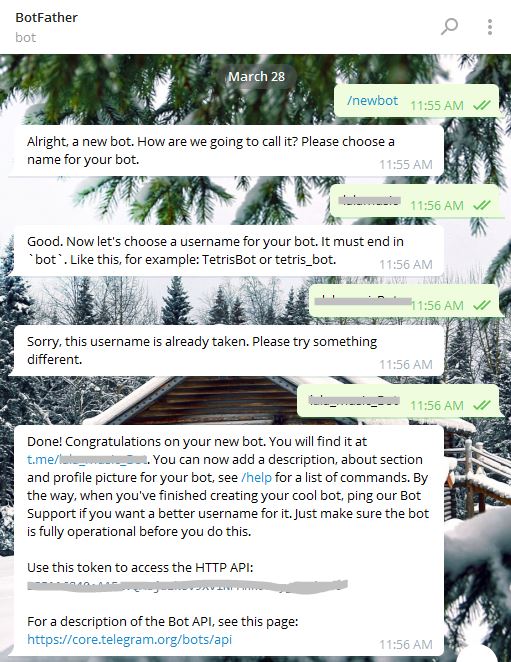 27 |
28 | Once your bot is created, you can set a Description for it. `Description` is a message in middle of the page usually describing what the bot can do.
29 |
30 |
27 |
28 | Once your bot is created, you can set a Description for it. `Description` is a message in middle of the page usually describing what the bot can do.
29 |
30 | 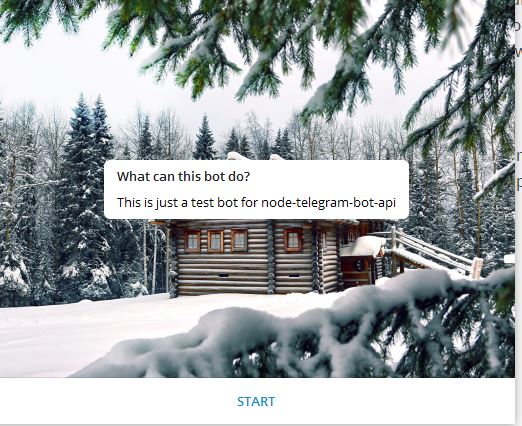 31 |
32 | To set Description for your bot in BotFather do the following:
33 | - Send
31 |
32 | To set Description for your bot in BotFather do the following:
33 | - Send /setdescription to BotFather
34 | - Select the bot for which you are writing a Description
35 | - Change the description and send it to BotFather
36 |
37 | There are some other useful methods in BotFather which we won't cover in this tutorial like /setcommands and other.
38 |
39 | ### First message
40 | Ok now you're ready to go. Create a node project and install bot-api:
41 |
42 | npm install --save node-telegram-bot-api
43 |
44 | Create a file index.js (or any other name) and inside the file require node-telegram-bot-api:
45 |
46 | ```js
47 | const TelegramBot = require('node-telegram-bot-api');
48 | ```
49 | Then you need to assign your token which you got from BotFather:
50 |
51 |
52 | ```js
53 | const token = 'YOUR_TELEGRAM_BOT_TOKEN';
54 | ```
55 | And now create a new bot :
56 |
57 | ```js
58 | const bot = new TelegramBot(token, {polling: true});
59 | ```
60 | Let's try out our bot and do some real world things. We need to get messages that user sends us , to do so we would use following code:
61 |
62 | ```js
63 | bot.on('message', (msg) => {
64 |
65 | //anything
66 |
67 | });
68 | ```
69 | Let's create simple greeting here. Here's big picture of our code :
70 | ```js
71 | const TelegramBot = require('node-telegram-bot-api');
72 | const token = 'YOUR_TELEGRAM_BOT_TOKEN';
73 | const bot = new TelegramBot(token, {polling: true});
74 |
75 | bot.on('message', (msg) => {
76 |
77 | //anything
78 |
79 | });
80 | ```
81 | We were trying to greet and we'll do it here:
82 |
83 | ```js
84 | bot.on('message', (msg) => {
85 |
86 | var Hi = "hi";
87 | if (msg.text.toString().toLowerCase().indexOf(Hi) === 0) {
88 | bot.sendMessage(msg.chat.id,"Hello dear user");
89 | }
90 |
91 | });
92 | ```
93 | Ok , now open up your command prompt and type:
94 |
95 | node index.js
96 | Go to your bot and hit on /start and then type "Hi" to it:
97 |
98 | 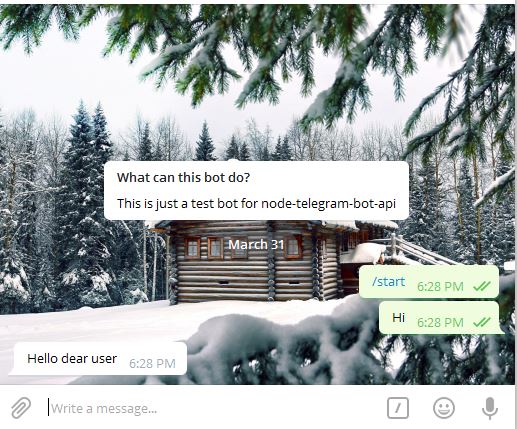 99 |
100 | So now that you know how to send and receive messages in your bot you may want to put some salt on it:
101 |
102 | ```js
103 | bot.on('message', (msg) => {
104 |
105 | var hi = "hi";
106 | if (msg.text.toString().toLowerCase().indexOf(hi) === 0) {
107 | bot.sendMessage(msg.chat.id,"Hello dear user");
108 | }
109 |
110 | var bye = "bye";
111 | if (msg.text.toString().toLowerCase().includes(bye)) {
112 | bot.sendMessage(msg.chat.id, "Hope to see you around again , Bye");
113 | }
114 |
115 | });
116 | ```
117 | This time we're using "includes" method so if user sends us anything containing "bye" word we'll send him back the message:
118 |
119 |
99 |
100 | So now that you know how to send and receive messages in your bot you may want to put some salt on it:
101 |
102 | ```js
103 | bot.on('message', (msg) => {
104 |
105 | var hi = "hi";
106 | if (msg.text.toString().toLowerCase().indexOf(hi) === 0) {
107 | bot.sendMessage(msg.chat.id,"Hello dear user");
108 | }
109 |
110 | var bye = "bye";
111 | if (msg.text.toString().toLowerCase().includes(bye)) {
112 | bot.sendMessage(msg.chat.id, "Hope to see you around again , Bye");
113 | }
114 |
115 | });
116 | ```
117 | This time we're using "includes" method so if user sends us anything containing "bye" word we'll send him back the message:
118 |
119 | 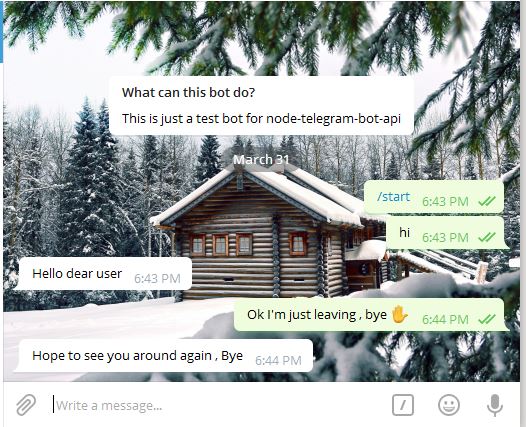 120 | And definitely you can use any other string method that you want.
121 |
122 |
123 |
124 | ### Commands
125 | That's really common to send user a message describing use of bot while he taps on "/start". (these are called [commands](https://core.telegram.org/bots#commands))
126 | To do so :
127 | ```js
128 | bot.onText(/\/start/, (msg) => {
129 |
130 | bot.sendMessage(msg.chat.id, "Welcome");
131 |
132 | });
133 | ```
134 | Let's create another command that will send a picture to user:
135 |
136 | ```js
137 | bot.onText(/\/sendpic/, (msg) => {
138 |
139 | bot.sendPhoto(msg.chat.id,"https://www.somesite.com/image.jpg" );
140 |
141 | });
142 | ```
143 | So now if you write "/sendpic" on your bot an image will be sent.
144 | Sending audios is same and simple you can use "[sendAudio](https://github.com/yagop/node-telegram-bot-api/blob/master/doc/api.md#TelegramBot+sendAudio)" method .
145 |
146 | Now you might have seen some pictures containing caption with them like the following picture.
147 |
148 |
120 | And definitely you can use any other string method that you want.
121 |
122 |
123 |
124 | ### Commands
125 | That's really common to send user a message describing use of bot while he taps on "/start". (these are called [commands](https://core.telegram.org/bots#commands))
126 | To do so :
127 | ```js
128 | bot.onText(/\/start/, (msg) => {
129 |
130 | bot.sendMessage(msg.chat.id, "Welcome");
131 |
132 | });
133 | ```
134 | Let's create another command that will send a picture to user:
135 |
136 | ```js
137 | bot.onText(/\/sendpic/, (msg) => {
138 |
139 | bot.sendPhoto(msg.chat.id,"https://www.somesite.com/image.jpg" );
140 |
141 | });
142 | ```
143 | So now if you write "/sendpic" on your bot an image will be sent.
144 | Sending audios is same and simple you can use "[sendAudio](https://github.com/yagop/node-telegram-bot-api/blob/master/doc/api.md#TelegramBot+sendAudio)" method .
145 |
146 | Now you might have seen some pictures containing caption with them like the following picture.
147 |
148 | 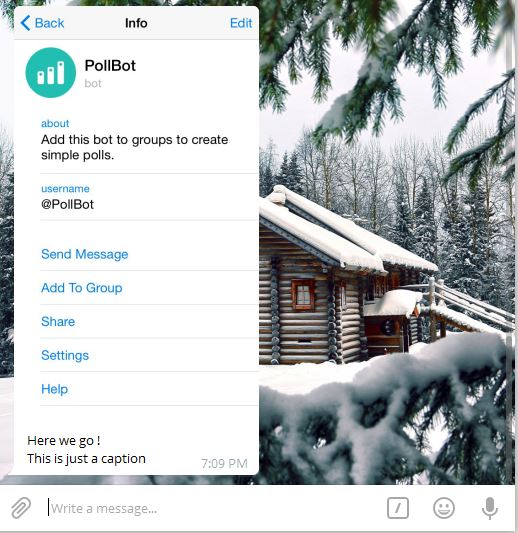 149 |
150 |
151 | Well , How to to create these?
152 | Answer is really simple you can send a caption with option on photo like so :
153 | ```js
154 | bot.onText(/\/sendpic/, (msg) => {
155 |
156 | bot.sendPhoto(msg.chat.id,"https://www.somesite.com/image.jpg",{caption : "Here we go ! \nThis is just a caption "} );
157 |
158 | });
159 | ```
160 | So now you know how to create captions and how to go to new line in your messages by typing `\n` .
161 |
162 |
163 | ### Keyboards
164 | Let's go a step further and start working with [keyboards](https://core.telegram.org/bots#keyboards).
165 | keyboards are actually the ones shown in this picture:
166 |
167 |
149 |
150 |
151 | Well , How to to create these?
152 | Answer is really simple you can send a caption with option on photo like so :
153 | ```js
154 | bot.onText(/\/sendpic/, (msg) => {
155 |
156 | bot.sendPhoto(msg.chat.id,"https://www.somesite.com/image.jpg",{caption : "Here we go ! \nThis is just a caption "} );
157 |
158 | });
159 | ```
160 | So now you know how to create captions and how to go to new line in your messages by typing `\n` .
161 |
162 |
163 | ### Keyboards
164 | Let's go a step further and start working with [keyboards](https://core.telegram.org/bots#keyboards).
165 | keyboards are actually the ones shown in this picture:
166 |
167 | 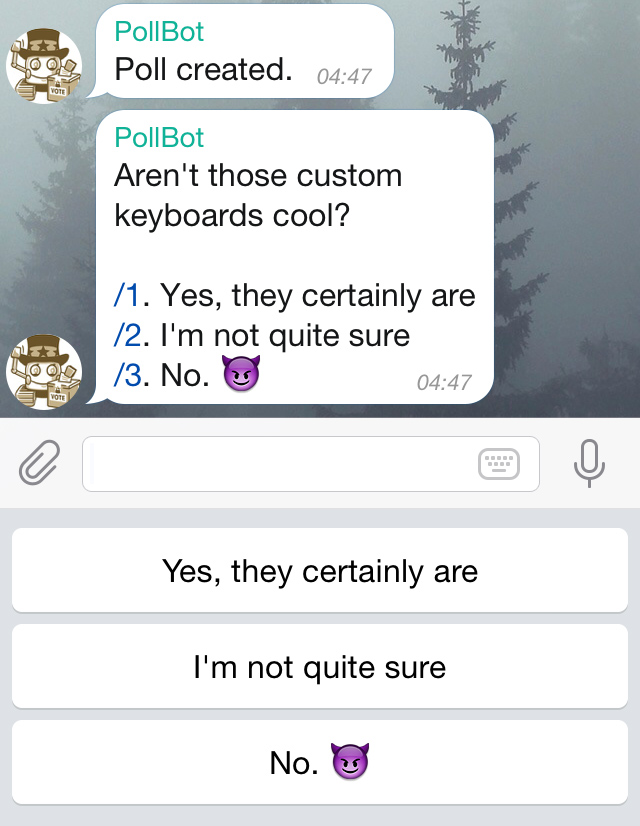 168 |
169 |
170 | Keyboards are nothing but an easy way to send fixed messages. It's like you're not forcing users to write something down and send it to bot, but instead you're demonstrating them some options that they can tap on and send back as an answer.
171 | So let's see how we can create Keyboards , we'll send a Keyboard on "/start" message:
172 | ```js
173 | bot.onText(/\/start/, (msg) => {
174 |
175 | bot.sendMessage(msg.chat.id, "Welcome", {
176 | "reply_markup": {
177 | "keyboard": [["Sample text", "Second sample"], ["Keyboard"], ["I'm robot"]]
178 | }
179 | });
180 |
181 | });
182 | ```
183 | So now if you run you will see:
184 |
185 |
168 |
169 |
170 | Keyboards are nothing but an easy way to send fixed messages. It's like you're not forcing users to write something down and send it to bot, but instead you're demonstrating them some options that they can tap on and send back as an answer.
171 | So let's see how we can create Keyboards , we'll send a Keyboard on "/start" message:
172 | ```js
173 | bot.onText(/\/start/, (msg) => {
174 |
175 | bot.sendMessage(msg.chat.id, "Welcome", {
176 | "reply_markup": {
177 | "keyboard": [["Sample text", "Second sample"], ["Keyboard"], ["I'm robot"]]
178 | }
179 | });
180 |
181 | });
182 | ```
183 | So now if you run you will see:
184 |
185 | 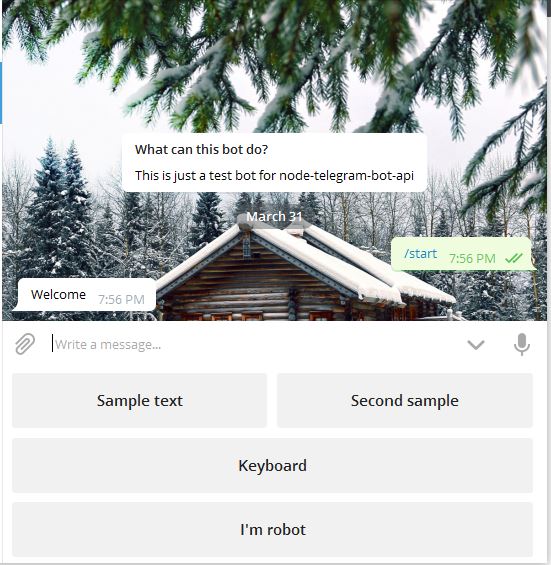 186 |
187 | As I said in fact Keyboards are not nothing but automatic type and send for user. There is no difference if you write "I'm robot" and sending on your own or you click on Keyboard. Let's do something simple when that "I'm robot" is received.So add this up to your previous on message:
188 | ```js
189 | bot.on('message', (msg) => {
190 | var Hi = "hi";
191 | if (msg.text.toString().toLowerCase().indexOf(Hi) === 0) {
192 | bot.sendMessage(msg.chat.id, "Hello dear user");
193 | }
194 | var bye = "bye";
195 | if (msg.text.toString().toLowerCase().includes(bye)) {
196 | bot.sendMessage(msg.chat.id, "Hope to see you around again , Bye");
197 | }
198 | var robot = "I'm robot";
199 | if (msg.text.indexOf(robot) === 0) {
200 | bot.sendMessage(msg.chat.id, "Yes I'm robot but not in that way!");
201 | }
202 | });
203 | ```
204 | So now if you go to your bot tap on start you see Keyboards and if you tap on I'm robot you'll see the message. Note that there is no difference if you type it or you send it by Keyboards.
205 |
206 |
207 | ### User
208 | node-telegram-bot-api does not have any method to get users information but in case if you want to, you can get information like so:
209 | ```js
210 | var Hi = "hi";
211 | if (msg.text.toString().toLowerCase().indexOf(Hi) === 0) {
212 | bot.sendMessage(msg.from.id, "Hello " + msg.from.first_name);
213 | }
214 | ```
215 |
216 |
186 |
187 | As I said in fact Keyboards are not nothing but automatic type and send for user. There is no difference if you write "I'm robot" and sending on your own or you click on Keyboard. Let's do something simple when that "I'm robot" is received.So add this up to your previous on message:
188 | ```js
189 | bot.on('message', (msg) => {
190 | var Hi = "hi";
191 | if (msg.text.toString().toLowerCase().indexOf(Hi) === 0) {
192 | bot.sendMessage(msg.chat.id, "Hello dear user");
193 | }
194 | var bye = "bye";
195 | if (msg.text.toString().toLowerCase().includes(bye)) {
196 | bot.sendMessage(msg.chat.id, "Hope to see you around again , Bye");
197 | }
198 | var robot = "I'm robot";
199 | if (msg.text.indexOf(robot) === 0) {
200 | bot.sendMessage(msg.chat.id, "Yes I'm robot but not in that way!");
201 | }
202 | });
203 | ```
204 | So now if you go to your bot tap on start you see Keyboards and if you tap on I'm robot you'll see the message. Note that there is no difference if you type it or you send it by Keyboards.
205 |
206 |
207 | ### User
208 | node-telegram-bot-api does not have any method to get users information but in case if you want to, you can get information like so:
209 | ```js
210 | var Hi = "hi";
211 | if (msg.text.toString().toLowerCase().indexOf(Hi) === 0) {
212 | bot.sendMessage(msg.from.id, "Hello " + msg.from.first_name);
213 | }
214 | ```
215 |
216 | 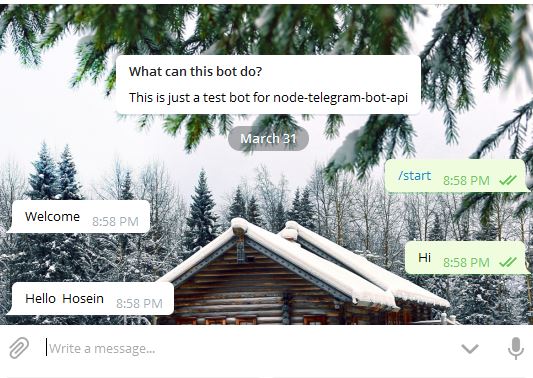 217 |
218 | And if you wanted to get user profile pictures you can use [getUserProfilePhotos](https://github.com/yagop/node-telegram-bot-api/blob/master/doc/api.md#telegrambotgetuserprofilephotosuserid-options--promise) .
219 |
220 |
221 | ### Inline Keybords
222 | This section is under construction...
223 |
224 |
225 | ### parse_mode
226 | If you want to send messages with some style there, here is how it goes.
217 |
218 | And if you wanted to get user profile pictures you can use [getUserProfilePhotos](https://github.com/yagop/node-telegram-bot-api/blob/master/doc/api.md#telegrambotgetuserprofilephotosuserid-options--promise) .
219 |
220 |
221 | ### Inline Keybords
222 | This section is under construction...
223 |
224 |
225 | ### parse_mode
226 | If you want to send messages with some style there, here is how it goes. parse_mode defines how you want you message to be rendered.You can define it inside in your options when sending message.
227 | Available option are HTML and Markdown.Let's see how it works in action:
228 | ```js
229 | bot.on('message', (msg) => {
230 |
231 | var Hi = "hi";
232 | if (msg.text.toString().toLowerCase().indexOf(Hi) === 0) {
233 | bot.sendMessage(msg.chat.id,"bold \n italic \n italic with em \n inline URL \n inline fixed-width code \n pre-formatted fixed-width code block
" ,{parse_mode : "HTML"});
234 | }
235 | });
236 | ```
237 | So you get idea where parse_mode is defined.Now if we run this:
238 |
239 | 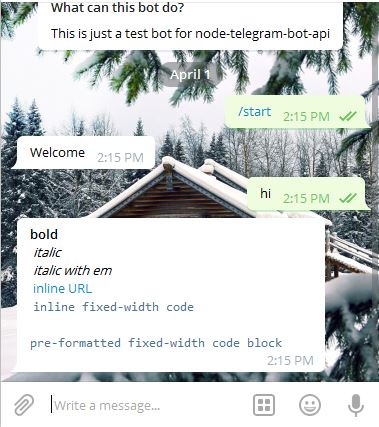 240 |
241 | So that's how we do it with Html you can also write with Markdown.As mentioned in official api of Telegram only these tags are supported till now:
242 |
243 | ```
244 | bold, bold
245 | italic, italic
246 | inline URL
247 |
240 |
241 | So that's how we do it with Html you can also write with Markdown.As mentioned in official api of Telegram only these tags are supported till now:
242 |
243 | ```
244 | bold, bold
245 | italic, italic
246 | inline URL
247 | inline fixed-width code
248 | pre-formatted fixed-width code block
249 | ```
250 | And for Markdown you can only use:
251 | ```
252 | *bold text*
253 | _italic text_
254 | [text](http://www.example.com/)
255 | `inline fixed-width code`
256 | ```
257 |
258 | ### Location and Number
259 | There are some methods that enable you to send users location.
260 | Here is an example:
261 | ```js
262 | bot.on('message', (msg) => {
263 | var location = "location";
264 | if (msg.text.indexOf(location) === 0) {
265 | bot.sendLocation(msg.chat.id,44.97108, -104.27719);
266 | bot.sendMessage(msg.chat.id, "Here is the point");
267 |
268 | }
269 | });
270 |
271 | ```
272 |
273 | 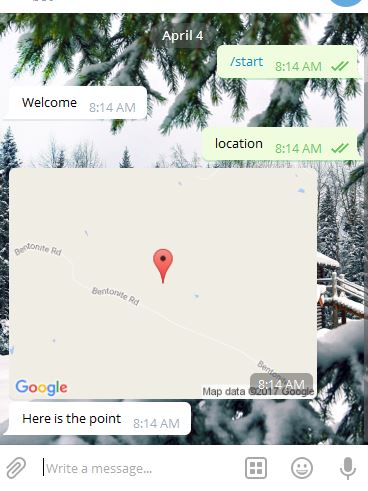 274 |
275 |
276 | And there is also [sendVenue](https://github.com/yagop/node-telegram-bot-api/blob/master/doc/api.md#telegrambotsendvenuechatid-latitude-longitude-title-address-options--promise).
277 | To send a phone number you can use [sendContact](https://github.com/yagop/node-telegram-bot-api/blob/master/doc/api.md#TelegramBot+sendContact).
278 |
279 |
280 | ### Interacting with groups and channels
281 | One interesting use of bots is in groups and channels.You can use bots to manage groups , receiving users messages and sending group messages. You can even send keyboards to members so that they can use the bot easier.
282 | For better understanding of how bots can be useful in groups let's create one and add it to a group.
283 | So we want to create a bot that says "Have a nice day _Username_" when any member of group said something containing "Bye" keyword.
284 | Before doing anything you have to know that a bot has no accessibility to users messages unless we add it as of a administrator.
285 | And if don't do that bot will only has access to [Commands](https://github.com/hosein2398/node-telegram-bot-api-tutorial#commands) that any user sends to group.And all of this is because of the [privacy policy](https://core.telegram.org/bots#privacy-mode) that Telegram messenger follows which I think is right.
286 | So let's get back to creating that bot , actually we don't have to do anything different than creating bot for a single user usage , everything is similar.
287 | ```js
288 | bot.on('message', (msg) => {
289 |
290 | var bye = "bye";
291 | if (msg.text.toString().toLowerCase().includes(bye)) {
292 | bot.sendMessage(msg.chat.id, "Have a nice day " + msg.from.first_name);
293 | }
294 |
295 | });
296 | ```
297 |
298 | Now that we wrote codes go ahead and add this bot to a group , after adding it set it as of a administrator of the group so that it could get users messages.
299 | Now say something that includes "bye":
300 |
301 |
274 |
275 |
276 | And there is also [sendVenue](https://github.com/yagop/node-telegram-bot-api/blob/master/doc/api.md#telegrambotsendvenuechatid-latitude-longitude-title-address-options--promise).
277 | To send a phone number you can use [sendContact](https://github.com/yagop/node-telegram-bot-api/blob/master/doc/api.md#TelegramBot+sendContact).
278 |
279 |
280 | ### Interacting with groups and channels
281 | One interesting use of bots is in groups and channels.You can use bots to manage groups , receiving users messages and sending group messages. You can even send keyboards to members so that they can use the bot easier.
282 | For better understanding of how bots can be useful in groups let's create one and add it to a group.
283 | So we want to create a bot that says "Have a nice day _Username_" when any member of group said something containing "Bye" keyword.
284 | Before doing anything you have to know that a bot has no accessibility to users messages unless we add it as of a administrator.
285 | And if don't do that bot will only has access to [Commands](https://github.com/hosein2398/node-telegram-bot-api-tutorial#commands) that any user sends to group.And all of this is because of the [privacy policy](https://core.telegram.org/bots#privacy-mode) that Telegram messenger follows which I think is right.
286 | So let's get back to creating that bot , actually we don't have to do anything different than creating bot for a single user usage , everything is similar.
287 | ```js
288 | bot.on('message', (msg) => {
289 |
290 | var bye = "bye";
291 | if (msg.text.toString().toLowerCase().includes(bye)) {
292 | bot.sendMessage(msg.chat.id, "Have a nice day " + msg.from.first_name);
293 | }
294 |
295 | });
296 | ```
297 |
298 | Now that we wrote codes go ahead and add this bot to a group , after adding it set it as of a administrator of the group so that it could get users messages.
299 | Now say something that includes "bye":
300 |
301 | 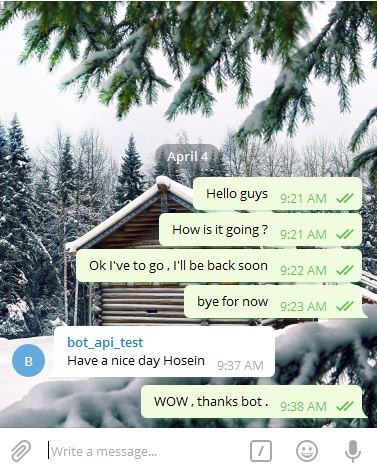 302 |
303 | Now let's do another thing , write some codes that bot will remove a person from group if they say a specific word.For instance you can create a bot that will remove member if they curse in group.
304 | Here we will write codes that if someone says anything containing "idiot" bot will remove that person from group.
305 | ```js
306 | bot.on('message', (msg) => {
307 |
308 | var what = "idiot";
309 | if (msg.text.includes(what)) {
310 | bot.kickChatMember(msg.chat.id, msg.from.id);
311 | }
312 |
313 | });
314 | ```
315 | Here we have used [kickChatMember](https://github.com/yagop/node-telegram-bot-api/blob/58566d2df5146611a6a3e6140ca616403d24a20e/README.md#telegrambotkickchatmemberchatid-userid--promise) method to remove a member it receives two parameters , first one is id of chat and second one is id of user which you want to remove.Now if you add this bot among admins of a group and somebody says something containing "idiot":
316 |
317 |
302 |
303 | Now let's do another thing , write some codes that bot will remove a person from group if they say a specific word.For instance you can create a bot that will remove member if they curse in group.
304 | Here we will write codes that if someone says anything containing "idiot" bot will remove that person from group.
305 | ```js
306 | bot.on('message', (msg) => {
307 |
308 | var what = "idiot";
309 | if (msg.text.includes(what)) {
310 | bot.kickChatMember(msg.chat.id, msg.from.id);
311 | }
312 |
313 | });
314 | ```
315 | Here we have used [kickChatMember](https://github.com/yagop/node-telegram-bot-api/blob/58566d2df5146611a6a3e6140ca616403d24a20e/README.md#telegrambotkickchatmemberchatid-userid--promise) method to remove a member it receives two parameters , first one is id of chat and second one is id of user which you want to remove.Now if you add this bot among admins of a group and somebody says something containing "idiot":
316 |
317 | 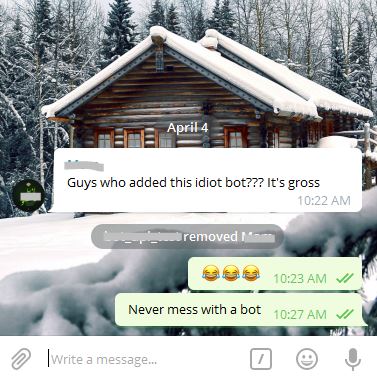 318 |
319 | We can't cover all methods there are some other methods related to groups and channels: [getChat](https://github.com/yagop/node-telegram-bot-api/blob/master/doc/api.md#TelegramBot+getChat) , [getChatAdministrators](https://github.com/yagop/node-telegram-bot-api/blob/master/doc/api.md#TelegramBot+getChatAdministrators) , [getChatMembersCount](https://github.com/yagop/node-telegram-bot-api/blob/master/doc/api.md#telegrambotgetchatmemberscountchatid--promise) , [getChatMember](https://github.com/yagop/node-telegram-bot-api/blob/master/doc/api.md#telegrambotgetchatmemberchatid-userid--promise) , [leaveChat](https://github.com/yagop/node-telegram-bot-api/blob/master/doc/api.md#telegrambotleavechatchatid--promise)
320 |
321 | ### Contributing
322 | + If you found any typo or grammatically wrong sentence you can just make a PR.(In case you were not interested to, you can open an issue.)
323 | + If you have anything in mind that can improve this tutorial please make a PR.
324 |
--------------------------------------------------------------------------------
318 |
319 | We can't cover all methods there are some other methods related to groups and channels: [getChat](https://github.com/yagop/node-telegram-bot-api/blob/master/doc/api.md#TelegramBot+getChat) , [getChatAdministrators](https://github.com/yagop/node-telegram-bot-api/blob/master/doc/api.md#TelegramBot+getChatAdministrators) , [getChatMembersCount](https://github.com/yagop/node-telegram-bot-api/blob/master/doc/api.md#telegrambotgetchatmemberscountchatid--promise) , [getChatMember](https://github.com/yagop/node-telegram-bot-api/blob/master/doc/api.md#telegrambotgetchatmemberchatid-userid--promise) , [leaveChat](https://github.com/yagop/node-telegram-bot-api/blob/master/doc/api.md#telegrambotleavechatchatid--promise)
320 |
321 | ### Contributing
322 | + If you found any typo or grammatically wrong sentence you can just make a PR.(In case you were not interested to, you can open an issue.)
323 | + If you have anything in mind that can improve this tutorial please make a PR.
324 |
--------------------------------------------------------------------------------