├── encodings.pickle
├── test_images
├── 1.png
└── toi.png
├── dataset
├── hong
│ ├── 00000.png
│ ├── 00001.png
│ ├── 00002.png
│ ├── 00003.png
│ ├── 00004.png
│ └── 00005.png
├── huy
│ ├── 00000.png
│ ├── 00001.png
│ ├── 00002.png
│ ├── 00003.png
│ ├── 00004.png
│ ├── 00005.png
│ ├── 00006.png
│ ├── 00007.png
│ └── 00008.png
├── mo
│ ├── 00000.png
│ ├── 00001.png
│ ├── 00002.png
│ ├── 00003.png
│ ├── 00004.png
│ ├── 00005.png
│ └── 00006.png
└── tuananh
│ ├── 00000.png
│ ├── 00001.png
│ ├── 00002.png
│ ├── 00003.png
│ ├── 00004.png
│ └── 00005.png
├── output
└── toi_output.png
├── Image_screenshot_28.06.2021.png
├── test_functions.py
├── encode_faces.py
├── recognize_faces_image.py
├── recognize_faces_video.py
└── README.md
/encodings.pickle:
--------------------------------------------------------------------------------
https://raw.githubusercontent.com/huytranvan2010/Face-Recognition-with-OpenCV-Python-DL/HEAD/encodings.pickle
--------------------------------------------------------------------------------
/test_images/1.png:
--------------------------------------------------------------------------------
https://raw.githubusercontent.com/huytranvan2010/Face-Recognition-with-OpenCV-Python-DL/HEAD/test_images/1.png
--------------------------------------------------------------------------------
/test_images/toi.png:
--------------------------------------------------------------------------------
https://raw.githubusercontent.com/huytranvan2010/Face-Recognition-with-OpenCV-Python-DL/HEAD/test_images/toi.png
--------------------------------------------------------------------------------
/dataset/hong/00000.png:
--------------------------------------------------------------------------------
https://raw.githubusercontent.com/huytranvan2010/Face-Recognition-with-OpenCV-Python-DL/HEAD/dataset/hong/00000.png
--------------------------------------------------------------------------------
/dataset/hong/00001.png:
--------------------------------------------------------------------------------
https://raw.githubusercontent.com/huytranvan2010/Face-Recognition-with-OpenCV-Python-DL/HEAD/dataset/hong/00001.png
--------------------------------------------------------------------------------
/dataset/hong/00002.png:
--------------------------------------------------------------------------------
https://raw.githubusercontent.com/huytranvan2010/Face-Recognition-with-OpenCV-Python-DL/HEAD/dataset/hong/00002.png
--------------------------------------------------------------------------------
/dataset/hong/00003.png:
--------------------------------------------------------------------------------
https://raw.githubusercontent.com/huytranvan2010/Face-Recognition-with-OpenCV-Python-DL/HEAD/dataset/hong/00003.png
--------------------------------------------------------------------------------
/dataset/hong/00004.png:
--------------------------------------------------------------------------------
https://raw.githubusercontent.com/huytranvan2010/Face-Recognition-with-OpenCV-Python-DL/HEAD/dataset/hong/00004.png
--------------------------------------------------------------------------------
/dataset/hong/00005.png:
--------------------------------------------------------------------------------
https://raw.githubusercontent.com/huytranvan2010/Face-Recognition-with-OpenCV-Python-DL/HEAD/dataset/hong/00005.png
--------------------------------------------------------------------------------
/dataset/huy/00000.png:
--------------------------------------------------------------------------------
https://raw.githubusercontent.com/huytranvan2010/Face-Recognition-with-OpenCV-Python-DL/HEAD/dataset/huy/00000.png
--------------------------------------------------------------------------------
/dataset/huy/00001.png:
--------------------------------------------------------------------------------
https://raw.githubusercontent.com/huytranvan2010/Face-Recognition-with-OpenCV-Python-DL/HEAD/dataset/huy/00001.png
--------------------------------------------------------------------------------
/dataset/huy/00002.png:
--------------------------------------------------------------------------------
https://raw.githubusercontent.com/huytranvan2010/Face-Recognition-with-OpenCV-Python-DL/HEAD/dataset/huy/00002.png
--------------------------------------------------------------------------------
/dataset/huy/00003.png:
--------------------------------------------------------------------------------
https://raw.githubusercontent.com/huytranvan2010/Face-Recognition-with-OpenCV-Python-DL/HEAD/dataset/huy/00003.png
--------------------------------------------------------------------------------
/dataset/huy/00004.png:
--------------------------------------------------------------------------------
https://raw.githubusercontent.com/huytranvan2010/Face-Recognition-with-OpenCV-Python-DL/HEAD/dataset/huy/00004.png
--------------------------------------------------------------------------------
/dataset/huy/00005.png:
--------------------------------------------------------------------------------
https://raw.githubusercontent.com/huytranvan2010/Face-Recognition-with-OpenCV-Python-DL/HEAD/dataset/huy/00005.png
--------------------------------------------------------------------------------
/dataset/huy/00006.png:
--------------------------------------------------------------------------------
https://raw.githubusercontent.com/huytranvan2010/Face-Recognition-with-OpenCV-Python-DL/HEAD/dataset/huy/00006.png
--------------------------------------------------------------------------------
/dataset/huy/00007.png:
--------------------------------------------------------------------------------
https://raw.githubusercontent.com/huytranvan2010/Face-Recognition-with-OpenCV-Python-DL/HEAD/dataset/huy/00007.png
--------------------------------------------------------------------------------
/dataset/huy/00008.png:
--------------------------------------------------------------------------------
https://raw.githubusercontent.com/huytranvan2010/Face-Recognition-with-OpenCV-Python-DL/HEAD/dataset/huy/00008.png
--------------------------------------------------------------------------------
/dataset/mo/00000.png:
--------------------------------------------------------------------------------
https://raw.githubusercontent.com/huytranvan2010/Face-Recognition-with-OpenCV-Python-DL/HEAD/dataset/mo/00000.png
--------------------------------------------------------------------------------
/dataset/mo/00001.png:
--------------------------------------------------------------------------------
https://raw.githubusercontent.com/huytranvan2010/Face-Recognition-with-OpenCV-Python-DL/HEAD/dataset/mo/00001.png
--------------------------------------------------------------------------------
/dataset/mo/00002.png:
--------------------------------------------------------------------------------
https://raw.githubusercontent.com/huytranvan2010/Face-Recognition-with-OpenCV-Python-DL/HEAD/dataset/mo/00002.png
--------------------------------------------------------------------------------
/dataset/mo/00003.png:
--------------------------------------------------------------------------------
https://raw.githubusercontent.com/huytranvan2010/Face-Recognition-with-OpenCV-Python-DL/HEAD/dataset/mo/00003.png
--------------------------------------------------------------------------------
/dataset/mo/00004.png:
--------------------------------------------------------------------------------
https://raw.githubusercontent.com/huytranvan2010/Face-Recognition-with-OpenCV-Python-DL/HEAD/dataset/mo/00004.png
--------------------------------------------------------------------------------
/dataset/mo/00005.png:
--------------------------------------------------------------------------------
https://raw.githubusercontent.com/huytranvan2010/Face-Recognition-with-OpenCV-Python-DL/HEAD/dataset/mo/00005.png
--------------------------------------------------------------------------------
/dataset/mo/00006.png:
--------------------------------------------------------------------------------
https://raw.githubusercontent.com/huytranvan2010/Face-Recognition-with-OpenCV-Python-DL/HEAD/dataset/mo/00006.png
--------------------------------------------------------------------------------
/output/toi_output.png:
--------------------------------------------------------------------------------
https://raw.githubusercontent.com/huytranvan2010/Face-Recognition-with-OpenCV-Python-DL/HEAD/output/toi_output.png
--------------------------------------------------------------------------------
/dataset/tuananh/00000.png:
--------------------------------------------------------------------------------
https://raw.githubusercontent.com/huytranvan2010/Face-Recognition-with-OpenCV-Python-DL/HEAD/dataset/tuananh/00000.png
--------------------------------------------------------------------------------
/dataset/tuananh/00001.png:
--------------------------------------------------------------------------------
https://raw.githubusercontent.com/huytranvan2010/Face-Recognition-with-OpenCV-Python-DL/HEAD/dataset/tuananh/00001.png
--------------------------------------------------------------------------------
/dataset/tuananh/00002.png:
--------------------------------------------------------------------------------
https://raw.githubusercontent.com/huytranvan2010/Face-Recognition-with-OpenCV-Python-DL/HEAD/dataset/tuananh/00002.png
--------------------------------------------------------------------------------
/dataset/tuananh/00003.png:
--------------------------------------------------------------------------------
https://raw.githubusercontent.com/huytranvan2010/Face-Recognition-with-OpenCV-Python-DL/HEAD/dataset/tuananh/00003.png
--------------------------------------------------------------------------------
/dataset/tuananh/00004.png:
--------------------------------------------------------------------------------
https://raw.githubusercontent.com/huytranvan2010/Face-Recognition-with-OpenCV-Python-DL/HEAD/dataset/tuananh/00004.png
--------------------------------------------------------------------------------
/dataset/tuananh/00005.png:
--------------------------------------------------------------------------------
https://raw.githubusercontent.com/huytranvan2010/Face-Recognition-with-OpenCV-Python-DL/HEAD/dataset/tuananh/00005.png
--------------------------------------------------------------------------------
/Image_screenshot_28.06.2021.png:
--------------------------------------------------------------------------------
https://raw.githubusercontent.com/huytranvan2010/Face-Recognition-with-OpenCV-Python-DL/HEAD/Image_screenshot_28.06.2021.png
--------------------------------------------------------------------------------
/test_functions.py:
--------------------------------------------------------------------------------
1 | lst = [True, True, False, True]
2 |
3 | if True in lst:
4 | print("anh")
5 |
6 | dic = {'anh': 1, 'em': 3, 'oi': 2, 'toi': 10, 'day': 12}
7 |
8 | print(max(dic, key=dic.get))
9 |
10 | """ Có nhiều cách để sắp xếp dict the value
11 | Ví dụ sorted(dic.items(), key=lambda x: x[1], reverse=True)"""
12 | new_dic = sorted(dic.items(), key=lambda x: x[1], reverse=True)
13 |
14 | print(new_dic)
15 | print(type(new_dic))
16 | print(new_dic[0][0])
17 |
18 |
--------------------------------------------------------------------------------
/encode_faces.py:
--------------------------------------------------------------------------------
1 | """ Để lưu encodings và tên của các faces trong dataset vào file encodings.pickle"""
2 | # USAGE
3 | # python encode_faces.py --dataset dataset --encodings encodings.pickle
4 |
5 | from imutils import paths
6 | import argparse
7 | import pickle
8 | import cv2
9 | import os
10 | import face_recognition
11 |
12 | ap =argparse.ArgumentParser()
13 | ap.add_argument("-i", "--dataset", required=True, help="path to the directory of faces and images")
14 | # các encodings và names được lưu vào file
15 | ap.add_argument("-e", "--encodings", required=True, help="path to the serrialized db of facial encoding")
16 | # trước khi encode face thì phải detect nó (đây là bước luôn phải làm trong face recognition) - chọn method để detect faces
17 | ap.add_argument("-d", "--detection_method", type=str, default="cnn", help="face detector to use: cnn or hog")
18 | args = vars(ap.parse_args())
19 |
20 | # lấy paths của images trong dataset
21 | print("[INFO] quantifying faces...")
22 | imagePaths = list(paths.list_images(args["dataset"]))
23 |
24 | # khởi tạo list chứa known encodings và known names (để các test images so sánh)
25 | # chứa encodings và tên của các images trong dataset
26 | knownEncodings = []
27 | knownNames = []
28 |
29 | # duyệt qua các image paths
30 | for (i, imagePath) in enumerate(imagePaths):
31 | # lấy tên người từ imagepath
32 | print("[INFO] processing image {}/{}".format(i+1, len(imagePaths)))
33 | name = imagePath.split(os.path.sep)[-2]
34 |
35 | # load image bằng OpenCV và chuyển từ BGR to RGB (dlib cần)
36 | image = cv2.imread(imagePath)
37 | rgb = cv2.cvtColor(image, cv2.COLOR_BGR2RGB)
38 |
39 | # Đối với từng image phải thực hiện detect face, trích xuất face ROI và chuyển về encoding
40 | # trả về array of bboxes of faces, dùng dlib như bài face detection đó
41 | # model="cnn" chính xác hơn nhưng chậm hơn, "hog" nhanh hơn nhưng kém chính xác hơn
42 | boxes = face_recognition.face_locations(rgb, model=args["detection_method"])
43 |
44 | # tính the facial embedding for the face
45 | # sẽ tính encodings cho mỗi face phát hiện được trong ảnh (có thể có nhiều faces)
46 | # Để lý tưởng trong ảnh nên chỉ có một mặt người của mình thôi
47 | encodings = face_recognition.face_encodings(rgb, boxes)
48 |
49 | # duyệt qua các encodings
50 | # Trong ảnh có thể có nhiều faces, mà ở đây chỉ có 1 tên
51 | # Nên chắc chắn trong dataset ban đầu ảnh chỉ có một mặt người thôi nhé
52 | # Lý tưởng nhất mỗi ảnh có 1 face và có 1 encoding thôi
53 | for encoding in encodings:
54 | # lưu encoding và name vào lists bên trên
55 | knownEncodings.append(encoding)
56 | knownNames.append(name)
57 |
58 | # dump (lưu) the facial encodings + names vào ổ cứng
59 | print("[INFO] serializing encodings...")
60 | data = {"encodings": knownEncodings, "names": knownNames}
61 |
62 | with open(args["encodings"], "wb") as f:
63 | f.write(pickle.dumps(data))
64 |
65 |
66 |
67 |
68 |
69 |
70 |
71 |
72 |
73 |
74 |
--------------------------------------------------------------------------------
/recognize_faces_image.py:
--------------------------------------------------------------------------------
1 | # USAGE
2 | # python recognize_faces_image.py --encodings encodings.pickle --image 1.png
3 | import face_recognition
4 | import argparse
5 | import pickle
6 | import cv2
7 |
8 | ap = argparse.ArgumentParser()
9 | # đường dẫn đến file encodings đã lưu
10 | ap.add_argument("-e", "--encodings", required=True, help="path to the serialized db of facial encodings")
11 | ap.add_argument("-i", "--image", required=True, help="path to the test image")
12 | # nếu chạy trên CPU hay embedding devices thì để hog, còn khi tạo encoding vẫn dùng cnn cho chính xác
13 | ap.add_argument("-d", "--detection_method", type=str, default="cnn", help="face dettection model to use: cnn or hog")
14 | args = vars(ap.parse_args())
15 |
16 | # load the known faces and encodings
17 | print("[INFO] loading encodings...")
18 | data = pickle.loads(open(args["encodings"], "rb").read()) # loads - load từ file
19 |
20 | # load image và chuyển từ BGR to RGB (dlib cần để chuyển về encoding)
21 | image = cv2.imread(args["image"])
22 | rgb = cv2.cvtColor(image, cv2.COLOR_BGR2RGB)
23 |
24 | # CŨng làm tương tự cho ảnh test, detect face, extract face ROI, chuyển về encoding
25 | # rồi cuối cùng là so sánh kNN để recognize
26 | print("[INFO] recognizing faces...")
27 | boxes = face_recognition.face_locations(rgb, model=args["detection_method"])
28 | encodings = face_recognition.face_encodings(rgb, boxes)
29 |
30 | # khởi tạo list chứa tên các khuôn mặt phát hiện được
31 | # nên nhớ trong 1 ảnh có thể phát hiện được nhiều khuôn mặt nhé
32 | names = []
33 |
34 | # duyệt qua các encodings của faces phát hiện được trong ảnh
35 | for encoding in encodings:
36 | # khớp encoding của từng face phát hiện được với known encodings (từ datatset)
37 | # so sánh list of known encodings và encoding cần check, sẽ trả về list of True/False xem từng known encoding có khớp với encoding check không
38 | # có bao nhiêu known encodings thì trả về list có bấy nhiêu phần tử
39 | # trong hàm compare_faces sẽ tính Euclidean distance và so sánh với tolerance=0.6 (mặc định), nhó hơn thì khớp, ngược lại thì ko khớp (khác người)
40 | matches = face_recognition.compare_faces(data["encodings"], encoding, 0.4) # có thể điều chỉnh tham số cuối
41 | name = "Unknown" # tạm thời vậy, sau này khớp thì đổi tên
42 |
43 | # Kiểm tra xem từng encoding có khớp với known encodings nào không,
44 | if True in matches:
45 | # lưu các chỉ số mà encoding khớp với known encodings (nghĩa là b == True)
46 | matchedIdxs = [i for (i, b) in enumerate(matches) if b]
47 |
48 | # tạo dictionary để đếm tổng số lần mỗi face khớp
49 | counts = {}
50 | # duyệt qua các chỉ số được khớp và đếm số lượng
51 | for i in matchedIdxs:
52 | name = data["names"][i] # tên tương ứng known encoding khiowps với encoding check
53 | counts[name] = counts.get(name, 0) + 1 # nếu chưa có trong dict thì + 1, có rồi thì lấy số cũ + 1
54 |
55 | # lấy tên có nhiều counts nhất (tên có encoding khớp nhiều nhất với encoding cần check)
56 | # có nhiều cách để có thể sắp xếp list theo value ví dụ new_dic = sorted(dic.items(), key=lambda x: x[1], reverse=True)
57 | # nó sẽ trả về list of tuple, mình chỉ cần lấy name = new_dic[0][0]
58 | name = max(counts, key=counts.get)
59 |
60 | names.append(name)
61 |
62 | # Duyệt qua các bounding boxes và vẽ nó trên ảnh kèm thông tin
63 | # Nên nhớ recognition_face trả bounding boxes ở dạng (top, rights, bottom, left)
64 | for ((top, right, bottom, left), name) in zip(boxes, names):
65 | cv2.rectangle(image, (left, top), (right, bottom), (0, 255, 0), 2)
66 | y = top - 15 if top - 15 > 15 else top + 15
67 |
68 | cv2.putText(image, name, (left, y), cv2.FONT_HERSHEY_SIMPLEX, 0.8, (0, 255, 0), 1)
69 |
70 | cv2.imshow("Image", image)
71 | cv2.waitKey(0)
72 |
73 |
74 |
75 |
76 |
--------------------------------------------------------------------------------
/recognize_faces_video.py:
--------------------------------------------------------------------------------
1 | from os import write
2 | import face_recognition
3 | import argparse
4 | import pickle
5 | import cv2
6 | import time
7 | import imutils
8 |
9 | ap = argparse.ArgumentParser()
10 | # đường dẫn đến file encodings đã lưu
11 | ap.add_argument("-e", "--encodings", required=True, help="path to the serialized db of facial encodings")
12 | # nếu muốn lưu video từ webcam
13 | ap.add_argument("-o", "--output", type=str, help="path to the output video")
14 | ap.add_argument("-y", "--display", type=int, default=1, help="whether or not to display output frame to screen")
15 | # nếu chạy trên CPU hay embedding devices thì để hog, còn khi tạo encoding vẫn dùng cnn cho chính xác
16 | # ko có GPU thì nên để hog thôi nhé, cứ thử xem sao
17 | ap.add_argument("-d", "--detection_method", type=str, default="cnn", help="face dettection model to use: cnn or hog")
18 | args = vars(ap.parse_args())
19 |
20 | # load the known faces and encodings
21 | print("[INFO] loading encodings...")
22 | data = pickle.loads(open(args["encodings"], "rb")) # loads - load từ file
23 |
24 | # Khởi tạo video stream và pointer to the output video file, để camera warm up một chút
25 | print("[INFO] starting video stream...")
26 | video = cv2.VideoCapture(0) # có thể chọn cam bằng cách thay đổi src
27 | writer = None
28 | time.sleep(2.)
29 |
30 | while True:
31 | ret, frame = video.read()
32 |
33 | if not ret:
34 | break
35 |
36 | # chuyển frame từ BGR to RGB, resize để tăng tốc độ xử lý
37 | rgb = cv2.cvtColor(frame, cv2.COLOR_BGR2RGB)
38 | rgb = imutils.resize(rgb, width=750)
39 | # hệ số scale từ ảnh gốc (frame) về rgb, tí phải dùng bên dưới
40 | r = frame.shape[1] / float(rgb.shape[1])
41 |
42 | # CŨng làm tương tự cho ảnh test, detect face, extract face ROI, chuyển về encoding
43 | # rồi cuối cùng là so sánh kNN để recognize
44 | print("[INFO] recognizing faces...")
45 | boxes = face_recognition.face_locations(rgb, model=args["detection_method"])
46 | encodings = face_recognition.face_encodings(rgb, boxes)
47 |
48 | # khởi tạo list chứa tên các khuôn mặt phát hiện được
49 | # nên nhớ trong 1 ảnh có thể phát hiện được nhiều khuôn mặt nhé
50 | names = []
51 |
52 | # duyệt qua các encodings của faces phát hiện được trong ảnh
53 | for encoding in encodings:
54 | # khớp encoding của từng face phát hiện được với known encodings (từ datatset)
55 | # so sánh list of known encodings và encoding cần check, sẽ trả về list of True/False xem từng known encoding có khớp với encoding check không
56 | # có bao nhiêu known encodings thì trả về list có bấy nhiêu phần tử
57 | # trong hàm compare_faces sẽ tính Euclidean distance và so sánh với tolerance=0.6 (mặc định), nhó hơn thì khớp, ngược lại thì ko khớp (khác người)
58 | matches = face_recognition.compare_faces(data["encodings"], encoding)
59 | name = "Unknown" # tạm thời vậy, sau này khớp thì đổi tên
60 |
61 | # Kiểm tra xem từng encoding có khớp với known encodings nào không,
62 | if True in matches:
63 | # lưu các chỉ số mà encoding khớp với known encodings (nghĩa là b == True)
64 | matchedIdxs = [i for (i, b) in enumerate(matches) if b]
65 |
66 | # tạo dictionary để đếm tổng số lần mỗi face khớp
67 | counts = {}
68 | # duyệt qua các chỉ số được khớp và đếm số lượng
69 | for i in matchedIdxs:
70 | name = data["names"][i] # tên tương ứng known encoding khiowps với encoding check
71 | counts[name] = counts.get(name, 0) + 1 # nếu chưa có trong dict thì + 1, có rồi thì lấy số cũ + 1
72 |
73 | # lấy tên có nhiều counts nhất (tên có encoding khớp nhiều nhất với encoding cần check)
74 | # có nhiều cách để có thể sắp xếp list theo value ví dụ new_dic = sorted(dic.items(), key=lambda x: x[1], reverse=True)
75 | # nó sẽ trả về list of tuple, mình chỉ cần lấy name = new_dic[0][0]
76 | name = max(counts, key=counts.get)
77 |
78 | names.append(name)
79 |
80 | # Duyệt qua các bounding boxes và vẽ nó trên ảnh kèm thông tin
81 | # Nên nhớ recognition_face trả bounding boxes ở dạng (top, rights, bottom, left)
82 | for ((top, right, bottom, left), name) in zip(boxes, names):
83 | """ Do đang làm việc với rgb đã resize rồi nên cần rescale về ảnh gốc (frame), nhớ chuyển về int """
84 | top = int(top * r)
85 | right = int(right * r)
86 | bottom = int(bottom * r)
87 | left = int(left * r)
88 |
89 | cv2.rectangle(frame, (left, top), (right, bottom), (0, 255, 0), 2)
90 | y = top - 15 if top - 15 > 15 else top + 15
91 |
92 | cv2.putText(frame, name, (left, y), cv2.FONT_HERSHEY_SIMPLEX, 0.8, (0, 255, 0), 1)
93 |
94 | """ Nếu writer=None và mình muốn lưu video thì lưu vào witer"""
95 | if writer == None and args["output"] is not None: # nếu ko truyền vào nó cho là None
96 | fourcc = cv2.VideoWriter_fourcc(*"MJPG")
97 | writer = cv2.VideoWriter(args["output"], fourcc, 20, (frame.shape[1], frame.shape[0]), True) # 20 à frames
98 |
99 | if writer is not None: # tiếp tục ghi frame đã chèn bboxes, name vào
100 | writer.write(frame)
101 |
102 | """ Check xem có muốn hiển thị ra màn hình ko, mặc định là có"""
103 | if args["display"] > 0:
104 | cv2.imshow("Image", frame)
105 | if cv2.waitKey(1) & 0xFF == ord("q"):
106 | break
107 |
108 | video.release()
109 | cv2.destroyAllWindows()
110 |
111 | # check to see if the video writer point needs to be released
112 | if writer is not None:
113 | writer.release()
114 |
115 |
116 |
117 |
118 |
--------------------------------------------------------------------------------
/README.md:
--------------------------------------------------------------------------------
1 | Trong các bài trước chúng ta đã tìm hiểu về face recognition. Hôm này chúng ta sẽ đi nhận diện khuôn mặt trong ảnh và video với OpenCV, Python và Deep Learning (thư viện chính là `face_recognition`)
2 |
3 | Thư viện `dlib` chứa implementation của "deep learning metric" được sử dụng để xây dựng facial embeddings (cái này sẽ dùng để thực hiện face recognition).
4 |
5 | Thư viện `face_recognition` hỗ trợ tốt cho các hàm trong `dlib` giúp chúng ta làm việc dễ hơn.
6 | Cài đặt các thư viện như sau:
7 | ```python
8 | pip install dlib
9 | pip install face_recognition
10 | ```
11 | Nên nhớ ở đây chúng ta **sử dụng lại pre-trained model - tạo ra embedding 128 dimensions** chứ không training lại từ đầu (model này đã được train với rất nhiều ảnh rồi).
12 |
13 | ### Bố cục chung
14 |
15 | Project sẽ có một số thư mục như sau:
16 | * `dataset`: chứa ảnh của mọi người (mỗi người chia vào 1 thư mục). Khi làm thực tế cần thêm **ID** cho mỗi người để kiểm soát trong trường hợp hai hay nhieeuff người trùng tên.
17 | * `test_images`: chứa ảnh để test (không trùng trong dataset)
18 | * `output`: lưu video đã đi qua face recognition
19 | * `videos`: input video
20 | * Và một số file như
21 | * `build_dataset.py` - dùng để tạo dataset
22 | * `encode_faces.py` - encoding (128-d vectors) for faces
23 | * `recognizer_faces_image.py` - nhận diện khuôn mặt từ ảnh dựa vào encoding của dataset. Chú ý trong file này có phần kiểm tra match (khớp) với các khuôn mặt trong dataset `matches = face_recognition.compare_faces(data["encodings"], encoding, 0.4)` chúng ta có thể thay đổi tham số cuối nếu nhận diện sai (ảnh không có trong data set mà được nhận diện có trong đó).
24 | * `recognizer_faces_video.py` - nhận diện khuôn mặt từ video webcam. Code này có thể edit lại một chút để nhận cả video từ file.
25 | * `encoding.pickle` - encodings được tạo ra từ `encode_faces.py` sẽ được lưu vào disk thông qua file này
26 |
27 | ### Bước1. Tạo dataset
28 | Ở đây chúng ta sử dụng `build_dataset.py` để xây dựng dataset. Trong thư mục `dataset` có chứa các subdirctory cho từng người với tên (+ ID nếu cần), trong mỗi subdirectory lại chứa ảnh khuôn mặt của người đó.
29 |
30 | > **Chú ý:** Mỗi ảnh nên chỉ chứa duy nhất 1 khuôn mặt của người đó (nếu có các khuôn mặt của nhiều người, phần implementation bên dưới sẽ phức tạp hơn vì đôi khi phải xác định thêm ai trong bức ảnh)
31 |
32 | Ở đây dataset được tạo thông qua webcam. Đưa mặt người đến gần, xa webcam, với các tư thế, biểu cảm khác nhau. Chạy file `build_dataset.py` rồi nhấn phím `k` để lưu ảnh của từng người. Đối với mỗi người nên có ít nhất 10-20 ảnh để mô hình có độ chính xác cao. Trong file này mình không thêm bộ phát hiện khuôn mặt vào ví dụ **Haar cascades** hoặc kẻ khung để người dùng điều chỉnh mặt trong đó. Ở đây mình muốn mô hình nhận được ảnh chứa khuôn mặt với nhiều điều kiện khác nhau để mô hình có thể hoạt động tốt hơn trong thực tế (lưu thêm nhiều ảnh cho nhiều điều kiện).
33 |
34 | Ngoài việc tạo dataset thông qua webcam, chúng ta có thể tạo dataset thủ công hoặc sử dụng Search API như Bing hay Google.
35 | Sau khi dataset được tạo với `build_dataset.py` chúng ta sẽ chạy `encode_faces.py` để tạo các embeddings.
36 |
37 | ### Bước 2. Tạo encodings cho các khuôn mặt trong dataset
38 | Sau khi tạo xong dataset chúng ta sẽ đi tạo các encodings (hay embeddings) của các khuôn mặt trong dataset đó. Việc đầu tiên cần làm là đi trích xuất các face ROIs (tránh sử dụng hết cả ảnh vì sẽ có nhiều nhiễu background ảnh hưởng đến chất lượng mô hình). Để phát hiện và trích xuất khuôn mặt có thể sử dụng nhiều phương pháp như haar cascades, HOG + Linear SVM, Deep Learning-bases face detector... Khi có các face ROIs chúng ta sẽ đưa chúng qua mạng NN để lấy các encodings.
39 |
40 | 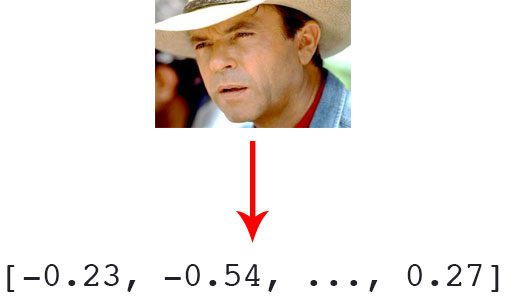 41 |
42 | *Tạo encoding từ ảnh khuôn mặt*
43 |
44 | Ở đây chúng ta không training lại từ đầu mạng tạo encodings mà sử dụng lại pre-trained model (trong thư viện `dlib` và được tích hợp vào `face_recognition` để dễ sử dụng hơn) nhằm tạo ra các face embeddings.
45 |
46 | Trong phần này file `encode_faces.py` được chạy để lưu các encodings và names (nếu cần ID thì bổ sung). Các bạn xem thêm file đó để hiểu hơn, mình có chú thích rất rõ từng phần. Các encodings và names được lưu ra file `encodings.pickle`.
47 |
48 | ### Bước 3. Nhận dạng khuôn mặt trong ảnh
49 |
41 |
42 | *Tạo encoding từ ảnh khuôn mặt*
43 |
44 | Ở đây chúng ta không training lại từ đầu mạng tạo encodings mà sử dụng lại pre-trained model (trong thư viện `dlib` và được tích hợp vào `face_recognition` để dễ sử dụng hơn) nhằm tạo ra các face embeddings.
45 |
46 | Trong phần này file `encode_faces.py` được chạy để lưu các encodings và names (nếu cần ID thì bổ sung). Các bạn xem thêm file đó để hiểu hơn, mình có chú thích rất rõ từng phần. Các encodings và names được lưu ra file `encodings.pickle`.
47 |
48 | ### Bước 3. Nhận dạng khuôn mặt trong ảnh
49 |  50 |
51 | *Ảnh đầu ra sau khi nhận diện*
52 |
53 | Sau khi chúng ta đã có các encodings từ datasets (lấy được qua pre-trained model, thông qua dlib và face_recognition) chúng ta có thể bắt đầu thực hiện face recognition được rồi.
54 |
55 | Chạy file `recognize_faces_image.py` để nhận diện khuôn mặt trong ảnh, đối với video thì các bạn chạy file`recognize_faces_video.py`.
56 |
57 | Chú ý nếu muốn chạy face recognition trên **CPU** hay các thiết bị nhúng như **Raspberry** thì chọn detection method là `hog` ở file `recognize_faces_image.py`, còn ban đầu khi lấy encodings từ dataset chúng ta vẫn có thể để `cnn` (chạy lâu hơn nhưng chính xác hơn để phát hiện khuôn mặt).
58 |
59 | Phần implementaion khá dài, các bạn có thể xem thêm tại [Github-huytranvan2010](https://github.com/huytranvan2010/Face-Recognition-with-OpenCV-Python-DL). Nếu thấy hữu ích hãy nhấn * cho github của mình và upvote bài viết này.
60 |
61 | ### Kết luận
62 | Như vậy chúng ta đã thực hiện nhận diện khuôn mặt với OpenCV và Deep Learning. Đây là những phần cơ bản để xây dựng hệ thống chấm công dựa trên nhận diện khuôn mặt. Kết hợp với một số kỹ thuật và công cụ khác như phát hiện người thật (so với ảnh)... chúng ta hoàn toàn có thể xây dựng hệ thống chấm công đơn giản cho riêng mình được.
63 |
64 | ### Tài liệu tham khảo
65 | 1. https://github.com/ageitgey/face_recognition/blob/master/face_recognition/api.py#L213
66 | 2. https://www.pyimagesearch.com/2018/06/18/face-recognition-with-opencv-python-and-deep-learning/
--------------------------------------------------------------------------------
50 |
51 | *Ảnh đầu ra sau khi nhận diện*
52 |
53 | Sau khi chúng ta đã có các encodings từ datasets (lấy được qua pre-trained model, thông qua dlib và face_recognition) chúng ta có thể bắt đầu thực hiện face recognition được rồi.
54 |
55 | Chạy file `recognize_faces_image.py` để nhận diện khuôn mặt trong ảnh, đối với video thì các bạn chạy file`recognize_faces_video.py`.
56 |
57 | Chú ý nếu muốn chạy face recognition trên **CPU** hay các thiết bị nhúng như **Raspberry** thì chọn detection method là `hog` ở file `recognize_faces_image.py`, còn ban đầu khi lấy encodings từ dataset chúng ta vẫn có thể để `cnn` (chạy lâu hơn nhưng chính xác hơn để phát hiện khuôn mặt).
58 |
59 | Phần implementaion khá dài, các bạn có thể xem thêm tại [Github-huytranvan2010](https://github.com/huytranvan2010/Face-Recognition-with-OpenCV-Python-DL). Nếu thấy hữu ích hãy nhấn * cho github của mình và upvote bài viết này.
60 |
61 | ### Kết luận
62 | Như vậy chúng ta đã thực hiện nhận diện khuôn mặt với OpenCV và Deep Learning. Đây là những phần cơ bản để xây dựng hệ thống chấm công dựa trên nhận diện khuôn mặt. Kết hợp với một số kỹ thuật và công cụ khác như phát hiện người thật (so với ảnh)... chúng ta hoàn toàn có thể xây dựng hệ thống chấm công đơn giản cho riêng mình được.
63 |
64 | ### Tài liệu tham khảo
65 | 1. https://github.com/ageitgey/face_recognition/blob/master/face_recognition/api.py#L213
66 | 2. https://www.pyimagesearch.com/2018/06/18/face-recognition-with-opencv-python-and-deep-learning/
--------------------------------------------------------------------------------