8 |
9 |
10 |
11 |
12 |
13 |
14 |
27 | OPTIONS:
28 | -d, --delim Set delimiter, defaults to newline
29 | -I, --replvar Set variable name to be used in eval, defaults to $
30 | ARGS:
31 | `;
32 | /* eslint-enable max-len */
33 |
34 | export type XevalFunc = (v: string) => void;
35 |
36 | export interface XevalOptions {
37 | delimiter?: string;
38 | }
39 |
40 | const DEFAULT_DELIMITER = "\n";
41 |
42 | export async function xeval(
43 | reader: Reader,
44 | xevalFunc: XevalFunc,
45 | { delimiter = DEFAULT_DELIMITER }: XevalOptions = {}
46 | ): Promise {
47 | for await (const chunk of readStringDelim(reader, delimiter)) {
48 | // Ignore empty chunks.
49 | if (chunk.length > 0) {
50 | await xevalFunc(chunk);
51 | }
52 | }
53 | }
54 |
55 | async function main(): Promise {
56 | const parsedArgs = parse(args, {
57 | boolean: ["help"],
58 | string: ["delim", "replvar"],
59 | alias: {
60 | delim: ["d"],
61 | replvar: ["I"],
62 | help: ["h"],
63 | },
64 | default: {
65 | delim: DEFAULT_DELIMITER,
66 | replvar: "$",
67 | },
68 | });
69 | if (parsedArgs._.length != 1) {
70 | console.error(HELP_MSG);
71 | console.log(parsedArgs._);
72 | exit(1);
73 | }
74 | if (parsedArgs.help) {
75 | return console.log(HELP_MSG);
76 | }
77 |
78 | const delimiter = parsedArgs.delim;
79 | const replVar = parsedArgs.replvar;
80 | const code = parsedArgs._[0];
81 |
82 | // new AsyncFunction()'s error message for this particular case isn't great.
83 | if (!replVar.match(/^[_$A-z][_$A-z0-9]*$/)) {
84 | console.error(`Bad replvar identifier: "${replVar}"`);
85 | exit(1);
86 | }
87 |
88 | const xEvalFunc = new AsyncFunction(replVar, code);
89 |
90 | await xeval(stdin, xEvalFunc, { delimiter });
91 | }
92 |
93 | if (import.meta.main) {
94 | main();
95 | }
96 |
--------------------------------------------------------------------------------
/site/articles/translation/why-deno-flopped.md:
--------------------------------------------------------------------------------
1 | # 为什么 Deno 没有众望所归?超越 Node.js 还要做些什么?
2 |
3 | > - 原文地址:[Here’s Why Deno Didn’t Take Off: And what Deno needs to do to overtake Node.js.](https://medium.com/swlh/heres-actually-why-deno-flopped-ec115caa2b6d)
4 | > - 原文作者:Spencer, Founder of [Skiwise](https://skiwise-app.com/) and [NotionIntegrations](https://notionintegrations.com/)
5 | > - 译者:[@hylerrix](https://github.com/hylerrix)
6 | > - 原文发布时间/翻译时间:20200928/20210429
7 | > - 本文属于《[Deno 钻研之术](https://github.com/hylerrix/deno-tutorial)》系列,原文翻译已获得作者翻译授权。
8 |
9 | ## 译者序
10 |
11 | 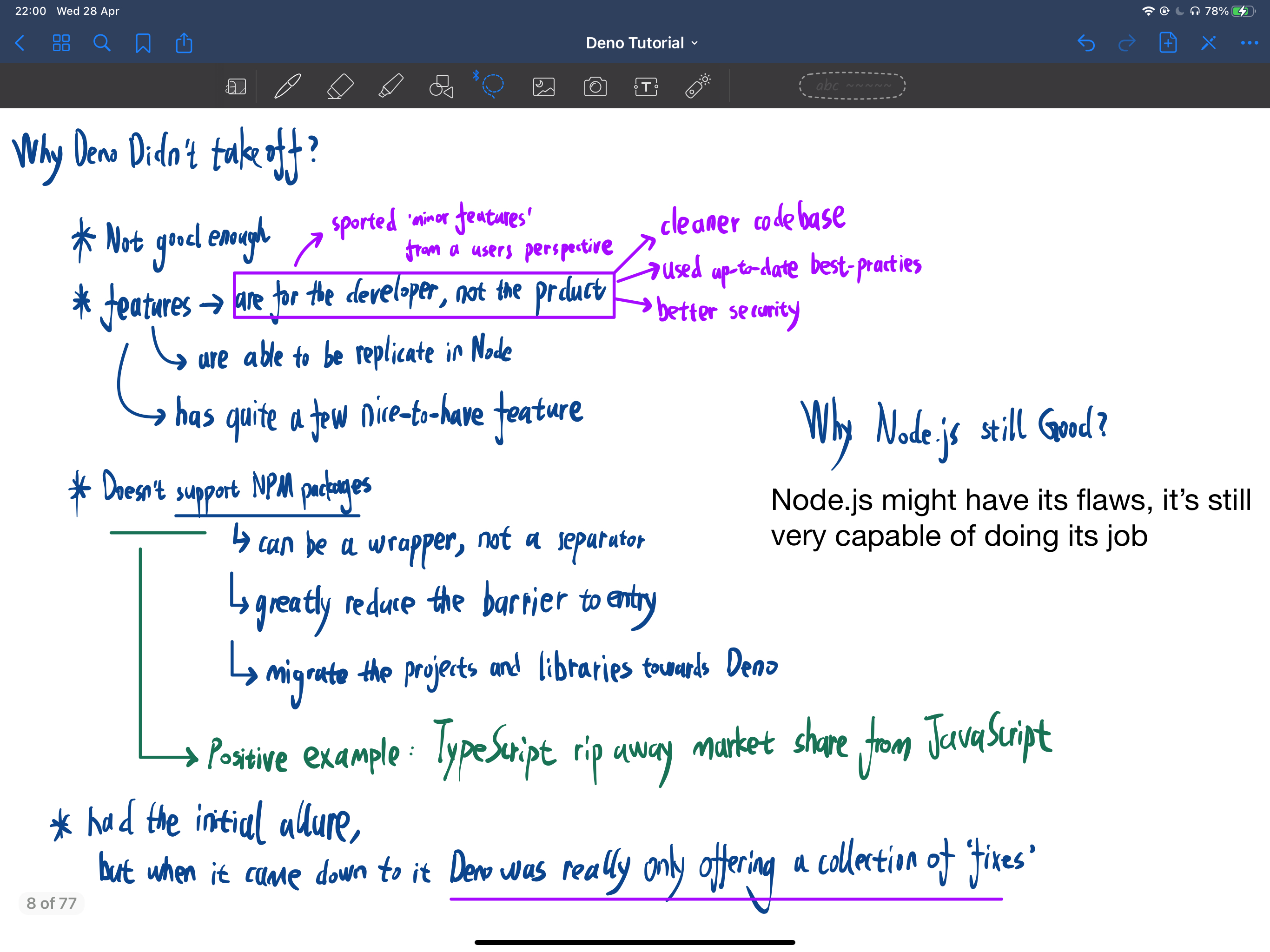
12 |
13 | ## 正文开始
14 |
15 | 
16 |
17 | Deno 是一个旨在改进甚至替代 Node 的 JavaScript / TypeScript 运行时。它拥有众多的功能和广泛的关注度,截止目前在 Github 上已经有 68k 个 Star(译者注:2021-04 月底已 75k star):
18 |
19 | 
20 |
21 | [https://github.com/denoland/deno](https://github.com/denoland/deno)
22 |
23 | 在如此多强大功能的加持下,有个很重要的问题值得反思:
24 |
25 | > 为什么 Deno 在 1.0 正式版本发布之后没有众望所归,得到广泛使用?
26 |
27 | 本文将尝试探讨该问题...
28 |
29 | ## 所以,Deno 是什么?
30 |
31 | Deno 是一个安全的 JavaScript 和 TypeScript 运行时,作者是 Ryan Dahl(也是 Node.js 的原作者)。Deno 的诞生之初是为了[解决 2009 年首次设计 Node.js 时的一些疏忽](https://www.youtube.com/watch?v=M3BM9TB-8yA)。我认为这种改造动机很有道理,因为**我相信每个程序员都希望有机会能重写他们已有 10 年历史的代码。**
32 |
33 | 基于此,Deno 在 Node.js 已经发展至今的情况下,引入了很多新功能:
34 |
35 | - Deno 有默认安全的机制。访问文件系统,网络或运行环境需要被授权;
36 | - Deno 对 TypeScript 的支持度是开箱即用的;
37 | - 外部文件由 URL 明确引用。没有 package.json。
38 | - import 语句需要包括文件后缀(.ts,.tsx,.js,.json)
39 | - 内置依赖检查器和文件格式化工具库
40 | - [以及更多...](https://deno.land/)
41 |
42 | 凭借这些功能以及大量开发者的积极推进,Deno 于 2020 年 5 月正式发布了 1.0 版本。
43 |
44 | 然后...
45 |
46 | 蹦...
47 |
48 | ## 为什么 Deno 没有众望所归?
49 |
50 | Deno 看起来拥有成功的所有要素:大量的关注者、诸多的功能、经验丰富的创始人和开发者等等,但并没有真正实现所有人期望的增长。这是为什么?
51 |
52 | 我认为最好从业务的角度来分析。我们大多数人可能都忘记了,**构建开源软件与为用户构建软件确实没有什么不同。供需关系的标准经济原则仍然发挥着重要的作用。**
53 |
54 | 当创建一个新的开源项目时,他们通常会与已经存在的东西“竞争”。考虑到这一点的话,你不仅需要考虑你的新项目是否足够出色,还需要考虑与现有项目相比有什么真正的优势。
55 |
56 | 定律来到 Deno 下时,需要关注到的就是已经存在的 Node.js。尽管 Node.js 可能有其缺陷,但它仍然有能力完成好自己的本分工作。**如果 Deno 真的推出了 Node.js 无法复制的强大功能,就可能会改变游戏规则——但事实并未发生。**
57 |
58 | **从用户的角度来看,Deno 仅真正具有一些“次要功能”:一个更简洁的代码库、一个更新的最佳实践方案、一个更好的安全性支持,但是这些东西实际上对用户来说仅仅是“功能特性”而非一个成熟的产品。**你可以开发一个像 Gmail 一样的电子邮件客户端,拥有更好的安全性和 50% 的速度改进,即使收藏你的客户端到一个新书签只需要很少的时间,但也不会有太多用户愿意切换过来的。
59 |
60 | 因此,这是 Deno 需要招架的第一招:Deno 具有许多不错的功能,但是没有什么能激发用户从 Node.js 切换过来的杰出之处。
61 |
62 | Deno 需要招架的第二大地方在于其不支持 NPM 软件包。如果 Deno 能够支持 NPM 包,那么也能改变游戏规则。Deno 支持 NPM 包的话,将会让其更像一个针对已有的邮件客户端的更好的容器,而不是一个“独立的邮件客户端”。
63 |
64 | 支持 NPM 软件包将大大减少进入门槛。这会成为用户将其项目和库迁移到 Deno 时的一个很好的垫脚石。
65 |
66 | 可以将 Deno 对 NPM 支持的重要意义同比于 TypeScript 的“严格模式”。对于拥有大量 JavaScript 代码库的用户,直接进行纯 TypeScript 改造,将使你在解决各种错误消息时的工作效率降低数周。但由于 TypeScript 具有禁用严格模式的支持,可以让其成为用户缓慢迁移到纯 TypeScript 的垫脚石。这为用户提供了更低的进入门槛,并且反过来又[帮助 TypeScript 近年来夺走很多 JavaScript 的市场份额](http://pypl.github.io/PYPL.html)。
67 |
68 | ## 那么,代价是什么呢?
69 |
70 | 我认为这是一个能印证业务方法的有趣案例。重点在于,**如果你需要像市场发布一个新产品,你必须确保它的优势很大,以至于能克服人们从现状转变到新方式的阻力。**
71 |
72 | 对于 Deno 来说,最初有很多独特的魅力,但回首总结 Deno 时,会发现 Deno 实际上是以失去 Node.js 下的整个 NPM 生态系统为代价的情况下的一些小“修复”。
73 |
74 | ## Deno 将会去往何方?
75 |
76 | Deno 团队有一个决定需要做。他们可以努力添加对 Node.js 的向后兼容性,或者增加更多能诱使用户迁移过来的更多吸引力。我个人认为对 Node.js 的向后兼容是接下来要走的路,如果增加了更多的兼容性,也会极大地改变项目的未来。
77 |
78 | 无论如何,以最好的祝福送给 Deno 团队,我也希望更好的技术能最终更有市场。希望你喜欢这篇文章,感谢阅读。
79 |
80 | > © [https://github.com/hylerrix/deno-tutorial](https://github.com/hylerrix/deno-tutorial) 2020~2021
81 |
--------------------------------------------------------------------------------
/site/index.tsx:
--------------------------------------------------------------------------------
1 | import { React } from '../mod.ts'
2 |
3 | const style = `
4 | h2 {
5 | font-weight: normal;
6 | }
7 | .main_article {
8 | width: 960px;
9 | max-width: 960px;
10 | padding-bottom: 0;
11 | }
12 | .cards {
13 | display: flex;
14 | justify-content: center;
15 | margin: 3rem -1rem 0 -1rem;
16 | padding-top: 1rem;
17 | border-top: 1px solid var(--color-border);
18 | }
19 | .cards > div {
20 | width: 20rem;
21 | padding: 0 1rem;
22 | }
23 | .cards ul {
24 | color: var(--color-text-muted);
25 | }
26 | .btn {
27 | padding: 0.5rem 1rem;
28 | margin: 0 1rem;
29 | border: 0;
30 | cursor: pointer;
31 | opacity: 0.9;
32 | font-size: 14px;
33 | text-decoration: none;
34 | background-color: var(--color-border);
35 | color: var(--color-text);
36 | }
37 | .btn:hover {
38 | text-decoration: none;
39 | }
40 | .btn-primary {
41 | background-color: var(--color-primary);
42 | color: var(--color-background);
43 | }
44 | .btn:hover {
45 | opacity: 1;
46 | }
47 | @media screen and (max-width: 44rem) {
48 | h2 {
49 | text-align: center;
50 | }
51 | .cards {
52 | flex-direction: column;
53 | }
54 | .cards > div {
55 | width: 100vw;
56 | }
57 | .cards ul {
58 | text-align: center;
59 | padding-left: 0;
60 | list-style: none;
61 | }
62 | pre {
63 | margin-left: -1rem;
64 | margin-right: -1rem;
65 | }
66 | }
67 | `
68 |
69 | const IndexPage = () => (
70 | <>
71 |
72 |
73 |
81 | Deno 钻研之术
82 |
83 |
91 | 循序渐进学 Deno & 先易后难补 Node & 面向未来的 Deno Web 应用开发
92 |
93 |
100 |
101 | 开始阅读
102 |
103 |
104 | 源码仓库
105 |
106 |
107 |
108 |
109 |
110 | 原创文章
111 |
112 | - 融合了笔者的大量思考。
113 | - 本书、笔者和读者一起成长。
114 | - 友好的交流环境。
115 |
116 |
117 |
118 | 内容丰富
119 |
120 | - 从多方位建设
Deno 生态。
121 | -
122 | 内容包括但不局限于
Deno Node React Rust 等众多技术要点。
123 |
124 | - 收录各种翻译文章、授权转载文章。
125 |
126 |
127 |
128 | 长期维护
129 |
130 | - 来源于一份对持续深入地掌握前沿技术的渴望。
131 | - 基于
Pagic 静态网站生成器,构建长期的网站技术支持。
132 | - 野心,不止于此。
133 |
134 |
135 |
136 | 推荐你的 Deno 文章?快来一起建设吧
137 |
142 |
154 |
155 | )
156 |
157 | export default IndexPage
158 |
--------------------------------------------------------------------------------
/site/articles/document/deno-cli-handbook.md:
--------------------------------------------------------------------------------
1 | # Deno CLI 通用手册
2 |
3 | > 更新到了 v1.22.2
4 |
5 | ## 通读命令行基本信息
6 |
7 | ### deno --help, help
8 |
9 | 了解一个命令的最快速实用的方法就是直接阅读其帮助文档,每行帮助信息都是简短且关键的介绍,不难理解和翻译。终端输入如下命令(help 或 --help 用来打印全局帮助信息或给定子命令的帮助信息):
10 |
11 | ```bash
12 | $ deno --help
13 | ```
14 |
15 | 从而获得 Deno 的基本帮助信息:
16 |
17 | - deno 1.2.2(2020-08-01 发布)
18 | - 一个安全的 JavaScript 和 TypeScript 运行时
19 | - 文档:[https://deno.land/manual](https://deno.land/manual)
20 | - 模块:[https://deno.land/std/](https://deno.land/std/) [https://deno.land/x/](https://deno.land/x/)
21 | - Bugs:[https://github.com/denoland/deno/issues](https://github.com/denoland/deno/issues)
22 | - 使用方式:deno [选项] [子命令]
23 |
24 | ```bash
25 | # 以 REPL 模式启动:
26 | $ deno
27 | # 执行一个脚本:
28 | $ deno run https://deno.land/std/examples/welcome.ts
29 | # 在 Shell 中执行一段代码:
30 | $ deno eval "console.log(30933 + 404)"
31 | ```
32 |
33 | ### 汇总 26 个通用指令
34 |
35 | 结合 deno --help 中出现的选项以及通常也会在 14 个内置工具包的帮助信息中看到的选项,将通用指令整理在这里做一个通览(只要某指令被使用两次及以上便视为通用指令,几乎涵盖了所有):
36 |
37 | - P.S:在纠结到底称为“参数”还是“选项”还是“指令”的时候,差点选了“参数”,最后选择了“指令”。
38 |
39 | > 注:以下表格整理了好几小时,如果能帮到你,别忘记多多点赞哟。挖个坑:以后可以绘制出一个思维导图来。同时,如果哪里有差错,欢迎在评论区 Github 仓库 issues 里留言哈。
40 |
41 | | 序号 | 选项 | 哪些工具可以使用? | 用途 |
42 | | --- | --- | --- | --- |
43 | | 01 | -h, --help | 全部 | 打印帮助信息 |
44 | | 02 | -L, --log-level | 全部 | 设置日志级别 [可能的值: debug, info] |
45 | | 03 | -q, --quiet | 全部 | 禁止诊断输出;默认情况下,子命令会将可读性友好的诊断消息打印到 stderr;如果设置了这个标志,则将这些消息限制为 errors |
46 | | 04 | -A, --allow-all | run, install, test | 允许所有权限,这将禁用所有安全限制 |
47 | | 05 | --allow-env | run, install, test | 允许环境访问,例如读取和设置环境变量 |
48 | | 06 | --allow-hrtime | run, install, test | 允许高精度时间测量,高精度时间能够在计时攻击和特征识别中使用 |
49 | | 07 | --allow-net= | run, install, test | 允许网络访问。可以指定一系列用逗号分隔的域名,来提供域名白名单 |
50 | | 08 | --allow-plugin | run, install, test | 允许加载插件。请注意:这目前是一个不稳定功能 |
51 | | 09 | --allow-read= | run, install, test | 允许读取文件系统。可以指定一系列用逗号分隔的目录或文件,来提供文件系统白名单。 |
52 | | 10 | --allow-run | run, install, test | 允许运行子进程。请注意,子进程不在沙箱中运行,因此没有与 deno 进程相同的安全限制,请谨慎使用 |
53 | | 11 | --allow-write= | run, install, test | 允许写入文件系统。您可以指定一系列用逗号分隔的目录或文件,来提供文件系统白名单 |
54 | | 12 | --cert | run, install, bundle, chche, eval, info, test, upgrade, repl | 从 PEM 编码的文件中加载证书颁发机构 |
55 | | 13 | -c, --config | run, install, budle, cache, test | 读取 tsconfig.json 配置文件 |
56 | | 14 | --unstable | run, install, bundle, cache, doc, eval, fmt, info, lint, test, types, repl | 开启不稳定的 APIs 支持 |
57 | | 15 | --inspect= | run, eval, test, repl | 激活监听器 主机:端口 (默认: 127.0.0.1:9229) |
58 | | 16 | --inspect-brk= | run, eval, test, repl | 在 主机:端口 上激活监听器,并在用户脚本启动时中断 |
59 | | 17 | --v8-flags= | run, eval, test, repl | 设置 V8 命令行选项。帮助: --v8-flags=--help |
60 | | 18 | --cached-only | run, test | 要求远程依赖项已经被缓存 |
61 | | 19 | -r, --reload= | run, cache, doc, test | 重新加载源代码缓存(重新编译TypeScript)。重新加载全部/仅标准模块/特定模块 |
62 | | 20 | --lock | run, bundle, cache, test | 检查指定的锁文件 |
63 | | 21 | --lock-write | run, bundle, cache, test | 写入锁文件,和 --lock 一起使用 |
64 | | 22 | --no-check | run, cache, info, test | 禁用 TypeScript 的类型检查,这会大大减少程序的启动时间 |
65 | | 23 | --no-remote | run, cache, test | 不解析远程模块 |
66 | | 24 | --seed | run, test | Math.random() 种子 |
67 | | 25 | --importmap | run, install, bundle, test | 不稳定:读取 import map 文件 |
68 | | 26 | --json | doc, info | 以 JSON 格式输出文档 |
69 |
70 | 具体通用指令会在“通读 Deno 通用指令”章节进行深入了解。
71 |
72 | ### 汇总 14 个内置工具包
73 |
74 | 帮助信息中初步介绍了这 14 个内置工具(为了强调每个工具的独立性,这些工具暂时都翻译为“xx 器”):
75 |
76 | | 序号 | 名称 | 命令 | 功能 |
77 | | --- | --- | --- | --- |
78 | | 01 | 运行器 | deno run | 运行指定文件名或 URL 程序。 使用“-”作为文件名从标准输入中读取 |
79 | | 02 | 脚本安装器 | deno install | 将脚本安装为可执行文件 |
80 | | 03 | 打包器 | deno bundle | 将模块和依赖项打包到单个文件中 |
81 | | 04 | 缓存器 | deno cache | 缓存依赖 |
82 | | 05 | 文档生成器 | deno doc | 显示某模块的文档 |
83 | | 06 | 执行器 | deno eval | 执行一段脚本 |
84 | | 07 | 格式化器 | deno fmt | 格式化源文件 |
85 | | 08 | 依赖检查器 | deno info | 显示有关缓存的信息或与源文件相关的信息 |
86 | | 09 | 规范器 | deno lint | 规范化源文件 |
87 | | 10 | 测试器 | deno test | 执行测试 |
88 | | 11 | 类型器 | deno types | 打印运行时 TypeScript 声明 |
89 | | 12 | 补全器 | deno completions | 生成 Shell 补全信息 |
90 | | 13 | 升级器 | deno upgrade | 将 Deno 可执行文件升级到给定版本 |
91 | | 14 | REPL 器 | deno repl | 读取/执行/打印/循环 |
92 |
93 | 具体工具会在“通读 Deno 内置工具包”章节进行深入了解。
94 |
95 | ### 汇总 6 个基本环境变量
96 |
97 | 帮助信息里初步介绍了这 6 个环境变量:
98 |
99 | | 序号 | 变量名 | 用途 | 备注 |
100 | | --- | --- | --- | --- |
101 | | 01 | DENO_DIR | 设置缓存目录 | |
102 | | 02 | DENO_INSTALL_ROOT | 设置 Deno 安装的软件包输入目录 | 默认为 $HOME/.deno/bin |
103 | | 03 | NO_COLOR | 设置禁止使用颜色 | |
104 | | 04 | DENO_CERT | 从 PEM 编码的文件加载证书颁发机构 | |
105 | | 05 | HTTP_PROXY | HTTP 请求的代理地址 | 模块 downloads 和 fetch |
106 | | 06 | HTTPS_PROXY | HTTPS 请求的代理地址 | 模块 downloads 和 fetch |
107 |
108 | 具体基本环境变量会在“通读 Deno 环境变量”章节进行深入了解。
109 |
--------------------------------------------------------------------------------
/pagic.config.tsx:
--------------------------------------------------------------------------------
1 | // @deno-types="https://deno.land/x/pagic@v0.9.1/src/types/react/v16.13.1/react.d.ts"
2 | import React from 'https://dev.jspm.io/react@16.13.1'
3 |
4 | export default {
5 | srcDir: 'site',
6 | theme: 'docs',
7 | plugins: ['sidebar', 'prev_next', 'gitalk', 'ga'],
8 | title: 'Deno 钻研之术',
9 | description: '循序渐进学 Deno & 先易后难补 Node & 面向未来的 Deno Web 应用开发。',
10 | github: 'https://github.com/hylerrix/deno-tutorial',
11 | head: (),
12 | nav: [
13 | { text: '文章', link: '/articles/' },
14 | {
15 | text: '打赏一下!!',
16 | link: 'http://qiniu.ningo.cloud/hylerrix/reward-alipay.png',
17 | target: '_blank',
18 | popover: (
19 | <>
20 |  21 |
21 |  22 |
23 | )
24 | },
25 | { text: '资源', target: '_blank', link: 'https://github.com/hylerrix/awesome-deno-cn' },
26 | { text: '镜像', target: '_blank', link: 'http://tutorial.deno.js.cn' },
27 | { text: 'Blitz.js + React 全栈开发手册', target: '_blank', link: 'https://github.com/hylerrix/blitzjs-tutorial' },
28 | { text: '持续添加中...', target: '_blank', link: 'https://github.com/hylerrix' },
29 | {
30 | text: '凝果屋',
31 | link: 'https://github.com/ningowood',
32 | target: '_blank',
33 | popover: (
34 |
22 |
23 | )
24 | },
25 | { text: '资源', target: '_blank', link: 'https://github.com/hylerrix/awesome-deno-cn' },
26 | { text: '镜像', target: '_blank', link: 'http://tutorial.deno.js.cn' },
27 | { text: 'Blitz.js + React 全栈开发手册', target: '_blank', link: 'https://github.com/hylerrix/blitzjs-tutorial' },
28 | { text: '持续添加中...', target: '_blank', link: 'https://github.com/hylerrix' },
29 | {
30 | text: '凝果屋',
31 | link: 'https://github.com/ningowood',
32 | target: '_blank',
33 | popover: (
34 |  35 | )
36 | },
37 | { text: '关于', target: '_blank', link: 'https://github.com/hylerrix' },
38 | ],
39 | sidebar: {
40 | '/articles/': [
41 | 'articles/README.md',
42 | {
43 | link: 'articles/document/README.md',
44 | title: '文档篇',
45 | children: [
46 | 'articles/document/deno-version-handbook.md',
47 | 'articles/document/deno-cli-handbook.md',
48 | 'articles/document/deno-translation-dictionary.md',
49 | ],
50 | },
51 | {
52 | link: 'articles/basic/README.md',
53 | title: '基础篇',
54 | children: [
55 | 'articles/basic/install-and-hello-world.md',
56 | ],
57 | },
58 | {
59 | link: 'articles/architecture/README.md',
60 | title: '架构篇',
61 | children: [
62 | {
63 | link: 'articles/architecture/cli/README.md',
64 | title: '探索 CLI',
65 | children: [
66 | 'articles/architecture/cli/deno-cli-v1-function.md'
67 | ],
68 | },
69 | ],
70 | },
71 | // {
72 | // link: 'articles/frontend/README.md',
73 | // title: '前端篇',
74 | // children: [],
75 | // },
76 | // {
77 | // link: 'articles/backend/README.md',
78 | // title: '后端篇',
79 | // children: [],
80 | // },
81 | {
82 | link: 'articles/ecology/README.md',
83 | title: '生态篇',
84 | children: [
85 | 'articles/ecology/awesome-deno-cn.md'
86 | ],
87 | },
88 | // {
89 | // link: 'articles/language/README.md',
90 | // title: '语言篇',
91 | // children: [],
92 | // },
93 | // {
94 | // link: 'articles/official/README.md',
95 | // title: 'Node 篇',
96 | // children: [
97 | // ],
98 | // },
99 | {
100 | link: 'articles/official/README.md',
101 | title: '官方篇',
102 | children: [
103 | 'articles/official/thoroughgoing-deno-in-2020.md',
104 | 'articles/official/thoroughgoing-deno-1-8.md',
105 | 'articles/official/translate-deno-1-9.md',
106 | ],
107 | },
108 | {
109 | link: 'articles/translation/README.md',
110 | title: '翻译篇',
111 | children: [
112 | 'articles/translation/the-deno-handbook.md',
113 | 'articles/translation/deno-chat-app.md',
114 | 'articles/translation/from-node-to-deno.md',
115 | 'articles/translation/deno-oak-todo-api.md',
116 | 'articles/translation/deno-oak-mysql.md',
117 | 'articles/translation/why-deno-wrong.md',
118 | 'articles/translation/why-deno-flopped.md',
119 | 'articles/translation/deno-url-shortener.md',
120 | 'articles/translation/deno-alpeh-react.md',
121 | ],
122 | },
123 | {
124 | link: 'articles/rust/README.md',
125 | title: 'Rust 篇',
126 | children: [
127 | 'articles/rust/rust-tutorial-todo-app.md',
128 | ],
129 | },
130 | // {
131 | // link: 'articles/forward/README.md',
132 | // title: '转载篇',
133 | // children: [],
134 | // },
135 | 'articles/TIMELINE.md',
136 | 'articles/THANKS.md',
137 | ],
138 | },
139 | tools: {
140 | editOnGithub: true,
141 | backToTop: true
142 | },
143 | gitalk: {
144 | clientID: '60180eea2c09238f8998',
145 | clientSecret: 'e9ea0ff6555185eda28eff4dfd4b755b1764abf3',
146 | repo: 'deno-tutorial',
147 | owner: 'hylerrix',
148 | admin: ['hylerrix'],
149 | pagerDirection: 'first'
150 | },
151 | ga: {
152 | id: 'UA-169223577-1'
153 | },
154 | port: 8011
155 | }
156 |
--------------------------------------------------------------------------------
/site/articles/document/deno-version-handbook.md:
--------------------------------------------------------------------------------
1 | # Deno 版本历史概览
2 |
3 | ## v0.x
4 |
5 | | 序号 | 发布日期 | Deno | 标准库 | 关键字 |
6 | | --- | --- | --- | --- | --- |
7 | | 0001 | 2018-08-18 | v0.0.1 | | |
8 | | 0002 | 2018-08-21 | v0.0.2 | | |
9 | | 0003 | 2018-08-23 | v0.0.3 | | |
10 | | 0004 | 2018-08-23 | v0.1.0 | | |
11 | | 0005 | 2018-08-28 | v0.1.1 | | |
12 | | 0006 | 2018-08-31 | v0.1.2 | | |
13 | | 0007 | 2018-09-06 | v0.1.3 | | |
14 | | 0008 | 2018-09-13 | v0.1.4 | | |
15 | | 0009 | 2018-09-22 | v0.1.5 | | |
16 | | 0010 | 2018-09-30 | v0.1.6 | | |
17 | | 0011 | 2018-10-04 | v0.1.7 | | |
18 | | 0012 | 2018-10-13 | v0.1.8 | | |
19 | | 0013 | 2018-10-21 | v0.1.9 | | |
20 | | 0014 | 2018-10-27 | v0.1.10 | | |
21 | | 0015 | 2018-11-06 | v0.1.11 | | |
22 | | 0016 | 2018-11-13 | v0.1.12 | | |
23 | | 0017 | 2018-11-16 | v0.2.0 | | |
24 | | 0018 | 2018-12-01 | v0.2.1 | | |
25 | | 0019 | 2018-12-08 | v0.2.2 | | |
26 | | 0020 | 2018-12-15 | v0.2.3 | | |
27 | | 0021 | 2018-12-24 | v0.2.4 | | |
28 | | 0022 | 2019-01-02 | v0.2.5 | | |
29 | | 0023 | 2019-01-08 | v0.2.6 | | |
30 | | 0024 | 2019-01-15 | v0.2.7 | | |
31 | | 0025 | 2019-01-20 | v0.2.8 | | |
32 | | 0026 | 2019-01-30 | v0.2.9 | | |
33 | | 0027 | 2019-02-03 | v0.2.10 | | |
34 | | 0028 | 2019-02-09 | v0.2.11 | | |
35 | | 0029 | 2019-02-19 | v0.3.0 | | |
36 | | 0030 | 2019-02-28 | v0.3.1 | | |
37 | | 0031 | 2019-03-07 | v0.3.2 | | |
38 | | 0032 | 2019-03-14 | v0.3.3 | | |
39 | | 0033 | 2019-03-21 | v0.3.4 | | |
40 | | 0034 | 2019-03-29 | v0.3.5 | | |
41 | | 0035 | 2019-04-04 | v0.3.6 | | |
42 | | 0036 | 2019-04-12 | v0.3.7 | | |
43 | | 0037 | 2019-04-19 | v0.3.8 | | |
44 | | 0038 | 2019-04-25 | v0.3.9 | | |
45 | | 0039 | 2019-04-26 | v0.3.10 | | |
46 | | 0040 | 2019-05-04 | v0.3.11 | | |
47 | | 0041 | 2019-05-04 | v0.4.0 | | |
48 | | 0042 | 2019-05-12 | v0.5.0 | | |
49 | | 0043 | 2019-05-21 | v0.6.0 | | |
50 | | 0044 | 2019-05-30 | v0.7.0 | | |
51 | | 0045 | 2019-06-09 | v0.8.0 | | |
52 | | 0046 | 2019-06-16 | v0.9.0 | | |
53 | | 0047 | 2019-06-25 | v0.10.0 | | |
54 | | 0048 | 2019-07-08 | v0.11.0 | | |
55 | | 0049 | 2019-07-17 | v0.12.0 | | |
56 | | 0050 | 2019-08-01 | v0.13.0 | | |
57 | | 0051 | 2019-08-09 | v0.14.0 | | |
58 | | 0052 | 2019-08-14 | v0.15.0 | | |
59 | | 0053 | 2019-08-23 | v0.16.0 | | |
60 | | 0054 | 2019-09-05 | v0.17.0 | | |
61 | | 0055 | 2019-09-14 | v0.18.0 | | |
62 | | 0056 | 2019-09-25 | v0.19.0 | | |
63 | | 0057 | 2019-10-08 | v0.20.0 | | |
64 | | 0058 | 2019-10-20 | v0.21.0 | | |
65 | | 0059 | 2019-10-29 | v0.22.0 | | |
66 | | 0060 | 2019-11-05 | v0.23.0 | | |
67 | | 0061 | 2019-11-15 | v0.24.0 | | |
68 | | 0062 | 2019-11-27 | v0.25.0 | | |
69 | | 0063 | 2019-12-06 | v0.26.0 | | |
70 | | 0064 | 2019-12-19 | v0.27.0 | | |
71 | | 0065 | 2020-01-02 | v0.28.0 | | |
72 | | 0066 | 2020-01-03 | v0.28.1 | | |
73 | | 0067 | 2020-01-10 | v0.29.0 | | |
74 | | 0068 | 2020-01-18 | v0.30.0 | | |
75 | | 0069 | 2020-01-22 | v0.30.1 | | |
76 | | 0070 | 2020-01-25 | v0.31.0 | | |
77 | | 0071 | 2020-02-03 | v0.32.0 | | |
78 | | 0072 | 2020-02-14 | v0.33.0 | | |
79 | | 0073 | 2020-02-20 | v0.34.0 | v0.34.0 | |
80 | | 0074 | 2020-02-29 | v0.35.0 | v0.35.0 | |
81 | | 0075 | 2020-03-12 | v0.36.0 | v0.36.0 | |
82 | | 0076 | 2020-03-24 | v0.37.0 | v0.37.0 | |
83 | | 0077 | 2020-03-24 | v0.37.1 | | |
84 | | 0078 | 2020-03-29 | v0.38.0 | v0.38.0 | |
85 | | 0079 | 2020-04-04 | v0.39.0 | v0.39.0 | |
86 | | 0080 | 2020-04-09 | v0.40.0 | v0.40.0 | |
87 | | 0081 | 2020-04-16 | v0.41.0 | v0.41.0 | |
88 | | 0082 | 2020-04-30 | v0.42.0 | v0.42.0 | |
89 |
90 | ## v1.x
91 |
92 | | 序号 | 发布日期 | Deno | 标准库 | 关键字 |
93 | | --- | --- | --- | --- | --- |
94 | | 0101 | 2020-05-05 | v1.0.0-rc1 | | |
95 | | 0102 | 2020-05-09 | | 0.50.0 | |
96 | | 0103 | 2020-05-10 | v1.0.0-rc2 | | |
97 | | 0104 | 2020-05-12 | v1.0.0-rc3 | | |
98 | | 0105 | 2020-05-14 | v1.0.0 | v0.51.0 | |
99 | | 0106 | 2020-05-21 | v1.0.1 | v0.52.0 | |
100 | | 0107 | 2020-05-23 | v1.0.2 | v0.53.0 | |
101 | | 0108 | 2020-05-30 | v1.0.3 | v0.54.0 | |
102 | | 0109 | 2020-06-02 | v1.0.4 | v0.55.0 | |
103 | | 0110 | 2020-06-04 | v1.0.5 | v0.56.0 | |
104 | | 0111 | 2020-06-13 | v1.1.0 | v0.57.0 | |
105 | | 0112 | 2020-06-20 | v1.1.1 | v0.58.0 | |
106 | | 0113 | 2020-06-27 | v1.1.2 | v0.59.0 | |
107 | | 0114 | 2020-07-04 | v1.1.3 | v0.60.0 | |
108 | | 0115 | 2020-07-13 | v1.2.0 | v0.61.0 | |
109 | | 0116 | 2020-07-24 | v1.2.1 | v0.62.0 | |
110 | | 0117 | 2020-08-01 | v1.2.2 | v0.63.0 | |
111 | | 0118 | 2020-08-09 | v1.2.3 | v0.64.0 | |
112 | | 0119 | 2020-08-14 | v1.3.0 | v0.65.0 | |
113 | | 0120 | 2020-08-21 | v1.3.1 | v0.66.0 | |
114 | | 0121 | 2020-08-29 | v1.3.2 | v0.67.0 | |
115 | | 0122 | 2020-09-04 | v1.3.3 | v0.68.0 | |
116 | | 0123 | 2020-09-13 | v1.4.0 | v0.69.0 | |
117 | | 0124 | 2020-09-19 | v1.4.1 | v0.70.0 | |
118 | | 0125 | 2020-09-25 | v1.4.2 | v0.71.0 | |
119 | | 0126 | 2020-10-02 | v1.4.3 | v0.72.0 | |
120 | | 0127 | 2020-10-03 | v1.4.4 | v0.73.0 | |
121 | | 0128 | 2020-10-08 | v1.4.5 | v0.74.0 | |
122 | | 0129 | 2020-10-10 | v1.4.6 | | |
123 | | 0130 | 2020-10-27 | v1.5.0 | v0.75.0 | |
124 | | 0131 | 2020-10-31 | v1.5.1 | v0.76.0 | |
125 | | 0132 | 2020-11-09 | v1.5.2 | v0.77.0 | |
126 | | 0133 | 2020-11-16 | v1.5.3 | v0.78.0 | |
127 | | 0134 | 2020-11-23 | v1.5.4 | v0.79.0 | |
128 | | 0135 | 2020-12-08 | v1.6.0 | v0.80.0 | |
129 | | 0136 | 2020-12-15 | v1.6.1 | v0.81.0 | |
130 | | 0137 | 2020-12-22 | v1.6.2 | v0.82.0 | |
131 | | 0138 | 2020-12-30 | v1.6.3 | v0.83.0 | |
132 | | 0139 | 2021-01-19 | v1.7.0 | v0.84.0 | |
133 | | | | | | |
134 |
--------------------------------------------------------------------------------
/site/articles/README.md:
--------------------------------------------------------------------------------
1 | # Deno 钻研之术
2 |
3 |
4 | [](#contributors-)
5 |
6 |
7 | > :sauropod: 长期更新的《Deno 钻研之术》!循序渐进学 Deno & 先易后难补 Node & 面向未来的 Deno Web 应用开发。
8 |
9 | 
10 |
11 | Deno 钻研之术官方网站:[https://deno-tutorial.js.org](https://deno-tutorial.js.org)。基于 [Pagic](https://github.com/xcatliu/pagic) 构建。
12 |
13 | 号外:《Deno 钻研之术》的生态仓库请查收!
14 |
15 | * [deno-tutorial](https://github.com/hylerrix/deno-tutorial):核心仓库,电子书集中地,围绕 Deno 全生态的各种原创/翻译文章。
16 | * [deno-algorithm](https://github.com/hylerrix/deno-algorithm):想在 Deno 上用 TypeScript 刷 LeetCode 算法?或许可以看看这个(才开源不久,刷一定的题后再宣传)。
17 | * [awesome-deno-cn](https://github.com/hylerrix/awesome-deno-cn):见名知意,中文社区下的 Deno 资源全图谱,求 PR。
18 |
19 | 同时,2021 年,开启全新的《Blitz.js + React 全栈开发手册》:
20 |
21 | * [blitzjs-tutorial](https://github.com/hylerrix/blitzjs-tutorial):专注构建 Blitz.js 社区,探索 React 全栈更多的可能性。
22 |
23 | ## 目录
24 |
25 | 目前规划的章节目录如下。
26 |
27 | * 基础篇:循序渐进学 Deno 基础知识;
28 | * 标准库篇:深入标准库的内部世界;
29 | * CLI 篇:探索 CLI 命令行的知识;
30 | * Web 篇:打造 Web 开发基石;
31 | * Node 篇:先易后难补 Node 知识,探索与 Deno 的异与同;
32 | * Rust 篇:探索 Deno 底层有关 Rust 的更多知识;
33 | * 前端篇:探索 Deno Web 前端应用开发的方式;
34 | * 后端篇:探索 Deno Web 后端应用开发的方式;
35 | * 架构篇:深入到 Deno 底层读 V8,学架构;
36 | * 生态篇:介绍 Deno 生态的相关内容;
37 | * 翻译篇:翻译优质的、授权的英文一手博文。
38 | * 以及更多
39 |
40 | 目前本仓库的文件结构如下。
41 |
42 | ```
43 | .
44 | ├── LICENSE
45 | ├── README.md
46 | ├── articles # 分为多种章节
47 | ├── demos # 收录各大优良 Demo,来源不止于官方
48 | │ ├── community # 社区 Demo
49 | │ ├── ningowood # 自研 Demo
50 | │ └── scattered # 零散 Demo
51 | └── translations # 收录自己或和小伙伴们一起翻译的优质文章
52 | ```
53 |
54 | ## 文章
55 |
56 | 《Deno 钻研之术》文章内容重点维护在该项目中,以下列表内容根据发布时间排序。写作序号思路为:随心而动!
57 |
58 | |序号|文章名|发布时间|所属章节|备注|
59 | |-|-|-|-|-|
60 | |001|[Hello, 从多样化安装到简单实战](https://deno-tutorial.js.org/articles/basic/install-and-hello-world.html)|2020-05-13|基础篇|Deno v1.0 正式发布之日|
61 | |002|[Awesome Deno 中文资源全图谱](https://deno-tutorial.js.org/articles/ecology/awesome-deno-cn.html)|2020-05-22|生态篇||
62 | |003|:heart: [从 CLI 指令通读 Deno v1.x 全特性](https://juejin.im/post/6857058738046861320)|2020-08-04|CLI 篇|掘金征文|
63 | |...|...|...|...|...|
64 |
65 | 这里将翻译篇抽离出来单独排序,争取得到更多的授权翻译,还有欢迎你 issues/群里 推荐高质量的文章甚至一起翻译!
66 |
67 | |序号|文章名|原文发布时间|翻译发布时间|备注|
68 | |-|-|-|-|-|
69 | |001|[Deno 入门手册:附大量 TypeScript 代码实例](https://deno-tutorial.js.org/articles/translations/the-deno-handbook.html)|2020-05-12|2020-05-18|其它译者:[@YunKou](http://github.com/yunkou)|
70 | |002|[Deno + WebSockets 打造聊天室应用](https://deno-tutorial.js.org/articles/translations/deno-chat-app.html)|2020-05-10|2020-05-25||
71 | |003|[从 Node 到 Deno:探索各大主流库替代方案](https://deno-tutorial.js.org/articles/translations/from-node-to-deno.html)|2020-05-17|2020-06-04|其它译者:[@YunKou](http://github.com/yunkou)|
72 | |004|[Deno + Oak 构建酷炫的 Todo API](https://deno-tutorial.js.org/articles/translations/deno-oak-todo-api.html)|2020-05-29|2020-06-15||
73 | |005|[Deno + Oak 连接 MySQL 实战教程](https://deno-tutorial.js.org/articles/translations/deno-oak-mysql.html)|2020-06-07|2020-07-06||
74 | |006|[为什么我认为 Deno 是一个迈向错误方向的 JavaScript 运行时?](https://deno-tutorial.js.org/articles/translations/why-deno-wrong.html)|2020-06-07|2020-07-06||
75 | |007|[精读《Deno 2020 官方回顾及 2021 展望》](https://deno-tutorial.js.org/official/thoroughgoing-deno-in-2020.html)|2021-01-15|2021-01-22||
76 | |008|[精读《Deno v1.8 发布说明》](https://deno-tutorial.js.org/official/thoroughgoing-deno-1-8.html)|2021-03-02|2021-03-05||
77 | |...|...|...|...|...|
78 |
79 | 同时更新在如下第三方平台:
80 |
81 | * [微信](https://mp.weixin.qq.com/s/Eg2atcxZPpIfgqdAd73imQ):公众号 @ningowood。
82 | * [知乎](https://zhuanlan.zhihu.com/deno-tutorial)。
83 | * [掘金](https://juejin.im/user/57e9fc052e958a0054509825/posts)。
84 | * [语雀](https://www.yuque.com/ningowood/beginning/record)。
85 | * ...
86 |
87 | ## 构建
88 |
89 | 使用 [Pagic](https://github.com/xcatliu/pagic) 构建:
90 |
91 | ```bash
92 | $ deno install --unstable --allow-read --allow-write --allow-net -f --name=pagic https://deno.land/x/pagic/mod.ts
93 | $ ~/.deno/bin/pagic build --serve --watch
94 | ```
95 |
96 | ## 贡献者 ✨
97 |
98 | 感谢如下贡献者的贡献(按贡献顺序排名)([emoji key](https://allcontributors.org/docs/en/emoji-key)):
99 |
100 |
101 |
102 |
103 |
35 | )
36 | },
37 | { text: '关于', target: '_blank', link: 'https://github.com/hylerrix' },
38 | ],
39 | sidebar: {
40 | '/articles/': [
41 | 'articles/README.md',
42 | {
43 | link: 'articles/document/README.md',
44 | title: '文档篇',
45 | children: [
46 | 'articles/document/deno-version-handbook.md',
47 | 'articles/document/deno-cli-handbook.md',
48 | 'articles/document/deno-translation-dictionary.md',
49 | ],
50 | },
51 | {
52 | link: 'articles/basic/README.md',
53 | title: '基础篇',
54 | children: [
55 | 'articles/basic/install-and-hello-world.md',
56 | ],
57 | },
58 | {
59 | link: 'articles/architecture/README.md',
60 | title: '架构篇',
61 | children: [
62 | {
63 | link: 'articles/architecture/cli/README.md',
64 | title: '探索 CLI',
65 | children: [
66 | 'articles/architecture/cli/deno-cli-v1-function.md'
67 | ],
68 | },
69 | ],
70 | },
71 | // {
72 | // link: 'articles/frontend/README.md',
73 | // title: '前端篇',
74 | // children: [],
75 | // },
76 | // {
77 | // link: 'articles/backend/README.md',
78 | // title: '后端篇',
79 | // children: [],
80 | // },
81 | {
82 | link: 'articles/ecology/README.md',
83 | title: '生态篇',
84 | children: [
85 | 'articles/ecology/awesome-deno-cn.md'
86 | ],
87 | },
88 | // {
89 | // link: 'articles/language/README.md',
90 | // title: '语言篇',
91 | // children: [],
92 | // },
93 | // {
94 | // link: 'articles/official/README.md',
95 | // title: 'Node 篇',
96 | // children: [
97 | // ],
98 | // },
99 | {
100 | link: 'articles/official/README.md',
101 | title: '官方篇',
102 | children: [
103 | 'articles/official/thoroughgoing-deno-in-2020.md',
104 | 'articles/official/thoroughgoing-deno-1-8.md',
105 | 'articles/official/translate-deno-1-9.md',
106 | ],
107 | },
108 | {
109 | link: 'articles/translation/README.md',
110 | title: '翻译篇',
111 | children: [
112 | 'articles/translation/the-deno-handbook.md',
113 | 'articles/translation/deno-chat-app.md',
114 | 'articles/translation/from-node-to-deno.md',
115 | 'articles/translation/deno-oak-todo-api.md',
116 | 'articles/translation/deno-oak-mysql.md',
117 | 'articles/translation/why-deno-wrong.md',
118 | 'articles/translation/why-deno-flopped.md',
119 | 'articles/translation/deno-url-shortener.md',
120 | 'articles/translation/deno-alpeh-react.md',
121 | ],
122 | },
123 | {
124 | link: 'articles/rust/README.md',
125 | title: 'Rust 篇',
126 | children: [
127 | 'articles/rust/rust-tutorial-todo-app.md',
128 | ],
129 | },
130 | // {
131 | // link: 'articles/forward/README.md',
132 | // title: '转载篇',
133 | // children: [],
134 | // },
135 | 'articles/TIMELINE.md',
136 | 'articles/THANKS.md',
137 | ],
138 | },
139 | tools: {
140 | editOnGithub: true,
141 | backToTop: true
142 | },
143 | gitalk: {
144 | clientID: '60180eea2c09238f8998',
145 | clientSecret: 'e9ea0ff6555185eda28eff4dfd4b755b1764abf3',
146 | repo: 'deno-tutorial',
147 | owner: 'hylerrix',
148 | admin: ['hylerrix'],
149 | pagerDirection: 'first'
150 | },
151 | ga: {
152 | id: 'UA-169223577-1'
153 | },
154 | port: 8011
155 | }
156 |
--------------------------------------------------------------------------------
/site/articles/document/deno-version-handbook.md:
--------------------------------------------------------------------------------
1 | # Deno 版本历史概览
2 |
3 | ## v0.x
4 |
5 | | 序号 | 发布日期 | Deno | 标准库 | 关键字 |
6 | | --- | --- | --- | --- | --- |
7 | | 0001 | 2018-08-18 | v0.0.1 | | |
8 | | 0002 | 2018-08-21 | v0.0.2 | | |
9 | | 0003 | 2018-08-23 | v0.0.3 | | |
10 | | 0004 | 2018-08-23 | v0.1.0 | | |
11 | | 0005 | 2018-08-28 | v0.1.1 | | |
12 | | 0006 | 2018-08-31 | v0.1.2 | | |
13 | | 0007 | 2018-09-06 | v0.1.3 | | |
14 | | 0008 | 2018-09-13 | v0.1.4 | | |
15 | | 0009 | 2018-09-22 | v0.1.5 | | |
16 | | 0010 | 2018-09-30 | v0.1.6 | | |
17 | | 0011 | 2018-10-04 | v0.1.7 | | |
18 | | 0012 | 2018-10-13 | v0.1.8 | | |
19 | | 0013 | 2018-10-21 | v0.1.9 | | |
20 | | 0014 | 2018-10-27 | v0.1.10 | | |
21 | | 0015 | 2018-11-06 | v0.1.11 | | |
22 | | 0016 | 2018-11-13 | v0.1.12 | | |
23 | | 0017 | 2018-11-16 | v0.2.0 | | |
24 | | 0018 | 2018-12-01 | v0.2.1 | | |
25 | | 0019 | 2018-12-08 | v0.2.2 | | |
26 | | 0020 | 2018-12-15 | v0.2.3 | | |
27 | | 0021 | 2018-12-24 | v0.2.4 | | |
28 | | 0022 | 2019-01-02 | v0.2.5 | | |
29 | | 0023 | 2019-01-08 | v0.2.6 | | |
30 | | 0024 | 2019-01-15 | v0.2.7 | | |
31 | | 0025 | 2019-01-20 | v0.2.8 | | |
32 | | 0026 | 2019-01-30 | v0.2.9 | | |
33 | | 0027 | 2019-02-03 | v0.2.10 | | |
34 | | 0028 | 2019-02-09 | v0.2.11 | | |
35 | | 0029 | 2019-02-19 | v0.3.0 | | |
36 | | 0030 | 2019-02-28 | v0.3.1 | | |
37 | | 0031 | 2019-03-07 | v0.3.2 | | |
38 | | 0032 | 2019-03-14 | v0.3.3 | | |
39 | | 0033 | 2019-03-21 | v0.3.4 | | |
40 | | 0034 | 2019-03-29 | v0.3.5 | | |
41 | | 0035 | 2019-04-04 | v0.3.6 | | |
42 | | 0036 | 2019-04-12 | v0.3.7 | | |
43 | | 0037 | 2019-04-19 | v0.3.8 | | |
44 | | 0038 | 2019-04-25 | v0.3.9 | | |
45 | | 0039 | 2019-04-26 | v0.3.10 | | |
46 | | 0040 | 2019-05-04 | v0.3.11 | | |
47 | | 0041 | 2019-05-04 | v0.4.0 | | |
48 | | 0042 | 2019-05-12 | v0.5.0 | | |
49 | | 0043 | 2019-05-21 | v0.6.0 | | |
50 | | 0044 | 2019-05-30 | v0.7.0 | | |
51 | | 0045 | 2019-06-09 | v0.8.0 | | |
52 | | 0046 | 2019-06-16 | v0.9.0 | | |
53 | | 0047 | 2019-06-25 | v0.10.0 | | |
54 | | 0048 | 2019-07-08 | v0.11.0 | | |
55 | | 0049 | 2019-07-17 | v0.12.0 | | |
56 | | 0050 | 2019-08-01 | v0.13.0 | | |
57 | | 0051 | 2019-08-09 | v0.14.0 | | |
58 | | 0052 | 2019-08-14 | v0.15.0 | | |
59 | | 0053 | 2019-08-23 | v0.16.0 | | |
60 | | 0054 | 2019-09-05 | v0.17.0 | | |
61 | | 0055 | 2019-09-14 | v0.18.0 | | |
62 | | 0056 | 2019-09-25 | v0.19.0 | | |
63 | | 0057 | 2019-10-08 | v0.20.0 | | |
64 | | 0058 | 2019-10-20 | v0.21.0 | | |
65 | | 0059 | 2019-10-29 | v0.22.0 | | |
66 | | 0060 | 2019-11-05 | v0.23.0 | | |
67 | | 0061 | 2019-11-15 | v0.24.0 | | |
68 | | 0062 | 2019-11-27 | v0.25.0 | | |
69 | | 0063 | 2019-12-06 | v0.26.0 | | |
70 | | 0064 | 2019-12-19 | v0.27.0 | | |
71 | | 0065 | 2020-01-02 | v0.28.0 | | |
72 | | 0066 | 2020-01-03 | v0.28.1 | | |
73 | | 0067 | 2020-01-10 | v0.29.0 | | |
74 | | 0068 | 2020-01-18 | v0.30.0 | | |
75 | | 0069 | 2020-01-22 | v0.30.1 | | |
76 | | 0070 | 2020-01-25 | v0.31.0 | | |
77 | | 0071 | 2020-02-03 | v0.32.0 | | |
78 | | 0072 | 2020-02-14 | v0.33.0 | | |
79 | | 0073 | 2020-02-20 | v0.34.0 | v0.34.0 | |
80 | | 0074 | 2020-02-29 | v0.35.0 | v0.35.0 | |
81 | | 0075 | 2020-03-12 | v0.36.0 | v0.36.0 | |
82 | | 0076 | 2020-03-24 | v0.37.0 | v0.37.0 | |
83 | | 0077 | 2020-03-24 | v0.37.1 | | |
84 | | 0078 | 2020-03-29 | v0.38.0 | v0.38.0 | |
85 | | 0079 | 2020-04-04 | v0.39.0 | v0.39.0 | |
86 | | 0080 | 2020-04-09 | v0.40.0 | v0.40.0 | |
87 | | 0081 | 2020-04-16 | v0.41.0 | v0.41.0 | |
88 | | 0082 | 2020-04-30 | v0.42.0 | v0.42.0 | |
89 |
90 | ## v1.x
91 |
92 | | 序号 | 发布日期 | Deno | 标准库 | 关键字 |
93 | | --- | --- | --- | --- | --- |
94 | | 0101 | 2020-05-05 | v1.0.0-rc1 | | |
95 | | 0102 | 2020-05-09 | | 0.50.0 | |
96 | | 0103 | 2020-05-10 | v1.0.0-rc2 | | |
97 | | 0104 | 2020-05-12 | v1.0.0-rc3 | | |
98 | | 0105 | 2020-05-14 | v1.0.0 | v0.51.0 | |
99 | | 0106 | 2020-05-21 | v1.0.1 | v0.52.0 | |
100 | | 0107 | 2020-05-23 | v1.0.2 | v0.53.0 | |
101 | | 0108 | 2020-05-30 | v1.0.3 | v0.54.0 | |
102 | | 0109 | 2020-06-02 | v1.0.4 | v0.55.0 | |
103 | | 0110 | 2020-06-04 | v1.0.5 | v0.56.0 | |
104 | | 0111 | 2020-06-13 | v1.1.0 | v0.57.0 | |
105 | | 0112 | 2020-06-20 | v1.1.1 | v0.58.0 | |
106 | | 0113 | 2020-06-27 | v1.1.2 | v0.59.0 | |
107 | | 0114 | 2020-07-04 | v1.1.3 | v0.60.0 | |
108 | | 0115 | 2020-07-13 | v1.2.0 | v0.61.0 | |
109 | | 0116 | 2020-07-24 | v1.2.1 | v0.62.0 | |
110 | | 0117 | 2020-08-01 | v1.2.2 | v0.63.0 | |
111 | | 0118 | 2020-08-09 | v1.2.3 | v0.64.0 | |
112 | | 0119 | 2020-08-14 | v1.3.0 | v0.65.0 | |
113 | | 0120 | 2020-08-21 | v1.3.1 | v0.66.0 | |
114 | | 0121 | 2020-08-29 | v1.3.2 | v0.67.0 | |
115 | | 0122 | 2020-09-04 | v1.3.3 | v0.68.0 | |
116 | | 0123 | 2020-09-13 | v1.4.0 | v0.69.0 | |
117 | | 0124 | 2020-09-19 | v1.4.1 | v0.70.0 | |
118 | | 0125 | 2020-09-25 | v1.4.2 | v0.71.0 | |
119 | | 0126 | 2020-10-02 | v1.4.3 | v0.72.0 | |
120 | | 0127 | 2020-10-03 | v1.4.4 | v0.73.0 | |
121 | | 0128 | 2020-10-08 | v1.4.5 | v0.74.0 | |
122 | | 0129 | 2020-10-10 | v1.4.6 | | |
123 | | 0130 | 2020-10-27 | v1.5.0 | v0.75.0 | |
124 | | 0131 | 2020-10-31 | v1.5.1 | v0.76.0 | |
125 | | 0132 | 2020-11-09 | v1.5.2 | v0.77.0 | |
126 | | 0133 | 2020-11-16 | v1.5.3 | v0.78.0 | |
127 | | 0134 | 2020-11-23 | v1.5.4 | v0.79.0 | |
128 | | 0135 | 2020-12-08 | v1.6.0 | v0.80.0 | |
129 | | 0136 | 2020-12-15 | v1.6.1 | v0.81.0 | |
130 | | 0137 | 2020-12-22 | v1.6.2 | v0.82.0 | |
131 | | 0138 | 2020-12-30 | v1.6.3 | v0.83.0 | |
132 | | 0139 | 2021-01-19 | v1.7.0 | v0.84.0 | |
133 | | | | | | |
134 |
--------------------------------------------------------------------------------
/site/articles/README.md:
--------------------------------------------------------------------------------
1 | # Deno 钻研之术
2 |
3 |
4 | [](#contributors-)
5 |
6 |
7 | > :sauropod: 长期更新的《Deno 钻研之术》!循序渐进学 Deno & 先易后难补 Node & 面向未来的 Deno Web 应用开发。
8 |
9 | 
10 |
11 | Deno 钻研之术官方网站:[https://deno-tutorial.js.org](https://deno-tutorial.js.org)。基于 [Pagic](https://github.com/xcatliu/pagic) 构建。
12 |
13 | 号外:《Deno 钻研之术》的生态仓库请查收!
14 |
15 | * [deno-tutorial](https://github.com/hylerrix/deno-tutorial):核心仓库,电子书集中地,围绕 Deno 全生态的各种原创/翻译文章。
16 | * [deno-algorithm](https://github.com/hylerrix/deno-algorithm):想在 Deno 上用 TypeScript 刷 LeetCode 算法?或许可以看看这个(才开源不久,刷一定的题后再宣传)。
17 | * [awesome-deno-cn](https://github.com/hylerrix/awesome-deno-cn):见名知意,中文社区下的 Deno 资源全图谱,求 PR。
18 |
19 | 同时,2021 年,开启全新的《Blitz.js + React 全栈开发手册》:
20 |
21 | * [blitzjs-tutorial](https://github.com/hylerrix/blitzjs-tutorial):专注构建 Blitz.js 社区,探索 React 全栈更多的可能性。
22 |
23 | ## 目录
24 |
25 | 目前规划的章节目录如下。
26 |
27 | * 基础篇:循序渐进学 Deno 基础知识;
28 | * 标准库篇:深入标准库的内部世界;
29 | * CLI 篇:探索 CLI 命令行的知识;
30 | * Web 篇:打造 Web 开发基石;
31 | * Node 篇:先易后难补 Node 知识,探索与 Deno 的异与同;
32 | * Rust 篇:探索 Deno 底层有关 Rust 的更多知识;
33 | * 前端篇:探索 Deno Web 前端应用开发的方式;
34 | * 后端篇:探索 Deno Web 后端应用开发的方式;
35 | * 架构篇:深入到 Deno 底层读 V8,学架构;
36 | * 生态篇:介绍 Deno 生态的相关内容;
37 | * 翻译篇:翻译优质的、授权的英文一手博文。
38 | * 以及更多
39 |
40 | 目前本仓库的文件结构如下。
41 |
42 | ```
43 | .
44 | ├── LICENSE
45 | ├── README.md
46 | ├── articles # 分为多种章节
47 | ├── demos # 收录各大优良 Demo,来源不止于官方
48 | │ ├── community # 社区 Demo
49 | │ ├── ningowood # 自研 Demo
50 | │ └── scattered # 零散 Demo
51 | └── translations # 收录自己或和小伙伴们一起翻译的优质文章
52 | ```
53 |
54 | ## 文章
55 |
56 | 《Deno 钻研之术》文章内容重点维护在该项目中,以下列表内容根据发布时间排序。写作序号思路为:随心而动!
57 |
58 | |序号|文章名|发布时间|所属章节|备注|
59 | |-|-|-|-|-|
60 | |001|[Hello, 从多样化安装到简单实战](https://deno-tutorial.js.org/articles/basic/install-and-hello-world.html)|2020-05-13|基础篇|Deno v1.0 正式发布之日|
61 | |002|[Awesome Deno 中文资源全图谱](https://deno-tutorial.js.org/articles/ecology/awesome-deno-cn.html)|2020-05-22|生态篇||
62 | |003|:heart: [从 CLI 指令通读 Deno v1.x 全特性](https://juejin.im/post/6857058738046861320)|2020-08-04|CLI 篇|掘金征文|
63 | |...|...|...|...|...|
64 |
65 | 这里将翻译篇抽离出来单独排序,争取得到更多的授权翻译,还有欢迎你 issues/群里 推荐高质量的文章甚至一起翻译!
66 |
67 | |序号|文章名|原文发布时间|翻译发布时间|备注|
68 | |-|-|-|-|-|
69 | |001|[Deno 入门手册:附大量 TypeScript 代码实例](https://deno-tutorial.js.org/articles/translations/the-deno-handbook.html)|2020-05-12|2020-05-18|其它译者:[@YunKou](http://github.com/yunkou)|
70 | |002|[Deno + WebSockets 打造聊天室应用](https://deno-tutorial.js.org/articles/translations/deno-chat-app.html)|2020-05-10|2020-05-25||
71 | |003|[从 Node 到 Deno:探索各大主流库替代方案](https://deno-tutorial.js.org/articles/translations/from-node-to-deno.html)|2020-05-17|2020-06-04|其它译者:[@YunKou](http://github.com/yunkou)|
72 | |004|[Deno + Oak 构建酷炫的 Todo API](https://deno-tutorial.js.org/articles/translations/deno-oak-todo-api.html)|2020-05-29|2020-06-15||
73 | |005|[Deno + Oak 连接 MySQL 实战教程](https://deno-tutorial.js.org/articles/translations/deno-oak-mysql.html)|2020-06-07|2020-07-06||
74 | |006|[为什么我认为 Deno 是一个迈向错误方向的 JavaScript 运行时?](https://deno-tutorial.js.org/articles/translations/why-deno-wrong.html)|2020-06-07|2020-07-06||
75 | |007|[精读《Deno 2020 官方回顾及 2021 展望》](https://deno-tutorial.js.org/official/thoroughgoing-deno-in-2020.html)|2021-01-15|2021-01-22||
76 | |008|[精读《Deno v1.8 发布说明》](https://deno-tutorial.js.org/official/thoroughgoing-deno-1-8.html)|2021-03-02|2021-03-05||
77 | |...|...|...|...|...|
78 |
79 | 同时更新在如下第三方平台:
80 |
81 | * [微信](https://mp.weixin.qq.com/s/Eg2atcxZPpIfgqdAd73imQ):公众号 @ningowood。
82 | * [知乎](https://zhuanlan.zhihu.com/deno-tutorial)。
83 | * [掘金](https://juejin.im/user/57e9fc052e958a0054509825/posts)。
84 | * [语雀](https://www.yuque.com/ningowood/beginning/record)。
85 | * ...
86 |
87 | ## 构建
88 |
89 | 使用 [Pagic](https://github.com/xcatliu/pagic) 构建:
90 |
91 | ```bash
92 | $ deno install --unstable --allow-read --allow-write --allow-net -f --name=pagic https://deno.land/x/pagic/mod.ts
93 | $ ~/.deno/bin/pagic build --serve --watch
94 | ```
95 |
96 | ## 贡献者 ✨
97 |
98 | 感谢如下贡献者的贡献(按贡献顺序排名)([emoji key](https://allcontributors.org/docs/en/emoji-key)):
99 |
100 |
101 |
102 |
103 |
104 |
105 | 
hylerrix
🤔
imcoddy
📖
xcatliu
🚇
迷渡
🚇
YuHui
📖
Ahab
📖
112 |
113 |
114 |
115 |
116 |
117 |
118 |
119 | 本项目贡献者列表遵循 [all-contributors](https://github.com/all-contributors/all-contributors) 规范。欢迎你的参与!
120 |
121 | ## 订阅
122 |
123 | 本项目文档内容均采用 [CC-BY-SA-4.0] 协议进行共享,欢迎 Star, Watch 本仓库,或订阅下方微信公众号及时交流。
124 |
125 | > 打赏支持一下吧
126 |
127 | 
128 |
--------------------------------------------------------------------------------
/README.md:
--------------------------------------------------------------------------------
1 | # Deno 钻研之术
2 |
3 |
4 | [](#contributors-)
5 |
6 |
7 | > :sauropod: 长期更新的《Deno 钻研之术》!循序渐进学 Deno & 先易后难补 Node & 面向未来的 Deno Web 应用开发。
8 |
9 | 
10 |
11 | Deno 钻研之术官方网站:[https://deno-tutorial.js.org](https://deno-tutorial.js.org)。基于 [Pagic](https://github.com/xcatliu/pagic) 构建。
12 |
13 | 号外:《Deno 钻研之术》的生态仓库请查收!
14 |
15 | * [deno-tutorial](https://github.com/hylerrix/deno-tutorial):核心仓库,电子书集中地,围绕 Deno 全生态的各种原创/翻译文章。
16 | * [deno-algorithm](https://github.com/hylerrix/deno-algorithm):想在 Deno 上用 TypeScript 刷 LeetCode 算法?或许可以看看这个(才开源不久,刷一定的题后再宣传)。
17 | * [awesome-deno-cn](https://github.com/hylerrix/awesome-deno-cn):见名知意,中文社区下的 Deno 资源全图谱,求 PR。
18 |
19 | 同时,2021 年,开启全新的《Blitz.js + React 全栈开发手册》:
20 |
21 | * [blitzjs-tutorial](https://github.com/hylerrix/blitzjs-tutorial):专注构建 Blitz.js 社区,探索 React 全栈更多的可能性。
22 |
23 | ## 目录
24 |
25 | 目前规划的章节目录如下。
26 |
27 | * 基础篇:循序渐进学 Deno 基础知识;
28 | * 标准库篇:深入标准库的内部世界;
29 | * CLI 篇:探索 CLI 命令行的知识;
30 | * Web 篇:打造 Web 开发基石;
31 | * Node 篇:先易后难补 Node 知识,探索与 Deno 的异与同;
32 | * Rust 篇:探索 Deno 底层有关 Rust 的更多知识;
33 | * 前端篇:探索 Deno Web 前端应用开发的方式;
34 | * 后端篇:探索 Deno Web 后端应用开发的方式;
35 | * 架构篇:深入到 Deno 底层读 V8,学架构;
36 | * 生态篇:介绍 Deno 生态的相关内容;
37 | * 翻译篇:翻译优质的、授权的英文一手博文。
38 | * 以及更多
39 |
40 | 目前本仓库的文件结构如下。
41 |
42 | ```
43 | .
44 | ├── LICENSE
45 | ├── README.md
46 | ├── articles # 分为多种章节
47 | ├── demos # 收录各大优良 Demo,来源不止于官方
48 | │ ├── community # 社区 Demo
49 | │ ├── ningowood # 自研 Demo
50 | │ └── scattered # 零散 Demo
51 | └── translations # 收录自己或和小伙伴们一起翻译的优质文章
52 | ```
53 |
54 | ## 文章
55 |
56 | 《Deno 钻研之术》文章内容重点维护在该项目中,以下列表内容根据发布时间排序。写作序号思路为:随心而动!
57 |
58 | |序号|文章名|发布时间|所属章节|备注|
59 | |-|-|-|-|-|
60 | |001|[Hello, 从多样化安装到简单实战](https://deno-tutorial.js.org/articles/basic/install-and-hello-world.html)|2020-05-13|基础篇|Deno v1.0 正式发布之日|
61 | |002|[Awesome Deno 中文资源全图谱](https://deno-tutorial.js.org/articles/ecology/awesome-deno-cn.html)|2020-05-22|生态篇||
62 | |003|:heart: [从 CLI 指令通读 Deno v1.x 全特性](https://juejin.im/post/6857058738046861320)|2020-08-04|CLI 篇|掘金征文|
63 | |...|...|...|...|...|
64 |
65 | 这里将翻译篇抽离出来单独排序,争取得到更多的授权翻译,还有欢迎你 issues/群里 推荐高质量的文章甚至一起翻译!
66 |
67 | |序号|文章名|原文发布时间|翻译发布时间|备注|
68 | |-|-|-|-|-|
69 | |001|[Deno 入门手册:附大量 TypeScript 代码实例](https://deno-tutorial.js.org/articles/translations/the-deno-handbook.html)|2020-05-12|2020-05-18|其它译者:[@YunKou](http://github.com/yunkou)|
70 | |002|[Deno + WebSockets 打造聊天室应用](https://deno-tutorial.js.org/articles/translations/deno-chat-app.html)|2020-05-10|2020-05-25||
71 | |003|[从 Node 到 Deno:探索各大主流库替代方案](https://deno-tutorial.js.org/articles/translations/from-node-to-deno.html)|2020-05-17|2020-06-04|其它译者:[@YunKou](http://github.com/yunkou)|
72 | |004|[Deno + Oak 构建酷炫的 Todo API](https://deno-tutorial.js.org/articles/translations/deno-oak-todo-api.html)|2020-05-29|2020-06-15||
73 | |005|[Deno + Oak 连接 MySQL 实战教程](https://deno-tutorial.js.org/articles/translations/deno-oak-mysql.html)|2020-06-07|2020-07-06||
74 | |006|[为什么我认为 Deno 是一个迈向错误方向的 JavaScript 运行时?](https://deno-tutorial.js.org/articles/translations/why-deno-wrong.html)|2020-06-07|2020-07-06||
75 | |007|[精读《Deno 2020 官方回顾及 2021 展望》](https://deno-tutorial.js.org/official/thoroughgoing-deno-in-2020.html)|2021-01-15|2021-01-22||
76 | |008|[精读《Deno v1.8 发布说明》](https://deno-tutorial.js.org/official/thoroughgoing-deno-1-8.html)|2021-03-02|2021-03-05||
77 | |...|...|...|...|...|
78 |
79 | > 还有很多来不及同步到 readme.md,直接看官网即可~
80 |
81 | 同时更新在如下第三方平台:
82 |
83 | * [微信](https://mp.weixin.qq.com/s/Eg2atcxZPpIfgqdAd73imQ):公众号 @ningowood。
84 | * [知乎](https://zhuanlan.zhihu.com/deno-tutorial)。
85 | * [掘金](https://juejin.im/user/57e9fc052e958a0054509825/posts)。
86 | * [语雀](https://www.yuque.com/ningowood/beginning/record)。
87 | * ...
88 |
89 | ## 构建
90 |
91 | 使用 [Pagic](https://github.com/xcatliu/pagic) 构建:
92 |
93 | ```bash
94 | $ deno install --unstable --allow-read --allow-write --allow-net -f --name=pagic https://deno.land/x/pagic/mod.ts
95 | $ ~/.deno/bin/pagic build --serve --watch
96 | ```
97 |
98 | ## 贡献者 ✨
99 |
100 | 感谢如下贡献者的贡献(按贡献顺序排名)([emoji key](https://allcontributors.org/docs/en/emoji-key)):
101 |
102 |
103 |
104 |
105 |
106 |
107 |
hylerrix
🤔
imcoddy
📖
xcatliu
🚇
迷渡
🚇
YuHui
📖
Ahab
📖
114 |
115 |
116 |
117 |
118 |
119 |
120 |
121 | 本项目贡献者列表遵循 [all-contributors](https://github.com/all-contributors/all-contributors) 规范。欢迎你的参与!
122 |
123 | ## 订阅
124 |
125 | 本项目文档内容均采用 [CC-BY-SA-4.0] 协议进行共享,欢迎 Star, Watch 本仓库,或订阅下方微信公众号及时交流。
126 |
127 | > 打赏支持一下吧
128 |
129 | 
130 |
--------------------------------------------------------------------------------
/site/articles/translation/deno-url-shortener.md:
--------------------------------------------------------------------------------
1 | # 如何在 Deno 中构建一个 URL 短链生成器
2 |
3 | > - 原文地址:[How to Build a URL Shortener in Deno](https://www.freecodecamp.org/news/build-a-url-shortener-in-deno/)
4 | > - 原文作者:Akash Joshi
5 | > - 原文发布时间/翻译时间:20201007/20210429
6 | > - 译者:[hylerrix](https://github.com/hylerrix)
7 | > - 备注:本文遵循 [freeCodeCamp 翻译规范](https://github.com/freeCodeCamp/news-translation),同时本文会收录在[《Deno 钻研之术》](https://github.com/hylerrix/deno-tutorial)的翻译篇中。
8 |
9 | 
10 |
11 | 在本文中,我们将要学习 Deno 的基础,比如如何运行一个程序并且拥抱 Deno 的安全特性。
12 |
13 | Deno 是用 Rust 编写的一个全新 JavaScript 和 TypeScript 运行时。它提供了严格的安全性、开箱即用的 TypeScript、一个单个可运行的执行文件,以及一组经过代码审查的标准模块。
14 |
15 | 像 Node.js 下的 npm 一样,Deno 的生态库被管理在 [X](https://deno.land/x/) 中心库下。我们将使用其中的一个库——Oak,在 Deno 中构建基于 REST API 的服务器。
16 |
17 | 通过使用类似 Express 的路由管理库 [Oak](https://deno.land/x/oak@v6.3.0) 的基础知识后,我们将深入探讨 Deno 并构建一个完整的应用程序。
18 |
19 | 这是我们将构建此应用程序的步骤:
20 |
21 | 1. 使用基于 JSON 的配置文件来将 URL 短链映射到端口上
22 | 1. 在每个 URL 上附加有效期,以便这些重定向仅在有效的时间内生效。
23 |
24 | ## 0. 前置准备
25 |
26 | 1. 从[这个链接](https://deno.land/#installation)中安装 Deno。
27 | 1. 确保你知道一些 JavaScript 基础。
28 |
29 | 尽管并不是本文所需,但你还是可以通过以下视频的形式看看 Deno 的基础介绍。
30 |
31 | 
32 |
33 | [一个 Deno 入手的视频教程](https://www.youtube.com/watch?v=VQ8Jb7GLHgk)。
34 |
35 | 那么,让我们来正式开始?
36 |
37 | ## 1. 如何构建路由
38 |
39 | 要为我们的应用编写服务端代码,我们将使用 Oak 模块。它具有类似于 Express 定义 API 路由的语法。
40 |
41 | 如果我们在[这个文档](https://deno.land/x/oak)中,“[基础用法](https://deno.land/x/oak)”部分几乎涵盖了我们会在本文中用到的一切路由。因此,我们直接拓展这段代码来构建我们的应用。
42 |
43 | 要直接用到这段代码,可以在文件夹中创建一个名为 index.ts 的文件,然后将“基本用法”里的代码复制到其中。
44 |
45 | 要了解如何在 Deno 中运行 TypeScript 或 JavaScript 文件,你首先需要理解 Deno 是如何运行文件的。
46 |
47 | 你可以通过运行 `deno run file_name.ts` 或 `file_name.js` 命令来运行文件,后面可以跟一组参数标志,这些标志将为你的应用程序提供某些系统权限。
48 |
49 | 为了测试刚刚粘贴的“基础用法”代码能否跑通,使用如下命令:`deno run index.ts`。
50 |
51 | 你会看到 Deno 警示你没有授予该代码访问网络的权限。所以你需要添加 `-allow-net` 到刚才的 run 命令中。该命令最终会像这样:`deno run index.ts -allow-net`。
52 |
53 | “基础用法”中的路由代码会如下所示:
54 |
55 | ```jsx
56 | router
57 | .get("/", (context) => {
58 | context.response.body = "Hello world!";
59 | })
60 | .get("/book", (context) => {
61 | context.response.body = Array.from(books.values());
62 | })
63 | .get("/book/:id", (context) => {
64 | if (context.params && context.params.id && books.has(context.params.id)) {
65 | context.response.body = books.get(context.params.id);
66 | }
67 | });
68 | ```
69 |
70 | 拆解上面的代码:首先定义了一个 `router` 对象,然后在路由器上调用 get 函数,以定义应用程序的各种端口。端口相应的逻辑在回调函数中定义。
71 |
72 | 例如,对于 "/" 端口,已定义了在响应体重返回 “Hello World” 的回调函数。我们可以先保持此端口不变,以通过接收响应来测试我们的应用程序服务器是否正在运行。
73 |
74 | 我们不需要已定义的 “/book” URL,因此可以安全地删除其定义。此时,你的路由应具有如下结构:
75 |
76 | ```typescript
77 | router
78 | .get("/", (context) => {
79 | context.response.body = "Hello world!";
80 | })
81 | .get("/book/:id", (context) => {
82 | if (context.params && context.params.id && books.has(context.params.id)) {
83 | context.response.body = books.get(context.params.id);
84 | }
85 | });
86 | ```
87 |
88 | 在下一节中,我们将着手于开始实战构建应用程序。
89 |
90 | ## 2. 如何构建 URL 短链器
91 |
92 | 现在让我们开始实战构建 URL 短链生成器。
93 |
94 | 它应该根据 `shortcode` 来重定向到目的地(`dest`)。重定向还应仅在有效期到期之前有效,可以以年-月-日格式提供。
95 |
96 | 基于这些假设,让我们创建一个名为 `urls.json` 的配置文件。该文件的格式为:
97 |
98 | ```json
99 | {
100 | "shortcode": {
101 | "dest": "destination_url_string",
102 | "expiryDate": "YYYY-MM-DD"
103 | }
104 | }
105 | ```
106 |
107 | 你可以[参考这个 JSON 文件](https://github.com/akash-joshi/deno-url-shortener/blob/master/urls.json)。
108 |
109 | 要在你的代码中读取这个 JSON 文件,请在 `index.ts` 顶部添加以下内容:
110 |
111 | ```jsx
112 | import { Application, Router } from "";
113 |
114 | const urls = JSON.parse(Deno.readTextFileSync("./urls.json"));
115 |
116 | console.log(urls);
117 | ```
118 |
119 | 现在,要运行 `index.ts`,你需要另一个标志 `-allow-read`,否则 Deno 将抛出“未提供读取权限”错误。你的最终命令应该是 `deno run —allow-net —allow-read index.ts`。
120 |
121 | 运行此命令后,你将在终端窗口中看到打印的 JSON 文件。这意味着你的程序能够正确读取 JSON 文件。
122 |
123 | 如果我们回到上面看到的“基本用法”示例,则路由 “/book/:id” 风格正是我们接下来所需要的。
124 |
125 | 将 "/book/:id" 替换为 "/shrt/:urlid",此时我们将基于 URL ID(`:urlid`)获得各个 URL。
126 |
127 | 用以下代码替换 "/book/:id" 路由中存在的现有代码:
128 |
129 | ```jsx
130 | .get("/shrt/:urlid", (context) => {
131 | if (context.params && context.params.urlid && urls[context.params.urlid]) {
132 | context.response.redirect(urls[context.params.urlid].dest);
133 | } else {
134 | context.response.body = "404";
135 | }
136 | });
137 | ```
138 |
139 | 路由中的 `if` 条件执行以下操作:
140 |
141 | 1. 检查参数是否存在于路由中
142 | 1. 检查参数 `urlid` 是否在参数列表中
143 | 1. 检查 `urlid` 是否与我们 JSON 中的任何 URL 匹配。
144 |
145 | 如果有所匹配,用户将重定向到正确的 URL。如果无所匹配,则返回 404 响应。
146 |
147 | 想要测试这段代码,请将如下代码复制到 `index.ts` 中。路由现在长这个样子:
148 |
149 | ```jsx
150 | router
151 | .get("/", (context) => {
152 | context.response.body = "Hello world!";
153 | })
154 | .get("/shrt/:urlid", (context) => {
155 | if (context.params && context.params.urlid && urls[context.params.urlid]) {
156 | context.response.redirect(urls[context.params.urlid].dest);
157 | } else {
158 | context.response.body = "404";
159 | }
160 | });
161 | ```
162 |
163 | 接下来使用 `deno run —allow-net —allow-read index.ts` 运行文件。
164 |
165 | 如果你从示例中复制了 JSON 文件,此时打开 `http://localhost:8000/shrt/g`,你会正常重定向到 Google 主页上。
166 |
167 | 另一方面,如果你使用的随机 shortcode 在我们网址配置中不起作用,则会进入到 404 页面上。
168 |
169 | 但是,你会看到我们的短链器不会实时响应 JSON 文件中的变更。想要增加更多的配置,请以如下相同格式向 `urls.json` 中添加新的重定向。
170 |
171 | ```json
172 | "shortcode": {
173 | "dest": "destination_url_string",
174 | "expiryDate": "YYYY-MM-DD"
175 | }
176 | ```
177 |
178 | 这是因为 `urls.json` 仅在刚开始时被读取一次。现在,我们需要将实时更新功能添加到服务端上。
179 |
180 | ## 3. 如何添加实时读取
181 |
182 | 为了使 **urls** 对象能够实时响应 JSON 文件中的更改,我们只需将 read 语句移动到路由中即可。会长这样:
183 |
184 | ```jsx
185 | .get("/shrt/:urlid", (context) => {
186 | const urls = JSON.parse(Deno.readTextFileSync("./urls.json"));
187 |
188 | if (context.params && context.params.urlid && urls[context.params.urlid]) {
189 | context.response.redirect(urls[context.params.urlid].dest);
190 | } else {
191 | context.response.body = "404";
192 | }
193 | });
194 | ```
195 |
196 | 请注意我们如何是路由内部移动 URL 对象的。此时,每次调用该路由时都会读取配置文件,因此它可以实时响应 `urls.json` 文件中所做的任何更改。即使我们现在添加或删除其他重定向,我们的代码也会做出新的响应。
197 |
198 | ## 4. 如何向 URL 上添加过期时间
199 |
200 | 为了使我们的 URL 在某个时间点上过期,我们将使用流行的 Moment.js 库,该库使处理日期变得更容器。
201 |
202 | 幸运的是,它已经被[良好移植到了 Deno 上](https://deno.land/x/moment)。要了解其工作原理,请在上一句的链接中查看其文档。
203 |
204 | 要在代码中使用到,请直接通过 URL 导入:
205 |
206 | ```jsx
207 | import { Application, Router } from "";
208 | import { moment } from "";
209 |
210 | const router = new Router();
211 | ```
212 |
213 | 为了检查 URL 什么时候过期,我们检查 urls 对象上的 expiryDate 键值。如下所示:
214 |
215 | ```jsx
216 | if (context.params && context.params.urlid && urls[context.params.urlid]) {
217 | if (
218 | urls[context.params.urlid].expiryDate > moment().format("YYYY-MM-DD")
219 | ) {
220 | context.response.redirect(urls[context.params.urlid].dest);
221 | } else {
222 | context.response.body = "Link Expired";
223 | }
224 | } else {
225 | context.response.body = "404";
226 | }
227 | ```
228 |
229 | 在 `moment().format("YYYY-MM-DD")` 中,我们使用 moment() 来获取当前的时间。然后使用 `.format("YYYY-MM-DD")` 将其格式化为 "YYYY-MM-DD"(年-月-日)格式。
230 |
231 | 通过将其与我们的 **expiryDate** 键进行比较,我们可以检查当前的 URL 是否已过期。
232 |
233 | 就是这样!你已经在 Deno 中构建了功能齐全的 URL 短链器。你可以[在这个 Github 库](https://github.com/akash-joshi/deno-url-shortener)中找打最终的代码。
234 |
235 | 通过将 `expiryDate` 设置为当前日期并对 `urls.json` 和我们的代码进行其它更改可以测试更多功能。
236 |
237 | ## 我对 Deno 的看法
238 |
239 | 为了总结这篇文章,我将谈谈我对 deno.land 的思考。
240 |
241 | 当看到一种考虑安全性并支持 TypeScript 的服务端运行时令人耳目一新,但 Deno 在应用到生产环境之前还有很长的路要走。
242 |
243 | 例如,即使对于像我们刚开发的那样简单的程序,使用 TypeScript 编译也得需要约为 20 秒的时间,这非常的慢。
244 |
245 | 在错误报告方面,描述错误的地方还很糟糕。比如,当在函数本身中嵌入代码以读取 `urls.json` 时,Deno 无法报告未设置 `-allow-read` 标志。相反,它只会引发内部错误,而不会在终端上打印正确的错误。
246 |
247 | > 译者注:现 Deno 1.9 版本已经很好地支持权限提示了,其它的也在逐步支持中。
248 |
249 | ## 接下来是什么?
250 |
251 | 你可以通过构建更复杂的应用程序(比如[聊天应用程序](https://css-tricks.com/build-a-chat-app-using-react-hooks-in-100-lines-of-code/)或 [Wikipedia 克隆版](https://auth0.com/blog/building-a-wikipedia-app-using-react-hooks-and-auth0/))来提高你的 Deno 或 TypeScript 的技能。
252 |
253 | 你也可以浏览 deno.land 上的 Deno 文档,来更熟悉基础知识。
254 |
255 | 感谢你阅读本文,祝你编程愉快!
256 |
257 | ## 重要链接
258 |
259 | Deno - [https://deno.land](https://deno.land/)
260 | Deno X (仓库中心) - [https://deno.land/x/](https://deno.land/x/)
261 | Oak (REST 框架) - [https://deno.land/x/oak](https://deno.land/x/oak)
262 | Oak 基础用法 - [https://deno.land/x/oak@v6.3.1#basic-usage](https://deno.land/x/oak@v6.3.1#basic-usage)
263 | 最终的 GitHub 仓库 - [https://github.com/akash-joshi/deno-url-shortener](https://github.com/akash-joshi/deno-url-shortener)
264 |
265 | > © [https://github.com/hylerrix/deno-tutorial](https://github.com/hylerrix/deno-tutorial) 2020~2021
266 |
--------------------------------------------------------------------------------
/site/articles/official/translate-deno-1-9.md:
--------------------------------------------------------------------------------
1 | # 译《Deno v1.9 发布说明》
2 |
3 | > - 原文地址:[Deno 1.9 Release Notes](https://deno.com/blog/v1.9)
4 | > - 原文作者:Bartek Iwańczuk, Luca Casonato, Ryan Dahl, Aaron O'Mullan
5 | > - 译者:[@hylerrix](https://github.com/hylerrix)
6 | > - 原文发布时间/翻译时间:20210413/20210430
7 | > - 本文属于《[Deno 钻研之术](https://github.com/hylerrix/deno-tutorial)》系列。
8 |
9 | 今天我们发布了 Deno v1.9.0。此版本包含了许多新功能、性能优化以及 Bug 修复:
10 |
11 | - **原生 HTTP/2 Web 服务器**:Deno 下的一个快速、准确、功能完整的 HTTP 服务器。
12 | - **使用 serde_v8 更快地调用 Rust**:将我们的 op 基准开销优化了 98%。
13 | - **Blob URL 支持与 **`**fetch**`** 改进**:新的 Web 兼容性功能。
14 | - **LSP 中 import 的支持更完整**:本地、远程和注册表的支持现可以再次使用。
15 | - **交互式权限提示框**:以交互式提示框来请求权限而无须预先声明。
16 |
17 | 如果你已经安装了 Deno,可以通过 `deno upgrade` 命令来更新到 1.9 版本。如果你是第一次体验 Deno,你可以尝试使用如下命令之一:
18 |
19 | ```bash
20 | # Using Shell (macOS and Linux):
21 | curl -fsSL https://deno.land/x/install/install.sh | sh
22 |
23 | # Using PowerShell (Windows):
24 | iwr https://deno.land/x/install/install.ps1 -useb | iex
25 |
26 | # Using Homebrew (macOS):
27 | brew install deno
28 |
29 | # Using Scoop (Windows):
30 | scoop install deno
31 |
32 | # Using Chocolatey (Windows):
33 | choco install deno
34 | ```
35 |
36 | ## 原生 HTTP/2 Web 服务器
37 |
38 | 目前 Deno 下的 HTTP 服务器 [std/http](https://deno.land/std/http),是在 TCP 套接字顶部用纯 TypeScript 实现。尽管用了脚本化的 HTTP 服务器,但其依然具有良好的尾部延迟。但是 std/http 的主要缺点在于,它仅仅是 HTTP/1.1,没有提供通向 HTTP/2 的便捷方法。
39 |
40 | 最终,我们不想忙于编写 HTTP 服务器的工作。HTTP 变得越来越重要,并且在底层代码里已经存在了良好实现的 HTTP 服务器。
41 |
42 | 因此,我们使用 [Hyper](https://hyper.rs/) 来在 Deno 中构建新的原生 HTTP/2 服务器 API。
43 |
44 | 与纯 TypeScript 编写的 HTTP 服务器 std/http 相比,该绑定将 http-world 的吞吐量提高了 48%。
45 |
46 | 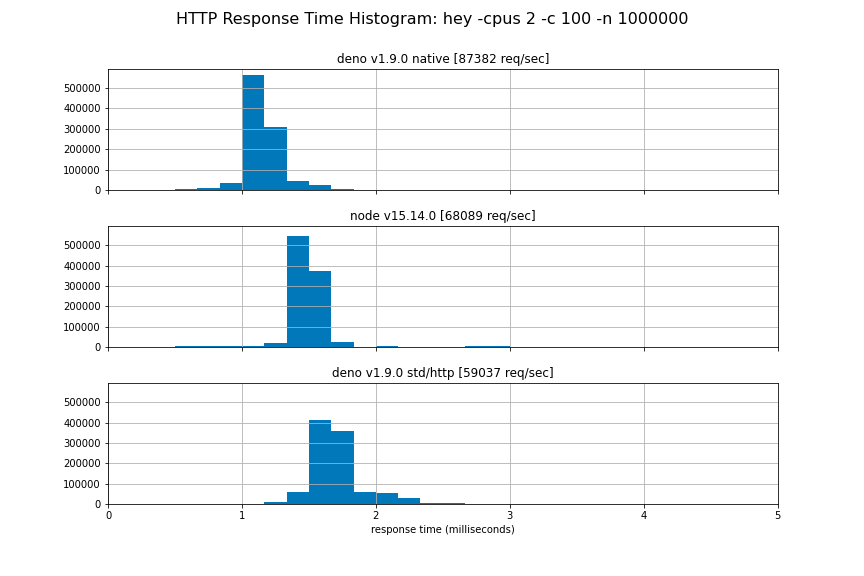
47 | 我们希望尽快稳定这个新的 API,但是现在你必须使用 `--unstable` 标志。欢迎进行测试并给我们提供反馈。
48 |
49 | ```typescript
50 | const body = new TextEncoder().encode("Hello World");
51 | for await (const conn of Deno.listen({ port: 4500 })) {
52 | (async () => {
53 | for await (const { respondWith } of Deno.serveHttp(conn)) {
54 | respondWith(new Response(body));
55 | }
56 | })();
57 | }
58 | ```
59 |
60 | 我们已经很谨慎地使用与 **fetch()** API 相同的 **Request** 和 **Response** 对象。Rust 和 Response 对象都具有流体(streamable bodies),允许与客户端进行全双工通信。
61 |
62 | 另请参考下文关于 ALPN 的部分,这是通过 TLS 发布 HTTP/2 所必需的。
63 |
64 | ## 使用 serde_v8 更快地调用 Rust
65 |
66 | 我们已经将绑定基础设施重建得更加简单和快捷:我们从核心中删除了 1500 多行代码,将基线绑定(又称为 ops 或 opcall)的开销提高了约 65 倍或 -98%,并且建立了干净的 op 基础,可以为我们的发展提供良好的基础(比如用于插件和未来的优化等)。
67 |
68 | 在 Deno 的早期版本中,opcalls 遵循请求/响应模式,在 ArrayBuffer 的自定义“有效负载”中对其数据进行编码。此前,这些有效负载使用范围从 JSON、flatbuffers 到自定义二进制编码的各种编码...这不仅成为性能瓶颈,也成为复杂性和碎片化的重要起源。
69 |
70 | [@AaronO](https://github.com/AaronO) 建议,与其在这些二进制格式(JS 和 Rust)之间来回序列化,[不如直接更有效率地](https://github.com/denoland/deno/issues/9540)在 v8 和 Rust 值之间进行序列化。在此建议和一个快速的原型设计下,[serde_v8](https://github.com/denoland/deno/tree/main/serde_v8) 诞生。`serde_v8` 旨在在 v8 和 Rust 之间提供“最大效率”或“零开销”的双射,同时保持表达性和准确性(因为它建立在 David Tolnay 奇妙的 [serde](https://github.com/serde-rs/serde) 库之上)。
71 |
72 | 基线 op 开销是衡量给定类 opcall 的最小开销 (单位为每个调用的纳秒) 的一个重要基准。
73 |
74 | 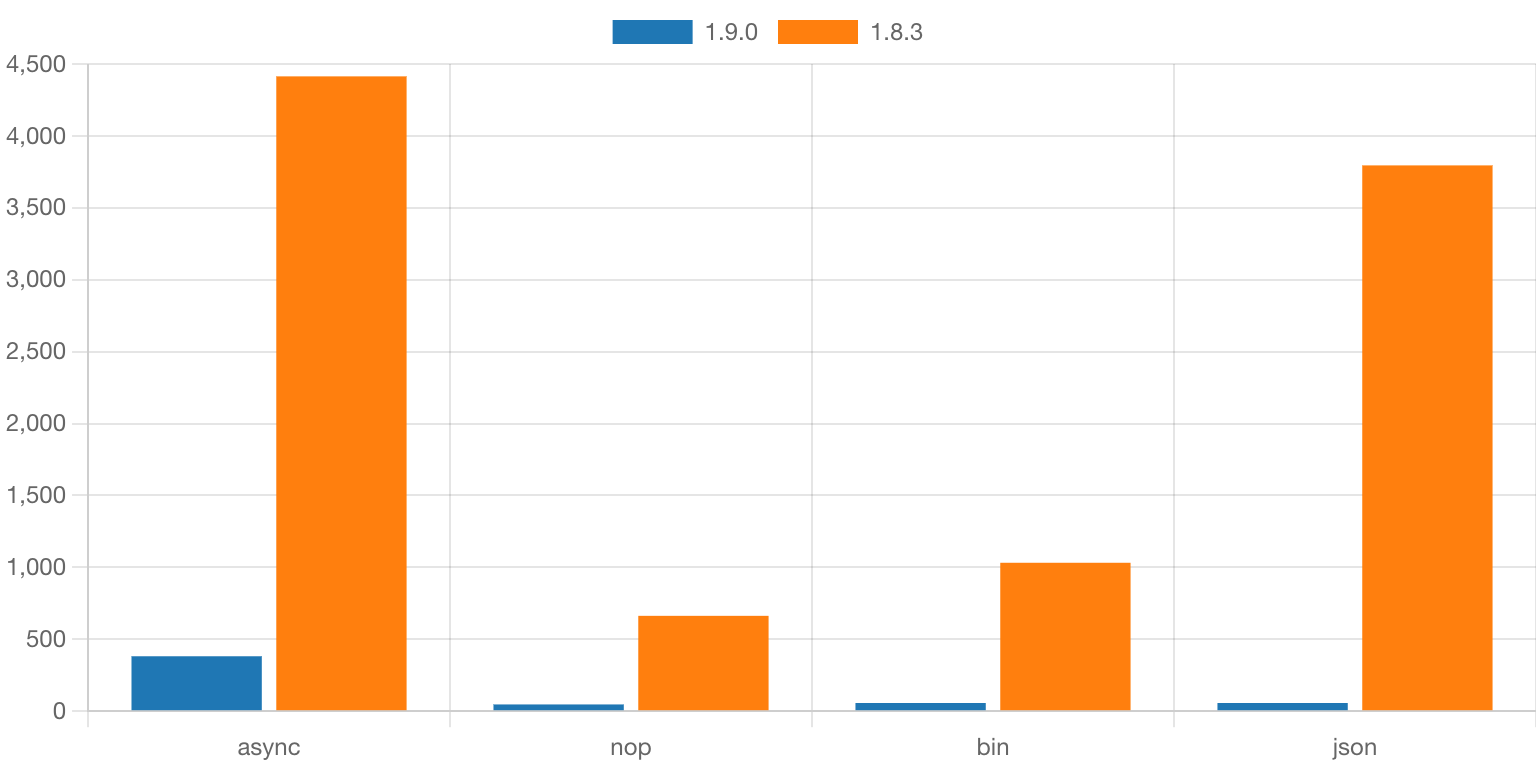
75 |
76 | 这些 op-layer 的改进不仅仅是学术上的,还大大提升了 Deno 的效率,也提高了我们在 [HTTP 基准测试](https://deno.com/blog/v1.9#http-benches)的吞吐量和延迟。你可以在你自己的 Deno 程序中看到在重负荷下或者是以前遇到的 opcall 效率瓶颈时的改进。
77 |
78 | 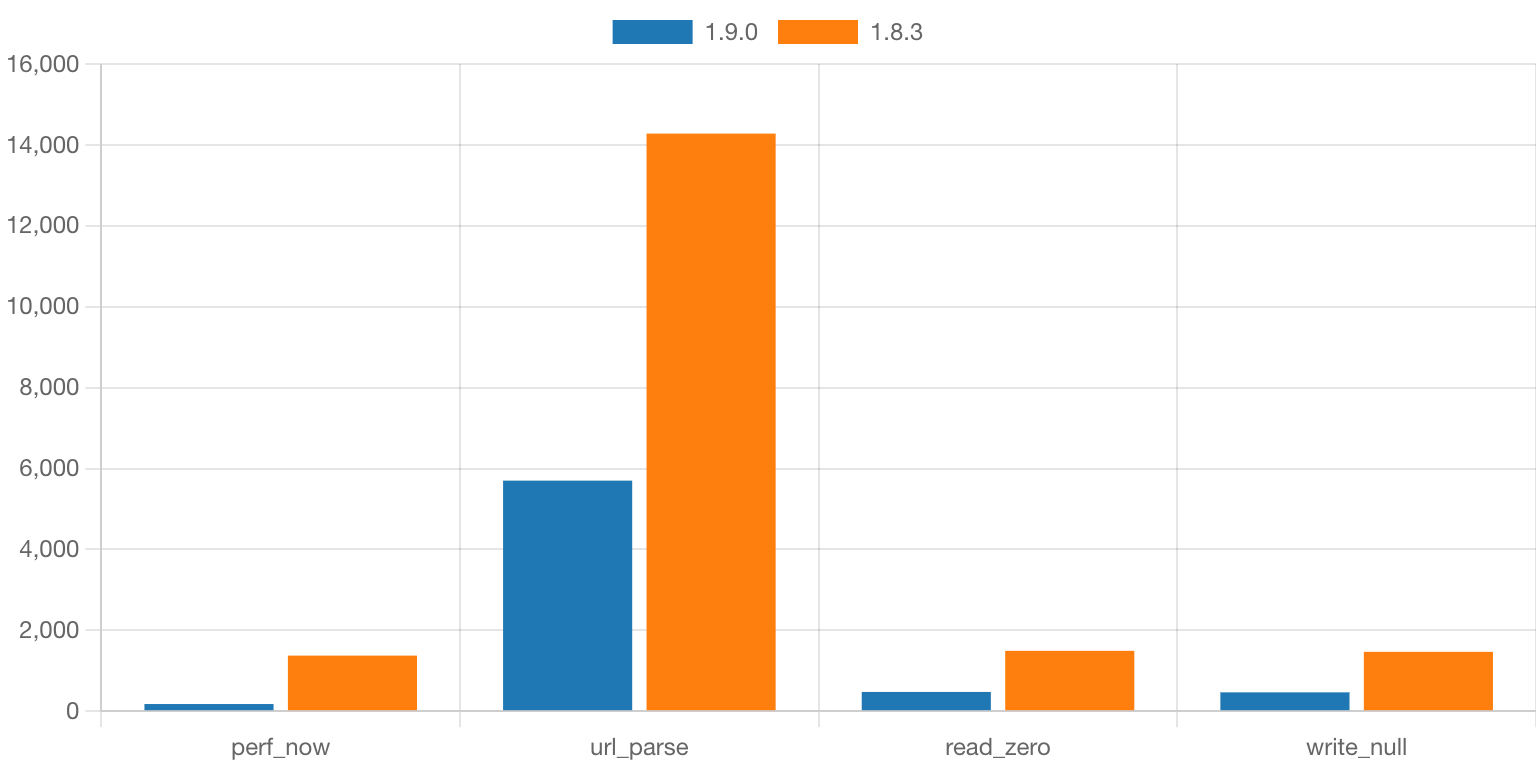
79 |
80 | 如上所见,Deno 中很多常用的功能现在都可以快 ~3 倍地运行。
81 |
82 | ## 支持 Blob URL 与改进 `fetch`
83 |
84 | 此版本下,我们引入了 `blob:`(又称 object URLs)——一个与浏览器中相同的,可以用来创建和撤销 blob URL 的 API:
85 |
86 | ```typescript
87 | const blob = new Blob(["Hello World!"]);
88 | const url = URL.createObjectURL(blob);
89 | console.log(url); // blob:null/7b09af21-03d5-461e-90a3-af329667d0ac
90 |
91 | const resp = await fetch(url);
92 | console.log(await resp.text()); // Hello World!
93 |
94 | URL.revokeObjectURL(url);
95 | ```
96 |
97 | Blob URLs 可用于 `fetch`,使用 `new Worker` 来实例化 Web Worker,以及动态导入(使用`import()`)。
98 |
99 | 除了 blob URLS,`fetch` 现在还支持 `data` URLs:
100 |
101 | ```typescript
102 | const resp = await fetch("data:text/plain;base64,SGVsbG8gV29ybGQh");
103 | console.log(await resp.text()); // Hello World!
104 | ```
105 |
106 | ## LSP 中 import 的支持更完整
107 |
108 | 此版本中,还为 Deno Language Server(一个为 Deno 提供编辑器拓展功能的工具)添加了一些很棒的新功能和改进。
109 |
110 | 首先,我们从旧的 VS Code 拓展中改进并重新引入了导入补全功能。它允许用户在 import 语句中获得补全。LSP 提供本地文件的补全、已经下载到 DENO——DIR 缓存的文件以及注册表的补全。
111 |
112 | 这是功能的示例:
113 |
114 | 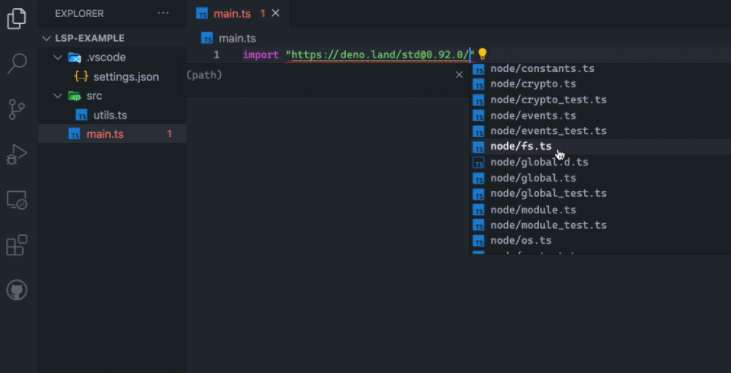
115 |
116 | 想要开启 [https://deno.land/x](https://deno.land/x) 仓库的补全功能,需要在你的 VS Code(或其它编辑器) 中添加如下配置:
117 |
118 | ```typescript
119 | {
120 | "deno": {
121 | "suggest": {
122 | "imports": {
123 | "hosts": {
124 | "https://deno.land": true
125 | }
126 | }
127 | }
128 | }
129 | }
130 | ```
131 |
132 | 注册表自动补全功能目前由 [https://deno.land/x](https://deno.land/x) 提供。我们希望更多的其它注册表会根据注册表协议来支持这个功能。[Skypack](https://skypack.dev/) 注册表显示出了相关兴趣,并且可能很快会得到支持。如果要添加对自己注册表的支持,则可以阅读[注册表实现文档](https://github.com/denoland/vscode_deno/blob/main/docs/ImportCompletions.md#module-registry-completions)。
133 |
134 | 除了新的导入补全功能之外,我们还实现了 `textDocument/foldingRange` 和 `textDocument/selectionRange` 的 LSP 函数,使你的编辑器可以再选择期间提供更好地文本捕捉,并更好地支持折叠和拓展代码块。
135 |
136 | 此版本还包含许多针对 LSP 的错误修复,其中一个特殊的缺陷是 Windows 系统上的一个讨厌的错误:当 LSP 遇到特定的 `file://` URL时,会导致 LSP 崩溃。
137 |
138 | ## `--allow-env` 和 `--allow-run` 的白名单
139 |
140 | Deno 的多个权限标志接收一个允许列表,使得程序权限可以再细粒度地得到控制。例如,使用 `--allow-read=/tmp` 仅授予对 `/tmp` 目录的读取权限。
141 |
142 | 在 1.9 之前的版本中,`--allow-env` 和 `--allow-run` 都是全部开启或全部关闭,这意味着通过这些标志将授予对环境变量的完全访问权限,并且可以分别为系统中的任何二进制文件生成子进程。
143 |
144 | 现在可以精确地指定程序应该访问哪些环境变量,或者允许程序产生哪些子进程:
145 |
146 | ```bash
147 | $ deno run --allow-env=DEBUG,LOG https://deno.com/v1.9/env_permissions.ts
148 | $ deno run --allow-run=deno https://deno.com/v1.9/run_permissions.ts
149 | ```
150 |
151 | 此外,`Deno.permissions.query()` 现在允许使用命令字段查询执行特定二进制文件的权限:
152 |
153 | ```typescript
154 | await Deno.permissions.query({ name: "run", command: "deno" });
155 | ```
156 |
157 | ## 交互式权限提示框
158 |
159 | 当前在 Deno 中,如果你运行的程序确实相应的权限标志,它将抛出错误并退出。在 1.9 中,我们添加了 --pormpt 标志,允许用户迭代地授予运行时所需的权限。
160 |
161 | 当从 Internet 运行一次性脚本时,使用 --prompt 尤其有用:你无需预先知道所有必需的权限,而是可以在没有任何权限的情况下运行脚本,并根据程序的请求逐一授予或拒绝。
162 |
163 | 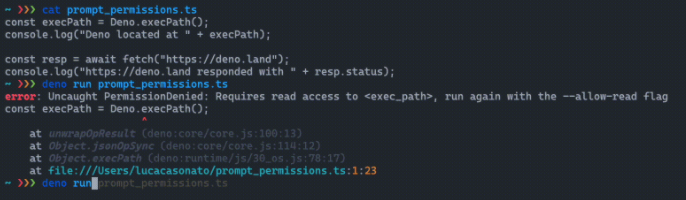
164 |
165 | 尝试运行这个示例:`deno run --prompt ``[https://deno.com/v1.9/prompt_permissions.ts](https://deno.com/v1.9/prompt_permissions.ts)`。
166 |
167 | 如果 --prompt 对你有用,请告诉我们,我们正在考虑在将来的版本中默认将其打开。
168 |
169 | ## `Deno.listenTls` 中的 ALPN 支持
170 |
171 | HTTP/2 协议与连接无关。因此,它可以用于 Unix 套接字、TCP 套接字或者使用 TLS 的连接。主流浏览器只允许在 TLS 握手过程中宣布支持 HTTP/2 的 TLS 连接。它通过“应用层协议协商”TLS 扩展来实现,也被称为 ALPN。这种对 TLS 握手的扩展允许 TLS 服务器和客户端就它们将使用哪种应用协议来进行 TLS 连接通信进行协商。HTTP/1.1 和 HTTP/2 是网络上两个主要的应用协议。这些协议的 ALPN 名称分别为“http/1.1”和“h2”。浏览器只会将 HTTP/ 2 请求发送到声明支持 HTTP/2 的服务器。如果没有列出 ALPN 协议,或者在 ALPN 协议中只列出了“http/1.1”,则将使用 HTTP/1.1。
172 |
173 | 迄今为止,`std/http` 服务器仅支持 HTTP/1.1,因此无需支持 TLS 连接上的 ALPN。当`Deno.serviceHttp` 在这一版本中引入时,事情发生了变化。要在 Deno 中实现完全的 HTTP/2,我们现在添加了对指定 ALPN 协议的支持,当 TLS 侦听器通过 `Deno.ListentLs` 启动时,它将进行公告。
174 |
175 | 下面是一个创建完全支持 HTTP/2 的 HTTPS 服务器的例子:
176 |
177 | ```typescript
178 | const listener = Deno.listenTls({
179 | port: 443,
180 | certFile: "./cert.pem",
181 | keyFile: "./key.pem",
182 | alpnProtocols: ["h2", "http/1.1"],
183 | });
184 |
185 | for await (const conn of listener) {
186 | handleConn(conn);
187 | }
188 |
189 | async function handleConn(conn: Deno.Conn) {
190 | const httpConn = Deno.serveHttp(conn);
191 | for await (const { request, respondWith } of httpConn) {
192 | respondWith(new Response(`Responding to ${request.url}`));
193 | }
194 | }
195 | ```
196 |
197 | ## 新稳定的 API
198 |
199 | 1.9 稳定了与文件系统相关的几个 API:
200 |
201 | - `Deno.fstat`
202 | - `Deno.fstatSync`
203 | - `Deno.ftruncate`
204 | - `Deno.ftruncateSync`
205 |
206 | 此外如下方法加入到了 Deno.file 类中:
207 |
208 | - `File.stat`
209 | - `File.statSync`
210 | - `File.truncate`
211 | - `File.truncateSync`
212 |
213 | ## 新弃用的 API
214 |
215 | 为了使更多使用 Deno 编写的代码直接移植到浏览器和其他非 Deno 运行时中,我们决定弃用并最终从 Deno 命名空间中删除所有不受系统 API 支持的 API。这些 API 将被移植至 Deno 标准库中,该库也可以在浏览器中使用。
216 |
217 | 在此版本中,我们不推荐使用以下 API:
218 |
219 | - `Deno.Buffer`
220 | - `Deno.readAll`
221 | - `Deno.readAllSync`
222 | - `Deno.writeAll`
223 | - `Deno.writeAllSync`
224 | - `Deno.iter`
225 | - `Deno.iterSync`
226 |
227 | 这些 API 已移至 `std/io` 模块中。我们在 `deno lint` 中引入了一个新的 lint 规则,它可以发现开发者使用这些不稳定的 API,并发出警告。它还会建议开发者在标准库找到该 API。
228 |
229 | 在 Deno 2.0 中,我们计划删除这些废弃的 API。更激进的弃用信息可能会出现在 2.0 之前的版本。请尽可能快地迁移使用到这些弃用 API 的代码。
230 |
231 | ## 新的 TypeScript 默认选项 `useDefineForClassFields`
232 |
233 | 在此发布中,我们修改了默认的 Deno tsconfig,包括 `"useDefineForClassFields": true` 选项。这个选项使 TypeScript 对类字段的处理符合标准 ECMA 脚本语义。此选项不能在用户代码中覆盖。我们希望大部分用户不必更改代码。
234 |
235 | > © [https://github.com/hylerrix/deno-tutorial](https://github.com/hylerrix/deno-tutorial) 2020~2021
236 |
--------------------------------------------------------------------------------
/site/articles/translation/deno-alpeh-react.md:
--------------------------------------------------------------------------------
1 | # 如何在 Deno 下使用 AlpehJS 库构建 React 应用
2 |
3 | > - 原文地址:[How to Build React Applications with Deno Using the AlephJS Library](https://www.freecodecamp.org/news/build-react-app-using-deno-and-alephjs/)
4 | > - 原文作者:Akash Joshi
5 | > - 原文发布时间/翻译时间:20210312/20210429
6 | > - 译者:[hylerrix](https://github.com/hylerrix)
7 | > - 备注:本文遵循 [freeCodeCamp 翻译规范](https://github.com/freeCodeCamp/news-translation),同时本文会收录在[《Deno 钻研之术》](https://github.com/hylerrix/deno-tutorial)的翻译篇中。
8 |
9 | 如果你是刚刚开始使用 Deno 的前端开发人员,你可能会像知道,你是否可以使用 Deno 构建像 NextJS 或 create-react-app(CRA)应用程序一样复杂的东西?
10 |
11 | 我最近在想同样的事情。我想尝试使用能提供高共享性的 Deno,其能够直接从 URL 运行 JavaScript 和 TypeScript 应用程序。同时 Deno 编译器支持从 URL 中导入模块,从而实现了更大的可移植性。
12 |
13 | 我查阅了线上是否有任何相应的解决方案,但我只先找到了[这篇文章](https://dev.to/adriantwarog/react-deno-server-side-rendering-with-deno-ssr-4438),它使用了一些复杂的技术构建了一个 SSR 的 React 应用程序。复杂得并不简单,不像 NextJS 或 CRA 那样入门友好。
14 |
15 | 所以,通过更多的查阅,我最终找到了 AlephJS 框架,有着相比之前最酷的主页。
16 |
17 | 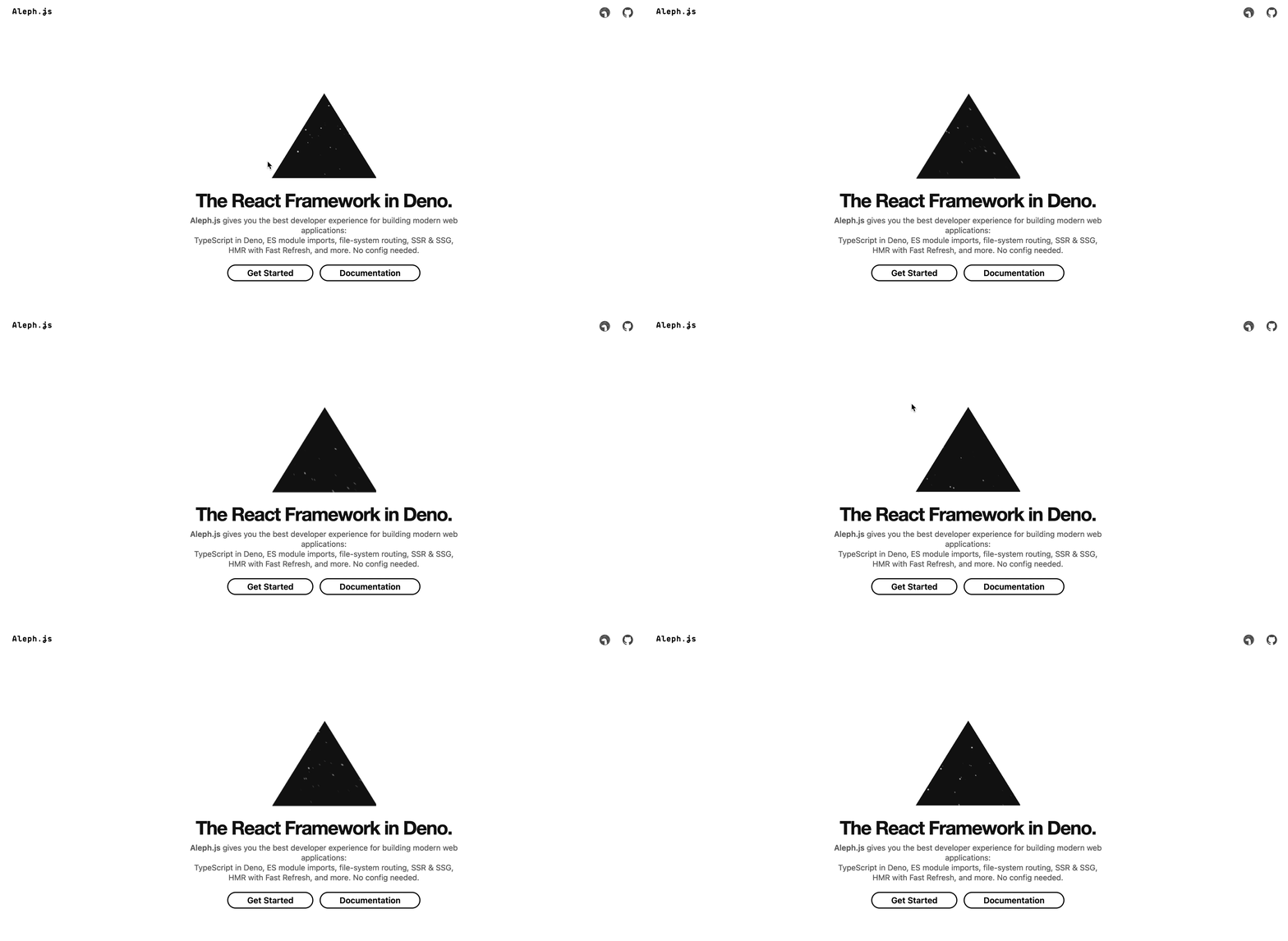
18 |
19 | 与 NextJS 一样,Aleph 是一个零配置,由 TypeScript 驱动的 React 框架。唯一的缺点是 Aleph 仍然处于 Alpha 状态。
20 |
21 | 因此,让我们开始使用 AlephJS,来在 Deno 中获得真正的类似于 Next 的 React 体验。它具有 Next 相同的许多约定,例如:
22 |
23 | - 一个 `/pages` 目录用来创建 URL 路由
24 | - pages 中直接支持 `.js .jsx .ts .tsx` 格式。
25 | - 一个 `/public` 目录用来存放静态资源比如视频、音频或图片文件。
26 | - 一个 /pages/api 目录用来存放 JavaScript 或 TypeScript 的 serverless APIs。
27 |
28 | ## 如何从 AlephJS 开始
29 |
30 | 为了能够使用到 AlephJS,你需要确保你已安装了 Deno。你可以在我[之前的这篇文章中](https://www.freecodecamp.org/news/build-a-url-shortener-in-deno/)查看如何安装 Deno。
31 |
32 | 准备好后,你需要先通过如下命令安装 Aleph CLI:
33 |
34 | ```bash
35 | deno install -A -f -n aleph https://deno.land/x/aleph@v0.3.0-alpha.1/cli.ts
36 | ```
37 |
38 | 安装完后,你可以运行 `aleph -h` 来检查是否安装成功。
39 |
40 | 由于 Deno 的 URL 特性,你可以使用 `deno run -A [https://deno.land/x/aleph@v0.3.0-alpha.1/cli.ts](https://deno.land/x/aleph@v0.3.0-alpha.1/cli.ts) start $app_URI` 替换 aleph 来执行任何命令,并且无需本地安装 CLI 即可运行 Aleph 程序。
41 |
42 | 运行如下命令来初始化一个应用:
43 |
44 | ```bash
45 | aleph init hello
46 | cd hello
47 | ```
48 |
49 | 然后使用 `aleph dev` 在开发模式下启动该应用,以在端口 `8080` 上启动服务器。
50 |
51 | 要以生产模式启动该应用程序,你必须首先 `build` 构建该应用程序。你可以通过以下命令执行此操作:
52 |
53 | ```bash
54 | aleph build # build your app
55 | aleph start # runs built app
56 | ```
57 |
58 | 在你初始化完毕 Aleph 之后,你会发现根组件已经在 `pages/index.tsx` 中定义了。这是正常的 React 组件。你可以对其进行修改,以了解 Aleph 的工作原理。
59 |
60 | 你也可以通过在 `pages` 文件夹中创建更多 `.jsx` 或 `.tsx` 文件来向应用添加更多的路由。你可以[在此处](https://alephjs.org/docs/basic-features/routing)阅读有关 Aleph 中路由的更多知识。
61 |
62 | ## 如何在 Deno 中导入库
63 |
64 | 我之前在 freeCodeCamp 中写过有关 Deno 的文章,其中演示了一些 Deno 的基础知识,比如 URL 的导入。由于 Aleph 是 Deno 框架,因此所有导入均以“Deno 的方式”进行。
65 |
66 | 你可以在 Deno 应用程序中导入这两种库:
67 |
68 | 1. 导入 Deno 原生库:这些库要么是为 Deno 构建的,要么是从 npm 移植过来的,均支持 Deno 的使用。
69 | 1. 从 NPM 中导入:如果你最近使用过 JS,则很可能了解 npm。不了解的话:npm(node 包管理器背后的公司)是所有 JavaScript 库的一种标准托管库。幸运的是,Deno 对 npm 库有一定限度的支持。可以使用诸如 [esm.sh](http://esm.sh/) 或 skypack.dev 这样的工具,用户可以将 npm 库导入到 Deno 中。
70 |
71 | ### 1. 如何导入 Deno 原生库
72 |
73 | 你可以直接通过 URL 导入 Deno 原生库。你也可以在这里这倒 Deno 库的列表:[deno.land/x](http://deno.land/x)。
74 |
75 | 想要测试这个功能,让我们导入一个标准 Deno 日期格式库,然后在 React 页面中调用日期格式函数。在应用程序的 `pages` 文件夹中创建一个文件 `date-import.tsx`。在文件内部编写如下代码:
76 |
77 | ```jsx
78 | // react 是 Aleph 中已经安装好的基础库
79 | import React from "react";
80 |
81 | // 从 URL 中导入其 format 函数
82 | import { format } from "https://deno.land/std@0.88.0/datetime/mod.ts";
83 |
84 | // 将函数名称大写,以便将其识别为一个 React 组件
85 | export default function DateImport() {
86 | // 在这里,直接调用 format 函数可以正常使用
87 | return Hello all! Today is: {format(new Date(), "dd-MM-yyyy")} ;
88 | }
89 | ```
90 |
91 | 要查看此文件的输出,请跳转到 [localhost:8080/date-import](http://localhost:8080/date-import),你应该可以看到显示今天日期的页面。
92 |
93 | ### 2. 如何从 NPM 中导入库
94 |
95 | 要导入 npm 库,你也可以直接从 URL 导入——但在这种情况下,需要进行一些更改。自从我们讨论了 [esm.sh](http://esm.sh/) 和 skypack.dev 以来,让我们尝试在实际中使用它们。此时,我们尝试在项目中导入 [dayjs](https://www.npmjs.com/package/dayjs) 库。
96 |
97 | > 注意:并非所有 npm 库都可以在 Deno 中正常工作,因为它们可能依赖于特定于 Node 的功能。
98 |
99 | 要在 [esm.sh](http://esm.sh/) 中导入库,请将库的软件包名追加到 URL 后面。比如导入 dayjs 的话,我们可以导入 `[https://esm.sh/dayjs](https://esm.sh/dayjs)` 地址。这同时适用于你可能从库中导入的任何 CSS 文件。
100 |
101 | 现在,让我们在名为 `pages` 中创建一个文件 `dayjs-import.tsx`。因此,我们页面中的代码将如下所示:
102 |
103 | ```jsx
104 | // react 是 Aleph 中已经安装好的基础库
105 | import React from "react";
106 |
107 | // 使用 esm.sh 导入 dayjs npm 库
108 | import dayjs from "https://esm.sh/dayjs";
109 |
110 | // 将函数名称大写,以便将其识别为一个 React 组件
111 | export default function DateImport() {
112 | // 直接调用 dayjs 函数来显示今天的日期
113 | return Hello all! Today is: {dayjs().format("DD-MM-YYYY")} ;
114 | }
115 | ```
116 |
117 | 要查看此文件的输出,打开 [localhost:8080/dayjs-import](http://localhost:8080/dayjs-import),你应该会看到显示当天日期的页面。
118 |
119 | 但在我们进行下一步之前,有一件重要的事——你如何导入 React 下的 `useState`、`useEffect` 等?幸运的是,Aleph 开发人员已经为我们编写了一个示例。
120 |
121 | 进入 `./lib/useCounter.ts`,你将找到在页面中用于计数器自定义钩子的代码。
122 |
123 | 由于我在本文中将重点介绍 Aleph 和 React 本身,因此,要查看在 Aleph 中导入 CSS文件的所有不同方法,请访问[官方文档中的相关页面](https://alephjs.org/docs/basic-features/built-in-css-support)。
124 |
125 | ## 如何使用 Deno 和 AlephJS 构建示例应用
126 |
127 | 现在,让我们进入实战环境,来尝试自己在 Aleph 中构建一个 React 应用。我们将构建“Is It Down”,这是我使用现有的网站检查 API 制作的一个示例应用。这个应用将使我们能够检查一个网站当前是打开还是关闭的。
128 |
129 | 这是 CodeSandbox 链接:[https://codesandbox.io/s/awesome-firefly-5dofg](https://codesandbox.io/s/awesome-firefly-5dofg)
130 |
131 | 
132 |
133 | 构建此应用将向你展示如何使用 State hook、Effect Hook 以及如何在 Aleph 中进行 API 调用。
134 |
135 | 在 `pages` 文件夹中创建一个名为 `web-checker.tsx` 的新文件。让我们从仅添加 UI 元素开始。我们将显示一个带标题的 `h1` 元素,一个链接到 API 的 `h2` 元素以及一个接受用户输入的 form 元素。这是一个非交互式的页面,仅显示元素。
136 |
137 | ```jsx
138 | import React from "react";
139 |
140 | export default function App() {
141 | return (
142 |
143 | Is it Down?
144 |
145 | Go{" "}
146 |
150 | here
151 | {" "}
152 | to get an API key
153 |
154 |
155 |
165 |
166 | );
167 | }
168 | ```
169 |
170 | 接下来,为了捕获输入字段的状态,以及捕获我们必须进行的 API 调用的响应,让我们引入一下 state。
171 |
172 | ```jsx
173 | // import useState from react
174 | import React, { useState } from "react";
175 |
176 | export default function App() {
177 | // define both state variables
178 | const [siteURL, setUrl] = useState("");
179 | const [response, setResponse] = useState(undefined);
180 | ...
181 | ```
182 |
183 | 现在,我们可以再输入元素中使用此状态,以便它可以对此作出响应:
184 |
185 | ```jsx
186 | ...
187 | setUrl(e.target.value)}
190 | type="text"
191 | />
192 | ...
193 | ```
194 |
195 | 当 API 返回响应时,我们还需要添加一些代码来显示响应:
196 |
197 | ```jsx
198 | ...
199 |
200 |
201 |
202 |
203 |
204 | {JSON.stringify(response, null, 2)}
205 |
206 | ...
207 | ```
208 |
209 | 现在,准备开始集成 API。让我们尝试正确的组合请求体。此时,API 是一个简单的 `GET` 调用,因此我们只需传递一个参数和一个 API 秘钥。
210 |
211 | 首先转到此处来生成 API 秘钥:[https://rapidapi.com/jakash1997/api/website-data-gathering-and-update-tracking](https://rapidapi.com/jakash1997/api/website-data-gathering-and-update-tracking)。如下截图所示,找到密码并将其存储到安全的地方:
212 |
213 | 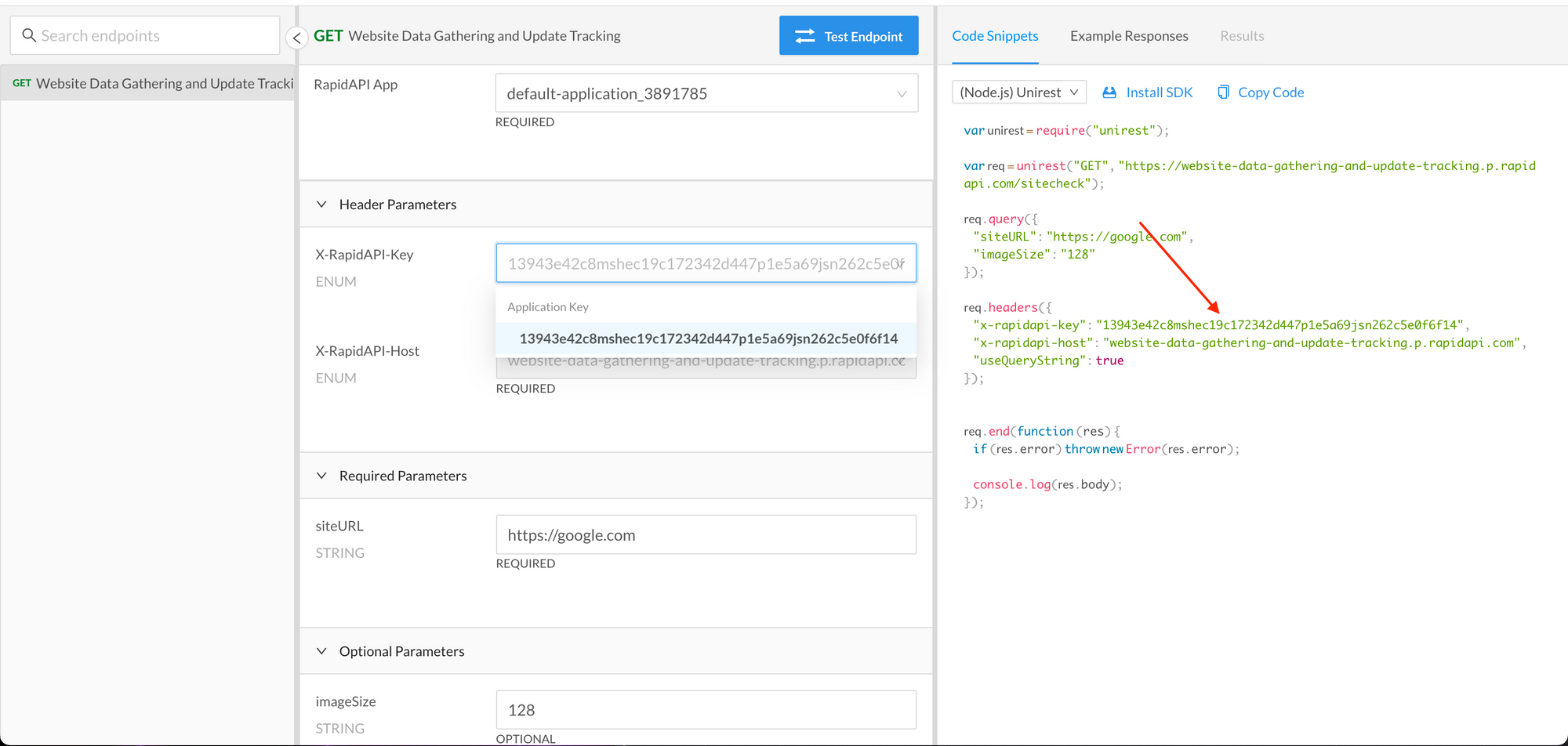
214 |
215 | 接下来,让我们创建一个单独的函数 `sumitData`,用来生成所需的请求体。我们将使用 `axios` 库进行 GET 调用,同时用到 `options` 对象。
216 |
217 | ```jsx
218 | ...
219 | const [response, setResponse] = useState(undefined);
220 |
221 | const submitData = (siteURL) => {
222 | setResponse("Loading...");
223 | const options = {
224 | // passing siteURL here through object shorthand
225 | params: { siteURL },
226 |
227 | // passing the required headers here
228 | headers: {
229 | "x-rapidapi-key": "YOUR_API_KEY",
230 | "x-rapidapi-host":
231 | "website-data-gathering-and-update-tracking.p.rapidapi.com",
232 | },
233 | };
234 |
235 | // print options here
236 | console.log("options", options);
237 | };
238 |
239 | return (
240 | ...
241 | ```
242 |
243 | 然后,将其添加到表单的 `onSubmit` 函数中。
244 |
245 | ```jsx
246 | onSubmit={(e) => {
247 | e.preventDefault();
248 | submitData(siteURL);
249 | }}
250 | ```
251 |
252 | 现在,每当你点击 Submit 按钮时,你都能看到我们在控制台中生成的 **options**。如果你能看到,代表目前为止一切都正常!
253 |
254 | 接下来,我们只需执行简单的步骤,即使用 [http://esm.sh](http://esm.sh/) 来导入 axios 库并使用它进行 API 调用。
255 |
256 | 在 `React` 导入之后,像这样导入 `axios`:
257 |
258 | ```jsx
259 | import React, { useState } from "react";
260 | import axios from "https://esm.sh/axios";
261 |
262 | ...
263 | ```
264 |
265 | 并将其在 submitData 函数中使用:
266 |
267 | ```jsx
268 | ...
269 | axios
270 | .get(
271 | "https://website-data-gathering-and-update-tracking.p.rapidapi.com/sitecheck",
272 | options
273 | )
274 | .then(function (response) {
275 | setResponse(response.data);
276 | console.log(response.data);
277 | })
278 | .catch(function (error) {
279 | console.error(error);
280 | });
281 | };
282 | ...
283 | ```
284 |
285 | 就这么简单!尝试再次提交表单,这次你将在屏幕和控制台上都能看到正确的结果。
286 |
287 | ## 结论
288 |
289 | 现在你了解了 Aleph 的基础知识。这是一个非常有趣的工具,它使你可以将现有的 React 知识与 [deno.land](http://deno.land/) 的前沿性和安全性结合。
290 |
291 | 如果你喜欢本教程,可以再 Twitter 上关注我 [@thewritingdev](http://twitter.com/thewritingdev)。
292 |
293 | > © [https://github.com/hylerrix/deno-tutorial](https://github.com/hylerrix/deno-tutorial) 2020~2021
294 |
--------------------------------------------------------------------------------
/site/articles/translation/why-deno-wrong.md:
--------------------------------------------------------------------------------
1 | # 为什么我认为 Deno 是一个迈向错误方向的 JavaScript 运行时?
2 |
3 | > - 原文地址:[Why I Believe Deno is a Step in the Wrong Direction for JavaScript Runtime Environments](https://www.freecodecamp.org/news/why-deno-is-a-wrong-step-in-the-future/)
4 | > - 原文作者:Mehul Mohan
5 | > - 原文发布时间:2020-05-14
6 | > - 译者:[hylerrix](https://github.com/hylerrix)
7 | > - 备注:本文遵循 [freeCodeCamp 翻译规范](https://github.com/freeCodeCamp/news-translation),同时本文会收录在[《Deno 钻研之术》](https://github.com/hylerrix/deno-tutorial)的翻译篇中。
8 | > - 备注:非营利组织 freeCodeCamp.org 自 2014 年成立以来,以“帮助人们免费学习编程”为使命,创建了大量免费的编程教程,包括交互式课程、视频课程、文章等。线下开发者社区遍布 160 多个国家、2000 多个城市。FCC 正在帮助全球数百万人学习编程,希望让世界上每个人都有机会获得免费的优质的编程教育资源,成为开发者或者运用编程去解决问题。搜索关注微信公众号 “freeCodeCamp”,可了解更多信息。
9 |
10 | 
11 |
12 | ## 译者序
13 |
14 | 在为《[Deno 钻研之术](https://github.com/hylerrix/deno-tutorial)》引入第一篇翻译文章的时候,就看到了这篇文章,那时还觉得驾驭不了,就重点先写了若干篇入门级别的 Deno 文章。
15 |
16 | 转眼到 2021 年,从《[Deno 双周刊](https://github.com/hylerrix/deno-feedly)》第一期继续开启新的一年的 Deno 之旅,于是就回想起了本文,觉得可以通过好好阅读本文及相关后,从另一个角度了解 Deno,翻译就开始了。
17 |
18 | 相比前面对文章的直接翻译外,本文有很多想要记笔记的地方(甚至“大开眼界”的地方),因此独特地开辟本文的“译者序”篇章,来梳理一下原文及其相关视频到底针对 Deno 的另一面,都讲了什么。
19 |
20 | 也正如原文所说,这注定是一篇有争议的文章,从文章中引入的两个视频中的点踩数都微微大于点赞数、其评论区都充满着“火热”的讨论就能看出多个观点的冲撞。原文也存在些过度批评的地方,但是不妨碍下方译文开始后一比一地还原原作者想要表达的观点!
21 |
22 | 所以,原作者 Mehul 在原文以及两个视频中到底想要说 Deno 为什么没那么好?其观点大致梳理如下:
23 |
24 | > 注意:如果想先看原文的话可以跳过阅读并在之后来看这份简单的总结。
25 |
26 | - Deno 和 Node 确实有**竞争关系**,因为你必须在你的下个项目中作出选择。
27 | - Deno 现在所做的**成果并不是很多**,大多特性都可以在 Node 生态中较好地解决掉。
28 | - **URL import** 还是一场灾难。NPM 中已经有很多明星项目“竟然只有一行代码”、“暗中偷窃用户数据”、“注入挖矿代码”、“兼容性出现问题导致很多上游库受影响”等问题,URL import 本身并不能解决这些问题,更没有一个像 Node 一样强壮的社区来保证受人信任的依赖库,也就不会有更多的开发者愿意加入到 Deno 生态中。
29 | - 由于 **TypeScript** 是 JavaScript 的超集,完全可以选择跳过类型验证,此时推荐新手在 Deno 上直接使用 TypeScript 编程坑会很大,很可能会出现一堆 any 类型。在经常性的调试报错下,TypeScript 的学习成本也较高,很容易写出低质量代码。
30 | - **TypeScript** 并不是直接在 Deno 上跑的,其实还是变成了 JavaScript 来跑,何必一定要集成到 Deno 中呢?
31 | - **安全**是一个很难的事情,Deno 宣传自己的“安全沙箱”注定要承担很大的责任。Deno 安全沙箱也没有必要,完全可以用 Docker 等容器或虚拟化技术来支持。同时,真正想搞破坏的脚本也会找到自己的方式来规避安全问题。
32 | - 以当时版本下的 `deno --allow-run` 运行主进程从而开启的子进程能轻松突破安全沙箱的验证来获得更多权限为例,发现 Deno 的“**安全沙箱**”并没有所说的那么安全。
33 | - Deno 没有必要**集成太多工具链**(代码格式化、测试工具、TypeScript 等等)于一体,让各种第三方工具链来一起共建生态的同时,保证 Deno 本身的专注性并提供更友好的插件支持会很好。
34 | - Node 的异步模型**并没有被淘汰**,promise 和事件侦听器模型也没有套题,因此不确定 Deno 将如何解决这些没有被淘汰的问题。
35 | - 未来并不确定会有多少开发者愿意将 npm 中的成熟库逐渐**迁移到 Deno 中**。
36 |
37 | 可以看出,无论你是 Node 开发者还是 Deno 爱好者,这些观点都有很多值得思考的地方。但也有有失偏颇的地方,比如文中将 Deno 说明为编程语言,也将 Deno 只发展了两年多的生态直接和建设了十年的 Node 生态作横向对比——Deno 注定会有自己独特的发展轨迹。
38 |
39 | 最后,原文作者 Mehul 总结了他眼中的 Deno v1.0 的真实面貌:
40 |
41 | > Deno = (大多数情况下)[TypeScript + Node + 正确配置的 Docker 容器 + 单一可执行程序 + <各种各样的小工具> - NPM]
42 |
43 | ## 译文开始
44 |
45 | 目前,我还没有在 Youtube 上找到任何一个像 [codedamn](https://www.youtube.com/codedamn) 一样的频道(超过 10 万名开发者订阅),其对 Deno v1 版本的发布并不感到兴奋。
46 |
47 | 上周,我在我的频道上发布了一个视频,介绍了一些“为什么我认为我们不需要 Deno——另一个基于 V8 和 Node 的 JavaScript 运行时”的原因,这些原因对我来说都很简明扼要。
48 |
49 | 同时通过本文,我可以在视频外拓展阐述更多的原因。但如果你想先看视频,可以看看这个:
50 |
51 | > [为什么 Deno 将会失败 —— Node.js v/s Deno 之我的观点](https://www.youtube.com/watch?v=Uf1md0k6ATs)
52 |
53 | 
54 |
55 | 为了证明我总体上并不是反对 Deno 甚至 JavaScript 本身,我想声明一下:我喜欢 JavaScript 胜过于很多其它的编程技术。我的主要技术栈也只围绕着 JavaScript 展开——Node/React/MongoDB/React Native/NativeScript/Ionic/甚至你能想到的更多相关库。
56 |
57 | 我也是主要用 JavaScript 这一门语言,就让我的 [Youtube 频道](https://www.youtube.com/codedamn)及一个[开发者平台](https://codedamn.com/)的订阅人数达到了 10 万多人。
58 |
59 | 但重要的事情在于,保持公平客观的角度来看到一个事务的两面性很重要。Deno 当然有好的一面,但也有大多数人尚未看到/写文探讨的另一面。一起来看看吧!
60 | _
61 | **_注意:_**_本文注定会是一个有争议性的文章。请先让我们保持礼貌的态度并控制好自己的情绪。如果你能仔细阅读全文直到结尾,然后再说说你的更多想法,那我会备受感激。_
62 | _
63 | _本文底部我会列出我的社交账号,也希望我们能在哪里针对此主题进行更多的良好探讨。_
64 |
65 | ## Deno vs Node:名副其实的竞争关系
66 |
67 | 有很多业内人士都在说:“Deno 和 Node 之间没有任何竞争关系,彼此之间可以学到很多东西”。
68 |
69 | 在某种程度上,我同意这个看法,Node 和 Deno 确实可以互相学习。但是两者间真的没有竞争关系了吗?我完全不同意这关观点。
70 |
71 | 让我们重新看一下 Deno 和 Node 的共同特征:
72 |
73 | 1. 它们都是 JavaScript 的运行时环境;
74 | 1. 它们都可以在可以运行 V8 的任何计算机上运行;
75 | 1. 它们都有 ECMAScript 标准支持;
76 | 1. 它们都在被积极的维护中。
77 |
78 | 如果你这两年都是 Deno 的粉丝,这两年里不选择 Node 而直接用 Deno 作为新项目的技术选型是不可能的。
79 |
80 | 同理,如果你以前从未使用过 TypeScript,并且认为自己想要尝试 Deno,此时你会很难同时用上 NPM 生态中的各种模块。
81 |
82 | 所以:Deno 和 Node 的开发人员目前确实存在分歧——你必须做选择,我想说这是两者为竞争关系的一个很重要的例子。
83 |
84 | ## Deno 到底好在哪里?
85 |
86 | 首先,我需要列举一下 Deno 对自己的宣传中的那些优势,Deno 为什么说自己是更好的运行时:
87 |
88 | 1. 它克服了 Node 的一些缺点;
89 | 1. 它在默认情况下是一个安全的运行时环境;
90 | 1. 它内置 TypeScript 支持;
91 | 1. 它将 Promise 的支持下放到底层;
92 | 1. 它基于 Rust 语言构建(对比与 C++ 之于 Node)。
93 |
94 | 在接下来的章节中,我将一个一个针对上面的每一个属于 Deno 的优点,来看看 Node 可以从中学到什么。我也将会在必要之时探讨,为什么 Deno 还没有那么有意义。
95 |
96 | ## Deno 画蛇添足在了哪些地方?
97 |
98 | 让我们开始拿起 Deno 的独特宣传点(USP,Unique Selling Proposition) 并将它们一一解析:
99 |
100 | ### 默认安全的运行时环境
101 |
102 | 这是 Deno 里很受欢迎的特性,我很惊喜。Deno 直接默认支持一个安全的沙箱环境,除非你明确的选择开启访问文件系统或访问网络等功能权限。
103 |
104 | Deno 这样做是因为它想更加地贴近浏览器。Deno 遵守 ECMAScript 标准这点很不错,但为什么如此热衷于率先贴近浏览器?
105 |
106 | 或许答案是,Deno 想要保持在客户端和服务端上编写的代码之间有良好的兼容性。但 Deno 如此强烈的想要支持浏览器以至于我觉得方向有些偏失、甚至有些过头了。
107 |
108 | Node 虽不支持“安全的运行时”——但经过深思熟虑后,我觉得也有理由支持 Node:
109 |
110 | 1. 众所周知,你不应该在系统上运行不受信任的代码和可执行文件。这就是我们总是选择像 Express 库之于 Node 的原因(而不是随便找个声称自己速度比 Express 快 100 倍的库)。信任来自于社区的大量使用。
111 | 1. 我不知道有任何编程语言像 Deno 这样提供如此的沙箱环境。尽管这个功能可能不错,但似乎应该交由诸如 Docker 这类的容器环境来完成。我相信一个被良好配置的 Docker 环境,相比在沙箱化的 Deno 环境中运行不受信任的 Node 代码来说,能更好的处理不受信任文件的安全性问题。
112 | 1. 沙箱化并没那么容易——我虽然不是网络安全专家,但我觉得某些功能越多,攻击面就可能越大。Deno 承诺提供安全的运行时环境,但我想说安全很难实现。Deno 的承诺带来了巨大的安全责任。世界上最大的企业们为支持它们的安全白帽计划,需要每年为独立开发者和安全公司投入将近数亿美金。因此,Deno 到底会将它们的“安全环境”带向何方?时间会证明一切。
113 |
114 | 所以,Node 可以从 Deno 中学到什么?我想说不会学到太多。Node 或许可以从竞争对手可以引入一些安全环境的标识,但是没有太多意义。如果你想在你的系统上随意运行一些未知代码,则最好克隆一个 C/C++ 仓库并运行 make 命令损害系统。
115 |
116 | > 译者注:上段最后一句话是“If you randomly run arbitrary code on your systems, you might as well clone a C/C++ repo and run a make command over it and get your whole system compromised.”,有些难以翻译,也不容易看出为什么从 Node/Deno 突然跑到了 C/C++,欢迎交流。
117 |
118 | 据我所知,你不能在像 C/C++ 这样的底层语言上来“沙盒化”文件系统或网络访问——这样效率并不高。
119 |
120 | 注意:最近我发现启用 `--allow-run` 标志的 Deno 几乎可以完成任何操作。该视频详细介绍了相关内容:
121 |
122 | > [突破 Deno 的安全沙箱——Deno 并不安全](https://www.youtube.com/watch?v=_lvas914dXI)
123 |
124 | 
125 |
126 | ### 内置支持 TypeScript
127 |
128 | 为 TypeScript 现阶段的进展欢呼,我很高兴 Deno 开箱即用地支持 TypeScript。
129 |
130 | _**注:** 感谢 [@lilasquared ](/lilasquared )指出 Deno 也能开箱即用地运行 `.js` 文件。本文重点强调使用 `.ts` 文件编写代码。Deno 当然可以直接运行 .js 文件。_
131 |
132 | 但是,让我们退一步来说:你知道为什么 JavaScript 和 Node 在全球拥有数以万计的开发人员吗?因为进入这个领域的壁垒几乎为零。JavaScript 是灵活的,可以容许你的诸多错误。而 TypeScript 总会给你一些奇怪的错误。
133 |
134 | 对于生产级的应用程序来说就糟糕了:生产环境上可不需要这些时髦的东西。同时对于学习者来说,JavaScript 是宽容的,纵使你可能会遇到一些 Bug,但也可以很轻松的改正,引用一句话,JavaScript 可以被快速编码并将事情搞定。
135 |
136 | 对于初学者来说,我担心他们如果选择使用 Deno(并被要求使用 TypeScript),因为他们还不了解 TypeScript,想着快速在服务端上跑通代码,我们可能会看到很多这种的代码:
137 |
138 | ```typescript
139 | const httpResponse: any = await getAPIResponse({ myParams })
140 | // ...
141 | const someOtherVariable = something() as any
142 | // ...
143 | any, any, any
144 | ```
145 |
146 | TypeScript 是 JavaScript 的超集。你完全可以无意识间写一段质量很差的 TypeScript 代码,仅仅使用 TypeScript 并不会让你的项目无懈可击。
147 |
148 | 直到你想起来本来就能在 Node 中写 TypeScript 之前,这种体验确实很有趣。我相信现在每个在生产环境中使用 Node 的大型公司都引入了 TypeScript 来编写项目——没有例外。当你处理诸多文件及其依赖关系、处理大量代码时,JavaScript 真的很难拓展。
149 |
150 | TypeScript 是 JavaScript 生态系统中革命性的工具包,更好地同时支持了静态和动态语言。
151 |
152 | 因此 Deno 声明自己会内置 TypeScript 支持。但我想问为什么一定要这样?确实,如果不内置的话,可能需要额外引入 Babel 和 Webpack 来完成这项工作,但这不是一堆第三方工具链围绕身边来共建生态的重要意义吗?我们难道不想增强 DX 吗?
153 |
154 | > 译者注:DX,开发人员体验,是 Developer Experience 的简称。当软件或系统的用户是开发人员时,开发人员体验(DX)就相当于用户体验(UX, User experience design)。
155 |
156 | JavaScript 依然还会是 JavaScript,保持自身的风格。况且,如果 Deno 真的能直接运行 TypeScript(或类似于 TypeScript 的语言),我觉得没什么问题。但事实上,Deno 其实也只是将 TypeScript 代码转换为 JavaScript 代码,并运行它罢了。
157 |
158 | 从这些角度能看出,Deno 似乎是一个 Node 下各种工具的的集成版本,Deno 将一个测试工具、一个代码格式化程序和 TypeScript 等一次性的包括进来。我更喜欢一个精简的编程语言并在合适的时候由我自己添加各种插件——当然,我不能代表所有开发人员,这也只是我的观点。
159 |
160 | 为什么我会在已经有专注于代码格式化的 prettier 库的情况下,依然需要领一个内置的代码格式化工具?为什么要解决这种本身就做的不错的东西?
161 |
162 | 单体架构确实集中起来提供了很多工具,但它也真的很庞大,一个更精简和专注的核心库才能更好的维护和拓展。
163 |
164 | ### Promise 的支持下放到底层
165 |
166 | 和 Node 作为对比,Deno v1 的发布对我来说看不出太多的意义。我非常尊重 Node 和 Deno 的创建者,但是 Node 拥有一些 Deno 所没有的东西——世界各地众多经验丰富的开发人员的支持。
167 |
168 | Node 由近 3000 位开发者贡献力量,并且是异步 I/O 事件处理的引领者。Deno 确实建立在 Rust 之上,并公开了类似 Promise 的的抽象。但是 Node 有 C++,有 3000 名开发人员以及 10 年以上的开发和维护。
169 |
170 | Node 的异步模型并没有被淘汰,promise 和事件侦听器模型也没有被淘汰,因此我不确定 Deno 将如何解决这些并没被淘汰的问题。
171 |
172 | ### 再见了,npm
173 |
174 | 很重要的事情是:Deno 并不支持 NPM。Ryan(Node 和 Deno 的创建者)在为此推广 Go 语言的相关特性。让我想到一些包管理器:
175 |
176 | 1. npm for JS (obviously)
177 | 1. npm 之于 JS(真很明显)
178 | 1. apt-get
179 | 1. composer 之于 PHP
180 | 1. brew 之于 macOS
181 | 1. cargo 之于 Rust(Deno 正是基于 Rust 构建)
182 |
183 | 我认为不使用包管理器来管理是很不好的一步。包管理器能做的太多了:标明版本、编写脚本、管理依赖关系等等。为什么 Deno 不使用 npm 呢?我并不清楚,但这些是我想到的:
184 |
185 | 1. 首先,因为 Deno 需要 TypeScript 生态,但是后者生态更多的是 JavaScript 的。更正:Deno 也能良好的运行 `.js` 文件。
186 | 1. 其次,大量 npm 模块需要要求使用到文件/网络甚至更多的条件,而这些 Deno 都很严格的默认不提供这些权限了。所以你需要在 package.json 里注入大量颇许冗余的“permissions”字段来提供更多权限。然而...Deno 无法和 npm 互相配合,因此也没有 package.json。接下来我们会来看看 Deno 到底如何处理模块系统的。
187 | 1. NPM 模块数量及其庞大甚至臃肿,但这也是 Node 生态的强大生命力所在。想要找一个库来将 tar 文件内容提取到 stream 流中?你可以选择 tar-steram。想要一个数据格式验证库?你可以选择 joi。想要配合 JWT 协同使用?你可以选择 jsonwebtoken。我怀疑得有多久才能让开发者们将他们的各种库变得兼容 Deno 系统?
188 |
189 | Deno 对模块系统采用了一种完全不同的方法。但无论如何,Deno 在尝试以某种方式“修补”现有的 NPM 模块。那么除了尝试在 Docker 容器中“入侵”(hacking around)一个 TS + Node 项目外,我看不到太多使用 Deno 的意义。
190 |
191 | 根据我目前所了解的有关 Deno 的一切,这是 Deno 现在的真实面貌:
192 |
193 | > **Deno** = (大多数情况下)[TypeScript + Node + 正确配置的 Docker 容器 + 单一可执行程序 + <各种各样的小工具> - NPM]
194 |
195 | 搞定!让我们冷静一下,然后听我一下的总结。
196 |
197 | ## 总结
198 |
199 | 我和其它人对 Deno 的出现一样感到兴奋。但当 Deno 准备完全重写 JavaScript 运行时时,我的期望便有所变动。
200 |
201 | Deno 的自动化 TypeScript 文档等诸多不错的特性我没有提到,是因为我希望这篇文章旨在展示 Deno 的另一面。因为 Deno 的优点几乎可以再任何其他 Deno 的文章中找到,所以我需要再次强调硬币的两面性。
202 |
203 | 坦白来说,Deno 看起来为了一些很小的益处承担了巨大的责任和代价,包括转移现有的 NPM 模块和代码库的诸多债务。你同意还是不同意我的这些观点呢?我很期待你的想法。推特联系我 [@mehulmpt](https://twitter.com/mehulmpt) 或 [Instagram](https://instagram.com/mehulmpt) 也可以!
204 |
205 | 祝好!
206 |
207 | > 全文译完,欢迎前往 [@hylerrix/deno-tutorial](https://github.com/hylerrix/deno-tutorial) 仓库点个 star 或 watch。
208 | >
209 | > 《Deno 钻研之术》生态现已支持四大方向的不同仓库,持续共建中...
210 | >
211 | > - [deno-tutorial](https://github.com/hylerrix/deno-tutorial):核心仓库,电子书集中地,围绕 Deno 全生态的各种原创/翻译文章。
212 | > - [deno-feedly](https://github.com/hylerrix/deno-feedly):Deno 双周刊,中英双语每两周地汇总 Deno 动态,2021 开年之作。
213 | > - [deno-algorithm](https://github.com/hylerrix/deno-algorithm):想在 Deno 上用 TypeScript 刷 LeetCode 算法?或许可以看看这个(才开源不久,刷一定的题后再宣传)。
214 | > - [awesome-deno-cn](https://github.com/hylerrix/awesome-deno-cn):见名知意,中文社区下的 Deno 资源全图谱,求 PR。
215 | >
216 | > 以及更多使用 Deno 生态库构建的电子书如 [es-interview](https://github.com/hylerrix/es-interview) (《ECMAScript+ 面试宝典》)等,尽请 follow 好家伙:[Github@hylerrix](https://github.com/hylerrix)
217 |
218 | > 
219 |
--------------------------------------------------------------------------------
/demos/scattered/official-examples/catj.ts:
--------------------------------------------------------------------------------
1 | #!/usr/bin/env -S deno --allow-read
2 | // Ported from: https://github.com/soheilpro/catj
3 | // Copyright (c) 2014 Soheil Rashidi
4 | // Copyright 2018-2020 the Deno authors. All rights reserved. MIT license.
5 |
6 | // Install using `deno install`
7 | // $ deno install --allow-read https://deno.land/std/examples/catj.ts
8 |
9 | /* eslint-disable @typescript-eslint/no-use-before-define */
10 | import { parse } from "../flags/mod.ts";
11 | import * as colors from "../fmt/colors.ts";
12 |
13 | const decoder = new TextDecoder();
14 |
15 | // eslint-disable-next-line @typescript-eslint/no-explicit-any
16 | function isObject(arg: any): arg is object {
17 | return !!arg && arg.constructor === Object;
18 | }
19 |
20 | function isValidIdentifier(value: string): boolean {
21 | // eslint-disable-next-line max-len
22 | return /^(?!(?:do|if|in|for|let|new|try|var|case|else|enum|eval|null|this|true|void|with|break|catch|class|const|false|super|throw|while|yield|delete|export|import|public|return|static|switch|typeof|default|extends|finally|package|private|continue|debugger|function|arguments|interface|protected|implements|instanceof)$)[\x24A-Z\x5Fa-z\xAA\xB5\xBA\xC0-\xD6\xD8-\xF6\xF8-\u02C1\u02C6-\u02D1\u02E0-\u02E4\u02EC\u02EE\u0370-\u0374\u0376\u0377\u037A-\u037D\u0386\u0388-\u038A\u038C\u038E-\u03A1\u03A3-\u03F5\u03F7-\u0481\u048A-\u0527\u0531-\u0556\u0559\u0561-\u0587\u05D0-\u05EA\u05F0-\u05F2\u0620-\u064A\u066E\u066F\u0671-\u06D3\u06D5\u06E5\u06E6\u06EE\u06EF\u06FA-\u06FC\u06FF\u0710\u0712-\u072F\u074D-\u07A5\u07B1\u07CA-\u07EA\u07F4\u07F5\u07FA\u0800-\u0815\u081A\u0824\u0828\u0840-\u0858\u08A0\u08A2-\u08AC\u0904-\u0939\u093D\u0950\u0958-\u0961\u0971-\u0977\u0979-\u097F\u0985-\u098C\u098F\u0990\u0993-\u09A8\u09AA-\u09B0\u09B2\u09B6-\u09B9\u09BD\u09CE\u09DC\u09DD\u09DF-\u09E1\u09F0\u09F1\u0A05-\u0A0A\u0A0F\u0A10\u0A13-\u0A28\u0A2A-\u0A30\u0A32\u0A33\u0A35\u0A36\u0A38\u0A39\u0A59-\u0A5C\u0A5E\u0A72-\u0A74\u0A85-\u0A8D\u0A8F-\u0A91\u0A93-\u0AA8\u0AAA-\u0AB0\u0AB2\u0AB3\u0AB5-\u0AB9\u0ABD\u0AD0\u0AE0\u0AE1\u0B05-\u0B0C\u0B0F\u0B10\u0B13-\u0B28\u0B2A-\u0B30\u0B32\u0B33\u0B35-\u0B39\u0B3D\u0B5C\u0B5D\u0B5F-\u0B61\u0B71\u0B83\u0B85-\u0B8A\u0B8E-\u0B90\u0B92-\u0B95\u0B99\u0B9A\u0B9C\u0B9E\u0B9F\u0BA3\u0BA4\u0BA8-\u0BAA\u0BAE-\u0BB9\u0BD0\u0C05-\u0C0C\u0C0E-\u0C10\u0C12-\u0C28\u0C2A-\u0C33\u0C35-\u0C39\u0C3D\u0C58\u0C59\u0C60\u0C61\u0C85-\u0C8C\u0C8E-\u0C90\u0C92-\u0CA8\u0CAA-\u0CB3\u0CB5-\u0CB9\u0CBD\u0CDE\u0CE0\u0CE1\u0CF1\u0CF2\u0D05-\u0D0C\u0D0E-\u0D10\u0D12-\u0D3A\u0D3D\u0D4E\u0D60\u0D61\u0D7A-\u0D7F\u0D85-\u0D96\u0D9A-\u0DB1\u0DB3-\u0DBB\u0DBD\u0DC0-\u0DC6\u0E01-\u0E30\u0E32\u0E33\u0E40-\u0E46\u0E81\u0E82\u0E84\u0E87\u0E88\u0E8A\u0E8D\u0E94-\u0E97\u0E99-\u0E9F\u0EA1-\u0EA3\u0EA5\u0EA7\u0EAA\u0EAB\u0EAD-\u0EB0\u0EB2\u0EB3\u0EBD\u0EC0-\u0EC4\u0EC6\u0EDC-\u0EDF\u0F00\u0F40-\u0F47\u0F49-\u0F6C\u0F88-\u0F8C\u1000-\u102A\u103F\u1050-\u1055\u105A-\u105D\u1061\u1065\u1066\u106E-\u1070\u1075-\u1081\u108E\u10A0-\u10C5\u10C7\u10CD\u10D0-\u10FA\u10FC-\u1248\u124A-\u124D\u1250-\u1256\u1258\u125A-\u125D\u1260-\u1288\u128A-\u128D\u1290-\u12B0\u12B2-\u12B5\u12B8-\u12BE\u12C0\u12C2-\u12C5\u12C8-\u12D6\u12D8-\u1310\u1312-\u1315\u1318-\u135A\u1380-\u138F\u13A0-\u13F4\u1401-\u166C\u166F-\u167F\u1681-\u169A\u16A0-\u16EA\u16EE-\u16F0\u1700-\u170C\u170E-\u1711\u1720-\u1731\u1740-\u1751\u1760-\u176C\u176E-\u1770\u1780-\u17B3\u17D7\u17DC\u1820-\u1877\u1880-\u18A8\u18AA\u18B0-\u18F5\u1900-\u191C\u1950-\u196D\u1970-\u1974\u1980-\u19AB\u19C1-\u19C7\u1A00-\u1A16\u1A20-\u1A54\u1AA7\u1B05-\u1B33\u1B45-\u1B4B\u1B83-\u1BA0\u1BAE\u1BAF\u1BBA-\u1BE5\u1C00-\u1C23\u1C4D-\u1C4F\u1C5A-\u1C7D\u1CE9-\u1CEC\u1CEE-\u1CF1\u1CF5\u1CF6\u1D00-\u1DBF\u1E00-\u1F15\u1F18-\u1F1D\u1F20-\u1F45\u1F48-\u1F4D\u1F50-\u1F57\u1F59\u1F5B\u1F5D\u1F5F-\u1F7D\u1F80-\u1FB4\u1FB6-\u1FBC\u1FBE\u1FC2-\u1FC4\u1FC6-\u1FCC\u1FD0-\u1FD3\u1FD6-\u1FDB\u1FE0-\u1FEC\u1FF2-\u1FF4\u1FF6-\u1FFC\u2071\u207F\u2090-\u209C\u2102\u2107\u210A-\u2113\u2115\u2119-\u211D\u2124\u2126\u2128\u212A-\u212D\u212F-\u2139\u213C-\u213F\u2145-\u2149\u214E\u2160-\u2188\u2C00-\u2C2E\u2C30-\u2C5E\u2C60-\u2CE4\u2CEB-\u2CEE\u2CF2\u2CF3\u2D00-\u2D25\u2D27\u2D2D\u2D30-\u2D67\u2D6F\u2D80-\u2D96\u2DA0-\u2DA6\u2DA8-\u2DAE\u2DB0-\u2DB6\u2DB8-\u2DBE\u2DC0-\u2DC6\u2DC8-\u2DCE\u2DD0-\u2DD6\u2DD8-\u2DDE\u2E2F\u3005-\u3007\u3021-\u3029\u3031-\u3035\u3038-\u303C\u3041-\u3096\u309D-\u309F\u30A1-\u30FA\u30FC-\u30FF\u3105-\u312D\u3131-\u318E\u31A0-\u31BA\u31F0-\u31FF\u3400-\u4DB5\u4E00-\u9FCC\uA000-\uA48C\uA4D0-\uA4FD\uA500-\uA60C\uA610-\uA61F\uA62A\uA62B\uA640-\uA66E\uA67F-\uA697\uA6A0-\uA6EF\uA717-\uA71F\uA722-\uA788\uA78B-\uA78E\uA790-\uA793\uA7A0-\uA7AA\uA7F8-\uA801\uA803-\uA805\uA807-\uA80A\uA80C-\uA822\uA840-\uA873\uA882-\uA8B3\uA8F2-\uA8F7\uA8FB\uA90A-\uA925\uA930-\uA946\uA960-\uA97C\uA984-\uA9B2\uA9CF\uAA00-\uAA28\uAA40-\uAA42\uAA44-\uAA4B\uAA60-\uAA76\uAA7A\uAA80-\uAAAF\uAAB1\uAAB5\uAAB6\uAAB9-\uAABD\uAAC0\uAAC2\uAADB-\uAADD\uAAE0-\uAAEA\uAAF2-\uAAF4\uAB01-\uAB06\uAB09-\uAB0E\uAB11-\uAB16\uAB20-\uAB26\uAB28-\uAB2E\uABC0-\uABE2\uAC00-\uD7A3\uD7B0-\uD7C6\uD7CB-\uD7FB\uF900-\uFA6D\uFA70-\uFAD9\uFB00-\uFB06\uFB13-\uFB17\uFB1D\uFB1F-\uFB28\uFB2A-\uFB36\uFB38-\uFB3C\uFB3E\uFB40\uFB41\uFB43\uFB44\uFB46-\uFBB1\uFBD3-\uFD3D\uFD50-\uFD8F\uFD92-\uFDC7\uFDF0-\uFDFB\uFE70-\uFE74\uFE76-\uFEFC\uFF21-\uFF3A\uFF41-\uFF5A\uFF66-\uFFBE\uFFC2-\uFFC7\uFFCA-\uFFCF\uFFD2-\uFFD7\uFFDA-\uFFDC][\x240-9A-Z\x5Fa-z\xAA\xB5\xBA\xC0-\xD6\xD8-\xF6\xF8-\u02C1\u02C6-\u02D1\u02E0-\u02E4\u02EC\u02EE\u0300-\u0374\u0376\u0377\u037A-\u037D\u0386\u0388-\u038A\u038C\u038E-\u03A1\u03A3-\u03F5\u03F7-\u0481\u0483-\u0487\u048A-\u0527\u0531-\u0556\u0559\u0561-\u0587\u0591-\u05BD\u05BF\u05C1\u05C2\u05C4\u05C5\u05C7\u05D0-\u05EA\u05F0-\u05F2\u0610-\u061A\u0620-\u0669\u066E-\u06D3\u06D5-\u06DC\u06DF-\u06E8\u06EA-\u06FC\u06FF\u0710-\u074A\u074D-\u07B1\u07C0-\u07F5\u07FA\u0800-\u082D\u0840-\u085B\u08A0\u08A2-\u08AC\u08E4-\u08FE\u0900-\u0963\u0966-\u096F\u0971-\u0977\u0979-\u097F\u0981-\u0983\u0985-\u098C\u098F\u0990\u0993-\u09A8\u09AA-\u09B0\u09B2\u09B6-\u09B9\u09BC-\u09C4\u09C7\u09C8\u09CB-\u09CE\u09D7\u09DC\u09DD\u09DF-\u09E3\u09E6-\u09F1\u0A01-\u0A03\u0A05-\u0A0A\u0A0F\u0A10\u0A13-\u0A28\u0A2A-\u0A30\u0A32\u0A33\u0A35\u0A36\u0A38\u0A39\u0A3C\u0A3E-\u0A42\u0A47\u0A48\u0A4B-\u0A4D\u0A51\u0A59-\u0A5C\u0A5E\u0A66-\u0A75\u0A81-\u0A83\u0A85-\u0A8D\u0A8F-\u0A91\u0A93-\u0AA8\u0AAA-\u0AB0\u0AB2\u0AB3\u0AB5-\u0AB9\u0ABC-\u0AC5\u0AC7-\u0AC9\u0ACB-\u0ACD\u0AD0\u0AE0-\u0AE3\u0AE6-\u0AEF\u0B01-\u0B03\u0B05-\u0B0C\u0B0F\u0B10\u0B13-\u0B28\u0B2A-\u0B30\u0B32\u0B33\u0B35-\u0B39\u0B3C-\u0B44\u0B47\u0B48\u0B4B-\u0B4D\u0B56\u0B57\u0B5C\u0B5D\u0B5F-\u0B63\u0B66-\u0B6F\u0B71\u0B82\u0B83\u0B85-\u0B8A\u0B8E-\u0B90\u0B92-\u0B95\u0B99\u0B9A\u0B9C\u0B9E\u0B9F\u0BA3\u0BA4\u0BA8-\u0BAA\u0BAE-\u0BB9\u0BBE-\u0BC2\u0BC6-\u0BC8\u0BCA-\u0BCD\u0BD0\u0BD7\u0BE6-\u0BEF\u0C01-\u0C03\u0C05-\u0C0C\u0C0E-\u0C10\u0C12-\u0C28\u0C2A-\u0C33\u0C35-\u0C39\u0C3D-\u0C44\u0C46-\u0C48\u0C4A-\u0C4D\u0C55\u0C56\u0C58\u0C59\u0C60-\u0C63\u0C66-\u0C6F\u0C82\u0C83\u0C85-\u0C8C\u0C8E-\u0C90\u0C92-\u0CA8\u0CAA-\u0CB3\u0CB5-\u0CB9\u0CBC-\u0CC4\u0CC6-\u0CC8\u0CCA-\u0CCD\u0CD5\u0CD6\u0CDE\u0CE0-\u0CE3\u0CE6-\u0CEF\u0CF1\u0CF2\u0D02\u0D03\u0D05-\u0D0C\u0D0E-\u0D10\u0D12-\u0D3A\u0D3D-\u0D44\u0D46-\u0D48\u0D4A-\u0D4E\u0D57\u0D60-\u0D63\u0D66-\u0D6F\u0D7A-\u0D7F\u0D82\u0D83\u0D85-\u0D96\u0D9A-\u0DB1\u0DB3-\u0DBB\u0DBD\u0DC0-\u0DC6\u0DCA\u0DCF-\u0DD4\u0DD6\u0DD8-\u0DDF\u0DF2\u0DF3\u0E01-\u0E3A\u0E40-\u0E4E\u0E50-\u0E59\u0E81\u0E82\u0E84\u0E87\u0E88\u0E8A\u0E8D\u0E94-\u0E97\u0E99-\u0E9F\u0EA1-\u0EA3\u0EA5\u0EA7\u0EAA\u0EAB\u0EAD-\u0EB9\u0EBB-\u0EBD\u0EC0-\u0EC4\u0EC6\u0EC8-\u0ECD\u0ED0-\u0ED9\u0EDC-\u0EDF\u0F00\u0F18\u0F19\u0F20-\u0F29\u0F35\u0F37\u0F39\u0F3E-\u0F47\u0F49-\u0F6C\u0F71-\u0F84\u0F86-\u0F97\u0F99-\u0FBC\u0FC6\u1000-\u1049\u1050-\u109D\u10A0-\u10C5\u10C7\u10CD\u10D0-\u10FA\u10FC-\u1248\u124A-\u124D\u1250-\u1256\u1258\u125A-\u125D\u1260-\u1288\u128A-\u128D\u1290-\u12B0\u12B2-\u12B5\u12B8-\u12BE\u12C0\u12C2-\u12C5\u12C8-\u12D6\u12D8-\u1310\u1312-\u1315\u1318-\u135A\u135D-\u135F\u1380-\u138F\u13A0-\u13F4\u1401-\u166C\u166F-\u167F\u1681-\u169A\u16A0-\u16EA\u16EE-\u16F0\u1700-\u170C\u170E-\u1714\u1720-\u1734\u1740-\u1753\u1760-\u176C\u176E-\u1770\u1772\u1773\u1780-\u17D3\u17D7\u17DC\u17DD\u17E0-\u17E9\u180B-\u180D\u1810-\u1819\u1820-\u1877\u1880-\u18AA\u18B0-\u18F5\u1900-\u191C\u1920-\u192B\u1930-\u193B\u1946-\u196D\u1970-\u1974\u1980-\u19AB\u19B0-\u19C9\u19D0-\u19D9\u1A00-\u1A1B\u1A20-\u1A5E\u1A60-\u1A7C\u1A7F-\u1A89\u1A90-\u1A99\u1AA7\u1B00-\u1B4B\u1B50-\u1B59\u1B6B-\u1B73\u1B80-\u1BF3\u1C00-\u1C37\u1C40-\u1C49\u1C4D-\u1C7D\u1CD0-\u1CD2\u1CD4-\u1CF6\u1D00-\u1DE6\u1DFC-\u1F15\u1F18-\u1F1D\u1F20-\u1F45\u1F48-\u1F4D\u1F50-\u1F57\u1F59\u1F5B\u1F5D\u1F5F-\u1F7D\u1F80-\u1FB4\u1FB6-\u1FBC\u1FBE\u1FC2-\u1FC4\u1FC6-\u1FCC\u1FD0-\u1FD3\u1FD6-\u1FDB\u1FE0-\u1FEC\u1FF2-\u1FF4\u1FF6-\u1FFC\u200C\u200D\u203F\u2040\u2054\u2071\u207F\u2090-\u209C\u20D0-\u20DC\u20E1\u20E5-\u20F0\u2102\u2107\u210A-\u2113\u2115\u2119-\u211D\u2124\u2126\u2128\u212A-\u212D\u212F-\u2139\u213C-\u213F\u2145-\u2149\u214E\u2160-\u2188\u2C00-\u2C2E\u2C30-\u2C5E\u2C60-\u2CE4\u2CEB-\u2CF3\u2D00-\u2D25\u2D27\u2D2D\u2D30-\u2D67\u2D6F\u2D7F-\u2D96\u2DA0-\u2DA6\u2DA8-\u2DAE\u2DB0-\u2DB6\u2DB8-\u2DBE\u2DC0-\u2DC6\u2DC8-\u2DCE\u2DD0-\u2DD6\u2DD8-\u2DDE\u2DE0-\u2DFF\u2E2F\u3005-\u3007\u3021-\u302F\u3031-\u3035\u3038-\u303C\u3041-\u3096\u3099\u309A\u309D-\u309F\u30A1-\u30FA\u30FC-\u30FF\u3105-\u312D\u3131-\u318E\u31A0-\u31BA\u31F0-\u31FF\u3400-\u4DB5\u4E00-\u9FCC\uA000-\uA48C\uA4D0-\uA4FD\uA500-\uA60C\uA610-\uA62B\uA640-\uA66F\uA674-\uA67D\uA67F-\uA697\uA69F-\uA6F1\uA717-\uA71F\uA722-\uA788\uA78B-\uA78E\uA790-\uA793\uA7A0-\uA7AA\uA7F8-\uA827\uA840-\uA873\uA880-\uA8C4\uA8D0-\uA8D9\uA8E0-\uA8F7\uA8FB\uA900-\uA92D\uA930-\uA953\uA960-\uA97C\uA980-\uA9C0\uA9CF-\uA9D9\uAA00-\uAA36\uAA40-\uAA4D\uAA50-\uAA59\uAA60-\uAA76\uAA7A\uAA7B\uAA80-\uAAC2\uAADB-\uAADD\uAAE0-\uAAEF\uAAF2-\uAAF6\uAB01-\uAB06\uAB09-\uAB0E\uAB11-\uAB16\uAB20-\uAB26\uAB28-\uAB2E\uABC0-\uABEA\uABEC\uABED\uABF0-\uABF9\uAC00-\uD7A3\uD7B0-\uD7C6\uD7CB-\uD7FB\uF900-\uFA6D\uFA70-\uFAD9\uFB00-\uFB06\uFB13-\uFB17\uFB1D-\uFB28\uFB2A-\uFB36\uFB38-\uFB3C\uFB3E\uFB40\uFB41\uFB43\uFB44\uFB46-\uFBB1\uFBD3-\uFD3D\uFD50-\uFD8F\uFD92-\uFDC7\uFDF0-\uFDFB\uFE00-\uFE0F\uFE20-\uFE26\uFE33\uFE34\uFE4D-\uFE4F\uFE70-\uFE74\uFE76-\uFEFC\uFF10-\uFF19\uFF21-\uFF3A\uFF3F\uFF41-\uFF5A\uFF66-\uFFBE\uFFC2-\uFFC7\uFFCA-\uFFCF\uFFD2-\uFFD7\uFFDA-\uFFDC]*$/.test(
23 | value
24 | );
25 | }
26 |
27 | function printValue(value: unknown, path: string): void {
28 | if (typeof value === "string") {
29 | value = colors.green('"' + value + '"');
30 | } else if (typeof value === "number") {
31 | value = value.toString();
32 | } else if (typeof value === "boolean") {
33 | value = colors.yellow(value.toString());
34 | }
35 |
36 | console.log(path + " = " + value);
37 | }
38 |
39 | // eslint-disable-next-line @typescript-eslint/no-explicit-any
40 | function printObject(obj: { [key: string]: any }, path: string): void {
41 | for (const key of Object.keys(obj)) {
42 | const value = obj[key];
43 | let nodePath = path + colors.cyan(".") + key;
44 |
45 | if (!isValidIdentifier(key)) {
46 | nodePath = (path ? path : colors.cyan(".")) + '["' + key + '"]';
47 | }
48 |
49 | if (Array.isArray(value)) {
50 | printArray(value, nodePath);
51 | } else if (isObject(value)) {
52 | printObject(value, nodePath);
53 | } else {
54 | printValue(value, nodePath);
55 | }
56 | }
57 | }
58 |
59 | function printArray(array: unknown[], path: string): void {
60 | for (const index in array) {
61 | const value = array[index];
62 | const nodePath =
63 | (path ? path : colors.cyan(".")) + "[" + colors.cyan(index) + "]";
64 |
65 | if (Array.isArray(value)) {
66 | printArray(value, nodePath);
67 | } else if (isObject(value)) {
68 | printObject(value as object, nodePath);
69 | } else {
70 | printValue(value, nodePath);
71 | }
72 | }
73 | }
74 |
75 | // eslint-disable-next-line @typescript-eslint/no-explicit-any
76 | function print(data: any): void {
77 | if (Array.isArray(data)) {
78 | printArray(data, "");
79 | } else {
80 | printObject(data, "");
81 | }
82 | }
83 |
84 | if (import.meta.main) {
85 | const parsedArgs = parse(Deno.args);
86 |
87 | if (parsedArgs.h || parsedArgs.help || parsedArgs._.length === 0) {
88 | console.log("Usage: catj [-h|--help] [file...]");
89 | console.log();
90 | console.log("Examples:");
91 | console.log();
92 | console.log("// print file:\n catj file.json");
93 | console.log();
94 | console.log("// print multiple files:\n catj file1.json file2.json");
95 | console.log();
96 | console.log("// print from stdin:\n cat file.json | catj -");
97 | }
98 |
99 | if (parsedArgs._[0] === "-") {
100 | const contents = await Deno.readAll(Deno.stdin);
101 | const json = JSON.parse(decoder.decode(contents));
102 | print(json);
103 | } else {
104 | for (const fileName of parsedArgs._) {
105 | const fileContents = await Deno.readFile(fileName.toString());
106 | const json = JSON.parse(decoder.decode(fileContents));
107 | print(json);
108 | }
109 | }
110 | }
111 |
--------------------------------------------------------------------------------
/site/articles/translation/original-articles/why-deno-wrong.md:
--------------------------------------------------------------------------------
1 | # Why I Believe Deno is a Step in the Wrong Direction for JavaScript Runtime Environments
2 |
3 | 
4 |
5 | I haven't found any other developers on YouTube with a channel the size of [codedamn][1] (100K+ subscribers) who are not not "super excited" about the release of Deno.
6 |
7 | Last week, I released a video on my channel stating some reasons (that were pretty clear to me) why I believe we do not need Deno - another runtime environment for JavaScript built on the top of V8 and Node.
8 |
9 | With an article like this, I can add more thoughts and bundle them in a better way than a video. But anyway, if you're interested, here's what I posted:
10 |
11 | To just prove that I'm not against "Deno" and JavaScript in general, I'd like to state something. I love JavaScript more than anything. My primary tech stack involves nothing but JavaScript - Node / React / MongoDB / React Native / NativeScript / Ionic / you name it.
12 |
13 | I built a [100K subscriber YouTube channel][2] and a [developer platform][3] mostly on a single programming language - JavaScript.
14 |
15 | But at the same time, it's important to stay practical and keep a clear head to see both sides of the coin. Deno has a good side, as well as a side which people aren't seeing/writing about yet. I'm going to write my views on the second side. Let's go!
16 |
17 | _**Note:** This is going to be a controversial article. Let's keep it civil and control our emotions. I'd love it if you'd read the full article till the end, and maybe then decide what you think._
18 |
19 | _I have my social media links at the bottom of the article and would love to have a healthy discussion on this topic there._
20 |
21 | ## Deno vs Node - there IS actually competition
22 |
23 | A lot of people in the industry are saying "oh well, there isn't any competition between Deno and Node, there is a lot both can learn from each other".
24 |
25 | To some extent, I agree, there's a lot Node and Deno can learn from each other. But there's no competition? I completely disagree with that.
26 |
27 | Let's look at common features of Deno and Node:
28 |
29 | 1. They're both runtime environments for JavaScript
30 | 2. They both run on any computer where you can run V8
31 | 3. They both have ECMAScript standard support
32 | 4. They're both actively maintained
33 |
34 | If you become a "Deno" fan 2 years down the road, you are never going to choose Node for your next project. It's just not possible.
35 |
36 | Similarly, if you've never worked with TypeScript before, and you think you want to try Deno, but maybe you want to have some NPM modules, you wouldn't choose Deno.
37 |
38 | That's right: there is a division of developers across Deno and Node - I would say that's a very good example of a competitive space.
39 |
40 | ## Why try Deno?
41 |
42 | Firstly, I would like to list some advantages of Deno – what it is and why it pitches itself as a better runtime:
43 |
44 | 1. It overcomes some shortcomings of Node
45 | 2. It's a secure runtime environment by default
46 | 3. It has TypeScript support baked in
47 | 4. It uses promises all the way down
48 | 5. It's built on Rust (vs C++ for Node)
49 |
50 | In the next section, I'll pick all of these points apart one by one and will mention what Node can learn from them. I'll also discuss, wherever necessary, why Deno doesn't make a lot of sense.
51 |
52 | ## Where Deno overdid?
53 |
54 | Let's pick up the USPs of Deno and break them down one by one:
55 |
56 | ### Secure runtime environment by default
57 |
58 | This is the most celebrated feature of Deno, and I'm surprised by it. Deno runs your JavaScript code in a secure sandbox by default - preventing access to file system and network unless you explicitly opt-in.
59 |
60 | Deno does this because it wants to mimic the browser. But why? Why would you want to mimic the browser in the first place? Deno abides by the ECMAScript standard, which is great! But what's with the crazy love of browsers?
61 |
62 | I get it, you want to maintain compatibility between the code written on clients and servers. But it has been so strongly championed by Deno to the point where I believe Deno just went the wrong way with it.
63 |
64 | Node doesn't support "secure runtime" - and after much thinking, I believe there's little reason to support it, either.
65 |
66 | 1. It's a known fact that you should not run untrusted code/executables on your systems. That is the whole point of always opting in for libraries like express for Node, instead of a shady npm module saying it works 100x faster than express. The trust comes from community usage.
67 | 2. I don't know any programming language that supports such sandboxing at its core. While it may be fancy, it just seems like something which should be done by a container environment, like Docker. I would trust a good setup Docker configuration running untrusted Node code all day above running untrusted Node code in a sandboxed Deno environment. Why? Because Docker is a billion-dollar company built around only that one single purpose - sandboxing.
68 | 3. Sandboxing is hard - I'm no cybersecurity guru, but the more features something has, the bigger the attack surface area. Deno promises a secure runtime environment, and I would not say in any way that it could be compromised right away. But I'm merely stating a fact here - Security is hard to implement right. Deno is taking a massive responsibility here. The biggest corporates in the world run their whitehat programs and flush out hundreds of millions of dollars every year to independent individuals and security firms. Where does Deno stand in terms of its truly secure environment? Time will tell.
69 |
70 | So, what can Node learn from Deno about this? I would say not a lot. Node \*might\* want to bring some secure environment flags from their competitors, but I just don't see a point. If you randomly run arbitrary code on your systems, you might as well clone a C/C++ repo and run a make command over it and get your whole system compromised.
71 |
72 | As far as I know, you cannot "sandbox" filesystem or network access on such low-level languages like C/C++ – it's just not efficient.
73 |
74 | Note: Recently I discovered that you can pretty much do everything with Deno with the `--allow-run` flag enabled. This video dives in details:
75 |
76 | ### TypeScript support baked in
77 |
78 | Hurray for TypeScript. I'm truly happy that Deno supports it out of the box.
79 |
80 | _**NOTE:** Thank you @lilasquared for pointing out deno runs `.js` files out of the box too. Please read the further paragraphs keeping in mind we're coding in `.ts` files. Deno works fine with `.js` files too._
81 |
82 | But let's roll back a little. Do you know why JavaScript (and Node) has a trillion developers across the globe? Because the entry barrier is almost nil. JavaScript is flexible and forgives a lot of mistakes - while bringing in some of the weirdest behavior you'd expect from a deterministic computer.
83 |
84 | This is super bad for production-level applications where you want no funky stuff going around. And for learners, it's forgiving - which might frustrate you with nasty bugs sometimes. But also lets people to get away with their mistakes initially. It allows them to "move fast and break things", if I can quote.
85 |
86 | With beginners, I fear that if they opt-in for Deno (which mandates the use of TypeScript), we'll be seeing a lot of code like this because they don't understand TypeScript yet and just want to run JavaScript on the server:
87 |
88 | ```ts
89 | const httpResponse: any = await getAPIResponse({ myParams })
90 | // ...
91 | const someOtherVariable = something() as any
92 | // ...
93 | any, any, any
94 | ```
95 |
96 | TypeScript is a superset of JavaScript. You can write bad TypeScript code too – just using it doesn't make your JavaScript bulletproof.
97 |
98 | It's all fun and good until you realize you can write Node code in TypeScript. I'm certain that every major company using Node in production is writing Node in TypeScript - zero exceptions. JavaScript just isn't scalable at a point when you're dealing with multiple files, multiple dependencies, and a plethora of code.
99 |
100 | TypeScript is a revolutionary toolkit in the JavaScript ecosystem and allows the use of the best of both worlds - static and dynamic language.
101 |
102 | To this end, Deno argues that TypeScript support should be built-in. I would ask why? Sure, you might need babel and webpack to do the job, but isn't that the whole point of having toolkits around? Don't we want to enhance the DX?
103 |
104 | JavaScript is going to remain JavaScript, and if Deno were to run TypeScript (or a language like a TypeScript) directly, I would have had no problem. But it isn't running TypeScript either, it converts your TypeScript code to JavaScript and then runs it.
105 |
106 | For this point, it seems like Deno is a monolithic version of Node that bundles a test toolkit, a code formatter, and TypeScript, all at once. I can't speak for all developers but I would like the core of my programming language to be lean and add other utilities if and when I want.
107 |
108 | Why would I need a built-in tool for code formatting when prettier exists and has the sole purpose of code formatting? Why solve things which are not broken?
109 |
110 | While it is true that monolithic architecture provides a lot of tooling at the same place, it is also true that it is bulky, and a lean core is much easier to maintain and scale.
111 |
112 | ### Promises all the way down
113 |
114 | This point from the Deno 1.0 release didn't really make much sense to me as a distinction. I have all the respect for the creators of Node and Deno. But Node has something which Deno doesn't - experience and backing from a huge variety of developers across the world.
115 |
116 | Node is contributed to by almost 3000 people and is the pioneer in asynchronous I/O handling. Sure, Deno is built on Rust and exposes a similar promise-like abstraction. But Node has got C++, and 3000 developers, and 10 years of work + experiment results.
117 |
118 | Node's asynchronous model is not broken, promises and event listener models are not broken, so I'm unsure how Deno can fix what's not broken.
119 |
120 | ### hasta la vista, npm
121 |
122 | Huge thing. Deno doesn't support NPM. As much as Ryan, the creator or Node and Deno promotes "Go" language in this point, I'd like to mention a few package managers:
123 |
124 | 1. npm for JS (obviously)
125 | 2. apt-get
126 | 3. composer (PHP)
127 | 4. brew (macOS)
128 | 5. cargo (Rust! - The language in which Deno is coded in)
129 |
130 | I just believe it's a wrong move to not use a package manager. They do a lot of things - versioning, running scripts, managing dependency updates, etc. Why Deno won't use npm? I don't know. But here's what I can think about:
131 |
132 | 1. Firstly, because they're JavaScript - and Deno needs TypeScript. **CORRECTION:** Deno **can** work with .js files as well.
133 | 2. Next, a lot of these npm modules would require filesystem/networking/other permissions - which Deno restricts by default. So you need to mess around with some new "permissions" field in package.json. Oops, Deno doesn't work with npm, hence no package.json, let's see how it handles the module system then.
134 | 3. NPM modules are bloated and there are a lot of them, but at the same time, that's the powerhouse of the Node ecosystem. Want a package to extract tar files into a stream? You got it (tar-stream). Want a data validation package? You got it (joi). Want to work with JWT? You got it (jsonwebtoken). I wonder how long it will take for developers to port their packages to a Deno-compatible system?
135 |
136 | Deno has a different approach to module systems altogether. If, in any case, it tries to "patch-in" existing NPM modules somehow, I do not see the point in using Deno apart from just hacking around a TS + Node project inside a Docker container anyway.
137 |
138 | According to what I've learned about Deno so far, here's how it looks:
139 |
140 | > **Deno** \= (mostly) \[TypeScript + Node + Correctly configured docker container + single executable binaries + - NPM\]
141 |
142 | Alright! Let's cool down things a little and let me conclude this article.
143 |
144 | ## Conclusion
145 |
146 | I'm as excited about Deno as everyone else. But when there's a complete rewrite to the JavaScript runtime, I'm expecting big changes.
147 |
148 | Deno includes a bunch of nice features like automatic TypeScript documentation, which I didn't mention because this post aims to show the other side of the coin. You'll find the advantages of Deno in almost every other article, but I believe this is something that needed to be said.
149 |
150 | To be honest, Deno seems like a big undertaking for a small benefit with a huge debt of transferring existing npm modules and codebases. Do you agree or disagree with me? I would like to know your opinions. Tweet/follow me: [**@mehulmpt**][4] and on [**Instagram**][5] too!
151 |
152 | Peace!
153 |
154 | [1]: https://www.youtube.com/codedamn
155 | [2]: https://www.youtube.com/codedamn
156 | [3]: https://codedamn.com/
157 | [4]: https://twitter.com/mehulmpt
158 | [5]: https://instagram.com/mehulmpt
159 |
--------------------------------------------------------------------------------
/site/articles/translation/from-node-to-deno.md:
--------------------------------------------------------------------------------
1 | # 从 Node 到 Deno:探索各大主流库替代方案
2 |
3 | > - 原文地址:[From Node to Deno](https://aralroca.com/blog/from-node-to-deno)
4 | > - 原文作者:Aral Roca
5 | > - 原文发布时间:2020-05-17
6 | > - 译者:[@hylerrix](https://github.com/hylerrix), [@YunKou](http://github.com/yunkou)
7 | > - 备注:本文已获原作者授权,同时本文会收录在[《Deno 钻研之术》](https://github.com/hylerrix/deno-tutorial)的翻译篇中。
8 | > - 备注:本文独立争取授权与翻译的同时,发现 InfoQ 等平台也独立授权翻译,可以作为对比。看来翻译的文章不能积压,要不也会错失风口~
9 |
10 | 
11 |
12 | 上周我发表了一篇关于 Deno 的文章:[《Deno + WebSockets 打造聊天室应用》](https://aralroca.com/blog/learn-deno-chat-app)。在那之后,有很多困惑接踵而至——其中大部分都在思考如何在全新的 Deno 生态中来做 Node.js 上常做的工作。
13 |
14 | 所以我尝试整理一些 Node.js 中常见库在 Deno 下的相关解决方案。在这里我得强调,很多 Node.js 的模块都可以重用,并且没有必要为每个库都重新造一遍轮子。你可以访问 [pika.dev](https://www.pika.dev/about) 来寻找在 Deno 中可以直接使用的 ES 模块。
15 |
16 | > 译者注:《Deno + WebSockets 打造聊天室应用》已经翻译并收录;pika.dev 用来在 Npm 上寻找符合现代 ESM 标准的软件包(更快、更小)。
17 |
18 | **本文的目录如下:**
19 |
20 | - Electron
21 | - Forever / PM2
22 | - Express / Koa
23 | - MongoDB
24 | - PostgresSQL
25 | - MySQL / MariaDB
26 | - Redis
27 | - Nodemon
28 | - Jest、Jasmine、Ava...
29 | - Webpack、Parcel、Rollup...
30 | - Prettier
31 | - NPM Scripts
32 | - Nvm
33 | - Npx
34 | - 在 Docker 上运行
35 | - 作为 Lambda 运行
36 | - 小结
37 |
38 | ## Electron
39 |
40 | 我们可以使用基于 Node.js + `Chromium` 的 Electron 来依托 Web 技术栈创建桌面应用程序。那么我们可以在 Deno 下使用 Electron 吗?或者还有其它更多选择吗?
41 |
42 | 
43 |
44 | 答案是如今的 Electron 还远远不能运行在 Deno 上,我们必须寻找其它的解决方案。自从 Deno 选择用 Rust 语言构建其内核后,我们可以使用 Rust 生态上的 Web View [@Bosop/web-view](https://github.com/Boscop/web-view) 来在 Deno 上运行桌面应用。
45 |
46 | 于是 [@eliassjogreen/deno_webview](https://github.com/eliassjogreen/deno_webview) 应运而生。
47 |
48 | ```typescript
49 | import { WebView } from "https://deno.land/x/webview/mod.ts";
50 |
51 | const sharedOptions = {
52 | width: 400,
53 | height: 200,
54 | resizable: true,
55 | debug: true,
56 | frameless: false,
57 | };
58 |
59 | const webview1 = new WebView({
60 | title: "Multiple deno_webview example",
61 | url: `data:text/html,
62 |
63 |
64 | 1
65 |
66 |
67 | `,
68 | ...sharedOptions,
69 | });
70 |
71 | const webview2 = new WebView({
72 | title: "Multiple deno_webview example",
73 | url: `data:text/html,
74 |
75 |
76 | 2
77 |
78 |
79 | `,
80 | ...sharedOptions,
81 | });
82 |
83 | await Promise.all([webview1.run(), webview2.run()]);
84 | ```
85 |
86 | 
87 |
88 | ## Forever / PM2
89 |
90 | [Forever](https://github.com/foreversd/forever) 和 [PM2](https://github.com/Unitech/pm2) 是用来守护指定脚本其进程的两个 CLI 工具。PM2 相比 Forever 来说功能更为完善,相比还能同时作为负载均衡器。在 Node.js 中这两个工具都很有用,我们可以在 Deno 中也使用它们吗?
91 |
92 | Forever 专为 Node.js 创造,就不用考虑了;而 PM2 可以运行 Node.js 之外的的脚本语言,因此我们可以让 PM2 和 Deno 搭配起来。
93 |
94 | 
95 |
96 | 创建一个 `app.sh` 文件:
97 |
98 | ```bash
99 | #!/bin/bash
100 | deno run -A myCode.ts
101 | ```
102 |
103 | 保存后在当前目录执行(请确保 pm2 已成功安装):
104 |
105 | ```bash
106 | pm2 start ./app.sh
107 | ```
108 |
109 | 
110 |
111 | ## Express / Koa
112 |
113 | [Express](https://github.com/expressjs/express) 和 [Koa](https://github.com/koajs/koa) 以其强大的路由系统和友好的 HTTP 工具库(重定向、缓存等)而闻名于 Node.js 社区。我们可以在 Deno 中使用它们吗?答案是不能...但也有一些替代方案。
114 |
115 | 
116 |
117 | ### HTTP(标准库)
118 |
119 | Deno 内置的 STD 标准库已经涵盖了 `Express` 或 `Koa` 的绝大多数功能:[https://deno.land/std/http/](https://deno.land/std/http/)。
120 |
121 | ```typescript
122 | import { ServerRequest } from "https://deno.land/std/http/server.ts";
123 | import { getCookies } from "https://deno.land/std/http/cookie.ts";
124 |
125 | let request = new ServerRequest();
126 | request.headers = new Headers();
127 | request.headers.set("Cookie", "full=of; tasty=chocolate");
128 |
129 | const cookies = getCookies(request);
130 | console.log("cookies:", cookies);
131 | ```
132 |
133 | 但由于 Deno 内置的 HTTP 标准库其声明路由的方式并不那么吸引人,我们来看看其它的解决方案,如下。
134 |
135 | ### Oak (第三方库)
136 |
137 | 受 Koa 启发,这是目前最优雅的解决方案之一:[https://github.com/oakserver/oak](https://github.com/oakserver/oak)。
138 |
139 | ```typescript
140 | import { Application, } from "https://deno.land/x/oak/mod.ts";
141 |
142 | const app = new Application();
143 |
144 | app.use((ctx) => {
145 | ctx.response.body = "Hello World!";
146 | });
147 |
148 | await app.listen({ port: 8000 });
149 | ```
150 |
151 | ### Abc (第三方库)
152 |
153 | 类似于 `Oak`:[https://deno.land/x/abc](https://deno.land/x/abc)。
154 |
155 | ```typescript
156 | import { Application } from "https://deno.land/x/abc/mod.ts";
157 |
158 | const app = new Application();
159 |
160 | app.static("/static", "assets");
161 |
162 | app.get("/hello", (c) => "Hello!")
163 | .start({ port: 8080 });
164 | ```
165 |
166 | ### Deno-Express(第三方库)
167 |
168 | 也许是最类似于 Express Framework 的替代品:[https://github.com/NMathar/deno-express](https://github.com/NMathar/deno-express)。
169 |
170 | ```typescript
171 | import * as exp from "https://raw.githubusercontent.com/NMathar/deno-express/master/mod.ts";
172 |
173 | const port = 3000;
174 | const app = new exp.App();
175 |
176 | app.use(exp.static_("./public"));
177 | app.use(exp.bodyParser.json());
178 |
179 | app.get("/api/todos", async (req, res) => {
180 | await res.json([{ name: "Buy some milk" }]);
181 | });
182 |
183 | const server = await app.listen(port);
184 | console.log(`app listening on port ${server.port}`);
185 | ```
186 |
187 | ## MongoDB
188 |
189 | [MongoDB](https://github.com/mongodb/mongo) 是一个广受欢迎的文档数据库,具有强大的可扩展性和灵活性。在 JavaScript 生态系统中已经被广泛使用:比如很多像 `MEAN` 或 `MERN` 这样的技术堆栈。
190 |
191 | > 译者注:MEAN = MongoDB(数据库) + Express(后端) + Angular(前端) + Node.js(运行时);MERN 同左,但其中的 R 代表 React。如上技术栈都对 JavaScript 语言极其友好。
192 |
193 | 
194 |
195 | 因此,我们可以让 Deno 和 MongoDB 搭配起来,比如使用这个模块:[https://github.com/manyuanrong/deno_mongo](https://github.com/manyuanrong/deno_mongo)。
196 |
197 | ```typescript
198 | import { init, MongoClient } from "https://deno.land/x/mongo@v0.6.0/mod.ts";
199 |
200 | // Initialize the plugin
201 | await init();
202 |
203 | const client = new MongoClient();
204 | client.connectWithUri("mongodb://localhost:27017");
205 |
206 | const db = client.database("test");
207 | const users = db.collection("users");
208 |
209 | // insert
210 | const insertId = await users.insertOne({
211 | username: "user1",
212 | password: "pass1"
213 | });
214 |
215 | // findOne
216 | const user1 = await users.findOne({ _id: insertId });
217 |
218 | // find
219 | const users = await users.find({ username: { $ne: null } });
220 |
221 | // aggregation
222 | const docs = await users.aggregation([
223 | { $match: { username: "many" } },
224 | { $group: { _id: "$username", total: { $sum: 1 } } }
225 | ]);
226 |
227 | // updateOne
228 | const { matchedCount, modifiedCount, upsertedId } = await users.updateOne(
229 | username: { $ne: null },
230 | { $set: { username: "USERNAME" } }
231 | );
232 |
233 | // deleteOne
234 | const deleteCount = await users.deleteOne({ _id: insertId });
235 | ```
236 |
237 | ## PostgresSQL
238 |
239 | 
240 |
241 | 与 MongoDB 一样,[PostgresSQL](https://github.com/postgres/postgres/) 也有一个 Deno 生态库:[https://github.com/buildondata/deno-postgres。](https://github.com/buildondata/deno-postgres%E3%80%82)
242 |
243 | ```typescript
244 | import { Client } from "https://deno.land/x/postgres/mod.ts";
245 |
246 | const client = new Client({
247 | user: "user",
248 | database: "test",
249 | hostname: "localhost",
250 | port: 5432
251 | });
252 | await client.connect();
253 | const result = await client.query("SELECT * FROM people;");
254 | console.log(result.rows);
255 | await client.end();
256 | ```
257 |
258 | ## MySQL / MariaDB
259 |
260 | 
261 |
262 | 与 `MongoDB` 和 `PostgresSQL` 一样,Deno 生态下也有 [MySQL](https://github.com/mysqljs/mysql)/[MariaDB](https://github.com/mariadb-corporation/mariadb-connector-nodejs) 的相关库:[https://github.com/manyuanrong/deno_mysql](https://github.com/manyuanrong/deno_mysql)。
263 |
264 | ```typescript
265 | import { Client } from "https://deno.land/x/mysql/mod.ts";
266 |
267 | const client = await new Client().connect({
268 | hostname: "127.0.0.1",
269 | username: "root",
270 | db: "dbname",
271 | poolSize: 3, // connection limit
272 | password: "password",
273 | });
274 |
275 | let result = await client.execute(`INSERT INTO users(name) values(?)`, [
276 | "aralroca",
277 | ]);
278 | console.log(result);
279 | // { affectedRows: 1, lastInsertId: 1 }
280 | ```
281 |
282 | ## Redis
283 |
284 | 
285 |
286 | [Redis](https://github.com/NodeRedis/node-redis) 是著名的缓存数据库之一,Deno 下也有相关库:[https://github.com/keroxp/deno-redis](https://github.com/keroxp/deno-redis)。
287 |
288 | ```typescript
289 | import { connect } from "https://denopkg.com/keroxp/deno-redis/mod.ts";
290 |
291 | const redis = await connect({
292 | hostname: "127.0.0.1",
293 | port: 6379
294 | });
295 | const ok = await redis.set("example", "this is an example");
296 | const example = await redis.get("example");
297 | ```
298 |
299 | ## Nodemon
300 |
301 | 
302 |
303 | [Nodemon](https://github.com/remy/nodemon) 在开发环境中监控文件的任何改变,并能自动更新服务器。这使 `node` 下的发更加有趣,无需手动停止并重启服务器来查看应用的变化。那么 Nodemon 可以在 Deno 中使用吗?
304 |
305 | 抱歉,不能...但仍然有另一种选择:Denon:[https://github.com/eliassjogreen/denon](https://github.com/eliassjogreen/denon)。
306 |
307 | 我们可以像是 `deno run` 执行脚本的方式一样使用 `Denon`。
308 |
309 | ```bash
310 | ➜ denon server.ts
311 | ```
312 |
313 | ## Jest、Jasmine、Ava...
314 |
315 | 
316 |
317 | 在 `Node.js` 的生态系统中,有很多不同的测试工具和方法。但直到现在,官方也没有推出一种正式的机制来测试 `Node.js` 代码。
318 |
319 | 在 Deno 中,可以使用官方测试 `std` 库测试:[https://deno.land/std/testing](https://deno.land/std/testing)。
320 |
321 | ```typescript
322 | import { assertStrictEq } from 'https://deno.land/std/testing/asserts.ts'
323 |
324 | Deno.test('My first test', async () => {
325 | assertStrictEq(true, false)
326 | })
327 | ```
328 |
329 | 运行测试:
330 |
331 | ```bash
332 | ➜ deno test
333 | ```
334 |
335 | ## Webpack、Parcel、Rollup...
336 |
337 | 
338 |
339 | Deno 的优势之一是我们可以将 `ESmodules` 与`TypeScript` 一起使用,而无需诸如 [Webpack](https://github.com/webpack/webpack)、[Parcel](https://github.com/parcel-bundler/parcel) 或[Rollup](https://github.com/rollup/rollup) 之类的工具。
340 |
341 | 然而,可能你会想,如果给定一个文件目录,我们是否可以将其统一打包在有一个 JavaScript 文件里,并让其能直接在 Web 上以模块的形式运行。
342 |
343 | 答案是完全可行,我们可以通过 Deno 的 CLI 来实现。因此,不需要第三方的打包工具。
344 |
345 | ```bash
346 | ➜ deno bundle myLib.ts myLib.bundle.js
347 | ```
348 |
349 | 现在可以将其加载到浏览器中了:
350 |
351 | ```html
352 |
355 | ```
356 |
357 | ## Prettier
358 |
359 | 
360 |
361 | 在过去的几年中,[Prettier](https://prettier.io/) 在 JavaScript 生态中已广为人知,因为有了它,我们不必担心格式化文件。
362 |
363 | 事实上 Prettier 也可以在 Deno 上使用,但是没有必要:因为 Deno 有自己内置的格式化程序。
364 |
365 | 您可以使用以下命令格式化文件:
366 |
367 | ```bash
368 | ➜ deno fmt
369 | ```
370 |
371 | ## NPM Scripts
372 |
373 | 
374 |
375 | 我非常怀念的一件事就是曾在 `package.json` 中配置各种命令行脚本。但在 Deno 上,`package.json` 已经不复存在了。
376 |
377 | Deno 上的一个简单的替代方法是使用 `makefile` 技术,用 `make` 命令运行。但如果你怀念 NPM 的语法,Deno 上也有一个 NPM 风格的脚本运行器:[https://github.com/umbopepato/velociraptor](https://github.com/umbopepato/velociraptor)
378 |
379 | 您可以使用脚本定义文件:
380 |
381 | ```yaml
382 | # scripts.yaml
383 | scripts:
384 | start: deno run --allow-net server.ts
385 | test: deno test --allow-net server_test.ts
386 | ```
387 |
388 | 并执行:
389 |
390 | ```bash
391 | ➜ vr run
370 | ```
371 |
372 | ## Prettier
373 |
374 | 
375 |
376 | In the last few years [Prettier](https://prettier.io/) has become quite well known within the JavaScript ecosystem because with it you don't have to worry about formatting the files.
377 |
378 | And the truth is, it can still be used on Deno but it loses its meaning, because Deno has its own formatter.
379 |
380 | You can format your files using this command:
381 |
382 | ```
383 | ➜ deno fmt
384 | ```
385 |
386 | ## NPM Scripts
387 |
388 | 
389 |
390 | With Deno, the `package.json` no longer exists. One of the things I really miss are the scripts that were declared in the `package.json`.
391 |
392 | A simple solution would be to use a `makefile` and execute it with `make`. However, if you miss the npm syntax, there is an npm-style script runner for Deno:
393 |
394 | * https://github.com/umbopepato/velociraptor
395 |
396 | You can define a file with your scripts:
397 |
398 | ```yaml
399 | # scripts.yaml
400 | scripts:
401 | start: deno run --allow-net server.ts
402 | test: deno test --allow-net server_test.ts
403 | ```
404 |
405 | Execute with:
406 |
407 | ```
408 | ➜ vr run