├── ons
├── __pycache__
│ ├── gui.cpython-37.pyc
│ ├── ops.cpython-37.pyc
│ └── registers.cpython-37.pyc
├── registers.py
├── gui.py
└── ops.py
├── .github
└── ISSUE_TEMPLATE
│ ├── feature_request.md
│ └── bug_report.md
├── LICENSE
├── README.md
├── CHANGELOG.md
└── __init__.py
/ons/__pycache__/gui.cpython-37.pyc:
--------------------------------------------------------------------------------
https://raw.githubusercontent.com/iBrushC/animextras/HEAD/ons/__pycache__/gui.cpython-37.pyc
--------------------------------------------------------------------------------
/ons/__pycache__/ops.cpython-37.pyc:
--------------------------------------------------------------------------------
https://raw.githubusercontent.com/iBrushC/animextras/HEAD/ons/__pycache__/ops.cpython-37.pyc
--------------------------------------------------------------------------------
/ons/__pycache__/registers.cpython-37.pyc:
--------------------------------------------------------------------------------
https://raw.githubusercontent.com/iBrushC/animextras/HEAD/ons/__pycache__/registers.cpython-37.pyc
--------------------------------------------------------------------------------
/.github/ISSUE_TEMPLATE/feature_request.md:
--------------------------------------------------------------------------------
1 | ---
2 | name: Feature request
3 | about: Suggest an idea for this project
4 | title: "[REQUEST]"
5 | labels: enhancement
6 | assignees: schroef
7 |
8 | ---
9 |
10 | **Describe your request**
11 | A clear and concise description of what you want to happen.
12 |
13 | **Additional context**
14 | Add any other context or screenshots about the feature request here.
15 |
--------------------------------------------------------------------------------
/ons/registers.py:
--------------------------------------------------------------------------------
1 | import bpy
2 | import rna_keymap_ui
3 |
4 | def get_hotkey_entry_item(km, kmi_name, kmi_value, properties):
5 | # def get_hotkey_entry_item(km, kmi_name):
6 | for i, km_item in enumerate(km.keymap_items):
7 | print(km.keymap_items.keys()[i] == kmi_name)
8 | if km.keymap_items.keys()[i] == kmi_name:
9 | return km_item
10 | # elif properties == 'none':
11 | # return km_item
12 | return None
13 |
--------------------------------------------------------------------------------
/.github/ISSUE_TEMPLATE/bug_report.md:
--------------------------------------------------------------------------------
1 | ---
2 | name: Bug report
3 | about: Create a report to help us improve
4 | title: "[BUG]"
5 | labels: bug
6 | assignees: schroef
7 |
8 | ---
9 |
10 | **OS:**
11 | - OS: [e.g. OSX, Windows, Linux]
12 |
13 | **ADDON:**
14 | - Version: [e.g.: Release date or Version]
15 |
16 | **Describe the bug**
17 | A clear and concise description of what the bug is.
18 |
19 | **To Reproduce**
20 | Steps to reproduce the behavior:
21 | 1. Go to '...'
22 | 2. Click on '....'
23 | 3. Scroll down to '....'
24 | 4. See error
25 |
26 | **Screenshots**
27 | If applicable, add screenshots to help explain your problem.
28 |
--------------------------------------------------------------------------------
/LICENSE:
--------------------------------------------------------------------------------
1 | MIT License
2 |
3 | Copyright (c) 2020 Andrew
4 |
5 | Permission is hereby granted, free of charge, to any person obtaining a copy
6 | of this software and associated documentation files (the "Software"), to deal
7 | in the Software without restriction, including without limitation the rights
8 | to use, copy, modify, merge, publish, distribute, sublicense, and/or sell
9 | copies of the Software, and to permit persons to whom the Software is
10 | furnished to do so, subject to the following conditions:
11 |
12 | The above copyright notice and this permission notice shall be included in all
13 | copies or substantial portions of the Software.
14 |
15 | THE SOFTWARE IS PROVIDED "AS IS", WITHOUT WARRANTY OF ANY KIND, EXPRESS OR
16 | IMPLIED, INCLUDING BUT NOT LIMITED TO THE WARRANTIES OF MERCHANTABILITY,
17 | FITNESS FOR A PARTICULAR PURPOSE AND NONINFRINGEMENT. IN NO EVENT SHALL THE
18 | AUTHORS OR COPYRIGHT HOLDERS BE LIABLE FOR ANY CLAIM, DAMAGES OR OTHER
19 | LIABILITY, WHETHER IN AN ACTION OF CONTRACT, TORT OR OTHERWISE, ARISING FROM,
20 | OUT OF OR IN CONNECTION WITH THE SOFTWARE OR THE USE OR OTHER DEALINGS IN THE
21 | SOFTWARE.
22 |
--------------------------------------------------------------------------------
/README.md:
--------------------------------------------------------------------------------
1 | # AnimExtras
2 |
3 | >[AnimExtras](https://github.com/iBrushC/animextras)
4 |
5 | AnimExtras is an addon for Blender that adds ease-of-use for animators using onion skinning. It will allow animators to preview have 3d onion skinning in the 3D View using different preview modes. Colors are fully customizable, together with the opacity. Added options allow for a convenient preview when viewing the onion skinning.
6 |
7 | 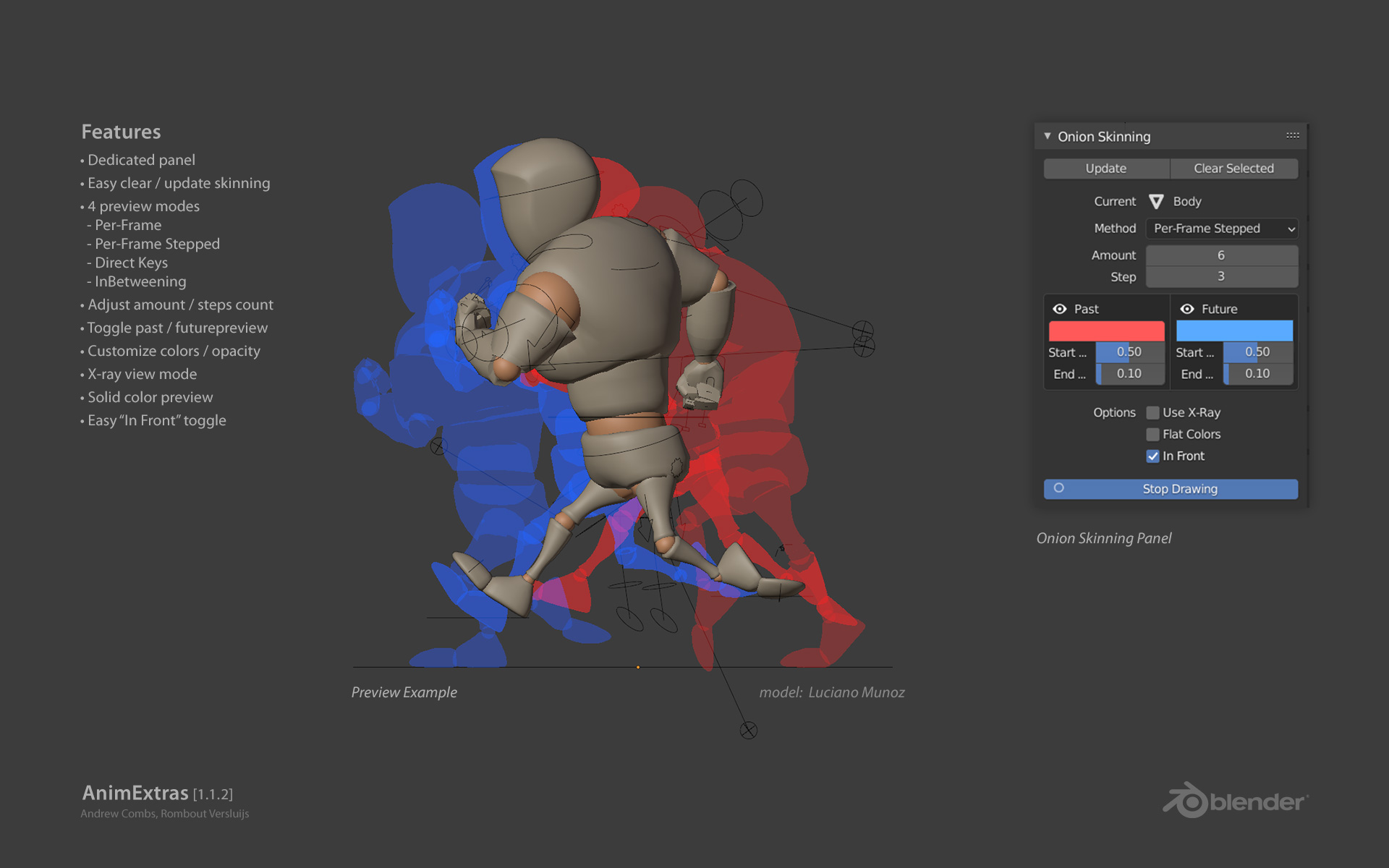
8 |
9 | ## Features
10 |
11 | * Dedicated panel
12 | * Easy clear / update skinning
13 | * 4 preview modes
14 | * Per-Frame
15 | * Per-Frame Stepped
16 | * Direct Keys
17 | * InBetweening
18 | * Adjust amount / steps count
19 | * Toggle past / futurepreview
20 | * Customize colors / opacity
21 | * X-ray view mode
22 | * Solid color preview
23 | * Easy “In Front” toggle
24 |
25 | ### System Requirements
26 |
27 | | **OS** | **Blender** |
28 | | ------------- | ------------- |
29 | | OSX | Blender 2.80 |
30 | | Windows | Blender 2.80 |
31 | | Linux | Not Tested |
32 |
33 |
35 |
36 | ### Installation Process
37 |
38 | 1. Download the latest [release](https://github.com/iBrushC/animextras/releases/)
39 | 2. If you downloaded the zip file.
40 | 3. Open Blender.
41 | 4. Go to File -> User Preferences -> Addons.
42 | 5. At the bottom of the window, choose *Install From File*.
43 | 6. Select the file `animextras-VERSION.zip` from your download location..
44 | 7. Activate the checkbox for the plugin that you will now find in the list.
45 | 8. Customize shortcuts > remember to save new keymap to store them!
46 |
47 | ### Changelog
48 |
49 | [Full Changelog](CHANGELOG.md)
50 |
--------------------------------------------------------------------------------
/CHANGELOG.md:
--------------------------------------------------------------------------------
1 | # Changelog
2 |
3 | All notable changes to this project will be documented in this file.
4 |
5 | ## [1.1.2] - 2021-04-21
6 |
7 | ### Added
8 |
9 | - Option to use linked rigs (makes override and then local, keeping original linked rig for backup)
10 | - Method of updating onion skinning while doing pose work
11 | - In Front mode make posing and viewing onion skinning more clear
12 | - Shortcuts for Draw, Update, Clear > allows for easy and faster workflow
13 | - Panel shows feedback for no selection and shows if wrong object is selected (also for shortcuts)
14 | - Links to Github issues / documentation for easier acces
15 | - Templates to github, you get cleaner and more understandable issues that way
16 |
17 | ### Changed
18 |
19 | - Panel layout conform 2.8 GUI
20 | - Cleaner look enable toggles past / future
21 | - Onion skinning most of times does not show in / opening new documents, prevents Blender restart (wip)
22 |
23 | ## [1.1.1] - 2020-11-30
24 |
25 | ### Changed
26 |
27 | - No changes to functionality, just code cleanup.
28 |
29 | ## [1.1.0] - 2020-11-07
30 |
31 | ### Added
32 |
33 | - New Onion Skinning mode, Inbetweening, lets you see frames with direct keyframes in a different color than interpolated frames.
34 |
35 | ### Changed
36 |
37 | - General cleanup to certain aspects of the code, more consistency and less try-except statements.
38 |
39 | ## [1.0.4] - 2020-11-13
40 |
41 | ### Changed
42 |
43 | - Stop Drawing is now no longer linked to the escape key
44 |
45 | ## [1.0.3] - 2020-11-10
46 |
47 | ### Fixed
48 |
49 | - Update bug that would switch objects instead of updating them. Turning off overlays now automatically turns off onion skins
50 |
51 | ## [1.0.2] - 2020-11-07
52 |
53 | ### Fixed
54 |
55 | - Issues with builds not working on 2.8-2.9 versions and alpha versions
56 |
57 | ## [1.0.1] - 2020-11-07
58 |
59 | ### Added
60 |
61 | - Build for Blender versions 2.8x
62 |
63 | ## [1.0.0] - 2020-11-02
64 |
65 | - Initial release
66 |
67 | ## Notes
68 |
69 | The format is based on [Keep a Changelog](https://keepachangelog.com/en/1.0.0/),
70 | and this project adheres to [Semantic Versioning](https://semver.org/spec/v2.0.0.html).
71 |
72 | [1.1.2]:https://github.com/iBrushC/animextras/releases/tag/v.1.1.2
73 | [1.1.1]:https://github.com/iBrushC/animextras/releases/tag/v.1.1.1
74 | [1.1.0]:https://github.com/iBrushC/animextras/releases/tag/v.1.1.0
75 | [1.0.4]:https://github.com/iBrushC/animextras/releases/tag/v.1.0.4
76 | [1.0.3]:https://github.com/iBrushC/animextras/releases/tag/v.1.0.3
77 | [1.0.2]:https://github.com/iBrushC/animextras/releases/tag/v.1.0.2
78 | [1.0.1]:https://github.com/iBrushC/animextras/releases/tag/v.1.0.1
79 | [1.0.0]:https://github.com/iBrushC/animextras/releases/tag/v.1.0.0
80 |
--------------------------------------------------------------------------------
/ons/gui.py:
--------------------------------------------------------------------------------
1 | #######################
2 | ## Onion Skinning GUI
3 | #######################
4 |
5 | import bpy
6 | from .ops import *
7 |
8 |
9 | class ANMX_gui(bpy.types.Panel):
10 | """Panel for all Onion Skinning Operations"""
11 | bl_idname = 'VIEW3D_PT_animextras_panel'
12 | bl_space_type = 'VIEW_3D'
13 | bl_region_type = 'UI'
14 | bl_category = 'AnimExtras'
15 | bl_label = 'Onion Skinning'
16 |
17 |
18 | def draw(self, context):
19 | layout = self.layout
20 | access = context.scene.anmx_data
21 | # obj = context.object
22 | obj = context.active_object
23 |
24 | # Makes UI split like 2.8 no split factor 0.3 needed
25 | layout.use_property_split = True
26 | layout.use_property_decorate = False
27 |
28 | # Makes sure the user can't do any operations when the onion object doesn't exist
29 | if access.onion_object not in bpy.data.objects:
30 | layout.operator("anim_extras.set_onion")
31 | return
32 | if context.selected_objects == []:
33 | layout.label(text="Nothing selected", icon='INFO')
34 | return
35 | # if not ((obj.type == 'MESH') and hasattr(obj.animation_data,"action") or (obj.type=='EMPTY')):
36 | # layout.label(text="Update needs active object", icon='INFO')
37 | # return
38 | else:
39 | row = layout.row(align=True)
40 | row.operator("anim_extras.update_onion", text="Update")
41 | row.operator("anim_extras.clear_onion", text="Clear Selected")
42 | layout.separator(factor=0.2)
43 |
44 |
45 | col = layout.column()
46 | col.prop(access,"onion_object", text="Current", emboss=False, icon='OUTLINER_OB_MESH') #text="{}".format(access.onion_object),
47 |
48 | col = layout.column()
49 | col.prop(access, "onion_mode", text="Method")
50 |
51 | modes = {"PFS", "INB"}
52 | # if not access.onion_mode in modes: #
53 | if access.onion_mode != "PFS":
54 | row = layout.row()
55 | row.prop(access, "skin_count", text="Amount")
56 |
57 | if access.onion_mode == "PFS":
58 | col = layout.column(align=True)
59 | col.prop(access, "skin_count", text="Amount")
60 | col.prop(access, "skin_step", text="Step")
61 |
62 | text = "Past"
63 | if access.onion_mode == "INB":
64 | text = "Inbetween Color"
65 |
66 | row = layout.row(align=True)
67 | box = row.box()
68 | col = box.column(align=True)
69 | past = col.row(align=True)
70 | icoPast = 'HIDE_OFF' if access.past_enabled else 'HIDE_ON'
71 | past.row().prop(access, "past_enabled", text='', icon=icoPast, emboss=False)
72 | past.row().label(text=text)
73 | col.prop(access, "past_color", text="")
74 | col.prop(access, "past_opacity_start", text="Start Opacity", slider=True)
75 | col.prop(access, "past_opacity_end", text="End Opacity", slider=True)
76 |
77 | text = "Future"
78 |
79 | if access.onion_mode == "INB":
80 | text = "Direct Keying Color"
81 |
82 | box = row.box()
83 | col = box.column(align=True)
84 | fut = col.row(align=True)
85 | icoFut = 'HIDE_OFF' if access.future_enabled else 'HIDE_ON'
86 | fut.prop(access, "future_enabled", text='', icon=icoFut, emboss=False)
87 | fut.label(text=text)
88 | col.prop(access, "future_color", text="")
89 | col.prop(access, "future_opacity_start", text="Start Opacity", slider=True)
90 | col.prop(access, "future_opacity_end", text="End Opacity", slider=True)
91 |
92 | layout.use_property_split = True
93 | layout.use_property_decorate = False # No animation.
94 | layout.separator(factor=0.2)
95 |
96 | col = layout.column(heading="Options", align=True)
97 | col.prop(access, "use_xray")
98 | col.prop(access, "use_flat")
99 | col.prop(access, "in_front")
100 |
101 | layout.use_property_split = False
102 | layout.separator(factor=0.2)
103 |
104 | text = "Draw"
105 | if access.toggle:
106 | text = "Stop Drawing"
107 | icoOni = 'ONIONSKIN_OFF' if access.toggle else 'ONIONSKIN_ON'
108 | layout.prop(access, "toggle", text=text, toggle=True, icon=icoOni)
109 |
--------------------------------------------------------------------------------
/__init__.py:
--------------------------------------------------------------------------------
1 | # Updated
2 | # - Panel layout > updated to match 2.8 styling
3 | # - Added cleaner eye toggles for past and future
4 | # - Icons to some buttons
5 |
6 | # Added
7 | # - Option to work with linked rigs > needs work InBetween as we need to target Parent rig
8 | # - In Front option > show mesh in front of onion skinning
9 | # - Shortcuts > for easier and faster workflow
10 | # - Addon preferences so shortcuts can be customized
11 | # - Panel feedback when nothings is selected or wrong object
12 |
13 | # Fixed
14 | # - Possibly old onion skinning when another file is openened
15 | # - Linked rigs and local object/mesh also show onion skinning
16 |
17 | # Ideas
18 | # - Auto update when working on posing > could be handy? > need fedback from real animators
19 | # - Added option to do multiple objects > this would need merge of objects, not sure will still work properly
20 |
21 | ##################
22 | ## Initiation
23 | ##################
24 |
25 | bl_info = {
26 | "name": "AnimExtras",
27 | "author": "Andrew Combs, Rombout Versluijs",
28 | "version": (1, 1, 2),
29 | "blender": (2, 80, 0),
30 | "description": "True onion skinning",
31 | "category": "Animation",
32 | "wiki_url": "https://github.com/iBrushC/animextras",
33 | "tracker_url": "https://github.com/iBrushC/animextras/issues"
34 | }
35 |
36 | import bpy
37 | import rna_keymap_ui
38 | from bpy.types import AddonPreferences
39 |
40 | from .ons.gui import *
41 | from .ons import ops
42 | from .ons import registers
43 |
44 |
45 | class ANMX_AddonPreferences(AddonPreferences):
46 | """ Preference Settings Addon Panel"""
47 | bl_idname = __name__
48 | bl_label = "Addon Preferences"
49 | bl_options = {'REGISTER', 'UNDO'}
50 |
51 | def draw(self, context):
52 | layout = self.layout
53 | col = layout.column()
54 |
55 | col.label(text = "Hotkeys:")
56 | col.label(text = "Do NOT remove hotkeys, disable them instead!")
57 |
58 | col.separator()
59 | wm = bpy.context.window_manager
60 | kc = wm.keyconfigs.user
61 |
62 | col.separator()
63 | km = kc.keymaps["3D View"]
64 |
65 | kmi = registers.get_hotkey_entry_item(km, "anim_extras.update_onion","EXECUTE","tab")
66 | if kmi:
67 | col.context_pointer_set("keymap", km)
68 | rna_keymap_ui.draw_kmi([], kc, km, kmi, col, 0)
69 | else:
70 | col.label(text = "Update Onion Object")
71 | col.label(text = "restore hotkeys from interface tab")
72 | col.separator()
73 |
74 | kmi = registers.get_hotkey_entry_item(km, "anim_extras.toggle_onion","EXECUTE","tab")
75 | if kmi:
76 | col.context_pointer_set("keymap", km)
77 | rna_keymap_ui.draw_kmi([], kc, km, kmi, col, 0)
78 | else:
79 | col.label(text = "Toggle Draw Onion")
80 | col.label(text = "restore hotkeys from interface tab")
81 | col.separator()
82 |
83 | kmi = registers.get_hotkey_entry_item(km, "anim_extras.add_clear_onion","EXECUTE","tab")
84 | if kmi:
85 | col.context_pointer_set("keymap", km)
86 | rna_keymap_ui.draw_kmi([], kc, km, kmi, col, 0)
87 | else:
88 | col.label(text = "Add / Clear Onion Object")
89 | col.label(text = "restore hotkeys from interface tab")
90 | col.separator()
91 |
92 |
93 | addon_keymaps = []
94 | classes = [ANMX_gui, ANMX_data, ANMX_set_onion, ANMX_draw_meshes, ANMX_clear_onion, ANMX_toggle_onion, ANMX_update_onion, ANMX_add_clear_onion, ANMX_AddonPreferences]
95 |
96 |
97 | @persistent
98 | def ANMX_clear_handler(scene):
99 | ops.clear_active(clrRig=False)
100 | # bpy.ops.anim_extras.draw_meshes('INVOKE_DEFAULT')
101 |
102 | def register():
103 | for c in classes:
104 | bpy.utils.register_class(c)
105 |
106 | bpy.types.Scene.anmx_data = bpy.props.PointerProperty(type=ANMX_data)
107 | bpy.app.handlers.load_pre.append(ANMX_clear_handler)
108 |
109 | wm = bpy.context.window_manager
110 | kc = wm.keyconfigs.addon
111 | km = kc.keymaps.new(name="3D View", space_type="VIEW_3D")
112 |
113 | kmi = km.keymap_items.new("anim_extras.update_onion", "R", "PRESS", alt = True, shift = True)
114 | addon_keymaps.append((km, kmi))
115 |
116 | kmi = km.keymap_items.new("anim_extras.toggle_onion", "T", "PRESS", alt = True, shift = True)
117 | addon_keymaps.append((km, kmi))
118 |
119 | kmi = km.keymap_items.new("anim_extras.add_clear_onion", "C", "PRESS", alt = True, shift = True)
120 | addon_keymaps.append((km, kmi))
121 |
122 |
123 | def unregister():
124 | for c in classes:
125 | bpy.utils.unregister_class(c)
126 |
127 | bpy.app.handlers.load_pre.remove(ANMX_clear_handler)
128 |
129 | for km, kmi in addon_keymaps:
130 | km.keymap_items.remove(kmi)
131 | addon_keymaps.clear()
132 |
133 |
134 | if __name__ == "__main__":
135 | register()
136 |
--------------------------------------------------------------------------------
/ons/ops.py:
--------------------------------------------------------------------------------
1 | #############################
2 | ## Onion Skinning Operators
3 | #############################
4 |
5 | import bpy
6 | from bpy.app.handlers import persistent
7 | from bpy.types import Operator, PropertyGroup
8 | import gpu
9 | from gpu_extras.batch import batch_for_shader
10 |
11 | import numpy as np
12 | from mathutils import Vector, Matrix
13 |
14 | # ########################################################## #
15 | # Data (stroring it in the object or scene doesnt work well) #
16 | # ########################################################## #
17 |
18 | shader = gpu.shader.from_builtin('UNIFORM_COLOR')
19 | frame_data = dict([])
20 | batches = dict([])
21 | extern_data = dict([])
22 |
23 | # ################ #
24 | # Functions #
25 | # ################ #
26 |
27 | def frame_get_set(_obj, frame):
28 | scn = bpy.context.scene
29 | anmx = scn.anmx_data
30 |
31 | # Show from viewport > keep off this allows in_front to work
32 | # if "_animextras" in scn.collection.children:
33 | # vlayer = scn.view_layers['View Layer']
34 | # vlayer.layer_collection.children['_animextras'].hide_viewport = False
35 |
36 | if _obj.type == 'EMPTY':
37 | if anmx.is_linked:
38 | bpy.ops.object.duplicate_move_linked(OBJECT_OT_duplicate={"linked":True})
39 | # Hide original but keep it able to render
40 | _obj.hide_viewport = True
41 | if "_animextras" in scn.collection.children:
42 | bpy.data.collections['_animextras'].objects.link(bpy.data.objects[anmx.onion_object])
43 | # bpy.ops.object.move_to_collection(collection_index=0, is_new=True, new_collection_name="_animextras")
44 |
45 | _obj = bpy.context.active_object
46 | if not "_animextras" in scn.collection.children:
47 | bpy.ops.object.move_to_collection(collection_index=0, is_new=True, new_collection_name="_animextras")
48 | # bpy.data.collections['_animextras'].hide_viewport = True
49 | # bpy.data.scenes["Scene"].view_layers[0].layer_collection.collection.children["_animextras"].hide_viewport = False
50 | bpy.data.collections['_animextras'].hide_render = True
51 | _obj = bpy.context.selected_objects[0]
52 |
53 | # print("_obj %s" % _obj)
54 | if anmx.is_linked:
55 | bpy.ops.object.make_override_library()
56 | for i in bpy.data.collections['_animextras'].children[0].objects:
57 | if i.type == 'MESH':
58 | new_onion = i.name
59 | i.hide_render = True
60 |
61 | scn.anmx_data.onion_object = new_onion
62 | anmx.is_linked = False
63 |
64 | # Return duplicated linked rig made local
65 | _obj = bpy.data.objects[anmx.onion_object]
66 |
67 | # Make object active so panel shows
68 | bpy.context.view_layer.objects.active = _obj
69 | # Select active
70 | # bpy.context.scene.objects["Body"].select_set(True)
71 |
72 | # Gets all of the data from a mesh on a certain frame
73 | tmpobj = _obj
74 |
75 | # Setting the frame to get an accurate reading of the object on the selected frame
76 | scn = bpy.context.scene
77 | scn.frame_set(frame)
78 |
79 | # Getting the Depenency Graph and the evaluated object
80 | depsgraph = bpy.context.evaluated_depsgraph_get()
81 | eval = tmpobj.evaluated_get(depsgraph)
82 |
83 | # Making a new mesh from the object.
84 | mesh = eval.to_mesh()
85 | mesh.update()
86 |
87 | # Getting the object's world matrix
88 | mat = Matrix(_obj.matrix_world)
89 |
90 | # This moves the mesh by the object's world matrix, thus making everything global space. This is much faster than getting each vertex individually and doing a matrix multiplication on it
91 | mesh.transform(mat)
92 | mesh.update()
93 |
94 | # loop triangles are needed to properly draw the mesh on screen
95 | mesh.calc_loop_triangles()
96 | mesh.update()
97 |
98 | # Creating empties so that all of the verts and indices can be gathered all at once in the next step
99 | vertices = np.empty((len(mesh.vertices), 3), 'f')
100 | indices = np.empty((len(mesh.loop_triangles), 3), 'i')
101 |
102 | # Getting all of the vertices and incices all at once (from: https://docs.blender.org/api/current/gpu.html#mesh-with-random-vertex-colors)
103 | mesh.vertices.foreach_get(
104 | "co", np.reshape(vertices, len(mesh.vertices) * 3))
105 | mesh.loop_triangles.foreach_get(
106 | "vertices", np.reshape(indices, len(mesh.loop_triangles) * 3))
107 |
108 | args = [vertices, indices]
109 |
110 | # Hide from viewport > keep off this allows in_front to work
111 | # if "_animextras" in scn.collection.children:
112 | # vlayer = scn.view_layers['View Layer']
113 | # vlayer.layer_collection.children['_animextras'].hide_viewport = True
114 |
115 | return args
116 |
117 |
118 | def set_to_active(_obj):
119 | """ Sets the object that is being used for the onion skinning """
120 | scn = bpy.context.scene
121 | anmx = scn.anmx_data
122 |
123 | # Clear all data > caused double drawing with mode switch
124 | # Old clear method caused issues when using a rig
125 | # Still see handler issue
126 | frame_data.clear()
127 | batches.clear()
128 | extern_data.clear()
129 |
130 | # skip clear if we are linked
131 | if hasattr(anmx,"link_parent"):
132 | if not anmx.link_parent == "":
133 | clear_active(clrRig=False)
134 |
135 | anmx.onion_object = _obj.name
136 | anmx.is_linked = True if _obj.type == 'EMPTY' else False
137 |
138 | if anmx.is_linked:
139 | if hasattr(anmx,"link_parent"):
140 | if not anmx.link_parent:
141 | anmx.link_parent = _obj.name
142 |
143 | bake_frames()
144 | make_batches()
145 |
146 |
147 | def clear_active(clrRig):
148 | """ clrRig will do complete clear, sued with linked Rigs, allows to update it without deleting everuthing """
149 | """ Clears the active object """
150 |
151 | scn = bpy.context.scene
152 | anmx = scn.anmx_data
153 | name = anmx.onion_object
154 |
155 | # Clears all the data needed to store onion skins on the previously selected object
156 | frame_data.clear()
157 | batches.clear()
158 | extern_data.clear()
159 |
160 | # Clear localzed rigs & overrides linked items
161 | if clrRig:
162 | if hasattr(anmx,"link_parent"):
163 | if not anmx.link_parent == "":
164 | bpy.data.collections["_animextras"].children[0].objects.unlink(bpy.data.objects[name])
165 | bpy.data.collections.remove(bpy.data.collections[anmx.link_parent])
166 | bpy.data.collections.remove(bpy.data.collections["_animextras"])
167 | # Show original linked rig again
168 | bpy.data.objects[anmx.link_parent].hide_viewport = False
169 | anmx.link_parent = ""
170 |
171 | # Gets rid of the selected object
172 | anmx.onion_object = ""
173 |
174 |
175 | def make_batches():
176 | # Custom OSL shader could be set here
177 | scn = bpy.context.scene
178 | anmx = scn.anmx_data
179 | _obj = bpy.data.objects[anmx.onion_object]
180 |
181 |
182 | for key in frame_data:
183 | arg = frame_data[key] # Dictionaries are used rather than lists or arrays so that frame numbers are a given
184 | vertices = arg[0]
185 | indices = arg[1]
186 | batch = batch_for_shader(shader, 'TRIS', {"pos": vertices}, indices=indices)
187 | batches[key] = batch
188 |
189 |
190 | def bake_frames():
191 | # Needs to do the following:
192 | # 1. Bake the data for every frame and store it in the objects "["frame_data"]" items
193 | scn = bpy.context.scene
194 | anmx = scn.anmx_data
195 | _obj = bpy.data.objects[anmx.onion_object]
196 |
197 | curr = scn.frame_current
198 | step = anmx.skin_step
199 |
200 | # Getting the first and last frame of the animation
201 | keyobj = _obj
202 |
203 | if _obj.parent is not None:
204 | keyobj = _obj.parent
205 | # Check if obj is linked rig
206 | elif hasattr(_obj.instance_collection, "all_objects"):
207 | keyobj = _obj.instance_collection.all_objects[_obj.name]
208 | # print(keyobj)
209 | # keyobj = _obj.parent
210 |
211 | keyframes = []
212 | for fc in keyobj.animation_data.action.fcurves:
213 | for k in fc.keyframe_points:
214 | keyframes.append(int(k.co[0]))
215 |
216 | keyframes = np.unique(keyframes)
217 |
218 | start = int(np.min(keyframes))
219 | end = int(np.max(keyframes)) + 1
220 |
221 | if anmx.onion_mode == "PF":
222 | for f in range(start, end):
223 | arg = frame_get_set(_obj, f)
224 | frame_data[str(f)] = arg
225 | extern_data.clear()
226 |
227 | elif anmx.onion_mode == "PFS":
228 | for f in range(start, end, step):
229 | arg = frame_get_set(_obj, f)
230 | frame_data[str(f)] = arg
231 | extern_data.clear()
232 |
233 | elif anmx.onion_mode == "DC":
234 | for fkey in keyframes:
235 | arg = frame_get_set(_obj, fkey)
236 | frame_data[str(fkey)] = arg
237 | extern_data.clear()
238 |
239 | elif anmx.onion_mode == "INB":
240 | for f in range(start, end):
241 | arg = frame_get_set(_obj, f)
242 | frame_data[str(f)] = arg
243 |
244 | extern_data.clear()
245 | for fkey in keyframes:
246 | extern_data[str(fkey)] = fkey
247 |
248 |
249 | scn.frame_set(curr)
250 |
251 |
252 | # ################ #
253 | # Properties #
254 | # ################ #
255 |
256 |
257 | class ANMX_data(PropertyGroup):
258 | # Custom update function for the toggle
259 | def toggle_update(self, context):
260 | if self.toggle:
261 | bpy.ops.anim_extras.draw_meshes('INVOKE_DEFAULT')
262 | return
263 |
264 | def inFront(self,context):
265 | scn = bpy.context.scene
266 | if self.onion_object:
267 | obj = bpy.context.view_layer.objects.active = bpy.data.objects[self.onion_object]
268 | obj.show_in_front = True if scn["anmx_data"]["in_front"] else False
269 | if "use_xray" in scn["anmx_data"]:
270 | if scn["anmx_data"]["use_xray"]:
271 | scn["anmx_data"]["use_xray"] = False if scn["anmx_data"]["in_front"] else True
272 | return
273 |
274 | modes = [
275 | ("PF", "Per-Frame", "Shows the amount of frames in the future and past", 1),
276 | ("PFS", "Per-Frame Stepped", "Shows the amount of frames in the future and past with option to step-over frames. This allows to see futher but still have a clear overview what is happening", 2),
277 | ("DC", "Direct Keys", "Show onion only on inserted keys using amount as frame when keys are visible", 3),
278 | ("INB", "Inbetweening", " Inbetweening, lets you see frames with direct keyframes in a different color than interpolated frames", 4)
279 | ]
280 |
281 | # Onion Skinning Properties
282 | skin_count: bpy.props.IntProperty(name="Count", description="Number of frames we see in past and future", default=1, min=1)
283 | skin_step: bpy.props.IntProperty(name="Step", description="Number of frames to skip in conjuction with Count", default=1, min=1)
284 | onion_object: bpy.props.StringProperty(name="Onion Object", default="")
285 | onion_mode: bpy.props.EnumProperty(name="", get=None, set=None, items=modes)
286 | use_xray: bpy.props.BoolProperty(name="Use X-Ray", description="Draws the onion visible through the object", default=False)
287 | use_flat: bpy.props.BoolProperty(name="Flat Colors", description="Colors while not use opacity showing 100% of the color", default=False)
288 | in_front: bpy.props.BoolProperty(name="In Front", description="Draws the selected object in front of the onion skinning", default=False, update=inFront)
289 | toggle: bpy.props.BoolProperty(name="Draw", description="Toggles onion skinning on or off", default=False, update=toggle_update)
290 |
291 | # Linked settings
292 | is_linked: bpy.props.BoolProperty(name="Is linked", default=False)
293 | link_parent: bpy.props.StringProperty(name="Link Parent", default="")
294 |
295 | # Past settings
296 | past_color: bpy.props.FloatVectorProperty(name="Past Color", min=0, max=1, size=3, default=(1., .1, .1), subtype='COLOR')
297 | past_opacity_start: bpy.props.FloatProperty(name="Starting Opacity", min=0, max=1, precision=2, default=0.5)
298 | past_opacity_end: bpy.props.FloatProperty(name="Ending Opacity", min=0, max=1, precision=2, default=0.1)
299 | past_enabled: bpy.props.BoolProperty(name="Enabled?", default=True)
300 |
301 | # Future settings
302 | future_color: bpy.props.FloatVectorProperty(name="Future Color", min=0, max=1, size=3, default=(.1, .4, 1.), subtype='COLOR')
303 | future_opacity_start: bpy.props.FloatProperty(name="Starting Opacity", min=0, max=1,precision=2, default=0.5)
304 | future_opacity_end: bpy.props.FloatProperty(name="Ending Opacity", min=0, max=1,precision=2, default=0.1)
305 | future_enabled: bpy.props.BoolProperty(name="Enabled?", default=True)
306 |
307 |
308 | # ################ #
309 | # Operators #
310 | # ################ #
311 |
312 | def check_selected(context):
313 | obj = context.active_object
314 | return context.selected_objects != []
315 | # return True
316 | # Need workaround so we can pose and still do updates
317 | # return ((obj.type == 'MESH') and hasattr(obj.animation_data,"action") or (obj.type=='EMPTY') or (obj.type == 'MESH') and hasattr(obj.parent.animation_data,"action"))
318 | # if ((obj.type == 'MESH') and hasattr(obj.animation_data,"action") or (obj.type=='EMPTY')):
319 | # return True
320 | # else:
321 | # return False
322 |
323 | class ANMX_set_onion(Operator):
324 | bl_idname = "anim_extras.set_onion"
325 | bl_label = "Set Onion To Selected"
326 | bl_description = "Sets the selected object to be the onion object"
327 | bl_options = {'REGISTER', 'UNDO' }
328 |
329 | @classmethod
330 | def poll(cls, context):
331 | obj = context.active_object
332 | if context.selected_objects != []:
333 | if (hasattr(obj.parent,"animation_data") and (obj.type == 'MESH')):
334 | if (hasattr(obj.parent.animation_data,"action")):
335 | return True
336 | if hasattr(obj.animation_data,"action"):
337 | if hasattr(obj.animation_data.action,"fcurves"):
338 | return ((obj.type == 'MESH') and hasattr(obj.animation_data,"action") or (obj.type=='EMPTY'))
339 | if hasattr(obj.instance_collection, "all_objects"):
340 | return True
341 |
342 | def execute(self, context):
343 | obj = context.active_object
344 | scn = context.scene
345 | anmx = scn.anmx_data
346 |
347 | #Extra check for the shortcuts
348 | if not check_selected(context):
349 | self.report({'INFO'}, "Onion needs animated active selection ")
350 | return {'CANCELLED'}
351 |
352 | anmx.toggle = False if anmx.toggle else True
353 |
354 | if obj == None:
355 | return {"CANCELLED"}
356 |
357 | if obj.parent is None:
358 | try:
359 | obj.animation_data.action.fcurves
360 | except AttributeError:
361 | pass
362 | # return {"CANCELLED"}
363 | else:
364 | try:
365 | # This right here needs to change for allowing linked rigs
366 | # obj.parent.animation_data.action.fcurves
367 | dObj = bpy.data.objects[obj.name]
368 | hasattr(dObj.instance_collection, "all_objects")
369 | except AttributeError:
370 | return {"CANCELLED"}
371 |
372 | # Or check if it is linked empty
373 | if ((obj.type == 'MESH') or (obj.type=='EMPTY')):
374 | set_to_active(obj)
375 |
376 | return {"FINISHED"}
377 |
378 |
379 | class ANMX_clear_onion(Operator):
380 | bl_idname = "anim_extras.clear_onion"
381 | bl_label = "Clear Selected Onion"
382 | bl_description = "Clears the path of the onion object"
383 | bl_options = {'REGISTER', 'UNDO' }
384 |
385 | def execute(self, context):
386 | #Extra check for the shortcuts
387 | if not check_selected(context):
388 | self.report({'INFO'}, "Onion needs animated active selection")
389 | return {'CANCELLED'}
390 |
391 | clear_active(clrRig=True)
392 |
393 | return {"FINISHED"}
394 |
395 | class ANMX_toggle_onion(Operator):
396 | """ Operator for toggling the onion object so we can shortcut it"""
397 | bl_idname = "anim_extras.toggle_onion"
398 | bl_label = "Toggle Onion"
399 | bl_description = "Toggles onion ON/OFF"
400 | bl_options = {'REGISTER', 'UNDO' }
401 |
402 | def execute(self, context):
403 | context.scene.anmx_data.toggle = False if context.scene.anmx_data.toggle else True
404 |
405 | return {"FINISHED"}
406 |
407 | class ANMX_add_clear_onion(Operator):
408 | """ Toggle for clearing and adding"""
409 | bl_idname = "anim_extras.add_clear_onion"
410 | bl_label = "Add/Toggle Onion"
411 | bl_description = "Add/Toggles onion ON/OFF"
412 | bl_options = {'REGISTER', 'UNDO' }
413 |
414 | def execute(self, context):
415 | #Extra check for the shortcuts
416 | if not check_selected(context):
417 | self.report({'INFO'}, "Onion needs animated active selection")
418 | return {'CANCELLED'}
419 |
420 | anmx = context.scene.anmx_data
421 | if anmx.onion_object=="":
422 | bpy.ops.anim_extras.set_onion()
423 | else:
424 | bpy.ops.anim_extras.clear_onion()
425 |
426 | return {"FINISHED"}
427 |
428 |
429 | class ANMX_update_onion(Operator):
430 | bl_idname = "anim_extras.update_onion"
431 | bl_label = "Update Selected Onion"
432 | bl_description = "Updates the path of the onion object"
433 | bl_options = {'REGISTER', 'UNDO' }
434 |
435 | def execute(self, context):
436 | #Extra check for the shortcuts
437 | if not check_selected(context):
438 | self.report({'INFO'}, "Onion needs active selection")
439 | return {'CANCELLED'}
440 |
441 | # This allows to update, also pose mode
442 | if context.scene.anmx_data.onion_object in bpy.data.objects:
443 | set_to_active(bpy.data.objects[context.scene.anmx_data.onion_object])
444 |
445 | return {"FINISHED"}
446 |
447 | # Uses a list formatted in the following way to draw the meshes:
448 | # [[vertices, indices, colors], [vertices, indices, colors]]
449 | class ANMX_draw_meshes(Operator):
450 | bl_idname = "anim_extras.draw_meshes"
451 | bl_label = "Draw"
452 | bl_description = "Draws a set of meshes without creating objects"
453 | bl_options = {'REGISTER', 'UNDO' }
454 |
455 | def __init__(self):
456 | print("#### __INIT__ DRAW MESHES ####")
457 | self.handler = None
458 | self.timer = None
459 | self.mode = None
460 |
461 | def __del__(self):
462 | """ unregister when done, helps when reopening other scenes """
463 | print("#### UNREGISTER HANDLERS ####")
464 | self.finish(bpy.context)
465 | print("#### HANDLER %s ####" % self.handler)
466 |
467 | def invoke(self, context, event):
468 | self.register_handlers(context)
469 | context.window_manager.modal_handler_add(self)
470 | self.mode = context.scene.anmx_data.onion_mode
471 | return {'RUNNING_MODAL'}
472 |
473 | def register_handlers(self, context):
474 | self.timer = context.window_manager.event_timer_add(0.1, window=context.window)
475 | self.handler = bpy.types.SpaceView3D.draw_handler_add(self.draw_callback, (context,), 'WINDOW', 'POST_VIEW')
476 |
477 | def unregister_handlers(self, context):
478 | context.scene.anmx_data.toggle = False
479 | context.window_manager.event_timer_remove(self.timer)
480 | if self.handler != None:
481 | bpy.types.SpaceView3D.draw_handler_remove(self.handler, 'WINDOW')
482 | self.handler = None
483 |
484 | def modal(self, context, event):
485 | if context.scene.anmx_data.onion_object not in bpy.data.objects:
486 | self.unregister_handlers(context)
487 | return {'CANCELLED'}
488 |
489 | if context.scene.anmx_data.toggle is False or self.mode != context.scene.anmx_data.onion_mode:
490 | self.unregister_handlers(context)
491 | return {'CANCELLED'}
492 |
493 | return {'PASS_THROUGH'}
494 |
495 | def finish(self, context):
496 | self.unregister_handlers(context)
497 | return {'FINISHED'}
498 |
499 | def draw_callback(self, context):
500 | scn = context.scene
501 | ac = scn.anmx_data
502 | f = scn.frame_current
503 |
504 | pc = ac.past_color
505 | fc = ac.future_color
506 |
507 |
508 |
509 | override = False
510 |
511 | color = (0, 0, 0, 0)
512 |
513 | threshold = ac.skin_count
514 |
515 | if context.space_data.overlay.show_overlays == False:
516 | return
517 |
518 | for key in batches:
519 | f_dif = abs(f-int(key))
520 |
521 | # Getting the color if the batch is in the past
522 |
523 | if len(extern_data) == 0:
524 | if f > int(key):
525 | if ac.past_enabled:
526 | color = (pc[0], pc[1], pc[2], ac.past_opacity_start-((ac.past_opacity_start-ac.past_opacity_end)/ac.skin_count) * f_dif)
527 | else:
528 | override = True
529 | # Getting the color if the batch is in the future
530 | else:
531 | if ac.future_enabled:
532 | color = (fc[0], fc[1], fc[2], ac.future_opacity_start-((ac.future_opacity_start-ac.future_opacity_end)/ac.skin_count) * f_dif)
533 | else:
534 | override = True
535 | else:
536 | if key in extern_data:
537 | color = (fc[0], fc[1], fc[2], ac.future_opacity_start-((ac.future_opacity_start-ac.future_opacity_end)/ac.skin_count) * f_dif)
538 | else:
539 | color = (pc[0], pc[1], pc[2], ac.past_opacity_start-((ac.past_opacity_start-ac.past_opacity_end)/ac.skin_count) * f_dif)
540 |
541 | # Only draws if the frame is not the current one, it is within the skin limits, and there has not been an override
542 | if f != int(key) and f_dif <= ac.skin_count and not override:
543 | shader.bind()
544 | shader.uniform_float("color", color)
545 |
546 | # Theres gotta be a better way to do this. Seems super inefficient
547 | if not ac.use_flat:
548 | gpu.state.blend_set('ALPHA')
549 | gpu.state.face_culling_set('BACK')
550 | if not ac.use_xray:
551 | gpu.state.depth_test_set('LESS')
552 |
553 | batches[key].draw(shader)
554 |
555 | gpu.state.blend_set('NONE')
556 | gpu.state.face_culling_set('NONE')
557 | gpu.state.depth_test_set('NONE')
558 | override = False
559 |
--------------------------------------------------------------------------------