├── results └── .gitkeep ├── resources └── 2025p3.csv ├── screenshot.jpg ├── .gitignore ├── scripts ├── requirements.txt ├── config_sample.py └── main.py ├── LICENSE ├── README.md └── index.html /results/.gitkeep: -------------------------------------------------------------------------------- 1 | -------------------------------------------------------------------------------- /resources/2025p3.csv: -------------------------------------------------------------------------------- 1 | 标题,日期,开始时间,结束时间,备注 2 | 数据、模型与决策@建德楼202,2025.05.24,08:50,12:10,课程导论 -------------------------------------------------------------------------------- /screenshot.jpg: -------------------------------------------------------------------------------- https://raw.githubusercontent.com/idealclover/Calender-Subscribe/main/screenshot.jpg -------------------------------------------------------------------------------- /.gitignore: -------------------------------------------------------------------------------- 1 | .vscode 2 | .DS_Store 3 | scripts/__pycache__ 4 | scripts/venv 5 | scripts/config.py 6 | -------------------------------------------------------------------------------- /scripts/requirements.txt: -------------------------------------------------------------------------------- 1 | icalendar 2 | pandas 3 | caldav 4 | cos-python-sdk-v5 5 | tencentcloud-sdk-python -------------------------------------------------------------------------------- /scripts/config_sample.py: -------------------------------------------------------------------------------- 1 | # 腾讯云COS配置 2 | COS_SECRET_ID = "" # 替换为您的SecretId 3 | COS_SECRET_KEY = "" # 替换为您的SecretKey 4 | COS_REGION = "" # 替换为您的地域,如ap-beijing、ap-guangzhou等 5 | COS_BUCKET = "" # 替换为您的存储桶名称 6 | 7 | COS_PATH = "" 8 | # COS_PATH = "" 9 | 10 | CDN_URL = "" 11 | # CDN_URL = "" 12 | 13 | # CalDAV配置 14 | CALDAV_UPLOAD_URL = "" 15 | CALDAV_CREDENTIALS = { 16 | "2025p3.ics": {"username": "test", "password": "test"}, 17 | } -------------------------------------------------------------------------------- /LICENSE: -------------------------------------------------------------------------------- 1 | MIT License 2 | 3 | Copyright (c) 2025 idealclover 4 | 5 | Permission is hereby granted, free of charge, to any person obtaining a copy 6 | of this software and associated documentation files (the "Software"), to deal 7 | in the Software without restriction, including without limitation the rights 8 | to use, copy, modify, merge, publish, distribute, sublicense, and/or sell 9 | copies of the Software, and to permit persons to whom the Software is 10 | furnished to do so, subject to the following conditions: 11 | 12 | The above copyright notice and this permission notice shall be included in all 13 | copies or substantial portions of the Software. 14 | 15 | THE SOFTWARE IS PROVIDED "AS IS", WITHOUT WARRANTY OF ANY KIND, EXPRESS OR 16 | IMPLIED, INCLUDING BUT NOT LIMITED TO THE WARRANTIES OF MERCHANTABILITY, 17 | FITNESS FOR A PARTICULAR PURPOSE AND NONINFRINGEMENT. IN NO EVENT SHALL THE 18 | AUTHORS OR COPYRIGHT HOLDERS BE LIABLE FOR ANY CLAIM, DAMAGES OR OTHER 19 | LIABILITY, WHETHER IN AN ACTION OF CONTRACT, TORT OR OTHERWISE, ARISING FROM, 20 | OUT OF OR IN CONNECTION WITH THE SOFTWARE OR THE USE OR OTHER DEALINGS IN THE 21 | SOFTWARE. -------------------------------------------------------------------------------- /README.md: -------------------------------------------------------------------------------- 1 | # Calender-Subscribe 2 | 3 | > 都上清华了,还是逃不了做课表的命运 🥺 4 | 5 | 将 CSV 格式的日程安排转换为 ICS 日历文件&上传到 CalDAV 服务器并提供订阅服务的工具。 6 | 7 | 支持苹果、小米、华为、OPPO、VIVO 等手机系统日历应用订阅。 8 | 9 | 目前供 2025 级清华大学 MBA 预录取新生使用。 10 | 11 | 暂不提供公开访问地址,可下载后点击 `index.html` 查看效果。 12 | 13 | ![](./screenshot.jpg) 14 | 15 | ## ✨ 功能特性 16 | 17 | - 📅 CSV 转 ICS 转换:将 CSV 格式的课程表自动转换为标准的 ICS 日历文件 18 | - 🔐 ICS 文件&CalDAV 支持:支持通过订阅文件/CalDAV 方式订阅 19 | - 🌐 在线订阅服务:提供 Web 界面,支持各种品牌手机的日历应用订阅 20 | - 📱 多平台兼容:支持 iOS、安卓各手机品牌系统日历订阅 21 | 22 | ## 📄 项目结构 23 | 24 | ``` 25 | Calender-Subscribe/ 26 | ├── README.md # 项目说明文档 27 | ├── index.html # Web 订阅界面 28 | ├── resources/ # 资源文件夹 29 | │ └── 2025p3.csv # 示例课程表 CSV 文件 30 | ├── results/ # 生成的 ICS 文件输出目录 31 | │ └── .gitkeep 32 | └── scripts/ # 脚本文件夹 33 | ├── config_sample.py # 配置文件模板 34 | ├── main.py # 主程序脚本 35 | └── requirements.txt # Python 依赖包列表 36 | ``` 37 | 38 | ## 🔨 订阅原理 39 | 40 | 根据当前手机日历订阅功能,提供两种订阅方式:ICS文件直接订阅、CalDAV服务器订阅。 41 | 42 | * ICS文件直接订阅:将 ICS 文件上传到 CDN 服务器,通过 CDN 域名提供订阅链接。适用手机型号:iPhone、小米、OPPO等; 43 | * CalDAV服务器订阅:将 ICS 文件上传到 CalDAV 服务器,通过 CalDAV 服务器提供订阅链接。适用手机型号:华为、VIVO等。 44 | 45 | ## 📦 快速开始 46 | 47 | ### 1. 环境准备 48 | 49 | 确保您的系统已安装 Python 3.6+,然后安装依赖包: 50 | 51 | ``` 52 | cd scripts 53 | pip install -r requirements.txt 54 | ``` 55 | 56 | ### 2. 配置设置 57 | 58 | 复制配置文件模板并填入您的配置信息: 59 | 60 | ``` 61 | cp config_sample.py config.py 62 | ``` 63 | 64 | 编辑 config.py 文件,填入以下配置: 65 | 66 | ``` 67 | # 腾讯云 COS 配置 68 | COS_SECRET_ID = "your_secret_id" # 腾讯云 SecretId 69 | COS_SECRET_KEY = "your_secret_key" # 腾讯云 SecretKey 70 | COS_REGION = "ap-beijing" # 地域,如 ap-beijing、ap-guangzhou 等 71 | COS_BUCKET = "your_bucket_name" # 存储桶名称 72 | COS_PATH = "calendar/" # 存储路径 73 | 74 | # CDN 配置 75 | CDN_URL = "https://your-cdn-domain.com" # CDN 域名 76 | 77 | # CalDAV 配置(可选) 78 | CALDAV_UPLOAD_URL = "https://your-caldav-server.com" 79 | CALDAV_CREDENTIALS = { 80 | "2025p3.ics": {"username": "your_username", "password": "your_password"}, 81 | } 82 | ``` 83 | 84 | ### 3. 部署 CalDAV 服务器 85 | 86 | 由于一些品牌的手机日历应用不支持 Ics 文件直接订阅,所以需要部署一个 CalDAV 服务器。 87 | 88 | > 参考 [radicale](https://radicale.org/master.html) 89 | 90 | ### 3. 准备 CSV 文件 91 | 92 | 将您的课程表 CSV 文件放入 resources/ 目录。CSV 文件格式要求: 93 | 94 | | 标题 | 日期 | 开始时间 | 结束时间 | 备注 | 95 | | --------------------------- | ---------- | -------- | -------- | -------- | 96 | | 数据、模型与决策@建德楼 202 | 2025.05.24 | 08:50 | 12:10 | 课程导论 | 97 | 98 | ### 4. 运行转换 99 | 100 | 执行主程序进行转换和上传: 101 | 102 | ``` 103 | cd scripts 104 | python main.py 105 | ``` 106 | 107 | 程序将自动: 108 | 109 | - 读取 resources/ 目录中的所有 CSV 文件 110 | - 转换为 ICS 格式并保存到 results/ 目录 111 | - 上传到腾讯云 COS 112 | - 刷新 CDN 缓存 113 | - 可选:上传到 CalDAV 服务器 114 | 115 | ### 5. 网站配置修改 116 | 117 | 修改 index.html 中的配置: 118 | 119 | ``` 120 | CDN_BASE_URL: "", 121 | CALDAV_SERVER: "", 122 | ``` 123 | 124 | ## 📃 许可证 125 | 126 | MIT LICENSE, have fun coding! 127 | -------------------------------------------------------------------------------- /scripts/main.py: -------------------------------------------------------------------------------- 1 | import os 2 | import csv 3 | from datetime import datetime 4 | from icalendar import Calendar, Event 5 | import pandas as pd 6 | import caldav 7 | from caldav.elements import dav 8 | import uuid 9 | 10 | # 添加腾讯云COS SDK 11 | from qcloud_cos import CosConfig 12 | from qcloud_cos import CosS3Client 13 | 14 | # 添加腾讯云CDN SDK 15 | from tencentcloud.common import credential 16 | from tencentcloud.common.profile.client_profile import ClientProfile 17 | from tencentcloud.common.profile.http_profile import HttpProfile 18 | from tencentcloud.cdn.v20180606 import cdn_client, models 19 | 20 | # 导入配置文件 21 | from config import ( 22 | COS_SECRET_ID, 23 | COS_SECRET_KEY, 24 | COS_REGION, 25 | COS_BUCKET, 26 | COS_PATH, 27 | CALDAV_UPLOAD_URL, 28 | CALDAV_CREDENTIALS, 29 | CDN_URL, 30 | ) 31 | 32 | 33 | def convert_csv_to_ics(input_folder, output_folder): 34 | """ 35 | 将指定文件夹中的所有CSV文件转换为ICS文件。 36 | """ 37 | if not os.path.exists(output_folder): 38 | os.makedirs(output_folder) 39 | 40 | for filename in os.listdir(input_folder): 41 | if filename.endswith(".csv"): 42 | csv_filepath = os.path.join(input_folder, filename) 43 | ics_filename = os.path.splitext(filename)[0] + ".ics" 44 | ics_filepath = os.path.join(output_folder, ics_filename) 45 | 46 | # 从文件名提取班级信息(如2025p1.csv -> p1) 47 | class_name = os.path.splitext(filename)[0] # 获取不带扩展名的文件名 48 | calendar_name = class_name # 直接使用文件名作为日历名称,如"2025p1" 49 | 50 | cal = Calendar() 51 | cal.add("prodid", "-//My Calendar Events//mxm.dk//") 52 | cal.add("version", "2.0") 53 | cal.add("x-wr-calname", calendar_name) # 设置日历名称 54 | cal.add("x-wr-timezone", "Asia/Shanghai") # 设置日历时区 55 | 56 | try: 57 | df = pd.read_csv(csv_filepath) 58 | except Exception as e: 59 | print( 60 | f"Error reading {csv_filepath} with pandas: {e}. Trying with csv module." 61 | ) 62 | with open(csv_filepath, "r", encoding="utf-8") as f: 63 | reader = csv.reader(f) 64 | data = list(reader) 65 | df = pd.DataFrame(data[1:], columns=data[0]) 66 | 67 | for index, row in df.iterrows(): 68 | try: 69 | event = Event() 70 | summary = row.get("标题", "No Summary") 71 | date_str = str(row.get("日期")) 72 | start_time_str = str(row.get("开始时间", "00:00")) 73 | end_time_str = str(row.get("结束时间", "00:00")) 74 | # 修改这一行,确保当备注为NaN时返回空字符串 75 | description = row.get("备注", "") 76 | if pd.isna(description): 77 | description = "" 78 | location = "" 79 | 80 | try: 81 | start_dt = datetime.strptime( 82 | f"{date_str} {start_time_str}", "%Y.%m.%d %H:%M" 83 | ) 84 | end_dt = datetime.strptime( 85 | f"{date_str} {end_time_str}", "%Y.%m.%d %H:%M" 86 | ) 87 | except ValueError: 88 | print( 89 | f"Warning: Could not parse date/time for row {index} in {filename}. Skipping event." 90 | ) 91 | continue 92 | 93 | event.add("summary", summary) 94 | event.add("dtstart", start_dt) 95 | event.add("dtend", end_dt) 96 | event.add("description", description) 97 | event.add("location", location) 98 | event.add("uid", str(uuid.uuid4())) # 在ICS生成时添加UID 99 | cal.add_component(event) 100 | 101 | except Exception as e: 102 | print(f"Error processing row {index} in {filename}: {e}") 103 | 104 | with open(ics_filepath, "wb") as f: 105 | f.write(cal.to_ical()) 106 | print(f"Converted {filename} to {ics_filename}") 107 | 108 | # 添加腾讯云COS上传部分 109 | upload_to_cos(ics_filepath, ics_filename) 110 | 111 | # 刷新CDN目录缓存 112 | refresh_cdn_directory() 113 | 114 | # CalDAV 上传部分 115 | upload_ics_files(ics_filepath, ics_filename) 116 | 117 | 118 | def upload_to_cos(ics_filepath, ics_filename): 119 | """ 120 | 上传ICS文件到腾讯云COS 121 | """ 122 | # 检查文件是否在CALDAV_CREDENTIALS中 123 | if ics_filename not in CALDAV_CREDENTIALS: 124 | print(f"Skipping COS upload for {ics_filename}. Not in CALDAV_CREDENTIALS.") 125 | return False 126 | 127 | # 如果没有配置密钥,则跳过上传 128 | if not COS_SECRET_ID or not COS_SECRET_KEY: 129 | print( 130 | f"Skipping COS upload for {ics_filename}. Please configure SecretId/SecretKey in config.py." 131 | ) 132 | return False 133 | 134 | try: 135 | # 配置COS客户端 136 | config = CosConfig( 137 | Region=COS_REGION, SecretId=COS_SECRET_ID, SecretKey=COS_SECRET_KEY 138 | ) 139 | client = CosS3Client(config) 140 | 141 | # 上传文件 142 | response = client.upload_file( 143 | Bucket=COS_BUCKET, 144 | LocalFilePath=ics_filepath, 145 | Key=f"{COS_PATH}{ics_filename}", # 存储在COS上的路径 146 | ) 147 | 148 | print(f"Successfully uploaded {ics_filename} to COS bucket {COS_BUCKET}") 149 | return True 150 | except Exception as e: 151 | print(f"Error uploading {ics_filename} to COS: {e}") 152 | return False 153 | 154 | 155 | def refresh_cdn_directory(): 156 | """ 157 | 刷新腾讯云CDN目录缓存 158 | """ 159 | try: 160 | # 实例化一个认证对象,入参需要传入腾讯云账户secretId,secretKey 161 | cred = credential.Credential(COS_SECRET_ID, COS_SECRET_KEY) 162 | 163 | # 实例化一个http选项,可选的,没有特殊需求可以跳过 164 | httpProfile = HttpProfile() 165 | httpProfile.endpoint = "cdn.tencentcloudapi.com" 166 | 167 | # 实例化一个client选项,可选的,没有特殊需求可以跳过 168 | clientProfile = ClientProfile() 169 | clientProfile.httpProfile = httpProfile 170 | 171 | # 实例化要请求产品的client对象,入参需要传入腾讯云账户secretId,secretKey 172 | client = cdn_client.CdnClient(cred, "", clientProfile) 173 | 174 | # 实例化一个请求对象,每个接口都会对应一个request对象 175 | req = models.PurgePathCacheRequest() 176 | 177 | # 填充请求参数,这里以刷新目录为例 178 | req.Paths = [CDN_URL] 179 | req.FlushType = "flush" 180 | 181 | # 通过client对象调用刷新目录缓存接口,返回响应 182 | resp = client.PurgePathCache(req) 183 | 184 | print(f"Successfully refreshed CDN cache for directory: {CDN_URL}") 185 | return True 186 | except Exception as e: 187 | print(f"Error refreshing CDN cache: {e}") 188 | return False 189 | 190 | 191 | def upload_ics_files(ics_filepath, ics_filename): 192 | # 从配置文件获取CalDAV上传URL 193 | caldav_upload_url = CALDAV_UPLOAD_URL 194 | username = "" 195 | password = "" 196 | 197 | # 从配置文件获取凭据 198 | if ics_filename in CALDAV_CREDENTIALS: 199 | username = CALDAV_CREDENTIALS[ics_filename]["username"] 200 | password = CALDAV_CREDENTIALS[ics_filename]["password"] 201 | else: 202 | print( 203 | f"Skipping CalDAV upload for {ics_filename}. Please configure username/password in config.py." 204 | ) 205 | return # 跳过本次循环的上传 206 | 207 | if username and password: 208 | print(f"Attempting to upload {ics_filename} to CalDAV...") 209 | upload_ics_to_caldav(ics_filepath, caldav_upload_url, username, password) 210 | 211 | 212 | def upload_ics_to_caldav(ics_filepath, caldav_url, username, password): 213 | try: 214 | client = caldav.DAVClient(url=caldav_url, username=username, password=password) 215 | principal = client.principal() 216 | calendars = principal.calendars() 217 | if not calendars: 218 | print(f"Error: No calendars found for {username} at {caldav_url}") 219 | return False 220 | 221 | calendar = calendars[0] 222 | 223 | # 清空日历中原有的内容 224 | print(f"Clearing existing events from calendar {calendar.name}...") 225 | try: 226 | # 使用 calendar.events() 获取所有事件 227 | for event in calendar.events(): 228 | event.delete() # caldav.Event 对象有 delete 方法 229 | print( 230 | f"Successfully cleared all existing events from calendar {calendar.name}." 231 | ) 232 | except Exception as e: 233 | print(f"Error clearing existing events: {e}") 234 | # 如果清空失败,可以选择继续上传或直接返回 235 | # return False # 如果清空失败就停止上传 236 | 237 | with open(ics_filepath, "rb") as f: 238 | ics_content = f.read() 239 | 240 | cal = Calendar.from_ical(ics_content) 241 | 242 | uploaded_count = 0 243 | for component in cal.walk(): 244 | if component.name == "VEVENT": 245 | event_ical = component.to_ical() 246 | event_uid = component.get("uid") 247 | # 确保UID存在且以.ics结尾,因为现在UID在ICS生成时就已添加 248 | if not event_uid: 249 | print( 250 | f"Warning: Event in {ics_filepath} missing UID. Skipping upload for this event." 251 | ) 252 | continue 253 | 254 | resource_name = str(event_uid) + ".ics" # 确保以.ics结尾 255 | 256 | try: 257 | calendar.save_event( 258 | ical=event_ical, overwrite=True, etag=None, path=resource_name 259 | ) 260 | print( 261 | f"Successfully uploaded event {event_uid} from {ics_filepath} to CalDAV at {caldav_url}" 262 | ) 263 | uploaded_count += 1 264 | except Exception as e: 265 | print( 266 | f"Error uploading event {event_uid} from {ics_filepath} to CalDAV: {e}" 267 | ) 268 | 269 | if uploaded_count > 0: 270 | return True 271 | else: 272 | print(f"No events found or uploaded from {ics_filepath}.") 273 | return False 274 | 275 | except Exception as e: 276 | print(f"Error processing {ics_filepath} for CalDAV upload: {e}") 277 | return False 278 | 279 | 280 | if __name__ == "__main__": 281 | input_dir = "../resources" 282 | output_dir = "../results" 283 | convert_csv_to_ics(input_dir, output_dir) 284 | -------------------------------------------------------------------------------- /index.html: -------------------------------------------------------------------------------- 1 | 2 | 3 | 4 | 5 | 6 | 清华25级MBA日历订阅 7 | 213 | 214 | 215 |
216 |

清华25级MBA日历订阅

217 | 218 |
219 |

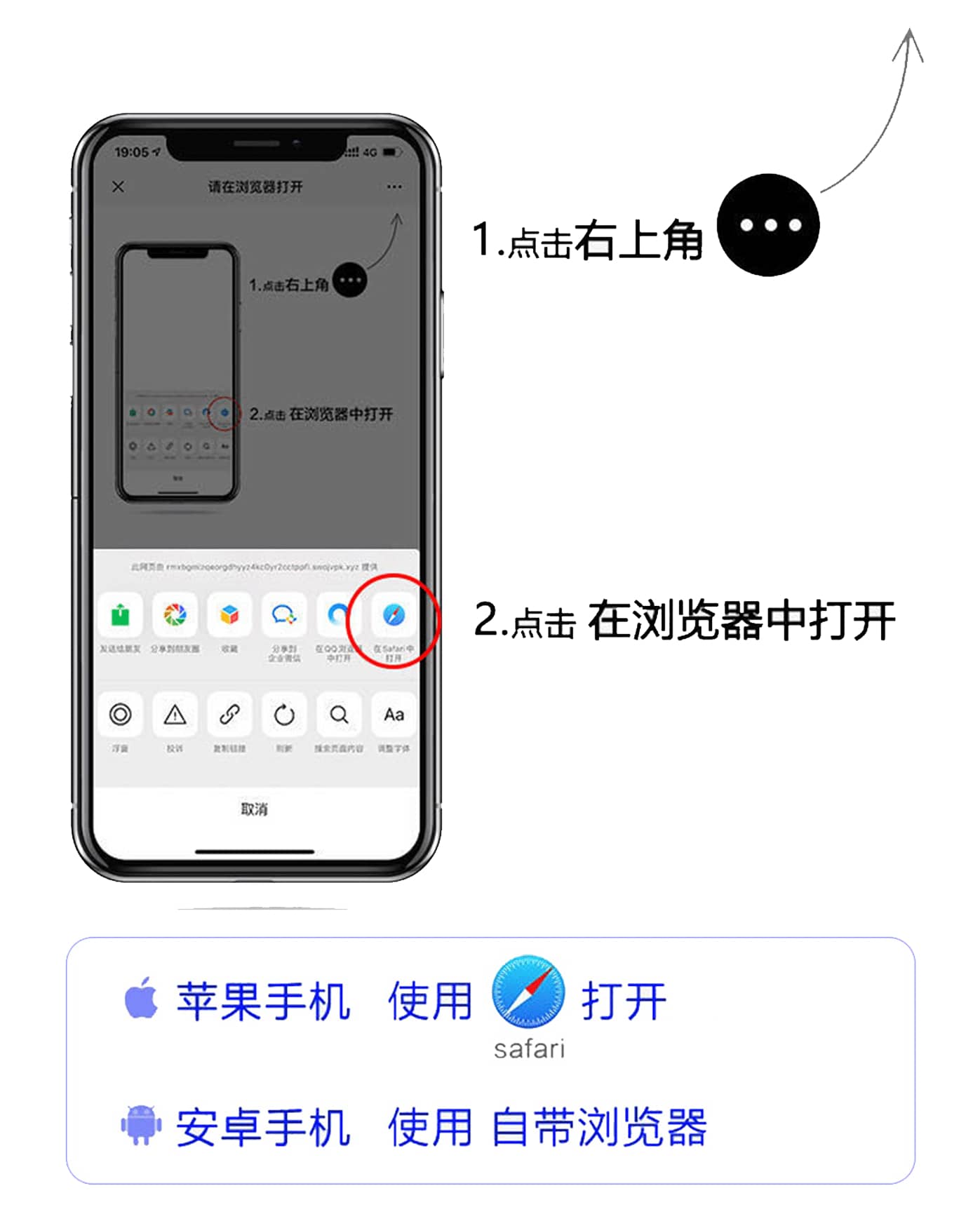
220 | 当前在微信内置浏览器中
请点击右上角的"...",然后选择"在浏览器中打开"以使用完整功能。 221 |
222 | 在浏览器中打开示意图 226 |
227 | 228 | 494 |
495 | 499 | 500 | 821 | 822 | 823 | --------------------------------------------------------------------------------