>:NDEBUG>")
47 | endfunction()
48 |
49 | # Flutter library and tool build rules.
50 | set(FLUTTER_MANAGED_DIR "${CMAKE_CURRENT_SOURCE_DIR}/flutter")
51 | add_subdirectory(${FLUTTER_MANAGED_DIR})
52 |
53 | # System-level dependencies.
54 | find_package(PkgConfig REQUIRED)
55 | pkg_check_modules(GTK REQUIRED IMPORTED_TARGET gtk+-3.0)
56 |
57 | add_definitions(-DAPPLICATION_ID="${APPLICATION_ID}")
58 |
59 | # Define the application target. To change its name, change BINARY_NAME above,
60 | # not the value here, or `flutter run` will no longer work.
61 | #
62 | # Any new source files that you add to the application should be added here.
63 | add_executable(${BINARY_NAME}
64 | "main.cc"
65 | "my_application.cc"
66 | "${FLUTTER_MANAGED_DIR}/generated_plugin_registrant.cc"
67 | )
68 |
69 | # Apply the standard set of build settings. This can be removed for applications
70 | # that need different build settings.
71 | apply_standard_settings(${BINARY_NAME})
72 |
73 | # Add dependency libraries. Add any application-specific dependencies here.
74 | target_link_libraries(${BINARY_NAME} PRIVATE flutter)
75 | target_link_libraries(${BINARY_NAME} PRIVATE PkgConfig::GTK)
76 |
77 | # Run the Flutter tool portions of the build. This must not be removed.
78 | add_dependencies(${BINARY_NAME} flutter_assemble)
79 |
80 | # Only the install-generated bundle's copy of the executable will launch
81 | # correctly, since the resources must in the right relative locations. To avoid
82 | # people trying to run the unbundled copy, put it in a subdirectory instead of
83 | # the default top-level location.
84 | set_target_properties(${BINARY_NAME}
85 | PROPERTIES
86 | RUNTIME_OUTPUT_DIRECTORY "${CMAKE_BINARY_DIR}/intermediates_do_not_run"
87 | )
88 |
89 |
90 | # Generated plugin build rules, which manage building the plugins and adding
91 | # them to the application.
92 | include(flutter/generated_plugins.cmake)
93 |
94 |
95 | # === Installation ===
96 | # By default, "installing" just makes a relocatable bundle in the build
97 | # directory.
98 | set(BUILD_BUNDLE_DIR "${PROJECT_BINARY_DIR}/bundle")
99 | if(CMAKE_INSTALL_PREFIX_INITIALIZED_TO_DEFAULT)
100 | set(CMAKE_INSTALL_PREFIX "${BUILD_BUNDLE_DIR}" CACHE PATH "..." FORCE)
101 | endif()
102 |
103 | # Start with a clean build bundle directory every time.
104 | install(CODE "
105 | file(REMOVE_RECURSE \"${BUILD_BUNDLE_DIR}/\")
106 | " COMPONENT Runtime)
107 |
108 | set(INSTALL_BUNDLE_DATA_DIR "${CMAKE_INSTALL_PREFIX}/data")
109 | set(INSTALL_BUNDLE_LIB_DIR "${CMAKE_INSTALL_PREFIX}/lib")
110 |
111 | install(TARGETS ${BINARY_NAME} RUNTIME DESTINATION "${CMAKE_INSTALL_PREFIX}"
112 | COMPONENT Runtime)
113 |
114 | install(FILES "${FLUTTER_ICU_DATA_FILE}" DESTINATION "${INSTALL_BUNDLE_DATA_DIR}"
115 | COMPONENT Runtime)
116 |
117 | install(FILES "${FLUTTER_LIBRARY}" DESTINATION "${INSTALL_BUNDLE_LIB_DIR}"
118 | COMPONENT Runtime)
119 |
120 | foreach(bundled_library ${PLUGIN_BUNDLED_LIBRARIES})
121 | install(FILES "${bundled_library}"
122 | DESTINATION "${INSTALL_BUNDLE_LIB_DIR}"
123 | COMPONENT Runtime)
124 | endforeach(bundled_library)
125 |
126 | # Copy the native assets provided by the build.dart from all packages.
127 | set(NATIVE_ASSETS_DIR "${PROJECT_BUILD_DIR}native_assets/linux/")
128 | install(DIRECTORY "${NATIVE_ASSETS_DIR}"
129 | DESTINATION "${INSTALL_BUNDLE_LIB_DIR}"
130 | COMPONENT Runtime)
131 |
132 | # Fully re-copy the assets directory on each build to avoid having stale files
133 | # from a previous install.
134 | set(FLUTTER_ASSET_DIR_NAME "flutter_assets")
135 | install(CODE "
136 | file(REMOVE_RECURSE \"${INSTALL_BUNDLE_DATA_DIR}/${FLUTTER_ASSET_DIR_NAME}\")
137 | " COMPONENT Runtime)
138 | install(DIRECTORY "${PROJECT_BUILD_DIR}/${FLUTTER_ASSET_DIR_NAME}"
139 | DESTINATION "${INSTALL_BUNDLE_DATA_DIR}" COMPONENT Runtime)
140 |
141 | # Install the AOT library on non-Debug builds only.
142 | if(NOT CMAKE_BUILD_TYPE MATCHES "Debug")
143 | install(FILES "${AOT_LIBRARY}" DESTINATION "${INSTALL_BUNDLE_LIB_DIR}"
144 | COMPONENT Runtime)
145 | endif()
146 |
--------------------------------------------------------------------------------
/README.md:
--------------------------------------------------------------------------------
1 | Closet Ai | Revamp your style effortlessly
2 |
3 |

4 |

5 |
8 |  9 |
10 |
9 |
10 |
11 |
12 |
13 |
14 |
15 |
16 | Demo APK Download Link
17 |
18 |
19 |
20 |
21 |  22 |
23 |
24 | # 👾 ClosetAi - Your Virtual Wardrobe
25 |
26 | Introducing Closet AI: the ultimate style companion 🌟. Upload images, choose your desired topwear or bottomwear, then watch as our cutting-edge AI replaces your outfit in an instant! 🔥 Seamlessly integrated with Supabase for secure authentication, lightning-fast image storage, and dynamic edge functions, our project is a game-changer for the Supabase Hackathon. Join us and revolutionize your wardrobe with the power of AI and Supabase!
27 |
28 | **Designed with ❤️ for Supabase Open Source Hackathon 2024**
29 |
30 | ## 🔥 Supercharged with
31 |
32 | - Supabase
33 | - Flutter
34 |
35 | ## 💚 Usage of Supabase
36 | In our app, Supabase serves as the backbone for secure user authentication, efficient image storage, and enables dynamic edge functions, ensuring seamless and reliable functionality for our users' virtual wardrobe transformations.
37 |
38 | ## 🚀 Examples
39 |
40 |
22 |
23 |
24 | # 👾 ClosetAi - Your Virtual Wardrobe
25 |
26 | Introducing Closet AI: the ultimate style companion 🌟. Upload images, choose your desired topwear or bottomwear, then watch as our cutting-edge AI replaces your outfit in an instant! 🔥 Seamlessly integrated with Supabase for secure authentication, lightning-fast image storage, and dynamic edge functions, our project is a game-changer for the Supabase Hackathon. Join us and revolutionize your wardrobe with the power of AI and Supabase!
27 |
28 | **Designed with ❤️ for Supabase Open Source Hackathon 2024**
29 |
30 | ## 🔥 Supercharged with
31 |
32 | - Supabase
33 | - Flutter
34 |
35 | ## 💚 Usage of Supabase
36 | In our app, Supabase serves as the backbone for secure user authentication, efficient image storage, and enables dynamic edge functions, ensuring seamless and reliable functionality for our users' virtual wardrobe transformations.
37 |
38 | ## 🚀 Examples
39 |
40 | 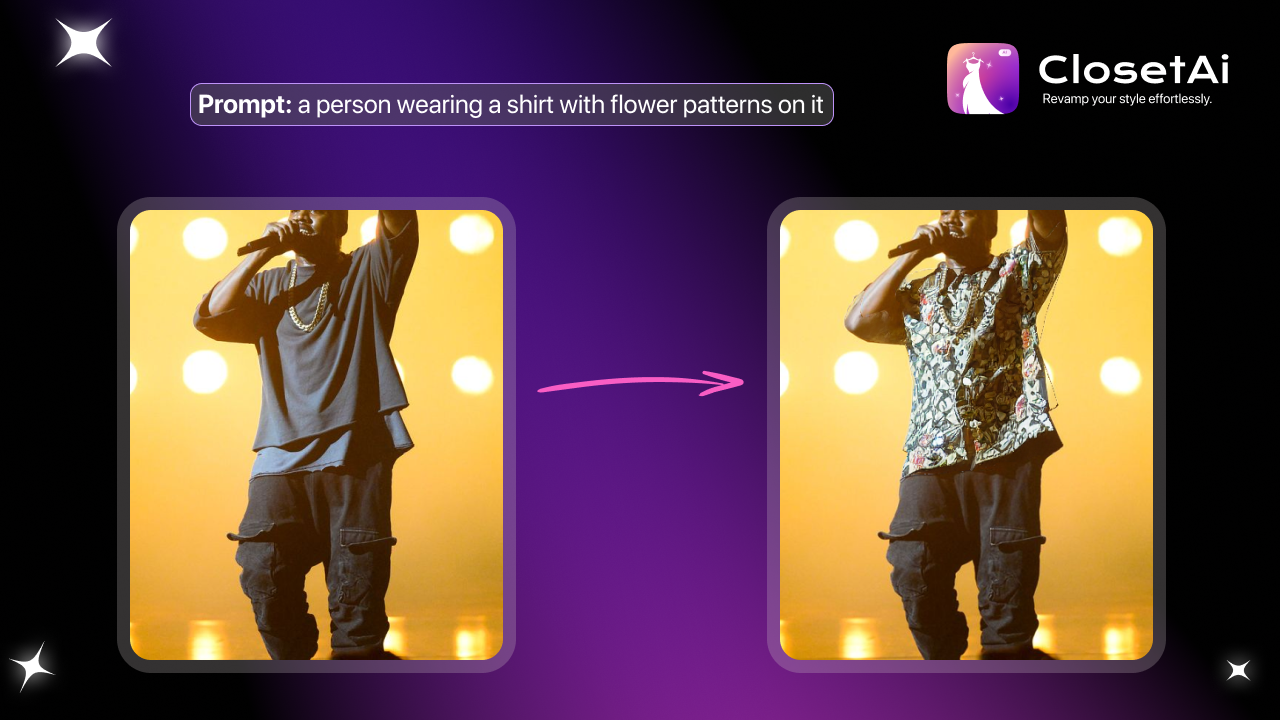
41 | 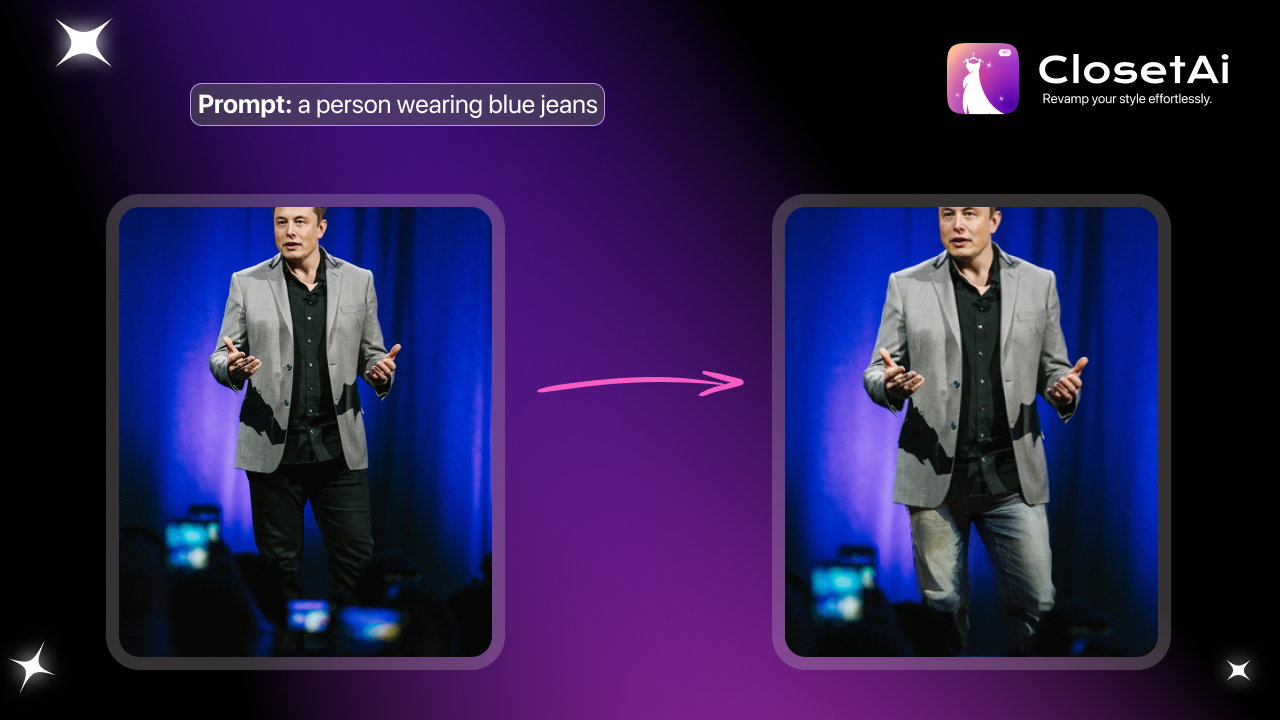
42 |
43 | ## 📺 Watch Demo
44 |
45 | [Youtube Link](https://youtu.be/pJiE1EnM6w8)
46 | 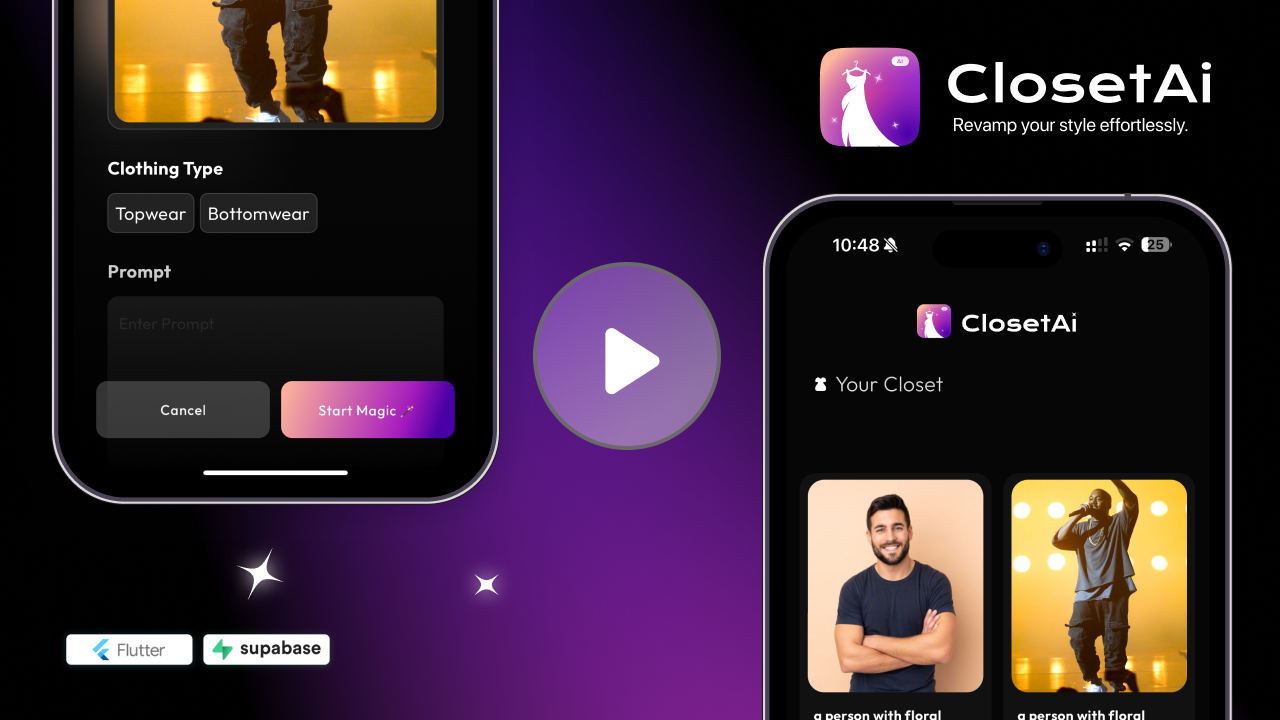 47 |
48 |
49 | ## Quick Look 👀
50 | 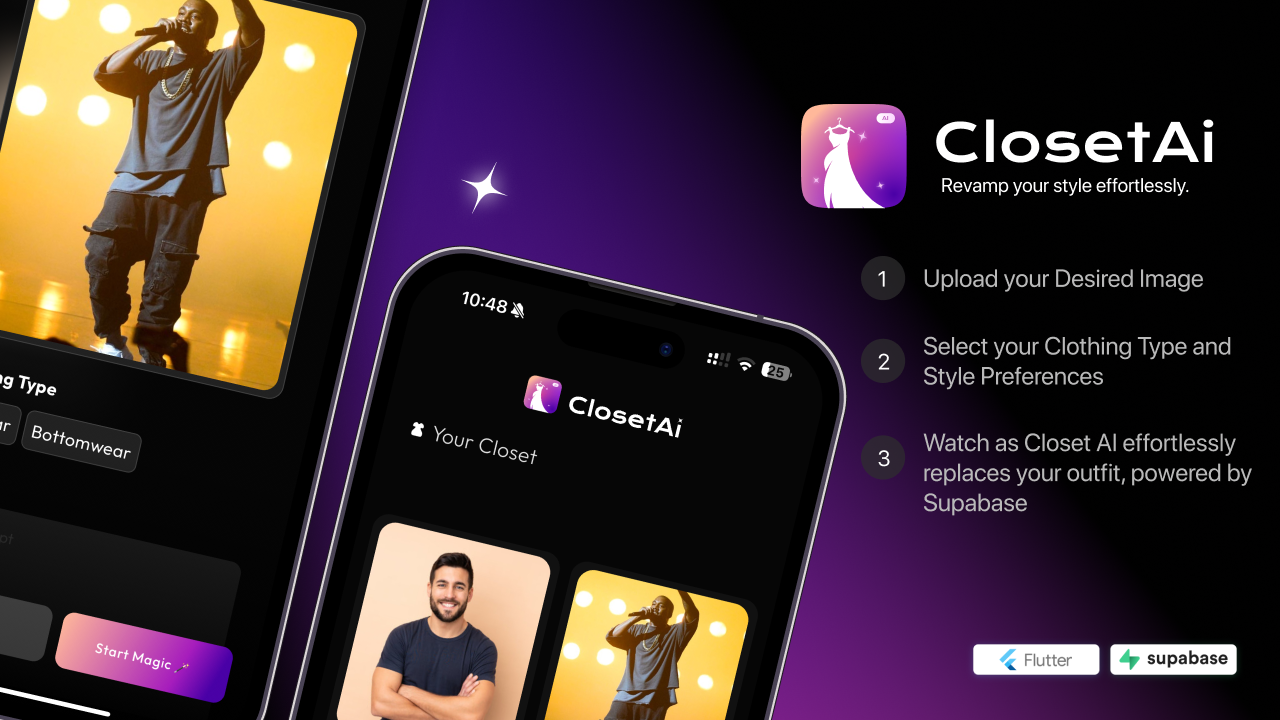
51 |
52 | | | | |
53 | | :---------------------------------------------------------------------------------------------------------------------------------------------------------------------: | :---------------------------------------------------------------------------------------------------------------------------------------------------------------------: | :---------------------------------------------------------------------------------------------------------------------------------------------------------------------: |
54 | |
47 |
48 |
49 | ## Quick Look 👀
50 | 
51 |
52 | | | | |
53 | | :---------------------------------------------------------------------------------------------------------------------------------------------------------------------: | :---------------------------------------------------------------------------------------------------------------------------------------------------------------------: | :---------------------------------------------------------------------------------------------------------------------------------------------------------------------: |
54 | |  |
|  |
| 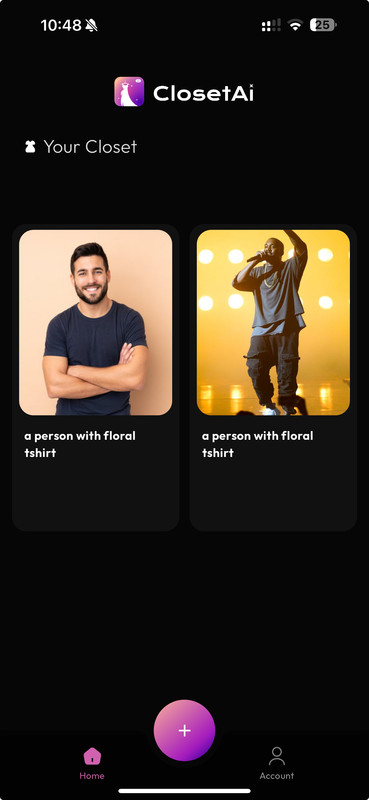 |
55 | |
|
55 | | 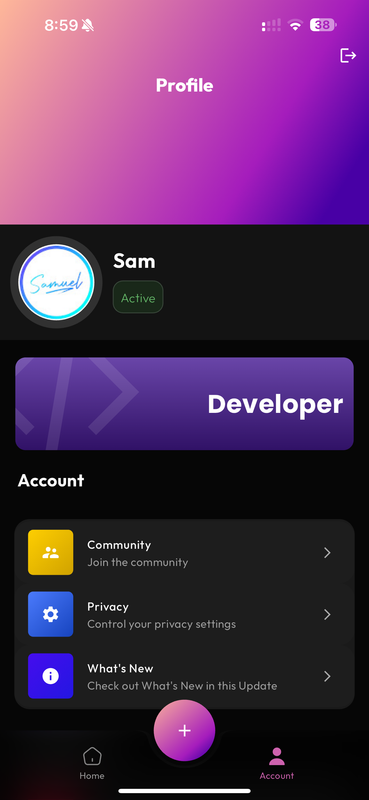 |
| 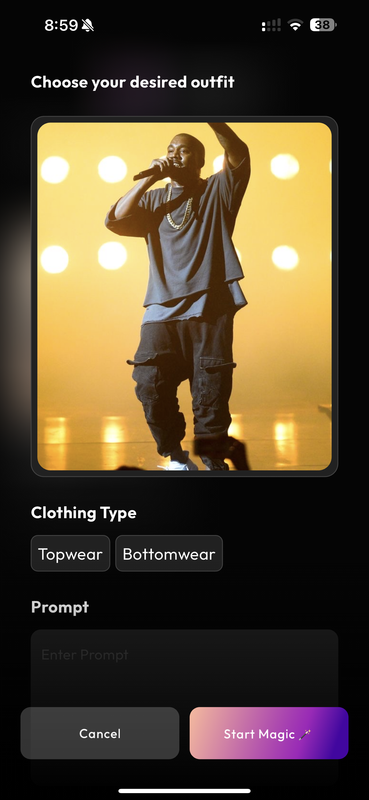 |
| 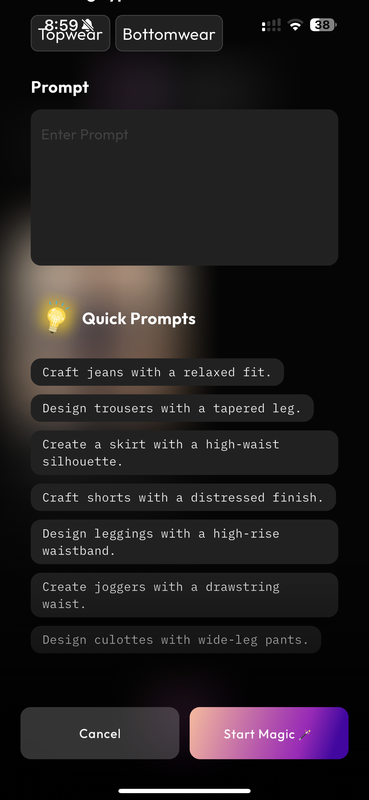 |
56 | |
|
56 | | 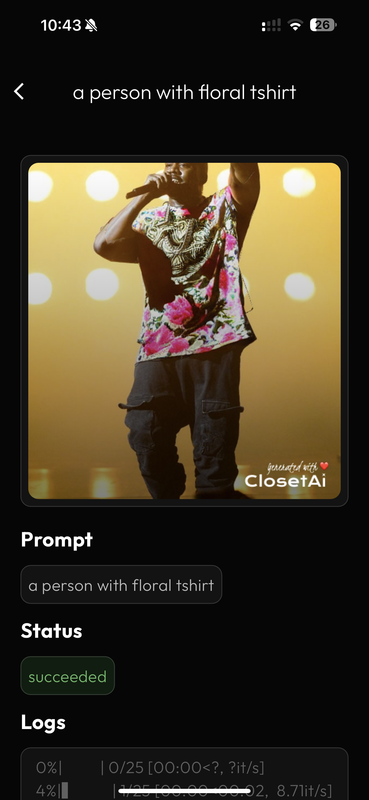 |
|  57 |
58 |
59 |
60 | # How to setup **ClosetAi** ?
61 |
62 | ## Setup Instructios: Supabase
63 |
64 | ### 1. Create Profile table:
65 |
66 | ```sql
67 | create table
68 | profile (
69 | id bigint primary key generated always as identity,
70 | username text not null,
71 | email text not null,
72 | date_joined timestamp with time zone default current_timestamp
73 | );
74 | ```
75 |
76 | ### 2. Create the storage bucket 'closet-generations'
77 |
78 | ### 3. Add Bucket Policies:
79 | ```sql
80 | -- Add policies for managing access to the storage bucket 'closet-generations'
81 |
82 | create policy "Generations images are publicly accessible." on storage.objects
83 | for select using (bucket_id = 'closet-generations');
84 |
85 | create policy "Anyone can upload an generations." on storage.objects
86 | for insert with check (bucket_id = 'closet-generations');
87 |
88 | create policy "Anyone can update their own generations." on storage.objects
89 | for update using ((select auth.uid()) = owner) with check (bucket_id = 'closet-generations');
90 | ```
91 |
92 | ## Setup Instructios: Flutter
93 |
94 | ### 1. Copy Environment Variables:
95 |
96 | Copy the contents of `env.example` to a new file named `.env`.
97 |
98 | ```plaintext
99 | REPLICATE_KEY=''
100 | SUPABASE_URL=''
101 | SUPABASE_ANON_KEY=''
102 | ```
103 | Get the keys for REPLICATE_KEY, SUPABASE_URL, and SUPABASE_ANON_KEY from your Supabase project and Replicate dashboard
104 | Replace the placeholders in the .env file with the actual keys. Then Continue with below steps
105 |
106 | 1. Install [Flutter](https://flutter.dev/docs/get-started/install) for your platform.
107 | 2. Clone this repository or download the source code.
108 | 3. Open a terminal window and navigate to the project directory.
109 | 4. Run `flutter pub get` to install dependencies.
110 | 5. Copy the Contents of .
111 | 6. Run `flutter run` to start the app.
112 |
113 | ## Roadmap
114 |
115 | - Refactor the whole Codebase 😅
116 | - Add Webhooks for triggering Emails when Generations are completed
117 | - Add Supabase magic login
118 | - Implement Local Image saving
119 |
120 |
121 | ## 🧑🏻💻 Team
122 |
123 | - [Samuel Philip](https://github.com/ineffablesam)
124 | - [Anish](https://github.com/anishganapathi)
125 | - [Satyanand](https://github.com/SatyanandAtluri)
126 | - [Team Next](https://github.com/Team-NEXT-INDIA/VITOPIA)
127 |
128 | ## 🔗 My Social Links
129 |
130 | - [Twitter](https://twitter.com/samuelP09301972)
131 | - [Instagram](https://www.instagram.com/ig_samuelsam/)
132 | - [Github](https://github.com/ineffablesam/)
133 |
--------------------------------------------------------------------------------
/lib/app/modules/generator/controllers/generator_controller.dart:
--------------------------------------------------------------------------------
1 | import 'dart:convert';
2 |
3 | import 'package:closet_ai/main.dart';
4 | import 'package:flutter/material.dart';
5 | import 'package:get/get.dart';
6 | import 'package:http/http.dart' as http;
7 | import 'package:image_picker/image_picker.dart';
8 | import 'package:supabase_flutter/supabase_flutter.dart';
9 |
10 | import '../../../data/consts.dart';
11 | import '../../../models/init_gen_model.dart';
12 | import '../../home/controllers/home_controller.dart';
13 |
14 | class GeneratorController extends GetxController {
15 | final promptController = TextEditingController();
16 | RxBool isImageUploading = false.obs;
17 | RxString uploadedImageUrl = ''.obs;
18 |
19 | // Form Params Start
20 | RxString selectedClothingType = RxString('');
21 | RxBool isGenerating = false.obs;
22 | // Form Params End
23 |
24 | List topwearPrompts = [
25 | "Design a top with a plunging neckline.",
26 | "Craft a shirt with rolled-up sleeves.",
27 | "Create a blouse with a tie-front detail.",
28 | "Design a sweater with cable knit patterns.",
29 | "Craft a hoodie with a kangaroo pocket.",
30 | "Create a tank top with racerback straps.",
31 | "Design a t-shirt with a scoop neck.",
32 | ];
33 |
34 | List bottomwearPrompts = [
35 | "Craft jeans with a relaxed fit.",
36 | "Design trousers with a tapered leg.",
37 | "Create a skirt with a high-waist silhouette.",
38 | "Craft shorts with a distressed finish.",
39 | "Design leggings with a high-rise waistband.",
40 | "Create joggers with a drawstring waist.",
41 | "Design culottes with wide-leg pants.",
42 | ];
43 |
44 | @override
45 | void onReady() {
46 | super.onReady();
47 | }
48 |
49 | Future doMagic() async {
50 | isGenerating.value = true;
51 | // first validate the form fields image url, clothing type, and prompt are not empty
52 | if (uploadedImageUrl.value.isEmpty) {
53 | Get.snackbar(
54 | 'Error',
55 | 'Please upload an image',
56 | backgroundColor: Colors.amber,
57 | colorText: Colors.grey.shade900,
58 | );
59 | return;
60 | }
61 | if (selectedClothingType.value.isEmpty) {
62 | Get.snackbar(
63 | 'Error',
64 | 'Please select a clothing type',
65 | backgroundColor: Colors.amber,
66 | colorText: Colors.grey.shade900,
67 | );
68 | return;
69 | }
70 | if (promptController.text.isEmpty) {
71 | Get.snackbar(
72 | 'Error',
73 | 'Please enter a prompt',
74 | backgroundColor: Colors.amber,
75 | colorText: Colors.grey.shade900,
76 | );
77 | return;
78 | }
79 | // if all fields are valid, then make json object to send to the API
80 | await generateClothing(
81 | uploadedImageUrl.value,
82 | promptController.text,
83 | selectedClothingType.value.toLowerCase(),
84 | );
85 | }
86 |
87 | Future generateClothing(
88 | String imageUrl, String prompt, String clothingType) async {
89 | try {
90 | final response = await http.post(
91 | Uri.parse('https://api.replicate.com/v1/predictions'),
92 | headers: {
93 | 'Authorization': 'Bearer $REPLICATE_KEY',
94 | 'Content-Type': 'application/json',
95 | },
96 | body: jsonEncode({
97 | "version":
98 | "4e7916cc6ca0fe2e0e414c32033a378ff5d8879f209b1df30e824d6779403826",
99 | "input": {
100 | "image": imageUrl,
101 | "prompt": prompt,
102 | "clothing": clothingType,
103 | }
104 | }),
105 | );
106 |
107 | if (response.statusCode == 201) {
108 | // parse the response to model InitGen
109 | final responseJson = jsonDecode(response.body);
110 | InitGen initGen = InitGen.fromJson(responseJson);
111 | debugPrint('Prompt from server: ${initGen.input?.prompt}');
112 | await supabase.from('generations').insert({
113 | 'prompt': initGen.input?.prompt,
114 | 'uploaded_image': imageUrl,
115 | 'clothing_type': clothingType,
116 | 'output': responseJson,
117 | 'self_id': initGen.id,
118 | 'get_url': initGen.urls?.get,
119 | 'cancel_url': initGen.urls?.cancel,
120 | 'status': initGen.status,
121 | 'logs': initGen.logs,
122 | 'user_id': supabase.auth.currentUser!.id,
123 | });
124 | // go back to the previous screen
125 | // reset the form fields
126 | reset();
127 | Get.back();
128 | final homeController = Get.find();
129 |
130 | // initialise the home controller to fetch the latest generations
131 |
132 | homeController.fetchCloset();
133 | } else {
134 | // Handle error response here
135 | print('Error: ${response.statusCode}');
136 | print('Error: ${response.body}');
137 | }
138 | } catch (e) {
139 | // Handle exception here
140 | print('Exception: $e');
141 | } finally {
142 | isGenerating.value = false;
143 | }
144 | }
145 |
146 | Future initProcess() async {
147 | isImageUploading.value = true;
148 | await Future.delayed(const Duration(seconds: 2));
149 | try {
150 | final ImagePicker picker = ImagePicker();
151 | final XFile? image = await picker.pickImage(source: ImageSource.gallery);
152 | if (image == null) {
153 | return;
154 | }
155 | final imageExtension = image.path.split('.').last.toLowerCase();
156 | final imageBytes = await image.readAsBytes();
157 | final userId = supabase.auth.currentUser!.id;
158 | final imagePath =
159 | '/$userId/closet_${DateTime.now().millisecondsSinceEpoch.toString()}';
160 | await supabase.storage.from('closet-generations').uploadBinary(
161 | imagePath,
162 | imageBytes,
163 | fileOptions: FileOptions(
164 | upsert: true,
165 | contentType: 'image/$imageExtension',
166 | ),
167 | );
168 | String imageUrl =
169 | supabase.storage.from('closet-generations').getPublicUrl(imagePath);
170 | imageUrl = Uri.parse(imageUrl).replace(queryParameters: {
171 | 't': DateTime.now().millisecondsSinceEpoch.toString()
172 | }).toString();
173 | uploadedImageUrl.value = imageUrl;
174 | } catch (error) {
175 | debugPrint('Error during image upload: $error');
176 | } finally {
177 | isImageUploading.value = false;
178 | }
179 | }
180 |
181 | void selectClothingType(String clothingType) {
182 | selectedClothingType.value = clothingType;
183 | }
184 |
185 | // reset the uploaded image url
186 | void reset() async {
187 | await Future.delayed(const Duration(seconds: 1));
188 | uploadedImageUrl.value = '';
189 | selectedClothingType.value = '';
190 | promptController.clear();
191 | }
192 | }
193 |
--------------------------------------------------------------------------------
/lib/app/modules/core/layout/views/layout_view.dart:
--------------------------------------------------------------------------------
1 | import 'dart:ui';
2 |
3 | import 'package:animations/animations.dart';
4 | import 'package:closet_ai/app/modules/core/layout/controllers/layout_controller.dart';
5 | import 'package:closet_ai/app/modules/generator/views/generator_view.dart';
6 | import 'package:closet_ai/app/modules/home/views/home_view.dart';
7 | import 'package:closet_ai/app/modules/profile/views/profile_view.dart';
8 | import 'package:dismissible_page/dismissible_page.dart';
9 | import 'package:flutter/material.dart';
10 | import 'package:flutter/services.dart';
11 | import 'package:flutter_screenutil/flutter_screenutil.dart';
12 | import 'package:get/get.dart';
13 | import 'package:google_fonts/google_fonts.dart';
14 | import 'package:icons_plus/icons_plus.dart';
15 |
16 | class LayoutView extends GetView {
17 | const LayoutView({Key? key}) : super(key: key);
18 | @override
19 | Widget build(BuildContext context) {
20 | // final activeColor = AppColors.primary;
21 | final activeColor = Color(0xffCE62AE);
22 | final inactiveColor = Color(0x80ffffff);
23 | List pages = [
24 | HomeView(),
25 | const ProfileView(),
26 | ];
27 | final bottomNavBarController = Get.put(LayoutController());
28 | final double bottomNavBarHeight = 60.h;
29 | return Obx(() => GestureDetector(
30 | onTap: () => FocusManager.instance.primaryFocus?.unfocus(),
31 | child: Scaffold(
32 | extendBody: true,
33 | resizeToAvoidBottomInset: false,
34 | floatingActionButtonLocation:
35 | FloatingActionButtonLocation.centerDocked,
36 | floatingActionButton: Container(
37 | height: 60.h,
38 | width: 60.w,
39 | decoration: BoxDecoration(
40 | shape: BoxShape.circle,
41 | gradient: LinearGradient(
42 | stops: const [0.1, 0.3, 1],
43 | begin: Alignment.bottomRight,
44 | end: Alignment.topLeft,
45 | colors: [
46 | Color(0xff4900A6),
47 | Color(0xffA61DBD),
48 | Color(0xffFFB89A),
49 | ],
50 | ),
51 | ),
52 | child: IconButton(
53 | onPressed: () {
54 | context.pushTransparentRoute(
55 | GeneratorView(),
56 | );
57 | HapticFeedback.selectionClick();
58 | },
59 | icon: const Icon(
60 | Icons.add,
61 | color: Colors.white,
62 | ),
63 | ),
64 | ),
65 | body: PageTransitionSwitcher(
66 | duration: const Duration(milliseconds: 400),
67 | reverse: bottomNavBarController.currentIndex <
68 | bottomNavBarController.previousPageIndex,
69 | transitionBuilder: (child, animation, secondaryAnimation) =>
70 | SharedAxisTransition(
71 | fillColor: Color(0xFF000000),
72 | animation: animation,
73 | secondaryAnimation: secondaryAnimation,
74 | transitionType: SharedAxisTransitionType.horizontal,
75 | child: child,
76 | ),
77 | child: pages.elementAt(bottomNavBarController.currentIndex)),
78 | bottomNavigationBar: Stack(
79 | children: [
80 | ClipPath(
81 | clipper: MyClipper(),
82 | child: ClipRRect(
83 | child: BackdropFilter(
84 | filter: ImageFilter.blur(sigmaX: 35, sigmaY: 35),
85 | child: SizedBox(
86 | width: double.infinity,
87 | height: bottomNavBarHeight,
88 | ),
89 | ),
90 | ),
91 | ),
92 | SizedBox(
93 | height: bottomNavBarHeight,
94 | child: MediaQuery.removePadding(
95 | context: context,
96 | removeTop: true,
97 | removeBottom: true,
98 | child: BottomAppBar(
99 | shape: const CircularNotchedRectangle(),
100 | notchMargin: 8,
101 | elevation: 0,
102 | height: bottomNavBarHeight,
103 | color: Colors.transparent,
104 | surfaceTintColor: Colors.transparent,
105 | padding: EdgeInsets.zero,
106 | clipBehavior: Clip.hardEdge,
107 | child: BottomNavigationBar(
108 | type: BottomNavigationBarType.fixed,
109 | backgroundColor:
110 | const Color(0xB3000000).withOpacity(0.5),
111 | showSelectedLabels: true,
112 | showUnselectedLabels: true,
113 | selectedLabelStyle: GoogleFonts.outfit(
114 | fontSize: 9.sp,
115 | fontWeight: FontWeight.w400,
116 | color: activeColor,
117 | height: 1.5.h,
118 | ),
119 | unselectedLabelStyle: GoogleFonts.outfit(
120 | fontSize: 9.sp,
121 | fontWeight: FontWeight.w400,
122 | color: Colors.grey,
123 | ),
124 | selectedItemColor: activeColor,
125 | unselectedItemColor: Colors.grey,
126 | selectedFontSize: 8.sp,
127 | unselectedFontSize: 8.sp,
128 | enableFeedback: true,
129 | items: [
130 | BottomNavigationBarItem(
131 | icon: Icon(
132 | Iconsax.home_outline,
133 | color: inactiveColor,
134 | ),
135 | activeIcon: Icon(
136 | Iconsax.home_1_bold,
137 | color: activeColor,
138 | ),
139 | label: 'Home',
140 | tooltip: '',
141 | ),
142 | BottomNavigationBarItem(
143 | icon: Icon(
144 | Iconsax.user_outline,
145 | color: inactiveColor,
146 | ),
147 | activeIcon: Icon(
148 | Iconsax.user_bold,
149 | color: activeColor,
150 | ),
151 | label: 'Account',
152 | tooltip: '',
153 | ),
154 | ],
155 | currentIndex: bottomNavBarController.currentIndex,
156 | onTap: (index) {
157 | HapticFeedback.lightImpact();
158 | bottomNavBarController.updatePageIndex(index);
159 | },
160 | ),
161 | ),
162 | ),
163 | ),
164 | ],
165 | ),
166 | ),
167 | ));
168 | }
169 | }
170 |
171 | class MyClipper extends CustomClipper {
172 | @override
173 | Path getClip(Size size) {
174 | return CircularNotchedRectangle().getOuterPath(
175 | Rect.fromLTWH(0, 0, size.width, size.height),
176 | Rect.fromCircle(center: Offset(size.width / 2, 2), radius: 39),
177 | );
178 | }
179 |
180 | @override
181 | bool shouldReclip(covariant CustomClipper oldClipper) {
182 | return false;
183 | }
184 | }
185 |
--------------------------------------------------------------------------------
/assets/icons/logo_only_name.svg:
--------------------------------------------------------------------------------
1 |
10 |
--------------------------------------------------------------------------------
57 |
58 |
59 |
60 | # How to setup **ClosetAi** ?
61 |
62 | ## Setup Instructios: Supabase
63 |
64 | ### 1. Create Profile table:
65 |
66 | ```sql
67 | create table
68 | profile (
69 | id bigint primary key generated always as identity,
70 | username text not null,
71 | email text not null,
72 | date_joined timestamp with time zone default current_timestamp
73 | );
74 | ```
75 |
76 | ### 2. Create the storage bucket 'closet-generations'
77 |
78 | ### 3. Add Bucket Policies:
79 | ```sql
80 | -- Add policies for managing access to the storage bucket 'closet-generations'
81 |
82 | create policy "Generations images are publicly accessible." on storage.objects
83 | for select using (bucket_id = 'closet-generations');
84 |
85 | create policy "Anyone can upload an generations." on storage.objects
86 | for insert with check (bucket_id = 'closet-generations');
87 |
88 | create policy "Anyone can update their own generations." on storage.objects
89 | for update using ((select auth.uid()) = owner) with check (bucket_id = 'closet-generations');
90 | ```
91 |
92 | ## Setup Instructios: Flutter
93 |
94 | ### 1. Copy Environment Variables:
95 |
96 | Copy the contents of `env.example` to a new file named `.env`.
97 |
98 | ```plaintext
99 | REPLICATE_KEY=''
100 | SUPABASE_URL=''
101 | SUPABASE_ANON_KEY=''
102 | ```
103 | Get the keys for REPLICATE_KEY, SUPABASE_URL, and SUPABASE_ANON_KEY from your Supabase project and Replicate dashboard
104 | Replace the placeholders in the .env file with the actual keys. Then Continue with below steps
105 |
106 | 1. Install [Flutter](https://flutter.dev/docs/get-started/install) for your platform.
107 | 2. Clone this repository or download the source code.
108 | 3. Open a terminal window and navigate to the project directory.
109 | 4. Run `flutter pub get` to install dependencies.
110 | 5. Copy the Contents of .
111 | 6. Run `flutter run` to start the app.
112 |
113 | ## Roadmap
114 |
115 | - Refactor the whole Codebase 😅
116 | - Add Webhooks for triggering Emails when Generations are completed
117 | - Add Supabase magic login
118 | - Implement Local Image saving
119 |
120 |
121 | ## 🧑🏻💻 Team
122 |
123 | - [Samuel Philip](https://github.com/ineffablesam)
124 | - [Anish](https://github.com/anishganapathi)
125 | - [Satyanand](https://github.com/SatyanandAtluri)
126 | - [Team Next](https://github.com/Team-NEXT-INDIA/VITOPIA)
127 |
128 | ## 🔗 My Social Links
129 |
130 | - [Twitter](https://twitter.com/samuelP09301972)
131 | - [Instagram](https://www.instagram.com/ig_samuelsam/)
132 | - [Github](https://github.com/ineffablesam/)
133 |
--------------------------------------------------------------------------------
/lib/app/modules/generator/controllers/generator_controller.dart:
--------------------------------------------------------------------------------
1 | import 'dart:convert';
2 |
3 | import 'package:closet_ai/main.dart';
4 | import 'package:flutter/material.dart';
5 | import 'package:get/get.dart';
6 | import 'package:http/http.dart' as http;
7 | import 'package:image_picker/image_picker.dart';
8 | import 'package:supabase_flutter/supabase_flutter.dart';
9 |
10 | import '../../../data/consts.dart';
11 | import '../../../models/init_gen_model.dart';
12 | import '../../home/controllers/home_controller.dart';
13 |
14 | class GeneratorController extends GetxController {
15 | final promptController = TextEditingController();
16 | RxBool isImageUploading = false.obs;
17 | RxString uploadedImageUrl = ''.obs;
18 |
19 | // Form Params Start
20 | RxString selectedClothingType = RxString('');
21 | RxBool isGenerating = false.obs;
22 | // Form Params End
23 |
24 | List topwearPrompts = [
25 | "Design a top with a plunging neckline.",
26 | "Craft a shirt with rolled-up sleeves.",
27 | "Create a blouse with a tie-front detail.",
28 | "Design a sweater with cable knit patterns.",
29 | "Craft a hoodie with a kangaroo pocket.",
30 | "Create a tank top with racerback straps.",
31 | "Design a t-shirt with a scoop neck.",
32 | ];
33 |
34 | List bottomwearPrompts = [
35 | "Craft jeans with a relaxed fit.",
36 | "Design trousers with a tapered leg.",
37 | "Create a skirt with a high-waist silhouette.",
38 | "Craft shorts with a distressed finish.",
39 | "Design leggings with a high-rise waistband.",
40 | "Create joggers with a drawstring waist.",
41 | "Design culottes with wide-leg pants.",
42 | ];
43 |
44 | @override
45 | void onReady() {
46 | super.onReady();
47 | }
48 |
49 | Future doMagic() async {
50 | isGenerating.value = true;
51 | // first validate the form fields image url, clothing type, and prompt are not empty
52 | if (uploadedImageUrl.value.isEmpty) {
53 | Get.snackbar(
54 | 'Error',
55 | 'Please upload an image',
56 | backgroundColor: Colors.amber,
57 | colorText: Colors.grey.shade900,
58 | );
59 | return;
60 | }
61 | if (selectedClothingType.value.isEmpty) {
62 | Get.snackbar(
63 | 'Error',
64 | 'Please select a clothing type',
65 | backgroundColor: Colors.amber,
66 | colorText: Colors.grey.shade900,
67 | );
68 | return;
69 | }
70 | if (promptController.text.isEmpty) {
71 | Get.snackbar(
72 | 'Error',
73 | 'Please enter a prompt',
74 | backgroundColor: Colors.amber,
75 | colorText: Colors.grey.shade900,
76 | );
77 | return;
78 | }
79 | // if all fields are valid, then make json object to send to the API
80 | await generateClothing(
81 | uploadedImageUrl.value,
82 | promptController.text,
83 | selectedClothingType.value.toLowerCase(),
84 | );
85 | }
86 |
87 | Future generateClothing(
88 | String imageUrl, String prompt, String clothingType) async {
89 | try {
90 | final response = await http.post(
91 | Uri.parse('https://api.replicate.com/v1/predictions'),
92 | headers: {
93 | 'Authorization': 'Bearer $REPLICATE_KEY',
94 | 'Content-Type': 'application/json',
95 | },
96 | body: jsonEncode({
97 | "version":
98 | "4e7916cc6ca0fe2e0e414c32033a378ff5d8879f209b1df30e824d6779403826",
99 | "input": {
100 | "image": imageUrl,
101 | "prompt": prompt,
102 | "clothing": clothingType,
103 | }
104 | }),
105 | );
106 |
107 | if (response.statusCode == 201) {
108 | // parse the response to model InitGen
109 | final responseJson = jsonDecode(response.body);
110 | InitGen initGen = InitGen.fromJson(responseJson);
111 | debugPrint('Prompt from server: ${initGen.input?.prompt}');
112 | await supabase.from('generations').insert({
113 | 'prompt': initGen.input?.prompt,
114 | 'uploaded_image': imageUrl,
115 | 'clothing_type': clothingType,
116 | 'output': responseJson,
117 | 'self_id': initGen.id,
118 | 'get_url': initGen.urls?.get,
119 | 'cancel_url': initGen.urls?.cancel,
120 | 'status': initGen.status,
121 | 'logs': initGen.logs,
122 | 'user_id': supabase.auth.currentUser!.id,
123 | });
124 | // go back to the previous screen
125 | // reset the form fields
126 | reset();
127 | Get.back();
128 | final homeController = Get.find();
129 |
130 | // initialise the home controller to fetch the latest generations
131 |
132 | homeController.fetchCloset();
133 | } else {
134 | // Handle error response here
135 | print('Error: ${response.statusCode}');
136 | print('Error: ${response.body}');
137 | }
138 | } catch (e) {
139 | // Handle exception here
140 | print('Exception: $e');
141 | } finally {
142 | isGenerating.value = false;
143 | }
144 | }
145 |
146 | Future initProcess() async {
147 | isImageUploading.value = true;
148 | await Future.delayed(const Duration(seconds: 2));
149 | try {
150 | final ImagePicker picker = ImagePicker();
151 | final XFile? image = await picker.pickImage(source: ImageSource.gallery);
152 | if (image == null) {
153 | return;
154 | }
155 | final imageExtension = image.path.split('.').last.toLowerCase();
156 | final imageBytes = await image.readAsBytes();
157 | final userId = supabase.auth.currentUser!.id;
158 | final imagePath =
159 | '/$userId/closet_${DateTime.now().millisecondsSinceEpoch.toString()}';
160 | await supabase.storage.from('closet-generations').uploadBinary(
161 | imagePath,
162 | imageBytes,
163 | fileOptions: FileOptions(
164 | upsert: true,
165 | contentType: 'image/$imageExtension',
166 | ),
167 | );
168 | String imageUrl =
169 | supabase.storage.from('closet-generations').getPublicUrl(imagePath);
170 | imageUrl = Uri.parse(imageUrl).replace(queryParameters: {
171 | 't': DateTime.now().millisecondsSinceEpoch.toString()
172 | }).toString();
173 | uploadedImageUrl.value = imageUrl;
174 | } catch (error) {
175 | debugPrint('Error during image upload: $error');
176 | } finally {
177 | isImageUploading.value = false;
178 | }
179 | }
180 |
181 | void selectClothingType(String clothingType) {
182 | selectedClothingType.value = clothingType;
183 | }
184 |
185 | // reset the uploaded image url
186 | void reset() async {
187 | await Future.delayed(const Duration(seconds: 1));
188 | uploadedImageUrl.value = '';
189 | selectedClothingType.value = '';
190 | promptController.clear();
191 | }
192 | }
193 |
--------------------------------------------------------------------------------
/lib/app/modules/core/layout/views/layout_view.dart:
--------------------------------------------------------------------------------
1 | import 'dart:ui';
2 |
3 | import 'package:animations/animations.dart';
4 | import 'package:closet_ai/app/modules/core/layout/controllers/layout_controller.dart';
5 | import 'package:closet_ai/app/modules/generator/views/generator_view.dart';
6 | import 'package:closet_ai/app/modules/home/views/home_view.dart';
7 | import 'package:closet_ai/app/modules/profile/views/profile_view.dart';
8 | import 'package:dismissible_page/dismissible_page.dart';
9 | import 'package:flutter/material.dart';
10 | import 'package:flutter/services.dart';
11 | import 'package:flutter_screenutil/flutter_screenutil.dart';
12 | import 'package:get/get.dart';
13 | import 'package:google_fonts/google_fonts.dart';
14 | import 'package:icons_plus/icons_plus.dart';
15 |
16 | class LayoutView extends GetView {
17 | const LayoutView({Key? key}) : super(key: key);
18 | @override
19 | Widget build(BuildContext context) {
20 | // final activeColor = AppColors.primary;
21 | final activeColor = Color(0xffCE62AE);
22 | final inactiveColor = Color(0x80ffffff);
23 | List pages = [
24 | HomeView(),
25 | const ProfileView(),
26 | ];
27 | final bottomNavBarController = Get.put(LayoutController());
28 | final double bottomNavBarHeight = 60.h;
29 | return Obx(() => GestureDetector(
30 | onTap: () => FocusManager.instance.primaryFocus?.unfocus(),
31 | child: Scaffold(
32 | extendBody: true,
33 | resizeToAvoidBottomInset: false,
34 | floatingActionButtonLocation:
35 | FloatingActionButtonLocation.centerDocked,
36 | floatingActionButton: Container(
37 | height: 60.h,
38 | width: 60.w,
39 | decoration: BoxDecoration(
40 | shape: BoxShape.circle,
41 | gradient: LinearGradient(
42 | stops: const [0.1, 0.3, 1],
43 | begin: Alignment.bottomRight,
44 | end: Alignment.topLeft,
45 | colors: [
46 | Color(0xff4900A6),
47 | Color(0xffA61DBD),
48 | Color(0xffFFB89A),
49 | ],
50 | ),
51 | ),
52 | child: IconButton(
53 | onPressed: () {
54 | context.pushTransparentRoute(
55 | GeneratorView(),
56 | );
57 | HapticFeedback.selectionClick();
58 | },
59 | icon: const Icon(
60 | Icons.add,
61 | color: Colors.white,
62 | ),
63 | ),
64 | ),
65 | body: PageTransitionSwitcher(
66 | duration: const Duration(milliseconds: 400),
67 | reverse: bottomNavBarController.currentIndex <
68 | bottomNavBarController.previousPageIndex,
69 | transitionBuilder: (child, animation, secondaryAnimation) =>
70 | SharedAxisTransition(
71 | fillColor: Color(0xFF000000),
72 | animation: animation,
73 | secondaryAnimation: secondaryAnimation,
74 | transitionType: SharedAxisTransitionType.horizontal,
75 | child: child,
76 | ),
77 | child: pages.elementAt(bottomNavBarController.currentIndex)),
78 | bottomNavigationBar: Stack(
79 | children: [
80 | ClipPath(
81 | clipper: MyClipper(),
82 | child: ClipRRect(
83 | child: BackdropFilter(
84 | filter: ImageFilter.blur(sigmaX: 35, sigmaY: 35),
85 | child: SizedBox(
86 | width: double.infinity,
87 | height: bottomNavBarHeight,
88 | ),
89 | ),
90 | ),
91 | ),
92 | SizedBox(
93 | height: bottomNavBarHeight,
94 | child: MediaQuery.removePadding(
95 | context: context,
96 | removeTop: true,
97 | removeBottom: true,
98 | child: BottomAppBar(
99 | shape: const CircularNotchedRectangle(),
100 | notchMargin: 8,
101 | elevation: 0,
102 | height: bottomNavBarHeight,
103 | color: Colors.transparent,
104 | surfaceTintColor: Colors.transparent,
105 | padding: EdgeInsets.zero,
106 | clipBehavior: Clip.hardEdge,
107 | child: BottomNavigationBar(
108 | type: BottomNavigationBarType.fixed,
109 | backgroundColor:
110 | const Color(0xB3000000).withOpacity(0.5),
111 | showSelectedLabels: true,
112 | showUnselectedLabels: true,
113 | selectedLabelStyle: GoogleFonts.outfit(
114 | fontSize: 9.sp,
115 | fontWeight: FontWeight.w400,
116 | color: activeColor,
117 | height: 1.5.h,
118 | ),
119 | unselectedLabelStyle: GoogleFonts.outfit(
120 | fontSize: 9.sp,
121 | fontWeight: FontWeight.w400,
122 | color: Colors.grey,
123 | ),
124 | selectedItemColor: activeColor,
125 | unselectedItemColor: Colors.grey,
126 | selectedFontSize: 8.sp,
127 | unselectedFontSize: 8.sp,
128 | enableFeedback: true,
129 | items: [
130 | BottomNavigationBarItem(
131 | icon: Icon(
132 | Iconsax.home_outline,
133 | color: inactiveColor,
134 | ),
135 | activeIcon: Icon(
136 | Iconsax.home_1_bold,
137 | color: activeColor,
138 | ),
139 | label: 'Home',
140 | tooltip: '',
141 | ),
142 | BottomNavigationBarItem(
143 | icon: Icon(
144 | Iconsax.user_outline,
145 | color: inactiveColor,
146 | ),
147 | activeIcon: Icon(
148 | Iconsax.user_bold,
149 | color: activeColor,
150 | ),
151 | label: 'Account',
152 | tooltip: '',
153 | ),
154 | ],
155 | currentIndex: bottomNavBarController.currentIndex,
156 | onTap: (index) {
157 | HapticFeedback.lightImpact();
158 | bottomNavBarController.updatePageIndex(index);
159 | },
160 | ),
161 | ),
162 | ),
163 | ),
164 | ],
165 | ),
166 | ),
167 | ));
168 | }
169 | }
170 |
171 | class MyClipper extends CustomClipper {
172 | @override
173 | Path getClip(Size size) {
174 | return CircularNotchedRectangle().getOuterPath(
175 | Rect.fromLTWH(0, 0, size.width, size.height),
176 | Rect.fromCircle(center: Offset(size.width / 2, 2), radius: 39),
177 | );
178 | }
179 |
180 | @override
181 | bool shouldReclip(covariant CustomClipper oldClipper) {
182 | return false;
183 | }
184 | }
185 |
--------------------------------------------------------------------------------
/assets/icons/logo_only_name.svg:
--------------------------------------------------------------------------------
1 |
10 |
--------------------------------------------------------------------------------