--------------------------------------------------------------------------------
/package.json:
--------------------------------------------------------------------------------
1 | {
2 | "name": "infracost",
3 | "displayName": "Infracost",
4 | "description": "Cloud cost estimates for Terraform in your editor",
5 | "version": "0.2.35",
6 | "publisher": "Infracost",
7 | "license": "Apache-2.0",
8 | "icon": "infracost-logo.png",
9 | "engines": {
10 | "vscode": "^1.67.0"
11 | },
12 | "categories": [
13 | "Other",
14 | "Formatters",
15 | "Linters"
16 | ],
17 | "keywords": [
18 | "devops",
19 | "terraform",
20 | "hcl"
21 | ],
22 | "extensionDependencies": [],
23 | "repository": {
24 | "type": "git",
25 | "url": "https://github.com/infracost/vscode-infracost.git"
26 | },
27 | "activationEvents": [
28 | "workspaceContains:**/*.tf"
29 | ],
30 | "main": "./dist/extension.js",
31 | "contributes": {
32 | "viewsContainers": {
33 | "activitybar": [
34 | {
35 | "id": "infracost-projects",
36 | "title": "Infracost",
37 | "icon": "media/infracost.svg"
38 | }
39 | ]
40 | },
41 | "views": {
42 | "infracost-projects": [
43 | {
44 | "id": "infracostActivate",
45 | "name": "Activate",
46 | "when": "!infracost:active"
47 | },
48 | {
49 | "id": "infracostAuth",
50 | "name": "Authenticate",
51 | "when": "infracost:active && !infracost:loggedIn"
52 | },
53 | {
54 | "id": "infracostProjects",
55 | "name": "Projects overview",
56 | "icon": "media/infracost.svg",
57 | "contextualTitle": "Infracost Projects",
58 | "when": "infracost:active && infracost:loggedIn"
59 | }
60 | ]
61 | },
62 | "viewsWelcome": [
63 | {
64 | "view": "infracostAuth",
65 | "contents": "Welcome to Infracost for Visual Studio Code.🚀🚀🚀 \nLet's start by connecting VSCode with your Infracost Cloud account:\n[Connect VSCode to Infracost](command:infracost.login 'Connect with Infracost')",
66 | "when": "infracost:active && !infracost:loggedIn"
67 | },
68 | {
69 | "view": "infracostActivate",
70 | "contents": "Open in a Terraform directory or workspace to activate Infracost for Visual Studio Code.",
71 | "when": "!infracost:active"
72 | }
73 | ],
74 | "commands": [
75 | {
76 | "command": "infracost.resourceBreakdown",
77 | "title": "Show all the cost components for a given resource."
78 | },
79 | {
80 | "command": "infracost.login",
81 | "title": "Login to an Infracost Cloud account."
82 | },
83 | {
84 | "command": "infracost.refresh",
85 | "title": "Refresh",
86 | "icon": {
87 | "light": "resources/light/refresh.svg",
88 | "dark": "resources/dark/refresh.svg"
89 | }
90 | }
91 | ],
92 | "menus": {
93 | "view/title": [
94 | {
95 | "command": "infracost.refresh",
96 | "when": "view == infracostProjects",
97 | "group": "navigation"
98 | }
99 | ],
100 | "view/item/context": []
101 | }
102 | },
103 | "scripts": {
104 | "vscode:package": "vsce package --yarn",
105 | "vscode:prepublish": "npm run download:artifacts && yarn package",
106 | "download:artifacts": "./scripts/download.sh",
107 | "compile": "webpack",
108 | "watch": "webpack --watch",
109 | "package": "webpack --mode production --devtool hidden-source-map",
110 | "lint": "eslint src --ext ts,js --ignore-path .eslintignore --ignore-path .gitignore . --max-warnings=0",
111 | "lint:fix": "eslint src --fix --ext ts,js --ignore-path .eslintignore --ignore-path .gitignore . ",
112 | "format": "prettier --write 'src/**/*.{js,ts}'",
113 | "format:check": "prettier --check 'src/**/*.{js,ts}'"
114 | },
115 | "devDependencies": {
116 | "@types/glob": "^8.0.1",
117 | "@types/js-yaml": "^4.0.5",
118 | "@types/mocha": "^10.0.1",
119 | "@types/node": "18.x",
120 | "@types/vscode": "^1.67.0",
121 | "@typescript-eslint/eslint-plugin": "^5.59.9",
122 | "@typescript-eslint/parser": "^5.59.1",
123 | "@vscode/test-electron": "^2.1.3",
124 | "esbuild": "^0.17.18",
125 | "eslint": "^8.40.0",
126 | "eslint-config-airbnb-base": "^15.0.0",
127 | "eslint-config-prettier": "^8.8.0",
128 | "eslint-plugin-import": "^2.26.0",
129 | "eslint-plugin-prettier": "^4.2.1",
130 | "file-loader": "^6.2.0",
131 | "glob": "^8.1.0",
132 | "mocha": "^10.2.0",
133 | "prettier": "^2.8.8",
134 | "ts-loader": "^9.4.2",
135 | "typescript": "^5.0.4",
136 | "vsce": "^2.9.2",
137 | "webpack": "^5.77.0",
138 | "webpack-cli": "^5.0.2"
139 | },
140 | "dependencies": {
141 | "handlebars": "^4.7.7",
142 | "js-yaml": "^4.1.0"
143 | }
144 | }
145 |
--------------------------------------------------------------------------------
/src/tree.ts:
--------------------------------------------------------------------------------
1 | import {
2 | Command,
3 | commands,
4 | Event,
5 | EventEmitter,
6 | SymbolInformation,
7 | TreeDataProvider,
8 | TreeItem,
9 | TreeItemCollapsibleState,
10 | Uri,
11 | window,
12 | } from 'vscode';
13 | import * as path from 'path';
14 | import Block from './block';
15 | import Workspace from './workspace';
16 | import File from './file';
17 | import { JumpToDefinitionCommand } from './command';
18 | import Project from './project';
19 |
20 | export default class InfracostProjectProvider implements TreeDataProvider {
21 | /** set hardRefresh as true initially so that the loading indicator is shown */
22 | private hardRefresh = true;
23 |
24 | readonly onDidChangeTreeData: Event;
25 |
26 | constructor(
27 | private workspace: Workspace,
28 | private eventEmitter: EventEmitter
29 | ) {
30 | this.onDidChangeTreeData = eventEmitter.event;
31 | }
32 |
33 | async refresh() {
34 | this.hardRefresh = true;
35 | this.eventEmitter.fire();
36 | }
37 |
38 | // eslint-disable-next-line class-methods-use-this
39 | getTreeItem(element: InfracostTreeItem): TreeItem {
40 | return element;
41 | }
42 |
43 | async getChildren(element?: InfracostTreeItem): Promise {
44 | if (element == null && this.hardRefresh) {
45 | await this.workspace.init();
46 | this.hardRefresh = false;
47 | }
48 |
49 | if (!this.workspace) {
50 | window.showInformationMessage('Empty workspace');
51 | return Promise.resolve([]);
52 | }
53 |
54 | if (element && element.type === 'file') {
55 | const [projectName, filename] = element.key.split('|');
56 | const uri = Uri.file(filename);
57 | const symbols = await commands.executeCommand(
58 | 'vscode.executeDocumentSymbolProvider',
59 | uri
60 | );
61 |
62 | return Promise.resolve(
63 | Object.values(this.workspace.projects[projectName].blocks)
64 | .sort((a: Block, b: Block): number => b.rawCost() - a.rawCost())
65 | .reduce((arr: InfracostTreeItem[], b: Block): InfracostTreeItem[] => {
66 | if (filename === b.filename) {
67 | let cmd: JumpToDefinitionCommand | undefined;
68 | if (symbols !== undefined) {
69 | for (const sym of symbols) {
70 | const key = sym.name
71 | .replace(/\s+/g, '.')
72 | .replace(/"/g, '')
73 | .replace(/^resource\./g, '');
74 | if (key === b.name) {
75 | cmd = new JumpToDefinitionCommand('Go to Definition', uri, sym.location);
76 | break;
77 | }
78 | }
79 | }
80 |
81 | const item = new InfracostTreeItem(
82 | b.key(),
83 | b.name,
84 | b.cost(),
85 | TreeItemCollapsibleState.None,
86 | 'block',
87 | 'cash.svg',
88 | cmd
89 | );
90 | arr.push(item);
91 | }
92 |
93 | return arr;
94 | }, [])
95 | );
96 | }
97 |
98 | if (element && element.type === 'project') {
99 | return Promise.resolve(
100 | Object.values(this.workspace.projects[element.key].files)
101 | .sort((a: File, b: File): number => b.rawCost() - a.rawCost())
102 | .reduce((arr: InfracostTreeItem[], f: File): InfracostTreeItem[] => {
103 | const name = path.basename(f.name);
104 | const filePath =
105 | process.platform === 'win32'
106 | ? path.resolve(element.key, name)
107 | : path.resolve(element.key, f.name);
108 |
109 | if (filePath === f.name) {
110 | const item = new InfracostTreeItem(
111 | `${element.key}|${f.name}`,
112 | name,
113 | f.cost(),
114 | TreeItemCollapsibleState.Collapsed,
115 | 'file',
116 | 'terraform.svg'
117 | );
118 | arr.push(item);
119 | }
120 |
121 | return arr;
122 | }, [])
123 | );
124 | }
125 |
126 | return Promise.resolve(
127 | Object.values(this.workspace.projects).map(
128 | (p: Project): InfracostTreeItem =>
129 | new InfracostTreeItem(
130 | p.path,
131 | p.name,
132 | p.cost(),
133 | TreeItemCollapsibleState.Collapsed,
134 | 'project',
135 | 'cloud.svg'
136 | )
137 | )
138 | );
139 | }
140 | }
141 |
142 | export class InfracostTreeItem extends TreeItem {
143 | constructor(
144 | public readonly key: string,
145 | public readonly label: string,
146 | private readonly price: string,
147 | public readonly collapsibleState: TreeItemCollapsibleState,
148 | public readonly type: string,
149 | public readonly icon?: string,
150 | public readonly command?: Command
151 | ) {
152 | super(label, collapsibleState);
153 |
154 | this.tooltip = `${this.label}`;
155 | this.description = this.price;
156 | this.contextValue = type;
157 | if (this.icon) {
158 | this.iconPath = {
159 | light: path.join(__filename, '..', '..', 'resources', 'light', this.icon),
160 | dark: path.join(__filename, '..', '..', 'resources', 'dark', this.icon),
161 | };
162 | }
163 | }
164 | }
165 |
--------------------------------------------------------------------------------
/README.md:
--------------------------------------------------------------------------------
1 | # Infracost VS Code Extension
2 |
3 | Infracost's VS Code extension shows you cost estimates for Terraform right in your editor! Prevent costly infrastructure changes before they get into production.
4 |
5 | This helps with a few use-cases:
6 | - **Compare configs, instance types, regions etc**: copy/paste a code block, make changes and compare them.
7 | - **Quick cost estimate**: write a code block and get a cost estimate without having to use AWS, Azure or Google cost calculators, or read the long/complicated pricing web pages.
8 | - **Catch costly typos**: if you accidentally type 22 instead of 2 as the instance count, or 1000GB volume size instead of 100, the cost estimate will immediately pick that up and let you know.
9 |
10 | ## Features
11 |
12 | See cost estimates right above their Terraform definitions. Infracost's output updates on file save.
13 |
14 | 
15 |
16 | ### Works with resources and modules
17 |
18 | Both `resource` and `module` blocks are supported. **3rd party module blocks** are also supported!
19 |
20 | 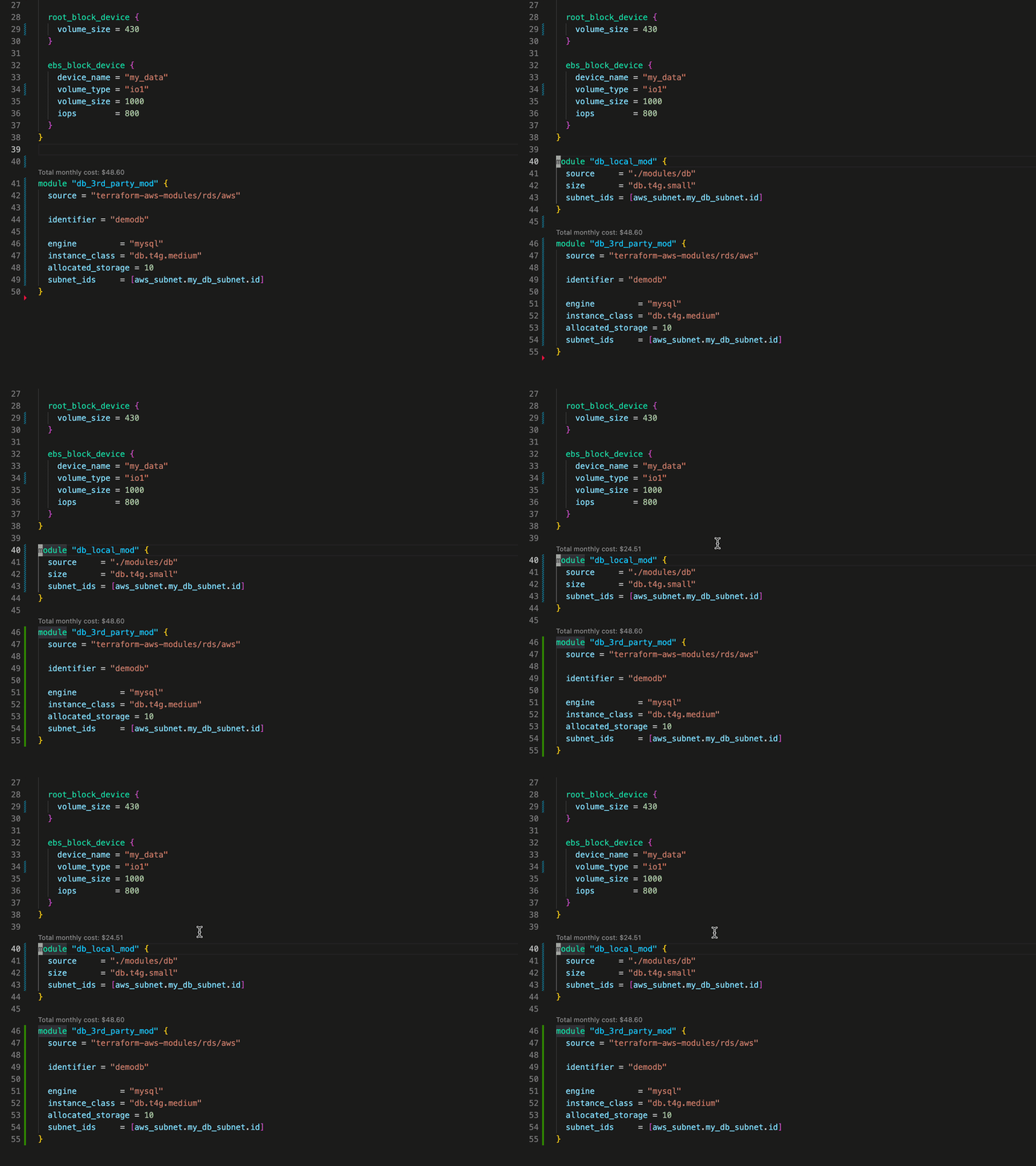
21 |
22 | ### See cost breakdown
23 |
24 | If a simple monthly cost isn't enough for you, just click the overview to see a cost breakdown.
25 |
26 | 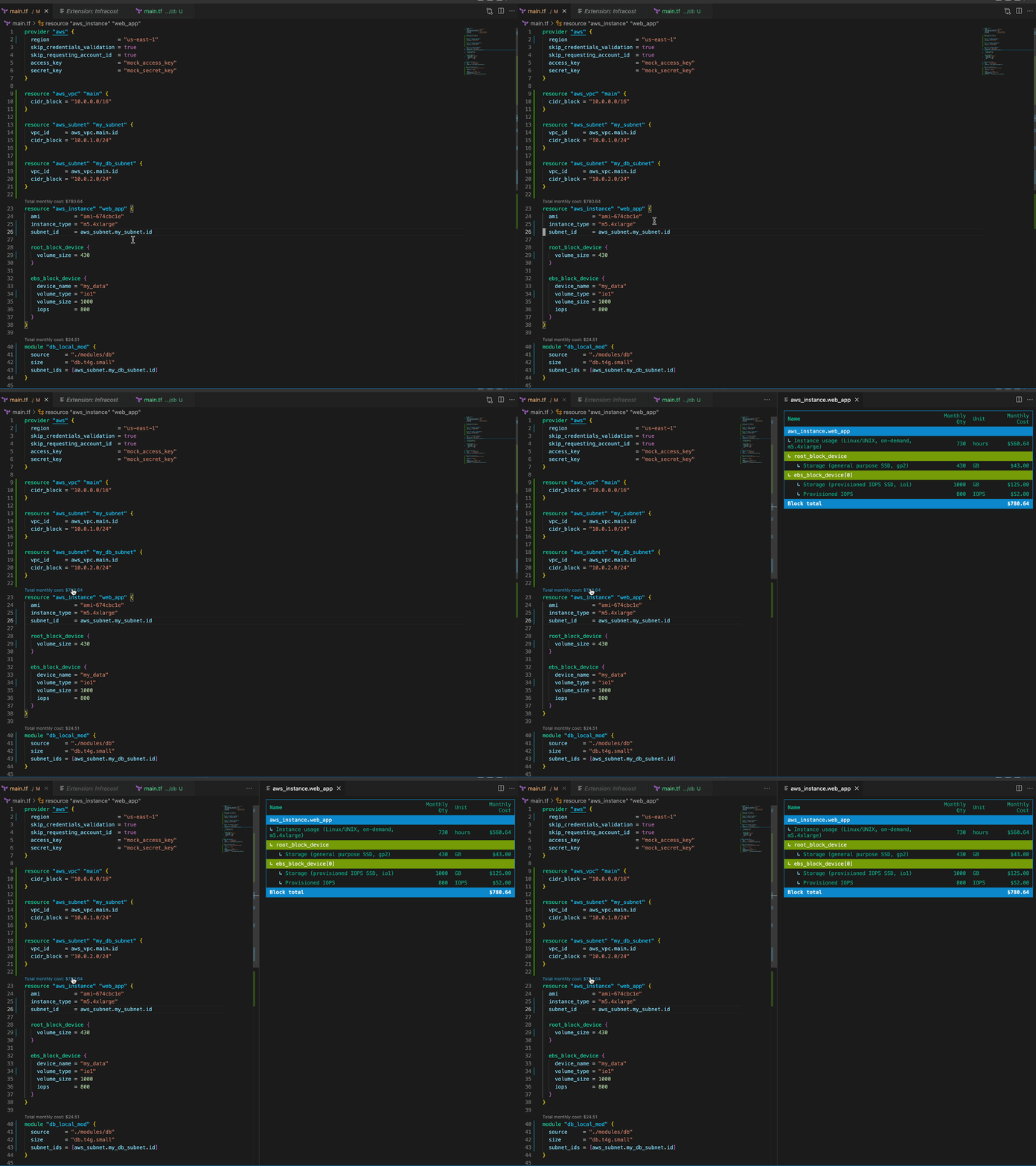
27 |
28 | ### Navigate your projects by costs
29 |
30 | See a tree overview of your Infrastructure costs. See which projects, files and blocks have the most impact to your budget.
31 |
32 | 
33 |
34 | ## Get started
35 |
36 | ### 1. Install VS Code extension
37 |
38 | Open VS Code and install the [Infracost extension](https://marketplace.visualstudio.com/items?itemName=Infracost.infracost).
39 |
40 | ### 2. Connect VS Code to Infracost
41 |
42 | Once you've installed the extension, you'll need to connect to your editor to your Infracost account. Click the "connect to Infracost" button in the Infracost sidebar.
43 |
44 | 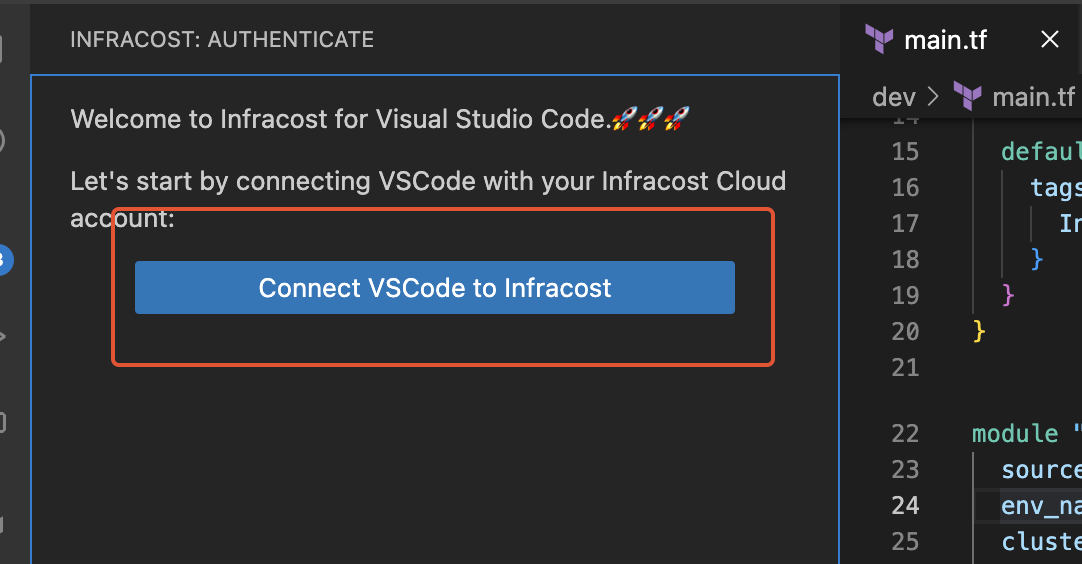
45 |
46 | This will open a browser window where you'll be able to log in to Infracost Cloud and authenticate your editor. See the [Troubleshooting](#troubleshooting) section if this does not work.
47 |
48 | ### 3. Use extension
49 |
50 | If you've done the prior steps correctly you'll should now see the Infracost sidebar, showing the costs of the auto-detected Terraform projects within your workspace.
51 |
52 | 
53 |
54 | ### 4. Create a Infracost config file
55 |
56 | Whilst the Infracost VS Code extension supports auto-detecting projects, this is normally only recommended to get up and running. To get Infracost showing accurate project costs, you'll need to add an Infracost config file at the root of your workspace. This defines the Terraform projects within your workspace and how Infracost should handle them. For example:
57 |
58 | ```yaml
59 | version: 0.1
60 | projects:
61 | - path: dev
62 | name: development
63 | usage_file: dev/infracost-usage.yml
64 | terraform_var_files:
65 | - dev.tfvars
66 |
67 | - path: prod
68 | name: production
69 | usage_file: prod/infracost-usage.yml
70 | terraform_vars:
71 | instance_count: 5
72 | artifact_version: foobar
73 | ```
74 |
75 | You can read more about how the config file works and which fields it supports by reading our [dedicated documentation](https://www.infracost.io/docs/features/config_file/).
76 |
77 | When adding a config file to your workspace, it must be placed at the **root directory** of your workspace, and named either `infracost.yml` for a static config file or `infracost.yml.tmpl` for a [dynamic config files](https://www.infracost.io/docs/features/config_file/#dynamic-config-files).
78 |
79 | ### 5. Cost estimates in pull requests
80 |
81 | [Use our CI/CD integrations](https://www.infracost.io/docs/integrations/cicd/) to add cost estimates to pull requests. This provides your team with a safety net as people can understand cloud costs upfront, and discuss them as part of your workflow.
82 |
83 | 
84 |
85 | ## Requirements
86 |
87 | The Infracost VS Code extension requires you to have:
88 |
89 | * VS Code **v1.67.0** or above.
90 | * The [Terraform VS Code extension](https://marketplace.visualstudio.com/items?itemName=HashiCorp.terraform) installed and enabled in VS Code.
91 |
92 | ## FAQs
93 |
94 | ### How can I supply input variables to Infracost VS Code extension?
95 |
96 | To supply input variables for your Terraform projects, we recommend you add a [config file](https://www.infracost.io/docs/features/config_file/). Config files allow you to add any number of variable files for defined projects. Infracost also auto-detects any var files called `terraform.tfvars`, or `*.auto.tfvars` at the root level of your Terraform projects. e.g:
97 |
98 | ```yaml
99 | version: 0.1
100 | projects:
101 | - path: dev
102 | name: development
103 | usage_file: dev/infracost-usage.yml
104 | terraform_var_files:
105 | - dev.tfvars
106 | - global.tfvars
107 | ```
108 |
109 | Both HCL and JSON var files are supported, JSON var files must include a `.json` suffix.
110 |
111 | ### How do I supply a usage file to the Infracost VS Code extension?
112 |
113 | To supply input variables for your Terraform projects, we recommend you add a [config file](https://www.infracost.io/docs/features/config_file/). Config files allow you to define a usage file for each project you specify, e.g:
114 |
115 | ```yaml
116 | version: 0.1
117 | projects:
118 | - path: dev
119 | usage_file: dev/infracost-usage.yml
120 | - path: prod
121 | usage_file: prod/infracost-usage.yml
122 | ```
123 |
124 | ### I see a lot of resources showing $0.00 costs, why is this?
125 |
126 | These resources are likely usage-based resources. For example, AWS Lambda is billed per request, so unless you specify the number of requests that the function receives. You're likely to see a message similar to the following: " Cost depends on usage: $0.20 per 1M requests" in the resource breakdown.
127 |
128 | To specify usage for resources, add a [usage file](https://www.infracost.io/docs/features/usage_based_resources/#specify-usage-manually) and reference it in a [config file](https://www.infracost.io/docs/features/config_file/) you add at the root of your workspace.
129 |
130 | ### How can I configure the currency Infracost uses?
131 |
132 | If you have the `infracost` CLI installed, you can set the currency by running `infracost configure set currency EUR` (check `infracost configure --help` for other configuration options). Otherwise, update the global infracost configuration file (found at `~/.config/infracost/configuration.yml`) with the following:
133 |
134 | ```yaml
135 | version: "0.1"
136 | currency: EUR
137 | ```
138 |
139 | Infracost supports all ISO 4217 currency codes. [This FAQ](https://www.infracost.io/docs/faq/#can-i-show-costs-in-a-different-currency) has more details.
140 |
141 | ## Troubleshooting
142 |
143 | ### Known Issues
144 |
145 | * The extension is not designed to work in the context of a **multi-repo workspace**. We recommend opening one repo per workspace.
146 | * When opening a workspace with a large number of Terraform projects for the first time. Infracost will evaluate all the projects and download any required modules. This means
147 | that it might take some time before pricing information is available. If you're worried that Infracost VS Code extension isn't working in your workspace but haven't got
148 | any error messages, it is likely that Infracost is still indexing your workspace. The extension has a status bar on the right-hand side of the editor which will show a loading state
149 | when Infracost is running.
150 |
151 | 
152 | * Terragrunt is not supported. Follow [this issue](https://github.com/infracost/vscode-infracost/issues/4) for more information for future updates about Terragrunt support.
153 | * [Diff functionality](https://www.infracost.io/docs/features/cli_commands/#diff) is not yet supported. Follow [this issue](https://github.com/infracost/vscode-infracost/issues/8) to receive updates on diff support.
154 | * If the "Connect VSCode to Infracost" button does not work:
155 | 1. Register for a free API key from [here](https://dashboard.infracost.io/). This is used by the extension to retrieve prices from our Cloud Pricing API, e.g. get prices for instance types.
156 | 2. [Install](https://www.infracost.io/docs/#1-install-infracost) the `infracost` CLI.
157 | 3. Run `infracost configure set api_key MY_API_KEY_HERE`.
158 | 4. Re-open the VSCode extension, it should now skip the "connect to Infracost" step as it uses the same API key from the CLI.
159 |
160 | ### Locating Infracost error logs
161 |
162 | If you're having problems with the extension and your problem isn't any of the **known issues** above, you can find the Infracost extension logs using the following method:
163 |
164 | 1. Open the extension terminal using the top menu (Terminal->New Terminal)
165 | 2. Select **Output** and **Infracost Debug** from the dropdown.
166 | 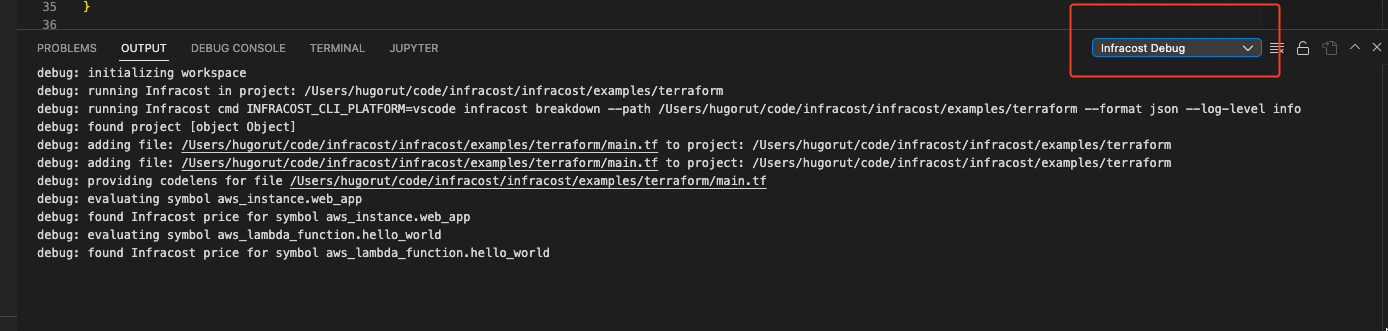
167 | 3. There are sometimes additional CLI logs hidden in the **log (Window)** output.
168 | 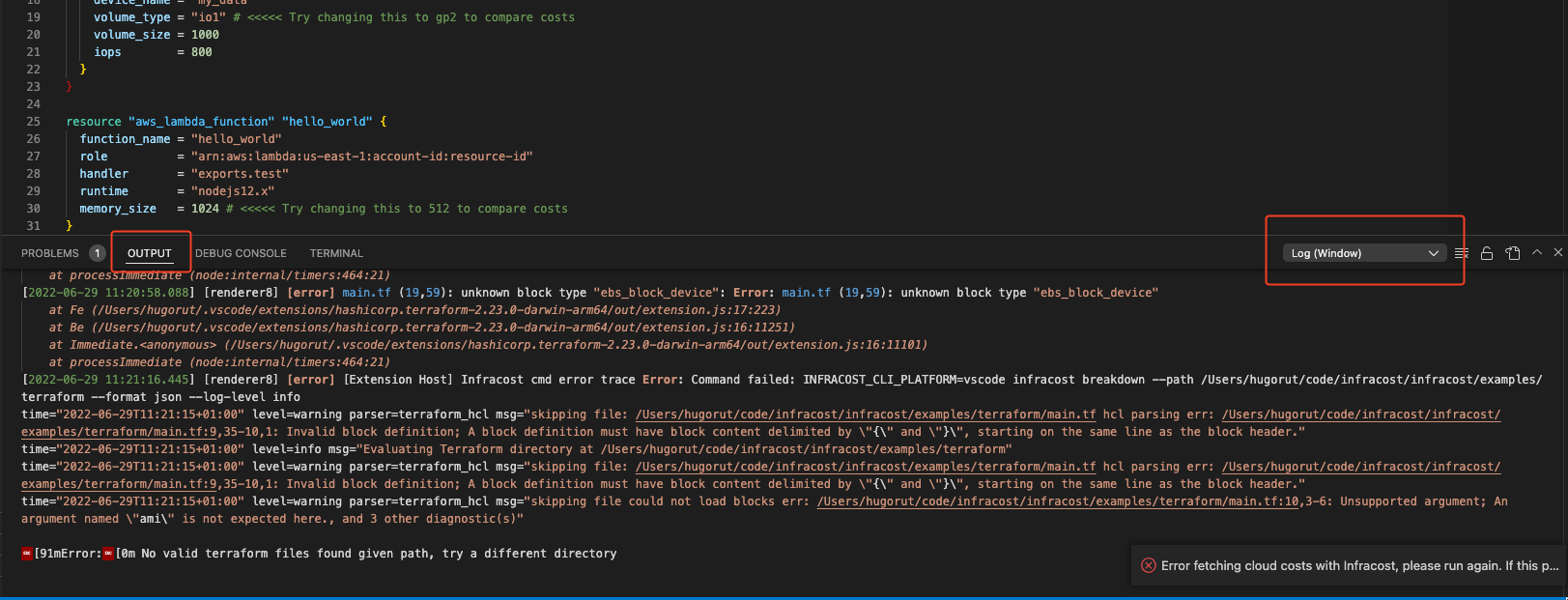
169 |
170 | The log there might give you more information for a problem you can fix on your own, e.g. syntax errors. If it's something more ominous please [raise an issue](https://github.com/infracost/vscode-infracost/issues), so that we can identify and fix the problem. Please include as much of the log information as you can and any other helpful information like OS and VS Code workspace size.
171 |
172 | ## Contributing
173 |
174 | We love any contribution, big or small. If you want to change the Infracost VS Code extension, we recommend you use VS Code to build and develop the extension locally.
175 |
176 | 1. Clone the repo.
177 | 2. `yarn` install all the dependencies.
178 | 3. Open the repo in VS Code.
179 | 4. Inside the editor, press F5. VS Code will compile and run the extension in a new Development Host window.
180 | 5. Open a Terraform project, and navigate to a valid file. If all the previous steps have been followed correctly, you should see Infracost cost estimates above supported resource blocks.
181 |
182 | Once you're finished with your work, open a PR, and we'll be happy to review it as soon as possible.
183 |
--------------------------------------------------------------------------------
/LICENSE:
--------------------------------------------------------------------------------
1 | Apache License
2 | Version 2.0, January 2004
3 | http://www.apache.org/licenses/
4 |
5 | TERMS AND CONDITIONS FOR USE, REPRODUCTION, AND DISTRIBUTION
6 |
7 | 1. Definitions.
8 |
9 | "License" shall mean the terms and conditions for use, reproduction,
10 | and distribution as defined by Sections 1 through 9 of this document.
11 |
12 | "Licensor" shall mean the copyright owner or entity authorized by
13 | the copyright owner that is granting the License.
14 |
15 | "Legal Entity" shall mean the union of the acting entity and all
16 | other entities that control, are controlled by, or are under common
17 | control with that entity. For the purposes of this definition,
18 | "control" means (i) the power, direct or indirect, to cause the
19 | direction or management of such entity, whether by contract or
20 | otherwise, or (ii) ownership of fifty percent (50%) or more of the
21 | outstanding shares, or (iii) beneficial ownership of such entity.
22 |
23 | "You" (or "Your") shall mean an individual or Legal Entity
24 | exercising permissions granted by this License.
25 |
26 | "Source" form shall mean the preferred form for making modifications,
27 | including but not limited to software source code, documentation
28 | source, and configuration files.
29 |
30 | "Object" form shall mean any form resulting from mechanical
31 | transformation or translation of a Source form, including but
32 | not limited to compiled object code, generated documentation,
33 | and conversions to other media types.
34 |
35 | "Work" shall mean the work of authorship, whether in Source or
36 | Object form, made available under the License, as indicated by a
37 | copyright notice that is included in or attached to the work
38 | (an example is provided in the Appendix below).
39 |
40 | "Derivative Works" shall mean any work, whether in Source or Object
41 | form, that is based on (or derived from) the Work and for which the
42 | editorial revisions, annotations, elaborations, or other modifications
43 | represent, as a whole, an original work of authorship. For the purposes
44 | of this License, Derivative Works shall not include works that remain
45 | separable from, or merely link (or bind by name) to the interfaces of,
46 | the Work and Derivative Works thereof.
47 |
48 | "Contribution" shall mean any work of authorship, including
49 | the original version of the Work and any modifications or additions
50 | to that Work or Derivative Works thereof, that is intentionally
51 | submitted to Licensor for inclusion in the Work by the copyright owner
52 | or by an individual or Legal Entity authorized to submit on behalf of
53 | the copyright owner. For the purposes of this definition, "submitted"
54 | means any form of electronic, verbal, or written communication sent
55 | to the Licensor or its representatives, including but not limited to
56 | communication on electronic mailing lists, source code control systems,
57 | and issue tracking systems that are managed by, or on behalf of, the
58 | Licensor for the purpose of discussing and improving the Work, but
59 | excluding communication that is conspicuously marked or otherwise
60 | designated in writing by the copyright owner as "Not a Contribution."
61 |
62 | "Contributor" shall mean Licensor and any individual or Legal Entity
63 | on behalf of whom a Contribution has been received by Licensor and
64 | subsequently incorporated within the Work.
65 |
66 | 2. Grant of Copyright License. Subject to the terms and conditions of
67 | this License, each Contributor hereby grants to You a perpetual,
68 | worldwide, non-exclusive, no-charge, royalty-free, irrevocable
69 | copyright license to reproduce, prepare Derivative Works of,
70 | publicly display, publicly perform, sublicense, and distribute the
71 | Work and such Derivative Works in Source or Object form.
72 |
73 | 3. Grant of Patent License. Subject to the terms and conditions of
74 | this License, each Contributor hereby grants to You a perpetual,
75 | worldwide, non-exclusive, no-charge, royalty-free, irrevocable
76 | (except as stated in this section) patent license to make, have made,
77 | use, offer to sell, sell, import, and otherwise transfer the Work,
78 | where such license applies only to those patent claims licensable
79 | by such Contributor that are necessarily infringed by their
80 | Contribution(s) alone or by combination of their Contribution(s)
81 | with the Work to which such Contribution(s) was submitted. If You
82 | institute patent litigation against any entity (including a
83 | cross-claim or counterclaim in a lawsuit) alleging that the Work
84 | or a Contribution incorporated within the Work constitutes direct
85 | or contributory patent infringement, then any patent licenses
86 | granted to You under this License for that Work shall terminate
87 | as of the date such litigation is filed.
88 |
89 | 4. Redistribution. You may reproduce and distribute copies of the
90 | Work or Derivative Works thereof in any medium, with or without
91 | modifications, and in Source or Object form, provided that You
92 | meet the following conditions:
93 |
94 | (a) You must give any other recipients of the Work or
95 | Derivative Works a copy of this License; and
96 |
97 | (b) You must cause any modified files to carry prominent notices
98 | stating that You changed the files; and
99 |
100 | (c) You must retain, in the Source form of any Derivative Works
101 | that You distribute, all copyright, patent, trademark, and
102 | attribution notices from the Source form of the Work,
103 | excluding those notices that do not pertain to any part of
104 | the Derivative Works; and
105 |
106 | (d) If the Work includes a "NOTICE" text file as part of its
107 | distribution, then any Derivative Works that You distribute must
108 | include a readable copy of the attribution notices contained
109 | within such NOTICE file, excluding those notices that do not
110 | pertain to any part of the Derivative Works, in at least one
111 | of the following places: within a NOTICE text file distributed
112 | as part of the Derivative Works; within the Source form or
113 | documentation, if provided along with the Derivative Works; or,
114 | within a display generated by the Derivative Works, if and
115 | wherever such third-party notices normally appear. The contents
116 | of the NOTICE file are for informational purposes only and
117 | do not modify the License. You may add Your own attribution
118 | notices within Derivative Works that You distribute, alongside
119 | or as an addendum to the NOTICE text from the Work, provided
120 | that such additional attribution notices cannot be construed
121 | as modifying the License.
122 |
123 | You may add Your own copyright statement to Your modifications and
124 | may provide additional or different license terms and conditions
125 | for use, reproduction, or distribution of Your modifications, or
126 | for any such Derivative Works as a whole, provided Your use,
127 | reproduction, and distribution of the Work otherwise complies with
128 | the conditions stated in this License.
129 |
130 | 5. Submission of Contributions. Unless You explicitly state otherwise,
131 | any Contribution intentionally submitted for inclusion in the Work
132 | by You to the Licensor shall be under the terms and conditions of
133 | this License, without any additional terms or conditions.
134 | Notwithstanding the above, nothing herein shall supersede or modify
135 | the terms of any separate license agreement you may have executed
136 | with Licensor regarding such Contributions.
137 |
138 | 6. Trademarks. This License does not grant permission to use the trade
139 | names, trademarks, service marks, or product names of the Licensor,
140 | except as required for reasonable and customary use in describing the
141 | origin of the Work and reproducing the content of the NOTICE file.
142 |
143 | 7. Disclaimer of Warranty. Unless required by applicable law or
144 | agreed to in writing, Licensor provides the Work (and each
145 | Contributor provides its Contributions) on an "AS IS" BASIS,
146 | WITHOUT WARRANTIES OR CONDITIONS OF ANY KIND, either express or
147 | implied, including, without limitation, any warranties or conditions
148 | of TITLE, NON-INFRINGEMENT, MERCHANTABILITY, or FITNESS FOR A
149 | PARTICULAR PURPOSE. You are solely responsible for determining the
150 | appropriateness of using or redistributing the Work and assume any
151 | risks associated with Your exercise of permissions under this License.
152 |
153 | 8. Limitation of Liability. In no event and under no legal theory,
154 | whether in tort (including negligence), contract, or otherwise,
155 | unless required by applicable law (such as deliberate and grossly
156 | negligent acts) or agreed to in writing, shall any Contributor be
157 | liable to You for damages, including any direct, indirect, special,
158 | incidental, or consequential damages of any character arising as a
159 | result of this License or out of the use or inability to use the
160 | Work (including but not limited to damages for loss of goodwill,
161 | work stoppage, computer failure or malfunction, or any and all
162 | other commercial damages or losses), even if such Contributor
163 | has been advised of the possibility of such damages.
164 |
165 | 9. Accepting Warranty or Additional Liability. While redistributing
166 | the Work or Derivative Works thereof, You may choose to offer,
167 | and charge a fee for, acceptance of support, warranty, indemnity,
168 | or other liability obligations and/or rights consistent with this
169 | License. However, in accepting such obligations, You may act only
170 | on Your own behalf and on Your sole responsibility, not on behalf
171 | of any other Contributor, and only if You agree to indemnify,
172 | defend, and hold each Contributor harmless for any liability
173 | incurred by, or claims asserted against, such Contributor by reason
174 | of your accepting any such warranty or additional liability.
175 |
176 | END OF TERMS AND CONDITIONS
177 |
178 | APPENDIX: How to apply the Apache License to your work.
179 |
180 | To apply the Apache License to your work, attach the following
181 | boilerplate notice, with the fields enclosed by brackets "[]"
182 | replaced with your own identifying information. (Don't include
183 | the brackets!) The text should be enclosed in the appropriate
184 | comment syntax for the file format. We also recommend that a
185 | file or class name and description of purpose be included on the
186 | same "printed page" as the copyright notice for easier
187 | identification within third-party archives.
188 |
189 | Copyright 2022 Infracost Inc.
190 |
191 | Licensed under the Apache License, Version 2.0 (the "License");
192 | you may not use this file except in compliance with the License.
193 | You may obtain a copy of the License at
194 |
195 | http://www.apache.org/licenses/LICENSE-2.0
196 |
197 | Unless required by applicable law or agreed to in writing, software
198 | distributed under the License is distributed on an "AS IS" BASIS,
199 | WITHOUT WARRANTIES OR CONDITIONS OF ANY KIND, either express or implied.
200 | See the License for the specific language governing permissions and
201 | limitations under the License.
202 |
--------------------------------------------------------------------------------
/src/workspace.ts:
--------------------------------------------------------------------------------
1 | import * as path from 'path';
2 | import { EventEmitter, TextDocument, TreeItem, window } from 'vscode';
3 | import { existsSync, readFileSync, writeFileSync } from 'fs';
4 | import { dump, load } from 'js-yaml';
5 | import { tmpdir } from 'os';
6 | import CLI, { infracostJSON } from './cli';
7 | import logger from './log';
8 | import Project from './project';
9 | import Block from './block';
10 | import infracostStatus from './statusBar';
11 | import {
12 | cleanFilename,
13 | CONFIG_FILE_NAME,
14 | CONFIG_TEMPLATE_NAME,
15 | getFileEncoding,
16 | isValidTerraformFile,
17 | USAGE_FILE_NAME,
18 | } from './utils';
19 | import webviews from './webview';
20 | import context, { ERROR, LOGGED_IN } from './context';
21 | import { ConfigFile } from './config';
22 |
23 | export default class Workspace {
24 | loading = false;
25 |
26 | projects: { [key: string]: Project } = {};
27 |
28 | filesToProjects: { [key: string]: { [key: string]: true } } = {};
29 |
30 | codeLensEventEmitter: EventEmitter = new EventEmitter();
31 |
32 | isError = false;
33 |
34 | constructor(
35 | public root: string,
36 | private cli: CLI,
37 | private blockTemplate: Handlebars.TemplateDelegate,
38 | private treeRenderEventEmitter: EventEmitter,
39 | private currency: string
40 | ) {}
41 |
42 | async login() {
43 | logger.debug('executing infracost login');
44 |
45 | const out = await this.cli.exec(['auth', 'login']);
46 | if (out.stdout.indexOf('Your account has been authenticated') !== -1) {
47 | window.showInformationMessage('VS Code is now connected to Infracost');
48 | logger.debug('successful login response received');
49 | await context.set(LOGGED_IN, true);
50 | await this.init();
51 | return;
52 | }
53 |
54 | logger.debug(`failed login response was ${out.stdout}`);
55 | await context.set(LOGGED_IN, false);
56 | }
57 |
58 | async init() {
59 | if (!context.isLoggedIn()) {
60 | window.showInformationMessage(
61 | 'Please [Connect VSCode to Infracost Cloud](command:infracost.login).'
62 | );
63 | return;
64 | }
65 |
66 | infracostStatus.setLoading();
67 | logger.debug(`initializing workspace`);
68 | this.projects = {};
69 | this.filesToProjects = {};
70 | this.loading = true;
71 | this.isError = false;
72 |
73 | const out = await this.run();
74 | if (out === undefined) {
75 | this.isError = true;
76 | }
77 |
78 | this.loading = false;
79 | infracostStatus.setReady();
80 | }
81 |
82 | static show(block: Block) {
83 | block.display();
84 | }
85 |
86 | async fileChange(file: TextDocument) {
87 | const filename = cleanFilename(file.uri.path);
88 | const isConfigFileChange =
89 | filename === path.join(this.root, CONFIG_FILE_NAME) ||
90 | filename === path.join(this.root, CONFIG_TEMPLATE_NAME);
91 | const isUsageFileChange = path.basename(filename) === USAGE_FILE_NAME;
92 | const isValid = (await isValidTerraformFile(file)) || isConfigFileChange || isUsageFileChange;
93 |
94 | if (!isValid) {
95 | logger.debug(`ignoring file change for path ${filename}`);
96 | return;
97 | }
98 |
99 | if (this.isError) {
100 | // if we're in error then we need to init again as all projects
101 | // will be nil and thus cannot be resolved to a costs/symbols.
102 | await this.init();
103 | return;
104 | }
105 |
106 | if (isConfigFileChange || filename === path.join(this.root, USAGE_FILE_NAME)) {
107 | // if we have a root level config or usage file change then we need to init again as all projects
108 | // we cannot determine which projects have changes.
109 | await this.init();
110 | return;
111 | }
112 |
113 | infracostStatus.setLoading();
114 | this.loading = true;
115 | this.codeLensEventEmitter.fire();
116 |
117 | logger.debug(`detected file change for path ${filename}`);
118 |
119 | const key = filename.split(path.sep).join('/');
120 | const projects =
121 | this.filesToProjects[
122 | Object.keys(this.filesToProjects).find(
123 | (k: string) => k.toLowerCase() === key.toLowerCase()
124 | ) || key
125 | ];
126 |
127 | if (projects === undefined) {
128 | logger.debug(
129 | `no valid projects found for path ${filename} attempting to locate project for file`
130 | );
131 |
132 | const projects: string[] = [];
133 | for (const project of Object.keys(this.projects)) {
134 | const projectDir = path.normalize(cleanFilename(project));
135 | const dir = path.dirname(path.normalize(cleanFilename(filename)));
136 | logger.debug(`evaluating if ${filename} is within project ${projectDir}`);
137 |
138 | if (projectDir === dir) {
139 | logger.debug(`using project ${project} for ${filename}, running file change event again`);
140 | projects.push(project);
141 | }
142 | }
143 |
144 | if (projects.length > 0) {
145 | await this.run(...projects);
146 | this.loading = false;
147 | infracostStatus.setReady();
148 | this.codeLensEventEmitter.fire();
149 | return;
150 | }
151 |
152 | this.loading = false;
153 | infracostStatus.setReady();
154 | return;
155 | }
156 |
157 | await this.run(...Object.keys(projects));
158 |
159 | this.loading = false;
160 | infracostStatus.setReady();
161 | this.codeLensEventEmitter.fire();
162 | }
163 |
164 | // TODO: determine or allow users to switch the project they are using.
165 | project(filename: string): { [key: string]: Block } {
166 | const key = filename.split(path.sep).join('/');
167 | const projectKey =
168 | this.filesToProjects[
169 | Object.keys(this.filesToProjects).find(
170 | (k: string) => k.toLowerCase() === key.toLowerCase()
171 | ) || key
172 | ];
173 |
174 | if (projectKey && Object.keys(projectKey).length > 0) {
175 | const project = Object.keys(projectKey)[0];
176 | return this.projects[project].blocks;
177 | }
178 |
179 | logger.debug(`no projects found for filename ${filename}`);
180 | return {};
181 | }
182 |
183 | async run(...changedProjectPaths: string[]): Promise {
184 | try {
185 | const templateFilePath = path.join(this.root, CONFIG_TEMPLATE_NAME);
186 | const hasTemplateFilePath = existsSync(templateFilePath);
187 | let configFilePath = path.join(this.root, CONFIG_FILE_NAME);
188 | if (hasTemplateFilePath) {
189 | configFilePath = path.join(tmpdir(), CONFIG_FILE_NAME);
190 | const out = await this.cli.exec([
191 | 'generate',
192 | 'config',
193 | '--template-path',
194 | templateFilePath,
195 | '--repo-path',
196 | this.root,
197 | '--out-file',
198 | configFilePath,
199 | ]);
200 |
201 | if (out.stderr !== '') {
202 | await context.set(ERROR, `${out.stderr}.`);
203 | return undefined;
204 | }
205 | }
206 |
207 | const hasConfigFile = existsSync(configFilePath);
208 | let projects;
209 | if (hasConfigFile) {
210 | projects = await this.runConfigFile(changedProjectPaths, configFilePath);
211 | } else {
212 | projects = await this.runBreakdown(changedProjectPaths);
213 | }
214 |
215 | await this.renderProjectTree(projects, changedProjectPaths.length === 0, hasConfigFile);
216 | return projects;
217 | } catch (error) {
218 | logger.error(`Infracost cmd error trace ${error}`);
219 |
220 | if (changedProjectPaths.length > 0) {
221 | await context.set(
222 | ERROR,
223 | `Could not run the infracost cmd in the \`${this.root}\` directory. This is likely because of a syntax error or invalid project.\n\nSee the Infracost Debug output tab for more information. Go to **View > Output** & select "Infracost Debug" from the dropdown. If this problem continues please open an [issue here](https://github.com/infracost/vscode-infracost).`
224 | );
225 | return undefined;
226 | }
227 |
228 | await context.set(
229 | ERROR,
230 | `Error fetching cloud costs with Infracost, please run again by saving the file or reopening the workspace.\n\nSee the Infracost Debug output tab for more information. Go to **View > Output** & select "Infracost Debug" from the dropdown. If this problem continues please open an [issue here](https://github.com/infracost/vscode-infracost).`
231 | );
232 |
233 | return undefined;
234 | }
235 | }
236 |
237 | async runConfigFile(
238 | changedProjectPaths: string[],
239 | configFilePath = path.join(this.root, CONFIG_FILE_NAME)
240 | ): Promise {
241 | let args = ['--config-file', configFilePath];
242 | if (changedProjectPaths.length === 0) {
243 | logger.debug(`running "infracost breakdown --config-file ${configFilePath}"`);
244 | } else {
245 | const changed: { [key: string]: boolean } = changedProjectPaths.reduce(
246 | (m, projectPath) => ({
247 | ...m,
248 | [path.relative(this.root, projectPath)]: true,
249 | }),
250 | {}
251 | );
252 | logger.debug('filtering config file projects to only those that have changed');
253 | const encoding = await getFileEncoding(configFilePath);
254 | const doc = load(readFileSync(configFilePath, encoding as BufferEncoding));
255 | doc.projects = doc.projects.filter((p) => changed[p.path]);
256 |
257 | const str = dump(doc);
258 | const tmpConfig = path.join(tmpdir(), CONFIG_FILE_NAME);
259 | writeFileSync(tmpConfig, str);
260 | logger.debug(`created temporary config file ${tmpConfig}`);
261 | args = ['--config-file', tmpConfig];
262 | logger.debug(`running "infracost breakdown --config-file" with changed projects`);
263 | }
264 |
265 | const out = await this.cli.exec(
266 | ['breakdown', ...args, '--format', 'json', '--log-level', 'info'],
267 | this.root
268 | );
269 | const body = JSON.parse(out.stdout);
270 |
271 | return body.projects;
272 | }
273 |
274 | async runBreakdown(changedProjectPaths: string[]): Promise {
275 | let changed = changedProjectPaths;
276 | const projects: infracostJSON.Project[] = [];
277 | if (changedProjectPaths.length === 0) {
278 | changed = [this.root];
279 | }
280 | for (const projectPath of changed) {
281 | logger.debug(`running "infracost breakdown --path ${projectPath}"`);
282 |
283 | const args = ['breakdown', '--path', projectPath, '--format', 'json', '--log-level', 'info'];
284 |
285 | const projectConfigFile = path.join(projectPath, USAGE_FILE_NAME);
286 | const rootConfigFile = path.join(this.root, USAGE_FILE_NAME);
287 | if (existsSync(projectConfigFile)) {
288 | args.push('--usage-file', projectConfigFile);
289 | } else if (existsSync(rootConfigFile)) {
290 | args.push('--usage-file', rootConfigFile);
291 | }
292 |
293 | const out = await this.cli.exec(args);
294 |
295 | const body = JSON.parse(out.stdout);
296 | projects.push(...body.projects);
297 | }
298 |
299 | return projects;
300 | }
301 |
302 | private determineResolvedFilename(projectPath: string, filename: string): string {
303 | if (process.platform === 'win32') {
304 | return path.resolve(projectPath, path.basename(filename));
305 | }
306 | return [this.root, path.resolve(path.relative(this.root, filename))].join('');
307 | }
308 |
309 | private async renderProjectTree(
310 | projects: infracostJSON.Project[],
311 | init: boolean,
312 | hasConfigFile: boolean
313 | ) {
314 | for (const project of projects) {
315 | logger.debug(`found project ${project.name}`);
316 |
317 | const projectPath = project.metadata.path;
318 | const usageFilePath = path.join(projectPath, USAGE_FILE_NAME);
319 | if (existsSync(usageFilePath)) {
320 | this.addProjectToFile(usageFilePath, projectPath);
321 | }
322 |
323 | const name = hasConfigFile ? project.name : path.relative(this.root, projectPath);
324 | const formatted = new Project(name, projectPath, this.currency, this.blockTemplate);
325 | for (const resource of project.breakdown.resources) {
326 | if (resource.metadata.calls) {
327 | for (const call of resource.metadata.calls) {
328 | const filename = this.determineResolvedFilename(projectPath, call.filename);
329 | logger.debug(`adding file: ${filename} to project: ${projectPath}`);
330 | formatted.setBlock(filename, call.blockName, call.startLine).resources.push(resource);
331 | this.addProjectToFile(filename, projectPath);
332 | }
333 | }
334 | }
335 |
336 | // reload the webviews after the save
337 | this.projects[projectPath] = formatted;
338 | Object.keys(webviews.views).forEach((key) => {
339 | const [filename, blockname] = key.split('|');
340 | formatted.getBlock(filename, blockname)?.display();
341 | });
342 |
343 | if (!init) {
344 | this.treeRenderEventEmitter.fire();
345 | logger.debug('rebuilding Infracost tree view after project run');
346 | }
347 | }
348 |
349 | await context.set(ERROR, undefined);
350 | }
351 |
352 | private addProjectToFile(filename: string, projectPath: string) {
353 | const key = filename.split(path.sep).join('/');
354 | if (this.filesToProjects[key] === undefined) {
355 | this.filesToProjects[key] = {};
356 | }
357 |
358 | this.filesToProjects[key][projectPath] = true;
359 | }
360 | }
361 |
--------------------------------------------------------------------------------