├── logo.png
├── .npmignore
├── docs
├── .vuepress
│ ├── public
│ │ ├── images
│ │ │ ├── logo.png
│ │ │ └── favicon.ico
│ │ └── manifest.json
│ └── config.js
├── README.md
└── info.md
├── generator
├── template
│ └── src
│ │ └── components
│ │ └── CesiumExample
│ │ └── No01-init.vue
└── index.js
├── .gitignore
├── package.json
├── prompts.js
├── index.js
└── README.md
/logo.png:
--------------------------------------------------------------------------------
https://raw.githubusercontent.com/isboyjc/vue-cli-plugin-cesium/HEAD/logo.png
--------------------------------------------------------------------------------
/.npmignore:
--------------------------------------------------------------------------------
1 | build
2 | dist
3 | docs
4 | .babelrc
5 | .travis.yml
6 | /package-lock.json
7 | /yarn.lock
--------------------------------------------------------------------------------
/docs/.vuepress/public/images/logo.png:
--------------------------------------------------------------------------------
https://raw.githubusercontent.com/isboyjc/vue-cli-plugin-cesium/HEAD/docs/.vuepress/public/images/logo.png
--------------------------------------------------------------------------------
/docs/.vuepress/public/images/favicon.ico:
--------------------------------------------------------------------------------
https://raw.githubusercontent.com/isboyjc/vue-cli-plugin-cesium/HEAD/docs/.vuepress/public/images/favicon.ico
--------------------------------------------------------------------------------
/docs/.vuepress/public/manifest.json:
--------------------------------------------------------------------------------
1 | {
2 | "name": "张三",
3 | "short_name": "张三",
4 | "start_url": "index.html",
5 | "display": "standalone",
6 | "background_color": "#2196f3",
7 | "description": "张三的个人主页",
8 | "theme_color": "blue",
9 | "icons": [
10 | {
11 | "src": "./photo.jpg",
12 | "sizes": "144x144",
13 | "type": "image/png"
14 | }
15 | ],
16 | "related_applications": [
17 | {
18 | "platform": "web"
19 | },
20 | {
21 | "platform": "play",
22 | "url": "https://play.google.com/store/apps/details?id=cheeaun.hackerweb"
23 | }
24 | ]
25 | }
--------------------------------------------------------------------------------
/generator/template/src/components/CesiumExample/No01-init.vue:
--------------------------------------------------------------------------------
1 |
2 |
5 |
6 |
7 |
21 |
--------------------------------------------------------------------------------
/.gitignore:
--------------------------------------------------------------------------------
1 | # Logs
2 | logs
3 | *.log
4 | npm-debug.log*
5 |
6 | # Runtime data
7 | pids
8 | *.pid
9 | *.seed
10 |
11 | # Directory for instrumented libs generated by jscoverage/JSCover
12 | lib-cov
13 |
14 | # Coverage directory used by tools like istanbul
15 | coverage
16 |
17 | # nyc test coverage
18 | .nyc_output
19 |
20 | # Grunt intermediate storage (http://gruntjs.com/creating-plugins#storing-task-files)
21 | .grunt
22 |
23 | # node-waf configuration
24 | .lock-wscript
25 |
26 | # Compiled binary addons (http://nodejs.org/api/addons.html)
27 | build/Release
28 |
29 | # Dependency directories
30 | node_modules
31 | jspm_packages
32 |
33 | # Optional npm cache directory
34 | .npm
35 |
36 | # Optional REPL history
37 | .node_repl_history
38 |
39 | # docs
40 | dist
41 |
42 | # coverage
43 | coverage
44 |
45 | /index.js
46 | /package-lock.json
47 | /yarn.lock
48 | /lib
49 | .vscode
--------------------------------------------------------------------------------
/package.json:
--------------------------------------------------------------------------------
1 | {
2 | "name": "vue-cli-plugin-cesium",
3 | "version": "1.1.7",
4 | "description": "Cesium encapsulation based on Vue cli",
5 | "main": "index.js",
6 | "scripts": {
7 | "test": "echo \"Error: no test specified\" && exit 1",
8 | "docs:dev": "vuepress dev docs",
9 | "docs:build": "vuepress build docs"
10 | },
11 | "repository": {
12 | "type": "git",
13 | "url": "git+https://github.com/isboyjc/vue-cli-plugin-cesium.git"
14 | },
15 | "keywords": [
16 | "cesium",
17 | "vue cesium",
18 | "vue-cli cesium"
19 | ],
20 | "author": "isboyjc",
21 | "license": "ISC",
22 | "bugs": {
23 | "url": "https://github.com/isboyjc/vue-cli-plugin-cesium/issues"
24 | },
25 | "homepage": "https://github.com/isboyjc/vue-cli-plugin-cesium#readme",
26 | "dependencies": {
27 | "moment": "^2.24.0",
28 | "vuepress": "^1.2.0",
29 | "vuepress-theme-reco": "^1.1.4"
30 | }
31 | }
32 |
--------------------------------------------------------------------------------
/generator/index.js:
--------------------------------------------------------------------------------
1 | /*
2 | * @Author: isboyjc
3 | * @Date: 2019-12-14 16:38:18
4 | * @LastEditors: isboyjc
5 | * @LastEditTime: 2020-03-27 14:43:53
6 | * @Description: generator 允许一个 generator 向 package.json 注入额外的依赖或字段,并向项目中添加文件
7 | */
8 | module.exports = (api, options, rootOptions) => {
9 | let version = options.addVersion
10 | version.startsWith("*") ? (version = "*") : null
11 | // 拓展 package.json,默认merge已有依赖项,可以设置参数 merge: false
12 | api.extendPackage({
13 | dependencies: {
14 | cesium: version
15 | }
16 | })
17 |
18 | // 是否全局引入样式,该操作将自动在main.js引入widgets.css
19 | if (options.addWidgetsToMain) {
20 | // 文件写入回调
21 | api.onCreateComplete(() => {
22 | const fs = require("fs")
23 | // 添加字串
24 | const iviewLines = `\nimport 'cesium/Widgets/widgets.css'\n`
25 | // 获取文件内容 字符串
26 | // api.entryFile 判断typescript的输入文件是否存在
27 | // api.entryFile = fs.existsSync(this.resolve('src/main.ts')) ? 'src/main.ts' : 'src/main.js
28 | let contentMain = fs.readFileSync(api.entryFile, { encoding: "utf-8" })
29 | // 判断是否已存在
30 | if (contentMain.indexOf("cesium/Widgets/widgets.css") !== -1) return
31 | // 字符串切割 数组内容反转
32 | const lines = contentMain.split(/\r?\n/g).reverse()
33 | // 找到import的下标
34 | const importIndex = lines.findIndex(line => line.match(/^import/))
35 | // 在反转第一个import的下面添加引入语句
36 | lines[importIndex] += iviewLines
37 | // main内容还原
38 | contentMain = lines.reverse().join("\n")
39 | // 写入文件
40 | fs.writeFileSync(api.entryFile, contentMain, { encoding: "utf-8" })
41 | })
42 | }
43 |
44 | // 是否渲染示例模板
45 | if (options.addExample) {
46 | api.render("./template", {
47 | ...options
48 | })
49 | }
50 | }
51 |
--------------------------------------------------------------------------------
/docs/.vuepress/config.js:
--------------------------------------------------------------------------------
1 | /*
2 | * @Author: isboyjc
3 | * @Date: 2019-12-28 09:37:43
4 | * @LastEditors : isboyjc
5 | * @LastEditTime : 2019-12-28 12:24:45
6 | * @Description:
7 | */
8 | module.exports = {
9 | // 主题
10 | theme: 'reco',
11 | title: 'vue-cli-plugin-cesium',
12 | description: 'Vue + Cesium 的免配置开发体验',
13 | // 注入到当前页面的 HTML 中的标签
14 | head: [
15 | ['link', { rel: 'icon', href: '/images/logo.png' }],
16 | ['link', { rel: 'manifest', href: '/images/logo.png' }],
17 | ['link', { rel: 'apple-touch-icon', href: '/images/logo.png' }],
18 | ['meta', { 'http-quiv': 'pragma', cotent: 'no-cache'}],
19 | ['meta', { 'http-quiv': 'pragma', cotent: 'no-cache,must-revalidate'}],
20 | ['meta', { 'http-quiv': 'expires', cotent: '0'}]
21 | ],
22 | // 是否开启 PWA
23 | serviceWorker: true,
24 | // 部署到github相关的配置
25 | base: '/vue-cli-plugin-cesium/',
26 | markdown: {
27 | // 代码块是否显示行号
28 | lineNumbers: false
29 | },
30 | // 插件配置
31 | // 滚动插件
32 | plugins: [
33 | // 最后更新时间插件
34 | [
35 | '@vuepress/last-updated',
36 | {
37 | transformer: (timestamp, lang) => {
38 | // 不要忘了安装 moment
39 | const moment = require('moment')
40 | moment.locale(lang)
41 | return moment(timestamp).fromNow()
42 | }
43 | }
44 | ],
45 | // 导航点击滚动效果插件
46 | ['vuepress-plugin-smooth-scroll']
47 | ],
48 | themeConfig: {
49 | // 项目开始时间,只填写年份
50 | startYear: '2019',
51 | author: 'isboyjc',
52 | // logo
53 | logo: 'images/logo.png',
54 | lastUpdated: '上次更新时间',
55 | // valine评论
56 | valineConfig: {
57 | appId: 'ryLXrLDT4NGPR5qMU7VrpQQf-gzGzoHsz',
58 | appKey: 'PDaPph76mYltfvja4giSQP0W',
59 | },
60 | // 导航栏配置
61 | nav:[
62 | {text: 'Github', link: 'https://github.com/isboyjc/vue-cli-plugin-cesium'}
63 | ],
64 | // 侧边栏配置
65 | sidebar: 'auto',
66 | // 侧边栏显示2级
67 | sidebarDepth: 2,
68 | // 默认值:false 侧边栏只会显示由当前活动页面的标题组成的链接
69 | displayAllHeaders: false,
70 | // 默认值:true 滚动时通过 hash 高亮侧边栏标题
71 | activeHeaderLinks: true,
72 | }
73 | };
--------------------------------------------------------------------------------
/docs/README.md:
--------------------------------------------------------------------------------
1 | ---
2 | home: true
3 | heroImage: /images/logo.png
4 | isShowTitleInHome: false
5 | actionText: 快速上手 →
6 | actionLink: info.html
7 | features:
8 | - title: 是什么
9 | details: vue-cli-plugin-cesium是一款vue-cli的Cesium扩展插件,可在新项目或旧项目中使用,当然必须是vue-cli项目
10 | - title: 做什么
11 | details: 解决了在Vue中使用Cesium的诸多配置问题,享受 Vue + Cesium 的免配置开发体验,只需安装此插件一步即可
12 | - title: 扩展
13 | details: 后期会在该插件中扩展通用组件及示例,让Vue+Cesium开发更圆滑,欢迎star,欢迎PR
14 | ---
15 |
16 |
17 |
18 |
19 |
20 |
31 |
32 |
35 |
36 |
37 |
38 |
39 |
40 |
41 |
42 |
45 |
52 |
53 |
54 |
55 |
--------------------------------------------------------------------------------
/prompts.js:
--------------------------------------------------------------------------------
1 | /*
2 | * @Author: isboyjc
3 | * @Date: 2019-12-14 19:39:35
4 | * @LastEditors: isboyjc
5 | * @LastEditTime: 2020-07-30 15:34:48
6 | * @Description: 提示代码,以供用户在命令行选择
7 | */
8 | module.exports = [
9 | {
10 | name: `addVersion`,
11 | type: "list",
12 | choices: [
13 | "*(Newest)",
14 | "1.71.0",
15 | "1.70.1",
16 | "1.70.0",
17 | "1.69.0",
18 | "1.68.0",
19 | "1.67.0",
20 | "1.66.0",
21 | "1.65.0",
22 | "1.64.0",
23 | "1.63.1",
24 | "1.63.0",
25 | "1.62.0",
26 | "1.60.0",
27 | "1.59.0",
28 | "1.59.0-github-master2108",
29 | "1.58.1",
30 | "1.58.1-github-master2106",
31 | "1.57.0",
32 | "1.56.1",
33 | "1.56.0",
34 | "1.55.0",
35 | "1.54.0",
36 | "1.53.0",
37 | "1.52.0",
38 | "1.51.0",
39 | "1.50.0",
40 | "1.49.0",
41 | "1.48.0",
42 | "1.47.0",
43 | "1.46.1",
44 | "1.45.0",
45 | "1.44.0",
46 | "1.43.0",
47 | "1.42.1",
48 | "1.42.0",
49 | "1.41.0",
50 | "1.40.0",
51 | "1.39.0",
52 | "1.38.0",
53 | "1.37.0",
54 | "1.36.0",
55 | "1.35.2",
56 | "1.35.1",
57 | "1.34.0",
58 | "1.33.0",
59 | "1.32.1",
60 | "1.31.0",
61 | "1.30.0",
62 | "1.29.0",
63 | "1.28.0",
64 | "1.27.0",
65 | "1.26.0",
66 | "1.25.0",
67 | "1.24.0",
68 | "1.23.0",
69 | "1.22.2",
70 | "1.22.1",
71 | "1.22.0",
72 | "1.21.0",
73 | "1.20.0",
74 | "1.19.0",
75 | "1.18.0",
76 | "1.17.0",
77 | "1.16.0",
78 | ],
79 | message:
80 | "Please choose a version of 'cesium' from this list(请在列表中选择 cesium 的版本)",
81 | },
82 | {
83 | name: `addWidgetsToMain`,
84 | type: "confirm",
85 | message:
86 | "Whether to import styles globally. This operation will automatically import widgets.css in main.js(是否全局引入样式,该操作将自动在main.js引入widgets.css)?",
87 | default: true,
88 | },
89 | {
90 | name: `addExample`,
91 | type: "confirm",
92 | message:
93 | "Whether to add sample components to the project components directory(是否添加示例组件到项目components目录)?",
94 | default: true,
95 | },
96 | ]
97 |
--------------------------------------------------------------------------------
/index.js:
--------------------------------------------------------------------------------
1 | /*
2 | * @Author: isboyjc
3 | * @Date: 2019-12-14 16:37:27
4 | * @LastEditors: isboyjc
5 | * @LastEditTime: 2020-04-13 13:44:23
6 | * @Description: service plugin 修改webpack配置
7 | */
8 | const path = require("path")
9 | const webpack = require("webpack")
10 | const CopyWebpackPlugin = require("copy-webpack-plugin")
11 | const cesiumSource = "node_modules/cesium/Source"
12 | const cesiumWorkers = "../Build/Cesium/Workers"
13 |
14 | module.exports = (api, opts) => {
15 | // 详情请看 https://cli.vuejs.org/zh/dev-guide/plugin-dev.html#service-%E6%8F%92%E4%BB%B6
16 | api.configureWebpack(webpackConfig => {
17 | // 修改 webpack 配置
18 | // 或返回通过 webpack-merge 合并的配置对象
19 | let configureWebpack = {
20 | resolve: {
21 | alias: {
22 | // 添加一个cesium别名,以便我们在项目中轻松的引入它
23 | cesium: api.resolve(cesiumSource)
24 | }
25 | },
26 | amd: {
27 | // Cesium源码模块化使用的requireJs
28 | // 此配置允许webpack友好地在铯中使用require,使webpack打包cesium
29 | // 告诉Cesium, AMD的webpack版本用来评估要求的声明是不符合标准的toUrl功能
30 | toUrlUndefined: true
31 | },
32 | module: {
33 | // 解决require引入警告
34 | unknownContextCritical: false
35 | },
36 | plugins: [
37 | new webpack.DefinePlugin({
38 | // 在cesium中定义用于加载资源的相对基路径
39 | CESIUM_BASE_URL: JSON.stringify(opts.publicPath || "")
40 | }),
41 | // 对build生效,拷贝到dist目录下。如:dist/Assets
42 | new CopyWebpackPlugin([
43 | {
44 | from: path.join(cesiumSource, cesiumWorkers),
45 | to: "Workers"
46 | },
47 | {
48 | from: path.join(cesiumSource, "Assets"),
49 | to: "Assets"
50 | },
51 | {
52 | from: path.join(cesiumSource, "Widgets"),
53 | to: "Widgets"
54 | },
55 | {
56 | from: path.join(cesiumSource, "ThirdParty"),
57 | to: "ThirdParty"
58 | }
59 | ]),
60 | // 使Cesium对象实例可在每个js中使用而无须import
61 | new webpack.ProvidePlugin({
62 | Cesium: ["cesium/Cesium"]
63 | })
64 | ],
65 | optimization: {
66 | // 抽取公共模块执行压缩
67 | minimize: process.env.NODE_ENV === "production" ? true : false
68 | },
69 | // sourcemap生成
70 | devtool: process.env.NODE_ENV === "production" ? false : "#source-map"
71 | }
72 |
73 | if (process.env.NODE_ENV === "production") {
74 | configureWebpack.plugins = (configureWebpack.plugins || []).concat([
75 | new webpack.DefinePlugin({
76 | "process.env": {
77 | NODE_ENV: '"production"'
78 | }
79 | }),
80 | new webpack.LoaderOptionsPlugin({
81 | // loader 切换到优化模式
82 | minimize: true
83 | })
84 | ])
85 | }
86 |
87 | // 返回配置对象,会通过webpack-merge合并到cli默认webpack配置
88 | return configureWebpack
89 | })
90 | }
91 |
--------------------------------------------------------------------------------
/docs/info.md:
--------------------------------------------------------------------------------
1 | ---
2 | title: vue-cli-plugin-cesium
3 | date: 2019-12-28
4 | ---
5 |
6 | 基于Vue-cli的cesium封装(Cesium encapsulation based on Vue cli)
7 |
8 | [](https://www.npmjs.com/package/vue-cli-plugin-cesium)
9 | [](https://www.npmjs.com/package/vue-cli-plugin-cesium)
10 | [](https://www.npmjs.com/package/vue-cli-plugin-cesium)
11 | [](https://github.com/isboyjc/vue-cli-plugin-cesium)
12 | [](https://github.com/isboyjc/vue-cli-plugin-cesium)
13 |
14 | ## 前言
15 |
16 | 通常情况下,我们要在 vue 中使用 Cesium,首先要安装 Cesium,然后要在 vue-cli 的 webpack 配置很多东西,对一些有经验的人来说只不过麻烦些,但是对 Cesium 的初学者来说会很痛苦,因为没有使用过,也不知到要怎么配置,只能搜索网上的教程,一步一步踩坑
17 |
18 | 作为前端,我在学习 Cesium,踩坑无数,当然也经历过这些
19 |
20 | 其实不管是有经验或是初学者,每次写项目重复配置这些东西都很麻烦
21 |
22 | vue-cli-plugin-cesium 就是为了解决这个问题
23 |
24 | ## 介绍
25 |
26 | vue-cli-plugin-cesium 是一个针对 Cesium 的 vue-cli 扩展插件,使用它将会让我们在 vue-cli 中零配置使用 Cesium
27 |
28 | 它会在我们已经创建好的 vue-cli 中做基于 Cesium 的扩展,如下
29 |
30 | - 自动安装 cesium 并追加至`package.json`依赖项(可自选版本)
31 |
32 | - 自动扩展 vue-cli 中 cesium 相关的 webpack 配置
33 | - 添加一个`cesium`别名,以便我们在项目中轻松的引入它
34 | - 使 Cesium 对象实例可在每个 Vue 模块中使用而无须 import 引入
35 | - 使 webpack 可正常打包 Cesium
36 | - 允许 webpack 友好地在 Cesium 中使用 require,解决 require 引入警告
37 | - 开发环境生成 sourcemap,生产环境取消 sourcemap
38 | - 生产环境抽取公共模块执行压缩
39 | - 生产环境 loader 切换到优化模式
40 | - 自动在全局 main.js 中引入`Widgets.css`,可选
41 | - 自动在`components/`文件夹下生成示例文件,可选
42 |
43 | ## 安装
44 |
45 | vue-cli-plugin-cesium 是基于 vue-cli 的扩展插件,所以在使用前要先安装 vue-cli,并使用 vue-cli 创建一个 vue 项目
46 |
47 | 如果您不了解 vue-cli 的使用,请移步官网 [vue-cli-官网](https://cli.vuejs.org/zh/guide/)
48 |
49 | 当前插件只支持`vue-cli3.0+`版本哦
50 |
51 | 创建好一个 vue 项目后就可以按照以下步骤使用该插件了
52 |
53 | ### 使用方式一
54 |
55 | 首先是安装 vue-cli-plugin-cesium 插件,推荐使用 yarn 安装,因为它更简洁
56 |
57 | ```js
58 | // npm
59 | npm install --save-dev vue-cli-plugin-cesium
60 |
61 | // yarn
62 | yarn add vue-cli-plugin-cesium
63 | ```
64 |
65 | 安装完成后我们要使用 `vue invoke` 来初始化这个插件
66 |
67 | ```js
68 | vue invoke vue-cli-plugin-cesium
69 |
70 | // 非全局安装的vue-cli可以
71 | npx vue invoke vue-cli-plugin-cesium
72 | ```
73 |
74 | ### 使用方式二
75 |
76 | 如果您觉得使用方式一两步有些麻烦,您可以使用`vue add`的方式安装使用,即可一步到位
77 |
78 | ```js
79 | vue add vue-cli-plugin-cesium
80 |
81 | // 非全局安装的vue-cli可以
82 | npx vue add vue-cli-plugin-cesium
83 | ```
84 |
85 | ### 安装过程
86 |
87 | 在`vue invoke`或`vue add`的过程中会有三个询问
88 |
89 | #### 询问一
90 |
91 | ```js
92 | Please choose a version of 'cesium' from this list(请在列表中选择 cesium 的版本)
93 | ```
94 |
95 | 在此选择想使用的 `Cesium` 版本
96 |
97 | #### 询问二
98 |
99 | ```js
100 | Whether to import styles globally. This operation will automatically import widgets.css in main.js(是否全局引入样式,该操作将自动在main.js引入widgets.css)?
101 | ```
102 |
103 | 此项默认为 yes,该操作将自动在 main.js 引入 widgets.css,即全局引入 cesium 的 css 样式
104 |
105 | 如果此项设置为 no,那么将来开发时我们要手动引入`widgets.css`样式文件,引入命令如下
106 |
107 | ```js
108 | import "cesium/Widgets/widgets.css"
109 | ```
110 |
111 | ##### 询问三
112 |
113 | ```js
114 | Whether to add sample components to the project components directory(是否添加示例组件到项目components目录)?
115 | ```
116 |
117 | 此选项默认为 yes,该操作会自动在`src/components`文件夹下生成`CesiumExample`文件夹,此文件夹中包含一些 Cesium 的使用示例供参考
118 |
119 | 如果此项设置为 no,则不生成示例文件
120 |
121 | 生成的示例中每个文件为一个模块,可直接模块引入至项目中查看
122 |
123 | ## GUI 中安装
124 |
125 | 如果我们使用`vue ui`创建项目,也可以直接在项目创建后的插件选项里搜索 vue-cli-plugin-cesium 并安装
126 |
127 | 如下所示:
128 |
129 | 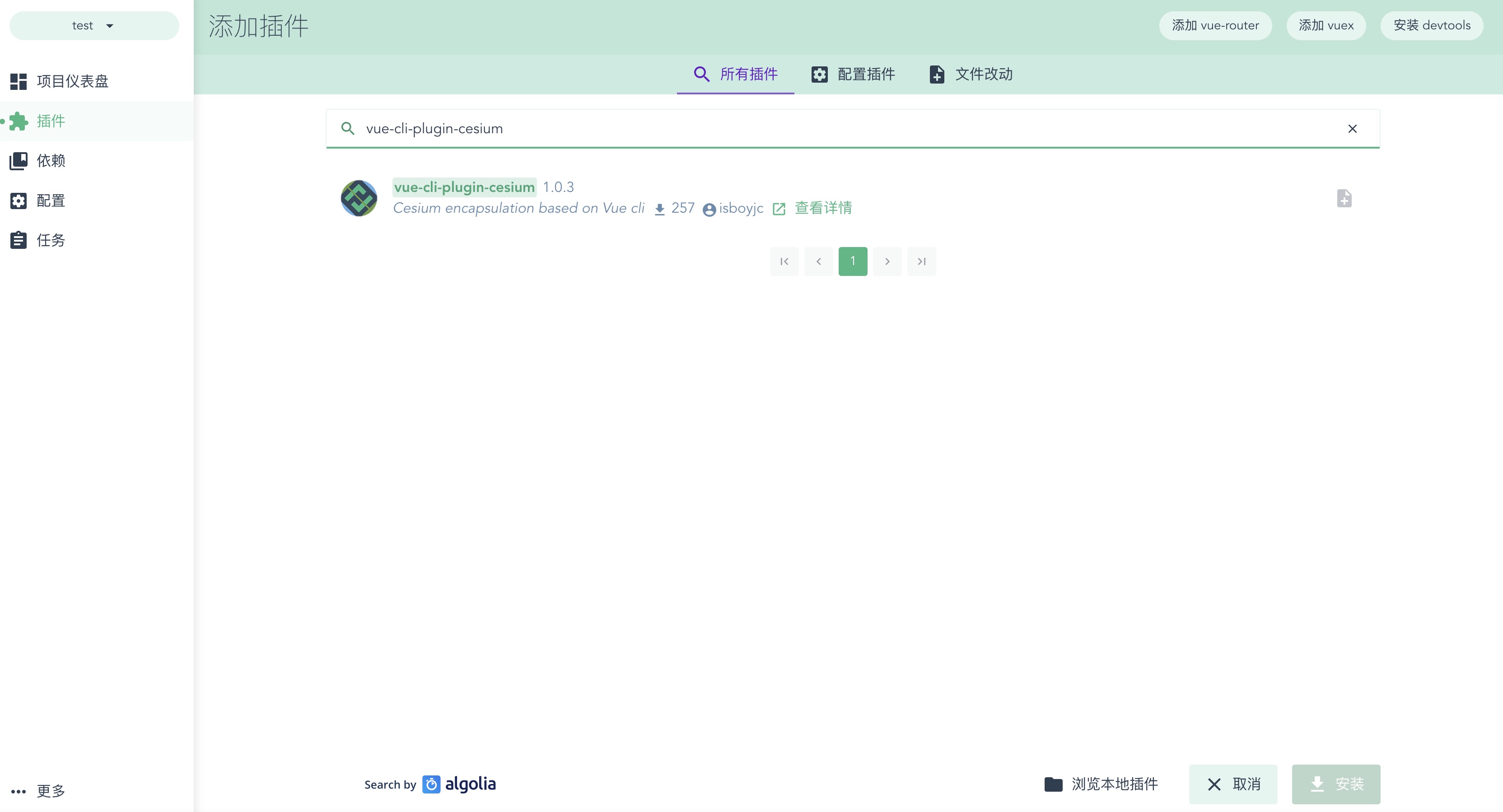
130 |
131 | 选中插件点击安装
132 |
133 | 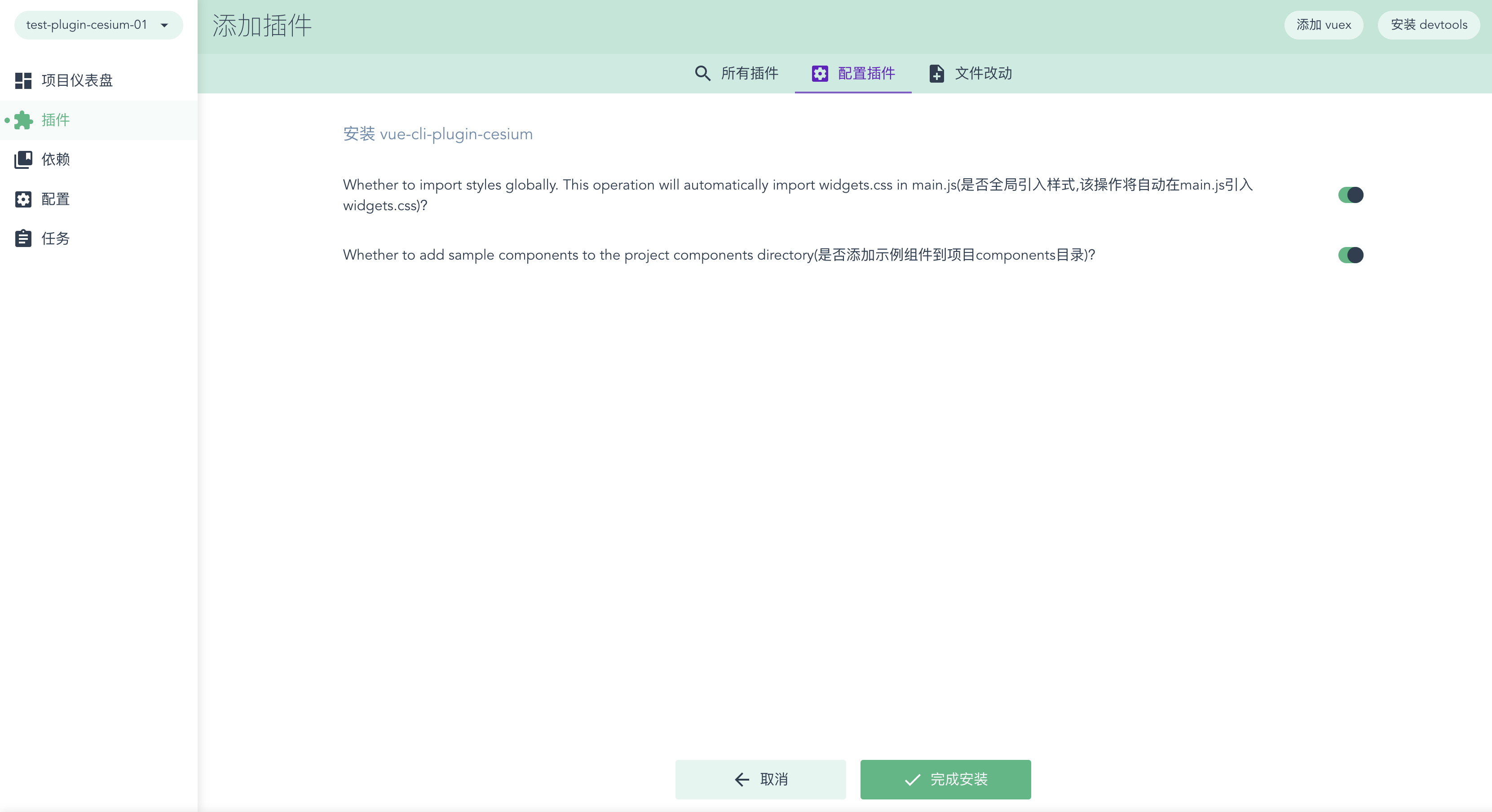
134 |
135 | ## 使用
136 |
137 | 开发时如下,直接在模块中使用 Cesium 对象即可
138 |
139 | 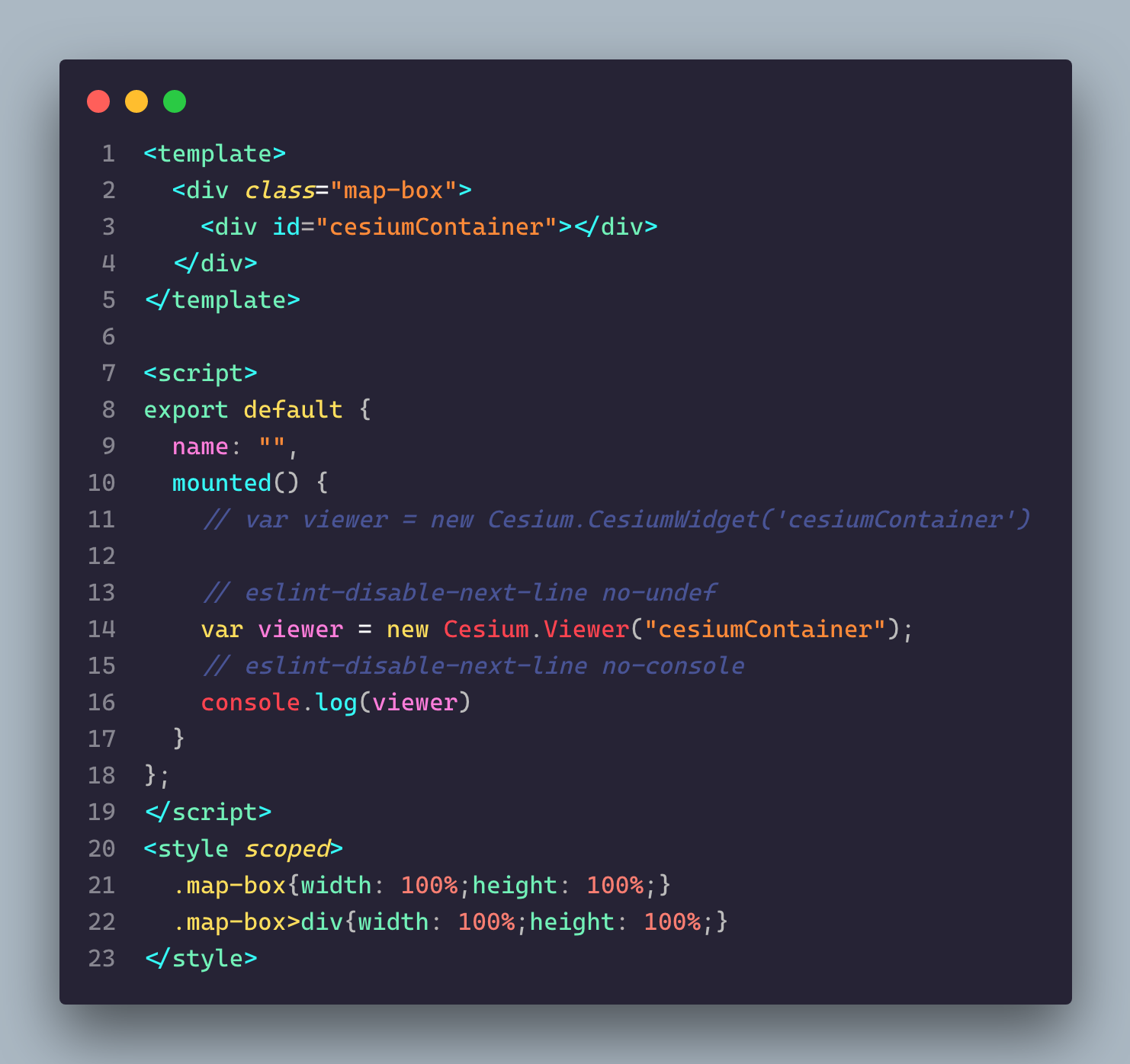
140 |
141 | 查看示例组件,模块引入即可,如下
142 |
143 | 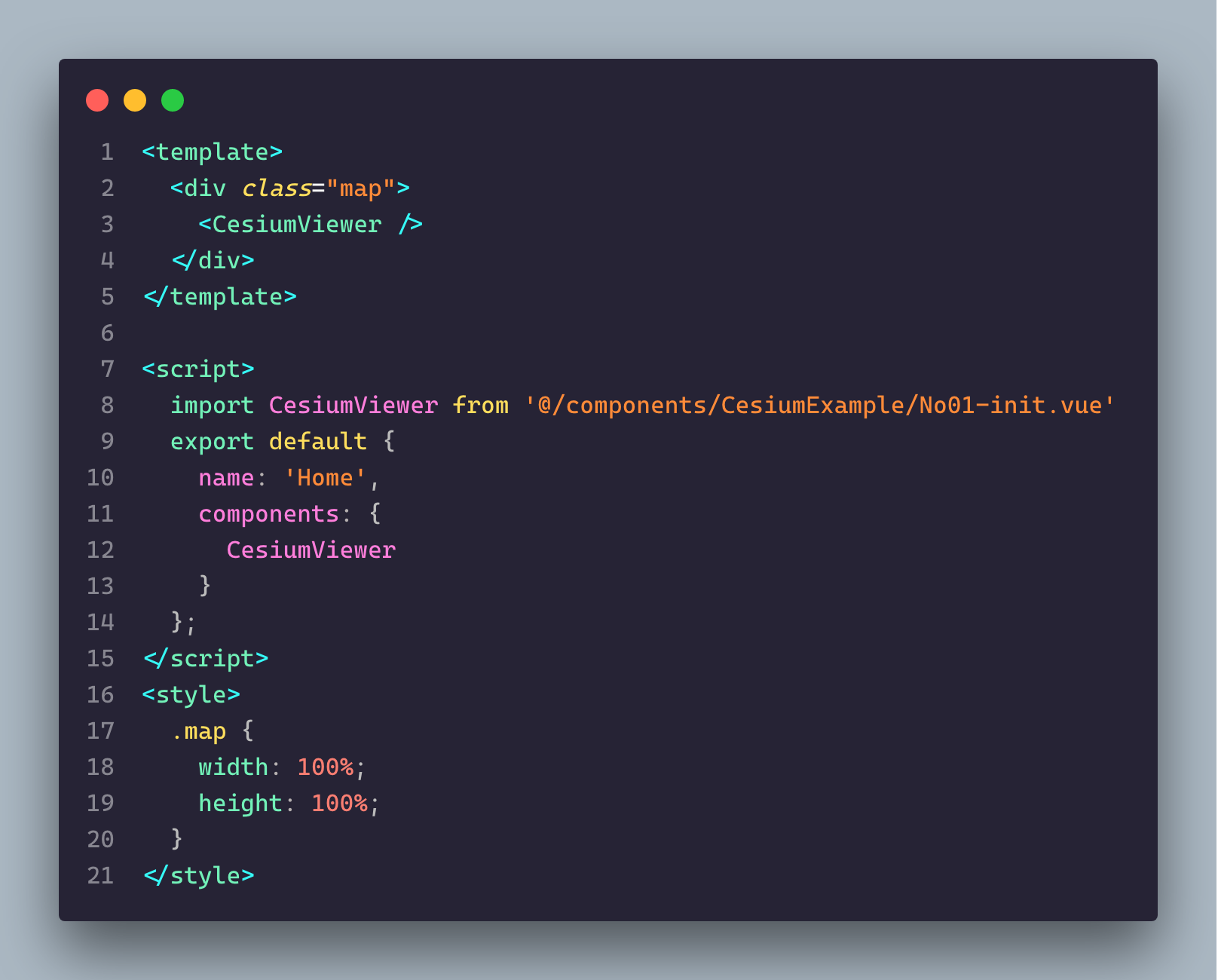
144 |
145 | ## 结束
146 |
147 | 安装完成后,就可以在 vue 项目中任意模块中使用 Cesium 了
148 |
149 | 你可以在每个 Vue 模块中直接使用 Cesium 对象实例而无须 import 引入
150 |
151 | 如果你想引入 cesium 包下的文件,我们为 cesium 包的目录设置了别名,就叫`cesium`
152 |
153 | 所以在引入`Widgets.css`时引入路径为`cesium/Widgets/widgets.css`
154 |
155 | 如果对您有所帮助,那么这将是我的荣幸
156 |
157 | 后期我会慢慢的完善此插件,并不停迭代,也欢迎大家提出建议,也欢迎 PR
158 |
159 | 如果您觉得还行,点个 star 再走哟
160 |
161 | 加下小助手【圈子】微信,验证消息写【github】|【cesium】都可以直接通过,和他聊聊天,或者加技术交流群我们一块玩耍都可以的
162 |
163 | 
164 |
165 | 如果你加小助手微信遇到了问题,也可以通过以下方式联系我或加群
166 |
167 | 
168 |
--------------------------------------------------------------------------------
/README.md:
--------------------------------------------------------------------------------
1 | # vue-cli-plugin-cesium
2 |
3 |
4 |  6 |
6 |
7 | 基于Vue-cli的cesium封装(Cesium encapsulation based on Vue cli)
8 |
9 | [](https://www.npmjs.com/package/vue-cli-plugin-cesium)
10 | [](https://www.npmjs.com/package/vue-cli-plugin-cesium)
11 | [](https://www.npmjs.com/package/vue-cli-plugin-cesium)
12 | [](https://github.com/isboyjc/vue-cli-plugin-cesium)
13 | [](https://github.com/isboyjc/vue-cli-plugin-cesium)
14 |
15 | ## 前言
16 |
17 | 市面上的前端框架中,Vue+Cesium 可谓是最佳搭档,一般做 Cesium B 端产品的公司都会使用 Vue,所以后续内容都将基于 Vue
18 |
19 | 通常情况下,我们要在 Vue 中使用 Cesium,首先要安装 Cesium,然后要在 vue-cli 的 webpack 配置很多东西,对一些有经验的人来说只不过麻烦些,但是对 Cesium 的初学者来说会很痛苦,因为没有使用过,也不知到要怎么配置,只能搜索网上的教程,一步一步踩坑
20 |
21 | 其实不管是有经验或是初学者,每次写项目重复配置这些东西都很麻烦
22 |
23 | `vue-cli-plugin-cesium` 就是为了解决这个问题
24 |
25 |
26 |
27 | ## 介绍
28 |
29 | `vue-cli-plugin-cesium` 是一款针对 Cesium 的 VueCLI 扩展插件,使用它将会让我们在 VueCLI 中零配置使用 Cesium,基于 VueCLI3.0+
30 |
31 | 其实就是我开始做 Cesium 的时候,觉得每次配置太麻烦,就写了个插件免配置从而节约开发时间,后来就发到几个 Cesium 开发群里给大家体验了一波,效果还不错
32 |
33 | 它会在我们已经创建好的 VueCLI 项目中做基于 Cesium 的扩展,截止目前它的功能也可以说它解决的问题如下
34 |
35 | - 自动安装 Cesium 并追加至 `package.json` 依赖项(可自选版本)
36 | - 自动扩展 VueCLI 中 Cesium 相关的 webpack 配置
37 | - 添加一个 `cesium` 别名,以便我们在项目中轻松的引入 Cesium 文件资源
38 | - 使 Cesium 对象实例可在每个 Vue 模块中使用而无须 import 引入
39 | - 使 webpack 可正常打包 Cesium
40 | - 允许 webpack 友好地在 Cesium 中使用 require,解决 require 引入警告
41 | - 开发环境生成 sourcemap,生产环境取消 sourcemap
42 | - 生产环境抽取公共模块执行压缩
43 | - 生产环境 loader 切换到优化模式
44 | - 自动在全局 main.js 中引入`Widgets.css`,可选
45 | - 自动在 `components/` 文件夹下生成示例文件,可选
46 |
47 |
48 |
49 | ## 安装
50 |
51 | `vue-cli-plugin-cesium` 是基于 VueCLI 的扩展插件,所以在使用前要先使用 VueCLI 创建一个 Vue 项目
52 |
53 | 如果您不了解 VueCLI 的使用,请移步 [VueCLI-官网](https://cli.vuejs.org/zh/guide/)
54 |
55 | 当前插件只支持 `VueCLI3.0+` 版本哦
56 |
57 | 创建好一个 Vue 项目后就可以按照以下步骤使用该插件了,同所有 VueCLI 插件一样,它有两种使用方式,推荐使用方式一
58 |
59 |
60 |
61 | ### 使用方式一
62 |
63 | 推荐使用 `vue add` 这种方式安装,一步到位,简单便捷
64 |
65 | ```js
66 | vue add vue-cli-plugin-cesium
67 |
68 | // 非全局安装的vue-cli可以
69 | npx vue add vue-cli-plugin-cesium
70 | ```
71 |
72 |
73 |
74 | ### 使用方式二
75 |
76 | 首先安装 `vue-cli-plugin-cesium` 插件,推荐使用 yarn 安装,因为它更简洁
77 |
78 | ```js
79 | // npm
80 | npm install --save-dev vue-cli-plugin-cesium
81 |
82 | // yarn
83 | yarn add vue-cli-plugin-cesium
84 | ```
85 |
86 | 安装完成后我们要使用 `vue invoke` 来初始化这个插件
87 |
88 | ```js
89 | vue invoke vue-cli-plugin-cesium
90 |
91 | // 非全局安装的vue-cli可以
92 | npx vue invoke vue-cli-plugin-cesium
93 | ```
94 |
95 |
96 |
97 | ### 安装过程
98 |
99 | 在 `vue invoke` 或 `vue add` 的过程中会有三个询问
100 |
101 | **询问一**
102 |
103 | ```txt
104 | Please choose a version of 'cesium' from this list
105 | 请在列表中选择 cesium 的版本
106 | ```
107 |
108 | 在此选择想使用的 `Cesium` 版本
109 |
110 | **询问二**
111 |
112 | ```txt
113 | Whether to import styles globally.
114 | This operation will automatically import widgets.css in main.js
115 | 是否全局引入样式,该操作将自动在main.js引入widgets.css?
116 | ```
117 |
118 | 此项默认为 yes,该操作将自动在 main.js 引入 widgets.css,即全局引入 Cesium 的 css 样式
119 |
120 | 如果此项设置为 no,那么开发时我们要手动引入`widgets.css`样式文件,引入命令如下
121 |
122 | ```txt
123 | import "cesium/Widgets/widgets.css"
124 | ```
125 |
126 | **询问三**
127 |
128 | ```txt
129 | Whether to add sample components to the project components directory
130 | 是否添加示例组件到项目components目录?
131 | ```
132 |
133 | 此选项默认为 yes,该操作会自动在 `src/components` 文件夹下生成 `CesiumExample` 文件夹,此文件夹中包含一些 Cesium 的使用示例供参考
134 |
135 | 如果此项设置为 no,则不生成示例文件
136 |
137 | 生成的示例中每个文件为一个模块,可直接模块引入至项目中查看,欢迎大家PR示例模块
138 |
139 |
140 |
141 | ### GUI 安装
142 |
143 | 如果我们使用 `vue ui` 创建项目,也可以直接在项目创建后的插件选项里搜索 `vue-cli-plugin-cesium` 并安装
144 |
145 | 如下所示:
146 |
147 | 
148 |
149 | 选中插件点击安装
150 |
151 | 
152 |
153 |
154 |
155 |
156 |
157 | ## 使用
158 |
159 | 开发时如下,直接在模块中使用 Cesium 对象即可
160 |
161 | 
162 |
163 | 查看示例组件,模块引入即可,如下
164 |
165 | 
166 |
167 |
168 |
169 | ## 常见问题
170 |
171 | 当你顺顺利利安装好了插件后开始开发,使用 Cesium 对象时,可能会遇到下面这种错误
172 |
173 | ```js
174 | Error:Cesium is no-undef
175 | ```
176 |
177 | 前端小伙伴都应该知道,这好像是 Eslint 语法错误,没错,这是因为插件内部使用了 Webpack 的内置模块 `ProvidePlugin` 来做到使用 Cesium 对象时将不再需要 `import` 或 `require` 引入,而一般我们在使用 VueCLI 创建项目时会默认带上 Eslint,Eslint 语法检验会认为 Cesium 是一个未声明的变量,于是抛出了错误
178 |
179 | **解决办法一**
180 |
181 | `package.json` 中配置 Eslint 规则允许 `no-undef` ,如下所示,在 `package.json` 中 `eslintConfig` 字段下的 `rules` 配置 `"no-undef": 0` ,在不关掉 Eslint 的情况下单独配置允许未声明的变量
182 |
183 | ```js
184 | {
185 | "dependencies": {},
186 | "devDependencies": {},
187 | "eslintConfig": {
188 | "root": true,
189 | "env": {
190 | "node": true
191 | },
192 | "extends": [
193 | "plugin:vue/essential",
194 | "eslint:recommended"
195 | ],
196 | "parserOptions": {
197 | "parser": "babel-eslint"
198 | },
199 | "rules": {
200 | "no-undef": 0
201 | }
202 | }
203 | }
204 |
205 | ```
206 |
207 |
208 |
209 | **解决办法二**
210 |
211 | 我们可以通过在 `package.json` 中直接删除 `eslintConfig` 对象来直接关掉 Eslint
212 |
213 | 也可以在 `vue.config.js` 中配置关掉 Eslint,如下
214 |
215 | ```js
216 | module.exports = {
217 | lintOnSave: false
218 | }
219 | ```
220 |
221 | 修改之后重启服务即可,推荐使用第一种办法,Eslint 语法校验是一个极好的约束开发的工具,可以让我们同一个团队内的语法风格统一,最好还是不要关掉
222 |
223 |
224 |
225 | ## 结束
226 |
227 | 安装完成后,就可以在 vue 项目中任意模块中使用 Cesium 了
228 |
229 | 你可以在每个 Vue 模块中直接使用 Cesium 对象实例而无须 import 引入
230 |
231 | 如果你想引入 cesium 包下的文件,我们为 cesium 包的目录设置了别名,就叫 `cesium`
232 |
233 | 所以在引入`Widgets.css`时引入路径为`cesium/Widgets/widgets.css`
234 |
235 | 如果对您有所帮助,那么这将是我的荣幸
236 |
237 | 后期我会慢慢的完善此插件,并不停迭代,也欢迎大家提出建议,也欢迎 PR
238 |
239 | 如果您觉得还行,点个 star 再走哟
240 |
241 | 加下小助手【圈子】微信,验证消息写【cesium | github | 前端 | 后端 | 其他】都可以直接通过,和他聊聊天,或者加技术交流群我们一块玩耍都可以的
242 |
243 | 
244 |
--------------------------------------------------------------------------------