└── README.md
/README.md:
--------------------------------------------------------------------------------
1 | # Data-Structures-and-Algorithms-Cheat-Sheet
2 |
3 | This list is meant to be both a quick guide and deep dive into what your primary focus should be when it comes to learning Data Structures and Algorithms. As a beginner it can often be extremely overwhelming to know where to put your focus, and what to prioritize. Lets dive in.
4 |
5 |
6 | # Table of Content
7 | - [Data Structures](#data-structures)
8 | - [Array](#array)
9 | - [Linked List](#linked-list)
10 | - [Hash Table or Hash Map](#hash)
11 | - [Binary Tree](#binary-tree)
12 | - [Algorithms](#algorithms)
13 | - [Algorithm Basics](#algorithm-basics)
14 | - [Search Algorithms](#search-algorithms)
15 | - [Breadth First Search](#breadth-first-search)
16 | - [Depth First Search](#depth-first-search)
17 | - [Sorting Algorithms](#sorting-algorithms)
18 | - [Selection Sort](#selection-sort)
19 | - [Insertion Sort](#insertion-sort)
20 | - [Merge Sort](#merge-sort)
21 | - [Quick Sort](#quick-sort)
22 |
23 |
24 | # Data Structures
25 | ### Array
26 | #### Definition
27 | - Stores data elements based on an sequential, most commonly 0 based, index.
28 | - They are one of the oldest, most commonly used data structures.
29 |
30 | #### What you need to know
31 | - Optimal for indexing; bad at searching, inserting, and deleting (except at the end).
32 | - **Linear arrays**, or one dimensional arrays, are the most basic.
33 | - **Dynamic arrays** are like one dimensional arrays, but have reserved space for additional elements.
34 | - **Multi dimensional arrays** nested arrays that allow for multiple dimensions such as an array of arrays providing a 2 dimensional spacial representation via x, y coordinates.
35 |
36 | ### Linked List
37 | #### Definition
38 | - Stores data with **nodes** that point to other nodes.
39 | - Nodes, at its most basic it has one datum and one reference (another node).
40 | - A linked list _chains_ nodes together by pointing one node's reference towards another node.
41 |
42 | #### What to know
43 | - Designed to optimize insertion and deletion, slow at indexing and searching.
44 | - **Doubly linked list** has nodes that also reference the previous node.
45 | - **Circularly linked list** is simple linked list whose **tail**, the last node, references the **head**, the first node.
46 | - **Stack**, commonly implemented with linked lists but can be made from arrays too.
47 | - Stacks are **last in, first out** (LIFO) data structures.
48 | - Made with a linked list by having the head be the only place for insertion and removal.
49 | - **Queues**, too can be implemented with a linked list or an array.
50 | - Queues are a **first in, first out** (FIFO) data structure.
51 | - Made with a linked list that only removes from head and adds to tail.
52 |
53 |
54 | ### Hash Table or Hash Map
55 | #### Definition
56 | - Stores data with key value pairs.
57 | - **Hash functions** accept a key and return an output unique only to that specific key.
58 | - This is known as **hashing**, which is the concept that an input and an output have a one-to-one correspondence to map information.
59 | - Hash functions return a unique address in memory for that data.
60 |
61 | #### What to know
62 | - Designed to optimize searching, insertion, and deletion.
63 | - **Hash collisions** are when a hash function returns the same output for two distinct inputs.
64 | - All hash functions have this problem.
65 | - This is often accommodated for by having the hash tables be very large.
66 | - Hashes are important for associative arrays and database indexing.
67 |
68 |
69 | ### Binary Tree
70 | #### Definition
71 | - Is a tree like data structure where every node has at most two children.
72 | - There is one left and right child node.
73 |
74 | #### What to know
75 | - Designed to optimize searching and sorting.
76 | - A **degenerate tree** is an unbalanced tree, which if entirely one-sided, is essentially a linked list.
77 | - They are comparably simple to implement than other data structures.
78 | - Used to make **binary search trees**.
79 | - A binary tree that uses comparable keys to assign which direction a child is.
80 | - Left child has a key smaller than its parent node.
81 | - Right child has a key greater than its parent node.
82 | - There can be no duplicate node.
83 | - Because of the above it is more likely to be used as a data structure than a binary tree.
84 |
85 |
86 |
87 | # Algorithms
88 | ## Algorithm Basics
89 | ### Recursive Algorithms
90 | #### Definition
91 | - An algorithm that calls itself in its definition.
92 | - **Recursive case** a conditional statement that is used to trigger the recursion.
93 | - **Base case** a conditional statement that is used to break the recursion.
94 |
95 | #### What to know
96 | - **Stack level too deep** and **stack overflow**.
97 | - If you've seen either of these from a recursive algorithm, you messed up.
98 | - It means that your base case was never triggered because it was faulty or the problem was so massive you ran out of alloted memory.
99 | - Knowing whether or not you will reach a base case is integral to correctly using recursion.
100 | - Often used in Depth First Search
101 |
102 |
103 | ### Iterative Algorithms
104 | #### Definition
105 | - An algorithm that is called repeatedly but for a finite number of times, each time being a single iteration.
106 | - Often used to move incrementally through a data set.
107 |
108 | #### What to know
109 | - Generally you will see iteration as loops, for, while, and until statements.
110 | - Think of iteration as moving one at a time through a set.
111 | - Often used to move through an array.
112 |
113 | #### Recursion Vs. Iteration
114 | - The differences between recursion and iteration can be confusing to distinguish since both can be used to implement the other. But know that,
115 | - Recursion is, usually, more expressive and easier to implement.
116 | - Iteration uses less memory.
117 | - **Functional languages** tend to use recursion. (i.e. Haskell)
118 | - **Imperative languages** tend to use iteration. (i.e. Ruby)
119 |
120 | ### Greedy Algorithms
121 | #### Definition
122 | - An algorithm that, while executing, selects only the information that meets a certain criteria.
123 | - The general five components:
124 | - A candidate set, from which a solution is created.
125 | - A selection function, which chooses the best candidate to be added to the solution.
126 | - A feasibility function, that is used to determine if a candidate can be used to contribute to a solution.
127 | - An objective function, which assigns a value to a solution, or a partial solution.
128 | - A solution function, which will indicate when we have discovered a complete solution.
129 |
130 | #### What to know
131 | - Used to find the expedient, though non-optimal, solution for a given problem.
132 | - Generally used on sets of data where only a small proportion of the information evaluated meets the desired result.
133 | - Often a greedy algorithm can help reduce the Big O of an algorithm.
134 | - This algorithm never needed to compare all the differences to one another, saving it an entire iteration.
135 |
136 | ## Search Algorithms
137 | ### Breadth First Search
138 | #### Definition
139 | - An algorithm that searches a tree (or graph) by searching levels of the tree first, starting at the root.
140 | - It finds every node on the same level, most often moving left to right.
141 | - While doing this it tracks the children nodes of the nodes on the current level.
142 | - When finished examining a level it moves to the left most node on the next level.
143 | - The bottom-right most node is evaluated last (the node that is deepest and is farthest right of it's level).
144 |
145 | #### What to know
146 | - Optimal for searching a tree that is wider than it is deep.
147 | - Uses a queue to store information about the tree while it traverses a tree.
148 | - Because it uses a queue it is more memory intensive than **depth first search**.
149 | - The queue uses more memory because it needs to stores pointers
150 |
151 | #### Time Complexity
152 | - Search: Breadth First Search: O(V + E)
153 | - E is number of edges
154 | - V is number of vertices
155 |
156 | ### Depth First Search
157 | #### Definition
158 | - An algorithm that searches a tree (or graph) by searching depth of the tree first, starting at the root.
159 | - It traverses left down a tree until it cannot go further.
160 | - Once it reaches the end of a branch it traverses back up trying the right child of nodes on that branch, and if possible left from the right children.
161 | - When finished examining a branch it moves to the node right of the root then tries to go left on all it's children until it reaches the bottom.
162 | - The right most node is evaluated last (the node that is right of all it's ancestors).
163 |
164 | #### What to know
165 | - Optimal for searching a tree that is deeper than it is wide.
166 | - Uses a stack to push nodes onto.
167 | - Because a stack is LIFO it does not need to keep track of the nodes pointers and is therefore less memory intensive than breadth first search.
168 | - Once it cannot go further left it begins evaluating the stack.
169 |
170 | #### Time Complexity
171 | - Search: Depth First Search: O(|E| + |V|)
172 | - E is number of edges
173 | - V is number of vertices
174 |
175 |
176 | #### Breadth First Search Vs. Depth First Search
177 | - The simple answer to this question is that it depends on the size and shape of the tree.
178 | - For wide, shallow trees use Breadth First Search
179 | - For deep, narrow trees use Depth First Search
180 |
181 | #### Nuances
182 | - Because BFS uses queues to store information about the nodes and its children, it could use more memory than is available on your computer. (But you probably won't have to worry about this.)
183 | - If using a DFS on a tree that is very deep you might go unnecessarily deep in the search. See [xkcd](http://xkcd.com/761/) for more information.
184 | - Breadth First Search tends to be a looping algorithm.
185 | - Depth First Search tends to be a recursive algorithm.
186 |
187 |
188 | ## Sorting Algorithms
189 |
190 | ### Selection Sort
191 | #### Definition
192 | - A comparison based sorting algorithm.
193 | - Starts with the cursor on the left, iterating left to right
194 | - Compares the left side to the right, looking for the smallest known item
195 | - If the left is smaller than the item to the right it continues iterating
196 | - If the left is bigger than the item to the right, the item on the right becomes the known smallest number
197 | - Once it has checked all items, it moves the known smallest to the cursor and advances the cursor to the right and starts over
198 | - As the algorithm processes the data set, it builds a fully sorted left side of the data until the entire data set is sorted
199 | - Changes the array in place.
200 |
201 | #### What to know
202 | - Inefficient for large data sets.
203 | - Very simple to implement.
204 |
205 | 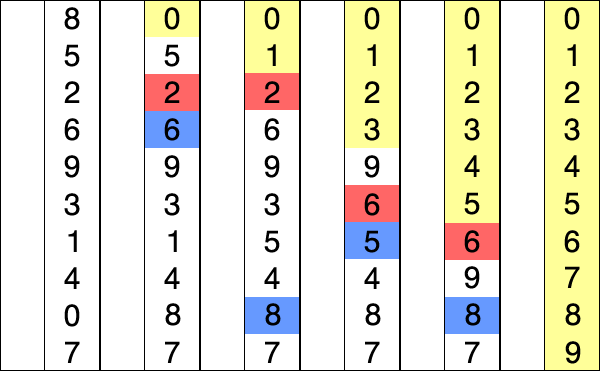
206 |
207 | ### Insertion Sort
208 | #### Definition
209 | - A comparison based sorting algorithm.
210 | - Iterates left to right comparing the current cursor to the previous item.
211 | - If the cursor is smaller than the item on the left it swaps positions and the cursor compares itself again to the left hand side until it is put in its sorted position.
212 | - As the algorithm processes the data set, the left side becomes increasingly sorted until it is fully sorted.
213 | - Changes the array in place.
214 |
215 | #### What to know
216 | - Inefficient for large data sets, but can be faster for than other algorithms for small ones.
217 | - Although it has an `O(n^2)` time complexity, in practice it is slightly less since its comparison scheme only requires checking place if it is smaller than its neighbor.
218 |
219 | 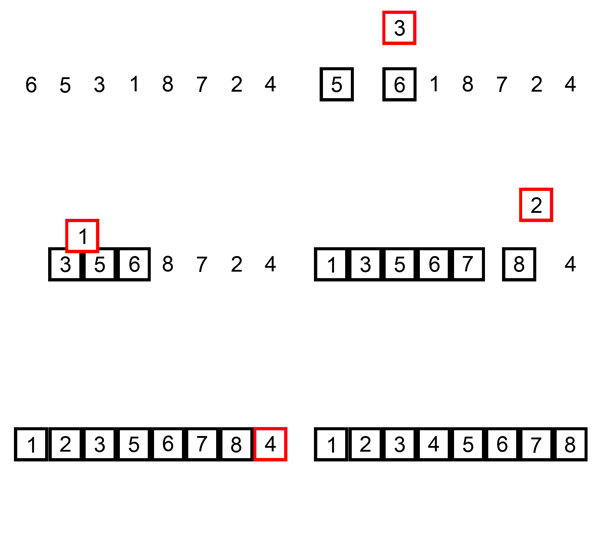
220 |
221 | ### Merge Sort
222 | #### Definition
223 | - A divide and conquer algorithm.
224 | - Recursively divides entire array by half into subsets until the subset is one, the base case.
225 | - Once the base case is reached results are returned and sorted ascending left to right.
226 | - Recursive calls are returned and the sorts double in size until the entire array is sorted.
227 |
228 | #### What to know
229 | - This is one of the fundamental sorting algorithms.
230 | - Know that it divides all the data into as small possible sets then compares them.
231 |
232 | 
233 |
234 | ### Quicksort
235 | #### Definition
236 | - A divide and conquer algorithm
237 | - Partitions entire data set in half by selecting a random pivot element and putting all smaller elements to the left of the element and larger ones to the right.
238 | - It repeats this process on the left side until it is comparing only two elements at which point the left side is sorted.
239 | - When the left side is finished sorting it performs the same operation on the right side.
240 | - Computer architecture favors the quicksort process.
241 | - Changes the array in place.
242 |
243 | #### What to know
244 | - While it has the same Big O as (or worse in some cases) many other sorting algorithms it is often faster in practice than many other sorting algorithms, such as merge sort.
245 |
246 |
247 | 
248 |
--------------------------------------------------------------------------------