├── example.jpg
├── .gitignore
├── Pipfile
├── LICENSE
├── utils.py
├── README.md
├── template-map.html
└── make.py
/example.jpg:
--------------------------------------------------------------------------------
https://raw.githubusercontent.com/jcontini/facebook-friends-map/HEAD/example.jpg
--------------------------------------------------------------------------------
/.gitignore:
--------------------------------------------------------------------------------
1 | .*
2 | db
3 | friends-map.html
4 | test.py
5 | *.json
6 | *.log
7 | *.csv
8 | *.lock
9 | *.geojson
10 | *.ipynb
11 | .env
12 |
--------------------------------------------------------------------------------
/Pipfile:
--------------------------------------------------------------------------------
1 | [[source]]
2 | name = "pypi"
3 | url = "https://pypi.org/simple"
4 | verify_ssl = true
5 |
6 | [dev-packages]
7 | pylint = "*"
8 |
9 | [packages]
10 | requests = "*"
11 | selenium = "*"
12 | geojson = "*"
13 | sqlite-utils = "*"
14 | webdriver_manager = "*"
15 | lxml = "*"
16 |
17 | [requires]
18 | python_version = "3"
19 |
--------------------------------------------------------------------------------
/LICENSE:
--------------------------------------------------------------------------------
1 | MIT License
2 |
3 | Copyright (c) 2020 Joe Contini
4 |
5 | Permission is hereby granted, free of charge, to any person obtaining a copy
6 | of this software and associated documentation files (the "Software"), to deal
7 | in the Software without restriction, including without limitation the rights
8 | to use, copy, modify, merge, publish, distribute, sublicense, and/or sell
9 | copies of the Software, and to permit persons to whom the Software is
10 | furnished to do so, subject to the following conditions:
11 |
12 | The above copyright notice and this permission notice shall be included in all
13 | copies or substantial portions of the Software.
14 |
15 | THE SOFTWARE IS PROVIDED "AS IS", WITHOUT WARRANTY OF ANY KIND, EXPRESS OR
16 | IMPLIED, INCLUDING BUT NOT LIMITED TO THE WARRANTIES OF MERCHANTABILITY,
17 | FITNESS FOR A PARTICULAR PURPOSE AND NONINFRINGEMENT. IN NO EVENT SHALL THE
18 | AUTHORS OR COPYRIGHT HOLDERS BE LIABLE FOR ANY CLAIM, DAMAGES OR OTHER
19 | LIABILITY, WHETHER IN AN ACTION OF CONTRACT, TORT OR OTHERWISE, ARISING FROM,
20 | OUT OF OR IN CONNECTION WITH THE SOFTWARE OR THE USE OR OTHER DEALINGS IN THE
21 | SOFTWARE.
22 |
--------------------------------------------------------------------------------
/utils.py:
--------------------------------------------------------------------------------
1 | #!/usr/bin/env python
2 | # coding: utf-8
3 | import os, json
4 | from sqlite_utils import Database
5 | from selenium import webdriver
6 |
7 | from webdriver_manager.firefox import GeckoDriverManager
8 | # driver = webdriver.Firefox(executable_path=GeckoDriverManager().install())
9 |
10 | # --- Paths ---
11 | db_folder = 'db/'
12 | json_folder = db_folder + 'json/'
13 |
14 | if not os.path.exists(json_folder):
15 | os.makedirs(json_folder)
16 |
17 | if not os.path.exists(db_folder):
18 | os.makedirs(db_folder)
19 |
20 | # --- Database ---
21 | db_file = 'data.db'
22 | db_path = db_folder + db_file
23 |
24 | db = Database(db_path)
25 |
26 | def db_setup():
27 | db["friend_list"].create({
28 | 'id':int,
29 | }, pk="id")
30 |
31 | db["profiles"].create({
32 | 'id':int,
33 | }, pk="id")
34 |
35 | db["locations"].create({
36 | "location":str
37 | }, pk="location")
38 |
39 | print('>> Database initialized (%s)' % db_path)
40 |
41 | def db_read(table):
42 | data = []
43 | for row in db[table].rows:
44 | data.append(row)
45 | return data
46 |
47 | def db_write(table,data):
48 | db_table = db[table]
49 | db_table.insert(data, alter=True)
50 |
51 | def db_update(table,id,data):
52 | db[table].update(id, data, alter=True)
53 |
54 | def db_to_json():
55 | tables = db.table_names()
56 | for table in tables:
57 | data = []
58 | for row in db[table].rows:
59 | data.append(row)
60 | json_path = json_folder + table + '.json'
61 | with open(json_path, 'w+', encoding="utf-8") as f:
62 | json.dump(data, f, indent=2)
63 | print('%s extracted to %s' % (table,json_path))
64 |
65 | # Initialize database if not yet created
66 | if len(db.table_names()) == 0:
67 | db_setup()
--------------------------------------------------------------------------------
/README.md:
--------------------------------------------------------------------------------
1 | # Facebook Friend Mapper
2 |
3 | 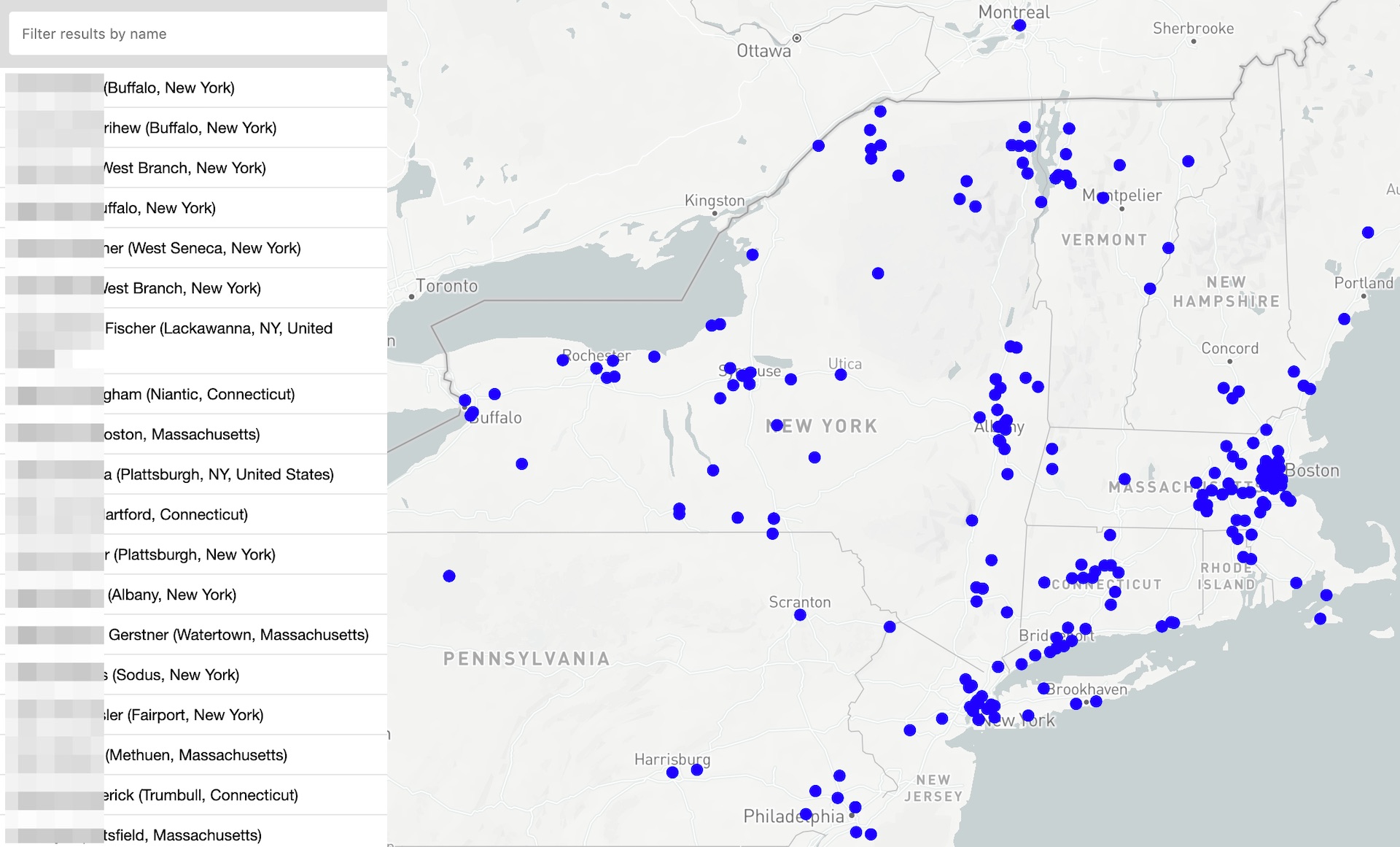
4 |
5 | Create a map of your facebook friends! Useful for when you're passing through a city and can't remember all the people you want to grab coffee with.
6 |
7 | ## First: A Warning
8 | When using this tool, Facebook can see that you're using an automated tool, which violates their terms. There is a risk that Facebook may decide to put a temporary or permanent ban on your account (though I haven't heard of this happening to anyone yet). I am not responsible for this or any other outcomes that may occur as a result of the use of this software.
9 |
10 | ## What this is
11 | This tool will only extract the data that your friends have already explicitly made it available to you. If the amount or content of the data freaks you (like it did to me!), then it's a good reminder for us all to check our profiles/privacy settings to make sure that we only share what we want others to be able to see.
12 |
13 | It works like this:
14 | 1. Open your friends list page (on m.facebook.com) and save to `db/friend_list.html`
15 | 2. Download your friend's profiles (on mbasic.facebook.com) to `db/profiles/`
16 | 3. Parse profiles for 'Current City' or 'Address' and add to location list.
17 | 4. Find the lat/long for each location (using Mapbox API) and save to `db/points.geojson`.
18 | 5. Creates `friends-map.html`, a self-contained, moveable, searchable map of your friends all over the world!
19 |
20 | All data is saved locally in `db/data.db` as a sqlite database.
21 |
22 | ## Installation
23 | Prerequisites:
24 | - Make sure that `python 3` and `pipenv` are installed.
25 | - Create a free [Mapbox API key](https://docs.mapbox.com/help/glossary/access-token). You'll need this so the tool can geocode city names into coordinates to use on the map.
26 |
27 | Then:
28 | 1. Clone this repository
29 | 2. `cd` into the cloned folder
30 | 3. Run `pipenv install` to install dependencies
31 |
32 | ## Using the tool
33 | 1. Run `pipenv shell` to activate the virtual environment. This is optional if you already have the required packages installed in your environment.
34 | 2. Run `python make.py`. On the first run, it'll ask for your Facebook username/password and Mapbox API Key. It saves these to the local `.env` file for use in subsequent runs (eg if you add more friends).
35 | 3. The tool will then index your friend list, download friend's profiles, geocode coordinates, and create the map. You can optionally use any of these flags to perform only certain actions:
36 |
37 | - `--list` Sign in, download friends list HTML
38 | - `--index` Extract friend list HTML to database
39 | - `--download` Download profile for each friend in index
40 | - `--parse` Extract profiles HTML to database
41 | - `--map` Geocode addresses & make the map!
42 | - `--json` Export sqlite database to JSON files (db/json/)
43 |
44 | If something breaks, just run the script again. It's built to pick up where it left off at all stages.
45 | Please file an issue if you run into any problems. Enjoy!
--------------------------------------------------------------------------------
/template-map.html:
--------------------------------------------------------------------------------
1 |
2 |
3 |
4 |
5 | Friends on a map
6 |
7 |
8 |
9 |
13 |
14 |
15 |
16 |
78 |
79 |
80 |
81 |
82 |
85 |
86 |
87 |
88 |
249 |
252 |
253 |
254 |
--------------------------------------------------------------------------------
/make.py:
--------------------------------------------------------------------------------
1 | #!/usr/bin/env python
2 | # coding: utf-8
3 |
4 | import argparse, json, sqlite3, os, glob, time, sys, requests, random, glob, webbrowser, utils
5 | from lxml import html
6 | from selenium import webdriver
7 | from selenium.common import exceptions
8 | from datetime import datetime
9 | from geojson import Feature, FeatureCollection, Point
10 | from sys import stdout
11 | os.system('cls' if os.name == 'nt' else 'clear')
12 |
13 | #Set up environment
14 | if os.path.exists('.env'):
15 | fb_user = os.getenv('fb_user')
16 | fb_pass = os.getenv('fb_pass')
17 | mapbox_token = os.getenv('mapbox_token')
18 | else:
19 | print("Welcome! Let's set up your environment. This will create a .env file in the same folder as this script, and set it up with your email, password, and Mapbox API Key. This is saved only on your device and only used to autofill the Facebook login form.\n")
20 |
21 | fb_user = input("Facebook Email Address: ")
22 | fb_pass = input("Facebook Password: ")
23 | print("\nTo plot your friends on a map, you need a (free) Mapbox API Key. If you don't already have one, follow instructions at https://docs.mapbox.com/help/glossary/access-token, then come back here to enter the access token\n")
24 | mapbox_token = input("Mapbox access token: ")
25 |
26 | f = open(".env","w+")
27 | f.write('fb_user="' + fb_user + '"\n')
28 | f.write('fb_pass="' + fb_pass + '"\n')
29 | f.write('mapbox_token="' + mapbox_token + '"\n')
30 | f.close()
31 |
32 | print("\nGreat! Details saved in .env, so you shouldn't need to do this again.\n")
33 |
34 | # Prepare database
35 | friends_html = 'db/friend_list.html'
36 | profiles_dir = 'db/profiles/'
37 | db_geojson = "db/points.geojson"
38 |
39 | db_index = 'friend_list'
40 | db_profiles = 'profiles'
41 | db_locations = 'locations'
42 |
43 | if not os.path.exists(profiles_dir):
44 | os.makedirs(profiles_dir)
45 |
46 | # Configure browser
47 | def start_browser():
48 | # Ensure mobile-friendly view for parsing
49 | useragent = "Mozilla/5.0 (Linux; Android 8.0.0; Pixel 2 XL Build/OPD1.170816.004) AppleWebKit/537.36 (KHTML, like Gecko) Chrome/67.0.3396.87 Mobile Safari/537.36"
50 |
51 | #Firefox
52 | profile = webdriver.FirefoxProfile()
53 | profile.set_preference("general.useragent.override", useragent)
54 | options = webdriver.FirefoxOptions()
55 | options.set_preference("dom.webnotifications.serviceworker.enabled", False)
56 | options.set_preference("dom.webnotifications.enabled", False)
57 | #options.add_argument('--headless')
58 |
59 | browser = webdriver.Firefox(firefox_profile=profile,options=options)
60 | return browser
61 |
62 | # Login
63 | def sign_in():
64 | fb_start_page = 'https://m.facebook.com/'
65 | print("Logging in %s automatically..." % fb_user)
66 | browser.get(fb_start_page)
67 | email_id = browser.find_element_by_id("m_login_email")
68 | pass_id = browser.find_element_by_id("m_login_password")
69 | confirm_id = browser.find_element_by_name("login")
70 | email_id.send_keys(fb_user)
71 | pass_id.send_keys(fb_pass)
72 | confirm_id.click()
73 | time.sleep(3)
74 |
75 | # If 2FA enabled, prompt for OTP
76 | if "checkpoint" in browser.current_url:
77 | otp_id = browser.find_element_by_id("approvals_code")
78 | continue_id = browser.find_element_by_id("checkpointSubmitButton")
79 |
80 | fb_otp = input("Enter OTP: ")
81 | otp_id.send_keys(fb_otp)
82 | continue_id.click()
83 |
84 | time.sleep(3)
85 | return True
86 |
87 | # Download friends list
88 | def download_friends_list():
89 | browser.get("https://m.facebook.com/me/friends")
90 | time.sleep(3)
91 | print('Loading friends list...')
92 | scrollpage = 1
93 | while browser.find_elements_by_css_selector('#m_more_friends'):
94 | browser.execute_script("window.scrollTo(0, document.body.scrollHeight);")
95 | stdout.write("\r>> Scrolled to page %d" % (scrollpage))
96 | stdout.flush()
97 | scrollpage += 1
98 | time.sleep(0.5)
99 |
100 | with open (friends_html, 'w', encoding="utf-8") as f:
101 | f.write(browser.page_source)
102 | print("\n>> Saved friend list to '%s'" % friends_html)
103 |
104 | # Parse friends list into JSON
105 | def index_friends():
106 | friends = utils.db_read(db_index)
107 | already_parsed = []
108 | for i,d in enumerate(friends):
109 | already_parsed.append(d['id'])
110 | print('Loading saved friends list...')
111 |
112 | file_path = os.getcwd() + '/' + friends_html
113 | x = html.parse(file_path).xpath
114 | base = '(//*[@data-sigil="undoable-action"])'
115 | num_items = len(x(base))
116 | if num_items == 0:
117 | print("\nWasn't able to parse friends index. This probably means that Facebook updated their template. \nPlease raise issue on Github and I will try to update the script. \nOr if you can code, please submit a pull request instead :)\n")
118 | sys.exit()
119 | for i in range(1,num_items+1):
120 | b = base + '['+str(i)+']/'
121 | info = json.loads(x(b+'/div[3]/div/div/div[3]')[0].get('data-store'))
122 | stdout.flush()
123 | stdout.write("\rScanning friend list... (%d / %d)" % (i,num_items))
124 | if not info['id'] in already_parsed:
125 | name = x(b+'/div[2]//a')[0].text
126 | alias = '' if info['is_deactivated'] else x(b+'/div[2]//a')[0].get('href')[1:]
127 | d = {
128 | 'id': info['id'],
129 | 'name': name,
130 | 'active': 0 if int(info['is_deactivated']) else 1,
131 | 'alias': alias
132 | }
133 |
134 | utils.db_write(db_index,d)
135 |
136 | print('\n>> Saved friends list (%s) to %s' % (num_items,db_index))
137 |
138 | # Download profile pages
139 | def download_profiles():
140 | print('Downloading profiles...')
141 | session_downloads = 0
142 | index = utils.db_read(db_index)
143 | for i,d in enumerate(index):
144 | if d['active']:
145 | fname = profiles_dir + str(d['id']) + '.html'
146 | if not os.path.exists(fname):
147 | print('- %s (# %s)' % (d['name'],d['id']))
148 | browser.get('https://mbasic.facebook.com/profile.php?v=info&id='+str(d['id']))
149 | session_downloads += 1
150 | time.sleep(random.randint(1,3))
151 | if session_downloads == 45:
152 | print("Taking a voluntary break at " + str(session_downloads) + " profile downloads to prevent triggering Facebook's alert systems. I recommend you quit (Ctrl-C or quit this window) to play it safe and try coming back tomorrow to space it out. \nOr, press enter to continue at your own risk.")
153 | if browser.title == "You can't use this feature at the moment":
154 | print("\n***WARNING***\n\nFacebook detected abnormal activity, so this script is going play it safe and take a break.\n- As of March 2020, this seems to happen after downloading ~45 profiles in 1 session.\n- I recommend not running the script again until tomorrow.\n- Excessive use might cause Facebook to get more suspicious and possibly suspend your account.\n\nIf you have experience writing scrapers, please feel free to recommend ways to avoid triggering Facebook's detection system :)")
155 | sys.exit(1)
156 | if browser.find_elements_by_css_selector('#login_form') or browser.find_elements_by_css_selector('#mobile_login_bar'):
157 | print('\nBrowser is not logged into facebook! Please run again to login & resume.')
158 | sys.exit(1)
159 | else:
160 | with open (fname, 'w', encoding="utf-8") as f:
161 | f.write(browser.page_source)
162 |
163 | # Parse profile pages into JSON
164 | def parse_profile(profile_file):
165 | xp_queries = {
166 | 'tagline': {'do':1,'txt':'//*[@id="root"]/div[1]/div[1]/div[2]/div[2]'},
167 | 'about': {'do':1,'txt':'//div[@id="bio"]/div/div/div'},
168 | 'quotes': {'do':1,'txt':'//*[@id="quote"]/div/div/div'},
169 | 'rel': {'do':1,'txt':'//div[@id="relationship"]/div/div/div'},
170 | 'rel_partner': {'do':1,'href':'//div[@id="relationship"]/div/div/div//a'},
171 | 'details': {'do':1,'table':'(//div[not(@id)]/div/div/table[@cellspacing]/tbody/tr//'},
172 | 'work': {'do':1,'workedu':'//*[@id="work"]/div[1]/div/div'},
173 | 'education': {'do':1,'workedu':'//*[@id="education"]/div[1]/div/div'},
174 | 'family': {'do':1,'fam':'//*[@id="family"]/div/div/div'},
175 | 'life_events': {'do':1,'years':'(//div[@id="year-overviews"]/div/div/div/div/div)'}
176 | }
177 |
178 | profile_id = int(os.path.basename(profile_file).split('.')[0])
179 | profile_path = 'file://' + os.getcwd() + '/' + profile_file
180 | x = html.parse(profile_path).xpath
181 | alias = x('//a/text()[. = "Timeline"][1]/..')[0].get('href')[1:].split('?')[0]
182 | d = {
183 | 'id': profile_id,
184 | 'name': x('//head/title')[0].text,
185 | 'alias': alias if alias !='profile.php' else '',
186 | 'meta_created' : time.strftime('%Y-%m-%d', time.localtime(os.path.getctime(profile_file))),
187 | 'details': []
188 | }
189 | stdout.flush()
190 | stdout.write("\r>> Parsing: %s (# %s) " % (d['name'], d['id']))
191 |
192 | for k,v in xp_queries.items():
193 | if v['do'] == 1:
194 | if 'txt' in v:
195 | elements = x(v['txt'])
196 | if len(elements) > 0:
197 | d[str(k)] = str(x(v['txt'])[0].text_content())
198 | elif 'href' in v:
199 | elements = x(v['href'])
200 | if len(elements) > 0:
201 | d[str(k)] = x(v['href'])[0].get('href')[1:].split('refid')[0][:-1]
202 | elif 'table' in v:
203 | rows = x(v['table']+'td[1])')
204 | for i in range (1, len(rows)+1):
205 | key = x(v['table']+'td[1])'+'['+str(i)+']')[0].text_content()
206 | val = x(v['table']+'td[2])'+'['+str(i)+']')[0].text_content()
207 | d['details'].append({key:val})
208 | elif 'workedu' in v:
209 | d[str(k)] = []
210 | base = v['workedu']
211 | rows = x(base)
212 | for i in range (1, len(rows)+1):
213 | # Prep the Work/Education object
214 | dd = {}
215 | workedu_base = base+'['+str(i)+']'+'/div/div[1]/div[1]'
216 | dd['org'] = x(workedu_base)[0].text_content()
217 |
218 | # Determine org URL
219 | if str(k) == "work":
220 | org_href = workedu_base + '/span/a' # work URL
221 | else:
222 | org_href = workedu_base + '/div/span/a' # edu URL
223 |
224 | # Include org URL if exists
225 | url_elements = x(org_href)
226 | if len(url_elements) > 0:
227 | dd['link'] = x(org_href)[0].get('href')[1:].split('refid')[0][:-1]
228 |
229 | dd['lines'] = []
230 | lines = x(base+'['+str(i)+']'+'/div/div[1]/div')
231 | for l in range (2, len(lines)+1):
232 | line = x(base+'['+str(i)+']'+'/div/div[1]/div'+'['+str(l)+']')[0].text_content()
233 | dd['lines'].append(line)
234 |
235 | d[str(k)].append(dd)
236 |
237 | elif 'fam' in v:
238 | d[str(k)] = []
239 | base = v['fam']
240 | rows = x(base)
241 | for i in range (1, len(rows)+1):
242 | xp_alias = x(base+'['+str(i)+']'+'//h3[1]/a')
243 | alias = '' if len(xp_alias) == 0 else xp_alias[0].get('href')[1:].split('refid')[0][:-1]
244 | d[str(k)].append({
245 | 'name': x(base+'['+str(i)+']'+'//h3[1]')[0].text_content(),
246 | 'rel': x(base+'['+str(i)+']'+'//h3[2]')[0].text_content(),
247 | 'alias': alias
248 | })
249 | elif 'life_events' in k:
250 | d[str(k)] = []
251 | base = v['years']
252 | years = x(base)
253 | for i in range (1,len(years)+1):
254 | year = x(base+'['+str(i)+']'+'/div[1]/text()')[0]
255 | events = x(base+'['+str(i)+']'+'/div/div/a')
256 | for e in range(1,len(events)+1):
257 | event = x('('+base+'['+str(i)+']'+'/div/div/a)'+'['+str(e)+']')
258 | d[str(k)].append({
259 | 'year': year,
260 | 'title': event[0].text_content(),
261 | 'link': event[0].get('href')[1:].split('refid')[0]
262 | })
263 | return d
264 |
265 | # Parse all unparsed profiles in db profile folder
266 | def parse_profile_files():
267 | print('>> Scanning downloaded profile pages...')
268 | already_parsed = []
269 | profiles = utils.db_read(db_profiles)
270 | for profile in profiles:
271 | already_parsed.append(profile['id'])
272 |
273 | profile_files = glob.glob(profiles_dir+'*.html')
274 | for profile_file in profile_files:
275 | profile_id = int(os.path.basename(profile_file).split('.')[0])
276 | if not profile_id in already_parsed:
277 | profile = parse_profile(profile_file)
278 | utils.db_write(db_profiles,profile)
279 |
280 | print('>> %s profiles parsed to %s' % (len(profile_files),db_profiles))
281 |
282 | # Create index of friends and their locations
283 | def index_locations():
284 | print("Scanning profiles for location (eg. current city)...")
285 | profiles = utils.db_read(db_profiles)
286 |
287 | detail_fields = ['Current City','Mobile','Email','Birthday']
288 |
289 | for p in profiles:
290 | details = json.loads(p['details'])
291 | new_deets = {}
292 | for d in details:
293 | for k in d:
294 | if k in detail_fields:
295 | new_deets[k] = d.get(k,'')
296 | utils.db_update(db_profiles,p['id'],new_deets)
297 |
298 | print('>> Updated friend locations')
299 |
300 | # Get coordinates for all locations
301 | def make_map():
302 | print('Geocoding locations from profiles...')
303 | url_base = 'https://api.mapbox.com/geocoding/v5/mapbox.places/'
304 |
305 | profiles = utils.db_read(db_profiles)
306 | locations = utils.db_read(db_locations)
307 |
308 | geo_dict = {}
309 | for location in locations:
310 | geo_dict[location['location']] = location['coordinates']
311 |
312 | features = []
313 | for d in profiles:
314 | city = d['Current City']
315 | if city is not None:
316 | stdout.flush()
317 | stdout.write("\r>> Geocoding %s \r" % (city))
318 | if city in geo_dict:
319 | coordinates = json.loads(geo_dict[city])
320 | else:
321 | r = requests.get(url_base + city + '.json', params={
322 | 'access_token': mapbox_token,
323 | 'types': 'place,address',
324 | 'limit': 1
325 | })
326 | try:
327 | coordinates = r.json()['features'][0]['geometry']['coordinates']
328 | except IndexError:
329 | pass
330 |
331 | utils.db_write(db_locations,{'location': city,'coordinates': coordinates})
332 | geo_dict[city] = str(coordinates)
333 |
334 | features.append(Feature(
335 | geometry = Point(coordinates),
336 | properties = {'name': d['name'],'location': city,'id': d['id']}
337 | ))
338 |
339 | collection = FeatureCollection(features)
340 | with open(db_geojson, "w") as f:
341 | f.write('%s' % collection)
342 |
343 | with open('template-map.html') as f:
344 | html=f.read()
345 | html=html.replace('{{mapbox_token}}', mapbox_token)
346 | html=html.replace('{{datapoints}}', str(collection))
347 | with open('friends-map.html', "w", encoding="utf-8") as f:
348 | f.write(html)
349 | print('>> Saved map to friends-map.html!')
350 | webbrowser.open_new('file://' + os.getcwd() + '/friends-map.html')
351 |
352 | # Shell application
353 | if __name__ == '__main__':
354 | parser = argparse.ArgumentParser(description='Facebook friends profile exporter')
355 | parser.add_argument('--list', action='store_true', help='Download friends list')
356 | parser.add_argument('--index', action='store_true', help='Index friends list')
357 | parser.add_argument('--download', action='store_true', help='Download friends profiles')
358 | parser.add_argument('--parse', action='store_true', help='Parse profiles to database')
359 | parser.add_argument('--map', action='store_true', help='Make the map!')
360 | parser.add_argument('--json', action='store_true', help='Export database to JSON files')
361 | args = parser.parse_args()
362 | signed_in = False
363 | try:
364 | fullrun = True if len(sys.argv) == 1 else False
365 |
366 | if fullrun or args.list or args.index or args.download:
367 | browser = start_browser()
368 |
369 | #Download friends list
370 | if fullrun or args.list:
371 | signed_in = sign_in()
372 | download_friends_list()
373 |
374 | #Index friends list
375 | if fullrun or args.index:
376 | index_friends()
377 |
378 | #Download profiles
379 | if fullrun or args.download:
380 | if not signed_in: sign_in()
381 | download_profiles()
382 |
383 | #Parse profiles
384 | if fullrun or args.parse:
385 | parse_profile_files()
386 |
387 | #Geocode
388 | if fullrun or args.map:
389 | index_locations()
390 | make_map()
391 |
392 | #JSON Export (Optional)
393 | if fullrun or args.json:
394 | utils.db_to_json()
395 |
396 | except KeyboardInterrupt:
397 | print('\nThanks for using the script! Please raise any issues on Github.')
398 | pass
--------------------------------------------------------------------------------